<?xml version="1.0" encoding="UTF-8"?>
<?xml-stylesheet type="text/xsl" media="screen" href="/~files/atom-premium.xsl"?>
                                                                                                                                                                                                                                                                                                                                                                                                                                                                                                                                             
<feed xmlns="http://www.w3.org/2005/Atom" xmlns:feedpress="https://feed.press/xmlns" xmlns:media="http://search.yahoo.com/mrss/" xmlns:podcast="https://podcastindex.org/namespace/1.0">
  <feedpress:locale>en</feedpress:locale>
  <link rel="hub" href="https://feedpress.superfeedr.com/"/>
  <logo>https://static.feedpress.com/logo/telerik-blogs-web-jquery-61850b8e50ab5.jpg</logo>
  <title type="text">Telerik Blogs | Web | JQuery</title>
  <subtitle type="text">The official blog of Progress Telerik - expert articles and tutorials for developers.</subtitle>
  <id>uuid:8773e822-51d4-4202-9c00-e67ef2cf3518;id=1604</id>
  <updated>2026-04-08T23:12:47Z</updated>
  <contributor>
    <name>Maria Ivanova </name>
  </contributor>
  <contributor>
    <name>David Robertson </name>
  </contributor>
  <contributor>
    <name>Yanko Dzhemerenov </name>
  </contributor>
  <link rel="alternate" href="https://www.telerik.com/"/>
  <link rel="self" type="application/atom+xml" href="https://feeds.telerik.com/blogs/web-jquery"/>
  <entry>
    <id>urn:uuid:14170089-af04-485a-941c-24cdfcf23d33</id>
    <title type="text">Kendo UI for jQuery: AI Coding Assistant</title>
    <summary type="text">See how the Kendo UI for jQuery AI Coding Assistant can help speed up development and prototyping with an MCP server that provides contextually aware code that follows Kendo UI patterns.</summary>
    <published>2026-03-30T14:22:14Z</published>
    <updated>2026-04-08T23:12:47Z</updated>
    <author>
      <name>Hassan Djirdeh </name>
    </author>
    <link rel="alternate" href="https://feeds.telerik.com/link/23054/17309591/kendo-ui-jquery-ai-coding-assistant"/>
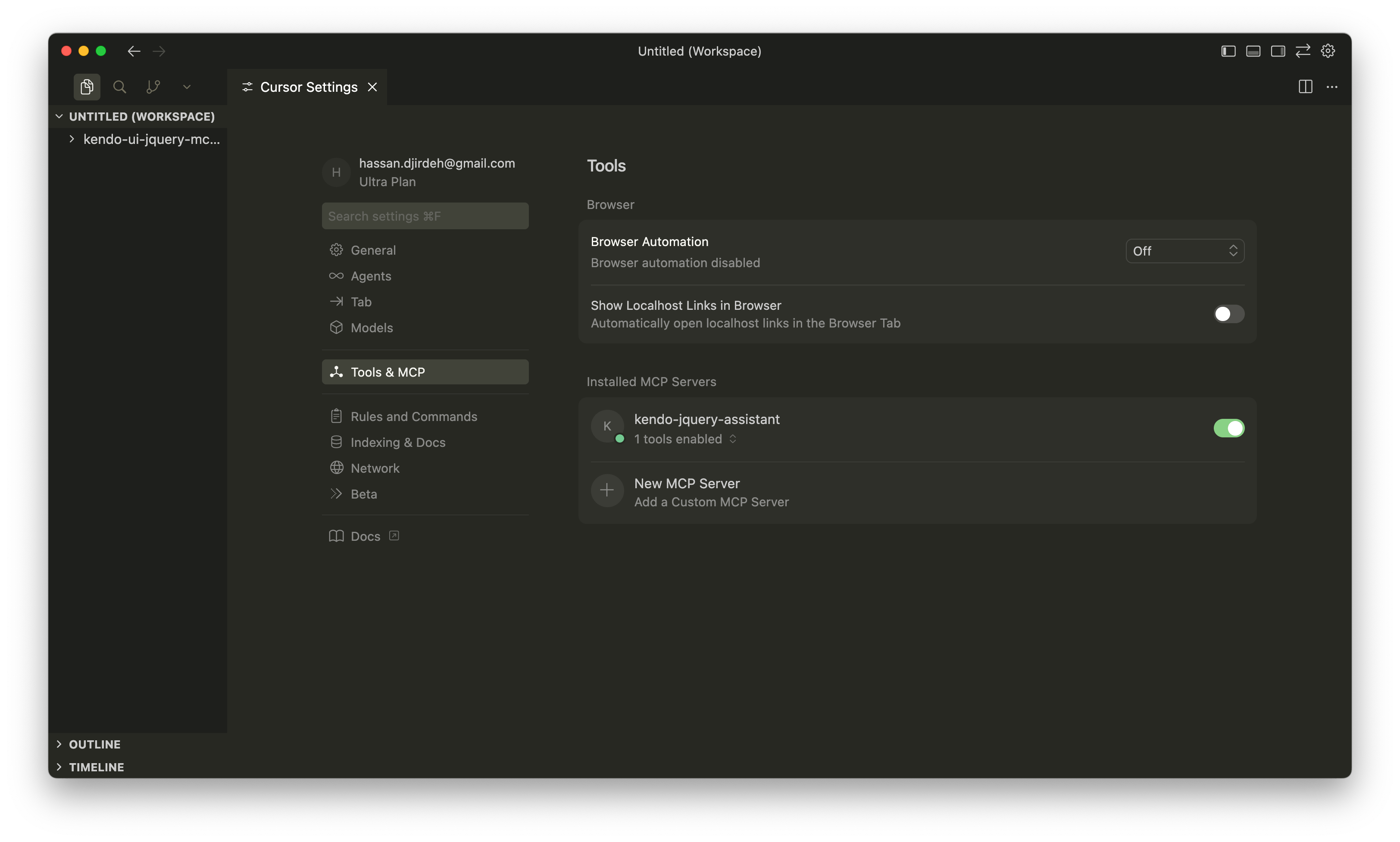
    <content type="text"><![CDATA[<p><span class="featured">See how the Kendo UI for jQuery AI Coding Assistant can help speed up development and prototyping with an MCP server that provides contextually aware code that follows Kendo UI patterns.</span></p><p>AI-powered coding assistants have become an important part of modern software engineering workflows. While AI tools excel at generating code quickly, they still require solid context to deliver their full value. This context becomes even more important when working with a UI library like Progress <a target="_blank" href="https://www.telerik.com/kendo-jquery-ui">Kendo UI for jQuery</a>, where correct APIs and configuration patterns matter. This is where the <a target="_blank" href="https://www.telerik.com/kendo-jquery-ui/documentation/ai-assistant/overview">Kendo UI for jQuery AI Coding Assistant</a> comes in.</p><p>In this article, we&rsquo;ll explore what the AI Coding Assistant offers and how it helps speed up component development and prototyping when building applications with Kendo UI for jQuery.</p><blockquote><p><strong>Prerequisites:</strong> To use the Kendo UI for jQuery AI Coding Assistant, you&rsquo;ll need a compatible MCP client (we&rsquo;ll be using <a target="_blank" href="https://cursor.com/">Cursor</a> in this article), an active Kendo UI for jQuery license (or trial) and an application that includes Kendo UI for jQuery.</p></blockquote><h2 id="mcp-model-context-protocol">MCP (Model Context Protocol)</h2><p><a target="_blank" href="https://docs.anthropic.com/en/docs/mcp">Model Context Protocol (MCP)</a> is an open standard developed by <a target="_blank" href="https://www.anthropic.com/">Anthropic</a> that standardizes how applications provide context to AI models and agents. Think of it as a common language that allows different systems to share information with AI in a structured way.</p><p>MCP works through servers that expose specific tools and knowledge to AI clients. When we install an MCP server, we&rsquo;re essentially giving our AI assistant access to specialized expertise in a particular domain. For Kendo UI for jQuery, this means the AI can understand component APIs, configuration options and implementation patterns that it wouldn&rsquo;t otherwise know about.</p><p>The Kendo UI for jQuery AI Coding Assistant is integrated into an MCP Server, which means any MCP-compatible client (like Cursor or VS Code) can tap into this specialized knowledge.</p><blockquote><p>Check out the article <a target="_blank" href="https://www.telerik.com/blogs/promise-model-context-protocol">The Promise of Model Context Protocol</a> for more details on MCP and what it offers.</p></blockquote><h2 id="setting-up-the-mcp-server-with-cursor">Setting Up the MCP Server with Cursor</h2><p><a target="_blank" href="https://cursor.com/">Cursor</a> is an AI-powered code editor that has native support for MCP servers. Let&rsquo;s walk through the setup process.</p><h3 id="configuring-the-mcp-server">Configuring the MCP Server</h3><p>The first step is creating the MCP configuration file. In the root of our Kendo UI for jQuery project, we&rsquo;ll create a <code>.cursor</code> folder with an <code>mcp.json</code> file:</p><pre class=" language-json"><code class="prism  language-json"><span class="token punctuation">{</span>
  <span class="token string">"mcpServers"</span><span class="token punctuation">:</span> <span class="token punctuation">{</span>
    <span class="token string">"kendo-jquery-assistant"</span><span class="token punctuation">:</span> <span class="token punctuation">{</span>
      <span class="token string">"type"</span><span class="token punctuation">:</span> <span class="token string">"stdio"</span><span class="token punctuation">,</span>
      <span class="token string">"command"</span><span class="token punctuation">:</span> <span class="token string">"npx"</span><span class="token punctuation">,</span>
      <span class="token string">"args"</span><span class="token punctuation">:</span> <span class="token punctuation">[</span><span class="token string">"-y"</span><span class="token punctuation">,</span> <span class="token string">"@progress/kendo-jquery-mcp@latest"</span><span class="token punctuation">]</span><span class="token punctuation">,</span>
      <span class="token string">"env"</span><span class="token punctuation">:</span> <span class="token punctuation">{</span>
        <span class="token string">"TELERIK_LICENSE_PATH"</span><span class="token punctuation">:</span> <span class="token string">"./telerik-license.txt"</span>
      <span class="token punctuation">}</span>
    <span class="token punctuation">}</span>
  <span class="token punctuation">}</span>
<span class="token punctuation">}</span>
</code></pre><p>This configuration tells Cursor to set up the Kendo UI for jQuery MCP server with the name <code>kendo-jquery-assistant</code>. The <code>TELERIK_LICENSE_PATH</code> environment variable should point to the location of our Telerik license file.</p><blockquote><p>After creating the <code>mcp.json</code> file, you may need to restart Cursor to pick up the new MCP configuration.</p></blockquote><h3 id="enabling-mcp-in-cursor-settings">Enabling MCP in Cursor Settings</h3><p>Once we&rsquo;ve set up the configuration file, we&rsquo;ll need to verify the MCP server is enabled in Cursor&rsquo;s settings. We can open Cursor settings and navigate to the &ldquo;MCP Tools&rdquo; section, and we should see our <code>kendo-jquery-assistant</code> server listed there. We can toggle it on to enable the server.</p><p><img src="https://d585tldpucybw.cloudfront.net/sfimages/default-source/blogs/2026/2026-03/kendo-jquery-mcp-cursor-enabled.png?sfvrsn=1c47b734_2" alt="Cursor settings - MCP Tools - kendo-jquery-assistant server toggled on." /></p><p>When the server appears in the list and is enabled, we&rsquo;re ready to start using the AI Coding Assistant.</p><h2 id="using-the-ai-coding-assistant">Using the AI Coding Assistant</h2><p>Before we dive into examples, there are a couple of things to keep in mind when working with the Kendo UI for jQuery AI Coding Assistant.</p><p>First, we need to make sure our prompts start with one of these trigger phrases: <code>/kendojquery</code> or <code>@kendojquery</code>, which tells Cursor to use the MCP server.</p><p>Second, we should verify that the MCP server is actually being used. We&rsquo;ll look for confirmation messages like &ldquo;Running kendo-jquery-assistant&rdquo; or similar statements in the output. If we don&rsquo;t see this, we might need to rephrase our prompt or check our configuration.</p><h2 id="building-a-grid-with-the-help-of-the-ai-coding-assistant">Building a Grid with the Help of the AI Coding Assistant</h2><p>Now that we have the Kendo UI for jQuery AI Coding Assistant configured, let&rsquo;s explore how it enhances our development workflow by building a <a target="_blank" href="https://demos.telerik.com/kendo-ui/grid/index">Kendo UI Grid</a>.</p><p>Before we start prompting, here&rsquo;s the base HTML file we&rsquo;ll be working with. It includes the Kendo UI theme, jQuery and the Kendo UI for jQuery scripts:</p><pre class=" language-html"><code class="prism  language-html"><span class="token doctype">&lt;!DOCTYPE html&gt;</span>
<span class="token tag"><span class="token tag"><span class="token punctuation">&lt;</span>html</span><span class="token punctuation">&gt;</span></span>
  <span class="token tag"><span class="token tag"><span class="token punctuation">&lt;</span>head</span><span class="token punctuation">&gt;</span></span>
    <span class="token tag"><span class="token tag"><span class="token punctuation">&lt;</span>meta</span> <span class="token attr-name">charset</span><span class="token attr-value"><span class="token punctuation">=</span><span class="token punctuation">"</span>utf-8<span class="token punctuation">"</span></span> <span class="token punctuation">/&gt;</span></span>
    <span class="token tag"><span class="token tag"><span class="token punctuation">&lt;</span>title</span><span class="token punctuation">&gt;</span></span>Kendo UI jQuery Grid Example<span class="token tag"><span class="token tag"><span class="token punctuation">&lt;/</span>title</span><span class="token punctuation">&gt;</span></span>

    <span class="token comment">&lt;!-- Kendo UI default theme --&gt;</span>
    <span class="token tag"><span class="token tag"><span class="token punctuation">&lt;</span>link</span> <span class="token attr-name">rel</span><span class="token attr-value"><span class="token punctuation">=</span><span class="token punctuation">"</span>stylesheet<span class="token punctuation">"</span></span> <span class="token attr-name">href</span><span class="token attr-value"><span class="token punctuation">=</span><span class="token punctuation">"</span>https://kendo.cdn.telerik.com/themes/12.3.0/default/default-main.css<span class="token punctuation">"</span></span> <span class="token punctuation">/&gt;</span></span>

    <span class="token comment">&lt;!-- jQuery first --&gt;</span>
    <span class="token tag"><span class="token tag"><span class="token punctuation">&lt;</span>script</span> <span class="token attr-name">src</span><span class="token attr-value"><span class="token punctuation">=</span><span class="token punctuation">"</span>https://code.jquery.com/jquery-3.7.0.min.js<span class="token punctuation">"</span></span><span class="token punctuation">&gt;</span></span><span class="token script language-javascript"></span><span class="token tag"><span class="token tag"><span class="token punctuation">&lt;/</span>script</span><span class="token punctuation">&gt;</span></span>

    <span class="token comment">&lt;!-- Kendo UI for jQuery --&gt;</span>
    <span class="token tag"><span class="token tag"><span class="token punctuation">&lt;</span>script</span> <span class="token attr-name">src</span><span class="token attr-value"><span class="token punctuation">=</span><span class="token punctuation">"</span>https://kendo.cdn.telerik.com/2025.4.1321/js/kendo.all.min.js<span class="token punctuation">"</span></span><span class="token punctuation">&gt;</span></span><span class="token script language-javascript"></span><span class="token tag"><span class="token tag"><span class="token punctuation">&lt;/</span>script</span><span class="token punctuation">&gt;</span></span>

    <span class="token comment">&lt;!-- License script --&gt;</span>
    <span class="token tag"><span class="token tag"><span class="token punctuation">&lt;</span>script</span> <span class="token attr-name">src</span><span class="token attr-value"><span class="token punctuation">=</span><span class="token punctuation">"</span>telerik-license.js<span class="token punctuation">"</span></span><span class="token punctuation">&gt;</span></span><span class="token script language-javascript"></span><span class="token tag"><span class="token tag"><span class="token punctuation">&lt;/</span>script</span><span class="token punctuation">&gt;</span></span>
  <span class="token tag"><span class="token tag"><span class="token punctuation">&lt;/</span>head</span><span class="token punctuation">&gt;</span></span>
  <span class="token tag"><span class="token tag"><span class="token punctuation">&lt;</span>body</span><span class="token punctuation">&gt;</span></span>
    <span class="token tag"><span class="token tag"><span class="token punctuation">&lt;</span>h1</span><span class="token punctuation">&gt;</span></span>My Kendo UI Grid<span class="token tag"><span class="token tag"><span class="token punctuation">&lt;/</span>h1</span><span class="token punctuation">&gt;</span></span>
  <span class="token tag"><span class="token tag"><span class="token punctuation">&lt;/</span>body</span><span class="token punctuation">&gt;</span></span>
<span class="token tag"><span class="token tag"><span class="token punctuation">&lt;/</span>html</span><span class="token punctuation">&gt;</span></span>
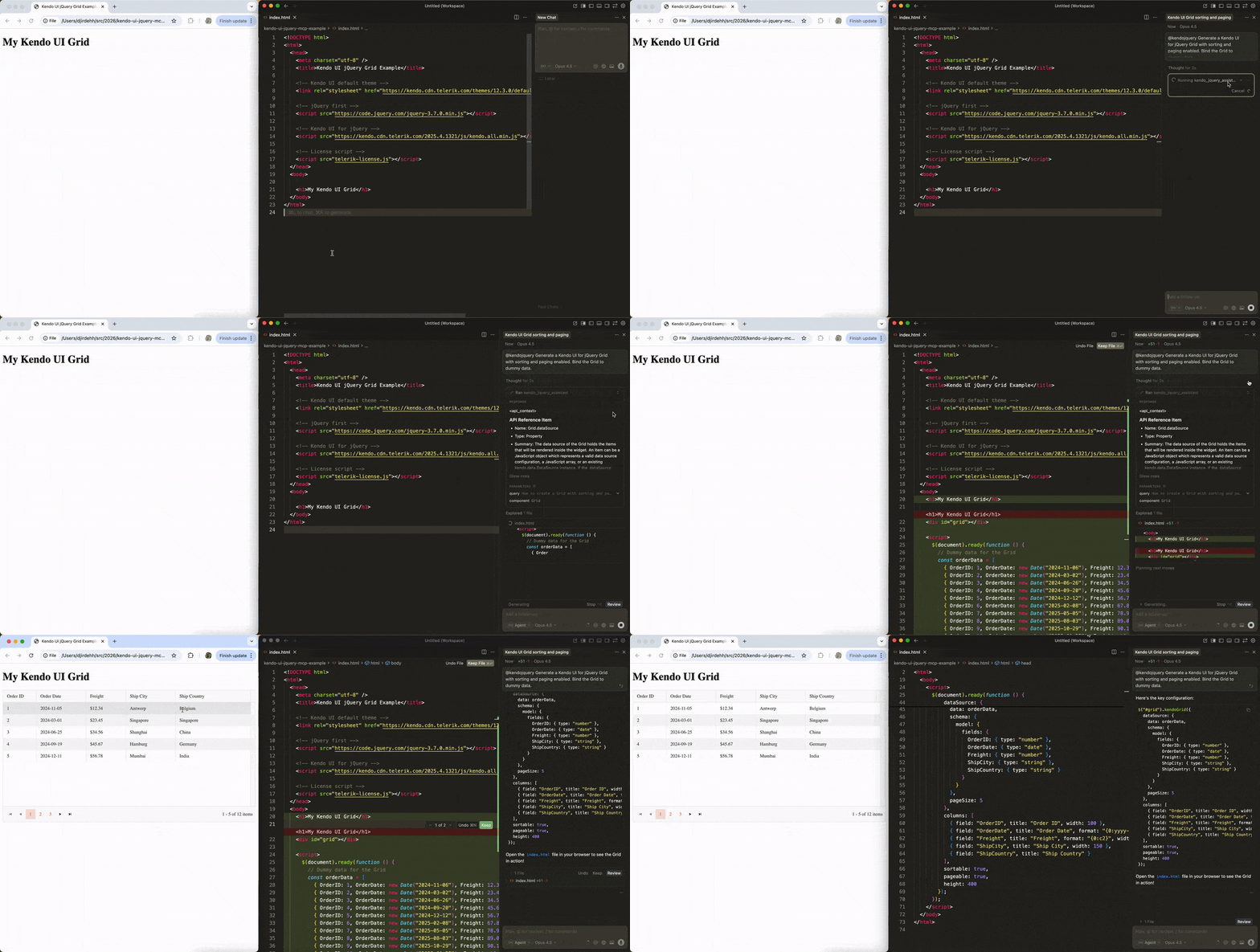
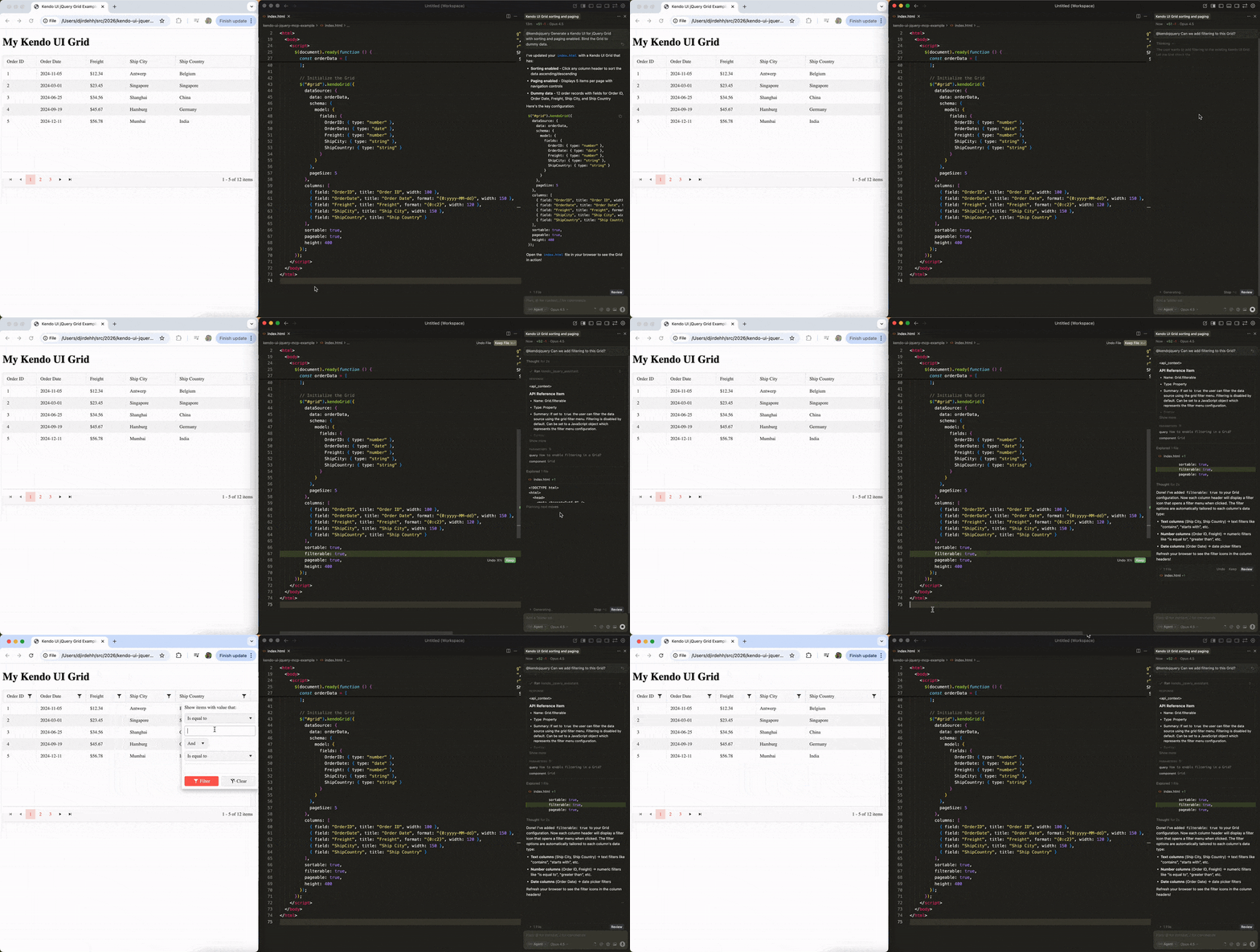
</code></pre><p>With this foundation in place, we can start using the AI Coding Assistant to build our Grid.</p><h3 id="creating-a-basic-grid-with-sorting-and-paging">Creating a Basic Grid with Sorting and Paging</h3><p>We&rsquo;ll start with a simple prompt to create a Grid from scratch:</p><p><strong>Prompt:</strong> <code>@kendojquery Generate a Kendo UI for jQuery Grid with sorting and paging enabled. Bind the Grid to dummy data.</code></p><p>The MCP server processes this request and provides us with a complete implementation.</p><p><img src="https://d585tldpucybw.cloudfront.net/sfimages/default-source/blogs/2026/2026-03/kendo-jquery-mcp-example-1.gif?sfvrsn=69ee97d2_2" alt="MCP server processing request: kendojquery generate a Kendo UI for jQuery Grid with sorting and paging enabled. Bind the Grid to dummy data. And a grid shows up in our app!" /></p><p>The generated code includes everything we need to get started:</p><pre class=" language-html"><code class="prism  language-html"><span class="token doctype">&lt;!DOCTYPE html&gt;</span>
<span class="token tag"><span class="token tag"><span class="token punctuation">&lt;</span>html</span><span class="token punctuation">&gt;</span></span>
  <span class="token tag"><span class="token tag"><span class="token punctuation">&lt;</span>head</span><span class="token punctuation">&gt;</span></span>
    <span class="token tag"><span class="token tag"><span class="token punctuation">&lt;</span>meta</span> <span class="token attr-name">charset</span><span class="token attr-value"><span class="token punctuation">=</span><span class="token punctuation">"</span>utf-8<span class="token punctuation">"</span></span> <span class="token punctuation">/&gt;</span></span>
    <span class="token tag"><span class="token tag"><span class="token punctuation">&lt;</span>title</span><span class="token punctuation">&gt;</span></span>Kendo UI jQuery Grid Example<span class="token tag"><span class="token tag"><span class="token punctuation">&lt;/</span>title</span><span class="token punctuation">&gt;</span></span>

    <span class="token comment">&lt;!-- Kendo UI default theme --&gt;</span>
    <span class="token tag"><span class="token tag"><span class="token punctuation">&lt;</span>link</span> <span class="token attr-name">rel</span><span class="token attr-value"><span class="token punctuation">=</span><span class="token punctuation">"</span>stylesheet<span class="token punctuation">"</span></span> <span class="token attr-name">href</span><span class="token attr-value"><span class="token punctuation">=</span><span class="token punctuation">"</span>https://kendo.cdn.telerik.com/themes/12.3.0/default/default-main.css<span class="token punctuation">"</span></span> <span class="token punctuation">/&gt;</span></span>

    <span class="token comment">&lt;!-- jQuery first --&gt;</span>
    <span class="token tag"><span class="token tag"><span class="token punctuation">&lt;</span>script</span> <span class="token attr-name">src</span><span class="token attr-value"><span class="token punctuation">=</span><span class="token punctuation">"</span>https://code.jquery.com/jquery-3.7.0.min.js<span class="token punctuation">"</span></span><span class="token punctuation">&gt;</span></span><span class="token script language-javascript"></span><span class="token tag"><span class="token tag"><span class="token punctuation">&lt;/</span>script</span><span class="token punctuation">&gt;</span></span>

    <span class="token comment">&lt;!-- Kendo UI for jQuery --&gt;</span>
    <span class="token tag"><span class="token tag"><span class="token punctuation">&lt;</span>script</span> <span class="token attr-name">src</span><span class="token attr-value"><span class="token punctuation">=</span><span class="token punctuation">"</span>https://kendo.cdn.telerik.com/2025.4.1321/js/kendo.all.min.js<span class="token punctuation">"</span></span><span class="token punctuation">&gt;</span></span><span class="token script language-javascript"></span><span class="token tag"><span class="token tag"><span class="token punctuation">&lt;/</span>script</span><span class="token punctuation">&gt;</span></span>

    <span class="token comment">&lt;!-- License script --&gt;</span>
    <span class="token tag"><span class="token tag"><span class="token punctuation">&lt;</span>script</span> <span class="token attr-name">src</span><span class="token attr-value"><span class="token punctuation">=</span><span class="token punctuation">"</span>telerik-license.js<span class="token punctuation">"</span></span><span class="token punctuation">&gt;</span></span><span class="token script language-javascript"></span><span class="token tag"><span class="token tag"><span class="token punctuation">&lt;/</span>script</span><span class="token punctuation">&gt;</span></span>
  <span class="token tag"><span class="token tag"><span class="token punctuation">&lt;/</span>head</span><span class="token punctuation">&gt;</span></span>
  <span class="token tag"><span class="token tag"><span class="token punctuation">&lt;</span>body</span><span class="token punctuation">&gt;</span></span>
    <span class="token tag"><span class="token tag"><span class="token punctuation">&lt;</span>h1</span><span class="token punctuation">&gt;</span></span>My Kendo UI Grid<span class="token tag"><span class="token tag"><span class="token punctuation">&lt;/</span>h1</span><span class="token punctuation">&gt;</span></span>

    <span class="token tag"><span class="token tag"><span class="token punctuation">&lt;</span>div</span> <span class="token attr-name">id</span><span class="token attr-value"><span class="token punctuation">=</span><span class="token punctuation">"</span>grid<span class="token punctuation">"</span></span><span class="token punctuation">&gt;</span></span><span class="token tag"><span class="token tag"><span class="token punctuation">&lt;/</span>div</span><span class="token punctuation">&gt;</span></span>

    <span class="token tag"><span class="token tag"><span class="token punctuation">&lt;</span>script</span><span class="token punctuation">&gt;</span></span><span class="token script language-javascript">
      <span class="token function">$</span><span class="token punctuation">(</span>document<span class="token punctuation">)</span><span class="token punctuation">.</span><span class="token function">ready</span><span class="token punctuation">(</span><span class="token keyword">function</span> <span class="token punctuation">(</span><span class="token punctuation">)</span> <span class="token punctuation">{</span>
        <span class="token comment">// Dummy data for the Grid</span>
        <span class="token keyword">const</span> orderData <span class="token operator">=</span> <span class="token punctuation">[</span>
          <span class="token punctuation">{</span> OrderID<span class="token punctuation">:</span> <span class="token number">1</span><span class="token punctuation">,</span> OrderDate<span class="token punctuation">:</span> <span class="token keyword">new</span> <span class="token class-name">Date</span><span class="token punctuation">(</span><span class="token string">"2024-11-06"</span><span class="token punctuation">)</span><span class="token punctuation">,</span> Freight<span class="token punctuation">:</span> <span class="token number">12.34</span><span class="token punctuation">,</span> ShipCity<span class="token punctuation">:</span> <span class="token string">"Antwerp"</span><span class="token punctuation">,</span> ShipCountry<span class="token punctuation">:</span> <span class="token string">"Belgium"</span> <span class="token punctuation">}</span><span class="token punctuation">,</span>
          <span class="token punctuation">{</span> OrderID<span class="token punctuation">:</span> <span class="token number">2</span><span class="token punctuation">,</span> OrderDate<span class="token punctuation">:</span> <span class="token keyword">new</span> <span class="token class-name">Date</span><span class="token punctuation">(</span><span class="token string">"2024-03-02"</span><span class="token punctuation">)</span><span class="token punctuation">,</span> Freight<span class="token punctuation">:</span> <span class="token number">23.45</span><span class="token punctuation">,</span> ShipCity<span class="token punctuation">:</span> <span class="token string">"Singapore"</span><span class="token punctuation">,</span> ShipCountry<span class="token punctuation">:</span> <span class="token string">"Singapore"</span> <span class="token punctuation">}</span><span class="token punctuation">,</span>
          <span class="token punctuation">{</span> OrderID<span class="token punctuation">:</span> <span class="token number">3</span><span class="token punctuation">,</span> OrderDate<span class="token punctuation">:</span> <span class="token keyword">new</span> <span class="token class-name">Date</span><span class="token punctuation">(</span><span class="token string">"2024-06-26"</span><span class="token punctuation">)</span><span class="token punctuation">,</span> Freight<span class="token punctuation">:</span> <span class="token number">34.56</span><span class="token punctuation">,</span> ShipCity<span class="token punctuation">:</span> <span class="token string">"Shanghai"</span><span class="token punctuation">,</span> ShipCountry<span class="token punctuation">:</span> <span class="token string">"China"</span> <span class="token punctuation">}</span><span class="token punctuation">,</span>
          <span class="token punctuation">{</span> OrderID<span class="token punctuation">:</span> <span class="token number">4</span><span class="token punctuation">,</span> OrderDate<span class="token punctuation">:</span> <span class="token keyword">new</span> <span class="token class-name">Date</span><span class="token punctuation">(</span><span class="token string">"2024-09-20"</span><span class="token punctuation">)</span><span class="token punctuation">,</span> Freight<span class="token punctuation">:</span> <span class="token number">45.67</span><span class="token punctuation">,</span> ShipCity<span class="token punctuation">:</span> <span class="token string">"Hamburg"</span><span class="token punctuation">,</span> ShipCountry<span class="token punctuation">:</span> <span class="token string">"Germany"</span> <span class="token punctuation">}</span><span class="token punctuation">,</span>
          <span class="token punctuation">{</span> OrderID<span class="token punctuation">:</span> <span class="token number">5</span><span class="token punctuation">,</span> OrderDate<span class="token punctuation">:</span> <span class="token keyword">new</span> <span class="token class-name">Date</span><span class="token punctuation">(</span><span class="token string">"2024-12-12"</span><span class="token punctuation">)</span><span class="token punctuation">,</span> Freight<span class="token punctuation">:</span> <span class="token number">56.78</span><span class="token punctuation">,</span> ShipCity<span class="token punctuation">:</span> <span class="token string">"Mumbai"</span><span class="token punctuation">,</span> ShipCountry<span class="token punctuation">:</span> <span class="token string">"India"</span> <span class="token punctuation">}</span><span class="token punctuation">,</span>
          <span class="token punctuation">{</span> OrderID<span class="token punctuation">:</span> <span class="token number">6</span><span class="token punctuation">,</span> OrderDate<span class="token punctuation">:</span> <span class="token keyword">new</span> <span class="token class-name">Date</span><span class="token punctuation">(</span><span class="token string">"2025-02-08"</span><span class="token punctuation">)</span><span class="token punctuation">,</span> Freight<span class="token punctuation">:</span> <span class="token number">67.89</span><span class="token punctuation">,</span> ShipCity<span class="token punctuation">:</span> <span class="token string">"Shanghai"</span><span class="token punctuation">,</span> ShipCountry<span class="token punctuation">:</span> <span class="token string">"China"</span> <span class="token punctuation">}</span><span class="token punctuation">,</span>
          <span class="token punctuation">{</span> OrderID<span class="token punctuation">:</span> <span class="token number">7</span><span class="token punctuation">,</span> OrderDate<span class="token punctuation">:</span> <span class="token keyword">new</span> <span class="token class-name">Date</span><span class="token punctuation">(</span><span class="token string">"2025-05-05"</span><span class="token punctuation">)</span><span class="token punctuation">,</span> Freight<span class="token punctuation">:</span> <span class="token number">78.90</span><span class="token punctuation">,</span> ShipCity<span class="token punctuation">:</span> <span class="token string">"Tokyo"</span><span class="token punctuation">,</span> ShipCountry<span class="token punctuation">:</span> <span class="token string">"Japan"</span> <span class="token punctuation">}</span><span class="token punctuation">,</span>
          <span class="token punctuation">{</span> OrderID<span class="token punctuation">:</span> <span class="token number">8</span><span class="token punctuation">,</span> OrderDate<span class="token punctuation">:</span> <span class="token keyword">new</span> <span class="token class-name">Date</span><span class="token punctuation">(</span><span class="token string">"2025-08-03"</span><span class="token punctuation">)</span><span class="token punctuation">,</span> Freight<span class="token punctuation">:</span> <span class="token number">89.01</span><span class="token punctuation">,</span> ShipCity<span class="token punctuation">:</span> <span class="token string">"Port Klang"</span><span class="token punctuation">,</span> ShipCountry<span class="token punctuation">:</span> <span class="token string">"Malaysia"</span> <span class="token punctuation">}</span><span class="token punctuation">,</span>
          <span class="token punctuation">{</span> OrderID<span class="token punctuation">:</span> <span class="token number">9</span><span class="token punctuation">,</span> OrderDate<span class="token punctuation">:</span> <span class="token keyword">new</span> <span class="token class-name">Date</span><span class="token punctuation">(</span><span class="token string">"2025-10-29"</span><span class="token punctuation">)</span><span class="token punctuation">,</span> Freight<span class="token punctuation">:</span> <span class="token number">90.12</span><span class="token punctuation">,</span> ShipCity<span class="token punctuation">:</span> <span class="token string">"Rotterdam"</span><span class="token punctuation">,</span> ShipCountry<span class="token punctuation">:</span> <span class="token string">"Netherlands"</span> <span class="token punctuation">}</span><span class="token punctuation">,</span>
          <span class="token punctuation">{</span> OrderID<span class="token punctuation">:</span> <span class="token number">10</span><span class="token punctuation">,</span> OrderDate<span class="token punctuation">:</span> <span class="token keyword">new</span> <span class="token class-name">Date</span><span class="token punctuation">(</span><span class="token string">"2025-01-23"</span><span class="token punctuation">)</span><span class="token punctuation">,</span> Freight<span class="token punctuation">:</span> <span class="token number">10.32</span><span class="token punctuation">,</span> ShipCity<span class="token punctuation">:</span> <span class="token string">"Vancouver"</span><span class="token punctuation">,</span> ShipCountry<span class="token punctuation">:</span> <span class="token string">"Canada"</span> <span class="token punctuation">}</span><span class="token punctuation">,</span>
          <span class="token punctuation">{</span> OrderID<span class="token punctuation">:</span> <span class="token number">11</span><span class="token punctuation">,</span> OrderDate<span class="token punctuation">:</span> <span class="token keyword">new</span> <span class="token class-name">Date</span><span class="token punctuation">(</span><span class="token string">"2024-04-17"</span><span class="token punctuation">)</span><span class="token punctuation">,</span> Freight<span class="token punctuation">:</span> <span class="token number">21.43</span><span class="token punctuation">,</span> ShipCity<span class="token punctuation">:</span> <span class="token string">"Col&oacute;n"</span><span class="token punctuation">,</span> ShipCountry<span class="token punctuation">:</span> <span class="token string">"Panama"</span> <span class="token punctuation">}</span><span class="token punctuation">,</span>
          <span class="token punctuation">{</span> OrderID<span class="token punctuation">:</span> <span class="token number">12</span><span class="token punctuation">,</span> OrderDate<span class="token punctuation">:</span> <span class="token keyword">new</span> <span class="token class-name">Date</span><span class="token punctuation">(</span><span class="token string">"2024-07-11"</span><span class="token punctuation">)</span><span class="token punctuation">,</span> Freight<span class="token punctuation">:</span> <span class="token number">32.54</span><span class="token punctuation">,</span> ShipCity<span class="token punctuation">:</span> <span class="token string">"Manila"</span><span class="token punctuation">,</span> ShipCountry<span class="token punctuation">:</span> <span class="token string">"Philippines"</span> <span class="token punctuation">}</span>
        <span class="token punctuation">]</span><span class="token punctuation">;</span>

        <span class="token comment">// Initialize the Grid</span>
        <span class="token function">$</span><span class="token punctuation">(</span><span class="token string">"#grid"</span><span class="token punctuation">)</span><span class="token punctuation">.</span><span class="token function">kendoGrid</span><span class="token punctuation">(</span><span class="token punctuation">{</span>
          dataSource<span class="token punctuation">:</span> <span class="token punctuation">{</span>
            data<span class="token punctuation">:</span> orderData<span class="token punctuation">,</span>
            schema<span class="token punctuation">:</span> <span class="token punctuation">{</span>
              model<span class="token punctuation">:</span> <span class="token punctuation">{</span>
                fields<span class="token punctuation">:</span> <span class="token punctuation">{</span>
                  OrderID<span class="token punctuation">:</span> <span class="token punctuation">{</span> type<span class="token punctuation">:</span> <span class="token string">"number"</span> <span class="token punctuation">}</span><span class="token punctuation">,</span>
                  OrderDate<span class="token punctuation">:</span> <span class="token punctuation">{</span> type<span class="token punctuation">:</span> <span class="token string">"date"</span> <span class="token punctuation">}</span><span class="token punctuation">,</span>
                  Freight<span class="token punctuation">:</span> <span class="token punctuation">{</span> type<span class="token punctuation">:</span> <span class="token string">"number"</span> <span class="token punctuation">}</span><span class="token punctuation">,</span>
                  ShipCity<span class="token punctuation">:</span> <span class="token punctuation">{</span> type<span class="token punctuation">:</span> <span class="token string">"string"</span> <span class="token punctuation">}</span><span class="token punctuation">,</span>
                  ShipCountry<span class="token punctuation">:</span> <span class="token punctuation">{</span> type<span class="token punctuation">:</span> <span class="token string">"string"</span> <span class="token punctuation">}</span>
                <span class="token punctuation">}</span>
              <span class="token punctuation">}</span>
            <span class="token punctuation">}</span><span class="token punctuation">,</span>
            pageSize<span class="token punctuation">:</span> <span class="token number">5</span>
          <span class="token punctuation">}</span><span class="token punctuation">,</span>
          columns<span class="token punctuation">:</span> <span class="token punctuation">[</span>
            <span class="token punctuation">{</span> field<span class="token punctuation">:</span> <span class="token string">"OrderID"</span><span class="token punctuation">,</span> title<span class="token punctuation">:</span> <span class="token string">"Order ID"</span><span class="token punctuation">,</span> width<span class="token punctuation">:</span> <span class="token number">100</span> <span class="token punctuation">}</span><span class="token punctuation">,</span>
            <span class="token punctuation">{</span> field<span class="token punctuation">:</span> <span class="token string">"OrderDate"</span><span class="token punctuation">,</span> title<span class="token punctuation">:</span> <span class="token string">"Order Date"</span><span class="token punctuation">,</span> format<span class="token punctuation">:</span> <span class="token string">"{0:yyyy-MM-dd}"</span><span class="token punctuation">,</span> width<span class="token punctuation">:</span> <span class="token number">150</span> <span class="token punctuation">}</span><span class="token punctuation">,</span>
            <span class="token punctuation">{</span> field<span class="token punctuation">:</span> <span class="token string">"Freight"</span><span class="token punctuation">,</span> title<span class="token punctuation">:</span> <span class="token string">"Freight"</span><span class="token punctuation">,</span> format<span class="token punctuation">:</span> <span class="token string">"{0:c2}"</span><span class="token punctuation">,</span> width<span class="token punctuation">:</span> <span class="token number">120</span> <span class="token punctuation">}</span><span class="token punctuation">,</span>
            <span class="token punctuation">{</span> field<span class="token punctuation">:</span> <span class="token string">"ShipCity"</span><span class="token punctuation">,</span> title<span class="token punctuation">:</span> <span class="token string">"Ship City"</span><span class="token punctuation">,</span> width<span class="token punctuation">:</span> <span class="token number">150</span> <span class="token punctuation">}</span><span class="token punctuation">,</span>
            <span class="token punctuation">{</span> field<span class="token punctuation">:</span> <span class="token string">"ShipCountry"</span><span class="token punctuation">,</span> title<span class="token punctuation">:</span> <span class="token string">"Ship Country"</span> <span class="token punctuation">}</span>
          <span class="token punctuation">]</span><span class="token punctuation">,</span>
          sortable<span class="token punctuation">:</span> <span class="token boolean">true</span><span class="token punctuation">,</span>
          pageable<span class="token punctuation">:</span> <span class="token boolean">true</span><span class="token punctuation">,</span>
          height<span class="token punctuation">:</span> <span class="token number">400</span>
        <span class="token punctuation">}</span><span class="token punctuation">)</span><span class="token punctuation">;</span>
      <span class="token punctuation">}</span><span class="token punctuation">)</span><span class="token punctuation">;</span>
    </span><span class="token tag"><span class="token tag"><span class="token punctuation">&lt;/</span>script</span><span class="token punctuation">&gt;</span></span>
  <span class="token tag"><span class="token tag"><span class="token punctuation">&lt;/</span>body</span><span class="token punctuation">&gt;</span></span>
<span class="token tag"><span class="token tag"><span class="token punctuation">&lt;/</span>html</span><span class="token punctuation">&gt;</span></span>
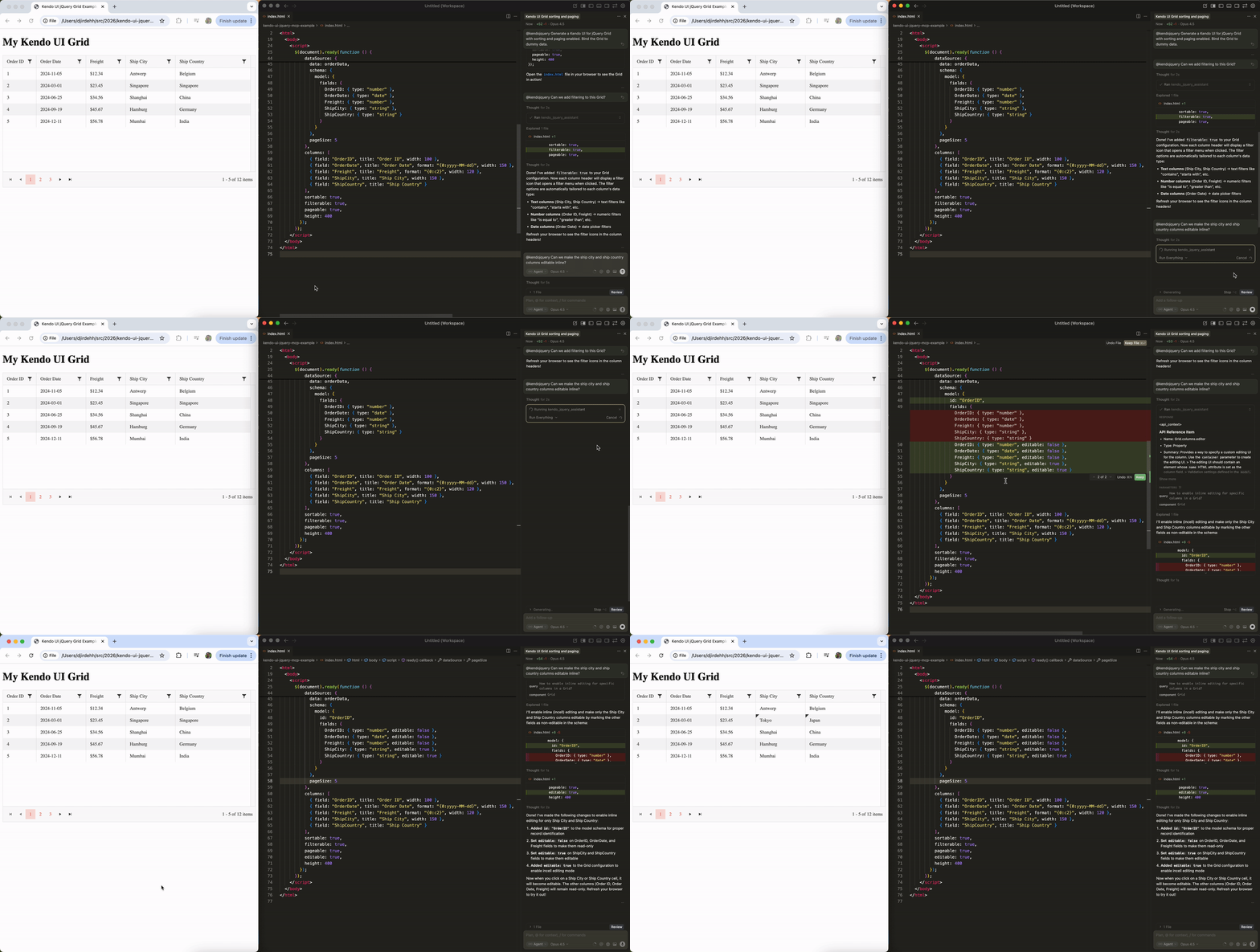
</code></pre><p>The code includes realistic dummy data, proper <code>Grid</code> initialization with jQuery&rsquo;s document ready pattern and appropriate configuration for sorting and paging.</p><p>This is where the AI Coding Assistant really shines. Instead of receiving generic code that may not work correctly with Kendo UI for jQuery, we&rsquo;re getting code that follows the library&rsquo;s practices and patterns.</p><h3 id="adding-filtering-capabilities">Adding Filtering Capabilities</h3><p>Building on our basic Grid, let&rsquo;s add filtering functionality with a follow-up prompt:</p><p><strong>Prompt:</strong> <code>@kendojquery Can we add filtering to this Grid?</code></p><p><img src="https://d585tldpucybw.cloudfront.net/sfimages/default-source/blogs/2026/2026-03/kendo-jquery-mcp-example-2.gif?sfvrsn=fa79d56a_2" alt="With prompt: @kendojquery Can we add filtering to this Grid? we have a filter option available in our app grid" /></p><p>The MCP server understands our existing context and enhances the implementation:</p><pre class=" language-js"><code class="prism  language-js"><span class="token function">$</span><span class="token punctuation">(</span><span class="token string">"#grid"</span><span class="token punctuation">)</span><span class="token punctuation">.</span><span class="token function">kendoGrid</span><span class="token punctuation">(</span><span class="token punctuation">{</span>
  dataSource<span class="token punctuation">:</span> <span class="token punctuation">{</span>
    data<span class="token punctuation">:</span> orderData<span class="token punctuation">,</span>
    schema<span class="token punctuation">:</span> <span class="token punctuation">{</span>
      <span class="token comment">// ...</span>
    <span class="token punctuation">}</span><span class="token punctuation">,</span>
    pageSize<span class="token punctuation">:</span> <span class="token number">5</span>
  <span class="token punctuation">}</span><span class="token punctuation">,</span>
  columns<span class="token punctuation">:</span> <span class="token punctuation">[</span>
    <span class="token comment">// ...</span>
  <span class="token punctuation">]</span><span class="token punctuation">,</span>
  sortable<span class="token punctuation">:</span> <span class="token boolean">true</span><span class="token punctuation">,</span>
  filterable<span class="token punctuation">:</span> <span class="token boolean">true</span><span class="token punctuation">,</span> <span class="token comment">// filterable is added</span>
  pageable<span class="token punctuation">:</span> <span class="token boolean">true</span><span class="token punctuation">,</span>
  height<span class="token punctuation">:</span> <span class="token number">400</span>
<span class="token punctuation">}</span><span class="token punctuation">)</span><span class="token punctuation">;</span>
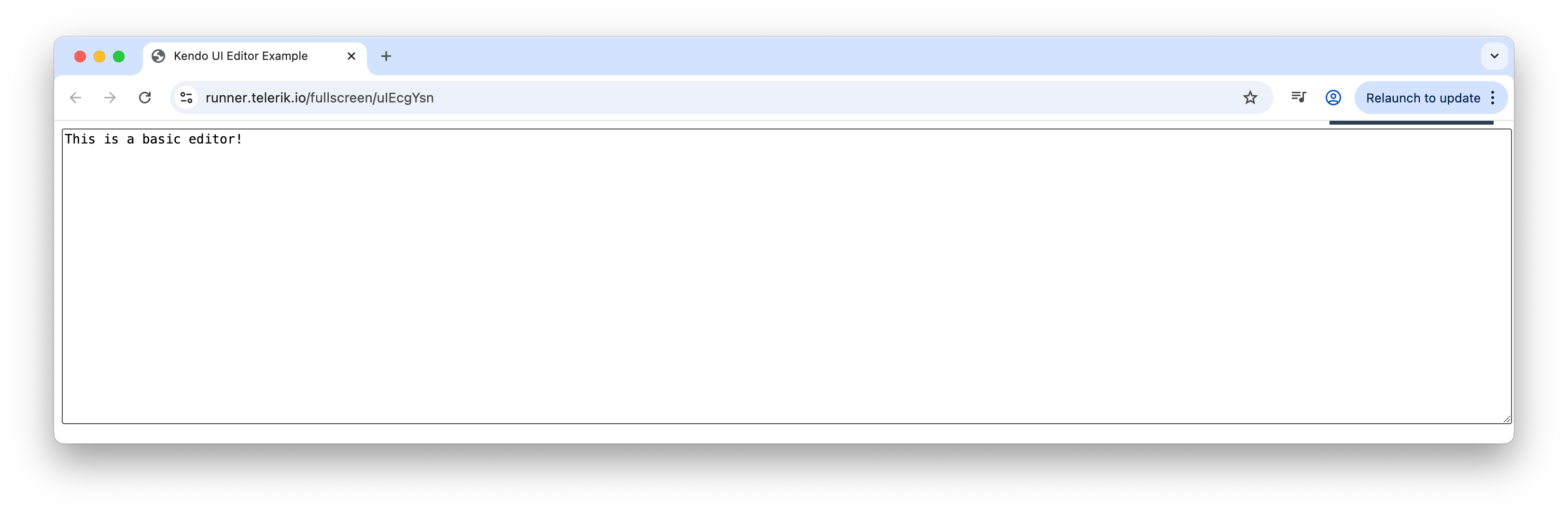
</code></pre><p>The MCP server intelligently added the <code>filterable: true</code> property to our Grid configuration, which demonstrates how we can iteratively build up our components through conversation with the AI.</p><h3 id="enabling-inline-editing">Enabling Inline Editing</h3><p>We&rsquo;ll take our Grid one step further by adding the ability to edit cells inline:</p><p><strong>Prompt:</strong> <code>@kendojquery Can we make the ship city and ship country columns editable inline?</code></p><p><img src="https://d585tldpucybw.cloudfront.net/sfimages/default-source/blogs/2026/2026-03/kendo-jquery-mcp-example-3.gif?sfvrsn=4cbe301c_1" alt="With prompt: @kendojquery Can we make the ship city and ship country columns editable inline?, we add editing capabilities to our jQuery Grid." /></p><p>The MCP server enhances our Grid with editing capabilities:</p><pre class=" language-js"><code class="prism  language-js"><span class="token function">$</span><span class="token punctuation">(</span><span class="token string">"#grid"</span><span class="token punctuation">)</span><span class="token punctuation">.</span><span class="token function">kendoGrid</span><span class="token punctuation">(</span><span class="token punctuation">{</span>
  dataSource<span class="token punctuation">:</span> <span class="token punctuation">{</span>
    data<span class="token punctuation">:</span> orderData<span class="token punctuation">,</span>
    schema<span class="token punctuation">:</span> <span class="token punctuation">{</span>
      OrderID<span class="token punctuation">:</span> <span class="token punctuation">{</span> type<span class="token punctuation">:</span> <span class="token string">"number"</span><span class="token punctuation">,</span> editable<span class="token punctuation">:</span> <span class="token boolean">false</span> <span class="token punctuation">}</span><span class="token punctuation">,</span>
      OrderDate<span class="token punctuation">:</span> <span class="token punctuation">{</span> type<span class="token punctuation">:</span> <span class="token string">"date"</span><span class="token punctuation">,</span> editable<span class="token punctuation">:</span> <span class="token boolean">false</span> <span class="token punctuation">}</span><span class="token punctuation">,</span>
      Freight<span class="token punctuation">:</span> <span class="token punctuation">{</span> type<span class="token punctuation">:</span> <span class="token string">"number"</span><span class="token punctuation">,</span> editable<span class="token punctuation">:</span> <span class="token boolean">false</span> <span class="token punctuation">}</span><span class="token punctuation">,</span>
      <span class="token comment">// adding editable: true to these columns</span>
      ShipCity<span class="token punctuation">:</span> <span class="token punctuation">{</span> type<span class="token punctuation">:</span> <span class="token string">"string"</span><span class="token punctuation">,</span> editable<span class="token punctuation">:</span> <span class="token boolean">true</span> <span class="token punctuation">}</span><span class="token punctuation">,</span>
      ShipCountry<span class="token punctuation">:</span> <span class="token punctuation">{</span> type<span class="token punctuation">:</span> <span class="token string">"string"</span><span class="token punctuation">,</span> editable<span class="token punctuation">:</span> <span class="token boolean">true</span> <span class="token punctuation">}</span>
    <span class="token punctuation">}</span><span class="token punctuation">,</span>
    pageSize<span class="token punctuation">:</span> <span class="token number">5</span>
  <span class="token punctuation">}</span><span class="token punctuation">,</span>
  columns<span class="token punctuation">:</span> <span class="token punctuation">[</span>
    <span class="token comment">// ...</span>
  <span class="token punctuation">]</span><span class="token punctuation">,</span>
  <span class="token comment">// ...</span>
<span class="token punctuation">}</span><span class="token punctuation">)</span><span class="token punctuation">;</span>
</code></pre><p>The MCP server understood exactly what we needed. It added the <code>editable</code> property and configured the dataSource schema to specify which fields should be editable. The <code>OrderID</code>, <code>OrderDate</code> and <code>Freight</code> fields are marked as non-editable, while <code>ShipCity</code> and <code>ShipCountry</code> can be edited directly in the Grid cells.</p><p>This iterative approach shows the power of working with the AI Coding Assistant. We started with a basic Grid and progressively added sorting, paging, filtering, and now inline editing, all through natural conversation.</p><h2 id="wrap-up">Wrap-up</h2><p>While much of the AI coding hype focuses on newer frameworks, the Kendo UI for jQuery AI Coding Assistant shows that teams working with established technologies like jQuery can still benefit from these same productivity gains.</p><p>In this article, we&rsquo;ve seen how the MCP server provides contextually aware code that follows Kendo UI patterns. Instead of fixing generic AI output or cross-referencing documentation, we can iterate quickly and let the assistant handle the component-specific details.</p><p>For more details, check out the official <a target="_blank" href="https://www.telerik.com/kendo-jquery-ui/documentation/ai-assistant/overview">Kendo UI for jQuery AI Coding Assistant documentation</a>. And don&rsquo;t forget, you can try it yourself, free for 30 days!</p><p><a target="_blank" href="https://www.telerik.com/try/kendo-ui" class="Btn">Try Kendo UI for jQuery</a></p><img src="https://feeds.telerik.com/link/23054/17309591.gif" height="1" width="1"/>]]></content>
  </entry>
  <entry>
    <id>urn:uuid:21018c06-060e-47d8-8812-8e131e551222</id>
    <title type="text">jQuery 4.0.0 Support: What’s New and How Kendo UI Has You Covered</title>
    <summary type="text">Hello, world, from jQuery 4! Take a look at the noteworthy changes and see how to get up to date with the framework and with Kendo UI for jQuery.</summary>
    <published>2026-02-12T21:40:57Z</published>
    <updated>2026-04-08T23:12:47Z</updated>
    <author>
      <name>Nikolay Penev </name>
    </author>
    <link rel="alternate" href="https://feeds.telerik.com/link/23054/17275416/jquery-4-support-whats-new-how-kendo-ui-has-you-covered"/>
    <content type="text"><![CDATA[<p><span class="featured">Hello, world, from jQuery 4! Take a look at the noteworthy changes and see how to get up to date with the framework and with Kendo UI for jQuery.</span></p><p>After almost a decade, <strong>jQuery 4.0.0 has arrived</strong>. With this release, jQuery removes legacy browser support, drops deprecated APIs, aligns event behavior with modern standards and modernizes the codebase. If you&rsquo;re maintaining applications that still use jQuery or libraries built on top of it, this release is worth understanding.</p><p>And the best part? <strong>Progress <a target="_blank" href="https://www.telerik.com/kendo-jquery-ui">Kendo UI for jQuery</a> is fully compatible and ready for jQuery 4</strong>.</p><h2 id="whats-new-in-jquery-4">What&rsquo;s New in jQuery 4?</h2><p>Below is a breakdown of what actually changed, why it matters and what you need to update in your own code.</p><h3 id="modernized-core">Modernized Core</h3><ul><li><strong>ES modules + Rollup packaging</strong> for compatibility with modern bundlers and <code>&lt;script type="module"&gt;</code> workflows.</li><li><strong>Leaner build</strong>: Removal of legacy browser branches and deprecated APIs (~<strong>3 kB gzipped</strong> reduction; slimmer &ldquo;slim&rdquo; build without Deferred/Callbacks).</li><li><strong>Spec alignment</strong>: Focus/blur events follow W3C ordering across modern browsers.</li><li><strong>Internal cleanup</strong>: Prototype no longer exposes internal push/sort/splice; &ldquo;magic&rdquo; behaviors reduced; toggleClass(boolean) legacy signature removed.</li></ul><h3 id="security-and-csp">Security and CSP</h3><ul><li><strong>Trusted Types</strong> support and broader use of <code>&lt;script&gt;</code> transport to avoid CSP violations; fewer inline‑script pitfalls for AJAX/script loading.</li></ul><h3 id="browser-support">Browser Support</h3><ul><li><strong>Dropped:</strong> IE 10 and older, Edge Legacy and very old Firefox/iOS/Android Browser versions. If you must support these, stay on <strong>jQuery 3.x</strong>. (Be aware that IE 11 removal is planned for jQuery 5.)</li></ul><h3 id="removed-apis-upgrade-call‑outs">Removed APIs (Upgrade Call‑outs)</h3><p>The following helpers are gone, switching to native equivalents is recommended:</p><ul><li>jQuery.isArray &rarr; Array.isArray</li><li>jQuery.parseJSON &rarr; JSON.parse</li><li>jQuery.trim &rarr; String.prototype.trim</li><li>jQuery.type</li><li>jQuery.now &rarr; Date.now</li><li>jQuery.isNumeric</li><li>jQuery.isFunction</li><li>jQuery.isWindow</li><li>jQuery.camelCase</li><li>jQuery.nodeName</li><li>jQuery.cssNumber</li><li>jQuery.cssProps</li><li>jQuery.fx.interval</li></ul><p>Additional behavior changes:</p><ul><li><strong>Prototype internals removed</strong>: Push/sort/splice are no longer on jQuery objects. Use native array-call patterns: <code>[].push.call($elements, item);</code>.</li><li><strong>Event order change</strong>: Focus/blur now follows the W3C sequence <code>blur &rarr; focusout &rarr; focus &rarr; focusin</code>, so retest any flows that depended on the old order.</li><li><strong>Removed</strong>: Autopromotion of JSON&rarr;JSONP; toggleClass(boolean|undefined) legacy signature.</li></ul><h2 id="kendo-ui-readiness">Kendo UI Readiness</h2><p>Kendo UI for jQuery has already validated and fully supports jQuery 4.0.0. We&rsquo;ve run the full suite of components and integration tests against jQuery 4.0.0 to confirm compatibility across all widgets and core modules.</p><p><strong>We removed or updated all deprecated jQuery APIs used inside Kendo UI and aligned event/focus handling with the new spec.</strong> Any internal usage of jQuery helpers, removed in 4.0.0, such as <code>$.trim</code>, <code>$.isNumeric</code> or prototype array method shortcuts, has been replaced with native equivalents. We also updated our focus/blur logic to match jQuery&rsquo;s W3C‑aligned event order to enable consistent behavior across modern browsers.</p><p><strong>You can upgrade Kendo UI + jQuery together without code changes in Kendo UI dependencies.</strong> All required migration work has been handled in the library itself. If your application uses Kendo UI as intended (through its public APIs), no adjustments are needed.</p><p>Any upgrade tasks will only apply to your own direct jQuery usage (outside of the Kendo UI bundle) where removed helpers or legacy patterns might appear.</p><h2 id="practical-guidance-for-your-apps">Practical Guidance for Your Apps</h2><ul><li><strong>Replace removed helpers</strong> (<code>$.trim</code>, <code>$.isNumeric</code>, <code>$.parseJSON</code>, etc.) with native equivalents.</li><li><strong>Retest focus/blur‑dependent logic</strong> (keyboard navigation, composite widgets, validation triggers).</li><li><strong>Review AJAX/JSONP paths</strong> if you depended on JSON&rarr;JSONP auto‑promotion or specific script transport edge cases.</li><li><strong>Stop using prototype internals</strong> (push/sort/splice) on jQuery objects; swap to native array‑call patterns.</li><li><strong>For strict CSP apps</strong>: leverage Trusted Types and avoid inline loaders; prefer script‑based transport.</li><li><strong>Consider the slim build</strong> if you don&rsquo;t use Deferred/Callbacks and want the smallest footprint.</li></ul><h2 id="quick-upgrade-checklist">Quick Upgrade Checklist</h2><ol><li><a target="_blank" href="https://jquery.com/upgrade-guide/4.0/">Update to jQuery 4.0.0</a> and the <a target="_blank" href="https://www.telerik.com/login/kendo-ui">latest version of Kendo UI for jQuery</a>.</li><li>Scan your code for removed helpers and legacy signatures; replace with native equivalents.</li><li>Retest focus/blur-dependent flows and any custom AJAX/JSONP logic.</li><li>For strict CSP apps, verify Trusted Types and script loading paths.</li></ol><p>If you&rsquo;re new to Kendo UI, the library comes with a free 30-day trial.</p><p><a target="_blank" href="https://www.telerik.com/try/kendo-ui" class="Btn">Try Kendo UI for jQuery</a>
</p><img src="https://feeds.telerik.com/link/23054/17275416.gif" height="1" width="1"/>]]></content>
  </entry>
  <entry>
    <id>urn:uuid:dd61a7e6-4b0e-4007-a8d5-a6ea05d8aa3c</id>
    <title type="text">Smarter Text Editing in Kendo UI for jQuery: Introducing the New AI Prompt Feature</title>
    <summary type="text">With the new AI Prompt integration, the Kendo UI for jQuery Editor is now a smart writing assistant that can help your users write better, faster and with more confidence.</summary>
    <published>2025-09-08T15:03:57Z</published>
    <updated>2026-04-08T23:12:47Z</updated>
    <author>
      <name>Hassan Djirdeh </name>
    </author>
    <link rel="alternate" href="https://feeds.telerik.com/link/23054/17139789/smarter-text-editing-kendo-ui-jquery-introducing-new-ai-prompt-feature"/>
    <content type="text"><![CDATA[<p><span class="featured">With the new AI Prompt integration, the Kendo UI for jQuery Editor is now a smart writing assistant that can help your users write better, faster and with more confidence.</span></p><p>Modern web users have grown accustomed to intelligent interfaces that provide contextual assistance. As AI technology becomes more prevalent in everyday applications, users increasingly expect their editing tools to offer more than basic formatting; they want grammar suggestions, content improvements and writing assistance built right into their workflow.</p><p>The Progress <a target="_blank" href="https://demos.telerik.com/kendo-ui/editor/index">Kendo UI for jQuery Editor</a> has been a reliable WYSIWYG (what you see is what you get) component for rich text editing in web applications. With the recent addition of <a target="_blank" href="https://www.telerik.com/kendo-jquery-ui/ai-prompt">AI Prompt</a> integration, developers can now offer users intelligent writing assistance <em>directly</em> within their editing interface, including real-time grammar correction, content suggestions and context-aware text improvements.</p><p>In this article, we&rsquo;ll walk through setting up the Editor and then demonstrate how to implement the new AI-powered features that enhance the editing experience.</p><h2 id="kendo-ui-for-jquery-editor">Kendo UI for jQuery Editor</h2><p>Before we dive into the AI magic, let&rsquo;s make sure we have the basics down. If you&rsquo;re new to <a target="_blank" href="https://jquery.com/">jQuery</a>, it&rsquo;s a classic JavaScript library that makes it easier to work with the DOM, handle events and build interactive webpages. <a target="_blank" href="https://www.telerik.com/kendo-jquery-ui">Kendo UI for jQuery</a> builds on top of this, giving you a suite of polished UI components, including the <a target="_blank" href="https://demos.telerik.com/kendo-ui/editor/index">Editor</a>.</p><h3 id="the-html-structure">1. The HTML Structure</h3><p>First, let&rsquo;s set up a simple HTML page. We&rsquo;ll use CDN links, so we don&rsquo;t need to install anything locally:</p><pre class=" language-html"><code class="prism  language-html"><span class="token doctype">&lt;!DOCTYPE html&gt;</span>
<span class="token tag"><span class="token tag"><span class="token punctuation">&lt;</span>html</span><span class="token punctuation">&gt;</span></span>
<span class="token tag"><span class="token tag"><span class="token punctuation">&lt;</span>head</span><span class="token punctuation">&gt;</span></span>
    <span class="token tag"><span class="token tag"><span class="token punctuation">&lt;</span>title</span><span class="token punctuation">&gt;</span></span>Kendo UI Editor Example<span class="token tag"><span class="token tag"><span class="token punctuation">&lt;/</span>title</span><span class="token punctuation">&gt;</span></span>
    <span class="token comment">&lt;!-- Kendo UI CSS --&gt;</span>
    <span class="token tag"><span class="token tag"><span class="token punctuation">&lt;</span>link</span> <span class="token attr-name">href</span><span class="token attr-value"><span class="token punctuation">=</span><span class="token punctuation">"</span>https://kendo.cdn.telerik.com/themes/11.0.2/default/default-main.css<span class="token punctuation">"</span></span> <span class="token attr-name">rel</span><span class="token attr-value"><span class="token punctuation">=</span><span class="token punctuation">"</span>stylesheet<span class="token punctuation">"</span></span> <span class="token punctuation">/&gt;</span></span>
<span class="token tag"><span class="token tag"><span class="token punctuation">&lt;/</span>head</span><span class="token punctuation">&gt;</span></span>
<span class="token tag"><span class="token tag"><span class="token punctuation">&lt;</span>body</span><span class="token punctuation">&gt;</span></span>
    <span class="token tag"><span class="token tag"><span class="token punctuation">&lt;</span>textarea</span> <span class="token attr-name">id</span><span class="token attr-value"><span class="token punctuation">=</span><span class="token punctuation">"</span>editor<span class="token punctuation">"</span></span> <span class="token attr-name">rows</span><span class="token attr-value"><span class="token punctuation">=</span><span class="token punctuation">"</span>10<span class="token punctuation">"</span></span> <span class="token attr-name">cols</span><span class="token attr-value"><span class="token punctuation">=</span><span class="token punctuation">"</span>30<span class="token punctuation">"</span></span><span class="token style-attr language-css"><span class="token attr-name"> <span class="token attr-name">style</span></span><span class="token punctuation">="</span><span class="token attr-value"><span class="token property">width</span><span class="token punctuation">:</span><span class="token number">100%</span><span class="token punctuation">;</span> <span class="token property">height</span><span class="token punctuation">:</span><span class="token number">300</span>px</span><span class="token punctuation">"</span></span><span class="token punctuation">&gt;</span></span><span class="token tag"><span class="token tag"><span class="token punctuation">&lt;/</span>textarea</span><span class="token punctuation">&gt;</span></span>

    <span class="token comment">&lt;!-- jQuery --&gt;</span>
    <span class="token tag"><span class="token tag"><span class="token punctuation">&lt;</span>script</span> <span class="token attr-name">src</span><span class="token attr-value"><span class="token punctuation">=</span><span class="token punctuation">"</span>https://code.jquery.com/jquery-3.7.0.min.js<span class="token punctuation">"</span></span><span class="token punctuation">&gt;</span></span><span class="token script language-javascript"></span><span class="token tag"><span class="token tag"><span class="token punctuation">&lt;/</span>script</span><span class="token punctuation">&gt;</span></span>
    <span class="token comment">&lt;!-- Kendo UI JS --&gt;</span>
    <span class="token tag"><span class="token tag"><span class="token punctuation">&lt;</span>script</span> <span class="token attr-name">src</span><span class="token attr-value"><span class="token punctuation">=</span><span class="token punctuation">"</span>https://kendo.cdn.telerik.com/2023.3.1010/js/kendo.all.min.js<span class="token punctuation">"</span></span><span class="token punctuation">&gt;</span></span><span class="token script language-javascript"></span><span class="token tag"><span class="token tag"><span class="token punctuation">&lt;/</span>script</span><span class="token punctuation">&gt;</span></span>
<span class="token tag"><span class="token tag"><span class="token punctuation">&lt;/</span>body</span><span class="token punctuation">&gt;</span></span>
<span class="token tag"><span class="token tag"><span class="token punctuation">&lt;/</span>html</span><span class="token punctuation">&gt;</span></span>
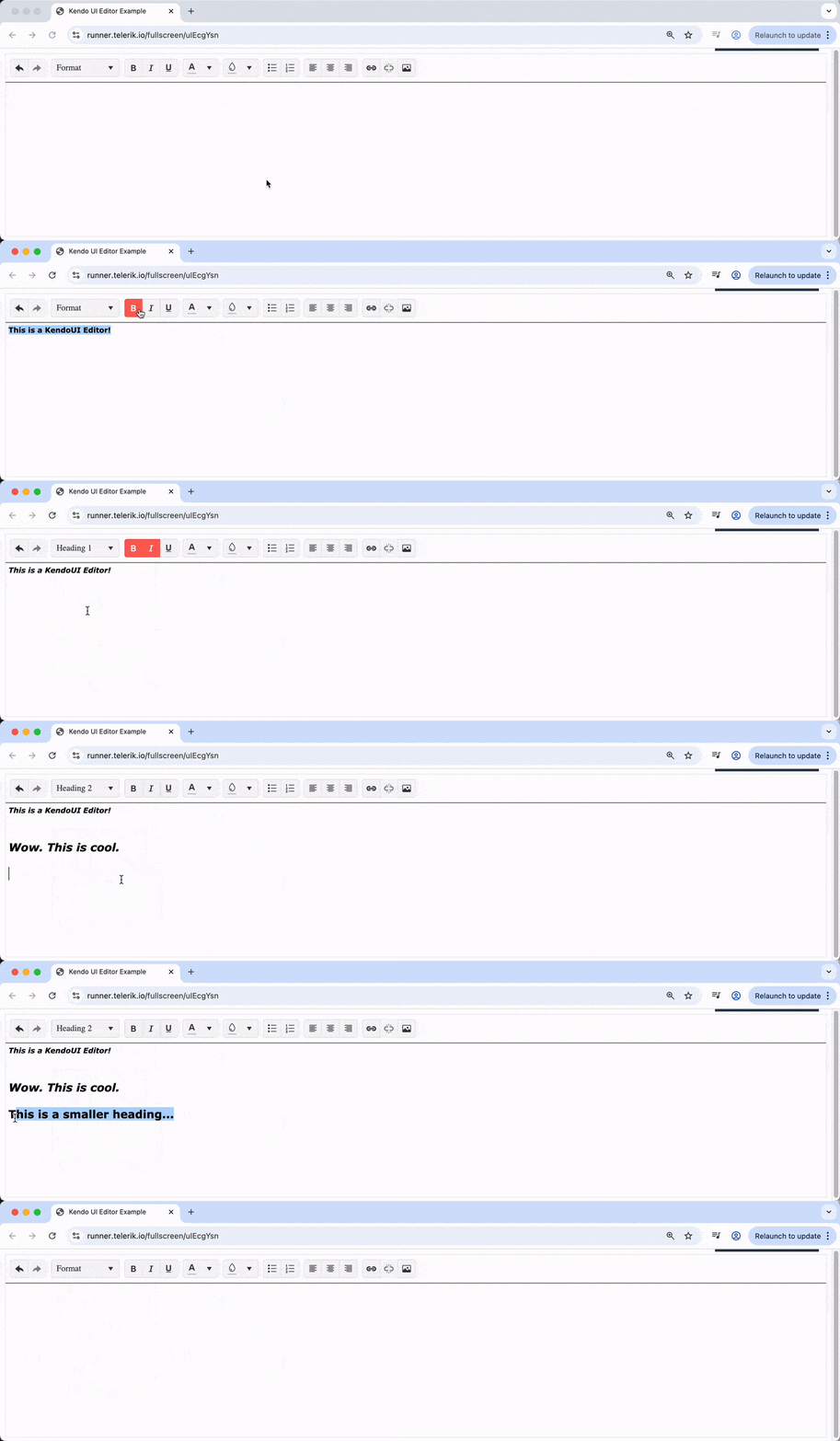
</code></pre><p>We&rsquo;re adding the Kendo UI theme stylesheet, the jQuery library and the complete Kendo UI JavaScript bundle. This gives us a basic page with a <code class="inline-code">&lt;textarea&gt;</code> that we&rsquo;ll soon turn into a rich text editor.</p><p><img src="https://d585tldpucybw.cloudfront.net/sfimages/default-source/blogs/2025/2025-07/kendo_ui_jquery_textarea.png?sfvrsn=5ee91471_2" alt="jQuery editor text area" /></p><h3 id="initializing-the-editor-with-jquery">2. Initializing the Editor with jQuery</h3><p>Now, let&rsquo;s bring our editor to life. We&rsquo;ll use jQuery to select the textarea and initialize the Kendo UI Editor. Let&rsquo;s add this script after our Kendo UI JS include:</p><pre class=" language-js"><code class="prism  language-js"><span class="token operator">&lt;</span>script<span class="token operator">&gt;</span>
<span class="token function">$</span><span class="token punctuation">(</span>document<span class="token punctuation">)</span><span class="token punctuation">.</span><span class="token function">ready</span><span class="token punctuation">(</span><span class="token keyword">function</span><span class="token punctuation">(</span><span class="token punctuation">)</span> <span class="token punctuation">{</span>
    <span class="token function">$</span><span class="token punctuation">(</span><span class="token string">"#editor"</span><span class="token punctuation">)</span><span class="token punctuation">.</span><span class="token function">kendoEditor</span><span class="token punctuation">(</span><span class="token punctuation">{</span>
        tools<span class="token punctuation">:</span> <span class="token punctuation">[</span>
            <span class="token string">"undo"</span><span class="token punctuation">,</span> <span class="token string">"redo"</span><span class="token punctuation">,</span>
            <span class="token string">"formatting"</span><span class="token punctuation">,</span>
            <span class="token string">"bold"</span><span class="token punctuation">,</span> <span class="token string">"italic"</span><span class="token punctuation">,</span> <span class="token string">"underline"</span><span class="token punctuation">,</span>
            <span class="token string">"foreColor"</span><span class="token punctuation">,</span> <span class="token string">"backColor"</span><span class="token punctuation">,</span>
            <span class="token string">"insertUnorderedList"</span><span class="token punctuation">,</span> <span class="token string">"insertOrderedList"</span><span class="token punctuation">,</span>
            <span class="token string">"justifyLeft"</span><span class="token punctuation">,</span> <span class="token string">"justifyCenter"</span><span class="token punctuation">,</span> <span class="token string">"justifyRight"</span><span class="token punctuation">,</span>
            <span class="token string">"createLink"</span><span class="token punctuation">,</span> <span class="token string">"unlink"</span><span class="token punctuation">,</span>
            <span class="token string">"insertImage"</span><span class="token punctuation">,</span>
            <span class="token string">"tableWizard"</span>
        <span class="token punctuation">]</span>
    <span class="token punctuation">}</span><span class="token punctuation">)</span><span class="token punctuation">;</span>
<span class="token punctuation">}</span><span class="token punctuation">)</span><span class="token punctuation">;</span>
<span class="token operator">&lt;</span><span class="token operator">/</span>script<span class="token operator">&gt;</span>
</code></pre><p>Here&rsquo;s what&rsquo;s happening:</p><ul><li>We wait for the DOM to be ready (<a target="_blank" href="https://learn.jquery.com/using-jquery-core/document-ready/">classic jQuery move!</a>)</li><li>We select the <code class="inline-code">#editor</code> textarea and call <code class="inline-code">.kendoEditor()</code></li><li>The <code class="inline-code">tools</code> array defines which toolbar buttons are available</li></ul><p>Just with this alone, we&rsquo;ve got a fully functional, cross-browser rich text editor with formatting tools, lists, links, images and table support!</p><p><img src="https://d585tldpucybw.cloudfront.net/sfimages/default-source/blogs/2025/2025-07/kendo_ui_basic_editor.gif?sfvrsn=111451bd_2" alt="jquery editor basic styling" /></p><h2 id="ai-integration-your-intelligent-writing-assistant">AI Integration: Your Intelligent Writing Assistant</h2><p>Now, for the fun part: Let&rsquo;s add some AI smarts to our editor! With the new AI Prompt feature, your users can get real-time grammar correction, content suggestions, autocompletion and more, all powered by advanced machine learning models.</p><p>We&rsquo;ll build up the AI integration step by step so you can see exactly how each piece fits together.</p><h3 id="add-dompurify-for-safe-ai-output">1. Add DOMPurify for Safe AI Output</h3><p>Since AI-generated content can include HTML, it&rsquo;s a good idea to sanitize it before displaying. We&rsquo;ll use <a target="_blank" href="https://github.com/cure53/DOMPurify">DOMPurify</a> for this and add it via CDN:</p><pre class=" language-html"><code class="prism  language-html"><span class="token tag"><span class="token tag"><span class="token punctuation">&lt;</span>script</span> <span class="token attr-name">src</span><span class="token attr-value"><span class="token punctuation">=</span><span class="token punctuation">"</span>https://cdn.jsdelivr.net/npm/dompurify@3.2.5/dist/purify.min.js<span class="token punctuation">"</span></span><span class="token punctuation">&gt;</span></span><span class="token script language-javascript"></span><span class="token tag"><span class="token tag"><span class="token punctuation">&lt;/</span>script</span><span class="token punctuation">&gt;</span></span>
</code></pre><h3 id="add-a-custom-ai-toolbar-button">2. Add a Custom AI Toolbar Button</h3><p>Let&rsquo;s enhance our Editor toolbar with a custom button that toggles the AI Prompt pane. Here&rsquo;s how we can add it to your existing Editor setup:</p><pre class=" language-js"><code class="prism  language-js"><span class="token function">$</span><span class="token punctuation">(</span><span class="token string">"#editor"</span><span class="token punctuation">)</span><span class="token punctuation">.</span><span class="token function">kendoEditor</span><span class="token punctuation">(</span><span class="token punctuation">{</span>
    tools<span class="token punctuation">:</span> <span class="token punctuation">[</span>
        <span class="token punctuation">{</span>
          icon<span class="token punctuation">:</span> <span class="token string">"sparkles"</span><span class="token punctuation">,</span>
          rounded<span class="token punctuation">:</span> <span class="token string">"full"</span><span class="token punctuation">,</span>
          name<span class="token punctuation">:</span> <span class="token string">"toggle-ai-toggle"</span><span class="token punctuation">,</span>
          attributes<span class="token punctuation">:</span> <span class="token punctuation">{</span> <span class="token string">"class"</span><span class="token punctuation">:</span> <span class="token string">"k-button-toggle-ai-prompt"</span> <span class="token punctuation">}</span><span class="token punctuation">,</span>
          exec<span class="token punctuation">:</span> <span class="token keyword">function</span><span class="token punctuation">(</span>e<span class="token punctuation">)</span> <span class="token punctuation">{</span>
              <span class="token keyword">var</span> editor <span class="token operator">=</span> <span class="token function">$</span><span class="token punctuation">(</span><span class="token string">"#editor"</span><span class="token punctuation">)</span><span class="token punctuation">.</span><span class="token function">data</span><span class="token punctuation">(</span><span class="token string">"kendoEditor"</span><span class="token punctuation">)</span><span class="token punctuation">;</span>
              <span class="token keyword">let</span> aiPromptSplitter <span class="token operator">=</span> editor<span class="token punctuation">.</span>aiPromptSplitter<span class="token punctuation">;</span>
              <span class="token keyword">let</span> aiPromptPane <span class="token operator">=</span> aiPromptSplitter<span class="token punctuation">.</span>element<span class="token punctuation">.</span><span class="token function">find</span><span class="token punctuation">(</span><span class="token string">".k-prompt.k-pane"</span><span class="token punctuation">)</span><span class="token punctuation">;</span>
              aiPromptSplitter<span class="token punctuation">.</span><span class="token function">toggle</span><span class="token punctuation">(</span>aiPromptPane<span class="token punctuation">)</span><span class="token punctuation">;</span>
              <span class="token keyword">let</span> iconElement <span class="token operator">=</span> <span class="token function">$</span><span class="token punctuation">(</span>e<span class="token punctuation">.</span>target<span class="token punctuation">)</span><span class="token punctuation">.</span><span class="token function">closest</span><span class="token punctuation">(</span><span class="token string">".k-button"</span><span class="token punctuation">)</span><span class="token punctuation">.</span><span class="token function">find</span><span class="token punctuation">(</span><span class="token string">".k-icon"</span><span class="token punctuation">)</span><span class="token punctuation">;</span>

              <span class="token comment">// Toggle between two icons</span>
              <span class="token keyword">if</span> <span class="token punctuation">(</span>iconElement<span class="token punctuation">.</span><span class="token function">hasClass</span><span class="token punctuation">(</span><span class="token string">"k-svg-i-sparkles"</span><span class="token punctuation">)</span><span class="token punctuation">)</span> <span class="token punctuation">{</span>
                  kendo<span class="token punctuation">.</span>ui<span class="token punctuation">.</span><span class="token function">icon</span><span class="token punctuation">(</span>iconElement<span class="token punctuation">,</span> <span class="token punctuation">{</span> icon<span class="token punctuation">:</span> <span class="token string">"chevron-left"</span> <span class="token punctuation">}</span><span class="token punctuation">)</span><span class="token punctuation">;</span>
              <span class="token punctuation">}</span> <span class="token keyword">else</span> <span class="token punctuation">{</span>
                  kendo<span class="token punctuation">.</span>ui<span class="token punctuation">.</span><span class="token function">icon</span><span class="token punctuation">(</span>iconElement<span class="token punctuation">,</span> <span class="token punctuation">{</span> icon<span class="token punctuation">:</span> <span class="token string">"sparkles"</span> <span class="token punctuation">}</span><span class="token punctuation">)</span><span class="token punctuation">;</span>
              <span class="token punctuation">}</span>
          <span class="token punctuation">}</span>
      <span class="token punctuation">}</span><span class="token punctuation">,</span>
      <span class="token comment">// ...other tools</span>
    <span class="token punctuation">]</span>
<span class="token punctuation">}</span><span class="token punctuation">)</span><span class="token punctuation">;</span>
</code></pre><p>With this code, we&rsquo;ll now see a sparkles toolbar button in our editor. The <code class="inline-code">exec</code> function will handle toggling the AI pane and switching icons, but it won&rsquo;t work yet since we haven&rsquo;t configured the AI integration.</p><h3 id="configure-basic-ai-integration">3. Configure Basic AI Integration</h3><p>Now, let&rsquo;s add the basic AI configuration. We&rsquo;ll specify the AI service endpoint and configure the AI pane:</p><pre class=" language-js"><code class="prism  language-js"><span class="token function">$</span><span class="token punctuation">(</span><span class="token string">"#editor"</span><span class="token punctuation">)</span><span class="token punctuation">.</span><span class="token function">kendoEditor</span><span class="token punctuation">(</span><span class="token punctuation">{</span>
    <span class="token comment">// ...previous config</span>
    ai<span class="token punctuation">:</span> <span class="token punctuation">{</span>
        service<span class="token punctuation">:</span> <span class="token punctuation">{</span>
            url<span class="token punctuation">:</span> <span class="token string">'/kendo-ui/aichatcompletion'</span><span class="token punctuation">,</span>
            headers<span class="token punctuation">:</span> <span class="token punctuation">{</span>
                <span class="token string">"X-Api-Key"</span><span class="token punctuation">:</span> <span class="token string">"YOUR_API_KEY"</span>
            <span class="token punctuation">}</span>
        <span class="token punctuation">}</span><span class="token punctuation">,</span>
        aiPrompt<span class="token punctuation">:</span> <span class="token punctuation">{</span>
            showOutputSubtitleTooltip<span class="token punctuation">:</span> <span class="token boolean">true</span><span class="token punctuation">,</span>
            encodedPromptOutputs<span class="token punctuation">:</span> <span class="token boolean">false</span><span class="token punctuation">,</span>
            promptResponse<span class="token punctuation">:</span> <span class="token keyword">function</span><span class="token punctuation">(</span>e<span class="token punctuation">)</span> <span class="token punctuation">{</span>
                <span class="token keyword">let</span> output <span class="token operator">=</span> e<span class="token punctuation">.</span>output<span class="token punctuation">.</span>output<span class="token punctuation">;</span>
                <span class="token keyword">if</span> <span class="token punctuation">(</span>window<span class="token punctuation">.</span>DOMPurify<span class="token punctuation">)</span> <span class="token punctuation">{</span>
                    e<span class="token punctuation">.</span>output<span class="token punctuation">.</span>output <span class="token operator">=</span> DOMPurify<span class="token punctuation">.</span><span class="token function">sanitize</span><span class="token punctuation">(</span>output<span class="token punctuation">,</span> <span class="token punctuation">{</span> USE_PROFILES<span class="token punctuation">:</span> <span class="token punctuation">{</span> html<span class="token punctuation">:</span> <span class="token boolean">true</span> <span class="token punctuation">}</span> <span class="token punctuation">}</span><span class="token punctuation">)</span><span class="token punctuation">;</span>
                <span class="token punctuation">}</span>
            <span class="token punctuation">}</span>
        <span class="token punctuation">}</span><span class="token punctuation">,</span>
        pane<span class="token punctuation">:</span> <span class="token punctuation">{</span>
            size<span class="token punctuation">:</span> <span class="token string">"400px"</span><span class="token punctuation">,</span>
            collapsible<span class="token punctuation">:</span> <span class="token boolean">true</span><span class="token punctuation">,</span>
            collapsed<span class="token punctuation">:</span> <span class="token boolean">true</span>
        <span class="token punctuation">}</span>
    <span class="token punctuation">}</span>
<span class="token punctuation">}</span><span class="token punctuation">)</span><span class="token punctuation">;</span>
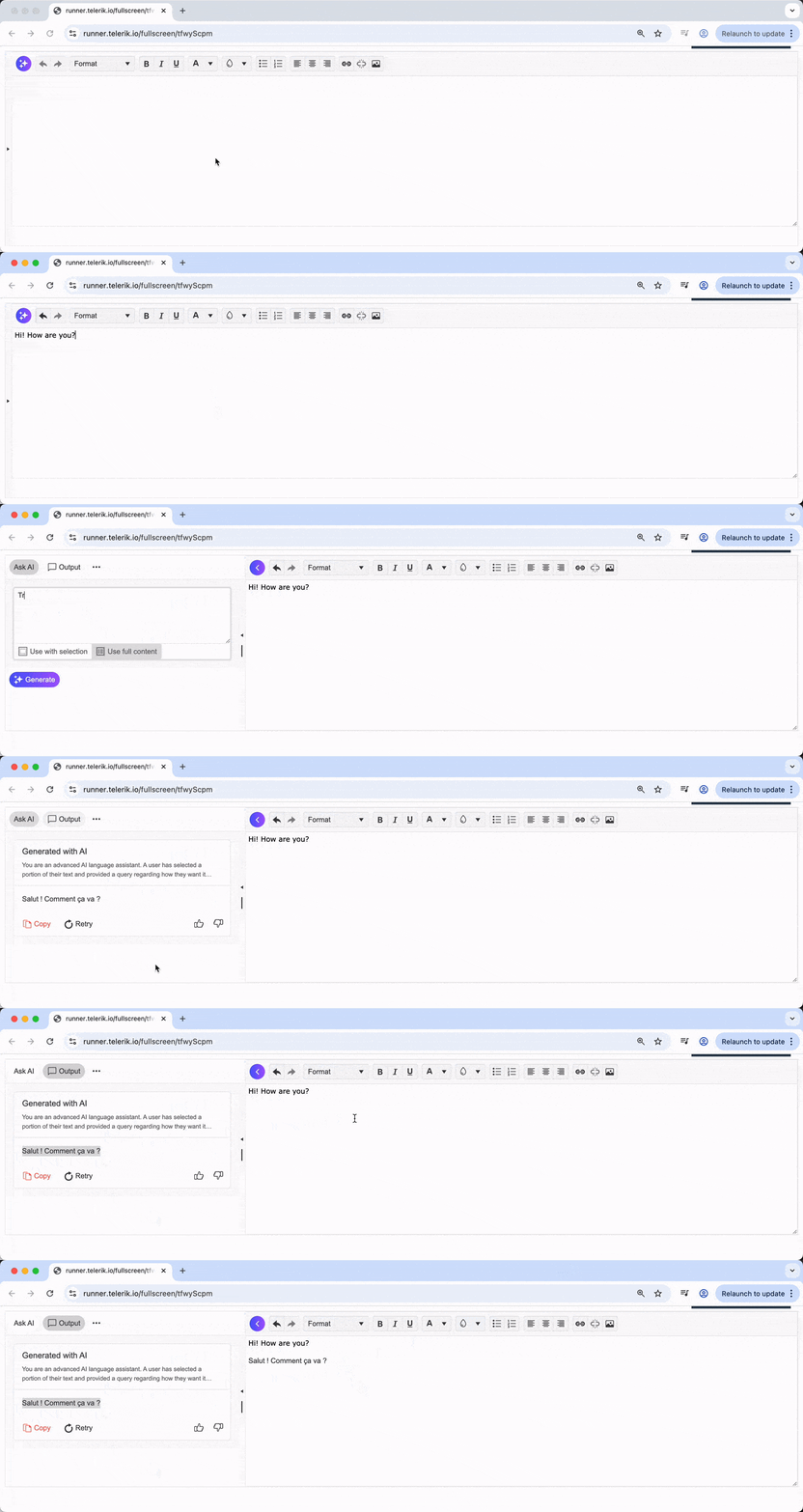
</code></pre><p>With this configuration, users can now click the sparkles button to open the AI pane and have free-form conversations with the AI about their content. They can ask questions, request improvements or get writing suggestions by typing directly into the AI prompt interface.</p><p><img src="https://d585tldpucybw.cloudfront.net/sfimages/default-source/blogs/2025/2025-07/kendo_ui_jquery_ai_panel.gif?sfvrsn=78e6c2ad_2" alt="jquery editor with AI panel" /></p><h3 id="add-ai-commands-for-common-tasks">4. Add AI Commands for Common Tasks</h3><p>Let&rsquo;s enhance the AI integration with predefined commands that address common writing needs. We&rsquo;ll add a <code class="inline-code">commands</code> array to our AI configuration:</p><pre class=" language-js"><code class="prism  language-js"><span class="token function">$</span><span class="token punctuation">(</span><span class="token string">"#editor"</span><span class="token punctuation">)</span><span class="token punctuation">.</span><span class="token function">kendoEditor</span><span class="token punctuation">(</span><span class="token punctuation">{</span>
    <span class="token comment">// ...previous config</span>
    ai<span class="token punctuation">:</span> <span class="token punctuation">{</span>
        <span class="token comment">// ...previous service and aiPrompt config</span>
        commands<span class="token punctuation">:</span> <span class="token punctuation">[</span>
            <span class="token punctuation">{</span>
                id<span class="token punctuation">:</span> <span class="token string">"rewrite"</span><span class="token punctuation">,</span>
                text<span class="token punctuation">:</span> <span class="token string">"Rewrite"</span><span class="token punctuation">,</span>
                icon<span class="token punctuation">:</span> <span class="token string">"arrow-rotate-cw"</span><span class="token punctuation">,</span>
                prompt<span class="token punctuation">:</span> <span class="token punctuation">(</span>selection<span class="token punctuation">)</span> <span class="token operator">=&gt;</span> <span class="token template-string"><span class="token string">`Rewrite the selected text while preserving its original meaning and intent.\n\nSelected Text:\n</span><span class="token interpolation"><span class="token interpolation-punctuation punctuation">${</span>selection<span class="token interpolation-punctuation punctuation">}</span></span><span class="token string">`</span></span>
            <span class="token punctuation">}</span>
        <span class="token punctuation">]</span><span class="token punctuation">,</span>
        <span class="token comment">// ...rest of config</span>
    <span class="token punctuation">}</span>
<span class="token punctuation">}</span><span class="token punctuation">)</span><span class="token punctuation">;</span>
</code></pre><p>Now, users can select text and use predefined commands for common editing tasks. The rewrite command helps users refresh their content while maintaining the original meaning&mdash;perfect for improving clarity or finding different ways to express the same idea.</p><p><img src="https://d585tldpucybw.cloudfront.net/sfimages/default-source/blogs/2025/2025-07/kendo_ui_jquery_ai_commands.gif?sfvrsn=81df71af_2" alt="AI Commands Demo" /></p><h3 id="enable-inline-ai-prompts">5. Enable Inline AI Prompts</h3><p>Finally, we can even add an inline AI prompt feature by setting <code class="inline-code">inlineAIPrompt: true</code>:</p><pre class=" language-js"><code class="prism  language-js"><span class="token function">$</span><span class="token punctuation">(</span><span class="token string">"#editor"</span><span class="token punctuation">)</span><span class="token punctuation">.</span><span class="token function">kendoEditor</span><span class="token punctuation">(</span><span class="token punctuation">{</span>
    <span class="token comment">// ...previous config</span>
    ai<span class="token punctuation">:</span> <span class="token punctuation">{</span>
        <span class="token comment">// ...previous config</span>
        inlineAIPrompt<span class="token punctuation">:</span> <span class="token boolean">true</span><span class="token punctuation">,</span>
        <span class="token comment">// ...rest of config</span>
    <span class="token punctuation">}</span>
<span class="token punctuation">}</span><span class="token punctuation">)</span><span class="token punctuation">;</span>
</code></pre><p>With inline prompts enabled, users can simply select any text in the editor and instantly access AI suggestions without opening the dedicated pane. This creates a seamless, context-aware editing experience where AI assistance is available exactly when and where it&rsquo;s needed.</p><p><img src="https://d585tldpucybw.cloudfront.net/sfimages/default-source/blogs/2025/2025-07/kendo_ui_jquery_ai_inline.gif?sfvrsn=9256038b_2" alt="Inline AI Prompt Demo" /></p><p>In just a few steps, we&rsquo;ve transformed a basic rich text editor into an intelligent writing assistant. The Kendo UI for jQuery Editor&rsquo;s AI integration makes it remarkably straightforward to add advanced AI capabilities to your applications, from free-form AI conversations to predefined commands and inline prompts.</p><p>Of course, there&rsquo;s much more you can configure: custom AI commands, advanced prompt templates, additional tone options, length adjustments, translation features and fine-tuned AI behavior settings. The foundation we&rsquo;ve built here gives you a simple starting point to explore these advanced capabilities.</p><h2 id="wrap-up">Wrap-up</h2><p>The Kendo UI for jQuery Editor has always been a solid choice for building rich text experiences. With the new AI Prompt integration, it&rsquo;s now a smart writing assistant that can help your users write better, faster and with more confidence.</p><p>Want to see it in action or dig deeper into the details? Check out the <a target="_blank" href="https://demos.telerik.com/kendo-ui/editor/ai-integration">jQuery Editor AI Integration demo and documentation</a> for live examples and source code. You can also experiment with the AI features yourself by trying them out in the <a target="_blank" href="https://dojo.telerik.com">Kendo UI Dojo</a>, where you can test and modify the code examples in real time.</p><p>Or try it yourself, free for 30 days.</p><p><a href="https://www.telerik.com/try/kendo-ui" target="_blank" class="Btn">Try Kendo UI for jQuery</a></p><img src="https://feeds.telerik.com/link/23054/17139789.gif" height="1" width="1"/>]]></content>
  </entry>
  <entry>
    <id>urn:uuid:27f1b53c-c037-4dfa-88f8-b07c05d7a19a</id>
    <title type="text">How Does Angular Compare to jQuery?</title>
    <summary type="text">Learn how Angular and jQuery compare when it comes to web development—including their distinct approaches, use cases and functionalities.</summary>
    <published>2024-03-20T08:04:03Z</published>
    <updated>2026-04-08T23:12:47Z</updated>
    <author>
      <name>Hassan Djirdeh </name>
    </author>
    <link rel="alternate" href="https://feeds.telerik.com/link/23054/16625540/how-does-angular-compare-to-jquery"/>
    <content type="text"><![CDATA[<p><span class="featured">Learn how Angular and jQuery compare when it comes to web development&mdash;including their distinct approaches, use cases and functionalities.</span></p><p>Angular, a platform and framework for building single-page client applications using HTML and TypeScript, is known for its ability to create dynamic, modern web applications. On the other hand, jQuery, a fast, small and feature-rich JavaScript library, simplifies things like HTML document traversal and manipulation, event handling and animation. While Angular is a full-fledged framework, jQuery can be considered to be a library that simplifies the use of JavaScript.</p><p>In this article, we&rsquo;ll explore the key differences and use cases for Angular and jQuery. Specifically, we&rsquo;ll look at these key areas (for both Angular and jQuery):</p><ul><li>Fundamental principles</li><li>Getting started</li><li>Building the UI</li><li>Which one should you use?</li></ul><h2 id="fundamental-principles">Fundamental Principles</h2><h3 id="angular-a-comprehensive-framework">Angular: A Comprehensive Framework</h3><p>The <a target="_blank" href="https://angular.dev/overview">official Angular documentation</a> explains Angular as a web framework that provides a broad suite of tools, APIs and libraries to simplify and streamline development workflow. In other words, Angular is designed as a <em>complete solution</em> for building scalable web applications.</p><p>Angular achieves this through its comprehensive ecosystem, which includes:</p><ul><li><a target="_blank" href="https://angular.dev/guide/components"><strong>Component-based architecture</strong></a>: Angular&rsquo;s building blocks are components that help encapsulate both logic and presentation. This modularity allows for reusable and maintainable code, making it easier to manage large applications.</li><li><a target="_blank" href="https://www.typescriptlang.org/"><strong>TypeScript-based development</strong></a>: Angular encourages the use of TypeScript, a superset of JavaScript, which provides static typing. This can help catch errors early in development, enforce coding standards and improve the overall quality of the code.</li><li><a target="_blank" href="https://angular.dev/guide/templates/two-way-binding"><strong>Two-way data binding</strong></a>: Angular&rsquo;s two-way data binding automatically synchronizes data between the model and view components. This simplifies the development process by reducing the need for additional code to handle these updates.</li><li><a target="_blank" href="https://angular.dev/tools/cli"><strong>Angular CLI</strong></a>: The Angular Command Line Interface (CLI) is a powerful tool that helps automate many development tasks. It simplifies project initialization, component generation, builds, testing and deployment.</li><li><a target="_blank" href="https://angular.dev/guide/routing"><strong>Advanced routing and navigation</strong></a>: Angular provides a robust routing module that supports complex navigation scenarios, lazy loading and nested routes, which are essential for building SPAs.</li><li>And a lot more.</li></ul><p>The above suite of features and tools makes Angular a very good choice for developers and teams looking to build scalable, maintainable and high-performing web applications.</p><h3 id="jquery-simplifying-javascript">jQuery: Simplifying JavaScript</h3><p><a target="_blank" href="https://jquery.com/">jQuery</a>, in contrast to Angular&rsquo;s comprehensive framework approach, focuses on simplifying client-side scripting of HTML. Instead of providing all the bells and whistles for building large-scale applications, it instead focuses on making the manipulation of webpages more accessible and easier with:</p><ul><li><a target="_blank" href="https://api.jquery.com/category/manipulation/"><strong>Simplified DOM manipulation</strong></a>: jQuery provides an easy-to-use API for selecting and manipulating HTML elements. It allows developers to add, remove or modify elements in the DOM with less code compared to vanilla JavaScript.</li><li><a target="_blank" href="https://api.jquery.com/category/events/"><strong>Event handling</strong></a>: jQuery offers a straightforward way to handle browser events, such as clicks, mouse movements and key presses. Its syntax is designed to be more intuitive and easier to understand than raw JavaScript event handling.</li><li><a target="_blank" href="https://api.jquery.com/animate/"><strong>Animation and effects</strong></a>: jQuery includes a suite of visual effects and custom animations. These can be easily applied to elements, enhancing the user interface without the need for extensive coding or external libraries.</li><li><a target="_blank" href="https://api.jquery.com/jQuery.ajax/"><strong>Ajax support</strong></a>: jQuery provides a simple API for making asynchronous HTTP requests (Ajax). This is useful for updating parts of a webpage without reloading the entire page.</li></ul><p>Notice how the above features focus primarily on practical aspects of web development and not on building the underlying architecture of a web application? jQuery is tailored toward enhancing the interactivity and presentation of webpages with a straightforward and accessible API without the need to delve into the complexities of a full application framework (like Angular).</p><h2 id="getting-started">Getting Started</h2><h3 id="getting-started-with-angular">Getting Started with Angular</h3><p>To begin with Angular, we typically start by setting up the Angular environment, which involves installing <a target="_blank" href="https://nodejs.org/en">Node.js</a> and the <a target="_blank" href="https://angular.dev/tools/cli/setup-local">Angular CLI</a>. The Angular CLI can be installed with:</p><pre class=" language-shell"><code class="prism  language-shell">npm install -g @angular/cli
</code></pre><p>Once installed, we can create a new Angular project using the Angular CLI with a command like:</p><pre class=" language-shell"><code class="prism  language-shell">ng new new-app
</code></pre><p>The above command creates a new Angular project with the specified name of the app (e.g., <code class="inline-code">new-app</code>). This process sets up the basic structure for an Angular application, including various configuration files, a source folder with a basic app component, and dependencies listed in a <code class="inline-code">package.json</code> file. The Angular CLI also automatically configures a build process using webpack and sets up a development server for the application.</p><p><img src="https://d585tldpucybw.cloudfront.net/sfimages/default-source/blogs/2024/2024-03/angular-scaffold.png?sfvrsn=986e8e76_2" alt="" /></p><p>To run the newly created Angular application, we can run the following within the new project directory:</p><pre class=" language-shell"><code class="prism  language-shell">ng serve --open
</code></pre><p>The above command compiles the application, starts a web server, and opens the browser to <code class="inline-code">http://localhost:4200</code> to view the generated application.</p><p><img src="https://d585tldpucybw.cloudfront.net/sfimages/default-source/blogs/2024/2024-03/angular-localhost.png?sfvrsn=a8ef8a85_2" alt="" /></p><h3 id="getting-started-with-jquery">Getting Started with jQuery</h3><p>Getting started with jQuery is much simpler and more straightforward than setting up an Angular project. The first step often involves including jQuery in an HTML file by adding a script tag that, for example, links to a CDN-hosted version of jQuery:</p><pre class=" language-html"><code class="prism  language-html"><span class="token tag"><span class="token tag"><span class="token punctuation">&lt;</span>script</span> <span class="token attr-name">src</span><span class="token attr-value"><span class="token punctuation">=</span><span class="token punctuation">"</span>https://code.jquery.com/jquery-3.7.1.min.js<span class="token punctuation">"</span></span><span class="token punctuation">&gt;</span></span><span class="token script language-javascript"></span><span class="token tag"><span class="token tag"><span class="token punctuation">&lt;/</span>script</span><span class="token punctuation">&gt;</span></span>
</code></pre><p>The above script tag is to be placed in the head of the HTML document or right before the closing body tag. With jQuery integrated into a webpage, we&rsquo;ll be able to write JavaScript code that takes advantage of jQuery&rsquo;s functionality.</p><h2 id="building-the-ui">Building the UI</h2><p>When it comes to coding and development, there&rsquo;s a lot that can be covered, especially with a framework as diverse as Angular. To illustrate the core differences between them, let&rsquo;s create a simple &ldquo;Todos&rdquo; application in both Angular and jQuery. This application will display a &ldquo;Todos&rdquo; heading and include a button that, when clicked, fetches data from the public <a target="_blank" href="https://dummyjson.com/todos">https://dummyjson.com/todos</a> API to display a list of todos.</p><p><img src="https://d585tldpucybw.cloudfront.net/sfimages/default-source/blogs/2024/2024-03/angular-vs-jquery-todos.png?sfvrsn=47888eb9_2" alt="" /></p><h3 id="building-the-ui-with-angular">Building the UI with Angular</h3><p>In Angular, building a &ldquo;Todos&rdquo; interface will involve creating components and services, using TypeScript, and implementing data binding and state management. Let&rsquo;s walk through this process step by step.</p><p>First, let&rsquo;s understand the service part. In Angular, a <a target="_blank" href="https://angular.dev/essentials/sharing-logic#what-are-services">service</a> is a class with a specific purpose and responsibility&mdash;usually to fetch data or perform specific business logic. For our &ldquo;Todos&rdquo; app, we&rsquo;ll create a <code class="inline-code">TodoService</code> that has a <code class="inline-code">getTodos()</code> function that uses Angular&rsquo;s <code class="inline-code">HttpClient</code> to make a GET request to retrieve todos.</p><pre class=" language-ts"><code class="prism  language-ts"><span class="token keyword">import</span> <span class="token punctuation">{</span> Injectable <span class="token punctuation">}</span> <span class="token keyword">from</span> <span class="token string">"@angular/core"</span><span class="token punctuation">;</span>
<span class="token keyword">import</span> <span class="token punctuation">{</span> HttpClient <span class="token punctuation">}</span> <span class="token keyword">from</span> <span class="token string">"@angular/common/http"</span><span class="token punctuation">;</span>

@<span class="token function">Injectable</span><span class="token punctuation">(</span><span class="token punctuation">{</span>
  providedIn<span class="token punctuation">:</span> <span class="token string">"root"</span><span class="token punctuation">,</span>
<span class="token punctuation">}</span><span class="token punctuation">)</span>
<span class="token keyword">export</span> <span class="token keyword">class</span> <span class="token class-name">TodoService</span> <span class="token punctuation">{</span>
  <span class="token keyword">constructor</span><span class="token punctuation">(</span><span class="token keyword">private</span> http<span class="token punctuation">:</span> HttpClient<span class="token punctuation">)</span> <span class="token punctuation">{</span><span class="token punctuation">}</span>
  <span class="token function">getTodos</span><span class="token punctuation">(</span><span class="token punctuation">)</span> <span class="token punctuation">{</span>
    <span class="token keyword">return</span> <span class="token keyword">this</span><span class="token punctuation">.</span>http<span class="token punctuation">.</span><span class="token keyword">get</span><span class="token punctuation">(</span><span class="token string">"https://dummyjson.com/todos"</span><span class="token punctuation">)</span><span class="token punctuation">;</span>
  <span class="token punctuation">}</span>
<span class="token punctuation">}</span>
</code></pre><p>Above, we have the <code class="inline-code">TodoService</code> marked as <code class="inline-code">@Injectable</code>, which means it can be injected into components and other services.</p><p>Next, we&rsquo;ll create a basic <code class="inline-code">App</code> class component in a <code class="inline-code">main.ts</code> file that will use the <code class="inline-code">TodoService</code> to load todos. The <code class="inline-code">loadTodos()</code> method in the component will call the service and subscribe to the observable returned by <code class="inline-code">getTodos()</code>, and when data is received, it updates a <code class="inline-code">todos</code> array.</p><pre class=" language-ts"><code class="prism  language-ts"><span class="token keyword">import</span> <span class="token punctuation">{</span> Component <span class="token punctuation">}</span> <span class="token keyword">from</span> <span class="token string">"@angular/core"</span><span class="token punctuation">;</span>
<span class="token keyword">import</span> <span class="token punctuation">{</span> CommonModule <span class="token punctuation">}</span> <span class="token keyword">from</span> <span class="token string">"@angular/common"</span><span class="token punctuation">;</span>
<span class="token keyword">import</span> <span class="token punctuation">{</span> HttpClientModule <span class="token punctuation">}</span> <span class="token keyword">from</span> <span class="token string">"@angular/common/http"</span><span class="token punctuation">;</span>
<span class="token keyword">import</span> <span class="token punctuation">{</span> TodoService <span class="token punctuation">}</span> <span class="token keyword">from</span> <span class="token string">"./todo.service"</span><span class="token punctuation">;</span>
<span class="token keyword">import</span> <span class="token punctuation">{</span> bootstrapApplication <span class="token punctuation">}</span> <span class="token keyword">from</span> <span class="token string">"@angular/platform-browser"</span><span class="token punctuation">;</span>

<span class="token comment">// ...</span>

<span class="token keyword">export</span> <span class="token keyword">class</span> <span class="token class-name">App</span> <span class="token punctuation">{</span>
  todos<span class="token punctuation">:</span> <span class="token keyword">Array</span><span class="token operator">&lt;</span><span class="token punctuation">{</span> todo<span class="token punctuation">:</span> <span class="token keyword">string</span> <span class="token punctuation">}</span><span class="token operator">&gt;</span> <span class="token operator">=</span> <span class="token punctuation">[</span><span class="token punctuation">]</span><span class="token punctuation">;</span>

  <span class="token keyword">constructor</span><span class="token punctuation">(</span><span class="token keyword">private</span> todoService<span class="token punctuation">:</span> TodoService<span class="token punctuation">)</span> <span class="token punctuation">{</span><span class="token punctuation">}</span>

  <span class="token function">loadTodos</span><span class="token punctuation">(</span><span class="token punctuation">)</span> <span class="token punctuation">{</span>
    <span class="token keyword">this</span><span class="token punctuation">.</span>todoService<span class="token punctuation">.</span><span class="token function">getTodos</span><span class="token punctuation">(</span><span class="token punctuation">)</span><span class="token punctuation">.</span><span class="token function">subscribe</span><span class="token punctuation">(</span><span class="token punctuation">(</span>data<span class="token punctuation">:</span> <span class="token keyword">any</span><span class="token punctuation">)</span> <span class="token operator">=&gt;</span> <span class="token punctuation">{</span>
      <span class="token keyword">this</span><span class="token punctuation">.</span>todos <span class="token operator">=</span> data<span class="token punctuation">.</span>todos<span class="token punctuation">;</span>
    <span class="token punctuation">}</span><span class="token punctuation">)</span><span class="token punctuation">;</span>
  <span class="token punctuation">}</span>
<span class="token punctuation">}</span>

<span class="token function">bootstrapApplication</span><span class="token punctuation">(</span>App<span class="token punctuation">)</span><span class="token punctuation">;</span>
</code></pre><p>Lastly, we&rsquo;ll add the <code class="inline-code">@Component</code> decorator to mark the class as an Angular component. In the <code class="inline-code">@Component</code> decorator definition, we&rsquo;ll specify the component template to include a button to load todos and a list to display them.</p><pre class=" language-ts"><code class="prism  language-ts"><span class="token keyword">import</span> <span class="token punctuation">{</span> Component <span class="token punctuation">}</span> <span class="token keyword">from</span> <span class="token string">"@angular/core"</span><span class="token punctuation">;</span>
<span class="token keyword">import</span> <span class="token punctuation">{</span> CommonModule <span class="token punctuation">}</span> <span class="token keyword">from</span> <span class="token string">"@angular/common"</span><span class="token punctuation">;</span>
<span class="token keyword">import</span> <span class="token punctuation">{</span> HttpClientModule <span class="token punctuation">}</span> <span class="token keyword">from</span> <span class="token string">"@angular/common/http"</span><span class="token punctuation">;</span>
<span class="token keyword">import</span> <span class="token punctuation">{</span> TodoService <span class="token punctuation">}</span> <span class="token keyword">from</span> <span class="token string">"./todo.service"</span><span class="token punctuation">;</span>
<span class="token keyword">import</span> <span class="token punctuation">{</span> bootstrapApplication <span class="token punctuation">}</span> <span class="token keyword">from</span> <span class="token string">"@angular/platform-browser"</span><span class="token punctuation">;</span>

@<span class="token function">Component</span><span class="token punctuation">(</span><span class="token punctuation">{</span>
  selector<span class="token punctuation">:</span> <span class="token string">"app-root"</span><span class="token punctuation">,</span>
  standalone<span class="token punctuation">:</span> <span class="token keyword">true</span><span class="token punctuation">,</span>
  imports<span class="token punctuation">:</span> <span class="token punctuation">[</span>CommonModule<span class="token punctuation">,</span> HttpClientModule<span class="token punctuation">]</span><span class="token punctuation">,</span>
  providers<span class="token punctuation">:</span> <span class="token punctuation">[</span>TodoService<span class="token punctuation">]</span><span class="token punctuation">,</span>
  template<span class="token punctuation">:</span> <span class="token template-string"><span class="token string">`
    &lt;h1&gt;Todos&lt;/h1&gt;
    &lt;button (click)="loadTodos()" style="margin-bottom: 5px"&gt;Load Todos&lt;/button&gt;
    &lt;div *ngFor="let todo of todos"&gt;
      {{ todo.todo }}
    &lt;/div&gt;
  `</span></span><span class="token punctuation">,</span>
<span class="token punctuation">}</span><span class="token punctuation">)</span>
<span class="token keyword">export</span> <span class="token keyword">class</span> <span class="token class-name">App</span> <span class="token punctuation">{</span>
  todos<span class="token punctuation">:</span> <span class="token keyword">Array</span><span class="token operator">&lt;</span><span class="token punctuation">{</span> todo<span class="token punctuation">:</span> <span class="token keyword">string</span> <span class="token punctuation">}</span><span class="token operator">&gt;</span> <span class="token operator">=</span> <span class="token punctuation">[</span><span class="token punctuation">]</span><span class="token punctuation">;</span>

  <span class="token keyword">constructor</span><span class="token punctuation">(</span><span class="token keyword">private</span> todoService<span class="token punctuation">:</span> TodoService<span class="token punctuation">)</span> <span class="token punctuation">{</span><span class="token punctuation">}</span>

  <span class="token function">loadTodos</span><span class="token punctuation">(</span><span class="token punctuation">)</span> <span class="token punctuation">{</span>
    <span class="token keyword">this</span><span class="token punctuation">.</span>todoService<span class="token punctuation">.</span><span class="token function">getTodos</span><span class="token punctuation">(</span><span class="token punctuation">)</span><span class="token punctuation">.</span><span class="token function">subscribe</span><span class="token punctuation">(</span><span class="token punctuation">(</span>data<span class="token punctuation">:</span> <span class="token keyword">any</span><span class="token punctuation">)</span> <span class="token operator">=&gt;</span> <span class="token punctuation">{</span>
      <span class="token keyword">this</span><span class="token punctuation">.</span>todos <span class="token operator">=</span> data<span class="token punctuation">.</span>todos<span class="token punctuation">;</span>
    <span class="token punctuation">}</span><span class="token punctuation">)</span><span class="token punctuation">;</span>
  <span class="token punctuation">}</span>
<span class="token punctuation">}</span>

<span class="token function">bootstrapApplication</span><span class="token punctuation">(</span>App<span class="token punctuation">)</span><span class="token punctuation">;</span>
</code></pre><p>The above demonstrates Angular&rsquo;s <a target="_blank" href="https://angular.dev/essentials/components"><strong>component-based architecture</strong></a>, where UI and behavior are encapsulated in components. Components are self-contained units of functionality that represent a portion of the user interface. Each component is an independent block that includes both the logic and the views, meaning it contains its own HTML template, CSS styles and TypeScript code necessary to render a part of the page.</p><p>This modularity allows for easy reuse, testing and maintenance of each piece of the application, contributing to a more organized and efficient development process. Components also facilitate a clear separation of concerns, making Angular applications more scalable and easier to manage as they grow in complexity.</p><p>With the above code changes in place, our Angular application is now set up to display a &ldquo;Todos&rdquo; list. When the user clicks the &ldquo;Load Todos&rdquo; button, the application will call the <code class="inline-code">TodoService</code> to fetch todo items from <a target="_blank" href="https://dummyjson.com/todos">https://dummyjson.com/todos</a>. The fetched data is then displayed in a list format, with each todo item rendered through Angular&rsquo;s <code class="inline-code">*ngFor</code> directive.</p><p><img src="https://d585tldpucybw.cloudfront.net/sfimages/default-source/blogs/2024/2024-03/angular-todos.gif?sfvrsn=609a1597_2" alt="" /></p><p>In summary, an Angular UI:</p><ul><li>Comprises one or more components</li><li>Is typically written using TypeScript</li><li>Leverages Angular&rsquo;s core features like dependency injection and services</li><li>Utilizes Angular&rsquo;s powerful data-binding and directives</li></ul><h3 id="building-the-ui-with-jquery">Building the UI with jQuery</h3><p>In contrast to Angular&rsquo;s structured approach, developing the same &ldquo;Todos&rdquo; application with jQuery is more direct and involves much less setup. jQuery will be used to handle the DOM manipulation, and Ajax request to fetch the todos. Let&rsquo;s walk through this process.</p><p>First, we&rsquo;ll create a basic HTML structure for our application. This will include a button for loading todos and a container where the todos will be displayed.</p><pre class=" language-html"><code class="prism  language-html"><span class="token doctype">&lt;!DOCTYPE html&gt;</span>
<span class="token tag"><span class="token tag"><span class="token punctuation">&lt;</span>html</span><span class="token punctuation">&gt;</span></span>
  <span class="token tag"><span class="token tag"><span class="token punctuation">&lt;</span>head</span><span class="token punctuation">&gt;</span></span>
    <span class="token tag"><span class="token tag"><span class="token punctuation">&lt;</span>title</span><span class="token punctuation">&gt;</span></span>jQuery Todos<span class="token tag"><span class="token tag"><span class="token punctuation">&lt;/</span>title</span><span class="token punctuation">&gt;</span></span>
    <span class="token tag"><span class="token tag"><span class="token punctuation">&lt;</span>script</span> <span class="token attr-name">src</span><span class="token attr-value"><span class="token punctuation">=</span><span class="token punctuation">"</span>https://code.jquery.com/jquery-3.6.0.min.js<span class="token punctuation">"</span></span><span class="token punctuation">&gt;</span></span><span class="token script language-javascript"></span><span class="token tag"><span class="token tag"><span class="token punctuation">&lt;/</span>script</span><span class="token punctuation">&gt;</span></span>
  <span class="token tag"><span class="token tag"><span class="token punctuation">&lt;/</span>head</span><span class="token punctuation">&gt;</span></span>
  <span class="token tag"><span class="token tag"><span class="token punctuation">&lt;</span>body</span><span class="token punctuation">&gt;</span></span>
    <span class="token tag"><span class="token tag"><span class="token punctuation">&lt;</span>h1</span><span class="token punctuation">&gt;</span></span>Todos<span class="token tag"><span class="token tag"><span class="token punctuation">&lt;/</span>h1</span><span class="token punctuation">&gt;</span></span>
    <span class="token tag"><span class="token tag"><span class="token punctuation">&lt;</span>button</span> <span class="token attr-name">id</span><span class="token attr-value"><span class="token punctuation">=</span><span class="token punctuation">"</span>loadTodos<span class="token punctuation">"</span></span><span class="token punctuation">&gt;</span></span>Load Todos<span class="token tag"><span class="token tag"><span class="token punctuation">&lt;/</span>button</span><span class="token punctuation">&gt;</span></span>
    <span class="token tag"><span class="token tag"><span class="token punctuation">&lt;</span>div</span> <span class="token attr-name">id</span><span class="token attr-value"><span class="token punctuation">=</span><span class="token punctuation">"</span>todoList<span class="token punctuation">"</span></span><span class="token punctuation">&gt;</span></span><span class="token tag"><span class="token tag"><span class="token punctuation">&lt;/</span>div</span><span class="token punctuation">&gt;</span></span>

    <span class="token tag"><span class="token tag"><span class="token punctuation">&lt;</span>script</span><span class="token punctuation">&gt;</span></span><span class="token script language-javascript">
      <span class="token comment">// jQuery code will go here</span>
    </span><span class="token tag"><span class="token tag"><span class="token punctuation">&lt;/</span>script</span><span class="token punctuation">&gt;</span></span>
  <span class="token tag"><span class="token tag"><span class="token punctuation">&lt;/</span>body</span><span class="token punctuation">&gt;</span></span>
<span class="token tag"><span class="token tag"><span class="token punctuation">&lt;/</span>html</span><span class="token punctuation">&gt;</span></span>
</code></pre><p>Inside the <code class="inline-code">&lt;script&gt;</code> tag, we can use jQuery to handle the click event of the button and make an Ajax request to fetch todos. Upon receiving the data, we&rsquo;ll dynamically generate the list of todos and append it to our container.</p><pre class=" language-js"><code class="prism  language-js"><span class="token function">$</span><span class="token punctuation">(</span>document<span class="token punctuation">)</span><span class="token punctuation">.</span><span class="token function">ready</span><span class="token punctuation">(</span><span class="token keyword">function</span> <span class="token punctuation">(</span><span class="token punctuation">)</span> <span class="token punctuation">{</span>
  <span class="token function">$</span><span class="token punctuation">(</span><span class="token string">"#loadTodos"</span><span class="token punctuation">)</span><span class="token punctuation">.</span><span class="token function">click</span><span class="token punctuation">(</span><span class="token keyword">function</span> <span class="token punctuation">(</span><span class="token punctuation">)</span> <span class="token punctuation">{</span>
    $<span class="token punctuation">.</span><span class="token function">ajax</span><span class="token punctuation">(</span><span class="token punctuation">{</span>
      url<span class="token punctuation">:</span> <span class="token string">"https://dummyjson.com/todos"</span><span class="token punctuation">,</span>
      type<span class="token punctuation">:</span> <span class="token string">"GET"</span><span class="token punctuation">,</span>
      success<span class="token punctuation">:</span> <span class="token keyword">function</span> <span class="token punctuation">(</span>response<span class="token punctuation">)</span> <span class="token punctuation">{</span>
        <span class="token keyword">var</span> todos <span class="token operator">=</span> response<span class="token punctuation">.</span>todos<span class="token punctuation">;</span>
        <span class="token function">$</span><span class="token punctuation">(</span><span class="token string">"#todoList"</span><span class="token punctuation">)</span><span class="token punctuation">.</span><span class="token function">empty</span><span class="token punctuation">(</span><span class="token punctuation">)</span><span class="token punctuation">;</span> <span class="token comment">// Clear existing todos</span>
        $<span class="token punctuation">.</span><span class="token function">each</span><span class="token punctuation">(</span>todos<span class="token punctuation">,</span> <span class="token keyword">function</span> <span class="token punctuation">(</span>index<span class="token punctuation">,</span> todo<span class="token punctuation">)</span> <span class="token punctuation">{</span>
          <span class="token function">$</span><span class="token punctuation">(</span><span class="token string">"#todoList"</span><span class="token punctuation">)</span><span class="token punctuation">.</span><span class="token function">append</span><span class="token punctuation">(</span><span class="token string">"&lt;div&gt;"</span> <span class="token operator">+</span> todo<span class="token punctuation">.</span>title <span class="token operator">+</span> <span class="token string">"&lt;/div&gt;"</span><span class="token punctuation">)</span><span class="token punctuation">;</span>
        <span class="token punctuation">}</span><span class="token punctuation">)</span><span class="token punctuation">;</span>
      <span class="token punctuation">}</span><span class="token punctuation">,</span>
    <span class="token punctuation">}</span><span class="token punctuation">)</span><span class="token punctuation">;</span>
  <span class="token punctuation">}</span><span class="token punctuation">)</span><span class="token punctuation">;</span>
<span class="token punctuation">}</span><span class="token punctuation">)</span><span class="token punctuation">;</span>
</code></pre><p>In the above jQuery script:</p><ul><li>We wait for the DOM to be ready with <a target="_blank" href="https://learn.jquery.com/using-jquery-core/document-ready/"><code class="inline-code">$(document).ready()</code></a>.</li><li>We attach a click event listener to the button with the id <code class="inline-code">loadTodos</code>.</li><li>When clicked, it sends a GET request to the public <a target="_blank" href="https://dummyjson.com/todos">https://dummyjson.com/todos</a> API.</li><li>On successful retrieval of data, it iterates over the todos, appending each to the <code class="inline-code">todoList</code> div.</li></ul><p>With these changes, when the load todos button is clicked, the list of todos is fetched and presented in the app.</p><p><img src="https://d585tldpucybw.cloudfront.net/sfimages/default-source/blogs/2024/2024-03/jquery-todos.gif?sfvrsn=80b2aa99_2" alt="" /></p><blockquote><p>See the above code example in this running <a target="_blank" href="https://codesandbox.io/p/sandbox/jquery-todos-forked-lwsx8k">CodeSandbox</a>.</p></blockquote><p>The jQuery approach is straightforward and involves directly manipulating the DOM. There&rsquo;s no need for the concept of components or services as in Angular. This makes jQuery a convenient choice for simpler applications or when you need to quickly add functionality to an existing page without setting up a full framework.</p><p>In summary, a jQuery UI:</p><ul><li>Focuses on direct DOM manipulation</li><li>Is event-driven and interactive</li><li>Requires very little boilerplate code</li></ul><h2 id="which-one-should-you-use">Which One Should You Use?</h2><p>So all this brings us to the important question: which one should you choose? This will largely depend on the requirements of your project and your development goals.</p><p>Angular is a powerful, full-fledged framework suitable for building complex, large-scale web applications. It offers a broad range of features and a structured development approach, making it ideal for enterprise-level applications or projects where a comprehensive solution is needed. We encourage you to use Angular if you:</p><ol><li><strong>Plan on building large-scale applications</strong>: You&rsquo;re developing a single-page application (SPA) or a complex web app that requires a structured and scalable framework.</li><li><strong>Need a comprehensive solution</strong>: Your project requires an all-in-one solution for routing, state management and building components.</li><li><strong>Want to employ a component-based architecture</strong>: Your project benefits from a modular approach, where reusability and separation of concerns are important.</li><li><strong>Want a robust ecosystem of tools</strong>: You need a framework supported by a robust ecosystem with tools for testing, development and building.</li></ol><p>jQuery, on the other hand, is a lightweight library ideal for adding dynamic features to websites and simplifying JavaScript tasks like DOM manipulation and event handling. It is best suited for smaller projects or when you need to enhance an existing application with minimal overhead. We encourage you to use jQuery if you:</p><ol><li><strong>Want to simplify existing JavaScript projects</strong>: You&rsquo;re working on a project where you need to add interactivity or enhance existing static pages without the need for a full framework overhaul.</li><li><strong>Want quick and simple solutions to DOM manipulation</strong>: Your project demands quick development with straightforward requirements, focusing mainly on DOM manipulation.</li><li><strong>Need a lightweight implementation</strong>: Your application doesn&rsquo;t demand the more heavyweight structure and features of a framework like Angular.</li></ol><p>Ultimately, the choice between Angular and jQuery depends on your project&rsquo;s scale, complexity and long-term maintenance needs. Both Angular and jQuery have their unique strengths, and the best choice varies based on specific project requirements and developer expertise!</p><p>In the next few articles of the series, we&rsquo;ll discuss how Angular compares to React and Vue, two other frontend libraries/frameworks.</p><hr /><h2>Read More Head-to-Head Comparisons</h2><ul><li>Angular vs. React (coming soon)</li><li>Angular vs. Vue (coming soon)</li><li><a href="https://www.telerik.com/blogs/blazor-vs-angular-web-developers" target="_blank">Blazor vs. Angular</a><a href="https://www.telerik.com/blogs/blazor-vs-react-web-developers" target="_blank"></a></li><li><a href="https://www.telerik.com/blogs/blazor-vs-react-web-developers" target="_blank">Blazor vs. React</a></li><li><a href="https://www.telerik.com/blogs/blazor-vs-vue-web-developers" target="_blank">Blazor vs. Vue</a></li></ul><p>Whichever framework you want to use, you can make development much easier with a professionally designed UI component library. Progress Kendo UI and Telerik have you covered! Try any flavor free for 30 days:</p><ul><li><a target="_blank" href="https://www.telerik.com/kendo-angular-ui">Kendo UI for Angular</a></li><li><a target="_blank" href="https://www.telerik.com/kendo-jquery-ui">Kendo UI for jQuery</a></li><li><a target="_blank" href="https://www.telerik.com/kendo-vue-ui">Kendo UI for Vue</a></li><li><a target="_blank" href="https://www.telerik.com/kendo-react-ui">KendoReact</a></li><li><a target="_blank" href="https://www.telerik.com/blazor-ui">Telerik UI for Blazor</a></li><li>All of the above and more: <a target="_blank" href="https://www.telerik.com/devcraft">Telerik DevCraft</a></li></ul><img src="https://feeds.telerik.com/link/23054/16625540.gif" height="1" width="1"/>]]></content>
  </entry>
  <entry>
    <id>urn:uuid:58aa0968-7411-4de7-a398-7aacbebaa641</id>
    <title type="text">Using GitHub Copilot and Telerik UI for ASP.NET Core for Enhanced Development</title>
    <summary type="text">An experienced developer kicks the tires on GitHub Copilot for generating code with AI. See what he thinks and how it might work for you.</summary>
    <published>2024-02-21T15:55:13Z</published>
    <updated>2026-04-08T23:12:47Z</updated>
    <author>
      <name>Jefferson S. Motta </name>
    </author>
    <link rel="alternate" href="https://feeds.telerik.com/link/23054/16587369/using-github-copilot-telerik-ui-aspnet-core-enhanced-development"/>
    <content type="text"><![CDATA[<p><span class="featured">An experienced developer kicks the tires on GitHub Copilot for generating code with AI. See what he thinks and how it might work for you.</span></p><p><a target="_blank" href="https://github.com/features/copilot">GitHub Copilot</a> revolutionizes coding as your AI pair programmer, helping you craft code faster and more effectively. It intuitively understands the context from your comments and code, swiftly suggesting individual lines and complete routines.</p><p>This innovative tool springs from a collaborative effort between GitHub, OpenAI and Microsoft, powered by a cutting-edge generative AI model. Copilot analyzes not just your current file but also linked files as you code, offering smart autocomplete suggestions in your text editor.</p><p><img src="https://d585tldpucybw.cloudfront.net/sfimages/default-source/blogs/2024/2024-01/copilot-telerik.png?sfvrsn=3b818d1f_2" alt="GitHub Copilot logo + Progress Telerik Kendo logo" /><br /><span style="font-size:11px;"><em>Image from a custom prompt in <a target="_blank" href="http://Leonardo.ai">Leonardo.ai</a></em></span></p><p>This tool isn&rsquo;t just about speed&mdash;it&rsquo;s transforming the programming landscape by making coding more efficient and accessible. GitHub&rsquo;s research highlights Copilot&rsquo;s significant role in boosting developer productivity and satisfaction. It&rsquo;s breaking down barriers to software development for newcomers and smoothing out the challenges of writing basic code.</p><p>The impact of generative AI on the economy will be monumental. Developers and businesses are already embracing AI-powered coding tools like GitHub Copilot, marking a new era in software development.</p><p>GitHub Copilot is a vital tool that can assist us, as developers, with writing code more quickly and efficiently. It can revolutionize the programming world by making coding more approachable and lowering the entrance barrier for new developers.</p><h2 id="what-is-this-article-about">What Is This Article About?</h2><p>In this article, I&rsquo;ll demonstrate how GitHub Copilot can help produce code using GitHub Copilot and explain how I got the desired result. (This post was written in December 2023.)</p><p>I&rsquo;ve been actively using GitHub Copilot for four months, experiencing its capabilities firsthand. Let&rsquo;s say you&rsquo;re already familiar with the paid version of ChatGPT-4 or Bing Chat, which incorporates ChatGPT-4 connected to the web. You&rsquo;ll notice that GitHub Copilot&rsquo;s code generation capabilities are similar to these tools. Interestingly, when one tool struggles to generate code, others often face the same challenge.</p><p>GitHub Copilot seamlessly integrates with both Visual Studio 2022 and Visual Studio Code. A notable development was introducing a new feature for Visual Studio 2022 Preview, launched in December 2022. This enhancement significantly enriches the Visual Studio IDE experience by adding commit descriptions.</p><h2 id="real-world-uses">Real-World Uses</h2><p>I have 30 years of experience designing thousands of components and an AI framework model based on database structure with self-awareness of relations of fields and tables created with mixed artificial intelligence. With it, one of the results was a chat with the database where the end user can ask anything about the stored data and get a reply that is 90% accurate.</p><p>This is my experience with AI, so when ChatGPT was launched, I saw the potential for artificial assistance, like GitHub Copilot.</p><p>This introduction I did was to bring you to my point of view and say:</p><p style="margin-left:30px;">If you have the necessary background, know the names of the components and technologies, and understand how to envision a machine &ldquo;thinking&rdquo; with the commands it receives, you will become an excellent prompt engineer.</p><h2 id="what-can-i-get-with-ai">What Can I Get with AI?</h2><p>It depends on you. How long will you practice the prompts to find the best solution for your solutions, projects and problems? I spent four hours testing prompts for writing this post, asking for GitHub Copilot to deliver code that satisfies my requirements.</p><p>The requirement was to generate a model with EF Core commands to create a form to read these fields using Kendo UI and the code for the Controller to send an email. For validations, the date of birth should be greater than 01/01/1900 to DateTime.Now, and return a date greater than DateTime.Now+1, validating email with regex.</p><h2 id="what-is-going-well-or-not">What Is Going Well or Not?</h2><p>From my experience, I observed that what is new in design, languages and patterns is not generated very well. But as of the last update of ChatGTP-4, which is currently April 2023, if the technology is older, the result is better than the new ones.</p><p>Let&rsquo;s start with what does not work exceptionally well with GitHub Copilot:</p><ul><li>Code from recent technologies like .NET MAUI</li><li>Code from Angular using Template Driven Form</li><li>New patterns from .NET 8</li></ul><p>Here are some of the things GitHub Copilot does well with Telerik UI frameworks:</p><ul><li>Replaces Intellisense, adding complex suggestions that make sense</li><li>Code for WinForms</li><li>Code for Models</li><li>Code for Controller</li><li>Code for ViewModel</li><li>More than 90% of the xUnit test code is effective with the observation that could generate too trivial tests</li></ul><h2 id="prompts-used-for-this-post">Prompts Used for This Post</h2><p>I started creating a prompt for the model. Let&rsquo;s see this prompt below:</p><blockquote><p>Please generate a C# code with these requirements: Create a model Admission in namespace TelerikAspNetCoreApp1.Model, add display properties for the fields: Id as key and GUID type autogenerate, Name as unique max 100 chars, Date Birthday, Email, Subject max 255, Description max 4096, Return Date.</p><p>Please add EF Core validations for Date Birthday greater than 01/01/1900 to DateTime.Now, and return date greater than DateTime.Now+1, validate email with regex.</p></blockquote><p>Structure of the prompt:</p><ol><li>I started asking for C#.</li><li>I told the name of the model.</li><li>I suggested the namespace.</li><li>I asked for the display properties.</li><li>I identified the key and max from Name, Subject and Description.</li><li>For the validation, I asked the EF Core validation and what the requirements were like for some fields.</li></ol><p>Below is the result for the model (the project is available on my <a target="_blank" href="https://github.com/jssmotta/TelerikAndGitHubCopilot23">GitHub</a>):</p><pre class=" language-csharp"><code class="prism  language-csharp"><span class="token number">1</span><span class="token punctuation">.</span><span class="token keyword">using</span> System<span class="token punctuation">.</span>ComponentModel<span class="token punctuation">.</span>DataAnnotations<span class="token punctuation">;</span>
<span class="token number">2</span><span class="token punctuation">.</span><span class="token keyword">using</span> System<span class="token punctuation">.</span>ComponentModel<span class="token punctuation">.</span>DataAnnotations<span class="token punctuation">.</span>Schema<span class="token punctuation">;</span>
<span class="token number">3</span><span class="token punctuation">.</span>
<span class="token number">4</span><span class="token punctuation">.</span><span class="token keyword">public</span> <span class="token keyword">class</span> <span class="token class-name">Admission</span>
<span class="token number">5</span><span class="token punctuation">.</span><span class="token punctuation">{</span>
<span class="token number">6</span><span class="token punctuation">.</span>    <span class="token punctuation">[</span>Key<span class="token punctuation">]</span>
<span class="token number">7</span><span class="token punctuation">.</span>    <span class="token punctuation">[</span><span class="token function">DatabaseGenerated</span><span class="token punctuation">(</span>DatabaseGeneratedOption<span class="token punctuation">.</span>Identity<span class="token punctuation">)</span><span class="token punctuation">]</span>
<span class="token number">8</span><span class="token punctuation">.</span>    <span class="token keyword">public</span> Guid Id <span class="token punctuation">{</span> <span class="token keyword">get</span><span class="token punctuation">;</span> <span class="token keyword">set</span><span class="token punctuation">;</span> <span class="token punctuation">}</span>
<span class="token number">9</span><span class="token punctuation">.</span>
<span class="token number">10</span><span class="token punctuation">.</span>    <span class="token punctuation">[</span>Required<span class="token punctuation">]</span>
<span class="token number">11</span><span class="token punctuation">.</span>    <span class="token punctuation">[</span><span class="token function">StringLength</span><span class="token punctuation">(</span><span class="token number">100</span><span class="token punctuation">)</span><span class="token punctuation">]</span>
<span class="token number">12</span><span class="token punctuation">.</span>    <span class="token punctuation">[</span><span class="token function">Index</span><span class="token punctuation">(</span>IsUnique <span class="token operator">=</span> <span class="token keyword">true</span><span class="token punctuation">)</span><span class="token punctuation">]</span>
<span class="token number">13</span><span class="token punctuation">.</span>    <span class="token keyword">public</span> <span class="token keyword">string</span> Name <span class="token punctuation">{</span> <span class="token keyword">get</span><span class="token punctuation">;</span> <span class="token keyword">set</span><span class="token punctuation">;</span> <span class="token punctuation">}</span>
<span class="token number">14</span><span class="token punctuation">.</span>
<span class="token number">15</span><span class="token punctuation">.</span>    <span class="token punctuation">[</span>Required<span class="token punctuation">]</span>
<span class="token number">16</span><span class="token punctuation">.</span>    <span class="token punctuation">[</span><span class="token function">DataType</span><span class="token punctuation">(</span>DataType<span class="token punctuation">.</span>Date<span class="token punctuation">)</span><span class="token punctuation">]</span>
<span class="token number">17</span><span class="token punctuation">.</span>    <span class="token punctuation">[</span><span class="token function">Display</span><span class="token punctuation">(</span>Name <span class="token operator">=</span> <span class="token string">"Date Birthday"</span><span class="token punctuation">)</span><span class="token punctuation">]</span>
<span class="token number">18</span><span class="token punctuation">.</span>    <span class="token punctuation">[</span><span class="token function">CustomValidation</span><span class="token punctuation">(</span><span class="token keyword">typeof</span><span class="token punctuation">(</span>Admission<span class="token punctuation">)</span><span class="token punctuation">,</span> <span class="token string">"ValidateDateOfBirth"</span><span class="token punctuation">)</span><span class="token punctuation">]</span>
<span class="token number">19</span><span class="token punctuation">.</span>    <span class="token keyword">public</span> DateTime DateBirthday <span class="token punctuation">{</span> <span class="token keyword">get</span><span class="token punctuation">;</span> <span class="token keyword">set</span><span class="token punctuation">;</span> <span class="token punctuation">}</span>
<span class="token number">20</span><span class="token punctuation">.</span>
<span class="token number">21</span><span class="token punctuation">.</span>    <span class="token punctuation">[</span>Required<span class="token punctuation">]</span>
<span class="token number">22</span><span class="token punctuation">.</span>    <span class="token punctuation">[</span><span class="token function">DataType</span><span class="token punctuation">(</span>DataType<span class="token punctuation">.</span>EmailAddress<span class="token punctuation">)</span><span class="token punctuation">]</span>
<span class="token number">23</span><span class="token punctuation">.</span>    <span class="token punctuation">[</span><span class="token function">RegularExpression</span><span class="token punctuation">(</span><span class="token string">@"^[\w-]+(\.[\w-]+)*@([\w-]+\.)+[a-zA-Z]{2,7}$"</span><span class="token punctuation">,</span> ErrorMessage <span class="token operator">=</span> <span class="token string">"Invalid Email Format"</span><span class="token punctuation">)</span><span class="token punctuation">]</span>
<span class="token number">24</span><span class="token punctuation">.</span>    <span class="token keyword">public</span> <span class="token keyword">string</span> Email <span class="token punctuation">{</span> <span class="token keyword">get</span><span class="token punctuation">;</span> <span class="token keyword">set</span><span class="token punctuation">;</span> <span class="token punctuation">}</span>
<span class="token number">25</span><span class="token punctuation">.</span>
<span class="token number">26</span><span class="token punctuation">.</span>    <span class="token punctuation">[</span><span class="token function">StringLength</span><span class="token punctuation">(</span><span class="token number">255</span><span class="token punctuation">)</span><span class="token punctuation">]</span>
<span class="token number">27</span><span class="token punctuation">.</span>    <span class="token keyword">public</span> <span class="token keyword">string</span> Subject <span class="token punctuation">{</span> <span class="token keyword">get</span><span class="token punctuation">;</span> <span class="token keyword">set</span><span class="token punctuation">;</span> <span class="token punctuation">}</span>
<span class="token number">28</span><span class="token punctuation">.</span>
<span class="token number">29</span><span class="token punctuation">.</span>    <span class="token punctuation">[</span><span class="token function">StringLength</span><span class="token punctuation">(</span><span class="token number">4096</span><span class="token punctuation">)</span><span class="token punctuation">]</span>
<span class="token number">30</span><span class="token punctuation">.</span>    <span class="token keyword">public</span> <span class="token keyword">string</span> Description <span class="token punctuation">{</span> <span class="token keyword">get</span><span class="token punctuation">;</span> <span class="token keyword">set</span><span class="token punctuation">;</span> <span class="token punctuation">}</span>
<span class="token number">31</span><span class="token punctuation">.</span>
<span class="token number">32</span><span class="token punctuation">.</span>    <span class="token punctuation">[</span>Required<span class="token punctuation">]</span>
<span class="token number">33</span><span class="token punctuation">.</span>    <span class="token punctuation">[</span><span class="token function">DataType</span><span class="token punctuation">(</span>DataType<span class="token punctuation">.</span>Date<span class="token punctuation">)</span><span class="token punctuation">]</span>
<span class="token number">34</span><span class="token punctuation">.</span>    <span class="token punctuation">[</span><span class="token function">Display</span><span class="token punctuation">(</span>Name <span class="token operator">=</span> <span class="token string">"Return Date"</span><span class="token punctuation">)</span><span class="token punctuation">]</span>
<span class="token number">35</span><span class="token punctuation">.</span>    <span class="token punctuation">[</span><span class="token function">CustomValidation</span><span class="token punctuation">(</span><span class="token keyword">typeof</span><span class="token punctuation">(</span>Admission<span class="token punctuation">)</span><span class="token punctuation">,</span> <span class="token string">"ValidateReturnDate"</span><span class="token punctuation">)</span><span class="token punctuation">]</span>
<span class="token number">36</span><span class="token punctuation">.</span>    <span class="token keyword">public</span> DateTime ReturnDate <span class="token punctuation">{</span> <span class="token keyword">get</span><span class="token punctuation">;</span> <span class="token keyword">set</span><span class="token punctuation">;</span> <span class="token punctuation">}</span>
<span class="token number">37</span><span class="token punctuation">.</span>
<span class="token number">38</span><span class="token punctuation">.</span>    <span class="token keyword">public</span> <span class="token keyword">static</span> ValidationResult <span class="token function">ValidateDateOfBirth</span><span class="token punctuation">(</span>DateTime dateOfBirth<span class="token punctuation">,</span> ValidationContext context<span class="token punctuation">)</span>
<span class="token number">39</span><span class="token punctuation">.</span>    <span class="token punctuation">{</span>
<span class="token number">40</span><span class="token punctuation">.</span>        <span class="token keyword">if</span> <span class="token punctuation">(</span>dateOfBirth <span class="token operator">&lt;</span> <span class="token keyword">new</span> <span class="token class-name">DateTime</span><span class="token punctuation">(</span><span class="token number">1900</span><span class="token punctuation">,</span> <span class="token number">1</span><span class="token punctuation">,</span> <span class="token number">1</span><span class="token punctuation">)</span> <span class="token operator">||</span> dateOfBirth <span class="token operator">&gt;</span> DateTime<span class="token punctuation">.</span>Now<span class="token punctuation">)</span>
<span class="token number">41</span><span class="token punctuation">.</span>        <span class="token punctuation">{</span>
<span class="token number">42</span><span class="token punctuation">.</span>            <span class="token keyword">return</span> <span class="token keyword">new</span> <span class="token class-name">ValidationResult</span><span class="token punctuation">(</span><span class="token string">"Date Birthday must be greater than 01/01/1900 and less than current date."</span><span class="token punctuation">)</span><span class="token punctuation">;</span>
<span class="token number">43</span><span class="token punctuation">.</span>        <span class="token punctuation">}</span>
<span class="token number">44</span><span class="token punctuation">.</span>
<span class="token number">45</span><span class="token punctuation">.</span>        <span class="token keyword">return</span> ValidationResult<span class="token punctuation">.</span>Success<span class="token punctuation">;</span>
<span class="token number">46</span><span class="token punctuation">.</span>    <span class="token punctuation">}</span>
<span class="token number">47</span><span class="token punctuation">.</span>
<span class="token number">48</span><span class="token punctuation">.</span>    <span class="token keyword">public</span> <span class="token keyword">static</span> ValidationResult <span class="token function">ValidateReturnDate</span><span class="token punctuation">(</span>DateTime returnDate<span class="token punctuation">,</span> ValidationContext context<span class="token punctuation">)</span>
<span class="token number">49</span><span class="token punctuation">.</span>    <span class="token punctuation">{</span>
<span class="token number">50</span><span class="token punctuation">.</span>        <span class="token keyword">if</span> <span class="token punctuation">(</span>returnDate <span class="token operator">&lt;=</span> DateTime<span class="token punctuation">.</span>Now<span class="token punctuation">.</span><span class="token function">AddDays</span><span class="token punctuation">(</span><span class="token number">1</span><span class="token punctuation">)</span><span class="token punctuation">)</span>
<span class="token number">51</span><span class="token punctuation">.</span>        <span class="token punctuation">{</span>
<span class="token number">52</span><span class="token punctuation">.</span>            <span class="token keyword">return</span> <span class="token keyword">new</span> <span class="token class-name">ValidationResult</span><span class="token punctuation">(</span><span class="token string">"Return Date must be greater than current date plus one day."</span><span class="token punctuation">)</span><span class="token punctuation">;</span>
<span class="token number">53</span><span class="token punctuation">.</span>        <span class="token punctuation">}</span>
<span class="token number">54</span><span class="token punctuation">.</span>
<span class="token number">55</span><span class="token punctuation">.</span>        <span class="token keyword">return</span> ValidationResult<span class="token punctuation">.</span>Success<span class="token punctuation">;</span>
<span class="token number">56</span><span class="token punctuation">.</span>    <span class="token punctuation">}</span>
<span class="token number">57</span><span class="token punctuation">.</span><span class="token punctuation">}</span>
<span class="token number">58</span><span class="token punctuation">.</span> 
</code></pre><p><img src="https://d585tldpucybw.cloudfront.net/sfimages/default-source/blogs/2024/2024-01/copilot-generated-code-1.png?sfvrsn=cb9020aa_2" alt="Copilot window with prompt and window with code" /></p><p>There was only one mistake: The code was generated without the namespace. But I solved this by just adding the namespace:</p><pre class=" language-csharp"><code class="prism  language-csharp"><span class="token number">1</span><span class="token punctuation">.</span> <span class="token operator">&lt;</span><span class="token operator">!</span><span class="token punctuation">[</span>endif<span class="token punctuation">]</span><span class="token operator">&gt;</span><span class="token keyword">namespace</span>  TelerikAspNetCoreApp1<span class="token punctuation">.</span>Model<span class="token punctuation">;</span>
</code></pre><p><img src="https://d585tldpucybw.cloudfront.net/sfimages/default-source/blogs/2024/2024-01/added-namespace.png?sfvrsn=9c590b73_2" alt="" /></p><p>Some things I learned:</p><ul><li>It would be best if you asked for EF Core validations. Otherwise, Copilot generates a method for validation.</li><li>You need to ask for display property. Otherwise, Copilot does not generate it.</li><li>Don&rsquo;t ask for the Form and the Model together. This may not work.</li><li>If trying to regenerate a model, clear the Copilot Chat before.</li></ul><p>I started creating a prompt for the form. Let&rsquo;s see this prompt below:</p><blockquote><p>Please using Kendo UI for jQuery with Html Helper style for ASP.NET Core MVC project create a Kendo UI form to post in Admission Home Controller. Using the model Admission, please build all fields using Kendo UI, and labels for each field, and with respective validation. For posting the form generate Admission that must get all data from the model and send to an email from consts pEmailFrom to pEmailTo defining a fake value for the consts.&rdquo;</p></blockquote><p>Structure of the prompt:</p><ol><li>I specified I want to use Kendo UI for jQuery with HTML Helper.</li><li>I wanted to use it for a ASP.NET Core project.</li><li>I asked for a Kendo UI form.</li><li>I identified the Model (it works with the model that already exists).</li><li>I asked for fields using Kendo UI with labels and validation.</li><li>I asked for the code in the Controller.</li></ol><p>Below is the result for the model (the project is available on my <a target="_blank" href="https://github.com/jssmotta/TelerikAndGitHubCopilot23">GitHub</a>):</p><pre class=" language-js"><code class="prism  language-js"><span class="token number">1</span><span class="token punctuation">.</span>@model TelerikAspNetCoreApp1<span class="token punctuation">.</span>Model<span class="token punctuation">.</span>Admission
<span class="token number">2</span><span class="token punctuation">.</span>@<span class="token punctuation">{</span>
<span class="token number">3</span><span class="token punctuation">.</span>    ViewData<span class="token punctuation">[</span><span class="token string">"Title"</span><span class="token punctuation">]</span> <span class="token operator">=</span> <span class="token string">"Admission"</span><span class="token punctuation">;</span>
<span class="token number">4</span><span class="token punctuation">.</span><span class="token punctuation">}</span>
<span class="token number">5</span><span class="token punctuation">.</span>
<span class="token number">6</span><span class="token punctuation">.</span>@<span class="token function">using</span> <span class="token punctuation">(</span>Html<span class="token punctuation">.</span><span class="token function">BeginForm</span><span class="token punctuation">(</span>&ldquo;Admission&rdquo;<span class="token punctuation">,</span> &ldquo;Home&rdquo;<span class="token punctuation">,</span> FormMethod<span class="token punctuation">.</span>Post<span class="token punctuation">)</span><span class="token punctuation">)</span>
<span class="token number">7</span><span class="token punctuation">.</span><span class="token punctuation">{</span>
<span class="token number">8</span><span class="token punctuation">.</span>    @Html<span class="token punctuation">.</span><span class="token function">AntiForgeryToken</span><span class="token punctuation">(</span><span class="token punctuation">)</span>
<span class="token number">9</span><span class="token punctuation">.</span>
<span class="token number">10</span><span class="token punctuation">.</span>    <span class="token operator">&lt;</span>div <span class="token keyword">class</span><span class="token operator">=</span><span class="token string">"form-horizontal"</span><span class="token operator">&gt;</span>
<span class="token number">11</span><span class="token punctuation">.</span>        <span class="token operator">&lt;</span>h4<span class="token operator">&gt;</span>Admission<span class="token operator">&lt;</span><span class="token operator">/</span>h4<span class="token operator">&gt;</span>
<span class="token number">12</span><span class="token punctuation">.</span>        <span class="token operator">&lt;</span>hr <span class="token operator">/</span><span class="token operator">&gt;</span>
<span class="token number">13</span><span class="token punctuation">.</span>        @Html<span class="token punctuation">.</span><span class="token function">ValidationSummary</span><span class="token punctuation">(</span><span class="token boolean">true</span><span class="token punctuation">,</span> <span class="token string">""</span><span class="token punctuation">,</span> <span class="token keyword">new</span> <span class="token punctuation">{</span> @<span class="token keyword">class</span> <span class="token operator">=</span> <span class="token string">"text-danger"</span> <span class="token punctuation">}</span><span class="token punctuation">)</span>
<span class="token number">14</span><span class="token punctuation">.</span>
<span class="token number">15</span><span class="token punctuation">.</span>        <span class="token operator">&lt;</span>div <span class="token keyword">class</span><span class="token operator">=</span><span class="token string">"form-group"</span><span class="token operator">&gt;</span>
<span class="token number">16</span><span class="token punctuation">.</span>            @Html<span class="token punctuation">.</span><span class="token function">LabelFor</span><span class="token punctuation">(</span>model <span class="token operator">=&gt;</span> model<span class="token punctuation">.</span>Name<span class="token punctuation">,</span> htmlAttributes<span class="token punctuation">:</span> <span class="token keyword">new</span> <span class="token punctuation">{</span> @<span class="token keyword">class</span> <span class="token operator">=</span> <span class="token string">"control-label col-md-2"</span> <span class="token punctuation">}</span><span class="token punctuation">)</span>
<span class="token number">17</span><span class="token punctuation">.</span>            <span class="token operator">&lt;</span>div <span class="token keyword">class</span><span class="token operator">=</span><span class="token string">"col-md-10"</span><span class="token operator">&gt;</span>
<span class="token number">18</span><span class="token punctuation">.</span>                @<span class="token punctuation">(</span>Html<span class="token punctuation">.</span><span class="token function">Kendo</span><span class="token punctuation">(</span><span class="token punctuation">)</span><span class="token punctuation">.</span><span class="token function">TextBoxFor</span><span class="token punctuation">(</span>model <span class="token operator">=&gt;</span> model<span class="token punctuation">.</span>Name<span class="token punctuation">)</span>
<span class="token number">19</span><span class="token punctuation">.</span>                    <span class="token punctuation">.</span><span class="token function">HtmlAttributes</span><span class="token punctuation">(</span><span class="token keyword">new</span> <span class="token punctuation">{</span> @<span class="token keyword">class</span> <span class="token operator">=</span> <span class="token string">"k-textbox"</span> <span class="token punctuation">}</span><span class="token punctuation">)</span><span class="token punctuation">)</span>
<span class="token number">20</span><span class="token punctuation">.</span>                @Html<span class="token punctuation">.</span><span class="token function">ValidationMessageFor</span><span class="token punctuation">(</span>model <span class="token operator">=&gt;</span> model<span class="token punctuation">.</span>Name<span class="token punctuation">,</span> <span class="token string">""</span><span class="token punctuation">,</span> <span class="token keyword">new</span> <span class="token punctuation">{</span> @<span class="token keyword">class</span> <span class="token operator">=</span> <span class="token string">"text-danger"</span> <span class="token punctuation">}</span><span class="token punctuation">)</span>
<span class="token number">21</span><span class="token punctuation">.</span>            <span class="token operator">&lt;</span><span class="token operator">/</span>div<span class="token operator">&gt;</span>
<span class="token number">22</span><span class="token punctuation">.</span>        <span class="token operator">&lt;</span><span class="token operator">/</span>div<span class="token operator">&gt;</span>
<span class="token number">23</span><span class="token punctuation">.</span>
<span class="token number">24</span><span class="token punctuation">.</span>        <span class="token operator">&lt;</span>div <span class="token keyword">class</span><span class="token operator">=</span><span class="token string">"form-group"</span><span class="token operator">&gt;</span>
<span class="token number">25</span><span class="token punctuation">.</span>            @Html<span class="token punctuation">.</span><span class="token function">LabelFor</span><span class="token punctuation">(</span>model <span class="token operator">=&gt;</span> model<span class="token punctuation">.</span>DateBirthday<span class="token punctuation">,</span> htmlAttributes<span class="token punctuation">:</span> <span class="token keyword">new</span> <span class="token punctuation">{</span> @<span class="token keyword">class</span> <span class="token operator">=</span> <span class="token string">"control-label col-md-2"</span> <span class="token punctuation">}</span><span class="token punctuation">)</span>
<span class="token number">26</span><span class="token punctuation">.</span>            <span class="token operator">&lt;</span>div <span class="token keyword">class</span><span class="token operator">=</span><span class="token string">"col-md-10"</span><span class="token operator">&gt;</span>
<span class="token number">27</span><span class="token punctuation">.</span>                @<span class="token punctuation">(</span>Html<span class="token punctuation">.</span><span class="token function">Kendo</span><span class="token punctuation">(</span><span class="token punctuation">)</span><span class="token punctuation">.</span><span class="token function">DatePickerFor</span><span class="token punctuation">(</span>model <span class="token operator">=&gt;</span> model<span class="token punctuation">.</span>DateBirthday<span class="token punctuation">)</span>
<span class="token number">28</span><span class="token punctuation">.</span>                    <span class="token punctuation">.</span><span class="token function">HtmlAttributes</span><span class="token punctuation">(</span><span class="token keyword">new</span> <span class="token punctuation">{</span> @<span class="token keyword">class</span> <span class="token operator">=</span> <span class="token string">"k-datepicker"</span> <span class="token punctuation">}</span><span class="token punctuation">)</span><span class="token punctuation">)</span>
<span class="token number">29</span><span class="token punctuation">.</span>                @Html<span class="token punctuation">.</span><span class="token function">ValidationMessageFor</span><span class="token punctuation">(</span>model <span class="token operator">=&gt;</span> model<span class="token punctuation">.</span>DateBirthday<span class="token punctuation">,</span> <span class="token string">""</span><span class="token punctuation">,</span> <span class="token keyword">new</span> <span class="token punctuation">{</span> @<span class="token keyword">class</span> <span class="token operator">=</span> <span class="token string">"text-danger"</span> <span class="token punctuation">}</span><span class="token punctuation">)</span>
<span class="token number">30</span><span class="token punctuation">.</span>            <span class="token operator">&lt;</span><span class="token operator">/</span>div<span class="token operator">&gt;</span>
<span class="token number">31</span><span class="token punctuation">.</span>        <span class="token operator">&lt;</span><span class="token operator">/</span>div<span class="token operator">&gt;</span>
<span class="token number">32</span><span class="token punctuation">.</span>
<span class="token number">33</span><span class="token punctuation">.</span>        <span class="token operator">&lt;</span>div <span class="token keyword">class</span><span class="token operator">=</span><span class="token string">"form-group"</span><span class="token operator">&gt;</span>
<span class="token number">34</span><span class="token punctuation">.</span>            @Html<span class="token punctuation">.</span><span class="token function">LabelFor</span><span class="token punctuation">(</span>model <span class="token operator">=&gt;</span> model<span class="token punctuation">.</span>Email<span class="token punctuation">,</span> htmlAttributes<span class="token punctuation">:</span> <span class="token keyword">new</span> <span class="token punctuation">{</span> @<span class="token keyword">class</span> <span class="token operator">=</span> <span class="token string">"control-label col-md-2"</span> <span class="token punctuation">}</span><span class="token punctuation">)</span>
<span class="token number">35</span><span class="token punctuation">.</span>            <span class="token operator">&lt;</span>div <span class="token keyword">class</span><span class="token operator">=</span><span class="token string">"col-md-10"</span><span class="token operator">&gt;</span>
<span class="token number">36</span><span class="token punctuation">.</span>                @<span class="token punctuation">(</span>Html<span class="token punctuation">.</span><span class="token function">Kendo</span><span class="token punctuation">(</span><span class="token punctuation">)</span><span class="token punctuation">.</span><span class="token function">TextBoxFor</span><span class="token punctuation">(</span>model <span class="token operator">=&gt;</span> model<span class="token punctuation">.</span>Email<span class="token punctuation">)</span>
<span class="token number">37</span><span class="token punctuation">.</span>                    <span class="token punctuation">.</span><span class="token function">HtmlAttributes</span><span class="token punctuation">(</span><span class="token keyword">new</span> <span class="token punctuation">{</span> @<span class="token keyword">class</span> <span class="token operator">=</span> <span class="token string">"k-textbox"</span> <span class="token punctuation">}</span><span class="token punctuation">)</span><span class="token punctuation">)</span>
<span class="token number">38</span><span class="token punctuation">.</span>                @Html<span class="token punctuation">.</span><span class="token function">ValidationMessageFor</span><span class="token punctuation">(</span>model <span class="token operator">=&gt;</span> model<span class="token punctuation">.</span>Email<span class="token punctuation">,</span> <span class="token string">""</span><span class="token punctuation">,</span> <span class="token keyword">new</span> <span class="token punctuation">{</span> @<span class="token keyword">class</span> <span class="token operator">=</span> <span class="token string">"text-danger"</span> <span class="token punctuation">}</span><span class="token punctuation">)</span>
<span class="token number">39</span><span class="token punctuation">.</span>            <span class="token operator">&lt;</span><span class="token operator">/</span>div<span class="token operator">&gt;</span>
<span class="token number">40</span><span class="token punctuation">.</span>        <span class="token operator">&lt;</span><span class="token operator">/</span>div<span class="token operator">&gt;</span>
<span class="token number">41</span><span class="token punctuation">.</span>
<span class="token number">42</span><span class="token punctuation">.</span>        <span class="token operator">&lt;</span>div <span class="token keyword">class</span><span class="token operator">=</span><span class="token string">"form-group"</span><span class="token operator">&gt;</span>
<span class="token number">43</span><span class="token punctuation">.</span>            @Html<span class="token punctuation">.</span><span class="token function">LabelFor</span><span class="token punctuation">(</span>model <span class="token operator">=&gt;</span> model<span class="token punctuation">.</span>Subject<span class="token punctuation">,</span> htmlAttributes<span class="token punctuation">:</span> <span class="token keyword">new</span> <span class="token punctuation">{</span> @<span class="token keyword">class</span> <span class="token operator">=</span> <span class="token string">"control-label col-md-2"</span> <span class="token punctuation">}</span><span class="token punctuation">)</span>
<span class="token number">44</span><span class="token punctuation">.</span>            <span class="token operator">&lt;</span>div <span class="token keyword">class</span><span class="token operator">=</span><span class="token string">"col-md-10"</span><span class="token operator">&gt;</span>
<span class="token number">45</span><span class="token punctuation">.</span>                @<span class="token punctuation">(</span>Html<span class="token punctuation">.</span><span class="token function">Kendo</span><span class="token punctuation">(</span><span class="token punctuation">)</span><span class="token punctuation">.</span><span class="token function">TextBoxFor</span><span class="token punctuation">(</span>model <span class="token operator">=&gt;</span> model<span class="token punctuation">.</span>Subject<span class="token punctuation">)</span>
<span class="token number">46</span><span class="token punctuation">.</span>                    <span class="token punctuation">.</span><span class="token function">HtmlAttributes</span><span class="token punctuation">(</span><span class="token keyword">new</span> <span class="token punctuation">{</span> @<span class="token keyword">class</span> <span class="token operator">=</span> <span class="token string">"k-textbox"</span> <span class="token punctuation">}</span><span class="token punctuation">)</span><span class="token punctuation">)</span>
<span class="token number">47</span><span class="token punctuation">.</span>                @Html<span class="token punctuation">.</span><span class="token function">ValidationMessageFor</span><span class="token punctuation">(</span>model <span class="token operator">=&gt;</span> model<span class="token punctuation">.</span>Subject<span class="token punctuation">,</span> <span class="token string">""</span><span class="token punctuation">,</span> <span class="token keyword">new</span> <span class="token punctuation">{</span> @<span class="token keyword">class</span> <span class="token operator">=</span> <span class="token string">"text-danger"</span> <span class="token punctuation">}</span><span class="token punctuation">)</span>
<span class="token number">48</span><span class="token punctuation">.</span>            <span class="token operator">&lt;</span><span class="token operator">/</span>div<span class="token operator">&gt;</span>
<span class="token number">49</span><span class="token punctuation">.</span>        <span class="token operator">&lt;</span><span class="token operator">/</span>div<span class="token operator">&gt;</span>
<span class="token number">50</span><span class="token punctuation">.</span>
<span class="token number">51</span><span class="token punctuation">.</span>        <span class="token operator">&lt;</span>div <span class="token keyword">class</span><span class="token operator">=</span><span class="token string">"form-group"</span><span class="token operator">&gt;</span>
<span class="token number">52</span><span class="token punctuation">.</span>            @Html<span class="token punctuation">.</span><span class="token function">LabelFor</span><span class="token punctuation">(</span>model <span class="token operator">=&gt;</span> model<span class="token punctuation">.</span>Description<span class="token punctuation">,</span> htmlAttributes<span class="token punctuation">:</span> <span class="token keyword">new</span> <span class="token punctuation">{</span> @<span class="token keyword">class</span> <span class="token operator">=</span> <span class="token string">"control-label col-md-2"</span> <span class="token punctuation">}</span><span class="token punctuation">)</span>
<span class="token number">53</span><span class="token punctuation">.</span>            <span class="token operator">&lt;</span>div <span class="token keyword">class</span><span class="token operator">=</span><span class="token string">"col-md-10"</span><span class="token operator">&gt;</span>
<span class="token number">54</span><span class="token punctuation">.</span>                @<span class="token punctuation">(</span>Html<span class="token punctuation">.</span><span class="token function">Kendo</span><span class="token punctuation">(</span><span class="token punctuation">)</span><span class="token punctuation">.</span><span class="token function">TextAreaFor</span><span class="token punctuation">(</span>model <span class="token operator">=&gt;</span> model<span class="token punctuation">.</span>Description<span class="token punctuation">)</span>
<span class="token number">55</span><span class="token punctuation">.</span>                    <span class="token punctuation">.</span><span class="token function">HtmlAttributes</span><span class="token punctuation">(</span><span class="token keyword">new</span> <span class="token punctuation">{</span> @<span class="token keyword">class</span> <span class="token operator">=</span> <span class="token string">"k-textarea"</span> <span class="token punctuation">}</span><span class="token punctuation">)</span><span class="token punctuation">)</span>
<span class="token number">56</span><span class="token punctuation">.</span>                @Html<span class="token punctuation">.</span><span class="token function">ValidationMessageFor</span><span class="token punctuation">(</span>model <span class="token operator">=&gt;</span> model<span class="token punctuation">.</span>Description<span class="token punctuation">,</span> <span class="token string">""</span><span class="token punctuation">,</span> <span class="token keyword">new</span> <span class="token punctuation">{</span> @<span class="token keyword">class</span> <span class="token operator">=</span> <span class="token string">"text-danger"</span> <span class="token punctuation">}</span><span class="token punctuation">)</span>
<span class="token number">57</span><span class="token punctuation">.</span>            <span class="token operator">&lt;</span><span class="token operator">/</span>div<span class="token operator">&gt;</span>
<span class="token number">58</span><span class="token punctuation">.</span>        <span class="token operator">&lt;</span><span class="token operator">/</span>div<span class="token operator">&gt;</span>
<span class="token number">59</span><span class="token punctuation">.</span>
<span class="token number">60</span><span class="token punctuation">.</span>        <span class="token operator">&lt;</span>div <span class="token keyword">class</span><span class="token operator">=</span><span class="token string">"form-group"</span><span class="token operator">&gt;</span>
<span class="token number">61</span><span class="token punctuation">.</span>            @Html<span class="token punctuation">.</span><span class="token function">LabelFor</span><span class="token punctuation">(</span>model <span class="token operator">=&gt;</span> model<span class="token punctuation">.</span>ReturnDate<span class="token punctuation">,</span> htmlAttributes<span class="token punctuation">:</span> <span class="token keyword">new</span> <span class="token punctuation">{</span> @<span class="token keyword">class</span> <span class="token operator">=</span> <span class="token string">"control-label col-md-2"</span> <span class="token punctuation">}</span><span class="token punctuation">)</span>
<span class="token number">62</span><span class="token punctuation">.</span>            <span class="token operator">&lt;</span>div <span class="token keyword">class</span><span class="token operator">=</span><span class="token string">"col-md-10"</span><span class="token operator">&gt;</span>
<span class="token number">63</span><span class="token punctuation">.</span>                @<span class="token punctuation">(</span>Html<span class="token punctuation">.</span><span class="token function">Kendo</span><span class="token punctuation">(</span><span class="token punctuation">)</span><span class="token punctuation">.</span><span class="token function">DatePickerFor</span><span class="token punctuation">(</span>model <span class="token operator">=&gt;</span> model<span class="token punctuation">.</span>ReturnDate<span class="token punctuation">)</span>
<span class="token number">64</span><span class="token punctuation">.</span>                    <span class="token punctuation">.</span><span class="token function">HtmlAttributes</span><span class="token punctuation">(</span><span class="token keyword">new</span> <span class="token punctuation">{</span> @<span class="token keyword">class</span> <span class="token operator">=</span> <span class="token string">"k-datepicker"</span> <span class="token punctuation">}</span><span class="token punctuation">)</span><span class="token punctuation">)</span>
<span class="token number">65</span><span class="token punctuation">.</span>                @Html<span class="token punctuation">.</span><span class="token function">ValidationMessageFor</span><span class="token punctuation">(</span>model <span class="token operator">=&gt;</span> model<span class="token punctuation">.</span>ReturnDate<span class="token punctuation">,</span> <span class="token string">""</span><span class="token punctuation">,</span> <span class="token keyword">new</span> <span class="token punctuation">{</span> @<span class="token keyword">class</span> <span class="token operator">=</span> <span class="token string">"text-danger"</span> <span class="token punctuation">}</span><span class="token punctuation">)</span>
<span class="token number">66</span><span class="token punctuation">.</span>            <span class="token operator">&lt;</span><span class="token operator">/</span>div<span class="token operator">&gt;</span>
<span class="token number">67</span><span class="token punctuation">.</span>        <span class="token operator">&lt;</span><span class="token operator">/</span>div<span class="token operator">&gt;</span>
<span class="token number">68</span><span class="token punctuation">.</span>
<span class="token number">69</span><span class="token punctuation">.</span>        <span class="token operator">&lt;</span>div <span class="token keyword">class</span><span class="token operator">=</span><span class="token string">"form-group"</span><span class="token operator">&gt;</span>
<span class="token number">70</span><span class="token punctuation">.</span>            <span class="token operator">&lt;</span>div <span class="token keyword">class</span><span class="token operator">=</span><span class="token string">"col-md-offset-2 col-md-10"</span><span class="token operator">&gt;</span>
<span class="token number">71</span><span class="token punctuation">.</span>                <span class="token operator">&lt;</span>input type<span class="token operator">=</span><span class="token string">"submit"</span> value<span class="token operator">=</span><span class="token string">"Create"</span> <span class="token keyword">class</span><span class="token operator">=</span><span class="token string">"btn btn-default"</span> <span class="token operator">/</span><span class="token operator">&gt;</span>
<span class="token number">72</span><span class="token punctuation">.</span>            <span class="token operator">&lt;</span><span class="token operator">/</span>div<span class="token operator">&gt;</span>
<span class="token number">73</span><span class="token punctuation">.</span>        <span class="token operator">&lt;</span><span class="token operator">/</span>div<span class="token operator">&gt;</span>
<span class="token number">74</span><span class="token punctuation">.</span>    <span class="token operator">&lt;</span><span class="token operator">/</span>div<span class="token operator">&gt;</span>
<span class="token number">75</span><span class="token punctuation">.</span><span class="token punctuation">}</span>
</code></pre><p>Code for Home Controller:</p><pre class=" language-js"><code class="prism  language-js"><span class="token number">1</span><span class="token punctuation">.</span><span class="token keyword">private</span> <span class="token keyword">const</span> string pEmailFrom <span class="token operator">=</span> <span class="token string">"fake@example.com"</span><span class="token punctuation">;</span>
<span class="token number">2</span><span class="token punctuation">.</span><span class="token keyword">private</span> <span class="token keyword">const</span> string pEmailTo <span class="token operator">=</span> <span class="token string">"destination@example.com"</span><span class="token punctuation">;</span>
<span class="token number">3</span><span class="token punctuation">.</span>
<span class="token number">4</span><span class="token punctuation">.</span><span class="token punctuation">[</span>HttpPost<span class="token punctuation">]</span>
<span class="token number">5</span><span class="token punctuation">.</span><span class="token punctuation">[</span>ValidateAntiForgeryToken<span class="token punctuation">]</span>
<span class="token number">6</span><span class="token punctuation">.</span><span class="token keyword">public</span> ActionResult <span class="token function">Admission</span><span class="token punctuation">(</span>Admission admission<span class="token punctuation">)</span>
<span class="token number">7</span><span class="token punctuation">.</span><span class="token punctuation">{</span>
<span class="token number">8</span><span class="token punctuation">.</span>    <span class="token keyword">if</span> <span class="token punctuation">(</span>ModelState<span class="token punctuation">.</span>IsValid<span class="token punctuation">)</span>
<span class="token number">9</span><span class="token punctuation">.</span>    <span class="token punctuation">{</span>
<span class="token number">10</span><span class="token punctuation">.</span>        <span class="token comment">// Send email</span>
<span class="token number">11</span><span class="token punctuation">.</span>        <span class="token keyword">var</span> mail <span class="token operator">=</span> <span class="token keyword">new</span> <span class="token class-name">MailMessage</span><span class="token punctuation">(</span>pEmailFrom<span class="token punctuation">,</span> pEmailTo<span class="token punctuation">)</span>
<span class="token number">12</span><span class="token punctuation">.</span>        <span class="token punctuation">{</span>
<span class="token number">13</span><span class="token punctuation">.</span>            Subject <span class="token operator">=</span> admission<span class="token punctuation">.</span>Subject<span class="token punctuation">,</span>
<span class="token number">14</span><span class="token punctuation">.</span>            Body <span class="token operator">=</span> $<span class="token string">"Name: {admission.Name}\nDate Birthday: {admission.DateBirthday}\nEmail: {admission.Email}\nDescription: {admission.Description}\nReturn Date: {admission.ReturnDate}"</span>
<span class="token number">15</span><span class="token punctuation">.</span>        <span class="token punctuation">}</span><span class="token punctuation">;</span>
<span class="token number">16</span><span class="token punctuation">.</span>
<span class="token number">17</span><span class="token punctuation">.</span>        <span class="token keyword">var</span> smtpServer <span class="token operator">=</span> <span class="token keyword">new</span> <span class="token class-name">SmtpClient</span><span class="token punctuation">(</span><span class="token string">"smtp.example.com"</span><span class="token punctuation">)</span><span class="token punctuation">;</span>
<span class="token number">18</span><span class="token punctuation">.</span>        smtpServer<span class="token punctuation">.</span><span class="token function">Send</span><span class="token punctuation">(</span>mail<span class="token punctuation">)</span><span class="token punctuation">;</span>
<span class="token number">19</span><span class="token punctuation">.</span>
<span class="token number">20</span><span class="token punctuation">.</span>        <span class="token keyword">return</span> <span class="token function">RedirectToAction</span><span class="token punctuation">(</span><span class="token string">"Index"</span><span class="token punctuation">)</span><span class="token punctuation">;</span>
<span class="token number">21</span><span class="token punctuation">.</span>    <span class="token punctuation">}</span>
<span class="token number">22</span><span class="token punctuation">.</span>
<span class="token number">23</span><span class="token punctuation">.</span>    <span class="token keyword">return</span> <span class="token function">View</span><span class="token punctuation">(</span><span class="token punctuation">)</span><span class="token punctuation">;</span>
<span class="token number">24</span><span class="token punctuation">.</span><span class="token punctuation">}</span>
</code></pre><p>Its first response was lazy, indicating the need to add the other fields. People say ChatGPT-4 is becoming lazy, and GitHub Copilot is too.</p><p><img src="https://d585tldpucybw.cloudfront.net/sfimages/default-source/blogs/2024/2024-01/copilot-generated-code-2.png?sfvrsn=1ba103d1_2" alt="Copilot prompt and code" /></p><p>So, I did another prompt:</p><blockquote><p>For all fields, please.</p></blockquote><p><img src="https://d585tldpucybw.cloudfront.net/sfimages/default-source/blogs/2024/2024-01/copilot-generated-code-3.png?sfvrsn=1d962dfe_2" alt="Copilot prompt for all fields please and code" /></p><p>Below is the form running on the browser:</p><p><img src="https://d585tldpucybw.cloudfront.net/sfimages/default-source/blogs/2024/2024-01/copilot-generated-form.png?sfvrsn=8717d7e9_2" alt="Admission form with fields for name, birthdate, email, subject, description, return date, create button" /></p><p>Here is the demonstration of the validations for the fields:</p><p><img src="https://d585tldpucybw.cloudfront.net/sfimages/default-source/blogs/2024/2024-01/copilot-generated-form-validation-alerts.png?sfvrsn=149c6e23_2" alt="The required fields now have red text alerting the user that they are required" /></p><h2 id="conclusion">Conclusion</h2><p>GitHub Copilot is in development, in my opinion, and has space for growing in quality. If you need to start something new or rewrite legacy projects, you have a good assistant. Maybe the GitHub Copilot is missing something from Kendo UI components but it generates a good percentage of the code.</p><p>For success with Telerik UI and GitHub Copilot, you need to spend some time testing and learning how to prompt, and the rule is no pain, no gain.</p><p>Maybe in the future someone will create a plugin for ChatGPT-4&mdash;could it be you? Or perhaps Microsoft will evolve GitHub Copilot for better integration.</p><aside><hr data-sf-ec-immutable="" /><div class="row"><div class="col-4 u-normal-full u-small-mb0"><h4 class="u-fs20 u-fw5 u-lh125 u-mb0">Blending AI with UI: Crafting LLM UIs in Blazor, Angular, React and Vue</h4></div><div class="col-8"><p class="u-fs16 u-mb0"><a href="https://www.telerik.com/blogs/blending-ai-ui-crafting-llm-uis-blazor-angular-react-vue" target="_blank">See how user interfaces are benefitting from LLMs</a> and how you can start to implement them into your Blazor, Angular, React or Vue app.</p></div></div></aside><img src="https://feeds.telerik.com/link/23054/16587369.gif" height="1" width="1"/>]]></content>
  </entry>
  <entry>
    <id>urn:uuid:d0e85038-7fe8-4a83-9467-234b19891efe</id>
    <title type="text">How (and Why) to Optimize jQuery Code Performance for Large-Scale Application Development</title>
    <summary type="text">Optimizing jQuery code performance is crucial for large-scale application development. Learn why and what strategies to implement.</summary>
    <published>2023-12-27T16:19:01Z</published>
    <updated>2026-04-08T23:12:47Z</updated>
    <author>
      <name>Nduka John </name>
    </author>
    <link rel="alternate" href="https://feeds.telerik.com/link/23054/16510901/how-why-optimize-jquery-code-performance-large-scale-application-development"/>
    <content type="text"><![CDATA[<p><span class="featured">Optimizing jQuery code performance is crucial for large-scale application development. Learn why and what strategies to implement.</span></p><p>jQuery has been a cornerstone in web development for many years. It is a lightweight, fast, easy-to-learn and concise JavaScript library that provides a wide range of features for manipulating the DOM, handling events, interacting with HTML elements and managing animations.</p><p>As web applications continue to grow in complexity, optimizing jQuery code effectively becomes increasingly crucial to ensure high performance and a smooth user experience. This article delves into the significance of jQuery optimization in the context of large-scale application development.</p><h2 id="significance-of-a-well-optimized-codebase">Significance of a Well-Optimized Codebase</h2><p>A well-optimized codebase is not a luxury&mdash;it&rsquo;s a necessity. It can make the difference between a sluggish user experience and a responsive one and can also help greatly with search engine optimization (SEO).</p><p>When building a web application and exploring the advantages of a well-optimized codebase, here&rsquo;s what you can note:</p><h3 id="faster-interactions">Faster Interactions</h3><p>Optimized code ensures that user interactions, such as clicks and animations, respond promptly. Slow or jerky interactions can create a jarring experience for users, undermining the credibility of your application and diminishing user satisfaction.</p><h3 id="improved-load-times">Improved Load Times</h3><p>Optimized codebases load webpages and resources faster on average, allowing for a more seamless user experience. This is particularly useful for SEO results and building customer loyalty with time.</p><h3 id="reduced-server-strain">Reduced Server Strain</h3><p>Servers are considerably less strained when they are loaded with well-written code. Servers consume fewer resources, which means the servers can handle more concurrent users and requests without degradation in performance. Subsequently, server costs are reduced and a consistent experience is provided to users even during traffic spikes.</p><h3 id="easier-debugging-and-maintenance">Easier Debugging and Maintenance</h3><p>Debugging, code review and maintenance are essential parts of running any software. A clean, optimized codebase is easier to debug and maintain. When code is properly organized, efficiency is increased. It is easy to identify and fix issues on time. Additionally, changes to the code are at a lower risk and this leads to more stable releases.</p><h3 id="scalability">Scalability</h3><p>Scalability is an important aspect of any modern web application. An optimized codebase lays the right foundations to scale your web applications vertically, horizontally or diagonally.</p><h3 id="cross-device-compatibility">Cross-Device Compatibility</h3><p>Considering how dynamic most web applications are, and how APIs have made it possible for different devices to interact with each other over the internet, an optimized code base makes it possible for devices and browsers to function correctly across various platforms. This compatibility is crucial for delivering a consistent experience to all users, regardless of their device preferences.</p><h3 id="seo-benefits">SEO Benefits</h3><p>Search engines take into account the speed and performance of your website when determining search rankings. A well-optimized codebase can positively impact your site&rsquo;s search engine visibility, leading to increased organic traffic.</p><h3 id="competitive-edge">Competitive Edge</h3><p>In a crowded digital marketplace, user expectations are high. Applications that prioritize performance gain a competitive edge. Users are more likely to choose and stick with applications that provide a smooth, hassle-free experience.</p><h2 id="how-to-optimize-jquery-code-performance">How to Optimize jQuery Code Performance</h2><h3 id="selectors-and-dom-manipulation">Selectors and DOM Manipulation</h3><p>Refine your code&rsquo;s efficiency by opting for judicious selectors and reducing your interactions with the Document Object Model (DOM). Choose the most precise selectors available to pinpoint elements with accuracy, thus curtailing needless traversals. Implementing element caching for frequently accessed components can further slash redundant DOM queries.</p><h3 id="event-delegation">Event Delegation</h3><p>Leverage event delegation to improve performance, especially for dynamic content. Instead of attaching event handlers to individual elements, delegate them to a common parent element. This reduces the number of event bindings and enhances efficiency.</p><h3 id="minification-and-compression">Minification and Compression</h3><p>Condense your jQuery code through minification, eliminating unnecessary elements like whitespace and comments. Furthermore, employ techniques such as gzip compression on your JavaScript files to reduce their sizes, leading to swifter downloads and improved loading times.</p><h3 id="asynchronous-loading">Asynchronous Loading</h3><p>Load jQuery and related scripts asynchronously to prevent blocking the rendering of your page. This allows other components of your page to load and render while jQuery is being fetched.</p><h3 id="animation-and-effects">Animation and Effects</h3><p>Prioritize CSS animations and transitions over jQuery animations whenever feasible. CSS animations often leverage hardware acceleration, resulting in smoother performance. Additionally, use the <code class="inline-code">requestAnimationFrame</code> API for smoother animations, ensuring they run at a consistent frame rate.</p><h3 id="avoid-global-variables">Avoid Global Variables</h3><p>Minimize the use of global variables to prevent potential conflicts and improve code maintainability. Wrap your jQuery code in closures or modules to encapsulate variables and functions.</p><h3 id="deferred-execution">Deferred Execution</h3><p>Use deferred execution techniques like <code class="inline-code">setTimeout</code> or <code class="inline-code">requestAnimationFrame</code> to delay non-essential tasks until after critical rendering is complete. This reduces the strain on the browser during initial load.</p><h2 id="conclusion">Conclusion</h2><p>Optimizing jQuery code performance is paramount for large-scale application development. By following these optimization strategies, you can enhance user experience, decrease load times and create a codebase that&rsquo;s both efficient and maintainable. Remember, a well-optimized codebase lays the foundation for successful, high-performance web applications in today&rsquo;s digital landscape.</p><aside><hr /><div class="row"><div class="col-4 u-normal-full u-small-mb0"><h4 class="u-fs20 u-fw5 u-lh125 u-mb0">The New Kendo UI for jQuery DockManager and How to Use It: Integration with Other Components      </h4></div><div class="col-8"><p class="u-fs16 u-mb0">Create a desktop-like experience in your web application with the new <a href="https://www.telerik.com/blogs/new-kendo-ui-jquery-dockmanager-how-use-integration-other-components" target="_blank">Kendo UI for jQuery DockManager</a>.</p></div></div></aside><img src="https://feeds.telerik.com/link/23054/16510901.gif" height="1" width="1"/>]]></content>
  </entry>
  <entry>
    <id>urn:uuid:5de1d295-6728-4d47-8338-ccafe80faa7e</id>
    <title type="text">The New Kendo UI for jQuery DockManager and How to Use It: Integration with Other Components</title>
    <summary type="text">Create a desktop-like experience in your web application with the new Kendo UI for jQuery DockManager.</summary>
    <published>2023-11-13T08:58:11Z</published>
    <updated>2026-04-08T23:12:47Z</updated>
    <author>
      <name>Martin Tabakov </name>
    </author>
    <link rel="alternate" href="https://feeds.telerik.com/link/23054/16449111/new-kendo-ui-jquery-dockmanager-how-use-integration-other-components"/>
    <content type="text"><![CDATA[<p><span class="featured">Create a desktop-like experience in your web application with the new Kendo UI for jQuery DockManager.</span></p><p>The R3 2023 release introduces numerous improvements in the Progress <a target="_blank" href="https://www.telerik.com/kendo-jquery-ui">Kendo UI for jQuery</a> suite. We have new components, features and improvements on multiple topics, including on the accessibility front (the entire list can be seen on the <a target="_blank" href="https://www.telerik.com/support/whats-new/kendo-jquery-ui"><strong>What&rsquo;s New page</strong></a>). Not too shabby, right?</p><p>One of the significant new additions is the <a target="_blank" href="https://www.telerik.com/kendo-jquery-ui/dockmanager">DockManager</a> component, and I would like to take some time to discuss its capabilities with you. Don&rsquo;t go away now!</p><h2 id="introducing-the-dockmanager">Introducing the DockManager</h2><p>The Kendo UI for jQuery DockManager component is designed to help you recreate a desktop experience on the web, replicating the docks (along with their respective behavior) in desktop applications.</p><p>It comes with a rich set of features to help you display your content. The panes are nicely separated and can be easily rearranged either by pinning them or by dragging them to the desired location.</p><p>However, as you can explore most of the component&rsquo;s features <a target="_blank" href="https://demos.telerik.com/kendo-ui/dockmanager/index">in the online examples</a>, we will talk more about the practical applications of the DockManager in a small integration project that follows below. Don&rsquo;t worry if it is presented mostly through images&mdash;a full runnable version will be available at the end of the blog post.</p><h2 id="list-of-components">List of Components</h2><p>Before we start, let us shout out the Kendo UI components participating in the project:</p><ul><li>Kendo UI DockManager (surprise, surprise)</li><li><a target="_blank" href="https://www.telerik.com/kendo-jquery-ui/treeview">Kendo UI TreeView</a></li><li><a target="_blank" href="https://www.telerik.com/kendo-jquery-ui/menu">Kendo UI ContextMenu</a></li><li><a target="_blank" href="https://www.telerik.com/kendo-jquery-ui/toolbar">Kendo UI Toolbar</a></li><li><a target="_blank" href="https://www.telerik.com/kendo-jquery-ui/textbox">Kendo UI TextBox</a></li><li><a target="_blank" href="https://demos.telerik.com/kendo-ui/textarea/index">Kendo UI TextArea</a></li><li>Kendo Icons</li></ul><h2 id="the-project-walkthrough">The Project Walkthrough</h2><p>Let&rsquo;s start with displaying the DockManager with several empty panes:</p><p><a target="_blank" href="https://d585tldpucybw.cloudfront.net/sfimages/default-source/blogs/2023/2023-11/dockmanager-empty.png?sfvrsn=3e85593_1"><img src="https://d585tldpucybw.cloudfront.net/sfimages/default-source/blogs/2023/2023-11/dockmanager-empty.png?sfvrsn=3e85593_1" alt="Empty panes for Server Explorer, Solutions Explorer, Properties, Console"></a></p><p>Not very impressive, right? Well, let&rsquo;s place some content in the Solution Explorer pane:</p><p><a target="_blank" href="https://d585tldpucybw.cloudfront.net/sfimages/default-source/blogs/2023/2023-11/dockmanager-treeview.png?sfvrsn=8223665a_1"><img src="https://d585tldpucybw.cloudfront.net/sfimages/default-source/blogs/2023/2023-11/dockmanager-treeview.png?sfvrsn=8223665a_1" alt="In the Solutions Explorer pane we see a treeview for Your Project, with connected services, dependencies, properties, wwwroot, etc. And each item has an icon with it."></a></p><p>Starting to look familiar? Using the TreeView component, you can simulate the structure of a project as if you are using Visual Studio. You can search for a file or a folder using the TextBox above, and you can associate the buttons in the Toolbar with whatever actions come to your mind. You will also see the Kendo UI Icons displayed according to the TrueView&rsquo;s items, but if you prefer some other icon library, feel free to use it&mdash;the component will handle them nicely.</p><p>Let&rsquo;s proceed by adding a ContextMenu and see what it has to offer.</p><p><a target="_blank" href="https://d585tldpucybw.cloudfront.net/sfimages/default-source/blogs/2023/2023-11/dockmanager-contextmenu.png?sfvrsn=989616d7_1"><img src="https://d585tldpucybw.cloudfront.net/sfimages/default-source/blogs/2023/2023-11/dockmanager-contextmenu.png?sfvrsn=989616d7_1" alt="In Solution Explorer’s treeview, controllers has been selected. A menu shows Add, Git, Delete, Rename. Add is open to a sub-menu with New File, Add New Item, New Folder."></a></p><p>Need to add, rename or delete an item in the TreeView? Done, done and done. The &ldquo;New File&rdquo; menu item under the &ldquo;Add&rdquo; section will add a new HTML file and open it in the pane to the left, and the new folder will add an item with a folder icon under the selected node.</p><p>Choosing the &ldquo;Delete&rdquo; option will remove the item from the project tree, and choosing the &ldquo;Rename&rdquo; option will display an input where you can type the new text of the node. The transition between node and input is easily done through the TreeView&rsquo;s template option, so don&rsquo;t forget to check it out.</p><p>Double-clicking on a file will open the associated dummy content in the left pane.</p><p><a target="_blank" href="https://d585tldpucybw.cloudfront.net/sfimages/default-source/blogs/2023/2023-11/dockmanager-newfile.png?sfvrsn=5424611b_1"><img src="https://d585tldpucybw.cloudfront.net/sfimages/default-source/blogs/2023/2023-11/dockmanager-newfile.png?sfvrsn=5424611b_1" alt="In the Server Explorer pane, NewFile.html has some basic html. In the Solution Explorer treeview, there is now a New File.hteml listed under Controllers"></a></p><p>As you have probably guessed, you can enhance that part by making a request to your server to fetch more meaningful content. The &ldquo;Add&rdquo; part can also be enhanced by opening a dialog with a list of different predefined file extensions&mdash;.cshtml, .html, .cs and others.</p><p>With that, we conclude the Solution Explorer part. In the &ldquo;Console&rdquo; Pane we have a simple Kendo UI Console which logs the DockManager&rsquo;s event occurrences. You have probably seen it in the &ldquo;Events&rdquo; examples of the Kendo UI components.</p><p><a target="_blank" href="https://d585tldpucybw.cloudfront.net/sfimages/default-source/blogs/2023/2023-11/dockmanager-console.png?sfvrsn=10115b49_1"><img src="https://d585tldpucybw.cloudfront.net/sfimages/default-source/blogs/2023/2023-11/dockmanager-console.png?sfvrsn=10115b49_1" alt="The Console Log shows action :: resize 97"></a></p><p>In the Server Explorer Pane, we have another TreeView and Toolbar, again similar to what we have in Visual Studio. You can do your magic here and bind the Toolbar buttons to server-side operations or use that pane for different purposes entirely.</p><h2 id="other-integration-ideas">Other Integration Ideas</h2><p>Wondering how else you might use the DockManager? As you have probably guessed already, you can use the component to replicate the Visual Studio Code UI as well, but what else is there?</p><p>Have you heard of Twitch, the streaming platform? Well, if you happen to be a moderator in a channel, you will notice how the stream and the chat are neatly separated in two different draggable, resizable panes and additional information about the channel is placed below in another pane. Hint, hint&mdash;this can be achieved with the DockManager.</p><p>I think we can all agree that a DockManager is a powerful UI tool for placing your content, where the only limit is your imagination.</p><h2 id="time-to-say-goodbye">Time to Say Goodbye</h2><p>With this, my humble blog post comes to an end. Thank you for being a wonderful reader and sticking with me to the end of what I hope was a pleasant and useful read. I am sure that you will be able to take my modest project to the next level in order to provide a great user experience for your customers.</p><p><a target="_blank" href="https://d585tldpucybw.cloudfront.net/docs/default-source/blogs-docs/dockmanager-integration-project.zip?sfvrsn=d3baa59e_1">Here you will find the downloadable copy of the project.</a></p><p>If you have any questions about the DockManager, or for other Kendo UI components, drop us&mdash;your friendly neighborhood Support Engineers&mdash; a line either in a support ticket or in our forums. We&rsquo;ve got you covered!</p><p>And if you haven&rsquo;t already done so, try out Kendo UI for jQuery free for 30 days.</p><p><a target="_blank" href="https://www.telerik.com/try/kendo-ui" class="Btn">Try Now</a></p><img src="https://feeds.telerik.com/link/23054/16449111.gif" height="1" width="1"/>]]></content>
  </entry>
  <entry>
    <id>urn:uuid:20fe12fd-8c6b-4911-b782-72deff27a238</id>
    <title type="text">Improving Email Verification with Kendo UI and Verifalia</title>
    <summary type="text">Beyond regular expressions and syntactical checks, Verifalia makes email verification a snap. See how to implement it with Kendo UI.</summary>
    <published>2023-10-20T14:43:00Z</published>
    <updated>2026-04-08T23:12:47Z</updated>
    <author>
      <name>Efran Cobisi </name>
    </author>
    <link rel="alternate" href="https://feeds.telerik.com/link/23054/16404044/improving-email-verification-kendo-ui-verifalia"/>
    <content type="text"><![CDATA[<p><span class="featured">Beyond regular expressions and syntactical checks, Verifalia makes email verification a snap. See how to implement it with Kendo UI.</span></p><p>In the ever-evolving landscape of web development, collecting accurate and reliable data through web forms is a key element and, among the data fields, email addresses hold a unique significance as they serve as the gateway for communication with users.
    Whether it&rsquo;s a sign-up form, a contact page or an ecommerce checkout, the quality of data users provide is paramount.</p><p>However, one often underestimated aspect of data quality is email verification. Many developers rely on regular expressions for email address validation, but this approach has too many limitations and does not take into account the most important information:
    whether the underlying mailbox actually exists and can accept emails.</p><p>While one could send a confirmation message with a link and ask the user to click it for validation, this approach has drawbacks:</p><ul><li><strong>Dependence on cooperation:</strong> It relies on someone else&rsquo;s cooperation, which may not always be guaranteed.</li><li><strong>Time-consuming:</strong> The confirmation process can be time-consuming, and users may not respond promptly.</li><li><strong>Error-prone:</strong> The process is susceptible to errors, such as users not pasting the verification link correctly on their browsers.</li><li><strong>Unsolicited messages:</strong> Users may perceive confirmation messages as unsolicited, potentially leading to a negative user experience.</li></ul><p>In this article, we&rsquo;ll explore the complexities surrounding email validation, the challenges posed by Internet Engineering Task Force (IETF) standards and Requests for Comments (RFCs), internationalized domain names (IDNs) and browser behavior.
    We will also introduce an effective solution, Verifalia, which enables email verification without the need to send confirmation messages. Read on to explore how this solution can significantly enhance email validation capabilities within Kendo UI.</p><h2 id="email-address-standards-and-their-evolution">Email Address Standards and Their Evolution</h2><p>Email addresses are regulated by a set of IETF standards documented in several RFCs, including but not limited to RFC 1123, RFC 2821, RFC 2822, RFC 3490, RFC 3696, RFC 4291, RFC 5321, RFC 5322 and RFC 5336. These RFCs lay out the somewhat complex
        mechanisms that define how the Simple Mail Transfer Protocol (SMTP) work and how email messages are exchanged.</p><p>These standards have a long history, with some dating back to the early 1980s, preceding the advent of the world wide web. Over time, they have evolved to accommodate new features such as TLS encryption and the capability to handle non-ASCII emails,
        all while striving to maintain support with existing email exchange mechanisms. Backward compatibility is not a simple thing, as we all know!</p><p>This evolution has created a challenging environment for email validation. To illustrate, <a target="_blank" href="https://stackoverflow.com/questions/20771794/mailrfc822address-regex">this regular expression</a> should encompass
        nearly all the complexities of the email address grammar, and it spans a staggering 6,343 characters in length. (No, please don&rsquo;t use it: It does not cover all edge cases and managing such a complex beast, even for an expert, can be impractical
        and error-prone. And it can also open the door to ReDoS (Regular Expression Denial of Service) attacks, which can be exploited for denial-of-service purposes, especially in the backend.)</p><p>Non-ASCII email addresses like <code class="inline-code">george@b&uuml;cher.ch</code> or <code class="inline-code">асиич@мировая-почта.ru</code> further complicate email validation: Different email clients and servers may have varying levels of support
        for <a target="_blank" href="https://en.wikipedia.org/wiki/Internationalized_domain_name">internationalized domain names</a> (IDNs) and the <a target="_blank" href="https://datatracker.ietf.org/doc/html/rfc5336">UTF8SMTP extension</a> required to handle non-ASCII mailboxes, leading to inconsistencies in how email addresses are processed and validated. Some may handle non-ASCII emails correctly, while others may not, causing compatibility issues.</p><p>Furthermore, from a frontend development standpoint, the situation worsens as different browsers encode the values of <code class="inline-code">input type=email</code> fields differently, leading to inconsistencies in interpretation. The HTML standard
        specification provides insufficient guidance in this area, leaving frontend developers to navigate a maze of potential issues with international emails.</p><p>Due to these complexities, most email validation implementations took a cautious approach, resorting to a much simpler regular expression and dealing with potential issues only when sending actual email messages, although this approach is far from
        ideal. This trend extends to web browsers as well, with the HTML standard specification mandating vendors to employ this very basic JavaScript-compatible regular expression for validating <code class="inline-code">input type="email"</code> fields,
        even <a target="_blank" href="https://html.spec.whatwg.org/multipage/input.html#valid-e-mail-address">willfully violating the relevant RFCs</a>:</p><p><code>/^[a-zA-Z0-9.!#$%&amp;'*+\/=?^_`{|}~-]+@[a-zA-Z0-9](?:[a-zA-Z0-9-]{0,61}[a-zA-Z0-9])?(?:\.[a-zA-Z0-9](?:[a-zA-Z0-9-]{0,61}[a-zA-Z0-9])?)*$/
</code></p><p><a target="_blank" href="https://github.com/telerik/kendo-ui-core/blob/d52169cad00e6ad97d9aa6b97119bf901180976a/src/kendo.validator.js#L27">This regular expression</a>, which is also used by the <a target="_blank" href="https://www.telerik.com/kendo-jquery-ui/validator">Validator</a> component in Progress <a target="_blank" href="https://www.telerik.com/kendo-jquery-ui">Kendo UI for jQuery</a>, is far from
        exhaustive, leaving room for false negatives and limiting the accuracy of email validation.</p><p>For instance, it fails to match some unusual but still perfectly valid emails like <code class="inline-code">"seti\@home"@berkeley.edu</code> or <code class="inline-code">foo. bar@gmail.com</code> (note the space after the first dot) and matches invalid
        emails like <code class="inline-code">x@y</code>. Browsers like Chrome have attempted to bridge the gap by introducing their own email validation regex, but at the time of this writing edge cases are still an issue as you may find out.</p><p>At the end of the day, these syntactical checks can only do so much. Validation performed by browsers and form validation libraries focuses solely on syntax. These checks ensure that an email address adheres to the basic format but do not verify whether
        the mailbox is operational, reachable or able to accept emails. This limitation can lead to false positives, causing frustration for both developers and users.</p><p>What if all of these problems could be solved with just a single line of code? Spoiler alert: Yes, it&rsquo;s possible.</p><h2 id="how-to-overcome-email-validation-challenges">How to Overcome Email Validation Challenges</h2><p>When evaluating approaches to email validation, there are many vendors that provide solutions. Full disclosure, I founded&nbsp;<a target="_blank" href="https://verifalia.com/">Verifalia</a>, which provides a SaaS solution to the
        challenges of email validation using a blend of AI, an SMTP emulator, and several email verification tools. Verifalia connects to the mail exchangers responsible for the email address under test through its own network, delivering real-time, uncached
        results.
    </p><p>Verifalia features an embeddable <a target="_blank" href="https://verifalia.com/email-verification-widget">email verification widget</a> that integrates with web forms, and later in the post we&rsquo;ll look at how to use it
        with Kendo UI for jQuery. This widget automatically enhances the validation logic of the Validation component, incorporating a comprehensive mailbox existence check and additional functionalities (more details below).</p><p>For each provided email address, Verifalia conducts a range of email checks, including:</p><ul><li><strong>Advanced syntax checks:</strong> Exhaustive syntax checks go beyond what regular expressions can achieve, including support for quoted words, international emails, folding white spaces, comments and every single option detailed by the
            whole set of RFCs</li><li><strong>DNS records analysis:</strong> The service analyzes the domain&rsquo;s DNS records, ensuring that the mail exchangers are correctly configured.</li><li><strong>SMTP connectivity and mailbox checks:</strong> Verifalia goes the extra mile by performing SMTP connectivity and mailbox checks, verifying whether the mailbox is operational and can accept emails.</li><li><strong>Toxic email detection:</strong> It identifies and flags disposable/throw-away email addresses, as well as honeypots and spam traps, which are typically undesirable.</li></ul><p>Upon completion of an email verification, the Verifalia solution provides a classification that can fall into one of four categories: Deliverable, Undeliverable, Risky or Unknown. It also supplies the precise underlying reason for this classification,
        along with a detailed analysis.</p><p>Now, let&rsquo;s explore how to make the most of Verifalia&rsquo;s email checker within Kendo UI applications.</p><h2 id="verifying-email-addresses-in-kendo-ui">Verifying Email Addresses in Kendo UI</h2><p>As the most modern libraries in the Kendo UI bundle, <a target="_blank" href="https://www.telerik.com/kendo-angular-ui">Kendo UI for Angular</a>, <a target="_blank" href="https://www.telerik.com/kendo-react-ui">KendoReact</a> and <a target="_blank" href="https://www.telerik.com/kendo-vue-ui">Kendo UI for Vue</a> all offer the ability to add and import ES modules. (Kendo UI for jQuery is covered below.) Verifalia comes with a free and open-source <a target="_blank" href="https://github.com/verifalia/verifalia-js-sdk">SDK for JavaScript</a>, conveniently bundled as an <a target="_blank" href="https://www.npmjs.com/package/verifalia">npm package</a>, whose exported ES modules can be easily added to any project
        based on a modern frontend framework.</p><p>To verify email addresses in your Angular, React or Vue app using Verifalia, the initial step is to install the <code class="inline-code">verifalia</code> npm package:</p><pre><code>npm install verifalia
</code></pre><p>After that, the Verifalia API client can be imported into any source file with the following code:</p><pre class=" language-js"><code class="prism  language-js"><span class="token keyword">import</span> <span class="token punctuation">{</span> VerifaliaRestClient <span class="token punctuation">}</span> <span class="token keyword">from</span> <span class="token string">'verifalia'</span><span class="token punctuation">;</span>
</code></pre><p>Using Verifalia requires an <a target="_blank" href="https://verifalia.com/sign-up">account</a>, which is free to register. For security reasons, it is also always advisable to create and use a dedicated browser app to access
        the API through a frontend app, as doing so will reduce the permission set to the minimum required to verify emails and nothing more (the Verifalia API is quite extensive). While setting up the browser app, you can also configure throttling and
        firewall rules to prevent credit depletion and guard against malicious overuse. <a target="_blank" href="https://verifalia.com/client-area#/browser-apps/new">Create a browser app</a> through the Verifalia client area and
        take note of its app key, which is needed to instantiate a <code class="inline-code">VerifaliaRestClient</code> object:</p><pre class=" language-js"><code class="prism  language-js"><span class="token keyword">const</span> verifalia <span class="token operator">=</span> <span class="token keyword">new</span> <span class="token class-name">VerifaliaRestClient</span><span class="token punctuation">(</span><span class="token punctuation">{</span>
  username<span class="token punctuation">:</span> <span class="token string">'YOUR-BROWSER-APP-KEY-HERE'</span>
<span class="token punctuation">}</span><span class="token punctuation">)</span><span class="token punctuation">;</span>
</code></pre><p>Once done, verifying an email address is super easy:</p><pre class=" language-js"><code class="prism  language-js"><span class="token keyword">const</span> result <span class="token operator">=</span> <span class="token keyword">await</span> verifalia
  <span class="token punctuation">.</span>emailValidations
  <span class="token punctuation">.</span><span class="token function">submit</span><span class="token punctuation">(</span><span class="token string">'batman@gmail.com'</span><span class="token punctuation">)</span><span class="token punctuation">;</span>

<span class="token keyword">const</span> entry <span class="token operator">=</span> result<span class="token punctuation">.</span>entries<span class="token punctuation">[</span><span class="token number">0</span><span class="token punctuation">]</span><span class="token punctuation">;</span>

<span class="token keyword">if</span> <span class="token punctuation">(</span>entry<span class="token punctuation">.</span>classification <span class="token operator">===</span> 'Undeliverable'<span class="token punctuation">)</span> <span class="token punctuation">{</span>
  <span class="token comment">// TODO: Show that ugly toast notification</span>
<span class="token punctuation">}</span>
</code></pre><p>As you might expect, the <code class="inline-code">submit()</code> function validates the email address through the Verifalia API and returns a promise that can be awaited&mdash;the verification process is asynchronous and the processing time depends
        on the target mail exchanger(s) being tested.</p><p>The returned verification result object includes the classification for the email address being checked, along with one of over 40 status codes pinpointing the exact reason behind that classification. For example, it might return <code class="inline-code">MailboxHasInsufficientStorage</code> if the email is classified as <code class="inline-code">Undeliverable</code> due to its mailbox being over its storage quota; or <code class="inline-code">MailExchangerIsHoneypot</code> if the email is classified as <code class="inline-code">Risky</code> because it is a honeypot (also known as spamtrap).</p><p>Furthermore, the object contains various fields and flags detailing the results of Verifalia&rsquo;s comprehensive analysis of the email, including an indicator of whether the email address is associated with a free email service (such as Gmail or
        Yahoo) or a business one.</p><p>The SDK is quite extensive and allows you to do much more than that (including bulk email verification, importing CSV and Excel files with the emails to validate, exporting results in multiple formats, etc.), so you may want to review the <a target="_blank" href="https://github.com/verifalia/verifalia-js-sdk">documentation</a> to learn more.</p><h2 id="a-ready-made-email-verification-widget-compatible-with-kendo-ui-for-jquery">A Ready-Made Email Verification Widget, Compatible with Kendo UI for jQuery</h2><p>As anticipated, checking whether an email address is valid and can accept emails is even easier in Kendo UI for jQuery, thanks to the Verifalia email verification widget. The widget consists of a single lightweight JavaScript file, with no dependencies
        on other libraries or frameworks. </p><p>Once embedded in a webpage, it provides the enhanced Verifalia email verification logic to every <code class="inline-code">input type="email"</code>&nbsp;field, automatically. Moreover, if it detects that Kendo
        UI for jQuery is loaded, it overrides and enhances the existing email validation logic provided by the Validator component so that it always checks emails through the whole Verifalia email verification flow.</p><p>Embedding the email verification widget in a webpage is trivial: Create a browser app as explained in the previous section and, from within the Verifalia client area, click the &ldquo;Embeddable widget&rdquo; tab, then copy the HTML embedding code
        shown there into the page, right before the closing <code class="inline-code">&lt;/body&gt;</code> tag. And that&rsquo;s it!</p><p>Once embedded, the widget performs real-time email verification as users type, offering visual feedback depending on its configuration and the context. If Kendo UI for jQuery is detected, the widget remains stealth by default and plays nicely with
        the existing validation logic and styles of the page.</p><p>To enjoy an enhanced user experience, however, it is advisable to configure the widget to provide visual feedback so that it shows a green checkmark for valid email addresses and a red cross for invalid ones and displays error squiggles beneath typos
        wherever applicable. Here is an example demonstrating that using a <code class="inline-code">data-verifalia-*</code> configuration attribute, as explained in the <a target="_blank" href="https://www.npmjs.com/package/verifalia-widget">widget documentation</a> (alternatively, you can also configure the widget through a JavaScript literal object):</p><pre class=" language-html"><code class="prism  language-html"><span class="token tag"><span class="token tag"><span class="token punctuation">&lt;</span>input</span> <span class="token attr-name">type</span><span class="token attr-value"><span class="token punctuation">=</span>"email"</span>&nbsp;<span class="token attr-name">data-verifalia-inputBindings-styling</span><span class="token attr-value"><span class="token punctuation">=</span>"true"</span>&nbsp;<span class="token punctuation">/&gt;</span></span>
</code></pre><p>The ending result will look like this:</p><p><img src="https://d585tldpucybw.cloudfront.net/sfimages/default-source/blogs/2023/2023-10/verifalia.gif?sfvrsn=69a83496_3" alt="User types nonsense into the email field, and a message pops up with: Please enter a valid email address. When the user types bruce.wayn@gmail.com, a green checkmark appears and the form can be submitted" /></p><p>The Verifalia widget provides a high level of customization, offering options to control various aspects such as when it should trigger validation failure, visual appearance and CSS adjustments, the option to toggle error squiggles under typos, debounce
        time and many other customization possibilities.</p><p>Also, by default, it automatically blocks not only invalid or unreachable email addresses but also disposable and throw-away addresses&mdash;however, it&rsquo;s super easy to configure it to also block other types of addresses, such as those provided
        by free email service providers like Gmail or Yahoo. Here is an example demonstrating that using a <code class="inline-code">data-verifalia-*</code> configuration attribute:</p><pre class=" language-html"><code class="prism  language-html"><span class="token tag"><span class="token tag"><span class="token punctuation">&lt;</span>input</span> <span class="token attr-name">type</span><span class="token attr-value"><span class="token punctuation">=</span>"email"</span>&nbsp;<span class="token attr-name">data-verifalia-emailValidations-block</span><span class="token attr-value"><span class="token punctuation">="</span>@disposable,</span> <span class="token attr-name">@free"</span>&nbsp;<span class="token punctuation">/&gt;</span></span>
</code></pre><p>Additionally, the widget automatically detects the form&rsquo;s directionality and adapts its visual feedback accordingly. This means it adjusts its appearance seamlessly between left-to-right and right-to-left UIs based on the form&rsquo;s layout.</p><h2 id="closing">Closing</h2><p>Verifying email addresses is a complex task, and regular expressions have their limitations, especially when it comes to assessing the actual deliverability of an email address, at the SMTP connectivity and mailbox levels.</p><p>However, with tools like Verifalia you can validate email addresses in real-time. With SDKs for major software development platforms and languages, it&rsquo;s easy to verify email addresses within your Kendo UI for Angular, KendoReact, and Kendo
            UI for Vue applications with Verifalia. There&rsquo;s even an embeddable JavaScript widget with the Verifalia solution that verifies email addresses in Kendo UI for jQuery applications, providing instant feedback to users as they type.</p><p>To learn more about Verifalia, visit <a target="_blank" href="https://verifalia.com/">https://verifalia.com/</a>, and to explore the entire Kendo UI offering, check out <a target="_blank" href="https://www.telerik.com/kendo-ui">https://www.telerik.com/kendo-ui</a>.</p><aside><hr data-sf-ec-immutable="" /><div class="row"><div class="col-4 u-normal-full u-small-mb0"><h4 class="u-fs20 u-fw5 u-lh125 u-mb0">TimeDurationPicker: A New Kendo UI for jQuery Component</h4></div><div class="col-8"><p class="u-fs16 u-mb0">Kendo UI for jQuery offers a new component that makes it easy for developers to work with time duration inputs&mdash;<a href="https://www.telerik.com/blogs/timedurationpicker-new-kendo-ui-jquery-component" target="_blank">the TimeDurationPicker</a>&mdash;with
 great UI and UX. Check it out!</p></div></div></aside><img src="https://feeds.telerik.com/link/23054/16404044.gif" height="1" width="1"/>]]></content>
  </entry>
  <entry>
    <id>urn:uuid:f660f20a-643d-43ea-84ba-18643c1adce2</id>
    <title type="text">Using Kendo UI with Telerik UI for ASP.NET Core: Tag vs. HTML Helper Syntax</title>
    <summary type="text">Learn how to use the HTML Helpers and Tag Helpers from Telerik UI for ASP.NET Core inside your JavaScript project with Kendo UI.</summary>
    <published>2023-09-08T15:02:00Z</published>
    <updated>2026-04-08T23:12:47Z</updated>
    <author>
      <name>Jefferson S. Motta </name>
    </author>
    <link rel="alternate" href="https://feeds.telerik.com/link/23054/16339826/using-kendo-ui-telerik-aspnet-core-tag-vs-html-helper-syntax"/>
    <content type="text"><![CDATA[<p><span class="featured">Learn how to use the HTML Helpers and Tag Helpers from Telerik UI for ASP.NET Core inside your JavaScript project with Kendo UI.</span></p><p>It is easy to determine what Progress&nbsp;<a href="https://www.telerik.com/aspnet-core-ui">Telerik UI for ASP.NET Core</a> is from its name. It is a component library
    for .NET web developers. But have you heard of Kendo UI? It is a valuable tool for web developers who need to create UI for their apps and it works seamlessly with ASP.NET Core.</p><p>Progress <a href="https://www.telerik.com/kendo-ui">Kendo UI</a> is a collection of four JavaScript UI component libraries for <a href="https://www.telerik.com/kendo-angular-ui">Angular</a>, <a href="https://www.telerik.com/kendo-react-ui">React</a>, <a href="https://www.telerik.com/kendo-vue-ui">Vue</a> and <a href="https://www.telerik.com/kendo-jquery-ui">jQuery</a>. While each is built natively for their respective frameworks, the
    APIs and development style are as similar across frameworks as possible.</p><p>You learn it once and use it in several project types like ASP.NET Core, jQuery, React or Vue. However, there are differences in syntax between technologies that I will demonstrate in this post. I am sharing the differences between HTML and Tag Helper
    development syntax. Both are easy to understand, and you can pick the one that is better for your team.</p><p>When you install Telerik UI for ASP.NET Core, you get useful Visual Studio add-ins that will help boost your development productivity. To start, you can create a New Telerik Project in Telerik UI for ASP.NET Core from the Extension menu in Visual Studio.</p><p><img src="https://d585tldpucybw.cloudfront.net/sfimages/default-source/blogs/2023/2023-07/create-new-telerik-project.png?sfvrsn=7bb956fb_3" alt="Extensions - Telerik - Telerik UI for ASP.NET Core - Create New Telerik Project" /></p><p>Here you choose either a template or a blank solution. At this moment, you can choose for the project what helper your application will use: HTML or Tag.</p><p><img src="https://d585tldpucybw.cloudfront.net/sfimages/default-source/blogs/2023/2023-07/create-project-template.png?sfvrsn=1be82083_3" alt="Create New Project screen has templates - blank is selected" /></p><h2 id="what-are-the-differences-between-html-helpers-and-tag-helpers">What are the Differences Between HTML Helpers and Tag Helpers?</h2><p>Look at this piece of code from the same template project, &ldquo;Grid and Menu,&rdquo; using HTML and Tag Helpers:</p><p>HTML Helpers:</p><pre class=" language-csharp"><code class="prism  language-csharp">@<span class="token punctuation">(</span>Html<span class="token punctuation">.</span><span class="token function">Kendo</span><span class="token punctuation">(</span><span class="token punctuation">)</span><span class="token punctuation">.</span><span class="token function">Button</span><span class="token punctuation">(</span><span class="token punctuation">)</span><span class="token punctuation">.</span><span class="token function">Name</span><span class="token punctuation">(</span><span class="token string">"PrimaryButton"</span><span class="token punctuation">)</span><span class="token punctuation">.</span><span class="token function">ThemeColor</span><span class="token punctuation">(</span>ThemeColor<span class="token punctuation">.</span>Primary<span class="token punctuation">)</span><span class="token punctuation">.</span><span class="token function">Content</span><span class="token punctuation">(</span><span class="token string">"Primary Button"</span><span class="token punctuation">)</span><span class="token punctuation">)</span>
</code></pre><p>Tag Helpers:</p><pre class=" language-html"><code class="prism  language-html">&lt;kendo-button  name="PrimaryButton"  theme-color="ThemeColor.Primary class="textButton"&gt;Primary Button<span class="token tag"><span class="token tag"><span class="token punctuation">&lt;/</span>kendo-button</span><span class="token punctuation">&gt;</span></span>
</code></pre><p>Your team can decide which syntax is more comfortable for the solution you choose to start. For example, the Tag Helper could look at first glance a classic way, but technically they will give you the same result.</p><p>When you start a new HTML/Tag Helper and press CTRL + Space, the Visual Studio IDE shows a menu with the options for autocomplete:</p><p>HTML Helpers:</p><p><img src="https://d585tldpucybw.cloudfront.net/sfimages/default-source/blogs/2023/2023-07/html-helper.png?sfvrsn=38f63b9e_3" alt="Html.Kendo HtmlHelper" /></p><p>Tag Helpers:</p><p><img src="https://d585tldpucybw.cloudfront.net/sfimages/default-source/blogs/2023/2023-07/tag-helper.png?sfvrsn=1bea6846_3" alt="kendo- tag helpers" /></p><p>Autocomplete for the properties:</p><p>HTML Helpers:</p><p><img src="https://d585tldpucybw.cloudfront.net/sfimages/default-source/blogs/2023/2023-07/html-helper-autocomplete-menu.png?sfvrsn=37d7fa4c_3" alt="Html.Kendo().Appbar(). suggestion menu includes WriteAction, Events, Items, Position, etc." /></p><p>Tag Helpers:</p><p><img src="https://d585tldpucybw.cloudfront.net/sfimages/default-source/blogs/2023/2023-07/tag-helper-autocomplete-menu.png?sfvrsn=4050e53d_3" alt="kendo-appbar tags has menu with as-child-component, deferred, in-in-client-template, name, etc. as suggestions" /></p><p>Handling events is slightly different, and HTML Helpers allow you to code inside it.</p><p>HTML Helpers:</p><p><img src="https://d585tldpucybw.cloudfront.net/sfimages/default-source/blogs/2023/2023-07/html-helper-event.png?sfvrsn=76277bbd_3" alt=".Events(e:AppBarEventBinder" /></p><p>Tag Helpers:</p><p><img src="https://d585tldpucybw.cloudfront.net/sfimages/default-source/blogs/2023/2023-07/tag-helper-event.png?sfvrsn=9204b991_3" alt="onResize event" /></p><p>With HTML Helpers, you can code inside events doing whatever you need and validate whether it will be fired or just disabled. However, there is a significant difference in your solutions that manage events for components.</p><p>The sample below demonstrates that <code class="inline-code">e.Resize()</code> has a pre-condition to raise it.</p><p><img src="https://d585tldpucybw.cloudfront.net/sfimages/default-source/blogs/2023/2023-07/html-helper-e-resize.png?sfvrsn=18ff7459_3" alt="if this.viewdata.trygetvalue..." /></p><p>For example, to understand the possibilities of coding, check that the column can be loaded under the condition <code class="inline-code">hideCity</code>.</p><pre class=" language-csharp"><code class="prism  language-csharp">@<span class="token punctuation">(</span>Html<span class="token punctuation">.</span><span class="token function">Kendo</span><span class="token punctuation">(</span><span class="token punctuation">)</span><span class="token punctuation">.</span><span class="token generic-method function">Grid<span class="token punctuation">&lt;</span>TelerikAspNetCoreApp1<span class="token punctuation">.</span>Models<span class="token punctuation">.</span>OrderViewModel<span class="token punctuation">&gt;</span></span><span class="token punctuation">(</span><span class="token punctuation">)</span>
    <span class="token punctuation">.</span><span class="token function">Name</span><span class="token punctuation">(</span><span class="token string">"grid"</span><span class="token punctuation">)</span>
    <span class="token punctuation">.</span><span class="token function">Columns</span><span class="token punctuation">(</span>columns <span class="token operator">=</span><span class="token operator">&gt;</span>
    <span class="token punctuation">{</span>
        columns<span class="token punctuation">.</span><span class="token function">Bound</span><span class="token punctuation">(</span>p <span class="token operator">=</span><span class="token operator">&gt;</span> p<span class="token punctuation">.</span>OrderID<span class="token punctuation">)</span><span class="token punctuation">.</span><span class="token function">Filterable</span><span class="token punctuation">(</span><span class="token keyword">false</span><span class="token punctuation">)</span><span class="token punctuation">;</span>
        columns<span class="token punctuation">.</span><span class="token function">Bound</span><span class="token punctuation">(</span>p <span class="token operator">=</span><span class="token operator">&gt;</span> p<span class="token punctuation">.</span>Freight<span class="token punctuation">)</span><span class="token punctuation">;</span>
        columns<span class="token punctuation">.</span><span class="token function">Bound</span><span class="token punctuation">(</span>p <span class="token operator">=</span><span class="token operator">&gt;</span> p<span class="token punctuation">.</span>OrderDate<span class="token punctuation">)</span><span class="token punctuation">.</span><span class="token function">Format</span><span class="token punctuation">(</span><span class="token string">"{0:MM/dd/yyyy}"</span><span class="token punctuation">)</span><span class="token punctuation">;</span>
        columns<span class="token punctuation">.</span><span class="token function">Bound</span><span class="token punctuation">(</span>p <span class="token operator">=</span><span class="token operator">&gt;</span> p<span class="token punctuation">.</span>ShipName<span class="token punctuation">)</span><span class="token punctuation">;</span>

        <span class="token keyword">if</span> <span class="token punctuation">(</span><span class="token keyword">this</span><span class="token punctuation">.</span>ViewData<span class="token punctuation">.</span><span class="token function">TryGetValue</span><span class="token punctuation">(</span><span class="token string">"hideCity"</span><span class="token punctuation">,</span> <span class="token keyword">out</span> <span class="token keyword">var</span> hideCity<span class="token punctuation">)</span><span class="token punctuation">)</span>
        <span class="token punctuation">{</span>
            <span class="token keyword">if</span> <span class="token punctuation">(</span>$<span class="token string">"{hideCity}"</span><span class="token punctuation">.</span><span class="token function">Equals</span><span class="token punctuation">(</span><span class="token string">"0"</span><span class="token punctuation">)</span><span class="token punctuation">)</span>
            <span class="token punctuation">{</span>
                columns<span class="token punctuation">.</span><span class="token function">Bound</span><span class="token punctuation">(</span>p <span class="token operator">=</span><span class="token operator">&gt;</span> p<span class="token punctuation">.</span>ShipCity<span class="token punctuation">)</span><span class="token punctuation">;</span>
            <span class="token punctuation">}</span>
        <span class="token punctuation">}</span>

    <span class="token punctuation">}</span><span class="token punctuation">)</span>
    <span class="token punctuation">.</span><span class="token function">Pageable</span><span class="token punctuation">(</span><span class="token punctuation">)</span>
    <span class="token punctuation">.</span><span class="token function">Sortable</span><span class="token punctuation">(</span><span class="token punctuation">)</span>
    <span class="token punctuation">.</span><span class="token function">Scrollable</span><span class="token punctuation">(</span><span class="token punctuation">)</span>
    <span class="token punctuation">.</span><span class="token function">Groupable</span><span class="token punctuation">(</span><span class="token punctuation">)</span>
    <span class="token punctuation">.</span><span class="token function">Filterable</span><span class="token punctuation">(</span><span class="token punctuation">)</span>
    <span class="token punctuation">.</span><span class="token function">HtmlAttributes</span><span class="token punctuation">(</span><span class="token keyword">new</span> <span class="token punctuation">{</span> style <span class="token operator">=</span> <span class="token string">"height:550px;"</span> <span class="token punctuation">}</span><span class="token punctuation">)</span>
    <span class="token punctuation">.</span><span class="token function">DataSource</span><span class="token punctuation">(</span>dataSource <span class="token operator">=</span><span class="token operator">&gt;</span> dataSource
    <span class="token punctuation">.</span><span class="token function">Ajax</span><span class="token punctuation">(</span><span class="token punctuation">)</span>
    <span class="token punctuation">.</span><span class="token function">PageSize</span><span class="token punctuation">(</span><span class="token number">20</span><span class="token punctuation">)</span>
    <span class="token punctuation">.</span><span class="token function">Read</span><span class="token punctuation">(</span>read <span class="token operator">=</span><span class="token operator">&gt;</span> read<span class="token punctuation">.</span><span class="token function">Action</span><span class="token punctuation">(</span><span class="token string">"Orders_Read"</span><span class="token punctuation">,</span> <span class="token string">"Grid"</span><span class="token punctuation">)</span><span class="token punctuation">)</span>
    <span class="token punctuation">)</span>
    <span class="token punctuation">)</span>
</code></pre><p>The sample above demonstrates that you can run code inside a column definition for any purpose.</p><p>Here you have the best way to hide a column: <a href="https://docs.telerik.com/kendo-ui/knowledge-base/grid-show-edit-and-delete-buttons-conditionally">https://docs.telerik.com/kendo-ui/knowledge-base/grid-show-edit-and-delete-buttons-conditionally</a>.</p><pre class=" language-csharp"><code class="prism  language-csharp"><span class="token keyword">public</span> ActionResult <span class="token function">Index</span><span class="token punctuation">(</span><span class="token punctuation">)</span>
<span class="token punctuation">{</span>
    ViewBag<span class="token punctuation">.</span>IsAdmin <span class="token operator">=</span> <span class="token keyword">true</span><span class="token punctuation">;</span>
    <span class="token keyword">return</span> <span class="token function">View</span><span class="token punctuation">(</span><span class="token punctuation">)</span><span class="token punctuation">;</span>
<span class="token punctuation">}</span>

@<span class="token punctuation">(</span>Html<span class="token punctuation">.</span><span class="token function">Kendo</span><span class="token punctuation">(</span><span class="token punctuation">)</span>
  <span class="token punctuation">.</span><span class="token generic-method function">Grid<span class="token punctuation">&lt;</span>DetailGrids<span class="token punctuation">.</span>Models<span class="token punctuation">.</span>Inventory<span class="token punctuation">&gt;</span></span><span class="token punctuation">(</span><span class="token punctuation">)</span>
  <span class="token punctuation">.</span><span class="token function">Name</span><span class="token punctuation">(</span><span class="token string">"InvGrid"</span><span class="token punctuation">)</span>
  <span class="token punctuation">.</span><span class="token function">Columns</span><span class="token punctuation">(</span>columns <span class="token operator">=</span><span class="token operator">&gt;</span>
  <span class="token punctuation">{</span>
    columns<span class="token punctuation">.</span><span class="token function">Bound</span><span class="token punctuation">(</span>p <span class="token operator">=</span><span class="token operator">&gt;</span> p<span class="token punctuation">.</span>OnOrder<span class="token punctuation">)</span><span class="token punctuation">.</span><span class="token function">Width</span><span class="token punctuation">(</span><span class="token number">125</span><span class="token punctuation">)</span><span class="token punctuation">.</span><span class="token function">Hidden</span><span class="token punctuation">(</span>ViewBag<span class="token punctuation">.</span>IsAdmin<span class="token punctuation">)</span><span class="token punctuation">;</span>
    columns<span class="token punctuation">.</span><span class="token function">Command</span><span class="token punctuation">(</span>command <span class="token operator">=</span><span class="token operator">&gt;</span> <span class="token punctuation">{</span> command<span class="token punctuation">.</span><span class="token function">Edit</span><span class="token punctuation">(</span><span class="token punctuation">)</span><span class="token punctuation">;</span> command<span class="token punctuation">.</span><span class="token function">Destroy</span><span class="token punctuation">(</span><span class="token punctuation">)</span><span class="token punctuation">;</span> <span class="token punctuation">}</span><span class="token punctuation">)</span><span class="token punctuation">.</span><span class="token function">Hidden</span><span class="token punctuation">(</span><span class="token operator">!</span>ViewBag<span class="token punctuation">.</span>IsAdmin<span class="token punctuation">)</span><span class="token punctuation">;</span>
  <span class="token punctuation">}</span><span class="token punctuation">)</span>
<span class="token punctuation">)</span>
</code></pre><h2 id="conclusion">Conclusion</h2><p>You need to check with your team which is the best choice for your development&mdash;HTML Helpers or Tag Helpers. It would be best if you analyzed with your team the requirements for your project and choose wisely.</p><h3 id="references">References</h3><ul><li><a href="https://www.telerik.com/kendo-ui">Kendo UI</a></li><li><a href="https://www.telerik.com/kendo-jquery-ui">Kendo UI jQuery</a></li><li><a href="https://www.telerik.com/kendo-angular-ui">Kendo UI Angular</a></li><li><a href="https://www.telerik.com/kendo-react-ui">KendoReact</a></li><li><a href="https://www.telerik.com/kendo-vue-ui">Kendo UI Vue</a></li><li><a href="https://www.telerik.com/aspnet-core-ui">Telerik UI for ASP.NET Core</a></li></ul><p>Each of the above comes with a free 30-day trial. Or sample everything with Telerik <a target="_blank" href="https://www.telerik.com/devcraft">DevCraft</a>. <a href="https://www.telerik.com/try/devcraft-ultimate" target="_blank">Try it for free</a> today!</p><img src="https://feeds.telerik.com/link/23054/16339826.gif" height="1" width="1"/>]]></content>
  </entry>
  <entry>
    <id>urn:uuid:80ff6d08-4fb0-4b46-a835-8efdef36e235</id>
    <title type="text">What’s New in Kendo UI R2 2023</title>
    <summary type="text">Learn what R2 2023 release brings to our Progress Kendo UI component libraries.</summary>
    <published>2023-06-07T13:49:34Z</published>
    <updated>2026-04-08T23:12:47Z</updated>
    <author>
      <name>Maria Ivanova </name>
    </author>
    <link rel="alternate" href="https://feeds.telerik.com/link/23054/16170985/r2-2023-kendo-ui-release"/>
    <content type="text"><![CDATA[<p><span class="featured">Learn what R2 2023 release brings to our Progress Kendo UI component libraries.</span></p><p>We&rsquo;re going to dive right in! Feel free to jump to your favorite library updates:</p><ul><li><a href="https://www.telerik.com#common-release-items" data-sf-ec-immutable="">Common Release Items</a></li><li><a href="https://www.telerik.com#kendo-ui-for-jquery" data-sf-ec-immutable="">Kendo UI for jQuery</a></li><li><a href="https://www.telerik.com#kendo-ui-for-angular" data-sf-ec-immutable="">Kendo UI for Angular</a></li><li><a href="https://www.telerik.com#kendo-ui-for-vue" data-sf-ec-immutable="">Kendo UI for Vue</a></li><li><a href="https://www.telerik.com#kendoreact" data-sf-ec-immutable="">KendoReact</a></li><li><a href="https://www.telerik.com#progress-kendo-ui-r2-2023-release-webinar--june-9" data-sf-ec-immutable="">Webinar details for June 9</a></li></ul><h2 id="common-release-items">Common Release Items</h2><h3 id="font-icons-to-svg-icons">Font Icons to SVG Icons</h3><p><img src="https://d585tldpucybw.cloudfront.net/sfimages/default-source/blogs/2023/2023-05/allcomponents-svg-icon_770.png?sfvrsn=132bd02f_3" alt="Illustration of Telerik and Kendo UI mascots with SVG" /></p><p>With R2 2023, we performed a change in the default type of icons in Telerik and Kendo UI libraries and components from font to SVG. As part of our ongoing commitment to enhancing product quality, theming mechanisms and Content Security Policy (CSP) compliance,
    we are gradually transitioning from Font icons to SVG icons.</p><p>By eliminating the font icon inline scripts present in themes, we reduced the security risk and improved overall CSP compliance.</p><p>Depending on the products you are currently using, you can review details in the listed articles below related to switching to SVG icons or continuing to use font icons if you prefer:</p><ul><li><a href="https://www.telerik.com/kendo-angular-ui/components/styling/migrating-font-svg/" target="_blank">Kendo UI for Angular Migrating from Font Icons to SVG Icons</a></li><li><a href="https://docs.telerik.com/kendo-ui/styles-and-layout/sass-themes/font-icons-migration" target="_blank">Kendo UI for jQuery Core Migrating from Font Icons to SVG Icons</a></li><li><a href="https://www.telerik.com/kendo-react-ui/components/styling/migrating-font-svg/" target="_blank">KendoReact Core Migrating from Font Icons to SVG Icons</a></li><li><a href="https://www.telerik.com/kendo-vue-ui/components/styling/migrating-font-to-svg/" target="_blank">Kendo UI for Vue Core Migrating from Font Icons to SVG Icons</a></li></ul><p>To learn more, visit the <a href="https://www.telerik.com/blogs/future-icons-telerik-kendo-ui-themes" target="_blank">dedicated icon blog post</a>, where we have shared the upcoming changes to Kendo UI products&rsquo; themes and
    icon system, along with the expected benefits and timeline of these changes along with preparation resources.</p><h3 id="design-system-documentation">Design System Documentation</h3><p>One of the standout release items in R2 2023 is the introduction of a <a href="https://www.telerik.com/design-system/docs/" target="_blank">design system documentation site</a>, which offers a wealth of resources, design assets
    and frontend documentation specifically tailored for the Telerik and Kendo UI libraries.</p><p>With this initial release, we have included related design and frontend documentation for nearly 20 of the most crucial components. Our ongoing commitment is to continually expand this site, with the ultimate objective of equipping you with all the necessary
    tools to craft seamless and visually stunning digital experiences and <a target="_blank" href="https://www.telerik.com/design-system">design systems utilizing the power of Telerik and Kendo UI component libraries</a>.</p><p><img src="https://d585tldpucybw.cloudfront.net/sfimages/default-source/blogs/2023/2023-06/progress-design-system.png?sfvrsn=f117595e_3" alt="Screenshot from Progress Design System website" /></p><p>Within the design system documentation site, you will also find documented the initial version of the <a href="https://www.telerik.com/design-system/docs/utils/get-started/introduction/" target="_blank">CSS Utils package</a>, which
    is a library of HTML classes scoped to a relevant CSS property. It provides the possibility to style a page layout without writing CSS. For example, if you would like to add a border radius, you just add the class <code>.k-rounded-md</code> to the
    element. This will apply styles for medium border radius.</p><p>The CSS utils package is built into our Telerik and Kendo UI themes, so when you install one of our themes, you will get CSS Utils package as well. In the case you want to get only the Utils package for styling a page layout, you can also install it separately.
    You can learn more about <a href="https://www.telerik.com/design-system/docs/utils/get-started/installation/" target="_blank">installing the package in the dedicated article</a>.</p><p>The package capabilities will continue to grow and we plan to add other CSS Utilities such as adding color system, typography or extending our sizing map.</p><h3 id="themebuilder-pro">ThemeBuilder Pro</h3><p><img src="https://d585tldpucybw.cloudfront.net/sfimages/default-source/blogs/2023/2023-06/new-themebuilder-pro.png?sfvrsn=e8712359_3" alt="ThemeBuilder collaboration" /></p><p><a target="_blank" href="https://www.telerik.com/themebuilder">ThemeBuilder Pro</a> brings exciting updates and new features that will enhance your development experience.
    In this release, we are introducing full customization support for Kendo UI for jQuery and Telerik UI for ASP.NET Core and MVC, allowing you to tailor the UI of your web application to suit your specific needs.</p><p>Additionally, we are excited to announce seamless integration with Figma, enabling you to seamlessly collaborate between design and development teams. Our automatic migration feature ensures effortless transition to the latest version of themes, saving
    you time and effort.</p><p>With support for effect variables, custom variable groups and smart linking between variables, managing and editing variables is more intuitive and efficient than ever before.</p><p>Moreover, we now provide single sign-on (SSO) support, streamlining access to our platform and enhancing user experience. Lastly, we have introduced granular project permissions, allowing for view, edit and admin access, enabling you to tailor access
    levels for improved project management. This release is a testament to our commitment to empowering developers and designers with powerful tools and enhanced capabilities. Read more in the <a href="https://www.telerik.com/blogs/r2-2023-themebuilder-release" target="_blank">dedicated ThemeBuilder blog post</a>.</p><h3 id="adaptive-rendering-in-multiple-components">Adaptive Rendering in Multiple Components</h3><p><img src="https://d585tldpucybw.cloudfront.net/sfimages/default-source/blogs/2023/2023-06/kendo-ui-adaptive-property-of-autocomplete-component.png?sfvrsn=b3276627_3" alt="Adaptive Property of AutoComplete Component allows automatic rescaling" /></p><p>We put a strong emphasis on the adaptive rendering of the Kendo UI components, and in this release, we ensured <strong>mobile-friendly rendering of dropdown components in Kendo UI for Angular, Kendo UI for jQuery and KendoReact</strong>.</p><p>The components that receive this feature include date and time pickers as well as select-type components such as: DropDownList, ComboBox, AutoComplete, MultiSelect, MultiColumnComboBox, DropDownTree, MultiSelectTree, DatePicker, DateTimePicker, DateRangePicker
    and TimePicker.</p><h3 id="stock-chart-navigator-position">Stock Chart Navigator Position</h3><p><img src="https://d585tldpucybw.cloudfront.net/sfimages/default-source/blogs/2023/2023-06/kendo-jquery-angular-stockchart-navigator.png?sfvrsn=8dd00379_3" alt="Boeing company stocks have month labels at the bottom and year labels along the top" /></p><p>The StockChart UI component has been enhanced with a new property allowing you to position its navigator on top (in addition to the existing bottom position). The feature is available in the following products:</p><ul><li><a href="https://www.telerik.com/kendo-angular-ui/components/charts/stock-chart/#toc-navigator-on-top" target="_blank">Kendo UI for Angular StockChart Navigator Top Position</a></li><li><a href="https://demos.telerik.com/kendo-ui/financial/index" target="_blank">Kendo UI for jQuery StockChart Navigator Top Position</a></li><li><a href="https://www.telerik.com/kendo-react-ui/components/charts/stockchart/navigator/#toc-navigator-on-top" target="_blank">KendoReact StockChart Navigator Top [Position]</a></li></ul><h3 id="accessibility-enhancements-demos-and-vpat">Accessibility Enhancements, Demos and VPAT</h3><p>Throughout 2023 we have placed a strong focus on raising the accessibility level of compliance and available resources for all Kendo UI libraries. In R2 2023, we have implemented multiple enhancements in the WAI-ARIA attributes, keyboard navigation, online
    demos and documentation, as well as VPAT templates for all flavors of Kendo UI&mdash;jQuery, Angular, React and Vue. Our next goal is to provide out-of-the box compliance of Kendo components with the new WCAG 2.2 accessibility standard, so stay tuned
    for more.</p><p><img src="https://d585tldpucybw.cloudfront.net/sfimages/default-source/blogs/2023/2023-06/accessibility-improvements.jpeg?sfvrsn=57e93fe9_7" alt="illustration representing accessibility" /></p><h3 id="enhanced-forms-rendering">Enhanced Forms Rendering</h3><p>Kendo UI brings a fresh and modernized approach to forms rendering and layout. With this latest update, we have revamped the forms rendering and layout in multiple UI components, including the Data Grid, TreeList, Scheduler, DateTimePicker and more.</p><p>The enhanced forms rendering delivers a seamless and visually appealing experience to your users. By incorporating modern design principles and best practices, we have focused on improving the overall aesthetics and usability of forms within these components.
</p><p><strong>The enhanced forms rendering is available in Kendo UI for Angular, Kendo UI for jQuery and KendoReact.</strong></p><h2 id="kendo-ui-for-jquery">Kendo UI for jQuery</h2><h3 id="data-grid-enhancements">Data Grid Enhancements</h3><p><strong>Compact Data Grid Mode</strong><br />Enhance the visibility and adaptability of the jQuery Data Grid with the newly introduced size parameter. This parameter allows you to customize the DataGrid for smaller devices or handle larger data volumes
    effortlessly. By selecting either Small or Medium, not only does the Data Grid resize accordingly, but the inner components such as the Toolbar, Pager and editors also adjust to maintain consistency with the overall styling.</p><p>See a demo of the <a href="https://demos.telerik.com/kendo-ui/grid/sizing" target="_blank">Data Grid sizing option in Kendo UI for jQuery</a>.</p><p><img src="https://d585tldpucybw.cloudfront.net/sfimages/default-source/blogs/2023/2023-06/grid-compactrendering.gif?sfvrsn=f505e978_3" alt="Default Grid size vs. High Density Size Grid" /></p><h3 id="data-grid-enhancements-1">Data Grid Enhancements</h3><p><strong>Row Resizing</strong><br />The UI for jQuery DataGrid has been enhanced with the option to adjust the row height of the component. By setting the <a href="https://docs.telerik.com/kendo-ui/api/javascript/ui/grid/configuration/resizable.rows" target="_blank"><strong>resizable.rows</strong></a> configuration option to true you can enable end users to perform resizing of one or multiple selected rows.</p><p><img src="https://d585tldpucybw.cloudfront.net/sfimages/default-source/blogs/2023/2023-06/datagrid-row-resizing.gif?sfvrsn=c3a514fa_3" alt="User drags to enlarge row height" /></p><p>See a demo of the <a href="https://demos.telerik.com/kendo-ui/grid/row-resizing" target="_blank">Kendo UI for jQuery DataGrid row resizing feature</a>.</p><h3 id="gantt-component-enhancements">Gantt Component Enhancements</h3><p><img src="https://d585tldpucybw.cloudfront.net/sfimages/default-source/blogs/2023/2023-06/gantt-popupeditenhancements.gif?sfvrsn=c5707367_3" alt="User flips through tabs of Gantt popup - General, Resources, Predecessors, Successors, Other" /></p><p>The latest release brings exciting updates to our Gantt UI component, offering enhanced editing and customization capabilities:</p><ul><li><strong>Reorganized edit popup</strong>: The Gantt edit popup form now includes tabs for easy navigation and editing of different sections, providing a smoother user experience.</li><li><strong>Full data field configuration</strong>: Customize and edit all data fields within the Gantt component, giving you complete control over the displayed information.</li><li><strong>Direct parent task editing</strong>: Edit parent tasks directly from the task&rsquo;s edit form, eliminating the need to navigate to a separate section and simplifying the editing process.</li><li><strong>Integrated dependencies editing</strong>: Edit task dependencies seamlessly within the edit form, removing the need for a separate popup window and saving time and effort.</li><li><strong>Custom field management</strong>: A new &ldquo;Other&rdquo; tab in the Gantt edit popup allows users to find and edit all custom fields, ensuring a cleaner and more organized editing experience.</li></ul><p>See the <a href="https://demos.telerik.com/kendo-ui/gantt/index" target="_blank">Kendo UI for jQuery Gantt component demo</a>.</p><h3 id="styling-and-customization-support-of-the-ui-components-within-themebuilder-pro">Styling and Customization Support of the UI Components Within ThemeBuilder Pro</h3><p>We&rsquo;re excited to announce that the latest release of Kendo UI for jQuery includes full customization support within ThemeBuilder Pro! Now, you can take your customization of Kendo UI for jQuery to the next level.</p><p>With custom variables for colors, typography, metrics and more, you have the power to create unique designs that truly stand out. From button icons to grid header padding, you can customize every detail of your UI components. Elevate your projects with
    custom fonts and icons, ensuring consistent and memorable brand identity. Collaboration and sharing options make it easy for you and your team to create beautiful UI components together.</p><h3 id="enhancements-in-editor-table-wizard">Enhancements in Editor Table Wizard</h3><p><img src="https://d585tldpucybw.cloudfront.net/sfimages/default-source/blogs/2023/2023-06/kendo-ui-for-jquery-editor-table-wizard.png?sfvrsn=7a53779d_3" alt="Kendo UI for jQuery Editor Table Wizard shows cell properties" /></p><p>The table configuration in Kendo UI for jQuery Editor has been enhanced and now provides a smart mode&mdash;when users are within the context of a selected table, they can launch either a table wizard or a cell configuration dialog.</p><p>The table configuration wizard in the Editor component has been improved and reorganized for convenience of end users into General and Advanced tabs. The General tab includes table, columns, rows and new granular cell properties, plus a new table alignment
    configuration option allowing tables to be positioned left, right or center. The Advanced tab of the editor table wizard exposes configurations for id and CSS, plus accessibility settings for the table caption, header rows and columns.</p><p>The cell configuration dialog provides an option to set cell width, height, margins, paddings, borders and more. Users also have a handy option where they can apply the selected settings to one specific or all table cells.</p><p><a href="https://demos.telerik.com/kendo-ui/editor/index" target="_blank">See a demo of the Kendo UI for jQuery Editor Table Wizard.</a></p><h3 id="date-editing-ux-enhancements">Date Editing UX Enhancements</h3><p>In R2 2023, we introduced multiple enhancements and features related to the date and time UI components for jQuery, namely the DateInput, DatePicker, DateRangePicker, DateTimePicker and TimePicker. In the section below we will review in detail what&rsquo;s
    new on a per feature basis.</p><p><strong>Auto-Tabbing Improvements</strong><br />As user preferences and behavior differ when working with dates, we implemented multiple configuration options that allow customizing the behavior of the components when editing and validating datetime values.
</p><p>Using the new <strong>autoSwitchParts option</strong>, you can easily enable the auto-tab behavior when editing year, month and date values. You can further specify designated separator, for example slash, dash or column, allowing users to easily tab
    between the date segments when typing.</p><p>Another enhancement is the option enable auto-tabbing by using the mouse wheel. Last but not least, when editing values you can now specify incremental step for increasing/decreasing the date and time values for each of the segments and allow users to
    adjust them using a mouse wheel.</p><p><strong>Auto-Correction of Invalid Dates</strong><br />Until recently, the default behavior was when a user types in a date like &ldquo;31/January/2023&rdquo; and then changes the month to February, the day would automatically switch to February 1. However,
    we received feedback from you that there are cases when you need to disable this automatic correction so that the user can continue editing the date and manually change the day part of February. Optionally, you can enable auto-switch to show the last
    day of the next month, i.e., February 28.</p><p>The new property <strong>autoCorrectParts</strong> gives you control over the date auto-correction UX. Its value specifies whether the date parts should be automatically corrected to show a valid date or not. The default value is &ldquo;true,&rdquo; meaning
    that the automatic correction will occur. By setting it to &ldquo;false,&rdquo; you will allow users to be able to see &ldquo;31/Feb/2023&rdquo; in the input field, but the component value can not be set to this and will be either null or default
    to the value for the DateTime.</p><p>To see all new configuration options of the date editing and validation, check out the dedicated <a href="https://demos.telerik.com/kendo-ui/dateinput/date-editing" target="_blank">jQuery DateInput Date Editing demo</a>.</p><p><strong>DateTimePicker Start and End Values</strong><br />With the latest release, you can also take advantage of the startTime and endTime configuration options in DateTimePicker components, allowing you specify ranges of allowed values.</p><p><a href="https://demos.telerik.com/kendo-ui/datetimepicker/index" target="_blank">See a demo of the new settings for start and end date in the jQuery DateTimePicker.</a></p><h3 id="scheduler-enhancements">Scheduler Enhancements</h3><p><strong>Highlight Real-Time Events</strong><br />We are excited to introduce a new feature in Kendo UI for jQuery Scheduler that will enhance the clarity and visual emphasis of your appointments. With this latest update, you have the ability to highlight
    ongoing events by enabling the <strong>ongoingEvents.enabled option</strong>.</p><p>This new feature allows you to easily distinguish events that are currently happening, providing a clear visual representation of ongoing activities within the Scheduler. By enabling the &ldquo;ongoingEvents.enabled&rdquo; option, you can ensure that
    ongoing events stand out prominently, making it easier for users to identify and prioritize their schedule.</p><p>Whether you are managing complex project timelines, scheduling team meetings or organizing personal appointments, highlighting ongoing events brings an intuitive and efficient experience to your scheduling tasks.</p><p><a href="https://demos.telerik.com/kendo-ui/scheduler/ongoing-events" target="_blank">See an example of highlighting real-time events in Kendo UI for jQuery Scheduler.</a></p><p><img src="https://d585tldpucybw.cloudfront.net/sfimages/default-source/blogs/2023/2023-06/scheduler-highlightedevent.png?sfvrsn=4221d3e3_3" alt="On a calendar view, one event is highlighted with a red border" /></p><p><strong>Scheduler Custom Toolbar</strong><br />R2 2023 brings one more new capability in Kendo UI for jQuery Scheduler that enables you to have full control over the Scheduler&rsquo;s Toolbar. With the latest release, you can now effortlessly customize
    the Toolbar to perfectly align with your application&rsquo;s requirements using the toolbar configuration option.</p><p>Whether you want to add new buttons, rearrange existing ones or customize their appearance, the toolbar configuration option empowers you to effortlessly achieve your desired layout. Simply define the buttons, their order and associated functionalities,
    and the Scheduler will reflect your custom Toolbar configuration.</p><p><a href="https://demos.telerik.com/kendo-ui/scheduler/custom-toolbar" target="_blank">See an example custom toolbar within the Kendo UI for jQuery Scheduler component.</a></p><p><img src="https://d585tldpucybw.cloudfront.net/sfimages/default-source/blogs/2023/2023-06/scheduler-customtoolbar.png?sfvrsn=9805c1c2_3" alt="Scheduler has view selection for day, week, timeline, month, year; custom button; date range" /></p><h3 id="enhanced-demos-with-adaptive-behavior">Enhanced Demos with Adaptive Behavior</h3><p>Adaptiveness and responsiveness of the UI components for jQuery has been an important topic within the R2 2023 release and in addition to the built-in settings we shipped, we also were sure to demonstrate the adaptiveness of the components within our
    demos. You can take a look at the mobile-friendly behavior of the Autocomplete, ComboBox, DropDownList, DropDownTree, MultiColumnBox, MultiSelect, MultiSelectTree, DateInput, TextBox, MaskedTextBox, NumericTextBox and TextArea components.</p><p><img src="https://d585tldpucybw.cloudfront.net/sfimages/default-source/blogs/2023/2023-06/jquery-enhanced-demos-with-adaptive-behavior.gif?sfvrsn=cb1c3336_3" alt="jQuery Demos show Adaptive Behavior as the window is rescaled" /></p><p><a href="https://www.telerik.com/kendo-angular-ui/components/charts/drill-down/" target="_blank">See a demo of the Kendo UI for Angular Charts drill-down feature.</a></p><h3 id="actionsheet-component-enhancements">ActionSheet Component Enhancements</h3><p>The Kendo UI for jQuery ActionSheet component brings a pack with new capabilities to elevate your web application development. In this release, we have focused on expanding the flexibility and customization options for the Actionsheet component, empowering
    you to create stunning interfaces effortlessly. The new features include:</p><ul><li><strong>Footer template</strong>: Allows you to customize the footer of your ActionSheet by adding interactive elements, additional information or action buttons that align perfectly with your application&rsquo;s workflow.</li><li><strong>Body template</strong>: You can effortlessly create visually appealing and informative content within the body of the ActionSheet. Render dynamic data, incorporate rich media elements or even embed custom components to enhance the overall
        user experience.</li><li><strong>Adaptive behavior</strong>: The ActionSheet UI component now includes adaptive design features, ensuring that your action sheets adjust seamlessly to different screen sizes and orientations.</li><li><strong>Fullscreen mode</strong>: In certain scenarios, you may want to maximize the impact of your ActionSheet by occupying the entire screen.</li><li><strong>Subtitle support</strong>: To provide clearer context and enhance usability, we have introduced subtitle support for the ActionSheet component. Include subtitles for each action to provide additional information or instructions, making it
        easier for users to understand the purpose of each action.</li><li><strong>Action buttons</strong>: Allows you to include interactive elements that trigger specific actions or operations and with the ability to customize the appearance and behavior of these buttons.</li><li><strong>Close Button:</strong> We have introduced a close button option for the ActionSheet. Users can now dismiss the ActionSheet easily, allowing them to focus on other elements of your application.</li></ul><h3 id="end-of-support-announcements">End of Support Announcements</h3><p>As we continue to evolve and adapt to the ever-changing technology landscape, we want to ensure that we provide you with the most modern and efficient solutions possible.</p><p>With that in mind, we have made the decision to deprecate three building parts from the Kendo UI family: Kendo Hybrid, Kendo LESS themes and Kendo components for SharePoint.</p><h4 id="less-themes-retirement">LESS Themes Retirement</h4><p>As <a href="https://www.telerik.com/blogs/future-plans-telerik-kendo-ui-less-themes" target="_blank">announced last year in January 2022</a>, we are confirming that with the current release Kendo UI for jQuery is moving completely
    to the <a href="https://www.telerik.com/blogs/future-plans-telerik-kendo-ui-less-themes" target="_blank">Sass-based Default, Bootstrap, Material and Fluent themes</a>, and we are sunsetting the LESS-based themes.</p><p>With this month&rsquo;s release, we have officially ended support for LESS themes and they will no longer be included in the distribution of Kendo UI for jQuery, Telerik UI for ASP.NET Core and UI for ASP.NET MVC libraries.</p><p>While most of you have migrated to Sass themes, we understand that some are still using LESS themes in their projects. If this is the case, you can continue to use them with your existing packages up until R1 2023 (version 2023.1.117), which is the latest
    stable version that supports and ships LESS themes. However, if you decide to update to any newer version, please note that starting with the current version onward, our jQuery, ASP.NET Core and ASP.NET MVC libraries will no longer include LESS theme
    files.
</p><p>We remain committed to providing a top-notch theming experience for our customers and believe that Sass themes offer superior flexibility and performance. We strongly recommend that customers who are using LESS themes migrate to Sass themes as soon as
    possible. To assist with this transition, we have provided a detailed guide on <a href="https://docs.telerik.com/kendo-ui/styles-and-layout/less-themes/less-themes-migration" target="_blank">why and how to migrate to Sass themes in our documentation.</a></p><h4 id="kendo-hybrid--retirement">Kendo Hybrid Retirement</h4><p>We want to inform you that starting with the R2 2023 release, Kendo UI will no longer ship Hybrid UI components. This means that the current release will be the last one to include Kendo Hybrid in the Kendo UI package.</p><p>Our goal has always been to provide you with a comprehensive set of tools and features that cater to your needs. However, as we evaluated the landscape and listened to your feedback, we realized that there is now full parity between components and
    features offered in Kendo Hybrid and Kendo UI for jQuery. Additionally, we have made significant adaptive and responsive enhancements to the UI for jQuery components.</p><p>We understand that technology evolves, and as a result, our customers have expressed a stronger interest in utilizing more modern and current tech stacks such as jQuery, Angular, React and Vue.</p><p>We highly recommend planning your migration from Kendo Hybrid to one of the preferred frameworks mentioned above, utilizing the respective libraries: Kendo UI for jQuery, Kendo UI for Angular, KendoReact and Kendo UI for Vue. These libraries offer
    a wide range of features and components that will meet your application development needs.</p><p>If you decide to continue using Kendo Hybrid, you can still do so, but please note that we will no longer provide updates or new features for this component. The latest stable distribution versions of Kendo Hybrid components and themes are available
    in the R3 2022 release. You can find the necessary package link on our website.</p><p>While we will not be actively fixing bugs or addressing issues related to Kendo Hybrid, we will provide one year of support, which includes answering support tickets and assisting with any questions or concerns you may have during this transitional
    period.
</p><p>If you encounter any questions or face challenges, please feel free to reach out to our technical support team.</p><h2 id="kendo-ui-for-angular">Kendo UI for Angular</h2><h3 id="new-angular-pdfviewer-component">New Angular PDFViewer Component</h3><p>With R2 2023, we bring you a powerful PDFViewer UI component that is designed to enhance the display and interaction of PDF files within your Angular applications, eliminating the need to rely on browser tools for PDF handling.</p><p>The Angular PDFViewer component empowers end users with a range of powerful tools to seamlessly interact with displayed PDF files. From intuitive paging mechanisms to robust search capabilities and flexible zoom options, users can effortlessly navigate
    and explore PDF content right within your Angular application.</p><p>By integrating the PDFViewer component into your Angular projects, you can provide a seamless experience for your users, enabling them to effortlessly view and interact with PDF files without ever leaving your application.</p><p><img src="https://d585tldpucybw.cloudfront.net/sfimages/default-source/blogs/2023/2023-06/kendoangular-pdfviewer-ui-component.png?sfvrsn=93d18487_3" alt="PDF viewer allows paging, zooming, selection, searching, saving, downloading, and printing" /></p><p><a href="https://www.telerik.com/kendo-angular-ui/components/pdfviewer/" target="_blank">See a demo of the Kendo UI for Angular PDFViewer UI component.</a></p><h3 id="data-grid-aggregation-values-selection">Data Grid Aggregation Values Selection</h3><p>The Kendo UI for Angular Data Grid introduces a powerful new feature that takes data analysis to the next level: Selected Data Aggregates. This functionality allows you to select single or multiple cells or rows within the Grid and calculate various
    metrics based on the selected data, providing you with valuable insights at a glance.</p><p><img src="https://d585tldpucybw.cloudfront.net/sfimages/default-source/blogs/2023/2023-06/angular-data-grid-aggregation-status-bar.png?sfvrsn=cba076bf_3" alt="Angular Data Grid has two highlighted cells in Units on Order" /></p><p>With the ability to select specific data points, you can now leverage the Grid&rsquo;s built-in approach to display important aggregates conveniently at the bottom of the Grid or create your own elements to showcase the selected data metrics. The
    Grid supports an extensive range of built-in aggregates for all selected cells, including max, min, sum, average, count, earliest and latest. These aggregates enable you to derive meaningful metrics from your data, such as the highest and lowest
    numeric values, total sum and average, count of cells, earliest and latest dates.</p><p>By incorporating Selected Data Aggregates into your data analysis workflow, you gain a deeper understanding of your data and unlock valuable insights with ease. Whether you require quick summaries or more nuanced calculations, this feature empowers
    you to extract meaningful information from your selected data effortlessly.</p><p><a href="https://www.telerik.com/kendo-angular-ui/components/grid/selection/aggregates/" target="_blank">See a demo of the Kendo UI for Angular DataGrid selection aggregates feature.</a></p><h3 id="data-grid-tabbed-column-menu">Data Grid Tabbed Column Menu</h3><p>The Kendo UI for Angular Data Grid now provides an option for tabbed column menu, providing enhanced flexibility and improved user experience when managing column settings within the grid.</p><p>We introduced the <strong>view property</strong> to the ColumnMenuSettings. By default, the view property is set to &ldquo;list,&rdquo; which is the current rendering mode. However, we have now added a second option called &ldquo;tabbed,&rdquo; which
    unleashes the power of the new tabbed view for the column menu.</p><p><img src="https://d585tldpucybw.cloudfront.net/sfimages/default-source/blogs/2023/2023-06/angular-grid-tabbed-menu.png?sfvrsn=da011d85_3" alt="Grid column menu shows filter, more, and columns visibility" sf-size="14570" /></p><p>When the view property is set to &ldquo;tabbed,&rdquo; the column menu will showcase a sleek and intuitive design with three tabs, each offering specific functionality:</p><ul><li><strong>Filter</strong>: This tab provides an advanced filtering menu, empowering users to apply custom filters and refine their data precisely.</li><li><strong>Columns Visibility:</strong> This tab offers a convenient column chooser, allowing users to control the visibility of each column and customize their grid layout.</li><li><strong>More</strong>: Under this tab, you can configure additional data grid operations, including sorting in ascending or descending order, autosizing columns individually or all at once, rearranging column order and more.</li></ul><p><a href="https://www.telerik.com/kendo-angular-ui/components/grid/accessories/column-menu/#toc-view" target="_blank">See a demo of the Kendo UI for Angular DataGrid tabbed column menu.</a></p><h3>Data Grid Selection Enhancements</h3><p>Now, you can enjoy increased flexibility by performing range selection in the Kendo Angular Data grid:</p><ul><li>Perform range selection when not all items that should be selected are currently rendered and/or available on the client</li><li>Customize the shift-click range selection behavior</li><li>Enable adding items to the current selection through the keyboard</li></ul><h3 id="datagrid-and-treelist-row-reordering">DataGrid and TreeList Row Reordering</h3><p><img src="https://d585tldpucybw.cloudfront.net/sfimages/default-source/blogs/2023/2023-06/angular-grid-rowreordeing.gif?sfvrsn=cfb8a3c7_3" alt="Grid row reordering" /></p><p>The row reordering feature enhances the rows of the Grid and TreeList components allowing them to be shuffled on demand with a drag and drop of a specified hint element. To enable the row reordering, set the rowReorderable property of the Grid/TreeList
    to true and define a RowReorderColumn.</p><p>See a demo of the Kendo UI for Angular row reordering in <a href="https://www.telerik.com/kendo-angular-ui/components/grid/rows/reordering/" target="_blank">DataGrid</a> or in <a href="https://www.telerik.com/kendo-angular-ui/components/treelist/row-reordering/" target="_blank">TreeList</a>.</p><h3 id="data-grid-printing-demo">Data Grid Printing Demo</h3><p><img src="https://d585tldpucybw.cloudfront.net/sfimages/default-source/blogs/2023/2023-06/angular-grid-build-in-print.gif?sfvrsn=4c069dba_3" alt="Print Grid opens print options window" /></p><p>The printing demo shows you how to build a printer-friendly Data Grid component. It works with both scrollable and pageable grids&mdash;you&rsquo;ll have to disable the corresponding scrollable or pageable parameters and remove any predefined grid
    sizing. The demo code modifies the grid styling for print and then reverts it back once printing is done.</p><p><a href="https://www.telerik.com/kendo-angular-ui/components/grid/print-grid/" target="_blank">See a demo of the Kendo UI for Angular built-in print in Grid.</a></p><h3 id="drill-down-data-in-kendo-angular-charts">Drill-Down Data in Kendo Angular Charts</h3><p>Another highlight from R2 2023 for Kendo UI for Angular is the new built-in feature Drill-Down in Charts. This powerful capability allows you to delve into multi-level data by simply clicking on a point in the chart, you can seamlessly navigate to
    the next level of data, unlocking deeper insights and uncovering hidden patterns.</p><p><img src="https://d585tldpucybw.cloudfront.net/sfimages/default-source/blogs/2023/2023-06/charts-drilldown.gif?sfvrsn=9e9e27a4_3" alt="Charts Drilldown" /></p><p>With the chart drill-down feature, you have the freedom to explore data hierarchies effortlessly. Imagine starting with a chart displaying data at the &ldquo;Country&rdquo; level, and with a single click, you can drill down to explore data at the
    &ldquo;Region&rdquo; level, and further down if needed. This seamless navigation enables you to dig deeper into your data and gain a comprehensive understanding of complex relationships.</p><p>To enhance the user experience, the Drill-Down feature incorporates a navigation control, typically represented by a stylized breadcrumb. This navigation element provides shortcuts for easily traversing back and up to the top-level chart, allowing
    you to effortlessly navigate through the various levels of data exploration.</p><p>To ensure clear visual cues, the Drill-Down feature includes an indicator that highlights clickable points within the chart. This indicator intuitively communicates to users that they can interact with specific data points to drill down and access
    deeper levels of information.</p><p><a href="https://www.telerik.com/kendo-angular-ui/components/charts/drill-down/" target="_blank">See an example of the drill-down option in Kendo UI for Angular Charts.</a></p><h3 id="actionsheet-component-enhancements-1">ActionSheet Component Enhancements</h3><p><img src="https://d585tldpucybw.cloudfront.net/sfimages/default-source/blogs/2023/2023-06/kendoangular_actionsheet.gif?sfvrsn=c2fbe0fb_3" alt="Open ActionSheet - select item: edit item, add to favorites, cancel" /></p><p>The <a href="https://www.telerik.com/kendo-angular-ui/components/navigation/actionsheet/" target="_blank">Kendo UI for Angular ActionSheet component</a> has received exciting updates, enhancing its flexibility and customization
    options. The latest features include the ActionSheetTemplate, allowing complete content override for greater control over appearance and functionality. With the cssClass input property, you can now customize the component&rsquo;s styling to seamlessly
    blend with your application&rsquo;s design. The addition of animations brings a visually appealing and engaging experience for users.</p><p>The expanded input property enables you to set the initial state of the ActionSheet as expanded or collapsed, while the expandedChange event notifies any changes in the expanded state. Take advantage of the expand/collapse events to trigger custom
    actions when the ActionSheet expands or collapses. Moreover, the new toggle method allows programmatically toggling the expanded state of the ActionSheet.</p><h3 id="gantt-component-popup-edit-form-enhancements">Gantt Component Popup Edit Form Enhancements</h3><p>The UI for Angular Gantt popup editing form of the component endured some quality-of-life improvements and refreshed UX related to its command buttons, alignment and usage of icons.</p><p><a href="https://www.telerik.com/kendo-angular-ui/components/gantt/editing/editing-dialog/" target="_blank">See a demo of the Kendo UI for Angular Gantt popup editing form.</a></p><h3 id="updated-actions-layouts-in-dialog-component">Updated Actions Layouts in Dialog Component</h3><p>In the Dialog component, we&rsquo;ve updated the behavior of the actionLayout by modifying the existing options from: normal, end, stretched to start, center, end, stretched. This adds the new center option and changes the &ldquo;normal&rdquo; option
    to &ldquo;start,&rdquo; keeping the same behavior.</p><h3 id="drag-and-drop-utility-upgrade—drag-and-drop-targets">Drag and Drop Utility Upgrade&mdash;Drag and Drop Targets</h3><p>Drag and Drop Utility now allows you to specify DragTargetContainer to a container element, enabling you to configure multiple elements within а container as drag targets. Correspondingly, you can apply DropTargetContainer, which would enable you
    to set multiple elements within a container as drop targets.</p><p><a href="https://www.telerik.com/kendo-angular-ui/components/utils/draganddrop/drag-container/" target="_blank">See a demo of the Kendo UI for Angular Drag and Drop Drag targets.</a></p><h3 id="enhanced-demos-with-adaptive-behavior-1">Enhanced Demos with Adaptive Behavior</h3><p><img src="https://d585tldpucybw.cloudfront.net/sfimages/default-source/blogs/2023/2023-06/angular-combobox-improvedresponsiveness.gif?sfvrsn=ca1ef36e_3" alt="Responsive resizing" /></p><p>Adaptiveness and responsiveness of the UI components for Angular has been an important topic within the R2 2023 release and in addition the built-in settings we shipped, we also ensured to demonstrate the adaptiveness of the components within our
    demos. You can take a look at the mobile-friendly behavior of the DateInput, TextBox, MaskedTextBox, NumericTextBox and TextArea components.</p><h3 id="support-for-angular-16">Support for Angular 16</h3><p><img src="https://d585tldpucybw.cloudfront.net/sfimages/default-source/blogs/2023/2023-06/angular-16-support.png?sfvrsn=3d5daa33_3" alt="Illustrated Kendo UI for Angular Kendoka character stands with Angular 16" /></p><p>We are delighted to announce that Kendo UI for Angular has taken a leap forward by adding support for the highly anticipated Angular 16. With this exciting release, we empower developers to leverage the latest features and enhancements introduced
    in Angular&rsquo;s newest version while enjoying the rich and robust UI components of Kendo UI.</p><p>Angular 16 brings a host of exciting improvements, including enhanced performance, new capabilities and improved developer experience. By extending our support to Angular 16, we ensure that you can take full advantage of these advancements and deliver
    cutting-edge applications with ease.</p><h2 id="kendo-ui-for-vue">Kendo UI for Vue</h2><h3 id="new-native-vue-components-gridlayout-and-stacklayout">New Native Vue Components: GridLayout and StackLayout</h3><p>The Kendo UI for Vue shipped two powerful layout components that simplify the process of organizing and aligning elements within web applications: GridLayout and StackLayout.</p><p>The GridLayout component provides developers with a convenient solution for arranging components on a grid structure comprised of rows and columns. By utilizing the grid&rsquo;s coordinate system, developers can precisely position components within
    individual cells, making it straightforward to create well-structured layouts.</p><p>This component is especially beneficial for developers transitioning from desktop application development to the web, as it emulates the functionality of Windows&rsquo; GridPanel component. With its intuitive interface and flexibility, the GridLayout
    component enables developers to effortlessly create visually appealing and responsive web application layouts.</p><p><img src="https://d585tldpucybw.cloudfront.net/sfimages/default-source/blogs/2023/2023-06/gridlayout-overview.png?sfvrsn=c717c1e4_3" alt="A grid layout with trending articles, recommended for you, events this month, discover more" /></p><p>On the other hand, the StackLayout component, also known as Telerik StackLayout, focuses on aligning multiple elements in a stack, either horizontally or vertically. This component offers various orientation options, allowing developers to easily
    customize the arrangement of elements to meet their specific layout requirements.</p><p>Additionally, the StackLayout component provides features such as alignment and spacing options, enhancing its versatility in streamlining web application layouts. With its comprehensive set of tools, developers can create cohesive and visually pleasing
    stacks of elements, ensuring a seamless user experience.</p><p><img src="https://d585tldpucybw.cloudfront.net/sfimages/default-source/blogs/2023/2023-06/stacklayout-overview.png?sfvrsn=7869e6d6_3" alt="stack layout has three cards with large images, available in horizontal or vertical" /></p><p>In summary, the Kendo Vue framework offers both the GridLayout and StackLayout components, providing developers with powerful and user-friendly tools for organizing and aligning elements within their web applications. Whether it&rsquo;s the precise
    positioning of components on a grid or the alignment of elements in a stack, these components empower developers to create visually appealing and responsive layouts effortlessly.</p><p>See a demo of the Kendo UI for Vue <a href="https://www.telerik.com/kendo-vue-ui/components/layout/gridlayout" target="_blank">GridLayout component</a> or the <a href="https://www.telerik.com/kendo-vue-ui/components/layout/stacklayout" target="_blank">StackLayout component</a>.</p><h3 id="new-native-vue-dropdowntree-and-multiselecttree-components">New Native Vue DropDownTree and MultiSelectTree Components</h3><p>The Kendo UI for Vue DropDownTree is a form component that renders data in a tree-like structure and lets you choose a single predefined value. Similar to the DropDownTree, the Kendo UI for Vue MultiSelectTree is a form component that renders data
    in a tree-like structure with the difference that it allows for multiple selection.</p><p>Both DropDownTree and MultiSelectTree come with a large number of built-in features including:</p><ul><li><strong>Data Binding</strong>: Allows you to effortlessly connect your data sources and bind them to the dropdown tree.</li><li><strong>Filtering</strong>: Finding the desired items in a large dataset is made effortless with built-in filtering functionality and users to quickly search and filter the tree nodes, narrowing down the options and enabling efficient navigation
        within the hierarchical data structure.</li><li><strong>Forms support</strong>: Allows you to use the components with HTML form elements or with <a href="https://www.telerik.com/kendo-vue-ui/components/form/" target="_blank">the Kendo UI for Vue Form component</a>.</li><li><strong>Custom rendering</strong>: You can customize the rendering of the dropdown tree elements.</li><li><strong>Keyboard Navigation</strong>: Offers seamless keyboard navigation support, allowing users to interact with the tree using familiar keyboard shortcuts.</li><li><strong>Accessibility</strong>: Built-in accessibility for screen readers and supports WAI-ARIA attributes.</li></ul><p>See a demo of the Kendo UI for Vue <a href="https://www.telerik.com/kendo-vue-ui/components/dropdowns/multiselecttree/" target="_blank">MultiSelectTree component</a> or <a href="https://www.telerik.com/kendo-vue-ui/components/dropdowns/dropdowntree/" target="_blank">DropDownTree component</a>.</p><p><img src="https://d585tldpucybw.cloudfront.net/sfimages/default-source/blogs/2023/2023-06/multiselecttree.png?sfvrsn=f0f95f57_3" alt="Category selection shows furniture dropdown with tables & chairs, sofas, occasional furniture; and decor with bed linen, curtains & blinds, carpets." /></p><h3 id="popup-selection-event-in-autocomplete-component">Popup Selection Event in AutoComplete Component</h3><p>The <a href="https://www.telerik.com/kendo-vue-ui/components/dropdowns/autocomplete/" target="_blank">AutoComplete component in Kendo UI for Vue</a> now exposes a new Popup Selection event, which is triggered when a user selects
    an item from the AutoComplete&rsquo;s dropdown menu. This event allows you to respond to the user&rsquo;s selection and perform any necessary actions, such as updating other UI elements, making API calls or handling data manipulation.</p><h3 id="new-events-in-datetimepicker-components">New Events in DateTimePicker Components</h3><p>With the newly added Open/Closed events in the DatePicker, DateTimePicker, TimePicker and DateRangePicker components, you now have even more control over user interactions and can create dynamic and intuitive date and time pickers in your Vue applications.
</p><p>These events provide you with the flexibility to tailor the behavior of the picker to meet your specific requirements. You can now easily implement complex logic, perform API calls, update UI elements or trigger other related events when the picker
    opens or closes.</p><h3 id="enhancements-in-dropdowns">Enhancements in DropDowns</h3><p>Our latest release introduces support for displaying grouped data in Kendo UI for Vue DropDowns, allowing you to organize and present information in a more structured and intuitive manner. Additionally, we have added support for disabled items in
    the dropdown list, giving you greater control over user interactions.</p><h3 id="visual-studio-code-scaffolders-for-kendo-ui-for-vue">Visual Studio Code Scaffolders for Kendo UI for Vue</h3><p>The Kendo UI productivity tools have been enhanced with scaffolding option for Kendo UI for Vue components. The scaffolding feature will create new pages in your Vue.js apps with the most used data-bound Kendo UI for Vue components: the Data Grid,
    Scheduler, Chart and Form components.</p><p>When adding a new project item, the scaffolder will prompt you to input the service and model names and will allow you to configure multiple component-specific properties. For example, if you scaffold a new page with the UI for Vue Data Grid, you
    will be able to set its sorting, filtering, grouping, column resizing and more features.</p><p><img src="https://d585tldpucybw.cloudfront.net/sfimages/default-source/blogs/2023/2023-06/vs-scaffolder.png?sfvrsn=6631e21e_3" alt="VS Scaffolder with options for editing, sorting, filtering, paging" /></p><h2 id="kendoreact">KendoReact</h2><h3 id="new-react-spreadsheet-component">New React Spreadsheet Component</h3><p>We are excited to announce the addition of the Spreadsheet UI component to KendoReact, enhancing our suite of powerful UI tools. The Spreadsheet is a feature-rich component that empowers developers to build dynamic and interactive Excel-like applications.
    With a wide array of functionalities, it enables users to effectively manage and manipulate data in a spreadsheet-like interface. The Spreadsheet component includes undo/redo buttons, allowing users to easily revert or redo changes with a simple
    click.
</p><p><img src="https://d585tldpucybw.cloudfront.net/sfimages/default-source/blogs/2023/2023-06/spreadsheet-overview.png?sfvrsn=95320f35_3" alt="Spreadsheet of an invoice" /></p><p>The Home tab offers essential formatting features, such as bold, italic and underline, along with a font name and size dropdown list and color pickers for both text and background. Alignments and the ability to wrap text make it easy to customize
    the appearance of data. Users can toggle gridlines for better visibility and utilize formatting options to enhance the visual representation of their data.</p><p>The Insert tab allows users to effortlessly add or delete columns and rows in different positions, ensuring flexibility in data management. The name box and formula bar provide convenient tools for navigating specific cells and entering formulas for
    advanced calculations.</p><p>The content grid enables users to resize rows and columns for optimal data presentation. Additionally, users can select rows, columns or individual cells for efficient data manipulation. The component also supports the input of formulas directly into
    cells, which automatically calculates results.</p><p><a href="https://www.telerik.com/kendo-react-ui/components/spreadsheet/" target="_blank">See a demo of the KendoReact Spreadsheet UI component.</a></p><h3 id="new-react-contextmenu-component">New React ContextMenu Component</h3><p><img src="https://d585tldpucybw.cloudfront.net/sfimages/default-source/blogs/2023/2023-06/contextmenu-newcomponent.png?sfvrsn=81d55a85_3" alt="Right-click to open context menu. Menu shows cut, copy, paste, alignment, style, miscellaneous. Style is open with otpns for bold, italic, underline" /></p><p>The new KendoReact ContextMenu UI component will allow you to easily configure common and often-used commands for end users. It represents a vertical Menu rendered in a Popup. The ConextMenu extends the Menu properties including: &ldquo;children,&rdquo;
    &ldquo;className,&rdquo; &ldquo;customCloseItemIds,&rdquo; &ldquo;dir&rdquo; and also provides an &ldquo;offset&rdquo; property that specifies the opening coordinates and accepts &ldquo;Top&rdquo; and &ldquo;Left&rdquo; values similar to the Popup
    component.
</p><p><a href="https://www.telerik.com/kendo-react-ui/components/layout/contextmenu/" target="_blank">See a demo of the KendoReact ContextMenu UI component.</a></p><h3 id="new-react-timeline-component">New React Timeline Component</h3><p>The Timeline UI component is designed to display a list of events in chronological order, making it ideal for showcasing company history or visualizing important milestones.</p><p><img src="https://d585tldpucybw.cloudfront.net/sfimages/default-source/blogs/2023/2023-06/timeline.png?sfvrsn=68da609d_3" alt="Timeline component" /></p><p>In its initial version, the Timeline support vertical mode, in which events can be collapsed, providing a neat and organized view. Each event is rendered through the Card component, allowing you to define custom templates with images, buttons, links
    or any other elements necessary to effectively communicate the event.</p><p><a href="https://www.telerik.com/kendo-react-ui/components/layout/timeline/" target="_blank">See a demo of the KendoReact Timeline component.</a></p><h3 id="multiple-react-datagrid-enhancements">Multiple React DataGrid Enhancements</h3><p><strong>Integrated ContextMenu in Data Grid</strong><br />The KendoReact Data Grid enables you to display a context menu by using the newly added ContextMenu component. The GridRow now exposes an onContextMenu event that allows you to setup a context
    menu with any Grid command. You can configure the context menu to show any cell operations (such as copy cell content), any row operations (such as move up or delete), or export to file features.</p><p><img src="https://d585tldpucybw.cloudfront.net/sfimages/default-source/blogs/2023/2023-06/contextmenu.png?sfvrsn=ae236ed7_3" alt="Menu shows add, edit, delete, select, export to PDF, export to Excel. Select is open with options for row, all rows, clear selection" /></p><p><a href="https://www.telerik.com/kendo-react-ui/components/grid/context-menu/" target="_blank">See a demo of the KendoReact Data Grid with integrated ContextMenu.</a></p><p><strong>Data Grid Pager All Option</strong><br />The new KendoReact Pager dropdown list &ldquo;All&rdquo; option is made available in the Grid as well. It is controlled by the respective pageable options, more specifically the pageSizes.</p><p><strong>Data Grid Virtualization Improvements</strong><br />The virtualization feature of the KendoReact Data Grid has undergone significant stability improvements. These improvements are related to the specification of metrics about row size, which
    enables us to make accurate calculations of rendered rows in the Grid and the scroll position of the content.</p><p>Now, the virtualization can work with both all data and sliced data by setting the required field rowHeight. In cases where there are details, another required field is detailRowHeight, and all data must be passed to the Grid. For grouping scenarios,
    it&rsquo;s important to pass all data.</p><p>To showcase these enhancements, we&rsquo;ve provided some examples:</p><ul><li><a href="https://stackblitz.com/edit/react-3epszd?file=app%2Fmain.jsx" target="_blank">Basic scenario with sliced data</a></li><li><a href="https://stackblitz.com/edit/react-j7g84q?file=app%2Fmain.jsx" target="_blank">Basic scenario with all data</a></li><li><a href="https://stackblitz.com/edit/react-e1z3cc?file=app%2Fmain.jsx" target="_blank">Grouping and details case with all data</a></li></ul><p><strong>Scroll to Index Helper Method</strong><br />We shipped a further enhancement in the scrolling experience of the KendoReact DataGrid component. In addition to the option to scroll to a specific item, users can now easily check if a selected
    row is currently visible within the Grid, and, if not, scroll it to the top.</p><p>This new functionality is particularly useful in scenarios where users need to quickly locate and interact with a specific row, even when working with a large dataset. With this feature, users can simply select the desired row, and the Grid will automatically
    check if it is currently visible. If the row is not visible, it will be smoothly scrolled to the top, ensuring that the user can quickly and easily interact with the selected row.</p><p>It is worth noting that the feature has been designed to ensure that rows are only scrolled to the top when necessary. Specifically, if 90% of the row&rsquo;s height is currently visible, it will be considered &ldquo;visible&rdquo; and will not be
    scrolled to the top. Additionally, the rowHeight parameter should be set to match the height of the row according to the design, to ensure that the scrolling behavior is accurate.</p><p><a href="https://www.telerik.com/kendo-react-ui/components/grid/scroll-modes/#toc-scroll-into-view" target="_blank">See a demo of the KendoReact ScrollIntoView Data Grid feature.</a></p><h3 id="new-configuration-options-in-pager-component">New Configuration Options in Pager Component</h3><p>The KendoReact Pager UI component can now be configured to show all items in a single page. The feature can be enabled initially, or through the PageSize DropDownList. The PageSize and PageSizeValue option of the pager now accept string &ldquo;All.&rdquo;
</p><h3 id="enhancements-in-dropdowns-1">Enhancements in DropDowns</h3><p>The data grouping features provide the option to display data in groups inside a component. The grouping can be used and queried by filtering the component. To enable Data Grouping, you need to define the groupField property. The Data Grouping feature
    is now available for <a href="https://www.telerik.com/kendo-react-ui/components/dropdowns/autocomplete/grouping/" target="_blank">AutoComplete</a>, <a href="https://www.telerik.com/kendo-react-ui/components/dropdowns/dropdownlist/grouping/" target="_blank">DropDownList</a>,
 <a href="https://www.telerik.com/kendo-react-ui/components/dropdowns/multiselect/grouping/" target="_blank">MultiSelect</a>, <a href="https://www.telerik.com/kendo-react-ui/components/dropdowns/combobox/grouping/" target="_blank">ComboBox</a> and <a href="https://www.telerik.com/kendo-react-ui/components/dropdowns/multicolumncombobox/grouping/" target="_blank">MultiColumnComboBox.</a>
</p><h3 id="actionsheet-component-improvements">ActionSheet Component Improvements</h3><p><strong>ActionSheet Keyboard Navigation</strong><br />The KendoReact ActionSheet component now provides out-of-the box keyboard navigation.</p><p><a href="https://www.telerik.com/kendo-react-ui/components/layout/actionsheet/keyboard-navigation/" target="_blank">See a demo of the available keyboard shortcuts that the KendoReact ActionSheet supports.</a></p><p><strong>ActionSheet Animation</strong><br />The other enhancement we shipped in the ActionSheet is a smoother animation when the component appears on the screen (enabled via the new animation prop which accepts a Boolean value).</p><p><img src="https://d585tldpucybw.cloudfront.net/sfimages/default-source/blogs/2023/2023-06/kendoreact-actionsheet.png?sfvrsn=66fc1f27_3" alt="" /></p><h3 id="tabstrip-enhancements">TabStrip Enhancements</h3><p>The KendoReact TabStrip component now allows you to change the direction of the content when scrolling tabs to right-to-left using its <code>dir</code> property.</p><p><a href="https://www.telerik.com/kendo-react-ui/components/layout/tabstrip/scrollable/#toc-right-to-left-support" target="_blank">See a demo of the RTL support in KendoReact TabStrip component.</a></p><p><img src="https://d585tldpucybw.cloudfront.net/sfimages/default-source/blogs/2023/2023-06/tabstrip-rtl.gif?sfvrsn=69c6e3fc_3" alt="weather app switches from RTL to LTR" /></p><h3 id="enhancements-in-flatcolorpicker-and-colorgradient">Enhancements in FlatColorPicker and ColorGradient</h3><p>The FlatColorPicker component now includes the following props:</p><ul><li><strong>defaultValue</strong>: This prop allows you to set a default color value, ensuring a consistent starting point for color selection.</li><li><strong>format</strong>: You can now specify the default input format for the gradient input editor. Choose between &ldquo;rgb,&rdquo; &ldquo;hex&rdquo; or &ldquo;rgba&rdquo; to match your preferred color format.</li><li><strong>opacity</strong>: This prop offers more flexibility by providing the option to display the opacity slider. Enable this feature to allow users to select transparency alongside their color choices.</li></ul><p>In addition to the prop enhancements, we have also introduced a <strong>new method called onChange.</strong> This method triggers an event handler whenever the user edits the color value. Use this feature to capture and respond to any changes
    made by the user.</p><p>Moreover, we have made improvements to the ColorGradient component, which is integral to the FlatColorPicker. The ColorGradient component now includes the &ldquo;format&rdquo; prop, allowing you to set the default input format in the gradient
    input editor.</p><h2 id="progress-kendo-ui-r2-2023-release-webinar--june-9">Progress Kendo UI R2 2023 Release Webinar | June 9

</h2><p><a href="https://www.telerik.com/campaigns/kendo-ui-r2-2023-release-webinar" target="_blank"><img src="https://d585tldpucybw.cloudfront.net/sfimages/default-source/blogs/2023/2023-04/kendo-ui-webinar-r2.png?sfvrsn=c041dc9c_3" alt="" /></a></p><p>Discover all updates across <a href="https://www.telerik.com/kendo-react-ui" target="_blank">KendoReact</a> and Kendo UI for <a href="https://www.telerik.com/kendo-angular-ui" target="_blank">Angular</a>, <a href="https://www.telerik.com/kendo-vue-ui" target="_blank">Vue</a>and <a href="https://www.telerik.com/kendo-jquery-ui" target="_blank">jQuery</a>, as well as <a href="https://www.telerik.com/themebuilder" target="_blank">ThemeBuilder</a>.</p><p><a href="https://www.telerik.com/campaigns/kendo-ui-r2-2023-release-webinar" class="Btn" target="_blank">Save Your Seat</a></p><h3 id="join-us-on-twitch">Join Us on Twitch</h3><p>Join the  <a href="https://www.telerik.com/codeitlive" target="_blank">Livestream Release Party</a> on release day, June 7, 11 a.m. &ndash; 12:30 p.m. ET to hear
    the release news and hang out with dev friends. We hope to see you!</p><h3 id="and-the-best-part-about-the-release-webinars">And the Best Part About the Release Webinars?</h3><p>The live webinars and Twitch sessions are a great opportunity for you to ask questions before and during the webinars. We&rsquo;ll be waiting to hear from you on Twitter&mdash;just use the <strong>#heyTelerik</strong> and <strong>#heyKendoUI</strong> hashtags. Another great option is the live chat during our release session on <strong><a href="https://www.twitch.tv/codeitlive%22%20/t%20%22_blank" target="_blank">CodeItLive</a>, our Twitch channel</strong>.</p><img src="https://feeds.telerik.com/link/23054/16170985.gif" height="1" width="1"/>]]></content>
  </entry>
  <entry>
    <id>urn:uuid:23809f03-fb24-4b41-ae86-7bfd870b9a47</id>
    <title type="text">TimeDurationPicker: A New Kendo UI for jQuery Component</title>
    <summary type="text">Kendo UI for jQuery offers a new component that makes it easy for developers to work with time duration inputs—the TimeDurationPicker—with great UI and UX.</summary>
    <published>2023-04-11T07:44:04Z</published>
    <updated>2026-04-08T23:12:47Z</updated>
    <author>
      <name>Jefferson S. Motta </name>
    </author>
    <link rel="alternate" href="https://feeds.telerik.com/link/23054/16065534/timedurationpicker-new-kendo-ui-jquery-component"/>
    <content type="text"><![CDATA[<p><span class="featured">Kendo UI for jQuery offers a new component that makes it easy for developers to work with time duration inputs&mdash;the TimeDurationPicker&mdash;with great UI and UX.</span></p><p>Creating inputs for duration or intervals of days, hours, minutes, seconds and milliseconds&mdash;it&rsquo;s a headache. But not anymore!</p><p>Now Progress <a target="_blank" href="https://www.telerik.com/kendo-jquery-ui">Kendo UI for jQuery</a> delivers a new component that makes it easy for developers to work
    with duration inputs, all with great UI and UX&mdash;the <a href="https://www.telerik.com/kendo-jquery-ui/timedurationpicker" target="_blank">TimeDurationPicker</a>.</p><p><strong>TimeDurationPicker input:</strong></p><p><img src="https://d585tldpucybw.cloudfront.net/sfimages/default-source/blogs/2023/2023-02/timedurationpicker-input.png?sfvrsn=dfd26e5d_8" alt="TimeDurationPicker input has space for days, hours, minutes, seconds, milliseconds" sf-size="27817" /></p><p>With a modern, beautiful look and feel that&rsquo;s fully configurable, you can adjust the column data you want to input. For example, the sample above has day, hour, minute, second and millisecond, and custom captions for user input, adding a custom
    separator.
</p><p>The sample above was built using this command:</p><pre class=" language-js"><code class="prism  language-js"><span class="token function">$</span><span class="token punctuation">(</span><span class="token string">"#timedurationpicker"</span><span class="token punctuation">)</span><span class="token punctuation">.</span><span class="token function">kendoTimeDurationPicker</span><span class="token punctuation">(</span><span class="token punctuation">{</span>
                columns<span class="token punctuation">:</span> <span class="token punctuation">[</span><span class="token punctuation">{</span> name<span class="token punctuation">:</span> <span class="token string">"days"</span><span class="token punctuation">,</span> format<span class="token punctuation">:</span> <span class="token string">"## day "</span><span class="token punctuation">}</span><span class="token punctuation">,</span>
                <span class="token punctuation">{</span> name<span class="token punctuation">:</span> <span class="token string">"hours"</span><span class="token punctuation">,</span> format<span class="token punctuation">:</span> <span class="token string">"## hour "</span> <span class="token punctuation">}</span><span class="token punctuation">,</span>
                <span class="token punctuation">{</span> name<span class="token punctuation">:</span> <span class="token string">"minutes"</span><span class="token punctuation">,</span> format<span class="token punctuation">:</span> <span class="token string">"## min"</span> <span class="token punctuation">}</span><span class="token punctuation">,</span>
                <span class="token punctuation">{</span> name<span class="token punctuation">:</span> <span class="token string">"seconds"</span><span class="token punctuation">,</span> format<span class="token punctuation">:</span> <span class="token string">"## sec"</span> <span class="token punctuation">}</span><span class="token punctuation">,</span>
                <span class="token punctuation">{</span> name<span class="token punctuation">:</span> <span class="token string">"milliseconds"</span><span class="token punctuation">,</span> format<span class="token punctuation">:</span> <span class="token string">"### milli"</span> <span class="token punctuation">}</span><span class="token punctuation">]</span><span class="token punctuation">,</span>
                shortcuts<span class="token punctuation">:</span> <span class="token punctuation">[</span>
                    <span class="token punctuation">{</span> text<span class="token punctuation">:</span> <span class="token string">"1h 30min"</span><span class="token punctuation">,</span> value<span class="token punctuation">:</span> <span class="token number">5400000</span> <span class="token punctuation">}</span><span class="token punctuation">,</span>
                    <span class="token punctuation">{</span> text<span class="token punctuation">:</span> <span class="token string">"2h 30min"</span><span class="token punctuation">,</span> value<span class="token punctuation">:</span> <span class="token number">9000000</span> <span class="token punctuation">}</span><span class="token punctuation">,</span>
                    <span class="token punctuation">{</span> text<span class="token punctuation">:</span> <span class="token string">"4 hours"</span><span class="token punctuation">,</span> value<span class="token punctuation">:</span> <span class="token number">14400000</span> <span class="token punctuation">}</span>
                <span class="token punctuation">]</span><span class="token punctuation">,</span>
                separator<span class="token punctuation">:</span> <span class="token string">":"</span>
            <span class="token punctuation">}</span><span class="token punctuation">)</span><span class="token punctuation">;</span>

</code></pre><p>If you are new here, let me say that <strong><a href="https://www.telerik.com/kendo-jquery-ui" target="_blank">Kendo UI for jQuery</a></strong> is a complete framework
    for building web applications and MVVM solutions with beautiful and consistent UI and the best UX in the market. You can <a href="https://demos.telerik.com/kendo-ui" target="_blank">see examples here</a>.</p><h2>Experiencing the TimeDurationPicker</h2><p>The component has navigation keys to select and accept input from the keyboard. It&rsquo;s all easy to set up and use, and I&rsquo;ll demonstrate the basic commands.</p><p>This is a sample of the implementation:</p><pre class=" language-html"><code class="prism  language-html"><span class="token doctype">&lt;!DOCTYPE html&gt;</span>
<span class="token tag"><span class="token tag"><span class="token punctuation">&lt;</span>html</span><span class="token punctuation">&gt;</span></span>
    <span class="token tag"><span class="token tag"><span class="token punctuation">&lt;</span>head</span><span class="token punctuation">&gt;</span></span>
        <span class="token tag"><span class="token tag"><span class="token punctuation">&lt;</span>link</span> <span class="token attr-name">rel</span><span class="token attr-value"><span class="token punctuation">=</span><span class="token punctuation">"</span>stylesheet<span class="token punctuation">"</span></span> <span class="token attr-name">href</span><span class="token attr-value"><span class="token punctuation">=</span><span class="token punctuation">"</span>https://kendo.cdn.telerik.com/2023.1.117/styles/kendo.default-ocean-blue.min.css<span class="token punctuation">"</span></span> <span class="token punctuation">/&gt;</span></span>
        <span class="token tag"><span class="token tag"><span class="token punctuation">&lt;</span>script</span> <span class="token attr-name">src</span><span class="token attr-value"><span class="token punctuation">=</span><span class="token punctuation">"</span>https://code.jquery.com/jquery-3.6.1.min.js<span class="token punctuation">"</span></span><span class="token punctuation">&gt;</span></span><span class="token script language-javascript"></span><span class="token tag"><span class="token tag"><span class="token punctuation">&lt;/</span>script</span><span class="token punctuation">&gt;</span></span>
        <span class="token tag"><span class="token tag"><span class="token punctuation">&lt;</span>script</span> <span class="token attr-name">src</span><span class="token attr-value"><span class="token punctuation">=</span><span class="token punctuation">"</span>https://kendo.cdn.telerik.com/2023.1.117/js/kendo.all.min.js<span class="token punctuation">"</span></span><span class="token punctuation">&gt;</span></span><span class="token script language-javascript"></span><span class="token tag"><span class="token tag"><span class="token punctuation">&lt;/</span>script</span><span class="token punctuation">&gt;</span></span>
    <span class="token tag"><span class="token tag"><span class="token punctuation">&lt;/</span>head</span><span class="token punctuation">&gt;</span></span>
    <span class="token tag"><span class="token tag"><span class="token punctuation">&lt;</span>body</span><span class="token punctuation">&gt;</span></span>
        <span class="token tag"><span class="token tag"><span class="token punctuation">&lt;</span>input</span> <span class="token attr-name">id</span><span class="token attr-value"><span class="token punctuation">=</span><span class="token punctuation">"</span>timedurationpicker<span class="token punctuation">"</span></span> <span class="token attr-name">title</span><span class="token attr-value"><span class="token punctuation">=</span><span class="token punctuation">"</span>timedurationpicker<span class="token punctuation">"</span></span> <span class="token punctuation">/&gt;</span></span>
        <span class="token tag"><span class="token tag"><span class="token punctuation">&lt;</span>button</span> <span class="token attr-name">id</span><span class="token attr-value"><span class="token punctuation">=</span><span class="token punctuation">"</span>get-value<span class="token punctuation">"</span></span><span class="token punctuation">&gt;</span></span>Get Value<span class="token tag"><span class="token tag"><span class="token punctuation">&lt;/</span>button</span><span class="token punctuation">&gt;</span></span>
        <span class="token tag"><span class="token tag"><span class="token punctuation">&lt;</span>script</span><span class="token punctuation">&gt;</span></span><span class="token script language-javascript">
            <span class="token keyword">var</span> myTimeDurationPicker <span class="token operator">=</span> <span class="token comment">// define a var to read the value after</span>
                <span class="token function">$</span><span class="token punctuation">(</span><span class="token string">"#timedurationpicker"</span><span class="token punctuation">)</span><span class="token punctuation">.</span><span class="token function">kendoTimeDurationPicker</span><span class="token punctuation">(</span><span class="token punctuation">{</span>
                columns<span class="token punctuation">:</span> <span class="token punctuation">[</span><span class="token punctuation">{</span> name<span class="token punctuation">:</span> <span class="token string">"hours"</span><span class="token punctuation">,</span> format<span class="token punctuation">:</span> <span class="token string">"## h "</span> <span class="token punctuation">}</span><span class="token punctuation">,</span> <span class="token punctuation">{</span> name<span class="token punctuation">:</span> <span class="token string">"minutes"</span><span class="token punctuation">,</span> format<span class="token punctuation">:</span> <span class="token string">" ## m"</span> <span class="token punctuation">}</span><span class="token punctuation">]</span><span class="token punctuation">,</span>
                shortcuts<span class="token punctuation">:</span> <span class="token punctuation">[</span>
                    <span class="token punctuation">{</span> text<span class="token punctuation">:</span> <span class="token string">"30min"</span><span class="token punctuation">,</span> value<span class="token punctuation">:</span> <span class="token number">1800000</span> <span class="token punctuation">}</span><span class="token punctuation">,</span>
                    <span class="token punctuation">{</span> text<span class="token punctuation">:</span> <span class="token string">"1h 30min"</span><span class="token punctuation">,</span> value<span class="token punctuation">:</span> <span class="token number">5400000</span> <span class="token punctuation">}</span><span class="token punctuation">,</span>
                    <span class="token punctuation">{</span> text<span class="token punctuation">:</span> <span class="token string">"2 hours"</span><span class="token punctuation">,</span> value<span class="token punctuation">:</span> <span class="token number">7200000</span> <span class="token punctuation">}</span>
                <span class="token punctuation">]</span><span class="token punctuation">,</span>
                separator<span class="token punctuation">:</span> <span class="token string">":"</span>
            <span class="token punctuation">}</span><span class="token punctuation">)</span><span class="token punctuation">.</span><span class="token function">data</span><span class="token punctuation">(</span><span class="token string">"kendoTimeDurationPicker"</span><span class="token punctuation">)</span><span class="token punctuation">;</span>

            <span class="token function">$</span><span class="token punctuation">(</span><span class="token string">"#get-value"</span><span class="token punctuation">)</span><span class="token punctuation">.</span><span class="token function">kendoButton</span><span class="token punctuation">(</span><span class="token punctuation">{</span>
            click<span class="token punctuation">:</span> <span class="token keyword">function</span><span class="token punctuation">(</span><span class="token punctuation">)</span> <span class="token punctuation">{</span>
                    kendo<span class="token punctuation">.</span><span class="token function">alert</span><span class="token punctuation">(</span>myTimeDurationPicker<span class="token punctuation">.</span><span class="token function">value</span><span class="token punctuation">(</span><span class="token punctuation">)</span><span class="token punctuation">)</span><span class="token punctuation">;</span> <span class="token comment">// read and display the value</span>
                <span class="token punctuation">}</span>
            <span class="token punctuation">}</span><span class="token punctuation">)</span><span class="token punctuation">;</span>
        </span><span class="token tag"><span class="token tag"><span class="token punctuation">&lt;/</span>script</span><span class="token punctuation">&gt;</span></span>
    <span class="token tag"><span class="token tag"><span class="token punctuation">&lt;/</span>body</span><span class="token punctuation">&gt;</span></span>
<span class="token tag"><span class="token tag"><span class="token punctuation">&lt;/</span>html</span><span class="token punctuation">&gt;</span></span>
</code></pre><p><strong>Tips and tricks:</strong></p><ul><li>This sample will not run on just opening the HTML file. You need open it in a secure https connection.</li><li>The script should come after the HTML input tag.</li><li>Don&rsquo;t miss that the component&rsquo;s property value computes in milliseconds.</li></ul><h2 id="fast-selection-buttons">Fast Selection Buttons</h2><p>You can customize buttons with preset data&mdash;see the image below, with &ldquo;1h 30min&rdquo; and &ldquo;2 hours,&rdquo; &ldquo;3 hours,&rdquo; &ldquo; 1 day&rdquo; and &ldquo;5 days&rdquo;:</p><p><img src="https://d585tldpucybw.cloudfront.net/sfimages/default-source/blogs/2023/2023-02/custom-preset-buttons.png?sfvrsn=55505d47_3" alt="Easy buttons at the top have options for 1hr 30 min, 2 hours, 3 hours, 1 day, 5 days" /></p><p>The above TimeDurationPicker was configured with these parameters:</p><pre class=" language-js"><code class="prism  language-js">shortcuts<span class="token punctuation">:</span> <span class="token punctuation">[</span>
  <span class="token punctuation">{</span> text<span class="token punctuation">:</span>  <span class="token string">"1h 30min"</span><span class="token punctuation">,</span> value<span class="token punctuation">:</span>  <span class="token number">5400000</span> <span class="token punctuation">}</span><span class="token punctuation">,</span>
  <span class="token punctuation">{</span> text<span class="token punctuation">:</span>  <span class="token string">"2 hours"</span><span class="token punctuation">,</span> value<span class="token punctuation">:</span>  <span class="token number">7200000</span> <span class="token punctuation">}</span><span class="token punctuation">,</span>
  <span class="token punctuation">{</span> text<span class="token punctuation">:</span>  <span class="token string">"3 hours"</span><span class="token punctuation">,</span> value<span class="token punctuation">:</span>  <span class="token number">10800000</span> <span class="token punctuation">}</span><span class="token punctuation">,</span>
  <span class="token punctuation">{</span> text<span class="token punctuation">:</span>  <span class="token string">"1 day"</span><span class="token punctuation">,</span> value<span class="token punctuation">:</span>  <span class="token number">131415000</span> <span class="token punctuation">}</span><span class="token punctuation">,</span>
  <span class="token punctuation">{</span> text<span class="token punctuation">:</span>  <span class="token string">"5 days"</span><span class="token punctuation">,</span> value<span class="token punctuation">:</span>  <span class="token number">432000000</span> <span class="token punctuation">}</span>
<span class="token punctuation">]</span><span class="token punctuation">,</span>
</code></pre><p>The text caption of the shortcuts is up to you. They could be whatever you need to describe your interval.</p><p>The value is in milliseconds, so 131,415,000 equals 1 day, 12 hours, 30 minutes and 15 seconds.</p><aside><hr /><div class="row"><div class="col-4 u-normal-full u-small-mb0"><h4 class="u-fs20 u-fw5 u-lh125 u-mb0">How to Create a Quick and Easy E-Shop with Reporting and ASP.NET Core or jQuery</h4></div><div class="col-8"><p class="u-fs16 u-mb0"><a href="https://www.telerik.com/blogs/how-to-create-quick-easy-eshop-aspnet-core-jquery" target="_blank">Explore an e-shop application built with Telerik UI for ASP.NET Core and Kendo UI for jQuery</a>, bolstered by the power of Telerik Reporting
                for things like invoicing and order reports.</p></div></div><hr class="u-mb3" /></aside><p>For example, by selecting the &ldquo;1 day&rdquo; button, the input will look like the one shown in the TimeDurationPicker image sample above.</p><p>To calculate the value of the buttons, you can use this calculator:</p><ul><li>Minutes multiplied by 60 seconds and 1000 milliseconds, for example, 5 min x 60 sec x 1000 ms = 300,000.</li><li>Hours multiplied by 60 minutes by 60 seconds and 1000 milliseconds, for example, 1 x 60 x 60 x 1000 = 3,600,000.</li></ul><h2 id="how-to-store-values-in-the-database">How to Store Values in the Database</h2><p>You can store in a database of your preference the value from the method &ldquo;Value()&rdquo; of the TimeDurationPicker control. And you can store the value in a data type integer column if you need intervals up to 25 days because an integer supports
    2,147,483,647 milliseconds.</p><p>However, if your project needs intervals bigger than 25 days, you must store them in a data type <code>bigint</code> column or equivalent.</p><h2 id="using-the-value-interval-in-your-application">Using the Value Interval in Your Application</h2><p>After reading from the database, you can process the DateTime increasing in milliseconds.</p><p><strong>C# sample:</strong></p><pre class=" language-csharp"><code class="prism  language-csharp"><span class="token keyword">double</span> nInterval <span class="token operator">=</span> db<span class="token punctuation">[</span><span class="token string">"valueInterval"</span><span class="token punctuation">]</span><span class="token punctuation">;</span>
DateTime dateInit <span class="token operator">=</span> DateTime<span class="token punctuation">.</span><span class="token function">Now</span><span class="token punctuation">(</span><span class="token punctuation">)</span><span class="token punctuation">;</span>

<span class="token keyword">for</span> <span class="token punctuation">(</span><span class="token keyword">int</span> i <span class="token operator">=</span> <span class="token number">0</span><span class="token punctuation">;</span> i <span class="token operator">&lt;</span> <span class="token number">10</span><span class="token punctuation">;</span> i<span class="token operator">++</span><span class="token punctuation">)</span>
<span class="token punctuation">{</span>
    <span class="token function">DoSomething</span><span class="token punctuation">(</span>dateInit<span class="token punctuation">)</span><span class="token punctuation">;</span>
    dateInit <span class="token operator">=</span> dateInit<span class="token punctuation">.</span><span class="token function">AddMilliseconds</span><span class="token punctuation">(</span>nInterval<span class="token punctuation">)</span><span class="token punctuation">;</span>
<span class="token punctuation">}</span>
</code></pre><h2 id="real-world-experience">Real-World Experience</h2><p>I&rsquo;ve prepared a sample UI to demonstrate the basic commands in action.</p><p>This app sample has three different hypothetical uses for TimeDurationPicker.</p><h3 id="configuring-duration-exams">Configuring Duration Exams</h3><p>A selector with a full caption for &ldquo;hours&rdquo; and &ldquo;minutes.&rdquo;</p><p><img src="https://d585tldpucybw.cloudfront.net/sfimages/default-source/blogs/2023/2023-02/resonance-magnetic-configuration.png?sfvrsn=20b61c87_3" alt="resonance-magnetic-configuration app allows time inputs" /></p><h3 id="defining-paid-tv-program-duration">Defining Paid TV Program Duration</h3><p>Sample with seconds selector input.</p><p><img src="https://d585tldpucybw.cloudfront.net/sfimages/default-source/blogs/2023/2023-02/tv-program-duration.png?sfvrsn=1ff15d1f_3" alt="A TV programming app allows time inputs" /></p><h3 id="establishing-daily-activities">Establishing Daily Activities</h3><p>You can define only the hour and the minutes and choose a small caption and no shortcuts.</p><p><img src="https://d585tldpucybw.cloudfront.net/sfimages/default-source/blogs/2023/2023-02/daily-activities.png?sfvrsn=74e399ca_3" alt="My Daily Activities app has time inputs with spots for breakfast, gym, etc. time duration" /></p><p>Or no captions at all:</p><p><img src="https://d585tldpucybw.cloudfront.net/sfimages/default-source/blogs/2023/2023-02/time-entry.png?sfvrsn=12f4f08d_3" alt="Very plain time entry" /></p><p>If you haven&rsquo;t created your project, follow this <a href="https://docs.telerik.com/kendo-ui/intro/first-steps" target="_blank">guide in the documentation</a>.</p><p>You are free to access this sample app on GitHub at <a href="https://github.com/jssmotta/telerik-timedurationpicker" target="_blank">https://github.com/jssmotta/telerik-timedurationpicker</a>.</p><h2>Try Now</h2><p>Experience the TimeDurationPicker for yourself! Give Kendo UI for jQuery a try for free:</p><p><a href="https://www.telerik.com/kendo-jquery-ui" class="Btn" target="_blank">Try Kendo UI for jQuery</a></p><img src="https://feeds.telerik.com/link/23054/16065534.gif" height="1" width="1"/>]]></content>
  </entry>
  <entry>
    <id>urn:uuid:d6e09d77-7f03-4342-ac45-9201e8ad5c32</id>
    <title type="text">How to Create a Quick and Easy E-Shop with Reporting and ASP.NET Core or jQuery</title>
    <summary type="text">Explore an e-shop application built with Telerik UI for ASP.NET Core and Kendo UI for jQuery, bolstered by the power of Telerik Reporting for things like invoicing and order reports.</summary>
    <published>2023-02-22T08:41:01Z</published>
    <updated>2026-04-08T23:12:47Z</updated>
    <author>
      <name>Neli Kondova </name>
    </author>
    <link rel="alternate" href="https://feeds.telerik.com/link/23054/15987038/how-to-create-quick-easy-eshop-aspnet-core-jquery"/>
    <content type="text"><![CDATA[<p><span class="featured">Explore an e-shop application built with Telerik UI for ASP.NET Core and Kendo UI for jQuery, bolstered by the power of Telerik Reporting for things like invoicing and order reports.</span></p><p>The e-shop applications demonstrate how the <a target="_blank" href="https://www.telerik.com/aspnet-core-ui">Telerik UI for the ASP.NET Core</a> and <a target="_blank" href="https://www.telerik.com/kendo-jquery-ui">Kendo UI for the jQuery</a> components can be used to create an online store. In addition, you will learn how to integrate
    reporting functionalities with <a target="_blank" href="https://www.telerik.com/products/reporting.aspx">Telerik Reporting</a>.</p><p>In this blog post, we will go into detail about how the applications are developed and what components and technologies are used.</p><h2 id="contents">Contents</h2><ul><li><a href="https://www.telerik.com#what-is-included-in-the-applications" data-sf-ec-immutable="">What is included in the applications?</a></li><li><a href="https://www.telerik.com#what-technologies-are-used" data-sf-ec-immutable="">What technologies are used?</a></li><li><a href="https://www.telerik.com#which-are-the-main-components-used" data-sf-ec-immutable="">Which are the main components used?</a></li><li><a href="https://www.telerik.com#how-telerik-reporting-is-integrated" data-sf-ec-immutable="">How Telerik Reporting is integrated</a></li></ul><h2 id="what-is-included-in-the-applications">What Is Included in the Applications?</h2><p>The user can create an account, log in to the website and complete their account information, such as phone, password and shipping address. This information can be edited and reviewed through the &ldquo;Profile&rdquo; section.</p><p>The products in the e-shop are split into categories, and the complete product catalog can be downloaded in different formats through the &ldquo;Download Product Catalog&rdquo; on the homepage. The products page has an option for a grid or list view.
    Also, the products can be sorted by price or name; filtered by discount, model, rating, price and weight; or searched through the search menu available on each page.</p><p>Each product has its own details page and a list of similar products. When the user opens a specified product, this product appears in the &ldquo;Recently viewed&rdquo; section on the homepage. This functionality is a common requirement when developing
    an online shop.</p><p>Another useful feature is the selection of favorite products and exporting them in PDF format through the <em>Favorites</em> section. Besides that, there is a shopping cart for each logged user. The shopping cart items can be transferred into an active
    order by clicking the &ldquo;Check-out&rdquo; button.</p><p>The user can create multiple orders and review detailed order information and order invoice.</p><h2 id="what-technologies-are-used">What Technologies Are Used?</h2><p>Both e-shop applications are developed with <a href="https://learn.microsoft.com/en-us/aspnet/core/mvc/overview?view=aspnetcore-6.0" target="_blank">ASP.NET Core MVC framework</a> and <a href="https://learn.microsoft.com/en-us/ef/core/" target="_blank">Entity Framework Core</a> and work with <a href="https://learn.microsoft.com/en-us/sql/sql-server/?view=sql-server-ver15" target="_blank">Microsoft SQL Server</a> user database.</p><p>The Telerik UI for ASP.NET Core wrappers/Kendo UI for jQuery widgets with a combination with the <a href="https://docs.telerik.com/aspnet-core/styles-and-layout/sass-themes/overview" target="_blank">Kendo UI Fluent Sass-based theme</a> implement the application look and feel.</p><p>An important part of the applications is the integration with <strong>Telerik Reporting</strong>. The shop reports are created through <a href="https://docs.telerik.com/reporting/introduction" target="_blank">Telerik Reporting</a>,
 which allows you to integrate different types of reports in your web, cloud-based and desktop applications.</p><h2 id="which-are-the-main-components-used">Which Are the Main Components Used?</h2><h3 id="scrollview">ScrollView</h3><p>After the user is successfully logged in, on the homepage two ScrollViews will be rendered. While the ScrollView on the top is loading static images, the Top Picks ScrollView is loading its data from a remote endpoint. In the Top Picks ScrollView, a template
    is used in order to style the content of the items.</p><p><img src="https://d585tldpucybw.cloudfront.net/sfimages/default-source/blogs/2023/2023-02/top-picks.png?sfvrsn=666f9e88_3" alt="Top picks shows cards for mountain frames, wheels, road bikes, mountain bikes, and a right arrow indicating more" /></p><p>On the homepage, the user could select a &ldquo;top pick&rdquo; or select one of the main categories and then select a subcategory of products. In both cases, a page with the products for the selected subcategory will be displayed.</p><h3 id="listview">ListView</h3><p>The Products page is a great example of how a <a href="https://www.telerik.com/aspnet-core-ui/listview" target="_blank"><strong>ListView</strong></a> can be used along with the other Kendo UI components to display items in an online
    shop and achieve a great user experience.</p><p>Above the ListView, there is an external DropDownList where the user can select the sorting preferences. Clicking on the icons displayed in the ButtonGroup placed next to the sorting DropDownList allows the user to change the views in the ListView. Basically,
    the appearance of the different views is achieved by simply setting different values for the <a href="https://docs.telerik.com/kendo-ui/api/javascript/ui/listview/configuration/grid" target="_blank"><strong>grid</strong> option</a> of the ListView.</p><p>On the left side of the Products page, different Kendo UI widgets, such as CheckBoxGroup, RadioGroup and Slider are displayed. Upon changing the selection in the widgets, the data in the ListView is filtered.</p><p>This page demonstrates not only how the Kendo UI components can be used together to achieve a great user experience while filtering items, but also is an example of how a complex filter can be created and used to filter the Kendo DataSource.</p><p><img src="https://d585tldpucybw.cloudfront.net/sfimages/default-source/blogs/2023/2023-02/touring-bikes.png?sfvrsn=92a1b52_3" alt="We see the Bikes - Touring Bikes subcategory" /></p><h3 id="grid">Grid</h3><p>The Grid is used in multiple places in the app:</p><ul><li><p>While reviewing the products, the user can add desired products to the cart by clicking the &ldquo;Add to Cart&rdquo; button. Then, when the user clicks on the cart icon in the menu on the top, the <strong>ShoppingCart</strong> is displayed using
            the Grid component.</p><p>The Grid displayed in the ShoppingCart view is a good example of a Grid with &ldquo;incell&rdquo; editing where the editing is enabled only for a specific column:</p><p><img src="https://d585tldpucybw.cloudfront.net/sfimages/default-source/blogs/2023/2023-02/your-cart-items.png?sfvrsn=9706d918_3" alt="Your cart items shows two bikes, their prices, quantities, final prices, a subtotal and a checkout button" /></p></li><li><p>After the shopping cart is checked out, a page with all the orders made by the user is displayed. The Grid displayed in the &ldquo;<strong>OrdersPage</strong>&rdquo; illustrates an example of utilizing the <strong>column template</strong> option
            and
            <strong>formatting</strong> different types of data. The OrderDate column shows formatting of dates, and the Total column demonstrates formatting of numbers. In the last column of the Grid, a <strong>template</strong> is used to display a
            link leading to the order detail page.</p><p><img src="https://d585tldpucybw.cloudfront.net/sfimages/default-source/blogs/2023/2023-02/orderspage.png?sfvrsn=f1023567_3" alt="Orders grid shows order number, orderdate, total, status, and a link to view the order" /></p></li><li><p>By clicking the &ldquo;View Orders&rdquo; link on the &ldquo;OrdersPage,&rdquo; the user could review the details for a specific order. In the order detail Grid, a template is used to display the image of the product. The &ldquo;View Invoice&rdquo;
            button will open an invoice generated through Telerik Reporting. You can read more about the integration with <a target="_blank" href="https://www.telerik.com/products/reporting.aspx">Telerik Reporting</a> below.</p></li></ul><h3 id="tabstrip-with-forms">TabStrip with Forms</h3><p>TabStrip is a navigational component suitable for the user profile page to organize the respective user data into a set of tabs. You can integrate other UI components, such as a Form. The Profile section in the e-shop contains a TabStrip with a Form in
    each tab. Each logged user can edit their account information and password and save the changes.</p><p><img src="https://d585tldpucybw.cloudfront.net/sfimages/default-source/blogs/2023/2023-02/profile.png?sfvrsn=b217619d_3" alt="Profile page has tab with personal details open. It has fields for first name, last name and phone, and buttons for save and cancel. Other tabs include password and shipping address." /></p><h3 id="captcha-with-form">Captcha with Form</h3><p>The Contacts page has a Form with an integrated Captcha. The Captcha component is set up with a server-side provider. This way, the Captcha images are generated and validated on the server side of the web application. It has a quick and easy implementation.
    By integrating the Captcha inside the Form, the form submission is automatically aborted if the user does not enter the text from the Captcha image correctly.</p><p><img src="https://d585tldpucybw.cloudfront.net/sfimages/default-source/blogs/2023/2023-02/contact-page.png?sfvrsn=fba98874_3" alt="The contacts page has fields for name, email, message, captcha, and a submit button" /></p><h2 id="how-telerik-reporting-is-integrated">How Telerik Reporting Is Integrated</h2><p>As mentioned in the introduction, the demo application showcases how to generate an order invoice, export a PDF document with the user&rsquo;s favorite products, and download or print a complete product catalog.</p><p>These reports can be easily implemented with the help of Telerik Reporting. For step-by-step guidance on how to embed Telerik Reporting into your ASP.NET Core web application, refer to <a href="https://www.telerik.com/blogs/embedding-beautiful-reporting-aspnet-core-web-applications" target="_blank">this tutorial</a>.</p><h3 id="integration-essentials">Integration Essentials</h3><ol><li>Installing the following list of required NuGet packages from the <a href="https://docs.telerik.com/aspnet-core/installation/nuget-install#setting-up-the-telerik-nuget-feed" target="_blank">Telerik NuGet feed</a>:</li></ol><ul><li>Telerik.Reporting.Services.AspNetCore</li><li>Telerik.Reporting.WebServiceDataSource</li><li>Telerik.Reportin.OpenXmlRendering</li></ul><ol start="2"><li>Configuring the <a href="https://docs.telerik.com/reporting/embedding-reports/host-the-report-engine-remotely/telerik-reporting-rest-services/overview" target="_blank">Reporting REST Service</a> in the Program.cs file:</li></ol><pre class=" language-csharp"><code class="prism  language-csharp"><span class="token keyword">using</span> Telerik<span class="token punctuation">.</span>Reporting<span class="token punctuation">.</span>Cache<span class="token punctuation">.</span>File<span class="token punctuation">;</span>
<span class="token keyword">using</span> Telerik<span class="token punctuation">.</span>Reporting<span class="token punctuation">.</span>Services<span class="token punctuation">;</span>
<span class="token keyword">using</span> Services<span class="token punctuation">.</span>Interfaces<span class="token punctuation">;</span>
<span class="token keyword">using</span> Services<span class="token punctuation">;</span>

<span class="token keyword">var</span> builder <span class="token operator">=</span> WebApplication<span class="token punctuation">.</span><span class="token function">CreateBuilder</span><span class="token punctuation">(</span>args<span class="token punctuation">)</span><span class="token punctuation">;</span>
&hellip;
builder<span class="token punctuation">.</span>Services<span class="token punctuation">.</span><span class="token generic-method function">TryAddSingleton<span class="token punctuation">&lt;</span>IReportServiceConfiguration<span class="token punctuation">&gt;</span></span><span class="token punctuation">(</span>sp <span class="token operator">=</span><span class="token operator">&gt;</span> <span class="token keyword">new</span> <span class="token class-name">ReportServiceConfiguration</span>
<span class="token punctuation">{</span>
ReportingEngineConfiguration <span class="token operator">=</span> sp<span class="token punctuation">.</span><span class="token generic-method function">GetService<span class="token punctuation">&lt;</span>IConfiguration<span class="token punctuation">&gt;</span></span><span class="token punctuation">(</span><span class="token punctuation">)</span><span class="token punctuation">,</span>
HostAppId <span class="token operator">=</span> <span class="token string">"Html5ReportViewerDemo"</span><span class="token punctuation">,</span>
Storage <span class="token operator">=</span> <span class="token keyword">new</span> <span class="token class-name">FileStorage</span><span class="token punctuation">(</span><span class="token punctuation">)</span><span class="token punctuation">,</span>
ReportSourceResolver <span class="token operator">=</span> <span class="token keyword">new</span> <span class="token class-name">UriReportSourceResolver</span><span class="token punctuation">(</span>
System<span class="token punctuation">.</span>IO<span class="token punctuation">.</span>Path<span class="token punctuation">.</span><span class="token function">Combine</span><span class="token punctuation">(</span><span class="token function">GetReportsDir</span><span class="token punctuation">(</span>sp<span class="token punctuation">)</span><span class="token punctuation">)</span><span class="token punctuation">)</span>
<span class="token punctuation">}</span><span class="token punctuation">)</span><span class="token punctuation">;</span>

&hellip;

<span class="token keyword">static</span> <span class="token keyword">string</span> <span class="token function">GetReportsDir</span><span class="token punctuation">(</span>IServiceProvider sp<span class="token punctuation">)</span>
<span class="token punctuation">{</span>
    <span class="token keyword">var</span> iwhe <span class="token operator">=</span> sp<span class="token punctuation">.</span><span class="token generic-method function">GetService<span class="token punctuation">&lt;</span>IWebHostEnvironment<span class="token punctuation">&gt;</span></span><span class="token punctuation">(</span><span class="token punctuation">)</span><span class="token punctuation">;</span>
    <span class="token keyword">if</span> <span class="token punctuation">(</span>iwhe <span class="token operator">==</span> <span class="token keyword">null</span><span class="token punctuation">)</span>
    <span class="token punctuation">{</span>
        <span class="token keyword">throw</span> <span class="token keyword">new</span> <span class="token class-name">ArgumentNullException</span><span class="token punctuation">(</span><span class="token function">nameof</span><span class="token punctuation">(</span>sp<span class="token punctuation">)</span><span class="token punctuation">)</span><span class="token punctuation">;</span>
    <span class="token punctuation">}</span>
<span class="token keyword">return</span> Path<span class="token punctuation">.</span><span class="token function">Combine</span><span class="token punctuation">(</span>iwhe<span class="token punctuation">.</span>ContentRootPath<span class="token punctuation">,</span> <span class="token string">"Reports"</span><span class="token punctuation">)</span><span class="token punctuation">;</span>
<span class="token punctuation">}</span>
</code></pre><ol start="3"><li>Creating the ReportsController:</li></ol><pre class=" language-csharp"><code class="prism  language-csharp"><span class="token keyword">namespace</span> Web<span class="token punctuation">.</span>Controllers
<span class="token punctuation">{</span>
    <span class="token keyword">using</span> Telerik<span class="token punctuation">.</span>Reporting<span class="token punctuation">.</span>Services<span class="token punctuation">.</span>AspNetCore<span class="token punctuation">;</span>
    <span class="token keyword">using</span> Telerik<span class="token punctuation">.</span>Reporting<span class="token punctuation">.</span>Services<span class="token punctuation">;</span>
    <span class="token keyword">using</span> Microsoft<span class="token punctuation">.</span>AspNetCore<span class="token punctuation">.</span>Mvc<span class="token punctuation">;</span>
    <span class="token keyword">using</span> System<span class="token punctuation">.</span>Net<span class="token punctuation">.</span>Mail<span class="token punctuation">;</span>
    <span class="token keyword">using</span> System<span class="token punctuation">.</span>Net<span class="token punctuation">;</span>

    <span class="token punctuation">[</span><span class="token function">Route</span><span class="token punctuation">(</span><span class="token string">"api/reports"</span><span class="token punctuation">)</span><span class="token punctuation">]</span>
    <span class="token keyword">public</span> <span class="token keyword">class</span> <span class="token class-name">ReportsController</span> <span class="token punctuation">:</span> ReportsControllerBase
    <span class="token punctuation">{</span>
        <span class="token keyword">public</span> <span class="token function">ReportsController</span><span class="token punctuation">(</span>IReportServiceConfiguration reportServiceConfiguration<span class="token punctuation">)</span>
            <span class="token punctuation">:</span> <span class="token keyword">base</span><span class="token punctuation">(</span>reportServiceConfiguration<span class="token punctuation">)</span>
        <span class="token punctuation">{</span> <span class="token punctuation">}</span>
    <span class="token punctuation">}</span>
<span class="token punctuation">}</span>
</code></pre><ol start="4"><li><p>Implementing a shared View that initializes the <a href="https://docs.telerik.com/reporting/embedding-reports/display-reports-in-applications/web-application/html5-report-viewer/overview" target="_blank"><strong>HTML5 Report Viewer</strong></a>.</p><p>The shared View (&ldquo;/Shared/ReportViewer.cshtml&rdquo;) contains a Report Viewer, whose purpose is to display Telerik Reports and allow the user to interact with them. This is a great approach since the same View can be reused for all application
            reports. You just need to configure the &ldquo;serviceUrl&rdquo; and &ldquo;reportSource&rdquo; options in the <code class="inline-code">telerik_ReportViewer</code> method:</p></li></ol><pre class=" language-markup"><code class="prism  language-markup">@{
    ViewData["Title"] = "Report Viewer";
    var parameter = Html.Raw(Json.Serialize(Model.Parameters));
}

@model Models.ViewModels.ReportSourceModel

<span class="token tag"><span class="token tag"><span class="token punctuation">&lt;</span>script</span> <span class="token attr-name">src</span><span class="token attr-value"><span class="token punctuation">=</span><span class="token punctuation">"</span> https://reporting.cdn.telerik.com/16.2.22.1109/js/telerikReportViewer.min.js<span class="token punctuation">"</span></span><span class="token punctuation">&gt;</span></span><span class="token script language-javascript"></span><span class="token tag"><span class="token tag"><span class="token punctuation">&lt;/</span>script</span><span class="token punctuation">&gt;</span></span>

    <span class="token tag"><span class="token tag"><span class="token punctuation">&lt;</span>div</span> <span class="token attr-name">class</span><span class="token attr-value"><span class="token punctuation">=</span><span class="token punctuation">"</span>report-container<span class="token punctuation">"</span></span><span class="token punctuation">&gt;</span></span>
        <span class="token tag"><span class="token tag"><span class="token punctuation">&lt;</span>div</span> <span class="token attr-name">id</span><span class="token attr-value"><span class="token punctuation">=</span><span class="token punctuation">"</span>reportViewer1<span class="token punctuation">"</span></span><span class="token punctuation">&gt;</span></span>
            loading...
        <span class="token tag"><span class="token tag"><span class="token punctuation">&lt;/</span>div</span><span class="token punctuation">&gt;</span></span>
    <span class="token tag"><span class="token tag"><span class="token punctuation">&lt;/</span>div</span><span class="token punctuation">&gt;</span></span>

    <span class="token tag"><span class="token tag"><span class="token punctuation">&lt;</span>script</span> <span class="token attr-name">type</span><span class="token attr-value"><span class="token punctuation">=</span><span class="token punctuation">"</span>text/javascript<span class="token punctuation">"</span></span><span class="token punctuation">&gt;</span></span><span class="token script language-javascript">
        <span class="token function">$</span><span class="token punctuation">(</span>document<span class="token punctuation">)</span><span class="token punctuation">.</span><span class="token function">ready</span><span class="token punctuation">(</span><span class="token keyword">function</span> <span class="token punctuation">(</span><span class="token punctuation">)</span> <span class="token punctuation">{</span>
            <span class="token function">$</span><span class="token punctuation">(</span><span class="token string">"#reportViewer1"</span><span class="token punctuation">)</span>
                <span class="token punctuation">.</span><span class="token function">telerik_ReportViewer</span><span class="token punctuation">(</span><span class="token punctuation">{</span>                    
                    serviceUrl<span class="token punctuation">:</span> <span class="token string">"@Context.Request.PathBase.Value/api/reports"</span><span class="token punctuation">,</span>                    
                    reportSource<span class="token punctuation">:</span> <span class="token punctuation">{</span>                        
                        report<span class="token punctuation">:</span> <span class="token string">'@Model.ReportId'</span><span class="token punctuation">,</span>
                        parameters<span class="token punctuation">:</span> @parameter
                    <span class="token punctuation">}</span><span class="token punctuation">,</span>                    
                    viewMode<span class="token punctuation">:</span> telerikReportViewer<span class="token punctuation">.</span>ViewModes<span class="token punctuation">.</span>INTERACTIVE<span class="token punctuation">,</span>
                    scaleMode<span class="token punctuation">:</span> telerikReportViewer<span class="token punctuation">.</span>ScaleModes<span class="token punctuation">.</span>FIT_PAGE_WIDTH<span class="token punctuation">,</span>                    
                    scale<span class="token punctuation">:</span> <span class="token number">0.6</span><span class="token punctuation">,</span>
                    sendEmail<span class="token punctuation">:</span> <span class="token punctuation">{</span> enabled<span class="token punctuation">:</span> <span class="token boolean">true</span> <span class="token punctuation">}</span>
                <span class="token punctuation">}</span><span class="token punctuation">)</span><span class="token punctuation">;</span>
        <span class="token punctuation">}</span><span class="token punctuation">)</span><span class="token punctuation">;</span>
    </span><span class="token tag"><span class="token tag"><span class="token punctuation">&lt;/</span>script</span><span class="token punctuation">&gt;</span></span>
</code></pre><p>The <code class="inline-code">serviceUrl</code> matches the URL of the ReportsController route, and the <code class="inline-code">report</code> option value in the &ldquo;reportSource&rdquo; configuration refers to the file name of the report definition,
    which comes from the Model.</p><p><strong>Reports:</strong></p><ul><li><strong>Product Catalog</strong></li></ul><p>On the application homepage, a product catalog with categories and subcategories can be opened through the Telerik Report Viewer.</p><p>When clicking the &ldquo;Download Product Catalog&rdquo; button, a request to the ProductCatalog Action in the Home Controller will be sent. The ProductCatalog Action will load the relevant .trdp file into the ReportViewer:</p><pre class=" language-csharp"><code class="prism  language-csharp"><span class="token keyword">public</span> IActionResult <span class="token function">ProductCatalog</span><span class="token punctuation">(</span><span class="token punctuation">)</span>
    <span class="token punctuation">{</span>
        <span class="token keyword">var</span> reportSource <span class="token operator">=</span> <span class="token keyword">new</span> <span class="token class-name">ReportSourceModel</span><span class="token punctuation">(</span><span class="token punctuation">)</span>
        <span class="token punctuation">{</span>
            ReportId <span class="token operator">=</span> <span class="token string">"ProductCatalog.trdp"</span>
        <span class="token punctuation">}</span><span class="token punctuation">;</span>            
        <span class="token keyword">return</span> <span class="token function">View</span><span class="token punctuation">(</span><span class="token string">"~/Views/Shared/ReportViewer.cshtml"</span><span class="token punctuation">,</span> reportSource<span class="token punctuation">)</span><span class="token punctuation">;</span>
<span class="token punctuation">}</span>
</code></pre><p>For a more detailed example of a product catalog, you can refer to the <a href="https://demos.telerik.com/reporting/product-catalog" target="_blank">Telerik Reporting Product Catalog Report Demo</a>.</p><ul><li><strong>Order Invoice</strong></li></ul><p>As described earlier in the post, the user can create new orders, view the list of the already purchased orders, view the details for each order, and also get an invoice for each order.</p><p>Go to &ldquo;Orders&rdquo; and click on the &ldquo;View Order&rdquo; link for a specific order. Then, click the &ldquo;View Invoice&rdquo; button that is displayed below the Grid containing the order details. Clicking on the button will send a request to
    the Invoice Action in the Account Controller.</p><p>The implementation of the Invoice Action is similar to the one for the ProductCatalog above. Basically, the needed .trdp file (in this case it is &ldquo;OrderInvocie.trdp&rdquo;) will be sent to the ReportViewer to create a report. The difference is that
    in this scenario a parameter with the invoice number is sent to the report, as well. Thus, the ReportViewer will use the sent parameter to retrieve the data for the selected invoice and will create a report for it.</p><pre class=" language-csharp"><code class="prism  language-csharp"><span class="token punctuation">{</span>
    Dictionary<span class="token operator">&lt;</span><span class="token keyword">string</span><span class="token punctuation">,</span> <span class="token keyword">object</span><span class="token operator">&gt;</span> parameters <span class="token operator">=</span> <span class="token keyword">new</span> <span class="token class-name">Dictionary</span><span class="token operator">&lt;</span><span class="token keyword">string</span><span class="token punctuation">,</span> <span class="token keyword">object</span><span class="token operator">&gt;</span><span class="token punctuation">(</span><span class="token punctuation">)</span><span class="token punctuation">;</span>
    parameters<span class="token punctuation">.</span><span class="token function">Add</span><span class="token punctuation">(</span><span class="token string">"OrN"</span><span class="token punctuation">,</span> orderNumber<span class="token punctuation">)</span><span class="token punctuation">;</span>
    <span class="token keyword">var</span> reportSource <span class="token operator">=</span> <span class="token keyword">new</span> <span class="token class-name">ReportSourceModel</span><span class="token punctuation">(</span><span class="token punctuation">)</span>
    <span class="token punctuation">{</span>
        ReportId <span class="token operator">=</span> <span class="token string">"OrderInvoice.trdp"</span><span class="token punctuation">,</span>
        Parameters <span class="token operator">=</span> parameters
     <span class="token punctuation">}</span><span class="token punctuation">;</span>
     <span class="token keyword">return</span> <span class="token function">View</span><span class="token punctuation">(</span><span class="token string">"~/Views/Shared/ReportViewer.cshtml"</span><span class="token punctuation">,</span> reportSource<span class="token punctuation">)</span><span class="token punctuation">;</span>
<span class="token punctuation">}</span>
</code></pre><p><img src="https://d585tldpucybw.cloudfront.net/sfimages/default-source/blogs/2023/2023-02/order-invoice.png?sfvrsn=8c6bcad5_3" alt="e-shop invoice 43 with shop details, buyer info, products sold, quantity, prices, total" /></p><ul><li><strong>PDF Export</strong></li></ul><p>The exporting of all favorite products in PDF format is implemented on the server as per the following approach:</p><ol><li>Get the saved favorite products of the currently logged user from the database.</li><li>Create a <a href="https://docs.telerik.com/reporting/api/telerik.reporting.urireportsource" target="_blank">UriReportSource</a> and pass the serialized favorite products data as a parameter to the Report Source.</li><li>Use the <a href="https://docs.telerik.com/reporting/api/Telerik.Reporting.Processing.ReportProcessor#Telerik_Reporting_Processing_ReportProcessor_RenderReport_System_String_Telerik_Reporting_ReportSource_System_Collections_Hashtable_" target="_blank">RenderReport method</a> to render the report in PDF format. This method converts the contents of the report to a byte array in the specified format, as explained in the <a href="https://docs.telerik.com/reporting/embedding-reports/generate-reports-locally" target="_blank">generating reports locally section in the Telerik Reporting documentation</a>.</li><li>Return the produced document to the client.</li></ol><p>As a result, the PDF document will be exported to the user&rsquo;s machine.</p><p>Here you can review the Action that handles the PDF export:</p><pre class=" language-csharp"><code class="prism  language-csharp"><span class="token punctuation">[</span>HttpGet<span class="token punctuation">]</span>
<span class="token keyword">public</span> <span class="token keyword">async</span> Task<span class="token operator">&lt;</span>ActionResult<span class="token operator">&gt;</span> <span class="token function">FavouritesReport</span><span class="token punctuation">(</span><span class="token punctuation">)</span>
<span class="token punctuation">{</span>
    <span class="token keyword">var</span> userEmail <span class="token operator">=</span> User<span class="token punctuation">.</span><span class="token function">FindFirstValue</span><span class="token punctuation">(</span>ClaimTypes<span class="token punctuation">.</span>Email<span class="token punctuation">)</span><span class="token punctuation">;</span>
    <span class="token keyword">var</span> userDetails <span class="token operator">=</span> <span class="token keyword">await</span> userService<span class="token punctuation">.</span><span class="token function">GetUserPersonalDetails</span><span class="token punctuation">(</span>userEmail<span class="token punctuation">)</span><span class="token punctuation">;</span>
    <span class="token keyword">var</span> userName <span class="token operator">=</span> userDetails<span class="token punctuation">.</span>FirstName <span class="token operator">+</span> <span class="token string">" "</span> <span class="token operator">+</span> userDetails<span class="token punctuation">.</span>LastName<span class="token punctuation">;</span>
    <span class="token keyword">var</span> reportData <span class="token operator">=</span> <span class="token keyword">new</span> <span class="token class-name">FavoriteUserProductViewModel</span><span class="token punctuation">(</span><span class="token punctuation">)</span>
    <span class="token punctuation">{</span>
        UserName <span class="token operator">=</span> userName<span class="token punctuation">,</span>
        FavoriteReportProducts <span class="token operator">=</span> <span class="token keyword">new</span> <span class="token class-name">List</span><span class="token operator">&lt;</span>FavoriteReportProductViewModel<span class="token operator">&gt;</span><span class="token punctuation">(</span><span class="token punctuation">)</span>
    <span class="token punctuation">}</span><span class="token punctuation">;</span>

    <span class="token keyword">var</span> favoriteProductIds <span class="token operator">=</span> HttpContext<span class="token punctuation">.</span>Session<span class="token punctuation">.</span>Get<span class="token operator">&lt;</span>List<span class="token operator">&lt;</span><span class="token keyword">int</span><span class="token operator">&gt;</span><span class="token operator">&gt;</span><span class="token punctuation">(</span><span class="token string">"_Favorites"</span><span class="token punctuation">)</span><span class="token punctuation">;</span>
    <span class="token keyword">var</span> favoriteProducts <span class="token operator">=</span> userService<span class="token punctuation">.</span><span class="token function">GetFavoriteProductsById</span><span class="token punctuation">(</span>favoriteProductIds<span class="token punctuation">)</span><span class="token punctuation">;</span>

    <span class="token keyword">foreach</span> <span class="token punctuation">(</span><span class="token keyword">var</span> favoriteProduct <span class="token keyword">in</span> favoriteProducts<span class="token punctuation">)</span>
    <span class="token punctuation">{</span>
        <span class="token keyword">byte</span><span class="token punctuation">[</span><span class="token punctuation">]</span><span class="token operator">?</span> largePhotoData <span class="token operator">=</span> <span class="token keyword">await</span> productService<span class="token punctuation">.</span><span class="token function">GetProductLargePhotoById</span><span class="token punctuation">(</span><span class="token punctuation">(</span><span class="token keyword">int</span><span class="token punctuation">)</span>favoriteProduct<span class="token punctuation">.</span>PhotoId<span class="token punctuation">)</span><span class="token punctuation">;</span>
        reportData<span class="token punctuation">.</span>FavoriteReportProducts<span class="token punctuation">.</span><span class="token function">Add</span><span class="token punctuation">(</span><span class="token keyword">new</span> <span class="token class-name">FavoriteReportProductViewModel</span>
        <span class="token punctuation">{</span>
            Id <span class="token operator">=</span> favoriteProduct<span class="token punctuation">.</span>Id<span class="token punctuation">,</span>
            ProductName <span class="token operator">=</span> favoriteProduct<span class="token punctuation">.</span>Name<span class="token punctuation">,</span>
            Price <span class="token operator">=</span><span class="token punctuation">(</span><span class="token keyword">decimal</span><span class="token punctuation">)</span>favoriteProduct<span class="token punctuation">.</span>FinalPrice<span class="token punctuation">,</span>
            LargePhoto <span class="token operator">=</span> largePhotoData
        <span class="token punctuation">}</span><span class="token punctuation">)</span><span class="token punctuation">;</span>
    <span class="token punctuation">}</span>
    <span class="token keyword">var</span> reportProcessor <span class="token operator">=</span> <span class="token keyword">new</span> <span class="token class-name">Telerik<span class="token punctuation">.</span>Reporting<span class="token punctuation">.</span>Processing<span class="token punctuation">.</span>ReportProcessor</span><span class="token punctuation">(</span><span class="token punctuation">)</span><span class="token punctuation">;</span>
    <span class="token keyword">var</span> reportSource <span class="token operator">=</span> <span class="token keyword">new</span> <span class="token class-name">Telerik<span class="token punctuation">.</span>Reporting<span class="token punctuation">.</span>UriReportSource</span><span class="token punctuation">(</span><span class="token punctuation">)</span><span class="token punctuation">;</span>
    reportSource<span class="token punctuation">.</span>Uri <span class="token operator">=</span> <span class="token string">"./Reports/FavouritesNew.trdp"</span><span class="token punctuation">;</span>
    <span class="token keyword">string</span> parameterValue <span class="token operator">=</span> Newtonsoft<span class="token punctuation">.</span>Json<span class="token punctuation">.</span>JsonConvert<span class="token punctuation">.</span><span class="token function">SerializeObject</span><span class="token punctuation">(</span>reportData<span class="token punctuation">)</span><span class="token punctuation">;</span>
    reportSource<span class="token punctuation">.</span>Parameters<span class="token punctuation">.</span><span class="token function">Add</span><span class="token punctuation">(</span><span class="token string">"JSONData"</span><span class="token punctuation">,</span> parameterValue<span class="token punctuation">)</span><span class="token punctuation">;</span>
    Telerik<span class="token punctuation">.</span>Reporting<span class="token punctuation">.</span>Processing<span class="token punctuation">.</span>RenderingResult result <span class="token operator">=</span> reportProcessor<span class="token punctuation">.</span><span class="token function">RenderReport</span><span class="token punctuation">(</span><span class="token string">"PDF"</span><span class="token punctuation">,</span> reportSource<span class="token punctuation">,</span> <span class="token keyword">null</span><span class="token punctuation">)</span><span class="token punctuation">;</span>
    <span class="token keyword">if</span> <span class="token punctuation">(</span><span class="token operator">!</span>result<span class="token punctuation">.</span>HasErrors<span class="token punctuation">)</span>
    <span class="token punctuation">{</span>
        <span class="token keyword">return</span> <span class="token function">File</span><span class="token punctuation">(</span>result<span class="token punctuation">.</span>DocumentBytes<span class="token punctuation">,</span> <span class="token string">"application/pdf"</span><span class="token punctuation">,</span> <span class="token string">"favourites.pdf"</span><span class="token punctuation">)</span><span class="token punctuation">;</span>
        <span class="token comment">//use this code if you want to save the file locally</span>

    <span class="token comment">//string fileName = result.DocumentName + "." + result.Extension;</span>
    <span class="token comment">//string path = System.IO.Path.GetTempPath();</span>
    <span class="token comment">//string filePath = System.IO.Path.Combine(path, fileName);</span>
    <span class="token comment">//</span>
    <span class="token comment">//using (System.IO.FileStream fs = new System.IO.FileStream(filePath, System.IO.FileMode.Create))</span>
    <span class="token comment">//{</span>
    <span class="token comment">//    fs.Write(result.DocumentBytes, 0, result.DocumentBytes.Length);</span>
    <span class="token comment">//}</span>
    <span class="token punctuation">}</span>
    <span class="token keyword">return</span> <span class="token function">NotFound</span><span class="token punctuation">(</span><span class="token punctuation">)</span><span class="token punctuation">;</span>
<span class="token punctuation">}</span>
</code></pre><p><img src="https://d585tldpucybw.cloudfront.net/sfimages/default-source/blogs/2023/2023-02/user-favorites.png?sfvrsn=113c9a50_3" alt="Jaxons Danniels&#39;s Favorites shows user&#39;s top three bike picks, name, price" /></p><p>You can explore the full implementation of the demo applications on the following links:</p><p><strong>Telerik UI for ASP.NET Core</strong></p><ul><li><a href="https://demos.telerik.com/aspnet-core/eshop" target="_blank">Live Demo</a></li><li><a href="https://github.com/telerik/eshop-sample-app-aspnetcore" target="_blank">GitHub repository</a></li></ul><p><strong>Kendo UI for jQuery</strong></p><ul><li><a href="https://demos.telerik.com/kendo-ui/eshop" target="_blank">Live Demo</a></li><li><a href="https://github.com/telerik/eshop-sample-app-kendo-jquery" target="_blank">GitHub repository</a></li></ul><h2 id="try-now">Try Now</h2><p>Try any of these incredible products for free today:</p><ul><li><a target="_blank" href="https://www.telerik.com/aspnet-core-ui">Telerik UI for ASP.NET Core</a></li><li><a target="_blank" href="https://www.telerik.com/kendo-jquery-ui">Kendo UI for jQuery</a></li><li><a target="_blank" href="https://www.telerik.com/products/reporting.aspx">Telerik Reporting</a></li></ul><p><strong>Or, get all three under the same convenient license with <a href="https://www.telerik.com/download-trial-file/v2-b/devcraft-ultimate" target="_blank">Telerik DevCraft</a>.</strong></p><p>The <a target="_blank" href="https://www.telerik.com/devcraft">DevCraft</a>&nbsp;bundle is the most powerful collection of Telerik .NET and Kendo UI JavaScript developer UI libraries and tools.
    It includes modern, feature-rich, professionally designed UI components for web, desktop and mobile applications; embedded reporting and report management solutions; document processing libraries, automated testing and mocking tools.</p><p>DevCraft will arm your developers with everything needed to deliver outstanding applications in less time and with less effort.</p><p>With award-winning technical support delivered by the developers who built the products and a ton of resources and trainings, you can rest assured that you have a stable provider to rely on for your everyday challenges along your software development
    journey.</p><hr /><p><em>This post was co-authored by Neli Kondova and Mihaela Lukanova.</em></p><img src="https://feeds.telerik.com/link/23054/15987038.gif" height="1" width="1"/>]]></content>
  </entry>
  <entry>
    <id>urn:uuid:40da9103-d518-4519-aa49-e72a682c01ca</id>
    <title type="text">What’s New for Kendo UI in R1 2023</title>
    <summary type="text">Our Progress Telerik JavaScript libraries for Angular, React, Vue and jQuery all got a boost with the R1 2023 release. Read on!</summary>
    <published>2023-01-18T15:41:28Z</published>
    <updated>2026-04-08T23:12:47Z</updated>
    <author>
      <name>Maria Ivanova </name>
    </author>
    <link rel="alternate" href="https://feeds.telerik.com/link/23054/15911294/r1-2023-kendo-ui-web-release"/>
    <content type="text"><![CDATA[<p><span class="featured">Our Progress Telerik JavaScript libraries for Angular, React, Vue and jQuery all got a boost with the R1 2023 release. Read on!</span></p><h2 id="common-release-items">Common Release Items</h2><h3 id="new-data-grid-sizing-options">New Data Grid Sizing Options</h3><p>The Data Grid in Progress Kendo UI for Angular, KendoReact and UI for Vue now allows for customization of its density to improve visibility on smaller devices or to show larger volume data. The new <strong>size parameter</strong> supports two values:
    small and medium. To achieve a compact appearance, you can change the size parameter to small. This will decrease the padding in cells and also affect the inner components such as the Toolbar, Pager and editors, making them smaller and consistent
    with the overall styling of the Kendo UI Data Grid.</p><p>See examples of:</p><ul><li><a href="https://www.telerik.com/kendo-react-ui/components/grid/sizing/" target="_blank">KendoReact Data Grid sizing demo</a></li><li><a href="https://www.telerik.com/kendo-angular-ui/components/grid/sizing/" target="_blank">Kendo UI for Angular Data Grid sizing demo</a></li><li><a href="https://www.telerik.com/kendo-vue-ui/components/grid/compact-grid/" target="_blank">Kendo UI for Vue compact Data Grid demo</a></li></ul><p><img src="https://d585tldpucybw.cloudfront.net/sfimages/default-source/blogs/2023/2023-01/angular-react-data-grid-sizing-options.gif?sfvrsn=736fdf37_7" title="Data Grid Sizing Options" alt="Data Grid Sizing Options showing more and less compact versions" /></p><h3 id="sizing-options-in-toolbar-and-pager-components">Sizing Options in Toolbar and Pager Components</h3><p>Another common update across the Kendo UI for Angular, KendoReact and UI for Vue libraries is the option to customize the appearance of the Toolbar and Pager components using the new <strong>size property</strong>. It allows you to configure the dimensions
    to &ldquo;Small,&rdquo; &ldquo;Medium,&rdquo; &ldquo;Large&rdquo; or &ldquo;None.&rdquo;</p><p>The <a href="https://www.telerik.com/kendo-angular-ui/components/pager/api/PagerComponent/#toc-size/" target="_blank">size</a> option supports the following values:</p><ul><li><strong>Small</strong> &ndash; sets the padding of the elements to 2px 8px.</li><li><strong>Medium</strong> (default) &ndash; sets the padding of the elements to 4px 8px.</li><li><strong>Large</strong> &ndash; sets the padding of the elements to 6px 8px.</li><li><strong>None</strong> &ndash; removes the styling related to the sizing option.</li></ul><p><a href="https://www.telerik.com/kendo-angular-ui/components/pager/appearance/" target="_blank">See an example of the Pager UI component sizing options in Kendo UI for Angular.</a></p><blockquote><p>Heads-up for our Progress Kendo UI for jQuery customers that the Data Grid, Toolbar and Pager sizing options will be available with the next release in mid-March.</p></blockquote><p><img src="https://d585tldpucybw.cloudfront.net/sfimages/default-source/blogs/2023/2023-01/toolbar-sizing.gif?sfvrsn=47e6ed42_3" title="Toolbar Sizing" alt="Toolbar Sizing cycles through small, medium, large" /></p><h3 id="accessibility-improvements">Accessibility Improvements</h3><p>Ensuring the accessibility (A11Y) of all user interface components has been a priority for Progress and our Kendo UI products in recent years. The R1 2023 release includes enhancements to attributes and keyboard navigation to meet compliance standards
    such as WAI-ARIA, Section 508 and WCAG 2.1, and a new color swatch called Ocean Blue A11Y (an enhanced version of the already existing Ocean Blue) for Kendo UI for Angular, KendoReact and Kendo UI for Vue! For those eager to use the new Ocean Blue
    A11Y swatch with Kendo UI for jQuery, it will be available in the next product release in March.</p><p>To learn more about the specific A11Y improvements in each of the Kendo UI libraries (UI for jQuery, UI for Angular, UI for Vue and KendoReact), please refer to the relevant product section below.</p><p><img src="https://d585tldpucybw.cloudfront.net/sfimages/default-source/blogs/2023/2023-01/accessibility_770.jpg?sfvrsn=7709ebc0_5" title="Accessibility" alt="Accessibility illustration" /></p><h3 id="chart-enhancements">Chart Enhancements</h3><p>The data visualization library has been enhanced with a couple of new and handy chart features, bringing subtitle and bullet chart label options to all Kendo UI libraries.</p><h4 id="label-support-for-bullet-charts">Label Support for Bullet Charts</h4><p>You can now easily add labels to each of the data series within the Bullet Chart UI component. Furthermore, you can configure its visibility, apply background formatting and even render custom content by using templates.</p><p><img src="https://d585tldpucybw.cloudfront.net/sfimages/default-source/blogs/2023/2023-01/support-for-labels-in-bullet-charts.png?sfvrsn=8248ade1_3" title="Bullet Chart with Labels" alt="A weather app has four bullet apps, and each has labels and coloring to make it easier to read a precise number" /></p><h4 id="subtitle-support-for-all-charts">Subtitle Support for All Charts</h4><p>Another enhancement to the DataViz library is the ability to add an additional title (subtitle) below the chart title and apply individual style to it.</p><p><img src="https://d585tldpucybw.cloudfront.net/sfimages/default-source/blogs/2023/2023-01/support-for-subtitle-in-charts.png?sfvrsn=5db1a2b_3" title="Chart with subtitle" alt="Site Visitors Stats chart has a subtitle indicating results are in thousands" /></p><h3 id="themebuilder">ThemeBuilder</h3><h4 id="custom-fonts-support">Custom Fonts Support</h4><p>Progress <a href="https://www.telerik.com/themebuilder" target="_blank">ThemeBuilder</a> now allows you to upload, use and manage custom fonts, font icons and more! You can use custom fonts to match your company style guide and create a unified experience across the application. Using custom font icons comes with a visual icon
    picker that enables you to screen faster over all available icons and pick the correct one instead of remembering each by name or code.</p><p><a href="https://www.telerik.com/support/whats-new/themebuilder" target="_blank">See all new R1 2023 features in ThemeBuilder.</a></p><p><img src="https://d585tldpucybw.cloudfront.net/sfimages/default-source/blogs/2023/2023-01/fonts-support.png?sfvrsn=6ec4db8f_3" alt="Decorative fonts support imagery" /></p><h2 id="kendo-ui-for-jquery">Kendo UI for jQuery</h2><p>The <a href="https://www.telerik.com/kendo-jquery-ui" target="_blank">Kendo UI for jQuery</a> library reached a major milestone&mdash;its 10th anniversary! We are excited
    to celebrate a decade of UI goodness and collaboration with you, our customers! Kudos to the Progress Kendo UI for jQuery team for continuously delivering more than expected and giving their best every day!</p><h3 id="new-jquery-chip-and-chiplist-components">New jQuery Chip and ChipList Components</h3><p>With this update, we are happy to introduce the <a href="https://demos.telerik.com/kendo-ui/chip/index" target="_blank">UI for jQuery Chip</a> and <a href="https://demos.telerik.com/kendo-ui/chiplist/index" target="_blank">ChipList components</a>. The Chip represents a complex piece of information in a compact form and contains text, avatars, images, letters and close icons. The component can be clicked or removed and supports various styling options.</p><p>In addition to the jQuery Chip component, with this update the Kendo UI team has also added the jQuery ChipList component. This component is used when developers need to manage a collection of jQuery Chip components, providing ways to data bind and manipulate
    a list of Chip elements.</p><p>A common usage of the Chip and ChipList components are the so-called tags when adding/removing contacts and mail inbox, selecting single or multiple choices from available options and providing input to an application.</p><p><img src="https://d585tldpucybw.cloudfront.net/sfimages/default-source/blogs/2023/2023-01/chiplist-overview.png?sfvrsn=fc58f6b1_3" title="ChipList" alt="Default ChipList has Maria, Thomas and Dan, each with a small personalized image and a light gray background. Outline ChipList shows Add, Edit, Remove, each with an icon and a white background with black border and text. ChipListwith no Chip items styles has One Two Three as simple outline boxes and no icons." /></p><h3 id="new-jquery-timedurationpicker-component">New jQuery TimeDurationPicker Component</h3><p>The Kendo UI TimeDurationPicker component allows users to select a duration as configured by the developer. The developer can control the number of columns, format and allowable values, and add shortcut buttons for repetitive durations. The component
    also includes built-in keyboard navigation, events for handling logic and options for customizing appearance, such as size, fill mod and border radius.</p><p><a href="https://demos.telerik.com/kendo-ui/timedurationpicker/index" target="_blank">See the jQuery TimeDurationPicker UI component demo.</a></p><p><img src="https://d585tldpucybw.cloudfront.net/sfimages/default-source/blogs/2023/2023-01/timedurationpicker-overview.gif?sfvrsn=76965ec9_3" title="TimeDurationPicker" alt="TimeDurationPicker allows for hours, minutes and seconds inputs by typing, scrolling, or presets" /></p><h3 id="csp-compliance">CSP Compliance</h3><p>Pursuing the goal to be Content Security Policy (CSP) compatible and ultimately ensure strict CSP compliance for all Telerik and Kendo UI products, we have taken the first step in R1 2023 by removing any &ldquo;eval&rdquo; and &ldquo;new Function&rdquo;
    usages within our Kendo UI for jQuery source code with dynamic functions that are CSP compatible. Additionally, we have rewritten internal usages within the Kendo UI Templates. To ensure your template and apps are CSP compatible, check out the updated
    article <a href="https://docs.telerik.com/kendo-ui/framework/templates/get-started-csp-templates" target="_blank">Kendo UI for jQuery CSP templates</a>.</p><p><img src="https://d585tldpucybw.cloudfront.net/sfimages/default-source/blogs/2023/2023-01/csp-compliance.png?sfvrsn=fdeae0bf_3" title="CSP Compliance" alt="Illustrated Kendoka with a green checkmark icon and CSP Compliant" /></p><h3 id="floating-label-support-in-multiple-components">Floating Label Support in Multiple Components</h3><p>Based on your feedback, we enhanced multiple UI components with a shiny new <strong>floating label property</strong>. By setting it to true, the label will &ldquo;float&rdquo; above the component when it is focused. The new floating label feature is available
    in the following list of components:</p><p><strong>jQuery Select-Type UI Components:</strong></p><ul><li><a href="https://demos.telerik.com/kendo-ui/dropdownlist/floating-label" target="_blank">DropDownlist floating label demo</a></li><li><a href="https://demos.telerik.com/kendo-ui/combobox/floating-label" target="_blank">ComboBox floating label demo</a></li><li><a href="https://demos.telerik.com/kendo-ui/multiselect/floating-label" target="_blank">MultiSelect floating label demo</a></li><li><a href="https://demos.telerik.com/kendo-ui/autocomplete/floating-label" target="_blank">AutoComplete floating label demo</a></li><li><a href="https://demos.telerik.com/kendo-ui/dropdowntree/index" target="_blank">DropDownTree floating label demo</a></li><li><a href="https://demos.telerik.com/kendo-ui/multicolumncombobox/floating-label" target="_blank">MultiColumnComboBox floating label demo</a></li></ul><p><strong>jQuery Date Inputs &amp; Pickers</strong></p><ul><li><a href="https://demos.telerik.com/kendo-ui/dateinput/floating-label" target="_blank">DateInput floating label demo</a></li><li><a href="https://demos.telerik.com/kendo-ui/datepicker/floating-label" target="_blank">DatePicker floating label demo</a></li><li><a href="https://demos.telerik.com/kendo-ui/datetimepicker/floating-label" target="_blank">DateTimePicker floating label demo</a></li></ul><p><img src="https://d585tldpucybw.cloudfront.net/sfimages/default-source/blogs/2023/2023-01/floating-label.gif?sfvrsn=f197fbe9_3" title="Floating Label" alt="&#39;Remind me on&#39; field label moves from inside the field to above it when the field is clicked" /></p><h3 id="ecmascript-modules-esm-support">ECMAScript Modules (ESM) Support</h3><p>With R1 2023, the Kendo UI for jQuery team has transformed the source code from AMD to ECMAScript modules (ESM), bringing actual benefits from the ESM modules not just to UI for jQuery, but also to Telerik UI for ASP.NET Core and MVC server wrappers as
    well.
</p><p>If you are relying on the AMD modules, you can continue using them as we managed to come up with a solution that allows moving to the new ESM module system without breaking changes for anyone who might want to continue AMD/UMD modules with the Kendo UI
    bundles distributed.</p><p>You can <a href="https://www.telerik.com/blogs/kendo-ui-jquery-transformed-ecmascript-modules" target="_blank">learn why we transformed our own source code from AMD to ECMAScript modules</a> and see how you can use dynamic script
    imports with modern browsers and get huge benefits in your applications.</p><h3 id="accessibility-improvements-support">Accessibility Improvements Support</h3><p>We continue to further improve the accessibility compliance level in Kendo UI for jQuery and have implemented multiple keyboard navigation and WAI-ARIA attribute features in the jQuery Drawer, ActionSheet and Signature UI components. Additional improvements
    have been made in the PDFViewer, Gantt, Menu and the TileLayout.</p><p>Another highlight from the R1 2023 A11Y improvements is that the <a href="https://demos.telerik.com/kendo-ui/toolbar/keyboard-navigation" target="_blank">jQuery ToolBar UI component</a> now allows two separate modes of keyboard
    navigation&mdash;via the arrow keys and Tab-based. The dual keyboard mode is also valid in cases where the ToolBar is used as an inner component within the PDFViewer, FileManager, ImageEditor, Spreadsheet and TaskBoard.</p><h3 id="deprecation-of-less-themes">Deprecation of LESS Themes</h3><p>Last year with R1 2022 we announced that Kendo UI for jQuery, Telerik UI for ASP.NET MVC and Telerik UI for ASP.NET Core would be moving completely to the <a href="https://www.telerik.com/blogs/future-plans-telerik-kendo-ui-less-themes" target="_blank">Sass-based Default, Bootstrap, Material and Fluent themes</a>. This means that the LESS themes, created when LESS was the most popular CSS pre-compiler (this is no longer the case), are officially going to be deprecated.</p><p>Well, the day is here, and R1 2023 is the last version of Kendo UI for jQuery will support the LESS-based themes.</p><p>Thanks to the hard work done over the last year or so, R1 2023 contains a lot of new features and components, and lots of improvements to the LESS themes. This should give teams that have been hesitant about the migration a stable release to hold out
    on until they can make the change to the Sass-based themes.</p><h2 id="kendo-ui-for-vue">Kendo UI for Vue</h2><h3 id="new-native-vue-appbar-component">New Native Vue AppBar Component</h3><p>The <a href="https://www.telerik.com/kendo-vue-ui" target="_blank">Kendo UI for Vue</a> AppBar is a versatile UI component that can be used for navigation in any Vue application.
    It offers a range of building blocks for creating menus and navigations, such as text links, search bars, icons with dropdown menus and more. The Vue AppBar can be configured to be either fixed at the top of the page or to disappear when the user
    scrolls down.</p><p>The Kendo UI AppBar for Vue offers several key features:</p><ul><li><strong>Positioning</strong>: The component can be positioned relative to the page content using built-in options.</li><li><strong>Content Arrangement</strong>: You can use sections, spacings and separators to customize the layout of the appbar content.</li><li><strong>Appearance</strong>: The AppBar includes predefined options for setting the theme color.</li><li><strong>Responsive Design</strong>: The component&rsquo;s layout adapts to different devices and screen sizes.</li></ul><p><a href="https://www.telerik.com/kendo-vue-ui/components/layout/appbar/" target="_blank">See the Vue AppBar UI component demo.</a></p><p><img src="https://d585tldpucybw.cloudfront.net/sfimages/default-source/blogs/2023/2023-01/vue-appbar-overview.png?sfvrsn=db62aa9e_7" title="Kendo UI for Vue AppBar " alt="AppBar shows a navigation bar with hamburger menu icon, Kendo UI for Vue, What&#39;s New, About, Contacts, and a notifications icon" /></p><h3 id="new-native-vue-bottomnavigation-component">New Native Vue BottomNavigation Component</h3><p>The Kendo UI BottomNavigation for Vue is a companion component to the Vue AppBar and provides a convenient way for developers to create a navigation element that is always displayed at the bottom of the screen. This component is commonly used on mobile
    devices but can also be useful on desktop web applications.</p><p>The Kendo UI BottomNavigation for Vue allows you to specify the icons and text labels for the rendered buttons based on their content and choose whether the icon and text are on the same line or below each other. Additionally, you can choose between fixed
    and sticky position modes, set theme colors and fill options, use the BottomNavigation as a container for navigational components with any router library, override the default rendering of the BottomNavigation items, and use built-in globalization
    support.
</p><p><a href="https://www.telerik.com/kendo-vue-ui/components/layout/bottomnavigation/" target="_blank">See the Vue BottomNavigation UI component demo.</a></p><p><img src="https://d585tldpucybw.cloudfront.net/sfimages/default-source/blogs/2023/2023-01/vue-bottom-navigation-custom-rendering.jpg?sfvrsn=1164c687_3" title="Kendo UI for Vue Bottom Navigation" alt="A weather app has the navigation bar on the bottom with home, calendar, profile" /></p><h3 id="new-native-vue-expansionpanel-component">New Native Vue ExpansionPanel Component</h3><p>The Kendo UI for Vue ExpansionPanel is a component that allows for easy expansion and collapse of content in a Vue application. It consists of two sections: a title area that is always displayed and controls the expansion and collapse functionality, and
    a content area which can contain any custom Vue template. The ExpansionPanel component provides an intuitive interface to expand and collapse content within a Vue application.</p><p>The ExpansionPanel allows you to:</p><ul><li>Animate the expand and collapse actions</li><li>Customize the expand and collapse icon indicators</li><li>Disable the whole group of buttons or a single button</li><li>Support accessibility for screen readers and WAI-ARIA attributes</li><li>Use built-in support for keyboard navigation</li></ul><p><a href="https://www.telerik.com/kendo-vue-ui/components/layout/expansionpanel/" target="_blank">See the Vue ExpansionPanel UI component demo.</a></p><p><img src="https://d585tldpucybw.cloudfront.net/sfimages/default-source/blogs/2023/2023-01/vue-expansionpanel-overview.png?sfvrsn=f293f3d6_3" title="Kendo UI for Vue Expansion Panel" alt="Brazil, Chile, Colombia, Ecuador, and Guyana each has its own cell with a down arrow on the right. Ecuador has been expanded, so its arrow points up for collapsing. Its cell has been expanded to a box that includes an image with a waterfall and a short paragraph about the country" /></p><h3 id="new-native-vue-signature-component">New Native Vue Signature Component</h3><p>The Signature component allows users to create handwritten signatures and submit them as part of a form. It includes features such as the ability to customize the appearance settings, smooth out the user&rsquo;s drawing for improved appearance, control
    the value of the signature using built-in options, and render a disabled signature until certain requirements are met.</p><p><a href="https://www.telerik.com/kendo-vue-ui/components/inputs/signature/" target="_blank">See the demo of Vue Signature UI component.</a></p><p><img src="https://d585tldpucybw.cloudfront.net/sfimages/default-source/blogs/2023/2023-01/signature-web-component.png?sfvrsn=fd8a1c41_3" title="Signature Component" alt="Signature component with options for brush, size, background, draw or upload, save, clear" /></p><h3 id="new-native-vue-listbox-component">New Native Vue ListBox Component</h3><p>The Kendo UI for Vue native ListBox allows for the display, reordering and transfer of items between multiple lists. The data items can also be selected, deleted and dragged and dropped.</p><p>The ListBox can be connected with one or multiple other ListBoxes, and the items and toolbar can be customized to fit the requirements of the project. The position of the toolbar can also be controlled, and the messages of the toolbar&rsquo;s tool buttons
    can be customized.</p><p><a href="https://www.telerik.com/kendo-vue-ui/components/listbox/" target="_blank">See the demo of Vue ListBox UI component.</a></p><p><img src="https://d585tldpucybw.cloudfront.net/sfimages/default-source/blogs/2023/2023-01/kendo-ui-for-vue-listbox.png?sfvrsn=8ec03025_3" title="Kendo UI for Vue ListBox" alt="App has two boxes. One for employees, one for developers. The employee box has 7 names that can be added to the developer list." /></p><h3 id="new-native-vue-chunkprogressbar">New Native Vue ChunkProgressBar</h3><p>The Kendo UI for Vue ChunkProgressBar component displays and tracks the progress of a task using a predefined number of chunks. It supports horizontal and vertical orientation and different directions. The component allows you to set the value and value
    range, disable the component, set the orientation to horizontal or vertical, reverse the direction, style the component using predefined styling options, and has built-in globalization support for creating apps that can be implemented worldwide.</p><p><a href="https://www.telerik.com/kendo-vue-ui/components/progressbars/chunkprogressbar/" target="_blank">See the demo of Vue ChunkProgressBar UI component.</a></p><p><img src="https://d585tldpucybw.cloudfront.net/sfimages/default-source/blogs/2023/2023-01/kendo-vue-chunkprogressbar.gif?sfvrsn=fe22695f_3" title="Kendo UI for Vue ChunkProgressBar" alt="Progress bar divided into five segments. Arrow keys at the beginning and end will let you skip to sections, and the chunks color in with pink as you complete or skip them." /></p><h3 id="new-native-vue-listview-component">New Native Vue ListView Component</h3><p>The native UI for Vue ListView component brings a perfect alternative for visualizing data in a custom layout format. The UX offered by the Vue ListView is super flexible thanks to relying on developers to provide a customized template for the items to
    be displayed while at the same time offering built-in data binding, paging, items selection, editing and scrolling mechanisms. The List View UI component for Vue also includes out-of-the box keyboard navigation and right-to-left support.</p><p><a href="https://www.telerik.com/kendo-vue-ui/components/listview/" target="_blank">See a demo of the native UI for Vue ListView component.</a></p><p><img src="https://d585tldpucybw.cloudfront.net/sfimages/default-source/blogs/2023/2023-01/kendo-vue-listview-ui-component.jpg?sfvrsn=5766cb16_3" title="Kendo UI for Vue ListView UI Component" alt="List of trending articles this week shows three posts with title summary, date, save for later, add to favorites, and image. Below is a pager so you can see more results" /></p><h3 id="new-native-vue-tilelayout-component">New Native Vue TileLayout Component</h3><p>The Kendo Vue TileLayout is a flexible container component which makes the building of dashboards a breeze. It can be configured to include multiple Tiles of various sizes, and you have full control over the information and component that visualizes the
    data in the tile&mdash;from simple plain text to advanced controls like Data Grid, Chart or ListView. Within the native Vue TileLayout, end users can resize and reorder tiles to their preference with simple drag and drop operation.</p><p><a href="https://www.telerik.com/kendo-vue-ui/components/layout/tilelayout/" target="_blank">See a demo of the native UI for Vue TileLayout component.</a></p><p><img src="https://d585tldpucybw.cloudfront.net/sfimages/default-source/blogs/2023/2023-01/kendo-vue-tilelayout-ui-component.jpg?sfvrsn=15e2dd9_3" title="Kendo UI for Vue TileLayout Component" alt="Six tiles arranged in a dashboard. Page views with a line graph; conversion rate, current active users, and bounce rate have a bold number to report; most visited pages with a bar graph; and conversions by channel has a table" /></p><h3 id="data-grid-state-management">Data Grid State Management</h3><p>We have added a detailed example of how to persist Data Grid state in your Vue applications. The native DataGrid for Vue. The updated demo includes sample code for how to save the DataGrid&rsquo;s current state, including its data, columns, applied filters,
    groupings, expanded rows, etc., and restore it precisely the same way when the user returns to the same page.</p><p><a href="https://www.telerik.com/kendo-vue-ui/components/grid/persist-state/" target="_blank">See a demo of Kendo UI for Vue DataGrid persist state.</a></p><h3 id="vue-treelist-component-enhancements">Vue TreeList Component Enhancements</h3><p>The Kendo UI for Vue TreeList was further enhanced with the following features:</p><ul><li><strong>Editing</strong> &ndash; The built-in editing option allows users to place an entire row in edit mode, edit individual cells one at a time or showcase all fields that can be edited in a modal dialog.</li><li><strong>Column Resizing</strong> &ndash; Lets users resize the width of a column using built-in resizing handlers.</li><li><strong>Reordering</strong> &ndash; Lets users rearrange the order of the displayed columns.</li><li><strong>Column Menu</strong> &ndash; Provides a menu with actions that can be taken for each column, including items like showing or hiding a column, filtering, sorting and much more.</li><li><strong>Multi-Column Headers</strong> &ndash; Allows developers to define headers that span multiple columns which can be useful to group related columns and fields.</li><li><strong>Locked Columns</strong> &ndash; Also known as frozen columns, this feature lets columns be locked to either side of the TreeList as users scroll through the list of available columns.</li><li><strong>Column Virtualization</strong> &ndash; Improves performance for scenarios where a TreeList contains a large collection of columns and optimizes when and how to display columns to make a buttery smooth scroll experience.</li><li><strong>Row drag-and-drop</strong> &ndash; Provides the option to move its rows to an inner or outer tree node.</li><li><strong>PDF export</strong> &ndash; The built-in PDF export allows for easy export of data to a PDF file. The exported data can be modified to fit the specific needs of the targeted scenario, such as: exporting the visible data, exporting all items
        loaded in the data and exporting data from selected columns.</li></ul><p><a href="https://www.telerik.com/kendo-vue-ui/components/treelist/columns/widths/" target="_blank">See the Vue TreeList Column Operation demos.</a></p><p><img src="https://d585tldpucybw.cloudfront.net/sfimages/default-source/blogs/2023/2023-01/kendo-ui-for-vue-treelist-editing.jpg?sfvrsn=cb32a52b_3" title="Kendo UI for Vue TreeList" alt="TreeList with Name, Position, Hire Date, Years in Position, Full-time. CEO has CTO indented under them, and CTO has VPs indented under them. One name is being edited in line." /></p><h3 id="accessibility-improvements-1">Accessibility Improvements</h3><p>In Kendo UI for Vue, the WAI-ARIA attributes accessibility improvements are across all UI components and, as a next step, will aim to enhance the keyboard navigation and aim further boost the compliance with A11Y best practices.</p><h3 id="support-for-svg-icons">Support for SVG Icons</h3><p>As of R1 2023, Kendo UI for Vue provides a large variety of Scalable Vector Graphics (SVG) icons in addition to the existing font icons, providing developers with more choices. SVG icons are vector images that use XML to define them, which allows them
    to be easily scaled and customized. They can be utilized in webpages to display vector graphics and have benefits such as clear rendering at any resolution, the ability to control individual parts with CSS and accessibility through semantic elements
    and attributes.</p><p><img src="https://d585tldpucybw.cloudfront.net/sfimages/default-source/blogs/2023/2023-01/svg-icons.png?sfvrsn=569352d_3" alt="Telerik Ninja and two Kendokas hang out with an SVG" /></p><h3 id="getting-started-with-nuxt-3">Getting Started with Nuxt 3</h3><p>The official release of <a href="https://nuxt.com/" target="_blank">Nuxt 3</a>, &ldquo;the intuitive open-source web framework,&rdquo; was announced just a few days ago and we are happy to share that Kendo UI for Vue already provides
    official support for it. We have created a dedicated article <a href="https://www.telerik.com/kendo-vue-ui/components/getting-started/get-started-nuxt-3/" target="_blank">Get Started with Nuxt 3</a> that will help you start
    right way with Kendo UI for Vue and test how simple and powerful it is.</p><h2 id="kendo-ui-for-angular">Kendo UI for Angular</h2><h3 id="new-angular-actionsheet-component">New Angular ActionSheet Component</h3><p>The <a href="https://www.telerik.com/kendo-angular-ui" target="_blank">Kendo UI for Angular</a> ActionSheet presents a list of options, or &ldquo;actions,&rdquo; in a
    modal popup that appears at the bottom of the screen. This ActionSheet UI component is commonly used in mobile apps, but can also be used in desktop apps. Each item in the list can have its own icon, text and event that is triggered when the user
    interacts with the ActionSheet.
</p><p>Key features of the UI for Angular Actionsheet component include:</p><ul><li><strong>Items</strong> &ndash; allows you to easily configure the items based on specific project requirements.</li><li><strong>Templates</strong> &ndash; provide customization options for the content of the ActionSheet items using templates.</li><li><strong>Accessibility</strong> &ndash; the ActionSheet component is accessible for screen readers and supports WAI-ARIA attributes.</li><li><strong>Built-in keyboard navigation</strong> &ndash; support for a number of keyboard shortcuts for processing various commands.</li></ul><p><a href="https://www.telerik.com/kendo-angular-ui/components/navigation/actionsheet/" target="_blank">You can refer to the Angular ActionSheet demo for an example.</a></p><p><img src="https://d585tldpucybw.cloudfront.net/sfimages/default-source/blogs/2023/2023-01/kendo-ui-angular-actionsheet-ui-component.png?sfvrsn=b27a24f1_3" title="Kendo UI for Angular Actionsheet Component" alt="A display card about Rome is grayed out as the actionsheet menu is open on top of it with options: Select item, edit item, add to favorites, upload new, cancel" /></p><h3 id="gantt-year-view">Gantt Year View</h3><p>In addition to the already existing Day, Week and Month views in the Kendo UI for Angular Gantt, we have now added the Year configuration view. This lets end users easily zoom out and see an entire year of tasks and their timeline.</p><p>In the Year view mode of the Gantt, tasks are allocated on a monthly basis, along the timeline part of the component. The Gantt main header renders the corresponding year, and the secondary header shows the respective month name.</p><p><a href="https://www.telerik.com/kendo-angular-ui/components/gantt/views/" target="_blank">See the Angular Gantt Year View demo</a></p><p><img src="https://d585tldpucybw.cloudfront.net/sfimages/default-source/blogs/2023/2023-01/kendo-ui-angular-gantt-yearview.png?sfvrsn=b2b69289_3" title="Kendo UI for Angular Gantt Year View" alt="Project view in a Gantt component shows options to view day, week, month, year views." /></p><h3 id="scheduler-enhancement-multi-week-view">Scheduler Enhancement: Multi-Week View</h3><p>The Multi-Week View of the Kendo UI for Angular Scheduler allows users to view and manage their schedule over a period of multiple weeks. This view includes the option to configure the number of weeks to be displayed (<strong>numberOfWeeks setting</strong>)
 and the starting week period, which is determined by the <strong>selectedDate option</strong> of the <strong>SchedulerComponent</strong>. If this option is not set, the current date is used. Additional configuration options can be found in the <strong>MultiWeekViewComponent</strong>.</p><p><a href="https://www.telerik.com/kendo-angular-ui/components/scheduler/views/multi-week/" target="_blank">See example of the UI for Angular Scheduler multi-week view.</a></p><p><img src="https://d585tldpucybw.cloudfront.net/sfimages/default-source/blogs/2023/2023-01/kendo-ui-angular-scheduler-multi-week-view.png?sfvrsn=ef1b563d_3" title="Kendo UI  for Angular Scheduler Multi-Week View" alt="Calendar shows 6/18/2023-7/22/2023" /></p><h3 id="angular-data-grid-column-menu-auto-size-option">Angular Data Grid: Column Menu Auto-Size Option</h3><p>The Kendo UI for Angular Grid has been updated to include an option for end users to automatically resize a column through the built-in column menu. The column menu can be accessed from the column header of each column. This feature allows the column
    to automatically adjust its width to fit the content within the column.</p><p><a href="https://www.telerik.com/kendo-angular-ui/components/grid/accessories/column-menu/" target="_blank">See the Angular Data Grid Column Menu Demo.</a></p><p><img src="https://d585tldpucybw.cloudfront.net/sfimages/default-source/blogs/2023/2023-01/kendo-ui-angular-grid-column-menu-auto-size-option.png?sfvrsn=a4deed7e_3" title="Kendo UI for Angular Grid Column Menu Options" alt="Grid with ID, Name, Category columns. Options for the column: Sort ascending, sort descending, set column position, lock, stick, columns, autosize this column, autosize all columns, filter" /></p><h3 id="accessibility--keyboard-navigation-improvements">Accessibility &amp; Keyboard Navigation Improvements</h3><p>As announced previously, the Kendo UI for Angular library is undergoing an accessibility review using the latest industry-standard testing process. In the current release, we have addressed and improved the WAI-ARIA attributes best practices for multiple
    components including, but not limited to, the UI for <a href="https://www.telerik.com/kendo-angular-ui/components/treeview/accessibility/" target="_blank">Angular TreeView</a>, <a href="https://www.telerik.com/kendo-angular-ui/components/scheduler/accessibility/" target="_blank">Scheduler</a>, <a href="https://www.telerik.com/kendo-angular-ui/components/toolbar/accessibility/" target="_blank">Toolbar</a>, <a href="https://www.telerik.com/kendo-angular-ui/components/pivotgrid/accessibility/" target="_blank">PivotGrid</a>, <a href="https://www.telerik.com/kendo-angular-ui/components/pager/accessibility/" target="_blank">Pager</a>, <a href="https://www.telerik.com/kendo-angular-ui/components/tooltips/tooltip/accessibility/" target="_blank">Tooltip</a> and more.</p><p>Another highlight of this release A11Y improvements is the implementation of built-in keyboard navigation for the Angular TileLayout and Scheduler UI components.</p><p>Try them out:</p><ul><li><a href="https://www.telerik.com/kendo-angular-ui/components/layout/tilelayout/keyboard-navigation/" target="_blank">Angular TileLayout component keyboard navigation</a></li><li><a href="https://www.telerik.com/kendo-angular-ui/components/scheduler/keyboard-navigation/" target="_blank">Angular Scheduler component keyboard navigation</a></li></ul><h3 id="editor-enhancements">Editor Enhancements</h3><p>Provide the ability for registering CSS files in the Editor iframe in order to customize the content using custom CSS classes and styling. This helps you match the style to the rest of your application or satisfy any other custom requirements you may
    face.
</p><p><a href="https://www.telerik.com/kendo-angular-ui/components/editor/styling/#toc-encapsulated-mode" target="_blank">See the Angular Editor Custom Stylesheet demo</a>.</p><p><img src="https://d585tldpucybw.cloudfront.net/sfimages/default-source/blogs/2023/2023-01/editor-customstylesheets.png?sfvrsn=f5ae064e_3" title="Angular Editor Custom Stylesheets" alt="Editor has yellow background, and CSS reveals background-color: yellow" /></p><h3 id="svg-icons-support">SVG Icons Support</h3><p>With the latest release, you can customize the appearance of the icons used throughout Kendo UI for Angular by adjusting the new IconSettings properties, such as the type of icon (SVG or font), theme color, flip direction and size. To apply these settings
    globally, you can use the ICON_SETTINGS token and provide an IconSettings object in the appropriate module.</p><p><a href="https://www.telerik.com/kendo-angular-ui/components/icons/icon-settings/" target="_blank">You can find more details on how to configure and dynamically change icon settings in the dedicated documentation article.</a></p><h3 id="angular-15-support">Angular 15 Support</h3><p>We are happy to announce that with R1 2023 Kendo UI for Angular is compatible and up to date with Angular v15! Earlier our developer advocate star Alyssa Nicoll created <a href="https://www.telerik.com/blogs/angular-v15-shes-here" target="_blank">a blog where she shares what&rsquo;s new and cool in the latest release of the framework</a>.</p><p>For those eager to try out the new features from the Angular framework and the Kendo Angular library, follow the <a href="https://www.telerik.com/kendo-angular-ui/components/installation/up-to-date/" target="_blank">dedicated article</a> and see how to easily update to the latest version of UI for Angular components.</p><p><img src="https://d585tldpucybw.cloudfront.net/sfimages/default-source/blogs/2023/2023-01/angular15-support-illustration-v2.png?sfvrsn=90a0c4d6_3" title="Angular 15 support" alt="Kendoka illustrated with Angular 15 support" /></p><h3 id="enhancements-in-kendo-ui-for-angular-packages">Enhancements in Kendo UI for Angular Packages</h3><p>As of R1 2023, we conform to the Angular package format v13 as minimum version and will include ESM 2020 bundles. With this update, we aim to help you improve build times and application performance in modern browsers.</p><h3 id="csp-compliance-1">CSP Compliance</h3><p>Another major CSP support update can be found in our Kendo UI for Angular library. Up until now the UI for Angular components required &ldquo;unsafe-inline&rdquo; for style-src to enable them to load encapsulated styles. To solve this and make sure
    our components have strict CSP support, we removed any inline <code>&lt;style&gt;</code> tags and style attributes. For more information and remaining known limitations, please refer to the <a href="https://www.telerik.com/kendo-angular-ui/components/troubleshooting/csp/" target="_blank">CSP compliance article</a> from our documentation</p><h2 id="kendoreact">KendoReact</h2><h3 id="new-react-actionsheet-component">New React ActionSheet Component</h3><p>The <a href="https://www.telerik.com/kendo-react-ui" target="_blank">KendoReact</a> ActionSheet is a UI component that presents a list of options, or &ldquo;actions,&rdquo;
    in a modal popup that appears at the bottom of the screen. The ActionSheet is commonly used in mobile apps but can also be used in web apps. Each item in the list can have its own icon, text, description and event that is triggered when the user
    interacts with the ActionSheet.</p><p>Key features of the KendoReact Actionsheet component include the ability to add header text (title), and easily configure the items based on specific project requirements, customization options for the content of the ActionSheet items using templates,
    accessibility for screen readers and support for WAI-ARIA attributes.</p><p><a href="https://www.telerik.com/kendo-react-ui/components/layout/actionsheet/" target="_blank">See a demo of the KendoReact ActionSheet UI component.</a></p><p><img src="https://d585tldpucybw.cloudfront.net/sfimages/default-source/blogs/2023/2023-01/kendoreact-actionsheet-ui-component.png?sfvrsn=ad1a3785_3" title="KendoReact Actionsheet Component" alt="A display card about San Francisco is grayed out as the actionsheet menu is open on top of it with options: Select item, edit item, add to favorites, upload new, cancel" /></p><h3 id="new-react-pdfviewer-component">New React PDFViewer Component</h3><p>With the current release, we are excited to announce the new <a href="https://www.telerik.com/kendo-react-ui/components/pdfviewer/" target="_blank">React PDF Viewer</a> component! This new KendoReact UI component focuses on displaying and interacting with PDF files directly within any React application, without needing to rely on the built-in
    browser tools to handle PDF files.</p><p>End users are greeted with several tools to interact with the displayed PDF files including paging mechanisms, search, zoom and more.</p><p><a href="https://www.telerik.com/kendo-react-ui/components/pdfviewer/" target="_blank">See the React PDFViewer UI Component demo.</a></p><p><img src="https://d585tldpucybw.cloudfront.net/sfimages/default-source/blogs/2023/2023-01/kendoreact-pdfviewer-ui-component.png?sfvrsn=d7a755ae_3" title="KendoReact PDFViewer UI Component" alt="PDF Viewer with paging options, zoom levels, select and browsing tools, search, save, download, print" /></p><h3 id="new-react-admin-dashboard-sample">New React Admin Dashboard Sample</h3><p>The KendoReact team is always looking for ways to provide more resources for any developer looking to pick up and learn KendoReact. One of the most useful learning resources, outside of the regular documentation articles, are sample applications that
    showcase how the various KendoReact UI components can work together to create a cohesive application.</p><p>This is why the KendoReact team is introducing the new React Admin Dashboard sample application. The overall design of the Admin Dashboard replicates many of the type of applications that KendoReact UI components are used to build and showcases a
    few different types of pages that can be quickly copied and used in any existing React application using KendoReact.</p><p>The demo app includes examples of how to use as standalone components or integrate with each other from a large list of React UI components including but not limited to Data Grid, Chart, TileLayout, Drawer, Form, AppBar, Pager, Arc Gauge, DateRangePicker
    and more!</p><p><a href="https://telerik.github.io/react-admin-dashboard/" target="_blank">See the React Admin Dashboard Sample Application.</a></p><p><img src="https://d585tldpucybw.cloudfront.net/sfimages/default-source/blogs/2023/2023-01/kendoreact-admin-dashboard-sample-app.png?sfvrsn=6b5bd137_3" title="KendoReact Admin Dashboard-Sample App" alt="Dashboard App has user profile and options on the left. On the right, the dashboard shows some key stats and a trends chart" /></p><h3 id="react-scrollable-tabs">React Scrollable Tabs</h3><p>The KendoReact TabStrip component has received an update that now allows for scrolling through tabs. This feature has been highly requested by users and is particularly useful in situations where the TabStrip has a specific width but the number of
    tabs available require a wider space to be displayed. With this update, the React TabStrip component provides adaptive capabilities and can now easily navigate through a larger number of tabs.</p><p><a href="https://www.telerik.com/kendo-react-ui/components/layout/tabstrip/scrollable/" target="_blank">See the KendoReact Scrollable Tabs demo.</a></p><p><img src="https://d585tldpucybw.cloudfront.net/sfimages/default-source/blogs/2023/2023-01/kendoreact-tabs-scrollable.gif?sfvrsn=96a8a208_3" title="KendoReact Scrollable Tabs" alt="Weather app has scrollable tabs with city names" /></p><h3 id="react-datagrid-enhancements">React DataGrid Enhancements</h3><p>The KendoReact DataGrid has been further enhanced with a feature allowing you to lock a grouping section. Until now there were some limitations related to combining frozen columns and grouping within the Grid. Thanks to the new feature you can now
    provide better UX to end users who would like to keep first grouping column locked while browsing the grid data.</p><p><a href="https://www.telerik.com/kendo-react-ui/components/grid/grouping/locked-group-headers/" target="_blank">See example of KendoReact DataGrid with locked grouping section.</a></p><p><img src="https://d585tldpucybw.cloudfront.net/sfimages/default-source/blogs/2023/2023-01/kendoreact-grid-freezecolumns.gif?sfvrsn=8f4c666a_5" title="KendoReact Grid Freeze Columns" alt="Grid has locked Product and category columns and user scrolls horizontally through other columns" /></p><h3 id="prefix-and-suffix-adornments">Prefix and Suffix Adornments</h3><p>The MaskedTextBox and NumericTextBox components for React now include the options for adding custom items as prefix and suffix adornments. This allows you to easily add a custom component such as icon or button and implement custom functionality on
    top of them.</p><p>See <a href="https://www.telerik.com/kendo-react-ui/components/inputs/maskedtextbox/appearance/#toc-adornments" target="_blank">how to add adornments to KendoReact MaskedTextBox</a> and <a href="https://www.telerik.com/kendo-react-ui/components/inputs/numerictextbox/appearance/#toc-adornments" target="_blank">NumericTextBox UI components</a>.</p><p><img src="https://d585tldpucybw.cloudfront.net/sfimages/default-source/blogs/2023/2023-01/kendoreact-numerictextbox-prefix--suffix-icons.png?sfvrsn=b193346d_3" title="KendoReact NumericTextBox Prefix & Suffix Icons" alt="Number textbox has an envelope icon on left and dollar sign on right, with up and down arrows to the right of that" /><img src="https://d585tldpucybw.cloudfront.net/sfimages/default-source/blogs/2023/2023-01/kendoreact-maskedtextbox-prefix-icon.png?sfvrsn=1827ee27_3" title="KendoReact MaskedTextBox Prefix Icon" alt="Field for phone number has spot for area code and a person icon on the left, and Send on the right" /></p><h3 id="accessibility-improvements-2">Accessibility Improvements</h3><p>Like the rest of the Telerik and Kendo UI libraries, KendoReact received multiple accessibility improvements related to WAI-ARIA attributes and keyboard navigation. The list of React UI components that received A11Y boost is long, so here are the
    highlights: Data Grid, DateTimePickers, multiple Buttons&mdash;DropDownButton, FloatingActionButton, Toolbar, Calendar, TreeView, ListBox and more!</p><h3 id="svg-icons-update">SVG Icons Update</h3><p>With the latest release, you can customize the appearance of the icons used throughout KendoReact by adjusting their type (SVG or font) through the new IconsContext. Code example and detailed explanation can be found in the dedicated documentation
    article
    <a href="https://www.telerik.com/kendo-react-ui/components/utils/svgicon/#toc-switch-to-svg-or-font-icons" target="_blank">Switch to SVG or Font Icon in KendoReact</a>.
</p><h3 id="visual-studio-code-scaffolding">Visual Studio Code Scaffolding</h3><p>The scaffolding feature will create new pages in your KendoReact apps with the most used data-bound UI components: the Data Grid, Chart, Form and Scheduler. When adding a new project item, the scaffolder will allow you to configure multiple component-specific
    properties. For example, if you scaffold a new page with the Data Grid, you will be able to set its sorting, filtering, grouping and more features.</p><p><a href="https://www.telerik.com/kendo-react-ui/components/installation/vscode-extensions/" target="_blank">Try out the VS Code scaffolding for KendoReact UI components.</a></p><p><img src="https://d585tldpucybw.cloudfront.net/sfimages/default-source/blogs/2023/2023-01/kendoreact-vs-code-scaffolder.png?sfvrsn=7995e776_3" title="KendoReact VS Code Scaffolder" alt="KendoReact Scaffolding shows Project Item Generator. Project type options include gird, chart, form, scheduler. Grid is selected. Options for editing, sorting, paging. Button for Create" /></p><h2 id="release-webinar">Join Us for Release Webinar (and More)</h2><h3 id="progress-kendo-ui-r1-2023-release-webinar--january-31">Progress Kendo UI R1 2023 Release Webinar | January 31</h3><p><a href="https://www.telerik.com/campaigns/kendo-ui-r1-2023-release-webinar" target="_blank"><img src="https://d585tldpucybw.cloudfront.net/sfimages/default-source/blogs/2023/2023-01/kendo-ui-kendoka_blog-inline_image_1200x628.png?sfvrsn=ad1e18e0_3" alt="" sf-size="34452" /></a></p><p>Discover all updates across <a href="https://www.telerik.com/kendo-react-ui" target="_blank">KendoReact</a> and Kendo UI for <a href="https://www.telerik.com/kendo-angular-ui" target="_blank">Angular</a>,
 <a href="https://www.telerik.com/kendo-vue-ui" target="_blank">Vue</a> and <a href="https://www.telerik.com/kendo-jquery-ui" target="_blank">jQuery</a>, as well as ThemeBuilder.
</p><p><a href="https://www.telerik.com/campaigns/kendo-ui-r1-2023-release-webinar" class="Btn" target="_blank">Save Your Seat</a></p><h3 id="join-us-on-twitch">Join Us on Twitch</h3><p><a href="https://www.telerik.com/codeitlive" target="_blank"><img src="https://d585tldpucybw.cloudfront.net/sfimages/default-source/blogs/2023/2023-01/fb_li_telerikfiddlerkendoui_1200x628a1cf29e1-b319-453f-9a32-164642ddc274.png?sfvrsn=675e050b_3" alt="" sf-size="40757" /></a></p><p>If you can&rsquo;t wait until the webinar to unpack the new release, join the <a href="https://www.telerik.com/codeitlive" target="_blank">Livestream Release Party</a> on January 19, 10 a.m. &ndash; 11:30 a.m. ET to hear the release highlights across the entire Progress Developer Tools portfolio and hang out with friends.</p><p>And for those of you who will be at NDC London on January 25-27, you are welcome at the Progress booth where we can talk about all product developments and the latest release.</p><h3 id="progress-telerik-.net-web-desktop--mobile-products-r1-2023-release-webinar--january-26">Progress Telerik .NET Web, Desktop &amp; Mobile Products R1 2023 Release Webinar | January 26</h3><p><a href="https://www.telerik.com/campaigns/telerik-r1-2023-release-webinar-web-desktop-mobile-products" target="_blank"><img src="https://d585tldpucybw.cloudfront.net/sfimages/default-source/blogs/2023/2023-01/telerik_blog-inline_image_1200x628.png?sfvrsn=21e2eec7_3" alt="" sf-size="39421" /></a></p><p>Discover all updates across Telerik <a href="https://www.telerik.com/blazor-ui" target="_blank">UI for Blazor</a>,
 <a href="https://www.telerik.com/aspnet-core-ui" target="_blank">UI for ASP.NET Core</a>, <a href="https://www.telerik.com/aspnet-mvc" target="_blank">UI for ASP.NET MVC</a>, <a href="https://www.telerik.com/products/aspnet-ajax.aspx" target="_blank">UI for ASP.NET AJAX</a>, <a href="https://www.telerik.com/products/wpf/overview.aspx" target="_blank">UI for WPF</a>, <a href="https://www.telerik.com/products/winforms.aspx" target="_blank">UI for WinForms</a>, <a href="https://www.telerik.com/winui" target="_blank">UI for WinUI</a>,
 <a href="https://www.telerik.com/maui-ui" target="_blank">UI for .NET MAUI</a> and <a href="https://www.telerik.com/xamarin-ui" target="_blank">UI for Xamarin</a> and ThemeBuilder.
</p><p><a href="https://www.telerik.com/campaigns/telerik-r1-2023-release-webinar-web-desktop-mobile-products" class="Btn" target="_blank">Save Your Seat</a></p><h3 id="progress-telerik-reporting-mocking-and-debugging-tools-r1-2023-release-webinar--february-2">Progress Telerik Reporting, Mocking and Debugging Tools R1 2023 Release Webinar | February 2</h3><p><a href="https://www.telerik.com/campaigns/telerik-r1-2023-release-webinar-reporting-fiddler-and-justmock" target="_blank"><img src="https://d585tldpucybw.cloudfront.net/sfimages/default-source/blogs/2023/2023-01/telerik_fiddler_blog-inline_image_1200x628.png?sfvrsn=ffd9ae47_3" alt="" sf-size="42920" /></a></p><p>Discover all updates across Telerik <a href="https://www.telerik.com/products/reporting.aspx" target="_blank">Reporting</a>,
 <a href="https://www.telerik.com/products/mocking.aspx" target="_blank">JustMock</a>, <a href="https://www.telerik.com/fiddler/fiddler-everywhere" target="_blank">Fiddler Everywhere</a> and <a href="https://www.telerik.com/fiddler-jam" target="_blank">Fiddler Jam</a>.
</p><p><a href="https://www.telerik.com/campaigns/telerik-r1-2023-release-webinar-reporting-fiddler-and-justmock" class="Btn" target="_blank">Save Your Seat</a></p><img src="https://feeds.telerik.com/link/23054/15911294.gif" height="1" width="1"/>]]></content>
  </entry>
  <entry>
    <id>urn:uuid:94941256-f8f1-40d7-abd5-40512cd57fd9</id>
    <title type="text">School Career Day Project (Learning Material)</title>
    <summary type="text">What better way for students to learn about programming than to play around in code? Check out this resource!</summary>
    <published>2022-11-18T09:14:02Z</published>
    <updated>2026-04-08T23:12:47Z</updated>
    <author>
      <name>David Robertson </name>
    </author>
    <link rel="alternate" href="https://feeds.telerik.com/link/23054/15795984/school-career-day-project-learning-material"/>
    <content type="text"><![CDATA[<p><span class="featured">What better way for students to learn about programming than to play around in code? Check out this resource!</span></p><p>I was approached on LinkedIn to help a school with their Career Day. I stepped up to the plate and said I would make a portable project that the students could interact with to provide a relatively real-world scenario of how it is to be a programmer.</p><p>I&rsquo;m going to share the files with you, here, as well as outline some optional activities a student can experiment with to build on any programming experience they may already have. Please try these out yourself, then add to them or make into a lesson
    for a classroom of curious students.</p><h2 id="set-it-up">Set It Up</h2><p>The brief I gave myself was to create an environment for a web project that would run on a Windows machine in as self contained a way as possible.</p><p>We would need:</p><ol><li>An editor (an Integrated Development Environment, or IDE)</li><li>A web server</li><li>Some source code in the form of JavaScript (jQuery), CSS and HTML</li></ol><p>I chose the Windows version of Microsoft&rsquo;s <a href="https://code.visualstudio.com/Download" target="_blank">Visual Studio Code</a> as the IDE, which contains a plugin for a web server so we had 1 and 2 covered. I just needed
    to create the source code, which <a target="_blank" href="https://d585tldpucybw.cloudfront.net/docs/default-source/blogs-docs/david-robertson-school-career-day-website.zip?sfvrsn=fb1bd83c_3/David-Robertson-School-Career-Day-Website.zip">you can download here</a>.</p><p>The following is how we suggest setting up the environment and using the code:</p><ol><li>Unzip the Website.zip (attached) to a location on your C: drive.</li><li>Install VS Code from this <a href="https://code.visualstudio.com/Download" target="_blank">location</a>.</li><li>Run VS Code.</li><li>Click on the Extensions icon (please see the picture below, which shows a red arrow to the Extensions icon).</li></ol><p><img src="https://d585tldpucybw.cloudfront.net/sfimages/default-source/blogs/2022/2022-09/vs-code-extensions.png?sfvrsn=35c30fa8_3" title="VS-Code-Extensions" alt="A red arrow points to the extensions icon in the left-hand menu of VS Code. The icon has four squares, one of which is being lifted out of alignment" /></p><ol start="5"><li>Then in the search box, enter &ldquo;IIS Express&rdquo;. Locate it in the filtered list and install it. (See the image below&mdash;the red arrow indicates the installed extension.)</li></ol><p><img src="https://d585tldpucybw.cloudfront.net/sfimages/default-source/blogs/2022/2022-09/iis-express.png?sfvrsn=711f00e4_3" title="IIS-Express" alt="Below Outline and Timeline is IIS Express with options to Start Website, Restart Website, Stop Website, or Become a supporter" /></p><ol start="6"><li>In VS Code, click File &gt; Open and select the folder where you unzipped the Website folder.</li><li>Trust the Authors if the message appears.</li><li>See in the last image the Start Website button. Please click this, and your site should load in your default browser on a port. What I mean by on a port is the site is run as a website as opposed to loading the file from the C: drive.</li><li>You can now operate the site. Click the Page buttons at the top, which are menus. You can operate the dropdown on Page 2 to load the grids.</li></ol><h2 id="play-around">Play Around</h2><p>With the website loaded, you can try our some interactions. Here are some ideas:</p><ul><li>If, when operating the site, you notice that the grids are off the screen, modify 680 in page1.html to be 500 or so. This is down to time constraints. Normally the grid can be made to calculate the height dynamically.</li><li>If you notice an odd character in the grid like an &ldquo;A&rdquo; before currency, then move the &ldquo;culture&rdquo; and &ldquo;message&rdquo; CDNs in the head tag to just below the jQuery line in each page including index.html.</li><li>You can find the head tag by using Ctrl + F and typing &ldquo;head&rdquo;. You can also look for culture and message in a similar way. Know your Integrated Development Environment (IDE).</li><li>Open the js/data.js file and modify any of the data values. See how this affects the grid.</li><li>Note: Unpredictable results can occur when syntax is not correct. Make sure string literals are only changed within the quotes.</li><li>The oDataChooser will stop functioning properly if you modify the ID values. See line 44 on page1.html for an occurrence of its usage if you choose different values. Change the usage areas also.</li><li>Modify string literals like names to suit your preferences.</li><li>Add more data in the <code>oPeople</code> var of js/data.js.</li><li>I have deleted (commented out) Page 2. Re-add this page by removing the <code>&lt;!-- --&gt;</code> comment from the includes/menu.html file. See how this affects the program.</li></ul><p>Note, some people in IT say that there are no mistakes in IT. This is because we can always fix them. (This might be more relevant to software. Hardware takes a bit longer sometimes because you have to source the hardware.) I am one of these people. Just
    make sure no accident from an IT glitch should cause a human harm. Those that oversee the techies and programmers should invest correctly in software resources for them to perform their job correctly.</p><h2 id="project-synopsis-and-nuances">Project Synopsis and Nuances</h2><ol><li>I have taken index.html below as the page to disseminate.</li><li>Note class=&ldquo;max&rdquo; 100% height and 100% width on html, head, body and div. This causes the page to take on the maximum height and width of the browser. This makes the splitter resize correctly the page into a header, middle and footer, keeping
        consistency between pages.</li><li><code>NJQ_FetchHtml()</code>&mdash;This has a prefix NJQ, for No jQuery. It can be called without jQuery having been loaded. It &ldquo;fixes&rdquo; up the html inserts which have the attribute &ldquo;html-include&rdquo;. The function resides in /js/NojQuery.js
        and is essentially a way of cycling through the html tags looking for &ldquo;include-html&rdquo; attribute and inserting the relevant include into the page at the relevant position.</li><li>The <code>Every()</code> routine in the document ready runs in each page, setting up the splitters and running other functions for each page. The functions in <code>Every()</code> require jQuery to be loaded.</li><li>I found that without the timeout for <code>ulMenu</code> the program did not function correctly. This is because the <code>NJQ_Every()</code> is still functioning and the menu runs on the injected html. Document ready does not function in the includes
        because the system does not &ldquo;run&rdquo; the injected code. A timeout allows time for the injection to occur so <code>ulMenu</code> can be found in the jQuery.</li></ol><p><strong>index.html</strong></p><pre class=" language-html"><code class="prism  language-html"><span class="token tag"><span class="token tag"><span class="token punctuation">&lt;</span>html</span> <span class="token attr-name">class</span><span class="token attr-value"><span class="token punctuation">=</span><span class="token punctuation">"</span>max<span class="token punctuation">"</span></span><span class="token punctuation">&gt;</span></span>
<span class="token tag"><span class="token tag"><span class="token punctuation">&lt;</span>head</span> <span class="token attr-name">class</span><span class="token attr-value"><span class="token punctuation">=</span><span class="token punctuation">"</span>max<span class="token punctuation">"</span></span><span class="token punctuation">&gt;</span></span>
  <span class="token tag"><span class="token tag"><span class="token punctuation">&lt;</span>title</span><span class="token punctuation">&gt;</span></span>Sprowston High<span class="token tag"><span class="token tag"><span class="token punctuation">&lt;/</span>title</span><span class="token punctuation">&gt;</span></span>
  <span class="token tag"><span class="token tag"><span class="token punctuation">&lt;</span>meta</span> <span class="token attr-name">http-equiv</span><span class="token attr-value"><span class="token punctuation">=</span><span class="token punctuation">'</span>Content-Type<span class="token punctuation">'</span></span> <span class="token attr-name">content</span><span class="token attr-value"><span class="token punctuation">=</span><span class="token punctuation">'</span>text/html; charset=UTF-8<span class="token punctuation">'</span></span><span class="token punctuation">&gt;</span></span>
  <span class="token tag"><span class="token tag"><span class="token punctuation">&lt;</span>script</span> <span class="token attr-name">src</span><span class="token attr-value"><span class="token punctuation">=</span><span class="token punctuation">"</span>js/NojQuery.js<span class="token punctuation">"</span></span> <span class="token attr-name">type</span><span class="token attr-value"><span class="token punctuation">=</span><span class="token punctuation">"</span>text/javascript<span class="token punctuation">"</span></span><span class="token punctuation">&gt;</span></span><span class="token script language-javascript"></span><span class="token tag"><span class="token tag"><span class="token punctuation">&lt;/</span>script</span><span class="token punctuation">&gt;</span></span>
  <span class="token tag"><span class="token tag"><span class="token punctuation">&lt;</span>link</span> <span class="token attr-name">rel</span><span class="token attr-value"><span class="token punctuation">=</span><span class="token punctuation">"</span>stylesheet<span class="token punctuation">"</span></span> <span class="token attr-name">href</span><span class="token attr-value"><span class="token punctuation">=</span><span class="token punctuation">"</span>https://kendo.cdn.telerik.com/2022.2.510/styles/kendo.common.min.css<span class="token punctuation">"</span></span> <span class="token punctuation">/&gt;</span></span>
  <span class="token tag"><span class="token tag"><span class="token punctuation">&lt;</span>link</span> <span class="token attr-name">rel</span><span class="token attr-value"><span class="token punctuation">=</span><span class="token punctuation">"</span>stylesheet<span class="token punctuation">"</span></span> <span class="token attr-name">href</span><span class="token attr-value"><span class="token punctuation">=</span><span class="token punctuation">"</span>https://kendo.cdn.telerik.com/2022.2.510/styles/kendo.highcontrast.min.css<span class="token punctuation">"</span></span> <span class="token punctuation">/&gt;</span></span>
  <span class="token tag"><span class="token tag"><span class="token punctuation">&lt;</span>link</span> <span class="token attr-name">href</span><span class="token attr-value"><span class="token punctuation">=</span><span class="token punctuation">"</span>css/css.css<span class="token punctuation">"</span></span> <span class="token attr-name">rel</span><span class="token attr-value"><span class="token punctuation">=</span><span class="token punctuation">"</span>stylesheet<span class="token punctuation">"</span></span> <span class="token punctuation">/&gt;</span></span>
  <span class="token tag"><span class="token tag"><span class="token punctuation">&lt;</span>script</span> <span class="token attr-name">src</span><span class="token attr-value"><span class="token punctuation">=</span><span class="token punctuation">"</span>https://kendo.cdn.telerik.com/2022.2.510/js/jquery.min.js<span class="token punctuation">"</span></span><span class="token punctuation">&gt;</span></span><span class="token script language-javascript"></span><span class="token tag"><span class="token tag"><span class="token punctuation">&lt;/</span>script</span><span class="token punctuation">&gt;</span></span>
  <span class="token tag"><span class="token tag"><span class="token punctuation">&lt;</span>script</span> <span class="token attr-name">src</span><span class="token attr-value"><span class="token punctuation">=</span><span class="token punctuation">"</span>https://kendo.cdn.telerik.com/2022.2.510/js/cultures/kendo.culture.en-GB.min.js<span class="token punctuation">"</span></span><span class="token punctuation">&gt;</span></span><span class="token script language-javascript"></span><span class="token tag"><span class="token tag"><span class="token punctuation">&lt;/</span>script</span><span class="token punctuation">&gt;</span></span>
  <span class="token tag"><span class="token tag"><span class="token punctuation">&lt;</span>script</span> <span class="token attr-name">src</span><span class="token attr-value"><span class="token punctuation">=</span><span class="token punctuation">"</span>https://kendo.cdn.telerik.com/2022.2.510/js/messages/kendo.messages.en-GB.min.js<span class="token punctuation">"</span></span><span class="token punctuation">&gt;</span></span><span class="token script language-javascript"></span><span class="token tag"><span class="token tag"><span class="token punctuation">&lt;/</span>script</span><span class="token punctuation">&gt;</span></span>
  <span class="token tag"><span class="token tag"><span class="token punctuation">&lt;</span>script</span> <span class="token attr-name">src</span><span class="token attr-value"><span class="token punctuation">=</span><span class="token punctuation">"</span>https://kendo.cdn.telerik.com/2022.2.510/js/kendo.all.min.js<span class="token punctuation">"</span></span><span class="token punctuation">&gt;</span></span><span class="token script language-javascript"></span><span class="token tag"><span class="token tag"><span class="token punctuation">&lt;/</span>script</span><span class="token punctuation">&gt;</span></span>
  <span class="token tag"><span class="token tag"><span class="token punctuation">&lt;</span>script</span> <span class="token attr-name">type</span><span class="token attr-value"><span class="token punctuation">=</span><span class="token punctuation">"</span>text/javascript<span class="token punctuation">"</span></span> <span class="token attr-name">src</span><span class="token attr-value"><span class="token punctuation">=</span><span class="token punctuation">"</span>js/js.js<span class="token punctuation">"</span></span><span class="token punctuation">&gt;</span></span><span class="token script language-javascript"></span><span class="token tag"><span class="token tag"><span class="token punctuation">&lt;/</span>script</span><span class="token punctuation">&gt;</span></span>
<span class="token tag"><span class="token tag"><span class="token punctuation">&lt;/</span>head</span><span class="token punctuation">&gt;</span></span>
<span class="token tag"><span class="token tag"><span class="token punctuation">&lt;</span>body</span> <span class="token attr-name">class</span><span class="token attr-value"><span class="token punctuation">=</span><span class="token punctuation">"</span>max<span class="token punctuation">"</span></span> <span class="token attr-name">page-name</span><span class="token attr-value"><span class="token punctuation">=</span><span class="token punctuation">"</span>Index<span class="token punctuation">"</span></span><span class="token punctuation">&gt;</span></span>
    <span class="token tag"><span class="token tag"><span class="token punctuation">&lt;</span>div</span> <span class="token attr-name">id</span><span class="token attr-value"><span class="token punctuation">=</span><span class="token punctuation">"</span>divSplitter<span class="token punctuation">"</span></span> <span class="token attr-name">class</span><span class="token attr-value"><span class="token punctuation">=</span><span class="token punctuation">"</span>max<span class="token punctuation">"</span></span><span class="token punctuation">&gt;</span></span>
        <span class="token tag"><span class="token tag"><span class="token punctuation">&lt;</span>div</span> <span class="token attr-name">id</span><span class="token attr-value"><span class="token punctuation">=</span><span class="token punctuation">"</span>divTopPane<span class="token punctuation">"</span></span><span class="token punctuation">&gt;</span></span>
            <span class="token tag"><span class="token tag"><span class="token punctuation">&lt;</span>div</span> <span class="token attr-name">include-html</span><span class="token attr-value"><span class="token punctuation">=</span><span class="token punctuation">"</span>includes/menu.html<span class="token punctuation">"</span></span><span class="token punctuation">&gt;</span></span>
            <span class="token tag"><span class="token tag"><span class="token punctuation">&lt;/</span>div</span><span class="token punctuation">&gt;</span></span>
        <span class="token tag"><span class="token tag"><span class="token punctuation">&lt;/</span>div</span><span class="token punctuation">&gt;</span></span>
        <span class="token tag"><span class="token tag"><span class="token punctuation">&lt;</span>div</span> <span class="token attr-name">id</span><span class="token attr-value"><span class="token punctuation">=</span><span class="token punctuation">"</span>divMiddlePane<span class="token punctuation">"</span></span><span class="token punctuation">&gt;</span></span>

        <span class="token tag"><span class="token tag"><span class="token punctuation">&lt;/</span>div</span><span class="token punctuation">&gt;</span></span>
        <span class="token tag"><span class="token tag"><span class="token punctuation">&lt;</span>div</span> <span class="token attr-name">id</span><span class="token attr-value"><span class="token punctuation">=</span><span class="token punctuation">"</span>divBottomPane<span class="token punctuation">"</span></span><span class="token punctuation">&gt;</span></span>
            <span class="token tag"><span class="token tag"><span class="token punctuation">&lt;</span>div</span> <span class="token attr-name">include-html</span><span class="token attr-value"><span class="token punctuation">=</span><span class="token punctuation">"</span>includes/copyright.html<span class="token punctuation">"</span></span><span class="token punctuation">&gt;</span></span>
            <span class="token tag"><span class="token tag"><span class="token punctuation">&lt;/</span>div</span><span class="token punctuation">&gt;</span></span>
        <span class="token tag"><span class="token tag"><span class="token punctuation">&lt;/</span>div</span><span class="token punctuation">&gt;</span></span>
    <span class="token tag"><span class="token tag"><span class="token punctuation">&lt;/</span>div</span><span class="token punctuation">&gt;</span></span>
    <span class="token tag"><span class="token tag"><span class="token punctuation">&lt;</span>script</span><span class="token punctuation">&gt;</span></span><span class="token script language-javascript">
        <span class="token function">NJQ_FetchHtml</span><span class="token punctuation">(</span><span class="token punctuation">)</span><span class="token punctuation">;</span>
            
        <span class="token function">$</span><span class="token punctuation">(</span>document<span class="token punctuation">)</span><span class="token punctuation">.</span><span class="token function">ready</span><span class="token punctuation">(</span><span class="token keyword">function</span> <span class="token punctuation">(</span><span class="token punctuation">)</span> <span class="token punctuation">{</span>
            <span class="token function">setTimeout</span><span class="token punctuation">(</span><span class="token keyword">function</span><span class="token punctuation">(</span><span class="token punctuation">)</span> <span class="token punctuation">{</span>
                <span class="token function">NJQ_Every</span><span class="token punctuation">(</span><span class="token punctuation">)</span><span class="token punctuation">;</span>
                <span class="token function">Every</span><span class="token punctuation">(</span><span class="token punctuation">)</span><span class="token punctuation">;</span>
                <span class="token function">setTimeout</span><span class="token punctuation">(</span><span class="token keyword">function</span><span class="token punctuation">(</span><span class="token punctuation">)</span> <span class="token punctuation">{</span>
                    <span class="token function">$</span><span class="token punctuation">(</span><span class="token string">"#ulMenu"</span><span class="token punctuation">)</span><span class="token punctuation">.</span><span class="token function">kendoMenu</span><span class="token punctuation">(</span><span class="token punctuation">)</span><span class="token punctuation">;</span>
                <span class="token punctuation">}</span><span class="token punctuation">,</span> <span class="token number">1000</span><span class="token punctuation">)</span><span class="token punctuation">;</span>
            <span class="token punctuation">}</span><span class="token punctuation">,</span> <span class="token number">1000</span><span class="token punctuation">)</span><span class="token punctuation">;</span>
        <span class="token punctuation">}</span><span class="token punctuation">)</span><span class="token punctuation">;</span>
    </span><span class="token tag"><span class="token tag"><span class="token punctuation">&lt;/</span>script</span><span class="token punctuation">&gt;</span></span>
<span class="token tag"><span class="token tag"><span class="token punctuation">&lt;/</span>body</span><span class="token punctuation">&gt;</span></span>
<span class="token tag"><span class="token tag"><span class="token punctuation">&lt;/</span>html</span><span class="token punctuation">&gt;</span></span>
</code></pre><h2 id="to-sum-up">To Sum Up</h2><p>This project can be rolled out over a school network, allowing the students to interact with the presenter and learn how easy and fun it is to change stuff to make the computer do different things.</p><p>The enjoyment in the making of the project was multiplied by the option to turn it into a blog. I find that the experience gained has made my abilities with a computer more valuable as a result of me working with you today. I appreciate this and would
    hope the feeling is mutual.</p><p>I hope it is a good read and that you enjoyed trying the project out.</p><p>Contact me, David Robertson (<a href="https://www.dar-jader.com/" target="_blank">https://www.dar-jader.com</a>) at david@dar-jader.com to find out more.</p><aside><hr /><div class="row"><div class="col-4 u-normal-full u-small-mb0"><h4 class="u-fs20 u-fw5 u-lh125 u-mb0">Top 11 Angular Training and Learning Resources for Beginners
      </h4></div><div class="col-8"><p class="u-fs16 u-mb0"><a href="https://www.telerik.com/blogs/top-11-angular-training-learning-resources-beginners" target="_blank">Here are 11 of the best training resources</a> if you want to get started learning Angular.</p></div></div></aside><img src="https://feeds.telerik.com/link/23054/15795984.gif" height="1" width="1"/>]]></content>
  </entry>
  <entry>
    <id>urn:uuid:d853793b-eecf-45d7-999d-7f33a15a2f6d</id>
    <title type="text">Kendo UI for jQuery Is Transformed to ECMAScript Modules</title>
    <summary type="text">Learn why we transformed our source code from ADM to ESM and see how you can benefit from dynamic script imports with modern browsers in your applications.</summary>
    <published>2022-11-09T18:22:02Z</published>
    <updated>2026-04-08T23:12:47Z</updated>
    <author>
      <name>Yanko Dzhemerenov </name>
    </author>
    <link rel="alternate" href="https://feeds.telerik.com/link/23054/15770631/kendo-ui-jquery-transformed-ecmascript-modules"/>
    <content type="text"><![CDATA[<p><span class="featured">Learn why we transformed our source code from ADM to ESM and see how you can benefit from dynamic script imports with modern browsers in your applications.</span></p><p>With the <a href="https://www.telerik.com/blogs/november-2022-telerik-kendo-ui-update" target="_blank">November release</a> of Kendo UI for jQuery, our source code is transformed from AMD to ECMAScript modules (ESM). You can learn
    here why we transformed our own source code to ESM and see how you can use dynamic script imports with modern browsers and get huge benefits from this in your applications.</p><p>While the current blog post outlines the changes in Kendo UI, the actual benefits from the ESM modules will be available to Telerik UI for ASP.NET Core and MVC server wrappers as well.</p><blockquote><p>If you are relying on the AMD modules, don&rsquo;t be scared&mdash;they are still here and they are shipped in the same locations where they have always been.</p></blockquote><h2 id="why-did-we-move-to-esm">Why Did We Move to ESM?</h2><p>The team invested serious time and effort when rewriting the Kendo UI for jQuery source code to ESM to ensure proper completion and smooth distribution of our pipeline. With that, we managed to come up with a solution to both move to a new, more recent
    module system without breaking changes for anyone who might want to use the good old AMD/UMD modules with the Kendo UI bundles distributed.</p><p>You can also find some useful information about that in our documentation: <a href="https://docs.telerik.com/kendo-ui/intro/installation/using-license-code" target="_blank">ECMAScript Modules</a>.</p><p>Briefly, the benefits from moving to ESM are:</p><ul><li>Using modern module loaders and bundlers and support the modern bundling concept within Kendo UI for jQuery.</li><li>Compiling JavaScript modules so that you can let the browser take care of script dependencies and dynamically load them (check out more: <a href="https://www.telerik.com#the-javascript-modules" data-sf-ec-immutable="">The JavaScript Modules</a>).</li><li>Using the distributed Kendo UI bundles and utilizing dynamic script loading can lead to better performance for your applications (check out more: <a href="https://www.telerik.com#how-to-improve-performance" data-sf-ec-immutable="">How to Improve Performance</a>).</li><li>Updating the NPM packages with different types of module systems to match ES, CommonJS and AMD/UMD (check out more: <a href="https://www.telerik.com#updates-in-the-npm-packages" data-sf-ec-immutable="">Updates in the NPM packages</a>).</li><li>And the best part is that using ECMAScript opens the doors for more possible improvements in the Kendo UI for jQuery based products (check out more: <a href="https://www.telerik.com#the-future" data-sf-ec-immutable="">The Future</a>).</li></ul><h2 id="how-to-use-the-new-modules">How To Use the New Modules</h2><h3 id="the-javascript-modules">The JavaScript Modules</h3><p>The <a href="https://developer.mozilla.org/en-US/docs/Web/JavaScript/Guide/Modules" target="_blank">JavaScript modules</a> are scripts that the browser will address as ECMAScript modules and enable dynamic loading. Shortly, enable
    <code>import</code> and <code>export</code> statements so that the browser can load script dependencies on its own.</p><p>How is this so different from the good old JavaScript files? The difference is huge when using large libraries like Kendo UI for jQuery. If you want all the code from the library, you would need to load the <code>kendo.all.js</code> file which, honestly,
    is a large one. That causes the browser to load one tremendous file while you might need only a portion of it for your page to work.</p><p>If you had the requirement to optimize the page load&mdash;the <code>kendo.all.js</code> would be a pain. And you would need to go in and trim out dependencies according to the components you are using and their feature-sets you need. And you would refer
    to our documentation (<a href="https://docs.telerik.com/kendo-ui/intro/scripts/what-you-need" target="_blank">Creating Your Own Custom Bundles</a>) in order to either create a custom bundle, which would output again a large
    bundle. Or add only the specific pre-bundle scripts that you would need, which would end up to a list of more than 10 or 20 js files.</p><p>What JavaScript modules enable you is to have one single file as a script reference (e.g., <code>&lt;script src="https://www.telerik.com./js/index.js" type="module"&gt;&lt;/script&gt;</code>) and use <code>import</code> and <code>export</code> statements to dynamically load
    all other dependencies.</p><p>Let&rsquo;s take the Kendo UI Grid as an example. In order to load the Grid component with all the features, you would need to list 70ish js files (you can check the list here: <a href="https://docs.telerik.com/kendo-ui/intro/scripts/scripts-general" target="_blank">Data Management Components</a>). With the JavaScript modules, you are required to add a reference or import only one file&mdash;the main bundle: <code>&lt;script src="https://www.telerik.com./mjs/kendo.grid.js" type="module"&gt;&lt;/script&gt;</code>.
 And this will let the browser load all other dependencies by itself.</p><p><img src="https://d585tldpucybw.cloudfront.net/sfimages/default-source/blogs/2022/2022-11/kendo-grid-js-module-dependencies.jpg?sfvrsn=53e5e3ae_3" title="kendo.grid.js module dependencies" alt="List of kendo.grid.js module dependencies" /></p><p>And, yes, a module is loaded only once. That means that if you load another component that relies on an already loaded dependency it will not be fetched again&mdash;it is already loaded by the browser and it will be directly used.</p><p>All our major distributions (<a href="https://docs.telerik.com/kendo-ui/intro/installation/hosting-kendoui">zip bundles</a>, <a href="https://docs.telerik.com/kendo-ui/intro/installation/cdn-service" target="_blank">CDN</a> and so on) include compiled JavaScript modules.</p><p><strong>1. Using the JavaScript Modules from CDN</strong></p><p>In the CDN, the JavaScript Modules are located in the <strong>/mjs/</strong> folder.</p><p>You can use them like so:</p><pre class=" language-html"><code class="prism  language-html"><span class="token tag"><span class="token tag"><span class="token punctuation">&lt;</span>script</span> <span class="token attr-name">src</span><span class="token attr-value"><span class="token punctuation">=</span><span class="token punctuation">"</span>https://kendo.cdn.telerik.com/2022.3.1109/mjs/kendo.grid.js<span class="token punctuation">"</span></span> <span class="token attr-name">type</span><span class="token attr-value"><span class="token punctuation">=</span><span class="token punctuation">"</span>module<span class="token punctuation">"</span></span><span class="token punctuation">&gt;</span></span><span class="token script language-javascript"></span><span class="token tag"><span class="token tag"><span class="token punctuation">&lt;/</span>script</span><span class="token punctuation">&gt;</span></span>
 <span class="token tag"><span class="token tag"><span class="token punctuation">&lt;</span>script</span> <span class="token attr-name">type</span><span class="token attr-value"><span class="token punctuation">=</span><span class="token punctuation">"</span>module<span class="token punctuation">"</span></span><span class="token punctuation">&gt;</span></span><span class="token script language-javascript">
    <span class="token function">$</span><span class="token punctuation">(</span><span class="token string">"#grid"</span><span class="token punctuation">)</span><span class="token punctuation">.</span><span class="token function">kendoGrid</span><span class="token punctuation">(</span><span class="token punctuation">{</span>
        <span class="token operator">...</span>
    <span class="token punctuation">}</span><span class="token punctuation">)</span><span class="token punctuation">;</span>
</span><span class="token tag"><span class="token tag"><span class="token punctuation">&lt;/</span>script</span><span class="token punctuation">&gt;</span></span>
</code></pre><p>or</p><pre class=" language-js"><code class="prism  language-js"><span class="token keyword">import</span> <span class="token string">'https://kendo.cdn.telerik.com/2022.3.1109/mjs/kendo.grid.js'</span><span class="token punctuation">;</span>
 <span class="token function">$</span><span class="token punctuation">(</span><span class="token string">"#grid"</span><span class="token punctuation">)</span><span class="token punctuation">.</span><span class="token function">kendoGrid</span><span class="token punctuation">(</span><span class="token punctuation">{</span>
    <span class="token operator">...</span>
<span class="token punctuation">}</span><span class="token punctuation">)</span><span class="token punctuation">;</span>
</code></pre><p><strong>2. Using the JavaScript modules from a downloaded distribution</strong></p><p>You can download the distributed bundles from your Telerik account in the download section. In the <code>mjs</code> folder you will find the modules readily available for you to copy to your application and use them.</p><pre class=" language-html"><code class="prism  language-html"><span class="token tag"><span class="token tag"><span class="token punctuation">&lt;</span>script</span> <span class="token attr-name">src</span><span class="token attr-value"><span class="token punctuation">=</span><span class="token punctuation">"</span>./mjs/kendo.grid.js<span class="token punctuation">"</span></span> <span class="token attr-name">type</span><span class="token attr-value"><span class="token punctuation">=</span><span class="token punctuation">"</span>module<span class="token punctuation">"</span></span><span class="token punctuation">&gt;</span></span><span class="token script language-javascript"></span><span class="token tag"><span class="token tag"><span class="token punctuation">&lt;/</span>script</span><span class="token punctuation">&gt;</span></span>
 <span class="token tag"><span class="token tag"><span class="token punctuation">&lt;</span>script</span> <span class="token attr-name">type</span><span class="token attr-value"><span class="token punctuation">=</span><span class="token punctuation">"</span>module<span class="token punctuation">"</span></span><span class="token punctuation">&gt;</span></span><span class="token script language-javascript">
    <span class="token function">$</span><span class="token punctuation">(</span><span class="token string">"#grid"</span><span class="token punctuation">)</span><span class="token punctuation">.</span><span class="token function">kendoGrid</span><span class="token punctuation">(</span><span class="token punctuation">{</span>
        <span class="token operator">...</span>
    <span class="token punctuation">}</span><span class="token punctuation">)</span><span class="token punctuation">;</span>
</span><span class="token tag"><span class="token tag"><span class="token punctuation">&lt;/</span>script</span><span class="token punctuation">&gt;</span></span>
</code></pre><p>or</p><pre class=" language-js"><code class="prism  language-js"><span class="token keyword">import</span> <span class="token string">'./mjs/kendo.grid.js'</span><span class="token punctuation">;</span>
 <span class="token function">$</span><span class="token punctuation">(</span><span class="token string">"#grid"</span><span class="token punctuation">)</span><span class="token punctuation">.</span><span class="token function">kendoGrid</span><span class="token punctuation">(</span><span class="token punctuation">{</span>
    <span class="token operator">...</span>
<span class="token punctuation">}</span><span class="token punctuation">)</span><span class="token punctuation">;</span>
</code></pre><h3 id="how-to-improve-performance">How To Improve Performance</h3><p>I think we are all on the same page now&mdash;JavaScript modules are cool. But let&rsquo;s see how they can improve our applications and the loading performance.</p><p>Let&rsquo;s say we have a very simple application with a button that opens a dialog/window and loads a grid with a bunch of data in it. Using the Kendo UI for jQuery components and the plain JS files will look something like this:</p><p><strong>index.html</strong></p><pre class=" language-html"><code class="prism  language-html"><span class="token tag"><span class="token tag"><span class="token punctuation">&lt;</span>html</span><span class="token punctuation">&gt;</span></span>
    <span class="token tag"><span class="token tag"><span class="token punctuation">&lt;</span>head</span><span class="token punctuation">&gt;</span></span>
        <span class="token tag"><span class="token tag"><span class="token punctuation">&lt;</span>meta</span> <span class="token attr-name">content</span><span class="token attr-value"><span class="token punctuation">=</span><span class="token punctuation">"</span>initial-scale=1.0, maximum-scale=1.0, user-scalable=no<span class="token punctuation">"</span></span> <span class="token attr-name">name</span><span class="token attr-value"><span class="token punctuation">=</span><span class="token punctuation">"</span>viewport<span class="token punctuation">"</span></span><span class="token punctuation">&gt;</span></span>
    <span class="token tag"><span class="token tag"><span class="token punctuation">&lt;/</span>head</span><span class="token punctuation">&gt;</span></span>
    <span class="token tag"><span class="token tag"><span class="token punctuation">&lt;</span>body</span><span class="token punctuation">&gt;</span></span>
        <span class="token tag"><span class="token tag"><span class="token punctuation">&lt;</span>button</span> <span class="token attr-name">id</span><span class="token attr-value"><span class="token punctuation">=</span><span class="token punctuation">"</span>openBtn<span class="token punctuation">"</span></span><span class="token punctuation">&gt;</span></span>Open<span class="token tag"><span class="token tag"><span class="token punctuation">&lt;/</span>button</span><span class="token punctuation">&gt;</span></span>
        
        <span class="token tag"><span class="token tag"><span class="token punctuation">&lt;</span>div</span> <span class="token attr-name">id</span><span class="token attr-value"><span class="token punctuation">=</span><span class="token punctuation">"</span>gridDialog<span class="token punctuation">"</span></span><span class="token punctuation">&gt;</span></span>
        <span class="token tag"><span class="token tag"><span class="token punctuation">&lt;/</span>div</span><span class="token punctuation">&gt;</span></span>
        
        <span class="token tag"><span class="token tag"><span class="token punctuation">&lt;</span>link</span> <span class="token attr-name">async</span> <span class="token attr-name">href</span><span class="token attr-value"><span class="token punctuation">=</span><span class="token punctuation">"</span>./styles/kendo/web/kendo.default-ocean-blue.css<span class="token punctuation">"</span></span> <span class="token attr-name">rel</span><span class="token attr-value"><span class="token punctuation">=</span><span class="token punctuation">"</span>stylesheet<span class="token punctuation">"</span></span> <span class="token attr-name">media</span><span class="token attr-value"><span class="token punctuation">=</span><span class="token punctuation">"</span>screen<span class="token punctuation">"</span></span> <span class="token punctuation">/&gt;</span></span>
        <span class="token tag"><span class="token tag"><span class="token punctuation">&lt;</span>script</span> <span class="token attr-name">defer</span> <span class="token attr-name">src</span><span class="token attr-value"><span class="token punctuation">=</span><span class="token punctuation">"</span>./js/jquery/jquery.min.js<span class="token punctuation">"</span></span><span class="token punctuation">&gt;</span></span><span class="token script language-javascript"></span><span class="token tag"><span class="token tag"><span class="token punctuation">&lt;/</span>script</span><span class="token punctuation">&gt;</span></span>
        <span class="token tag"><span class="token tag"><span class="token punctuation">&lt;</span>script</span> <span class="token attr-name">defer</span> <span class="token attr-name">src</span><span class="token attr-value"><span class="token punctuation">=</span><span class="token punctuation">"</span>./js/kendo/js/kendo.all.min.js<span class="token punctuation">"</span></span><span class="token punctuation">&gt;</span></span><span class="token script language-javascript"></span><span class="token tag"><span class="token tag"><span class="token punctuation">&lt;/</span>script</span><span class="token punctuation">&gt;</span></span>
        <span class="token tag"><span class="token tag"><span class="token punctuation">&lt;</span>script</span> <span class="token attr-name">defer</span> <span class="token attr-name">src</span><span class="token attr-value"><span class="token punctuation">=</span><span class="token punctuation">"</span>./js/products.js<span class="token punctuation">"</span></span><span class="token punctuation">&gt;</span></span><span class="token script language-javascript"></span><span class="token tag"><span class="token tag"><span class="token punctuation">&lt;/</span>script</span><span class="token punctuation">&gt;</span></span> <span class="token comment">&lt;!-- The data for the grid --&gt;</span>
        <span class="token tag"><span class="token tag"><span class="token punctuation">&lt;</span>script</span> <span class="token attr-name">defer</span> <span class="token attr-name">src</span><span class="token attr-value"><span class="token punctuation">=</span><span class="token punctuation">"</span>./js/index.js<span class="token punctuation">"</span></span> <span class="token attr-name">type</span><span class="token attr-value"><span class="token punctuation">=</span><span class="token punctuation">"</span>module<span class="token punctuation">"</span></span><span class="token punctuation">&gt;</span></span><span class="token script language-javascript"></span><span class="token tag"><span class="token tag"><span class="token punctuation">&lt;/</span>script</span><span class="token punctuation">&gt;</span></span>
    <span class="token tag"><span class="token tag"><span class="token punctuation">&lt;/</span>body</span><span class="token punctuation">&gt;</span></span>
<span class="token tag"><span class="token tag"><span class="token punctuation">&lt;/</span>html</span><span class="token punctuation">&gt;</span></span>
</code></pre><p><strong>index.js</strong></p><pre class=" language-js"><code class="prism  language-js"><span class="token function">$</span><span class="token punctuation">(</span><span class="token string">'#openBtn'</span><span class="token punctuation">)</span><span class="token punctuation">.</span><span class="token function">kendoButton</span><span class="token punctuation">(</span><span class="token punctuation">{</span>
    click<span class="token punctuation">:</span> openDialog
<span class="token punctuation">}</span><span class="token punctuation">)</span><span class="token punctuation">;</span>

<span class="token keyword">function</span> <span class="token function">openDialog</span><span class="token punctuation">(</span><span class="token punctuation">)</span> <span class="token punctuation">{</span>
    <span class="token keyword">const</span> gridDialog <span class="token operator">=</span> <span class="token function">$</span><span class="token punctuation">(</span><span class="token string">"#gridDialog"</span><span class="token punctuation">)</span><span class="token punctuation">.</span><span class="token function">kendoDialog</span><span class="token punctuation">(</span><span class="token punctuation">{</span>
        width<span class="token punctuation">:</span> <span class="token number">400</span><span class="token punctuation">,</span>
        content<span class="token punctuation">:</span> <span class="token string">'&lt;div id="dialogContent"&gt;&lt;/div&gt;'</span>
    <span class="token punctuation">}</span><span class="token punctuation">)</span><span class="token punctuation">.</span><span class="token function">data</span><span class="token punctuation">(</span><span class="token string">"kendoDialog"</span><span class="token punctuation">)</span><span class="token punctuation">;</span>
    
    gridDialog<span class="token punctuation">.</span><span class="token function">one</span><span class="token punctuation">(</span><span class="token string">"show"</span><span class="token punctuation">,</span> <span class="token keyword">async</span> <span class="token punctuation">(</span><span class="token punctuation">)</span> <span class="token operator">=&gt;</span> <span class="token punctuation">{</span>
        <span class="token keyword">const</span> gridElm <span class="token operator">=</span> <span class="token function">$</span><span class="token punctuation">(</span><span class="token string">'&lt;div id="grid"&gt;&lt;/div&gt;'</span><span class="token punctuation">)</span><span class="token punctuation">.</span><span class="token function">appendTo</span><span class="token punctuation">(</span><span class="token string">"#dialogContent"</span><span class="token punctuation">)</span><span class="token punctuation">;</span>
        <span class="token function">initGrid</span><span class="token punctuation">(</span>gridElm<span class="token punctuation">)</span><span class="token punctuation">;</span>
    <span class="token punctuation">}</span><span class="token punctuation">)</span><span class="token punctuation">;</span>
    
    gridDialog<span class="token punctuation">.</span><span class="token function">open</span><span class="token punctuation">(</span><span class="token punctuation">)</span><span class="token punctuation">;</span>
<span class="token punctuation">}</span>

<span class="token keyword">function</span> <span class="token function">initGrid</span><span class="token punctuation">(</span>gridElm<span class="token punctuation">)</span> <span class="token punctuation">{</span>
    gridElm<span class="token punctuation">.</span><span class="token function">kendoGrid</span><span class="token punctuation">(</span><span class="token punctuation">{</span>
        dataSource<span class="token punctuation">:</span> <span class="token punctuation">{</span>
            data<span class="token punctuation">:</span> products<span class="token punctuation">,</span>
            schema<span class="token punctuation">:</span> <span class="token punctuation">{</span>
                model<span class="token punctuation">:</span> <span class="token punctuation">{</span>
                    fields<span class="token punctuation">:</span> <span class="token punctuation">{</span>
                        ProductName<span class="token punctuation">:</span> <span class="token punctuation">{</span> type<span class="token punctuation">:</span> <span class="token string">"string"</span> <span class="token punctuation">}</span><span class="token punctuation">,</span>
                        UnitPrice<span class="token punctuation">:</span> <span class="token punctuation">{</span> type<span class="token punctuation">:</span> <span class="token string">"number"</span> <span class="token punctuation">}</span><span class="token punctuation">,</span>
                        UnitsInStock<span class="token punctuation">:</span> <span class="token punctuation">{</span> type<span class="token punctuation">:</span> <span class="token string">"number"</span> <span class="token punctuation">}</span><span class="token punctuation">,</span>
                        Discontinued<span class="token punctuation">:</span> <span class="token punctuation">{</span> type<span class="token punctuation">:</span> <span class="token string">"boolean"</span> <span class="token punctuation">}</span>
                    <span class="token punctuation">}</span>
                <span class="token punctuation">}</span>
            <span class="token punctuation">}</span><span class="token punctuation">,</span>
            pageSize<span class="token punctuation">:</span> <span class="token number">20</span>
        <span class="token punctuation">}</span><span class="token punctuation">,</span>
        height<span class="token punctuation">:</span> <span class="token number">550</span><span class="token punctuation">,</span>
        scrollable<span class="token punctuation">:</span> <span class="token boolean">true</span><span class="token punctuation">,</span>
        sortable<span class="token punctuation">:</span> <span class="token boolean">true</span><span class="token punctuation">,</span>
        filterable<span class="token punctuation">:</span> <span class="token boolean">true</span><span class="token punctuation">,</span>
        pageable<span class="token punctuation">:</span> <span class="token punctuation">{</span>
            input<span class="token punctuation">:</span> <span class="token boolean">true</span><span class="token punctuation">,</span>
            numeric<span class="token punctuation">:</span> <span class="token boolean">false</span>
        <span class="token punctuation">}</span><span class="token punctuation">,</span>
        columns<span class="token punctuation">:</span> <span class="token punctuation">[</span>
            <span class="token string">"ProductName"</span><span class="token punctuation">,</span>
            <span class="token punctuation">{</span> field<span class="token punctuation">:</span> <span class="token string">"UnitPrice"</span><span class="token punctuation">,</span> title<span class="token punctuation">:</span> <span class="token string">"Unit Price"</span><span class="token punctuation">,</span> format<span class="token punctuation">:</span> <span class="token string">"{0:c}"</span><span class="token punctuation">,</span> width<span class="token punctuation">:</span> <span class="token string">"130px"</span> <span class="token punctuation">}</span><span class="token punctuation">,</span>
            <span class="token punctuation">{</span> field<span class="token punctuation">:</span> <span class="token string">"UnitsInStock"</span><span class="token punctuation">,</span> title<span class="token punctuation">:</span> <span class="token string">"Units In Stock"</span><span class="token punctuation">,</span> width<span class="token punctuation">:</span> <span class="token string">"130px"</span> <span class="token punctuation">}</span><span class="token punctuation">,</span>
            <span class="token punctuation">{</span> field<span class="token punctuation">:</span> <span class="token string">"Discontinued"</span><span class="token punctuation">,</span> width<span class="token punctuation">:</span> <span class="token string">"130px"</span> <span class="token punctuation">}</span>
        <span class="token punctuation">]</span>
    <span class="token punctuation">}</span><span class="token punctuation">)</span><span class="token punctuation">;</span>
<span class="token punctuation">}</span>
</code></pre><p>Quite a simple example that loads fast and everything works fine. Let&rsquo;s check the performance score by running a check with the <a href="https://developer.chrome.com/docs/lighthouse/overview/#devtools" target="_blank">Lighthouse tool</a> in Chrome&rsquo;s dev console.</p><p><img src="https://d585tldpucybw.cloudfront.net/sfimages/default-source/blogs/2022/2022-11/performance-check-1.jpg?sfvrsn=79e18167_3" title="Performance Check 1" alt="Performance check shows 68 in orange" /></p><p>At this point, if load performance is a thing for you, you should attempt to optimize the application. With the plain JS Kendo UI bundles, you could more or less save the day by listing only the script that you need, create a custom Kendo UI bundle with
    only the code you need, and come up with a score of 85-90. You could also apply dynamic loading by using third-party methods or some other magic and possibly get a bit higher than 90. But all this requires a lot of back and forth with the code. Not
    to mention that it makes it unreadable and unmaintainable (in most cases).</p><p>Now let&rsquo;s see how we can use the browser&rsquo;s module system to make things better. First, we will need to step back and separate all code into modules that rely on dependencies.</p><p><strong>index.html</strong></p><pre class=" language-html"><code class="prism  language-html"><span class="token tag"><span class="token tag"><span class="token punctuation">&lt;</span>html</span><span class="token punctuation">&gt;</span></span>
    <span class="token tag"><span class="token tag"><span class="token punctuation">&lt;</span>head</span><span class="token punctuation">&gt;</span></span>
        <span class="token tag"><span class="token tag"><span class="token punctuation">&lt;</span>meta</span> <span class="token attr-name">content</span><span class="token attr-value"><span class="token punctuation">=</span><span class="token punctuation">"</span>initial-scale=1.0, maximum-scale=1.0, user-scalable=no<span class="token punctuation">"</span></span> <span class="token attr-name">name</span><span class="token attr-value"><span class="token punctuation">=</span><span class="token punctuation">"</span>viewport<span class="token punctuation">"</span></span><span class="token punctuation">&gt;</span></span>
    <span class="token tag"><span class="token tag"><span class="token punctuation">&lt;/</span>head</span><span class="token punctuation">&gt;</span></span>
    <span class="token tag"><span class="token tag"><span class="token punctuation">&lt;</span>body</span><span class="token punctuation">&gt;</span></span>
        <span class="token tag"><span class="token tag"><span class="token punctuation">&lt;</span>button</span> <span class="token attr-name">id</span><span class="token attr-value"><span class="token punctuation">=</span><span class="token punctuation">"</span>openBtn<span class="token punctuation">"</span></span><span class="token punctuation">&gt;</span></span>Open<span class="token tag"><span class="token tag"><span class="token punctuation">&lt;/</span>button</span><span class="token punctuation">&gt;</span></span>
        
        <span class="token tag"><span class="token tag"><span class="token punctuation">&lt;</span>div</span> <span class="token attr-name">id</span><span class="token attr-value"><span class="token punctuation">=</span><span class="token punctuation">"</span>gridDialog<span class="token punctuation">"</span></span><span class="token punctuation">&gt;</span></span>
        <span class="token tag"><span class="token tag"><span class="token punctuation">&lt;/</span>div</span><span class="token punctuation">&gt;</span></span>
        
        <span class="token tag"><span class="token tag"><span class="token punctuation">&lt;</span>link</span> <span class="token attr-name">async</span> <span class="token attr-name">href</span><span class="token attr-value"><span class="token punctuation">=</span><span class="token punctuation">"</span>./styles/kendo/web/kendo.default-ocean-blue.css<span class="token punctuation">"</span></span> <span class="token attr-name">rel</span><span class="token attr-value"><span class="token punctuation">=</span><span class="token punctuation">"</span>stylesheet<span class="token punctuation">"</span></span> <span class="token attr-name">media</span><span class="token attr-value"><span class="token punctuation">=</span><span class="token punctuation">"</span>screen<span class="token punctuation">"</span></span> <span class="token punctuation">/&gt;</span></span>
        <span class="token tag"><span class="token tag"><span class="token punctuation">&lt;</span>script</span> <span class="token attr-name">async</span>  <span class="token attr-name">src</span><span class="token attr-value"><span class="token punctuation">=</span><span class="token punctuation">"</span>./js/index.js<span class="token punctuation">"</span></span> <span class="token attr-name">type</span><span class="token attr-value"><span class="token punctuation">=</span><span class="token punctuation">"</span>module<span class="token punctuation">"</span></span><span class="token punctuation">&gt;</span></span><span class="token script language-javascript"></span><span class="token tag"><span class="token tag"><span class="token punctuation">&lt;/</span>script</span><span class="token punctuation">&gt;</span></span>
    <span class="token tag"><span class="token tag"><span class="token punctuation">&lt;/</span>body</span><span class="token punctuation">&gt;</span></span>
<span class="token tag"><span class="token tag"><span class="token punctuation">&lt;/</span>html</span><span class="token punctuation">&gt;</span></span>
</code></pre><p><strong>index.js</strong></p><pre class=" language-js"><code class="prism  language-js"><span class="token keyword">import</span> <span class="token string">'./jquery/jquery.min.js'</span><span class="token punctuation">;</span>
<span class="token keyword">import</span> <span class="token string">'./kendo/mjs/kendo.button.js'</span><span class="token punctuation">;</span>

<span class="token function">$</span><span class="token punctuation">(</span><span class="token string">'#openBtn'</span><span class="token punctuation">)</span><span class="token punctuation">.</span><span class="token function">kendoButton</span><span class="token punctuation">(</span><span class="token punctuation">{</span>
    click<span class="token punctuation">:</span> <span class="token keyword">async</span> <span class="token punctuation">(</span><span class="token punctuation">)</span> <span class="token operator">=&gt;</span> <span class="token punctuation">{</span>
        <span class="token keyword">const</span> <span class="token punctuation">{</span> openDialog <span class="token punctuation">}</span> <span class="token operator">=</span> <span class="token keyword">await</span> <span class="token keyword">import</span><span class="token punctuation">(</span><span class="token string">"./dialog.js"</span><span class="token punctuation">)</span><span class="token punctuation">;</span>

        <span class="token function">openDialog</span><span class="token punctuation">(</span><span class="token punctuation">)</span><span class="token punctuation">;</span>
    <span class="token punctuation">}</span>
<span class="token punctuation">}</span><span class="token punctuation">)</span><span class="token punctuation">;</span>
</code></pre><p><strong>dialog.js</strong></p><pre class=" language-js"><code class="prism  language-js"><span class="token keyword">import</span> <span class="token string">'./kendo/mjs/kendo.dialog.js'</span><span class="token punctuation">;</span>

<span class="token keyword">export</span> <span class="token keyword">function</span> <span class="token function">openDialog</span><span class="token punctuation">(</span><span class="token punctuation">)</span> <span class="token punctuation">{</span>
    <span class="token keyword">const</span> gridDialog <span class="token operator">=</span> <span class="token function">$</span><span class="token punctuation">(</span><span class="token string">"#gridDialog"</span><span class="token punctuation">)</span><span class="token punctuation">.</span><span class="token function">kendoDialog</span><span class="token punctuation">(</span><span class="token punctuation">{</span>
        width<span class="token punctuation">:</span> <span class="token number">400</span><span class="token punctuation">,</span>
        content<span class="token punctuation">:</span> <span class="token string">'&lt;div id="dialogContent"&gt;&lt;/div&gt;'</span>
    <span class="token punctuation">}</span><span class="token punctuation">)</span><span class="token punctuation">.</span><span class="token function">data</span><span class="token punctuation">(</span><span class="token string">"kendoDialog"</span><span class="token punctuation">)</span><span class="token punctuation">;</span>

    gridDialog<span class="token punctuation">.</span><span class="token function">one</span><span class="token punctuation">(</span><span class="token string">"show"</span><span class="token punctuation">,</span> <span class="token keyword">async</span> <span class="token punctuation">(</span><span class="token punctuation">)</span> <span class="token operator">=&gt;</span> <span class="token punctuation">{</span>
        <span class="token keyword">const</span> <span class="token punctuation">{</span> initGrid <span class="token punctuation">}</span> <span class="token operator">=</span> <span class="token keyword">await</span> <span class="token keyword">import</span><span class="token punctuation">(</span><span class="token string">"./grid.js"</span><span class="token punctuation">)</span><span class="token punctuation">;</span>
        <span class="token keyword">const</span> gridElm <span class="token operator">=</span> <span class="token function">$</span><span class="token punctuation">(</span><span class="token string">'&lt;div id="grid"&gt;&lt;/div&gt;'</span><span class="token punctuation">)</span><span class="token punctuation">.</span><span class="token function">appendTo</span><span class="token punctuation">(</span><span class="token string">"#dialogContent"</span><span class="token punctuation">)</span><span class="token punctuation">;</span>

        <span class="token function">initGrid</span><span class="token punctuation">(</span>gridElm<span class="token punctuation">)</span><span class="token punctuation">;</span>
    <span class="token punctuation">}</span><span class="token punctuation">)</span><span class="token punctuation">;</span>

    gridDialog<span class="token punctuation">.</span><span class="token function">open</span><span class="token punctuation">(</span><span class="token punctuation">)</span><span class="token punctuation">;</span>
<span class="token punctuation">}</span>
</code></pre><p><strong>grid.js</strong></p><pre class=" language-js"><code class="prism  language-js"><span class="token keyword">import</span> <span class="token string">'./kendo/mjs/kendo.grid.js'</span><span class="token punctuation">;</span>

<span class="token keyword">export</span> <span class="token keyword">async</span> <span class="token keyword">function</span> <span class="token function">initGrid</span><span class="token punctuation">(</span>gridElm<span class="token punctuation">)</span> <span class="token punctuation">{</span>
    <span class="token keyword">const</span> <span class="token punctuation">{</span> products <span class="token punctuation">}</span> <span class="token operator">=</span> <span class="token keyword">await</span> <span class="token keyword">import</span><span class="token punctuation">(</span><span class="token string">"./products.js"</span><span class="token punctuation">)</span><span class="token punctuation">;</span>

    gridElm<span class="token punctuation">.</span><span class="token function">kendoGrid</span><span class="token punctuation">(</span><span class="token punctuation">{</span>
        dataSource<span class="token punctuation">:</span> <span class="token punctuation">{</span>
            data<span class="token punctuation">:</span> products<span class="token punctuation">,</span>
            schema<span class="token punctuation">:</span> <span class="token punctuation">{</span>
                model<span class="token punctuation">:</span> <span class="token punctuation">{</span>
                    fields<span class="token punctuation">:</span> <span class="token punctuation">{</span>
                        ProductName<span class="token punctuation">:</span> <span class="token punctuation">{</span> type<span class="token punctuation">:</span> <span class="token string">"string"</span> <span class="token punctuation">}</span><span class="token punctuation">,</span>
                        UnitPrice<span class="token punctuation">:</span> <span class="token punctuation">{</span> type<span class="token punctuation">:</span> <span class="token string">"number"</span> <span class="token punctuation">}</span><span class="token punctuation">,</span>
                        UnitsInStock<span class="token punctuation">:</span> <span class="token punctuation">{</span> type<span class="token punctuation">:</span> <span class="token string">"number"</span> <span class="token punctuation">}</span><span class="token punctuation">,</span>
                        Discontinued<span class="token punctuation">:</span> <span class="token punctuation">{</span> type<span class="token punctuation">:</span> <span class="token string">"boolean"</span> <span class="token punctuation">}</span>
                    <span class="token punctuation">}</span>
                <span class="token punctuation">}</span>
            <span class="token punctuation">}</span><span class="token punctuation">,</span>
            pageSize<span class="token punctuation">:</span> <span class="token number">20</span>
        <span class="token punctuation">}</span><span class="token punctuation">,</span>
        height<span class="token punctuation">:</span> <span class="token number">550</span><span class="token punctuation">,</span>
        scrollable<span class="token punctuation">:</span> <span class="token boolean">true</span><span class="token punctuation">,</span>
        sortable<span class="token punctuation">:</span> <span class="token boolean">true</span><span class="token punctuation">,</span>
        filterable<span class="token punctuation">:</span> <span class="token boolean">true</span><span class="token punctuation">,</span>
        pageable<span class="token punctuation">:</span> <span class="token punctuation">{</span>
            input<span class="token punctuation">:</span> <span class="token boolean">true</span><span class="token punctuation">,</span>
            numeric<span class="token punctuation">:</span> <span class="token boolean">false</span>
        <span class="token punctuation">}</span><span class="token punctuation">,</span>
        columns<span class="token punctuation">:</span> <span class="token punctuation">[</span>
            <span class="token string">"ProductName"</span><span class="token punctuation">,</span>
            <span class="token punctuation">{</span> field<span class="token punctuation">:</span> <span class="token string">"UnitPrice"</span><span class="token punctuation">,</span> title<span class="token punctuation">:</span> <span class="token string">"Unit Price"</span><span class="token punctuation">,</span> format<span class="token punctuation">:</span> <span class="token string">"{0:c}"</span><span class="token punctuation">,</span> width<span class="token punctuation">:</span> <span class="token string">"130px"</span> <span class="token punctuation">}</span><span class="token punctuation">,</span>
            <span class="token punctuation">{</span> field<span class="token punctuation">:</span> <span class="token string">"UnitsInStock"</span><span class="token punctuation">,</span> title<span class="token punctuation">:</span> <span class="token string">"Units In Stock"</span><span class="token punctuation">,</span> width<span class="token punctuation">:</span> <span class="token string">"130px"</span> <span class="token punctuation">}</span><span class="token punctuation">,</span>
            <span class="token punctuation">{</span> field<span class="token punctuation">:</span> <span class="token string">"Discontinued"</span><span class="token punctuation">,</span> width<span class="token punctuation">:</span> <span class="token string">"130px"</span> <span class="token punctuation">}</span>
        <span class="token punctuation">]</span>
    <span class="token punctuation">}</span><span class="token punctuation">)</span><span class="token punctuation">;</span>
<span class="token punctuation">}</span>
</code></pre><p><strong>products.js</strong></p><pre class=" language-js"><code class="prism  language-js"><span class="token keyword">export</span> <span class="token keyword">const</span> products <span class="token operator">=</span> <span class="token punctuation">[</span><span class="token punctuation">{</span>
    ProductID <span class="token punctuation">:</span> <span class="token number">1</span><span class="token punctuation">,</span>
    ProductName <span class="token punctuation">:</span> <span class="token string">"Chai"</span><span class="token punctuation">,</span>
    SupplierID <span class="token punctuation">:</span> <span class="token number">1</span><span class="token punctuation">,</span>
    CategoryID <span class="token punctuation">:</span> <span class="token number">1</span><span class="token punctuation">,</span>
    QuantityPerUnit <span class="token punctuation">:</span> <span class="token string">"10 boxes x 20 bags"</span><span class="token punctuation">,</span>
    UnitPrice <span class="token punctuation">:</span> <span class="token number">18.0000</span><span class="token punctuation">,</span>
    UnitsInStock <span class="token punctuation">:</span> <span class="token number">39</span><span class="token punctuation">,</span>
    UnitsOnOrder <span class="token punctuation">:</span> <span class="token number">0</span><span class="token punctuation">,</span>
    ReorderLevel <span class="token punctuation">:</span> <span class="token number">10</span><span class="token punctuation">,</span>
    Discontinued <span class="token punctuation">:</span> <span class="token boolean">false</span><span class="token punctuation">,</span>
    Category <span class="token punctuation">:</span> <span class="token punctuation">{</span>
        CategoryID <span class="token punctuation">:</span> <span class="token number">1</span><span class="token punctuation">,</span>
        CategoryName <span class="token punctuation">:</span> <span class="token string">"Beverages"</span><span class="token punctuation">,</span>
        Description <span class="token punctuation">:</span> <span class="token string">"Soft drinks, coffees, teas, beers, and ales"</span>
    <span class="token punctuation">}</span>
<span class="token punctuation">}</span><span class="token punctuation">,</span>
    <span class="token operator">...</span><span class="token punctuation">.</span>
</code></pre><p>Now let&rsquo;s run a performance check once more.</p><p><img src="https://d585tldpucybw.cloudfront.net/sfimages/default-source/blogs/2022/2022-11/performance-check-2.jpg?sfvrsn=844a48f3_3" title="Performance Check 2" alt="Performance check shows 97 in green" /></p><p>This score is more satisfactory. And now we have more readable code with good separation, which makes it better than before. Plus, we can take advantage and reuse parts of the code we write in our applications.</p><p>A bit more drilling down will explain more why using dynamic loading and modules save the day. In the example above, we see that none of the huge scripts (<code>kendo.dialog.js</code> and <code>kendo.grid.js</code>) are loaded until the button is clicked.
    Therefore, scripts are loaded only when the end user requires a specific functionality in your application. In short, with initial load, only the CSS and the scripts for the Button are loaded. The rest is handled by the browser.</p><h3 id="using-javascript-modules-in-telerik-ui-for-asp.-net-mvc-and-core">Using JavaScript Modules in Telerik UI for ASP.NET MVC and Core</h3><p>The new modules are available in the Telerik UI for ASP.NET MVC and Core bundles as well. You can find them in the <code>mjs</code> folder. Using them requires <a href="https://docs.telerik.com/aspnet-core/html-helpers/helper-basics/fundamentals#deferred-initialization" target="_blank">deferred initialization</a>.</p><p>This is an example how to use a Telerik UI for ASP.NET Core Grid component with the module system:</p><pre class=" language-csharp"><code class="prism  language-csharp"><span class="token punctuation">(</span>Html<span class="token punctuation">.</span><span class="token function">Kendo</span><span class="token punctuation">(</span><span class="token punctuation">)</span><span class="token punctuation">.</span><span class="token generic-method function">Grid<span class="token punctuation">&lt;</span>My_App<span class="token punctuation">.</span>Models<span class="token punctuation">.</span>ProductViewModel<span class="token punctuation">&gt;</span></span><span class="token punctuation">(</span><span class="token punctuation">)</span>
    <span class="token punctuation">.</span><span class="token function">Name</span><span class="token punctuation">(</span><span class="token string">"Grid"</span><span class="token punctuation">)</span>
    <span class="token punctuation">.</span><span class="token function">Columns</span><span class="token punctuation">(</span>columns <span class="token operator">=</span><span class="token operator">&gt;</span>
    <span class="token punctuation">{</span>
        columns<span class="token punctuation">.</span><span class="token function">Bound</span><span class="token punctuation">(</span><span class="token string">"productName"</span><span class="token punctuation">)</span><span class="token punctuation">;</span>
        columns<span class="token punctuation">.</span><span class="token function">Bound</span><span class="token punctuation">(</span><span class="token string">"unitPrice"</span><span class="token punctuation">)</span><span class="token punctuation">;</span>
    <span class="token punctuation">}</span><span class="token punctuation">)</span>
    <span class="token punctuation">.</span><span class="token function">DataSource</span><span class="token punctuation">(</span>dataSource <span class="token operator">=</span><span class="token operator">&gt;</span> dataSource
        <span class="token punctuation">.</span><span class="token function">Custom</span><span class="token punctuation">(</span><span class="token punctuation">)</span>
        <span class="token punctuation">.</span><span class="token function">Transport</span><span class="token punctuation">(</span>tr <span class="token operator">=</span><span class="token operator">&gt;</span> tr<span class="token punctuation">.</span><span class="token function">Read</span><span class="token punctuation">(</span><span class="token string">"Products_Read"</span><span class="token punctuation">,</span> <span class="token string">"Grid"</span><span class="token punctuation">)</span><span class="token punctuation">)</span>
        <span class="token punctuation">.</span><span class="token function">Schema</span><span class="token punctuation">(</span>sc <span class="token operator">=</span><span class="token operator">&gt;</span> sc<span class="token punctuation">.</span><span class="token function">Data</span><span class="token punctuation">(</span><span class="token string">"data"</span><span class="token punctuation">)</span><span class="token punctuation">)</span>
    <span class="token punctuation">)</span>
    <span class="token punctuation">.</span><span class="token function">Deferred</span><span class="token punctuation">(</span><span class="token punctuation">)</span>
<span class="token punctuation">)</span>

@section Scripts <span class="token punctuation">{</span> 
<span class="token operator">&lt;</span>script type<span class="token operator">=</span><span class="token string">"module"</span><span class="token operator">&gt;</span>
    import <span class="token string">'@Url.Content("/js/mjs/kendo.grid.js")'</span><span class="token punctuation">;</span>
    import <span class="token string">'@Url.Content("/js/mjs/kendo.aspnetmvc.js")'</span><span class="token punctuation">;</span>

    @Html<span class="token punctuation">.</span><span class="token function">Kendo</span><span class="token punctuation">(</span><span class="token punctuation">)</span><span class="token punctuation">.</span><span class="token function">DeferredScripts</span><span class="token punctuation">(</span><span class="token keyword">false</span><span class="token punctuation">)</span>
<span class="token operator">&lt;</span><span class="token operator">/</span>script<span class="token operator">&gt;</span>
<span class="token punctuation">}</span>
</code></pre><h2 id="updates-in-the-npm-packages">Updates in the NPM Packages</h2><p>The NPM packages (<code>@progress/kendo-ui</code> and <code>kendo-ui-core</code>) are extended with <code>module</code> and <code>browser</code> fields so that you can include scripts according to the module system of your project.</p><p>That means that now you can instruct the module loader/bundler (according to its specific configuration) to get the specific module system from the NPM package so that you do not need to alter the preferred compiler/transpiler.</p><blockquote><p>Note that WebPack uses the <code>browser</code> field with priority. You can check that from here as well: <a href="https://webpack.js.org/configuration/resolve/#resolvemainfields" target="_blank">WebPack docs</a>.</p></blockquote><p>For example, using WebPack with ECMAScript-based application, you can set up the mainFields option to get the module field:</p><pre class=" language-js"><code class="prism  language-js"><span class="token operator">...</span>
  resolve<span class="token punctuation">:</span> <span class="token punctuation">{</span>
    mainFields<span class="token punctuation">:</span> <span class="token punctuation">[</span> <span class="token string">'module'</span><span class="token punctuation">,</span> <span class="token string">'browser'</span><span class="token punctuation">,</span> <span class="token string">'main'</span> <span class="token punctuation">]</span>
  <span class="token punctuation">}</span><span class="token punctuation">,</span>
<span class="token operator">...</span>
</code></pre><p>or make an alias:</p><pre class=" language-js"><code class="prism  language-js">  resolve<span class="token punctuation">:</span> <span class="token punctuation">{</span>
    alias<span class="token punctuation">:</span> <span class="token punctuation">{</span>
      <span class="token string">'@progress/kendo-ui'</span><span class="token punctuation">:</span> path<span class="token punctuation">.</span><span class="token function">resolve</span><span class="token punctuation">(</span>__dirname<span class="token punctuation">,</span> <span class="token string">'node_modules/@progress/kendo-ui/esm/kendo.all.js'</span><span class="token punctuation">)</span> 
    <span class="token punctuation">}</span><span class="token punctuation">,</span>
  <span class="token punctuation">}</span><span class="token punctuation">,</span>
</code></pre><p>Or you can configure it to use CommonJS modules:</p><pre class=" language-js"><code class="prism  language-js"><span class="token operator">...</span>
  resolve<span class="token punctuation">:</span> <span class="token punctuation">{</span>
    mainFields<span class="token punctuation">:</span> <span class="token punctuation">[</span> <span class="token string">'main'</span><span class="token punctuation">,</span> <span class="token string">'browser'</span><span class="token punctuation">,</span> <span class="token string">'module'</span> <span class="token punctuation">]</span>
  <span class="token punctuation">}</span><span class="token punctuation">,</span>
<span class="token operator">...</span>
</code></pre><p>or make an alias:</p><pre class=" language-js"><code class="prism  language-js">  resolve<span class="token punctuation">:</span> <span class="token punctuation">{</span>
    alias<span class="token punctuation">:</span> <span class="token punctuation">{</span>
      <span class="token string">'@progress/kendo-ui'</span><span class="token punctuation">:</span> path<span class="token punctuation">.</span><span class="token function">resolve</span><span class="token punctuation">(</span>__dirname<span class="token punctuation">,</span> <span class="token string">'node_modules/@progress/kendo-ui/js/kendo.all.js'</span><span class="token punctuation">)</span> 
    <span class="token punctuation">}</span><span class="token punctuation">,</span>
  <span class="token punctuation">}</span><span class="token punctuation">,</span>
</code></pre><p>Every module loader is different, and you should check the documentation to see how you can set it up according to your needs.</p><h2 id="the-future">The Future</h2><p>With this effort, we are looking into new ways to improve the Kendo UI for jQuery and Telerik UI for ASP.NET MVC and Core products. And this step opens new ways to tackle features, functionalities and provide better support.</p><p>For example, a small disclosure on what we are working on after releasing the module system is towards better CSP support and an alternative template mechanism.</p><p>As always, we are open to feedback. So if you happen to have a suggestion or idea that would make your life better with our products do not hesitate to contact us through our <a href="https://www.telerik.com/account/support-tickets" target="_blank">support channels</a>,
 <a href="https://www.telerik.com/support/feedback" target="_blank">Feedback Portal</a>, <a href="https://www.telerik.com437A71CA-B016-415D-AC02-E8794533591F" target="_blank">forums</a> or comments.</p><img src="https://feeds.telerik.com/link/23054/15770631.gif" height="1" width="1"/>]]></content>
  </entry>
</feed>