<?xml version="1.0" encoding="UTF-8"?>
<?xml-stylesheet type="text/xsl" media="screen" href="/~files/atom-premium.xsl"?>
                                                                                                                                                                                                                                                                                                                                                                                                                                                                                                                                             
<feed xmlns="http://www.w3.org/2005/Atom" xmlns:feedpress="https://feed.press/xmlns" xmlns:media="http://search.yahoo.com/mrss/" xmlns:podcast="https://podcastindex.org/namespace/1.0">
  <feedpress:locale>en</feedpress:locale>
  <link rel="hub" href="https://feedpress.superfeedr.com/"/>
  <logo>https://static.feedpress.com/logo/telerik-blogs-web-aspnet-ajax-61850aae15035.jpg</logo>
  <title type="text">Telerik Blogs | Web | ASP.NET AJAX</title>
  <subtitle type="text">The official blog of Progress Telerik - expert articles and tutorials for developers.</subtitle>
  <id>uuid:a99235c1-6bd6-4250-9cae-50e6884a658e;id=6497</id>
  <updated>2026-04-07T05:36:35Z</updated>
  <contributor>
    <name>Maria Ivanova </name>
  </contributor>
  <contributor>
    <name>Iva Borisova </name>
  </contributor>
  <contributor>
    <name>Rumen Jekov </name>
  </contributor>
  <contributor>
    <name>Doncho Milkov </name>
  </contributor>
  <contributor>
    <name>Peter Milchev </name>
  </contributor>
  <contributor>
    <name>Marin Bratanov </name>
  </contributor>
  <link rel="alternate" href="https://www.telerik.com/"/>
  <link rel="self" type="application/atom+xml" href="https://feeds.telerik.com/blogs/web-aspnet-ajax"/>
  <entry>
    <id>urn:uuid:86c7e5b7-452d-49fa-9e3d-b62a5a2151a2</id>
    <title type="text">Mastering the Map in Telerik UI for ASP.NET AJAX</title>
    <summary type="text">See how to use the Telerik UI for ASP.NET AJAX Map component to create a labeled map.</summary>
    <published>2024-08-07T16:04:02Z</published>
    <updated>2026-04-07T05:36:35Z</updated>
    <author>
      <name>Jefferson S. Motta </name>
    </author>
    <link rel="alternate" href="https://feeds.telerik.com/link/23053/16764502/mastering-map-telerik-ui-aspnet-ajax"/>
    <content type="text"><![CDATA[<p><span class="featured">See how to use the Telerik UI for ASP.NET AJAX Map component to create a labeled map.</span></p><p>Progress Telerik is a shining example of quality. They consistently make high-quality components that make our web apps look better and work smarter. Progress Telerik <a href="https://www.telerik.com/products/aspnet-ajax.aspx">UI for ASP.NET AJAX</a> stands out among component libraries, giving us the best tools for creating dynamic and visually stunning web experiences.</p><p>Its components are sophisticated and reliable, with well-thought-out designs and robust functionality.</p><p><img src="https://d585tldpucybw.cloudfront.net/sfimages/default-source/blogs/2024/2024-06/globe.png?sfvrsn=1508f5d5_2" alt="illustration of earth" /><br /><span style="font-size:11px;">Image from <a href="http://Leonardo.ai">Leonardo.ai</a></span></p><p>This post will look into the Map object for ASP.NET WebForms and analyze how to add labels to the map using custom data.&nbsp;We will use <a href="https://www.telerik.com/kendo-jquery-ui">Kendo UI for jQuery</a> in this sample.</p><h2 id="let’s-do-it">Let&rsquo;s Do It!</h2><p>The map image below is the sample that we will demonstrate how to create.</p><p><img src="https://d585tldpucybw.cloudfront.net/sfimages/default-source/blogs/2024/2024-06/map.png?sfvrsn=7938ada_2" alt="map of the US with red and purple and blue" /><br /><span style="font-size:11px;">RadMap image sample</span></p><p>We must configure the essential Telerik environment by adding the RadScriptManager, the RadMap component and the data source.</p><ol><li>Create a new WebForm.aspx file. Add the RadScriptManager and others inside the form element.</li></ol><pre class=" language-html"><code class="prism  language-html">1.<span class="token tag"><span class="token tag"><span class="token punctuation">&lt;</span><span class="token namespace">telerik:</span>RadScriptManager</span> <span class="token attr-name">LoadScriptsBeforeUI</span><span class="token attr-value"><span class="token punctuation">=</span><span class="token punctuation">"</span>true<span class="token punctuation">"</span></span> <span class="token attr-name">ScriptMode</span><span class="token attr-value"><span class="token punctuation">=</span><span class="token punctuation">"</span>Release<span class="token punctuation">"</span></span> <span class="token attr-name">EnableScriptCombine</span><span class="token attr-value"><span class="token punctuation">=</span><span class="token punctuation">"</span>false<span class="token punctuation">"</span></span> <span class="token attr-name">ID</span><span class="token attr-value"><span class="token punctuation">=</span><span class="token punctuation">"</span>RadScriptManager1<span class="token punctuation">"</span></span> <span class="token attr-name">runat</span><span class="token attr-value"><span class="token punctuation">=</span><span class="token punctuation">"</span>server<span class="token punctuation">"</span></span> <span class="token attr-name">EnablePageMethods</span><span class="token attr-value"><span class="token punctuation">=</span><span class="token punctuation">"</span>true<span class="token punctuation">"</span></span> <span class="token attr-name">EnableViewState</span><span class="token attr-value"><span class="token punctuation">=</span><span class="token punctuation">"</span>true<span class="token punctuation">"</span></span> <span class="token attr-name">EnablePartialRendering</span><span class="token attr-value"><span class="token punctuation">=</span><span class="token punctuation">"</span>True<span class="token punctuation">"</span></span> <span class="token attr-name">EnableScriptGlobalization</span><span class="token attr-value"><span class="token punctuation">=</span><span class="token punctuation">"</span>true<span class="token punctuation">"</span></span> <span class="token attr-name">EnableTheming</span><span class="token attr-value"><span class="token punctuation">=</span><span class="token punctuation">"</span>True<span class="token punctuation">"</span></span><span class="token punctuation">&gt;</span></span>
2.     <span class="token tag"><span class="token tag"><span class="token punctuation">&lt;</span>Scripts</span><span class="token punctuation">&gt;</span></span>
3.         <span class="token tag"><span class="token tag"><span class="token punctuation">&lt;</span><span class="token namespace">asp:</span>ScriptReference</span> <span class="token attr-name">Assembly</span><span class="token attr-value"><span class="token punctuation">=</span><span class="token punctuation">"</span>Telerik.Web.UI<span class="token punctuation">"</span></span> <span class="token attr-name">Name</span><span class="token attr-value"><span class="token punctuation">=</span><span class="token punctuation">"</span>Telerik.Web.UI.Common.Core.js<span class="token punctuation">"</span></span> <span class="token punctuation">/&gt;</span></span>
4.         <span class="token tag"><span class="token tag"><span class="token punctuation">&lt;</span><span class="token namespace">asp:</span>ScriptReference</span> <span class="token attr-name">Assembly</span><span class="token attr-value"><span class="token punctuation">=</span><span class="token punctuation">"</span>Telerik.Web.UI<span class="token punctuation">"</span></span> <span class="token attr-name">Name</span><span class="token attr-value"><span class="token punctuation">=</span><span class="token punctuation">"</span>Telerik.Web.UI.Common.jQuery.js<span class="token punctuation">"</span></span> <span class="token punctuation">/&gt;</span></span>
5.         <span class="token tag"><span class="token tag"><span class="token punctuation">&lt;</span><span class="token namespace">asp:</span>ScriptReference</span> <span class="token attr-name">Assembly</span><span class="token attr-value"><span class="token punctuation">=</span><span class="token punctuation">"</span>Telerik.Web.UI<span class="token punctuation">"</span></span> <span class="token attr-name">Name</span><span class="token attr-value"><span class="token punctuation">=</span><span class="token punctuation">"</span>Telerik.Web.UI.Common.jQueryInclude.js<span class="token punctuation">"</span></span> <span class="token punctuation">/&gt;</span></span>
6.     <span class="token tag"><span class="token tag"><span class="token punctuation">&lt;/</span>Scripts</span><span class="token punctuation">&gt;</span></span>
7. <span class="token tag"><span class="token tag"><span class="token punctuation">&lt;/</span><span class="token namespace">telerik:</span>RadScriptManager</span><span class="token punctuation">&gt;</span></span>
</code></pre><ol start="2"><li>Add the <a href="https://docs.telerik.com/devtools/aspnet-ajax/controls/map/overview">RadMap</a> component.</li></ol><pre class=" language-html"><code class="prism  language-html">1.<span class="token tag"><span class="token tag"><span class="token punctuation">&lt;</span><span class="token namespace">telerik:</span>RadMap</span> <span class="token attr-name">Height</span><span class="token attr-value"><span class="token punctuation">=</span><span class="token punctuation">"</span>1000px<span class="token punctuation">"</span></span> <span class="token attr-name">ID</span><span class="token attr-value"><span class="token punctuation">=</span><span class="token punctuation">"</span>RadMap1<span class="token punctuation">"</span></span> <span class="token attr-name">runat</span><span class="token attr-value"><span class="token punctuation">=</span><span class="token punctuation">"</span>server<span class="token punctuation">"</span></span> <span class="token attr-name">Zoom</span><span class="token attr-value"><span class="token punctuation">=</span><span class="token punctuation">"</span>5<span class="token punctuation">"</span></span> <span class="token attr-name">LayersDataSourceID</span><span class="token attr-value"><span class="token punctuation">=</span><span class="token punctuation">"</span>RadClientDataSource1<span class="token punctuation">"</span></span><span class="token punctuation">&gt;</span></span>
2.    <span class="token tag"><span class="token tag"><span class="token punctuation">&lt;</span>CenterSettings</span> <span class="token attr-name">Latitude</span><span class="token attr-value"><span class="token punctuation">=</span><span class="token punctuation">"</span>43.2681<span class="token punctuation">"</span></span> <span class="token attr-name">Longitude</span><span class="token attr-value"><span class="token punctuation">=</span><span class="token punctuation">"</span>-97.7448<span class="token punctuation">"</span></span> <span class="token punctuation">/&gt;</span></span>
3.    <span class="token tag"><span class="token tag"><span class="token punctuation">&lt;</span>ClientEvents</span> <span class="token attr-name">OnShapeCreated</span><span class="token attr-value"><span class="token punctuation">=</span><span class="token punctuation">"</span>onShapeCreated<span class="token punctuation">"</span></span> <span class="token attr-name">OnShapeFeatureCreated</span><span class="token attr-value"><span class="token punctuation">=</span><span class="token punctuation">"</span>onShapeFeatureCreated<span class="token punctuation">"</span></span>
<span class="token attr-name">4.</span>        <span class="token attr-name">OnShapeMouseEnter</span><span class="token attr-value"><span class="token punctuation">=</span><span class="token punctuation">"</span>onShapeMouseEnter<span class="token punctuation">"</span></span> <span class="token attr-name">OnShapeMouseLeave</span><span class="token attr-value"><span class="token punctuation">=</span><span class="token punctuation">"</span>onShapeMouseLeave<span class="token punctuation">"</span></span> <span class="token punctuation">/&gt;</span></span>
5.    <span class="token tag"><span class="token tag"><span class="token punctuation">&lt;</span>LayersCollection</span><span class="token punctuation">&gt;</span></span>
6.        <span class="token tag"><span class="token tag"><span class="token punctuation">&lt;</span><span class="token namespace">telerik:</span>MapLayer</span> <span class="token attr-name">Type</span><span class="token attr-value"><span class="token punctuation">=</span><span class="token punctuation">"</span>Shape<span class="token punctuation">"</span></span> <span class="token attr-name">ClientDataSourceID</span><span class="token attr-value"><span class="token punctuation">=</span><span class="token punctuation">"</span>RadClientDataSource1<span class="token punctuation">"</span></span><span class="token punctuation">&gt;</span></span>
7.            <span class="token tag"><span class="token tag"><span class="token punctuation">&lt;</span>StyleSettings</span><span class="token punctuation">&gt;</span></span>
8.                &lt;FillSettings Opacity= "0.7" /&gt;
9.            <span class="token tag"><span class="token tag"><span class="token punctuation">&lt;/</span>StyleSettings</span><span class="token punctuation">&gt;</span></span>
10.        <span class="token tag"><span class="token tag"><span class="token punctuation">&lt;/</span><span class="token namespace">telerik:</span>MapLayer</span><span class="token punctuation">&gt;</span></span>
11.    <span class="token tag"><span class="token tag"><span class="token punctuation">&lt;/</span>LayersCollection</span><span class="token punctuation">&gt;</span></span>
12.<span class="token tag"><span class="token tag"><span class="token punctuation">&lt;/</span><span class="token namespace">telerik:</span>RadMap</span><span class="token punctuation">&gt;</span></span>
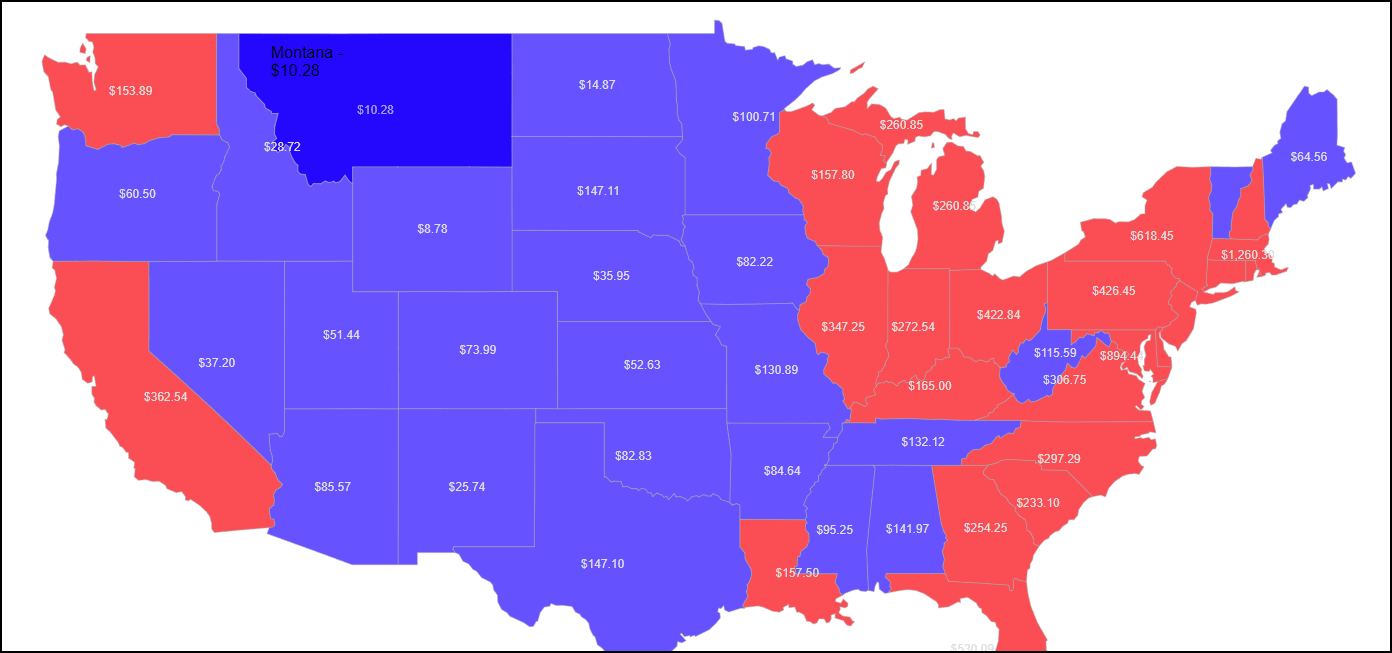
</code></pre><p>We configure the <code class="inline-code">ClientEvents</code> we will use here and set the <code class="inline-code">StyleSetting</code>. We add an opacity of 0.7, so when we pass the mouse over, we change it to 1 to highlight the shape, like the state of Montana in the RadMap image sample.</p><ol start="3"><li>Add the <a href="https://docs.telerik.com/devtools/aspnet-ajax/controls/clientdatasource/connecting-to-various-data-sources">RadClientDataSource</a> component.</li></ol><pre class=" language-html"><code class="prism  language-html">1.<span class="token tag"><span class="token tag"><span class="token punctuation">&lt;</span><span class="token namespace">telerik:</span>RadClientDataSource</span> <span class="token attr-name">ID</span><span class="token attr-value"><span class="token punctuation">=</span><span class="token punctuation">"</span>RadClientDataSource1<span class="token punctuation">"</span></span> <span class="token attr-name">runat</span><span class="token attr-value"><span class="token punctuation">=</span><span class="token punctuation">"</span>server<span class="token punctuation">"</span></span><span class="token punctuation">&gt;</span></span>
2.    <span class="token tag"><span class="token tag"><span class="token punctuation">&lt;</span>DataSource</span><span class="token punctuation">&gt;</span></span>
3.        <span class="token tag"><span class="token tag"><span class="token punctuation">&lt;</span>WebServiceDataSourceSettings</span> <span class="token attr-name">ServiceType</span><span class="token attr-value"><span class="token punctuation">=</span><span class="token punctuation">"</span>GeoJSON<span class="token punctuation">"</span></span><span class="token punctuation">&gt;</span></span>
4.            <span class="token tag"><span class="token tag"><span class="token punctuation">&lt;</span>Select</span> <span class="token attr-name">Url</span><span class="token attr-value"><span class="token punctuation">=</span><span class="token punctuation">"</span>states.json<span class="token punctuation">"</span></span> <span class="token attr-name">DataType</span><span class="token attr-value"><span class="token punctuation">=</span><span class="token punctuation">"</span>JSON<span class="token punctuation">"</span></span> <span class="token punctuation">/&gt;</span></span>
5.        <span class="token tag"><span class="token tag"><span class="token punctuation">&lt;/</span>WebServiceDataSourceSettings</span><span class="token punctuation">&gt;</span></span>
6.    <span class="token tag"><span class="token tag"><span class="token punctuation">&lt;/</span>DataSource</span><span class="token punctuation">&gt;</span></span>
7.<span class="token tag"><span class="token tag"><span class="token punctuation">&lt;/</span><span class="token namespace">telerik:</span>RadClientDataSource</span><span class="token punctuation">&gt;</span></span>
</code></pre><p>In this code, the <code class="inline-code">ServiceType= "GeoJSON"</code> attribute of the <code class="inline-code">WebServiceDataSourceSettings</code> tag specifies the data format in which the web service is expected to return.</p><p>In this case, GeoJSON is a format for encoding various geographic data structures. It is built on JavaScript Object Notation (JSON), making it simple to work with in a web environment.</p><p>The <code class="inline-code">Select Url="states.json"</code> attribute specifies the URL for the web service. Tip: If you specify a URL outside your project, configure CORS.</p><h2 id="the-javascript-for-this-radmap">The JavaScript for This RadMap</h2><p>The state.json I provide in this sample has the density value for each U.S. state, but we can build our own data. For this sample, we created a const with values where the property name is the key:</p><pre class=" language-js"><code class="prism  language-js"><span class="token number">1</span><span class="token punctuation">.</span><span class="token keyword">const</span> dataStates <span class="token operator">=</span> <span class="token punctuation">[</span><span class="token punctuation">[</span><span class="token string">'Alabama'</span><span class="token punctuation">,</span> <span class="token number">141.972</span><span class="token punctuation">]</span><span class="token punctuation">,</span> <span class="token punctuation">[</span><span class="token string">'Alaska'</span><span class="token punctuation">,</span> <span class="token number">1.896</span><span class="token punctuation">]</span><span class="token punctuation">,</span> <span class="token punctuation">[</span><span class="token string">'Arizona'</span><span class="token punctuation">,</span> <span class="token number">85.57</span><span class="token punctuation">]</span><span class="token punctuation">,</span> <span class="token punctuation">[</span><span class="token string">'Arkansas'</span><span class="token punctuation">,</span> <span class="token number">84.64</span><span class="token punctuation">]</span><span class="token punctuation">,</span> <span class="token punctuation">[</span><span class="token string">'California'</span><span class="token punctuation">,</span> <span class="token number">362.54</span><span class="token punctuation">]</span><span class="token punctuation">,</span> <span class="token punctuation">[</span><span class="token string">'Colorado'</span><span class="token punctuation">,</span> <span class="token number">73.99</span><span class="token punctuation">]</span><span class="token punctuation">,</span> <span class="token punctuation">[</span><span class="token string">'Connecticut'</span><span class="token punctuation">,</span> <span class="token number">1108.65</span><span class="token punctuation">]</span><span class="token punctuation">,</span> <span class="token punctuation">[</span><span class="token string">'Delaware'</span><span class="token punctuation">,</span> <span class="token number">696.45</span><span class="token punctuation">]</span><span class="token punctuation">,</span> <span class="token punctuation">[</span><span class="token string">'District of Columbia'</span><span class="token punctuation">,</span> <span class="token number">15097.5</span><span class="token punctuation">]</span><span class="token punctuation">,</span> <span class="token punctuation">[</span><span class="token string">'Florida'</span><span class="token punctuation">,</span> <span class="token number">530.09</span><span class="token punctuation">]</span><span class="token punctuation">,</span> <span class="token punctuation">[</span><span class="token string">'Georgia'</span><span class="token punctuation">,</span> <span class="token number">254.25</span><span class="token punctuation">]</span><span class="token punctuation">,</span> <span class="token punctuation">[</span><span class="token string">'Hawaii'</span><span class="token punctuation">,</span> <span class="token number">321.15</span><span class="token punctuation">]</span><span class="token punctuation">,</span> <span class="token punctuation">[</span><span class="token string">'Hawaii'</span><span class="token punctuation">,</span> <span class="token number">321.15</span><span class="token punctuation">]</span><span class="token punctuation">,</span> <span class="token punctuation">[</span><span class="token string">'Idaho'</span><span class="token punctuation">,</span> <span class="token number">28.72</span><span class="token punctuation">]</span><span class="token punctuation">,</span> <span class="token punctuation">[</span><span class="token string">'Illinois'</span><span class="token punctuation">,</span> <span class="token number">347.25</span><span class="token punctuation">]</span><span class="token punctuation">,</span> <span class="token punctuation">[</span><span class="token string">'Indiana'</span><span class="token punctuation">,</span> <span class="token number">272.54</span><span class="token punctuation">]</span><span class="token punctuation">,</span> <span class="token punctuation">[</span><span class="token string">'Iowa'</span><span class="token punctuation">,</span> <span class="token number">82.215</span><span class="token punctuation">]</span><span class="token punctuation">,</span> <span class="token punctuation">[</span><span class="token string">'Kansas'</span><span class="token punctuation">,</span> <span class="token number">52.63</span><span class="token punctuation">]</span><span class="token punctuation">,</span> <span class="token punctuation">[</span><span class="token string">'Kentucky'</span><span class="token punctuation">,</span> <span class="token number">165</span><span class="token punctuation">]</span><span class="token punctuation">,</span> <span class="token punctuation">[</span><span class="token string">'Louisiana'</span><span class="token punctuation">,</span> <span class="token number">157.5</span><span class="token punctuation">]</span><span class="token punctuation">,</span> <span class="token punctuation">[</span><span class="token string">'Maine'</span><span class="token punctuation">,</span> <span class="token number">64.56</span><span class="token punctuation">]</span><span class="token punctuation">,</span> <span class="token punctuation">[</span><span class="token string">'Maryland'</span><span class="token punctuation">,</span> <span class="token number">894.44</span><span class="token punctuation">]</span><span class="token punctuation">,</span> <span class="token punctuation">[</span><span class="token string">'Maryland'</span><span class="token punctuation">,</span> <span class="token number">894.44</span><span class="token punctuation">]</span><span class="token punctuation">,</span> <span class="token punctuation">[</span><span class="token string">'Massachusetts'</span><span class="token punctuation">,</span> <span class="token number">1260.30</span><span class="token punctuation">]</span><span class="token punctuation">,</span> <span class="token punctuation">[</span><span class="token string">'Michigan'</span><span class="token punctuation">,</span> <span class="token number">260.85</span><span class="token punctuation">]</span><span class="token punctuation">,</span> <span class="token punctuation">[</span><span class="token string">'Michigan'</span><span class="token punctuation">,</span> <span class="token number">260.85</span><span class="token punctuation">]</span><span class="token punctuation">,</span> <span class="token punctuation">[</span><span class="token string">'Michigan'</span><span class="token punctuation">,</span> <span class="token number">260.85</span><span class="token punctuation">]</span><span class="token punctuation">,</span> <span class="token punctuation">[</span><span class="token string">'Michigan'</span><span class="token punctuation">,</span> <span class="token number">260.85</span><span class="token punctuation">]</span><span class="token punctuation">,</span> <span class="token punctuation">[</span><span class="token string">'Minnesota'</span><span class="token punctuation">,</span> <span class="token number">100.71</span><span class="token punctuation">]</span><span class="token punctuation">,</span> <span class="token punctuation">[</span><span class="token string">'Mississippi'</span><span class="token punctuation">,</span> <span class="token number">95.25</span><span class="token punctuation">]</span><span class="token punctuation">,</span> <span class="token punctuation">[</span><span class="token string">'Missouri'</span><span class="token punctuation">,</span> <span class="token number">130.89</span><span class="token punctuation">]</span><span class="token punctuation">,</span> <span class="token punctuation">[</span><span class="token string">'Montana'</span><span class="token punctuation">,</span> <span class="token number">10.28</span><span class="token punctuation">]</span><span class="token punctuation">,</span> <span class="token punctuation">[</span><span class="token string">'Nebraska'</span><span class="token punctuation">,</span> <span class="token number">35.95</span><span class="token punctuation">]</span><span class="token punctuation">,</span> <span class="token punctuation">[</span><span class="token string">'Nevada'</span><span class="token punctuation">,</span> <span class="token number">37.2</span><span class="token punctuation">]</span><span class="token punctuation">,</span> <span class="token punctuation">[</span><span class="token string">'New Hampshire'</span><span class="token punctuation">,</span> <span class="token number">220.5</span><span class="token punctuation">]</span><span class="token punctuation">,</span> <span class="token punctuation">[</span><span class="token string">'New Jersey'</span><span class="token punctuation">,</span> <span class="token number">1783.5</span><span class="token punctuation">]</span><span class="token punctuation">,</span> <span class="token punctuation">[</span><span class="token string">'New Mexico'</span><span class="token punctuation">,</span> <span class="token number">25.74</span><span class="token punctuation">]</span><span class="token punctuation">,</span> <span class="token punctuation">[</span><span class="token string">'New York'</span><span class="token punctuation">,</span> <span class="token number">618.45</span><span class="token punctuation">]</span><span class="token punctuation">,</span> <span class="token punctuation">[</span><span class="token string">'North Carolina'</span><span class="token punctuation">,</span> <span class="token number">297.29</span><span class="token punctuation">]</span><span class="token punctuation">,</span> <span class="token punctuation">[</span><span class="token string">'North Dakota'</span><span class="token punctuation">,</span> <span class="token number">14.874</span><span class="token punctuation">]</span><span class="token punctuation">,</span> <span class="token punctuation">[</span><span class="token string">'Ohio'</span><span class="token punctuation">,</span> <span class="token number">422.84</span><span class="token punctuation">]</span><span class="token punctuation">,</span> <span class="token punctuation">[</span><span class="token string">'Oklahoma'</span><span class="token punctuation">,</span> <span class="token number">82.83</span><span class="token punctuation">]</span><span class="token punctuation">,</span> <span class="token punctuation">[</span><span class="token string">'Oregon'</span><span class="token punctuation">,</span> <span class="token number">60.495</span><span class="token punctuation">]</span><span class="token punctuation">,</span> <span class="token punctuation">[</span><span class="token string">'Pennsylvania'</span><span class="token punctuation">,</span> <span class="token number">426.45</span><span class="token punctuation">]</span><span class="token punctuation">,</span> <span class="token punctuation">[</span><span class="token string">'Rhode Island'</span><span class="token punctuation">,</span> <span class="token number">1509</span><span class="token punctuation">]</span><span class="token punctuation">,</span> <span class="token punctuation">[</span><span class="token string">'South Carolina'</span><span class="token punctuation">,</span> <span class="token number">233.10</span><span class="token punctuation">]</span><span class="token punctuation">,</span> <span class="token punctuation">[</span><span class="token string">'South Dakota'</span><span class="token punctuation">,</span> <span class="token number">147.105</span><span class="token punctuation">]</span><span class="token punctuation">,</span> <span class="token punctuation">[</span><span class="token string">'Tennessee'</span><span class="token punctuation">,</span> <span class="token number">132.12</span><span class="token punctuation">]</span><span class="token punctuation">,</span> <span class="token punctuation">[</span><span class="token string">'Texas'</span><span class="token punctuation">,</span> <span class="token number">147.10</span><span class="token punctuation">]</span><span class="token punctuation">,</span> <span class="token punctuation">[</span><span class="token string">'Utah'</span><span class="token punctuation">,</span> <span class="token number">51.44</span><span class="token punctuation">]</span><span class="token punctuation">,</span> <span class="token punctuation">[</span><span class="token string">'Vermont'</span><span class="token punctuation">,</span> 1dw01<span class="token number">.595</span><span class="token punctuation">]</span><span class="token punctuation">,</span> <span class="token punctuation">[</span><span class="token string">'Virginia'</span><span class="token punctuation">,</span> <span class="token number">306.75</span><span class="token punctuation">]</span><span class="token punctuation">,</span> <span class="token punctuation">[</span><span class="token string">'Virginia'</span><span class="token punctuation">,</span> <span class="token number">306.75</span><span class="token punctuation">]</span><span class="token punctuation">,</span> <span class="token punctuation">[</span><span class="token string">'Virginia'</span><span class="token punctuation">,</span> <span class="token number">306.75</span><span class="token punctuation">]</span><span class="token punctuation">,</span> <span class="token punctuation">[</span><span class="token string">'Washington'</span><span class="token punctuation">,</span> <span class="token number">153.89</span><span class="token punctuation">]</span><span class="token punctuation">,</span> <span class="token punctuation">[</span><span class="token string">'Washington'</span><span class="token punctuation">,</span> <span class="token number">153.89</span><span class="token punctuation">]</span><span class="token punctuation">,</span> <span class="token punctuation">[</span><span class="token string">'Washington'</span><span class="token punctuation">,</span> <span class="token number">153.89</span><span class="token punctuation">]</span><span class="token punctuation">,</span> <span class="token punctuation">[</span><span class="token string">'West Virginia'</span><span class="token punctuation">,</span> <span class="token number">115.59</span><span class="token punctuation">]</span><span class="token punctuation">,</span> <span class="token punctuation">[</span><span class="token string">'Wisconsin'</span><span class="token punctuation">,</span> <span class="token number">157.8</span><span class="token punctuation">]</span><span class="token punctuation">,</span> <span class="token punctuation">[</span><span class="token string">'Wyoming'</span><span class="token punctuation">,</span> <span class="token number">8.7765</span><span class="token punctuation">]</span><span class="token punctuation">,</span> <span class="token punctuation">[</span><span class="token string">'Puerto Rico'</span><span class="token punctuation">,</span> <span class="token number">16</span><span class="token punctuation">]</span><span class="token punctuation">]</span><span class="token punctuation">;</span>
</code></pre><p>For your implementation, this data can be in the state.json or you can build it yourself and load it from an endpoint.</p><h2 id="creating-the-labels">Creating the Labels</h2><p>On the client event <code class="inline-code">onShapeCreated</code>, we can create the bbox on the shape to hold the values we&rsquo;d like to display.</p><pre class=" language-js"><code class="prism  language-js"><span class="token number">1</span><span class="token punctuation">.</span><span class="token keyword">function</span> <span class="token function">onShapeCreated</span><span class="token punctuation">(</span>e<span class="token punctuation">)</span> <span class="token punctuation">{</span>
<span class="token number">2</span><span class="token punctuation">.</span>
<span class="token number">3</span><span class="token punctuation">.</span><span class="token keyword">var</span> shape <span class="token operator">=</span> e<span class="token punctuation">.</span>shape<span class="token punctuation">;</span>
<span class="token number">4</span><span class="token punctuation">.</span><span class="token keyword">var</span> key <span class="token operator">=</span> shape<span class="token punctuation">.</span>dataItem<span class="token punctuation">.</span>properties<span class="token punctuation">.</span>name<span class="token punctuation">;</span>
<span class="token number">5</span><span class="token punctuation">.</span><span class="token keyword">var</span> valueArray <span class="token operator">=</span> dataStates<span class="token punctuation">.</span><span class="token function">find</span><span class="token punctuation">(</span><span class="token keyword">function</span> <span class="token punctuation">(</span>item<span class="token punctuation">)</span> <span class="token punctuation">{</span>
<span class="token number">6</span><span class="token punctuation">.</span>    <span class="token keyword">if</span> <span class="token punctuation">(</span>item<span class="token punctuation">[</span><span class="token number">0</span><span class="token punctuation">]</span> <span class="token operator">===</span> key<span class="token punctuation">)</span> <span class="token keyword">return</span> item<span class="token punctuation">;</span>
<span class="token number">7</span><span class="token punctuation">.</span><span class="token punctuation">}</span><span class="token punctuation">)</span><span class="token punctuation">;</span>
<span class="token number">8</span><span class="token punctuation">.</span>
<span class="token number">9</span><span class="token punctuation">.</span><span class="token keyword">var</span> customValue <span class="token operator">=</span> <span class="token function">parseFloat</span><span class="token punctuation">(</span>valueArray<span class="token punctuation">[</span><span class="token number">1</span><span class="token punctuation">]</span><span class="token punctuation">)</span><span class="token punctuation">;</span>
<span class="token number">10</span><span class="token punctuation">.</span>
<span class="token number">11</span><span class="token punctuation">.</span><span class="token keyword">if</span> <span class="token punctuation">(</span>customValue <span class="token operator">&gt;</span> <span class="token number">150</span><span class="token punctuation">)</span> <span class="token punctuation">{</span>
<span class="token number">12</span><span class="token punctuation">.</span>    shape<span class="token punctuation">.</span>options<span class="token punctuation">.</span>fill<span class="token punctuation">.</span><span class="token keyword">set</span><span class="token punctuation">(</span><span class="token string">"color"</span><span class="token punctuation">,</span> <span class="token string">"red"</span><span class="token punctuation">)</span><span class="token punctuation">;</span> <span class="token comment">// Red for values greater than 150</span>
<span class="token number">13</span><span class="token punctuation">.</span><span class="token punctuation">}</span> <span class="token keyword">else</span> <span class="token punctuation">{</span>
<span class="token number">14</span><span class="token punctuation">.</span>    shape<span class="token punctuation">.</span>options<span class="token punctuation">.</span>fill<span class="token punctuation">.</span><span class="token keyword">set</span><span class="token punctuation">(</span><span class="token string">"color"</span><span class="token punctuation">,</span> <span class="token string">"blue"</span><span class="token punctuation">)</span><span class="token punctuation">;</span> <span class="token comment">// Green otherwise</span>
<span class="token number">15</span><span class="token punctuation">.</span><span class="token punctuation">}</span>
<span class="token number">16</span><span class="token punctuation">.</span>
<span class="token number">17</span><span class="token punctuation">.</span><span class="token keyword">var</span> bbox <span class="token operator">=</span> e<span class="token punctuation">.</span>shape<span class="token punctuation">.</span><span class="token function">bbox</span><span class="token punctuation">(</span><span class="token punctuation">)</span><span class="token punctuation">;</span> <span class="token comment">// Get the "box" of each of the states</span>
<span class="token number">18</span><span class="token punctuation">.</span>
<span class="token number">19</span><span class="token punctuation">.</span><span class="token keyword">if</span> <span class="token punctuation">(</span>bbox<span class="token punctuation">.</span><span class="token function">width</span><span class="token punctuation">(</span><span class="token punctuation">)</span> <span class="token operator">&lt;=</span> PMinWidthToDisplayLabel<span class="token punctuation">)</span> <span class="token punctuation">{</span>
<span class="token number">20</span><span class="token punctuation">.</span>    <span class="token keyword">return</span><span class="token punctuation">;</span>
<span class="token number">21</span><span class="token punctuation">.</span><span class="token punctuation">}</span>
<span class="token number">22</span><span class="token punctuation">.</span>
<span class="token number">23</span><span class="token punctuation">.</span><span class="token keyword">var</span> options <span class="token operator">=</span> <span class="token punctuation">{</span> style<span class="token punctuation">:</span> &lsquo;currency&rsquo;<span class="token punctuation">,</span> currency<span class="token punctuation">:</span> &lsquo;USD&rsquo; <span class="token punctuation">}</span><span class="token punctuation">;</span>
<span class="token number">24</span><span class="token punctuation">.</span><span class="token keyword">var</span> labelText <span class="token operator">=</span> customValue<span class="token punctuation">.</span><span class="token function">toLocaleString</span><span class="token punctuation">(</span><span class="token string">'en-US'</span><span class="token punctuation">,</span> options<span class="token punctuation">)</span><span class="token punctuation">;</span>
<span class="token number">25</span><span class="token punctuation">.</span><span class="token keyword">var</span> center <span class="token operator">=</span> bbox<span class="token punctuation">.</span><span class="token function">center</span><span class="token punctuation">(</span><span class="token punctuation">)</span><span class="token punctuation">;</span> <span class="token comment">// We need the center to  display the label exactly on it later.</span>
<span class="token number">26</span><span class="token punctuation">.</span><span class="token keyword">var</span> label <span class="token operator">=</span> <span class="token keyword">new</span> <span class="token class-name">kendo<span class="token punctuation">.</span>drawing<span class="token punctuation">.</span>Text</span><span class="token punctuation">(</span>labelText<span class="token punctuation">)</span><span class="token punctuation">;</span>
<span class="token number">27</span><span class="token punctuation">.</span>label<span class="token punctuation">.</span>options<span class="token punctuation">.</span>fill<span class="token punctuation">.</span>color <span class="token operator">=</span> <span class="token string">"#DEDEDE"</span><span class="token punctuation">;</span> <span class="token comment">// Set the color</span>
<span class="token number">28</span><span class="token punctuation">.</span><span class="token keyword">var</span> labelCenter <span class="token operator">=</span> label<span class="token punctuation">.</span><span class="token function">bbox</span><span class="token punctuation">(</span><span class="token punctuation">)</span><span class="token punctuation">.</span><span class="token function">center</span><span class="token punctuation">(</span><span class="token punctuation">)</span><span class="token punctuation">;</span>
<span class="token number">29</span><span class="token punctuation">.</span>
<span class="token number">30</span><span class="token punctuation">.</span>label<span class="token punctuation">.</span><span class="token function">position</span><span class="token punctuation">(</span><span class="token punctuation">[</span> <span class="token comment">// Position the label</span>
<span class="token number">31</span><span class="token punctuation">.</span>    center<span class="token punctuation">.</span>x <span class="token operator">-</span> labelCenter<span class="token punctuation">.</span>x<span class="token punctuation">,</span>
<span class="token number">32</span><span class="token punctuation">.</span>    center<span class="token punctuation">.</span>y <span class="token operator">-</span> labelCenter<span class="token punctuation">.</span>y
<span class="token number">33</span><span class="token punctuation">.</span><span class="token punctuation">]</span><span class="token punctuation">)</span><span class="token punctuation">;</span>
<span class="token number">34</span><span class="token punctuation">.</span>
<span class="token number">35</span><span class="token punctuation">.</span>e<span class="token punctuation">.</span>layer<span class="token punctuation">.</span>surface<span class="token punctuation">.</span><span class="token function">draw</span><span class="token punctuation">(</span>label<span class="token punctuation">)</span><span class="token punctuation">;</span> <span class="token comment">// Render the label on the layer surface</span>
<span class="token number">36</span><span class="token punctuation">.</span>
<span class="token number">37</span><span class="token punctuation">.</span><span class="token punctuation">}</span>
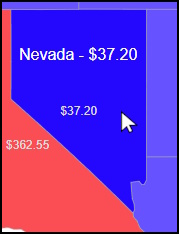
</code></pre><p>In line 4, we read the value from state.json for the current shape, <code class="inline-code">shape.dataItem.properties.name</code>, which is used as the key value for the <code class="inline-code">dataStates</code> var.</p><p>In line 11, we use an arbitrary value to change the shape&rsquo;s colors. In this case, I choose 150.</p><p>In line 17, we create the object box to hold the label.</p><p>In line 19, we display the label using another arbitrary value. This is useful to avoid repeating the values in the islands of Alaska.</p><p>In lines 23 and 24, we transform the data into currency value.</p><p>From lines 26 to 27, we customize the content. In line 30, we centralize the position of the label. In line 35, we add the label to the layer.</p><h2 id="adding-the-tooltip-content">Adding the Tooltip Content</h2><p>We can add custom pieces of information on the tooltip when the mouse is over it.</p><p>The below image demonstrates what it looks like.</p><p><img src="https://d585tldpucybw.cloudfront.net/sfimages/default-source/blogs/2024/2024-06/nevada.jpg?sfvrsn=524de4c7_2" alt="Hovering over Nevada " /><br /><span style="font-size:11px;">Mouse over Nevada</span></p><p>Here is the event <code class="inline-code">onShapeFeatureCreated</code> for the tooltip on the shape:</p><pre class=" language-js"><code class="prism  language-js"><span class="token number">1</span><span class="token punctuation">.</span><span class="token keyword">function</span> <span class="token function">onShapeFeatureCreated</span><span class="token punctuation">(</span>e<span class="token punctuation">)</span> <span class="token punctuation">{</span>
<span class="token number">2</span><span class="token punctuation">.</span>
<span class="token number">3</span><span class="token punctuation">.</span>    <span class="token keyword">var</span> key <span class="token operator">=</span> e<span class="token punctuation">.</span>properties<span class="token punctuation">.</span>name<span class="token punctuation">;</span>
<span class="token number">4</span><span class="token punctuation">.</span>    <span class="token keyword">var</span> valueArray <span class="token operator">=</span> dataStates<span class="token punctuation">.</span><span class="token function">find</span><span class="token punctuation">(</span><span class="token keyword">function</span> <span class="token punctuation">(</span>item<span class="token punctuation">)</span> <span class="token punctuation">{</span>
<span class="token number">5</span><span class="token punctuation">.</span>        <span class="token keyword">if</span> <span class="token punctuation">(</span>item<span class="token punctuation">[</span><span class="token number">0</span><span class="token punctuation">]</span> <span class="token operator">===</span> key<span class="token punctuation">)</span> <span class="token keyword">return</span> item<span class="token punctuation">;</span>
<span class="token number">6</span><span class="token punctuation">.</span>    <span class="token punctuation">}</span><span class="token punctuation">)</span><span class="token punctuation">;</span>
<span class="token number">7</span><span class="token punctuation">.</span>
<span class="token number">8</span><span class="token punctuation">.</span>    <span class="token keyword">var</span> customValue <span class="token operator">=</span> <span class="token function">parseFloat</span><span class="token punctuation">(</span>valueArray<span class="token punctuation">[</span><span class="token number">1</span><span class="token punctuation">]</span><span class="token punctuation">)</span><span class="token punctuation">;</span>
<span class="token number">9</span><span class="token punctuation">.</span>
<span class="token number">10</span><span class="token punctuation">.</span>    <span class="token keyword">var</span> options <span class="token operator">=</span> <span class="token punctuation">{</span> style<span class="token punctuation">:</span> &lsquo;currency&rsquo;<span class="token punctuation">,</span> currency<span class="token punctuation">:</span> &lsquo;USD&rsquo; <span class="token punctuation">}</span><span class="token punctuation">;</span>
<span class="token number">11</span><span class="token punctuation">.</span>    <span class="token keyword">var</span> tooltipText <span class="token operator">=</span> customValue<span class="token punctuation">.</span><span class="token function">toLocaleString</span><span class="token punctuation">(</span><span class="token string">'en-US'</span><span class="token punctuation">,</span> options<span class="token punctuation">)</span><span class="token punctuation">;</span>
<span class="token number">12</span><span class="token punctuation">.</span>
<span class="token number">13</span><span class="token punctuation">.</span>    e<span class="token punctuation">.</span>group<span class="token punctuation">.</span>options<span class="token punctuation">.</span>tooltip <span class="token operator">=</span> <span class="token punctuation">{</span>
<span class="token number">14</span><span class="token punctuation">.</span>        content<span class="token punctuation">:</span> e<span class="token punctuation">.</span>properties<span class="token punctuation">.</span>name <span class="token operator">+</span> <span class="token string">" - "</span> <span class="token operator">+</span> tooltipText<span class="token punctuation">,</span>
<span class="token number">15</span><span class="token punctuation">.</span>        position<span class="token punctuation">:</span> &ldquo;cursor&rdquo;<span class="token punctuation">,</span>
<span class="token number">16</span><span class="token punctuation">.</span>        offset<span class="token punctuation">:</span> <span class="token number">10</span><span class="token punctuation">,</span>
<span class="token number">17</span><span class="token punctuation">.</span>        width<span class="token punctuation">:</span> <span class="token number">120</span>
<span class="token number">18</span><span class="token punctuation">.</span>    <span class="token punctuation">}</span><span class="token punctuation">;</span>
<span class="token number">19</span><span class="token punctuation">.</span><span class="token punctuation">}</span>
</code></pre><p>In line 3, we retrieve the key. In line 4, we get the value.</p><blockquote><p><strong>Tip:</strong> If your JSON already has a property to display, load it from <code class="inline-code">e.properties.MyCustomValueInJson</code>, where <code class="inline-code">MyCustomValueInJson</code> is your property name.</p></blockquote><p>In line 14, we pass the content for the tooltip.</p><h2 id="conclusion">Conclusion</h2><p>Telerik UI for ASP.NET AJAX powered with Kendo UI for jQuery gives us a strong and dependable set of parts for making dynamic and visually stunning web experiences. This post showed how to use the Map object to add labels to a map based on custom data. We learned how to set up the Telerik environment, add the RadMap component and connect to a data source. We&rsquo;ve also looked at how to make labels and give the tooltip our own information. With these tools and methods, developers can create rich and interactive maps for our web apps.</p><p>Download a <a href="https://www.telerik.com/devcraft">Telerik DevCraft</a> trial now. Even during the trial, you can call Progress support or contact me on LinkedIn to exchange ideas; I speak English and Portuguese.</p><h3 id="references">References</h3><ul><li><a href="https://github.com/jssmotta/TelerikMapUSA">Source code</a></li><li>Search the web for a GeoJSON that matches your requirements: <a href="https://www.bing.com/search?&amp;q=download+GeoJSON">https://www.bing.com/search?&amp;q=download+GeoJSON</a></li><li>Learn about GeoJSON: <a href="https://geojson.org/">https://geojson.org/</a></li></ul><hr /><p>Don&rsquo;t forget: <a href="https://www.telerik.com/products/aspnet-ajax.aspx" target="_blank">Telerik UI for ASP.NET AJAX</a> comes with a free 30-day trial. Better yet, try the <a target="_blank" href="https://www.telerik.com/devcraft">Telerik DevCraft</a>&nbsp;bundle for free to see what other .NET or JavaScript component libraries plus reporting, testing and debugging tools Progress has to offer.</p><p><a href="https://www.telerik.com/try/devcraft-ultimate" target="_blank" class="Btn">Try Telerik DevCraft</a></p><img src="https://feeds.telerik.com/link/23053/16764502.gif" height="1" width="1"/>]]></content>
  </entry>
  <entry>
    <id>urn:uuid:ce4f8486-24fe-4a51-9235-9a4f28a7da9a</id>
    <title type="text">What’s New in Telerik Web UI Component Libraries with R2 2023</title>
    <summary type="text">See what R2 2023 delivers to the .NET UI libraries for web from Progress Telerik for Blazor, ASP.NET Core, ASP.NET MVC and ASP.NET AJAX.</summary>
    <published>2023-06-07T13:49:32Z</published>
    <updated>2026-04-07T05:36:35Z</updated>
    <author>
      <name>Lyubomir Atanasov </name>
    </author>
    <link rel="alternate" href="https://feeds.telerik.com/link/23053/16170935/r2-2023-telerik-web-release"/>
    <content type="text"><![CDATA[<p><span class="featured">See what R2 2023 delivers to the .NET UI libraries for web from Progress Telerik for Blazor, ASP.NET Core, ASP.NET MVC and ASP.NET AJAX.</span></p><p>Announcing the much-awaited R2 2023 update of Telerik UI for Blazor, ASP.NET Core and MVC and ASP.NET AJAX!</p><p>In this blog post, we&rsquo;ll delve into the exciting new features and enhancements that will elevate your web development projects to a whole new level. Get ready to unlock the full potential of the latest Telerik UI release.</p><p>Feel free to jump to your favorite section:</p><ul><li><a href="https://www.telerik.com#common-release-items" data-sf-ec-immutable="">Common Release Items</a></li><li><a href="https://www.telerik.com#telerik-ui-for-blazor" data-sf-ec-immutable="">Telerik UI for Blazor</a></li><li><a href="https://www.telerik.com#telerik-ui-for-aspnet-core-and-mvc" data-sf-ec-immutable="">Telerik UI for ASP.NET Core/MVC</a></li><li><a href="https://www.telerik.com#telerik-ui-for-aspnet-ajax" data-sf-ec-immutable="">Telerik UI for ASP.NET AJAX</a></li><li><a href="https://www.telerik.com#progress-telerik-.net-web-desktop--mobile-products-r2-2023-release-webinar--june-8" data-sf-ec-immutable="">Webinar details for June 8</a></li></ul><h2 id="common-release-items">Common Release Items</h2><h3 id="font-icons-to-svg-icons">Font Icons to SVG Icons</h3><p>In the R2 2023 update, a significant change was introduced to the default icon type in Telerik and Kendo UI libraries and components. We have shifted from font icons to SVG icons as part of our continuous efforts to improve product quality&nbsp; and theming
    mechanisms, and to ensure compliance with Content Security Policy (CSP). This transition allows us to enhance the visual experience and align with evolving web standards.</p><p><img src="https://d585tldpucybw.cloudfront.net/sfimages/default-source/blogs/2023/2023-05/allcomponents-svg-icon_770.png?sfvrsn=132bd02f_3" alt="Illustration of Telerik and Kendo UI mascots with SVG" /></p><p>For more information, be sure to check out the dedicated <a href="https://www.telerik.com/blogs/future-icons-telerik-kendo-ui-themes" target="_blank">icon blog post</a> on this topic. It&rsquo;s packed with valuable insights to
    help you learn more.
</p><h3 id="compatibility-with-.net-8-preview-4">Compatibility with .NET 8 Preview 4</h3><p><img src="https://d585tldpucybw.cloudfront.net/sfimages/default-source/blogs/2023/2023-04/net-8-preview.png?sfvrsn=3b028942_3" alt=".NET 8 Preview with Telerik Ninja" /></p><p>The Telerik UI for Blazor and UI ASP.NET Core libraries are now compatible with <a href="https://devblogs.microsoft.com/dotnet/announcing-dotnet-8-preview-4" target="_blank">Microsoft&rsquo;s .NET 8 preview 4</a>, released in mid-March.
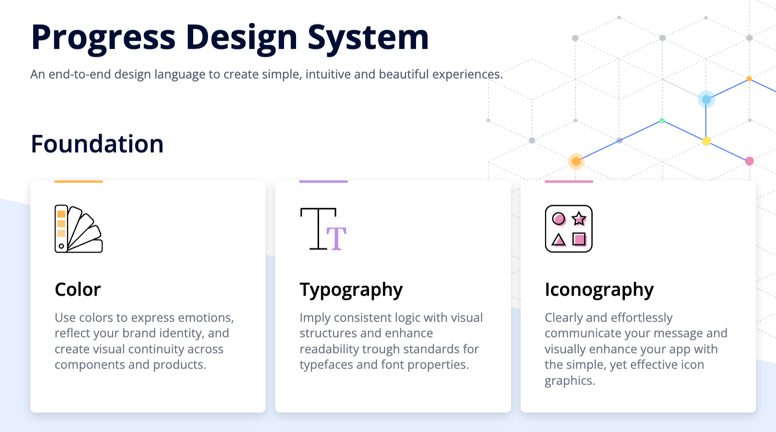
    This exciting development enables developers to leverage the cutting-edge features and performance enhancements of .NET 8 while harnessing the robust UI components offered by Telerik.</p><h3 id="design-system-documentation">Design System Documentation</h3><p>An exciting addition in R2 2023 is the launch of a <a href="https://www.telerik.com/design-system/docs/" target="_blank">design system documentation site</a> dedicated to the Telerik and Kendo UI libraries. This site provides a
    comprehensive collection of design assets, frontend documentation and valuable resources. Initially, we have included documentation for nearly 20 essential components. Our goal is to continuously expand this site, empowering you with the necessary
    tools to create visually impressive digital experiences and design systems using the robust capabilities of Telerik and Kendo UI.</p><p><img src="https://d585tldpucybw.cloudfront.net/sfimages/default-source/blogs/2023/2023-06/progress-design-system.png?sfvrsn=f117595e_3" alt="Screenshot from Progress Design System website" /></p><p>The design system documentation site now includes the initial version of the CSS Utils package, a convenient library of HTML classes tailored for CSS properties. This package allows you to effortlessly style page layouts without writing extensive CSS
    code. For example, adding a border radius is as simple as applying the <code>.k-rounded-md</code> class to the element.</p><p>The <a href="https://www.telerik.com/design-system/docs/utils/get-started/introduction/" target="_blank">CSS Utils package</a> is integrated within our Telerik and Kendo UI themes. When you install any of our themes, you automatically
    get the CSS Utils package. However, if you only require the Utils package for page layout styling, you can install it separately.</p><p>We have plans to expand the package&rsquo;s capabilities, including adding a color system and typography options, and expanding the sizing map. Stay tuned for future updates!</p><h3 id="less-themes-deprecation">LESS Themes Deprecation</h3><p>In accordance with the previous announcement made in January 2022, starting from R1 2023, we will discontinue support for LESS themes in our Telerik and Kendo UI products. We recommend that any customers currently using LESS themes transition to an equivalent
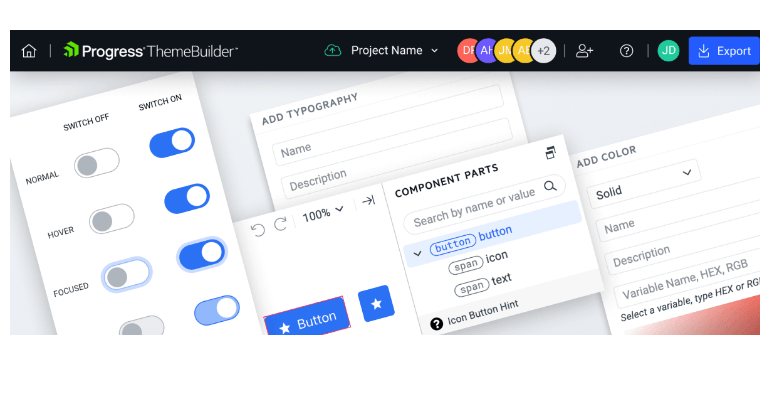
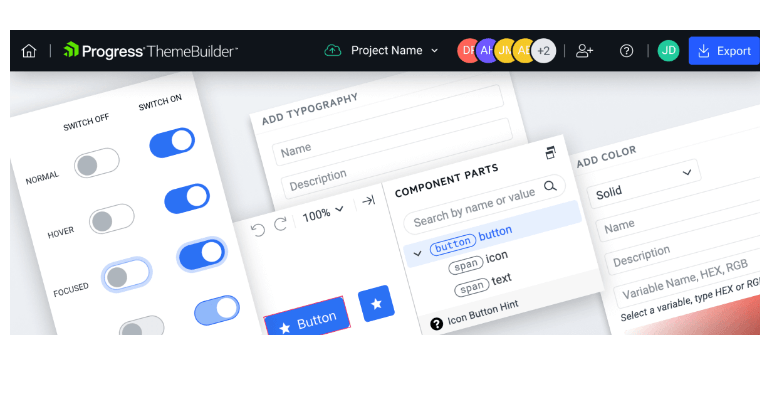
    theme based on SASS. For detailed information on the reasons behind this change and its potential impact on you, please refer to titled &ldquo;<a href="https://www.telerik.com/blogs/future-plans-telerik-kendo-ui-less-themes" target="_blank">Future Plans for the Telerik and Kendo UI LESS Themes</a>&rdquo;.</p><h3 id="themebuilder-pro-support">ThemeBuilder Pro Support</h3><p><img src="https://d585tldpucybw.cloudfront.net/sfimages/default-source/blogs/2023/2023-06/new-themebuilder-pro.png?sfvrsn=e8712359_3" alt="ThemeBuilder collaboration" /></p><p><a target="_blank" href="https://www.telerik.com/themebuilder">ThemeBuilder Pro</a> is here with exciting updates and new features for enhanced development. This release
        introduces full customization support for Kendo UI (jQuery) and Telerik UI (ASP.NET Core/MVC), giving you complete control over your web application&rsquo;s appearance. You can now seamlessly integrate with Figma for smooth collaboration between
        design and development teams.</p><p>The automatic migration feature ensures a hassle-free transition to the latest theme version. Improved variable management, SSO support, and granular project permissions further empower developers and designers. ThemeBuilder Pro is dedicated to providing
        powerful tools and capabilities for an exceptional development experience.</p><p>Read more in the <a href="https://www.telerik.com/blogs/r2-2023-themebuilder-release" target="_blank">dedicated ThemeBuilder blog post</a>.</p><h3 id="web-installer-fips-compliance">Web Installer FIPS Compliance</h3><p>Our recent upgrade to the Web installer (Telerik Control Panel), includes support for Federal Information Processing Standards (<a href="https://csrc.nist.gov/publications/detail/fips/140/2/final" target="_blank">FIPS</a>)
 compliance. This improvement is designed to provide our clients with enhanced security, meeting the high standards required by industries and government agencies.</p><p>By implementing specific cryptographic algorithms and security protocols approved by the National Institute of Standards and Technology (NIST), FIPS compliance ensures the protection, integrity and confidentiality of your valuable data. We can now
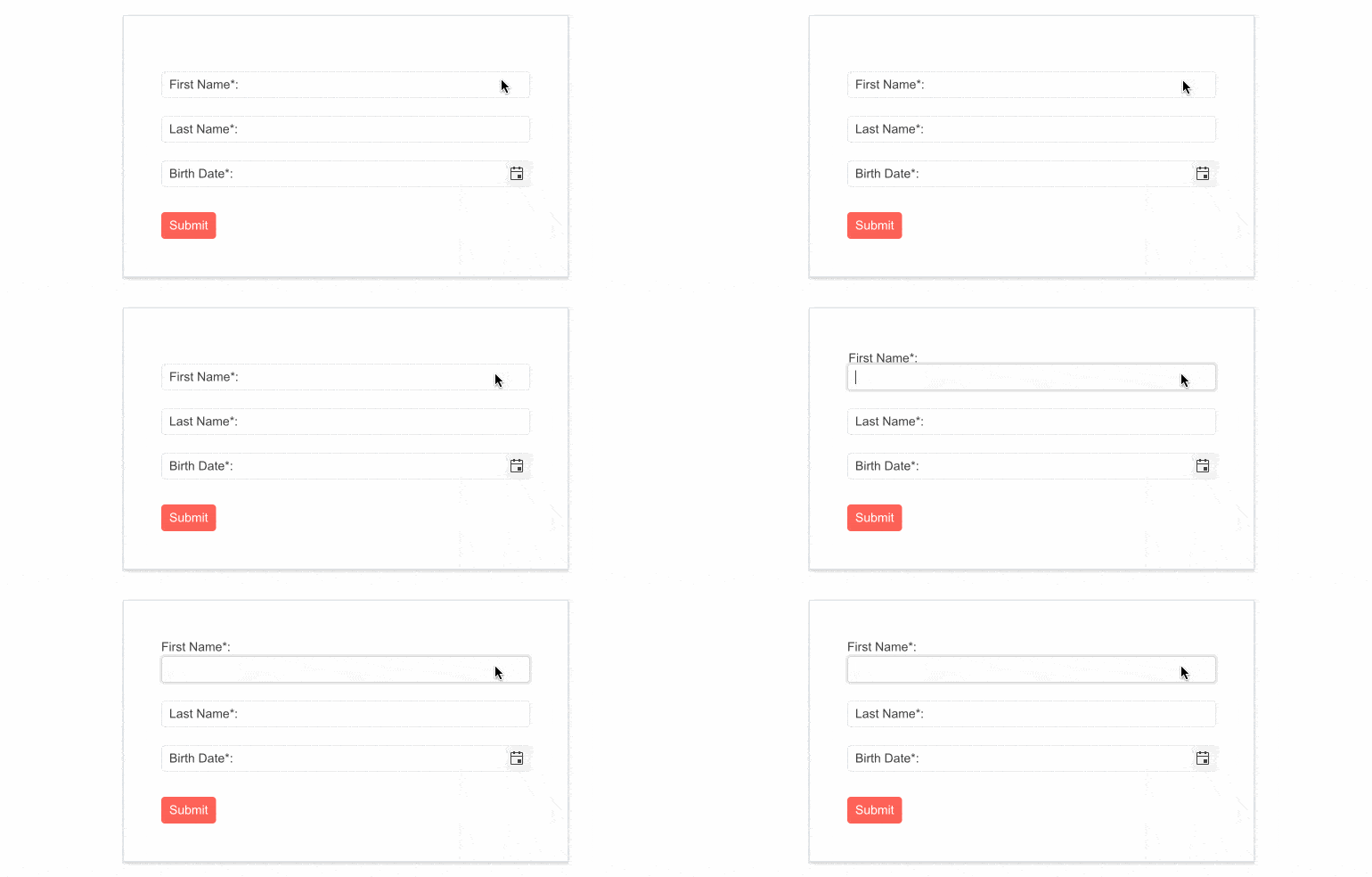
        deliver a more secure installation process, giving you peace of mind and confidence in the safety of your information.</p><h3>Enhanced Forms Rendering</h3><p>Telerik UI brings a fresh and modernized approach to forms rendering and layout. With this latest update, we have revamped the forms rendering and layout in multiple UI components, including the Data Grid, TreeList, Scheduler, DateTimePicker and more. </p><p>The enhanced forms rendering delivers a seamless and visually appealing experience to your users. By incorporating modern design principles and best practices, we have focused on improving the overall aesthetics and usability of forms within these
        components.
    </p><h2 id="telerik-ui-for-blazor">Telerik UI for Blazor</h2><p>Stay ahead of the curve with our latest release of <a target="_blank" href="https://www.telerik.com/blazor-ui">Telerik UI for Blazor</a>, empowering you to create
        robust and visually stunning applications.</p><h3 id="introducing-blazor-hybrid-uniting-web-and-native-client-development">Introducing Blazor Hybrid: Uniting Web and Native Client Development</h3><p><img src="https://d585tldpucybw.cloudfront.net/sfimages/default-source/blogs/2023/2023-06/blazor-hybrid.png?sfvrsn=88e34ee1_4" alt="Progress Telerik UI for Blazor Hybrid for Windows, macOS, Android, and iOS" /></p><p>We&rsquo;re happy to announce the official support for Blazor Hybrid in our upcoming R2 2023 release. Now, you can effortlessly create mobile and desktop applications while incorporating Telerik UI for Blazor components into your hybrid apps. Blazor
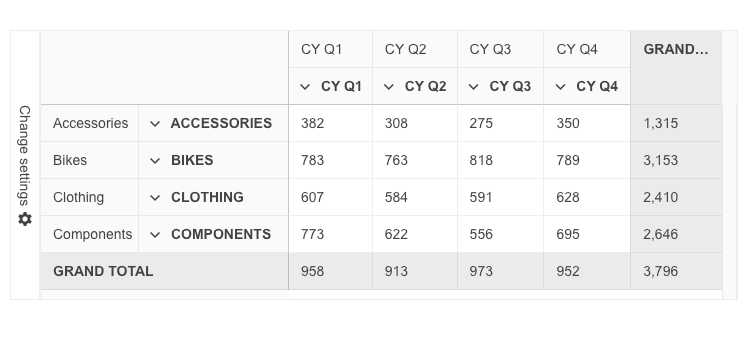
        Hybrid apps utilize HTML, CSS, C# and JavaScript, allowing for code sharing between web, desktop and mobile clients. Additionally, Blazor applications can be adapted for use with .NET MAUI, enabling integration with desktop and mobile platforms.</p><p>Explore the following materials to learn how you can seamlessly integrate Telerik UI for Blazor into your hybrid apps and take your development to the next level:</p><ul><li><a target="_blank" href="https://www.telerik.com/blazor-ui/blazor-hybrid">Telerik UI: Blazor Hybrid</a></li><li><a target="_blank" href="https://www.telerik.com/campaigns/blazor/ebook-blazor-hybrid">eBook: Blazor Hybrid and Web in One Solution</a></li><li><a href="https://www.telerik.com/videos/blazor-power-hour-a-look-at-blazorhybrid" target="_blank">Blazor Power Hour: A look at BlazorHybrid</a></li><li><a href="https://www.telerik.com/videos/the-blazor-power-hour-testing-blazor-hybrid" target="_blank">The Blazor Power Hour: Testing Blazor Hybrid</a></li><li><a href="https://www.telerik.com/blogs/telerik-blazor-ui-native-apps" target="_blank">Telerik Blazor UI in Native Apps</a></li></ul><h3 id="new-blazor-pivotgrid-component">New Blazor PivotGrid Component</h3><p><img src="https://d585tldpucybw.cloudfront.net/sfimages/default-source/blogs/2023/2023-06/blazor-pivotgrid.png?sfvrsn=5a2338cf_3" alt="Blazor PivotGrid" /></p><p>We&rsquo;re excited to announce the Telerik UI for Blazor PivotGrid component&mdash;an Excel-like experience for effortlessly processing, aggregating, visualizing and analyzing tabular and multi-dimensional data. This feature-rich UI component supports
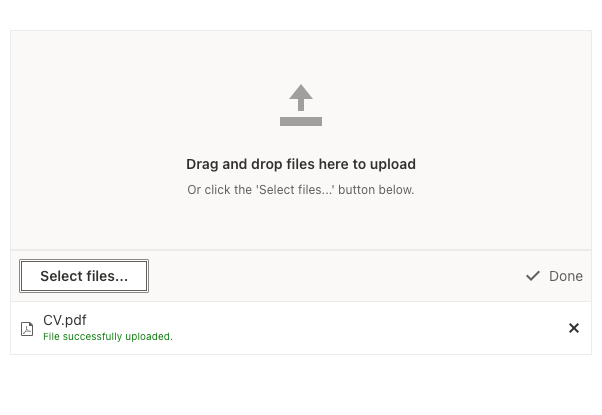
        both local and remote data binding, along with essential functionalities like filtering, sorting and a configuration panel. Let&rsquo;s explore the key features:</p><p><strong>Organize and Summarize Pivot Data:</strong></p><ul><li>Deliver an Excel-like experience by processing and analyzing tabular and multi-dimensional data.</li><li>Supports data binding to an OLAP service, enabling interactive analysis.</li><li>Offers extensive customization options for a tailored user experience.</li></ul><p><strong>Local and Remote Binding to OLAP Data Sources:</strong></p><ul><li>Bind data to a local source or remote OLAP service via HTTP.</li><li>Access aggregated and organized data from multidimensional structures (cubes).</li></ul><p><strong>Configuration Panel:</strong></p><ul><li>Intuitive and customizable configuration panel like Microsoft Excel.</li><li>Allows users to modify fields, apply filters and define pivot fields.</li><li>Highly adaptable to match design needs, including custom component integration.</li></ul><p><strong>Sorting:</strong></p><ul><li>Enable single or multiple column sorting in ascending or descending order.</li><li>Supports sorting various data types.</li></ul><p><strong>Filtering:</strong></p><ul><li>Provide flexible data display by enabling filtering based on specific criteria.</li><li>Swift response with various filtering options, operators and predefined fields.</li><li>Supports filtering via XMLA access to the OLAP Cube service.</li></ul><p><a href="https://demos.telerik.com/blazor-ui/pivotgrid/overview" target="_blank">See a demo of the UI for Blazor PivotGrid component.</a></p><h3 id="new-blazor-dropzone-component">New Blazor DropZone Component</h3><p><img src="https://d585tldpucybw.cloudfront.net/sfimages/default-source/blogs/2023/2023-06/blazor-dropzone.png?sfvrsn=338b59d3_3" alt="Blazor DropZone Component for user uploads" /></p><p>Introducing the addition of the DropZone component to our Blazor toolkit. This component offers a user-friendly way for file uploads in Blazor applications. Users can easily drag and drop files onto a designated area on their screen, and the files
        will be automatically transferred to the file select/upload feature. Say goodbye to complicated file uploads and enjoy the simplicity and convenience of our new DropZone component.</p><p><a href="https://demos.telerik.com/blazor-ui/dropzone/overview" target="_blank">See a demo of the UI for Blazor DropZone component.</a></p><h3 id="right-to-left-support">Right-to-Left Support</h3><p>We are happy to announce that Telerik UI for Blazor components now support right-to-left (RTL) languages! This feature is available in the latest 4.2.0 release of Telerik UI for Blazor and brings a range of benefits to developers building applications
        for audiences that read and write in RTL languages.</p><p><img src="https://d585tldpucybw.cloudfront.net/sfimages/default-source/blogs/2023/2023-06/rtl-support.png?sfvrsn=db3faddc_5" alt="Illustrated component has LTR and then RTL layout" /></p><p>With the new RTL support, developers can easily create applications that cater to the needs of RTL language users, without having to manually modify the layout or styles. This means that components like grids, charts and dropdowns will automatically
        adjust their layout to support RTL languages. Additionally, text alignment, text direction and other layout features will be optimized for RTL languages, making it easier for users to navigate and interact with the application.</p><p>The RTL support in UI for Blazor can be turned on with a single property <strong>EnableRtl</strong> once at the TelerikRootComponent and that will let all of the components take advantage of the feature. More details and specifics for popups can be
        found in the <a href="https://docs.telerik.com/blazor-ui/globalization/rtl-support" target="_blank">UI for Blazor RTL support documentation article</a>.</p><h3 id="enhancements-in-the-fileselect--upload-ui-components">Enhancements in the FileSelect &amp; Upload UI Components</h3><p><strong>Built-in Drag and Drop</strong><br />The FileSelect and Upload components now have built-in drag-and-drop file support, courtesy of the new DropZone component. Enjoy the convenience of seamlessly dragging and dropping files, right from the
        start.
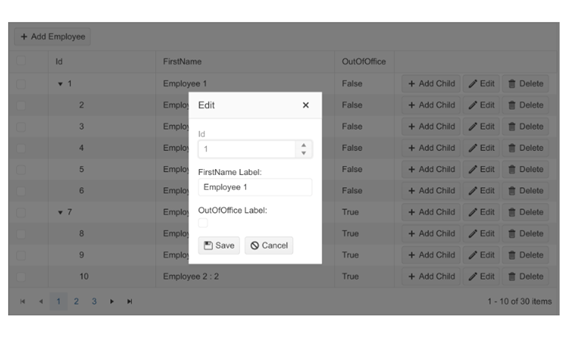
    </p><p><img src="https://d585tldpucybw.cloudfront.net/sfimages/default-source/blogs/2023/2023-06/drag-drop-fileselect.png?sfvrsn=8912ccb6_3" alt="" /></p><p><a href="https://demos.telerik.com/blazor-ui/fileselect/overview" target="_blank">See a demo of the UI for Blazor FileSelect drag and drop support.</a></p><h3 id="data-grid--treelist-enhacements">Data Grid &amp; TreeList Enhacements</h3><p>The R2 2023 release of Telerik UI for Blazor brings exciting updates to the DataGrid and TreeList components. These enhancements include new customization options and expanded configuration capabilities. Let&rsquo;s dive into the key highlights:</p><p><strong>Pager Template</strong><br />Customize the appearance of pagers with ease. Utilize the Pager Template to replace the default pager with your own custom markup, tailored to your clients&rsquo; needs.</p><p><img src="https://d585tldpucybw.cloudfront.net/sfimages/default-source/blogs/2023/2023-06/grid-pager.gif?sfvrsn=bbd5fe54_3" alt="User pages through data" /></p><p><a href="https://demos.telerik.com/blazor-ui/treelist/templates" target="_blank">See how to customize the UI for Blazor TreeList component pager.</a></p><p><strong>Popup Edit Form Template</strong><br />Elevate the data entry experience by leveraging the Popup Edit Form Template. Enable GridEditMode.Popup for the Data Grid and TreeListEditMode.Popup for the TreeList to create custom content within the
        edit form. Customize form fields, validation rules and more.</p><p><img src="https://d585tldpucybw.cloudfront.net/sfimages/default-source/blogs/2023/2023-06/popup-edit.png?sfvrsn=75494386_3" alt="popup edit options show fields for ID, firstname label, outofoffice label, and buttons for save and cancel" /></p><h3 id="datagrid-treelist-treeview-performance-bump">DataGrid, TreeList, TreeView Performance Bump</h3><p>We are delighted to share that our Blazor Data Grid, TreeList and TreeView components have undergone a remarkable performance enhancement. In the latest release, we have significantly minimized the re-rendering of content cells, ensuring it occurs
        only when absolutely required. As a result, our tests have shown a significant 40% reduction in component refresh time.</p><p><img src="https://d585tldpucybw.cloudfront.net/sfimages/default-source/blogs/2023/2023-06/performance-rocket.png?sfvrsn=b8a8c3df_6" alt="rocket illustration" /></p><p>Although template cells will continue to re-render since they can contain arbitrary markup, we are confident that this improvement will have a tangible impact on the overall performance of the Blazor component&rsquo;s usability.</p><h3 id="chart-enhancements">Chart Enhancements</h3><p>The latest release of Telerik UI for Blazor brings exciting enhancements to the Charts component, offering improved customization options and new features. Let&rsquo;s explore the key additions briefly.</p><p><strong>Position Configuration</strong><br />Users can now position the Stock Chart <strong>navigator</strong> on top, providing a fresh appearance option alongside the existing bottom position.</p><p><a href="https://demos.telerik.com/blazor-ui/stockchart/overview" target="_blank">See the Telerik UI for Blazor StockChart navigator demo.</a></p><p><strong>Chart and StockChart Subtitle</strong><br />The new subtitle property enables developers to add secondary or explanatory subtitles below the main chart title and style them differently for enhanced customization.</p><p><a href="https://demos.telerik.com/blazor-ui/chart/overview" target="_blank">See the Telerik UI for Blazor Subtitle Property in Charts demo.</a></p><p><strong>Format and Template Parameters for Axes in Blazor StockChart</strong><br />The introduction of format and template options allows effortless customization of labels for ValueAxis, CategoryAxis and NavigatorCategoryAxis in the Blazor StockChart.</p><p>These enhancements in Telerik UI for Blazor Charts offer developers greater control over the appearance and functionality of their charts, enabling them to create visually stunning and interactive experiences.</p><h3 id="globalization-and-localization">Globalization and Localization</h3><p>As part of this update, we are adding a new label to the components, displaying the text: &ldquo;Drag and drop files here to upload.&rdquo; To support localization and globalization, two new resource keys have been introduced: Upload_DropZoneHint
        and FileSelect_DropZoneHint.</p><h3 id="custom-content-in-selectfiles-button">Custom Content in SelectFiles Button</h3><p>In this release, we&rsquo;ve added templating support for the SelectFiles button in FileSelect and Upload components. Now clients can fully customize the button&rsquo;s appearance, including the option to render icons, providing more flexibility and
        visual appeal.</p><h3 id="fileselect-new-methods">FileSelect New Methods</h3><p>The latest release of the Blazor FileSelect component introduces two new methods: <strong>ClearFiles</strong> and <strong>OpenSelectFilesDialog</strong>. ClearFiles enables removing files from the list programmatically, providing more control over
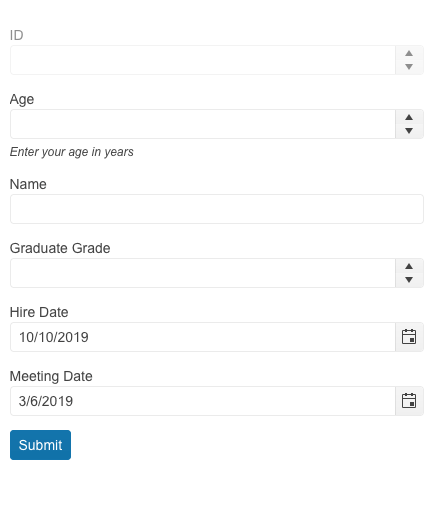
        the selection process. OpenSelectFilesDialog allows for opening the browser file selection dialog with a single API call.</p><h3 id="exposing-selected-items-in-file-manager">Exposing Selected Items in File Manager</h3><p>We have enhanced the Telerik UI for Blazor File Manager component to provide you with more flexibility in customization. With the latest update, the Blazor FileManager component now supports two-way binding of the selected items.</p><p><a href="https://demos.telerik.com/blazor-ui/filemanager/selection" target="_blank">See the Telerik UI for Blazor FileManager expose selected items demo.</a></p><h3 id="window-support-for-footer">Window: Support for Footer</h3><p>The footer section of the Telerik UI for Blazor Window component can now be customized according to your needs. Take advantage of the following parameters to fully utilize the Window footer:</p><ul><li>The WindowFooter parameter adds a new section at the bottom of the window.</li><li>The FooterLayoutAlign parameter allows you to apply different styles to the buttons in the footer. Select from the available options (Start, Center, End and Stretched) and observe how they enhance the appearance of your application.</li></ul><h3 id="combine-autogenerated--custom-fields-in-the-form-component">Combine Autogenerated &amp; Custom Fields in the Form Component</h3><p><img src="https://d585tldpucybw.cloudfront.net/sfimages/default-source/blogs/2023/2023-06/autogenerated-custom-fields-form.png?sfvrsn=69cdccf0_3" alt="In a form, ID, Age, and graduate grade have dropdowns. Name is an open field. Hire date and meeting date both have calendar options for selection" /></p><p>This enhanced feature within the UI for Blazor Form component enables the simultaneous utilization of autogenerated form items alongside manually defined ones. It allows developers to make use of the autogenerated fields for the majority of their
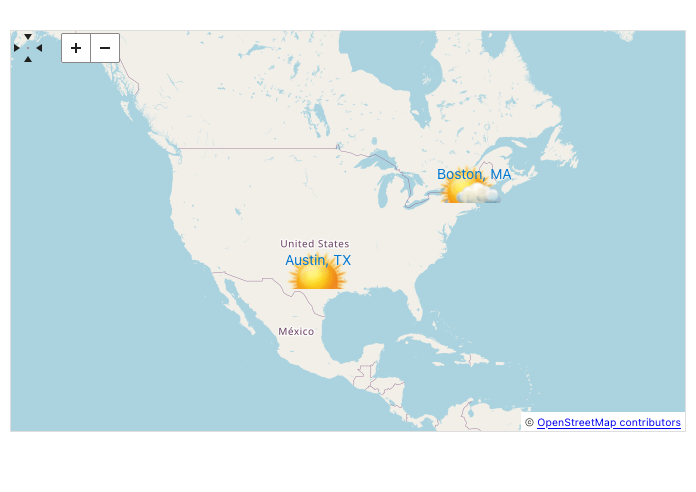
        model fields, while still providing the flexibility to customize specific fields as needed.</p><p><a href="https://demos.telerik.com/blazor-ui/form/auto-generated" target="_blank">See a demo of autogenerated and custom fields in the UI for Blazor Form component.</a></p><h3 id="customize-the-map-component-marker-appearance">Customize the Map Component Marker Appearance</h3><p><img src="https://d585tldpucybw.cloudfront.net/sfimages/default-source/blogs/2023/2023-03/map-mapmarker.png?sfvrsn=eca652f8_3" alt="The Map has custom pins showing weather in Boston and Austin" /></p><p>The Blazor Map component&rsquo;s user interface (UI) now includes a templating functionality that simplifies the process of customizing the appearance of markers on the map. Developers have the ability to define their own HTML markup to style the
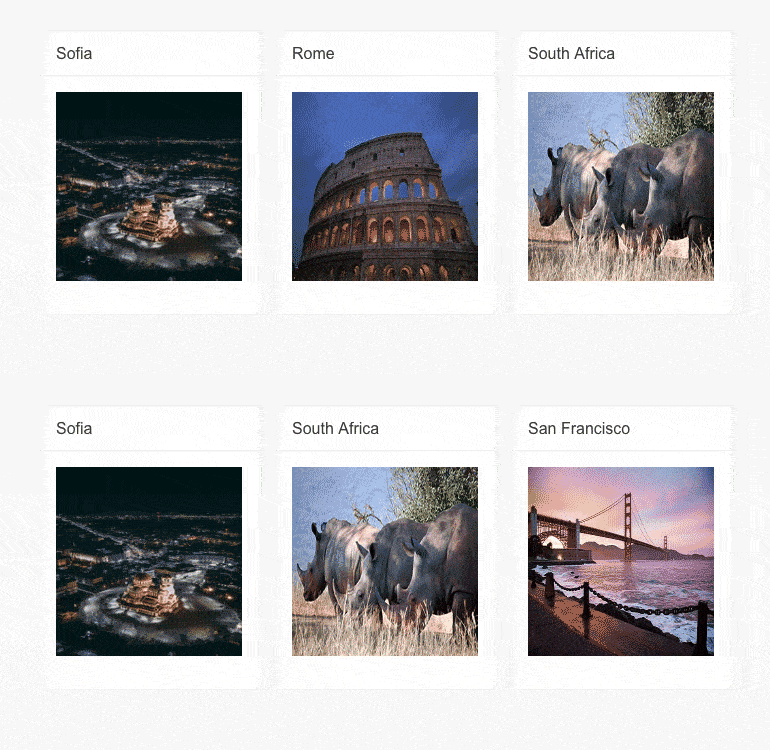
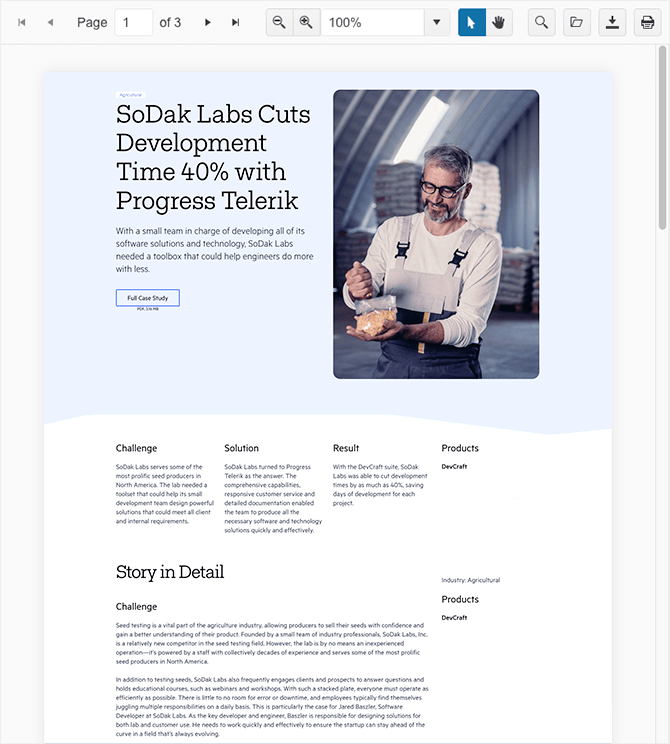
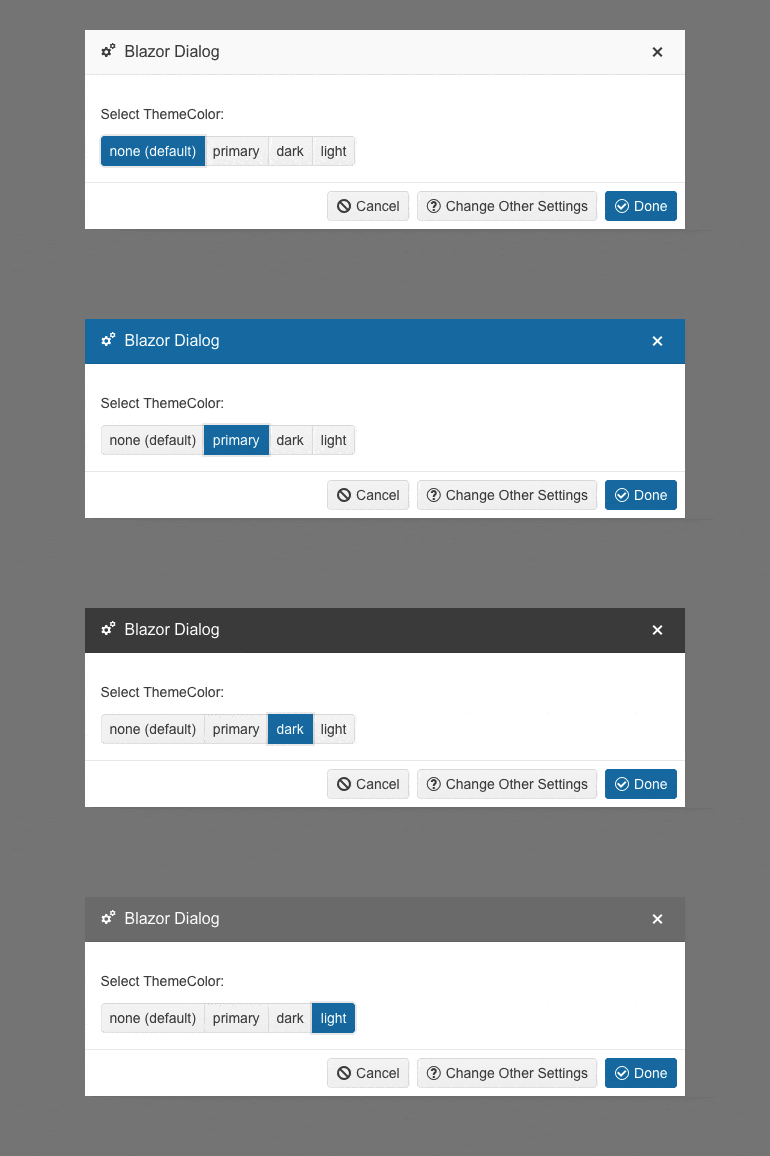
        markers according to their preferences.</p><p><a href="https://demos.telerik.com/blazor-ui/map/marker-template" target="_blank">See how to customize the UI for Blazor Map component marker.</a></p><h3 id="visible-parameter-tilelayout-component-items">Visible Parameter TileLayout Component Items</h3><p><img src="https://d585tldpucybw.cloudfront.net/sfimages/default-source/blogs/2023/2023-03/tilelayout-itemvisibility.gif?sfvrsn=51af2672_3" alt="Three cards showing location name and an image. Sofia, Rome, South Africa. Then Sofia, South Africa, San Francisco." /></p><p>We have exposed a new parameter named Visible to control whether a given TileLayout item is visible or not.</p><p><a href="https://demos.telerik.com/blazor-ui/tilelayout/item-visibility" target="_blank">See a demo of the items visibility in the UI for Blazor TileLayout component.</a></p><h3 id="print-method-in-the-pdf-viewer-component">Print Method in the PDF Viewer Component</h3><p><img src="https://d585tldpucybw.cloudfront.net/sfimages/default-source/blogs/2023/2023-06/kendoangular-pdfviewer-ui-component.png?sfvrsn=93d18487_3" alt="PDF viewer allows paging, zooming, selection, searching, saving, downloading, and printing" /></p><p>The <a href="https://demos.telerik.com/blazor-ui/pdfviewer/overview" target="_blank">UI for Blazor PDFViewer component</a> now provides the ability to print the current document programmatically. By introducing the <code>Print()</code> method, developers now have a straightforward means to incorporate printing functionality into their Blazor applications that utilize the PDF Viewer component.</p><h3 id="add-themecolor-parameter-for-window--dialog">Add ThemeColor Parameter for Window &amp; Dialog</h3><p><img src="https://d585tldpucybw.cloudfront.net/sfimages/default-source/blogs/2023/2023-03/dialog-themecolor.gif?sfvrsn=90de8717_3" alt="Theme color changes on the Blazor Dialog adjust the background color of the bar at the top. None default is almost white, primary is blue, dark is almost black, and light is a medium gray" /></p><p>A new parameter named <strong>ThemeColor</strong> has been added to the UI for Blazor Window and Dialog components. This feature enables easy customization of the title bar color for both components. It provides a range of selectable values such as
        &ldquo;Primary,&rdquo; &ldquo;Dark,&rdquo; &ldquo;Light&rdquo; or even an empty option for no color.</p><p><a href="https://demos.telerik.com/blazor-ui/dialog/configuration" target="_blank">See an example the UI for Blazor Dialog ThemeColor options.</a></p><h3 id="refresh-method-for-all-select-type-components">Refresh Method for All Select-Type Components</h3><p>In this latest release, we are introducing a new method called Refresh to enhance our select-type UI components, including AutoComplete, ComboBox, DropDownList, MultiColumnComboBox and MultiSelect. The method allows you to easily refresh the popup
        of the selects and comes in handy when the popup remains open, but changes need to be applied.</p><h3 id="deprecation-of-.net-3-and-.net-5-in-telerik-ui-for-blazor">Deprecation of .NET 3 and .NET 5 in Telerik UI for Blazor</h3><p>Starting from R1 2024, we will no longer provide support for .NET 3 and .NET 5 in Telerik UI for Blazor. To ensure uninterrupted support and leverage the latest advancements, we highly recommend planning and initiating the migration of your projects
        to .NET 6 or later.</p><p>This strategic decision allows us to stay ahead of the curve, providing you with a robust and future-proof component library that keeps pace with the rapid advancements in web application development. Stay tuned for exciting updates as we embark on
        this journey together!</p><h2 id="telerik-ui-for-aspnet-core-and-mvc">Telerik UI for ASP.NET Core and MVC</h2><p>Discover the latest features and elevate your development experience with Telerik UI for ASP.NET Core and MVC!</p><h3 id="new-template-component-csp-compatible">New Template Component (CSP-Compatible)</h3><p><img src="https://d585tldpucybw.cloudfront.net/sfimages/default-source/blogs/2023/2023-06/template-component.png?sfvrsn=6cbc638d_3" alt="illustrated template component" /></p><p>Introducing the Template component in the Telerik UI for ASP.NET Core and MVC UI libraries! This new feature can be incorporated it into UI controls, which require complex layout templates like the Grid or the TreeList. Deliver smooth integration
        and strengthen security of your applications.</p><p><strong>HTML and Tag Helpers</strong><br />The Telerik UI for ASP.NET Core Template component provides support for both HTML and Tag Helper modes. The HTML Helper Template introduces these two options:</p><ul><li><strong>AddComponent()</strong>, which is a method accepting any Telerik UI for ASP.NET Core HTML Helper component declaration</li><li><strong>AddHtml()</strong>, which is a method that accepts HTML code</li></ul><p>If you&rsquo;re leveraging the Tag Helper mode, you can easily integrate the UI control and HTML code within the <code>&lt;{parentTagName}-{templateOption}&gt;</code> tag.</p><p>See the documentation for the <a href="https://docs.telerik.com/aspnet-core/html-helpers/template/overview" target="_blank">Telerik UI for ASP.NET Core Template component</a> or the <a href="https://docs.telerik.com/aspnet-mvc/html-helpers/template/overview" target="_blank">Telerik UI for ASP.NET MVC Template component</a>.</p><h3 id="datagrid-enhancements">DataGrid Enhancements</h3><p>The latest release of Telerik UI for ASP.NET Core and MVC brings exciting enhancements to the DataGrid component, offering improved usability options and new features.</p><p><strong>New Row Resizing Feature</strong><br />Introducing the highly anticipated feature in the latest release of our Data Grid component: row resizing! Now, end users can resize rows and adjust their heights effortlessly. This new functionality
        allows for better visibility of cells with larger values while maintaining the integrity of the remaining rows in the Data Grid. Stay in control of your data presentation and provide a seamless user experience with the row resizing feature.</p><p><img src="https://d585tldpucybw.cloudfront.net/sfimages/default-source/blogs/2023/2023-06/datagrid-row-resizing.gif?sfvrsn=c3a514fa_3" alt="User drags to enlarge row height" /></p><p><strong>Compact Data Grid Mode</strong><br />Introducing the Compact Grid, a new feature in the Telerik UI for ASP.NET Core and MVC Grid components! By utilizing the Size parameter configuration, the Compact Grid optimizes screen space by reducing
        padding and margins, resulting in a condensed and efficient data table. Now you can display more information at once, maximizing productivity.</p><p><img src="https://d585tldpucybw.cloudfront.net/sfimages/default-source/blogs/2023/2023-06/grid-compactrendering.gif?sfvrsn=f505e978_3" alt="Default Grid size vs. High Density Size Grid" /></p><p>The Compact Grid seamlessly integrates with our Default, Bootstrap, Material and Fluent themes, providing flexibility in design choices. Experience the power of data density with the Compact Grid feature.</p><p>See the demo for <a href="https://demos.telerik.com/aspnet-core/grid/sizing" target="_blank">Telerik UI for ASP.NET Core Compact Grid</a> or <a href="https://demos.telerik.com/aspnet-mvc/grid/sizing" target="_blank">Telerik UI for ASP.NET MVC Compact Grid demo</a>.</p><h3 id="scheduler-enhancements">Scheduler Enhancements</h3><p><strong>Highlight Ongoing Events</strong><br />We are pleased to announce the addition of the &ldquo;highlight current events&rdquo; functionality to our Scheduler component! Elevate your application&rsquo;s user experience by easily indicating ongoing
        events in a visually distinct manner. With the simple configuration method of <code>OngoingEvents</code>, enabling this feature and customizing the refresh interval is effortless.</p><p><img src="https://d585tldpucybw.cloudfront.net/sfimages/default-source/blogs/2023/2023-06/scheduler-highlightedevent.png?sfvrsn=4221d3e3_3" alt="On a calendar view, one event is highlighted with a red border" /></p><p>See the <a href="https://demos.telerik.com/aspnet-core/scheduler/ongoing-events" target="_blank">Telerik UI for ASP.NET Core Scheduler highlight ongoing events demo</a> or the <a href="https://demos.telerik.com/aspnet-mvc/scheduler/ongoing-events" target="_blank"> Telerik UI for ASP.NET MVC Scheduler highlight ongoing events demo</a>.</p><p><strong>Google Calendar Integration Demo</strong><br />Many of you have been curious about how to incorporate our Scheduler component into Google Calendar, so we have prepared a demonstration. To assist you in implementing this integration, we have
        created a comprehensive <a href="https://docs.telerik.com/aspnet-core/knowledge-base/scheduler-google-calendar-integration" target="_blank">how-to article and a sample project</a>.</p><h3 id="datetimepicker-enhancement-starttime-and-endtime-options">DateTimePicker Enhancement: StartTime and EndTime Options</h3><p>R2 2023 welcomes the enhanced DateTimePicker component in Telerik UI for ASP.NET Core and MVC! Effortlessly configure start and end date/time values and easily manage time ranges.</p><p>See the start and end times demo for <a href="https://demos.telerik.com/aspnet-core/datetimepicker" target="_blank">Telerik UI for ASP.NET Core DateTimePicker</a> or for <a href="https://demos.telerik.com/aspnet-mvc/datetimepicker" target="_blank">Telerik UI for ASP.NET MVC DateTimePicker</a>.</p><h3 id="data-editing-ux-enhancements">Data Editing UX: Enhancements</h3><p>We are delighted to introduce improved date editing options in the Telerik UI for ASP.NET Core DateInput component. These options offer greater flexibility and control when configuring the behavior of the component during date editing. Take advantage
        of the following configuration options:</p><ul><li><strong>AutoSwitchParts:</strong> Automatically moves to the next segment after entering a valid value.</li><li><strong>AutoSwitchKeys:</strong> Configures a custom key to trigger moving to the next segment.</li><li><strong>EnableMouseWheel:</strong> Increases or decreases segment values using the mouse wheel.</li><li><strong>AutoCorrect:</strong> Automatically corrects the value if it falls out of range.</li><li><strong>Steps:</strong> Defines the increment and decrement steps for each available date segment.</li></ul><p>See the editing demo for <a href="https://demos.telerik.com/aspnet-core/dateinput/date-editing" target="_blank">Telerik UI for ASP.NET Core DateInput</a> or for <a href="https://demos.telerik.com/aspnet-mvc/dateinput/date-editing" target="_blank">Telerik UI for ASP.NET MVC DateInput</a>.</p><h3 id="gantt-popup-edit-form-improvements">Gantt: Popup Edit Form Improvements</h3><p>In our latest release, we&rsquo;ve made several updates to enhance the editing and customization capabilities of our Gantt UI component. Now you can fine-tune every aspect of the Gantt to meet your users&rsquo; preferences. Notable changes include:
    </p><ul><li>Reorganized Gantt edit popup form with tabs for easier navigation and editing of different sections.</li><li>Expanded capabilities to configure and edit all data fields present in the Gantt.</li><li>Streamlined editing of parent tasks directly from the task&rsquo;s edit form, eliminating the need for separate sections.</li><li>Integrated dependencies editing into the edit form, eliminating the need for a separate popup window.</li><li>A new &ldquo;Other&rdquo; tab in the Gantt edit popup for editing custom fields, providing a cleaner and more organized experience.</li></ul><p><img src="https://d585tldpucybw.cloudfront.net/sfimages/default-source/blogs/2023/2023-06/gantt-popupeditenhancements.gif?sfvrsn=c5707367_3" alt="User flips through tabs of Gantt popup - General, Resources, Predecessors, Successors, Other" /></p><p>See an example of the improved Gantt editing experience:</p><ul><li><a href="https://demos.telerik.com/aspnet-core/gantt" target="_blank">Telerik UI for ASP.NET Core Gantt component demo</a></li><li><a href="https://demos.telerik.com/aspnet-mvc/gantt" target="_blank">Telerik UI for ASP.NET MVC Gantt component demo</a></li></ul><h3 id="enhanced-demos-with-adaptive-behavior">Enhanced Demos with Adaptive Behavior</h3><p>In the R2 2023 release, we focused on improving the UI components for ASP.NET Core and MVC to be more adaptable and responsive. Along with introducing new built-in settings, we made sure to showcase the adaptiveness of the components through our demos.</p><h2 id="telerik-ui-for-aspnet-ajax">Telerik UI for ASP.NET AJAX</h2><p>We are thrilled to share the new components and enhancements in Telerik UI for ASP.NET AJAX R2 2023 release.</p><h3 id="new-arcgauge-and-circulargauge-components">New ArcGauge and CircularGauge Components</h3><p>Easily represent value ranges on an arc shape using the powerful Telerik UI for ASP.NET AJAX ArcGauge component. This data visualization tool allows you to showcase progress toward a goal by defining minimum and maximum angles, ranging from 0
            to 360 degrees.</p><p><img src="https://d585tldpucybw.cloudfront.net/sfimages/default-source/blogs/2023/2023-06/arcgauge.png?sfvrsn=997a69ba_3" alt="A half circle is filled from light gray to blue to just past halfway around, and reads 51%. A slider bar at the bottom matches 51% too." /></p><p>Or enhance your data visualization with the Telerik UI for ASP.NET AJAX CircularGauge component. This versatile AJAX control allows you to represent values within a full-scale, 360-degree arc. It offers a compact and intuitive solution that seamlessly
            integrates into any web application.</p><p><img src="https://d585tldpucybw.cloudfront.net/sfimages/default-source/blogs/2023/2023-06/circulargauge.png?sfvrsn=ad264b92_3" alt="A temperature gauge goes all the way around in a circle, from 0 to beyond 120." /></p><p>Explore the features of these component through these demos:</p><ol><li>Center template: Customize the appearance and behavior of the center label within the arc/circle using templates.</li><li>Scale customization: Tailor the visual properties of the component to meet your specific application requirements.</li><li>Color ranges: Assign different fill colors to values based on their significance, enhancing the meaning of the visualization.</li></ol><p>See the Telerik UI for ASP.NET AJAX <a href="https://demos.telerik.com/aspnet-ajax/gauge/examples/types/arcgauge/defaultcs.aspx" target="_blank">ArcGauge</a> and <a href="https://demos.telerik.com/aspnet-ajax/gauge/Examples/Types/CircularGauge/DefaultCS.aspx" target="_blank">CircularGauge</a> in action.</p><h3 id="fixes-and-improvements">Fixes and Improvements</h3><p>In this release, we have made several enhancements in the Ajax, AutoCompleteBox, Button, Calendar, Captcha, Combobox, Editor, ListView, Signature and Treeview components. These improvements include adding support for the latest Chrome browser
            on iOS mobile devices and updating the W3C validator in the XHTML Validator dialog of RadEditor to the latest version.</p><p><strong>Single Line RadAutoCompleteBox</strong><br />Responding to customer feedback, we have introduced an additional mode for the RadAutoComplete component. Alongside the multiline option, you can now utilize the SingleLineEntries property to
            configure the AutoComplete feature. This new setting enables the display of all input provided in a single line input field with a horizontal scroll.</p><p><img src="https://d585tldpucybw.cloudfront.net/sfimages/default-source/blogs/2023/2023-03/new-singlelineentries-property.gif?sfvrsn=e3706b4d_3" alt="Properties all show in a single line" /></p><p><a href="https://demos.telerik.com/aspnet-ajax/autocompletebox/examples/default/defaultcs.aspx" target="_blank">See a demo of the single line mode of the UI for ASP.NET AJAX AutoComplete component.</a></p><p><strong>Integration demo for RadEditor and RadSignature</strong><br />Take a look at the <a href="https://demos.telerik.com/aspnet-ajax/editor/examples/signaturedialog/defaultcs.aspx" target="_blank">Signature Dialog demo</a> to understand how you can incorporate handwritten signatures into a WYSIWYG (what you see is what you get) editor. This demo presents a signature pad that allows users to draw their signatures. Once users finish creating their signature, they
            can click on the &ldquo;Store on Server as PNG and Insert&rdquo; button. This action saves the signature as a PNG file and seamlessly inserts the image into the editor.</p><p><img src="https://d585tldpucybw.cloudfront.net/sfimages/default-source/blogs/2023/2023-03/editor-signaturedialog.gif?sfvrsn=868286c2_3" alt="User draws signature and inserts it" /></p><h3 id="end-of-.net-3.5-4.0-support">End of .NET 3.5-4.0 Support</h3><p>Please note that R2 2023 SP1 on March 15 is the last version to provide support and assemblies for .NET Framework 3.5 and 4.0.</p><p>As of R2 2023, we will continue shipping assemblies compatible with .NET 4.5-4.8 versions of the framework. You can read more at: <a href="https://docs.telerik.com/devtools/aspnet-ajax/getting-started/installation/technical-information#end-of-net-framework-35-and-40-support-for-telerik-ui-for-aspnet-ajax" target="_blank">End of .NET Framework 3.5 and 4.0 Support for Telerik UI for ASP.NET AJAX</a>.</p><h2 id="progress-telerik-.net-web-desktop--mobile-products-r2-2023-release-webinar--june-8">Progress Telerik .NET Web, Desktop &amp; Mobile Products R2 2023 Release Webinar | June 8</h2><p><a target="_blank" href="https://www.telerik.com/campaigns/telerik-r2-2023-release-webinar-web-desktop-mobile-and-cross-platform-products"><img src="https://d585tldpucybw.cloudfront.net/sfimages/default-source/blogs/2023/2023-04/telerik-dev-webinar-r2.png?sfvrsn=6ea4b1c3_3" alt="" /></a></p><p>Discover all updates across Telerik <a target="_blank" href="https://www.telerik.com/blazor-ui">UI for Blazor</a>,
 <a target="_blank" href="https://www.telerik.com/aspnet-core-ui">UI for ASP.NET Core</a>, <a target="_blank" href="https://www.telerik.com/aspnet-mvc">UI for ASP.NET MVC</a>,
 <a target="_blank" href="https://www.telerik.com/products/aspnet-ajax.aspx">UI for ASP.NET AJAX</a>, <a target="_blank" href="https://www.telerik.com/products/wpf/overview.aspx">UI for WPF</a>,
 <a target="_blank" href="https://www.telerik.com/products/winforms.aspx">UI for WinForms</a>, <a target="_blank" href="https://www.telerik.com/winui">UI for WinUI</a>, <a target="_blank" href="https://www.telerik.com/maui-ui">UI for .NET MAUI</a> and <a target="_blank" href="https://www.telerik.com/xamarin-ui">UI for Xamarin</a> and
 <a target="_blank" href="https://www.telerik.com/themebuilder">ThemeBuilder</a>.</p><p><a href="https://www.telerik.com/campaigns/telerik-r2-2023-release-webinar-web-desktop-mobile-and-cross-platform-products" class="Btn" target="_blank">Save Your Seat</a></p><h3 id="join-us-on-twitch">Join Us on Twitch</h3><p>Join the  <a href="https://www.telerik.com/codeitlive" target="_blank">Livestream Release Party</a> on release day, June 7, 11 a.m. &ndash; 12:30 p.m. ET to
                hear the release news and hang out with dev friends.</p><p>The live webinars and Twitch sessions are a great opportunity for you to ask questions before and during the webinars. We&rsquo;ll be waiting to hear from you on Twitter&mdash;just use the <strong>#heyTelerik</strong> and <strong>#heyKendoUI</strong> hashtags. Another great option is the live chat during our release session on <strong><a href="https://www.twitch.tv/codeitlive%22%20/t%20%22_blank" target="_blank">CodeItLive</a>, our Twitch channel</strong>.</p><p>&nbsp;</p><img src="https://feeds.telerik.com/link/23053/16170935.gif" height="1" width="1"/>]]></content>
  </entry>
  <entry>
    <id>urn:uuid:d7c3858c-e797-48af-bd0f-0e27e4444ef3</id>
    <title type="text">How to Build a Custom Signature Dialog in AJAX RadEditor: A Step-by-Step Guide</title>
    <summary type="text">Allow your users to add their handwritten signature inside an HTML editor with Telerik UI for ASP.NET AJAX.</summary>
    <published>2023-03-30T07:33:02Z</published>
    <updated>2026-04-07T05:36:35Z</updated>
    <author>
      <name>Rumen Jekov </name>
    </author>
    <link rel="alternate" href="https://feeds.telerik.com/link/23053/16049613/how-to-build-custom-signature-dialog-ajax-radeditor"/>
    <content type="text"><![CDATA[<p><span class="featured">Allow your users to add their handwritten signature inside an HTML editor with Telerik UI for ASP.NET AJAX.</span></p><p>In today&rsquo;s world, where digitization has taken over every aspect of our lives, the need for signatures has not been eliminated. However, now instead of physically signing a document, we can use an electronic signature, which is quick, easy and secure. 
    <span style="background-color:transparent;color:inherit;font-family:inherit;font-size:inherit;text-align:inherit;text-transform:inherit;white-space:inherit;word-spacing:normal;caret-color:auto;">One popular way of doing this is to use a handwritten signature, which gives the electronic document a personal touch.</span>
</p><p>Progress <a target="_blank" href="https://www.telerik.com/products/aspnet-ajax.aspx">Telerik UI for ASP.NET AJAX</a> provides two useful components, <a href="https://demos.telerik.com/aspnet-ajax/signature/overview/defaultcs.aspx" target="_blank">RadSignature</a> and <a href="https://demos.telerik.com/aspnet-ajax/editor/examples/overview/defaultcs.aspx" target="_blank">RadEditor</a>, that can be integrated to facilitate the
    inclusion of handwritten signatures to an HTML editor.</p><h2 id="the-solution">The Solution</h2><p>In this blog post, I will showcase how to build <a href="https://demos.telerik.com/aspnet-ajax/editor/examples/signaturedialog/defaultcs.aspx" target="_blank">a custom Signature dialog application scenario</a> that integrates RadSignature
    and RadEditor. The demo allows users to insert a handwritten signature into a content area of the RadEditor. </p><p>The WYSIWYG editor control has a custom button called &ldquo;Insert Handwritten Signature.&rdquo; When clicked upon, it opens a dialog box that displays a signature pad. The user can leverage the signature pad to draw their signature. Once done, they
    can click on the &ldquo;Store on Server as PNG and Insert&rdquo; button to store the signature on the server as a PNG file and insert the signature image into the editor.
</p><p><img src="https://d585tldpucybw.cloudfront.net/sfimages/default-source/blogs/2023/2023-03/signature.gif?sfvrsn=ff83222d_3" alt="User clicks the pencil icon on the signature spot to sign. This opens an insert signature window that the user draws on, and then presses the store on server as PNG and insert button. Then the signature is inserted in place and can be adjusted for scale." /></p><p>Let&rsquo;s take a look at the code that makes this possible.</p><p>The default.aspx page contains the RadEditor control with the custom button defined inside the tool groups.</p><p><strong>ASPX code snippet (HTML)</strong></p><pre class=" language-html"><code class="prism  language-html"><span class="token tag"><span class="token tag"><span class="token punctuation">&lt;</span><span class="token namespace">telerik:</span>RadEditor</span> <span class="token attr-name">RenderMode</span><span class="token attr-value"><span class="token punctuation">=</span><span class="token punctuation">"</span>Lightweight<span class="token punctuation">"</span></span> <span class="token attr-name">runat</span><span class="token attr-value"><span class="token punctuation">=</span><span class="token punctuation">"</span>server<span class="token punctuation">"</span></span> <span class="token attr-name">ID</span><span class="token attr-value"><span class="token punctuation">=</span><span class="token punctuation">"</span>RadEditor1<span class="token punctuation">"</span></span> <span class="token attr-name">Width</span><span class="token attr-value"><span class="token punctuation">=</span><span class="token punctuation">"</span>800px<span class="token punctuation">"</span></span><span class="token punctuation">&gt;</span></span>
    <span class="token tag"><span class="token tag"><span class="token punctuation">&lt;</span>Tools</span><span class="token punctuation">&gt;</span></span>
        <span class="token tag"><span class="token tag"><span class="token punctuation">&lt;</span><span class="token namespace">telerik:</span>EditorToolGroup</span><span class="token punctuation">&gt;</span></span>
            <span class="token tag"><span class="token tag"><span class="token punctuation">&lt;</span><span class="token namespace">telerik:</span>EditorTool</span> <span class="token attr-name">Name</span><span class="token attr-value"><span class="token punctuation">=</span><span class="token punctuation">"</span>InsertSignature<span class="token punctuation">"</span></span> <span class="token attr-name">Text</span><span class="token attr-value"><span class="token punctuation">=</span><span class="token punctuation">"</span>Insert Handwritten Signature<span class="token punctuation">"</span></span><span class="token punctuation">&gt;</span></span><span class="token tag"><span class="token tag"><span class="token punctuation">&lt;/</span><span class="token namespace">telerik:</span>EditorTool</span><span class="token punctuation">&gt;</span></span>
        <span class="token tag"><span class="token tag"><span class="token punctuation">&lt;/</span><span class="token namespace">telerik:</span>EditorToolGroup</span><span class="token punctuation">&gt;</span></span>
        <span class="token tag"><span class="token tag"><span class="token punctuation">&lt;</span><span class="token namespace">telerik:</span>EditorToolGroup</span><span class="token punctuation">&gt;</span></span>
            <span class="token tag"><span class="token tag"><span class="token punctuation">&lt;</span><span class="token namespace">telerik:</span>EditorTool</span> <span class="token attr-name">Name</span><span class="token attr-value"><span class="token punctuation">=</span><span class="token punctuation">"</span>Bold<span class="token punctuation">"</span></span><span class="token punctuation">&gt;</span></span><span class="token tag"><span class="token tag"><span class="token punctuation">&lt;/</span><span class="token namespace">telerik:</span>EditorTool</span><span class="token punctuation">&gt;</span></span>
            <span class="token tag"><span class="token tag"><span class="token punctuation">&lt;</span><span class="token namespace">telerik:</span>EditorTool</span> <span class="token attr-name">Name</span><span class="token attr-value"><span class="token punctuation">=</span><span class="token punctuation">"</span>Italic<span class="token punctuation">"</span></span><span class="token punctuation">&gt;</span></span><span class="token tag"><span class="token tag"><span class="token punctuation">&lt;/</span><span class="token namespace">telerik:</span>EditorTool</span><span class="token punctuation">&gt;</span></span>
            <span class="token tag"><span class="token tag"><span class="token punctuation">&lt;</span><span class="token namespace">telerik:</span>EditorTool</span> <span class="token attr-name">Name</span><span class="token attr-value"><span class="token punctuation">=</span><span class="token punctuation">"</span>Underline<span class="token punctuation">"</span></span><span class="token punctuation">&gt;</span></span><span class="token tag"><span class="token tag"><span class="token punctuation">&lt;/</span><span class="token namespace">telerik:</span>EditorTool</span><span class="token punctuation">&gt;</span></span>
        <span class="token tag"><span class="token tag"><span class="token punctuation">&lt;/</span><span class="token namespace">telerik:</span>EditorToolGroup</span><span class="token punctuation">&gt;</span></span>
    <span class="token tag"><span class="token tag"><span class="token punctuation">&lt;/</span>Tools</span><span class="token punctuation">&gt;</span></span>
    <span class="token tag"><span class="token tag"><span class="token punctuation">&lt;</span>Content</span><span class="token punctuation">&gt;</span></span>
        To sign up, simply click on the pencil icon above and use your mouse to handwrite your signature and insert it here.
    <span class="token tag"><span class="token tag"><span class="token punctuation">&lt;/</span>Content</span><span class="token punctuation">&gt;</span></span>
<span class="token tag"><span class="token tag"><span class="token punctuation">&lt;/</span><span class="token namespace">telerik:</span>RadEditor</span><span class="token punctuation">&gt;</span></span>
<span class="token tag"><span class="token tag"><span class="token punctuation">&lt;</span>script</span><span class="token punctuation">&gt;</span></span><span class="token script language-javascript">
    <span class="token comment">// Add custom command to the RadEditor command list</span>
    Telerik<span class="token punctuation">.</span>Web<span class="token punctuation">.</span>UI<span class="token punctuation">.</span>Editor<span class="token punctuation">.</span>CommandList<span class="token punctuation">[</span><span class="token string">'InsertSignature'</span><span class="token punctuation">]</span> <span class="token operator">=</span> <span class="token keyword">function</span> <span class="token punctuation">(</span>commandName<span class="token punctuation">,</span> editor<span class="token punctuation">,</span> args<span class="token punctuation">)</span> <span class="token punctuation">{</span>

        <span class="token comment">// Callback function to handle signature insertion after the dialog is closed</span>
        <span class="token keyword">var</span> <span class="token function-variable function">myCallbackFunction</span> <span class="token operator">=</span> <span class="token keyword">function</span> <span class="token punctuation">(</span>sender<span class="token punctuation">,</span> args<span class="token punctuation">)</span> <span class="token punctuation">{</span>
            <span class="token comment">// Insert signature image HTML into the editor</span>
            editor<span class="token punctuation">.</span><span class="token function">pasteHtml</span><span class="token punctuation">(</span>String<span class="token punctuation">.</span><span class="token function">format</span><span class="token punctuation">(</span><span class="token string">'&lt;img src=\'{0}\' border=\'0\' style=\'width:50%;height:50%;\'  /&gt; '</span><span class="token punctuation">,</span> args<span class="token punctuation">.</span>src<span class="token punctuation">)</span><span class="token punctuation">)</span><span class="token punctuation">;</span>
        <span class="token punctuation">}</span><span class="token punctuation">;</span>

        <span class="token comment">// Show signature dialog as an external dialog</span>
        editor<span class="token punctuation">.</span><span class="token function">showExternalDialog</span><span class="token punctuation">(</span>
            <span class="token string">'InsertSignature.aspx'</span><span class="token punctuation">,</span>
            <span class="token keyword">null</span><span class="token punctuation">,</span>
            <span class="token number">540</span><span class="token punctuation">,</span>
            <span class="token number">450</span><span class="token punctuation">,</span>
            myCallbackFunction<span class="token punctuation">,</span>
            <span class="token keyword">null</span><span class="token punctuation">,</span>
            <span class="token string">'Draw and Insert Signature'</span><span class="token punctuation">,</span>
            <span class="token boolean">true</span><span class="token punctuation">,</span>
            Telerik<span class="token punctuation">.</span>Web<span class="token punctuation">.</span>UI<span class="token punctuation">.</span>WindowBehaviors<span class="token punctuation">.</span>Close <span class="token operator">+</span> Telerik<span class="token punctuation">.</span>Web<span class="token punctuation">.</span>UI<span class="token punctuation">.</span>WindowBehaviors<span class="token punctuation">.</span>Move<span class="token punctuation">,</span>
            <span class="token boolean">false</span><span class="token punctuation">,</span>
            <span class="token boolean">true</span><span class="token punctuation">)</span><span class="token punctuation">;</span>
    <span class="token punctuation">}</span><span class="token punctuation">;</span>
</span><span class="token tag"><span class="token tag"><span class="token punctuation">&lt;/</span>script</span><span class="token punctuation">&gt;</span></span>
</code></pre><p>The script placed below the editor declaration adds a custom command to the RadEditor command list. It shows the signature dialog as an external dialog, loads it with the InsertSignature.aspx page, and handles the signature insertion after the dialog
    is closed.</p><p>To style the custom button and visualize a font-icon over it add the following CSS class:</p><p><strong>CSS snippet</strong></p><pre class=" language-css"><code class="prism  language-css"><span class="token selector"><span class="token class">.reTool.reInsertSignature.reToolIcon</span><span class="token pseudo-element">:before</span> </span><span class="token punctuation">{</span>
    <span class="token property">content</span><span class="token punctuation">:</span> <span class="token string">"\e10b"</span><span class="token punctuation">;</span>
<span class="token punctuation">}</span>
<span class="token selector">The InsertSignature<span class="token class">.aspx</span> page contains a RadSignature control that provides the signature pad functionality. The RadButton1 button stores the signature on the server as a PNG file and inserts the signature image into the editor. The RadAjaxManager1 control handles the AJAX request and updates the RadSignature1 control.
ASPX (InsertSignature<span class="token class">.aspx</span>)
        &lt;telerik<span class="token pseudo-class">:RadAjaxManager</span> EnableAJAX="true" ID="RadAjaxManager1" runat="server" OnAjaxRequest="RadAjaxManager1_AjaxRequest"&gt;
            &lt;ClientEvents OnResponseEnd="OnResponseEnd" /&gt;
            &lt;AjaxSettings&gt;
                &lt;telerik<span class="token pseudo-class">:AjaxSetting</span> AjaxControlID="RadButton1"&gt;
                    &lt;UpdatedControls&gt;
                        &lt;telerik<span class="token pseudo-class">:AjaxUpdatedControl</span> ControlID="RadSignature1" /&gt;
                    &lt;/UpdatedControls&gt;
                &lt;/telerik<span class="token pseudo-class">:AjaxSetting</span>&gt;
            &lt;/AjaxSettings&gt;
            &lt;ClientEvents OnResponseEnd="insertEmoticon" /&gt;
        &lt;/telerik<span class="token pseudo-class">:RadAjaxManager</span>&gt;
        &lt;telerik<span class="token pseudo-class">:RadButton</span> runat="server" ID="RadButton1" Text="Store on Server as PNG and Insert" AutoPostBack="false" OnClientClicked="sendToServer" /&gt;
        &lt;br /&gt;
        &lt;br /&gt;

        &lt;telerik<span class="token pseudo-class">:RadSignature</span> runat="server" ID="RadSignature1" Height="270" Width="400"&gt;
            &lt;ClientEvents OnLoad="signatureLoad" /&gt;
        &lt;/telerik<span class="token pseudo-class">:RadSignature</span>&gt;

        &lt;telerik<span class="token pseudo-class">:RadScriptBlock</span> runat="server" ID="RadScriptBlock1"&gt;
            &lt;script&gt;
                var signature;
                var fileName = "signature<span class="token class">.png</span>";

                function signatureLoad(sender, args) </span><span class="token punctuation">{</span>
                    signature = sender<span class="token punctuation">;</span>
                <span class="token punctuation">}</span>

                <span class="token selector">function sendToServer(sender, args) </span><span class="token punctuation">{</span>
                    if <span class="token punctuation">(</span>!signature<span class="token number">.</span>get_<span class="token function">value</span><span class="token punctuation">(</span><span class="token punctuation">)</span><span class="token punctuation">)</span> return<span class="token punctuation">;</span>
                    var ajaxManager = $<span class="token function">find</span><span class="token punctuation">(</span><span class="token string">"&lt;%= RadAjaxManager1.ClientID %&gt;"</span><span class="token punctuation">)</span><span class="token punctuation">;</span>
                    ajaxManager<span class="token number">.</span><span class="token function">ajaxRequest</span><span class="token punctuation">(</span>fileName + <span class="token string">";"</span> + signature<span class="token number">.</span>get_<span class="token function">value</span><span class="token punctuation">(</span><span class="token punctuation">)</span><span class="token punctuation">)</span><span class="token punctuation">;</span>
                <span class="token punctuation">}</span>

                <span class="token selector">//called when the OnResponseEnd of RadAjaxManager fires
                function insertSignatureImage(sender, args) </span><span class="token punctuation">{</span>
                    <span class="token selector">signature<span class="token class">.set_value</span>('');
                    var closeArgument = </span><span class="token punctuation">{</span><span class="token punctuation">}</span><span class="token punctuation">;</span>
                    //asign the imageSrc which comes from the server to the src argument
                    closeArgument<span class="token number">.</span>src = imageSrc<span class="token punctuation">;</span>
                    //closes the dialog and submit the src to the myCallbackFunction function on the main page
                    <span class="token function">getRadWindow</span><span class="token punctuation">(</span><span class="token punctuation">)</span><span class="token number">.</span><span class="token function">close</span><span class="token punctuation">(</span>closeArgument<span class="token punctuation">)</span><span class="token punctuation">;</span>
                <span class="token punctuation">}</span>
            &lt;/script&gt;
        &lt;/<span class="token property">telerik</span><span class="token punctuation">:</span>RadScriptBlock&gt;
</code></pre><p>In the section below, we continue discussing the code behind the signature dialog, and more specifically the server-side code that handles the AJAX request and saves the signature as a PNG file on the server.</p><p><strong>C# (InsertSignature.aspx.cs)</strong></p><pre class=" language-csharp"><code class="prism  language-csharp"><span class="token keyword">protected</span> <span class="token keyword">void</span> <span class="token function">RadAjaxManager1_AjaxRequest</span><span class="token punctuation">(</span><span class="token keyword">object</span> sender<span class="token punctuation">,</span> Telerik<span class="token punctuation">.</span>Web<span class="token punctuation">.</span>UI<span class="token punctuation">.</span>AjaxRequestEventArgs e<span class="token punctuation">)</span>
    <span class="token punctuation">{</span>
        <span class="token comment">// Split the argument received into two parts, separated by a semicolon.</span>
        <span class="token keyword">var</span> args <span class="token operator">=</span> e<span class="token punctuation">.</span>Argument<span class="token punctuation">.</span><span class="token function">Split</span><span class="token punctuation">(</span><span class="token keyword">new</span><span class="token punctuation">[</span><span class="token punctuation">]</span> <span class="token punctuation">{</span> <span class="token string">';'</span> <span class="token punctuation">}</span><span class="token punctuation">,</span> <span class="token number">2</span><span class="token punctuation">)</span><span class="token punctuation">;</span>
        <span class="token comment">// Get the filename from the first part of the argument.</span>
        <span class="token keyword">var</span> fileName <span class="token operator">=</span> args<span class="token punctuation">[</span><span class="token number">0</span><span class="token punctuation">]</span><span class="token punctuation">;</span>
        <span class="token comment">// Get the base64-encoded image data from the second part of the argument and extract the image string</span>
        <span class="token keyword">var</span> base64raw <span class="token operator">=</span> args<span class="token punctuation">[</span><span class="token number">1</span><span class="token punctuation">]</span><span class="token punctuation">;</span>
        <span class="token keyword">var</span> base64data <span class="token operator">=</span> base64raw<span class="token punctuation">.</span><span class="token function">Split</span><span class="token punctuation">(</span><span class="token string">','</span><span class="token punctuation">)</span><span class="token punctuation">[</span><span class="token number">1</span><span class="token punctuation">]</span><span class="token punctuation">;</span>

        <span class="token comment">// Check if the size of the received data does not exceed 200KB and is a valid base64 image.</span>
        <span class="token keyword">var</span> isSizeValid <span class="token operator">=</span> <span class="token punctuation">(</span>Encoding<span class="token punctuation">.</span>UTF8<span class="token punctuation">.</span><span class="token function">GetByteCount</span><span class="token punctuation">(</span>base64raw<span class="token punctuation">)</span> <span class="token operator">&lt;</span> <span class="token number">200000</span><span class="token punctuation">)</span><span class="token punctuation">;</span>
        <span class="token keyword">var</span> isImageString <span class="token operator">=</span> base64raw<span class="token punctuation">.</span><span class="token function">StartsWith</span><span class="token punctuation">(</span><span class="token string">"data:image/png;base64"</span><span class="token punctuation">)</span><span class="token punctuation">;</span>

        <span class="token comment">// If the received data is a valid image string, save the image to disk.</span>
        <span class="token keyword">if</span> <span class="token punctuation">(</span>isImageString <span class="token operator">&amp;&amp;</span> isSizeValid<span class="token punctuation">)</span>
        <span class="token punctuation">{</span>
            <span class="token comment">// Generate a unique filename by appending a GUID to the original filename.</span>
            <span class="token keyword">var</span> fileNameGuid <span class="token operator">=</span> Guid<span class="token punctuation">.</span><span class="token function">NewGuid</span><span class="token punctuation">(</span><span class="token punctuation">)</span> <span class="token operator">+</span> <span class="token string">"_"</span> <span class="token operator">+</span> fileName<span class="token punctuation">;</span>

            <span class="token comment">// Get the full path to the images folder and append the unique filename to it.</span>
            <span class="token keyword">var</span> path <span class="token operator">=</span> Server<span class="token punctuation">.</span><span class="token function">MapPath</span><span class="token punctuation">(</span><span class="token string">"~/Editor/Examples/SignatureDialog/Images"</span><span class="token punctuation">)</span> <span class="token operator">+</span> <span class="token string">"\\"</span> <span class="token operator">+</span> fileNameGuid<span class="token punctuation">;</span>

            <span class="token comment">// Convert the base64 data to bytes and write it to the specified path.</span>
            System<span class="token punctuation">.</span>IO<span class="token punctuation">.</span>File<span class="token punctuation">.</span><span class="token function">WriteAllBytes</span><span class="token punctuation">(</span>path<span class="token punctuation">,</span> Convert<span class="token punctuation">.</span><span class="token function">FromBase64String</span><span class="token punctuation">(</span>base64data<span class="token punctuation">)</span><span class="token punctuation">)</span><span class="token punctuation">;</span>


            <span class="token comment">// Create a script to be registered with the page that sets the image source to the saved image file.</span>
            <span class="token keyword">string</span> script <span class="token operator">=</span> <span class="token keyword">string</span><span class="token punctuation">.</span><span class="token function">Format</span><span class="token punctuation">(</span><span class="token string">"var imageSrc ='https://www.telerik.comImages/"</span> <span class="token operator">+</span> fileNameGuid <span class="token operator">+</span> <span class="token string">"';"</span><span class="token punctuation">)</span><span class="token punctuation">;</span>

            <span class="token comment">// Register the script with the page so that the imageSrc gets available in the insertEmoticon client function</span>
            ScriptManager<span class="token punctuation">.</span><span class="token function">RegisterStartupScript</span><span class="token punctuation">(</span>Page<span class="token punctuation">,</span> <span class="token keyword">typeof</span><span class="token punctuation">(</span>Page<span class="token punctuation">)</span><span class="token punctuation">,</span> <span class="token string">"myscript"</span><span class="token punctuation">,</span> script<span class="token punctuation">,</span> <span class="token keyword">true</span><span class="token punctuation">)</span><span class="token punctuation">;</span>
        <span class="token punctuation">}</span>
    <span class="token punctuation">}</span>
</code></pre><p><img src="https://d585tldpucybw.cloudfront.net/sfimages/default-source/blogs/2023/2023-03/insert-signature.png?sfvrsn=9124f307_3" alt="Insert signature window with space for signing and a button to store on server and insert" /></p><p>Let&rsquo;s go through the code above.</p><p>The <code class="inline-code">RadAjaxManager1_AjaxRequest</code> event handler is where the magic happens. This handler is called when the &ldquo;Store on Server as PNG and Insert&rdquo; button is clicked. The <code class="inline-code">e.Argument</code> parameter tells us what the purpose of the AJAX request is. In
    this case, the value will be the image file name and the base64 data coming from the exported signature drawing.</p><p>We start by getting the signature image from the RadSignature control as a byte array. We then generate a random file name with a .png extension and save the signature image as a PNG file on the server. Note that we are saving the image to a folder called
    &ldquo;Images&rdquo; in the root of our application. You can change this folder to one of your preference.</p><p>Next, we construct a <code class="inline-code">RegisterStartupScript</code> response to return the path for the saved signature image to the main page. We use the <code class="inline-code">ScriptManager.RegisterStartupScript</code> method to add JavaScript code to the callback function on the main page. This code calls
    the <code class="inline-code">insertSignatureImage</code> function on the main page, passing the path to the saved signature image as a parameter. </p><p>The <code class="inline-code">insertSignatureImage</code> is also responsible for inserting the signature image into the RadEditor&rsquo;s content area at cursor position.</p><h2 id="conclusion">Conclusion</h2><p>In this blog post, we have showcased how to integrate the RadSignature and RadEditor for <a target="_blank" href="https://www.telerik.com/products/aspnet-ajax.aspx">Telerik UI fo ASP.NET AJAX</a> components to provide a signature pad dialog that allows users to insert a handwritten signature into a content area of the editor. We have discussed the code for the main page and the signature dialog, as well as the server-side code that handles
    the AJAX request and saves the signature as a PNG file on the server.</p><p>I hope you have found this blog post useful and informative. If you have any questions or feedback, please leave a comment below. Thank you for reading and happy coding!</p><h2>Try out the Telerik UI for ASP.NET AJAX RadEditor and RadSignature Today</h2><p>Want to start taking advantage of the ASP.NET AJAX RadEditor and RadSignature components, or any of the other 120+ ready-made controls, like the Grid or the Scheduler? Start a free trial today and experience for yourself that building Web Forms apps
    for any browser and device in half the time is a piece of cake.</p><p><a href="https://www.telerik.com/try/ui-for-asp.net-ajax" target="_blank" class="Btn">Try Now</a></p><img src="https://feeds.telerik.com/link/23053/16049613.gif" height="1" width="1"/>]]></content>
  </entry>
  <entry>
    <id>urn:uuid:3b0f219e-dda3-4535-9612-7283ba9348e0</id>
    <title type="text">Hand-Signing a PDF File Made Easy with RadSignature for ASP.NET AJAX</title>
    <summary type="text">The Telerik UI for ASP.NET AJAX RadSignature allows you to add a signature spot to PDFs and includes customization options like brush, stroke and background color. Learn how to add it to your PDF.</summary>
    <published>2023-02-24T08:33:03Z</published>
    <updated>2026-04-07T05:36:35Z</updated>
    <author>
      <name>Doncho Milkov </name>
    </author>
    <link rel="alternate" href="https://feeds.telerik.com/link/23053/15990753/hand-signing-pdf-file-made-easy-radsignature-aspnet-ajax"/>
    <content type="text"><![CDATA[<p><span class="featured">The Telerik UI for ASP.NET AJAX RadSignature allows you to add a signature spot to PDFs and includes customization options like brush, stroke and background color. Learn how to add it to your PDF.</span></p><p>In the world of digital signatures, the ability to sign PDF documents is a game changer. And with the <a href="https://www.telerik.com/products/aspnet-ajax/signature.aspx" target="_blank">RadSignature</a> component from Progress
    <a target="_blank" href="https://www.telerik.com/products/aspnet-ajax.aspx">Telerik UI for ASP.NET AJAX</a>, this process has never been easier!</p><p>Read on to find out how to effortlessly save a signature within a PDF file using the <a target="_blank" href="https://www.telerik.com/document-processing-libraries">Telerik Document Processing Libraries</a> (DPL) and to present the signed document in the RadPdfViewer control.</p><p><img src="https://d585tldpucybw.cloudfront.net/sfimages/default-source/blogs/2023/2023-02/1-telerik-ui-for-asp.net-ajax-signpdf-gif.gif?sfvrsn=bde33484_3" alt="User signs, hits Place button, and the signature appears on a certificate PDF"></p><p>Whether you&rsquo;re a developer wanting to integrate a digital signature into your project, or just looking to explore the world of digital signatures, this blog post is the perfect starting point.</p><p>Join us as we show you how to:</p><ul><li>Extract applied signature as PDF</li><li>Create a new PDF document that includes your signature</li><li>Load the signed document in a PdfViewer</li></ul><p>With the help of <a target="_blank" href="https://www.telerik.com/products/aspnet-ajax.aspx">Telerik UI for ASP.NET AJAX</a>, we&rsquo;ll demonstrate how to convert the
    signature content to PDF and base64 string representation. And the best part&mdash;you can preview the PDF file using the built-in <a href="https://www.telerik.com/products/aspnet-ajax/pdf-viewer.aspx" target="_blank">RadPdfViewer</a>,
 and even save the new document with the click of a button. So why wait? Let&rsquo;s dive into the world of digital signatures and explore the possibilities with RadSignature for ASP.NET AJAX.</p><h2 id="prerequisites">Prerequisites</h2><p>Let&rsquo;s start with declaring the needed controls on the page:</p><ol><li><a href="https://docs.telerik.com/devtools/aspnet-ajax/controls/signature/overview" target="_blank">RadSignature</a> is needed to apply the signature that we want to transfer to the PDF file.</li></ol><p><strong>ASPX</strong></p><pre class=" language-markup"><code class="prism  language-markup"><span class="token tag"><span class="token tag"><span class="token punctuation">&lt;</span><span class="token namespace">telerik:</span>RadSignature</span>  <span class="token attr-name">runat</span><span class="token attr-value"><span class="token punctuation">=</span><span class="token punctuation">"</span>server<span class="token punctuation">"</span></span>  <span class="token attr-name">ID</span><span class="token attr-value"><span class="token punctuation">=</span><span class="token punctuation">"</span>RadSignature1<span class="token punctuation">"</span></span>  <span class="token attr-name">Maximizable</span><span class="token attr-value"><span class="token punctuation">=</span><span class="token punctuation">"</span>false<span class="token punctuation">"</span></span>  <span class="token attr-name">Height</span><span class="token attr-value"><span class="token punctuation">=</span><span class="token punctuation">"</span>150<span class="token punctuation">"</span></span>  <span class="token attr-name">Width</span><span class="token attr-value"><span class="token punctuation">=</span><span class="token punctuation">"</span>100%<span class="token punctuation">"</span></span>  <span class="token attr-name">Rounded</span><span class="token attr-value"><span class="token punctuation">=</span><span class="token punctuation">"</span>None<span class="token punctuation">"</span></span><span class="token punctuation">&gt;</span></span><span class="token tag"><span class="token tag"><span class="token punctuation">&lt;/</span><span class="token namespace">telerik:</span>RadSignature</span><span class="token punctuation">&gt;</span></span>
</code></pre><p><img src="https://d585tldpucybw.cloudfront.net/sfimages/default-source/blogs/2023/2023-02/2-telerik-ui-for-asp.net-ajax-signature-gif.tmb-0.gif?Culture=en&amp;sfvrsn=b039ae26_1" alt="Signature is selected"></p><ol start="2"><li><a href="https://docs.telerik.com/devtools/aspnet-ajax/controls/pdfviewer/overview" target="_blank">RadPdfViewer</a> is needed to display the PDF file that we are currently working on while exposing some of its useful built-in
        features such as zoom, download, print, search, toggle selection and paging.</li></ol><p><strong>ASPX</strong></p><pre class=" language-markup"><code class="prism  language-markup"><span class="token tag"><span class="token tag"><span class="token punctuation">&lt;</span><span class="token namespace">telerik:</span>RadPdfViewer</span> <span class="token attr-name">runat</span><span class="token attr-value"><span class="token punctuation">=</span><span class="token punctuation">"</span>server<span class="token punctuation">"</span></span> <span class="token attr-name">ID</span><span class="token attr-value"><span class="token punctuation">=</span><span class="token punctuation">"</span>RadPdfViewer1<span class="token punctuation">"</span></span> <span class="token attr-name">Height</span><span class="token attr-value"><span class="token punctuation">=</span><span class="token punctuation">"</span>700px<span class="token punctuation">"</span></span><span class="token punctuation">&gt;</span></span>
    <span class="token tag"><span class="token tag"><span class="token punctuation">&lt;</span>PdfjsProcessingSettings</span><span class="token punctuation">&gt;</span></span>
        <span class="token tag"><span class="token tag"><span class="token punctuation">&lt;</span>FileSettings</span> <span class="token attr-name">Url</span><span class="token attr-value"><span class="token punctuation">=</span><span class="token punctuation">"</span>Documents/Document.pdf<span class="token punctuation">"</span></span> <span class="token punctuation">/&gt;</span></span>
    <span class="token tag"><span class="token tag"><span class="token punctuation">&lt;/</span>PdfjsProcessingSettings</span><span class="token punctuation">&gt;</span></span>
<span class="token tag"><span class="token tag"><span class="token punctuation">&lt;/</span><span class="token namespace">telerik:</span>RadPdfViewer</span><span class="token punctuation">&gt;</span></span>
</code></pre><p><img src="https://d585tldpucybw.cloudfront.net/sfimages/default-source/blogs/2023/2023-02/3-telerik-ui-for-asp.net-ajax-pdfviewer---overview.tmb-0.png?Culture=en&amp;sfvrsn=1b690ed_1" alt="PDF viewer"></p><p>In this sample, we are passing the unsigned PDF file by a relative path through the FileSettings of the PdfViewer. Yet, there are multiple other ways you can populate the Viewer. The most common ones you can find explained in the <a href="https://www.telerik.com/blogs/5-different-approaches-setting-up-content-radpdfviewer-aspnet-ajax" target="_blank">5 Different Approaches of Setting up the Content in RadPdfViewer for ASP.NET AJAX</a> blog post.</p><ol start="3"><li><a href="https://docs.telerik.com/devtools/aspnet-ajax/controls/toolbar/overview" target="_blank">RadToolBar</a> contains the needed buttons and color pickers which enable the users to customize the Signature appearance and
        align it to their personal preferences on their own.</li></ol><p><strong>ASPX</strong></p><pre class=" language-markup"><code class="prism  language-markup"><span class="token tag"><span class="token tag"><span class="token punctuation">&lt;</span><span class="token namespace">telerik:</span>RadToolBar</span> <span class="token attr-name">runat</span><span class="token attr-value"><span class="token punctuation">=</span><span class="token punctuation">"</span>server<span class="token punctuation">"</span></span> <span class="token attr-name">ID</span><span class="token attr-value"><span class="token punctuation">=</span><span class="token punctuation">"</span>RadToolBar1<span class="token punctuation">"</span></span> <span class="token attr-name">AutoPostBack</span><span class="token attr-value"><span class="token punctuation">=</span><span class="token punctuation">"</span>false<span class="token punctuation">"</span></span> <span class="token attr-name">OnClientButtonClicked</span><span class="token attr-value"><span class="token punctuation">=</span><span class="token punctuation">"</span>clientToolBarButtonClicked<span class="token punctuation">"</span></span><span class="token punctuation">&gt;</span></span>
    <span class="token tag"><span class="token tag"><span class="token punctuation">&lt;</span>Items</span><span class="token punctuation">&gt;</span></span>
        ...
    <span class="token tag"><span class="token tag"><span class="token punctuation">&lt;/</span>Items</span><span class="token punctuation">&gt;</span></span>
<span class="token tag"><span class="token tag"><span class="token punctuation">&lt;/</span><span class="token namespace">telerik:</span>RadToolBar</span><span class="token punctuation">&gt;</span></span>
</code></pre><p><img src="https://d585tldpucybw.cloudfront.net/sfimages/default-source/blogs/2023/2023-02/4-telerik-ui-for-asp.net-ajax-signature-toolbar-integration.tmb-0.png?Culture=en&amp;sfvrsn=9c1b6d55_1" alt="Toolbar with brush, stroke, background"></p><p>The ToolBar is not under the spotlight now, so we will not dig into its details now. It is here just to sweeten the UX of the demo.</p><ol start="4"><li><a href="https://docs.telerik.com/devtools/aspnet-ajax/controls/button/overview" target="_blank">RadButton</a> is needed to trigger the whole process prior to signing the document and previewing it.</li></ol><p><strong>ASPX</strong></p><pre class=" language-markup"><code class="prism  language-markup"><span class="token tag"><span class="token tag"><span class="token punctuation">&lt;</span><span class="token namespace">telerik:</span>RadButton</span>  <span class="token attr-name">runat</span><span class="token attr-value"><span class="token punctuation">=</span><span class="token punctuation">"</span>server<span class="token punctuation">"</span></span>  <span class="token attr-name">ID</span><span class="token attr-value"><span class="token punctuation">=</span><span class="token punctuation">"</span>RadButton1<span class="token punctuation">"</span></span>  <span class="token attr-name">Text</span><span class="token attr-value"><span class="token punctuation">=</span><span class="token punctuation">"</span>Place Your Signature<span class="token punctuation">"</span></span>  <span class="token attr-name">Icon-PrimaryIconCssClass</span><span class="token attr-value"><span class="token punctuation">=</span><span class="token punctuation">"</span>rbSave<span class="token punctuation">"</span></span>  <span class="token attr-name">AutoPostBack</span><span class="token attr-value"><span class="token punctuation">=</span><span class="token punctuation">"</span>false<span class="token punctuation">"</span></span>  <span class="token attr-name">Primary</span><span class="token attr-value"><span class="token punctuation">=</span><span class="token punctuation">"</span>true<span class="token punctuation">"</span></span>  <span class="token attr-name">OnClientClicked</span><span class="token attr-value"><span class="token punctuation">=</span><span class="token punctuation">"</span>processSignature<span class="token punctuation">"</span></span>  <span class="token punctuation">/&gt;</span></span>
</code></pre><p><img src="https://d585tldpucybw.cloudfront.net/sfimages/default-source/blogs/2023/2023-02/5-telerik-ui-for-asp.net-ajax-signature-button-integration.png?sfvrsn=63163ebe_3" alt="Place your signature button"></p><p>Not all heroes wear capes, right? Just like that, not all components are on the front stage&mdash;some stay behind the scenes but are still needed:</p><ol start="5"><li><a href="https://docs.telerik.com/devtools/aspnet-ajax/controls/clientexportmanager/overview" target="_blank">RadClientExportManager</a> is required to export the applied signature into a PDF format and get its data as a base64
        string.
    </li></ol><p><strong>ASPX</strong></p><pre class=" language-markup"><code class="prism  language-markup"><span class="token tag"><span class="token tag"><span class="token punctuation">&lt;</span><span class="token namespace">telerik:</span>RadClientExportManager</span>  <span class="token attr-name">runat</span><span class="token attr-value"><span class="token punctuation">=</span><span class="token punctuation">"</span>server<span class="token punctuation">"</span></span>  <span class="token attr-name">ID</span><span class="token attr-value"><span class="token punctuation">=</span><span class="token punctuation">"</span>RadClientExportManager1<span class="token punctuation">"</span></span>  <span class="token attr-name">OnClientPdfExporting</span><span class="token attr-value"><span class="token punctuation">=</span><span class="token punctuation">"</span>clientPdfExporting<span class="token punctuation">"</span></span><span class="token punctuation">&gt;</span></span><span class="token tag"><span class="token tag"><span class="token punctuation">&lt;/</span><span class="token namespace">telerik:</span>RadClientExportManager</span><span class="token punctuation">&gt;</span></span>
</code></pre><ol start="6"><li><a href="https://docs.telerik.com/devtools/aspnet-ajax/controls/ajaxmanager/overview" target="_blank">RadAjaxManager</a> is there to improve the user experience by performing AJAX requests for passing the signature to the server
        and the manipulated pdf back to the browser.</li></ol><p><strong>ASPX</strong></p><pre class=" language-markup"><code class="prism  language-markup"><span class="token tag"><span class="token tag"><span class="token punctuation">&lt;</span><span class="token namespace">telerik:</span>RadAjaxManager</span> <span class="token attr-name">ID</span><span class="token attr-value"><span class="token punctuation">=</span><span class="token punctuation">"</span>RadAjaxManager1<span class="token punctuation">"</span></span> <span class="token attr-name">runat</span><span class="token attr-value"><span class="token punctuation">=</span><span class="token punctuation">"</span>server<span class="token punctuation">"</span></span> <span class="token attr-name">OnAjaxRequest</span><span class="token attr-value"><span class="token punctuation">=</span><span class="token punctuation">"</span>RadAjaxManager1_AjaxRequest<span class="token punctuation">"</span></span> <span class="token attr-name">DefaultLoadingPanelID</span><span class="token attr-value"><span class="token punctuation">=</span><span class="token punctuation">"</span>RadAjaxLoadingPanel1<span class="token punctuation">"</span></span><span class="token punctuation">&gt;</span></span>
    <span class="token tag"><span class="token tag"><span class="token punctuation">&lt;</span>AjaxSettings</span><span class="token punctuation">&gt;</span></span>
        <span class="token tag"><span class="token tag"><span class="token punctuation">&lt;</span><span class="token namespace">telerik:</span>AjaxSetting</span> <span class="token attr-name">AjaxControlID</span><span class="token attr-value"><span class="token punctuation">=</span><span class="token punctuation">"</span>RadAjaxManager1<span class="token punctuation">"</span></span><span class="token punctuation">&gt;</span></span>
            <span class="token tag"><span class="token tag"><span class="token punctuation">&lt;</span>UpdatedControls</span><span class="token punctuation">&gt;</span></span>
                <span class="token tag"><span class="token tag"><span class="token punctuation">&lt;</span><span class="token namespace">telerik:</span>AjaxUpdatedControl</span> <span class="token attr-name">ControlID</span><span class="token attr-value"><span class="token punctuation">=</span><span class="token punctuation">"</span>RadPdfViewer1<span class="token punctuation">"</span></span> <span class="token punctuation">/&gt;</span></span>
            <span class="token tag"><span class="token tag"><span class="token punctuation">&lt;/</span>UpdatedControls</span><span class="token punctuation">&gt;</span></span>
        <span class="token tag"><span class="token tag"><span class="token punctuation">&lt;/</span><span class="token namespace">telerik:</span>AjaxSetting</span><span class="token punctuation">&gt;</span></span>
    <span class="token tag"><span class="token tag"><span class="token punctuation">&lt;/</span>AjaxSettings</span><span class="token punctuation">&gt;</span></span>
<span class="token tag"><span class="token tag"><span class="token punctuation">&lt;/</span><span class="token namespace">telerik:</span>RadAjaxManager</span><span class="token punctuation">&gt;</span></span>
</code></pre><ol start="7"><li><a href="https://docs.telerik.com/devtools/aspnet-ajax/controls/ajaxloadingpanel/overview" target="_blank">RadAjaxLoadingPanel</a> is needed to display a progress indicator graphic while processing the data on the server-side.</li></ol><p><strong>ASPX</strong></p><pre class=" language-markup"><code class="prism  language-markup"><span class="token tag"><span class="token tag"><span class="token punctuation">&lt;</span><span class="token namespace">telerik:</span>RadAjaxLoadingPanel</span>  <span class="token attr-name">runat</span><span class="token attr-value"><span class="token punctuation">=</span><span class="token punctuation">"</span>server<span class="token punctuation">"</span></span>  <span class="token attr-name">ID</span><span class="token attr-value"><span class="token punctuation">=</span><span class="token punctuation">"</span>RadAjaxLoadingPanel1<span class="token punctuation">"</span></span><span class="token punctuation">&gt;</span></span><span class="token tag"><span class="token tag"><span class="token punctuation">&lt;/</span><span class="token namespace">telerik:</span>RadAjaxLoadingPanel</span><span class="token punctuation">&gt;</span></span>
</code></pre><p>Alongside all the above-mentioned components, we will also need to reference the Telerik Document Processing Libraries (DPL) and specifically the RadPdfProcessing library assemblies necessary for manipulating the content of a PDF file. Find the list of
    the .dll files required for the RadPdfProcessing in the <a href="https://docs.telerik.com/devtools/document-processing/libraries/radpdfprocessing/overview" target="_blank">dedicated documentation page</a>.</p><p><img src="https://d585tldpucybw.cloudfront.net/sfimages/default-source/blogs/2023/2023-02/6-telerik-ui-for-asp.net-ajax-radpdfprocessing.tmb-0.png?Culture=en&amp;sfvrsn=2daa0194_1" alt="Illustration of a computer with RadPDFProcessing"></p><p>Once we have the components defined, the DPL referenced and the unsigned PDF loaded in the view, we can go ahead with the logic.</p><p>I bet you&rsquo;ve noticed that the event handlers we are going to use are already defined in the control snippets above. So, let&rsquo;s go through the process after the user has applied their signature and clicks the blue &ldquo;Place Your Signature&rdquo;
    button.
</p><h2 id="extract-applied-signature-as-pdf">Extract Applied Signature as PDF</h2><p>The <code class="inline-code">OnClientClicked</code> event of the button fires upon clicking the blue button. In its listener, we can get the canvas element with the applied signature with a bit of jQuery help, and also get the ClientExportManager client-side
    control. Via the <code class="inline-code">exportToPdf()</code> method of the export manager we can trigger exporting the canvas to a pdf:</p><p><strong>JavaScript</strong></p><pre class=" language-js"><code class="prism  language-js"><span class="token function-variable function">processSignature</span> <span class="token operator">=</span> <span class="token keyword">function</span> <span class="token punctuation">(</span>sender<span class="token punctuation">,</span> args<span class="token punctuation">)</span> <span class="token punctuation">{</span>
    <span class="token comment">//get the ClientExportManager client-side control object</span>
    <span class="token keyword">var</span> clientExportManager <span class="token operator">=</span> $telerik<span class="token punctuation">.</span><span class="token function">findControl</span><span class="token punctuation">(</span>document<span class="token punctuation">,</span> <span class="token string">"RadClientExportManager1"</span><span class="token punctuation">)</span><span class="token punctuation">;</span>
    <span class="token comment">//get the canvas element holding the applied signature</span>
    <span class="token keyword">var</span> signatureElement <span class="token operator">=</span> <span class="token function">$</span><span class="token punctuation">(</span><span class="token string">".k-signature-canvas &gt; canvas"</span><span class="token punctuation">)</span><span class="token punctuation">;</span>
    <span class="token comment">//trigger exporting to pdf procedure via the built-in method of the ExportManager</span>
    clientExportManager<span class="token punctuation">.</span><span class="token function">exportPDF</span><span class="token punctuation">(</span>signatureElement<span class="token punctuation">)</span><span class="token punctuation">;</span>
<span class="token punctuation">}</span>
</code></pre><p>After that, the <code class="inline-code">OnClientPdfExporting</code> event of the export manager fires. Here we can get the PDF representation of the signature as a base64string directly from the event arguments (<code class="inline-code">get_dataURI()</code>).
 Get the AJAX manager and send an AJAX request to the server with the signature data optionally along with a custom file name:</p><p><strong>JavaScript</strong></p><pre class=" language-js"><code class="prism  language-js"><span class="token function-variable function">clientPdfExporting</span> <span class="token operator">=</span> <span class="token keyword">function</span> <span class="token punctuation">(</span>sender<span class="token punctuation">,</span> args<span class="token punctuation">)</span> <span class="token punctuation">{</span>
    <span class="token comment">//get the base64string of the pdf passed for exporting</span>
    <span class="token keyword">var</span> dataRaw <span class="token operator">=</span> args<span class="token punctuation">.</span><span class="token function">get_dataURI</span><span class="token punctuation">(</span><span class="token punctuation">)</span><span class="token punctuation">;</span>
    <span class="token comment">//get the RadAjaxManager control object</span>
    <span class="token keyword">var</span> ajaxManager <span class="token operator">=</span> $telerik<span class="token punctuation">.</span><span class="token function">findControl</span><span class="token punctuation">(</span>document<span class="token punctuation">,</span> <span class="token string">"RadAjaxManager1"</span><span class="token punctuation">)</span><span class="token punctuation">;</span>
    <span class="token keyword">var</span> fileName <span class="token operator">=</span> <span class="token string">"signature.png"</span><span class="token punctuation">;</span>
    <span class="token comment">//send an ajax request to the server with the signature data and the filename</span>
    ajaxManager<span class="token punctuation">.</span><span class="token function">ajaxRequest</span><span class="token punctuation">(</span>fileName <span class="token operator">+</span> <span class="token string">";"</span> <span class="token operator">+</span> dataRaw<span class="token punctuation">)</span><span class="token punctuation">;</span>

    <span class="token comment">//prevent further execution of the built-in exporting logic of the ExportManager</span>
    args<span class="token punctuation">.</span><span class="token function">set_cancel</span><span class="token punctuation">(</span><span class="token boolean">true</span><span class="token punctuation">)</span><span class="token punctuation">;</span>
<span class="token punctuation">}</span>
</code></pre><p>Once the request reaches the server, the AjaxRequest event of the RadAjaxManager fires. There we can get the base64 string of the signature and pass it to the function responsible for generating a signed PDF. Finally, pass the base64 string representation
    of the signed PDF as content of the PdfViewer.</p><p><strong>C#</strong></p><pre class=" language-csharp"><code class="prism  language-csharp"><span class="token keyword">protected</span> <span class="token keyword">void</span> <span class="token function">RadAjaxManager1_AjaxRequest</span><span class="token punctuation">(</span><span class="token keyword">object</span> sender<span class="token punctuation">,</span> Telerik<span class="token punctuation">.</span>Web<span class="token punctuation">.</span>UI<span class="token punctuation">.</span>AjaxRequestEventArgs e<span class="token punctuation">)</span>
<span class="token punctuation">{</span>
    <span class="token keyword">var</span> base64 <span class="token operator">=</span> e<span class="token punctuation">.</span>Argument<span class="token punctuation">.</span><span class="token function">Split</span><span class="token punctuation">(</span><span class="token string">','</span><span class="token punctuation">)</span><span class="token punctuation">[</span><span class="token number">1</span><span class="token punctuation">]</span><span class="token punctuation">;</span>

    RadPdfViewer1<span class="token punctuation">.</span>PdfjsProcessingSettings<span class="token punctuation">.</span>FileSettings<span class="token punctuation">.</span>Data <span class="token operator">=</span> <span class="token function">PreparePdf</span><span class="token punctuation">(</span>base64<span class="token punctuation">)</span><span class="token punctuation">;</span>
<span class="token punctuation">}</span>
</code></pre><h2 id="create-a-new-pdf-document-that-includes-your-signature">Create a New PDF Document That Includes Your Signature</h2><p>Let&rsquo;s explore the exact purpose of the <code class="inline-code">PreparePdf()</code> method.</p><p>With the help of the Document Processing Libraries (DPL), we can easily generate an all-new copy of the unsigned PDF document that we have. Then we can append the signature content we already extracted into the new Pdf document at a desired position.</p><p><strong>C#</strong></p><pre class=" language-csharp"><code class="prism  language-csharp"><span class="token keyword">public</span> <span class="token keyword">string</span> <span class="token function">PreparePdf</span><span class="token punctuation">(</span><span class="token keyword">string</span> pdfData<span class="token punctuation">)</span>
<span class="token punctuation">{</span>
    <span class="token keyword">byte</span><span class="token punctuation">[</span><span class="token punctuation">]</span> resultingBytes <span class="token operator">=</span> <span class="token keyword">null</span><span class="token punctuation">;</span>
    <span class="token keyword">byte</span><span class="token punctuation">[</span><span class="token punctuation">]</span> finalBytes <span class="token operator">=</span> <span class="token keyword">null</span><span class="token punctuation">;</span>

    <span class="token comment">//initialize a PdfFormatProvider that will be used for processing the pdf conent</span>
    PdfFormatProvider provider <span class="token operator">=</span> <span class="token keyword">new</span> <span class="token class-name">PdfFormatProvider</span><span class="token punctuation">(</span><span class="token punctuation">)</span><span class="token punctuation">;</span>

    <span class="token keyword">byte</span><span class="token punctuation">[</span><span class="token punctuation">]</span> renderedBytes <span class="token operator">=</span> Convert<span class="token punctuation">.</span><span class="token function">FromBase64String</span><span class="token punctuation">(</span>pdfData<span class="token punctuation">)</span><span class="token punctuation">;</span>

    RadFixedDocument document1 <span class="token operator">=</span> <span class="token keyword">null</span><span class="token punctuation">;</span>
    <span class="token comment">//generate a RadFixedDocument object holding the signature data</span>
    RadFixedDocument document2 <span class="token operator">=</span> provider<span class="token punctuation">.</span><span class="token function">Import</span><span class="token punctuation">(</span>renderedBytes<span class="token punctuation">)</span><span class="token punctuation">;</span>

    <span class="token comment">//import the existing unsigned pdf file in another RadFixedDocument </span>
    <span class="token keyword">string</span> filePath <span class="token operator">=</span> Server<span class="token punctuation">.</span><span class="token function">MapPath</span><span class="token punctuation">(</span><span class="token string">"Documents/Document.pdf"</span><span class="token punctuation">)</span><span class="token punctuation">;</span>
    <span class="token keyword">using</span> <span class="token punctuation">(</span>FileStream input <span class="token operator">=</span> <span class="token keyword">new</span> <span class="token class-name">FileStream</span><span class="token punctuation">(</span>filePath<span class="token punctuation">,</span> FileMode<span class="token punctuation">.</span>Open<span class="token punctuation">,</span> FileAccess<span class="token punctuation">.</span>Read<span class="token punctuation">)</span><span class="token punctuation">)</span>
    <span class="token punctuation">{</span>
        document1 <span class="token operator">=</span> provider<span class="token punctuation">.</span><span class="token function">Import</span><span class="token punctuation">(</span>input<span class="token punctuation">)</span><span class="token punctuation">;</span>
    <span class="token punctuation">}</span>

    <span class="token comment">//export the unsigned pdf as byte array</span>
    <span class="token keyword">using</span> <span class="token punctuation">(</span>MemoryStream ms <span class="token operator">=</span> <span class="token keyword">new</span> <span class="token class-name">MemoryStream</span><span class="token punctuation">(</span><span class="token punctuation">)</span><span class="token punctuation">)</span>
    <span class="token punctuation">{</span>
        provider<span class="token punctuation">.</span><span class="token function">Export</span><span class="token punctuation">(</span>document1<span class="token punctuation">,</span> ms<span class="token punctuation">)</span><span class="token punctuation">;</span>
        resultingBytes <span class="token operator">=</span> ms<span class="token punctuation">.</span><span class="token function">ToArray</span><span class="token punctuation">(</span><span class="token punctuation">)</span><span class="token punctuation">;</span>
    <span class="token punctuation">}</span>

    <span class="token comment">//pass the byte array of the unsigned pdf and the RadFixedDocument with the applied signature to method that will combine them in a single byte array</span>
    finalBytes <span class="token operator">=</span> <span class="token function">AppendContent</span><span class="token punctuation">(</span>resultingBytes<span class="token punctuation">,</span> document2<span class="token punctuation">)</span><span class="token punctuation">;</span>

    <span class="token comment">//convert the result to a base64 string and return it so it can be passed as content of the PdfViewer</span>
    <span class="token keyword">string</span> result <span class="token operator">=</span> Convert<span class="token punctuation">.</span><span class="token function">ToBase64String</span><span class="token punctuation">(</span>finalBytes<span class="token punctuation">)</span><span class="token punctuation">;</span>
    <span class="token keyword">return</span> result<span class="token punctuation">;</span>
<span class="token punctuation">}</span>
</code></pre><p>The actual manipulation of the PDF content happens in the <code class="inline-code">AppendContent()</code> method. Its logic heavily relies on the functionalities exposed by the <a href="https://docs.telerik.com/devtools/document-processing/libraries/radpdfprocessing/overview" target="_blank">RadPdfProcessing library</a>:</p><p><strong>C#</strong></p><pre class=" language-csharp"><code class="prism  language-csharp"><span class="token keyword">private</span> <span class="token keyword">byte</span><span class="token punctuation">[</span><span class="token punctuation">]</span> <span class="token function">AppendContent</span><span class="token punctuation">(</span><span class="token keyword">byte</span><span class="token punctuation">[</span><span class="token punctuation">]</span> resultingBytes<span class="token punctuation">,</span> RadFixedDocument document2<span class="token punctuation">)</span>
<span class="token punctuation">{</span>
    RadFixedPage foregroundContentOwner <span class="token operator">=</span> document2<span class="token punctuation">.</span>Pages<span class="token punctuation">[</span><span class="token number">0</span><span class="token punctuation">]</span><span class="token punctuation">;</span>

    MemoryStream ms <span class="token operator">=</span> <span class="token keyword">new</span> <span class="token class-name">MemoryStream</span><span class="token punctuation">(</span><span class="token punctuation">)</span><span class="token punctuation">;</span>
    <span class="token keyword">byte</span><span class="token punctuation">[</span><span class="token punctuation">]</span> renderedBytes <span class="token operator">=</span> <span class="token keyword">null</span><span class="token punctuation">;</span>
    <span class="token keyword">using</span> <span class="token punctuation">(</span>MemoryStream stream <span class="token operator">=</span> <span class="token keyword">new</span> <span class="token class-name">MemoryStream</span><span class="token punctuation">(</span>resultingBytes<span class="token punctuation">)</span><span class="token punctuation">)</span>
    <span class="token punctuation">{</span>
        <span class="token keyword">using</span> <span class="token punctuation">(</span>PdfFileSource fileSource <span class="token operator">=</span> <span class="token keyword">new</span> <span class="token class-name">PdfFileSource</span><span class="token punctuation">(</span>stream<span class="token punctuation">)</span><span class="token punctuation">)</span>
        <span class="token punctuation">{</span>
            <span class="token keyword">using</span> <span class="token punctuation">(</span>PdfStreamWriter fileWriter <span class="token operator">=</span> <span class="token keyword">new</span> <span class="token class-name">PdfStreamWriter</span><span class="token punctuation">(</span>ms<span class="token punctuation">,</span> <span class="token keyword">true</span><span class="token punctuation">)</span><span class="token punctuation">)</span>
            <span class="token punctuation">{</span>
                <span class="token keyword">foreach</span> <span class="token punctuation">(</span>PdfPageSource pageSource <span class="token keyword">in</span> fileSource<span class="token punctuation">.</span>Pages<span class="token punctuation">)</span>
                <span class="token punctuation">{</span>
                    <span class="token keyword">using</span> <span class="token punctuation">(</span>PdfPageStreamWriter pageWriter <span class="token operator">=</span> fileWriter<span class="token punctuation">.</span><span class="token function">BeginPage</span><span class="token punctuation">(</span>pageSource<span class="token punctuation">.</span>Size<span class="token punctuation">,</span> pageSource<span class="token punctuation">.</span>Rotation<span class="token punctuation">)</span><span class="token punctuation">)</span>
                    <span class="token punctuation">{</span>
                        pageWriter<span class="token punctuation">.</span><span class="token function">WriteContent</span><span class="token punctuation">(</span>pageSource<span class="token punctuation">)</span><span class="token punctuation">;</span>

                        <span class="token keyword">using</span> <span class="token punctuation">(</span>pageWriter<span class="token punctuation">.</span><span class="token function">SaveContentPosition</span><span class="token punctuation">(</span><span class="token punctuation">)</span><span class="token punctuation">)</span>
                        <span class="token punctuation">{</span>
                            <span class="token keyword">double</span> xCenteringTranslation <span class="token operator">=</span> <span class="token punctuation">(</span>pageSource<span class="token punctuation">.</span>Size<span class="token punctuation">.</span>Width <span class="token operator">-</span> foregroundContentOwner<span class="token punctuation">.</span>Size<span class="token punctuation">.</span>Width<span class="token punctuation">)</span> <span class="token operator">-</span> <span class="token number">320</span><span class="token punctuation">;</span>
                            <span class="token keyword">double</span> yCenteringTranslation <span class="token operator">=</span> <span class="token punctuation">(</span>pageSource<span class="token punctuation">.</span>Size<span class="token punctuation">.</span>Height <span class="token operator">-</span> foregroundContentOwner<span class="token punctuation">.</span>Size<span class="token punctuation">.</span>Height<span class="token punctuation">)</span> <span class="token operator">-</span> <span class="token number">110</span><span class="token punctuation">;</span>
                            pageWriter<span class="token punctuation">.</span>ContentPosition<span class="token punctuation">.</span><span class="token function">Translate</span><span class="token punctuation">(</span>xCenteringTranslation<span class="token punctuation">,</span> yCenteringTranslation<span class="token punctuation">)</span><span class="token punctuation">;</span>
                            pageWriter<span class="token punctuation">.</span><span class="token function">WriteContent</span><span class="token punctuation">(</span>foregroundContentOwner<span class="token punctuation">)</span><span class="token punctuation">;</span>
                        <span class="token punctuation">}</span>
                    <span class="token punctuation">}</span>
                <span class="token punctuation">}</span>
            <span class="token punctuation">}</span>
        <span class="token punctuation">}</span>
    <span class="token punctuation">}</span>
    renderedBytes <span class="token operator">=</span> ms<span class="token punctuation">.</span><span class="token function">ToArray</span><span class="token punctuation">(</span><span class="token punctuation">)</span><span class="token punctuation">;</span>
    <span class="token keyword">return</span> renderedBytes<span class="token punctuation">;</span>
<span class="token punctuation">}</span>
</code></pre><p>We will not go through each separate class and method of the DPL that is used, but I highly recommend spending some time getting familiar with the RadPdfProcessing <a href="https://docs.telerik.com/devtools/document-processing/libraries/radpdfprocessing/model" target="_blank">Model</a> and <a href="https://docs.telerik.com/devtools/document-processing/libraries/radpdfprocessing/concepts" target="_blank">Concepts</a>.</p><p>Everything written here is live and accessible <a href="https://demos.telerik.com/aspnet-ajax/signature/applicationscenarios/signingpdfdocuments/defaultcs.aspx" target="_blank">in this demo</a>. Go on and give it a try right away!</p><p>If you like what you see, you can further play with the RadSignature in <a href="https://demos.telerik.com/aspnet-ajax/signature/overview/defaultcs.aspx" target="_blank">the online demos</a> or download its <a href="https://www.telerik.com/download-trial-file/v2-b/ui-for-asp.net-ajax?_ga=2.57295843.874599603.1597651222-426342040.1588420200" target="_blank">absolutely free and fully functional trial</a> and give it a spin.</p><p>We value any feedback and the community voice, which you can share at <a href="https://feedback.telerik.com/aspnet-ajax" target="_blank">the Feedback Portal too</a>.</p><p><a href="https://www.telerik.com/download-trial-file/v2-b/ui-for-asp.net-ajax?_ga=2.57295843.874599603.1597651222-426342040.1588420200" target="_blank" class="Btn">Start a Free Trial</a></p><img src="https://feeds.telerik.com/link/23053/15990753.gif" height="1" width="1"/>]]></content>
  </entry>
  <entry>
    <id>urn:uuid:674c8663-470a-4333-b67d-69f47462872e</id>
    <title type="text">What’s New in R1 2023 with Telerik UI for Web</title>
    <summary type="text">R1 2023 brings a lot of helpful updates to Progress Telerik Web libraries for Blazor, ASP. NET Core, ASP. NET MVC and ASP. NET AJAX. Learn more!</summary>
    <published>2023-01-18T15:42:08Z</published>
    <updated>2026-04-07T05:36:35Z</updated>
    <author>
      <name>Maria Ivanova </name>
    </author>
    <link rel="alternate" href="https://feeds.telerik.com/link/23053/15911259/r1-2023-telerik-web-release"/>
    <content type="text"><![CDATA[<p><span class="featured">R1 2023 brings a lot of helpful updates to Progress Telerik Web libraries for Blazor, ASP.NET Core, ASP.NET MVC and ASP.NET AJAX. Learn more!</span></p><h2 id="common-release-items">Common Release Items</h2><h3 id="accessibility-improvements">Accessibility Improvements</h3><p>Ensuring the accessibility (A11Y) of all user interface components has been a priority for Telerik in recent years. The R1 2023 release of Telerik UI libraries includes enhancements to attributes and keyboard navigation to meet compliance standards such
    as WAI-ARIA, Section 508 and WCAG 2.1.</p><p>Additionally, the release includes updated documentation and demos focused on accessibility, as well as updated VPAT templates. To learn more about the specific A11Y improvements in each of the Telerik UI libraries (UI for Blazor, UI for ASP.NET Core,
    UI for ASP.NET MVC, UI for ASP.NET AJAX) please refer to the relevant product section below.</p><p><img src="https://d585tldpucybw.cloudfront.net/sfimages/default-source/blogs/2023/2023-01/accessibility_770.jpg?sfvrsn=7709ebc0_5" title="Accessibility" alt="Accessibility illustration" /></p><h3 id="csp-compliance">CSP Compliance</h3><p>Pursuing the goal to be Content Security Policy (CSP) compatible and ultimately ensure strict CSP compliance for all Telerik and Kendo UI products, we have taken the first step in R1 2023 by removing any &ldquo;eval&rdquo; and &ldquo;new Function&rdquo;
    usages within our Kendo UI for jQuery source code with dynamic functions that are CSP compatible. Additionally, we have rewritten internal usages within the Kendo UI Templates. To ensure your template and apps are CSP compatible, check out the updated
    articles:
</p><ul><li><a href="https://docs.telerik.com/kendo-ui/framework/templates/get-started-csp-templates" target="_blank">Kendo UI for jQuery CSP templates</a></li><li><a href="https://docs.telerik.com/aspnet-core/troubleshoot/troubleshooting-content-security-policy" target="_blank">Telerik UI for ASP.NET Core CSP Compliance</a></li><li><a href="https://docs.telerik.com/aspnet-mvc/troubleshoot/troubleshooting-content-security-policy" target="_blank">Telerik UI for ASP.NET MVC CSP Compliance</a></li></ul><p>Telerik UI for Blazor also remains CSP compliant with minor exceptions that will be improved in a future version. Read more details in the <a href="https://docs.telerik.com/blazor-ui/troubleshooting/csp" target="_blank">dedicated CSP compliance article.</a></p><p><img src="https://d585tldpucybw.cloudfront.net/sfimages/default-source/blogs/2023/2023-01/csp-compliance.png?sfvrsn=fdeae0bf_3" title="CSP Compliance" alt="Illustrated Kendoka with a green checkmark icon and CSP Compliant" /></p><h3 id="day-0-support-for-.net-7">Day 0 Support for .NET 7</h3><p>Earlier in November <a href="https://www.telerik.com/blogs/november-2022-telerik-kendo-ui-update" target="_blank">we announced Day-Zero support</a> for .NET 7 for Telerik UI for Blazor and UI for ASP.NET Core with the goal to let
    all our customers upgrade and take immediate advantage of the new features and performance improvements.</p><p><img src="https://d585tldpucybw.cloudfront.net/sfimages/default-source/blogs/2023/2023-01/net-7.png?sfvrsn=cb3ff84d_3" alt="Progress Telerik Ninja with .NET 7" /></p><h3 id="themebuilder-pro">ThemeBuilder Pro</h3><h4 id="custom-fonts-support">Custom Fonts Support</h4><p>ThemeBuilder allows you to upload, use and manage custom fonts and font icons. You can use custom fonts to match your company style guide and create a unified experience across the application. Using custom font icons comes with a visual icon picker that
    enables you to screen faster over all available icons and pick the correct one instead of remembering each by name or code.</p><p><img src="https://d585tldpucybw.cloudfront.net/sfimages/default-source/blogs/2023/2023-01/fonts-support.png?sfvrsn=6ec4db8f_3" alt="Decorative fonts support imagery" /></p><h3 id="new-in-telerik-document-processing-library">New in Telerik Document Processing Library</h3><p>As we do with every release, we added new features to <a href="https://www.telerik.com/document-processing-libraries" target="_blank">Telerik Document Processing Library</a>,
 and customers of all Telerik UI libraries (web, desktop and mobile) can use them in their applications.</p><h4 id="new-search-api-in-the-radpdfprocessing-library">New Search API in the RadPdfProcessing Library</h4><p>The updated search API offers the capability to search for specific text within PDF files, utilizing various methods to tailor search criteria and even searching using regular expressions. The search results provide the page and location of the searched
    text. For more information on this feature, please refer to the <a href="https://docs.telerik.com/devtools/document-processing/libraries/radpdfprocessing/features/search" target="_blank">Document Processing Search section</a> in our documentation.</p><h4 id="table-of-contents-in-radwordsprocessing">Table of Contents in RadWordsProcessing</h4><p>The table of contents&mdash;TOC and TC&mdash;fields enable you to dynamically include a table of contents in your documents through the use of various switches. Additionally, the table of authorities&mdash;TOA and TA&mdash;fields now provide support for
    adding tables of authorities to your documents as well. All supported fields can be viewed in the <a href="https://docs.telerik.com/devtools/document-processing/libraries/radwordsprocessing/concepts/fields/fields" target="_blank">RadWordsProcessing Fields Overview</a> section of our documentation.</p><p><img src="https://d585tldpucybw.cloudfront.net/sfimages/default-source/blogs/2023/2023-01/telerik-document-processing-toc.png?sfvrsn=2334a885_3" title="Telerik Document Processing TOC" alt="Telerik Document Processing Table Of Contents" /></p><h4 id="new-encryption-mode-is-supported-in-the-radpdfprocessing-library">New Encryption Mode Is Supported in the RadPdfProcessing Library</h4><p>We have included support for Encryption Algorithm 5 with AES 256, which is a highly requested feature. Below is the list of encryption algorithms currently supported:</p><ul><li>For import: RC4 (V2), AES-128 (AESV2), AES-256 (AESV3)</li><li>For export: RC4 (V2), AES-256 (AESV3)</li></ul><p>The encryption algorithm can be managed using the EncryptionType property. For more information, please refer to the <a href="https://docs.telerik.com/devtools/document-processing/libraries/radpdfprocessing/formats-and-conversion/pdf/pdfformatprovider/settings#isencrypted" target="_blank">PDF Processing Export Settings</a>.</p><h2 id="telerik-ui-for-blazor">Telerik UI for Blazor</h2><h3 id="new-blazor-signature-ui-component">New Blazor Signature UI Component</h3><p>The new <a href="https://demos.telerik.com/blazor-ui/signature/overview" target="_blank">Signature component</a> in <a href="https://www.telerik.com/blazor-ui" target="_blank">Telerik UI for Blazor</a> enables end users to easily add signatures to forms or PDF documents in Blazor applications. Users can draw their signature using a mouse or touch device, and take advantage of built-in configuration
    options such as canvas options, stroke width, size, color, background configuration, and read-only state.</p><p>To see an <a href="https://demos.telerik.com/blazor-ui/signature/validation" target="_blank">example of how to place a signature in a Blazor form</a>, or to <a href="https://blazorrepl.telerik.com/wmFkleks01dsx7L733" target="_blank">try out the Signature component, check out Telerik REPL, our browser-based code runner</a>.</p><p><img src="https://d585tldpucybw.cloudfront.net/sfimages/default-source/blogs/2023/2023-01/blazor-signature-component---sign-form.png?sfvrsn=fd99a0a8_3" title="Blazor Signature" alt="Blazor Signature Component in an app with a form to sign" /></p><h3 id="new-blazor-avatar-ui-component">New Blazor Avatar UI Component</h3><p>The new <a href="https://demos.telerik.com/blazor-ui/avatar/overview" target="_blank">UI for Blazor Avatar component</a> is an ideal solution for displaying small photos, custom icons, avatars or initials for entities in your applications.
    It is widely used for building forms, profile pages, navbar menus and other similar scenarios.</p><p>With its exposed appearance configuration options, the Avatar component can be easily integrated and customized to fit any application design. You can change its size, roundness, fill mode and coloring to match the desired look and feel.</p><p>The component also provides built-in size options like small, medium and large and also allows custom width and height settings to accommodate any design requirements. The Rounded parameter gives flexibility to adjust the avatar shape from rectangular
    to a complete circle. Additionally, the ThemeColor parameter can be set to various options to match the color scheme of the page.</p><p><a href="https://demos.telerik.com/blazor-ui/avatar/overview" target="_blank">See the demo of the Telerik UI for Blazor Avatar component.</a></p><p><img src="https://d585tldpucybw.cloudfront.net/sfimages/default-source/blogs/2023/2023-01/avatar-appearance-(1).gif?sfvrsn=e82fd456_3" title="Blazor Avatars" alt="Three versions of avatars, initials, icon, and profile image, go through various shapes from square through two more rounded corners versions and finally a circle" /></p><h3 id="new-chip-and-chiplist-ui-components">New Chip and ChipList UI Components</h3><p>With this update, we are happy to introduce the UI for Blazor Chip and ChipList UI components.</p><p>The Chip component is a compact form of a complex piece of information, including text, avatars, images, letters and close icons that can be clicked or removed, and it offers various styling options.</p><p>The ChipList component is used to manage a collection of Blazor Chip components, with the ability to data bind and manipulate a list of Chip elements. These components are commonly used for tasks such as tagging contacts and mail inboxes, selecting single
    or multiple options, and providing input to an application.</p><p>Both components offer multiple appearance configuration options (FillMod, RemoveIcon, Rounded and Size) and built-in keyboard navigation support.</p><p>See example of <a href="https://demos.telerik.com/blazor-ui/chip/overview" target="_blank">UI for Blazor Chip</a> and <a href="https://demos.telerik.com/blazor-ui/chiplist/overview" target="_blank">ChipList components</a>.</p><p><img src="https://d585tldpucybw.cloudfront.net/sfimages/default-source/blogs/2023/2023-01/chip-overview-770.png?sfvrsn=6de0d638_3" title="Blazor Chip Component" alt="Contacts in an email form are presented as chips. Pedro Afonso has a personalized image. John Doe has an icon and is red. Both have an X icon for easy removal." /></p><h3 id="new-font-icon-component">New Font Icon Component</h3><p>The new <a href="https://demos.telerik.com/blazor-ui/fonticon/overview" target="_blank">Telerik UI for Blazor Font Icon component</a> allows for the display of either built-in Telerik Blazor font icons or custom font icons.</p><p>The configuration parameters include:</p><ul><li>The ability to set the flip direction of the icon</li><li>The option to select from the built-in Telerik Blazor font icons or to provide a custom CSS class for a third-party icon</li><li>The ability to set predefined icon sizes with the option to use raw strings or the properties of the static ThemeConstants.Icon.Size class</li><li>The option to set predefined icon colors with the default being the inheritance of the current CSS text color using the properties of the static ThemeConstants.Icon.ThemeColor class</li></ul><h3 id="new-svg-icon-component">New SVG Icon Component</h3><p>The Telerik UI for Blazor SvgIcon component allows the display of either built-in Telerik Blazor SVG icons or custom SVG icons.</p><p>The parameters available for customization include:</p><ul><li>The ability to set the flip direction of the icon</li><li>The option to use a built-in Telerik Blazor font icon by assigning a property of the SvgIcon static class or by implementing a custom SVG Icon class</li><li>The ability to set predefined icon sizes with the option to use raw strings or the properties of the static ThemeConstants.Icon.Size class</li><li>The ability to provide the HTML markup for a custom SVG icon</li><li>The option to set predefined icon colors using the properties of the static ThemeConstants.Icon.ThemeColor class.</li></ul><h3 id="compact-data-grid-and-sizing-options">Compact Data Grid and Sizing Options</h3><p>The Data Grid in UI for Blazor allows for customization of its density to improve visibility on smaller devices or to show larger volume data via its new <strong>Size parameter</strong> which supports two values&mdash;Small and Medium.</p><p>To achieve a compact data grid appearance, you can change the Size parameter to Small. This will decrease the padding in cells and also affect the inner components such as the Toolbar, Pager and editors, making them smaller and consistent with the overall
    styling of the UI for Blazor Data Grid.</p><p><a href="https://demos.telerik.com/blazor-ui/grid/sizing" target="_blank">See an example of smaller size UI for Blazor (compact Data Grid).</a></p><p><img src="https://d585tldpucybw.cloudfront.net/sfimages/default-source/blogs/2023/2023-01/compact-vs-default-grid.png?sfvrsn=45b1b159_3" title="Blazor Compact Grid" alt="Side by side views of High Density Size Grid and Default Size Grid" /></p><h3 id="telerik-repl-for-blazor-saving-your-own-list-of-code-snippets">Telerik REPL for Blazor: Saving Your Own List of Code Snippets</h3><p>The browser-based code runner <a href="https://blazorrepl.telerik.com/" target="_blank">Telerik REPL for Blazor</a> has been enhanced with a very handy feature which allows you to save code snippets and easily reference them for
    future usage.</p><p><img src="https://d585tldpucybw.cloudfront.net/sfimages/default-source/blogs/2023/2023-01/telerikrepl-snippetbookmarks-(1).png?sfvrsn=359d56a7_3" title="Blazor REPL Snippets" alt="Progress Telerik REPL for Blazor list of User Snippets" /></p><p>In order to add a snippet to &ldquo;User Snippets&rdquo; list, you need to either login with your Telerik account (existing users) or register and create a new one. Saving a snippet to your list occurs automatically once you are finished creating it and
    hit the share button. You can then give it a meaningful name, search, sort or remove it from the list.</p><h3 id="adaptive-rendering-in-multiple-components">Adaptive Rendering in Multiple Components</h3><p>The adaptive and responsive UX of the UI for Blazor library has always been a focus and in the R1 2023 we ensured mobile-friendly rendering of all Date and Time picker and select-type components. The adaptive behavior can be provided via the new <strong>AdaptiveMode parameter</strong> which was added to the <a href="https://demos.telerik.com/blazor-ui/datepicker/adaptive" target="_blank">DatePicker</a>, <a href="https://demos.telerik.com/blazor-ui/datetimepicker/adaptive" target="_blank">DateTimePicker</a>,
 <a href="https://demos.telerik.com/blazor-ui/timepicker/adaptive" target="_blank">TimePicker</a>, <a href="https://demos.telerik.com/blazor-ui/daterangepicker/adaptive" target="_blank">DateRangePicker</a>,
 <a href="https://demos.telerik.com/blazor-ui/autocomplete/adaptive" target="_blank">AutoComplete</a>,
 <a href="https://demos.telerik.com/blazor-ui/combobox/adaptive" target="_blank">ComboBox</a>, <a href="https://demos.telerik.com/blazor-ui/dropdownlist/adaptive" target="_blank">DropDownList</a>,
 <a href="https://demos.telerik.com/blazor-ui/multicolumncombobox/adaptive" target="_blank">MultiColumnComboBox</a> and <a href="https://demos.telerik.com/blazor-ui/multiselect/adaptive" target="_blank">MultiSelect</a> components for Blazor.
</p><p>When set to Auto, the components will adjust their rendering based on the current screen size. Additionally, when in auto-adaptive mode, the DateTime pickers and select-type components will allow you to specify the title text that appears in the header
    of their pop-up window.</p><p><img src="https://d585tldpucybw.cloudfront.net/sfimages/default-source/blogs/2023/2023-01/adaptive-rendering.png?sfvrsn=cfd4928b_3" title="Blazor Adaptive Rendering" alt="A product list app has adjusted to fill the screen appropriately" /></p><h3 id="new-features-in-scheduler-component">New Features in Scheduler Component</h3><h4>Scheduler OnCellRender Event</h4><p>The OnCellRender event in the Scheduler component allows you to dynamically customize the slot cells. It is activated when each cell is rendered, and it enables you to add a custom CSS class to specific slots based on the event arguments. You can use
    the OnCellRender event in all the Scheduler views, both in the horizontal and vertical orientation.</p><p><a href="https://demos.telerik.com/blazor-ui/scheduler/events" target="_blank">See an example of how to customize Scheduler component slots.</a></p><p><img src="https://d585tldpucybw.cloudfront.net/sfimages/default-source/blogs/2023/2023-01/blazor-scheduler-oncellrenderevent.png?sfvrsn=71d7ffc9_3" title="Blazor Scheduler-OnCellRenderEvent" alt="Blazor Scheduler OnCellRenderEvent" /></p><h4>Custom Scheduler Slots</h4><p>In addition to the customization capabilities of the OnCellRender event, we have also shipped a Scheduler SlotTemplate feature which allows you to add custom content including text and icons.</p><p><a href="https://demos.telerik.com/blazor-ui/scheduler/templates" target="_blank">See how to render arbitrary content in Scheduler appointments using the slot template feature.</a></p><p><img src="https://d585tldpucybw.cloudfront.net/sfimages/default-source/blogs/2023/2023-01/blazor-scheduler-slot-templates.png?sfvrsn=3b1884af_3" title="Blazor Scheduler Slot Templates" alt="Calendar events have different colors and icons" /></p><h3 id="pager-position-in-multiple-ui-components">Pager Position in Multiple UI Components</h3><p>The UI for Blazor <a href="https://demos.telerik.com/blazor-ui/grid/paging" target="_blank">Data Grid</a>, <a href="https://demos.telerik.com/blazor-ui/treelist/paging" target="_blank">TreeList</a> and
    <a href="https://demos.telerik.com/blazor-ui/listview/paging" target="_blank">ListView</a> components have been enhanced with a new <strong>PagerPosition parameter</strong> (e.g., <code>&lt;GridPagerSettings Position="@PagerPosition.Top"</code>),
 which allows you to easily configure the location of the Pager component within them to top or bottom. The Pager customization feature within the data-bound components is added to the already existing options to define page numbers, page size and
    page input type.
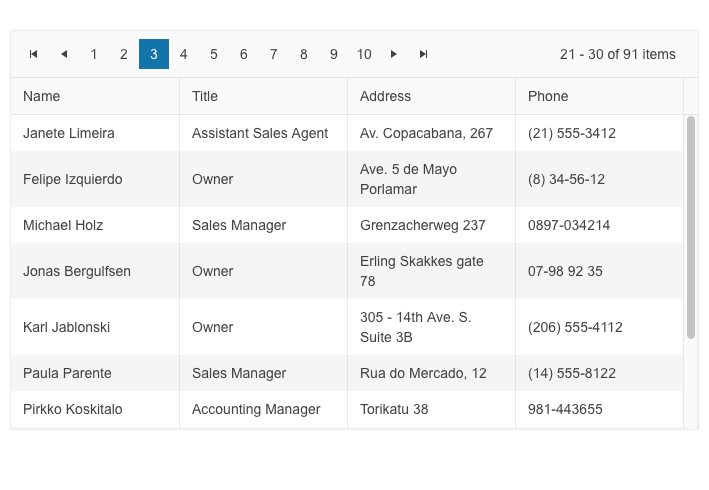
</p><p><img src="https://d585tldpucybw.cloudfront.net/sfimages/default-source/blogs/2023/2023-01/blazor-data-grid-pager-top-position.png?sfvrsn=f5a6607c_3" title="Blazor Data Grid Pager Top Position" alt="Blazor Data Grid has Pager along top. It includes buttons for first (icon), previous (icon), individual pages 1 through 10, next (icon), last (icon), and then shows 21-30 of 91 items" /></p><h3 id="sizing-options-for-multiple-components">Sizing Options for Multiple Components</h3><p>You can now customize the appearance of the UI for Blazor Toolbar, Pager and Form components using the new <strong>Size parameter</strong>. It allows you to configure the dimensions to &ldquo;Small,&rdquo; &ldquo;Medium&rdquo; or &ldquo;Large.&rdquo;</p><p><a href="https://demos.telerik.com/blazor-ui/toolbar/appearance" target="_blank">See example of UI for Blazor Toolbar Sizing options.</a></p><p><img src="https://d585tldpucybw.cloudfront.net/sfimages/default-source/blogs/2023/2023-01/blazor-toolbar-sizing.gif?sfvrsn=c58c0c96_3" title="Blazor Toolbar Sizing" alt="Blazor Toolbar Sizing cycles through small, medium, large" /></p><h3 id="enhanced-date-editing-ux">Enhanced Date Editing UX</h3><p>In R1 2023 we introduced multiple enhancements and features related to the date and time UI components for Blazor, namely the DateInput, DatePicker, DateRangePicker, DateTimePicker and TimePicker. In the section below we will review in detail what&rsquo;s
    new on a per feature basis.</p><h4 id="auto-tabbing-improvements">Auto-Tabbing Improvements</h4><p>As user preferences and behavior differ when working with dates, we implemented a configuration option that controls the auto-tab behavior when editing year, month and date values. The configuration can be achieved using the two new properties:</p><ul><li><strong>AutoSwitchParts</strong> &ndash; defines whether to switch to the next date segment when the current one is completed.</li><li><strong>AutoSwitchKeys</strong> &ndash; the default behavior for navigating with arrows remains, but the AutoSwitchKeys allows you to specify the keys/key codes which the end user should press in order to jump to the next date segment. The purpose
        of this property is mainly focused to allow users to type separators and dates with format &ldquo;1/31/2022&rdquo; instead of &ldquo;1312022.&rdquo;</li></ul><p>The auto-tabbing configuration properties are available for the following list of UI for Blazor components: DateInput, DatePicker, DateRangePicker, DateTimePicker and TimePicker.</p><h4 id="support-for-copy--paste-in-datetimepickers">Support for Copy &amp; Paste in DateTimePickers</h4><p>The UX of the DateTime pickers has been further enhanced with a handy option to copy and paste date format into the components. The feature is available for the following list of UI for Blazor components: DateInput, DatePicker, DateRangePicker, DateTimePicker
    and TimePicker.</p><p>A note on supported scenarios: The date input and pickers support pasting of values that match the format and pasting of date segments that match the date segments of the format, but content that does not match the format will not be processed.</p><h4 id="two-year-digit-format">Two-Year Digit Format</h4><p>The DateInput, DatePicker, DateRangePicker and DateTimePicker components have a new property called TwoDigitYearMax, which makes it easy for users to enter dates in two-digit year format. The value set for TwoDigitYearMax determines the highest year
    that will be assumed to be from the current century when a two-digit year is typed. The default setting is 68, meaning that any number less than 69 will be interpreted as 20xx, while numbers 69 or greater will be assumed to be from the 19xx century.</p><p><img src="https://d585tldpucybw.cloudfront.net/sfimages/default-source/blogs/2023/2023-01/daterangepicker-twodigityear.png?sfvrsn=7d6880b7_3" title="DateRangePicker" alt="DateRangePicker shows Two-Digit Year. Start date field has 22/Nov/26 and end field has 27/nov/23. Text below says The selected date start is: 11/22/1926. The selected date end is 11/27/2023." /></p><h4 id="auto-correction-of-invalid-dates">Auto-Correction of Invalid Dates</h4><p>Until recently, the default behavior was when a user types in a date like &ldquo;31/January/2023&rdquo; and then changes the month to February, the day would automatically switch to 28 (since February only has 28 days). However, we received feedback
    from you that there are cases when you need to disable this automatic correction so that the user can continue editing the date and manually change the day part of February.</p><p>The new property <strong>AutoCorrectParts</strong> gives you control over the date auto-correction UX. Its value specifies whether the date parts should be automatically corrected to show a valid date or not. The default value is &ldquo;true,&rdquo;
    meaning that the automatic correction will occur. By setting it to &ldquo;false,&rdquo; you will allow users to be able to see &ldquo;31/Feb/2023&rdquo; in the input field, but the component value can not be set to this and will be either null
    or default to the value for the DateTime.</p><p>The new AutoCorrectParts feature is available for the following list of UI for Blazor components: DateInput, DatePicker, DateRangePicker and DateTimePicker.</p><h4 id="caret-mode">Caret Mode</h4><p>We have introduced one more property called <strong>AllowCaretMode</strong> which gives users more flexibility when working with dates. The AllowCaretMode allows users to input date and time using a caret to move through separate date segments (instead
    of selecting) and this property controls whether this is an option or not. It also specifies if a caret can be displayed during input for certain date segments&mdash;for example, if months are represented as words instead of numbers, it can&rsquo;t
    be applied.</p><h3 id="no-data-template-in-multiple-components">No Data Template in Multiple Components</h3><p>Until now, if you needed to customize the content of an empty list in a select-type component you could only achieve change in the text via localization. With the new NoDataTemplate feature you can now display custom content in the Telerik UI for
    Blazor DropDownList, ComboBox, AutoComplete, MultiSelect and MultiColumnComboBox components.</p><p><img src="https://d585tldpucybw.cloudfront.net/sfimages/default-source/blogs/2023/2023-01/ui-for-blazor-no-date-template-combobox.png?sfvrsn=32b8104a_3" title="UI for Blazor No Data Template ComboBox" alt="For a Car Make dropdown, the user has typed &#39;demo&#39; and the component says &#39;No items to display&#39;" /></p><p><a href="https://demos.telerik.com/blazor-ui/combobox/templates" target="_blank">See an example of the UI for Blazor ComboBox no data template.</a></p><h3 id="blazor-treeview-onitemrender-event ">Blazor TreeView OnItemRender Event</h3><p>We exposed a new event called OnItemRender in the Blazor TreeView component, which is triggered when each of the cells are being rendered. The OnItemRender event allows you to have full control over what content and how you would like to be displayed
    in the tree view items including their read-only state.</p><p><a href="https://docs.telerik.com/blazor-ui/components/treeview/events" target="_blank">See the complete list of the available events in the UI for Blazor TreeView component.</a></p><h3 id="accessibility-improvements-1
                ">Accessibility Improvements</h3><p>We continue our efforts for ensuring the highest level of accessibility compliance of the Telerik UI for Blazor library. In the current release we improved the WAI-ARIA attributes and keyboard navigation in the Data Grid filter and column menus, as
    well as the TreeList filter menu. We have also added an AriaLabel parameter across all input-based components.</p><p>To raise the level of AY11 compliance even higher, we shipped a new color swatch called Ocean Blue A11Y (an enhanced version of the already existing Ocean Blue) which addresses corner cases for color contrast in several UI components.</p><p>In addition to the A11Y features, we also provided detailed documentation for the WAI-ARIA attributes of each UI for Blazor component allowing you to easily reference the available attributes.</p><p>See an example of <a href="https://docs.telerik.com/blazor-ui/components/autocomplete/accessibility/wai-aria-support" target="_blank">WAI-ARIA reference documentation article for the UI for Blazor AutoComplete component</a>.</p><h3 id="form-onupdate-event
                ">Form OnUpdate Event</h3><p>The <a href="https://demos.telerik.com/blazor-ui/form/overview" target="_blank">Blazor Form component</a> now exposes OnUpdate event, which is triggered after a change in any of the editors is initiated. The new event further
    expands the existing ones, OnSubmit, OnValidSubmit and OnInvalidSubmit, which allow you to respond to user actions and provide custom logic.</p><p><a href="https://docs.telerik.com/blazor-ui/components/form/events " target="_blank">Read more about the available events in the UI for Blazor Form component.</a></p><h3 id="week-number-in-datetimepickers ">Week Number in DateTimePickers</h3><p>The new property <strong>ShowWeekNumbers</strong> in the UI for Blazor Calendar, DatePicker and DateTimePicker components allows you to easily display to users the respective week number. By setting the ShowWeekNumbers property to true, a new
    column is added to the left-hand side of the calendar indicating the week number.</p><p><img src="https://d585tldpucybw.cloudfront.net/sfimages/default-source/blogs/2023/2023-01/ui-for-blazor-calendar-week-number.png?sfvrsn=1da109b0_3" title="UI for Blazor Calendar Week Number" alt="Beside January 2023 calendar are week numbers, so to the left of January 1st is 1, 8th is 2, 15th is 3, etc." /></p><p><a href="https://demos.telerik.com/blazor-ui/calendar/appearance " target="_blank">See how to add a week column in the UI for Blazor Calendar component.</a></p><h3 id="support-for-svg-icons ">Support for SVG icons</h3><p>As of R1 2023, the Telerik UI for Blazor library offers a wide selection of Scalable Vector Graphics (SVG) icons in addition to the previously available font icons, giving developers more options to choose from.</p><p>SVG icons are vector images defined in an XML format, which allows for easy scalability and customization. They can be used in webpages to display vector graphics and offer advantages such as sharp rendering at all resolutions, flexibility in
    controlling individual parts with CSS, and accessibility through semantic elements and attributes.</p><p><a href="https://docs.telerik.com/blazor-ui/common-features/icons ">Read the documentation article for more information about the available icon options in UI for Blazor.</a></p><p><img src="https://d585tldpucybw.cloudfront.net/sfimages/default-source/blogs/2023/2023-01/svg-icons.png?sfvrsn=569352d_3" data-sf-ec-immutable=" " alt="Telerik Ninja and two Kendokas hang out with an SVG " /></p><h3 id="radiogroup-new-item-template ">RadioGroup New Item Template</h3><p>Another component that now allows rendering of custom content instead of just text is the Telerik UI for Blazor RadioButtonGroup component. Using the new <a href="https://demos.telerik.com/blazor-ui/radiogroup/templates" data-sf-ec-immutable=" " target="_blank">radio group ItemTemplate</a> feature, you can add icons, styles and special formatting in the radio buttons of your Blazor apps.</p><p><img src="https://d585tldpucybw.cloudfront.net/sfimages/default-source/blogs/2023/2023-01/ui-for-blazor-radiogroup---template.png?sfvrsn=6523b576_3" data-sf-ec-immutable=" " title="UI for Blazor RadioGroup " alt="Radio buttions for Agree (in green), Disagree (in red), N/A (in black) " /></p><h2 id="telerik-ui-for-asp.-net-core-and-mvc">Telerik UI for ASP.NET Core and MVC</h2><h3 id="timedurationpicker-ui-component ">TimeDurationPicker UI Component</h3><p>The new Telerik UI TimeDurationPicker component for <a href="https://www.telerik.com/aspnet-core-ui" data-sf-ec-immutable=" " target="_blank">ASP.NET Core</a> and <a href="https://www.telerik.com/aspnet-mvc" data-sf-ec-immutable=" " target="_blank">ASP.NET MVC</a> enables users to select a duration period. As a developer, you can determine the number of columns,
    specify the format for each of them, constrain the allowed selectable values and add shortcut buttons for repetitive durations.
</p><p>The TimeDurationPicker component differs from the other time-based pickers that Telerik UI offers in that it does not care about what the current time is, and no date needs to be involved. Instead, the new ASP.NET Core/MVC TimeDurationPicker focuses
    just on a single time duration.</p><p>The Time Duration Picker comes also with built-in keyboard navigation support, multiple events that let you handle the business and UX logic, plus various appearance customization options such as size, fill mode and border radius.</p><p><a href="https://demos.telerik.com/aspnet-core/timedurationpicker " data-sf-ec-immutable=" ">See the UI for ASP.NET Core TimeDurationPicker component demo.<br /></a><a href="https://demos.telerik.com/aspnet-mvc/timedurationpicker" data-sf-ec-immutable=" " target="_blank">See the UI for ASP.NET MVC TimeDurationPicker component demo.</a></p><p><img src="https://d585tldpucybw.cloudfront.net/sfimages/default-source/blogs/2023/2023-01/timedurationpicker.png?sfvrsn=3f5385a6_3" title="TimeDurationPicker " alt="TimeDurationPicker allows for hours and minutes inputs by typing, scrolling, or presets" /></p><h3 id="gridlayout---stacklayout-ui-components ">GridLayout &amp; StackLayout UI Components</h3><p>The new GridLayout and StackLayout UI components will help you easily arrange HTML elements in a grid or a horizontal/vertical stack.</p><p>These components simplify the creation of layouts in web applications and help developers migrate from desktop to the web since they mimic the GridPanel and StackPanel components used in Windows development.</p><p>The GridLayout allows you to lay components out on a grid consisting of rows and columns. The columns and rows of the grid serve as coordinates that are used for laying out components on the grid. Typically a component only occupies a single cell
    of the grid.
</p><p><a href="https://demos.telerik.com/aspnet-core/gridlayout " data-sf-ec-immutable=" " target="_blank">See a demo of UI for ASP.NET Core GridLayout component.</a><br /><a href="https://demos.telerik.com/aspnet-mvc/gridlayout " target="_blank">See a demo of UI for ASP.NET MVC GridLayout component.</a></p><p><img src="https://d585tldpucybw.cloudfront.net/sfimages/default-source/blogs/2023/2023-01/gridlayout-component.png?sfvrsn=42433122_3" data-sf-ec-immutable=" " title="GridLayout Component " alt="GridLayout Component shows a dashboard with four trending articles with large number symbols, recommended for you posts with images, events this month calendar, and discover more tags" /></p><p>The Telerik StackLayout component allows you to easily align vertically or horizontally multiple elements in a stack. It includes different orientations, alignments, spacings and other handy options.</p><p><a href="https://demos.telerik.com/aspnet-core/stacklayout" target="_blank">See a demo of UI for ASP.NET Core StackLayout component.</a><br /><a href="https://demos.telerik.com/aspnet-mvc/stacklayout" target="_blank">See a demo of UI for ASP.NET MVC StackLayout component.</a></p><p><img src="https://d585tldpucybw.cloudfront.net/sfimages/default-source/blogs/2023/2023-01/stacklyaout-ui-component.png?sfvrsn=a20520ca_3" title="StackLayout UI Component" alt="Popular creator cards are stacked side by side, each with name and profile pic, number of followers, large image, image credit, and See more link. In the upper right are toggle buttons for horizontal (selected) or vertical " /></p><h3 id="chip-and-chiplist-ui-components">Chip and ChipList UI Components</h3><p>The Chip and ChipList UI components are more new additions to the Telerik UI for ASP.NET Core and ASP.NET MVC libraries. Commonly, Chip and ChipList components are used as tags when adding/removing contacts and mail inbox, selecting single or
    multiple choices from available options, and providing input to an application.</p><p>The Chip component enables user input and verifies that input by converting text into chips. The Chip provides a compact way to display complex information, including text, avatars, images, letters and close icons. It is clickable and removable,
    and offers various styling options.</p><p>The ChipList component is also included in this update. It is used to manage a collection of Chip components, providing data binding and manipulation options for a list of Chip elements.</p><p>See an example of the <a href="https://demos.telerik.com/aspnet-core/chip " target="_blank">Telerik UI for ASP.NET Core Chip</a> and <a href="https://demos.telerik.com/aspnet-core/chiplist " target="_blank">ChipList UI components</a>.<br />See an example of the <a href="https://demos.telerik.com/aspnet-mvc/chip " data-sf-ec-immutable=" " target="_blank">Telerik UI for ASP.NET MVC Chip</a> and <a href="https://demos.telerik.com/aspnet-mvc/chiplist" target="_blank" "=" " data-sf-ec-immutable=" ">ChipList UI components</a>.</p><p><img src="https://d585tldpucybw.cloudfront.net/sfimages/default-source/blogs/2023/2023-01/chiplist-overview.png?sfvrsn=fc58f6b1_3" data-sf-ec-immutable=" " title="ChipList " alt="Default ChipList has
                Maria, Thomas and Dan, each with a small personalized image and a light gray background. Outline ChipList shows Add, Edit, Remove, each with an icon and a white background with black border and text. ChipListwith no Chip items styles has One
                Two Three as simple outline boxes and no icons. " /></p><h3 id="floating-label-in-input-and-select-type-components ">Floating Label in Input and Select-Type Components</h3><p>In the current update, we enhanced multiple select and editor-type UI components with a shiny new <strong>floating label property</strong>. By setting it to true, the label will &ldquo;float&rdquo; above the component when it is focused. The new
    floating label feature is available in the following list of components:</p><p><strong>ASP.NET Core &amp; MVC Select-Type UI Components:</strong></p><ul><li><a href="https://demos.telerik.com/aspnet-core/dropdownlist/floating-label
                " data-sf-ec-immutable=" " target="_blank ">DropDownlist floating label demo</a></li><li><a href="https://demos.telerik.com/aspnet-core/combobox/floating-label " data-sf-ec-immutable=" " target="_blank ">ComboBox floating label demo</a></li><li><a href="https://demos.telerik.com/aspnet-core/multiselect/floating-label
                " data-sf-ec-immutable=" " target="_blank ">MultiSelect floating label demo</a></li><li><a href="https://demos.telerik.com/aspnet-core/autocomplete/floating-label " data-sf-ec-immutable=" " target="_blank ">AutoComplete floating label demo</a></li><li><a href="https://demos.telerik.com/aspnet-core/dropdowntree/index
                " target="_blank " data-sf-ec-immutable=" ">DropDownTree floating label demo</a></li><li><a href="https://demos.telerik.com/aspnet-core/multicolumncombobox/floating-label " data-sf-ec-immutable=" " target="_blank
                ">MultiColumnComboBox floating label demo</a></li></ul><p><strong>ASP.NET Core &amp; MVC Date Inputs &amp; Pickers</strong></p><ul><li><a href="https://demos.telerik.com/aspnet-core/dateinput/floating-label " data-sf-ec-immutable=" " target="_blank ">DateInput floating label demo</a></li><li><a href="https://demos.telerik.com/aspnet-core/datepicker/floating-label
                " data-sf-ec-immutable=" " target="_blank ">DatePicker floating label demo</a></li><li><a href="https://demos.telerik.com/aspnet-core/datetimepicker/floating-label " data-sf-ec-immutable=" " target="_blank
                ">DateTimePicker floating label demo</a></li></ul><p><img src="https://d585tldpucybw.cloudfront.net/sfimages/default-source/blogs/2023/2023-01/floating-label.gif?sfvrsn=f197fbe9_3" data-sf-ec-immutable=" " title="Floating Label " alt=" &#39;Remind me on&#39; field label moves from inside the field to
                above it when the field is clicked " /></p><h3 id="signing-pdf-file-with-signature-ui-component
                ">Signing PDF File with Signature UI Component</h3><p>We improved the demos for the Signature component in UI for ASP.NET Core and MVC to include the popular use case of signing PDF documents within web applications. Using the Telerik Document Processing Libraries, you can extract the PDF file to
    memory, add the signature and create a new PDF document. The Telerik UI for ASP.NET Core PDFViewer component allows you to easily display the final document to the user, including options to download and save the document with the added signature.</p><p>See examples of how to place a signature in a PDF File using the <a href="https://demos.telerik.com/aspnet-core/signature/sign-pdf-document " target="_blank " data-sf-ec-immutable=" ">UI for ASP.NET Core Signature component</a> and the <a href="https://demos.telerik.com/aspnet-mvc/signature/sign-pdf-document
                " data-sf-ec-immutable=" ">UI for ASP.NET MVC Signature component</a>.</p><p><img src="https://d585tldpucybw.cloudfront.net/sfimages/default-source/blogs/2023/2023-01/sign-pdf-with-signature-ui-component.png?sfvrsn=bff63802_3" title="PDF Signature Component
                " data-sf-ec-immutable=" " alt="A certificate has a space for global partner &#39;s signature. The Signature component allows the user to add their signature to the PDF. " /></p><h3 id="ecmascript-modules-esm-support ">ECMAScript Modules (ESM) Support</h3><p>We transformed the source code from AMD to ECMAScript modules (ESM), bringing actual benefits from the ESM modules to Kendo UI for jQuery, Telerik UI for ASP.NET Core and MVC server wrappers as well.</p><p>If you are relying on the AMD modules, you can continue using them as we managed to come up with a solution that allows moving to the new ESM module system without breaking changes for anyone who might want to continue AMD/UMD modules with the
    Kendo UI bundles distributed.</p><p>You can <a href="https://www.telerik.com/blogs/kendo-ui-jquery-transformed-ecmascript-modules " data-sf-ec-immutable=" " target="_blank ">learn why we transformed our own source code from AMD to ECMAScript modules</a> and see how you can use dynamic script imports
    with modern browsers and get huge benefits in your applications.</p><h3 id="charts-enhancements ">Charts Enhancements</h3><h4 id="label-support-for-bullet-charts
                ">Label Support for Bullet Charts</h4><p>You can now easily add labels to each of the data series within the Bullet Chart UI component. Furthermore, you can configure its visibility, apply background formatting and even render custom content by using templates.</p><p><img src="https://d585tldpucybw.cloudfront.net/sfimages/default-source/blogs/2023/2023-01/support-for-subtitle-in-charts.png?sfvrsn=5db1a2b_3" data-sf-ec-immutable=" " title="Chart with subtitle " alt="Site Visitors Stats chart has a subtitle indicating
                results are in thousands " /></p><h4 id="subtitle-support-for-all-charts
                ">Subtitle Support for All Charts</h4><p>Another enhancement to the DataViz library is the ability to add an additional title (subtitle) below the chart title and apply individual style to it.</p><p><a href="https://docs.telerik.com/aspnet-core/html-helpers/charts/elements/title " data-sf-ec-immutable=" ">See how to configure the Chart Title and Subtitle properties.</a></p><p><img src="https://d585tldpucybw.cloudfront.net/sfimages/default-source/blogs/2023/2023-01/support-for-labels-in-bullet-charts.png?sfvrsn=8248ade1_3" title="Bullet Chart with Subtitles " data-sf-ec-immutable=" " alt="A weather app has four bullet apps, and each has a specific subtitle to make it easier to read a precise number " /></p><h3 id="accessibility-improvements-2 ">Accessibility Improvements</h3><p>The specific WAI-ARIA accessibility improvements in R1 2023 for Telerik UI for ASP.NET Core and MVC are numerous, so here are a few UI components: Menu, Context Menu, ListBox, Drawer, ScrollView,
    ListView and more.</p><h3 id="deprecation-of-less-themes
                ">Deprecation of LESS Themes</h3><p>Last year with R1 2022 we announced that Kendo UI for jQuery, Telerik UI for ASP.NET MVC and Telerik UI for ASP.NET Core would be moving completely to the <a href="https://www.telerik.com/blogs/future-plans-telerik-kendo-ui-less-themes " target="_blank " data-sf-ec-immutable=" ">Sass-based Default, Bootstrap, Material and Fluent themes</a>.
 This means that the LESS themes, created when LESS was the most popular CSS pre-compiler (this is no longer the case), are officially going to be deprecated.</p><p>Well, the day is here, and R1 2023 is the last version of Kendo UI for jQuery, Telerik UI for ASP.NET MVC and Telerik UI for ASP.NET Core will support the LESS-based themes.</p><p>Thanks to the hard work done over the last year or so, R1 2023 contains a lot of new features and components, and lots of improvements to the LESS themes. This should give teams that have been hesitant about the migration a stable release to hold
    out on until they can make the change to the Sass-based themes.</p><h2 id="telerik-ui-for-asp.-net-core-specific ">Telerik UI for ASP.NET Core Specific</h2><h3 id="new-e-shop-demo-app ">New E-Shop Demo App</h3><p>We have a brand-new e-shop demo app that illustrates the usage of Telerik UI components within a ASP.NET Core application. The app showcases the most common use cases related to e-shops&mdash;product list, product details, shopping basket, user
    profile, sophisticated product filters, and on top of that we have also included integration with <a href="https://www.telerik.com/products/reporting.aspx" data-sf-ec-immutable=" " target="_blank ">Telerik Reporting</a> to demonstrate how easy it is to generate order invoices or print product catalogs.</p><p>The application is built entirely with Telerik UI for <a href="https://www.telerik.com/aspnet-core-ui" target="_blank">ASP.NET Core components</a> such as Data Grid, Scroll View (also known as Carousel), Slider, Rating, Card, Checkbox Group, Buttons and more. The styling is powered by the new built-in Fluent theme
    which is available for all Telerik and Kendo UI components.</p><p><a href="https://demos.telerik.com/aspnet-core/eshop/account/login" target="_blank " data-sf-ec-immutable="
                ">See the new e-shop demo app with Telerik UI for ASP.NET Core components with Fluent theme.</a></p><p><img src="https://d585tldpucybw.cloudfront.net/sfimages/default-source/blogs/2023/2023-01/ui-for-asp.net-core-eshop-demo-app.jpeg?sfvrsn=763817f7_3/" data-sf-ec-immutable=" " title="UI for ASP.NET Core Eshop Demo App " alt="UI for ASP.NET Core Eshop
                Demo App " /></p><h3 id="localization-configuration-in-project-templates
                ">Localization Configuration in Project Templates</h3><p>As of the R3 2022 SP2 release, we have added localization capabilities to the Visual Studio Templates for Telerik UI for ASP.NET Core. This gives you an option to enable or disable the templates localization in the Telerik Visual Studio Extensions
    Project Wizard.
</p><p>By default, the UI for ASP.NET Core components display their messages in English. If the localization is enabled in the Project Wizard, a dropdown is rendered in the respective Visual Studio Templates startup page.</p><p>You can use it to select a different language, which will convert the messages in the components to the selected language. This way your users will be able to understand them, since they are translated to their native (or preferred) language.</p><h3 id="localization-resource-files ">Localization Resource Files</h3><p>This release includes translated messages for 96 cultures in the Telerik UI for ASP.NET Core and MVC libraries. These translations were taken from the Kendo UI for jQuery public localization repository and are now available as resource files.
    Users can use these translations as is or customize them to their liking.</p><p><a href="https://docs.telerik.com/aspnet-core/globalization/localization " data-sf-ec-immutable=" " target="_blank
                ">To learn more about the localization updates, check out the dedicated documentation article.</a></p><h3 id="ui-for-asp.-net-core-code-snippets-in-visual-studio-and-visual-studio-code ">UI for ASP.NET Core Code Snippets in Visual Studio and Visual Studio Code</h3><p>This release includes new code snippets for Telerik UI for ASP.NET Core components to improve productivity when developing web applications in Visual Studio or Visual Studio Code. The 110+ components now have code snippets for both HTML and
    TAG helper flavors that can be easily accessed. To use these code snippets, download and install the extensions from the Visual Studio Marketplace.</p><ul><li><a href="https://marketplace.visualstudio.com/items?itemName=TelerikInc.ProgressTelerikASPNETCoreVSExtensions
                " data-sf-ec-immutable=" " target="_blank ">Visual Studio Productivity Pack</a></li><li><a href="https://marketplace.visualstudio.com/items?itemName=TelerikInc.aspnetcoretemplatewizard " data-sf-ec-immutable=" " target="_blank
                ">Visual Studio Code Productivity Pack</a></li></ul><h2 id="telerik-ui-for-asp.-net-ajax ">Telerik UI for ASP.NET AJAX</h2><h3 id="new-webforms-signature-ui-component ">New WebForms Signature UI component</h3><p><a href="https://www.telerik.com/products/aspnet-ajax.aspx" data-sf-ec-immutable=" " target="_blank
                ">UI for ASP.NET AJAX</a> is another Telerik library that added the Signature UI component to its
    collection. The RadSignature allows users to easily add signatures to forms or even PDF documents (via integration Telerik Document Processing). They can use a mouse or touch device to create their signature and customize it using options
    like canvas settings, stroke width, size, color, background and read-only mode.</p><p><a href="https://demos.telerik.com/aspnet-ajax/signature/overview/defaultcs.aspx" data-sf-ec-immutable=" " target="_blank">See a demo of the UI for ASP.NET AJAX Signature UI control.</a></p><p><img src="https://d585tldpucybw.cloudfront.net/sfimages/default-source/blogs/2023/2023-01/ui-for-asp.net-ajax-signature.png?sfvrsn=24cd6e0e_3/" title="UI for ASP.NET AJAX Signature " data-sf-ec-immutable=" " alt="UI for ASP.NET AJAX Signature
                " /></p><h3 id="enhancements-to-ui-components ">Enhancements to UI Components</h3><p>Based on a <a href="https://feedback.telerik.com/aspnet-ajax/1375584-add-dropdownautowidth-property-in-raddropdownlist
                " data-sf-ec-immutable=" " target="_blank ">customer request</a> in the UI for ASP.NET AJAX Feedback Portal, we added a DropDownAutoWidth property in the RadDropDownList component.</p><p>Another <a href="https://feedback.telerik.com/aspnet-ajax/1374073-add-client-event-itemselect-for-the-searchcontext-in-radsearchbox
                " data-sf-ec-immutable=" " target="_blank ">Feedback Portal request</a> that was included in the release is the new client event
    ItemSelect for the SearchContex in the RadSearchBox. Using the ItemSelect event, you can easily change the DataSource for RadSearchBox according to which Item is selected.</p><p><img src="https://d585tldpucybw.cloudfront.net/sfimages/default-source/blogs/2023/2023-01/ajax-radsearchbox-itemselect.gif?sfvrsn=86dbb7a8_3" title="AJAX RadSearchBox ItemSelect " data-sf-ec-immutable=" " alt="From a dropdown inside the search tab that starts with All, user selects Shelley Burke. A few details about username, supplier ID, and Default are shown below the text bar. Then
                Yoshi Nagase is selected from the dropdown, and his details are listed below Shelley&#39;s " /></p><h3 id="accessibility-improvements-3
                ">Accessibility Improvements</h3><p>In Telerik R1 2023, we continued adding accessibility improvements (Calendar, TreeView, Grid HeaderContext to name a few) and as we did so, we made sure that the Voluntary Product Accessibility Template (VPAT) is updated.</p><h3 id="other-enhancements ">Other Enhancements</h3><p>In the latest release of <a href="https://www.telerik.com/products/aspnet-ajax.aspx" data-sf-ec-immutable=" " target="_blank ">UI for ASP.NET AJAX</a> you can also find improvements in the appearance
    of RadEditor and RadTreeView in the WebBlue, Windows 7 and Vista skins.</p><h2 id="join-us-for-the-webinar ">Join Us for the Webinar January 26 (Plus More)</h2><h3 id="sign-up-for-the-release-webinars-on-jan-26-31-feb-2
                ">Progress Telerik .NET Web, Desktop &amp; Mobile Products R1 2023 Release Webinar | January 26</h3><p><a href="https://www.telerik.com/campaigns/telerik-r1-2023-release-webinar-web-desktop-mobile-products" target="_blank "><img src="https://d585tldpucybw.cloudfront.net/sfimages/default-source/blogs/2023/2023-01/telerik_blog-inline_image_1200x628.png?sfvrsn=21e2eec7_3" data-sf-ec-immutable=" " alt=" " sf-size="39421 " /></a></p><p>Discover all updates across Telerik <a href="https://www.telerik.com/blazor-ui" data-sf-ec-immutable=" " target="_blank ">UI for Blazor</a>, <a href="https://www.telerik.com/aspnet-core-ui" data-sf-ec-immutable=" " target="_blank ">UI for ASP.NET Core</a>, <a href="https://www.telerik.com/aspnet-mvc" data-sf-ec-immutable=" " target="_blank
                ">UI for ASP.NET MVC</a>, <a href="https://www.telerik.com/products/aspnet-ajax.aspx" data-sf-ec-immutable=" " target="_blank ">UI for ASP.NET AJAX</a>, <a href="https://www.telerik.com/products/wpf/overview.aspx" data-sf-ec-immutable=" " target="_blank ">UI for WPF</a>, <a href="https://www.telerik.com/products/winforms.aspx" data-sf-ec-immutable="
                " target="_blank ">UI for WinForms</a>, <a href="https://www.telerik.com/winui" data-sf-ec-immutable=" " target="_blank ">UI for WinUI</a>, <a href="https://www.telerik.com/maui-ui" data-sf-ec-immutable=" " target="_blank ">UI for .NET MAUI</a> and <a href="https://www.telerik.com/xamarin-ui" data-sf-ec-immutable=" " target="_blank ">UI for Xamarin</a> and <a href="https://www.telerik.com/themebuilder" data-sf-ec-immutable=" " target="_blank ">ThemeBuilder</a>.</p><p><a href="https://www.telerik.com/campaigns/telerik-r1-2023-release-webinar-web-desktop-mobile-products" data-sf-ec-immutable=" " class="Btn" target="_blank ">Save Your Seat</a></p><h3 id="join-us-on-twitch ">Join Us on Twitch</h3><p><a href="https://www.telerik.com/codeitlive" target="_blank
                "><img src="https://d585tldpucybw.cloudfront.net/sfimages/default-source/blogs/2023/2023-01/fb_li_telerikfiddlerkendoui_1200x628a1cf29e1-b319-453f-9a32-164642ddc274.png?sfvrsn=675e050b_3" data-sf-ec-immutable=" " alt=" " sf-size="40757 " /></a></p><p>If you can&rsquo;t wait until the webinar to unpack the new release, join the <a href="https://www.telerik.com/codeitlive" data-sf-ec-immutable=" " target="_blank ">Livestream Release Party</a> on January 19, 10 a.m. &ndash; 11:30 a.m. ET to hear the release highlights across the entire Progress Developer Tools portfolio and hang out with friends.</p><h3 id="progress-kendo-ui-r1-2023-release-webinar--january-31 ">Progress Kendo UI R1 2023 Release Webinar | January 31</h3><p><a href="https://www.telerik.com/campaigns/kendo-ui-r1-2023-release-webinar" target="_blank "><img src="https://d585tldpucybw.cloudfront.net/sfimages/default-source/blogs/2023/2023-01/kendo-ui-kendoka_blog-inline_image_1200x628.png?sfvrsn=ad1e18e0_3" data-sf-ec-immutable=" " alt=" " sf-size="34452 " /></a></p><p>Discover all updates across <a href="https://www.telerik.com/kendo-react-ui" data-sf-ec-immutable=" " target="_blank ">KendoReact</a> and Kendo UI for <a href="https://www.telerik.com/kendo-angular-ui" data-sf-ec-immutable=" " target="_blank
                ">Angular</a>, <a href="https://www.telerik.com/kendo-vue-ui" data-sf-ec-immutable=" " target="_blank ">Vue</a> and <a href="https://www.telerik.com/kendo-jquery-ui" data-sf-ec-immutable=" " target="_blank ">jQuery</a>, as well as ThemeBuilder.</p><p><a href="https://www.telerik.com/campaigns/kendo-ui-r1-2023-release-webinar" data-sf-ec-immutable=" " class="Btn" target="_blank ">Save Your Seat</a></p><h3 id="progress-telerik-reporting-mocking-and-debugging-tools-r1-2023-release-webinar--february-2
                ">Progress Telerik Reporting, Mocking and Debugging Tools R1 2023 Release Webinar | February 2</h3><p><a href="https://www.telerik.com/campaigns/telerik-r1-2023-release-webinar-reporting-fiddler-and-justmock" target="_blank "><img src="https://d585tldpucybw.cloudfront.net/sfimages/default-source/blogs/2023/2023-01/telerik_fiddler_blog-inline_image_1200x628.png?sfvrsn=ffd9ae47_3" data-sf-ec-immutable=" " alt=" " sf-size="42920 " /></a></p><p>Discover all updates across Telerik <a href="https://www.telerik.com/products/reporting.aspx" data-sf-ec-immutable=" " target="_blank
                ">Reporting</a>, <a href="https://www.telerik.com/products/mocking.aspx" data-sf-ec-immutable=" " target="_blank ">JustMock</a>, <a href="https://www.telerik.com/fiddler/fiddler-everywhere" data-sf-ec-immutable=" " target="_blank ">Fiddler Everywhere</a> and <a href="https://www.telerik.com/fiddler-jam" data-sf-ec-immutable="
                " target="_blank ">Fiddler Jam</a>.</p><p><a href="https://www.telerik.com/campaigns/telerik-r1-2023-release-webinar-reporting-fiddler-and-justmock" data-sf-ec-immutable=" " class="Btn" target="_blank ">Save Your Seat</a></p><img src="https://feeds.telerik.com/link/23053/15911259.gif" height="1" width="1"/>]]></content>
  </entry>
  <entry>
    <id>urn:uuid:b8cfdd81-d877-4bb1-bc80-f86596a4bce5</id>
    <title type="text">Web Live Preview and Telerik: The Perfect Combo To Elevate Your Productivity</title>
    <summary type="text">Read on to find out how the Web Live Preview tool in combination with Telerik can save you precious time in the long term.</summary>
    <published>2022-12-01T08:11:00Z</published>
    <updated>2026-04-07T05:36:35Z</updated>
    <author>
      <name>Iva Borisova </name>
    </author>
    <link rel="alternate" href="https://feeds.telerik.com/link/23053/15818798/web-live-preview-telerik-perfect-combo-elevate-productivity"/>
    <content type="text"><![CDATA[<p><span class="featured">Read on to find out how the Web Live Preview tool in combination with Telerik can save you precious time in the long term.</span></p>
<p>Right before Thanksgiving, Microsoft published a blog post written by the talented <a href="https://www.telerik.com/blogs/author/rumen-jekov" target="_blank">Rumen Zhekov—Manager, Software Engineering at Progress</a>, responsible for the Telerik ASP.NET AJAX (Web Forms) suite. The blog post concentrates on everything new, cool, trendy, and useful around the integrated Web Live Preview tool in Visual Studio 2022 and the way it seamlessly works with <a target="_blank" href="https://www.telerik.com/products/aspnet-ajax.aspx">Telerik UI for ASP.NET AJAX</a>.</p>
<h2 id="what’s-so-cool-about-web-live-preview">What’s so Cool About Web Live Preview?</h2>
<p>Led by the spirit of Thanksgiving, the article gives a well-deserved appreciation to the good old Visual Studio Web Forms Designer and welcomes its modern successor—the Web Live Preview tool.</p>
<p>The new kid on the block inherits all the cool features of the Designer but introduces many more. It allows you to see in real-time the configuration changes you made to the design, layout and settings of the webpage and the UI components you are currently working on, incorporating built-in accessibility support, and getting frequent updates and improvements by Microsoft.</p>
<h2 id="web-live-preview-and-telerik-working-natively-together">Web Live Preview and Telerik: Working Natively Together</h2>
<p>Diving deeper into the capabilities of the powerful UX usability tool, the blog post focuses on the freedom it gives when it comes to components’ support—the Web Live Preview works with the native ASP.NET Web Forms components as well as with the third-party UI controls, including Telerik UI for ASP.NET AJAX.</p>
<p>To better visualize how the Web Live Preview and Telerik work seamlessly together, a sample <a href="https://docs.telerik.com/devtools/aspnet-ajax/integration/visual-studio/visual-studio-extensions/creation-and-configuration-wizard" target="_blank">Outlook-inspired Web Forms app</a> created with the assistance of <a href="https://marketplace.visualstudio.com/items?itemName=TelerikInc.TelerikASPNETAJAXVSExtensions" target="_blank">Visual Studio Extensions for Telerik UI for ASP.NET AJAX</a> is used. The demo does its best to also showcase the great new features Web Live Preview brings to the table.</p>
<p><img src="https://d585tldpucybw.cloudfront.net/sfimages/default-source/blogs/2022/2022-11/wlp_real_time_css_sync.gif?sfvrsn=fea9d481_3" alt="Web Live Preview demo"></p>
<p>But … let’s not spoil everything. You can learn more about the installation, usage and the powerful new features in the blog post itself. ↓</p>
<h2 id="give-it-a-read-and-share-your-thoughts">Give It a Read and Share Your Thoughts</h2>
<p>It’s time to stop talking about the blog post and finally give you the link to read it yourself, so here you are: <a href="https://devblogs.microsoft.com/visualstudio/improve-your-productivity-with-web-live-preview-and-telerik/" target="_blank">Improve your productivity with Web Live Preview and Telerik - Visual Studio Blog (microsoft.com)</a>.</p>
<p>Give it a spin and thank us later in the comments section below or in the original blog post by pressing the like (♡) button. Feedback is also appreciated.</p>
<p>Welcome to the new Web Live Preview age and happy reading (coding)!</p><img src="https://feeds.telerik.com/link/23053/15818798.gif" height="1" width="1"/>]]></content>
  </entry>
  <entry>
    <id>urn:uuid:dc4e52ae-f5f4-4645-846c-199109637ce8</id>
    <title type="text">What’s New in R3 2022 With Telerik UI Web Components</title>
    <summary type="text">R3 2022 brings exciting updates to your favorite Telerik web components, including a new Fluent theme, support for the latest .NET 7 preview and accessibility enhancements.</summary>
    <published>2022-09-14T14:58:13Z</published>
    <updated>2026-04-07T05:36:35Z</updated>
    <author>
      <name>Maria Ivanova </name>
    </author>
    <link rel="alternate" href="https://feeds.telerik.com/link/23053/15640784/r3-2022-telerik-web-release"/>
    <content type="text"><![CDATA[<p><span class="featured">R3 2022 brings exciting updates to your favorite Telerik web components, including a new Fluent theme, support for the latest .NET 7 preview and accessibility enhancements.</span></p><ul><li><a href="https://www.telerik.com#common-telerik-web-r3-2022-release-items" data-sf-ec-immutable="">Common Telerik Web R2 2022 Release Items</a></li><li><a href="https://www.telerik.com#telerik-ui-for-blazor" data-sf-ec-immutable="">Telerik UI for Blazor</a></li><li><a href="https://www.telerik.com#telerik-ui-for-aspnet-core-and-telerik-ui-for-aspnet-mvc" data-sf-ec-immutable="">Telerik UI for ASP.NET Core and Telerik UI for ASP.NET MVC</a></li><li><a href="https://www.telerik.com#telerik-ui-for-aspnet-ajax" data-sf-ec-immutable="">Telerik UI for ASP.NET AJAX</a></li></ul><h2 id="common-telerik-web-r3-2022-release-items">Common Telerik Web R3 2022 Release Items</h2><h3 id="new-fluent-theme-across-telerik-and-kendo-ui">New Fluent Theme Across Telerik and Kendo UI</h3><p>With R3 2022 we are excited to announce that the new Fluent theme is officially available for Telerik and Kendo UI libraries and their web UI components! Just like our other themes, the new Fluent theme follows the guidelines of the official Fluent Design
    System to let all ASP.NET MVC, ASP.NET Core, Blazor, jQuery, Angular, React and Vue UI components immediately be styled with the Fluent Design System just by including the new theme.</p><p>If you are already using Fluent-themed components in your web applications today, with the Fluent theme added, any of the Telerik and Kendo UI components will seamlessly fit in.</p><p><img src="https://d585tldpucybw.cloudfront.net/sfimages/default-source/blogs/2022/2022-09/telerik-and-kendo-ui-fluent-theme.png?sfvrsn=9754341_3" title="Telerik and Kendo UI Fluent Theme" alt="Telerik and Kendo UI Fluent Theme" /></p><h3 id="compatibility-with-.net-7-latest-preview-release">Compatibility With .NET 7 Latest Preview Release</h3><p>For those of you eager to try out the latest and greatest by Microsoft, we are happy to announce that the Telerik UI for Blazor and Telerik UI for ASP.NET Core libraries are compatible with the latest .NET 7 Preview 7. Our goal is to provide full support
    for .NET 7 as soon as Microsoft releases it this November.</p><p><img src="https://d585tldpucybw.cloudfront.net/sfimages/default-source/blogs/2022/2022-09/compatibility-.net-7-preview.png?sfvrsn=76247b27_3" title="Compatibility-.NET-7-Preview" alt="Illustration of Telerik Ninja with .NET 7 Preview" /></p><h3 id="accessibility-enhancements">Accessibility Enhancements</h3><p>A major focus in R3 2022 for all Telerik Web UI components was further improving the accessibility compliance level and available documentation and demos that can be used for reference points or direct A11Y testing. For each of the Telerik UI products,
    we have added a dedicated section below which outlines the specific items in the release.</p><p><img src="https://d585tldpucybw.cloudfront.net/sfimages/default-source/blogs/2022/2022-09/accessibility.png?sfvrsn=d19e8928_5" alt="Accessibility illustration" /></p><h3 id="new-telerik-document-processing-features">New Telerik Document Processing Features</h3><p>With R3 2022, we&rsquo;ve released new features across all <a href="https://www.telerik.com/document-processing-libraries" target="_blank">Telerik Document Processing libraries</a> to help you better navigate your document formats. The new features include:</p><p><strong>Updates in WordProcessing Library</strong></p><ul><li><strong>Page Numbering fields:</strong> In addition to the filed codes support, we have now added a functionality that allows you to update the PAGE, PAGEREF, NUMPAGES and SECTIONPAGES fields and easily calculate their result.</li><li><strong>Shapes support:</strong> The shapes feature allows you to easily insert, style and interact with existing shapes like circles, boxes, arrows and many others directly in your documents.</li></ul><p><strong>Updates in SpreadProcessing Library</strong></p><ul><li><strong>Repeat specific rows or columns on every printed page:</strong> You can easily specify a row or a column that will be repeated on every printed page.</li></ul><p><strong>Updates in SpreadStreamProcessing Library</strong></p><ul><li><strong>SpreadStreamProcessing import:</strong> You can now read large XLSX or CSV files without loading the entire document in memory.</li></ul><p><strong>Updates in PdfProcessing Library:</strong></p><ul><li><strong>PdfProcessing Signature flags support:</strong> With this new functionality, you can specify that there is a signature, even if the signature itself does not have a visual representation.</li><li><strong>Export PDF pages to images:</strong> We have added the ability to convert the pages of a .pdf document to images. This feature will work with the .NET Standard version and does not depend on any Windows libraries.</li></ul><p><img src="https://d585tldpucybw.cloudfront.net/sfimages/default-source/blogs/2022/2022-09/telerik-document-processing---pdfprocessing-770-px.png?sfvrsn=c5943f80_3" title="Telerik Document Processing - PDFProcessing" alt="Telerik Document Processing - PDFProcessing" /></p><h2 id="telerik-ui-for-blazor">Telerik UI for Blazor</h2><p>Telerik UI for Blazor continues to grow and improve, and we are happy to share that we now offer 100 native Blazor components! The new additions in R3 2022 include PDFViewer, MultuColumnComboBox and Skeleton components; accessibility improvements; new
    scaffolding and code snippets and Visual Studio&mdash;plus dozens of advanced features across all UI for Blazor components.</p><h3 id="new-blazor-pdfviewer-component">New Blazor PDFViewer Component</h3><p>The new UI for Blazor PDFViewer component is certainly one of the highlights of R3 2022 release. It allows users to view and interact with PDF files directly in the browser without the need to download the file or use third-party tools or browser extensions.
</p><p>The PDF Viewer for Blazor comes with a toolbar with built-in features to open, view, and download PDF files, paging, PDF search options, zoom in/out, printing and more. You can further customize the built-in toolbar commands and add your own, such as
    including a watermark or sending via email.</p><p>See the <a href="https://demos.telerik.com/blazor-ui/pdfviewer/overview" target="_blank">UI for Blazor PDFViewer component demo</a>.</p><p><img src="https://d585tldpucybw.cloudfront.net/sfimages/default-source/blogs/2022/2022-09/ui-for-blazor-pdfviewer---search.png?sfvrsn=2f9501d0_3" title="UI for Blazor PDFViewer - Search" alt="UI for Blazor PDFViewer - Search" /></p><h3 id="new-blazor-multicolumncombobox-component">New Blazor MultiColumnComboBox Component</h3><p>The new UI for Blazor MultiColumnComboBox component comes with a rich set of built-in features and options to customize its look and feel, including data binding, filtering, grouping, rendering of custom content through templates, appearance configuration,
    input of custom values, validation, built-in localization of messages, accessibility and keyboard navigation. With the help of the MultiColumn ComboBox, users can easily choose values from a predefined list in a table-like structure and type input
    in it.</p><p><a href="https://demos.telerik.com/blazor-ui/multicolumncombobox/overview" target="_blank">See the UI for Blazor MultiColumnComboBox component demo</a> or <a href="https://blazorrepl.telerik.com/ccYVvpaq40u8UlwZ48" target="_blank">try out the component in the Telerik Blazor REPL browser-based code runner</a>.</p><p><img src="https://d585tldpucybw.cloudfront.net/sfimages/default-source/blogs/2022/2022-09/telerik-blazor-multicolumncombobox-theming.gif?sfvrsn=5a250903_3" title="Blazor MultiColumnComboBox Component" alt="Blazor MultiColumnComboBox Component" /></p><h3 id="new-blazor-skeleton-component">New Blazor Skeleton Component</h3><p>Skeletons are widely used as hints to the users that the page content is being loaded. With the Telerik UI for Blazor Skeleton component you can easily achieve such behavior and render a placeholder for each of the underlying HTML elements in a component
    or page. It includes customization options for its shape (text, circle or rectangle), height, width, animation type (pulse or wave), visibility and CSS class.</p><p>The UI for Blazor Skeleton allows seamless integration with other Blazor UI components, such as Data Grid. This allows you to easily mimic grid with rows while data loading takes place.</p><p><a href="https://demos.telerik.com/blazor-ui/skeleton/overview" target="_blank">See a demo of the UI for Blazor Skeleton component</a> or <a href="https://blazorrepl.telerik.com/GmOqkrvm007I7HH831" target="_blank">try it out in Telerik REPL for Blazor</a>.</p><p><img src="https://d585tldpucybw.cloudfront.net/sfimages/default-source/blogs/2022/2022-09/telerik-blazor-skeleton-overview.gif?sfvrsn=730cbf89_3" title="Telerik Blazor Skeleton" alt="Telerik Blazor Skeleton" /></p><h3 id="accessibility-improvements-in-telerik-ui-for-blazor">Accessibility Improvements in Telerik UI for Blazor</h3><p>In Telerik UI for Blazor, we specifically addressed the <a href="https://www.w3.org/TR/wai-aria-practices/" target="_blank">WAI-ARIA best practices</a> for implementing keyboard navigation for multiple components, tested against
    the popular screen readers, implemented the recommended rendering related to various WAI-ARIA attributes, and worked toward aligning with <a href="https://www.w3.org/TR/WCAG21/" target="_blank">WCAG 2.1 AAA</a> and <a href="http://www.section508.gov/" target="_blank">Section 508</a> compliance standards.</p><p>The UI for Blazor components that received accessibility boost in R3 2022 include Blazor Data Grid, TreeList, TreeView, PanelBar, Stepper, Wizard, Pager, DateInput, Calendar, DateRangePicker, DatePicker, TimePicker, DateTimePicker, Drawer and Breadcrumb.
</p><h3 id="new-accessibility-focused-demos--docs">Accessibility-Focused Demos &amp; Docs</h3><p>In addition to updating our UI for Blazor components, with R3 2022 the Telerik Blazor team has created accessibility-specific demos that can be used to test any of our Blazor UI components with screen readers and other software used to test accessibility.</p><p>Previously, whenever teams needed to run accessibility tests on Telerik UI for Blazor components, they would have to do so locally, which required dedicated developers to set up the perfect configuration. Now, any team member who needs to run tests with
    screen readers or other software for accessibility testing can do so by visiting the respective online demo. Additionally, we have added a WAI-ARIA Support article for each of the components that lists the respective attributes and usage.</p><h3 id="enhancements-to-blazor-datagrid-and-treelist-components">Enhancements to Blazor DataGrid and TreeList Components</h3><p>The Blazor Grid and TreeList UI components come with the following new features:</p><p><strong>Drag &amp; drop between Data Grid, TreeList and TreeView</strong><br />This allows users to drag items from any of these components to any other of them plus Gantt and Scheduler. That is&mdash;in addition to the option drag and drop of items between
    instances of the same component, which has been available for quite some time. </p><p>The existing Drop event will be triggered as the current one but with two additional event parameters (DestinationIndex(string) and DestinationComponentId(string)) and a new method called GetTimeSlotFromDropIndex. These updates will allow users to determine
    the drop destination inside any of the receiving components and ensure the corresponding item in the destination component can be returned.</p><p><strong>HeaderClass parameter</strong><br />This allows you to <a href="https://demos.telerik.com/blazor-ui/grid/cell-formatting" target="_blank">define custom CSS classes for the column header cells</a> and easily bold their text,
    change their alignment or style them to make them stand out.</p><p><img src="https://d585tldpucybw.cloudfront.net/sfimages/default-source/blogs/2022/2022-09/telerik-blazor-treelist-header-css-custom.png?sfvrsn=67d323a6_3" title="Telerik Blazor TreeList - HeaderClass CSS Custom" alt="Telerik Blazor TreeList - HeaderClass CSS Custom" /></p><p><strong>FilterOperators parameter</strong><br />This parameter can be applied on a per column basis and lets you customize the list of filter operators within the filter row and menus.</p><p><strong>FilterEditorFormat parameter</strong><br />This one allows control over the format of the default filter and align the formatting of values in the column display and filter editor.</p><h3 id="enhancements-to-blazor-gantt-component">Enhancements to Blazor Gantt Component</h3><p>Based on your feedback, we expanded the UI for Blazor Gantt component to give you greater flexibility and more customization options.</p><h3 id="blazor-gantt-state-management">Blazor Gantt State Management</h3><p>The Telerik UI for Blazor Gantt component now allows persisting its state between browsing sessions. You can save and load the Gantt layout so your users can continue where they left off. That includes all types of changes in the TreeList part of the
    Gantt component: extended items, edited items, column size and order, TreeList size (controlling the splitter position between the tree list and timeline parts), sorting and filtering. You can also control these elements programmatically by setting
    the desired state of the Gantt in your own code.</p><p><a href="https://demos.telerik.com/blazor-ui/gantt/persist-state" target="_blank">See how to save and load Blazor Gantt UI component state.</a></p><p><img src="https://d585tldpucybw.cloudfront.net/sfimages/default-source/blogs/2022/2022-09/telerik-blazor-gantt-statemanagement.png?sfvrsn=77174966_3" title="Blazor Gantt State Management" alt="Blazor Gantt State Management" /></p><h3 id="blazor-gantt-rebind-method">Blazor Gantt Rebind Method</h3><p>The new Rebind method in the Telerik Blazor Gantt component allows you to easily trigger data processing logic in the TreeList and Timeline parts so that the UI reflects changes made in the data collection.</p><h3 id="blazor-gantt-tooltip-template-customization">Blazor Gantt ToolTip Template Customization</h3><p>The Blazor Gantt component tooltip template now includes StartDate and EndDate fields that include all relevant parts of a task&rsquo;s date (year, month, day, hours, minutes, etc.). The new date parameters are formatted according to the ISO 8601 standard
    and can be easily parsed as C# DateTime objects. This will help you transform and format the task dates to any format that is required in your Blazor applications</p><h3 id="blazor-gantt-new-parameters">Blazor Gantt New Parameters</h3><p>The <strong>FilterEditorFormat</strong> parameter of the Blazor Gantt component allows control over the format of the default filter. That way you can align the formatting of values in the column display and filter editor.</p><p>With the <strong>FilterOperators parameter</strong> you can customize the list of filter operators within the filter row and menus of the TreeList part in the Gantt component.</p><h3 id="header-template-in-multiple-blazor-components">Header Template in Multiple Blazor Components</h3><p>Using the new header templating feature, you can customize the content rendered in the <a href="https://demos.telerik.com/blazor-ui/calendar/templates" target="_blank">Blazor Calendar</a>, <a href="https://demos.telerik.com/blazor-ui/datepicker/templates" target="_blank">DatePicker</a> and <a href="https://demos.telerik.com/blazor-ui/daterangepicker/templates" target="_blank">DateRangePicker</a> component&rsquo;s header. Within the <code>&lt;HeaderTemplate&gt;</code> tag, you add render buttons, images or apply custom styling.</p><p><img src="https://d585tldpucybw.cloudfront.net/sfimages/default-source/blogs/2022/2022-09/telerik-blazor-calendar-header-template.png?sfvrsn=4210237a_3" title="Telerik Blazor Calendar-Header-Template" alt="Telerik Blazor Calendar-Header-Template" /></p><h3 id="customization-of-the-filter-default-operator">Customization of the Filter Default Operator</h3><p>The new <strong>DefaultOperator parameter</strong> of the <a href="https://demos.telerik.com/blazor-ui/filter/overview" target="_blank">Blazor Filter component</a> allows you to customize the default filter operator on a per-field
    basis (the filter that is preselected each time you add a new field). If it is left unassigned, the default operator will be set based on the data type.</p><h3 id="visual-studio-productivity-tools">Visual Studio Productivity Tools</h3><p>R3 2022 brings a large set of developer productivity features for working within Visual Studio. You can now speed development, configuration and upgrades in applications built with UI for Blazor components. The latest release of <a href="https://marketplace.visualstudio.com/items?itemName=TelerikInc.ProgressTelerikBlazorVSExtensions" target="_blank">Visual Studio Productivity Tools for Telerik UI for Blazor</a> includes the following list of enhancements:</p><ul><li><strong>UI for Blazor Visual Studio Scaffolder</strong> &ndash; brings quick scaffolding and data mocking for the most used data-bound components: the Data Grid, TreeList, Scheduler, Chart, ListView, Gantt, Form, Drawer, Menu, DropDownList, Upload,
        ComboBox and more.</li></ul><p><img src="https://d585tldpucybw.cloudfront.net/sfimages/default-source/blogs/2022/2022-09/ui-for-blazor-scaffolder.png?sfvrsn=81150b1d_3" title="UI-for-Blazor-Scaffolder" alt="UI-for-Blazor-Scaffolder" /></p><ul><li><p><strong>UI for Blazor Code Snippets Pack</strong> &ndash; boosts coding speed by allowing fast reference to UI components. You can type a shortcut (e.g., &ldquo;tb&rdquo; for Telerik Blazor) or directly the name of the component you need to plug.
            For example, typing &ldquo;grid&rdquo; or just &ldquo;gr&rdquo; will conveniently show a dropdown with the available snippet templates you can insert into your code.</p></li><li><p><strong>Visual Studio Upgrade Wizard</strong> &ndash; simplifies Telerik UI for Blazor version upgrades, includes updates to theme versions, and smooths transition from a trial to a license version of the product.</p></li></ul><p><img src="https://d585tldpucybw.cloudfront.net/sfimages/default-source/blogs/2022/2022-09/ui-for-blazor-upgrade-wizard-1---resized.png?sfvrsn=1f9d9e88_3" title="UI for Blazor Upgrade Wizard" alt="UI for Blazor Upgrade Wizard" /></p><ul><li><strong>Visual Studio Configuration of Projects</strong> &ndash; helps with the configuration of already existing Telerik UI for Blazor applications via a wizard, and includes settings like visual theme, use of CDN and localization.</li></ul><h3 id="new-themebuilder-and-themebuilder-pro">New ThemeBuilder and ThemeBuilder Pro</h3><p>Progress <a href="https://www.telerik.com/themebuilder" target="_blank">ThemeBuilder</a> has long been a popular tool for developers using Telerik and Kendo UI to customize the style of their components without having to write CSS. It has now been rebuilt for better performance and other productivity features such as the
    ability to save work and reuse it for multiple projects. For those who want to take customization of the Telerik UI for Blazor components to the next level, we are also introducing ThemeBuilder Pro!</p><p>For a full breakdown in what&rsquo;s new with the ThemeBuilder and what ThemeBuilder Pro includes, <a href="https://www.telerik.com/blogs/evolution-telerik-kendo-ui-themebuilder-tool" target="_blank">read the ThemeBuilder announcement blog post</a>.</p><p><img src="https://d585tldpucybw.cloudfront.net/sfimages/default-source/blogs/2022/2022-09/new-themebuilder.png?sfvrsn=81f96229_3" title="New ThemeBuilder" alt="New ThemeBuilder" /></p><h3 id="native-blazor-report-viewer">Native Blazor Report Viewer</h3><p>We are happy to announce that those of you who use Telerik UI for Blazor and need to implement reporting in your Blazor applications, our friends from the Telerik Reporting team have just shipped a brand-new native Blazor Report Viewer control.</p><p>The native version of the report viewer component brings a fluent user experience that blends with the rest of your Blazor application by using the same input controls and styling mechanism.</p><p>The first version of the <a href="https://docs.telerik.com/reporting/embedding-reports/display-reports-in-applications/web-application/native-blazor-report-viewer/overview" target="_blank">Telerik Blazor Report Viewer component</a> includes all the core functionalities for previewing interactive reports which will be further developed to include features such as Search and navigating back from a drill-through action.</p><p><img src="https://d585tldpucybw.cloudfront.net/sfimages/default-source/blogs/2022/2022-09/native-blazor-report-viewer-740.png?sfvrsn=3180cb97_3" title="Native Blazor Report Viewer" alt="Native Blazor Report Viewer" /></p><h3 id="telerik-repl-for-blazor-updates">Telerik REPL for Blazor Updates</h3><p>The Telerik REPL for Blazor received multiple updates and improvements&mdash;it now includes a new playful loading animation, adaptive layout and support for different version of Telerik UI for Blazor.</p><p><img src="https://d585tldpucybw.cloudfront.net/sfimages/default-source/blogs/2022/2022-09/blazor-repl-ninja-animation65eaefa0-2c14-445c-a6ae-c6bafe96162e.gif?sfvrsn=bca63fd9_3" style="display:block;margin-left:auto;margin-right:auto;" width="400" alt="Animated Telerik Ninja with a box catching icons as they drop" sf-size="135010" /></p><p>We ensured the REPL is responsive&mdash;you can now adapt, run and share code snippets seamlessly from smaller screen devices.</p><p><img src="https://d585tldpucybw.cloudfront.net/sfimages/default-source/blogs/2022/2022-09/telerik-blazor-repl-responsive-layout.gif?sfvrsn=dc8fed20_3" title="Telerik-Blazor-REPL-Responsive-Layout" alt="Telerik-Blazor-REPL-Responsive-Layout" /></p><p>Users are now able to change the underlying version of Telerik UI for Blazor when using the REPL and compile and render code using the selected version. Each Telerik UI for Blazor version comes with its package and static asset dependencies, allowing
    the user to use currently available swatches for each of the versions.</p><p><img src="https://d585tldpucybw.cloudfront.net/sfimages/default-source/blogs/2022/2022-09/repl-for-blazor---telerik-ui-versions.png?sfvrsn=8159b4a7_3" title="REPL for Blazor - Telerik UI versions" alt="REPL for Blazor - Telerik UI versions" /></p><p>Check out the latest updates in the <a href="https://blazorrepl.telerik.com" target="_blank">Telerik REPL for Blazor</a> now!</p><h3 id="multiple-new-parameters-in-fileselect-and-upload-components">Multiple New Parameters in FileSelect and Upload Components</h3><p>We exposed multiple parameters to enable further flexibility when working with the <a href="https://docs.telerik.com/blazor-ui/components/fileselect/overview" target="_blank">FileSelect</a> and <a href="https://docs.telerik.com/blazor-ui/components/upload/overview" target="_blank">Upload</a> components in Blazor applications. The new parameters include:</p><ul><li><strong>Id</strong> &ndash; allows you to associate the component with <code>&lt;label&gt;</code> tags and perform further references and checks</li><li><strong>Accept</strong> &ndash; easily configure which files should be visible in the browser&rsquo;s file select dialog</li><li><strong>Capture</strong> &ndash; renders as a capture HTML attribute of the <code>&lt;input type="file" /&gt;</code> and enables direct usage of the device camera instead of the file system</li></ul><h3 id="onopen-and-onclose-events-in-multiple-blazor-components">OnOpen and OnClose Events in Multiple Blazor Components</h3><p>The following list of UI for Blazor components are expanded with OnOpen and OnClose events: AutoComplete, ColorPicker, ComboBox, DatePicker, DateRangePicker, DateTimePicker, DropDownList, MultiSelect and TimePicker.</p><p>The OnOpen/OnClose events are triggered right before the underlying popup component is shown or hidden regardless of how the open/close is initiated&mdash;keyboard, mouse click or value change.</p><h3 id="responsiveness-and-adaptive-blazor-layout">Responsiveness and Adaptive Blazor Layout</h3><p>Throughout 2022 we have added multiple responsive features to the components (responsive Pager, Toolbar and scrollable TabStrip) and added some additional resources to demonstrate how you can easily make Blazor components and apps responsive to different
    screen sizes using the <a href="https://demos.telerik.com/blazor-ui/mediaquery/overview" target="_blank">UI for Blazor MediaQuery component</a>:</p><ul><li><a href="https://demos.telerik.com/blazor-ui/menu/adaptive" target="_blank">How to make responsive Menu components in Blazor Applications</a></li><li><a href="https://demos.telerik.com/blazor-ui/form/adaptive" target="_blank">How to make responsive Forms in Blazor Applications</a></li><li><a href="https://demos.telerik.com/blazor-ui/gridlayout/adaptive" target="_blank">How to make responsive Grid Layout in Blazor Applications</a></li></ul><p>You can also review a dedicated blog post on the topic of <a href="https://www.telerik.com/blogs/telerik-ui-blazor-heading-responsive-journey" target="_blank">Responsive Blazor Layouts</a>, and in R1 2023 we further plan to develop
    more adaptiveness and updated design for UI for Blazor DatePicker and select UI components.</p><p><img src="https://d585tldpucybw.cloudfront.net/sfimages/default-source/blogs/2022/2022-09/ui-for-blazor-gridlayout-responsive.gif?sfvrsn=d01cf462_3" title="UI for Blazor GridLayout-Responsive" alt="UI for Blazor GridLayout-Responsive" /></p><h3 id="updated-blazor-coffee-demo-app">Updated Blazor Coffee Demo App</h3><p>If you are in the beginning of your journey with Blazor and Telerik UI for Blazor, check out for ideas and inspiration the updated <a href="https://demos.telerik.com/blazor-coffee/" target="_blank">demo app Blazor Coffee Warehouse</a>.
 We updated the already existing application and have included examples of some of the most popular UI for Blazor components such as the Data Grid, Drawer, Charts, Inputs, Form and more. The app also demonstrates how users can easily change the theming
    and apply localization in Blazor apps.</p><p><img src="https://d585tldpucybw.cloudfront.net/sfimages/default-source/blogs/2022/2022-09/blazor-coffee-warehouse---grid.png?sfvrsn=cc90b66e_3" title="Blazor Coffee Warehouse - Grid" alt="Blazor Coffee Warehouse - Grid" /></p><h2 id="telerik-ui-for-aspnet-core-and-telerik-ui-for-aspnet-mvc">Telerik UI for ASP.NET Core and Telerik UI for ASP.NET MVC</h2><h3 id="cdn-licensing">CDN Licensing</h3><p>The way Telerik UI for ASP.NET Core and UI for ASP.NET MVC are licensed undergoes an important change in this release. R3 2022 introduces the requirement to add a license key whenever using the CDN to reference any Kendo UI for jQuery JavaScript and CSS
    files. Although the license key mechanism will not break any builds, it serves as a verification step, acknowledging that you are a licensed user. Applying a license key will be as simple as adding a single line of code to your project(s) and you
    can reference the dedicated resources on how to quickly set it up in your code:</p><p><a href="https://docs.telerik.com/aspnet-core/installation/adding-client-side-resources/using-license-code" target="_blank">Adding license code in UI for ASP.NET Core</a><br /><a href="https://docs.telerik.com/aspnet-mvc/installation/adding-client-side-resources/using-license-code" target="_blank">Adding license code in UI for ASP.NET MVC</a></p><h3 id="signature-ui-component">Signature UI Component</h3><p><img src="https://d585tldpucybw.cloudfront.net/sfimages/default-source/blogs/2022/2022-09/aspnet-signature.png?sfvrsn=ae7b4b53_3" title="ASP.NET Signature component" alt="ASP.NET Signature component" /></p><p>The new Signature component in Telerik UI for ASP.NET Core and MVC enables end users to draw a signature using a mouse or touch device. The key features that users can take advantage of to customize their signatures and adapt them to their needs include
    different canvas options, stroke width, size, color, background configuration, read-only state and more. </p><p>As an alternative to drawing, the Signature component also allows uploading of existing image format. For completeness of the use case of placing a signature in web applications, we have also included handy &ldquo;Save As&rdquo; and &ldquo;Clear&rdquo;
    buttons.
</p><p><a href="https://demos.telerik.com/aspnet-core/signature" target="_blank">See UI for ASP.NET Core Signature component demo.</a><br /><a href="https://demos.telerik.com/aspnet-mvc/signature" target="_blank">See UI for ASP.NET MVC Signature component demo.</a></p><h3 id="dropdownbutton-ui-component">DropDownButton UI Component</h3><p>The new DropDownButton component in Telerik UI for ASP.NET Core and MVC renders as a button that opens a popup list of action items. The DropDownButton component supports icons, images, data binding, keyboard navigation, accessibility and multiple
        appearance customization options.</p><p><img src="https://d585tldpucybw.cloudfront.net/sfimages/default-source/blogs/2022/2022-09/dropdownbutton-theming.gif?sfvrsn=35ad7d2a_3" title="DropDownButton-Theming" alt="DropDownButton-Theming" /></p><p><a href="https://demos.telerik.com/aspnet-core/dropdownbutton" target="_blank">See the UI for ASP.NET Core DropDownButton component demo.</a><br /><a href="https://demos.telerik.com/aspnet-mvc/dropdownbutton" target="_blank">See the UI for ASP.NET MVC DropDownButton UI component demo.</a></p><h3 id="splitbutton-ui-component">SplitButton UI Component</h3><p>The new SplitButton in Telerik UI for ASP.NET Core and MVC gives users a choice to execute the default button action or choose a secondary command from a related dropdown list. The SplitButton eliminates the need for multiple adjacent buttons, simplifies
        the application UI and saves screen real estate. It comes with built-in support for icons, multiple sizes, fill mode, theme color, disabling items, RTL support, keyboard navigation, accessibility and multiple UI customization options.</p><p><img src="https://d585tldpucybw.cloudfront.net/sfimages/default-source/blogs/2022/2022-09/splitbutton-theming.gif?sfvrsn=86cae2cf_3" title="SplitButton-Theming" alt="SplitButton-Theming" /></p><p><a href="https://demos.telerik.com/aspnet-core/splitbutton" target="_blank">See the UI for ASP.NET Core SplitButton component demo.</a><br /><a href="https://demos.telerik.com/aspnet-mvc/splitbutton" target="_blank">See the UI for ASP.NET MVC SplitButton UI component demo.</a></p><h3 id="accessibility-improvements">Accessibility Improvements</h3><p>The list of the UI components that we enhanced in Telerik UI for ASP.NET Core and MVC is long so here we will mention just the highlights: Drawer, Breadcrumb, TabStrip, TreeView, Pager, Editor, Toolbar, DateTimePickers and more.</p><p>Beyond updating our UI components to comply with Section 508, WCAG 2.1, and WAI-ARIA standards, R3 2022 introduces accessibility-specific demos that can be used to test any of our ASP.NET Core &amp; MVC components with screen readers and other software
        used to test accessibility. Anyone who needs to run accessibility tests on Telerik UI for <a href="https://www.telerik.com/aspnet-core-ui">ASP.NET Core components</a> can do so by <a href="https://demos.telerik.com/aspnet-core/accessibility" target="_blank">visiting a public URL</a>.
 The same option is also available for <a href="https://demos.telerik.com/aspnet-mvc/accessibility" target="_blank">MVC flavor of Telerik UI components</a>.</p><h3 id="datagrid-features-and-enhancements">DataGrid Features and Enhancements</h3><p>R3 2022 includes several Data Grid UX improvements such as adding a configuration option for enabling/disabling column menu as well as grouping and sorting enhancements.</p><p><strong>Enable/Disable Column Menu on a Per-Column Basis</strong><br />Enabling and disabling the Data Grid&rsquo;s column menu is now available out of the box on a per-column basis. With this new configuration option, developers have full control
        over which columns should display a column menu.</p><p><a href="https://demos.telerik.com/aspnet-core/grid/column-menu" target="_blank">See how to configure the UI for ASP.NET Core Grid column menu.</a><br /><a href="https://demos.telerik.com/aspnet-mvc/grid/column-menu" target="_blank">See how to configure the UI for ASP.NET MVC Grid column menu.</a></p><p><strong>Hide Currently Grouped Column</strong><br />Another Data Grid feature added in R3 2022 is the option to hide the column or field which is currently being grouped. Previously, every time a column was grouped, the column would always be displayed,
        which was not ideal for all the Grid use cases. The new option to hide columns/fields that are being used for grouping ensures flexibility for the .NET developers and smoother experience for the end user.</p><p><a href="https://demos.telerik.com/aspnet-core/grid/aggregates" target="_blank">See how to hide the currently grouped column in UI for ASP.NET Core Grid.</a><br /><a href="https://demos.telerik.com/aspnet-mvc/grid/aggregates" target="_blank">See how to hide the currently grouped column in UI for ASP.NET MVC Grid.</a></p><h3 id="fire-change-event-only-when-row-select-and-deselect-are-performed-within-multiple-asp.-net-core-components">Fire Change Event Only When Row Select and Deselect Are Performed Within Multiple ASP.NET Core Components</h3><p>In this release, we ship another improvement to anyone dealing with the <code>onChange</code> event when using the select functionality of the Telerik UI components. Previously, this event could be triggered when interacting with rows even when selecting
        or deselection did not occur. Now <code>onChange</code> event will only fire when a row is selected and deselected</p><p>The new behavior and change apply to following ASP.NET Core and MVC UI components&mdash;Grid, Calendar, MultiViewCalendar, Listbox, ListView, TreeList, FileManager, Gantt.</p><h3 id="pivotgrid-v2-local-data-binding">PivotGrid v2 Local Data Binding</h3><p>The local binding feature allows you to populate the Telerik PivotGrid v2 for ASP.NET Core and MVC with local flat data. When the component is configured for local binding, it will serialize the data as part of its data source and perform all data
        operations on the client. Now you can choose the preferred way to bind data to the PivotGrid: data located on a server somewhere (remote using OLAP) or through local binding.</p><p>For those unfamiliar, earlier this year the Telerik UI team released the new and revamped PivotGrid v2 component with a better user experience and design, overall improved performance, and more. Since the new PivotGrid component is being built from
        the ground up and PivotGrids are quite complex, we wanted to offer both editions of the PivotGrid (old and new) while we build out features in the new PivotGrid v2.</p><p><a href="https://demos.telerik.com/aspnet-core/pivotgridv2/local-flat-data-binding" target="_blank">See how to use local binding in the ASP.NET Core PivotGrid UI component.</a><br /><a href="https://demos.telerik.com/aspnet-mvc/pivotgridv2/local-flat-data-binding" target="_blank">See how to use local binding in the ASP.NET MVC PivotGrid UI component.</a></p><p><img src="https://d585tldpucybw.cloudfront.net/sfimages/default-source/blogs/2022/2022-09/pivotgridv2.png?sfvrsn=109ea8e_3" title="PivotGridv2" alt="PivotGridv2" /></p><h3 id="telerik-ui-for-asp.-net-mvc--core-api-improvements">Telerik UI for ASP.NET MVC &amp; Core API Improvements</h3><p>We are undertaking the effort to make improvements to the product&rsquo;s API in the next several releases. The goal is to address feedback we received regarding the level of details, descriptions and examples included in the API. With the current
        release, we have implemented improvements to several of the most used components&mdash;DataGrid, DropDownList, DatePicker, DateRangePicker, Data Source and Window. We will continue with the UI for ASP.NET Core and MVC API improvements throughout
        2023.
    </p><p><img src="https://d585tldpucybw.cloudfront.net/sfimages/default-source/blogs/2022/2022-09/api.png?sfvrsn=674a40eb_3" title="API improvements" alt="API illustration" /></p><h3 id="ui-for-asp.-net-core-visual-studio-productivity-tools">UI for ASP.NET Core Visual Studio Productivity Tools</h3><p><img src="https://d585tldpucybw.cloudfront.net/sfimages/default-source/blogs/2022/2022-09/asp-net-core-scaffolder-770x300-.png?sfvrsn=6095efdb_3" title="ASP-NET Core Scaffolder" alt="ASP-NET Core Scaffolder" /></p><p>The latest release of <a href="https://marketplace.visualstudio.com/items?itemName=TelerikInc.ProgressTelerikASPNETCoreVSExtensions" target="_blank">Visual Studio Productivity Tools for Telerik UI for ASP.NET Core</a> includes
        the following list of new productivity features:</p><ul><li><strong>UI for ASP.NET Core Visual Studio Scaffolder</strong> &ndash; allows quick scaffolding and mocking of data for some the most used data-bound components, such as the ASP.NET Core Data Grid, TreeList, Scheduler, ListView, Gantt, Chart, Form
            and Editor.</li><li><strong>UI for ASP.NET Core Code Snippets Pack</strong> &ndash; boosts coding speed by allowing fast reference to UI components. By typing a shortcut (e.g., &ldquo;tc&rdquo; for Telerik ASP.NET Core) or directly the name of the component you need
            to plug. For example, typing &ldquo;grid&rdquo; or just &ldquo;gr&rdquo; will conveniently show a dropdown with the available snippet templates for both HTML and TagHelpers which you can insert into your code.
        </li></ul><p><img src="https://d585tldpucybw.cloudfront.net/sfimages/default-source/blogs/2022/2022-09/vs-telerik-asp.net-core-code-snippets---grid---resized.png?sfvrsn=fad2a87e_3" title="VS Telerik ASP.NET Core Code Snippets" alt="VS Telerik ASP.NET Core Code Snippets" /></p><h3 id="ui-for-asp.-net-core-taghelper-snippets">UI for ASP.NET Core TagHelper Snippets</h3><p><a href="https://demos.telerik.com/aspnet-core/" target="_blank">Telerik UI for ASP.NET Core</a> offers HTML and TAG helpers options for initializing and configuring the UI components. Based on your feedback regarding the need
        for more TAG Helper demos and documentation, we made sure that there is a complete parity between all examples of the HTML and TAG Helpers, and you can now easily switch the component demos and documentation between HTML and TAG Helper View.</p><p><img src="https://d585tldpucybw.cloudfront.net/sfimages/default-source/blogs/2022/2022-09/telerikui-asp.net-core-html-tag-helper.gif?sfvrsn=e26bc730_3" title="TelerikUI-ASP.NET Core-HTML-Tag-Helper" alt="TelerikUI-ASP.NET Core-HTML-Tag-Helper" /></p><h2 id="telerik-ui-for-aspnet-ajax">Telerik UI for ASP.NET AJAX</h2><h3 id="floating-action-button">Floating Action Button</h3><p>UI for ASP.NET AJAX continues to grow, and in this release we included a brand-new Floating Action Button component (FAB). The FAB appears on top of all page content and presents the user with the primary action. When clicked, it either executes that
        action or shows additional action items. The UI for ASP.NET AJAX FloatingActionButton includes multiple configuration options for alignment, color, size and shape, plus the option to customize its content via templates.</p><p><a href="https://demos.telerik.com/aspnet-ajax/FloatingActionButton/overview/defaultcs.aspx" target="_blank">See the UI for ASP.NET AJAX Floating Action Button Component.</a></p><p><img src="https://d585tldpucybw.cloudfront.net/sfimages/default-source/blogs/2022/2022-09/floating-action-button---overview---templates.png?sfvrsn=7882f227_3" title="Floating Action Button - Overview - Templates" alt="Floating Action Button - Overview - Templates" /></p><h3 id="accessibility-improvements-1">Accessibility Improvements</h3><p>With R3 2022, we&rsquo;ve focused on further improving the components accessibility compliance. The release includes more than 30 accessibility fixes and improvements in multiple components&mdash; Calendar, Scheduler, ComboBox, DropDownList, Editor,
        FileExplorer, Input, DatePicker, DateRangePicker, Prompt, SearchBox, Spell, TabStrip, Window, Wizard, RadGrid, Filter, Splitter and more.</p><p>See the <a href="https://docs.telerik.com/devtools/aspnet-ajax/accessibility/accessibility-compliance" target="_blank">UI for ASP.NET AJAX Accessibility Compliance page</a> for more details.</p><h3 id="updated-vpat-document">Updated VPAT Document</h3><p>Along with the accessibility fixes and improvements, we have updated the existing Voluntary Product Accessibility Template (VPAT) for Telerik UI for ASP.NET AJAX. Now the document follows the latest version and include the latest accessibility improvements
        that have been made to our UI components. The latest version of the VPAT document is available <a href="https://docs.telerik.com/devtools/aspnet-ajax/accessibility/accessibility-overview#voluntary-product-accessibility-template" target="_blank">here</a>.</p><p><img src="https://d585tldpucybw.cloudfront.net/sfimages/default-source/blogs/2022/2022-09/vap---accessibility-770.png?sfvrsn=f65fab28_5" title="VPAT - Accessibility" alt="VPAT - Accessibility illustration" /></p><h2>Release Webinar &amp; Twitch Session</h2><h3 id="telerik-.net-web-desktop--mobile-products-webinar">Telerik .NET Web, Desktop &amp; Mobile Products Webinar</h3><p><a href="https://www.telerik.com/campaigns/telerik-r3-2022-release-webinar-web-desktop-mobile-products" target="_blank"><img src="https://d585tldpucybw.cloudfront.net/sfimages/default-source/blogs/2022/2022-09/telerik_blog-inline_image_1200x628.png?sfvrsn=9214f6db_3" alt="Telerik .NET Web, Desktop & Mobile Products R3 2022 Webinar" /></a></p><p><strong>Wednesday, September 21, 2022  | 11:00 a.m. &ndash; 1:00 p.m. ET</strong><br />Discover all updates across Telerik UI for Blazor, UI for ASP.NET Core, UI for ASP.NET MVC, UI for ASP.NET AJAX, UI for WPF, UI for WinForms, UI for WinUI, UI for
        Xamarin and UI for .NET MAUI.</p><p><a href="https://www.telerik.com/campaigns/telerik-r3-2022-release-webinar-web-desktop-mobile-products" class="Btn" target="_blank">Save Your Seat</a></p><h3 id="join-us-on-twitch-today">Join Us on Twitch Today</h3><p><img src="https://d585tldpucybw.cloudfront.net/sfimages/default-source/blogs/2022/2022-06/devreach-2022-1200x303.png?sfvrsn=7223715e_3" alt="DevReach" /></p><p><strong>Live from Devreach&rsquo;22 @ Progress360</strong>: Join the <a href="https://twitch.tv/codeitlive" target="_blank"><strong>live community session</strong></a> from the Progress360 Streaming Studio on <strong>September 14 from  10 a.m. &ndash; 11:30 a.m. ET</strong> to hear the release highlights and celebrate the DevReach spirit with us at our Livestream Release Party.</p><h3 id="and-the-best-part-about-the-release-webinars">And the Best Part About the Release Webinars?</h3><p>The live webinars and Twitch sessions are a great opportunity for you to ask questions before and during the webinars. We&rsquo;ll be waiting to hear from you on Twitter&mdash;just use the <strong>#heyTelerik</strong> and <strong>#heyKendoUI</strong> hashtags.
 Another great option is the live chat during our release session on <a href="https://www.twitch.tv/codeitlive%22%20/t%20%22_blank" target="_blank"><strong>CodeItLive</strong></a><strong>, our Twitch channel</strong>.</p><img src="https://feeds.telerik.com/link/23053/15640784.gif" height="1" width="1"/>]]></content>
  </entry>
  <entry>
    <id>urn:uuid:67d9b1e5-0a27-43b7-ae3b-c7e43d1a9ea9</id>
    <title type="text">What’s New in R2 2022 With Telerik UI Web Components</title>
    <summary type="text">R2 2022 release is available, bringing new UI components, features, productivity tools and extensions, dark mode in demos &amp; docs, more accessibility and more!</summary>
    <published>2022-05-11T13:57:42Z</published>
    <updated>2026-04-07T05:36:35Z</updated>
    <author>
      <name>Maria Ivanova </name>
    </author>
    <link rel="alternate" href="https://feeds.telerik.com/link/23053/15288263/r2-2022-telerik-web-release"/>
    <content type="text"><![CDATA[<p><span class="featured">The Telerik Teams at Progress are excited to announce that the R2 2022 release is available for download! We have worked hard in the last few months to bring you new UI components, features, productivity tools and extensions, dark mode in demos and docs, a new accessibility swatch and so much more!</span></p><p>Let&rsquo;s dive in and review what&rsquo;s new across the board, plus product-specific release items for:</p><ul><li><a href="https://www.telerik.com#common-r2-2022" data-sf-ec-immutable="">Common Telerik Web R2 2022 Release Items</a></li><li><a href="https://www.telerik.com#telerik-ui-for-blazor" data-sf-ec-immutable="">Telerik UI for Blazor</a></li><li><a href="https://www.telerik.com#Telerik-UI-for-ASPNET-Core-MVC" data-sf-ec-immutable="">Telerik UI for ASP.NET Core and Telerik UI for ASP.NET MVC</a></li><li><a href="https://www.telerik.com#Telerik-UI-for-ASPNET-AJAX" data-sf-ec-immutable="">Telerik UI for ASP.NET AJAX</a></li></ul><h2 id="common-r2-2022">Common R2 2022 Items in Telerik UI for Web</h2><h3 id="dark-mode-for-all-docs--demos">Dark Mode for All Docs &amp; Demos</h3><p>Today we can announce an exciting update across several products that the Telerik and Kendo UI teams have worked hard on over the last couple of months&mdash;the ability to toggle between light and dark modes within our documentation and demos!</p><p><img src="https://d585tldpucybw.cloudfront.net/sfimages/default-source/blogs/2022/2022-05/demosdocs-darktheme.png?sfvrsn=3ddf38ce_3" title="DemosDocs-DarkTheme" alt="DemosDocs-DarkTheme" /></p><p>When navigating through any of our web-based UI component library resources, you will see a toggle switch in the top-right corner of your screen. Interacting with this element will let you switch between dark mode and light mode.</p><h3 id="new-ocean-blue-swatch">New Ocean Blue Swatch</h3><p>With the latest update, the Telerik and Kendo UI teams researched how we could improve the accessibility of all our components out of the box by making changes to the look and feel of the components. Specifically, we looked at the Telerik and Kendo UI
    Default theme to see how we could improve accessibility levels by focusing on aspects like contrast, which are very important in accessibility scenarios.</p><p>This research effort led to the new Telerik and Kendo UI Default Ocean Blue swatch. Rather than the traditional orange color of the Default theme, the Ocean Blue swatch offers blue as the primary color.</p><p><img src="https://d585tldpucybw.cloudfront.net/sfimages/default-source/productsimages/ui-for-php/blueoceanswatch.png?sfvrsn=94aabd7b_1" alt="BlueOceanSwatch" sf-size="11159" />The goal of this swatch is to let Telerik UI users immediately see a boost in accessibility compliance by using this swatch. While the Telerik and Kendo UI components already adhere to a high level of compliance, using this
    swatch will help improve accessibility compliance even further.</p><p>This update is available in all our Telerik and Kendo UI web components except ASP.NET AJAX. To see the new accessibility swatch in action, visit any of <a href="https://www.telerik.com/support/demos" target="_blank">the online demos</a> for the web-based UI component libraries.</p><h3 id="productivity-tools-in-visual-studio-code">Productivity Tools in Visual Studio Code</h3><p>With the growing interest and usage of Visual Studio Code, we introduced the <strong>Telerik Visual Studio Code Extensions for Blazor</strong> and <strong>ASP.NET Core</strong> about a year ago, and we have continuously added new features and templates

    to it with the goal of helping web developers set up and build apps faster.</p><p>That led us to the natural next step to transform the initially simple project wizard into <strong><strong>Progress&reg; Telerik&reg; UI for Blazor and Telerik&reg; UI for ASP.NET Core Productivity Tools</strong></strong>. For each of the Telerik products,
    there is a dedicated extension within VS Code that will include handy developer features for fast UI component reference, configuration and usage. At the time of the R2 2022 release, the productivity tools include: project templates with Telerik UI
    components, scaffolding, code snippets, convert command and a &ldquo;share to REPL&rdquo; feature.</p><p>Check out the <a href="https://marketplace.visualstudio.com/items?itemName=TelerikInc.blazortemplatewizard" target="_blank">Visual Studio Productivity Tools for Telerik UI for Blazor</a> and <a href="https://marketplace.visualstudio.com/items?itemName=TelerikInc.aspnetcoretemplatewizard" target="_blank">UI for ASP.NET Core</a>.</p><p><img src="https://d585tldpucybw.cloudfront.net/sfimages/default-source/blogs/2022/2022-05/telerik-ui-for-blazor-productivitytools.png?sfvrsn=1b2029e0_3" title="Telerik UI for Blazor Productivity Tools" alt="Telerik UI for Blazor Productivity Tools with Ninja and VS Code logo" /></p><h3 id="compatibility-with-.net-7-preview-3">Compatibility With .NET 7 Preview 4</h3><p>For those of you eager to try out the latest and greatest by Microsoft, we are happy to announce that the Telerik UI for Blazor &amp; Telerik UI for ASP.NET Core libraries are compatible with the latest .NET 7 Preview 4.</p><p><img src="https://d585tldpucybw.cloudfront.net/sfimages/default-source/blogs/2022/2022-05/compatibility-.net-7-preview.png?sfvrsn=977ae1af_3/Compatibility-.NET-7-Preview.png" title="Compatibility .NET 7 Preview" alt="Compatibility .NET 7 Preview Telerik Ninja" /></p><h3 id="new-features-in-telerik-document-processing">New Features in Telerik Document Processing</h3><p>In the R2 2022 release, we have something new for those of you who are using <a href="https://www.telerik.com/document-processing-libraries" target="_blank">Telerik Document Processing</a> within their Blazor, ASP.NET Core, MVC and WebForms apps!</p><p>In the latest distribution package, you will find several of the most-wanted items from our Feedback Portal, such as:</p><ul><li><strong>Insertion and deletion of comments (SpreadProcessing):</strong> Allows adding rules used during cells visualization and applies formatting depending on their values.</li><li><strong>Implementing cell reference to whole columns (SpreadProcessing)</strong></li><li><strong>Support for Type 3 fonts in PDFProcessing</strong></li></ul><p><img src="https://d585tldpucybw.cloudfront.net/sfimages/default-source/blogs/2022/2022-05/telerik-document-processing-spread_processing_add_comments.jpg?sfvrsn=79e77486_3" title="Telerik Document Processing SpreadProcessing Add Comments" alt="Invoice spreadsheet has comments with a question and response" /></p><h2 id="telerik-ui-for-blazor">Telerik UI for Blazor</h2><p>Telerik UI for Blazor continues to grow and improve and we are happy to share that we now offer nearly 100 native Blazor components! The new additions in R2 2022 include FileManager, Filter, FloatingLabel and SplitButton components, plus dozens of advanced
    features and brand-new functionality within Visual Studio Code.</p><h3 id="new-blazor-filemanager-ui-component">New Blazor FileManager UI Component</h3><p>One of the release highlights of R2 2022 is the <a href="https://demos.telerik.com/blazor-ui/filemanager/overview" target="_blank">Telerik UI for Blazor FileManager component</a>. It eases the process of managing
    files and folders, and most common folder/file operations. The File Manager (also known as File Explorer) provides easy navigation for browsing and selecting folders and files from the file system and managing them in your Blazor apps. The FileManager
    comes with a toolbar with predefined commands, three panes for viewing and previewing content, a context menu for the file list, and built-in localization.</p><p><img src="https://d585tldpucybw.cloudfront.net/sfimages/default-source/blogs/2022/2022-05/filemanager-theming.gif?sfvrsn=c325dcfc_3" title="FileManager-Theming" alt="FileManager-Theming showing three different styles" /></p><h3 id="new-blazor-filter-ui-component">New Blazor Filter UI Component</h3><p>The <a href="https://demos.telerik.com/blazor-ui/filter/overview" target="_blank">new Blazor Filter component</a> allows users to build filter expressions with multiple logical operators which can be applied to
    any data-bound component such as Grid, ListView and TreeList. Like the rest of Telerik Blazor UI components, the Filter comes with built-in accessibility, keyboard navigation, localization and professionally styled themes.</p><p><a href="https://blazorrepl.telerik.com/QQaRkbuW33dmzP1145" target="_blank">See how the Blazor Filter component works in Blazor REPL.</a><img src="https://d585tldpucybw.cloudfront.net/sfimages/default-source/blogs/2022/2022-05/blazor-filter-component.png?sfvrsn=b99ab229_3" title="Blazor Filter Component" alt="Blazor-Filter-Component" /></p><h3 id="new-blazor-floatinglabel-ui-component">New Blazor FloatingLabel UI Component</h3><p>The <a href="https://demos.telerik.com/blazor-ui/floatinglabel/overview" target="_blank">Telerik Blazor Floating Label component</a> lets you take advantage of floating labels in focusable Telerik input components
    such as NumericTextBox, TextBox, TextArea, DateTime Inputs &amp; Pickers, DropDownList, ComboBox, AutoComplete, MultiSelect and MaskedTextBox.</p><p>The Floating Label adds features on top of the HTML <code>&lt;label&gt;</code> element such as animation, association with non-form elements, and combination with the input&rsquo;s placeholder.</p><p><a href="https://blazorrepl.telerik.com/GQunubuM339QHPS247" target="_blank">See the Telerik Blazor FloatingLabel in Blazor REPL code runner.</a></p><p><img src="https://d585tldpucybw.cloudfront.net/sfimages/default-source/blogs/2022/2022-05/blazor-floating-label-component.gif?sfvrsn=c4b28c8_3" title="Blazor Floating Label Component" alt="Blazor Floating Label Component transitions the “first name” field label from the input box to above the box when the box is selected." /></p><h3 id="new-blazor-splitbutton-ui-component">New Blazor SplitButton UI Component</h3><p>The <a href="https://demos.telerik.com/blazor-ui/splitbutton/overview" target="_blank">Telerik UI for Blazor SplitButton</a> allows users to execute a default action or to choose a predefined action from a dropdown
    list. The SplitButton comes with multiple out-of-the box configuration options for its visual appearance such as icons, custom colors, borders, share and size which eliminates the need for custom CSS.</p><p><img src="https://d585tldpucybw.cloudfront.net/sfimages/default-source/blogs/2022/2022-05/splitbutton-component.png?sfvrsn=174321dc_3" title="SplitButton Component" alt="SplitButton Component styles for buttons with dropdown option" /></p><h3 id="scaffolder-and-code-snippets-in-visual-studio-code">Scaffolder and Code Snippets in Visual Studio Code</h3><p>You can take advantage immediately and start scaffolding the top used data-bound Telerik Blazor components: Data Grid, TreeList, Scheduler, Chart, ListView, Gantt, Form, Drawer, Menu, DropDownList, Upload, ComboBox and more. The Visual Studio Code scaffolder
    will prompt you for input of the service name, model name and will allow you to configure in the UI multiple component specific properties&mdash;for example, if you scaffold a new page with Telerik Blazor Data Grid, you will be able to set its sorting,
    filtering, grouping, column resizing and more.</p><img src="https://d585tldpucybw.cloudfront.net/sfimages/default-source/2017-06/telerik-ui-for-blazor-scaffolderfc74a441-c2cb-43d8-856a-465821a34976.png?sfvrsn=68c04bf4_1" alt="Telerik UI for Blazor Scaffolder" sf-size="100" /><p>The <a href="https://marketplace.visualstudio.com/items?itemName=TelerikInc.blazortemplatewizard" target="_blank">productivity tools for Telerik Blazor within Visual Studio Code</a> now include over 80 code snippets
    for speeding up your development with Telerik UI components. You can take advantage of the dozens of code snippets that can be easily invoked in the IDE by typing shortcut &ldquo;tb&rdquo; (short for Telerik Blazor) or directly the name of the component
    you need to plug.</p><p><img src="https://d585tldpucybw.cloudfront.net/sfimages/default-source/blogs/2022/2022-05/code-snippets-telerik-blazor-grid.png?sfvrsn=aefb4fe1_3" title="Code Snippets - Telerik Blazor Grid" alt="Code Snippets - Telerik Blazor Grid" /></p><h3 id="new-blazor-data-grid--treelist-features">New Blazor Data Grid &amp; TreeList Features</h3><p>As with every release, we have given a lot of love and attention to the <a href="https://demos.telerik.com/blazor-ui/grid/overview" target="_blank">Telerik Blazor Data Grid</a> and TreeList components. In R2 2022,
    we focused on various areas of Grid and TreeList customization&mdash;you can tailor the default filters, editors, popup editing window, search box and take advantage of a new Rebind method.</p><ul><li><p><strong>Customize the default filter</strong> &ndash; in addition to using the filter template, you can now configure the default filter operator and control whether the filter dropdown and clear buttons are visible.</p></li><li><p><strong>DebounceDelay FilterRow property</strong> &ndash; the time in milliseconds between the last typed symbol and firing the OnFilter event in the Grid &amp; TreeList components.</p></li><li><p><strong>Custom filter editor</strong> &ndash; you can customize the filter editor rendered within the FilterRow, FilterMenu and ColumnMenu within Grid and TreeList components.</p></li><li><p><strong>Custom editors via EditorType parameter</strong> &ndash; provides a simple way to change the default field editors without using templates. You have the flexibility to choose between DatePicker or DateTimePicker for the DateTime type,
            and TextBox or TextArea for the string fields.</p></li></ul><p><img src="https://d585tldpucybw.cloudfront.net/sfimages/default-source/blogs/2022/2022-05/grid_custom_editor_types.gif?sfvrsn=57c6d10f_3" title="Blazor Grid custom editor types" alt="Blazor Grid custom editor types" /></p><ul><li><p><strong>Custom popup editing settings</strong> &ndash; we exposed multiple settings for the Grid and TreeList popup editors. You can set the (max) width, (max) height, CSS class and orientation of the window and customize the columns and column
            spacing layout parameters of the form, and the horizontal alignment of the Buttons in the form through ButtonsLayout.</p></li><li><p><strong>SearchBox Width &amp; Placeholder parameters</strong> &ndash; you can now customize the <a href="https://demos.telerik.com/blazor-ui/grid/searchbox" target="_blank">SearchBox within the Blazor Data Grid</a> and TreeList components by taking advantage of the two newly exposed <strong>Width</strong> and <strong>Placeholder</strong> <strong>parameters</strong>.</p></li><li><p><strong>Rebind method</strong> &ndash; you can invoke the processing of data and refreshed rendering with just one call. If you have manually defined the OnRead event, then the business logic defined in its event handler will be executed.</p></li></ul><p>In addition to the listed common customization features, we added two new events specific to the Blazor TreeList: OnRowclick and OnRowDoubleClick, which enable you to handle logic when users click or double-click on the TreeList rows.</p><h3 id="multiple-new-gantt-component-features">Multiple New Gantt Component Features</h3><p>With R2 2022, we enhanced the Blazor Gantt component with multiple new features, including:</p><ul><li><strong>PopUp and InLine Editing Modes</strong> &ndash; in the <a href="https://demos.telerik.com/blazor-ui/gantt/editing-popup" target="_blank">Gantt pop-up editing mode</a> clicking a command button opens
        a popup with options to edit the starting task details, and in the <a href="https://demos.telerik.com/blazor-ui/gantt/editing-inline" target="_blank">in-line editing</a> clicking a command button opens
        a popup with options to edit the starting task details.</li></ul><p><img src="https://d585tldpucybw.cloudfront.net/sfimages/default-source/blogs/2022/2022-05/blazor-gantt-inline-editing.png?sfvrsn=a02b1bf_3" title="Blazor Gantt InLine Editing" alt="Blazor Gantt InLine Editing" /></p><ul><li><p><strong>Custom Content in the Gantt TreeList and DateHeader &ndash;</strong> the <a href="https://demos.telerik.com/blazor-ui/gantt/templates" target="_blank">templating options in the Blazor Gantt</a> grew, and the component now allows the rendering of custom content and formatting within the TreeList and Timeline parts.</p></li><li><p><strong>Zoom to Fit &ndash;</strong> the feature provides greater control over the <a href="https://demos.telerik.com/blazor-ui/gantt/zooming" target="_blank">date range alignment in the Gantt timeline part</a>.</p></li></ul><p><img src="https://d585tldpucybw.cloudfront.net/sfimages/default-source/blogs/2022/2022-05/blazor-gantt-zoomtofit.gif?sfvrsn=4f430c3_3" title="Blazor Gantt ZoomToFit" alt="Blazor Gantt ZoomToFit" /></p><ul><li><p><strong>EditorType Parameter</strong> &ndash; provides a simple way to <a href="https://demos.telerik.com/blazor-ui/gantt/custom-editor" target="_blank">change the task default field editors</a>. You have
            the flexibility to choose between DatePicker or DateTimePicker for the DateTime type, and TextBox or TextArea for the string fields.</p></li><li><p><strong>Custom Popup Editing Windows</strong> &ndash; exposes multiple settings for the Gantt popup editor. You can set the (max) width, (max) height, CSS class and orientation of the window and customize the built-in editing look of tasks.</p></li><li><p><strong>Custom Date Format of Timeline Headers</strong> &ndash; for each of the Blazor Gantt views (Day, Week, Month and Year) you can customize the date format of major and minor slot headers in the timeline part of the component.</p></li><li><p><strong>DebounceDelay FilterRow property</strong> &ndash; the time in milliseconds between the last typed symbol and the raising of the OnFilter event.</p></li><li><p><strong>OnEdit, OnExpand and OnCollapse events</strong> &ndash; as their names suggest, the new events are raised when a Gantt item is about to be edited, expanded or collapsed, respectively.</p></li></ul><h3 id="responsive-and-adaptive-blazor-components">Responsive and Adaptive Blazor Components</h3><p>In 2022 we are aiming to further improve the responsiveness of Telerik Blazor components and add features that allow them to have built-in adaptability for various screen sizes. With the current release, you can take advantage of the responsive Blazor
    Pager, Toolbar and TabStrip components.</p><p><strong>New Pager Feature: Responsiveness and Adaptability</strong><br />The <a href="https://demos.telerik.com/blazor-ui/pager/adaptive" target="_blank">Blazor Pager component</a> now includes built-in responsive
    breakpoints and can be easily adapted to various screen sizes.</p><p><img src="https://d585tldpucybw.cloudfront.net/sfimages/default-source/blogs/2022/2022-05/blazor-аdaptive-pager-responsiveness.gif?sfvrsn=99834df2_3" title="Blazor adaptive Pager responsiveness" alt="Blazor-Аdaptive-pager-responsiveness reduces the controls for paging as the window gets smaller" /></p><p><strong>New Toolbar Feature: Responsiveness and Adaptability</strong><br />The <a href="https://demos.telerik.com/blazor-ui/toolbar/adaptive" target="_blank">Blazor Toolbar is another UI component that received an Adaptive parameter</a>.
 By setting it to true, the Toolbar container becomes adaptive and hides the overflowing items in a popup. You can also define the items that need to move to the overflow popup and remain visible via the Overflow parameter of the ToolBar items.</p><p><img src="https://d585tldpucybw.cloudfront.net/sfimages/default-source/blogs/2022/2022-05/blazor-toolbar-responsiveness.gif?sfvrsn=24ba311a_3" title="Blazor Toolbar responsiveness" alt="blazor-toolbar-responsiveness shows fewer controls in the text toolbar as the window is shrunk" /></p><p><strong>New TabStrip Feature: Scrollable Tabs</strong><br />Another item from the responsive components epic we addressed in the release is the <a href="https://demos.telerik.com/blazor/tabstrip/scrollable-tabs" target="_blank">scrollable tabs feature in the Blazor TabStrip component</a>. Now end users can seamlessly navigate a larger number of tabs in the component header.</p><p><a href="https://blazorrepl.telerik.com/GmYenEaP34yGyWFb47" target="_blank">See how the TabStrip scrollable tabs feature works in Telerik Blazor REPL.</a></p><p><img src="https://d585tldpucybw.cloudfront.net/sfimages/default-source/blogs/2022/2022-05/blazor-scrollable-tabs.gif?sfvrsn=c92ca5c0_3" title="Blazor Scrollable Tabs" alt="Blazor-Scrollable-Tabs on a weather app shows city options in scrollable tabs" /></p><h3 id="telerik-repl-for-blazor">Telerik REPL for Blazor</h3><p>We continue adding new features in our browser-based code runner <a href="https://blazorrepl.telerik.com/">Telerik REPL for Blazor</a>. With R2 2022, we&rsquo;ve added two new cool productivity features&mdash;scaffolding of data-bound Telerik UI for Blazor components and over 80 code snippets. You can now choose a component from the side menu and drag and drop it onto the REPL code editor. The tool will generate the code on your behalf and, the best part, for the components with enabled scaffolding, you will be able to set a service and model name as well as properties such as sorting, paging, grouping and more. &nbsp;&nbsp;</p><p>We also dedicated effort to improve the loading performance, the runner responsiveness and added a handy new feature that allows you to pin/unpin the side menu.</p><p><img src="https://d585tldpucybw.cloudfront.net/sfimages/default-source/2017-06/telerik-repl-for-blazor90419255-79bd-4fd6-8e7d-a8586ff68270.jpg?sfvrsn=b762cbef_1" alt="Telerik REPL for Blazor" sf-size="100" /></p><h3 id="new-parameter-editortype-in-multiple-components">New Parameter EditorType in Multiple Components</h3><p>We exposed an <strong>EditorType</strong> parameter in multiple Telerik Blazor components. The EditorType provides a simple way to change the default field editors in Grid, TreeList, Gantt and Form UI components. You have the flexibility to choose between
    DatePicker or DateTimePicker for the DateTime type and TextBox or TextArea for the string fields.</p><h3 id="new-window-feature-resizable">New Window Feature: Resizable</h3><p>With the new&nbsp; <a href="https://demos.telerik.com/blazor-ui/window/resizable" target="_blank">resizable feature in the Telerik Blazor Window component</a>, we are responding to popular requests in the Telerik
    UI for Blazor Feedback Portal. By setting the new <strong>Resizable property</strong> of the Window to true, you can enable users to drag the Window component&rsquo;s corners and resize it as needed.</p><p><img src="https://d585tldpucybw.cloudfront.net/sfimages/default-source/blogs/2022/2022-05/blazor-window-resizable.gif?sfvrsn=54f8376b_3" title="Blazor window resizable" alt="Blazor-window-resizable" /></p><h3 id="new-editor-features-table--image-resizing-video-nested-tags">New Editor Features: Table &amp; Image Resizing, Video Nested Tags</h3><p>With the latest release, the <a href="https://www.telerik.com50D41CC6-D6E7-4E5A-8C4C-2D24DAB50760" target="_blank">Telerik Blazor Editor component</a> allows video nested tags and table and image resizing. The table resizing
    feature in the component is enabled by default and includes handles which are rendered on hovering the column and row borders. Analogically, the image resizing feature is enabled by handles positioned in every corner of an image.</p><h3 id="debounce-delay-parameter-in-multiple-ui-components">Debounce Delay Parameter in Multiple UI Components</h3><p>The <strong>DebounceDelay parameter</strong> is available in the multiple Telerik UI for Blazor components that adopt an input: <a href="https://demos.telerik.com/blazor-ui/autocomplete/filtering" target="_blank">AutoComplete</a>,
 <a href="https://demos.telerik.com/blazor-ui/combobox/filtering" target="_blank">ComboBox</a>, <a href="https://demos.telerik.com/blazor-ui/dateinput/overview" target="_blank">DateInput</a>,
 <a href="https://demos.telerik.com/blazor-ui/datepicker/overview" target="_blank">DatePicker</a>,
 <a href="https://demos.telerik.com/blazor-ui/daterangepicker/overview" target="_blank">DateRangePicker</a>, <a href="https://demos.telerik.com/blazor-ui/datetimepicker/overview" target="_blank">DateTimePicker</a>,
 <a href="https://demos.telerik.com/blazor-ui/multiselect/filtering" target="_blank">MultiSelect</a>, <a href="https://demos.telerik.com/blazor-ui/numerictextbox/overview" target="_blank">NumericTextBox</a>,
 <a href="https://demos.telerik.com/blazor-ui/timepicker/overview" target="_blank">TimePicker</a>. You will have greater control over the response to change of values, specifically when you need to add a predefined
    time delay before making a request or responding to a user action.
</p><p><img src="https://d585tldpucybw.cloudfront.net/sfimages/default-source/blogs/2022/2022-05/blazor-debounce-delay.gif?sfvrsn=47bbea71_3" title="blazor-debounce-delay" alt="blazor-debounce-delay shows the delay between typing and results narrowing" /></p><h3 id="new-chart--stock-chart-enhancements">New Chart &amp; Stock Chart Enhancements</h3><p>The new features include plot bands, plot area customization and series gradient settings in the Telerik <a href="https://demos.telerik.com/blazor-ui/chart/overview" target="_blank">Blazor Chart</a> and <a href="https://demos.telerik.com/blazor-ui/stockchart/overview" target="_blank">StockChart</a> components.</p><p>The plot bands feature allows you to highlight a specific range of either category or value axis. Each plot band can be configured with color and opacity. The chart components now allow further customization of the plot area borders, margin, padding and
    gradient settings for the chart series. You can set the border color by passing a valid CSS color string, including HEX and RGB, set the position to top, right or left, and more.</p><p><img src="https://d585tldpucybw.cloudfront.net/sfimages/default-source/blogs/2022/2022-05/charts-plotbands.png?sfvrsn=4fa6cd1d_3" title="Blazor Charts PlotBands" alt="Blazor Charts-PlotBands" /></p><h3 id="numerictextbox-inputmode--аutocomplete-parameters">NumericTextBox: InputMode &amp; АutoComplete Parameters</h3><p>Based on your feedback, we expanded the <a href="https://demos.telerik.com/blazor-ui/numerictextbox/validation" target="_blank">Blazor NumericTextBox</a> with an <strong>InputMode</strong> and <strong>AutoComplete</strong> <strong>parameters</strong>:</p><ul><li><p>The InputMode param improves the user experience by showing numeric-only keypads on virtual keyboards.</p></li><li><p>The AutoComplete parameter allows developers to disable browser suggestions of previous values provided by the user.</p></li></ul><h3 id="localization-support-in-vs-project-templates">Localization Support in VS Project Templates</h3><p>We extended the existing Telerik Visual Studio Extension with an option to configure the culture and localization of your Blazor apps during project creation. The language configuration is added as a step in the <a href="https://docs.telerik.com/blazor-ui/getting-started/vs-integration/new-project-wizard" target="_blank">Create Project Wizard</a> and allows you to easily choose from one of the Telerik Blazor Resource files as a starter for your project. The current options include sample translated messages
    in English, German, Spanish and Bulgarian, which you can later edit or add your own.</p><h3 id="new-form--button-parameters-id--form">New Form &amp; Button Parameters: Id &amp; Form</h3><p>One of the many <a href="https://feedback.telerik.com/blazor/1470474-form-parameter-for-the-button" target="_blank">items</a> from the Telerik Blazor user voice portal we addressed is the <strong>Form parameter</strong> in the
    <a href="https://demos.telerik.com/blazor-ui/button/overview" target="_blank">Telerik Button UI component</a>. The new parameter allows linking a form to a submit button, when the button is rendered outside the form and ensures
    the same behavior as if the submit button is inside the form. We have also added a new <strong>Id parameter</strong> to the <a href="https://demos.telerik.com/blazor-ui/form/overview" target="_blank">Form Component</a> so that
    it can be linked to submit buttons outside it and assure integration with the new button parameters.
</p><h3 id="new-scheduler-feature-custom-popup-editing-window">New Scheduler Feature: Custom Popup Editing Window</h3><p>The <a href="https://www.telerik.comC65C2BD7-F161-4943-89C1-0E3249B44F68" target="_blank">Telerik Blazor Scheduler</a> is another component exposes multiple settings for its popup editor. You can set the (max) width, (max) height and CSS class,
    configure the orientation of the form (either horizontal or vertical), the columns, and column spacing layout parameters of the form, and more.</p><h3 id="signed-nuget-packages">Signed NuGet Packages</h3><p>Starting with version 3.0.0 of Telerik UI for Blazor, we introduced signed NuGet packages, in addition to providing signed product DLL files for quite some time now. With this, we wanted to take security to the next level and give you the option to verify
    the signed publisher (using <code>_dotnet nuget verify</code>_) and ensure that the package was not replaced through the network while being downloaded.</p><h2 id="Telerik-UI-for-ASPNET-Core-MVC">Telerik UI for ASP.NET Core &amp; UI for ASP.NET MVC</h2><h3 id="new-circularprogressbar-ui-component">New CircularProgressBar UI Component</h3><p>In addition to the existing linear ProgressBar component available in UI for ASP.NET Core and MVC, in R2 2022 we added a new CircularProgressBar. The new component allows developers to visualize the progress for a particular process as a circle. The Circular
    Progress Bar comes with the following set of features:</p><ul><li>Support for finite and infinite modes</li><li>Center template &ndash; allows you to display custom text or HTML in the circle&rsquo;s center</li><li>Colors feature &ndash; allows rendering of different colors depending on the indicator&rsquo;s value</li></ul><p><a href="https://demos.telerik.com/aspnet-core/circular-progressbar" target="_blank">See the UI for ASP.NET Core CircularProgressBar demo.</a><br /><a href="https://demos.telerik.com/aspnet-mvc/circular-progressbar" target="_blank">See the UI for ASP.NET MVC CircularProgressBar demo.</a></p><p><img src="https://d585tldpucybw.cloudfront.net/sfimages/default-source/blogs/2022/2022-05/circularprogressbar-overview.png?sfvrsn=db4a7ad2_3" title="CircularProgressBar" alt="CircularProgressBar shows 78% progress, with that much of the circle outline in green while the rest is gray" /></p><h3 id="multiple-new-colorpickers">Multiple New ColorPickers</h3><p>As the features and complexity of the existing ColorPicker component grew over time, we needed to break down the complexity and provide granular functionality in several standalone color picker UI components. You can now take advantage of a specific color
    picker depending on your use case:</p><ul><li><strong>ColorPalette</strong> &ndash; renders a predefined list of palettes and provides the flexibility to define your own set of colors (any valid CSS color).</li></ul><p><a href="https://demos.telerik.com/aspnet-core/colorpalette" target="_blank">See the UI for ASP.NET Core ColorPalette demo.</a><br /><a href="https://demos.telerik.com/aspnet-mvc/colorpalette" target="_blank">See the UI for ASP.NET MVC ColorPalette demo.</a></p><p><img src="https://d585tldpucybw.cloudfront.net/sfimages/default-source/blogs/2022/2022-05/colorpalette-overview.gif?sfvrsn=464bc71d_3" title="ColorPalette-Overview" alt="ColorPalette-Overview shows a woman wearing a t-shirt with a color selector beside the picture, changing her shirt color when a new color is picked" /></p><ul><li><strong>ColorGradient</strong> &ndash; when you need to show just a gradient view. The ColorGradient includes a slider for hue and alpha, manual HEX and RGB inputs for pinpointing a desired color, and a contrast tool that analyzes the contrast ratio
        between two colors, visualizes it and outputs a pass/fail report for WCAG standards.</li></ul><p><a href="https://demos.telerik.com/aspnet-core/colorgradient" target="_blank">See the UI for ASP.NET Core ColorGradient demo.</a><br /><a href="https://demos.telerik.com/aspnet-mvc/colorgradient" target="_blank">See the UI for ASP.NET MVC ColorGradient demo.</a></p><p><img src="https://d585tldpucybw.cloudfront.net/sfimages/default-source/blogs/2022/2022-05/colorgradient.gif?sfvrsn=7dc53797_3" title="Colorgradient" alt="Colorgradient with slider for hue and alpha, manual HEX and RGB" /></p><ul><li><strong>FlatColorPicker</strong> &ndash; while it resembles the ColorPicker component, it comes in a simpler form without the typical popup present in the color picker.</li></ul><p><a href="https://demos.telerik.com/aspnet-core/flatcolorpicker" target="_blank">See the UI for ASP.NET Core FlatColorPicker demo.</a><br /><a href="https://demos.telerik.com/aspnet-mvc/flatcolorpicker" target="_blank">See the UI for ASP.NET MVC FlatColorPicker demo.</a></p><p><img src="https://d585tldpucybw.cloudfront.net/sfimages/default-source/blogs/2022/2022-05/flatcolorpicker.png?sfvrsn=d368caff_3" title="FlatColorPicker" alt="FlatColorPicker" /></p><h3 id="new-spreadsheet-feature-dynamic-change-of-size">New Spreadsheet Feature: Dynamic Change of Size</h3><p>The Spreadsheet UI component now has the capability to change the number of its rows and columns, and increase its size after loading. The new <strong>Resize method</strong> allows automatic sheet resizing on pasting more data than the current sheet size,
    plus flexible behavior when adding and deleting columns and rows from the toolbar.</p><p><a href="https://demos.telerik.com/aspnet-core/spreadsheet/resize" target="_blank">See a demo of how the Telerik UI ASP.NET Core Spreadsheet resizes.</a></p><p><img src="https://d585tldpucybw.cloudfront.net/sfimages/default-source/blogs/2022/2022-05/spreadsheet.png?sfvrsn=26b480a7_3" title="Spreadsheet" alt="Spreadsheet with fields to edit the number of rows and columns" /></p><h3 id="new-event-in-treeview-component">New Event in TreeView Component</h3><p>In R2 2022 we also added a <a href="https://demos.telerik.com/aspnet-core/treeview/events" target="_blank">LoadCompleted event to the TreeView component</a>. It allows you to trigger certain operations or define
    custom logic only when the complete data is loaded.</p><h3 id="accessibility-improvements">Accessibility Improvements</h3><p>In addition to the high-contrast Ocean Blue theme, in R2 2022 we focused on further improving the components&rsquo; accessibility compliance levels and documentation. The Telerik UI for ASP.NET Core and MVC libraries are undergoing an accessibility review
    using the industry standard testing process. In the latest release, we have addressed and improved multiple items and will continue this effort throughout the year.</p><p><img src="https://d585tldpucybw.cloudfront.net/sfimages/default-source/blogs/2022/2022-05/accessibility_improvements.jpg?sfvrsn=8e25061d_3" title="Accessibility_Improvements" alt="Accessibility_Improvements illustration" /></p><h3 id="updated-vpat-document">Updated VPAT Document</h3><p>We have updated our existing Voluntary Product Accessibility Template (VPAT) for Telerik UI for ASP.NET Core and UI for ASP.NET MVC to follow the latest version of this document and have updated it according to the latest accessibility improvements that
    have been made to our UI components. The VPAT document is available on a per-request basis. Feel free to reach out to our support team, or one of our sales reps, to get ahold of the latest version.</p><h2 id="specific-to-telerik-ui-for-aspnet-core">Specific to Telerik UI for ASP.NET Core</h2><h3 id="asp.-net-core-scaffolder-in-visual-studio-code">ASP.NET Core Scaffolder in Visual Studio Code</h3><p>One of the R2 2022 most wanted features for <a href="https://marketplace.visualstudio.com/items?itemName=TelerikInc.aspnetcoretemplatewizard" target="_blank">UI for ASP.NET Core is the new scaffolder</a>. You
    can take advantage immediately and start scaffolding the top used data-bound Telerik UI for <a href="https://www.telerik.com/aspnet-core-ui" target="_blank">ASP.NET Core components</a>: Data Grid, Chart, Form, ListView and Scheduler. The Visual Studio Code scaffolder will prompt you for input of the controller and
    model name and will allow you to configure in the UI multiple component specific properties. For example, if you scaffold a new page with UI for <a href="https://demos.telerik.com/aspnet-core/grid" target="_blank">ASP.NET Core Grid</a>, you will be able to set its sorting, filtering, grouping, column resizing and
    more.</p><p><img src="https://d585tldpucybw.cloudfront.net/sfimages/default-source/2017-06/telerik-ui-for-asp.net-core-scaffolderb566f4d6-dff4-4827-9eff-8fac14e3ac9b.jpg?sfvrsn=999fb3aa_1" alt="Telerik UI for ASP.NET Core Scaffolder" sf-size="63573" /></p><h3 id="asp.-net-core-code-snippets-in-visual-studio-code">ASP.NET Core Code Snippets in Visual Studio Code</h3><p>Another productivity feature in the extension is the addition of code snippets for fast UI component reference and configuration. You can now take advantage of the dozens of code snippets that can be easily invoked in the IDE by typing shortcut &ldquo;tc&rdquo;
    (short for Telerik ASP.NET Core) or directly the name of the component you need to plug. For example, typing &ldquo;grid&rdquo; or just &ldquo;gr&rdquo; will conveniently show a dropdown with the available snippet templates you can insert in code.
    Then, using a tab sequence, you can fill out component properties, options, model and controller actions.</p><p><img src="https://d585tldpucybw.cloudfront.net/sfimages/default-source/blogs/2022/2022-05/code-snippets-asp.net-core-grid.jpg?sfvrsn=5c284194_3" title="Code Snippets ASP.NET Core Grid" alt="Code Snippets ASP.NET Core Grid" /></p><p>With the first release, we shipped code snippets for the majority of Telerik UI for ASP.NET Core components&mdash;the Data Grid, Autocomplete, Date and Time Pickers, Form, Textbox, Upload, Window and more. The good news is that the snippets are available
    for both flavors of the UI components for ASP.NET Core HTML and Tag Helpers. Our goal is to continue this effort and, with the next couple of product releases, to deliver 100% coverage for the snippets.</p><h3>Menu Security Trimming </h3><p>The&nbsp;<a href="https://demos.telerik.com/aspnet-core/menu" style="transition:color 0.2s ease 0s, opacity 0.2s ease 0s;"><span style="color:#3d57d8;">UI for ASP.NET Core Menu component&nbsp;</span></a>was enhanced with a much-requested
    feature related to hiding menu items from unauthorized access. The feature can be enabled through a single property called SecurityTrimming, but also relies heavily on&nbsp;ASP.NET Core Authorization.</p><p style="text-align:start;word-spacing:0px;"><a href="https://docs.telerik.com/aspnet-core/html-helpers/navigation/menu/security-trimming" style="transition:color 0.2s ease 0s, opacity 0.2s ease 0s;"><span style="color:#3d57d8;">See how menu security trimming can be configured.</span></a></p><h3 id="tag-helper-improvements-in-docs--demos">Tag Helper Improvements in Docs &amp; Demos</h3><p>Based on your feedback, we are significantly improving the TagHelper code examples and documentation, so that you can easily reference them in your work. The effort will continue throughout 2022, but you can already take advantage of the easy switch
    between HTML and Tag Helper View in the component demos.</p><p><img src="https://d585tldpucybw.cloudfront.net/sfimages/default-source/blogs/2022/2022-05/telerikui-asp.net-html-tag-helper.gif?sfvrsn=515ac833_3" title="TelerikUI-ASP.NET-HTML-Tag-Helper" alt="TelerikUI-ASP.NET-HTML-Tag-Helper" /></p><p>Additionally, we are expanding the available TagHelper code snippets in both component demos and documentation. In the current release, we managed to improve the examples in over 30 ASP.NET Core components and multiple documentation articles&mdash;DropDownList,
    DateTimePicker, Editor, TreeView and more. As promised, this effort will continue for a few more releases until we have complete parity between the HTML and TagHelpers examples.</p><h2 id="Telerik-UI-for-ASPNET-AJAX">Telerik UI for ASP.NET AJAX</h2><p>Telerik UI for ASP.NET AJAX is our most mature, but still actively used and developed product and we are excited to announce that R2 2022 marks the 110th release of the product! This is really a great milestone that proves that when you love what
    you do time flies. </p><h3 id="new-stepper-ui-component">New Stepper UI Component</h3><p>The Telerik UI for ASP.NET AJAX Stepper is the latest addition that helps you split complicated interactions into logical steps with visual progress. The Stepper includes horizontal and vertical modes, multiple customization options for each of the
    steps, validation, animations, built-in keyboard navigation and accessibility, and more.</p><p><img src="https://d585tldpucybw.cloudfront.net/sfimages/default-source/blogs/2022/2022-05/stepper_component_overview_demo.gif?sfvrsn=453c8072_3" title="Stepper_Component_Overview_Demo" alt="Stepper_Component_Overview_Demo showing progress through a process" /></p><h3 id="dataviz-improvements">DataViz Improvements</h3><p>In the second major release of 2022, you we also implemented several of the most wanted chart features, enhancing the already robust DataViz library. These include:</p><ul><li><a href="https://feedback.telerik.com/aspnet-ajax/1373332-add-more-appearance-options-for-the-tooltips-in-the-radhtmlchart" target="_blank">Enhanced appearance options for the tooltips in the RadHtmlChart</a></li><li><a href="https://docs.telerik.com/devtools/aspnet-ajax/controls/htmlchart/appearance-and-styling/legend-settings#legend-marker-shapes" target="_blank">Show chart shapes in legend</a></li><li><a href="https://docs.telerik.com/kendo-ui/controls/charts/elements/notes" target="_blank">New notes in RadHtmlChart</a></li><li><a href="https://feedback.telerik.com/aspnet-ajax/1559868-add-configuration-options-for-highlight-s-inactiveopacity" target="_blank">Configuration options&mdash;highlight InactiveOpacity in RadHtmlChart</a></li><li><a href="https://demos.telerik.com/aspnet-ajax/gauge/examples/types/radialgauge/defaultcs.aspx" target="_blank">Ability to modify the width of the range placeholder in radial RadGauge</a></li></ul><p><img src="https://d585tldpucybw.cloudfront.net/sfimages/default-source/blogs/2022/2022-05/dataviz-features.jpg?sfvrsn=b5b8b93b_3" title="DataViz Features" alt="DataViz Features" /></p><h3 id="pdf-export-enhancements">PDF Export Enhancements</h3><p>Again based on your feedback, we addressed several of the most voted features in our Feedback Portal related to PDF Export functionality:</p><ul><li>Ability to disable hyperlinks in the exported PDF via the RadClientExportManager</li><li>Ability to scale the content when exporting PDF with the RadClientExportManager</li></ul><h3 id="visual-indicator-for-unsorted-in-radgrid">Visual Indicator for Unsorted in RadGrid</h3><p>With R2 2022, we&rsquo;ve improved the sorting capabilities of the Grid and introduced the ability to show a <strong>NoSort</strong> icon, which indicates that an unsorted column can be sorted.</p><p><a href="https://demos.telerik.com/aspnet-ajax/grid/examples/functionality/sorting/basic-sorting/defaultcs.aspx" target="_blank">See how the RadGrid NoSort works.</a></p><p><img src="https://d585tldpucybw.cloudfront.net/sfimages/default-source/blogs/2022/2022-05/nosort-column.jpg?sfvrsn=3cfdd3a1_3" title="NoSort Column" alt="NoSort Column" /></p><h3 id="accessibility-improvements-1">Accessibility Improvements</h3><p>Accessibility is a topic of ever-growing importance, and we are focusing on further improving the UI for ASP.NET <a href="https://www.telerik.com/products/aspnet-ajax.aspx" target="_blank">AJAX components</a>&rsquo; accessibility compliance levels. We&rsquo;ve implemented several improvements in AsyncUpload, Dock, Window, Tooltip,
    Tile and Editor components, thus further enhancing the Section 508 support of the controls.</p><h2 id="download-telerik-ui-components">Download Telerik UI Components</h2><p>Head over to the preferred Telerik UI library and download a free trial. Or, if you are an active license holder, you can grab the latest and greatest from the &ldquo;Your Account&rdquo; page, or update your NuGet package reference to the latest version.</p><h2 id="webinar--dedicated-twitch-sessions">Webinar &amp; Dedicated Twitch Sessions</h2><p>Be sure to sign up for the <a href="https://www.telerik.com/campaigns/telerik-r2-2022-release-webinar-web-desktop-mobile-products" target="_blank">Telerik R2 2022 release webinar</a> and <a href="https://www.telerik.com/campaigns/telerik-and-kendo-ui-r2-2022-twitch-sessions" target="_blank">live Twitch sessions</a> to see the newly released
    components and features in action:</p><p><strong>Twitch Session:</strong><br />Mon, May 16 I 10:00 a.m. &ndash; 12 p.m. ET I Blazor &amp; .NET MAUI</p><p><a href="https://www.telerik.com/calendarevents/telerik-ui-r2-2022-release-session-twitch---web-desktop-mobile-products.ics" target="_blank">Add it to your calendar</a> or save the link to our <a href="https://www.twitch.tv/codeitlive" target="_blank">Twitch channel</a>.</p><p><strong>Webinar:</strong><br />Tue, May 17 I 11:00 a.m. &ndash; 1:00 p.m. ET</p><p><a href="https://www.telerik.com/campaigns/telerik-r2-2022-release-webinar-web-desktop-mobile-products" class="Btn" target="_blank">Reserve Your Webinar Seat</a></p><p>Thank you for the continuous support!</p><img src="https://feeds.telerik.com/link/23053/15288263.gif" height="1" width="1"/>]]></content>
  </entry>
  <entry>
    <id>urn:uuid:70943397-2684-4c65-8089-e72462877f40</id>
    <title type="text">What’s New in Telerik UI for ASP.NET AJAX With R1 2022</title>
    <summary type="text">It’s Telerik R1 2022 release time and we’re excited to kick off 2022 with the introduction of SplitButton, Drag and Drop Manager, seamless integration with Web Live Preview, new demo showcase integration with Telerik Reporting, and more!</summary>
    <published>2022-01-19T16:17:33Z</published>
    <updated>2026-04-07T05:36:35Z</updated>
    <author>
      <name>Maria Ivanova </name>
    </author>
    <link rel="alternate" href="https://feeds.telerik.com/link/23053/15057147/whats-new-telerik-ui-aspnet-ajax-r1-2022"/>
    <content type="text"><![CDATA[<p><span class="featured">R1 2022 brings to Telerik UI for ASP.NET AJAX SplitButton, Drag and Drop Manager, seamless integration with Web Live Preview &amp; reporting integration demo.</span></p>
<p>Hey, developer folks! It&rsquo;s Telerik R1 2022 release time and we&rsquo;re excited to kick off 2022 with the introduction of SplitButton, Drag and Drop Manager, seamless integration with Web Live Preview, new demo showcase integration with Telerik Reporting, and more!</p>
<h2>Split Button </h2>
<p>The <a href="https://demos.telerik.com/aspnet-ajax/splitbutton/overview/defaultcs.aspx" target="_blank">Telerik SplitButton for ASP.NET AJAX</a>&nbsp;allows the user to choose a predefined action from a dropdown list or execute a default action. It is a lightweight version of the popular RadButton with enabled SplitButton and a built-in ContextMenu holding the set of alternative button options.</p>
<p style="text-align: center;"><img src="https://d585tldpucybw.cloudfront.net/sfimages/default-source/default-album/splitbutton_overview-(1).jpg?sfvrsn=18d0b07a_0" data-displaymode="Original" alt="Telerik UI for ASP.NET AJAX Split Button Component" title="Telerik UI for ASP.NET AJAX Split Button Component" style="vertical-align: middle;"></p>
<p>A handy property for scenarios when you want to avoid multiple postbacks to the server is the <a href="https://demos.telerik.com/aspnet-ajax/splitbutton/functionality/single-click/defaultcs.aspx" target="_blank">SingleClick</a>. When enabled, the RadSplitButton control will be immediately disabled after the user clicks it. You can further configure the text you want to be displayed when the button is being clicked and SingleClick is turned on.</p>
<p><img src="https://d585tldpucybw.cloudfront.net/sfimages/default-source/default-album/splitbutton_singleclick.jpg?sfvrsn=24420082_0" data-displaymode="Original" alt="Telerik UI for ASP.NET AJAX SplitButton SingleClick" title="Telerik UI for ASP.NET AJAX SplitButton SingleClick" style="vertical-align: middle;"></p>
<p>The control has a very customizable UI and you can take advantage of a large set of <a href="https://demos.telerik.com/aspnet-ajax/splitbutton/functionality/icons/defaultcs.aspx" target="_blank">predefined built-in icons</a>&nbsp;or apply custom ones to the button and its context menu. </p>
<p style="text-align: center;"><img src="https://d585tldpucybw.cloudfront.net/sfimages/default-source/default-album/splitbutton_icons-(1).jpg?sfvrsn=f966b64f_0" data-displaymode="Original" alt="Telerik UI for ASP.NET AJAX Split Button Icons" title="Telerik UI for ASP.NET AJAX Split Button Icons" style="vertical-align: middle;"></p>
<p>For even further customization options, the <a href="https://demos.telerik.com/aspnet-ajax/splitbutton/functionality/content-template/defaultcs.aspx" target="_blank">Split Button offers ContentTemplate</a>, which allows the rendering of complex content within the Button.</p>
<h2>Drag &amp; Drop Manager</h2>
<p>With the help of the new <a href="https://demos.telerik.com/aspnet-ajax/dragdropmanager/overview/defaultcs.aspx" target="_blank">Drag &amp; Drop Manager for ASP.NET AJAX</a>, you can easily add drag-and-drop functionality to any WebForms app with minimal code. The DragDropManager UI control combines the RadDraggable, RadDropTarget and RadDropTargetArea controls and simplifies declaration and reusability. The RadDraggable control enables an element to be moved by mouse or finger while the RadDropTarget &amp; RadDropTargetArea controls help you define one or more drop areas.</p>
<img src="https://d585tldpucybw.cloudfront.net/sfimages/default-source/default-album/drag_drop_framework_circle072e536796d14d59b1efac94d8716359.gif?sfvrsn=3dff1e67_0" data-displaymode="Original" alt="Telerik UI for ASP.NET AJAX Drag and Drop Manager" title="Telerik UI for ASP.NET AJAX Drag and Drop Manager" style="vertical-align: middle;">
<p>The Telerik Drag and Drop component gives you complete control over <a href="https://demos.telerik.com/aspnet-ajax/dragdropmanager/area/defaultcs.aspx" target="_blank">the area and boundaries that an element can be moved</a>, support for cursor offset, restriction of movements to only horizontal or vertical axes, and the option to easily show hints upon movement or drop of an element.</p>
<p><img src="https://d585tldpucybw.cloudfront.net/sfimages/default-source/default-album/drag_drop_framework_square56b2d2231b2f437dade2d42ecf191534.gif?sfvrsn=999d916a_0" data-displaymode="Original" alt="Telerik UI for ASP.NET AJAX Drag and Drop Manager" title="Telerik UI for ASP.NET AJAX Drag and Drop Manager" style="vertical-align: middle;"></p>
<h2>Support for Visual Studio 2022</h2>
<p>As a leading provider of .NET UI components, we are glad to announce that all Telerik UI libraries (Telerik UI for ASP.NET AJAX included) are compatible with Visual Studio 2022 since November 2021, shortly after it was released by Microsoft. You can dive into seamless development with our web components, create new projects using our project templates and built-in layouts and take advantage of the extensive Telerik UI libraries.</p>
<p><img src="https://d585tldpucybw.cloudfront.net/sfimages/default-source/default-album/visualstudio2022supportbeae5f4ebfce468bb49120380f0c771d.jpg?sfvrsn=216019d8_0" data-displaymode="Original" alt="Telerik UI for ASP.NET AJAX Visual Studio 2022 Support" title="Telerik UI for ASP.NET AJAX Visual Studio 2022 Support" style="vertical-align: middle;"></p>
<h2>Day-Zero Support for Web Live Preview With UI for ASP.NET AJAX</h2>
<p>We have worked closely with Microsoft to ensure Day-Zero support for Web Live Preview. We are happy to provide compatibility with the Telerik UI for ASP.NET AJAX component suite the WLP official release, which enables real-time mapping between the source code in Visual Studio and the web app. As a developer, you no longer need to go back and forth between Visual Studio and the rendered HTML files to manually update them to see how the changes you made are reflected on the website.  </p>
<h2><img src="https://d585tldpucybw.cloudfront.net/sfimages/default-source/default-album/web-770x470@2x.png?sfvrsn=426503c8_0" data-displaymode="Original" alt="Telerik UI for ASP.NET AJAX Compatible with Web Live Preview" title="Telerik UI for ASP.NET AJAX Compatible with Web Live Preview" style="vertical-align: middle;"><br>
<br>
Reporting Demo Integration</h2>
<p>We included a standalone demo showing the <a href="https://demos.telerik.com/aspnet-ajax/reporting/gridreport/defaultcs.aspx" target="_blank">interaction between the RadGrid UI component and Telerik Reporting</a>, as well as how to pass and display ASP.NET AJAX Grid data in a WebForms Report Viewer.</p>
<p><img src="https://d585tldpucybw.cloudfront.net/sfimages/default-source/default-album/reporting-integration-demo2827b204155f485698752b0540fd42f8.gif?sfvrsn=1678faaa_0" data-displaymode="Original" alt="Telerik UI for ASP.NET AJAX Reporting Integration Demo" title="Telerik UI for ASP.NET AJAX Reporting Integration Demo" style="vertical-align: middle;"></p>
<h2>New Telerik Document Processing Features</h2>
<p>In the latest <a href="https://www.telerik.com/document-processing-libraries" target="_blank">Telerik Document Processing</a>&nbsp;distribution package in UI for ASP.NET AJAX, you will find several new document processing features: support for conditional formatting and export notes with a specific author in SpreadProcessing, as well as nested MailMerge in WordsProcessing.</p>
<h2>Download Telerik UI for ASP.NET AJAX</h2>
<p>We encourage you to <a href="https://www.telerik.com/products/aspnet-ajax.aspx" target="_blank">download a trial version</a>&nbsp;of Telerik UI for ASP.NET AJAX, or upgrade to the newest version from the &ldquo;<a href="https://www.telerik.com/account/downloads/product-download?product=RCAJAX" target="_blank">Your Account</a>&rdquo; page if you have an active license.</p>
<p>Keep helping us define the future of UI for ASP.NET AJAX by sharing your comments on our <a href="https://feedback.telerik.com/aspnet-ajax" target="_blank">Feedback Portal</a>.</p>
<p><a href="https://www.telerik.com/products/aspnet-ajax.aspx" title="Download Telerik UI for ASP.NET AJAX" class="Btn" target="_blank">Download Telerik UI for ASP.NET AJAX</a></p>
<h2>Webinar &amp; Dedicated Twitch Sessions</h2>
<p>Be sure to sign up for the <a href="https://www.telerik.com/campaigns/wb-telerik-r1-2022-release-webinar-web-desktop-mobile-products" target="_blank">Telerik R1 2022 release webinar and live Twitch sessions</a>&nbsp;to see the newly released components and features in action:</p>
<p> <strong>Twitch Sessions:</strong><br>
Mon, January 24 I 10:00 am ET &ndash; noon I Desktop &amp; Mobile<br>
Tue, January 25 I 10:00 am ET &ndash; noon I .NET Web</p>
<p><strong>Webinar:</strong><br>
Wed, February 2 I 11:00 am &ndash; 1:00 pm ET</p>
<p><a href="https://www.telerik.com/campaigns/wb-telerik-r1-2022-release-webinar-web-desktop-mobile-products" target="_blank" title="Reserve Your Webinar Seat" class="Btn">Reserve Your Webinar Seat</a></p>
<p>Thank you for your continuous support and happy coding!</p><img src="https://feeds.telerik.com/link/23053/15057147.gif" height="1" width="1"/>]]></content>
  </entry>
  <entry>
    <id>urn:uuid:1e715d65-7160-44e0-9e4a-75fb4149d28f</id>
    <title type="text">First Look &amp; Overview of Web Live Preview by Telerik UI for ASP.NET AJAX </title>
    <summary type="text">Are you ready to find out what’s cooking on the ASP.NET Web Forms scene and how it will impact the web development in Visual Studio 2019 and beyond, and particularly the Telerik UI for ASP.NET AJAX suite? If you are curious to learn, check out this blog post.</summary>
    <published>2021-06-10T09:05:01Z</published>
    <updated>2026-04-07T05:36:35Z</updated>
    <author>
      <name>Rumen Jekov </name>
    </author>
    <link rel="alternate" href="https://feeds.telerik.com/link/23053/15057148/first-look-overview-web-live-preview-telerik-ui-aspnet-ajax"/>
    <content type="text"><![CDATA[<p><span class="featured">Are you ready to find out what&rsquo;s cooking on the ASP.NET Web Forms scene and how it will impact the web development in Visual Studio 2019 and beyond, and particularly the <a target="_blank" href="https://www.telerik.com/products/aspnet-ajax.aspx">Telerik UI for ASP.NET AJAX</a> suite?</span></p><p>If you are curious to learn, check out this blog post where we will take a tour in the following topics:</p><ul><li><a href="https://www.telerik.com#What_is_WLP" data-sf-ec-immutable="">What is Web Live Preview?</a></li><li><a href="https://www.telerik.com#How_to_try" data-sf-ec-immutable="">How to try it out</a>
 <ul><li><a href="https://www.telerik.com#Setup" data-sf-ec-immutable="">Setup (Download and Install)</a></li><li><a href="https://www.telerik.com#Using_the_extension" data-sf-ec-immutable="">Using the extension</a></li><li><a href="https://www.telerik.com#Integration_with_Telerik" data-sf-ec-immutable="">Integration with the Telerik AJAX controls</a></li></ul></li><li><a href="https://www.telerik.com#Try_it_out" data-sf-ec-immutable="">Share what you think</a></li><li><a href="https://www.telerik.com#More_on_WLP" data-sf-ec-immutable="">Find out more on WLP</a></li></ul><h2><a name="What_is_WLP" data-sf-ec-immutable=""></a>What Is Web Live Preview?</h2><p><a href="https://devblogs.microsoft.com/aspnet/introducing-web-live-preview/" target="_blank">Web Live Preview (WLP)</a> is a Visual Studio (VS) add-on that enables real-time mapping between your source code and the rendered HTML in the browser. When viewing your web app, you can select elements in the browser just like in DevTools and the IDE will automatically show you the code that was executed to generate the element. And vice versa: If you edit the source in VS, the web app will automatically be updated. The idea of the tool is to be accessible (a trend across the whole Microsoft portfolio) and to follow the modern web standards.</p><p>That&rsquo;s not all. WLP allows you to configure the settings (properties, databinding and so on) of the ASP.NET Web Forms components. This is applicable for the Telerik UI ASP.NET AJAX controls as well, allowing you to configure them directly from your browser via the provided Action Panel (Tasks menu with control&rsquo;s properties&mdash;very similar to the smart tag we are already familiar with the VS Designer). Isn&rsquo;t it great and time-saving?</p><p><img src="https://d585tldpucybw.cloudfront.net/sfimages/default-source/aspnet/wlp_overview.png?sfvrsn=871db969_0" style="vertical-align:middle;" title="WLP with Telerik Overview" data-displaymode="Original" alt="WLP with Telerik Overview" /></p><p>It is also worth mentioning that, unlike the VS Designer which is heavily outdated, Web Live Preview will receive full support and updates in the future versions of Visual Studio. The community is already asking and hoping to get Web Live Preview enabled for other web project types like Blazor and ASP.NET Core, where the tool is not yet available and its potential and usability will be huge.</p><h2><a name="How_to_try" data-sf-ec-immutable=""></a>How To Try It Out</h2><p>Follow the steps below to play with the tool:</p><h3><a name="Setup" data-sf-ec-immutable=""></a>Setup (Download and Install)</h3><p>You can obtain and install the WLP add-on from the Visual Studio marketplace:</p><ol><li>Use the <a href="https://marketplace.visualstudio.com/items?itemName=WebToolsTeam.WebLivePreview" target="_blank">web-based marketplace</a>&nbsp;or the &ldquo;Manage Extensions&rdquo; marketplace integrated in Visual Studio -&gt; go to Extensions -&gt; Manage Extensions -&gt; type &ldquo;web live preview&rdquo; in the Search box and hit Enter.</li><li>Install the tool. <br /><strong>Tip 1:</strong> To complete the installation, you will be requested to restart Visual Studio. <br /><strong>Tip 2:</strong> To ensure that the tool is installed and enabled, go to Tools -&gt; Options -&gt; type &ldquo;web live preview&rdquo; in the Search Options field -&gt; press General -&gt; make sure that the Enabled and Tools and Auto Sync Enabled features are turned on:<br />&nbsp;<br /><img src="https://d585tldpucybw.cloudfront.net/sfimages/default-source/aspnet/enable_wlp_from_vs_options.png?sfvrsn=37d5e728_0" data-displaymode="Original" alt="Web Live Preview (preview)  data-sf-ec-immutable=" />General. Browser Link options: both CSS Auto Link Enabled and Enabled are set to true. Web Live Preview options: both Enabled and Tools and Auto Sync Enabled are set to true." title="Enable WLP from Visual Studio Options" sfref="[images|OpenAccessDataProvider]64d70f2b-e4b7-44dd-8fc6-80852569ea01"&gt;<br /><br /></li></ol><h3><a name="Using_the_extension" data-sf-ec-immutable=""></a>Using the Extension</h3><p>Once installed, the WLP give you a new &ldquo;Edit in Browser&rdquo; right-click option within the context menu of ASPX page in the Source mode as well as in the Solution Explorer:</p><p><img src="https://d585tldpucybw.cloudfront.net/sfimages/default-source/default-album/load_wlp_in_the_browser.png?sfvrsn=4d037370_0" title="Load WLP in the browser" data-displaymode="Original" alt="Right-clicking brings up options to Cut, Copy, Delete, Insert Snippet, Surround with, View Code, View in Browser, Edit in Browser, Run to Cursor, Edit Master, Collapse Tag. We have Edit in Browser highlighted." /></p><p>This option will load the page in a special mode within your default browser, where you can select elements and Web UI controls with the mouse and modify their properties and text:</p><p><img src="https://d585tldpucybw.cloudfront.net/sfimages/default-source/aspnet/wlp_structure.png?sfvrsn=f4b611e3_0" data-displaymode="Original" alt="In a Mail window, the lefthand menu (Inbox, Junk, Drafts, etc.) has a tooltip reading &#39;Page Container  data-sf-ec-immutable=" />&gt;'. Overlay text points to this tooltip and says, 'The selection tag menu gives you the ability to show the Action Panel (Smart tag) of the selected WebForms control. Just click on the &gt;&gt; symbols.' In the lower left, overlay text is point at the VS logo: 'You can enable/disable the inspector from here.' And lower right, pointing at div#ct100_Folder..., 'Use the Inspector to check and select the parent and child nodes of the currently selected HTML/control.'" title="Web Live Preview UI Structure" style="vertical-align: middle;" sfref="[images|OpenAccessDataProvider]a6a4d4cc-fda2-4fab-be08-95eb4785abc9"&gt;</p><p>The selection in the browser is automatically synchronized within your source code in Visual Studio. If you select a UI control in the page, for example <a href="https://demos.telerik.com/aspnet-ajax/grid/examples/overview/defaultcs.aspx" target="_blank">RadGrid</a> (more on it in the next section) or asp:DataGrid and change its properties from the WLP Action Panel, the properties will be reflected to the Source right away. The opposite is valid too&mdash;the changes in the source will be reflected in the browser too.</p><h3><a name="Integration_with_Telerik" data-sf-ec-immutable=""></a>Integration With the Telerik ASP.NET AJAX Controls</h3><p>It is a real honor for Telerik team at Progress to take part in this important and useful opportunity and be among the pioneers in introducing support for Web Live Preview for the Telerik UI for ASP.NET AJAX toolkit.</p><p>Let make a quick demo on the current level of support:</p><ol><li>Start a new <a href="https://docs.telerik.com/devtools/aspnet-ajax/general-information/integration-with-visual-studio/visual-studio-extensions/creation-and-configuration-wizard#create-project" target="_blank">Telerik C# Web Forms Application</a> and choose the Outlook-inspired template as a base (a prerequisite is to have installed the <a href="https://marketplace.visualstudio.com/items?itemName=TelerikInc.TelerikASPNETAJAXVSExtensions" target="_blank">Telerik AJAX VSX Extensions</a>).</li><br /><li>Once you have the project created and loaded within Visual Studio, right-click over the Default.aspx page and choose the &ldquo;Edit in Browser&rdquo; (your default browser) option from the context menu. This will load the page along with Web Live Preview enabled in the browser.<br /><br /><strong>Tip:</strong> For better visibility on machines with a single screen, you can split the screen between Visual Studio and the browser by pressing Windows key + Left (for the IDE to get left-positioned) and Windows key + Right (for the browser to go to the right).</li><br /><li><strong>Example 1:</strong> Insert <a href="https://demos.telerik.com/aspnet-ajax/textbox/overview/defaultcs.aspx" target="_blank">RadTextBox</a> and <a href="https://demos.telerik.com/aspnet-ajax/button/examples/overview/defaultcs.aspx" target="_blank">RadButton</a> in the source page, select them in the browser on the right and change some of their core properties from the Action Panel: Text and ButtonType. Notice how the properties get applied automatically in the source:<br />&nbsp;<br /><img src="https://d585tldpucybw.cloudfront.net/sfimages/default-source/asp.net-ajax/weblivepreview_in_action_small.gif?sfvrsn=cc749c98_0" title="Web Live Preview in Action - click for full screen video in a new tab" data-displaymode="Original" alt="Web Live Preview in Action - click for full screen video in a new tab" /><br /><p><em>Figure 1: Web Live Preview allows you to change the properties of Telerik components through the browser.<br /></em></p><p>Since it is a two-directional process, if you edit the property values in the source, they will be updated in the Action Panel too.</p></li><li><strong>Example 2:</strong> Examine and play with the WLP Action Panel of RadGrid and the other databound components. Go to the browser, select the RadGrid control and press the &gt;&gt; button in the tag selector to show its Action Panel. Check the available configuration settings for the web control and try to change its DataSource. You&rsquo;ll see that the databound option will appear in Visual Studio for further configuration.<br />&nbsp;<br /><img src="https://d585tldpucybw.cloudfront.net/sfimages/default-source/aspnet/weblivepreview_in_action_radgrid_small.gif?sfvrsn=3c1bbf45_0" title="Web Live Preview in Action RadGrid - click for full screen video in a new tab" data-displaymode="Original" alt="Web Live Preview in Action RadGrid  - click for full screen video in a new tab" /><br /><p><em>Figure 2: Bind RadGrid through the Web Live Preview Action Panel.</em></p></li><li><strong>Example 3:</strong> CSS Auto-Sync feature&mdash;when WLP is enabled, if you change a CSS file that is being used, updates will be pushed automatically:<br /><br /><img src="https://d585tldpucybw.cloudfront.net/sfimages/default-source/aspnet/weblivepreview_in_action_css_auto_sync_small.gif?sfvrsn=cc48295e_0" title="Web Live Preview in Action CSS Auto Sync - click for full screen video in a new tab" data-displaymode="Original" alt="Web Live Preview in Action CSS Auto Sync - click for full screen video in a new tab" /><br /><p><em>Figure 3: CSS Auto-sync in action.</em></p></li><li>Something that I noticed during my tests was that the default behavior of the Designer to attach its default server-side handler when you double-click on a control is also supported by WLP. <br /><br /><img src="https://d585tldpucybw.cloudfront.net/sfimages/default-source/asp.net-ajax/web_live_preview_create_server_event.png?sfvrsn=2075680a_0" title="Web Live Preview Create Server Event" data-displaymode="Original" alt="Web Live Preview Create Server Event. Overlay text says, &#39;Double-click on the button to create its Button_Click event in the codebehind. WLP will automatically switch the aspx page to Source view mode.&#39;" /><br /><br /><strong>Example 4:</strong> Locate the RadButton control in the web page and double-click it. This will immediately create RadButton1_Click event and automatically show it in the codebehind page. <br /><br /><strong>Tip:</strong> The double-click on containers like div, span and paragraphs makes it editable and allows you to write and edit the text inside, which gets synced with the aspx page when you blur the editable field.</li></ol><h2><a name="Try_it_out" data-sf-ec-immutable=""></a>Try It Out and Let Us Know What You Think</h2><p>While the WLP is currently in preview stage, Microsoft is devoted to its quality, and I can confirm that many reported bugs were fixed in a relatively short time during our collaboration with them. The tool already offers a good level of support for many <a href="https://www.telerik.com/products/aspnet-ajax.aspx" target="_blank">Telerik UI for ASP.NET AJAX</a> controls and allows configuring their settings directly from the browser. Some of the features like the custom editor for setting the Skins are currently in development and others still are not available or don&rsquo;t yet work. This, of course, is temporary and about to change in the upcoming updates of the tool. </p><p>Here is the moment to invite everybody who&rsquo;d like to take part in improving Web Live Preview to let us know by opening a <a href="https://www.telerik.com/account/support-tickets/customer-service" target="_blank">General Feedback ticket</a> from your Telerik.com account. The sole prerequisite is to have an existing ASP.NET Web Forms application with up-to-date Telerik <a href="https://www.telerik.com/products/aspnet-ajax.aspx" target="_blank">ASP.NET AJAX components</a> you&rsquo;d like to share with us for testing purposes. Of course, we will be glad to receive any feedback you may have so that we can share it with WLP team and help them out making the tool usable for every developer in the Microsoft ecosystem.</p><h2><a name="More_on_WLP" data-sf-ec-immutable=""></a>Find More on WLP</h2><p>Let me give you a few more resources for WLP that you might find useful:</p><ul><li><a href="https://devblogs.microsoft.com/aspnet/introducing-web-live-preview/" target="_blank">Introducing &ldquo;Web Live Preview&rdquo;</a> (the official Microsoft blog)</li><li><a href="https://marketplace.visualstudio.com/items?itemName=WebToolsTeam.WebLivePreview" target="_blank">Download, Install and Release notes of the Web Live Preview extension</a> (VS Marketplace)</li><li><a href="https://youtu.be/Qfy467I6Yts?t=767" target="_blank">ASP.NET Community Standup&mdash;Web Live Preview</a> (Video Presentation)</li></ul><img src="https://feeds.telerik.com/link/23053/15057148.gif" height="1" width="1"/>]]></content>
  </entry>
  <entry>
    <id>urn:uuid:865290af-8e5f-4e8a-8edb-d761d62f9479</id>
    <title type="text">5 Different Approaches of Setting up the Content in RadPdfViewer for ASP.NET AJAX</title>
    <summary type="text">We reveal some known and unknown techniques of loading PDF files/content in RadPdfViewer for ASP.NET AJAX, incorporating the UI component in a diverse set of applications and scenarios. </summary>
    <published>2021-05-24T11:40:04Z</published>
    <updated>2026-04-07T05:36:35Z</updated>
    <author>
      <name>Doncho Milkov </name>
    </author>
    <link rel="alternate" href="https://feeds.telerik.com/link/23053/15057149/5-different-approaches-setting-up-content-radpdfviewer-aspnet-ajax"/>
    <content type="text"><![CDATA[<p><span class="featured">Having troubles loading your PDF files in the <a href="https://demos.telerik.com/aspnet-ajax/pdfviewer/overview/defaultcs.aspx" target="_blank">Telerik PdfViewer for ASP.NET AJAX</a>? Take a few minutes to check out these options&mdash;I bet you won&rsquo;t regret it!</span></p><p>The purpose of this blog post is to reveal some known and unknown techniques of loading PDF files/content in RadPdfViewer for ASP.NET AJAX, explaining them with examples in order to help you incorporate the UI component in a more diverse set of applications and scenarios. Either on the server or on the client, via virtual or physical paths, from a file or a database, via local or remote file destinations, via URL, via memory streams and even via a Base64 string&mdash;this is all possible thanks to the advanced API of the component.</p><p>Let&rsquo;s dive deeper and check out the possibilities to load a PDF file one by one:
</p><ul><li><a href="https://www.telerik.com#accessible-file-on-another-domain" data-sf-ec-immutable="">Accessible file on another domain</a></li><li><a href="https://www.telerik.com#file-in-the-application-folder" data-sf-ec-immutable="">File in the application folder&mdash;using local or relative path</a></li><li><a href="https://www.telerik.com#file-stored-on-the-host-machine" data-sf-ec-immutable="">File stored on the host machine, out of the app folder</a></li><li><a href="https://www.telerik.com#file-from-filestream" data-sf-ec-immutable="">File from FileStream (MemoryStream)</a></li><li><a href="https://www.telerik.com#file-represented-by-a-base64-string" data-sf-ec-immutable="">File represented by a Base64 string on the client side</a></li></ul><h2 id="accessible-file-on-another-domain">Accessible File on Another Domain</h2><p>Loading a file via URL on another domain is simple and straightforward with RadPdfViewer. The <strong>File</strong> property of the component is exposed particularly to pass a path pointing to an existing PDF file.</p><p>The <strong>File </strong>property can be set in the <strong>PdfjsProcessingSettings </strong>inner tag of RadPdfViewer.</p><div class="reCodeBlock" style="border:solid 1px #7f9db9;overflow-y:auto;"><div style="background-color:#fff;"><span style="margin-left:0px !important;"><code style="color:#000;">&lt;</code><code style="color:#069;font-weight:bold;">telerik:RadPdfViewer</code> <code style="color:#808080;">runat</code><code style="color:#000;">=</code><code style="color:blue;">"server"</code> <code style="color:#808080;">ID</code><code style="color:#000;">=</code><code style="color:blue;">"RadPdfViewer1"</code> <code style="color:#808080;">Height</code><code style="color:#000;">=</code><code style="color:blue;">"550px"</code> <code style="color:#808080;">Width</code><code style="color:#000;">=</code><code style="color:blue;">"100%"</code> <code style="color:#808080;">Scale</code><code style="color:#000;">=</code><code style="color:blue;">"0.9"</code><code style="color:#000;">&gt;</code></span></div><div style="background-color:#F8F8F8;"><span style=""><code style=""></code><span style="margin-left:12px !important;"><code style="color:#000;">&lt;</code><code style="color:#069;font-weight:bold;">PdfjsProcessingSettings</code> <code style="color:#808080;">File</code><code style="color:#000;">=</code><code style="color:blue;">"<a href="https://demos.telerik.com/kendo-ui/content/web/pdfViewer/sample.pdf">https://demos.telerik.com/kendo-ui/content/web/pdfViewer/sample.pdf</a>"</code><code style="color:#000;">&gt;</code></span></span></div><div style="background-color:#fff;"><span style=""><code style=""></code><span style="margin-left:12px !important;"><code style="color:#000;">&lt;/</code><code style="color:#069;font-weight:bold;">PdfjsProcessingSettings</code><code style="color:#000;">&gt;</code></span></span></div><div style="background-color:#F8F8F8;"><span style="margin-left:0px !important;"><code style="color:#000;">&lt;/</code><code style="color:#069;font-weight:bold;">telerik:RadPdfViewer</code><code style="color:#000;">&gt;</code></span></div></div><p>A common problem with presenting a file from an external domain is the cross-domain accessibility. So as long as the CORS policy of the server where the PDF file is located allows remote access, the RadPdfViewer should be able to display that document. Check out the following resources discussing this topic: </p><ul><li><strong><a href="https://github.com/mozilla/pdf.js/wiki/Frequently-Asked-Questions#can-i-load-a-pdf-from-another-server-cross-domain-request" target="_blank">Can I load a PDF from another server (cross domain request)?</a></strong></li><li><strong><a href="https://stackoverflow.com/questions/20035101/why-does-my-javascript-code-receive-a-no-access-control-allow-origin-header-i" target="_blank">&ldquo;No 'Access-Control-Allow-Origin' header is present on the requested resource&rdquo; error</a></strong></li></ul><p>When the file is not accessible due to CORS policy, a JavaScript error indicating the problem is thrown on the browser&rsquo;s console:</p><p><img src="https://d585tldpucybw.cloudfront.net/sfimages/default-source/asp.net-ajax/blog-posts/pdfviewer/cors.png?sfvrsn=27ec51bc_0" style="vertical-align:middle;" title="CORS policy issue" data-displaymode="Original" alt="Error window says &#39;PDF fails to process.&#39; and the Console shows &#39;Access to fetch [URL] from origin [localhost] has been blocked by CORS policy...&#39;" /></p><h2 id="file-in-the-application-folder">File in the Application Folder&mdash;Using Local or Relative Path</h2><p>The approach for loading a locally positioned PDF file in the RadPdfViewer is the same as the one above. You should only set a relative path to the file property and, in this case, you should not worry about the cross-origin issue.</p><p>There are three ways to set the file path:</p><ul><li>Define the path in the declaration of the control:<br /><div class="reCodeBlock" style="border:solid 1px #7f9db9;overflow-y:auto;"><div style="background-color:#fff;"><span style="margin-left:0px !important;"><code style="color:#000;">&lt;</code><code style="color:#069;font-weight:bold;">telerik:RadPdfViewer</code> <code style="color:#808080;">runat</code><code style="color:#000;">=</code><code style="color:blue;">"server"</code> <code style="color:#808080;">ID</code><code style="color:#000;">=</code><code style="color:blue;">"RadPdfViewer1"</code> <code style="color:#808080;">Height</code><code style="color:#000;">=</code><code style="color:blue;">"550px"</code> <code style="color:#808080;">Width</code><code style="color:#000;">=</code><code style="color:blue;">"100%"</code> <code style="color:#808080;">Scale</code><code style="color:#000;">=</code><code style="color:blue;">"0.9"</code><code style="color:#000;">&gt;</code></span></div><div style="background-color:#F8F8F8;"><span style=""><code style=""></code><span style="margin-left:12px !important;"><code style="color:#000;">&lt;</code><code style="color:#069;font-weight:bold;">PdfjsProcessingSettings</code> <code style="color:#808080;">File</code><code style="color:#000;">=</code><code style="color:blue;">"Content/Document.pdf"</code><code style="color:#000;">&gt;</code></span></span></div><div style="background-color:#fff;"><span style=""><code style=""></code><span style="margin-left:12px !important;"><code style="color:#000;">&lt;/</code><code style="color:#069;font-weight:bold;">PdfjsProcessingSettings</code><code style="color:#000;">&gt;</code></span></span></div><div style="background-color:#F8F8F8;"><span style="margin-left:0px !important;"><code style="color:#000;">&lt;/</code><code style="color:#069;font-weight:bold;">telerik:RadPdfViewer</code><code style="color:#000;">&gt;</code></span></div></div></li><li>Set the file path in the code-behind:<br /><div class="reCodeBlock" style="border:solid 1px #7f9db9;overflow-y:auto;"><div style="background-color:#fff;"><span style="margin-left:0px !important;"><code style="color:#000;">&lt;</code><code style="color:#069;font-weight:bold;">telerik:RadPdfViewer</code> <code style="color:#808080;">runat</code><code style="color:#000;">=</code><code style="color:blue;">"server"</code> <code style="color:#808080;">ID</code><code style="color:#000;">=</code><code style="color:blue;">"RadPdfViewer1"</code> <code style="color:#808080;">Height</code><code style="color:#000;">=</code><code style="color:blue;">"550px"</code> <code style="color:#808080;">Width</code><code style="color:#000;">=</code><code style="color:blue;">"100%"</code> <code style="color:#808080;">Scale</code><code style="color:#000;">=</code><code style="color:blue;">"0.9"</code> <code style="color:#808080;">OnLoad</code><code style="color:#000;">=</code><code style="color:blue;">"RadPdfViewer1_Load"</code><code style="color:#000;">&gt;</code></span></div><div style="background-color:#F8F8F8;"><span style="margin-left:0px !important;"><code style="color:#000;">&lt;/</code><code style="color:#069;font-weight:bold;">telerik:RadPdfViewer</code><code style="color:#000;">&gt;</code></span></div></div><strong>C#</strong><br /><div class="reCodeBlock" style="border:solid 1px #7f9db9;overflow-y:auto;"><div style="background-color:#fff;"><span style="margin-left:0px !important;"><code style="color:#069;font-weight:bold;">protected</code> <code style="color:#069;font-weight:bold;">void</code> <code style="color:#000;">RadPdfViewer1_Load(</code><code style="color:#069;font-weight:bold;">object</code> <code style="color:#000;">sender, EventArgs e)</code></span></div><div style="background-color:#F8F8F8;"><span style="margin-left:0px !important;"><code style="color:#000;">{</code></span></div><div style="background-color:#fff;"><span style=""><code style=""></code><span style="margin-left:12px !important;"><code style="color:#000;">(sender </code><code style="color:#069;font-weight:bold;">as</code> <code style="color:#000;">RadPdfViewer).PdfjsProcessingSettings.File = </code><code style="color:blue;">"Content/Document.pdf"</code><code style="color:#000;">;</code></span></span></div><div style="background-color:#F8F8F8;"><span style="margin-left:0px !important;"><code style="color:#000;">}</code></span></div></div><strong>VB</strong><br /><div class="reCodeBlock" style="border:solid 1px #7f9db9;overflow-y:auto;"><div style="background-color:#fff;"><span style="margin-left:0px !important;"><code style="color:#069;font-weight:bold;">Protected</code> <code style="color:#069;font-weight:bold;">Sub</code> <code style="color:#000;">RadPdfViewer1_Load(</code><code style="color:#069;font-weight:bold;">ByVal</code> <code style="color:#000;">sender </code><code style="color:#069;font-weight:bold;">As</code> <code style="color:#069;font-weight:bold;">Object</code><code style="color:#000;">, </code><code style="color:#069;font-weight:bold;">ByVal</code> <code style="color:#000;">e </code><code style="color:#069;font-weight:bold;">As</code> <code style="color:#000;">EventArgs)</code></span></div><div style="background-color:#F8F8F8;"><span style=""><code style=""></code><span style="margin-left:12px !important;"><code style="color:#000;">(TryCast(sender, RadPdfViewer)).PdfjsProcessingSettings.File = </code><code style="color:blue;">"Content/Document.pdf"</code></span></span></div><div style="background-color:#fff;"><span style="margin-left:0px !important;"><code style="color:#069;font-weight:bold;">End</code> <code style="color:#069;font-weight:bold;">Sub</code></span></div></div></li><li>Set the path on the client side:<br /><div class="reCodeBlock" style="border:solid 1px #7f9db9;height:300;overflow-y:auto;"><div style="background-color:#fff;"><span style="margin-left:0px !important;"><code style="color:#000;">&lt;</code><code style="color:#069;font-weight:bold;">script</code><code style="color:#000;">&gt;</code></span></div><div style="background-color:#F8F8F8;"><span style=""><code style=""></code><span style="margin-left:12px !important;"><code style="color:#000;">function pdfViewerLoad(sender, args) {</code></span></span></div><div style="background-color:#fff;"><span style=""><code style=""></code><span style="margin-left:24px !important;"><code style="color:#000;">var pdfViewer = sender;</code></span></span></div><div style="background-color:#F8F8F8;"><span style=""><code style=""></code><span style="margin-left:24px !important;"><code style="color:#000;">pdfViewer.fromFile("<a href="http://localhost" rel="nofollow">http://localhost</a>:29842/Document.pdf");</code></span></span></div><div style="background-color:#fff;"><span style=""><code style=""></code><span style="margin-left:12px !important;"><code style="color:#000;">}</code></span></span></div><div style="background-color:#F8F8F8;"><span style="margin-left:0px !important;"><code style="color:#000;">&lt;/</code><code style="color:#069;font-weight:bold;">script</code><code style="color:#000;">&gt;</code></span></div><div style="background-color:#fff;"><span style="margin-left:0px !important;"><code style="color:#000;">&lt;</code><code style="color:#069;font-weight:bold;">telerik:RadPdfViewer</code> <code style="color:#808080;">runat</code><code style="color:#000;">=</code><code style="color:blue;">"server"</code> <code style="color:#808080;">ID</code><code style="color:#000;">=</code><code style="color:blue;">"RadPdfViewer1"</code> <code style="color:#808080;">Height</code><code style="color:#000;">=</code><code style="color:blue;">"550px"</code> <code style="color:#808080;">Width</code><code style="color:#000;">=</code><code style="color:blue;">"100%"</code> <code style="color:#808080;">Scale</code><code style="color:#000;">=</code><code style="color:blue;">"0.9"</code><code style="color:#000;">&gt;</code></span></div><div style="background-color:#F8F8F8;"><span style=""><code style=""></code><span style="margin-left:12px !important;"><code style="color:#000;">&lt;</code><code style="color:#069;font-weight:bold;">ClientEvents</code> <code style="color:#808080;">OnLoad</code><code style="color:#000;">=</code><code style="color:blue;">"pdfViewerLoad"</code> <code style="color:#000;">/&gt;</code></span></span></div><div style="background-color:#fff;"><span style="margin-left:0px !important;"><code style="color:#000;">&lt;/</code><code style="color:#069;font-weight:bold;">telerik:RadPdfViewer</code><code style="color:#000;">&gt;</code></span></div></div></li></ul><blockquote><p><strong>Important note: </strong> The rendering engine of the RadPdfViewer operates completely on the client side; therefore, in all the cases where an absolute or relative path is passed to the control, an additional HTTP request is performed to fetch the file.</p></blockquote><p>Information about the request for fetching the file from the server can be seen in the Network tab of the Browser&rsquo;s DevTools as shown below:</p><p><img src="https://d585tldpucybw.cloudfront.net/sfimages/default-source/asp.net-ajax/blog-posts/pdfviewer/httprequest.png?sfvrsn=a3a6dac9_0" title="HttpRequest to fetch file" data-displaymode="Original" alt="In the Network tab, hovering on the Document.pdf brings up a tooltip with the localhost URL." /></p><h2 id="file-stored-on-the-host-machine">File Stored on the Host Machine, Out of the App Folder</h2><p>How to load a file from a local machine?</p><p>You can access any files located in a virtual folder that is a subfolder of the web application. This means that you can create a virtual directory that is a subdirectory of the web application folder pointing to a physical folder located on the machine. You also have to set the needed ASPNET/NETWORK SERVICE permissions to this virtual directory.</p><p>For more information, check out <a href="https://docs.microsoft.com/en-us/previous-versions/aspnet/bb763173(v=vs.100)?redirectedfrom=MSDN#to-create-a-virtual-directory-with-iis-manager-for-an-aspnet-application" target="_blank">How to: Create a virtual directory with IIS Manager for an ASP.NET application</a>.</p><h2 id="file-from-filestream">File from FileStream (MemoryStream)</h2><p>A common scenario is when the PDF file that is about to be loaded it in the PDF viewer is not yet an existing file. In cases when the PDF is generated programmatically, there are two main options to populate the file to the user: </p><p><strong>Option 1:</strong> Save the file on the server and provide its path to the RadPdfViewer. </p><p><strong>Option 2:</strong> Convert the file stream to a Base64 string and assign it as data of the RadPdfViewer. </p><p>Sample implementation of this approach is demonstrated in our live demo: <a href="https://demos.telerik.com/aspnet-ajax/pdfviewer/applicationscenarios/dplintegration/defaultcs.aspx" target="_blank">Convert, View and Download Different Formats</a>.</p><blockquote><p><strong>Note</strong>: Have in mind that the Base64 string may become too long depending on the content of the file and that could cause performance issues when transferring to the client side.</p></blockquote><p>Below is sample code showing both options. To test Option 1, uncomment the relevant code and comment the piece related to Option 2. For generating the PDF file in the sample, we have used the <a href="https://www.telerik.com/document-processing-libraries">Telerik Document Processing Libraries</a>, so make sure all the <a href="https://docs.telerik.com/devtools/aspnet-ajax/installation/included-assemblies">required assemblies</a> are referenced before testing the approach:</p><strong>ASPX</strong>
<div class="reCodeBlock" style="border:solid 1px #7f9db9;overflow-y:auto;"><div style="background-color:#fff;"><span style="margin-left:0px !important;"><code style="color:#000;">&lt;</code><code style="color:#069;font-weight:bold;">telerik:RadScriptManager</code> <code style="color:#808080;">ID</code><code style="color:#000;">=</code><code style="color:blue;">"RadScriptManager1"</code> <code style="color:#808080;">runat</code><code style="color:#000;">=</code><code style="color:blue;">"server"</code><code style="color:#000;">&gt;&lt;/</code><code style="color:#069;font-weight:bold;">telerik:RadScriptManager</code><code style="color:#000;">&gt;</code></span></div><div style="background-color:#F8F8F8;"><span style="margin-left:0px !important;"><code style="color:#000;">&lt;</code><code style="color:#069;font-weight:bold;">script</code> <code style="color:#808080;">type</code><code style="color:#000;">=</code><code style="color:blue;">"text/javascript"</code><code style="color:#000;">&gt;</code></span></div><div style="background-color:#fff;"><span style=""><code style=""></code><span style="margin-left:12px !important;"><code style="color:#000;">window.pdfjsLib.GlobalWorkerOptions.workerSrc = 'https://www.telerik.com<a href="https://cdnjs.cloudflare.com/ajax/libs/pdf.js/2.2.2/pdf.worker.js">https://cdnjs.cloudflare.com/ajax/libs/pdf.js/2.2.2/pdf.worker.js</a>';</code></span></span></div><div style="background-color:#F8F8F8;"><span style="margin-left:0px !important;"></span></div><div style="background-color:#fff;"><span style=""><code style=""></code><span style="margin-left:12px !important;"><code style="color:#000;">function pageLoad(app, args) {</code></span></span></div><div style="background-color:#F8F8F8;"><span style=""><code style=""></code><span style="margin-left:24px !important;"><code style="color:#000;">var upload = $find('&lt;%= RadAsyncUpload1.ClientID %&gt;');</code></span></span></div><div style="background-color:#fff;"><span style=""><code style=""></code><span style="margin-left:24px !important;"><code style="color:#000;">$telerik.$(upload.get_element()).find("input[type='file']").attr("accept", ".docx, .rtf, .html, .txt, .xlsx, .csv");</code></span></span></div><div style="background-color:#F8F8F8;"><span style=""><code style=""></code><span style="margin-left:12px !important;"><code style="color:#000;">}</code></span></span></div><div style="background-color:#fff;"><span style="margin-left:0px !important;"><code style="color:#000;">&lt;/</code><code style="color:#069;font-weight:bold;">script</code><code style="color:#000;">&gt;</code></span></div><div style="background-color:#fff;"><span style="margin-left:0px !important;"><code style="color:#000;">&lt;</code><code style="color:#069;font-weight:bold;">telerik:RadAsyncUpload</code> <code style="color:#808080;">ID</code><code style="color:#000;">=</code><code style="color:blue;">"RadAsyncUpload1"</code> <code style="color:#808080;">runat</code><code style="color:#000;">=</code><code style="color:blue;">"server"</code></span></div><div style="background-color:#F8F8F8;"><span style=""><code style=""></code><span style="margin-left:12px !important;"><code style="color:#808080;">OnFileUploaded</code><code style="color:#000;">=</code><code style="color:blue;">"RadAsyncUpload1_FileUploaded"</code></span></span></div><div style="background-color:#fff;"><span style=""><code style=""></code><span style="margin-left:12px !important;"><code style="color:#808080;">AllowedFileExtensions</code><code style="color:#000;">=</code><code style="color:blue;">".docx,.rtf,.html,.txt,.xlsx,.csv"</code> <code style="color:#808080;">HideFileInput</code><code style="color:#000;">=</code><code style="color:blue;">"true"</code></span></span></div><div style="background-color:#F8F8F8;"><span style=""><code style=""></code><span style="margin-left:12px !important;"><code style="color:#808080;">AutoAddFileInputs</code><code style="color:#000;">=</code><code style="color:blue;">"false"</code> <code style="color:#808080;">Localization-Select</code><code style="color:#000;">=</code><code style="color:blue;">"Upload And Convert"</code> <code style="color:#808080;">EnableInlineProgress</code><code style="color:#000;">=</code><code style="color:blue;">"false"</code></span></span></div><div style="background-color:#fff;"><span style=""><code style=""></code><span style="margin-left:12px !important;"><code style="color:#808080;">MultipleFileSelection</code><code style="color:#000;">=</code><code style="color:blue;">"Disabled"</code> <code style="color:#000;">/&gt;</code></span></span></div><div style="background-color:#fff;"><span style="margin-left:0px !important;"><code style="color:#000;">&lt;</code><code style="color:#069;font-weight:bold;">telerik:RadButton</code> <code style="color:#808080;">runat</code><code style="color:#000;">=</code><code style="color:blue;">"server"</code> <code style="color:#808080;">ID</code><code style="color:#000;">=</code><code style="color:blue;">"RadButton1"</code> <code style="color:#808080;">Text</code><code style="color:#000;">=</code><code style="color:blue;">"Submit File"</code> <code style="color:#808080;">AutoPostBack</code><code style="color:#000;">=</code><code style="color:blue;">"true"</code> <code style="color:#000;">/&gt;</code></span></div><div style="background-color:#fff;"><span style="margin-left:0px !important;"><code style="color:#000;">&lt;</code><code style="color:#069;font-weight:bold;">telerik:RadPdfViewer</code> <code style="color:#808080;">runat</code><code style="color:#000;">=</code><code style="color:blue;">"server"</code> <code style="color:#808080;">ID</code><code style="color:#000;">=</code><code style="color:blue;">"RadPdfViewer1"</code> <code style="color:#808080;">Height</code><code style="color:#000;">=</code><code style="color:blue;">"550px"</code> <code style="color:#808080;">Width</code><code style="color:#000;">=</code><code style="color:blue;">"100%"</code> <code style="color:#808080;">Scale</code><code style="color:#000;">=</code><code style="color:blue;">"0.9"</code><code style="color:#000;">&gt;</code></span></div><div style="background-color:#F8F8F8;"><span style=""><code style=""></code><span style="margin-left:12px !important;"><code style="color:#000;">&lt;</code><code style="color:#069;font-weight:bold;">PdfjsProcessingSettings</code> <code style="color:#808080;">File</code><code style="color:#000;">=</code><code style="color:blue;">"Content/Document.pdf"</code><code style="color:#000;">&gt;&lt;/</code><code style="color:#069;font-weight:bold;">PdfjsProcessingSettings</code><code style="color:#000;">&gt;</code></span></span></div><div style="background-color:#fff;"><span style="margin-left:0px !important;"><code style="color:#000;">&lt;/</code><code style="color:#069;font-weight:bold;">telerik:RadPdfViewer</code><code style="color:#000;">&gt;</code></span></div></div><strong>C#</strong>
<div class="reCodeBlock" style="border:solid 1px #7f9db9;height:300;overflow-y:auto;"><div style="background-color:#fff;"><span style="margin-left:0px !important;"><code style="color:#069;font-weight:bold;">protected</code> <code style="color:#069;font-weight:bold;">void</code> <code style="color:#000;">Page_Load(</code><code style="color:#069;font-weight:bold;">object</code> <code style="color:#000;">sender, EventArgs e)</code></span></div><div style="background-color:#F8F8F8;"><span style="margin-left:0px !important;"><code style="color:#000;">{</code></span></div><div style="background-color:#fff;"><span style=""><code style=""></code><span style="margin-left:12px !important;"><code style="color:#069;font-weight:bold;">int</code> <code style="color:#000;">maxSize = 10 * 1024 * 1024; </code><code style="color:#008200;">// 10MB</code></span></span></div><div style="background-color:#F8F8F8;"><span style="margin-left:0px !important;"></span></div><div style="background-color:#fff;"><span style=""><code style=""></code><span style="margin-left:12px !important;"><code style="color:#000;">RadAsyncUpload1.MaxFileSize = maxSize;</code></span></span></div><div style="background-color:#F8F8F8;"><span style=""><code style=""></code><span style="margin-left:12px !important;"><code style="color:#000;">RadPdfViewer1.MaxSerializerLength = maxSize;</code></span></span></div><div style="background-color:#fff;"><span style="margin-left:0px !important;"><code style="color:#000;">}</code></span></div><div style="background-color:#F8F8F8;"><span style="margin-left:0px !important;"><code style="color:#069;font-weight:bold;">protected</code> <code style="color:#069;font-weight:bold;">void</code> <code style="color:#000;">RadAsyncUpload1_FileUploaded(</code><code style="color:#069;font-weight:bold;">object</code> <code style="color:#000;">sender, FileUploadedEventArgs e)</code></span></div><div style="background-color:#fff;"><span style="margin-left:0px !important;"><code style="color:#000;">{</code></span></div><div style="background-color:#F8F8F8;"><span style=""><code style=""></code><span style="margin-left:12px !important;"><code style="color:#069;font-weight:bold;">byte</code><code style="color:#000;">[] renderedBytes = </code><code style="color:#069;font-weight:bold;">null</code><code style="color:#000;">;</code></span></span></div><div style="background-color:#fff;"><span style=""><code style=""></code><span style="margin-left:12px !important;"><code style="color:#069;font-weight:bold;">string</code> <code style="color:#000;">extention = Path.GetExtension(e.File.FileName);</code></span></span></div><div style="background-color:#F8F8F8;"><span style="margin-left:0px !important;"></span></div><div style="background-color:#fff;"><span style=""><code style=""></code><span style="margin-left:12px !important;"><code style="color:#008200;">// RadFlow Documents</code></span></span></div><div style="background-color:#F8F8F8;"><span style=""><code style=""></code><span style="margin-left:12px !important;"><code style="color:#069;font-weight:bold;">if</code> <code style="color:#000;">(Regex.IsMatch(extention, </code><code style="color:blue;">".docx|.rtf|.html|.txt"</code><code style="color:#000;">))</code></span></span></div><div style="background-color:#fff;"><span style=""><code style=""></code><span style="margin-left:12px !important;"><code style="color:#000;">{</code></span></span></div><div style="background-color:#F8F8F8;"><span style=""><code style=""></code><span style="margin-left:24px !important;"><code style="color:#000;">IFormatProvider&lt;RadFlowDocument&gt; provider = </code><code style="color:#069;font-weight:bold;">null</code><code style="color:#000;">;</code></span></span></div><div style="background-color:#fff;"><span style=""><code style=""></code><span style="margin-left:24px !important;"><code style="color:#000;">RadFlowDocument document = </code><code style="color:#069;font-weight:bold;">null</code><code style="color:#000;">;</code></span></span></div><div style="background-color:#F8F8F8;"><span style="margin-left:0px !important;"></span></div><div style="background-color:#fff;"><span style=""><code style=""></code><span style="margin-left:24px !important;"><code style="color:#069;font-weight:bold;">switch</code> <code style="color:#000;">(extention)</code></span></span></div><div style="background-color:#F8F8F8;"><span style=""><code style=""></code><span style="margin-left:24px !important;"><code style="color:#000;">{</code></span></span></div><div style="background-color:#fff;"><span style=""><code style=""></code><span style="margin-left:36px !important;"><code style="color:#069;font-weight:bold;">case</code> <code style="color:blue;">".docx"</code><code style="color:#000;">: provider = </code><code style="color:#069;font-weight:bold;">new</code> <code style="color:#000;">DocxFormatProvider(); </code><code style="color:#069;font-weight:bold;">break</code><code style="color:#000;">;</code></span></span></div><div style="background-color:#F8F8F8;"><span style=""><code style=""></code><span style="margin-left:36px !important;"><code style="color:#069;font-weight:bold;">case</code> <code style="color:blue;">".rtf"</code><code style="color:#000;">: provider = </code><code style="color:#069;font-weight:bold;">new</code> <code style="color:#000;">RtfFormatProvider(); </code><code style="color:#069;font-weight:bold;">break</code><code style="color:#000;">;</code></span></span></div><div style="background-color:#fff;"><span style=""><code style=""></code><span style="margin-left:36px !important;"><code style="color:#069;font-weight:bold;">case</code> <code style="color:blue;">".html"</code><code style="color:#000;">: provider = </code><code style="color:#069;font-weight:bold;">new</code> <code style="color:#000;">HtmlFormatProvider(); </code><code style="color:#069;font-weight:bold;">break</code><code style="color:#000;">;</code></span></span></div><div style="background-color:#F8F8F8;"><span style=""><code style=""></code><span style="margin-left:36px !important;"><code style="color:#069;font-weight:bold;">case</code> <code style="color:blue;">".txt"</code><code style="color:#000;">: provider = </code><code style="color:#069;font-weight:bold;">new</code> <code style="color:#000;">TxtFormatProvider(); </code><code style="color:#069;font-weight:bold;">break</code><code style="color:#000;">;</code></span></span></div><div style="background-color:#fff;"><span style=""><code style=""></code><span style="margin-left:36px !important;"><code style="color:#069;font-weight:bold;">default</code><code style="color:#000;">: provider = </code><code style="color:#069;font-weight:bold;">null</code><code style="color:#000;">; </code><code style="color:#069;font-weight:bold;">break</code><code style="color:#000;">;</code></span></span></div><div style="background-color:#F8F8F8;"><span style=""><code style=""></code><span style="margin-left:24px !important;"><code style="color:#000;">}</code></span></span></div><div style="background-color:#fff;"><span style="margin-left:0px !important;"></span></div><div style="background-color:#F8F8F8;"><span style=""><code style=""></code><span style="margin-left:24px !important;"><code style="color:#000;">document = provider.Import(e.File.InputStream);</code></span></span></div><div style="background-color:#fff;"><span style="margin-left:0px !important;"></span></div><div style="background-color:#F8F8F8;"><span style=""><code style=""></code><span style="margin-left:24px !important;"><code style="color:#000;">Telerik.Windows.Documents.Flow.FormatProviders.Pdf.PdfFormatProvider pdfProvider = </code><code style="color:#069;font-weight:bold;">new</code></span></span></div><div style="background-color:#fff;"><span style=""><code style=""></code><span style="margin-left:24px !important;"><code style="color:#000;">Telerik.Windows.Documents.Flow.FormatProviders.Pdf.PdfFormatProvider();</code></span></span></div><div style="background-color:#F8F8F8;"><span style="margin-left:0px !important;"></span></div><div style="background-color:#fff;"><span style=""><code style=""></code><span style="margin-left:24px !important;"><code style="color:#069;font-weight:bold;">using</code> <code style="color:#000;">(MemoryStream ms = </code><code style="color:#069;font-weight:bold;">new</code> <code style="color:#000;">MemoryStream())</code></span></span></div><div style="background-color:#F8F8F8;"><span style=""><code style=""></code><span style="margin-left:24px !important;"><code style="color:#000;">{</code></span></span></div><div style="background-color:#fff;"><span style=""><code style=""></code><span style="margin-left:36px !important;"><code style="color:#000;">pdfProvider.Export(document, ms);</code></span></span></div><div style="background-color:#F8F8F8;"><span style=""><code style=""></code><span style="margin-left:36px !important;"><code style="color:#000;">renderedBytes = ms.ToArray();</code></span></span></div><div style="background-color:#fff;"><span style=""><code style=""></code><span style="margin-left:24px !important;"><code style="color:#000;">}</code></span></span></div><div style="background-color:#F8F8F8;"><span style=""><code style=""></code><span style="margin-left:12px !important;"><code style="color:#000;">}</code></span></span></div><div style="background-color:#fff;"><span style="margin-left:0px !important;"></span></div><div style="background-color:#F8F8F8;"><span style=""><code style=""></code><span style="margin-left:12px !important;"><code style="color:#008200;">// Workbook Documents</code></span></span></div><div style="background-color:#fff;"><span style=""><code style=""></code><span style="margin-left:12px !important;"><code style="color:#069;font-weight:bold;">else</code> <code style="color:#069;font-weight:bold;">if</code> <code style="color:#000;">(Regex.IsMatch(extention, </code><code style="color:blue;">".xlsx|.csv"</code><code style="color:#000;">))</code></span></span></div><div style="background-color:#F8F8F8;"><span style=""><code style=""></code><span style="margin-left:12px !important;"><code style="color:#000;">{</code></span></span></div><div style="background-color:#fff;"><span style=""><code style=""></code><span style="margin-left:24px !important;"><code style="color:#000;">IWorkbookFormatProvider provider = </code><code style="color:#069;font-weight:bold;">null</code><code style="color:#000;">;</code></span></span></div><div style="background-color:#F8F8F8;"><span style=""><code style=""></code><span style="margin-left:24px !important;"><code style="color:#000;">Workbook document = </code><code style="color:#069;font-weight:bold;">null</code><code style="color:#000;">;</code></span></span></div><div style="background-color:#fff;"><span style="margin-left:0px !important;"></span></div><div style="background-color:#F8F8F8;"><span style=""><code style=""></code><span style="margin-left:24px !important;"><code style="color:#069;font-weight:bold;">switch</code> <code style="color:#000;">(extention)</code></span></span></div><div style="background-color:#fff;"><span style=""><code style=""></code><span style="margin-left:24px !important;"><code style="color:#000;">{</code></span></span></div><div style="background-color:#F8F8F8;"><span style=""><code style=""></code><span style="margin-left:36px !important;"><code style="color:#069;font-weight:bold;">case</code> <code style="color:blue;">".xlsx"</code><code style="color:#000;">: provider = </code><code style="color:#069;font-weight:bold;">new</code> <code style="color:#000;">XlsxFormatProvider(); </code><code style="color:#069;font-weight:bold;">break</code><code style="color:#000;">;</code></span></span></div><div style="background-color:#fff;"><span style=""><code style=""></code><span style="margin-left:36px !important;"><code style="color:#069;font-weight:bold;">case</code> <code style="color:blue;">".csv"</code><code style="color:#000;">: provider = </code><code style="color:#069;font-weight:bold;">new</code> <code style="color:#000;">CsvFormatProvider(); </code><code style="color:#069;font-weight:bold;">break</code><code style="color:#000;">;</code></span></span></div><div style="background-color:#F8F8F8;"><span style=""><code style=""></code><span style="margin-left:36px !important;"><code style="color:#069;font-weight:bold;">default</code><code style="color:#000;">: provider = </code><code style="color:#069;font-weight:bold;">null</code><code style="color:#000;">; </code><code style="color:#069;font-weight:bold;">break</code><code style="color:#000;">;</code></span></span></div><div style="background-color:#fff;"><span style=""><code style=""></code><span style="margin-left:24px !important;"><code style="color:#000;">}</code></span></span></div><div style="background-color:#F8F8F8;"><span style="margin-left:0px !important;"></span></div><div style="background-color:#fff;"><span style=""><code style=""></code><span style="margin-left:24px !important;"><code style="color:#000;">document = provider.Import(e.File.InputStream);</code></span></span></div><div style="background-color:#F8F8F8;"><span style="margin-left:0px !important;"></span></div><div style="background-color:#fff;"><span style=""><code style=""></code><span style="margin-left:24px !important;"><code style="color:#000;">Telerik.Windows.Documents.Spreadsheet.FormatProviders.Pdf.PdfFormatProvider pdfProvider = </code><code style="color:#069;font-weight:bold;">new</code></span></span></div><div style="background-color:#F8F8F8;"><span style=""><code style=""></code><span style="margin-left:24px !important;"><code style="color:#000;">Telerik.Windows.Documents.Spreadsheet.FormatProviders.Pdf.PdfFormatProvider();</code></span></span></div><div style="background-color:#fff;"><span style="margin-left:0px !important;"></span></div><div style="background-color:#F8F8F8;"><span style=""><code style=""></code><span style="margin-left:24px !important;"><code style="color:#069;font-weight:bold;">using</code> <code style="color:#000;">(MemoryStream ms = </code><code style="color:#069;font-weight:bold;">new</code> <code style="color:#000;">MemoryStream())</code></span></span></div><div style="background-color:#fff;"><span style=""><code style=""></code><span style="margin-left:24px !important;"><code style="color:#000;">{</code></span></span></div><div style="background-color:#F8F8F8;"><span style=""><code style=""></code><span style="margin-left:36px !important;"><code style="color:#000;">pdfProvider.Export(document, ms);</code></span></span></div><div style="background-color:#fff;"><span style=""><code style=""></code><span style="margin-left:36px !important;"><code style="color:#000;">renderedBytes = ms.ToArray();</code></span></span></div><div style="background-color:#F8F8F8;"><span style=""><code style=""></code><span style="margin-left:24px !important;"><code style="color:#000;">}</code></span></span></div><div style="background-color:#fff;"><span style=""><code style=""></code><span style="margin-left:12px !important;"><code style="color:#000;">}</code></span></span></div><div style="background-color:#F8F8F8;"><span style="margin-left:0px !important;"></span></div><div style="background-color:#fff;"><span style=""><code style=""></code><span style="margin-left:12px !important;"><code style="color:#808080;">////option 1 - save file locally and set its path to the pdf viewer</code></span></span></div><div style="background-color:#F8F8F8;"><span style=""><code style=""></code><span style="margin-left:12px !important;"><code style="color:#008200;">//string relativePath = @"\Content\" + e.File.GetNameWithoutExtension() + ".pdf";</code></span></span></div><div style="background-color:#fff;"><span style=""><code style=""></code><span style="margin-left:12px !important;"><code style="color:#008200;">//string path = AppDomain.CurrentDomain.BaseDirectory + relativePath;</code></span></span></div><div style="background-color:#F8F8F8;"><span style=""><code style=""></code><span style="margin-left:12px !important;"><code style="color:#008200;">//File.WriteAllBytes(path, renderedBytes);</code></span></span></div><div style="background-color:#fff;"><span style=""><code style=""></code><span style="margin-left:12px !important;"><code style="color:#008200;">//RadPdfViewer1.PdfjsProcessingSettings.File = relativePath;</code></span></span></div><div style="background-color:#F8F8F8;"><span style="margin-left:0px !important;"></span></div><div style="background-color:#fff;"><span style=""><code style=""></code><span style="margin-left:12px !important;"><code style="color:#008200;">//option2 - convert the file to base64 string and set it as pdfviewer's data</code></span></span></div><div style="background-color:#F8F8F8;"><span style=""><code style=""></code><span style="margin-left:12px !important;"><code style="color:#000;">RadPdfViewer1.PdfjsProcessingSettings.FileSettings.Data = Convert.ToBase64String(renderedBytes);</code></span></span></div><div style="background-color:#fff;"><span style="margin-left:0px !important;"><code style="color:#000;">}</code></span></div></div><strong>VB</strong>
<div class="reCodeBlock" style="border:solid 1px #7f9db9;height:300;overflow-y:auto;"><div style="background-color:#fff;"><span style="margin-left:0px !important;"><code style="color:#069;font-weight:bold;">Protected</code> <code style="color:#069;font-weight:bold;">Sub</code> <code style="color:#000;">Page_Load(</code><code style="color:#069;font-weight:bold;">ByVal</code> <code style="color:#000;">sender </code><code style="color:#069;font-weight:bold;">As</code> <code style="color:#069;font-weight:bold;">Object</code><code style="color:#000;">, </code><code style="color:#069;font-weight:bold;">ByVal</code> <code style="color:#000;">e </code><code style="color:#069;font-weight:bold;">As</code> <code style="color:#000;">EventArgs) </code><code style="color:#069;font-weight:bold;">Handles</code> <code style="color:#069;font-weight:bold;">Me</code><code style="color:#000;">.Load</code></span></div><div style="background-color:#F8F8F8;"><span style=""><code style=""></code><span style="margin-left:12px !important;"><code style="color:#069;font-weight:bold;">Dim</code> <code style="color:#000;">maxSize </code><code style="color:#069;font-weight:bold;">As</code> <code style="color:#069;font-weight:bold;">Integer</code> <code style="color:#000;">= 10 * 1024 * 1024 </code><code style="color:#008200;">'10MB</code></span></span></div><div style="background-color:#fff;"><span style=""><code style=""></code><span style="margin-left:12px !important;"><code style="color:#000;">RadAsyncUpload1.MaxFileSize = maxSize</code></span></span></div><div style="background-color:#F8F8F8;"><span style=""><code style=""></code><span style="margin-left:12px !important;"><code style="color:#000;">RadPdfViewer1.MaxSerializerLength = maxSize</code></span></span></div><div style="background-color:#fff;"><span style="margin-left:0px !important;"><code style="color:#069;font-weight:bold;">End</code> <code style="color:#069;font-weight:bold;">Sub</code></span></div><div style="background-color:#F8F8F8;"><span style="margin-left:0px !important;"><code style="color:#069;font-weight:bold;">Protected</code> <code style="color:#069;font-weight:bold;">Sub</code> <code style="color:#000;">RadAsyncUpload1_FileUploaded(sender </code><code style="color:#069;font-weight:bold;">As</code> <code style="color:#069;font-weight:bold;">Object</code><code style="color:#000;">, e </code><code style="color:#069;font-weight:bold;">As</code> <code style="color:#000;">Telerik.Web.UI.FileUploadedEventArgs)</code></span></div><div style="background-color:#fff;"><span style=""><code style=""></code><span style="margin-left:12px !important;"><code style="color:#069;font-weight:bold;">Dim</code> <code style="color:#000;">renderedBytes </code><code style="color:#069;font-weight:bold;">As</code> <code style="color:#069;font-weight:bold;">Byte</code><code style="color:#000;">() = </code><code style="color:#069;font-weight:bold;">Nothing</code></span></span></div><div style="background-color:#F8F8F8;"><span style=""><code style=""></code><span style="margin-left:12px !important;"><code style="color:#069;font-weight:bold;">Dim</code> <code style="color:#000;">extention </code><code style="color:#069;font-weight:bold;">As</code> <code style="color:#069;font-weight:bold;">String</code> <code style="color:#000;">= System.IO.Path.GetExtension(e.File.FileName)</code></span></span></div><div style="background-color:#fff;"><span style="margin-left:0px !important;"></span></div><div style="background-color:#F8F8F8;"><span style=""><code style=""></code><span style="margin-left:12px !important;"><code style="color:#008200;">'RadFlow Documents</code></span></span></div><div style="background-color:#fff;"><span style=""><code style=""></code><span style="margin-left:12px !important;"><code style="color:#069;font-weight:bold;">If</code> <code style="color:#000;">Regex.IsMatch(extention, </code><code style="color:blue;">".docx|.rtf|.html|.txt"</code><code style="color:#000;">) </code><code style="color:#069;font-weight:bold;">Then</code></span></span></div><div style="background-color:#F8F8F8;"><span style=""><code style=""></code><span style="margin-left:24px !important;"><code style="color:#069;font-weight:bold;">Dim</code> <code style="color:#000;">provider </code><code style="color:#069;font-weight:bold;">As</code> <code style="color:#000;">IFormatProvider(Of RadFlowDocument) = </code><code style="color:#069;font-weight:bold;">Nothing</code></span></span></div><div style="background-color:#fff;"><span style=""><code style=""></code><span style="margin-left:24px !important;"><code style="color:#069;font-weight:bold;">Dim</code> <code style="color:#000;">document </code><code style="color:#069;font-weight:bold;">As</code> <code style="color:#000;">RadFlowDocument = </code><code style="color:#069;font-weight:bold;">Nothing</code></span></span></div><div style="background-color:#F8F8F8;"><span style="margin-left:0px !important;"></span></div><div style="background-color:#fff;"><span style=""><code style=""></code><span style="margin-left:24px !important;"><code style="color:#069;font-weight:bold;">Select</code> <code style="color:#069;font-weight:bold;">Case</code> <code style="color:#000;">extention</code></span></span></div><div style="background-color:#F8F8F8;"><span style=""><code style=""></code><span style="margin-left:36px !important;"><code style="color:#069;font-weight:bold;">Case</code> <code style="color:blue;">".docx"</code></span></span></div><div style="background-color:#fff;"><span style=""><code style=""></code><span style="margin-left:48px !important;"><code style="color:#000;">provider = </code><code style="color:#069;font-weight:bold;">New</code> <code style="color:#000;">DocxFormatProvider()</code></span></span></div><div style="background-color:#F8F8F8;"><span style=""><code style=""></code><span style="margin-left:36px !important;"><code style="color:#069;font-weight:bold;">Case</code> <code style="color:blue;">".rtf"</code></span></span></div><div style="background-color:#fff;"><span style=""><code style=""></code><span style="margin-left:48px !important;"><code style="color:#000;">provider = </code><code style="color:#069;font-weight:bold;">New</code> <code style="color:#000;">RtfFormatProvider()</code></span></span></div><div style="background-color:#F8F8F8;"><span style=""><code style=""></code><span style="margin-left:36px !important;"><code style="color:#069;font-weight:bold;">Case</code> <code style="color:blue;">".html"</code></span></span></div><div style="background-color:#fff;"><span style=""><code style=""></code><span style="margin-left:48px !important;"><code style="color:#000;">provider = </code><code style="color:#069;font-weight:bold;">New</code> <code style="color:#000;">HtmlFormatProvider()</code></span></span></div><div style="background-color:#F8F8F8;"><span style=""><code style=""></code><span style="margin-left:36px !important;"><code style="color:#069;font-weight:bold;">Case</code> <code style="color:blue;">".txt"</code></span></span></div><div style="background-color:#fff;"><span style=""><code style=""></code><span style="margin-left:48px !important;"><code style="color:#000;">provider = </code><code style="color:#069;font-weight:bold;">New</code> <code style="color:#000;">TxtFormatProvider()</code></span></span></div><div style="background-color:#F8F8F8;"><span style=""><code style=""></code><span style="margin-left:36px !important;"><code style="color:#069;font-weight:bold;">Case</code> <code style="color:#069;font-weight:bold;">Else</code></span></span></div><div style="background-color:#fff;"><span style=""><code style=""></code><span style="margin-left:48px !important;"><code style="color:#000;">provider = </code><code style="color:#069;font-weight:bold;">Nothing</code></span></span></div><div style="background-color:#F8F8F8;"><span style=""><code style=""></code><span style="margin-left:24px !important;"><code style="color:#069;font-weight:bold;">End</code> <code style="color:#069;font-weight:bold;">Select</code></span></span></div><div style="background-color:#fff;"><span style="margin-left:0px !important;"></span></div><div style="background-color:#F8F8F8;"><span style=""><code style=""></code><span style="margin-left:24px !important;"><code style="color:#000;">document = provider.Import(e.File.InputStream)</code></span></span></div><div style="background-color:#fff;"><span style=""><code style=""></code><span style="margin-left:24px !important;"><code style="color:#069;font-weight:bold;">Dim</code> <code style="color:#000;">pdfProvider </code><code style="color:#069;font-weight:bold;">As</code> <code style="color:#000;">Telerik.Windows.Documents.Flow.FormatProviders.Pdf.PdfFormatProvider = </code><code style="color:#069;font-weight:bold;">New</code> <code style="color:#000;">Telerik.Windows.Documents.Flow.FormatProviders.Pdf.PdfFormatProvider()</code></span></span></div><div style="background-color:#F8F8F8;"><span style="margin-left:0px !important;"></span></div><div style="background-color:#fff;"><span style=""><code style=""></code><span style="margin-left:24px !important;"><code style="color:#000;">Using ms </code><code style="color:#069;font-weight:bold;">As</code> <code style="color:#000;">MemoryStream = </code><code style="color:#069;font-weight:bold;">New</code> <code style="color:#000;">MemoryStream()</code></span></span></div><div style="background-color:#F8F8F8;"><span style=""><code style=""></code><span style="margin-left:36px !important;"><code style="color:#000;">pdfProvider.Export(document, ms)</code></span></span></div><div style="background-color:#fff;"><span style=""><code style=""></code><span style="margin-left:36px !important;"><code style="color:#000;">renderedBytes = ms.ToArray()</code></span></span></div><div style="background-color:#F8F8F8;"><span style=""><code style=""></code><span style="margin-left:24px !important;"><code style="color:#069;font-weight:bold;">End</code> <code style="color:#000;">Using</code></span></span></div><div style="background-color:#fff;"><span style=""><code style=""></code><span style="margin-left:24px !important;"><code style="color:#008200;">'Workbook Documents</code></span></span></div><div style="background-color:#F8F8F8;"><span style=""><code style=""></code><span style="margin-left:12px !important;"><code style="color:#069;font-weight:bold;">ElseIf</code> <code style="color:#000;">Regex.IsMatch(extention, </code><code style="color:blue;">".xlsx|.csv"</code><code style="color:#000;">) </code><code style="color:#069;font-weight:bold;">Then</code></span></span></div><div style="background-color:#fff;"><span style=""><code style=""></code><span style="margin-left:24px !important;"><code style="color:#069;font-weight:bold;">Dim</code> <code style="color:#000;">provider </code><code style="color:#069;font-weight:bold;">As</code> <code style="color:#000;">IWorkbookFormatProvider = </code><code style="color:#069;font-weight:bold;">Nothing</code></span></span></div><div style="background-color:#F8F8F8;"><span style=""><code style=""></code><span style="margin-left:24px !important;"><code style="color:#069;font-weight:bold;">Dim</code> <code style="color:#000;">document </code><code style="color:#069;font-weight:bold;">As</code> <code style="color:#000;">Workbook = </code><code style="color:#069;font-weight:bold;">Nothing</code></span></span></div><div style="background-color:#fff;"><span style="margin-left:0px !important;"></span></div><div style="background-color:#F8F8F8;"><span style=""><code style=""></code><span style="margin-left:24px !important;"><code style="color:#069;font-weight:bold;">Select</code> <code style="color:#069;font-weight:bold;">Case</code> <code style="color:#000;">extention</code></span></span></div><div style="background-color:#fff;"><span style=""><code style=""></code><span style="margin-left:36px !important;"><code style="color:#069;font-weight:bold;">Case</code> <code style="color:blue;">".xlsx"</code></span></span></div><div style="background-color:#F8F8F8;"><span style=""><code style=""></code><span style="margin-left:48px !important;"><code style="color:#000;">provider = </code><code style="color:#069;font-weight:bold;">New</code> <code style="color:#000;">XlsxFormatProvider()</code></span></span></div><div style="background-color:#fff;"><span style=""><code style=""></code><span style="margin-left:36px !important;"><code style="color:#069;font-weight:bold;">Case</code> <code style="color:blue;">".csv"</code></span></span></div><div style="background-color:#F8F8F8;"><span style=""><code style=""></code><span style="margin-left:48px !important;"><code style="color:#000;">provider = </code><code style="color:#069;font-weight:bold;">New</code> <code style="color:#000;">CsvFormatProvider()</code></span></span></div><div style="background-color:#fff;"><span style=""><code style=""></code><span style="margin-left:36px !important;"><code style="color:#069;font-weight:bold;">Case</code> <code style="color:#069;font-weight:bold;">Else</code></span></span></div><div style="background-color:#F8F8F8;"><span style=""><code style=""></code><span style="margin-left:48px !important;"><code style="color:#000;">provider = </code><code style="color:#069;font-weight:bold;">Nothing</code></span></span></div><div style="background-color:#fff;"><span style=""><code style=""></code><span style="margin-left:24px !important;"><code style="color:#069;font-weight:bold;">End</code> <code style="color:#069;font-weight:bold;">Select</code></span></span></div><div style="background-color:#F8F8F8;"><span style="margin-left:0px !important;"></span></div><div style="background-color:#fff;"><span style=""><code style=""></code><span style="margin-left:24px !important;"><code style="color:#000;">document = provider.Import(e.File.InputStream)</code></span></span></div><div style="background-color:#F8F8F8;"><span style=""><code style=""></code><span style="margin-left:24px !important;"><code style="color:#069;font-weight:bold;">Dim</code> <code style="color:#000;">pdfProvider </code><code style="color:#069;font-weight:bold;">As</code> <code style="color:#000;">Telerik.Windows.Documents.Spreadsheet.FormatProviders.Pdf.PdfFormatProvider = </code><code style="color:#069;font-weight:bold;">New</code> <code style="color:#000;">Telerik.Windows.Documents.Spreadsheet.FormatProviders.Pdf.PdfFormatProvider()</code></span></span></div><div style="background-color:#fff;"><span style="margin-left:0px !important;"></span></div><div style="background-color:#F8F8F8;"><span style=""><code style=""></code><span style="margin-left:24px !important;"><code style="color:#000;">Using ms </code><code style="color:#069;font-weight:bold;">As</code> <code style="color:#000;">MemoryStream = </code><code style="color:#069;font-weight:bold;">New</code> <code style="color:#000;">MemoryStream()</code></span></span></div><div style="background-color:#fff;"><span style=""><code style=""></code><span style="margin-left:36px !important;"><code style="color:#000;">pdfProvider.Export(document, ms)</code></span></span></div><div style="background-color:#F8F8F8;"><span style=""><code style=""></code><span style="margin-left:36px !important;"><code style="color:#000;">renderedBytes = ms.ToArray()</code></span></span></div><div style="background-color:#fff;"><span style=""><code style=""></code><span style="margin-left:24px !important;"><code style="color:#069;font-weight:bold;">End</code> <code style="color:#000;">Using</code></span></span></div><div style="background-color:#F8F8F8;"><span style=""><code style=""></code><span style="margin-left:12px !important;"><code style="color:#069;font-weight:bold;">End</code> <code style="color:#069;font-weight:bold;">If</code></span></span></div><div style="background-color:#fff;"><span style="margin-left:0px !important;"></span></div><div style="background-color:#F8F8F8;"><span style="margin-left:0px !important;"></span></div><div style="background-color:#fff;"><span style=""><code style=""></code><span style="margin-left:12px !important;"><code style="color:#008200;">''option 1 - save file locally and set its path to the pdf viewer</code></span></span></div><div style="background-color:#F8F8F8;"><span style=""><code style=""></code><span style="margin-left:12px !important;"><code style="color:#008200;">'Dim relativepath As String = "\content\" + e.File.GetNameWithoutExtension() + ".pdf"</code></span></span></div><div style="background-color:#fff;"><span style=""><code style=""></code><span style="margin-left:12px !important;"><code style="color:#008200;">'Dim path As String = AppDomain.CurrentDomain.BaseDirectory + relativepath</code></span></span></div><div style="background-color:#F8F8F8;"><span style=""><code style=""></code><span style="margin-left:12px !important;"><code style="color:#008200;">'File.WriteAllBytes(path, renderedBytes)</code></span></span></div><div style="background-color:#fff;"><span style=""><code style=""></code><span style="margin-left:12px !important;"><code style="color:#008200;">'RadPdfViewer1.PdfjsProcessingSettings.File = relativepath</code></span></span></div><div style="background-color:#F8F8F8;"><span style="margin-left:0px !important;"></span></div><div style="background-color:#fff;"><span style=""><code style=""></code><span style="margin-left:12px !important;"><code style="color:#008200;">'option2 -Convert the file to Base64 string And set it as pdfviewer's data</code></span></span></div><div style="background-color:#F8F8F8;"><span style=""><code style=""></code><span style="margin-left:12px !important;"><code style="color:#000;">RadPdfViewer1.PdfjsProcessingSettings.FileSettings.Data = Convert.ToBase64String(renderedBytes)</code></span></span></div><div style="background-color:#fff;"><span style="margin-left:0px !important;"><code style="color:#069;font-weight:bold;">End</code> <code style="color:#069;font-weight:bold;">Sub</code></span></div></div><br /><blockquote><p><strong>Note:</strong> In its essence, the approach in Option 1 shows how to save the programmatically generated file on the server. Once the file has a physical path, you can follow the same steps and notes as in the <a href="https://www.telerik.com#file-in-the-application-folder" data-sf-ec-immutable="">File in the application folder&mdash;using local or relative path</a> section.</p></blockquote><p>The same functionality can be achieved via Ajax Request (instead of PostBack) to improve the user experience. The code-behind, in this case, stays the same.</p><p>Here is the markup with the needed Ajax settings (the Submit button will not be needed in this approach):</p><strong>ASPX</strong>
<div class="reCodeBlock" style="border:solid 1px #7f9db9;height:300;overflow-y:auto;"><div style="background-color:#fff;"><span style="margin-left:0px !important;"><code style="color:#000;">&lt;</code><code style="color:#069;font-weight:bold;">telerik:RadScriptManager</code> <code style="color:#808080;">ID</code><code style="color:#000;">=</code><code style="color:blue;">"RadScriptManager1"</code> <code style="color:#808080;">runat</code><code style="color:#000;">=</code><code style="color:blue;">"server"</code><code style="color:#000;">&gt;&lt;/</code><code style="color:#069;font-weight:bold;">telerik:RadScriptManager</code><code style="color:#000;">&gt;</code></span></div><div style="background-color:#F8F8F8;"><span style="margin-left:0px !important;"></span></div><div style="background-color:#fff;"><span style="margin-left:0px !important;"><code style="color:#000;">&lt;</code><code style="color:#069;font-weight:bold;">telerik:RadScriptBlock</code> <code style="color:#808080;">ID</code><code style="color:#000;">=</code><code style="color:blue;">"RadScriptBlock1"</code> <code style="color:#808080;">runat</code><code style="color:#000;">=</code><code style="color:blue;">"server"</code><code style="color:#000;">&gt;</code></span></div><div style="background-color:#F8F8F8;"><span style=""><code style=""></code><span style="margin-left:12px !important;"><code style="color:#000;">&lt;</code><code style="color:#069;font-weight:bold;">script</code> <code style="color:#808080;">type</code><code style="color:#000;">=</code><code style="color:blue;">"text/javascript"</code><code style="color:#000;">&gt;</code></span></span></div><div style="background-color:#fff;"><span style=""><code style=""></code><span style="margin-left:24px !important;"><code style="color:#000;">window.pdfjsLib.GlobalWorkerOptions.workerSrc = 'https://www.telerik.com<a href="https://cdnjs.cloudflare.com/ajax/libs/pdf.js/2.2.2/pdf.worker.js">https://cdnjs.cloudflare.com/ajax/libs/pdf.js/2.2.2/pdf.worker.js</a>';</code></span></span></div><div style="background-color:#F8F8F8;"><span style="margin-left:0px !important;"></span></div><div style="background-color:#fff;"><span style=""><code style=""></code><span style="margin-left:24px !important;"><code style="color:#000;">function pageLoad(app, args) {</code></span></span></div><div style="background-color:#F8F8F8;"><span style=""><code style=""></code><span style="margin-left:36px !important;"><code style="color:#000;">var upload = $find('&lt;%= RadAsyncUpload1.ClientID %&gt;');</code></span></span></div><div style="background-color:#fff;"><span style=""><code style=""></code><span style="margin-left:36px !important;"><code style="color:#000;">$telerik.$(upload.get_element()).find("input[type='file']").attr("accept", ".docx, .rtf, .html, .txt, .xlsx, .csv");</code></span></span></div><div style="background-color:#F8F8F8;"><span style=""><code style=""></code><span style="margin-left:24px !important;"><code style="color:#000;">}</code></span></span></div><div style="background-color:#fff;"><span style=""><code style=""></code><span style="margin-left:24px !important;"><code style="color:#000;">function fileUploaded(sender, args) {</code></span></span></div><div style="background-color:#F8F8F8;"><span style=""><code style=""></code><span style="margin-left:36px !important;"><code style="color:#000;">$find('&lt;%= RadAjaxManager1.ClientID %&gt;').ajaxRequest();</code></span></span></div><div style="background-color:#fff;"><span style=""><code style=""></code><span style="margin-left:24px !important;"><code style="color:#000;">}</code></span></span></div><div style="background-color:#F8F8F8;"><span style=""><code style=""></code><span style="margin-left:12px !important;"><code style="color:#000;">&lt;/</code><code style="color:#069;font-weight:bold;">script</code><code style="color:#000;">&gt;</code></span></span></div><div style="background-color:#fff;"><span style="margin-left:0px !important;"><code style="color:#000;">&lt;/</code><code style="color:#069;font-weight:bold;">telerik:RadScriptBlock</code><code style="color:#000;">&gt;</code></span></div><div style="background-color:#F8F8F8;"><span style="margin-left:0px !important;"></span></div><div style="background-color:#fff;"><span style="margin-left:0px !important;"></span></div><div style="background-color:#F8F8F8;"><span style="margin-left:0px !important;"><code style="color:#000;">&lt;</code><code style="color:#069;font-weight:bold;">telerik:RadAjaxManager</code> <code style="color:#808080;">ID</code><code style="color:#000;">=</code><code style="color:blue;">"RadAjaxManager1"</code> <code style="color:#808080;">runat</code><code style="color:#000;">=</code><code style="color:blue;">"server"</code> <code style="color:#808080;">EnablePageHeadUpdate</code><code style="color:#000;">=</code><code style="color:blue;">"false"</code><code style="color:#000;">&gt;</code></span></div><div style="background-color:#fff;"><span style=""><code style=""></code><span style="margin-left:12px !important;"><code style="color:#000;">&lt;</code><code style="color:#069;font-weight:bold;">AjaxSettings</code><code style="color:#000;">&gt;</code></span></span></div><div style="background-color:#F8F8F8;"><span style=""><code style=""></code><span style="margin-left:24px !important;"><code style="color:#000;">&lt;</code><code style="color:#069;font-weight:bold;">telerik:AjaxSetting</code> <code style="color:#808080;">AjaxControlID</code><code style="color:#000;">=</code><code style="color:blue;">"RadAjaxManager1"</code><code style="color:#000;">&gt;</code></span></span></div><div style="background-color:#fff;"><span style=""><code style=""></code><span style="margin-left:36px !important;"><code style="color:#000;">&lt;</code><code style="color:#069;font-weight:bold;">UpdatedControls</code><code style="color:#000;">&gt;</code></span></span></div><div style="background-color:#F8F8F8;"><span style=""><code style=""></code><span style="margin-left:48px !important;"><code style="color:#000;">&lt;</code><code style="color:#069;font-weight:bold;">telerik:AjaxUpdatedControl</code> <code style="color:#808080;">ControlID</code><code style="color:#000;">=</code><code style="color:blue;">"RadAsyncUpload1"</code> <code style="color:#000;">/&gt;</code></span></span></div><div style="background-color:#fff;"><span style=""><code style=""></code><span style="margin-left:48px !important;"><code style="color:#000;">&lt;</code><code style="color:#069;font-weight:bold;">telerik:AjaxUpdatedControl</code> <code style="color:#808080;">ControlID</code><code style="color:#000;">=</code><code style="color:blue;">"RadPdfViewer1"</code> <code style="color:#808080;">LoadingPanelID</code><code style="color:#000;">=</code><code style="color:blue;">"RadAjaxLoadingPanel1"</code> <code style="color:#000;">/&gt;</code></span></span></div><div style="background-color:#F8F8F8;"><span style=""><code style=""></code><span style="margin-left:48px !important;"><code style="color:#000;">&lt;</code><code style="color:#069;font-weight:bold;">telerik:AjaxUpdatedControl</code> <code style="color:#808080;">ControlID</code><code style="color:#000;">=</code><code style="color:blue;">"RadLabel1"</code> <code style="color:#000;">/&gt;</code></span></span></div><div style="background-color:#fff;"><span style=""><code style=""></code><span style="margin-left:36px !important;"><code style="color:#000;">&lt;/</code><code style="color:#069;font-weight:bold;">UpdatedControls</code><code style="color:#000;">&gt;</code></span></span></div><div style="background-color:#F8F8F8;"><span style=""><code style=""></code><span style="margin-left:24px !important;"><code style="color:#000;">&lt;/</code><code style="color:#069;font-weight:bold;">telerik:AjaxSetting</code><code style="color:#000;">&gt;</code></span></span></div><div style="background-color:#fff;"><span style=""><code style=""></code><span style="margin-left:12px !important;"><code style="color:#000;">&lt;/</code><code style="color:#069;font-weight:bold;">AjaxSettings</code><code style="color:#000;">&gt;</code></span></span></div><div style="background-color:#F8F8F8;"><span style="margin-left:0px !important;"><code style="color:#000;">&lt;/</code><code style="color:#069;font-weight:bold;">telerik:RadAjaxManager</code><code style="color:#000;">&gt;</code></span></div><div style="background-color:#fff;"><span style="margin-left:0px !important;"></span></div><div style="background-color:#F8F8F8;"><span style="margin-left:0px !important;"><code style="color:#000;">&lt;</code><code style="color:#069;font-weight:bold;">telerik:RadAsyncUpload</code> <code style="color:#808080;">ID</code><code style="color:#000;">=</code><code style="color:blue;">"RadAsyncUpload1"</code> <code style="color:#808080;">runat</code><code style="color:#000;">=</code><code style="color:blue;">"server"</code></span></div><div style="background-color:#fff;"><span style=""><code style=""></code><span style="margin-left:12px !important;"><code style="color:#808080;">OnFileUploaded</code><code style="color:#000;">=</code><code style="color:blue;">"RadAsyncUpload1_FileUploaded"</code> <code style="color:#808080;">OnClientFileUploaded</code><code style="color:#000;">=</code><code style="color:blue;">"fileUploaded"</code></span></span></div><div style="background-color:#F8F8F8;"><span style=""><code style=""></code><span style="margin-left:12px !important;"><code style="color:#808080;">AllowedFileExtensions</code><code style="color:#000;">=</code><code style="color:blue;">".docx,.rtf,.html,.txt,.xlsx,.csv"</code> <code style="color:#808080;">HideFileInput</code><code style="color:#000;">=</code><code style="color:blue;">"true"</code></span></span></div><div style="background-color:#fff;"><span style=""><code style=""></code><span style="margin-left:12px !important;"><code style="color:#808080;">AutoAddFileInputs</code><code style="color:#000;">=</code><code style="color:blue;">"false"</code> <code style="color:#808080;">Localization-Select</code><code style="color:#000;">=</code><code style="color:blue;">"Upload And Convert"</code> <code style="color:#808080;">EnableInlineProgress</code><code style="color:#000;">=</code><code style="color:blue;">"false"</code></span></span></div><div style="background-color:#F8F8F8;"><span style=""><code style=""></code><span style="margin-left:12px !important;"><code style="color:#808080;">MultipleFileSelection</code><code style="color:#000;">=</code><code style="color:blue;">"Disabled"</code> <code style="color:#000;">/&gt;</code></span></span></div><div style="background-color:#fff;"><span style="margin-left:0px !important;"></span></div><div style="background-color:#F8F8F8;"><span style="margin-left:0px !important;"></span></div><div style="background-color:#fff;"><span style="margin-left:0px !important;"><code style="color:#000;">&lt;</code><code style="color:#069;font-weight:bold;">telerik:RadPdfViewer</code> <code style="color:#808080;">runat</code><code style="color:#000;">=</code><code style="color:blue;">"server"</code> <code style="color:#808080;">ID</code><code style="color:#000;">=</code><code style="color:blue;">"RadPdfViewer1"</code> <code style="color:#808080;">Height</code><code style="color:#000;">=</code><code style="color:blue;">"550px"</code> <code style="color:#808080;">Width</code><code style="color:#000;">=</code><code style="color:blue;">"100%"</code> <code style="color:#808080;">Scale</code><code style="color:#000;">=</code><code style="color:blue;">"0.9"</code><code style="color:#000;">&gt;</code></span></div><div style="background-color:#F8F8F8;"><span style=""><code style=""></code><span style="margin-left:12px !important;"><code style="color:#000;">&lt;</code><code style="color:#069;font-weight:bold;">PdfjsProcessingSettings</code> <code style="color:#808080;">File</code><code style="color:#000;">=</code><code style="color:blue;">"Content/Document.pdf"</code><code style="color:#000;">&gt;&lt;/</code><code style="color:#069;font-weight:bold;">PdfjsProcessingSettings</code><code style="color:#000;">&gt;</code></span></span></div><div style="background-color:#fff;"><span style="margin-left:0px !important;"><code style="color:#000;">&lt;/</code><code style="color:#069;font-weight:bold;">telerik:RadPdfViewer</code><code style="color:#000;">&gt;</code></span></div></div><p><img src="https://d585tldpucybw.cloudfront.net/sfimages/default-source/asp.net-ajax/blog-posts/pdfviewer/dpl.gif?sfvrsn=f0dce348_0" title="Load pdf from stream" data-displaymode="Original" alt="Hitting the Upload and Convert button pops up an Open window. A .docs document is selected from the file explorer and Open is hit. The document opens in the PDF Viewer." /></p><h2 id="file-represented-by-a-base64-string">File Represented by a Base64 String on the Client Side</h2><p>You can populate a PDF file to the viewer entirely on the client side. With the help of the <strong>fromFile()</strong> client-side method, exposed by the RadPdfViewer client-side control object, you can set a Base64 string directly on the client. </p><p>Here is a sample scenario where a PDF generated by <a href="https://demos.telerik.com/aspnet-ajax/client-export-manager/overview/defaultcs.aspx" target="_blank">RadClientExportManager</a> is passed to a RadPdfViewer using the client-side APIs of the controls:</p><strong>ASPX</strong>
<div class="reCodeBlock" style="border:solid 1px #7f9db9;height:300;overflow-y:auto;"><div style="background-color:#fff;"><span style="margin-left:0px !important;"><code style="color:#000;">&lt;</code><code style="color:#069;font-weight:bold;">telerik:RadScriptManager</code> <code style="color:#808080;">ID</code><code style="color:#000;">=</code><code style="color:blue;">"RadScriptManager1"</code> <code style="color:#808080;">runat</code><code style="color:#000;">=</code><code style="color:blue;">"server"</code><code style="color:#000;">&gt;&lt;/</code><code style="color:#069;font-weight:bold;">telerik:RadScriptManager</code><code style="color:#000;">&gt;</code></span></div><div style="background-color:#F8F8F8;"><span style="margin-left:0px !important;"><code style="color:#000;">&lt;</code><code style="color:#069;font-weight:bold;">script</code> <code style="color:#808080;">type</code><code style="color:#000;">=</code><code style="color:blue;">"text/javascript"</code><code style="color:#000;">&gt;</code></span></div><div style="background-color:#fff;"><span style=""><code style=""></code><span style="margin-left:12px !important;"><code style="color:#000;">window.pdfjsLib.GlobalWorkerOptions.workerSrc = 'https://www.telerik.com<a href="https://cdnjs.cloudflare.com/ajax/libs/pdf.js/2.2.2/pdf.worker.js">https://cdnjs.cloudflare.com/ajax/libs/pdf.js/2.2.2/pdf.worker.js</a>';</code></span></span></div><div style="background-color:#F8F8F8;"><span style="margin-left:0px !important;"><code style="color:#000;">&lt;/</code><code style="color:#069;font-weight:bold;">script</code><code style="color:#000;">&gt;</code></span></div><div style="background-color:#fff;"><span style="margin-left:0px !important;"></span></div><div style="background-color:#F8F8F8;"><span style="margin-left:0px !important;"><code style="color:#000;">&lt;</code><code style="color:#069;font-weight:bold;">div</code> <code style="color:#808080;">id</code><code style="color:#000;">=</code><code style="color:blue;">"main"</code><code style="color:#000;">&gt;</code></span></div><div style="background-color:#fff;"><span style=""><code style=""></code><span style="margin-left:12px !important;"><code style="color:#000;">&lt;</code><code style="color:#069;font-weight:bold;">input</code> <code style="color:#808080;">type</code><code style="color:#000;">=</code><code style="color:blue;">"text"</code> <code style="color:#808080;">placeholder</code><code style="color:#000;">=</code><code style="color:blue;">"Type your name"</code> <code style="color:#808080;">value</code><code style="color:#000;">=</code><code style="color:blue;">"John"</code> <code style="color:#000;">/&gt;</code></span></span></div><div style="background-color:#F8F8F8;"><span style=""><code style=""></code><span style="margin-left:12px !important;"><code style="color:#000;">&lt;</code><code style="color:#069;font-weight:bold;">input</code> <code style="color:#808080;">type</code><code style="color:#000;">=</code><code style="color:blue;">"text"</code> <code style="color:#808080;">placeholder</code><code style="color:#000;">=</code><code style="color:blue;">"Type your comment"</code> <code style="color:#808080;">value</code><code style="color:#000;">=</code><code style="color:blue;">"Smith"</code> <code style="color:#000;">/&gt;</code></span></span></div><div style="background-color:#fff;"><span style=""><code style=""></code><span style="margin-left:12px !important;"><code style="color:#000;">&lt;</code><code style="color:#069;font-weight:bold;">telerik:RadPushButton</code> <code style="color:#808080;">OnClientClicked</code><code style="color:#000;">=</code><code style="color:blue;">"exportPDF"</code> <code style="color:#808080;">runat</code><code style="color:#000;">=</code><code style="color:blue;">"server"</code> <code style="color:#808080;">Text</code><code style="color:#000;">=</code><code style="color:blue;">"Export page to PDF"</code> <code style="color:#808080;">ID</code><code style="color:#000;">=</code><code style="color:blue;">"Export1"</code> <code style="color:#808080;">AutoPostBack</code><code style="color:#000;">=</code><code style="color:blue;">"false"</code><code style="color:#000;">&gt;&lt;/</code><code style="color:#069;font-weight:bold;">telerik:RadPushButton</code><code style="color:#000;">&gt;</code></span></span></div><div style="background-color:#F8F8F8;"><span style="margin-left:0px !important;"><code style="color:#000;">&lt;/</code><code style="color:#069;font-weight:bold;">div</code><code style="color:#000;">&gt;</code></span></div><div style="background-color:#fff;"><span style="margin-left:0px !important;"></span></div><div style="background-color:#F8F8F8;"><span style="margin-left:0px !important;"><code style="color:#000;">&lt;</code><code style="color:#069;font-weight:bold;">telerik:RadClientExportManager</code> <code style="color:#808080;">runat</code><code style="color:#000;">=</code><code style="color:blue;">"server"</code> <code style="color:#808080;">ID</code><code style="color:#000;">=</code><code style="color:blue;">"RadClientExportManager1"</code> <code style="color:#808080;">OnClientPdfExporting</code><code style="color:#000;">=</code><code style="color:blue;">"OnClientPdfExporting"</code><code style="color:#000;">&gt;</code></span></div><div style="background-color:#fff;"><span style="margin-left:0px !important;"><code style="color:#000;">&lt;/</code><code style="color:#069;font-weight:bold;">telerik:RadClientExportManager</code><code style="color:#000;">&gt;</code></span></div><div style="background-color:#F8F8F8;"><span style="margin-left:0px !important;"></span></div><div style="background-color:#fff;"><span style="margin-left:0px !important;"><code style="color:#000;">&lt;</code><code style="color:#069;font-weight:bold;">telerik:RadPdfViewer</code> <code style="color:#808080;">runat</code><code style="color:#000;">=</code><code style="color:blue;">"server"</code> <code style="color:#808080;">ID</code><code style="color:#000;">=</code><code style="color:blue;">"RadPdfViewer1"</code> <code style="color:#808080;">Height</code><code style="color:#000;">=</code><code style="color:blue;">"550px"</code> <code style="color:#808080;">Width</code><code style="color:#000;">=</code><code style="color:blue;">"100%"</code> <code style="color:#808080;">Scale</code><code style="color:#000;">=</code><code style="color:blue;">"0.9"</code><code style="color:#000;">&gt;</code></span></div><div style="background-color:#F8F8F8;"><span style="margin-left:0px !important;"><code style="color:#000;">&lt;/</code><code style="color:#069;font-weight:bold;">telerik:RadPdfViewer</code><code style="color:#000;">&gt;</code></span></div></div><strong>JavaScript</strong>
<div class="reCodeBlock" style="border:solid 1px #7f9db9;height:300;overflow-y:auto;"><div style="background-color:#fff;"><span style="margin-left:0px !important;"><code style="color:#069;font-weight:bold;">var</code> <code style="color:#000;">$ = $telerik.$;</code></span></div><div style="background-color:#F8F8F8;"><span style="margin-left:0px !important;"></span></div><div style="background-color:#fff;"><span style="margin-left:0px !important;"><code style="color:#069;font-weight:bold;">function</code> <code style="color:#000;">exportPDF() {</code></span></div><div style="background-color:#F8F8F8;"><span style=""><code style=""></code><span style="margin-left:12px !important;"><code style="color:#000;">$find(</code><code style="color:blue;">'&lt;%=RadClientExportManager1.ClientID%&gt;'</code><code style="color:#000;">).exportPDF($(</code><code style="color:blue;">"#main"</code><code style="color:#000;">));</code></span></span></div><div style="background-color:#fff;"><span style="margin-left:0px !important;"><code style="color:#000;">}</code></span></div><div style="background-color:#F8F8F8;"><span style="margin-left:0px !important;"></span></div><div style="background-color:#fff;"><span style="margin-left:0px !important;"><code style="color:#069;font-weight:bold;">function</code> <code style="color:#000;">OnClientPdfExporting(sender, args) {</code></span></div><div style="background-color:#F8F8F8;"><span style=""><code style=""></code><span style="margin-left:12px !important;"><code style="color:#069;font-weight:bold;">var</code> <code style="color:#000;">data = args.get_dataURI().split(</code><code style="color:blue;">','</code><code style="color:#000;">)[1];</code></span></span></div><div style="background-color:#fff;"><span style=""><code style=""></code><span style="margin-left:12px !important;"><code style="color:#000;">setData(data);</code></span></span></div><div style="background-color:#F8F8F8;"><span style=""><code style=""></code><span style="margin-left:12px !important;"><code style="color:#000;">args.set_cancel(</code><code style="color:#069;font-weight:bold;">true</code><code style="color:#000;">);</code></span></span></div><div style="background-color:#fff;"><span style="margin-left:0px !important;"><code style="color:#000;">}</code></span></div><div style="background-color:#F8F8F8;"><span style="margin-left:0px !important;"></span></div><div style="background-color:#fff;"><span style="margin-left:0px !important;"><code style="color:#069;font-weight:bold;">function</code> <code style="color:#000;">setData(data) {</code></span></div><div style="background-color:#F8F8F8;"><span style=""><code style=""></code><span style="margin-left:12px !important;"><code style="color:#069;font-weight:bold;">var</code> <code style="color:#000;">RadPdfViewerObject = $find(</code><code style="color:blue;">"&lt;%=RadPdfViewer1.ClientID %&gt;"</code><code style="color:#000;">);</code></span></span></div><div style="background-color:#fff;"><span style=""><code style=""></code><span style="margin-left:12px !important;"><code style="color:#000;">RadPdfViewerObject.fromFile({ data: data });</code></span></span></div><div style="background-color:#F8F8F8;"><span style=""><code style=""></code><span style="margin-left:12px !important;"><code style="color:#069;font-weight:bold;">return</code> <code style="color:#069;font-weight:bold;">false</code><code style="color:#000;">;</code></span></span></div><div style="background-color:#fff;"><span style="margin-left:0px !important;"><code style="color:#000;">}</code></span></div></div><p><img src="https://d585tldpucybw.cloudfront.net/sfimages/default-source/asp.net-ajax/blog-posts/pdfviewer/clientexportmanager.gif?sfvrsn=eea6287c_0" title="ClientExportManager to PdfViewer" data-displaymode="Original" alt="In two separate fields, &#39;John&#39; and " /></p><p>The whole demo is accessible <a href="https://demos.telerik.com/aspnet-ajax/pdfviewer/applicationscenarios/clientexportandpreview/defaultcs.aspx" target="_blank">here</a>, so go and give it a spin. </p><h2>Wrap-up</h2><p>Having the know-how shared across this blog post, you can now cover all scenarios related to loading PDF contents, files or streams into the RadPdfViewer component. If you stumble upon a different scenario, something useful or just want to share a tip of your own, do not hesitate to place it in the comments section below. </p><p>If you like the PdfViewer, you can further play with it at <a href="https://demos.telerik.com/aspnet-ajax/pdfviewer/overview/defaultcs.aspx" target="_blank">the online demos</a> as well as download its <a href="https://www.telerik.com/download-trial-file/v2-b/ui-for-asp.net-ajax?_ga=2.57295843.874599603.1597651222-426342040.1588420200">absolutely free and fully functional trial</a> and give it a spin. We value any feedback and the community voice, which you can share at <a href="https://feedback.telerik.com/aspnet-ajax" target="_blank">the Feedback Portal</a> too.</p><p><a href="https://www.telerik.com/download-trial-file/v2-b/ui-for-asp.net-ajax" class="Btn" target="_blank">Start a Free Trial</a></p><img src="https://feeds.telerik.com/link/23053/15057149.gif" height="1" width="1"/>]]></content>
  </entry>
  <entry>
    <id>urn:uuid:8946759a-7add-48ed-aeed-5f1c5784c40a</id>
    <title type="text">"Lucky Wheel" Your Next Travel Destination</title>
    <summary type="text">Longing to travel again? We all are. Don't worry, we’ve got you covered with our improvised lucky wheel  powered by Card and Rotator controls for ASP.NET AJAX​.</summary>
    <published>2021-02-11T03:27:59Z</published>
    <updated>2026-04-07T05:36:35Z</updated>
    <author>
      <name>Peter Milchev </name>
    </author>
    <link rel="alternate" href="https://feeds.telerik.com/link/23053/15057150/lucky-wheel-your-next-travel-destination"/>
    <content type="text"><![CDATA[<p><span class="featured">Longing to travel again? Don't worry, we&rsquo;ve got you covered with our improvised lucky wheel powered by Card and Rotator controls for ASP.NET AJAX.</span></p>
<p>Longing to travel again? I bet you are. We all are. Don't worry, we&rsquo;ve got you covered with our improvised lucky wheel . And though now it's not the time to travel, we're looking forward to the exciting moments in the near future. So, have a spin and find out what&rsquo;s your lucky destination. Don&rsquo;t be shy and share your results in the comments.</p>
<p>The &ldquo;lucky wheel&rdquo; presented in this blog post is powered by the RadRotator and the RadCard components, part of the <a href="https://www.telerik.com/products/aspnet-ajax.aspx">Telerik UI for ASP.NET AJAX</a> suite. Find out how to easily leverage the predefined styles of our new Card component and integrate it with any template control with the integration demo revealed later on in the blog. </p>
<p>What we&rsquo;re going to cover in this blog post:</p>
<ul>
    <li><a href="https://www.telerik.com#card-component-overview">Card Component Overview</a></li>
    <li><a href="https://www.telerik.com#features-and-functionality">Features and Functionality</a></li>
    <li><a href="https://www.telerik.com#lucky-wheel-integration-demo">The &ldquo;Lucky Wheel&rdquo; Integration Demo</a></li>
    <li><a href="https://www.telerik.com#wrap-up">Wrap Up</a></li>
</ul>
<h2 id="card-component-overview"> Card Component Overview</h2>
<p>First introduced in R3 2020, the RadCard is one of our latest additions to the 120+ components (and even more to come soon) of our rich and mature Telerik UI for ASP.NET AJAX suite. So, make sure you upgrade to the latest version before you try it out yourself! Read the whole blog to get more familiar with it and utilize its full potential.</p>
<p>The Telerik UI for ASP.NET AJAX Card control Is designed to help you organize content when building catalogues, e-shops, dashboards or even blogs. It quickly grabs the user&rsquo;s attention with its sleek layout, consisting of a title, image, some text as the body and perhaps a footer. Use cards to create beautiful UIs that enable your users to easily access the information they are most interested in. </p>
<a href="https://d585tldpucybw.cloudfront.net/sfimages/default-source/blogs/2021/2021-02/aspnet_ajax-card-blog-overview.png?sfvrsn=3bcad143_0"><img src="https://d585tldpucybw.cloudfront.net/sfimages/default-source/blogs/2021/2021-02/aspnet_ajax-card-blog-overview.png?sfvrsn=3bcad143_0" data-displaymode="Original" alt="Overview of Card for ASP.NET AJAX" title="Overview of Card for ASP.NET AJAX" style="vertical-align: middle;" data-openoriginalimageonclick="true"></a><br>
<p>The component itself is a very flexible web control inheriting the RadWebControl class and can contain plain HTML elements as well as other Web Forms controls. Allowing you to create the Card from the server side, add controls to it programmatically and access them at a later stage. You can achieve simplicity in your designs with as little code as possible, especially if you are not a huge fan of CSS. But even if you are&mdash;it will save you development time and give you a good kick-start.</p>
<h2 id="features-and-functionality">Features and Functionality</h2>
<p>The best part of the Card is that it is extremely customizable. Benefit from a limitless number of options and match the Card to the unique requirements of your application.</p>
<p>To easily achieve the desired appearance, you can choose from some of the predefined CardComponents, most of them inheriting the System.Web.UI.HtmlControls.HtmlContainerControl. The building blocks can be further customized with subcomponents as header, title &amp; subtitle, body, footer, actions and more. Check out our <a href="https://docs.telerik.com/devtools/aspnet-ajax/controls/card/overview#card-components">documentation page</a> for a full list of the available properties and their values. Depending on the CardComponent used, you will have some predefined properties that will set the necessary CSS classes for you. For fine-tuning, you can always add HTML attributes, custom classes, and inline styles to both the Card and its components.</p>
<p>Another strong trait of the RadCard component is its ability to seamlessly fit in an ItemTemplate. It allows you to not only to create the card structure by adding its card components, but also to add binding expressions or even other controls. With the assistance of a few helper CSS classes, the content of the card can be oriented vertically or horizontally, and the actions can be stretched, centered, aligned to the start or to the end, as demonstrated in the <a href="https://demos.telerik.com/aspnet-ajax/card/orientation/defaultcs.aspx">Card Orientation</a> demo. </p>
<p>It is so flexible that you can easily customize the whole component to rotate on hover with just a couple of styles. Imagine what you can do with more styles and a tiny bit of JavaScript. Feel free to implement the code below on your page and enjoy the RadCard acrobatics.</p>
<pre><code class="language-html">&lt;style&gt;
    .RadCard {
        -webkit-transition: -webkit-transform .8s ease-in-out;
        transition: transform .8s ease-in-out;
    }

    .RadCard:hover {
        -webkit-transform: rotate(360deg);
        transform: rotate(360deg);
    }
&lt;/style&gt;

&lt;telerik:RadCard runat="server" Width="150px" Skin="Material"&gt;
    &lt;telerik:CardHeaderComponent runat="server"&gt;
        &lt;telerik:CardTitleComponent runat="server"&gt;
            Hover me, I will do a barrel roll for you :)
        &lt;/telerik:CardTitleComponent&gt;
    &lt;/telerik:CardHeaderComponent&gt;
&lt;/telerik:RadCard&gt;
</code></pre>
<p>The rich functionality of the Card allows it to be used in many app scenarios. Some examples are integration with other controls such as Repeater, ListView and DataGrid, where you can represent the data in a beautiful, consistent and structured way. The &ldquo;Lucky wheel&rdquo; demo shown in the next section of the blog demonstrates an integration with a RadRotator. The carousel-like wheel represents a section of rotating images, which when selected display detailed information for the specific card. </p>
<h2 id="lucky-wheel-integration-demo"> The &ldquo;Lucky Wheel&rdquo; Integration Demo</h2>
<p>We are all dreaming about our next vacation and so badly need to get away. Whether you&rsquo;re wishing for a sun-soaked beach vacation, safari in Africa or you simply can&rsquo;t decide where to go next&mdash;spin the lucky wheel and see where the wind takes you. </p>
<p><a href="https://d585tldpucybw.cloudfront.net/sfimages/default-source/blogs/2021/2021-02/aspnet_ajax-card-blog-lucky_wheel.png?sfvrsn=a625a2d3_0"><img src="https://d585tldpucybw.cloudfront.net/sfimages/default-source/blogs/2021/2021-02/aspnet_ajax-card-blog-lucky_wheel.png?sfvrsn=a625a2d3_0" data-displaymode="Original" alt="RadCard and RadRotator Lucky Wheel" title="RadCard and RadRotator Lucky Wheel" style="vertical-align: middle;" data-openoriginalimageonclick="true"></a></p>
<p> </p>
<p>A little walkthrough of what you will see in the<a href="https://demos.telerik.com/aspnet-ajax/card/ApplicationScenarios/RotatorIntegration/DefaultCS.aspx" target="_blank"> Lucky wheel with RadRotator online demo</a>&mdash;the landing page is a Rotator control featuring a number of travel destinations. Each destination is represented by a Card that consists of a title, image, description, a list of tourist attractions as well as a few action buttons. Select a destination by clicking on an image or just spin the wheel by clicking the &ldquo;I am feeling lucky&rdquo; button.</p>
<p>Once the destination is selected, you can check its details by clicking the &ldquo;More Info&rdquo; action. It will load our TripXpert sample application in a RadWindow. You didn&rsquo;t forget our lovely <a href="https://demos.telerik.com/aspnet-ajax/imagegallery/">travel planner sample application</a>, right? </p>
<p>The &ldquo;Attractions&rdquo; action button on the other hand will open another RadWindow, this time with a local RadListView that uses a different RadCard layout for its ItemTemplate. There you can see the attractions you can visit for the destination you have selected.</p>
<h2 id="wrap-up">Wrap Up</h2>
<p>In this article we have covered the basics of the Card component, its functionality and integration with other controls as RadRotator. Whether you&rsquo;re thinking of developing a travel app or simply want to have some fun&mdash;feel free to try out the <a href="https://demos.telerik.com/aspnet-ajax/card/ApplicationScenarios/RotatorIntegration/DefaultCS.aspx" target="_blank">&ldquo;Lucky wheel&rdquo;</a> and share your thoughts in the comments section below.</p><img src="https://feeds.telerik.com/link/23053/15057150.gif" height="1" width="1"/>]]></content>
  </entry>
  <entry>
    <id>urn:uuid:92693a6c-95c2-4329-a0dc-e327371a6cc4</id>
    <title type="text">4 Ways to Embed Font Awesome in Telerik UI for ASP.NET AJAX Controls</title>
    <summary type="text">Check out this blog post to learn how to apply Font Awesome icons to some of the Telerik UI for ASP.NET AJAX controls.</summary>
    <published>2020-10-16T20:46:38Z</published>
    <updated>2026-04-07T05:36:35Z</updated>
    <author>
      <name>Doncho Milkov </name>
    </author>
    <link rel="alternate" href="https://feeds.telerik.com/link/23053/15057151/4-ways-embed-font-awesome-telerik-ui-for-asp-dotnet-ajax"/>
    <content type="text"><![CDATA[<p class=""><span class="featured">Learn how to apply Font Awesome icons to some of the Telerik UI for ASP.NET AJAX controls.</span></p>
<p class="">In this post we will demonstrate how to use one of the most popular font icons library together with the components of <a href="https://www.telerik.com/products/aspnet-ajax.aspx">Telerik UI for ASP.NET AJAX</a>&nbsp;suite in Lightweight Render Mode. We'll answer the following questions:</p>
<ul>
    <li>
    How to add third party font icons inside the Telerik Controls?
    </li>
    <li>
    How to replace the embedded icons with external ones?
    </li>
</ul>
<p>Don&rsquo;t worry, it is easy, and I will help you find these answers by demonstrating four different use cases with four different Telerik Web Forms controls.</p>
<p>The pallet of built-in styles coming with RadControls is rich and can satisfy almost every expectation for aesthetics. As it is expected font icons are part of all that.</p>
<p>Font Awesome is indeed Awesome! The popularity of the Font Awesome Icons is continuously increasing. Recently we have received several questions on how the awesome glyphs can be used in AJAX Controls. That prompted us to create this post.</p>
<p><img src="https://d585tldpucybw.cloudfront.net/sfimages/default-source/default-album/pic0_fontawesome.png?sfvrsn=aacdb996_0" data-displaymode="Original" alt="Font Awesome logo" title="pic0_FontAwesome"></p>
<p>To avoid making this post extremely long I have picked four scenarios with RadControls that we have been recently asked about. We will demonstrate the integration of Font Awesome in the Telerik AJAX components: Button, Label, Menu and Grid.</p>
<p>The plan:</p>
<ol>
    <li>Get ready by referencing Font Awesome on the page</li>
    <li>Basic usage of FontAwesome inside a RadButton with content template</li>
    <li>Leverage the CssClass property to bring in font icon in RadLabel</li>
    <li>Introduce Font Awesome icon in RadMenu using the pseudo elements</li>
    <li>Use the pseudo-elements to change the built-in icons in command buttons in RadGrid</li>
    <li>Bonus case: Stacked Icons in RadButon</li>
</ol>
<h2>Get Ready</h2>
<p>Include FontAwesome on the page. You can find a detailed explanation of how to do that in the following link:&nbsp;<a href="https://fontawesome.com/start">Get started with FontAwesome</a>.</p>
<p>With all the samples below, we will take benefit of the easiest approach&mdash;a CDN powered kit code. So just get<span> a personal kit and place it in the head tag.<br>
</span></p>
<pre><code class="lang-html"><div class="reCodeBlock" style="border:solid 1px #7f9db9;width:;height:;overflow-y:auto;"><div style="background-color: #fff;"><span style="margin-left: 0px !important;"><code style="color: #000;">&lt;</code><code style="color: #069;font-weight: bold;">head</code> <code style="color: #808080;">runat</code><code style="color: #000;">=</code><code style="color: blue;">"server"</code><code style="color: #000;">&gt;</code></span></div>
<div style="background-color: #F8F8F8;"><span style=";"><code style=";">&nbsp;&nbsp;&nbsp;&nbsp;</code><span style="margin-left: 16px !important;"><code style="color: #000;">&lt;</code><code style="color: #069;font-weight: bold;">title</code><code style="color: #000;">&gt;&lt;/</code><code style="color: #069;font-weight: bold;">title</code><code style="color: #000;">&gt;</code></span></span></div>
<div style="background-color: #fff;"><span style=";"><code style=";">&nbsp;&nbsp;&nbsp;&nbsp;</code><span style="margin-left: 16px !important;"><code style="color: #000;">&lt;</code><code style="color: #069;font-weight: bold;">script</code> <code style="color: #808080;">type</code><code style="color: #000;">=</code><code style="color: blue;">"text/javascript"</code> <code style="color: #808080;">src</code><code style="color: #000;">=</code><code style="color: blue;">"<a href="https://kit.fontawesome.com/xxxxxxxxxx.js">https://kit.fontawesome.com/xxxxxxxxxx.js</a>"</code><code style="color: #000;">&gt;&lt;/</code><code style="color: #069;font-weight: bold;">script</code><code style="color: #000;">&gt;</code></span></span></div>
<div style="background-color: #F8F8F8;"><span style="margin-left: 0px !important;"><code style="color: #000;">&lt;/</code><code style="color: #069;font-weight: bold;">head</code><code style="color: #000;">&gt;</code></span></div></div></code></pre>
<p>Quick check in the Network tab of the DevTools to see if the kit is working and we have Font Awesome loaded on the page.</p>
<p><img src="https://d585tldpucybw.cloudfront.net/sfimages/default-source/default-album/pic1_inspectnetworktab.png?sfvrsn=db4f3a23_0" data-displaymode="Original" alt="DevTools Network tab" title="pic1_InspectNetworkTab" style="vertical-align: middle;"></p>
<p><span> </span></p>
<p>In case you are not aware of how to use the Browser&rsquo;s Developer Tools (F12) to inspect the HTML of the page, the applied styles, check out the <a href="https://www.telerik.com/blogs/improve-your-debugging-skills-with-chrome-devtools">Improve Your Debugging Skills with Chrome DevTools</a>&nbsp;blog post before we go on.</p>
<h2>Basic Usage of FontAwesome Inside a RadButton with Content Template</h2>
<p>Let&rsquo;s start with the most intuitive way to introduce the icons in generic HTML structure&mdash;the &lsquo;Basic use.&rsquo; All you need to know about this approach is well described in <a href="https://fontawesome.com/how-to-use/on-the-web/referencing-icons/basic-use">Font Awesome - Basic Use</a>. In summary, the Basic use of Font Awesome acts for assigning predefined CSS classes to HTML elements. Each font-icon can be placed by setting the respective CSS class:</p>
<pre><code class="lang-html"><div class="reCodeBlock" style="border:solid 1px #7f9db9;width:;height:;overflow-y:auto;"><div style="background-color: #fff;"><span style="margin-left: 0px !important;"><code style="color: #000;">&lt;</code><code style="color: #069;font-weight: bold;">i</code> <code style="color: #808080;">class</code><code style="color: #000;">=</code><code style="color: blue;">"fas fa-[Name]"</code><code style="color: #000;">&gt;&lt;/</code><code style="color: #069;font-weight: bold;">i</code><code style="color: #000;">&gt;</code></span></div></div></code></pre>
<p>As for the RadButton, the ContentTemplate allows us to include HTML elements inside the control, so it would let us take benefit from the Font Awesome basic usage.</p>
<p>Markup declaration of the RadButton:</p>
<pre><code class="lang-html"><div class="reCodeBlock" style="border:solid 1px #7f9db9;width:;height:;overflow-y:auto;"><div style="background-color: #fff;"><span style="margin-left: 0px !important;"><code style="color: #000;">&lt;</code><code style="color: #069;font-weight: bold;">telerik:RadButton</code> <code style="color: #808080;">ID</code><code style="color: #000;">=</code><code style="color: blue;">"RadButton1"</code> <code style="color: #808080;">runat</code><code style="color: #000;">=</code><code style="color: blue;">"server"</code> <code style="color: #808080;">Text</code><code style="color: #000;">=</code><code style="color: blue;">"RadButton"</code><code style="color: #000;">&gt;</code></span></div>
<div style="background-color: #F8F8F8;"><span style=";"><code style=";">&nbsp;&nbsp;&nbsp;&nbsp;</code><span style="margin-left: 16px !important;"><code style="color: #000;">&lt;</code><code style="color: #069;font-weight: bold;">ContentTemplate</code><code style="color: #000;">&gt;</code></span></span></div>
<div style="background-color: #fff;"><span style=";"><code style=";">&nbsp;&nbsp;&nbsp;&nbsp;&nbsp;&nbsp;&nbsp;&nbsp;</code><span style="margin-left: 32px !important;"><code style="color: #000;">&lt;</code><code style="color: #069;font-weight: bold;">i</code> <code style="color: #808080;">class</code><code style="color: #000;">=</code><code style="color: blue;">"fas fa-power-off"</code><code style="color: #000;">&gt;&lt;/</code><code style="color: #069;font-weight: bold;">i</code><code style="color: #000;">&gt;</code></span></span></div>
<div style="background-color: #F8F8F8;"><span style=";"><code style=";">&nbsp;&nbsp;&nbsp;&nbsp;</code><span style="margin-left: 16px !important;"><code style="color: #000;">&lt;/</code><code style="color: #069;font-weight: bold;">ContentTemplate</code><code style="color: #000;">&gt;</code></span></span></div>
<div style="background-color: #fff;"><span style="margin-left: 0px !important;"><code style="color: #000;">&lt;/</code><code style="color: #069;font-weight: bold;">telerik:RadButton</code><code style="color: #000;">&gt;</code></span></div></div></code></pre>
<p>Result in the browser:</p>
<p><img src="https://d585tldpucybw.cloudfront.net/sfimages/default-source/default-album/pic2_radbutton.png?sfvrsn=30b7e102_0" data-displaymode="Original" alt="pic2_RadButton" title="pic2_RadButton" style="vertical-align: middle;"></p>
<p><span> </span></p>
<p>This is just one way to do it. You can find more details about the integration FontAwesome in RadButton in <a href="https://www.telerik.com/support/code-library/using-font-awesome-icons-with-radbutton">Using Font Awesome Icons with RadButton</a>.</p>
<h2>Leverage the CssClass Property to Bring in Font Icon in RadLabel</h2>
<p>This is a pretty convenient way, but it is only applicable for some of the Telerik controls due to the fact that the <code>CssClass</code> property normally applies to the wrapper element of the control.</p>
<p>Note: Have in mind that by default the embedded Telerik skins will be loaded as last references in the <code>&lt;head&gt;</code> tag and will override the font-family coming with the Font Awesome kit. As a result the desired font icon will not be applied. To avoid that we can set the <code>EnableEmbeddedSkins</code> property of the RadControl to false and let Font Awesome styles take effect.</p>
<p>
Alternatively, you can keep the embedded skins but ensure the Font Awesome styles are loaded after the Telerik ones by placing the script tag with the kit code in the end of the <code>&lt;body&gt;</code> instead of in the <code>&lt;head&gt;</code>.</p>
<p>Markup:</p>
<pre><code class="lang-html"><div class="reCodeBlock" style="border:solid 1px #7f9db9;width:;height:;overflow-y:auto;"><div style="background-color: #fff;"><span style="margin-left: 0px !important;"><code style="color: #000;">&lt;</code><code style="color: #069;font-weight: bold;">telerik:RadLabel</code> <code style="color: #808080;">ID</code><code style="color: #000;">=</code><code style="color: blue;">"RadLabel2"</code> <code style="color: #808080;">runat</code><code style="color: #000;">=</code><code style="color: blue;">"server"</code> <code style="color: #808080;">Text</code><code style="color: #000;">=</code><code style="color: blue;">"RadLabel"</code> <code style="color: #808080;">EnableEmbeddedSkins</code><code style="color: #000;">=</code><code style="color: blue;">"false"</code> <code style="color: #808080;">CssClass</code><code style="color: #000;">=</code><code style="color: blue;">"fas fa-smile-wink"</code><code style="color: #000;">&gt;&lt;/</code><code style="color: #069;font-weight: bold;">telerik:RadLabel</code><code style="color: #000;">&gt;</code></span></div></div></code></pre>
<p>Result:</p>
<p><img src="https://d585tldpucybw.cloudfront.net/sfimages/default-source/default-album/pic3_radlabelcheck.png?sfvrsn=5825ba47_0" data-displaymode="Original" alt="pic3_RadLabelCheck" title="pic3_RadLabelCheck"></p>
<h2>Introduce Font Awesome Icon in RadMenu Using the Pseudo Elements</h2>
<p>In some scenarios the basic approach is not applicable due to the HTML structure rendered by some of the more complex Telerik Controls. Then the advanced approach for including Font Awesome comes in handy. It is well described here:&nbsp;<a href="https://fontawesome.com/how-to-use/on-the-web/advanced/css-pseudo-elements">Font Awesome - CSS Pseudo-elements</a>.</p>
<p>Note: Both basic and advanced approaches practically lead to the same result&mdash;CSS applying font settings and content value. </p>
<p>
With the basic approach the font icons are loaded as Font Awesome resources and we only need to use the correct predefined Class name. In the Advanced approach we need to write our CSS rules. Check out the styles applied automatically to the RadLabel in the screenshot from the previous section.</p>
<p>Let&rsquo;s bring in a font-icon in one MenuItem inside a RadMenu.</p>
<p>
We can use the <code>CssClass</code> property to set a custom class name which will help us apply the icon to the desired item only.</p>
<p>Declaration:</p>
<pre><code class="lang-html"><div class="reCodeBlock" style="border:solid 1px #7f9db9;width:;height:;overflow-y:auto;"><div style="background-color: #fff;"><span style="margin-left: 0px !important;"><code style="color: #000;">&lt;</code><code style="color: #069;font-weight: bold;">telerik:RadMenu</code> <code style="color: #808080;">ID</code><code style="color: #000;">=</code><code style="color: blue;">"RadMenu1"</code> <code style="color: #808080;">runat</code><code style="color: #000;">=</code><code style="color: blue;">"server"</code><code style="color: #000;">&gt;</code></span></div>
<div style="background-color: #F8F8F8;"><span style=";"><code style=";">&nbsp;&nbsp;&nbsp;&nbsp;</code><span style="margin-left: 16px !important;"><code style="color: #000;">&lt;</code><code style="color: #069;font-weight: bold;">Items</code><code style="color: #000;">&gt;</code></span></span></div>
<div style="background-color: #fff;"><span style=";"><code style=";">&nbsp;&nbsp;&nbsp;&nbsp;&nbsp;&nbsp;&nbsp;&nbsp;</code><span style="margin-left: 32px !important;"><code style="color: #000;">&lt;</code><code style="color: #069;font-weight: bold;">telerik:RadMenuItem</code> <code style="color: #808080;">Text</code><code style="color: #000;">=</code><code style="color: blue;">" bag"</code> <code style="color: #808080;">CssClass</code><code style="color: #000;">=</code><code style="color: blue;">"shoppingBag"</code> <code style="color: #000;">/&gt;</code></span></span></div>
<div style="background-color: #F8F8F8;"><span style=";"><code style=";">&nbsp;&nbsp;&nbsp;&nbsp;&nbsp;&nbsp;&nbsp;&nbsp;</code><span style="margin-left: 32px !important;"><code style="color: #000;">&lt;</code><code style="color: #069;font-weight: bold;">telerik:RadMenuItem</code> <code style="color: #808080;">Text</code><code style="color: #000;">=</code><code style="color: blue;">"Item 2"</code> <code style="color: #808080;">CssClass</code><code style="color: #000;">=</code><code style="color: blue;">"item2"</code> <code style="color: #000;">/&gt;</code></span></span></div>
<div style="background-color: #fff;"><span style=";"><code style=";">&nbsp;&nbsp;&nbsp;&nbsp;&nbsp;&nbsp;&nbsp;&nbsp;</code><span style="margin-left: 32px !important;"><code style="color: #000;">&lt;</code><code style="color: #069;font-weight: bold;">telerik:RadMenuItem</code> <code style="color: #808080;">Text</code><code style="color: #000;">=</code><code style="color: blue;">"Item 3"</code> <code style="color: #808080;">CssClass</code><code style="color: #000;">=</code><code style="color: blue;">"item3"</code> <code style="color: #000;">/&gt;</code></span></span></div>
<div style="background-color: #F8F8F8;"><span style=";"><code style=";">&nbsp;&nbsp;&nbsp;&nbsp;</code><span style="margin-left: 16px !important;"><code style="color: #000;">&lt;/</code><code style="color: #069;font-weight: bold;">Items</code><code style="color: #000;">&gt;</code></span></span></div>
<div style="background-color: #fff;"><span style="margin-left: 0px !important;"><code style="color: #000;">&lt;/</code><code style="color: #069;font-weight: bold;">telerik:RadMenu</code><code style="color: #000;">&gt;</code></span></div></div></code></pre>
<p>In the browser, use the DevTools to define which DOM element needs to be styled. We would need a specific enough selector to ensure that our custom CSS will take effect and will apply on the desired items only.</p>
<p><img src="https://d585tldpucybw.cloudfront.net/sfimages/default-source/default-album/pic4_menuselector.png?sfvrsn=a52b1139_0" data-displaymode="Original" alt="pic4_MenuSelector" title="pic4_MenuSelector"></p>
<p><span> </span></p>
<p>CSS to bring in the font-icon:</p>
<pre><code class="lang-css"><div class="reCodeBlock" style="border:solid 1px #7f9db9;width:;height:;overflow-y:auto;"><div style="background-color: #fff;"><span style="margin-left: 0px !important;"><code style="color: #000;">.RadMenu .shoppingBag &gt; .rmLink.rmRootLink {</code></span></div>
<div style="background-color: #F8F8F8;"><span style=";"><code style=";">&nbsp;&nbsp;&nbsp;&nbsp;</code><span style="margin-left: 16px !important;"><code style="color: #069;font-weight: bold;">font-family</code><code style="color: #000;">: </code><code style="color: blue;">"Font Awesome 5 Free"</code><code style="color: #000;">;</code></span></span></div>
<div style="background-color: #fff;"><span style=";"><code style=";">&nbsp;&nbsp;&nbsp;&nbsp;</code><span style="margin-left: 16px !important;"><code style="color: #069;font-weight: bold;">font-weight</code><code style="color: #000;">: </code><code style="color: #090;">900</code><code style="color: #000;">;</code></span></span></div>
<div style="background-color: #F8F8F8;"><span style="margin-left: 0px !important;"><code style="color: #000;">}</code></span></div>
<div style="background-color: #fff;"><span style="margin-left: 0px !important;"><code style="color: #000;">.RadMenu .shoppingBag &gt; .rmLink.rmRootLink:before {</code></span></div>
<div style="background-color: #F8F8F8;"><span style=";"><code style=";">&nbsp;&nbsp;&nbsp;&nbsp;</code><span style="margin-left: 16px !important;"><code style="color: #069;font-weight: bold;">content</code><code style="color: #000;">: </code><code style="color: blue;">"\f290"</code><code style="color: #000;">;</code></span></span></div>
<div style="background-color: #fff;"><span style="margin-left: 0px !important;"><code style="color: #000;">}</code></span></div></div></code></pre>
<p>Achieved appearance:</p>
<p><img src="https://d585tldpucybw.cloudfront.net/sfimages/default-source/default-album/pic5_radmenuresult.png?sfvrsn=7c3e7d50_0" data-displaymode="Original" alt="pic5_RadMenuResult" title="pic5_RadMenuResult"></p>
<h2>Use the pseudo-elements to Change the Built-in Icons in Command Buttons in RadGrid</h2>
<p>The embedded font-icons in Telerik controls are placed in the <code>::before</code> pseudo element. In order to replace them with Font Awesome icons we need to ensure that we apply custom CSS with selectors &lsquo;strong&rsquo; enough to override the built-in icon. </p>
<p>First, we need to define the HTML element containing the embedded icon and then to use proper CSS selectors to overrule the default appearance.</p>
<p>Inspect the Embedded icon and define the selectors:</p>
<p><span> </span></p>
<p><img src="https://d585tldpucybw.cloudfront.net/sfimages/default-source/default-album/pic6_radgrid_inspecticon.png?sfvrsn=dcd678bd_0" data-displaymode="Original" alt="pic6_RadGrid_InspectIcon" title="pic6_RadGrid_InspectIcon"></p>
<p>We can perform a live change using the Developer Tools to find the best fit:</p>
<p><img src="https://d585tldpucybw.cloudfront.net/sfimages/default-source/default-album/pic7_radgridlivecheck.gif?sfvrsn=7b12f225_0" data-displaymode="Original" alt="pic7_RadGridLiveCheck" title="pic7_RadGridLiveCheck"><span></span></p>
<p>Once we know it, we can apply it on the page with a few lines of CSS:</p>
<pre><code class="lang-css"><div class="reCodeBlock" style="border:solid 1px #7f9db9;width:;height:;overflow-y:auto;"><div style="background-color: #fff;"><span style="margin-left: 0px !important;"><code style="color: #000;">.RadGrid .t-font-</code><code style="color: #090;">icon</code><code style="color: #000;">.rgIcon.rgDelIcon:before {</code></span></div>
<div style="background-color: #F8F8F8;"><span style=";"><code style=";">&nbsp;&nbsp;&nbsp;&nbsp;</code><span style="margin-left: 16px !important;"><code style="color: #069;font-weight: bold;">font-family</code><code style="color: #000;">: </code><code style="color: blue;">"Font Awesome 5 Free"</code><code style="color: #000;">;</code></span></span></div>
<div style="background-color: #fff;"><span style=";"><code style=";">&nbsp;&nbsp;&nbsp;&nbsp;</code><span style="margin-left: 16px !important;"><code style="color: #069;font-weight: bold;">content</code><code style="color: #000;">: </code><code style="color: blue;">"\f044"</code><code style="color: #000;">;</code></span></span></div>
<div style="background-color: #F8F8F8;"><span style="margin-left: 0px !important;"><code style="color: #000;">}</code></span></div></div></code></pre>
<p>Result:</p>
<p><img src="https://d585tldpucybw.cloudfront.net/sfimages/default-source/default-album/pic8_radgridstyled.png?sfvrsn=6986e724_0" data-displaymode="Original" alt="pic8_RadGridStyled" title="pic8_RadGridStyled"></p>
<p>By using the pseudo-elements and the approach above we can style embedded font icons in any Telerik control. You can find more about styling RadGrid buttons in <a href="https://docs.telerik.com/devtools/aspnet-ajax/knowledge-base/grid-using-fontawsome">Using Font Awesome in RadGrid buttons</a>.</p>
<p><span>Note: The font-icons are part of the font family so we can modify their font-size and color just like it is done with the regular text.</span></p>
<h2>Stacked Icons in RadButton</h2>
<p>Font Awesome is awesome and provides a nice way to place one icon over another to achieve a more complex meaningful icon.</p>
<p>
We use the stacked icons inside a RadButton:</p>
<p><img src="https://d585tldpucybw.cloudfront.net/sfimages/default-source/default-album/pic9_stackediconsradbutton.gif?sfvrsn=f3d794d8_0" data-displaymode="Original" alt="Font Awesome Stacked icons" title="pic9_StackedIconsRadButton"></p>
<p><span> </span></p>
<p>Here is how we achieved the Button demonstrated above:</p>
<pre><code class="lang-html"><div class="reCodeBlock" style="border:solid 1px #7f9db9;width:;height:;overflow-y:auto;"><div style="background-color: #fff;"><span style="margin-left: 0px !important;"><code style="color: #000;">&lt;</code><code style="color: #069;font-weight: bold;">style</code><code style="color: #000;">&gt;</code></span></div>
<div style="background-color: #F8F8F8;"><span style=";"><code style=";">&nbsp;&nbsp;&nbsp;&nbsp;</code><span style="margin-left: 16px !important;"><code style="color: #000;">.hidden{</code></span></span></div>
<div style="background-color: #fff;"><span style=";"><code style=";">&nbsp;&nbsp;&nbsp;&nbsp;&nbsp;&nbsp;&nbsp;&nbsp;</code><span style="margin-left: 32px !important;"><code style="color: #000;">display:none;</code></span></span></div>
<div style="background-color: #F8F8F8;"><span style=";"><code style=";">&nbsp;&nbsp;&nbsp;&nbsp;</code><span style="margin-left: 16px !important;"><code style="color: #000;">}</code></span></span></div>
<div style="background-color: #fff;"><span style="margin-left: 0px !important;">&nbsp;</span></div>
<div style="background-color: #F8F8F8;"><span style=";"><code style=";">&nbsp;&nbsp;&nbsp;&nbsp;</code><span style="margin-left: 16px !important;"><code style="color: #000;">.fa-stack .cornered-tr {</code></span></span></div>
<div style="background-color: #fff;"><span style=";"><code style=";">&nbsp;&nbsp;&nbsp;&nbsp;&nbsp;&nbsp;&nbsp;&nbsp;</code><span style="margin-left: 32px !important;"><code style="color: #000;">position: absolute;</code></span></span></div>
<div style="background-color: #F8F8F8;"><span style=";"><code style=";">&nbsp;&nbsp;&nbsp;&nbsp;&nbsp;&nbsp;&nbsp;&nbsp;</code><span style="margin-left: 32px !important;"><code style="color: #000;">top: 0px !important;</code></span></span></div>
<div style="background-color: #fff;"><span style=";"><code style=";">&nbsp;&nbsp;&nbsp;&nbsp;&nbsp;&nbsp;&nbsp;&nbsp;</code><span style="margin-left: 32px !important;"><code style="color: #000;">text-align: right;</code></span></span></div>
<div style="background-color: #F8F8F8;"><span style=";"><code style=";">&nbsp;&nbsp;&nbsp;&nbsp;&nbsp;&nbsp;&nbsp;&nbsp;</code><span style="margin-left: 32px !important;"><code style="color: #000;">line-height: 1em;</code></span></span></div>
<div style="background-color: #fff;"><span style=";"><code style=";">&nbsp;&nbsp;&nbsp;&nbsp;&nbsp;&nbsp;&nbsp;&nbsp;</code><span style="margin-left: 32px !important;"><code style="color: #000;">text-shadow: 1px 1px 1px #000;</code></span></span></div>
<div style="background-color: #F8F8F8;"><span style=";"><code style=";">&nbsp;&nbsp;&nbsp;&nbsp;</code><span style="margin-left: 16px !important;"><code style="color: #000;">}</code></span></span></div>
<div style="background-color: #fff;"><span style="margin-left: 0px !important;"><code style="color: #000;">&lt;/</code><code style="color: #069;font-weight: bold;">style</code><code style="color: #000;">&gt;</code></span></div>
<div style="background-color: #F8F8F8;"><span style="margin-left: 0px !important;">&nbsp;</span></div>
<div style="background-color: #fff;"><span style="margin-left: 0px !important;"><code style="color: #000;">&lt;</code><code style="color: #069;font-weight: bold;">script</code><code style="color: #000;">&gt;</code></span></div>
<div style="background-color: #F8F8F8;"><span style=";"><code style=";">&nbsp;&nbsp;&nbsp;&nbsp;</code><span style="margin-left: 16px !important;"><code style="color: #000;">function onClientClicked(sender, args) {</code></span></span></div>
<div style="background-color: #fff;"><span style=";"><code style=";">&nbsp;&nbsp;&nbsp;&nbsp;&nbsp;&nbsp;&nbsp;&nbsp;</code><span style="margin-left: 32px !important;"><code style="color: #000;">var checkIcon = $('.checkIcon');</code></span></span></div>
<div style="background-color: #F8F8F8;"><span style=";"><code style=";">&nbsp;&nbsp;&nbsp;&nbsp;&nbsp;&nbsp;&nbsp;&nbsp;</code><span style="margin-left: 32px !important;"><code style="color: #000;">checkIcon.toggleClass("hidden");</code></span></span></div>
<div style="background-color: #fff;"><span style=";"><code style=";">&nbsp;&nbsp;&nbsp;&nbsp;</code><span style="margin-left: 16px !important;"><code style="color: #000;">}</code></span></span></div>
<div style="background-color: #F8F8F8;"><span style="margin-left: 0px !important;"><code style="color: #000;">&lt;/</code><code style="color: #069;font-weight: bold;">script</code><code style="color: #000;">&gt;</code></span></div>
<div style="background-color: #fff;"><span style="margin-left: 0px !important;">&nbsp;</span></div>
<div style="background-color: #F8F8F8;"><span style="margin-left: 0px !important;"><code style="color: #000;">&lt;</code><code style="color: #069;font-weight: bold;">telerik:RadButton</code> <code style="color: #808080;">ID</code><code style="color: #000;">=</code><code style="color: blue;">"RadButton1"</code> <code style="color: #808080;">runat</code><code style="color: #000;">=</code><code style="color: blue;">"server"</code> <code style="color: #808080;">AutoPostBack</code><code style="color: #000;">=</code><code style="color: blue;">"false"</code> <code style="color: #808080;">OnClientClicked</code><code style="color: #000;">=</code><code style="color: blue;">"onClientClicked"</code><code style="color: #000;">&gt;</code></span></div>
<div style="background-color: #fff;"><span style=";"><code style=";">&nbsp;&nbsp;&nbsp;&nbsp;</code><span style="margin-left: 16px !important;"><code style="color: #000;">&lt;</code><code style="color: #069;font-weight: bold;">ContentTemplate</code><code style="color: #000;">&gt;</code></span></span></div>
<div style="background-color: #F8F8F8;"><span style=";"><code style=";">&nbsp;&nbsp;&nbsp;&nbsp;&nbsp;&nbsp;&nbsp;&nbsp;</code><span style="margin-left: 32px !important;"><code style="color: #000;">&lt;</code><code style="color: #069;font-weight: bold;">span</code> <code style="color: #808080;">class</code><code style="color: #000;">=</code><code style="color: blue;">"fa-stack fa-lg"</code><code style="color: #000;">&gt;</code></span></span></div>
<div style="background-color: #fff;"><span style=";"><code style=";">&nbsp;&nbsp;&nbsp;&nbsp;&nbsp;&nbsp;&nbsp;&nbsp;&nbsp;&nbsp;&nbsp;&nbsp;</code><span style="margin-left: 48px !important;"><code style="color: #000;">&lt;</code><code style="color: #069;font-weight: bold;">i</code> <code style="color: #808080;">class</code><code style="color: #000;">=</code><code style="color: blue;">"far fa-user fa-stack-2x"</code><code style="color: #000;">&gt;&lt;/</code><code style="color: #069;font-weight: bold;">i</code><code style="color: #000;">&gt;</code></span></span></div>
<div style="background-color: #F8F8F8;"><span style=";"><code style=";">&nbsp;&nbsp;&nbsp;&nbsp;&nbsp;&nbsp;&nbsp;&nbsp;&nbsp;&nbsp;&nbsp;&nbsp;</code><span style="margin-left: 48px !important;"><code style="color: #000;">&lt;</code><code style="color: #069;font-weight: bold;">i</code> <code style="color: #808080;">class</code><code style="color: #000;">=</code><code style="color: blue;">"fas fa-check fa-stack-1x cornered-tr checkIcon hidden"</code> <code style="color: #808080;">style</code><code style="color: #000;">=</code><code style="color: blue;">"color: lightgreen"</code><code style="color: #000;">&gt;&lt;/</code><code style="color: #069;font-weight: bold;">i</code><code style="color: #000;">&gt;</code></span></span></div>
<div style="background-color: #fff;"><span style="margin-left: 0px !important;"><code style="color: #000;">&nbsp;&nbsp;&nbsp;&nbsp;&nbsp;&nbsp; &lt;/</code><code style="color: #069;font-weight: bold;">span</code><code style="color: #000;">&gt;</code></span></div>
<div style="background-color: #F8F8F8;"><span style=";"><code style=";">&nbsp;&nbsp;&nbsp;&nbsp;</code><span style="margin-left: 16px !important;"><code style="color: #000;">&lt;/</code><code style="color: #069;font-weight: bold;">ContentTemplate</code><code style="color: #000;">&gt;</code></span></span></div>
<div style="background-color: #fff;"><span style="margin-left: 0px !important;"><code style="color: #000;">&lt;/</code><code style="color: #069;font-weight: bold;">telerik:RadButton</code><code style="color: #000;">&gt;</code></span></div></div></code></pre>
<p>Find more about Stacked Icons in the following link: <a href="https://fontawesome.com/how-to-use/on-the-web/styling/stacking-icons">Font Awesome - Stacked Icons</a></p>
<p>If this is not enough for you, check out what can be achieved with SVG + JS version of Font Awesome: <a href="https://fontawesome.com/how-to-use/on-the-web/styling/layering">Layering, Text and Counters</a>.</p>
<p>We have picked some of the most common scenarios for integrating Font Awesome in Telerik AJAX Controls. However, the AJAX suite contains of more than 120 different controls. So if you want to use font-icons with an AJAX control which is not mentioned in the blog post, use the comments section below or submit a ticket to the Telerik Support Team!</p>
<p>If you're&nbsp;interested in trying out Telerik UI for ASP.NET AJAX, you can download its fully functional trial from the link below:</p>
<p style="text-align: center;"><span> </span><span><a href="https://www.telerik.com/download-trial-file/v2-b/ui-for-asp.net-ajax" target="_blank"><img src="https://d585tldpucybw.cloudfront.net/sfimages/default-source/blogs/2020/2020-10/start-free-trial.png?sfvrsn=d3d47142_0" data-displaymode="Original" alt="Start Free Trial" title="Start Free Trial"></a></span></p><img src="https://feeds.telerik.com/link/23053/15057151.gif" height="1" width="1"/>]]></content>
  </entry>
  <entry>
    <id>urn:uuid:eeab730d-a878-45c1-9089-7c00f13ed348</id>
    <title type="text">Follow the Billionaire's Daily Routine with Telerik AJAX Timeline</title>
    <summary type="text">Uncover the billionaire's (secret) daily routines with the Telerik timeline control. Learn some useful tips and tricks for the controls too.</summary>
    <published>2020-08-28T02:27:25Z</published>
    <updated>2026-04-07T05:36:35Z</updated>
    <author>
      <name>Rumen Jekov </name>
    </author>
    <link rel="alternate" href="https://feeds.telerik.com/link/23053/15057152/follow-the-billionaires-daily-routine-with-telerik-ajax-timeline"/>
    <content type="text"><![CDATA[<p><span class="featured">Uncover the billionaire's (secret) daily routines with the Telerik timeline control. Learn some useful tips and tricks for the controls too.</span></p>
<p>I bet that some of you will find the subject catchy, while others worn-out.</p>
<p>You may also wonder, what do billionaire habits and the <a href="https://www.telerik.com/products/aspnet-ajax.aspx">Telerik UI for ASP.NET AJAX</a>&nbsp;new Timeline component have in common?</p>
<p>Don&rsquo;t worry, it is just a way to share with you what I have learned from some popular books, tutorials and videos about self-motivation, time management, work-life blend and personal growth in an illustrative way using our brand new component&mdash;<a href="https://demos.telerik.com/aspnet-ajax/timeline/overview/defaultcs.aspx">the Timeline</a> for ASP.NET Web Forms.</p>
<p>Its amazing capabilities for visualizing dates, events and stories will help me summarize and present the wisdom gained during the past few years that may improve your life and career, or at least make you to become a bit more self-confident.</p>
<p>I am thrilled to kick this off, so let&rsquo;s go: There will always be a first step and it is to build your own Life-changing daily habits. The question is how to do that without a plan, without a schedule, without some guidance. For the purposes of the blog post and to visualize for you some of the most popular daily routines and habits of the highly successful and, of course, richest people . I created a Web Forms timeline example named Day-Plan (<a href="https://demos.telerik.com/aspnet-ajax/timeline/dayplan/day_plan.aspx">click here</a>) which automatically scrolls to the most suitable routine for the current time of the day. </p>
<p>Here is a short animation of how it looks and behaves:</p>
<p align="center"><img src="https://d585tldpucybw.cloudfront.net/sfimages/default-source/default-album/daily_routines_for_success_autoscroll.gif?sfvrsn=efa81223_0" data-displaymode="Original" alt="Daily Routines For Success Autoscroll" title="Daily_Routines_For_Success_Autoscroll" style="vertical-align: middle;"></p>
<p>As you can see everything begins early-early in the morning when everybody else still sleeps. There is nobody else around . Right, only me and it is so quiet, and I can concentrate on the important stuff for me and for the day! The time is mine! </p>
<p>I started to practice the early rising routine two months ago and slowly but surely, I broke the habit to go late to bed, to not sleep enough and to wake up tired. Right now, at this moment, I am feeling great (it&rsquo;s 5 am) and I can work on the blog super concentrated, creative and productive! I became a morning person!</p>
<p>If you examine a bit more carefully the Day Plan sample, you will count more than 10-15 daily routines, but don&rsquo;t get anxious, try them out and see which work for you and make your life better. Personally, I am a huge fan of two of them:</p>
<ul>
    <li>Time Management&mdash;This skill is not about adding more and more into your schedule. It is about making smarter, more purposeful choices with the hours you have.<br>
    <br>
    Let me share with you some on my favorite ideas for organizing and saving time:
    <p> </p>
    <ul type="circle">
        <li>Prioritize your goals when managing your time</li>
        <li>Identify when you are at your sharpest, and use this time effectively (for example in the morning)</li>
        <li>Recognize what distracts you and refocus quickly</li>
        <li>Take regular short breaks for a quick stretch and eye training. Use your lunch time!</li>
        <li>Switch to another task to clear your mind after some amount of time (you can use a timer) </li>
        <li>Self-audit&mdash;track time for each task you do and identify bottlenecks </li>
        <li>Set Away status on your online communicator after worktime ends if you are still logged in (be sure to restore it in the morning) </li>
        <li>Set Busy status when needing no-distractions focused time </li>
        <li>Set clear deadlines and reminders for upcoming deadlines </li>
        <li>Request tips, second opinions from your colleagues on tasks you work on for more than usual </li>
        <li>Share and ask for feedback and general tips and tricks</li>
        <li>Last but not least drink plenty of water since this will keep your brain fresh and productive</li>
    </ul>
    </li>
    <li>Long walk/run in the nature&mdash;usually this is our neighbor South park (the picture in the demo is from it) or the near Vitosha Mountain. Both of them offer a lot of trees, rivers and make me happy and full of positive energy, and I am also able to achieve my 10,000 steps everyday goal effortlessly and pleasantly.</li>
</ul>
<p>Just before jumping into the tech specifics of the sample, let&rsquo;s make a quick overview of RadTimeline features. It displays a collection of events and their data in a chronological succession for each year, month or a day (as in the example). You can scroll through the events and collapse/expand them. The events order can be vertical or horizontal, and you can customize their templates, as well as respond to events and use API control the widget behavior. Other useful features are the out-of-the-box mobile and responsive behavior, flexible client-side and server-side binding mechanism, sorting of items, built-in actions and images support.</p>
<p>Here we go! Here is the desert explaining how the <a href="https://demos.telerik.com/aspnet-ajax/timeline/dayplan/day_plan.aspx">Day Plan example</a> works:</p>
<p>The auto-scroll and expand event functionality is achieved by attaching the JavaScript function below to the OnDataBound client-event of RadTimeLine:</p>
<pre><code class="lang-javascript"><div class="reCodeBlock" style="border:solid 1px #7f9db9;width:;height:;overflow-y:auto;"><div style=" background-color: #fff;"><span style="margin-left: 0px !important;"><code style="color: #000;">&lt;script&gt;&nbsp;&nbsp;&nbsp;&nbsp;&nbsp;&nbsp;&nbsp;&nbsp;&nbsp;&nbsp;&nbsp;&nbsp;&nbsp;&nbsp;&nbsp;&nbsp;&nbsp;&nbsp;&nbsp;&nbsp;&nbsp;&nbsp;&nbsp;&nbsp;&nbsp;&nbsp;&nbsp;&nbsp;&nbsp;&nbsp;&nbsp;&nbsp;&nbsp;&nbsp;&nbsp;&nbsp;&nbsp;&nbsp;&nbsp;&nbsp;&nbsp;&nbsp;&nbsp;&nbsp;&nbsp;&nbsp;&nbsp;&nbsp;&nbsp;&nbsp;&nbsp;&nbsp;&nbsp;&nbsp;&nbsp;&nbsp;&nbsp;&nbsp;&nbsp;&nbsp;&nbsp;&nbsp;&nbsp;&nbsp;&nbsp;&nbsp;&nbsp;&nbsp;&nbsp;&nbsp;&nbsp;&nbsp;&nbsp;&nbsp;&nbsp;&nbsp;&nbsp; </code></span></div>
<div style=" background-color: #F8F8F8;"><span style=" "><code style=" ">&nbsp;&nbsp;&nbsp;&nbsp;</code><span style="margin-left: 12px !important;"><code style="color: #069;font-weight: bold;">function</code> <code style="color: #000;">onDataBound(timeline, args) {</code></span></span></div>
<div style=" background-color: #fff;"><span style=" "><code style=" ">&nbsp;&nbsp;&nbsp;&nbsp;&nbsp;&nbsp;&nbsp;&nbsp;</code><span style="margin-left: 24px !important;"><code style="color: #069;font-weight: bold;">var</code> <code style="color: #000;">events = timeline.get_dataItems();</code></span></span></div>
<div style=" background-color: #F8F8F8;"><span style=" "><code style=" ">&nbsp;&nbsp;&nbsp;&nbsp;&nbsp;&nbsp;&nbsp;&nbsp;</code><span style="margin-left: 24px !important;"><code style="color: #000;">currentDate = </code><code style="color: #069;font-weight: bold;">new</code> <code style="color: #000;">Date();</code></span></span></div>
<div style=" background-color: #fff;"><span style=" "><code style=" ">&nbsp;&nbsp;&nbsp;&nbsp;&nbsp;&nbsp;&nbsp;&nbsp;&nbsp;&nbsp;&nbsp;&nbsp;&nbsp;&nbsp;&nbsp;&nbsp;&nbsp;</code><span style="margin-left: 51px !important;">&nbsp;</span></span></div>
<div style=" background-color: #F8F8F8;"><span style=" "><code style=" ">&nbsp;&nbsp;&nbsp;&nbsp;&nbsp;&nbsp;&nbsp;&nbsp;</code><span style="margin-left: 24px !important;"><code style="color: #069;font-weight: bold;">for</code> <code style="color: #000;">(</code><code style="color: #069;font-weight: bold;">var</code> <code style="color: #000;">i = events.length - 1; i &gt;= 0; i--) {</code></span></span></div>
<div style=" background-color: #fff;"><span style=" "><code style=" ">&nbsp;&nbsp;&nbsp;&nbsp;&nbsp;&nbsp;&nbsp;&nbsp;&nbsp;&nbsp;&nbsp;&nbsp;</code><span style="margin-left: 36px !important;"><code style="color: #069;font-weight: bold;">if</code> <code style="color: #000;">(events[i].date &lt; currentDate) {</code></span></span></div>
<div style=" background-color: #F8F8F8;"><span style=" "><code style=" ">&nbsp;&nbsp;&nbsp;&nbsp;&nbsp;&nbsp;&nbsp;&nbsp;&nbsp;&nbsp;&nbsp;&nbsp;&nbsp;&nbsp;&nbsp;&nbsp;</code><span style="margin-left: 48px !important;"><code style="color: #000;">setTimeout(</code><code style="color: #069;font-weight: bold;">function</code> <code style="color: #000;">() {</code></span></span></div>
<div style=" background-color: #fff;"><span style=" "><code style=" ">&nbsp;&nbsp;&nbsp;&nbsp;&nbsp;&nbsp;&nbsp;&nbsp;&nbsp;&nbsp;&nbsp;&nbsp;&nbsp;&nbsp;&nbsp;&nbsp;&nbsp;&nbsp;&nbsp;&nbsp;</code><span style="margin-left: 60px !important;"><code style="color: #069;font-weight: bold;">var</code> <code style="color: #000;">timeEvent = timeline.get_items()[i];</code></span></span></div>
<div style=" background-color: #F8F8F8;"><span style=" "><code style=" ">&nbsp;&nbsp;&nbsp;&nbsp;&nbsp;&nbsp;&nbsp;&nbsp;&nbsp;&nbsp;&nbsp;&nbsp;&nbsp;&nbsp;&nbsp;&nbsp;&nbsp;&nbsp;&nbsp;&nbsp;</code><span style="margin-left: 60px !important;"><code style="color: #069;font-weight: bold;">var</code> <code style="color: #000;">yOffset = -10;</code></span></span></div>
<div style=" background-color: #fff;"><span style=" "><code style=" ">&nbsp;&nbsp;&nbsp;&nbsp;&nbsp;&nbsp;&nbsp;&nbsp;&nbsp;&nbsp;&nbsp;&nbsp;&nbsp;&nbsp;&nbsp;&nbsp;&nbsp;&nbsp;&nbsp;&nbsp;</code><span style="margin-left: 60px !important;"><code style="color: #069;font-weight: bold;">var</code> <code style="color: #000;">y = timeEvent.getBoundingClientRect().top + window.pageYOffset + yOffset;</code></span></span></div>
<div style=" background-color: #F8F8F8;"><span style=" "><code style=" ">&nbsp;&nbsp;&nbsp;&nbsp;&nbsp;&nbsp;&nbsp;&nbsp;&nbsp;&nbsp;&nbsp;&nbsp;&nbsp;&nbsp;&nbsp;&nbsp;&nbsp;&nbsp;&nbsp;&nbsp;</code><span style="margin-left: 60px !important;"><code style="color: #008200;">//performs a smooth scrolling with a small negative top offset to the most suitable daily event for the current time </code></span></span></div>
<div style=" background-color: #fff;"><span style=" "><code style=" ">&nbsp;&nbsp;&nbsp;&nbsp;&nbsp;&nbsp;&nbsp;&nbsp;&nbsp;&nbsp;&nbsp;&nbsp;&nbsp;&nbsp;&nbsp;&nbsp;&nbsp;&nbsp;&nbsp;&nbsp;</code><span style="margin-left: 60px !important;"><code style="color: #000;">window.scrollTo({ top: y, behavior: </code><code style="color: blue;">'smooth'</code> <code style="color: #000;">});</code></span></span></div>
<div style=" background-color: #F8F8F8;"><span style=" "><code style=" ">&nbsp;</code><span style="margin-left: 3px !important;">&nbsp;</span></span></div>
<div style=" background-color: #fff;"><span style=" "><code style=" ">&nbsp;&nbsp;&nbsp;&nbsp;&nbsp;&nbsp;&nbsp;&nbsp;&nbsp;&nbsp;&nbsp;&nbsp;&nbsp;&nbsp;&nbsp;&nbsp;&nbsp;&nbsp;&nbsp;&nbsp;</code><span style="margin-left: 60px !important;"><code style="color: #008200;">//expands the routine event for the current time</code></span></span></div>
<div style=" background-color: #F8F8F8;"><span style=" "><code style=" ">&nbsp;&nbsp;&nbsp;&nbsp;&nbsp;&nbsp;&nbsp;&nbsp;&nbsp;&nbsp;&nbsp;&nbsp;&nbsp;&nbsp;&nbsp;&nbsp;&nbsp;&nbsp;&nbsp;&nbsp;</code><span style="margin-left: 60px !important;"><code style="color: #000;">timeline.expand(timeline.get_items()[i]);</code></span></span></div>
<div style=" background-color: #fff;"><span style=" "><code style=" ">&nbsp;&nbsp;&nbsp;&nbsp;&nbsp;&nbsp;&nbsp;&nbsp;&nbsp;&nbsp;&nbsp;&nbsp;&nbsp;&nbsp;&nbsp;&nbsp;</code><span style="margin-left: 48px !important;"><code style="color: #000;">}, 500);</code></span></span></div>
<div style=" background-color: #F8F8F8;"><span style=" "><code style=" ">&nbsp;&nbsp;&nbsp;&nbsp;&nbsp;&nbsp;&nbsp;&nbsp;&nbsp;&nbsp;&nbsp;&nbsp;&nbsp;&nbsp;&nbsp;&nbsp;</code><span style="margin-left: 48px !important;"><code style="color: #069;font-weight: bold;">break</code><code style="color: #000;">;</code></span></span></div>
<div style=" background-color: #fff;"><span style=" "><code style=" ">&nbsp;&nbsp;&nbsp;&nbsp;&nbsp;&nbsp;&nbsp;&nbsp;&nbsp;&nbsp;&nbsp;&nbsp;</code><span style="margin-left: 36px !important;"><code style="color: #000;">}</code></span></span></div>
<div style=" background-color: #F8F8F8;"><span style=" "><code style=" ">&nbsp;&nbsp;&nbsp;&nbsp;&nbsp;&nbsp;&nbsp;&nbsp;</code><span style="margin-left: 24px !important;"><code style="color: #000;">}</code></span></span></div>
<div style=" background-color: #fff;"><span style=" "><code style=" ">&nbsp;&nbsp;&nbsp;&nbsp;</code><span style="margin-left: 12px !important;"><code style="color: #000;">}</code></span></span></div>
<div style=" background-color: #F8F8F8;"><span style="margin-left: 0px !important;"><code style="color: #000;">&lt;/script&gt;</code></span></div>
<div style=" background-color: #fff;"><span style="margin-left: 0px !important;"><code style="color: #000;">&lt;telerik:RadTimeline runat=</code><code style="color: blue;">"server"</code> <code style="color: #000;">CollapsibleEvents=</code><code style="color: blue;">"true"</code> <code style="color: #000;">DateFormat=</code><code style="color: blue;">"HH:mm"</code><code style="color: #000;">AlternatingMode=</code><code style="color: blue;">"true"</code> <code style="color: #000;">Skin=</code><code style="color: blue;">"Bootstrap"</code> <code style="color: #000;">Height=</code><code style="color: blue;">"3000px"</code> <code style="color: #000;">EventHeight=</code><code style="color: blue;">"50"</code><code style="color: #000;">&gt;</code></span></div>
<div style=" background-color: #F8F8F8;"><span style=" "><code style=" ">&nbsp;&nbsp;&nbsp;&nbsp;</code><span style="margin-left: 12px !important;"><code style="color: #000;">&lt;ClientEvents OnDataBound=</code><code style="color: blue;">"onDataBound"</code> <code style="color: #000;">/&gt;</code></span></span></div>
<div style=" background-color: #fff;"><span style="margin-left: 0px !important;"><code style="color: #000;">...</code></span></div>
</div></code></pre>
<p>If you&rsquo;d like to make the current event more shining, you can highlight it in the desired color with this line:</p>
<pre><code class="lang-javascript"><div class="reCodeBlock" style="border:solid 1px #7f9db9;width:;height:;overflow-y:auto;"><div style=" background-color: #fff;"><span style="margin-left: 0px !important;"><code style="color: #008200;">//style the header background</code></span></div>
<div style=" background-color: #F8F8F8;"><span style="margin-left: 0px !important;"><code style="color: #000;">$telerik.$(timeEvent).find(</code><code style="color: blue;">".k-card-header"</code><code style="color: #000;">).css(</code><code style="color: blue;">"background-color"</code><code style="color: #000;">, </code><code style="color: blue;">"#ebf5eb"</code><code style="color: #000;">);</code></span></div>
<div style=" background-color: #fff;"><span style="margin-left: 0px !important;"><code style="color: #008200;">//apply background to the card body</code></span></div>
<div style=" background-color: #F8F8F8;"><span style="margin-left: 0px !important;"><code style="color: #000;">$telerik.$(timeEvent).find(</code><code style="color: blue;">".k-card"</code><code style="color: #000;">).css(</code><code style="color: blue;">"background-color"</code><code style="color: #000;">, </code><code style="color: blue;">"#ebf5eb"</code><code style="color: #000;">);</code></span></div>
</div></code></pre>
<p>The default larger padding between the vertical events is also reduced by the following CSS class override:</p>
<p>Here is the difference with the original padding:</p>
<pre><code class="lang-css"><div class="reCodeBlock" style="border:solid 1px #7f9db9;width:;height:;overflow-y:auto;"><div style=" background-color: #fff;"><span style="margin-left: 0px !important;"><code style="color: #000;">&lt;style&gt;</code></span></div>
<div style=" background-color: #F8F8F8;"><span style="margin-left: 0px !important;"><code style="color: #000;">.RadTimeline.k-timeline-vertical .k-timeline-event {</code></span></div>
<div style=" background-color: #fff;"><span style=" "><code style=" ">&nbsp;&nbsp;&nbsp;&nbsp;</code><span style="margin-left: 12px !important;"><code style="color: #069;font-weight: bold;">padding</code><code style="color: #000;">: </code><code style="color: #090;">0px</code> <code style="color: #090;">0px</code><code style="color: #000;">;</code></span></span></div>
<div style=" background-color: #F8F8F8;"><span style="margin-left: 0px !important;"><code style="color: #000;">}</code></span></div>
<div style=" background-color: #fff;"><span style="margin-left: 0px !important;"><code style="color: #000;">&lt;/style&gt;</code></span></div>
</div></code></pre>
<p><img src="https://d585tldpucybw.cloudfront.net/sfimages/default-source/blogs/2020/2020-08/timeline-css-padding.png?sfvrsn=1272c7dd_3" data-displaymode="Original" alt="timeline-css-padding" title="timeline-css-padding"></p>
<p>Another interesting thing to note is that the timeline usually displays events spread across one or more years. The current sample is special since it showcases the events in the scope of time for the current day. This is easily achieved via the <a href="https://docs.telerik.com/devtools/aspnet-ajax/api/server/Telerik.Web.UI/RadTimeline#dateformat"><strong>DateFormat</strong></a>="HH:mm" server property of the control. Using this approach, you can display hours, months and years in it.</p>
<p>Of course, you can find more on RadTimeline for ASP.NET AJAX in <a href="https://demos.telerik.com/aspnet-ajax/timeline/">its live demos</a> and <a href="https://docs.telerik.com/devtools/aspnet-ajax/controls/timeline/overview?_ga=2.111315277.874599603.1597651222-426342040.1588420200">documentation</a>.</p>
<h2>Summary</h2>
<p>As you can see, you should be fully devoted to the cause, you will need to sacrifice some of your bad habits and incorporate some new ones, but the end results will be worth it. It may be hard to wake up early and get to bed before 11 PM for many of us, but this is highly recommended since it supports the brain regeneration and boosts its activity and learning in the small hours of the morning. </p>
<p>Let me know in the comments what are your habits, your rules and whether they changed your life for good! Maybe there are some real billionaires among the readers so it will be amazing to get some useful tips from them too. Enjoy! </p>
<p>Last but not least if you like the Timeline Web Forms control used in the demo, you can download its <a href="https://www.telerik.com/download-trial-file/v2-b/ui-for-asp.net-ajax?_ga=2.57295843.874599603.1597651222-426342040.1588420200">absolutely free and fully functional trial</a> and give it a spin.</p>
<p style="text-align: center;"><a href="https://www.telerik.com/download-trial-file/v2-b/ui-for-asp.net-ajax" target="_blank"><img src="https://d585tldpucybw.cloudfront.net/sfimages/default-source/blogs/2020/2020-08/free-trial.png?sfvrsn=fbee9587_0" data-displaymode="Original" alt="free-trial" title="free-trial"></a></p><img src="https://feeds.telerik.com/link/23053/15057152.gif" height="1" width="1"/>]]></content>
  </entry>
  <entry>
    <id>urn:uuid:25b47d06-8d11-4900-8e94-1143a336c6f3</id>
    <title type="text">Blue Mockingbird Vulnerability Picks up Steam—Telerik Guidance</title>
    <summary type="text">The Blue Mockingbird malware attack, which is compromising the security of many web applications, is also targeting old Telerik UI vulnerabilities that have already been fixed.</summary>
    <published>2020-06-19T21:03:06Z</published>
    <updated>2026-04-07T05:36:35Z</updated>
    <author>
      <name>Marin Bratanov </name>
    </author>
    <link rel="alternate" href="https://feeds.telerik.com/link/23053/15057153/blue-mockingbird-vulnerability-telerik-guidance"/>
    <content type="text"><![CDATA[<p align="left">The Blue Mockingbird malware attack, which is compromising the security of many web applications, including Microsoft Information Services, SharePoint and Citrix, is also targeting old Telerik UI vulnerabilities that have already been fixed.</p>
<p align="left">The attack often uses the known vulnerabilities <a href="https://cve.mitre.org/cgi-bin/cvename.cgi?name=CVE-2017-11317">CVE-2017-11317</a> and <a href="https://nvd.nist.gov/vuln/detail/CVE-2019-18935">CVE-2019-18935</a> to upload and execute the malicious software to versions that have not been upgraded to the latest version of the Telerik UI for ASP.NET AJAX (also known as RadControls for ASP.NET AJAX).</p>
<p align="left">Both of the vulnerabilities are already fixed, and, when they were found, Progress notified all of our active and inactive customers with instructions and mitigation steps so they could secure their apps. See the following blog posts:</p>
<ul>
    <li><a href="https://www.telerik.com/blogs/first-5-tips-for-building-secure-web-apps">First 5 Tips for Building Secure (Web) Apps</a> </li>
    <li><a href="https://www.telerik.com/blogs/security-alert-for-telerik-ui-for-asp.net-ajax-and-progress-sitefinity">Security Alert for Telerik UI for ASP.NET AJAX and Progress Sitefinity</a> </li>
</ul>
<h2>Am I Vulnerable?</h2>
<p align="left">You can see whether your app is vulnerable by opening its web.config and looking for the <strong><code class="lang-html">type="Telerik.Web.UI.WebResource"</code></strong> handler. </p>
<p align="left">If you have either of the handlers below registered (make sure to look for the <strong><code class="lang-html">type</code></strong> attribute), you are using the Telerik UI for ASP.NET AJAX (Telerik.Web.UI.dll) suite and your app might be vulnerable to <a href="https://cve.mitre.org/cgi-bin/cvename.cgi?name=CVE-2017-11317" target="_blank">CVE-2017-11317</a> and/or <a href="https://nvd.nist.gov/vuln/detail/CVE-2019-18935">CVE-2019-18935</a>, and you should keep reading.</p>
<pre><code class="lang-html">&nbsp; &lt;system.web&gt;
&nbsp;&nbsp;&nbsp; &lt;httpHandlers&gt;
&nbsp;&nbsp;&nbsp;&nbsp;&nbsp; &lt;add path="Telerik.Web.UI.WebResource.axd" <strong>type="Telerik.Web.UI.WebResource"</strong> verb="*" validate="false"/&gt;
&nbsp;&nbsp; &nbsp;&lt;/httpHandlers&gt;
&nbsp; &lt;/system.web&gt;</code></pre>
<pre><code class="lang-html">&nbsp; &lt;system.webServer&gt;
&nbsp;&nbsp;&nbsp; &lt;handlers&gt;
&nbsp;&nbsp;&nbsp;&nbsp;&nbsp; &lt;add name="Telerik_Web_UI_WebResource_axd" path="Telerik.Web.UI.WebResource.axd" <strong>type="Telerik.Web.UI.WebResource"</strong> verb="*" preCondition="integratedMode"/&gt;
&nbsp;&nbsp;&nbsp; &lt;/handlers&gt;
&nbsp; &lt;/system.webServer&gt;</code></pre>
<h2>How to Prevent the Vulnerability?</h2>
<p align="left">To make sure you are not vulnerable we recommend that you upgrade to R1 2020 or later, as shown in the diagram below:<br>
<br>
<img src="https://d585tldpucybw.cloudfront.net/sfimages/default-source/aspnet/security-diagram-blog4da520a0c6914b7a93daa0cb2bd9cf8a.png?sfvrsn=2b346b50_0" data-displaymode="Original" alt="Security diagram" title="Security diagram"></p>
<p align="left">You can find more information in the following dedicated articles:</p>
<ul>
    <li><a href="https://www.telerik.com/support/kb/aspnet-ajax/details/allows-javascriptserializer-deserialization">CVE-2019-18935 - Allows JavaScriptSerializer Deserialization</a> </li>
    <li><a href="https://www.telerik.com/support/kb/aspnet-ajax/upload-(async)/details/unrestricted-file-upload">CVE-2017-11317 - Unrestricted File Upload</a></li>
</ul>
<h2>Which Telerik Version am I Using?</h2>
<p align="left">There are three easy ways to check the version of the Telerik.Web.UI.dll assembly, which is the main file of the Telerik ASP.NET AJAX suite:</p>
<ul>
    <li>For ASP.NET WebApplication types of projects, open the <strong>csproj</strong> file and search for <strong><code class="lang-html">&ldquo;Telerik.Web.UI&rdquo;</code></strong> - the path in the <strong><code class="lang-html">HintPath</code></strong> will show you the <strong>location of the Telerik.Web.UI.dll</strong> file<br>
    <pre><code class="lang-html">&lt;Reference Include="Telerik.Web.UI"&gt;
    &nbsp;&nbsp;&nbsp;&nbsp;&nbsp; &lt;HintPath&gt;\bin\Telerik.Web.UI.dll&lt;/HintPath&gt;
    &nbsp;&nbsp;&nbsp;&nbsp; &hellip;
    &nbsp;&nbsp; &lt;/Reference&gt;</code></pre>
    <p>Once you have the path from the HintPath, navigate to the Telerik.Web.UI.dll in Windows Explorer, <strong>right click</strong>, choose <strong>Properties</strong> -&gt; <strong>Description tab</strong> and find out the version in the <strong>File Version</strong> row:</p>
    <p>
    <img border="0" src="https://d585tldpucybw.cloudfront.net/sfimages/default-source/blogs/2020/2020-06/telerik-web-ui-dll-properties.png?sfvrsn=e26b757b_0" data-displaymode="Original" alt="Telerik.Web.UI.dll Properties" title="Telerik.Web.UI.dll Properties">&nbsp;<br>
    <br>
    </p>
    </li>
    <li>For ASP.NET WebSite types of projects, go to the <strong>bin</strong> folder of the web project and <strong>right click</strong> on the <strong>Telerik.Web.UI.dll</strong> -&gt; <strong>Properties</strong> -&gt; <strong>Description</strong> -&gt; see the version in the <strong>File version</strong> line.</li>
    <li>Inspect the version in the GAC as explained in the <a href="https://docs.telerik.com/devtools/aspnet-ajax/deployment/using-the-global-assembly-cache#referencing-assemblies-from-the-gac">Referencing Assemblies from the GAC</a> article</li>
</ul>
<h2>Feedback and Questions</h2>
<p align="left">If you have any questions you can reach out the Telerik support via the public <a href="https://www.telerik.com/forums/aspnet-ajax">Telerik ASP.NET AJAX forum</a>, by opening a <a href="https://www.telerik.com/account/support-tickets/customer-service">General Feedback</a> ticket or via the <a href="https://www.telerik.com/account/support-tickets/">support ticketing system</a> (for everyone with an active subscription).</p><img src="https://feeds.telerik.com/link/23053/15057153.gif" height="1" width="1"/>]]></content>
  </entry>
</feed>