<?xml version="1.0" encoding="UTF-8"?>
<?xml-stylesheet type="text/xsl" media="screen" href="/~files/atom-premium.xsl"?>
                                                                                                                                                                                                                                                                                                                                                                                                                                                                                                                                             
<feed xmlns="http://www.w3.org/2005/Atom" xmlns:feedpress="https://feed.press/xmlns" xmlns:media="http://search.yahoo.com/mrss/" xmlns:podcast="https://podcastindex.org/namespace/1.0">
  <feedpress:locale>en</feedpress:locale>
  <link rel="hub" href="https://feedpress.superfeedr.com/"/>
  <logo>https://static.feedpress.com/logo/telerik-blogs-productivity-testing-618526d078755.jpg</logo>
  <title type="text">Telerik Blogs | Productivity | Testing</title>
  <subtitle type="text">The official blog of Progress Telerik - expert articles and tutorials for developers.</subtitle>
  <id>uuid:a99235c1-6bd6-4250-9cae-50e6884a658e;id=2981</id>
  <updated>2026-04-04T02:10:00Z</updated>
  <link rel="alternate" href="https://www.telerik.com/"/>
  <link rel="self" type="application/atom+xml" href="https://feeds.telerik.com/blogs/productivity-testing"/>
  <entry>
    <id>urn:uuid:4c595f08-3f62-43af-94a7-764abffdf3cf</id>
    <title type="text">Unit Testing in Angular: Modern Testing with Vitest</title>
    <summary type="text">See how to use Vitest in Angular as the more modern alternative to Jasmine, Web Test Runner and Karma.</summary>
    <published>2025-06-24T12:40:57Z</published>
    <updated>2026-04-04T02:10:00Z</updated>
    <author>
      <name>Dany Paredes </name>
    </author>
    <link rel="alternate" href="https://feeds.telerik.com/link/23071/17062477/unit-testing-angular-modern-testing-vitest"/>
    <content type="text"><![CDATA[<p><span class="featured">See how to use Vitest in Angular as the more modern alternative to Jasmine, Web Test Runner and Karma.</span></p><p>Now, with <a target="_blank" href="https://github.com/karma-runner/karma?tab=readme-ov-file#karma-is-deprecated-and-is-not-accepting-new-features-or-general-bug-fixes">Karma deprecated</a> and the Angular team without a decision about the future of unit testing in Angular, our projects continue building on top of <a target="_blank" href="https://karma-runner.github.io/latest/index.html">Karma</a> and <a target="_blank" href="https://jasmine.github.io/">Jasmine</a>. It is our responsibility to find other alternatives.</p><p>In <a target="_blank" href="https://www.telerik.com/blogs/testing-angular">a previous article about testing in Angular</a>, we learned about how to implement <a target="_blank" href="https://modern-web.dev/docs/test-runner/overview/">Web Test Runner</a> in Angular. it works fine, but the Web Test Runner builder is currently <code class="inline-code">EXPERIMENTAL</code> and not ready for production use. So let&rsquo;s move to another modern and stable solution&mdash;Vitest! If you play with other frameworks like Vue, React and Svelte, they use <a target="_blank" href="https://vitest.dev/">Vitest</a> as a test runner with <a target="_blank" href="https://vite.dev/">Vite</a>.</p><p><em>Vitest &hellip; Vite? Sounds a bit confusing.</em> Well, let&rsquo;s break it down.</p><h2 id="what-is-vite">What Is Vite?</h2><p><a target="_blank" href="https://vite.dev/">Vite</a> is a modern build tool for frontend (created by Evan You, the same creator of <a target="_blank" href="https://vuejs.org/">Vue</a>). It makes building and compiling our projects easier and faster than <a target="_blank" href="https://v5.angular.io/guide/webpack">webpack</a>. One great feature of Vite is that it works in phases with development and build.</p><p>When Vite works in development mode, it serves files using native ES Modules, it saves time because it doesn&rsquo;t need to bundle, increasing the speed, and when it works in production, it uses Rollup to optimize, minifies, and creates bundles fast.</p><h2 id="what-is-vitest">What Is Vitest?</h2><p>Vitest was built by the Vite community; it focuses on running and providing feedback quickly for our tests and is compatible with Jest, has native support for TypeScript and uses Vite under the hood to make it faster.</p><p>When we want to use Vitest with Angular, something changes. When we use Vitest in Angular, it uses <a target="_blank" href="https://angular.dev/tools/cli/build-system-migration">esbuild</a> to run our tests, making it faster.</p><blockquote><p>Did you know Angular uses <a target="_blank" href="https://angular.dev/tools/cli/build-system-migration#vite-as-a-development-server">Vite under the hood</a> for the development server?</p></blockquote><p>As always, the best way to learn to play with Vitest is by doing things, but not in the nice, perfect world of greenfield and projects from scratch with Vitest. We are going to migrate an existing project with our beloved Karma and Jasmine to Vitest.</p><p>Let&rsquo;s go with our scenario!</p><h2 id="scenario">Scenario</h2><p>We want to move forward from Web Test Runner, making our app more modern using Vitest for testing. But we have some challenges in the project because we already have a few existing tests (like in other real projects) and if we&rsquo;re moving to a modern way of testing, it is a good moment to also remove Jasmine? Why or why not?</p><p>So, let&rsquo;s break down what we will do in the project:</p><ul><li>We are going to remove Jasmine, Web Test Runner and Karma (yes, the project will still have Karma in the packages, for old references with Jasmine).</li><li>Install and configure Vitest.</li><li>Run our tests (check if everything is green).</li><li>Replace Jasmine test with a modern alternative (it&rsquo;s a surprise).</li></ul><p>Let&rsquo;s go!</p><h2 id="set-up-the-project">Set Up the Project</h2><p>First, clone the existing project by running the following code in your terminal:</p><pre class=" language-bash"><code class="prism  language-bash"><span class="token function">git</span> clone https://gitlab.com/danywalls/testing-kendo-store.git
Cloning into <span class="token string">'testing-kendo-store'</span><span class="token punctuation">..</span>.
remote: Enumerating objects: 112, done.
remote: Counting objects: 100% <span class="token punctuation">(</span>112/112<span class="token punctuation">)</span>, done.
remote: Compressing objects: 100% <span class="token punctuation">(</span>67/67<span class="token punctuation">)</span>, done.
remote: Total 112 <span class="token punctuation">(</span>delta 52<span class="token punctuation">)</span>, reused 99 <span class="token punctuation">(</span>delta 39<span class="token punctuation">)</span>, pack-reused 0 <span class="token punctuation">(</span>from 0<span class="token punctuation">)</span>
Receiving objects: 100% <span class="token punctuation">(</span>112/112<span class="token punctuation">)</span>, 294.87 KiB <span class="token operator">|</span> 1.85 MiB/s, done.
Resolving deltas: 100% <span class="token punctuation">(</span>52/52<span class="token punctuation">)</span>, done.
</code></pre><p>Next, create a new branch from master, with the name <code class="inline-code">move-to-vitest</code>. In this branch, we are going to make our changes to move to Vitest.</p><pre class=" language-bash"><code class="prism  language-bash"><span class="token function">cd</span> testing-kendo-store
<span class="token function">git</span> checkout -b move-to-vitest 
Switched to a new branch <span class="token string">'move-to-vitest'</span>
</code></pre><p>Finally, install all dependencies and run the test to be sure everything works.</p><pre class=" language-bash"><code class="prism  language-bash"><span class="token function">npm</span> <span class="token function">install</span>
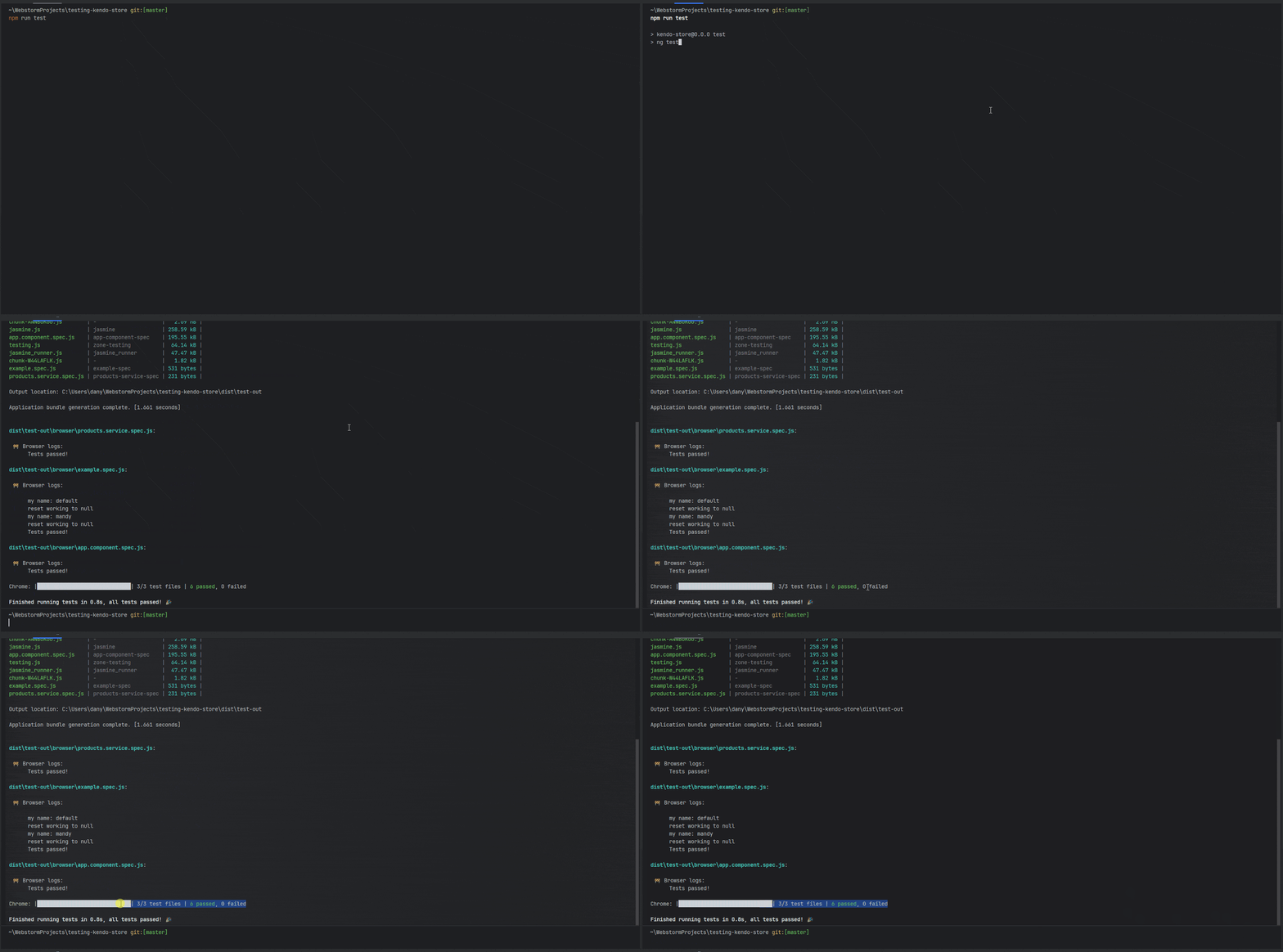
<span class="token function">npm</span> run <span class="token function">test</span>
</code></pre><p><img src="https://d585tldpucybw.cloudfront.net/sfimages/default-source/blogs/2025/2025-06/test-runner-jasmine-pass.gif?sfvrsn=f1dc858f_2" alt="Test Runner and Jasmine pass" /></p><p>Perfect!! The test worked, but it currently uses the Test Runner and Jasmine. We&rsquo;re going to switch things up and swap those out for Vitest!</p><h2 id="removing-karma-jasmine-and-web-test-runner-from-angular">Removing Karma, Jasmine and Web Test Runner from Angular</h2><p>First, in the terminal we run the following commands, to remove all Karma and Jasmine stuff and test-runner.</p><pre class=" language-bash"><code class="prism  language-bash"><span class="token function">npm</span> uninstall karma karma-chrome-launcher karma-coverage karma-jasmine karma-jasmine-html-reporter @types/jasmine jasmine-core

<span class="token function">npm</span> uninstall  @web/test-runner
</code></pre><p>OK, now it&rsquo;s time to move to Vitest!</p><h2 id="moving-to-vitest">Moving to Vitest</h2><p>Vitest is not natively supported by Angular, but thanks to the great work of the <a target="_blank" href="https://analogjs.org/">@analogjs</a> team, we can bring Vitest easily into any Angular project.</p><pre class=" language-bash"><code class="prism  language-bash"><span class="token function">npm</span> <span class="token function">install</span> @analogjs/platform --save-dev  
</code></pre><p>Also, they provide great schematics to configure Vitest easily, by running the following command:</p><pre><code>ng generate @analogjs/platform:setup-vitest
</code></pre><blockquote><p>Learn more about <a target="_blank" href="https://www.telerik.com/blogs/redefining-angular-markdown-analog-js">Analog.js</a>.</p></blockquote><p>But what does <code class="inline-code">platform:setup</code> do for us?</p><pre><code>CREATE src/test-setup.ts (327 bytes)
CREATE vite.config.mts (510 bytes)
UPDATE package.json (1070 bytes)
UPDATE tsconfig.spec.json (286 bytes)
UPDATE angular.json (2365 bytes)
</code></pre><p>It creates the test-setup.ts file to configure to testBed:</p><pre class=" language-typescript"><code class="prism  language-typescript">import '@analogjs/vitest-angular/setup-zone';

import {
  BrowserDynamicTestingModule,
  platformBrowserDynamicTesting,
} from '@angular/platform-browser-dynamic/testing';
import { getTestBed } from '@angular/core/testing';

getTestBed().initTestEnvironment(
  BrowserDynamicTestingModule,
  platformBrowserDynamicTesting()
);
</code></pre><p>Create the vite.config.mts to configure the jsdom, vitest plugin for Angular and Vitest configuration.</p><pre class=" language-typescript"><code class="prism  language-typescript"><span class="token comment">/// &lt;reference types="vitest" /&gt;</span>

<span class="token keyword">import</span> angular <span class="token keyword">from</span> <span class="token string">'@analogjs/vite-plugin-angular'</span><span class="token punctuation">;</span>

<span class="token keyword">import</span> <span class="token punctuation">{</span> defineConfig <span class="token punctuation">}</span> <span class="token keyword">from</span> <span class="token string">'vite'</span><span class="token punctuation">;</span>

<span class="token comment">// https://vitejs.dev/config/</span>
<span class="token keyword">export</span> <span class="token keyword">default</span> <span class="token function">defineConfig</span><span class="token punctuation">(</span><span class="token punctuation">(</span><span class="token punctuation">{</span> mode <span class="token punctuation">}</span><span class="token punctuation">)</span> <span class="token operator">=&gt;</span> <span class="token punctuation">{</span>
  <span class="token keyword">return</span> <span class="token punctuation">{</span>
    plugins<span class="token punctuation">:</span> <span class="token punctuation">[</span>
      <span class="token function">angular</span><span class="token punctuation">(</span><span class="token punctuation">)</span><span class="token punctuation">,</span>
     
    <span class="token punctuation">]</span><span class="token punctuation">,</span>
    test<span class="token punctuation">:</span> <span class="token punctuation">{</span>
      globals<span class="token punctuation">:</span> <span class="token keyword">true</span><span class="token punctuation">,</span>
      environment<span class="token punctuation">:</span> <span class="token string">'jsdom'</span><span class="token punctuation">,</span>
      setupFiles<span class="token punctuation">:</span> <span class="token punctuation">[</span><span class="token string">'src/test-setup.ts'</span><span class="token punctuation">]</span><span class="token punctuation">,</span>
      include<span class="token punctuation">:</span> <span class="token punctuation">[</span><span class="token string">'**/*.spec.ts'</span><span class="token punctuation">]</span><span class="token punctuation">,</span>
      reporters<span class="token punctuation">:</span> <span class="token punctuation">[</span><span class="token string">'default'</span><span class="token punctuation">]</span><span class="token punctuation">,</span>
    <span class="token punctuation">}</span><span class="token punctuation">,</span>
    define<span class="token punctuation">:</span> <span class="token punctuation">{</span>
      <span class="token string">'import.meta.vitest'</span><span class="token punctuation">:</span> mode <span class="token operator">!==</span> <span class="token string">'production'</span><span class="token punctuation">,</span>
    <span class="token punctuation">}</span><span class="token punctuation">,</span>
  <span class="token punctuation">}</span><span class="token punctuation">;</span>
<span class="token punctuation">}</span><span class="token punctuation">)</span><span class="token punctuation">;</span>
</code></pre><p>And update the angular.json to use the analog:builder</p><pre class=" language-json"><code class="prism  language-json"> <span class="token string">"test"</span><span class="token punctuation">:</span> <span class="token punctuation">{</span>
          <span class="token string">"builder"</span><span class="token punctuation">:</span> <span class="token string">"@analogjs/vitest-angular:test"</span>
        <span class="token punctuation">}</span>
      <span class="token punctuation">}</span>

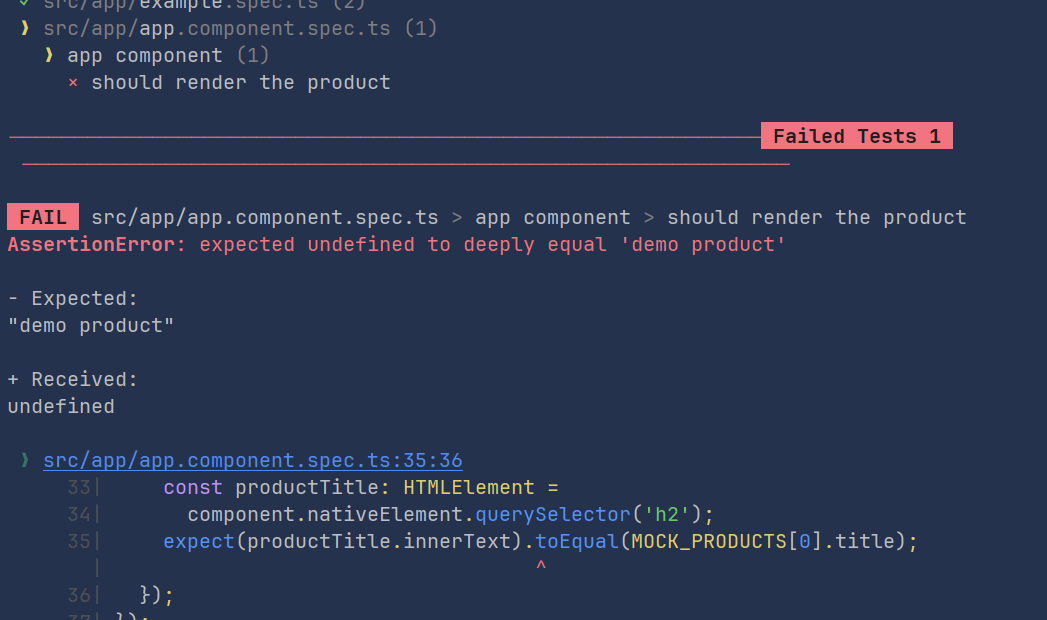
</code></pre><p>OK, everything looks ready so let&rsquo;s run our test! </p><p><img src="https://d585tldpucybw.cloudfront.net/sfimages/default-source/blogs/2025/2025-06/two-pass-one-fail.gif?sfvrsn=a9ecdaa6_2" alt="" /></p><p>Tada!!! Oops!!  Two passes but one fail. :&rsquo;( If we read the message, the failed test is <code class="inline-code">app.component.spec.ts</code>.</p><p><img src="https://d585tldpucybw.cloudfront.net/sfimages/default-source/blogs/2025/2025-06/fail-demo-product.png?sfvrsn=58287e0f_2" alt="" /></p><p>Let&rsquo;s take a look into the <code class="inline-code">app.component.spec.ts</code>:</p><pre class=" language-typescript"><code class="prism  language-typescript"><span class="token keyword">import</span> <span class="token punctuation">{</span>
  ComponentFixture<span class="token punctuation">,</span>
  TestBed
<span class="token punctuation">}</span> <span class="token keyword">from</span> <span class="token string">"@angular/core/testing"</span><span class="token punctuation">;</span>
<span class="token keyword">import</span> <span class="token punctuation">{</span>AppComponent<span class="token punctuation">}</span> <span class="token keyword">from</span> <span class="token string">"./app.component"</span><span class="token punctuation">;</span>
<span class="token keyword">import</span> <span class="token punctuation">{</span> ProductsService<span class="token punctuation">}</span> <span class="token keyword">from</span> <span class="token string">"./services/products.service"</span><span class="token punctuation">;</span>
<span class="token keyword">import</span> <span class="token punctuation">{</span><span class="token keyword">of</span><span class="token punctuation">}</span> <span class="token keyword">from</span> <span class="token string">"rxjs"</span><span class="token punctuation">;</span>
<span class="token keyword">import</span> <span class="token punctuation">{</span>MOCK_PRODUCTS<span class="token punctuation">}</span> <span class="token keyword">from</span> <span class="token string">"./tests/mock"</span><span class="token punctuation">;</span>

<span class="token keyword">export</span> <span class="token keyword">class</span> <span class="token class-name">MockProductService</span> <span class="token punctuation">{</span>
  <span class="token keyword">public</span> products$ <span class="token operator">=</span> <span class="token keyword">of</span><span class="token punctuation">(</span>MOCK_PRODUCTS<span class="token punctuation">)</span>
<span class="token punctuation">}</span>

<span class="token function">describe</span><span class="token punctuation">(</span><span class="token string">'app component'</span><span class="token punctuation">,</span> <span class="token punctuation">(</span><span class="token punctuation">)</span> <span class="token operator">=&gt;</span> <span class="token punctuation">{</span>
  <span class="token keyword">let</span> component<span class="token punctuation">:</span> ComponentFixture<span class="token operator">&lt;</span>AppComponent<span class="token operator">&gt;</span><span class="token punctuation">;</span>

  <span class="token function">beforeEach</span><span class="token punctuation">(</span><span class="token punctuation">(</span><span class="token punctuation">)</span> <span class="token operator">=&gt;</span> <span class="token punctuation">{</span>
    TestBed<span class="token punctuation">.</span><span class="token function">configureTestingModule</span><span class="token punctuation">(</span><span class="token punctuation">{</span>
      providers<span class="token punctuation">:</span> <span class="token punctuation">[</span>
        AppComponent<span class="token punctuation">,</span>
        <span class="token punctuation">{</span>
          provide<span class="token punctuation">:</span> ProductsService<span class="token punctuation">,</span>
          useClass<span class="token punctuation">:</span> MockProductService<span class="token punctuation">,</span>
        <span class="token punctuation">}</span><span class="token punctuation">,</span>
      <span class="token punctuation">]</span><span class="token punctuation">,</span>
    <span class="token punctuation">}</span><span class="token punctuation">)</span><span class="token punctuation">.</span><span class="token function">compileComponents</span><span class="token punctuation">(</span><span class="token punctuation">)</span><span class="token punctuation">;</span>

    component <span class="token operator">=</span> TestBed<span class="token punctuation">.</span>createComponent<span class="token operator">&lt;</span>AppComponent<span class="token operator">&gt;</span><span class="token punctuation">(</span>AppComponent<span class="token punctuation">)</span><span class="token punctuation">;</span>
  <span class="token punctuation">}</span><span class="token punctuation">)</span><span class="token punctuation">;</span>

  <span class="token function">it</span><span class="token punctuation">(</span><span class="token string">'should render the product'</span><span class="token punctuation">,</span> <span class="token punctuation">(</span><span class="token punctuation">)</span> <span class="token operator">=&gt;</span> <span class="token punctuation">{</span>
    component<span class="token punctuation">.</span><span class="token function">detectChanges</span><span class="token punctuation">(</span><span class="token punctuation">)</span><span class="token punctuation">;</span>
    <span class="token keyword">const</span> productTitle<span class="token punctuation">:</span> HTMLElement <span class="token operator">=</span>
      component<span class="token punctuation">.</span>nativeElement<span class="token punctuation">.</span><span class="token function">querySelector</span><span class="token punctuation">(</span><span class="token string">'h2'</span><span class="token punctuation">)</span><span class="token punctuation">;</span>
    <span class="token function">expect</span><span class="token punctuation">(</span>productTitle<span class="token punctuation">.</span>innerText<span class="token punctuation">)</span><span class="token punctuation">.</span><span class="token function">toEqual</span><span class="token punctuation">(</span>MOCK_PRODUCTS<span class="token punctuation">[</span><span class="token number">0</span><span class="token punctuation">]</span><span class="token punctuation">.</span>title<span class="token punctuation">)</span><span class="token punctuation">;</span>
  <span class="token punctuation">}</span><span class="token punctuation">)</span><span class="token punctuation">;</span>
<span class="token punctuation">}</span><span class="token punctuation">)</span><span class="token punctuation">;</span>
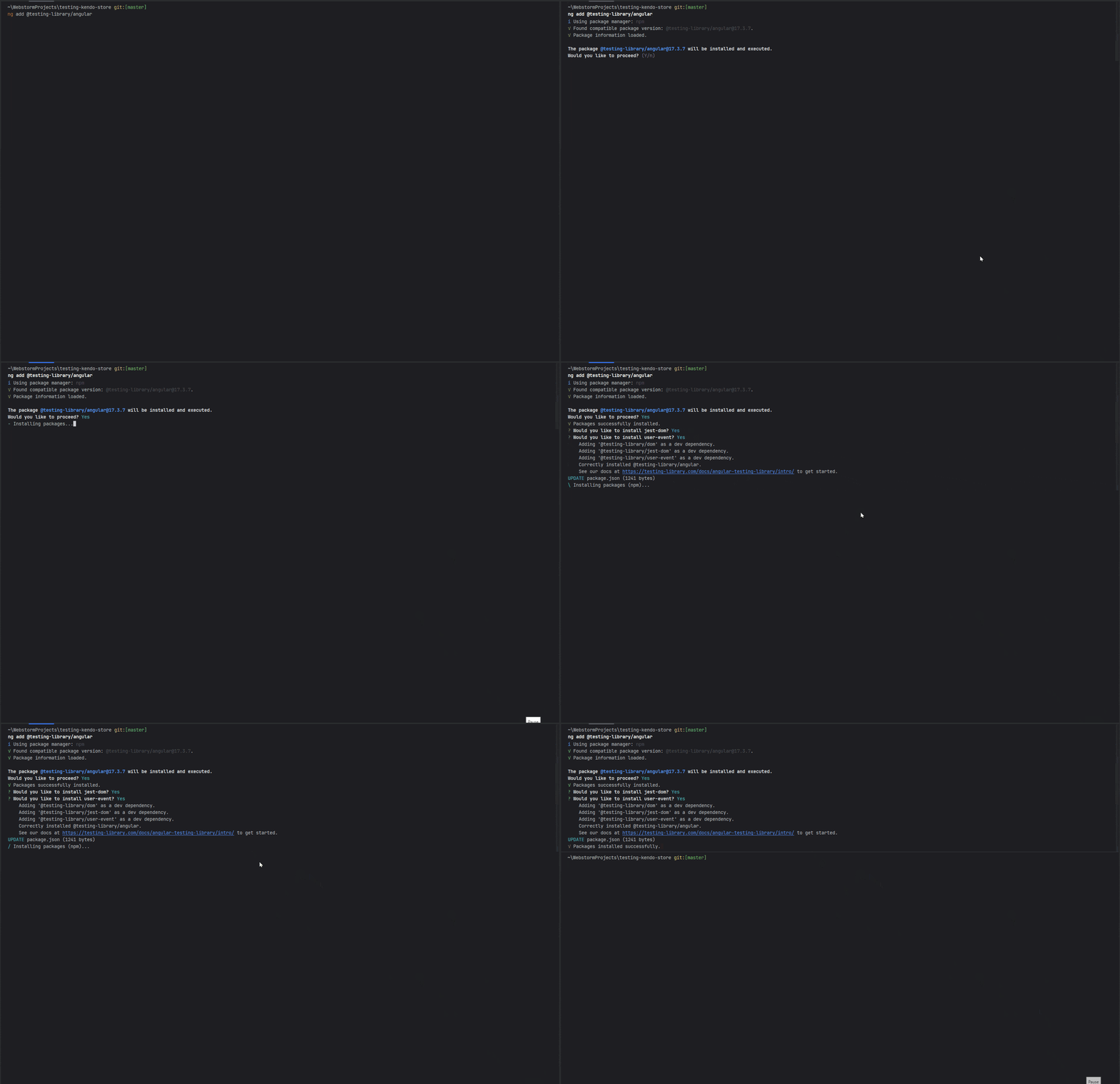
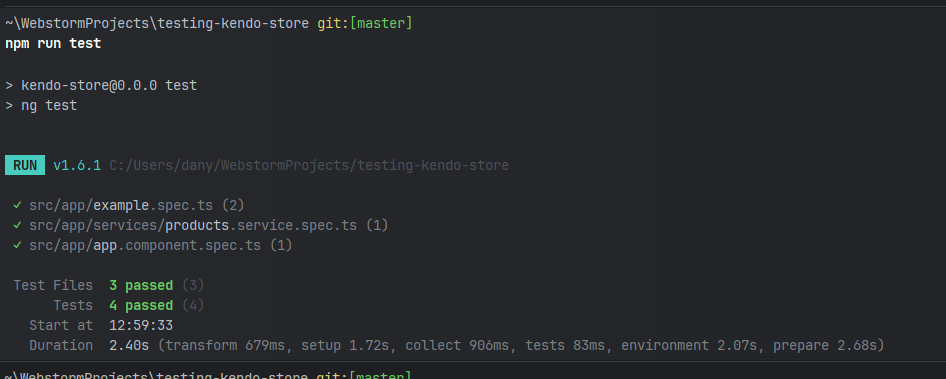
</code></pre><p>Mmmm&hellip; this test relay in <code class="inline-code">ComponentFixture</code> , <code class="inline-code">TestBed.configureTestingModule</code> and works with lifecycle <code class="inline-code">detectChanges()</code> and query elements in the DOM. I think if we are using modern Vitest, why not move to a modern way to test in the browser? So let&rsquo;s move to Angular Testing Library.</p><h2 id="moving-to-angular-testing-library">Moving to Angular Testing Library</h2><p>Before we start, what is Angular Testing Library? It is a complete testing utility to help us write better and easier tests, simplify UI testing, and save time by taking care of implementation details, writing maintainable tests. It works for React, Vue, Angular, Svelte and many frameworks. If you want a post fully focused on Testing Library, leave a comment , and I promise to write about it soon.</p><p>OK, let&rsquo;s get back to work. We did a great job moving from Web Test Runner to Vitest so it&rsquo;s time to test the UI using Angular Testing Library.</p><blockquote><p><a target="_blank" href="https://testing-library.com/docs/angular-testing-library/intro/">Angular Testing Library</a> is a wrapper of Testing Library focus in Angular.</p></blockquote><p>Open your terminal to run the schematics <code class="inline-code">ng add @testing-library/angular</code>, it will install and configure the testing library in our project. During the install, it will recommend installing jest-dom and user-event; answer no.</p><pre><code>ng add @testing-library/angular
</code></pre><p><img src="https://d585tldpucybw.cloudfront.net/sfimages/default-source/blogs/2025/2025-06/testing-library.gif?sfvrsn=e49e7c4f_2" alt="" /></p><p>Perfect! We are ready to move to Testing Library. It is easier than TestBed configuration because it provides two amazing functions, <code class="inline-code">render</code> and <code class="inline-code">screen</code>.</p><p>The <a target="_blank" href="https://testing-library.com/docs/qwik-testing-library/api/#render"><code class="inline-code">render</code></a> function helps us to configure our component to render in the DOM and provide all dependencies and <code class="inline-code">screen</code> simplifies how we query elements in the DOM, providing a huge set of methods like <code class="inline-code">getById</code>, <code class="inline-code">getByText</code> and <a target="_blank" href="https://testing-library.com/docs/queries/about/#screen">more</a>.</p><p>To refactor our test to the Testing Library, first remove the <code class="inline-code">beforeEach</code> method because the <code class="inline-code">render</code> will initialize the component in each test.</p><p>Finally, using the <code class="inline-code">render</code> function, we provide the <code class="inline-code">AppComponent</code> and its dependencies, similar to the <code class="inline-code">configureTestingModule</code>.</p><pre class=" language-typescript"><code class="prism  language-typescript">  <span class="token keyword">await</span> <span class="token function">render</span><span class="token punctuation">(</span>AppComponent<span class="token punctuation">,</span> <span class="token punctuation">{</span>
      providers<span class="token punctuation">:</span> <span class="token punctuation">[</span><span class="token punctuation">{</span>provide<span class="token punctuation">:</span> ProductsService<span class="token punctuation">,</span> useClass<span class="token punctuation">:</span> MockProductService<span class="token punctuation">}</span><span class="token punctuation">]</span><span class="token punctuation">,</span>
    <span class="token punctuation">}</span><span class="token punctuation">)</span>
</code></pre><p>And finally, using <code class="inline-code">screen.getByText()</code> we query the same values as the test and expect the <code class="inline-code">productTitle</code> to exist using <code class="inline-code">toBeDefined</code>.</p><pre class=" language-typescript"><code class="prism  language-typescript">   <span class="token keyword">const</span> productTitle <span class="token operator">=</span> screen<span class="token punctuation">.</span><span class="token function">getByText</span><span class="token punctuation">(</span>MOCK_PRODUCTS<span class="token punctuation">[</span><span class="token number">0</span><span class="token punctuation">]</span><span class="token punctuation">.</span>title<span class="token punctuation">)</span><span class="token punctuation">;</span>
    <span class="token function">expect</span><span class="token punctuation">(</span>productTitle<span class="token punctuation">)</span><span class="token punctuation">.</span><span class="token function">toBeDefined</span><span class="token punctuation">(</span><span class="token punctuation">)</span>
</code></pre><p>The final code looks like:</p><pre class=" language-typescript"><code class="prism  language-typescript"><span class="token keyword">import</span> <span class="token punctuation">{</span>AppComponent<span class="token punctuation">}</span> <span class="token keyword">from</span> <span class="token string">"./app.component"</span><span class="token punctuation">;</span>
<span class="token keyword">import</span> <span class="token punctuation">{</span>ProductsService<span class="token punctuation">}</span> <span class="token keyword">from</span> <span class="token string">"./services/products.service"</span><span class="token punctuation">;</span>
<span class="token keyword">import</span> <span class="token punctuation">{</span><span class="token keyword">of</span><span class="token punctuation">}</span> <span class="token keyword">from</span> <span class="token string">"rxjs"</span><span class="token punctuation">;</span>
<span class="token keyword">import</span> <span class="token punctuation">{</span>MOCK_PRODUCTS<span class="token punctuation">}</span> <span class="token keyword">from</span> <span class="token string">"./tests/mock"</span><span class="token punctuation">;</span>
<span class="token keyword">import</span> <span class="token punctuation">{</span>render<span class="token punctuation">,</span> screen<span class="token punctuation">}</span> <span class="token keyword">from</span> <span class="token string">"@testing-library/angular"</span><span class="token punctuation">;</span>
<span class="token keyword">import</span> <span class="token punctuation">{</span>expect<span class="token punctuation">}</span> <span class="token keyword">from</span> <span class="token string">"vitest"</span><span class="token punctuation">;</span>

<span class="token keyword">export</span> <span class="token keyword">class</span> <span class="token class-name">MockProductService</span> <span class="token punctuation">{</span>
  <span class="token keyword">public</span> products$ <span class="token operator">=</span> <span class="token keyword">of</span><span class="token punctuation">(</span>MOCK_PRODUCTS<span class="token punctuation">)</span>
<span class="token punctuation">}</span>

<span class="token function">describe</span><span class="token punctuation">(</span><span class="token string">'app component'</span><span class="token punctuation">,</span> <span class="token punctuation">(</span><span class="token punctuation">)</span> <span class="token operator">=&gt;</span> <span class="token punctuation">{</span>

  <span class="token function">it</span><span class="token punctuation">(</span><span class="token string">'should render the product'</span><span class="token punctuation">,</span> <span class="token keyword">async</span> <span class="token punctuation">(</span><span class="token punctuation">)</span> <span class="token operator">=&gt;</span> <span class="token punctuation">{</span>

    <span class="token keyword">await</span> <span class="token function">render</span><span class="token punctuation">(</span>AppComponent<span class="token punctuation">,</span> <span class="token punctuation">{</span>
      providers<span class="token punctuation">:</span> <span class="token punctuation">[</span><span class="token punctuation">{</span>provide<span class="token punctuation">:</span> ProductsService<span class="token punctuation">,</span> useClass<span class="token punctuation">:</span> MockProductService<span class="token punctuation">}</span><span class="token punctuation">]</span><span class="token punctuation">,</span>
    <span class="token punctuation">}</span><span class="token punctuation">)</span>

    <span class="token keyword">const</span> productTitle <span class="token operator">=</span> screen<span class="token punctuation">.</span><span class="token function">getByText</span><span class="token punctuation">(</span>MOCK_PRODUCTS<span class="token punctuation">[</span><span class="token number">0</span><span class="token punctuation">]</span><span class="token punctuation">.</span>title<span class="token punctuation">)</span><span class="token punctuation">;</span>
    <span class="token function">expect</span><span class="token punctuation">(</span>productTitle<span class="token punctuation">)</span><span class="token punctuation">.</span><span class="token function">toBeDefined</span><span class="token punctuation">(</span><span class="token punctuation">)</span>
  <span class="token punctuation">}</span><span class="token punctuation">)</span>
<span class="token punctuation">}</span><span class="token punctuation">)</span><span class="token punctuation">;</span>
</code></pre><blockquote><p>If VS Code complains about it and <code class="inline-code">describe</code>, please open tsconfig.json, add <code class="inline-code">"types": ["vitest/globals"]</code> in the compilerOptions.</p></blockquote><p>OK, save changes and run the test again!</p><p><img src="https://d585tldpucybw.cloudfront.net/sfimages/default-source/blogs/2025/2025-06/vitest-angular-testing-library.png?sfvrsn=c0861354_2" alt="" /></p><p>Perfect! We have all tests in green using Vitest and Angular Testing Library!!!</p><blockquote><p>For VS Code users, I recommend this extension for Vitest: <a target="_blank" href="https://marketplace.visualstudio.com/items?itemName=vitest.explorer">https://marketplace.visualstudio.com/items?itemName=vitest.explorer</a>.</p></blockquote><h2 id="recap">Recap</h2><p>We learned how move forward to a modern way to testing in Angular with Vitest and Testing Library. Thanks to Vitest, we can speed up our test in Angular with a very easy configuration. And combined with the power of Testing Library we can create robust UI tests without pain.</p><p>Now we don&rsquo;t have any excuse not to use Vitest in our existing or new projects.</p><p>Happy testing!</p><p>Source Code:</p><ul><li><a target="_blank" href="https://gitlab.com/danywalls/testing-kendo-store">https://gitlab.com/danywalls/testing-kendo-store</a> (start point)</li><li><a target="_blank" href="https://gitlab.com/danywalls/testing-kendo-store/-/tree/final-stage-19?ref_type=heads">https://gitlab.com/danywalls/testing-kendo-store/-/tree/final-stage-19?ref_type=heads</a> (final version).</li></ul><img src="https://feeds.telerik.com/link/23071/17062477.gif" height="1" width="1"/>]]></content>
  </entry>
  <entry>
    <id>urn:uuid:310103db-5ccf-4dc8-995b-52afa18c49e2</id>
    <title type="text">Collaborative Testing’s Impact on Application Quality</title>
    <summary type="text">Software testing teams can pack the most power when manual and automated testers work in coordination. See some tips for this.</summary>
    <published>2024-12-20T06:00:00Z</published>
    <updated>2026-04-04T02:10:00Z</updated>
    <author>
      <name>Amy Reichert </name>
    </author>
    <link rel="alternate" href="https://feeds.telerik.com/link/23071/16925259/collaborative-testing-impact-application-quality"/>
    <content type="text"><![CDATA[<p><span class="featured">Software testing teams can pack the most power when manual and automated testers work in coordination. See some tips for this.</span></p><p>Exceptional software testing involves a development team made up of various roles. Roles include product managers, UI/UX designers, developers, manual testers, and test automation engineers or software development engineers in test (SDET). Each role performs distinct duties, all in the name of creating and delivering a software application product customers love to use.</p><p>For many test teams, having manual and automated tester roles complicates and challenges testing efficiency. The good news is that manual and automated testers can work together and accomplish valid and high-quality testing for a software development team. Or, they can spend significant time going back and forth and pointing fingers on who should test what, when and how. Getting along with competing team members in testing can be a challenging task. It&rsquo;s not simply common sense but a strategic and goal-driven effort to make testing credible, valid and efficient. This article provides tips for using collaboration between testers to improve application quality and the customer experience.</p><h2 id="what-is-the-difference-between-sdet-and-qa-tester">What Is the Difference Between SDET and QA Tester?</h2><p>Manual testers typically develop test cases in a written step-by-step format based on user stories, acceptance criteria, requirements or design specification documents. Manual testers often test using exploratory methods that may or may not be documented for more rapid functional, regression and integration testing. Manual testing also involves testing backend operations, including messaging, APIs or data transfer methods.</p><p>Manual testers tend to perform feature and functional testing as developer&rsquo;s code tasks. Manual testers create test suites for smoke, sanity and regression testing. Many also perform database testing or validate data as it moves through an application. Most manual testers have some knowledge of test automation, but it&rsquo;s not their strongest skill.</p><p><a target="_blank" href="https://www.techtarget.com/searchsoftwarequality/tip/What-are-an-SDETs-roles-and-responsibilities">SDETs create automated test frameworks</a> and test suites for regression, integration, security and performance testing. A skilled SDET uses test automation tools and code. With coding experience and proficiency, an SDET helps developers create unit tests and easy-to-maintain automated regression tests. SDETs often also develop CI/CD pipelines on DevOps or QAOps teams.</p><h2 id="advantages-of-building-a-partnership-between-manual-and-sdet">Advantages of Building a Partnership Between Manual and SDET</h2><p>Collaboration between SDETs and manual testers is vital to the productivity and functioning of the development team. When SDETs and manual testers work together effectively, significant testing time is saved while also adding business value. Instead of executing the same application functions multiple times, testing is divided so there&rsquo;s not a duplication of effort.</p><p>As a manual tester, get together with SDETs or test automation engineers and determine which tests are best run with each method. Depending on the complexity of the application, manual testers may be executing complex customer workflows instead of repetitive functional testing that is effectively achieved through test automation. Testers work together to determine which tests to automate and which to test manually. Collaboration also creates test suites with testing patterns that incorporate different points of view for improved test coverage.</p><p>When testers collaborate, the test suite becomes more valuable to the business and its customers. More efficient testing still identifies defects but without wasting time or effort. Additionally, collaboration between manual and test automation testers creates a supportive testing team. A supportive testing team enables cross-training and work coverage during holidays and vacations, so testing quality never misses a beat.</p><h2 id="improving-testing-coverage-for-higher-user-satisfaction">Improving Testing Coverage for Higher User Satisfaction</h2><p>When testing teams work together to build manual and automated test suites, the depth and breadth of test coverage improves. For example, rather than each tester executing the same types of tests, collaborative testers can reduce the workload by only testing once. When testers cover the same functionality repeatedly, it doesn&rsquo;t improve application quality. Working together creates better-designed testing suites for efficient and effective testing.</p><p>Manual and SDET collaboration generates faster testing results that help teams fix defects without resorting to hair-on-fire crises or rounds of hotfixes to correct defects. When working collaboratively, testers create allies for application quality. The more team members are serious about customer-facing application quality, the better the result for customers.</p><p>Tester collaboration also builds a strong team that works smoothly together. Cross-training improves and helps the entire testing team build skills. Manual testers may want to learn coding, and there&rsquo;s no better place to start than working with an SDET partner. Testing quality and general team functions like vacation and holiday work coverage improve. A manual tester paired with an SDET can support each other&rsquo;s work while one is out of the office. Coverage builds team skills and keeps testing moving forward.</p><p>A strong collaboration between manual and test automation results in an application that better serves customers. By leveraging both test automation and manual testing, teams can test both more effectively and efficiently. By strategically managing test development, testing teams create reliable and valid tests for all the technical structures within an application. Defects are identified faster, and automated test maintenance needs are reduced. The better the quality, the more likely a positive customer experience. More positive customer experiences mean more business revenue. Make your application the best it can be with a collaborative testing team.</p><aside><hr /><div class="row"><div class="col-4 u-normal-full u-small-mb0"><h4 class="u-fs20 u-fw5 u-lh125 u-mb0">The Future of Manual Testing in Modern Software Development</h4></div><div class="col-8"><p class="u-fs16 u-mb0">More organizations are leaning toward automating their testing processes, but that doesn't mean manual testers are becoming irrelevant. <a href="https://www.telerik.com/blogs/future-manual-testing-modern-software-development" target="_blank">Read more about how manual testing can still be a high-value activity on any software development team.</a></p></div></div></aside><img src="https://feeds.telerik.com/link/23071/16925259.gif" height="1" width="1"/>]]></content>
  </entry>
  <entry>
    <id>urn:uuid:0c1cfe46-a231-4a37-8fe6-d20364e61588</id>
    <title type="text">5 Ways to Make Your Test Automation Faster</title>
    <summary type="text">Sluggish automated test runs can significantly slow down your entire team. This article teaches you five ways you can speed up your test automation.</summary>
    <published>2024-12-05T14:13:09Z</published>
    <updated>2026-04-04T02:10:00Z</updated>
    <author>
      <name>Dennis Martinez </name>
    </author>
    <link rel="alternate" href="https://feeds.telerik.com/link/23071/16911891/5-ways-make-test-automation-faster"/>
    <content type="text"><![CDATA[<p><span class="featured">Sluggish automated test runs can significantly slow down your entire team. This article teaches you five ways you can speed up your test automation.</span></p><p>Any team working on software development these days knows that it&rsquo;s a fast-paced environment. Organizations and customers alike expect new features and improvements made to their favorite applications consistently. Trying to ship fast and often without an automated test suite in place, helping to verify that new modifications to the codebase don&rsquo;t break what&rsquo;s already in place, is an uphill battle.</p><p>While automated testing can speed up development, it can also create bottlenecks that slow the entire process. A poorly optimized test suite delays the feedback loop that developers rely on to make sure an application runs as intended after each change, making it harder to identify and fix issues as soon as possible.</p><p>In this article, we&rsquo;ll cover how slow tests impact developer productivity and five ways teams can help make their automated tests fast.</p><h2 id="why-slow-automated-tests-are-a-detriment-to-software-developers">Why Slow Automated Tests Are a Detriment to Software Developers</h2><p>Test automation&rsquo;s primary purpose is to help quickly detect potential application bugs. Instead of the time-consuming process of waiting for someone to verify code changes manually, an automated test suite can validate them automatically after every modification. This rapid feedback loop saves time and money by reducing the effort needed to test an application, eliminating human error with consistent results and allowing developers to fix bugs sooner. All of these benefits add up to shorter release cycles without sacrificing quality.</p><p>Most of those benefits evaporate when running an application&rsquo;s automated tests takes a non-trivial amount of time. Every time a new change gets introduced to the codebase, developers won&rsquo;t know whether or not their updates break existing functionality unless they wait. Waiting for tests to run, only to see one fail, frustrates and demotivates developers. Eventually, they will likely begin ignoring the test suite to continue working on the next thing, and quality will erode slowly over time.</p><p>It&rsquo;s not only developers affected by slow automated tests&mdash;it impacts the entire organization. Slow tests lead to slow coding iterations, so developers can&rsquo;t work as fast as they&rsquo;d like. The team begins making trade-offs to bypass some or all automated testing and create more technical debt and defects in the long run. Developers then need to deal with buggy deployments and release cycles slow to crawl, putting the organization at risk of being outpaced by a competitor.</p><h2 id="five-ways-to-make-your-test-automation-faster">Five Ways to Make Your Test Automation Faster</h2><p>The ripple effect caused by a slow automated test suite shows why it&rsquo;s vital to keep automated test suites running as quickly as possible. Here are a few strategies teams can use to build and maintain optimal test suites without sacrificing the long-term health of the application&rsquo;s quality.</p><h3 id="run-your-automated-tests-in-parallel">1. Run Your Automated Tests in Parallel</h3><p>Most automated test suites run each scenario one at a time by default. Running tests individually will take a lot of time to complete&mdash;imagine a grocery store with one hundred customers in line to pay but only one cashier. One way to improve the testing process is by running tests in parallel. Instead of running test scenarios individually, parallel test execution runs multiple tests simultaneously. Returning to the grocery store analogy, 10 cashiers will get through the line of customers much more quickly. Similarly, 10 test runner processes will wrap up execution sooner. Parallel testing can slash automated testing times by more than half and usually only requires a simple configuration change to the test runner. For example, Progress <a target="_blank" href="https://docs.telerik.com/teststudio/knowledge-base/test-execution-kb/multi-browsers">Telerik Test Studio can distribute tests across multiple browsers and execution servers in parallel</a>.</p><p>Another way running tests in parallel speeds up the process is by detecting tightly coupled test scenarios that rely on other tests to work properly. An example of a tightly coupled test is when one scenario writes data to a file, and another must read from that file to pass the test. Testers should avoid these kinds of tests because they&rsquo;re difficult to debug and maintain and won&rsquo;t work well in parallel due to their dependency on one another. Rewriting or removing these tests will inevitably improve testing times.</p><h3 id="decide-when-to-run-your-tests">2. Decide When to Run Your Tests</h3><p>Many teams set up continuous integration systems to run the entire automated test suite after every change. This method will result in a well-tested application, but it also slows down the feedback loop for developers to know that their application is still in a good state. For larger projects, running all the tests when updating the codebase is unnecessary. A balanced way to approach automated testing is strategically running subsets of test scenarios at different stages of the software development lifecycle.</p><p>Most modern software tooling allows testers to label or tag their scenarios and set up their CI service only to execute the identified test cases. The purpose of doing this is to cut down on the time it takes to validate modifications to the application. For instance:</p><ul><li>Changes to a code branch run smoke tests consisting of a handful of critical scenarios to validate that the basics of the application still work.</li><li>When merging a feature branch into the primary codebase, the continuous integration system triggers a more extended set of regression tests.</li><li>Before a new production release, the team can run the entire automated test suite to give deployment the green light.</li></ul><p>Large automated testing suites that take hours to execute can benefit from running on a schedule, such as <a target="_blank" href="https://docs.telerik.com/teststudio/automated-tests/scheduling/multiple-machines-scheduling-setup/create-scheduling-server#configure-the-test-studio-scheduling-service">Telerik Test Studio&rsquo;s scheduling services</a>. Running a segment of tests earlier in the development process takes only a fraction of the time to verify the application&rsquo;s functionality while giving enough confidence that things are working as they should.</p><h3 id="write-only-the-tests-you-need">3. Write Only the Tests You Need</h3><p>One of the most common mistakes teams make when building an automated test suite is focusing on volume. The prevalent thought is that the more automated test scenarios an application has, the better off it is. Unfortunately, more isn&rsquo;t always better. Making quantity the focal point of writing automated tests steers teams to create redundant or low-quality test scenarios, and every new automated test introduced slows down the test suite more and more.</p><p>When working on test automation, the focus should be quality over quantity. Aiming for 100% test coverage in an application is not feasible. Teams will make the most of their efforts by automating high-risk sections or scenarios that are time-consuming for frequent manual testing. Concentrating on these critical areas helps focus on the areas that matter without the overhead of testing low-risk or rarely used parts of an application.</p><h3 id="optimize-the-hardware-running-the-tests">4. Optimize the Hardware Running the Tests</h3><p>Developers can run automated test suites on their local development machines to validate changes before committing them to the codebase. However, continuous integration systems do most of the automated test execution work. One of the most overlooked areas in test automation is the hardware powering these CI systems, and it&rsquo;s one of the places that causes the most headaches for testers and developers.</p><p>CI systems use servers that are typically underpowered, with the obvious consequence of slow test runs, but these low-powered systems also cause frequent test failures due to a lack of resources. Many continuous integration services provide different tiers with more powerful hardware that can scale as needed. Teams that struggle with their continuous integration systems should look at bumping up the power of their hardware to potentially resolve most of these issues. Although it doesn&rsquo;t come for free, the expense is often much lower than the lost opportunity costs for the team.</p><h3 id="eliminate-unnecessary-tests">5. Eliminate Unnecessary Tests</h3><p>Most software applications are constantly evolving, whether it&rsquo;s to add new functionality or fix defects. Ideally, these modifications will include automated testing to maintain a high level of quality throughout the project&rsquo;s lifetime. However, it&rsquo;s a given that all software will build up code that becomes obsolete. No matter how careful developers and tests are when committing new code and adding tests, a common oversight among development teams is never taking time to review these areas that become obsolete or&mdash;worse yet&mdash;make the codebase more difficult to work with. Even when developers and testers are careful only to write the tests they need, each new change potentially accumulates more testing scenarios over time.</p><p>Even when developers and testers are careful only to write the tests they need, each new change potentially accumulates more testing scenarios over time. Those tests often stop serving a purpose yet remain in the test suite, taking time and effort to maintain. Teams should perform regular code audits on their existing test suite to spot these nonessential scenarios and determine whether they&rsquo;re still worth keeping. Potential candidates for removal are:</p><ul><li>Tests validating soon-to-be-deprecated sections of the code.</li><li>Redundant scenarios covered in other forms of testing.</li><li>Flaky tests in areas of low risk and low business value.</li></ul><p>Testing tools like <a target="_blank" href="https://docs.telerik.com/teststudio/automated-tests/test-list-results/reports">Telerik Test Studio&rsquo;s test results reporting</a> and regular pruning of these scenarios will keep test suites fast and maintainable.</p><h2 id="wrap-up">Wrap-up</h2><p>Working on software applications with slow automated test suites isn&rsquo;t a pleasant experience. Developers have to wait for long periods to determine if the application isn&rsquo;t working as expected due to their changes, which leads to longer release cycles. However, teams can correct these issues by adopting a few strategies in their test automation. Thanks to modern tooling like Telerik Test Studio, developers and testers can run multiple tests simultaneously, plan when to run specific tests and make frequent audits of their test suites.</p><p>Optimizing existing tests can be challenging, especially for long-lived test suites that have accumulated hundreds or thousands of automated scenarios. An excellent approach is to start small with one of the strategies mentioned in this article and eventually add more as test execution times improve. Even using just one of these strategies will pay off in the form of faster development and deployments. These actions are just a few ways to keep automated tests in a project running smoothly for months and years to come.</p><aside><hr data-sf-ec-immutable="" /><div class="row"><div class="col-4 u-normal-full u-small-mb0"><h4 class="u-fs20 u-fw5 u-lh125 u-mb0">Proven Strategies to Minimize End-to-End Test Flakiness</h4></div><div class="col-8"><p class="u-fs16 u-mb0">Automated end-to-end tests work great to validate real-world behavior, but tend to fail at random times. How can we <a target="_blank" href="https://www.telerik.com/blogs/proven-strategies-minimize-end-test-flakiness">reduce their flakiness</a>?</p></div></div></aside><img src="https://feeds.telerik.com/link/23071/16911891.gif" height="1" width="1"/>]]></content>
  </entry>
  <entry>
    <id>urn:uuid:269f8970-cdff-4cf6-a3db-a7e1c246600d</id>
    <title type="text">Speed vs. Quality in Software Testing</title>
    <summary type="text">How does test quality affect speed, and vice versa, and could finding the balance between the two be the key to keeping customers and the business happy?</summary>
    <published>2024-11-22T10:52:50Z</published>
    <updated>2026-04-04T02:10:00Z</updated>
    <author>
      <name>Amy Reichert </name>
    </author>
    <link rel="alternate" href="https://feeds.telerik.com/link/23071/16894089/speed-vs-quality-software-testing"/>
    <content type="text"><![CDATA[<p><span class="featured">How does test quality affect speed, and vice versa, and could finding the balance between the two be the key to keeping customers and the business happy?</span></p><p>Software testing requires striking a balance in determining when an application is good enough for customers and getting it in their hands as quickly as possible. Many software testing teams struggle daily with testing faster without cutting quality or minimizing the user experience. As a tester, you&rsquo;re constantly under the gun to get testing done faster without missing any defects. Testers describe their position as being between a rock and a hard place.</p><p>Customers need quality application code and the business needs to win the market, so releases must be timely and of high quality. However, that&rsquo;s often difficult to do based on resources, testing volume and release deadlines. Many times, testing feels like a tug of war between demanding quality in a product and the business needing to release software to gain sales. The problem is that development teams and testers need both speed and quality for optimal results.</p><p>This article describes speed and quality and how striking a balance between the two is the ultimate goal to keep customers and the business happy.</p><h2 id="defining-speed--quality">Defining Speed &amp; Quality</h2><p>What is testing speed? Testing speed is the time the testing team takes to test an iteration or sprint&rsquo;s worth of work before the developers deploy the build to a production server. For testing, speed is impacted by development work progress and quality. The higher the quality of coding, the fewer new defects are generated. Test server and data access and reliability also impact testing speed. Many testing teams struggle to keep testing environments updated to manage ongoing testing.</p><p>Other factors impacting testing speed:</p><ul><li>Build deployments to test servers</li><li>The number of testers and workload distribution</li><li>Effective product management and sprint planning</li><li>Reliable requirements or well-defined user stories</li><li>Testing tool quality and efficiency</li><li>Ability for testers to focus on testing a single sprint release</li></ul><p>Not to make excuses, but in some testing teams, the amount of testing significantly outweighs the available resources. Many times testers are stretched in more than one direction and cannot focus solely on a sprint release. Managing testing resources efficiently includes prioritizing test execution or reducing test coverage.</p><p>Test automation provides scalable speed as long as the builds and data align so false failures do not occur. Automated tests are quick to run but also quick to fail if the test environment, data or build is not aligned correctly. Every automated script failure requires a tester to review and validate if the failure is a new defect, a script or an environmental issue.</p><p>In software testing, what does quality mean? Quality for software testers means how well the application meets a customer&rsquo;s needs. High-quality applications allow customers to perform work tasks without creating errors.</p><p>Quality means efficiency and accuracy. When customers find defects or errors that prevent work from getting done, the user experience suffers. Quality for testing teams means the customers get the <a target="_blank" href="https://www.techtarget.com/searchsoftwarequality/tip/Speed-vs-quality-in-software-testing-Can-you-have-both">best experience possible</a> and enables them to reach their goal and perform work efficiently and accurately.</p><h2 id="choosing-a-speed-first-approach">Choosing a Speed-First Approach</h2><p>Speed over quality can be a valid approach when release speed is the primary goal for the development team. Agile teams focus on speed when the application is new and has few competitors. Applications may be temporary or meant only for quick hits on social media or for entertainment purposes only. Many development teams working on maintenance for older applications may also put speed over quality.</p><p>The advantages of choosing a speed-first approach include:</p><ul><li>Customers receive tested builds rapidly</li><li>Defect fixes push to the next build automatically</li><li>Applications are active in the market on release</li></ul><p>Disadvantages include the possibility of poor customer satisfaction levels, frequent defect fixes and large, ongoing tech debt loads.</p><h2 id="choosing-quality-first">Choosing Quality First</h2><p>Development teams should always prioritize quality over speed when creating applications that use, save or manage sensitive personal data, are highly integrated or are required to satisfy regulatory standards. When an application cannot fail, then quality must come first. For example, applications built for financials, healthcare, retail, IoT and aerospace.</p><p>When teams prioritize quality over speed, it doesn&rsquo;t mean testing takes as long as the team wants. Focusing on quality still requires testing teams to perform efficiently, and customers still want timely releases. The only difference is quality comes first. Customers aren&rsquo;t tolerant of errors, which can create compliance issues with serious legal or financial implications. QA testing teams define and create efficient test practices that save time and keep the focus on application quality. A well-managed Agile team can still deliver high-quality applications at speed.</p><p>Applications that use sensitive or private data also require robust security. Many complex applications also require backup and failover systems to prevent a crash or extended system disconnection. In these cases, testing teams need to include security testing as well as testing each failover system to validate it functions as expected.</p><p>Advantages of a quality-first approach include:</p><ul><li>Releases with fewer defects</li><li>High usability and positive customer experiences</li><li>Fewer surprises on deployment from security or integrated system issues</li></ul><p>The disadvantages of putting quality first are that testing cycles may take longer, and release dates must be flexible.</p><h2 id="the-best-approach-is-balance">The Best Approach Is Balance</h2><p>Balancing speed and quality is possible for testing teams. With a well-designed test strategy and QA processes that support both quality and speed, testing teams can balance speed and quality effectively. A QA tester&rsquo;s role is vital because testing creates the balance between speed and quality for Agile development teams and organizations. Teams may use a DevOps or QAOps approach or Agile testing and development methods that help balance quality with delivery speed.</p><p>For example, testing teams increase speed by developing suites of valid automated tests and grouping tests into test suites that ensure each function is tested at least once. Effective test development and execution management help teams test an application quickly by reducing duplicate work. Many testing teams rely solely on test automation suites paired with on-the-fly manual exploratory testing. Adopting other Agile testing practices helps when testers are trained and the methodologies are implemented with proper planning.</p><p>Development teams that emphasize creativity and practice <a target="_blank" href="https://www.onpathtesting.com/blog/agile-testing-life-cycle-speeds-up-beta-release">collaborative communication</a> can improve task completion speeds. Solid communication between developers and QA testers also significantly improves testing and development outcomes. When quality is built into code and testing, it&rsquo;s far less likely critical defects slip through to production regardless of the release schedule.</p><p>Speed versus quality is a long-running debate in software development. Both approaches are valid depending on the intended customer and how they respond to quality or delivery speed issues. Nearly every software development team and tester wants to achieve realistic release dates with quality code. It&rsquo;s rare for a team to look forward to managing customer complaints or fixing and retesting defects unless necessary.</p><p>The best answer for customers and application providers is to create a balance using QA testing teams. Balancing speed and quality is an inherent part of software testing. Testers working within Agile development teams can create thorough and efficient practices that balance quality and speed. Set up your application for success by delivering on both with a balanced approach.</p><aside><hr data-sf-ec-immutable="" /><div class="row"><div class="col-4 u-normal-full u-small-mb0"><h4 class="u-fs20 u-fw5 u-lh125 u-mb0">Agile or Traditional Testing&mdash;Is There Truly a Difference?</h4></div><div class="col-8"><p class="u-fs16 u-mb0">Explore the reality of software testing&mdash;are there any truly significant differences between <a target="_blank" href="https://www.telerik.com/blogs/agile-traditional-testing-truly-difference">Agile and traditional testing</a>? Beyond scheduling, is the actual testing task any different for QA testers? Explore how little the methodology used really matters for software testing professionals.</p></div></div></aside><img src="https://feeds.telerik.com/link/23071/16894089.gif" height="1" width="1"/>]]></content>
  </entry>
  <entry>
    <id>urn:uuid:d5be4111-869f-4e7d-a1ab-9836789ec820</id>
    <title type="text">Shift-Left to Make Testing Faster Without Impacting Quality</title>
    <summary type="text">Understand the concept of shift-left testing in an Agile development process and how it helps speed up testing without reducing application quality.</summary>
    <published>2024-11-06T15:22:51Z</published>
    <updated>2026-04-04T02:10:00Z</updated>
    <author>
      <name>Amy Reichert </name>
    </author>
    <link rel="alternate" href="https://feeds.telerik.com/link/23071/16877030/shift-left-make-testing-faster-without-impacting-quality"/>
    <content type="text"><![CDATA[<p><span class="featured">Understand the concept of shift-left testing in an Agile development process and how it helps speed up testing without reducing application quality.</span></p><p>Agile development prioritizes short sprints so new features or changes can be deployed to customers frequently in smaller releases. The idea is to deliver changes incrementally so customers can try out new features and suggest changes. The Agile theory is that development teams prioritize all customer changes into work tasks and assign them to sprints or iterations until enough features and fixes accumulate to create a release.</p><p>Releases can be daily, weekly, biweekly or monthly. The advantage is that it gives customers more frequent releases that are smaller and more manageable. Prior to Agile, software releases were larger than life and included six months or a year, maybe two of feature changes and fixes. The result was overwhelming to customers who needed to verify every change before going live and overwhelming to systems, sometimes causing catastrophic infrastructure failures.</p><p>This guide describes the concept of shift-left testing in an Agile development process and how it helps speed testing without reducing application quality.</p><h2 id="what-is-shift-left-testing">What Is Shift-Left Testing?</h2><p>Agile testing happens during sprints, where testers verify features and fixes and then try to cram in some sort of regression testing right after an iteration ends and before starting to test the next iteration&rsquo;s work. Shift-left testing takes Agile testing and moves it up front&mdash;literally alongside development.</p><p><a target="_blank" href="https://www.techtarget.com/searchitoperations/definition/shift-left-testing">Shift-left testing</a> is a method of software testing where testing begins with development. Shift-left means testers start testing further to the left of the software development lifecycle (SDLC) or when design and coding begin. The idea is that the sooner testing starts, the more defects testers can identify early in the SDLC where they can be fixed and retested without delaying a scheduled release.</p><p>Shift-left testing aims to speed up testing while reducing the number of defects found at the end of the development cycle. Think of it as proactively finding defects, starting with design and testing every feature&rsquo;s code as it gets created. Practicing shift-left testing requires a collaborative team that communicates. Some teams practice shift-left using TDD (test-driven development), or more frequently, testers become involved in reviewing code and creating unit, integration and short automated test scripts. The automated test scripts become the regression test as coding progresses. Testers would then execute or review unit and integration scripts in the code and then continuously create the automated test scripts throughout the development cycle.</p><p>Testing speed improves because testers aren&rsquo;t trying to wedge in <a target="_blank" href="https://www.telerik.com/blogs/continuous-regression-testing-pros-cons-how-works">regression test</a> execution between sprints or right before a release. Defects are found earlier, reducing the risk of finding critical defects before a release is deployed or right after deployment. Shift-left testing <a target="_blank" href="https://www.techtarget.com/searchsoftwarequality/tip/Speed-vs-quality-in-software-testing-Can-you-have-both">speeds up testing but maintains application quality</a>.</p><aside><hr data-sf-ec-immutable="" /><div class="row"><div class="col-4 u-normal-full u-small-mb0"><h4 class="u-fs20 u-fw5 u-lh125 u-mb0">Bringing UI Test Automation Into CI/CD</h4></div><div class="col-8"><p class="u-fs16 u-mb0">Purposeful testing and feedback efforts early in the delivery cycle lead to better understanding of what&rsquo;s to be built. The 'Bringing UI Automation Into CI/CD' whitepaper by modernization strategist Jim Holmes discusses some of the key challenges and choices QA, test engineers and leads face along their journey of implementing automated UI testing. <a target="_blank" href="https://www.telerik.com/blogs/bringing-ui-test-automation-into-ci-cd">Learn more.</a></p></div></div><hr class="u-mb3" /></aside><h2 id="advantages-and-disadvantages-of-shift-left-testing">Advantages and Disadvantages of Shift-Left Testing</h2><p>Advantages of shift-left testing include:</p><ul><li>Improved customer experience post-release</li><li>Builds a productive and collaborative team</li><li>Supports early bug detection and continuous testing</li><li>The earlier testing starts, the more testing gets completed</li><li>The more testing gets completed, the fewer defects get released to customers</li><li>Increased testing speed and efficiency</li><li>No more rushing around trying to cram in regression tests before a release</li></ul><p>Finding defects or even missing requirements early is a good thing. The more defects that are fixed early on, the less likely teams are to acquire technical debt. Technical debt is all those defect fixes that get pushed off to fix &ldquo;later.&rdquo; Technical debt can be debilitating to development teams and applications. The less debt the application accumulates, the better the quality.</p><p>Shift-left testing also contributes to better team management. Keeping testing running alongside development means one team function is not lagging behind the other. Instead of testing slowing down development due to defects and issues, the two run side by side. Think of it as rather than running a relay race where development hands off the baton to testing, and then testing hands off the baton to deployment&mdash;each of these run together and reach the release together.</p><p>It sounds silly or obvious, but the more a team can work side by side on projects, the higher the quality. For example, if a developer is coding a feature and doesn&rsquo;t realize that feature impacts another, they may code in a defect. Whereas if a tester is testing during code development, an experienced tester will notice that although the new feature works, the one it&rsquo;s connected to does not. Think of working collaboratively as a chance to improve quality while you work and learn different skills. Testers may pick up a bit of coding while developers learn more about the application and how the parts connect.</p><p>Disadvantages of shift-left testing include:</p><ul><li>Less testing that verifies customer workflows or end-to-end system testing</li><li>Puts more focus or pressure on the quality of user acceptance testing</li><li>Test automation can be problematic for some applications, so there may be ongoing rework on automated regression tests</li><li>Can be time-consuming to review failed tests continuously</li></ul><p>Development and testing teams need to weigh the pros and cons of shift-left testing to be sure it fits. There may be ways to change testing so that end-to-end tests are created. To reduce automated test maintenance and failure analysis, try using an automated testing tool that features self-healing AI technology.</p><h2 id="best-practices-for-using-shift-left-testing">Best Practices for Using Shift-Left Testing</h2><p>Best practices for using shift-left testing in Agile development:</p><ul><li>Testing activities begin when design and development begin</li><li>Create a team that&rsquo;s collaborative and communicative with shared goals</li><li>Invest in test automation tools that help developers and testers create unit, integration and automated regression testing scripts</li><li>Consider adding TDD to development work for initial unit and integration testing but train testers how to execute and review results</li><li>Create test environments that testers can quickly spin up and resemble production</li><li>Plan ahead for creating test data and ways to keep data refreshed easily</li><li>Practice continuous improvement and continuous learning</li></ul><p>Keep in mind that development teams cannot simply flip a switch and shift left on the fly. Create a strategic plan to gradually move to a shift-left approach so testers and developers can get on the same page and have time to learn. Work habits die hard, so be prepared to be patient. It may take time for testers and developers to learn to work alongside each other.</p><p>Provide training and tools that integrate together and are useful. Never buy tools that create additional work or expect teams to use multiple tools for the same purpose. When moving to shift left, teams need lean processes with little or no wasted effort or duplicate effort.</p><p>Be prepared for a learning curve for test automation. A good approach is to have a developer or two help support the QA team for a few months until they get up to speed. Encourage testers to share their knowledge of the whole application with developers. The more developers understand how different functions work in the application, the higher the code quality.</p><h2 id="can-shift-left-testing-speed-up-testing-without-making-quality-worse">Can Shift-Left Testing Speed Up Testing Without Making Quality Worse?</h2><p>Yes, shift-left testing can improve testing efficiency and speed without negatively impacting release quality. Testing teams can test faster and still be effective. With shift-left testing, testing becomes more flexible and adaptable. Shift-left testing is creative. Testers and developers may do exploratory testing or practice parallel testing to help cover more browsers and platforms simultaneously.</p><p>Teams can test efficiently without sacrificing quality. Testers work alongside development rather than waiting for completed code to start testing when using shift-left testing. QA testers can work with developers to create test processes that save time and extend test coverage. Agile development teams can deliver high-quality application releases when testing is planned, lean and effective.</p><img src="https://feeds.telerik.com/link/23071/16877030.gif" height="1" width="1"/>]]></content>
  </entry>
  <entry>
    <id>urn:uuid:24c60264-ed7b-487b-b664-09c0365f1795</id>
    <title type="text">Are Your Automated Tests Actually Protecting You?</title>
    <summary type="text">You can’t guarantee bug-free code. But you can validate your test suite to make sure you’re catching as many bugs as possible.</summary>
    <published>2024-10-04T15:12:02Z</published>
    <updated>2026-04-04T02:10:00Z</updated>
    <author>
      <name>Peter Vogel </name>
    </author>
    <link rel="alternate" href="https://feeds.telerik.com/link/23071/16834030/are-your-automated-tests-actually-protecting-you"/>
    <content type="text"><![CDATA[<p><span class="featured">You can&rsquo;t guarantee bug-free code. But you can validate your test suite to make sure you&rsquo;re catching as many bugs as possible.</span></p><p>Let&rsquo;s be clear: Testing is probably the most inefficient way to eliminate bugs imaginable &hellip; but it&rsquo;s what we&rsquo;ve got right now. And, while I&rsquo;m obviously a big fan of <a target="_blank" href="https://www.telerik.com/blogs/the-only-testing-that-matters-testing-through-eyes-of-user">automated testing</a>, automated testing is not a panacea. But, telling people to &ldquo;write good, <a target="_blank" href="https://en.wikipedia.org/wiki/SOLID">SOLID</a> code&rdquo; isn&rsquo;t sufficient protection because (as we all know) even code written with the best of intentions has bugs.</p><p>But why isn&rsquo;t automated testing the final solution? Because, after all, your test suite consists of two things: inputs and &hellip; (wait for it) &hellip; code. That test code, like all other code, is subject to bugs. And, when you have a bug in your test suite, then your tests can&rsquo;t, in fact, protect you from implementing bugs in your production system.</p><p>This all just means that you should be checking for bugs in your automated tests as diligently as your automated tests check for bugs in your application code. However, you don&rsquo;t want to test your test code by writing more code&mdash;if you do that, you&rsquo;re going to get into an infinite regression of writing code that checks code that checks code that&hellip; You need different mechanisms to validate your automated tests.</p><h2 id="how-automated-testing-fails">How Automated Testing Fails</h2><p>To understand how you can validate your test code, you need to consider the three ways that your automated testing can fail:</p><ol><li><p>The <strong>false negative</strong>: A test fails when there&rsquo;s nothing wrong because the test (code or inputs) is badly written. This isn&rsquo;t actually a problem, though. First: so long as you have a failed test, your code isn&rsquo;t going to move to production which is where your bugs matter. Second: you&rsquo;re going to investigate any failing test and fix the problem. It&rsquo;s too bad about any delay or costs associated with fixing the test but no bugs will be deployed to production&mdash;the false negative is a self-correcting problem.</p></li><li><p>The <strong>missing test</strong>: You didn&rsquo;t recognize a potential point of failure, didn&rsquo;t write a test to check it, and (as a result) don&rsquo;t catch the inevitable bug that a test would have caught. This, by the way, is fallout from the Fifth Law in my <a target="_blank" href="https://www.telerik.com/blogs/10-immutable-laws-testing">10 Immutable Laws of Testing</a>: Anything you don&rsquo;t test has a bug in it.</p></li><li><p>The <strong>false positive</strong>: A test that reports success when, in fact, something is wrong. Think of these as &ldquo;crummy tests&rdquo; and they come in two varieties:</p><p style="margin-left:30px;">&raquo; A test that doesn&rsquo;t prove what you think it proves. You are, for example, trying to prove that anything <em>on or before</em> the shipping date will be rejected but the test is only checking for dates <em>before</em> the shipping date.</p><p style="margin-left:30px;">&raquo; A test that can never fail. Mea culpa: I&rsquo;ve written one of those tests&mdash;I was checking a sorting routine and used test data that was already sorted. Even if my sort routine did nothing at all, my test was going to pass (and, as we discovered in production, my sorting code was doing nothing at all).</p></li></ol><p>Given those are all bugs that your automated tests can have, how do you make sure that you don&rsquo;t have missing or crummy tests?</p><h2 id="dealing-with-missing-tests">Dealing with Missing Tests</h2><p>For the missing test, you should consider every possible way your code can go wrong and provide a test to check for each of those ways. This is stupid advice because, of course, you feel you&rsquo;re already doing that.</p><p>But, I bet, what you&rsquo;re doing is creating a list of inputs that you consider &ldquo;dangerous.&rdquo; That&rsquo;s not the same thing as creating inputs with every possible value (both valid and invalid) and every possible combination of those values. It might be worthwhile to consider a <strong>test data generation tool</strong> that will be more objective than you in generating all the potential inputs for your application.</p><p>But, in addition to your inputs, you need to consider all the different ways your application can be used. You&rsquo;re not as good at that as you think you are because you&rsquo;re looking at the application from a developer&rsquo;s or testing engineer&rsquo;s perspective. Instead, start bringing in some end users (who have a very different perspective than you do) and ask them to stress your application. They will generate multiple tests that&mdash;I guarantee&mdash;you will not have thought of.</p><p>And, while I&rsquo;m not a big fan of coverage statistics, they can be useful here. Let me be clear about coverage statistics: my feeling is that if you&rsquo;ve passed all of your tests, then you&rsquo;ve passed all of your tests&mdash;your application is as bug-free as you can make it, regardless of what code is or isn&rsquo;t executed. But my claim does assume you have &ldquo;all the tests.&rdquo;</p><p>So, if your coverage report shows that you have code that isn&rsquo;t being executed, then you want to consider if that&rsquo;s code that can never be accessed (&ldquo;dead code&rdquo;) or code that isn&rsquo;t executed because you&rsquo;re missing a test case. Based on what you determine, you should then take action:</p><ul><li>If it isn&rsquo;t dead code, you should write a test to execute that code and see if the code works.</li><li>If it&rsquo;s dead code, you should delete it.</li></ul><p>If you&rsquo;re concerned about deleting code because, after all, change is our enemy, I&rsquo;ll just quote my Fifth Law of Testing (again): Anything that you don&rsquo;t test has a bug in it. That being true, since &ldquo;dead code&rdquo; is code you&rsquo;re not testing, then you&rsquo;re leaving buggy code in your application. Q.E.D.</p><h2 id="crummy-tests">Crummy Tests</h2><p>To find those tests that aren&rsquo;t doing what you think they&rsquo;re doing, you need a special set of inputs that are guaranteed to cause every one of your tests to fail &hellip; and to fail in every way possible. Think of this as your &ldquo;guaranteed failure test suite.&rdquo;</p><p>If you run a test with those inputs and some test doesn&rsquo;t fail, then you have found a crummy test. Once you&rsquo;ve found those tests you need, again, to take action:</p><ul><li>Fix those tests so they actually do flag the bugs in your &ldquo;guaranteed failure test suite.&rdquo;</li><li>Delete those tests because they&rsquo;re obviously not doing anything useful and are just adding to your test suite maintenance burden.</li></ul><p>If you can&rsquo;t generate a test that will cause some code to fail (for example, the test has to mimic the application being simultaneously offline and still, somehow, accepting inputs), then you really do have a condition that can never happen. You&rsquo;ll just have to hope that the conditions that will cause that code to run can&rsquo;t occur in production. But, having said that, I&rsquo;d make sure that I couldn&rsquo;t find some ingenious way to create a relevant test.</p><p>And it&rsquo;s always a good idea to have some other person check your tests to make sure that your tests are doing what you think they are doing. To support that, you&rsquo;ll need to document what each test is supposed to prove (the test&rsquo;s intent) so that the &ldquo;other person&rdquo; can assess the test against the test&rsquo;s intent.</p><p>You can document the test&rsquo;s intent with a comment, but a better solution is to write the code to indicate the intent of your test (calling the test &ldquo;ShippingDateIsOnOrBeforeOrderDate,&rdquo; for example, rather than &ldquo;ShippingDateBad&rdquo;). Adding a comment should be your second choice.</p><p>It&rsquo;s also a good idea to keep your tests as simple as possible. Keep the act phase of your tests to one or two lines, written in as clear as fashion as possible so that, if the test is crummy, it will be instantly obvious to anyone who reads it. That will result in you having lots of simple tests, but I think that&rsquo;s preferable to having a few large, complex tests.</p><p>But that last piece of advice isn&rsquo;t new to you&mdash;it is, after all, one of the <a target="_blank" href="https://www.telerik.com/blogs/how-to-prevent-bugs">coping skills</a> we&rsquo;ve adopted to reduce bugs in any code.</p><h2 id="the-best-advice">The Best Advice</h2><p>Since we&rsquo;ve come full circle and are back to &ldquo;writing good code,&rdquo; here&rsquo;s a final tip that is &ldquo;test suite related&rdquo;: If, while auditing your test suite, you do find a bug, <em>look for more</em>. If you were in a hotel room and saw a cockroach, you wouldn&rsquo;t say, &ldquo;Oh, look there&rsquo;s a cockroach.&rdquo; Nope: You&rsquo;d say, &ldquo;Oh my gosh, this place is infested.&rdquo; Like real-world bugs, bugs in code&mdash;including test code&mdash;typically travel in packs: When you see one bug, look for more.</p><p>Will these tools and techniques ensure you&rsquo;ll never have a bug get into production? No (and don&rsquo;t be silly). But it will help to validate your test suite (code and inputs) so that when a bug does get into production, you won&rsquo;t look stupid.</p><aside><hr /><div class="row"><div class="col-4 u-normal-full u-small-mb0"><h4 class="u-fs20 u-fw5 u-lh125 u-mb0">How To Prevent Bugs</h4></div><div class="col-8"><p class="u-fs16 u-mb0"><a href="https://www.telerik.com/blogs/how-to-prevent-bugs" target="_blank">Stop writing bugs:</a> Coping mechanisms and tools to prevent bugs.</p></div></div></aside><img src="https://feeds.telerik.com/link/23071/16834030.gif" height="1" width="1"/>]]></content>
  </entry>
  <entry>
    <id>urn:uuid:78355934-f40e-4263-937c-90aaa4e9500a</id>
    <title type="text">Combining CI/CD and QAOps for Continuous QA</title>
    <summary type="text">Learn how QAOps teams test throughout the development lifecycle, along with continuous integration and continuous delivery, for rapid delivery of quality applications.</summary>
    <published>2024-09-25T14:41:04Z</published>
    <updated>2026-04-04T02:10:00Z</updated>
    <author>
      <name>Amy Reichert </name>
    </author>
    <link rel="alternate" href="https://feeds.telerik.com/link/23071/16821632/combining-ci-cd-qaops-continuous-qa"/>
    <content type="text"><![CDATA[<p><span class="featured">Learn how QAOps teams test throughout the development lifecycle, along with continuous integration and continuous delivery, for rapid delivery of quality applications.</span></p>
<p>Software development and testing are changing and becoming increasingly flexible. Quality assurance operations (QAOps) teams depend on continuous practices that require frequent code changes and testing. Continuous practices include continuous integration (CI), continuous delivery (CD) and continuous testing (CT). Testing occurs using test automation in the <a target="_blank" href="https://marutitech.com/qa-in-cicd-pipeline/">CI/CD pipeline</a>.</p>
<p>For QAOps teams, testing functions on two principles:</p>
<ul>
<li>Use CI/CT/CD (continuous integration, testing and delivery) to instill quality with rapid delivery.</li>
<li>Testing works in parallel with development and operations throughout the development process.</li>
</ul>
<p>The quality of the CI/CD pipeline automation is the backbone of high quality with rapid delivery and the heart of QAOps. Using a CI/CD pipeline enables testers to monitor and test during all phases of development. QA sees that each code change gets tested to provide application stability and improve user experience.</p>
<p>This guide describes CI/CD and how QAOps teams test through the development lifecycle for high application quality with rapid delivery.</p>
<h2 id="what-are-cicd-and-ct">What Are CI/CD and CT?</h2>
<p>CI/CD and CT are crucial for QAOps teams to rapidly release stable and reliable code. CI breaks project code into simpler bits and then merges the code into the base or trunk. CI is an application development methodology that integrates code with the data repository.</p>
<p>Most CT testing is done during the CI cycle. At this stage, CT helps testers identify bugs or issues before coding is complete. Think of it as testing for completion. Code must pass testing before it moves on and is available for delivery.</p>
<p>CD extends the CI idea by releasing all production changes that pass CI testing. The purpose of CD is to deliver working, quality code to customers on a regular schedule so they don’t have to wait for long periods for bug fixes or new features.</p>
<p>CT helps accelerate delivery and retain a level of quality. CT also eliminates redundancy and reduces testing costs. In a QAOps team, CT provides a safety net so developers can focus on coding while QA executes tests.</p>
<h2 id="how-is-ct-performed-in-a-qaops-team">How Is CT Performed in a QAOps Team?</h2>
<p>The <a target="_blank" href="https://www.onpathtesting.com/blog/the-synergy-of-devops-and-quality-assurance-a-blueprint-for-successful-software-delivery">cornerstone of CT</a> is test automation. Test automation accelerates the testing process and helps to provide repeatability and consistency. Automated tests fail quickly and enable developers and testers to identify issues and get them fixed quickly. Rapid feedback loops help fix defects when they occur, not later after the developer has moved on to a new task. CT feedback is critical for effective collaboration between QA and coders.</p>
<p>Rapid feedback comes not only from failed test executions but also from analyzing and troubleshooting failures quickly. During CT, testers also perform test maintenance. Rapid testing skills are essential for working within short sprints and frequent deployments. QA testers need extensive knowledge and experience in troubleshooting failures and creating valid test automation that’s easy to maintain. A solid understanding of UI/UX principles is also helpful for keeping testing at this level focused on the user experience.</p>
<p>QA testers run test automation throughout the development cycle, so failure analysis, troubleshooting defects and test maintenance are part of CT. Developing a strong QAOps testing framework and strategy is critical.</p>
<p>The <a target="_blank" href="https://amzur.com/blog/qaops-testing-framework-best-benefits">four vital elements</a> for a QAOps testing framework include:</p>
<ul>
<li>Automated test development</li>
<li>Parallel testing</li>
<li>Scalability testing</li>
<li>Integration of development and operations tools with QA</li>
</ul>
<p>Automated test development is essential for CT. Testers employ other testing types, but automation is central to providing thorough testing quickly and consistently. QA teams must analyze the project early and determine if all tests are automatable. If not, they must define a suitable approach, like pair testing. Pair testing is an efficient testing method where two team members sit together and work on a feature. When ready to test, one tests and the other verifies the results. Developers correct any issues during coding.</p>
<p>An important consideration is using test automation tools that integrate with development and operations tools and provide the necessary sophistication for all team members.</p>
<p>Teams need to consider using parallel testing to test components concurrently and reduce testing redundancy. Testers execute parallel testing using tools or scripts that execute test automation simultaneously on different servers or containers. This enables QAOps testers to cover additional testing without requiring more time.</p>
<p>Scalability testing checks that new changes or features do not impact performance. It enables testers to evaluate application behavior at various load levels. It effectively tests that an application runs at minimally acceptable levels during peak loads. It is also useful for detecting features that need fine-tuning for improved end-user experience.</p>
<p>In QAOps, the development, operations and testing team operates as one. The tools and processes must do the same. As a single, functioning team, be sure to integrate all processes, rules and operating procedures. Integration breaks silos and keeps the team communicating and collaborating as a team rather than being distracted by additional tasks or rules from other sources. QA testers must help eliminate bugs before they get coded by working collaboratively with development and operations.</p>
<p>Many QAOps teams also use test-driven development (TDD). In TDD, the team develops tests before the code gets written and merged into the code base. TDD enables unit tests to be written during coding, keeping quality in mind for all inputs, outputs and error conditions.</p>
<h2 id="what-is-the-value-of-ct-for-qaops-teams">What Is the Value of CT for QAOps Teams?</h2>
<p>CT provides continuous issue identification throughout the software development lifecycle (SDLC). For example, instead of waiting until the end of coding and just before release to execute security, performance and API testing, include them all in the CT testing strategy upfront. With CT, there’s no longer a need to schedule different test executions right before a release. Instead, testers can create test automation, use pair testing and leverage parallel testing to perform thorough testing from day one to the release.</p>
<p>CT provides consistent testing between releases. Regardless of the number of bug fixes or new features merged into the code base, defects between releases are easier to detect and correct by repeatedly executing tests. The ability to identify defects or even <a target="_blank" href="https://www.telerik.com/blogs/maximize-usability-testing-7-ux-fundamental-principles">usability issues</a> early saves time and development costs while also improving the customer experience. CT also reduces risk by effectively monitoring quality in a consistent manner throughout the SDLC.</p>
<p>CT improves team collaboration by getting all team members involved in the development process at the beginning. No group is left waiting to perform work. Everyone has been active and engaged since day one, so team members better understand the background of all changes in the release. Understanding the background of changes helps testers develop focused tests that verify functionality and satisfy business objectives.</p>
<p>The benefits of investing in developing a communicative and collaborative QAOps team include increased productivity, precisely scheduled code deliveries and quality releases that are stable, reliable and consistently tested. Organizations using QAOps deliver higher-quality applications faster without skipping thorough and consistent testing.</p>
<hr>
<p>Need help organizing test cases for continuous testing? Consider tools to make managing and developing test automation efficient and effective. Testing tools like Test Studio leverage the latest in <a target="_blank" href="https://www.telerik.com/teststudio">testing technology</a> for creating, managing and executing continuous testing.</p><img src="https://feeds.telerik.com/link/23071/16821632.gif" height="1" width="1"/>]]></content>
  </entry>
  <entry>
    <id>urn:uuid:b48b0e67-4242-4818-a0ef-0afa619d5ed8</id>
    <title type="text">Elevate the Performance and Responsiveness of Your OpenEdge Applications with Test Automation</title>
    <summary type="text">You can test the responsiveness of your Progress OpenEdge mission-critical applications under load before production with the help of Progress Test Studio.</summary>
    <published>2024-09-19T07:53:01Z</published>
    <updated>2026-04-04T02:10:00Z</updated>
    <author>
      <name>Jessica Malakian </name>
    </author>
    <link rel="alternate" href="https://feeds.telerik.com/link/23071/16814129/elevate-performance-responsiveness-openedge-applications-test-automation"/>
    <content type="text"><![CDATA[<p><span class="featured">You can test the responsiveness of your Progress OpenEdge mission-critical applications under load before production with the help of Progress Telerik Test Studio.</span></p><p>To meet the heightened expectations of customers and partners in today&rsquo;s digital age, applications must perform optimally during peak business hours, 24/7. Any unplanned downtime of your applications can significantly affect performance, impacting your customers and the business&rsquo;s bottom line.</p><p>You can test the responsiveness of your <a href="https://www.progress.com/openedge" target="_blank">Progress OpenEdge</a> mission-critical applications under load before production with the help of <a target="_blank" href="https://www.telerik.com/teststudio">Progress Telerik Test Studio</a>.</p><h2>A Harmonious Integration&mdash;Progress OpenEdge and Test Studio </h2><p>Progress OpenEdge is an enterprise app development platform that simplifies and streamlines the development, deployment and management of business applications. It enables organizations to build reliable business apps with secure deployment across any platform, device type and cloud. Paired with Test Studio, a powerful UI testing automation tool, developers can be confident that their applications are not only built efficiently but also meet the highest standards of quality and performance.</p><h2>What Is Progress Test Studio?</h2><p>Test Studio is a .NET point-and-click UI functional testing platform that enables higher levels of automation in your applications. It allows developers to automate repetitive and time-consuming tasks of manual testing, such as navigating through multiple buttons and dropdowns, validating complex datagrids, typing text, handling dialogs and many more. Test Studio allows the creation of no-code, low-code and full-coded scripts. It fits well into your software development lifecycle integrating with various bug-tracking systems, source control solutions, CI/CD environments, databases, etc.</p><p><img src="https://www.progress.com/images/default-source/blogs/2024/09-24/image-2.png?sfvrsn=cdc74cb7_1" alt="Test Studio Project" sf-size="100" /></p><p>For example, once a test, such as a login operation, is recorded, it doesn&rsquo;t need to be performed manually again. Instead, the recorded script can be played back to automatically execute the test, saving teams time and effort.</p><p>Test Studio supports multiple test types, including:</p><ul><li>Functional UI</li><li>Performance</li><li>API testing</li><li>Load testing for web applications that generate HTTP traffic</li></ul><h2>What Makes Test Studio Unique?</h2><p>Test Studio stands out for its ability to automate UI testing and capture GUI ABL applications, offering a significant advantage. We have used Test Studio to conduct end-to-end testing, simulating various scenarios such as:</p><ul><li>Accessing an ABL GUI client through Remote Desktop Services (RDS).</li><li>Connecting the ABL GUI client to PAS for OpenEdge using APSV transport.</li><li>Enabling PAS for OpenEdge to interact with the OpenEdge Database.</li></ul><p>We successfully simulated many concurrent users and orchestrated test execution across virtual machines, demonstrating the powerful capabilities and flexibility of Test Studio.</p><h2>The Synergy of Development and Testing</h2><p>OpenEdge enables developers to create mission-critical applications using their own proprietary language, the <a href="https://www.progress.com/openedge/features/abl">Advanced Business Language (ABL)</a>. This language is designed for rapid application development, facilitating quick implementation of business logic and database interactions.</p><p>Conversely, Test Studio offers a comprehensive testing solution that supports automated testing for web, desktop and responsive web applications. It provides a suite of tools for creating, managing and executing tests so that applications built on OpenEdge are thoroughly tested for any potential issues before deployment.</p><p>Here are some of the key benefits of OpenEdge and Test Studio integration: </p><ul><li><p>Test Automation: One of the standout features of this integration is the ability to automate the testing of the OpenEdge application&rsquo;s GUI interface. Test Studio can simulate user actions on the GUI, such as clicks, text input and menu selections, helping developers build UI that is intuitive and responsive. Moreover, since Test Studio can orchestrate these actions remotely across different sessions, the testing process&rsquo;s flexibility and coverage is enhanced.</p><p><video controls="" src="https://www.progress.com/docs/default-source/blog-uploads/open-edge-gui-test-studio-1.mp4" width="560" poster="https://www.progress.com/images/default-source/blogs/2024/09-24/open-edge-gui-test-studio-1.png">&nbsp;</video></p></li><li><p>Performance Under Load: Load testing is another area where Test Studio can excel in conjunction with OpenEdge. By simulating multiple users interacting with the application, developers can observe how the system behaves under load. This is critical for identifying bottlenecks and helping to determine that the application can handle the expected user load once it is live in production.</p><p><img src="https://www.progress.com/images/default-source/blogs/2024/09-24/what-is-functional-testing.png?sfvrsn=8930bd78_1" alt="Functional testing workflow" sf-size="100" /></p></li><li><p>Reporting and Analysis: After tests are executed, analyzing the results is essential for users to thoroughly understand the application&rsquo;s behavior. Test Studio can provide insights into whether tests were successful and where improvements might be needed. For a more granular analysis, data from Test Studio can be pushed to external reporting solutions like Grafana, offering real-time visualization through charts and graphs.</p><p><img src="https://www.progress.com/images/default-source/blogs/2024/09-24/image-3.png?sfvrsn=61cd4822_1" alt="Pass/Fail in Test Studio" sf-size="100" /></p></li></ul><h2>How OpenEdge and Test Studio Work Together</h2><p>Let&rsquo;s take a fairly common scenario where an OpenEdge customer may be trying to modernize and rewrite their existing application which may be experiencing performance issues during peak business hours. They aim to rework the application to minimize downtime and resolve performance challenges. The goal is to future-proof their application so that with each release, it can be thoroughly tested for load and performance. This enables the application to handle large volumes of user traffic without compromising performance.</p><p>OpenEdge and Test Studio can be used together for a custom solution for load testing OpenEdge GUI applications not based on HTTP traffic. Without a proper load-testing strategy, one cannot predict whether the servers will handle the load or fail, potentially leading to users abandoning the application. The solution involves using Test Studio to record and execute UI scripts on multiple virtual machines that simulate concurrent users accessing the GUI app through RDS. The solution also involves using PowerShell scripts to orchestrate the tests and push the data to an external reporting tool like Grafana.</p><p>For current OpenEdge customers interested in migrating their applications to the <a href="https://www.progress.com/openedge/whats-new">new OpenEdge 12.8</a>, load testing is essential in assessing the performance impact of migrating. Without simulating the load, one cannot predict how the application will perform with multiple users or during a hosting transition from on-premises to the cloud. Load testing is crucial to determine that the application remains responsive and for validating specific scenarios, like inserting an order, to prevent any customer complaints post-migration.</p><p>The solution of OpenEdge and Test Studio is flexible and can accommodate different scenarios, user counts and reporting needs. It can run different tests with different user paths, increase or decrease the number of users and generate reports in various formats. The solution can also test different scenarios like migration, modernization or cloud hosting. </p><p><video controls="" src="https://www.progress.com/docs/default-source/blog-uploads/open-edge-gui-test-studio-1.mp4" width="560" poster="https://www.progress.com/images/default-source/blogs/2024/09-24/open-edge-gui-test-studio-1.png">&nbsp;</video></p><p>&nbsp;</p><img src="https://www.progress.com/images/default-source/blogs/2024/09-24/image-4.png?sfvrsn=cc900fa8_1" alt=" Test Studio Desktop Connection Manager" sf-size="100" /><p><br /></p><h2>See for Yourself</h2><p>To remain competitive in today&rsquo;s business landscape, many companies are upgrading their applications to the latest versions of OpenEdge. This enables a consistent focus on security, reliability and scalability. In most cases, architectural improvements, such as <a href="https://www.progress.com/blogs/campaigns/openedge/12-8-migration-resources">migrating from a Classic AppServer to PAS for OpenEdge 12</a>, require extensive performance testing for an optimal experience in mission-critical deployment scenarios. To address these challenges, companies can use Test Studio and validate that their application can handle user loads effectively. For example, simulating 1,500 concurrent users interacting with the application helps identify and resolve bottlenecks and memory leaks before deployment.</p><p>The result is a smoother transition and enhanced performance in the live environment. By proactively addressing potential issues, companies can deliver a more seamless user experience and maintain their competitive edge in the market.</p><h2>Get Started Today!</h2><p>The combination of OpenEdge and Test Studio represents a powerful duo for any organization looking to develop and maintain high-quality business applications. With the development capabilities of OpenEdge and testing automation features of Test Studio, enterprises can achieve a faster time-to-market, reduce costs and deliver applications that stand the test of time and exceed user expectations. As businesses continue to demand more from their software in terms of performance, reliability and user experience, the integration of these two Progress solutions will undoubtedly become even more valuable.</p><p>Learn more and <a target="_blank" href="https://www.telerik.com/teststudio/live-demos">start your journey today</a>. </p><p><a class="Btn" target="_blank" href="https://www.telerik.com/teststudio/live-demos">Demo Test Studio</a></p><link rel="canonical" href="https://www.progress.com/blogs/elevate-the-performance-and-responsiveness-of-your-openedge-applications-with-test-automation" /><img src="https://feeds.telerik.com/link/23071/16814129.gif" height="1" width="1"/>]]></content>
  </entry>
  <entry>
    <id>urn:uuid:ec47b55b-d869-4a73-bc17-7c2066d3e7bf</id>
    <title type="text">The Purpose and Promise of an ACoE</title>
    <summary type="text">This guide describes how establishing an ACoE provides education, guidance, support and leadership for a successful and permanent change to an Agile methodology.</summary>
    <published>2024-09-13T15:31:12Z</published>
    <updated>2026-04-04T02:10:00Z</updated>
    <author>
      <name>Amy Reichert </name>
    </author>
    <link rel="alternate" href="https://feeds.telerik.com/link/23071/16808148/purpose-promise-acoe"/>
    <content type="text"><![CDATA[<p><span class="featured">This guide describes how establishing an ACoE provides education, guidance, support and leadership for a successful and permanent change to an Agile methodology.</span></p><p>Change is rarely ever easy. Transforming to an Agile development methodology requires time, patience and perseverance. Any flavor of Agile development requires changes in established work habits and management styles. Establishing an <a href="https://www.telerik.com/blogs/maintaining-quality-agile-dev-teams-testing-center-excellence-tcoe" target="_blank">Agile Center of Excellence</a> (ACoE) provides a foundation for changing and adapting to new processes.</p><p>During any significant change, organizations quickly realize that the processes and rules may change, but changes are almost never fully adopted. Changes may be adopted in part or temporarily until employees fall back into old habits. Agile is a change in mindset for management and the software development team. Providing an ACoE enables changes to stick and become part of the work culture.</p><p>This guide describes how establishing an ACoE provides education, guidance, support and leadership for a successful and permanent change to an Agile methodology.</p><h2 id="the-purpose-of-an-acoe">The Purpose of an ACoE</h2><p>An ACoE is a group responsible for getting everyone on board and making a successful cultural change. Members educate others about the Agile mindset, processes and techniques and see that they are adopted over time to become part of the work culture. Members become the go-to resource for all things Agile, including the why, when, where and&mdash;most importantly&mdash;how.</p><p>ACoEs frequently start by creating training programs for employees transforming to Agile. Development teams impact how Agile is adopted by changing processes to meet the organization&rsquo;s needs. For example, rather than having standups daily, it may make more sense to have them biweekly. When teams are remote, organizations let go of the in-person requirements and adjust Agile patterns to meet their needs.</p><p>An ACoE defines Agile and how it&rsquo;s used. Once training is complete, then the support and maintenance phase begins. ACoE members check that every employee and team uses Agile in similar ways and follows the established patterns for consistent adoption. The ACoE makes decisions and provides answers as teams work through process changes.</p><p>An effective ACoE builds collaboration between teams and across leadership levels. The ACoE provides solutions and leads the organization to a consistent and effective Agile adoption. Think of an ACoE as <a target="_blank" href="https://www.adaptovate.com/agile/what-is-an-agile-centre-of-excellence/#:~:text=An%20Agile%20Centre%20of%20Excellence%20(Agile%20CoE)%20is%20a%20team,activities%20to%20support%20continuous%20improvements.">the driver</a> of your Agile transformation.</p><h2 id="acoe-tasks-roles-and-responsibilities">ACoE Tasks, Roles and Responsibilities</h2><p>ACoE members typically have skills in Agile Coaching or as Scrum Masters. Rather than embedding a scrum master on every team, many organizations opt to include Agile Coaches within an ACoE. Members are not only coaches but must also have leadership and decision-making abilities. Skills in management, human resources and training are essential.</p><p>Three prominent roles in an ACoE:</p><ul><li>Lead</li><li>Leadership Coach</li><li>Agile Coach</li></ul><p>The ACoE Lead role leads the team and makes strategic decisions on how the team provides support and training. The Lead meets with company leadership to create the Agile strategy and how changes are implemented. The <a target="_blank" href="https://www.techtarget.com/searchsoftwarequality/tip/Roles-and-responsibilities-in-an-Agile-center-of-excellence#:~:text=An%20Agile%20CoE%20is%20a,Agile%20mindsets%2C%20processes%20and%20techniques.">ACoE Lead</a> is typically a company executive or leader who is familiar with the business and its operations, including teams and the functions they provide. The ACoE has an existing background in Agile and can foster change.</p><p>The Leadership Coach role guides and supports the ACoE and the Agile Coaches. Leadership Coaches review Agile processes and how teams are using Agile. They work with teams and managers to keep the transformation moving forward. If there are conflicts within a team, the Leadership Coach helps to resolve them and make final decisions on process questions and differences. Leadership Coaches also take employees&rsquo; ideas for Agile improvements to the ACoE for consideration.</p><p>The Agile Coach is the core of the ACoE team. Agile Coaches develop and present training classes on Agile. They answer questions and provide ongoing support for Agile process questions. Think of an Agile Coach as a Scrum Master. The only real difference is the Agile Coach is the Scrum Master for all teams. Agile Coaches are also responsible for assessing a team&rsquo;s Agile progress and determining if additional training is needed.</p><p>As a team, the ACoE supports the Agile transformation through continuous improvement. The team keeps the processes consistent between teams and measures the result of the Agile change to productivity and business goals.</p><h2 id="setting-up-an-acoe">Setting up an ACoE</h2><p>Are ACoEs necessary? Depends. It&rsquo;s not mandatory for Agile transformation to create an ACoE. The advantage of creating and supporting an ACoE is establishing a single source of truth. The ACoE provides training, direction and ongoing support for the Agile transformation process. It facilitates the adoption of Agile over time through continuous improvement.</p><p>An ACoE isn&rsquo;t necessary, but it does provide employees, managers and leadership the same background of how business processes are changing. ACoEs can take the pressure of team managers to drive Agile adoption and focus on software development tasks and release schedules. ACoEs assist employees in transition by providing training and answering questions that arise during Agile adoption.</p><p>An effective ACoE reduces the strain on employees to take on additional roles. For example, instead of adding Scrum Master duties to a developer, manager or other team member, the ACoE handles it with an Agile Coach. The more consistent the Agile implementation across teams, the easier for teams to continue their work with less interruption.</p><p>When setting up an ACoE, consider the following options:</p><ul><li>Select a development team and do a pilot launch of Agile. The pilot team becomes the ACoE.</li><li>Populate the ACoE from existing employees with an interest in learning a new skill set or who are experienced with Agile.</li><li>Hire external professionals with qualifications and experience organizing and running an ACoE.</li></ul><p>The advantage of creating an ACoE with existing internal employees is they are already known and identified with specific skills and knowledge. They likely have developed a rapport with other employees and know how the organization operates. The disadvantage of creating a team from within is that pulling people away from their positions can be difficult. Many will keep working in both positions until a replacement is found and up to speed. The problem is their attention is on work tasks and not the ACoE. Working multiple positions often results in attrition through burnout.</p><p>Consider what works best for your organization and development team members. You want them to get quality Agile training and knowledge to select and refine the Agile processes in the most productive pattern for the business.</p><h2 id="acoe-challenges">ACoE Challenges</h2><p>Making major work process changes like moving to Agile will always present challenges. The first challenge with an ACoE is creating the team. Once you assemble the team, the following may also need addressing:</p><ul><li>Clear and defined purpose</li><li>Leadership and socialization of changes</li><li>Governance and continuous improvement</li></ul><p>When creating an ACoE, be sure to define a <a target="_blank" href="https://www.reworked.co/knowledge-findability/one-more-reason-to-have-a-center-of-excellence/#">clear purpose and direction</a>. The ACoE lead also needs the authority to make decisions. Keep the team focused on their function&mdash;providing best practices, training and support for teams moving to Agile. An ACoE is both the leader and champion for Agile and an active listener willing to hear other ideas and make process decisions that reflect the needs of the organization and the team.</p><p>ACoEs will need executive support and championing. The best way to encourage the use of an ACoE is to actively use it. Let employees see the results of management levels moving to Agile and how they use the ACoE for support and training. Employees learn by example. Make sure everyone is on board with the ACoE and supports its purpose.</p><p>One essential practice an ACoE must instill is transparent governance. An ACoE defines Agile base rules and guidance. Many times, rules and guidance stifle innovation and creativity. It&rsquo;s essential to ensure the ACoE provides all employees the chance to present new ideas or participate in activities. A successful ACoE balances the need to control with active collaboration.</p><p>An effective ACoE provides critical support for Agile transformation and creating a smoother transition for employees and processes. With support and direction from a collaborative ACoE, teams lose less time chasing tools and process changes and continue to be productive. Changing work habits and mindsets is not easy, and it takes time and repetitive effort to make a permanent change in the way teams work. An ACoE can help ease the process while creating an Agile knowledge base and control center that supports continuous improvement initiatives across the organization. ACoEs help keep employees and management focused while transforming to Agile.</p><aside><hr data-sf-ec-immutable="" /><div class="row"><div class="col-4 u-normal-full u-small-mb0"><h4 class="u-fs20 u-fw5 u-lh125 u-mb0">Agile or Traditional Testing&mdash;Is There Truly a Difference?</h4></div><div class="col-8"><p class="u-fs16 u-mb0">Explore the reality of software testing&mdash;are there any truly significant differences between <a target="_blank" href="https://www.telerik.com/blogs/agile-traditional-testing-truly-difference">Agile and traditional testing</a>? Beyond scheduling, is the actual testing task any different for QA testers? Explore how little the methodology used really matters for software testing professionals.</p></div></div></aside><img src="https://feeds.telerik.com/link/23071/16808148.gif" height="1" width="1"/>]]></content>
  </entry>
  <entry>
    <id>urn:uuid:c8e5a846-471b-478a-a6e4-8180b84a2d33</id>
    <title type="text">Maintaining Quality in Agile Dev Teams with a Testing Center of Excellence (TCoE)</title>
    <summary type="text">In the fast-paced Agile development environment, testing can become disjointed. A testing center of excellence (TCoE) can help institute consistency and organization.</summary>
    <published>2024-09-05T15:18:54Z</published>
    <updated>2026-04-04T02:10:00Z</updated>
    <author>
      <name>Amy Reichert </name>
    </author>
    <link rel="alternate" href="https://feeds.telerik.com/link/23071/16794024/maintaining-quality-agile-dev-teams-testing-center-excellence-tcoe"/>
    <content type="text"><![CDATA[<p><span class="featured">In the fast-paced Agile development environment, testing can become disjointed. A testing center of excellence (TCoE) can help institute consistency and organization.</span></p><p>Testing Centers of Excellence (TCoEs) create a strong testing foundation for Agile teams. A quality TCoE builds the foundation for supporting and training the QA testing team by providing organized processes, standard procedures, training and support. A TCoE also builds leadership skills, supports innovation and strong team collaboration.</p><p>Many Agile teams work at a fast pace with ongoing testing and frequent code releases. Agile testing can become disjointed with different QAs working on various development teams. Each team may create its own testing processes from user story testing to test development and execution, and even how to enter defects. The problem is Agile teams change and testers move from team to team to support the development effort.</p><p>When testers change teams with different rules, tools and operating processes, it causes confusion, chaos and unnecessary stress. The quality of the application suffers because testers focus on following team processes or learning new tools rather than testing. Testers often become frustrated and overwhelmed. A TCoE can improve QA tester&rsquo;s working situations through collaboration, organization and support.</p><p>This guide describes what a TCoE does, its purpose, benefits and value to Agile development teams and quality application providers.</p><h2 id="what-is-a-testing-center-of-excellence-tcoe">What Is a Testing Center of Excellence (TCoE)?</h2><p>A TCoE provides a <a target="_blank" href="https://techbeacon.com/app-dev-testing/10-proven-tips-building-testing-center-excellence">working framework</a> for testers that standardizes testing processes, techniques and manages tools for optimal testing quality and resource utilization. An effective TCoE fosters and supports testing innovation through continuous improvement and by ensuring ongoing skills training. The TCoE is an action-based center of an organization&rsquo;s commitment to application quality.</p><p>Every application provider and Agile development team has a unique culture built on preferred processes and tools. The TCoE leads the quality effort by providing leadership and building a community of QA testing practices. When release quality is below specification, the TCoE delivers the news and manages the follow-up response. Many Agile teams refer to a TCoE as centralized testing management for dispersed testers on multiple Agile development teams.</p><p>An effective TCoE improves testing efficiency, focus and test coverage; builds QA skills; and reduces testing churn or chaos by providing direction and support. Some organizations use a TCoE to provide a shared service where the team supports deployment, manages test environments, and oversees test development and execution.</p><h2 id="what’s-the-purpose-of-a-tcoe">What&rsquo;s the Purpose of a TCoE?</h2><p>A TCoE aims to increase testing productivity and effectiveness by building skills, collaborating and communicating effectively. Software testing is highly competitive with teams based internally and externally. Each tester shares a goal of protecting application quality. Many teams, however, struggle with communication and effective collaboration.</p><p>Communication is vital to collaboration and the effectiveness of a testing team. Testers must work together and share new ideas, issues and ideas for improvement. Testers also need support for ongoing training to keep job skills current. Agile development teams pose a significant challenge to keeping team members connected. A TCoE often provides a central framework for developing testing standards across a distributed Agile testing team.</p><p>Think of a TCoE&rsquo;s purpose as a gathering of knowledge, training, support, guidance and direction for accomplishing quality testing. A TCoE <a target="_blank" href="https://www.softwaretestinghelp.com/set-up-a-testing-center-of-excellence/">maintains standardization</a> of QA processes and encourages ongoing innovation for improving quality.</p><p>Is creating a TCoE necessary? No, you can continue to manage QA testing with development team managers or numerous QA team leads and managers. Consider which is more efficient and consistent&mdash;a team that defines testing processes and manages tools or having each team develop its own processes and use different tools. When teams have significantly different methods, it often contributes to division, chaos and a lack of communication or collaboration.</p><h2 id="realizing-the-value-of-organized-testing">Realizing the Value of Organized Testing</h2><p>For some, having a TCoE sounds domineering or overly controlling. However, providing a centrally positioned and organized center for testing is anything but a source of complete control. A TCoE provides testing training, support and options to make testing&rsquo;s voice heard and build new and innovative test processes and techniques. It&rsquo;s a source of knowledge and understanding rather than an inflexible overseer.</p><p>Organized testing reduces costs, churn, chaos and burnout by providing standardized testing processes, tools and instruction. The TCoE is collaborative. All testers can voice concerns and submit ideas. A TCoE provides education and inspires creative testing solutions and ideas. A TCoE provides direction and supplemental services like documented processes, training and consistent organizational practices.</p><p>Consistent practices support Agile development by making it easy for testers to change teams without starting from scratch. Testers focus on testing rather than trying to learn a team&rsquo;s specific operational procedures and processes.</p><p>TCoEs do not control all testing, but they are intended to standardize the following types of processes for increased testing effectiveness and efficiency:</p><ul><li>Defect entry</li><li>Defect tracking tool procedures and training</li><li>Manual testing processes</li><li>Manual testing, test development and test management</li><li>Manual testing tool designation and training</li><li>Automated testing development procedures and coding standards</li><li>Tool training and instructional support</li><li>Defining QA roles and job descriptions</li><li>Developing skills and training for testers</li><li>Support for testers, be it personal or professional</li><li>Developing innovation from tester&rsquo;s ideas to improve test quality</li><li>Measuring and monitoring KPIs for testing</li></ul><p>With more organized testing, testing speed and effectiveness improves. Consistency improves when Agile development teams know what testers are doing. Testers develop improved testing skills with support rather than always running in circles trying to figure out how to test or learn an endless stream of new testing tools.</p><h2 id="benefits-of-supporting-a-tcoe">Benefits of Supporting a TCoE</h2><p>Supporting a TCoE is not technically necessary, but TCoEs do provide distinct benefits.</p><p>Benefits of a TCoE providing centralized test organization and management include:</p><ul><li>Increased flexibility in moving QA testers to different teams without requiring training</li><li>Improved business value with an experienced testing team that continues to develop skills</li><li>Organized testing, which results in fuller testing coverage and depth</li><li>Known procedures, which can eliminate churn, guesswork and rework</li><li>Improved leadership, testing and training skills for TCoE members</li><li>Improved consistency in meeting release deadlines</li><li>Consistent tool use that reduces costs from using multiple tools</li><li>Improved team collaboration and communication quality</li></ul><p>Team collaboration and communication are vital to building a sense of testing community. The stronger a team, the better the timing and consistency of test execution and value. Every tester can build job skills and gain a wide variety of testing experience. As a team, skills improve through ongoing training and innovation. Test cases and automated test development follow consistent standards for easier test execution and maintenance.</p><p>Each tester becomes more agile and can quickly shift teams without losing time. Testing never misses a beat. Having a TCoE ensures the testing team is up to date on modern testing techniques and processes that provide opportunities to use new technology to improve testing quality and efficiency.</p><p>TCoE disadvantages and challenges include:</p><ul><li>Ineffective communication or poor collaboration can keep a team from working together with a TCoE</li><li>A lack of consolidated processes can create an overly complex process that takes time to separate and support</li><li>Leadership may need to enforce the presence and role of the TCoE so that teams cooperate in contributing to and using standardized processes.</li></ul><p>Building a committed TCoE team takes time. Many QA teams are a blend of employees, contractors and external teams that typically have trouble communicating effectively. Start by bolstering the Agile development team&rsquo;s commitment to providing high-quality applications. There will be challenging team members who have a bad attitude toward any improvements. Plan to manage potential negative attitudes by stocking the TCoE team with skilled and motivated testing professionals who can lift up and inspire others.</p><p>Agile development teams work more cohesively when testing processes are organized and standardized. Process consistency eliminates chaos, churn and burnout. Consistent testing also supports continuous improvement and innovation. Less work stress and a more engaged testing team come with communication, collaboration and organized testing processes. Consider supporting a centralized TCoE to help Agile teams effectively manage and provide high-quality application testing. Find more issues through organized testing throughout the SDLC and reduce testing costs while improving customer application quality.</p><aside><hr data-sf-ec-immutable="" /><div class="row"><div class="col-4 u-normal-full u-small-mb0"><h4 class="u-fs20 u-fw5 u-lh125 u-mb0">Agile or Traditional Testing&mdash;Is There Truly a Difference?</h4></div><div class="col-8"><p class="u-fs16 u-mb0">Explore the reality of software testing&mdash;are there any truly significant differences between <a target="_blank" href="https://www.telerik.com/blogs/agile-traditional-testing-truly-difference">Agile and traditional testing</a>? Beyond scheduling, is the actual testing task any different for QA testers? Explore how little the methodology used really matters for software testing professionals.</p></div></div></aside><img src="https://feeds.telerik.com/link/23071/16794024.gif" height="1" width="1"/>]]></content>
  </entry>
  <entry>
    <id>urn:uuid:44605a27-9f21-4837-99e8-7e3880c6e38f</id>
    <title type="text">Proven Strategies to Minimize End-to-End Test Flakiness</title>
    <summary type="text">Automated end-to-end tests work great to validate real-world behavior, but tend to fail at random times. How can we reduce their flakiness?</summary>
    <published>2024-08-29T15:13:04Z</published>
    <updated>2026-04-04T02:10:00Z</updated>
    <author>
      <name>Dennis Martinez </name>
    </author>
    <link rel="alternate" href="https://feeds.telerik.com/link/23071/16787278/proven-strategies-minimize-end-test-flakiness"/>
    <content type="text"><![CDATA[<p><span class="featured">Automated end-to-end tests work great to validate real-world behavior, but tend to fail at random times. How can we reduce their flakiness?</span></p><p>As a software engineer, few things are more frustrating than committing code changes that cause your automated tests to fail on your continuous integration (CI) systems. After working on a task for hours or even days, seeing a failing test can quickly deflate one&rsquo;s motivation. When this happens, we immediately start looking for the reasons why that test failed and asking questions like:</p><p><em>Did the most recent code I merged change how things work? How could that one change I made on this section of the codebase break that other completely unrelated part that I didn&rsquo;t touch? Was it carelessness on my end? Do I even know what I&rsquo;m doing?</em></p><p>After second-guessing our abilities, an even more frustrating situation is realizing that the failing test <em>isn&rsquo;t your fault</em>. In fact, running those same tests on your local system works perfectly well, and running the automated test suite on CI again shows that everything magically works without a hitch. Now you ask a different question: <em>Why did this test randomly fail for no apparent reason?</em></p><p>If you&rsquo;ve worked in software for any period, you&rsquo;ve likely experienced the annoyance of dealing with flaky automated tests. It happens to everyone, whether you&rsquo;re a scrappy startup or a huge tech conglomerate. These random failures are particularly prevalent in automated end-to-end tests, with their more extensive coverage creating additional points of failure for them to happen.</p><h2 id="what-are-flaky-automated-tests">What Are Flaky Automated Tests?</h2><p>A simplified definition of flakiness in automated testing is where an automated test scenario doesn&rsquo;t work consistently. Technically speaking, an automated test should <em>always</em> produce the same results for the current state of the application and its environment. If you run an automated test suite one hundred times, it should give you the exact same results every single time as long as the application&rsquo;s codebase remains untouched and no changes have occurred on the systems running the tests. But if some test scenarios pass or fail randomly, you&rsquo;re dealing with a flaky test.</p><p>For example, imagine your development team has a continuous integration pipeline that runs a suite of end-to-end tests every night. One Monday morning, the team returns to work to find that the latest test run failed. The test failure happened on a weekend when no team member made any changes to the codebase or the underlying infrastructure where the tests ran. After manually rerunning the pipeline, the failing test now passes as if nothing happened. As you can guess in this scenario, the unpredictability of flaky tests adds an extra layer of difficulty during the development process.</p><p>Flaky automated tests can happen anytime, such as running a single test scenario during development, performing smoke tests on a subset of scenarios before deployment, or executing a full-scale overnight test run. It can also happen only on a particular test case or randomly pop up across different test cases. The irregular behavior of flakiness makes it feel like it&rsquo;s impossible to nail down the root cause.</p><h2 id="why-does-flakiness-happen-in-automated-end-to-end-testing">Why Does Flakiness Happen in Automated End-to-End Testing?</h2><p>The most frustrating part about flaky automated tests is that there&rsquo;s rarely a single reason why they occur in your application. Sometimes, the problem lies in the environment where the tests run. Other times, it&rsquo;s due to how the team builds and executes the automated tests. You might even begin to think that the flakiness is happening because the sun and the moon have aligned at that particular moment, just because you can&rsquo;t explain the randomness of the test failures.</p><p>As mentioned earlier, end-to-end tests cover larger portions of your application&rsquo;s architecture, meaning that more sections are involved in executing them compared to unit, functional and other lighter forms of automated testing. Although automated end-to-end tests are notorious for producing unexpected results from one test run to the next, there are a few primary suspects involved that typically cause these automated tests to fail randomly:</p><h3 id="poor-management-of-test-data">Poor Management of Test Data</h3><p>Most applications need to access data from a database, file system or other data store to work correctly, and specific test scenarios will also require information related to what it validates during a test run. Setting up the data to prepare your application for automated end-to-end tests requires some forethought to build the strategy for managing the data throughout the test run.</p><p>To understand how a poorly planned test data strategy leads to flaky tests, let&rsquo;s say you have an end-to-end test to verify that your application&rsquo;s sign-up page works, and it relies on using a unique email address to complete the process successfully. As part of preparing for the automated test run, the team populates the application database with a list of test users containing random email addresses. If the test generates an email address using a similar pattern used to populate user emails in the database initially, there&rsquo;s a chance the address used during the test already exists in the database, which causes it to fail.</p><p>The nature of end-to-end tests is that they will manipulate the application&rsquo;s state, and if you&rsquo;re not mindful of how the data changes throughout the test run, you can end up with a test that intermittently fails. These small oversights demonstrate the importance of planning how to manage test data to avoid flakiness.</p><h3 id="dependencies-on-test-order">Dependencies on Test Order</h3><p>The order in how you run end-to-end test scenarios can also influence flakiness during execution. Depending on your test framework, your end-to-end tests can run in a different sequence each time you execute them. This behavior forces developers and testers to run each test scenario independently so it doesn&rsquo;t affect the outcome of other tests.</p><p>Taking the previous example of testing the sign-up process for an application, you can&rsquo;t use the created account in other tests if they run in random order. So, if you run a login test that relies on the account from the sign-up test, it won&rsquo;t work predictably since the account isn&rsquo;t guaranteed to exist for the login.</p><p>While most testing tools let you specify the test run order, and some teams advocate doing this for various reasons, you likely want to avoid depending on running tests in a specific sequence because:</p><ul><li>You won&rsquo;t be able to run multiple tests in parallel, which can drastically reduce test run times.</li><li>Verifying single-test scenarios becomes nearly impossible since it relies on the pre-existing states from other tests.</li><li>Adding new test scenarios might require rewriting dozens of other tests, especially with larger end-to-end test suites.</li></ul><h3 id="inadequate-environments-to-run-the-tests">Inadequate Environments to Run the Tests</h3><p>An often overlooked part of running end-to-end tests is the environment where the tests get executed. Typically, developers or testers won&rsquo;t run the full battery of end-to-end tests on their development systems due to the heavy weight of these tests. Instead of having teams wait a long time for an end-to-end test run to complete, they can defer running their tests on a continuous integration service. That way, they can continue working on their tasks while the automation happens in parallel without making anyone wait for the results.</p><p>However, most CI services use lower-powered servers with significantly fewer available resources than the average developer&rsquo;s or tester&rsquo;s computer, and the difference between these slower systems can introduce an element of flakiness, especially while running end-to-end tests that need additional resources during test execution.</p><p>For instance, web-based end-to-end tests will need to load a browser (usually in &ldquo;headless&rdquo; mode). Some browsers, like Google Chrome, love to consume as many system resources as possible, leaving little to none for everything else and causing a test to time out. These failures are especially difficult to debug if you have limited access to the CI server.</p><h3 id="unexpected-behavior-in-the-test-code">Unexpected Behavior in the Test Code</h3><p>A developer or tester might have assumptions about other systems where the tests run or forget to handle specific conditions properly, leading them to write test code that sporadically fails. For example, a test might perform an action that triggers a background task, and the person creating the test halts execution for a few seconds before proceeding. However, there&rsquo;s no guarantee the background task will always finish in the allotted time, causing a test failure. These pauses in test execution (known as <em>sleep</em> or <em>wait</em>, depending on the framework) are a surefire way to cause flakiness in end-to-end tests.</p><p>Another often-neglected source of flakiness is code related to dates and times. I recently worked on an application containing a test that somehow only worked after 4:00 PM. The test never failed for other developers and the organization&rsquo;s CI systems. I soon discovered the problem was in the test code. The test checked that a date on a page matched the current date but assumed the application was running on U.S. Pacific Time. Since I live in Japan, the test would pass after 4:00 PM, when Japan and the United States West Coast share the same date. These examples show how this kind of code can become the culprit for a flaky test.</p><h2 id="ways-to-combat-flakiness-in-automated-tests">Ways to Combat Flakiness in Automated Tests</h2><p>The reasons mentioned above are just a few areas to inspect when dealing with test flakiness in end-to-end tests. In most cases, there isn&rsquo;t a &ldquo;one-size-fits-all&rdquo; approach to figuring out why a test becomes flaky. You&rsquo;ll have to tackle the problem with a systematic approach, first by identifying the root of the issue and then considering what to do to resolve it quickly. It also helps to build an environment where flakiness isn&rsquo;t tolerated so these problems happen less frequently in the future.</p><p>When faced with test flakiness in your project, here are some steps I recommend taking to fix the problem as soon as possible and have them happen less frequently.</p><h3 id="determine-whats-causing-the-flakiness">1. Determine What&rsquo;s Causing the Flakiness</h3><p>When flakiness happens in a test suite, developers and testers often jump straight into making technical changes, hoping for a quick fix. From experience, this rarely resolves the issue due to the randomness of failures caused by a flaky test, and the same problem may reoccur down the road. Most of us tend to act first and ask questions later, which isn&rsquo;t practical for problems without straightforward solutions like these. Instead of making hasty adjustments, it&rsquo;s better to pause and identify the root cause of flakiness.</p><p>Checking where the flaky tests tend to happen can yield clues to crack the case. For example, if the flakiness only happens on continuous integration and random test scenarios, verify that those systems have enough computing power to go through the tests. If you have the same test case failing often, dig deeper into the application&rsquo;s state to check if your test data causes the issue. While finding the exact point of failure might be challenging and will take time, eliminating possibilities and focusing on solid leads can save time and effort by targeting the most likely causes and avoiding new problems.</p><h3 id="reevaluate-if-the-test-is-worth-keeping">2. Reevaluate if the Test Is Worth Keeping</h3><p>When building an end-to-end test suite, we rarely think about the lifespan of the tests. We&rsquo;d love for our work to live on for years without modifications, but codebases need to adapt and adjust to the surrounding business environment, including the tests around the application. There may come a time when an existing test has outlived its usefulness, and it&rsquo;s not worth the effort to fix a flaky one that no longer serves a strong purpose.</p><p>A team I helped recently had problems with stability in their end-to-end tests that created a massive bottleneck with their development workflow. After looking at their automated test suite, I noticed that the team had built a collection of API tests that covered the same business logic as some of their flaky end-to-end tests. We quickly determined that it wasn&rsquo;t worth maintaining the ones slowing the team down, and it substantially improved their development speed. Applications like Telerik Test Studio can help this transition by combining both <a target="_blank" href="https://www.telerik.com/teststudio/functional-testing">functional UI testing</a> and <a target="_blank" href="https://www.telerik.com/teststudio-apis">API testing</a> in a single package so that you can select the right tool for the job.</p><p>Taking the time to reevaluate and prune your automated tests, especially problematic test cases, can keep your workflow lean and running smoothly.</p><h3 id="address-the-problem-as-quickly-as-possible">3. Address the Problem as Quickly as Possible</h3><p>One of the reasons why flakiness is so persistent in end-to-end testing is that it&rsquo;s easy to ignore. All it takes is rerunning the test suite and <em>poof</em>, the problem is gone, at least until it happens again.</p><p>Unfortunately, this only makes the problem worse, and Murphy&rsquo;s law will eventually come into play. Your test runs will cause something to go wrong at the worst possible time, like being unable to deploy your application before an important product demo or working late into the weekend because you can&rsquo;t figure out whether you&rsquo;re dealing with a flaky test or a legit bug.</p><p>The best solution is to address flakiness as soon as it happens. Setting up alerts when a test fails in your continuous integration system gives you an opportunity to see problems occur in real-time. Using the functionality built into your testing tools also helps to smoke out these problems with ease. <a target="_blank" href="https://www.telerik.com/teststudio">Telerik Test Studio</a>, for instance, lets your team monitor test results through its <a target="_blank" href="https://www.telerik.com/teststudio/functional-testing#executive-dashboard">Executive Dashboard</a> and provides easy access to uncover which tests failed and why. The key is to focus on fixing your tests so they don&rsquo;t snowball into an unreliable test suite that no one wants to use.</p><h3 id="establish-a-solid-testing-culture-to-minimize-flakiness">4. Establish a Solid Testing Culture to Minimize flakiness</h3><p>If you&rsquo;re the only person on your team who cares about fixing flakiness, your job will be much more challenging. To get the most out of the process, having a solid testing culture in your organization will make all your efforts much more manageable. In testing, it&rsquo;s dangerous to go alone. Instilling the habit throughout the entire team of determining the causes of flaky tests, evaluating existing tests, and taking swift action to correct issues inevitably reduces flakiness.</p><p>Admittedly, building a culture around testing for any software development team is easier said than done. Developers are notorious for bypassing testing for various reasons, so getting them on board will take some effort. I&rsquo;ve found that education and showing them the tangible, positive effects of fixing a flaky end-to-end test goes a long way.</p><p>It might take much longer than you&rsquo;d like, but establishing solid testing habits across the team is worth it in terms of faster development, higher-quality applications, and fewer headaches around QA.</p><h2 id="wrap-up">Wrap-up</h2><p>No matter how careful you are when building an automated end-to-end test suite, you&rsquo;ll run into flaky tests&mdash;test scenarios that fail randomly for no reason in one test run, only to work again on the next run. The causes behind flakiness can span different areas, like a lack of strategy around test data, underpowered systems that run the tests or unexpected behavior in the test itself. Whatever the reason, it can quickly derail the work done during the development process since the team won&rsquo;t know whether there&rsquo;s a legitimate problem or if it&rsquo;s just the test suite acting up again.</p><p>There&rsquo;s no silver bullet for eliminating flaky end-to-end tests, but you can take steps to reduce them so they&rsquo;re no longer a threat. Step back and attempt to understand why a flaky test appeared before jumping in with a solution so you can whittle down the possibilities. Figure out if the test still holds value and remove it if it doesn&rsquo;t. Take action quickly since ignoring the situation makes things worse. Use tools like <a target="_blank" href="https://www.telerik.com/teststudio">Telerik Test Studio</a> to fix flakiness and improve your test automation processes. Finally, work on making your team understand the importance of resolving flakiness to help everyone do their best work.</p><p>Flakiness is inevitable, and the only thing we can do as developers and testers is to devise a strategy to resolve the issue before it becomes a bigger problem. These steps serve as a guide toward delivering high-quality produce with fewer hassles along the way.</p><aside><hr /><div class="row"><div class="col-4 u-normal-full u-small-mb0"><h4 class="u-fs20 u-fw5 u-lh125 u-mb0">Top Challenges of Automated End-to-End Testing
      </h4></div><div class="col-8"><p class="u-fs16 u-mb0"><a href="https://www.telerik.com/blogs/top-challenges-automated-end-to-end-testing" target="_blank">Automated end-to-end testing</a> helps you build and maintain high-quality applications. See which challenges affect most end-to-end testing efforts and learn how to overcome them.
      </p></div></div></aside><img src="https://feeds.telerik.com/link/23071/16787278.gif" height="1" width="1"/>]]></content>
  </entry>
  <entry>
    <id>urn:uuid:4f0c29cc-6b9f-48a3-9b73-6e3812dfbc63</id>
    <title type="text">Maximize Usability Testing with 7 UX Fundamental Principles</title>
    <summary type="text">Learn seven fundamental UX design principles and how to incorporate them into QA testing efforts to maximize testing value and ensure usability.</summary>
    <published>2024-07-31T07:40:10Z</published>
    <updated>2026-04-04T02:10:00Z</updated>
    <author>
      <name>Amy Reichert </name>
    </author>
    <link rel="alternate" href="https://feeds.telerik.com/link/23071/16757880/maximize-usability-testing-7-ux-fundamental-principles"/>
    <content type="text"><![CDATA[<p><span class="featured">Learn seven fundamental UX design principles and how to incorporate them into QA testing efforts to maximize testing value and ensure usability.</span></p><p>User experience design principles build the foundation for positive UX. Regardless of platform or purpose, all applications benefit from implementing fundamental UX design principles. Good user experience improves customer satisfaction and loyalty and builds a positive software reputation. The better the product serves customers, the more competitive a software application is in a crowded market.</p><p>UX is crucial, so why do many software development teams drop it right after the design phase? UX and usability testing should be part of the QA testing effort from the start of development through to the release and as part of regression testing. Why? Applications change from release to release, sometimes quite fundamentally. It&rsquo;s important to maintain a positive customer experience with QA testing that includes usability testing to verify the UX fundamentals remain in place.</p><p>This article describes the fundamental UX design principles and how to incorporate them into QA testing efforts to maximize testing value and ensure usability.</p><h2 id="the-7-fundamental-ux-design-principles">The 7 Fundamental UX Design Principles</h2><p>These seven principles are universally recognized as the <a target="_blank" href="https://www.uxdesigninstitute.com/blog/ux-design-principles/">fundamentals of UX design</a>.</p><h3 id="user-centricity">1. User-centricity</h3><p>If the purpose of a software application is to enable customers to get work done, accomplish a task or learn a new skill, then it&rsquo;s all about making a product that solves or fulfills the customer&rsquo;s needs and wants. User-centricity means putting what the customer needs above design and programming functionality.</p><p>Creating a user-centric product means you must fully understand your product&rsquo;s target audience. What do they need and what do they want to accomplish? Meeting user&rsquo;s needs requires balancing business and customer needs.</p><h3 id="consistency">2. Consistency</h3><p>Consistency is a simple principle, but it is often ignored. Design and coding patterns must be used across the product consistently. As a QA tester, have you ever entered a defect or enhancement request to make the button size, location and/or text consistent between pages? Frequently these types of issues are ignored or buried in the backlog as less than important.</p><p>To have a consistent brand, you need to make products consistent. &ldquo;Consistent&rdquo; doesn&rsquo;t mean every page must be the same. However, you need to consider that customers have a low tolerance for hunting down what they need every time they change pages.</p><p>For example, what&rsquo;s the one thing Apple is known for that Microsoft Windows used to violate with every release? Changing menu locations. Have you ever spent significant time searching for where Microsoft Windows moved the menus you use? It&rsquo;s extremely frustrating and one of many reasons Apple is so popular.</p><p>Consistency is important across the product. Consistency creates a known pattern for customers which translates into a low learning curve and a more positive user experience.</p><h3 id="user-control">3. User Control</h3><p>User control is a principle that may be even higher priority than it is listed here. When developing an application or product, remember to give the user control. Users will make mistakes. In the event of a mistake, there must be one or more ways to exit, back up, undo or cancel an action.</p><p>Undoing an action must be quick and simple and not result in a long, extended and confusing process. Always gives users control over the experience by providing clearly labeled and accessible alternative actions.</p><h3 id="hierarchy-order">4. Hierarchy Order</h3><p>Hierarchy has two flavors:</p><ul><li><strong>Visual:</strong> How individual elements are laid out on application pages or screens.</li><li><strong>Information architecture:</strong> Refers to the sitemap or overall organization of the presentation and navigation paths.</li></ul><aside><hr data-sf-ec-immutable="" /><div class="row"><div class="col-4 u-normal-full u-small-mb0"><h4 class="u-fs20 u-fw5 u-lh125 u-mb0">UX Crash Course: Information Architecture</h4></div><div class="col-8"><p class="u-fs16 u-mb0"><a target="_blank" href="https://www.telerik.com/blogs/ux-crash-course-information-architecture">Information architecture</a> is all the organizational design decisions that make a user interface easy to use and understand. It&rsquo;s why good design is much more than aesthetics. Learn more in this post.</p></div></div><hr class="u-mb3" /></aside><p>Hierarchy shapes how a user learns to navigate through an application. It involves both the visual hierarchy of pages and screens as well as the order of display. For example, in most applications, the highest priority actions are displayed first or more prominently. Hierarchy helps users learn to navigate and recognize functions quickly without having to consult the help menu or other documentation to get the functions they want to use.</p><h3 id="context">5. Context</h3><p>The context principle for UX takes into consideration the circumstances where your application is used by customers and what factors impact the user experience. For example, consider the devices users may use to interact with the application. What environmental or physical factors may interfere with the customer&rsquo;s experience?</p><p>Understanding the possible contexts the application is used by customers helps to create an application that works for a wider variety of users.</p><h3 id="accessibility">6. Accessibility</h3><p>Accessibility is more important to the success of an application than simply meeting regulatory requirements. Adding in and testing accessibility in various possible user scenarios helps everyone to be able use your product and have a positive experience. Don&rsquo;t cut your customer base short&mdash;make sure all user types can access, read and perform an action easily using different control and view options.</p><h3 id="usability">7. Usability</h3><p>Testing usability effectively means you have included all five components:</p><ul><li>Ease of learning</li><li>Task efficiency</li><li>Ease of remembering steps between sessions</li><li>Error recovery</li><li>Customer satisfaction</li></ul><p>Usability is more than verifying the application meets the documented requirements. It&rsquo;s determining if the application functions for users efficiently and effectively. Strive to exceed customer expectations by releasing an application they love and recommend. No one wants to use an application because they have to. They want to use it because they want to.</p><h2 id="how-to-incorporate-ux-design-principles-into-qa-testing">How to Incorporate UX Design Principles into QA Testing</h2><p>QA testers have multiple options for incorporating UX design principles into testing routines. The first is by creating usability test cases for each principle. Test cases can then be added to regression test suites and executed as part of manual regression testing. Optionally, testers can develop exploratory tests that include each UX principle. Tests can be written out as tours through the application or simply executed from a checklist-type script.</p><p>Additionally, if the organization has a UX team that also tests with customers, use those tests and execute them during the development cycle. Or edit them to include all UX principles and execute them routinely at the end of sprint or regression testing cycles.</p><p>Unfortunately, usability testing is not a candidate for test automation. The QA testing team needs to plan a session lasting typically from 3-8 hours for thorough usability testing. Work it into your schedule so you can test that the application will exceed the user&rsquo;s expectations.</p><h2 id="maximizing-the-value-of-usability-testing">Maximizing the Value of Usability Testing</h2><p>Usability testing can be done in multiple ways. When a UX team exists, they may execute testing sessions by observing users who are brand-new to the application. Formal UX testing involves inviting new customers or those unfamiliar with the application to try out new release features. As users are trying to accomplish a list of tasks given to them by the UX team, they note where they run into problems understanding how to use the app, receive errors or are unable to complete a task.</p><p>Usability testing may be performed by a QA testing team along with functional, integration or end-to-end testing. Many QA testers spend significant time testing out the UX designs at the beginning of the development cycle and provide feedback. The value of QA testers running usability tests is you get feedback in the form of issues from a group of users who understand the app at various experience levels.</p><p>Some testers may know the application inside and out, while others may not know it well or have just started using it. The variation in experience helps discover issues with usability. Usability testing is not simply pushing all the buttons in an expected order&mdash;it involves understanding all the customer personas or expected users and what they need or want to accomplish. As testers, it&rsquo;s valuable to run a thorough usability test for every release to check the application satisfies customer needs.</p><p>Maximize the business value of QA testing by planning for and conducting usability testing that verifies the seven UX principles. In many development teams, the UX function ends after design. However, the application continues to undergo changes. Consider testing usability continually for the benefit of the application and its users.</p><aside><hr data-sf-ec-immutable="" /><div class="row"><div class="col-4 u-normal-full u-small-mb0"><h4 class="u-fs20 u-fw5 u-lh125 u-mb0">The Only Testing that Matters: Testing through the Eyes of the User
            </h4></div><div class="col-8"><p class="u-fs16 u-mb0"><a href="https://www.telerik.com/blogs/the-only-testing-that-matters-testing-through-eyes-of-user" target="_blank">End-to-end testing</a> is the only way to check that modern, distributed, loosely coupled applications actually work. And it does that by taking a positive approach to testing application quality.
            </p></div></div></aside><img src="https://feeds.telerik.com/link/23071/16757880.gif" height="1" width="1"/>]]></content>
  </entry>
  <entry>
    <id>urn:uuid:cecc098c-8a66-4298-be95-518158b0afb7</id>
    <title type="text">Tips on Advanced PDF Automation with Test Studio</title>
    <summary type="text">Check out these more advanced tips for verifying your PDF’s images with Test Studio.</summary>
    <published>2024-07-11T07:53:04Z</published>
    <updated>2026-04-04T02:10:00Z</updated>
    <author>
      <name>Petar Grigorov </name>
    </author>
    <link rel="alternate" href="https://feeds.telerik.com/link/23071/16740437/tips-advanced-pdf-automation-test-studio"/>
    <content type="text"><![CDATA[<p><span class="featured">Check out these more advanced tips for verifying your PDF&rsquo;s images with Test Studio.</span></p><p>Whether it&rsquo;s for platform compatibility, document integrity, security, size, compression, rich media support, ISO standardization, accessibility, archiving or just ease of creation and use, <strong>Portable Document Format</strong>&mdash;PDF&mdash;is one of the most widely used document formats in both personal and professional settings alike. One of my colleagues goes even further in describing it as &ldquo;the alpha and omega of document processing for any business&rdquo; in a <a target="_blank" href="https://www.telerik.com/blogs/how-to-automate-pdf-testing-truly-straightforward-approach">blog post</a>.</p><p><img src="https://d585tldpucybw.cloudfront.net/sfimages/default-source/blogs/2024/2024-07/laptop-charts.png?sfvrsn=94d5341b_2" alt="A laptop whose screen has a dashboard loaded with some charts" /><br /><span style="font-size:11px;">Image source: Unsplashed</span></p><p>Progress <a target="_blank" href="https://www.telerik.com/teststudio">Telerik Test Studio</a> is an easy-to-use automation tool for functional UI, load/performance and API testing for any web and desktop applications. Whether you&rsquo;re going codeless or choosing its code-based capabilities, Test Studio provides solutions for the entire team, empowering everyone&mdash;from junior testers to senior devs, PMs to QA leads&mdash;to achieve max productivity in agile software delivery environments. I could also go even further and describe it as &ldquo;<em>automated testing that just works.&rdquo;</em></p><p>As a good beginner&rsquo;s guide on how to get started with PDF automation testing with Telerik Test Studio, I&rsquo;d recommend the aforementioned <a target="_blank" href="https://www.telerik.com/blogs/how-to-automate-pdf-testing-truly-straightforward-approach">publication</a>. This and of course the official <a target="_blank" href="https://docs.telerik.com/teststudio/automated-tests/recording/pdf-validation">documentation</a>. The purpose of the current blog post, however, is to take you one step further and unveil some advanced tips, tricks and even fun (or maybe not so much) experiments. The main topic will focus on image verification in a PDF file of your choice.</p><h2 id="understanding-pdf-structure">Understanding PDF Structure</h2><p>PDFs are composed of various elements such as text, images and graphics organized in a structured manner. Their file structure can be divided into several sections:</p><ul><li><strong>Document catalog</strong>: The root of the document structure</li><li><strong>Pages</strong>: Representations of individual pages within the PDF</li><li><strong>Content streams</strong>: Sequences of instructions that describe the appearance of a page</li><li><strong>Resources</strong>: Collections of objects like fonts and images used by the content streams</li></ul><p>By embedding images as background elements within the content stream and providing correct layering and resource management, PDFs can maintain a consistent and visually appealing layout across different platforms and devices. If such image is a bitmap (e.g., JPEG or PNG), it is embedded directly into the PDF as an image object. To use an SVG as a background, the SVG must be converted into a format that PDF can interpret natively.</p><h2 id="counting-challenges">Counting Challenges</h2><p>Let&rsquo;s say that there is exactly such a PDF as described above. Real-life quality assurance scenarios would require answering questions like:</p><p>&ldquo;<em>How can I validate the header/footer properties?&rdquo;</em></p><p><em>&ldquo;How can I check if the entire text in an input box is visible or not?&rdquo;</em></p><p><em>&ldquo;How can I achieve two images comparison in % of matching?&rdquo;</em></p><p><em>&ldquo;Is the watermark present throughout all of the pages of the PDF file?&rdquo;</em></p><p>Listing all such questions would render the blog post TL;DR, so let&rsquo;s fast-forward to the explanation of why trying to automate an image embedded as a background in a PDF file can turn even the most seasoned automation testers into puzzled seasoned automation testers. In other words, the image element is not available in the Document Object Model&mdash;the mighty DOM.</p><p><img src="https://d585tldpucybw.cloudfront.net/sfimages/default-source/blogs/2024/2024-07/connected.jpg?sfvrsn=8da84436_2" alt="A closeup of a sculpture showing metal orbs connected with cylindrical tubes" /><br /><span style="font-size:11px;">Image source: Unsplashed</span></p><h2 id="solving-challenges">Solving Challenges</h2><p>When a PDF file is open for validation with Test Studio, it looks and feels like you&rsquo;re working inside a webpage with the same functionality for recording elements and execution. Technically, Test Studio starts its built-in PDF viewer server and displays the file inside, parsed to an HTML page. All of that happens seamlessly so you do not have to worry about starting and maintaining the PDF viewer server.</p><p>From then on, you can validate any element inside the PDF file the way you&rsquo;re used to from automating webpages&mdash;hover over and choose the desired action from the context menu. Usually, in such cases, it is crucial to use Test Studio&rsquo;s <strong>pixel-by-pixel</strong> <a target="_blank" href="https://docs.telerik.com/teststudio/features/recorder/advanced-recording-tools/element-steps/verifications/image-verification">image verification feature</a> along with the <a target="_blank" href="https://docs.telerik.com/teststudio/automated-tests/elements/find-element-by-image">element by image feature</a>.</p><p>However, when an image element is not recognized in the DOM, try to stay cool and then adapt&mdash;overcoming and improving are even more crucial.</p><p><img src="https://d585tldpucybw.cloudfront.net/sfimages/default-source/blogs/2024/2024-07/telerik-ninja-meditating.png?sfvrsn=176d781c_2" alt="And illustration of the Telerik Test Studio Ninja mascot in a meditative pose" /></p><p>Before creating a test script with Telerik Test Studio, please make sure to have your monitor&rsquo;s scaling set to 100%. A reminder that this is not related to the screen resolution, but rather to the Windows OS System Settings:</p><p><img src="https://d585tldpucybw.cloudfront.net/sfimages/default-source/blogs/2024/2024-07/monitor-scale.png?sfvrsn=8c723374_2" alt="System - Display: Scale & Layout is set to the recommended 125%. User has highlight 100%" /></p><p>I created a sample web test called &ldquo;True,&rdquo; opening a PDF file (called Report.html.pdf) created out of the Test Studio Reports section&rsquo;s HTML export. When you attach a recorder with hover over element highlighting enabled to the PDF file, it will look like this:</p><p><img src="https://d585tldpucybw.cloudfront.net/sfimages/default-source/blogs/2024/2024-07/div-menu.png?sfvrsn=b1f8e16f_2" alt="A contextual menu div shows quick steps, mouse actions, scroll actions, add to elements, locate in DOM, build step" /></p><p>Exploring the DOM (via the &ldquo;Locate in DOM&rdquo; option) should bring the following result, only showing a 1056 x 816px <code class="inline-code">canvasWrapper</code> div, which contains the Progress Telerik Test Studio logo in the header, the results graph and the results data grid.</p><p><a target="_blank" href="https://d585tldpucybw.cloudfront.net/sfimages/default-source/blogs/2024/2024-07/canvaswrapper.png?sfvrsn=7701f7b0_2"><img src="https://d585tldpucybw.cloudfront.net/sfimages/default-source/blogs/2024/2024-07/canvaswrapper.png?sfvrsn=7701f7b0_2" alt="div class = canvasWrapper style=width: 1056px; hieght 816px" /></a></p><p>In order to verify that the Progress Telerik Test Studio logo is visible, I took the following steps:</p><h3 id="adapt">Adapt</h3><ol><li>While the Recorder was on and the <code class="inline-code">canvasWrapper</code> highlighted, I created a dummy element and called it &ldquo;FooElement.&rdquo;</li></ol><p><img src="https://d585tldpucybw.cloudfront.net/sfimages/default-source/blogs/2024/2024-07/add-to-elements.png?sfvrsn=8da59650_2" alt="Add to Elements" /></p><ol start="2"><li>I found the new element from the <em>Elements</em> repository &gt;&gt; clicked on <em>Step Builder</em> &gt;&gt; <em>Verifications</em> and selected <em>Visible.</em> (If you need additional details how to exactly do that, check the <a target="_blank" href="https://docs.telerik.com/teststudio/features/recorder/highlighting-menu/quick-steps/quick-verification#create-a-verification-step-without-recording-session">verification steps docs</a>.)</li></ol><p><a target="_blank" href="https://d585tldpucybw.cloudfront.net/sfimages/default-source/blogs/2024/2024-07/verification-visible.png?sfvrsn=72c4bcf1_2"><img src="https://d585tldpucybw.cloudfront.net/sfimages/default-source/blogs/2024/2024-07/verification-visible.png?sfvrsn=72c4bcf1_2" alt="Steps to verify that FooElement is Visible" /></a></p><ol start="3"><li>The following step was created: <code class="inline-code">Verify element &lsquo;FooElement&rsquo; &lsquo;is&rsquo; visible</code>, with its <code class="inline-code">SearchByImageFirst</code> property set to <code class="inline-code">True</code>.</li></ol><p><img src="https://d585tldpucybw.cloudfront.net/sfimages/default-source/blogs/2024/2024-07/searchbyimagefirst.png?sfvrsn=3dd9c2a4_2" alt="Verify FooElement is Visible searchbyimagefirst" /></p><h3 id="overcome">Overcome</h3><ol start="4"><li>I edited the element&rsquo;s attributes (i.e., <code class="inline-code">tagname = foo</code>) by assigning them dummy values, so it could not be found by Test Studio default Smart Find Logic.</li></ol><p><img src="https://d585tldpucybw.cloudfront.net/sfimages/default-source/blogs/2024/2024-07/tagname-foo.png?sfvrsn=26b154c6_2" alt="tagname is exactly foo" /></p><ol start="5"><li>I <a target="_blank" href="https://docs.telerik.com/teststudio/automated-tests/elements/find-element-by-image">modified the element&rsquo;s image</a> with the one I need for the logo verification only.</li></ol><p><a target="_blank" href="https://d585tldpucybw.cloudfront.net/sfimages/default-source/blogs/2024/2024-07/upload-new-file.png?sfvrsn=db883be5_2"><img src="https://d585tldpucybw.cloudfront.net/sfimages/default-source/blogs/2024/2024-07/upload-new-file.png?sfvrsn=db883be5_2" alt="Upload new file - logo added" /></a></p><p>Upon running the test, the result is successful, as the new logo image is found in the PDF file. Note that such verification checks the visibility property of the element. If an element is marked visible but scrolled off the current window, the verification will still pass but it&rsquo;s not actually visible on the current screen or inside the scroll window.</p><p><img src="https://d585tldpucybw.cloudfront.net/sfimages/default-source/blogs/2024/2024-07/test-success.png?sfvrsn=46aa4de6_2" alt="Test Success - 3 passed out of 3 executed" /></p><h3 id="improve">Improve</h3><p>I wanted to make sure the validation is not false positive, so added two additional scenarios:</p><ol start="6"><li>I unchecked the <code class="inline-code">IsVisible</code> property to make sure the step would fail upon execution</li></ol><p><img src="https://d585tldpucybw.cloudfront.net/sfimages/default-source/blogs/2024/2024-07/is-not-visible-test-fail.png?sfvrsn=50600362_2" alt="Test fails. 1 passed out of 2 executed - Verify FooElement is not visible - failed" /></p><ol start="7"><li>I copied the original test (<code class="inline-code">IsVisible</code> is checked) to a new one, called <code class="inline-code">False</code>, but this time uploaded an <strong>additional</strong> and slightly <strong>different</strong> logo for the element image. Note that you can upload more than one image to an element and have different steps use different images.</li></ol><p><a target="_blank" href="https://d585tldpucybw.cloudfront.net/sfimages/default-source/blogs/2024/2024-07/different-image.png?sfvrsn=5645f18e_2"><img src="https://d585tldpucybw.cloudfront.net/sfimages/default-source/blogs/2024/2024-07/different-image.png?sfvrsn=5645f18e_2" alt="A different image file is added" /></a></p><p>Upon running the new test, the result fails as expected, as the modified logo is not present in the PDF file.</p><p><img src="https://d585tldpucybw.cloudfront.net/sfimages/default-source/blogs/2024/2024-07/is-visible-test-fail.png?sfvrsn=a4d02e59_2" alt="Test fails. 1 passed out of 2 executed - Verify element FooElement is visible - did not pass" /></p><p>Following the flow applied for the logo validation, you could do the same for the graph image or any other and achieve the same results.</p><h3 id="improvise">Improvise</h3><p>The improvise part is always tricky, but nevertheless I decided to add it. Using some C# code, I might be able to calculate if an element is visible or not. It would require asking the browser for the current screen coordinates of the view window, whether that&rsquo;s a scroll window or the browser window. Then I&rsquo;d ask the browser for the current screen coordinates of the target element I want to verify. Then I&rsquo;d calculate whether the two rectangles intersect. If the two rectangles intersect, then the element is visible. If they do not intersect, then the element is not visible. But that is pretty advanced and maybe worthy of a separate blog post.</p><p>I could go even further and take a snapshot of the entire browser or just a portion of it via <code class="inline-code">ActiveBrowser.Window.GetBitmap()</code>. Then, using <code class="inline-code">System.Drawing</code> <a target="_blank" href="https://learn.microsoft.com/en-us/dotnet/api/system.drawing?view=net-8.0">namespace</a>, crop an area and save it, and finally compare it to another image that I am using as a reference standard. I did this to experiment with <strong>Mean Squared Error</strong> (MSE), which is a common metric used in image comparison to measure the difference between two images.</p><p>MSE quantifies the average of the squares of the differences between corresponding pixel values of the two images. MSE is a mathematical formula used to calculate the average squared difference between the original (reference) image and the modified (test) image. The lower the MSE, the more similar the two images are. A higher MSE indicates greater dissimilarity.</p><p>Just to give you a glimpse of what&rsquo;s necessary to be done in advance before MSE is fully relied on, you need to:</p><ol><li><strong>Align the images</strong> &ndash; Check that both images are of the same dimensions. If not, resize them appropriately.</li><li><strong>Subtract pixel values</strong> &ndash; For each corresponding pixel in the two images, compute the difference.</li><li><strong>Square the differences</strong> &ndash; Square each difference to ensure all values are positive.</li><li><strong>Sum the squared differences</strong> &ndash; Add up all the squared differences.</li><li><strong>Average the sum</strong> &ndash; Divide the total by the number of pixel pairs to get the mean squared error.</li></ol><p>Although that approach would provide endless opportunities, the maintenance of the code would eventually become a burden, so I&rsquo;d prefer to stick to the low/no code approach. What would you do in such a case? Let us know in the comments section.</p><p>And if you haven&rsquo;t done so, give Test Studio a try for free:</p><p><a href="https://wwwuat.telerik.com/try/test-studio-ultimate" target="_blank" class="Btn">Try Test Studio</a></p><p>Happy testing!</p><img src="https://feeds.telerik.com/link/23071/16740437.gif" height="1" width="1"/>]]></content>
  </entry>
  <entry>
    <id>urn:uuid:6607af4a-e289-454a-bdd6-ab749bca6f84</id>
    <title type="text">Making the Most out of Load and Performance Testing</title>
    <summary type="text">Learn the essential strategies for effective load and performance testing to keep your systems running as fast and reliably as possible.</summary>
    <published>2024-06-25T15:14:01Z</published>
    <updated>2026-04-04T02:10:00Z</updated>
    <author>
      <name>Dennis Martinez </name>
    </author>
    <link rel="alternate" href="https://feeds.telerik.com/link/23071/16724622/making-most-load-performance-testing"/>
    <content type="text"><![CDATA[<p><span class="featured">Learn the essential strategies for effective load and performance testing to keep your systems running as fast and reliably as possible.</span></p><p>Most tech organizations know on some level that having a performant application is essential. However, many don&rsquo;t realize how crucial it is for their business. A company I recently worked with ran a web application that failed to convert most of its visitors into paying customers. After spending a lot of time and money digging into what they thought was a sales or marketing issue, the company discovered many potential customers left the site because it felt sluggish. This discovery led the engineering team to focus more on load and performance testing to help resolve the issue. A few months later, their website converted three times as many visitors, all thanks to a snappier site.</p><p>In the article <a href="https://www.telerik.com/blogs/improve-ux-load-performance-testing" target="_blank">Improve UX with Load and Performance Testing</a>, we reviewed the differences between load testing and performance testing and how they help improve your application&rsquo;s user experience. The article also covered the ideal times to do each test and general tips on maximizing your testing efforts. These suggestions provide an excellent starting point, such as using realistic scenarios during testing and defining test objectives clearly. However, load and performance tests tackle different areas of your application and require different approaches to take full advantage of each of their strengths.</p><p>Learning how to use the different tools in your toolbox will help you leverage what you will get out of them. Knowing how to do load and performance testing properly will yield the best results to make a dependable, robust system that can withstand anything thrown its way. In this article, we&rsquo;ll go through some specific tips on getting the most out of load and performance testing for your applications to give your customers a smooth and reliable experience and keep them coming back for more.</p><h2 id="making-the-most-out-of-load-testing">Making the Most out of Load Testing</h2><p>The benefit of load testing is to check how much you can stretch the limits of your application so it can handle anything the world can throw its way. You might run a business with seasonal spikes, such as Black Friday in the United States, that bring an influx of people looking to spend money on your website. Or maybe you have a critical service that requires high availability, and you need to verify the underlying architecture has what it takes to keep it online. Regardless of the reason, here are a few tips for when you have to rely on load tests over performance tests.</p><h3 id="start-low-and-gradually-ramp-up-the-traffic">Start Low and Gradually Ramp up the Traffic</h3><p>Beginning with a few users allows you to establish a baseline for your application&rsquo;s behavior under light pressure. This initial stage is critical for identifying at what point things begin to degrade as the test introduces additional load onto the system. Many inexperienced engineers make the mistake of running their first load tests and immediately crank up the number of virtual users (or VUs) without knowing their baseline, which makes it almost impossible to know where to improve the underlying systems.</p><p>At first, a low level of traffic hitting your app might not have any perceptible impact nor yield any valuable data. However, slowly sending more virtual users to your services will begin exposing the weak points in your system architecture, helping the team discover the breaking point of individual components. Gradually increasing the number of users during testing simulates natural traffic growth and provides a clear view of performance thresholds, helping you to pinpoint and address bottlenecks effectively before they impact user experience.</p><h3 id="go-beyond-your-expected-thresholds">Go Beyond Your Expected Thresholds</h3><p>If you have an existing application running in a production environment, you&rsquo;ll likely know how much traffic your current setup can handle. While understanding how much your system can deal with is good, running load tests beyond these limits is crucial. You never know when your application will face a sudden rush of traffic that threatens to bring your entire online operation down. It&rsquo;s better to understand how to handle this potential issue early instead of when your CEO calls you in the middle of the night because the company&rsquo;s servers are inaccessible during peak season.</p><p>Taking your systems beyond what you know they can handle will put the resilience of your infrastructure to the test and help you better prepare for unexpected spikes in traffic, ensuring that your application can hold more than the usual load without failing. It also lets you plan how to prepare your environment in these scenarios. For example, learning how your systems can fail can let you set up your cloud infrastructure to automatically scale up and down web servers according to traffic patterns. You can make informed decisions about scaling and resource allocation by identifying how much load your system can sustain before it breaks down.</p><h3 id="mix-and-match-your-load-testing-patterns">Mix and Match Your Load Testing Patterns</h3><p>Load testing tools let you adjust the amount of traffic you want to send to your application under test. You can send a predetermined number of virtual users sequentially or concurrently. For instance, you can <a target="_blank" href="https://docs.telerik.com/teststudio/knowledge-base/load-testing-kb/virtual-users">configure the workload of a load test on Progress Telerik Test Studio</a> to ramp up or scale down how many virtual users to simulate according to the test duration. You can begin your load test with one virtual user per second and increase it a few minutes later to 10. Depending on your objectives, you can also decide to keep the test traffic at a steady rate throughout its execution.</p><p>Blending the number of VUs to send to your application will help uncover specific conditions that may not appear when conducting a single type of test. An application may withstand a consistent stream of sequential traffic but collapse under the weight of simultaneous users coming in at once. This scenario is a common one since most development and staging environments for an application rarely have more than a handful of people at any given time. By validating a mix of scenarios, you can make sure your application can deal with unpredictable traffic patterns in the real world.</p><h3 id="create-long-running-load-tests">Create Long-Running Load Tests</h3><p>Many developers and testers run load tests on their applications for a few minutes, gather results and call it a day. While some problems related to high loads tend to surface in an application quickly during load testing, many other issues only pop up after an extended time. Sometimes, the problem isn&rsquo;t visible for days or weeks under normal usage. Issues like memory leaks, resource depletion or database locks tend to surface only under prolonged strain and aren&rsquo;t noticeable for short-running load tests.</p><p>I once worked on a web application that would gradually get slower and slower until it crashed every couple of days like clockwork. The engineering team had no idea what the issue was, as our testing&mdash;including a 10-minute load test&mdash;never showed any issues. When we bumped up the test duration to an hour, someone noticed the application had a memory leak that slowly ate up the system&rsquo;s resources and caused the crash. The engineer isolated the problem and had a fix by the end of the day. Conducting these long-running processes can help ensure your application runs well over time.</p><h2 id="making-the-most-out-of-performance-testing">Making the Most out of Performance Testing</h2><p>When focusing on how well your system responds, reach for performance testing. Instead of discovering the limits of your application like load testing does, a performance test will give you a clear idea of how fast your system responds to real-world use. With all the moving parts that make modern applications tick, you need to verify that each component plays well with each other and does not create bottlenecks that can ruin the user experience. The following tips will let you get the full benefits of performance testing to get your applications as responsive as possible.</p><h3 id="do-performance-testing-early-and-often">Do Performance Testing Early and Often</h3><p>In my experience, most teams opt to do performance testing <em>after</em> completing a sprint or development cycle, and the latest version of the application is out in production. This approach can work but leaves room for a performance regression to sneak in and create a poor user experience. Most teams take this approach because performance testing can be challenging to set up correctly, especially if the application relies on many integrations. Setting up an environment that replicates production is a time-consuming effort that many organizations skip. However, because of that complexity, teams should invest in doing performance testing early instead of deferring it to later.</p><p>Becoming proactive regarding the performance of your applications can yield more benefits than the expense of running them early in the software development lifecycle. As with most other forms of testing, regular performance testing significantly reduces the costs associated with fixing performance bugs after the code is out in the world. Instead of having your team go back to find and fix inefficiencies created by modifications that happened weeks ago, they can correct the problem while the context is still fresh in their heads. This practice helps support a more agile development environment, leading to a better and smoother user experience.</p><h3 id="use-real-world-usage-patterns-to-track-performance">Use Real-World Usage Patterns to Track Performance</h3><p>It&rsquo;s essential to validate your performance tests under your most important and frequent usage patterns to get the most practical results. The primary reason for having performance tests is to improve user satisfaction by providing them with a speedy application to do what they want quickly, so why bother testing user flows that most never use? Let&rsquo;s say you&rsquo;re running an ecommerce site, for instance. You&rsquo;ll want to check how well searching for products, loading product descriptions and the ordering process works since that&rsquo;s what most users will do, and it&rsquo;s what builds your business. You probably won&rsquo;t need to focus too much on how efficiently users can update their username or upload a profile picture.</p><p>Your applications will have flows that you know are the most important to check that they work well. However, you may also be surprised at actual user behavior&mdash;they might spend lots of time in other areas that you&rsquo;re not paying closer attention to. Monitoring and observability systems can track how users interact with your application, which can help you design functional performance tests based on realistic scenarios. Addressing these areas can give you the greatest return on investment by making vital improvements that positively impact the user experience.</p><h3 id="monitor-performance-results-over-time">Monitor Performance Results over Time</h3><p>The results of a performance test are only valid for its current state. Any changes in the system&rsquo;s environment can drastically alter its behavior. Most applications are constantly changing, and what seems like a minor modification can negatively affect the user experience. It&rsquo;s happened to me throughout my career many times, like a poorly written database query that brought the backend to its knees or a frontend tweak causing someone&rsquo;s web browser to freeze. Tracking how changes affect performance is critical to avoid these mistakes from slipping through.</p><p>Teams that run these tests often don&rsquo;t watch how each release&rsquo;s performance compares to the last. Without tracking, the team can only guess and assume that things are running well. While it&rsquo;s easy to spot when an application becomes slow and unresponsive, it&rsquo;s much more challenging to notice when a system&rsquo;s performance degrades slowly over time, which is what typically happens. The team won&rsquo;t see any gradual slowness because they interact with the application daily, but the organization&rsquo;s customers will. Use the reporting provided by your performance testing tools to catch any regressions, like <a target="_blank" href="https://docs.telerik.com/teststudio/automated-tests/performance/compare-view">Telerik Test Studio&rsquo;s compare view for performance tests</a>. The team can respond more proactively to performance troubles by frequently tracking changes in test run results.</p><h3 id="dont-forget-about-performance-for-your-global-users">Don&rsquo;t Forget About Performance for Your Global Users</h3><p>Nowadays, many online businesses aren&rsquo;t limited to serving a local audience. Organizations can operate on a global scale, attracting customers from all over the world through their applications. Setting up a website or distributing a downloadable app for international users is easy. However, developers and testers often forget to verify that their systems work fast and efficiently for anyone on the planet. The location of your servers and other systems can severely affect the user experience for others due to network latency, Internet service quality in their area and other factors.</p><p>Many teams underestimate the impact that location has on an application. I once worked with a Silicon Valley team in the midst of expanding their SaaS offering toward the European market. Someone from the sales team traveled to Germany to demo the product and received lots of negative feedback due to the application&rsquo;s poor performance. It surprised us but shouldn&rsquo;t have because the servers were just down the road from our office. The added latency to Europe provided an inadequate experience of which we were unaware. Running performance tests in the region helped us allocate the resources to resolve the issue. This example demonstrates the importance of keeping your systems running smoothly, no matter if your users are in Seattle or Seoul.</p><h2 id="summary">Summary</h2><p>Checking your site for scalability and reliability using load and performance tests is an essential component of modern software development. However, you shouldn&rsquo;t merely build and run a battery of tests without thinking it through. You&rsquo;ll need a strategic approach to get the most out of these tests, and it starts with understanding when and how to implement each one. Having a strategy for each type of test will provide a speedy and trustworthy system, leading to improved customer satisfaction and better conversion and retention rates for your business.</p><p>Executing load and performance tests without a plan works in the short term, but you won&rsquo;t gain the insight to make your systems run the best they can. For load testing, start with a low level of traffic, gradually ramping up beyond your expected breaking points with different flows for more extended periods. In performance testing, emulate real-world patterns, keep track of your results over time and run them often in other regions of the globe. Following these strategies can mean the difference between providing an average user experience and delighting everyone who comes across your application.</p><aside><hr /><div class="row"><div class="col-4 u-normal-full u-small-mb0"><h4 class="u-fs20 u-fw5 u-lh125 u-mb0">Testing Methodologies: From Requirements to Deployment
      </h4></div><div class="col-8"><p class="u-fs16 u-mb0"><a href="https://www.telerik.com/blogs/testing-methodologies-requirements-deployment" target="_blank">Wrap your head around the various testing methodologies</a>, at what point to implement them and what each methodology tests.
      </p></div></div></aside><img src="https://feeds.telerik.com/link/23071/16724622.gif" height="1" width="1"/>]]></content>
  </entry>
  <entry>
    <id>urn:uuid:933bb932-b34e-4188-a11c-e3929ee26291</id>
    <title type="text">How to Write an Effective Test Strategy</title>
    <summary type="text">This guide describes why creating a test strategy is important, different approaches, key features to include, and tips for putting it into practice.</summary>
    <published>2024-06-21T15:29:43Z</published>
    <updated>2026-04-04T02:10:00Z</updated>
    <author>
      <name>Amy Reichert </name>
    </author>
    <link rel="alternate" href="https://feeds.telerik.com/link/23071/16721743/how-to-write-effective-test-strategy"/>
    <content type="text"><![CDATA[<p><span class="featured">This guide describes why creating a test strategy is important, different approaches, key features to include, and tips for putting it into practice.</span></p><p>Writing an effective strategy provides the basis for your testing approach. The ideal test strategy is high-level, but not so high it&rsquo;s no longer useful. A good test strategy document outlines the core tasks testing performs as well as how quality and performance are measured.</p><p>It&rsquo;s important to note that an effective test strategy must be practical, achievable, and clear. Your test strategy must guide testers to achieve the objectives of the software testing process as outlined. Consider it a <a target="_blank" href="https://www.onpathtesting.com/blog/getting-to-the-heart-of-a-great-test-plan">structured plan</a> that determines how, where and what testing is performed.</p><p>This guide describes why creating a test strategy is important, different approaches, key features to include, and tips for putting it into practice.</p><h2 id="why-bother-writing-a-test-strategy">Why Bother Writing a Test Strategy?</h2><p>Why spend time writing a test strategy? A solid test strategy reduces testing chaos during difficult times and helps the testing team avoid experiencing &ldquo;hair on fire&rdquo; testing episodes. A test strategy provides a plan and direction for the testing team. A good test strategy also serves as test documentation for traceability and compliance. In case there&rsquo;s ever a question about what was tested on project X six months ago, you&rsquo;ll know exactly what was tested and how.</p><p>A test strategy is the testing map and guide to provide structured testing that increases both testing consistency and quality.</p><p>Test strategies define:</p><ul><li>Customer-centric test objectives</li><li>Testing standards including testing types and techniques</li><li>Testing scope</li><li>Test prioritization</li><li>When to test</li><li>Where to test</li><li>Assigned resources</li><li>Risk identification and mitigation options</li><li>What tools to use</li><li>Reporting requirements</li><li>Continuous improvement suggestions</li></ul><p>A good test strategy serves as a reference for all stakeholders involved in a project. Documenting scope, objectives and testing standard practices ensures testers understand the expected testing and deliverables.</p><p>A good strategy promotes test organization and enhances collaboration between testers while acting as a reference for future resource planning based on reported results. Test strategies also define when testing is done, including planned deadlines as well as tasks to complete.</p><p>Now that we understand the importance, there are options available for the type of test strategy you create for your team.</p><h2 id="types-of-test-strategy-approaches">Types of Test Strategy Approaches</h2><p>The most important rule of thumb when writing a test strategy is to avoid creating a door stop that no one reads. Time is of the essence for most software testing teams, so keep the document concise and easy to read or skim.</p><p>You can <a target="_blank" href="https://accessibility.huit.harvard.edu/design-readability">enhance readability</a> by:</p><ul><li>Creating lists in bullets rather than tables</li><li>Leveraging visual and semantic space</li><li>Never using all caps</li><li>Not underlining text, instead reserve for linked text</li><li>Using left-aligned text</li><li>Breaking paragraphs into chunks of 3-4 related sentences</li></ul><p>Use the approach that works best for your organization and testing team. Remember team members need to use it as a source of truth, so understandability and clarity are crucial.</p><p>Test strategy methods and technique options:</p><ul><li>Analytical<br />&nbsp;&nbsp;&nbsp;&nbsp;&nbsp;◦ Define the test coverage based on a risk analysis or risk assessment.<br />&nbsp;&nbsp;&nbsp;&nbsp;&nbsp;◦ Use tests to check each requirement based on risk.</li><br /><li>Model-based<br />&nbsp;&nbsp;&nbsp;&nbsp;&nbsp;◦ This method relies on the experience of a tester in fully understanding application behavior and expected results.
        <br />&nbsp;&nbsp;&nbsp;&nbsp;&nbsp;◦ Models may include performance, hardware and data-processing speeds. The models depend on the requirements for each area or designated &ldquo;model.&rdquo;
    </li><br /><li>Regression<br />&nbsp;&nbsp;&nbsp;&nbsp;&nbsp;◦ Tests focus on regressions or defects introduced by newly released code.<br />&nbsp;&nbsp;&nbsp;&nbsp;&nbsp;◦ Consider including a list of defects found during regression testing cycles including those found in testing or post-release by customers.</li><br /><li><a target="_blank" href="https://tryqa.com/what-is-test-strategy-types-of-strategies-with-examples/">Methodical</a><br />&nbsp;&nbsp;&nbsp;&nbsp;&nbsp;◦ Create and execute tests that verify a specific quality standard or a designated set of test conditions.<br />&nbsp;&nbsp;&nbsp;&nbsp;&nbsp;◦ May include tests to verify regulatory compliance.</li><br /><li>Customer workflows<br />&nbsp;&nbsp;&nbsp;&nbsp;&nbsp;◦ Testing focuses on verifying customer workflows are executed.<br />&nbsp;&nbsp;&nbsp;&nbsp;&nbsp;◦ Requires in-depth knowledge of all expected use case scenarios for a customer or customer set.</li><br /><li>Reactive<br />&nbsp;&nbsp;&nbsp;&nbsp;&nbsp;◦ Testing is focused on defects reported after a designated release. In other words, defects that escaped testing.<br />&nbsp;&nbsp;&nbsp;&nbsp;&nbsp;◦ Ideally, a testing strategy should test and verify functionality before a release.<br />&nbsp;&nbsp;&nbsp;&nbsp;&nbsp;◦ In some circumstances, a reactive approach is useful to track and understand where defects are getting past QA test executions.</li><br /></ul><p>Keep in mind there&rsquo;s no rule that you can only use one test strategy method or technique. Your project needs may require a combination of methods or possibly all of them. Which ones to use depend on the project, customers and whether the application is required to meet compliance or regulatory standards.</p><p>Be sure to also document any external testing teams used. For example, if you are outsourcing security or using crowd-testing, be sure to note the organization and the scope of their testing.</p><h2 id="key-elements-to-include-in-your-test-strategy">Key Elements to Include in Your Test Strategy</h2><p>There are standard sections you can include in your test strategy to be sure to cover all the necessary points. However, include only the sections you need. Keep them brief and to the point. Consider using the <a target="_blank" href="https://www.thoughtco.com/journalists-questions-5-ws-and-h-1691205">journalist rule</a> of only including the who, what, why, when and where information. Leave out the fluff, and keep it simple and direct.</p><p>Key elements to consider including in a test strategy include:</p><ol><li>Test Objective</li></ol><ul style="margin-left:30px;"><li>Not a generic statement. Document customer expectations, requirements and business goals.</li></ul><ol start="2"><li>Testing Scope</li></ol><ul style="margin-left:30px;"><li>Specifically define test boundaries and include all the functionality to be tested. Also list all functionality testing that will not be executed.</li></ul><ol start="3"><li>Testing Approach</li></ol><ul style="margin-left:30px;"><li><p>Test techniques<br />&nbsp;&nbsp;&nbsp;&nbsp;&nbsp;◦ Manual scripts<br />&nbsp;&nbsp;&nbsp;&nbsp;&nbsp;◦ Automated scripts<br />&nbsp;&nbsp;&nbsp;&nbsp;&nbsp;◦ Exploratory</p></li><li><p>Test types<br />&nbsp;&nbsp;&nbsp;&nbsp;&nbsp;◦ Functional<br />&nbsp;&nbsp;&nbsp;&nbsp;&nbsp;◦ Regression<br />&nbsp;&nbsp;&nbsp;&nbsp;&nbsp;◦ Performance<br />&nbsp;&nbsp;&nbsp;&nbsp;&nbsp;◦ Security<br />&nbsp;&nbsp;&nbsp;&nbsp;&nbsp;◦ Compatibility<br />&nbsp;&nbsp;&nbsp;&nbsp;&nbsp;◦ Usability<br />&nbsp;&nbsp;&nbsp;&nbsp;&nbsp;◦ Accessibility</p></li><li><p>Test tools<br />&nbsp;&nbsp;&nbsp;&nbsp;&nbsp;◦ Defect tracking<br />&nbsp;&nbsp;&nbsp;&nbsp;&nbsp;◦ Test management<br />&nbsp;&nbsp;&nbsp;&nbsp;&nbsp;◦ Test case development</p></li><li><p>Test environment(s) details</p></li></ul><ol start="4"><li>Test deliverables</li></ol><ul style="margin-left:30px;"><li><p>Test result reports<br />&nbsp;&nbsp;&nbsp;&nbsp;&nbsp;◦ Include a link to the template format to use</p></li><li><p>Metrics and performance measures<br />&nbsp;&nbsp;&nbsp;&nbsp;&nbsp;◦ Define the metrics used. For example, defect density, release reported defects, test coverage or MTTF (mean time to failure), etc.</p></li><li><p>Risk Identification and Mitigation<br />&nbsp;&nbsp;&nbsp;&nbsp;&nbsp;◦ Includes a list of possible risks and a contingency plan to address them</p></li><li><p>Test Resources<br />&nbsp;&nbsp;&nbsp;&nbsp;&nbsp;◦ Assigned testers or testing teams</p></li></ul><p>Yes, it&rsquo;s a great deal of information. Hence the importance of making it concise and easy to read. Granted, you may find some of the key elements do not fit your organization or development methodology and you can leave them out. The purpose is to provide testers a structured plan to follow.</p><h2 id="putting-a-test-strategy-into-practice">Putting a Test Strategy into Practice</h2><p>You&rsquo;re almost done. The last step is making sure the testing team understands the test strategy and puts it into active practice. It&rsquo;s important to ask testers to review the document and consider any feedback. Additionally, all testers should fully understand all details. The best approach may be to review in a meeting or utilize an LMS or other training system.</p><p>Be clear on metrics and how they relate to tester performance. Without some level of accountability, some testers will ignore the strategy and go their own way. There&rsquo;s no sense in creating a detailed document that testers don&rsquo;t follow. Be sure to review the tester&rsquo;s work and verify they understand and follow the strategy&rsquo;s principles.</p><p>Writing an effective test strategy is crucial to planning a well-organized and standardized overall testing approach. Test strategy documents are important for both planning, resource allocation and ensuring test coverage. It&rsquo;s not a specific set of tests to execute, but rather a high-level plan on how, when, where and what testing is performed.</p><p>Be sure to make the test strategy a useful document that people read. Disseminate the information and keep the team involved, checking that they understand the strategy for best results. There&rsquo;s no rules about what you have to include, so include only the key elements or sections that apply to your organization and development methodology. Testing that&rsquo;s organized and effective serves your customers by providing them with a reliable, well-tested product that&rsquo;s as defect-free as possible.</p><aside><hr data-sf-ec-immutable="" /><div class="row"><div class="col-4 u-normal-full u-small-mb0"><h4 class="u-fs20 u-fw5 u-lh125 u-mb0">Modular Test Design for Automated Test Strategy Success</h4></div><div class="col-8"><p class="u-fs16 u-mb0">Modular test design enables effective and efficient manual and automated test design and execution. <a target="_blank" href="https://www.telerik.com/blogs/modular-test-design-automated-test-strategy-success">Use modular design techniques</a> to build successful automated testing suites that are easier to maintain, support and add full-system test coverage.</p></div></div></aside><img src="https://feeds.telerik.com/link/23071/16721743.gif" height="1" width="1"/>]]></content>
  </entry>
</feed>