<?xml version="1.0" encoding="UTF-8"?>
<?xml-stylesheet type="text/xsl" media="screen" href="/~files/atom-premium.xsl"?>
                                                                                                                                                                                                                                                                                                                                                                                                                                                                                                                                             
<feed xmlns="http://www.w3.org/2005/Atom" xmlns:feedpress="https://feed.press/xmlns" xmlns:media="http://search.yahoo.com/mrss/" xmlns:podcast="https://podcastindex.org/namespace/1.0">
  <feedpress:locale>en</feedpress:locale>
  <link rel="hub" href="https://feedpress.superfeedr.com/"/>
  <logo>https://static.feedpress.com/logo/telerik-blogs-productivity-reporting-61852617c1abc.jpg</logo>
  <title type="text">Telerik Blogs | Productivity | Reporting</title>
  <subtitle type="text">The official blog of Progress Telerik - expert articles and tutorials for developers.</subtitle>
  <id>uuid:8773e822-51d4-4202-9c00-e67ef2cf3518;id=4785</id>
  <updated>2026-04-11T21:15:40Z</updated>
  <link rel="alternate" href="https://www.telerik.com/"/>
  <link rel="self" type="application/atom+xml" href="https://feeds.telerik.com/blogs/productivity-reporting"/>
  <entry>
    <id>urn:uuid:4375fa85-580b-4c24-b265-2ef626a7c6a4</id>
    <title type="text">Integrating Telerik Reports with Your ASP.NET Webpage</title>
    <summary type="text">The Telerik Report Viewer lets you both manage your report from the ASP.NET Core page that hosts it and have your page respond as your user interacts with your report.</summary>
    <published>2025-08-13T11:09:58Z</published>
    <updated>2026-04-11T21:15:40Z</updated>
    <author>
      <name>Peter Vogel </name>
    </author>
    <link rel="alternate" href="https://feeds.telerik.com/link/23070/17118984/integrating-telerik-reports-aspnet-webpage"/>
    <content type="text"><![CDATA[<p><span class="featured">The Telerik Report Viewer lets you both manage your report from the ASP.NET Core page that hosts it and have your page respond as your user interacts with your report.</span></p><p>While the various <a target="_blank" href="https://www.telerik.com/products/reporting/creating-reports.aspx">report designers</a> in Progress Telerik Reporting will let you do magical things, in the end, your report is saved as a TRDP file (essentially an XML document) that describes your report declaratively and, potentially, served from your organization&rsquo;s <a target="_blank" href="https://www.telerik.com/report-server">Report Server</a> (which I&rsquo;ve assumed in this post).</p><p>But Telerik reports are also inherently interactive. You can, for example, in any of the Report Designers, create a report that allows the user to pick the data they want to see (either by explicitly <a target="_blank" href="https://www.telerik.com/blogs/bringing-together-telerik-embedded-web-report-designer-combining-charts-tables-filtering">selecting a filter in the report&rsquo;s UI</a> or by selecting <a target="_blank" href="https://www.telerik.com/blogs/making-reports-interactive-web-report-designer">items displayed in the report</a>). And, with the Report Designer, you do that declaratively, without code, using drag-and-drop and setting report options.</p><p>But the next step in interactive reports is to have your report interact with the page that&rsquo;s hosting the report. That interaction can take two forms by having the:</p><ul><li>Page hosting the report respond as the user interacts with the form</li><li>Report respond as the user interacts with the host page</li></ul><p>While implementing either of these interactions does require code, you start the process off declaratively.</p><h2 id="setting-up">Setting Up</h2><p>For this post, I&rsquo;m using this combination of HTML and JavaScript to set up a:</p><ul><li>HTML <code class="inline-code">div</code> element to hold a report</li><li>HTML <code class="inline-code">style</code> element with CSS attributes to control the report&rsquo;s appearance</li><li>JavaScript reference to the <code class="inline-code">div</code> element id</li><li>A JavaScript function (called <code class="inline-code">loadReport</code>) that displays a modified version of one of the sample reports that comes with the Telerik Report Server</li></ul><p>That all looks like this:</p><pre class=" language-html"><code class="prism  language-html"><span class="token tag"><span class="token tag"><span class="token punctuation">&lt;</span>div</span> <span class="token attr-name">id</span><span class="token attr-value"><span class="token punctuation">=</span><span class="token punctuation">"</span>dashboard<span class="token punctuation">"</span></span><span class="token punctuation">&gt;</span></span>
    loading...
<span class="token tag"><span class="token tag"><span class="token punctuation">&lt;/</span>div</span><span class="token punctuation">&gt;</span></span>

<span class="token tag"><span class="token tag"><span class="token punctuation">&lt;</span>style</span><span class="token punctuation">&gt;</span></span><span class="token style language-css">
      <span class="token selector"><span class="token id">#dashboard</span> </span><span class="token punctuation">{</span>
          <span class="token property">position</span><span class="token punctuation">:</span> absolute<span class="token punctuation">;</span>
          <span class="token property">left</span><span class="token punctuation">:</span> <span class="token number">5</span>px<span class="token punctuation">;</span>
          <span class="token property">right</span><span class="token punctuation">:</span> <span class="token number">5</span>px<span class="token punctuation">;</span>
          <span class="token property">top</span><span class="token punctuation">:</span> <span class="token number">5</span>px<span class="token punctuation">;</span>
          <span class="token property">bottom</span><span class="token punctuation">:</span> <span class="token number">5</span>px<span class="token punctuation">;</span>
          <span class="token property">overflow</span><span class="token punctuation">:</span> hidden<span class="token punctuation">;</span>
          <span class="token property">font-family</span><span class="token punctuation">:</span> Verdana, Arial<span class="token punctuation">;</span>
      <span class="token punctuation">}</span>
  </span><span class="token tag"><span class="token tag"><span class="token punctuation">&lt;/</span>style</span><span class="token punctuation">&gt;</span></span>
</code></pre><pre class=" language-javascript"><code class="prism  language-javascript"><span class="token operator">&lt;</span>script<span class="token operator">&gt;</span>
<span class="token keyword">const</span> dashboardDiv <span class="token operator">=</span> <span class="token function">$</span><span class="token punctuation">(</span><span class="token string">"#dashboard"</span><span class="token punctuation">)</span><span class="token punctuation">;</span>

<span class="token keyword">const</span> <span class="token function-variable function">loadReport</span> <span class="token operator">=</span> <span class="token punctuation">(</span><span class="token punctuation">)</span> <span class="token operator">=&gt;</span> <span class="token punctuation">{</span>
     dashboardDiv<span class="token punctuation">.</span><span class="token function">telerik_ReportViewer</span><span class="token punctuation">(</span><span class="token punctuation">{</span>
         reportServer<span class="token punctuation">:</span> <span class="token punctuation">{</span>
             url<span class="token punctuation">:</span> <span class="token string">"http://..."</span><span class="token punctuation">,</span>
             username<span class="token punctuation">:</span> <span class="token string">"&hellip;"</span><span class="token punctuation">,</span>
             password<span class="token punctuation">:</span> <span class="token string">"&hellip;"</span>
         <span class="token punctuation">}</span><span class="token punctuation">,</span>
         reportSource<span class="token punctuation">:</span> <span class="token punctuation">{</span>
             report<span class="token punctuation">:</span> <span class="token string">"Samples/Dashboard"</span>
         <span class="token punctuation">}</span>
     <span class="token punctuation">}</span><span class="token punctuation">)</span><span class="token punctuation">;</span>
<span class="token punctuation">}</span><span class="token punctuation">;</span>
<span class="token operator">&lt;</span><span class="token operator">/</span>script<span class="token operator">&gt;</span>
</code></pre><p>As my <code class="inline-code">loadReport</code> function shows, loading a report is essentially declarative. To display the report in the selected <code class="inline-code">div</code> element, you pass a JavaScript object literal declaring all the information that the Telerik Report Viewer needs to a <code class="inline-code">telerik_ReportView</code> function tied to the <code class="inline-code">div</code> element.</p><p>With that <code class="inline-code">loadReport</code> function in place, I can call that function in my page&rsquo;s jQuery <code class="inline-code">ready</code> event to load the report. Once the report is loaded, I capture a global reference to the report:</p><pre class=" language-javascript"><code class="prism  language-javascript"><span class="token keyword">let</span> rv<span class="token punctuation">;</span>

<span class="token function">$</span><span class="token punctuation">(</span><span class="token punctuation">(</span><span class="token punctuation">)</span> <span class="token operator">=&gt;</span> <span class="token punctuation">{</span>
    <span class="token function">loadReport</span><span class="token punctuation">(</span><span class="token punctuation">)</span><span class="token punctuation">;</span>
    rv <span class="token operator">=</span> dashboardDiv<span class="token punctuation">.</span><span class="token function">data</span><span class="token punctuation">(</span><span class="token string">"telerik_ReportViewer"</span><span class="token punctuation">)</span><span class="token punctuation">;</span>
<span class="token punctuation">}</span>
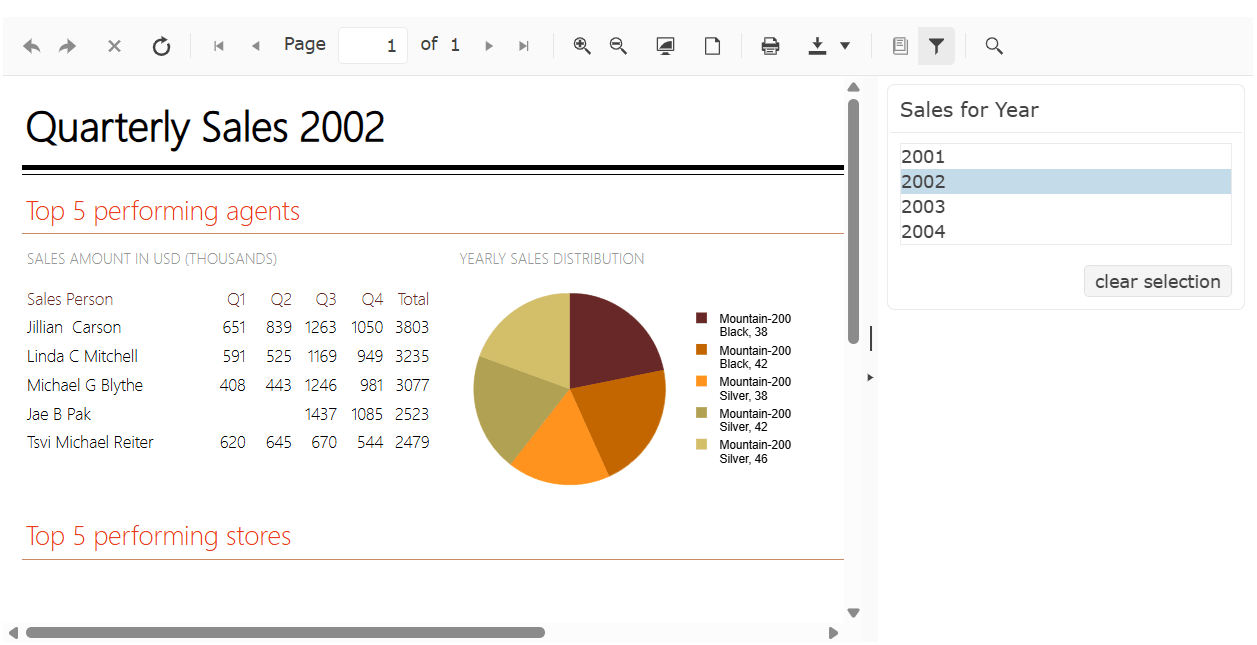
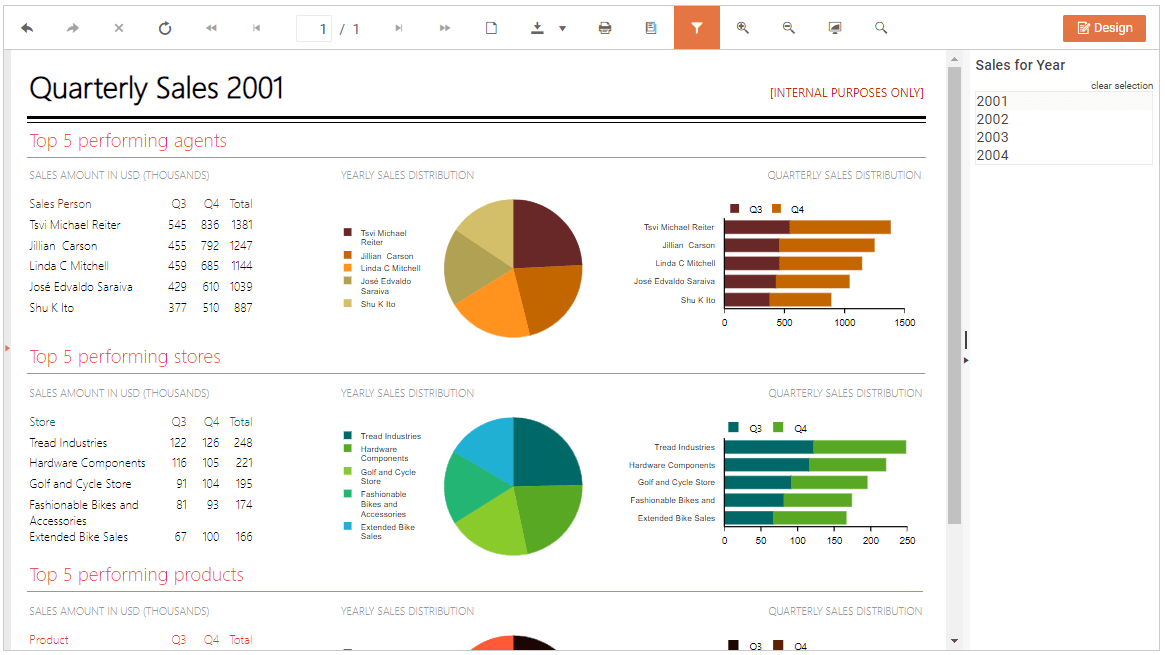
</code></pre><p>I&rsquo;m using the Dashboard report as my case study because it provides an opportunity for adding interactivity: In the Dashboard report, a user can select a year from the list on the right side of the report and have that year displayed in the main body of the report on the left:</p><p><img src="https://d585tldpucybw.cloudfront.net/sfimages/default-source/blogs/2025/2025-07/integrating-telerik-reports.jpg?sfvrsn=b25c7fa_2" alt="A version of the sample Dashboard report distributed with the Telerik Report Server showing sales data for 2002 in the body of the report and the year 2002 selected from a list of years in a panel to the right of the report body" /></p><h2 id="capturing-report-events">Capturing Report Events</h2><p>To have your application&rsquo;s host page react as the user interacts with the report that the page is displaying, you need to wire up a JavaScript function to a Report Viewer event. The Telerik Report Viewer provides <a target="_blank" href="https://docs.telerik.com/reporting/embedding-reports/display-reports-in-applications/web-application/html5-report-viewer/api-reference/reportviewer/events/ready()">more than a dozen events</a>.</p><p>I&rsquo;m going to use the <code class="inline-code">updateUi</code> event, which fires whenever the report&rsquo;s UI changes (and picking a new year does change the report&rsquo;s UI). To tie a function to an event, you declare the event in the JavaScript object literal that defines your report and then tie your function to that event.</p><p>Tying a function to the <code class="inline-code">updateUi</code> event looks like this:</p><pre class=" language-markup"><code class="prism  language-markup">reportSource: {
  report: "Samples/Dashboard"
},
updateUi: e =&gt; {

}
</code></pre><p>The <code class="inline-code">updateUi</code> event might not be the best choice for your application. If, for example, you wanted to be able to cancel the change (perhaps after validating the user&rsquo;s input), you might prefer using the <code class="inline-code">interactiveActionExecuting</code> event which supports canceling user changes which <code class="inline-code">updateUi</code> event does not.</p><p>If you start wiring up more than one event in your report&rsquo;s declaration (or if the function for an event gets large), then it can make your object literal hard to read. If so, you can define your function outside the object literal and just tie the function name to the event in your report&rsquo;s object literal, like this:</p><pre class=" language-javascript"><code class="prism  language-javascript"><span class="token keyword">const</span> <span class="token function-variable function">handleYearChange</span> <span class="token operator">=</span> e <span class="token operator">=&gt;</span> <span class="token punctuation">{</span>

    <span class="token punctuation">}</span>
<span class="token punctuation">}</span><span class="token punctuation">;</span>

<span class="token keyword">const</span> <span class="token function-variable function">loadReport</span> <span class="token operator">=</span> <span class="token punctuation">(</span><span class="token punctuation">)</span> <span class="token operator">=&gt;</span> <span class="token punctuation">{</span>
    dashboardDiv<span class="token punctuation">.</span><span class="token function">telerik_ReportViewer</span><span class="token punctuation">(</span>
     <span class="token punctuation">{</span>
        reportServer<span class="token punctuation">:</span> <span class="token punctuation">{</span>
            url<span class="token punctuation">:</span> <span class="token string">"http://..."</span><span class="token punctuation">,</span>
            username<span class="token punctuation">:</span> <span class="token string">"&hellip;"</span><span class="token punctuation">,</span>
            password<span class="token punctuation">:</span> <span class="token string">"&hellip;"</span>
        <span class="token punctuation">}</span><span class="token punctuation">,</span>
        reportSource<span class="token punctuation">:</span> <span class="token punctuation">{</span>
            report<span class="token punctuation">:</span> <span class="token string">"Samples/Dashboard"</span>
        <span class="token punctuation">}</span><span class="token punctuation">,</span>
        updateUi<span class="token punctuation">:</span> handleYearChange
     <span class="token punctuation">}</span>
  <span class="token punctuation">)</span><span class="token punctuation">;</span>
<span class="token punctuation">}</span><span class="token punctuation">;</span>
</code></pre><p>If you want your event to be available some of the time, you can bind events dynamically by their names using the Report Viewer&rsquo;s <code class="inline-code">bind</code> and <code class="inline-code">unbind</code> methods, passing the name of the event (slightly altered) and the function you want to bind to the event. This code binds and then immediately unbinds my <code class="inline-code">handleYearChange</code> function, for example:</p><pre class=" language-javascript"><code class="prism  language-javascript">rv<span class="token punctuation">.</span><span class="token function">bind</span><span class="token punctuation">(</span>telerikReportViewer<span class="token punctuation">.</span>Events<span class="token punctuation">.</span>UPDATE_UI<span class="token punctuation">,</span> handleYearChange<span class="token punctuation">)</span><span class="token punctuation">;</span>
rv<span class="token punctuation">.</span><span class="token function">unbind</span><span class="token punctuation">(</span>telerikReportViewer<span class="token punctuation">.</span>Events<span class="token punctuation">.</span>UPDATE_UI<span class="token punctuation">,</span> handleYearChange<span class="token punctuation">)</span><span class="token punctuation">;</span>
</code></pre><h2 id="writing-host-page-code">Writing Host Page Code</h2><p>Now that I&rsquo;ve tied the JavaScript function to the report&rsquo;s event, I can access the report through the global reference I created after the report was loaded. Alternatively, inside the function, you can use the <code class="inline-code">e</code> parameter that&rsquo;s passed to the function to access the report (it&rsquo;s in the <code class="inline-code">e</code> parameter&rsquo;s <code class="inline-code">data.sender</code> property):</p><pre class=" language-javascript"><code class="prism  language-javascript"><span class="token keyword">const</span> <span class="token function-variable function">handleYearChange</span> <span class="token operator">=</span> e <span class="token operator">=&gt;</span> <span class="token punctuation">{</span>
    <span class="token keyword">let</span> rv <span class="token operator">=</span> e<span class="token punctuation">.</span>data<span class="token punctuation">.</span>sender<span class="token punctuation">;</span>
<span class="token punctuation">}</span>
</code></pre><p>With that reference, I can now extend my <code class="inline-code">handleYearChange</code> function to update my host page and have my host page respond to the user&rsquo;s changes to my report. For this case study, I&rsquo;ll just display in a textbox in my host page the year that the user has selected in the report.</p><p>I&rsquo;ll do the easy part first and add that textbox, setting its <code class="inline-code">id</code> attribute to <code class="inline-code">currentYear</code> and then create a JavaScript global reference to the textbox:</p><pre class=" language-html"><code class="prism  language-html">    <span class="token tag"><span class="token tag"><span class="token punctuation">&lt;</span>input</span> <span class="token attr-name">id</span><span class="token attr-value"><span class="token punctuation">=</span><span class="token punctuation">"</span>currentYear<span class="token punctuation">"</span></span> <span class="token punctuation">/&gt;</span></span>
</code></pre><pre class=" language-javascript"><code class="prism  language-javascript"><span class="token keyword">const</span> curInput <span class="token operator">=</span> <span class="token function">$</span><span class="token punctuation">(</span><span class="token string">"#currentYear"</span><span class="token punctuation">)</span><span class="token punctuation">;</span>
</code></pre><p>The Report Viewer object model has, in addition to the events, a set of methods that return objects that you can use to manage the report. The Report Viewer <code class="inline-code">ReportSource</code> method, for example, returns an object with exactly one property, called <code class="inline-code">parameters</code>. That <code class="inline-code">parameters</code> property, in turn, exposes an object that has a named property for each parameter defined in the report (you&rsquo;ll have to get the name of your parameter by opening the report in one of the Report Designers).</p><p>In my sample report, the parameter holding the currently selected year is called <code class="inline-code">ReportYear</code> and I can use that parameter to retrieve the year that the report is currently displaying.</p><p>One caveat: You want to exercise some care in the function that you tie to the <code class="inline-code">updateUi</code> event because the event is raised repeatedly as a page is loaded&mdash;once each for the page&rsquo;s sections (header, body, footer, etc). Letting your code execute multiple times can lead to subtle bugs (we won&rsquo;t ask how I know this).</p><p>Here&rsquo;s the code in my <code class="inline-code">updateUi</code> event to grab the <code class="inline-code">ReportYear</code> parameter&rsquo;s value and stuff it into my textbox (but do it only once, when the parameter changes):</p><pre class=" language-javascript"><code class="prism  language-javascript"><span class="token keyword">let</span> currentYear<span class="token punctuation">;</span>

updateUi<span class="token punctuation">:</span> <span class="token punctuation">(</span>e<span class="token punctuation">)</span> <span class="token operator">=&gt;</span> <span class="token punctuation">{</span>
    parms <span class="token operator">=</span> rv<span class="token punctuation">.</span><span class="token function">reportSource</span><span class="token punctuation">(</span><span class="token punctuation">)</span><span class="token punctuation">.</span>parameters<span class="token punctuation">;</span>
    <span class="token keyword">if</span> <span class="token punctuation">(</span>currentYear <span class="token operator">!==</span> parms<span class="token punctuation">.</span>ReportYear<span class="token punctuation">)</span> <span class="token punctuation">{</span>
        currentYear <span class="token operator">=</span> parms<span class="token punctuation">.</span>ReportYear<span class="token punctuation">;</span>
        curInput<span class="token punctuation">.</span><span class="token function">val</span><span class="token punctuation">(</span>parms<span class="token punctuation">.</span>ReportYear<span class="token punctuation">)</span><span class="token punctuation">;</span>
    <span class="token punctuation">}</span>
<span class="token punctuation">}</span>
</code></pre><p>Now, whenever the user selects a year in the report, the textbox on the report&rsquo;s host page will be updated.</p><h2 id="interacting-with-the-report">Interacting with the Report</h2><p>As I said at the start, interactivity goes two ways. When the user interacts with the report&rsquo;s host page, you might want to have the report respond to that change. In my case study, I might want the report to display the data for a year that the user types into the textbox on my host page.</p><p>Implementing that requires setting the appropriate parameter on the report (<code class="inline-code">ReportYear</code>, in my case) from the user&rsquo;s input (my <code class="inline-code">CurrentYear</code> textbox) and refreshing the report. To do that, I extend my textbox&rsquo;s declaration to call a function when the user changes the contents of the textbox and exits the textbox:</p><pre class=" language-html"><code class="prism  language-html">    <span class="token tag"><span class="token tag"><span class="token punctuation">&lt;</span>input</span> <span class="token attr-name">id</span><span class="token attr-value"><span class="token punctuation">=</span><span class="token punctuation">"</span>currentYear<span class="token punctuation">"</span></span> <span class="token attr-name">onchange</span><span class="token attr-value"><span class="token punctuation">=</span><span class="token punctuation">"</span>updateReport()<span class="token punctuation">"</span></span> <span class="token punctuation">/&gt;</span></span>
</code></pre><p>In this new <code class="inline-code">updateReport</code> function, I need to retrieve the current value from the textbox, update the appropriate parameter on the report (<code class="inline-code">ReportYear</code>, in my case), and call the report&rsquo;s <code class="inline-code">refreshReport</code> method&mdash;still using the global reference to the report that I created after the report was loaded. That code looks like this:</p><pre class=" language-javascript"><code class="prism  language-javascript"><span class="token keyword">let</span> <span class="token function-variable function">UpdateReport</span> <span class="token operator">=</span> <span class="token punctuation">(</span><span class="token punctuation">)</span> <span class="token operator">=&gt;</span> <span class="token punctuation">{</span>
    <span class="token keyword">let</span> parms <span class="token operator">=</span> rv<span class="token punctuation">.</span><span class="token function">reportSource</span><span class="token punctuation">(</span><span class="token punctuation">)</span><span class="token punctuation">.</span>parameters<span class="token punctuation">;</span>
    parms<span class="token punctuation">.</span>ReportYear <span class="token operator">=</span> curInput<span class="token punctuation">.</span><span class="token function">val</span><span class="token punctuation">(</span><span class="token punctuation">)</span><span class="token punctuation">;</span>
    rv<span class="token punctuation">.</span><span class="token function">refreshReport</span><span class="token punctuation">(</span><span class="token punctuation">)</span><span class="token punctuation">;</span>
<span class="token punctuation">}</span><span class="token punctuation">;</span>
</code></pre><p>Now, as the user interacts with my host page, my report will respond.</p><p>Obviously, these are very simple examples, but the Report Viewer has <a target="_blank" href="https://docs.telerik.com/reporting/embedding-reports/display-reports-in-applications/web-application/html5-report-viewer/api-reference/reportviewer/overview">more methods</a> than the <code class="inline-code">ReportSource</code> method that I&rsquo;ve used. But what you have here is the basic structure of any kind of integration you&rsquo;ll want to add, regardless of what you want to do.</p><hr /><blockquote><p>Telerik Reporting comes with your favorite framework UI component library when you bundle with <a target="_blank" href="https://www.telerik.com/devcraft">Progress Telerik DevCraft</a>. And this all comes with a 30-day free trial. So, go on:<br /><br /></p><p><a href="https://www.telerik.com/try/devcraft-ultimate" target="_blank" class="Btn">Try Now</a></p></blockquote><img src="https://feeds.telerik.com/link/23070/17118984.gif" height="1" width="1"/>]]></content>
  </entry>
  <entry>
    <id>urn:uuid:c6ac8670-8c17-4073-8acf-2d7dccb8a8c5</id>
    <title type="text">.NET Coded Report Design, No IDE Strings Attached</title>
    <summary type="text">Bringing Visual Studio design-time support for .NET reports has been quite a journey for the Progress Telerik Reporting team. See where we are now, how and why we’ve gone this direction, and where we’re headed.</summary>
    <published>2025-06-10T10:30:03Z</published>
    <updated>2026-04-11T21:15:40Z</updated>
    <author>
      <name>Ivan Ivanov </name>
    </author>
    <link rel="alternate" href="https://feeds.telerik.com/link/23070/17048601/net-coded-report-design-no-ide-strings-attached"/>
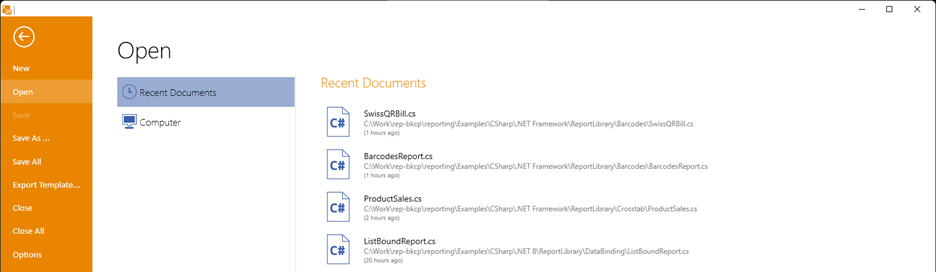
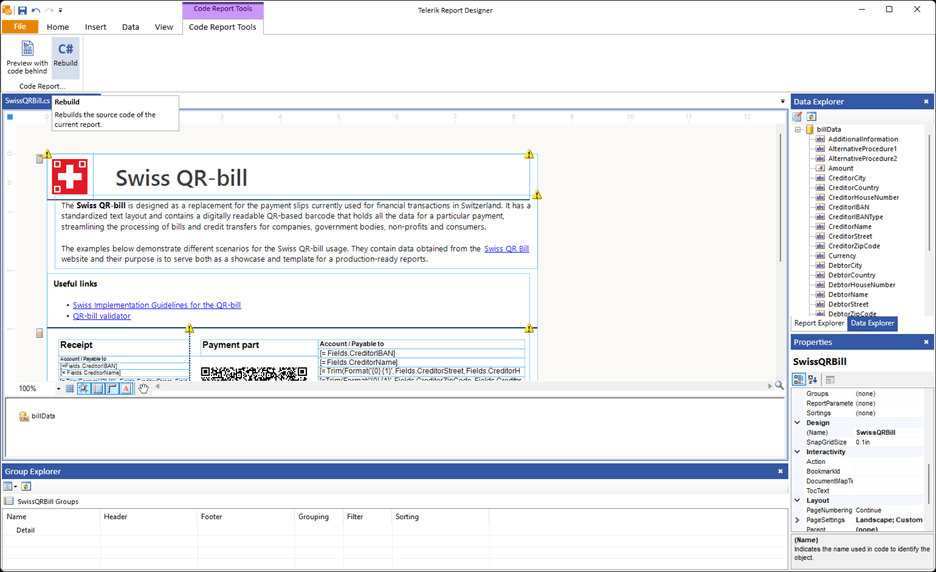
    <content type="text"><![CDATA[<p><span class="featured">Bringing Visual Studio design-time support for .NET reports has been quite a journey for the Progress Telerik Reporting team. See where we are now, how and why we&rsquo;ve gone this direction, and where we&rsquo;re headed.</span></p><p>This blog post tells the story of our efforts to implement the by far most requested feature to Progress <a target="_blank" href="https://www.telerik.com/products/reporting.aspx">Telerik Reporting</a> during the past years&mdash;Visual Studio design-time support for .NET reports. It may have taken time, but we wanted to be sure to provide the best possible user experience. We wanted to make sure this feature would be an improvement for our most faithful clients, not a new hurdle.</p><p>Now, with a clear path ahead, we are ready to be open with you about both future plans and past missteps. We believe that your feedback and trust will help us turn this into something much more than an implementation of a catch-up feature. We want it to become the better way of handling code reports, with no technological strings attached, great flexibility and parity with all the other moving parts of our offering.</p><h2 id="a-look-back">A Look Back</h2><p>Since the first version of our <a href="https://docs.telerik.com/reporting/designing-reports/report-designer-tools/desktop-designers/visual-studio-report-designer/overview" target="_blank">Visual Studio designer</a>, coded reports have been a first-class feature for Telerik Reporting. Our decision back then to build from the (now legacy) Visual Studio designer API helped us have full integration between our framework and the IDE. That made us a tool of choice for users who seek the flexibility of programmatic reports across the variety of reporting products on the market.</p><p>The decision by Microsoft to introduce a new paradigm for the native Visual Studio designer caught us off guard. It introduced the concept of splitting the former workflow into two processes that handle UI (client) and design-time logic (server) separately that run on different runtimes&mdash;.NET Framework for client, and .NET for server. Back then, we jumped into adapting to this new paradigm immediately, starting our effort while the new implementation by Microsoft was still in early preview.</p><p>Things did not look hopeful at first&mdash;the new core designer API changed a lot of the mechanics that we had taken for granted. We were faced with the choice to either rush to a full rewrite of the design-time logic or go on a migration path, trying to adapt our vast designer codebase to operate with the new concepts. We believed that the second approach would provide results more consistent with the existing design-time experience that we provided, so we took that approach.</p><p>The team at Microsoft helped us identify a lot of the things that were incompatible with our existing implementation, and we made iterative progress with every new preview version of their designer. Things soured when it turned out that a major hurdle challenged the success of the initiative&mdash;the new API did not support custom root designer implementations.</p><p>In 2024, Microsoft implemented custom root designer support. But while the former impediment was no longer present, the officially released final API of the Visual Designer changed a lot in comparison to the preview versions that we had based our efforts on. Yet again we were closer to the start than to the end of the endeavor.</p><h2 id="a-pivot">A Pivot</h2><p>But what if the problem had more than one solution? We zoomed out to the bigger picture, and we saw that the landscape had changed a lot:</p><ul><li>.NET is now much more versatile than the .NET Framework had ever been.</li><li>Linux is not the exotic option for the tech stack that it used to be and is now the first-choice environment for an increasing share of the userbase.</li><li>The vast majority of Telerik Reporting users moved to developing web applications.</li><li>Visual Studio&rsquo;s leading .NET IDE role is challenged by the advance of VS Code and other IDEs by a variety of vendors.</li><li>WinForms, the technology behind VS Designer, is in a mature state that does not suggest extensive future development.</li></ul><p>All these developments were too large of a factor to ignore, so the new solution needed to address them. To do so, we would need to figure out how to create for our Visual Studio designer:</p><ul><li>A powerful WYSIWYG report component design experience, along with multiple dedicated tools and editors</li><li>A serialization mechanism that turned the designed report into correct C# code stored as partial (.Designer.cs) file</li><li>Complete developer freedom to integrate any custom logic in the report&rsquo;s so-called code-behind, including event handlers, business logic integration and even report definition modifications</li></ul><p>Luckily, we had a solution to the first problem. We already had two separate design surfaces that we actively enhance with new features&mdash;the standalone designer and the web report designer.</p><p>Writing code, as we noted earlier, is not necessarily done in Visual Studio. It is possible in any editor of choice, as long as we have the report definition represented as C# code. That led us to the single indispensable benefit that Visual Studio provides and we do not&mdash;C# report serialization. We decided to turn it into our immediate priority.</p><p>Now we were developing our own module to handle code serialization. It would use the CodeDOM serializer API by Microsoft but skip the restrictive dependencies to UI technology and design-time APIs.</p><p>Being excited about the results of the new approach, we wanted to share that early progress with you today. The <a href="https://docs.telerik.com/reporting/designing-reports/report-designer-tools/desktop-designers/standalone-report-designer/overview" target="_blank">Standalone Report Designer</a> (SRD), being a desktop piece, seemed more of a fit than the Web Report Designer to be the first place where we would integrate it. Thus, with the latest Release of Telerik Reporting, SRD is now able to work with existing .NET 8+ code reports.&nbsp;</p><p>Mentioning .NET 8 might sound a bit too restrictive&mdash;what if the majority of your reports are still .NET Framework&ndash;based? We have strived to make the Telerik Reporting code API is framework-agnostic, so copying the existing source code files in a fresh new .NET 8 project might only require small changes for a complete migration.</p><h2 id="so-how-to-use-my-.net-reports-in-the-standalone-designer-">So How to Use My .NET Reports in the Standalone Designer ?</h2><p>You can access your coded report by opening the code (.cs) file through the standard open report UI. The designer file will be automatically detected and a (.csproj) file will be suggested. In case you are using more than one project for the same codebase, you are free to modify the selection. Once compiled and approved, the assembly is added to the trusted types list, so exercise caution with injected code. Additional dependencies should be <a target="_blank" href="https://docs.telerik.com/reporting/designing-reports/report-designer-tools/desktop-designers/standalone-report-designer/configuration/extending-report-designer#update-the-designer-configuration-file-through-the-ui">trusted separately</a>.</p><p><img src="https://d585tldpucybw.cloudfront.net/sfimages/default-source/blogs/2025/2025-06/csharp-files.png?sfvrsn=9a31849d_2" alt="Recent documents .cs files" /></p><p>So far, things look similar to importing a report library using the designer. However, this new option is much more dynamic. Any change in the report will be applied in the <em>designer</em> partial file by serializing the change into C# in live sync.</p><p>Be advised that our algorithm mimics the VS one only semantically. This means that the initial report modification will introduce significant changes in the serialized code, but the component tree will be preserved. Please use versioning for your reports in order to have clear tracking of the changes. The <em>non-designer</em> partial class files stay intact, so custom code is preserved and ready to work alongside the generated design logic.</p><p>These modifications can be immediately incorporated within the assembly logic by the &ldquo;Rebuild&rdquo; and &ldquo;Preview with code-behind&rdquo; commands.</p><p><img src="https://d585tldpucybw.cloudfront.net/sfimages/default-source/blogs/2025/2025-06/swiss-qr-bill.png?sfvrsn=67c63fe8_2" alt="Swiss QR-bill" /></p><h2 id="what’s-next">What&rsquo;s Next?</h2><p>With this first iteration, we wanted to cover the toolset that users had with Visual Studio. We are treating the current version as a strong preview rather than a complete solution, so we expect that things will change and improve fast from here. We anticipate SRD to be much more stable in the Q3 release, at which point we expect to have documentation ready as well.</p><p>We are aware of some existing issues with the serialization engine, and we are already working on stabilizing it. Our next steps are fixed on developing resource manager for better consistency with existing (.resx) files; reduce the difference between the output of the VS algorithm and ours. We will be also revising the tooling to make the handling of code reports more natural.</p><p>We have a vision of our roadmap ahead, but we want to hear your voice. What would help you? Give it a shot and share your thoughts with us. We are here to listen and act upon your feedback.</p><hr /><p>Remember that Telerik Reporting comes with the Telerik DevCraft bundle, which you can try for free:</p><p><a href="https://www.telerik.com/try/devcraft-ultimate" target="_blank" class="Btn">Try DevCraft</a></p><img src="https://feeds.telerik.com/link/23070/17048601.gif" height="1" width="1"/>]]></content>
  </entry>
  <entry>
    <id>urn:uuid:3d151fd0-c673-4d2b-9ad7-394930b65fe8</id>
    <title type="text">An Easy Way to Embed Reporting in Linux Apps Using Docker</title>
    <summary type="text">Telerik Reporting has recently removed all dependency on Windows-only libraries, allowing you to host your production applications in lightweight and cost-effective Linux environments. With Docker, this process is even easier to achieve.</summary>
    <published>2024-10-10T09:16:19Z</published>
    <updated>2026-04-11T21:15:40Z</updated>
    <author>
      <name>Rick Hellwege </name>
    </author>
    <link rel="alternate" href="https://feeds.telerik.com/link/23070/16839097/easy-way-embed-reporting-linux-apps-using-docker"/>
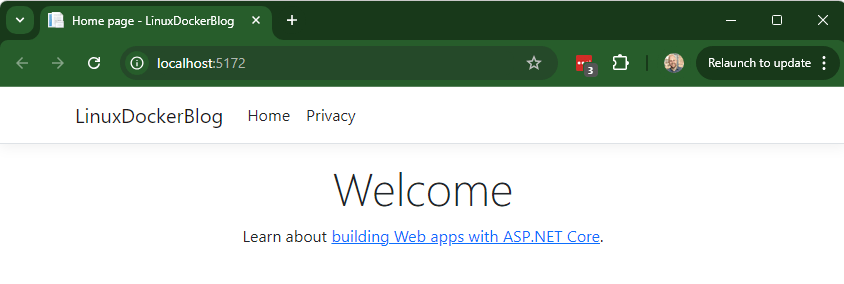
    <content type="text"><![CDATA[<p><span class="featured">Telerik Reporting has recently removed all dependency on Windows-only libraries, allowing you to host your production applications in lightweight and cost-effective Linux environments. With Docker, this process is even easier to achieve.</span></p><h2 id="why-linux">Why Linux?</h2><p>There are many great reasons why you may wish to deploy your production Progress <a target="_blank" href="https://www.telerik.com/products/reporting.aspx">Telerik Reporting</a> application on Linux. Linux runs very fast, and the operating system can be customized to meet the application&rsquo;s needs. Linux is easy to upgrade, easy to maintain and uses fewer resources to operate than a Windows OS. Additionally, Linux-based cloud hosting is often much more cost-effective than the Windows-based equivalent for the same processing power.</p><p>Most .NET developers prefer to work with familiar tools in Windows, such as Visual Studio. Building applications in Linux used to require learning clunky editor such as vi and mastering the subtleties of the Bash shell. Today, with the advent of the Windows Subsystem for Linux (WSL2) and innovative tools like Visual Studio Code, you can bridge the gap between Windows and Linux.</p><p>Using Visual Studio code, you can keep most of the performance enhancers you&rsquo;re accustomed to, work in a Windows operating system and also gain access to a powerful remote terminal connecting you to your locally running instance of Linux in WSL2. This is truly the best of both worlds!</p><h2 id="direct-hosting-vs.-docker">Direct Hosting vs. Docker</h2><h3 id="with-nginx">With Nginx</h3><p>You can always choose to forgo Docker and host your application directly in a Linux installation such as RedHat or Ubuntu. Generally, this requires more configuration but can be useful if you want to use other tools and services in the same instance. Native tools like Nginx allow you to host directly in Linux. Like any operating system, you will need to handle upgrades, manage version changes and resolve conflicts. This is an extremely powerful alternative, with a steep learning curve.</p><h3 id="with-docker">With Docker</h3><p>Using Docker, you can obfuscate away all the minutia of setting up the operating system. Your applications are built on one of a series of pre-configured base images. These images are available in a variety of flavors. Some are built for debugging and have added tools for those tasks. Some are optimized for production and contain only the minimum necessary packages for that task. Some even come pre-configured for use with load-balancers. This allows you to choose, change and experiment with hosting on different base images by changing just a single line of code in your Dockerfile (more on that later).</p><p>You also gain portability with Docker, allowing you to move your applications from server to server, on-premises to the cloud with only a few clicks of the mouse. Integrations with Git and CI/CD pipelines further empower you to focus on the application itself instead of the details of hosting.</p><p>Follow along with me below to build and launch a Telerik Reporting&ndash;empowered ASP.NET web application.</p><h2 id="getting-started">Getting Started</h2><h3 id="prerequisites">Prerequisites</h3><ul><li><a target="_blank" href="https://dotnet.microsoft.com/download">.NET SDK 8.0</a></li><li><a target="_blank" href="https://code.visualstudio.com/Download">Visual Studio Code</a></li><li><a target="_blank" href="https://docs.docker.com/desktop/install/windows-install/">Docker Desktop for Windows</a></li><li><a target="_blank" href="https://learn.microsoft.com/en-us/powershell/scripting/overview?view=powershell-7.4">Windows PowerShell</a></li></ul><h2 id="building-your-application">Building Your Application</h2><p>Follow the instructions below to create a new web application and test it.</p><ul><li>Create a new folder for your application in a convenient place named LinuxDockerBlog.</li><li>Open Windows PowerShell and navigate to that folder.</li><li>Run the below commands to create a new web application and open it in Visual Studio Code.</li></ul><pre><code>dotnet new webapp -o LinuxDockerBlog  
code -r LinuxDockerBlog  
</code></pre><ul><li>Your application should now be opened in Visual Studio Code. Select <em>Run &gt; Run Without Debugging</em> or press <strong>Ctrl+F5</strong> to launch the web app. (If asked to select a debugger, choose <strong>C#/Default Configuration</strong>.)</li></ul><p>The sample web app will launch, and you&rsquo;ll see the below in a new window:</p><p><img src="https://d585tldpucybw.cloudfront.net/sfimages/default-source/blogs/2024/2024-09/linux-docker-blog.png?sfvrsn=43166735_2" alt="LinuxDockerBlog app" /></p><h2 id="adding-telerik-reporting-rest-service">Adding Telerik Reporting REST Service</h2><p>Next, we will need to add the Telerik Reporting libraries and supporting code to the application. This will set up the Telerik Reporting REST Service, which is the Cadillac engine of the Telerik Reporting architecture.</p><p>First, you&rsquo;ll need to configure access to the <a target="_blank" href="https://docs.telerik.com/reporting/getting-started/installation/adding-private-nuget-feed#setup-with-nuget-cli">Telerik Private NuGet Feed</a> to access the libraries. To do this, you will want to check if you have the Telerik NuGet server in your package sources list:</p><ul><li>Open a Terminal Window from <em>Terminal &gt; New Terminal</em></li><li>Run the following command:</li></ul><pre><code>dotnet nuget list source  
</code></pre><ul><li>If you do not see <a target="_blank" href="http://nuget.telerik.com">nuget.telerik.com</a>&mdash;it is a quick fix. Run the following command (after replacing the placeholders with your credentials):</li></ul><pre class=" language-shell"><code class="prism  language-shell">dotnet nuget add source "Telerik" 
  --source "[https://nuget.telerik.com/v3/index.json](https://nuget.telerik.com/v3/index.json)" --username 'api-key' 
  --password '&lt;PASTE YOUR TELERIK KEY HERE&gt;' --store-password-in-clear-text  
</code></pre><ul><li>Add the following three libraries with this command:</li></ul><pre><code>dotnet add package 
&lt;PACKAGE_NAME&gt;  
</code></pre><ol style="margin-left:30px;"><li>Telerik.Reporting.Services.AspNetCore (or Telerik.Reporting.Services.AspNetCore.Trial)</li><li>Telerik.Reporting.OpenXmlRendering (or Telerik.Reporting.OpenXmlRendering.Trial)</li><li>Telerik.Drawing.Skia</li></ol><ul><li>Add NewtonsoftJson to the Builder object in <strong>Program.cs</strong>:</li></ul><pre class=" language-csharp"><code class="prism  language-csharp">builder<span class="token punctuation">.</span>Services<span class="token punctuation">.</span><span class="token function">AddRazorPages</span><span class="token punctuation">(</span><span class="token punctuation">)</span><span class="token punctuation">.</span><span class="token function">AddNewtonsoftJson</span><span class="token punctuation">(</span><span class="token punctuation">)</span><span class="token punctuation">;</span>
</code></pre><ul><li>Add the below configuration object to the builder.</li></ul><pre class=" language-csharp"><code class="prism  language-csharp">builder<span class="token punctuation">.</span>Services<span class="token punctuation">.</span><span class="token generic-method function">TryAddSingleton<span class="token punctuation">&lt;</span>IReportServiceConfiguration<span class="token punctuation">&gt;</span></span><span class="token punctuation">(</span>sp <span class="token operator">=</span><span class="token operator">&gt;</span>
    <span class="token keyword">new</span> <span class="token class-name">ReportServiceConfiguration</span>
    <span class="token punctuation">{</span>
        <span class="token comment">// The default ReportingEngineConfiguration will be initialized from appsettings.json or appsettings.{EnvironmentName}.json:</span>
        ReportingEngineConfiguration <span class="token operator">=</span> sp<span class="token punctuation">.</span><span class="token generic-method function">GetService<span class="token punctuation">&lt;</span>IConfiguration<span class="token punctuation">&gt;</span></span><span class="token punctuation">(</span><span class="token punctuation">)</span><span class="token punctuation">,</span>
        <span class="token comment">// In case the ReportingEngineConfiguration needs to be loaded from a specific configuration file, use the approach below:</span>
        <span class="token comment">//ReportingEngineConfiguration = ResolveSpecificReportingConfiguration(sp.GetService&lt;IWebHostEnvironment&gt;()),</span>
        HostAppId <span class="token operator">=</span> <span class="token string">"ReportingNet6"</span><span class="token punctuation">,</span>
        Storage <span class="token operator">=</span> <span class="token keyword">new</span> <span class="token class-name">FileStorage</span><span class="token punctuation">(</span><span class="token punctuation">)</span><span class="token punctuation">,</span>
        ReportSourceResolver <span class="token operator">=</span> <span class="token keyword">new</span> <span class="token class-name">UriReportSourceResolver</span><span class="token punctuation">(</span>System<span class="token punctuation">.</span>IO<span class="token punctuation">.</span>Path<span class="token punctuation">.</span><span class="token function">Combine</span><span class="token punctuation">(</span>sp<span class="token punctuation">.</span><span class="token generic-method function">GetService<span class="token punctuation">&lt;</span>IWebHostEnvironment<span class="token punctuation">&gt;</span></span><span class="token punctuation">(</span><span class="token punctuation">)</span><span class="token punctuation">.</span>ContentRootPath<span class="token punctuation">,</span> <span class="token string">"Reports"</span><span class="token punctuation">)</span><span class="token punctuation">)</span>
    <span class="token punctuation">}</span><span class="token punctuation">)</span><span class="token punctuation">;</span>
</code></pre><ul><li>Configure the endpoints by adding the below code. Be sure to add it <em>after</em> the <code class="inline-code">UseRouting()</code> call.</li></ul><pre class=" language-csharp"><code class="prism  language-csharp">app<span class="token punctuation">.</span><span class="token function">UseEndpoints</span><span class="token punctuation">(</span>endpoints <span class="token operator">=</span><span class="token operator">&gt;</span>
<span class="token punctuation">{</span>
endpoints<span class="token punctuation">.</span><span class="token function">MapControllers</span><span class="token punctuation">(</span><span class="token punctuation">)</span><span class="token punctuation">;</span>
<span class="token punctuation">}</span><span class="token punctuation">)</span><span class="token punctuation">;</span>
</code></pre><ul><li>Next add a Controllers folder to your project.</li><li>Create a new file named <strong>ReportsController.cs</strong> in the Controllers/ folder.</li><li>Replace the content of ReportsController.cs with the below code:</li></ul><pre class=" language-csharp"><code class="prism  language-csharp"><span class="token keyword">namespace</span> LinuxDockerBlog<span class="token punctuation">.</span>Controllers
<span class="token punctuation">{</span>
    <span class="token keyword">using</span> System<span class="token punctuation">.</span>Net<span class="token punctuation">;</span>
    <span class="token keyword">using</span> System<span class="token punctuation">.</span>Net<span class="token punctuation">.</span>Mail<span class="token punctuation">;</span>
    <span class="token keyword">using</span> Microsoft<span class="token punctuation">.</span>AspNetCore<span class="token punctuation">.</span>Mvc<span class="token punctuation">;</span>
    <span class="token keyword">using</span> Telerik<span class="token punctuation">.</span>Reporting<span class="token punctuation">.</span>Services<span class="token punctuation">;</span>
    <span class="token keyword">using</span> Telerik<span class="token punctuation">.</span>Reporting<span class="token punctuation">.</span>Services<span class="token punctuation">.</span>AspNetCore<span class="token punctuation">;</span>

    <span class="token punctuation">[</span><span class="token function">Route</span><span class="token punctuation">(</span><span class="token string">"api/[controller]"</span><span class="token punctuation">)</span><span class="token punctuation">]</span>
    <span class="token punctuation">[</span>ApiController<span class="token punctuation">]</span>
    <span class="token keyword">public</span> <span class="token keyword">class</span> <span class="token class-name">ReportsController</span> <span class="token punctuation">:</span> ReportsControllerBase
    <span class="token punctuation">{</span>
        <span class="token keyword">public</span> <span class="token function">ReportsController</span><span class="token punctuation">(</span>IReportServiceConfiguration reportServiceConfiguration<span class="token punctuation">)</span>
        <span class="token punctuation">:</span> <span class="token keyword">base</span><span class="token punctuation">(</span>reportServiceConfiguration<span class="token punctuation">)</span>
        <span class="token punctuation">{</span>
        <span class="token punctuation">}</span>

        <span class="token keyword">protected</span> <span class="token keyword">override</span> HttpStatusCode <span class="token function">SendMailMessage</span><span class="token punctuation">(</span>MailMessage mailMessage<span class="token punctuation">)</span>
        <span class="token punctuation">{</span>
            <span class="token keyword">throw</span> <span class="token keyword">new</span> <span class="token class-name">System<span class="token punctuation">.</span>NotImplementedException</span><span class="token punctuation">(</span><span class="token string">"This method should be implemented in order to send mail messages"</span><span class="token punctuation">)</span><span class="token punctuation">;</span>
        <span class="token punctuation">}</span>
    <span class="token punctuation">}</span>
<span class="token punctuation">}</span>
</code></pre><ul><li>Test your application by launching with <strong>Ctrl+F5</strong>.</li><li>Navigate to <code class="inline-code">_http://localhost:&lt;port&gt;/api/reports/formats</code>_.</li></ul><p>If everything is working as expected, you should see some JSON output of the available rendering formats.</p><p><img src="https://d585tldpucybw.cloudfront.net/sfimages/default-source/blogs/2024/2024-09/pretty-print.png?sfvrsn=9ec7e4bf_2" alt="pretty print formats" /></p><h2 id="writing-a-dockerfile">Writing a Dockerfile</h2><p>A Dockerfile is the recipe that tells Docker how to build your web application into an image. It&rsquo;s a text file containing instructions on how to build the image. For full information on how to write a custom Dockerfile, refer to the <a target="_blank" href="https://docs.docker.com/get-started/docker-concepts/building-images/writing-a-dockerfile/">Writing a Dockerfile docs</a>.</p><ul><li>Create a file called Dockerfile in the root of your project.</li><li>Copy the below instructions into the Dockerfile:</li></ul><pre><code>FROM mcr.microsoft.com/dotnet/aspnet:8.0 AS base

WORKDIR /app
EXPOSE 8080

RUN apt-get update
RUN apt-get install -y libfreetype6
RUN apt-get install -y libfontconfig1

#Stage 1
FROM mcr.microsoft.com/dotnet/aspnet:8.0 AS base

WORKDIR /app
EXPOSE 8080

RUN apt-get update
RUN apt-get install -y libfreetype6
RUN apt-get install -y libfontconfig1

#Stage 2
FROM mcr.microsoft.com/dotnet/sdk:8.0 AS build
ARG BUILD_CONFIGURATION=Release
WORKDIR /src

COPY . ./LinuxDockerBlog/

ARG TelerikNugetServerApiKey
ENV TelerikNugetServer_API_KEY $TelerikNugetServerApiKey

RUN dotnet restore ./LinuxDockerBlog/LinuxDockerBlog.csproj

WORKDIR /src/LinuxDockerBlog
RUN dotnet publish LinuxDockerBlog.csproj -c release -o /app --no-restore

# Stage 3
FROM mcr.microsoft.com/dotnet/aspnet:8.0
EXPOSE 8080
WORKDIR /app
COPY --from=build /app .
USER $APP_UID
ENTRYPOINT ["./LinuxDockerBlog"]
</code></pre><p>This is a multi-stage build. Notice that in Stage 1 we add some extra libraries that Telerik Reporting will need to function in Linux that are not part of the standard base image.</p><p>In the second stage, we copy the web application file from the local folder to a folder in the image called LinuxDockerBlog with the COPY instruction.</p><p>We also set an environment variable using ENV, this value is passed from the command line as a docker build argument <code class="inline-code">ARG</code>. This environment variable can be used to pass information such as an API key for NuGet.</p><p>In the final stage, the output from the <code class="inline-code">_RUN dotnet publish_</code> command is copied into the <code class="inline-code">/app/</code> folder in the image. The <code class="inline-code">EXPOSE</code> instruction tells the image to make the application available via port 8080 of a running container. The <code class="inline-code">ENTRYPOINT</code> instruction indicates the location of the default executable.</p><h2 id="building-an-image">Building an Image</h2><p>In Windows PowerShell, navigate to the project folder containing the Dockerfile and build the image using the following command.</p><blockquote>Notice the &ldquo;.&rdquo; at the end? This is telling the command to use the current directory to look for a Dockerfile there.</blockquote><pre><code>
docker build -t linuxdockerblog .
-or-
docker build -t linuxdockerblog --build-arg TelerikNugetServerApiKey=&lt;YOUR_API_KEY&gt; .
</code></pre><p>You will need to create a nuget.config file to authenticate with the Telerik Private NuGet Feed. See the <a target="_blank" href="https://docs.telerik.com/reporting/getting-started/installation/using-nuget-keys#using-a-nuget-key">docs</a> for help creating this config file.</p><p>You can now verify that the image was created by using the following command:</p><pre><code>docker images  
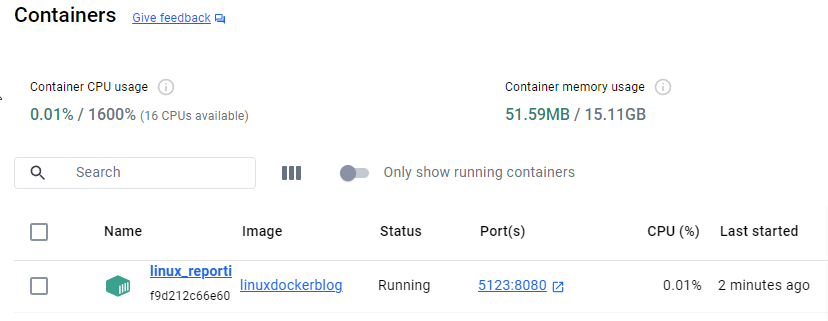
</code></pre><p>You should see something similar to this:</p><p><img src="https://d585tldpucybw.cloudfront.net/sfimages/default-source/blogs/2024/2024-09/repository-linuxdockerblog.png?sfvrsn=4dec386_2" alt="Repository, tag, image id, created, size" /></p><h2 id="create-a-container">Create a Container</h2><p>Now that an image has been created, you can run it in a container. In your Windows PowerShell, run the following command:</p><pre><code>docker run -it --rm -p 5123:8080 --name linux_reporting linuxdockerblog  
</code></pre><ul><li>The <code class="inline-code">_-it</code>_ options allow for an interactive if you need to type a password.</li><li>The <code class="inline-code">_--rm</code>_ option will remove the created container when you kill the process. (This is great for debugging and testing. If you don&rsquo;t want the container to shut down when you close the terminal, use <code class="inline-code">_-d</code>_ instead.)</li><li>The <code class="inline-code">_-p</code>_ option maps a host (your computer) port to the container&rsquo;s exposed port: <code class="inline-code">-p HOST_PORT:CONTAINER_PORT</code>. Since we know we exposed port 8080, we can pick any available host port and map it to 8080. This is the port you&rsquo;ll use to access the application.</li></ul><p>You can now test your container by accessing the port on localhost, e.g., <a target="_blank" href="http://localhost:5123/">http://localhost:5123/</a>.</p><p>You can open Docker Desktop to see the container and images you created.</p><p><img src="https://d585tldpucybw.cloudfront.net/sfimages/default-source/blogs/2024/2024-09/containers.png?sfvrsn=9f1f1e81_2" alt="containers linux report" /></p><h2 id="conclusion">Conclusion</h2><p>Telerik Reporting is an excellent candidate for use in Linux hosting due to recent refactoring to use the SkiaSharp libraries. Combined with the power of Docker, you can easily build web applications with embedded reporting for Linux and run it in a lightweight container. </p><p>This same image can be run anywhere docker is provided, taking all the guesswork out of hosting. This straightforward approach provides you with a simple, portable and reusable solution to hosting your applications in Linux both locally and in the cloud.</p><hr /><p>New to Telerik Reporting? Try it free for 30 days!</p><p><a href="https://www.telerik.com/try/reporting" target="_blank" class="Btn">Try Now</a></p><img src="https://feeds.telerik.com/link/23070/16839097.gif" height="1" width="1"/>]]></content>
  </entry>
  <entry>
    <id>urn:uuid:67de9f4e-a686-40a7-8c72-52ac932a0164</id>
    <title type="text">Maximizing Your Return from Reporting, Part 2: Increasing Value</title>
    <summary type="text">To get the biggest bang for your reporting dollar, your organization’s reports need to maximize the value you get for the time you invest. Here are five tips (and a bonus one) to achieve that.</summary>
    <published>2024-09-26T14:49:18Z</published>
    <updated>2026-04-11T21:15:40Z</updated>
    <author>
      <name>Peter Vogel </name>
    </author>
    <link rel="alternate" href="https://feeds.telerik.com/link/23070/16822747/maximizing-return-reporting-part-2-increasing-value"/>
    <content type="text"><![CDATA[<p><span class="featured">To get the biggest bang for your reporting dollar, your organization&rsquo;s reports need to maximize the value you get for the time you invest. Here are five tips (and a bonus one) to achieve that.</span></p><p>As I pointed out in an <a href="https://www.telerik.com/blogs/maximizing-return-reporting-part-1-lowering-costs" target="_blank">earlier post</a>, reporting isn&rsquo;t free. Since reporting requires you to spend money up front to get results later, reporting is best thought of as an investment. And, like any other investment, you want to make sure that you get the maximum return of your investment in reporting. In that earlier post, I talked about managing reporting costs as one way to maximize your return</p><p>And while there&rsquo;s nothing wrong with reducing costs, this post looks at the real payoff: Getting more value from the reports that your Line-Of-Business (LOB) staff use. That value can come from up to three areas:</p><ul><li>Improving decision making by your LOB staff</li><li>Driving innovation within your organization by revealing both new opportunities and existing gaps</li><li>Shaping long-term strategy by showing your existing reality and extrapolating into your future</li></ul><p>There are, at least, five ways that you can increase the value from your reports.</p><h2 id="improving-reporting-logistics">1. Improving Reporting Logistics</h2><p>First, if you haven&rsquo;t already done so, move to end-user reporting. And, yes, that&rsquo;s a word-for-word quote from my previous blog post on reducing costs. But, while reducing costs, end-user reporting also increases value. No one knows what your LOB staffs needs better than they do&mdash;giving them the tools and getting out of their way is your first, best choice in generating value.</p><h2 id="getting-your-lob-staff-the-data-they-need">2. Getting Your LOB Staff the Data They Need</h2><p>Second: Provide your LOB staff with simple and easy access to the data that they need to create their reports. Yes, you need to keep data secure and private, but your reporting tool should take care of that by cascading data protections from report data sources down to whoever&rsquo;s currently reading the report. Report developers should be able to easily get to the data they want to include in their report and be confident the report will shape the data appropriately for the report reader.</p><h2 id="extending-report’s-reach">3. Extending Report&rsquo;s Reach</h2><p>Third: Provide some direction to your report creators on how to create a report that&rsquo;s useful to more than just the report creator. You can almost certainly see the result of report creators only considering themselves in your organization: If you look in your organization&rsquo;s report repository, you&rsquo;ll probably find multiple reports that are, effectively, duplicates of each other. Those duplicates of existing reports are adding no value and taking time away from creating new, useful reports.</p><p>That report duplication happens for two reasons: One reason is that your LOB staff couldn&rsquo;t find a report they needed (even though that report existed) and so they created, essentially, a new version of that report. <a target="_blank" href="https://www.telerik.com/products/reporting/embedded-reporting.aspx">Standards and best practices</a> around organizing your report repository and naming reports will fix that.</p><p>But the other reason for duplicate reports is that each report creator is generating a report that only they understand. Report creators that focus exclusively on their needs are perfectly capable of creating reports that are unusable even to other LOB staff that care about the report&rsquo;s information.</p><p>This can mean, for example, that your organization has a separate sales report for every product line when a single report that allows a product manager to select the product line to be displayed would do the job. That single report not only serves a wider audience of all product managers&mdash;as that report evolves, the benefits of enhancing the report are delivered to everyone, rather than just to one product manager. Having a single report that addresses common concerns also enables LOB staff to focus on creating reports that meet needs unique to their area.</p><p>Broadening the reach of your reports is an area where a small investment in training and direction can have a big payoff. You want to have your LOB report creators think about three things beyond their own needs when creating a report:</p><ol><li><strong>Audience:</strong> Who could use this report?</li><li><strong>Scenario:</strong> What problem does this report address?</li><li><strong>Purpose:</strong> What kinds of solutions does this report support&mdash;e.g., Increasing revenue? Identifying opportunities? Flagging anomalies?</li></ol><p>Having your report creators think about more than just their needs results in reports that are useful to the organization as a whole.</p><p>For example, someone who&rsquo;s familiar with the data presented in a descriptive report (which just lists data) might be able to draw conclusions and make good decisions based on that report: The description of the data is enough for that user to do an analysis in their head and make a decision. However, if that report included some aggregate data and a graph that supported that analysis, that descriptive report turns into an analytical report that allows a wider audience to understand what&rsquo;s going on and also make better decisions.</p><h2 id="managing-report-data-and-its-structure">4. Managing Report Data and Its Structure</h2><p>Fourth: Report creators need to consider what datasets their reports will use and select datasets that the report&rsquo;s audience have confidence in.</p><p>That may sound odd, but think of the commercials for headache medicine you&rsquo;ve seen: Some commercials have ordinary people, just like you, talking about how great a particular product is. Another set of commercials have experts recommending a particular product based on the product&rsquo;s effectiveness. A third set of commercials have statistics and graphs that demonstrate how well a product works, based on laboratory tests. The reason there&rsquo;s a variety of commercials is because different people find different kinds of data compelling: some prefer personal testimony, some value experts and others want data.</p><p>This is equally true in your organization&mdash;when creating a report, report creators need to pick the data that the report&rsquo;s audience will believe in.</p><h2 id="structuring-reports">5. Structuring Reports</h2><p>Fifth: Report creators need to consider the structure of their report so that the report supports its audience, scenario and purpose.</p><p>For example, in any report, report creators need consider what aggregate values will help the audience understand the problem and help the audience make a decision: Should the report have totals? Would averages make more sense? Does the audience understand standard deviations and, if so, should they be used? To put it more bluntly: Does this report really need a total at the bottom of every column that has numbers in it?</p><p>Alternatively, does the report need the detail information at all&mdash;do the aggregates tell the story the audience needs? Or should the report hide the detail most of the time, show just the aggregates and reveal the detail only when the user requests it? In that case, what aggregate values will let the reader spot the areas where they will want to drill down into the detail? The goal is to provide the report&rsquo;s audience everything they need to make a decision and nothing else (including material that doesn&rsquo;t support the audience&rsquo;s purpose in this scenario is just &ldquo;report clutter&rdquo;).</p><p>In a graphic, creators need to consider the story the graphic tells to reach a wider audience than just themselves. For charts, a column chart is great for comparing values by allowing audience members to compare the height of the various columns. On the other hand, if the report needs to show the magnitude of a change (especially, change over time), a line graph shows both the difference between two numbers and, through the slope of its line, the magnitude of the change.</p><h2 id="hanging-onto-the-value">Hanging onto the Value</h2><p>One last note: Never assume that a report is finished. The world is changing as you read this, and your reporting needs are changing with that. A report that was valuable yesterday may not be today.</p><p>To hang onto your reports&rsquo; value, solicit feedback on how valuable your organization&rsquo;s reports are to your LOB staff. That feedback will not only identify reports that could be enhanced to serve a larger audience (or support better decision making around a problem) but will also identify gaps in your reporting that need to be filled.</p><p>In the end, the real payoff in reporting comes from producing increasingly more valuable reports that support better decision making, drive innovation and identify changes in an increasingly agile world. Your reports can give you all those things, which makes them a very valuable asset to your organization.</p><aside><hr data-sf-ec-immutable="" /><div class="row"><div class="col-4 u-normal-full u-small-mb0"><h4 class="u-fs20 u-fw5 u-lh125 u-mb0">Enterprise Reporting: Best Practices and Standards in the &lsquo;Reports That Matter&rsquo;</h4></div><div class="col-8"><p class="u-fs16 u-mb0">Enterprise reports&mdash;ones that are used by upper management and/or the whole organization&mdash;are the <a target="_blank" href="https://www.telerik.com/blogs/enterprise-reporting-best-practices-standards-reports-matter">reports that matter</a>. As such, we need to curate these reports to tell a story.</p></div></div></aside><img src="https://feeds.telerik.com/link/23070/16822747.gif" height="1" width="1"/>]]></content>
  </entry>
  <entry>
    <id>urn:uuid:9b053069-a488-4222-a0c3-378f330888ee</id>
    <title type="text">Maximizing Your Return from Reporting, Part 1: Lowering Costs</title>
    <summary type="text">Reporting isn’t free, but you can maximize the value you get from investing in reporting by managing those costs. Here are five changes you can make (and a bonus one) to keep your organization’s reporting costs under control.</summary>
    <published>2024-09-17T15:15:08Z</published>
    <updated>2026-04-11T21:15:40Z</updated>
    <author>
      <name>Peter Vogel </name>
    </author>
    <link rel="alternate" href="https://feeds.telerik.com/link/23070/16811346/maximizing-return-reporting-part-1-lowering-costs"/>
    <content type="text"><![CDATA[<p><span class="featured">Reporting isn&rsquo;t free, but you can maximize the value you get from investing in reporting by managing those costs. Here are five changes you can make (and a bonus one) to keep your organization&rsquo;s reporting costs under control.</span></p><p>Reporting isn&rsquo;t free. You have to acquire and set up your reporting tools, train staff to use those tools, set up some report repository so people can find reports they care about, integrate some of your reports with your applications and then maintain those reports as your company&rsquo;s needs evolve. And none of that includes the costs of actually creating reports or the time your Line-Of-Business (LOB) staff spends finding and using any report.</p><p>The payoff for incurring these costs is (eventually, as you roll out your reports) better decision-making by your LOB staff. In addition to that, reporting can also drive innovation within your organization by revealing new opportunities and exposing gaps in your existing offerings. Reporting can even help shape long-term strategy by showing your existing reality and extrapolating it into your future.</p><p>Since reporting involves spending money up front to get a result later, you have to think of reporting as an investment. And, as with any investment, maximizing your return means lowering your costs and increasing the value delivered.</p><p>In this post, I&rsquo;m going to look at managing the cost side and, in my next post, I&rsquo;ll look at how report creators can increase the value you get by creating better reports.</p><p>There are, at least, five things you can do to lower your reporting costs.</p><h2 id="use-end-user-reporting">1. Use End-User Reporting</h2><p>First, of course, if you haven&rsquo;t already done so, move to end-user reporting. End-user reporting lowers the overhead of creating reports by cutting your (relatively more expensive) IT staff out of the process.</p><h2 id="buy-don’t-build">2. Buy, Don&rsquo;t Build</h2><p>Second, buy a complete reporting system that meets your organization&rsquo;s needs. That means not only getting a tool that empowers your LOB staff to create reports but also makes it easy for LOB staff to find the reports they need.</p><p>The rationale for &ldquo;buy, don&rsquo;t build&rdquo; is pretty straightforward: You can&rsquo;t possibly build and maintain a reporting solution that includes both creating reports <em>and</em> making them available to the LOB staff for less money than buying one (and you certainly don&rsquo;t want to have to shoulder the cost of maintaining any home-grown solution).</p><p>And, if you already have a tool &hellip; well, don&rsquo;t be seduced by it. The world has changed since you chose your current reporting solution, and you need to consider whether that solution is meeting your needs right now. In addition to a solution that supports end-user reporting, for example, you need a solution that meets your needs around the &ldquo;ities&rdquo;: scalability, flexibility, interactivity, functionality and security &hellip; and those are all criteria that have almost certainly changed since you picked your current reporting solution.</p><p>For example, while your current reporting tool is meeting your old needs, you may find that now you need two tools in your reporting solution: A data/information-driven tool like Progress&nbsp;<a target="_blank" href="https://www.telerik.com/products/reporting.aspx">Telerik Reporting</a> and a chart-oriented business intelligence tool like Microsoft&rsquo;s <a target="_blank" href="https://www.microsoft.com/en-us/power-platform/products/power-bi">Power BI</a>. Those tools meet <a target="_blank" href="https://www.telerik.com/blogs/create-power-bi-data-driven-reports-telerik-reporting">different and complementary needs</a>.</p><h2 id="consider-embedded-reports">3. Consider Embedded Reports</h2><p>Third: You should also be considering <a target="_blank" href="https://www.telerik.com/products/reporting/embedded-reporting.aspx">embedded reporting</a>, which allows LOB staff to both create and review reports from within the applications they work with every day. Embedded reporting allows LOB staff to create reports from within the application where they have to implement the decisions those reports support. That can substantially reduce the costs both of creating a report and using it.</p><p>As one example, once of the major time wasters in creating reports is connecting to the necessary data. Since reports often share data with their related applications, embedding a report within an application can give the report automatic access to the application&rsquo;s data.</p><p>As a side benefit, embedded reporting also helps users find and share useful reports (Question: Where do I find the report I need? Answer: In the application where you&rsquo;ll want to use that report&rsquo;s information). And, of course, embedded reporting reduces the costs in implementing decisions based on the report because the report and the application form a single UX.</p><h2 id="provide-users-with-reports-in-the-apps">4. Provide Users with Reports in the Apps</h2><p>Fourth, consider how you&rsquo;ll integrate your reports with your applications: How much does it cost to add reports to your applications and to deliver those report-enabled applications to all the platforms where your users want them? Integrating reports with your applications is an ongoing cost that you want to minimize (here, again, embedded reporting is worth looking at because it assumes that reports are part of the application that hosts them: your reports are integrated with their applications out-of-the-box).</p><h2 id="implement-best-practices">5. Implement Best Practices</h2><p>Fifth, applying <a target="_blank" href="https://www.telerik.com/products/reporting/embedded-reporting.aspx">some standards and best practices around reporting</a> helps lower the costs to LOB staff, both in finding the reports the staff needs and using those reports once they are found.</p><h2 id="keep-your-costs-under-control">Keep Your Costs Under Control</h2><p>But, even after doing all those things, you can&rsquo;t assume that your costs will stay low. Over time, your reporting costs will increase because your reports, like any other software product, have to be maintained. You need to manage your &ldquo;report inventory&rdquo; to ensure you aren&rsquo;t maintaining reports that aren&rsquo;t being used (or aren&rsquo;t very good).</p><p>Standards in creating reports helps here also. For example, standards around specifying reporting data sources positions you to modify inputs to an infinite number of reports by managing a small number of data sources. Standards in how reports are formatted also enable users to apply what they learned about how to read the first version of the report to later versions of that report (and even to other reports).</p><h2 id="audit-your-reports">6. Audit Your Reports</h2><p>Which leads to a final tip: Audit your reports. Auditing how your reports are used (including gathering feedback about those reports) allows you to both prune the reports that aren&rsquo;t being used (the maintenance cost of a deleted report is zero, after all) and to improve the value from reports that aren&rsquo;t &ldquo;good enough&rdquo; (at least, not yet).</p><p>In the end, your goal is to ensure that you spend everything you need on your reporting solution&hellip; <em>and not one bit more</em>. Managing your cost is the first step in maximizing the return from all your organization&rsquo;s reports. The second step is increasing the value of your reports &hellip; but that&rsquo;s my <a href="https://www.telerik.com/blogs/maximizing-return-reporting-part-2-increasing-value" target="_blank"><strong>next post</strong></a>.</p><img src="https://feeds.telerik.com/link/23070/16811346.gif" height="1" width="1"/>]]></content>
  </entry>
  <entry>
    <id>urn:uuid:5fb9bcf5-286d-4ef1-821e-7e6b08758217</id>
    <title type="text">From Scratch to Success: Setting Up Telerik Reporting with Angular</title>
    <summary type="text">In this post, I’ll walk you through creating your first Angular Report Viewer. Data will be accessed using a C# .NET 8 RESTful service, and queries will be conducted on Microsoft SQL Server.</summary>
    <published>2024-08-29T08:17:57Z</published>
    <updated>2026-04-11T21:15:40Z</updated>
    <author>
      <name>Jefferson S. Motta </name>
    </author>
    <link rel="alternate" href="https://feeds.telerik.com/link/23070/16787028/from-scratch-success-setting-telerik-reporting-angular"/>
    <content type="text"><![CDATA[<p><span class="featured">In this post, I&rsquo;ll walk you through creating your first Angular Report Viewer.</span></p><p>Data will be accessed using a C# .NET 8 RESTful service, and queries will be conducted on Microsoft SQL Server. Let me start by talking about Telerik Reporting.</p><h2 id="about-telerik-reporting">About Telerik Reporting</h2><p>Progress <a target="_blank" href="https://www.telerik.com/products/reporting.aspx">Telerik Reporting</a> is a tool that enables the creation, viewing and exporting of rich, interactive, reusable reports. It offers a <a target="_blank" href="https://docs.telerik.com/reporting/embedding-reports/host-the-report-engine-remotely/overview">REST service</a> that allows us to generate reports in <a target="_blank" href="https://docs.telerik.com/reporting/doc-output/export-formats">various formats</a>, including PDF, Excel and HTML.</p><p>There are various advantages to using REST with Telerik Reporting for Angular. REST is a simple, lightweight protocol that may be used with any computer language. It enables us to design a scalable and adaptable architecture readily integrated with other systems. RESTful services are also stateless, meaning they do not store client information, making them more secure and easier to manage.</p><p>We can construct a robust, easy-to-use, scalable and configurable reporting solution by combining REST and Telerik Reporting for Angular. Reports can be generated in various formats and integrated with other systems, making communicating information across your organization easy.</p><h3 id="report-designers">Report Designers</h3><p>Telerik Reporting provides tools for designers to create and configure reports. They support many report definitions, including Type Report Definitions, Declarative Report Definitions and Code Report Definitions. They also offer wizards and templates for common report scenarios, including band reports, invoicing, product catalogs, etc.</p><p>One option for working with reports in Angular is to integrate the <a target="_blank" href="https://www.telerik.com/products/reporting/creating-reports.aspx">Web Report Designer</a> into an Angular application.</p><h3 id="data-source-elements">Data Source Elements</h3><p>These elements link the report to data from multiple sources, such as databases, web services, business objects, static files, etc. The Telerik.Reporting API model can be used to configure them externally or programmatically.</p><h3 id="report-viewers">Report Viewers</h3><p>These interface components let us show and interact with a report document in the application&rsquo;s UI. They cover many technologies, including Angular, React, Blazor, HTML5/JS, ASP.NET Core, WinUI, WPF, Windows Forms, etc. They can process and render the report using a remote or embedded reporting engine.</p><p>We may utilize the HTML5 Report Viewer with <a target="_blank" href="https://docs.telerik.com/reporting/embedding-reports/display-reports-in-applications/web-application/angular-report-viewer/angular-report-viewer-overview">Telerik Reporting with Angular</a>, a JavaScript widget that can be inserted into any online application. We may alternatively utilize the Angular Report Viewer, a wrapper component that provides the functionality and settings of the HTML5 Report Viewer.</p><p>There is also a <a target="_blank" href="https://docs.telerik.com/reporting/embedding-reports/display-reports-in-applications/web-application/native-angular-report-viewer/overview">Native Angular Report Viewer</a> where the jQuery dependency is dropped. You&rsquo;ll need a <a target="_blank" href="https://www.telerik.com/kendo-angular-ui">Kendo UI for Angular</a> license to use the native report viewer, which is included in the <a target="_blank" href="https://www.telerik.com/devcraft">Telerik DevCraft</a> license&mdash;my personal recommendation for the most robust development experience.</p><h2 id="creating-our-angular-report">Creating Our Angular Report</h2><p>We start by creating our Angular project. I used the name <code>angularreportsolution</code>.</p><pre><code>npx @angular/cli@16 new angularreportsolution
</code></pre><p>Choose if you like routing. It&rsquo;s necessary to choose SCSS:</p><p><img src="https://d585tldpucybw.cloudfront.net/sfimages/default-source/blogs/2024/2024-08/angular-reporting-scss.png?sfvrsn=9bfe848c_2" alt="Would you like to add Angular routing? Yes. Which stylesheet format would you like to use? SCSS." /></p><p>After that, the installation of jQuery:</p><pre><code>npm install jquery
</code></pre><p>Add jQuery to the angular.json:</p><pre class=" language-json"><code class="prism  language-json"><span class="token number">1</span><span class="token punctuation">.</span><span class="token operator">...</span>
<span class="token number">2</span><span class="token punctuation">.</span> &ldquo;architect&rdquo;<span class="token punctuation">:</span> <span class="token punctuation">{</span>
<span class="token number">3</span><span class="token punctuation">.</span>        &ldquo;build&rdquo;<span class="token punctuation">:</span> <span class="token punctuation">{</span>
<span class="token number">4</span><span class="token punctuation">.</span>          <span class="token string">"builder"</span><span class="token punctuation">:</span> <span class="token string">"@angular-devkit/build-angular:browser"</span><span class="token punctuation">,</span>
<span class="token number">5</span><span class="token punctuation">.</span>          &ldquo;options&rdquo;<span class="token punctuation">:</span> <span class="token punctuation">{</span>
<span class="token number">6</span><span class="token punctuation">.</span>            &ldquo;outputPath&rdquo;<span class="token punctuation">:</span> &ldquo;dist<span class="token operator">/</span>angularreportsolution&rdquo;<span class="token punctuation">,</span>
<span class="token number">7</span><span class="token punctuation">.</span>            &ldquo;index&rdquo;<span class="token punctuation">:</span> &ldquo;src<span class="token operator">/</span>index<span class="token punctuation">.</span>html&rdquo;<span class="token punctuation">,</span>
<span class="token number">8</span><span class="token punctuation">.</span>            &ldquo;main&rdquo;<span class="token punctuation">:</span> &ldquo;src<span class="token operator">/</span>main<span class="token punctuation">.</span>ts&rdquo;<span class="token punctuation">,</span>
<span class="token number">9</span><span class="token punctuation">.</span>            &ldquo;polyfills&rdquo;<span class="token punctuation">:</span> <span class="token punctuation">[</span>
<span class="token number">10</span><span class="token punctuation">.</span>              &ldquo;zone<span class="token punctuation">.</span>js&rdquo;
<span class="token number">11</span><span class="token punctuation">.</span>            <span class="token punctuation">]</span><span class="token punctuation">,</span>
<span class="token number">12</span><span class="token punctuation">.</span>            <span class="token string">"tsConfig"</span><span class="token punctuation">:</span> <span class="token string">"tsconfig.app.json"</span><span class="token punctuation">,</span>
<span class="token number">13</span><span class="token punctuation">.</span>            &ldquo;inlineStyleLanguage&rdquo;<span class="token punctuation">:</span> &ldquo;scss&rdquo;<span class="token punctuation">,</span>
<span class="token number">14</span><span class="token punctuation">.</span>            &ldquo;assets&rdquo;<span class="token punctuation">:</span> <span class="token punctuation">[</span>
<span class="token number">15</span><span class="token punctuation">.</span>              &ldquo;src<span class="token operator">/</span>favicon<span class="token punctuation">.</span>ico&rdquo;<span class="token punctuation">,</span>
<span class="token number">16</span><span class="token punctuation">.</span>              &ldquo;src<span class="token operator">/</span>assets&rdquo;
<span class="token number">17</span><span class="token punctuation">.</span>            <span class="token punctuation">]</span><span class="token punctuation">,</span>
<span class="token number">18</span><span class="token punctuation">.</span>            &ldquo;styles&rdquo;<span class="token punctuation">:</span> <span class="token punctuation">[</span>
<span class="token number">19</span><span class="token punctuation">.</span>              &ldquo;src<span class="token operator">/</span>styles<span class="token punctuation">.</span>scss&rdquo;
<span class="token number">20</span><span class="token punctuation">.</span>            <span class="token punctuation">]</span><span class="token punctuation">,</span>
<span class="token number">21</span><span class="token punctuation">.</span>            &ldquo;scripts&rdquo;<span class="token punctuation">:</span> <span class="token punctuation">[</span><span class="token punctuation">]</span>
<span class="token number">22</span><span class="token punctuation">.</span>          <span class="token punctuation">}</span><span class="token punctuation">,</span>
<span class="token number">23</span><span class="token punctuation">.</span>
<span class="token number">24</span><span class="token punctuation">.</span><span class="token operator">...</span>
</code></pre><p>Now you will add (if you have an existing project) or replace <strong><code>"scripts": []</code></strong> with:</p><pre class=" language-json"><code class="prism  language-json"><span class="token string">"scripts"</span><span class="token punctuation">:</span> <span class="token punctuation">[</span><span class="token string">"./node_modules/jquery/dist/jquery.js"</span><span class="token punctuation">]</span>
</code></pre><h3 id="installing-the-telerik-report-viewer">Installing the Telerik Report Viewer</h3><p>You may receive a 403 Forbidden error, so you must register and log in to <a target="_blank" href="http://npmjs.com">npmjs.com</a> before performing this step.</p><pre><code>npm login --registry=https://registry.npmjs.org --scope=@progress
</code></pre><p>And now, we run the command to install the viewer:</p><pre><code>npm install @progress/telerik-angular-report-viewer
</code></pre><h3 id="configuring-the-project">Configuring the Project</h3><p>At the Angular Index.html, add the theme in the head. You can choose another theme. <a target="_blank" href="https://docs.telerik.com/kendo-ui/styles-and-layout/less-themes/less-themes-migration">Here is a list of themes.</a></p><pre class=" language-html"><code class="prism  language-html">1.<span class="token tag"><span class="token tag"><span class="token punctuation">&lt;</span>link</span> <span class="token attr-name">rel</span><span class="token attr-value"><span class="token punctuation">=</span><span class="token punctuation">"</span>stylesheet<span class="token punctuation">"</span></span> <span class="token attr-name">href</span><span class="token attr-value"><span class="token punctuation">=</span><span class="token punctuation">"</span>https://kendo.cdn.telerik.com/themes/7.0.2/classic/classic-main.css<span class="token punctuation">"</span></span> <span class="token punctuation">/&gt;</span></span>  
</code></pre><p>Add the Telerik Reporting Module at the <strong>app.module.ts</strong> angular file:</p><p>Insert the import on the top, Line 1 in the sample below, and <strong>TelerikReportingModule</strong> into the imports array, Line 10 in the sample below.</p><p>Sample <strong>app.module.ts</strong>:</p><pre class=" language-ts"><code class="prism  language-ts"><span class="token number">1</span><span class="token punctuation">.</span><span class="token keyword">import</span> <span class="token punctuation">{</span> TelerikReportingModule <span class="token punctuation">}</span> <span class="token keyword">from</span> <span class="token string">'@progress/telerik-angular-report-viewer'</span><span class="token punctuation">;</span>
<span class="token number">2</span><span class="token punctuation">.</span>
<span class="token number">3</span><span class="token punctuation">.</span>@<span class="token function">NgModule</span><span class="token punctuation">(</span><span class="token punctuation">{</span>
<span class="token number">4</span><span class="token punctuation">.</span>  declarations<span class="token punctuation">:</span> <span class="token punctuation">[</span>
<span class="token number">5</span><span class="token punctuation">.</span>    AppComponent
<span class="token number">6</span><span class="token punctuation">.</span>  <span class="token punctuation">]</span><span class="token punctuation">,</span>
<span class="token number">7</span><span class="token punctuation">.</span>  imports<span class="token punctuation">:</span> <span class="token punctuation">[</span>
<span class="token number">8</span><span class="token punctuation">.</span>    BrowserModule<span class="token punctuation">,</span>
<span class="token number">9</span><span class="token punctuation">.</span>    AppRoutingModule<span class="token punctuation">,</span>
<span class="token number">10</span><span class="token punctuation">.</span>    TelerikReportingModule
<span class="token number">11</span><span class="token punctuation">.</span>  <span class="token punctuation">]</span><span class="token punctuation">,</span>
<span class="token number">12</span><span class="token punctuation">.</span>  providers<span class="token punctuation">:</span> <span class="token punctuation">[</span><span class="token punctuation">]</span><span class="token punctuation">,</span>
<span class="token number">13</span><span class="token punctuation">.</span>  bootstrap<span class="token punctuation">:</span> <span class="token punctuation">[</span>AppComponent<span class="token punctuation">]</span>
<span class="token number">14</span><span class="token punctuation">.</span><span class="token punctuation">}</span><span class="token punctuation">)</span>
<span class="token number">15</span><span class="token punctuation">.</span><span class="token keyword">export</span> <span class="token keyword">class</span> <span class="token class-name">AppModule</span> <span class="token punctuation">{</span> <span class="token punctuation">}</span>
</code></pre><p>At the <strong>app.component.ts</strong>, add the <strong>viewerContainerStyle</strong>:</p><pre class=" language-ts"><code class="prism  language-ts"><span class="token number">1</span><span class="token punctuation">.</span><span class="token keyword">import</span> <span class="token punctuation">{</span> Component <span class="token punctuation">}</span> <span class="token keyword">from</span> <span class="token string">'@angular/core'</span><span class="token punctuation">;</span>
<span class="token number">2</span><span class="token punctuation">.</span>
<span class="token number">3</span><span class="token punctuation">.</span>@<span class="token function">Component</span><span class="token punctuation">(</span><span class="token punctuation">{</span>
<span class="token number">4</span><span class="token punctuation">.</span>  selector<span class="token punctuation">:</span> &lsquo;app<span class="token operator">-</span>root&rsquo;<span class="token punctuation">,</span>
<span class="token number">5</span><span class="token punctuation">.</span>  templateUrl<span class="token punctuation">:</span> <span class="token string">'./app.component.html'</span><span class="token punctuation">,</span>
<span class="token number">6</span><span class="token punctuation">.</span>  styleUrls<span class="token punctuation">:</span> <span class="token punctuation">[</span><span class="token string">'./app.component.scss'</span><span class="token punctuation">]</span>
<span class="token number">7</span><span class="token punctuation">.</span><span class="token punctuation">}</span><span class="token punctuation">)</span>
<span class="token number">8</span><span class="token punctuation">.</span><span class="token keyword">export</span> <span class="token keyword">class</span> <span class="token class-name">AppComponent</span> <span class="token punctuation">{</span>
<span class="token number">9</span><span class="token punctuation">.</span>  title <span class="token operator">=</span> <span class="token string">'Angular Report Solution'</span><span class="token punctuation">;</span>
<span class="token number">10</span><span class="token punctuation">.</span>
<span class="token number">11</span><span class="token punctuation">.</span>  viewerContainerStyle <span class="token operator">=</span> <span class="token punctuation">{</span>
<span class="token number">12</span><span class="token punctuation">.</span>    position<span class="token punctuation">:</span> &lsquo;relative&rsquo;<span class="token punctuation">,</span>
<span class="token number">13</span><span class="token punctuation">.</span>    width<span class="token punctuation">:</span> &lsquo;1000px&rsquo;<span class="token punctuation">,</span>
<span class="token number">14</span><span class="token punctuation">.</span>    height<span class="token punctuation">:</span> &lsquo;800px&rsquo;<span class="token punctuation">,</span>
<span class="token number">15</span><span class="token punctuation">.</span>    <span class="token punctuation">[</span>&lsquo;font<span class="token operator">-</span>family&rsquo;<span class="token punctuation">]</span><span class="token punctuation">:</span> &lsquo;ms sans serif&rsquo;
<span class="token number">16</span><span class="token punctuation">.</span><span class="token punctuation">}</span><span class="token punctuation">;</span>
<span class="token number">17</span><span class="token punctuation">.</span>
<span class="token number">18</span><span class="token punctuation">.</span><span class="token punctuation">}</span>
</code></pre><p>Add the <strong>HTML</strong> code to the app.component.html file:</p><pre class=" language-html"><code class="prism  language-html">1.&lt;tr-viewer
2.    [containerStyle]="viewerContainerStyle"
3.    [serviceUrl]="'https://angularnet8report.jsmotta.com.br/api/reports'"
4.    [reportSource]="{
5.        report: &lsquo;Dashboard.trdp&rsquo;,  
6.        parameters: {}
7.    }&rdquo;
8.    [viewMode]="'INTERACTIVE'"
9.    [scaleMode]="'SPECIFIC'"
10.    [scale]="1.0"&gt;
11.<span class="token tag"><span class="token tag"><span class="token punctuation">&lt;/</span>tr-viewer</span><span class="token punctuation">&gt;</span></span>
</code></pre><p>In Line 3, we input our REST service. I&rsquo;m using a service that is already working with the AdventureWorks database.</p><pre class=" language-html"><code class="prism  language-html">[serviceUrl]="'https://angularnet8report.jsmotta.com.br/api/reports'"
</code></pre><p>At this point, you can run and open the sample working online:</p><pre><code>ng serve
</code></pre><p>Open the browser at localhost port 4200:</p><pre><code>http://localhost:4200/
</code></pre><p>The image below shows the result you can expect if everything is OK:</p><p><img src="https://d585tldpucybw.cloudfront.net/sfimages/default-source/blogs/2024/2024-08/angular-report-solution.png?sfvrsn=9da0ce9b_2" alt="Dashboard for Quarterly Sales 2001" /></p><h2 id="configuration-on-the-backend">Configuration on the Backend</h2><p>We can start from the template in the Progress installation folder.</p><p><img src="https://d585tldpucybw.cloudfront.net/sfimages/default-source/blogs/2024/2024-08/reporting-demo-file.png?sfvrsn=a021dfd8_2" alt="File Explorer with path Progress - Telerik1 - Examples - CSharp - .NET 8 - ReportingRestServiceCorsDemo, CSharp.Net8.ReportingRestServiceCorsDemo folder." /></p><p>In the backend, you will set the connection string on appsettings.json.</p><blockquote><p><strong>Tip:</strong> You can choose any name for the connection string.</p></blockquote><pre class=" language-json"><code class="prism  language-json"><span class="token number">1</span><span class="token punctuation">.</span> <span class="token string">"AllowedHosts"</span><span class="token punctuation">:</span> <span class="token string">"*"</span><span class="token punctuation">,</span>
<span class="token number">2</span><span class="token punctuation">.</span> <span class="token string">"ConnectionStrings"</span><span class="token punctuation">:</span> <span class="token punctuation">{</span>
<span class="token number">3</span><span class="token punctuation">.</span>   <span class="token string">"AdventureWorksConnectionString"</span><span class="token punctuation">:</span> <span class="token punctuation">{</span>
<span class="token number">4</span><span class="token punctuation">.</span>     <span class="token string">"connectionString"</span><span class="token punctuation">:</span> <span class="token string">"Data Source=(local);Initial Catalog=AdventureWorks;Integrated Security=SSPI"</span><span class="token punctuation">,</span>
<span class="token number">5</span><span class="token punctuation">.</span>     <span class="token string">"providerName"</span><span class="token punctuation">:</span> <span class="token string">"System.Data.SqlClient"</span>
<span class="token number">6</span><span class="token punctuation">.</span>   <span class="token punctuation">}</span>
<span class="token number">7</span><span class="token punctuation">.</span> <span class="token punctuation">}</span>
</code></pre><p>In this case, we specified the report for rendering by the Angular Report Viewer to be Dashboard.trdp.</p><pre class=" language-html"><code class="prism  language-html">1.<span class="token tag"><span class="token tag"><span class="token punctuation">&lt;</span>reporting-angular-viewer</span>
<span class="token attr-name">2.</span>    <span class="token attr-name">#viewer</span>
<span class="token attr-name">3.</span>    <span class="token attr-name">height</span><span class="token attr-value"><span class="token punctuation">=</span><span class="token punctuation">"</span>100vh<span class="token punctuation">"</span></span>
<span class="token attr-name">4.</span>    <span class="token attr-name">[reportSource]</span><span class="token attr-value"><span class="token punctuation">=</span><span class="token punctuation">"</span>{
5.        report: <span class="token punctuation">'</span>Dashboard.trdp<span class="token punctuation">'</span>, 
6.        parameters: { ReportYear: 2004 }
7.    }<span class="token punctuation">"</span></span>
<span class="token attr-name">8.</span>    <span class="token attr-name">[serviceUrl]</span><span class="token attr-value"><span class="token punctuation">=</span><span class="token punctuation">"</span><span class="token punctuation">'</span>http://localhost:59657/api/reports/<span class="token punctuation">'</span><span class="token punctuation">"</span></span>
<span class="token attr-name">9.</span>    <span class="token attr-name">viewMode</span><span class="token attr-value"><span class="token punctuation">=</span><span class="token punctuation">"</span>interactive<span class="token punctuation">"</span></span>
<span class="token attr-name">10.</span>    <span class="token attr-name">[keepClientAlive]</span><span class="token attr-value"><span class="token punctuation">=</span><span class="token punctuation">"</span>true<span class="token punctuation">"</span></span>
<span class="token attr-name">11.</span>    <span class="token attr-name">(reportLoadComplete)</span><span class="token attr-value"><span class="token punctuation">=</span><span class="token punctuation">"</span>reportLoadComplete($event)<span class="token punctuation">"</span></span> <span class="token punctuation">&gt;</span></span>
12.<span class="token tag"><span class="token tag"><span class="token punctuation">&lt;/</span>reporting-angular-viewer</span><span class="token punctuation">&gt;</span></span>
</code></pre><p><strong>Tip:</strong> There are other templates for you to explore:</p><p><img src="https://d585tldpucybw.cloudfront.net/sfimages/default-source/blogs/2024/2024-08/reporting-trdp-templates.png?sfvrsn=64a26f27_2" alt="wwwroot has several other trdp files" /></p><p>Open the Telerik Report Designer by double-clicking on the file:</p><p><img src="https://d585tldpucybw.cloudfront.net/sfimages/default-source/blogs/2024/2024-08/dashboard-trdp.png?sfvrsn=5495d05a_2" alt="File explorer with Solution ReportingRestServiceCorsDemo&#39; : CSharp.Net8.ReportingRestServiceCors... - wwwroot - Dashboard.trdp" /></p><p>Select the data source and define the property ConnectionString you previously defined on appsettings.json. <strong>Tip:</strong> The name should be exactly the same in the settings.</p><p><img src="https://d585tldpucybw.cloudfront.net/sfimages/default-source/blogs/2024/2024-08/reporting-connectionstring.jpg?sfvrsn=c2d9f7ae_2" alt="In Telerik Report Designer: 1. mainDataSource 2. ConnectionString - AdventureWorksConnectionString" /></p><p><strong>Tip:</strong> Do it in both data sources.</p><p>This is the result:</p><p><img src="https://d585tldpucybw.cloudfront.net/sfimages/default-source/blogs/2024/2024-08/native-angular-report-viewer-dashboard.png?sfvrsn=7096de11_2" alt="Native Angular Report Viewer - Quarterly Sales 2004 dashboard" /></p><h2 id="don’t-miss-a-thing">Don&rsquo;t Miss a Thing</h2><p>Check at the port to use on localhost:</p><pre class=" language-html"><code class="prism  language-html">1.[serviceUrl]="'http://localhost:59657/api/reports/'"
</code></pre><p>Check the reportsPath to point the desired path to the templates/report definitions (TRDP, TRDX and TRBP files):</p><pre class=" language-ts"><code class="prism  language-ts"><span class="token number">1</span><span class="token punctuation">.</span><span class="token keyword">var</span> reportsPath <span class="token operator">=</span> builder<span class="token punctuation">.</span>Environment<span class="token punctuation">.</span>WebRootPath<span class="token punctuation">;</span>
<span class="token number">2</span><span class="token punctuation">.</span> 
<span class="token number">3</span><span class="token punctuation">.</span><span class="token comment">// Configure dependencies for ReportsController.</span>
<span class="token number">4</span><span class="token punctuation">.</span>builder<span class="token punctuation">.</span>Services<span class="token punctuation">.</span>TryAddSingleton<span class="token operator">&lt;</span>IReportServiceConfiguration<span class="token operator">&gt;</span><span class="token punctuation">(</span>sp <span class="token operator">=&gt;</span>
<span class="token number">5</span><span class="token punctuation">.</span>    <span class="token keyword">new</span> <span class="token class-name">ReportServiceConfiguration</span>
<span class="token number">6</span><span class="token punctuation">.</span>    <span class="token punctuation">{</span>
<span class="token number">7</span><span class="token punctuation">.</span>        <span class="token comment">// The default ReportingEngineConfiguration will be initialized from appsettings.json or appsettings.{EnvironmentName}.json:</span>
<span class="token number">8</span><span class="token punctuation">.</span>        ReportingEngineConfiguration <span class="token operator">=</span> sp<span class="token punctuation">.</span>GetService<span class="token operator">&lt;</span>IConfiguration<span class="token operator">&gt;</span><span class="token punctuation">(</span><span class="token punctuation">)</span><span class="token punctuation">,</span>
<span class="token number">9</span><span class="token punctuation">.</span> 
<span class="token number">10</span><span class="token punctuation">.</span>        <span class="token comment">// In case the ReportingEngineConfiguration needs to be loaded from a specific configuration file, use the approach below:</span>
<span class="token number">11</span><span class="token punctuation">.</span>        <span class="token comment">//ReportingEngineConfiguration = ResolveSpecificReportingConfiguration(sp.GetService&lt;IWebHostEnvironment&gt;()),</span>
<span class="token number">12</span><span class="token punctuation">.</span>        HostAppId <span class="token operator">=</span> <span class="token string">"Net8RestServiceWithCors"</span><span class="token punctuation">,</span>
<span class="token number">13</span><span class="token punctuation">.</span>        Storage <span class="token operator">=</span> <span class="token keyword">new</span> <span class="token class-name">FileStorage</span><span class="token punctuation">(</span><span class="token punctuation">)</span><span class="token punctuation">,</span>
<span class="token number">14</span><span class="token punctuation">.</span>        ReportSourceResolver <span class="token operator">=</span> <span class="token keyword">new</span> <span class="token class-name">TypeReportSourceResolver</span><span class="token punctuation">(</span><span class="token punctuation">)</span>
<span class="token number">15</span><span class="token punctuation">.</span>                                <span class="token punctuation">.</span><span class="token function">AddFallbackResolver</span><span class="token punctuation">(</span>
<span class="token number">16</span><span class="token punctuation">.</span>                                    <span class="token keyword">new</span> <span class="token class-name">UriReportSourceResolver</span><span class="token punctuation">(</span>reportsPath<span class="token punctuation">)</span><span class="token punctuation">)</span>
<span class="token number">17</span><span class="token punctuation">.</span>    <span class="token punctuation">}</span><span class="token punctuation">)</span><span class="token punctuation">;</span>
</code></pre><p>To update your telerik-angular-native-report-viewer, run the command:</p><pre><code>1.npm i @progress/telerik-angular-native-report-viewer
</code></pre><h2 id="conclusion">Conclusion</h2><p>I gave an essential guide for using Angular to open Telerik Reporting templates. Login and routing processes must also be considered for deployment in a production environment.&nbsp;The setup of Microsoft SQL Server settings is accessible, as we can see.</p><p>Remember to call the support team anytime you need help, even during the evaluation period.</p><p>If you have any questions about this article, please contact me via LinkedIn. I am available to help you from dev to dev. I do speak Brazilian Portuguese and English.</p><h3 id="try-it-for-yourself">Try It for Yourself</h3><p>I highly recommend the full suite of Telerik and Kendo UI tools from Progress. Try out the bundle now, free for 30 days:</p><p><a target="_blank" href="https://www.telerik.com/try/devcraft-ultimate" class="Btn">Try Telerik DevCraft </a></p><h3 id="references">References</h3><ul><li><strong>Working Demo:</strong> <a target="_blank" href="https://telerik23angularreportsolution.jsmotta.com.br">https://telerik23angularreportsolution.jsmotta.com.br</a></li><li><strong>GitHub:</strong> <a target="_blank" href="https://github.com/jssmotta/Telerik23AngularReportSolution">https://github.com/jssmotta/Telerik23AngularReportSolution</a></li><li><strong>Themes:</strong> <a target="_blank" href="https://docs.telerik.com/kendo-ui/styles-and-layout/less-themes/less-themes-migration">https://docs.telerik.com/kendo-ui/styles-and-layout/less-themes/less-themes-migration</a></li><li><strong>Report Viewer:</strong> <a target="_blank" href="https://docs.telerik.com/reporting/embedding-reports/display-reports-in-applications/web-application/angular-report-viewer/how-to-use-angular-report-viewer-with-angular-cli">https://docs.telerik.com/reporting/embedding-reports/display-reports-in-applications/web-application/angular-report-viewer/how-to-use-angular-report-viewer-with-angular-cli</a></li><li><strong>Native Angular Report Viewer:</strong> <a target="_blank" href="https://docs.telerik.com/reporting/embedding-reports/display-reports-in-applications/web-application/native-angular-report-viewer/how-to-use-with-reporting-service">https://docs.telerik.com/reporting/embedding-reports/display-reports-in-applications/web-application/native-angular-report-viewer/how-to-use-with-reporting-service</a></li></ul><img src="https://feeds.telerik.com/link/23070/16787028.gif" height="1" width="1"/>]]></content>
  </entry>
  <entry>
    <id>urn:uuid:fbfd7ea5-13f1-4e93-a167-f54ac040423a</id>
    <title type="text">Telerik Report Design with Blazor WebAssembly and REST API</title>
    <summary type="text">Learn how to use Telerik Reporting in design mode in a Blazor WebAssembly app using Telerik UI for Blazor.</summary>
    <published>2024-05-21T08:04:04Z</published>
    <updated>2026-04-11T21:15:40Z</updated>
    <author>
      <name>Jefferson S. Motta </name>
    </author>
    <link rel="alternate" href="https://feeds.telerik.com/link/23070/16688681/telerik-report-design-blazor-webassembly-rest-api"/>
    <content type="text"><![CDATA[<p><span class="featured">In this post, I will show you how to use Telerik Reporting in design mode in a Blazor WebAssembly app. I will use Telerik UI for Blazor to walk you through the process.</span></p><p>Start by learning about Progress Telerik Reporting and Telerik UI for Blazor and their benefits.</p><h2 id="what-is-telerik-reporting">What Is Telerik Reporting?</h2><p><a target="_blank" href="https://www.telerik.com/products/reporting.aspx">Telerik Reporting</a> is an all-in-one .NET embedded reporting tool that is light and easy to use. It was made for both web and desktop apps. This solid tool makes it easy to turn data into practical, appealing and reusable business reports.</p><p>The tool is handy for developers and dev managers because it speeds up the process of making reports by letting business users write and edit reports independently, encouraging speed, flexibility and independence.</p><p>Telerik Reporting makes integration easy by working with many frameworks and technologies, such as ASP.NET Core, Blazor, ASP.NET MVC, ASP.NET AJAX, HTML5, Angular, React, Vue, WPF and WinForms. It also works well with many data sources, including OLAP cubes, databases, Excel and XML files and business objects. It helps the reporting process to stay secure and scalable and running at its best.</p><p>Reporting software from Telerik is an excellent tool for business users because it lets them create, change and view reports at their own pace. It makes business workflows more flexible. This flexibility is essential for making better decisions and creating an adaptable work environment. With simple report viewer settings, users can easily add reports to any web or desktop business app. When the reports are ready, they can be exported in more than 15 different formats (Word, Excel, PDF, PPT, image, CSV, etc.) to meet different business needs. Overall, Telerik Reporting is a tool that saves time and makes it easier for business users to see how data is being used.</p><h2 id="telerik-ui-for-blazor">What Is Telerik UI for Blazor?</h2><p>Telerik UI for Blazor offers a professional suite of <a target="_blank" href="https://www.telerik.com/blazor-ui">Blazor UI components</a> to facilitate the development of feature-rich modern applications. Boasting over 100 built-in components, it simplifies frontend development by providing pre-constructed UI elements for immediate use. These components are native Blazor parts, not merely wrappers for jQuery widgets, and are compatible with both server- and client-run Blazor applications (WebAssembly).</p><p>For developers working on single-page web applications using Blazor WebAssembly (WASM), Telerik UI for Blazor proves invaluable. Blazor WASM, a segment of the .NET Core framework, utilizes C# to create dynamic content, enhancing the client experience through rich, interactive elements. Although Blazor WebAssembly apps are initially downloaded to the client&rsquo;s browser&mdash;potentially resulting in larger downloads than Blazor Server&mdash;all processing occurs on client hardware for quick response times. This suite of native UI components thus allows developers to craft engaging, feature-packed user experiences with minimal effort.</p><h2 id="what-will-we-do">What Will We Do?</h2><p>I&rsquo;ll reproduce the steps to edit the report named SampleReport.trdp hosted in our solution and guide you to skip the pitfalls.</p><p>Telerik Reporting allows us to let the end users edit their reports, in this case, in a Blazor WebAssembly project. Blazor WebAssembly has no backend, so we need an API to host Telerik Reporting. In our case, we will use the Telerik Reporting REST project template.</p><p>Let&rsquo;s get to work!</p><ol><li>Start creating a new Telerik Reporting REST service project from Visual Studio:</li></ol><p><img src="https://d585tldpucybw.cloudfront.net/sfimages/default-source/blogs/2024/2024-05/telerik-reporting-rest-service.png?sfvrsn=54603734_2" alt="Telerik Reporting REST service" /></p><ol start="2"><li>Choose your target framework version. I left the other values in their defaults.</li></ol><p><img src="https://d585tldpucybw.cloudfront.net/sfimages/default-source/blogs/2024/2024-05/rest-service-project-configuration.png?sfvrsn=66b7cce4_2" alt="REST service project configuration" /></p><ol start="3"><li>This is how the project files will look.</li></ol><p><img src="https://d585tldpucybw.cloudfront.net/sfimages/default-source/blogs/2024/2024-05/telerik-reporting-rest-service-file-structure.png?sfvrsn=707c36ce_2" alt="Telerik Reporting REST service file structure" /></p><p>&nbsp;</p><ol start="4"><li>In the Setup.cs file, add the <code class="inline-code">IReportServiceConfiguration</code> and <code class="inline-code">IReportDesignerServiceConfiguration</code> after <code class="inline-code">services.AddServerSideBlazor();</code>.</li></ol><pre class=" language-csharp"><code class="prism  language-csharp"><span class="token number">1</span><span class="token punctuation">.</span>   services<span class="token punctuation">.</span><span class="token function">AddServerSideBlazor</span><span class="token punctuation">(</span><span class="token punctuation">)</span><span class="token punctuation">;</span>
<span class="token number">2</span><span class="token punctuation">.</span>
<span class="token number">3</span><span class="token punctuation">.</span>   services<span class="token punctuation">.</span><span class="token generic-method function">TryAddSingleton<span class="token punctuation">&lt;</span>IReportServiceConfiguration<span class="token punctuation">&gt;</span></span><span class="token punctuation">(</span>sp <span class="token operator">=</span><span class="token operator">&gt;</span> <span class="token keyword">new</span> <span class="token class-name">ReportServiceConfiguration</span>
<span class="token number">4</span><span class="token punctuation">.</span>   <span class="token punctuation">{</span>
<span class="token number">5</span><span class="token punctuation">.</span>       ReportingEngineConfiguration <span class="token operator">=</span> sp<span class="token punctuation">.</span><span class="token generic-method function">GetService<span class="token punctuation">&lt;</span>IConfiguration<span class="token punctuation">&gt;</span></span><span class="token punctuation">(</span><span class="token punctuation">)</span><span class="token punctuation">,</span>
<span class="token number">6</span><span class="token punctuation">.</span>       HostAppId <span class="token operator">=</span> <span class="token string">"BlazorWebReportDesignerDemo"</span><span class="token punctuation">,</span>
<span class="token number">7</span><span class="token punctuation">.</span>       Storage <span class="token operator">=</span> <span class="token keyword">new</span> <span class="token class-name">FileStorage</span><span class="token punctuation">(</span><span class="token punctuation">)</span><span class="token punctuation">,</span>
<span class="token number">8</span><span class="token punctuation">.</span>       ReportSourceResolver <span class="token operator">=</span> <span class="token keyword">new</span> <span class="token class-name">UriReportSourceResolver</span><span class="token punctuation">(</span>Path<span class="token punctuation">.</span><span class="token function">Combine</span><span class="token punctuation">(</span>sp<span class="token punctuation">.</span><span class="token generic-method function">GetService<span class="token punctuation">&lt;</span>IWebHostEnvironment<span class="token punctuation">&gt;</span></span><span class="token punctuation">(</span><span class="token punctuation">)</span><span class="token punctuation">.Content</span>RootPath<span class="token punctuation">,</span> <span class="token string">"Reports"</span><span class="token punctuation">)</span><span class="token punctuation">)</span>
<span class="token number">9</span><span class="token punctuation">.</span>   <span class="token punctuation">}</span><span class="token punctuation">)</span><span class="token punctuation">;</span>
<span class="token number">10</span><span class="token punctuation">.</span>
<span class="token number">11</span><span class="token punctuation">.</span>   services<span class="token punctuation">.</span><span class="token generic-method function">TryAddSingleton<span class="token punctuation">&lt;</span>IReportDesignerServiceConfiguration<span class="token punctuation">&gt;</span></span><span class="token punctuation">(</span>sp <span class="token operator">=</span><span class="token operator">&gt;</span> <span class="token keyword">new</span> <span class="token class-name">ReportDesignerServiceConfiguration</span>
<span class="token number">12</span><span class="token punctuation">.</span>   <span class="token punctuation">{</span>
<span class="token number">13</span><span class="token punctuation">.</span>       DefinitionStorage <span class="token operator">=</span> <span class="token keyword">new</span> <span class="token class-name">FileDefinitionStorage</span><span class="token punctuation">(</span>Path<span class="token punctuation">.</span><span class="token function">Combine</span><span class="token punctuation">(</span>sp<span class="token punctuation">.</span><span class="token generic-method function">GetService<span class="token punctuation">&lt;</span>IWebHostEnvironment<span class="token punctuation">&gt;</span></span><span class="token punctuation">(</span><span class="token punctuation">)</span><span class="token punctuation">.Content</span>RootPath<span class="token punctuation">,</span> <span class="token string">"Reports"</span><span class="token punctuation">)</span><span class="token punctuation">)</span><span class="token punctuation">,</span>
<span class="token number">14</span><span class="token punctuation">.</span>       SettingsStorage <span class="token operator">=</span> <span class="token keyword">new</span> <span class="token class-name">FileSettingsStorage</span><span class="token punctuation">(</span>Path<span class="token punctuation">.</span><span class="token function">Combine</span><span class="token punctuation">(</span>Environment<span class="token punctuation">.</span><span class="token function">GetFolderPath</span><span class="token punctuation">(</span>Environment<span class="token punctuation">.</span>SpecialFolder<span class="token punctuation">.</span>ApplicationData<span class="token punctuation">)</span><span class="token punctuation">,</span> <span class="token string">"Telerik Reporting"</span><span class="token punctuation">)</span><span class="token punctuation">)</span><span class="token punctuation">,</span>
<span class="token number">15</span><span class="token punctuation">.</span>       ResourceStorage <span class="token operator">=</span> <span class="token keyword">new</span> <span class="token class-name">ResourceStorage</span><span class="token punctuation">(</span>Path<span class="token punctuation">.</span><span class="token function">Combine</span><span class="token punctuation">(</span>sp<span class="token punctuation">.</span><span class="token generic-method function">GetService<span class="token punctuation">&lt;</span>IWebHostEnvironment<span class="token punctuation">&gt;</span></span><span class="token punctuation">(</span><span class="token punctuation">)</span><span class="token punctuation">.Content</span>RootPath<span class="token punctuation">,</span> <span class="token string">"Resources"</span><span class="token punctuation">)</span><span class="token punctuation">)</span><span class="token punctuation">,</span>
<span class="token number">16</span><span class="token punctuation">.</span>       SharedDataSourceStorage <span class="token operator">=</span> <span class="token keyword">new</span> <span class="token class-name">FileSharedDataSourceStorage</span><span class="token punctuation">(</span>Path<span class="token punctuation">.</span><span class="token function">Combine</span><span class="token punctuation">(</span>sp<span class="token punctuation">.</span><span class="token generic-method function">GetService<span class="token punctuation">&lt;</span>IWebHostEnvironment<span class="token punctuation">&gt;</span></span><span class="token punctuation">(</span><span class="token punctuation">)</span><span class="token punctuation">.Content</span>RootPath<span class="token punctuation">,</span> <span class="token string">"Reports"</span><span class="token punctuation">,</span> <span class="token string">"Shared Data Sources"</span><span class="token punctuation">)</span><span class="token punctuation">)</span><span class="token punctuation">,</span>
<span class="token number">17</span><span class="token punctuation">.</span>   <span class="token punctuation">}</span><span class="token punctuation">)</span><span class="token punctuation">;</span>
</code></pre><p>In <code class="inline-code">IReportDesignerServiceConfiguration</code>, the folder name for &ldquo;Reports&rdquo; can be customized, altering the property <code class="inline-code">DefinitionStorage</code>. Also, you have other options to customize <code class="inline-code">SettingsStorage</code>, <code class="inline-code">ResourcesStorage</code> and the <code class="inline-code">SharedDataSourceStorage</code>.</p><ol start="5"><li>Create the Blazor WebAssembly project using the Visual Studio template and add it to the solution:</li></ol><p><img src="https://d585tldpucybw.cloudfront.net/sfimages/default-source/blogs/2024/2024-05/blazor-webassembly-vs.png?sfvrsn=a7039e71_2" alt="Blazor WebAssembly VS" /></p><ol start="6"><li>Add Telerik UI for Blazor. You need to download and set up this package using the Progress Control Panel App. This will enable you to use Telerik UI for Blazor in the Web Assembly application. You may need to set up the Telerik Blazor NuGet manually. Learn how to do this at <a target="_blank" href="https://docs.telerik.com/blazor-ui/installation/nuget">https://docs.telerik.com/blazor-ui/installation/nuget</a>.</li></ol><p><img src="https://d585tldpucybw.cloudfront.net/sfimages/default-source/blogs/2024/2024-05/telerik-ui-blazor.png?sfvrsn=8e80b2a_2" alt="Telerik UI for Blazor package" /></p><ol start="7"><li>Register for the Telerik service on the Program.cs file:</li></ol><pre class=" language-csharp"><code class="prism  language-csharp"><span class="token number">1</span><span class="token punctuation">.</span><span class="token comment">// Register the Telerik services.</span>
<span class="token number">2</span><span class="token punctuation">.</span>builder<span class="token punctuation">.</span>Services<span class="token punctuation">.</span><span class="token function">AddTelerikBlazor</span><span class="token punctuation">(</span><span class="token punctuation">)</span><span class="token punctuation">;</span>
<span class="token number">3</span><span class="token punctuation">.</span>
</code></pre><ol start="8"><li>Add Telerik to _Imports.razor file.</li></ol><pre class=" language-razor"><code class="prism  language-razor">1.@using Telerik.Blazor
2.@using Telerik.Blazor.Components
3.@using Telerik.FontIcons
</code></pre><ol start="9"><li>Add the scripts to index.html:</li></ol><pre class=" language-html"><code class="prism  language-html">1.    <span class="token tag"><span class="token tag"><span class="token punctuation">&lt;</span>script</span> <span class="token attr-name">src</span><span class="token attr-value"><span class="token punctuation">=</span><span class="token punctuation">"</span>https://ajax.googleapis.com/ajax/libs/jquery/3.3.1/jquery.min.js<span class="token punctuation">"</span></span><span class="token punctuation">&gt;</span></span><span class="token script language-javascript"></span><span class="token tag"><span class="token tag"><span class="token punctuation">&lt;/</span>script</span><span class="token punctuation">&gt;</span></span>
2.    <span class="token tag"><span class="token tag"><span class="token punctuation">&lt;</span>script</span> <span class="token attr-name">src</span><span class="token attr-value"><span class="token punctuation">=</span><span class="token punctuation">"</span>https://kendo.cdn.telerik.com/2023.2.829/js/kendo.all.min.js<span class="token punctuation">"</span></span><span class="token punctuation">&gt;</span></span><span class="token script language-javascript"></span><span class="token tag"><span class="token tag"><span class="token punctuation">&lt;/</span>script</span><span class="token punctuation">&gt;</span></span>
3.    <span class="token tag"><span class="token tag"><span class="token punctuation">&lt;</span>script</span> <span class="token attr-name">src</span><span class="token attr-value"><span class="token punctuation">=</span><span class="token punctuation">"</span>./scripts/js/kendo-ui-license.js<span class="token punctuation">"</span></span><span class="token punctuation">&gt;</span></span><span class="token script language-javascript"></span><span class="token tag"><span class="token tag"><span class="token punctuation">&lt;/</span>script</span><span class="token punctuation">&gt;</span></span>
4.    <span class="token tag"><span class="token tag"><span class="token punctuation">&lt;</span>script</span> <span class="token attr-name">src</span><span class="token attr-value"><span class="token punctuation">=</span><span class="token punctuation">"</span>http://localhost:59655/api/reportdesigner/resources/js/telerikReportViewer<span class="token punctuation">"</span></span><span class="token punctuation">&gt;</span></span><span class="token script language-javascript"></span><span class="token tag"><span class="token tag"><span class="token punctuation">&lt;/</span>script</span><span class="token punctuation">&gt;</span></span>
5.    <span class="token tag"><span class="token tag"><span class="token punctuation">&lt;</span>script</span> <span class="token attr-name">src</span><span class="token attr-value"><span class="token punctuation">=</span><span class="token punctuation">"</span>http://localhost:59655/api/reportdesigner/designerresources/js/webReportDesigner/<span class="token punctuation">"</span></span><span class="token punctuation">&gt;</span></span><span class="token script language-javascript"></span><span class="token tag"><span class="token tag"><span class="token punctuation">&lt;/</span>script</span><span class="token punctuation">&gt;</span></span>
6.    <span class="token tag"><span class="token tag"><span class="token punctuation">&lt;</span>script</span> <span class="token attr-name">src</span><span class="token attr-value"><span class="token punctuation">=</span><span class="token punctuation">"</span>_content/Telerik.WebReportDesigner.Blazor/telerikWebReportDesignerInterop.js<span class="token punctuation">"</span></span> <span class="token attr-name">defer</span><span class="token punctuation">&gt;</span></span><span class="token script language-javascript"></span><span class="token tag"><span class="token tag"><span class="token punctuation">&lt;/</span>script</span><span class="token punctuation">&gt;</span></span>    
</code></pre><p>Tips and pitfalls you may face:</p><ul><li>If you already have your license file, add the license after the kendo.all.min.js file. Download it from <a target="_blank" href="https://docs.telerik.com/kendo-ui/intro/installation/using-license-code">https://docs.telerik.com/kendo-ui/intro/installation/using-license-code</a>.</li><li>Use the path of the API REST URL. In this case, it is <a target="_blank" href="http://localhost:59655" rel="nofollow">http://localhost:59655</a>.</li><li>You need to set up the version of kendo.cdn according to your installed version, in this case: 2023.2.829, <a target="_blank" href="https://kendo.cdn.telerik.com/2023.2.829/js/kendo.all.min.js">https://kendo.cdn.telerik.com/2023.2.829/js/kendo.all.min.js</a>. You can check the last version of Kendo UI at <a target="_blank" href="https://www.telerik.com/support/whats-new/release-history">https://www.telerik.com/support/whats-new/release-history</a>.</li></ul><ol start="10"><li>Add the Telerik Web Report Designer for Blazor from the Telerik NuGet repository. Learn how to set up Telerik private NuGet: <a target="_blank" href="https://docs.telerik.com/reporting/getting-started/installation/adding-private-nuget-feed">https://docs.telerik.com/reporting/getting-started/installation/adding-private-nuget-feed</a>.</li></ol><p><img src="https://d585tldpucybw.cloudfront.net/sfimages/default-source/blogs/2024/2024-05/telerik-webreportdesigner-blazor.png?sfvrsn=4ce8249f_2" alt="Telerik.WebReportDesigner.Blazor" /></p><p>Tip: Take note of the version. You will need it soon.</p><ol start="11"><li>On the Index.razor or your target razor page, add these code lines:</li></ol><p>Using:</p><pre class=" language-razor"><code class="prism  language-razor">1.@using Telerik.WebReportDesigner.Blazor
</code></pre><p>CSS:</p><pre class=" language-css"><code class="prism  language-css"><span class="token selector">1.&lt;style&gt;
2.    <span class="token id">#wrd1</span> </span><span class="token punctuation">{</span> <span class="token property">position</span><span class="token punctuation">:</span> relative<span class="token punctuation">;</span> <span class="token property">width</span><span class="token punctuation">:</span> <span class="token number">1300</span>px<span class="token punctuation">;</span> <span class="token property">height</span><span class="token punctuation">:</span> <span class="token number">880</span>px<span class="token punctuation">;</span> <span class="token property">padding-right</span><span class="token punctuation">:</span> <span class="token number">50</span>px<span class="token punctuation">;</span> <span class="token punctuation">}</span>
<span class="token number">3.</span>&lt;/style&gt;
</code></pre><p>Add the WebReportDesignerWidget:</p><pre class=" language-html"><code class="prism  language-html">1.&lt;WebReportDesigner DesignerId="wrd1"
2.                   ServiceUrl="http://localhost:59655/api/reportdesigner"
3.                   Report="SampleReport.trdp"
4.                   ReportViewerOptions="@(new ReportViewerOptions() {
5.    templateUrl = "http://localhost:59655/api/reportdesigner/resources/templates/telerikReportViewerTemplate-17.1.23.718.html",
6.    scaleMode = ScaleMode.Specific,
7.    scale = 1.0,
8.    pageMode = PageMode.ContinuousScroll,
9.    viewMode = ViewMode.Interactive
10.})"
11.        ToolboxArea="new ToolboxAreaOptions() { Layout = ToolboxAreaLayout.List }"
12.        PropertiesArea="new PropertiesAreaOptions() { Layout = PropertiesAreaLayout.Categorized }" /&gt;
</code></pre><p>Observe the path to your Telerik Reporting service: <a target="_blank" href="http://localhost:59655" rel="nofollow">http://localhost:59655</a>, at <code class="inline-code">ServiceUrl</code> and <code class="inline-code">templateUrl</code>.</p><p>For the <code class="inline-code">templateUrl</code> property, we have the file version 17.1.23.718. You get the version number from the WebReportDesigener NuGet package.</p><p><img src="https://d585tldpucybw.cloudfront.net/sfimages/default-source/blogs/2024/2024-05/file-version.png?sfvrsn=77ab71c9_2" alt="file version" /></p><ol start="12"><li>Set up projects to run together on start:</li></ol><p><img src="https://d585tldpucybw.cloudfront.net/sfimages/default-source/blogs/2024/2024-05/configure-startup-projects.png?sfvrsn=8b1ab762_2" alt="Configure Startup Projects" /></p><p>Select &ldquo;Multiple startup projects&rdquo; and set Action to Start in the projects.</p><p><img src="https://d585tldpucybw.cloudfront.net/sfimages/default-source/blogs/2024/2024-05/multiple-startup-projects.png?sfvrsn=95c8e3c8_2" alt="Multiple startup projects" /></p><ol start="13"><li>Press F5 on Visual Studio, and voil&agrave;&mdash;if everything is in its place, you will get this page on the browser:</li></ol><p><img src="https://d585tldpucybw.cloudfront.net/sfimages/default-source/blogs/2024/2024-05/welcome-onboarding-guide.png?sfvrsn=d05fabbe_2" alt="Welcome! This is the Onboarding Guide. The guide will walk you through the main tools used in the Web Report Designer" /></p><h2 id="conclusion">Conclusion</h2><p>Take advantage of Telerik Reporting&rsquo;s powerful features to change how you visualize and report on data! With its easy integration, controls focused on the user, and wide range of reporting choices, Telerik Reporting is an excellent tool for all your data projects that you want to be successful and efficient. Telerik Reporting can help you accelerate report creation, make sharing functional and aesthetically pleasing reports easier, or improve decision-making based on data.</p><p>Start a journey that will change your life where data is turned into clear, usable insights that help you make smart decisions and plan your future. Check out this dynamic solution on my <a target="_blank" href="https://github.com/jssmotta/telerikBlazorDesignReport23">GitHub</a>. And get your free trial today at Progress Telerik&rsquo;s official site <a target="_blank" href="https://www.telerik.com/try/devcraft-ultimate">https://www.telerik.com/try/devcraft-ultimate</a> to start making data solutions that are worth using. Plus, get unbeatable support from the famous Progress Telerik team, even during your trial period.</p><h3 id="references">References</h3><ul><li>Main page: <a target="_blank" href="https://www.telerik.com/products/reporting.aspx">https://www.telerik.com/products/reporting.aspx</a></li><li>License: <a target="_blank" href="https://docs.telerik.com/kendo-ui/intro/installation/using-license-code">https://docs.telerik.com/kendo-ui/intro/installation/using-license-code</a></li><li>Telerik NuGet: <a target="_blank" href="https://docs.telerik.com/reporting/getting-started/installation/adding-private-nuget-feed">https://docs.telerik.com/reporting/getting-started/installation/adding-private-nuget-feed</a></li><li>Blazor UI NuGet: <a target="_blank" href="https://docs.telerik.com/blazor-ui/installation/nuget">https://docs.telerik.com/blazor-ui/installation/nuget</a></li><li>Release history: <a target="_blank" href="https://www.telerik.com/support/whats-new/release-history">https://www.telerik.com/support/whats-new/release-history</a></li><li>Setup: <a target="_blank" href="https://docs.telerik.com/reporting/designing-reports/report-designer-tools/web-report-designer/how-to-set-up-in-blazor-application">https://docs.telerik.com/reporting/designing-reports/report-designer-tools/web-report-designer/how-to-set-up-in-blazor-application</a></li><li>Host Design Report: <a target="_blank" href="https://docs.telerik.com/reporting/embedding-reports/host-the-report-engine-remotely/asp.net-core-web-api-implementation/host-reports-service-in-.net-6-with-minimal-api">https://docs.telerik.com/reporting/embedding-reports/host-the-report-engine-remotely/asp.net-core-web-api-implementation/host-reports-service-in-.net-6-with-minimal-api</a></li><li>GitHub: <a target="_blank" href="https://github.com/jssmotta/telerikBlazorDesignReport23">https://github.com/jssmotta/telerikBlazorDesignReport23</a></li></ul><img src="https://feeds.telerik.com/link/23070/16688681.gif" height="1" width="1"/>]]></content>
  </entry>
  <entry>
    <id>urn:uuid:33acda03-b601-4dad-978c-5891a30bc56f</id>
    <title type="text">Enterprise Reporting: Best Practices and Standards in the ‘Reports That Matter’</title>
    <summary type="text">Enterprise reports—ones that are used by upper management and/or the whole organization—are the reports that matter. As such, we need to curate these reports to tell a story.</summary>
    <published>2024-05-08T07:49:04Z</published>
    <updated>2026-04-11T21:15:40Z</updated>
    <author>
      <name>Peter Vogel </name>
    </author>
    <link rel="alternate" href="https://feeds.telerik.com/link/23070/16676299/enterprise-reporting-best-practices-standards-reports-matter"/>
    <content type="text"><![CDATA[<p><span class="featured">Enterprise reports&mdash;ones that are used by upper management and/or the whole organization&mdash;are the reports that matter. As such, we need to curate these reports to tell a story.</span></p><p>Self-serve reporting, by empowering users to turn data into information that&rsquo;s important to them, has obviously been a good thing.</p><p>However, self-serve reporting also creates two levels of reporting&mdash;both of which you currently see in your own organization. One level of reports are those used exclusively by the person who created the report and/or the report creator&rsquo;s team (also, occasionally, across the creator&rsquo;s department). These reports pull data that&rsquo;s relevant only to the creator&rsquo;s job or, at most, within the creator&rsquo;s department.</p><p>But we also have what we recognize as &ldquo;enterprise reports.&rdquo; These reports are used by upper-level management or by people throughout the whole organization (or both). Typically, these reports pull data from across multiple departments. The information in these enterprise reports is considered essential to understanding how the organization is doing and form the basis for making critical decisions for the organization.</p><p>Let&rsquo;s put it another way: &ldquo;Enterprise reports&rdquo; are the reports that matter.</p><p>Precisely because enterprise reports are the &ldquo;ones that matter,&rdquo; you&rsquo;re going to have to treat them differently. There&rsquo;s an analogy here that&rsquo;s useful: While the term &ldquo;curate&rdquo; is probably being overused these days, think of managing your enterprise reports as being like a curator, organizing works of art in a museum.</p><p>Really: It&rsquo;s not a bad analogy for what you need to do in enterprise reporting. A curator selects what goes on display, then organizes the works into galleries so that visitors can find what matters to them. While visitors are walking through those galleries, they are told a story that makes sense to them.</p><h2 id="managing-the-‘reports-that-matter’">Managing the &lsquo;Reports That Matter&rsquo;</h2><p>Not every artistic work created is &ldquo;museum quality&rdquo; and, worse, some works are fakes. Similarly, it&rsquo;s critical for your enterprise reports that you assess their quality and audit them for accuracy.</p><p>With self-serve reporting, you&rsquo;ll have too many reports to be able to audit all of them, which means that at least some of the reports in your reporting portal are going to be &hellip; (let&rsquo;s be polite) &hellip; misleading. Identifying your enterprise reports&mdash;the organization-wide reports that matter&mdash;reduces the number of reports to a group small enough that you can audit all of them. That positions you to flag those reports as your organization&rsquo;s equivalent of &ldquo;museum quality&rdquo;: These reports are reliable enough to form your organization&rsquo;s &ldquo;official source of truth.&rdquo;</p><p>That&rsquo;s still going to be a lot of reports so, next, you&rsquo;ll need to organize them.</p><h3 id="organizing-the-reports-for-access">Organizing the Reports for Access</h3><p>If you&rsquo;re a tourist in Amsterdam and go to the Rijksmuseum to look at the painting, the staff at the museum know why you&rsquo;re there and will give you a map that shows how to get to Rembrandt&rsquo;s <a target="_blank" href="https://en.wikipedia.org/wiki/File:The_Night_Watch_-_HD.jpg">Night Watch</a>, the <a target="_blank" href="https://www.rijksmuseum.nl/en/stories/themes/vermeer/story/all-vermeer-paintings-a-lady-writing">Vermeers</a> and the <a target="_blank" href="https://www.rijksmuseum.nl/en/collection/SK-A-3262">van Goghs</a>. You need to do the same with your enterprise reports: You need to organize your reports so that users can find the reports they need when they need them.</p><p>That means you need to organize your reports in a way that&rsquo;s obvious to your users (which, by the way, means your reporting tool not only needs to support creating reports but also organizing them for access). In the same way that you know that you&rsquo;re a tourist, your users know three things about themselves: who they are, what they need information about and what level of detail they need. Your reporting organization system, therefore, should leverage that knowledge to organize reports by:</p><ul><li><strong>Audience:</strong> At any one time, any user is trying to find a specific report that addresses their needs.</li><li><strong>The question(s) the report answers:</strong> Your user also knows the issue they need help with. A report on sales by dollar, for example, helps in allocating advertising dollars but is useless when the issue is allocating supply, where the number of units sold matters.</li><li><strong>How the data is aggregated:</strong> Management is usually interested in summarized numbers that reflect the whole organization. Product managers, on the other hand, not only need more detail&mdash;they need it aggregated by product line. Regional managers want a similar level of detail to product managers but want their data aggregated by region.</li></ul><p>Defining your users this way lets you organize reports so that users can find them. You have two tools for implementing that organization: The way you structure folders in your reporting portal and how your reports are named. Sadly, there&rsquo;s no one right answer here.</p><p>You could, for example, have a series of folders and subfolders organized by division and department, with the words &ldquo;Summary&rdquo; and &ldquo;Detail&rdquo; included in the report&rsquo;s titles. Alternatively, you could have a folder named &ldquo;Overview&rdquo; holding reports with aggregated numbers and then embed department names in each report&rsquo;s title. Whatever works for your viewers and their problems is the right answer.</p><p>The one guideline you should follow is the answer to a joke: Where do you hide something where no one will ever find it? Answer: On the second page of a Google search. When a user drills down through folders and then searches/sorts the resulting reports by title, viewers should end up with a list of, at most, 10 potential reports whose descriptions cause the right report to pop out. Five reports on the list is better, and one report would be ideal.</p><h3 id="describing-the-reports">Describing the Reports</h3><p>To get to the point where you can put the report in the right &ldquo;gallery&rdquo; and give it the right name, you should require every enterprise report to have a description. That description must specify the report&rsquo;s target audience, the questions the report is designed to address, and the level of aggregation in the data. It&rsquo;s the equivalent to that <a target="_blank" href="https://en.wikipedia.org/wiki/File:Wayne-Thiebaud---De-Young-1_label.jpg">little white card on the wall</a> beside the <a target="_blank" href="https://www.flickr.com/photos/jlin45d/2273820216">painting</a>.</p><p>In addition to helping you decide which gallery the report should go in and what name the report should have, that description serves two other purposes. First, that description establishes the criteria for assessing the quality of the report&mdash;does the report help the audience in the description provide the information at the right level of detail to address the audience&rsquo;s issue? Second, that description helps your readers recognize when they&rsquo;ve found the right report (just like that little white card lets you know what this painting is <a target="_blank" href="https://en.wikipedia.org/wiki/File:Europe_a_Prophecy_copy_K_plate_01.jpg">all about</a>).</p><p>That&rsquo;s not to say that a report won&rsquo;t be useful to a wider audience and for other problems than its description states. But if you (or the report creator) can&rsquo;t provide a description of the report&rsquo;s primary audience and the questions the report is supposed to answer, then it&rsquo;s likely that the report isn&rsquo;t really good for anything.</p><h2 id="telling-the-story">Telling the Story</h2><p>Art works are seldom seen in isolation and it&rsquo;s a rare gallery that mixes its <a target="_blank" href="https://artsandculture.google.com/asset/lady-with-an-ermine/HwHUpggDy_HxNQ?hl=en">da Vincis</a> with its <a target="_blank" href="https://upload.wikimedia.org/wikipedia/en/7/74/PicassoGuernica.jpg">Picassos</a> because those two artists are telling very different stories. In the same way, it&rsquo;s an unusual report that is used by itself: You need to ensure that the information in reports can be used together.</p><h3 id="picking-the-right-data">Picking the Right Data</h3><p>So, now that you&rsquo;ve got your viewers to the right gallery, you need to ensure your reports tell a coherent story about your organization. For enterprise reporting, your reports need to be consistent with each other and present a unified view that helps the user understand what&rsquo;s going on with the organization.</p><p>For effective enterprise reporting, that begins by establishing what data sources should be used by any report. This ensures that, for example, the numbers in the reports are comparable with each other. Comparing results that use different units of measure (imperial gallons, US gallons, metric tons) is effectively impossible. The same is true for comparing period results where different reports have different period end dates. The report&rsquo;s description should also specify where its data comes from.</p><p>Selecting data sources also helps with auditing. One of the benefits of identifying valid data sources is that it simplifies checking that data is consistent and coherent both for a report and when a report is used in conjunction with other reports. Artists sign their works, and art dealers validate the work&rsquo;s authenticity. A report&rsquo;s description should include at least two names: The report&rsquo;s creator and the person who audited it.</p><h3 id="picking-the-right-display">Picking the Right Display</h3><p>Curating also includes ensuring consistency in how the data is presented. When a report is only used by the report&rsquo;s creator then, if the creator is happy, it doesn&rsquo;t matter how the report looks. When a report is used by someone other than the creator, though, the opposite is true: No one cares if the creator likes the way the report looks, but it matters very much what the viewers think.</p><p>With enterprise reports, you need to establish a standard format that everyone can live with and that viewers will, over time, learn to recognize and parse. You&rsquo;ve already had this happen to you: No matter what experience you have with art galleries, you&rsquo;ve absorbed enough art history to know, at a glance, that <a href="https://commons.wikimedia.org/wiki/File:Michelangelo%27s_David_-_right_view_2.jpg" target="_blank">Michelangelo&rsquo;s David</a> isn&rsquo;t a piece of <a target="_blank" href="https://philamuseum.org/collection/object/312790">modern art</a>.</p><p>At the very least, for example, you need to ensure that &ldquo;good news&rdquo; and &ldquo;bad news&rdquo; numbers are not only highlighted differently but that the highlighting is the same on every report. And while it would be great to believe that people will thoughtfully examine your reports, the truth is that your viewers often only have enough time to glance at it. As a result, you also need to ensure it&rsquo;s instantly obvious whether the report is delivering good news or bad news.</p><p>Controlling the format of these reports includes ensuring accessibility: For a report that&rsquo;s used by people across the organization, you need to ensure that, for example, viewers with issues around color blindness (and that&rsquo;s 7-10% of the population) aren&rsquo;t going to end up with a line graph where all the lines look alike.</p><p>So, in addition to establishing your reliable data sources, you also need to establish a company-wide style sheet that is applied to all your enterprise reports. Often the default style provided by your reporting tool will handle this, but if you have a company style that you want applied to your reports, you need to ensure that your reporting tool will allow you to swap that custom style in.</p><h2 id="ensuring-quality">Ensuring Quality</h2><p>That&rsquo;s a lot to do: You need to identify your enterprise reports, make sure they end up in the right place in your reporting portal (with the right name), that the report uses the approved format, that the report draws from the right data sources, and that the report has been assessed against its description and audited for accuracy. And, by the way, it would be a good idea to repeat that audit at regular intervals because data does tend to drift.</p><p>The good news here is that enterprise reports are often created by a small number of people (typically, people with the words &ldquo;business intelligence&rdquo; somewhere in their job description). You can probably ensure that those people meet the criteria you&rsquo;ve established.</p><p>However, it&rsquo;s not unusual for a report created by a single user for their own use (or their team&rsquo;s use) to graduate into the &ldquo;enterprise&rdquo; class. Which leads to one more task: To facilitate that process, you should document and publish those criteria. Among other benefits, it creates the possibility of those &ldquo;non-enterprise&rdquo; reports achieving the same quality standards as your enterprise reports.</p><p>Saying that you curate your enterprise reports like a museum curates its holdings isn&rsquo;t a perfect analogy (you don&rsquo;t need to worry about insuring your reports or hiring security guards to stop people from touching them). But you should be treating your enterprise reports as valuable creations&mdash;because, after all, they are.</p><hr /><blockquote><p><a target="_blank" href="https://www.telerik.com/products/reporting.aspx">Telerik Reporting</a> can support your enterprise&rsquo;s embedded reporting needs. Create rich, interactive reports and export them in 15 different formats&mdash;a match for any business need.</p></blockquote><img src="https://feeds.telerik.com/link/23070/16676299.gif" height="1" width="1"/>]]></content>
  </entry>
  <entry>
    <id>urn:uuid:ec2974d4-9e96-4e7e-a31b-d22a716245a6</id>
    <title type="text">First-Class Integration of Web Report Designer and Viewer</title>
    <summary type="text">Telerik Reporting got a nice boost in the previous release: Users can flip between viewing and designing their reports inside the browser. See how to get this working for polished report creation.</summary>
    <published>2024-04-24T15:03:59Z</published>
    <updated>2026-04-11T21:15:40Z</updated>
    <author>
      <name>Ralitsa Peycheva-Atseva </name>
    </author>
    <link rel="alternate" href="https://feeds.telerik.com/link/23070/16663467/first-class-integration-web-report-designer-viewer"/>
    <content type="text"><![CDATA[<p><span class="featured">Telerik Reporting got a nice boost in the previous release: Users can flip between viewing and designing their reports inside the browser. See how to get this working for polished report creation.</span></p><p>Starting with Progress <a target="_blank" href="https://www.telerik.com/support/whats-new/reporting/release-history/progress-telerik-reporting-2024-q1-18-0-24-130">Telerik Reporting 2024 Q1 (18.0.24.130)</a> release, the <a target="_blank" href="https://docs.telerik.com/reporting/designing-reports/report-designer-tools/web-report-designer/overview">Web Report Designer</a> component can be started as a standard <a target="_blank" href="https://docs.telerik.com/reporting/embedding-reports/display-reports-in-applications/web-application/html5-report-viewer/overview">Web Report Viewer</a> and offers enhanced customization capabilities of the viewer itself. This extends the embedding scenarios covered by the component.</p><h2 id="web-report-designer-start-mode">Web Report Designer Start Mode</h2><p>Telerik Reporting Web Designer, part of <a target="_blank" href="https://www.telerik.com/products/reporting.aspx">Telerik Reporting</a>, is a powerful web component that allows the users to create and manage report definitions easily. The preview mode of the designer embeds the Telerik HTML 5 Report Viewer control and empowers users to preview the reports they have designed with a click of a button. From the preview mode, the user can switch back to design mode, seamlessly edit the report and again preview the updated report.</p><p>The newly introduced initialization option of the Web Report Designer enables the developer to start the designer in a design mode (the default if omitted) or in a preview mode.</p><pre class=" language-js"><code class="prism  language-js"><span class="token function">$</span><span class="token punctuation">(</span>document<span class="token punctuation">)</span><span class="token punctuation">.</span><span class="token function">ready</span><span class="token punctuation">(</span><span class="token keyword">function</span> <span class="token punctuation">(</span><span class="token punctuation">)</span> <span class="token punctuation">{</span>
  <span class="token function">$</span><span class="token punctuation">(</span><span class="token string">"#webReportDesigner"</span><span class="token punctuation">)</span><span class="token punctuation">.</span><span class="token function">telerik_WebReportDesigner</span><span class="token punctuation">(</span><span class="token punctuation">{</span>
    serviceUrl<span class="token punctuation">:</span> <span class="token string">"api/reportdesigner/"</span><span class="token punctuation">,</span>
    report<span class="token punctuation">:</span> <span class="token string">"Dashboard.trdp"</span><span class="token punctuation">,</span>
    <span class="token comment">// design/preview</span>
    startMode<span class="token punctuation">:</span> <span class="token string">"preview"</span>
  <span class="token punctuation">}</span><span class="token punctuation">)</span><span class="token punctuation">.</span><span class="token function">data</span><span class="token punctuation">(</span><span class="token string">"telerik_WebReportDesigner"</span><span class="token punctuation">)</span><span class="token punctuation">;</span>
<span class="token punctuation">}</span><span class="token punctuation">)</span><span class="token punctuation">;</span> 
</code></pre><h2 id="web-report-designer-preview-mode-redesign">Web Report Designer Preview Mode Redesign</h2><p>We have polished the preview mode of the Web Report Designer by removing the redundant components. Now the newly redesigned Web Report Designer preview contains only the Report Viewer and a button in the upper right corner to control mode-switching. This effectively changes the end-user experience to working with the well-known Report Viewer but with added design capabilities.</p><p><img src="https://d585tldpucybw.cloudfront.net/sfimages/default-source/blogs/2024/2024-04/report-viewer.png?sfvrsn=a970e6b_2" alt="A report view of quarterly sales, and the button in the upper right says &#39;Design&#39;" /></p><p>In design mode, a preview button located at the same position can take the user back to preview mode.</p><p><img src="https://d585tldpucybw.cloudfront.net/sfimages/default-source/blogs/2024/2024-04/report-designer.png?sfvrsn=72a5fe20_2" alt="The editor view of the same report with a &#39;Preview&#39; button in the top right" /></p><p>Learn more about the <a target="_blank" href="https://docs.telerik.com/reporting/designing-reports/report-designer-tools/web-report-designer/web-report-designer-initialization#viewerloading">preview mode in the documentation</a>.</p><h2 id="passing-parameters-from-designer-to-viewer">Passing Parameters from Designer to Viewer</h2><p><a target="_blank" href="https://docs.telerik.com/reporting/designing-reports/connecting-to-data/report-parameters/overview">Report parameters</a> are a commonly used capability of the report that can control the report&rsquo;s content or can be used to filter the report&rsquo;s data. With previous versions of the Telerik Reporting, it was not possible to pass initial values of the report parameters when previewing a report in the Web Report Designer.</p><p>That is why we have added the <code class="inline-code">reportSourceParameters</code> initialization option which gives the developer the ability to set the parameters to pass to the Report Viewer.</p><pre class=" language-js"><code class="prism  language-js"><span class="token function">$</span><span class="token punctuation">(</span>document<span class="token punctuation">)</span><span class="token punctuation">.</span><span class="token function">ready</span><span class="token punctuation">(</span><span class="token keyword">function</span> <span class="token punctuation">(</span><span class="token punctuation">)</span> <span class="token punctuation">{</span>  
  <span class="token function">$</span><span class="token punctuation">(</span><span class="token string">"#webReportDesigner"</span><span class="token punctuation">)</span><span class="token punctuation">.</span><span class="token function">telerik_WebReportDesigner</span><span class="token punctuation">(</span><span class="token punctuation">{</span>  
    serviceUrl<span class="token punctuation">:</span> <span class="token string">"api/reportdesigner/"</span><span class="token punctuation">,</span>  
    report<span class="token punctuation">:</span> <span class="token string">"Dashboard.trdp"</span><span class="token punctuation">,</span>  
    reportViewerOptions<span class="token punctuation">:</span> <span class="token punctuation">{</span>  
      reportSourceParameters<span class="token punctuation">:</span> <span class="token punctuation">{</span>  
        ReportYear<span class="token punctuation">:</span> <span class="token number">2002</span> 
      <span class="token punctuation">}</span>  
    <span class="token punctuation">}</span>  
  <span class="token punctuation">}</span><span class="token punctuation">)</span><span class="token punctuation">.</span><span class="token function">data</span><span class="token punctuation">(</span><span class="token string">"telerik_WebReportDesigner"</span><span class="token punctuation">)</span><span class="token punctuation">;</span>  
<span class="token punctuation">}</span><span class="token punctuation">)</span><span class="token punctuation">;</span>
</code></pre><p>To avoid side effects, the <code class="inline-code">reportSourceParameters</code> option value gets applied only while the initially set report in the report initialization option is previewed. If the user opens a different report, these initial parameter values will not interfere. In the example above, the <code class="inline-code">ReportYear</code> parameter will be set only if the user previews the &ldquo;Dashboard.trdp&rdquo; report.</p><h2 id="report-viewer-customization-in-report-designer-control">Report Viewer Customization in Report Designer Control</h2><p>The report viewer control is embedded in the Report designer with its default behavior options. There are some <a target="_blank" href="https://docs.telerik.com/reporting/embedding-reports/display-reports-in-applications/web-application/html5-report-viewer/api-reference/report-viewer-initialization">initialization options</a> that can be customized by the user like <code class="inline-code">scaleMode</code>, <code class="inline-code">scale</code>, <code class="inline-code">viewMode</code> and <code class="inline-code">pageMode</code>.</p><pre class=" language-js"><code class="prism  language-js"><span class="token function">$</span><span class="token punctuation">(</span>document<span class="token punctuation">)</span><span class="token punctuation">.</span><span class="token function">ready</span><span class="token punctuation">(</span><span class="token keyword">function</span> <span class="token punctuation">(</span><span class="token punctuation">)</span> <span class="token punctuation">{</span>  
  <span class="token function">$</span><span class="token punctuation">(</span><span class="token string">"#webReportDesigner"</span><span class="token punctuation">)</span><span class="token punctuation">.</span><span class="token function">telerik_WebReportDesigner</span><span class="token punctuation">(</span><span class="token punctuation">{</span>  
    serviceUrl<span class="token punctuation">:</span> <span class="token string">"api/reportdesigner/"</span><span class="token punctuation">,</span>  
    report<span class="token punctuation">:</span> <span class="token string">"Dashboard.trdp"</span><span class="token punctuation">,</span>  
    reportViewerOptions<span class="token punctuation">:</span> <span class="token punctuation">{</span>  
      scaleMode<span class="token punctuation">:</span> <span class="token string">"SPECIFIC"</span><span class="token punctuation">,</span>  
      scale<span class="token punctuation">:</span> <span class="token number">1.5</span><span class="token punctuation">,</span>  
      viewMode<span class="token punctuation">:</span> <span class="token string">"INTERACTIVE"</span><span class="token punctuation">,</span>  
      pageMode<span class="token punctuation">:</span> <span class="token string">"CONTINUOUS_SCROLL"</span>  
    <span class="token punctuation">}</span>  
  <span class="token punctuation">}</span><span class="token punctuation">)</span><span class="token punctuation">.</span><span class="token function">data</span><span class="token punctuation">(</span><span class="token string">"telerik_WebReportDesigner"</span><span class="token punctuation">)</span><span class="token punctuation">;</span>  
<span class="token punctuation">}</span><span class="token punctuation">)</span><span class="token punctuation">;</span>
</code></pre><p>The other Report Viewer initialization options can be set through the newly introduced report designer events targeting viewer initialization and loading.</p><h2 id="new-events-for-report-viewer-in-the-report-designer-control">New Events for Report Viewer in the Report Designer Control</h2><p>Before now, the customization options for the Report Viewer in the Web Report Designer control were quite limited. With the introduction of the new events <code class="inline-code">viewerInitializing</code> and <code class="inline-code">viewerLoading</code> in our 2024 Q1 release, we are proud to say that the developer can set all the viewer initialization options.</p><p>This enables the user to fully control the appearance and functionalities of the Report Viewer. What&rsquo;s more, now the developer can subscribe to the Report viewer full list of events and implement the needed custom scenario.</p><h3 id="viewerinitializing--event">viewerInitializing Event</h3><p>This event is fired the first time when the user goes to the preview mode of the designer&mdash;only once for the Report Designer lifecycle. This will be the perfect place where the developer can set the Report Viewer initialization options. They will be applied for all previewed reports after that. Also, there is a possibility to subscribe to all the possible events of the viewer through its Report Viewer initialization options.</p><h3 id="viewerloading-event">viewerLoading Event</h3><p>This event is fired every time the user enters the preview mode of the designer. It&rsquo;s suitable for setting up some of the parameters of the viewer that are specific to the currently previewed report. For example, passing up the parameter values applicable to the currently previewed report.</p><p>Let&rsquo;s demonstrate the new events with an example.</p><pre class=" language-js"><code class="prism  language-js"><span class="token function">$</span><span class="token punctuation">(</span>document<span class="token punctuation">)</span><span class="token punctuation">.</span><span class="token function">ready</span><span class="token punctuation">(</span><span class="token keyword">function</span> <span class="token punctuation">(</span><span class="token punctuation">)</span> <span class="token punctuation">{</span> 
  <span class="token function">$</span><span class="token punctuation">(</span><span class="token string">"#webReportDesigner"</span><span class="token punctuation">)</span><span class="token punctuation">.</span><span class="token function">telerik_WebReportDesigner</span><span class="token punctuation">(</span><span class="token punctuation">{</span> 
    serviceUrl<span class="token punctuation">:</span> <span class="token string">"api/reportdesigner/"</span><span class="token punctuation">,</span> 
    report<span class="token punctuation">:</span> <span class="token string">"Dashboard.trdp"</span><span class="token punctuation">,</span> 
    viewerInitializing<span class="token punctuation">:</span> onViewerInitializing<span class="token punctuation">,</span> 
    viewerLoading<span class="token punctuation">:</span> onViewerLoading 
  <span class="token punctuation">}</span><span class="token punctuation">)</span><span class="token punctuation">.</span><span class="token function">data</span><span class="token punctuation">(</span><span class="token string">"telerik_WebReportDesigner"</span><span class="token punctuation">)</span><span class="token punctuation">;</span>  
<span class="token punctuation">}</span><span class="token punctuation">)</span><span class="token punctuation">;</span> 
 
<span class="token keyword">function</span> <span class="token function">onViewerInitializing</span><span class="token punctuation">(</span>e<span class="token punctuation">,</span> args<span class="token punctuation">)</span> <span class="token punctuation">{</span> 
  <span class="token comment">// e: jQuery event; </span>
  <span class="token comment">// args: IViewerPreInitEventArgs -&gt; </span>
  <span class="token comment">//      reportViewerOptions: All viewer's options available. </span>
  args<span class="token punctuation">.</span>reportViewerOptions<span class="token punctuation">.</span>parameters <span class="token operator">=</span> <span class="token punctuation">{</span> 
    editors<span class="token punctuation">:</span> <span class="token punctuation">{</span> 
      singleSelect<span class="token punctuation">:</span> telerikReportViewer<span class="token punctuation">.</span>ParameterEditorTypes<span class="token punctuation">.</span>COMBO_BOX<span class="token punctuation">,</span> 
      multiSelect<span class="token punctuation">:</span> telerikReportViewer<span class="token punctuation">.</span>ParameterEditorTypes<span class="token punctuation">.</span>COMBO_BOX 
    <span class="token punctuation">}</span> 
  <span class="token punctuation">}</span><span class="token punctuation">;</span> 
  args<span class="token punctuation">.</span>reportViewerOptions<span class="token punctuation">.</span>renderingBegin <span class="token operator">=</span> onViewerRenderingBegin<span class="token punctuation">;</span> 
<span class="token punctuation">}</span> 
 
<span class="token keyword">function</span> <span class="token function">onViewerLoading</span><span class="token punctuation">(</span>e<span class="token punctuation">,</span> args<span class="token punctuation">)</span> <span class="token punctuation">{</span> 
  <span class="token comment">// e: jQuery event;</span>
  <span class="token comment">// args: IViewerPreLoadEventArgs -&gt;</span>
  <span class="token comment">//      reportViewerOptions: report viewer's options. Available options:</span>
  <span class="token comment">//          reportSource: report viewer's report source.</span>
  <span class="token comment">//          viewMode: report viewer's view mode.</span>
  <span class="token comment">//          pageMode: report viewer's page mode.</span>
  <span class="token keyword">var</span> reportViewerOptions <span class="token operator">=</span> args<span class="token punctuation">.</span>reportViewerOptions<span class="token punctuation">;</span>
  <span class="token keyword">var</span> report <span class="token operator">=</span> reportViewerOptions<span class="token punctuation">.</span>reportSource<span class="token punctuation">.</span>report<span class="token punctuation">;</span>
  <span class="token keyword">if</span> <span class="token punctuation">(</span>report <span class="token operator">===</span> <span class="token string">"Dashboard.trdp"</span><span class="token punctuation">)</span> <span class="token punctuation">{</span> 
    reportViewerOptions<span class="token punctuation">.</span>reportSource<span class="token punctuation">.</span>parameters <span class="token operator">=</span> <span class="token punctuation">{</span> ReportYear<span class="token punctuation">:</span> <span class="token number">2003</span> <span class="token punctuation">}</span><span class="token punctuation">;</span>
    reportViewerOptions<span class="token punctuation">.</span>viewMode <span class="token operator">=</span> telerikReportViewer<span class="token punctuation">.</span>ViewModes<span class="token punctuation">.</span>PRINT_PREVIEW<span class="token punctuation">;</span> 
  <span class="token punctuation">}</span> <span class="token keyword">else</span> <span class="token keyword">if</span> <span class="token punctuation">(</span>report <span class="token operator">===</span> <span class="token string">"Product Catalog.trdp"</span><span class="token punctuation">)</span> <span class="token punctuation">{</span> 
    reportViewerOptions<span class="token punctuation">.</span>pageMode <span class="token operator">=</span> telerikReportViewer<span class="token punctuation">.</span>PageModes<span class="token punctuation">.</span>SINGLE_PAGE<span class="token punctuation">;</span> 
    reportViewerOptions<span class="token punctuation">.</span>viewMode <span class="token operator">=</span> telerikReportViewer<span class="token punctuation">.</span>ViewModes<span class="token punctuation">.</span>INTERACTIVE<span class="token punctuation">;</span> 
  <span class="token punctuation">}</span>  
<span class="token punctuation">}</span> 
 
<span class="token keyword">function</span> <span class="token function">onViewerRenderingBegin</span><span class="token punctuation">(</span>e<span class="token punctuation">)</span> <span class="token punctuation">{</span> 
  console<span class="token punctuation">.</span><span class="token function">log</span><span class="token punctuation">(</span><span class="token string">'TRV rendering begin.'</span><span class="token punctuation">)</span><span class="token punctuation">;</span> 
<span class="token punctuation">}</span>
</code></pre><p>In this example, in <code class="inline-code">onViewerInitializing</code> we have changed the default editor type for single-select and multi-select parameter editors to a combo box instead of a list view. Additionally, we&rsquo;ll provide a handler to the <a target="_blank" href="https://docs.telerik.com/reporting/embedding-reports/display-reports-in-applications/web-application/html5-report-viewer/api-reference/reportviewer/events/renderingbegin(e,-args)"><code class="inline-code">ViewerRenderingBegin</code></a> event, which will log a line in the console.</p><p>And in <code class="inline-code">onViewerLoading</code> we have set the report parameters for &ldquo;Dashboard.trdp&rdquo; report and we have changed the <code class="inline-code">pageMode</code> and <code class="inline-code">viewMode</code> for &ldquo;Product Catalog.trdp&rdquo; report.</p><h2 id="wrap-up">Wrap-up</h2><p>We are excited that Telerik Reporting now offers even better customer experience, giving our users a report viewer and a report designer web components that are fully integrated together and can be customized for every specific customer&rsquo;s need.</p><h2 id="give-us-your-thoughts">Give Us Your Thoughts</h2><p>Help us build the best reporting experience for you! Share your feedback and suggestions by visiting our <a target="_blank" href="https://feedback.telerik.com/reporting">Feedback Portal</a> and <a target="_blank" href="https://www.telerik.com/forums/reporting">Telerik Reporting Forum</a>. We are eager to know what you think.</p><h2 id="want-to-know-more">Want to Know More?</h2><p><a target="_blank" href="https://www.telerik.com/products/reporting.aspx">Telerik Reporting</a> is a powerful .NET reporting tool that enables the users to easily design, generate and embed reports in their web or desktop applications.</p><p><a target="_blank" href="https://www.telerik.com/try/reporting">Try it for free</a> or check out our <a target="_blank" href="https://demos.telerik.com/reporting">online demos</a> to start your journey in reporting!</p><img src="https://feeds.telerik.com/link/23070/16663467.gif" height="1" width="1"/>]]></content>
  </entry>
  <entry>
    <id>urn:uuid:b0d00486-0d41-455d-b334-e58aef422ed1</id>
    <title type="text">Elevating UX in Reports: Explore the Enhancements in the Web Report Designer</title>
    <summary type="text">What does Telerik Embedded Web Report Designer do? Everything you need to build the right reports for your applications. Now with even more UI/UX opportunities.</summary>
    <published>2024-04-17T14:53:56Z</published>
    <updated>2026-04-11T21:15:40Z</updated>
    <author>
      <name>Anna Velcheva </name>
    </author>
    <link rel="alternate" href="https://feeds.telerik.com/link/23070/16652893/elevating-ux-reports-explore-enhancements-web-report-designer"/>
    <content type="text"><![CDATA[<p><span class="featured">What does Telerik Embedded Web Report Designer do? Everything you need to build the right reports for your applications. Now with even more UI/UX opportunities.</span></p><p>Progress <a target="_blank" href="https://docs.telerik.com/reporting/designing-reports/report-designer-tools/web-report-designer/overview">Telerik Reporting Web Designer</a> is a versatile and user-friendly web-based tool that empowers business users to easily create fully functional <a target="_blank" href="https://www.telerik.com/products/reporting/embedded-reporting.aspx">embedded reports</a>. It&rsquo;s designed to help businesses streamline their reporting process by providing an intuitive interface, powerful data binding capabilities, advanced report layout, interactive features and support for <a target="_blank" href="https://www.telerik.com/products/reporting/olap-engine-and-data-binding.aspx">shared data sources.</a></p><p>With the latest release, we made a lot of meaningful UX improvements to the Web Report Designer that will enhance the user experience. Let&rsquo;s take a look.</p><h2 id="better-visual-separation-of-the-properties-area">Better Visual Separation of the Properties Area</h2><p>The <a target="_blank" href="https://docs.telerik.com/reporting/designing-reports/report-designer-tools/web-report-designer/overview#web-report-designer-elements">Properties area</a> is an integral part of the Web Report Designer. It enables the report author to apply changes to each of the countless settings of the currently selected entity (like a report item, data source or report parameter, to name a few). Each property has an editor that goes with it. Much has been done to make the area easy to use. For example, the global search, which can be found at the top of the page, allows you to quickly find the editor you need.</p><p>However, we feel that the layout of the area is also important, and this release we tweaked it by adding indent line guides so that the properties area is even more convenient and clear.</p><p><img src="https://d585tldpucybw.cloudfront.net/sfimages/default-source/blogs/2024/2024-04/editor-hierarchy.gif?sfvrsn=de5d36e_2" alt="Appearance - Style - Background image are all opened accordion style and indented" /></p><p>Now you know exactly where you are in the editor hierarchy.</p><h2 id="introducing-the-improved-htmltextbox">Introducing the Improved HtmlTextBox</h2><h3 id="kendoui-htmltextbox-value-editor">KendoUI HtmlTextBox Value Editor</h3><p>This release sees a vast improvement in the way we work with HTML in Web Report Designer. With the help of the Kendo UI Editor, the widget now has its own HtmlTextBox value editor that provides immediate visual feedback when creating and editing HTML. Of course, the old text editor for raw HTML is preserved as well and is one button click away.</p><p><img src="https://d585tldpucybw.cloudfront.net/sfimages/default-source/blogs/2024/2024-04/htmltextbox.gif?sfvrsn=2eb0eb70_2" alt="User styles text in an htmlTextBox with standard formatting like bolding and colors" /></p><h3 id="improved-expression-insertion">Improved Expression Insertion</h3><p>We took the opportunity to iron out an issue with the insertion of expressions in the HtmlTextBox. As things were, when an expression is inserted in an empty editor, it appeared in the format <code class="inline-code">=SomeFunction()</code>. This behavior created some frustration as, if more content was added to the box, the expression would have to be swapped with an embedded one. With the recent release, all expressions will come as embedded by default.</p><p><img src="https://d585tldpucybw.cloudfront.net/sfimages/default-source/blogs/2024/2024-04/htmltextbox-functions-expressions.gif?sfvrsn=5a74c2c5_2" alt="User in a textbox options Functions list and chooses text - len text" /></p><p>We believe that, with these changes we have made to the HtmlTextBox, working with HTML will be a breeze. We hope both developers and users will love them as much as we do.</p><h2 id="flexible-table-columns">Flexible Table Columns</h2><p>2024 Q1 also brought a highly requested step forward in the way we work with table columns. Previously, once a column was created, its position was set in stone and, to move it, you would have to delete and recreate it. This is no longer the case and now columns can be moved and swapped using a context menu option.</p><p><img src="https://d585tldpucybw.cloudfront.net/sfimages/default-source/blogs/2024/2024-04/move-table-columns.gif?sfvrsn=585a4647_2" alt="Menu on column has options to move it left or right" /></p><p>Merged cells are also not an obstacle:</p><p><img src="https://d585tldpucybw.cloudfront.net/sfimages/default-source/blogs/2024/2024-04/merged-cells.gif?sfvrsn=6f4fc34e_2" alt="column two with merged cells into column three is moved, and both columns two and three move to keep the merged cells correct" /></p><p>This feature is a game-changer for the user who works with <a target="_blank" href="https://docs.telerik.com/reporting/report-items/table-crosstab-list/overview">tables</a> often and it is a big leap forward in their usability.</p><h2 id="adding-new-bindings-made-easier">Adding New Bindings Made Easier</h2><p>Starting with 2024 Q1 PI1 the Bindings&rsquo; Add New Item dialog now has the available <a target="_blank" href="https://docs.telerik.com/reporting/designing-reports/connecting-to-data/expressions/using-expressions/bindings">binding paths</a> populated in advance. Another convenient feature that the Standalone designer has, and another inconsistency erased between the designers.</p><p>Of course, the feature comes with search and an option to add a path that was not found in the list. Creating bindings can be cumbersome and even a little daunting for some users and we believe that this feature will make it less so.</p><p><img src="https://d585tldpucybw.cloudfront.net/sfimages/default-source/blogs/2024/2024-04/bindings-search.gif?sfvrsn=296a2c32_2" alt="Bindings - Path search for value brings up the value option from the Paths list. Typing custom does not bring up results, so the user is prompted to add it as a new item." /></p><h2 id="tooltips-for-labels-and-values-in-the-properties-area">Tooltips for Labels and Values in the Properties Area</h2><p>Another improvement we introduced to further help with orientation among the considerable number of editors in the properties area is the tooltips. The properties area now has two kinds of them. The first kind of tooltip appears on hovering over the label of the editor and contains the name and description of the corresponding property. The description strings are the same as the descriptions in the Standalone designer.</p><p>The second kind of tooltip is responsible for showing the current property value. It appears on hover over the editor element containing its value. As this behavior can quickly become a nuisance rather than be helpful, this kind of tooltip appears only in case the editor is not large enough to accommodate its entire content.</p><p>We feel that with the contextual guidance of the tooltips the users will be empowered to work better, faster and more easily with the Web Report Designer.</p><p><img src="https://d585tldpucybw.cloudfront.net/sfimages/default-source/blogs/2024/2024-04/tooltips.gif?sfvrsn=b0748d99_2" alt="Hovering over fields brings up a tooltip with more context" /></p><h2 id="conclusion">Conclusion</h2><p>We hope you are happy with the new improvements just as we are. I didn&rsquo;t even get to the work we have done to better integrate <a target="_blank" href="https://docs.telerik.com/reporting/embedding-reports/display-reports-in-applications/web-application/html5-report-viewer/overview">the report preview functionality</a> into the Web Report Designer.</p><p>If you have not had the chance to try out the Web Report Designer, you can check it out here: <a target="_blank" href="https://demos.telerik.com/reporting/designer">Web Report Designer Demo | Telerik Reporting</a> or <a target="_blank" href="https://www.youtube.com/watch?v=L-utkcB8-5c">see a video here</a>. We look forward to your feedback!</p><h3 id="want-to-create-reports">Want to Create Reports?</h3><p><a target="_blank" href="https://www.telerik.com/products/reporting.aspx">Telerik Reporting</a> is a complete, easy-to-use and powerful .NET embedded reporting tool for web and desktop applications that supports: Blazor, ASP.NET Core, ASP.NET MVC, ASP.NET AJAX, HTML5/JS, Angular, React, Vue, WPF, WinForms and UWP.</p><p>Also available as a part of our Telerik <a target="_blank" href="https://www.telerik.com/devcraft">DevCraft</a> bundle, Telerik Reporting allows you to create, style, view, and export rich, interactive and reusable reports to attractively present analytical and any business data. Add reports to any business application through report viewer controls. Export the ready reports to more than 15 formats. <a target="_blank" href="https://www.telerik.com/try/reporting">Try it free for</a> 30 days.</p><img src="https://feeds.telerik.com/link/23070/16652893.gif" height="1" width="1"/>]]></content>
  </entry>
  <entry>
    <id>urn:uuid:891cc05f-38de-4183-a51f-564097b08075</id>
    <title type="text">Transforming the Traditional Reporting Approach</title>
    <summary type="text">Business users are tired of hunting for a report they know they’ve seen, and once they find it still needing to toggle between applications to use it. User-created reports inside the app they’re using—this is the reporting world businesses need.</summary>
    <published>2024-02-13T09:07:46Z</published>
    <updated>2026-04-11T21:15:40Z</updated>
    <author>
      <name>Peter Vogel </name>
    </author>
    <link rel="alternate" href="https://feeds.telerik.com/link/23070/16574042/transforming-traditional-reporting-approach"/>
    <content type="text"><![CDATA[<p><span class="featured">Business users are tired of hunting for a report they know they&rsquo;ve seen, and once they find it still needing to toggle between applications to use it. User-created reports <em>inside</em> the app they&rsquo;re using&mdash;this is the reporting world businesses need.</span></p><p>The most recent transformation in reporting was driven by realizing that the best people to create genuinely useful reports were the people who were going to use those reports. That led to the current crop of self-serve reporting tools and web portals for holding those reports (and by &ldquo;report&rdquo; we now mean all forms of business intelligence: tables, charts, dashboards, interactive reporting tools, etc.).</p><p>Those reporting tools, it turns out, are very good at turning raw data into useful information. You can see that in the marketing material for these (now) traditional reporting tools. In that marketing material, the pictures of people using these tools fall into one of two categories:</p><ul><li>A single person in a chair at a desk, thoughtfully staring at a report on their computer screen (they&rsquo;re always looking at a chart&mdash;sometimes <em>two</em> charts)</li><li>Several people attending a meeting and staring thoughtfully at the wall where several charts are being displayed (apparently, no one uses tables of data anymore)</li></ul><p>You could make a case for a third version: Three or four people gathered around one of the people&rsquo;s computers and staring at that person&rsquo;s screen.</p><p>Plainly, everyone in these pictures is finding those reports useful, and that&rsquo;s probably true. But here&rsquo;s what those ads don&rsquo;t show you: What happened before those thoughtful moments? And what happens after?</p><h2 id="the-real-world-of-reporting">The Real World of Reporting</h2><p>In the real world, &ldquo;what happened before&rdquo; would be a video of a person hunting through the reports on the organization&rsquo;s web reporting portal, looking for a report (really, <em>any</em> report) with relevant information. Sometimes that process is short circuited&mdash;but only because the person has brought up a report they used earlier and were smart enough to bookmark.</p><p>Here&rsquo;s a secret, though: What that person in the video doesn&rsquo;t know is that, even though they found a report they were happy with, there was a better, even more useful report that they didn&rsquo;t find. If our person is lucky, someone might accidently mention that other report (&ldquo;Have you seen Jill&rsquo;s report? It does a great job of showing how sales&rsquo; revenue ties to discounts&rdquo;). Of course, that just starts the search for that report (good place to start: <em>Call Jill</em>).</p><p>And what happens <em>after</em> the thoughtful moment in the ad? Let&rsquo;s assume that our people have found, if not the &ldquo;right&rdquo; report, a &ldquo;good enough&rdquo; report. Presumably, the people in these ads are going to make a decision and want to take action on it. So, in the &ldquo;what happens next&rdquo; video, we see our people writing down notes about what needs to be done, figuring out what application they need to use, finding their way to that application, and implementing their decision (perhaps having to refer back to that report to make sure they&rsquo;re making the right changes).</p><p>And this is the world we actually live in: Business intelligence as an &ldquo;offline&rdquo; activity, segregated from the activities that it&rsquo;s supposed to drive.</p><h2 id="the-coming-transformation">The Coming Transformation</h2><p>The truth is that the last transformation, which empowered users to create the reports they needed and provided a central location for those reports, had a downside. Back when developers created reports (i.e., before users started creating their own reports), reports were integrated into the applications they supported, if only on a menu labeled &ldquo;Reports.&rdquo; User-created reports broke that model by isolating reports into &ldquo;reporting portals,&rdquo; separating reports from the applications where the information was both needed and used.</p><p>That segregation not only made it hard to find the reports that you need (let alone find the <em>best</em> report), it also encouraged people to recreate reports that already exist but they couldn&rsquo;t find. And if that wasn&rsquo;t enough, that segregation also made it hard to get from the report to the application where you could make the changes that actually drive your organization.</p><p>Which leads to the next transformation: Putting business intelligence where you need it, embedded in the applications where you can both find and use the report&rsquo;s information.</p><p>But <a href="https://www.telerik.com/products/reporting/embedded-reporting.aspx" target="_blank">embedding reports</a> in an application is just the first step in this transformation. Our end-user report-creation tools must also be embedded in the applications rather than continue being segregated into some separate reporting menu.</p><p>Enabling report creation in the application empowers you so that, when there isn&rsquo;t an appropriate report, you both know it and have the tools needed to create the new, &ldquo;right&rdquo; report&mdash;right there. And with all the relevant reports available in the application, you&rsquo;re ensured that you have access to all of the business intelligence you need as you interact with the application.</p><p>Having the right information to make the right decision is obviously a good thing without considering the related productivity gains. With embedded reporting, the time it takes you to find the right report, review its information and then act on it is reduced.</p><p>This is the new world of reporting: The information that you and your co-workers have decided you need, available as you need it, where you need it. Reporting as a real-time activity, fully integrated with the application.</p><hr /><blockquote><h3 id="want-to-create-reports">Want to Create Reports?</h3><p><a target="_blank" href="https://www.telerik.com/products/reporting.aspx">Telerik Reporting</a> is a complete, easy-to-use and powerful .NET embedded reporting tool for web and desktop applications that supports: Blazor, ASP.NET Core, ASP.NET MVC, ASP.NET AJAX, HTML5/JS, Angular, React, Vue, WPF, WinForms and UWP.</p><br /><p>Also available as a part of our Telerik <a href="https://www.telerik.com/devcraft" target="_blank">DevCraft</a> bundle, Telerik Reporting allows you to create, style, view, and export rich, interactive and reusable reports to attractively present analytical and any business data. Add reports to any business application through report viewer controls. Export the ready reports to more than 15 formats. <a href="https://www.telerik.com/try/reporting" target="_blank">Try it free for 30 days.</a></p></blockquote><img src="https://feeds.telerik.com/link/23070/16574042.gif" height="1" width="1"/>]]></content>
  </entry>
  <entry>
    <id>urn:uuid:7dcf61cc-545d-4668-9e43-859ec5211a18</id>
    <title type="text">10 Tips for Creating the Report You (or Someone Else) Need Quickly</title>
    <summary type="text">Creating a report that converts data into genuinely useful information isn’t trivial. Here are 10 tips to make your reports better and you more efficient.</summary>
    <published>2023-12-20T08:11:07Z</published>
    <updated>2026-04-11T21:15:40Z</updated>
    <author>
      <name>Peter Vogel </name>
    </author>
    <link rel="alternate" href="https://feeds.telerik.com/link/23070/16503204/10-tips-creating-report-you-someone-else-need-quickly"/>
    <content type="text"><![CDATA[<p><span class="featured">Creating a report that converts data into genuinely useful information isn&rsquo;t trivial. These 10 tips will make your reports better and you more efficient.</span></p><p>Here are 10 tips for getting to the report you (or your client) need as fast as possible. The first five apply generally and are good advice for any report writing tool you use; the second five are for the Progress <a href="https://www.telerik.com/products/reporting/creating-reports.aspx" target="_blank">Telerik Report Designer</a>. And, if you read all the way to the end, there&rsquo;s a bonus tip (or two) that integrates both categories.</p><h2 id="tips-for-every-reporting-tool">5 Tips for Every Reporting Tool</h2><p><strong>Tip 1:</strong> Be clear on what the report needs to do, build the report that delivers that &hellip; and then stop. If you&rsquo;re the only person using the report, then do you really care how slick and pretty it looks? Answer: You do not.</p><p><strong>Tip 2:</strong> At least initially, just ask your report to do one thing. Sure, it might be cool to have a report that starts with a high-level summary and then lets you drill down to the detail you need. But it might be faster to create two reports: One with the high-level summary and another with a parameter that lets you pull up the detail you occasionally need after you look at the summary report (though, having said that, if you&rsquo;re using the Telerik Report Designer, see the tip on its wizards, below).</p><p><strong>Tip 3:</strong> Don&rsquo;t use any more datasets than you need and, when you find a dataset you like, keep using it in every report where it makes sense. There are two benefits to this strategy. First, if you focus on one dataset, you&rsquo;ll come to understand it better over time and be able to gain more insights from it faster.</p><p>Second, using a single dataset across multiple reports lets report readers (like you) compare data from all of those reports. I can promise you: If two reports are pulling from different datasets, then it&rsquo;s probably impossible to compare their results. In fact, this is a place where it might be worthwhile to consider coordinating with other report authors and deciding on what source you&rsquo;ll use for each kind of data you&rsquo;ll report on (i.e., &ldquo;We use this transactional database for inventory data, this data warehouse for sales data&rdquo; and so on).</p><p><strong>Tip 4:</strong> Figure out (or find out) how your report is going to be used and build your report to support that. If the report is going to be used to find your biggest-selling products, then sort the results from the product with the most sales to the smallest sales. If the report is going to be used to see how a product&rsquo;s sales stack up against other products, then sort the results by product name so that readers (like you) can find a product quickly.</p><p>And a corollary: Use the terms and numbers that your readers want in your report labels. It might be &ldquo;obvious&rdquo; to put product brand names on the report labels &hellip; but if everyone refers to the products by their internal &ldquo;product ids&rdquo; then that&rsquo;s what you should use in your labels (besides, the product Ids are probably shorter).</p><p>That extends to the numbers you display: Round appropriately. If no one is interested in amounts less than thousands (or hundreds of thousands), then don&rsquo;t hesitate to round the data to the nearest thousand.</p><p><strong>Tip 5:</strong> If you&rsquo;re using a chart, think about the story you want to tell and pick the chart that tells that story. If you have &ldquo;categorized&rdquo; data where every number falls into one bucket or another, then bar and column charts are your friend (product categories are a bucket and so are months). If you have continuous data where there&rsquo;s an infinite number of values that data can have, then a line chart is your best friend (dates and prices are both continuous data).</p><p>Is your report about comparing June sales to October sales? Then use a column chart, which is great for comparing the sales in the June and October categories. Or is your chart about how your sales have changed from June 1 to October 31? Then use a line chart which excels at showing all the sales numbers you&rsquo;ve gone through between those two dates.</p><p>If the story you want to tell is about how two continuous values differ over time (e.g., sales and costs) then a line chart with the two sets of values is a good start. You&rsquo;d be better off making it an area chart, though: The colored area between the two lines will show how the gap between those lines expands and shrinks over time.</p><p>Everybody makes fun of pie charts because you end up with a bunch of tiny slices jammed into one section that no one can read&mdash;really, in a pie chart only the three to five major contributors are actually readable. But if you&rsquo;re only interested in those three to five major contributors, then a pie chart may be just what you want.</p><p>There&rsquo;s a corollary here, too: If no one is interested in some of the data, do you really need to include it?</p><h2 id="tips-for-the-telerik-report-designer">Tips for the Telerik Report Designer</h2><p><strong>Tip 6:</strong> The Telerik Report Designer has a <em>lot</em> of options&mdash;finding the one you want can be &hellip; a challenge. Use the search box at the top center of the designer, even if you&rsquo;re just guessing at the name of the option you want. And, if you&rsquo;ve used the option before and remember even part of its name, the search box will get you to that option faster than anything else. The Report Designer team takes a lot of pride in that search box, and they should.</p><p><strong>Tip 7:</strong> The default style for your report is probably fine. The report designer team spent a lot of time figuring out what colors and fonts work together and what colors are most likely to be distinguishable by the largest portion of the audience: Take their advice.</p><p>If you are going to fiddle with the designer&rsquo;s default colors and settings, create a plan first and sketch out some sample drawings. This is especially true for colors: Make a color plan that includes, at most, five to seven colors and then stick to that plan fanatically (but also remember that you may be violating Tip 1, above).</p><p><strong>Tip 8:</strong> In the report designer, that hierarchy in the Explorer window down the left-hand side of the designer will let you find any component in your report. Having said that, it&rsquo;s probably faster and easier to click on the component you want in the main editor window and let the hierarchy synchronize to that item.</p><p><strong>Tip 9:</strong> You can get the designer to do anything you want (I mean that) but, sometimes, that will require multiple steps. And one of the beauties of the designer is that it is <em>very</em> consistent: All the dialog boxes and selectors work the same way&mdash;you&rsquo;re going to get to be very fast at finding the function you want in the Expression Editor, for example.</p><p>But that consistency can also mean that you&rsquo;ll have trouble remembering the precise process you went through to get some cool result. If you do spend some time getting some cool result (remembering that you&rsquo;re probably violating Tip 1 when you&rsquo;re doing this), make some notes on how you pulled it off so you find your way back to it (and if it was cool, you will want to do it again). That might just mean jotting down the search terms for getting to that useful article on using parameters to filter the data in your report.</p><p><strong>Tip 10:</strong> In fact, for most of the cool results you want, the wizards in the report designer are your friends&mdash;the Report Designer wizards will let you quickly go from a simple report to a complex one by marshaling multiple designer options together (plus: the team keeps adding more wizards). Before you go to do <em>anything</em>, check the Component tab in the designer and see if there&rsquo;s a wizard that will create what you want.</p><h2 id="bonus-tips">Bonus Tips</h2><p>And, if you&rsquo;ve read this far, here&rsquo;s not just one but two bonus tips.</p><p><strong>Bonus Tip 1:</strong> Back in Tip 2, I said that it might be faster (and easier) to create a summary report and a second parameterized report that shows related detail data rather than trying to create a single report that shows both. But, having said that, take a look at the Telerik Report Designer&rsquo;s <a href="https://www.telerik.com/blogs/creating-crosstab-report-web-report-designer" target="_blank">crosstab wizard</a>&nbsp;because it will create that summary/detailed report for you.</p><p><strong>Bonus Tip 2:</strong> In general, consider adding some interactivity to your report&mdash;there&rsquo;s a reason we don&rsquo;t look at reports on paper anymore and it&rsquo;s not just because reports are easier to distribute electronically. Adding interactivity might sound like more advice that&rsquo;s violating Tip 1 but, in the Telerik Report Designer, letting the user click on a bar in a chart to see the <a href="https://www.telerik.com/blogs/making-reports-interactive-web-report-designer" target="_blank">related detail data</a> is easy to add (as is creating a crosstab report that <a href="https://www.telerik.com/blogs/expanding-collapsing-crosstab-web-report-designer" target="_blank">expands and contracts</a>&nbsp;to hide and reveal detail data).</p><p>But, then, that leads to the best advice: Spend time with your reporting tool. The more you use any particular tool, the better you&rsquo;ll get with it and, as result, the more you&rsquo;ll be able to do in less time. Pretty soon, you&rsquo;re the wizard of reporting. I guess that&rsquo;s a third bonus tip, but you knew that one already.</p><aside><hr data-sf-ec-immutable="" /><div class="row"><div class="col-4 u-normal-full u-small-mb0"><h4 class="u-fs20 u-fw5 u-lh125 u-mb0">A Quick Guide to the Embedded Web Report Designer</h4></div><div class="col-8"><p class="u-fs16 u-mb0">What does Telerik Embedded Web Report Designer do? Everything you need to build the reports you need in your applications. <a href="https://www.telerik.com/blogs/quick-guide-embedded-web-report-designer" target="_blank">Here&rsquo;s how.</a></p></div></div><hr /></aside><blockquote>You can <a href="https://www.telerik.com/try/reporting" target="_blank">try Telerik Reporting</a> free for 30 days. </blockquote><img src="https://feeds.telerik.com/link/23070/16503204.gif" height="1" width="1"/>]]></content>
  </entry>
  <entry>
    <id>urn:uuid:cba723b8-6ee4-4a63-ac2b-858a74ca4149</id>
    <title type="text">Telerik Reporting is Rising to the Challenge: Conquering New (Linux) Horizons</title>
    <summary type="text">With the R3 2023 release, we added a SkiaSharp library-based implementation as an alternative to the GDI+ rendering engine. Let’s take a deeper dive.</summary>
    <published>2023-12-07T15:18:03Z</published>
    <updated>2026-04-11T21:15:40Z</updated>
    <author>
      <name>Martin Velikov </name>
    </author>
    <link rel="alternate" href="https://feeds.telerik.com/link/23070/16486089/telerik-reporting-rising-challenge-conquering-new-linux-horizons"/>
    <content type="text"><![CDATA[<p><span class="featured">With the R3 2023 release, we added a SkiaSharp library-based implementation as an alternative to the GDI+ rendering engine. Let&rsquo;s take a deeper dive.</span></p><p>Progress <a target="_blank" href="https://www.telerik.com/products/reporting.aspx">Telerik Reporting</a> now offers a <a target="_blank" href="https://www.telerik.com/support/whats-new/reporting">SkiaSharp-based graphics library for Linux</a>, as of the <a target="_blank" href="https://www.telerik.com/blogs/r3-2023-release">R3 2023</a> release.</p><h2 id="what-is-gdi">What is GDI+</h2><p>GDI+ stands for Graphics Device Interface Plus. It is a 2D graphics programming interface and library provided by Microsoft as part of the Windows operating system. GDI+ is a successor to the original GDI (Graphics Device Interface) and offers more advanced features and capabilities for rendering 2D graphics in applications developed for the Windows platform. The services of GDI+ are exposed through a set of C++ classes.</p><p>GDI+ provides a set of APIs that allow developers to create and manipulate graphics, draw shapes, text and images, and perform various graphical operations. It is often used in Windows applications to handle tasks like drawing graphics, rendering images, and creating user interfaces. GDI+ supports features like anti-aliased rendering, alpha blending, gradient fills and various image formats.</p><p>While GDI+ has been widely used in Windows application development, it has been largely replaced by newer graphics technologies, such as Direct2D and Windows Presentation Foundation (WPF), which offer improved performance and better support for modern graphics hardware. Nevertheless, GDI+ remains a valuable tool for developers working with legacy applications and for certain types of graphics tasks in Windows programming.</p><h2 id="what-motivated-us">What Motivated Us</h2><h3 id="from-system.drawing-to-system.drawing.common">From System.Drawing to System.Drawing.Common</h3><p>While <em>System.Drawing</em> is a .NET Framework namespace that provides managed wrappers and classes for GDI+ functionality, the <em>System.Drawing.Common</em> was ported to be a platform independent wrapper which has been decided to bring over because of Mono&rsquo;s cross-platform implementation&mdash;the native library <a target="_blank" href="https://www.mono-project.com/docs/gui/libgdiplus/">libgdiplus</a>.</p><h3 id="libgdiplus">Libgdiplus</h3><blockquote><p>&ldquo;Since System.Drawing.Common was really designed to be a thin wrapper over Windows technologies, its cross-platform implementation is a bit like a square peg in a round hole; it&rsquo;s subpar because it was only designed with Windows in mind.&rdquo;<br />&mdash; Microsoft by Santiago Fernandez Madero</p></blockquote><p>To cut a long story short, Microsoft announced they are not planning to continue with the development of the <em>System.Drawing.Common</em> to work on non-Windows platforms: <a target="_blank" href="https://github.com/dotnet/designs/blob/main/accepted/2021/system-drawing-win-only/system-drawing-win-only.md#make-systemdrawingcommon-only-supported-on-windows">Make System.Drawing.Common only supported on Windows</a>.</p><p>So, our only shot was to find the best alternative.</p><h2 id="why-exactly-skiasharp">Why (Exactly) SkiaSharp?</h2><p>SkiaSharp&rsquo;s cross-platform support makes it an attractive choice for developers who need to create applications that run on multiple operating systems.</p><p>As we can see from the SkiaSharp <a target="_blank" href="https://github.com/mono/SkiaSharp">GitHub repository</a>, SkiaSharp is a cross-platform 2D graphics API for .NET platforms based on Google&rsquo;s <a target="_blank" href="https://skia.org/">Skia Graphics Library</a>. It provides a comprehensive 2D API that can be used across mobile, server, and desktop models to render images.</p><p>SkiaSharp provides cross-platform bindings for:</p><ul><li>.NET Standard 1.3</li><li>.NET Core</li><li>.NET 6</li><li>Tizen</li><li>Android</li><li>iOS</li><li>tvOS</li><li>macOS</li><li>Mac Catalyst</li><li>WinUI 3 (Windows App SDK / Uno Platform)</li><li>Windows Classic Desktop (Windows.Forms / WPF)</li><li>Web Assembly (WASM)</li><li>Uno Platform (iOS / macOS / Android / WebAssembly)</li></ul><h3 id="community-and-support">Community and Support</h3><p>SkiaSharp benefits from an active open-source community and has gained popularity for its cross-platform capabilities, resulting in a wealth of resources and support.</p><h2 id="how-we-did-it">How We Did It</h2><p>After the library was chosen, the entire process was separated into three main stages:</p><ol><li><p><strong>Abstraction</strong> &ndash; In this stage, we designed a <em>Telerik.Drawing.Contract</em> class library where we created a layer of abstraction of all the <em>System.Drawing</em> classes/methods/properties that we use in our code base. Abstraction logic is handled by nearly 100 classes and approximately 1,200 methods. The idea was to have the option to easily change the rendering implementation when needed.</p></li><li><p><strong>GDI+ implementation</strong> &ndash; The next (maybe most important stage) was to get everything working again. We created a <em>Telerik.Drawing.GDI</em> class library which implements the contract abstraction by using the original <em>System.Drawing</em> APIs. This step should preserve the full functionality of Telerik Reporting as it was before the changes.</p></li><li><p><strong>SkiaSharp implementation</strong> &ndash; The most challenging part was to mimic all these functions to use SkiaSharp APIs and to achieve (for now&mdash;almost) the same result as it had initially.</p></li></ol><p>This level of abstraction gives us the option to change and provide more rendering implementations easily if needed.</p><h2 id="challenges-encountered">Challenges Encountered</h2><ul><li><strong>SkiaSharp</strong> &ndash; Our first challenge was to get acquainted with the library&rsquo;s APIs.</li><li><strong>Multiline text wrapping</strong> &ndash; The SkiaSharp library does not provide out-of-the-box APIs for splitting multiline text and we decided to take advantage of a dependent library&mdash;<a target="_blank" href="https://github.com/toptensoftware/RichTextKit">RichTextKit</a>.</li><li><strong>Graphics</strong> &ndash; We faced several difficulties when mimicking the Graphics class related to PDF file format specifics and differences between the <em>System.Drawing</em> and <em>SkiaSharp</em> APIs.</li></ul><h2 id="what-is-already-done">What is Already Done</h2><ul><li>PDF rendering</li><li>HTML rendering</li><li>OOXML rendering (Word, Excel, PowerPoint)</li><li>Image rendering</li></ul><p>With the R3 2023 release, we provided support for PDF, HTML, Image and OOXML rendering with our new SKIA engine.</p><h2 id="whats-ahead">What&rsquo;s Ahead</h2><p>We have a plan to continuously improve the already provided rendering options with (and not only) better performance and to upgrade with XAML rendering as well.</p><h2 id="easy-setup">Easy Setup</h2><p>With R3 2023, Telerik Reporting provided an easy-to-set-up option for changing the default graphics engine between GDI and SKIA.</p><p>The provided options are as follows:</p><ul><li><p><strong>PlatformDependent</strong> &ndash; The default value. On the Windows platform, the report engine will use the GDI graphics engine. On non-Windows platforms, the report engine will use the Skia graphics engine.</p></li><li><p><strong>GDI</strong> &ndash; The application will use GDI graphics engine. On non-Windows platforms in applications that target .NET 7 or higher, this will cause runtime exceptions of type PlatformNotSupported to be thrown. For .NET 6 and lower frameworks, this setting will require installing libgdiplus library that handles GDI calls.</p></li><li><p><strong>Skia</strong> &ndash; The application will use the Skia graphics engine through the SkiaSharp implementation. Can be used on Windows and non-Windows platforms in applications that target .NET 6 or higher framework.</p></li></ul><p>The complete description can be found in the <a target="_blank" href="https://docs.telerik.com/reporting/doc-output/configure-the-report-engine/processing-element#graphicsengine">Configuring the Report Engine/GraphicsEngine</a> help article.</p><p><a target="_blank" href="https://d585tldpucybw.cloudfront.net/sfimages/default-source/blogs/2023/2023-11/telerik-reporting-on-wsl-using-skia.gif?sfvrsn=7e17b08c_2"><img src="https://d585tldpucybw.cloudfront.net/sfimages/default-source/blogs/2023/2023-11/telerik-reporting-on-wsl-using-skia.gif?sfvrsn=7e17b08c_2" alt="" /></a></p><h2 id="skiasharp-vs.-gdi">SkiaSharp vs. GDI+</h2><p>Performance:</p><ul><li><p><strong>SkiaSharp</strong> is known for its performance and is optimized for modern hardware, making it suitable for graphics-intensive applications. It uses hardware acceleration when available, which can result in improved performance.</p></li><li><p><strong>GDI+</strong> is older technology and may not offer the same level of performance as SkiaSharp, especially on newer hardware. It lacks some of the optimizations and hardware acceleration available in more modern graphics libraries.</p></li></ul><p>There are still some differences and missing features that we want to bring to address:</p><ul><li>Image rendering in EMF (metafile) is still not supported.</li><li>Font resolution &ndash; both rendering engines handle cases when the font set is not available but the solutions they provide defer and there are scenarios with different font fallbacks when comparing the result of the renderings.</li><li>GDI+ implementation natively supports multiline text wrapping but for now SKIA does not, and we are currently relying on an external <a target="_blank" href="https://github.com/toptensoftware/RichTextKit">RichTextKit</a> library.</li></ul><p>Here is an example of our Dashboard report exported to PDF file using both rendering options:</p><p><img src="https://d585tldpucybw.cloudfront.net/sfimages/default-source/blogs/2023/2023-11/skia-vs-gdi.gif?sfvrsn=b1f68502_1" alt="" /></p><h2 id="conclusions">Conclusions</h2><p>In summary, the choice between SkiaSharp and GDI+ depends on your specific requirements. SkiaSharp is a more versatile and performance-oriented choice, especially if you need cross-platform compatibility. GDI+ may still be suitable for Windows applications or when specific requirements necessitate its use (e.g., WinForms, WPF, WinUI), but it is less favored for modern graphics development on the Windows platform.</p><h2 id="future-initiatives">Future Initiatives</h2><p>Providing our clients the ability to render their reports on various OS is a major step to another challenge&mdash;having a fully featured, cross-platform Telerik Report Server.</p><p>In 2024, our development efforts will be pointed toward migrating the <strong>Telerik Report Server to .NET 6</strong>. This includes refactoring on both client- and server-side of the web application, retargeting to a modern web framework like ASP.NET Core MVC, and allowing hosting it on web servers other than IIS (Internet Information Services). Naturally, the journey will end with reusing the Skia rendering engine in Report Server application, allowing for embedding it in cloud applications that run on different Linux distributions.</p><h2 id="try-telerik-reporting-yourself">Try Telerik Reporting Yourself</h2><p>Get yourself a free trial of <a target="_blank" href="https://www.telerik.com/products/reporting.aspx">Telerik Reporting</a> today and start developing your apps better, faster and more easily.</p><p><a target="_blank" href="https://www.telerik.com/try/reporting">Try Telerik Reporting</a></p><h2 id="share-your-feedback">Share Your Feedback</h2><p>Let&rsquo;s continue to build the future of Telerik Reporting together! So, do not forget to share your thoughts as a comment below or let us know if you have any suggestions and/or need any features/components by visiting our <a target="_blank" href="https://feedback.telerik.com/reporting">Feedback Portal</a> and <a target="_blank" href="https://www.telerik.com/forums/reporting">Telerik Reporting Forum</a>.</p><img src="https://feeds.telerik.com/link/23070/16486089.gif" height="1" width="1"/>]]></content>
  </entry>
  <entry>
    <id>urn:uuid:c6532326-380a-4f29-b146-f0d9748ccf65</id>
    <title type="text">How to Blend Reporting and Angular Applications Seamlessly</title>
    <summary type="text">The Telerik Reporting Native Angular ReportViewer is built using Kendo UI for Angular components, which allows for major gains in productivity.</summary>
    <published>2023-11-27T09:15:00Z</published>
    <updated>2026-04-11T21:15:40Z</updated>
    <author>
      <name>Rick Hellwege </name>
    </author>
    <link rel="alternate" href="https://feeds.telerik.com/link/23070/16469598/how-to-blend-reporting-angular-applications-seamlessly"/>
    <content type="text"><![CDATA[<p><span class="featured">The Telerik Reporting Native Angular ReportViewer is built using Kendo UI for Angular components, which allows for major gains in productivity.</span></p><p>What do you do when you have a native Angular web application and need to add reporting services? Leveraging Progress Telerik&rsquo;s embedded reporting library and fully native Angular ReportViewer, you can keep your front end clean while still leveraging a best-in-class reporting engine.</p><h2 id="a-few-words-on-telerik-reporting">A Few Words on Telerik Reporting</h2><p>Let&rsquo;s talk about Progress&nbsp;<a target="_blank" href="https://www.telerik.com/products/reporting.aspx">Telerik Reporting</a> a bit and how it gives you ultimate flexibility. <a target="_blank" href="https://www.telerik.com/products/reporting/embedded-reporting.aspx">Telerik Embedded Reporting</a> is a framework for adding reporting features to new and existing applications. The library is based on what I call the three pillars of reporting. Each pillar is decoupled, but they combine to build something truly monumental. The three pillars of Telerik Reporting are <strong>Design, Render and View</strong>.</p><p><img src="https://d585tldpucybw.cloudfront.net/sfimages/default-source/blogs/2023/2023-11/design-render-view.png?sfvrsn=700ac55a_1" width="400" alt="" sf-size="426953" /></p><h3 id="design">Design</h3><p>The very first step in reporting is to <a target="_blank" href="https://www.telerik.com/products/reporting/creating-reports.aspx">design a report</a>. Telerik Reporting makes this easy by providing three report designers.</p><ul><li><strong>Visual Studio Report Designer:</strong><br />The VSRD is an extension for Visual Studio that works with .NET Framework projects only. Reports are created as class library objects (.cs/.vb) and must be compiled before they can be used in a reporting application.</li><li><strong>Standalone Report Designer:</strong><br />The SRD is a pre-built windows application dedicated exclusively for report design and testing. It was the first of a new generation of report designers that create reports as serialized XML files (.trdx/.trdp) that are compiled on-demand and easily stored in a DBMS.</li><li><strong>Web Report Designer:</strong><br />The WRD is the latest innovation from Progress Telerik in the field of report design. A visual WYSIWYG report designer that lives completely in the web, with nothing to download or install, and all the power and ease of the SRD.</li></ul><h3 id="render">Render</h3><p>The powerhouse of Telerik Reporting is the embeddable Telerik Reporting rendering engine. This universal .NET package/assembly can be embedded in anything from WinForms to Blazor. Simply provide it a report definition and some basic parameters. The rendering engine will generate a fully rendered report document in one of our many supported formats or stream an interactive report to a ReportViewer discussed below.</p><h3 id="view">View</h3><p>Telerik Reporting provides more than <a target="_blank" href="https://www.telerik.com/products/reporting/delivering-viewing-exporting-reports.aspx">10 UI ReportViewers</a> for every common type of application architecture. Web, Cloud or Platform&mdash;they&rsquo;re all supported. Our ReportViewers allow both standard mode viewing of rendered reports (print preview) and interactive mode. Interactive viewing allows for advanced operation like drilldown, sorting and filtering.</p><p>ReportViewers are completely decoupled from the rendering engine, which allows for a many-to-many relationship. Any ReportViewer can connect to one or more rendering engines, and any rendering engine can service one or more ReportViewers. <strong>Introduced in <a href="https://www.telerik.com/blogs/r3-2023-release" target="_blank">R3 2023</a>, we have a brand new Native Angular ReportViewer.</strong></p><h2 id="a-few-words-on-angular">A Few Words on Angular</h2><p>As you know, Angular is an application-design framework and development platform for creating efficient and sophisticated apps. Angular is built on TypeScript, which is a type-safe variant of JavaScript.</p><p>Angular also has a large collection of libraries and third-party components that make building an Angular single-page application (SPA) much easier. One such component library is Progress&nbsp;<a href="https://www.telerik.com/kendo-angular-ui" target="_blank"><strong>Kendo UI for Angular</strong></a>, a dynamic collection of native Angular components to build highly performant and gorgeous applications.</p><h2 id="reportviewer-for-angular">ReportViewer for Angular</h2><p>The Telerik Reporting <a target="_blank" href="https://docs.telerik.com/reporting/embedding-reports/display-reports-in-applications/web-application/native-angular-report-viewer/overview">Native Angular ReportViewer</a> is a ReportViewer built using the Kendo UI for Angular components. The toolbar, buttons, menus and all other components come directly from the Kendo UI for Angular library.</p><p>This setup allows for major gains in productivity. For one, the ReportViewer will automatically utilize existing Telerik themes. Progress also can guarantee that the components work together perfectly. If any issues are discovered, as the single origin of components, we can rapidly iterate and publish immediate solutions.</p><p><strong>Important note:</strong> You will need a commercial license for the Kendo UI for Angular library to use the Native Angular ReportViewer. Look into our <a href="https://www.telerik.com/devcraft" target="_blank">bundles</a> for huge savings on all your libraries and productivity tools.</p><h2 id="backup-option-reportviewer-angular-wrapper">Backup Option: ReportViewer Angular Wrapper</h2><p>Can you still use Telerik Reporting if you DO NOT have a license for Kendo UI for Angular? Naturally, we would love for our customers building Angular applications to utilize Kendo UI for Angular, but if you haven&rsquo;t started using the library (yet), you&rsquo;re not out of luck.</p><p>We offer a non-native Angular wrapper around our HTML5 ReportViewer. The component is still implemented in TypeScript using Angular semantics, but it wraps our jQuery-based <a href="https://docs.telerik.com/reporting/embedding-reports/display-reports-in-applications/web-application/html5-report-viewer/overview" target="_blank">HTML5 ReportViewer</a>. While perfectly serviceable, it doesn&rsquo;t offer the advantages of a truly native component in terms of performance and aesthetics.</p><h2 id="how-to-use-the-native-angular-reportviewer">How to Use the Native Angular ReportViewer</h2><p>Simply follow the step-by-step instructions that our engineers have prepared. I followed these instructions as I was preparing this article and was up and running in under five minutes:</p><p style="margin-left:30px;"><a target="_blank" href="https://docs.telerik.com/reporting/embedding-reports/display-reports-in-applications/web-application/native-angular-report-viewer/how-to-use-with-reporting-service">Integrating the Native Angular Report Viewer with the Reporting Service</a></p><p><strong>Important note:</strong> I am intentionally not embedding the setup instructions in this article. Our documentation is a living document&mdash;with updates constantly being made to reflect the current best-practice and state of affairs in web development.</p><h2 id="conclusion">Conclusion</h2><p>You don&rsquo;t need to spend a lot of time adding reporting to your Angular applications. By leveraging Telerik Reporting with our decoupled engine, embeddable web report designer and NEW Native Angular Report Viewer, you can be up and running in no time! Go try it and <em>report back</em>.</p><h2 id="try-it-now">Try It Now</h2><p>Both Telerik Reporting and Kendo UI for Angular are available as part of our Telerik <a href="https://www.telerik.com/devcraft" target="_blank">DevCraft</a> bundle, plus lots more. Telerik Reporting allows you to create, style, view, and export rich, interactive and reusable reports to attractively present analytical and any business data. Add reports to any business application through report viewer controls. Export the ready reports to more than 15 formats. <a href="https://www.telerik.com/kendo-angular-ui" target="_blank">Kendo UI for Angular</a>&nbsp;offers 110+ fully native components so you can build high-quality modern Angular UI in no time flat.</p><p>If you still have not tried one or both products, or how to integrate the two, you can start a free DevCraft trial to take a closer look. We also provide a support service we are proud of and resources that will help you along the way.</p><p><a target="_blank" href="https://www.telerik.com/try/devcraft-ultimate" class="Btn">Try Telerik DevCraft</a></p><img src="https://feeds.telerik.com/link/23070/16469598.gif" height="1" width="1"/>]]></content>
  </entry>
  <entry>
    <id>urn:uuid:97b3d136-206c-445f-8ce6-3ac6ed2a2b10</id>
    <title type="text">What .NET 8 Means for the Telerik Developer Toolbox for .NET MAUI, Desktop and Reporting Tools</title>
    <summary type="text">Microsoft’s next LTS version, .NET 8, has become official! The focus on stability and cross-platform is echoed in Telerik UI for .NET MAUI, the desktop libraries and Telerik Reporting.</summary>
    <published>2023-11-14T10:15:24Z</published>
    <updated>2026-04-11T21:15:40Z</updated>
    <author>
      <name>Rossitza Fakalieva </name>
    </author>
    <link rel="alternate" href="https://feeds.telerik.com/link/23070/16450482/net-8-maui-desktop-reporting"/>
    <content type="text"><![CDATA[<p><span class="featured">Microsoft&rsquo;s next LTS version, .NET 8, has become official! The focus on stability and cross-platform is echoed in Telerik UI for .NET MAUI, the desktop libraries and Telerik Reporting.</span></p><p>Summer is gone, and autumn is here. With it, a new official version of .NET has come. This year it is time for a long-term-supported (LTS) version&mdash;<strong>.NET 8</strong>. The focus is stability and making the development process of cross-platform
    apps for Android OS, Windows and macOS effective and smooth. The same goal is what drives the <a target="_blank" href="https://www.telerik.com/maui-ui">Telerik UI for .NET MAUI</a> future. Let&rsquo;s see what this means for us.</p><p><img src="https://d585tldpucybw.cloudfront.net/sfimages/default-source/blogs/2023/2023-11/net-8-maui.png?sfvrsn=a19399fc_3" width="500" alt="" /></p><h2 id="end-of-.net-6-support-and-official-.net-8-support">1. End of .NET 6 Support and Official .NET 8 Support</h2><p>.NET 8 is marked as LTS until <strong>November 2026</strong>. For .NET MAUI it comes also with the end of .NET 6 LTS version.</p><h3 id="what-does-this-mean-for-telerik-ui-for-.net-maui-users">What Does This Mean for Telerik UI for .NET MAUI Users?</h3><p>This means also that Progress will officially end .NET 6 support for <a href="https://www.telerik.com/maui-ui" target="_blank">Telerik UI for .NET MAUI</a> in November.
    Telerik will not release .NET 6 version of the components after that, but instead will continue to deliver and support both .NET 7 and .NET 8 versions.</p><p>By upgrading to the most recent version of .NET, you will leverage the latest features, performance enhancements and security improvements offered by both Microsoft and Telerik. This upgrade will ensure that you can make the most of the cutting-edge
    advancements provided by both entities.</p><p>So, when you install the latest Telerik UI for .NET MAUI in November, you will see two subfolders in the Binaries folder:</p><p><img src="https://d585tldpucybw.cloudfront.net/sfimages/default-source/blogs/2023/2023-11/telerik-binaries.png?sfvrsn=9ad4495f_3" width="450" alt="" /></p><p>And if you rely on the NuGet package&mdash;<strong>Telerik.UI.for.MAUI.npg</strong>&mdash;don&rsquo;t worry, it contains all supported versions and will resolve the right one automatically depending on the targeted .NET version of your project.</p><p><em>More about different installation approaches and how you can install the Telerik NuGet via CLI can be found in Telerik <a target="_blank" href="https://docs.telerik.com/devtools/maui/installation/approaches">Installation Article</a>.</em></p><h3 id="what-if-i-still-need-the-.net-6-version-of-telerik-ui">What If I Still Need the .NET 6 Version of Telerik UI?</h3><p>Don&rsquo;t worry, you can continue to use it if you do not need updates. And when updates are needed (for example, when a great new component is delivered and you are ready to get your hands on it), you can count on <a target="_blank" href="https://learn.microsoft.com/en-us/dotnet/core/porting/upgrade-assistant-overview">Microsoft Upgrade Assistance</a> and <a href="https://www.telerik.com/support/maui-ui" target="_blank">Telerik Customer Support Services to upgrade</a> to .NET 7 or .NET 8.</p><h2 id="migration-from-telerik-ui-for-xamarin-to-telerik-ui-for-.net-maui-is-now-easier-than-ever">2. Migration from Telerik UI for Xamarin to Telerik UI for .NET MAUI is Now Easier Than Ever</h2><p>With .NET 8, the transition from Xamarin to .NET MAUI shifted from <strong>nice to consider</strong> to <strong>necessary</strong>. And both Microsoft and Progress Telerik make this change easier than ever, providing tools, resources and missing
    <strong>Telerik UI</strong> components.
</p><h3 id="an-improved-version-of-microsoft-upgrade-assistant">An Improved Version of Microsoft Upgrade Assistant</h3><p>Although some manual work still remains after using the Upgrade Assistant, it really speeds up the process. It is now integrated in Visual Studio and after you select the Upgrade option in the main project, simply add a blank new .NET MAUI app
    and copy the migrated files there. Find more details about the needed steps in the series of <a href="https://www.telerik.com/maui-ui/migration" target="_blank">Telerik Migration and Modernization</a> articles.</p><h3 id="telerik-ui-for-.net-maui-also-brings-full-parity-with-telerik-ui-for-xamarin-suite">Telerik UI for .NET MAUI Also Brings Full Parity with Telerik UI for Xamarin Suite</h3><p>Although Telerik UI for .NET MAUI is the most comprehensive .NET MAUI component suite on the market, there were several components that were missing compared to its older brother, Telerik UI for Xamarin. This is not the case anymore. <a target="_blank" href="https://docs.telerik.com/devtools/maui/controls/scheduler/overview">Telerik Scheduler</a> was the last missing piece and it is here as of the R3 2023 release.</p><h3 id="more-migration-resources-available">More Migration Resources Available</h3><p>Although there is a lot of helpful information focused on migration on the <a href="https://www.telerik.com/maui-ui/migration" target="_blank">Telerik Migration and Modernization</a> page, a <a href="https://www.telerik.com/campaigns/maui/migration-to-dot-net-maui" target="_blank">new ebook</a> focused on migration of Xamarin.Forms app
    with Telerik UI is now available.
</p><h2 id="improved-quality-and-performance">3. Improved Quality and Performance</h2><p>The focus for the .NET 8 release is improving the quality and stability of the entire framework.</p><p>This includes improving layout functionality, addressing memory leaks, enhancing the performance of the <code class="inline-code">{Binding}</code> mechanism and drawing features such as shapes, shadows and clipping, native ahead-of-time (AOT)
    compilation for iOS and more.
</p><p>The Progress Telerik team adds to the improvements of the .NET team (see <a href="https://www.telerik.com/support/whats-new/maui-ui/release-history" target="_blank">release history</a>),
 bringing four new components as Telerik NavigationView, Telerik Scheduler, Telerik RangeSlider enable you to speed up your .NET MAUI development even more.</p><h2 id="globalization-and-localization">4. Globalization and Localization</h2><p>.NET 8 brings HybridGlobalization mode for iOS/tvOS/MacCatalyst.</p><p><strong>Note:</strong> To use <code class="inline-code">HybridGlobalization</code> mode, set the MSBuild property to true:</p><pre class=" language-xml"><code class="prism  language-xml"><span class="token tag"><span class="token tag"><span class="token punctuation">&lt;</span>PropertyGroup</span><span class="token punctuation">&gt;</span></span>
  <span class="token tag"><span class="token tag"><span class="token punctuation">&lt;</span>HybridGlobalization</span><span class="token punctuation">&gt;</span></span>true<span class="token tag"><span class="token tag"><span class="token punctuation">&lt;/</span>HybridGlobalization</span><span class="token punctuation">&gt;</span></span>
<span class="token tag"><span class="token tag"><span class="token punctuation">&lt;/</span>PropertyGroup</span><span class="token punctuation">&gt;</span></span>
</code></pre><p><strong>What is this value?</strong> Mobile apps can now use it to lighten the ICU bundle. In hybrid mode, globalization data is partially pulled from the ICU bundle and partially from calls into Native API. But it also comes with some limitations.
    Due to limitations of Native API, not all globalization APIs are supported in hybrid mode. The good news here is that <a target="_blank" href="https://docs.telerik.com/devtools/maui/globalization-localization">Telerik UI for .NET MAUI Localization Manager</a> works as expected, and you can enable this feature and still rely on Telerik to localize the UI.</p><p><img src="https://d585tldpucybw.cloudfront.net/sfimages/default-source/blogs/2023/2023-11/localized-telerik.png?sfvrsn=c497b4b3_3" alt="" /></p><p>Read more about how to localize the Telerik UI components in <a target="_blank" href="https://docs.telerik.com/devtools/maui/globalization-localization">Telerik Globalization and Localization Documentation article</a>.</p><h2 id="better-desktop-support">5. Better Desktop Support</h2><p>A lot of the issues that are addressed in .NET 8 are focused on desktop platforms. Improvements were made to user input and interaction features, such as cursor preservation in textboxes, InputTransparent behavior permutations, keyboard
    <a target="_blank" href="https://github.com/dotnet/maui/pull/13499">interactions with Entry and Editor</a>, fonts, navigation tabs and others. This allowed Telerik UI to deliver and plan better desktop and keyboard
    support too.
</p><p>One of the most noteworthy features that comes to you is now the full <strong>Keyboard Support for Telerik DataGrid for both macOS and Windows</strong>. We know how important this feature is for interacting with data cells. Other goodies such
    as improving visual states while interacting with the mouse are also coming. And that is not all for DataGrid&mdash;important features like Row Details support now make the Telerik DataGrid even more interactive than before.</p><p><img src="https://d585tldpucybw.cloudfront.net/sfimages/default-source/blogs/2023/2023-11/telerik-grid-row-details.gif?sfvrsn=a51e8c4f_3" alt="" /></p><p>The rest of the components also bring better keyboard support. Some of the items requested by customers that are already done or in development are:</p><ul><li><a target="_blank" href="https://feedback.telerik.com/maui/1566379-datagrid-provide-keyboard-navigation-support-on-desktop"><strong>DataGrid:</strong> Provides keyboard navigation support on desktop</a></li><li><a target="_blank" href="https://feedback.telerik.com/maui/1591610-entry-android-ios-numeric-keyboard-does-not-have-decimal-separator-when-culture-requires"><strong>Entry:</strong> [Android, iOS] Numeric keyboard does not have decimal separator &ldquo;,&rdquo; when culture requires &ldquo;,&rdquo;</a></li><li><a target="_blank" href="https://feedback.telerik.com/maui/1594338-maskedentry-allow-setting-the-keyboard-type"><strong>MaskedEntry:</strong> Allows setting the Keyboard Type</a></li><li><a target="_blank" href="https://feedback.telerik.com/maui/1569951-combobox-add-keyboard-navigation-to-select-different-item-from-the-dropdown"><strong>ComboBox:</strong> Added keyboard navigation to select different item from the dropdown</a></li></ul><h2 id="more-ui-components-to-build-native-desktop-ux">6. More UI Components to Build Native Desktop UX</h2><p>But that is not all! Progress Telerik continues to focus on adding more tools in the dev toolbox for desktop development. Earlier, very crucial components for building desktop app such as <a target="_blank" href="https://www.telerik.com/maui-ui/treeview">Telerik TreeView</a>,
 <a target="_blank" href="https://www.telerik.com/maui-ui/calendar">Calendar</a>, <a target="_blank" href="https://www.telerik.com/maui-ui/richtexteditor">RichTextEditor</a> and <a target="_blank" href="https://www.telerik.com/maui-ui/pdf-viewer">PdfViewer</a> joined the party, and now the next that are coming are Telerik Scheduler, Telerik NavigationView and Telerik RangeSlider. They come with a lot of features
    and a hot look and feel for macOS and Windows to enable you to build good-looking and intuitive applications. A sneak peak. 
</p><h3 id="telerik-scheduler">Telerik Scheduler</h3><p><img src="https://d585tldpucybw.cloudfront.net/sfimages/default-source/blogs/2023/2023-11/telerik-scheduler.png?sfvrsn=1c6f583a_3" alt="" /></p><h3 id="telerik-navigationview">Telerik NavigationView</h3><p><img src="https://d585tldpucybw.cloudfront.net/sfimages/default-source/blogs/2023/2023-11/telerik-navigationview.png?sfvrsn=2bffd669_3" alt="" /></p><h3 id="telerik-rangeslider">Telerik RangeSlider</h3><p><img src="https://d585tldpucybw.cloudfront.net/sfimages/default-source/blogs/2023/2023-11/telerik-rangeslider.gif?sfvrsn=e27c967b_3" width="450" alt="" /></p><h2 id="visual-studio-code--telerik-support">7. Visual Studio Code &amp; Telerik Support</h2><p>With Preview 6 of .NET 8, .NET MAUI Visual Studio Code extension was released to provide consistent development experience for .NET Maui dev across Windows, macOS and Linux.</p><p>Telerik plans are in sync, and the <strong>Telerik VS Code extension for .NET MAUI</strong> is on its way. It will share the same functionality as Telerik Visual Studio Extension for VS 2022.</p><p>The Progress Telerik team is working to release it on time for the .NET 8 official release in November, so stay tuned. </p><h3>Update!&nbsp;</h3><p><strong>Telerik VS Code extension for .NET MAUI is now released</strong> and ready to <a href="https://marketplace.visualstudio.com/items?itemName=TelerikInc.telerik-maui-productivity-tools" target="_blank">download</a> and use:</p><p><a href="https://marketplace.visualstudio.com/items?itemName=TelerikInc.telerik-maui-productivity-tools" target="_blank"><img src="https://d585tldpucybw.cloudfront.net/sfimages/default-source/blogs/2023/2023-12/telerik-vs-extension-net-maui.png?sfvrsn=51656151_1" alt="" sf-size="49241" /></a></p><p>Read more in the <a href="https://docs.telerik.com/devtools/maui/installation/vs-code-integration/new-project-wizard" target="_blank">Telerik documentation</a> or in this blog post: <a href="https://www.telerik.com/blogs/net-maui-developer-productivity-vs-code" target="_blank">.NET MAUI Developer Productivity on VS Code</a>.</p><h2 id="want-to-learn-more">Want to Learn More?</h2><p>Everyone has a different learning style&mdash;some prefer to read, others to watch videos or directly play with the code. The good news is that no matter the style, if you want to learn more about .NET 8 and Telerik, you are all set:</p><h3 id="wanna-read-–-documentation">Wanna Read? &ndash; Documentation</h3><p>.NET 8 comes with detailed resources on Microsoft documentation.</p><p>Detailed information about Telerik components is on <a target="_blank" href="https://docs.telerik.com/devtools/maui/controls/calendar/overview">Telerik documentation.</a></p><h3 id="demos-–-see-telerik-in-action">Demos &ndash; See Telerik in Action</h3><p>Progress Telerik also is happy to offer a set of all .NET MAUI <a target="_blank" href="https://docs.telerik.com/devtools/maui/demos-and-sample-apps/overview#controls-samples-app">Telerik control samples</a>,
 <a target="_blank" href="https://github.com/telerik/maui-samples/tree/main/Samples/SdkBrowser/Examples/CalendarControl">developer-focused examples</a> and more real-life scenario based <a href="https://www.telerik.com/maui-ui/demo-apps" target="_blank">Telerik sample applications</a>.
</p><h3 id="-enjoy-watching-–-training-courses"> Enjoy Watching? &ndash; Training Courses</h3><p>You can also try the new video training course for UI for .NET MAUI! It was developed to help you get started with the Telerik UI for .NET MAUI components and features. First, it will get you started with the .NET MAUI framework itself,
    including an overview, installation and basic component creation. Then, you will implement a sample application with our .NET MAUI components step by step and learn about their features.</p><p>If you wish to learn more, you can check <a target="_blank" href="https://docs.telerik.com/devtools/maui/get-started/video-onboarding">this Video Onboarding article</a> or you can continue directly to the video
    onboarding by
    <a target="_blank" href="https://learn.telerik.com/learn/course/external/view/elearning/61/telerik-ui-for-net-maui?_ga=2.160248829.175427868.1690185393-771179011.1649144513&amp;_gl=1*1jt2ft8*_ga*NzcxMTc5MDExLjE2NDkxNDQ1MTM.*_ga_9JSNBCSF54*MTY5MDI5MDg5NS43MjkuMS4xNjkwMjkzNjg2LjM0LjAuMA..">enrolling in the training</a> from the <a target="_blank" href="https://learn.telerik.com/pages/16/home-all-classes-by-categories">Virtual Classroom</a>.
</p><h2 id="what-about-telerik-ui-for-winforms-wpf-winui-and-telerik-reporting-">What About Telerik UI for WinForms, WPF, WinUI and Telerik Reporting? </h2><p>As usual, all the Telerik products, no matter what the exact technology stack they cover, are here to serve the dev customer and save developers time.</p><p>Once again, Telerik Desktop products are up to date and follow the .NET evolution and are ready to be used with .NET 8.</p><p>When downloading and installing them, you will receive a .NET 8 subfolder in the respective bin folders. If you are using NuGets, you are good to go&mdash;the version will be automatically resolved.</p><p>The Telerik toolbox for desktop is enhanced with new components including <a target="_blank" href="https://www.telerik.com/products/winforms/slideview.aspx">SlideView</a> for <strong>WinForms</strong>,
 <a target="_blank" href="https://www.telerik.com/products/winforms/pipspager.aspx">PipsPager</a> for <strong>WinForms</strong>, <a target="_blank" href="https://www.telerik.com/products/wpf/svgimage.aspx">SVG control</a> for <strong>WPF</strong> and <a target="_blank" href="https://www.telerik.com/winui/chat">Chat (Conversational UI)</a> for <strong>WinUI</strong> to ensure any advanced desktop requirement is met.
</p><aside><hr data-sf-ec-immutable="" /><div class="row"><div class="col-4 u-normal-full u-small-mb0"><h4 class="u-fs20 u-fw5 u-lh125 u-mb0">Transform a WPF App to Cross-Platform with .NET MAUI</h4></div><div class="col-8"><p class="u-fs16 u-mb0">Evaluating <a target="_blank" href="https://www.telerik.com/blogs/transform-wpf-app-cross-platform-net-maui">.NET MAUI vs. WPF</a>? This post offers insights into the best ways to make your WPF cross-platform. Take a quick test to see if .NET MAUI or Blazor Hybrid would serve you better.</p></div></div><hr class="u-mb3" /></aside><p>The Telerik WPF example application is also .NET 8-ready and restyled. Download it now from the Windows Store and enjoy a real .NET 8 application with <strong>Telerik UI</strong> in action. </p><p><img src="https://d585tldpucybw.cloudfront.net/sfimages/default-source/blogs/2023/2023-11/wpf-desktop-examples.png?sfvrsn=d178b6b1_3" alt="" /></p><p><a target="_blank" href="https://www.microsoft.com/store/apps/9PB1M527GK9C?cid=storebadge&amp;ocid=badge"><img src="https://d585tldpucybw.cloudfront.net/sfimages/default-source/blogs/2023/2023-11/get-it-from-microsoft.png?sfvrsn=53717e9_3" width="175" alt="" /></a></p><p><strong>And for Telerik Reporting users, the next level for cross-platform deployment is unlocked:</strong> Telerik Reporting now supports Linux thanks to a SkiaSharp-based graphics library that enables Linux deployment of .NET 6, 7 and
    8 applications.</p><h2 id="welcome-to-.net-8-webinar-on-december-13">Welcome to .NET 8 Webinar on December 13</h2><p>Join us on December 13 at 11:00 am ET for the .NET 8 webinar and get up to date with the .NET 8 journey so far and all the hot news in the .NET world across the web, mobile, cross-platform and desktop.</p><p><a href="https://www.telerik.com/campaigns/discover-the-magic-of-dot-net-8-and-beyond-webinar" class="Btn" target="_blank">Register Today</a></p><p><a href="https://www.telerik.com/campaigns/discover-the-magic-of-dot-net-8-and-beyond-webinar" target="_blank"><img src="https://d585tldpucybw.cloudfront.net/sfimages/default-source/landing-pages/template/campaigns/net-8-social-media-post-1200x628-min.png?sfvrsn=84b1055a_3" alt="" sf-size="50350" /></a></p><h2 id="now-what’s-next—.net-9">Now, What&rsquo;s Next&mdash;.NET 9</h2><p>As you see, .NET 8 brings to Telerik and .NET MAUI devs more stability and capabilities for performant development. With that, it is time to open a new chapter and turn our eyes toward .NET 9. So here is the moment to share your thoughts
    and expectations from Telerik and what you want to see next in <a target="_blank" href="https://www.telerik.com/support/whats-new/maui-ui/roadmap">Telerik Roadmap for .NET MAUI</a>,
 <a target="_blank" href="https://www.telerik.com/support/whats-new/winforms/roadmap">Telerik Roadmap for WinForms</a>,
 <a target="_blank" href="https://www.telerik.com/support/whats-new/wpf/roadmap">Telerik Roadmap for WPF</a> and <a target="_blank" href="https://www.telerik.com/support/whats-new/reporting/roadmap">Telerik Reporting</a>.
 Share your thoughts below, on <a target="_blank" href="https://feedback.telerik.com/maui">Telerik Feedback Portal</a> or <a target="_blank" href="https://www.telerik.com/forums/maui">Telerik Forums</a>.
</p><p><a target="_blank" href="https://www.telerik.com/try/ui-for-maui" class="Btn">Try Telerik UI for .NET MAUI</a></p><img src="https://feeds.telerik.com/link/23070/16450482.gif" height="1" width="1"/>]]></content>
  </entry>
</feed>