<?xml version="1.0" encoding="UTF-8"?>
<?xml-stylesheet type="text/xsl" media="screen" href="/~files/atom-premium.xsl"?>
                                                                                                                                                                                                                                                                                                                                                                                                                                                                                                                                             
<feed xmlns="http://www.w3.org/2005/Atom" xmlns:feedpress="https://feed.press/xmlns" xmlns:media="http://search.yahoo.com/mrss/" xmlns:podcast="https://podcastindex.org/namespace/1.0">
  <feedpress:locale>en</feedpress:locale>
  <link rel="hub" href="https://feedpress.superfeedr.com/"/>
  <logo>https://static.feedpress.com/logo/telerik-blogs-productivity-document-processing-6185279b7c73f.jpg</logo>
  <title type="text">Telerik Blogs | Productivity | Document Processing</title>
  <subtitle type="text">The official blog of Progress Telerik - expert articles and tutorials for developers.</subtitle>
  <id>uuid:0c0c3a32-eed8-41fb-a64f-03c5c9e43909;id=5786</id>
  <updated>2026-06-03T20:39:28Z</updated>
  <link rel="alternate" href="https://www.telerik.com/"/>
  <link rel="self" type="application/atom+xml" href="https://feeds.telerik.com/blogs/productivity-document-processing"/>
  <entry>
    <id>urn:uuid:9941dce1-d02d-4fcd-9297-f3cd46f3ea42</id>
    <title type="text">Querying Reliable AI Resources with Telerik Agent Tools API</title>
    <summary type="text">Telerik Document Processing Libraries not only let you create RAG resources for your LLMs. They let you integrate those libraries into Microsoft’s latest agent-based tools.</summary>
    <published>2026-05-27T14:04:51Z</published>
    <updated>2026-06-03T20:39:28Z</updated>
    <author>
      <name>Peter Vogel </name>
    </author>
    <link rel="alternate" href="https://feeds.telerik.com/link/23072/17349395/querying-reliable-ai-resources-telerik-agent-tools-api"/>
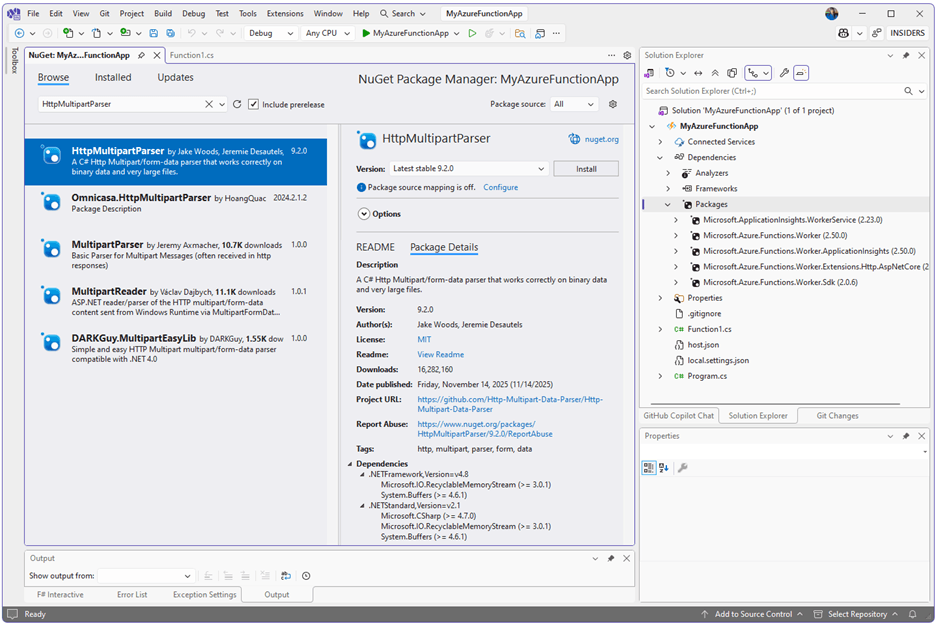
    <content type="text"><![CDATA[<p><span class="featured">Telerik Document Processing Libraries not only let you create RAG resources for your LLMs. They let you integrate those libraries into Microsoft&rsquo;s latest agent-based tools.</span></p><p>In my previous post, I showed how to use Progress <a href="https://www.telerik.com/blogs/creating-reliable-ai-resources-with-telerik-agent-tools-api" target="_blank">Telerik Agent Tools API to create a workflow</a>&nbsp;that loads content into a Resource-Augmented Generation (RAG) resource that can be used with Large Language Models (LLMs). That RAG resource, integrated with an LLM in your application, helps your users get reliable, grounded answers, driven by the content you load into your resource.</p><p>This post shows how to tie your RAG resource to an LLM and integrate the combination in an application that allows users to query the resource&mdash;or any combination of resources that you&rsquo;ve created. Specifically, I&rsquo;ll show how to use Microsoft&rsquo;s current technology for querying an AI resource, the <code>ChatClientAgent</code> object.</p><p>Telerik Agent Tools API provides a collection of toolsets that the chat client agent works with to query your RAG resources. You just have to load your RAG resource(s) into in-memory repositories, attach the appropriate toolsets and pass the resulting tools to a chat client agent. Once you&rsquo;ve done that, you can submit prompts to the agent and get back the results driven by the RAG resources you&rsquo;ve loaded.</p><h2 id="configuring-your-project">Configuring Your Project</h2><p>To create an application that can query your resources, you first need the <a target="_blank" href="http://Telerik.Documents.AI">Telerik.Documents.AI</a>.* NuGet packages that work with the documents in your RAG resource (I covered those <a href="https://www.telerik.com/blogs/creating-reliable-ai-resources-with-telerik-agent-tools-api#configuring-your-project" target="_blank">libraries in my previous post</a>).</p><p>After that, you also need two Microsoft AI NuGet packages:</p><ul><li>Azure.AI.OpenAI</li><li>Microsoft.Agents.AI.OpenAI</li></ul><p>I used an ASP.NET Web API project for my case study so I also needed to add the Microsoft.AspNetCore.OpenApi package.</p><p>As I write this, the Microsoft.Agents.AI.OpenAI package was in &ldquo;release candidate&rdquo; mode which means that, while its interfaces and functionality are fixed, I needed to use the &ldquo;prerelease&rdquo; option when adding the package. Having said that, by the time you read this, the package may have moved to &ldquo;latest stable&rdquo; status (this is a <em>very</em> agile environment).</p><h3 id="configuring-a-chat-client-agent">Configuring a Chat Client Agent</h3><p>Before you create your <code>ChatClientAgent</code> agent object, you need to assemble a set of tools, tied to one or more of your RAG resources. Your first step is to create a repository of the right type (PDF, spreadsheet, Word/Word-related) and load the file that holds your RAG resource into that repository.</p><p>For my case study, I&rsquo;m only working with PDF documents&mdash;what Progress Telerik calls &ldquo;Fixed&rdquo; documents&mdash;so I created a <code>IFixedDocumentRepository pdfRepo</code> repository (all the repositories share a common interface so they all look very much alike).</p><p>Once I created the repository, I loaded my RAG resource using the repository&rsquo;s <code>Import</code> method. The <code>Import</code> method must be passed a <code>FileStream</code> object pointing to the resource and its format which, in this case, was <code>DocumentFormat.PDF</code> (see my previous post for the details on creating that resource).</p><p>Here&rsquo;s the code that loads my case study&rsquo;s repository:</p><pre class=" language-csharp"><code class="prism  language-csharp">IFixedDocumentRepository pdfRepo <span class="token operator">=</span> 
               <span class="token keyword">new</span> <span class="token class-name">InMemoryFixedDocumentRepository</span><span class="token punctuation">(</span> <span class="token keyword">new</span> <span class="token class-name">TimeSpan</span><span class="token punctuation">(</span><span class="token number">0</span><span class="token punctuation">,</span> <span class="token number">2</span><span class="token punctuation">,</span> <span class="token number">0</span><span class="token punctuation">)</span> <span class="token punctuation">)</span><span class="token punctuation">;</span>
<span class="token keyword">if</span> <span class="token punctuation">(</span> Path<span class="token punctuation">.</span><span class="token function">Exists</span><span class="token punctuation">(</span>repoPath<span class="token punctuation">)</span> <span class="token punctuation">)</span>
<span class="token punctuation">{</span>
    <span class="token keyword">string</span> name <span class="token operator">=</span>pdfRepo<span class="token punctuation">.</span><span class="token function">Import</span><span class="token punctuation">(</span>
                                        <span class="token function">FileStream</span><span class="token punctuation">(</span>repoFilePath<span class="token punctuation">,</span> FileMode<span class="token punctuation">.</span>Open<span class="token punctuation">,</span> FileAccess<span class="token punctuation">.</span>Read<span class="token punctuation">)</span><span class="token punctuation">,</span>
                                       DocumentFormat<span class="token punctuation">.</span>PDF<span class="token punctuation">,</span>
         Path<span class="token punctuation">.</span><span class="token function">GetFileNameWithoutExtension</span><span class="token punctuation">(</span>repoFilePath<span class="token punctuation">)</span>
                                     <span class="token punctuation">)</span><span class="token punctuation">;</span>
<span class="token punctuation">}</span>
</code></pre><p>If you provide the name of the file as the third parameter, the <code>Import</code> method returns that name (and returns &ldquo;ImportedDocument&rdquo; if you don&rsquo;t provide the third parameter).</p><p>To support having the chat client agent query my PDF repository, I just need the <code>FixedDocumentContentAgentTools</code> toolset. To create that toolset, I have to pass two parameters: the repository itself and a folder that holds any images used in those PDF documents. When attaching a toolset to a repository, you&rsquo;ll always have to pass the repository parameter, but other toolsets will require different parameters (and, often, no other parameters).</p><p>Once I&rsquo;ve created that toolset, I extract its tools using the toolset&rsquo;s <code>GetTools</code> method and add those tools to a list of <code>AITool</code> objects that will, eventually, be passed to my chat client agent. The code to do that looks like this:</p><pre class=" language-csharp"><code class="prism  language-csharp">pdfReadTools <span class="token operator">=</span> <span class="token keyword">new</span> <span class="token class-name">FixedDocumentContentAgentTools</span><span class="token punctuation">(</span>pdfRepo<span class="token punctuation">,</span> repoPath<span class="token punctuation">)</span><span class="token punctuation">;</span>
List<span class="token operator">&lt;</span>AITool<span class="token operator">&gt;</span> queryTools <span class="token operator">=</span> <span class="token keyword">new</span> <span class="token class-name">List</span><span class="token operator">&lt;</span>AITool<span class="token operator">&gt;</span><span class="token punctuation">(</span> pdfReadTools<span class="token punctuation">.</span><span class="token function">GetTools</span><span class="token punctuation">(</span><span class="token punctuation">)</span> <span class="token punctuation">)</span><span class="token punctuation">;</span>
</code></pre><p>If I wanted to add more tools to my list, I would use the list&rsquo;s <code>AddRange</code> method. As an example, the following code:</p><ul><li>Creates a repository for holding spreadsheets</li><li>Imports a RAG resource file of spreadsheets into that repository using the repository&rsquo;s <code>Import</code> method</li><li>Attaches the <code>SpreadProcessingReadAgentTools</code> toolset (which only needs to be passed a reference to the repository)</li><li>Extracts the toolset&rsquo;s tools and adds them to my list of <code>AITools</code></li></ul><pre class=" language-csharp"><code class="prism  language-csharp">IWorkbookRepository workbookRepo <span class="token operator">=</span> 
              <span class="token keyword">new</span> <span class="token class-name">InMemoryWorkbookRepository</span><span class="token punctuation">(</span> <span class="token keyword">new</span> <span class="token class-name">TimeSpan</span><span class="token punctuation">(</span><span class="token number">0</span><span class="token punctuation">,</span> <span class="token number">2</span><span class="token punctuation">,</span> <span class="token number">0</span><span class="token punctuation">)</span> <span class="token punctuation">)</span><span class="token punctuation">;</span>
workbookRepo<span class="token punctuation">.</span><span class="token function">Import</span><span class="token punctuation">(</span>workbookRepoPath<span class="token punctuation">,</span> DocumentFormat<span class="token punctuation">.</span>XLSX<span class="token punctuation">)</span><span class="token punctuation">;</span>

SpreadProcessingReadAgentTools workbookTools <span class="token operator">=</span> <span class="token keyword">new</span><span class="token punctuation">(</span>workbookRepo<span class="token punctuation">)</span><span class="token punctuation">;</span>

queryTools<span class="token punctuation">.</span><span class="token function">AddRange</span><span class="token punctuation">(</span> workbookTools<span class="token punctuation">.</span><span class="token function">GetTools</span><span class="token punctuation">(</span><span class="token punctuation">)</span> <span class="token punctuation">)</span><span class="token punctuation">;</span>
</code></pre><h2 id="querying-your-repositories">Querying Your Repositories</h2><p>Now that I have a list of tools, I&rsquo;m ready to create an agent. There are three steps to doing that (but you can do it in one line of code).</p><p>First, you need to create a <code>AzureOpenAIClient</code> object which, in its simplest form, just requires passing the URL for the <a target="_blank" href="https://www.telerik.com/blogs/creating-custom-ai-agent-telerik-tools-1-configuring-llm-azure-ollama">LLM deployment you&rsquo;ve created</a> and the authorization key for that deployment.</p><p>One note: Using an authorization key is probably fine for development but, in production, you should be authorizing access using something more robust (e.g., <a target="_blank" href="https://www.telerik.com/blogs/coding-azure-4-securing-web-service-app-service-access-azure-sql-database">Managed Identities in Entra ID</a>). If you&rsquo;re using an authentication key, then you shouldn&rsquo;t hardcode into your application as I do here but move that key to some more secure location (e.g. An <a target="_blank" href="https://www.telerik.com/blogs/coding-azure-12-configuring-azure-key-vault-adding-secrets">Azure Key Vault</a>).</p><p>Once you&rsquo;ve created your <code>AzureOpenAIClient</code> object, your second step is to call its <code>GetChatCient</code> method to configure and return a <code>ChatClient</code> object. The <code>GetChatClient</code> method just needs to be passed the name of the deployment you created for your LLM.</p><p>Finally, you need to call your <code>ChatClient</code> object&rsquo;s <code>AsAIAgent</code> method to configure your agent. You can pass a variety of parameters as part of configuring your agent. I settled for specifying a name for my agent, some instructions on how my agent is to answer questions, and my list of tools:</p><pre class=" language-csharp"><code class="prism  language-csharp">AIAgent agent <span class="token operator">=</span> <span class="token keyword">new</span> <span class="token class-name">AzureOpenAIClient</span><span class="token punctuation">(</span>
                                      <span class="token keyword">new</span> <span class="token class-name">Uri</span><span class="token punctuation">(</span>url<span class="token punctuation">)</span><span class="token punctuation">,</span>
                                      <span class="token keyword">new</span> <span class="token class-name">AzureKeyCredential</span><span class="token punctuation">(</span>apiKey<span class="token punctuation">)</span><span class="token punctuation">)</span>
        <span class="token punctuation">.</span><span class="token function">GetChatClient</span><span class="token punctuation">(</span>deploymentName<span class="token punctuation">)</span>
        <span class="token punctuation">.</span><span class="token function">AsAIAgent</span><span class="token punctuation">(</span>
                instructions<span class="token punctuation">:</span> <span class="token string">"You provide guidance to Azure software developers"</span><span class="token punctuation">,</span>
                name<span class="token punctuation">:</span> <span class="token string">"Async App Expert"</span><span class="token punctuation">,</span>
                tools<span class="token punctuation">:</span> queryTools<span class="token punctuation">)</span><span class="token punctuation">;</span>
</code></pre><p>With your chat client agent in hand, you process your user&rsquo;s prompts by calling the agent&rsquo;s <code>RunAsync</code> method and passing the prompt. The agent will return an <code>AgentResponse</code> object which has a <code>Messages</code> collection holding a list of responses drawn from the repositories associated with your tools (you probably want the first message). The <code>Text</code> property on a message will give you the agent&rsquo;s response.</p><p>Typical code would look like this:</p><pre class=" language-csharp"><code class="prism  language-csharp">AgentResponse response <span class="token operator">=</span> <span class="token keyword">await</span> agent<span class="token punctuation">.</span><span class="token function">RunAsync</span><span class="token punctuation">(</span>"What <span class="token keyword">do</span> NuGet packages <span class="token keyword">do</span> I need&rdquo;<span class="token punctuation">)</span><span class="token punctuation">;</span>
<span class="token keyword">string</span> responseText <span class="token operator">=</span> response<span class="token punctuation">.</span>Messages<span class="token punctuation">[</span><span class="token number">0</span><span class="token punctuation">]</span><span class="token punctuation">.</span>Text<span class="token punctuation">;</span>
</code></pre><h2 id="interacting-with-your-rag-enabled-sources">Interacting with Your RAG-Enabled Sources</h2><p>Of course, you&rsquo;ll also want to create a UI for your users to interact with when querying your RAG resource. In earlier posts, I showed how to leverage Telerik tools to create dedicated user-friendly <a href="https://www.telerik.com/blogs/creating-custom-ai-agent-telerik-tools-4-crafting-interactive-blazor-ui" target="_blank">UIs in Blazor</a>&nbsp;or <a href="https://www.telerik.com/blogs/creating-custom-ai-agent-telerik-tools-5-creating-interactive-ui-javascript" target="_blank">JavaScript</a>. Alternatively, instead of creating a UI dedicated to your RAG-enabled resource, you might want to more tightly <a href="https://www.telerik.com/blogs/creating-custom-ai-agent-telerik-tools-6-embedding-conversational-invisible-agents" target="_blank">integrate your resource into a JavaScript application&rsquo;s UI</a>.&nbsp;</p><p>But, really, it&rsquo;s up to you how you&rsquo;ll use your RAG resource to support your users.</p><aside><hr data-sf-ec-immutable="" /><div class="row"><div class="col-4 u-normal-full u-small-mb0"><h4 class="u-fs20 u-fw5 u-lh125 u-mb0">Get access to these tools and more</h4></div><div class="col-8"><p class="u-fs16 u-mb0">The free 30-day trial of <a target="_blank" href="https://www.telerik.com/devcraft">Telerik DevCraft</a> lets you really kick the tires for yourself. <a target="_blank" href="https://www.telerik.com/try/devcraft-ultimate">Try it today!</a></p></div></div></aside><img src="https://feeds.telerik.com/link/23072/17349395.gif" height="1" width="1"/>]]></content>
  </entry>
  <entry>
    <id>urn:uuid:ce866956-4550-4c69-a546-7ae35e4fdbc6</id>
    <title type="text">Creating Reliable AI Resources with Telerik Agent Tools API</title>
    <summary type="text">The RAG resources you create to use with your LLMs are strategic resources, just like your organization’s databases. Telerik Agent Tools let you create the custom tools for managing those resources.</summary>
    <published>2026-05-20T13:36:52Z</published>
    <updated>2026-06-03T20:39:28Z</updated>
    <author>
      <name>Peter Vogel </name>
    </author>
    <link rel="alternate" href="https://feeds.telerik.com/link/23072/17344826/creating-reliable-ai-resources-telerik-agent-tools-api"/>
    <content type="text"><![CDATA[<p><span class="featured">The RAG resources you create to use with your LLMs are strategic resources, just like your organization&rsquo;s databases. Telerik Agent Tools let you create the custom tools for managing those resources.</span></p><p>Like your organization&rsquo;s databases, you should regard your AI resources as strategic, <em>organizational</em> resources. And, like the data in your organization&rsquo;s databases, you need to manage the content used by your AI resources to enable those resources give you reliable, grounded answers. Telerik Agent Tools API lets gives you the tools for automating the process of creating and maintaining the content in your AI resources.</p><p>In an earlier post, I showed how to use Progress Telerik <a target="_blank" href="https://www.telerik.com/document-processing-libraries">Document Processing Libraries</a> (DPL) to create an <a target="_blank" href="https://www.telerik.com/blogs/creating-custom-ai-agent-telerik-tools-1-configuring-llm-azure-ollama">AI resource with content from existing documents and then tie that resource to a Large Language Model</a> (LLM) that your users could query.</p><p>Tying an LLM to your content creates a <a target="_blank" href="https://www.telerik.com/blogs/understanding-rag-retrieval-augmented-generation">Resource Augmented Generation</a> (RAG) resource that helps get your users grounded answers driven by the content you load into your resource. And using the DPL toolset is a great solution when you&rsquo;re building an application that creates a RAG resource &ldquo;as needed.&rdquo;</p><p>But if you want to reliably create/update a RAG resource that will be used (and reused) by multiple applications and multiple users, then you need the Telerik Agent Tools API. Once you have a reliable process for creating your RAG resource, the Agent Tools API also lets you then use that resource to support your users by integrating with Microsoft&rsquo;s latest toolset for responding to your user&rsquo;s prompts.</p><p>In this post, I&rsquo;m going to cover how to construct an automated workflow for creating a RAG resource that can be used across applications and users. In my next post, I&rsquo;ll cover how to use that resource with the LLM of your choice.</p><h2 id="building-a-rag-resource-workflow">Building a RAG Resource Workflow</h2><p>You can use the Tools API to create an interactive application that lets you manage the documents that make up your resource&rsquo;s content. However, for this post, I&rsquo;m going to assume a simpler process than that (though I&rsquo;ll cover all the tools you&rsquo;d need for an interactive solution).</p><p>For this post, I&rsquo;m going to assume there&rsquo;s a folder that holds all the documents with the content that should be in my RAG resource (which might be Word documents, spreadsheets, PDF, text files&mdash;basically, all the content that you can load with Telerik DPL tools). Users control what goes into my resource by adding and removing documents from that folder.</p><p>In this case study, then, I build my RAG resource by running a batch program that reads all the documents in the folder, adds them all to a RAG resource in memory, and then saves the new resource, replacing any existing version with a new, updated version.</p><h2 id="configuring-your-project">Configuring Your Project</h2><p>To start building an application to manage your RAG resource, you must first add the Telerik.Documents.AI.Tools.Core NuGet package to your project. After that, you need the specific Telerik packages that support the document types that you&rsquo;ll add to your RAG resource.</p><p>For my case study, I&rsquo;m just going to use PDF documents, so I just need the &ldquo;Fixed&rdquo; packages:</p><pre><code>- Telerik.Documents.AI.Tools.Fixed.Core
- Telerik.Documents.AI.AgentTools.Fixed 
</code></pre><p>If you&rsquo;re working with spreadsheets, you&rsquo;ll want to add the equivalent Spreadsheet packages:<br />- Telerik.Documents.AI.Tools.Spreadsheet.Core<br />-Telerik.Documents.AI.AgentTools.Spreadsheet)</p><p>To support Microsoft Word, HTML and text documents, you also need to add the Telerik.Documents.AI.Tools.Flow.Core package.</p><p>And, of course, there&rsquo;s no reason you couldn&rsquo;t make your life simpler by adding all the <a target="_blank" href="http://Telerik.Documents.AI">Telerik.Documents.AI</a>.* libraries to your application, even if you don&rsquo;t need to use them all right now. In this case study, I also didn&rsquo;t take advantage of the some of the other packages available&mdash;the Telerik.Documents.AI.AgentTools.Conversion package that handles conversions between document types, for example.</p><h2 id="building-your-rag-resource">Building Your RAG Resource</h2><p>The process for creating a RAG resource begins with creating an in-memory repository which holds your documents. A repository can hold one of three categories of documents: spreadsheets, PDF documents or Word and Word-related documents.</p><p>In my case study, I&rsquo;m only going to work with PDF documents (which Progress Telerik classifies as &ldquo;Fixed&rdquo; documents), so I created an <code>inMemoryFixedDocumentRepository</code> object and then stored a reference to that repository in an <code>IFixedDocumentRepository</code> variable.</p><p>The code to do that looks like this:</p><pre class=" language-csharp"><code class="prism  language-csharp">IFixedDocumentRepository pdfRepo <span class="token operator">=</span> 
          <span class="token keyword">new</span> <span class="token class-name">InMemoryFixedDocumentRepository</span><span class="token punctuation">(</span> <span class="token keyword">new</span> <span class="token class-name">TimeSpan</span><span class="token punctuation">(</span><span class="token number">0</span><span class="token punctuation">,</span> <span class="token number">2</span><span class="token punctuation">,</span> <span class="token number">0</span><span class="token punctuation">)</span> <span class="token punctuation">)</span><span class="token punctuation">;</span>
</code></pre><p>All of the three types of repositories look very much alike though (they all share a common <code>IDocumentRepository</code> interface, for example). As a result, working with other document types is similar.</p><p>If, for example, you were loading spreadsheet files (&ldquo;Workbook&rdquo; documents), you&rsquo;d use the <code>InMemoryWorkbookRepository</code> object and the <code>IWorkbookRepository</code> interface. For Word and Word-related documents (&ldquo;Flow&rdquo; documents), you&rsquo;d use the <code>InMemoryFlowDocumentRepository</code> object and the <code>IFlowDocumentRepository</code> interface.</p><p>Repositories have some built-in functionality (they all include a <code>ListDocuments</code> method that returns a list of documents in the repository, for example). You will, however, want to extend your repository by attaching one or more toolsets containing tools that add additional functionality to your repository.</p><p>For my case study, I just needed to be able to import documents into an empty repository so the only toolset I attached was the <code>FixedFileManagementAgentTools</code> toolset that supports working with a PDF repository and has import (and export) methods for individual documents. To that toolset looks like this, I pass a reference to my repository, I pass a reference to my repository and the path to the folder containing the documents that the tools will work with:</p><pre class=" language-csharp"><code class="prism  language-csharp">FixedFileManagementAgentTools pdfFileTools <span class="token operator">=</span> 
            <span class="token keyword">new</span> <span class="token class-name">FixedFileManagementAgentTools</span><span class="token punctuation">(</span>pdfRepo<span class="token punctuation">,</span> repoFolderPath<span class="token punctuation">)</span><span class="token punctuation">;</span>
</code></pre><p>You can add additional toolsets if you need additional functionality or need to work with more folders. If, for example, I wanted to work with PDF forms, I could add the <code>FixedDocumentFormAgentTools</code> toolset to my repository. When creating a toolset, you&rsquo;ll always need to pass a reference to the repository the toolset will be attached to, but other parameters (if any) will vary from one toolset to another.</p><h2 id="managing-repositories-with-registries">Managing Repositories with Registries</h2><p>If you&rsquo;re going to be working with multiple repositories in your workflow, you might want to create a registry to simplify managing your repositories. In my case study, for example, where I&rsquo;m potentially loading several different kinds of files, I could end up supporting all three types of repositories (PDF files, spreadsheets, Word and Word-related documents)&mdash;creating a registry simplifies switching between the different types of repositories.</p><p>Registries are created using the <code>DocumentRepositoryRegistry</code> object and support registering one repository of each document category using their <code>RegisterRespository</code> method.</p><p>You can then retrieve the repository you want from a registry by using the registry&rsquo;s <code>TryGetRepository</code> method, passing two parameters: the document type of the repository you want and an <code>out</code> parameter of type <code>IDocumentRepository</code>. Like other TryGet* methods, the <code>TryGetRepository</code> method returns return true if the method finds the repository you want and false if the method does not (the actual repository, if found, is loaded into the method&rsquo;s second, <code>out</code> parameter).</p><p>The following code creates a registry, registers my PDF repository using the <code>RegisterRepository</code> method and then immediately retrieves the repository using the registry&rsquo;s <code>TryGetRepository</code> method. Because the repository is returned using the common <code>IDocumentRepository</code> interface type, I cast the returned reference to the <code>IFixedDocumentRepository</code> type before working with it:</p><pre class=" language-csharp"><code class="prism  language-csharp">DocumentRepositoryRegistry registry <span class="token operator">=</span> <span class="token keyword">new</span><span class="token punctuation">(</span><span class="token punctuation">)</span><span class="token punctuation">;</span>

registry<span class="token punctuation">.</span><span class="token function">RegisterRepository</span><span class="token punctuation">(</span>DocumentType<span class="token punctuation">.</span>FixedDocument<span class="token punctuation">,</span> pdfRepo<span class="token punctuation">)</span><span class="token punctuation">;</span>

<span class="token keyword">if</span> <span class="token punctuation">(</span>registry<span class="token punctuation">.</span><span class="token function">TryGetRepository</span><span class="token punctuation">(</span>DocumentType<span class="token punctuation">.</span>FixedDocument<span class="token punctuation">,</span> 
                                                           <span class="token keyword">out</span> IDocumentRepository<span class="token operator">?</span> repo<span class="token punctuation">)</span> <span class="token punctuation">)</span>
<span class="token punctuation">{</span>
     IFixedDocumentRepository fixedRepo <span class="token operator">=</span> <span class="token punctuation">(</span>IFixedDocumentRepository<span class="token punctuation">)</span> repo<span class="token punctuation">;</span>
    <span class="token comment">//&hellip;work with the fixedRepo repository</span>
<span class="token punctuation">}</span>
</code></pre><p>You&rsquo;ll also want to create a registry if, as part of your workflow, you want to support converting documents between formats or merging multiple documents. The toolsets that support that are <code>ConvertDocumentsAgentTool</code> and <code>MergeDocumentsAgentTool</code> toolsets and they attach to registries rather than repositories.</p><h2 id="loading-saving-and-retrieving-your-repository">Loading, Saving and Retrieving Your Repository</h2><p>Adding a document to a repository is easy: Just call the appropriate import method on the appropriate toolset that&rsquo;s tied to the repository you want to update.</p><p>To add a PDF document to my repository, for example, I&rsquo;d use the <code>ImportFixedDocument</code> method on my <code>FixedFileManagementAgentTools</code> toolset, tied to my PDF repository. To use the <code>ImportFixedDocument</code> method, I pass the path to the document I want to load and its document format (e.g., PDF, XLSX, etc.). Optionally, I can pass a name for the document which will be returned as part of the <code>ListDocuments</code> method.</p><p>Which means that importing a PDF document into my repository would look like this:</p><pre class=" language-csharp"><code class="prism  language-csharp">CallToolResponse res <span class="token operator">=</span>
          pdfRepoTools<span class="token punctuation">.</span><span class="token function">ImportFixedDocument</span><span class="token punctuation">(</span>documentPath<span class="token punctuation">,</span> 
                                                                                         DocumentFormat<span class="token punctuation">.</span>PDF<span class="token punctuation">,</span>
                                                                                          Path<span class="token punctuation">.</span><span class="token function">GetFileNameWithoutExtension</span><span class="token punctuation">(</span>documentPath<span class="token punctuation">)</span>
                                                                                        <span class="token punctuation">)</span><span class="token punctuation">;</span>
</code></pre><p>The <code>CallToolResponse</code> object&rsquo;s <code>IsError</code> property will be set to <code>true</code> if your import succeeds (and the <code>Message</code> property will contain additional information regardless of whether the call succeeds or fails).</p><p>Once I&rsquo;ve added all the documents from my folder to my repository, I can save my repository with all of its content to a single file using my repository&rsquo;s <code>MergeAndExport</code> method. The <code>MergeAndExport</code> method requires three parameters:</p><ul><li>An array of the <code>id</code> property for each of the documents in the repository. You can use that array both to control which documents are exported and the merge order of the documents. I didn&rsquo;t bother and just used a LINQ <code>Select</code> method to retrieve all the <code>id</code> property values.</li><li>A <code>FileStream</code> object that points to your repository file (I set this up to overwrite my repository every time).</li><li>The document type for the file (<code>PDF</code>, in my case).</li></ul><p>You must close your <code>FileStream</code> after you finish exporting your documents. As a result, the code to export my repository of PDF documents would look like this:</p><pre class=" language-csharp"><code class="prism  language-csharp"><span class="token keyword">string</span><span class="token punctuation">[</span><span class="token punctuation">]</span> ids <span class="token operator">=</span> pdfRepo<span class="token punctuation">.</span><span class="token function">ListDocuments</span><span class="token punctuation">(</span><span class="token punctuation">)</span><span class="token punctuation">.</span><span class="token function">Select</span><span class="token punctuation">(</span> doc <span class="token operator">=</span><span class="token operator">&gt;</span> doc<span class="token punctuation">.</span>Id <span class="token punctuation">)</span><span class="token punctuation">.</span><span class="token function">ToArray</span><span class="token punctuation">(</span><span class="token punctuation">)</span><span class="token punctuation">;</span>
FileStream fs <span class="token operator">=</span>  <span class="token keyword">new</span> <span class="token class-name">FileStream</span><span class="token punctuation">(</span>repoFilePath<span class="token punctuation">,</span> FileMode<span class="token punctuation">.</span>CreateNew<span class="token punctuation">)</span><span class="token punctuation">,</span>
                                 
repo<span class="token punctuation">.</span><span class="token function">MergeAndExport</span><span class="token punctuation">(</span>ids<span class="token punctuation">,</span>
                                                fs<span class="token punctuation">,</span>  
                                                DocumentFormat<span class="token punctuation">.</span>PDF<span class="token punctuation">)</span><span class="token punctuation">;</span>
fs<span class="token punctuation">.</span><span class="token function">Close</span><span class="token punctuation">(</span><span class="token punctuation">)</span>
</code></pre><p>You can now tie that file to an LLM using Microsoft <code>ChatClientAgent</code> object to let your users query your RAG resource. I&rsquo;ll walk through how to do that in my next post.</p><aside><hr data-sf-ec-immutable="" /><div class="row"><div class="col-4 u-normal-full u-small-mb0"><h4 class="u-fs20 u-fw5 u-lh125 u-mb0">Get Access to These Tools and More</h4></div><div class="col-8"><p class="u-fs16 u-mb0">The free 30-day trial of <a target="_blank" href="https://www.telerik.com/devcraft">Telerik DevCraft</a> lets you really kick the tires for yourself. <a target="_blank" href="https://www.telerik.com/try/devcraft-ultimate">Try it today!</a></p></div></div></aside><img src="https://feeds.telerik.com/link/23072/17344826.gif" height="1" width="1"/>]]></content>
  </entry>
  <entry>
    <id>urn:uuid:76fee4ac-a66f-4d26-a5ac-69295f6514a1</id>
    <title type="text">Creating a Custom AI Agent with Telerik Tools 6: Embedding Conversational and Invisible Agents</title>
    <summary type="text">Different kinds of AI-enabled applications need different UIs. Progress has the components you need for all of them.</summary>
    <published>2026-05-13T12:09:46Z</published>
    <updated>2026-06-03T20:39:28Z</updated>
    <author>
      <name>Peter Vogel </name>
    </author>
    <link rel="alternate" href="https://feeds.telerik.com/link/23072/17339813/creating-custom-ai-agent-telerik-tools-6-embedding-conversational-invisible-agents"/>
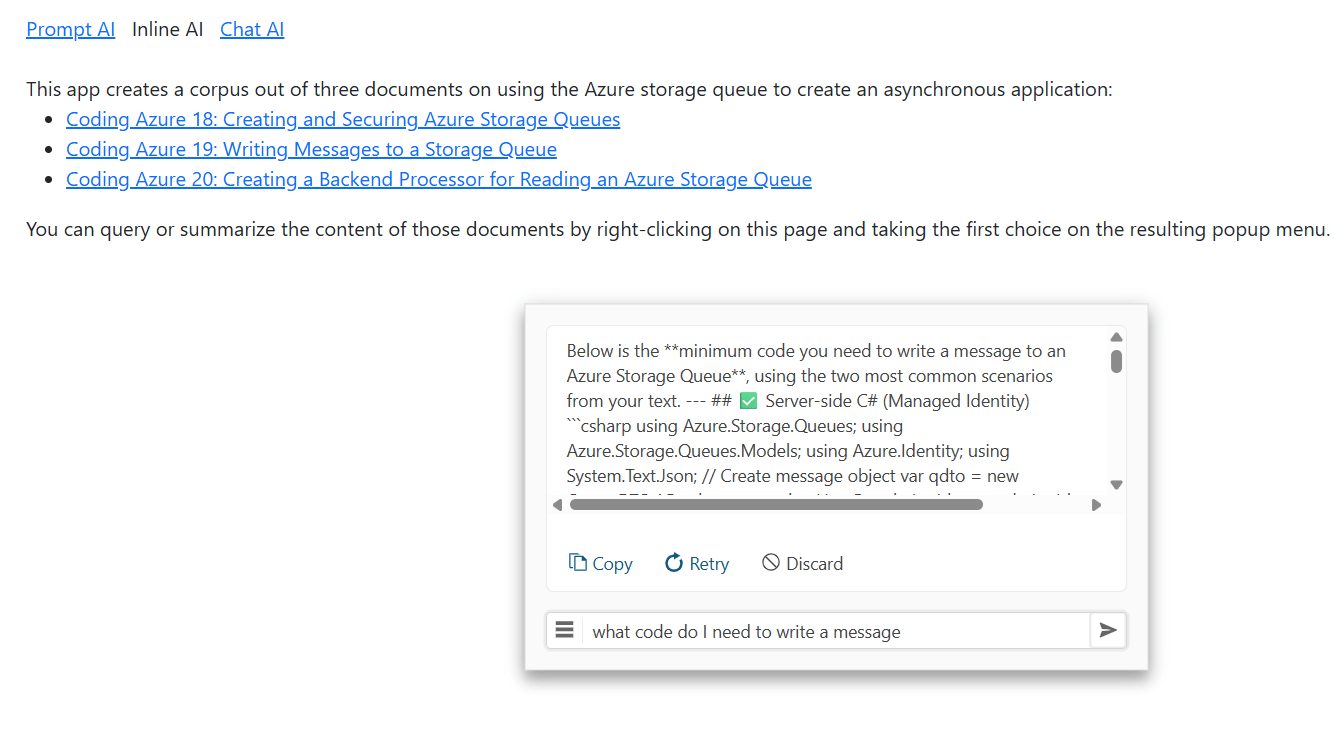
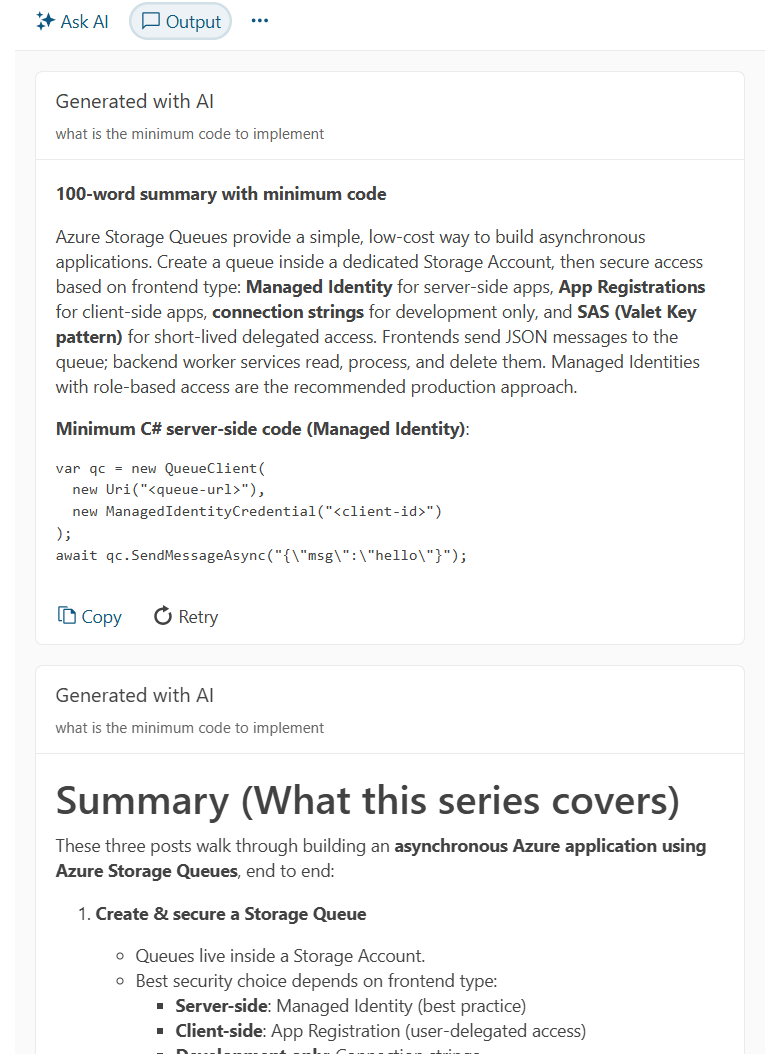
    <content type="text"><![CDATA[<p><span class="featured">For some AI-enabled applications, your user will want to have a conversation with your AI agent. Other times, your user will want your agent to stay out of the way until needed. With the right UI component, you can handle both kinds of applications.</span></p><p>By themselves, AI agents can be useful. Integrated into an application, however, a custom AI agent can provide users with the ability to navigate the application and to better understand the business area that the application is part of.</p><p>Progress provides multiple tools for embedding AI agents into your application&rsquo;s UI. In previous posts, for example, I&rsquo;ve looked at Progress Telerik and Kendo UI AI Prompt components in JavaScript [in post 5](Creating a Custom AI Agent with Telerik Tools: Creating an Interactive UI in JavaScript) and Blazor [in post 4](Creating a Custom AI Agent with Telerik Tools: Crafting an Interactive Blazor UI). In this post, I&rsquo;m going to address two different UI scenarios where the AI Prompt might not be your best choice.</p><p>The first scenario is when your AI agent <em>isn&rsquo;t</em> the point of your application&mdash;it&rsquo;s just a useful tool that your users can invoke when they need it. The AI Prompt component isn&rsquo;t necessarily your best choice there because, by default, the AI Prompt takes over a significant portion of your application&rsquo;s UI (though you can customize that using the AI Prompt&rsquo;s various templates). Out of the box, however, the <a target="_blank" href="https://www.telerik.com/kendo-jquery-ui/documentation/controls/inline-aiprompt/overview">Inline AIPrompt</a> provides a compact interface that users can bring up when they need your agent and, equally important, dismiss it when they don&rsquo;t need your agent.</p><p>The AI Prompt component also assumes a specific workflow, with the user alternatively entering a prompt and viewing the current output from your agent (along with a history of responses to previous prompts). But when the interaction with your AI agent <em>is</em> the point of your application, you might want to create more natural back-and-forth conversational interaction between your user and the agent. The Telerik Chat component will let you do that, again, out of the box.</p><p>I&rsquo;m going to show how to use both in this post.</p><p>By the way (which means you can skip this paragraph&mdash;it&rsquo;s all background): In this post, I&rsquo;m assuming the existence of a custom AI agent that provides application-specific support to your users. That means that you&rsquo;ve [selected a Large Language Model](reference to Creating a Custom AI Agent with Telerik Tools: Configuring an LLM for Azure or Ollama) (LLM) for processing your user&rsquo;s input, loaded your own content into your [custom AI agent](reference to Creating a Custom AI Agent with Telerik Tools: Loading and Accessing Your Agent&rsquo;s Content) (about 10 lines of code) and written another 10 lines of code to tie your agent into your application. For a JavaScript application, you&rsquo;ll need to wrap that code in a web service (I covered the, literally, two lines of code to make that happen at the start of a [post on using the AI Prompt component from JavaScript](reference to Creating a Custom AI Agent with Telerik Tools: Creating an Interactive UI in JavaScript)) and write the five lines of JavaScript code to all your agent. That probably sounds like a lot. It is, however, only about two dozen lines of code to give you an AI-enabled application with domain-specific knowledge.</p><h2 id="letting-the-user-access-your-ai-agent-when-they-want-it">Letting the User Access Your AI Agent When They Want It</h2><p>I&rsquo;m going to start with the scenario where you want to enable your user to invoke your AI agent when they need it and ignore the agent the rest of the time. The Inline AIPrompt lets you do that: implement a minimal user interface that pops up when the user needs to send a prompt to your agent and then review your agent&rsquo;s response:</p><p><img src="https://d585tldpucybw.cloudfront.net/sfimages/default-source/blogs/2026/2026-03/aiprompt-javascript-7---inline-aiprompt.png?sfvrsn=9294e5a3_2" alt="A screenshot of a Web page discussing creating asynchronous applications with Azure Storage queues with a dialog box hovering over it. The dialog box has a textbox at the bottom where the user has typed in a question (“What code is required to write a message?”). Above the textbox, a panel displays the code." /></p><p>I&rsquo;m going to use the <a target="_blank" href="https://www.telerik.com/kendo-jquery-ui/jquery-inline-ai-prompt">Kendo UI for jQuery Inline AIPrompt</a> in this case study, but there are also versions of the component for <a target="_blank" href="https://www.telerik.com/kendo-react-ui/components/conversationalui/inline-ai-prompt/getting-started">React</a>, <a target="_blank" href="https://www.telerik.com/kendo-angular-ui/angular-inline-ai-prompt">Angular</a>, <a target="_blank" href="https://www.telerik.com/aspnet-core-ui/inline-ai-prompt">ASP.NET Core</a>, <a target="_blank" href="https://www.telerik.com/aspnet-mvc/inline-ai-prompt">ASP.NET MVC</a> and <a target="_blank" href="https://www.telerik.com/blazor-ui/documentation/components/inlineaiprompt/overview">Blazor</a>.</p><h3 id="configuring-the-inline-ai-prompt">Configuring the Inline AI Prompt</h3><p>Your first step is to add the Inline AIPrompt to your webpage with a <code>&lt;div&gt;</code> element that has its <code>id</code> attribute set to some name (I used <code>customAgent</code>):</p><pre class=" language-html"><code class="prism  language-html"><span class="token tag"><span class="token tag"><span class="token punctuation">&lt;</span>div</span> <span class="token attr-name">id</span><span class="token attr-value"><span class="token punctuation">=</span><span class="token punctuation">"</span>customAgent<span class="token punctuation">"</span></span> <span class="token punctuation">/&gt;</span></span>
</code></pre><p>You can place that <code>&lt;div&gt;</code> element wherever you want in your page&rsquo;s body (I put it near the top of my application&rsquo;s HTML, but it really doesn&rsquo;t matter).</p><p>Next, you need to configure your Inline AIPrompt component. You do that by writing a jQuery command to find your <code>&lt;div&gt;</code> element, passing the name you put in the <code>&lt;div&gt;</code> element&rsquo;s <code>id</code> attribute.</p><p>You then call the <code>kendoInlineAIPrompt</code> function from the retrieved element, passing a configuration object. The <code>kendoInlineAIPrompt</code> function returns an object and you then call that object&rsquo;s <code>data</code> function, passing the string <code>kendoInlineAIPrompt</code>. That, in turn, will return an object you can use to manage the component.</p><p>You only want to do this configuration once, so you should tuck that code into jQuery&rsquo;s ready function. That means you&rsquo;ll end up with code like this to set up your component:</p><pre class=" language-javascript"><code class="prism  language-javascript"><span class="token function">$</span><span class="token punctuation">(</span> <span class="token punctuation">(</span><span class="token punctuation">)</span> <span class="token operator">=&gt;</span>
<span class="token punctuation">{</span>
  <span class="token function">$</span><span class="token punctuation">(</span><span class="token string">"#customAgent"</span><span class="token punctuation">)</span><span class="token punctuation">.</span><span class="token function">kendoInlineAIPrompt</span><span class="token punctuation">(</span>
    <span class="token punctuation">{</span>
      <span class="token comment">//&hellip;configuration object</span>
     <span class="token punctuation">}</span><span class="token punctuation">)</span><span class="token punctuation">.</span><span class="token function">data</span><span class="token punctuation">(</span><span class="token string">"kendoInlineAIPrompt"</span><span class="token punctuation">)</span><span class="token punctuation">;</span>
<span class="token punctuation">}</span>
</code></pre><p>In the customization object that you pass to the <code>kendoInlineAIPrompt</code> function, you need to set two properties on the object:</p><ul><li><code>isStreaming</code>: Set this to <code>true</code> to let you update the component&rsquo;s UI with the output from your custom AI agent</li><li><code>promptRequest</code>: Set this to a function to be called when your user enters a prompt and clicks the &ldquo;go&rdquo; button in the Inline AIPrompt&rsquo;s UI</li></ul><p>By the way, you don&rsquo;t have to put a function in the <code>promptRequest</code> property. You can configure the Inline AIPrompt to <a target="_blank" href="https://www.telerik.com/kendo-jquery-ui/documentation/controls/inline-aiprompt/get-started">call an LLM directly</a> by setting your configuration object&rsquo;s <code>service</code> and <code>systemPrompt</code> properties. Using the <code>promptRequest</code> function, however, simplifies calling a custom AI agent.</p><p>A minimal implementation might look like this:</p><pre class=" language-javascript"><code class="prism  language-javascript"><span class="token keyword">let</span> ca <span class="token operator">=</span> <span class="token function">$</span><span class="token punctuation">(</span><span class="token string">"#customAgent"</span><span class="token punctuation">)</span><span class="token punctuation">.</span><span class="token function">kendoInlineAIPrompt</span><span class="token punctuation">(</span>
 <span class="token punctuation">{</span>
   isStreaming<span class="token punctuation">:</span> <span class="token boolean">true</span><span class="token punctuation">,</span>
   promptRequest<span class="token punctuation">:</span> <span class="token keyword">async</span> <span class="token keyword">function</span> <span class="token punctuation">(</span>req<span class="token punctuation">)</span> <span class="token punctuation">{</span>
     <span class="token comment">//&hellip;function code           </span>
   <span class="token punctuation">}</span>
 <span class="token punctuation">}</span><span class="token punctuation">)</span><span class="token punctuation">.</span><span class="token function">data</span><span class="token punctuation">(</span><span class="token string">"kendoInlineAIPrompt"</span><span class="token punctuation">)</span><span class="token punctuation">;</span>         
</code></pre><p>Your <code>promptRequest</code> function will be passed a parameter. From that parameter, you can retrieve the user&rsquo;s prompt by reading a property cleverly called <code>prompt</code>. Once you have the user&rsquo;s prompt, you can pass it to your agent and catch your agent&rsquo;s response. In my case, that means passing the prompt to my JavaScript function that calls my AI agent&rsquo;s web service.</p><p>Once you get a response from your agent, you need to add it to the Inline AIPrompt&rsquo;s UI. To do that, you just need call the component&rsquo;s <code>updatePromptOutputContent</code> function, passing the output from your agent.</p><p>Since the JavaScript function that calls my agent is called <code>asyncAppAgent</code> and returns the agent&rsquo;s response as a string ready to add to the Inline AIPrompt&rsquo;s UI, my <code>promptResult</code> function is a single line of code (my web service function is asynchronous so I have to use the <code>await</code> keyword when calling it and flag the function as <code>async</code>):</p><pre class=" language-javascript"><code class="prism  language-javascript">ca <span class="token operator">=</span> <span class="token function">$</span><span class="token punctuation">(</span><span class="token string">"#customAgent"</span><span class="token punctuation">)</span><span class="token punctuation">.</span><span class="token function">kendoInlineAIPrompt</span><span class="token punctuation">(</span>
  <span class="token punctuation">{</span>
    isStreaming<span class="token punctuation">:</span> <span class="token boolean">true</span><span class="token punctuation">,</span>
    promptRequest<span class="token punctuation">:</span> <span class="token keyword">async</span> <span class="token keyword">function</span><span class="token punctuation">(</span>req<span class="token punctuation">)</span> 
      <span class="token punctuation">{</span>
        <span class="token keyword">this</span><span class="token punctuation">.</span><span class="token function">updatePromptOutputContent</span><span class="token punctuation">(</span>                                                       
          <span class="token keyword">await</span> <span class="token function">asyncAppAgent</span><span class="token punctuation">(</span>req<span class="token punctuation">.</span>prompt<span class="token punctuation">)</span><span class="token punctuation">)</span><span class="token punctuation">;</span>
      <span class="token punctuation">}</span>
  <span class="token punctuation">}</span><span class="token punctuation">)</span><span class="token punctuation">.</span><span class="token function">data</span><span class="token punctuation">(</span><span class="token string">"kendoInlineAIPrompt"</span><span class="token punctuation">)</span><span class="token punctuation">;</span> 
</code></pre><p>There&rsquo;s more you can do with the component (for example, as with the AI Prompt component, you can give the user some predefined commands to use with the component). But before you can do any of that&mdash;because, by default, the component isn&rsquo;t visible&mdash;you need give your users a way to display the Inline AIPrompt when they want it.</p><h3 id="opening-the-prompt">Opening the Prompt</h3><p>Since I&rsquo;m trying to minimize the UI footprint for my agent&rsquo;s interface, I decided to use the Kendo UI for <a target="_blank" href="https://www.telerik.com/kendo-jquery-ui/documentation/controls/menu/contextmenu/overview">jQuery Context Menu</a> to let the user invoke my prompt (you could just have a button on your page that opens Inline AIPrompt).</p><p>Since I was using the context menu (which implies giving the user choices), I also decided to give the user the ability to choose between two custom agents:</p><ul><li>One agent would be loaded with content about using the application (e.g., the application&rsquo;s user guide, enhanced with a download of questions and responses from the application&rsquo;s end user forum)</li><li>The other agent would be loaded with content about the application&rsquo;s topic area (in my case, that topic area is creating an asynchronous application and the content is from another series of <a target="_blank" href="https://www.telerik.com/blogs/coding-azure-18-creating-securing-azure-storage-queues">posts on Coding Azure</a> I wrote).</li></ul><p>The first step in using the context menu is to add a <code>&lt;ul&gt;</code> element anywhere on your page and set its <code>id</code> attribute to some name (in this case, I picked <code>selectAgentMenu</code>).</p><p>Within that <code>&lt;ul&gt;</code> element, you use <code>&lt;li&gt;</code> elements to define your popup menu&rsquo;s choices. I also (for reasons that will become obvious), assigned values to the <code>&lt;li&gt;</code> elements&rsquo; <code>name</code> attributes:</p><pre class=" language-html"><code class="prism  language-html"><span class="token tag"><span class="token tag"><span class="token punctuation">&lt;</span>ul</span> <span class="token attr-name">id</span><span class="token attr-value"><span class="token punctuation">=</span><span class="token punctuation">"</span>selectAgentMenu<span class="token punctuation">"</span></span><span class="token punctuation">&gt;</span></span>
  <span class="token tag"><span class="token tag"><span class="token punctuation">&lt;</span>li</span> <span class="token attr-name">name</span><span class="token attr-value"><span class="token punctuation">=</span><span class="token punctuation">"</span>Ask<span class="token punctuation">"</span></span><span class="token punctuation">&gt;</span></span>Ask about asynchronouse processing<span class="token tag"><span class="token tag"><span class="token punctuation">&lt;/</span>li</span><span class="token punctuation">&gt;</span></span>
  <span class="token tag"><span class="token tag"><span class="token punctuation">&lt;</span>li</span> <span class="token attr-name">name</span><span class="token attr-value"><span class="token punctuation">=</span><span class="token punctuation">"</span>Help<span class="token punctuation">"</span></span><span class="token punctuation">&gt;</span></span>Ask about using this application<span class="token tag"><span class="token tag"><span class="token punctuation">&lt;/</span>li</span><span class="token punctuation">&gt;</span></span>
<span class="token tag"><span class="token tag"><span class="token punctuation">&lt;/</span>ul</span><span class="token punctuation">&gt;</span></span>
</code></pre><p>Next, you need to configure your content menu, this time by calling the <code>kendoContextMenu</code> function on the <code>&lt;ul&gt;</code> element that defines your menu. In the configuration object you pass to this function, you must set its <code>select</code> property to a function that will be called when a user clicks a choice in the menu. That function is passed a parameter with an <code>item</code> property that holds the <code>&lt;li&gt;</code> element that defined the menu choice the user selected.</p><p>In this code, I use the element&rsquo;s <code>attr</code> function to retrieve the element&rsquo;s <code>name</code> attribute and use that value to set a variable I called mode. Later on, I&rsquo;ll use that mode variable in my Inline AIPrompt&rsquo;s <code>promptRequest</code> function to call the right AI agent. I then use the variable created when I configured my Inline AI Prompt component to display the component by calling the its <code>open</code> method:</p><pre class=" language-javascript"><code class="prism  language-javascript"><span class="token keyword">let</span> mode <span class="token operator">=</span> <span class="token string">""</span><span class="token punctuation">;</span>
<span class="token function">$</span><span class="token punctuation">(</span><span class="token keyword">function</span> <span class="token punctuation">(</span><span class="token punctuation">)</span> 
<span class="token punctuation">{</span>
  <span class="token function">$</span><span class="token punctuation">(</span><span class="token string">"#selectAgentMenu"</span><span class="token punctuation">)</span><span class="token punctuation">.</span><span class="token function">kendoContextMenu</span><span class="token punctuation">(</span>
    <span class="token punctuation">{</span>
      select<span class="token punctuation">:</span> <span class="token keyword">function</span> <span class="token punctuation">(</span>e<span class="token punctuation">)</span> <span class="token punctuation">{</span>
        mode <span class="token operator">=</span> <span class="token function">$</span><span class="token punctuation">(</span>e<span class="token punctuation">.</span>item<span class="token punctuation">)</span><span class="token punctuation">.</span><span class="token function">attr</span><span class="token punctuation">(</span><span class="token string">"name"</span><span class="token punctuation">)</span><span class="token punctuation">;</span>                                                
        ca<span class="token punctuation">.</span><span class="token function">open</span><span class="token punctuation">(</span><span class="token punctuation">)</span><span class="token punctuation">;</span>           
      <span class="token punctuation">}</span>
<span class="token punctuation">}</span><span class="token punctuation">)</span><span class="token punctuation">;</span>
</code></pre><p>With my context menu in place, I can enhance my <code>promptRequest</code> function to pick the AI agent, based on the user&rsquo;s menu choice:</p><pre class=" language-javascript"><code class="prism  language-javascript">promptRequest<span class="token punctuation">:</span> <span class="token keyword">async</span> <span class="token keyword">function</span><span class="token punctuation">(</span>req<span class="token punctuation">)</span> <span class="token punctuation">{</span>
  <span class="token keyword">switch</span> <span class="token punctuation">(</span>mode<span class="token punctuation">)</span>
  <span class="token punctuation">{</span>
    <span class="token keyword">case</span> <span class="token string">"Ask"</span><span class="token punctuation">:</span>
    <span class="token keyword">this</span><span class="token punctuation">.</span><span class="token function">updatePromptOutputContent</span><span class="token punctuation">(</span>                                                       
    <span class="token keyword">await</span> <span class="token function">asyncInfoAgent</span><span class="token punctuation">(</span>req<span class="token punctuation">.</span>prompt<span class="token punctuation">)</span><span class="token punctuation">)</span><span class="token punctuation">;</span>      
    <span class="token keyword">break</span><span class="token punctuation">;</span>
    <span class="token keyword">case</span> <span class="token string">"Help"</span><span class="token punctuation">:</span>
    <span class="token keyword">this</span><span class="token punctuation">.</span><span class="token function">updatePromptOutputContent</span><span class="token punctuation">(</span>                                                       
    <span class="token keyword">await</span> <span class="token function">appHelpAgent</span><span class="token punctuation">(</span>req<span class="token punctuation">.</span>prompt<span class="token punctuation">)</span><span class="token punctuation">)</span><span class="token punctuation">;</span>      
    <span class="token keyword">break</span><span class="token punctuation">;</span>
  <span class="token punctuation">}</span>
<span class="token punctuation">}</span>
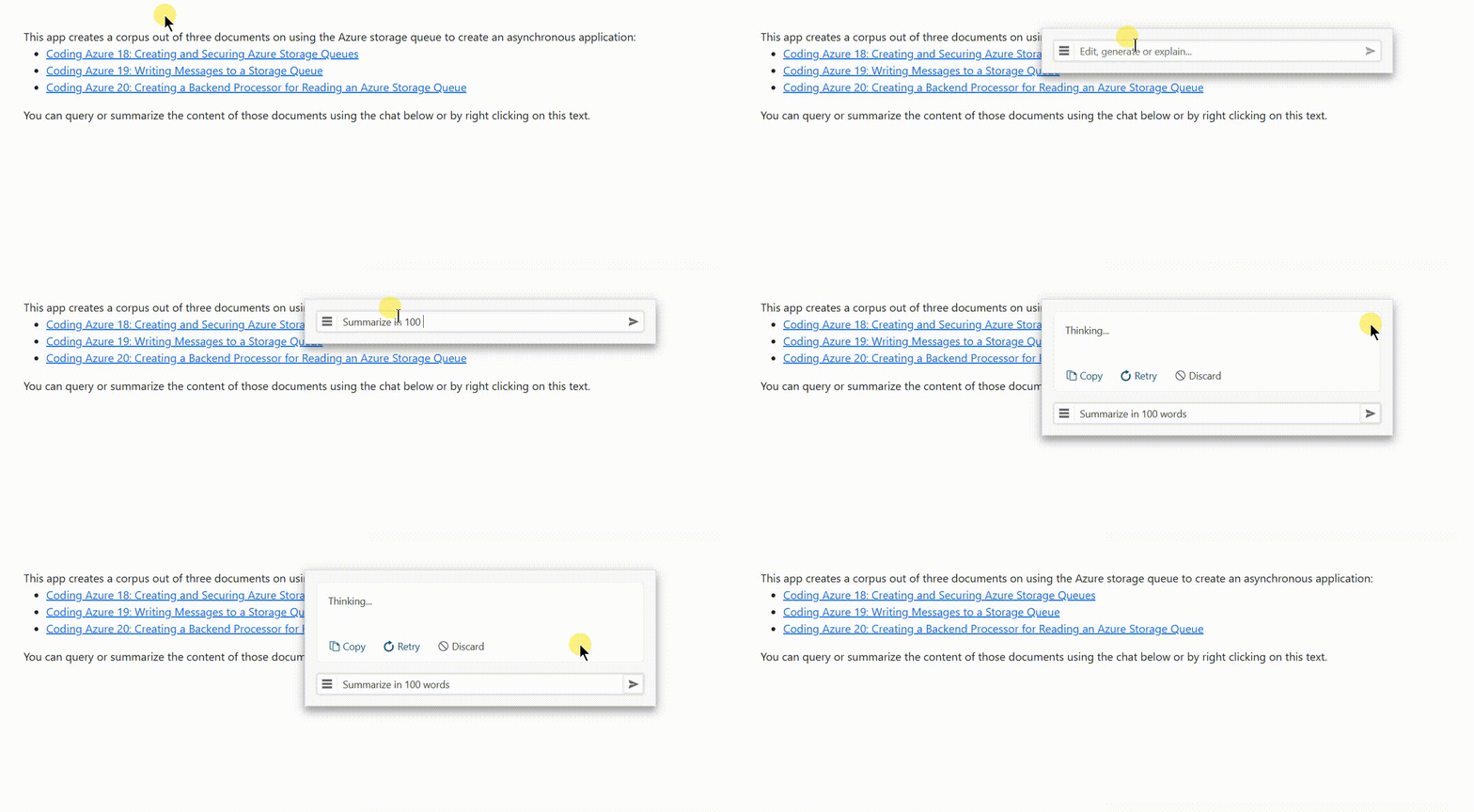
</code></pre><p>The user can dismiss the component by clicking anywhere on the webpage, so using the resulting interface looks like this:</p><p><img src="https://d585tldpucybw.cloudfront.net/sfimages/default-source/blogs/2026/2026-03/integrating-ai-8---inline.gif?sfvrsn=683c9935_2" alt="An animated gif showing the user right-clicking on a web page which causes a popup menu to appear, with two menu choices. The user clicks the top menu choice which causes the menu to disappear and the Inline AIPrompt’s dialog box to appear. The user types a prompt into the textbox in the Inline AIPrompt’s UI and clicks an arrow at the right end of the textbox. A panel opens at the top of the panel with the text “Thinking…”. After a pause, the panel is filled with the response from the AI agent. The user then clicks on the page outside of the Inline AIPrompt’s dialog box and the dialog box disappears" /></p><p>At this point you have an interface to your AI agent that appears and disappears as the user needs it.</p><h2 id="conversational-ai">Conversational AI</h2><p>Sometimes, however, you want a UI that allows your user to have a conversation with your agent. You can enable <a target="_blank" href="https://demos.telerik.com/kendo-ui/chat/index">Kendo UI for jQuery Chat</a> component for that (and, again, versions of the Chat component exist for multiple other platforms). The component creates a chat UI familiar to your user, with a textbox at the bottom for your user to enter their prompt and a chat history above that to display the user&rsquo;s prompts and the agent&rsquo;s responses:</p><p><img src="https://d585tldpucybw.cloudfront.net/sfimages/default-source/blogs/2026/2026-03/aiprompt-javascript-9---chat-aiprompt.png?sfvrsn=cf734fba_2" alt="A web page discussing creating asynchronous processes using Azure storage queues, with a chat window at the bottom. There is a conversation in progress in the chat history part of the chat window: The user earlier asked for a summary of key issues in 50 words and an agent responded with a short paragraph." /></p><p>Your first step is to decide where on your page you want your chat dialog to appear and to add a <code>&lt;div&gt;</code> element there, with the <code>&lt;div&gt;</code> element&rsquo;s <code>id</code> attribute set to some name (I used <code>dialogAgent</code>):</p><pre class=" language-html"><code class="prism  language-html"><span class="token tag"><span class="token tag"><span class="token punctuation">&lt;</span>div</span> <span class="token attr-name">id</span><span class="token attr-value"><span class="token punctuation">=</span><span class="token punctuation">"</span>dialogAgent<span class="token punctuation">"</span></span> <span class="token punctuation">/&gt;</span></span>
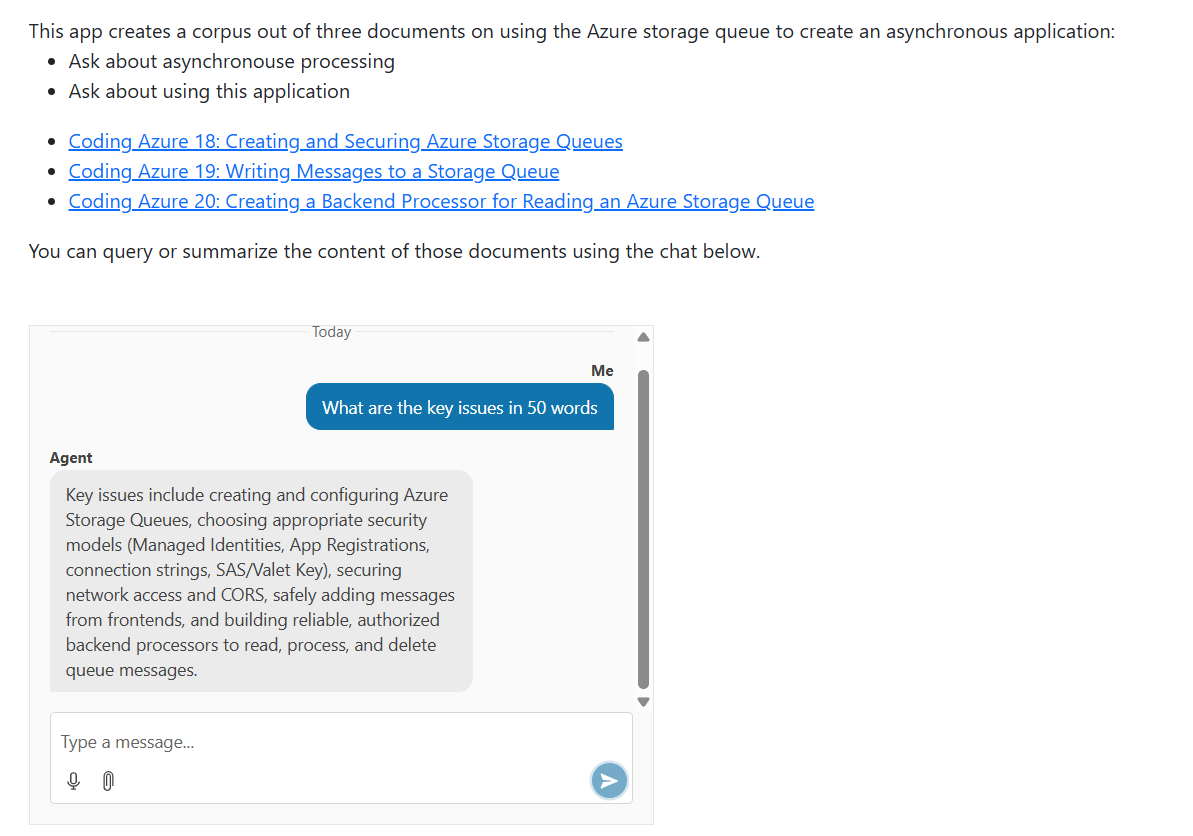
</code></pre><p>After that, you need to configure your chat dialog by using a jQuery query to find your <code>&lt;div&gt;</code> element and call the <code>kendoChat</code> function from it, passing a configuration object. In the configuration object, you need to set its <code>sendMessage</code> property to a function to be called when your user enters a prompt. In that function, you&rsquo;ll call your agent and update the chat with your agent&rsquo;s response.</p><p>You only want to configure your chat once, so you should wrap that code in jQuery&rsquo;s ready function, like this:</p><pre class=" language-javascript"><code class="prism  language-javascript"><span class="token function">$</span><span class="token punctuation">(</span><span class="token keyword">function</span> <span class="token punctuation">(</span><span class="token punctuation">)</span> 
<span class="token punctuation">{</span>
  <span class="token function">$</span><span class="token punctuation">(</span><span class="token string">"#dialogAgent"</span><span class="token punctuation">)</span><span class="token punctuation">.</span><span class="token function">kendoChat</span><span class="token punctuation">(</span><span class="token punctuation">{</span>
    sendMessage<span class="token punctuation">:</span> <span class="token punctuation">(</span>e<span class="token punctuation">)</span> <span class="token operator">=&gt;</span> <span class="token punctuation">{</span>
  <span class="token comment">//&hellip;function</span>
  <span class="token punctuation">}</span>
  <span class="token punctuation">}</span><span class="token punctuation">)</span><span class="token punctuation">;</span>
<span class="token punctuation">}</span><span class="token punctuation">)</span><span class="token punctuation">;</span>
</code></pre><p>Rather than using a function in the <code>sendMessage</code> property, you can configure your chat component to <a target="_blank" href="https://demos.telerik.com/kendo-ui/chat/ai-integration">call an LLM directly</a> by setting the configuration object&rsquo;s <code>aiServiceUrl</code> property. Using a function in the <code>sendMessage</code> property, however, simplifies calling a custom agent.</p><p>Now you need to write the <code>sendMessage</code> function that will send a message to your agent. You function will be passed a parameter that has two useful properties:</p><ul><li><code>message</code>: You use this property both to retrieve the user&rsquo;s prompt and to manage the display of the user&rsquo;s prompt in the chat history pane</li><li><code>sender</code>: Use this to add the response from your agent to the chat history (your user&rsquo;s prompt will be added to the chat history automatically)</li></ul><p>In your <code>sendMessage</code> function, you need to set the <code>authorName</code> property on the parameter&rsquo;s <code>message</code> property. That controls the label displayed in the chat history window with your user&rsquo;s prompts. I picked <code>Me</code>:</p><pre class=" language-javascript"><code class="prism  language-javascript"><span class="token function">$</span><span class="token punctuation">(</span><span class="token string">"#dialogAgent"</span><span class="token punctuation">)</span><span class="token punctuation">.</span><span class="token function">kendoChat</span><span class="token punctuation">(</span><span class="token punctuation">{</span>
  sendMessage<span class="token punctuation">:</span> <span class="token punctuation">(</span>c<span class="token punctuation">)</span> <span class="token operator">=&gt;</span> <span class="token punctuation">{</span>
  c<span class="token punctuation">.</span>message<span class="token punctuation">.</span>authorName <span class="token operator">=</span> <span class="token string">"Me"</span><span class="token punctuation">;</span>
  <span class="token comment">//&hellip;more</span>
<span class="token punctuation">}</span>
</code></pre><p>You can retrieve the user&rsquo;s prompt from the <code>text</code> property on the object in the parameter&rsquo;s <code>message</code> property. You then pass that prompt to your agent (I used the JavaScript function I wrote to call my agent&rsquo;s web service) and catch your agent&rsquo;s response.</p><p>To add the agent&rsquo;s response to the chat history, you call the <code>postMessage</code> of the object in the <code>sender</code> property of the parameter passed to your function. You pass the <code>postMessage</code> property an object with three properties set:</p><ul><li><code>authorId</code>: A unique identifier to distinguish your user&rsquo;s prompt from your agent&rsquo;s responses</li><li><code>authorName</code>: The name that will be displayed with the agent&rsquo;s response in the chat history</li><li><code>text</code>: The response from your agent</li></ul><p>That code is also pretty short:</p><pre class=" language-javascript"><code class="prism  language-javascript">sendMessage<span class="token punctuation">:</span> <span class="token keyword">async</span> <span class="token punctuation">(</span>e<span class="token punctuation">)</span> <span class="token operator">=&gt;</span> <span class="token punctuation">{</span>
  e<span class="token punctuation">.</span>message<span class="token punctuation">.</span>authorName <span class="token operator">=</span> <span class="token string">"Me"</span><span class="token punctuation">;</span>
  e<span class="token punctuation">.</span>sender<span class="token punctuation">.</span><span class="token function">postMessage</span><span class="token punctuation">(</span>
  <span class="token punctuation">{</span>
    authorId<span class="token punctuation">:</span> <span class="token string">"Agent"</span><span class="token punctuation">,</span>
    authorName<span class="token punctuation">:</span> <span class="token string">"Agent"</span><span class="token punctuation">,</span>
    text<span class="token punctuation">:</span> <span class="token keyword">await</span> <span class="token function">asyncInfoAgent</span><span class="token punctuation">(</span>e<span class="token punctuation">.</span>message<span class="token punctuation">.</span>text<span class="token punctuation">)</span><span class="token punctuation">}</span>
<span class="token punctuation">}</span><span class="token punctuation">)</span><span class="token punctuation">;</span>
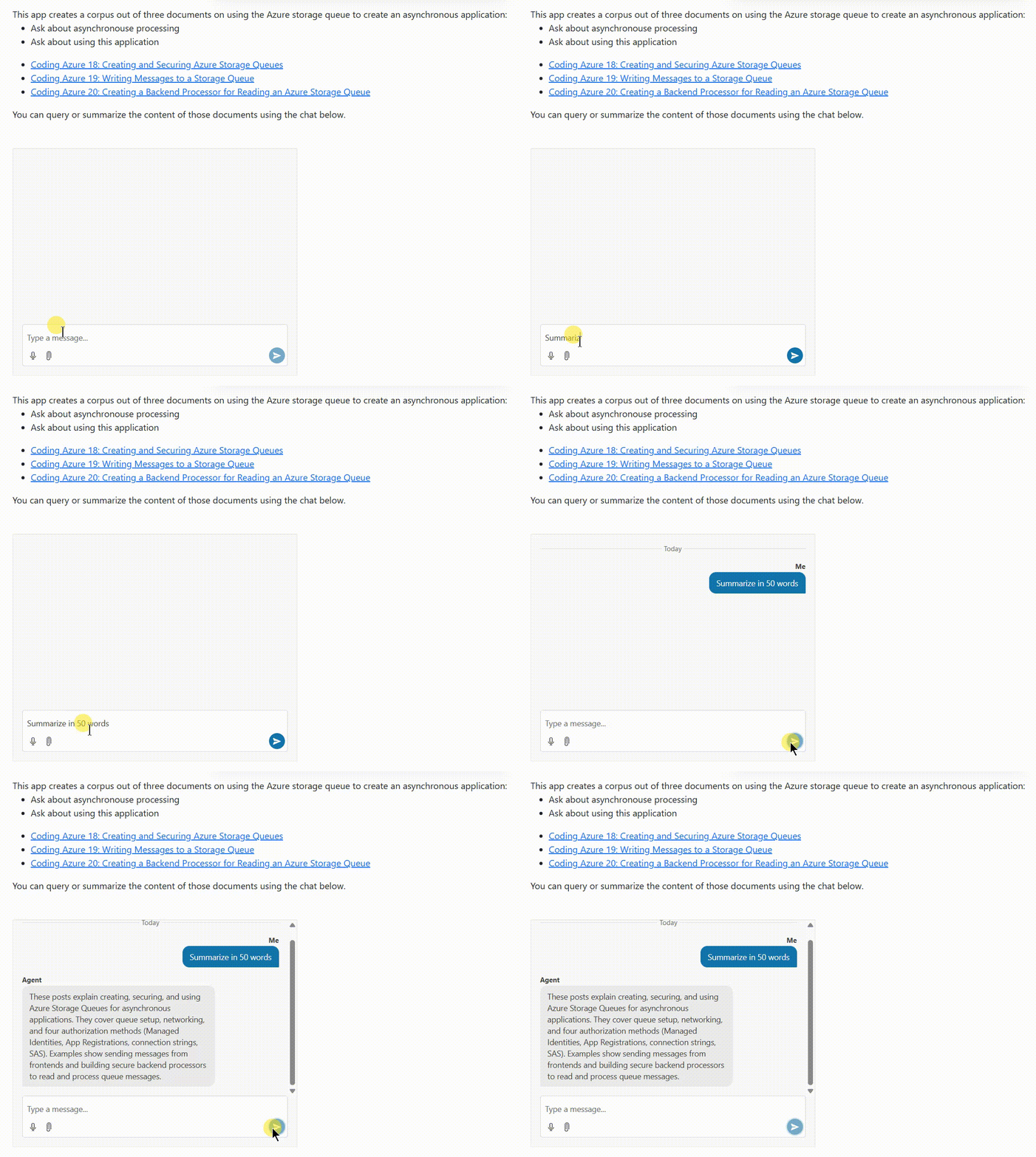
</code></pre><p>Your user can now interactively query your AI agent to extract whatever information you need.</p><p>There&rsquo;s more you can do here (creating a context-aware conversation by using state management to store message history and including that in your user&rsquo;s requests, for example). But, even with this simple implementation, you&rsquo;re ready to let your user have a conversation with your agent.</p><p><img src="https://d585tldpucybw.cloudfront.net/sfimages/default-source/blogs/2026/2026-03/intergating-ai-10---chat.gif?sfvrsn=c220c1bb_2" alt="An animated GIF showing a web page with an embedded chat window. The user enters “Summarize in 50 words” in the textbox at the bottom of the chat window and clicks the arrow at the right end of the textbox. The user’s prompt appears in the chat history pane, there is a pause of three or four sections, and then the AI agent’s response appears in the chat history pane, on the opposite side of the pane, in a different color, and labelled “Agent”" /></p><p>There are, at least, three scenarios when you&rsquo;ll want to integrate an AI-enabled component into your application&rsquo;s UI: when the interaction with your agent is the primary point of your application, when your AI agent is not the primary part by &ldquo;just another part&rdquo; of your application, and when your users will only occasionally need to access your agent (and these are just points on a continuum).</p><p>All three of the Progress Telerik and Kendo UI &ldquo;UI for AI&rdquo; components&mdash;Chat, AIPrompt and Inline AIPrompt&mdash;support those three scenarios (and all the points in between). Picking the right component, however, will simplify your code and let you get your application up and running faster.</p><aside><hr data-sf-ec-immutable="" /><div class="row"><div class="col-4 u-normal-full u-small-mb0"><h4 class="u-fs20 u-fw5 u-lh125 u-mb0">Get Access to All These Components and More</h4></div><div class="col-8"><p class="u-fs16 u-mb0">The free 30-day trial of <a target="_blank" href="https://www.telerik.com/devcraft">Telerik DevCraft</a> lets you really kick the tires for yourself. <a target="_blank" href="https://www.telerik.com/try/devcraft-ultimate">Try it today!</a></p></div></div></aside><img src="https://feeds.telerik.com/link/23072/17339813.gif" height="1" width="1"/>]]></content>
  </entry>
  <entry>
    <id>urn:uuid:2f875edd-30d6-4e50-a69a-3d5c40e28d42</id>
    <title type="text">Creating a Custom AI Agent with Telerik Tools 5: Creating an Interactive UI in JavaScript</title>
    <summary type="text">If you’re going to give your users access to an AI-enabled backend in JavaScript, you need to give them an AI-appropriate frontend.</summary>
    <published>2026-05-06T16:39:24Z</published>
    <updated>2026-06-03T20:39:28Z</updated>
    <author>
      <name>Peter Vogel </name>
    </author>
    <link rel="alternate" href="https://feeds.telerik.com/link/23072/17335605/creating-custom-ai-agent-telerik-tools-5-creating-interactive-ui-javascript"/>
    <content type="text"><![CDATA[<p><span class="featured">If you&rsquo;re going to give your users access to an AI-enabled backend in JavaScript, you need to give them an AI-appropriate frontend.</span></p><p>Right now, using Progress Telerik and Kendo UI tools you can create your own custom AI agent. (I&rsquo;ve covered those tools in earlier posts, beginning with <a href="https://www.telerik.com/blogs/creating-custom-ai-agent-telerik-tools-1-configuring-llm-azure-ollama" target="_blank">configuring a Large Language Model (LLM) in Azure or Ollama</a>, <a href="https://www.telerik.com/blogs/loading-accessing-converting-office-pdf-documents-telerik-document-processing-libraries" target="_blank">loading content with Telerik Document Processing Library</a>, linking your <a href="https://www.telerik.com/blogs/creating-custom-ai-agent-telerik-tools-2-loading-accessing-agent-content" target="_blank">content to your LLM</a>&nbsp;and <a href="https://www.telerik.com/blogs/creating-custom-ai-agent-telerik-tools-3-summarizing-querying" target="_blank">summarizing/querying your content</a>. But that backend isn&rsquo;t much use without a frontend your users can interact with.</p><p>Your users have expectations around what the UI for an AI agent look like and how that UI should behave&mdash;expectations that are set by tools like OpenAI&rsquo;s <a target="_blank" href="https://chatgpt.com/">ChatGPT</a> and <a target="_blank" href="https://copilot.microsoft.com/">Microsoft&rsquo;s Copilot</a> clients. Specifically, your users are looking for an interactive flow that enables them to evolve (through a set of prompts) from some initial response to a response that meets their needs. The Progress&nbsp;<a target="_blank" href="https://www.telerik.com/design-system/docs/components/aiprompt/">AIPrompt</a> provides that UI as a single component.</p><p>This post is about how to create that UI with the <a target="_blank" href="https://demos.telerik.com/kendo-ui/aiprompt/index">JavaScript Kendo UI for jQuery version</a>.</p><blockquote><p>In an earlier post (<a href="https://www.telerik.com/blogs/creating-custom-ai-agent-telerik-tools-4-crafting-interactive-blazor-ui" target="_blank">Creating a Custom AI Agent with Telerik Tools 4: Crafting an Interactive Blazor UI</a>), I walked through implementing a UI with the <a href="https://www.telerik.com/blazor-ui/ai-prompt" target="_blank">Blazor version of the AIPrompt component</a>. And, in addition to the JavaScript for Kendo UI and Blazor versions of the AIPrompt, there are also versions for <a target="_blank" href="https://www.telerik.com/products/aspnet-ajax/ai-prompt.aspx">ASP.NET Ajax</a>, <a target="_blank" href="https://www.telerik.com/products/winforms/aiprompt.aspx">WinForms</a>&nbsp;and <a target="_blank" href="https://www.telerik.com/maui-ui/aiprompt">MAUI</a>.</p></blockquote><h2 id="background-the-custom-agent-backend-as-a-web-service">Background: The Custom Agent Backend as a Web Service</h2><p>If you just want to know how to use AIPrompt (and aren&rsquo;t interested in the AI-enabled backend I&rsquo;ll be using), you can skip this whole section.</p><p>To implement a JavaScript frontend, I had to wrap my custom AI agent in a web service that could be called from my JavaScript code. My processor expects two parameters: the user&rsquo;s prompt, of course (which I pass as a parameter to the single method that my AI agent class exposes), but also a processing option that lets the user choose between two modes: asking questions or summarizing selected content (that&rsquo;s controlled through a property on the class that implements my AI agent). Fundamentally, that processing mode chooses between two Telerik AI connectors: <a target="_blank" href="https://docs.telerik.com/devtools/document-processing/libraries/radpdfprocessing/features/gen-ai-powered-document-insights/complete-context-question-processor">CompleteContextQuestionProcessor</a> or <a target="_blank" href="https://docs.telerik.com/devtools/document-processing/libraries/radpdfprocessing/features/gen-ai-powered-document-insights/summarization-processor">SummarizationProcessor</a>.</p><p>I decided that, since my prompt could be a relatively wordy string, I&rsquo;d pass those two parameters as a JSON document in the body of a request to my web service. So, as part of creating my web service I defined this Data Transfer Object (DTO) class to hold those two pieces of information:</p><pre class=" language-csharp"><code class="prism  language-csharp"><span class="token keyword">public</span> <span class="token keyword">class</span> <span class="token class-name">CustomAgentRequest</span>
<span class="token punctuation">{</span>
   <span class="token keyword">public</span> <span class="token keyword">string</span> Prompt <span class="token punctuation">{</span> <span class="token keyword">get</span><span class="token punctuation">;</span> <span class="token keyword">set</span><span class="token punctuation">;</span> <span class="token punctuation">}</span> <span class="token operator">=</span> <span class="token keyword">string</span><span class="token punctuation">.</span>Empty<span class="token punctuation">;</span>
   <span class="token keyword">public</span> <span class="token keyword">string</span> Mode <span class="token punctuation">{</span> <span class="token keyword">get</span><span class="token punctuation">;</span> <span class="token keyword">set</span><span class="token punctuation">;</span> <span class="token punctuation">}</span> <span class="token operator">=</span> <span class="token keyword">string</span><span class="token punctuation">.</span>Empty<span class="token punctuation">;</span>
<span class="token punctuation">}</span>
</code></pre><p>I then created a web service wrapper as an ASP.NET Core WebAPI project that instantiates my AI agent&rsquo;s class and accepts my DTO class as part of an <code>HttpPut</code> method. (Since I was passing data in the body of the request, I had to use either a PUT or a POST request. I flipped a coin and settled on PUT.) In that <code>HttpPut</code> method, my service sets the processor&rsquo;s mode property and calls the single method on my AI agent class, passing the prompt and returning the text generated by my selected mode.</p><p>My web service wrapper looked something like this:</p><pre class=" language-csharp"><code class="prism  language-csharp"><span class="token keyword">public</span> <span class="token keyword">class</span> <span class="token class-name">CustomAgentAPI</span> <span class="token punctuation">:</span> ControllerBase
<span class="token punctuation">{</span>
    CustomAgent<span class="token operator">?</span> proc<span class="token punctuation">;</span>

    <span class="token keyword">public</span> <span class="token function">CustomAgentAPI</span><span class="token punctuation">(</span><span class="token punctuation">)</span>
    <span class="token punctuation">{</span>
        proc <span class="token operator">=</span> <span class="token keyword">new</span><span class="token punctuation">(</span><span class="token punctuation">)</span><span class="token punctuation">;</span>
    <span class="token punctuation">}</span>
    
    <span class="token punctuation">[</span>HttpPut<span class="token punctuation">]</span>
    <span class="token keyword">public</span> <span class="token keyword">async</span> Task<span class="token operator">&lt;</span>IActionResult<span class="token operator">&gt;</span> <span class="token function">Put</span><span class="token punctuation">(</span>CustomAgentRequest req<span class="token punctuation">)</span>
    <span class="token punctuation">{</span>
       proc<span class="token punctuation">.</span>Mode <span class="token operator">=</span> req<span class="token punctuation">.</span>Mode<span class="token punctuation">;</span> 
       <span class="token keyword">return</span> <span class="token function">Ok</span><span class="token punctuation">(</span><span class="token keyword">await</span> proc<span class="token punctuation">.</span><span class="token function">ProcessRequest</span><span class="token punctuation">(</span>req<span class="token punctuation">.</span>Prompt<span class="token punctuation">)</span><span class="token punctuation">)</span><span class="token punctuation">;</span>
    <span class="token punctuation">}</span>
<span class="token punctuation">}</span>
</code></pre><p>I then added this JavaScript function to my frontend&rsquo;s webpage that accepts a prompt and a mode option, and then uses JavaScript&rsquo;s Fetch API functionality to call my web service:</p><pre class=" language-javascript"><code class="prism  language-javascript"><span class="token keyword">const</span> putAgentPrompt <span class="token operator">=</span> <span class="token keyword">async</span> <span class="token punctuation">(</span>requestPrompt<span class="token punctuation">,</span> requestProcess<span class="token punctuation">)</span> <span class="token operator">=&gt;</span>
<span class="token punctuation">{</span>
   <span class="token keyword">const</span> resp <span class="token operator">=</span> <span class="token keyword">await</span> <span class="token function">fetch</span><span class="token punctuation">(</span>
               <span class="token string">"&lt;URL for my Web service&gt;"</span><span class="token punctuation">,</span>
               <span class="token punctuation">{</span>
                method<span class="token punctuation">:</span> <span class="token string">"PUT"</span><span class="token punctuation">,</span>
                headers<span class="token punctuation">:</span> 
                <span class="token punctuation">{</span>
                   <span class="token string">"Content-Type"</span><span class="token punctuation">:</span> <span class="token string">"application/json"</span>
                <span class="token punctuation">}</span><span class="token punctuation">,</span>
                body<span class="token punctuation">:</span> JSON<span class="token punctuation">.</span><span class="token function">stringify</span><span class="token punctuation">(</span>
                <span class="token punctuation">{</span>
                   Prompt<span class="token punctuation">:</span> requestPrompt<span class="token punctuation">,</span>
                   Mode<span class="token punctuation">:</span> requestProcess
                <span class="token punctuation">}</span>
   <span class="token punctuation">)</span> <span class="token punctuation">}</span><span class="token punctuation">)</span><span class="token punctuation">;</span>
   <span class="token keyword">return</span> <span class="token keyword">await</span> resp<span class="token punctuation">.</span><span class="token function">text</span><span class="token punctuation">(</span><span class="token punctuation">)</span><span class="token punctuation">;</span>
<span class="token punctuation">}</span>
</code></pre><p>Since JavaScript&rsquo;s Fetch API is asynchronous, I had to use the <code>await</code> keyword when calling the <code>fetch</code> function and mark my <code>putAgentPrompt</code> function as <code>async</code>.</p><p>My JavaScript function extracts the <code>text</code> property of the response object returned from my web service and then returns that to the JavaScript application that called my function.</p><h2 id="processing-requests">Processing Requests</h2><p>Assuming you&rsquo;ve created a project with the necessary Progress <a target="_blank" href="https://www.telerik.com/kendo-jquery-ui/documentation/intro/first-steps">Kendo UI support</a>, the markup for using the AIPrompt component is very simple&mdash;a <code>div</code> element with its <code>id</code> attribute set to some name of your choice:</p><pre class=" language-html"><code class="prism  language-html"><span class="token tag"><span class="token tag"><span class="token punctuation">&lt;</span>div</span> <span class="token attr-name">id</span><span class="token attr-value"><span class="token punctuation">=</span><span class="token punctuation">"</span>customAgent<span class="token punctuation">"</span></span> <span class="token punctuation">/&gt;</span></span>
</code></pre><p>To load that <code>div</code> element with the Progress AIPrompt component, you use jQuery to find that element and then call the Kendo UI for jQuery <code>kendoAIPrompt</code> extension from the found element. The resulting UI looks like this, with a textbox for the user to enter their prompt and a button to trigger sending the prompt to my backend:</p><p><img src="https://d585tldpucybw.cloudfront.net/sfimages/default-source/blogs/2026/2026-03/aiprompt-javascript-1---basic-ui.png?sfvrsn=6bc63813_2" alt="The basic AI Prompt display showing a textbox with a “Generate” button underneath it. Above the textbox are two additional buttons: “Ask AI” (which is currently highlighted) and “Output”" /></p><p>To enable the UI to process your user&rsquo;s prompts, you must pass the <code>kendoAIPrompt</code> extension a single parameter, an object literal. To process the user prompts when the user clicks the Generate button, you must set that object literal&rsquo;s <code>promptRequest</code> property to a function that, in turn, accepts a single parameter.</p><p>That means that, initially, the code to process a user&rsquo;s prompt looks something like this:</p><pre class=" language-javascript"><code class="prism  language-javascript"><span class="token function">$</span><span class="token punctuation">(</span><span class="token string">"#customAgent"</span><span class="token punctuation">)</span><span class="token punctuation">.</span><span class="token function">kendoAIPrompt</span><span class="token punctuation">(</span>        
      <span class="token punctuation">{</span>
   promptRequest<span class="token punctuation">:</span> <span class="token keyword">async</span> <span class="token keyword">function</span><span class="token punctuation">(</span>e<span class="token punctuation">)</span> 
   <span class="token punctuation">{</span>

         <span class="token punctuation">}</span>
     <span class="token punctuation">}</span>
<span class="token punctuation">)</span><span class="token punctuation">;</span>    
</code></pre><p>If you&rsquo;re tempted to write the function set in the <code>promptRequest</code> property as an arrow function, <em>don&rsquo;t</em> give into the temptation. Your function in the <code>promptRequest</code> property must accept the <code>this</code> reference set in the <code>kendoAIPrompt</code> function, which is only possible if you use a traditional JavaScript function.</p><p>The parameter passed to your <code>promptRequest</code> has two properties that you&rsquo;re interested in:</p><ul><li><code>prompt</code>: The text the user entered in the AIPrompt&rsquo;s prompt view</li><li><code>isRetry</code>: Set to <code>false</code> unless the user clicks the Retry button displayed when AIPrompt shows the result of your processing in AIPrompt&rsquo;s output view</li></ul><p>Within your <code>promptRequest</code> function, you need to call your custom AI agent (in my case, the web service that wraps my AI agent class). I used the <code>putAgentPrompt</code> function from earlier in this post which returns a single text result.</p><p>After that, you need to provide the information that the AIPrompt&rsquo;s output view requires and then switch to that output view. Building the output view consists of loading an object literal with four properties (all required):</p><ul><li><code>id</code>: A unique identifier</li><li><code>output</code>: The response from your backend</li><li><code>prompt</code>: The user&rsquo;s prompt</li><li><code>isRetry</code>: The <code>isRetry</code> setting</li></ul><p>Once you&rsquo;ve built that object, you just pass it to the <code>kendoAIPrompt</code>&rsquo;s <code>addPromptOutput</code> function to have your response added to <code>kendoAIPrompt</code>&rsquo;s output view.</p><p>Finally, to actually display the AIPrompt&rsquo;s output view, you call the <code>kendoAIPrompt</code>&rsquo;s <code>activeView</code> function, passing the name of the view you want (&ldquo;output&rdquo;, in this case).</p><p>Putting that all together, a typical version of the <code>promptRequest</code> function would look like this:</p><pre class=" language-javascript"><code class="prism  language-javascript"><span class="token function">$</span><span class="token punctuation">(</span><span class="token string">"#customAgent"</span><span class="token punctuation">)</span><span class="token punctuation">.</span><span class="token function">kendoAIPrompt</span><span class="token punctuation">(</span> 
    <span class="token punctuation">{</span>
        promptRequest<span class="token punctuation">:</span> <span class="token keyword">async</span> <span class="token keyword">function</span><span class="token punctuation">(</span>e<span class="token punctuation">)</span> 
         <span class="token punctuation">{</span> 
             <span class="token keyword">this</span><span class="token punctuation">.</span><span class="token function">addPromptOutput</span><span class="token punctuation">(</span>
                         <span class="token punctuation">{</span>
                 id<span class="token punctuation">:</span> kendo<span class="token punctuation">.</span><span class="token function">guid</span><span class="token punctuation">(</span><span class="token punctuation">)</span><span class="token punctuation">,</span>
                output<span class="token punctuation">:</span> <span class="token keyword">await</span> <span class="token function">putAgentPrompt</span><span class="token punctuation">(</span>e<span class="token punctuation">.</span>prompt<span class="token punctuation">,</span> <span class="token string">"summarize"</span><span class="token punctuation">)</span><span class="token punctuation">,</span>
                prompt<span class="token punctuation">:</span> e<span class="token punctuation">.</span>prompt<span class="token punctuation">,</span>
                 isRetry<span class="token punctuation">:</span> <span class="token boolean">false</span>
                        <span class="token punctuation">}</span>
             <span class="token punctuation">)</span><span class="token punctuation">;</span>
             <span class="token keyword">this</span><span class="token punctuation">.</span><span class="token function">activeView</span><span class="token punctuation">(</span><span class="token string">"output"</span><span class="token punctuation">)</span><span class="token punctuation">;</span>
         <span class="token punctuation">}</span>
   <span class="token punctuation">}</span>
<span class="token punctuation">)</span><span class="token punctuation">;</span>
</code></pre><p>A typical response might look like this, showing the user&rsquo;s response and the output from my custom AI agent:</p><p><img src="https://d585tldpucybw.cloudfront.net/sfimages/default-source/blogs/2026/2026-03/aiprompt-javascript-2--initial-response.png?sfvrsn=30c75aed_2" alt="The AIPrompt’s output view. The output button is now highlighted and the textbox is gone, replaced with the text the user entered before clicking the Generate button. Below that is a large block of text with Markdown markup embedded in it." /></p><p>However, as you can see, the result isn&rsquo;t necessarily very pretty because, as responses get more interesting, my custom agent produces output that uses <a target="_blank" href="https://www.markdownguide.org/">Markdown</a> for formatting. However, AIPrompt&rsquo;s default output page just displays all that text &ldquo;as is.&rdquo;</p><h2 id="taking-control-of-the-output">Taking Control of the Output</h2><p>You can, however, replace AIPrompt&rsquo;s default output view with your own custom view and, in that custom, convert the output to HTML.</p><p>You do that by setting the <code>outputTemplate</code> property of the parameter passed to the <code>kendoAIPrompt</code> function to yet another function. That <code>outputTemplate</code> function will be passed a parameter that has a <code>content</code> property, which holds the response you put in the <code>output</code> property back in your <code>promptRequest</code> function.</p><p>To support a better display, I added the <code>markdown-it</code> JavaScript library to my page with this <code>script</code> tag and CDN URL:</p><pre class=" language-html"><code class="prism  language-html"><span class="token tag"><span class="token tag"><span class="token punctuation">&lt;</span>script</span> <span class="token attr-name">src</span><span class="token attr-value"><span class="token punctuation">=</span><span class="token punctuation">"</span>https://cdnjs.cloudflare.com/ajax/libs/markdown-it/13.0.1/markdown-it.min.js<span class="token punctuation">"</span></span> 
              <span class="token attr-name">integrity</span><span class="token attr-value"><span class="token punctuation">=</span><span class="token punctuation">"</span>sha512-SYfDUYPg5xspsG6OOpXU366G8SZsdHOhqk/icdrYJ2E/WKZxPxze7d2HD3AyXpT7U22PZ5y74xRpqZ6A2bJ+kQ==<span class="token punctuation">"</span></span> 
              <span class="token attr-name">crossorigin</span><span class="token attr-value"><span class="token punctuation">=</span><span class="token punctuation">"</span>anonymous<span class="token punctuation">"</span></span> 
              <span class="token attr-name">referrerpolicy</span><span class="token attr-value"><span class="token punctuation">=</span><span class="token punctuation">"</span>no-referrer<span class="token punctuation">"</span></span><span class="token punctuation">&gt;</span></span><span class="token script language-javascript"></span><span class="token tag"><span class="token tag"><span class="token punctuation">&lt;/</span>script</span><span class="token punctuation">&gt;</span></span>
</code></pre><p>In my custom output template, I could then use the library&rsquo;s <code>markdownit</code> function that returns an object with a <code>render</code> function that converts Markdown to HTML. All I had to do was pass the <code>content</code> property of the parameter passed to my <code>outputTemplate</code> to that <code>render</code> function.</p><p>This means that extending the <code>kendoAIPrompt</code> function with a custom function that converts my output to HTML looks like this:</p><pre class=" language-javascript"><code class="prism  language-javascript"><span class="token function">$</span><span class="token punctuation">(</span><span class="token string">"#customAgent"</span><span class="token punctuation">)</span><span class="token punctuation">.</span><span class="token function">kendoAIPrompt</span><span class="token punctuation">(</span>        <span class="token punctuation">{</span>
            promptRequest<span class="token punctuation">:</span> <span class="token keyword">async</span> <span class="token keyword">function</span><span class="token punctuation">(</span>e<span class="token punctuation">)</span> 
            <span class="token punctuation">{</span> 
                &hellip;previous code&hellip;
            <span class="token punctuation">}</span><span class="token punctuation">,</span>

            outputTemplate<span class="token punctuation">:</span> output   <span class="token operator">=&gt;</span> <span class="token punctuation">{</span>
                    <span class="token keyword">return</span> <span class="token function">markdownit</span><span class="token punctuation">(</span><span class="token punctuation">)</span><span class="token punctuation">.</span><span class="token function">render</span><span class="token punctuation">(</span>output<span class="token punctuation">.</span>content<span class="token punctuation">)</span><span class="token punctuation">;</span>
                <span class="token punctuation">}</span>
         <span class="token punctuation">}</span>
<span class="token punctuation">)</span><span class="token punctuation">;</span>
</code></pre><p>The enhanced output looks like this:</p><p><img src="https://d585tldpucybw.cloudfront.net/sfimages/default-source/blogs/2026/2026-03/aiprompt-javascript-3--enhanced-response.png?sfvrsn=8815bc5e_2" alt="A repeat of the previous graphic but, this time, the solid block of text-with-markup has been replaced with formatted text including headings and bullet points" /></p><h2 id="allowing-the-user-to-customize-their-prompts">Allowing the User to Customize Their Prompts</h2><p>Your agent probably supports some customization options that your users will want to take advantage of (for example, my agent supports two modes: summarizing and querying). You have two options for letting your users customize how your backend responds to your users&rsquo; prompts:</p><ul><li>Set options on your backend. My custom agent, for example, operates in two modes, depending on which of the Telerik AI connectors my code invokes.</li><li>Tweak the prompts being sent to your backend in order to trigger specific behavior</li></ul><p>In AIPrompt, I can support the user selecting my backend&rsquo;s mode by having AIPrompt display a commands menu which I&rsquo;ll use to let the user choose which mode (summarize or query) they want. To trigger that commands menu, I need to add a commands view to the <code>kendoAIPrompt</code>&rsquo;s <code>views</code> collection and load that view with an array of the menu items to be displayed in the component&rsquo;s command menu.</p><p>However, if you add a custom view to AIPrompt&rsquo;s <code>views</code> then you have to add implementations for AIPrompt&rsquo;s existing, predefined prompt view and output view. You add those default views to the <code>views</code> property of the parameter object passed to <code>kendoAIPrompt</code>, like this:</p><pre class=" language-javascript"><code class="prism  language-javascript"><span class="token function">$</span><span class="token punctuation">(</span><span class="token string">"#customAgent"</span><span class="token punctuation">)</span><span class="token punctuation">.</span><span class="token function">kendoAIPrompt</span><span class="token punctuation">(</span>        <span class="token punctuation">{</span>
        promptRequest<span class="token punctuation">:</span> <span class="token keyword">async</span> <span class="token keyword">function</span><span class="token punctuation">(</span>e<span class="token punctuation">)</span> 
        <span class="token punctuation">{</span> 
   &hellip;existing code&hellip;
        <span class="token punctuation">}</span><span class="token punctuation">,</span>
        views<span class="token punctuation">:</span> <span class="token punctuation">[</span> 
            <span class="token punctuation">{</span>
               type<span class="token punctuation">:</span> <span class="token string">'prompt'</span><span class="token punctuation">,</span>
            <span class="token punctuation">}</span><span class="token punctuation">,</span>
            <span class="token punctuation">{</span>
               type<span class="token punctuation">:</span> <span class="token string">'output'</span><span class="token punctuation">,</span>
            <span class="token punctuation">}</span>
        <span class="token punctuation">]</span>
<span class="token punctuation">}</span> 
</code></pre><p>To add a command menu, you tack another view definition on to the end of your new default views, setting its <code>type</code> property to &ldquo;commands&rdquo;. In addition, you set this view&rsquo;s <code>promptCommands</code> property to an array of objects with these properties:</p><ul><li><code>id</code>: A unique value within the array</li><li><code>text</code>: The text that will be displayed to the user in AIPrompt&rsquo;s commands menu</li><li><code>prompt</code>: Associated text (probably text you will send to your agent backend&mdash;optional)</li><li><code>icon</code>: An SVG graphic (you can draw from the Progress <a target="_blank" href="https://www.telerik.com/design-system/docs/foundation/iconography/icon-list/">store of icons</a>&mdash;also, optional)</li></ul><p>Here, I&rsquo;ve set up four options for the user to select from:</p><pre class=" language-javascript"><code class="prism  language-javascript">views<span class="token punctuation">:</span> <span class="token punctuation">[</span> 
    <span class="token punctuation">{</span>
       type<span class="token punctuation">:</span> <span class="token string">'prompt'</span><span class="token punctuation">,</span>
    <span class="token punctuation">}</span><span class="token punctuation">,</span>
    <span class="token punctuation">{</span>
       type<span class="token punctuation">:</span> <span class="token string">'output'</span><span class="token punctuation">,</span>
    <span class="token punctuation">}</span><span class="token punctuation">,</span>
    <span class="token punctuation">{</span>
       type<span class="token punctuation">:</span> <span class="token string">'commands'</span><span class="token punctuation">,</span> 
       promptCommands<span class="token punctuation">:</span> <span class="token punctuation">[</span>
           <span class="token punctuation">{</span> id<span class="token punctuation">:</span> <span class="token string">"Summarize"</span><span class="token punctuation">,</span> text<span class="token punctuation">:</span> <span class="token string">"Summarize"</span><span class="token punctuation">,</span> prompt<span class="token punctuation">:</span> <span class="token string">"in 100 words"</span><span class="token punctuation">,</span> 
        icon<span class="token punctuation">:</span> <span class="token string">"info-circle"</span> <span class="token punctuation">}</span><span class="token punctuation">,</span>
           <span class="token punctuation">{</span> id<span class="token punctuation">:</span> <span class="token string">"SummarizeTerse"</span><span class="token punctuation">,</span> text<span class="token punctuation">:</span> <span class="token string">"Summarize: Terse"</span><span class="token punctuation">,</span> prompt<span class="token punctuation">:</span> <span class="token string">"in 50 words, "</span><span class="token punctuation">,</span> 
             icon<span class="token punctuation">:</span> <span class="token string">"min-width"</span> <span class="token punctuation">}</span><span class="token punctuation">,</span>
           <span class="token punctuation">{</span> id<span class="token punctuation">:</span> <span class="token string">"SummarizeVerbose"</span><span class="token punctuation">,</span> text<span class="token punctuation">:</span> <span class="token string">"Summarize: Verbose"</span><span class="token punctuation">,</span> prompt<span class="token punctuation">:</span> <span class="token string">"in 200 words"</span><span class="token punctuation">,</span> 
        icon<span class="token punctuation">:</span> <span class="token string">"max-width"</span> <span class="token punctuation">}</span><span class="token punctuation">,</span>
           <span class="token punctuation">{</span> id<span class="token punctuation">:</span> <span class="token string">"Ask"</span><span class="token punctuation">,</span> text<span class="token punctuation">:</span> <span class="token string">"Ask a question"</span><span class="token punctuation">,</span> 
             icon<span class="token punctuation">:</span> <span class="token string">"question-circle"</span> <span class="token punctuation">}</span><span class="token punctuation">,</span>
        <span class="token punctuation">]</span>
    <span class="token punctuation">}</span>
<span class="token punctuation">]</span><span class="token punctuation">,</span>
</code></pre><p>The result is that the AIPrompt gets a new overflow menu icon in its command bar, just to the right of the existing &ldquo;Ask AI&rdquo; and &ldquo;Output&rdquo; buttons. When your user clicks on the overflow menu icon, they get your list of commands:</p><p><img src="https://d585tldpucybw.cloudfront.net/sfimages/default-source/blogs/2026/2026-03/aiprompt-javascript-4--comands-menu.png?sfvrsn=229dd1f6_2" alt="The AIPrompt’s initial view a new builder/menu overflow button (three horizontal dot) has been added to the right of the existing Output button in the toolbar. That icon is highlighted and, instead of displaying a textbox and Generate button, the AIPrompt is displaying a list of menu choices, displaying the icon and text from the code in the post" /></p><p>To respond to the user clicking on one of the command menu options, you need to load a function into the <code>commandExecute</code> property in the object passed to the <code>kendoAIPrompt</code> function. That <code>commandExecute</code> function will be passed a parameter that has an <code>item</code> property holding the object from the <code>promptCommands</code> array that the user selected.</p><p>You can decide what to do in the <code>commandExecute</code> function. You could, for example, just save the user&rsquo;s choice and use it later when the user clicks AIPrompt&rsquo;s Generate button.</p><p>I&rsquo;ll go a little further: In my <code>commandExecute</code> method, I&rsquo;ll submit the command to my custom agent and display the results, leveraging the user&rsquo;s last prompt.</p><p>To support that, in my <code>promptRequest</code> function, I save the user&rsquo;s last prompt in a variable called, cleverly, <code>lastPrompt</code>. I also create a variable called mode to hold which mode (&ldquo;Ask&rdquo; or &ldquo;Summarize&rdquo;) the user wants to operate in.</p><p>My revised <code>promptRequest</code> function that saves the user&rsquo;s prompt and uses my new mode variable looks like this:</p><pre class=" language-javascript"><code class="prism  language-javascript"><span class="token keyword">let</span> lastPrompt <span class="token operator">=</span> <span class="token string">""</span><span class="token punctuation">;</span>
<span class="token keyword">let</span> mode <span class="token operator">=</span> <span class="token string">"Ask"</span><span class="token punctuation">;</span>
    
<span class="token function">$</span><span class="token punctuation">(</span><span class="token string">"#customAgent"</span><span class="token punctuation">)</span><span class="token punctuation">.</span><span class="token function">kendoAIPrompt</span><span class="token punctuation">(</span>
    <span class="token punctuation">{</span>
        promptRequest<span class="token punctuation">:</span> <span class="token keyword">async</span> <span class="token keyword">function</span><span class="token punctuation">(</span>e<span class="token punctuation">)</span> 
        <span class="token punctuation">{</span>         
            <span class="token keyword">this</span><span class="token punctuation">.</span><span class="token function">addPromptOutput</span><span class="token punctuation">(</span><span class="token punctuation">{</span>
                id<span class="token punctuation">:</span> kendo<span class="token punctuation">.</span><span class="token function">guid</span><span class="token punctuation">(</span><span class="token punctuation">)</span><span class="token punctuation">,</span>
                output<span class="token punctuation">:</span> <span class="token keyword">await</span> <span class="token function">putAgentPrompt</span><span class="token punctuation">(</span>e<span class="token punctuation">.</span>prompt<span class="token punctuation">,</span> mode<span class="token punctuation">)</span><span class="token punctuation">,</span>
                prompt<span class="token punctuation">:</span> e<span class="token punctuation">.</span>prompt<span class="token punctuation">,</span>
                isRetry<span class="token punctuation">:</span> e<span class="token punctuation">.</span>isRetry
        <span class="token punctuation">}</span><span class="token punctuation">)</span><span class="token punctuation">;</span>  
        lastPrompt <span class="token operator">=</span> e<span class="token punctuation">.</span>prompt<span class="token punctuation">;</span>
        &hellip;  
</code></pre><p>Then, in my <code>commandExecute</code> function, I check which command the user picked from my commands menu. If the user selected the menu option that switches to &ldquo;Ask&rdquo; mode, I set my mode variable to &ldquo;Ask.&rdquo; If the user selected one of the summarization menu choices, I set the mode to &ldquo;Summarize&rdquo; and then modify the user&rsquo;s last prompt to include the <code>prompt</code> property from the selected menu choice.</p><p>Either way, I re-submit the user&rsquo;s last prompt, with the new settings, and display the result in AIPrompt&rsquo;s output view:</p><pre class=" language-javascript"><code class="prism  language-javascript"><span class="token function">$</span><span class="token punctuation">(</span><span class="token string">"#customAgent"</span><span class="token punctuation">)</span><span class="token punctuation">.</span><span class="token function">kendoAIPrompt</span><span class="token punctuation">(</span>
    <span class="token punctuation">{</span>
        promptRequest<span class="token punctuation">:</span> <span class="token keyword">async</span> <span class="token keyword">function</span><span class="token punctuation">(</span>e<span class="token punctuation">)</span> 
        <span class="token punctuation">{</span> 
           &hellip;previous code&hellip;
        <span class="token punctuation">}</span><span class="token punctuation">,</span>
        promptCommands<span class="token punctuation">:</span> <span class="token punctuation">{</span>
&hellip;command prompt menu choices&hellip;
        <span class="token punctuation">}</span><span class="token punctuation">,</span>
        commandExecute<span class="token punctuation">:</span> <span class="token keyword">async</span> <span class="token keyword">function</span><span class="token punctuation">(</span>c<span class="token punctuation">)</span> 
       <span class="token punctuation">{</span>
            <span class="token keyword">let</span> newPrompt <span class="token operator">=</span> <span class="token string">""</span><span class="token punctuation">;</span>

            <span class="token keyword">if</span> <span class="token punctuation">(</span>c<span class="token punctuation">.</span>item<span class="token punctuation">.</span>id<span class="token punctuation">.</span><span class="token function">startsWith</span><span class="token punctuation">(</span><span class="token string">"Summarize"</span><span class="token punctuation">)</span><span class="token punctuation">)</span>
            <span class="token punctuation">{</span>
                mode <span class="token operator">=</span> <span class="token string">"Summarize"</span><span class="token punctuation">;</span>
                newPrompt <span class="token operator">=</span> lastPrompt <span class="token operator">+</span> c<span class="token punctuation">.</span>item<span class="token punctuation">.</span>prompt<span class="token punctuation">;</span>
            <span class="token punctuation">}</span>
            <span class="token keyword">else</span>
            <span class="token punctuation">{</span>
                mode <span class="token operator">=</span> c<span class="token punctuation">.</span>item<span class="token punctuation">.</span>id<span class="token punctuation">;</span>
                newPrompt <span class="token operator">=</span> lastPrompt<span class="token punctuation">;</span>
            <span class="token punctuation">}</span>                

            <span class="token keyword">this</span><span class="token punctuation">.</span><span class="token function">addPromptOutput</span><span class="token punctuation">(</span><span class="token punctuation">{</span>
                id<span class="token punctuation">:</span> kendo<span class="token punctuation">.</span><span class="token function">guid</span><span class="token punctuation">(</span><span class="token punctuation">)</span><span class="token punctuation">,</span>
                output<span class="token punctuation">:</span> <span class="token keyword">await</span> <span class="token function">putAgentPrompt</span><span class="token punctuation">(</span>newPrompt<span class="token punctuation">,</span> mode<span class="token punctuation">)</span><span class="token punctuation">,</span>
                prompt<span class="token punctuation">:</span> lastPrompt
             <span class="token punctuation">}</span><span class="token punctuation">)</span><span class="token punctuation">;</span>
            <span class="token keyword">this</span><span class="token punctuation">.</span><span class="token function">activeView</span><span class="token punctuation">(</span><span class="token string">"output"</span><span class="token punctuation">)</span><span class="token punctuation">;</span>
        <span class="token punctuation">}</span><span class="token punctuation">,</span>    
</code></pre><p>The result looks like this, with the result of executing the menu choice added to the output from the user&rsquo;s previous requests:</p><p><img src="https://d585tldpucybw.cloudfront.net/sfimages/default-source/blogs/2026/2026-03/aiprompt-javascript-5--commands-with-multiple-output.png?sfvrsn=71c263e3_2" alt="AIPrompt’s output view showing two results: At the top is a 200 word summary that results from executing the “Summarize” menu choice; below that is the output from an earlier prompt requesting the minimum code to execute " /></p><h2 id="providing-sample-prompts">Providing Sample Prompts</h2><p>One last thing: It&rsquo;s not unusual for an AI agent&rsquo;s UI to include sample prompts to help users see what they can do with your application. Progress AIPrompt will let you do that, too, just by adding the <code>promptSuggestions</code> property to the object passed to <code>kendoAIPrompt</code> and setting it to an array of strings. This example loads three suggested prompts to AIPrompt:</p><pre class=" language-javascript"><code class="prism  language-javascript"><span class="token function">$</span><span class="token punctuation">(</span><span class="token string">"#customAgent"</span><span class="token punctuation">)</span><span class="token punctuation">.</span><span class="token function">kendoAIPrompt</span><span class="token punctuation">(</span>
    <span class="token punctuation">{</span>
        promptRequest<span class="token punctuation">:</span> <span class="token keyword">async</span> <span class="token keyword">function</span><span class="token punctuation">(</span>e<span class="token punctuation">)</span> 
        <span class="token punctuation">{</span> 
           &hellip;previous code&hellip;
        <span class="token punctuation">}</span><span class="token punctuation">,</span>
        promptSuggestions<span class="token punctuation">:</span> 
       <span class="token punctuation">[</span>
         <span class="token string">"Summarize, targeting project leads"</span><span class="token punctuation">,</span>             
        <span class="token string">"What are the key features"</span><span class="token punctuation">,</span>
         <span class="token string">"What are the critical steps"</span>
     <span class="token punctuation">]</span><span class="token punctuation">,</span>
     <span class="token punctuation">{</span>
</code></pre><p>The result looks like this:</p><p><img src="https://d585tldpucybw.cloudfront.net/sfimages/default-source/blogs/2026/2026-03/aiprompt-javascript-6--suggestions.png?sfvrsn=76c7a97_2" alt="The AIPrompt interface with the three suggested prompts defined in the sample code displayed in lozenge shaped buttons below the prompt textbox (and labeled Prompt Suggestion with an arrow that allows you to hide their display). The Generate button appears below the three suggestions" /></p><p>Now, when the user clicks on one of your suggested prompts, that prompt will be automatically copied into the prompt textbox where the user can modify the suggestion before clicking the Generate button. This can also simplify testing&mdash;instead of typing in a test prompt, you can just pick one of your suggestions.</p><p>Combining Telerik Document Processing Library and the library&rsquo;s AI Connectors lets you create your own custom AI Agent. And the AIPrompt, in any of its implementations, lets you create a front end that enables your users take advantage of your backend (and meets your users&rsquo; expectations). You&rsquo;re ready to give your users a whole new level of support.</p><hr /><p>Remember, you can get access to all of the Kendo UI and Telerik components in this series with a free 30-day trial of the <a target="_blank" href="https://www.telerik.com/devcraft">Telerik DevCraft</a> bundle.</p><p><a href="https://www.telerik.com/try/devcraft-ultimate" target="_blank" class="Btn">Try Now</a></p><img src="https://feeds.telerik.com/link/23072/17335605.gif" height="1" width="1"/>]]></content>
  </entry>
  <entry>
    <id>urn:uuid:2f40dbfd-768b-4958-af6a-1001a16c7243</id>
    <title type="text">Creating a Custom AI Agent with Telerik Tools 4: Crafting an Interactive Blazor UI</title>
    <summary type="text">If you’re creating an AI-enabled backend, your users expect an interface that supports working with an AI tool. The Telerik UI for Blazor AIPrompt wraps that all up into a single component.</summary>
    <published>2026-04-29T18:56:24Z</published>
    <updated>2026-06-03T20:39:28Z</updated>
    <author>
      <name>Peter Vogel </name>
    </author>
    <link rel="alternate" href="https://feeds.telerik.com/link/23072/17335598/creating-custom-ai-agent-telerik-tools-4-crafting-interactive-blazor-ui"/>
    <content type="text"><![CDATA[<p><span class="featured">If you&rsquo;re creating an AI-enabled backend, your users expect an interface that supports working with an AI tool. The Telerik UI for Blazor AIPrompt wraps that all up into a single component.</span></p><p>If you&rsquo;re creating an AI-enabled application, you can, of course, create any frontend for that application that makes sense to your users. But that &ldquo;makes sense&rdquo; must take into account your user&rsquo;s expectations around the kind of user interface that an AI-enabled application should provide&mdash;expectations that are set by tools like OpenAI&rsquo;s <a target="_blank" href="https://chatgpt.com/">ChatGPT</a> client.</p><p>Typically, that means supporting an interactive flow that allows the user to evolve through a set of prompts to move from an initial response from your AI-enabled application to a response that better meets the user&rsquo;s needs. The Progress Telerik AIPrompt component creates that UI in a single component.</p><p>In previous posts, I walked through <a href="https://www.telerik.com/blogs/creating-custom-ai-agent-telerik-tools-1-configuring-llm-azure-ollama" target="_blank">configuring an LLM in Azure or Ollama</a>, <a href="https://www.telerik.com/blogs/loading-accessing-converting-office-pdf-documents-telerik-document-processing-libraries" target="_blank">creating content with Telerik Document Processing Library</a>, <a href="https://www.telerik.com/blogs/creating-custom-ai-agent-telerik-tools-2-loading-accessing-agent-content" target="_blank">tying that content to my LLM</a>&nbsp;and leveraging the <a href="https://www.telerik.com/blogs/creating-custom-ai-agent-telerik-tools-3-summarizing-querying" target="_blank">Telerik DPL AI connectors</a>.</p><p>For this post, I&rsquo;m going to create UI with Telerik <a target="_blank" href="https://www.telerik.com/blazor-ui/ai-prompt">AI Prompt for Blazor</a> to let users interact with my custom agent.</p><p>My next post will use the <a href="https://www.telerik.com/design-system/docs/components/aiprompt/" target="_blank">JavaScript for Kendo UI version</a>. And, while I won&rsquo;t be covering them, there are also versions of the AI Prompt component for <a target="_blank" href="https://www.telerik.com/products/aspnet-ajax/ai-prompt.aspx">ASP.NET AJAX</a>, <a target="_blank" href="https://www.telerik.com/products/winforms/aiprompt.aspx">WinForms</a> and <a target="_blank" href="https://www.telerik.com/maui-ui/aiprompt">.NET MAUI</a>).</p><h2 id="creating-the-initial-display">Creating the Initial Display</h2><p>To get started, you&rsquo;ll need to create a Telerik-enabled application (e.g., for <a target="_blank" href="https://www.telerik.com/blazor-ui/documentation/getting-started/web-app">Blazor</a>), adding the Telerik.UI.for.Blazor and Telerik.AI.SmartComponents.Extensions NuGet packages to your application (in addition to the AI and document processing packages I described in my previous posts).</p><p>With those in place, you can then add your AIPrompt to your user interface, which can be as simple as this:</p><pre class=" language-razor"><code class="prism  language-razor">&lt;TelerikAIPrompt OnPromptRequest="@HandlePromptRequest"&gt;
&lt;/TelerikAIPrompt&gt;
</code></pre><p>Your next step is to write the method in the <code>OnPromptRequest</code> that will be called whenever the user clicks the AIPrompt Generate button (I&rsquo;ll call this the &ldquo;prompt method&rdquo;).</p><p>Your prompt method will be passed an <code>AIPromptPromptRequestEventArgs</code> parameter whose Prompt property will contain whatever prompt the user has typed into the AIPrompt textbox.</p><p>All you have to do is call your custom agent (I&rsquo;ve assumed that&rsquo;s a class called <code>CustomAgent</code>), pass the user&rsquo;s prompt to whatever method it exposes (I&rsquo;ve assumed a method called <code>ProcessRequest</code>), and then update the prompt method parameter&rsquo;s <code>Output</code> property with the result of that processing.</p><p>That code could be as simple as this:</p><pre class=" language-csharp"><code class="prism  language-csharp"><span class="token keyword">private</span> <span class="token keyword">async</span> Task <span class="token function">HandlePromptRequest</span><span class="token punctuation">(</span>AIPromptPromptRequestEventArgs args<span class="token punctuation">)</span>
<span class="token punctuation">{</span>
   <span class="token keyword">private</span> CustomAgent proc <span class="token operator">=</span> <span class="token keyword">new</span> <span class="token punctuation">(</span><span class="token punctuation">)</span><span class="token punctuation">;</span>
   args<span class="token punctuation">.</span>Output <span class="token operator">=</span> <span class="token keyword">await</span> proc<span class="token punctuation">.</span><span class="token function">ProcessRequest</span><span class="token punctuation">(</span>args<span class="token punctuation">.</span>Prompt<span class="token punctuation">)</span><span class="token punctuation">;</span>
<span class="token punctuation">}</span>
</code></pre><p>And with that in place, your UI looks like this:</p><p><img src="https://d585tldpucybw.cloudfront.net/sfimages/default-source/blogs/2026/2026-03/ai-ui-2-combined.png?sfvrsn=379bc4fe_2" alt="Two successive screenshots: First, the AIPrompt showing a textbox with a prompt entered into it (“what code do I need to use scrolltoitem”); Second, AIPrompt’s output showing a block of unformatted code" /></p><p>My CustomAgent object&rsquo;s ProcessRequest method does three things:</p><ol><li>Accesses a Large Language Model (LLM) and creates a chat client to work with it</li><li>Loads some content using tools from Progress <a target="_blank" href="https://www.telerik.com/document-processing-libraries">Telerik Document Processing Libraries (DPL)</a> to create the agent&rsquo;s content</li><li>Passes the chat client and content to the Telerik SummarizationProcessor AI connector and returns the result</li></ol><p>That code looks like this (I&rsquo;ve covered it in more detail in my earlier posts):</p><pre class=" language-csharp"><code class="prism  language-csharp"><span class="token keyword">public</span> <span class="token keyword">async</span> Task<span class="token operator">&lt;</span><span class="token keyword">string</span><span class="token operator">&gt;</span> <span class="token function">ProcessRequest</span><span class="token punctuation">(</span><span class="token keyword">string</span> prompt<span class="token punctuation">)</span>
<span class="token punctuation">{</span>
      aiclt <span class="token operator">=</span> <span class="token keyword">new</span><span class="token punctuation">(</span><span class="token keyword">new</span> <span class="token class-name">Uri</span><span class="token punctuation">(</span><span class="token string">"&lt;LLM deployment name&gt;"</span><span class="token punctuation">)</span><span class="token punctuation">,</span>
                             <span class="token keyword">new</span> <span class="token class-name">AzureKeyCredential</span><span class="token punctuation">(</span><span class="token string">"&lt;Access Key&gt;"</span><span class="token punctuation">)</span><span class="token punctuation">;</span>
      chatClt <span class="token operator">=</span> aiclt<span class="token punctuation">.</span><span class="token function">GetChatClient</span><span class="token punctuation">(</span><span class="token string">"&lt;LLM deployment name&gt;"</span><span class="token punctuation">)</span><span class="token punctuation">.</span><span class="token function">AsIChatClient</span><span class="token punctuation">(</span><span class="token punctuation">)</span><span class="token punctuation">;</span>

     RadFlowDocument rdoc<span class="token punctuation">;</span>
     RtfFormatProvider rprov <span class="token operator">=</span> <span class="token keyword">new</span><span class="token punctuation">(</span><span class="token punctuation">)</span><span class="token punctuation">;</span>
     <span class="token keyword">using</span> <span class="token punctuation">(</span>Stream str <span class="token operator">=</span> System<span class="token punctuation">.</span>IO<span class="token punctuation">.</span>File<span class="token punctuation">.</span><span class="token function">OpenRead</span><span class="token punctuation">(</span><span class="token string">"&lt;path to document&gt;"</span><span class="token punctuation">)</span><span class="token punctuation">)</span>
     <span class="token punctuation">{</span>
        rdoc <span class="token operator">=</span> rprov<span class="token punctuation">.</span><span class="token function">Import</span><span class="token punctuation">(</span>str<span class="token punctuation">,</span> TimeSpan<span class="token punctuation">.</span><span class="token function">FromSeconds</span><span class="token punctuation">(</span><span class="token number">10</span><span class="token punctuation">)</span><span class="token punctuation">)</span><span class="token punctuation">;</span>
     <span class="token punctuation">}</span>
     SummarizationProcessorSettings spOpts <span class="token operator">=</span> <span class="token keyword">new</span> <span class="token punctuation">(</span><span class="token number">3500</span><span class="token punctuation">,</span> prompt<span class="token punctuation">)</span><span class="token punctuation">;</span>
    <span class="token keyword">using</span> <span class="token punctuation">(</span>SummarizationProcessor sp <span class="token operator">=</span> <span class="token keyword">new</span> <span class="token punctuation">(</span>chatClt<span class="token punctuation">,</span> spOpts<span class="token punctuation">)</span><span class="token punctuation">)</span>
    <span class="token punctuation">{</span>
       <span class="token keyword">return</span> <span class="token keyword">await</span> sp<span class="token punctuation">.</span><span class="token function">Summarize</span><span class="token punctuation">(</span>std<span class="token punctuation">)</span><span class="token punctuation">;</span>
    <span class="token punctuation">}</span>
</code></pre><p>As the user modifies their prompt and generates new responses, AIPrompt automatically provides a history of those responses in its output view. The user can switch between entering a new prompt and reviewing previous responses by clicking on the Ask AI and Output icons at the top of AIPrompt:</p><p><img src="https://d585tldpucybw.cloudfront.net/sfimages/default-source/blogs/2026/2026-03/ai-ui-3-history.png?sfvrsn=d635e395_2" alt="AIPrompt’s Output window showing two successive prompts with the response to each prompt displayed underneath each prompt" /></p><h2 id="enhancing-the-response">Enhancing the Response</h2><p>The default UI for your AI processor&rsquo;s response is probably fine if your LLM is only returning plain text. If, however, your LLM is returning anything that requires formatting (e.g., a bulleted text or, as in my example, code), then you&rsquo;ll probably want to enhance your display to take advantage of any formatting in your processor&rsquo;s response.</p><p>That requires three steps: Add a custom view to the AIPrompt <code>AIPromptViews</code>, add some Razor markup to that view and convert the output of your LLM to HTML.</p><p>AIPrompt has two main views: <code>AIPromptPromptView</code> (where the user types in their prompts) and <code>AIOutputPromptView</code> where AIPrompt displays the history of the user&rsquo;s interactions. If you want to replace either one of those views, you have to replace both. To modify a view, you just put your own Razor markup inside a <code>ViewTemplate</code>inside the view you want to modify.</p><p>For example, to maintain the existing prompt view while customizing the output view, you&rsquo;d add this markup inside the <code>TelerikAIPrompt</code> component:</p><pre class=" language-razor"><code class="prism  language-razor">&lt;TelerikAIPrompt OnPromptRequest="@HandlePromptRequest"&gt;
   &lt;AIPromptViews&gt;

      &lt;AIPromptPromptView ButtonText="Ask AI" 
                                                        ButtonIcon="@SvgIcon.Sparkles" /&gt;

      &lt;AIPromptOutputView ButtonText=&rdquo;Output&rdquo;
                                                      ButtonIcon="@SvgIcon.Comment"&gt;
         &lt;ViewTemplate&gt;
    &hellip;new Razor markup
&lt;/ViewTemplate&gt;
      &lt;/AIPromptOutputView&gt;

   &lt;/AIPromptViews&gt; 
&lt;/TelerikAIPrompt&gt;
</code></pre><p>If all you want to do is display text in your output view, all you need to do is declare a <code>string</code> field in your code to hold your text and display that field in your template. To get an HTML-formatted display of your text, you&rsquo;ll need to either, in Blazor, cast the field to <code>MarkupString</code> or pass, in ASP.NET, pass the field to the <code>@Html.Raw</code> method.</p><p>My case study is in Blazor so my new output view looks like this:</p><pre class=" language-razor"><code class="prism  language-razor">&lt;AIPromptOutputView  ButtonText=&rdquo;Output&rdquo;
                                                   ButtonIcon="@SvgIcon.Comment"&gt;

   &lt;ViewTemplate&gt;
      @( (MarkupString) output )
   &lt;/ViewTemplate&gt;

&lt;/AIPromptOutputView&gt;
</code></pre><p>In Blazor, to get something that Razor&rsquo;s <code>MarkupString</code> would be happy with, I added the Markdlg NuGet package to my project and used its Markdown class&rsquo;s <code>ToHtml</code> method to convert my output to HTML. That means that my updated method for handling the user&rsquo;s prompts looks like this:</p><pre class=" language-csharp"><code class="prism  language-csharp"><span class="token keyword">string</span> output <span class="token operator">=</span> <span class="token keyword">string</span><span class="token punctuation">.</span>Empty<span class="token punctuation">;</span>

<span class="token keyword">private</span> <span class="token keyword">async</span> Task <span class="token function">HandlePromptRequest</span><span class="token punctuation">(</span>AIPromptPromptRequestEventArgs args<span class="token punctuation">)</span>
<span class="token punctuation">{</span>
   output <span class="token operator">=</span> <span class="token keyword">string</span><span class="token punctuation">.</span>Empty<span class="token punctuation">;</span>
   output <span class="token operator">=</span> Markdown<span class="token punctuation">.</span><span class="token function">ToHtml</span><span class="token punctuation">(</span> <span class="token keyword">await</span> proc<span class="token punctuation">.</span><span class="token function">ProcessDocument</span><span class="token punctuation">(</span>prompt<span class="token punctuation">)</span> <span class="token punctuation">)</span><span class="token punctuation">;</span>
<span class="token punctuation">}</span>
</code></pre><p>And the result is, in fact, easier for my users to read:</p><p><img src="https://d585tldpucybw.cloudfront.net/sfimages/default-source/blogs/2026/2026-03/ai-ui-4-with-formatting.png?sfvrsn=1032cb4f_2" alt="A well formatted response with bolded headings and “pretty printed” sample HTML in a code font with indented code blocks" /></p><h2 id="letting-the-user-customize-processing">Letting the User Customize Processing</h2><p>You can also give your user more control over your AI processing either by:</p><ul><li>Setting options on your processor</li><li>Modifying your users&rsquo; prompts before turning them over for processing</li></ul><p>AIPrompt commands collection lets you use both options.</p><h3 id="defining-commands">Defining Commands</h3><p>For example, in my AI processor, I can let the user:</p><ul><li>Choose between two of the Telerik AI connectors: <code>CompleteContextQuestionProcessor</code> to ask questions about my agent&rsquo;s content, or <code>SummarizationProcessor</code> to summarize my agent&rsquo;s content</li><li>When summarizing, specify how much content is returned: terse (under 20 words), normal (under 100 words) and verbose (no limit)</li></ul><p>The first step in letting the user customize your processing is to create a <code>List</code> of <code>AIPromptCommandDescriptor</code> objects in a property in your application. For any <code>AIPromptCommandDescriptor</code>, you can set up to five properties (they&rsquo;re all optional):</p><ul><li>Id: Uniquely identifies a command</li><li>Title: Displayed in AIPrompt UI</li><li>Prompt: Useful when modifying the user&rsquo;s prompt</li><li>Icon: Displayed in AIPrompt UI</li><li>Children: Subcommands</li></ul><p>In the following code, I&rsquo;ve created a property called <code>Commands</code> and loaded it with two command objects to allow the user to select between asking questions and summarizing content (I added the Telerik SvgIcons NuGet package to my application so that I could use its icons when defining my commands):</p><pre class=" language-csharp"><code class="prism  language-csharp"><span class="token keyword">private</span> List<span class="token operator">&lt;</span>AIPromptCommandDescriptor<span class="token operator">&gt;</span> Commands <span class="token punctuation">{</span> <span class="token keyword">get</span><span class="token punctuation">;</span> <span class="token keyword">set</span><span class="token punctuation">;</span> <span class="token punctuation">}</span> <span class="token operator">=</span> 
    <span class="token keyword">new</span> <span class="token class-name">List</span><span class="token operator">&lt;</span>AIPromptCommandDescriptor<span class="token operator">&gt;</span>
<span class="token punctuation">{</span>
   <span class="token keyword">new</span> <span class="token class-name">AIPromptCommandDescriptor</span><span class="token punctuation">(</span><span class="token punctuation">)</span> <span class="token punctuation">{</span> 
                                         Id <span class="token operator">=</span> <span class="token string">"Ask"</span><span class="token punctuation">,</span> 
                                         Title <span class="token operator">=</span> <span class="token string">"Ask a question"</span><span class="token punctuation">,</span> 
                                          Icon <span class="token operator">=</span> SvgIcon<span class="token punctuation">.</span>ZoomIn <span class="token punctuation">}</span><span class="token punctuation">,</span>
   <span class="token keyword">new</span> <span class="token class-name">AIPromptCommandDescriptor</span><span class="token punctuation">(</span><span class="token punctuation">)</span> <span class="token punctuation">{</span> 
                                          Id <span class="token operator">=</span> <span class="token string">"Summarize"</span><span class="token punctuation">,</span> 
                                          Title <span class="token operator">=</span> <span class="token string">"Summarize"</span><span class="token punctuation">,</span> 
                                          Icon <span class="token operator">=</span> SvgIcon<span class="token punctuation">.</span>FontShrink<span class="token punctuation">}</span>
<span class="token punctuation">}</span><span class="token punctuation">;</span>
</code></pre><p>To let the user select a command, you just need to set two properties on the <code>TelerikAIPrompt</code>:</p><ul><li><code>Commands</code> to the name of the property you created that holds your array of commands</li><li><code>OnCommandExecute</code> to the name of a method that will do any processing when a user selects a command (I&rsquo;ll call it the &ldquo;command method&rdquo;)</li></ul><p>The result will look something like this:</p><pre class=" language-razor"><code class="prism  language-razor">&lt;TelerikAIPrompt OnPromptRequest="@HandlePromptRequest"
                                     Commands="@Commands"
                                     OnCommandExecute="@HandleCommandExecute"&gt;
</code></pre><p>The default UI for AIPrompt provides an overflow menu icon that the user can click to pick one of your commands, so you may not need to do anything more to let users select from your commands.</p><p>However, if you&rsquo;ve customized the AIPrompt views then, to let the user select from your commands, you&rsquo;ll also need to add an <code>AIPromptCommandView</code>to the <code>AIPromptViews</code> list, like this one:</p><pre class=" language-razor"><code class="prism  language-razor">&lt;AIPromptViews&gt;
&lt;AIPromptCommandView ButtonIcon="@SvgIcon.MoreVertical" /&gt;
</code></pre><p>When the user does click on the AIPrompt overflow icon, they&rsquo;ll get a list of your commands:</p><p><img src="https://d585tldpucybw.cloudfront.net/sfimages/default-source/blogs/2026/2026-03/ai-ui-5-commands.png?sfvrsn=7eb30a90_2" alt="AIPrompt showing a vertical list of commands, displaying the commands’ title property: “Ask Questions”, “Summarize”" /></p><p>Now it&rsquo;s just a matter of doing the right thing for each command.</p><h3 id="setting-processor-options">Setting Processor Options</h3><p>When the user clicks on one of your commands, your command method will be called and be passed an <code>AIPromptCommandExecuteEventArgs</code> parameter. That parameter has a <code>Command</code> property that holds whichever command the user selected.</p><p>For my application, I can let the user choose between querying the document and summarizing the document just by setting my processor&rsquo;s <code>Process</code> property.</p><p>Cleverly, the two options that my <code>Process</code> property expects match the values I used in the <code>Id</code> properties of my two commands (it&rsquo;s like I planned it). As a result, my command method just looks like this:</p><pre class=" language-csharp"><code class="prism  language-csharp"><span class="token keyword">private</span> <span class="token keyword">async</span> <span class="token keyword">void</span> <span class="token function">HandleCommandExecute</span><span class="token punctuation">(</span>AIPromptCommandExecuteEventArgs args<span class="token punctuation">)</span>
<span class="token punctuation">{</span>
   proc<span class="token punctuation">.</span>Process <span class="token operator">=</span> args<span class="token punctuation">.</span>Command<span class="token punctuation">.</span>Id<span class="token punctuation">;</span>
<span class="token punctuation">}</span>
</code></pre><h3 id="adding-subcommands">Adding Subcommands</h3><p>But I might also want to give the user who selects the &ldquo;summarize&rdquo; option the ability to select how big a summary they will get. I can incorporate that choice into my commands by setting the command objects&rsquo; <code>Children</code> property to a new list of <code>AIPromptCommandDescriptor</code> objects.</p><p>To implement that, I add three subcommands to my summarize command: Terse (less than 20 words), Normal (less than 100 words) and Verbose (no word count).</p><p>My code looks like this:</p><pre class=" language-csharp"><code class="prism  language-csharp"><span class="token keyword">private</span> List<span class="token operator">&lt;</span>AIPromptCommandDescriptor<span class="token operator">&gt;</span> PromptCommands <span class="token punctuation">{</span> <span class="token keyword">get</span><span class="token punctuation">;</span> <span class="token keyword">set</span><span class="token punctuation">;</span> <span class="token punctuation">}</span> <span class="token operator">=</span> 
                                                  <span class="token keyword">new</span> <span class="token class-name">List</span><span class="token operator">&lt;</span>AIPromptCommandDescriptor<span class="token operator">&gt;</span>
<span class="token punctuation">{</span>
<span class="token keyword">new</span> <span class="token class-name">AIPromptCommandDescriptor</span><span class="token punctuation">(</span><span class="token punctuation">)</span> <span class="token punctuation">{</span> 
                                 Id <span class="token operator">=</span> <span class="token string">"Ask"</span><span class="token punctuation">,</span> 
                                 Title <span class="token operator">=</span> <span class="token string">"Ask questions"</span><span class="token punctuation">,</span> 
                                 Icon <span class="token operator">=</span> SvgIcon<span class="token punctuation">.</span>ZoomIn <span class="token punctuation">}</span><span class="token punctuation">,</span>
<span class="token keyword">new</span> <span class="token class-name">AIPromptCommandDescriptor</span><span class="token punctuation">(</span><span class="token punctuation">)</span> <span class="token punctuation">{</span> 
                                 Id <span class="token operator">=</span> <span class="token string">"Summarize"</span><span class="token punctuation">,</span> 
                                 Title <span class="token operator">=</span> <span class="token string">"Summarize"</span><span class="token punctuation">,</span> 
                                 Icon <span class="token operator">=</span> SvgIcon<span class="token punctuation">.</span>FontShrink<span class="token punctuation">,</span>
                  Children <span class="token operator">=</span> <span class="token keyword">new</span> <span class="token class-name">List</span><span class="token operator">&lt;</span>AIPromptCommandDescriptor<span class="token operator">&gt;</span>
   <span class="token punctuation">{</span>
       <span class="token keyword">new</span> <span class="token class-name">AIPromptCommandDescriptor</span><span class="token punctuation">(</span><span class="token punctuation">)</span> <span class="token punctuation">{</span> 
                                                          Id <span class="token operator">=</span> <span class="token string">"SummarizeTerse"</span><span class="token punctuation">,</span> 
                                                          Title <span class="token operator">=</span> <span class="token string">"Terse"</span><span class="token punctuation">,</span> 
                                                          Prompt<span class="token operator">=</span><span class="token string">" in less than 20 words"</span><span class="token punctuation">}</span><span class="token punctuation">,</span>
        <span class="token keyword">new</span> <span class="token class-name">AIPromptCommandDescriptor</span><span class="token punctuation">(</span><span class="token punctuation">)</span> <span class="token punctuation">{</span> 
                                                          Id <span class="token operator">=</span> <span class="token string">"SummarizeNormal"</span><span class="token punctuation">,</span> 
                                                          Title <span class="token operator">=</span> <span class="token string">"Normal"</span><span class="token punctuation">,</span> 
                                                          Prompt<span class="token operator">=</span><span class="token string">" in less than 100 words"</span><span class="token punctuation">}</span><span class="token punctuation">,</span>
<span class="token keyword">new</span> <span class="token class-name">AIPromptCommandDescriptor</span><span class="token punctuation">(</span><span class="token punctuation">)</span> <span class="token punctuation">{</span> 
                                                           Id <span class="token operator">=</span> <span class="token string">"SummarizeVerbose"</span><span class="token punctuation">,</span> 
                                                           Title <span class="token operator">=</span> <span class="token string">"Verbose"</span><span class="token punctuation">,</span> 
                                                           Prompt<span class="token operator">=</span><span class="token string">""</span> <span class="token punctuation">}</span>
<span class="token punctuation">}</span>
<span class="token punctuation">}</span><span class="token punctuation">;</span>
</code></pre><p>I&rsquo;ll handle these subcommands by modifying the user&rsquo;s prompts.</p><p><img src="https://d585tldpucybw.cloudfront.net/sfimages/default-source/blogs/2026/2026-03/ai-ui-6-subcommands.png?sfvrsn=97fc4f93_2" alt="The same command menu as before but, now, the Summarize choice is highlighted in red and three subcommands are displayed below it: Terse, Normal, and Verbose" /></p><h3 id="modifying-prompt">Modifying Prompt</h3><p>Not surprisingly, handling these subcommands means my command method gets more complicated. I still want to set the <code>Process</code> option on my processor object but I also want to:</p><ul><li>When the user selects one of the &ldquo;summarize&rdquo; subcommands, save the <code>Prompt</code> property on the command that specifies the word count for a summary. After saving that choice, I can add it to any subsequent prompts the user submits (I created a field <code>summarizeLimit</code> to hold the command&rsquo;s <code>Prompt</code> property)</li><li>Clear the <code>summarizeLimit</code> when the user selects the Ask option</li></ul><p>That new version of the method looks like this:</p><pre class=" language-csharp"><code class="prism  language-csharp"><span class="token keyword">private</span> <span class="token keyword">string</span> summarizeList <span class="token operator">=</span> <span class="token keyword">string</span><span class="token punctuation">.</span>Empty<span class="token punctuation">;</span>

<span class="token keyword">private</span> <span class="token keyword">async</span> <span class="token keyword">void</span> <span class="token function">HandleCommandExecute</span><span class="token punctuation">(</span>AIPromptCommandExecuteEventArgs args<span class="token punctuation">)</span>
<span class="token punctuation">{</span>
   <span class="token keyword">if</span> <span class="token punctuation">(</span>args<span class="token punctuation">.</span>Command<span class="token punctuation">.</span>Id<span class="token punctuation">.</span><span class="token function">StartsWith</span><span class="token punctuation">(</span> <span class="token string">"Summarize"</span><span class="token punctuation">)</span><span class="token punctuation">)</span>
   <span class="token punctuation">{</span>
      proc<span class="token punctuation">.</span>Process <span class="token operator">=</span> <span class="token string">"Summarize"</span><span class="token punctuation">;</span>
      summarizeLimit <span class="token operator">=</span> args<span class="token punctuation">.</span>Command<span class="token punctuation">.</span>Prompt<span class="token punctuation">;</span>    
   <span class="token punctuation">}</span>
   <span class="token keyword">else</span>
   <span class="token punctuation">{</span>
      proc<span class="token punctuation">.</span>Process <span class="token operator">=</span> args<span class="token punctuation">.</span>Command<span class="token punctuation">.</span>Id<span class="token punctuation">;</span>
      summarizeLimit <span class="token operator">=</span> <span class="token keyword">string</span><span class="token punctuation">.</span>Empty<span class="token punctuation">;</span>   
   <span class="token punctuation">}</span>
<span class="token punctuation">}</span>
</code></pre><p>I also need to update my prompt command to see if my <code>summarizeList</code> field has anything in it. If the field does, I&rsquo;ll add the field&rsquo;s text to whatever the user has entered as their prompt:</p><pre class=" language-csharp"><code class="prism  language-csharp"><span class="token keyword">private</span> <span class="token keyword">string</span> prevPrompt <span class="token operator">=</span> <span class="token keyword">string</span><span class="token punctuation">.</span>Empty<span class="token punctuation">;</span>
<span class="token keyword">private</span> <span class="token keyword">async</span> Task <span class="token function">HandlePromptRequest</span><span class="token punctuation">(</span>AIPromptPromptRequestEventArgs args<span class="token punctuation">)</span>
<span class="token punctuation">{</span>
   <span class="token keyword">string</span> innertPrompt <span class="token operator">=</span> <span class="token keyword">string</span><span class="token punctuation">.</span>Empty<span class="token punctuation">;</span>
   <span class="token keyword">if</span> <span class="token punctuation">(</span><span class="token operator">!</span><span class="token keyword">string</span><span class="token punctuation">.</span><span class="token function">IsNullOrEmpty</span><span class="token punctuation">(</span>summarizeLimit<span class="token punctuation">)</span><span class="token punctuation">)</span>
   <span class="token punctuation">{</span>
      prevPrompt <span class="token operator">=</span> args<span class="token punctuation">.</span>Prompt<span class="token punctuation">;</span>
      innerPrompt <span class="token operator">+</span><span class="token operator">=</span> summarizeLimit <span class="token operator">+</span> <span class="token string">", "</span> <span class="token operator">+</span> args<span class="token punctuation">.</span>Prompt
   <span class="token punctuation">}</span>
   <span class="token keyword">else</span>
   <span class="token punctuation">{</span>
      innerPrompt <span class="token operator">=</span> args<span class="token punctuation">.</span>Prompt<span class="token punctuation">;</span>
   <span class="token punctuation">}</span>
   args<span class="token punctuation">.</span>Output <span class="token operator">=</span> Markdown<span class="token punctuation">.</span><span class="token function">ToHtml</span><span class="token punctuation">(</span><span class="token keyword">await</span> proc<span class="token punctuation">.</span><span class="token function">ProcessDocument</span><span class="token punctuation">(</span>innerPrompt<span class="token punctuation">)</span><span class="token punctuation">)</span><span class="token punctuation">;</span>
<span class="token punctuation">}</span>
</code></pre><p>As you can see in this code, I&rsquo;m also hanging onto the user&rsquo;s initial prompt whenever they&rsquo;re summarizing content. I&rsquo;m doing this so that, in the next section, I can demonstrate how to add your own custom output views to the AIPrompt output history.</p><h3 id="displaying-custom-output">Displaying Custom Output</h3><p>AIPrompt also lets me create custom output from anywhere in my code and add that output to the AIPrompt default output view.</p><p>I can, in my command method, call my AI processor. However, by default, output created in my command method won&rsquo;t update the AIPrompt default output view. What I can do in my command view, however, is create some custom output and add that to the AIPrompt default output view.</p><p>That can be useful because, if a user selects one of my summarize subcommands, my user might reasonably expect to see their previous prompt re-executed with the new summarize subcommand applied to it.</p><p>To do that, I first need to declare a field to reference my AIPrompt:</p><pre class=" language-csharp"><code class="prism  language-csharp"><span class="token keyword">private</span> TelerikAIPrompt<span class="token operator">?</span> aiprompt <span class="token operator">=</span> <span class="token keyword">null</span><span class="token punctuation">;</span>
</code></pre><p>And then tie that field to my AIPrompt:</p><pre class=" language-razor"><code class="prism  language-razor">&lt;TelerikAIPrompt @ref="aiprompt"
                                     OnPromptRequest="@HandlePromptRequest"
                                     &hellip;
</code></pre><p>Now, in my command method, I can call my processor, pass it my user&rsquo;s previous prompt (which I saved in my prompt method), apply whatever command the user selected and catch the new result:</p><pre class=" language-csharp"><code class="prism  language-csharp">proc<span class="token punctuation">.</span>Process <span class="token operator">=</span> <span class="token string">"Summarize"</span><span class="token punctuation">;</span>
summarizeLimit <span class="token operator">=</span> args<span class="token punctuation">.</span>Command<span class="token punctuation">.</span>Prompt<span class="token punctuation">;</span>
<span class="token keyword">string</span> result <span class="token operator">=</span> <span class="token keyword">await</span> proc<span class="token punctuation">.</span><span class="token function">ProcessDocument</span><span class="token punctuation">(</span>summarizeLimit <span class="token operator">+</span> <span class="token string">", "</span> <span class="token operator">+</span> prevPrompt<span class="token punctuation">)</span><span class="token punctuation">;</span>
</code></pre><p>With that new result in hand, I can use my reference to the <code>TelerikAIPrompt</code> component to call the AIPrompt <code>AddOutput</code> method, passing the parameters to generate a new AIPrompt output view.</p><p>The <code>AddOutput</code> method accepts up to six parameters, but the primary ones are:</p><ul><li><code>output</code>: The result of your processing</li><li><code>title</code>: The large text displayed above your result</li><li><code>subtitle</code>: Some smaller text displayed below the title</li><li><code>prompt</code>: The prompt used to generate the result</li></ul><p>After adding my custom output, I then also call the AIPrompt <code>Refresh</code> method to have AIPrompt update its output view with my new result.</p><p>Altogether, the code looks like this:</p><pre class=" language-csharp"><code class="prism  language-csharp">aiprompt<span class="token punctuation">.</span><span class="token function">AddOutput</span><span class="token punctuation">(</span>
output<span class="token punctuation">:</span> result<span class="token punctuation">,</span>
title<span class="token punctuation">:</span> <span class="token string">"Summarize: "</span> <span class="token operator">+</span> args<span class="token punctuation">.</span>Command<span class="token punctuation">.</span>Prompt<span class="token punctuation">,</span>
subtitle<span class="token punctuation">:</span> <span class="token keyword">string</span><span class="token punctuation">.</span>Empty<span class="token punctuation">,</span>
prompt<span class="token punctuation">:</span> prevPrompt<span class="token punctuation">,</span>
commandId<span class="token punctuation">:</span> <span class="token keyword">null</span><span class="token punctuation">,</span>
openOutputView<span class="token punctuation">:</span> <span class="token keyword">true</span><span class="token punctuation">)</span><span class="token punctuation">;</span>
aiprompt<span class="token punctuation">.</span><span class="token function">Refresh</span><span class="token punctuation">(</span><span class="token punctuation">)</span><span class="token punctuation">;</span>
</code></pre><p><img src="https://d585tldpucybw.cloudfront.net/sfimages/default-source/blogs/2026/2026-03/ai-ui-7-terse-and-verbose.png?sfvrsn=bf2acb15_2" alt="A screenshot of a history of output in AIPrompt. All of the items have the same prompt: “when can’t I use scrolltoitem.” The top output block is labelled Terse and consists of a single sentence less than 20 words long; the block below it is labelled Verbose and is a paragraph of less than 100 words" /></p><h2 id="providing-suggested-prompts">Providing Suggested Prompts</h2><p>One last thing: It&rsquo;s possible that your users may not realize the variety of prompts they can provide to your application. Alternatively, you might want to guide users <em>away</em> from entering some prompts by providing your users with some &ldquo;approved prompts.&rdquo; To support either of those goals, AIPrompt lets you provide a list of suggested prompts.</p><p>First, you need to create an array of strings with some suggested prompts:</p><pre class=" language-csharp"><code class="prism  language-csharp"><span class="token keyword">private</span> List<span class="token operator">&lt;</span><span class="token keyword">string</span><span class="token operator">&gt;</span> Suggestions <span class="token punctuation">{</span> <span class="token keyword">get</span><span class="token punctuation">;</span> <span class="token keyword">set</span><span class="token punctuation">;</span> <span class="token punctuation">}</span> <span class="token operator">=</span> 
    <span class="token keyword">new</span> <span class="token class-name">List</span><span class="token operator">&lt;</span><span class="token keyword">string</span><span class="token operator">&gt;</span><span class="token punctuation">(</span><span class="token punctuation">)</span>
   <span class="token punctuation">{</span>
      <span class="token string">"Summarize in under 100 words, targeting developers"</span><span class="token punctuation">,</span>
      <span class="token string">"Summarize in under 100 words, targeting project leads"</span><span class="token punctuation">,</span>
      <span class="token string">"What are the key features"</span><span class="token punctuation">,</span>
      <span class="token string">"What are the critical steps"</span>
<span class="token punctuation">}</span><span class="token punctuation">;</span>
</code></pre><p>To integrate that list of suggested prompts, you just need to set the <code>TelerikAIPrompt</code> component&rsquo;s <code>PromptSuggestions</code> property to the name of your array of strings:</p><pre class=" language-razor"><code class="prism  language-razor">&lt;TelerikAIPrompt @ref="aiprompt"
 OnPromptRequest="@HandlePromptRequest"
 PromptSuggestions="@Suggestions"
&hellip;
</code></pre><p>The result looks like this:</p><p><img src="https://d585tldpucybw.cloudfront.net/sfimages/default-source/blogs/2026/2026-03/ai-ui-8-suggestions.png?sfvrsn=14decfb2_2" alt="The AIPrompt from before but it’s bottom has been filled with a set of lozenge shaped buttons with the strings from the Suggestions array in the component (e.g. What are the key features, Summarize this document for…" /></p><p>The user can then click on any of these suggestions to add them to the AIPrompt textbox where the user can then edit or modify the suggestion before submitting it as their next prompt. This can also simplify testing&mdash;instead of typing in a test prompt, you can just pick one of your suggestions.</p><p>You now have all the tools you need to create an application that lets your users leverage your custom AI agent to provide a quick source of information from any content you might want to provide &hellip; in Blazor, at least.</p><p><a href="https://www.telerik.com/blogs/creating-custom-ai-agent-telerik-tools-5-creating-interactive-ui-javascript" target="_blank">In my next post, I&rsquo;ll move my processor into a web service and access it from the JavaScript version of the AIPrompt component.</a></p><hr /><p>Remember, you can get access to all of the Kendo UI and Telerik components in this series with a free 30-day trial of the <a target="_blank" href="https://www.telerik.com/devcraft">Telerik DevCraft</a> bundle.</p><p><a href="https://www.telerik.com/try/devcraft-ultimate" target="_blank" class="Btn">Try Now</a></p><img src="https://feeds.telerik.com/link/23072/17335598.gif" height="1" width="1"/>]]></content>
  </entry>
  <entry>
    <id>urn:uuid:ef8e4643-5bc4-4e34-9174-357e1d25de81</id>
    <title type="text">Creating a Custom AI Agent with Telerik Tools 3: Summarizing and Querying</title>
    <summary type="text">Now we’ll add content to the LLM using AI processors from the Progress Telerik Document Processor Libraries to summarize and query our agent’s content.</summary>
    <published>2026-04-22T17:06:35Z</published>
    <updated>2026-06-03T20:39:28Z</updated>
    <author>
      <name>Peter Vogel </name>
    </author>
    <link rel="alternate" href="https://feeds.telerik.com/link/23072/17323715/creating-custom-ai-agent-telerik-tools-3-summarizing-querying"/>
    <content type="text"><![CDATA[<p><span class="featured">Now we&rsquo;ll add content to the LLM using AI processors from the Progress Telerik Document Processor Libraries to summarize and query our agent&rsquo;s content.</span></p><p>In this series of posts, I&rsquo;ve been creating a custom AI Agent using Telerik tools. That&rsquo;s included <a target="_blank" href="https://www.telerik.com/blogs/creating-custom-ai-agent-telerik-tools-1-configuring-llm-azure-ollama">accessing an Azure Large Language Model</a> (LLM) and loading <a target="_blank" href="https://www.telerik.com/blogs/creating-custom-ai-agent-telerik-tools-2-loading-accessing-agent-content">my own content and creating a client to access the LLM</a>.</p><p>The last step is to pass my content to my LLM using one of the Progress Telerik AI processors (part of the <a target="_blank" href="https://docs.telerik.com/devtools/document-processing/introduction">Document Processor Libraries</a>), which is what this post is about.</p><p>The <a target="_blank" href="https://docs.telerik.com/devtools/document-processing/libraries/radwordsprocessing/editing/gen-ai-powered-document-insights/overview">Telerik AI processors</a> support two scenarios for your users: summarizing your agent&rsquo;s content and querying your agent&rsquo;s content.</p><p>To summarize your content, you&rsquo;ll use the Telerik <a target="_blank" href="https://docs.telerik.com/devtools/document-processing/libraries/radwordsprocessing/editing/gen-ai-powered-document-insights/summarization-processor"><code>SummarizationProcess</code></a> processor. For querying content, on the other hand, you have a choice between two processors:</p><ul><li><a target="_blank" href="https://docs.telerik.com/devtools/document-processing/libraries/radwordsprocessing/editing/gen-ai-powered-document-insights/complete-context-question-processor"><code>CompleteContextQuestionProcessor</code></a> which loads all of your content before querying it</li><li><a target="_blank" href="https://docs.telerik.com/devtools/document-processing/libraries/radwordsprocessing/editing/gen-ai-powered-document-insights/partial-context-question-processor"><code>PartialContentQuestionProcessor</code></a> which loads just part of your content as a series of fragments&mdash;a good choice when your content is large and you don&rsquo;t want to allocate (i.e., &ldquo;pay for&rdquo;) enough tokens to load all of it at once</li></ul><p>A token, by the way, represents a word, part of a word or a punctuation mark. The sample document I&rsquo;ll be using to demonstrate the summarization process contains roughly 1,500 words (a relatively small document). So, when summarizing that document, I&rsquo;ll set my token count to 3,500 (I figured doubling the word count to include punctuation marks and adding a 33% buffer would work).</p><p>On the other hand, to demonstrate querying, I&rsquo;ll be loading three documents as my agent&rsquo;s content, totaling about 8,000 words. That&rsquo;s going to require either a larger token count or fragmenting my document.</p><h2 id="summarizing-documents">Summarizing Documents</h2><p>Before you can do any summarizing or querying, you&rsquo;ll need to add the Telerik.Documents.AIConnector NuGet package to your project. With that package added, to summarize your agent&rsquo;s content you&rsquo;ll use the Telerik <code>SummarizationProcessor</code> processor. Your first step is to create a settings object the model that defines the context window for the model by specifying:</p><ul><li>The maximum of number of tokens you&rsquo;re willing to have used in processing the document</li><li>Any text describing how you want to customize the summarization process (e.g., &ldquo;under 100 words,&rdquo; &ldquo;target project managers&rdquo;)</li></ul><p>Once you&rsquo;ve created the settings object, you create a <code>SummarizationProcessor</code> object, passing a chat client (discussed in my last post) and your settings object. Once you&rsquo;ve created the processor, you pass its <code>Summarize</code> method your content and catch the result as a string.</p><p>In the following code, I&rsquo;ve assumed that you&rsquo;ve used Telerik Document Processing Libraries to load a <code>SimpleTextDocument</code> into a variable called <code>std</code> (again, see my previous posts). The code then:</p><ol><li>Creates a chat client tied to an LLM deployed in Azure</li><li>Creates a settings object that tells the summarization processor to
        <ul><li>Accept up to 3,500 tokens</li><li>Asks the processor to summarize the document in less than 100 words</li></ul></li><li>Creates the <code>SummarizationProcessor</code> from the chat client and the settings object</li><li>Passes my content document to the <code>SummarizationProcessor</code>&rsquo;s <code>Summarize</code> method</li><li>Catches the result as a string</li></ol><p>And it&rsquo;s only four lines of code:</p><pre class=" language-csharp"><code class="prism  language-csharp">AzureOpenAIClient aiclt <span class="token operator">=</span> <span class="token keyword">new</span><span class="token punctuation">(</span>
                <span class="token keyword">new</span> <span class="token class-name">Uri</span><span class="token punctuation">(</span><span class="token string">"&lt;deployment URL&gt;"</span><span class="token punctuation">)</span><span class="token punctuation">,</span>
                <span class="token keyword">new</span> <span class="token class-name">AzureKeyCredential</span><span class="token punctuation">(</span><span class="token string">"&lt;access key&gt;"</span><span class="token punctuation">)</span><span class="token punctuation">)</span><span class="token punctuation">;</span>
IChatClient chatClt <span class="token operator">=</span> aiclt<span class="token punctuation">.</span><span class="token function">GetChatClient</span><span class="token punctuation">(</span><span class="token string">"&lt;Deployment Name&gt;"</span><span class="token punctuation">)</span><span class="token punctuation">.</span><span class="token function">AsIChatClient</span><span class="token punctuation">(</span><span class="token punctuation">)</span><span class="token punctuation">;</span>

SummarizationProcessorSettings spOpts <span class="token operator">=</span> <span class="token keyword">new</span> <span class="token punctuation">(</span><span class="token number">3500</span><span class="token punctuation">,</span> <span class="token string">"Summarize in 100 words"</span><span class="token punctuation">)</span><span class="token punctuation">;</span>
<span class="token keyword">using</span> <span class="token punctuation">(</span>SummarizationProcessor sp <span class="token operator">=</span> <span class="token keyword">new</span> <span class="token punctuation">(</span>chatClt<span class="token punctuation">,</span> spOpts<span class="token punctuation">)</span><span class="token punctuation">)</span>
<span class="token punctuation">{</span>
   <span class="token keyword">string</span> summary <span class="token operator">=</span> <span class="token keyword">await</span> sp<span class="token punctuation">.</span><span class="token function">Summarize</span><span class="token punctuation">(</span>std<span class="token punctuation">)</span><span class="token punctuation">;</span>
<span class="token punctuation">}</span>
</code></pre><h3 id="summarization-results">Summarization Results</h3><p>As an example of what you can expect, I fed my custom agent [a post I wrote on how to use the <code>scrollToItem</code>method]() in the Kendo Grid. You can compare the output to the post to decide how good a job the LLMs did.</p><p>For my first try, I used Azure&rsquo;s gpt-5.2-chat LLM and asked for a summary in 100 words or less. That gave me these 94 words (I&rsquo;ve stripped out the HTML formatting):</p><blockquote><p><code>This article explains how to ensure the right row is visible in a Kendo Grid without forcing users to scroll. It focuses on the `scrollToItem` method, which scrolls directly to a row based on a data item&rsquo;s unique ID. The method works in Angular, ASP.NET MVC, and jQuery grids, with alternatives for React and Blazor. The article walks through configuring an ASP.NET Core project, setting up the grid and data source, enabling scrolling, and invoking `scrollToItem` via JavaScript. It also covers handling invalid selections and loading rows not on the current page using callbacks.</code></p></blockquote><p>I tried the same content using the gpt-oss LLM running in Ollama and got these 114 words:</p><blockquote><p><code>This article explains Kendo Grid&rsquo;s `scrollToItem` method, which brings a specified row into view without manual scrolling. It works across Angular, ASP .NET MVC, and jQuery grids (React and Blazor can use DOM&rsquo;s `scrollIntoView`). The method requires the grid&rsquo;s data model to have a unique `id` field (e.g., `ProductID`) and virtual or endless scrolling enabled. The author demonstrates setting up an ASP .NET Core Razor Page, configuring the grid with a datasource, model, and columns, and creating a textbox/dropdown that triggers `MoveToItem`. The method accepts a callback for invalid IDs or to fetch non‑paged items by calling the callback&rsquo;s `success` with the row index. The result is a row positioned at the top of the grid.</code></p></blockquote><p>I also tried passing just &ldquo;summarize&rdquo; to both LLMs without specifying a word count. The gpt-5.2-chat LLM on Azure gave me back just under 300 words with a pretty good breakdown of the main points in the article. The same prompt with Ollama and gpt-oss gave me just over 400 words but also threw in some of the sample code.</p><p>Finally, I passed &ldquo;provide a title&rdquo; as my requested processing to both LLMs. From gpt-5.2-chat, I got back &ldquo;Using Kendo Grid&rsquo;s scrollToItem to Instantly Bring Data Into View&rdquo; and from gpt-oss, I got &ldquo;Kendo Grid&rsquo;s scrollToItem: A Practical Guide to Quick Row Navigation.&rdquo; I have to admit, I think both of those proposed titles are better than the one I used (feel free to disagree). Not surprisingly, given that I was using the Telerik summarization processor, both engines threw in a summary of the post along with their new title.</p><h2 id="complete-document-queries">Complete Document Queries</h2><p>If you want to let your user ask queries that require looking at your complete document, you can use the Telerik <code>CompleteContextQuestionProcessor</code> processor(which is also the easiest of the two query processors to use).</p><p>To query your agent&rsquo;s content, you just need to:</p><ol><li>Create a <code>CompleteContextProcessorSettings</code> object, passing a maximum token count</li><li>Create a new <code>CompleteContextQuestionProcessor</code> object, passing a chat client and the settings object</li><li>Pass your content and the user&rsquo;s question to the <code>CompleteContextQuestionProcessor</code> object&rsquo;s <code>AnswerQuestion</code> method</li><li>Catch the result as a string</li></ol><p>Typical code will look like this (I&rsquo;ve omitted the code to create the chat client because it&rsquo;s identical to my previous example). Note the larger token count:</p><pre class=" language-csharp"><code class="prism  language-csharp">CompleteContextProcessorSettings caOpts <span class="token operator">=</span> <span class="token keyword">new</span><span class="token punctuation">(</span><span class="token number">9000</span><span class="token punctuation">)</span><span class="token punctuation">;</span>
<span class="token keyword">using</span> <span class="token punctuation">(</span>CompleteContextQuestionProcessor ca <span class="token operator">=</span> <span class="token keyword">new</span><span class="token punctuation">(</span>chatClient<span class="token punctuation">,</span> caOpts<span class="token punctuation">)</span><span class="token punctuation">)</span>
<span class="token punctuation">{</span>
       <span class="token keyword">string</span> answer <span class="token operator">=</span> <span class="token keyword">await</span> ca<span class="token punctuation">.</span><span class="token function">AnswerQuestion</span><span class="token punctuation">(</span>sampleDocument<span class="token punctuation">,</span> prompt<span class="token punctuation">)</span><span class="token punctuation">;</span>
<span class="token punctuation">}</span>
</code></pre><h3 id="complete-query-results">Complete Query Results</h3><p>For this example, I loaded three of my posts on how to create asynchronous applications using Azure storage queues (starting with <a target="_blank" href="https://www.telerik.com/blogs/coding-azure-18-creating-securing-azure-storage-queues%22">this Coding Azure 18 post</a>. With that content loaded, I tried asking &ldquo;How do I create a storage queue?&rdquo; using the gpt-5.2-chat LLM and got back this result:</p><pre class=" language-text"><code class="prism  language-text">You create a storage queue in two main steps:
1. Create a storage account
     In the Azure Portal, go to Storage Accounts and select Create.
     Give the storage account a URL friendly name (lowercase, no special characters).
     Choose settings appropriate for queues (Primary service set to Other).
     Complete the wizard and create the storage account.

2. Create the queue inside the storage account
         Open the storage account you just created.
          From the left menu, select Data Storage, then Queues.
          Click + Queue.
           Enter a lowercase, UL friendly queue name.
           Click OK to create the queue.

At that point, the storage queue exists and is ready to be secured and used by applications.
</code></pre><p>Which isn&rsquo;t, I thought, a bad response (though I question the need for the last sentence). I then tried asking &ldquo;What&rsquo;s the minimum code required&rdquo; and the answer I got back began with this text:</p><pre class=" language-text"><code class="prism  language-text">The minimum code required depends on what you are trying to do. The simplest meaningful scenario covered is adding a message to an Azure Storage Queue from a server-side app using a Managed Identity (the recommended production approach).

Assumptions (already configured in Azure):
- The queue already exists
- The App Service has a User Assigned Managed Identity
- That identity has the Storage Queue Data Message Sender role on the queue 
</code></pre><p>That was followed by the code to write out a message to a storage queue (about another 200 words). What I especially liked about response is that the opening cued me (pun intended) to ask follow-up questions. For example, my next prompts would probably be &ldquo;How do I create a User-Assigned Managed Identity?&rdquo; and/or &ldquo;How do I read a message from the queue?&rdquo;</p><h2 id="partial-document-queries">Partial Document Queries</h2><p>However, if you have a very large document (and your LLM is charging you by your token count), you might want to use the Telerik <code>PartialContextQuestionProcessor</code> processor. Using this processor does make an assumption: that you don&rsquo;t need the whole document to answer any one question. And, for a large document that, presumably covers multiple topics, that may be a reasonable assumption.</p><p>Using the <code>PartialContextQuestionProcessor</code> is more complicated than using a <code>CompleteContextQuestionProcessor</code>. First, you&rsquo;ll need to pick an LLM that supports embeddings (I used Azure&rsquo;s text-embedding-3-large LLM). Second, you&rsquo;ll need to provide a custom &ldquo;embedding&rdquo; class that will segment your content into fragments to be processed individually.</p><p>I&rsquo;ve provided a version of the default Telerik &ldquo;embedding&rdquo; class at the end of this post. When you instantiate this class, you&rsquo;ll need to pass:</p><ul><li>The security key for your deployment</li><li>The first segment of the URL for your LLM&rsquo;s deployment (i.e., everything up to the first single forward slash)</li><li>Your deployment&rsquo;s name</li><li>The version of your LLM</li></ul><p>With your &ldquo;embedding&rdquo; class available, to use the <code>PartialContextQuestionProcessor</code> you need to:</p><ol><li>Use the <code>EmbeddingSettingsFactory</code>object&rsquo;s static <code>CreateSettingsForTextDocuments</code> method to create an <code>IEmbeddingSettings</code> object, passing a token count and the name of your deployment</li><li>Create your &ldquo;embedding&rdquo; object</li><li>Create a <code>PartialContextQuestionProcessor</code>, passing a chat client, your embedding object, your settings object and your content</li><li>Pass your query to the <code>PartialContextQuestionProcessor</code> object&rsquo;s <code>Answer</code> method</li><li>Catch the result in a string</li></ol><p>Typical code looks like this (note the lower token count) and is still only four lines of code:</p><pre class=" language-csharp"><code class="prism  language-csharp">IEmbeddingSettings paOpts <span class="token operator">=</span>
       EmbeddingSettingsFactory<span class="token punctuation">.</span><span class="token function">CreateSettingsForTextDocuments</span><span class="token punctuation">(</span><span class="token number">3500</span><span class="token punctuation">,</span> 
                                                                                                                                          &ldquo;<span class="token operator">&lt;</span>deployment name<span class="token operator">&gt;</span>&rdquo;<span class="token punctuation">)</span><span class="token punctuation">;</span>
DefaultAIEmbedder embedder <span class="token operator">=</span>
    <span class="token keyword">new</span> <span class="token class-name">DefaultAIEmbedder</span><span class="token punctuation">(</span>
        <span class="token string">"&lt;key&gt;"</span><span class="token punctuation">,</span>
        <span class="token string">"&lt;deployment URL&gt;"</span><span class="token punctuation">,</span>
        <span class="token string">"&lt;deployment name&gt;"</span><span class="token punctuation">,</span>
        <span class="token string">"&lt;deployment version&gt;"</span>
        <span class="token punctuation">)</span><span class="token punctuation">;</span>
<span class="token keyword">using</span> <span class="token punctuation">(</span>PartialContextQuestionProcessor pa <span class="token operator">=</span>
           <span class="token keyword">new</span> <span class="token class-name">PartialContextQuestionProcessor</span><span class="token punctuation">(</span>chatClt<span class="token punctuation">,</span> embedder<span class="token punctuation">,</span> paOpts<span class="token punctuation">,</span> std<span class="token punctuation">)</span><span class="token punctuation">)</span>
<span class="token punctuation">{</span>
    <span class="token keyword">string</span> answer <span class="token operator">=</span> <span class="token keyword">await</span> pa<span class="token punctuation">.</span><span class="token function">AnswerQuestion</span><span class="token punctuation">(</span>prompt<span class="token punctuation">)</span><span class="token punctuation">;</span>
<span class="token punctuation">}</span>
</code></pre><h3 id="partial-query-results">Partial Query Results</h3><p>I then retried the &ldquo;How do I create a storage queue&rdquo; question with the same content I used for the <code>CompleteContextQuestionProcessor</code>. Here&rsquo;s the result I got, which, you&rsquo;ll notice, omits the material on creating the Storage Account that the <code>CompleteContextQuestionProcessor</code> answer included:</p><pre class=" language-text"><code class="prism  language-text">Here is how you create a storage queue in the Azure Portal. First, make sure you already have a Storage Account created that is dedicated to queues.
Then do the following:
1.Go to the Azure Portal.
2. Open your Storage Account.
3. From the menu on the left, select Data Storage, then Queues.
4. On the Queues page, click the + Queue button at the top.
5. Enter a queue name. The name must be lowercase, contain no spaces, and have no special characters. Example: updateproductinventory
6. Click OK.
That&rsquo;s it. The queue is created immediately.
</code></pre><p>In answer to my &ldquo;What is the minimal code&rdquo; question, I got identical code, but the introduction wasn&rsquo;t as comprehensive as with the <code>CompleteContextQuestionProcessor</code> (the prerequisites/assumptions section is terser, for example):</p><pre class=" language-text"><code class="prism  language-text">From the context, the smallest useful interpretation of &ldquo;minimal code&rdquo; is: The minimal code required to add a message to an Azure Storage Queue, assuming the queue already exists and security is already configured.
Below are the minimal working examples for both scenarios described in the context.
</code></pre><p>Still, I thought, a pretty good answer.</p><p>With those three processors (and an LLM and your content) you have all you need to create an AI-enabled backend. The next step is to create a frontend that supports your users interacting with your backend and meets their expectations for an AI-enabled application. That&rsquo;s my next two posts: <a target="_blank" href="https://www.telerik.com/blogs/creating-custom-ai-agent-telerik-tools-4-crafting-interactive-blazor-ui">Crafting an Interactive Blazor UI</a> and <a target="_blank" href="https://www.telerik.com/blogs/creating-custom-ai-agent-telerik-tools-5-creating-interactive-ui-javascript">Creating an Interactive UI in JavaScript</a>.</p><p>And here&rsquo;s that default embedder I promised:</p><pre class=" language-csharp"><code class="prism  language-csharp">    <span class="token keyword">internal</span> <span class="token keyword">class</span> <span class="token class-name">DefaultAIEmbedder</span> <span class="token punctuation">:</span> IEmbedder
    <span class="token punctuation">{</span>
        <span class="token keyword">internal</span> <span class="token keyword">readonly</span> HttpClient httpClient<span class="token punctuation">;</span>
        <span class="token keyword">internal</span> <span class="token keyword">readonly</span> <span class="token keyword">string</span> deploymentName<span class="token punctuation">;</span>
        <span class="token keyword">internal</span> <span class="token keyword">readonly</span> <span class="token keyword">string</span> apiVersion<span class="token punctuation">;</span>
        <span class="token keyword">internal</span> <span class="token function">DefaultAIEmbedder</span><span class="token punctuation">(</span><span class="token keyword">string</span> apiKey<span class="token punctuation">,</span> <span class="token keyword">string</span> url<span class="token punctuation">,</span> <span class="token keyword">string</span> deploymentName<span class="token punctuation">,</span> <span class="token keyword">string</span> apiVersion<span class="token punctuation">,</span><span class="token punctuation">)</span>
        <span class="token punctuation">{</span>
            <span class="token keyword">this</span><span class="token punctuation">.</span>deploymentName <span class="token operator">=</span> deploymentName<span class="token punctuation">;</span>
            <span class="token keyword">this</span><span class="token punctuation">.</span>apiVersion <span class="token operator">=</span> apiVersion<span class="token punctuation">;</span>

            <span class="token keyword">this</span><span class="token punctuation">.</span>httpClient <span class="token operator">=</span> <span class="token keyword">new</span> <span class="token class-name">HttpClient</span><span class="token punctuation">(</span><span class="token punctuation">)</span><span class="token punctuation">;</span>
            <span class="token keyword">this</span><span class="token punctuation">.</span>httpClient<span class="token punctuation">.</span>Timeout <span class="token operator">=</span> TimeSpan<span class="token punctuation">.</span><span class="token function">FromMinutes</span><span class="token punctuation">(</span><span class="token number">10</span><span class="token punctuation">)</span><span class="token punctuation">;</span>
            <span class="token keyword">this</span><span class="token punctuation">.</span>httpClient<span class="token punctuation">.</span>DefaultRequestHeaders<span class="token punctuation">.</span><span class="token function">Add</span><span class="token punctuation">(</span><span class="token string">"api-key"</span><span class="token punctuation">,</span> apiKey<span class="token punctuation">)</span><span class="token punctuation">;</span>
            <span class="token keyword">this</span><span class="token punctuation">.</span>httpClient<span class="token punctuation">.</span>DefaultRequestHeaders<span class="token punctuation">.</span>Accept<span class="token punctuation">.</span><span class="token function">Add</span><span class="token punctuation">(</span><span class="token keyword">new</span> <span class="token class-name">MediaTypeWithQualityHeaderValue</span><span class="token punctuation">(</span><span class="token string">"application/json"</span><span class="token punctuation">)</span><span class="token punctuation">)</span><span class="token punctuation">;</span>            
            <span class="token keyword">this</span><span class="token punctuation">.</span>httpClient<span class="token punctuation">.</span>BaseAddress <span class="token operator">=</span> <span class="token keyword">new</span> <span class="token class-name">Uri</span><span class="token punctuation">(</span>Path<span class="token punctuation">.</span><span class="token function">TrimEndingDirectorySeparator</span><span class="token punctuation">(</span>url<span class="token punctuation">)</span><span class="token punctuation">)</span><span class="token punctuation">;</span>
        <span class="token punctuation">}</span>

        <span class="token keyword">public</span> <span class="token keyword">async</span> Task<span class="token operator">&lt;</span>IList<span class="token operator">&lt;</span>Telerik<span class="token punctuation">.</span>Documents<span class="token punctuation">.</span>AI<span class="token punctuation">.</span>Core<span class="token punctuation">.</span>Embedding<span class="token operator">&gt;</span><span class="token operator">&gt;</span> <span class="token function">EmbedAsync</span><span class="token punctuation">(</span>IList<span class="token operator">&lt;</span>IFragment<span class="token operator">&gt;</span> fragments<span class="token punctuation">)</span>
        <span class="token punctuation">{</span>
            AzureEmbeddingsRequest requestBody <span class="token operator">=</span> <span class="token keyword">new</span> <span class="token class-name">AzureEmbeddingsRequest</span>
            <span class="token punctuation">{</span>
                Input <span class="token operator">=</span> fragments<span class="token punctuation">.</span><span class="token function">Select</span><span class="token punctuation">(</span>p <span class="token operator">=</span><span class="token operator">&gt;</span> p<span class="token punctuation">.</span><span class="token function">ToEmbeddingText</span><span class="token punctuation">(</span><span class="token punctuation">)</span><span class="token punctuation">)</span><span class="token punctuation">.</span><span class="token function">ToArray</span><span class="token punctuation">(</span><span class="token punctuation">)</span><span class="token punctuation">,</span>
                Dimensions <span class="token operator">=</span> <span class="token number">3072</span>
            <span class="token punctuation">}</span><span class="token punctuation">;</span>

            <span class="token keyword">string</span> json <span class="token operator">=</span> JsonSerializer<span class="token punctuation">.</span><span class="token function">Serialize</span><span class="token punctuation">(</span>requestBody<span class="token punctuation">)</span><span class="token punctuation">;</span>
            StringContent content <span class="token operator">=</span> <span class="token keyword">new</span> <span class="token class-name">StringContent</span><span class="token punctuation">(</span>json<span class="token punctuation">,</span> Encoding<span class="token punctuation">.</span>UTF8<span class="token punctuation">,</span> <span class="token string">"application/json"</span><span class="token punctuation">)</span><span class="token punctuation">;</span>

            <span class="token keyword">using</span> HttpResponseMessage response <span class="token operator">=</span> <span class="token keyword">await</span> <span class="token keyword">this</span><span class="token punctuation">.</span>httpClient<span class="token punctuation">.</span><span class="token function">PostAsync</span><span class="token punctuation">(</span>
                <span class="token string">"openai/deployments/"</span> <span class="token operator">+</span> <span class="token keyword">this</span><span class="token punctuation">.</span>deploymentName <span class="token operator">+</span> <span class="token string">"/embeddings?api-version="</span> <span class="token operator">+</span> <span class="token keyword">this</span><span class="token punctuation">.</span>apiVersion<span class="token punctuation">,</span>
                content<span class="token punctuation">,</span>
                CancellationToken<span class="token punctuation">.</span>None<span class="token punctuation">)</span><span class="token punctuation">;</span>

            Telerik<span class="token punctuation">.</span>Documents<span class="token punctuation">.</span>AI<span class="token punctuation">.</span>Core<span class="token punctuation">.</span>Embedding<span class="token punctuation">[</span><span class="token punctuation">]</span> embeddings <span class="token operator">=</span> <span class="token keyword">new</span> <span class="token class-name">Telerik<span class="token punctuation">.</span>Documents<span class="token punctuation">.</span>AI<span class="token punctuation">.</span>Core<span class="token punctuation">.</span>Embedding</span><span class="token punctuation">[</span>fragments<span class="token punctuation">.</span>Count<span class="token punctuation">]</span><span class="token punctuation">;</span>

            <span class="token keyword">string</span> responseJson <span class="token operator">=</span> <span class="token keyword">await</span> response<span class="token punctuation">.</span>Content<span class="token punctuation">.</span><span class="token function">ReadAsStringAsync</span><span class="token punctuation">(</span>CancellationToken<span class="token punctuation">.</span>None<span class="token punctuation">)</span><span class="token punctuation">;</span>
            AzureEmbeddingsResponse<span class="token operator">?</span> responseObj <span class="token operator">=</span> JsonSerializer<span class="token punctuation">.</span><span class="token generic-method function">Deserialize<span class="token punctuation">&lt;</span>AzureEmbeddingsResponse<span class="token punctuation">&gt;</span></span><span class="token punctuation">(</span>responseJson<span class="token punctuation">)</span><span class="token punctuation">;</span>

            List<span class="token operator">&lt;</span>EmbeddingData<span class="token operator">&gt;</span> sorted <span class="token operator">=</span> responseObj<span class="token operator">!</span><span class="token punctuation">.</span>Data<span class="token punctuation">.</span><span class="token function">OrderBy</span><span class="token punctuation">(</span>d <span class="token operator">=</span><span class="token operator">&gt;</span> d<span class="token punctuation">.</span>Index<span class="token punctuation">)</span><span class="token punctuation">.</span><span class="token function">ToList</span><span class="token punctuation">(</span><span class="token punctuation">)</span><span class="token punctuation">;</span>
            List<span class="token operator">&lt;</span><span class="token keyword">float</span><span class="token punctuation">[</span><span class="token punctuation">]</span><span class="token operator">&gt;</span> result <span class="token operator">=</span> <span class="token keyword">new</span> <span class="token class-name">List</span><span class="token operator">&lt;</span><span class="token keyword">float</span><span class="token punctuation">[</span><span class="token punctuation">]</span><span class="token operator">&gt;</span><span class="token punctuation">(</span>sorted<span class="token punctuation">.</span>Count<span class="token punctuation">)</span><span class="token punctuation">;</span>

            <span class="token keyword">for</span> <span class="token punctuation">(</span><span class="token keyword">int</span> i <span class="token operator">=</span> <span class="token number">0</span><span class="token punctuation">;</span> i <span class="token operator">&lt;</span> sorted<span class="token punctuation">.</span>Count<span class="token punctuation">;</span> i<span class="token operator">++</span><span class="token punctuation">)</span>
            <span class="token punctuation">{</span>
                EmbeddingData item <span class="token operator">=</span> sorted<span class="token punctuation">[</span>i<span class="token punctuation">]</span><span class="token punctuation">;</span>
                embeddings<span class="token punctuation">[</span>i<span class="token punctuation">]</span> <span class="token operator">=</span> <span class="token keyword">new</span> <span class="token class-name">Telerik<span class="token punctuation">.</span>Documents<span class="token punctuation">.</span>AI<span class="token punctuation">.</span>Core<span class="token punctuation">.</span>Embedding</span><span class="token punctuation">(</span>fragments<span class="token punctuation">[</span>i<span class="token punctuation">]</span><span class="token punctuation">,</span> item<span class="token punctuation">.</span>Embedding<span class="token punctuation">)</span><span class="token punctuation">;</span>
            <span class="token punctuation">}</span>

            <span class="token keyword">return</span> embeddings<span class="token punctuation">;</span>
        <span class="token punctuation">}</span>

        <span class="token keyword">private</span> <span class="token keyword">sealed</span> <span class="token keyword">class</span> <span class="token class-name">AzureEmbeddingsRequest</span>
        <span class="token punctuation">{</span>
            <span class="token punctuation">[</span>System<span class="token punctuation">.</span>Text<span class="token punctuation">.</span>Json<span class="token punctuation">.</span>Serialization<span class="token punctuation">.</span><span class="token function">JsonPropertyName</span><span class="token punctuation">(</span><span class="token string">"input"</span><span class="token punctuation">)</span><span class="token punctuation">]</span>
            <span class="token keyword">public</span> <span class="token keyword">string</span><span class="token punctuation">[</span><span class="token punctuation">]</span> Input <span class="token punctuation">{</span> <span class="token keyword">get</span><span class="token punctuation">;</span> <span class="token keyword">set</span><span class="token punctuation">;</span> <span class="token punctuation">}</span> <span class="token operator">=</span> Array<span class="token punctuation">.</span><span class="token generic-method function">Empty<span class="token punctuation">&lt;</span><span class="token keyword">string</span><span class="token punctuation">&gt;</span></span><span class="token punctuation">(</span><span class="token punctuation">)</span><span class="token punctuation">;</span>

            <span class="token punctuation">[</span>System<span class="token punctuation">.</span>Text<span class="token punctuation">.</span>Json<span class="token punctuation">.</span>Serialization<span class="token punctuation">.</span><span class="token function">JsonPropertyName</span><span class="token punctuation">(</span><span class="token string">"dimensions"</span><span class="token punctuation">)</span><span class="token punctuation">]</span>
            <span class="token keyword">public</span> <span class="token keyword">int</span><span class="token operator">?</span> Dimensions <span class="token punctuation">{</span> <span class="token keyword">get</span><span class="token punctuation">;</span> <span class="token keyword">set</span><span class="token punctuation">;</span> <span class="token punctuation">}</span>
        <span class="token punctuation">}</span>

        <span class="token keyword">private</span> <span class="token keyword">sealed</span> <span class="token keyword">class</span> <span class="token class-name">AzureEmbeddingsResponse</span>
        <span class="token punctuation">{</span>
            <span class="token punctuation">[</span>System<span class="token punctuation">.</span>Text<span class="token punctuation">.</span>Json<span class="token punctuation">.</span>Serialization<span class="token punctuation">.</span><span class="token function">JsonPropertyName</span><span class="token punctuation">(</span><span class="token string">"data"</span><span class="token punctuation">)</span><span class="token punctuation">]</span>
            <span class="token keyword">public</span> EmbeddingData<span class="token punctuation">[</span><span class="token punctuation">]</span> Data <span class="token punctuation">{</span> <span class="token keyword">get</span><span class="token punctuation">;</span> <span class="token keyword">set</span><span class="token punctuation">;</span> <span class="token punctuation">}</span> <span class="token operator">=</span> Array<span class="token punctuation">.</span><span class="token generic-method function">Empty<span class="token punctuation">&lt;</span>EmbeddingData<span class="token punctuation">&gt;</span></span><span class="token punctuation">(</span><span class="token punctuation">)</span><span class="token punctuation">;</span>

            <span class="token punctuation">[</span>System<span class="token punctuation">.</span>Text<span class="token punctuation">.</span>Json<span class="token punctuation">.</span>Serialization<span class="token punctuation">.</span><span class="token function">JsonPropertyName</span><span class="token punctuation">(</span><span class="token string">"model"</span><span class="token punctuation">)</span><span class="token punctuation">]</span>
            <span class="token keyword">public</span> <span class="token keyword">string</span><span class="token operator">?</span> Model <span class="token punctuation">{</span> <span class="token keyword">get</span><span class="token punctuation">;</span> <span class="token keyword">set</span><span class="token punctuation">;</span> <span class="token punctuation">}</span>

            <span class="token punctuation">[</span>System<span class="token punctuation">.</span>Text<span class="token punctuation">.</span>Json<span class="token punctuation">.</span>Serialization<span class="token punctuation">.</span><span class="token function">JsonPropertyName</span><span class="token punctuation">(</span><span class="token string">"usage"</span><span class="token punctuation">)</span><span class="token punctuation">]</span>
            <span class="token keyword">public</span> UsageInfo<span class="token operator">?</span> Usage <span class="token punctuation">{</span> <span class="token keyword">get</span><span class="token punctuation">;</span> <span class="token keyword">set</span><span class="token punctuation">;</span> <span class="token punctuation">}</span>
        <span class="token punctuation">}</span>

        <span class="token keyword">private</span> <span class="token keyword">sealed</span> <span class="token keyword">class</span> <span class="token class-name">UsageInfo</span>
        <span class="token punctuation">{</span>
            <span class="token punctuation">[</span>System<span class="token punctuation">.</span>Text<span class="token punctuation">.</span>Json<span class="token punctuation">.</span>Serialization<span class="token punctuation">.</span><span class="token function">JsonPropertyName</span><span class="token punctuation">(</span><span class="token string">"prompt_tokens"</span><span class="token punctuation">)</span><span class="token punctuation">]</span>
            <span class="token keyword">public</span> <span class="token keyword">int</span> PromptTokens <span class="token punctuation">{</span> <span class="token keyword">get</span><span class="token punctuation">;</span> <span class="token keyword">set</span><span class="token punctuation">;</span> <span class="token punctuation">}</span>

            <span class="token punctuation">[</span>System<span class="token punctuation">.</span>Text<span class="token punctuation">.</span>Json<span class="token punctuation">.</span>Serialization<span class="token punctuation">.</span><span class="token function">JsonPropertyName</span><span class="token punctuation">(</span><span class="token string">"total_tokens"</span><span class="token punctuation">)</span><span class="token punctuation">]</span>
            <span class="token keyword">public</span> <span class="token keyword">int</span> TotalTokens <span class="token punctuation">{</span> <span class="token keyword">get</span><span class="token punctuation">;</span> <span class="token keyword">set</span><span class="token punctuation">;</span> <span class="token punctuation">}</span>
        <span class="token punctuation">}</span>

        <span class="token keyword">private</span> <span class="token keyword">sealed</span> <span class="token keyword">class</span> <span class="token class-name">EmbeddingData</span>
        <span class="token punctuation">{</span>
            <span class="token punctuation">[</span>System<span class="token punctuation">.</span>Text<span class="token punctuation">.</span>Json<span class="token punctuation">.</span>Serialization<span class="token punctuation">.</span><span class="token function">JsonPropertyName</span><span class="token punctuation">(</span><span class="token string">"embedding"</span><span class="token punctuation">)</span><span class="token punctuation">]</span>
            <span class="token keyword">public</span> <span class="token keyword">float</span><span class="token punctuation">[</span><span class="token punctuation">]</span> Embedding <span class="token punctuation">{</span> <span class="token keyword">get</span><span class="token punctuation">;</span> <span class="token keyword">set</span><span class="token punctuation">;</span> <span class="token punctuation">}</span> <span class="token operator">=</span> Array<span class="token punctuation">.</span><span class="token generic-method function">Empty<span class="token punctuation">&lt;</span><span class="token keyword">float</span><span class="token punctuation">&gt;</span></span><span class="token punctuation">(</span><span class="token punctuation">)</span><span class="token punctuation">;</span>

            <span class="token punctuation">[</span>System<span class="token punctuation">.</span>Text<span class="token punctuation">.</span>Json<span class="token punctuation">.</span>Serialization<span class="token punctuation">.</span><span class="token function">JsonPropertyName</span><span class="token punctuation">(</span><span class="token string">"index"</span><span class="token punctuation">)</span><span class="token punctuation">]</span>
            <span class="token keyword">public</span> <span class="token keyword">int</span> Index <span class="token punctuation">{</span> <span class="token keyword">get</span><span class="token punctuation">;</span> <span class="token keyword">set</span><span class="token punctuation">;</span> <span class="token punctuation">}</span>
        <span class="token punctuation">}</span>
    <span class="token punctuation">}</span>
<span class="token punctuation">}</span>   
</code></pre><img src="https://feeds.telerik.com/link/23072/17323715.gif" height="1" width="1"/>]]></content>
  </entry>
  <entry>
    <id>urn:uuid:9968b104-0478-45a0-bd7b-e2e5551dc52a</id>
    <title type="text">Creating a Custom AI Agent with Telerik Tools 2: Loading and Accessing Your Agent’s Content</title>
    <summary type="text">With your LLM set up with a custom AI agent, let’s connect our content via Telerik Document Processing Libraries AI processor—resulting in a RAG-enhanced app!</summary>
    <published>2026-04-15T20:54:34Z</published>
    <updated>2026-06-03T20:39:28Z</updated>
    <author>
      <name>Peter Vogel </name>
    </author>
    <link rel="alternate" href="https://feeds.telerik.com/link/23072/17319839/creating-custom-ai-agent-telerik-tools-2-loading-accessing-agent-content"/>
    <content type="text"><![CDATA[<p>&nbsp;</p><p><span class="featured">With your LLM set up with a custom AI agent, let&rsquo;s connect our content via Telerik Document Processing Libraries AI processor&mdash;resulting in a RAG-enhanced app!</span></p><p>In my previous post, I covered how to set up a <a href="https://www.telerik.com/blogs/creating-custom-ai-agent-telerik-tools-1-configuring-llm-azure-ollama" target="_blank">Large Language Model (LLM) either in the cloud using Azure AI or on your desktop/server using Ollama</a>. This post walks through the code you need to load your own content into a custom AI agent based on that LLM.</p><p>That will let you create a <a target="_blank" href="https://www.telerik.com/blogs/fixing-llms-retrieval-augmented-generation">Retrieval-Augmented Generation</a>&ndash;enhanced application that provides grounded answers on the content that matters to your users. You could use this code to, for example, create a custom AI assistant for any part of your organization.</p><p>There are four steps to creating that application:</p><ol><li>Configure your application</li><li>Create a chat client to work with your LLM</li><li>Convert your content into a <a target="_blank" href="https://www.telerik.com/blogs/loading-accessing-converting-office-pdf-documents-telerik-document-processing-libraries">format that your chat client will accept using Progress Telerik Document Processing Libraries</a></li><li>Pass the chat client, your content and a prompt to the appropriate Telerik AI processor</li></ol><h2 id="configuring-the-application">Configuring the Application</h2><p>I&rsquo;m going to demonstrate the code for loading your content using a Blazor application (Blazor simplifies creating an interactive application that integrates server and client-side processing). However, the code in this post will be very similar in any C# application and, in a later post, I&rsquo;ll wrap my agent in a web service and access it from client-side JavaScript code.</p><p>Once your project is created, your next step is to add the necessary NuGet packages. The best advice I can give you around picking the right NuGet package is to a) include prerelease versions and b) always take the most recent package available.</p><p>The packages you&rsquo;ll need are:</p><ul><li>For OpenAI LLMs (like the LLMs I picked in my previous post):
        <ul><li>Azure.AI.OpenAI</li><li>Microsoft.Extensions.AI.OpenAI</li><li>OpenAI (probably already installed with the previous packages)</li></ul></li><li>For Ollama:
        <ul><li>OllamaSharp</li></ul></li><li>For Telerik document processing:
        <ul><li>Telerik.Documents.AIConnector</li><li>Telerik.Documents.Core</li><li>Telerik.Documents.Flow (to work with DOCX, HTML, and RTF files)</li><li>Telerik.Documents.Fixed (to work with PDF files)</li></ul></li></ul><h2 id="accessing-the-llm">Accessing the LLM</h2><p>Connecting to your LLM depends on whether you&rsquo;re using Azure or Ollama to host your LLM. (And, if you just created your LLM deployment, it can take up to 15 minutes before your LLM is ready to be used.)</p><h3 id="azure-hosted-llm">Azure-hosted LLM</h3><p>If you&rsquo;re using an Azure LLM then you need to create an <code>AzureOpenAIClient</code>, passing the URL and key from your deployment&rsquo;s information page in the <a target="_blank" href="http://ai.azure.com">ai.azure.com</a> portal (see my previous post).</p><p>Once you&rsquo;ve created your <code>AzureOpenAIClient</code>, you can use its <code>GetChatClient</code> method to retrieve a <code>ChatClient</code>. But, rather than access that <code>ChatClient</code> directly, you should use the <code>AsIChatClient</code> method to, effectively, cast the <code>ChatClient</code> to the more general purpose <code>IChatClient</code> interface. All that just requires just these two lines of code:</p><pre class=" language-csharp"><code class="prism  language-csharp">AzureOpenAIClient aiclt <span class="token operator">=</span> <span class="token keyword">new</span><span class="token punctuation">(</span>
                <span class="token keyword">new</span> <span class="token class-name">Uri</span><span class="token punctuation">(</span><span class="token string">"&lt;deployment URL&gt;"</span><span class="token punctuation">)</span><span class="token punctuation">,</span>
                <span class="token keyword">new</span> <span class="token class-name">AzureKeyCredential</span><span class="token punctuation">(</span><span class="token string">"&lt;access key&gt;"</span><span class="token punctuation">)</span><span class="token punctuation">)</span><span class="token punctuation">;</span>
IChatClient chatClt <span class="token operator">=</span> aiclt<span class="token punctuation">.</span><span class="token function">GetChatClient</span><span class="token punctuation">(</span><span class="token string">"&lt;Deployment Name&gt;"</span><span class="token punctuation">)</span><span class="token punctuation">.</span><span class="token function">AsIChatClient</span><span class="token punctuation">(</span><span class="token punctuation">)</span><span class="token punctuation">;</span>
</code></pre><h3 id="ollama-hosted-llm">Ollama-hosted LLM</h3><p>If you&rsquo;re working with Ollama, you create a chat client with the <code>IChatClient</code> interface by creating an <code>OllamaApiClient</code> object, passing the URL for your local Ollama server and the LLM that you want to use. That looks like this:</p><pre class=" language-csharp"><code class="prism  language-csharp">IChatClient chatClt <span class="token operator">=</span>
    <span class="token keyword">new</span> <span class="token class-name">OllamaApiClient</span><span class="token punctuation">(</span><span class="token keyword">new</span> <span class="token class-name">Uri</span><span class="token punctuation">(</span><span class="token string">"&lt;address for Ollama&gt;"</span><span class="token punctuation">)</span><span class="token punctuation">,</span> 
                                                   <span class="token string">"&lt;LLM name&gt;"</span><span class="token punctuation">)</span><span class="token punctuation">;</span>
</code></pre><p>Do be aware: For a typical development machine, processing documents using Ollama is <em>not</em> going to be as responsive as using an LLM on Azure. For example, the document I used in this case study contains about 1,500 words and took a few seconds to summarize using one of the Azure LLMs. Using Ollama, that process sometimes took over a minute. In some cases, your application may time out waiting for Ollama to respond.</p><p>You can deal with that issue in Ollama by creating a custom<code>HttpClient</code> object and passing it to your <code>OllamaApiClient</code> when you create it.</p><p>Here&rsquo;s some sample code that creates an <code>HttpClient</code> that is a) tied to the Ollama client&rsquo;s URL (probably http://localhost:11434) and b) sets a five-minute timeout. The code then uses that custom HttpClient to create an Ollama client:</p><pre class=" language-csharp"><code class="prism  language-csharp">HttpClient httpClt <span class="token operator">=</span> <span class="token keyword">new</span><span class="token punctuation">(</span><span class="token punctuation">)</span>
<span class="token punctuation">{</span>
    BaseAddress <span class="token operator">=</span> <span class="token keyword">new</span> <span class="token class-name">Uri</span><span class="token punctuation">(</span><span class="token string">"&lt;address for Ollama&gt;"</span><span class="token punctuation">)</span><span class="token punctuation">,</span>
    Timeout <span class="token operator">=</span> <span class="token keyword">new</span> <span class="token class-name">TimeSpan</span><span class="token punctuation">(</span><span class="token number">0</span><span class="token punctuation">,</span> <span class="token number">5</span><span class="token punctuation">,</span> <span class="token number">0</span><span class="token punctuation">)</span>
<span class="token punctuation">}</span><span class="token punctuation">;</span>

IChatClient chatClt <span class="token operator">=</span>
          <span class="token keyword">new</span> <span class="token class-name">OllamaApiClient</span><span class="token punctuation">(</span>httpClt<span class="token punctuation">,</span> <span class="token string">"&lt;model name&gt;"</span><span class="token punctuation">)</span><span class="token punctuation">;</span>
</code></pre><h2 id="loading-content">Loading Content</h2><p>The Telerik Document Processing Libraries (DPL) provide&nbsp;<a target="_blank" href="https://docs.telerik.com/devtools/document-processing/libraries/radwordsprocessing/editing/gen-ai-powered-document-insights/overview">multiple AI processors</a> for analyzing documents.</p><p>In this post, I&rsquo;m going to focus on the summarization processor (I&rsquo;ll look at other processors in my next post). Since all the processors expect to be passed a DPL <code>SimpleTextDocument</code>, switching between processors is simple.</p><p>As an example, here&rsquo;s the code to convert a DOCX file into a <code>SimpleTextDocument</code> using Telerik WordsProcessing library (the Flow library also handles RTF and HTML files; for PDF files, you would use Telerik PdfProcessing library):</p><pre class=" language-csharp"><code class="prism  language-csharp">RadFlowDocument dDoc<span class="token punctuation">;</span>
DocxFormatProvider dProv <span class="token operator">=</span> <span class="token keyword">new</span><span class="token punctuation">(</span><span class="token punctuation">)</span><span class="token punctuation">;</span>
<span class="token keyword">using</span> <span class="token punctuation">(</span>Stream str <span class="token operator">=</span> System<span class="token punctuation">.</span>IO<span class="token punctuation">.</span>File<span class="token punctuation">.</span><span class="token function">OpenRead</span><span class="token punctuation">(</span><span class="token string">@"wwwroot/documents/scrolltoitem.docx"</span><span class="token punctuation">)</span><span class="token punctuation">)</span>
            <span class="token punctuation">{</span>
                dDoc <span class="token operator">=</span> dProv<span class="token punctuation">.</span><span class="token function">Import</span><span class="token punctuation">(</span>str<span class="token punctuation">,</span> TimeSpan<span class="token punctuation">.</span><span class="token function">FromSeconds</span><span class="token punctuation">(</span><span class="token number">10</span><span class="token punctuation">)</span><span class="token punctuation">)</span><span class="token punctuation">;</span>
            <span class="token punctuation">}</span>
SimpleTextDocument std <span class="token operator">=</span> dDoc<span class="token punctuation">.</span><span class="token function">ToSimpleTextDocument</span><span class="token punctuation">(</span>TimeSpan<span class="token punctuation">.</span><span class="token function">FromSeconds</span><span class="token punctuation">(</span><span class="token number">10</span><span class="token punctuation">)</span><span class="token punctuation">)</span><span class="token punctuation">;</span>
</code></pre><p>Now that you have a <code>SimpleTextDocument</code>, your next step is to configure one of the Telerik AI processors to work with it.</p><p>In terms of AI processing, this document represents the content (or corpus) to be used by your LLM &hellip; but it&rsquo;s a very small corpus that consists of only a single document. While I&rsquo;m going to stick with a single document for this case study, you can use the <code>Merge</code> method on both Flow and Fixed documents to load multiple documents into a single document object before creating your <code>SimpleTextDocument</code> from that single document.</p><p>This code, for example, loads one DOCX file and then merges a second one into it, before creating a <code>SimpleTextDocument</code> from the result:</p><pre class=" language-csharp"><code class="prism  language-csharp">RadFlowDocument ddocMaster<span class="token punctuation">;</span>
RadFlowDocument ddocTemp<span class="token punctuation">;</span>
DocxFormatProvider dprov <span class="token operator">=</span> <span class="token keyword">new</span><span class="token punctuation">(</span><span class="token punctuation">)</span><span class="token punctuation">;</span>
<span class="token keyword">using</span> <span class="token punctuation">(</span>Stream str <span class="token operator">=</span> System<span class="token punctuation">.</span>IO<span class="token punctuation">.</span>File<span class="token punctuation">.</span><span class="token function">OpenRead</span><span class="token punctuation">(</span><span class="token string">@"wwwroot/documents/InitialDoc.docx"</span><span class="token punctuation">)</span><span class="token punctuation">)</span>
<span class="token punctuation">{</span>
    ddocMaster <span class="token operator">=</span> dprov<span class="token punctuation">.</span><span class="token function">Import</span><span class="token punctuation">(</span>str<span class="token punctuation">,</span> TimeSpan<span class="token punctuation">.</span><span class="token function">FromSeconds</span><span class="token punctuation">(</span><span class="token number">10</span><span class="token punctuation">)</span><span class="token punctuation">)</span><span class="token punctuation">;</span>
<span class="token punctuation">}</span>

<span class="token keyword">using</span> <span class="token punctuation">(</span>Stream str <span class="token operator">=</span> System<span class="token punctuation">.</span>IO<span class="token punctuation">.</span>File<span class="token punctuation">.</span><span class="token function">OpenRead</span><span class="token punctuation">(</span><span class="token string">@"wwwroot/documents/SecondDoc.docx"</span><span class="token punctuation">)</span><span class="token punctuation">)</span>
<span class="token punctuation">{</span>
    ddocTemp <span class="token operator">=</span> dprov<span class="token punctuation">.</span><span class="token function">Import</span><span class="token punctuation">(</span>str<span class="token punctuation">,</span> TimeSpan<span class="token punctuation">.</span><span class="token function">FromSeconds</span><span class="token punctuation">(</span><span class="token number">10</span><span class="token punctuation">)</span><span class="token punctuation">)</span><span class="token punctuation">;</span>
<span class="token punctuation">}</span>
ddocMaster<span class="token punctuation">.</span><span class="token function">Merge</span><span class="token punctuation">(</span>ddocTemp<span class="token punctuation">)</span><span class="token punctuation">;</span>
</code></pre><h2 id="generating-summaries-in-your-agent">Generating Summaries in Your Agent</h2><p>The next step is to use one of the Telerik AI Connectors to enable your content for use by the LLM. To support this processing, you&rsquo;ll need to add the Telerik.Documents.AIConnector NuGet package to your project.</p><p>In this example, I&rsquo;m using the Telerik summarization processor to generate a summary of my custom content (more on the summarization processor and the other two Telerik AI processors in my next post):</p><pre class=" language-csharp"><code class="prism  language-csharp">SummarizationProcessorSettings spOpts <span class="token operator">=</span> <span class="token keyword">new</span> <span class="token punctuation">(</span><span class="token number">3500</span><span class="token punctuation">,</span> <span class="token string">"Summarize in 100 words"</span><span class="token punctuation">)</span><span class="token punctuation">;</span>
<span class="token keyword">using</span> <span class="token punctuation">(</span>SummarizationProcessor sp <span class="token operator">=</span> <span class="token keyword">new</span> <span class="token punctuation">(</span>chatClt<span class="token punctuation">,</span> spOpts<span class="token punctuation">)</span><span class="token punctuation">)</span>
<span class="token punctuation">{</span>
   <span class="token keyword">string</span> summary <span class="token operator">=</span> <span class="token keyword">await</span> sp<span class="token punctuation">.</span><span class="token function">Summarize</span><span class="token punctuation">(</span>std<span class="token punctuation">)</span><span class="token punctuation">;</span>
<span class="token punctuation">}</span>
</code></pre><p>Don&rsquo;t expect a fast response when testing&mdash;it takes some time to absorb a complete document. The Azure-based LLMs I used would pause for three or four seconds to absorb each document, while the Ollama LLM took about 90 seconds on my laptop.</p><p>Which raises an important point: The summarization processor passes the <em>whole</em> document to your LLM&mdash;that can be both time consuming and expensive. You might want to catch the <a target="_blank" href="https://www.telerik.com/document-processing-libraries/documentation/libraries/radwordsprocessing/editing/gen-ai-powered-document-insights/summarization-processor"><code>SummaryResourceCalculated</code> event</a> that the processor raises. The <code>EventArgs</code> parameter passed to that event includes two properties (<code>EstimatedCallsRequired</code> and <code>EstimatedTokensRequired</code>) that you can check to see if the request is larger than you want to handle. If the request is &ldquo;too big,&rdquo; you can set the <code>EventArgs</code> parameter&rsquo;s <code>ShouldContinueExecution</code>property to false to stop processing.</p><p>And there you have your own, custom AI agent which you can load with whatever content you want to create. You can do more than just summarize document content, though, as I&rsquo;ll cover in my next post.</p><p>But, looking ahead to providing a frontend for users to access my custom AI agent, I have two UI issues that I should be thinking about to create a genuinely useful agent:</p><ul><li>Users will probably want to be able to enter an initial prompt and then refine it to get a better version of my custom agent&rsquo;s response.</li><li>Telerik has two other AI processors that support other types of AI processing. I want to give my user the chance to pick one of those other processors.</li></ul><p>And that&rsquo;s ignoring the reality that, thanks to the existing AI-enabled UIs my users are already using (looking at you, ChatGPT), my users have expectations about what an AI-enabled UI should look like. All that suggests that my application will need an interactive UI. So, after my <a href="https://www.telerik.com/blogs/creating-custom-ai-agent-telerik-tools-3-summarizing-querying" target="_blank">next post</a>, I&rsquo;m going to use the Telerik AI Prompt component to create a UI that provides my user with that interactivity.</p><hr /><p>Explore Telerik Document Processing Libraries, plus component libraries, reporting and more with a free trial of the Telerik DevCraft bundle:</p><p><a href="https://www.telerik.com/download" class="Btn" target="_blank">Try DevCraft</a></p><p>&nbsp;</p><img src="https://feeds.telerik.com/link/23072/17319839.gif" height="1" width="1"/>]]></content>
  </entry>
  <entry>
    <id>urn:uuid:1f05ab79-badb-485a-b3f4-0c01865d5b9a</id>
    <title type="text">Creating a Custom AI Agent with Telerik Tools 1: Configuring an LLM for Azure or Ollama</title>
    <summary type="text">Create a custom RAG-enabled AI agent for an LLM with Progress Telerik Document Processing Libraries AI connectors.</summary>
    <published>2026-04-07T20:50:49Z</published>
    <updated>2026-06-03T20:39:28Z</updated>
    <author>
      <name>Peter Vogel </name>
    </author>
    <link rel="alternate" href="https://feeds.telerik.com/link/23072/17315472/creating-custom-ai-agent-telerik-tools-1-configuring-llm-azure-ollama"/>
    <content type="text"><![CDATA[<p><span class="featured">Create a custom RAG-enabled AI agent for an LLM with Progress Telerik Document Processing Libraries AI connectors.</span></p><p>The problem with general-purpose AI agents is that they are subject to &ldquo;hallucinations&rdquo; (these days, we say that those agents produce answers that aren&rsquo;t &ldquo;grounded&rdquo;).</p><p>One solution to that problem is to create a custom AI agent with your own content and have your agent use that content to generate grounded answers (this is referred to as <a target="_blank" href="https://www.telerik.com/blogs/fixing-llms-retrieval-augmented-generation">Retrieval Augmented Generation</a> or RAG). Effectively, you can create a dedicated, reliable AI assistant for your users for any aspect of your organization.</p><p>Progress Telerik <a target="_blank" href="https://www.telerik.com/document-processing-libraries">Document Processing Libraries</a> (DPL) include a set of AI connectors that support creating those custom RAG-enabled AI agents of your own using any of the existing Large Language Models (LLMs) available to you in Azure or on your own computer/server using Ollama. And, once that agent is created, Telerik UI tools will let you integrate it into any application.</p><p>So, this post kicks off a series of posts where I&rsquo;m going to walk you through <em>all</em> of the steps you need to create a custom AI agent by using Telerik DPL (and related AI tools), integrated with an LLM available on Azure or in Ollama. Once you&rsquo;ve created an agent, I&rsquo;ll show you how to add that custom agent into your application&rsquo;s UI using AI-enabled Telerik UI components in either JavaScript or Blazor (though you could also create your frontend in ASP.NET, Windows Forms or .NET MAUI).</p><p>But &hellip; having said that, if all you want to do is add an AI prompt to your application, then, thanks to Telerik tools, this post might be the only one you need. At the end of this post, I&rsquo;ll show you how to create a simple frontend for your application to use your LLM. In fact, if you&rsquo;ve already got an LLM deployed (which is what this post is about), you might want to skip the rest of this post and go directly to that last section.</p><h2 id="picking-your-llm-provider">Picking Your LLM Provider</h2><p>If you stick with Microsoft&rsquo;s offerings, you actually have three options for creating the LLM your application will use. The good news here is that, thanks to Microsoft and Telerik tools, it doesn&rsquo;t make much difference to your code which of those three options you use.</p><p>Your three choices are:</p><ul><li><p><strong>Microsoft Foundry</strong>: This gives you access to a wide variety of LLMs from multiple providers (including the OpenAI LLMs), while giving you integration with Azure security. Microsoft Foundry also gives you extensive monitoring for your LLM, enables data privacy and supports integration with other Azure services. This is Microsoft&rsquo;s recommended option. I&rsquo;ll call this the &ldquo;Foundry option.&rdquo;</p></li><li><p><strong>Azure OpenAI</strong>: This is the easiest option to set up but also provides the least access to Azure functionality. The Azure OpenAI option gives you access only to OpenAI&rsquo;s LLMs and only limited integration with other Azure resources (principally, security). With this choice you do, however, get access to the latest OpenAI LLMs, potentially before they show up in Microsoft Foundry. I&rsquo;ll call this the &ldquo;OpenAI-only option.&rdquo;</p></li><li><p><strong>Ollama</strong>: Unlike OpenAI or Microsoft Foundry, Ollama runs on your local computer, rather than in the cloud. Since there are no API fees, that makes Ollama an attractive choice for cheaper solutions (provided you have a powerful enough development computer). I&rsquo;ll call this the &ldquo;Client-side option.&rdquo;</p></li></ul><aside><hr data-sf-ec-immutable="" /><div class="row"><div class="col-4 u-normal-full u-small-mb0"><h4 class="u-fs20 u-fw5 u-lh125 u-mb0">Loading, Accessing and Converting Office and PDF Documents with Telerik Document Processing Libraries</h4></div><div class="col-8"><p class="u-fs16 u-mb0">Here&rsquo;s what you need to get started with <a target="_blank" href="https://www.telerik.com/blogs/loading-accessing-converting-office-pdf-documents-telerik-document-processing-libraries">Telerik Document Processing Libraries to work with PDF, Word and Excel files</a> (and, like any good suite, make all those document types look very much alike).</p></div></div><hr class="u-mb3" /></aside><h2 id="setting-up-openaimicrosoft-foundry">Setting Up OpenAI/Microsoft Foundry</h2><p>While I&rsquo;m treating the OpenAI-only option as a separate case from the Foundry option, the OpenAI-only option is actually hosted in Microsoft Foundry. As a result, the processes for setting up the OpenAI-only or the Foundry option are very similar:</p><ol><li>In the Azure portal at <a target="_blank" href="http://portal.azure.com">portal.azure.com</a>, create an Azure resource.</li><li>In the Microsoft Foundry portal at <a target="_blank" href="http://ai.azure.com">ai.azure.com</a>, add an LLM&mdash;a &ldquo;deployment&rdquo;&mdash;to that resource.</li></ol><h3 id="creating-the-resource">Creating the Resource</h3><p>To start, surf to the <a target="_blank" href="https://portal.azure.com">Azure Portal</a> and search for Microsoft Foundry. On the Microsoft Foundry page, in the menu on the left, expand the <strong>Use with Foundry</strong> node and click on either:</p><ul><li>The Foundry node for the Foundry option</li><li>The Azure OpenAI node for the OpenAI-only options</li></ul><p>Either choice will open a page on the right. On that new page, click on the +Create menu choice at the left end of the menu running across the top of the page. That will start the wizard that will create your Azure resource.</p><p>If you opened this page from the Foundry node, you&rsquo;ll start the wizard for creating your Foundry resource.</p><p>If you opened this page from the OpenAI node, you&rsquo;ll get a dropdown list with two choices: OpenAI and Microsoft Foundry. This is, effectively, your last chance to switch to the Foundry option instead of OpenAI-only. Pick the OpenAI choice to open the wizard for creating an OpenAI-only resource.</p><p>Regardless of which wizard you&rsquo;ve invoked, on the wizard&rsquo;s first page you&rsquo;ll need to provide a resource group, a name for your resource and a region for your LLM to run in. In addition, on the first page:</p><ul><li>For a Foundry resource, you&rsquo;ll need to provide a default project name</li><li>For an Azure OpenAI resource, you&rsquo;ll need to select a <a target="_blank" href="https://azure.microsoft.com/en-ca/pricing/details/cognitive-services/openai-service/">pricing tier</a></li></ul><p>After that, it&rsquo;s just a matter of &ldquo;Next&rdquo;ing your way through the rest of the wizard&rsquo;s tabs.</p><h3 id="setting-network-access">Setting Network Access</h3><p>Both the Foundry and OpenAI-only wizards include a Network tab to control access to your resource. You have three choices on the Network tab:</p><ul><li>All networks: Gives access to your resource from anywhere</li><li>Selected networks: Limits access to a subnet on a specific Azure virtual network, plus a list of IP addresses (e.g., your development computer)</li><li>Disabled: Allows access only through a private endpoint on an Azure virtual network</li></ul><p>You would use the last two options if you were going to run your application on a VM on a virtual network or in an App Service. You don&rsquo;t need to use the network choices to control access to your resource. You could control access to your LLM just through the resource&rsquo;s Access Control/IAM roles, for example, or your application&rsquo;s built-in security. However, for a production application, you should always lean toward more control rather than less and pick whichever of these options that makes sense for limiting network access to your resource.</p><h3 id="setting-foundry-option">Setting Foundry Option</h3><p>The Foundry wizard includes three additional tabs that the OpenAI wizard does not:</p><ul><li>Storage: This tab provides access to multiple additional Azure resources. You can:<br />&nbsp;&nbsp;&nbsp; &raquo; Tie your resource to an Azure Key Vault where you can store passwords or other credentials that agents in your resource will need<br />&nbsp;&nbsp;&nbsp; &raquo; Turn on Application Insights to log activities in your resource<br />&nbsp;&nbsp;&nbsp; &raquo; Tie in an AI Search agent that your resource can access when processing requests<br />&nbsp;&nbsp;&nbsp; &raquo; Add a Storage account to hold uploaded files<br />&nbsp;&nbsp;&nbsp; &raquo; Integrate a CosmosDB account to hold conversation history.</li><li>Identity: Assign a <a target="_blank" href="https://www.telerik.com/blogs/coding-azure-4-securing-web-service-app-service-access-azure-sql-database">Managed Identity</a> to your resource to support agents that access other Azure resources</li><li>Encryption: Use your own encryption keys for any data stored by your resource</li></ul><p>For a proof-of-concept project, you can take the defaults on all these tabs.</p><p>Both wizards finish with the standard Tags tab and Review-and-create tab. When you get to that last tab, click the Create button to create your resource.</p><h3 id="selecting-an-llm">Selecting an LLM</h3><p>Your application interacts with a deployed instance of some LLM so your next step is to create a deployment that uses one of the LLMs available to your resource.</p><p>To do that, navigate to your resource and, on the Overview page, click on the Go to Foundry portal link at the top of the page. This will open a new tab in your browser displaying the <a target="_blank" href="http://ai.azure.com">ai.azure.com</a> portal. This is where you will select the LLM you&rsquo;ll use in your deployment.</p><p>To create a deployment, on the Microsoft Foundry page for your resource, in the menu on the left, click on the Model catalog node. That will take you to a page where you can select your LLM.</p><p>A warning: Over and above whatever criteria you have for getting the right model for your application, selecting a model may require some trial-and-error poking around. That&rsquo;s because:</p><ul><li>Some models are deprecated or may not be available for your resource (e.g., selecting a non-OpenAI LLM for an OpenAI-only resource).</li><li>You may not be eligible for some models.</li><li>Your subscription may not have the necessary resources to support a model.</li><li>The model you select may not support the processing you want to implement.</li></ul><p>Once you open the page listing available LLMs, if you got to the page from a:</p><ul><li>Foundry resource: You can browse the lists of LLMs from a variety of providers or you can search for an LLM using the search box just below those lists</li><li>OpenAI resource: You can browse the list of OpenAI LLMs</li></ul><p>When you select an LLM, Azure will display a page with high-level information about your LLM. For my case study, I created three deployments, one each for these three LLMs:</p><ul><li>gpt-5.2-chat LLM as an example of a Foundry resource</li><li>gpt-5-chat LLM as an example of an Azure OpenAI-only resource</li><li>text-embedding-3-large as an example of an LLM with specific features (I&rsquo;ll use it in a later post on querying with Telerik AI connectors).</li></ul><h3 id="creating-a-deployment">Creating a Deployment</h3><p>To create your deployment, at the top of the page, click the button labeled &ldquo;Use this model.&rdquo; That will display a dialog where you can customize the LLM you&rsquo;ve chosen, including giving your deployment a name (your deployment&rsquo;s name will default to the name of your LLM). Click on the button at the bottom of the page labeled &ldquo;Create resource and deploy&rdquo; &hellip; and then be patient because this can take a moment.</p><p>After your deployment is created with your selected LLM:</p><ul><li>In a Foundry resource, you&rsquo;ll be taken to the page describing your deployment.</li><li>In an OpenAI-only resource, you&rsquo;ll be taken to an Overview page. In the menu on the left, click on the Models + endpoints node to open a list of your deployments. Select the deployment you just created to be taken to the page describing your deployment.</li></ul><p>Once you&rsquo;re on your deployment&rsquo;s page, you need three required pieces of information from the page to use in your application and one optional piece:</p><ul><li>Name: Displayed at the top of the page.</li><li>Authentication information: Your deployment will default to Key authentication, which is fine for a proof-of-concept application (you can switch to Entra Id authentication for production, but the code to access your resource will get more complicated). Assuming that you stick with Key Authentication, copy the Key provided on this page.</li><li>URL: At the top of your deployment&rsquo;s page, find the Target Uri and copy the first segment of the URL provided (i.e., everything from the &ldquo;https://&rdquo; and up to, but not including, the first forward slash in the URL).</li><li>Version: Depending on how you intend to use your LLM, you may not need this, but it does no harm to grab it now. Again, the easiest place to get this is from the sample code. Look for the string put in the variable called api-version (it will look like a date, e.g., &ldquo;2025-12-01&rdquo;).</li></ul><h3 id="returning-to-your-deployment">Returning to Your Deployment</h3><p>To return to your resource or your model, first surf to <a target="_blank" href="http://ai.azure.com">ai.azure.com</a> and sign in. This portal is, currently, in the process of migrating to a new UI, so:</p><ul><li>If you get the &ldquo;old&rdquo; UI then, you may get a list of Foundry and Open AI resources. If so, pick the resource you want to go to the resource&rsquo;s page. On the other hand, you may just be taken directly to one of your resources. Either way, in the menu on the left, select the Models + endpoints node to see a list of your deployments.</li><li>If you <em>don&rsquo;t</em> get that list of your resources &hellip; well, then you&rsquo;re probably in the new UI and, at this point, I&rsquo;d recommend using the toggle at the top of the page to return to the old UI so you can follow along.</li></ul><p>You have more to do to create your own custom RAG-enabled AI agent (load your own content, for example). But if all you want is an application that integrates an AI prompt, you&rsquo;ve done everything you need to support that. You just need to create a frontend that lets the user query your LLM&rsquo;s deployment. The Telerik AI Prompt will let you do that with minimum effort. I&rsquo;ll cover that after showing how to set up the client-side option with Ollama.</p><h2 id="setting-up-ollama">Setting Up Ollama</h2><p>To implement the client-side option, you first need to <a target="_blank" href="https://ollama.com/download/windows">download Ollama</a> and install it. To confirm that Ollama installed successfully, open a command window and enter <code>ollama</code>. You should get back a list of Ollama commands.</p><p>You next need to add the LLM you want to use to Ollama. To do that, open a command window and use Ollama&rsquo;s <code>pull</code> command to install one of the LLMs from the <a target="_blank" href="https://ollama.com/library">Ollama registry</a>. This command installs OpenAI&rsquo;s <a target="_blank" href="https://openai.com/index/introducing-gpt-oss/">gpt-oss</a> LLM:</p><pre class=" language-ollama"><code class="prism  language-ollama">ollama pull gpt-oss
</code></pre><p>After using the <code>pull</code> command, you can use Ollama&rsquo;s <code>list</code> command (which displays the installed LLMs) to confirm your installation.</p><p>The Ollama server <em>should</em> start automatically after installation (and after every reboot) and <em>should</em> be listening on port 11434 on localhost. You can confirm that by using Ollama&rsquo;s <code>serve</code> command. If server isn&rsquo;t running, it will start and report the address the server is listening on. If the server is already running, you&rsquo;ll get an error message that includes address that Ollama is listening on.</p><p>Make a note of the address (probably http://localhost:11434) and the name of the LLM you installed&mdash;you&rsquo;ll need both in your code.</p><p>I&rsquo;m building up to a creating a custom AI agent over this series of posts. But, at this point, you&rsquo;ve done everything you need to create an application with an AI prompt&mdash;it&rsquo;s just a matter of adding a frontend to your LLM.</p><h2 id="adding-a-front-end">Adding a Front End</h2><p>In my next posts, I&rsquo;ll use Telerik Document Processing Library tools to create applications that allow users to apply AI to documents. However, once you&rsquo;ve created an LLM deployment, you can tie that deployment into your application&rsquo;s UI with a few lines of code in your application&rsquo;s Program.cs file and then query your LLM through the Telerik AI Prompt component in your application&rsquo;s UI.</p><p>To do that in a .NET 8 or later application, you first need to add the Microsoft.Extensions.AI.OpenAI NuGet package to your application. After that, you need to tie your model into your application by adding the following code to your application&rsquo;s Program.cs file, inserting the information about your LLM that you gathered from your deployment&rsquo;s information page.</p><p>For either of my Foundry or OpenAI-only options that code looks like this:</p><pre class=" language-csharp"><code class="prism  language-csharp">builder<span class="token punctuation">.</span>Services<span class="token punctuation">.</span><span class="token function">AddSingleton</span><span class="token punctuation">(</span><span class="token keyword">new</span> <span class="token class-name">AzureOpenAIClient</span><span class="token punctuation">(</span>
     <span class="token keyword">new</span> <span class="token class-name">Uri</span><span class="token punctuation">(</span>&ldquo;<span class="token operator">&lt;</span>url<span class="token operator">&gt;</span>&rdquo;<span class="token punctuation">)</span><span class="token punctuation">,</span>
     <span class="token keyword">new</span> <span class="token class-name">AzureKeyCredential</span><span class="token punctuation">(</span>&ldquo;<span class="token operator">&lt;</span>key<span class="token operator">&gt;</span>&rdquo;<span class="token punctuation">)</span>
 <span class="token punctuation">)</span><span class="token punctuation">)</span><span class="token punctuation">;</span>
builder<span class="token punctuation">.</span>Services<span class="token punctuation">.</span><span class="token function">AddChatClient</span><span class="token punctuation">(</span>services <span class="token operator">=</span><span class="token operator">&gt;</span> 
         services<span class="token punctuation">.</span><span class="token generic-method function">GetRequiredService<span class="token punctuation">&lt;</span>AzureOpenAIClient<span class="token punctuation">&gt;</span></span><span class="token punctuation">(</span><span class="token punctuation">)</span>
            <span class="token punctuation">.</span><span class="token function">GetChatClient</span><span class="token punctuation">(</span><span class="token operator">&lt;</span>deployment name<span class="token operator">&gt;</span><span class="token punctuation">)</span><span class="token punctuation">.</span><span class="token function">AsIChatClient</span><span class="token punctuation">(</span><span class="token punctuation">)</span><span class="token punctuation">)</span><span class="token punctuation">;</span>
</code></pre><p>For Ollama, in addition to adding the Microsoft.Extensions.AI.OpenAI NuGet package, you&rsquo;ll also need to add the OllamaSharp and Microsoft.SemanticKernel.Connectors.Ollama packages. After that, this single line of code will integrate Ollama into your application:</p><pre class=" language-csharp"><code class="prism  language-csharp">builder<span class="token punctuation">.</span>Services<span class="token punctuation">.</span><span class="token generic-method function">AddSingleton<span class="token punctuation">&lt;</span>IChatClient<span class="token punctuation">&gt;</span></span><span class="token punctuation">(</span>
    sp <span class="token operator">=</span><span class="token operator">&gt;</span> <span class="token keyword">new</span> <span class="token class-name">OllamaApiClient</span><span class="token punctuation">(</span><span class="token string">"&lt;Ollama address&gt;"</span><span class="token punctuation">,</span> <span class="token string">"&lt;model name&gt;"</span><span class="token punctuation">)</span>
<span class="token punctuation">)</span><span class="token punctuation">;</span>
</code></pre><p>Your last step is to add the Telerik AIPrompt to your application&rsquo;s UI (available in <a target="_blank" href="https://www.telerik.com/design-system/docs/components/aiprompt/">JavaScript for Kendo UI</a>, <a target="_blank" href="https://www.telerik.com/blazor-ui/documentation/components/aiprompt/overview">Blazor</a>, <a target="_blank" href="https://www.telerik.com/products/aspnet-ajax/ai-prompt.aspx">ASP.NET AJAX</a>, <a target="_blank" href="https://www.telerik.com/products/winforms/aiprompt.aspx">WinForms</a> and <a target="_blank" href="https://www.telerik.com/maui-ui/aiprompt">.NET MAUI</a>). That can be as simple as this in an application that supports Razor (e.g., ASP.NET or Blazor):</p><pre class=" language-razor"><code class="prism  language-razor">&lt;TelerikAIPrompt/&gt;
</code></pre><p>And that would give you this UI:</p><p><img src="https://d585tldpucybw.cloudfront.net/sfimages/default-source/blogs/2026/2026-03/ai-ui-1-combined.png?sfvrsn=5736fd30_2" alt="The basic AI Prompt display showing a textbox with a “Generate” button underneath it. Above the textbox are two additional buttons: “Ask AI” and “Output”" /></p><p>In a JavaScript application, you&rsquo;ll need to add a <code>&lt;div&gt;</code> element, set the element&rsquo;s <code>id</code> attribute, and write a couple lines of JavaScript code. I&rsquo;ll cover that in a later post in this series.</p><p>You can now start your application, enter a prompt into the AIPrompt component (e.g., &ldquo;Tell me about RAG-enabled AI applications&rdquo;) and get a response.</p><p>There&rsquo;s obviously far more that you can do with the AI Prompt &hellip; and I&rsquo;ll return to that after my next post. Before that, however, I&rsquo;m going to roll in Telerik Document Processing Library to let you load the content for your custom AI agent. <a href="https://www.telerik.com/blogs/creating-custom-ai-agent-telerik-tools-2-loading-accessing-agent-content" target="_blank"><strong>Read Part 2!</strong></a></p><hr /><p>Explore Telerik Document Processing Libraries, plus component libraries, reporting and more with a free trial of the Telerik DevCraft bundle:</p><p><a href="https://www.telerik.com/download" class="Btn" target="_blank">Try DevCraft</a></p><img src="https://feeds.telerik.com/link/23072/17315472.gif" height="1" width="1"/>]]></content>
  </entry>
  <entry>
    <id>urn:uuid:88e4a370-d2a2-4d78-ae1f-86792f7c61e1</id>
    <title type="text">Loading, Accessing and Converting Office and PDF Documents with Telerik Document Processing Libraries</title>
    <summary type="text">Here’s what you need to get started with Telerik Document Processing Libraries to work with PDF, Word and Excel files (and, like any good suite, make all those document types look very much alike).</summary>
    <published>2026-03-31T15:30:52Z</published>
    <updated>2026-06-03T20:39:28Z</updated>
    <author>
      <name>Peter Vogel </name>
    </author>
    <link rel="alternate" href="https://feeds.telerik.com/link/23072/17310582/loading-accessing-converting-office-pdf-documents-telerik-document-processing-libraries"/>
    <content type="text"><![CDATA[<p><span class="featured">Here&rsquo;s what you need to get started with Telerik Document Processing Libraries to work with PDF, Word and Excel files (and, like any good suite, make all those document types look very much alike).</span></p><p>Progress Telerik Document Processing Libraries, in addition to letting you work with a variety of document formats (PDF, DOCX, RTF, HTML, XLSX and more), are an example of the reason you buy into a suite of tools: All the tools bear a &ldquo;family resemblance.&rdquo;</p><p>The ideal scenario, of course, would be for a single tool that made all these document formats look the same. Given the differences in format and functionality between, for example, a PDF, a Microsoft Word (or RTF or HTML) document and an Excel spreadsheet, that&rsquo;s not reasonable (though Progress Telerik has achieved that with DOCX, RTF and HTML documents).</p><p>The good news here is that, with Telerik Document Processing Libraries (DPL), the family resemblance is strong enough that, for <em>all</em> of the document types the library supports, I can show you how to load documents, start the editing process, convert between various document types and save a document in this one post.</p><h2 id="configuring-your-project">Configuring Your Project</h2><p>The sample code in this post was all written using the DPL for Windows libraries (even though I was working in ASP.NET Core&mdash;the more technical name for the version I used is &ldquo;.NET(Target OS: Windows).&rdquo; The suite is <a target="_blank" href="https://docs.telerik.com/devtools/document-processing/introduction#required-references">also available for the .NET Framework</a>.</p><p>To create an ASP.NET Core project that would work with &ldquo;all the documents,&rdquo; I added these NuGet packages to my project:</p><ul><li>To work with PDF files: Telerik.Windows.Documents.Fixed</li><li>To work with DOCX, HTML and RTF files: Telerik.Windows.Documents.Flow</li><li>To work with Excel spreadsheets: Telerik.Windows.Documents.Spreadsheet</li></ul><p>For the Excel spreadsheets, I&rsquo;m only going to work with XLSX files, so I added the Telerik.Windows.Documents.Spreadsheet.FormatProviders.OpenXml package to my project. (If I was going to work with, for example, XLS spreadsheet, then I would have added the Telerik.Documents.Spreadsheet.FormatProviders.Xls package.)</p><h2 id="loading-your-document">Loading Your Document</h2><p>The code to load a document from a file into any of these libraries is very similar:</p><ol><li>Create the appropriate provider.</li><li>Use the .NET<code>File</code> object&rsquo;s <code>OpenRead</code> to create a <code>Stream</code> that points to the file.</li><li>Use the provider&rsquo;s <code>Import</code> method to load the stream into the document object.</li></ol><p>Here, for example, is the code to load a PDF file into a <code>RadFixedDocument</code> object (I used this code in an ASP.NET Core application with documents in my project&rsquo;s wwwroot folder):</p><pre class=" language-csharp"><code class="prism  language-csharp">RadFixedDocument doc<span class="token punctuation">;</span>
PdfFormatProvider prov <span class="token operator">=</span> <span class="token keyword">new</span><span class="token punctuation">(</span><span class="token punctuation">)</span><span class="token punctuation">;</span>

<span class="token keyword">using</span> <span class="token punctuation">(</span>Stream str <span class="token operator">=</span> File<span class="token punctuation">.</span><span class="token function">OpenRead</span><span class="token punctuation">(</span><span class="token string">@"wwwroot/documents/Priorities.pdf"</span><span class="token punctuation">)</span><span class="token punctuation">)</span>
<span class="token punctuation">{</span>
    doc <span class="token operator">=</span> prov<span class="token punctuation">.</span><span class="token function">Import</span><span class="token punctuation">(</span>str<span class="token punctuation">,</span> TimeSpan<span class="token punctuation">.</span><span class="token function">FromSeconds</span><span class="token punctuation">(</span><span class="token number">10</span><span class="token punctuation">)</span><span class="token punctuation">)</span><span class="token punctuation">;</span>
<span class="token punctuation">}</span>
</code></pre><p>And here&rsquo;s the code to load a DOCX file into a <code>RadFlowDocument</code>:</p><pre class=" language-c"><code class="prism # language-c">RadFlowDocument doc<span class="token punctuation">;</span>
DocxFormatProvider prov <span class="token operator">=</span> <span class="token function">new</span><span class="token punctuation">(</span><span class="token punctuation">)</span><span class="token punctuation">;</span>

<span class="token function">using</span> <span class="token punctuation">(</span>Stream str <span class="token operator">=</span> File<span class="token punctuation">.</span><span class="token function">OpenRead</span><span class="token punctuation">(</span>@<span class="token string">"wwwroot/documents/Priorities.docx"</span><span class="token punctuation">)</span><span class="token punctuation">)</span>
<span class="token punctuation">{</span>
    doc <span class="token operator">=</span> prov<span class="token punctuation">.</span><span class="token function">Import</span><span class="token punctuation">(</span>str<span class="token punctuation">,</span> TimeSpan<span class="token punctuation">.</span><span class="token function">FromSeconds</span><span class="token punctuation">(</span><span class="token number">10</span><span class="token punctuation">)</span><span class="token punctuation">)</span><span class="token punctuation">;</span>
<span class="token punctuation">}</span>
</code></pre><p>As you can see, the code is identical except for the provider (<code>PdfFormatProvider</code> vs. <code>DocxFormatProvider</code>) and document objects (<code>RadFlowDocument</code> vs. <code>RadFixedDocument</code>).</p><p>Because both RTF and HTML documents load into the same <code>RadFlowDocument</code> object as a DOCX document, only the provider object changes (<code>HtmlFormatProvider</code> or <code>RtfFormatProdiver</code> instead of <code>DocxFormatProvider</code>) when working with those file formats. Here&rsquo;s the code to load an RTF document:</p><pre class=" language-csharp"><code class="prism  language-csharp">RadFlowDocument doc<span class="token punctuation">;</span>
RtfFormatProvider prov <span class="token operator">=</span> <span class="token keyword">new</span><span class="token punctuation">(</span><span class="token punctuation">)</span><span class="token punctuation">;</span>

<span class="token keyword">using</span> <span class="token punctuation">(</span>Stream str <span class="token operator">=</span> File<span class="token punctuation">.</span><span class="token function">OpenRead</span><span class="token punctuation">(</span><span class="token string">@"wwwroot/documents/Priorities.rtf"</span><span class="token punctuation">)</span><span class="token punctuation">)</span>
<span class="token punctuation">{</span>
    doc <span class="token operator">=</span> prov<span class="token punctuation">.</span><span class="token function">Import</span><span class="token punctuation">(</span>str<span class="token punctuation">,</span> TimeSpan<span class="token punctuation">.</span><span class="token function">FromSeconds</span><span class="token punctuation">(</span><span class="token number">10</span><span class="token punctuation">)</span><span class="token punctuation">)</span><span class="token punctuation">;</span>
<span class="token punctuation">}</span>
</code></pre><p>And here&rsquo;s the almost identical code to load an HTML file:</p><pre class=" language-csharp"><code class="prism  language-csharp">RadFlowDocument doc<span class="token punctuation">;</span>
HtmlFormatProvider prov <span class="token operator">=</span> <span class="token keyword">new</span><span class="token punctuation">(</span><span class="token punctuation">)</span><span class="token punctuation">;</span>

<span class="token keyword">using</span> <span class="token punctuation">(</span>Stream str <span class="token operator">=</span> File<span class="token punctuation">.</span><span class="token function">OpenRead</span><span class="token punctuation">(</span><span class="token string">@"wwwroot/documents/Priorities.html"</span><span class="token punctuation">)</span><span class="token punctuation">)</span>
<span class="token punctuation">{</span>
    doc <span class="token operator">=</span> prov<span class="token punctuation">.</span><span class="token function">Import</span><span class="token punctuation">(</span>str<span class="token punctuation">,</span> TimeSpan<span class="token punctuation">.</span><span class="token function">FromSeconds</span><span class="token punctuation">(</span><span class="token number">10</span><span class="token punctuation">)</span><span class="token punctuation">)</span><span class="token punctuation">;</span>
<span class="token punctuation">}</span>
</code></pre><p>The code to load an Excel workbook is also similar to what you&rsquo;ve seen before, just swapping in a new document object (<code>Workbook</code>) and provider (<code>XlsxFormatProvider</code>):</p><pre class=" language-csharp"><code class="prism  language-csharp">Workbook doc<span class="token punctuation">;</span>
XlsxFormatProvider prov <span class="token operator">=</span> <span class="token keyword">new</span><span class="token punctuation">(</span><span class="token punctuation">)</span><span class="token punctuation">;</span>
<span class="token keyword">using</span> <span class="token punctuation">(</span>Stream str <span class="token operator">=</span> File<span class="token punctuation">.</span><span class="token function">OpenRead</span><span class="token punctuation">(</span><span class="token string">@"wwwroot/documents/priority.xlsx"</span><span class="token punctuation">)</span><span class="token punctuation">)</span>
<span class="token punctuation">{</span>
    doc <span class="token operator">=</span> prov<span class="token punctuation">.</span><span class="token function">Import</span><span class="token punctuation">(</span>str<span class="token punctuation">,</span> TimeSpan<span class="token punctuation">.</span><span class="token function">FromSeconds</span><span class="token punctuation">(</span><span class="token number">10</span><span class="token punctuation">)</span><span class="token punctuation">)</span><span class="token punctuation">;</span>
<span class="token punctuation">}</span>
</code></pre><p>A note: The Workbook object assumes that you&rsquo;re going to load the <em>whole</em> Excel workbook into memory. For very large workbooks, that may not make sense. For that scenario, you should look at the <a target="_blank" href="https://docs.telerik.com/devtools/document-processing/libraries/radspreadstreamprocessing/overview">SpreadStreamProcessing Library</a>.</p><h2 id="modifying-the-documents">Modifying the Documents</h2><p>Once you&rsquo;ve loaded the documents, you can start working with them. You can often simplify your code by using the <code>RadFixedDocumentEditor</code> with PDF documents or the <code>RadFlowDocumentEditor</code>with Word/RTF/HTML documents. Not surprisingly, the code for creating an editor is almost identical for these two document types: create an editor object and pass the document you want loaded into the editor.</p><p>The code to create an editor for a PDF document looks like this:</p><pre class=" language-csharp"><code class="prism  language-csharp">RadFixedDocumentEditor editor <span class="token operator">=</span> <span class="token keyword">new</span> <span class="token class-name">RadFixedDocumentEditor</span><span class="token punctuation">(</span>doc<span class="token punctuation">)</span><span class="token punctuation">;</span>
</code></pre><p>The code for Word/RTF/HTML documents looks like this:</p><pre class=" language-csharp"><code class="prism  language-csharp">RadFlowDocumentEditor editor <span class="token operator">=</span> <span class="token keyword">new</span> <span class="token class-name">RadFlowDocumentEditor</span><span class="token punctuation">(</span>doc<span class="token punctuation">)</span><span class="token punctuation">;</span>
</code></pre><p>That&rsquo;s not to say that, as you start working with those documents, there aren&rsquo;t going to be differences. These are, after all, very different kinds of documents. Having said that, some functionality does work in a similar way across all the document types.</p><p>If, for example, I want to search a PDF document for the text &ldquo;ASP.NET,&rdquo; I create a <code>TextSearch</code> instance from my document object. I then use the <code>TextSearch</code> object&rsquo;s <code>FindAll</code> method to search for text in my PDF document, passing two things: my search text and a <code>TextSearchOptions</code> object that specifies how I want my search conducted. That <code>FindAll</code> object returns a collection of <code>SearchResult</code> objects that I can loop through.</p><p>Typical code, then, looks like this:</p><pre class=" language-csharp"><code class="prism  language-csharp">TextSearch search <span class="token operator">=</span> <span class="token keyword">new</span> <span class="token class-name">TextSearch</span><span class="token punctuation">(</span>doc<span class="token punctuation">)</span><span class="token punctuation">;</span>
TextSearchOptions opts <span class="token operator">=</span> <span class="token keyword">new</span><span class="token punctuation">(</span><span class="token punctuation">)</span> <span class="token punctuation">{</span>
CaseSensitive <span class="token operator">=</span> <span class="token keyword">false</span><span class="token punctuation">,</span>
WholeWordsOnly <span class="token operator">=</span> <span class="token keyword">true</span><span class="token punctuation">,</span>
UseRegularExpression <span class="token operator">=</span> <span class="token keyword">true</span>
                                                              <span class="token punctuation">}</span><span class="token punctuation">;</span>

IEnumerable<span class="token operator">&lt;</span>SearchResult<span class="token operator">&gt;</span> items <span class="token operator">=</span> search<span class="token punctuation">.</span><span class="token function">FindAll</span><span class="token punctuation">(</span><span class="token string">"ASP.NET"</span><span class="token punctuation">,</span> opts<span class="token punctuation">)</span><span class="token punctuation">;</span>

Debug<span class="token punctuation">.</span><span class="token function">Print</span><span class="token punctuation">(</span>$<span class="token string">"Found {items.Count()} items."</span><span class="token punctuation">)</span><span class="token punctuation">;</span>
<span class="token keyword">foreach</span> <span class="token punctuation">(</span>SearchResult item <span class="token keyword">in</span> items<span class="token punctuation">)</span>
<span class="token punctuation">{</span>
    Debug<span class="token punctuation">.</span><span class="token function">Print</span><span class="token punctuation">(</span>$<span class="token string">"Found at {item.Range.StartPosition} "</span><span class="token punctuation">)</span><span class="token punctuation">;</span>
    Debug<span class="token punctuation">.</span><span class="token function">Print</span><span class="token punctuation">(</span>$<span class="token string">"Found: {item.Result}"</span><span class="token punctuation">)</span><span class="token punctuation">;</span>
<span class="token punctuation">}</span>
</code></pre><p>The process is almost identical for the <code>RadFlowDocument</code> object, except:</p><ul><li>You call the <code>FindAll</code>method directly from the <code>RadFlowDocumentEditor</code>.</li><li>There isn&rsquo;t a separate options object (though all the search options from the <code>TextSearch</code> object are still available).</li><li>The <code>FindAll</code> method on the editor returns <code>FindResult</code> objects instead of <code>SearchResult</code> objects.</li></ul><p>As a result, the equivalent search code for a DOCX, RTF or HTML document looks like this:</p><pre class=" language-csharp"><code class="prism  language-csharp">RadFlowDocumentEditor editor <span class="token operator">=</span> <span class="token keyword">new</span> <span class="token class-name">RadFlowDocumentEditor</span><span class="token punctuation">(</span>doc<span class="token punctuation">)</span><span class="token punctuation">;</span>

IEnumerable<span class="token operator">&lt;</span>FindResult<span class="token operator">&gt;</span> items <span class="token operator">=</span> editor<span class="token punctuation">.</span><span class="token function">FindAll</span><span class="token punctuation">(</span><span class="token string">"ASP.NET"</span><span class="token punctuation">)</span><span class="token punctuation">;</span>

Debug<span class="token punctuation">.</span><span class="token function">Print</span><span class="token punctuation">(</span>$<span class="token string">"Found {items.Count()} items."</span><span class="token punctuation">)</span><span class="token punctuation">;</span>
<span class="token keyword">foreach</span> <span class="token punctuation">(</span>FindResult item <span class="token keyword">in</span> items<span class="token punctuation">)</span>
<span class="token punctuation">{</span>
    Debug<span class="token punctuation">.</span><span class="token function">Print</span><span class="token punctuation">(</span>$<span class="token string">"Found at {item.RelativeStartIndex} "</span><span class="token punctuation">)</span><span class="token punctuation">;</span>
    Debug<span class="token punctuation">.</span><span class="token function">Print</span><span class="token punctuation">(</span>$<span class="token string">"Found: {item.FullMatchText}"</span><span class="token punctuation">)</span><span class="token punctuation">;</span>
<span class="token punctuation">}</span>
</code></pre><p>Searching a spreadsheet works similarly. The differences:</p><ul><li>The <code>FindAll</code> method is built right into the <code>Workbook</code> object.</li><li>You have more search options available with the spreadsheet object.</li><li>You pass your search string as part of the options object.</li></ul><p>My find code with a workbook would look like this:</p><pre class=" language-csharp"><code class="prism  language-csharp">FindOptions opts <span class="token operator">=</span> <span class="token keyword">new</span><span class="token punctuation">(</span><span class="token punctuation">)</span> <span class="token punctuation">{</span>
FindWhat <span class="token operator">=</span> <span class="token string">"ASP.NET"</span><span class="token punctuation">,</span>
MatchCase <span class="token operator">=</span> <span class="token keyword">false</span><span class="token punctuation">,</span>
MatchEntireCellContents <span class="token operator">=</span> <span class="token keyword">true</span><span class="token punctuation">,</span>
                                                <span class="token punctuation">}</span><span class="token punctuation">;</span>

IEnumerable<span class="token operator">&lt;</span>FindResult<span class="token operator">&gt;</span> items <span class="token operator">=</span> doc<span class="token punctuation">.</span><span class="token function">FindAll</span><span class="token punctuation">(</span>opts<span class="token punctuation">)</span><span class="token punctuation">;</span>

Debug<span class="token punctuation">.</span><span class="token function">Print</span><span class="token punctuation">(</span>$<span class="token string">"Found {items.Count()} items."</span><span class="token punctuation">)</span><span class="token punctuation">;</span>
<span class="token keyword">foreach</span><span class="token punctuation">(</span>FindResult item <span class="token keyword">in</span> items<span class="token punctuation">)</span>
<span class="token punctuation">{</span>
    Debug<span class="token punctuation">.</span><span class="token function">Print</span><span class="token punctuation">(</span>$<span class="token string">"Found at {item.FoundCell.CellIndex} "</span><span class="token punctuation">)</span><span class="token punctuation">;</span>
    Debug<span class="token punctuation">.</span><span class="token function">Print</span><span class="token punctuation">(</span>$<span class="token string">"Found: {item.ResultValue}"</span><span class="token punctuation">)</span><span class="token punctuation">;</span>
<span class="token punctuation">}</span>
</code></pre><p>One note: It is certainly convenient when objects from the different libraries share the same name (like the <code>FindResult</code> object that&rsquo;s defined in both the <code>RadFlowDocument</code> and <code>Workbook</code> libraries). However, if you try to use both <code>FindResult</code> objects in the same code file, the compiler will get confused because the two objects are in different namespaces. In the unlikely case that you&rsquo;re working with both Excel and Word documents in the same code file, you&rsquo;ll have to fully qualify the object names&mdash;something I haven&rsquo;t done in this post.</p><h2 id="saving-your-documents">Saving Your Documents</h2><p>To save your modified documents back to disk, you just need to use the provider&rsquo;s <code>Export</code> method. The code for all the document types is identical:</p><pre class=" language-csharp"><code class="prism  language-csharp"><span class="token keyword">using</span> <span class="token punctuation">(</span>Stream str <span class="token operator">=</span> File<span class="token punctuation">.</span><span class="token function">Create</span><span class="token punctuation">(</span><span class="token string">@"wwwroot/documents/Prioritiesnew.&lt;filetype&gt;"</span><span class="token punctuation">)</span><span class="token punctuation">)</span>
<span class="token punctuation">{</span>
    prov<span class="token punctuation">.</span><span class="token function">Export</span><span class="token punctuation">(</span>doc<span class="token punctuation">,</span>str<span class="token punctuation">,</span> TimeSpan<span class="token punctuation">.</span><span class="token function">FromSeconds</span><span class="token punctuation">(</span><span class="token number">10</span><span class="token punctuation">)</span><span class="token punctuation">)</span><span class="token punctuation">;</span>
<span class="token punctuation">}</span>
</code></pre><h2 id="converting-documents">Converting Documents</h2><p>You can convert from one type in the suite to other types and, not surprisingly, the conversion processes look very much alike. As you&rsquo;ve seen before, it often comes down to using the right provider.</p><p>If, for example, you want plain text version of your PDF file, you use the <code>TextFormatProvider</code> object&rsquo;s <code>Export</code> method:</p><pre class=" language-csharp"><code class="prism  language-csharp">TextFormatProvider prov <span class="token operator">=</span> <span class="token keyword">new</span><span class="token punctuation">(</span><span class="token punctuation">)</span><span class="token punctuation">;</span>
<span class="token keyword">string</span> text <span class="token operator">=</span> prov<span class="token punctuation">.</span><span class="token function">Export</span><span class="token punctuation">(</span>doc<span class="token punctuation">,</span> TimeSpan<span class="token punctuation">.</span><span class="token function">FromSeconds</span><span class="token punctuation">(</span><span class="token number">10</span><span class="token punctuation">)</span><span class="token punctuation">)</span><span class="token punctuation">;</span>
</code></pre><p>For Word/HTML/RTF document types, the code is almost identical except it uses the <code>TxtFormatProvider</code> object:</p><pre class=" language-csharp"><code class="prism  language-csharp">TxtFormatProvider txProv <span class="token operator">=</span> <span class="token keyword">new</span><span class="token punctuation">(</span><span class="token punctuation">)</span><span class="token punctuation">;</span>
<span class="token keyword">string</span> text <span class="token operator">=</span> prov<span class="token punctuation">.</span><span class="token function">Export</span><span class="token punctuation">(</span>doc<span class="token punctuation">,</span> TimeSpan<span class="token punctuation">.</span><span class="token function">FromSeconds</span><span class="token punctuation">(</span><span class="token number">10</span><span class="token punctuation">)</span><span class="token punctuation">)</span><span class="token punctuation">;</span>            
</code></pre><p>One note: There is a downside to having the classes that do similar things to different document types have the same name. If you are mixing document types and, as a result, using the Fixed, Flow and spreadsheet libraries in the same application, the compiler can get confused about which class from which library you&rsquo;re using. If so, you&rsquo;ll have to <a target="_blank" href="https://docs.telerik.com/devtools/document-processing/knowledge-base/cs0104-error-pdf-format-provider">fully qualify your class names</a> by including their namespaces in the class names. That makes for hard-to-read code, so I haven&rsquo;t done that here.</p><p>But, as an example of how different documents require different functionality, you probably wouldn&rsquo;t ever want to convert an Excel workbook to a string &hellip; but you might want to save your workbook as a CSV file. As you might expect by now, the code to save your imported workbook into a CSV file just means using the <code>Export</code> method on the appropriate provider&mdash;the <code>CsvFormatProvider</code> object in this case.</p><p>Typical code would look like this:</p><pre class=" language-csharp"><code class="prism  language-csharp">CsvFormatProvider prov <span class="token operator">=</span> <span class="token keyword">new</span><span class="token punctuation">(</span><span class="token punctuation">)</span><span class="token punctuation">;</span>

<span class="token keyword">using</span> <span class="token punctuation">(</span>Stream str <span class="token operator">=</span> File<span class="token punctuation">.</span><span class="token function">Create</span><span class="token punctuation">(</span><span class="token string">"Priority.csv"</span><span class="token punctuation">)</span><span class="token punctuation">)</span>
<span class="token punctuation">{</span>
    prov<span class="token punctuation">.</span><span class="token function">Export</span><span class="token punctuation">(</span>doc<span class="token punctuation">,</span> str<span class="token punctuation">,</span> TimeSpan<span class="token punctuation">.</span><span class="token function">FromSeconds</span><span class="token punctuation">(</span><span class="token number">10</span><span class="token punctuation">)</span><span class="token punctuation">)</span><span class="token punctuation">;</span>
<span class="token punctuation">}</span>
</code></pre><p><a target="_blank" href="https://www.telerik.com/blogs/quick-and-easy-conversion-to-pdf-with-telerik-document-processing-library">Converting any of these document types (Excel, Word, HTML, etc.) to PDF</a> is equally straightforward. Because all the libraries look very much alike, it&rsquo;s really just a matter of adding the library with the provider you need.</p><p>But you can also convert your <code>Workbook</code> object into a <code>RadFixedDocument</code> if you wanted to manipulate your spreadsheet as a PDF object. That conversion is handled by the PdfFormatProvider from the Telerik.Windows.Documents.Spreadsheet.Formatproviders.Pdf package and using its <code>ExportToFixedDocument</code>method:</p><pre class=" language-csharp"><code class="prism  language-csharp">PdfFormatProvider prov <span class="token operator">=</span> <span class="token keyword">new</span><span class="token punctuation">(</span><span class="token punctuation">)</span><span class="token punctuation">;</span>

RadFixedDocument fixedDoc <span class="token operator">=</span> 
        prov<span class="token punctuation">.</span><span class="token function">ExportToFixedDocument</span><span class="token punctuation">(</span>doc<span class="token punctuation">,</span> TimeSpan<span class="token punctuation">.</span><span class="token function">FromSeconds</span><span class="token punctuation">(</span><span class="token number">10</span><span class="token punctuation">)</span><span class="token punctuation">)</span><span class="token punctuation">;</span>
</code></pre><p>The code is identical if you want to convert a Word/RTF/HTML document to a <code>RadFixedDocument</code> to work with it as a PDF file. That conversion also uses a <code>PdfFormatProvider</code> object but, this time, from the Telerik.Windows.Documents.Flow.FormatProviders.Pdf namespace.</p><p>But, because the providers from the two libraries have the same name, if you&rsquo;re using both libraries in the same code file, you will need to fully qualify your provider names to make sure you&rsquo;re getting the appropriate <code>PdfFormatProvider</code>.</p><p>Of course, once you start using these tools to create or modify the documents you&rsquo;ve loaded, you&rsquo;ll find more differences&mdash;the functionality in a spreadsheet is very different from the functionality in an HTML document. But, while the family resemblances among this suite won&rsquo;t eliminate those differences, it does cut those differences down to what matters: how those documents differ in their functionality. Which is, after all, what you want.</p><hr /><p>Explore Telerik Document Processing Libraries, plus component libraries, reporting and more with a free trial of the Telerik DevCraft bundle:</p><p><a href="https://www.telerik.com/download" class="Btn" target="_blank">Try DevCraft</a></p><img src="https://feeds.telerik.com/link/23072/17310582.gif" height="1" width="1"/>]]></content>
  </entry>
  <entry>
    <id>urn:uuid:f3a4d2ee-5d34-4a83-a4de-4e2bf84e0462</id>
    <title type="text">Spreadsheet Analysis with Telerik Document Processing Libraries Agentic Tools</title>
    <summary type="text">Agentic workflows provide dynamic ways to interact with and analyze documents. The Telerik Document Processing Libraries now have these AI tools ready to use!</summary>
    <published>2026-03-04T21:25:50Z</published>
    <updated>2026-06-03T20:39:28Z</updated>
    <author>
      <name>Anna Velcheva </name>
    </author>
    <link rel="alternate" href="https://feeds.telerik.com/link/23072/17293375/spreadsheet-analysis-telerik-document-processing-libraries-agentic-tools"/>
    <content type="text"><![CDATA[<p><span class="featured">Agentic workflows provide dynamic ways to interact with and analyze documents. The Progress Telerik Document Processing Libraries now have these AI tools ready to use!</span></p><p>Modern applications rely on automation and intelligent processing to handle large volumes of data, and spreadsheets are no exception. With the <a target="_blank" href="https://www.telerik.com/blogs/next-productivity-leap-telerik-kendo-ui-2026-q1-release">2026 Q1 release</a>, Progress introduced <a target="_blank" href="https://docs.telerik.com/devtools/document-processing/ai-tools/agent-tools/overview">Agentic Tools (in Preview) for Telerik Document Processing Libraries</a> (DPL).</p><p>These tools are purpose‑built .NET APIs for agentic document workflows, enabling AI agents to analyze, extract, edit and generate Excel and PDF files; run aggregates; transform content; and convert formats directly inside your app. The new Agentic Tools cover both PdfProcessing and <a target="_blank" href="https://demos.telerik.com/document-processing/spreadprocessing/agentic_tools">SpreadProcessing</a> libraries and are available with a Subscription license.</p><p>In this post, we&rsquo;ll walk you through how to use the SpreadProcessing Agentic Tools to analyze an existing spreadsheet.</p><h2 id="importing-the-workbook">Importing the Workbook</h2><p>Let&rsquo;s create a simple .NET console app. Our first step is to import the Workbook. I am going to add the <a target="_blank" href="https://docs.telerik.com/devtools/document-processing/getting-started/first-steps">necessary DPL dependencies</a>, in this case:</p><p><img src="https://d585tldpucybw.cloudfront.net/sfimages/default-source/blogs/2026/2026-03/dpl-packages.png?sfvrsn=9294b0de_2" alt="DPL packages: Telerik.Windows.Documents.Spreadsheet and Telerik.Windows.Documents.Spreadsheet.FormatProviders.OpenXml" /></p><p>and then use this code:</p><pre class=" language-csharp"><code class="prism  language-csharp">Workbook workbook <span class="token operator">=</span> <span class="token keyword">null</span><span class="token punctuation">;</span>

<span class="token keyword">using</span> <span class="token punctuation">(</span>Stream input <span class="token operator">=</span> File<span class="token punctuation">.</span><span class="token function">OpenRead</span><span class="token punctuation">(</span><span class="token string">"Electric_Vehicle_Population_Data.xlsx"</span><span class="token punctuation">)</span><span class="token punctuation">)</span>
<span class="token punctuation">{</span>
    XlsxFormatProvider formatProvider <span class="token operator">=</span> <span class="token keyword">new</span><span class="token punctuation">(</span><span class="token punctuation">)</span><span class="token punctuation">;</span>
    workbook <span class="token operator">=</span> formatProvider<span class="token punctuation">.</span><span class="token function">Import</span><span class="token punctuation">(</span>input<span class="token punctuation">,</span> <span class="token keyword">null</span><span class="token punctuation">)</span><span class="token punctuation">;</span>
<span class="token punctuation">}</span>
</code></pre><p>In case you are wondering, this file contains 17 columns and 75,331 rows of data.</p><p><img src="https://d585tldpucybw.cloudfront.net/sfimages/default-source/blogs/2026/2026-03/spreadsheet-data-glimpse.png?sfvrsn=3fd645a2_2" alt="Screenshot of a spreadsheet with VIN, County, City, State, Postal Code, Model Year, Make, Model, etc." /></p><p>An agent using the DPL tools can work with multiple files at the same time by importing and exporting them via the <a target="_blank" href="https://docs.telerik.com/devtools/document-processing/ai-tools/agent-tools/spreadsheet-document-api#spreadprocessingfilemanagementagenttools">SpreadProcessingFileManagementAgentTools</a> and managing them with the <a target="_blank" href="https://docs.telerik.com/devtools/document-processing/ai-tools/agent-tools/spreadsheet-document-api#repositories">InMemoryWorkbookRepository</a>. However, in this example we are going to concentrate on analyzing one workbook, so we are going to use the SingleWorkbookRepository, a class which gives an agent a single file to work with in memory.</p><pre class=" language-csharp"><code class="prism  language-csharp">IWorkbookRepository repository <span class="token operator">=</span> <span class="token keyword">new</span> <span class="token class-name">SingleWorkbookRepository</span><span class="token punctuation">(</span>workbook<span class="token punctuation">)</span><span class="token punctuation">;</span>
</code></pre><p>For this code, we need to reference the Telerik.Documents.AI.AgentTools.Spreadsheet package.</p><h2 id="initializing-the-dpl-agentic-tools">Initializing the DPL Agentic Tools</h2><p>Initializing the Agentic Tools is very simple. For this example, we will use an Azure Open AI deployment, so first we are going to add the <a target="_blank" href="https://learn.microsoft.com/en-us/agent-framework/agents/providers/openai?pivots=programming-language-csharp">Microsoft.Agents.AI.OpenAI</a> and Azure.AI.OpenAI packages. Then we are going to collect the Read and Formula tools in one collection:</p><pre class=" language-csharp"><code class="prism  language-csharp">List<span class="token operator">&lt;</span>AITool<span class="token operator">&gt;</span> tools <span class="token operator">=</span> <span class="token keyword">new</span> <span class="token class-name">SpreadProcessingReadAgentTools</span><span class="token punctuation">(</span>repository<span class="token punctuation">)</span><span class="token punctuation">.</span><span class="token function">GetTools</span><span class="token punctuation">(</span><span class="token punctuation">)</span><span class="token punctuation">.</span><span class="token function">ToList</span><span class="token punctuation">(</span><span class="token punctuation">)</span><span class="token punctuation">;</span>
tools<span class="token punctuation">.</span><span class="token function">AddRange</span><span class="token punctuation">(</span><span class="token keyword">new</span> <span class="token class-name">SpreadProcessingFormulaAgentTools</span><span class="token punctuation">(</span>repository<span class="token punctuation">)</span><span class="token punctuation">.</span><span class="token function">GetTools</span><span class="token punctuation">(</span><span class="token punctuation">)</span><span class="token punctuation">)</span><span class="token punctuation">;</span>
</code></pre><p>And then we can initialize our agent. We are going to need an Azure Open AI endpoint and key and are going to use gpt-4.1-mini.</p><pre class=" language-csharp"><code class="prism  language-csharp">OpenAI<span class="token punctuation">.</span>Chat<span class="token punctuation">.</span>ChatClient chatClient <span class="token operator">=</span> <span class="token keyword">new</span> <span class="token class-name">AzureOpenAIClient</span><span class="token punctuation">(</span>
    <span class="token keyword">new</span> <span class="token class-name">Uri</span><span class="token punctuation">(</span>endpoint<span class="token punctuation">)</span><span class="token punctuation">,</span>
    <span class="token keyword">new</span> <span class="token class-name">ApiKeyCredential</span><span class="token punctuation">(</span>key<span class="token punctuation">)</span><span class="token punctuation">)</span>
    <span class="token punctuation">.</span><span class="token function">GetChatClient</span><span class="token punctuation">(</span>model<span class="token punctuation">)</span><span class="token punctuation">;</span>

AIAgent agent <span class="token operator">=</span> chatClient<span class="token punctuation">.</span><span class="token function">AsIChatClient</span><span class="token punctuation">(</span><span class="token punctuation">)</span><span class="token punctuation">.</span><span class="token function">AsAIAgent</span><span class="token punctuation">(</span>
    instructions<span class="token punctuation">:</span> <span class="token string">""</span><span class="token punctuation">,</span>
    name<span class="token punctuation">:</span> <span class="token string">"SpreadsheetAnalyzer"</span><span class="token punctuation">,</span>
    tools<span class="token punctuation">:</span> tools<span class="token punctuation">)</span><span class="token punctuation">;</span>
</code></pre><p>At this point, we can already ask a simple question to check our progress:</p><pre class=" language-csharp"><code class="prism  language-csharp">AgentResponse response <span class="token operator">=</span> <span class="token keyword">await</span> agent<span class="token punctuation">.</span><span class="token function">RunAsync</span><span class="token punctuation">(</span><span class="token string">"What is the value on cell A4?"</span><span class="token punctuation">)</span><span class="token punctuation">;</span>
Console<span class="token punctuation">.</span><span class="token function">WriteLine</span><span class="token punctuation">(</span>response<span class="token punctuation">.</span><span class="token function">ToString</span><span class="token punctuation">(</span><span class="token punctuation">)</span><span class="token punctuation">)</span><span class="token punctuation">;</span>
</code></pre><p>Here is the result:</p><p><img src="https://d585tldpucybw.cloudfront.net/sfimages/default-source/blogs/2026/2026-03/dpl-question-answered.png?sfvrsn=f1f9444b_2" alt="Window shows text: The value in cell A4 is… Is there anything else you would like to know" /></p><p>If you examine the response of the agent more closely, you will notice that it contains three messages. The first is the function call the agent made to the document processing tool GetCellValues and with what parameters. The second is the response. And the third is what the LLM has reasoned and has decided to give us.</p><p><img src="https://d585tldpucybw.cloudfront.net/sfimages/default-source/blogs/2026/2026-03/dpl-ai-response-messages.png?sfvrsn=5100adde_2" alt="More insight into the DPL AI Agent response" /></p><h2 id="giving-it-ui">Giving It UI</h2><p>A console app is good for a proof of concept, but it would be nice to give our functionality a more finished look. One of the ways to do this is by using some Progress <a target="_blank" href="https://www.telerik.com/products/wpf/overview.aspx">Telerik for WPF</a> controls. The RadSpreadsheet control can show the content of our file, and we can leverage RadChat for the conversation with the agent.</p><p>We can give the repository the Workbook object of the RadSpreadsheet like this when initializing the chat:</p><pre class=" language-csharp"><code class="prism  language-csharp">IWorkbookRepository repository <span class="token operator">=</span> <span class="token keyword">new</span> <span class="token class-name">SingleWorkbookRepository</span><span class="token punctuation">(</span><span class="token keyword">this</span><span class="token punctuation">.</span>radSpreadsheet<span class="token punctuation">.</span>Workbook<span class="token punctuation">)</span><span class="token punctuation">;</span>
</code></pre><p>Then we are going to subscribe to the SendMessage event, which is where our logic for running the agent is going to go:</p><pre class=" language-csharp"><code class="prism  language-csharp"><span class="token keyword">this</span><span class="token punctuation">.</span>radChat<span class="token punctuation">.</span>SendMessage <span class="token operator">+</span><span class="token operator">=</span> <span class="token keyword">this</span><span class="token punctuation">.</span>RadChat_SendMessage<span class="token punctuation">;</span>
</code></pre><p>After a few more tweaks, this is the result:</p><p><img src="https://d585tldpucybw.cloudfront.net/sfimages/default-source/blogs/2026/2026-03/spreadsheet-ai-agent-initialized.png?sfvrsn=3e11626f_2" alt="Spredsheet with right panel showing the AI Assistant, with AI agent initialized and ready to help with your spreadsheet!" /></p><p>The full code of the demo can be found on this link: <a target="_blank" href="https://github.com/telerik/document-processing-sdk/tree/master/AITools/AgentToolsAnalyzeSpreadsheet">AgentToolsAnalyzeSpreadsheet on GitHub</a></p><h2 id="conclusion">Conclusion</h2><p>Agentic workflows introduce a powerful new way to interact with documents, moving beyond static reading and writing to dynamic, intelligent analysis. As you&rsquo;ve seen, the setup integrates seamlessly with .NET, and, once the agent is initialized, it can leverage the full capabilities of the Document Processing Libraries.</p><p>This example is just the beginning! The same approach can be extended to multi-document scenarios, automated reporting, data validation or even generating new spreadsheets from scratch.</p><p>The future of document processing is agentic, and it&rsquo;s already here.</p><hr /><blockquote><p>Try out the <a target="_blank" href="https://www.telerik.com/document-processing-libraries">Telerik Document Processing Libraries</a>, which are included in the <a target="_blank" href="https://www.telerik.com/devcraft">Telerik DevCraft bundles</a> to pair perfectly with your favorite component libraries.</p><br /><a target="_blank" href="https://www.telerik.com/try/devcraft-ultimate" class="Btn">Try Telerik DevCraft</a>
</blockquote><img src="https://feeds.telerik.com/link/23072/17293375.gif" height="1" width="1"/>]]></content>
  </entry>
  <entry>
    <id>urn:uuid:034079bc-0ee8-42e4-a55e-9e6d40c6e8c0</id>
    <title type="text">Cloud Integration with Telerik Document Processing</title>
    <summary type="text">Learn how to integrate Telerik Document Processing with Azure and AWS cloud services, including all the PDF processing you’ll need in a serverless environment.</summary>
    <published>2025-12-17T13:04:00Z</published>
    <updated>2026-06-03T20:39:28Z</updated>
    <author>
      <name>Desislava Yordanova </name>
    </author>
    <link rel="alternate" href="https://feeds.telerik.com/link/23072/17248733/cloud-integration-telerik-document-processing"/>
    <content type="text"><![CDATA[<p><span class="featured">Learn how to integrate Telerik Document Processing with Azure and AWS cloud services, including all the PDF processing you&rsquo;ll need in a serverless environment.</span></p><p>Offloading document generation, conversion or manipulation to cloud services allows you to handle large workloads without overloading on-prem resources. Azure Functions and AWS Lambda scale automatically based on demand, so whether you need to generate 10 or 10,000 documents, the infrastructure adjusts dynamically. Serverless models charge per execution time and resources consumed, eliminating the need for dedicated servers for document processing. Thus, you pay only for what you use.</p><p>This blog post introduces comprehensive cloud integration demonstrations for Azure and AWS, showcasing PDF processing capabilities using Progress&nbsp;<a target="_blank" href="https://docs.telerik.com/devtools/document-processing/introduction">Telerik Document Processing</a> in serverless environments. The examples demonstrate two main integration patterns: PDF merging and external digital signing, implemented for both Azure Functions and AWS Lambda. The complete code projects are available in our SDK repository: <a target="_blank" href="https://github.com/telerik/document-processing-sdk/tree/master/CloudIntegration">Cloud Integration Demos</a>.</p><h2 id="integrate-radpdfprocessing-with-azure-functions">Integrate RadPdfProcessing with Azure Functions</h2><p>First, you&rsquo;ll need: an active <a target="_blank" href="https://azure.microsoft.com/en-us">Azure subscription</a>, <a target="_blank" href="https://learn.microsoft.com/en-us/azure/azure-functions/functions-run-local?tabs=windows%2Cisolated-process%2Cnode-v4%2Cpython-v2%2Chttp-trigger%2Ccontainer-apps&amp;pivots=programming-language-csharp">Azure functions tools</a> installed and the <a target="_blank" href="https://docs.telerik.com/devtools/document-processing/getting-started/installation/install-nuget-packages#download-from-the-nuget-server">Telerik NuGet feed</a> set up.</p><ol><li>Create an Azure Functions App</li></ol><p><img src="https://d585tldpucybw.cloudfront.net/sfimages/default-source/blogs/2025/2025-12/azure-functions-app.png?sfvrsn=f131fb5c_2" alt="Create a new project: Azure functions" /></p><ol start="2"><li>Select <em>Anonymous</em> <strong>authorization level</strong>:</li></ol><p><img src="https://d585tldpucybw.cloudfront.net/sfimages/default-source/blogs/2025/2025-12/anonymous-authorization.png?sfvrsn=aafe94b9_2" alt="Additional information – Azure Functions – Authorization level: Anonymous" /></p><ol start="3"><li>Install the following NuGet packages:</li></ol><ul><li>Install the <a target="_blank" href="https://docs.telerik.com/devtools/document-processing/libraries/radpdfprocessing/getting-started">Telerik.Documents.Fixed</a> NuGet package.</li><li>Install the <a target="_blank" href="https://www.nuget.org/packages/HttpMultipartParser">HttpMultipartParser</a> NuGet package:</li></ul><p><img src="https://d585tldpucybw.cloudfront.net/sfimages/default-source/blogs/2025/2025-12/httpmultipartparser-nuget.png?sfvrsn=e85a6b87_2" alt="NuGet Package Manager: HttpMultipartParser" /></p><ol start="4"><li>Rename the Functiona1.cs file to &ldquo;MergeFunction&rdquo; and introduce your custom implementation in the <strong>Run</strong> method:</li></ol><pre class=" language-csharp"><code class="prism  language-csharp"><span class="token keyword">using</span> HttpMultipartParser<span class="token punctuation">;</span>
<span class="token keyword">using</span> Microsoft<span class="token punctuation">.</span>Azure<span class="token punctuation">.</span>Functions<span class="token punctuation">.</span>Worker<span class="token punctuation">;</span>
<span class="token keyword">using</span> Microsoft<span class="token punctuation">.</span>Azure<span class="token punctuation">.</span>Functions<span class="token punctuation">.</span>Worker<span class="token punctuation">.</span>Http<span class="token punctuation">;</span>
<span class="token keyword">using</span> System<span class="token punctuation">.</span>Net<span class="token punctuation">;</span>
<span class="token keyword">using</span> Telerik<span class="token punctuation">.</span>Windows<span class="token punctuation">.</span>Documents<span class="token punctuation">.</span>Fixed<span class="token punctuation">.</span>FormatProviders<span class="token punctuation">.</span>Pdf<span class="token punctuation">;</span>
<span class="token keyword">using</span> Telerik<span class="token punctuation">.</span>Windows<span class="token punctuation">.</span>Documents<span class="token punctuation">.</span>Fixed<span class="token punctuation">.</span>Model<span class="token punctuation">;</span>
 
<span class="token keyword">namespace</span> MyAzureFunctionApp<span class="token punctuation">;</span>
 
<span class="token keyword">public</span> <span class="token keyword">class</span> <span class="token class-name">MergeFunction</span>
<span class="token punctuation">{</span>
    <span class="token punctuation">[</span><span class="token function">Function</span><span class="token punctuation">(</span><span class="token string">"MergeFunction"</span><span class="token punctuation">)</span><span class="token punctuation">]</span>
    <span class="token keyword">public</span> <span class="token keyword">async</span> Task<span class="token operator">&lt;</span>HttpResponseData<span class="token operator">&gt;</span> <span class="token function">Run</span><span class="token punctuation">(</span><span class="token punctuation">[</span><span class="token function">HttpTrigger</span><span class="token punctuation">(</span>AuthorizationLevel<span class="token punctuation">.</span>Anonymous<span class="token punctuation">,</span> <span class="token string">"get"</span><span class="token punctuation">,</span> <span class="token string">"post"</span><span class="token punctuation">)</span><span class="token punctuation">]</span> HttpRequestData req<span class="token punctuation">)</span>
    <span class="token punctuation">{</span>
        Task<span class="token operator">&lt;</span>MultipartFormDataParser<span class="token operator">&gt;</span> parsedFormBody <span class="token operator">=</span> MultipartFormDataParser<span class="token punctuation">.</span><span class="token function">ParseAsync</span><span class="token punctuation">(</span>req<span class="token punctuation">.</span>Body<span class="token punctuation">)</span><span class="token punctuation">;</span>
 
        PdfFormatProvider provider <span class="token operator">=</span> <span class="token keyword">new</span> <span class="token class-name">PdfFormatProvider</span><span class="token punctuation">(</span><span class="token punctuation">)</span><span class="token punctuation">;</span>
        RadFixedDocument result <span class="token operator">=</span> <span class="token function">MergePdfs</span><span class="token punctuation">(</span>provider<span class="token punctuation">,</span> parsedFormBody<span class="token punctuation">.</span>Result<span class="token punctuation">.</span>Files<span class="token punctuation">)</span><span class="token punctuation">;</span>
 
        <span class="token keyword">using</span> <span class="token punctuation">(</span>MemoryStream outputStream <span class="token operator">=</span> <span class="token keyword">new</span> <span class="token class-name">MemoryStream</span><span class="token punctuation">(</span><span class="token punctuation">)</span><span class="token punctuation">)</span>
        <span class="token punctuation">{</span>
            provider<span class="token punctuation">.</span><span class="token function">Export</span><span class="token punctuation">(</span>result<span class="token punctuation">,</span> outputStream<span class="token punctuation">,</span> TimeSpan<span class="token punctuation">.</span><span class="token function">FromSeconds</span><span class="token punctuation">(</span><span class="token number">20</span><span class="token punctuation">)</span><span class="token punctuation">)</span><span class="token punctuation">;</span>
            outputStream<span class="token punctuation">.</span><span class="token function">Seek</span><span class="token punctuation">(</span><span class="token number">0</span><span class="token punctuation">,</span> SeekOrigin<span class="token punctuation">.</span>Begin<span class="token punctuation">)</span><span class="token punctuation">;</span>
 
            HttpResponseData httpResponseData <span class="token operator">=</span> req<span class="token punctuation">.</span><span class="token function">CreateResponse</span><span class="token punctuation">(</span>HttpStatusCode<span class="token punctuation">.</span>OK<span class="token punctuation">)</span><span class="token punctuation">;</span>
            httpResponseData<span class="token punctuation">.</span>Headers<span class="token punctuation">.</span><span class="token function">Add</span><span class="token punctuation">(</span><span class="token string">"Content-Type"</span><span class="token punctuation">,</span> <span class="token string">"application/pdf"</span><span class="token punctuation">)</span><span class="token punctuation">;</span>
            <span class="token keyword">await</span> outputStream<span class="token punctuation">.</span><span class="token function">CopyToAsync</span><span class="token punctuation">(</span>httpResponseData<span class="token punctuation">.</span>Body<span class="token punctuation">)</span><span class="token punctuation">;</span>
 
            <span class="token keyword">return</span> httpResponseData<span class="token punctuation">;</span>
        <span class="token punctuation">}</span>
    <span class="token punctuation">}</span>
 
    <span class="token keyword">static</span> RadFixedDocument <span class="token function">MergePdfs</span><span class="token punctuation">(</span>PdfFormatProvider pdfFormatProvider<span class="token punctuation">,</span> IReadOnlyList<span class="token operator">&lt;</span>FilePart<span class="token operator">&gt;</span> files<span class="token punctuation">)</span>
    <span class="token punctuation">{</span>
        RadFixedDocument mergedDocument <span class="token operator">=</span> <span class="token keyword">new</span> <span class="token class-name">RadFixedDocument</span><span class="token punctuation">(</span><span class="token punctuation">)</span><span class="token punctuation">;</span>
        <span class="token keyword">foreach</span> <span class="token punctuation">(</span>FilePart file <span class="token keyword">in</span> files<span class="token punctuation">)</span>
        <span class="token punctuation">{</span>
            RadFixedDocument documentToMerge <span class="token operator">=</span> pdfFormatProvider<span class="token punctuation">.</span><span class="token function">Import</span><span class="token punctuation">(</span>file<span class="token punctuation">.</span>Data<span class="token punctuation">,</span> TimeSpan<span class="token punctuation">.</span><span class="token function">FromSeconds</span><span class="token punctuation">(</span><span class="token number">20</span><span class="token punctuation">)</span><span class="token punctuation">)</span><span class="token punctuation">;</span>
            mergedDocument<span class="token punctuation">.</span><span class="token function">Merge</span><span class="token punctuation">(</span>documentToMerge<span class="token punctuation">)</span><span class="token punctuation">;</span>
        <span class="token punctuation">}</span>
 
        <span class="token keyword">return</span> mergedDocument<span class="token punctuation">;</span>
    <span class="token punctuation">}</span>
<span class="token punctuation">}</span> 
</code></pre><p>This Azure Function, named <code>MergeFunction</code>, handles HTTP GET and POST requests to merge multiple PDF files into a single document. It uses:</p><ul><li><strong>HttpMultipartParser</strong> to parse multipart form data and extract uploaded files.</li><li>Telerik PdfFormatProvider and RadFixedDocument to import and merge PDF documents.</li><li>The merged PDF is exported to a memory stream and returned as an HTTP response with the application/pdf content type.</li></ul><p>The function supports anonymous access and processes uploaded files efficiently, so that the merged PDF is delivered in the response. Since the function is implemented with anonymous access for demo purposes, consider adding authentication as needed for your scenario.</p><ol start="5"><li>Run the project and copy the URL from the window that pops up:</li></ol><p><img src="https://d585tldpucybw.cloudfront.net/sfimages/default-source/blogs/2025/2025-12/mergefunction-get-post-url.png?sfvrsn=fe127b29_2" alt="MergeFunction GET, POST url" /></p><ol start="6"><li>Create a .NET Console App (e.g., MyMergeApp) that acts as a client for the Azure Function PDF Merge service.</li></ol><p><img src="https://d585tldpucybw.cloudfront.net/sfimages/default-source/blogs/2025/2025-12/console-app.png?sfvrsn=8d50fc5f_2" alt="Add a new project – Console App" /></p><pre class=" language-csharp"><code class="prism  language-csharp"><span class="token keyword">using</span> System<span class="token punctuation">.</span>Diagnostics<span class="token punctuation">;</span>
<span class="token keyword">using</span> System<span class="token punctuation">.</span>Net<span class="token punctuation">.</span>Http<span class="token punctuation">.</span>Headers<span class="token punctuation">;</span>
 
<span class="token keyword">namespace</span> MyMergeApp
<span class="token punctuation">{</span>
    <span class="token keyword">internal</span> <span class="token keyword">class</span> <span class="token class-name">Program</span>
    <span class="token punctuation">{</span>
        <span class="token keyword">static</span> <span class="token keyword">void</span> <span class="token function">Main</span><span class="token punctuation">(</span><span class="token keyword">string</span><span class="token punctuation">[</span><span class="token punctuation">]</span> args<span class="token punctuation">)</span>
        <span class="token punctuation">{</span>
            <span class="token keyword">string</span> functionUrl <span class="token operator">=</span> <span class="token string">"http://localhost:7163/api/MergeFunction"</span><span class="token punctuation">;</span>
 
            <span class="token comment">// Specify PDF files to merge from the Resources directory</span>
            <span class="token keyword">string</span><span class="token punctuation">[</span><span class="token punctuation">]</span> pdfFilePaths <span class="token operator">=</span> <span class="token punctuation">{</span> <span class="token string">"../../../Resources/file1.pdf"</span><span class="token punctuation">,</span> <span class="token string">"../../../Resources/file2.pdf"</span> <span class="token punctuation">}</span><span class="token punctuation">;</span>
 
            <span class="token comment">// Create multipart form data content for file upload</span>
            <span class="token keyword">using</span> MultipartFormDataContent content <span class="token operator">=</span> <span class="token keyword">new</span><span class="token punctuation">(</span><span class="token punctuation">)</span><span class="token punctuation">;</span>
 
            <span class="token comment">// Add each PDF file to the form data</span>
            <span class="token keyword">foreach</span> <span class="token punctuation">(</span><span class="token keyword">string</span> filePath <span class="token keyword">in</span> pdfFilePaths<span class="token punctuation">)</span>
            <span class="token punctuation">{</span>
                <span class="token keyword">byte</span><span class="token punctuation">[</span><span class="token punctuation">]</span> fileBytes <span class="token operator">=</span> File<span class="token punctuation">.</span><span class="token function">ReadAllBytes</span><span class="token punctuation">(</span>filePath<span class="token punctuation">)</span><span class="token punctuation">;</span>
                ByteArrayContent fileContent <span class="token operator">=</span> <span class="token keyword">new</span><span class="token punctuation">(</span>fileBytes<span class="token punctuation">)</span><span class="token punctuation">;</span>
                fileContent<span class="token punctuation">.</span>Headers<span class="token punctuation">.</span>ContentType <span class="token operator">=</span> <span class="token keyword">new</span> <span class="token class-name">MediaTypeHeaderValue</span><span class="token punctuation">(</span><span class="token string">"application/pdf"</span><span class="token punctuation">)</span><span class="token punctuation">;</span>
                content<span class="token punctuation">.</span><span class="token function">Add</span><span class="token punctuation">(</span>fileContent<span class="token punctuation">,</span> <span class="token string">"files"</span><span class="token punctuation">,</span> Path<span class="token punctuation">.</span><span class="token function">GetFileName</span><span class="token punctuation">(</span>filePath<span class="token punctuation">)</span><span class="token punctuation">)</span><span class="token punctuation">;</span>
            <span class="token punctuation">}</span>
 
            <span class="token comment">// Send the merge request to the Azure Function</span>
            HttpResponseMessage response <span class="token operator">=</span> <span class="token function">PostAsync</span><span class="token punctuation">(</span>functionUrl<span class="token punctuation">,</span> content<span class="token punctuation">)</span><span class="token punctuation">.</span>Result<span class="token punctuation">;</span>
            response<span class="token punctuation">.</span><span class="token function">EnsureSuccessStatusCode</span><span class="token punctuation">(</span><span class="token punctuation">)</span><span class="token punctuation">;</span>
 
            <span class="token comment">// Read the merged PDF from the response</span>
            <span class="token keyword">byte</span><span class="token punctuation">[</span><span class="token punctuation">]</span> result <span class="token operator">=</span> response<span class="token punctuation">.</span>Content<span class="token punctuation">.</span><span class="token function">ReadAsByteArrayAsync</span><span class="token punctuation">(</span><span class="token punctuation">)</span><span class="token punctuation">.</span>Result<span class="token punctuation">;</span>
 
            <span class="token comment">// Save the merged PDF to disk</span>
            <span class="token keyword">string</span> outputPath <span class="token operator">=</span> <span class="token string">"merged_output.pdf"</span><span class="token punctuation">;</span>
            <span class="token keyword">if</span> <span class="token punctuation">(</span>File<span class="token punctuation">.</span><span class="token function">Exists</span><span class="token punctuation">(</span>outputPath<span class="token punctuation">)</span><span class="token punctuation">)</span>
            <span class="token punctuation">{</span>
                File<span class="token punctuation">.</span><span class="token function">Delete</span><span class="token punctuation">(</span>outputPath<span class="token punctuation">)</span><span class="token punctuation">;</span>
            <span class="token punctuation">}</span>
            File<span class="token punctuation">.</span><span class="token function">WriteAllBytes</span><span class="token punctuation">(</span>outputPath<span class="token punctuation">,</span> result<span class="token punctuation">)</span><span class="token punctuation">;</span>
 
            <span class="token comment">// Open the merged PDF in the default viewer</span>
            Process<span class="token punctuation">.</span><span class="token function">Start</span><span class="token punctuation">(</span><span class="token keyword">new</span> <span class="token class-name">ProcessStartInfo</span><span class="token punctuation">(</span>outputPath<span class="token punctuation">)</span> <span class="token punctuation">{</span> UseShellExecute <span class="token operator">=</span> <span class="token keyword">true</span> <span class="token punctuation">}</span><span class="token punctuation">)</span><span class="token punctuation">;</span>
        <span class="token punctuation">}</span>
        <span class="token keyword">static</span> <span class="token keyword">async</span> Task<span class="token operator">&lt;</span>HttpResponseMessage<span class="token operator">&gt;</span> <span class="token function">PostAsync</span><span class="token punctuation">(</span><span class="token keyword">string</span> url<span class="token punctuation">,</span> MultipartFormDataContent content<span class="token punctuation">)</span>
        <span class="token punctuation">{</span>
            <span class="token keyword">using</span> HttpClient httpClient <span class="token operator">=</span> <span class="token keyword">new</span> <span class="token class-name">HttpClient</span><span class="token punctuation">(</span><span class="token punctuation">)</span><span class="token punctuation">;</span>
            httpClient<span class="token punctuation">.</span>Timeout <span class="token operator">=</span> TimeSpan<span class="token punctuation">.</span><span class="token function">FromMinutes</span><span class="token punctuation">(</span><span class="token number">2</span><span class="token punctuation">)</span><span class="token punctuation">;</span> <span class="token comment">// Allow sufficient time for large files</span>
 
            <span class="token keyword">return</span> <span class="token keyword">await</span> httpClient<span class="token punctuation">.</span><span class="token function">PostAsync</span><span class="token punctuation">(</span>url<span class="token punctuation">,</span> content<span class="token punctuation">)</span><span class="token punctuation">;</span>
        <span class="token punctuation">}</span>
    <span class="token punctuation">}</span>
<span class="token punctuation">}</span>
</code></pre><p>It demonstrates how to send multiple PDF files to the MergeFunction endpoint and handle the merged result. The workflow includes:</p><ul><li>Loading PDF files from a local <strong>Resources</strong> directory.</li><li>Packaging the files as multipart form data for upload.</li><li>Sending an HTTP POST request to the Azure Function endpoint.</li><li>Receiving the merged PDF in the response and saving it to disk.</li><li>Automatically opening the merged PDF in the system&rsquo;s default viewer.<br />The application uses HttpClient for communication, enables proper content type headers and includes a helper method <code>PostAsync</code> for sending requests with a configurable timeout.</li></ul><ol start="7"><li>Run the Azure Functions .NET Worker (e.g., MyAzureFunctionApp.csproj):</li></ol><p><img src="https://d585tldpucybw.cloudfront.net/sfimages/default-source/blogs/2025/2025-12/run-azure-function-net-worker.png?sfvrsn=8d5b5cd1_2" alt="Run the Azure Functions .NET Worker" /></p><ol start="8"><li>While the service is running, run the Console App (e.g., MyMergeApp).</li></ol><p><img src="https://d585tldpucybw.cloudfront.net/sfimages/default-source/blogs/2025/2025-12/run-console-app.png?sfvrsn=95348a8_2" alt="Running the MyMergeApp console app" /></p><p>As a result, a merged PDF document will be produced:</p><p><img src="https://d585tldpucybw.cloudfront.net/sfimages/default-source/blogs/2025/2025-12/merged-pdf.png?sfvrsn=a29eb92e_2" alt="Merged PDF" /></p><h2 id="integrate-radpdfprocessing-with-aws-lambda">Integrate RadPdfProcessing with AWS Lambda</h2><p>Using an AWS Lambda function for signing PDF documents offers a more secure, scalable and cost-effective approach to digital signature workflows. By offloading the signing process to a serverless environment, sensitive private keys remain isolated in the cloud, reducing the risk of exposure on client machines.</p><p>The following tutorial defines the steps for creating an AWS Lambda function that performs digital signature operations for PDF documents using a private key stored in a certificate file. The AWS Lambda function is purposed to act as a more secure service that remotely signs PDF documents, and the private key is never exposed to the client.</p><p>Before starting, you&rsquo;ll need valid <a target="_blank" href="https://docs.aws.amazon.com/toolkit-for-visual-studio/latest/user-guide/keys-profiles-credentials.html">AWS Credentials</a> and the <a target="_blank" href="https://docs.telerik.com/devtools/document-processing/getting-started/installation/telerik-nuget-source">Telerik NuGet Feed</a> properly set up.</p><ol><li>Create AWS Lambda Project (e.g., MyAWSLambda):</li></ol><p><img src="https://d585tldpucybw.cloudfront.net/sfimages/default-source/blogs/2025/2025-12/lambda-project.png?sfvrsn=cb93aa7a_2" alt="Create a new project – Lambda Project" /></p><ol start="2"><li>From the <em>Select Blueprint</em> wizard, select &ldquo;.NET 8 (Container Image)&rdquo;:</li></ol><p><img src="https://d585tldpucybw.cloudfront.net/sfimages/default-source/blogs/2025/2025-12/net-8-container-image.png?sfvrsn=8f55eed6_2" alt="AWS Select Blueprint - .NET 8 (Container Image)" /></p><ol start="3"><li>Open the Function.cs file and implement the custom logic for signing PDF documents in the FunctionHandler:</li></ol><p><img src="https://d585tldpucybw.cloudfront.net/sfimages/default-source/blogs/2025/2025-12/lambda-function.png?sfvrsn=b8dd76f_2" alt="MyAWSLambda – Function.cs" /></p><p>The method receives data to be signed, signs it using a <strong>private</strong> key certificate, and returns the Base64-encoded signature. The .pfx certificate is stored independently from the project used for processing documents.</p><p>NOTE: Do not forget that sensitive data should be stored properly and that this implementation is for demo purposes.</p><pre class=" language-csharp"><code class="prism  language-csharp"><span class="token keyword">using</span> Amazon<span class="token punctuation">.</span>Lambda<span class="token punctuation">.</span>Core<span class="token punctuation">;</span>
<span class="token keyword">using</span> System<span class="token punctuation">.</span>Security<span class="token punctuation">.</span>Cryptography<span class="token punctuation">;</span>
<span class="token keyword">using</span> System<span class="token punctuation">.</span>Security<span class="token punctuation">.</span>Cryptography<span class="token punctuation">.</span>X509Certificates<span class="token punctuation">;</span>
 
<span class="token comment">// Assembly attribute to enable the Lambda function's JSON input to be converted into a .NET class.</span>
<span class="token punctuation">[</span>assembly<span class="token punctuation">:</span> <span class="token function">LambdaSerializer</span><span class="token punctuation">(</span><span class="token keyword">typeof</span><span class="token punctuation">(</span>Amazon<span class="token punctuation">.</span>Lambda<span class="token punctuation">.</span>Serialization<span class="token punctuation">.</span>SystemTextJson<span class="token punctuation">.</span>DefaultLambdaJsonSerializer<span class="token punctuation">)</span><span class="token punctuation">)</span><span class="token punctuation">]</span>
 
<span class="token keyword">namespace</span> MyAWSLambda<span class="token punctuation">;</span>
 
<span class="token keyword">public</span> <span class="token keyword">class</span> <span class="token class-name">Function</span>
<span class="token punctuation">{</span>
    <span class="token keyword">public</span> <span class="token keyword">async</span> Task<span class="token operator">&lt;</span><span class="token keyword">string</span><span class="token operator">&gt;</span> <span class="token function">FunctionHandler</span><span class="token punctuation">(</span>Input input<span class="token punctuation">,</span> ILambdaContext context<span class="token punctuation">)</span>
    <span class="token punctuation">{</span>
        <span class="token keyword">byte</span><span class="token punctuation">[</span><span class="token punctuation">]</span> dataToSign <span class="token operator">=</span> Convert<span class="token punctuation">.</span><span class="token function">FromBase64String</span><span class="token punctuation">(</span>input<span class="token punctuation">.</span>DataToSign<span class="token punctuation">)</span><span class="token punctuation">;</span>
 
        <span class="token keyword">byte</span><span class="token punctuation">[</span><span class="token punctuation">]</span><span class="token operator">?</span> result <span class="token operator">=</span> <span class="token function">SignData</span><span class="token punctuation">(</span>dataToSign<span class="token punctuation">,</span> input<span class="token punctuation">.</span>DigestAlgorithm<span class="token punctuation">)</span><span class="token punctuation">;</span>
 
        <span class="token keyword">if</span> <span class="token punctuation">(</span>result <span class="token operator">!=</span> <span class="token keyword">null</span><span class="token punctuation">)</span>
        <span class="token punctuation">{</span>
            <span class="token keyword">return</span> Convert<span class="token punctuation">.</span><span class="token function">ToBase64String</span><span class="token punctuation">(</span>result<span class="token punctuation">)</span><span class="token punctuation">;</span>
        <span class="token punctuation">}</span>
        <span class="token keyword">else</span>
        <span class="token punctuation">{</span>
            <span class="token keyword">throw</span> <span class="token keyword">new</span> <span class="token class-name">InvalidOperationException</span><span class="token punctuation">(</span><span class="token string">"Signing operation failed"</span><span class="token punctuation">)</span><span class="token punctuation">;</span>
        <span class="token punctuation">}</span>
    <span class="token punctuation">}</span>
    <span class="token keyword">static</span> <span class="token keyword">byte</span><span class="token punctuation">[</span><span class="token punctuation">]</span><span class="token operator">?</span> <span class="token function">SignData</span><span class="token punctuation">(</span><span class="token keyword">byte</span><span class="token punctuation">[</span><span class="token punctuation">]</span> dataToSign<span class="token punctuation">,</span> <span class="token keyword">string</span><span class="token operator">?</span> digestAlgorithm<span class="token punctuation">)</span>
    <span class="token punctuation">{</span>
        <span class="token keyword">string</span> certificateFilePassword <span class="token operator">=</span> <span class="token string">"johndoe"</span><span class="token punctuation">;</span>
        <span class="token keyword">string</span> certificateFilePath <span class="token operator">=</span> <span class="token string">"Resources/JohnDoe.pfx"</span><span class="token punctuation">;</span>
 
        <span class="token keyword">using</span> <span class="token punctuation">(</span>Stream stream <span class="token operator">=</span> File<span class="token punctuation">.</span><span class="token function">OpenRead</span><span class="token punctuation">(</span>certificateFilePath<span class="token punctuation">)</span><span class="token punctuation">)</span>
        <span class="token punctuation">{</span>
            <span class="token keyword">byte</span><span class="token punctuation">[</span><span class="token punctuation">]</span> certRawData <span class="token operator">=</span> <span class="token keyword">new</span> <span class="token class-name">byte</span><span class="token punctuation">[</span>stream<span class="token punctuation">.</span>Length<span class="token punctuation">]</span><span class="token punctuation">;</span>
            stream<span class="token punctuation">.</span><span class="token function">ReadExactly</span><span class="token punctuation">(</span>certRawData<span class="token punctuation">,</span> <span class="token number">0</span><span class="token punctuation">,</span> <span class="token punctuation">(</span><span class="token keyword">int</span><span class="token punctuation">)</span>stream<span class="token punctuation">.</span>Length<span class="token punctuation">)</span><span class="token punctuation">;</span>
 
            <span class="token keyword">using</span> <span class="token punctuation">(</span>X509Certificate2 fullCert <span class="token operator">=</span> <span class="token keyword">new</span> <span class="token class-name">X509Certificate2</span><span class="token punctuation">(</span>certRawData<span class="token punctuation">,</span> certificateFilePassword<span class="token punctuation">)</span><span class="token punctuation">)</span>
            <span class="token punctuation">{</span>
                <span class="token keyword">using</span> <span class="token punctuation">(</span>RSA<span class="token operator">?</span> rsa <span class="token operator">=</span> fullCert<span class="token punctuation">.</span><span class="token function">GetRSAPrivateKey</span><span class="token punctuation">(</span><span class="token punctuation">)</span><span class="token punctuation">)</span>
                <span class="token punctuation">{</span>
                    <span class="token keyword">if</span> <span class="token punctuation">(</span>rsa <span class="token operator">==</span> <span class="token keyword">null</span><span class="token punctuation">)</span>
                    <span class="token punctuation">{</span>
                        <span class="token keyword">throw</span> <span class="token keyword">new</span> <span class="token class-name">InvalidOperationException</span><span class="token punctuation">(</span><span class="token string">"Certificate does not contain an RSA private key"</span><span class="token punctuation">)</span><span class="token punctuation">;</span>
                    <span class="token punctuation">}</span>
 
                    <span class="token comment">// Map the digest algorithm string to HashAlgorithmName</span>
                    HashAlgorithmName algorithmName <span class="token operator">=</span> HashAlgorithmName<span class="token punctuation">.</span>SHA256<span class="token punctuation">;</span>
                    algorithmName <span class="token operator">=</span> digestAlgorithm <span class="token keyword">switch</span>
                    <span class="token punctuation">{</span>
                        <span class="token string">"Sha384"</span> <span class="token operator">=</span><span class="token operator">&gt;</span> HashAlgorithmName<span class="token punctuation">.</span>SHA384<span class="token punctuation">,</span>
                        <span class="token string">"Sha512"</span> <span class="token operator">=</span><span class="token operator">&gt;</span> HashAlgorithmName<span class="token punctuation">.</span>SHA512<span class="token punctuation">,</span>
                        _ <span class="token operator">=</span><span class="token operator">&gt;</span> HashAlgorithmName<span class="token punctuation">.</span>SHA256<span class="token punctuation">,</span>
                    <span class="token punctuation">}</span><span class="token punctuation">;</span>
 
                    <span class="token keyword">byte</span><span class="token punctuation">[</span><span class="token punctuation">]</span><span class="token operator">?</span> bytes <span class="token operator">=</span> rsa<span class="token punctuation">.</span><span class="token function">SignData</span><span class="token punctuation">(</span>dataToSign<span class="token punctuation">,</span> algorithmName<span class="token punctuation">,</span> RSASignaturePadding<span class="token punctuation">.</span>Pkcs1<span class="token punctuation">)</span><span class="token punctuation">;</span>
                    <span class="token keyword">return</span> bytes<span class="token punctuation">;</span>
                <span class="token punctuation">}</span>
            <span class="token punctuation">}</span>
        <span class="token punctuation">}</span>
    <span class="token punctuation">}</span>
 
    <span class="token keyword">public</span> <span class="token keyword">class</span> <span class="token class-name">Input</span>
    <span class="token punctuation">{</span>
        <span class="token keyword">public</span> <span class="token keyword">string</span> DataToSign <span class="token punctuation">{</span> <span class="token keyword">get</span><span class="token punctuation">;</span> <span class="token keyword">set</span><span class="token punctuation">;</span> <span class="token punctuation">}</span> <span class="token operator">=</span> <span class="token keyword">string</span><span class="token punctuation">.</span>Empty<span class="token punctuation">;</span>
 
        <span class="token keyword">public</span> <span class="token keyword">string</span><span class="token operator">?</span> DigestAlgorithm <span class="token punctuation">{</span> <span class="token keyword">get</span><span class="token punctuation">;</span> <span class="token keyword">set</span><span class="token punctuation">;</span> <span class="token punctuation">}</span>
    <span class="token punctuation">}</span>
<span class="token punctuation">}</span>
</code></pre><ol start="4"><li>Modify the aws-lambda-tools-defaults.json file and specify the <code>function-name</code> for the AWS Lambda function (e.g., <code>ExternalSignPdfAWSFunction</code>):</li></ol><pre class=" language-json"><code class="prism  language-json"><span class="token punctuation">{</span>
  <span class="token string">"Information"</span><span class="token punctuation">:</span> <span class="token punctuation">[</span>
    <span class="token string">"This file provides default values for the deployment wizard inside Visual Studio and the AWS Lambda commands added to the .NET Core CLI."</span><span class="token punctuation">,</span>
    <span class="token string">"To learn more about the Lambda commands with the .NET Core CLI execute the following command at the command line in the project root directory."</span><span class="token punctuation">,</span>
    <span class="token string">"dotnet lambda help"</span><span class="token punctuation">,</span>
    <span class="token string">"All the command line options for the Lambda command can be specified in this file."</span>
  <span class="token punctuation">]</span><span class="token punctuation">,</span>
  <span class="token string">"profile"</span><span class="token punctuation">:</span> <span class="token string">"telerik-dpl"</span><span class="token punctuation">,</span>
  <span class="token string">"region"</span><span class="token punctuation">:</span> <span class="token string">"eu-north-1"</span><span class="token punctuation">,</span>
  <span class="token string">"configuration"</span><span class="token punctuation">:</span> <span class="token string">"Release"</span><span class="token punctuation">,</span>
  <span class="token string">"package-type"</span><span class="token punctuation">:</span> <span class="token string">"image"</span><span class="token punctuation">,</span>
  <span class="token string">"function-memory-size"</span><span class="token punctuation">:</span> <span class="token number">512</span><span class="token punctuation">,</span>
  <span class="token string">"function-timeout"</span><span class="token punctuation">:</span> <span class="token number">30</span><span class="token punctuation">,</span>
  <span class="token string">"image-command"</span><span class="token punctuation">:</span> <span class="token string">"MyAWSLambda::MyAWSLambda.Function::FunctionHandler"</span><span class="token punctuation">,</span>
  <span class="token string">"docker-host-build-output-dir"</span><span class="token punctuation">:</span> <span class="token string">"./bin/Release/lambda-publish"</span><span class="token punctuation">,</span>
  <span class="token string">"function-name"</span><span class="token punctuation">:</span> <span class="token string">"ExternalSignPdfAWSFunction"</span>
<span class="token punctuation">}</span>
</code></pre><ol start="5"><li><p>Create a Console App (e.g., MySigningApp.csproj) that will consume the AWS Lambda function.</p></li><li><p>Install the following NuGet packages:</p></li></ol><ul><li>AWSSDK.Lambda</li><li>Telerik.Documents.Fixed</li></ul><p><img src="https://d585tldpucybw.cloudfront.net/sfimages/default-source/blogs/2025/2025-12/lambda-packages.png?sfvrsn=b4ec15d_2" alt="MyAWSLambda - Packages" /></p><p>The <strong>Resources</strong> folder stores the unsigned PDF document together with the public .crt certificate.</p><ol start="7"><li>Modify the Program.cs file to demonstrate how to apply a digital signature to a PDF document using the Telerik <a target="_blank" href="https://docs.telerik.com/devtools/document-processing/libraries/radpdfprocessing/overview">PdfProcessing</a>library and an external AWS Lambda signer. The workflow includes importing a PDF, creating a <a target="_blank" href="https://docs.telerik.com/devtools/document-processing/libraries/radpdfprocessing/model/interactive-forms/form-fields/signaturefield">signature field</a> with a visual representation, configuring signature settings and exporting the signed document.</li></ol><p>Note: We will use the specified <code>function-name</code> in the previous step when creating the <code>LambdaFunctionSigner</code> object:</p><pre class=" language-csharp"><code class="prism  language-csharp"><span class="token keyword">using</span> System<span class="token punctuation">.</span>Diagnostics<span class="token punctuation">;</span>
<span class="token keyword">using</span> Telerik<span class="token punctuation">.</span>Documents<span class="token punctuation">.</span>Fixed<span class="token punctuation">.</span>Model<span class="token punctuation">.</span>DigitalSignatures<span class="token punctuation">;</span>
<span class="token keyword">using</span> Telerik<span class="token punctuation">.</span>Documents<span class="token punctuation">.</span>Primitives<span class="token punctuation">;</span>
<span class="token keyword">using</span> Telerik<span class="token punctuation">.</span>Windows<span class="token punctuation">.</span>Documents<span class="token punctuation">.</span>Fixed<span class="token punctuation">.</span>FormatProviders<span class="token punctuation">.</span>Pdf<span class="token punctuation">;</span>
<span class="token keyword">using</span> Telerik<span class="token punctuation">.</span>Windows<span class="token punctuation">.</span>Documents<span class="token punctuation">.</span>Fixed<span class="token punctuation">.</span>Model<span class="token punctuation">;</span>
<span class="token keyword">using</span> Telerik<span class="token punctuation">.</span>Windows<span class="token punctuation">.</span>Documents<span class="token punctuation">.</span>Fixed<span class="token punctuation">.</span>Model<span class="token punctuation">.</span>Annotations<span class="token punctuation">;</span>
<span class="token keyword">using</span> Telerik<span class="token punctuation">.</span>Windows<span class="token punctuation">.</span>Documents<span class="token punctuation">.</span>Fixed<span class="token punctuation">.</span>Model<span class="token punctuation">.</span>DigitalSignatures<span class="token punctuation">;</span>
<span class="token keyword">using</span> Telerik<span class="token punctuation">.</span>Windows<span class="token punctuation">.</span>Documents<span class="token punctuation">.</span>Fixed<span class="token punctuation">.</span>Model<span class="token punctuation">.</span>Editing<span class="token punctuation">;</span>
<span class="token keyword">using</span> Telerik<span class="token punctuation">.</span>Windows<span class="token punctuation">.</span>Documents<span class="token punctuation">.</span>Fixed<span class="token punctuation">.</span>Model<span class="token punctuation">.</span>InteractiveForms<span class="token punctuation">;</span>
<span class="token keyword">using</span> Telerik<span class="token punctuation">.</span>Windows<span class="token punctuation">.</span>Documents<span class="token punctuation">.</span>Fixed<span class="token punctuation">.</span>Model<span class="token punctuation">.</span>Objects<span class="token punctuation">;</span>
<span class="token keyword">using</span> Telerik<span class="token punctuation">.</span>Windows<span class="token punctuation">.</span>Documents<span class="token punctuation">.</span>Fixed<span class="token punctuation">.</span>Model<span class="token punctuation">.</span>Resources<span class="token punctuation">;</span>
 
<span class="token keyword">namespace</span> MySigningApp
<span class="token punctuation">{</span>
    <span class="token keyword">internal</span> <span class="token keyword">class</span> <span class="token class-name">Program</span>
    <span class="token punctuation">{</span>
        <span class="token keyword">static</span> <span class="token keyword">void</span> <span class="token function">Main</span><span class="token punctuation">(</span><span class="token keyword">string</span><span class="token punctuation">[</span><span class="token punctuation">]</span> args<span class="token punctuation">)</span>
        <span class="token punctuation">{</span>
            PdfFormatProvider provider <span class="token operator">=</span> <span class="token keyword">new</span> <span class="token class-name">PdfFormatProvider</span><span class="token punctuation">(</span><span class="token punctuation">)</span><span class="token punctuation">;</span>
            RadFixedDocument document <span class="token operator">=</span> <span class="token function">ImportDocument</span><span class="token punctuation">(</span>provider<span class="token punctuation">)</span><span class="token punctuation">;</span>
 
            <span class="token keyword">string</span> signatureName <span class="token operator">=</span> <span class="token string">"SampleSignature"</span><span class="token punctuation">;</span>
 
            Form form <span class="token operator">=</span> <span class="token keyword">new</span> <span class="token class-name">Form</span><span class="token punctuation">(</span><span class="token punctuation">)</span><span class="token punctuation">;</span>
            form<span class="token punctuation">.</span>FormSource <span class="token operator">=</span> <span class="token keyword">new</span> <span class="token class-name">FormSource</span><span class="token punctuation">(</span><span class="token punctuation">)</span><span class="token punctuation">;</span>
            form<span class="token punctuation">.</span>FormSource<span class="token punctuation">.</span>Size <span class="token operator">=</span> <span class="token keyword">new</span> <span class="token class-name">Size</span><span class="token punctuation">(</span><span class="token number">120</span><span class="token punctuation">,</span> <span class="token number">120</span><span class="token punctuation">)</span><span class="token punctuation">;</span>
 
            <span class="token comment">// We will use the editor to fill the Form XObject.  </span>
            FixedContentEditor formEditor <span class="token operator">=</span> <span class="token keyword">new</span> <span class="token class-name">FixedContentEditor</span><span class="token punctuation">(</span>form<span class="token punctuation">.</span>FormSource<span class="token punctuation">)</span><span class="token punctuation">;</span>
            formEditor<span class="token punctuation">.</span><span class="token function">DrawCircle</span><span class="token punctuation">(</span><span class="token keyword">new</span> <span class="token class-name">Point</span><span class="token punctuation">(</span><span class="token number">50</span><span class="token punctuation">,</span> <span class="token number">50</span><span class="token punctuation">)</span><span class="token punctuation">,</span> <span class="token number">20</span><span class="token punctuation">)</span><span class="token punctuation">;</span>
            formEditor<span class="token punctuation">.</span><span class="token function">DrawText</span><span class="token punctuation">(</span>signatureName<span class="token punctuation">)</span><span class="token punctuation">;</span>
 
            <span class="token comment">// The Signature object is added to a signature field, so we can add a visualization to it.  </span>
            SignatureField signatureField <span class="token operator">=</span> <span class="token keyword">new</span> <span class="token class-name">SignatureField</span><span class="token punctuation">(</span>signatureName<span class="token punctuation">)</span><span class="token punctuation">;</span>
 
            <span class="token comment">// Create the external signer that will call AWS Lambda to perform the actual signing</span>
            ExternalSignerBase externalSigner <span class="token operator">=</span> <span class="token keyword">new</span> <span class="token class-name">LambdaFunctionSigner</span><span class="token punctuation">(</span><span class="token string">"ExternalSignPdfAWSFunction"</span><span class="token punctuation">,</span> <span class="token string">"eu-north-1"</span><span class="token punctuation">)</span><span class="token punctuation">;</span>
 
            <span class="token comment">// Configure the signature with digest algorithm and timestamp server</span>
            Signature signature <span class="token operator">=</span> <span class="token keyword">new</span> <span class="token class-name">Signature</span><span class="token punctuation">(</span>externalSigner<span class="token punctuation">)</span><span class="token punctuation">;</span>
            signature<span class="token punctuation">.</span>Settings<span class="token punctuation">.</span>DigestAlgorithm <span class="token operator">=</span> DigestAlgorithmType<span class="token punctuation">.</span>Sha512<span class="token punctuation">;</span>
            signature<span class="token punctuation">.</span>Settings<span class="token punctuation">.</span>TimeStampServer <span class="token operator">=</span> <span class="token keyword">new</span> <span class="token class-name">TimeStampServer</span><span class="token punctuation">(</span><span class="token string">"http://timestamp.digicert.com"</span><span class="token punctuation">,</span> TimeSpan<span class="token punctuation">.</span><span class="token function">FromSeconds</span><span class="token punctuation">(</span><span class="token number">10</span><span class="token punctuation">)</span><span class="token punctuation">)</span><span class="token punctuation">;</span>
            signatureField<span class="token punctuation">.</span>Signature <span class="token operator">=</span> signature<span class="token punctuation">;</span>
 
            <span class="token comment">// The widget contains the Form XObject and defines the appearance of the signature field.  </span>
            SignatureWidget widget <span class="token operator">=</span> signatureField<span class="token punctuation">.</span>Widgets<span class="token punctuation">.</span><span class="token function">AddWidget</span><span class="token punctuation">(</span><span class="token punctuation">)</span><span class="token punctuation">;</span>
            widget<span class="token punctuation">.</span>Rect <span class="token operator">=</span> <span class="token keyword">new</span> <span class="token class-name">Rect</span><span class="token punctuation">(</span><span class="token number">200</span><span class="token punctuation">,</span> <span class="token number">600</span><span class="token punctuation">,</span> <span class="token number">100</span><span class="token punctuation">,</span> <span class="token number">100</span><span class="token punctuation">)</span><span class="token punctuation">;</span>
            widget<span class="token punctuation">.</span>Border <span class="token operator">=</span> <span class="token keyword">new</span> <span class="token class-name">AnnotationBorder</span><span class="token punctuation">(</span><span class="token number">100</span><span class="token punctuation">,</span> AnnotationBorderStyle<span class="token punctuation">.</span>Solid<span class="token punctuation">,</span> <span class="token keyword">null</span><span class="token punctuation">)</span><span class="token punctuation">;</span>
            widget<span class="token punctuation">.</span>Content<span class="token punctuation">.</span>NormalContentSource <span class="token operator">=</span> form<span class="token punctuation">.</span>FormSource<span class="token punctuation">;</span>
 
            <span class="token comment">// The Widget class inherits from Annotation. And, as any other annotation, must be added to the respective collection of the page.  </span>
            RadFixedPage page <span class="token operator">=</span> document<span class="token punctuation">.</span>Pages<span class="token punctuation">.</span><span class="token function">AddPage</span><span class="token punctuation">(</span><span class="token punctuation">)</span><span class="token punctuation">;</span>
            page<span class="token punctuation">.</span>Annotations<span class="token punctuation">.</span><span class="token function">Add</span><span class="token punctuation">(</span>widget<span class="token punctuation">)</span><span class="token punctuation">;</span>
            document<span class="token punctuation">.</span>AcroForm<span class="token punctuation">.</span>FormFields<span class="token punctuation">.</span><span class="token function">Add</span><span class="token punctuation">(</span>signatureField<span class="token punctuation">)</span><span class="token punctuation">;</span>
 
            document<span class="token punctuation">.</span>AcroForm<span class="token punctuation">.</span>SignatureFlags <span class="token operator">=</span> SignatureFlags<span class="token punctuation">.</span>AppendOnly<span class="token punctuation">;</span>
 
            <span class="token function">ExportDocument</span><span class="token punctuation">(</span>provider<span class="token punctuation">,</span> document<span class="token punctuation">)</span><span class="token punctuation">;</span>
 
        <span class="token punctuation">}</span>
 
        <span class="token keyword">static</span> RadFixedDocument <span class="token function">ImportDocument</span><span class="token punctuation">(</span>PdfFormatProvider provider<span class="token punctuation">)</span>
        <span class="token punctuation">{</span>
            <span class="token keyword">using</span> <span class="token punctuation">(</span>FileStream stream <span class="token operator">=</span> File<span class="token punctuation">.</span><span class="token function">OpenRead</span><span class="token punctuation">(</span><span class="token string">"Resources/SampleDocument.pdf"</span><span class="token punctuation">)</span><span class="token punctuation">)</span>
            <span class="token punctuation">{</span>
                <span class="token keyword">return</span> provider<span class="token punctuation">.</span><span class="token function">Import</span><span class="token punctuation">(</span>stream<span class="token punctuation">,</span> TimeSpan<span class="token punctuation">.</span><span class="token function">FromSeconds</span><span class="token punctuation">(</span><span class="token number">20</span><span class="token punctuation">)</span><span class="token punctuation">)</span><span class="token punctuation">;</span>
            <span class="token punctuation">}</span>
        <span class="token punctuation">}</span>
 
        <span class="token keyword">static</span> <span class="token keyword">void</span> <span class="token function">ExportDocument</span><span class="token punctuation">(</span>PdfFormatProvider provider<span class="token punctuation">,</span> RadFixedDocument document<span class="token punctuation">)</span>
        <span class="token punctuation">{</span>
            <span class="token keyword">string</span> outputPath <span class="token operator">=</span> <span class="token string">"ExternallySignedDocument.pdf"</span><span class="token punctuation">;</span>
            File<span class="token punctuation">.</span><span class="token function">Delete</span><span class="token punctuation">(</span>outputPath<span class="token punctuation">)</span><span class="token punctuation">;</span>
 
            <span class="token keyword">using</span> <span class="token punctuation">(</span>FileStream stream <span class="token operator">=</span> File<span class="token punctuation">.</span><span class="token function">Create</span><span class="token punctuation">(</span>outputPath<span class="token punctuation">)</span><span class="token punctuation">)</span>
            <span class="token punctuation">{</span>
                provider<span class="token punctuation">.</span><span class="token function">Export</span><span class="token punctuation">(</span>document<span class="token punctuation">,</span> stream<span class="token punctuation">,</span> TimeSpan<span class="token punctuation">.</span><span class="token function">FromSeconds</span><span class="token punctuation">(</span><span class="token number">60</span><span class="token punctuation">)</span><span class="token punctuation">)</span><span class="token punctuation">;</span>
            <span class="token punctuation">}</span>
 
            Process<span class="token punctuation">.</span><span class="token function">Start</span><span class="token punctuation">(</span><span class="token keyword">new</span> <span class="token class-name">ProcessStartInfo</span><span class="token punctuation">(</span>outputPath<span class="token punctuation">)</span> <span class="token punctuation">{</span> UseShellExecute <span class="token operator">=</span> <span class="token keyword">true</span> <span class="token punctuation">}</span><span class="token punctuation">)</span><span class="token punctuation">;</span>
        <span class="token punctuation">}</span>
    <span class="token punctuation">}</span>
<span class="token punctuation">}</span>
</code></pre><ol start="8"><li>Implement the External Signer.</li></ol><p>The <strong>LambdaFunctionSigner</strong> class is a custom implementation of an external signer that delegates digital signing operations to an AWS Lambda function. It inherits from <a target="_blank" href="https://docs.telerik.com/devtools/document-processing/libraries/radpdfprocessing/features/digital-signature/external-digital-signing#using-externalsignerbase"><strong>ExternalSignerBase</strong></a>and is designed for scenarios where the private key is securely stored in AWS Lambda, while the public certificate resides locally.</p><pre class=" language-csharp"><code class="prism  language-csharp"><span class="token keyword">using</span> Amazon<span class="token punctuation">.</span>Lambda<span class="token punctuation">;</span>
<span class="token keyword">using</span> Amazon<span class="token punctuation">.</span>Lambda<span class="token punctuation">.</span>Model<span class="token punctuation">;</span>
<span class="token keyword">using</span> Amazon<span class="token punctuation">.</span>Runtime<span class="token punctuation">;</span> 
<span class="token keyword">using</span> System<span class="token punctuation">.</span>Security<span class="token punctuation">.</span>Cryptography<span class="token punctuation">.</span>X509Certificates<span class="token punctuation">;</span>
<span class="token keyword">using</span> System<span class="token punctuation">.</span>Text<span class="token punctuation">;</span>
<span class="token keyword">using</span> System<span class="token punctuation">.</span>Text<span class="token punctuation">.</span>Json<span class="token punctuation">;</span>
<span class="token keyword">using</span> Telerik<span class="token punctuation">.</span>Documents<span class="token punctuation">.</span>Fixed<span class="token punctuation">.</span>Model<span class="token punctuation">.</span>DigitalSignatures<span class="token punctuation">;</span>
 
<span class="token keyword">namespace</span> MySigningApp
<span class="token punctuation">{</span>
    <span class="token keyword">public</span> <span class="token keyword">class</span> <span class="token class-name">LambdaFunctionSigner</span> <span class="token punctuation">:</span> ExternalSignerBase
 
    <span class="token punctuation">{</span>
        <span class="token keyword">private</span> <span class="token keyword">readonly</span> <span class="token keyword">string</span> functionName<span class="token punctuation">;</span>
        <span class="token keyword">private</span> <span class="token keyword">readonly</span> AmazonLambdaClient lambdaClient<span class="token punctuation">;</span>
 
        <span class="token comment">/// &lt;summary&gt;</span>
        <span class="token comment">/// Creates a new instance of LambdaFunctionSigner.</span>
        <span class="token comment">/// &lt;/summary&gt;</span>
        <span class="token comment">/// &lt;param name="functionName"&gt;The AWS Lambda function name or ARN (e.g., "MyAWSLambda" or "arn:aws:lambda:region:account:function:name")&lt;/param&gt;</span>
        <span class="token comment">/// &lt;param name="region"&gt;The AWS region where the Lambda function is deployed (e.g., "us-east-1", "eu-north-1")&lt;/param&gt;</span>
        <span class="token keyword">public</span> <span class="token function">LambdaFunctionSigner</span><span class="token punctuation">(</span><span class="token keyword">string</span> functionName<span class="token punctuation">,</span> <span class="token keyword">string</span> region<span class="token punctuation">)</span>
        <span class="token punctuation">{</span>
            <span class="token keyword">this</span><span class="token punctuation">.</span>functionName <span class="token operator">=</span> functionName<span class="token punctuation">;</span>
            <span class="token keyword">var</span> credentials <span class="token operator">=</span> <span class="token keyword">new</span> <span class="token class-name">BasicAWSCredentials</span><span class="token punctuation">(</span><span class="token string">"your-access-key"</span><span class="token punctuation">,</span> <span class="token string">"your-secret-key"</span><span class="token punctuation">)</span><span class="token punctuation">;</span>
            <span class="token keyword">this</span><span class="token punctuation">.</span>lambdaClient <span class="token operator">=</span> <span class="token keyword">new</span> <span class="token class-name">AmazonLambdaClient</span><span class="token punctuation">(</span>credentials<span class="token punctuation">,</span> Amazon<span class="token punctuation">.</span>RegionEndpoint<span class="token punctuation">.</span><span class="token function">GetBySystemName</span><span class="token punctuation">(</span>region<span class="token punctuation">)</span><span class="token punctuation">)</span><span class="token punctuation">;</span>
        <span class="token punctuation">}</span>
 
        <span class="token comment">/// &lt;summary&gt;</span>
        <span class="token comment">/// Gets the certificate chain used for signing.</span>
        <span class="token comment">/// &lt;/summary&gt;</span>
        <span class="token comment">/// &lt;returns&gt;An array of X509Certificate2 objects representing the certificate chain.&lt;/returns&gt;</span>
        <span class="token comment">/// &lt;remarks&gt;</span>
        <span class="token comment">/// The public certificate is loaded from the Resources folder and should match</span>
        <span class="token comment">/// the private key certificate stored in the AWS Lambda function.</span>
        <span class="token comment">/// &lt;/remarks&gt;</span>
        <span class="token keyword">protected</span> <span class="token keyword">override</span> X509Certificate2<span class="token punctuation">[</span><span class="token punctuation">]</span> <span class="token function">GetCertificateChain</span><span class="token punctuation">(</span><span class="token punctuation">)</span>
        <span class="token punctuation">{</span>
            <span class="token keyword">string</span> publicKey <span class="token operator">=</span> <span class="token string">"Resources/JohnDoe.crt"</span><span class="token punctuation">;</span>
            <span class="token keyword">return</span> <span class="token punctuation">[</span><span class="token keyword">new</span> <span class="token class-name">X509Certificate2</span><span class="token punctuation">(</span>publicKey<span class="token punctuation">)</span><span class="token punctuation">]</span><span class="token punctuation">;</span>
        <span class="token punctuation">}</span>
 
        <span class="token comment">/// &lt;summary&gt;</span>
        <span class="token comment">/// Signs the provided data by invoking the AWS Lambda function.</span>
        <span class="token comment">/// &lt;/summary&gt;</span>
        <span class="token comment">/// &lt;param name="dataToSign"&gt;The byte array containing the data to be signed.&lt;/param&gt;</span>
        <span class="token comment">/// &lt;param name="settings"&gt;The signature settings containing digest algorithm and other configuration.&lt;/param&gt;</span>
        <span class="token comment">/// &lt;returns&gt;A byte array containing the digital signature.&lt;/returns&gt;</span>
        <span class="token comment">/// &lt;exception cref="InvalidOperationException"&gt;Thrown when the Lambda invocation fails or returns an error.&lt;/exception&gt;</span>
        <span class="token comment">/// &lt;remarks&gt;</span>
        <span class="token comment">/// This method:</span>
        <span class="token comment">/// 1. Serializes the data and settings to JSON</span>
        <span class="token comment">/// 2. Invokes the Lambda function synchronously</span>
        <span class="token comment">/// 3. Validates the response</span>
        <span class="token comment">/// 4. Returns the decoded signature bytes</span>
        <span class="token comment">/// &lt;/remarks&gt;</span>
        <span class="token keyword">protected</span> <span class="token keyword">override</span> <span class="token keyword">byte</span><span class="token punctuation">[</span><span class="token punctuation">]</span> <span class="token function">SignData</span><span class="token punctuation">(</span><span class="token keyword">byte</span><span class="token punctuation">[</span><span class="token punctuation">]</span> dataToSign<span class="token punctuation">,</span> SignatureSettings settings<span class="token punctuation">)</span>
        <span class="token punctuation">{</span>
            <span class="token keyword">var</span> requestData <span class="token operator">=</span> <span class="token keyword">new</span>
            <span class="token punctuation">{</span>
                DataToSign <span class="token operator">=</span> Convert<span class="token punctuation">.</span><span class="token function">ToBase64String</span><span class="token punctuation">(</span>dataToSign<span class="token punctuation">)</span><span class="token punctuation">,</span>
                DigestAlgorithm <span class="token operator">=</span> settings<span class="token punctuation">.</span>DigestAlgorithm<span class="token punctuation">.</span><span class="token function">ToString</span><span class="token punctuation">(</span><span class="token punctuation">)</span>
            <span class="token punctuation">}</span><span class="token punctuation">;</span>
 
            <span class="token keyword">string</span> jsonRequest <span class="token operator">=</span> JsonSerializer<span class="token punctuation">.</span><span class="token function">Serialize</span><span class="token punctuation">(</span>requestData<span class="token punctuation">,</span> <span class="token keyword">new</span> <span class="token class-name">JsonSerializerOptions</span>
            <span class="token punctuation">{</span>
                WriteIndented <span class="token operator">=</span> <span class="token keyword">true</span>
            <span class="token punctuation">}</span><span class="token punctuation">)</span><span class="token punctuation">;</span>
 
            <span class="token keyword">var</span> invokeRequest <span class="token operator">=</span> <span class="token keyword">new</span> <span class="token class-name">InvokeRequest</span>
            <span class="token punctuation">{</span>
                FunctionName <span class="token operator">=</span> <span class="token keyword">this</span><span class="token punctuation">.</span>functionName<span class="token punctuation">,</span>
                InvocationType <span class="token operator">=</span> InvocationType<span class="token punctuation">.</span>RequestResponse<span class="token punctuation">,</span> <span class="token comment">// synchronous</span>
                Payload <span class="token operator">=</span> jsonRequest
            <span class="token punctuation">}</span><span class="token punctuation">;</span>
 
            InvokeResponse invokeResponse <span class="token operator">=</span> lambdaClient<span class="token punctuation">.</span><span class="token function">InvokeAsync</span><span class="token punctuation">(</span>invokeRequest<span class="token punctuation">)</span><span class="token punctuation">.</span>Result<span class="token punctuation">;</span>
 
            <span class="token keyword">if</span> <span class="token punctuation">(</span>invokeResponse<span class="token punctuation">.</span>StatusCode <span class="token operator">!=</span> <span class="token number">200</span><span class="token punctuation">)</span>
            <span class="token punctuation">{</span>
                <span class="token keyword">throw</span> <span class="token keyword">new</span> <span class="token class-name">InvalidOperationException</span><span class="token punctuation">(</span>$<span class="token string">"Lambda invocation failed with status code: {invokeResponse.StatusCode}"</span><span class="token punctuation">)</span><span class="token punctuation">;</span>
            <span class="token punctuation">}</span>
 
            <span class="token keyword">if</span> <span class="token punctuation">(</span><span class="token operator">!</span><span class="token keyword">string</span><span class="token punctuation">.</span><span class="token function">IsNullOrEmpty</span><span class="token punctuation">(</span>invokeResponse<span class="token punctuation">.</span>FunctionError<span class="token punctuation">)</span><span class="token punctuation">)</span>
            <span class="token punctuation">{</span>
                <span class="token keyword">string</span> errorMessage <span class="token operator">=</span> Encoding<span class="token punctuation">.</span>UTF8<span class="token punctuation">.</span><span class="token function">GetString</span><span class="token punctuation">(</span>invokeResponse<span class="token punctuation">.</span>Payload<span class="token punctuation">.</span><span class="token function">ToArray</span><span class="token punctuation">(</span><span class="token punctuation">)</span><span class="token punctuation">)</span><span class="token punctuation">;</span>
                <span class="token keyword">throw</span> <span class="token keyword">new</span> <span class="token class-name">InvalidOperationException</span><span class="token punctuation">(</span>$<span class="token string">"Lambda function error: {invokeResponse.FunctionError}. Details: {errorMessage}"</span><span class="token punctuation">)</span><span class="token punctuation">;</span>
            <span class="token punctuation">}</span>
 
            <span class="token keyword">string</span> jsonResponse <span class="token operator">=</span> Encoding<span class="token punctuation">.</span>UTF8<span class="token punctuation">.</span><span class="token function">GetString</span><span class="token punctuation">(</span>invokeResponse<span class="token punctuation">.</span>Payload<span class="token punctuation">.</span><span class="token function">ToArray</span><span class="token punctuation">(</span><span class="token punctuation">)</span><span class="token punctuation">)</span><span class="token punctuation">;</span>
            <span class="token keyword">string</span><span class="token operator">?</span> base64Signature <span class="token operator">=</span> JsonSerializer<span class="token punctuation">.</span><span class="token generic-method function">Deserialize<span class="token punctuation">&lt;</span><span class="token keyword">string</span><span class="token punctuation">&gt;</span></span><span class="token punctuation">(</span>jsonResponse<span class="token punctuation">)</span><span class="token punctuation">;</span>
 
            <span class="token keyword">if</span> <span class="token punctuation">(</span><span class="token keyword">string</span><span class="token punctuation">.</span><span class="token function">IsNullOrEmpty</span><span class="token punctuation">(</span>base64Signature<span class="token punctuation">)</span><span class="token punctuation">)</span>
            <span class="token punctuation">{</span>
                <span class="token keyword">throw</span> <span class="token keyword">new</span> <span class="token class-name">InvalidOperationException</span><span class="token punctuation">(</span><span class="token string">"Invalid response from Lambda function"</span><span class="token punctuation">)</span><span class="token punctuation">;</span>
            <span class="token punctuation">}</span>
 
            <span class="token keyword">return</span> Convert<span class="token punctuation">.</span><span class="token function">FromBase64String</span><span class="token punctuation">(</span>base64Signature<span class="token punctuation">)</span><span class="token punctuation">;</span>
        <span class="token punctuation">}</span>
    <span class="token punctuation">}</span>
<span class="token punctuation">}</span>
</code></pre><ol start="9"><li>Run the project.</li></ol><p>As a result, the unsigned PDF document is successfully signed:</p><p><img src="https://d585tldpucybw.cloudfront.net/sfimages/default-source/blogs/2025/2025-12/signed-pdf.png?sfvrsn=c5a33d9f_2" alt="PDF is signed and has certificate details" /></p><h2 id="wrapping-up">Wrapping Up</h2><p>Integrating Telerik Document Processing with Azure Functions and AWS Lambda demonstrates how serverless architectures can transform document workflows. By leveraging cloud scalability and pay-per-use models, organizations can efficiently handle tasks like PDF merging and secure digital signing without maintaining dedicated infrastructure. These approaches not only reduce operational overhead but also enhance security by isolating sensitive keys in the cloud.</p><p>As businesses continue to adopt remote and distributed solutions, similar patterns can be extended to other workflows such as document conversion, watermarking and batch processing, unlocking even greater flexibility and cost efficiency. The examples provided serve as a foundation for building robust, cloud-powered document services that scale seamlessly with demand.</p><p>Try out the <a target="_blank" href="https://www.telerik.com/document-processing-libraries">Telerik Document Processing Libraries</a>, which are included in the <a target="_blank" href="https://www.telerik.com/devcraft">Telerik DevCraft bundles</a> to pair perfectly with your favorite component libraries.</p><a target="_blank" href="https://www.telerik.com/try/devcraft-ultimate" class="Btn">Try Telerik DevCraft</a><img src="https://feeds.telerik.com/link/23072/17248733.gif" height="1" width="1"/>]]></content>
  </entry>
  <entry>
    <id>urn:uuid:72d23fd1-aa78-47ae-a659-de6b5b8467aa</id>
    <title type="text">Quick and Easy Conversion to PDF with Telerik Document Processing Library</title>
    <summary type="text">Learn how to quickly turn your documents into PDF using the power of Telerik Document Processing Library.</summary>
    <published>2025-01-22T16:13:01Z</published>
    <updated>2026-06-03T20:39:28Z</updated>
    <author>
      <name>Anna Velcheva </name>
    </author>
    <link rel="alternate" href="https://feeds.telerik.com/link/23072/16945224/quick-and-easy-conversion-to-pdf-with-telerik-document-processing-library"/>
    <content type="text"><![CDATA[<p><span class="featured">Learn how to quickly turn your documents into PDF using the power of Telerik Document Processing Library.</span></p><p>The PDF file format is a fixed format, which allows its creator full control on how the document content will be arranged and displayed. It is widely used and required in a variety of scenarios, which makes it an indispensable staple of past and present digital communication. Any application which deals with documents in any way cannot do without it.</p><p>Creating PDF files programmatically, however, is not so straightforward. The standard is intricate, and its specification is daunting in its size of about a thousand pages. Putting together a PDF file from scratch is realistically not a feasible task for many development teams.</p><p>In comes the Progress Telerik <a target="_blank" href="https://www.telerik.com/document-processing-libraries">Document Processing Libraries</a>&mdash;DPL for short. DPL is a set of .NET libraries which provide APIs for the creation of the most commonly used file formats and conversion between them. DPL is a great fit for web, desktop and cross-platform apps, both for modern .NET and .NET Framework. This blog post will show you how to use it to turn almost any document into a PDF.</p><h2 id="how-dpl-conversion-works">How DPL Conversion Works</h2><p>Here is the short and sweet version of the way DPL operates. Each file format has a class which corresponds to it. For example, for PDF this is RadFixedDocument, for DOCX this is RadFlowDocument, and for XLSX it is Workbook. One object of these classes corresponds to one file and can be either created from scratch or imported from a file.</p><p>Each format has one or more format provider classes which are responsible for its import and export. Converting a file to a PDF boils down to importing a file into an object and then exporting it again to a PDF file. Let&rsquo;s dive deeper into how this is done for each format.</p><h2 id="docx-to-pdf">DOCX to PDF</h2><p>Starting with the classics, DOCX is one of the most natural file formats to export to PDF. The DOCX format is imported into a <a target="_blank" href="https://docs.telerik.com/devtools/document-processing/libraries/radwordsprocessing/model/radflowdocument">RadFlowDocument</a> using the <a target="_blank" href="https://docs.telerik.com/devtools/document-processing/libraries/radwordsprocessing/formats-and-conversion/word-file-formats/docx/docxformatprovider">DocxFormatProvider</a>:</p><pre class=" language-csharp"><code class="prism  language-csharp">RadFlowDocument flowDocument<span class="token punctuation">;</span>

<span class="token keyword">using</span> <span class="token punctuation">(</span>Stream inputStream <span class="token operator">=</span> File<span class="token punctuation">.</span><span class="token function">OpenRead</span><span class="token punctuation">(</span><span class="token string">@"&hellip;\docxSample.docx"</span><span class="token punctuation">)</span><span class="token punctuation">)</span>
<span class="token punctuation">{</span>
  DocxFormatProvider docxProvider <span class="token operator">=</span> <span class="token keyword">new</span> <span class="token class-name">DocxFormatProvider</span><span class="token punctuation">(</span><span class="token punctuation">)</span><span class="token punctuation">;</span>
  flowDocument <span class="token operator">=</span> docxProvider<span class="token punctuation">.</span><span class="token function">Import</span><span class="token punctuation">(</span>inputStream<span class="token punctuation">)</span><span class="token punctuation">;</span>
<span class="token punctuation">}</span>
</code></pre><p>All the information, contents, styles, images are now in the flowDocument object. If you&rsquo;d like to make changes to the file, now is a good time to do so using the <a target="_blank" href="https://docs.telerik.com/devtools/document-processing/libraries/radwordsprocessing/overview">RadFlowDocument API</a>.</p><p>The next step is to export the object to PDF. This is done the same way as the import, but using the <a target="_blank" href="https://docs.telerik.com/devtools/document-processing/libraries/radwordsprocessing/formats-and-conversion/pdf/pdfformatprovider">dedicated PdfFormatProvider</a> for flow documents:</p><pre class=" language-csharp"><code class="prism  language-csharp"><span class="token keyword">using</span> <span class="token punctuation">(</span>Stream outputStream <span class="token operator">=</span> File<span class="token punctuation">.</span><span class="token function">Create</span><span class="token punctuation">(</span><span class="token string">@"&hellip;\docxToPdfSample.pdf"</span><span class="token punctuation">)</span><span class="token punctuation">)</span>
<span class="token punctuation">{</span>
  PdfFormatProvider pdfProvider <span class="token operator">=</span> <span class="token keyword">new</span> <span class="token class-name">PdfFormatProvider</span><span class="token punctuation">(</span><span class="token punctuation">)</span><span class="token punctuation">;</span>
  pdfProvider<span class="token punctuation">.</span><span class="token function">Export</span><span class="token punctuation">(</span>flowDocument<span class="token punctuation">,</span> outputStream<span class="token punctuation">)</span><span class="token punctuation">;</span>
<span class="token punctuation">}</span>
</code></pre><p><strong>DOCX</strong></p><p><img src="https://d585tldpucybw.cloudfront.net/sfimages/default-source/blogs/2025/2025-01/document-docx.png?sfvrsn=9608d749_2" alt="A screenshot of a document with the docx ruler at top" /></p><p><strong>PDF</strong></p><p><img src="https://d585tldpucybw.cloudfront.net/sfimages/default-source/blogs/2025/2025-01/document-pdf.png?sfvrsn=1ae66610_2" alt="A screenshot of a document in PDF form" /></p><p>If you would like to play around with what your document will look like as a PDF, check out our <a target="_blank" href="https://demos.telerik.com/document-processing/wordsprocessing/pdf_export">WordsProcessing export to PDF demo</a>.</p><h2 id="html-to-pdf">HTML to PDF</h2><p>HTML is another natural format to export to PDF. Our approach will be the same as DOCX. Import an HTML file into a RadFlowDocument object and export the object to a PDF file.</p><pre class=" language-csharp"><code class="prism  language-csharp">RadFlowDocument flowDocument<span class="token punctuation">;</span>

<span class="token keyword">using</span> <span class="token punctuation">(</span>Stream inputStream <span class="token operator">=</span> File<span class="token punctuation">.</span><span class="token function">OpenRead</span><span class="token punctuation">(</span><span class="token string">@"..\htmlSample.html"</span><span class="token punctuation">)</span><span class="token punctuation">)</span>
<span class="token punctuation">{</span>
  HtmlFormatProvider htmlProvider <span class="token operator">=</span> <span class="token keyword">new</span> <span class="token class-name">HtmlFormatProvider</span><span class="token punctuation">(</span><span class="token punctuation">)</span><span class="token punctuation">;</span>
  flowDocument <span class="token operator">=</span> htmlProvider<span class="token punctuation">.</span><span class="token function">Import</span><span class="token punctuation">(</span>inputStream<span class="token punctuation">)</span><span class="token punctuation">;</span>
<span class="token punctuation">}</span>

<span class="token keyword">using</span> <span class="token punctuation">(</span>Stream outputStream <span class="token operator">=</span> File<span class="token punctuation">.</span><span class="token function">Create</span><span class="token punctuation">(</span><span class="token string">@"..\htmlToPdfSample.pdf"</span><span class="token punctuation">)</span><span class="token punctuation">)</span>
<span class="token punctuation">{</span>
  PdfFormatProvider pdfProvider <span class="token operator">=</span> <span class="token keyword">new</span> <span class="token class-name">PdfFormatProvider</span><span class="token punctuation">(</span><span class="token punctuation">)</span><span class="token punctuation">;</span>
  pdfProvider<span class="token punctuation">.</span><span class="token function">Export</span><span class="token punctuation">(</span>flowDocument<span class="token punctuation">,</span> outputStream<span class="token punctuation">)</span><span class="token punctuation">;</span>
<span class="token punctuation">}</span>
</code></pre><p>Once again, you can test this in the <a target="_blank" href="https://demos.telerik.com/document-processing/wordsprocessing/pdf_export">WordsProcessing export to PDF demo</a> and upload your own HTML file.</p><h2 id="xlsx-to-pdf">XLSX to PDF</h2><p>While DOCX and HTML fall into the domain of WordsProcessing, XLSX import and export are part of the SpreadProcessing library. The conversion mechanism, however, remains the same.</p><p>By now you probably already know the drill. Import the XLSX file into an object&mdash;in this case, <a target="_blank" href="https://docs.telerik.com/devtools/document-processing/libraries/radspreadprocessing/working-with-workbooks/working-with-workbooks-what-is-workbook">the Workbook</a>&mdash;and export it to PDF. SpreadProcessing has its own <a target="_blank" href="https://docs.telerik.com/devtools/document-processing/libraries/radspreadprocessing/formats-and-conversion/import-and-export-to-excel-file-formats/xlsx/xlsxformatprovider">PdfFormatProvider</a>, which we will use in this sample.</p><pre class=" language-csharp"><code class="prism  language-csharp">Workbook xlsxDocument<span class="token punctuation">;</span>

<span class="token keyword">using</span><span class="token punctuation">(</span>Stream inputStream <span class="token operator">=</span> File<span class="token punctuation">.</span><span class="token function">OpenRead</span><span class="token punctuation">(</span><span class="token string">@"..\xlsxSample.xlsx"</span><span class="token punctuation">)</span><span class="token punctuation">)</span>
<span class="token punctuation">{</span>
  XlsxFormatProvider xlsxFormatProvider <span class="token operator">=</span> <span class="token keyword">new</span> <span class="token class-name">XlsxFormatProvider</span><span class="token punctuation">(</span><span class="token punctuation">)</span><span class="token punctuation">;</span>
  xlsxDocument <span class="token operator">=</span> xlsxFormatProvider<span class="token punctuation">.</span><span class="token function">Import</span><span class="token punctuation">(</span>inputStream<span class="token punctuation">)</span><span class="token punctuation">;</span>
<span class="token punctuation">}</span>

<span class="token keyword">using</span> <span class="token punctuation">(</span>Stream outStream <span class="token operator">=</span> File<span class="token punctuation">.</span><span class="token function">Create</span><span class="token punctuation">(</span><span class="token string">@"..\xlsxToPdfSample.pdf"</span><span class="token punctuation">)</span><span class="token punctuation">)</span>
<span class="token punctuation">{</span>
  PdfFormatProvider pdfFormatProvider <span class="token operator">=</span> <span class="token keyword">new</span> <span class="token class-name">PdfFormatProvider</span><span class="token punctuation">(</span><span class="token punctuation">)</span><span class="token punctuation">;</span>
  pdfFormatProvider<span class="token punctuation">.</span><span class="token function">Export</span><span class="token punctuation">(</span>xlsxDocument<span class="token punctuation">,</span> outStream<span class="token punctuation">)</span><span class="token punctuation">;</span>
<span class="token punctuation">}</span>
</code></pre><p><strong>XLSX</strong></p><p><img src="https://d585tldpucybw.cloudfront.net/sfimages/default-source/blogs/2025/2025-01/spreadsheet-xlsx.png?sfvrsn=1bc8d8fe_2" alt="A screenshot of a spreadsheet of  a company&#39;s products, prices, etc in editable format" /></p><p><strong>PDF</strong></p><p><img src="https://d585tldpucybw.cloudfront.net/sfimages/default-source/blogs/2025/2025-01/spreadsheet-pdf.png?sfvrsn=cdd5324f_2" alt="A screenshot of a spreadsheet of a company&#39;s products, prices, etc in PDF format. The " /></p><p>While DOCX and to some extent HTML come with an inherent page layout, XLSX does not split into pages that intuitively. SpreadProcessing will do the job, just as Excel does when you want to print a document, but you might want to make some adjustments if the result is not split and laid out as you expect.</p><p>This is what the <a target="_blank" href="https://docs.telerik.com/devtools/document-processing/libraries/radspreadprocessing/features/worksheetpagesetup">WorksheetPrintOptions</a> are for. They allow you to set print areas, fit the content horizontally or vertically, set the orientation of the page and much more. Let&rsquo;s make some changes to make our document fit better:</p><pre class=" language-csharp"><code class="prism  language-csharp"><span class="token keyword">using</span><span class="token punctuation">(</span>Stream inputStream <span class="token operator">=</span> File<span class="token punctuation">.</span><span class="token function">OpenRead</span><span class="token punctuation">(</span><span class="token string">@"..\xlsxSample.xlsx"</span><span class="token punctuation">)</span><span class="token punctuation">)</span>
<span class="token punctuation">[</span>&hellip;<span class="token punctuation">]</span>

Worksheet worksheet <span class="token operator">=</span> xlsxDocument<span class="token punctuation">.</span>ActiveWorksheet<span class="token punctuation">;</span>
worksheet<span class="token punctuation">.</span>WorksheetPageSetup<span class="token punctuation">.</span>FitToPages <span class="token operator">=</span> <span class="token keyword">true</span><span class="token punctuation">;</span>
worksheet<span class="token punctuation">.</span>WorksheetPageSetup<span class="token punctuation">.</span>FitToPagesWide <span class="token operator">=</span> <span class="token number">1</span><span class="token punctuation">;</span>
worksheet<span class="token punctuation">.</span>WorksheetPageSetup<span class="token punctuation">.</span>PageOrientation <span class="token operator">=</span> PageOrientation<span class="token punctuation">.</span>Landscape<span class="token punctuation">;</span>

<span class="token keyword">using</span> <span class="token punctuation">(</span>Stream outStream <span class="token operator">=</span> File<span class="token punctuation">.</span><span class="token function">Create</span><span class="token punctuation">(</span><span class="token string">@"..\xlsxToPdfSample.pdf"</span><span class="token punctuation">)</span><span class="token punctuation">)</span>
<span class="token punctuation">[</span>&hellip;<span class="token punctuation">]</span>
</code></pre><p><strong>PDF</strong><br /><img src="https://d585tldpucybw.cloudfront.net/sfimages/default-source/blogs/2025/2025-01/adjusted-spreadsheet-pdf.png?sfvrsn=6cdcff3_2" alt="A screenshot of a spreadsheet of a company&#39;s products, prices, etc in PDF format—this time formatted to the correct width" /></p><h2 id="conclusion">Conclusion</h2><p>As you can see, with Telerik Document Processing Library, converting files to PDF is indeed quick and easy! Interested? Check out the DPL page, where you will find additional information, demos and documentation:</p><p><a target="_blank" href="https://www.telerik.com/document-processing-libraries">Document Processing Libraries</a></p><p>DPL is part of the following Telerik products:</p><ul><li><a target="_blank" href="https://www.telerik.com/blazor-ui">Telerik UI for Blazor</a></li><li><a target="_blank" href="https://www.telerik.com/aspnet-core-ui">Telerik UI for ASP.NET Core</a></li><li><a target="_blank" href="https://www.telerik.com/aspnet-mvc">Telerik UI for ASP.NET MVC</a></li><li><a target="_blank" href="https://www.telerik.com/products/aspnet-ajax.aspx">Telerik UI for ASP.NET AJAX</a></li><li><a target="_blank" href="https://www.telerik.com/maui-ui">Telerik UI for .NET MAUI</a></li><li><a target="_blank" href="https://www.telerik.com/products/winforms.aspx">Telerik UI for WinForms</a></li><li><a target="_blank" href="https://www.telerik.com/products/wpf/overview.aspx">Telerik UI for WPF</a></li><li>And the&nbsp;<a target="_blank" href="https://www.telerik.com/devcraft">Telerik DevCraft</a>&nbsp;bundle, which includes all of the above&mdash;<a href="https://www.telerik.com/try/devcraft-ultimate" target="_blank">try it</a> yourself!</li></ul><img src="https://feeds.telerik.com/link/23072/16945224.gif" height="1" width="1"/>]]></content>
  </entry>
  <entry>
    <id>urn:uuid:f5ff3850-1d8f-434a-bc34-c5467c41298e</id>
    <title type="text">Integrating AI Analysis with Telerik PDF Viewer in ASP.NET Core</title>
    <summary type="text">Learn how to get started with Azure’s AI services with an AI-enabled summary from a PDF document with Telerik UI for ASP.NET Core and Document Processing Libraries.</summary>
    <published>2024-10-01T15:22:05Z</published>
    <updated>2026-06-03T20:39:28Z</updated>
    <author>
      <name>Peter Vogel </name>
    </author>
    <link rel="alternate" href="https://feeds.telerik.com/link/23072/16944629/integrating-ai-analysis-telerik-pdf-viewer-aspnet-core"/>
    <content type="text"><![CDATA[<p><span class="featured">Learn how to get started with Azure&rsquo;s AI services with an AI-enabled summary from a PDF document with Telerik UI for ASP.NET Core and Document Processing Libraries.</span></p><p>While Progress Telerik is busy creating its own line of smart components (which you can try out on a <a target="_blank" href="https://www.google.com/search?q=site%3Atelerik.com+%22smart+ai%22">bunch of platforms</a>), there&rsquo;s nothing stopping your from integrating AI into your applications right now. You can, for example, start using Azure&rsquo;s Language Services in any application you&rsquo;re currently building.</p><p>To make that point (and show you how to get started with Azure&rsquo;s AI services), I&rsquo;m going to show how to create an AI-enabled summary from a PDF document (I&rsquo;ve got a kid going back to school and, I bet, he could find this useful). And, if you don&rsquo;t care about how to make this work and just want to see how good a job Azure&rsquo;s tools do in generating summaries from technical articles, scroll to the section at the end of this post called &ldquo;<a href="https://www.telerik.com/#so-how-good-are-the-summaries">So: How Good are the Summaries?</a>&rdquo; You&rsquo;ll find some summaries of a variety of business and geeky articles, along with links to the original articles. You can make up your own mind about how good the tools are.</p><p>For this case study, I&rsquo;m going to implement a solution in ASP.NET Core that displays the summary on the page above the PDF document. But, quite frankly, except for the markup making up the UI, the code you see would be same on any platform (and, if you use one of PDF Viewers from Progress Telerik, even the UI code will be similar, no matter what platform you try this on).</p><h2 id="signing-up-to-language-services">Signing Up to Language Services</h2><p>If you want to implement this yourself, you&rsquo;ll need start by creating an Azure Language Service. If you&rsquo;ve already signed up with Azure, you can use your existing login credentials to get to the <a target="_blank" href="https://portal.azure.com/#view/Microsoft_Azure_ProjectOxford/CognitiveServicesHub/~/TextAnalytics">Language service overview page</a>.</p><p>Once on the Azure AI Services | Language Service page, click on the +Create link in the horizontal menu on the right to start the Wizard that will create your service.</p><p>The first page in the wizard lists the included features of a language service and some additional customization features that you can add. The base features include default Text Summarization processing, which is all I need for this case study, so I just clicked on the &ldquo;Continue to create your resource&rdquo; button at the bottom of the page.</p><p>The next page includes the typical information required to create any Azure resource: Subscription, resource group, etc. You will need, when picking a region, to pick one that supports the AI features you want to use&mdash;in this case, text analysis summarization. East U.S. is both close to me and, as near as I can tell, supports all the AI services, so I selected that region. You might want to select a <a target="_blank" href="https://learn.microsoft.com/en-us/azure/ai-services/language-service/concepts/regional-support">closer region</a>.</p><p>You&rsquo;ll also find two items that aren&rsquo;t part of the regular resource-creation process:</p><ul><li>A pricing tier. You have two choices here: A free (F0) tier and a standard tier (S). Both will work. The F0 tier will limit you to 5,000 requests in a week, while the S level will give you up to 1,000 requests every minute. Both are probably more than enough for a proof-of-concept test (I&rsquo;d be surprised if using the S level costs you even a dollar for a proof-of-concept project).</li><li>The option stating that you&rsquo;ve read the documents on the responsible use of AI that are linked to from the page.</li></ul><p>After filling out this page, I skipped the rest of the wizard by clicking the Review + Create button. If you want to control network access, set up a managed identity to assign permissions or assign tags, you may want to visit the other pages. Once on the final page of the wizard, I clicked the Create button and waited patiently for my resource to be created.</p><p>Once your service is created, on the Azure site, enter Language in the search box at the top of the Azure page and select Language from the resulting dropdown list to be taken back to Azure AI Services | Language service page. You should find your new service listed there&mdash;click on the service to open its Overview page.</p><p>Your code is, eventually, going to require two pieces of information about the service:</p><ul><li>Its URL</li><li>The secret key that will give your application access to the service</li></ul><p>Both of those are available from the Overview page&rsquo;s Manage keys link&mdash;clicking on the link will takes you to the service&rsquo;s &ldquo;Keys and endpoint&rdquo; page. On that page, copy the values for <code class="inline-code">Key 1</code> (the secret key) and <code class="inline-code">EndPoint</code> (the service&rsquo;s URL) and paste them somewhere safe.</p><p>Once you&rsquo;ve got those two values, you can close down your Azure page.</p><h2 id="create-an-asp.net-core-project">Create an ASP.NET Core Project</h2><p>Rather than wait for my resource to be created, I started creating the ASP.NET Core application that will let me load a PDF file and call my new service to summarize its content. I set up the project, <a target="_blank" href="https://docs.telerik.com/aspnet-core/getting-started/first-steps">as usual for a Telerik-enabled project</a>.</p><p>Not surprisingly, I decided to use the <a target="_blank" href="https://www.telerik.com/aspnet-core-ui/pdf-viewer">ASP.NET Core PDF Viewer</a> to display the PDF document I was summarizing. The language service only accepts text files, so I also decided to use the <a target="_blank" href="https://www.telerik.com/document-processing-libraries">Telerik Document Processing Library</a> (DPL) objects to convert my PDF file to text. To support all of that, my project requires just three NuGet packages:</p><ul><li>AI-processing: Azure.AI.TextAnalytics</li><li>Telerik PDF Viewer: Telerik.UI.for.ASPNet.Core</li><li>Processing documents: Telerik.Documents.Fixed and Telerik.Web.PDF</li></ul><p>To load and display a PDF in the kendo-pdfviewer, I added this markup to a Razor Page (I could use the same code in any View for MVC-style processing):</p><pre class=" language-markup"><code class="prism  language-markup">@page
@model IndexModel
@addTagHelper *, Kendo.Mvc

<span class="token tag"><span class="token tag"><span class="token punctuation">&lt;</span>kendo-pdfviewer</span> <span class="token attr-name">height</span><span class="token attr-value"><span class="token punctuation">=</span><span class="token punctuation">"</span>1200<span class="token punctuation">"</span></span>
                 <span class="token attr-name">name</span><span class="token attr-value"><span class="token punctuation">=</span><span class="token punctuation">"</span>pdfviewer<span class="token punctuation">"</span></span><span class="token punctuation">&gt;</span></span>
    <span class="token tag"><span class="token tag"><span class="token punctuation">&lt;</span>dpl-processing</span> <span class="token attr-name">load-on-demand</span><span class="token attr-value"><span class="token punctuation">=</span><span class="token punctuation">"</span>true<span class="token punctuation">"</span></span><span class="token punctuation">&gt;</span></span>
        <span class="token tag"><span class="token tag"><span class="token punctuation">&lt;</span>read</span> <span class="token attr-name">url</span><span class="token attr-value"><span class="token punctuation">=</span><span class="token punctuation">"</span>/Home/GetInitialPDF<span class="token punctuation">"</span></span> <span class="token punctuation">/&gt;</span></span>
    <span class="token tag"><span class="token tag"><span class="token punctuation">&lt;/</span>dpl-processing</span><span class="token punctuation">&gt;</span></span>
    <span class="token tag"><span class="token tag"><span class="token punctuation">&lt;</span>toolbar</span> <span class="token attr-name">enabled</span><span class="token attr-value"><span class="token punctuation">=</span><span class="token punctuation">"</span>false<span class="token punctuation">"</span></span><span class="token punctuation">/&gt;</span></span>
<span class="token tag"><span class="token tag"><span class="token punctuation">&lt;/</span>kendo-pdfviewer</span><span class="token punctuation">&gt;</span></span>
<span class="token tag"><span class="token tag"><span class="token punctuation">&lt;</span>script</span> <span class="token attr-name">src</span><span class="token attr-value"><span class="token punctuation">=</span><span class="token punctuation">"</span>~/kendo-ui-license.js<span class="token punctuation">"</span></span><span class="token punctuation">&gt;</span></span><span class="token script language-javascript"></span><span class="token tag"><span class="token tag"><span class="token punctuation">&lt;/</span>script</span><span class="token punctuation">&gt;</span></span>
</code></pre><p>The kendo-pdfviewer&rsquo;s read element&rsquo;s <code class="inline-code">url</code> attribute has to point to a method that will retrieve the initial document to display. As the URL in my sample code implies, I implemented that by creating method called <code class="inline-code">GetInitialPDF</code> in my project&rsquo;s Home controller.</p><p>In this code from my <code class="inline-code">GetInitialPDF</code> method, I use .NET&rsquo;s File object to load a PDF document (named sample.pdf) from a subfolder called Documents in my project&rsquo;s wwwroot folder. I use the Telerik <code class="inline-code">FixedDocument</code> object to create an object that the kendo-pdfviewer can display.</p><p>That code looks like this:</p><pre class=" language-csharp"><code class="prism  language-csharp">    <span class="token keyword">public</span> <span class="token keyword">class</span> <span class="token class-name">HomeController</span>
    <span class="token punctuation">{</span>
        <span class="token keyword">public</span> IActionResult <span class="token function">GetInitialPdf</span><span class="token punctuation">(</span><span class="token keyword">int</span><span class="token operator">?</span> pageNumber<span class="token punctuation">)</span>
        <span class="token punctuation">{</span>
            JsonResult jrt<span class="token punctuation">;</span>

            <span class="token keyword">byte</span><span class="token punctuation">[</span><span class="token punctuation">]</span> pdfBytes <span class="token operator">=</span> File<span class="token punctuation">.</span><span class="token function">ReadAllBytes</span><span class="token punctuation">(</span>
<span class="token string">@"wwwroot\Documents\sample.pdf"</span><span class="token punctuation">)</span><span class="token punctuation">;</span>
            <span class="token keyword">var</span> pdfDoc <span class="token operator">=</span> FixedDocument<span class="token punctuation">.</span><span class="token function">Load</span><span class="token punctuation">(</span>pdfBytes<span class="token punctuation">,</span> <span class="token keyword">true</span><span class="token punctuation">)</span><span class="token punctuation">;</span>
            <span class="token keyword">if</span> <span class="token punctuation">(</span>pageNumber <span class="token operator">==</span> <span class="token keyword">null</span><span class="token punctuation">)</span>
            <span class="token punctuation">{</span>
                jrt <span class="token operator">=</span> <span class="token keyword">new</span> <span class="token class-name">JsonResult</span><span class="token punctuation">(</span>pdfDoc<span class="token punctuation">.</span><span class="token function">ToJson</span><span class="token punctuation">(</span><span class="token punctuation">)</span><span class="token punctuation">)</span><span class="token punctuation">;</span>
            <span class="token punctuation">}</span>
            <span class="token keyword">else</span>
            <span class="token punctuation">{</span>
                jrt <span class="token operator">=</span> <span class="token keyword">new</span> <span class="token class-name">JsonResult</span><span class="token punctuation">(</span>pdfDoc<span class="token punctuation">.</span><span class="token function">GetPage</span><span class="token punctuation">(</span><span class="token punctuation">(</span><span class="token keyword">int</span><span class="token punctuation">)</span>pageNumber<span class="token punctuation">)</span><span class="token punctuation">)</span><span class="token punctuation">;</span>
            <span class="token punctuation">}</span>
            <span class="token keyword">return</span> jrt<span class="token punctuation">;</span>
        <span class="token punctuation">}</span>        
    <span class="token punctuation">}</span> 
</code></pre><h2 id="writing-the-ai-code">Writing the AI Code</h2><p>To generate the summary that I&rsquo;ll display above the PDF file in my webpage, I created a separate class called <code class="inline-code">AIProcessing</code> with a method called <code class="inline-code">GetSummary</code>. I set up the <code class="inline-code">GetSummary</code> method to return my summary (a string) and to accept the relative file path to the document in my website (also a string). I&rsquo;m eventually going to call an async method inside this method, so I set up my <code class="inline-code">GetSummary</code> method with <code class="inline-code">async</code> modifier and wrapped my return value in a Task object:</p><pre class=" language-csharp"><code class="prism  language-csharp"><span class="token keyword">public</span> <span class="token keyword">class</span> <span class="token class-name">AIProcessing</span>
<span class="token punctuation">{</span>    
    Internal <span class="token keyword">async</span> Task<span class="token operator">&lt;</span><span class="token keyword">string</span><span class="token operator">&gt;</span> <span class="token function">GetSummary</span><span class="token punctuation">(</span><span class="token keyword">string</span> docPath<span class="token punctuation">)</span>
    <span class="token punctuation">{</span>
</code></pre><p>Within my <code class="inline-code">GetSummary</code> method, I create:</p><ul><li>PdfFormatProvider to convert my PDF document into a Telerik RadFixedDocument</li><li>TextFormatProvider to convert my RadFixedDocument into text</li></ul><p>With those two objects in place, I use a .NET File object to read my document into a Stream that I import into the PdfFormatProvider to create a format-neutral RadFixedDocument. I then feed the RadFixedDocument to the TextFormatProvider&rsquo;s <code class="inline-code">Export</code> method to create my text document:</p><pre class=" language-csharp"><code class="prism  language-csharp">PdfFormatProvider pdfProv <span class="token operator">=</span> <span class="token keyword">new</span> <span class="token class-name">PdfFormatProvider</span><span class="token punctuation">(</span><span class="token punctuation">)</span><span class="token punctuation">;</span>
TextFormatProvider txtProvider <span class="token operator">=</span> <span class="token keyword">new</span> <span class="token class-name">TextFormatProvider</span><span class="token punctuation">(</span><span class="token punctuation">)</span><span class="token punctuation">;</span>

<span class="token keyword">using</span> <span class="token punctuation">(</span>Stream str <span class="token operator">=</span> File<span class="token punctuation">.</span><span class="token function">OpenRead</span><span class="token punctuation">(</span>docPath<span class="token punctuation">)</span><span class="token punctuation">)</span>
<span class="token punctuation">{</span>
    RadFixedDocument radDoc <span class="token operator">=</span> pdfProv<span class="token punctuation">.</span><span class="token function">Import</span><span class="token punctuation">(</span>str<span class="token punctuation">)</span><span class="token punctuation">;</span>
    <span class="token keyword">string</span> txtDoc <span class="token operator">=</span> txtProvider<span class="token punctuation">.</span><span class="token function">Export</span><span class="token punctuation">(</span>radDoc<span class="token punctuation">)</span><span class="token punctuation">;</span>
</code></pre><p>Now I have a text document that I can feed to my Language Service. The next step is to connect to my Language Service. I do that by creating a <code class="inline-code">TextAnalysisClient</code> object, passing the URL and secret key I copied from my service&rsquo;s &ldquo;Keys and endpoint&rdquo; page (I&rsquo;ve omitted those values from this sample code):</p><pre class=" language-csharp"><code class="prism  language-csharp">TextAnalyticsClient tac <span class="token operator">=</span> <span class="token keyword">new</span> <span class="token class-name">TextAnalyticsClient</span><span class="token punctuation">(</span>
    <span class="token keyword">new</span> <span class="token class-name">Uri</span><span class="token punctuation">(</span><span class="token string">"&lt;Endpoint&gt;"</span><span class="token punctuation">)</span><span class="token punctuation">,</span>
    <span class="token keyword">new</span> <span class="token class-name">AzureKeyCredential</span><span class="token punctuation">(</span><span class="token string">"&lt;Key 1&gt;"</span><span class="token punctuation">)</span><span class="token punctuation">)</span><span class="token punctuation">;</span>
</code></pre><p>To actually pass my text document to the service, I need to add the document to a List of TextDocumentInput objects &hellip; which means I first have to create a TextDocumentInput that holds my text document.</p><p>A TextDocumentInput consists of a unique identifier for the document (unique within the collection, at any rate) and the text document itself. For the key, I decided to use the name of my PDF file (I used the .NET Path class to pull the file name out of the filepath passed to my method). Once I&rsquo;ve created that TextDocumentInput, I add it to my list.</p><p>Here&rsquo;s that code:</p><pre class=" language-csharp"><code class="prism  language-csharp"><span class="token keyword">string</span> key <span class="token operator">=</span> Path<span class="token punctuation">.</span><span class="token function">GetFileName</span><span class="token punctuation">(</span>docPath<span class="token punctuation">)</span><span class="token punctuation">;</span>
TextDocumentInput doc <span class="token operator">=</span> <span class="token keyword">new</span><span class="token punctuation">(</span>key<span class="token punctuation">,</span> txtDoc<span class="token punctuation">)</span><span class="token punctuation">;</span>
IList<span class="token operator">&lt;</span>TextDocumentInput<span class="token operator">&gt;</span> docs <span class="token operator">=</span> <span class="token keyword">new</span> <span class="token class-name">List</span><span class="token operator">&lt;</span>TextDocumentInput<span class="token operator">&gt;</span><span class="token punctuation">(</span><span class="token punctuation">)</span><span class="token punctuation">;</span>
docs<span class="token punctuation">.</span><span class="token function">Add</span><span class="token punctuation">(</span>doc<span class="token punctuation">)</span><span class="token punctuation">;</span>
</code></pre><p>The next step is to create my summary by calling the Language Service&rsquo;s <code class="inline-code">AbstractiveSummarize</code> method and then catch the resulting <code class="inline-code">AbstractiveSummarizeOperation</code> object.</p><p>I won&rsquo;t lie: The summary is buried pretty deeply in the <code class="inline-code">AbstractiveSummarizeOperation</code> object. Once you have the object, you first call its <code class="inline-code">GetValues</code> method which hands back the collection of results from the analysis. The summaries that I&rsquo;m interested in for this case study are in the first results collection returned by the <code class="inline-code">GetValues</code> method, so I use this code to retrieve that collection of results:</p><pre class=" language-csharp"><code class="prism  language-csharp">AbstractiveSummarizeOperation aso <span class="token operator">=</span> <span class="token keyword">await</span> tac<span class="token punctuation">.</span><span class="token function">AbstractiveSummarizeAsync</span><span class="token punctuation">(</span>
WaitUntil<span class="token punctuation">.</span>Completed<span class="token punctuation">,</span> docs<span class="token punctuation">)</span><span class="token punctuation">;</span>
AbstractiveSummarizeResultCollection results <span class="token operator">=</span> aso<span class="token punctuation">.</span><span class="token function">GetValues</span><span class="token punctuation">(</span><span class="token punctuation">)</span><span class="token punctuation">.</span><span class="token function">First</span><span class="token punctuation">(</span><span class="token punctuation">)</span><span class="token punctuation">;</span>
</code></pre><p>Now that I&rsquo;ve got the result collection I&rsquo;m interested in, I pull out the result for the document I&rsquo;m interested in, using the key I created when adding the document to the list of documents I processed (in my case, that key was the file name). I worry about things so, in the following code, I check to see if I found a result and, if I did, pull out the text of the first summary in the result. That summary is what I return from this method (and if I don&rsquo;t find anything, I return an empty string):</p><pre class=" language-csharp"><code class="prism  language-csharp">AbstractiveSummarizeResult docResult <span class="token operator">=</span> results<span class="token punctuation">.</span><span class="token function">FirstOrDefault</span><span class="token punctuation">(</span>r <span class="token operator">=</span><span class="token operator">&gt;</span> r<span class="token punctuation">.</span>Id <span class="token operator">==</span> key<span class="token punctuation">)</span><span class="token punctuation">;</span>
<span class="token keyword">if</span> <span class="token punctuation">(</span>docResult <span class="token operator">!=</span> <span class="token keyword">null</span><span class="token punctuation">)</span>
<span class="token punctuation">{</span>
    <span class="token keyword">return</span> docResult<span class="token punctuation">.</span>Summaries<span class="token punctuation">.</span><span class="token function">First</span><span class="token punctuation">(</span><span class="token punctuation">)</span><span class="token punctuation">.</span>Text<span class="token punctuation">;</span>
<span class="token punctuation">}</span>
<span class="token keyword">return</span> <span class="token keyword">string</span><span class="token punctuation">.</span>Empty<span class="token punctuation">;</span>
</code></pre><h2 id="adding-the-summary-to-the-page">Adding the Summary to the Page</h2><p>The last step is to display that summary on my page just above my PDF document. I just need update my Razor Page&rsquo;s <code class="inline-code">GetAsync</code> method with the code to call my <code class="inline-code">GetSummary</code> method and then update a property in my Razor page with the text summary the method returns. If I were using MVC-style processing, I&rsquo;d put this code in a method in my Controller that a user could surf to and update a property on the Model I would pass to the View holding my PDF Viewer.</p><p>This code catches the string returned by my <code class="inline-code">GetSummary</code> method and stuffs it into a property called summary:</p><pre class=" language-csharp"><code class="prism  language-csharp">    <span class="token keyword">public</span> <span class="token keyword">string</span> summary <span class="token punctuation">{</span> <span class="token keyword">get</span><span class="token punctuation">;</span> <span class="token keyword">set</span><span class="token punctuation">;</span> <span class="token punctuation">}</span>
        
    <span class="token keyword">public</span> <span class="token keyword">async</span> Task <span class="token function">OnGetAsync</span><span class="token punctuation">(</span><span class="token punctuation">)</span>
    <span class="token punctuation">{</span>
        AIProcessing aiproc <span class="token operator">=</span> <span class="token keyword">new</span> <span class="token class-name">AIProcessing</span><span class="token punctuation">(</span><span class="token punctuation">)</span><span class="token punctuation">;</span>
        summary <span class="token operator">=</span> <span class="token keyword">await</span> aiproc<span class="token punctuation">.</span><span class="token function">GetSummary</span><span class="token punctuation">(</span><span class="token string">@"wwwroot\Documents\526M_Labs.pdf"</span><span class="token punctuation">)</span><span class="token punctuation">;</span>
    <span class="token punctuation">}</span>
</code></pre><p>I feel that I should make at least <em>some</em> attempt to provide a readable display of the summary and the document, so I used this markup in my View to display the summary property (in Model.summary), just above my PDFViewer, inside a nicely formatted box:</p><pre class=" language-markup"><code class="prism  language-markup">@page
@model IndexModel
@addTagHelper *, Kendo.Mvc

<span class="token tag"><span class="token tag"><span class="token punctuation">&lt;</span>div</span><span class="token style-attr language-css"><span class="token attr-name"> <span class="token attr-name">style</span></span><span class="token punctuation">="</span><span class="token attr-value"><span class="token property">width</span><span class="token punctuation">:</span> <span class="token number">800</span>px</span><span class="token punctuation">"</span></span><span class="token punctuation">&gt;</span></span>
    <span class="token tag"><span class="token tag"><span class="token punctuation">&lt;</span>label</span><span class="token punctuation">&gt;</span></span>Summary:<span class="token tag"><span class="token tag"><span class="token punctuation">&lt;/</span>label</span><span class="token punctuation">&gt;</span></span>
    <span class="token tag"><span class="token tag"><span class="token punctuation">&lt;</span>div</span><span class="token style-attr language-css"><span class="token attr-name"> <span class="token attr-name">style</span></span><span class="token punctuation">="</span><span class="token attr-value"><span class="token property">margin</span><span class="token punctuation">:</span> <span class="token number">20</span>px<span class="token punctuation">;</span> <span class="token property">padding</span><span class="token punctuation">:</span> <span class="token number">5</span>px<span class="token punctuation">;</span> <span class="token property">border</span><span class="token punctuation">:</span><span class="token number">1</span>px solid black<span class="token punctuation">;</span></span><span class="token punctuation">"</span></span><span class="token punctuation">&gt;</span></span>
        @Model.summary
    <span class="token tag"><span class="token tag"><span class="token punctuation">&lt;/</span>div</span><span class="token punctuation">&gt;</span></span>
    <span class="token tag"><span class="token tag"><span class="token punctuation">&lt;/</span>br</span><span class="token punctuation">&gt;</span></span>
    <span class="token tag"><span class="token tag"><span class="token punctuation">&lt;</span>label</span><span class="token punctuation">&gt;</span></span>Full Document:<span class="token tag"><span class="token tag"><span class="token punctuation">&lt;/</span>label</span><span class="token punctuation">&gt;</span></span>
    <span class="token tag"><span class="token tag"><span class="token punctuation">&lt;</span>div</span><span class="token style-attr language-css"><span class="token attr-name"> <span class="token attr-name">style</span></span><span class="token punctuation">="</span><span class="token attr-value"><span class="token property">margin</span><span class="token punctuation">:</span> <span class="token number">20</span>px</span><span class="token punctuation">"</span></span><span class="token punctuation">&gt;</span></span>
        <span class="token tag"><span class="token tag"><span class="token punctuation">&lt;</span>kendo-pdfviewer</span> <span class="token attr-name">name</span><span class="token attr-value"><span class="token punctuation">=</span><span class="token punctuation">"</span>pdfviewer<span class="token punctuation">"</span></span><span class="token punctuation">&gt;</span></span>
&hellip;..
       <span class="token tag"><span class="token tag"><span class="token punctuation">&lt;/</span>kendo-pdfviewer</span><span class="token punctuation">&gt;</span></span>
    <span class="token tag"><span class="token tag"><span class="token punctuation">&lt;/</span>div</span><span class="token punctuation">&gt;</span></span>
<span class="token tag"><span class="token tag"><span class="token punctuation">&lt;/</span>div</span><span class="token punctuation">&gt;</span></span>
</code></pre><p>Of course, you won&rsquo;t want an application that displays exactly one document. To add the ability to dynamically switch between documents and generate summaries for each document, you should look at the <a target="_blank" href="https://docs.telerik.com/aspnet-core/html-helpers/pdf/pdfviewer/overview">PDF Viewer&rsquo;s documentation</a>.</p><p>But that&rsquo;s your problem. What I wanted to know was: Are the summaries any good?</p><h2 id="so-how-good-are-the-summaries">So: How Good Are the Summaries?</h2><p>To test the quality of the summaries generated, I decided to use some of my own <a target="_blank" href="https://www.telerik.com/blogs/author/peter-vogel">articles, as published on the Telerik.com site</a>. Among other issues, this plan would avoid any copyright infringement issues. In addition, you can review those documents and make your own decision on how good the summaries are (that you&rsquo;ll also be driving up my readership statistic when you do is just a happy accident).</p><p>For my first test, I took a subject near and dear to my heart that has general appeal but also has some technical content: The second of a series of posts I did on the <a target="_blank" href="https://www.telerik.com/blogs/implementing-5-key-principles-creating-effective-uis-part-2">fundamental principles of UX design</a> (there&rsquo;s nothing wrong with the first post, but I wanted something a little geekier than that introductory post). Here&rsquo;s the AI generated summary:</p><blockquote><p>The article provides a comprehensive guide on implementing effective user interfaces (UIs) by adhering to five key principles. It emphasizes the importance of being consistent with design, leveraging design patterns, supporting user scenarios, organizing UIs logically, and conducting thorough testing. The author introduces the concept of supporting a user&rsquo;s mental model, whether it&rsquo;s guiding them through a process or replacing it with a new one that offers greater value. The article further delves into the use of progress bars, menu structures, and navigation tools to enhance the user experience. It also discusses the significance of understanding user expectations and mental models in creating intuitive and efficient UIs.</p></blockquote><p>And, I have to admit: That&rsquo;s a pretty good summary of what I covered in the article. To put it another way&mdash;if I was forced to write a 100-word summary of that post, I don&rsquo;t know that I could do better.</p><p>For my second test, I went with a post with very little technical content and more of a business orientation: A post on <a target="_blank" href="https://www.telerik.com/blogs/enterprise-reporting-best-practices-standards-reports-matter">enterprise reporting standards and best practices</a>. Here&rsquo;s the summary for that post, which is also pretty good:</p><blockquote><p>Enterprise reporting has evolved with self-service reporting tools, enabling users to transform data into valuable information independently. However, this progression has introduced two levels of reports: those created for individual or team use, and enterprise reports intended for a broader audience, often across multiple departments. To manage these reports effectively, it&rsquo;s crucial to organize them in a way that&rsquo;s intuitive for users, much like curating art in a museum. Each report should have a clear description, outlining its target audience, the questions it answers, and the data aggregation level, which aids in assessing report quality and relevance. Additionally, establishing consistent data sources, a standardized report format, and a company-wide style sheet are vital steps in ensuring the accuracy, accessibility, and coherence of enterprise reports.</p></blockquote><p>I would have made a couple of changes in this summary:</p><ul><li>In the third sentence, I would replace &ldquo;To manage these reports&rdquo; with &ldquo;To manage those reports for the broader audience.&rdquo;</li><li>In the second to last sentence, I would replace the clause &ldquo;which aids in assessing report quality and relevance&rdquo; with a separate sentence&mdash;something like &ldquo;Those are also criteria that can be used in assessing&hellip;&rdquo; Other than that, though, I&rsquo;d be happy with this summary.</li></ul><p>And for my final test &hellip; how about this document you just read (minus this paragraph and the next)? It&rsquo;s nerdier than the previous two documents and self-referential so it doesn&rsquo;t get it quite right, does it:</p><blockquote><p>The source document provides a comprehensive guide on integrating AI analysis with Telerik&rsquo;s PDF viewer and document processing tools, as well as implementing AI-enabled summaries using Azure&rsquo;s Language Services. It details the process of creating an ASP.NET Core application that can display a PDF document and call upon an AI service to generate a summary, which is then displayed above the document. The document emphasizes the importance of understanding user expectations and mental models in designing intuitive and efficient user interfaces. Additionally, the document includes a case study where the author tests the quality of AI-generated summaries using their own articles and explores the principles of effective user experience design.</p></blockquote><p>Plainly, the processor got a little confused between the content of the article and the examples that I used to demonstrate what you should expect from the tool (it was all too &ldquo;meta,&rdquo; I guess). But fixing that would just mean deleting two things: the second to last sentence on UI design and the clause at the end of the last sentence. I&rsquo;d also like to include a sentence about how this article contains all the code you need to implement language processing in your own application. Altogether, maybe 30 seconds&rsquo; work. I could live with that.</p><p>But that&rsquo;s only my opinion and I&rsquo;m <em>not</em> here to tell you what to think: You can skim the articles and make up your own mind. And, if you decide that the summaries have value and, with whatever issues you have, the AI generated summaries are better than no summary at all &hellip; well, now you know to add them to your own apps.</p><p>But here&rsquo;s the important part: I used the S, paid tier to build this case study. Development, testing and running all of these samples cost me a total of six cents. I can live with that. I might even do some more.</p><blockquote>He did, indeed, do more. Read the next post: <a href="https://www.telerik.com/blogs/applying-ai-document-analysis-blazor" target="_blank">Applying AI Document Analysis with Blazor</a>.</blockquote><hr /><p>Try out <a target="_blank" href="https://www.telerik.com/aspnet-core-ui">Telerik UI for ASP.NET Core</a> yourself, free for 30 days.
</p><p><a href="https://www.telerik.com/try/aspnet-core-ui" target="_blank" class="Btn">Try Now</a></p><img src="https://feeds.telerik.com/link/23072/16944629.gif" height="1" width="1"/>]]></content>
  </entry>
  <entry>
    <id>urn:uuid:82103306-c88e-48fa-9f7b-0f1bbb4a8a36</id>
    <title type="text">Exporting a WinForms GridView’s Content to Different Formats</title>
    <summary type="text">The smooth integration between the Telerik UI for WinForms suite and the Document Processing Libraries brings a full set of file formats that are supported by RadGridView and its export functionality.</summary>
    <published>2023-09-19T18:45:00Z</published>
    <updated>2026-06-03T20:39:28Z</updated>
    <author>
      <name>Desislava Yordanova </name>
    </author>
    <link rel="alternate" href="https://feeds.telerik.com/link/23072/16355982/exporting-winforms-gridview-content-different-formats"/>
    <content type="text"><![CDATA[<p><span class="featured">Integrate Telerik UI for WinForms and Document Processing Libraries with a full set of file formats supported by RadGridView and its export functionality.</span></p><p>The smooth integration between the Progress <a target="_blank" href="https://www.telerik.com/products/winforms.aspx">Telerik UI for WinForms suite</a> and the <a target="_blank" href="https://www.telerik.com/document-processing-libraries">Document Processing Libraries</a> brings a full set of file formats that are supported by RadGridView
    and its <a target="_blank" href="https://docs.telerik.com/devtools/winforms/controls/gridview/exporting-data/overview">export functionality</a>.</p><p><a target="_blank" href="https://www.telerik.com/products/winforms/gridview.aspx">RadGridView</a> can be exported to XLSX (XLS*), CSV, PDF, TXT and HTML. Considering the number of records and how important the style settings are
    to the generated file, we can optimize the export time by running the export asynchronously. Let&rsquo;s get familiar with all the options you have when you generate a file with the data stored in the grid control.</p><p><img src="https://d585tldpucybw.cloudfront.net/sfimages/default-source/blogs/2023/2023-09/file-formats.png?sfvrsn=2da68d8c_3" alt="csv, xls, txt, pdf" /></p><h2 id="export-with-radspreadprocessing">Export with RadSpreadProcessing</h2><p><a target="_blank" href="https://docs.telerik.com/devtools/winforms/controls/gridview/exporting-data/spread-export#spread-export"><strong>GridViewSpreadExport</strong></a> utilizes our <a target="_blank" href="https://docs.telerik.com/devtools/document-processing/libraries/radspreadprocessing/overview">RadSpreadProcessing</a> library to export the content of RadGridView to XLSX (XLS*), CSV, PDF and TXT formats.</p><p><em>The spread export functionality requires the TelerikExport.dll assembly. To access the types in TelerikExport, you must include the assembly in your project and reference the Telerik.WinControls.Export namespace.</em></p><pre class=" language-csharp"><code class="prism  language-csharp">GridViewSpreadExport spreadExporter <span class="token operator">=</span> <span class="token keyword">new</span> <span class="token class-name">GridViewSpreadExport</span><span class="token punctuation">(</span><span class="token keyword">this</span><span class="token punctuation">.</span>radGridView1<span class="token punctuation">)</span><span class="token punctuation">;</span>
SpreadExportRenderer exportRenderer <span class="token operator">=</span> <span class="token keyword">new</span> <span class="token class-name">SpreadExportRenderer</span><span class="token punctuation">(</span><span class="token punctuation">)</span><span class="token punctuation">;</span>
<span class="token keyword">string</span> fileName <span class="token operator">=</span> <span class="token string">@"..\..\exportedFile.xlsx"</span><span class="token punctuation">;</span>
spreadExporter<span class="token punctuation">.</span><span class="token function">RunExport</span><span class="token punctuation">(</span>fileName<span class="token punctuation">,</span> exportRenderer<span class="token punctuation">)</span><span class="token punctuation">;</span>
Process<span class="token punctuation">.</span><span class="token function">Start</span><span class="token punctuation">(</span>fileName<span class="token punctuation">)</span><span class="token punctuation">;</span>
</code></pre><p><img src="https://d585tldpucybw.cloudfront.net/sfimages/default-source/blogs/2023/2023-09/gridview-exports.png?sfvrsn=36743af2_3" alt="GridViewSpreadExport" /></p><p>*Image export is not available in the XLS format provider.</p><p>You will notice that the default settings for the export wouldn&rsquo;t bring the same look and feel to the exported file. If you need to achieve as close as possible the style available in the grid inside the exported file, like columns&rsquo; width
    or font, you can enable the <strong>ExportVisualSettings</strong> property or handle the <a target="_blank" href="https://docs.telerik.com/devtools/winforms/controls/gridview/exporting-data/spread-export#cellformatting">CellFormatting</a> event and apply all the style changes you need.</p><p><img src="https://d585tldpucybw.cloudfront.net/sfimages/default-source/blogs/2023/2023-09/gridview-exports-cell-formatting.png?sfvrsn=75c7b3d7_3" alt="cell check to preserve cell formatting in gridview export" /></p><p>More information about the public API that the GridViewSpreadExport offers is available in the <a target="_blank" href="https://docs.telerik.com/devtools/winforms/controls/gridview/exporting-data/spread-export#properties">Properties</a> and <a target="_blank" href="https://docs.telerik.com/devtools/winforms/controls/gridview/exporting-data/spread-export#events">Events</a> sections in the online documentation.</p><p><img src="https://d585tldpucybw.cloudfront.net/sfimages/default-source/blogs/2023/2023-09/info-icon.png?sfvrsn=dd10459f_3" style="margin-bottom:5px;float:left;margin-right:15px;" class="-align-left" alt="" />Each column in RadGridView has an <strong>ExcelExportType</strong> property that you can use to explicitly set the data type of the cells in the exported document.</p><p>To change the format of the exported data: Set the <strong>ExcelExportType</strong> property of the specific column to <em>Custom</em> and specify the <strong>ExcelExportFormatString</strong> property with the desired format. (<a target="_blank" href="https://docs.telerik.com/devtools/document-processing/libraries/radspreadprocessing/features/format-codes">Read more.</a>)</p><pre class=" language-csharp"><code class="prism  language-csharp"><span class="token keyword">this</span><span class="token punctuation">.</span>radGridView1<span class="token punctuation">.</span>Columns<span class="token punctuation">[</span><span class="token string">"ProductID"</span><span class="token punctuation">]</span><span class="token punctuation">.</span>ExcelExportType <span class="token operator">=</span> Telerik<span class="token punctuation">.</span>WinControls<span class="token punctuation">.</span>UI<span class="token punctuation">.</span>Export<span class="token punctuation">.</span>DisplayFormatType<span class="token punctuation">.</span>Custom<span class="token punctuation">;</span>
<span class="token keyword">this</span><span class="token punctuation">.</span>radGridView1<span class="token punctuation">.</span>Columns<span class="token punctuation">[</span><span class="token string">"ProductID"</span><span class="token punctuation">]</span><span class="token punctuation">.</span>ExcelExportFormatString <span class="token operator">=</span> <span class="token string">"#.#"</span><span class="token punctuation">;</span>
<span class="token keyword">this</span><span class="token punctuation">.</span>radGridView1<span class="token punctuation">.</span>Columns<span class="token punctuation">[</span><span class="token string">"Unitprice"</span><span class="token punctuation">]</span><span class="token punctuation">.</span>ExcelExportType <span class="token operator">=</span> Telerik<span class="token punctuation">.</span>WinControls<span class="token punctuation">.</span>UI<span class="token punctuation">.</span>Export<span class="token punctuation">.</span>DisplayFormatType<span class="token punctuation">.</span>Currency<span class="token punctuation">;</span>
</code></pre><p><img src="https://d585tldpucybw.cloudfront.net/sfimages/default-source/blogs/2023/2023-09/change-format-exported-string.png?sfvrsn=34fcd1d_3" alt="Product ID and UnitPrice columns have been emphasized with a red box. In the export, the period is removed from the prouct ID and the currency formatting is removed from unit price" /></p><p>The <strong>ExportFormat</strong> property defines the format the grid will be exported to. The available values are:</p><ul><li>XLSX</li><li>PDF</li><li>CSV</li><li>TXT</li></ul><p>The default value of the property is XLSX, hence, if not otherwise specified, the exporter will export to XLSX.</p><aside><hr /><div class="row"><div class="col-4 u-normal-full u-small-mb0"><h4 class="u-fs20 u-fw5 u-lh125 u-mb0">Telerik RadGridView for WinForms: A Deep Dive and User Experience Guide</h4></div><div class="col-8"><p class="u-fs16 u-mb0"><a href="https://www.telerik.com/blogs/telerik-radgridview-winforms-deep-dive-user-experience-guide" target="_blank">Get a closer look at the functionalities available from Telerik UI for WinForms GridView</a> and see why it stands out from the crowd.</p></div></div><hr class="u-mb3" /></aside><h2 id="export-with-radspreadstreamprocessing">Export with RadSpreadStreamProcessing</h2><p>When it comes to a scenario of exporting a grid with a lot of records, e.g., 100,000 rows, it may require some time to generate the export file with the GridViewSpreadExport.</p><p>After performing a quick test, it took around <strong>50 seconds</strong> to export <strong>100K</strong> records with the GridViewSpreadExport:</p><p><img src="https://d585tldpucybw.cloudfront.net/sfimages/default-source/blogs/2023/2023-09/gridviewspreadexport-speed.png?sfvrsn=1a530e2a_3" alt="51540 milliseconds" /></p><p>Here comes the <a target="_blank" href="https://docs.telerik.com/devtools/winforms/controls/gridview/exporting-data/spreadstream-export">GridViewSpreadStreamExport</a> that uses the <a target="_blank" href="https://docs.telerik.com/devtools/document-processing/libraries/radspreadstreamprocessing/overview">RadSpreadStreamProcessing</a> library which allows you to create big documents (without loading the entire document in the memory) and export them to the most common formats. Thus, you can optimize the export time and memory
    consumption.
</p><pre class=" language-csharp"><code class="prism  language-csharp">GridViewSpreadStreamExport spreadStreamExport <span class="token operator">=</span> <span class="token keyword">new</span> <span class="token class-name">GridViewSpreadStreamExport</span><span class="token punctuation">(</span><span class="token keyword">this</span><span class="token punctuation">.</span>radGridView1<span class="token punctuation">)</span><span class="token punctuation">;</span>
spreadStreamExport<span class="token punctuation">.</span>ExportVisualSettings <span class="token operator">=</span> <span class="token keyword">true</span><span class="token punctuation">;</span>
<span class="token keyword">string</span> fileName <span class="token operator">=</span> <span class="token string">@"..\..\exportedFile.xlsx"</span><span class="token punctuation">;</span>
spreadStreamExport<span class="token punctuation">.</span><span class="token function">RunExport</span><span class="token punctuation">(</span>fileName<span class="token punctuation">,</span> <span class="token keyword">new</span> <span class="token class-name">SpreadStreamExportRenderer</span><span class="token punctuation">(</span><span class="token punctuation">)</span><span class="token punctuation">)</span><span class="token punctuation">;</span>
</code></pre><p>As a result, the same number of grid rows are exported much faster with the stream export in around <strong>20</strong> seconds:</p><p><img src="https://d585tldpucybw.cloudfront.net/sfimages/default-source/blogs/2023/2023-09/gridviewspreadstreamexport-speed.png?sfvrsn=27539877_3" alt="21761 milliseconds" /></p><p><a target="_blank" href="https://docs.telerik.com/devtools/winforms/controls/gridview/exporting-data/spreadstream-export#properties">A full list of the public API and fine-tuning for the exported file can be found here.</a></p><h2 id="export-with-radpdfprocessing">Export with RadPdfProcessing</h2><p>RadGridView&rsquo;s data can be exported natively to the PDF format by <a target="_blank" href="https://docs.telerik.com/devtools/winforms/controls/gridview/exporting-data/export-to-pdf#exporting-data-using-gridviewpdfexport-object">GridViewPdfExport</a>,
 which utilizes the powerful <a target="_blank" href="https://docs.telerik.com/devtools/document-processing/libraries/radpdfprocessing/overview">RadPdfProcessing</a> library.</p><p>The GridViewPdfExport functionality is also located in the TelerikExport.dll assembly. You need to include the following namespace in order to access the types contained in TelerikExport: Telerik.WinControls.Export.</p><pre class=" language-csharp"><code class="prism  language-csharp">Telerik<span class="token punctuation">.</span>WinControls<span class="token punctuation">.</span>Export<span class="token punctuation">.</span>GridViewPdfExport pdfExporter <span class="token operator">=</span> <span class="token keyword">new</span> <span class="token class-name">Telerik<span class="token punctuation">.</span>WinControls<span class="token punctuation">.</span>Export<span class="token punctuation">.</span>GridViewPdfExport</span><span class="token punctuation">(</span><span class="token keyword">this</span><span class="token punctuation">.</span>radGridView1<span class="token punctuation">)</span><span class="token punctuation">;</span>
pdfExporter<span class="token punctuation">.</span>FileExtension <span class="token operator">=</span> <span class="token string">"pdf"</span><span class="token punctuation">;</span>
pdfExporter<span class="token punctuation">.</span>HiddenColumnOption <span class="token operator">=</span> Telerik<span class="token punctuation">.</span>WinControls<span class="token punctuation">.</span>UI<span class="token punctuation">.</span>Export<span class="token punctuation">.</span>HiddenOption<span class="token punctuation">.</span>DoNotExport<span class="token punctuation">;</span> <span class="token punctuation">;</span>
pdfExporter<span class="token punctuation">.</span>ShowHeaderAndFooter <span class="token operator">=</span> <span class="token keyword">true</span><span class="token punctuation">;</span>

pdfExporter<span class="token punctuation">.</span>HeaderHeight <span class="token operator">=</span> <span class="token number">30</span><span class="token punctuation">;</span>
pdfExporter<span class="token punctuation">.</span>HeaderFont <span class="token operator">=</span> <span class="token keyword">new</span> <span class="token class-name">Font</span><span class="token punctuation">(</span><span class="token string">"Arial"</span><span class="token punctuation">,</span> <span class="token number">22</span><span class="token punctuation">)</span><span class="token punctuation">;</span>
pdfExporter<span class="token punctuation">.</span>Logo <span class="token operator">=</span> System<span class="token punctuation">.</span>Drawing<span class="token punctuation">.</span>Image<span class="token punctuation">.</span><span class="token function">FromFile</span><span class="token punctuation">(</span><span class="token string">@"C:\MyLogo.png"</span><span class="token punctuation">)</span><span class="token punctuation">;</span>
pdfExporter<span class="token punctuation">.</span>LeftHeader <span class="token operator">=</span> <span class="token string">"[Logo]"</span><span class="token punctuation">;</span>
pdfExporter<span class="token punctuation">.</span>LogoAlignment <span class="token operator">=</span> ContentAlignment<span class="token punctuation">.</span>MiddleLeft<span class="token punctuation">;</span>
pdfExporter<span class="token punctuation">.</span>LogoLayout <span class="token operator">=</span> Telerik<span class="token punctuation">.</span>WinControls<span class="token punctuation">.</span>Export<span class="token punctuation">.</span>LogoLayout<span class="token punctuation">.</span>Fit<span class="token punctuation">;</span>

pdfExporter<span class="token punctuation">.</span>MiddleHeader <span class="token operator">=</span> <span class="token string">"Middle header"</span><span class="token punctuation">;</span>
pdfExporter<span class="token punctuation">.</span>RightHeader <span class="token operator">=</span> <span class="token string">"Right header"</span><span class="token punctuation">;</span>
pdfExporter<span class="token punctuation">.</span>ReverseHeaderOnEvenPages <span class="token operator">=</span> <span class="token keyword">true</span><span class="token punctuation">;</span>

pdfExporter<span class="token punctuation">.</span>FooterHeight <span class="token operator">=</span> <span class="token number">30</span><span class="token punctuation">;</span>
pdfExporter<span class="token punctuation">.</span>FooterFont <span class="token operator">=</span> <span class="token keyword">new</span> <span class="token class-name">Font</span><span class="token punctuation">(</span><span class="token string">"Arial"</span><span class="token punctuation">,</span> <span class="token number">22</span><span class="token punctuation">)</span><span class="token punctuation">;</span>
pdfExporter<span class="token punctuation">.</span>LeftFooter <span class="token operator">=</span> <span class="token string">"Left footer"</span><span class="token punctuation">;</span>
pdfExporter<span class="token punctuation">.</span>MiddleFooter <span class="token operator">=</span> <span class="token string">"Middle footer"</span><span class="token punctuation">;</span>
pdfExporter<span class="token punctuation">.</span>RightFooter <span class="token operator">=</span> <span class="token string">"Right footer"</span><span class="token punctuation">;</span>
pdfExporter<span class="token punctuation">.</span>ReverseFooterOnEvenPages <span class="token operator">=</span> <span class="token keyword">true</span><span class="token punctuation">;</span>

pdfExporter<span class="token punctuation">.</span>FitToPageWidth <span class="token operator">=</span> <span class="token keyword">true</span><span class="token punctuation">;</span>
<span class="token keyword">string</span> fileName <span class="token operator">=</span> <span class="token string">@"..\..\exportedFile.pdf"</span><span class="token punctuation">;</span>
pdfExporter<span class="token punctuation">.</span><span class="token function">RunExport</span><span class="token punctuation">(</span>fileName<span class="token punctuation">,</span> <span class="token keyword">new</span> <span class="token class-name">Telerik<span class="token punctuation">.</span>WinControls<span class="token punctuation">.</span>Export<span class="token punctuation">.</span>PdfExportRenderer</span><span class="token punctuation">(</span><span class="token punctuation">)</span><span class="token punctuation">)</span><span class="token punctuation">;</span>
</code></pre><p><img src="https://d585tldpucybw.cloudfront.net/sfimages/default-source/blogs/2023/2023-09/exported-file-pdf.png?sfvrsn=f20742d_3" alt="PDF file has logo, middle header and right header" /></p><p>Once you have the grid&rsquo;s content exported to one of the above-mentioned file formats, with the help of the <a target="_blank" href="https://docs.telerik.com/devtools/document-processing/introduction">Document Processing Libraries</a> it is possible to manage further the file and convert it to any other format supported by the DPL.</p><h2 id="export-to-html">Export to HTML</h2><p>If you need to export the grid&rsquo;s content in HTML format, it is suitable to use the <a target="_blank" href="https://docs.telerik.com/devtools/winforms/controls/gridview/exporting-data/html-export">ExportToHTML</a> class.
        It offers excellent export performance and creates an HTML formatted file, which can be opened in a browser or MS Word. However, the HTML export is pretty old and its API is very limited.</p><p>That is why we strive to utilize as much as possible the rich API of our <a target="_blank" href="https://docs.telerik.com/devtools/document-processing/libraries/radpdfprocessing/overview">Document Processing Libraries</a> for exporting the RadGridView. It includes a set of cross-platform libraries that let you import and export content between different formats and work with archive files.</p><h2 id="try-telerik-ui-for-winforms-today">Try It for Free</h2><p>Try out the GridView and 160 other controls from <a href="https://www.telerik.com/products/winforms.aspx" target="_blank">Telerik UI for WinForms</a> today with our
        free trial:</p><p><a target="_blank" href="https://www.telerik.com/try/ui-for-winforms" class="Btn">Try Telerik UI for WinForms</a></p><p>Better yet, try Telerik UI for WinForms <strong>and</strong> <a href="https://www.telerik.com/document-processing-libraries">Document Processing Libraries</a>&nbsp;(and
 a bunch of other good stuff) with <a href="https://www.telerik.com/devcraft" target="_blank">Telerik DevCraft</a>&mdash;the most comprehensive UI component suite
        you can get your hands on:</p><p><a href="https://www.telerik.com/try/devcraft-ultimate" target="_blank" class="Btn">Try Telerik DevCraft</a></p><img src="https://feeds.telerik.com/link/23072/16355982.gif" height="1" width="1"/>]]></content>
  </entry>
  <entry>
    <id>urn:uuid:94a007ab-f22c-4aa1-93cd-ad84eef7dc89</id>
    <title type="text">Telerik PDFViewer Now Available as Part of Telerik UI for .NET MAUI</title>
    <summary type="text">Open, view and navigate through PDF documents from any device—mobile or desktop—with Telerik PDFViewer for .NET MAUI. See how!</summary>
    <published>2023-08-31T14:22:06Z</published>
    <updated>2026-06-03T20:39:28Z</updated>
    <author>
      <name>Rossitza Fakalieva </name>
    </author>
    <link rel="alternate" href="https://feeds.telerik.com/link/23072/16324179/telerik-pdfviewer-available-telerik-ui-net-maui"/>
    <content type="text"><![CDATA[<p><span class="featured">Open, view and navigate through PDF documents from any device&mdash;mobile or desktop&mdash;with Telerik PDFViewer for .NET MAUI. See how!</span></p><p>Working with PDF documents is a common request for every business application, no matter whether it is mobile, desktop or web. The Progress <a target="_blank" href="https://www.telerik.com/maui-ui">Telerik suite for .NET MAUI</a> offers a <a target="_blank" href="https://www.telerik.com/maui-ui/pdfprocessing">PDF library</a> to edit and create documents programmatically. And now with <a target="_blank" href="https://www.telerik.com/blogs/r2-2023-telerik-desktop-mobile-release">R2 2023</a>, you can display any PDF document you need to no matter whether it includes <strong>Images</strong>, <strong>Shapes, Links, Lists</strong> or various other visual elements.</p><p><a target="_blank" href="https://www.telerik.com/maui-ui/pdf-viewer">The PDF Viewer for .NET MAUI</a> is supported in Windows, macOS, iOS and Android platforms and comes with:</p><ul><li><strong>Support for various document sources</strong> &ndash; You can load a PDF document from a stream, from a file added as an embedded resource, a file located on the device and so on.</li><li><strong>Support for complex PDF structure</strong> &ndash; Link annotations, lists, visuals, different fonts and more.</li><li><strong>Zooming, continuous scrolling and navigation capabilities</strong> &ndash; You can choose between different layout modes and configure the level of zooming factor to magnify the documents.</li><li><strong>API for advanced scenarios</strong> &ndash; Tinker with the settings for more specialized situations such as opening password-protected documents, opening invalid documents and more.</li><li><strong>Load On Demand</strong> &ndash; The PDF Viewer control implements read-on-demand loading, and each page of the document loads dynamically only when it is shown in the PDF Viewer. When that page isn&rsquo;t in the view area, it gets unloaded.
        The stream that holds the document stays open while the document is used in PDF Viewer.</li><li><strong>BusyIndicator, toolbar with predefined items and rich customization options</strong> &ndash; Take advantage of a pre-defined UI automatically wired with some of the commands provided by the control through built-in functionality.</li></ul><p>Enough talking, let&rsquo;s see it in action:</p><h2 id="set-up-the-component-in-the-.net-maui-app">Set up the Component in the .NET MAUI App</h2><p>As with any of the other UI components, setting up Telerik UI for .NET MAUI is simple and can be done in three steps:</p><ol><li><a target="_blank" href="https://docs.telerik.com/devtools/maui/get-started/windows/first-steps-msi#step-2-download-telerik-ui-for-net-maui">Download and install Telerik UI for .NET MAUI.</a></li><li>Call the <strong><code class="inline-code">UseTelerik()</code></strong> method inside the Maui Program.cs file of your .NET MAUI project. This is needed for all Telerik UI for .NET MAUI components as <code class="inline-code">UseTelerik()</code> registers
        all built-in or additionally created handlers to the Telerik components.</li><li>Define Telerik PDFViewer in XAML or C#.</li></ol><p><strong>XAML</strong></p><pre class=" language-xml"><code class="prism  language-xml">xmlns:telerik="http://schemas.telerik.com/2022/xaml/maui"
<span class="token tag"><span class="token tag"><span class="token punctuation">&lt;</span><span class="token namespace">telerik:</span>RadPdfViewer</span> <span class="token attr-name"><span class="token namespace">x:</span>Name</span><span class="token attr-value"><span class="token punctuation">=</span><span class="token punctuation">"</span>pdfViewer<span class="token punctuation">"</span></span> <span class="token punctuation">/&gt;</span></span>
</code></pre><p><strong>C#</strong></p><pre class=" language-csharp"><code class="prism  language-csharp"><span class="token keyword">using</span> Telerik<span class="token punctuation">.</span>Maui<span class="token punctuation">.</span>Controls
RadPDfViewer pdfViewer <span class="token operator">=</span> <span class="token keyword">new</span> <span class="token class-name">RadPdfViewer</span><span class="token punctuation">(</span><span class="token punctuation">)</span><span class="token punctuation">;</span>
</code></pre><p>Now, if you run the application, the control will be there. But a document still needs to be loaded, so let&rsquo;s continue with this.</p><h2 id="display-documents-from-various-sources">Display Documents from Various Sources</h2><p>Documents can be loaded from various document sources like:</p><ul><li>FileDocument</li><li>Uri</li><li>ByteArray</li><li>Stream</li><li>FixedDocument</li></ul><p>The magic happens with the Source property of the component type&mdash;<strong>DocumentSource</strong> accepts FileName, UriBytes, FixedDocument or direct stream.</p><blockquote><p><strong>Note:</strong> Detailed illustrations for all types of sources can be found in <a target="_blank" href="https://docs.telerik.com/devtools/maui/controls/pdfviewer/display-documents">Telerik documentation</a>.</p></blockquote><p>For this post, we will open a document stored as part of the .NET MAUI application. The best way to do that is to use the Stream function to load the document as shown below:</p><pre class=" language-csharp"><code class="prism  language-csharp">Func<span class="token operator">&lt;</span>CancellationToken<span class="token punctuation">,</span>  Task<span class="token operator">&lt;</span>Stream<span class="token operator">&gt;</span><span class="token operator">&gt;</span> streamFunc <span class="token operator">=</span> ct <span class="token operator">=</span><span class="token operator">&gt;</span>  Task<span class="token punctuation">.</span><span class="token function">Run</span><span class="token punctuation">(</span><span class="token punctuation">(</span><span class="token punctuation">)</span>  <span class="token operator">=</span><span class="token operator">&gt;</span>  
<span class="token punctuation">{</span>  
  Assembly assembly <span class="token operator">=</span>  <span class="token keyword">typeof</span><span class="token punctuation">(</span>MinMaxZoomLevel<span class="token punctuation">)</span><span class="token punctuation">.</span>Assembly<span class="token punctuation">;</span>  
  <span class="token keyword">string</span> fileName <span class="token operator">=</span> assembly<span class="token punctuation">.</span><span class="token function">GetManifestResourceNames</span><span class="token punctuation">(</span><span class="token punctuation">)</span><span class="token punctuation">.</span><span class="token function">FirstOrDefault</span><span class="token punctuation">(</span>n <span class="token operator">=</span><span class="token operator">&gt;</span> n<span class="token punctuation">.</span><span class="token function">Contains</span><span class="token punctuation">(</span><span class="token string">"pdfdoc.pdf"</span><span class="token punctuation">)</span><span class="token punctuation">)</span><span class="token punctuation">;</span><span class="token comment">// here we are searching for the resource document  </span>
  Stream stream <span class="token operator">=</span> assembly<span class="token punctuation">.</span><span class="token function">GetManifestResourceStream</span><span class="token punctuation">(</span>fileName<span class="token punctuation">)</span><span class="token punctuation">;</span>  
  <span class="token keyword">return</span> stream<span class="token punctuation">;</span>  
<span class="token punctuation">}</span><span class="token punctuation">)</span><span class="token punctuation">;</span>  
<span class="token keyword">this</span><span class="token punctuation">.</span>pdfViewer<span class="token punctuation">.</span>Source  <span class="token operator">=</span> streamFunc<span class="token punctuation">;</span>
</code></pre><p>Another good option is to use the integration between the Telerik PDF Processing library and create a FixedDocument/RadFixedDocument and use it as a Source to the PDFViewer.</p><p><a target="_blank" href="https://www.telerik.com/maui-ui/pdfprocessing">Telerik PDF Processing Library API</a> is part of Telerik UI for .NET MAUI, and you already have a reference to it once you added Telerik PDFViewer to your
    app. Learn more about what other capabilities this gives you here: <a target="_blank" href="https://www.telerik.com/document-processing-libraries">Telerik Document Processing</a>.</p><p>By using this approach, you have more control over the loading process. For example, you can modify the document after importing it and before assigning it as a Source to the PDF Viewer control.</p><p>Then the code will look like this:</p><pre class=" language-csharp"><code class="prism  language-csharp">Telerik<span class="token punctuation">.</span>Windows<span class="token punctuation">.</span>Documents<span class="token punctuation">.</span>Fixed<span class="token punctuation">.</span>FormatProviders<span class="token punctuation">.</span>Pdf<span class="token punctuation">.</span>PdfFormatProvider provider <span class="token operator">=</span>  <span class="token keyword">new</span>  <span class="token class-name">Telerik<span class="token punctuation">.</span>Windows<span class="token punctuation">.</span>Documents<span class="token punctuation">.</span>Fixed<span class="token punctuation">.</span>FormatProviders<span class="token punctuation">.</span>Pdf<span class="token punctuation">.</span>PdfFormatProvider</span><span class="token punctuation">(</span><span class="token punctuation">)</span><span class="token punctuation">;</span>  
  Assembly assembly <span class="token operator">=</span>  <span class="token keyword">typeof</span><span class="token punctuation">(</span>MinMaxZoomLevel<span class="token punctuation">)</span><span class="token punctuation">.</span>Assembly<span class="token punctuation">;</span>  
  <span class="token keyword">string</span> fileName <span class="token operator">=</span> assembly<span class="token punctuation">.</span><span class="token function">GetManifestResourceNames</span><span class="token punctuation">(</span><span class="token punctuation">)</span><span class="token punctuation">.</span><span class="token function">FirstOrDefault</span><span class="token punctuation">(</span>n <span class="token operator">=</span><span class="token operator">&gt;</span> n<span class="token punctuation">.</span><span class="token function">Contains</span><span class="token punctuation">(</span><span class="token string">"pdf-processing.pdf"</span><span class="token punctuation">)</span><span class="token punctuation">)</span><span class="token punctuation">;</span>  
  <span class="token keyword">using</span> <span class="token punctuation">(</span>Stream stream <span class="token operator">=</span> assembly<span class="token punctuation">.</span><span class="token function">GetManifestResourceStream</span><span class="token punctuation">(</span>fileName<span class="token punctuation">)</span><span class="token punctuation">)</span>  
  <span class="token punctuation">{</span>  
    RadFixedDocument document <span class="token operator">=</span> provider<span class="token punctuation">.</span><span class="token function">Import</span><span class="token punctuation">(</span>stream<span class="token punctuation">)</span><span class="token punctuation">;</span>  
    <span class="token keyword">this</span><span class="token punctuation">.</span>pdfViewer<span class="token punctuation">.</span>Source  <span class="token operator">=</span> document<span class="token punctuation">;</span>  
  <span class="token punctuation">}</span>
</code></pre><p>No matter which approach you choose, the result will be a loaded document, a beautiful long PDF with a table of contents, different fonts, tables, shapes and images.</p><p>Let&rsquo;s continue to work with this document to see what else we can do. The full document and demo can be found in <a target="_blank" href="https://github.com/telerik/maui-samples/tree/main/Samples/SdkBrowser/Examples/PdfViewerControl/GettingStartedCategory/GettingStartedExample">Telerik GitHub repo &ndash; Getting Started</a>.</p><p><img src="https://d585tldpucybw.cloudfront.net/sfimages/default-source/blogs/2023/2023-08/pdf-pages.png?sfvrsn=16d0ba2e_3" alt="a PDF document scrolled between two pages" /></p><h2 id="configure-the-document">Configure the Document</h2><h3 id="first-let’s-configure-the-fonts">First, Let&rsquo;s Configure the Fonts</h3><p>When you load a PDF document in Telerik PDF Viewer it already comes embedded with 14 standard fonts:</p><ul><li><span style="font-family:'Helvetica',sans-serif;">Helvetica</span></li><li><strong><span style="font-family:'Helvetica',sans-serif;">Helvetica-Bold</span></strong></li><li><em><span style="font-family:'Helvetica',sans-serif;">Helvetica-Oblique</span></em></li><li><strong><em><span style="font-family:'Helvetica',sans-serif;">Helvetica-BoldOblique</span></em></strong></li><li><span style="font-family:'Courier New';">Courier</span></li><li><strong><span style="font-family:'Courier New';">Courier-Bold</span></strong></li><li><span style="font-family:'Courier New';"><em>Courier-Oblique</em></span></li><li><strong><em><span style="font-family:'Courier New';">Courier-BoldOblique</span></em></strong></li><li><span style="font-family:'Times New Roman',serif;">Times-Roman</span></li><li><strong><span style="font-family:'Times New Roman',serif;">Times-Bold</span></strong></li><li><em><span style="font-family:'Times New Roman',serif;">Times-Italic</span></em></li><li><strong><em><span style="font-family:'Times New Roman',serif;">Times-BoldItalic</span></em></strong></li><li><span style="font-family:'Symbol';">Symbol</span> (Symbol)</li><li><span style="font-family:'Zapf Dingbats';">ZapfDingbats</span></li></ul><p>However, you can embed all other fonts that you want to be displayed using the <strong>RegisterFont</strong> method that is part of <a target="_blank" href="https://www.telerik.com/maui-ui/pdfprocessing">Telerik PdfProcessing Library API</a> .</p><pre class=" language-csharp"><code class="prism  language-csharp">Telerik<span class="token punctuation">.</span>Windows<span class="token punctuation">.</span>Documents<span class="token punctuation">.</span>Fixed<span class="token punctuation">.</span>Model<span class="token punctuation">.</span>Fonts<span class="token punctuation">.</span>FontsRepository<span class="token punctuation">.</span><span class="token function">RegisterFont</span><span class="token punctuation">(</span>  
<span class="token keyword">new</span>  <span class="token class-name">FontFamily</span><span class="token punctuation">(</span><span class="token string">"Verdana"</span><span class="token punctuation">)</span><span class="token punctuation">,</span>  FontStyles<span class="token punctuation">.</span>Normal<span class="token punctuation">,</span>  FontWeights<span class="token punctuation">.</span>Normal<span class="token punctuation">,</span> fontData<span class="token punctuation">)</span><span class="token punctuation">;</span>
</code></pre><blockquote><p><strong>Note:</strong> Make sure to update the build action of the .ttf file to embedded resource.</p></blockquote><p><img src="https://d585tldpucybw.cloudfront.net/sfimages/default-source/blogs/2023/2023-08/pdf-fonts.png?sfvrsn=a84eb138_3" alt="A PDF showing different font families and sizes" /></p><h3 id="choose-a-layout-one-page-at-a-time-or-by-scrolling-to-the-end">Choose a Layout: One Page at a Time or by Scrolling to the End</h3><p><a target="_blank" href="https://www.telerik.com/maui-ui/pdf-viewer">The Telerik UI for .NET MAUI PDF Viewer</a> supports two layout modes that you can set through its <strong>LayoutMode</strong> property.</p><p>The available options are:</p><ul><li><code class="inline-code">ContinuousScroll</code> (default) &ndash; Displays pages in a continuous vertical column.</li><li><code class="inline-code">SinglePage</code> &ndash; Displays one page at a time.</li></ul><p>We will stay with ContinuousScroll, but you can switch to SinglePage like this: <code class="inline-code">LayoutMode="SinglePage"</code></p><p>You can also give the same control to the end user by exposing a separate UI and bind the <strong>ToggleLayoutModeCommand</strong> to it or add a <strong>ToggleLayoutModeToolbarItem</strong> to the toolbar (<em>wait a sec for that, when we will talk more about the ToolBar</em> ).</p><h3 id="control-the-space-between-pages">Control the Space Between Pages</h3><p>Once you choose the layout, you can continue with setting the space between pages using the <strong>PageSpacing</strong> property.</p><p>For example, if you want to have 50px between pages the code will look like this:</p><pre class=" language-xml"><code class="prism  language-xml"><span class="token tag"><span class="token tag"><span class="token punctuation">&lt;</span><span class="token namespace">telerik:</span>RadPdfViewer</span> <span class="token attr-name"><span class="token namespace">x:</span>Name</span><span class="token attr-value"><span class="token punctuation">=</span><span class="token punctuation">"</span>pdfViewer<span class="token punctuation">"</span></span> <span class="token attr-name">PageSpacing</span><span class="token attr-value"><span class="token punctuation">=</span><span class="token punctuation">"</span>50<span class="token punctuation">"</span></span> <span class="token punctuation">/&gt;</span></span>
</code></pre><h3 id="zooming--scrolling">Zooming &amp; Scrolling</h3><p><strong>RadPdfViewer</strong> offers a smooth end-user navigation experience with zooming and scrolling and a rich API to control it programmatically.</p><p>You can control the zoom level with two properties: <strong>MaxZoomLevel</strong> and <strong>MinZoomLevel</strong>. The default value of both is 0.3.</p><p>There are also commands that you can expose outside the component to build your own navigation:</p><ul><li>ZoomInCommand</li><li>ZoomOutCommand</li><li>NavigateToNextPageCommand</li><li>NavigateToPreviousPageCommand</li><li>NavigateToPageCommand</li></ul><h3 id="link-annotations">Link Annotations</h3><p>The Telerik .NET MAUI PDF Viewer supports link annotations and allows the end user to tap any hyperlink that leads to an absolute URI, and the link will open in the browser.</p><p>In addition, if the PDF contains links that point to bookmarks in the same document, the viewport scrolls to the destination specified in the link so you can easily display scenarios as Table of Contents, Sections and others.</p><p>The behavior can also be customized by subscribing to the <strong>LinkAnnotationTapped</strong> event which fires when a link is tapped/clicked. For example:</p><pre class=" language-csharp"><code class="prism  language-csharp"><span class="token keyword">private</span> <span class="token keyword">void</span> <span class="token function">LinkTapped</span><span class="token punctuation">(</span><span class="token keyword">object</span> sender<span class="token punctuation">,</span>  Telerik<span class="token punctuation">.</span>Maui<span class="token punctuation">.</span>Controls<span class="token punctuation">.</span>PdfViewer<span class="token punctuation">.</span>Annotations<span class="token punctuation">.</span>LinkAnnotationTappedEventArgs e<span class="token punctuation">)</span>  
<span class="token punctuation">{</span>  
  <span class="token keyword">if</span>  <span class="token punctuation">(</span>e<span class="token punctuation">.</span>LinkAnnotation<span class="token punctuation">.</span>Action  <span class="token keyword">is</span>  UriAction uriAction<span class="token punctuation">)</span>  
  <span class="token punctuation">{</span>  
    e<span class="token punctuation">.</span>Handled  <span class="token operator">=</span>  <span class="token keyword">true</span><span class="token punctuation">;</span>  
    Application<span class="token punctuation">.</span>Current<span class="token punctuation">.</span>MainPage<span class="token punctuation">.</span><span class="token function">DisplayAlert</span><span class="token punctuation">(</span><span class="token string">"Confirm"</span><span class="token punctuation">,</span>  <span class="token string">"Are you sure you want to navigate"</span><span class="token punctuation">,</span>  <span class="token string">"Yes"</span><span class="token punctuation">,</span>  <span class="token string">"No"</span><span class="token punctuation">)</span><span class="token punctuation">.</span><span class="token function">ContinueWith</span><span class="token punctuation">(</span>t <span class="token operator">=</span><span class="token operator">&gt;</span>  
    <span class="token punctuation">{</span>  
      <span class="token keyword">bool</span> shouldNavigateAway <span class="token operator">=</span> t<span class="token punctuation">.</span>Status  <span class="token operator">==</span>  TaskStatus<span class="token punctuation">.</span>RanToCompletion  <span class="token operator">?</span> t<span class="token punctuation">.</span>Result  <span class="token punctuation">:</span>  <span class="token keyword">false</span><span class="token punctuation">;</span>  
      <span class="token keyword">if</span>  <span class="token punctuation">(</span>shouldNavigateAway<span class="token punctuation">)</span>  
      <span class="token punctuation">{</span>  
        Dispatcher<span class="token punctuation">.</span><span class="token function">Dispatch</span><span class="token punctuation">(</span><span class="token punctuation">(</span><span class="token punctuation">)</span>  <span class="token operator">=</span><span class="token operator">&gt;</span>  
        <span class="token punctuation">{</span>  
          Launcher<span class="token punctuation">.</span><span class="token function">OpenAsync</span><span class="token punctuation">(</span>uriAction<span class="token punctuation">.</span>Uri<span class="token punctuation">)</span><span class="token punctuation">;</span>  
        <span class="token punctuation">}</span><span class="token punctuation">)</span><span class="token punctuation">;</span>  
      <span class="token punctuation">}</span>  
    <span class="token punctuation">}</span><span class="token punctuation">)</span><span class="token punctuation">;</span>  
  <span class="token punctuation">}</span>  
<span class="token punctuation">}</span>
</code></pre><h3 id="password-protection">Password Protection</h3><p>Security and privacy is an important topic in the era of information that we are living in, so sometimes we need to work with password-protected documents and be cautious about the access we provide.</p><p>Telerik PDFViewer provides a <strong>SourcePasswordNeeded</strong> event to subscribe to validate the access to documents like this:</p><pre class=" language-csharp"><code class="prism  language-csharp"><span class="token keyword">private</span>  <span class="token keyword">void</span> <span class="token function">pdfViewer_SourcePasswordNeeded</span><span class="token punctuation">(</span><span class="token keyword">object</span> sender<span class="token punctuation">,</span>  Telerik<span class="token punctuation">.</span>Windows<span class="token punctuation">.</span>Documents<span class="token punctuation">.</span>Fixed<span class="token punctuation">.</span>FormatProviders<span class="token punctuation">.</span>Pdf<span class="token punctuation">.</span>Import<span class="token punctuation">.</span>PasswordNeededEventArgs e<span class="token punctuation">)</span>  
<span class="token punctuation">{</span>  
e<span class="token punctuation">.</span>Password  <span class="token operator">=</span>  <span class="token string">"my_user_password_here"</span><span class="token punctuation">;</span>  
<span class="token punctuation">}</span>
</code></pre><h3 id="manipulate-the-document-onload">Manipulate the Document OnLoad</h3><p>Sometimes we need to control end-user behavior or change something in the document when a page is loaded. The <code class="inline-code">OnPageElementsLoaded</code> is here for that. When this event fires we can access the page content and modify it like
    this:
</p><pre class=" language-csharp"><code class="prism  language-csharp"><span class="token keyword">private</span>  <span class="token keyword">void</span>  <span class="token function">OnPageElementsLoaded</span><span class="token punctuation">(</span><span class="token keyword">object</span> sender<span class="token punctuation">,</span>  PageElementsLoadedEventArgs e<span class="token punctuation">)</span>  
<span class="token punctuation">{</span>  
  <span class="token keyword">foreach</span>  <span class="token punctuation">(</span><span class="token keyword">var</span> item <span class="token keyword">in</span> e<span class="token punctuation">.</span>Page<span class="token punctuation">.</span>Content<span class="token punctuation">)</span>  
  <span class="token punctuation">{</span>  
    <span class="token keyword">if</span>  <span class="token punctuation">(</span>item <span class="token keyword">is</span>  Telerik<span class="token punctuation">.</span>Windows<span class="token punctuation">.</span>Documents<span class="token punctuation">.</span>Fixed<span class="token punctuation">.</span>Model<span class="token punctuation">.</span>Graphics<span class="token punctuation">.</span>Path path<span class="token punctuation">)</span>  
    <span class="token punctuation">{</span>  
      <span class="token keyword">if</span>  <span class="token punctuation">(</span>path<span class="token punctuation">.</span>StrokeThickness  <span class="token operator">==</span>  <span class="token number">0</span><span class="token punctuation">)</span>  
      <span class="token punctuation">{</span>  
        path<span class="token punctuation">.</span>StrokeThickness  <span class="token operator">=</span>  <span class="token number">5</span><span class="token punctuation">;</span>  
      <span class="token punctuation">}</span>  
    <span class="token punctuation">}</span>  
  <span class="token punctuation">}</span>  
<span class="token punctuation">}</span>
</code></pre><h3 id="handle-exception-scenarios-with-style">Handle Exception Scenarios with Style</h3><p>In some cases, the PDFViewer will fail to load the desired PDF document. The reason can be an invalid stream/inaccessible URL or invalid data in the document itself.</p><p>To handle these cases, use the <strong>SourceException</strong> event of the PDF Viewer:</p><pre class=" language-csharp"><code class="prism  language-csharp"><span class="token keyword">private</span>  <span class="token keyword">void</span>  <span class="token function">PdfViewerSourceException</span><span class="token punctuation">(</span><span class="token keyword">object</span> sender<span class="token punctuation">,</span>  SourceExceptionEventArgs e<span class="token punctuation">)</span>  
<span class="token punctuation">{</span>  
  <span class="token keyword">var</span> error <span class="token operator">=</span> e<span class="token punctuation">.</span>Exception<span class="token punctuation">.</span>Message<span class="token punctuation">;</span>  
<span class="token punctuation">}</span>
</code></pre><p>The PdfViewer will display the error like this:</p><p><img src="https://d585tldpucybw.cloudfront.net/sfimages/default-source/blogs/2023/2023-08/pdf-error.png?sfvrsn=45b715dd_3" alt="An error occurred while loading the document" /></p><p>This message will be automatically localized as <strong>Localization</strong> is part of the PDFViewer&rsquo;s features. However, if you need to change the text you can do it using the key <strong>PdfViewer_SourceExceptionMessage</strong> and follow the
    steps <a target="_blank" href="https://docs.telerik.com/devtools/maui/globalization-localization">here</a>.</p><p>Or you can change the whole UI that appears by using the <strong>SourceExceptionTemplate</strong> like this:</p><pre class=" language-xml"><code class="prism  language-xml"><span class="token tag"><span class="token tag"><span class="token punctuation">&lt;</span><span class="token namespace">telerik:</span>RadPdfViewer</span>  <span class="token attr-name"><span class="token namespace">x:</span>Name</span><span class="token attr-value"><span class="token punctuation">=</span><span class="token punctuation">"</span>pdfViewer<span class="token punctuation">"</span></span>  <span class="token attr-name">SourceException</span><span class="token attr-value"><span class="token punctuation">=</span><span class="token punctuation">"</span>PdfViewerSourceException<span class="token punctuation">"</span></span><span class="token punctuation">&gt;</span></span>  
  <span class="token tag"><span class="token tag"><span class="token punctuation">&lt;</span><span class="token namespace">telerik:</span>RadPdfViewer.SourceExceptionTemplate</span><span class="token punctuation">&gt;</span></span>  
    <span class="token tag"><span class="token tag"><span class="token punctuation">&lt;</span>DataTemplate</span><span class="token punctuation">&gt;</span></span>  
      <span class="token tag"><span class="token tag"><span class="token punctuation">&lt;</span>Label</span>  <span class="token attr-name">Text</span><span class="token attr-value"><span class="token punctuation">=</span><span class="token punctuation">"</span>Oops, something went wrong  ! We miss you and will be back soon ...<span class="token punctuation">"</span></span>  
<span class="token attr-name">TextColor</span><span class="token attr-value"><span class="token punctuation">=</span><span class="token punctuation">"</span>Purple<span class="token punctuation">"</span></span>  
<span class="token attr-name">HorizontalTextAlignment</span><span class="token attr-value"><span class="token punctuation">=</span><span class="token punctuation">"</span>Center<span class="token punctuation">"</span></span>  
<span class="token attr-name">VerticalTextAlignment</span><span class="token attr-value"><span class="token punctuation">=</span><span class="token punctuation">"</span>Center<span class="token punctuation">"</span></span>  
<span class="token attr-name">LineBreakMode</span><span class="token attr-value"><span class="token punctuation">=</span><span class="token punctuation">"</span>WordWrap<span class="token punctuation">"</span></span>  <span class="token punctuation">/&gt;</span></span>  
    <span class="token tag"><span class="token tag"><span class="token punctuation">&lt;/</span>DataTemplate</span><span class="token punctuation">&gt;</span></span>  
  <span class="token tag"><span class="token tag"><span class="token punctuation">&lt;/</span><span class="token namespace">telerik:</span>RadPdfViewer.SourceExceptionTemplate</span><span class="token punctuation">&gt;</span></span>  
<span class="token tag"><span class="token tag"><span class="token punctuation">&lt;/</span><span class="token namespace">telerik:</span>RadPdfViewer</span><span class="token punctuation">&gt;</span></span>
</code></pre><p><img src="https://d585tldpucybw.cloudfront.net/sfimages/default-source/blogs/2023/2023-08/custom-error-pdf.png?sfvrsn=db0ed649_3" alt="In purple text, Oops, something went wrong {sad face} ! We miss you and will be back soon..." /></p><h2 id="configure-the-component-busy-indicator-toolbar--more">Configure the Component: Busy Indicator, ToolBar &amp; More</h2><p>As you see, there are a lot of features to customize the look and behavior of the displayed document. Now, let&rsquo;s see what else is hidden in the developer toolbox that enables you to configure the UI of the PDFViewer:</p><h3 id="busy-indicator">Busy Indicator</h3><p>Although the Telerik PDF Viewer is optimized for performance, sometimes it is possible to load a document that needs time to render. For such cases, a busy indicator visualizes to offer a smooth user experience.</p><p>By default, it is:</p><p><img src="https://d585tldpucybw.cloudfront.net/sfimages/default-source/blogs/2023/2023-08/default-loading-indicator.png?sfvrsn=c55064e4_3" alt="loading indicator is dashed circle in gradients of blue" /></p><p>You can customize its appearance by the <strong>BusyIndicatorTemplate</strong> property:</p><pre class=" language-xml"><code class="prism  language-xml"><span class="token tag"><span class="token tag"><span class="token punctuation">&lt;</span><span class="token namespace">telerik:</span>RadPdfViewer</span>  <span class="token attr-name"><span class="token namespace">x:</span>Name</span><span class="token attr-value"><span class="token punctuation">=</span><span class="token punctuation">"</span>pdfViewer<span class="token punctuation">"</span></span><span class="token punctuation">&gt;</span></span>  
  <span class="token tag"><span class="token tag"><span class="token punctuation">&lt;</span><span class="token namespace">telerik:</span>RadPdfViewer.BusyIndicatorTemplate</span><span class="token punctuation">&gt;</span></span>  
    <span class="token tag"><span class="token tag"><span class="token punctuation">&lt;</span>DataTemplate</span><span class="token punctuation">&gt;</span></span>  
      <span class="token tag"><span class="token tag"><span class="token punctuation">&lt;</span><span class="token namespace">telerik:</span>RadBusyIndicator</span>  <span class="token attr-name">AnimationType</span><span class="token attr-value"><span class="token punctuation">=</span><span class="token punctuation">"</span>Animation10<span class="token punctuation">"</span></span>  
<span class="token attr-name">AnimationContentHeightRequest</span><span class="token attr-value"><span class="token punctuation">=</span><span class="token punctuation">"</span>100<span class="token punctuation">"</span></span>  
<span class="token attr-name">AnimationContentWidthRequest</span><span class="token attr-value"><span class="token punctuation">=</span><span class="token punctuation">"</span>100<span class="token punctuation">"</span></span>  
<span class="token attr-name">IsBusy</span><span class="token attr-value"><span class="token punctuation">=</span><span class="token punctuation">"</span>True<span class="token punctuation">"</span></span>  <span class="token punctuation">/&gt;</span></span>  
    <span class="token tag"><span class="token tag"><span class="token punctuation">&lt;/</span>DataTemplate</span><span class="token punctuation">&gt;</span></span>  
  <span class="token tag"><span class="token tag"><span class="token punctuation">&lt;/</span><span class="token namespace">telerik:</span>RadPdfViewer.BusyIndicatorTemplate</span><span class="token punctuation">&gt;</span></span>  
<span class="token tag"><span class="token tag"><span class="token punctuation">&lt;/</span><span class="token namespace">telerik:</span>RadPdfViewer</span><span class="token punctuation">&gt;</span></span>
</code></pre><p><img src="https://d585tldpucybw.cloudfront.net/sfimages/default-source/blogs/2023/2023-08/custom-loading-indicator.png?sfvrsn=5e26a1e4_3" alt="loading indicator now with green dots" /></p><h3 id="toolbar">Toolbar</h3><p>Telerik PDFViewer comes with the option to be displayed with or without the Toolbar, where all configurable options for visualizing the document and controlling the navigation are exposed to the end user. Let&rsquo;s see how to do that:</p><h4 id="add-the-toolbar">Add the Toolbar</h4><p>The important part here is that you need to create an instance of RadPDfViewerToolbar component outside the pdfview but use the toolbar&rsquo;s PdfViewer property to associate with the PDFViewer component.</p><pre class=" language-xml"><code class="prism  language-xml"><span class="token tag"><span class="token tag"><span class="token punctuation">&lt;</span><span class="token namespace">telerik:</span>RadPdfViewerToolbar</span>  <span class="token attr-name">PdfViewer</span><span class="token attr-value"><span class="token punctuation">=</span><span class="token punctuation">"</span>{Binding Source={x:Reference pdfViewer}}<span class="token punctuation">"</span></span><span class="token punctuation">&gt;</span></span>  
&hellip;
<span class="token tag"><span class="token tag"><span class="token punctuation">&lt;/</span><span class="token namespace">telerik:</span>RadPdfViewerToolbar</span><span class="token punctuation">&gt;</span></span>
  
<span class="token tag"><span class="token tag"><span class="token punctuation">&lt;</span><span class="token namespace">telerik:</span>RadPdfViewer</span>  <span class="token attr-name"><span class="token namespace">x:</span>Name</span><span class="token attr-value"><span class="token punctuation">=</span><span class="token punctuation">"</span>pdfViewer<span class="token punctuation">"</span></span>  <span class="token attr-name">Grid.Row</span><span class="token attr-value"><span class="token punctuation">=</span><span class="token punctuation">"</span>1<span class="token punctuation">"</span></span>  
<span class="token attr-name">Document</span><span class="token attr-value"><span class="token punctuation">=</span><span class="token punctuation">"</span>{Binding Document, Mode=OneWayToSource}<span class="token punctuation">"</span></span>  <span class="token punctuation">/&gt;</span></span>
</code></pre><h3 id="add-toolbar-items">Add Toolbar Items</h3><p>Then you can define which features are good for your users to display. There are two ways to do that:</p><h4 id="use-the-predefined-toolbar-items">Use the Predefined Toolbar Items</h4><p>PDFViewer&rsquo;s toolbar offers predefined toolbar items that have assigned any of the Commands it offers:</p><p><strong>PDFViewer commands with PDFViewer toolbar items:</strong></p><ul><li>FitToWidthCommand: <code class="inline-code">&lt;telerik:PdfViewerFitToWidthToolbarItem /&gt;</code></li><li>ZoomInCommand: <code class="inline-code">&lt;telerik:PdfViewerZoomInToolbarItem /&gt;</code></li><li>ZoomInCommand:<code class="inline-code">&lt;telerik:PdfViewerZoomOutToolbarItem /&gt;</code></li><li>NavigateToPreviousPageCommand: <code class="inline-code">&lt;telerik:PdfViewerNavigateToPreviousPageToolbarItem /&gt;</code></li><li>NavigateToNextPageCommand: <code class="inline-code">&lt;telerik:PdfViewerNavigateToNextPageToolbarItem /&gt;</code></li></ul><pre class=" language-xml"><code class="prism  language-xml"><span class="token tag"><span class="token tag"><span class="token punctuation">&lt;</span><span class="token namespace">telerik:</span>RadPdfViewerToolbar</span> <span class="token attr-name">**PdfViewer**</span><span class="token attr-value"><span class="token punctuation">=</span><span class="token punctuation">"</span>{Binding Source={x:Reference pdfViewer}}<span class="token punctuation">"</span></span><span class="token punctuation">&gt;</span></span>
  <span class="token tag"><span class="token tag"><span class="token punctuation">&lt;</span><span class="token namespace">telerik:</span>PdfViewerFitToWidthToolbarItem</span>  <span class="token punctuation">/&gt;</span></span>  
  <span class="token tag"><span class="token tag"><span class="token punctuation">&lt;</span><span class="token namespace">telerik:</span>PdfViewerZoomInToolbarItem</span>  <span class="token punctuation">/&gt;</span></span>  
  <span class="token tag"><span class="token tag"><span class="token punctuation">&lt;</span><span class="token namespace">telerik:</span>PdfViewerZoomOutToolbarItem</span>  <span class="token punctuation">/&gt;</span></span>  
  <span class="token tag"><span class="token tag"><span class="token punctuation">&lt;</span><span class="token namespace">telerik:</span>PdfViewerNavigateToPreviousPageToolbarItem</span>  <span class="token punctuation">/&gt;</span></span>  
  <span class="token tag"><span class="token tag"><span class="token punctuation">&lt;</span><span class="token namespace">telerik:</span>PdfViewerNavigateToNextPageToolbarItem</span>  <span class="token punctuation">/&gt;</span></span>
<span class="token tag"><span class="token tag"><span class="token punctuation">&lt;/</span><span class="token namespace">telerik:</span>RadPdfViewerToolbar</span><span class="token punctuation">&gt;</span></span>
</code></pre><h4 id="use-regular-toolbar-items">Use Regular Toolbar Items</h4><p>RadPdfViewer Toolbar is inherited from <a target="_blank" href="https://www.telerik.com/maui-ui/toolbar">RadToolbar</a> with one additional <strong>PdfViewer</strong> property used to associate the PDFViewer component. That is
    why you can add regular toolbar items to its items collection and mix PDF Viewer toolbar items with regular ones.</p><p>Let&rsquo;s add a regular toolbaritem and associate it with a custom command or one of PDF Viewer commands:</p><pre class=" language-xml"><code class="prism  language-xml"><span class="token tag"><span class="token tag"><span class="token punctuation">&lt;</span><span class="token namespace">telerik:</span>ButtonToolbarItem</span>  <span class="token attr-name">Command</span><span class="token attr-value"><span class="token punctuation">=</span><span class="token punctuation">"</span>{Binding DisplayFileSizeCommand}<span class="token punctuation">"</span></span><span class="token punctuation">&gt;</span></span>
  <span class="token tag"><span class="token tag"><span class="token punctuation">&lt;</span><span class="token namespace">telerik:</span>ButtonToolbarItem.ImageSource</span><span class="token punctuation">&gt;</span></span>  
    <span class="token tag"><span class="token tag"><span class="token punctuation">&lt;</span>FontImageSource</span>  <span class="token attr-name">Glyph</span><span class="token attr-value"><span class="token punctuation">=</span><span class="token punctuation">"</span>{x:Static telerik:TelerikFont.IconFile}<span class="token punctuation">"</span></span>  
      <span class="token attr-name">FontFamily</span><span class="token attr-value"><span class="token punctuation">=</span><span class="token punctuation">"</span>{x:Static telerik:TelerikFont.Name}<span class="token punctuation">"</span></span>  
      <span class="token attr-name">Size</span><span class="token attr-value"><span class="token punctuation">=</span><span class="token punctuation">"</span>16<span class="token punctuation">"</span></span><span class="token punctuation">/&gt;</span></span>  
  <span class="token tag"><span class="token tag"><span class="token punctuation">&lt;/</span><span class="token namespace">telerik:</span>ButtonToolbarItem.ImageSource</span><span class="token punctuation">&gt;</span></span>  
<span class="token tag"><span class="token tag"><span class="token punctuation">&lt;/</span><span class="token namespace">telerik:</span>ButtonToolbarItem</span><span class="token punctuation">&gt;</span></span>
</code></pre><p>The result so far, where the last item is a regular ButtonToolbarItem:</p><p><img src="https://d585tldpucybw.cloudfront.net/sfimages/default-source/blogs/2023/2023-08/toolbar-button-item.png?sfvrsn=49ca79ed_3" alt="icons in the toolbar" /></p><h3 id="style-the-toolbar-items">Style the Toolbar Items</h3><p>Now, let&rsquo;s style them a little bit differently. As the PDFViewerToolbar is based on the RadToolbar control, all toolbar items in the PDFViewer inherit from <strong>ButtonToolbarItem</strong>. All styling properties available for the ButtonToolbarItem
    are also applicable to the PDF toolbar items.</p><p>For example, to change the background of the items defined above we can define the following style:</p><pre class=" language-xml"><code class="prism  language-xml"><span class="token tag"><span class="token tag"><span class="token punctuation">&lt;</span>Style</span>  <span class="token attr-name">TargetType</span><span class="token attr-value"><span class="token punctuation">=</span><span class="token punctuation">"</span>telerik:ButtonToolbarItemView<span class="token punctuation">"</span></span>  <span class="token attr-name"><span class="token namespace">x:</span>Key</span><span class="token attr-value"><span class="token punctuation">=</span><span class="token punctuation">"</span>commonStyle<span class="token punctuation">"</span></span><span class="token punctuation">&gt;</span></span><span class="token style language-css">  
  &lt;Setter  Property=<span class="token string">"MinimumWidthRequest"</span>  Value=<span class="token string">"40"</span>/&gt;  
  &lt;Setter  Property=<span class="token string">"BackgroundColor"</span>  Value=<span class="token string">"#608660C5"</span>/&gt;  
</span><span class="token tag"><span class="token tag"><span class="token punctuation">&lt;/</span>Style</span><span class="token punctuation">&gt;</span></span>
</code></pre><p>And set it to them like this:</p><pre class=" language-xml"><code class="prism  language-xml"><span class="token tag"><span class="token tag"><span class="token punctuation">&lt;</span><span class="token namespace">telerik:</span>PdfViewerZoomInToolbarItem</span><span class="token style-attr language-css"><span class="token attr-name">  <span class="token attr-name">Style</span></span><span class="token punctuation">="</span><span class="token attr-value"><span class="token punctuation">{</span>StaticResource commonStyle<span class="token punctuation">}</span></span><span class="token punctuation">"</span></span><span class="token punctuation">/&gt;</span></span>
</code></pre><p><img src="https://d585tldpucybw.cloudfront.net/sfimages/default-source/blogs/2023/2023-08/styled-toolbar-icon-buttons.png?sfvrsn=32acaafb_3" alt="each icon now has a light purple background, styled more like buttons" /></p><p>To read more details about Telerik Toolbar for .NET MAUI and see what else it can offer, read the <a target="_blank" href="https://www.telerik.com/blogs/build-beautiful-configuration-ui-both-desktop-mobile-telerik-ui-net-maui-toolbar">blog about the Toolbar</a>.</p><h2 id="migrating-from-xamarin">Migrating from Xamarin</h2><p>Telerik PDFViewer for .NET MAUI shares the same API as Telerik PDFViewer for Xamarin, so no big changes here. Still there two things to have in mind:</p><ul><li>ToolbarItems now receive the Pdf prefix so as not to conflict with the brand new RadToolBar for .NET MAUI component.</li><li>Namespace of the control is changed from Telerik.XamarinForms.PdfViewer to Telerik.Maui.Controls.</li></ul><p>For more details, you can refer to the <a target="_blank" href="https://docs.telerik.com/devtools/maui/controls/pdfviewer/migrate-from-xamarin">Telerik Migration from Xamarin article</a>.</p><p>Some of the features that the Xamarin version has are still in development in the .NET MAUI component, such as Text Selection and Text Search. They are scheduled for the next version of Telerik UI for .NET coming this autumn.  So stay tuned!</p><h2 id="more-to-explore">More to Explore</h2><p>More examples illustrating the power of Telerik PDFViewer and the rest of the UI components for .NET MAUI can be found in <a target="_blank" href="https://docs.telerik.com/devtools/maui/demos-and-sample-apps/sdkbrowser-app">Telerik SDK</a> and <a target="_blank" href="https://docs.telerik.com/devtools/maui/demos-and-sample-apps/controls-showcase-app">Telerik Controls Samples</a>.</p><p>More details about the API can be found in <a target="_blank" href="https://docs.telerik.com/devtools/maui/controls/toolbar/overview">Telerik documentation</a>.</p><p>Details about working with PDF documents programmatically are described in <a target="_blank" href="https://www.telerik.com/document-processing-libraries">Document Processing Libraries - Telerik</a>.</p><h2 id="тry-it-now">Тry It Now</h2><p>Working with PDF documents is one of a thousand scenarios that <strong>Telerik UI for .NET MAUI</strong> can unlock for you. </p><p>Try it now and, if there is anything you need, do not hesitate to share your <a target="_blank" href="https://feedback.telerik.com/maui">feedback</a> or questions with the Telerik team.</p><p><a target="_blank" href="https://www.telerik.com/try/ui-for-maui" class="Btn">Try Telerik UI for .NET MAUI</a></p><img src="https://feeds.telerik.com/link/23072/16324179.gif" height="1" width="1"/>]]></content>
  </entry>
</feed>