<?xml version="1.0" encoding="UTF-8"?>
<?xml-stylesheet type="text/xsl" media="screen" href="/~files/atom-premium.xsl"?>
                                                                                                                                                                                                                                                                                                                                                                                                                                                                                                                                             
<feed xmlns="http://www.w3.org/2005/Atom" xmlns:feedpress="https://feed.press/xmlns" xmlns:media="http://search.yahoo.com/mrss/" xmlns:podcast="https://podcastindex.org/namespace/1.0">
  <feedpress:locale>en</feedpress:locale>
  <link rel="hub" href="https://feedpress.superfeedr.com/"/>
  <logo>https://static.feedpress.com/logo/telerik-blogs-productivity-debugging-6185255e05a9f.jpg</logo>
  <title type="text">Telerik Blogs | Productivity | Debugging</title>
  <subtitle type="text">The official blog of Progress Telerik - expert articles and tutorials for developers.</subtitle>
  <id>uuid:ef233391-5030-4295-b2b7-e7980cca24b2;id=1029</id>
  <updated>2026-04-08T11:41:14Z</updated>
  <link rel="alternate" href="https://www.telerik.com/"/>
  <link rel="self" type="application/atom+xml" href="https://feeds.telerik.com/blogs/productivity-debugging"/>
  <entry>
    <id>urn:uuid:e8b28332-cf1c-4070-922f-b179f6ca712e</id>
    <title type="text">Stop Paying for the Same Answer Twice: Agent Cache in Fiddler Everywhere</title>
    <summary type="text">Agent Caching in Fiddler Everywhere allows you to iterate as you build an agent without having to pay for every response when it hasn’t changed.</summary>
    <published>2026-03-17T16:34:30Z</published>
    <updated>2026-04-08T11:41:14Z</updated>
    <author>
      <name>Nikolay Iliev </name>
    </author>
    <link rel="alternate" href="https://feeds.telerik.com/link/23069/17301014/stop-paying-same-answer-twice-agent-cache-fiddler-everywhere"/>
    <content type="text"><![CDATA[<p><span class="featured">Agent Caching in Fiddler Everywhere allows you to iterate as you build an agent without having to pay for every response when it hasn&rsquo;t changed.</span></p><p>If you have ever built a model-powered agent, you know the development loop. Write some code, fire it at the endpoint, check the response, tweak the parsing, fire it again. Repeat until the output looks right. It is a perfectly normal workflow&mdash;and it quietly drains your token budget with every single iteration.</p><p>The new Progress Telerik <a target="_blank" href="https://www.telerik.com/fiddler/fiddler-everywhere/documentation/agent-cache">Fiddler Everywhere <strong>Agent Cache</strong></a> feature is designed to break that cycle. Once you capture a response from a model-provider endpoint, you can flip a single switch and have Fiddler software replay that response for every subsequent matching call&mdash;without the request ever leaving your machine. Same output, zero additional tokens consumed on the provider side.</p><p>This post walks through exactly how that works, using a small open-source demo project to make everything concrete.</p><h2 id="the-hidden-cost-of-agent-development">The Hidden Cost of Agent Development</h2><p>Building an agent that calls a completion endpoint involves a lot of repetition that has nothing to do with the model itself. You are iterating on:</p><ul><li>How you construct the prompt</li><li>How you parse and validate the structured response</li><li>How you surface the result to the rest of your system</li><li>How your error handling behaves when the response is malformed</li></ul><p>None of those iterations require a new, unique response from the model. You already have a good one from the first call. But unless you manually save the raw response and mock it yourself, every invocation sends a fresh request, and the provider charges for it.</p><p>Once agents move beyond demos, three pressures show up together and stay for the duration of development:</p><ul><li><strong>Cost</strong> &ndash; Repeated runs during development burn budget. For a simple agent that exchanges a few hundred tokens per call, this might feel negligible. But development sessions involve dozens of sequential runs, teams have multiple developers iterating in parallel, and the costs compound quickly.</li><li><strong>Latency</strong> &ndash; Every round trip to the provider stretches the feedback loop. When you are tweaking prompt construction or adjusting response parsing, waiting on a live call each time slows everything down.</li><li><strong>Determinism</strong> &ndash; The same input does not always produce the same output. That variability makes it harder to isolate whether a difference in behavior came from your code change or from the model.</li></ul><p>This is especially visible in teams that build many small, task-specific agents rather than one large agent. Even small per-run costs compound when iteration is constant&mdash;and none of that spend actually improves the agent.</p><h2 id="what-teams-already-do">What Teams Already Do</h2><p>Most teams already compensate for this manually. Common patterns include separating development runs from real execution, validating agent wiring before triggering model calls, reusing mocked or previously captured responses, and avoiding live execution early to keep iteration fast.</p><p>These approaches work, but they are fragmented. Provider-level caching helps in some cases but is limited. Custom mocks and fixtures are costly to maintain. Replay logic often lives outside the main development flow, and different teams end up solving the same problem with different local tooling.</p><p>The problem is not a lack of solutions. It is the lack of a low-friction one that fits naturally into everyday iteration.</p><h2 id="what-agent-cache-does">What Agent Cache Does</h2><p>Fiddler Everywhere acts as a proxy that sits between your agent and the remote endpoint. When your agent makes an HTTPS call to, say, api.anthropic.com, Fiddler software intercepts it, forwards it and logs the full request-response pair in the <strong>Traffic</strong> pane.</p><p>The new <strong>Agent Calls</strong> tab is a focused view inside that pane. It automatically filters and displays HTTPS sessions that target supported model-provider endpoints&mdash;such as OpenAI, Anthropic and Gemini&mdash;so you are not wading through noise from other traffic. Every captured call gets a <strong>Caching</strong> toggle.</p><p>Enable the toggle, and Fiddler software starts intercepting any outbound call that matches that session&rsquo;s request. Instead of forwarding the request, it immediately returns the cached response. The endpoint never receives the duplicate call. Your agent sees the exact same payload it would have received from a live call. Token count: zero.</p><p>Disable the toggle at any time and live traffic resumes, no restarts required.</p><h3 id="how-agent-calls-and-caching-behave">How Agent Calls and Caching Behave</h3><p>A few details that matter when you start using it:</p><ul><li><strong>Deterministic filtering:</strong> Sessions appear in <strong>Agent Calls</strong> automatically when Fiddler software detects traffic to a supported agentic endpoint. You do not need to configure which endpoints to watch.</li><li><strong>First-match caching:</strong> If two or more sessions target the same endpoint (for example, https://api.anthropic.com/v1/messages) and both are cached, Fiddler software returns the response from the first cached session.</li><li><strong>No rule interference:</strong> Fiddler rules are executed only for non-cached sessions. Cached responses are returned as-is, without rule evaluation.</li><li><strong>Visibility split:</strong> After a session is cached, subsequent matching requests appear only in <strong>Live Traffic</strong>. The <strong>Agent Calls</strong> tab continues to show the original non-cached captures.</li></ul><h2 id="why-it-matters-during-development">Why It Matters During Development</h2><p>Agent Cache is built around three practical benefits that matter most during active development.</p><ol><li><strong>Faster iterations:</strong> Replaying a cached response is instant. Instead of waiting on a round trip to the provider on every run, you get a result back immediately&mdash;shortening the feedback loop so you can move through prompt and code changes without unnecessary delays.</li><li><strong>Lower execution costs:</strong> Each cached run consumes zero tokens on the provider side. During active development, where the same request may be triggered dozens of times, this directly reduces the token spend that accumulates before a feature is even complete.</li><li><strong>More predictable behavior:</strong> A cached response is fixed and repeatable. Running the same agent logic against the same response on every iteration makes it straightforward to verify that a code change had the intended effect, without having to account for variability in live model output.</li></ol><h2 id="demo-bug-report-analyzer">Demo: Bug Report Analyzer</h2><p>To make this tangible, walk through the <a target="_blank" href="https://github.com/NickIliev/agent-cache-demo">agent-cache-demo</a>&mdash;a minimal Python agent that takes a fixed bug report and returns a structured analysis (severity, category, a plain-English summary and a suggested next step).</p><p>The input never changes between runs, which makes it a perfect showcase for Agent Cache: the model&rsquo;s answer to an identical prompt is always reusable, so there is genuinely no reason to pay for it more than once.</p><h3 id="what-the-agent-does">What the Agent Does</h3><p>The core of agent.py is straightforward:</p><pre class=" language-python"><code class="prism  language-python">message <span class="token operator">=</span> client<span class="token punctuation">.</span>messages<span class="token punctuation">.</span>create<span class="token punctuation">(</span>  
model<span class="token operator">=</span>MODEL<span class="token punctuation">,</span>  
max_tokens<span class="token operator">=</span><span class="token number">256</span><span class="token punctuation">,</span>  
system<span class="token operator">=</span>SYSTEM_PROMPT<span class="token punctuation">,</span>  
messages<span class="token operator">=</span><span class="token punctuation">[</span>  
<span class="token punctuation">{</span><span class="token string">"role"</span><span class="token punctuation">:</span> <span class="token string">"user"</span><span class="token punctuation">,</span> <span class="token string">"content"</span><span class="token punctuation">:</span> f<span class="token string">"Analyze this bug report:\n\n{report}"</span><span class="token punctuation">}</span>  
<span class="token punctuation">]</span><span class="token punctuation">,</span>  
<span class="token punctuation">)</span>  
</code></pre><p>It sends the bug report to the Claude API and expects a JSON response like this:</p><pre class=" language-json"><code class="prism  language-json"><span class="token punctuation">{</span>  
<span class="token string">"severity"</span><span class="token punctuation">:</span> <span class="token string">"high"</span><span class="token punctuation">,</span>  
<span class="token string">"category"</span><span class="token punctuation">:</span> <span class="token string">"crash"</span><span class="token punctuation">,</span>  
<span class="token string">"summary"</span><span class="token punctuation">:</span> <span class="token string">"App crashes with a NullPointerException when attempting to log in under no network connectivity."</span><span class="token punctuation">,</span>  
<span class="token string">"suggested_next_step"</span><span class="token punctuation">:</span> <span class="token string">"Add a null or connectivity check in NetworkManager.checkConnectivity() before network calls."</span>  
<span class="token punctuation">}</span>  
</code></pre><p>That response is then formatted and printed to the terminal:</p><pre><code>── Bug Report Analysis ─────────────────────────────────────  
Severity  : HIGH  
Category  : crash  
Summary  : App crashes with a NullPointerException when attempting to  
log in under no network connectivity.  
Next step : Add a null or connectivity check in  
NetworkManager.checkConnectivity() before network calls.  
─────────────────────────────────────  
</code></pre><h3 id="setup">Setup</h3><p>Clone the repository and install dependencies:</p><pre><code>git clone [https://github.com/NickIliev/agent-cache-demo](https://github.com/NickIliev/agent-cache-demo)  
cd agent-cache-demo  
  
python -m venv .venv  
source .venv/bin/activate  # macOS / Linux  
.venv\Scripts\activate  # Windows  
  
pip install -r requirements.txt  
export ANTHROPIC_API_KEY=sk-ant-... # macOS / Linux (Git Bash)  
set ANTHROPIC_API_KEY=sk-ant-... # Windows (CMD)  
</code></pre><p>The demo supports routing traffic through the Fiddler proxy or running directly against the provider. It also covers SSL/TLS trust configuration for HTTPS interception. See the <a target="_blank" href="https://github.com/NickIliev/agent-cache-demo#readme">repository README</a> for full details on proxy setup, environment variables and certificate options.</p><h3 id="step-1-the-first-live-call">Step 1: The First Live Call</h3><p>Start Fiddler Everywhere and run the agent:</p><pre><code>python agent.py  
</code></pre><p>The terminal shows the result and, crucially, the token consumption:</p><pre><code>[tokens] Input: 312  |  Output: 68  |  Total: 380  
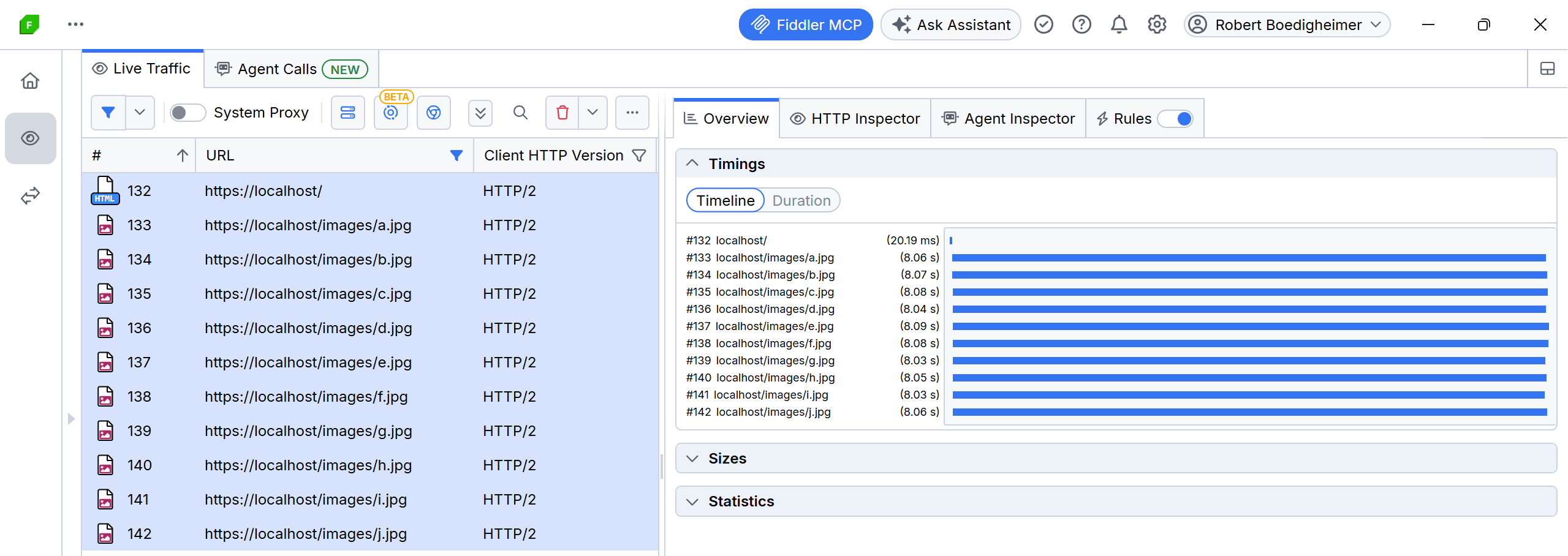
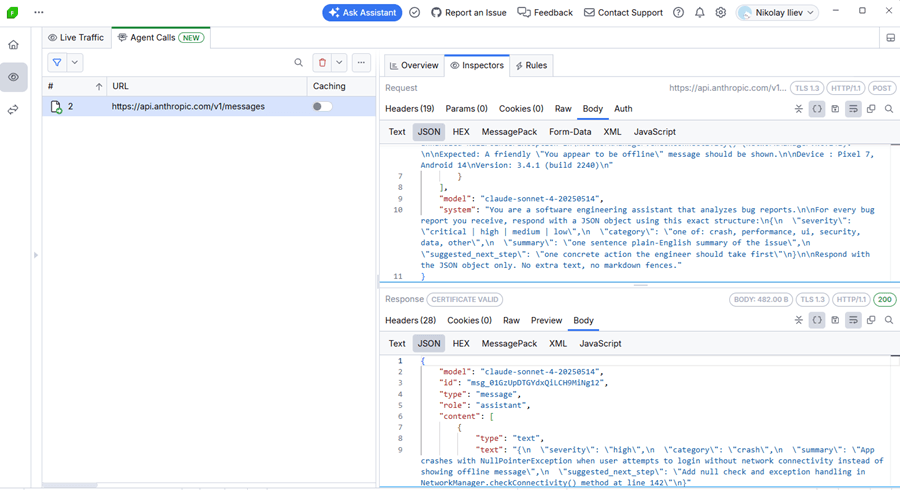
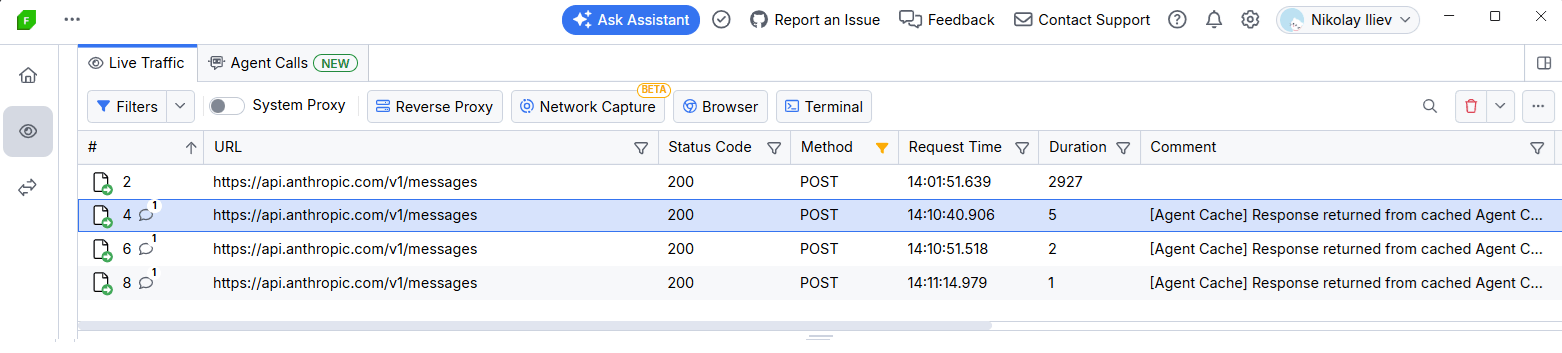
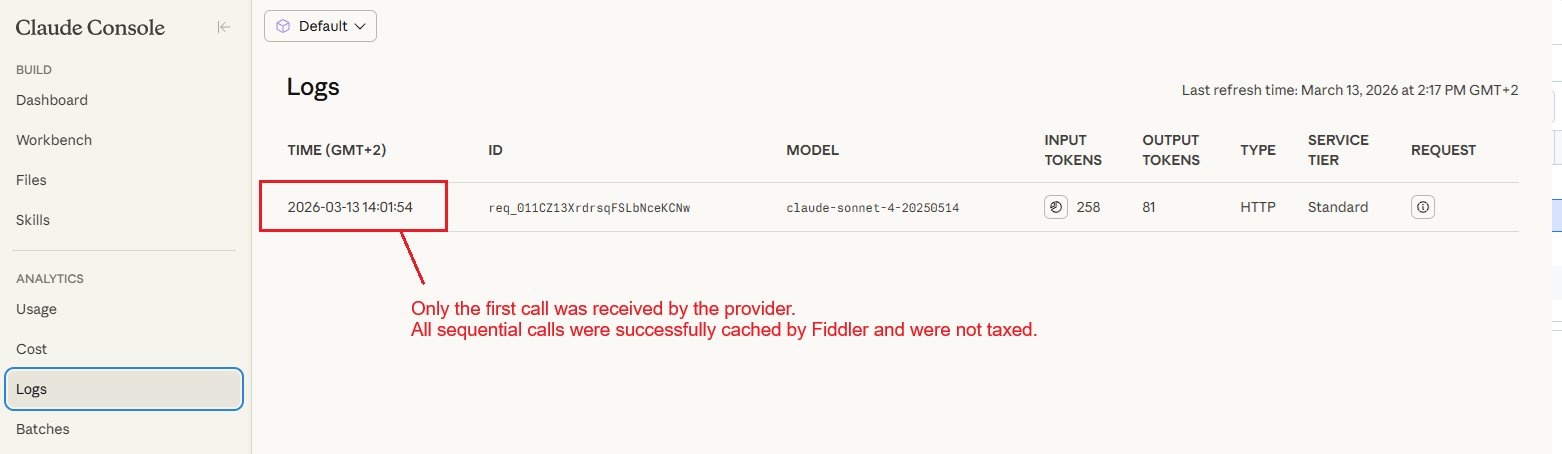
</code></pre><p>Switch to Fiddler Everywhere and open <strong>Traffic &gt; Agent Calls</strong>. You will see the captured call to api.anthropic.com with the full request and response visible.</p><p><img src="https://d585tldpucybw.cloudfront.net/sfimages/default-source/blogs/2026/2026-03/agent-call-request-response.png?sfvrsn=ba602a35_2" alt="Fiddler Everywhere Traffic Agent Calls shows the captured call to api.anthropic.com with the full request and response." /></p><p>This is your baseline. You paid for 380 tokens. That is fair&mdash;you needed the live call to validate the end-to-end flow.</p><h3 id="step-2-enable-the-cache">Step 2: Enable the Cache</h3><p>In the <strong>Agent Calls</strong> grid, find the captured session and flip its <strong>Caching</strong> switch to on. That is the entire configuration step.</p><p><img src="https://d585tldpucybw.cloudfront.net/sfimages/default-source/blogs/2026/2026-03/agent-calls-caching-on.png?sfvrsn=73826575_2" alt="Fiddler Everywhere Agent Calls has caching toggled on" /></p><h3 id="step-3-all-subsequent-runs-are-free">Step 3: All Subsequent Runs Are Free</h3><p>Run the agent again:</p><pre><code>python agent.py  
</code></pre><p>The output in the terminal is byte-for-byte identical to the first run, including the token count display. Because the <strong>Caching</strong> switch was on, Fiddler software served the stored response immediately and never forwarded the request to the provider. The endpoint never saw the call.</p><p><img src="https://d585tldpucybw.cloudfront.net/sfimages/default-source/blogs/2026/2026-03/fiddler-caching-stored-response.png?sfvrsn=f8736f5c_2" alt="Fiddler caching stored response immediately and never forwarded the request to the provider." /></p><p>You can now iterate on agent.py as many times as you need&mdash;refactor the display logic, adjust the JSON parsing, add logging&mdash;and none of those runs cost a single token.</p><p><img src="https://d585tldpucybw.cloudfront.net/sfimages/default-source/blogs/2026/2026-03/claude-console.png?sfvrsn=434925d4_2" alt="On the Claude Console: Only the first call was received by the provider. All sequential calls were successfully cached by Fiddler and were not taxed." /></p><h2 id="when-to-use-agent-cache">When to Use Agent Cache</h2><p>Agent Cache is a development-stage tool. It is particularly valuable when:</p><ul><li><strong>Iterating on response handling:</strong> Your agent already returns a correct response from the model. You are now working on how your code handles that response&mdash;formatting, validation, error recovery. None of that work requires fresh model calls.</li><li><strong>Sharing a working state with teammates:</strong> Cache a known-good response and share the Fiddler session. Everyone on the team can iterate against the same replay without burning tokens or depending on network access to the provider.</li><li><strong>Working offline or in restricted environments:</strong> Once the cache is populated, your agent keeps working even without connectivity to the provider.</li></ul><h2 id="things-to-keep-in-mind">Things to Keep in Mind</h2><ul><li><strong>Cache matching is request-based.</strong> If your agent changes the prompt, the model or any request headers, the cached session will no longer match. Capture and cache the updated variant separately.</li><li><strong>The cache lives in the current Fiddler session.</strong> Closing and reopening Fiddler clears the cache state, so the next run after a restart will make a live call. Review cached sessions periodically to keep stored responses aligned with your current workflow.</li><li><strong>Cache is for development, not production.</strong> Agent Cache is designed for development workflows where deterministic, repeatable responses are the goal. When you are ready to validate against a live endpoint, disable the cache and resume live calls.</li></ul><h2 id="availability">Availability</h2><p>Agent Cache is available on Fiddler Everywhere <strong>Trial</strong>, <strong>Pro</strong> and <strong>Enterprise</strong> tiers. The feature is not included in Lite licenses.</p><h2 id="try-it-yourself">Try It Yourself</h2><p>The full demo is on GitHub: <a target="_blank" href="https://github.com/NickIliev/agent-cache-demo">github.com/NickIliev/agent-cache-demo</a>. Clone it, set your Anthropic API key, and you can see the before-and-after token counts yourself in under five minutes.</p><p>The point is not really the 380 tokens saved in a single run. It is the dozens of runs you make in a typical development session, the parallel runs across a team&mdash;all of which can stop paying for answers they already have.</p><p>Agent Cache does not change how you build agents. It just removes the tax on iterating.</p><p>If you aren&rsquo;t already using Fiddler Everywhere, it does come with a free trial:</p><p><a href="https://www.telerik.com/download/fiddler-everywhere" class="Btn" target="_blank">Try Fiddler Everywhere</a></p><h3 id="leave-feedback">Leave Feedback</h3><p>Agent development workflows are still evolving quickly, and your feedback shapes what comes next. If you try Agent Cache during development&mdash;or if there is something you wish it did differently&mdash;we want to hear about it.</p><ul><li>Email: <a href="https://www.telerik.commailto:fiddler-support@progress.com" target="_blank">fiddler-support@progress.com</a></li><li>GitHub issues: <a target="_blank" href="https://github.com/telerik/fiddler-everywhere/issues">github.com/telerik/fiddler-everywhere/issues</a></li><li>Demo repository: <a target="_blank" href="https://github.com/NickIliev/agent-cache-demo">github.com/NickIliev/agent-cache-demo</a></li></ul><img src="https://feeds.telerik.com/link/23069/17301014.gif" height="1" width="1"/>]]></content>
  </entry>
  <entry>
    <id>urn:uuid:ae44e409-286f-48d8-9fe2-0cbc4cb2a045</id>
    <title type="text">Rate Limiting in NestJS Using Throttler</title>
    <summary type="text">Rate limiting helps force clients to consume resources responsibly. Here’s how to use this technique to secure our web server and its resources from abuse.</summary>
    <published>2025-10-30T22:12:17Z</published>
    <updated>2026-04-08T11:41:14Z</updated>
    <author>
      <name>Christian Nwamba </name>
    </author>
    <link rel="alternate" href="https://feeds.telerik.com/link/23069/17200233/rate-limiting-nestjs-using-throttler"/>
    <content type="text"><![CDATA[<p><span class="featured">Rate limiting helps force clients to consume resources responsibly. Here&rsquo;s how to use this technique to secure our web server and its resources from abuse.</span></p><p>Rate limiting is a technique that verifies clients consume the server&rsquo;s resources responsibly. It is essential for preventing malicious actors from abusing resources. This technique monitors each client&rsquo;s requests to API endpoints. If their requests exceed a particular limit&mdash;that is, breach a particular constraint within a time frame&mdash;the client is either blocked or their request is delayed, slowed down or silently ignored.</p><p><a target="_blank" href="https://nestjs.com/">NestJS</a> is a popular framework that makes it easy for developers to build enterprise-grade server-side applications and provides them with a suite of tools to solve common problems.</p><p>In this article, we will be exploring the package for rate limiting. We will first explore rate limiting and some of its core concepts and see how this tool can be used to solve common rate limiting problems in our NestJS applications. We will explore some interesting challenges when implementing rate limiting in real-world applications and examine configurations that this package provides to help us counter those problems.</p><h2 id="prerequisites">Prerequisites</h2><p>This guide assumes the reader is familiar with TypeScript, backend development using Node.js, and HTTP and RESTful APIs.</p><h2 id="project-setup">Project Setup</h2><p>Assuming you have the <a target="_blank" href="https://docs.nestjs.com/cli/overview">Nest CLI</a> installed, let&rsquo;s now set up a NestJS project by running the following command:</p><pre class=" language-shell"><code class="prism  language-shell">nest new rate-limiting
</code></pre><p>The application is created in a folder called <code class="inline-code">rate-limiting</code>. Feel free to pick a folder name of your choice.</p><p>Next, let&rsquo;s install @nestjs/throttler, which is the rate limiting package for NestJS.</p><pre class=" language-shell"><code class="prism  language-shell">cd rate-limiting
npm install @nestjs/throttler
</code></pre><h2 id="how-rate-limiting-works">How Rate Limiting Works</h2><p>Now, let&rsquo;s briefly describe how rate limiting works and highlight some of the core concepts powering it. Understanding this section will be important when we start using the <code class="inline-code">@nestjs/throttler</code> package.</p><ul><li>The resource owner defines the constraint on what is allowed&mdash;that is, the <strong>limit</strong>. Limits are time-bound. The time frame a limit is applied to is called a <strong>window</strong>, and limits are expressed as &ldquo;limit per window&rdquo; (e.g., five requests per second, one job per hour, etc.).</li><li>The resource owner then tracks the client&rsquo;s requests to access their resources. Tracking can be done based on some identifier (e.g., an ID of some database entity, the client&rsquo;s IP address, etc.). Tracking is a stateful operation, so the resource owner implements some <strong>storage</strong> mechanism to hold tracking information for clients. The storage containers to hold this information could be databases or in-memory storage.</li><li>If the client exceeds the defined limit, the resource owner responds either by blocking the request for some duration and returning a 429 response code or by throttling the request (i.e., ignoring or slowing down the response to the user&rsquo;s request).</li><li>The resource owner implements a rate limiting algorithm to make everything work. Common rate limiting algorithms include token bucket, leaky bucket, fixed window and sliding window algorithms.</li></ul><p>Examples of rate limiting in real-world applications include the following:</p><ul><li>A payment gateway may limit requests from clients trying to get the status of a transaction to, for example, one request per minute.</li><li>A cloud service like EAS limits users with free tier accounts to only create 30 builds for their mobile applications per month, with a concurrency limit of one.</li><li>A media manipulation service like Cloudinary constrains API consumers on a free account to upload a limited number of files in each request, with each file not exceeding a particular size.</li></ul><h2 id="the-nestjsthrottler-module">The @nestjs/throttler Module</h2><p>Let&rsquo;s now explore the contents of the rate limiting module we will be using:</p><ul><li>It provides an abstraction over all the complexity involved in rate limiting and provides us with a simple interface to set up only the rate limiting options we need, while it handles the rest.</li><li>It provides a wide range of options that allow us to configure limits, handle client tracking, storage, etc.</li><li>It is storage agnostic, so it allows us to optionally configure different storage mechanisms for tracking. By default, tracking is done using an in-memory store using the JS Map data structure. It also supports regular databases&mdash;the most popular option here is Redis, as we will see later.</li><li>If the client exceeds the defined limit, this module responds by blocking the client.</li><li>Although this guide will explore how it can be used in a RESTful API, it is also compatible with GraphQL and WebSockets.</li></ul><h2 id="setting-up-some-routes">Setting up Some Routes</h2><p>Normally, a web server will contain one or more endpoints. Let us define a few. Update your <code class="inline-code">app.controller.ts</code> file with the following:</p><pre class=" language-ts"><code class="prism  language-ts"><span class="token keyword">import</span> <span class="token punctuation">{</span> Controller<span class="token punctuation">,</span> Get <span class="token punctuation">}</span> <span class="token keyword">from</span> <span class="token string">"@nestjs/common"</span><span class="token punctuation">;</span>
@<span class="token function">Controller</span><span class="token punctuation">(</span><span class="token string">"app"</span><span class="token punctuation">)</span>
<span class="token keyword">export</span> <span class="token keyword">class</span> <span class="token class-name">AppController</span> <span class="token punctuation">{</span>
  @<span class="token function">Get</span><span class="token punctuation">(</span><span class="token string">"/a"</span><span class="token punctuation">)</span>
  <span class="token function">getA</span><span class="token punctuation">(</span><span class="token punctuation">)</span><span class="token punctuation">:</span> <span class="token keyword">string</span> <span class="token punctuation">{</span>
    <span class="token keyword">return</span> <span class="token string">"this is A"</span><span class="token punctuation">;</span>
  <span class="token punctuation">}</span>
  @<span class="token function">Get</span><span class="token punctuation">(</span><span class="token string">"/b"</span><span class="token punctuation">)</span>
  <span class="token function">getB</span><span class="token punctuation">(</span><span class="token punctuation">)</span><span class="token punctuation">:</span> <span class="token keyword">string</span> <span class="token punctuation">{</span>
    <span class="token keyword">return</span> <span class="token string">"this is B"</span><span class="token punctuation">;</span>
  <span class="token punctuation">}</span>
  @<span class="token function">Get</span><span class="token punctuation">(</span><span class="token string">"/b"</span><span class="token punctuation">)</span>
  <span class="token function">getC</span><span class="token punctuation">(</span><span class="token punctuation">)</span><span class="token punctuation">:</span> <span class="token keyword">string</span> <span class="token punctuation">{</span>
    <span class="token keyword">return</span> <span class="token string">"this is C"</span><span class="token punctuation">;</span>
  <span class="token punctuation">}</span>
<span class="token punctuation">}</span>
</code></pre><p>We defined three routes: <code class="inline-code">/app/a</code>, <code class="inline-code">/app/b</code> and <code class="inline-code">/app/c</code>. Verify that <code class="inline-code">AppController</code> is mounted in the <code class="inline-code">app.module.ts</code> file as shown below:</p><pre class=" language-ts"><code class="prism  language-ts"><span class="token keyword">import</span> <span class="token punctuation">{</span> Module <span class="token punctuation">}</span> <span class="token keyword">from</span> <span class="token string">"@nestjs/common"</span><span class="token punctuation">;</span>
<span class="token keyword">import</span> <span class="token punctuation">{</span> AppController <span class="token punctuation">}</span> <span class="token keyword">from</span> <span class="token string">"./app.controller"</span><span class="token punctuation">;</span>
@<span class="token function">Module</span><span class="token punctuation">(</span><span class="token punctuation">{</span>
  imports<span class="token punctuation">:</span> <span class="token punctuation">[</span><span class="token punctuation">]</span><span class="token punctuation">,</span>
  controllers<span class="token punctuation">:</span> <span class="token punctuation">[</span>AppController<span class="token punctuation">]</span><span class="token punctuation">,</span>
  providers<span class="token punctuation">:</span> <span class="token punctuation">[</span><span class="token punctuation">]</span><span class="token punctuation">,</span>
<span class="token punctuation">}</span><span class="token punctuation">)</span>
<span class="token keyword">export</span> <span class="token keyword">class</span> <span class="token class-name">AppModule</span> <span class="token punctuation">{</span><span class="token punctuation">}</span>
</code></pre><h2 id="add-rate-limiting-to-the-entire-app">Add Rate Limiting to the Entire App</h2><p>Update the <code class="inline-code">app.module.ts</code> file to look like this:</p><pre class=" language-ts"><code class="prism  language-ts"><span class="token keyword">import</span> <span class="token punctuation">{</span> Module <span class="token punctuation">}</span> <span class="token keyword">from</span> <span class="token string">"@nestjs/common"</span><span class="token punctuation">;</span>
<span class="token keyword">import</span> <span class="token punctuation">{</span> AppService <span class="token punctuation">}</span> <span class="token keyword">from</span> <span class="token string">"./app.service"</span><span class="token punctuation">;</span>
<span class="token keyword">import</span> <span class="token punctuation">{</span>
  minutes<span class="token punctuation">,</span>
  seconds<span class="token punctuation">,</span>
  ThrottlerGuard<span class="token punctuation">,</span>
  ThrottlerModule<span class="token punctuation">,</span>
<span class="token punctuation">}</span> <span class="token keyword">from</span> <span class="token string">"@nestjs/throttler"</span><span class="token punctuation">;</span>
<span class="token keyword">import</span> <span class="token punctuation">{</span> APP_GUARD <span class="token punctuation">}</span> <span class="token keyword">from</span> <span class="token string">"@nestjs/core"</span><span class="token punctuation">;</span>
<span class="token keyword">import</span> <span class="token punctuation">{</span> AppController <span class="token punctuation">}</span> <span class="token keyword">from</span> <span class="token string">"./app.controller"</span><span class="token punctuation">;</span>
@<span class="token function">Module</span><span class="token punctuation">(</span><span class="token punctuation">{</span>
  imports<span class="token punctuation">:</span> <span class="token punctuation">[</span>
    ThrottlerModule<span class="token punctuation">.</span><span class="token function">forRoot</span><span class="token punctuation">(</span><span class="token punctuation">{</span>
      throttlers<span class="token punctuation">:</span> <span class="token punctuation">[</span>
        <span class="token punctuation">{</span>
          name<span class="token punctuation">:</span> <span class="token string">"first"</span><span class="token punctuation">,</span>
          ttl<span class="token punctuation">:</span> <span class="token number">1000</span><span class="token punctuation">,</span>
          limit<span class="token punctuation">:</span> <span class="token number">1</span><span class="token punctuation">,</span>
          blockDuration<span class="token punctuation">:</span> <span class="token number">1000</span><span class="token punctuation">,</span>
        <span class="token punctuation">}</span><span class="token punctuation">,</span>
        <span class="token punctuation">{</span>
          name<span class="token punctuation">:</span> <span class="token string">"second"</span><span class="token punctuation">,</span>
          ttl<span class="token punctuation">:</span> <span class="token function">seconds</span><span class="token punctuation">(</span><span class="token number">10</span><span class="token punctuation">)</span><span class="token punctuation">,</span> <span class="token comment">// 10000</span>
          limit<span class="token punctuation">:</span> <span class="token number">5</span><span class="token punctuation">,</span>
          blockDuration<span class="token punctuation">:</span> <span class="token function">seconds</span><span class="token punctuation">(</span><span class="token number">5</span><span class="token punctuation">)</span><span class="token punctuation">,</span>
        <span class="token punctuation">}</span><span class="token punctuation">,</span>
        <span class="token punctuation">{</span>
          name<span class="token punctuation">:</span> <span class="token string">"third"</span><span class="token punctuation">,</span>
          ttl<span class="token punctuation">:</span> <span class="token function">minutes</span><span class="token punctuation">(</span><span class="token number">1</span><span class="token punctuation">)</span><span class="token punctuation">,</span> <span class="token comment">// 60000</span>
          limit<span class="token punctuation">:</span> <span class="token number">25</span><span class="token punctuation">,</span>
        <span class="token punctuation">}</span><span class="token punctuation">,</span>
      <span class="token punctuation">]</span><span class="token punctuation">,</span>
      errorMessage<span class="token punctuation">:</span> <span class="token string">"too many requests!"</span><span class="token punctuation">,</span>
    <span class="token punctuation">}</span><span class="token punctuation">)</span><span class="token punctuation">,</span>
  <span class="token punctuation">]</span><span class="token punctuation">,</span>
  controllers<span class="token punctuation">:</span> <span class="token punctuation">[</span>AppController<span class="token punctuation">]</span><span class="token punctuation">,</span>
  providers<span class="token punctuation">:</span> <span class="token punctuation">[</span>
    AppService<span class="token punctuation">,</span>
    <span class="token punctuation">{</span>
      provide<span class="token punctuation">:</span> APP_GUARD<span class="token punctuation">,</span>
      useClass<span class="token punctuation">:</span> ThrottlerGuard<span class="token punctuation">,</span>
    <span class="token punctuation">}</span><span class="token punctuation">,</span>
  <span class="token punctuation">]</span><span class="token punctuation">,</span>
<span class="token punctuation">}</span><span class="token punctuation">)</span>
<span class="token keyword">export</span> <span class="token keyword">class</span> <span class="token class-name">AppModule</span> <span class="token punctuation">{</span><span class="token punctuation">}</span>
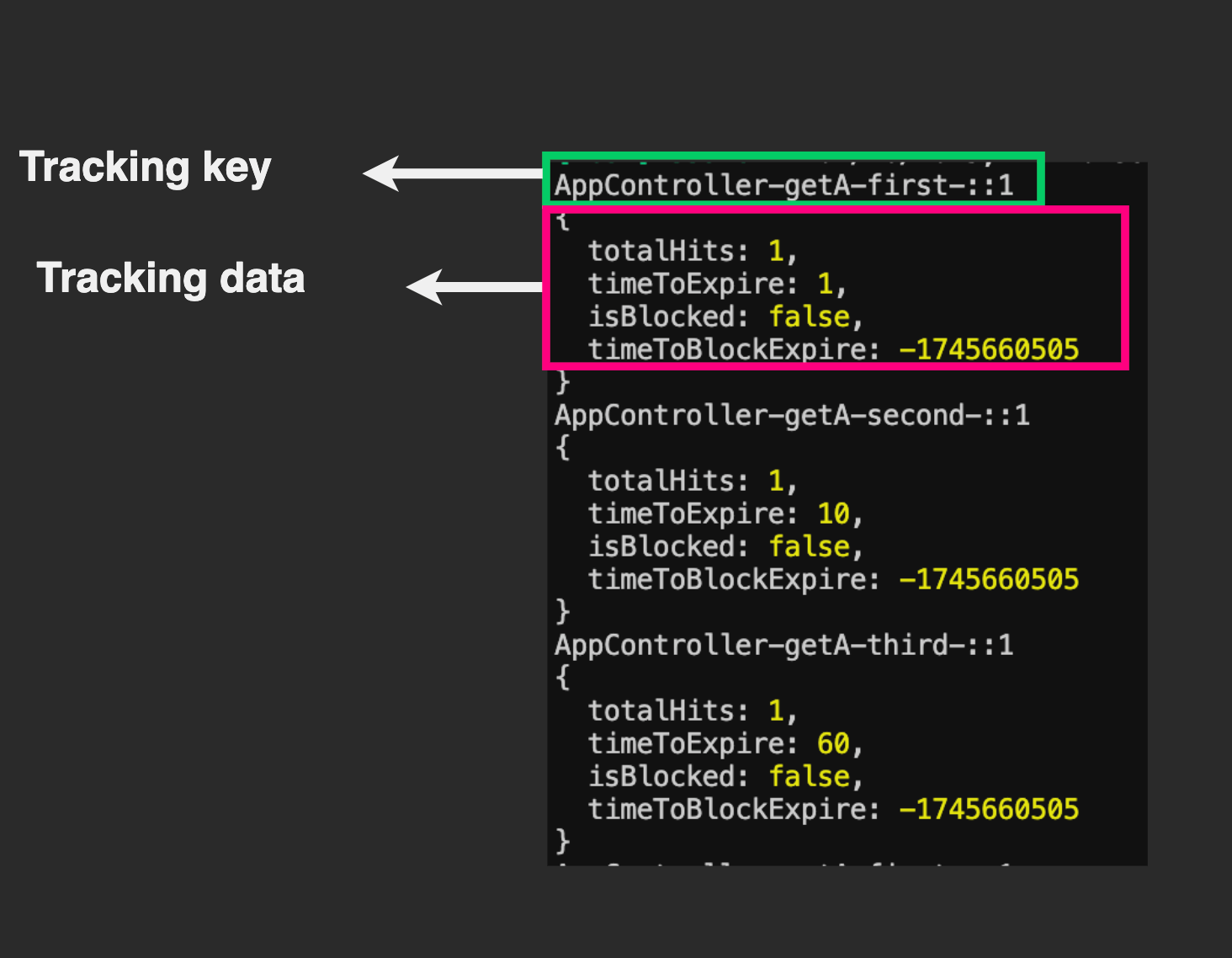
</code></pre><p>The <code class="inline-code">ThrottleModule</code> enables us to define the rate limiting options in our app. Using either its <code class="inline-code">forRoot()</code> or <code class="inline-code">forRootAsync()</code> overloaded methods, we pass an object defining the options we want. The most important property is one called <code class="inline-code">throttlers</code>&mdash;it holds an array of objects, each representing the rate limiting options we want. We can declare as many as required. In our case, we specified three of them.</p><p>Each throttle option has properties, but the only mandatory ones are <code class="inline-code">limit</code> and <code class="inline-code">ttl</code> (time to live). However, we added some other interesting ones, which we will look at in a bit.</p><p>We can read the first entry in the <code class="inline-code">options</code> array like so: The client is limited to 1 (limit) request per 1000ms (TTL), and if they exceed that, they will be blocked for 1000ms (blockDuration) during which the server responds with a 429. You can apply this model to read the remaining options.</p><p>While there are many other optional options (six others at the point of writing), we only used two: <code class="inline-code">blockDuration</code> and <code class="inline-code">name</code>. The former is quite intuitive; if not specified, it defaults to the TTL value. Note that time is always specified in milliseconds when using this module.</p><p>The <code class="inline-code">name</code> property defines a name for the group. If not specified, it resolves to the string <code class="inline-code">default</code>. This property helps during tracking to distinguish how tracking information will be stored across options.</p><p>We can also add options to define how we want to generate identifiers to track clients or whether, for some option groups, we may want to skip some routes in our app.</p><p>Now, for the root object, we also included another optional property called <code class="inline-code">errorMessage</code>, which accepts a string or a function that resolves to the message that will be sent when the user exceeds any of the defined limits.</p><p>Finally, we need to verify our entire application is guarded using the rate limiting options, so we used the special <code class="inline-code">APP_GUARD</code> injection token to provision the <code class="inline-code">ThrottlerGuard</code> class. The <code class="inline-code">ThrottlerGuard</code> class is where all the magic happens. It is responsible for tracking and maintaining the state for clients and blocking them when necessary.</p><p>To test our running application, open the terminal and start the server by running the following command:</p><pre class=" language-shell"><code class="prism  language-shell">npm run start:dev
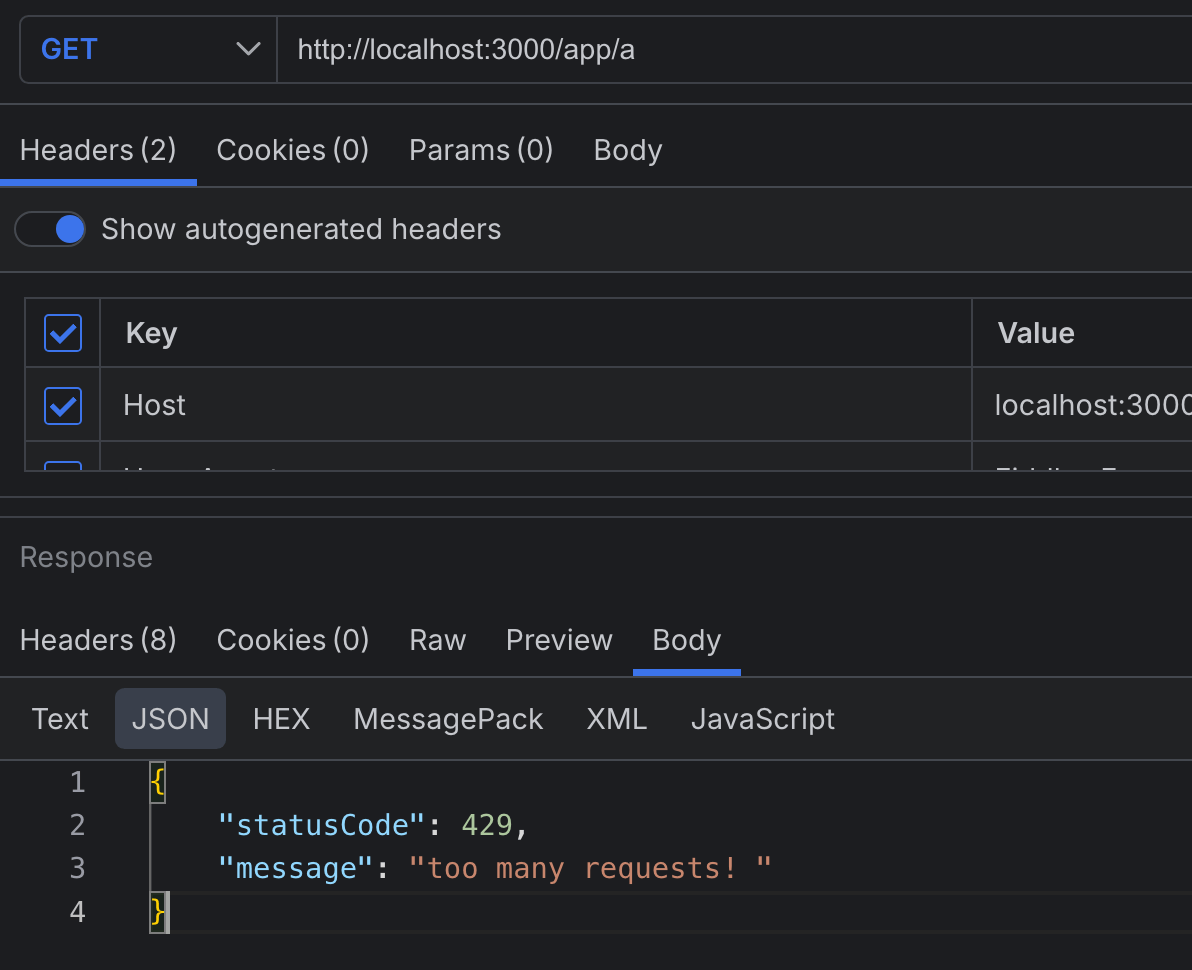
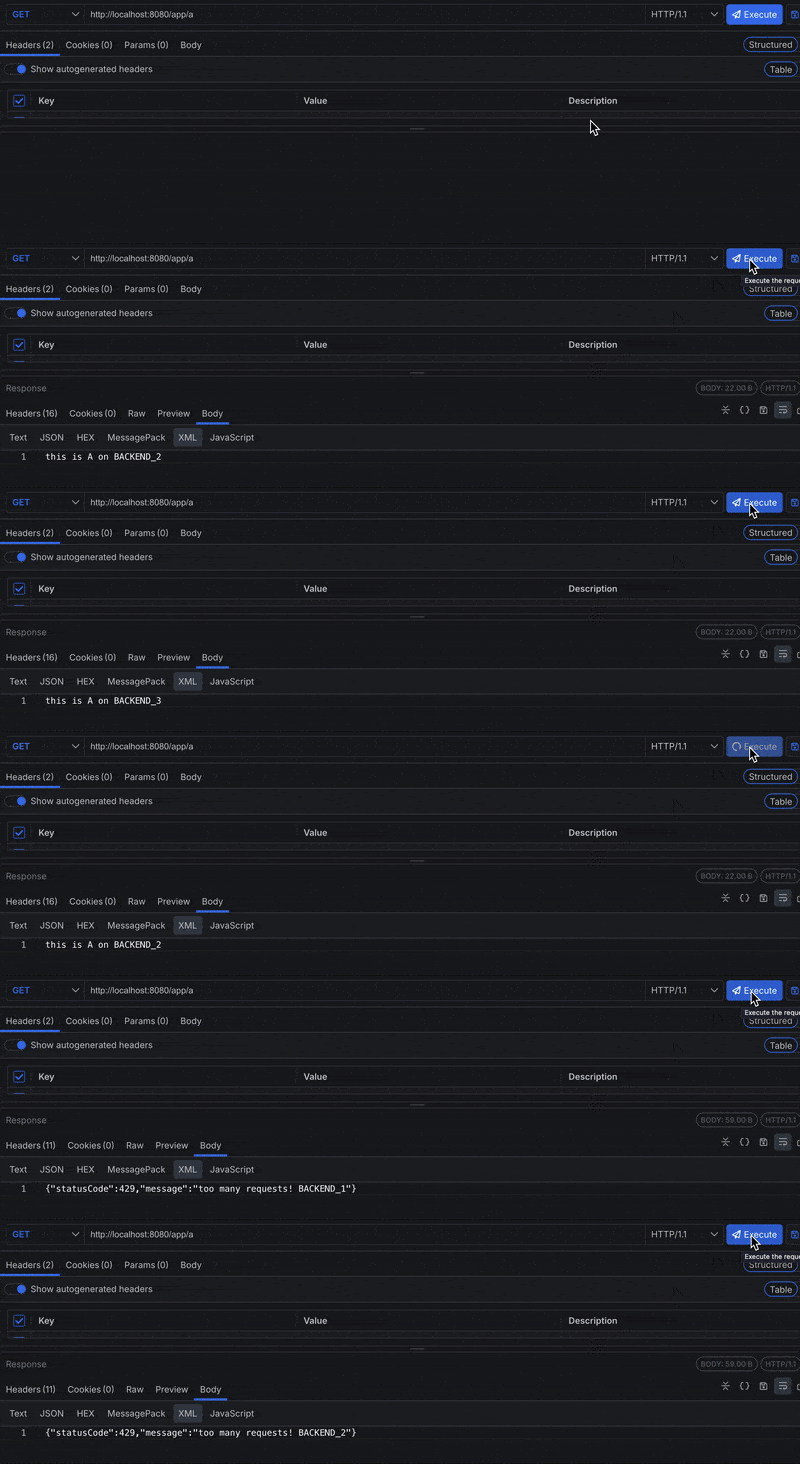
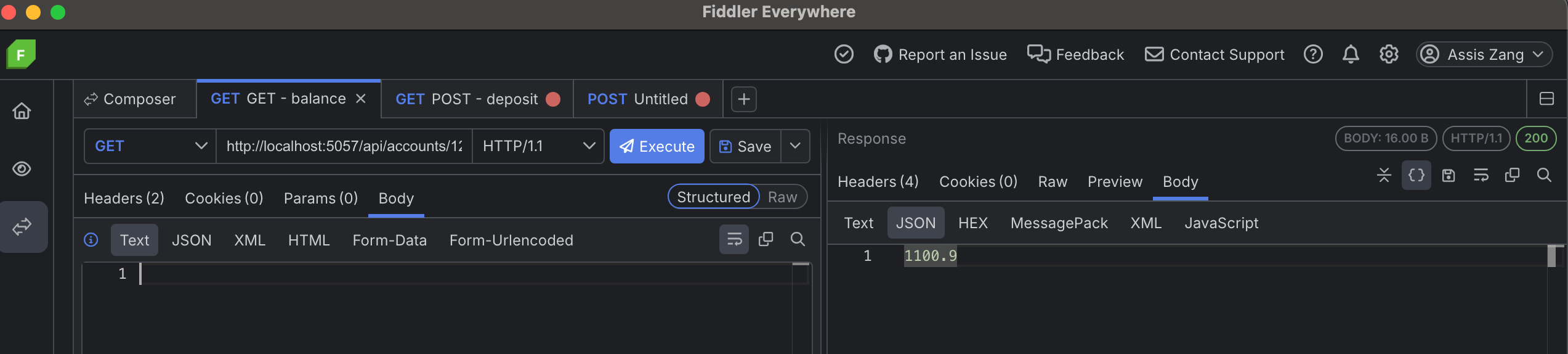
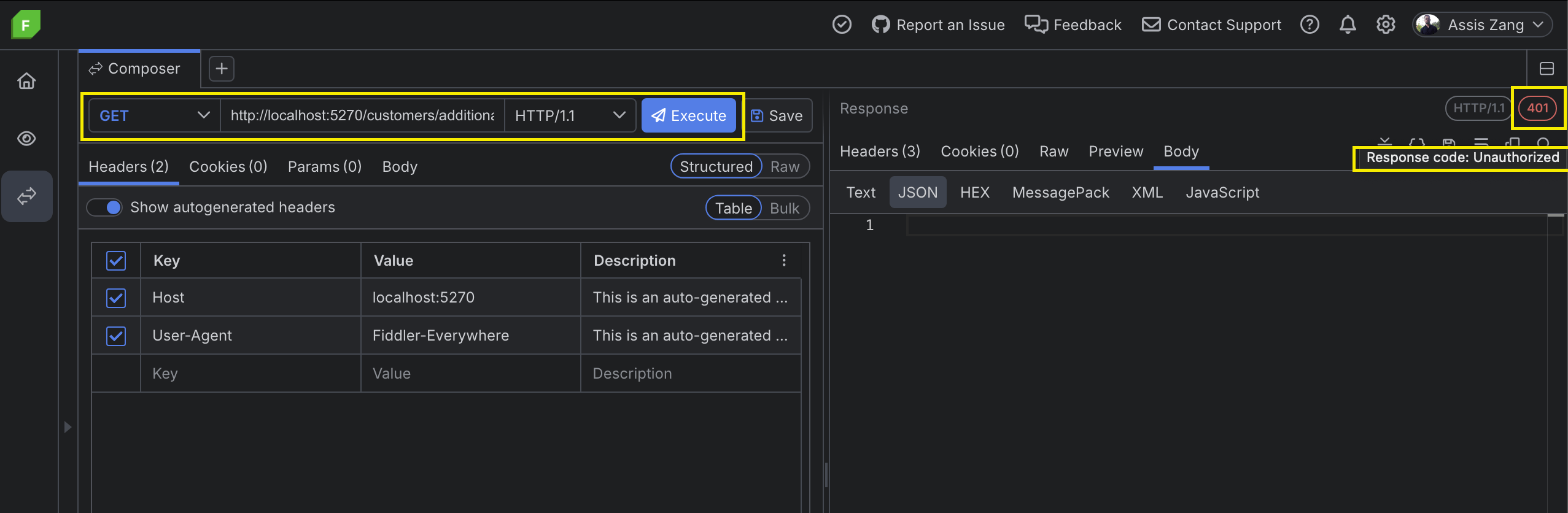
</code></pre><p>Using a browser&rsquo;s address bar or any API testing platform, let&rsquo;s proceed to test our API. In this article, we will be using Progress Telerik <a target="_blank" href="https://www.telerik.com/fiddler/fiddler-everywhere">Fiddler Everywhere</a>. Notice that whenever we exceed any of the limits, we get a 429 response as shown below.</p><p><img src="https://d585tldpucybw.cloudfront.net/sfimages/default-source/blogs/2025/2025-06/limits-is-exceeded.png?sfvrsn=158c49f1_2" title="429 response is returned If any of the limits is exceeded" alt="429 response is returned If any of the limits is exceeded" /></p><h2 id="how-tracking-works">How Tracking Works</h2><p><img src="https://d585tldpucybw.cloudfront.net/sfimages/default-source/blogs/2025/2025-06/tracking-key-and-data.png?sfvrsn=1f80d533_2" title="Tracking using a tracking key and the tracking data" alt="Tracking using a tracking key and the tracking data" /></p><p>Tracking information is stored in a map using key-value pairs. A hyphen (-) separates the pieces that make up the tracking keys. The tracking key is derived from the name of the controller, the handling function, the name of the throttle option and a custom client identifier. By default, this is the client&rsquo;s IP address.</p><p>The diagram above shows the key in plain text, but internally they are hashed (SHA256) before they are used as keys.</p><p>The tracking data is derived from the throttle options. It maintains relevant information such as:</p><ul><li>How many requests the client made</li><li>The time for each limit</li><li>The block duration and status</li></ul><blockquote><p>Notice that there are three instances of the tracking keys and their corresponding tracking information maintained for each endpoint for each client, since we defined three different options.</p></blockquote><h2 id="overriding-rate-limiting-options-for-certain-routes">Overriding Rate Limiting Options for Certain Routes</h2><p>Update your <code class="inline-code">app.controller.ts</code> file to match the following:</p><pre class=" language-ts"><code class="prism  language-ts"><span class="token keyword">import</span> <span class="token punctuation">{</span> Controller<span class="token punctuation">,</span> Get <span class="token punctuation">}</span> <span class="token keyword">from</span> <span class="token string">"@nestjs/common"</span><span class="token punctuation">;</span>
<span class="token keyword">import</span> <span class="token punctuation">{</span> Throttle <span class="token punctuation">}</span> <span class="token keyword">from</span> <span class="token string">"@nestjs/throttler"</span><span class="token punctuation">;</span>
@<span class="token function">Controller</span><span class="token punctuation">(</span><span class="token string">"app"</span><span class="token punctuation">)</span>
<span class="token keyword">export</span> <span class="token keyword">class</span> <span class="token class-name">AppController</span> <span class="token punctuation">{</span>
  @<span class="token function">Throttle</span><span class="token punctuation">(</span><span class="token punctuation">{</span>
    first<span class="token punctuation">:</span> <span class="token punctuation">{</span>
      ttl<span class="token punctuation">:</span> <span class="token number">3000</span><span class="token punctuation">,</span>
      limit<span class="token punctuation">:</span> <span class="token number">1</span><span class="token punctuation">,</span>
      blockDuration<span class="token punctuation">:</span> <span class="token number">10000</span><span class="token punctuation">,</span>
    <span class="token punctuation">}</span><span class="token punctuation">,</span>
  <span class="token punctuation">}</span><span class="token punctuation">)</span>
  @<span class="token function">Get</span><span class="token punctuation">(</span><span class="token string">"/a"</span><span class="token punctuation">)</span>
  <span class="token function">getA</span><span class="token punctuation">(</span><span class="token punctuation">)</span><span class="token punctuation">:</span> <span class="token keyword">string</span> <span class="token punctuation">{</span>
    <span class="token keyword">return</span> <span class="token string">"this is A"</span><span class="token punctuation">;</span>
  <span class="token punctuation">}</span>
  @<span class="token function">Get</span><span class="token punctuation">(</span><span class="token string">"/b"</span><span class="token punctuation">)</span>
  <span class="token function">getB</span><span class="token punctuation">(</span><span class="token punctuation">)</span><span class="token punctuation">:</span> <span class="token keyword">string</span> <span class="token punctuation">{</span>
    <span class="token keyword">return</span> <span class="token string">"this is B"</span><span class="token punctuation">;</span>
  <span class="token punctuation">}</span>
  @<span class="token function">Get</span><span class="token punctuation">(</span><span class="token string">"/b"</span><span class="token punctuation">)</span>
  <span class="token function">getC</span><span class="token punctuation">(</span><span class="token punctuation">)</span><span class="token punctuation">:</span> <span class="token keyword">string</span> <span class="token punctuation">{</span>
    <span class="token keyword">return</span> <span class="token string">"this is C"</span><span class="token punctuation">;</span>
  <span class="token punctuation">}</span>
<span class="token punctuation">}</span>
</code></pre><p>Depending on what your application needs, it is often better to change the rate-limiting options either on one endpoint (i.e., <strong>at the route level</strong>) or a group of endpoints (i.e., <strong>at the controller level</strong>). Regardless of which, the <code class="inline-code">@nestjs/throttler</code> module provides us with the handy <code class="inline-code">Throttle</code> decorator to do so.</p><p>This function expects an object whose keys are the throttle option name attributes configured earlier in the <code class="inline-code">forRoot</code> method of the <code class="inline-code">ThrottlerModule</code>. The values are just overrides of the previous options.</p><p>In our case, we reconfigured the option called <code class="inline-code">first</code> and we limited it to one request every three seconds, with a block duration of 10 seconds.</p><p>Now if we try to hit <code class="inline-code">/app/a</code> more than once in three seconds, we get an error. Also note that <code class="inline-code">second</code> and <code class="inline-code">third</code> settings will still apply to this endpoint.</p><h2 id="partly-or-completely-disabling-rate-limiting-for-one-or-more-routes">Partly or Completely Disabling Rate Limiting for One or More Routes</h2><p>Not all parts of an application will need rate limiting. Update your <code class="inline-code">app.controller.ts</code> file with the following:</p><pre class=" language-ts"><code class="prism  language-ts"><span class="token keyword">import</span> <span class="token punctuation">{</span> Controller<span class="token punctuation">,</span> Get <span class="token punctuation">}</span> <span class="token keyword">from</span> <span class="token string">"@nestjs/common"</span><span class="token punctuation">;</span>
<span class="token keyword">import</span> <span class="token punctuation">{</span> SkipThrottle<span class="token punctuation">,</span> Throttle <span class="token punctuation">}</span> <span class="token keyword">from</span> <span class="token string">"@nestjs/throttler"</span><span class="token punctuation">;</span>
@<span class="token function">Controller</span><span class="token punctuation">(</span><span class="token string">"app"</span><span class="token punctuation">)</span>
<span class="token keyword">export</span> <span class="token keyword">class</span> <span class="token class-name">AppController</span> <span class="token punctuation">{</span>
  <span class="token comment">//...</span>
  @<span class="token function">SkipThrottle</span><span class="token punctuation">(</span><span class="token punctuation">{</span>
    first<span class="token punctuation">:</span> <span class="token keyword">true</span><span class="token punctuation">,</span>
    second<span class="token punctuation">:</span> <span class="token keyword">true</span><span class="token punctuation">,</span>
  <span class="token punctuation">}</span><span class="token punctuation">)</span>
  @<span class="token function">Get</span><span class="token punctuation">(</span><span class="token string">"/b"</span><span class="token punctuation">)</span>
  <span class="token function">getB</span><span class="token punctuation">(</span><span class="token punctuation">)</span><span class="token punctuation">:</span> <span class="token keyword">string</span> <span class="token punctuation">{</span>
    <span class="token keyword">return</span> <span class="token string">"this is B"</span><span class="token punctuation">;</span>
  <span class="token punctuation">}</span>
  <span class="token comment">//...</span>
<span class="token punctuation">}</span>
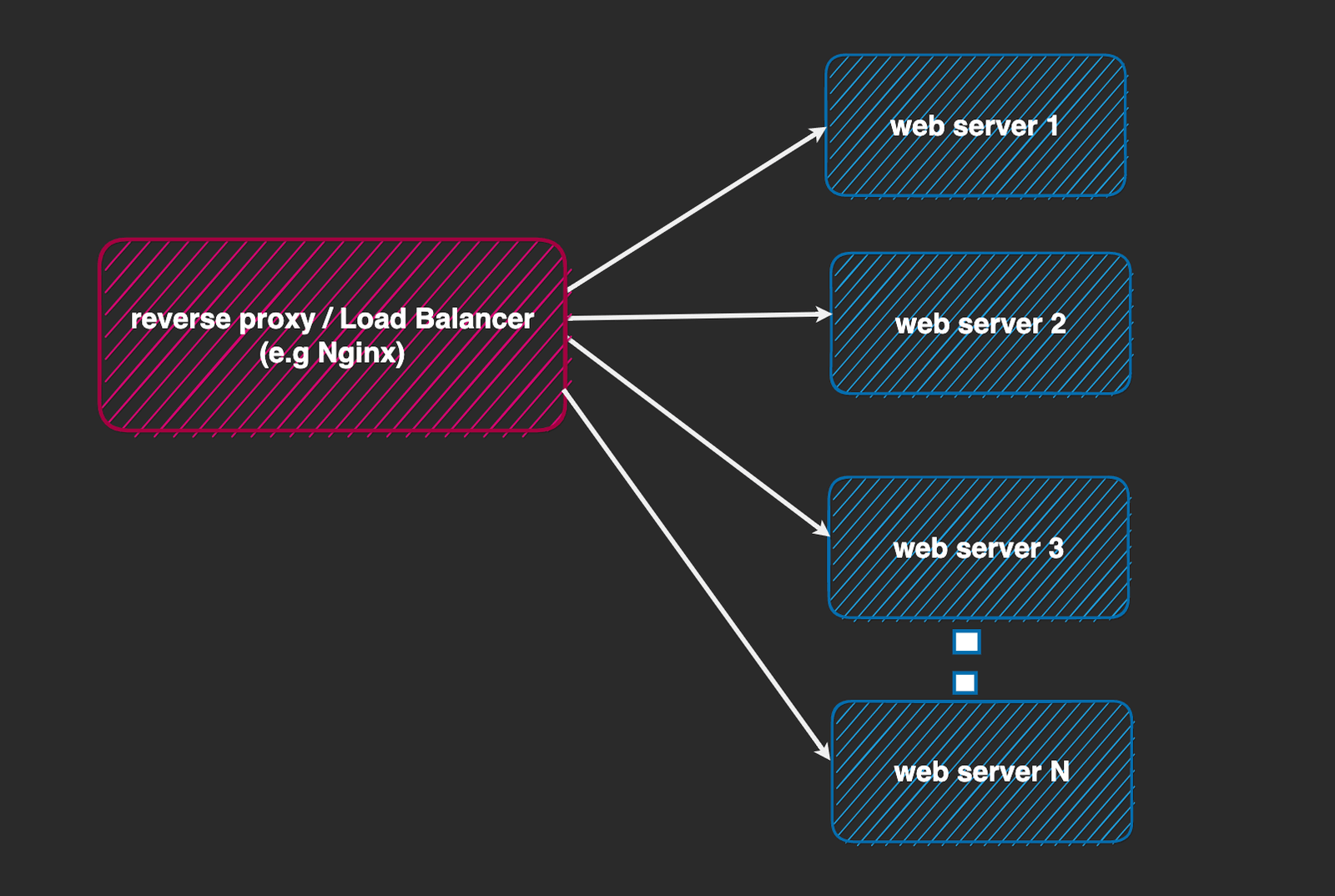
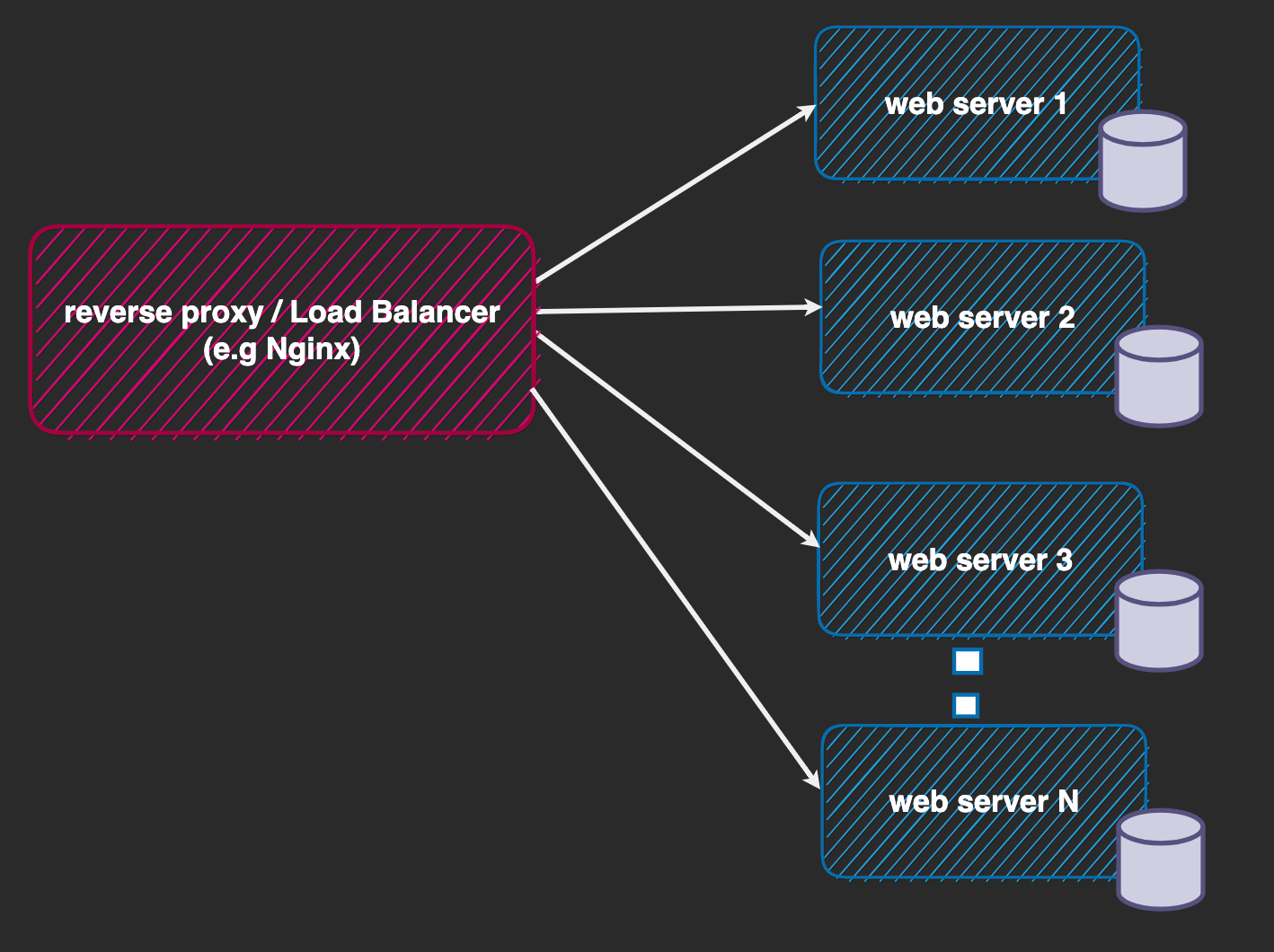
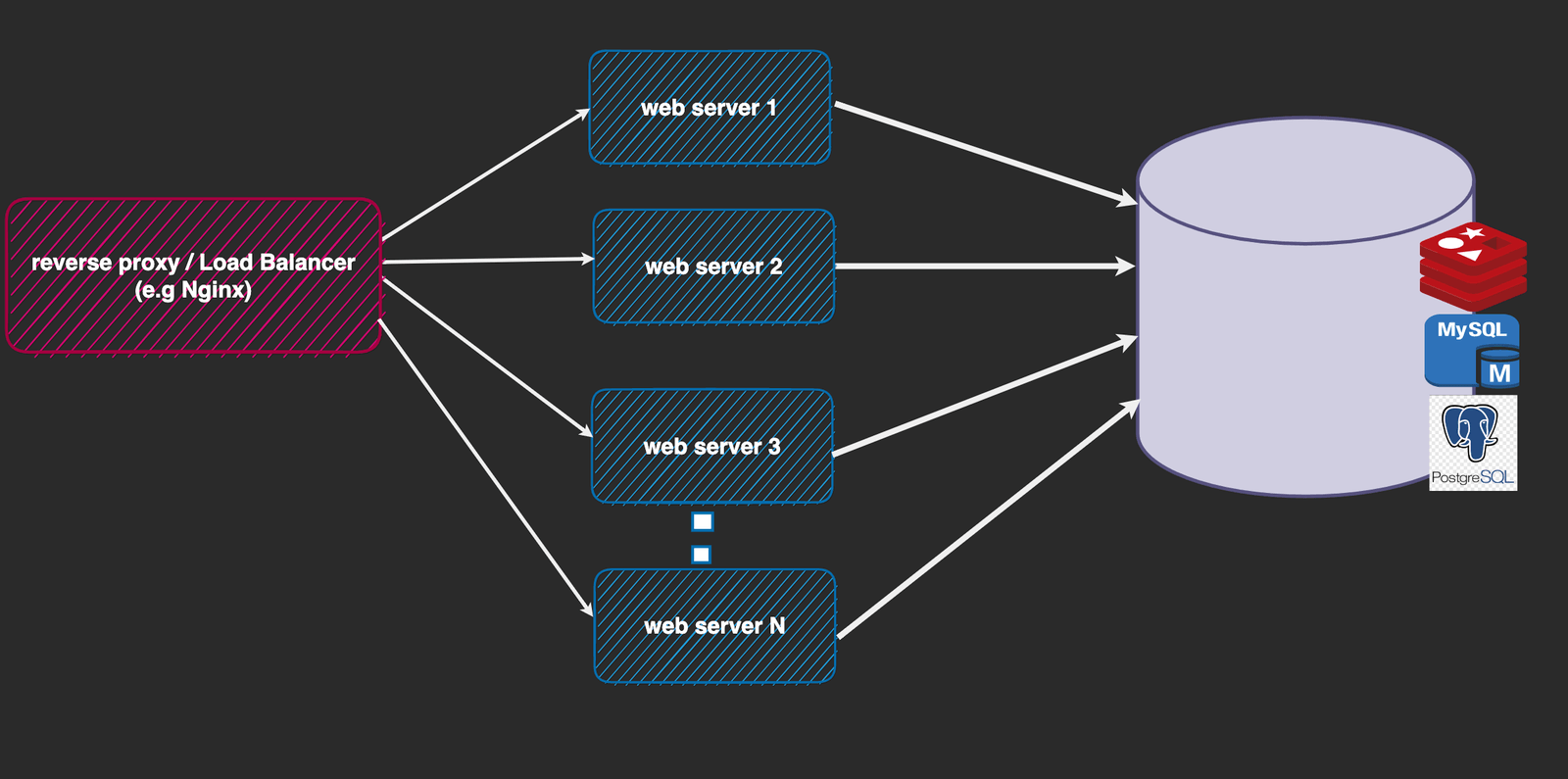
</code></pre><p>The <code class="inline-code">SkipThrottle</code> decorator allows us to disable rate limiting again, either on the controller or route level. It expects an object whose keys are the names of throttle options and whose values are booleans. For example, in our case we disabled <code class="inline-code">first</code> and <code class="inline-code">second</code> throttle options on the <code class="inline-code">/app/b</code> endpoint. This means only the rate limiting option named <code class="inline-code">third</code> will apply to this route.</p><h2 id="rate-limiting-problems-in-real-world-applications">Rate Limiting Problems in Real World Applications</h2><p>In this section, we will look at some common rate limiting problems we encounter in real-world applications and how we can solve them. Our solutions will use the <code class="inline-code">@nestjs/throttler</code> module and some of the features provided by the Nest framework:</p><ul><li>Tracking clients by IP address when our web server is behind a reverse proxy</li><li>Storing client tracking information across multiple instances</li></ul><h2 id="tracking-clients-by-ip-address-when-our-web-server-is-behind-a-reverse-proxy">Tracking Clients by IP Address When Our Web Server Is Behind a Reverse Proxy</h2><p>It has already been established that the <code class="inline-code">@nestjs/throttler</code> module allows us to track users based on different identifiers, but by default it does so using the client&rsquo;s IP, which is the most common option.</p><p>There are some interesting things to note here: When we deploy our server-side applications, in most cases, we don&rsquo;t allow direct client communication with them. Rather, we usually place our server behind another web server (e.g., Nginx, Apache, Caddy, Traefik, etc.) which serves as a load balancer and/or reverse proxy. Load balancers provide many benefits when paired with our web server, such as security from attackers, caching, compression, traffic distribution, etc.</p><p><img src="https://d585tldpucybw.cloudfront.net/sfimages/default-source/blogs/2025/2025-06/forwards-client-request.png?sfvrsn=397f1c61_2" title="Proxy server forwards client request to NestJS web server" alt="Proxy server forwards client request to NestJS web server" /></p><p>Each time the client makes a request, it goes through the reverse proxy and then to our actual NestJS server. To verify our NestJS server knows about the client&rsquo;s IP where the request originated from, we need to check that the load balancer sends this information to it. When using a load balancer like Nginx, by default this information is not sent. This means our NestJS server treats the request as if it originated from Nginx, and this is not what we want.</p><p>For our demo let&rsquo;s create a docker-compose.yaml file in the project&rsquo;s root and add the following to it:</p><pre class=" language-yml"><code class="prism  language-yml"><span class="token key atrule">services</span><span class="token punctuation">:</span>
  <span class="token key atrule">backend1</span><span class="token punctuation">:</span>
    <span class="token key atrule">build</span><span class="token punctuation">:</span>
      <span class="token key atrule">context</span><span class="token punctuation">:</span> .
      <span class="token key atrule">dockerfile</span><span class="token punctuation">:</span> Dockerfile
      <span class="token key atrule">target</span><span class="token punctuation">:</span> development
    <span class="token key atrule">expose</span><span class="token punctuation">:</span>
      <span class="token comment"># used to expose port to other containers</span>
      <span class="token punctuation">-</span> <span class="token number">3000</span>
    <span class="token key atrule">volumes</span><span class="token punctuation">:</span>
      <span class="token punctuation">-</span> ./src<span class="token punctuation">:</span>/app/src
      <span class="token punctuation">-</span> /app/node_modules
    <span class="token key atrule">command</span><span class="token punctuation">:</span> npm run start<span class="token punctuation">:</span>dev
    <span class="token key atrule">hostname</span><span class="token punctuation">:</span> backend1
    <span class="token key atrule">container_name</span><span class="token punctuation">:</span> backend1
  <span class="token key atrule">nginx</span><span class="token punctuation">:</span>
    <span class="token key atrule">image</span><span class="token punctuation">:</span> nginx
    <span class="token key atrule">depends_on</span><span class="token punctuation">:</span>
      <span class="token punctuation">-</span> backend1
    <span class="token key atrule">ports</span><span class="token punctuation">:</span>
      <span class="token punctuation">-</span> <span class="token string">"8080:80"</span>
    <span class="token key atrule">volumes</span><span class="token punctuation">:</span>
      <span class="token punctuation">-</span> ./nginx.conf<span class="token punctuation">:</span>/etc/nginx/nginx.conf
</code></pre><p>We set up two services: the first being our NestJS web server called <code class="inline-code">backend1</code>, which has a hostname of <code class="inline-code">backend1</code> and exposes port 3000 to other containers. The other is Nginx, the load balancer we will be using, that is exposed on our machine on <code class="inline-code">localhost:8080</code>. We created an <code class="inline-code">nginx.conf</code> file in our project root. We defined a bind mount to override the contents of the one that ships with the Nginx container.</p><p>This file looks like so:</p><pre class=" language-ts"><code class="prism  language-ts">worker_processes <span class="token number">1</span><span class="token punctuation">;</span>

events <span class="token punctuation">{</span>
    worker_connections <span class="token number">1024</span><span class="token punctuation">;</span>
<span class="token punctuation">}</span>
http <span class="token punctuation">{</span>
    include mime<span class="token punctuation">.</span>types<span class="token punctuation">;</span>
    upstream backend_cluster <span class="token punctuation">{</span>
        # round robin algorithm is used by <span class="token keyword">default</span>
        server backend1<span class="token punctuation">:</span><span class="token number">3000</span><span class="token punctuation">;</span>
    <span class="token punctuation">}</span>
    server <span class="token punctuation">{</span>
        listen <span class="token number">80</span><span class="token punctuation">;</span>
        server_name localhost<span class="token punctuation">;</span>
        location <span class="token operator">/</span> <span class="token punctuation">{</span>
            # Proxy requests to the upstream we called backend_cluster
            proxy_pass http<span class="token punctuation">:</span><span class="token operator">/</span><span class="token operator">/</span>backend_cluster<span class="token punctuation">;</span>
            # Pass the X<span class="token operator">-</span>Forwarded<span class="token operator">-</span>For header
            proxy_set_header X<span class="token operator">-</span>Forwarded<span class="token operator">-</span>For $proxy_add_x_forwarded_for<span class="token punctuation">;</span>
            proxy_set_header X<span class="token operator">-</span>Client<span class="token operator">-</span>Ip $remote_addr<span class="token punctuation">;</span>

            proxy_set_header Host $host<span class="token punctuation">;</span>
        <span class="token punctuation">}</span>
    <span class="token punctuation">}</span>
<span class="token punctuation">}</span>
</code></pre><p>We will focus on the more important blocks in this file:</p><p>The <code class="inline-code">proxy_pass</code> directive proxies requests from the load balancer to our backend cluster named <code class="inline-code">backend_cluster</code> in the upstream block. The upstream block for now has one entry that points to our NestJS server (i.e., &ldquo;backend1:3000&rdquo;).</p><p>To forward the client IP address, we used two custom headers to show two different ways we can do this. The first is a random header we called <code class="inline-code">X-Client-IP</code> and the other is the more popular <code class="inline-code">X-Forwarded-For</code> header, which we are more interested in. Both of them will set the client&rsquo;s IP, which is stored in the <code class="inline-code">$remote_addr</code> variable. <code class="inline-code">$proxy_add_x_forwarded_for</code> uses this internally and appends the client&rsquo;s IP to whatever was set in the <code class="inline-code">X-Forwarded-For</code> that came with the original request.</p><p>The Host header verifies that the upstream (i.e., our NestJS server) receives the right URL so that the right controller attends to the request.</p><h2 id="using-a-custom-header">Using a Custom Header</h2><p>If you prefer using the custom header, we can just directly extend the <code class="inline-code">ThrottlerGuard</code> and override its <code class="inline-code">getTracker()</code> method as shown below.</p><p>Let&rsquo;s update our <code class="inline-code">app.module.ts</code> file with the following:</p><pre class=" language-ts"><code class="prism  language-ts"><span class="token comment">// Add this</span>
@<span class="token function">Injectable</span><span class="token punctuation">(</span><span class="token punctuation">)</span>
<span class="token keyword">export</span> <span class="token keyword">class</span> <span class="token class-name">ThrottlerBehindProxyGuard</span> <span class="token keyword">extends</span> <span class="token class-name">ThrottlerGuard</span> <span class="token punctuation">{</span>
  <span class="token keyword">protected</span> <span class="token keyword">async</span> <span class="token function">getTracker</span><span class="token punctuation">(</span>req<span class="token punctuation">:</span> Record<span class="token operator">&lt;</span><span class="token keyword">string</span><span class="token punctuation">,</span> <span class="token keyword">any</span><span class="token operator">&gt;</span><span class="token punctuation">)</span><span class="token punctuation">:</span> Promise<span class="token operator">&lt;</span><span class="token keyword">string</span><span class="token operator">&gt;</span> <span class="token punctuation">{</span>
    <span class="token keyword">return</span> req<span class="token punctuation">.</span>headers<span class="token punctuation">[</span><span class="token string">"x-client-ip"</span><span class="token punctuation">]</span><span class="token punctuation">;</span>
  <span class="token punctuation">}</span>
<span class="token punctuation">}</span>

@<span class="token function">Module</span><span class="token punctuation">(</span><span class="token punctuation">{</span>
  imports<span class="token punctuation">:</span> <span class="token punctuation">[</span>
    ThrottlerModule<span class="token punctuation">.</span><span class="token function">forRoot</span><span class="token punctuation">(</span><span class="token punctuation">{</span>
      throttlers<span class="token punctuation">:</span> <span class="token punctuation">[</span>
        <span class="token comment">//...throttlers</span>
      <span class="token punctuation">]</span><span class="token punctuation">,</span>
      errorMessage<span class="token punctuation">:</span> <span class="token string">"too many requests!"</span><span class="token punctuation">,</span>
    <span class="token punctuation">}</span><span class="token punctuation">)</span><span class="token punctuation">,</span>
  <span class="token punctuation">]</span><span class="token punctuation">,</span>
  controllers<span class="token punctuation">:</span> <span class="token punctuation">[</span>AppController<span class="token punctuation">]</span><span class="token punctuation">,</span>
  providers<span class="token punctuation">:</span> <span class="token punctuation">[</span>
    AppService<span class="token punctuation">,</span>
    <span class="token punctuation">{</span>
      provide<span class="token punctuation">:</span> APP_GUARD<span class="token punctuation">,</span>
      useClass<span class="token punctuation">:</span> ThrottlerBehindProxyGuard<span class="token punctuation">,</span>
    <span class="token punctuation">}</span><span class="token punctuation">,</span>
  <span class="token punctuation">]</span><span class="token punctuation">,</span>
<span class="token punctuation">}</span><span class="token punctuation">)</span>
<span class="token keyword">export</span> <span class="token keyword">class</span> <span class="token class-name">AppModule</span> <span class="token punctuation">{</span><span class="token punctuation">}</span>
</code></pre><p>In the code above, we retrieved the client&rsquo;s IP from the custom header set.</p><h2 id="using-the-x-forwarded-for-custom-header">Using the X-Forwarded-For Custom Header</h2><p>We can directly read the contents of the <code class="inline-code">X-Forwarded-For</code> header from the request object, like we did previously with our random <code class="inline-code">X-Client-IP</code> header. However, this header is a somewhat de facto header used by most proxy servers (e.g., Nginx in our case) to forward the client&rsquo;s IP to the web server behind it.</p><p>This header is already known to ExpressJS, so we just need to do a few things to enable the Express APIs to parse it for us automatically.</p><p>Let&rsquo;s now tweak our backend code to parse this value. Update your <code class="inline-code">main.ts</code> file with the following:</p><pre class=" language-ts"><code class="prism  language-ts"><span class="token keyword">import</span> <span class="token punctuation">{</span> NestFactory <span class="token punctuation">}</span> <span class="token keyword">from</span> <span class="token string">"@nestjs/core"</span><span class="token punctuation">;</span>
<span class="token keyword">import</span> <span class="token punctuation">{</span> AppModule <span class="token punctuation">}</span> <span class="token keyword">from</span> <span class="token string">"./app.module"</span><span class="token punctuation">;</span>
<span class="token keyword">import</span> <span class="token punctuation">{</span> NestExpressApplication <span class="token punctuation">}</span> <span class="token keyword">from</span> <span class="token string">"@nestjs/platform-express"</span><span class="token punctuation">;</span>
<span class="token keyword">import</span> <span class="token punctuation">{</span> Injectable<span class="token punctuation">,</span> ExecutionContext<span class="token punctuation">,</span> CallHandler <span class="token punctuation">}</span> <span class="token keyword">from</span> <span class="token string">"@nestjs/common"</span><span class="token punctuation">;</span>

<span class="token keyword">async</span> <span class="token keyword">function</span> <span class="token function">bootstrap</span><span class="token punctuation">(</span><span class="token punctuation">)</span> <span class="token punctuation">{</span>
  <span class="token keyword">const</span> app <span class="token operator">=</span> <span class="token keyword">await</span> NestFactory<span class="token punctuation">.</span>create<span class="token operator">&lt;</span>NestExpressApplication<span class="token operator">&gt;</span><span class="token punctuation">(</span>AppModule<span class="token punctuation">)</span><span class="token punctuation">;</span>
  app<span class="token punctuation">.</span><span class="token keyword">set</span><span class="token punctuation">(</span><span class="token string">"trust proxy"</span><span class="token punctuation">,</span> <span class="token keyword">true</span><span class="token punctuation">)</span><span class="token punctuation">;</span>
  <span class="token keyword">await</span> app<span class="token punctuation">.</span><span class="token function">listen</span><span class="token punctuation">(</span><span class="token number">3000</span><span class="token punctuation">)</span><span class="token punctuation">;</span>
<span class="token punctuation">}</span>
<span class="token function">bootstrap</span><span class="token punctuation">(</span><span class="token punctuation">)</span><span class="token punctuation">;</span>
</code></pre><p>NestJS allows us to choose between Express or Fastify, and we are going to use the former.</p><p>By setting the <code class="inline-code">trust proxy</code> setting on the Express API, it automatically tells Express to trust the <code class="inline-code">X-Forwarded-For</code> header and parse it to an array, storing it in the <code class="inline-code">request</code> object in its ips array (i.e., req.ips).</p><p>It then picks the leftmost entry in this array and stores it in <code class="inline-code">req.ip</code>. To put it in more context: assuming the <code class="inline-code">X-Forwarded-For</code> holds &ldquo;a b c&rdquo; (assuming there were two hops before the request reached our web server, where a, b and c are IP addresses), <code class="inline-code">req.ips</code> will hold [a, b, c] and <code class="inline-code">req.ip</code> holds <code class="inline-code">a</code>, where <code class="inline-code">a</code> is the client&rsquo;s IP address.</p><p>By default, since the <code class="inline-code">@nestjs/throttler</code> module relies on the <code class="inline-code">req.ip</code> property for tracking, everything works automatically just by using the <code class="inline-code">trust proxy</code> setting without having to extend the <code class="inline-code">ThrottlerGuard</code> class like we did to manually extract the contents of our <code class="inline-code">X-Client-IP</code> header for <code class="inline-code">@nestjs/throttler</code>.</p><h2 id="storing-client-tracking-information-across-multiple-instances">Storing Client Tracking Information Across Multiple Instances</h2><p><img src="https://d585tldpucybw.cloudfront.net/sfimages/default-source/blogs/2025/2025-06/multiple-instances.png?sfvrsn=7aa5093c_2" title="Multiple instances of a web server behind load balancer" alt="Multiple instances of a web server behind load balancer" /></p><p>Another great thing about having our web server behind a load balancer is that it allows us to run multiple instances of the web server while the load balancer distributes incoming traffic across all instances. This is important for throughput, availability and proper resource utilization.</p><p>In the context of rate limiting, this also presents some storage concerns. First, by default, since the <code class="inline-code">@nestjs/throttler</code> module uses an in-memory store (a JavaScript Map data structure, to be specific), to remember tracking information for rate limiting, this means when we have multiple instances of our app, each instance maintains its own in-memory store, as shown below.</p><p><img src="https://d585tldpucybw.cloudfront.net/sfimages/default-source/blogs/2025/2025-06/instance-maintains-memory.png?sfvrsn=d925e60b_2" title="Each instance maintains its own in memory storage" alt="Each instance maintains its own in memory storage" /></p><p>This storage decentralization presents a problem (i.e., assuming we have three instances, a, b and c, it is possible for a client to be blocked on one of the servers, e.g., a, and still be able to access b and c).</p><p>So we need to centralize the storage location for the tracking information and move to a structure that looks like the one below.</p><p><img src="https://d585tldpucybw.cloudfront.net/sfimages/default-source/blogs/2025/2025-06/storing-tracking-information.png?sfvrsn=c64fe7a4_2" title="Storing tracking information in a centralized storage" alt="Storing tracking information in a centralized storage" /></p><p>The <code class="inline-code">@nestjs/throttler</code> module allows us to provide our storage option if we want, provided it implements the <code class="inline-code">ThrottlerStorage</code> interface. We won&rsquo;t be creating ours; instead, we will use a community-provided package that allows us to use Redis as the persistence layer.</p><p>Let&rsquo;s install this module in our app. Run the following command in your terminal:</p><pre class=" language-shell"><code class="prism  language-shell">npm install --save @nest-lab/throttler-storage-redis ioredis
</code></pre><p>Next, let us update our <code class="inline-code">docker-compose.yaml</code> file to set up Redis, and then make three instances of our web server in our file:</p><pre class=" language-yaml"><code class="prism  language-yaml"><span class="token key atrule">services</span><span class="token punctuation">:</span>
  <span class="token key atrule">backend1</span><span class="token punctuation">:</span>
    <span class="token key atrule">build</span><span class="token punctuation">:</span>
      <span class="token key atrule">context</span><span class="token punctuation">:</span> .
      <span class="token key atrule">dockerfile</span><span class="token punctuation">:</span> Dockerfile
      <span class="token key atrule">target</span><span class="token punctuation">:</span> development
    <span class="token key atrule">ports</span><span class="token punctuation">:</span>
      <span class="token punctuation">-</span> <span class="token string">"3002:3000"</span>
    <span class="token key atrule">expose</span><span class="token punctuation">:</span>
      <span class="token punctuation">-</span> <span class="token number">3000</span>
    <span class="token key atrule">environment</span><span class="token punctuation">:</span>
      <span class="token key atrule">INSTANCE_NAME</span><span class="token punctuation">:</span> BACKEND_1
    <span class="token key atrule">volumes</span><span class="token punctuation">:</span>
      <span class="token punctuation">-</span> ./src<span class="token punctuation">:</span>/app/src
      <span class="token punctuation">-</span> /app/node_modules
    <span class="token key atrule">command</span><span class="token punctuation">:</span> npm run start<span class="token punctuation">:</span>dev
    <span class="token key atrule">hostname</span><span class="token punctuation">:</span> backend1
    <span class="token key atrule">container_name</span><span class="token punctuation">:</span> backend1
  <span class="token key atrule">backend2</span><span class="token punctuation">:</span>
    <span class="token key atrule">build</span><span class="token punctuation">:</span>
      <span class="token key atrule">context</span><span class="token punctuation">:</span> .
      <span class="token key atrule">dockerfile</span><span class="token punctuation">:</span> Dockerfile
      <span class="token key atrule">target</span><span class="token punctuation">:</span> development
    <span class="token key atrule">ports</span><span class="token punctuation">:</span>
      <span class="token punctuation">-</span> <span class="token string">"3003:3000"</span>
    <span class="token key atrule">expose</span><span class="token punctuation">:</span>
      <span class="token punctuation">-</span> <span class="token number">3000</span>
    <span class="token key atrule">environment</span><span class="token punctuation">:</span>
      <span class="token key atrule">INSTANCE_NAME</span><span class="token punctuation">:</span> BACKEND_2
    <span class="token key atrule">volumes</span><span class="token punctuation">:</span>
      <span class="token punctuation">-</span> ./src<span class="token punctuation">:</span>/app/src
      <span class="token punctuation">-</span> /app/node_modules
    <span class="token key atrule">command</span><span class="token punctuation">:</span> npm run start<span class="token punctuation">:</span>dev
    <span class="token key atrule">hostname</span><span class="token punctuation">:</span> backend2
    <span class="token key atrule">container_name</span><span class="token punctuation">:</span> backend2
  <span class="token key atrule">backend3</span><span class="token punctuation">:</span>
    <span class="token key atrule">build</span><span class="token punctuation">:</span>
      <span class="token key atrule">context</span><span class="token punctuation">:</span> .
      <span class="token key atrule">dockerfile</span><span class="token punctuation">:</span> Dockerfile
      <span class="token key atrule">target</span><span class="token punctuation">:</span> development
    <span class="token key atrule">ports</span><span class="token punctuation">:</span>
      <span class="token punctuation">-</span> <span class="token string">"3004:3004"</span>
    <span class="token key atrule">expose</span><span class="token punctuation">:</span>
      <span class="token punctuation">-</span> <span class="token number">3000</span>
    <span class="token key atrule">environment</span><span class="token punctuation">:</span>
      <span class="token key atrule">INSTANCE_NAME</span><span class="token punctuation">:</span> BACKEND_3
    <span class="token key atrule">volumes</span><span class="token punctuation">:</span>
      <span class="token punctuation">-</span> ./src<span class="token punctuation">:</span>/app/src
      <span class="token punctuation">-</span> /app/node_modules
    <span class="token key atrule">command</span><span class="token punctuation">:</span> npm run start<span class="token punctuation">:</span>dev
    <span class="token key atrule">hostname</span><span class="token punctuation">:</span> backend3
    <span class="token key atrule">container_name</span><span class="token punctuation">:</span> backend3
  <span class="token key atrule">nginx</span><span class="token punctuation">:</span>
    <span class="token comment">#... nginx service</span>
  <span class="token key atrule">redis</span><span class="token punctuation">:</span>
    <span class="token key atrule">image</span><span class="token punctuation">:</span> redis/redis<span class="token punctuation">-</span>stack
    <span class="token key atrule">environment</span><span class="token punctuation">:</span>
      <span class="token key atrule">REDIS_ARGS</span><span class="token punctuation">:</span> <span class="token string">"--requirepass 1234"</span>
      <span class="token key atrule">REDISSEARCH_ARGS</span><span class="token punctuation">:</span> <span class="token string">"--requirepass 1234"</span>
      <span class="token key atrule">REDIS_HOST</span><span class="token punctuation">:</span> redis
      <span class="token key atrule">REDIS_USERNAME</span><span class="token punctuation">:</span> default
      <span class="token key atrule">REDIS_PASSWORD</span><span class="token punctuation">:</span> <span class="token number">1234</span>
      <span class="token key atrule">REDIS_DATABASE_NAME</span><span class="token punctuation">:</span> <span class="token number">0</span>
      <span class="token key atrule">REDIS_PORT</span><span class="token punctuation">:</span> <span class="token number">8001</span>
    <span class="token key atrule">volumes</span><span class="token punctuation">:</span>
      <span class="token punctuation">-</span> ./local<span class="token punctuation">-</span>data/<span class="token punctuation">:</span>/data
    <span class="token key atrule">ports</span><span class="token punctuation">:</span>
      <span class="token punctuation">-</span> <span class="token string">"6379:6379"</span>
      <span class="token punctuation">-</span> <span class="token string">"8001:8001"</span>
</code></pre><p>Notice we included an environment variable for each instance called <code class="inline-code">INSTANCE_NAME</code>. This will be used later so we know which instance of our web server is handling the proxied request.</p><p>Let&rsquo;s update our upstream block in our <code class="inline-code">nginx.conf</code> file to include the two other server instances, making them 3:</p><pre class=" language-ts"><code class="prism  language-ts">worker_processes <span class="token number">1</span><span class="token punctuation">;</span>

events <span class="token punctuation">{</span>
    worker_connections <span class="token number">1024</span><span class="token punctuation">;</span>
    #
<span class="token punctuation">}</span>
http <span class="token punctuation">{</span>
    # ensures that the server includes the proper mimetypes when the response is sent back to the client
    include mime<span class="token punctuation">.</span>types<span class="token punctuation">;</span>
    upstream backend_cluster <span class="token punctuation">{</span>
        # Define the backend servers using round<span class="token operator">-</span>robin
        server backend1<span class="token punctuation">:</span><span class="token number">3000</span><span class="token punctuation">;</span>
        server backend2<span class="token punctuation">:</span><span class="token number">3000</span><span class="token punctuation">;</span>
        server backend3<span class="token punctuation">:</span><span class="token number">3000</span><span class="token punctuation">;</span>
    <span class="token punctuation">}</span>
    server <span class="token punctuation">{</span>
        # server block
        <span class="token punctuation">}</span>
    <span class="token punctuation">}</span>
<span class="token punctuation">}</span>
</code></pre><p>Before we start our fleet of services, we need to do a few things. Let&rsquo;s start by updating the <code class="inline-code">app.module.ts file</code> to use the Redis storage module:</p><pre class=" language-ts"><code class="prism  language-ts"><span class="token keyword">import</span> <span class="token punctuation">{</span> Module <span class="token punctuation">}</span> <span class="token keyword">from</span> <span class="token string">"@nestjs/common"</span><span class="token punctuation">;</span>
<span class="token keyword">import</span> <span class="token punctuation">{</span> AppService <span class="token punctuation">}</span> <span class="token keyword">from</span> <span class="token string">"./app.service"</span><span class="token punctuation">;</span>
<span class="token keyword">import</span> <span class="token punctuation">{</span>
  minutes<span class="token punctuation">,</span>
  seconds<span class="token punctuation">,</span>
  ThrottlerGuard<span class="token punctuation">,</span>
  ThrottlerModule<span class="token punctuation">,</span>
<span class="token punctuation">}</span> <span class="token keyword">from</span> <span class="token string">"@nestjs/throttler"</span><span class="token punctuation">;</span>
<span class="token keyword">import</span> <span class="token punctuation">{</span> APP_GUARD <span class="token punctuation">}</span> <span class="token keyword">from</span> <span class="token string">"@nestjs/core"</span><span class="token punctuation">;</span>
<span class="token keyword">import</span> <span class="token punctuation">{</span> AppController <span class="token punctuation">}</span> <span class="token keyword">from</span> <span class="token string">"./app.controller"</span><span class="token punctuation">;</span>
<span class="token comment">// throttler-behind-proxy.guard.ts</span>
<span class="token keyword">import</span> <span class="token punctuation">{</span> Injectable <span class="token punctuation">}</span> <span class="token keyword">from</span> <span class="token string">"@nestjs/common"</span><span class="token punctuation">;</span>
<span class="token keyword">import</span> <span class="token punctuation">{</span> ThrottlerStorageRedisService <span class="token punctuation">}</span> <span class="token keyword">from</span> <span class="token string">"@nest-lab/throttler-storage-redis"</span><span class="token punctuation">;</span>

@<span class="token function">Module</span><span class="token punctuation">(</span><span class="token punctuation">{</span>
  imports<span class="token punctuation">:</span> <span class="token punctuation">[</span>
    ThrottlerModule<span class="token punctuation">.</span><span class="token function">forRoot</span><span class="token punctuation">(</span><span class="token punctuation">{</span>
      throttlers<span class="token punctuation">:</span> <span class="token punctuation">[</span>
        <span class="token comment">// {</span>
        <span class="token comment">//   name: 'first',</span>
        <span class="token comment">//   ttl: 1000,</span>
        <span class="token comment">//   limit: 1,</span>
        <span class="token comment">//   blockDuration: 1000,</span>
        <span class="token comment">// },</span>
        <span class="token punctuation">{</span>
          name<span class="token punctuation">:</span> <span class="token string">"second"</span><span class="token punctuation">,</span>
          ttl<span class="token punctuation">:</span> <span class="token function">seconds</span><span class="token punctuation">(</span><span class="token number">10</span><span class="token punctuation">)</span><span class="token punctuation">,</span> <span class="token comment">// 10000</span>
          limit<span class="token punctuation">:</span> <span class="token number">4</span><span class="token punctuation">,</span>
        <span class="token punctuation">}</span><span class="token punctuation">,</span>
        <span class="token comment">// {</span>
        <span class="token comment">//   name: 'third',</span>
        <span class="token comment">//   ttl: minutes(1), // 60000</span>
        <span class="token comment">//   limit: 25,</span>
        <span class="token comment">// },</span>
      <span class="token punctuation">]</span><span class="token punctuation">,</span>
      errorMessage<span class="token punctuation">:</span> <span class="token string">"too many requests! on "</span> <span class="token operator">+</span> process<span class="token punctuation">.</span>env<span class="token punctuation">.</span>INSTANCE_NAME<span class="token punctuation">,</span>
      storage<span class="token punctuation">:</span> <span class="token keyword">new</span> <span class="token class-name">ThrottlerStorageRedisService</span><span class="token punctuation">(</span>
        <span class="token template-string"><span class="token string">`redis://default:1234@host.docker.internal:6379/0`</span></span>
      <span class="token punctuation">)</span><span class="token punctuation">,</span>
    <span class="token punctuation">}</span><span class="token punctuation">)</span><span class="token punctuation">,</span>
  <span class="token punctuation">]</span><span class="token punctuation">,</span>
  controllers<span class="token punctuation">:</span> <span class="token punctuation">[</span>AppController<span class="token punctuation">]</span><span class="token punctuation">,</span>
  providers<span class="token punctuation">:</span> <span class="token punctuation">[</span>
    AppService<span class="token punctuation">,</span>
    <span class="token punctuation">{</span>
      provide<span class="token punctuation">:</span> APP_GUARD<span class="token punctuation">,</span>
      useClass<span class="token punctuation">:</span> ThrottlerGuard<span class="token punctuation">,</span>
    <span class="token punctuation">}</span><span class="token punctuation">,</span>
  <span class="token punctuation">]</span><span class="token punctuation">,</span>
<span class="token punctuation">}</span><span class="token punctuation">)</span>
<span class="token keyword">export</span> <span class="token keyword">class</span> <span class="token class-name">AppModule</span> <span class="token punctuation">{</span><span class="token punctuation">}</span>
</code></pre><p>We included a connection string to connect to Redis. The username and password fields are hardcoded here; they match those specified in the REDIS_ARGS: <code class="inline-code">--requirepass 1234</code> and the <code class="inline-code">REDIS_USERNAME</code> default in our <code class="inline-code">docker-compose.yaml</code> file.</p><p>Also, we temporarily disabled all the other throttle options except the one named <code class="inline-code">second</code>. For now, the user is limited to four requests every 10 seconds and will be blocked for 10 seconds if they exceed the limit.</p><p>We also modified the error message to include the <code class="inline-code">INSTANCE_NAME</code> environment variable to know which instance the client is blocked on.</p><p>So that we know which server responds when we hit each endpoint, let&rsquo;s now update our <code class="inline-code">app.controller.ts</code> file:</p><pre class=" language-ts"><code class="prism  language-ts"><span class="token keyword">import</span> <span class="token punctuation">{</span> Controller<span class="token punctuation">,</span> Get <span class="token punctuation">}</span> <span class="token keyword">from</span> <span class="token string">"@nestjs/common"</span><span class="token punctuation">;</span>
<span class="token keyword">import</span> <span class="token punctuation">{</span> SkipThrottle<span class="token punctuation">,</span> Throttle <span class="token punctuation">}</span> <span class="token keyword">from</span> <span class="token string">"@nestjs/throttler"</span><span class="token punctuation">;</span>
@<span class="token function">Controller</span><span class="token punctuation">(</span><span class="token string">"app"</span><span class="token punctuation">)</span>
<span class="token keyword">export</span> <span class="token keyword">class</span> <span class="token class-name">AppController</span> <span class="token punctuation">{</span>
  <span class="token comment">// @Throttle({</span>
  <span class="token comment">//   first: {</span>
  <span class="token comment">//     ttl: 3000,</span>
  <span class="token comment">//     limit: 1,</span>
  <span class="token comment">//     blockDuration: 10000,</span>
  <span class="token comment">//   },</span>
  <span class="token comment">// })</span>
  @<span class="token function">Get</span><span class="token punctuation">(</span><span class="token string">"/a"</span><span class="token punctuation">)</span>
  <span class="token function">getA</span><span class="token punctuation">(</span><span class="token punctuation">)</span><span class="token punctuation">:</span> <span class="token keyword">string</span> <span class="token punctuation">{</span>
    <span class="token keyword">return</span> <span class="token string">"this is A on "</span> <span class="token operator">+</span> process<span class="token punctuation">.</span>env<span class="token punctuation">.</span>INSTANCE_NAME<span class="token punctuation">;</span>
  <span class="token punctuation">}</span>
  <span class="token comment">// @SkipThrottle({</span>
  <span class="token comment">//   first: true,</span>
  <span class="token comment">//   second: true,</span>
  <span class="token comment">// })</span>
  @<span class="token function">Get</span><span class="token punctuation">(</span><span class="token string">"/b"</span><span class="token punctuation">)</span>
  <span class="token function">getB</span><span class="token punctuation">(</span><span class="token punctuation">)</span><span class="token punctuation">:</span> <span class="token keyword">string</span> <span class="token punctuation">{</span>
    <span class="token keyword">return</span> <span class="token string">"this is B on "</span> <span class="token operator">+</span> process<span class="token punctuation">.</span>env<span class="token punctuation">.</span>INSTANCE_NAME<span class="token punctuation">;</span>
  <span class="token punctuation">}</span>
  @<span class="token function">Get</span><span class="token punctuation">(</span><span class="token string">"/b"</span><span class="token punctuation">)</span>
  <span class="token function">getC</span><span class="token punctuation">(</span><span class="token punctuation">)</span><span class="token punctuation">:</span> <span class="token keyword">string</span> <span class="token punctuation">{</span>
    <span class="token keyword">return</span> <span class="token string">"this is C on "</span> <span class="token operator">+</span> process<span class="token punctuation">.</span>env<span class="token punctuation">.</span>INSTANCE_NAME<span class="token punctuation">;</span>
  <span class="token punctuation">}</span>
<span class="token punctuation">}</span>
</code></pre><p>We appended the <code class="inline-code">INSTANCE_NAME</code> environment variable to each endpoint response string to know which of our backend instances is responding to our request.</p><p>Let&rsquo;s rebuild our images and restart our fleet of services again by running:</p><pre class=" language-shell"><code class="prism  language-shell">docker compose up -d --build
</code></pre><p>Now, when we hit our reverse proxy at localhost:8080/app/a:</p><p><img src="https://d585tldpucybw.cloudfront.net/sfimages/default-source/blogs/2025/2025-06/blocked-instances-centralized-storage.gif?sfvrsn=6d9dc9d1_2" title="Once client exceeds limit, they are blocked across all instances because of centralized storage" alt="Once client exceeds limit, they are blocked across all instances because of centralized storage" /></p><p>Based on our throttle options definition, we defined limits that restrict the client to four requests every 10 seconds, and will be blocked for 10 seconds if they exceed the limit. Notice in the image above that when the limit is exceeded, the client is blocked across all instances.</p><h2 id="conclusion">Conclusion</h2><p>Rate limiting helps force clients to consume resources responsibly. This guide shows us how we can use this technique to secure our web server and its resources from abuse.</p><aside><hr data-sf-ec-immutable="" /><div class="row"><div class="col-4 u-normal-full u-small-mb0"><h4 class="u-fs20 u-fw5 u-lh125 u-mb0">A Guide to Building GraphQL APIs with NestJS</h4></div><div class="col-8"><p class="u-fs16 u-mb0">Learn how GraphQL works, <a target="_blank" href="https://www.telerik.com/blogs/guide-building-graphql-apis-nestjs">how to use GraphQL with NestJS</a>, and how to use TypeORM with NestJS for our Postgres database.</p></div></div></aside><img src="https://feeds.telerik.com/link/23069/17200233.gif" height="1" width="1"/>]]></content>
  </entry>
  <entry>
    <id>urn:uuid:ed1dfa35-901e-4c30-8046-0f187ad6ce79</id>
    <title type="text">Supercharging API Development with Fast Endpoints</title>
    <summary type="text">Fast endpoints allow you to create web APIs with automatic validation, high performance and less code. In this post, we will understand how to use fast endpoints as an alternative to classic approaches and combine the best of both worlds when creating new web APIs in ASP.NET Core.</summary>
    <published>2025-08-20T10:57:17Z</published>
    <updated>2026-04-08T11:41:14Z</updated>
    <author>
      <name>Assis Zang </name>
    </author>
    <link rel="alternate" href="https://feeds.telerik.com/link/23069/17122936/supercharging-api-development-fast-endpoints"/>
    <content type="text"><![CDATA[<p><span class="featured">Fast endpoints allow you to create web APIs with automatic validation, high performance and less code. In this post, we will understand how to use fast endpoints as an alternative to classic approaches and combine the best of both worlds when creating new web APIs in ASP.NET Core.</span></p><p>Creating web APIs is part of most developers&rsquo; routines these days. In this sense, it is worth reflecting on how this process can be accelerated to increase productivity and improve performance without sacrificing organization and maintainability. It was with this in mind that the concept of &ldquo;fast endpoints&rdquo; emerged.</p><p>In this post, we will understand what fast endpoints are, how to implement them in practice and see what advantages they can offer compared to the traditional use of Controllers in ASP.NET Core and the modern minimal APIs.</p><h2 id="⚡️understanding-fast-endpoints">⚡️Understanding Fast Endpoints</h2><p>The concept of fast endpoints is related to approaches that seek to simplify and accelerate the development of APIs, with a focus on performance, low coupling between components and better code organization.</p><p>Fast endpoints emerged as an alternative to the traditional approaches for handling requests in web APIs, such as ASP.NET MVC Controllers and Minimal APIs, seeking to combine performance, organization and simplicity in a single model.</p><h3 id="fast-endpoints-in-asp.net-core">Fast Endpoints in ASP.NET Core</h3><p>In ASP.NET Core, we have access to fast endpoints through the library of the same name, available at <a target="_blank" href="https://fast-endpoints.com">https://fast-endpoints.com</a>. It operates under the MIT license, which means it is open source and can be used in private and commercial projects.</p><p>In addition, it follows the Request-Endpoint-Response (REPR) design pattern, which advocates the clear organization of an API&rsquo;s components, separation of responsibilities, and ease of maintenance and reading.</p><p>Before the arrival of fast endpoints, the main ways to create web APIs were through traditional Controllers and modern Minimal APIs. Although both are excellent approaches, they have some gaps:</p><p style="margin-left:30px;"><strong>Controllers</strong>: Although they are robust, organized and ready for practically any type of configuration, they can be excessively verbose for simple scenarios. The way of implementing a Controller using classes and attributes often generates unnecessary overhead for lean APIs, and in some cases, it can make it difficult to have a more resource-oriented approach and a clear separation of responsibilities.</p><p style="margin-left:30px;"><strong>Minimal APIs</strong>: On the other hand, Minimal APIs offer a much simpler way to create endpoints, ideal for small and fast services. However, as they grow, they can compromise the organization and maintainability of the code. The lack of clear conventions and the mixture of business logic with route definition can make the code difficult to scale and test.</p><p>It is precisely in these limitations that fast endpoints stand out as a middle ground between these two approaches. They combine the best of both worlds:</p><ul><li><strong>Performance and simplicity</strong> of Minimal APIs, with direct routing and a lean structure (the documentation indicates that the performance is on par with Minimal APIs and is noticeably better than MVC controllers)</li><li><strong>️Organization, testability and separation of responsibilities</strong> of Controllers, allowing the use of validation, filters, dependency injection and clean encapsulation through specialized classes per endpoint</li></ul><p>The great advantage of fast endpoints is that they allow you to write clean, modular and performant code without sacrificing clarity and scalability. This makes them an excellent choice for modern applications that require both agility and a solid foundation for long-term maintenance.</p><p><img src="https://d585tldpucybw.cloudfront.net/sfimages/default-source/blogs/2025/2025-07/api-ranking.png?sfvrsn=29748e82_2" title="api ranking" alt="API ranking" /></p><h2 id="️fast-endpoints-in-practice">️Fast Endpoints in Practice</h2><p>Now that we have seen what fast endpoints are and what their advantages are compared to traditional approaches, let&rsquo;s create an ASP.NET Core application to implement them in practice.</p><p>As a scenario, let&rsquo;s imagine that you need to create an activity logging system for the development team. This system must be simple, performant and at the same time support validations without being complex. In this case, we can use fast endpoints to create an API that fits these requirements.</p><p>To keep the focus on the main topic, some implementation details will not be shown in this post, but you can check the complete code in this GitHub repository: <a target="_blank" href="https://github.com/zangassis/work-log">Work Log - source code</a>.</p><p>To create the base application, you can use the command below. This post uses version 9 of .NET, which is currently the latest stable version.</p><pre class=" language-bash"><code class="prism  language-bash">dotnet new web -o WorkLog
</code></pre><p>Then, to install the NuGet packages used in this example, you can use the following commands:</p><pre class=" language-bash"><code class="prism  language-bash">dotnet add package FastEndpoints
dotnet add package FluentValidation
dotnet add package FastEndpoints.Validation

dotnet add package Microsoft.EntityFrameworkCore
dotnet add package Microsoft.EntityFrameworkCore.Sqlite
dotnet add package Microsoft.EntityFrameworkCore.Tools
</code></pre><p>The next step is to create the model class, so create a new folder called &ldquo;Models&rdquo; and, inside it, add the class below:</p><pre class=" language-csharp"><code class="prism  language-csharp"><span class="token keyword">namespace</span> WorkLog<span class="token punctuation">.</span>Models<span class="token punctuation">;</span>
<span class="token keyword">public</span> <span class="token keyword">class</span> <span class="token class-name">TimeEntry</span>
<span class="token punctuation">{</span>
    <span class="token keyword">public</span> Guid Id <span class="token punctuation">{</span> <span class="token keyword">get</span><span class="token punctuation">;</span> <span class="token keyword">set</span><span class="token punctuation">;</span> <span class="token punctuation">}</span>
    <span class="token keyword">public</span> <span class="token keyword">string</span> UserName <span class="token punctuation">{</span> <span class="token keyword">get</span><span class="token punctuation">;</span> <span class="token keyword">set</span><span class="token punctuation">;</span> <span class="token punctuation">}</span> <span class="token operator">=</span> <span class="token keyword">default</span><span class="token operator">!</span><span class="token punctuation">;</span>
    <span class="token keyword">public</span> <span class="token keyword">string</span><span class="token operator">?</span> ProjectName <span class="token punctuation">{</span> <span class="token keyword">get</span><span class="token punctuation">;</span> <span class="token keyword">set</span><span class="token punctuation">;</span> <span class="token punctuation">}</span>
    <span class="token keyword">public</span> DateTime Date <span class="token punctuation">{</span> <span class="token keyword">get</span><span class="token punctuation">;</span> <span class="token keyword">set</span><span class="token punctuation">;</span> <span class="token punctuation">}</span>
    <span class="token keyword">public</span> <span class="token keyword">decimal</span> Hours <span class="token punctuation">{</span> <span class="token keyword">get</span><span class="token punctuation">;</span> <span class="token keyword">set</span><span class="token punctuation">;</span> <span class="token punctuation">}</span>
    <span class="token keyword">public</span> <span class="token keyword">string</span><span class="token operator">?</span> Description <span class="token punctuation">{</span> <span class="token keyword">get</span><span class="token punctuation">;</span> <span class="token keyword">set</span><span class="token punctuation">;</span> <span class="token punctuation">}</span>
    <span class="token keyword">public</span> DateTime CreatedAt <span class="token punctuation">{</span> <span class="token keyword">get</span><span class="token punctuation">;</span> <span class="token keyword">set</span><span class="token punctuation">;</span> <span class="token punctuation">}</span> <span class="token operator">=</span> DateTime<span class="token punctuation">.</span>UtcNow<span class="token punctuation">;</span>
<span class="token punctuation">}</span>
</code></pre><p>The <code class="inline-code">DbContext</code> class will be used to set the database configurations, so create a new folder called &ldquo;Data&rdquo; and, inside it, add the following class:</p><pre class=" language-csharp"><code class="prism  language-csharp"><span class="token keyword">using</span> Microsoft<span class="token punctuation">.</span>EntityFrameworkCore<span class="token punctuation">;</span>
<span class="token keyword">using</span> WorkLog<span class="token punctuation">.</span>Models<span class="token punctuation">;</span>

<span class="token keyword">namespace</span> WorkLog<span class="token punctuation">.</span>Data<span class="token punctuation">;</span>
<span class="token keyword">public</span> <span class="token keyword">class</span> <span class="token class-name">WorkLogDbContext</span> <span class="token punctuation">:</span> DbContext
<span class="token punctuation">{</span>
    <span class="token keyword">public</span> DbSet<span class="token operator">&lt;</span>TimeEntry<span class="token operator">&gt;</span> TimeEntries <span class="token punctuation">{</span> <span class="token keyword">get</span><span class="token punctuation">;</span> <span class="token keyword">set</span><span class="token punctuation">;</span> <span class="token punctuation">}</span>
    <span class="token keyword">public</span> <span class="token function">WorkLogDbContext</span><span class="token punctuation">(</span>DbContextOptions<span class="token operator">&lt;</span>WorkLogDbContext<span class="token operator">&gt;</span> options<span class="token punctuation">)</span> <span class="token punctuation">:</span> <span class="token keyword">base</span><span class="token punctuation">(</span>options<span class="token punctuation">)</span> <span class="token punctuation">{</span> <span class="token punctuation">}</span>
<span class="token punctuation">}</span>
</code></pre><h3 id="creating-the-endpoints">Creating the Endpoints</h3><p>The endpoint classes will contain the fast endpoints functionalities. For this, they will implement the <code class="inline-code">Endpoint</code> class from the FastEndpoints NuGet package. The first endpoint will be used to create new records in the database and then retrieve it, for this we will create some auxiliary classes for request and response. So, create a new folder called &ldquo;Request&rdquo; and inside it add the class below:</p><pre class=" language-csharp"><code class="prism  language-csharp"><span class="token keyword">namespace</span> WorkLog<span class="token punctuation">.</span>Requests<span class="token punctuation">;</span>
<span class="token keyword">public</span> <span class="token keyword">class</span> <span class="token class-name">CreateTimeEntryRequest</span>
<span class="token punctuation">{</span>
    <span class="token keyword">public</span> <span class="token keyword">string</span><span class="token operator">?</span> UserName <span class="token punctuation">{</span> <span class="token keyword">get</span><span class="token punctuation">;</span> <span class="token keyword">set</span><span class="token punctuation">;</span> <span class="token punctuation">}</span>
    <span class="token keyword">public</span> <span class="token keyword">string</span><span class="token operator">?</span> ProjectName <span class="token punctuation">{</span> <span class="token keyword">get</span><span class="token punctuation">;</span> <span class="token keyword">set</span><span class="token punctuation">;</span> <span class="token punctuation">}</span>
    <span class="token keyword">public</span> DateTime Date <span class="token punctuation">{</span> <span class="token keyword">get</span><span class="token punctuation">;</span> <span class="token keyword">set</span><span class="token punctuation">;</span> <span class="token punctuation">}</span>
    <span class="token keyword">public</span> <span class="token keyword">decimal</span> Hours <span class="token punctuation">{</span> <span class="token keyword">get</span><span class="token punctuation">;</span> <span class="token keyword">set</span><span class="token punctuation">;</span> <span class="token punctuation">}</span>
    <span class="token keyword">public</span> <span class="token keyword">string</span><span class="token operator">?</span> Description <span class="token punctuation">{</span> <span class="token keyword">get</span><span class="token punctuation">;</span> <span class="token keyword">set</span><span class="token punctuation">;</span> <span class="token punctuation">}</span>
<span class="token punctuation">}</span>
</code></pre><p>Then, create a new folder called &ldquo;Response&rdquo; and add the following classes to it:</p><ul><li>CreateTimeEntryResponse</li></ul><pre class=" language-csharp"><code class="prism  language-csharp"><span class="token keyword">namespace</span> WorkLog<span class="token punctuation">.</span>Responses<span class="token punctuation">;</span>
<span class="token keyword">public</span> <span class="token keyword">class</span> <span class="token class-name">CreateTimeEntryResponse</span>
<span class="token punctuation">{</span>
    <span class="token keyword">public</span> Guid Id <span class="token punctuation">{</span> <span class="token keyword">get</span><span class="token punctuation">;</span> <span class="token keyword">set</span><span class="token punctuation">;</span> <span class="token punctuation">}</span>
    <span class="token keyword">public</span> <span class="token keyword">string</span><span class="token operator">?</span> UserName <span class="token punctuation">{</span> <span class="token keyword">get</span><span class="token punctuation">;</span> <span class="token keyword">set</span><span class="token punctuation">;</span> <span class="token punctuation">}</span>
    <span class="token keyword">public</span> <span class="token keyword">string</span><span class="token operator">?</span> ProjectName <span class="token punctuation">{</span> <span class="token keyword">get</span><span class="token punctuation">;</span> <span class="token keyword">set</span><span class="token punctuation">;</span> <span class="token punctuation">}</span>
    <span class="token keyword">public</span> DateTime Date <span class="token punctuation">{</span> <span class="token keyword">get</span><span class="token punctuation">;</span> <span class="token keyword">set</span><span class="token punctuation">;</span> <span class="token punctuation">}</span>
    <span class="token keyword">public</span> <span class="token keyword">decimal</span> Hours <span class="token punctuation">{</span> <span class="token keyword">get</span><span class="token punctuation">;</span> <span class="token keyword">set</span><span class="token punctuation">;</span> <span class="token punctuation">}</span>
    <span class="token keyword">public</span> <span class="token keyword">string</span><span class="token operator">?</span> Description <span class="token punctuation">{</span> <span class="token keyword">get</span><span class="token punctuation">;</span> <span class="token keyword">set</span><span class="token punctuation">;</span> <span class="token punctuation">}</span>
    <span class="token keyword">public</span> DateTime CreatedAt <span class="token punctuation">{</span> <span class="token keyword">get</span><span class="token punctuation">;</span> <span class="token keyword">set</span><span class="token punctuation">;</span> <span class="token punctuation">}</span>
<span class="token punctuation">}</span>
</code></pre><ul><li>GetTimeEntryResponse</li></ul><pre class=" language-csharp"><code class="prism  language-csharp"><span class="token keyword">namespace</span> WorkLog<span class="token punctuation">.</span>Responses<span class="token punctuation">;</span>
<span class="token keyword">public</span> <span class="token keyword">class</span> <span class="token class-name">GetTimeEntryResponse</span>
<span class="token punctuation">{</span>
    <span class="token keyword">public</span> Guid Id <span class="token punctuation">{</span> <span class="token keyword">get</span><span class="token punctuation">;</span> <span class="token keyword">set</span><span class="token punctuation">;</span> <span class="token punctuation">}</span>
    <span class="token keyword">public</span> <span class="token keyword">string</span><span class="token operator">?</span> UserName <span class="token punctuation">{</span> <span class="token keyword">get</span><span class="token punctuation">;</span> <span class="token keyword">set</span><span class="token punctuation">;</span> <span class="token punctuation">}</span>
    <span class="token keyword">public</span> <span class="token keyword">string</span><span class="token operator">?</span> ProjectName <span class="token punctuation">{</span> <span class="token keyword">get</span><span class="token punctuation">;</span> <span class="token keyword">set</span><span class="token punctuation">;</span> <span class="token punctuation">}</span>
    <span class="token keyword">public</span> DateTime Date <span class="token punctuation">{</span> <span class="token keyword">get</span><span class="token punctuation">;</span> <span class="token keyword">set</span><span class="token punctuation">;</span> <span class="token punctuation">}</span>
    <span class="token keyword">public</span> <span class="token keyword">decimal</span> Hours <span class="token punctuation">{</span> <span class="token keyword">get</span><span class="token punctuation">;</span> <span class="token keyword">set</span><span class="token punctuation">;</span> <span class="token punctuation">}</span>
    <span class="token keyword">public</span> <span class="token keyword">string</span> Description <span class="token punctuation">{</span> <span class="token keyword">get</span><span class="token punctuation">;</span> <span class="token keyword">set</span><span class="token punctuation">;</span> <span class="token punctuation">}</span> <span class="token operator">=</span> <span class="token keyword">default</span><span class="token operator">!</span><span class="token punctuation">;</span>
    <span class="token keyword">public</span> DateTime CreatedAt <span class="token punctuation">{</span> <span class="token keyword">get</span><span class="token punctuation">;</span> <span class="token keyword">set</span><span class="token punctuation">;</span> <span class="token punctuation">}</span>
<span class="token punctuation">}</span>
</code></pre><p>Finally, let&rsquo;s create the endpoint class. Create a folder called &ldquo;Endpoints&rdquo; and, inside it, add the following class:</p><pre class=" language-csharp"><code class="prism  language-csharp"><span class="token keyword">using</span> FastEndpoints<span class="token punctuation">;</span>
<span class="token keyword">using</span> WorkLog<span class="token punctuation">.</span>Data<span class="token punctuation">;</span>
<span class="token keyword">using</span> WorkLog<span class="token punctuation">.</span>Models<span class="token punctuation">;</span>
<span class="token keyword">using</span> WorkLog<span class="token punctuation">.</span>Requests<span class="token punctuation">;</span>
<span class="token keyword">using</span> WorkLog<span class="token punctuation">.</span>Responses<span class="token punctuation">;</span>

<span class="token keyword">namespace</span> WorkLog<span class="token punctuation">.</span>Endpoints<span class="token punctuation">;</span>
<span class="token keyword">public</span> <span class="token keyword">class</span> <span class="token class-name">CreateTimeEntryEndpoint</span> <span class="token punctuation">:</span> Endpoint<span class="token operator">&lt;</span>CreateTimeEntryRequest<span class="token punctuation">,</span> CreateTimeEntryResponse<span class="token operator">&gt;</span>
<span class="token punctuation">{</span>
    <span class="token keyword">private</span> <span class="token keyword">readonly</span> WorkLogDbContext _dbContext<span class="token punctuation">;</span>

    <span class="token keyword">public</span> <span class="token function">CreateTimeEntryEndpoint</span><span class="token punctuation">(</span>WorkLogDbContext dbContext<span class="token punctuation">)</span>
    <span class="token punctuation">{</span>
        _dbContext <span class="token operator">=</span> dbContext<span class="token punctuation">;</span>
    <span class="token punctuation">}</span>

    <span class="token keyword">public</span> <span class="token keyword">override</span> <span class="token keyword">void</span> <span class="token function">Configure</span><span class="token punctuation">(</span><span class="token punctuation">)</span>
    <span class="token punctuation">{</span>
        <span class="token function">Post</span><span class="token punctuation">(</span><span class="token string">"/time-entries"</span><span class="token punctuation">)</span><span class="token punctuation">;</span>
        <span class="token function">AllowAnonymous</span><span class="token punctuation">(</span><span class="token punctuation">)</span><span class="token punctuation">;</span>
        <span class="token function">Summary</span><span class="token punctuation">(</span>s <span class="token operator">=</span><span class="token operator">&gt;</span>
        <span class="token punctuation">{</span>
            s<span class="token punctuation">.</span>Summary <span class="token operator">=</span> <span class="token string">"Create a new time entry"</span><span class="token punctuation">;</span>
            s<span class="token punctuation">.</span>Description <span class="token operator">=</span> <span class="token string">"Registers hours worked by a professional on a specific project."</span><span class="token punctuation">;</span>
        <span class="token punctuation">}</span><span class="token punctuation">)</span><span class="token punctuation">;</span>
    <span class="token punctuation">}</span>

    <span class="token keyword">public</span> <span class="token keyword">override</span> <span class="token keyword">async</span> Task <span class="token function">HandleAsync</span><span class="token punctuation">(</span>CreateTimeEntryRequest req<span class="token punctuation">,</span> CancellationToken ct<span class="token punctuation">)</span>
    <span class="token punctuation">{</span>
        <span class="token keyword">var</span> timeEntry <span class="token operator">=</span> <span class="token keyword">new</span> <span class="token class-name">TimeEntry</span>
        <span class="token punctuation">{</span>
            Id <span class="token operator">=</span> Guid<span class="token punctuation">.</span><span class="token function">NewGuid</span><span class="token punctuation">(</span><span class="token punctuation">)</span><span class="token punctuation">,</span>
            UserName <span class="token operator">=</span> req<span class="token operator">?</span><span class="token punctuation">.</span>UserName<span class="token punctuation">,</span>
            ProjectName <span class="token operator">=</span> req<span class="token operator">?</span><span class="token punctuation">.</span>ProjectName<span class="token punctuation">,</span>
            Date <span class="token operator">=</span> req<span class="token punctuation">.</span>Date<span class="token punctuation">,</span>
            Hours <span class="token operator">=</span> req<span class="token punctuation">.</span>Hours<span class="token punctuation">,</span>
            Description <span class="token operator">=</span> req<span class="token punctuation">.</span>Description<span class="token punctuation">,</span>
            CreatedAt <span class="token operator">=</span> DateTime<span class="token punctuation">.</span>UtcNow
        <span class="token punctuation">}</span><span class="token punctuation">;</span>

        _dbContext<span class="token punctuation">.</span>TimeEntries<span class="token punctuation">.</span><span class="token function">Add</span><span class="token punctuation">(</span>timeEntry<span class="token punctuation">)</span><span class="token punctuation">;</span>
        <span class="token keyword">await</span> _dbContext<span class="token punctuation">.</span><span class="token function">SaveChangesAsync</span><span class="token punctuation">(</span>ct<span class="token punctuation">)</span><span class="token punctuation">;</span>

        <span class="token keyword">await</span> <span class="token function">SendAsync</span><span class="token punctuation">(</span><span class="token keyword">new</span> <span class="token class-name">CreateTimeEntryResponse</span>
        <span class="token punctuation">{</span>
            Id <span class="token operator">=</span> timeEntry<span class="token punctuation">.</span>Id<span class="token punctuation">,</span>
            UserName <span class="token operator">=</span> timeEntry<span class="token punctuation">.</span>UserName<span class="token punctuation">,</span>
            ProjectName <span class="token operator">=</span> timeEntry<span class="token punctuation">.</span>ProjectName<span class="token punctuation">,</span>
            Date <span class="token operator">=</span> timeEntry<span class="token punctuation">.</span>Date<span class="token punctuation">,</span>
            Hours <span class="token operator">=</span> timeEntry<span class="token punctuation">.</span>Hours<span class="token punctuation">,</span>
            Description <span class="token operator">=</span> timeEntry<span class="token punctuation">.</span>Description<span class="token punctuation">,</span>
            CreatedAt <span class="token operator">=</span> timeEntry<span class="token punctuation">.</span>CreatedAt
        <span class="token punctuation">}</span><span class="token punctuation">)</span><span class="token punctuation">;</span>
    <span class="token punctuation">}</span>
<span class="token punctuation">}</span>
</code></pre><p>Note that the <code class="inline-code">CreateTimeEntryEndpoint</code> class represents an HTTP endpoint responsible for creating a new record of hours worked by a professional on a project.</p><p>The class inherits from <code class="inline-code">Endpoint&lt;CreateTimeEntryRequest, CreateTimeEntryResponse&gt;</code>, defining the input and output contract of this endpoint.</p><p>The <code class="inline-code">Configure()</code> method defines the main settings of the endpoint. We specify that it responds to HTTP POST requests on the <code class="inline-code">/time-entries</code> route and allows anonymous access (without authentication). We also use the <code class="inline-code">Summary()</code> method to document the purpose of the endpoint, making it easier to generate automatic documentation and for other developers to read.</p><p>The most important part is the <code class="inline-code">HandleAsync</code> method. When a request is received, we create a new instance of <code class="inline-code">TimeEntry</code>, filling its fields with the data from the request. This new record is then added to the context and persisted in the database with <code class="inline-code">SaveChangesAsync</code>.</p><p>Finally, we send a response to the client with the newly created timer data, encapsulated in the <code class="inline-code">CreateTimeEntryResponse</code>.</p><p>Then, still within the Endpoints folder, add the following class, which represents the endpoint for data recovery:</p><pre class=" language-csharp"><code class="prism  language-csharp"><span class="token keyword">using</span> FastEndpoints<span class="token punctuation">;</span>
<span class="token keyword">using</span> Microsoft<span class="token punctuation">.</span>EntityFrameworkCore<span class="token punctuation">;</span>
<span class="token keyword">using</span> WorkLog<span class="token punctuation">.</span>Data<span class="token punctuation">;</span>
<span class="token keyword">using</span> WorkLog<span class="token punctuation">.</span>Responses<span class="token punctuation">;</span>
<span class="token keyword">namespace</span> WorkLog<span class="token punctuation">.</span>Endpoints<span class="token punctuation">;</span>

<span class="token keyword">public</span> <span class="token keyword">class</span> <span class="token class-name">GetTimeEntriesEndpoint</span> <span class="token punctuation">:</span> EndpointWithoutRequest<span class="token operator">&lt;</span>List<span class="token operator">&lt;</span>GetTimeEntryResponse<span class="token operator">&gt;</span><span class="token operator">&gt;</span>
<span class="token punctuation">{</span>
    <span class="token keyword">private</span> <span class="token keyword">readonly</span> WorkLogDbContext _db<span class="token punctuation">;</span>

    <span class="token keyword">public</span> <span class="token function">GetTimeEntriesEndpoint</span><span class="token punctuation">(</span>WorkLogDbContext db<span class="token punctuation">)</span>
    <span class="token punctuation">{</span>
        _db <span class="token operator">=</span> db<span class="token punctuation">;</span>
    <span class="token punctuation">}</span>

    <span class="token keyword">public</span> <span class="token keyword">override</span> <span class="token keyword">void</span> <span class="token function">Configure</span><span class="token punctuation">(</span><span class="token punctuation">)</span>
    <span class="token punctuation">{</span>
        <span class="token function">Get</span><span class="token punctuation">(</span><span class="token string">"/time-entries"</span><span class="token punctuation">)</span><span class="token punctuation">;</span>
        <span class="token function">AllowAnonymous</span><span class="token punctuation">(</span><span class="token punctuation">)</span><span class="token punctuation">;</span>
    <span class="token punctuation">}</span>

    <span class="token keyword">public</span> <span class="token keyword">override</span> <span class="token keyword">async</span> Task <span class="token function">HandleAsync</span><span class="token punctuation">(</span>CancellationToken ct<span class="token punctuation">)</span>
    <span class="token punctuation">{</span>
        <span class="token keyword">var</span> entries <span class="token operator">=</span> <span class="token keyword">await</span> _db<span class="token punctuation">.</span>TimeEntries
            <span class="token punctuation">.</span><span class="token function">Select</span><span class="token punctuation">(</span>e <span class="token operator">=</span><span class="token operator">&gt;</span> <span class="token keyword">new</span> <span class="token class-name">GetTimeEntryResponse</span>
            <span class="token punctuation">{</span>
                Id <span class="token operator">=</span> e<span class="token punctuation">.</span>Id<span class="token punctuation">,</span>
                UserName <span class="token operator">=</span> e<span class="token punctuation">.</span>UserName<span class="token punctuation">,</span>
                ProjectName <span class="token operator">=</span> e<span class="token punctuation">.</span>ProjectName<span class="token punctuation">,</span>
                Date <span class="token operator">=</span> e<span class="token punctuation">.</span>Date<span class="token punctuation">,</span>
                Hours <span class="token operator">=</span> e<span class="token punctuation">.</span>Hours<span class="token punctuation">,</span>
                Description <span class="token operator">=</span> e<span class="token punctuation">.</span>Description<span class="token punctuation">,</span>
                CreatedAt <span class="token operator">=</span> e<span class="token punctuation">.</span>CreatedAt
            <span class="token punctuation">}</span><span class="token punctuation">)</span>
            <span class="token punctuation">.</span><span class="token function">ToListAsync</span><span class="token punctuation">(</span>ct<span class="token punctuation">)</span><span class="token punctuation">;</span>

        <span class="token keyword">await</span> <span class="token function">SendAsync</span><span class="token punctuation">(</span>entries<span class="token punctuation">)</span><span class="token punctuation">;</span>
    <span class="token punctuation">}</span>
<span class="token punctuation">}</span>
</code></pre><p> This separation between input, entity and response models keeps the application more robust, decoupled and ready to evolve. In addition, this structure provides clear reading, reduces the boilerplate common in REST APIs, and offers a more fluid experience for both the writer and the maintainer of the code.</p><h3 id="creating-the-validators">Creating the Validators</h3><p>FastEndpoints has integration with the FluentValidations package, which means we can perform validations without much effort. So, to configure the validations of our API, create a new folder called &ldquo;Validators&rdquo; and, inside it, add the class below:</p><pre class=" language-csharp"><code class="prism  language-csharp"><span class="token keyword">using</span> FastEndpoints<span class="token punctuation">;</span>
<span class="token keyword">using</span> FluentValidation<span class="token punctuation">;</span>
<span class="token keyword">using</span> WorkLog<span class="token punctuation">.</span>Requests<span class="token punctuation">;</span>

<span class="token keyword">namespace</span> WorkLog<span class="token punctuation">.</span>Validators<span class="token punctuation">;</span>
<span class="token keyword">public</span> <span class="token keyword">class</span> <span class="token class-name">CreateTimeEntryValidator</span> <span class="token punctuation">:</span> Validator<span class="token operator">&lt;</span>CreateTimeEntryRequest<span class="token operator">&gt;</span>
<span class="token punctuation">{</span>
    <span class="token keyword">public</span> <span class="token function">CreateTimeEntryValidator</span><span class="token punctuation">(</span><span class="token punctuation">)</span>
    <span class="token punctuation">{</span>
        <span class="token function">RuleFor</span><span class="token punctuation">(</span>x <span class="token operator">=</span><span class="token operator">&gt;</span> x<span class="token punctuation">.</span>UserName<span class="token punctuation">)</span><span class="token punctuation">.</span><span class="token function">NotEmpty</span><span class="token punctuation">(</span><span class="token punctuation">)</span><span class="token punctuation">;</span>
        <span class="token function">RuleFor</span><span class="token punctuation">(</span>x <span class="token operator">=</span><span class="token operator">&gt;</span> x<span class="token punctuation">.</span>ProjectName<span class="token punctuation">)</span><span class="token punctuation">.</span><span class="token function">NotEmpty</span><span class="token punctuation">(</span><span class="token punctuation">)</span><span class="token punctuation">;</span>
        <span class="token function">RuleFor</span><span class="token punctuation">(</span>x <span class="token operator">=</span><span class="token operator">&gt;</span> x<span class="token punctuation">.</span>Date<span class="token punctuation">)</span><span class="token punctuation">.</span><span class="token function">NotEmpty</span><span class="token punctuation">(</span><span class="token punctuation">)</span><span class="token punctuation">.</span><span class="token function">LessThanOrEqualTo</span><span class="token punctuation">(</span>DateTime<span class="token punctuation">.</span>Today<span class="token punctuation">)</span><span class="token punctuation">;</span>
        <span class="token function">RuleFor</span><span class="token punctuation">(</span>x <span class="token operator">=</span><span class="token operator">&gt;</span> x<span class="token punctuation">.</span>Hours<span class="token punctuation">)</span><span class="token punctuation">.</span><span class="token function">GreaterThan</span><span class="token punctuation">(</span><span class="token number">0</span><span class="token punctuation">)</span><span class="token punctuation">.</span><span class="token function">LessThanOrEqualTo</span><span class="token punctuation">(</span><span class="token number">24</span><span class="token punctuation">)</span><span class="token punctuation">;</span>
    <span class="token punctuation">}</span>
<span class="token punctuation">}</span>
</code></pre><p>Here, we create a validation class to check the input data of the record creation request. Note that the class inherits from <code class="inline-code">Validator</code>, which is a class from the FastEndpoints namespace. In addition, it implements validation methods such as <code class="inline-code">NotEmpty()</code>, which belongs to FluentValidation. This way, we have separate and organized validations for each endpoint.</p><p>The last thing to do is add the necessary settings for the classes created previously to the <code class="inline-code">Program</code> class. So, replace the <code class="inline-code">Program</code> class code with the code below:</p><pre class=" language-csharp"><code class="prism  language-csharp"><span class="token keyword">using</span> FastEndpoints<span class="token punctuation">;</span>
<span class="token keyword">using</span> Microsoft<span class="token punctuation">.</span>EntityFrameworkCore<span class="token punctuation">;</span>
<span class="token keyword">using</span> WorkLog<span class="token punctuation">.</span>Data<span class="token punctuation">;</span>

<span class="token keyword">var</span> builder <span class="token operator">=</span> WebApplication<span class="token punctuation">.</span><span class="token function">CreateBuilder</span><span class="token punctuation">(</span>args<span class="token punctuation">)</span><span class="token punctuation">;</span>

builder<span class="token punctuation">.</span>Services<span class="token punctuation">.</span><span class="token generic-method function">AddDbContext<span class="token punctuation">&lt;</span>WorkLogDbContext<span class="token punctuation">&gt;</span></span><span class="token punctuation">(</span>options <span class="token operator">=</span><span class="token operator">&gt;</span>
    options<span class="token punctuation">.</span><span class="token function">UseSqlite</span><span class="token punctuation">(</span>builder<span class="token punctuation">.</span>Configuration<span class="token punctuation">.</span><span class="token function">GetConnectionString</span><span class="token punctuation">(</span><span class="token string">"DefaultConnection"</span><span class="token punctuation">)</span><span class="token punctuation">)</span><span class="token punctuation">)</span><span class="token punctuation">;</span>

builder<span class="token punctuation">.</span>Services<span class="token punctuation">.</span><span class="token function">AddFastEndpoints</span><span class="token punctuation">(</span><span class="token punctuation">)</span><span class="token punctuation">;</span>

<span class="token keyword">var</span> app <span class="token operator">=</span> builder<span class="token punctuation">.</span><span class="token function">Build</span><span class="token punctuation">(</span><span class="token punctuation">)</span><span class="token punctuation">;</span>

app<span class="token punctuation">.</span><span class="token function">UseFastEndpoints</span><span class="token punctuation">(</span><span class="token punctuation">)</span><span class="token punctuation">;</span>

app<span class="token punctuation">.</span><span class="token function">Run</span><span class="token punctuation">(</span><span class="token punctuation">)</span><span class="token punctuation">;</span>
</code></pre><p>Here, in addition to configuring the <code class="inline-code">WorkLogDbContext</code> database class, we also added the FastEndpoints configuration through the methods <code class="inline-code">builder.Services.AddFastEndpoints()</code> and <code class="inline-code">app.UseFastEndpoints()</code>.</p><p>Note how the <code class="inline-code">Program</code> class is clean and organized, without the presence of endpoints, as happens when we use the Minimal APIs approach. Now we can reserve the <code class="inline-code">Program</code> class only for configurations, which is its main function .</p><h2 id="running-the-fast-endpoints">Running the Fast Endpoints</h2><p>Now that the implementations are ready, we can test if the endpoints are working correctly. To do this, we will use Progress Telerik <a href="https://www.telerik.com/fiddler/fiddler-everywhere" target="_blank">Fiddler Everywhere</a> to execute the requests and check the responses.</p><p>First, we will execute the HTTP-POST route: <code class="inline-code">http://localhost:5011/time-entries</code> to save a new record. This example will use the following JSON:</p><pre class=" language-json"><code class="prism  language-json"><span class="token punctuation">{</span>
    <span class="token string">"userName"</span><span class="token punctuation">:</span> <span class="token string">"John Davis"</span><span class="token punctuation">,</span>
    <span class="token string">"projectName"</span><span class="token punctuation">:</span> <span class="token string">"john.davis@example.com"</span><span class="token punctuation">,</span>
    <span class="token string">"date"</span><span class="token punctuation">:</span> <span class="token string">"2025-08-01"</span><span class="token punctuation">,</span>
    <span class="token string">"hours"</span><span class="token punctuation">:</span> <span class="token number">6.5</span><span class="token punctuation">,</span>
    <span class="token string">"description"</span><span class="token punctuation">:</span> <span class="token string">"Worked on implementing the user authentication flow and fixed bugs related to token refresh."</span>
<span class="token punctuation">}</span>
</code></pre><p><img src="https://d585tldpucybw.cloudfront.net/sfimages/default-source/blogs/2025/2025-07/running-fast-endpoint-ok.png?sfvrsn=e625a96b_2" title="running fast endpoint ok" alt="Running fast endpoint ok" /></p><p>The response in Fiddler returned a status of <code class="inline-code">200 &ndash; OK</code>, which means that the endpoint worked correctly.</p><p>Now, let&rsquo;s run the same endpoint, but this time without sending the required parameters to check if the FluentValidation validations are working. This time, the following JSON will be sent in the request body:</p><pre class=" language-json"><code class="prism  language-json"><span class="token punctuation">{</span>
    <span class="token string">"userName"</span><span class="token punctuation">:</span> <span class="token string">""</span><span class="token punctuation">,</span>
    <span class="token string">"projectName"</span><span class="token punctuation">:</span> <span class="token string">""</span><span class="token punctuation">,</span>
    <span class="token string">"date"</span><span class="token punctuation">:</span> <span class="token string">"2025-08-01"</span><span class="token punctuation">,</span>
    <span class="token string">"hours"</span><span class="token punctuation">:</span> <span class="token number">6.5</span><span class="token punctuation">,</span>
    <span class="token string">"description"</span><span class="token punctuation">:</span> <span class="token string">"Worked on implementing the user authentication flow and fixed bugs related to token refresh."</span>
<span class="token punctuation">}</span>
</code></pre><p><img src="https://d585tldpucybw.cloudfront.net/sfimages/default-source/blogs/2025/2025-07/running-fast-endpoint-error.png?sfvrsn=d5a31185_2" title="running fast endpoint error" alt="Running fast endpoint error" /></p><p>Now, as expected, the response was an error indicating that some fields are mandatory.</p><p>Finally, we will make a request that will use the <code class="inline-code">GetTimeEntriesEndpoint</code> to retrieve the previously inserted record. So, executing the HTTP route: GET - <code class="inline-code">http://localhost:5011/time-entries</code>, we will have the following result:</p><p><img src="https://d585tldpucybw.cloudfront.net/sfimages/default-source/blogs/2025/2025-07/running-fast-endpoint-result.png?sfvrsn=4f1661a3_2" title="running fast endpoint result" alt="Running fast endpoint result" /></p><h2 id="conclusion">Conclusion</h2><p>FastEndpoints offers a modern and versatile way to build APIs in ASP.NET Core, combining the performance and simplicity of minimal APIs with the controller framework. This balanced approach improves maintainability and facilitates scalability and testability.</p><p>In this post, we explore its main advantages and create a sample API using the NuGet package, highlighting how its endpoint-centric design results in cleaner code.</p><p>If you are looking for an alternative to traditional API patterns, FastEndpoints is worth exploring. In addition to the features covered in this post, there are others, such as validation, filters and testability, that will probably help you in your projects.</p><aside><hr data-sf-ec-immutable="" /><div class="row"><div class="col-4 u-normal-full u-small-mb0"><h4 class="u-fs20 u-fw5 u-lh125 u-mb0">Functional Programming in C#&mdash;Exploring Advanced Topics</h4></div><div class="col-8"><p class="u-fs16 u-mb0">Using functional programming can result in more reliable, less buggy software. Let&rsquo;s see five more <a target="_blank" href="https://www.telerik.com/blogs/functional-programming-csharp-exploring-advanced-topics">advanced functional programming concepts in practice in ASP.NET Core</a>.</p></div></div></aside><img src="https://feeds.telerik.com/link/23069/17122936.gif" height="1" width="1"/>]]></content>
  </entry>
  <entry>
    <id>urn:uuid:11c5a686-7594-42a7-8b4e-e0df34941535</id>
    <title type="text">Event Sourcing in ASP.NET Core: How to Store Changes as Events</title>
    <summary type="text">Learn how to implement the Event Sourcing architectural pattern in your ASP.NET Core app to record event-related system changes.</summary>
    <published>2025-06-25T09:51:09Z</published>
    <updated>2026-04-08T11:41:14Z</updated>
    <author>
      <name>Assis Zang </name>
    </author>
    <link rel="alternate" href="https://feeds.telerik.com/link/23069/17063183/event-sourcing-aspnet-core-how-store-changes-events"/>
    <content type="text"><![CDATA[<p><span class="featured">Learn how to implement the Event Sourcing architectural pattern in your ASP.NET Core app to record event-related system changes.</span></p><p>Have you ever imagined having a complete history of data in a distributed application? With Event Sourcing, each change becomes an immutable event, for full traceability in ASP.NET Core.</p><p>Event Sourcing is an architectural pattern widely used in large and medium-sized systems due to its versatility in dealing with complexities through an approach different from traditional approaches: Instead of saving the current state, it records each change in the system as an event.</p><p>In this post, we will understand how Event Sourcing works and what its advantages are compared to traditional approaches. We will also implement an ASP.NET Core application using the principles of Event Sourcing.</p><h2 id="understanding-event-sourcing">Understanding Event Sourcing</h2><p>Event Sourcing is an architectural pattern that aims to handle changes through immutable events, storing the complete history of all changes made to a system, allowing the reconstruction of the state at any time.</p><p>Imagine a bank account management platform. Instead of having an Account entity, which has a balance that is updated with each new transaction, in Event Sourcing, each transaction (deposit, withdrawal, transfer) is recorded as an event that does not change. Each event is recorded exactly as it was sent, so the current account balance is derived from the amounts deposited and withdrawn in previous events. This allows tracking the entire history of account movements, so all information from the first change to the last is present.</p><p>The image below demonstrates how movements in a bank account are handled using the traditional and Event Sourcing approaches.</p><p><img src="https://d585tldpucybw.cloudfront.net/sfimages/default-source/blogs/2025/2025-04/event-sourcing-vs-traditional-approach.png?sfvrsn=a274f7d0_2" title="event-sourcing vs traditional approach" alt="Event Sourcing  VS Traditional Approach" /></p><h2 id="advantages-of-using-events">Advantages of Using Events</h2><p>The use of events brings several advantages, especially in systems that need to maintain traceability (history) and be scalable and resilient. Below are some of the main aspects that make the use of events a great choice:</p><p><strong>Complete data history</strong>: The use of events allows you to have an immutable history of everything that happened. This facilitates audits, debugging and analysis of the behavior of the system during its life cycle.</p><p><strong>Reproduction and reconstruction of the state</strong>: It is possible to reconstruct the current state of any entity, simply by reapplying past events.</p><p><strong>Scalability and performance</strong>: The use of events allows the separation between writing (events) and reading (projections), allowing optimizations for each one in a specific way. In addition, systems can be designed to scale horizontally, since events are stored asynchronously.</p><p><strong>Easy asynchronous integration</strong>: Allows the creation of decoupled microservices, where services react to events without the need for direct calls.</p><p><strong>Resilience and fault tolerance</strong>: In case of failure, simply reprocess the events to restore the system state. In addition, there is no risk of data loss, as events are stored immutably and are always available.</p><h2 id="implementing-event-sourcing-in-asp.net-core">Implementing Event Sourcing in ASP.NET Core</h2><p>Now we will implement an ASP.NET Core application that uses the Event Sourcing pattern to send and receive deposit and withdrawal events. For this, we will use two libraries: RabbitMQ and MassTransit.</p><p>RabbitMQ is a message broker that implements the Advanced Message Queuing Protocol (AMQP). It acts as an intermediary between message producers and consumers, allowing them to communicate in a decoupled and asynchronous way.</p><p>MassTransit is a .NET library for asynchronous messaging. It simplifies integration with message brokers like RabbitMQ or Azure Service by abstracting away complex details and supporting messaging patterns like publish/subscribe, request/response and saga orchestration.</p><h3 id="prerequisites">Prerequisites</h3><p>Below are some prerequisites that you need to meet to reproduce the tutorial in the post.</p><ol><li>.NET version &ndash; You will need the latest version of .NET (.NET 9 or higher)</li><li>Docker &ndash; Required to run the local RabbitMQ service</li></ol><h2 id="creating-the-application-and-installing-the-dependencies">Creating the Application and Installing the Dependencies</h2><p>To create the application, you can use the command below:</p><pre class=" language-bash"><code class="prism  language-bash">dotnet new web -o BankStream
</code></pre><p>Then, in the project root, you can use the following commands to install the NuGet packages:</p><pre class=" language-bash"><code class="prism  language-bash">dotnet add package Microsoft.EntityFrameworkCore
dotnet add package Microsoft.EntityFrameworkCore.Sqlite
dotnet add package Microsoft.EntityFrameworkCore.Design
dotnet add package MassTransit
dotnet add package MassTransit.RabbitMQ
dotnet add package MassTransit.AspNetCore
</code></pre><h2 id="creating-the-events">Creating the Events</h2><p>Now let&rsquo;s create the entities that represent the deposit and withdrawal events. They will be simple, as the focus is to demonstrate the sending and consumption of the events.</p><p>So, create a new folder called &ldquo;Events&rdquo; and, inside it, create the following records:</p><ul><li>DepositEvent</li></ul><pre class=" language-csharp"><code class="prism  language-csharp"><span class="token keyword">namespace</span> BankStream<span class="token punctuation">.</span>Events<span class="token punctuation">;</span>

<span class="token keyword">public</span> record <span class="token function">DepositEvent</span><span class="token punctuation">(</span>Guid Id<span class="token punctuation">,</span> <span class="token keyword">string</span> AccountId<span class="token punctuation">,</span> <span class="token keyword">decimal</span> Amount<span class="token punctuation">)</span><span class="token punctuation">;</span>
</code></pre><ul><li>WithdrawalEvent</li></ul><pre class=" language-csharp"><code class="prism  language-csharp"><span class="token keyword">namespace</span> BankStream<span class="token punctuation">.</span>Events<span class="token punctuation">;</span>

<span class="token keyword">public</span> record <span class="token function">WithdrawalEvent</span><span class="token punctuation">(</span>Guid Id<span class="token punctuation">,</span> <span class="token keyword">string</span> AccountId<span class="token punctuation">,</span> <span class="token keyword">decimal</span> Amount<span class="token punctuation">)</span><span class="token punctuation">;</span>
</code></pre><h2 id="creating-the-consumers">Creating the Consumers</h2><p>Then, let&rsquo;s create the consumers. They are responsible for receiving the events and processing the actions related to it. In this case, update the status and register it in the database.</p><p>First, let&rsquo;s create the classes and enums used by the consumers. So, create a new folder called &ldquo;Models&rdquo; and, inside it, create the following classes:</p><ul><li>StatusEnum</li></ul><pre class=" language-csharp"><code class="prism  language-csharp"><span class="token keyword">namespace</span> BankStream<span class="token punctuation">.</span>Models<span class="token punctuation">;</span>
<span class="token keyword">public</span> <span class="token keyword">enum</span> StatusEnum
<span class="token punctuation">{</span>
    Pending<span class="token punctuation">,</span>
    Completed<span class="token punctuation">,</span>
    Failed<span class="token punctuation">,</span>
    Canceled<span class="token punctuation">,</span>
    Reversed<span class="token punctuation">,</span>
    InProgress<span class="token punctuation">,</span>
    OnHold
<span class="token punctuation">}</span>
</code></pre><ul><li>TransactionTypeEnum</li></ul><pre class=" language-csharp"><code class="prism  language-csharp"><span class="token keyword">namespace</span> BankStream<span class="token punctuation">.</span>Models<span class="token punctuation">;</span>

<span class="token keyword">public</span> <span class="token keyword">enum</span> TransactionTypeEnum
<span class="token punctuation">{</span>
    Deposit<span class="token punctuation">,</span>
    Withdrawal
<span class="token punctuation">}</span>
</code></pre><ul><li>TransactionStatus</li></ul><pre class=" language-csharp"><code class="prism  language-csharp"><span class="token keyword">namespace</span> BankStream<span class="token punctuation">.</span>Models<span class="token punctuation">;</span>

<span class="token keyword">public</span> <span class="token keyword">class</span> <span class="token class-name">TransactionStatus</span>
<span class="token punctuation">{</span>
    <span class="token keyword">public</span> <span class="token function">TransactionStatus</span><span class="token punctuation">(</span><span class="token punctuation">)</span>
    <span class="token punctuation">{</span>
    <span class="token punctuation">}</span>

    <span class="token keyword">public</span> <span class="token function">TransactionStatus</span><span class="token punctuation">(</span>Guid id<span class="token punctuation">,</span> <span class="token keyword">string</span> accountId<span class="token punctuation">,</span> StatusEnum statusEnum<span class="token punctuation">,</span> <span class="token keyword">decimal</span> amount<span class="token punctuation">,</span> <span class="token keyword">bool</span> isSuccess<span class="token punctuation">,</span> <span class="token keyword">string</span><span class="token operator">?</span> errorMessage<span class="token punctuation">,</span> TransactionTypeEnum type<span class="token punctuation">,</span> DateTime createdAt<span class="token punctuation">)</span>
    <span class="token punctuation">{</span>
        Id <span class="token operator">=</span> id<span class="token punctuation">;</span>
        AccountId <span class="token operator">=</span> accountId<span class="token punctuation">;</span>
        StatusEnum <span class="token operator">=</span> statusEnum<span class="token punctuation">;</span>
        Amount <span class="token operator">=</span> amount<span class="token punctuation">;</span>
        IsSuccess <span class="token operator">=</span> isSuccess<span class="token punctuation">;</span>
        ErrorMessage <span class="token operator">=</span> errorMessage<span class="token punctuation">;</span>
        Type <span class="token operator">=</span> type<span class="token punctuation">;</span>
        CreatedAt <span class="token operator">=</span> createdAt<span class="token punctuation">;</span>
    <span class="token punctuation">}</span>

    <span class="token keyword">public</span> Guid Id <span class="token punctuation">{</span> <span class="token keyword">get</span><span class="token punctuation">;</span> <span class="token keyword">set</span><span class="token punctuation">;</span> <span class="token punctuation">}</span>
    <span class="token keyword">public</span> <span class="token keyword">string</span> AccountId <span class="token punctuation">{</span> <span class="token keyword">get</span><span class="token punctuation">;</span> <span class="token keyword">set</span><span class="token punctuation">;</span> <span class="token punctuation">}</span>
    <span class="token keyword">public</span> StatusEnum StatusEnum <span class="token punctuation">{</span> <span class="token keyword">get</span><span class="token punctuation">;</span> <span class="token keyword">set</span><span class="token punctuation">;</span><span class="token punctuation">}</span>
    <span class="token keyword">public</span> <span class="token keyword">decimal</span> Amount <span class="token punctuation">{</span> <span class="token keyword">get</span><span class="token punctuation">;</span> <span class="token keyword">set</span><span class="token punctuation">;</span> <span class="token punctuation">}</span>
    <span class="token keyword">public</span> <span class="token keyword">bool</span> IsSuccess <span class="token punctuation">{</span> <span class="token keyword">get</span><span class="token punctuation">;</span> <span class="token keyword">set</span><span class="token punctuation">;</span> <span class="token punctuation">}</span>
    <span class="token keyword">public</span> <span class="token keyword">string</span><span class="token operator">?</span> ErrorMessage <span class="token punctuation">{</span> <span class="token keyword">get</span><span class="token punctuation">;</span> <span class="token keyword">set</span><span class="token punctuation">;</span> <span class="token punctuation">}</span>
    <span class="token keyword">public</span> TransactionTypeEnum Type <span class="token punctuation">{</span> <span class="token keyword">get</span><span class="token punctuation">;</span> <span class="token keyword">set</span><span class="token punctuation">;</span> <span class="token punctuation">}</span>
    <span class="token keyword">public</span> DateTime CreatedAt <span class="token punctuation">{</span> <span class="token keyword">get</span><span class="token punctuation">;</span> <span class="token keyword">set</span><span class="token punctuation">;</span> <span class="token punctuation">}</span> <span class="token operator">=</span> DateTime<span class="token punctuation">.</span>UtcNow<span class="token punctuation">;</span>
<span class="token punctuation">}</span>
</code></pre><p>Then, create a new folder called &ldquo;Data&rdquo; and inside it add the class below:</p><pre class=" language-csharp"><code class="prism  language-csharp"><span class="token keyword">using</span> BankStream<span class="token punctuation">.</span>Events<span class="token punctuation">;</span>
<span class="token keyword">using</span> BankStream<span class="token punctuation">.</span>Models<span class="token punctuation">;</span>
<span class="token keyword">using</span> Microsoft<span class="token punctuation">.</span>EntityFrameworkCore<span class="token punctuation">;</span>

<span class="token keyword">namespace</span> BankStream<span class="token punctuation">.</span>Data<span class="token punctuation">;</span>

<span class="token keyword">public</span> <span class="token keyword">class</span> <span class="token class-name">EventDbContext</span> <span class="token punctuation">:</span> DbContext
<span class="token punctuation">{</span>
    <span class="token keyword">public</span> DbSet<span class="token operator">&lt;</span>DepositEvent<span class="token operator">&gt;</span> Deposits <span class="token punctuation">{</span> <span class="token keyword">get</span><span class="token punctuation">;</span> <span class="token keyword">set</span><span class="token punctuation">;</span> <span class="token punctuation">}</span>
    <span class="token keyword">public</span> DbSet<span class="token operator">&lt;</span>WithdrawalEvent<span class="token operator">&gt;</span> Withdrawals <span class="token punctuation">{</span> <span class="token keyword">get</span><span class="token punctuation">;</span> <span class="token keyword">set</span><span class="token punctuation">;</span> <span class="token punctuation">}</span>
    <span class="token keyword">public</span> DbSet<span class="token operator">&lt;</span>TransactionStatus<span class="token operator">&gt;</span> TransactionStatus <span class="token punctuation">{</span> <span class="token keyword">get</span><span class="token punctuation">;</span> <span class="token keyword">set</span><span class="token punctuation">;</span> <span class="token punctuation">}</span>

    <span class="token keyword">public</span> <span class="token function">EventDbContext</span><span class="token punctuation">(</span>DbContextOptions<span class="token operator">&lt;</span>EventDbContext<span class="token operator">&gt;</span> options<span class="token punctuation">)</span>
        <span class="token punctuation">:</span> <span class="token keyword">base</span><span class="token punctuation">(</span>options<span class="token punctuation">)</span> <span class="token punctuation">{</span> <span class="token punctuation">}</span>
<span class="token punctuation">}</span>
</code></pre><p>Now, let&rsquo;s create the consumer classes. Create a new folder called &ldquo;Consumers&rdquo; and add to it the following classes:</p><ul><li>DepositConsumer</li></ul><pre class=" language-csharp"><code class="prism  language-csharp"><span class="token keyword">using</span> BankStream<span class="token punctuation">.</span>Data<span class="token punctuation">;</span>
<span class="token keyword">using</span> BankStream<span class="token punctuation">.</span>Events<span class="token punctuation">;</span>
<span class="token keyword">using</span> BankStream<span class="token punctuation">.</span>Models<span class="token punctuation">;</span>
<span class="token keyword">using</span> MassTransit<span class="token punctuation">;</span>

<span class="token keyword">namespace</span> BankStream<span class="token punctuation">.</span>Consumers<span class="token punctuation">;</span>

<span class="token keyword">public</span> <span class="token keyword">class</span> <span class="token class-name">DepositConsumer</span> <span class="token punctuation">:</span> IConsumer<span class="token operator">&lt;</span>DepositEvent<span class="token operator">&gt;</span>
<span class="token punctuation">{</span>
    <span class="token keyword">private</span> <span class="token keyword">readonly</span> EventDbContext _dbContext<span class="token punctuation">;</span>

    <span class="token keyword">public</span> <span class="token function">DepositConsumer</span><span class="token punctuation">(</span>EventDbContext dbContext<span class="token punctuation">)</span> <span class="token operator">=</span><span class="token operator">&gt;</span> _dbContext <span class="token operator">=</span> dbContext<span class="token punctuation">;</span>

    <span class="token keyword">public</span> <span class="token keyword">async</span> Task <span class="token function">Consume</span><span class="token punctuation">(</span>ConsumeContext<span class="token operator">&lt;</span>DepositEvent<span class="token operator">&gt;</span> context<span class="token punctuation">)</span>
    <span class="token punctuation">{</span>
        <span class="token keyword">var</span> deposit <span class="token operator">=</span> context<span class="token punctuation">.</span>Message<span class="token punctuation">;</span>

        <span class="token keyword">try</span>
        <span class="token punctuation">{</span>
            <span class="token keyword">await</span> _dbContext<span class="token punctuation">.</span>TransactionStatus<span class="token punctuation">.</span><span class="token function">AddAsync</span><span class="token punctuation">(</span><span class="token keyword">new</span> <span class="token class-name">TransactionStatus</span><span class="token punctuation">(</span>
                Guid<span class="token punctuation">.</span><span class="token function">NewGuid</span><span class="token punctuation">(</span><span class="token punctuation">)</span><span class="token punctuation">,</span>
                deposit<span class="token punctuation">.</span>AccountId<span class="token punctuation">,</span>
                StatusEnum<span class="token punctuation">.</span>Completed<span class="token punctuation">,</span>
                deposit<span class="token punctuation">.</span>Amount<span class="token punctuation">,</span>
                <span class="token keyword">true</span><span class="token punctuation">,</span>
                <span class="token keyword">string</span><span class="token punctuation">.</span>Empty<span class="token punctuation">,</span>
                TransactionTypeEnum<span class="token punctuation">.</span>Deposit<span class="token punctuation">,</span>
                DateTime<span class="token punctuation">.</span>Now<span class="token punctuation">)</span>
            <span class="token punctuation">)</span><span class="token punctuation">;</span>

            <span class="token keyword">await</span> _dbContext<span class="token punctuation">.</span>Deposits<span class="token punctuation">.</span><span class="token function">AddAsync</span><span class="token punctuation">(</span>deposit<span class="token punctuation">)</span><span class="token punctuation">;</span>

            <span class="token keyword">await</span> _dbContext<span class="token punctuation">.</span><span class="token function">SaveChangesAsync</span><span class="token punctuation">(</span><span class="token punctuation">)</span><span class="token punctuation">;</span>
        <span class="token punctuation">}</span>
        <span class="token keyword">catch</span> <span class="token punctuation">(</span><span class="token class-name">Exception</span> ex<span class="token punctuation">)</span>
        <span class="token punctuation">{</span>
            <span class="token keyword">await</span> _dbContext<span class="token punctuation">.</span>TransactionStatus<span class="token punctuation">.</span><span class="token function">AddAsync</span><span class="token punctuation">(</span><span class="token keyword">new</span> <span class="token class-name">TransactionStatus</span><span class="token punctuation">(</span>
                Guid<span class="token punctuation">.</span><span class="token function">NewGuid</span><span class="token punctuation">(</span><span class="token punctuation">)</span><span class="token punctuation">,</span>
                deposit<span class="token punctuation">.</span>AccountId<span class="token punctuation">,</span>
                StatusEnum<span class="token punctuation">.</span>Failed<span class="token punctuation">,</span>
                deposit<span class="token punctuation">.</span>Amount<span class="token punctuation">,</span>
                <span class="token keyword">true</span><span class="token punctuation">,</span>
                ex<span class="token punctuation">.</span>Message<span class="token punctuation">,</span>
                TransactionTypeEnum<span class="token punctuation">.</span>Deposit<span class="token punctuation">,</span>
                DateTime<span class="token punctuation">.</span>Now<span class="token punctuation">)</span>
            <span class="token punctuation">)</span><span class="token punctuation">;</span>
            <span class="token keyword">await</span> _dbContext<span class="token punctuation">.</span><span class="token function">SaveChangesAsync</span><span class="token punctuation">(</span><span class="token punctuation">)</span><span class="token punctuation">;</span>
            <span class="token keyword">throw</span><span class="token punctuation">;</span>
        <span class="token punctuation">}</span>
    <span class="token punctuation">}</span>
<span class="token punctuation">}</span>
</code></pre><ul><li>WithdrawalConsumer</li></ul><pre class=" language-csharp"><code class="prism  language-csharp"><span class="token keyword">using</span> BankStream<span class="token punctuation">.</span>Data<span class="token punctuation">;</span>
<span class="token keyword">using</span> BankStream<span class="token punctuation">.</span>Events<span class="token punctuation">;</span>
<span class="token keyword">using</span> BankStream<span class="token punctuation">.</span>Models<span class="token punctuation">;</span>
<span class="token keyword">using</span> MassTransit<span class="token punctuation">;</span>

<span class="token keyword">namespace</span> BankStream<span class="token punctuation">.</span>Consumers<span class="token punctuation">;</span>

<span class="token keyword">public</span> <span class="token keyword">class</span> <span class="token class-name">WithdrawalConsumer</span> <span class="token punctuation">:</span> IConsumer<span class="token operator">&lt;</span>WithdrawalEvent<span class="token operator">&gt;</span>
<span class="token punctuation">{</span>
    <span class="token keyword">private</span> <span class="token keyword">readonly</span> EventDbContext _dbContext<span class="token punctuation">;</span>

    <span class="token keyword">public</span> <span class="token function">WithdrawalConsumer</span><span class="token punctuation">(</span>EventDbContext dbContext<span class="token punctuation">)</span> <span class="token operator">=</span><span class="token operator">&gt;</span> _dbContext <span class="token operator">=</span> dbContext<span class="token punctuation">;</span>

    <span class="token keyword">public</span> <span class="token keyword">async</span> Task <span class="token function">Consume</span><span class="token punctuation">(</span>ConsumeContext<span class="token operator">&lt;</span>WithdrawalEvent<span class="token operator">&gt;</span> context<span class="token punctuation">)</span>
    <span class="token punctuation">{</span>
        <span class="token keyword">var</span> withdrawal <span class="token operator">=</span> context<span class="token punctuation">.</span>Message<span class="token punctuation">;</span>
        <span class="token keyword">try</span>
        <span class="token punctuation">{</span>
            <span class="token keyword">await</span> _dbContext<span class="token punctuation">.</span>TransactionStatus<span class="token punctuation">.</span><span class="token function">AddAsync</span><span class="token punctuation">(</span><span class="token keyword">new</span> <span class="token class-name">TransactionStatus</span><span class="token punctuation">(</span>
                Guid<span class="token punctuation">.</span><span class="token function">NewGuid</span><span class="token punctuation">(</span><span class="token punctuation">)</span><span class="token punctuation">,</span>
                withdrawal<span class="token punctuation">.</span>AccountId<span class="token punctuation">,</span>
                StatusEnum<span class="token punctuation">.</span>Completed<span class="token punctuation">,</span>
                withdrawal<span class="token punctuation">.</span>Amount<span class="token punctuation">,</span>
                <span class="token keyword">true</span><span class="token punctuation">,</span>
                <span class="token keyword">string</span><span class="token punctuation">.</span>Empty<span class="token punctuation">,</span>
                TransactionTypeEnum<span class="token punctuation">.</span>Withdrawal<span class="token punctuation">,</span>
                DateTime<span class="token punctuation">.</span>Now<span class="token punctuation">)</span>
            <span class="token punctuation">)</span><span class="token punctuation">;</span>

            <span class="token keyword">await</span> _dbContext<span class="token punctuation">.</span>Withdrawals<span class="token punctuation">.</span><span class="token function">AddAsync</span><span class="token punctuation">(</span>context<span class="token punctuation">.</span>Message<span class="token punctuation">)</span><span class="token punctuation">;</span>
            <span class="token keyword">await</span> _dbContext<span class="token punctuation">.</span><span class="token function">SaveChangesAsync</span><span class="token punctuation">(</span><span class="token punctuation">)</span><span class="token punctuation">;</span>
        <span class="token punctuation">}</span>
        <span class="token keyword">catch</span> <span class="token punctuation">(</span><span class="token class-name">Exception</span> ex<span class="token punctuation">)</span>
        <span class="token punctuation">{</span>
            <span class="token keyword">await</span> _dbContext<span class="token punctuation">.</span>TransactionStatus<span class="token punctuation">.</span><span class="token function">AddAsync</span><span class="token punctuation">(</span><span class="token keyword">new</span> <span class="token class-name">TransactionStatus</span><span class="token punctuation">(</span>
                Guid<span class="token punctuation">.</span><span class="token function">NewGuid</span><span class="token punctuation">(</span><span class="token punctuation">)</span><span class="token punctuation">,</span>
                withdrawal<span class="token punctuation">.</span>AccountId<span class="token punctuation">,</span>
                StatusEnum<span class="token punctuation">.</span>Failed<span class="token punctuation">,</span>
                withdrawal<span class="token punctuation">.</span>Amount<span class="token punctuation">,</span>
                <span class="token keyword">false</span><span class="token punctuation">,</span>
                ex<span class="token punctuation">.</span>Message<span class="token punctuation">,</span>
                TransactionTypeEnum<span class="token punctuation">.</span>Withdrawal<span class="token punctuation">,</span>
                DateTime<span class="token punctuation">.</span>Now<span class="token punctuation">)</span>
            <span class="token punctuation">)</span><span class="token punctuation">;</span>
            <span class="token keyword">await</span> _dbContext<span class="token punctuation">.</span><span class="token function">SaveChangesAsync</span><span class="token punctuation">(</span><span class="token punctuation">)</span><span class="token punctuation">;</span>
            <span class="token keyword">throw</span><span class="token punctuation">;</span>
        <span class="token punctuation">}</span>
    <span class="token punctuation">}</span>
<span class="token punctuation">}</span>
</code></pre><p>Now, let&rsquo;s analyze what is being done in both consumers.</p><p>The above classes <code class="inline-code">DepositConsumer</code> and <code class="inline-code">WithdrawalConsumer</code> use <strong>MassTransit</strong> to process events through the <code class="inline-code">IConsumer&lt;T&gt;</code> interface.</p><p>When a transaction event arrives, the <code class="inline-code">Consume()</code> method extracts the data from the received message and persists it to the database. In both classes, a new transaction status record (<code class="inline-code">TransactionStatus</code>) is created, making it possible to track the actions that occurred during processing.</p><p>After the transaction status is created, the deposit and withdrawal events are added to their database datasets (<code class="inline-code">_dbContext.Deposits</code> and <code class="inline-code">_dbContext.Withdrawals</code>). Finally, the changes are persisted in the database through the <code class="inline-code">SaveChangesAsync()</code> call.</p><h2 id="creating-the-controller-class">Creating the Controller Class</h2><p>In the controller class, we will add the endpoints for deposit and withdrawal that will call the events. So, create a new folder called &ldquo;Controllers&rdquo; and, inside it, add the following controller class:</p><ul><li>AccountController</li></ul><pre class=" language-csharp"><code class="prism  language-csharp"><span class="token keyword">using</span> BankStream<span class="token punctuation">.</span>Data<span class="token punctuation">;</span>
<span class="token keyword">using</span> BankStream<span class="token punctuation">.</span>Events<span class="token punctuation">;</span>
<span class="token keyword">using</span> BankStream<span class="token punctuation">.</span>Models<span class="token punctuation">;</span>
<span class="token keyword">using</span> MassTransit<span class="token punctuation">;</span>
<span class="token keyword">using</span> Microsoft<span class="token punctuation">.</span>AspNetCore<span class="token punctuation">.</span>Mvc<span class="token punctuation">;</span>

<span class="token keyword">namespace</span> BankStream<span class="token punctuation">.</span>Controllers<span class="token punctuation">;</span>

<span class="token punctuation">[</span>ApiController<span class="token punctuation">]</span>
<span class="token punctuation">[</span><span class="token function">Route</span><span class="token punctuation">(</span><span class="token string">"api/accounts"</span><span class="token punctuation">)</span><span class="token punctuation">]</span>
<span class="token keyword">public</span> <span class="token keyword">class</span> <span class="token class-name">AccountController</span> <span class="token punctuation">:</span> ControllerBase
<span class="token punctuation">{</span>
    <span class="token keyword">private</span> <span class="token keyword">readonly</span> IBus _bus<span class="token punctuation">;</span>
    <span class="token keyword">private</span> <span class="token keyword">readonly</span> EventDbContext _dbContext<span class="token punctuation">;</span>

    <span class="token keyword">public</span> <span class="token function">AccountController</span><span class="token punctuation">(</span>IBus bus<span class="token punctuation">,</span> EventDbContext dbContext<span class="token punctuation">)</span>
    <span class="token punctuation">{</span>
        _bus <span class="token operator">=</span> bus<span class="token punctuation">;</span>
        _dbContext <span class="token operator">=</span> dbContext<span class="token punctuation">;</span>
    <span class="token punctuation">}</span>

    <span class="token punctuation">[</span><span class="token function">HttpPost</span><span class="token punctuation">(</span><span class="token string">"deposit"</span><span class="token punctuation">)</span><span class="token punctuation">]</span>
    <span class="token keyword">public</span> <span class="token keyword">async</span> Task<span class="token operator">&lt;</span>IActionResult<span class="token operator">&gt;</span> <span class="token function">Deposit</span><span class="token punctuation">(</span><span class="token punctuation">[</span>FromBody<span class="token punctuation">]</span> DepositEvent deposit<span class="token punctuation">)</span>
    <span class="token punctuation">{</span>
        <span class="token keyword">await</span> _dbContext<span class="token punctuation">.</span>TransactionStatus<span class="token punctuation">.</span><span class="token function">AddAsync</span><span class="token punctuation">(</span><span class="token keyword">new</span> <span class="token class-name">TransactionStatus</span><span class="token punctuation">(</span>
            Guid<span class="token punctuation">.</span><span class="token function">NewGuid</span><span class="token punctuation">(</span><span class="token punctuation">)</span><span class="token punctuation">,</span>
            deposit<span class="token punctuation">.</span>AccountId<span class="token punctuation">,</span>
            StatusEnum<span class="token punctuation">.</span>Pending<span class="token punctuation">,</span>
            deposit<span class="token punctuation">.</span>Amount<span class="token punctuation">,</span>
            <span class="token keyword">false</span><span class="token punctuation">,</span>
            <span class="token keyword">string</span><span class="token punctuation">.</span>Empty<span class="token punctuation">,</span>
            TransactionTypeEnum<span class="token punctuation">.</span>Deposit<span class="token punctuation">,</span>
            DateTime<span class="token punctuation">.</span>Now<span class="token punctuation">)</span>
        <span class="token punctuation">)</span><span class="token punctuation">;</span>
        <span class="token keyword">await</span> _dbContext<span class="token punctuation">.</span><span class="token function">SaveChangesAsync</span><span class="token punctuation">(</span><span class="token punctuation">)</span><span class="token punctuation">;</span>

        <span class="token keyword">await</span> _bus<span class="token punctuation">.</span><span class="token function">Publish</span><span class="token punctuation">(</span>deposit<span class="token punctuation">)</span><span class="token punctuation">;</span>
        <span class="token keyword">return</span> <span class="token function">Accepted</span><span class="token punctuation">(</span><span class="token punctuation">)</span><span class="token punctuation">;</span>
    <span class="token punctuation">}</span>

    <span class="token punctuation">[</span><span class="token function">HttpPost</span><span class="token punctuation">(</span><span class="token string">"withdrawal"</span><span class="token punctuation">)</span><span class="token punctuation">]</span>
    <span class="token keyword">public</span> <span class="token keyword">async</span> Task<span class="token operator">&lt;</span>IActionResult<span class="token operator">&gt;</span> <span class="token function">Withdraw</span><span class="token punctuation">(</span><span class="token punctuation">[</span>FromBody<span class="token punctuation">]</span> WithdrawalEvent withdrawal<span class="token punctuation">)</span>
    <span class="token punctuation">{</span>
        <span class="token keyword">await</span> _dbContext<span class="token punctuation">.</span>TransactionStatus<span class="token punctuation">.</span><span class="token function">AddAsync</span><span class="token punctuation">(</span><span class="token keyword">new</span> <span class="token class-name">TransactionStatus</span><span class="token punctuation">(</span>
             Guid<span class="token punctuation">.</span><span class="token function">NewGuid</span><span class="token punctuation">(</span><span class="token punctuation">)</span><span class="token punctuation">,</span>
             withdrawal<span class="token punctuation">.</span>AccountId<span class="token punctuation">,</span>
             StatusEnum<span class="token punctuation">.</span>Pending<span class="token punctuation">,</span>
             withdrawal<span class="token punctuation">.</span>Amount<span class="token punctuation">,</span>
             <span class="token keyword">false</span><span class="token punctuation">,</span>
             <span class="token keyword">string</span><span class="token punctuation">.</span>Empty<span class="token punctuation">,</span>
             TransactionTypeEnum<span class="token punctuation">.</span>Withdrawal<span class="token punctuation">,</span>
             DateTime<span class="token punctuation">.</span>Now<span class="token punctuation">)</span>
         <span class="token punctuation">)</span><span class="token punctuation">;</span>
        <span class="token keyword">await</span> _dbContext<span class="token punctuation">.</span><span class="token function">SaveChangesAsync</span><span class="token punctuation">(</span><span class="token punctuation">)</span><span class="token punctuation">;</span>

        <span class="token keyword">await</span> _bus<span class="token punctuation">.</span><span class="token function">Publish</span><span class="token punctuation">(</span>withdrawal<span class="token punctuation">)</span><span class="token punctuation">;</span>
        <span class="token keyword">return</span> <span class="token function">Accepted</span><span class="token punctuation">(</span><span class="token punctuation">)</span><span class="token punctuation">;</span>
    <span class="token punctuation">}</span>

   <span class="token punctuation">[</span><span class="token function">HttpGet</span><span class="token punctuation">(</span><span class="token string">"{accountId}/balance"</span><span class="token punctuation">)</span><span class="token punctuation">]</span>
    <span class="token keyword">public</span> IActionResult <span class="token function">GetBalance</span><span class="token punctuation">(</span><span class="token keyword">string</span> accountId<span class="token punctuation">)</span>
    <span class="token punctuation">{</span>
        <span class="token keyword">var</span> deposits <span class="token operator">=</span> _dbContext<span class="token punctuation">.</span>
            Deposits<span class="token punctuation">.</span>
            <span class="token function">Where</span><span class="token punctuation">(</span>d <span class="token operator">=</span><span class="token operator">&gt;</span> d<span class="token punctuation">.</span>AccountId <span class="token operator">==</span> accountId<span class="token punctuation">)</span>
            <span class="token punctuation">.</span><span class="token function">Sum</span><span class="token punctuation">(</span>d <span class="token operator">=</span><span class="token operator">&gt;</span> d<span class="token punctuation">.</span>Amount<span class="token punctuation">)</span><span class="token punctuation">;</span>

        <span class="token keyword">var</span> withdrawals <span class="token operator">=</span> _dbContext
            <span class="token punctuation">.</span>Withdrawals
            <span class="token punctuation">.</span><span class="token function">Where</span><span class="token punctuation">(</span>w <span class="token operator">=</span><span class="token operator">&gt;</span> w<span class="token punctuation">.</span>AccountId <span class="token operator">==</span> accountId<span class="token punctuation">)</span>
            <span class="token punctuation">.</span><span class="token function">Sum</span><span class="token punctuation">(</span>w <span class="token operator">=</span><span class="token operator">&gt;</span> w<span class="token punctuation">.</span>Amount<span class="token punctuation">)</span><span class="token punctuation">;</span>

        <span class="token keyword">return</span> <span class="token function">Ok</span><span class="token punctuation">(</span>deposits <span class="token operator">-</span> withdrawals<span class="token punctuation">)</span><span class="token punctuation">;</span>
    <span class="token punctuation">}</span>
<span class="token punctuation">}</span>
</code></pre><p>Here, the controller uses the <code class="inline-code">IBus</code> interface, which is the MassTransit message bus used to publish events.</p><p>When a client makes an HTTP POST request to the <code class="inline-code">/api/accounts/deposit</code> endpoint, the <code class="inline-code">Deposit()</code> method receives a <code class="inline-code">DepositEvent</code>, representing the request for a deposit. Before publishing the event to the bus, a transaction status of Pending is recorded in the database, indicating that the operation has been requested but has not yet been completed. After persisting this status, the event is published with <code class="inline-code">_bus.Publish(deposit)</code>, allowing asynchronous consumers such as <code class="inline-code">DepositConsumer</code> to process the transaction.</p><p>The same flow applies to the <code class="inline-code">Withdraw</code> method, which responds to the <code class="inline-code">/api/accounts/withdrawal</code> endpoint. It receives a <code class="inline-code">WithdrawalEvent</code>, records the transaction as Pending in the database, and publishes the event to the bus for later processing by the <code class="inline-code">WithdrawalConsumer</code>.</p><p>In addition to these two endpoints, there is a third one that is used to check the balance. To do this, instead of just fetching the value from the database as in traditional approaches, it uses the principle of Event Sourcing to reconstruct the current state through the transaction history. So, first, the totals of deposits and withdrawals are obtained, and the balance value is obtained by subtracting the total withdrawals from the total deposits.</p><h3 id="configuring-the-program-class">Configuring the Program Class</h3><p>In the Program class, we will configure the <code class="inline-code">EventDbContext</code> class to use the SQLite database. In addition, we will configure MassTransit and RabbitMQ to send and consume events.</p><p>So, open the Program class of your application and replace whatever is in it with the following code:</p><pre class=" language-csharp"><code class="prism  language-csharp"><span class="token keyword">using</span> BankStream<span class="token punctuation">.</span>Consumers<span class="token punctuation">;</span>
<span class="token keyword">using</span> BankStream<span class="token punctuation">.</span>Data<span class="token punctuation">;</span>
<span class="token keyword">using</span> MassTransit<span class="token punctuation">;</span>
<span class="token keyword">using</span> Microsoft<span class="token punctuation">.</span>EntityFrameworkCore<span class="token punctuation">;</span>

<span class="token keyword">var</span> builder <span class="token operator">=</span> WebApplication<span class="token punctuation">.</span><span class="token function">CreateBuilder</span><span class="token punctuation">(</span>args<span class="token punctuation">)</span><span class="token punctuation">;</span>

builder
    <span class="token punctuation">.</span>Services
    <span class="token punctuation">.</span><span class="token generic-method function">AddDbContext<span class="token punctuation">&lt;</span>EventDbContext<span class="token punctuation">&gt;</span></span><span class="token punctuation">(</span>options <span class="token operator">=</span><span class="token operator">&gt;</span> options<span class="token punctuation">.</span><span class="token function">UseSqlite</span><span class="token punctuation">(</span><span class="token string">"Data Source=events.db"</span><span class="token punctuation">)</span><span class="token punctuation">)</span><span class="token punctuation">;</span>
builder
    <span class="token punctuation">.</span>Services
    <span class="token punctuation">.</span><span class="token function">AddMassTransit</span><span class="token punctuation">(</span>x <span class="token operator">=</span><span class="token operator">&gt;</span>
    <span class="token punctuation">{</span>
        x<span class="token punctuation">.</span><span class="token generic-method function">AddConsumer<span class="token punctuation">&lt;</span>DepositConsumer<span class="token punctuation">&gt;</span></span><span class="token punctuation">(</span><span class="token punctuation">)</span><span class="token punctuation">;</span>
        x<span class="token punctuation">.</span><span class="token generic-method function">AddConsumer<span class="token punctuation">&lt;</span>WithdrawalConsumer<span class="token punctuation">&gt;</span></span><span class="token punctuation">(</span><span class="token punctuation">)</span><span class="token punctuation">;</span>
        x<span class="token punctuation">.</span><span class="token function">UsingRabbitMq</span><span class="token punctuation">(</span>
            <span class="token punctuation">(</span>context<span class="token punctuation">,</span> cfg<span class="token punctuation">)</span> <span class="token operator">=</span><span class="token operator">&gt;</span>
            <span class="token punctuation">{</span>
                cfg<span class="token punctuation">.</span><span class="token function">Host</span><span class="token punctuation">(</span><span class="token string">"rabbitmq://localhost"</span><span class="token punctuation">)</span><span class="token punctuation">;</span>
                cfg<span class="token punctuation">.</span><span class="token function">ReceiveEndpoint</span><span class="token punctuation">(</span>
                    <span class="token string">"event-queue"</span><span class="token punctuation">,</span>
                    e <span class="token operator">=</span><span class="token operator">&gt;</span>
                    <span class="token punctuation">{</span>
                        e<span class="token punctuation">.</span><span class="token function">SetQueueArgument</span><span class="token punctuation">(</span><span class="token string">"x-message-ttl"</span><span class="token punctuation">,</span> <span class="token number">500000</span><span class="token punctuation">)</span><span class="token punctuation">;</span>
                        e<span class="token punctuation">.</span><span class="token generic-method function">ConfigureConsumer<span class="token punctuation">&lt;</span>DepositConsumer<span class="token punctuation">&gt;</span></span><span class="token punctuation">(</span>context<span class="token punctuation">)</span><span class="token punctuation">;</span>
                        e<span class="token punctuation">.</span><span class="token generic-method function">ConfigureConsumer<span class="token punctuation">&lt;</span>WithdrawalConsumer<span class="token punctuation">&gt;</span></span><span class="token punctuation">(</span>context<span class="token punctuation">)</span><span class="token punctuation">;</span>
                    <span class="token punctuation">}</span>
                <span class="token punctuation">)</span><span class="token punctuation">;</span>
            <span class="token punctuation">}</span>
        <span class="token punctuation">)</span><span class="token punctuation">;</span>
    <span class="token punctuation">}</span><span class="token punctuation">)</span><span class="token punctuation">;</span>

builder<span class="token punctuation">.</span>Services<span class="token punctuation">.</span><span class="token function">AddControllers</span><span class="token punctuation">(</span><span class="token punctuation">)</span><span class="token punctuation">;</span>

<span class="token keyword">var</span> app <span class="token operator">=</span> builder<span class="token punctuation">.</span><span class="token function">Build</span><span class="token punctuation">(</span><span class="token punctuation">)</span><span class="token punctuation">;</span>

app<span class="token punctuation">.</span><span class="token function">MapControllers</span><span class="token punctuation">(</span><span class="token punctuation">)</span><span class="token punctuation">;</span>

app<span class="token punctuation">.</span><span class="token function">Run</span><span class="token punctuation">(</span><span class="token punctuation">)</span><span class="token punctuation">;</span>
</code></pre><p>Let&rsquo;s analyze the code above.</p><p>After configuring SQLite, MassTransit is registered, where the two consumers are configured: <code class="inline-code">DepositConsumer</code> and <code class="inline-code">WithdrawalConsumer</code>. In addition, communication with RabbitMQ is established to transport the messages, for which the connection is established with a local host (<code class="inline-code">rabbitmq://localhost</code>).</p><p>Within the RabbitMQ configuration, a receiving endpoint called <code class="inline-code">event-queue</code> is defined. This queue is configured with the <code class="inline-code">SetQueueArgument()</code> method and a special argument, <code class="inline-code">x-message-ttl</code>, which determines the time to live of the messages within the queue. This lets us remove expired messages automatically after 500,000 milliseconds (500 seconds). This is done so that the messages can be checked in the RabbitMQ dashboard. Finally, the consumers are linked to the queue, so that any deposit or withdrawal event received by RabbitMQ will be forwarded to the appropriate consumer for processing.</p><h2 id="running-ef-migrations">Running EF Migrations</h2><p>To create the database and tables, run the EF Core commands:</p><ol><li>Command to install EF if you don&rsquo;t have it yet:</li></ol><pre class=" language-bash"><code class="prism  language-bash">dotnet tool <span class="token function">install</span> --global dotnet-ef
</code></pre><ol start="2"><li>Generate the Migration files:</li></ol><pre class=" language-bash"><code class="prism  language-bash">dotnet ef migrations add InitialCreate
</code></pre><ol start="3"><li>Run the persistence:</li></ol><pre class=" language-bash"><code class="prism  language-bash">dotnet ef database update
</code></pre><h2 id="setting-up-rabbitmq-in-docker">Setting up RabbitMQ in Docker</h2><p>To run the application, you need to have RabbitMQ running locally. To do this, you can use the command below to download the RabbitMQ image and run a Docker container of it:</p><pre class=" language-bash"><code class="prism  language-bash">docker run -d --name rabbitmq -p 5672:5672 -p 15672:15672 rabbitmq:3-management
</code></pre><p>After running the command, you can check the RabbitQM container running on Docker Desktop:</p><p><img src="https://d585tldpucybw.cloudfront.net/sfimages/default-source/blogs/2025/2025-04/rabbitmq-docker-container.png?sfvrsn=c1cade5_2" title="rabbitmq docker container" alt="RabbitMQ Docker container" /></p><h2 id="sending-and-consuming-events">Sending and Consuming Events</h2><p>Now run the application and request the endpoint below. This post uses Progress Telerik <a href="https://www.telerik.com/fiddler/fiddler-everywhere" target="_blank">Fiddler Everywhere</a> to make the requests.</p><p>POST - <code class="inline-code">http://localhost:PORT/api/accounts/deposit</code></p><pre class=" language-json"><code class="prism  language-json"><span class="token punctuation">{</span>
  <span class="token string">"id"</span><span class="token punctuation">:</span> <span class="token string">"a1a7c1f2-3d4e-42b9-9e77-5f1e7c8b6c2f"</span><span class="token punctuation">,</span>
  <span class="token string">"accountId"</span><span class="token punctuation">:</span> <span class="token string">"123456789"</span><span class="token punctuation">,</span>
  <span class="token string">"amount"</span><span class="token punctuation">:</span> <span class="token number">1300.90</span>
<span class="token punctuation">}</span>
</code></pre><p><img src="https://d585tldpucybw.cloudfront.net/sfimages/default-source/blogs/2025/2025-04/fiddler-request.png?sfvrsn=15a097e1_2" title="fiddler request" alt="Fiddler request" /></p><p>Now, access the RabbitMQ homepage at the address indicated in Docker (you can use the default username and password <code class="inline-code">guest</code>). Then click on the &ldquo;Queues and Streams&rdquo; menu, then on &ldquo;Get messages&rdquo;, and finally &ldquo;Get message(s)&rdquo;.</p><p>So, you can check the data sent in the message, as well as other data such as operating system, etc., as shown in the images below:</p><p><img src="https://d585tldpucybw.cloudfront.net/sfimages/default-source/blogs/2025/2025-04/rabbitmq-get-messages.png?sfvrsn=6f6bed28_2" title="rabbitmq get messages" alt="RabbitMQ get messages" /></p><p><img src="https://d585tldpucybw.cloudfront.net/sfimages/default-source/blogs/2025/2025-04/rabbitmq-message-details.png?sfvrsn=e7dfdace_2" title="rabbitmq message details" alt="RabbitMQ message details" /></p><p>Now let&rsquo;s run the withdrawal endpoint, so make a new request to the endpoint</p><p>POST - <code class="inline-code">http://localhost:PORT/api/accounts/withdraw</code></p><pre class=" language-json"><code class="prism  language-json"><span class="token punctuation">{</span>
<span class="token string">"id"</span><span class="token punctuation">:</span> <span class="token string">"fef6df04-df3f-46a7-99a7-6d9992dd3558"</span><span class="token punctuation">,</span>
<span class="token string">"accountId"</span><span class="token punctuation">:</span> <span class="token string">"123456789"</span><span class="token punctuation">,</span>
<span class="token string">"amount"</span><span class="token punctuation">:</span> <span class="token number">200.00</span>
<span class="token punctuation">}</span>
</code></pre><p><img src="https://d585tldpucybw.cloudfront.net/sfimages/default-source/blogs/2025/2025-04/fiddler-request-withdrawal.png?sfvrsn=2d1a8727_2" title="fiddler request withdrawal" alt="Fiddler request withdrawal" /></p><p>Then, make another request to the endpoint below to retrieve the current balance:</p><p>GET - <code class="inline-code">http://localhost:PORT/api/accounts/123456789/balance</code></p><p>If everything goes well, you will get the result below as shown in the image.</p><p><img src="https://d585tldpucybw.cloudfront.net/sfimages/default-source/blogs/2025/2025-04/get-current-balance.png?sfvrsn=6e709326_2" title="get current balance" alt="Get current balance" /></p><p>Note that the resulting value was 1100.90. This value does not exist in the database but is the result of subtracting the deposit value of 1300.90 from the withdrawal value of 200.00.</p><h2 id="conclusion">Conclusion</h2><p>Whether or not to use Event Sourcing is a choice that should be made based on the needs of the project. If you need to keep a history of changes to a specific object, such as a bank account balance, for example, Event Sourcing can be a great choice. In addition, Event Sourcing has other advantages such as easy scalability, performance, decoupling, resilience and fault tolerance.</p><p>In this post, we understand how Event Sourcing differs from traditional approaches and how to implement a bank balance management system in practice, using the resources of RabbitMQ and MassTransit for sending and consuming messages.</p><p>So, I hope this post helps you understand and implement Event Sourcing using cutting-edge resources like ASP.NET Core, RabbitMQ, MassTransit and Docker.</p><aside><hr data-sf-ec-immutable="" /><div class="row"><div class="col-4 u-normal-full u-small-mb0"><h4 class="u-fs20 u-fw5 u-lh125 u-mb0">Make It Run Faster: Optimizing Your ASP.NET Core Application</h4></div><div class="col-8"><p class="u-fs16 u-mb0">If you aren&rsquo;t using all six of these <a target="_blank" href="https://www.telerik.com/blogs/make-run-faster-optimizing-aspnet-core-application">tips for speeding up your ASP.NET Core application</a>, your application isn&rsquo;t running as fast as it could. And implementing any of these will speed up your app enough that you users will notice.</p></div></div></aside><img src="https://feeds.telerik.com/link/23069/17063183.gif" height="1" width="1"/>]]></content>
  </entry>
  <entry>
    <id>urn:uuid:a67781b4-4ae2-462e-9cc8-70d5afb162d7</id>
    <title type="text">An Introduction to Firebase Cloud Tasks</title>
    <summary type="text">Learn about Task Queue Functions that automatically leverage Google’s Cloud Task API in a Firebase project.</summary>
    <published>2025-06-20T15:04:52Z</published>
    <updated>2026-04-08T11:41:14Z</updated>
    <author>
      <name>Christian Nwamba </name>
    </author>
    <link rel="alternate" href="https://feeds.telerik.com/link/23069/17060397/introduction-firebase-cloud-tasks"/>
    <content type="text"><![CDATA[<p><span class="featured">Learn about Task Queue Functions that automatically leverage Google&rsquo;s Cloud Task API in a Firebase project.</span></p><p>Queues play an important role in building performant and scalable applications. They make it possible to avoid congestion in systems by streaming tasks or jobs from a producer to a consumer. Producers are just entities that add the jobs/tasks to the queue, and jobs are typically some JSON data. The worker/consumer is just a function whose job is to process the added jobs or tasks in a controlled manner without being overwhelmed.</p><p><a target="_blank" href="https://firebase.google.com/docs/functions">Firebase Cloud Functions</a> is a serverless offering by Google that allows developers to focus on writing functions without worrying about the servers they run on. When these functions are written, they can be called via HTTP like a regular web server endpoint, and they can be made to run immediately or in the background when an event happens on some resource/service. For example, when something is added to the database, or when a new file is uploaded to a storage bucket, etc.</p><p>This guide will explore one type of Cloud function called Task Queue Functions that automatically leverage <a target="_blank" href="https://cloud.google.com/tasks/docs/reference/rest">Google&rsquo;s Cloud Tasks API</a>. This is an API that makes it easy for us to use queues. Our use case will be a simple ecommerce app that needs to send emails to users. After processing dummy orders, we will store email-sending requests in a queue and add workers function to send actual emails to the user&rsquo;s inbox. We will explore the options that can be used to enqueue tasks to the queue.</p><h2 id="prerequisites">Prerequisites</h2><p>To follow along with this guide, it is assumed you understand Firebase and are familiar with JavaScript and comfortable with basic TypeScript.</p><h2 id="google-cloud-tasks-api-and-task-queue-functions">Google Cloud Tasks API and Task Queue Functions</h2><p>Let&rsquo;s briefly describe the Cloud Tasks API and where task queue functions come in. The idea here is to see how these two are related and how they are intended to be used.</p><p>The Cloud Tasks API is based on four core constructs: queues, tasks/jobs, handlers/workers and targets.</p><p>The queue holds the task. The task is some data, typically a plain JavaScript object. The handler/worker is the function that completes the task. The target refers to the environment where the worker runs. A task is added by making an HTTP request to the Cloud Tasks API, which adds it to the queue, after which the task is then dispatched to the worker to handle it.</p><p>The essence of this API is to make it budget-friendly and easy for developers to offload resource-intensive background tasks to queues and then connect worker functions that will process or handle the tasks in the queue. The use case for this API is best suited strictly for tasks that need to be done in the background and do not require immediate results from processing that task. Make sure that your use case fits into this area before using the API.</p><p>Some examples of such tasks include:</p><ul><li>Sending emails</li><li>Updating analytics</li><li>Coordinated access to a third party that is rate-limited</li></ul><p>While the basic explanation of this API sounds simple, there are some caveats to note. First, even though directly interacting with the Cloud Tasks API allows for more dynamism and supports many use cases, using and understanding all its moving parts can be challenging for a new developer who just wants to have everything working.</p><p>The Cloud Tasks API is structured so that when queues are created, the developer has to create the environment (target) separately and add the worker function that will process tasks that will be added to the queue. In some cases, this may also need to handle scaling of the workers under intense workloads. Task functions simplify this.</p><p>Task functions are cloud functions that make it easy for the developer to write a worker function and declaratively write the settings for the queue. Under the hood, Firebase takes care of the rest. It interacts with the Cloud Tasks API, creates the queue and connects the worker function to it. It also handles all the scaling related logic so that enough worker functions are spawned when necessary and killed with little or no effort by the developer.</p><h2 id="what-we-will-be-building">What We Will Be Building</h2><p>Our mini-application will be a simple ecommerce app that needs to send users emails after processing their order. For this, we will be defining two cloud functions.</p><p>First, we will start with the main task queue function, which will manage the queue containing the email-sending tasks. We will add the worker function, which will send emails using EmailJS. Then, we will test our task queue function locally by calling it via HTTP.</p><p><img src="https://d585tldpucybw.cloudfront.net/sfimages/default-source/blogs/2025/2025-05/what-we-will-build.png?sfvrsn=fff65c6e_2" title="Image showing what we will build" alt="Image showing what we will build" /></p><p>Next, to make our setup feel more like a real-world app, we will create another cloud function, which will be a regular user-facing HTTP endpoint that simulates a simple order processing endpoint. This function will not do anything fancy here; we will just show how to queue email-sending tasks from this function and trigger the task queue function&rsquo;s worker to execute the task.</p><p><img src="https://d585tldpucybw.cloudfront.net/sfimages/default-source/blogs/2025/2025-05/order-processing-endpoint.png?sfvrsn=d2db6256_2" title="Image showing a simple order processing endpoint" alt="Image showing a simple order processing endpoint" /></p><p>We will deploy both functions to a live URL and go over how to expose them in production via HTTP endpoints. We will test all endpoints during development or production.</p><h2 id="project-setup">Project Setup</h2><p>Let&rsquo;s put everything we will need in place before we begin. We will be doing three things mainly:</p><ul><li>Setting up a Firebase project</li><li>Setting up cloud functions locally using the Firebase project</li><li>Setting up EmailJS for sending emails</li></ul><h2 id="create-a-firebase-project">Create a Firebase Project</h2><p>Visit the <a target="_blank" href="https://console.firebase.google.com">Firebase console</a> to create a project. Give your project a name. As shown below, I&rsquo;m calling mine &ldquo;awesome project&rdquo;.</p><p><img src="https://d585tldpucybw.cloudfront.net/sfimages/default-source/blogs/2025/2025-05/create-a-firebase-project.png?sfvrsn=d1af363f_2" title="Enable billing on Firebase project" alt="Create a Firebase project" /></p><p>If you plan to follow this guide and only test locally, you can omit this step. However, since we plan to deploy our cloud functions and use the Cloud Tasks API, we need to enable billing on the Firebase project we just created.</p><p><img src="https://d585tldpucybw.cloudfront.net/sfimages/default-source/blogs/2025/2025-05/enable-billing.png?sfvrsn=2bb3861b_2" title="Create a Firebase project" alt="Enable billing on Firebase projectt" /></p><p>You get up to one million free calls when using the Cloud Tasks API, so feel free to add a billing account.</p><h2 id="initialize-cloud-functions-from-the-firebase-project">Initialize Cloud Functions from the Firebase Project</h2><p>Now, let&rsquo;s set up a cloud functions project locally. We will start by installing the required Firebase tools needed to do this.</p><p>If you have Node.js installed on your system, open your terminal and run this command:</p><pre class=" language-shell"><code class="prism  language-shell">npm install -g firebase-tools
</code></pre><p>Next, you need to authenticate by running <code class="inline-code">firebase login</code>. Then, you can create a directory of your choice on your device by running <code class="inline-code">mkdir cloud-tasks &amp;&amp; cd cloud-tasks</code>.</p><p>Then, initialize your project by running <code class="inline-code">firebase init</code>. In the prompt, select the features you want to add to your project. Select <code class="inline-code">cloud functions</code> and <code class="inline-code">emulators</code>. Emulators allow you to test the project locally.</p><p><img src="https://d585tldpucybw.cloudfront.net/sfimages/default-source/blogs/2025/2025-05/initialize-a-firebase-project.png?sfvrsn=fc620ae4_2" title="Initialize a Firebase project" alt="Initialize a Firebase project" /></p><p>Next, let&rsquo;s choose the Firebase project we created on the authenticated account and connect it to our local setup.</p><p><img src="https://d585tldpucybw.cloudfront.net/sfimages/default-source/blogs/2025/2025-05/choose-preferred-project.png?sfvrsn=99da5398_2" title="Choose preferred project for functions project" alt="Choose preferred project for functions project" /></p><p>We will write our functions in TypeScript and use cloud tasks and functions. We will only choose their respective emulators since that is what we will need.</p><p><img src="https://d585tldpucybw.cloudfront.net/sfimages/default-source/blogs/2025/2025-05/choose-preferred-language.png?sfvrsn=4133e090_2" title="choose preferred language and set up emulator" alt="choose preferred language and set up emulator" /></p><p>If everything is done correctly, your project setup should look like this:</p><p><img src="https://d585tldpucybw.cloudfront.net/sfimages/default-source/blogs/2025/2025-05/functions-folder-setup.png?sfvrsn=b4317a66_2" title="Functions folder setup" alt="Functions folder setup" /></p><p>Next, run the following command to install the dependencies for our Cloud Functions project.</p><pre class=" language-shell"><code class="prism  language-shell">cd functions
npm install
</code></pre><p>As of the time of writing, it is important to note that Cloud Functions are compatible when testing locally and in production for Node.js versions 18 through 20. However, Node.js 22 is only supported for previewing the project when testing locally. If you get an error about your Node version when running the command above, and you are using Node.js 22, you can update the <code class="inline-code">engines</code> property in your <code class="inline-code">functions/package.json</code> file.</p><pre class=" language-json"><code class="prism  language-json"><span class="token comment">// Update the engines property from this:</span>
<span class="token string">"engines"</span><span class="token punctuation">:</span> <span class="token punctuation">{</span>
        <span class="token string">"node"</span><span class="token punctuation">:</span> <span class="token string">"18"</span>
    <span class="token punctuation">}</span><span class="token punctuation">,</span>

<span class="token comment">//to this:</span>
    <span class="token string">"engines"</span><span class="token punctuation">:</span> <span class="token punctuation">{</span>
        <span class="token string">"node"</span><span class="token punctuation">:</span> <span class="token string">"22"</span>
    <span class="token punctuation">}</span><span class="token punctuation">,</span>
</code></pre><h2 id="set-up-emailjs-for-emails">Set Up EmailJS for Emails</h2><p>EmailJS is a service that makes it easy to send emails directly from a client or serverside app. Visit the <a target="_blank" href="https://dashboard.emailjs.com/sign-up">EmailJS website and create an account</a>. Then, on the dashboard, set up a service.</p><p><img src="https://d585tldpucybw.cloudfront.net/sfimages/default-source/blogs/2025/2025-05/setup-service.png?sfvrsn=b2164956_2" title="Set up service" alt="Set up service" /></p><p>We can use the Gmail service since emails will be sent from a personal account. Feel free to select any service of your choice. Once you have created a service, it will be displayed in the services list. Take note of the <strong>Service ID</strong>.</p><p><img src="https://d585tldpucybw.cloudfront.net/sfimages/default-source/blogs/2025/2025-05/created-email-service.png?sfvrsn=5e033dc3_2" title="Created email service" alt="Created email service" /></p><p>Next, we need to create an email template. In the Email Templates section, click <strong>Create New Template</strong>.</p><p><img src="https://d585tldpucybw.cloudfront.net/sfimages/default-source/blogs/2025/2025-05/create-email-template.png?sfvrsn=73515ad9_2" title="Create email template" alt="Create email template" /></p><p>Our template will take four parameters that are quite intuitive.</p><p><img src="https://d585tldpucybw.cloudfront.net/sfimages/default-source/blogs/2025/2025-05/my-email-template.png?sfvrsn=15be0547_2" title="My email template" alt="My email template" /></p><p>Here are some of them:</p><ul><li><code class="inline-code">title</code>: The title of the email</li><li><code class="inline-code">body</code>: The raw HTML representing the body of the email. Notice it&rsquo;s wrapped in 3 braces, i.e., <code class="inline-code">{{{body}}}</code></li><li><code class="inline-code">recipient</code>: The email address of the receiver</li></ul><p>Once you are done, save the template. You should see the newly created template, as shown below. Make sure you take note of the template ID.</p><p><img src="https://d585tldpucybw.cloudfront.net/sfimages/default-source/blogs/2025/2025-05/newly-created-email-template.png?sfvrsn=86d22e8c_2" title="Newly created email template" alt="Newly created email template" /></p><p>Finally, we need to get our API keys. You can retrieve them in the <strong>Account</strong> section.</p><p><img src="https://d585tldpucybw.cloudfront.net/sfimages/default-source/blogs/2025/2025-05/public-and-private-keys.png?sfvrsn=cd52194f_2" title="Get public and private keys" alt="Get public and private keys" /></p><p>In the <code class="inline-code">functions</code> folder of the project, create a <code class="inline-code">.env</code> file and add the following to it:</p><pre class=" language-js"><code class="prism  language-js">GMAIL_SERVICE_ID <span class="token operator">=</span> ENTER <span class="token operator">-</span> EMAILJS <span class="token operator">-</span> SERVICE <span class="token operator">-</span> ID<span class="token punctuation">;</span>
EMAIL_SERVICE_PRIVATE_KEY <span class="token operator">=</span> ENTER <span class="token operator">-</span> EMAILJS <span class="token operator">-</span> PRIVATE <span class="token operator">-</span> KEY<span class="token punctuation">;</span>
EMAIL_SERVICE_PUBLIC_KEY <span class="token operator">=</span> ENTER <span class="token operator">-</span> EMAILJS <span class="token operator">-</span> PUBLIC <span class="token operator">-</span> KEY<span class="token punctuation">;</span>
</code></pre><p>Since we will be making HTTP requests to the EmailJS server, we will also need <a target="_blank" href="https://axios-http.com/docs/intro">Axios</a>. From the <code class="inline-code">functions</code> directory, run the following command in your terminal:</p><pre class=" language-shell"><code class="prism  language-shell">npm i axios
</code></pre><h2 id="add-task-queue-function-for-sending-emails">Add Task Queue Function for Sending Emails</h2><p>Add the following to your <code class="inline-code">functions/src/index.ts</code> file:</p><pre class=" language-ts"><code class="prism  language-ts"><span class="token keyword">import</span> <span class="token punctuation">{</span> onTaskDispatched<span class="token punctuation">,</span> Request <span class="token punctuation">}</span> <span class="token keyword">from</span> <span class="token string">"firebase-functions/tasks"</span><span class="token punctuation">;</span>
<span class="token keyword">import</span> axios <span class="token keyword">from</span> <span class="token string">"axios"</span><span class="token punctuation">;</span>
<span class="token keyword">import</span> <span class="token punctuation">{</span> initializeApp <span class="token punctuation">}</span> <span class="token keyword">from</span> <span class="token string">"firebase-admin/app"</span><span class="token punctuation">;</span>
<span class="token function">initializeApp</span><span class="token punctuation">(</span><span class="token punctuation">)</span><span class="token punctuation">;</span>

<span class="token keyword">type</span> notificationTask <span class="token operator">=</span> <span class="token punctuation">{</span>
  recipients<span class="token punctuation">:</span> <span class="token keyword">string</span><span class="token punctuation">[</span><span class="token punctuation">]</span><span class="token punctuation">;</span>
  title<span class="token punctuation">:</span> <span class="token keyword">string</span><span class="token punctuation">;</span>
  body<span class="token punctuation">:</span> <span class="token keyword">string</span><span class="token punctuation">;</span>
<span class="token punctuation">}</span><span class="token punctuation">;</span>
exports<span class="token punctuation">.</span>handleNotification <span class="token operator">=</span> <span class="token function">onTaskDispatched</span><span class="token punctuation">(</span>
  <span class="token punctuation">{</span>
    retryConfig<span class="token punctuation">:</span> <span class="token punctuation">{</span>
      maxAttempts<span class="token punctuation">:</span> <span class="token number">2</span><span class="token punctuation">,</span>
      minBackoffSeconds<span class="token punctuation">:</span> <span class="token number">30</span><span class="token punctuation">,</span>
    <span class="token punctuation">}</span><span class="token punctuation">,</span>
    rateLimits<span class="token punctuation">:</span> <span class="token punctuation">{</span>
      maxConcurrentDispatches<span class="token punctuation">:</span> <span class="token number">5</span><span class="token punctuation">,</span>
    <span class="token punctuation">}</span><span class="token punctuation">,</span>
  <span class="token punctuation">}</span><span class="token punctuation">,</span>
  <span class="token keyword">async</span> <span class="token punctuation">(</span>req<span class="token punctuation">:</span> Request<span class="token operator">&lt;</span>notificationTask<span class="token operator">&gt;</span><span class="token punctuation">)</span> <span class="token operator">=&gt;</span> <span class="token punctuation">{</span>
    <span class="token keyword">const</span> data <span class="token operator">=</span> req<span class="token punctuation">.</span>data<span class="token punctuation">;</span>
    <span class="token keyword">await</span> <span class="token function">sendEmail</span><span class="token punctuation">(</span><span class="token string">"template_tz98ape"</span><span class="token punctuation">,</span> <span class="token punctuation">{</span>
      title<span class="token punctuation">:</span> data<span class="token punctuation">.</span>title<span class="token punctuation">,</span>
      body<span class="token punctuation">:</span> data<span class="token punctuation">.</span>body<span class="token punctuation">,</span>
      recipient<span class="token punctuation">:</span> data<span class="token punctuation">.</span>recipients<span class="token punctuation">[</span><span class="token number">0</span><span class="token punctuation">]</span><span class="token punctuation">,</span>
    <span class="token punctuation">}</span><span class="token punctuation">)</span><span class="token punctuation">;</span>
    <span class="token keyword">return</span><span class="token punctuation">;</span>
  <span class="token punctuation">}</span>
<span class="token punctuation">)</span><span class="token punctuation">;</span>
<span class="token keyword">async</span> <span class="token keyword">function</span> <span class="token function">sendEmail</span><span class="token punctuation">(</span>templateId<span class="token punctuation">:</span> <span class="token keyword">string</span><span class="token punctuation">,</span> params<span class="token punctuation">:</span> <span class="token keyword">any</span><span class="token punctuation">)</span> <span class="token punctuation">{</span>
  <span class="token keyword">await</span> axios<span class="token punctuation">.</span><span class="token function">post</span><span class="token punctuation">(</span><span class="token string">"https://api.emailjs.com/api/v1.0/email/send"</span><span class="token punctuation">,</span> <span class="token punctuation">{</span>
    service_id<span class="token punctuation">:</span> process<span class="token punctuation">.</span>env<span class="token punctuation">.</span>GMAIL_SERVICE_ID<span class="token punctuation">,</span>
    template_id<span class="token punctuation">:</span> templateId<span class="token punctuation">,</span>
    template_params<span class="token punctuation">:</span> params<span class="token punctuation">,</span>
    accessToken<span class="token punctuation">:</span> process<span class="token punctuation">.</span>env<span class="token punctuation">.</span>EMAIL_SERVICE_PRIVATE_KEY<span class="token punctuation">,</span>
    user_id<span class="token punctuation">:</span> process<span class="token punctuation">.</span>env<span class="token punctuation">.</span>EMAIL_SERVICE_PUBLIC_KEY<span class="token punctuation">,</span>
  <span class="token punctuation">}</span><span class="token punctuation">)</span><span class="token punctuation">;</span>
  <span class="token keyword">return</span> <span class="token keyword">true</span><span class="token punctuation">;</span>
<span class="token punctuation">}</span>
</code></pre><p>In the code above, we use <code class="inline-code">initializeApp</code> to set up the Cloud Functions project using the Firebase project we linked to it earlier. This function has to be called first before any other code. Every project has a default <code class="inline-code">service</code> account that allows the app to access one or more resources, and this call verifies that our application is ready to interface with the cloud.</p><p>Next, we called our task queue function <code class="inline-code">handleNotification</code>. Task queue functions are created using the <code class="inline-code">onDispatch</code> function, which expects two parameters: the first is an object that allows us to declaratively specify how we want to configure the queue and its behavior, and the second is the actual worker function.</p><p>For the queue options, we use its <code class="inline-code">retryConfig</code> property and specify that each task in the queue should be retried a maximum of two times if it fails. We also specified that each time it fails, there should be a delay of 30 seconds before trying it again.</p><p>We also specified that if many tasks are in the queue, at least five should be processed at once. This means that, at most, five instances of the worker function should be spawned in those situations.</p><p>The worker function is the second parameter passed to the <code class="inline-code">onDispatch</code> function. Worker functions only accept a request object. Since they are not meant to return a response, each time a worker function is called, the task payload is contained in the request&rsquo;s body. In our case, our notification task payload type looks like this:</p><pre class=" language-ts"><code class="prism  language-ts"><span class="token keyword">type</span> notificationTask <span class="token operator">=</span> <span class="token punctuation">{</span>
  recipients<span class="token punctuation">:</span> <span class="token keyword">string</span><span class="token punctuation">[</span><span class="token punctuation">]</span><span class="token punctuation">;</span>
  title<span class="token punctuation">:</span> <span class="token keyword">string</span><span class="token punctuation">;</span>
  body<span class="token punctuation">:</span> <span class="token keyword">string</span><span class="token punctuation">;</span>
<span class="token punctuation">}</span><span class="token punctuation">;</span>
</code></pre><p>It is retrieved from the request body and then used to invoke the <code class="inline-code">sendEmail</code> function to send the email.</p><p>You can create and configure powerful customized queues with task queue functions with just a few lines of code and get things to work.</p><p>To test our function, run <code class="inline-code">npm run serve</code>, then head over to <code class="inline-code">localhost:4000</code>. In the logs tab, you should see that our <code class="inline-code">handleNotification</code> task queue function is initialized and ready to be called.</p><p><img src="https://d585tldpucybw.cloudfront.net/sfimages/default-source/blogs/2025/2025-05/task-queue-function.png?sfvrsn=cd36464d_2" title="Task queue function is initialized" alt="Task queue function is initialized" /></p><p>Now, let&rsquo;s add a task to our queue and then trigger the worker function in Progress Telerik <a href="https://www.telerik.com/download/fiddler" target="_blank">Fiddler Everywhere</a>.</p><p><img src="https://d585tldpucybw.cloudfront.net/sfimages/default-source/blogs/2025/2025-05/enqueuing-tasks.png?sfvrsn=6a18da5e_2" title="Enqueuing tasks from Fiddler" alt="Enqueuing tasks from Fiddler" /></p><p>To avoid errors, when adding a task, the request body must contain a data property that holds the contents of the task. In our case, we added our notification task payload. When we make the request, we add the task to the queue via the Cloud Tasks API, and we get back the 204 response.</p><p>Later, the Cloud Tasks API will dispatch the task to the worker function to run it. This makes the response time short since the call has no business with the worker directly.</p><p>Upon successful execution of the worker, when we check the user&rsquo;s inbox we should see the email as shown below.</p><p><img src="https://d585tldpucybw.cloudfront.net/sfimages/default-source/blogs/2025/2025-05/email-users-inbox.png?sfvrsn=57102f0f_2" title="Worker sent email to users inbox" alt="Worker sent email to users inbox" /></p><h2 id="enqueueing-tasks-from-another-cloud-function">Enqueueing Tasks from Another Cloud Function</h2><p>We have been able to explore task queue functions, but we are still missing one thing&mdash;adding practicality to their usage. In this section, we will be looking at the following:</p><ul><li>In a real-world app like our dummy ecommerce app, email sending typically happens after an order has been processed, so it is common for us to queue notification tasks from a separate function.</li><li>For security reasons and because we know the task producers, we may not want to expose an endpoint that can be called directly to add tasks to the task queue, as we did in Fiddler.</li></ul><p>In view of all this, we will define another simple Cloud Function to process orders. It will simply interact with the Cloud Tasks API and enqueue a notification task. Let&rsquo;s now update our <code class="inline-code">functions/scr/index.ts</code> file with the following:</p><pre class=" language-ts"><code class="prism  language-ts"><span class="token keyword">import</span> <span class="token punctuation">{</span> onRequest <span class="token punctuation">}</span> <span class="token keyword">from</span> <span class="token string">"firebase-functions/v2/https"</span><span class="token punctuation">;</span>
<span class="token keyword">import</span> <span class="token punctuation">{</span> onTaskDispatched<span class="token punctuation">,</span> Request <span class="token punctuation">}</span> <span class="token keyword">from</span> <span class="token string">"firebase-functions/tasks"</span><span class="token punctuation">;</span>
<span class="token keyword">import</span> axios <span class="token keyword">from</span> <span class="token string">"axios"</span><span class="token punctuation">;</span>
<span class="token keyword">import</span> <span class="token punctuation">{</span> getFunctions <span class="token punctuation">}</span> <span class="token keyword">from</span> <span class="token string">"firebase-admin/functions"</span><span class="token punctuation">;</span>
<span class="token keyword">import</span> <span class="token punctuation">{</span> initializeApp <span class="token punctuation">}</span> <span class="token keyword">from</span> <span class="token string">"firebase-admin/app"</span><span class="token punctuation">;</span>
<span class="token function">initializeApp</span><span class="token punctuation">(</span><span class="token punctuation">)</span><span class="token punctuation">;</span>
<span class="token comment">// Start writing functions</span>
<span class="token comment">// https://firebase.google.com/docs/functions/typescript</span>
<span class="token keyword">type</span> notificationTask <span class="token operator">=</span> <span class="token punctuation">{</span>
  recipients<span class="token punctuation">:</span> <span class="token keyword">string</span><span class="token punctuation">[</span><span class="token punctuation">]</span><span class="token punctuation">;</span>
  title<span class="token punctuation">:</span> <span class="token keyword">string</span><span class="token punctuation">;</span>
  body<span class="token punctuation">:</span> <span class="token keyword">string</span><span class="token punctuation">;</span>
<span class="token punctuation">}</span><span class="token punctuation">;</span>

exports<span class="token punctuation">.</span>handleNotification <span class="token operator">=</span> <span class="token function">onTaskDispatched</span><span class="token punctuation">(</span>
  <span class="token punctuation">{</span>
    <span class="token comment">//... queue options</span>
  <span class="token punctuation">}</span><span class="token punctuation">,</span>
  <span class="token keyword">async</span> <span class="token punctuation">(</span>req<span class="token punctuation">:</span> Request<span class="token operator">&lt;</span>notificationTask<span class="token operator">&gt;</span><span class="token punctuation">)</span> <span class="token operator">=&gt;</span> <span class="token punctuation">{</span>
    <span class="token comment">//....</span>
  <span class="token punctuation">}</span>
<span class="token punctuation">)</span><span class="token punctuation">;</span>
<span class="token keyword">async</span> <span class="token keyword">function</span> <span class="token function">sendEmail</span><span class="token punctuation">(</span>templateId<span class="token punctuation">:</span> <span class="token keyword">string</span><span class="token punctuation">,</span> params<span class="token punctuation">:</span> <span class="token keyword">any</span><span class="token punctuation">)</span> <span class="token punctuation">{</span>
  <span class="token comment">//....</span>
<span class="token punctuation">}</span>
<span class="token keyword">type</span> order <span class="token operator">=</span> <span class="token punctuation">{</span>
  order_id<span class="token punctuation">:</span> <span class="token keyword">string</span><span class="token punctuation">;</span>
  order_date<span class="token punctuation">:</span> <span class="token keyword">string</span><span class="token punctuation">;</span>
  customer<span class="token punctuation">:</span> <span class="token punctuation">{</span>
    customer_id<span class="token punctuation">:</span> <span class="token keyword">string</span><span class="token punctuation">;</span>
    name<span class="token punctuation">:</span> <span class="token keyword">string</span><span class="token punctuation">;</span>
    email<span class="token punctuation">:</span> <span class="token keyword">string</span><span class="token punctuation">;</span>
  <span class="token punctuation">}</span><span class="token punctuation">;</span>
  items<span class="token punctuation">:</span> <span class="token punctuation">{</span>
    item_id<span class="token punctuation">:</span> <span class="token keyword">string</span><span class="token punctuation">;</span>
    name<span class="token punctuation">:</span> <span class="token keyword">string</span><span class="token punctuation">;</span>
    quantity<span class="token punctuation">:</span> <span class="token keyword">number</span><span class="token punctuation">;</span>
    price_per_unit<span class="token punctuation">:</span> <span class="token keyword">number</span><span class="token punctuation">;</span>
    subtotal<span class="token punctuation">:</span> <span class="token keyword">number</span><span class="token punctuation">;</span>
  <span class="token punctuation">}</span><span class="token punctuation">[</span><span class="token punctuation">]</span><span class="token punctuation">;</span>
  payment<span class="token punctuation">:</span> <span class="token punctuation">{</span>
    payment_id<span class="token punctuation">:</span> <span class="token keyword">string</span><span class="token punctuation">;</span>
    method<span class="token punctuation">:</span> <span class="token keyword">string</span><span class="token punctuation">;</span>
    status<span class="token punctuation">:</span> <span class="token keyword">string</span><span class="token punctuation">;</span>
    amount<span class="token punctuation">:</span> <span class="token keyword">number</span><span class="token punctuation">;</span>
    currency<span class="token punctuation">:</span> <span class="token keyword">string</span><span class="token punctuation">;</span>
    transaction_id<span class="token punctuation">:</span> <span class="token keyword">string</span><span class="token punctuation">;</span>
  <span class="token punctuation">}</span><span class="token punctuation">;</span>
  order_status<span class="token punctuation">:</span> <span class="token keyword">string</span><span class="token punctuation">;</span>
  notes<span class="token punctuation">:</span> <span class="token keyword">string</span><span class="token punctuation">;</span>
<span class="token punctuation">}</span><span class="token punctuation">;</span>
<span class="token keyword">export</span> <span class="token keyword">const</span> processOrder <span class="token operator">=</span> <span class="token function">onRequest</span><span class="token punctuation">(</span><span class="token keyword">async</span> <span class="token punctuation">(</span>request<span class="token punctuation">,</span> response<span class="token punctuation">)</span> <span class="token operator">=&gt;</span> <span class="token punctuation">{</span>
  <span class="token keyword">const</span> order<span class="token punctuation">:</span> order <span class="token operator">=</span> request<span class="token punctuation">.</span>body<span class="token punctuation">;</span>
  <span class="token keyword">const</span> queue <span class="token operator">=</span> <span class="token function">getFunctions</span><span class="token punctuation">(</span><span class="token punctuation">)</span><span class="token punctuation">.</span><span class="token function">taskQueue</span><span class="token punctuation">(</span><span class="token string">"handleNotification"</span><span class="token punctuation">)</span><span class="token punctuation">;</span>
  <span class="token keyword">const</span> notification<span class="token punctuation">:</span> notificationTask <span class="token operator">=</span> <span class="token punctuation">{</span>
    recipients<span class="token punctuation">:</span> <span class="token punctuation">[</span>order<span class="token punctuation">.</span>customer<span class="token punctuation">.</span>email<span class="token punctuation">]</span><span class="token punctuation">,</span>
    title<span class="token punctuation">:</span> <span class="token string">"order processed succussfully"</span><span class="token punctuation">,</span>
    body<span class="token punctuation">:</span> <span class="token template-string"><span class="token string">`&lt;h2&gt;dear </span><span class="token interpolation"><span class="token interpolation-punctuation punctuation">${</span>order<span class="token punctuation">.</span>customer<span class="token punctuation">.</span>name<span class="token interpolation-punctuation punctuation">}</span></span><span class="token string"> , your order has been processed successfully&lt;/h2&gt;`</span></span><span class="token punctuation">,</span>
  <span class="token punctuation">}</span><span class="token punctuation">;</span>
  queue<span class="token punctuation">.</span><span class="token function">enqueue</span><span class="token punctuation">(</span>notification<span class="token punctuation">,</span> <span class="token punctuation">{</span>
    scheduleDelaySeconds<span class="token punctuation">:</span> <span class="token number">5</span><span class="token punctuation">,</span>
  <span class="token punctuation">}</span><span class="token punctuation">)</span><span class="token punctuation">;</span>
  response<span class="token punctuation">.</span><span class="token function">json</span><span class="token punctuation">(</span><span class="token punctuation">{</span>
    message<span class="token punctuation">:</span> <span class="token string">"order processed successfully!"</span><span class="token punctuation">,</span>
  <span class="token punctuation">}</span><span class="token punctuation">)</span><span class="token punctuation">;</span>
<span class="token punctuation">}</span><span class="token punctuation">)</span><span class="token punctuation">;</span>
</code></pre><p>We defined an HTTP function called <code class="inline-code">processOrder</code> using the <code class="inline-code">onRequest</code> function from the firebase-functions library. Our HTTP function simulates a dummy endpoint that expects an order as a payload. Using <code class="inline-code">getFunctions().taskQueue("handleNotification")</code>, the reference to the <code class="inline-code">handleNotification</code> queue is retrieved. It constructs a notification task and then enqueues it to the task queue using its <code class="inline-code">enqueue</code> method.</p><p>When using enqueue, we pass two arguments: the <code class="inline-code">task</code> and a configuration on the task. In our case, we just set a delay of 5 seconds. There are many things that can be configured here; for example, you can specify the exact time you want the task to run, etc.</p><p>Let&rsquo;s now proceed to test the function locally again. In your terminal, run <code class="inline-code">npm run serve</code>, head over to Fiddler, and call the function using the URL printed in the logs section of your emulator suite.</p><p><img src="https://d585tldpucybw.cloudfront.net/sfimages/default-source/blogs/2025/2025-05/testing-processorder-locally.png?sfvrsn=827acf6e_2" title="Testing processOrder locally on Fiddler" alt="Testing processOrder locally on Fiddler" /></p><h2 id="deploying-our-functions">Deploying Our Functions</h2><p>Let&rsquo;s take our two functions live. Open your terminal and run <code class="inline-code">npm run deploy</code>. To get the live URLs of your functions, do the following:</p><ol><li>Head over to your <a target="_blank" href="https://console.cloud.google.com/">Cloud console</a> and search for "cloud run functions.&rdquo;</li></ol><p><img src="https://d585tldpucybw.cloudfront.net/sfimages/default-source/blogs/2025/2025-05/search-for-cloud-run-functions.png?sfvrsn=1c210f35_2" title="search for cloud run functions" alt="Search for cloud run functions" /></p><p>We want to trigger the <code class="inline-code">processOrder</code> function, so select it. In the trigger section, you should see the live URL to our Cloud Function. We won&rsquo;t expose the <code class="inline-code">handleNotification</code> task queue function for reasons specified earlier.</p><p><img src="https://d585tldpucybw.cloudfront.net/sfimages/default-source/blogs/2025/2025-05/cloud-function-production-url.png?sfvrsn=b16106bc_2" title="Get cloud function production URL" alt="Get cloud function production URL" /></p><p>However, when we try to access this function, we get an error, as shown below.</p><p><img src="https://d585tldpucybw.cloudfront.net/sfimages/default-source/blogs/2025/2025-05/forbidden-error.png?sfvrsn=557ab475_2" title="Forbidden error when trying to access function without permission" alt="Forbidden error when trying to access function without permission" /></p><p>We need to make the function available to the public. In Google Cloud terms, we need to add the cloud invoker role for all users to this function.</p><p><img src="https://d585tldpucybw.cloudfront.net/sfimages/default-source/blogs/2025/2025-05/add-invoker-role.png?sfvrsn=9bf38c1c_2" title="Add invoker role" alt="Add invoker role" /></p><p>In the permissions tab, copy the command to add the invoker role. If you have the <a target="_blank" href="https://cloud.google.com/sdk/docs/install-sdk">Google Cloud CLI installed</a>, and the target project (awesome-project) selected, run this command in your terminal:</p><pre class=" language-shell"><code class="prism  language-shell">gcloud functions add-invoker-policy-binding processOrder \
--region="us-central1" \
--member="allUsers"
</code></pre><h2 id="testing-production-endpoints">Testing Production Endpoints</h2><p>Let&rsquo;s head to Fiddler Everywhere to trigger our <code class="inline-code">processOrder</code> HTTP function with a dummy order to add a notification task to our queue on the Cloud Tasks API. Then, we trigger our task queue function&rsquo;s worker to process it and send an email to the user&rsquo;s inbox.</p><p><img src="https://d585tldpucybw.cloudfront.net/sfimages/default-source/blogs/2025/2025-05/testing-live-url.png?sfvrsn=b2eaa45f_2" title="Testing live URL" alt="Testing live URL" /></p><h2 id="conclusion">Conclusion</h2><p>Queues remain indispensable in building scalable, distributed systems. Finding a budget-friendly way to integrate them using the Cloud Tasks API is something to look into whenever you need to integrate these powerful structures in a project. Hopefully, this will serve as a marker to look out for in future projects.</p><aside><hr data-sf-ec-immutable="" /><div class="row"><div class="col-4 u-normal-full u-small-mb0"><h4 class="u-fs20 u-fw5 u-lh125 u-mb0">Fantastic Framework Server Streaming</h4></div><div class="col-8"><p class="u-fs16 u-mb0">When you have slow, non-essential data that loads in your page, streaming the data can be a wonderful way to keep the page faster and interactive. <a target="_blank" href="https://www.telerik.com/blogs/fantastic-framework-server-streaming">See how some frameworks stack up in streaming.</a></p></div></div></aside><img src="https://feeds.telerik.com/link/23069/17060397.gif" height="1" width="1"/>]]></content>
  </entry>
  <entry>
    <id>urn:uuid:0e2c2ce3-34ba-4db8-b03c-0aafd6480482</id>
    <title type="text">Debugging with Fiddler Everywhere 101</title>
    <summary type="text">Fiddler Everywhere not only lets you analyze the conversation between your client and Web Service, it gives you the fastest way to debug them both.</summary>
    <published>2025-06-03T11:20:00Z</published>
    <updated>2026-04-08T11:41:14Z</updated>
    <author>
      <name>Peter Vogel </name>
    </author>
    <link rel="alternate" href="https://feeds.telerik.com/link/23069/17043952/debugging-fiddler-everywhere-101"/>
    <content type="text"><![CDATA[<p><span class="featured">Fiddler Everywhere not only lets you analyze the conversation between your client and Web Service, it gives you the fastest way to debug them both.</span></p><p>If you&rsquo;re building a web service, a client for a web service or both, you&rsquo;re going to get everything up and running faster with Progress Telerik <a target="_blank" href="https://www.telerik.com/fiddler/fiddler-everywhere">Fiddler Everywhere</a> (unless everything works the first time &hellip; and we both know <em>that</em> won&rsquo;t happen). I&rsquo;m actually selling Fiddler short here: If your application involves any kind of network traffic, Fiddler is going to be helpful because, once you start Fiddler Everywhere, it monitors all your outgoing and incoming network requests, not just your HTTP traffic.</p><p>In this post, though, I&rsquo;m going to focus just on using Fiddler Everywhere when building web services and their clients. Fiddler not only gives you the ability to debug what&rsquo;s really going on in the conversation between your client and your server but, also, the ability to use your own messages to support debugging and testing. Fiddler Everywhere is the fastest/easiest way to trigger a debugging session with your service, for example, along with being the most efficient way to debug special cases.</p><h2 id="exploring-problems">Exploring Problems</h2><p>Installing Fiddler Everywhere is easy (download it from your Telerik account). However, when you start Fiddler up, it&rsquo;s initial display can be &hellip; daunting. These days, there&rsquo;s a <em>ton</em> of traffic going in and out of your computer and Fiddler, by default, shows all of it.</p><p><a target="_blank" href="https://d585tldpucybw.cloudfront.net/sfimages/default-source/blogs/2025/2025-05/fiddler-101-01-initial-display.png?sfvrsn=3b83fdf9_2"><img src="https://d585tldpucybw.cloudfront.net/sfimages/default-source/blogs/2025/2025-05/fiddler-101-01-initial-display.png?sfvrsn=3b83fdf9_2" alt="The initial list of network interactions after starting Fiddler, showing a full screen of network messages" /></a></p><p>However, typically all you want to see is what&rsquo;s happening with the client and web service that you&rsquo;re currently working on. Your first step, then, is to narrow that list of messages down to just the requests sent by your client and the responses returned from your service. To do that, click on the Filters button at the top of Fiddler&rsquo;s list of network messages to open the Filters dialog.</p><p><a target="_blank" href="https://d585tldpucybw.cloudfront.net/sfimages/default-source/blogs/2025/2025-05/fiddler-101-02-applying-a-url-filter.png?sfvrsn=82297bf2_2"><img src="https://d585tldpucybw.cloudfront.net/sfimages/default-source/blogs/2025/2025-05/fiddler-101-02-applying-a-url-filter.png?sfvrsn=82297bf2_2" alt="The Filters dialog with a single filter, shown as a row with three textboxes. The text box on the left in the filter set to “URL”, the middle textbox is set to “Contains” and the last textbox is set to a URL." /></a></p><p>In that dialog, you can use multiple parameters to filter the messages that Fiddler shows you, but the parameter you probably want is the default one: URL.</p><p>To limit your messages to those between your client and service, just copy the URL that your client is using to call your web service and paste it (or some part of it) into the textbox on the right of the filter. At the bottom of the dialog, you&rsquo;ll get a message saying how many of the current messages match your filter. (If that number is 0, don&rsquo;t panic! It just means that you haven&rsquo;t run your client yet and there are no messages to display.)</p><p>After setting the filter, click the Apply button in the lower right corner of the Filters dialog to close the dialog and return to the main Fiddler UI.</p><p>You can now switch to your client and have it call your web service to display the request message sent by your client and the response returned by your service (Fiddler bundles those up into a single entry in the message list). It doesn&rsquo;t matter, by the way, if your client is a desktop app or a client-side app running in your web browser: Fiddler sees everything.</p><p>If you&rsquo;re lucky, your client&rsquo;s call will succeed and you&rsquo;ll get a display like this:</p><p><a target="_blank" href="https://d585tldpucybw.cloudfront.net/sfimages/default-source/blogs/2025/2025-05/fiddler-101-03-a-successful-message-sent-and-received.png?sfvrsn=b37e02a4_2"><img src="https://d585tldpucybw.cloudfront.net/sfimages/default-source/blogs/2025/2025-05/fiddler-101-03-a-successful-message-sent-and-received.png?sfvrsn=b37e02a4_2" alt="A successful message sent and received from a client to a service" /></a></p><p>But, if everything was working, you wouldn&rsquo;t be using Fiddler, would you? It&rsquo;s more likely that you&rsquo;re using Fiddler because you have a problem and your client application is displaying a message like this (in this case, the message is from a browser-based client accessing a secured Azure web service):</p><p><a target="_blank" href="https://d585tldpucybw.cloudfront.net/sfimages/default-source/blogs/2025/2025-05/fiddler-101-04-an-error-message.png?sfvrsn=7f89fecd_2"><img src="https://d585tldpucybw.cloudfront.net/sfimages/default-source/blogs/2025/2025-05/fiddler-101-04-an-error-message.png?sfvrsn=7f89fecd_2" alt="An error message, displayed in the browser. The bottom line shown in the message has the text “Status: 502”" /></a></p><p>If your client is sending and receiving lots of messages that work just fine, you can re-filter your message to focus on your &ldquo;problem messages.&rdquo; To focus on your error, return to the Filters dialog, set the filter type to Status Code, and enter the status code that your client is getting into the value text box (502 in this case). The middle dropdown list will automatically switch to &ldquo;is equal to&rdquo; when you select Status Code as your parameter.</p><p><a target="_blank" href="https://d585tldpucybw.cloudfront.net/sfimages/default-source/blogs/2025/2025-05/fiddler-101-05-filtering-on-status-code.png?sfvrsn=e8ea39ff_2"><img src="https://d585tldpucybw.cloudfront.net/sfimages/default-source/blogs/2025/2025-05/fiddler-101-05-filtering-on-status-code.png?sfvrsn=e8ea39ff_2" alt="The Filters dialog again, with a single filter. The text box on the left in the filter set to “Status Code”, the middle textbox is set to “is equal to”, and last text box is set to “502”" /></a></p><p>Now you&rsquo;re focusing on the messages between your client and service that you care about. The panel to the right of the message list in Fiddler Everywhere will let you explore that failing exchange.</p><p><a target="_blank" href="https://d585tldpucybw.cloudfront.net/sfimages/default-source/blogs/2025/2025-05/fiddler-101-06-filtered-error-message.png?sfvrsn=aa110d8c_2"><img src="https://d585tldpucybw.cloudfront.net/sfimages/default-source/blogs/2025/2025-05/fiddler-101-06-filtered-error-message.png?sfvrsn=aa110d8c_2" alt="The Fiddler message list showing a single, selected message" /></a></p><h2 id="exercising-your-client-and-service">Exercising Your Client and Service</h2><p>But building an app isn&rsquo;t always about tracking down bugs: As you write new code in either your client or your service, you need to run it to see what it does. Fiddler can make you more productive in running the code in both your client and service by performing the first step in testing: Isolating the code you want test.</p><p>One caveat: Fiddler Everywhere is great for doing the interactive, exploratory testing that lets you diagnose and fix the problems between your client and service. This is the kind of testing that precedes developing suites of automated regression tests. Fiddler isn&rsquo;t a replacement for a package that supports creating test suites to be run on a schedule or when new code is checked in. (Advertising plug: The Progress offering in that area is <a target="_blank" href="https://www.telerik.com/teststudio-apis">Test Studio for APIs</a>, which you can use starting with <a target="_blank" href="https://www.telerik.com/blogs/building-testing-minimal-apis-aspnet-core-7">unit testing</a> and all the way through to <a target="_blank" href="https://www.telerik.com/blogs/api-testing">integration tests</a>.)</p><h3 id="testing-your-service">Testing Your Service</h3><p>The cleanest way to test your service is to isolate it from your client so you can see how your service responds to the messages it receives.</p><p>The easiest way to do that is to reuse an existing message in Fiddler&rsquo;s message list: Just right-click on the message of your choice and, from the popup menu, select Replay. Fiddler will send your message to the service and display the resulting messages as new items in the message list. You can now modify your service and test how well (or sadly) your changes work without having to restart your client and navigate through its interface (as I said earlier: this is also the fastest, easiest way to start a debugging session with your service).</p><p>If you have a Pro license, you can also modify an existing request/response message to see what happens when, for example, your service is sent a malformed message&mdash;and do that without torturing your client into sending a malformed message.</p><p>All you have to do is right-click on the message and select Edit in Composer to open the Composer window. In Composer, you can modify one or more of the message&rsquo;s method, URL, headers, HTTP version and payload/body. Make your changes and click the Execute button at the top of composer to send your revised message to your service.</p><p><a target="_blank" href="https://d585tldpucybw.cloudfront.net/sfimages/default-source/blogs/2025/2025-05/fiddler-101-07-composing-a-test.png?sfvrsn=6e2a3c6b_2"><img src="https://d585tldpucybw.cloudfront.net/sfimages/default-source/blogs/2025/2025-05/fiddler-101-07-composing-a-test.png?sfvrsn=6e2a3c6b_2" alt="The Composer view showing a request’s body being modified" /></a></p><h3 id="testing-your-client">Testing Your Client</h3><p>You can also, with the Pro license, simplify exercising the changes in your client by isolating your client from your service. You do that by defining rules in Fiddler that define responses to client requests (this feature was formerly called Auto Responder). Now, when your client sends a message, Fiddler will catch it and send a response for you. This lets you, for example, see how your client responds to an unfortunate status code (e.g., a 503 &ldquo;server too busy&rdquo; response) without finding some way to force your service to send that status.</p><p>To add a rule, switch to the rules tab in Fiddler&rsquo;s right panel and click on the Add Rule button to a dialog to generate your rule. Once that rule dialog is open, you first need to specify a condition that will invoke a rule&mdash;in many cases that will be the URL and method that your client is using when invoking your service (use the Add Condition button at the top of the tab to add another condition).</p><p>After you&rsquo;ve added a connection to specify what requests from your client you want to Fiddler to respond to, your next step is to add an Action that specifies the message to be sent to your client. You do that with the Add Action on the right side of the Rules dialog.</p><p>You can use actions to either modify the client&rsquo;s request message to be sent to the service or the response to be sent to the client when the rule&rsquo;s conditions are met. This example creates a rule that returns a 401 unauthorized response for any GET request sent from my client:</p><p><a target="_blank" href="https://d585tldpucybw.cloudfront.net/sfimages/default-source/blogs/2025/2025-05/fiddler-101-08-creating-a-rule.png?sfvrsn=c5a4094c_2"><img src="https://d585tldpucybw.cloudfront.net/sfimages/default-source/blogs/2025/2025-05/fiddler-101-08-creating-a-rule.png?sfvrsn=c5a4094c_2" alt="The rules dialog showing two conditions (one for a URL and one for a method) and an action (sending a status code of 401)" /></a></p><p>Your last steps in creating a rule are to give your rule a name and click the Save button in the lower right of the Rules dialog. Your new rule will be added to the list in the Rules tab and is ready to be used (by default, Fiddler ignores your rules until you want to use them).</p><p>To use your rule, you need to first enable using any rules: Set the toggle at top of the Rules tab. With rules now enabled, you then selectively enable the rules you want to use to exercise your client. Now, when you run your client, Fiddler Everywhere will intercept any requests that meet your rule&rsquo;s condition and send back the message you specified in your action (in my case, that&rsquo;s an unauthorized status code so I can see what problems <em>that</em> creates in my client).</p><p>You&rsquo;ve now got the tools you need to analyze the conversation between your client and service, plus the ability to perform the key task in testing any code: Isolating the component under test. Now you just, you know, get them to work.</p><p><a class="Btn" target="_blank" href="https://www.telerik.com/download/fiddler-everywhere">Try Fiddler Everywhere</a></p><img src="https://feeds.telerik.com/link/23069/17043952.gif" height="1" width="1"/>]]></content>
  </entry>
  <entry>
    <id>urn:uuid:e434384b-73c6-4c43-8812-64363425709b</id>
    <title type="text">Vector Search with EF 9</title>
    <summary type="text">Entity Framework Core 9 introduced a new feature for vector search, which allows searches based on vector similarity, allowing developers to incorporate these advantages directly into databases. Check out this post on how to implement vector search in ASP.NET Core using this new feature in EF 9.</summary>
    <published>2025-05-20T15:04:06Z</published>
    <updated>2026-04-08T11:41:14Z</updated>
    <author>
      <name>Assis Zang </name>
    </author>
    <link rel="alternate" href="https://feeds.telerik.com/link/23069/17034599/vector-search-ef-9"/>
    <content type="text"><![CDATA[<p><span class="featured">Entity Framework Core 9 introduced a new feature for vector search, which allows searches based on vector similarity, allowing developers to incorporate these advantages directly into databases. Check out this post on how to implement vector search in ASP.NET Core using this new feature in EF 9.</span></p><p>Vector search is an approach that allows finding a specific piece of data in a different way from traditional methods, as it is based on vector similarity. That is, vectors that are semantically or visually similar to each other.</p><p>Entity Framework Core 9 introduced, albeit experimentally, the possibility of creating and searching vector data in the Azure Cosmos DB database. In this post, we will see an introduction to vector search, what its advantages are and how to implement vector search in ASP.NET Core using the experimental features of EF 9.</p><h2 id="what-is-vector-search">What Is Vector Search?</h2><p>Vector search is a search technique used to find data that has some similarity to each other. Vectors commonly determine this similarity.</p><p>Vectors, or embeddings, are numeric characters that represent words, documents, images or videos. Vectors capture semantic relationships between data. This technique identifies similar items based on their proximity in a multidimensional vector space, rather than relying solely on exact text matches, as in traditional search approaches.</p><h3 id="differences-between-vector-search-vs.-traditional-search">Differences Between Vector Search vs. Traditional Search</h3><p>Traditional search uses a keyword-based approach to retrieve information. In this way, the search is performed through an exact or approximate match of terms, without interpreting the context or the semantic relationship between the terms.</p><p>In contrast, vector search transforms data into multidimensional numerical representations (vectors), allowing the identification of semantic similarities and expanding the power of the search.</p><p>While the traditional approach is effective for exact and structured searches, vector search excels in scenarios where understanding the context and the relationship between terms is essential, such as in semantic searches, chatbots and recommendation systems.</p><p>Imagine the following scenario: If you search for a &ldquo;good fantasy movie&rdquo; in a traditional search engine, it may return pages that contain exactly those words, but it may not necessarily understand that &ldquo;great adventure movie&rdquo; may have the same meaning. However, vector search, through embeddings, can perceive this relationship and return more relevant results, even if the words are not identical.</p><p>In other words, traditional search is based on character matching and word frequency, while vector search uses machine learning to capture the meaning and relationships between terms.</p><p>Note in the example below where the main differences between traditional search and vector search are demonstrated.</p><p><img src="https://d585tldpucybw.cloudfront.net/sfimages/default-source/blogs/2025/2025-04/traditional-search-vs-vector-search.png?sfvrsn=ab239231_2" title="traditional search vs vector search" alt="Traditional search vs vector search" /></p><h2 id="when-is-vector-search-most-useful">When Is Vector Search Most Useful?</h2><p>Search is useful in situations where it is necessary to search for information in large volumes of unstructured data, especially when the exact search for keywords is not very relevant, in which case the search for similarity in vector search stands out.</p><p>In this context, we can highlight some scenarios:</p><p><strong>Semantic search in texts</strong> &ndash; Unlike traditional keyword-based searches, vector search can find files such as documents that have similar meanings, even if they use different words. For example, social networks and ecommerce.</p><p><strong>Image and video search</strong> &ndash; Vector search allows you to find similar images without relying on metadata, directly analyzing the visual characteristics of the files.</p><p><strong>Multimodal data search</strong> &ndash; Vector search can capture complex relationships between different types of data, such as text and images, and combine them for a more in-depth result.</p><p><strong>Chatbots and Virtual Assistants</strong> &ndash; Vector search can be used to formulate more relevant responses for the user, based on the meaning (sentiment) and not just the exact words.</p><h2 id="vector-search-in-asp.net-core">Vector Search in ASP.NET Core</h2><p>.NET 9 brought native vector search support to ASP.NET Core for the first time, and it is currently available in Azure Cosmos DB, Microsoft&rsquo;s cloud database. If you are not familiar with Cosmos DB, I suggest you read this post: <a target="_blank" href="https://www.telerik.com/blogs/working-cosmos-db-aspnet-core">Working with Cosmos DB in ASP.NET Core</a>.</p><p><strong>Disclaimer 1:</strong> At the time of writing the post, vector search was still in preview, which may be changed in the future.</p><p><strong>Disclaimer 2:</strong>&nbsp;This post uses the Cosmos DB Emulator, in which case no additional configuration is required. However, if you are going to use the official version of Cosmos DB, you will need to update your account resources to support vector search. You can do this using the Azure CLI:</p><pre class=" language-bash"><code class="prism  language-bash">az cosmosdb update --resource-group <span class="token operator">&lt;</span>resource-group-name<span class="token operator">&gt;</span> --name <span class="token operator">&lt;</span>account-name<span class="token operator">&gt;</span> --capabilities EnableNoSQLVectorSearch
</code></pre><p><strong>Disclaimer 3:</strong> This post uses the generation of similar random vectors. To generate vectors using data, it is necessary to use external APIs, such as OpenAI vector embeddings, which will not be covered in this post.</p><p>Azure Cosmos DB now supports vector storage, allowing you to run all queries in a single database, directly on documents that contain other data in addition to the vector. This eliminates the need to create an additional solution for a dedicated vector database, which can significantly simplify the architecture of applications.</p><p>To implement vector search in practice, we will create a simple API in ASP.NET Core, insert some sample data and retrieve this data through vector search. The database used for insertion and search will be Cosmos DB, through the Cosmos DB Emulator, running locally.</p><p>You can access the full project code in this GitHub repository: <a target="_blank" href="https://github.com/zangassis/vector-movie-recommendation.git">Source code</a>.</p><h3 id="implementing-the-application">Implementing the Application</h3><p>To create the base application, you can use the command below in the terminal:</p><pre class=" language-bash"><code class="prism  language-bash">dotnet new web -o VectorMovieRecommendation
</code></pre><p>The NuGet packages used in the application are the following:</p><ul><li>Microsoft.Azure.Cosmos</li><li>Microsoft.EntityFrameworkCore</li><li>Microsoft.EntityFrameworkCore.Cosmos</li><li>Microsoft.EntityFrameworkCore.Design</li><li>Newtonsoft.Json</li></ul><p>You can install them via the terminal or use the Visual Studio package manager or another IDE of your choice.</p><p>So, in the application, create a new folder called &ldquo;Models&rdquo; and, inside it, create the following class:</p><pre class=" language-csharp"><code class="prism  language-csharp"><span class="token keyword">using</span> Newtonsoft<span class="token punctuation">.</span>Json<span class="token punctuation">;</span>

<span class="token keyword">namespace</span> VectorMovieRecommendation<span class="token punctuation">.</span>Models<span class="token punctuation">;</span>
<span class="token keyword">public</span> <span class="token keyword">class</span> <span class="token class-name">Movie</span>
<span class="token punctuation">{</span>
    <span class="token punctuation">[</span><span class="token function">JsonProperty</span><span class="token punctuation">(</span><span class="token string">"id"</span><span class="token punctuation">)</span><span class="token punctuation">]</span>
    <span class="token keyword">public</span> <span class="token keyword">string</span> Id <span class="token punctuation">{</span> <span class="token keyword">get</span><span class="token punctuation">;</span> <span class="token keyword">set</span><span class="token punctuation">;</span> <span class="token punctuation">}</span> <span class="token operator">=</span> Guid<span class="token punctuation">.</span><span class="token function">NewGuid</span><span class="token punctuation">(</span><span class="token punctuation">)</span><span class="token punctuation">.</span><span class="token function">ToString</span><span class="token punctuation">(</span><span class="token punctuation">)</span><span class="token punctuation">;</span>
    <span class="token keyword">public</span> <span class="token keyword">float</span><span class="token punctuation">[</span><span class="token punctuation">]</span> Vector <span class="token punctuation">{</span> <span class="token keyword">get</span><span class="token punctuation">;</span> <span class="token keyword">set</span><span class="token punctuation">;</span> <span class="token punctuation">}</span> <span class="token operator">=</span> <span class="token keyword">new</span> <span class="token class-name">float</span><span class="token punctuation">[</span><span class="token number">1025</span><span class="token punctuation">]</span><span class="token punctuation">;</span>
    <span class="token keyword">public</span> <span class="token keyword">string</span> Title <span class="token punctuation">{</span> <span class="token keyword">get</span><span class="token punctuation">;</span> <span class="token keyword">set</span><span class="token punctuation">;</span> <span class="token punctuation">}</span> <span class="token operator">=</span> <span class="token keyword">string</span><span class="token punctuation">.</span>Empty<span class="token punctuation">;</span>
    <span class="token keyword">public</span> <span class="token keyword">string</span> Description <span class="token punctuation">{</span> <span class="token keyword">get</span><span class="token punctuation">;</span> <span class="token keyword">set</span><span class="token punctuation">;</span> <span class="token punctuation">}</span> <span class="token operator">=</span> <span class="token keyword">string</span><span class="token punctuation">.</span>Empty<span class="token punctuation">;</span>
    <span class="token keyword">public</span> <span class="token keyword">int</span> ReleaseYear <span class="token punctuation">{</span> <span class="token keyword">get</span><span class="token punctuation">;</span> <span class="token keyword">set</span><span class="token punctuation">;</span> <span class="token punctuation">}</span>
    <span class="token keyword">public</span> List<span class="token operator">&lt;</span><span class="token keyword">string</span><span class="token operator">&gt;</span> Genres <span class="token punctuation">{</span> <span class="token keyword">get</span><span class="token punctuation">;</span> <span class="token keyword">set</span><span class="token punctuation">;</span> <span class="token punctuation">}</span> <span class="token operator">=</span> <span class="token keyword">new</span> <span class="token class-name">List</span><span class="token operator">&lt;</span><span class="token keyword">string</span><span class="token operator">&gt;</span><span class="token punctuation">(</span><span class="token punctuation">)</span><span class="token punctuation">;</span>
    <span class="token keyword">public</span> <span class="token keyword">double</span> Rating <span class="token punctuation">{</span> <span class="token keyword">get</span><span class="token punctuation">;</span> <span class="token keyword">set</span><span class="token punctuation">;</span> <span class="token punctuation">}</span>
<span class="token punctuation">}</span>
</code></pre><p>Note that here we declare a property called <code class="inline-code">Vector</code> which is a list of float arrays. And we also declare a value of 1025, which represents the number of elements stored in the array. This property will represent the vector when we insert a record into Cosmos DB and will be used for verification during the similarity search.</p><p>The next step is to create the context class, which will contain the EF Core settings for creating the tables. Create a new folder called &ldquo;Data&rdquo; and, inside it, add the class below:</p><pre class=" language-csharp"><code class="prism  language-csharp"><span class="token keyword">using</span> Microsoft<span class="token punctuation">.</span>Azure<span class="token punctuation">.</span>Cosmos<span class="token punctuation">;</span>
<span class="token keyword">using</span> Microsoft<span class="token punctuation">.</span>EntityFrameworkCore<span class="token punctuation">;</span>
<span class="token keyword">using</span> VectorMovieRecommendation<span class="token punctuation">.</span>Models<span class="token punctuation">;</span>
<span class="token keyword">namespace</span> VectorMovieRecommendation<span class="token punctuation">.</span>Data<span class="token punctuation">;</span>
<span class="token keyword">public</span> <span class="token keyword">class</span> <span class="token class-name">AppDbContext</span> <span class="token punctuation">:</span> DbContext
<span class="token punctuation">{</span>
    <span class="token keyword">public</span> <span class="token function">AppDbContext</span><span class="token punctuation">(</span>DbContextOptions<span class="token operator">&lt;</span>AppDbContext<span class="token operator">&gt;</span> options<span class="token punctuation">)</span> <span class="token punctuation">:</span> <span class="token keyword">base</span><span class="token punctuation">(</span>options<span class="token punctuation">)</span> <span class="token punctuation">{</span> <span class="token punctuation">}</span>
    <span class="token keyword">public</span> DbSet<span class="token operator">&lt;</span>Movie<span class="token operator">&gt;</span> Movies <span class="token punctuation">{</span> <span class="token keyword">get</span><span class="token punctuation">;</span> <span class="token keyword">set</span><span class="token punctuation">;</span> <span class="token punctuation">}</span> <span class="token operator">=</span> <span class="token keyword">default</span><span class="token operator">!</span><span class="token punctuation">;</span>

    <span class="token keyword">protected</span> <span class="token keyword">override</span> <span class="token keyword">void</span> <span class="token function">OnModelCreating</span><span class="token punctuation">(</span>ModelBuilder modelBuilder<span class="token punctuation">)</span>
    <span class="token punctuation">{</span>
        <span class="token preprocessor property">#<span class="token directive keyword">pragma</span> warning disable EF9103 </span><span class="token comment">// Type is for evaluation purposes only and is subject to change or removal in future updates. Suppress this diagnostic to proceed.</span>
        modelBuilder<span class="token punctuation">.</span><span class="token generic-method function">Entity<span class="token punctuation">&lt;</span>Movie<span class="token punctuation">&gt;</span></span><span class="token punctuation">(</span><span class="token punctuation">)</span>
            <span class="token punctuation">.</span><span class="token function">Property</span><span class="token punctuation">(</span>e <span class="token operator">=</span><span class="token operator">&gt;</span> e<span class="token punctuation">.</span>Vector<span class="token punctuation">)</span>
            <span class="token punctuation">.</span><span class="token function">IsVector</span><span class="token punctuation">(</span>DistanceFunction<span class="token punctuation">.</span>Cosine<span class="token punctuation">,</span> <span class="token number">1025</span><span class="token punctuation">)</span><span class="token punctuation">;</span>
        <span class="token preprocessor property">#<span class="token directive keyword">pragma</span> warning restore EF9103 </span><span class="token comment">// Type is for evaluation purposes only and is subject to change or removal in future updates. Suppress this diagnostic to proceed.</span>
    <span class="token punctuation">}</span>
<span class="token punctuation">}</span>
</code></pre><p>Let&rsquo;s analyze the code.</p><p>Here we create a context class to perform the default EF Core configurations, but note that in the <code class="inline-code">OnModelCreation</code> method there is an additional configuration:</p><pre class=" language-csharp"><code class="prism  language-csharp">modelBuilder<span class="token punctuation">.</span><span class="token generic-method function">Entity<span class="token punctuation">&lt;</span>Movie<span class="token punctuation">&gt;</span></span><span class="token punctuation">(</span><span class="token punctuation">)</span>
<span class="token punctuation">.</span><span class="token function">Property</span><span class="token punctuation">(</span>e <span class="token operator">=</span><span class="token operator">&gt;</span> e<span class="token punctuation">.</span>Vector<span class="token punctuation">)</span>
<span class="token punctuation">.</span><span class="token function">IsVector</span><span class="token punctuation">(</span>DistanceFunction<span class="token punctuation">.</span>Cosine<span class="token punctuation">,</span> <span class="token number">1025</span><span class="token punctuation">)</span><span class="token punctuation">;</span>
</code></pre><p>This configuration tells EF to map the <code class="inline-code">Vector</code> property of the Movie entity as a 1025-dimensional vector, using the cosine distance function. This is done through the <code class="inline-code">IsVector</code> method during model configuration.</p><p>By defining the property as a vector and specifying the cosine distance function, EF can optimize queries that involve similarity comparisons between vectors.</p><p>Another element that you may notice is the <code class="inline-code">#pragma warning disable EF9103</code> directive that is used to suppress a compiler warning, identified by the code <code class="inline-code">EF9103</code>. This warning indicates that a given feature or API is experimental, intended for evaluation purposes only, and is subject to change or removal in future updates. Since it is still an experimental feature (at least as of the date this post was written), if you do not use the directive, the compiler will report an error.</p><p>The next step is to configure the environment variables. They are in the appsettings.json file, add the following:</p><pre class=" language-json"><code class="prism  language-json"> <span class="token string">"CosmosDb"</span><span class="token punctuation">:</span> <span class="token punctuation">{</span>
    <span class="token string">"AccountEndpoint"</span><span class="token punctuation">:</span> <span class="token string">"https://localhost:PORT_NUMBER"</span><span class="token punctuation">,</span>
    <span class="token string">"AccountKey"</span><span class="token punctuation">:</span> <span class="token string">"YOUR_COSMOS_DB_ACCOUNT_KEY"</span><span class="token punctuation">,</span>
    <span class="token string">"DatabaseName"</span><span class="token punctuation">:</span> <span class="token string">"VectorMovieRecommendationDB"</span><span class="token punctuation">,</span>
    <span class="token string">"ContainerName"</span><span class="token punctuation">:</span> <span class="token string">"Movies"</span>
  <span class="token punctuation">}</span><span class="token punctuation">,</span>
</code></pre><p>Remember to replace <code class="inline-code">PORT_NUMBER</code> with the port where the Cosmos DB Emulator is running and <code class="inline-code">YOUR_COSMOS_DB_ACCOUNT_KEY</code> with the configuration key.</p><h3 id="configuring-the-program-class">Configuring the Program Class</h3><p>In the Program class we will configure the dependency injections, the environment variables and the endpoints and methods. So, first add the following code, just below the <code class="inline-code">var builder = WebApplication.CreateBuilder(args);</code>:</p><pre class=" language-csharp"><code class="prism  language-csharp"><span class="token keyword">var</span> cosmosConfig <span class="token operator">=</span> builder<span class="token punctuation">.</span>Configuration<span class="token punctuation">.</span><span class="token function">GetSection</span><span class="token punctuation">(</span><span class="token string">"CosmosDb"</span><span class="token punctuation">)</span><span class="token punctuation">;</span>
<span class="token keyword">var</span> connectionString <span class="token operator">=</span> cosmosConfig<span class="token punctuation">[</span><span class="token string">"AccountEndpoint"</span><span class="token punctuation">]</span><span class="token punctuation">;</span>
<span class="token keyword">var</span> accountKey <span class="token operator">=</span> cosmosConfig<span class="token punctuation">[</span><span class="token string">"AccountKey"</span><span class="token punctuation">]</span><span class="token punctuation">;</span>
<span class="token keyword">var</span> databaseName <span class="token operator">=</span> cosmosConfig<span class="token punctuation">[</span><span class="token string">"DatabaseName"</span><span class="token punctuation">]</span><span class="token punctuation">;</span>

builder<span class="token punctuation">.</span>Services<span class="token punctuation">.</span><span class="token generic-method function">AddDbContext<span class="token punctuation">&lt;</span>AppDbContext<span class="token punctuation">&gt;</span></span><span class="token punctuation">(</span>options <span class="token operator">=</span><span class="token operator">&gt;</span>
    options<span class="token punctuation">.</span><span class="token function">UseCosmos</span><span class="token punctuation">(</span>connectionString<span class="token operator">!</span><span class="token punctuation">,</span> accountKey<span class="token operator">!</span><span class="token punctuation">,</span> databaseName<span class="token operator">!</span><span class="token punctuation">)</span><span class="token punctuation">)</span><span class="token punctuation">;</span>
</code></pre><p>Here we are extracting the information from the environment variables created previously and passing them to the EF Core context class configuration.</p><p>Now, let&rsquo;s create endpoints and methods to insert some sample data and to create the database and collections during program execution if they do not already exist.</p><p>Add to the Program.cs class the following code:</p><pre class=" language-csharp"><code class="prism  language-csharp">app<span class="token punctuation">.</span><span class="token function">MapPost</span><span class="token punctuation">(</span><span class="token string">"/movies/seed"</span><span class="token punctuation">,</span> <span class="token keyword">async</span> <span class="token punctuation">(</span>AppDbContext db<span class="token punctuation">)</span> <span class="token operator">=</span><span class="token operator">&gt;</span>
<span class="token punctuation">{</span>
    <span class="token keyword">await</span> <span class="token function">Seed</span><span class="token punctuation">(</span>db<span class="token punctuation">)</span><span class="token punctuation">;</span>
    <span class="token keyword">return</span> Results<span class="token punctuation">.</span><span class="token function">Ok</span><span class="token punctuation">(</span><span class="token punctuation">)</span><span class="token punctuation">;</span>
<span class="token punctuation">}</span><span class="token punctuation">)</span><span class="token punctuation">;</span>

<span class="token keyword">using</span> <span class="token punctuation">(</span><span class="token keyword">var</span> scope <span class="token operator">=</span> app<span class="token punctuation">.</span>Services<span class="token punctuation">.</span><span class="token function">CreateScope</span><span class="token punctuation">(</span><span class="token punctuation">)</span><span class="token punctuation">)</span>
<span class="token punctuation">{</span>
    <span class="token keyword">var</span> dbContext <span class="token operator">=</span> scope<span class="token punctuation">.</span>ServiceProvider<span class="token punctuation">.</span><span class="token generic-method function">GetRequiredService<span class="token punctuation">&lt;</span>AppDbContext<span class="token punctuation">&gt;</span></span><span class="token punctuation">(</span><span class="token punctuation">)</span><span class="token punctuation">;</span>
    <span class="token keyword">await</span> dbContext<span class="token punctuation">.</span>Database<span class="token punctuation">.</span><span class="token function">EnsureCreatedAsync</span><span class="token punctuation">(</span><span class="token punctuation">)</span><span class="token punctuation">;</span>
<span class="token punctuation">}</span>

<span class="token keyword">static</span> <span class="token keyword">async</span> Task <span class="token function">Seed</span><span class="token punctuation">(</span>AppDbContext dbContext<span class="token punctuation">)</span>
<span class="token punctuation">{</span>
    <span class="token keyword">var</span> sampleMovies <span class="token operator">=</span> <span class="token keyword">new</span> <span class="token class-name">List</span><span class="token operator">&lt;</span>Movie<span class="token operator">&gt;</span>
            <span class="token punctuation">{</span>
                <span class="token keyword">new</span> <span class="token class-name">Movie</span>
                <span class="token punctuation">{</span>
                    Title <span class="token operator">=</span> <span class="token string">"Sci-Fi Adventure"</span><span class="token punctuation">,</span>
                    Description <span class="token operator">=</span> <span class="token string">"A thrilling space journey"</span><span class="token punctuation">,</span>
                    ReleaseYear <span class="token operator">=</span> <span class="token number">2022</span><span class="token punctuation">,</span>
                    Genres <span class="token operator">=</span> <span class="token keyword">new</span> <span class="token class-name">List</span><span class="token operator">&lt;</span><span class="token keyword">string</span><span class="token operator">&gt;</span> <span class="token punctuation">{</span> <span class="token string">"Sci-Fi"</span><span class="token punctuation">,</span> <span class="token string">"Adventure"</span> <span class="token punctuation">}</span><span class="token punctuation">,</span>
                    Rating <span class="token operator">=</span> <span class="token number">8.5</span><span class="token punctuation">,</span>
                    Vector <span class="token operator">=</span> <span class="token function">GenerateRandomVector</span><span class="token punctuation">(</span><span class="token punctuation">)</span>
                <span class="token punctuation">}</span><span class="token punctuation">,</span>
                <span class="token keyword">new</span> <span class="token class-name">Movie</span>
                <span class="token punctuation">{</span>
                    Title <span class="token operator">=</span> <span class="token string">"Interstellar Voyage"</span><span class="token punctuation">,</span>
                    Description <span class="token operator">=</span> <span class="token string">"A group of explorers travel through a wormhole"</span><span class="token punctuation">,</span>
                    ReleaseYear <span class="token operator">=</span> <span class="token number">2014</span><span class="token punctuation">,</span>
                    Genres <span class="token operator">=</span> <span class="token keyword">new</span> <span class="token class-name">List</span><span class="token operator">&lt;</span><span class="token keyword">string</span><span class="token operator">&gt;</span> <span class="token punctuation">{</span> <span class="token string">"Sci-Fi"</span><span class="token punctuation">,</span> <span class="token string">"Drama"</span> <span class="token punctuation">}</span><span class="token punctuation">,</span>
                    Rating <span class="token operator">=</span> <span class="token number">8.6</span><span class="token punctuation">,</span>
                    Vector <span class="token operator">=</span> <span class="token function">GenerateRandomVector</span><span class="token punctuation">(</span><span class="token punctuation">)</span>
                <span class="token punctuation">}</span><span class="token punctuation">,</span>
                <span class="token keyword">new</span> <span class="token class-name">Movie</span>
                <span class="token punctuation">{</span>
                    Title <span class="token operator">=</span> <span class="token string">"Futuristic Battle"</span><span class="token punctuation">,</span>
                    Description <span class="token operator">=</span> <span class="token string">"A war between humans and AI"</span><span class="token punctuation">,</span>
                    ReleaseYear <span class="token operator">=</span> <span class="token number">2023</span><span class="token punctuation">,</span>
                    Genres <span class="token operator">=</span> <span class="token keyword">new</span> <span class="token class-name">List</span><span class="token operator">&lt;</span><span class="token keyword">string</span><span class="token operator">&gt;</span> <span class="token punctuation">{</span> <span class="token string">"Sci-Fi"</span><span class="token punctuation">,</span> <span class="token string">"Action"</span> <span class="token punctuation">}</span><span class="token punctuation">,</span>
                    Rating <span class="token operator">=</span> <span class="token number">8.2</span><span class="token punctuation">,</span>
                    Vector <span class="token operator">=</span> <span class="token function">GenerateRandomVector</span><span class="token punctuation">(</span><span class="token punctuation">)</span>
                <span class="token punctuation">}</span><span class="token punctuation">,</span>
                <span class="token keyword">new</span> <span class="token class-name">Movie</span>
                <span class="token punctuation">{</span>
                    Title <span class="token operator">=</span> <span class="token string">"Galactic War"</span><span class="token punctuation">,</span>
                    Description <span class="token operator">=</span> <span class="token string">"Intergalactic conflict between empires"</span><span class="token punctuation">,</span>
                    ReleaseYear <span class="token operator">=</span> <span class="token number">2019</span><span class="token punctuation">,</span>
                    Genres <span class="token operator">=</span> <span class="token keyword">new</span> <span class="token class-name">List</span><span class="token operator">&lt;</span><span class="token keyword">string</span><span class="token operator">&gt;</span> <span class="token punctuation">{</span> <span class="token string">"Sci-Fi"</span><span class="token punctuation">,</span> <span class="token string">"Adventure"</span> <span class="token punctuation">}</span><span class="token punctuation">,</span>
                    Rating <span class="token operator">=</span> <span class="token number">8.4</span><span class="token punctuation">,</span>
                    Vector <span class="token operator">=</span> <span class="token function">GenerateRandomVector</span><span class="token punctuation">(</span><span class="token punctuation">)</span>
                <span class="token punctuation">}</span>
            <span class="token punctuation">}</span><span class="token punctuation">;</span>

    dbContext<span class="token punctuation">.</span>Movies<span class="token punctuation">.</span><span class="token function">AddRange</span><span class="token punctuation">(</span>sampleMovies<span class="token punctuation">)</span><span class="token punctuation">;</span>
    <span class="token keyword">await</span> dbContext<span class="token punctuation">.</span><span class="token function">SaveChangesAsync</span><span class="token punctuation">(</span><span class="token punctuation">)</span><span class="token punctuation">;</span>
<span class="token punctuation">}</span>

<span class="token keyword">static</span> <span class="token keyword">float</span><span class="token punctuation">[</span><span class="token punctuation">]</span> <span class="token function">GenerateRandomVector</span><span class="token punctuation">(</span><span class="token punctuation">)</span>
<span class="token punctuation">{</span>
    <span class="token keyword">int</span> size <span class="token operator">=</span> <span class="token number">1536</span><span class="token punctuation">;</span>
    <span class="token keyword">var</span> random <span class="token operator">=</span> <span class="token keyword">new</span> <span class="token class-name">Random</span><span class="token punctuation">(</span><span class="token punctuation">)</span><span class="token punctuation">;</span>
    <span class="token keyword">return</span> Enumerable<span class="token punctuation">.</span><span class="token function">Range</span><span class="token punctuation">(</span><span class="token number">0</span><span class="token punctuation">,</span> size<span class="token punctuation">)</span>
                     <span class="token punctuation">.</span><span class="token function">Select</span><span class="token punctuation">(</span>_ <span class="token operator">=</span><span class="token operator">&gt;</span> <span class="token punctuation">(</span><span class="token keyword">float</span><span class="token punctuation">)</span>random<span class="token punctuation">.</span><span class="token function">NextDouble</span><span class="token punctuation">(</span><span class="token punctuation">)</span><span class="token punctuation">)</span>
                     <span class="token punctuation">.</span><span class="token function">ToArray</span><span class="token punctuation">(</span><span class="token punctuation">)</span><span class="token punctuation">;</span>
<span class="token punctuation">}</span>
</code></pre><p>Note that to generate the vector we are using the local method <code class="inline-code">GenerateRandomVector()</code>, which sets the vector size to 1536, then instantiates a random number generator (<code class="inline-code">new Random()</code>), then generates a sequence of size integers starting from 0 (<code class="inline-code">random.NextDouble()</code>) and finally converts the sequence to an array. This method is made generically for creating vectors; if you are going to use it elsewhere, remember to modify it to suit your needs.</p><p>Now, still in the Program.cs class, add the following endpoint to retrieve the records from the database using the vector search:</p><pre class=" language-csharp"><code class="prism  language-csharp">app<span class="token punctuation">.</span><span class="token function">MapGet</span><span class="token punctuation">(</span><span class="token string">"/movies/vector-movies"</span><span class="token punctuation">,</span> <span class="token keyword">async</span> <span class="token punctuation">(</span>AppDbContext db<span class="token punctuation">)</span> <span class="token operator">=</span><span class="token operator">&gt;</span>
<span class="token punctuation">{</span>
    <span class="token keyword">var</span> queryVector <span class="token operator">=</span> <span class="token function">GenerateRandomVector</span><span class="token punctuation">(</span><span class="token punctuation">)</span><span class="token punctuation">;</span>

    <span class="token preprocessor property">#<span class="token directive keyword">pragma</span> warning disable EF9103 </span><span class="token comment">// Type is for evaluation purposes only and is subject to change or removal in future updates. Suppress this diagnostic to proceed.</span>
    <span class="token keyword">var</span> movies <span class="token operator">=</span> <span class="token keyword">await</span> db<span class="token punctuation">.</span>Movies
    <span class="token punctuation">.</span><span class="token function">OrderBy</span><span class="token punctuation">(</span>m <span class="token operator">=</span><span class="token operator">&gt;</span> EF<span class="token punctuation">.</span>Functions<span class="token punctuation">.</span><span class="token function">VectorDistance</span><span class="token punctuation">(</span>m<span class="token punctuation">.</span>Vector<span class="token punctuation">,</span> queryVector<span class="token punctuation">)</span><span class="token punctuation">)</span>
    <span class="token punctuation">.</span><span class="token function">Take</span><span class="token punctuation">(</span><span class="token number">5</span><span class="token punctuation">)</span>
    <span class="token punctuation">.</span><span class="token function">ToListAsync</span><span class="token punctuation">(</span><span class="token punctuation">)</span><span class="token punctuation">;</span>
    <span class="token preprocessor property">#<span class="token directive keyword">pragma</span> warning restore EF9103 </span><span class="token comment">// Type is for evaluation purposes only and is subject to change or removal in future updates. Suppress this diagnostic to proceed.</span>
    
    <span class="token keyword">return</span> Results<span class="token punctuation">.</span><span class="token function">Ok</span><span class="token punctuation">(</span>movies<span class="token punctuation">)</span><span class="token punctuation">;</span>
<span class="token punctuation">}</span><span class="token punctuation">)</span><span class="token punctuation">;</span>
</code></pre><p>In the code above, an HTTP GET endpoint is defined that returns a list of the five most similar movies based on a vector comparison. The similarity is determined by calculating the distance between a randomly generated query vector and the vectors associated with each movie in the database. Let&rsquo;s analyze each part:</p><ol><li>Generating the query vector:</li></ol><pre class=" language-csharp"><code class="prism  language-csharp"><span class="token keyword">var</span> queryVector <span class="token operator">=</span> <span class="token function">GenerateRandomVector</span><span class="token punctuation">(</span><span class="token punctuation">)</span><span class="token punctuation">;</span>
</code></pre><p>Here the <code class="inline-code">GenerateRandomVector()</code> method is called to create a floating point vector with 1,536 elements, each containing a random value between 0.0 (inclusive) and 1.0 (exclusive). This vector serves as a reference for measuring the similarity with the vectors of the stored movies.</p><ol start="2"><li>Querying the database:</li></ol><pre class=" language-csharp"><code class="prism  language-csharp"><span class="token keyword">var</span> movies <span class="token operator">=</span> <span class="token keyword">await</span> db<span class="token punctuation">.</span>Movies
<span class="token punctuation">.</span><span class="token function">OrderBy</span><span class="token punctuation">(</span>m <span class="token operator">=</span><span class="token operator">&gt;</span> EF<span class="token punctuation">.</span>Functions<span class="token punctuation">.</span><span class="token function">VectorDistance</span><span class="token punctuation">(</span>m<span class="token punctuation">.</span>Vector<span class="token punctuation">,</span> queryVector<span class="token punctuation">)</span><span class="token punctuation">)</span>
<span class="token punctuation">.</span><span class="token function">Take</span><span class="token punctuation">(</span><span class="token number">5</span><span class="token punctuation">)</span>
<span class="token punctuation">.</span><span class="token function">ToListAsync</span><span class="token punctuation">(</span><span class="token punctuation">)</span><span class="token punctuation">;</span>
</code></pre><p>In this query, the list of movies (<code class="inline-code">db.Movies</code>) is ordered based on the vector distance between each movie&rsquo;s vector (<code class="inline-code">m.Vector</code>) and the <code class="inline-code">queryVector</code>. The <code class="inline-code">EF.Functions.VectorDistance</code> function calculates this distance, allowing the movies to be ordered from the smallest to the largest distance&mdash;that is, from the most similar to the least similar to the query vector. Then, the five most similar movies are selected with <code class="inline-code">Take(5)</code> and converted to an asynchronous list with <code class="inline-code">ToListAsync()</code>.</p><ol start="3"><li>Returning the results:</li></ol><pre class=" language-csharp"><code class="prism  language-csharp"><span class="token keyword">return</span> Results<span class="token punctuation">.</span><span class="token function">Ok</span><span class="token punctuation">(</span>movies<span class="token punctuation">)</span><span class="token punctuation">;</span>
</code></pre><p>Finally, the list of selected movies is returned with an HTTP status of <code class="inline-code">200 OK</code>.</p><ol start="4"><li>Compilation warning: Warning suppression is required again. The directives <code class="inline-code">#pragma warning disable EF9103</code> and <code class="inline-code">#pragma warning restore EF9103</code> are used to suppress warning EF9103 during compilation. This warning indicates that the functionality used is under evaluation and may change or be removed in future updates.</li></ol><h3 id="running-vector-search">Running Vector Search</h3><p>Now let&rsquo;s run the GET <code class="inline-code">/vector-movies</code> route to return the records using the EF 9 <code class="inline-code">VectorDistance()</code> method, which calculates the distance between vectors, allowing the search for close or similar vectors.</p><p>So, just run the application, and run the endpoint to insert data: <code class="inline-code">https://localhost:PORT/movies/seed</code>. Then access the endpoint <code class="inline-code">https://localhost:PORT/movies/vector-movies</code>, so that the list of movies is returned, as you can see in the image below, using Progress Telerik&nbsp;<a href="https://www.telerik.com/fiddler/fiddler-everywhere" target="_blank">Fiddler Everywhere</a>:</p><p><img src="https://d585tldpucybw.cloudfront.net/sfimages/default-source/blogs/2025/2025-04/running-vector-search.png?sfvrsn=229fb77d_2" title="running vector search" alt="Running vector search" /></p><h2 id="conclusion">Conclusion</h2><p>Vector search is an advanced search technique that has evolved a lot in recent years. With the arrival of EF 9, we had the introduction of vector search support in Azure Cosmos DB, which makes it easy to implement and run this feature.</p><p>In this post, we created a simple API to insert data into Cosmos DB and use the new feature to retrieve those records using vector search. Remember that this is still an experimental feature, but you can start using it right now and discover the many possibilities that vector search offers.</p><aside><hr data-sf-ec-immutable="" /><div class="row"><div class="col-4 u-normal-full u-small-mb0"><h4 class="u-fs20 u-fw5 u-lh125 u-mb0">10 New Features in EF 9</h4></div><div class="col-8"><p class="u-fs16 u-mb0">Entity Framework Core has been improving yearly, bringing tools to simplify data access and management in .NET applications. <a target="_blank" href="https://www.telerik.com/blogs/10-new-features-ef-9">Check out this post with 10 of the main new features in EF 9 for ASP.NET Core.</a></p></div></div></aside><img src="https://feeds.telerik.com/link/23069/17034599.gif" height="1" width="1"/>]]></content>
  </entry>
  <entry>
    <id>urn:uuid:2269e166-1144-4af7-8157-1a58361e2b61</id>
    <title type="text">5 Features of Fiddler Everywhere You May Not Know About</title>
    <summary type="text">Creating a valid (and useful) set of stress tests for your Web Service is ridiculously easy in Fiddler Everywhere ... provided you know about the features that make that test possible.</summary>
    <published>2025-05-01T14:10:58Z</published>
    <updated>2026-04-08T11:41:14Z</updated>
    <author>
      <name>Peter Vogel </name>
    </author>
    <link rel="alternate" href="https://feeds.telerik.com/link/23069/17020012/5-features-fiddler-everywhere-may-not-know"/>
    <content type="text"><![CDATA[<p><span class="featured">Creating a valid (and useful) set of stress tests for your Web Service is ridiculously easy in Fiddler Everywhere &hellip; provided you know about the features that make that test possible.</span></p><p>When people show you how Progress Telerik <a target="_blank" href="https://www.telerik.com/fiddler/fiddler-everywhere">Fiddler Everywhere</a> works, it seems to me that the examples don&rsquo;t show you nearly enough of what Fiddler can do for you. I&rsquo;m going to walk through doing a standard stress test for a Web Service with Fiddler and, along the way, show you a bunch of features that I don&rsquo;t think you know about.</p><p>In order to stress test my service, I first need to isolate it&mdash;remove my client application from the equation to make my service the &ldquo;component under test.&rdquo; Fiddler is perfect for that: I can call my service from Fiddler without having to invoke my client.</p><p>I also want to isolate the messages related to my test so I also set up a filter in Fiddler Everywhere to limit the message list to requests and responses to my service. (That way, I don&rsquo;t have to look at all the other network traffic that Fiddler catches &hellip; and Fiddler captures <em>everything</em>).</p><h2 id="getting-authenticated">Getting Authenticated</h2><p>My clients are part of my stress test, but they can still be useful. To begin my test, I need a request and, while I can use the Fiddler Everywhere Composer to create my test message, I need that message to have a valid authentication header to get past my service&rsquo;s security. That sounds &hellip; challenging because I&rsquo;m testing against a Web Service running in an Azure App Service that I&rsquo;ve locked down with <a target="_blank" href="https://www.telerik.com/blogs/coding-azure-8-securing-web-service-azure-app-service">App Registrations and Managed Identities</a>.</p><p>Fortunately, that&rsquo;s easier than you might think because I have both a <a target="_blank" href="https://www.telerik.com/blogs/coding-azure-9a-authorizing-frontend-client-side-app-access-web-service">client-side application</a> and a <a target="_blank" href="https://www.telerik.com/blogs/coding-azure-9b-securing-server-side-frontend-web-service">server-side application</a> that are successfully accessing my service and retrieving the necessary authentication tokens. The easiest way for me to get the authorization tokens I need is to have one of my clients generate a request and grab the token I need from that request.</p><p>To do that, I start Fiddler Everywhere and then run one of my clients once, having it access my service. In the resulting list of messages from that run, I select a message that successfully retrieved content from my service and, in the panel on right side of the Fiddler window, switch to the message&rsquo;s Inspectors tab. </p><p>Within the Inspectors tab, I select the Headers tab to display all the headers generated by my client. To get the security header I need for my test message, I just right-click on the Authorization header in the tab&rsquo;s list and select Copy Value to copy the access token from the header. I&rsquo;m now ready to create my test message.</p><p><img src="https://d585tldpucybw.cloudfront.net/sfimages/default-source/blogs/2025/2025-04/fiddler-five-features-01-getting-the-authentication-header.png?sfvrsn=eeab0d37_2" alt="Fiddler’s Inspectors tab for a request message with Headers selected. The Authorization header is selected with a popup menu with three choices that has Copy Key at the top" /></p><p>To create my test message, in the menu bar down the left side of Fiddler, I click on the bottom icon to open the Fiddler Composer tab. That tab shows me a default method, URL and protocol for my request, along with a blank list of headers.</p><p>The list of headers has an empty row for me to start with so that&rsquo;s where I add my Authorization header. In the first column (called Key), I start typing &ldquo;Authorization.&rdquo; Fiddler immediately displays a dropdown list of standard header names. I just select the rest of the Authorization header name when it appears in the list. I then tab over to the Value column and paste in the value I copied from my original message.</p><p>I finish by setting my test request&rsquo;s method (GET), the URL for my service (also copied from my client&rsquo;s message) and protocol (HTTP 1.1). With those in place, I click the Execute button at the top right of the Compose tab and get the result of sending my messages to my service in the pane on the left.</p><p><img src="https://d585tldpucybw.cloudfront.net/sfimages/default-source/blogs/2025/2025-04/fiddler-five-features-02-composed-message-with-response.png?sfvrsn=a1e28882_2" alt="Fiddler’s Composer window, showing a request message in the middle and the results of sending that message on the right. The request message has a method of GET, a URL set to an Azure Web site, and a protocol of HTTP 1.1. Below that is a single header with Authorization in its first (Key) column and, in the second (Value) column, the word “Bearer” and the start of an encrypted string. On the right, the response area has Body and JSON selected and is showing the start of a JSON document" /></p><p>But, in a stress test, I&rsquo;m not really interested in what that message has retrieved but how well my service is doing when it processed the message. Before checking on that, I recognize that I could need this message again, so I click the Save button in the upper-right corner of the Composer tab and save this message under the name &ldquo;Basic GET request.&rdquo;</p><p>Now, to see how well my request&rsquo;s processing went, I switch to the Fiddler Live Traffic tab (the eye icon in the middle icon of the menu down the left side of Fiddler) to see my message and, in its Overview tab, how well the message did.</p><h2 id="stress-testing-your-service">Stress Testing Your Service</h2><p>And the statistics look pretty good. But that&rsquo;s just one request&mdash;everything looks good if you set the bar low enough. I want to see what my service&rsquo;s capacity is: How well does my service do when it gets multiple, simultaneous requests.</p><p>To do that, I just right-click on may sample message in the message list and select Advanced Replay. In the Advanced Replay dialog, I can set the number of requests I want to make (I picked 100) and whether I want those requests sent in parallel or in series (I picked &ldquo;Parallel&rdquo;).</p><p><img src="https://d585tldpucybw.cloudfront.net/sfimages/default-source/blogs/2025/2025-04/fiddler-five-features-03-advanced-replay.png?sfvrsn=71049_2" alt="The Advanced Replay dialog with the number of replays set to 10 and the Parallel option selected" /></p><p>And now, just by clicking the dialog&rsquo;s Start button, I can see what happens when my service gets 10 simultaneous messages.</p><p><img src="https://d585tldpucybw.cloudfront.net/sfimages/default-source/blogs/2025/2025-04/fiddler-five-features-04-100-generated-responses.png?sfvrsn=cd2f6d34_2" alt="Fiddler’s message list showing a long list of messages – only the fourth message is selected and the panel on Fiddler’s right is showing just that message’s statistics" /></p><h2 id="analyzing-conversations-grouping-messages">Analyzing Conversations: Grouping Messages</h2><p>Sure enough, when I switch back to the Live Traffic tab in Fiddler Everywhere, I can see all 100 of my requests. I can select on any single message to see how it did but, in a capacity test, I want to know I want to know how well the messages succeeded as a group (is my service is able to meet any SLAs I&rsquo;ve committed to). Fiddler will tell me that, too.</p><p>Initially, in my message list, only the message I used to trigger my test is selected, with its details presented in Fiddler&rsquo;s Overview tab on the right. To see the results from all of my messages, I click on the first message of my 100 requests and, holding down the shift key, use my down arrow to select the rest of the messages.</p><p>Fiddler now displays the summary results of all my selected messages in the panel on the right, in three groups: a bar graph showing response times, followed by a bar graph showing response sizes and, at the bottom, a set of summary statistics.</p><p><img src="https://d585tldpucybw.cloudfront.net/sfimages/default-source/blogs/2025/2025-04/fiddler-five-features-06-summarized-responses.png?sfvrsn=c3ff7559_2" alt="A list of many identical messages from Fiddler’s messages list, all of them selected. In the panel on the right is a bar graph showing the response time for each of the messages." /></p><p>In this stress test, just looking at the initial bar graph, some of my requests completed quickly (about 300 milliseconds&mdash;yay!) and others took &hellip; longer (as much as 37 seconds&mdash;boo!).</p><p>If I scroll down to the next section in the overview panel, I can see in the bar graph showing the size of the responses that two response bodies were much smaller than the rest. Since all 100 requests were identical, all 100 responses should have been, too.</p><p>If I scroll all the way down to the bottom of the panel, I get my summary statistics for my tests. Those statistics show that, while my test took about 37 seconds to complete, my median and average times to complete for any single request were much lower: 7 seconds and 8.5 seconds (roughly). Those statistics also show that I was able to push about three transactions through per second. But those statistics also show that two of my requests failed with 500 (internal error) status codes which explains the two small response sizes.</p><p>If I can&rsquo;t reasonably expect my service to get 100 simultaneous requests then, obviously, I have some work to do (maybe it&rsquo;s time to implement a caching strategy in my service or, since my service is running in an Azure App Service, scale up or turn on scaling out).</p><p>Before going on, though, it&rsquo;s worth pointing out that, while I&rsquo;m using this feature for 100 identical messages, Fiddler Everywhere will generate summary results for any group of messages. That&rsquo;s important because your client probably doesn&rsquo;t send just one message to your service&mdash;your client is probably engaged in a conversation with my service that involves an exchange of multiple messages.</p><p>Being able to select all the messages in a conversation between your client and service enables you to analyze the conversation as a group and can go a long way to understanding the performance characteristics of your application as a whole. It will answer, for example, which of the requests and responses in your application are having the biggest impact on my client&rsquo;s response time.</p><h2 id="keeping-track">Keeping Track</h2><p>Obviously, this data is important, if only to compare to my results after I make my changes to my service. I can save these results as a snapshot by right-clicking on my message list and selecting Save. That opens the Save Snapshot dialog where I can give my snapshot a name and pick a folder to save those messages with their results in before clicking the Save button in the dialog&rsquo;s lower right corner (the snapshot will contain only my currently selected messages).</p><p><img src="https://d585tldpucybw.cloudfront.net/sfimages/default-source/blogs/2025/2025-04/fiddler-five-features-05-saving-a-snapshot.png?sfvrsn=19cd6f51_2" alt="The Save Snapshot dialog with the name of the snapshot entered in the textbox at the top of the dialog (“Stress Test 100 Simultaneous”) and a file folder named “Stress Tests” selected in the file treeview across the bottom of the dialog. There are options to store the file in the cloud and assign the snapshot a password" /></p><p>I can now shut Fiddler down, make my changes to my service and, when I get around to it, restart Fiddler to rerun my stress test. To rerun my test, I first double-click on my snapshot&rsquo;s name in Fiddler&rsquo;s Snapshots list on the right to restore my saved messages (with their statistics) into a new tab in Fiddler&rsquo;s messages list.</p><p>To run all my snapshot&rsquo;s requests again, I select them all with Ctrl + A (Windows)/Cmd + A (macOS), right-click on the selected list and select Replay from the popup menu. As my messages execute, I switch to the Fiddler Everywhere Live Traffic tab to see the results of my test. To get results from my new requests that I can compare to my original results, I select all of the re-executed messages by right-clicking on any one of the re-executed messages and choosing Select | Duplicate Requests from the popup menu. That generates the summary statistics for my new run of my snapshot in Fiddler&rsquo;s Overview tab on the right.</p><h2 id="reviewing-the-results">Reviewing the Results</h2><p>I&rsquo;ll cut to the chase: My service did <em>much</em> better after implementing my changes (I added a server-side cache). Not only did all my requests succeed, I cut both my median and average response times in half, with my longest response taking under five seconds. Since those are well under the values specified in my SLA (and my SLA also specifies that I can reasonably expect to get only 25 simultaneous requests), I can move on to the next problem.</p><p>But first, I&rsquo;ll save the new run as another snapshot so that, at appraisal time, I can pull them these statistics to demonstrate just how wonderful I am.</p><hr /><blockquote><h3>Give It a Try for Yourself</h3><p>Explore these features and more with your own free 10-day trial of Fiddler Everywhere.</p><br /><p><a target="_blank" href="https://www.telerik.com/download/fiddler-everywhere" class="Btn">Try Now</a></p></blockquote><img src="https://feeds.telerik.com/link/23069/17020012.gif" height="1" width="1"/>]]></content>
  </entry>
  <entry>
    <id>urn:uuid:249b3264-8c0b-4329-89f8-9a17fe14f512</id>
    <title type="text">Creating a Complete API with Visual Studio Scaffolding</title>
    <summary type="text">Creating an API from scratch can be laborious and error-prone due to syntax errors and typos. However, Visual Studio scaffolding makes this process easier, saving time and avoiding complications.</summary>
    <published>2025-01-08T10:30:44Z</published>
    <updated>2026-04-08T11:41:14Z</updated>
    <author>
      <name>Assis Zang </name>
    </author>
    <link rel="alternate" href="https://feeds.telerik.com/link/23069/16935605/creating-complete-api-visual-studio-scaffolding"/>
    <content type="text"><![CDATA[<p>&nbsp;</p><p><span class="featured">Creating an API from scratch can be a laborious and error-prone process, especially due to syntax errors or even typos. However, Visual Studio offers a feature that makes this process easier, saving time and avoiding complications. Check out this post to learn how to use Visual Studio's scaffolding features to create a complete API.</span></p><p>Web APIs have become a fundamental concept in modern web applications, thanks to their versatility and simplicity. Despite recent additions to ASP.NET Core, such as minimal APIs, additional code is still required, especially when using the code-first approach with Entity Framework Core. In this approach, incorrect configurations can generate errors that often slow down development.</p><p>To make this process easier, there are features such as the scaffolding technique. In this post, we will use Visual Studio to create a complete CRUD API using the main functions available in scaffolding, such as generating a context class and configuring a connection string, among others.</p><h2 id="what-is-scaffolding">What Is Scaffolding?</h2><p>Scaffolding in the context of technology is a concept that refers to an approach or tool used to accelerate software development by providing a basic structure or skeleton for the code or system.</p><p>The term refers to a &ldquo;scaffold,&rdquo; a temporary structure commonly used in building construction to provide support while construction is underway. Similarly, in the context of technology, scaffolding provides support during software development, facilitating the creation of complex or labor-intensive parts of software that would otherwise be done manually.</p><h2 id="scaffolding-in-asp.net-core">Scaffolding in ASP.NET Core</h2><p>In ASP.NET Core, the concept of scaffolding is present through tools that automate the creation of basic code needed to implement common web application features, such as the user interface (UI), database operations, application templates and others.</p><p>In this post, we will explore some of the latest scaffolding features provided by Visual Studio for creating a complete web API, with basic CRUD (Create, Read, Update and Delete) operations and integration with a SQL Server database. In addition, we will explore the integration with Entity Framework Core to automate the creation of classes, databases and tables used in the application.</p><h2 id="advantages-of-using-scaffolding">Advantages of Using Scaffolding</h2><p>Scaffolding can be useful in several development scenarios in ASP.NET Core, especially where agility and consistency are needed. Below are some scenarios where it is recommended.</p><ul><li><strong>Automatically generate code:</strong> Scaffolding features allow you to generate code automatically, which minimizes the chance of typos and other issues that can occur when writing code manually.</li><li><strong>Speed up development:</strong> Scaffolding provides a ready-made base for CRUD operations, leaving the developer free to focus on more complex features. Some scenarios where scaffolding can be useful include technical interviews where time is usually reduced, initial projects that need a minimum viable product (MVP) and smaller projects where there is no need for much customization. For these kinds of scenarios, scaffolding can be used to quickly configure interactions with the database.</li><li><strong>Code standardization:</strong> The code generated by scaffolding follows the predefined ASP.NET Core standards, which helps maintain project consistency. This is especially useful in larger teams where code uniformity is important.</li><li><strong>Entity Framework integration:</strong> Scaffolding integrates with Entity Framework Core, allowing code generation from data models or the creation and execution of database scripts.</li></ul><h2 id="prerequisites">Prerequisites</h2><p>To reproduce the example shown in the post, you must have the latest version of .NET installed. At the time the post was created, the latest stable version was .NET 8.</p><p>In addition, you must have the latest versions of Visual Studio. The post uses Visual Studio 2022 version 17.11.2.</p><p>This example uses the SQL Server database, so you must have a local connection to SQL Server. You can use another database if you find it necessary.</p><p>You can access the source code of the project created in the post in this GitHub repository: <a target="_blank" href="https://github.com/zangassis/inventory-hub">InventoryHub</a>.</p><h2 id="creating-the-application">Creating the Application</h2><p>To demonstrate the scaffolding functions, we will create a web API for registering products in an inventory.</p><p>To create the base application, open Visual Studio and click on &ldquo;Create a new project&rdquo; and then choose the option &ldquo;ASP.NET Core Web API.&rdquo; Give the project a name (in the example, we used &ldquo;InventoryHub&rdquo;). In the next window, select the most recent .NET version (in this case, 8) and leave only these options selected: Configure for HTTPS and Enable OpenAPI support. And then click on &ldquo;Create.&rdquo;</p><p><a target="_blank" href="https://d585tldpucybw.cloudfront.net/sfimages/default-source/blogs/2024/2024-10/creating-the-application.png?sfvrsn=c1bc751f_2"><img src="https://d585tldpucybw.cloudfront.net/sfimages/default-source/blogs/2024/2024-10/creating-the-application.png?sfvrsn=c1bc751f_2" title="creating the application" alt="Creating the application" /></a></p><p>Then, open the project with Visual Studio, and inside the project create a new folder called &ldquo;Entities.&rdquo; Inside it, create the class below:</p><pre class=" language-csharp"><code class="prism  language-csharp"><span class="token keyword">namespace</span> InventoryHub<span class="token punctuation">.</span>Entities<span class="token punctuation">;</span>
<span class="token keyword">public</span> <span class="token keyword">class</span> <span class="token class-name">ProductItem</span>
<span class="token punctuation">{</span>
        <span class="token keyword">public</span> Guid Id <span class="token punctuation">{</span> <span class="token keyword">get</span><span class="token punctuation">;</span> <span class="token keyword">set</span><span class="token punctuation">;</span> <span class="token punctuation">}</span>
        <span class="token keyword">public</span> <span class="token keyword">string</span> Name <span class="token punctuation">{</span> <span class="token keyword">get</span><span class="token punctuation">;</span> <span class="token keyword">set</span><span class="token punctuation">;</span> <span class="token punctuation">}</span>
        <span class="token keyword">public</span> <span class="token keyword">string</span> Description <span class="token punctuation">{</span> <span class="token keyword">get</span><span class="token punctuation">;</span> <span class="token keyword">set</span><span class="token punctuation">;</span> <span class="token punctuation">}</span>
        <span class="token keyword">public</span> <span class="token keyword">decimal</span> Price <span class="token punctuation">{</span> <span class="token keyword">get</span><span class="token punctuation">;</span> <span class="token keyword">set</span><span class="token punctuation">;</span> <span class="token punctuation">}</span>
        <span class="token keyword">public</span> <span class="token keyword">int</span> QuantityInStock <span class="token punctuation">{</span> <span class="token keyword">get</span><span class="token punctuation">;</span> <span class="token keyword">set</span><span class="token punctuation">;</span> <span class="token punctuation">}</span>
        <span class="token keyword">public</span> <span class="token keyword">string</span> SKU <span class="token punctuation">{</span> <span class="token keyword">get</span><span class="token punctuation">;</span> <span class="token keyword">set</span><span class="token punctuation">;</span> <span class="token punctuation">}</span>

        <span class="token keyword">public</span> <span class="token keyword">string</span> Category <span class="token punctuation">{</span> <span class="token keyword">get</span><span class="token punctuation">;</span> <span class="token keyword">set</span><span class="token punctuation">;</span> <span class="token punctuation">}</span>
        <span class="token keyword">public</span> DateTime CreatedAt <span class="token punctuation">{</span> <span class="token keyword">get</span><span class="token punctuation">;</span> <span class="token keyword">set</span><span class="token punctuation">;</span> <span class="token punctuation">}</span> <span class="token operator">=</span> DateTime<span class="token punctuation">.</span>UtcNow<span class="token punctuation">;</span>
        <span class="token keyword">public</span> <span class="token keyword">bool</span> IsActive <span class="token punctuation">{</span> <span class="token keyword">get</span><span class="token punctuation">;</span> <span class="token keyword">set</span><span class="token punctuation">;</span> <span class="token punctuation">}</span> <span class="token operator">=</span> <span class="token keyword">true</span><span class="token punctuation">;</span>
<span class="token punctuation">}</span>
</code></pre><p>Here we create a simple class to represent a product item with only properties, such as the post focus and scaffolding functions; in-depth examples of classes and functions will not be used.</p><h2 id="creating-the-scaffolding-items">Creating the Scaffolding Items</h2><p>The <code class="inline-code">ProductItem</code> class created previously is the only class created manually; everything else will be done with the scaffolding functions present in Visual Studio.</p><p>So, right-click on the project and look for the option <code class="inline-code">Add</code> &gt; <code class="inline-code">New Scaffolded Item...</code>.</p><p>In the window that opens, click on the left menu &ldquo;API&rdquo; and select the option &ldquo;API with read/write endpoints, using Entity Framework.&rdquo; Finally, click on &ldquo;Add.&rdquo;</p><p><a href="https://d585tldpucybw.cloudfront.net/sfimages/default-source/blogs/2024/2024-10/creating-scaffolded-item.png?sfvrsn=86461a9_2" target="_blank"><img src="https://d585tldpucybw.cloudfront.net/sfimages/default-source/blogs/2024/2024-10/creating-scaffolded-item.png?sfvrsn=86461a9_2" title="creating scaffolded item" alt="Creating Scaffolded Item" /></a></p><p>In the next window, you must configure the EF core classes and endpoints. So, in the &ldquo;Model class&rdquo; option, select the <code class="inline-code">ProductItem</code> class.</p><p>In the Endpoint class option, click the &ldquo;+&rdquo; (plus) icon and click add.</p><p>In the DbContext class option, click the &ldquo;+&rdquo; (plus) icon and click add.</p><p>In the Database provider option, select SQL Server (or another database you want to use)</p><p>The other options can be left with the default value. Finally, click &ldquo;Add.&rdquo;</p><p><a href="https://d585tldpucybw.cloudfront.net/sfimages/default-source/blogs/2024/2024-10/adding-scaffolding-item.png?sfvrsn=1c1856fe_2" target="_blank"><img src="https://d585tldpucybw.cloudfront.net/sfimages/default-source/blogs/2024/2024-10/adding-scaffolding-item.png?sfvrsn=1c1856fe_2" title="adding scaffolding item" alt="Adding Scaffolding Item" /></a></p><p>Note that two new classes have been created. One is the &ldquo;InventoryHubContext&rdquo; class, which is inside the &ldquo;Data&rdquo; folder. And the other is the &ldquo;ProductItemEndpoints&rdquo; class.</p><p>Let&rsquo;s analyze each of them.</p><h3 id="dbcontext-class">DbContext Class</h3><p>The &ldquo;InventoryHubContext&rdquo; class generated in the &ldquo;Data&rdquo; folder contains the EF Core configurations.</p><pre class=" language-csharp"><code class="prism  language-csharp"><span class="token keyword">namespace</span> InventoryHub<span class="token punctuation">.</span>Data
<span class="token punctuation">{</span>
<span class="token keyword">public</span> <span class="token keyword">class</span> <span class="token class-name">InventoryHubContext</span> <span class="token punctuation">:</span> DbContext
<span class="token punctuation">{</span>
<span class="token keyword">public</span> <span class="token function">InventoryHubContext</span> <span class="token punctuation">(</span>DbContextOptions<span class="token operator">&lt;</span>InventoryHubContext<span class="token operator">&gt;</span> options<span class="token punctuation">)</span>
<span class="token punctuation">:</span> <span class="token keyword">base</span><span class="token punctuation">(</span>options<span class="token punctuation">)</span>
<span class="token punctuation">{</span>
<span class="token punctuation">}</span>

<span class="token keyword">public</span> DbSet<span class="token operator">&lt;</span>InventoryHub<span class="token punctuation">.</span>Entities<span class="token punctuation">.</span>ProductItem<span class="token operator">&gt;</span> ProductItem <span class="token punctuation">{</span> <span class="token keyword">get</span><span class="token punctuation">;</span> <span class="token keyword">set</span><span class="token punctuation">;</span> <span class="token punctuation">}</span> <span class="token operator">=</span> <span class="token keyword">default</span><span class="token operator">!</span><span class="token punctuation">;</span>
<span class="token punctuation">}</span>
</code></pre><p>The class inherits from <code class="inline-code">DbContext</code>. This means that it has access to the methods and properties of <code class="inline-code">DbContext</code>, allowing it to interact with the database by performing CRUD operations.</p><p>The constructor receives an options parameter of type <code class="inline-code">DbContextOptions&lt;InventoryHubContext&gt;</code>, which contains configuration options for the database context (such as the connection string). It passes these options to the base class constructor (<code class="inline-code">DbContext</code>) using <code class="inline-code">: base(options)</code>.</p><p><code class="inline-code">ProductItem</code> represents a collection of entities in the context that can be queried and saved to the database.</p><p>Here, <code class="inline-code">ProductItem</code> is a property of type <code class="inline-code">DbSet&lt;ProductItem&gt;</code>, which indicates that it will manage instances of the <code class="inline-code">ProductItem</code> entity. The <code class="inline-code">= default!;</code> syntax is used to suppress null warnings, indicating that this property will be correctly initialized at runtime.</p><h3 id="productitemendpoints">ProductItemEndpoints</h3><p>Another class generated in the scaffolding was the <code class="inline-code">ProductItemEndpoints</code> class:</p><pre class=" language-csharp"><code class="prism  language-csharp"><span class="token keyword">public</span> <span class="token keyword">static</span> <span class="token keyword">class</span> <span class="token class-name">ProductItemEndpoints</span>
<span class="token punctuation">{</span>
    <span class="token keyword">public</span> <span class="token keyword">static</span> <span class="token keyword">void</span> <span class="token function">MapProductItemEndpoints</span> <span class="token punctuation">(</span><span class="token keyword">this</span> IEndpointRouteBuilder routes<span class="token punctuation">)</span>
    <span class="token punctuation">{</span>
        <span class="token keyword">var</span> <span class="token keyword">group</span> <span class="token operator">=</span> routes<span class="token punctuation">.</span><span class="token function">MapGroup</span><span class="token punctuation">(</span><span class="token string">"/api/ProductItem"</span><span class="token punctuation">)</span><span class="token punctuation">.</span><span class="token function">WithTags</span><span class="token punctuation">(</span><span class="token function">nameof</span><span class="token punctuation">(</span>ProductItem<span class="token punctuation">)</span><span class="token punctuation">)</span><span class="token punctuation">;</span>

        <span class="token keyword">group</span><span class="token punctuation">.</span><span class="token function">MapGet</span><span class="token punctuation">(</span><span class="token string">"/"</span><span class="token punctuation">,</span> <span class="token keyword">async</span> <span class="token punctuation">(</span>InventoryHubContext db<span class="token punctuation">)</span> <span class="token operator">=</span><span class="token operator">&gt;</span>
        <span class="token punctuation">{</span>
            <span class="token keyword">return</span> <span class="token keyword">await</span> db<span class="token punctuation">.</span>ProductItem<span class="token punctuation">.</span><span class="token function">ToListAsync</span><span class="token punctuation">(</span><span class="token punctuation">)</span><span class="token punctuation">;</span>
        <span class="token punctuation">}</span><span class="token punctuation">)</span>
        <span class="token punctuation">.</span><span class="token function">WithName</span><span class="token punctuation">(</span><span class="token string">"GetAllProductItems"</span><span class="token punctuation">)</span>
        <span class="token punctuation">.</span><span class="token function">WithOpenApi</span><span class="token punctuation">(</span><span class="token punctuation">)</span><span class="token punctuation">;</span>

        <span class="token keyword">group</span><span class="token punctuation">.</span><span class="token function">MapGet</span><span class="token punctuation">(</span><span class="token string">"/{id}"</span><span class="token punctuation">,</span> <span class="token keyword">async</span> Task<span class="token operator">&lt;</span>Results<span class="token operator">&lt;</span>Ok<span class="token operator">&lt;</span>ProductItem<span class="token operator">&gt;</span><span class="token punctuation">,</span> NotFound<span class="token operator">&gt;</span><span class="token operator">&gt;</span> <span class="token punctuation">(</span>Guid id<span class="token punctuation">,</span> InventoryHubContext db<span class="token punctuation">)</span> <span class="token operator">=</span><span class="token operator">&gt;</span>
        <span class="token punctuation">{</span>
            <span class="token keyword">return</span> <span class="token keyword">await</span> db<span class="token punctuation">.</span>ProductItem<span class="token punctuation">.</span><span class="token function">AsNoTracking</span><span class="token punctuation">(</span><span class="token punctuation">)</span>
                <span class="token punctuation">.</span><span class="token function">FirstOrDefaultAsync</span><span class="token punctuation">(</span>model <span class="token operator">=</span><span class="token operator">&gt;</span> model<span class="token punctuation">.</span>Id <span class="token operator">==</span> id<span class="token punctuation">)</span>
                <span class="token keyword">is</span> ProductItem model
                    <span class="token operator">?</span> TypedResults<span class="token punctuation">.</span><span class="token function">Ok</span><span class="token punctuation">(</span>model<span class="token punctuation">)</span>
                    <span class="token punctuation">:</span> TypedResults<span class="token punctuation">.</span><span class="token function">NotFound</span><span class="token punctuation">(</span><span class="token punctuation">)</span><span class="token punctuation">;</span>
        <span class="token punctuation">}</span><span class="token punctuation">)</span>
        <span class="token punctuation">.</span><span class="token function">WithName</span><span class="token punctuation">(</span><span class="token string">"GetProductItemById"</span><span class="token punctuation">)</span>
        <span class="token punctuation">.</span><span class="token function">WithOpenApi</span><span class="token punctuation">(</span><span class="token punctuation">)</span><span class="token punctuation">;</span>

        <span class="token keyword">group</span><span class="token punctuation">.</span><span class="token function">MapPut</span><span class="token punctuation">(</span><span class="token string">"/{id}"</span><span class="token punctuation">,</span> <span class="token keyword">async</span> Task<span class="token operator">&lt;</span>Results<span class="token operator">&lt;</span>Ok<span class="token punctuation">,</span> NotFound<span class="token operator">&gt;</span><span class="token operator">&gt;</span> <span class="token punctuation">(</span>Guid id<span class="token punctuation">,</span> ProductItem productItem<span class="token punctuation">,</span> InventoryHubContext db<span class="token punctuation">)</span> <span class="token operator">=</span><span class="token operator">&gt;</span>
        <span class="token punctuation">{</span>
            <span class="token keyword">var</span> affected <span class="token operator">=</span> <span class="token keyword">await</span> db<span class="token punctuation">.</span>ProductItem
                <span class="token punctuation">.</span><span class="token function">Where</span><span class="token punctuation">(</span>model <span class="token operator">=</span><span class="token operator">&gt;</span> model<span class="token punctuation">.</span>Id <span class="token operator">==</span> id<span class="token punctuation">)</span>
                <span class="token punctuation">.</span><span class="token function">ExecuteUpdateAsync</span><span class="token punctuation">(</span>setters <span class="token operator">=</span><span class="token operator">&gt;</span> setters
                    <span class="token punctuation">.</span><span class="token function">SetProperty</span><span class="token punctuation">(</span>m <span class="token operator">=</span><span class="token operator">&gt;</span> m<span class="token punctuation">.</span>Id<span class="token punctuation">,</span> productItem<span class="token punctuation">.</span>Id<span class="token punctuation">)</span>
                    <span class="token punctuation">.</span><span class="token function">SetProperty</span><span class="token punctuation">(</span>m <span class="token operator">=</span><span class="token operator">&gt;</span> m<span class="token punctuation">.</span>Name<span class="token punctuation">,</span> productItem<span class="token punctuation">.</span>Name<span class="token punctuation">)</span>
                    <span class="token punctuation">.</span><span class="token function">SetProperty</span><span class="token punctuation">(</span>m <span class="token operator">=</span><span class="token operator">&gt;</span> m<span class="token punctuation">.</span>Description<span class="token punctuation">,</span> productItem<span class="token punctuation">.</span>Description<span class="token punctuation">)</span>
                    <span class="token punctuation">.</span><span class="token function">SetProperty</span><span class="token punctuation">(</span>m <span class="token operator">=</span><span class="token operator">&gt;</span> m<span class="token punctuation">.</span>Price<span class="token punctuation">,</span> productItem<span class="token punctuation">.</span>Price<span class="token punctuation">)</span>
                    <span class="token punctuation">.</span><span class="token function">SetProperty</span><span class="token punctuation">(</span>m <span class="token operator">=</span><span class="token operator">&gt;</span> m<span class="token punctuation">.</span>QuantityInStock<span class="token punctuation">,</span> productItem<span class="token punctuation">.</span>QuantityInStock<span class="token punctuation">)</span>
                    <span class="token punctuation">.</span><span class="token function">SetProperty</span><span class="token punctuation">(</span>m <span class="token operator">=</span><span class="token operator">&gt;</span> m<span class="token punctuation">.</span>SKU<span class="token punctuation">,</span> productItem<span class="token punctuation">.</span>SKU<span class="token punctuation">)</span>
                    <span class="token punctuation">.</span><span class="token function">SetProperty</span><span class="token punctuation">(</span>m <span class="token operator">=</span><span class="token operator">&gt;</span> m<span class="token punctuation">.</span>Category<span class="token punctuation">,</span> productItem<span class="token punctuation">.</span>Category<span class="token punctuation">)</span>
                    <span class="token punctuation">.</span><span class="token function">SetProperty</span><span class="token punctuation">(</span>m <span class="token operator">=</span><span class="token operator">&gt;</span> m<span class="token punctuation">.</span>CreatedAt<span class="token punctuation">,</span> productItem<span class="token punctuation">.</span>CreatedAt<span class="token punctuation">)</span>
                    <span class="token punctuation">.</span><span class="token function">SetProperty</span><span class="token punctuation">(</span>m <span class="token operator">=</span><span class="token operator">&gt;</span> m<span class="token punctuation">.</span>IsActive<span class="token punctuation">,</span> productItem<span class="token punctuation">.</span>IsActive<span class="token punctuation">)</span>
                    <span class="token punctuation">)</span><span class="token punctuation">;</span>
            <span class="token keyword">return</span> affected <span class="token operator">==</span> <span class="token number">1</span> <span class="token operator">?</span> TypedResults<span class="token punctuation">.</span><span class="token function">Ok</span><span class="token punctuation">(</span><span class="token punctuation">)</span> <span class="token punctuation">:</span> TypedResults<span class="token punctuation">.</span><span class="token function">NotFound</span><span class="token punctuation">(</span><span class="token punctuation">)</span><span class="token punctuation">;</span>
        <span class="token punctuation">}</span><span class="token punctuation">)</span>
        <span class="token punctuation">.</span><span class="token function">WithName</span><span class="token punctuation">(</span><span class="token string">"UpdateProductItem"</span><span class="token punctuation">)</span>
        <span class="token punctuation">.</span><span class="token function">WithOpenApi</span><span class="token punctuation">(</span><span class="token punctuation">)</span><span class="token punctuation">;</span>

        <span class="token keyword">group</span><span class="token punctuation">.</span><span class="token function">MapPost</span><span class="token punctuation">(</span><span class="token string">"/"</span><span class="token punctuation">,</span> <span class="token keyword">async</span> <span class="token punctuation">(</span>ProductItem productItem<span class="token punctuation">,</span> InventoryHubContext db<span class="token punctuation">)</span> <span class="token operator">=</span><span class="token operator">&gt;</span>
        <span class="token punctuation">{</span>
            db<span class="token punctuation">.</span>ProductItem<span class="token punctuation">.</span><span class="token function">Add</span><span class="token punctuation">(</span>productItem<span class="token punctuation">)</span><span class="token punctuation">;</span>
            <span class="token keyword">await</span> db<span class="token punctuation">.</span><span class="token function">SaveChangesAsync</span><span class="token punctuation">(</span><span class="token punctuation">)</span><span class="token punctuation">;</span>
            <span class="token keyword">return</span> TypedResults<span class="token punctuation">.</span><span class="token function">Created</span><span class="token punctuation">(</span>$<span class="token string">"/api/ProductItem/{productItem.Id}"</span><span class="token punctuation">,</span>productItem<span class="token punctuation">)</span><span class="token punctuation">;</span>
        <span class="token punctuation">}</span><span class="token punctuation">)</span>
        <span class="token punctuation">.</span><span class="token function">WithName</span><span class="token punctuation">(</span><span class="token string">"CreateProductItem"</span><span class="token punctuation">)</span>
        <span class="token punctuation">.</span><span class="token function">WithOpenApi</span><span class="token punctuation">(</span><span class="token punctuation">)</span><span class="token punctuation">;</span>

        <span class="token keyword">group</span><span class="token punctuation">.</span><span class="token function">MapDelete</span><span class="token punctuation">(</span><span class="token string">"/{id}"</span><span class="token punctuation">,</span> <span class="token keyword">async</span> Task<span class="token operator">&lt;</span>Results<span class="token operator">&lt;</span>Ok<span class="token punctuation">,</span> NotFound<span class="token operator">&gt;</span><span class="token operator">&gt;</span> <span class="token punctuation">(</span>Guid id<span class="token punctuation">,</span> InventoryHubContext db<span class="token punctuation">)</span> <span class="token operator">=</span><span class="token operator">&gt;</span>
        <span class="token punctuation">{</span>
            <span class="token keyword">var</span> affected <span class="token operator">=</span> <span class="token keyword">await</span> db<span class="token punctuation">.</span>ProductItem
                <span class="token punctuation">.</span><span class="token function">Where</span><span class="token punctuation">(</span>model <span class="token operator">=</span><span class="token operator">&gt;</span> model<span class="token punctuation">.</span>Id <span class="token operator">==</span> id<span class="token punctuation">)</span>
                <span class="token punctuation">.</span><span class="token function">ExecuteDeleteAsync</span><span class="token punctuation">(</span><span class="token punctuation">)</span><span class="token punctuation">;</span>
            <span class="token keyword">return</span> affected <span class="token operator">==</span> <span class="token number">1</span> <span class="token operator">?</span> TypedResults<span class="token punctuation">.</span><span class="token function">Ok</span><span class="token punctuation">(</span><span class="token punctuation">)</span> <span class="token punctuation">:</span> TypedResults<span class="token punctuation">.</span><span class="token function">NotFound</span><span class="token punctuation">(</span><span class="token punctuation">)</span><span class="token punctuation">;</span>
        <span class="token punctuation">}</span><span class="token punctuation">)</span>
        <span class="token punctuation">.</span><span class="token function">WithName</span><span class="token punctuation">(</span><span class="token string">"DeleteProductItem"</span><span class="token punctuation">)</span>
        <span class="token punctuation">.</span><span class="token function">WithOpenApi</span><span class="token punctuation">(</span><span class="token punctuation">)</span><span class="token punctuation">;</span>
    <span class="token punctuation">}</span>
<span class="token punctuation">}</span>
</code></pre><p>This class is used to organize the endpoints, preventing them from being scattered in the Program class. It contains all the endpoints required for CRUD operations (Create, Read, Update and Delete). In addition, the endpoints include advanced features, such as &ldquo;Route Groups&rdquo;, which allow you to group the endpoints efficiently.</p><p>Another important feature is the <code class="inline-code">AsNoTracking()</code> method, which prevents the mapping of modifications to entities by Entity Framework Core, resulting in a performance gain.</p><h3 id="program-class">Program Class</h3><p>The Program class already contains the necessary configurations created by scaffolding:</p><pre class=" language-csharp"><code class="prism  language-csharp"><span class="token keyword">using</span> Microsoft<span class="token punctuation">.</span>EntityFrameworkCore<span class="token punctuation">;</span>
<span class="token keyword">using</span> InventoryHub<span class="token punctuation">.</span>Data<span class="token punctuation">;</span>
<span class="token keyword">using</span> InventoryHub<span class="token punctuation">;</span>

<span class="token keyword">var</span> builder <span class="token operator">=</span> WebApplication<span class="token punctuation">.</span><span class="token function">CreateBuilder</span><span class="token punctuation">(</span>args<span class="token punctuation">)</span><span class="token punctuation">;</span>

builder<span class="token punctuation">.</span>Services<span class="token punctuation">.</span><span class="token generic-method function">AddDbContext<span class="token punctuation">&lt;</span>InventoryHubContext<span class="token punctuation">&gt;</span></span><span class="token punctuation">(</span>options <span class="token operator">=</span><span class="token operator">&gt;</span>
    options<span class="token punctuation">.</span><span class="token function">UseSqlServer</span><span class="token punctuation">(</span>builder<span class="token punctuation">.</span>Configuration<span class="token punctuation">.</span><span class="token function">GetConnectionString</span><span class="token punctuation">(</span><span class="token string">"InventoryHubContext"</span><span class="token punctuation">)</span> <span class="token operator">?</span><span class="token operator">?</span> <span class="token keyword">throw</span> <span class="token keyword">new</span> <span class="token class-name">InvalidOperationException</span><span class="token punctuation">(</span><span class="token string">"Connection string 'InventoryHubContext' not found."</span><span class="token punctuation">)</span><span class="token punctuation">)</span><span class="token punctuation">)</span><span class="token punctuation">;</span>

builder<span class="token punctuation">.</span>Services<span class="token punctuation">.</span><span class="token function">AddEndpointsApiExplorer</span><span class="token punctuation">(</span><span class="token punctuation">)</span><span class="token punctuation">;</span>
builder<span class="token punctuation">.</span>Services<span class="token punctuation">.</span><span class="token function">AddSwaggerGen</span><span class="token punctuation">(</span><span class="token punctuation">)</span><span class="token punctuation">;</span>

<span class="token keyword">var</span> app <span class="token operator">=</span> builder<span class="token punctuation">.</span><span class="token function">Build</span><span class="token punctuation">(</span><span class="token punctuation">)</span><span class="token punctuation">;</span>

<span class="token keyword">if</span> <span class="token punctuation">(</span>app<span class="token punctuation">.</span>Environment<span class="token punctuation">.</span><span class="token function">IsDevelopment</span><span class="token punctuation">(</span><span class="token punctuation">)</span><span class="token punctuation">)</span>
<span class="token punctuation">{</span>
    app<span class="token punctuation">.</span><span class="token function">UseSwagger</span><span class="token punctuation">(</span><span class="token punctuation">)</span><span class="token punctuation">;</span>
    app<span class="token punctuation">.</span><span class="token function">UseSwaggerUI</span><span class="token punctuation">(</span><span class="token punctuation">)</span><span class="token punctuation">;</span>
<span class="token punctuation">}</span>

app<span class="token punctuation">.</span><span class="token function">UseHttpsRedirection</span><span class="token punctuation">(</span><span class="token punctuation">)</span><span class="token punctuation">;</span>

app<span class="token punctuation">.</span><span class="token function">MapProductItemEndpoints</span><span class="token punctuation">(</span><span class="token punctuation">)</span><span class="token punctuation">;</span>

app<span class="token punctuation">.</span><span class="token function">Run</span><span class="token punctuation">(</span><span class="token punctuation">)</span><span class="token punctuation">;</span>
</code></pre><p>Here, the <code class="inline-code">InventoryHubContext</code> class settings were created, passing it the connection string that has the same name as the class. If the connection string is not found, an exception is thrown.</p><p>In addition to the Swagger settings, the <code class="inline-code">MapProductItemEndpoints();</code> method is also used, which is responsible for mapping the API endpoints.</p><p>If you open the appsettings.json file you may notice that the connection string created by scaffolding is present:</p><pre class=" language-json"><code class="prism  language-json"><span class="token string">"ConnectionStrings"</span><span class="token punctuation">:</span> <span class="token punctuation">{</span>
<span class="token string">"InventoryHubContext"</span><span class="token punctuation">:</span> <span class="token string">"Server=(localdb)\\mssqllocaldb;Database=InventoryHubContext-59891a8e-5733-47b5-8e27-26982d11988a;Trusted_Connection=True;MultipleActiveResultSets=true"</span>
<span class="token punctuation">}</span>
</code></pre><p>Note that the database name has a GUID (Globally Unique Identifier) to check that a database with that name does not already exist.</p><h2 id="creating-and-running-ef-core-migrations">Creating and Running EF Core Migrations</h2><p>EF Core&rsquo;s migrations feature is used to generate database scripts and execute them, automatically creating databases and tables based on the application&rsquo;s entities. To do this through scaffolding, follow the steps below:</p><ol><li><p>In Visual Studio, double-click on the Connected Services option.</p></li><li><p>In the window that opens, in the right corner, in the second option, click on the three dots and then select the &ldquo;Add migration&rdquo; option as shown in the image below:</p></li></ol><p><a href="https://d585tldpucybw.cloudfront.net/sfimages/default-source/blogs/2024/2024-10/adding-migration-1.png?sfvrsn=e6a47baf_2" target="_blank"><img src="https://d585tldpucybw.cloudfront.net/sfimages/default-source/blogs/2024/2024-10/adding-migration-1.png?sfvrsn=e6a47baf_2" title="adding migration 1" alt="Adding migration 1" /></a></p><ol start="3"><li>In the window that opens, select the context class and click finish:</li></ol><p><a href="https://d585tldpucybw.cloudfront.net/sfimages/default-source/blogs/2024/2024-10/adding-migration-2.png?sfvrsn=dc1a3d02_2" target="_blank"><img src="https://d585tldpucybw.cloudfront.net/sfimages/default-source/blogs/2024/2024-10/adding-migration-2.png?sfvrsn=dc1a3d02_2" title="adding migration 2" alt="Adding migration 2" /></a></p><p>Note that the migrations script files have been created. The next step is to run the scripts and generate the database and tables. So, still in the &ldquo;Connected services&rdquo; tab, click on the three dots, and then choose the &ldquo;Update database&rdquo; option and in the next window click on &ldquo;Finish.&rdquo;</p><p><a href="https://d585tldpucybw.cloudfront.net/sfimages/default-source/blogs/2024/2024-10/update-database.png?sfvrsn=ef15949b_2" target="_blank"><img src="https://d585tldpucybw.cloudfront.net/sfimages/default-source/blogs/2024/2024-10/update-database.png?sfvrsn=ef15949b_2" title="update database" alt="Update database" /></a></p><p>After completing the Database update execution, you can check the database and table created by EF Core through scaffolding:</p><p><a href="https://d585tldpucybw.cloudfront.net/sfimages/default-source/blogs/2024/2024-10/checking-the-database.png?sfvrsn=6cd39b33_2" target="_blank"><img src="https://d585tldpucybw.cloudfront.net/sfimages/default-source/blogs/2024/2024-10/checking-the-database.png?sfvrsn=6cd39b33_2" title="checking the database" alt="Checking the database" /></a></p><h2 id="testing-the-application">Testing the Application</h2><p>Now let&rsquo;s run the application and see if it is working as expected. This post uses Progress Telerik <a href="https://www.telerik.com/fiddler/fiddler-everywhere" target="_blank">Fiddler Everywhere</a> to make requests to the API.</p><h3 id="inserting-a-new-record">1. Inserting a New Record</h3><p>You can use this JSON example to insert a new record:</p><pre class=" language-json"><code class="prism  language-json"><span class="token punctuation">{</span>
  <span class="token string">"id"</span><span class="token punctuation">:</span> <span class="token string">"9a27baf2-4f4e-41b1-9b7e-715b7d89656b"</span><span class="token punctuation">,</span>
  <span class="token string">"name"</span><span class="token punctuation">:</span> <span class="token string">"Wireless Bluetooth Headphones"</span><span class="token punctuation">,</span>
  <span class="token string">"description"</span><span class="token punctuation">:</span> <span class="token string">"High-quality noise-cancelling Bluetooth headphones with 40-hour battery life."</span><span class="token punctuation">,</span>
  <span class="token string">"price"</span><span class="token punctuation">:</span> <span class="token number">129.99</span><span class="token punctuation">,</span>
  <span class="token string">"quantityInStock"</span><span class="token punctuation">:</span> <span class="token number">250</span><span class="token punctuation">,</span>
  <span class="token string">"sku"</span><span class="token punctuation">:</span> <span class="token string">"WBH-9876"</span><span class="token punctuation">,</span>
  <span class="token string">"category"</span><span class="token punctuation">:</span> <span class="token string">"Electronics"</span><span class="token punctuation">,</span>
  <span class="token string">"createdAt"</span><span class="token punctuation">:</span> <span class="token string">"2024-10-12T18:53:42.919Z"</span><span class="token punctuation">,</span>
  <span class="token string">"isActive"</span><span class="token punctuation">:</span> <span class="token boolean">true</span>
<span class="token punctuation">}</span>
</code></pre><p><a href="https://d585tldpucybw.cloudfront.net/sfimages/default-source/blogs/2024/2024-10/inserting-record.png?sfvrsn=314da766_2" target="_blank"><img src="https://d585tldpucybw.cloudfront.net/sfimages/default-source/blogs/2024/2024-10/inserting-record.png?sfvrsn=314da766_2" title="inserting record" alt="Inserting record" /></a></p><h3 id="retrieving-the-data">2. Retrieving the Data</h3><p><a href="https://d585tldpucybw.cloudfront.net/sfimages/default-source/blogs/2024/2024-10/retrieving-data.png?sfvrsn=a117b983_2" target="_blank"><img src="https://d585tldpucybw.cloudfront.net/sfimages/default-source/blogs/2024/2024-10/retrieving-data.png?sfvrsn=a117b983_2" title="retrieving data" alt="Retrieving data" /></a></p><h2 id="conclusion-and-final-considerations">Conclusion and Final Considerations</h2><p>As you can see, the API is working correctly. This shows that all the classes and configurations needed to make a CRUD API were correctly implemented by the scaffolding resources. The only class created manually was the <code class="inline-code">ProductItem</code> entity class.</p><p>The scaffolding features available in ASP.NET Core are excellent for speeding up the development process, as they avoid the repetitive work of creating basic components, such as controllers, EF Core configuration classes, connection strings and others from defined data models and data context.</p><p>This is especially useful in projects that follow the MVC (Model-View-Controller) pattern, where standard code generation can save time and reduce manual errors. In addition, scaffolding allows developers to quickly implement CRUD (Create, Read, Update, Delete) functionalities, freeing them to focus on more complex and specific aspects of the application, such as business rules.</p><p>Finally, the use of scaffolding speeds up initial development without compromising code quality, since it follows the best practices recommended by the ASP.NET Core platform itself.</p><aside><hr data-sf-ec-immutable="" /><div class="row"><div class="col-4 u-normal-full u-small-mb0"><h4 class="u-fs20 u-fw5 u-lh125 u-mb0">Get Started Integrating AI in Your ASP.NET Core Applications</h4></div><div class="col-8"><p class="u-fs16 u-mb0">AI has the potential to transform data analysis and manipulation, making them significantly simpler. Learn how to <a target="_blank" href="https://www.telerik.com/blogs/get-started-integrating-ai-aspnet-core-applications">integrate an ASP.NET Core application with the OpenAI API</a> to perform data analysis directly on the backend.</p></div></div></aside><img src="https://feeds.telerik.com/link/23069/16935605.gif" height="1" width="1"/>]]></content>
  </entry>
  <entry>
    <id>urn:uuid:612a35a4-bb8c-437a-adcc-00b9a703f457</id>
    <title type="text">The Top 5 Debugging Issues to Solve with Fiddler Everywhere</title>
    <summary type="text">Fiddler Everywhere can help you pin down syntax, logistic, execution and runtime errors and more. Learn about five debugging issues Fiddler can help solve.</summary>
    <published>2024-10-24T14:16:57Z</published>
    <updated>2026-04-08T11:41:14Z</updated>
    <author>
      <name>Nikolay Iliev </name>
    </author>
    <link rel="alternate" href="https://feeds.telerik.com/link/23069/16864360/top-5-debugging-issues-solve-fiddler-everywhere"/>
    <content type="text"><![CDATA[<p><span class="featured">Fiddler Everywhere can help you pin down syntax, logistic, execution and runtime errors and more. Learn about five debugging issues Fiddler can help solve.</span></p><p>Fiddler Everywhere comes with features that allow you to modify, mock, filter and automate how HTTP(S) traffic is processed. Developers can simulate various scenarios by altering requests and responses dynamically. Fiddler&rsquo;s rule system is highly customizable and provides great flexibility when working with network traffic. This article will demonstrate the top five debugging issues you can solve using Progress Telerik <a target="_blank" href="https://www.telerik.com/fiddler/fiddler-everywhere">Fiddler Everywhere</a>.</p><h2 id="syntax-errors">1. Syntax Errors</h2><p>Syntax errors are one of the main reasons bugs are introduced in the development process. While there are complex IDE tools for maintaining manually written codebase, the syntax errors are harder to pinpoint when appearing within calls to online API or are part of received HTTPS responses.</p><p>Fiddler headers and body inspectors are neat places to track these kinds of errors. Let&rsquo;s demonstrate this through a sample app that calls the public NASA API for an Astronomical Picture of the Day (APOD).</p><p>The initial source we use is as follows:</p><pre class=" language-html"><code class="prism  language-html"><span class="token tag"><span class="token tag"><span class="token punctuation">&lt;</span>html</span><span class="token punctuation">&gt;</span></span>
    <span class="token tag"><span class="token tag"><span class="token punctuation">&lt;</span>head</span><span class="token punctuation">&gt;</span></span>
        <span class="token tag"><span class="token tag"><span class="token punctuation">&lt;</span>script</span><span class="token punctuation">&gt;</span></span><span class="token script language-javascript">
            <span class="token keyword">let</span> nasa_endpoint <span class="token operator">=</span> <span class="token string">"https://api.nasa.gov/planetary/apod?1&amp;api_key="</span><span class="token punctuation">;</span>
            <span class="token keyword">let</span> api_key <span class="token operator">=</span> <span class="token string">"DEMO_KEY"</span><span class="token punctuation">;</span>
            <span class="token keyword">let</span> apod <span class="token operator">=</span> <span class="token function">fetch</span><span class="token punctuation">(</span>nasa_endpoint <span class="token operator">+</span> api_key<span class="token punctuation">)</span>
                <span class="token punctuation">.</span><span class="token function">then</span><span class="token punctuation">(</span><span class="token punctuation">(</span>response<span class="token punctuation">)</span> <span class="token operator">=&gt;</span> response<span class="token punctuation">.</span><span class="token function">json</span><span class="token punctuation">(</span><span class="token punctuation">)</span><span class="token punctuation">)</span>
                <span class="token punctuation">.</span><span class="token function">then</span><span class="token punctuation">(</span>data <span class="token operator">=&gt;</span> <span class="token punctuation">{</span>
                    document<span class="token punctuation">.</span><span class="token function">getElementById</span><span class="token punctuation">(</span><span class="token string">'img'</span><span class="token punctuation">)</span><span class="token punctuation">.</span>src <span class="token operator">=</span> data<span class="token punctuation">[</span><span class="token string">'url'</span><span class="token punctuation">]</span><span class="token punctuation">;</span>
                <span class="token punctuation">}</span><span class="token punctuation">)</span>
        </span><span class="token tag"><span class="token tag"><span class="token punctuation">&lt;/</span>script</span><span class="token punctuation">&gt;</span></span>
    <span class="token tag"><span class="token tag"><span class="token punctuation">&lt;/</span>head</span><span class="token punctuation">&gt;</span></span>
    <span class="token tag"><span class="token tag"><span class="token punctuation">&lt;</span>body</span><span class="token punctuation">&gt;</span></span>
        <span class="token tag"><span class="token tag"><span class="token punctuation">&lt;</span>img</span> <span class="token attr-name">id</span><span class="token attr-value"><span class="token punctuation">=</span><span class="token punctuation">"</span>img<span class="token punctuation">"</span></span><span class="token punctuation">/&gt;</span></span>
    <span class="token tag"><span class="token tag"><span class="token punctuation">&lt;/</span>body</span><span class="token punctuation">&gt;</span></span>
<span class="token tag"><span class="token tag"><span class="token punctuation">&lt;/</span>html</span><span class="token punctuation">&gt;</span></span>
</code></pre><p>The above page runs on a local https server with the address 192.168.100.4:8080 for demonstration.</p><p>While using the Fiddler&rsquo;s <a target="_blank" href="https://docs.telerik.com/fiddler-everywhere/capture-traffic/capture-browser-traffic">browser capturing mode</a>, we can immediately see that our application loads, but the fetch request to the NASA APIs fails with status code <code class="inline-code">400 (Bad Request)</code>.</p><p>Double-clicking on the session further reveals the server&rsquo;s response message, which indicates that we have used incorrect fields. We can now use the <strong>Params</strong> inspector in the <strong>Request</strong> tab to further analyze the query parameters passed. Here, our API endpoint contains an additional key named &ldquo;1&rdquo; with no value&mdash;which causes the issue.</p><p><a target="_blank" href="https://d585tldpucybw.cloudfront.net/sfimages/default-source/blogs/2024/2024-10/image002.png?sfvrsn=e4df3254_2"><img src="https://d585tldpucybw.cloudfront.net/sfimages/default-source/blogs/2024/2024-10/image002.png?sfvrsn=e4df3254_2" alt="" /></a></p><p>While status code 400 is not so descriptive, sometimes the API will help us identify an issue with a more specific status code. Let&rsquo;s rewrite the above snippet, so that now it uses the proper endpoint. However, this time the syntax error will be intentionally introduced in the value of the required API key.</p><pre class=" language-html"><code class="prism  language-html"><span class="token tag"><span class="token tag"><span class="token punctuation">&lt;</span>script</span><span class="token punctuation">&gt;</span></span><span class="token script language-javascript">
    <span class="token keyword">let</span> nasa_endpoint <span class="token operator">=</span> <span class="token string">"https://api.nasa.gov/planetary/apod?api_key="</span><span class="token punctuation">;</span>
    <span class="token keyword">let</span> api_key <span class="token operator">=</span> <span class="token string">"WRONG_KEY"</span>
    <span class="token keyword">let</span> apod <span class="token operator">=</span> <span class="token function">fetch</span><span class="token punctuation">(</span>nasa_endpoint <span class="token operator">+</span> api_key<span class="token punctuation">)</span>
        <span class="token punctuation">.</span><span class="token function">then</span><span class="token punctuation">(</span><span class="token punctuation">(</span>response<span class="token punctuation">)</span> <span class="token operator">=&gt;</span> response<span class="token punctuation">.</span><span class="token function">json</span><span class="token punctuation">(</span><span class="token punctuation">)</span><span class="token punctuation">)</span>
        <span class="token punctuation">.</span><span class="token function">then</span><span class="token punctuation">(</span>data <span class="token operator">=&gt;</span> <span class="token punctuation">{</span>
            document<span class="token punctuation">.</span><span class="token function">getElementById</span><span class="token punctuation">(</span><span class="token string">'img'</span><span class="token punctuation">)</span><span class="token punctuation">.</span>src <span class="token operator">=</span> data<span class="token punctuation">[</span><span class="token string">'url'</span><span class="token punctuation">]</span><span class="token punctuation">;</span>
        <span class="token punctuation">}</span><span class="token punctuation">)</span>
</span><span class="token tag"><span class="token tag"><span class="token punctuation">&lt;/</span>script</span><span class="token punctuation">&gt;</span></span>
</code></pre><p>This time, the NASA API returns status code <code class="inline-code">403 (Unauthorized)</code>. By default, Fiddler Everywhere is configured to display and highlight the sessions with status codes 4xx and 5xx to detect problematic sessions easier (if needed, you can show and hide different columns in the traffic grid).</p><p><a target="_blank" href="https://d585tldpucybw.cloudfront.net/sfimages/default-source/blogs/2024/2024-10/image004.png?sfvrsn=a881b492_2"><img src="https://d585tldpucybw.cloudfront.net/sfimages/default-source/blogs/2024/2024-10/image004.png?sfvrsn=a881b492_2" alt="" /></a></p><p>The above immediately shows that the issue is within the value of the used API key, which developers can quickly fix.</p><h2 id="logical-errors">2. Logical Errors</h2><p>Like syntax errors, an issue can appear and break our web application when there is a logical error within our codebase or the API itself.</p><p>Let&rsquo;s slightly modify the above example as follows:</p><pre class=" language-html"><code class="prism  language-html"><span class="token tag"><span class="token tag"><span class="token punctuation">&lt;</span>script</span><span class="token punctuation">&gt;</span></span><span class="token script language-javascript">
    <span class="token keyword">let</span> nasa_endpoint <span class="token operator">=</span> <span class="token string">"https://api.nasa.gov/planetary/apod?api_key="</span><span class="token punctuation">;</span>
    <span class="token keyword">let</span> api_key <span class="token operator">=</span> <span class="token string">"DEMO_KEY"</span>
    <span class="token keyword">let</span> apod <span class="token operator">=</span> <span class="token function">fetch</span><span class="token punctuation">(</span>nasa_endpoint <span class="token operator">+</span> api_key<span class="token punctuation">)</span>
        <span class="token punctuation">.</span><span class="token function">then</span><span class="token punctuation">(</span><span class="token punctuation">(</span>response<span class="token punctuation">)</span> <span class="token operator">=&gt;</span> response<span class="token punctuation">.</span><span class="token function">json</span><span class="token punctuation">(</span><span class="token punctuation">)</span><span class="token punctuation">)</span>
        <span class="token punctuation">.</span><span class="token function">then</span><span class="token punctuation">(</span>data <span class="token operator">=&gt;</span> <span class="token punctuation">{</span>
            document<span class="token punctuation">.</span><span class="token function">getElementById</span><span class="token punctuation">(</span><span class="token string">'img'</span><span class="token punctuation">)</span><span class="token punctuation">.</span>src <span class="token operator">=</span> data<span class="token punctuation">[</span><span class="token string">'title'</span><span class="token punctuation">]</span><span class="token punctuation">;</span>
        <span class="token punctuation">}</span><span class="token punctuation">)</span>
</span><span class="token tag"><span class="token tag"><span class="token punctuation">&lt;/</span>script</span><span class="token punctuation">&gt;</span></span>
</code></pre><p>Have you noticed the logical error? It is not immediately obvious. The issue here is based on results from the NASA endpoint, which returns an object with multiple keys, including URLs to images and thumbnails. In this specific case, our JS code uses the value of the title key and assigns it as a source for an HTML image. The error might not be detected immediately&mdash;the initial call to the NASA API works as expected. However, running the above in Fiddler shows the following:</p><p><a target="_blank" href="https://d585tldpucybw.cloudfront.net/sfimages/default-source/blogs/2024/2024-10/image006.png?sfvrsn=9375e318_2"><img src="https://d585tldpucybw.cloudfront.net/sfimages/default-source/blogs/2024/2024-10/image006.png?sfvrsn=9375e318_2" alt="" /></a></p><p>We know we explicitly ran our app on <a target="_blank" href="http://192.168.100.4:8080">http://192.168.100.4:8080</a>, so the first session is expected. We also know that internally, our application makes a call to <a target="_blank" href="https://api.nasa.gov/planetary/apod">https://api.nasa.gov/planetary/apod</a>, so that is also another expected session.</p><p>However, we also know that our application has an image that has not loaded properly, and we see a third session that returned status <code class="inline-code">404 (Not Found)</code>. This is the session that should be constructed through the URL contained in the JSON key-value pair, but we can immediately see that the added query parameter is not the expected HTTP address (that points to the JPG image) but rather a string that contains other information.</p><p>While in the simplified scenario, the issue is caused by a logical error in our own codebase (because we used <code class="inline-code">data["title"]</code> instead of <code class="inline-code">data["url"]</code>), the very same type of issues could be the result of a fault within the backend server. For example, we could have the right property called in our codebase, but its value might be deformed by the server API. In both cases, Fiddler allows you to quickly filter and detect that information and apply the needed fix.</p><p>Finally, let&rsquo;s run the proper API call.</p><pre class=" language-html"><code class="prism  language-html"><span class="token tag"><span class="token tag"><span class="token punctuation">&lt;</span>script</span><span class="token punctuation">&gt;</span></span><span class="token script language-javascript">
    <span class="token keyword">let</span> nasa_endpoint <span class="token operator">=</span> <span class="token string">"https://api.nasa.gov/planetary/apod?api_key="</span><span class="token punctuation">;</span>
    <span class="token keyword">let</span> api_key <span class="token operator">=</span> <span class="token string">"DEMO_KEY"</span>
    <span class="token keyword">let</span> apod <span class="token operator">=</span> <span class="token function">fetch</span><span class="token punctuation">(</span>nasa_endpoint <span class="token operator">+</span> api_key<span class="token punctuation">)</span>
        <span class="token punctuation">.</span><span class="token function">then</span><span class="token punctuation">(</span><span class="token punctuation">(</span>response<span class="token punctuation">)</span> <span class="token operator">=&gt;</span> response<span class="token punctuation">.</span><span class="token function">json</span><span class="token punctuation">(</span><span class="token punctuation">)</span><span class="token punctuation">)</span>
        <span class="token punctuation">.</span><span class="token function">then</span><span class="token punctuation">(</span>data <span class="token operator">=&gt;</span> <span class="token punctuation">{</span>
            document<span class="token punctuation">.</span><span class="token function">getElementById</span><span class="token punctuation">(</span><span class="token string">'img'</span><span class="token punctuation">)</span><span class="token punctuation">.</span>src <span class="token operator">=</span> data<span class="token punctuation">[</span><span class="token string">'url'</span><span class="token punctuation">]</span><span class="token punctuation">;</span>
        <span class="token punctuation">}</span><span class="token punctuation">)</span>
</span><span class="token tag"><span class="token tag"><span class="token punctuation">&lt;/</span>script</span><span class="token punctuation">&gt;</span></span>
</code></pre><p>Now, we can see all API calls made as expected, and Fiddler can even preview images or HTML pages.</p><p><a target="_blank" href="https://d585tldpucybw.cloudfront.net/sfimages/default-source/blogs/2024/2024-10/image007.png?sfvrsn=32a5b7d6_2"><img src="https://d585tldpucybw.cloudfront.net/sfimages/default-source/blogs/2024/2024-10/image007.png?sfvrsn=32a5b7d6_2" alt="" /></a></p><h2 id="execution-errors-error-simulation-with-rules">3. Execution Errors (Error Simulation with Rules)</h2><p>In the previous sections, we discussed how you can use Fiddler to detect syntax and logical errors within our web applications.</p><p>However, you don&rsquo;t have to wait for your application to crash (especially in production) to test that you have recovery mechanisms or if you are passing the proper information to the end users.</p><p>Here is where you can use Fiddler to debug various issues, mock status codes and load alternative responses to fully test the ability of your web application to handle different scenarios.</p><p>Perhaps one of the most powerful features of Fiddler is its <strong>Rules</strong> tab. Simply put, this application section enables you to debug, modify, filter and/or entirely mock sessions.</p><p>While still using our little astronomical application, we can use the Rules to mock various status codes. You don&rsquo;t need to access the backend&mdash;the modifications of the requests and responses happens in the middle which is why tools like Fiddler are called MITM proxies (man-in-the-middle).</p><p>For example:</p><ol><li>Capture the traffic from our APOD application.</li><li>Open the context menu and use the <strong>Add New Rule</strong> feature.</li></ol><p><a target="_blank" href="https://d585tldpucybw.cloudfront.net/sfimages/default-source/blogs/2024/2024-10/image010.png?sfvrsn=7c06c820_2"><img src="https://d585tldpucybw.cloudfront.net/sfimages/default-source/blogs/2024/2024-10/image010.png?sfvrsn=7c06c820_2" alt="" /></a></p><ol start="3"><li>Within the Fiddler&rsquo;s Rules Builder, create new rule that uses the <strong>Return Predefined Responses</strong> action.</li></ol><p><a target="_blank" href="https://d585tldpucybw.cloudfront.net/sfimages/default-source/blogs/2024/2024-10/image011.png?sfvrsn=c88b90f6_2"><img src="https://d585tldpucybw.cloudfront.net/sfimages/default-source/blogs/2024/2024-10/image011.png?sfvrsn=c88b90f6_2" alt="" /></a></p><p>With the above steps, you can mock a server behavior or test different scenarios on-the-fly and within few seconds. No need to modify the backend&mdash;no need to even have access to the server! Fiddler stands in the middle and allows you to mock the production or staging environments of your web applications.</p><p>And things are getting better. While the above example shows how to use a list of predefined HTTP responses (that are mocking different status codes), you can also create entirely custom responses. This enables you to test potential fixes or new designs&mdash;again without having to make changes within your application or server.</p><p>For example:</p><ol><li>Capture the traffic from the targeted page.</li><li>Open the context menu and use the <strong>Add New Rule</strong> feature.</li><li>Within the Fiddler&rsquo;s R<strong>ules Builder,</strong> create a new rule that uses the <strong>Return Manual Response</strong> or <strong>Return File</strong> actions.</li></ol><h2 id="runtime-changes-and-errors">4. Runtime Changes and Errors</h2><p>One of the most powerful features of Fiddler Everywhere is its ability to &ldquo;pause&rdquo; the traffic and modify it during the HTTP Sessions execution. Similarly to Neo dodging the bullets in the iconic <em>Matrix</em> scene, you can use Fiddler to pause the execution of a targeted API call and then to modify its behavior with the idea of fixing an error or to demonstrate an entirely new reality. The feature is well-known to the Fiddler community&mdash;Fiddler breakpoints.</p><p>In Fiddler Everywhere, you can create two types of breakpoints. The first one will pause the session before the HTTP Request is sent to the server, while the second one will pause before the HTTP Response is sent to the client.</p><p>The immediate effect of the above feature is that you can modify live traffic before it reaches the targeted destination. The possibilities here are endless&mdash;you can test any API call on how it will behave with different headers, cookies and bodies. You can &ldquo;hack&rdquo; a page without having access to either the client or the server. All you need is Fiddler to stand in the middle as a proxy and to use a breakpoint.</p><p>Let&rsquo;s visualize the process through a quick demo. We will use a well-known online service that mocks a cached endpoint.</p><ol><li>Start Fidder Everywhere and use the browser capturing mode.</li></ol><p><img src="https://d585tldpucybw.cloudfront.net/sfimages/default-source/blogs/2024/2024-10/image014.png?sfvrsn=c3cdadc4_2" alt="" /></p><ol start="2"><li>Open an endpoint that mocks cached responses like <a target="_blank" href="https://httpbin.org/cache">https://httpbin.org/cache</a>.</li></ol><p>The above returns a 304 if an <strong>If-Modified-Since header</strong> or <strong>If-None-Match</strong> is present within the HTTP request. Otherwise, it returns the same as a GET (200). If this is your first time accessing the page, it will show 200. Refresh the page, and you will receive status 304</p><p>We will use Fiddler to pause the request execution and explicitly add or remove the mentioned headers before they reach the server.</p><ol start="3"><li><p>Open the context menu from the captured session and use &ldquo;<strong>Add New Rule</strong>.&rdquo;</p></li><li><p>Within the Rules Builder, add the action called &ldquo;<strong>Set Breakpoint</strong>&rdquo;, and specific that to use &ldquo;<strong>Before Sending a Request</strong>.&rdquo;</p></li></ol><p><a target="_blank" href="https://d585tldpucybw.cloudfront.net/sfimages/default-source/blogs/2024/2024-10/image015.png?sfvrsn=b4468ad3_2"><img src="https://d585tldpucybw.cloudfront.net/sfimages/default-source/blogs/2024/2024-10/image015.png?sfvrsn=b4468ad3_2" alt="" /></a></p><ol start="5"><li>Return to the browser and refresh the page.</li></ol><p>At this moment, Fiddler will pause the execution of the HTTP Request. Once the request pauses, you can load the <strong>Request inspector</strong> and use the <strong>Raw</strong> tab to make any modifications.</p><p><a target="_blank" href="https://d585tldpucybw.cloudfront.net/sfimages/default-source/blogs/2024/2024-10/image018.png?sfvrsn=c6b1ec74_2"><img src="https://d585tldpucybw.cloudfront.net/sfimages/default-source/blogs/2024/2024-10/image018.png?sfvrsn=c6b1ec74_2" alt="" /></a></p><ol start="6"><li>Finally, unpause the request and the session will proceed with its execution.</li></ol><p>With the above we have just made a runtime modification that changed the behavior of the client and the server. As said before, no actual changes are made in either destination&mdash;we simply made a <em>Matrix</em>-style hack move that opens a ton of testing possibilities!</p><h2 id="testing-performance-and-security">5. Testing Performance and Security</h2><p>Many modern web applications use various features that can cause performance or security issues. One typical example is authentication, which is typically linked to a backend server that needs to be operational for uninterrupted service for clients. Testing the server&rsquo;s vulnerabilities and weak points to help prevent potential attacks, such as DDoS, is a significant task for developers.</p><p>Fiddler Everywhere allows you to test your server endpoints for security issues, such as the following example. You can test if your application has a secure authentication process by following best practices, like creating exponential retries for consecutive requests.</p><p>Consider a scenario where a web application attempts to fail authentication requests. The server (in this example, HTTPBin) consistently returns a status 500, prompting our application to retry continuously.</p><p>Using Fiddler, we can capture the traffic from our app (with process name <em>node:16176</em>) and identify several issues immediately:</p><ul><li>The retried requests appear to be never-ending.</li><li>The retried requests are executed after a specific period, lacking an exponential backoff strategy.</li></ul><p>You can notice this from the <strong>Request Time</strong> column or by selecting all sessions in Fiddler Everywhere and then switching to the <strong>Overview</strong> tab, confirming the absence of exponential timing between each request.</p><p><a target="_blank" href="https://d585tldpucybw.cloudfront.net/sfimages/default-source/blogs/2024/2024-10/image020.png?sfvrsn=eaefcc1_2"><img src="https://d585tldpucybw.cloudfront.net/sfimages/default-source/blogs/2024/2024-10/image020.png?sfvrsn=eaefcc1_2" alt="" /></a></p><p>These issues could lead to a significant problem. For instance, if the server is unavailable for an extended period, the application&rsquo;s users will continually trigger many requests, potentially resulting in a self-inflicted DDoS that renders the server unresponsive.</p><p>After obtaining information from Fiddler, we can review our application. The demo app used a well-known NPM library called <strong>retry</strong> (which sets the number and type of retries) alongside <strong>axios</strong> (for executing the requests). A quick code review revealed that the retry operation was configured with specific parameters.</p><pre class=" language-js"><code class="prism  language-js"><span class="token keyword">const</span> retry <span class="token operator">=</span> <span class="token function">require</span><span class="token punctuation">(</span><span class="token string">'retry'</span><span class="token punctuation">)</span><span class="token punctuation">;</span>

<span class="token keyword">function</span> <span class="token function">faultTolerantHttpRequest</span><span class="token punctuation">(</span>URL<span class="token punctuation">,</span> cb<span class="token punctuation">)</span> <span class="token punctuation">{</span>
    <span class="token comment">// Initialize a retry operation with custom settings</span>
    <span class="token keyword">const</span> operation <span class="token operator">=</span> retry<span class="token punctuation">.</span><span class="token function">operation</span><span class="token punctuation">(</span><span class="token punctuation">{</span>
        forever<span class="token punctuation">:</span> <span class="token boolean">true</span><span class="token punctuation">,</span>                  <span class="token comment">// Retries forever</span>
        factor<span class="token punctuation">:</span> <span class="token number">0</span><span class="token punctuation">,</span>                        <span class="token comment">// Exponential backoff factor</span>
        minTimeout<span class="token punctuation">:</span> <span class="token number">100</span><span class="token punctuation">,</span>          <span class="token comment">// Minimum timeout (in milliseconds)</span>
        maxTimeout<span class="token punctuation">:</span> <span class="token number">10</span> <span class="token operator">*</span> <span class="token number">100</span><span class="token punctuation">,</span>  <span class="token comment">// Maximum timeout (in milliseconds)</span>
        randomize<span class="token punctuation">:</span> <span class="token boolean">false</span><span class="token punctuation">,</span>          <span class="token comment">// Randomize the timeouts</span>
    <span class="token punctuation">}</span><span class="token punctuation">)</span><span class="token punctuation">;</span>
</code></pre><p>The configuration confirmed our findings&mdash;the retry was explicitly set to &ldquo;<strong>forever</strong>,&rdquo; and the exponential backoff factor was set to <strong>0</strong>, meaning no exponential timings. To address this, we removed the &ldquo;forever&rdquo; setting, set a strict limit for the maximum possible number of retries, implemented an exponential backoff strategy and adjusted the timeout values.</p><pre class=" language-csharp"><code class="prism  language-csharp"><span class="token keyword">const</span> operation <span class="token operator">=</span> retry<span class="token punctuation">.</span><span class="token function">operation</span><span class="token punctuation">(</span><span class="token punctuation">{</span>
    retries<span class="token punctuation">:</span> <span class="token number">5</span><span class="token punctuation">,</span>             <span class="token comment">// Limits the number of retries to 5</span>
    factor<span class="token punctuation">:</span> <span class="token number">2</span><span class="token punctuation">,</span>              <span class="token comment">// Sets an exponential timing that adds two additional times after each retry</span>
    minTimeout<span class="token punctuation">:</span> <span class="token number">1000</span>
    maxTimeout<span class="token punctuation">:</span> <span class="token number">60</span> <span class="token operator">*</span> <span class="token number">1000</span>
    randomize<span class="token punctuation">:</span> <span class="token keyword">false</span>
<span class="token punctuation">}</span><span class="token punctuation">)</span><span class="token punctuation">;</span>

</code></pre><p>With these changes in place, the retried requests in Fiddler now appear as follows:</p><p><a target="_blank" href="https://d585tldpucybw.cloudfront.net/sfimages/default-source/blogs/2024/2024-10/image022.png?sfvrsn=20d37922_2"><img src="https://d585tldpucybw.cloudfront.net/sfimages/default-source/blogs/2024/2024-10/image022.png?sfvrsn=20d37922_2" alt="" /></a></p><p>The captured traffic reveals that our application makes only five retries and accepts and ends all requests on the sixth attempt. The Overview tab visualizes the change in the factor attribute, indicating that our exponential backoff strategy is operational and protects us from a potential DDoS attack.</p><p>This demonstration illustrates how you can use Fiddler&rsquo;s capabilities, like the <strong>Overview</strong> tab, to diagnose your web app within seconds without handling complex applications or codebases. Similar approaches can be applied to test refresh tokens, check for invalid or expiring API certificates, create rules to mimic unexpected client behavior and more.</p><h2 id="fiddler-is-a-swiss-army-knife-for-web-debugging">Fiddler Is a Swiss Army Knife for Web Debugging</h2><p>Fiddler is a versatile tool with expanded functionalities and good testing capabilities. Whether you would like to debug an error, test a fallback mechanism, try a new user interface or check the ability of your web app and backend server to withstand unexpected scenarios, Fiddler offers all the right tools.</p><p>Do you have another scenario in mind? Please share your ideas and suggestions in the <a target="_blank" href="https://github.com/telerik/fiddler-everywhere/issues">Fiddler Everywhere public GitHub repository</a> or the <a target="_blank" href="https://feedback.telerik.com/fiddler-everywhere">Feedback Portal</a>, and help us improve Fiddler Everywhere.</p><p>If you aren&rsquo;t yet using Fiddler Everywhere, test it out with a free trial.</p><p><a href="https://www.telerik.com/download/fiddler-everywhere" class="Btn" target="_blank">Try Now</a></p><img src="https://feeds.telerik.com/link/23069/16864360.gif" height="1" width="1"/>]]></content>
  </entry>
  <entry>
    <id>urn:uuid:7ea0860a-d2f2-4c9e-a7b0-75c0789c7bc3</id>
    <title type="text">Human-Readable gRPC Calls with Fiddler Everywhere</title>
    <summary type="text">Learn some more advanced tips and tricks for using gRPC with Fiddler Everywhere, including how to benefit from making the gRPC calls human-readable.</summary>
    <published>2024-09-24T15:02:19Z</published>
    <updated>2026-04-08T11:41:14Z</updated>
    <author>
      <name>Petar Grigorov </name>
    </author>
    <link rel="alternate" href="https://feeds.telerik.com/link/23069/16819432/human-readable-grpc-calls-fiddler-everywhere"/>
    <content type="text"><![CDATA[<p><span class="featured">Learn some more advanced tips and tricks for using gRPC with Fiddler Everywhere, including how to benefit from making the gRPC calls human-readable.</span></p><p>Is gRPC all about performance? Or is it gaining so much popularity because it is efficient, cross-platform, multi-language, interoperable, with a small footprint and, of course, secure? How does Progress Telerik <a target="_blank" href="https://www.telerik.com/fiddler/fiddler-everywhere">Fiddler Everywhere</a> fit, and what exactly is the &ldquo;human readable gRPC call&rdquo; part? I&rsquo;m not sure if starting a blog post with so many questions is a good idea, but I can tell you that finishing a blog post with providing all the answers is.</p><p><img src="https://d585tldpucybw.cloudfront.net/sfimages/default-source/blogs/2024/2024-09/engine.jpg?sfvrsn=bb922cbb_2" alt="A look inside an engine" /><br /><span style="font-size:11px;">Image source: Unsplash</span></p><p>First things first though, let&rsquo;s do a quick intro on the main players today. gRPC (<em>Google</em> Remote Procedure Calls) is a modern open-source framework or&mdash;even better&mdash;architectural style that is highly suitable for building fast, scalable and language-agnostic microservices with strict contracts and real-time communication capabilities. It&rsquo;s based on HTTP/2 and is a top choice for cloud-native applications, low-latency networks and systems requiring efficient data serialization.</p><p>Fiddler Everywhere is a web-debugging tool that captures, inspects, edits, filters and logs traffic (be it HTTPS, WebSocket, Server-Sent Events, Socket.IO or&mdash;of course&mdash;gRPC), issues requests between a machine (including mobile) and the internet, and fiddles with incoming and outgoing data. With it, you can compose API requests and share network debugging logs. It is cross-platform, human-readable and friendly (<em>pun intended</em>) and brings in high performance.</p><p>If you are a fan of quick five-minute videos explaining how everything works, I&rsquo;ve got you covered as this <a target="_blank" href="https://youtu.be/njC24ts24Pg">video about gRPC</a> is exactly for you, accompanied by a <a target="_blank" href="https://grpc.io/docs/what-is-grpc/introduction/">link to their official documentation</a>. As a good beginner&rsquo;s guide on how to get started with gRPC and Fiddler Everywhere, I&rsquo;d recommend this blog post: <a target="_blank" href="https://www.telerik.com/blogs/introduction-grpc-fiddler-everywhere">Introduction to gRPC with Fiddler Everywhere</a>, and of course the official <a target="_blank" href="https://docs.telerik.com/fiddler-everywhere/introduction">Fiddler Everywhere documentation</a>.</p><p><img src="https://d585tldpucybw.cloudfront.net/sfimages/default-source/blogs/2024/2024-09/bookshelves.jpg?sfvrsn=f6122c3_2" alt="A moody photograph of a row of books on shelves" /><br /><span style="font-size:11px;">Image source: Unsplash</span></p><p>The purpose of the current blog post, however, is to take you one step further and unveil some more tips and tricks. Its main topic will focus on how to benefit from making the gRPC calls human-readable.</p><h2 id="grpc-traffic-is-not-human-readable-by-default">gRPC Traffic Is Not Human-Readable by Default</h2><p>Unlike HTTP API requests, which can be created and read by humans, because they are sent as text, gRPC is not human-readable by default.</p><p>A major factor behind gRPC&rsquo;s exceptional performance is its use of <a target="_blank" href="https://protobuf.dev/overview/">Protobuf</a> for serialization. It is a binary protocol that&rsquo;s not human-readable. On one hand, this significantly accelerates the remote procedure calls operations, but it can also complicate manual interactions with the server. Protobuf requires the message&rsquo;s interface description specified in the <em>.proto</em> file to properly deserialize.</p><p>I can&rsquo;t hide that I am a superheroes franchises fan, so let&rsquo;s explore the difference between human-readable and Protobuf binary formats with such an example!</p><h3 id="protobuf-definition">Protobuf Definition</h3><pre class=" language-protobuf"><code class="prism  language-protobuf"><span class="token keyword">message</span> Superhero <span class="token punctuation">{</span>
  <span class="token builtin">optional</span>  <span class="token primitive symbol">string</span> name <span class="token operator">=</span> <span class="token number">1</span><span class="token punctuation">;</span>
  <span class="token builtin">optional</span> <span class="token primitive symbol">string</span> superpower <span class="token operator">=</span> <span class="token number">2</span><span class="token punctuation">;</span>
  <span class="token builtin">optional</span> <span class="token primitive symbol">string</span> favorite_food <span class="token operator">=</span> <span class="token number">3</span><span class="token punctuation">;</span>
  <span class="token builtin">optional</span> <span class="token primitive symbol">string</span> sidekick_name <span class="token operator">=</span> <span class="token number">4</span><span class="token punctuation">;</span>
<span class="token punctuation">}</span>
</code></pre><p>Based on the data structure above, here is my data instance:</p><ul><li><strong>Name</strong>: &ldquo;Someone that had a close encounter with a spider&rdquo;</li><li><strong>Superpower</strong>: &ldquo;Ability to cling to solid surfaces&rdquo;</li><li><strong>Favorite Food</strong>: &ldquo;Aunt&rsquo;s Cherry Pie&rdquo;</li><li><strong>Sidekick&rsquo;s Name</strong>: &ldquo;They are so many&rdquo;</li></ul><h3 id="json-representation-human-readable">JSON Representation (Human-Readable)</h3><pre class=" language-json"><code class="prism  language-json"><span class="token punctuation">{</span>
  <span class="token string">"name"</span><span class="token punctuation">:</span> <span class="token string">"Someone that had a close encounter with a spider"</span><span class="token punctuation">,</span>
  <span class="token string">"superpower"</span><span class="token punctuation">:</span> <span class="token string">"Ability to cling to solid surfaces"</span><span class="token punctuation">,</span>
  <span class="token string">"favorite_food"</span><span class="token punctuation">:</span> <span class="token string">"Aunt's Cherry Pie"</span><span class="token punctuation">,</span>
  <span class="token string">"sidekick_name"</span><span class="token punctuation">:</span> <span class="token string">"They are so many"</span>
<span class="token punctuation">}</span>
</code></pre><p>Although still a mystery (right?), in this JSON format, it&rsquo;s easy to see the superhero&rsquo;s identity and abilities in a clear, human-readable form. Anyone can immediately understand the details about this superhero&rsquo;s life, powers and food preferences as the key-value pairs are clearly displayed.</p><h3 id="protobuf-binary-representation-not-human-readable">Protobuf Binary Representation (Not Human-Readable)</h3><p>When serialized using Protobuf, this same data might look something like this in hex:</p><pre class=" language-protobuf"><code class="prism  language-protobuf">0a 2e <span class="token number">53</span> 6f 6d <span class="token number">65</span> 6f 6e <span class="token number">65</span> <span class="token number">20</span> <span class="token number">74</span> <span class="token number">68</span> <span class="token number">61</span> <span class="token number">74</span> <span class="token number">20</span> <span class="token number">68</span> <span class="token number">61</span> <span class="token number">64</span> <span class="token number">20</span> <span class="token number">61</span> <span class="token number">20</span> <span class="token number">63</span> 6c 6f <span class="token number">73</span> <span class="token number">65</span> <span class="token number">20</span> <span class="token number">65</span> 6e <span class="token number">63</span> 6f <span class="token number">75</span> 6e <span class="token number">74</span> <span class="token number">65</span> <span class="token number">72</span> <span class="token number">20</span> <span class="token number">77</span> <span class="token number">69</span> <span class="token number">74</span> <span class="token number">68</span> <span class="token number">20</span> <span class="token number">61</span> <span class="token number">20</span> <span class="token number">73</span> <span class="token number">70</span> <span class="token number">69</span> <span class="token number">64</span> <span class="token number">65</span> <span class="token number">72</span> <span class="token number">12</span> <span class="token number">23</span> <span class="token number">41</span> <span class="token number">62</span> <span class="token number">69</span> 6c <span class="token number">69</span> <span class="token number">74</span> <span class="token number">79</span> <span class="token number">20</span> <span class="token number">74</span> 6f <span class="token number">20</span> <span class="token number">63</span> 6c <span class="token number">69</span> 6e <span class="token number">67</span> <span class="token number">20</span> <span class="token number">74</span> 6f <span class="token number">20</span> <span class="token number">73</span> 6f 6c <span class="token number">69</span> <span class="token number">64</span> <span class="token number">20</span> <span class="token number">73</span> <span class="token number">75</span> <span class="token number">72</span> <span class="token number">66</span> <span class="token number">61</span> <span class="token number">63</span> <span class="token number">65</span> <span class="token number">73</span> 1a <span class="token number">10</span> <span class="token number">41</span> <span class="token number">75</span> 6e <span class="token number">74</span> <span class="token number">27</span> <span class="token number">73</span> <span class="token number">20</span> <span class="token number">43</span> <span class="token number">68</span> <span class="token number">65</span> <span class="token number">72</span> <span class="token number">72</span> <span class="token number">79</span> <span class="token number">20</span> <span class="token number">50</span> <span class="token number">69</span> <span class="token number">65</span> <span class="token number">22</span> 0e <span class="token number">54</span> <span class="token number">68</span> <span class="token number">65</span> <span class="token number">79</span> <span class="token number">20</span> <span class="token number">61</span> <span class="token number">72</span> <span class="token number">65</span> <span class="token number">20</span> <span class="token number">73</span> 6f <span class="token number">20</span> 6d <span class="token number">61</span> 6e <span class="token number">79</span>
</code></pre><p>This is the exact same superhero information but serialized in Protobuf&rsquo;s binary format. It&rsquo;s efficient and compact, but completely unreadable to the naked eye. Without decoding, you would have no idea that this represents someone with a spider-related backstory who enjoys Aunt&rsquo;s Cherry Pie!</p><h3 id="why-is-it-not-readable">Why Is It Not Readable?</h3><ul><li><strong>Binary Format</strong>: Protobuf uses binary encoding to store data, which is efficient but lacks the transparency of text formats.</li><li><strong>Field Numbering</strong>: Each field is identified by a number (e.g., 1 for name, 2 for superpower, etc.) instead of its name in the binary format, making it difficult to infer the meaning without knowing the schema.</li><li><strong>Compactness</strong>: The binary format is designed to be as compact as possible, so strings, numbers and other data types are encoded in a way that minimizes space but sacrifices readability.</li></ul><p>While listing Protobuf&rsquo;s binary format advantages like compact data storage, quick parsing, cross-language and cross-project compatibility, along with being forward-compatible, the lack of human-readable structure means you need tools or code to decode and interpret the data. In contrast, JSON or XML formats trade off performance for better readability, making them more suitable when human inspection is required.</p><p>This can create a challenge when trying to inspect gRPC traffic for debugging, testing or logging purposes. If you&rsquo;re capturing gRPC calls with a traditional network analyzer, you&rsquo;ll typically see unreadable binary blobs, making it difficult to verify the contents of requests and responses.</p><h2 id="enter-fiddler-everywhere">Enter Fiddler Everywhere</h2><p><img src="https://d585tldpucybw.cloudfront.net/sfimages/default-source/blogs/2024/2024-09/fiddler-everywhere-dashboard.png?sfvrsn=78c6ffc9_2" alt="Fiddler Everywhere dashboard" /></p><p>One of the common hurdles developers face when working with gRPC is monitoring and debugging its binary-encoded data. Tools like Fiddler Everywhere that support HTTP/2 can provide a solution to this because they are capable of parsing and displaying gRPC traffic in a human-readable format. As a side note, you can also use <a target="_blank" href="https://www.telerik.com/blogs/using-fiddler-everywhere-grpc-services-net-core-clients">gRPC with &ldquo;transcoded&rdquo; mode over HTTP/1</a>.</p><p>For the sake of this blog post, I have created a gRPC client and server in ASP.NET Core using Visual Studio 2022 and .NET 8. In my gRPC service project files, the <em>Protos/greet.proto</em> file looks like this:</p><pre class=" language-protobuf"><code class="prism  language-protobuf">syntax <span class="token operator">=</span> <span class="token string">"proto3"</span><span class="token punctuation">;</span>
option csharp_namespace <span class="token operator">=</span> <span class="token string">"GrpcGreeter"</span><span class="token punctuation">;</span>
<span class="token keyword">package</span>  greet<span class="token punctuation">;</span>

service  Greeter <span class="token punctuation">{</span>
  rpc  <span class="token function">SayHello</span> <span class="token punctuation">(</span>HelloRequest<span class="token punctuation">)</span> <span class="token function">returns</span> <span class="token punctuation">(</span>Superhero<span class="token punctuation">)</span><span class="token punctuation">;</span>
<span class="token punctuation">}</span>

<span class="token keyword">message</span>  HelloRequest <span class="token punctuation">{</span>
  <span class="token primitive symbol">string</span> name <span class="token operator">=</span> <span class="token number">1</span><span class="token punctuation">;</span>
<span class="token punctuation">}</span>

<span class="token keyword">message</span>  Superhero <span class="token punctuation">{</span>
  <span class="token builtin">optional</span>  <span class="token primitive symbol">string</span> name <span class="token operator">=</span> <span class="token number">1</span><span class="token punctuation">;</span>
  <span class="token builtin">optional</span>  <span class="token primitive symbol">string</span> superpower <span class="token operator">=</span> <span class="token number">2</span><span class="token punctuation">;</span>
  <span class="token builtin">optional</span>  <span class="token primitive symbol">string</span> favorite_food <span class="token operator">=</span> <span class="token number">3</span><span class="token punctuation">;</span>
  <span class="token builtin">optional</span>  <span class="token primitive symbol">string</span> sidekick_name <span class="token operator">=</span> <span class="token number">4</span><span class="token punctuation">;</span>
<span class="token punctuation">}</span>
</code></pre><p>My gRPC client is a .NET Console app and its <em>Protos/greet.proto</em> file looks like this:</p><pre class=" language-protobuf"><code class="prism  language-protobuf">syntax <span class="token operator">=</span> <span class="token string">"proto3"</span><span class="token punctuation">;</span>
option csharp_namespace <span class="token operator">=</span> <span class="token string">"GrpcGreeterClient"</span><span class="token punctuation">;</span>
<span class="token keyword">package</span>  greet<span class="token punctuation">;</span>

<span class="token comment">// The greeting service definition.</span>
service  Greeter <span class="token punctuation">{</span>
  <span class="token comment">// Sends a greeting</span>
  rpc  <span class="token function">SayHello</span> <span class="token punctuation">(</span>HelloRequest<span class="token punctuation">)</span> <span class="token function">returns</span> <span class="token punctuation">(</span>Superhero<span class="token punctuation">)</span><span class="token punctuation">;</span>
<span class="token punctuation">}</span>

<span class="token comment">// The request message containing the user's name.</span>
<span class="token keyword">message</span>  HelloRequest <span class="token punctuation">{</span>
  <span class="token primitive symbol">string</span> name <span class="token operator">=</span> <span class="token number">1</span><span class="token punctuation">;</span>
<span class="token punctuation">}</span>

<span class="token comment">// The response message containing the greetings.</span>
<span class="token keyword">message</span>  Superhero <span class="token punctuation">{</span>
  <span class="token builtin">optional</span>  <span class="token primitive symbol">string</span> name <span class="token operator">=</span> <span class="token number">1</span><span class="token punctuation">;</span>
  <span class="token builtin">optional</span>  <span class="token primitive symbol">string</span> superpower <span class="token operator">=</span> <span class="token number">2</span><span class="token punctuation">;</span>
  <span class="token builtin">optional</span>  <span class="token primitive symbol">string</span> favorite_food <span class="token operator">=</span> <span class="token number">3</span><span class="token punctuation">;</span>
  <span class="token builtin">optional</span>  <span class="token primitive symbol">string</span> sidekick_name <span class="token operator">=</span> <span class="token number">4</span><span class="token punctuation">;</span>
<span class="token punctuation">}</span>
</code></pre><p>Upon successful run, I get the following in the command prompt:</p><p><img src="https://d585tldpucybw.cloudfront.net/sfimages/default-source/blogs/2024/2024-09/superhero-clues.png?sfvrsn=d5126adc_2" alt="Greetings! Who am I? name, superpower, favorite food, sidekick&#39;s name.. Press any key to exit" /></p><h3 id="setup-and-capture">Setup and Capture</h3><p>In Fiddler Everywhere, you need to set up the client using the gRPC framework to go through the Fiddler proxy. This condition depends on the different types of clients used.</p><p>This can be tricky, especially if you are using .NET, like in my project. If so, you need to know about a specific case in gRPC that prevents a gRPC channel from using the proxy settings. A possible solution to this would be to replace the default socket handler with the HttpHandler (which disables/removes some of the original logic and takes care of the proxy settings usage). This is valid not only for Fiddler but any proxy.</p><p>Without this workaround, whenever you run the client with a proxy on, you would get an error like &ldquo;<em>HttpRequestException: Unable to get subchannel from HttpRequestMessage.</em>&rdquo; I am calling it a workaround because a member of the grpc-dotnet team suggested in one of the threads that <strong>HttpClientHandler</strong> should be used when a proxy stands in the middle. You can read more about it <a target="_blank" href="https://github.com/grpc/grpc-dotnet/issues/1832">here</a> and <a target="_blank" href="https://github.com/grpc/grpc-dotnet/issues/2116">here</a>.</p><p>After adding the following to the Client <em>Program.cs</em> file, all should be fine and Fiddler Everywhere is ready to capture my superhero gRPC.</p><pre class=" language-csharp"><code class="prism  language-csharp"><span class="token comment">// using var channel = GrpcChannel.ForAddress(URL);</span>
<span class="token keyword">var</span> URL <span class="token operator">=</span> <span class="token punctuation">;</span>
<span class="token comment">// recreate the gRPC channel while using HttpClientHandler (to remove the default handler)</span>
<span class="token keyword">using</span>  <span class="token keyword">var</span> channel <span class="token operator">=</span> GrpcChannel<span class="token punctuation">.</span><span class="token function">ForAddress</span><span class="token punctuation">(</span>
  URL<span class="token punctuation">,</span>
  <span class="token keyword">new</span> <span class="token class-name">GrpcChannelOptions</span>
  <span class="token punctuation">{</span>
    HttpHandler <span class="token operator">=</span> <span class="token keyword">new</span> <span class="token class-name">HttpClientHandler</span><span class="token punctuation">(</span><span class="token punctuation">)</span>
  <span class="token punctuation">}</span><span class="token punctuation">)</span><span class="token punctuation">;</span>

<span class="token keyword">var</span> client <span class="token operator">=</span> <span class="token keyword">new</span> <span class="token class-name">Greeter<span class="token punctuation">.</span>GreeterClient</span><span class="token punctuation">(</span>channel<span class="token punctuation">)</span><span class="token punctuation">;</span>
</code></pre><h3 id="inspect">Inspect</h3><p>The captured gRPC session shows a green badge until the gRPC channel is open and a red badge when the gRPC channel is closed.</p><p><img src="https://d585tldpucybw.cloudfront.net/sfimages/default-source/blogs/2024/2024-09/fiddler-live-traffic.png?sfvrsn=cac2e79_2" alt="Fiddler Live Traffic tab listing has a red dot beside the URL" /></p><p>Double-click on a gRPC session to open the <strong>Messages</strong> tab and the <strong>Message inspector</strong> to inspect each gRPC message as originally received (the context menu provides decoding option) or through the <strong>HEX inspector</strong>. The <strong>Messages</strong> tab lists the outgoing (Sender: Client) and incoming (Sender: Server) gRPC messages. You can see the size and the original content of each message.</p><p><img src="https://d585tldpucybw.cloudfront.net/sfimages/default-source/blogs/2024/2024-09/fiddler-inspector-client-server-sizes.png?sfvrsn=f89b9938_2" alt="Fiddler Inspectors shows Client size 20 B and Server size 128 B" /></p><p>The <strong>Messages</strong> tab lists the outgoing (Sender: Client) and incoming (Sender: Server) gRPC messages. You can see the size and the original content of each message.</p><p><img src="https://d585tldpucybw.cloudfront.net/sfimages/default-source/blogs/2024/2024-09/fiddler-messages.png?sfvrsn=a28276db_2" alt="Fiddler Messages tab has text, HEX, Protobuff" /></p><h3 id="decode">Decode</h3><p>The raw Protobuf content that is captured can be partially visualized in text via the <strong>Decode value</strong> and <strong>HEX inspector</strong>. The fun starts, however, once you have the <em>.proto</em> file (owned by the scheme creator) with it you can get the decoded values of the message fields.</p><p>Provide the <em>.proto</em> file through the <strong>Settings &gt; Protobuf &gt; Decode via .proto file</strong> field. Like that, the gRPC message will have a tooltip indicating that Fiddler used a Protobuf file for its decoding. Here it is how it looks on my end.</p><p><img src="https://d585tldpucybw.cloudfront.net/sfimages/default-source/blogs/2024/2024-09/fiddler-protobuf.png?sfvrsn=244b9ef1_2" alt="Fiddler Messages open to the Protobuf tab. Message decoded via .proto file" /></p><p>Alternatively, the received gRPC messages will be automatically decoded if server reflection is available. Fiddler Everywhere detects out of the box if the gRPC server supports and uses server reflection. Note that the server reflection might not work when it uses TLS due to certificate errors. You can ignore the errors through the <strong>Settings &gt; HTTPS &gt; Ignore Server Certificate Errors</strong> option.</p><h2 id="stay-in-control-of-your-grpc-traffic-with-fiddler-everywehre">Stay in Control of Your gRPC Traffic with Fiddler Everywehre</h2><ol><li><strong>Simplified Inspection of Protobuf Data</strong>: With built-in support for decoding Protobuf messages, Fiddler Everywhere allows you to view the exact data being transmitted over gRPC in a familiar, human-readable format like JSON. This makes debugging significantly easier, as you no longer have to manually decode or write custom scripts to parse binary data.</li><li><strong>Comprehensive Traffic Logging</strong>: By providing a complete log of all gRPC requests and responses, you have full insight into the flow of communication between services. This is especially valuable for troubleshooting issues like failed calls, performance bottlenecks or unexpected responses.</li><li><strong>Detailed Request and Response Information:</strong> So you can verify that the correct metadata is being sent and that the data integrity is intact across services.</li><li><strong>Seamless Debugging Experience</strong>: Its user-friendly interface and powerful features enable seamless debugging of gRPC services, allowing developers to focus on resolving issues quickly without dealing with cumbersome data formats.</li><li><strong>Cross-Platform Support</strong>: It works on macOS, Windows and Linux and can capture traffic from just about any client that uses the HTTP(S) protocol.</li></ol><p>As gRPC continues to gain traction, the need for effective debugging and inspection tools has never been greater. Fiddler Everywhere steps in as a versatile, cross-platform solution that enables developers to make gRPC traffic human-readable, simplifying the process of debugging, monitoring and understanding gRPC interactions. Whether you&rsquo;re troubleshooting complex service interactions or simply checking that your APIs are functioning as expected, you can focus more on building and maintaining reliable gRPC-based applications, and less on struggling with unreadable data.</p><p>Happy debugging!</p><hr /><p>Fiddler Everywhere comes with a free trial. Ready to give it a whirl? </p><p><a class="Btn" target="_blank" href="https://www.telerik.com/download/fiddler-everywhere">Try Now</a></p><img src="https://feeds.telerik.com/link/23069/16819432.gif" height="1" width="1"/>]]></content>
  </entry>
  <entry>
    <id>urn:uuid:355295ba-135b-4bac-9d6d-18ce61796b04</id>
    <title type="text">ASP.NET Core Basics: Simplifying API Integration with Refit</title>
    <summary type="text">Simplifying integration with APIs reduces boilerplate code and makes the application more modular, reducing coupling and resulting in cleaner, more concise code. Learn how to use Refit in this process and the best resources for handling requests between APIs.</summary>
    <published>2024-09-11T09:06:18Z</published>
    <updated>2026-04-08T11:41:14Z</updated>
    <author>
      <name>Assis Zang </name>
    </author>
    <link rel="alternate" href="https://feeds.telerik.com/link/23069/16803376/aspnet-core-basics-simplifying-api-integration-refit"/>
    <content type="text"><![CDATA[<p><span class="featured">Simplifying integration with APIs reduces boilerplate code and makes the application more modular, reducing coupling and resulting in cleaner, more concise code. Learn how to use Refit in this process and the best resources for handling requests between APIs.</span></p><p>Modern applications use Application Programming Interfaces (APIs) to receive and send data or commands. However, creating HTTP clients to consume these APIs can be exhausting and error-prone. Fortunately, some tools make this process simpler and more efficient. One of these tools is Refit, a powerful library that facilitates integration with APIs in ASP.NET Core applications.</p><p>This post will teach you how to configure and use Refit in an ASP.NET Core application. We will cover everything from the initial configuration to creating API clients and making HTTP calls. In addition, we will see how to implement a simple authentication system using JWT and how to configure Refit to receive the authentication token. At the end of the post, you will see how Refit can significantly simplify interaction with APIs, making your code cleaner and easier to maintain.</p><h2 id="how-are-requests-between-apis-made">How Are Requests Between APIs Made?</h2><p>In web applications, to request an external API, it is common to implement an API client. An API client in software development refers to a component or layer of the application responsible for making requests and interactions with external APIs.</p><p>The API client encapsulates the logic necessary to send HTTP requests to API endpoints, process received responses and serialize/deserialize data between formats such as JSON.</p><p>By default, ASP.NET Core has the <code class="inline-code">HttpClient</code> class in the <code class="inline-code">System.Net.Http</code> namespace which is used to send an HTTP request and receive the request-response.</p><p>Although HttpClient is a powerful class for making HTTP requests in ASP.NET Core applications, some disadvantages must be considered. For example, the need for manual configuration and management of HttpClient instances. Plus, it may be necessary to manage timeouts, headers and handlers, leading to greater complexity and potentially resulting in errors if not managed correctly.</p><p>Another less-favorable factor of HttpClient is that it has less abstraction and greater complexity compared to other resources such as third-party libraries, which can provide high-level abstraction through typed interfaces, while HttpClient requires more boilerplate code to configure and send requests.</p><p>In scenarios where applications make many calls to external APIs, excessive use of HttpClient can result in more verbose and less readable code.</p><h2 id="refit-a-good-alternative-to-httpclient">Refit: A Good Alternative to HttpClient</h2><p>In scenarios that require several calls to external APIs, a good alternative to HttpClient is <a target="_blank" href="https://reactiveui.github.io/refit/">Refit</a>. Refit is a library for ASP.NET Core that provides a more simplified, elegant and productive approach to integrating with HTTP APIs.</p><p>Refit allows you to define simple, strongly typed C# interfaces to describe API endpoints, eliminating the need to manually write boilerplate code to construct URLs, configure headers, serialize/deserialize JSON objects, and other low-level details. Refit encapsulates all of these standard settings, allowing customization if necessary.</p><p>Furthermore, Refit uses attributes to configure HTTP request details, such as authentication and caching. This provides a more declarative and simplified configuration of requests, making the code more intuitive. Another advantage of Refit is that it simplifies error handling based on HTTP status codes returned by APIs.</p><h2 id="hands-on-with-refit">Hands-on with Refit</h2><p>In this post, we will create the basic configurations of Refit, and after adding an authentication layer to the external API, for this, we will create two APIs. The first (CustomerAPI) will request the second (CustomerAdditionalInfoApi). This request will be made through Refit, where we will explore some details and see how it is possible to facilitate integration with external APIs.</p><p>The complete project code can be accessed in this repository on GitHub: <a target="_blank" href="https://github.com/zangassis/customer-manager-refit">Customer Manager source code</a>.</p><h3 id="creating-the-applications">Creating the Applications</h3><p>The example in the post uses .NET Version 8, you can create the example application in older versions but problems may occur that are not covered in the post.</p><p>To create the solution and the two API projects, you can use the following commands:</p><pre><code>dotnet new sln -n CustomerManagement
dotnet new web -n CustomerApi
dotnet new web -n CustomerAdditionalInfoApi
dotnet sln add CustomerApi/CustomerApi.csproj
dotnet sln add CustomerAdditionalInfoApi/CustomerAdditionalInfoApi.csproj
</code></pre><p>Then you can open the solution project with your favorite IDE. This post uses Visual Studio.</p><p>The first API we will work on is CustomerApi. Open a terminal in the project and run the commands below to install the necessary NuGet packages in it:</p><pre><code>dotnet add package Refit
dotnet add package Refit.HttpClientFactory
</code></pre><p>Then, inside the project create a new folder called &ldquo;Models&rdquo; and inside it create the class below:</p><pre class=" language-csharp"><code class="prism  language-csharp"><span class="token keyword">namespace</span> CustomerApi<span class="token punctuation">.</span>Models<span class="token punctuation">;</span>
<span class="token keyword">public</span> <span class="token keyword">class</span> <span class="token class-name">Customer</span>
<span class="token punctuation">{</span>
    <span class="token keyword">public</span> <span class="token keyword">string</span> Id <span class="token punctuation">{</span> <span class="token keyword">get</span><span class="token punctuation">;</span> <span class="token keyword">set</span><span class="token punctuation">;</span> <span class="token punctuation">}</span>
    <span class="token keyword">public</span> <span class="token keyword">string</span> Name <span class="token punctuation">{</span> <span class="token keyword">get</span><span class="token punctuation">;</span> <span class="token keyword">set</span><span class="token punctuation">;</span> <span class="token punctuation">}</span>
    <span class="token keyword">public</span> <span class="token keyword">string</span> Email <span class="token punctuation">{</span> <span class="token keyword">get</span><span class="token punctuation">;</span> <span class="token keyword">set</span><span class="token punctuation">;</span> <span class="token punctuation">}</span>
<span class="token punctuation">}</span>
</code></pre><p>The next step is to create a Data Transfer Object (DTO) to return the data from the API request for additional information. Create a new folder called &ldquo;Dtos&rdquo; and inside it add the class below:</p><ul><li>CustomerAdditionalInfoDto</li></ul><pre class=" language-csharp"><code class="prism  language-csharp"><span class="token keyword">namespace</span> CustomerApi<span class="token punctuation">.</span>Dtos<span class="token punctuation">;</span>
<span class="token keyword">public</span> <span class="token keyword">class</span> <span class="token class-name">CustomerAdditionalInfoDto</span>
<span class="token punctuation">{</span>
    <span class="token keyword">public</span> <span class="token keyword">string</span> Id <span class="token punctuation">{</span> <span class="token keyword">get</span><span class="token punctuation">;</span> <span class="token keyword">set</span><span class="token punctuation">;</span> <span class="token punctuation">}</span>
    <span class="token keyword">public</span> <span class="token keyword">string</span> CustomerId <span class="token punctuation">{</span> <span class="token keyword">get</span><span class="token punctuation">;</span> <span class="token keyword">set</span><span class="token punctuation">;</span> <span class="token punctuation">}</span>
    <span class="token keyword">public</span> <span class="token keyword">string</span> Address <span class="token punctuation">{</span> <span class="token keyword">get</span><span class="token punctuation">;</span> <span class="token keyword">set</span><span class="token punctuation">;</span> <span class="token punctuation">}</span>
    <span class="token keyword">public</span> <span class="token keyword">string</span> PhoneNumber <span class="token punctuation">{</span> <span class="token keyword">get</span><span class="token punctuation">;</span> <span class="token keyword">set</span><span class="token punctuation">;</span> <span class="token punctuation">}</span>
<span class="token punctuation">}</span>
</code></pre><p>Now let&rsquo;s create the interface that will be used by Refit to implement the endpoint for the external API. So, within the CustomerAPI project, create a new folder called &ldquo;Repositories.&rdquo; Within it, create another folder called &ldquo;Interfaces&rdquo; and within that add the interface below:</p><pre class=" language-csharp"><code class="prism  language-csharp"><span class="token keyword">using</span> CustomerApi<span class="token punctuation">.</span>Dtos<span class="token punctuation">;</span>
<span class="token keyword">using</span> Refit<span class="token punctuation">;</span>

<span class="token keyword">namespace</span> CustomerApi<span class="token punctuation">.</span>Repositories<span class="token punctuation">.</span>Interfaces<span class="token punctuation">;</span>
<span class="token keyword">public</span> <span class="token keyword">interface</span> <span class="token class-name">ICustomerAdditionalInfoApi</span>
<span class="token punctuation">{</span>
    <span class="token punctuation">[</span><span class="token function">Get</span><span class="token punctuation">(</span><span class="token string">"/customerAdditionalInfos/{customerId}"</span><span class="token punctuation">)</span><span class="token punctuation">]</span>
    Task<span class="token operator">&lt;</span>CustomerAdditionalInfoDto<span class="token operator">&gt;</span> <span class="token function">GetCustomerAdditionalInfo</span><span class="token punctuation">(</span><span class="token keyword">string</span> customerId<span class="token punctuation">)</span><span class="token punctuation">;</span>
<span class="token punctuation">}</span>
</code></pre><p>Note that in this interface a method is being declared to fetch additional data from a customer using the id as a parameter. In addition, the <code class="inline-code">[Get("/customerAdditionalInfos/{customerId}")]</code> attribute of Refit is used, which declares that the HTTP method is a GET and the route to be accessed is also declared: <code class="inline-code">"/customerAdditionalInfos/{customerId}"</code>.</p><p>Now let&rsquo;s configure Refit in the project&rsquo;s Program class. To do this, simply add the following code just below where the builder variable is created:</p><pre class=" language-csharp"><code class="prism  language-csharp">builder<span class="token punctuation">.</span>Services
    <span class="token punctuation">.</span><span class="token generic-method function">AddRefitClient<span class="token punctuation">&lt;</span>ICustomerAdditionalInfoApi<span class="token punctuation">&gt;</span></span><span class="token punctuation">(</span><span class="token punctuation">)</span>
    <span class="token punctuation">.</span><span class="token function">ConfigureHttpClient</span><span class="token punctuation">(</span>c <span class="token operator">=</span><span class="token operator">&gt;</span> c<span class="token punctuation">.</span>BaseAddress <span class="token operator">=</span> <span class="token keyword">new</span> <span class="token class-name">Uri</span><span class="token punctuation">(</span><span class="token string">"http://localhost:5080"</span><span class="token punctuation">)</span><span class="token punctuation">)</span><span class="token punctuation">;</span>
</code></pre><p>Here we are informing Refit of the interface it should use to create the abstraction for accessing external APIs. Also, we are passing the Uniform Resource Identifier (Uri) as &ldquo;<a target="_blank" href="http://localhost:5080">http://localhost:5080</a>&rdquo; which is the http address and port that will be running the external API.</p><p>To keep things simple, in this example, we are configuring the Uri directly in the <code class="inline-code">ConfigureHttpClient()</code> method, but in real-world scenarios, this information must be stored in secure locations such as cloud storage hosts protected by encryption.</p><p>Now let&rsquo;s add the endpoint that will communicate with the additional information API:</p><pre class=" language-csharp"><code class="prism  language-csharp">app<span class="token punctuation">.</span><span class="token function">MapGet</span><span class="token punctuation">(</span><span class="token string">"/customers/{id}/additionalInfo"</span><span class="token punctuation">,</span> <span class="token keyword">async</span> <span class="token punctuation">(</span><span class="token keyword">string</span> id<span class="token punctuation">,</span> ICustomerAdditionalInfoApi additionalInfoApi<span class="token punctuation">)</span> <span class="token operator">=</span><span class="token operator">&gt;</span>
<span class="token punctuation">{</span>
    <span class="token keyword">try</span>
    <span class="token punctuation">{</span>
        <span class="token keyword">var</span> info <span class="token operator">=</span> <span class="token keyword">await</span> additionalInfoApi<span class="token punctuation">.</span><span class="token function">GetCustomerAdditionalInfo</span><span class="token punctuation">(</span>id<span class="token punctuation">)</span><span class="token punctuation">;</span>

        <span class="token keyword">return</span> Results<span class="token punctuation">.</span><span class="token function">Ok</span><span class="token punctuation">(</span>info<span class="token punctuation">)</span><span class="token punctuation">;</span>
    <span class="token punctuation">}</span>
    <span class="token keyword">catch</span> <span class="token punctuation">(</span><span class="token class-name">ApiException</span> ex<span class="token punctuation">)</span> <span class="token function">when</span> <span class="token punctuation">(</span>ex<span class="token punctuation">.</span>StatusCode <span class="token operator">==</span> HttpStatusCode<span class="token punctuation">.</span>NotFound<span class="token punctuation">)</span>
    <span class="token punctuation">{</span>
        <span class="token keyword">return</span> Results<span class="token punctuation">.</span><span class="token function">NotFound</span><span class="token punctuation">(</span>$<span class="token string">"Additional information not found for the customer id: {id}"</span><span class="token punctuation">)</span><span class="token punctuation">;</span>
    <span class="token punctuation">}</span>
<span class="token punctuation">}</span><span class="token punctuation">)</span><span class="token punctuation">;</span>
</code></pre><p>In this endpoint, we are using the interface that implements Refit to access the external API and fetch additional information from the customer. If the data is found, it is returned; if not, if the return is a 404 NotFound status, an error is returned stating that no additional information was found for that customer.</p><p>Note how simple it is to request an API through Refit, allowing you to add as many APIs and endpoints as necessary. And it is possible to handle the API return through HTTP status codes.</p><p>The first API is ready, now let&rsquo;s implement the second API, which will be accessed via Refit by the first. Inside the project <code class="inline-code">CustomerAdditionalInfoApi</code>, create a new folder called &ldquo;Models,&rdquo; and inside that create the class below:</p><ul><li>CustomerAdditionalInfo</li></ul><pre class=" language-csharp"><code class="prism  language-csharp">   <span class="token keyword">public</span> <span class="token keyword">string</span> Id <span class="token punctuation">{</span> <span class="token keyword">get</span><span class="token punctuation">;</span> <span class="token keyword">set</span><span class="token punctuation">;</span> <span class="token punctuation">}</span>
    <span class="token keyword">public</span> <span class="token keyword">string</span> CustomerId <span class="token punctuation">{</span> <span class="token keyword">get</span><span class="token punctuation">;</span> <span class="token keyword">set</span><span class="token punctuation">;</span> <span class="token punctuation">}</span>
    <span class="token keyword">public</span> <span class="token keyword">string</span> Address <span class="token punctuation">{</span> <span class="token keyword">get</span><span class="token punctuation">;</span> <span class="token keyword">set</span><span class="token punctuation">;</span> <span class="token punctuation">}</span>
    <span class="token keyword">public</span> <span class="token keyword">string</span> PhoneNumber <span class="token punctuation">{</span> <span class="token keyword">get</span><span class="token punctuation">;</span> <span class="token keyword">set</span><span class="token punctuation">;</span> <span class="token punctuation">}</span>
</code></pre><p>And in the Program class add the code below:</p><pre class=" language-csharp"><code class="prism  language-csharp">app<span class="token punctuation">.</span><span class="token function">MapGet</span><span class="token punctuation">(</span><span class="token string">"/customerAdditionalInfos/{customerId}"</span><span class="token punctuation">,</span> <span class="token keyword">async</span> <span class="token punctuation">(</span><span class="token keyword">string</span> customerId<span class="token punctuation">)</span> <span class="token operator">=</span><span class="token operator">&gt;</span>
<span class="token punctuation">{</span>
    <span class="token keyword">var</span> customerAdditionalInfo <span class="token operator">=</span> <span class="token function">GetCustomerAdditionalInfos</span><span class="token punctuation">(</span><span class="token punctuation">)</span><span class="token punctuation">.</span><span class="token function">FirstOrDefault</span><span class="token punctuation">(</span>a <span class="token operator">=</span><span class="token operator">&gt;</span> a<span class="token punctuation">.</span>CustomerId <span class="token operator">==</span> customerId<span class="token punctuation">)</span><span class="token punctuation">;</span>

    <span class="token keyword">return</span> customerAdditionalInfo <span class="token keyword">is</span> CustomerAdditionalInfo info <span class="token operator">?</span> Results<span class="token punctuation">.</span><span class="token function">Ok</span><span class="token punctuation">(</span>info<span class="token punctuation">)</span> <span class="token punctuation">:</span> Results<span class="token punctuation">.</span><span class="token function">NotFound</span><span class="token punctuation">(</span><span class="token punctuation">)</span><span class="token punctuation">;</span>
<span class="token punctuation">}</span><span class="token punctuation">)</span><span class="token punctuation">;</span>

List<span class="token operator">&lt;</span>CustomerAdditionalInfo<span class="token operator">&gt;</span> <span class="token function">GetCustomerAdditionalInfos</span><span class="token punctuation">(</span><span class="token punctuation">)</span>
<span class="token punctuation">{</span>
    <span class="token keyword">return</span> <span class="token keyword">new</span> <span class="token class-name">List</span><span class="token operator">&lt;</span>CustomerAdditionalInfo<span class="token operator">&gt;</span>
        <span class="token punctuation">{</span>
            <span class="token keyword">new</span> <span class="token class-name">CustomerAdditionalInfo</span>
            <span class="token punctuation">{</span>
                Id <span class="token operator">=</span> <span class="token string">"6FE892BB"</span><span class="token punctuation">,</span>
                CustomerId <span class="token operator">=</span> <span class="token string">"35A51B05"</span><span class="token punctuation">,</span>
                Address <span class="token operator">=</span> <span class="token string">"200 John Wesley Blvd, Bossier City, Louisiana, USA"</span><span class="token punctuation">,</span>
                PhoneNumber <span class="token operator">=</span> <span class="token string">"555-1234"</span>
            <span class="token punctuation">}</span><span class="token punctuation">,</span>
            <span class="token keyword">new</span> <span class="token class-name">CustomerAdditionalInfo</span>
            <span class="token punctuation">{</span>
                Id <span class="token operator">=</span> <span class="token string">"189DF59F"</span><span class="token punctuation">,</span>
                CustomerId <span class="token operator">=</span> <span class="token string">"4D8AD7B2"</span><span class="token punctuation">,</span>
                Address <span class="token operator">=</span> <span class="token string">"103100 Overseas Hwy, Key Florida, USA"</span><span class="token punctuation">,</span>
                PhoneNumber <span class="token operator">=</span> <span class="token string">"555-5678"</span>
            <span class="token punctuation">}</span><span class="token punctuation">,</span>
            <span class="token keyword">new</span> <span class="token class-name">CustomerAdditionalInfo</span>
            <span class="token punctuation">{</span>
                Id <span class="token operator">=</span> <span class="token string">"A9374B16"</span><span class="token punctuation">,</span>
                CustomerId <span class="token operator">=</span> <span class="token string">"23D4FCC2"</span><span class="token punctuation">,</span>
                Address <span class="token operator">=</span> <span class="token string">"6175 Brandt Pike, Huber Heights, Ohio, USA"</span><span class="token punctuation">,</span>
                PhoneNumber <span class="token operator">=</span> <span class="token string">"555-8765"</span>
            <span class="token punctuation">}</span>
        <span class="token punctuation">}</span><span class="token punctuation">;</span>
<span class="token punctuation">}</span>
</code></pre><p>Note that here we are not using a database&mdash;we are just creating a simple API to return some sample data through an endpoint.</p><p>Another necessary configuration is defining the port configured in the other API. So, inside the Properties folder, in the <code class="inline-code">launchSettings.json</code> file within the <code class="inline-code">profiles</code> schema change the <code class="inline-code">applicationUrl</code> key port to <code class="inline-code">5080</code>. This is so that the application starts on this port, which was configured in the customer&rsquo;s API.</p><p>Now let&rsquo;s run both applications and verify if Refit is working. In Visual Studio, right-click on the solution, and choose the <code class="inline-code">properties</code> option. In the open window, select <code class="inline-code">Multiple startup projects</code> and the <code class="inline-code">Start</code> option for both.</p><p><img src="https://d585tldpucybw.cloudfront.net/sfimages/default-source/blogs/2024/2024-07/setting-multiple-projects.png" alt="Setting multiple projects" title="setting multiple projects" /></p><p>Then, run the applications.</p><p>This post uses Progress Telerik <a target="_blank" href="https://www.telerik.com/fiddler/fiddler-everywhere">Fiddler Everywhere</a> to request. So in Fiddler execute a request to the endpoint <code class="inline-code">http://localhost:PORT/customers/additionalInfo/4D8AD7B2</code>. Here we are making a request to the Customer API passing the customer ID in the URL, which makes the request to the second API (CustomerAdditionalInfoAPI) and returns the customer data.</p><p><img title="customer api response" src="https://d585tldpucybw.cloudfront.net/sfimages/default-source/blogs/2024/2024-07/customer-api-response.png?sfvrsn=2b505af1_2" alt="Customer API response" /></p><p>Now, execute the request again but with an nonexistent ID&mdash;for example, <code class="inline-code">1A2AD1B2</code>&mdash;and the response will be a status HTTP not found:</p><p><img title="not found response" src="https://d585tldpucybw.cloudfront.net/sfimages/default-source/blogs/2024/2024-07/not-found-response.png?sfvrsn=ad0fb536_2" alt="Not found response" /></p><p>Note that using Refit we were able to predict the request&rsquo;s response and treat it as necessary. In this case, when returning HTTP status 404, an exception was executed and a customized error message was returned.</p><h3 id="adding-jwt-authentication-to-refit">Adding JWT Authentication to Refit</h3><p>JSON Web Token (JWT) is a standard used for authentication/authorization in web APIs that uses tokens signed using a private secret or a public/private key.</p><p>In the previous example, we accessed the external API, but it did not have any rules for authentication/authorization. Next, we will check how to implement this when accessing the external API using Refit.</p><p>First, let&rsquo;s configure the CustomerAPI to send the token to the CustomerAdditionalInfoApi. So, in the folder Interfaces add the following interface:</p><ul><li>IAuthTokenProvider</li></ul><pre class=" language-csharp"><code class="prism  language-csharp"><span class="token keyword">namespace</span> CustomerApi<span class="token punctuation">.</span>Repositories<span class="token punctuation">.</span>Interfaces<span class="token punctuation">;</span>
<span class="token keyword">public</span> <span class="token keyword">interface</span> <span class="token class-name">IAuthTokenProvider</span>
<span class="token punctuation">{</span>
    <span class="token keyword">string</span> <span class="token function">GetToken</span><span class="token punctuation">(</span><span class="token punctuation">)</span><span class="token punctuation">;</span>
<span class="token punctuation">}</span>
</code></pre><p>Then in the folder Repositories add the following class:</p><pre class=" language-csharp"><code class="prism  language-csharp"><span class="token keyword">using</span> CustomerApi<span class="token punctuation">.</span>Repositories<span class="token punctuation">.</span>Interfaces<span class="token punctuation">;</span>

<span class="token keyword">namespace</span> CustomerApi<span class="token punctuation">.</span>Repositories<span class="token punctuation">;</span>
<span class="token keyword">public</span> <span class="token keyword">class</span> <span class="token class-name">AuthTokenProvider</span> <span class="token punctuation">:</span> IAuthTokenProvider
<span class="token punctuation">{</span>
    <span class="token keyword">public</span> <span class="token keyword">string</span> <span class="token function">GetToken</span><span class="token punctuation">(</span><span class="token punctuation">)</span>
    <span class="token punctuation">{</span>
        <span class="token keyword">return</span> <span class="token string">"eyJhbGciOiJIUzI1NiIsInR5cCI6IkpXVCJ9.eyJzdWIiOiIxMjM0NTY3ODkwIiwibmFtZSI6IkpvaG4gRG9lIiwiaWF0IjoxNTE2MjM5MDIyfQ.pg-7kh_cZ0m4yDULVjR7rKPZFh7nBprKGFVYzS7Y7y0"</span><span class="token punctuation">;</span>
    <span class="token punctuation">}</span>
<span class="token punctuation">}</span>
</code></pre><p>Note that here we define an interface with a method to fetch the token. Then we create a class that implements the <code class="inline-code">GetToken()</code> method and returns a JWT. This token was generated on the JWT website and is fixed in the code.</p><p>Remember that this is just an example&mdash;in real-world applications, this token must be obtained through a secure endpoint to generate the token. For more information on the subject, you can check out this post that goes deeper into authentication and authorization with JWT: <a target="_blank" href="https://www.telerik.com/blogs/asp-net-core-basics-authentication-authorization-jwt">Authentication and Authorization with JWT</a>.</p><p>Then, in the Program class, add the following code just below the builder variable:</p><pre class=" language-csharp"><code class="prism  language-csharp">builder<span class="token punctuation">.</span>Services<span class="token punctuation">.</span><span class="token generic-method function">AddSingleton<span class="token punctuation">&lt;</span>IAuthTokenProvider<span class="token punctuation">,</span> AuthTokenProvider<span class="token punctuation">&gt;</span></span><span class="token punctuation">(</span><span class="token punctuation">)</span><span class="token punctuation">;</span>
</code></pre><p>And replace the code:</p><pre class=" language-csharp"><code class="prism  language-csharp">builder<span class="token punctuation">.</span>Services
 <span class="token punctuation">.</span><span class="token generic-method function">AddRefitClient<span class="token punctuation">&lt;</span>ICustomerAdditionalInfoApi<span class="token punctuation">&gt;</span></span><span class="token punctuation">(</span><span class="token punctuation">)</span>
 <span class="token punctuation">.</span><span class="token function">ConfigureHttpClient</span><span class="token punctuation">(</span>c <span class="token operator">=</span><span class="token operator">&gt;</span> c<span class="token punctuation">.</span>BaseAddress <span class="token operator">=</span> <span class="token keyword">new</span> <span class="token class-name">Uri</span><span class="token punctuation">(</span><span class="token string">"http://localhost:5080"</span><span class="token punctuation">)</span><span class="token punctuation">)</span><span class="token punctuation">;</span>
</code></pre><p>with the following:</p><pre class=" language-csharp"><code class="prism  language-csharp">builder<span class="token punctuation">.</span>Services
 <span class="token punctuation">.</span><span class="token generic-method function">AddRefitClient<span class="token punctuation">&lt;</span>ICustomerAdditionalInfoApi<span class="token punctuation">&gt;</span></span><span class="token punctuation">(</span><span class="token punctuation">)</span>
 <span class="token punctuation">.</span><span class="token function">ConfigureHttpClient</span><span class="token punctuation">(</span><span class="token punctuation">(</span>serviceProvider<span class="token punctuation">,</span> c<span class="token punctuation">)</span> <span class="token operator">=</span><span class="token operator">&gt;</span>
 <span class="token punctuation">{</span>
 <span class="token keyword">var</span> tokenProvider <span class="token operator">=</span> serviceProvider<span class="token punctuation">.</span><span class="token generic-method function">GetRequiredService<span class="token punctuation">&lt;</span>IAuthTokenProvider<span class="token punctuation">&gt;</span></span><span class="token punctuation">(</span><span class="token punctuation">)</span><span class="token punctuation">;</span>
 <span class="token keyword">var</span> token <span class="token operator">=</span> tokenProvider<span class="token punctuation">.</span><span class="token function">GetToken</span><span class="token punctuation">(</span><span class="token punctuation">)</span><span class="token punctuation">;</span>

 c<span class="token punctuation">.</span>BaseAddress <span class="token operator">=</span> <span class="token keyword">new</span> <span class="token class-name">Uri</span><span class="token punctuation">(</span><span class="token string">"http://localhost:5080"</span><span class="token punctuation">)</span><span class="token punctuation">;</span>
 c<span class="token punctuation">.</span>DefaultRequestHeaders<span class="token punctuation">.</span>Authorization <span class="token operator">=</span> <span class="token keyword">new</span> <span class="token class-name">AuthenticationHeaderValue</span><span class="token punctuation">(</span><span class="token string">"Bearer"</span><span class="token punctuation">,</span> token<span class="token punctuation">)</span><span class="token punctuation">;</span>
 <span class="token punctuation">}</span><span class="token punctuation">)</span><span class="token punctuation">;</span>
</code></pre><p>Note that here we are obtaining the token and passing it to Refit through the request header, which will be of the &ldquo;Bearer&rdquo; type.</p><p>Then, below the snippet:</p><pre class=" language-csharp"><code class="prism  language-csharp"><span class="token keyword">catch</span> <span class="token punctuation">(</span><span class="token class-name">ApiException</span> ex<span class="token punctuation">)</span> <span class="token function">when</span> <span class="token punctuation">(</span>ex<span class="token punctuation">.</span>StatusCode <span class="token operator">==</span> HttpStatusCode<span class="token punctuation">.</span>Unauthorized<span class="token punctuation">)</span>
 <span class="token punctuation">{</span>
 <span class="token keyword">return</span> Results<span class="token punctuation">.</span><span class="token function">Unauthorized</span><span class="token punctuation">(</span><span class="token punctuation">)</span><span class="token punctuation">;</span>
 <span class="token punctuation">}</span>
</code></pre><p>add the following:</p><pre class=" language-csharp"><code class="prism  language-csharp"><span class="token keyword">catch</span> <span class="token punctuation">(</span><span class="token class-name">ApiException</span> ex<span class="token punctuation">)</span> <span class="token function">when</span> <span class="token punctuation">(</span>ex<span class="token punctuation">.</span>StatusCode <span class="token operator">==</span> HttpStatusCode<span class="token punctuation">.</span>Unauthorized<span class="token punctuation">)</span>
<span class="token punctuation">{</span>
 <span class="token keyword">return</span> Results<span class="token punctuation">.</span><span class="token function">Unauthorized</span><span class="token punctuation">(</span><span class="token punctuation">)</span><span class="token punctuation">;</span>
<span class="token punctuation">}</span>
</code></pre><p>Here we are dealing with the return of the external API, which from now on will have the option of returning an HTTP Unauthorized status.</p><p>The JWT implementation in the first API is ready, now let&rsquo;s do the configuration in the CustomerAdditionalInfoApi API. So, first, open a terminal in the CustomerAdditionalInfoApi API and run the command below to install the JWT NuGet package dependency:</p><pre><code>dotnet add package Microsoft.AspNetCore.Authentication.JwtBearer
</code></pre><p>Then, in the Program class add the following code below where the &ldquo;builder&rdquo; variable is created:</p><pre class=" language-csharp"><code class="prism  language-csharp">builder<span class="token punctuation">.</span>Services<span class="token punctuation">.</span><span class="token function">AddAuthentication</span><span class="token punctuation">(</span>options <span class="token operator">=</span><span class="token operator">&gt;</span>
<span class="token punctuation">{</span>
    options<span class="token punctuation">.</span>DefaultAuthenticateScheme <span class="token operator">=</span> JwtBearerDefaults<span class="token punctuation">.</span>AuthenticationScheme<span class="token punctuation">;</span>
    options<span class="token punctuation">.</span>DefaultChallengeScheme <span class="token operator">=</span> JwtBearerDefaults<span class="token punctuation">.</span>AuthenticationScheme<span class="token punctuation">;</span>
<span class="token punctuation">}</span><span class="token punctuation">)</span>
<span class="token punctuation">.</span><span class="token function">AddJwtBearer</span><span class="token punctuation">(</span>options <span class="token operator">=</span><span class="token operator">&gt;</span>
<span class="token punctuation">{</span>
    options<span class="token punctuation">.</span>TokenValidationParameters <span class="token operator">=</span> <span class="token keyword">new</span> <span class="token class-name">TokenValidationParameters</span>
    <span class="token punctuation">{</span>
        ValidateIssuer <span class="token operator">=</span> <span class="token keyword">false</span><span class="token punctuation">,</span>
        ValidateAudience <span class="token operator">=</span> <span class="token keyword">false</span><span class="token punctuation">,</span>
        ValidateLifetime <span class="token operator">=</span> <span class="token keyword">false</span><span class="token punctuation">,</span>
        ValidateIssuerSigningKey <span class="token operator">=</span> <span class="token keyword">true</span><span class="token punctuation">,</span>
        IssuerSigningKey <span class="token operator">=</span> <span class="token keyword">new</span> <span class="token class-name">SymmetricSecurityKey</span><span class="token punctuation">(</span>Encoding<span class="token punctuation">.</span>UTF8<span class="token punctuation">.</span><span class="token function">GetBytes</span><span class="token punctuation">(</span><span class="token string">"MIICWwIBAAKBgHZO8IQouqjDyY47ZDGdw9j"</span><span class="token punctuation">)</span><span class="token punctuation">)</span>
    <span class="token punctuation">}</span><span class="token punctuation">;</span>
<span class="token punctuation">}</span><span class="token punctuation">)</span><span class="token punctuation">;</span>

builder<span class="token punctuation">.</span>Services<span class="token punctuation">.</span><span class="token function">AddAuthorization</span><span class="token punctuation">(</span><span class="token punctuation">)</span><span class="token punctuation">;</span>
</code></pre><p>Here we are configuring the JWT requirements. Note that most of the requirements are marked as false because, as previously stated, this is just a didactic example. In real-world applications, care must be taken with this information. Furthermore, we are directly configuring the secret key (MIICWwIBAAKBgHZO8IQouqjDyY47ZDGdw9j). This key was used to create the JWT token that was configured in the customer API.</p><p>Still in the program class, below the <code class="inline-code">app</code> variable add the following:</p><pre class=" language-csharp"><code class="prism  language-csharp">app<span class="token punctuation">.</span><span class="token function">UseAuthentication</span><span class="token punctuation">(</span><span class="token punctuation">)</span><span class="token punctuation">;</span>
app<span class="token punctuation">.</span><span class="token function">UseAuthorization</span><span class="token punctuation">(</span><span class="token punctuation">)</span><span class="token punctuation">;</span>
</code></pre><p>These methods are used to tell the compiler to use authentication and authorization.</p><p>Finally, for the endpoint to consider JWT authorization rules, it is necessary to add the <code class="inline-code">RequireAuthorization()</code> extension method. Then the complete endpoint will look like this:</p><pre class=" language-csharp"><code class="prism  language-csharp">app<span class="token punctuation">.</span><span class="token function">MapGet</span><span class="token punctuation">(</span><span class="token string">"/customerAdditionalInfos/{customerId}"</span><span class="token punctuation">,</span> <span class="token keyword">async</span> <span class="token punctuation">(</span><span class="token keyword">string</span> customerId<span class="token punctuation">)</span> <span class="token operator">=</span><span class="token operator">&gt;</span>
<span class="token punctuation">{</span>
 <span class="token keyword">var</span> customerAdditionalInfo <span class="token operator">=</span> <span class="token function">GetCustomerAdditionalInfos</span><span class="token punctuation">(</span><span class="token punctuation">)</span><span class="token punctuation">.</span><span class="token function">FirstOrDefault</span><span class="token punctuation">(</span>a <span class="token operator">=</span><span class="token operator">&gt;</span> a<span class="token punctuation">.</span>CustomerId <span class="token operator">==</span> customerId<span class="token punctuation">)</span><span class="token punctuation">;</span>

 <span class="token keyword">return</span> customerAdditionalInfo <span class="token keyword">is</span> CustomerAdditionalInfo info <span class="token operator">?</span> Results<span class="token punctuation">.</span><span class="token function">Ok</span><span class="token punctuation">(</span>info<span class="token punctuation">)</span> <span class="token punctuation">:</span> Results<span class="token punctuation">.</span><span class="token function">NotFound</span><span class="token punctuation">(</span><span class="token punctuation">)</span><span class="token punctuation">;</span>
<span class="token punctuation">}</span><span class="token punctuation">)</span><span class="token punctuation">;</span>
<span class="token punctuation">}</span><span class="token punctuation">)</span><span class="token punctuation">.</span><span class="token function">RequireAuthorization</span><span class="token punctuation">(</span><span class="token punctuation">)</span><span class="token punctuation">;</span>
</code></pre><h3 id="testing-access-to-the-authenticated-endpoint-through-refit">Testing Access to the Authenticated Endpoint Through Refit</h3><p>Now that all authentication and authorization configurations are ready, we can run the application and check if the endpoint continues to work. Then start both APIs and execute the request through Fiddler again.</p><p><img title="running authenticated endpoint success" src="https://d585tldpucybw.cloudfront.net/sfimages/default-source/blogs/2024/2024-07/running-authenticated-endpoint-success.png?sfvrsn=366b7b38_2" alt="Running authenticated endpoint success" /></p><p>Note that again the data was returned successfully, as the API was authenticated. To test the authorization error, modify the secret key (MIICWwIBAAKBgHZO8IQouqjDyY47ZDGdw9j) in the Program class of the CustomerAdditionalInfoApi API and make the request again.</p><p><img title="running authenticated endpoint error" src="https://d585tldpucybw.cloudfront.net/sfimages/default-source/blogs/2024/2024-07/running-authenticated-endpoint-error.png?sfvrsn=a0441084_2" alt="Running authenticated endpoint error" /></p><p>This time the additional information API did not recognize the secret key sent in the request and returned the HTTP status code 401 (Unauthorized).</p><h2 id="conclusion">Conclusion</h2><p>In this post, we looked at some of the disadvantages of ASP.NET Core&rsquo;s native HttpClient class, which despite meeting the main needs of communication between APIs can become a problem when managing many requests to external APIs.</p><p>In contrast, we explored the functionality of Refit, which is a good alternative to HttpClient, allowing the developer to create less boilerplate code and simplify the request process between APIs. Furthermore, we checked how to implement a simple authentication system and send the token to the external API through Refit.</p><p>Refit is a great tool for working with web APIs, so whenever you see the need, consider using Refit to manage external calls and ensure the success of your application.</p><img src="https://feeds.telerik.com/link/23069/16803376.gif" height="1" width="1"/>]]></content>
  </entry>
  <entry>
    <id>urn:uuid:d0bc7f7f-0f3d-41b4-b6c6-d502ffc90f50</id>
    <title type="text">Searching Within HTTPS Traffic with Fiddler Everywhere</title>
    <summary type="text">Fiddler Everywhere provides so much information about your web traffic you might be overwhelmed. Follow these search and filter tips to find what you need.</summary>
    <published>2024-09-04T09:02:11Z</published>
    <updated>2026-04-08T11:41:14Z</updated>
    <author>
      <name>Nikolay Iliev </name>
    </author>
    <link rel="alternate" href="https://feeds.telerik.com/link/23069/16792699/searching-https-traffic-fiddler-everywhere"/>
    <content type="text"><![CDATA[<p><span class="featured">Fiddler Everywhere provides so much information about your web traffic you might be overwhelmed. Follow these search and filter tips to find what you need.</span></p><p>When using Progress Telerik <a href="https://www.telerik.com/fiddler/fiddler-everywhere">Fiddler Everywhere</a> to capture web traffic, users are often overwhelmed by the sheer volume of information. Even a single webpage can generate hundreds of requests, and when capturing traffic from multiple applications, the HTTPS sessions can quickly become unmanageable. Many users wonder how to find the specific information they need within this captured traffic.</p><p>Fiddler Everywhere offers several techniques to help users focus on important data. Users can improve their work performance using Fiddler&rsquo;s user interface by utilizing filters, search options and the ability to highlight specific sessions.</p><h2 id="identifying-session-type-and-state">Identifying Session Type and State</h2><p>One of the first things to do is to identify the type and the state of a targeted session. The quickest way to do that is by using the ID column in the Fiddler grid. Apart from the unique identifier, each session is also marked with an icon that depicts the session&rsquo;s type (like CSS, gRPC session, CONNECT Tunnel, PNG image, etc.&mdash;you can see all <a href="https://docs.telerik.com/fiddler-everywhere/knowledge-base/live-traffic-pane#list-icons">supported icons here</a>).</p><p>The ID column allows you not only to visually efficiently identify a session by its type, but you can also gain additional information through tooltips. For example, through the icon you can easily identify an issue related to the used site&rsquo;s certificate.</p><p><img src="https://d585tldpucybw.cloudfront.net/sfimages/default-source/blogs/2024/2024-08/fiddler-icon.png?sfvrsn=eca4ad4_2" alt="The Fiddler icons contain useful information about the session type and state. We can tell there was a server error and that there was a problem with the certificate" /></p><p>The ID column will also contain an indicator in case the Session was paused through a breakpoint.</p><p>The <a href="https://docs.telerik.com/fiddler-everywhere/modify-and-filter-traffic/breakpoints">breakpoints</a> in Fiddler Everywhere are а powerful feature that allows you to pause, debug and modify web traffic on the fly.</p><p>In addition to the mentioned features, Fiddler Everywhere offers multiple <a href="https://docs.telerik.com/fiddler-everywhere/knowledge-base/live-traffic-pane#columns">predefined columns</a> to help you further narrow down and identify specific sessions. For instance, you can utilize the <strong>Protocol</strong> column to distinguish sessions based on the technology (such as HTTP, gRPC, WebSocket, etc.). You can also use the <strong>Method</strong> column to monitor HTTP methods (GET, POST, PATCH, etc.) or the <strong>remote IP</strong> column to track traffic from a specific remote host. And even more&mdash;there is also an option to <a href="https://docs.telerik.com/fiddler-everywhere/knowledge-base/live-traffic-pane#creating-custom-columns">create your own custom columns</a> based on the HTTP request and response headers.</p><h2 id="using-fiddler’s-quick-search">Using Fiddler&rsquo;s Quick Search</h2><p>The <a href="https://docs.telerik.com/fiddler-everywhere/knowledge-base/live-traffic-pane#searching"><strong>Quick Search</strong></a> feature in Fiddler Everywhere allows you to search through the sessions and locate specific entries based on your search criteria. By default, Fiddler&rsquo;s search function will only match values found in the traffic grid columns, such as URL, host and other live traffic column values.</p><p>With the latest version of Fiddler Everywhere, you can enable the search to match values from the HTTP(S) sessions. This valuable addition lets you quickly identify specific data buried deep within an HTTP body, headers or even within messages received from streaming protocols (like gRPC, WebSocket and SSE). However, it&rsquo;s important to note that the captured traffic may contain numerous HTTP bodies, some of which can be large (several MBs).</p><p>Therefore, using the search in-body option may lead to performance issues if not used carefully. It&rsquo;s recommended to use the search in-body option with a smaller set of sessions (you can limit the maximum number of visualized sessions through the <strong>Settings &gt; Live Traffic &gt; Sessions List Length</strong> option).</p><p>With the deep search option, some sessions are matched but might not have an explicit highlight within the traffic grid. That indicates that the matched string value is present within the session&rsquo;s headers or body. To see the result for such a session, select it, open the <a href="https://docs.telerik.com/fiddler-everywhere/inspect-traffic/inspector-insights#raw-inspector"><strong>Raw</strong> Inspector</a>, press the search icon and reenter the search term.</p><p><img src="https://d585tldpucybw.cloudfront.net/sfimages/default-source/blogs/2024/2024-08/fiddler-raw-search.png?sfvrsn=f1072f62_2" alt="Fiddler search tooltip says &#39;when search in body is enabled, the performance might slow down. User has entered cdn.telerik.com" /></p><h2 id="filtering-traffic">Filtering Traffic</h2><p>In Fiddler Everywhere, <a href="http://everywhere/modify-and-filter-traffic/filter-traffic">the filters</a> provide another way to enhance your interaction with the captured traffic. The application lets you quickly filter a specific column in the traffic grid. For instance, you can use a filter for the URL column to display only the sessions that contain a particular value.</p><p><img src="https://d585tldpucybw.cloudfront.net/sfimages/default-source/blogs/2024/2024-08/fiddler-column-filter.png?sfvrsn=a59f9220_2" alt="Fiddler Everywhere URL column filter for contains docs.telerik.com" /></p><p>While the column filters are easy to use, there are cases where more advanced filter conditions are necessary. This is where the Filters option comes into play. This dedicated functionality allows you to add multiple matching conditions and see the number of matched sessions in real time. Filters can also be saved for later use, and a saved filter can be activated or deactivated based on current needs.</p><p><img src="https://d585tldpucybw.cloudfront.net/sfimages/default-source/blogs/2024/2024-08/fiddler-filter-conditions.png?sfvrsn=79313d4c_2" alt="Filter conditions in Fiddler Everywhere" /></p><p>The filtering conditions are identical to <a href="https://docs.telerik.com/fiddler-everywhere/knowledge-base/final-and-non-final-actions#conditions">Fiddler&rsquo;s matching conditions for the Rules tab</a>, which means you have another powerful tool to extract the needed information. For example, you can create a filter to sieve all sessions with specific TLS versions or to detect expiring certificates. Or why not both?</p><p><img src="https://d585tldpucybw.cloudfront.net/sfimages/default-source/blogs/2024/2024-08/fiddler-filter-conditions-tls-certificate.png?sfvrsn=9da5bb22_2" alt="When &#39;all these conditions&#39; are met: 1. TLS Version - contains - 1.3. 2. certificate information - expiration date - is before - 8/24/2024" /></p><p>In addition to the advanced filtering options, Fiddler provides a quick and efficient way to clear the captured traffic from sessions that cover specific criteria. The <strong>&ldquo;Clear&rdquo;</strong> drop-down menu is accessible through the traffic grid and offers numerous options to restrict the shown sessions further.</p><p><img src="https://d585tldpucybw.cloudfront.net/sfimages/default-source/blogs/2024/2024-08/fiddler-clear-dropdown.png?sfvrsn=e6abaa91_2" alt="Trash can icon has a down arrow icon beside it. This opens the clear menu dropdown." /></p><p>Using the Fiddler&rsquo;s filters alongside the <a href="https://docs.telerik.com/fiddler-everywhere/collaboration/saving-data">saving</a>, <a href="https://docs.telerik.com/fiddler-everywhere/collaboration/exporting-and-importing">exporting</a> and <a href="https://docs.telerik.com/fiddler-everywhere/collaboration/sharing-data">sharing</a> functionalities makes the traffic capturing even more existing and opens new doors for teams to collaborate efficiently.</p><h2 id="highlighting-traffic">Highlighting Traffic</h2><p>Apart from the importance of having a modern tool with a good UI, it is also imperative that the tools provide the ability to modify the UI to one&rsquo;s own needs. In capturing traffic, the community requested a user interface feature to identify targeted sessions. This feature is delivered through the <a href="https://docs.telerik.com/fiddler-everywhere/modify-and-filter-traffic/modify-traffic-with-rules">Rules tab</a>, and there is an option to create custom marking rules to highlight the targeted web traffic.</p><p>Using the Rules tab to create and apply a rule is straightforward, but it also enables you to dive deep into the world of modifying HTTPS traffic. We won&rsquo;t detail the more powerful options that Fiddler&rsquo;s rules provide (some examples are available as <a href="https://docs.telerik.com/fiddler-everywhere/rules-presets/rules-presets">rules preset here</a>). Instead, we will show how to quickly create a rule to mark all sessions with static resources.</p><p><img src="https://d585tldpucybw.cloudfront.net/sfimages/default-source/blogs/2024/2024-08/fiddler-rule-builder-static-resources.png?sfvrsn=d1847b99_2" alt="Rule Builder window with Rule Name: Mark Static Resources" /></p><p>As demonstrated within a single rule, you can add multiple matching conditions and apply different actions, including the option to change the appearance of a row in the traffic grid.</p><p><img src="https://d585tldpucybw.cloudfront.net/sfimages/default-source/blogs/2024/2024-08/fiddler-filter-row-appearance.png?sfvrsn=d96b6535_2" alt="Live Traffic filters with unique row appearance" /></p><h2 id="decoding-options">Decoding Options</h2><p>Often, the information passed through HTTP requests and responses is encoded. Searching within encoded information won&rsquo;t make much sense, so Fiddler Everywhere provides an option to decode pre-selected encoded data manually. The supported formats are Base64 (commonly used with Basic Authentication headers), Escaped Sequences, encoded URLs, hex data and encoded HTML. For example, you can easily decode any Raw Inspector data portion through the Decode Selection option (accessible from <a href="https://docs.telerik.com/fiddler-everywhere/inspect-traffic/inspector-insights#inspectors-context-menu">the context menu</a>).</p><p>Demonstration of how Fiddler can intercept and decode username and password passed as Base64 string through Basic Authentication.</p><p><img src="https://d585tldpucybw.cloudfront.net/sfimages/default-source/blogs/2024/2024-08/fiddler-everywhere-base64-decoded.png?sfvrsn=a130aa76_2" alt="Decoded Value - 64 - user:pass" /></p><h2 id="with-user-experience-in-mind">With User Experience in Mind</h2><p>Over the past several months, the team has delivered tremendous technology-related features, such as support for HTTP/2, TLS 1.3, gRPC, SSE, Network Capturing mode and many more. The user interface has also been significantly improved, ranging from minor UX-driven changes to significant UI enhancements. </p><p>Fiddler Everywhere is evolving rapidly. The newly added ability to search data within the captured traffic is mainly driven by feedback from the Fiddler community. Please let us know your thoughts and help us improve the Fiddler rules by sharing your ideas and suggestions in the <a href="https://github.com/telerik/fiddler-everywhere/issues">Fiddler Everywhere public GitHub repository</a> or the <a href="https://feedback.telerik.com/fiddler-everywhere">feedback portal</a>.</p><img src="https://feeds.telerik.com/link/23069/16792699.gif" height="1" width="1"/>]]></content>
  </entry>
  <entry>
    <id>urn:uuid:1d3234df-68ca-4cd5-af2f-4f35b695162a</id>
    <title type="text">How to Use Fiddler Everywhere with MessagePack</title>
    <summary type="text">Both the client and server in a real-time app are constantly sending and receiving information. Fiddler Everywhere can provide insights on that data and its performance</summary>
    <published>2024-08-27T09:33:00Z</published>
    <updated>2026-04-08T11:41:14Z</updated>
    <author>
      <name>Rick Hellwege </name>
    </author>
    <link rel="alternate" href="https://feeds.telerik.com/link/23069/16785083/how-use-fiddler-everywhere-messagepack"/>
    <content type="text"><![CDATA[<p><span class="featured">Both the client and server in a real-time app are constantly sending and receiving information. Fiddler Everywhere can provide insights on that data and its performance.</span></p><p>Real-time communication in applications is a great tool to provide your users with the most up-to-date information. This might take the form of a message on social media, a breaking news story or an updated stock quote. Every piece of information is urgently needed by some users.</p><p>In a real-time application, information is constantly flowing between the client and the server. This can be minuscule synchronization and keep-alive messages, or large amounts of text. To better understand what information is being exchanged, how often it is exchanged and how that affects performance, a tool like Progress Telerik <a target="_blank" href="https://www.telerik.com/fiddler/fiddler-everywhere">Fiddler Everywhere</a> is invaluable.</p><p>To achieve real-time communication in a web application, both the client and server need to send and receive information using the same technology. One solution is gRPC, which is a protocol on top of HTTP/2. Another solution is called WebSockets, which is its own separate protocol over a TCP connection. Microsoft also provides an abstraction called SignalR for real-time communication, which transports data using WebSockets (most of the time).</p><p><a target="_blank" href="https://msgpack.org/index.html">MessagePack</a> is a super simple way to improve both WebSockets and SignalR communication. It is an &ldquo;efficient binary serialization format.&rdquo; In short, it encodes the plain-text JSON data traditionally sent by SignalR to binary. This will roughly halve the size of the message. Since the longest part of the real-time communication process is often transmission of data, this can greatly improve application performance. What&rsquo;s even better, those encoded messages can now be natively read and decoded in Fiddler Everywhere.</p><h2 id="creating-a-signalr-application">Creating a SignalR Application</h2><p>The instructions below are an updated and abridged version of <a target="_blank" href="https://learn.microsoft.com/en-us/aspnet/core/blazor/tutorials/signalr-blazor?view=aspnetcore-8.0&amp;tabs=visual-studio">Use ASP.NET Core SignalR with Blazor</a>. For a more detailed tutorial, follow the above link above.</p><h3 id="prerequisites">Prerequisites</h3><ul><li>Visual Studio (2022 or later)</li><li>ASP.NET and web development workload</li><li>.NET Core SDK 8.0 or later</li></ul><h3 id="create-a-blazor-web-application">Create a Blazor Web Application</h3><ul><li>Create a new <strong>Blazor Web App</strong> project.</li></ul><p><img src="https://d585tldpucybw.cloudfront.net/sfimages/default-source/blogs/2024/2024-08/blazor-web-app.png?sfvrsn=29f6d713_2" alt="Blazor Web App" /></p><ul><li>Give your sample project a suitable name, such as BlazorSignalRApp.</li><li>Configure your project as below:</li></ul><p><img src="https://d585tldpucybw.cloudfront.net/sfimages/default-source/blogs/2024/2024-08/blazor-web-app-additional-info.png?sfvrsn=12f40ee2_2" alt="blazor web app additional info" /></p><h3 id="add-the-signalr-client-library">Add the SignalR Client Library</h3><ul><li>Add the following package to your <strong>client app</strong>, e.g., BlazorSignalRApp.Client: <br />Microsoft.AspNetCore.SignalR.Client</li></ul><h3 id="add-a-signalr-hub">Add a SignalR Hub</h3><ul><li><p>In the <strong>server app</strong>, e.g., BlazorSignalRApp, create a <strong>Hubs</strong> folder and add <strong>ChatHubs.cs</strong> to the folder.</p></li><li><p>In <strong>Hubs/ChatHubs.cs</strong> paste the below code:</p></li></ul><pre class=" language-csharp"><code class="prism  language-csharp"><span class="token keyword">using</span> Microsoft<span class="token punctuation">.</span>AspNetCore<span class="token punctuation">.</span>SignalR<span class="token punctuation">;</span>

<span class="token keyword">namespace</span> BlazorSignalRApp<span class="token punctuation">.</span>Hubs<span class="token punctuation">;</span>

<span class="token keyword">public</span> <span class="token keyword">class</span> <span class="token class-name">ChatHub</span> <span class="token punctuation">:</span> Hub
<span class="token punctuation">{</span>
    <span class="token keyword">public</span> <span class="token keyword">async</span> Task <span class="token function">SendMessage</span><span class="token punctuation">(</span><span class="token keyword">string</span> user<span class="token punctuation">,</span> <span class="token keyword">string</span> message<span class="token punctuation">)</span>
    <span class="token punctuation">{</span>
        <span class="token keyword">await</span> Clients<span class="token punctuation">.</span>All<span class="token punctuation">.</span><span class="token function">SendAsync</span><span class="token punctuation">(</span><span class="token string">"ReceiveMessage"</span><span class="token punctuation">,</span> user<span class="token punctuation">,</span> message<span class="token punctuation">)</span><span class="token punctuation">;</span>
    <span class="token punctuation">}</span>
<span class="token punctuation">}</span>
</code></pre><h3 id="add-services-and-an-endpoint-for-the-signalr-hub">Add Services and an Endpoint for the SignalR Hub</h3><ul><li>In the Program.cs file of the <strong>server app</strong>, add the below namespaces.</li></ul><pre class=" language-csharp"><code class="prism  language-csharp"><span class="token keyword">using</span> Microsoft<span class="token punctuation">.</span>AspNetCore<span class="token punctuation">.</span>ResponseCompression<span class="token punctuation">;</span>
<span class="token keyword">using</span> BlazorSignalRApp<span class="token punctuation">.</span>Hubs<span class="token punctuation">;</span>
</code></pre><ul><li>Add SignalR and Response Compression Middleware service:</li></ul><pre class=" language-csharp"><code class="prism  language-csharp">builder<span class="token punctuation">.</span>Services<span class="token punctuation">.</span><span class="token function">AddSignalR</span><span class="token punctuation">(</span><span class="token punctuation">)</span><span class="token punctuation">;</span>

builder<span class="token punctuation">.</span>Services<span class="token punctuation">.</span><span class="token function">AddResponseCompression</span><span class="token punctuation">(</span>opts <span class="token operator">=</span><span class="token operator">&gt;</span>
<span class="token punctuation">{</span>
   opts<span class="token punctuation">.</span>MimeTypes <span class="token operator">=</span> ResponseCompressionDefaults<span class="token punctuation">.</span>MimeTypes<span class="token punctuation">.</span><span class="token function">Concat</span><span class="token punctuation">(</span>
       <span class="token punctuation">[</span><span class="token string">"application/octet-stream"</span><span class="token punctuation">]</span><span class="token punctuation">)</span><span class="token punctuation">;</span>
<span class="token punctuation">}</span><span class="token punctuation">)</span><span class="token punctuation">;</span>
</code></pre><ul><li>Use Response Compression Middleware at the top of the processing pipeline&rsquo;s configuration. Place the following line of code immediately after the line that builds the app (<code class="inline-code">var app = builder.Build();</code>):</li></ul><pre class=" language-csharp"><code class="prism  language-csharp">app<span class="token punctuation">.</span><span class="token function">UseResponseCompression</span><span class="token punctuation">(</span><span class="token punctuation">)</span><span class="token punctuation">;</span>  
</code></pre><ul><li>Add an endpoint for the hub immediately before the line that runs the app (<code class="inline-code">app.Run();</code>):</li></ul><pre class=" language-csharp"><code class="prism  language-csharp">app<span class="token punctuation">.</span><span class="token generic-method function">MapHub<span class="token punctuation">&lt;</span>ChatHub<span class="token punctuation">&gt;</span></span><span class="token punctuation">(</span><span class="token string">"/chathub"</span><span class="token punctuation">)</span><span class="token punctuation">;</span>
</code></pre><h3 id="add-razor-component-code-for-chat">Add Razor Component Code for Chat</h3><ul><li><p>In the <strong>client app</strong>, create a razor page named <strong>Pages/Chat.razor</strong>.</p></li><li><p>Paste the following into <strong>Pages/Chat.razor</strong>:</p></li></ul><pre class=" language-csharp"><code class="prism  language-csharp">@page <span class="token string">"/chat"</span>
@rendermode InteractiveWebAssembly
@<span class="token keyword">using</span> Microsoft<span class="token punctuation">.</span>AspNetCore<span class="token punctuation">.</span>SignalR<span class="token punctuation">.</span>Client
@inject NavigationManager Navigation
@implements <span class="token class-name">IAsyncDisposable</span>

<span class="token operator">&lt;</span>PageTitle<span class="token operator">&gt;</span>Chat<span class="token operator">&lt;</span><span class="token operator">/</span>PageTitle<span class="token operator">&gt;</span>

<span class="token operator">&lt;</span>div <span class="token keyword">class</span><span class="token operator">=</span><span class="token string">"form-group"</span><span class="token operator">&gt;</span>
    <span class="token operator">&lt;</span>label<span class="token operator">&gt;</span>
        User<span class="token punctuation">:</span>
        <span class="token operator">&lt;</span>input @bind<span class="token operator">=</span><span class="token string">"userInput"</span> <span class="token operator">/</span><span class="token operator">&gt;</span>
    <span class="token operator">&lt;</span><span class="token operator">/</span>label<span class="token operator">&gt;</span>
<span class="token operator">&lt;</span><span class="token operator">/</span>div<span class="token operator">&gt;</span>
<span class="token operator">&lt;</span>div <span class="token keyword">class</span><span class="token operator">=</span><span class="token string">"form-group"</span><span class="token operator">&gt;</span>
    <span class="token operator">&lt;</span>label<span class="token operator">&gt;</span>
        Message<span class="token punctuation">:</span>
        <span class="token operator">&lt;</span>input @bind<span class="token operator">=</span><span class="token string">"messageInput"</span> size<span class="token operator">=</span><span class="token string">"50"</span> <span class="token operator">/</span><span class="token operator">&gt;</span>
    <span class="token operator">&lt;</span><span class="token operator">/</span>label<span class="token operator">&gt;</span>
<span class="token operator">&lt;</span><span class="token operator">/</span>div<span class="token operator">&gt;</span>
<span class="token operator">&lt;</span>button @onclick<span class="token operator">=</span><span class="token string">"Send"</span> disabled<span class="token operator">=</span><span class="token string">"@(!IsConnected)"</span><span class="token operator">&gt;</span>Send<span class="token operator">&lt;</span><span class="token operator">/</span>button<span class="token operator">&gt;</span>

<span class="token operator">&lt;</span>hr<span class="token operator">&gt;</span>

<span class="token operator">&lt;</span>ul id<span class="token operator">=</span><span class="token string">"messagesList"</span><span class="token operator">&gt;</span>
    @<span class="token keyword">foreach</span> <span class="token punctuation">(</span><span class="token keyword">var</span> message <span class="token keyword">in</span> messages<span class="token punctuation">)</span>
    <span class="token punctuation">{</span>
        <span class="token operator">&lt;</span>li<span class="token operator">&gt;</span>@message<span class="token operator">&lt;</span><span class="token operator">/</span>li<span class="token operator">&gt;</span>
    <span class="token punctuation">}</span>
<span class="token operator">&lt;</span><span class="token operator">/</span>ul<span class="token operator">&gt;</span>

@code <span class="token punctuation">{</span>
    <span class="token keyword">private</span> HubConnection<span class="token operator">?</span> hubConnection<span class="token punctuation">;</span>
    <span class="token keyword">private</span> List<span class="token operator">&lt;</span><span class="token keyword">string</span><span class="token operator">&gt;</span> messages <span class="token operator">=</span> <span class="token keyword">new</span> <span class="token class-name">List</span><span class="token operator">&lt;</span><span class="token keyword">string</span><span class="token operator">&gt;</span><span class="token punctuation">(</span><span class="token punctuation">)</span><span class="token punctuation">;</span>
    <span class="token keyword">private</span> <span class="token keyword">string</span><span class="token operator">?</span> userInput<span class="token punctuation">;</span>
    <span class="token keyword">private</span> <span class="token keyword">string</span><span class="token operator">?</span> messageInput<span class="token punctuation">;</span>

    <span class="token keyword">protected</span> <span class="token keyword">override</span> <span class="token keyword">async</span> Task <span class="token function">OnInitializedAsync</span><span class="token punctuation">(</span><span class="token punctuation">)</span>
    <span class="token punctuation">{</span>
        hubConnection <span class="token operator">=</span> <span class="token keyword">new</span> <span class="token class-name">HubConnectionBuilder</span><span class="token punctuation">(</span><span class="token punctuation">)</span>
            <span class="token punctuation">.</span><span class="token function">WithUrl</span><span class="token punctuation">(</span>Navigation<span class="token punctuation">.</span><span class="token function">ToAbsoluteUri</span><span class="token punctuation">(</span><span class="token string">"/chathub"</span><span class="token punctuation">)</span><span class="token punctuation">)</span>
            <span class="token punctuation">.</span><span class="token function">Build</span><span class="token punctuation">(</span><span class="token punctuation">)</span><span class="token punctuation">;</span>

        hubConnection<span class="token punctuation">.</span><span class="token generic-method function">On<span class="token punctuation">&lt;</span><span class="token keyword">string</span><span class="token punctuation">,</span> <span class="token keyword">string</span><span class="token punctuation">&gt;</span></span><span class="token punctuation">(</span><span class="token string">"ReceiveMessage"</span><span class="token punctuation">,</span> <span class="token punctuation">(</span>user<span class="token punctuation">,</span> message<span class="token punctuation">)</span> <span class="token operator">=</span><span class="token operator">&gt;</span>
        <span class="token punctuation">{</span>
            <span class="token keyword">var</span> encodedMsg <span class="token operator">=</span> $<span class="token string">"{user}: {message}"</span><span class="token punctuation">;</span>
            messages<span class="token punctuation">.</span><span class="token function">Add</span><span class="token punctuation">(</span>encodedMsg<span class="token punctuation">)</span><span class="token punctuation">;</span>
            <span class="token function">InvokeAsync</span><span class="token punctuation">(</span>StateHasChanged<span class="token punctuation">)</span><span class="token punctuation">;</span>
        <span class="token punctuation">}</span><span class="token punctuation">)</span><span class="token punctuation">;</span>

        <span class="token keyword">await</span> hubConnection<span class="token punctuation">.</span><span class="token function">StartAsync</span><span class="token punctuation">(</span><span class="token punctuation">)</span><span class="token punctuation">;</span>
    <span class="token punctuation">}</span>

    <span class="token keyword">private</span> <span class="token keyword">async</span> Task <span class="token function">Send</span><span class="token punctuation">(</span><span class="token punctuation">)</span>
    <span class="token punctuation">{</span>
        <span class="token keyword">if</span> <span class="token punctuation">(</span>hubConnection <span class="token keyword">is</span> not <span class="token keyword">null</span><span class="token punctuation">)</span>
        <span class="token punctuation">{</span>
            <span class="token keyword">await</span> hubConnection<span class="token punctuation">.</span><span class="token function">SendAsync</span><span class="token punctuation">(</span><span class="token string">"SendMessage"</span><span class="token punctuation">,</span> userInput<span class="token punctuation">,</span> messageInput<span class="token punctuation">)</span><span class="token punctuation">;</span>
        <span class="token punctuation">}</span>
    <span class="token punctuation">}</span>

    <span class="token keyword">public</span> <span class="token keyword">bool</span> IsConnected <span class="token operator">=</span><span class="token operator">&gt;</span>
        hubConnection<span class="token operator">?</span><span class="token punctuation">.</span>State <span class="token operator">==</span> HubConnectionState<span class="token punctuation">.</span>Connected<span class="token punctuation">;</span>

    <span class="token keyword">public</span> <span class="token keyword">async</span> ValueTask <span class="token function">DisposeAsync</span><span class="token punctuation">(</span><span class="token punctuation">)</span>
    <span class="token punctuation">{</span>
        <span class="token keyword">if</span> <span class="token punctuation">(</span>hubConnection <span class="token keyword">is</span> not <span class="token keyword">null</span><span class="token punctuation">)</span>
        <span class="token punctuation">{</span>
            <span class="token keyword">await</span> hubConnection<span class="token punctuation">.</span><span class="token function">DisposeAsync</span><span class="token punctuation">(</span><span class="token punctuation">)</span><span class="token punctuation">;</span>
        <span class="token punctuation">}</span>
    <span class="token punctuation">}</span>
<span class="token punctuation">}</span>
</code></pre><ul><li>Add an entry to the NavMenu for our new chat page. In the <strong>server app</strong>, add the below to <strong>Components/Layout/NavMenu.razor</strong>:</li></ul><pre class=" language-html"><code class="prism  language-html"><span class="token tag"><span class="token tag"><span class="token punctuation">&lt;</span>div</span> <span class="token attr-name">class</span><span class="token attr-value"><span class="token punctuation">=</span><span class="token punctuation">"</span>nav-item px-3<span class="token punctuation">"</span></span><span class="token punctuation">&gt;</span></span>
    <span class="token tag"><span class="token tag"><span class="token punctuation">&lt;</span>NavLink</span> <span class="token attr-name">class</span><span class="token attr-value"><span class="token punctuation">=</span><span class="token punctuation">"</span>nav-link<span class="token punctuation">"</span></span> <span class="token attr-name">href</span><span class="token attr-value"><span class="token punctuation">=</span><span class="token punctuation">"</span>chat<span class="token punctuation">"</span></span><span class="token punctuation">&gt;</span></span>
        <span class="token tag"><span class="token tag"><span class="token punctuation">&lt;</span>span</span> <span class="token attr-name">class</span><span class="token attr-value"><span class="token punctuation">=</span><span class="token punctuation">"</span>bi bi-list-nested-nav-menu<span class="token punctuation">"</span></span> <span class="token attr-name">aria-hidden</span><span class="token attr-value"><span class="token punctuation">=</span><span class="token punctuation">"</span>true<span class="token punctuation">"</span></span><span class="token punctuation">&gt;</span></span><span class="token tag"><span class="token tag"><span class="token punctuation">&lt;/</span>span</span><span class="token punctuation">&gt;</span></span> Chat
    <span class="token tag"><span class="token tag"><span class="token punctuation">&lt;/</span>NavLink</span><span class="token punctuation">&gt;</span></span>
<span class="token tag"><span class="token tag"><span class="token punctuation">&lt;/</span>div</span><span class="token punctuation">&gt;</span></span>
</code></pre><h2 id="run-the-app">Run the App</h2><ul><li>Build and run the server app to test our progress. You should see the below:</li></ul><p><img src="https://d585tldpucybw.cloudfront.net/sfimages/default-source/blogs/2024/2024-08/blazor-chat-app.png?sfvrsn=3d7f81a9_2" alt="Blazor chat app" /></p><h2 id="adding-messagepack">Adding MessagePack</h2><p>Now that we have a fully functional web application that uses standard plain-text SignalR, let&rsquo;s add MessagePack to serialize our messages to binary.</p><ul><li><p>In <strong>BOTH</strong> the <strong>server app</strong> AND the <strong>client app</strong>, add the below package: <br />Microsoft.AspNetCore.SignalR.Protocols.MessagePack</p></li><li><p>In the server app, update the SignalR service to include MessagePack:</p></li></ul><pre class=" language-csharp"><code class="prism  language-csharp">services<span class="token punctuation">.</span><span class="token function">AddSignalR</span><span class="token punctuation">(</span><span class="token punctuation">)</span>
    <span class="token punctuation">.</span><span class="token function">AddMessagePackProtocol</span><span class="token punctuation">(</span><span class="token punctuation">)</span><span class="token punctuation">;</span>
</code></pre><ul><li>In the <strong>client app</strong> update the hubConnection in <strong>Pages/Chat.razor</strong> to include MessagePack:</li></ul><pre class=" language-csharp"><code class="prism  language-csharp"><span class="token keyword">var</span> hubConnection <span class="token operator">=</span> <span class="token keyword">new</span> <span class="token class-name">HubConnectionBuilder</span><span class="token punctuation">(</span><span class="token punctuation">)</span>
                        <span class="token punctuation">.</span><span class="token function">WithUrl</span><span class="token punctuation">(</span><span class="token string">"/chathub"</span><span class="token punctuation">)</span>
                        <span class="token punctuation">.</span><span class="token function">AddMessagePackProtocol</span><span class="token punctuation">(</span><span class="token punctuation">)</span>
                        <span class="token punctuation">.</span><span class="token function">Build</span><span class="token punctuation">(</span><span class="token punctuation">)</span><span class="token punctuation">;</span>
</code></pre><ul><li>Build/run the updated app.</li></ul><p><img src="https://d585tldpucybw.cloudfront.net/sfimages/default-source/blogs/2024/2024-08/updated-blazor-chat-app.png?sfvrsn=8ada1af2_2" alt="updated-blazor-chat-app" /></p><h2 id="finding-websocket-connection-in-fiddler-everywhere">Finding WebSocket Connection in Fiddler Everywhere</h2><p>To inspect SignalR traffic in Progress Telerik <a target="_blank" href="https://www.telerik.com/fiddler/fiddler-everywhere">Fiddler Everywhere</a>, you must first identify the WebSockets connection. SignalR will use WebSockets by default, wherever it is supported&mdash;gracefully falling back on older technologies when WebSockets are not supported. Since this is a seldom occurrence, it&rsquo;s safe to assume that WebSockets are being used.</p><p>First, we should identify the URL and port of our running application and use that to filter Fiddler Everywhere traffic. We can do this even before we start listening to the traffic.</p><p><img src="https://d585tldpucybw.cloudfront.net/sfimages/default-source/blogs/2024/2024-08/url-fiddler.png?sfvrsn=9cb2c200_2" alt="localhost 7052" /></p><p>Now, we can filter Fiddler Everywhere traffic like this:</p><p><img src="https://d585tldpucybw.cloudfront.net/sfimages/default-source/blogs/2024/2024-08/fiddler-filters-button.png?sfvrsn=e0b95880_2" alt="Filters button on Fiddler Everywhere" /></p><p><img src="https://d585tldpucybw.cloudfront.net/sfimages/default-source/blogs/2024/2024-08/fiddler-filters-list.png?sfvrsn=cb7e8c22_2" alt="Filters list Fiddler Everywhere" /></p><p>We can now launch our application and begin inspecting traffic.</p><h2 id="inspecting-traffic">Inspecting Traffic</h2><p>Click the System Proxy switch to turn on the system network proxy a being inspecting all traffic. Everything not conforming to our filter will be discarded.</p><p><img src="https://d585tldpucybw.cloudfront.net/sfimages/default-source/blogs/2024/2024-08/traffic-inspector-system-proxy.png?sfvrsn=be0be234_2" alt="Live Traffic tab with System Proxy toggle" /></p><p>After running our application, we&rsquo;ll see traffic start to appear in the Live Traffic window. All of this traffic is very informative, but we&rsquo;re specifically looking for the WebSockets entry.</p><p>There are a few hints as to which item we need:</p><ul><li>It will be a GET request.</li><li>We should see a status code 101 (switching protocols).</li><li>Fiddler Everywhere represents WebSockets traffic with a plug icon.</li><li>An open connection has a green dot.</li></ul><p><img src="https://d585tldpucybw.cloudfront.net/sfimages/default-source/blogs/2024/2024-08/plug-icon-green-dot.png?sfvrsn=416d7917_2" alt="Plug icon with green dot" /></p><p>Selecting the connection, we can now use the Inspectors tab to view the Request and Response panels:</p><p><img src="https://d585tldpucybw.cloudfront.net/sfimages/default-source/blogs/2024/2024-08/inspectors-tab-request-response-panel.png?sfvrsn=4bce5da9_2" alt="Inspectors tab - Request panel" /></p><h2 id="decoding-messagepack">Decoding MessagePack</h2><p>To view the messages being sent and received over SignalR (WebSockets), we&rsquo;ll switch from the Handshake tab (focused on the connection) to the Messages tab (focused on the content).</p><p><img src="https://d585tldpucybw.cloudfront.net/sfimages/default-source/blogs/2024/2024-08/inspectors-messages.png?sfvrsn=8b261932_2" alt="Inspectors - Messages" /></p><p>You notice that for each message sent in the app, we see both a client and server response. This is because our simple chat application sends a message and receives the same message back from the SignalR Hub.</p><p>You&rsquo;ll also notice that the raw content of that message is in binary (displayed in HEX values). This is MessagePack doing its job. To decode the message, open the MessagePack tab.</p><p><img src="https://d585tldpucybw.cloudfront.net/sfimages/default-source/blogs/2024/2024-08/messagepack.png?sfvrsn=28422acc_2" alt="Message tab - MessagePack" /></p><h2 id="conclusion">Conclusion</h2><p>Fiddler Everywhere can be used during all stages of your real-time web application development lifecycle. Early in development, you may allow SignalR to send plain-text messages for easier debugging. You might also check the number of requests being sent and their size, and profile their performance metrics. In late-stage development, you can enable MessagePack and other optimization/compression protocols to increase performance. Doing so does not sacrifice your ability to read and understand the data passing through your servers or degrade your ability to inspect and profile applications in production.</p><p>If you haven&rsquo;t already used Fiddler Everywhere, you can try it for free today!</p><p><a href="https://wwwuat.telerik.com/download/fiddler-everywhere" target="_blank" class="Btn">Try Fiddler Everywhere</a></p><img src="https://feeds.telerik.com/link/23069/16785083.gif" height="1" width="1"/>]]></content>
  </entry>
  <entry>
    <id>urn:uuid:54b2c4b4-568d-4871-931e-2c5b9799252d</id>
    <title type="text">Better Protecting Next.js Applications Against Cross-Site Request Forgery (CSRF) Attacks</title>
    <summary type="text">This article covers the mechanics of CSRF attacks and common countermeasures to help prevent them. Additionally, it explores how to use CSRF tokens in a modern Next.js application.</summary>
    <published>2024-05-07T08:03:04Z</published>
    <updated>2026-04-08T11:41:14Z</updated>
    <author>
      <name>Ifeoma Imoh </name>
    </author>
    <link rel="alternate" href="https://feeds.telerik.com/link/23069/16675165/protecting-nextjs-applications-cross-site-request-forgery-csrf-attacks"/>
    <content type="text"><![CDATA[<p><span class="featured">This article covers the mechanics of CSRF attacks and common countermeasures to help prevent them. Additionally, it explores how to use CSRF tokens in a modern Next.js application.</span></p><p>Implementing robust security measures to help protect against attacks that exploit user sessions and trick users into running malicious code is very important. One such attack is cross-site request forgery (CSRF), which poses a significant threat to web applications.</p><p>CSRF attacks exploit a user&rsquo;s session integration with a web application. Attackers gain unauthorized access to a user&rsquo;s session, which they can then use to perform malicious operations on the application. These operations can result in severe damage, including data breaches and a complete application takeover.</p><p>This article provides a foundational understanding of cross-site request forgery attacks, including their mechanics and how to help prevent them. We&rsquo;ll go through how to implement CSRF protection in <a target="_blank" href="https://nextjs.org/">Next.js</a>.</p><h2 id="project-setup">Project Setup</h2><p>Run the command below to set up a new <a target="_blank" href="https://nextjs.org/">Next.js</a> project using the create-next-app templating tool. This tool automatically installs the latest version of Next.js and configures your project for you.</p><pre class=" language-shell"><code class="prism  language-shell">npx create-next-app@latest
</code></pre><p>Enter a name for the project and fill in the default prompts listed below.</p><p><img src="https://d585tldpucybw.cloudfront.net/sfimages/default-source/blogs/2023/2023-10/set-up.png?sfvrsn=713c213b_3" title="Next.js set up" alt="Next.js set up" /></p><p>Run the following command to navigate into the project folder, and start up your development server:</p><pre class=" language-shell"><code class="prism  language-shell">cd next-csrf-demo
npm run dev
</code></pre><p>You should see the running app by navigating to <a target="_blank" href="http://localhost:3000/" rel="nofollow">http://localhost:3000</a>.</p><h2 id="understanding-csrf-attacks">Understanding CSRF Attacks</h2><p>As data is sent back and forth on the web, it can be encoded in various ways. Unfortunately, as the web evolves, attackers often find new ways to exploit vulnerabilities and gain unauthorized access to applications.</p><p>Examples include SQL injection, where an attacker inserts malicious SQL statements into an application&rsquo;s database query, and cross-site scripting, where an attacker injects illegitimate scripts into a trusted website. These attacks can allow the attacker to execute arbitrary code and potentially steal sensitive information from users. The list of potential attacks is ever-growing and ever-evolving.</p><p>Although web application vulnerabilities such as SQL injection and cross-site scripting are commonly discussed and addressed, cross-site request forgery (CSRF) is often overlooked.</p><p>CSRF, also known as session riding or one-click attack, is a malicious exploit in which an attacker submits unauthorized or malicious commands through a user that the application trusts. In a CSRF attack, an attacker tricks an unsuspecting user into submitting a web request that the user did not intend to submit or may not even be aware of, which can result in undesirable consequences.</p><p>These attacks exploit the trust established between users and web applications, taking advantage of the implicit trust placed in an authenticated user&rsquo;s session within the context of a web application.</p><p>After a user signs into an application, the application creates a session that authenticates the user&rsquo;s identity for future requests. This authentication allows the user to access protected resources and perform certain operations within the application.</p><p>Unfortunately, an attacker can exploit this trust by sending malicious requests that include necessary parameters and instructions to carry out specific actions, such as making unauthorized financial transactions. Typically, this is done by tricking the victim into visiting a specially designed webpage or clicking on a malicious link.</p><p>When users visit a malicious page or click on a link, their browser can send a forged request to a targeted web application without their knowledge. If the user was previously authenticated in the application, the server may regard the request as valid and process it, allowing undesired operations to be carried out on the user&rsquo;s behalf without their knowledge or agreement.</p><h2 id="mechanics-of-csrf-attacks">Mechanics of CSRF Attacks</h2><p>To better understand CSRF vulnerabilities, it&rsquo;s important to first examine the authentication mechanisms commonly used in traditional web applications. Let&rsquo;s take the example of a banking application with a user named Bob. To access the application, Bob will need to provide his username and password, and the application will then set a cookie in his browser. This cookie is often a long, random string that identifies Bob to the backend.</p><p><img src="https://d585tldpucybw.cloudfront.net/sfimages/default-source/blogs/2023/2023-10/authentication-mechanism.png?sfvrsn=8c2a451c_3" title="Authentication mechanism" alt="Authentication mechanism" /></p><p>When Bob makes a recurring request to an application, the browser checks its cookie storage to see if there is a relevant cookie for the application domain. If a cookie exists, it is sent with the request. The backend then examines the cookie to check if it is valid before carrying out the requested operation. If the cookie is not valid, an error is returned.</p><p><img src="https://d585tldpucybw.cloudfront.net/sfimages/default-source/blogs/2023/2023-10/recurring-request.png?sfvrsn=2bf084c4_3" title="Session cookie attached to recurring request" alt="Session cookie attached to recurring request" /></p><p>To perform a cross-site request forgery attack on Bob, who is still authenticated, an attacker must find a way to trick him into clicking on a link that makes illegitimate requests without his knowledge. For example, an attacker may email Bob with a link to a fake giveaway page.</p><p>If he is still authenticated in the main application, he may unknowingly open the email and the fake website in another browser tab. When the page loads, an illegitimate request is triggered with pre-filled values and the cookie for that particular application. The request can be used to change Bob&rsquo;s password, transfer funds or change account configuration, among other malicious operations.</p><p><img src="https://d585tldpucybw.cloudfront.net/sfimages/default-source/blogs/2023/2023-10/csrf-attack.png?sfvrsn=fa57a258_3" title="CSRF attack" alt="CSRF attack" /></p><p>Based on the analogy provided above, we can conclude that the success of a CSRF attack relies on the trust established between the targeted website and the victim&rsquo;s browser. This is because the website considers the authenticated request, whether it comes from Bob or the attacker, to be valid.</p><p>A CSRF attack usually consists of the following:</p><ol><li>Authentication of the victim: The attacker checks that the victim is authenticated as a legitimate user of the targeted website, with an active session on the website.</li><li>Attack setup: The attacker creates a malicious webpage or uses an already compromised one. The attacker then builds a malicious request that targets the vulnerable web application and includes all the necessary parameters and instructions to perform a malicious operation on behalf of the victim.</li><li>Victim interaction: The attacker tricks the victim into visiting the malicious webpage, often using social engineering techniques such as false emails, phishing or alluring links.</li><li>Automatic request: The malicious webpage or link automatically sends a request to the targeted web application in the victim&rsquo;s browser, transmitting the disguised malicious request along with the victim&rsquo;s session cookies.</li><li>Trust exploitation: Since the victim is already authenticated on the targeted website, the server considers the request legitimate and executes the illegitimate operation, such as completing a purchase, changing account settings or deleting data.</li></ol><h2 id="common-countermeasures-to-csrf-attacks">Common Countermeasures to CSRF Attacks</h2><p>To better safeguard the security of web applications, it is essential to protect against CSRF attacks. Fortunately, several countermeasures can be employed to add an extra layer of protection. This section will explore some of the most commonly used techniques for defending against CSRF attacks.</p><h3 id="verifying-referer-headers">Verifying Referer Headers</h3><p>The Referer header is a component of the HTTP protocol that identifies the URL of the webpage that referred the user to the current page. It is included in subsequent requests sent to the server when a user performs an action on a website.</p><p>Validating the Referer header can help us check that requests come from trusted sources and prevent CSRF attacks that manipulate users into performing unwanted actions. However, because attackers can modify or remove the Referer header, it should only be used in conjunction with other security measures as a backup defense mechanism.</p><h3 id="samesite-cookies">SameSite Cookies</h3><p>SameSite is an attribute that manages how cookies are transmitted in cross-site requests. When a web application sets its cookies to SameSite (either &ldquo;Strict&rdquo; or &ldquo;Lax&rdquo;), cookies are restricted from being sent in cross-origin requests. This means they are only transmitted when the user navigates within the same site, which prohibits the automatic insertion of session cookies in cross-origin requests, a technique widely used in CSRF attacks.</p><p>It is important to note that SameSite cookies are supported by contemporary browsers, but older ones may not be fully supported. Therefore, checking for browser compatibility and considering alternative CSRF protection techniques for older browsers is critical.</p><h3 id="using-csrf-tokens">Using CSRF Tokens</h3><p>CSRF tokens can help safeguard against CSRF attacks. These tokens are unique, randomly generated values linked to each user session. By requiring a valid CSRF token with each request, attackers cannot obtain the token, even if they successfully deceive a user into sending a harmful request. This helps prevent unauthorized activities since the server can distinguish between legitimate and malicious requests.</p><p>Next.js simplifies the process of using CSRF tokens by providing a built-in mechanism, including CSRF protection middleware. Tokens are generated and included in forms or responses and can be validated when further requests are received.</p><p>CSRF tokens are a widely used and effective approach for preventing cross-site request forgery (CSRF) attacks. In a subsequent section, we will explore how to integrate CSRF tokens into a Next.js application.</p><h2 id="simulating-a-csrf-attack">Simulating a CSRF Attack</h2><p>Assuming that validation, authentication and session management have already been handled, we will create a dummy transfer page. Then, we will demonstrate a minimal scenario of a CSRF attack on the application.</p><p>Open the project folder in your code editor and replace the code in the <code class="inline-code">src/app/page.tsx</code> file with the following:</p><pre class=" language-js"><code class="prism  language-js"><span class="token keyword">import</span> styles <span class="token keyword">from</span> <span class="token string">"./page.module.css"</span><span class="token punctuation">;</span>

<span class="token keyword">export</span> <span class="token keyword">default</span> <span class="token keyword">function</span> <span class="token function">Home</span><span class="token punctuation">(</span><span class="token punctuation">)</span> <span class="token punctuation">{</span>
  <span class="token keyword">return</span> <span class="token punctuation">(</span>
    <span class="token operator">&lt;</span>main className<span class="token operator">=</span><span class="token punctuation">{</span>styles<span class="token punctuation">.</span>main<span class="token punctuation">}</span><span class="token operator">&gt;</span>
      <span class="token operator">&lt;</span>h3<span class="token operator">&gt;</span>Transfer Funds<span class="token operator">&lt;</span><span class="token operator">/</span>h3<span class="token operator">&gt;</span>
      <span class="token operator">&lt;</span>form action<span class="token operator">=</span><span class="token string">"/api"</span> method<span class="token operator">=</span><span class="token string">"POST"</span><span class="token operator">&gt;</span>
        <span class="token operator">&lt;</span>div<span class="token operator">&gt;</span>
          <span class="token operator">&lt;</span>input type<span class="token operator">=</span><span class="token string">"text"</span> name<span class="token operator">=</span><span class="token string">"username"</span> placeholder<span class="token operator">=</span><span class="token string">"Username"</span> <span class="token operator">/</span><span class="token operator">&gt;</span>
        <span class="token operator">&lt;</span><span class="token operator">/</span>div<span class="token operator">&gt;</span>
        <span class="token operator">&lt;</span>div<span class="token operator">&gt;</span>
          <span class="token operator">&lt;</span>input type<span class="token operator">=</span><span class="token string">"number"</span> name<span class="token operator">=</span><span class="token string">"amount"</span> placeholder<span class="token operator">=</span><span class="token string">"amount"</span> <span class="token operator">/</span><span class="token operator">&gt;</span>
        <span class="token operator">&lt;</span><span class="token operator">/</span>div<span class="token operator">&gt;</span>
        <span class="token operator">&lt;</span>input type<span class="token operator">=</span><span class="token string">"submit"</span> <span class="token operator">/</span><span class="token operator">&gt;</span>
      <span class="token operator">&lt;</span><span class="token operator">/</span>form<span class="token operator">&gt;</span>
    <span class="token operator">&lt;</span><span class="token operator">/</span>main<span class="token operator">&gt;</span>
  <span class="token punctuation">)</span><span class="token punctuation">;</span>
<span class="token punctuation">}</span>
</code></pre><p>We created a form that allows users to transfer funds in a mock banking application.</p><p>To update the appearance of the page, replace the styles in the <code class="inline-code">src/app/page.module.css</code> file with the following:</p><pre class=" language-css"><code class="prism  language-css"><span class="token selector"><span class="token class">.main</span> </span><span class="token punctuation">{</span>
  <span class="token property">width</span><span class="token punctuation">:</span> <span class="token number">100</span>vw<span class="token punctuation">;</span>
  <span class="token property">min-height</span><span class="token punctuation">:</span> <span class="token number">100</span>vh<span class="token punctuation">;</span>
  <span class="token property">display</span><span class="token punctuation">:</span> flex<span class="token punctuation">;</span>
  <span class="token property">justify-content</span><span class="token punctuation">:</span> center<span class="token punctuation">;</span>
  <span class="token property">align-items</span><span class="token punctuation">:</span> center<span class="token punctuation">;</span>
  <span class="token property">flex-direction</span><span class="token punctuation">:</span> column<span class="token punctuation">;</span>
<span class="token punctuation">}</span>
<span class="token selector"><span class="token class">.main</span> &gt; form </span><span class="token punctuation">{</span>
  <span class="token property">width</span><span class="token punctuation">:</span> <span class="token number">25</span>rem<span class="token punctuation">;</span>
  <span class="token property">max-width</span><span class="token punctuation">:</span> <span class="token number">90%</span><span class="token punctuation">;</span>
  <span class="token property">padding</span><span class="token punctuation">:</span> <span class="token number">2</span>rem<span class="token punctuation">;</span>
  <span class="token property">border</span><span class="token punctuation">:</span> <span class="token number">1</span>px solid <span class="token function">rgba</span><span class="token punctuation">(</span><span class="token number">0</span>, <span class="token number">0</span>, <span class="token number">0</span>, <span class="token number">0.3</span><span class="token punctuation">)</span><span class="token punctuation">;</span>
  <span class="token property">margin</span><span class="token punctuation">:</span> <span class="token number">1</span>rem <span class="token number">0</span><span class="token punctuation">;</span>
<span class="token punctuation">}</span>
<span class="token selector"><span class="token class">.main</span> &gt; form &gt; div </span><span class="token punctuation">{</span>
  <span class="token property">width</span><span class="token punctuation">:</span> <span class="token number">100%</span><span class="token punctuation">;</span>
<span class="token punctuation">}</span>
<span class="token selector"><span class="token class">.main</span> &gt; form &gt; div &gt; input </span><span class="token punctuation">{</span>
  <span class="token property">width</span><span class="token punctuation">:</span> <span class="token number">100%</span><span class="token punctuation">;</span>
  <span class="token property">padding</span><span class="token punctuation">:</span> <span class="token number">0.5</span>rem <span class="token number">1</span>rem<span class="token punctuation">;</span>
  <span class="token property">margin</span><span class="token punctuation">:</span> <span class="token number">0.5</span>rem <span class="token number">0</span><span class="token punctuation">;</span>
  <span class="token property">border</span><span class="token punctuation">:</span> <span class="token number">1</span>px solid <span class="token function">rgba</span><span class="token punctuation">(</span><span class="token number">0</span>, <span class="token number">0</span>, <span class="token number">0</span>, <span class="token number">0.3</span><span class="token punctuation">)</span><span class="token punctuation">;</span>
  <span class="token property">border-radius</span><span class="token punctuation">:</span> <span class="token number">3</span>px<span class="token punctuation">;</span>
<span class="token punctuation">}</span>
<span class="token selector"><span class="token class">.main</span> &gt; form &gt; input </span><span class="token punctuation">{</span>
  <span class="token property">padding</span><span class="token punctuation">:</span> <span class="token number">0.8</span>rem <span class="token number">1</span>rem<span class="token punctuation">;</span>
  <span class="token property">margin</span><span class="token punctuation">:</span> <span class="token number">1</span>rem auto<span class="token punctuation">;</span>
  <span class="token property">display</span><span class="token punctuation">:</span> inline-block<span class="token punctuation">;</span>
  <span class="token property">width</span><span class="token punctuation">:</span> <span class="token number">100%</span><span class="token punctuation">;</span>
  <span class="token property">background</span><span class="token punctuation">:</span> <span class="token hexcode">#ff7f50</span><span class="token punctuation">;</span>
  <span class="token property">border</span><span class="token punctuation">:</span> none<span class="token punctuation">;</span>
  <span class="token property">color</span><span class="token punctuation">:</span> <span class="token hexcode">#fff</span><span class="token punctuation">;</span>
  <span class="token property">font-weight</span><span class="token punctuation">:</span> <span class="token number">600</span><span class="token punctuation">;</span>
  <span class="token property">cursor</span><span class="token punctuation">:</span> pointer<span class="token punctuation">;</span>
<span class="token punctuation">}</span>
</code></pre><p>Also, replace the global styles in the <code class="inline-code">src/app/globals.css</code> file with the following:</p><pre class=" language-css"><code class="prism  language-css"><span class="token selector">* </span><span class="token punctuation">{</span>
  <span class="token property">box-sizing</span><span class="token punctuation">:</span> border-box<span class="token punctuation">;</span>
  <span class="token property">padding</span><span class="token punctuation">:</span> <span class="token number">0</span><span class="token punctuation">;</span>
  <span class="token property">margin</span><span class="token punctuation">:</span> <span class="token number">0</span><span class="token punctuation">;</span>
<span class="token punctuation">}</span>
</code></pre><p>After saving the changes, open the application in your browser, and you should see the created form.</p><p><img src="https://d585tldpucybw.cloudfront.net/sfimages/default-source/blogs/2023/2023-10/next-form.png?sfvrsn=a8994d3c_3" title="Demo Next.js form" alt="Demo Next.js form" /></p><p>To set up a dummy API route, create an <code class="inline-code">api</code> folder within the <code class="inline-code">src/app</code> directory. Within the <code class="inline-code">api</code> folder, create a new file named <code class="inline-code">route.ts</code>. Open the <code class="inline-code">src/app/api/route.ts</code> file and add the following to it:</p><pre class=" language-js"><code class="prism  language-js"><span class="token keyword">import</span> <span class="token punctuation">{</span> NextResponse <span class="token punctuation">}</span> <span class="token keyword">from</span> <span class="token string">"next/server"</span><span class="token punctuation">;</span>
<span class="token keyword">export</span> <span class="token keyword">async</span> <span class="token keyword">function</span> <span class="token function">POST</span><span class="token punctuation">(</span>request<span class="token punctuation">:</span> Request<span class="token punctuation">)</span> <span class="token punctuation">{</span>
  <span class="token keyword">return</span> NextResponse<span class="token punctuation">.</span><span class="token function">json</span><span class="token punctuation">(</span><span class="token punctuation">{</span> status<span class="token punctuation">:</span> <span class="token string">"Transfer done successfully"</span> <span class="token punctuation">}</span><span class="token punctuation">)</span><span class="token punctuation">;</span>
<span class="token punctuation">}</span>
</code></pre><p>We have created an API route that returns a sample object with text. Now if you click the Submit button on the form, you should see the response from the API.</p><p><img src="https://d585tldpucybw.cloudfront.net/sfimages/default-source/blogs/2023/2023-10/dummy-route.gif?sfvrsn=917d44d1_3" title="Dummy API route" alt="Dummy API route" /></p><p>Assuming that validation, authentication and session management have been handled, a CSRF attack can be simulated easily by directly calling the API route while pre-filling the form values.</p><p>While we can create a fake web page to make the request to the API route under the hood, it is simpler to use Progress Telerik&nbsp;<a href="https://www.telerik.com/fiddler/fiddler-everywhere" target="_blank">Fiddler Everywhere</a> (a powerful tool that allows you to test and debug APIs from different platforms). Alternatively, a preferred HTTP client can also be used.</p><p><img src="https://d585tldpucybw.cloudfront.net/sfimages/default-source/blogs/2023/2023-10/fiddler-everywhere.png?sfvrsn=83e1e122_3" title="Fiddler Everywhere" alt="Fiddler Everywhere" /></p><p>Let&rsquo;s make a POST request to the API route using Fiddler Everywhere.</p><p><img src="https://d585tldpucybw.cloudfront.net/sfimages/default-source/blogs/2023/2023-10/post-dummy-route.png?sfvrsn=b8a9d189_3" title="POST request to API route using Fiddler Everywhere" alt="POST request to API route using Fiddler Everywhere" /></p><p>When making a request from Fiddler, which is a different environment from the application, we can observe what a CSRF attack looks like. With the user authentication session taken care of, the backend executes the request without a means of distinguishing between legitimate and attacker requests.</p><p>In the next section, we will explore how to better prevent this using CSRF tokens.</p><h2 id="implementing-csrf-protection">Implementing CSRF Protection</h2><p>While numerous third-party libraries simplify the implementation of CSRF protection in web applications, only a handful of them offer built-in support for Next.js at the time of writing.</p><p>In this article, we will use the <a target="_blank" href="https://www.npmjs.com/package/edge-csrf"><strong>Edge-CSRF</strong></a> library, which uses middleware to provide a layer of CSRF protection in Next.js applications.</p><p>To install <code class="inline-code">edge-csrf</code> in the demo application, run the following command:</p><pre class=" language-shell"><code class="prism  language-shell">npm install edge-csrf
</code></pre><p>To enable CSRF protection, the library generates a token using the cookie strategy from <code class="inline-code">expressjs/csurf</code> and the crypto logic from <code class="inline-code">pillarjs/csrf</code>. This token can be accessed from the <code class="inline-code">X-CSRF-Token</code> HTTP response header on the server-side or client-side and should be included with subsequent requests.</p><p>Open the <code class="inline-code">src/app/page.tsx</code> file and update the code as shown below:</p><pre class=" language-js"><code class="prism  language-js"><span class="token keyword">import</span> <span class="token punctuation">{</span> headers <span class="token punctuation">}</span> <span class="token keyword">from</span> <span class="token string">"next/headers"</span><span class="token punctuation">;</span>
<span class="token keyword">import</span> styles <span class="token keyword">from</span> <span class="token string">"./page.module.css"</span><span class="token punctuation">;</span>

<span class="token keyword">export</span> <span class="token keyword">default</span> <span class="token keyword">function</span> <span class="token function">Home</span><span class="token punctuation">(</span><span class="token punctuation">)</span> <span class="token punctuation">{</span>
  <span class="token keyword">const</span> csrfToken <span class="token operator">=</span> <span class="token function">headers</span><span class="token punctuation">(</span><span class="token punctuation">)</span><span class="token punctuation">.</span><span class="token keyword">get</span><span class="token punctuation">(</span><span class="token string">"X-CSRF-Token"</span><span class="token punctuation">)</span> <span class="token operator">||</span> <span class="token string">"no_token"</span><span class="token punctuation">;</span>

  <span class="token keyword">return</span> <span class="token punctuation">(</span>
    <span class="token operator">&lt;</span>main className<span class="token operator">=</span><span class="token punctuation">{</span>styles<span class="token punctuation">.</span>main<span class="token punctuation">}</span><span class="token operator">&gt;</span>
      <span class="token operator">&lt;</span>h3<span class="token operator">&gt;</span>Transfer Funds<span class="token operator">&lt;</span><span class="token operator">/</span>h3<span class="token operator">&gt;</span>
      <span class="token operator">&lt;</span>form action<span class="token operator">=</span><span class="token string">"/api"</span> method<span class="token operator">=</span><span class="token string">"POST"</span><span class="token operator">&gt;</span>
        <span class="token operator">&lt;</span>input type<span class="token operator">=</span><span class="token string">"hidden"</span> name<span class="token operator">=</span><span class="token string">"csrf_token"</span> value<span class="token operator">=</span><span class="token punctuation">{</span>csrfToken<span class="token punctuation">}</span> <span class="token operator">/</span><span class="token operator">&gt;</span>
        <span class="token operator">&lt;</span>div<span class="token operator">&gt;</span>
          <span class="token operator">&lt;</span>input type<span class="token operator">=</span><span class="token string">"text"</span> name<span class="token operator">=</span><span class="token string">"username"</span> placeholder<span class="token operator">=</span><span class="token string">"Username"</span> <span class="token operator">/</span><span class="token operator">&gt;</span>
        <span class="token operator">&lt;</span><span class="token operator">/</span>div<span class="token operator">&gt;</span>
        <span class="token operator">&lt;</span>div<span class="token operator">&gt;</span>
          <span class="token operator">&lt;</span>input type<span class="token operator">=</span><span class="token string">"number"</span> name<span class="token operator">=</span><span class="token string">"amount"</span> placeholder<span class="token operator">=</span><span class="token string">"amount"</span> <span class="token operator">/</span><span class="token operator">&gt;</span>
        <span class="token operator">&lt;</span><span class="token operator">/</span>div<span class="token operator">&gt;</span>
        <span class="token operator">&lt;</span>input type<span class="token operator">=</span><span class="token string">"submit"</span> <span class="token operator">/</span><span class="token operator">&gt;</span>
      <span class="token operator">&lt;</span><span class="token operator">/</span>form<span class="token operator">&gt;</span>
    <span class="token operator">&lt;</span><span class="token operator">/</span>main<span class="token operator">&gt;</span>
  <span class="token punctuation">)</span><span class="token punctuation">;</span>
<span class="token punctuation">}</span>
</code></pre><p>In this code snippet, we extract the token from the <code class="inline-code">X-CSRF-Token</code> HTTP response header and pass it as the value to a hidden input element.</p><p>Next, create a new file called <code class="inline-code">middleware.ts</code> in the <code class="inline-code">/src</code> folder and add the Edge-CSRF middleware:</p><pre class=" language-js"><code class="prism  language-js"><span class="token keyword">import</span> csrf <span class="token keyword">from</span> <span class="token string">"edge-csrf"</span><span class="token punctuation">;</span>
<span class="token keyword">import</span> <span class="token punctuation">{</span> NextResponse <span class="token punctuation">}</span> <span class="token keyword">from</span> <span class="token string">"next/server"</span><span class="token punctuation">;</span>
<span class="token keyword">import</span> type <span class="token punctuation">{</span> NextRequest <span class="token punctuation">}</span> <span class="token keyword">from</span> <span class="token string">"next/server"</span><span class="token punctuation">;</span>

<span class="token keyword">const</span> csrfProtect <span class="token operator">=</span> <span class="token function">csrf</span><span class="token punctuation">(</span><span class="token punctuation">)</span><span class="token punctuation">;</span>

<span class="token keyword">export</span> <span class="token keyword">async</span> <span class="token keyword">function</span> <span class="token function">middleware</span><span class="token punctuation">(</span>request<span class="token punctuation">:</span> NextRequest<span class="token punctuation">)</span> <span class="token punctuation">{</span>
  <span class="token keyword">const</span> response <span class="token operator">=</span> NextResponse<span class="token punctuation">.</span><span class="token function">next</span><span class="token punctuation">(</span><span class="token punctuation">)</span><span class="token punctuation">;</span>
  <span class="token comment">// csrf validation</span>
  <span class="token keyword">const</span> csrfError <span class="token operator">=</span> <span class="token keyword">await</span> <span class="token function">csrfProtect</span><span class="token punctuation">(</span>request<span class="token punctuation">,</span> response<span class="token punctuation">)</span><span class="token punctuation">;</span>
  <span class="token comment">// if an error occurs, then token is not valid</span>
  <span class="token keyword">if</span> <span class="token punctuation">(</span>csrfError<span class="token punctuation">)</span> <span class="token punctuation">{</span>
    <span class="token keyword">return</span> <span class="token keyword">new</span> <span class="token class-name">NextResponse</span><span class="token punctuation">(</span><span class="token string">"invalid csrf token"</span><span class="token punctuation">,</span> <span class="token punctuation">{</span> status<span class="token punctuation">:</span> <span class="token number">403</span> <span class="token punctuation">}</span><span class="token punctuation">)</span><span class="token punctuation">;</span>
  <span class="token punctuation">}</span>
  <span class="token keyword">return</span> response<span class="token punctuation">;</span>
<span class="token punctuation">}</span>
</code></pre><p>We first import the default <code class="inline-code">csrf</code> function from the <code class="inline-code">edge-csrf</code> library and initialized the function. We then pass the <code class="inline-code">request</code> and <code class="inline-code">response</code> objects to the instance to validate the attached token. If the token is valid, access is granted to the request; otherwise, an error response is returned.</p><p>After making the necessary changes, you can test the application. While the application works fine in the browser, you should receive an error response when you test using Fiddler.</p><p><img src="https://d585tldpucybw.cloudfront.net/sfimages/default-source/blogs/2023/2023-10/csrf-protection.png?sfvrsn=babb28f2_3" title="CSRF protection" alt="CSRF protection" /></p><p>We can also configure the CSRF middleware protection by passing an object with configuration options as an argument to the initialization function. This includes the ability to customize the default cookie set by the <strong>edge-csrf</strong> library, set the secret byte length, and set the salt byte length, among other things. For more information, visit the <a target="_blank" href="https://www.npmjs.com/package/edge-csrf">edge-csrf library documentation</a>.</p><h2 id="conclusion">Conclusion</h2><p>For better security of web applications, it is important to remain vigilant and up-to-date on the latest security risks. Employing strong defensive measures is essential to maintaining the safety and reliability of our applications. By prioritizing web security and implementing thorough CSRF protection techniques, we can develop applications that inspire trust and confidence, delivering a more secure user experience.</p><p>This article covers the mechanics of a CSRF attack and common countermeasures to help prevent it. Additionally, it explores how to use CSRF tokens in a modern Next.js application.</p><p><strong>Useful Resources</strong></p><ul><li><a target="_blank" href="https://github.com/amorey/edge-csrf">Edge-CSRF documentation</a></li><li><a target="_blank" href="https://nextjs.org/docs">Next.js Documentation</a></li><li><a target="_blank" href="https://en.wikipedia.org/wiki/Cross-site_request_forgery">Wikipedia: Cross-site request forgery</a></li></ul><aside><hr data-sf-ec-immutable="" /><div class="row"><div class="col-4 u-normal-full u-small-mb0"><h4 class="u-fs20 u-fw5 u-lh125 u-mb0">Next.js Server Actions Made Dead Simple</h4></div><div class="col-8"><p class="u-fs16 u-mb0">Since Server Actions are ready in Next.js, <a href="https://www.telerik.com/blogs/next-js-server-actions-made-dead-simple" target="_blank">let&rsquo;s see a simple illustration emulating a database, handling errors and using optimistic updates.</a></p></div></div></aside><img src="https://feeds.telerik.com/link/23069/16675165.gif" height="1" width="1"/>]]></content>
  </entry>
</feed>