<?xml version="1.0" encoding="UTF-8"?>
<?xml-stylesheet type="text/xsl" media="screen" href="/~files/atom-premium.xsl"?>
                                                                                                                                                                                                                                                                                                                                                                                                                                                                                                                                             
<feed xmlns="http://www.w3.org/2005/Atom" xmlns:feedpress="https://feed.press/xmlns" xmlns:media="http://search.yahoo.com/mrss/" xmlns:podcast="https://podcastindex.org/namespace/1.0">
  <feedpress:locale>en</feedpress:locale>
  <link rel="hub" href="https://feedpress.superfeedr.com/"/>
  <logo>https://static.feedpress.com/logo/telerik-blogs-productivity-6185247624f05.jpg</logo>
  <title type="text">Telerik Blogs | Productivity</title>
  <subtitle type="text">The official blog of Progress Telerik - expert articles and tutorials for developers.</subtitle>
  <id>uuid:ef233391-5030-4295-b2b7-e7980cca24b2;id=983</id>
  <updated>2026-04-08T10:20:06Z</updated>
  <link rel="alternate" href="https://www.telerik.com/"/>
  <link rel="self" type="application/atom+xml" href="https://feeds.telerik.com/blogs/productivity"/>
  <entry>
    <id>urn:uuid:1f05ab79-badb-485a-b3f4-0c01865d5b9a</id>
    <title type="text">Creating a Custom AI Agent with Telerik Tools 1: Configuring an LLM for Azure or Ollama</title>
    <summary type="text">Create a custom RAG-enabled AI agent for an LLM with Progress Telerik Document Processing Libraries AI connectors.</summary>
    <published>2026-04-07T20:50:49Z</published>
    <updated>2026-04-08T10:20:06Z</updated>
    <author>
      <name>Peter Vogel </name>
    </author>
    <link rel="alternate" href="https://feeds.telerik.com/link/23068/17315466/creating-custom-ai-agent-telerik-tools-1-configuring-llm-azure-ollama"/>
    <content type="text"><![CDATA[<p><span class="featured">Create a custom RAG-enabled AI agent for an LLM with Progress Telerik Document Processing Libraries AI connectors.</span></p><p>The problem with general-purpose AI agents is that they are subject to &ldquo;hallucinations&rdquo; (these days, we say that those agents produce answers that aren&rsquo;t &ldquo;grounded&rdquo;).</p><p>One solution to that problem is to create a custom AI agent with your own content and have your agent use that content to generate grounded answers (this is referred to as <a target="_blank" href="https://www.telerik.com/blogs/fixing-llms-retrieval-augmented-generation">Retrieval Augmented Generation</a> or RAG). Effectively, you can create a dedicated, reliable AI assistant for your users for any aspect of your organization.</p><p>Progress Telerik <a target="_blank" href="https://www.telerik.com/document-processing-libraries">Document Processing Libraries</a> (DPL) include a set of AI connectors that support creating those custom RAG-enabled AI agents of your own using any of the existing Large Language Models (LLMs) available to you in Azure or on your own computer/server using Ollama. And, once that agent is created, Telerik UI tools will let you integrate it into any application.</p><p>So, this post kicks off a series of posts where I&rsquo;m going to walk you through <em>all</em> of the steps you need to create a custom AI agent by using Telerik DPL (and related AI tools), integrated with an LLM available on Azure or in Ollama. Once you&rsquo;ve created an agent, I&rsquo;ll show you how to add that custom agent into your application&rsquo;s UI using AI-enabled Telerik UI components in either JavaScript or Blazor (though you could also create your frontend in ASP.NET, Windows Forms or .NET MAUI).</p><p>But &hellip; having said that, if all you want to do is add an AI prompt to your application, then, thanks to Telerik tools, this post might be the only one you need. At the end of this post, I&rsquo;ll show you how to create a simple frontend for your application to use your LLM. In fact, if you&rsquo;ve already got an LLM deployed (which is what this post is about), you might want to skip the rest of this post and go directly to that last section.</p><h2 id="picking-your-llm-provider">Picking Your LLM Provider</h2><p>If you stick with Microsoft&rsquo;s offerings, you actually have three options for creating the LLM your application will use. The good news here is that, thanks to Microsoft and Telerik tools, it doesn&rsquo;t make much difference to your code which of those three options you use.</p><p>Your three choices are:</p><ul><li><p><strong>Microsoft Foundry</strong>: This gives you access to a wide variety of LLMs from multiple providers (including the OpenAI LLMs), while giving you integration with Azure security. Microsoft Foundry also gives you extensive monitoring for your LLM, enables data privacy and supports integration with other Azure services. This is Microsoft&rsquo;s recommended option. I&rsquo;ll call this the &ldquo;Foundry option.&rdquo;</p></li><li><p><strong>Azure OpenAI</strong>: This is the easiest option to set up but also provides the least access to Azure functionality. The Azure OpenAI option gives you access only to OpenAI&rsquo;s LLMs and only limited integration with other Azure resources (principally, security). With this choice you do, however, get access to the latest OpenAI LLMs, potentially before they show up in Microsoft Foundry. I&rsquo;ll call this the &ldquo;OpenAI-only option.&rdquo;</p></li><li><p><strong>Ollama</strong>: Unlike OpenAI or Microsoft Foundry, Ollama runs on your local computer, rather than in the cloud. Since there are no API fees, that makes Ollama an attractive choice for cheaper solutions (provided you have a powerful enough development computer). I&rsquo;ll call this the &ldquo;Client-side option.&rdquo;</p></li></ul><aside><hr data-sf-ec-immutable="" /><div class="row"><div class="col-4 u-normal-full u-small-mb0"><h4 class="u-fs20 u-fw5 u-lh125 u-mb0">Loading, Accessing and Converting Office and PDF Documents with Telerik Document Processing Libraries</h4></div><div class="col-8"><p class="u-fs16 u-mb0">Here&rsquo;s what you need to get started with <a target="_blank" href="https://www.telerik.com/blogs/loading-accessing-converting-office-pdf-documents-telerik-document-processing-libraries">Telerik Document Processing Libraries to work with PDF, Word and Excel files</a> (and, like any good suite, make all those document types look very much alike).</p></div></div><hr class="u-mb3" /></aside><h2 id="setting-up-openaimicrosoft-foundry">Setting Up OpenAI/Microsoft Foundry</h2><p>While I&rsquo;m treating the OpenAI-only option as a separate case from the Foundry option, the OpenAI-only option is actually hosted in Microsoft Foundry. As a result, the processes for setting up the OpenAI-only or the Foundry option are very similar:</p><ol><li>In the Azure portal at <a target="_blank" href="http://portal.azure.com">portal.azure.com</a>, create an Azure resource.</li><li>In the Microsoft Foundry portal at <a target="_blank" href="http://ai.azure.com">ai.azure.com</a>, add an LLM&mdash;a &ldquo;deployment&rdquo;&mdash;to that resource.</li></ol><h3 id="creating-the-resource">Creating the Resource</h3><p>To start, surf to the <a target="_blank" href="https://portal.azure.com">Azure Portal</a> and search for Microsoft Foundry. On the Microsoft Foundry page, in the menu on the left, expand the <strong>Use with Foundry</strong> node and click on either:</p><ul><li>The Foundry node for the Foundry option</li><li>The Azure OpenAI node for the OpenAI-only options</li></ul><p>Either choice will open a page on the right. On that new page, click on the +Create menu choice at the left end of the menu running across the top of the page. That will start the wizard that will create your Azure resource.</p><p>If you opened this page from the Foundry node, you&rsquo;ll start the wizard for creating your Foundry resource.</p><p>If you opened this page from the OpenAI node, you&rsquo;ll get a dropdown list with two choices: OpenAI and Microsoft Foundry. This is, effectively, your last chance to switch to the Foundry option instead of OpenAI-only. Pick the OpenAI choice to open the wizard for creating an OpenAI-only resource.</p><p>Regardless of which wizard you&rsquo;ve invoked, on the wizard&rsquo;s first page you&rsquo;ll need to provide a resource group, a name for your resource and a region for your LLM to run in. In addition, on the first page:</p><ul><li>For a Foundry resource, you&rsquo;ll need to provide a default project name</li><li>For an Azure OpenAI resource, you&rsquo;ll need to select a <a target="_blank" href="https://azure.microsoft.com/en-ca/pricing/details/cognitive-services/openai-service/">pricing tier</a></li></ul><p>After that, it&rsquo;s just a matter of &ldquo;Next&rdquo;ing your way through the rest of the wizard&rsquo;s tabs.</p><h3 id="setting-network-access">Setting Network Access</h3><p>Both the Foundry and OpenAI-only wizards include a Network tab to control access to your resource. You have three choices on the Network tab:</p><ul><li>All networks: Gives access to your resource from anywhere</li><li>Selected networks: Limits access to a subnet on a specific Azure virtual network, plus a list of IP addresses (e.g., your development computer)</li><li>Disabled: Allows access only through a private endpoint on an Azure virtual network</li></ul><p>You would use the last two options if you were going to run your application on a VM on a virtual network or in an App Service. You don&rsquo;t need to use the network choices to control access to your resource. You could control access to your LLM just through the resource&rsquo;s Access Control/IAM roles, for example, or your application&rsquo;s built-in security. However, for a production application, you should always lean toward more control rather than less and pick whichever of these options that makes sense for limiting network access to your resource.</p><h3 id="setting-foundry-option">Setting Foundry Option</h3><p>The Foundry wizard includes three additional tabs that the OpenAI wizard does not:</p><ul><li>Storage: This tab provides access to multiple additional Azure resources. You can:<br />&nbsp;&nbsp;&nbsp; &raquo; Tie your resource to an Azure Key Vault where you can store passwords or other credentials that agents in your resource will need<br />&nbsp;&nbsp;&nbsp; &raquo; Turn on Application Insights to log activities in your resource<br />&nbsp;&nbsp;&nbsp; &raquo; Tie in an AI Search agent that your resource can access when processing requests<br />&nbsp;&nbsp;&nbsp; &raquo; Add a Storage account to hold uploaded files<br />&nbsp;&nbsp;&nbsp; &raquo; Integrate a CosmosDB account to hold conversation history.</li><li>Identity: Assign a <a target="_blank" href="https://www.telerik.com/blogs/coding-azure-4-securing-web-service-app-service-access-azure-sql-database">Managed Identity</a> to your resource to support agents that access other Azure resources</li><li>Encryption: Use your own encryption keys for any data stored by your resource</li></ul><p>For a proof-of-concept project, you can take the defaults on all these tabs.</p><p>Both wizards finish with the standard Tags tab and Review-and-create tab. When you get to that last tab, click the Create button to create your resource.</p><h3 id="selecting-an-llm">Selecting an LLM</h3><p>Your application interacts with a deployed instance of some LLM so your next step is to create a deployment that uses one of the LLMs available to your resource.</p><p>To do that, navigate to your resource and, on the Overview page, click on the Go to Foundry portal link at the top of the page. This will open a new tab in your browser displaying the <a target="_blank" href="http://ai.azure.com">ai.azure.com</a> portal. This is where you will select the LLM you&rsquo;ll use in your deployment.</p><p>To create a deployment, on the Microsoft Foundry page for your resource, in the menu on the left, click on the Model catalog node. That will take you to a page where you can select your LLM.</p><p>A warning: Over and above whatever criteria you have for getting the right model for your application, selecting a model may require some trial-and-error poking around. That&rsquo;s because:</p><ul><li>Some models are deprecated or may not be available for your resource (e.g., selecting a non-OpenAI LLM for an OpenAI-only resource).</li><li>You may not be eligible for some models.</li><li>Your subscription may not have the necessary resources to support a model.</li><li>The model you select may not support the processing you want to implement.</li></ul><p>Once you open the page listing available LLMs, if you got to the page from a:</p><ul><li>Foundry resource: You can browse the lists of LLMs from a variety of providers or you can search for an LLM using the search box just below those lists</li><li>OpenAI resource: You can browse the list of OpenAI LLMs</li></ul><p>When you select an LLM, Azure will display a page with high-level information about your LLM. For my case study, I created three deployments, one each for these three LLMs:</p><ul><li>gpt-5.2-chat LLM as an example of a Foundry resource</li><li>gpt-5-chat LLM as an example of an Azure OpenAI-only resource</li><li>text-embedding-3-large as an example of an LLM with specific features (I&rsquo;ll use it in a later post on querying with Telerik AI connectors).</li></ul><h3 id="creating-a-deployment">Creating a Deployment</h3><p>To create your deployment, at the top of the page, click the button labeled &ldquo;Use this model.&rdquo; That will display a dialog where you can customize the LLM you&rsquo;ve chosen, including giving your deployment a name (your deployment&rsquo;s name will default to the name of your LLM). Click on the button at the bottom of the page labeled &ldquo;Create resource and deploy&rdquo; &hellip; and then be patient because this can take a moment.</p><p>After your deployment is created with your selected LLM:</p><ul><li>In a Foundry resource, you&rsquo;ll be taken to the page describing your deployment.</li><li>In an OpenAI-only resource, you&rsquo;ll be taken to an Overview page. In the menu on the left, click on the Models + endpoints node to open a list of your deployments. Select the deployment you just created to be taken to the page describing your deployment.</li></ul><p>Once you&rsquo;re on your deployment&rsquo;s page, you need three required pieces of information from the page to use in your application and one optional piece:</p><ul><li>Name: Displayed at the top of the page.</li><li>Authentication information: Your deployment will default to Key authentication, which is fine for a proof-of-concept application (you can switch to Entra Id authentication for production, but the code to access your resource will get more complicated). Assuming that you stick with Key Authentication, copy the Key provided on this page.</li><li>URL: At the top of your deployment&rsquo;s page, find the Target Uri and copy the first segment of the URL provided (i.e., everything from the &ldquo;https://&rdquo; and up to, but not including, the first forward slash in the URL).</li><li>Version: Depending on how you intend to use your LLM, you may not need this, but it does no harm to grab it now. Again, the easiest place to get this is from the sample code. Look for the string put in the variable called api-version (it will look like a date, e.g., &ldquo;2025-12-01&rdquo;).</li></ul><h3 id="returning-to-your-deployment">Returning to Your Deployment</h3><p>To return to your resource or your model, first surf to <a target="_blank" href="http://ai.azure.com">ai.azure.com</a> and sign in. This portal is, currently, in the process of migrating to a new UI, so:</p><ul><li>If you get the &ldquo;old&rdquo; UI then, you may get a list of Foundry and Open AI resources. If so, pick the resource you want to go to the resource&rsquo;s page. On the other hand, you may just be taken directly to one of your resources. Either way, in the menu on the left, select the Models + endpoints node to see a list of your deployments.</li><li>If you <em>don&rsquo;t</em> get that list of your resources &hellip; well, then you&rsquo;re probably in the new UI and, at this point, I&rsquo;d recommend using the toggle at the top of the page to return to the old UI so you can follow along.</li></ul><p>You have more to do to create your own custom RAG-enabled AI agent (load your own content, for example). But if all you want is an application that integrates an AI prompt, you&rsquo;ve done everything you need to support that. You just need to create a frontend that lets the user query your LLM&rsquo;s deployment. The Telerik AI Prompt will let you do that with minimum effort. I&rsquo;ll cover that after showing how to set up the client-side option with Ollama.</p><h2 id="setting-up-ollama">Setting Up Ollama</h2><p>To implement the client-side option, you first need to <a target="_blank" href="https://ollama.com/download/windows">download Ollama</a> and install it. To confirm that Ollama installed successfully, open a command window and enter <code>ollama</code>. You should get back a list of Ollama commands.</p><p>You next need to add the LLM you want to use to Ollama. To do that, open a command window and use Ollama&rsquo;s <code>pull</code> command to install one of the LLMs from the <a target="_blank" href="https://ollama.com/library">Ollama registry</a>. This command installs OpenAI&rsquo;s <a target="_blank" href="https://openai.com/index/introducing-gpt-oss/">gpt-oss</a> LLM:</p><pre class=" language-ollama"><code class="prism  language-ollama">ollama pull gpt-oss
</code></pre><p>After using the <code>pull</code> command, you can use Ollama&rsquo;s <code>list</code> command (which displays the installed LLMs) to confirm your installation.</p><p>The Ollama server <em>should</em> start automatically after installation (and after every reboot) and <em>should</em> be listening on port 11434 on localhost. You can confirm that by using Ollama&rsquo;s <code>serve</code> command. If server isn&rsquo;t running, it will start and report the address the server is listening on. If the server is already running, you&rsquo;ll get an error message that includes address that Ollama is listening on.</p><p>Make a note of the address (probably http://localhost:11434) and the name of the LLM you installed&mdash;you&rsquo;ll need both in your code.</p><p>I&rsquo;m building up to a creating a custom AI agent over this series of posts. But, at this point, you&rsquo;ve done everything you need to create an application with an AI prompt&mdash;it&rsquo;s just a matter of adding a frontend to your LLM.</p><h2 id="adding-a-front-end">Adding a Front End</h2><p>In my next posts, I&rsquo;ll use Telerik Document Processing Library tools to create applications that allow users to apply AI to documents. However, once you&rsquo;ve created an LLM deployment, you can tie that deployment into your application&rsquo;s UI with a few lines of code in your application&rsquo;s Program.cs file and then query your LLM through the Telerik AI Prompt component in your application&rsquo;s UI.</p><p>To do that in a .NET 8 or later application, you first need to add the Microsoft.Extensions.AI.OpenAI NuGet package to your application. After that, you need to tie your model into your application by adding the following code to your application&rsquo;s Program.cs file, inserting the information about your LLM that you gathered from your deployment&rsquo;s information page.</p><p>For either of my Foundry or OpenAI-only options that code looks like this:</p><pre class=" language-csharp"><code class="prism  language-csharp">builder<span class="token punctuation">.</span>Services<span class="token punctuation">.</span><span class="token function">AddSingleton</span><span class="token punctuation">(</span><span class="token keyword">new</span> <span class="token class-name">AzureOpenAIClient</span><span class="token punctuation">(</span>
     <span class="token keyword">new</span> <span class="token class-name">Uri</span><span class="token punctuation">(</span>&ldquo;<span class="token operator">&lt;</span>url<span class="token operator">&gt;</span>&rdquo;<span class="token punctuation">)</span><span class="token punctuation">,</span>
     <span class="token keyword">new</span> <span class="token class-name">AzureKeyCredential</span><span class="token punctuation">(</span>&ldquo;<span class="token operator">&lt;</span>key<span class="token operator">&gt;</span>&rdquo;<span class="token punctuation">)</span>
 <span class="token punctuation">)</span><span class="token punctuation">)</span><span class="token punctuation">;</span>
builder<span class="token punctuation">.</span>Services<span class="token punctuation">.</span><span class="token function">AddChatClient</span><span class="token punctuation">(</span>services <span class="token operator">=</span><span class="token operator">&gt;</span> 
         services<span class="token punctuation">.</span><span class="token generic-method function">GetRequiredService<span class="token punctuation">&lt;</span>AzureOpenAIClient<span class="token punctuation">&gt;</span></span><span class="token punctuation">(</span><span class="token punctuation">)</span>
            <span class="token punctuation">.</span><span class="token function">GetChatClient</span><span class="token punctuation">(</span><span class="token operator">&lt;</span>deployment name<span class="token operator">&gt;</span><span class="token punctuation">)</span><span class="token punctuation">.</span><span class="token function">AsIChatClient</span><span class="token punctuation">(</span><span class="token punctuation">)</span><span class="token punctuation">)</span><span class="token punctuation">;</span>
</code></pre><p>For Ollama, in addition to adding the Microsoft.Extensions.AI.OpenAI NuGet package, you&rsquo;ll also need to add the OllamaSharp and Microsoft.SemanticKernel.Connectors.Ollama packages. After that, this single line of code will integrate Ollama into your application:</p><pre class=" language-csharp"><code class="prism  language-csharp">builder<span class="token punctuation">.</span>Services<span class="token punctuation">.</span><span class="token generic-method function">AddSingleton<span class="token punctuation">&lt;</span>IChatClient<span class="token punctuation">&gt;</span></span><span class="token punctuation">(</span>
    sp <span class="token operator">=</span><span class="token operator">&gt;</span> <span class="token keyword">new</span> <span class="token class-name">OllamaApiClient</span><span class="token punctuation">(</span><span class="token string">"&lt;Ollama address&gt;"</span><span class="token punctuation">,</span> <span class="token string">"&lt;model name&gt;"</span><span class="token punctuation">)</span>
<span class="token punctuation">)</span><span class="token punctuation">;</span>
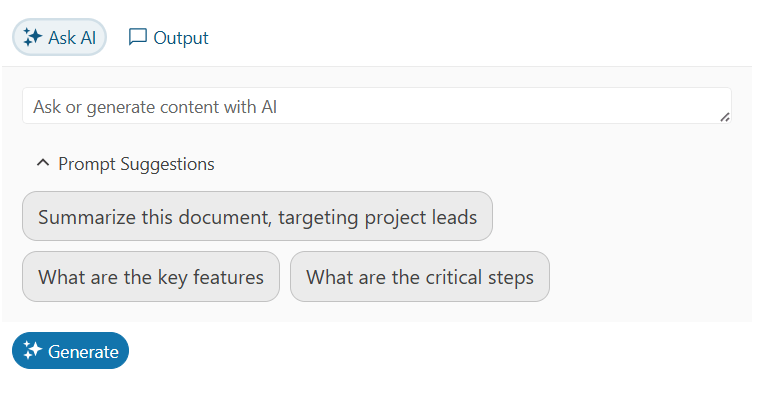
</code></pre><p>Your last step is to add the Telerik AIPrompt to your application&rsquo;s UI (available in <a target="_blank" href="https://www.telerik.com/design-system/docs/components/aiprompt/">JavaScript for Kendo UI</a>, <a target="_blank" href="https://www.telerik.com/blazor-ui/documentation/components/aiprompt/overview">Blazor</a>, <a target="_blank" href="https://www.telerik.com/products/aspnet-ajax/ai-prompt.aspx">ASP.NET AJAX</a>, <a target="_blank" href="https://www.telerik.com/products/winforms/aiprompt.aspx">WinForms</a> and <a target="_blank" href="https://www.telerik.com/maui-ui/aiprompt">.NET MAUI</a>). That can be as simple as this in an application that supports Razor (e.g., ASP.NET or Blazor):</p><pre class=" language-razor"><code class="prism  language-razor">&lt;TelerikAIPrompt/&gt;
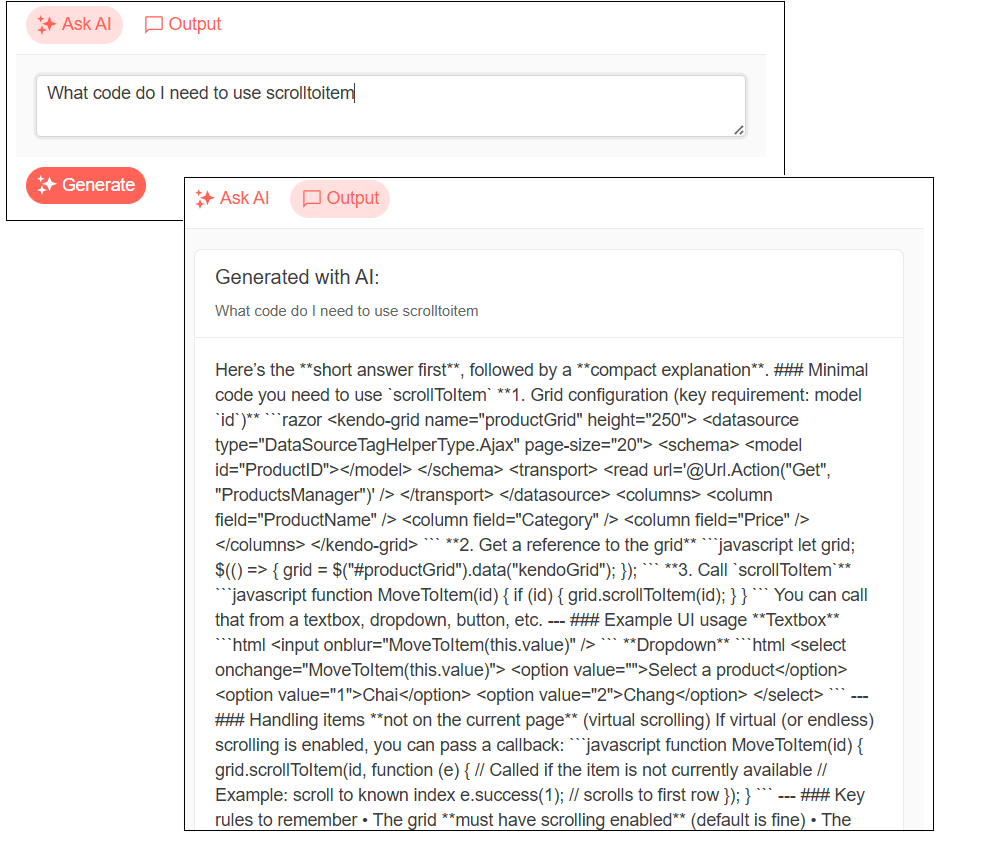
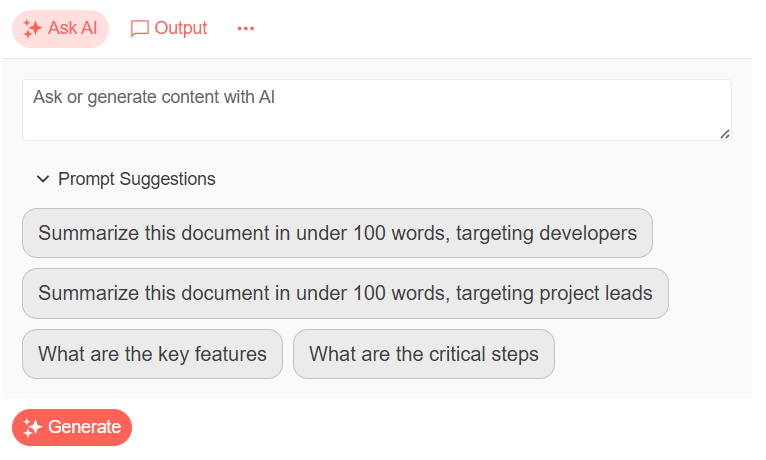
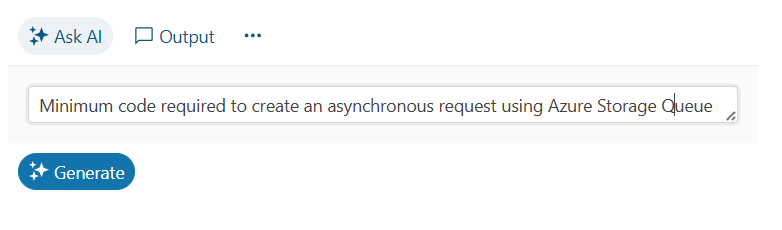
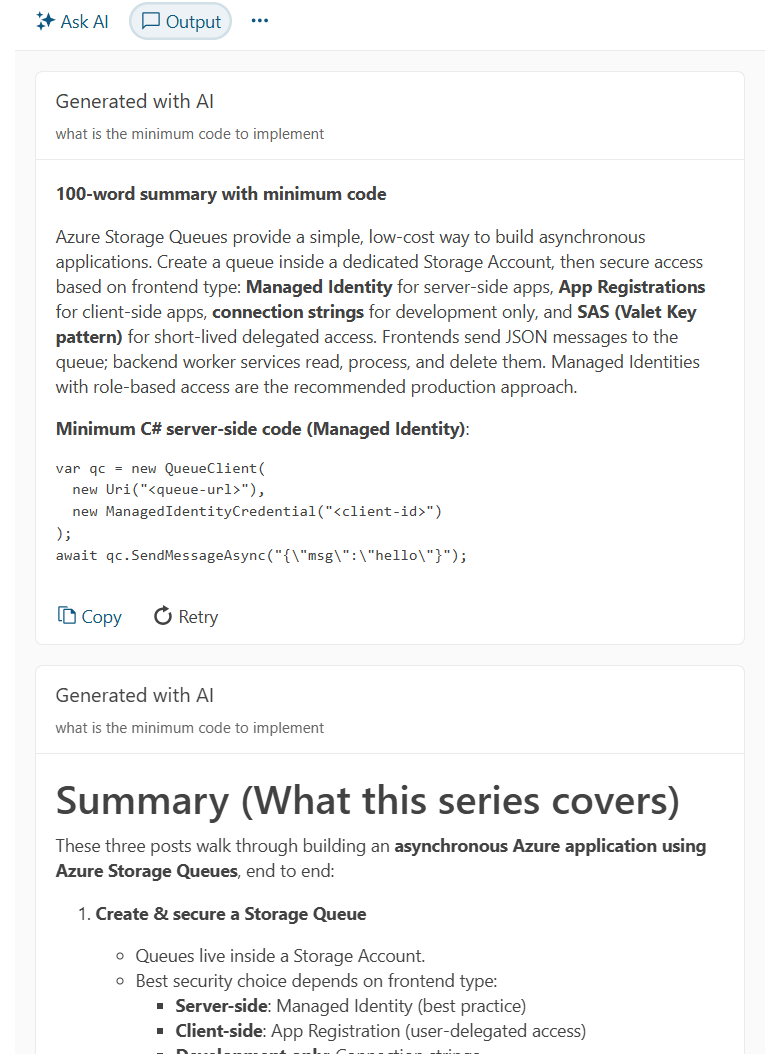
</code></pre><p>And that would give you this UI:</p><p><img src="https://d585tldpucybw.cloudfront.net/sfimages/default-source/blogs/2026/2026-03/ai-ui-1-combined.png?sfvrsn=5736fd30_2" alt="The basic AI Prompt display showing a textbox with a “Generate” button underneath it. Above the textbox are two additional buttons: “Ask AI” and “Output”" /></p><p>In a JavaScript application, you&rsquo;ll need to add a <code>&lt;div&gt;</code> element, set the element&rsquo;s <code>id</code> attribute, and write a couple lines of JavaScript code. I&rsquo;ll cover that in a later post in this series.</p><p>You can now start your application, enter a prompt into the AIPrompt component (e.g., &ldquo;Tell me about RAG-enabled AI applications&rdquo;) and get a response.</p><p>There&rsquo;s obviously far more that you can do with the AI Prompt &hellip; and I&rsquo;ll return to that after my next post. Before that, however, I&rsquo;m going to roll in Telerik Document Processing Library to let you load the content for your custom AI agent.</p><hr /><p>Explore Telerik Document Processing Libraries, plus component libraries, reporting and more with a free trial of the Telerik DevCraft bundle:</p><p><a class="Btn" target="_blank" href="https://www.telerik.com/download">Try DevCraft</a></p><img src="https://feeds.telerik.com/link/23068/17315466.gif" height="1" width="1"/>]]></content>
  </entry>
  <entry>
    <id>urn:uuid:88e4a370-d2a2-4d78-ae1f-86792f7c61e1</id>
    <title type="text">Loading, Accessing and Converting Office and PDF Documents with Telerik Document Processing Libraries</title>
    <summary type="text">Here’s what you need to get started with Telerik Document Processing Libraries to work with PDF, Word and Excel files (and, like any good suite, make all those document types look very much alike).</summary>
    <published>2026-03-31T15:30:52Z</published>
    <updated>2026-04-08T10:20:06Z</updated>
    <author>
      <name>Peter Vogel </name>
    </author>
    <link rel="alternate" href="https://feeds.telerik.com/link/23068/17310581/loading-accessing-converting-office-pdf-documents-telerik-document-processing-libraries"/>
    <content type="text"><![CDATA[<p><span class="featured">Here&rsquo;s what you need to get started with Telerik Document Processing Libraries to work with PDF, Word and Excel files (and, like any good suite, make all those document types look very much alike).</span></p><p>Progress Telerik Document Processing Libraries, in addition to letting you work with a variety of document formats (PDF, DOCX, RTF, HTML, XLSX and more), are an example of the reason you buy into a suite of tools: All the tools bear a &ldquo;family resemblance.&rdquo;</p><p>The ideal scenario, of course, would be for a single tool that made all these document formats look the same. Given the differences in format and functionality between, for example, a PDF, a Microsoft Word (or RTF or HTML) document and an Excel spreadsheet, that&rsquo;s not reasonable (though Progress Telerik has achieved that with DOCX, RTF and HTML documents).</p><p>The good news here is that, with Telerik Document Processing Libraries (DPL), the family resemblance is strong enough that, for <em>all</em> of the document types the library supports, I can show you how to load documents, start the editing process, convert between various document types and save a document in this one post.</p><h2 id="configuring-your-project">Configuring Your Project</h2><p>The sample code in this post was all written using the DPL for Windows libraries (even though I was working in ASP.NET Core&mdash;the more technical name for the version I used is &ldquo;.NET(Target OS: Windows).&rdquo; The suite is <a target="_blank" href="https://docs.telerik.com/devtools/document-processing/introduction#required-references">also available for the .NET Framework</a>.</p><p>To create an ASP.NET Core project that would work with &ldquo;all the documents,&rdquo; I added these NuGet packages to my project:</p><ul><li>To work with PDF files: Telerik.Windows.Documents.Fixed</li><li>To work with DOCX, HTML and RTF files: Telerik.Windows.Documents.Flow</li><li>To work with Excel spreadsheets: Telerik.Windows.Documents.Spreadsheet</li></ul><p>For the Excel spreadsheets, I&rsquo;m only going to work with XLSX files, so I added the Telerik.Windows.Documents.Spreadsheet.FormatProviders.OpenXml package to my project. (If I was going to work with, for example, XLS spreadsheet, then I would have added the Telerik.Documents.Spreadsheet.FormatProviders.Xls package.)</p><h2 id="loading-your-document">Loading Your Document</h2><p>The code to load a document from a file into any of these libraries is very similar:</p><ol><li>Create the appropriate provider.</li><li>Use the .NET<code>File</code> object&rsquo;s <code>OpenRead</code> to create a <code>Stream</code> that points to the file.</li><li>Use the provider&rsquo;s <code>Import</code> method to load the stream into the document object.</li></ol><p>Here, for example, is the code to load a PDF file into a <code>RadFixedDocument</code> object (I used this code in an ASP.NET Core application with documents in my project&rsquo;s wwwroot folder):</p><pre class=" language-csharp"><code class="prism  language-csharp">RadFixedDocument doc<span class="token punctuation">;</span>
PdfFormatProvider prov <span class="token operator">=</span> <span class="token keyword">new</span><span class="token punctuation">(</span><span class="token punctuation">)</span><span class="token punctuation">;</span>

<span class="token keyword">using</span> <span class="token punctuation">(</span>Stream str <span class="token operator">=</span> File<span class="token punctuation">.</span><span class="token function">OpenRead</span><span class="token punctuation">(</span><span class="token string">@"wwwroot/documents/Priorities.pdf"</span><span class="token punctuation">)</span><span class="token punctuation">)</span>
<span class="token punctuation">{</span>
    doc <span class="token operator">=</span> prov<span class="token punctuation">.</span><span class="token function">Import</span><span class="token punctuation">(</span>str<span class="token punctuation">,</span> TimeSpan<span class="token punctuation">.</span><span class="token function">FromSeconds</span><span class="token punctuation">(</span><span class="token number">10</span><span class="token punctuation">)</span><span class="token punctuation">)</span><span class="token punctuation">;</span>
<span class="token punctuation">}</span>
</code></pre><p>And here&rsquo;s the code to load a DOCX file into a <code>RadFlowDocument</code>:</p><pre class=" language-c"><code class="prism # language-c">RadFlowDocument doc<span class="token punctuation">;</span>
DocxFormatProvider prov <span class="token operator">=</span> <span class="token function">new</span><span class="token punctuation">(</span><span class="token punctuation">)</span><span class="token punctuation">;</span>

<span class="token function">using</span> <span class="token punctuation">(</span>Stream str <span class="token operator">=</span> File<span class="token punctuation">.</span><span class="token function">OpenRead</span><span class="token punctuation">(</span>@<span class="token string">"wwwroot/documents/Priorities.docx"</span><span class="token punctuation">)</span><span class="token punctuation">)</span>
<span class="token punctuation">{</span>
    doc <span class="token operator">=</span> prov<span class="token punctuation">.</span><span class="token function">Import</span><span class="token punctuation">(</span>str<span class="token punctuation">,</span> TimeSpan<span class="token punctuation">.</span><span class="token function">FromSeconds</span><span class="token punctuation">(</span><span class="token number">10</span><span class="token punctuation">)</span><span class="token punctuation">)</span><span class="token punctuation">;</span>
<span class="token punctuation">}</span>
</code></pre><p>As you can see, the code is identical except for the provider (<code>PdfFormatProvider</code> vs. <code>DocxFormatProvider</code>) and document objects (<code>RadFlowDocument</code> vs. <code>RadFixedDocument</code>).</p><p>Because both RTF and HTML documents load into the same <code>RadFlowDocument</code> object as a DOCX document, only the provider object changes (<code>HtmlFormatProvider</code> or <code>RtfFormatProdiver</code> instead of <code>DocxFormatProvider</code>) when working with those file formats. Here&rsquo;s the code to load an RTF document:</p><pre class=" language-csharp"><code class="prism  language-csharp">RadFlowDocument doc<span class="token punctuation">;</span>
RtfFormatProvider prov <span class="token operator">=</span> <span class="token keyword">new</span><span class="token punctuation">(</span><span class="token punctuation">)</span><span class="token punctuation">;</span>

<span class="token keyword">using</span> <span class="token punctuation">(</span>Stream str <span class="token operator">=</span> File<span class="token punctuation">.</span><span class="token function">OpenRead</span><span class="token punctuation">(</span><span class="token string">@"wwwroot/documents/Priorities.rtf"</span><span class="token punctuation">)</span><span class="token punctuation">)</span>
<span class="token punctuation">{</span>
    doc <span class="token operator">=</span> prov<span class="token punctuation">.</span><span class="token function">Import</span><span class="token punctuation">(</span>str<span class="token punctuation">,</span> TimeSpan<span class="token punctuation">.</span><span class="token function">FromSeconds</span><span class="token punctuation">(</span><span class="token number">10</span><span class="token punctuation">)</span><span class="token punctuation">)</span><span class="token punctuation">;</span>
<span class="token punctuation">}</span>
</code></pre><p>And here&rsquo;s the almost identical code to load an HTML file:</p><pre class=" language-csharp"><code class="prism  language-csharp">RadFlowDocument doc<span class="token punctuation">;</span>
HtmlFormatProvider prov <span class="token operator">=</span> <span class="token keyword">new</span><span class="token punctuation">(</span><span class="token punctuation">)</span><span class="token punctuation">;</span>

<span class="token keyword">using</span> <span class="token punctuation">(</span>Stream str <span class="token operator">=</span> File<span class="token punctuation">.</span><span class="token function">OpenRead</span><span class="token punctuation">(</span><span class="token string">@"wwwroot/documents/Priorities.html"</span><span class="token punctuation">)</span><span class="token punctuation">)</span>
<span class="token punctuation">{</span>
    doc <span class="token operator">=</span> prov<span class="token punctuation">.</span><span class="token function">Import</span><span class="token punctuation">(</span>str<span class="token punctuation">,</span> TimeSpan<span class="token punctuation">.</span><span class="token function">FromSeconds</span><span class="token punctuation">(</span><span class="token number">10</span><span class="token punctuation">)</span><span class="token punctuation">)</span><span class="token punctuation">;</span>
<span class="token punctuation">}</span>
</code></pre><p>The code to load an Excel workbook is also similar to what you&rsquo;ve seen before, just swapping in a new document object (<code>Workbook</code>) and provider (<code>XlsxFormatProvider</code>):</p><pre class=" language-csharp"><code class="prism  language-csharp">Workbook doc<span class="token punctuation">;</span>
XlsxFormatProvider prov <span class="token operator">=</span> <span class="token keyword">new</span><span class="token punctuation">(</span><span class="token punctuation">)</span><span class="token punctuation">;</span>
<span class="token keyword">using</span> <span class="token punctuation">(</span>Stream str <span class="token operator">=</span> File<span class="token punctuation">.</span><span class="token function">OpenRead</span><span class="token punctuation">(</span><span class="token string">@"wwwroot/documents/priority.xlsx"</span><span class="token punctuation">)</span><span class="token punctuation">)</span>
<span class="token punctuation">{</span>
    doc <span class="token operator">=</span> prov<span class="token punctuation">.</span><span class="token function">Import</span><span class="token punctuation">(</span>str<span class="token punctuation">,</span> TimeSpan<span class="token punctuation">.</span><span class="token function">FromSeconds</span><span class="token punctuation">(</span><span class="token number">10</span><span class="token punctuation">)</span><span class="token punctuation">)</span><span class="token punctuation">;</span>
<span class="token punctuation">}</span>
</code></pre><p>A note: The Workbook object assumes that you&rsquo;re going to load the <em>whole</em> Excel workbook into memory. For very large workbooks, that may not make sense. For that scenario, you should look at the <a target="_blank" href="https://docs.telerik.com/devtools/document-processing/libraries/radspreadstreamprocessing/overview">SpreadStreamProcessing Library</a>.</p><h2 id="modifying-the-documents">Modifying the Documents</h2><p>Once you&rsquo;ve loaded the documents, you can start working with them. You can often simplify your code by using the <code>RadFixedDocumentEditor</code> with PDF documents or the <code>RadFlowDocumentEditor</code>with Word/RTF/HTML documents. Not surprisingly, the code for creating an editor is almost identical for these two document types: create an editor object and pass the document you want loaded into the editor.</p><p>The code to create an editor for a PDF document looks like this:</p><pre class=" language-csharp"><code class="prism  language-csharp">RadFixedDocumentEditor editor <span class="token operator">=</span> <span class="token keyword">new</span> <span class="token class-name">RadFixedDocumentEditor</span><span class="token punctuation">(</span>doc<span class="token punctuation">)</span><span class="token punctuation">;</span>
</code></pre><p>The code for Word/RTF/HTML documents looks like this:</p><pre class=" language-csharp"><code class="prism  language-csharp">RadFlowDocumentEditor editor <span class="token operator">=</span> <span class="token keyword">new</span> <span class="token class-name">RadFlowDocumentEditor</span><span class="token punctuation">(</span>doc<span class="token punctuation">)</span><span class="token punctuation">;</span>
</code></pre><p>That&rsquo;s not to say that, as you start working with those documents, there aren&rsquo;t going to be differences. These are, after all, very different kinds of documents. Having said that, some functionality does work in a similar way across all the document types.</p><p>If, for example, I want to search a PDF document for the text &ldquo;ASP.NET,&rdquo; I create a <code>TextSearch</code> instance from my document object. I then use the <code>TextSearch</code> object&rsquo;s <code>FindAll</code> method to search for text in my PDF document, passing two things: my search text and a <code>TextSearchOptions</code> object that specifies how I want my search conducted. That <code>FindAll</code> object returns a collection of <code>SearchResult</code> objects that I can loop through.</p><p>Typical code, then, looks like this:</p><pre class=" language-csharp"><code class="prism  language-csharp">TextSearch search <span class="token operator">=</span> <span class="token keyword">new</span> <span class="token class-name">TextSearch</span><span class="token punctuation">(</span>doc<span class="token punctuation">)</span><span class="token punctuation">;</span>
TextSearchOptions opts <span class="token operator">=</span> <span class="token keyword">new</span><span class="token punctuation">(</span><span class="token punctuation">)</span> <span class="token punctuation">{</span>
CaseSensitive <span class="token operator">=</span> <span class="token keyword">false</span><span class="token punctuation">,</span>
WholeWordsOnly <span class="token operator">=</span> <span class="token keyword">true</span><span class="token punctuation">,</span>
UseRegularExpression <span class="token operator">=</span> <span class="token keyword">true</span>
                                                              <span class="token punctuation">}</span><span class="token punctuation">;</span>

IEnumerable<span class="token operator">&lt;</span>SearchResult<span class="token operator">&gt;</span> items <span class="token operator">=</span> search<span class="token punctuation">.</span><span class="token function">FindAll</span><span class="token punctuation">(</span><span class="token string">"ASP.NET"</span><span class="token punctuation">,</span> opts<span class="token punctuation">)</span><span class="token punctuation">;</span>

Debug<span class="token punctuation">.</span><span class="token function">Print</span><span class="token punctuation">(</span>$<span class="token string">"Found {items.Count()} items."</span><span class="token punctuation">)</span><span class="token punctuation">;</span>
<span class="token keyword">foreach</span> <span class="token punctuation">(</span>SearchResult item <span class="token keyword">in</span> items<span class="token punctuation">)</span>
<span class="token punctuation">{</span>
    Debug<span class="token punctuation">.</span><span class="token function">Print</span><span class="token punctuation">(</span>$<span class="token string">"Found at {item.Range.StartPosition} "</span><span class="token punctuation">)</span><span class="token punctuation">;</span>
    Debug<span class="token punctuation">.</span><span class="token function">Print</span><span class="token punctuation">(</span>$<span class="token string">"Found: {item.Result}"</span><span class="token punctuation">)</span><span class="token punctuation">;</span>
<span class="token punctuation">}</span>
</code></pre><p>The process is almost identical for the <code>RadFlowDocument</code> object, except:</p><ul><li>You call the <code>FindAll</code>method directly from the <code>RadFlowDocumentEditor</code>.</li><li>There isn&rsquo;t a separate options object (though all the search options from the <code>TextSearch</code> object are still available).</li><li>The <code>FindAll</code> method on the editor returns <code>FindResult</code> objects instead of <code>SearchResult</code> objects.</li></ul><p>As a result, the equivalent search code for a DOCX, RTF or HTML document looks like this:</p><pre class=" language-csharp"><code class="prism  language-csharp">RadFlowDocumentEditor editor <span class="token operator">=</span> <span class="token keyword">new</span> <span class="token class-name">RadFlowDocumentEditor</span><span class="token punctuation">(</span>doc<span class="token punctuation">)</span><span class="token punctuation">;</span>

IEnumerable<span class="token operator">&lt;</span>FindResult<span class="token operator">&gt;</span> items <span class="token operator">=</span> editor<span class="token punctuation">.</span><span class="token function">FindAll</span><span class="token punctuation">(</span><span class="token string">"ASP.NET"</span><span class="token punctuation">)</span><span class="token punctuation">;</span>

Debug<span class="token punctuation">.</span><span class="token function">Print</span><span class="token punctuation">(</span>$<span class="token string">"Found {items.Count()} items."</span><span class="token punctuation">)</span><span class="token punctuation">;</span>
<span class="token keyword">foreach</span> <span class="token punctuation">(</span>FindResult item <span class="token keyword">in</span> items<span class="token punctuation">)</span>
<span class="token punctuation">{</span>
    Debug<span class="token punctuation">.</span><span class="token function">Print</span><span class="token punctuation">(</span>$<span class="token string">"Found at {item.RelativeStartIndex} "</span><span class="token punctuation">)</span><span class="token punctuation">;</span>
    Debug<span class="token punctuation">.</span><span class="token function">Print</span><span class="token punctuation">(</span>$<span class="token string">"Found: {item.FullMatchText}"</span><span class="token punctuation">)</span><span class="token punctuation">;</span>
<span class="token punctuation">}</span>
</code></pre><p>Searching a spreadsheet works similarly. The differences:</p><ul><li>The <code>FindAll</code> method is built right into the <code>Workbook</code> object.</li><li>You have more search options available with the spreadsheet object.</li><li>You pass your search string as part of the options object.</li></ul><p>My find code with a workbook would look like this:</p><pre class=" language-csharp"><code class="prism  language-csharp">FindOptions opts <span class="token operator">=</span> <span class="token keyword">new</span><span class="token punctuation">(</span><span class="token punctuation">)</span> <span class="token punctuation">{</span>
FindWhat <span class="token operator">=</span> <span class="token string">"ASP.NET"</span><span class="token punctuation">,</span>
MatchCase <span class="token operator">=</span> <span class="token keyword">false</span><span class="token punctuation">,</span>
MatchEntireCellContents <span class="token operator">=</span> <span class="token keyword">true</span><span class="token punctuation">,</span>
                                                <span class="token punctuation">}</span><span class="token punctuation">;</span>

IEnumerable<span class="token operator">&lt;</span>FindResult<span class="token operator">&gt;</span> items <span class="token operator">=</span> doc<span class="token punctuation">.</span><span class="token function">FindAll</span><span class="token punctuation">(</span>opts<span class="token punctuation">)</span><span class="token punctuation">;</span>

Debug<span class="token punctuation">.</span><span class="token function">Print</span><span class="token punctuation">(</span>$<span class="token string">"Found {items.Count()} items."</span><span class="token punctuation">)</span><span class="token punctuation">;</span>
<span class="token keyword">foreach</span><span class="token punctuation">(</span>FindResult item <span class="token keyword">in</span> items<span class="token punctuation">)</span>
<span class="token punctuation">{</span>
    Debug<span class="token punctuation">.</span><span class="token function">Print</span><span class="token punctuation">(</span>$<span class="token string">"Found at {item.FoundCell.CellIndex} "</span><span class="token punctuation">)</span><span class="token punctuation">;</span>
    Debug<span class="token punctuation">.</span><span class="token function">Print</span><span class="token punctuation">(</span>$<span class="token string">"Found: {item.ResultValue}"</span><span class="token punctuation">)</span><span class="token punctuation">;</span>
<span class="token punctuation">}</span>
</code></pre><p>One note: It is certainly convenient when objects from the different libraries share the same name (like the <code>FindResult</code> object that&rsquo;s defined in both the <code>RadFlowDocument</code> and <code>Workbook</code> libraries). However, if you try to use both <code>FindResult</code> objects in the same code file, the compiler will get confused because the two objects are in different namespaces. In the unlikely case that you&rsquo;re working with both Excel and Word documents in the same code file, you&rsquo;ll have to fully qualify the object names&mdash;something I haven&rsquo;t done in this post.</p><h2 id="saving-your-documents">Saving Your Documents</h2><p>To save your modified documents back to disk, you just need to use the provider&rsquo;s <code>Export</code> method. The code for all the document types is identical:</p><pre class=" language-csharp"><code class="prism  language-csharp"><span class="token keyword">using</span> <span class="token punctuation">(</span>Stream str <span class="token operator">=</span> File<span class="token punctuation">.</span><span class="token function">Create</span><span class="token punctuation">(</span><span class="token string">@"wwwroot/documents/Prioritiesnew.&lt;filetype&gt;"</span><span class="token punctuation">)</span><span class="token punctuation">)</span>
<span class="token punctuation">{</span>
    prov<span class="token punctuation">.</span><span class="token function">Export</span><span class="token punctuation">(</span>doc<span class="token punctuation">,</span>str<span class="token punctuation">,</span> TimeSpan<span class="token punctuation">.</span><span class="token function">FromSeconds</span><span class="token punctuation">(</span><span class="token number">10</span><span class="token punctuation">)</span><span class="token punctuation">)</span><span class="token punctuation">;</span>
<span class="token punctuation">}</span>
</code></pre><h2 id="converting-documents">Converting Documents</h2><p>You can convert from one type in the suite to other types and, not surprisingly, the conversion processes look very much alike. As you&rsquo;ve seen before, it often comes down to using the right provider.</p><p>If, for example, you want plain text version of your PDF file, you use the <code>TextFormatProvider</code> object&rsquo;s <code>Export</code> method:</p><pre class=" language-csharp"><code class="prism  language-csharp">TextFormatProvider prov <span class="token operator">=</span> <span class="token keyword">new</span><span class="token punctuation">(</span><span class="token punctuation">)</span><span class="token punctuation">;</span>
<span class="token keyword">string</span> text <span class="token operator">=</span> prov<span class="token punctuation">.</span><span class="token function">Export</span><span class="token punctuation">(</span>doc<span class="token punctuation">,</span> TimeSpan<span class="token punctuation">.</span><span class="token function">FromSeconds</span><span class="token punctuation">(</span><span class="token number">10</span><span class="token punctuation">)</span><span class="token punctuation">)</span><span class="token punctuation">;</span>
</code></pre><p>For Word/HTML/RTF document types, the code is almost identical except it uses the <code>TxtFormatProvider</code> object:</p><pre class=" language-csharp"><code class="prism  language-csharp">TxtFormatProvider txProv <span class="token operator">=</span> <span class="token keyword">new</span><span class="token punctuation">(</span><span class="token punctuation">)</span><span class="token punctuation">;</span>
<span class="token keyword">string</span> text <span class="token operator">=</span> prov<span class="token punctuation">.</span><span class="token function">Export</span><span class="token punctuation">(</span>doc<span class="token punctuation">,</span> TimeSpan<span class="token punctuation">.</span><span class="token function">FromSeconds</span><span class="token punctuation">(</span><span class="token number">10</span><span class="token punctuation">)</span><span class="token punctuation">)</span><span class="token punctuation">;</span>            
</code></pre><p>One note: There is a downside to having the classes that do similar things to different document types have the same name. If you are mixing document types and, as a result, using the Fixed, Flow and spreadsheet libraries in the same application, the compiler can get confused about which class from which library you&rsquo;re using. If so, you&rsquo;ll have to <a target="_blank" href="https://docs.telerik.com/devtools/document-processing/knowledge-base/cs0104-error-pdf-format-provider">fully qualify your class names</a> by including their namespaces in the class names. That makes for hard-to-read code, so I haven&rsquo;t done that here.</p><p>But, as an example of how different documents require different functionality, you probably wouldn&rsquo;t ever want to convert an Excel workbook to a string &hellip; but you might want to save your workbook as a CSV file. As you might expect by now, the code to save your imported workbook into a CSV file just means using the <code>Export</code> method on the appropriate provider&mdash;the <code>CsvFormatProvider</code> object in this case.</p><p>Typical code would look like this:</p><pre class=" language-csharp"><code class="prism  language-csharp">CsvFormatProvider prov <span class="token operator">=</span> <span class="token keyword">new</span><span class="token punctuation">(</span><span class="token punctuation">)</span><span class="token punctuation">;</span>

<span class="token keyword">using</span> <span class="token punctuation">(</span>Stream str <span class="token operator">=</span> File<span class="token punctuation">.</span><span class="token function">Create</span><span class="token punctuation">(</span><span class="token string">"Priority.csv"</span><span class="token punctuation">)</span><span class="token punctuation">)</span>
<span class="token punctuation">{</span>
    prov<span class="token punctuation">.</span><span class="token function">Export</span><span class="token punctuation">(</span>doc<span class="token punctuation">,</span> str<span class="token punctuation">,</span> TimeSpan<span class="token punctuation">.</span><span class="token function">FromSeconds</span><span class="token punctuation">(</span><span class="token number">10</span><span class="token punctuation">)</span><span class="token punctuation">)</span><span class="token punctuation">;</span>
<span class="token punctuation">}</span>
</code></pre><p><a target="_blank" href="https://www.telerik.com/blogs/quick-and-easy-conversion-to-pdf-with-telerik-document-processing-library">Converting any of these document types (Excel, Word, HTML, etc.) to PDF</a> is equally straightforward. Because all the libraries look very much alike, it&rsquo;s really just a matter of adding the library with the provider you need.</p><p>But you can also convert your <code>Workbook</code> object into a <code>RadFixedDocument</code> if you wanted to manipulate your spreadsheet as a PDF object. That conversion is handled by the PdfFormatProvider from the Telerik.Windows.Documents.Spreadsheet.Formatproviders.Pdf package and using its <code>ExportToFixedDocument</code>method:</p><pre class=" language-csharp"><code class="prism  language-csharp">PdfFormatProvider prov <span class="token operator">=</span> <span class="token keyword">new</span><span class="token punctuation">(</span><span class="token punctuation">)</span><span class="token punctuation">;</span>

RadFixedDocument fixedDoc <span class="token operator">=</span> 
        prov<span class="token punctuation">.</span><span class="token function">ExportToFixedDocument</span><span class="token punctuation">(</span>doc<span class="token punctuation">,</span> TimeSpan<span class="token punctuation">.</span><span class="token function">FromSeconds</span><span class="token punctuation">(</span><span class="token number">10</span><span class="token punctuation">)</span><span class="token punctuation">)</span><span class="token punctuation">;</span>
</code></pre><p>The code is identical if you want to convert a Word/RTF/HTML document to a <code>RadFixedDocument</code> to work with it as a PDF file. That conversion also uses a <code>PdfFormatProvider</code> object but, this time, from the Telerik.Windows.Documents.Flow.FormatProviders.Pdf namespace.</p><p>But, because the providers from the two libraries have the same name, if you&rsquo;re using both libraries in the same code file, you will need to fully qualify your provider names to make sure you&rsquo;re getting the appropriate <code>PdfFormatProvider</code>.</p><p>Of course, once you start using these tools to create or modify the documents you&rsquo;ve loaded, you&rsquo;ll find more differences&mdash;the functionality in a spreadsheet is very different from the functionality in an HTML document. But, while the family resemblances among this suite won&rsquo;t eliminate those differences, it does cut those differences down to what matters: how those documents differ in their functionality. Which is, after all, what you want.</p><hr /><p>Explore Telerik Document Processing Libraries, plus component libraries, reporting and more with a free trial of the Telerik DevCraft bundle:</p><p><a href="https://www.telerik.com/download" class="Btn" target="_blank">Try DevCraft</a></p><img src="https://feeds.telerik.com/link/23068/17310581.gif" height="1" width="1"/>]]></content>
  </entry>
  <entry>
    <id>urn:uuid:e8b28332-cf1c-4070-922f-b179f6ca712e</id>
    <title type="text">Stop Paying for the Same Answer Twice: Agent Cache in Fiddler Everywhere</title>
    <summary type="text">Agent Caching in Fiddler Everywhere allows you to iterate as you build an agent without having to pay for every response when it hasn’t changed.</summary>
    <published>2026-03-17T16:34:30Z</published>
    <updated>2026-04-08T10:20:06Z</updated>
    <author>
      <name>Nikolay Iliev </name>
    </author>
    <link rel="alternate" href="https://feeds.telerik.com/link/23068/17301015/stop-paying-same-answer-twice-agent-cache-fiddler-everywhere"/>
    <content type="text"><![CDATA[<p><span class="featured">Agent Caching in Fiddler Everywhere allows you to iterate as you build an agent without having to pay for every response when it hasn&rsquo;t changed.</span></p><p>If you have ever built a model-powered agent, you know the development loop. Write some code, fire it at the endpoint, check the response, tweak the parsing, fire it again. Repeat until the output looks right. It is a perfectly normal workflow&mdash;and it quietly drains your token budget with every single iteration.</p><p>The new Progress Telerik <a target="_blank" href="https://www.telerik.com/fiddler/fiddler-everywhere/documentation/agent-cache">Fiddler Everywhere <strong>Agent Cache</strong></a> feature is designed to break that cycle. Once you capture a response from a model-provider endpoint, you can flip a single switch and have Fiddler software replay that response for every subsequent matching call&mdash;without the request ever leaving your machine. Same output, zero additional tokens consumed on the provider side.</p><p>This post walks through exactly how that works, using a small open-source demo project to make everything concrete.</p><h2 id="the-hidden-cost-of-agent-development">The Hidden Cost of Agent Development</h2><p>Building an agent that calls a completion endpoint involves a lot of repetition that has nothing to do with the model itself. You are iterating on:</p><ul><li>How you construct the prompt</li><li>How you parse and validate the structured response</li><li>How you surface the result to the rest of your system</li><li>How your error handling behaves when the response is malformed</li></ul><p>None of those iterations require a new, unique response from the model. You already have a good one from the first call. But unless you manually save the raw response and mock it yourself, every invocation sends a fresh request, and the provider charges for it.</p><p>Once agents move beyond demos, three pressures show up together and stay for the duration of development:</p><ul><li><strong>Cost</strong> &ndash; Repeated runs during development burn budget. For a simple agent that exchanges a few hundred tokens per call, this might feel negligible. But development sessions involve dozens of sequential runs, teams have multiple developers iterating in parallel, and the costs compound quickly.</li><li><strong>Latency</strong> &ndash; Every round trip to the provider stretches the feedback loop. When you are tweaking prompt construction or adjusting response parsing, waiting on a live call each time slows everything down.</li><li><strong>Determinism</strong> &ndash; The same input does not always produce the same output. That variability makes it harder to isolate whether a difference in behavior came from your code change or from the model.</li></ul><p>This is especially visible in teams that build many small, task-specific agents rather than one large agent. Even small per-run costs compound when iteration is constant&mdash;and none of that spend actually improves the agent.</p><h2 id="what-teams-already-do">What Teams Already Do</h2><p>Most teams already compensate for this manually. Common patterns include separating development runs from real execution, validating agent wiring before triggering model calls, reusing mocked or previously captured responses, and avoiding live execution early to keep iteration fast.</p><p>These approaches work, but they are fragmented. Provider-level caching helps in some cases but is limited. Custom mocks and fixtures are costly to maintain. Replay logic often lives outside the main development flow, and different teams end up solving the same problem with different local tooling.</p><p>The problem is not a lack of solutions. It is the lack of a low-friction one that fits naturally into everyday iteration.</p><h2 id="what-agent-cache-does">What Agent Cache Does</h2><p>Fiddler Everywhere acts as a proxy that sits between your agent and the remote endpoint. When your agent makes an HTTPS call to, say, api.anthropic.com, Fiddler software intercepts it, forwards it and logs the full request-response pair in the <strong>Traffic</strong> pane.</p><p>The new <strong>Agent Calls</strong> tab is a focused view inside that pane. It automatically filters and displays HTTPS sessions that target supported model-provider endpoints&mdash;such as OpenAI, Anthropic and Gemini&mdash;so you are not wading through noise from other traffic. Every captured call gets a <strong>Caching</strong> toggle.</p><p>Enable the toggle, and Fiddler software starts intercepting any outbound call that matches that session&rsquo;s request. Instead of forwarding the request, it immediately returns the cached response. The endpoint never receives the duplicate call. Your agent sees the exact same payload it would have received from a live call. Token count: zero.</p><p>Disable the toggle at any time and live traffic resumes, no restarts required.</p><h3 id="how-agent-calls-and-caching-behave">How Agent Calls and Caching Behave</h3><p>A few details that matter when you start using it:</p><ul><li><strong>Deterministic filtering:</strong> Sessions appear in <strong>Agent Calls</strong> automatically when Fiddler software detects traffic to a supported agentic endpoint. You do not need to configure which endpoints to watch.</li><li><strong>First-match caching:</strong> If two or more sessions target the same endpoint (for example, https://api.anthropic.com/v1/messages) and both are cached, Fiddler software returns the response from the first cached session.</li><li><strong>No rule interference:</strong> Fiddler rules are executed only for non-cached sessions. Cached responses are returned as-is, without rule evaluation.</li><li><strong>Visibility split:</strong> After a session is cached, subsequent matching requests appear only in <strong>Live Traffic</strong>. The <strong>Agent Calls</strong> tab continues to show the original non-cached captures.</li></ul><h2 id="why-it-matters-during-development">Why It Matters During Development</h2><p>Agent Cache is built around three practical benefits that matter most during active development.</p><ol><li><strong>Faster iterations:</strong> Replaying a cached response is instant. Instead of waiting on a round trip to the provider on every run, you get a result back immediately&mdash;shortening the feedback loop so you can move through prompt and code changes without unnecessary delays.</li><li><strong>Lower execution costs:</strong> Each cached run consumes zero tokens on the provider side. During active development, where the same request may be triggered dozens of times, this directly reduces the token spend that accumulates before a feature is even complete.</li><li><strong>More predictable behavior:</strong> A cached response is fixed and repeatable. Running the same agent logic against the same response on every iteration makes it straightforward to verify that a code change had the intended effect, without having to account for variability in live model output.</li></ol><h2 id="demo-bug-report-analyzer">Demo: Bug Report Analyzer</h2><p>To make this tangible, walk through the <a target="_blank" href="https://github.com/NickIliev/agent-cache-demo">agent-cache-demo</a>&mdash;a minimal Python agent that takes a fixed bug report and returns a structured analysis (severity, category, a plain-English summary and a suggested next step).</p><p>The input never changes between runs, which makes it a perfect showcase for Agent Cache: the model&rsquo;s answer to an identical prompt is always reusable, so there is genuinely no reason to pay for it more than once.</p><h3 id="what-the-agent-does">What the Agent Does</h3><p>The core of agent.py is straightforward:</p><pre class=" language-python"><code class="prism  language-python">message <span class="token operator">=</span> client<span class="token punctuation">.</span>messages<span class="token punctuation">.</span>create<span class="token punctuation">(</span>  
model<span class="token operator">=</span>MODEL<span class="token punctuation">,</span>  
max_tokens<span class="token operator">=</span><span class="token number">256</span><span class="token punctuation">,</span>  
system<span class="token operator">=</span>SYSTEM_PROMPT<span class="token punctuation">,</span>  
messages<span class="token operator">=</span><span class="token punctuation">[</span>  
<span class="token punctuation">{</span><span class="token string">"role"</span><span class="token punctuation">:</span> <span class="token string">"user"</span><span class="token punctuation">,</span> <span class="token string">"content"</span><span class="token punctuation">:</span> f<span class="token string">"Analyze this bug report:\n\n{report}"</span><span class="token punctuation">}</span>  
<span class="token punctuation">]</span><span class="token punctuation">,</span>  
<span class="token punctuation">)</span>  
</code></pre><p>It sends the bug report to the Claude API and expects a JSON response like this:</p><pre class=" language-json"><code class="prism  language-json"><span class="token punctuation">{</span>  
<span class="token string">"severity"</span><span class="token punctuation">:</span> <span class="token string">"high"</span><span class="token punctuation">,</span>  
<span class="token string">"category"</span><span class="token punctuation">:</span> <span class="token string">"crash"</span><span class="token punctuation">,</span>  
<span class="token string">"summary"</span><span class="token punctuation">:</span> <span class="token string">"App crashes with a NullPointerException when attempting to log in under no network connectivity."</span><span class="token punctuation">,</span>  
<span class="token string">"suggested_next_step"</span><span class="token punctuation">:</span> <span class="token string">"Add a null or connectivity check in NetworkManager.checkConnectivity() before network calls."</span>  
<span class="token punctuation">}</span>  
</code></pre><p>That response is then formatted and printed to the terminal:</p><pre><code>── Bug Report Analysis ─────────────────────────────────────  
Severity  : HIGH  
Category  : crash  
Summary  : App crashes with a NullPointerException when attempting to  
log in under no network connectivity.  
Next step : Add a null or connectivity check in  
NetworkManager.checkConnectivity() before network calls.  
─────────────────────────────────────  
</code></pre><h3 id="setup">Setup</h3><p>Clone the repository and install dependencies:</p><pre><code>git clone [https://github.com/NickIliev/agent-cache-demo](https://github.com/NickIliev/agent-cache-demo)  
cd agent-cache-demo  
  
python -m venv .venv  
source .venv/bin/activate  # macOS / Linux  
.venv\Scripts\activate  # Windows  
  
pip install -r requirements.txt  
export ANTHROPIC_API_KEY=sk-ant-... # macOS / Linux (Git Bash)  
set ANTHROPIC_API_KEY=sk-ant-... # Windows (CMD)  
</code></pre><p>The demo supports routing traffic through the Fiddler proxy or running directly against the provider. It also covers SSL/TLS trust configuration for HTTPS interception. See the <a target="_blank" href="https://github.com/NickIliev/agent-cache-demo#readme">repository README</a> for full details on proxy setup, environment variables and certificate options.</p><h3 id="step-1-the-first-live-call">Step 1: The First Live Call</h3><p>Start Fiddler Everywhere and run the agent:</p><pre><code>python agent.py  
</code></pre><p>The terminal shows the result and, crucially, the token consumption:</p><pre><code>[tokens] Input: 312  |  Output: 68  |  Total: 380  
</code></pre><p>Switch to Fiddler Everywhere and open <strong>Traffic &gt; Agent Calls</strong>. You will see the captured call to api.anthropic.com with the full request and response visible.</p><p><img src="https://d585tldpucybw.cloudfront.net/sfimages/default-source/blogs/2026/2026-03/agent-call-request-response.png?sfvrsn=ba602a35_2" alt="Fiddler Everywhere Traffic Agent Calls shows the captured call to api.anthropic.com with the full request and response." /></p><p>This is your baseline. You paid for 380 tokens. That is fair&mdash;you needed the live call to validate the end-to-end flow.</p><h3 id="step-2-enable-the-cache">Step 2: Enable the Cache</h3><p>In the <strong>Agent Calls</strong> grid, find the captured session and flip its <strong>Caching</strong> switch to on. That is the entire configuration step.</p><p><img src="https://d585tldpucybw.cloudfront.net/sfimages/default-source/blogs/2026/2026-03/agent-calls-caching-on.png?sfvrsn=73826575_2" alt="Fiddler Everywhere Agent Calls has caching toggled on" /></p><h3 id="step-3-all-subsequent-runs-are-free">Step 3: All Subsequent Runs Are Free</h3><p>Run the agent again:</p><pre><code>python agent.py  
</code></pre><p>The output in the terminal is byte-for-byte identical to the first run, including the token count display. Because the <strong>Caching</strong> switch was on, Fiddler software served the stored response immediately and never forwarded the request to the provider. The endpoint never saw the call.</p><p><img src="https://d585tldpucybw.cloudfront.net/sfimages/default-source/blogs/2026/2026-03/fiddler-caching-stored-response.png?sfvrsn=f8736f5c_2" alt="Fiddler caching stored response immediately and never forwarded the request to the provider." /></p><p>You can now iterate on agent.py as many times as you need&mdash;refactor the display logic, adjust the JSON parsing, add logging&mdash;and none of those runs cost a single token.</p><p><img src="https://d585tldpucybw.cloudfront.net/sfimages/default-source/blogs/2026/2026-03/claude-console.png?sfvrsn=434925d4_2" alt="On the Claude Console: Only the first call was received by the provider. All sequential calls were successfully cached by Fiddler and were not taxed." /></p><h2 id="when-to-use-agent-cache">When to Use Agent Cache</h2><p>Agent Cache is a development-stage tool. It is particularly valuable when:</p><ul><li><strong>Iterating on response handling:</strong> Your agent already returns a correct response from the model. You are now working on how your code handles that response&mdash;formatting, validation, error recovery. None of that work requires fresh model calls.</li><li><strong>Sharing a working state with teammates:</strong> Cache a known-good response and share the Fiddler session. Everyone on the team can iterate against the same replay without burning tokens or depending on network access to the provider.</li><li><strong>Working offline or in restricted environments:</strong> Once the cache is populated, your agent keeps working even without connectivity to the provider.</li></ul><h2 id="things-to-keep-in-mind">Things to Keep in Mind</h2><ul><li><strong>Cache matching is request-based.</strong> If your agent changes the prompt, the model or any request headers, the cached session will no longer match. Capture and cache the updated variant separately.</li><li><strong>The cache lives in the current Fiddler session.</strong> Closing and reopening Fiddler clears the cache state, so the next run after a restart will make a live call. Review cached sessions periodically to keep stored responses aligned with your current workflow.</li><li><strong>Cache is for development, not production.</strong> Agent Cache is designed for development workflows where deterministic, repeatable responses are the goal. When you are ready to validate against a live endpoint, disable the cache and resume live calls.</li></ul><h2 id="availability">Availability</h2><p>Agent Cache is available on Fiddler Everywhere <strong>Trial</strong>, <strong>Pro</strong> and <strong>Enterprise</strong> tiers. The feature is not included in Lite licenses.</p><h2 id="try-it-yourself">Try It Yourself</h2><p>The full demo is on GitHub: <a target="_blank" href="https://github.com/NickIliev/agent-cache-demo">github.com/NickIliev/agent-cache-demo</a>. Clone it, set your Anthropic API key, and you can see the before-and-after token counts yourself in under five minutes.</p><p>The point is not really the 380 tokens saved in a single run. It is the dozens of runs you make in a typical development session, the parallel runs across a team&mdash;all of which can stop paying for answers they already have.</p><p>Agent Cache does not change how you build agents. It just removes the tax on iterating.</p><p>If you aren&rsquo;t already using Fiddler Everywhere, it does come with a free trial:</p><p><a href="https://www.telerik.com/download/fiddler-everywhere" class="Btn" target="_blank">Try Fiddler Everywhere</a></p><h3 id="leave-feedback">Leave Feedback</h3><p>Agent development workflows are still evolving quickly, and your feedback shapes what comes next. If you try Agent Cache during development&mdash;or if there is something you wish it did differently&mdash;we want to hear about it.</p><ul><li>Email: <a href="https://www.telerik.commailto:fiddler-support@progress.com" target="_blank">fiddler-support@progress.com</a></li><li>GitHub issues: <a target="_blank" href="https://github.com/telerik/fiddler-everywhere/issues">github.com/telerik/fiddler-everywhere/issues</a></li><li>Demo repository: <a target="_blank" href="https://github.com/NickIliev/agent-cache-demo">github.com/NickIliev/agent-cache-demo</a></li></ul><img src="https://feeds.telerik.com/link/23068/17301015.gif" height="1" width="1"/>]]></content>
  </entry>
  <entry>
    <id>urn:uuid:f3a4d2ee-5d34-4a83-a4de-4e2bf84e0462</id>
    <title type="text">Spreadsheet Analysis with Telerik Document Processing Libraries Agentic Tools</title>
    <summary type="text">Agentic workflows provide dynamic ways to interact with and analyze documents. The Telerik Document Processing Libraries now have these AI tools ready to use!</summary>
    <published>2026-03-04T21:25:50Z</published>
    <updated>2026-04-08T10:20:06Z</updated>
    <author>
      <name>Anna Velcheva </name>
    </author>
    <link rel="alternate" href="https://feeds.telerik.com/link/23068/17293376/spreadsheet-analysis-telerik-document-processing-libraries-agentic-tools"/>
    <content type="text"><![CDATA[<p><span class="featured">Agentic workflows provide dynamic ways to interact with and analyze documents. The Progress Telerik Document Processing Libraries now have these AI tools ready to use!</span></p><p>Modern applications rely on automation and intelligent processing to handle large volumes of data, and spreadsheets are no exception. With the <a target="_blank" href="https://www.telerik.com/blogs/next-productivity-leap-telerik-kendo-ui-2026-q1-release">2026 Q1 release</a>, Progress introduced <a target="_blank" href="https://docs.telerik.com/devtools/document-processing/ai-tools/agent-tools/overview">Agentic Tools (in Preview) for Telerik Document Processing Libraries</a> (DPL).</p><p>These tools are purpose‑built .NET APIs for agentic document workflows, enabling AI agents to analyze, extract, edit and generate Excel and PDF files; run aggregates; transform content; and convert formats directly inside your app. The new Agentic Tools cover both PdfProcessing and <a target="_blank" href="https://demos.telerik.com/document-processing/spreadprocessing/agentic_tools">SpreadProcessing</a> libraries and are available with a Subscription license.</p><p>In this post, we&rsquo;ll walk you through how to use the SpreadProcessing Agentic Tools to analyze an existing spreadsheet.</p><h2 id="importing-the-workbook">Importing the Workbook</h2><p>Let&rsquo;s create a simple .NET console app. Our first step is to import the Workbook. I am going to add the <a target="_blank" href="https://docs.telerik.com/devtools/document-processing/getting-started/first-steps">necessary DPL dependencies</a>, in this case:</p><p><img src="https://d585tldpucybw.cloudfront.net/sfimages/default-source/blogs/2026/2026-03/dpl-packages.png?sfvrsn=9294b0de_2" alt="DPL packages: Telerik.Windows.Documents.Spreadsheet and Telerik.Windows.Documents.Spreadsheet.FormatProviders.OpenXml" /></p><p>and then use this code:</p><pre class=" language-csharp"><code class="prism  language-csharp">Workbook workbook <span class="token operator">=</span> <span class="token keyword">null</span><span class="token punctuation">;</span>

<span class="token keyword">using</span> <span class="token punctuation">(</span>Stream input <span class="token operator">=</span> File<span class="token punctuation">.</span><span class="token function">OpenRead</span><span class="token punctuation">(</span><span class="token string">"Electric_Vehicle_Population_Data.xlsx"</span><span class="token punctuation">)</span><span class="token punctuation">)</span>
<span class="token punctuation">{</span>
    XlsxFormatProvider formatProvider <span class="token operator">=</span> <span class="token keyword">new</span><span class="token punctuation">(</span><span class="token punctuation">)</span><span class="token punctuation">;</span>
    workbook <span class="token operator">=</span> formatProvider<span class="token punctuation">.</span><span class="token function">Import</span><span class="token punctuation">(</span>input<span class="token punctuation">,</span> <span class="token keyword">null</span><span class="token punctuation">)</span><span class="token punctuation">;</span>
<span class="token punctuation">}</span>
</code></pre><p>In case you are wondering, this file contains 17 columns and 75,331 rows of data.</p><p><img src="https://d585tldpucybw.cloudfront.net/sfimages/default-source/blogs/2026/2026-03/spreadsheet-data-glimpse.png?sfvrsn=3fd645a2_2" alt="Screenshot of a spreadsheet with VIN, County, City, State, Postal Code, Model Year, Make, Model, etc." /></p><p>An agent using the DPL tools can work with multiple files at the same time by importing and exporting them via the <a target="_blank" href="https://docs.telerik.com/devtools/document-processing/ai-tools/agent-tools/spreadsheet-document-api#spreadprocessingfilemanagementagenttools">SpreadProcessingFileManagementAgentTools</a> and managing them with the <a target="_blank" href="https://docs.telerik.com/devtools/document-processing/ai-tools/agent-tools/spreadsheet-document-api#repositories">InMemoryWorkbookRepository</a>. However, in this example we are going to concentrate on analyzing one workbook, so we are going to use the SingleWorkbookRepository, a class which gives an agent a single file to work with in memory.</p><pre class=" language-csharp"><code class="prism  language-csharp">IWorkbookRepository repository <span class="token operator">=</span> <span class="token keyword">new</span> <span class="token class-name">SingleWorkbookRepository</span><span class="token punctuation">(</span>workbook<span class="token punctuation">)</span><span class="token punctuation">;</span>
</code></pre><p>For this code, we need to reference the Telerik.Documents.AI.AgentTools.Spreadsheet package.</p><h2 id="initializing-the-dpl-agentic-tools">Initializing the DPL Agentic Tools</h2><p>Initializing the Agentic Tools is very simple. For this example, we will use an Azure Open AI deployment, so first we are going to add the <a target="_blank" href="https://learn.microsoft.com/en-us/agent-framework/agents/providers/openai?pivots=programming-language-csharp">Microsoft.Agents.AI.OpenAI</a> and Azure.AI.OpenAI packages. Then we are going to collect the Read and Formula tools in one collection:</p><pre class=" language-csharp"><code class="prism  language-csharp">List<span class="token operator">&lt;</span>AITool<span class="token operator">&gt;</span> tools <span class="token operator">=</span> <span class="token keyword">new</span> <span class="token class-name">SpreadProcessingReadAgentTools</span><span class="token punctuation">(</span>repository<span class="token punctuation">)</span><span class="token punctuation">.</span><span class="token function">GetTools</span><span class="token punctuation">(</span><span class="token punctuation">)</span><span class="token punctuation">.</span><span class="token function">ToList</span><span class="token punctuation">(</span><span class="token punctuation">)</span><span class="token punctuation">;</span>
tools<span class="token punctuation">.</span><span class="token function">AddRange</span><span class="token punctuation">(</span><span class="token keyword">new</span> <span class="token class-name">SpreadProcessingFormulaAgentTools</span><span class="token punctuation">(</span>repository<span class="token punctuation">)</span><span class="token punctuation">.</span><span class="token function">GetTools</span><span class="token punctuation">(</span><span class="token punctuation">)</span><span class="token punctuation">)</span><span class="token punctuation">;</span>
</code></pre><p>And then we can initialize our agent. We are going to need an Azure Open AI endpoint and key and are going to use gpt-4.1-mini.</p><pre class=" language-csharp"><code class="prism  language-csharp">OpenAI<span class="token punctuation">.</span>Chat<span class="token punctuation">.</span>ChatClient chatClient <span class="token operator">=</span> <span class="token keyword">new</span> <span class="token class-name">AzureOpenAIClient</span><span class="token punctuation">(</span>
    <span class="token keyword">new</span> <span class="token class-name">Uri</span><span class="token punctuation">(</span>endpoint<span class="token punctuation">)</span><span class="token punctuation">,</span>
    <span class="token keyword">new</span> <span class="token class-name">ApiKeyCredential</span><span class="token punctuation">(</span>key<span class="token punctuation">)</span><span class="token punctuation">)</span>
    <span class="token punctuation">.</span><span class="token function">GetChatClient</span><span class="token punctuation">(</span>model<span class="token punctuation">)</span><span class="token punctuation">;</span>

AIAgent agent <span class="token operator">=</span> chatClient<span class="token punctuation">.</span><span class="token function">AsIChatClient</span><span class="token punctuation">(</span><span class="token punctuation">)</span><span class="token punctuation">.</span><span class="token function">AsAIAgent</span><span class="token punctuation">(</span>
    instructions<span class="token punctuation">:</span> <span class="token string">""</span><span class="token punctuation">,</span>
    name<span class="token punctuation">:</span> <span class="token string">"SpreadsheetAnalyzer"</span><span class="token punctuation">,</span>
    tools<span class="token punctuation">:</span> tools<span class="token punctuation">)</span><span class="token punctuation">;</span>
</code></pre><p>At this point, we can already ask a simple question to check our progress:</p><pre class=" language-csharp"><code class="prism  language-csharp">AgentResponse response <span class="token operator">=</span> <span class="token keyword">await</span> agent<span class="token punctuation">.</span><span class="token function">RunAsync</span><span class="token punctuation">(</span><span class="token string">"What is the value on cell A4?"</span><span class="token punctuation">)</span><span class="token punctuation">;</span>
Console<span class="token punctuation">.</span><span class="token function">WriteLine</span><span class="token punctuation">(</span>response<span class="token punctuation">.</span><span class="token function">ToString</span><span class="token punctuation">(</span><span class="token punctuation">)</span><span class="token punctuation">)</span><span class="token punctuation">;</span>
</code></pre><p>Here is the result:</p><p><img src="https://d585tldpucybw.cloudfront.net/sfimages/default-source/blogs/2026/2026-03/dpl-question-answered.png?sfvrsn=f1f9444b_2" alt="Window shows text: The value in cell A4 is… Is there anything else you would like to know" /></p><p>If you examine the response of the agent more closely, you will notice that it contains three messages. The first is the function call the agent made to the document processing tool GetCellValues and with what parameters. The second is the response. And the third is what the LLM has reasoned and has decided to give us.</p><p><img src="https://d585tldpucybw.cloudfront.net/sfimages/default-source/blogs/2026/2026-03/dpl-ai-response-messages.png?sfvrsn=5100adde_2" alt="More insight into the DPL AI Agent response" /></p><h2 id="giving-it-ui">Giving It UI</h2><p>A console app is good for a proof of concept, but it would be nice to give our functionality a more finished look. One of the ways to do this is by using some Progress <a target="_blank" href="https://www.telerik.com/products/wpf/overview.aspx">Telerik for WPF</a> controls. The RadSpreadsheet control can show the content of our file, and we can leverage RadChat for the conversation with the agent.</p><p>We can give the repository the Workbook object of the RadSpreadsheet like this when initializing the chat:</p><pre class=" language-csharp"><code class="prism  language-csharp">IWorkbookRepository repository <span class="token operator">=</span> <span class="token keyword">new</span> <span class="token class-name">SingleWorkbookRepository</span><span class="token punctuation">(</span><span class="token keyword">this</span><span class="token punctuation">.</span>radSpreadsheet<span class="token punctuation">.</span>Workbook<span class="token punctuation">)</span><span class="token punctuation">;</span>
</code></pre><p>Then we are going to subscribe to the SendMessage event, which is where our logic for running the agent is going to go:</p><pre class=" language-csharp"><code class="prism  language-csharp"><span class="token keyword">this</span><span class="token punctuation">.</span>radChat<span class="token punctuation">.</span>SendMessage <span class="token operator">+</span><span class="token operator">=</span> <span class="token keyword">this</span><span class="token punctuation">.</span>RadChat_SendMessage<span class="token punctuation">;</span>
</code></pre><p>After a few more tweaks, this is the result:</p><p><img src="https://d585tldpucybw.cloudfront.net/sfimages/default-source/blogs/2026/2026-03/spreadsheet-ai-agent-initialized.png?sfvrsn=3e11626f_2" alt="Spredsheet with right panel showing the AI Assistant, with AI agent initialized and ready to help with your spreadsheet!" /></p><p>The full code of the demo can be found on this link: <a target="_blank" href="https://github.com/telerik/document-processing-sdk/tree/master/AITools/AgentToolsAnalyzeSpreadsheet">AgentToolsAnalyzeSpreadsheet on GitHub</a></p><h2 id="conclusion">Conclusion</h2><p>Agentic workflows introduce a powerful new way to interact with documents, moving beyond static reading and writing to dynamic, intelligent analysis. As you&rsquo;ve seen, the setup integrates seamlessly with .NET, and, once the agent is initialized, it can leverage the full capabilities of the Document Processing Libraries.</p><p>This example is just the beginning! The same approach can be extended to multi-document scenarios, automated reporting, data validation or even generating new spreadsheets from scratch.</p><p>The future of document processing is agentic, and it&rsquo;s already here.</p><hr /><blockquote><p>Try out the <a target="_blank" href="https://www.telerik.com/document-processing-libraries">Telerik Document Processing Libraries</a>, which are included in the <a target="_blank" href="https://www.telerik.com/devcraft">Telerik DevCraft bundles</a> to pair perfectly with your favorite component libraries.</p><br /><a target="_blank" href="https://www.telerik.com/try/devcraft-ultimate" class="Btn">Try Telerik DevCraft</a>
</blockquote><img src="https://feeds.telerik.com/link/23068/17293376.gif" height="1" width="1"/>]]></content>
  </entry>
  <entry>
    <id>urn:uuid:034079bc-0ee8-42e4-a55e-9e6d40c6e8c0</id>
    <title type="text">Cloud Integration with Telerik Document Processing</title>
    <summary type="text">Learn how to integrate Telerik Document Processing with Azure and AWS cloud services, including all the PDF processing you’ll need in a serverless environment.</summary>
    <published>2025-12-17T13:04:00Z</published>
    <updated>2026-04-08T10:20:06Z</updated>
    <author>
      <name>Desislava Yordanova </name>
    </author>
    <link rel="alternate" href="https://feeds.telerik.com/link/23068/17236286/cloud-integration-telerik-document-processing"/>
    <content type="text"><![CDATA[<p><span class="featured">Learn how to integrate Telerik Document Processing with Azure and AWS cloud services, including all the PDF processing you&rsquo;ll need in a serverless environment.</span></p><p>Offloading document generation, conversion or manipulation to cloud services allows you to handle large workloads without overloading on-prem resources. Azure Functions and AWS Lambda scale automatically based on demand, so whether you need to generate 10 or 10,000 documents, the infrastructure adjusts dynamically. Serverless models charge per execution time and resources consumed, eliminating the need for dedicated servers for document processing. Thus, you pay only for what you use.</p><p>This blog post introduces comprehensive cloud integration demonstrations for Azure and AWS, showcasing PDF processing capabilities using Progress&nbsp;<a target="_blank" href="https://docs.telerik.com/devtools/document-processing/introduction">Telerik Document Processing</a> in serverless environments. The examples demonstrate two main integration patterns: PDF merging and external digital signing, implemented for both Azure Functions and AWS Lambda. The complete code projects are available in our SDK repository: <a target="_blank" href="https://github.com/telerik/document-processing-sdk/tree/master/CloudIntegration">Cloud Integration Demos</a>.</p><h2 id="integrate-radpdfprocessing-with-azure-functions">Integrate RadPdfProcessing with Azure Functions</h2><p>First, you&rsquo;ll need: an active <a target="_blank" href="https://azure.microsoft.com/en-us">Azure subscription</a>, <a target="_blank" href="https://learn.microsoft.com/en-us/azure/azure-functions/functions-run-local?tabs=windows%2Cisolated-process%2Cnode-v4%2Cpython-v2%2Chttp-trigger%2Ccontainer-apps&amp;pivots=programming-language-csharp">Azure functions tools</a> installed and the <a target="_blank" href="https://docs.telerik.com/devtools/document-processing/getting-started/installation/install-nuget-packages#download-from-the-nuget-server">Telerik NuGet feed</a> set up.</p><ol><li>Create an Azure Functions App</li></ol><p><img src="https://d585tldpucybw.cloudfront.net/sfimages/default-source/blogs/2025/2025-12/azure-functions-app.png?sfvrsn=f131fb5c_2" alt="Create a new project: Azure functions" /></p><ol start="2"><li>Select <em>Anonymous</em> <strong>authorization level</strong>:</li></ol><p><img src="https://d585tldpucybw.cloudfront.net/sfimages/default-source/blogs/2025/2025-12/anonymous-authorization.png?sfvrsn=aafe94b9_2" alt="Additional information – Azure Functions – Authorization level: Anonymous" /></p><ol start="3"><li>Install the following NuGet packages:</li></ol><ul><li>Install the <a target="_blank" href="https://docs.telerik.com/devtools/document-processing/libraries/radpdfprocessing/getting-started">Telerik.Documents.Fixed</a> NuGet package.</li><li>Install the <a target="_blank" href="https://www.nuget.org/packages/HttpMultipartParser">HttpMultipartParser</a> NuGet package:</li></ul><p><img src="https://d585tldpucybw.cloudfront.net/sfimages/default-source/blogs/2025/2025-12/httpmultipartparser-nuget.png?sfvrsn=e85a6b87_2" alt="NuGet Package Manager: HttpMultipartParser" /></p><ol start="4"><li>Rename the Functiona1.cs file to &ldquo;MergeFunction&rdquo; and introduce your custom implementation in the <strong>Run</strong> method:</li></ol><pre class=" language-csharp"><code class="prism  language-csharp"><span class="token keyword">using</span> HttpMultipartParser<span class="token punctuation">;</span>
<span class="token keyword">using</span> Microsoft<span class="token punctuation">.</span>Azure<span class="token punctuation">.</span>Functions<span class="token punctuation">.</span>Worker<span class="token punctuation">;</span>
<span class="token keyword">using</span> Microsoft<span class="token punctuation">.</span>Azure<span class="token punctuation">.</span>Functions<span class="token punctuation">.</span>Worker<span class="token punctuation">.</span>Http<span class="token punctuation">;</span>
<span class="token keyword">using</span> System<span class="token punctuation">.</span>Net<span class="token punctuation">;</span>
<span class="token keyword">using</span> Telerik<span class="token punctuation">.</span>Windows<span class="token punctuation">.</span>Documents<span class="token punctuation">.</span>Fixed<span class="token punctuation">.</span>FormatProviders<span class="token punctuation">.</span>Pdf<span class="token punctuation">;</span>
<span class="token keyword">using</span> Telerik<span class="token punctuation">.</span>Windows<span class="token punctuation">.</span>Documents<span class="token punctuation">.</span>Fixed<span class="token punctuation">.</span>Model<span class="token punctuation">;</span>
 
<span class="token keyword">namespace</span> MyAzureFunctionApp<span class="token punctuation">;</span>
 
<span class="token keyword">public</span> <span class="token keyword">class</span> <span class="token class-name">MergeFunction</span>
<span class="token punctuation">{</span>
    <span class="token punctuation">[</span><span class="token function">Function</span><span class="token punctuation">(</span><span class="token string">"MergeFunction"</span><span class="token punctuation">)</span><span class="token punctuation">]</span>
    <span class="token keyword">public</span> <span class="token keyword">async</span> Task<span class="token operator">&lt;</span>HttpResponseData<span class="token operator">&gt;</span> <span class="token function">Run</span><span class="token punctuation">(</span><span class="token punctuation">[</span><span class="token function">HttpTrigger</span><span class="token punctuation">(</span>AuthorizationLevel<span class="token punctuation">.</span>Anonymous<span class="token punctuation">,</span> <span class="token string">"get"</span><span class="token punctuation">,</span> <span class="token string">"post"</span><span class="token punctuation">)</span><span class="token punctuation">]</span> HttpRequestData req<span class="token punctuation">)</span>
    <span class="token punctuation">{</span>
        Task<span class="token operator">&lt;</span>MultipartFormDataParser<span class="token operator">&gt;</span> parsedFormBody <span class="token operator">=</span> MultipartFormDataParser<span class="token punctuation">.</span><span class="token function">ParseAsync</span><span class="token punctuation">(</span>req<span class="token punctuation">.</span>Body<span class="token punctuation">)</span><span class="token punctuation">;</span>
 
        PdfFormatProvider provider <span class="token operator">=</span> <span class="token keyword">new</span> <span class="token class-name">PdfFormatProvider</span><span class="token punctuation">(</span><span class="token punctuation">)</span><span class="token punctuation">;</span>
        RadFixedDocument result <span class="token operator">=</span> <span class="token function">MergePdfs</span><span class="token punctuation">(</span>provider<span class="token punctuation">,</span> parsedFormBody<span class="token punctuation">.</span>Result<span class="token punctuation">.</span>Files<span class="token punctuation">)</span><span class="token punctuation">;</span>
 
        <span class="token keyword">using</span> <span class="token punctuation">(</span>MemoryStream outputStream <span class="token operator">=</span> <span class="token keyword">new</span> <span class="token class-name">MemoryStream</span><span class="token punctuation">(</span><span class="token punctuation">)</span><span class="token punctuation">)</span>
        <span class="token punctuation">{</span>
            provider<span class="token punctuation">.</span><span class="token function">Export</span><span class="token punctuation">(</span>result<span class="token punctuation">,</span> outputStream<span class="token punctuation">,</span> TimeSpan<span class="token punctuation">.</span><span class="token function">FromSeconds</span><span class="token punctuation">(</span><span class="token number">20</span><span class="token punctuation">)</span><span class="token punctuation">)</span><span class="token punctuation">;</span>
            outputStream<span class="token punctuation">.</span><span class="token function">Seek</span><span class="token punctuation">(</span><span class="token number">0</span><span class="token punctuation">,</span> SeekOrigin<span class="token punctuation">.</span>Begin<span class="token punctuation">)</span><span class="token punctuation">;</span>
 
            HttpResponseData httpResponseData <span class="token operator">=</span> req<span class="token punctuation">.</span><span class="token function">CreateResponse</span><span class="token punctuation">(</span>HttpStatusCode<span class="token punctuation">.</span>OK<span class="token punctuation">)</span><span class="token punctuation">;</span>
            httpResponseData<span class="token punctuation">.</span>Headers<span class="token punctuation">.</span><span class="token function">Add</span><span class="token punctuation">(</span><span class="token string">"Content-Type"</span><span class="token punctuation">,</span> <span class="token string">"application/pdf"</span><span class="token punctuation">)</span><span class="token punctuation">;</span>
            <span class="token keyword">await</span> outputStream<span class="token punctuation">.</span><span class="token function">CopyToAsync</span><span class="token punctuation">(</span>httpResponseData<span class="token punctuation">.</span>Body<span class="token punctuation">)</span><span class="token punctuation">;</span>
 
            <span class="token keyword">return</span> httpResponseData<span class="token punctuation">;</span>
        <span class="token punctuation">}</span>
    <span class="token punctuation">}</span>
 
    <span class="token keyword">static</span> RadFixedDocument <span class="token function">MergePdfs</span><span class="token punctuation">(</span>PdfFormatProvider pdfFormatProvider<span class="token punctuation">,</span> IReadOnlyList<span class="token operator">&lt;</span>FilePart<span class="token operator">&gt;</span> files<span class="token punctuation">)</span>
    <span class="token punctuation">{</span>
        RadFixedDocument mergedDocument <span class="token operator">=</span> <span class="token keyword">new</span> <span class="token class-name">RadFixedDocument</span><span class="token punctuation">(</span><span class="token punctuation">)</span><span class="token punctuation">;</span>
        <span class="token keyword">foreach</span> <span class="token punctuation">(</span>FilePart file <span class="token keyword">in</span> files<span class="token punctuation">)</span>
        <span class="token punctuation">{</span>
            RadFixedDocument documentToMerge <span class="token operator">=</span> pdfFormatProvider<span class="token punctuation">.</span><span class="token function">Import</span><span class="token punctuation">(</span>file<span class="token punctuation">.</span>Data<span class="token punctuation">,</span> TimeSpan<span class="token punctuation">.</span><span class="token function">FromSeconds</span><span class="token punctuation">(</span><span class="token number">20</span><span class="token punctuation">)</span><span class="token punctuation">)</span><span class="token punctuation">;</span>
            mergedDocument<span class="token punctuation">.</span><span class="token function">Merge</span><span class="token punctuation">(</span>documentToMerge<span class="token punctuation">)</span><span class="token punctuation">;</span>
        <span class="token punctuation">}</span>
 
        <span class="token keyword">return</span> mergedDocument<span class="token punctuation">;</span>
    <span class="token punctuation">}</span>
<span class="token punctuation">}</span> 
</code></pre><p>This Azure Function, named <code>MergeFunction</code>, handles HTTP GET and POST requests to merge multiple PDF files into a single document. It uses:</p><ul><li><strong>HttpMultipartParser</strong> to parse multipart form data and extract uploaded files.</li><li>Telerik PdfFormatProvider and RadFixedDocument to import and merge PDF documents.</li><li>The merged PDF is exported to a memory stream and returned as an HTTP response with the application/pdf content type.</li></ul><p>The function supports anonymous access and processes uploaded files efficiently, so that the merged PDF is delivered in the response. Since the function is implemented with anonymous access for demo purposes, consider adding authentication as needed for your scenario.</p><ol start="5"><li>Run the project and copy the URL from the window that pops up:</li></ol><p><img src="https://d585tldpucybw.cloudfront.net/sfimages/default-source/blogs/2025/2025-12/mergefunction-get-post-url.png?sfvrsn=fe127b29_2" alt="MergeFunction GET, POST url" /></p><ol start="6"><li>Create a .NET Console App (e.g., MyMergeApp) that acts as a client for the Azure Function PDF Merge service.</li></ol><p><img src="https://d585tldpucybw.cloudfront.net/sfimages/default-source/blogs/2025/2025-12/console-app.png?sfvrsn=8d50fc5f_2" alt="Add a new project – Console App" /></p><pre class=" language-csharp"><code class="prism  language-csharp"><span class="token keyword">using</span> System<span class="token punctuation">.</span>Diagnostics<span class="token punctuation">;</span>
<span class="token keyword">using</span> System<span class="token punctuation">.</span>Net<span class="token punctuation">.</span>Http<span class="token punctuation">.</span>Headers<span class="token punctuation">;</span>
 
<span class="token keyword">namespace</span> MyMergeApp
<span class="token punctuation">{</span>
    <span class="token keyword">internal</span> <span class="token keyword">class</span> <span class="token class-name">Program</span>
    <span class="token punctuation">{</span>
        <span class="token keyword">static</span> <span class="token keyword">void</span> <span class="token function">Main</span><span class="token punctuation">(</span><span class="token keyword">string</span><span class="token punctuation">[</span><span class="token punctuation">]</span> args<span class="token punctuation">)</span>
        <span class="token punctuation">{</span>
            <span class="token keyword">string</span> functionUrl <span class="token operator">=</span> <span class="token string">"http://localhost:7163/api/MergeFunction"</span><span class="token punctuation">;</span>
 
            <span class="token comment">// Specify PDF files to merge from the Resources directory</span>
            <span class="token keyword">string</span><span class="token punctuation">[</span><span class="token punctuation">]</span> pdfFilePaths <span class="token operator">=</span> <span class="token punctuation">{</span> <span class="token string">"../../../Resources/file1.pdf"</span><span class="token punctuation">,</span> <span class="token string">"../../../Resources/file2.pdf"</span> <span class="token punctuation">}</span><span class="token punctuation">;</span>
 
            <span class="token comment">// Create multipart form data content for file upload</span>
            <span class="token keyword">using</span> MultipartFormDataContent content <span class="token operator">=</span> <span class="token keyword">new</span><span class="token punctuation">(</span><span class="token punctuation">)</span><span class="token punctuation">;</span>
 
            <span class="token comment">// Add each PDF file to the form data</span>
            <span class="token keyword">foreach</span> <span class="token punctuation">(</span><span class="token keyword">string</span> filePath <span class="token keyword">in</span> pdfFilePaths<span class="token punctuation">)</span>
            <span class="token punctuation">{</span>
                <span class="token keyword">byte</span><span class="token punctuation">[</span><span class="token punctuation">]</span> fileBytes <span class="token operator">=</span> File<span class="token punctuation">.</span><span class="token function">ReadAllBytes</span><span class="token punctuation">(</span>filePath<span class="token punctuation">)</span><span class="token punctuation">;</span>
                ByteArrayContent fileContent <span class="token operator">=</span> <span class="token keyword">new</span><span class="token punctuation">(</span>fileBytes<span class="token punctuation">)</span><span class="token punctuation">;</span>
                fileContent<span class="token punctuation">.</span>Headers<span class="token punctuation">.</span>ContentType <span class="token operator">=</span> <span class="token keyword">new</span> <span class="token class-name">MediaTypeHeaderValue</span><span class="token punctuation">(</span><span class="token string">"application/pdf"</span><span class="token punctuation">)</span><span class="token punctuation">;</span>
                content<span class="token punctuation">.</span><span class="token function">Add</span><span class="token punctuation">(</span>fileContent<span class="token punctuation">,</span> <span class="token string">"files"</span><span class="token punctuation">,</span> Path<span class="token punctuation">.</span><span class="token function">GetFileName</span><span class="token punctuation">(</span>filePath<span class="token punctuation">)</span><span class="token punctuation">)</span><span class="token punctuation">;</span>
            <span class="token punctuation">}</span>
 
            <span class="token comment">// Send the merge request to the Azure Function</span>
            HttpResponseMessage response <span class="token operator">=</span> <span class="token function">PostAsync</span><span class="token punctuation">(</span>functionUrl<span class="token punctuation">,</span> content<span class="token punctuation">)</span><span class="token punctuation">.</span>Result<span class="token punctuation">;</span>
            response<span class="token punctuation">.</span><span class="token function">EnsureSuccessStatusCode</span><span class="token punctuation">(</span><span class="token punctuation">)</span><span class="token punctuation">;</span>
 
            <span class="token comment">// Read the merged PDF from the response</span>
            <span class="token keyword">byte</span><span class="token punctuation">[</span><span class="token punctuation">]</span> result <span class="token operator">=</span> response<span class="token punctuation">.</span>Content<span class="token punctuation">.</span><span class="token function">ReadAsByteArrayAsync</span><span class="token punctuation">(</span><span class="token punctuation">)</span><span class="token punctuation">.</span>Result<span class="token punctuation">;</span>
 
            <span class="token comment">// Save the merged PDF to disk</span>
            <span class="token keyword">string</span> outputPath <span class="token operator">=</span> <span class="token string">"merged_output.pdf"</span><span class="token punctuation">;</span>
            <span class="token keyword">if</span> <span class="token punctuation">(</span>File<span class="token punctuation">.</span><span class="token function">Exists</span><span class="token punctuation">(</span>outputPath<span class="token punctuation">)</span><span class="token punctuation">)</span>
            <span class="token punctuation">{</span>
                File<span class="token punctuation">.</span><span class="token function">Delete</span><span class="token punctuation">(</span>outputPath<span class="token punctuation">)</span><span class="token punctuation">;</span>
            <span class="token punctuation">}</span>
            File<span class="token punctuation">.</span><span class="token function">WriteAllBytes</span><span class="token punctuation">(</span>outputPath<span class="token punctuation">,</span> result<span class="token punctuation">)</span><span class="token punctuation">;</span>
 
            <span class="token comment">// Open the merged PDF in the default viewer</span>
            Process<span class="token punctuation">.</span><span class="token function">Start</span><span class="token punctuation">(</span><span class="token keyword">new</span> <span class="token class-name">ProcessStartInfo</span><span class="token punctuation">(</span>outputPath<span class="token punctuation">)</span> <span class="token punctuation">{</span> UseShellExecute <span class="token operator">=</span> <span class="token keyword">true</span> <span class="token punctuation">}</span><span class="token punctuation">)</span><span class="token punctuation">;</span>
        <span class="token punctuation">}</span>
        <span class="token keyword">static</span> <span class="token keyword">async</span> Task<span class="token operator">&lt;</span>HttpResponseMessage<span class="token operator">&gt;</span> <span class="token function">PostAsync</span><span class="token punctuation">(</span><span class="token keyword">string</span> url<span class="token punctuation">,</span> MultipartFormDataContent content<span class="token punctuation">)</span>
        <span class="token punctuation">{</span>
            <span class="token keyword">using</span> HttpClient httpClient <span class="token operator">=</span> <span class="token keyword">new</span> <span class="token class-name">HttpClient</span><span class="token punctuation">(</span><span class="token punctuation">)</span><span class="token punctuation">;</span>
            httpClient<span class="token punctuation">.</span>Timeout <span class="token operator">=</span> TimeSpan<span class="token punctuation">.</span><span class="token function">FromMinutes</span><span class="token punctuation">(</span><span class="token number">2</span><span class="token punctuation">)</span><span class="token punctuation">;</span> <span class="token comment">// Allow sufficient time for large files</span>
 
            <span class="token keyword">return</span> <span class="token keyword">await</span> httpClient<span class="token punctuation">.</span><span class="token function">PostAsync</span><span class="token punctuation">(</span>url<span class="token punctuation">,</span> content<span class="token punctuation">)</span><span class="token punctuation">;</span>
        <span class="token punctuation">}</span>
    <span class="token punctuation">}</span>
<span class="token punctuation">}</span>
</code></pre><p>It demonstrates how to send multiple PDF files to the MergeFunction endpoint and handle the merged result. The workflow includes:</p><ul><li>Loading PDF files from a local <strong>Resources</strong> directory.</li><li>Packaging the files as multipart form data for upload.</li><li>Sending an HTTP POST request to the Azure Function endpoint.</li><li>Receiving the merged PDF in the response and saving it to disk.</li><li>Automatically opening the merged PDF in the system&rsquo;s default viewer.<br />The application uses HttpClient for communication, enables proper content type headers and includes a helper method <code>PostAsync</code> for sending requests with a configurable timeout.</li></ul><ol start="7"><li>Run the Azure Functions .NET Worker (e.g., MyAzureFunctionApp.csproj):</li></ol><p><img src="https://d585tldpucybw.cloudfront.net/sfimages/default-source/blogs/2025/2025-12/run-azure-function-net-worker.png?sfvrsn=8d5b5cd1_2" alt="Run the Azure Functions .NET Worker" /></p><ol start="8"><li>While the service is running, run the Console App (e.g., MyMergeApp).</li></ol><p><img src="https://d585tldpucybw.cloudfront.net/sfimages/default-source/blogs/2025/2025-12/run-console-app.png?sfvrsn=95348a8_2" alt="Running the MyMergeApp console app" /></p><p>As a result, a merged PDF document will be produced:</p><p><img src="https://d585tldpucybw.cloudfront.net/sfimages/default-source/blogs/2025/2025-12/merged-pdf.png?sfvrsn=a29eb92e_2" alt="Merged PDF" /></p><h2 id="integrate-radpdfprocessing-with-aws-lambda">Integrate RadPdfProcessing with AWS Lambda</h2><p>Using an AWS Lambda function for signing PDF documents offers a more secure, scalable and cost-effective approach to digital signature workflows. By offloading the signing process to a serverless environment, sensitive private keys remain isolated in the cloud, reducing the risk of exposure on client machines.</p><p>The following tutorial defines the steps for creating an AWS Lambda function that performs digital signature operations for PDF documents using a private key stored in a certificate file. The AWS Lambda function is purposed to act as a more secure service that remotely signs PDF documents, and the private key is never exposed to the client.</p><p>Before starting, you&rsquo;ll need valid <a target="_blank" href="https://docs.aws.amazon.com/toolkit-for-visual-studio/latest/user-guide/keys-profiles-credentials.html">AWS Credentials</a> and the <a target="_blank" href="https://docs.telerik.com/devtools/document-processing/getting-started/installation/telerik-nuget-source">Telerik NuGet Feed</a> properly set up.</p><ol><li>Create AWS Lambda Project (e.g., MyAWSLambda):</li></ol><p><img src="https://d585tldpucybw.cloudfront.net/sfimages/default-source/blogs/2025/2025-12/lambda-project.png?sfvrsn=cb93aa7a_2" alt="Create a new project – Lambda Project" /></p><ol start="2"><li>From the <em>Select Blueprint</em> wizard, select &ldquo;.NET 8 (Container Image)&rdquo;:</li></ol><p><img src="https://d585tldpucybw.cloudfront.net/sfimages/default-source/blogs/2025/2025-12/net-8-container-image.png?sfvrsn=8f55eed6_2" alt="AWS Select Blueprint - .NET 8 (Container Image)" /></p><ol start="3"><li>Open the Function.cs file and implement the custom logic for signing PDF documents in the FunctionHandler:</li></ol><p><img src="https://d585tldpucybw.cloudfront.net/sfimages/default-source/blogs/2025/2025-12/lambda-function.png?sfvrsn=b8dd76f_2" alt="MyAWSLambda – Function.cs" /></p><p>The method receives data to be signed, signs it using a <strong>private</strong> key certificate, and returns the Base64-encoded signature. The .pfx certificate is stored independently from the project used for processing documents.</p><p>NOTE: Do not forget that sensitive data should be stored properly and that this implementation is for demo purposes.</p><pre class=" language-csharp"><code class="prism  language-csharp"><span class="token keyword">using</span> Amazon<span class="token punctuation">.</span>Lambda<span class="token punctuation">.</span>Core<span class="token punctuation">;</span>
<span class="token keyword">using</span> System<span class="token punctuation">.</span>Security<span class="token punctuation">.</span>Cryptography<span class="token punctuation">;</span>
<span class="token keyword">using</span> System<span class="token punctuation">.</span>Security<span class="token punctuation">.</span>Cryptography<span class="token punctuation">.</span>X509Certificates<span class="token punctuation">;</span>
 
<span class="token comment">// Assembly attribute to enable the Lambda function's JSON input to be converted into a .NET class.</span>
<span class="token punctuation">[</span>assembly<span class="token punctuation">:</span> <span class="token function">LambdaSerializer</span><span class="token punctuation">(</span><span class="token keyword">typeof</span><span class="token punctuation">(</span>Amazon<span class="token punctuation">.</span>Lambda<span class="token punctuation">.</span>Serialization<span class="token punctuation">.</span>SystemTextJson<span class="token punctuation">.</span>DefaultLambdaJsonSerializer<span class="token punctuation">)</span><span class="token punctuation">)</span><span class="token punctuation">]</span>
 
<span class="token keyword">namespace</span> MyAWSLambda<span class="token punctuation">;</span>
 
<span class="token keyword">public</span> <span class="token keyword">class</span> <span class="token class-name">Function</span>
<span class="token punctuation">{</span>
    <span class="token keyword">public</span> <span class="token keyword">async</span> Task<span class="token operator">&lt;</span><span class="token keyword">string</span><span class="token operator">&gt;</span> <span class="token function">FunctionHandler</span><span class="token punctuation">(</span>Input input<span class="token punctuation">,</span> ILambdaContext context<span class="token punctuation">)</span>
    <span class="token punctuation">{</span>
        <span class="token keyword">byte</span><span class="token punctuation">[</span><span class="token punctuation">]</span> dataToSign <span class="token operator">=</span> Convert<span class="token punctuation">.</span><span class="token function">FromBase64String</span><span class="token punctuation">(</span>input<span class="token punctuation">.</span>DataToSign<span class="token punctuation">)</span><span class="token punctuation">;</span>
 
        <span class="token keyword">byte</span><span class="token punctuation">[</span><span class="token punctuation">]</span><span class="token operator">?</span> result <span class="token operator">=</span> <span class="token function">SignData</span><span class="token punctuation">(</span>dataToSign<span class="token punctuation">,</span> input<span class="token punctuation">.</span>DigestAlgorithm<span class="token punctuation">)</span><span class="token punctuation">;</span>
 
        <span class="token keyword">if</span> <span class="token punctuation">(</span>result <span class="token operator">!=</span> <span class="token keyword">null</span><span class="token punctuation">)</span>
        <span class="token punctuation">{</span>
            <span class="token keyword">return</span> Convert<span class="token punctuation">.</span><span class="token function">ToBase64String</span><span class="token punctuation">(</span>result<span class="token punctuation">)</span><span class="token punctuation">;</span>
        <span class="token punctuation">}</span>
        <span class="token keyword">else</span>
        <span class="token punctuation">{</span>
            <span class="token keyword">throw</span> <span class="token keyword">new</span> <span class="token class-name">InvalidOperationException</span><span class="token punctuation">(</span><span class="token string">"Signing operation failed"</span><span class="token punctuation">)</span><span class="token punctuation">;</span>
        <span class="token punctuation">}</span>
    <span class="token punctuation">}</span>
    <span class="token keyword">static</span> <span class="token keyword">byte</span><span class="token punctuation">[</span><span class="token punctuation">]</span><span class="token operator">?</span> <span class="token function">SignData</span><span class="token punctuation">(</span><span class="token keyword">byte</span><span class="token punctuation">[</span><span class="token punctuation">]</span> dataToSign<span class="token punctuation">,</span> <span class="token keyword">string</span><span class="token operator">?</span> digestAlgorithm<span class="token punctuation">)</span>
    <span class="token punctuation">{</span>
        <span class="token keyword">string</span> certificateFilePassword <span class="token operator">=</span> <span class="token string">"johndoe"</span><span class="token punctuation">;</span>
        <span class="token keyword">string</span> certificateFilePath <span class="token operator">=</span> <span class="token string">"Resources/JohnDoe.pfx"</span><span class="token punctuation">;</span>
 
        <span class="token keyword">using</span> <span class="token punctuation">(</span>Stream stream <span class="token operator">=</span> File<span class="token punctuation">.</span><span class="token function">OpenRead</span><span class="token punctuation">(</span>certificateFilePath<span class="token punctuation">)</span><span class="token punctuation">)</span>
        <span class="token punctuation">{</span>
            <span class="token keyword">byte</span><span class="token punctuation">[</span><span class="token punctuation">]</span> certRawData <span class="token operator">=</span> <span class="token keyword">new</span> <span class="token class-name">byte</span><span class="token punctuation">[</span>stream<span class="token punctuation">.</span>Length<span class="token punctuation">]</span><span class="token punctuation">;</span>
            stream<span class="token punctuation">.</span><span class="token function">ReadExactly</span><span class="token punctuation">(</span>certRawData<span class="token punctuation">,</span> <span class="token number">0</span><span class="token punctuation">,</span> <span class="token punctuation">(</span><span class="token keyword">int</span><span class="token punctuation">)</span>stream<span class="token punctuation">.</span>Length<span class="token punctuation">)</span><span class="token punctuation">;</span>
 
            <span class="token keyword">using</span> <span class="token punctuation">(</span>X509Certificate2 fullCert <span class="token operator">=</span> <span class="token keyword">new</span> <span class="token class-name">X509Certificate2</span><span class="token punctuation">(</span>certRawData<span class="token punctuation">,</span> certificateFilePassword<span class="token punctuation">)</span><span class="token punctuation">)</span>
            <span class="token punctuation">{</span>
                <span class="token keyword">using</span> <span class="token punctuation">(</span>RSA<span class="token operator">?</span> rsa <span class="token operator">=</span> fullCert<span class="token punctuation">.</span><span class="token function">GetRSAPrivateKey</span><span class="token punctuation">(</span><span class="token punctuation">)</span><span class="token punctuation">)</span>
                <span class="token punctuation">{</span>
                    <span class="token keyword">if</span> <span class="token punctuation">(</span>rsa <span class="token operator">==</span> <span class="token keyword">null</span><span class="token punctuation">)</span>
                    <span class="token punctuation">{</span>
                        <span class="token keyword">throw</span> <span class="token keyword">new</span> <span class="token class-name">InvalidOperationException</span><span class="token punctuation">(</span><span class="token string">"Certificate does not contain an RSA private key"</span><span class="token punctuation">)</span><span class="token punctuation">;</span>
                    <span class="token punctuation">}</span>
 
                    <span class="token comment">// Map the digest algorithm string to HashAlgorithmName</span>
                    HashAlgorithmName algorithmName <span class="token operator">=</span> HashAlgorithmName<span class="token punctuation">.</span>SHA256<span class="token punctuation">;</span>
                    algorithmName <span class="token operator">=</span> digestAlgorithm <span class="token keyword">switch</span>
                    <span class="token punctuation">{</span>
                        <span class="token string">"Sha384"</span> <span class="token operator">=</span><span class="token operator">&gt;</span> HashAlgorithmName<span class="token punctuation">.</span>SHA384<span class="token punctuation">,</span>
                        <span class="token string">"Sha512"</span> <span class="token operator">=</span><span class="token operator">&gt;</span> HashAlgorithmName<span class="token punctuation">.</span>SHA512<span class="token punctuation">,</span>
                        _ <span class="token operator">=</span><span class="token operator">&gt;</span> HashAlgorithmName<span class="token punctuation">.</span>SHA256<span class="token punctuation">,</span>
                    <span class="token punctuation">}</span><span class="token punctuation">;</span>
 
                    <span class="token keyword">byte</span><span class="token punctuation">[</span><span class="token punctuation">]</span><span class="token operator">?</span> bytes <span class="token operator">=</span> rsa<span class="token punctuation">.</span><span class="token function">SignData</span><span class="token punctuation">(</span>dataToSign<span class="token punctuation">,</span> algorithmName<span class="token punctuation">,</span> RSASignaturePadding<span class="token punctuation">.</span>Pkcs1<span class="token punctuation">)</span><span class="token punctuation">;</span>
                    <span class="token keyword">return</span> bytes<span class="token punctuation">;</span>
                <span class="token punctuation">}</span>
            <span class="token punctuation">}</span>
        <span class="token punctuation">}</span>
    <span class="token punctuation">}</span>
 
    <span class="token keyword">public</span> <span class="token keyword">class</span> <span class="token class-name">Input</span>
    <span class="token punctuation">{</span>
        <span class="token keyword">public</span> <span class="token keyword">string</span> DataToSign <span class="token punctuation">{</span> <span class="token keyword">get</span><span class="token punctuation">;</span> <span class="token keyword">set</span><span class="token punctuation">;</span> <span class="token punctuation">}</span> <span class="token operator">=</span> <span class="token keyword">string</span><span class="token punctuation">.</span>Empty<span class="token punctuation">;</span>
 
        <span class="token keyword">public</span> <span class="token keyword">string</span><span class="token operator">?</span> DigestAlgorithm <span class="token punctuation">{</span> <span class="token keyword">get</span><span class="token punctuation">;</span> <span class="token keyword">set</span><span class="token punctuation">;</span> <span class="token punctuation">}</span>
    <span class="token punctuation">}</span>
<span class="token punctuation">}</span>
</code></pre><ol start="4"><li>Modify the aws-lambda-tools-defaults.json file and specify the <code>function-name</code> for the AWS Lambda function (e.g., <code>ExternalSignPdfAWSFunction</code>):</li></ol><pre class=" language-json"><code class="prism  language-json"><span class="token punctuation">{</span>
  <span class="token string">"Information"</span><span class="token punctuation">:</span> <span class="token punctuation">[</span>
    <span class="token string">"This file provides default values for the deployment wizard inside Visual Studio and the AWS Lambda commands added to the .NET Core CLI."</span><span class="token punctuation">,</span>
    <span class="token string">"To learn more about the Lambda commands with the .NET Core CLI execute the following command at the command line in the project root directory."</span><span class="token punctuation">,</span>
    <span class="token string">"dotnet lambda help"</span><span class="token punctuation">,</span>
    <span class="token string">"All the command line options for the Lambda command can be specified in this file."</span>
  <span class="token punctuation">]</span><span class="token punctuation">,</span>
  <span class="token string">"profile"</span><span class="token punctuation">:</span> <span class="token string">"telerik-dpl"</span><span class="token punctuation">,</span>
  <span class="token string">"region"</span><span class="token punctuation">:</span> <span class="token string">"eu-north-1"</span><span class="token punctuation">,</span>
  <span class="token string">"configuration"</span><span class="token punctuation">:</span> <span class="token string">"Release"</span><span class="token punctuation">,</span>
  <span class="token string">"package-type"</span><span class="token punctuation">:</span> <span class="token string">"image"</span><span class="token punctuation">,</span>
  <span class="token string">"function-memory-size"</span><span class="token punctuation">:</span> <span class="token number">512</span><span class="token punctuation">,</span>
  <span class="token string">"function-timeout"</span><span class="token punctuation">:</span> <span class="token number">30</span><span class="token punctuation">,</span>
  <span class="token string">"image-command"</span><span class="token punctuation">:</span> <span class="token string">"MyAWSLambda::MyAWSLambda.Function::FunctionHandler"</span><span class="token punctuation">,</span>
  <span class="token string">"docker-host-build-output-dir"</span><span class="token punctuation">:</span> <span class="token string">"./bin/Release/lambda-publish"</span><span class="token punctuation">,</span>
  <span class="token string">"function-name"</span><span class="token punctuation">:</span> <span class="token string">"ExternalSignPdfAWSFunction"</span>
<span class="token punctuation">}</span>
</code></pre><ol start="5"><li><p>Create a Console App (e.g., MySigningApp.csproj) that will consume the AWS Lambda function.</p></li><li><p>Install the following NuGet packages:</p></li></ol><ul><li>AWSSDK.Lambda</li><li>Telerik.Documents.Fixed</li></ul><p><img src="https://d585tldpucybw.cloudfront.net/sfimages/default-source/blogs/2025/2025-12/lambda-packages.png?sfvrsn=b4ec15d_2" alt="MyAWSLambda - Packages" /></p><p>The <strong>Resources</strong> folder stores the unsigned PDF document together with the public .crt certificate.</p><ol start="7"><li>Modify the Program.cs file to demonstrate how to apply a digital signature to a PDF document using the Telerik <a target="_blank" href="https://docs.telerik.com/devtools/document-processing/libraries/radpdfprocessing/overview">PdfProcessing</a>library and an external AWS Lambda signer. The workflow includes importing a PDF, creating a <a target="_blank" href="https://docs.telerik.com/devtools/document-processing/libraries/radpdfprocessing/model/interactive-forms/form-fields/signaturefield">signature field</a> with a visual representation, configuring signature settings and exporting the signed document.</li></ol><p>Note: We will use the specified <code>function-name</code> in the previous step when creating the <code>LambdaFunctionSigner</code> object:</p><pre class=" language-csharp"><code class="prism  language-csharp"><span class="token keyword">using</span> System<span class="token punctuation">.</span>Diagnostics<span class="token punctuation">;</span>
<span class="token keyword">using</span> Telerik<span class="token punctuation">.</span>Documents<span class="token punctuation">.</span>Fixed<span class="token punctuation">.</span>Model<span class="token punctuation">.</span>DigitalSignatures<span class="token punctuation">;</span>
<span class="token keyword">using</span> Telerik<span class="token punctuation">.</span>Documents<span class="token punctuation">.</span>Primitives<span class="token punctuation">;</span>
<span class="token keyword">using</span> Telerik<span class="token punctuation">.</span>Windows<span class="token punctuation">.</span>Documents<span class="token punctuation">.</span>Fixed<span class="token punctuation">.</span>FormatProviders<span class="token punctuation">.</span>Pdf<span class="token punctuation">;</span>
<span class="token keyword">using</span> Telerik<span class="token punctuation">.</span>Windows<span class="token punctuation">.</span>Documents<span class="token punctuation">.</span>Fixed<span class="token punctuation">.</span>Model<span class="token punctuation">;</span>
<span class="token keyword">using</span> Telerik<span class="token punctuation">.</span>Windows<span class="token punctuation">.</span>Documents<span class="token punctuation">.</span>Fixed<span class="token punctuation">.</span>Model<span class="token punctuation">.</span>Annotations<span class="token punctuation">;</span>
<span class="token keyword">using</span> Telerik<span class="token punctuation">.</span>Windows<span class="token punctuation">.</span>Documents<span class="token punctuation">.</span>Fixed<span class="token punctuation">.</span>Model<span class="token punctuation">.</span>DigitalSignatures<span class="token punctuation">;</span>
<span class="token keyword">using</span> Telerik<span class="token punctuation">.</span>Windows<span class="token punctuation">.</span>Documents<span class="token punctuation">.</span>Fixed<span class="token punctuation">.</span>Model<span class="token punctuation">.</span>Editing<span class="token punctuation">;</span>
<span class="token keyword">using</span> Telerik<span class="token punctuation">.</span>Windows<span class="token punctuation">.</span>Documents<span class="token punctuation">.</span>Fixed<span class="token punctuation">.</span>Model<span class="token punctuation">.</span>InteractiveForms<span class="token punctuation">;</span>
<span class="token keyword">using</span> Telerik<span class="token punctuation">.</span>Windows<span class="token punctuation">.</span>Documents<span class="token punctuation">.</span>Fixed<span class="token punctuation">.</span>Model<span class="token punctuation">.</span>Objects<span class="token punctuation">;</span>
<span class="token keyword">using</span> Telerik<span class="token punctuation">.</span>Windows<span class="token punctuation">.</span>Documents<span class="token punctuation">.</span>Fixed<span class="token punctuation">.</span>Model<span class="token punctuation">.</span>Resources<span class="token punctuation">;</span>
 
<span class="token keyword">namespace</span> MySigningApp
<span class="token punctuation">{</span>
    <span class="token keyword">internal</span> <span class="token keyword">class</span> <span class="token class-name">Program</span>
    <span class="token punctuation">{</span>
        <span class="token keyword">static</span> <span class="token keyword">void</span> <span class="token function">Main</span><span class="token punctuation">(</span><span class="token keyword">string</span><span class="token punctuation">[</span><span class="token punctuation">]</span> args<span class="token punctuation">)</span>
        <span class="token punctuation">{</span>
            PdfFormatProvider provider <span class="token operator">=</span> <span class="token keyword">new</span> <span class="token class-name">PdfFormatProvider</span><span class="token punctuation">(</span><span class="token punctuation">)</span><span class="token punctuation">;</span>
            RadFixedDocument document <span class="token operator">=</span> <span class="token function">ImportDocument</span><span class="token punctuation">(</span>provider<span class="token punctuation">)</span><span class="token punctuation">;</span>
 
            <span class="token keyword">string</span> signatureName <span class="token operator">=</span> <span class="token string">"SampleSignature"</span><span class="token punctuation">;</span>
 
            Form form <span class="token operator">=</span> <span class="token keyword">new</span> <span class="token class-name">Form</span><span class="token punctuation">(</span><span class="token punctuation">)</span><span class="token punctuation">;</span>
            form<span class="token punctuation">.</span>FormSource <span class="token operator">=</span> <span class="token keyword">new</span> <span class="token class-name">FormSource</span><span class="token punctuation">(</span><span class="token punctuation">)</span><span class="token punctuation">;</span>
            form<span class="token punctuation">.</span>FormSource<span class="token punctuation">.</span>Size <span class="token operator">=</span> <span class="token keyword">new</span> <span class="token class-name">Size</span><span class="token punctuation">(</span><span class="token number">120</span><span class="token punctuation">,</span> <span class="token number">120</span><span class="token punctuation">)</span><span class="token punctuation">;</span>
 
            <span class="token comment">// We will use the editor to fill the Form XObject.  </span>
            FixedContentEditor formEditor <span class="token operator">=</span> <span class="token keyword">new</span> <span class="token class-name">FixedContentEditor</span><span class="token punctuation">(</span>form<span class="token punctuation">.</span>FormSource<span class="token punctuation">)</span><span class="token punctuation">;</span>
            formEditor<span class="token punctuation">.</span><span class="token function">DrawCircle</span><span class="token punctuation">(</span><span class="token keyword">new</span> <span class="token class-name">Point</span><span class="token punctuation">(</span><span class="token number">50</span><span class="token punctuation">,</span> <span class="token number">50</span><span class="token punctuation">)</span><span class="token punctuation">,</span> <span class="token number">20</span><span class="token punctuation">)</span><span class="token punctuation">;</span>
            formEditor<span class="token punctuation">.</span><span class="token function">DrawText</span><span class="token punctuation">(</span>signatureName<span class="token punctuation">)</span><span class="token punctuation">;</span>
 
            <span class="token comment">// The Signature object is added to a signature field, so we can add a visualization to it.  </span>
            SignatureField signatureField <span class="token operator">=</span> <span class="token keyword">new</span> <span class="token class-name">SignatureField</span><span class="token punctuation">(</span>signatureName<span class="token punctuation">)</span><span class="token punctuation">;</span>
 
            <span class="token comment">// Create the external signer that will call AWS Lambda to perform the actual signing</span>
            ExternalSignerBase externalSigner <span class="token operator">=</span> <span class="token keyword">new</span> <span class="token class-name">LambdaFunctionSigner</span><span class="token punctuation">(</span><span class="token string">"ExternalSignPdfAWSFunction"</span><span class="token punctuation">,</span> <span class="token string">"eu-north-1"</span><span class="token punctuation">)</span><span class="token punctuation">;</span>
 
            <span class="token comment">// Configure the signature with digest algorithm and timestamp server</span>
            Signature signature <span class="token operator">=</span> <span class="token keyword">new</span> <span class="token class-name">Signature</span><span class="token punctuation">(</span>externalSigner<span class="token punctuation">)</span><span class="token punctuation">;</span>
            signature<span class="token punctuation">.</span>Settings<span class="token punctuation">.</span>DigestAlgorithm <span class="token operator">=</span> DigestAlgorithmType<span class="token punctuation">.</span>Sha512<span class="token punctuation">;</span>
            signature<span class="token punctuation">.</span>Settings<span class="token punctuation">.</span>TimeStampServer <span class="token operator">=</span> <span class="token keyword">new</span> <span class="token class-name">TimeStampServer</span><span class="token punctuation">(</span><span class="token string">"http://timestamp.digicert.com"</span><span class="token punctuation">,</span> TimeSpan<span class="token punctuation">.</span><span class="token function">FromSeconds</span><span class="token punctuation">(</span><span class="token number">10</span><span class="token punctuation">)</span><span class="token punctuation">)</span><span class="token punctuation">;</span>
            signatureField<span class="token punctuation">.</span>Signature <span class="token operator">=</span> signature<span class="token punctuation">;</span>
 
            <span class="token comment">// The widget contains the Form XObject and defines the appearance of the signature field.  </span>
            SignatureWidget widget <span class="token operator">=</span> signatureField<span class="token punctuation">.</span>Widgets<span class="token punctuation">.</span><span class="token function">AddWidget</span><span class="token punctuation">(</span><span class="token punctuation">)</span><span class="token punctuation">;</span>
            widget<span class="token punctuation">.</span>Rect <span class="token operator">=</span> <span class="token keyword">new</span> <span class="token class-name">Rect</span><span class="token punctuation">(</span><span class="token number">200</span><span class="token punctuation">,</span> <span class="token number">600</span><span class="token punctuation">,</span> <span class="token number">100</span><span class="token punctuation">,</span> <span class="token number">100</span><span class="token punctuation">)</span><span class="token punctuation">;</span>
            widget<span class="token punctuation">.</span>Border <span class="token operator">=</span> <span class="token keyword">new</span> <span class="token class-name">AnnotationBorder</span><span class="token punctuation">(</span><span class="token number">100</span><span class="token punctuation">,</span> AnnotationBorderStyle<span class="token punctuation">.</span>Solid<span class="token punctuation">,</span> <span class="token keyword">null</span><span class="token punctuation">)</span><span class="token punctuation">;</span>
            widget<span class="token punctuation">.</span>Content<span class="token punctuation">.</span>NormalContentSource <span class="token operator">=</span> form<span class="token punctuation">.</span>FormSource<span class="token punctuation">;</span>
 
            <span class="token comment">// The Widget class inherits from Annotation. And, as any other annotation, must be added to the respective collection of the page.  </span>
            RadFixedPage page <span class="token operator">=</span> document<span class="token punctuation">.</span>Pages<span class="token punctuation">.</span><span class="token function">AddPage</span><span class="token punctuation">(</span><span class="token punctuation">)</span><span class="token punctuation">;</span>
            page<span class="token punctuation">.</span>Annotations<span class="token punctuation">.</span><span class="token function">Add</span><span class="token punctuation">(</span>widget<span class="token punctuation">)</span><span class="token punctuation">;</span>
            document<span class="token punctuation">.</span>AcroForm<span class="token punctuation">.</span>FormFields<span class="token punctuation">.</span><span class="token function">Add</span><span class="token punctuation">(</span>signatureField<span class="token punctuation">)</span><span class="token punctuation">;</span>
 
            document<span class="token punctuation">.</span>AcroForm<span class="token punctuation">.</span>SignatureFlags <span class="token operator">=</span> SignatureFlags<span class="token punctuation">.</span>AppendOnly<span class="token punctuation">;</span>
 
            <span class="token function">ExportDocument</span><span class="token punctuation">(</span>provider<span class="token punctuation">,</span> document<span class="token punctuation">)</span><span class="token punctuation">;</span>
 
        <span class="token punctuation">}</span>
 
        <span class="token keyword">static</span> RadFixedDocument <span class="token function">ImportDocument</span><span class="token punctuation">(</span>PdfFormatProvider provider<span class="token punctuation">)</span>
        <span class="token punctuation">{</span>
            <span class="token keyword">using</span> <span class="token punctuation">(</span>FileStream stream <span class="token operator">=</span> File<span class="token punctuation">.</span><span class="token function">OpenRead</span><span class="token punctuation">(</span><span class="token string">"Resources/SampleDocument.pdf"</span><span class="token punctuation">)</span><span class="token punctuation">)</span>
            <span class="token punctuation">{</span>
                <span class="token keyword">return</span> provider<span class="token punctuation">.</span><span class="token function">Import</span><span class="token punctuation">(</span>stream<span class="token punctuation">,</span> TimeSpan<span class="token punctuation">.</span><span class="token function">FromSeconds</span><span class="token punctuation">(</span><span class="token number">20</span><span class="token punctuation">)</span><span class="token punctuation">)</span><span class="token punctuation">;</span>
            <span class="token punctuation">}</span>
        <span class="token punctuation">}</span>
 
        <span class="token keyword">static</span> <span class="token keyword">void</span> <span class="token function">ExportDocument</span><span class="token punctuation">(</span>PdfFormatProvider provider<span class="token punctuation">,</span> RadFixedDocument document<span class="token punctuation">)</span>
        <span class="token punctuation">{</span>
            <span class="token keyword">string</span> outputPath <span class="token operator">=</span> <span class="token string">"ExternallySignedDocument.pdf"</span><span class="token punctuation">;</span>
            File<span class="token punctuation">.</span><span class="token function">Delete</span><span class="token punctuation">(</span>outputPath<span class="token punctuation">)</span><span class="token punctuation">;</span>
 
            <span class="token keyword">using</span> <span class="token punctuation">(</span>FileStream stream <span class="token operator">=</span> File<span class="token punctuation">.</span><span class="token function">Create</span><span class="token punctuation">(</span>outputPath<span class="token punctuation">)</span><span class="token punctuation">)</span>
            <span class="token punctuation">{</span>
                provider<span class="token punctuation">.</span><span class="token function">Export</span><span class="token punctuation">(</span>document<span class="token punctuation">,</span> stream<span class="token punctuation">,</span> TimeSpan<span class="token punctuation">.</span><span class="token function">FromSeconds</span><span class="token punctuation">(</span><span class="token number">60</span><span class="token punctuation">)</span><span class="token punctuation">)</span><span class="token punctuation">;</span>
            <span class="token punctuation">}</span>
 
            Process<span class="token punctuation">.</span><span class="token function">Start</span><span class="token punctuation">(</span><span class="token keyword">new</span> <span class="token class-name">ProcessStartInfo</span><span class="token punctuation">(</span>outputPath<span class="token punctuation">)</span> <span class="token punctuation">{</span> UseShellExecute <span class="token operator">=</span> <span class="token keyword">true</span> <span class="token punctuation">}</span><span class="token punctuation">)</span><span class="token punctuation">;</span>
        <span class="token punctuation">}</span>
    <span class="token punctuation">}</span>
<span class="token punctuation">}</span>
</code></pre><ol start="8"><li>Implement the External Signer.</li></ol><p>The <strong>LambdaFunctionSigner</strong> class is a custom implementation of an external signer that delegates digital signing operations to an AWS Lambda function. It inherits from <a target="_blank" href="https://docs.telerik.com/devtools/document-processing/libraries/radpdfprocessing/features/digital-signature/external-digital-signing#using-externalsignerbase"><strong>ExternalSignerBase</strong></a>and is designed for scenarios where the private key is securely stored in AWS Lambda, while the public certificate resides locally.</p><pre class=" language-csharp"><code class="prism  language-csharp"><span class="token keyword">using</span> Amazon<span class="token punctuation">.</span>Lambda<span class="token punctuation">;</span>
<span class="token keyword">using</span> Amazon<span class="token punctuation">.</span>Lambda<span class="token punctuation">.</span>Model<span class="token punctuation">;</span>
<span class="token keyword">using</span> Amazon<span class="token punctuation">.</span>Runtime<span class="token punctuation">;</span> 
<span class="token keyword">using</span> System<span class="token punctuation">.</span>Security<span class="token punctuation">.</span>Cryptography<span class="token punctuation">.</span>X509Certificates<span class="token punctuation">;</span>
<span class="token keyword">using</span> System<span class="token punctuation">.</span>Text<span class="token punctuation">;</span>
<span class="token keyword">using</span> System<span class="token punctuation">.</span>Text<span class="token punctuation">.</span>Json<span class="token punctuation">;</span>
<span class="token keyword">using</span> Telerik<span class="token punctuation">.</span>Documents<span class="token punctuation">.</span>Fixed<span class="token punctuation">.</span>Model<span class="token punctuation">.</span>DigitalSignatures<span class="token punctuation">;</span>
 
<span class="token keyword">namespace</span> MySigningApp
<span class="token punctuation">{</span>
    <span class="token keyword">public</span> <span class="token keyword">class</span> <span class="token class-name">LambdaFunctionSigner</span> <span class="token punctuation">:</span> ExternalSignerBase
 
    <span class="token punctuation">{</span>
        <span class="token keyword">private</span> <span class="token keyword">readonly</span> <span class="token keyword">string</span> functionName<span class="token punctuation">;</span>
        <span class="token keyword">private</span> <span class="token keyword">readonly</span> AmazonLambdaClient lambdaClient<span class="token punctuation">;</span>
 
        <span class="token comment">/// &lt;summary&gt;</span>
        <span class="token comment">/// Creates a new instance of LambdaFunctionSigner.</span>
        <span class="token comment">/// &lt;/summary&gt;</span>
        <span class="token comment">/// &lt;param name="functionName"&gt;The AWS Lambda function name or ARN (e.g., "MyAWSLambda" or "arn:aws:lambda:region:account:function:name")&lt;/param&gt;</span>
        <span class="token comment">/// &lt;param name="region"&gt;The AWS region where the Lambda function is deployed (e.g., "us-east-1", "eu-north-1")&lt;/param&gt;</span>
        <span class="token keyword">public</span> <span class="token function">LambdaFunctionSigner</span><span class="token punctuation">(</span><span class="token keyword">string</span> functionName<span class="token punctuation">,</span> <span class="token keyword">string</span> region<span class="token punctuation">)</span>
        <span class="token punctuation">{</span>
            <span class="token keyword">this</span><span class="token punctuation">.</span>functionName <span class="token operator">=</span> functionName<span class="token punctuation">;</span>
            <span class="token keyword">var</span> credentials <span class="token operator">=</span> <span class="token keyword">new</span> <span class="token class-name">BasicAWSCredentials</span><span class="token punctuation">(</span><span class="token string">"your-access-key"</span><span class="token punctuation">,</span> <span class="token string">"your-secret-key"</span><span class="token punctuation">)</span><span class="token punctuation">;</span>
            <span class="token keyword">this</span><span class="token punctuation">.</span>lambdaClient <span class="token operator">=</span> <span class="token keyword">new</span> <span class="token class-name">AmazonLambdaClient</span><span class="token punctuation">(</span>credentials<span class="token punctuation">,</span> Amazon<span class="token punctuation">.</span>RegionEndpoint<span class="token punctuation">.</span><span class="token function">GetBySystemName</span><span class="token punctuation">(</span>region<span class="token punctuation">)</span><span class="token punctuation">)</span><span class="token punctuation">;</span>
        <span class="token punctuation">}</span>
 
        <span class="token comment">/// &lt;summary&gt;</span>
        <span class="token comment">/// Gets the certificate chain used for signing.</span>
        <span class="token comment">/// &lt;/summary&gt;</span>
        <span class="token comment">/// &lt;returns&gt;An array of X509Certificate2 objects representing the certificate chain.&lt;/returns&gt;</span>
        <span class="token comment">/// &lt;remarks&gt;</span>
        <span class="token comment">/// The public certificate is loaded from the Resources folder and should match</span>
        <span class="token comment">/// the private key certificate stored in the AWS Lambda function.</span>
        <span class="token comment">/// &lt;/remarks&gt;</span>
        <span class="token keyword">protected</span> <span class="token keyword">override</span> X509Certificate2<span class="token punctuation">[</span><span class="token punctuation">]</span> <span class="token function">GetCertificateChain</span><span class="token punctuation">(</span><span class="token punctuation">)</span>
        <span class="token punctuation">{</span>
            <span class="token keyword">string</span> publicKey <span class="token operator">=</span> <span class="token string">"Resources/JohnDoe.crt"</span><span class="token punctuation">;</span>
            <span class="token keyword">return</span> <span class="token punctuation">[</span><span class="token keyword">new</span> <span class="token class-name">X509Certificate2</span><span class="token punctuation">(</span>publicKey<span class="token punctuation">)</span><span class="token punctuation">]</span><span class="token punctuation">;</span>
        <span class="token punctuation">}</span>
 
        <span class="token comment">/// &lt;summary&gt;</span>
        <span class="token comment">/// Signs the provided data by invoking the AWS Lambda function.</span>
        <span class="token comment">/// &lt;/summary&gt;</span>
        <span class="token comment">/// &lt;param name="dataToSign"&gt;The byte array containing the data to be signed.&lt;/param&gt;</span>
        <span class="token comment">/// &lt;param name="settings"&gt;The signature settings containing digest algorithm and other configuration.&lt;/param&gt;</span>
        <span class="token comment">/// &lt;returns&gt;A byte array containing the digital signature.&lt;/returns&gt;</span>
        <span class="token comment">/// &lt;exception cref="InvalidOperationException"&gt;Thrown when the Lambda invocation fails or returns an error.&lt;/exception&gt;</span>
        <span class="token comment">/// &lt;remarks&gt;</span>
        <span class="token comment">/// This method:</span>
        <span class="token comment">/// 1. Serializes the data and settings to JSON</span>
        <span class="token comment">/// 2. Invokes the Lambda function synchronously</span>
        <span class="token comment">/// 3. Validates the response</span>
        <span class="token comment">/// 4. Returns the decoded signature bytes</span>
        <span class="token comment">/// &lt;/remarks&gt;</span>
        <span class="token keyword">protected</span> <span class="token keyword">override</span> <span class="token keyword">byte</span><span class="token punctuation">[</span><span class="token punctuation">]</span> <span class="token function">SignData</span><span class="token punctuation">(</span><span class="token keyword">byte</span><span class="token punctuation">[</span><span class="token punctuation">]</span> dataToSign<span class="token punctuation">,</span> SignatureSettings settings<span class="token punctuation">)</span>
        <span class="token punctuation">{</span>
            <span class="token keyword">var</span> requestData <span class="token operator">=</span> <span class="token keyword">new</span>
            <span class="token punctuation">{</span>
                DataToSign <span class="token operator">=</span> Convert<span class="token punctuation">.</span><span class="token function">ToBase64String</span><span class="token punctuation">(</span>dataToSign<span class="token punctuation">)</span><span class="token punctuation">,</span>
                DigestAlgorithm <span class="token operator">=</span> settings<span class="token punctuation">.</span>DigestAlgorithm<span class="token punctuation">.</span><span class="token function">ToString</span><span class="token punctuation">(</span><span class="token punctuation">)</span>
            <span class="token punctuation">}</span><span class="token punctuation">;</span>
 
            <span class="token keyword">string</span> jsonRequest <span class="token operator">=</span> JsonSerializer<span class="token punctuation">.</span><span class="token function">Serialize</span><span class="token punctuation">(</span>requestData<span class="token punctuation">,</span> <span class="token keyword">new</span> <span class="token class-name">JsonSerializerOptions</span>
            <span class="token punctuation">{</span>
                WriteIndented <span class="token operator">=</span> <span class="token keyword">true</span>
            <span class="token punctuation">}</span><span class="token punctuation">)</span><span class="token punctuation">;</span>
 
            <span class="token keyword">var</span> invokeRequest <span class="token operator">=</span> <span class="token keyword">new</span> <span class="token class-name">InvokeRequest</span>
            <span class="token punctuation">{</span>
                FunctionName <span class="token operator">=</span> <span class="token keyword">this</span><span class="token punctuation">.</span>functionName<span class="token punctuation">,</span>
                InvocationType <span class="token operator">=</span> InvocationType<span class="token punctuation">.</span>RequestResponse<span class="token punctuation">,</span> <span class="token comment">// synchronous</span>
                Payload <span class="token operator">=</span> jsonRequest
            <span class="token punctuation">}</span><span class="token punctuation">;</span>
 
            InvokeResponse invokeResponse <span class="token operator">=</span> lambdaClient<span class="token punctuation">.</span><span class="token function">InvokeAsync</span><span class="token punctuation">(</span>invokeRequest<span class="token punctuation">)</span><span class="token punctuation">.</span>Result<span class="token punctuation">;</span>
 
            <span class="token keyword">if</span> <span class="token punctuation">(</span>invokeResponse<span class="token punctuation">.</span>StatusCode <span class="token operator">!=</span> <span class="token number">200</span><span class="token punctuation">)</span>
            <span class="token punctuation">{</span>
                <span class="token keyword">throw</span> <span class="token keyword">new</span> <span class="token class-name">InvalidOperationException</span><span class="token punctuation">(</span>$<span class="token string">"Lambda invocation failed with status code: {invokeResponse.StatusCode}"</span><span class="token punctuation">)</span><span class="token punctuation">;</span>
            <span class="token punctuation">}</span>
 
            <span class="token keyword">if</span> <span class="token punctuation">(</span><span class="token operator">!</span><span class="token keyword">string</span><span class="token punctuation">.</span><span class="token function">IsNullOrEmpty</span><span class="token punctuation">(</span>invokeResponse<span class="token punctuation">.</span>FunctionError<span class="token punctuation">)</span><span class="token punctuation">)</span>
            <span class="token punctuation">{</span>
                <span class="token keyword">string</span> errorMessage <span class="token operator">=</span> Encoding<span class="token punctuation">.</span>UTF8<span class="token punctuation">.</span><span class="token function">GetString</span><span class="token punctuation">(</span>invokeResponse<span class="token punctuation">.</span>Payload<span class="token punctuation">.</span><span class="token function">ToArray</span><span class="token punctuation">(</span><span class="token punctuation">)</span><span class="token punctuation">)</span><span class="token punctuation">;</span>
                <span class="token keyword">throw</span> <span class="token keyword">new</span> <span class="token class-name">InvalidOperationException</span><span class="token punctuation">(</span>$<span class="token string">"Lambda function error: {invokeResponse.FunctionError}. Details: {errorMessage}"</span><span class="token punctuation">)</span><span class="token punctuation">;</span>
            <span class="token punctuation">}</span>
 
            <span class="token keyword">string</span> jsonResponse <span class="token operator">=</span> Encoding<span class="token punctuation">.</span>UTF8<span class="token punctuation">.</span><span class="token function">GetString</span><span class="token punctuation">(</span>invokeResponse<span class="token punctuation">.</span>Payload<span class="token punctuation">.</span><span class="token function">ToArray</span><span class="token punctuation">(</span><span class="token punctuation">)</span><span class="token punctuation">)</span><span class="token punctuation">;</span>
            <span class="token keyword">string</span><span class="token operator">?</span> base64Signature <span class="token operator">=</span> JsonSerializer<span class="token punctuation">.</span><span class="token generic-method function">Deserialize<span class="token punctuation">&lt;</span><span class="token keyword">string</span><span class="token punctuation">&gt;</span></span><span class="token punctuation">(</span>jsonResponse<span class="token punctuation">)</span><span class="token punctuation">;</span>
 
            <span class="token keyword">if</span> <span class="token punctuation">(</span><span class="token keyword">string</span><span class="token punctuation">.</span><span class="token function">IsNullOrEmpty</span><span class="token punctuation">(</span>base64Signature<span class="token punctuation">)</span><span class="token punctuation">)</span>
            <span class="token punctuation">{</span>
                <span class="token keyword">throw</span> <span class="token keyword">new</span> <span class="token class-name">InvalidOperationException</span><span class="token punctuation">(</span><span class="token string">"Invalid response from Lambda function"</span><span class="token punctuation">)</span><span class="token punctuation">;</span>
            <span class="token punctuation">}</span>
 
            <span class="token keyword">return</span> Convert<span class="token punctuation">.</span><span class="token function">FromBase64String</span><span class="token punctuation">(</span>base64Signature<span class="token punctuation">)</span><span class="token punctuation">;</span>
        <span class="token punctuation">}</span>
    <span class="token punctuation">}</span>
<span class="token punctuation">}</span>
</code></pre><ol start="9"><li>Run the project.</li></ol><p>As a result, the unsigned PDF document is successfully signed:</p><p><img src="https://d585tldpucybw.cloudfront.net/sfimages/default-source/blogs/2025/2025-12/signed-pdf.png?sfvrsn=c5a33d9f_2" alt="PDF is signed and has certificate details" /></p><h2 id="wrapping-up">Wrapping Up</h2><p>Integrating Telerik Document Processing with Azure Functions and AWS Lambda demonstrates how serverless architectures can transform document workflows. By leveraging cloud scalability and pay-per-use models, organizations can efficiently handle tasks like PDF merging and secure digital signing without maintaining dedicated infrastructure. These approaches not only reduce operational overhead but also enhance security by isolating sensitive keys in the cloud.</p><p>As businesses continue to adopt remote and distributed solutions, similar patterns can be extended to other workflows such as document conversion, watermarking and batch processing, unlocking even greater flexibility and cost efficiency. The examples provided serve as a foundation for building robust, cloud-powered document services that scale seamlessly with demand.</p><p>Try out the <a target="_blank" href="https://www.telerik.com/document-processing-libraries">Telerik Document Processing Libraries</a>, which are included in the <a target="_blank" href="https://www.telerik.com/devcraft">Telerik DevCraft bundles</a> to pair perfectly with your favorite component libraries.</p><a target="_blank" href="https://www.telerik.com/try/devcraft-ultimate" class="Btn">Try Telerik DevCraft</a><img src="https://feeds.telerik.com/link/23068/17236286.gif" height="1" width="1"/>]]></content>
  </entry>
  <entry>
    <id>urn:uuid:e3400a4f-bbad-4897-b784-b6adff480a09</id>
    <title type="text">The AI-Forward Telerik &amp; Kendo UI 2025 Q4 Release Is Here</title>
    <summary type="text">Progress Telerik and Kendo UI 2025 Q4 release is here, helping teams save at least 30% of the development cycle with AI-generated UI, 12 AI Coding Assistants, MCP debugging, .NET 10 support and more.</summary>
    <published>2025-11-19T16:42:12Z</published>
    <updated>2026-04-08T10:20:06Z</updated>
    <author>
      <name>Iva Borisova </name>
    </author>
    <link rel="alternate" href="https://feeds.telerik.com/link/23068/17213036/ai-forward-telerik-kendo-ui-2025-q4-release"/>
    <content type="text"><![CDATA[<p><span class="featured">Progress Telerik and Kendo UI 2025 Q4 release is here, helping teams save at least 30% of the development cycle with AI-generated UI, 12 AI Coding Assistants, MCP debugging, .NET 10 support and more.</span></p><p>At its core, the <strong>Telerik and Kendo UI 2025 Q4 release</strong> is about giving developers, team leads and enterprises <strong>a partner they can trust</strong>: AI tools that understand the Telerik and Kendo UI libraries inside-out, adapt to their technology stack and meet the standards of enterprise-ready UI application development. These tools don&rsquo;t ask teams to start from scratch. They&rsquo;re simply designed to accelerate what you&rsquo;re already building.</p><p><strong>The spotlight of this 2025 Q4 release is the</strong> <a target="_blank" href="https://www.telerik.com/mcp-servers"><strong>Telerik Agentic UI Generator</strong></a>&mdash;a new way to build UI with speed and confidence. Developers can now prompt their way into fully functional pages&mdash;complete with layouts, styling, accessibility, needed components and data bindings. It does this from an MCP server that works in any AI-enabled IDE.</p><p>The Telerik Agentic UI Generator debuts in <a target="_blank" href="https://www.telerik.com/blazor-mcp-servers">Telerik UI for Blazor</a>, <a target="_blank" href="https://www.telerik.com/react-mcp-servers">KendoReact</a> and <a target="_blank" href="https://www.telerik.com/angular-mcp-servers">Kendo UI for Angular</a> as part of DevCraft Complete or Ultimate subscriptions. The Agentic UI Generator is an evolution of the AI Coding Assistants currently available across all major Telerik and Kendo UI libraries, reporting and document processing tools, giving developers a full productivity stack.</p><p>Beyond development acceleration, the 2025 Q4 release empowers teams to <strong>continue embedding AI directly into their applications</strong>. New and enhanced AI components like the Inline AI Prompt, AI-optimized Chat UI and prompt-driven Data Grid bring natural language control to everyday user scenarios.</p><p>AI-driven innovation only delivers value when it&rsquo;s matched with <strong>stability and long-term platform confidence</strong>. That&rsquo;s why Progress continues the tradition of day-zero compatibility with Microsoft&rsquo;s latest technologies with <a target="_blank" href="https://www.telerik.com/blogs/day-zero-support-net-10-across-progress-telerik"><strong>.NET 10 fully supported at launch</strong></a>.</p><p>The 2025 Q4 release introduces AI-driven debugging capabilities in Fiddler Everywhere, too, expanding Progress&rsquo; MCP ecosystem beyond UI development. With <a target="_blank" href="https://www.youtube.com/watch?v=YO9EcwUSock">Fiddler MCP integration</a>, network traffic analysis and debugging data are available directly inside your IDE. Combined with the new <a target="_blank" href="https://www.telerik.com/fiddler/fiddler-everywhere/documentation/debugging-assistant/fiddler-assistant">Debugging Assistant</a>, Fiddler transforms the debugging journey into a guided, conversational experience that helps resolve issues faster and earlier in the development cycle.</p><p><strong>To see the new updates firsthand, don&rsquo;t forget to sign up for the release webinars:</strong></p><ul><li><a target="_blank" href="https://www.telerik.com/campaigns/telerik-2025-q4-release-webinar---web--desktop-and-mobile">Telerik 2025 Q4 Release Webinar: Web, Desktop and Mobile on Dec 3</a></li><li><a target="_blank" href="https://www.telerik.com/campaigns/kendo-ui-2025-q4-release-webinar">Kendo UI 2025 Q4 Release Webinaron Dec 4</a></li><li><a target="_blank" href="https://www.telerik.com/campaigns/telerik-2025-q4-release-webinar---reporting-and-fiddler">Telerik Reporting and Fiddler 2025 Q4 Release Webinar on Dec 5</a></li></ul><h2 id="let’s-dive-into-the-2025-q4-highlights">Let&rsquo;s Dive into the 2025 Q4 Highlights</h2><h3 id="build-and-deliver-faster-with-context-aware-ai">Build and Deliver Faster with Context-Aware AI</h3><ul><li><a target="_blank" href="https://www.telerik.com/mcp-servers"><strong>Telerik Agentic UI Generator</strong></a><strong>:</strong> Generate pages as quickly as possible with Telerik Agentic UI Generator. Use prompts to assemble layouts, grids, forms and styles based on Telerik and Kendo UI components. Keep your IDE and workflow and code at least 30% faster.</li><li><strong>IDE-integrated AI Coding Assistants:</strong> Combined with the Agentic UI Generator, the <a target="_blank" href="https://www.telerik.com/mcp-servers">AI Coding Assistants</a>, currently available across all major Telerik and Kendo UI libraries, deliver context-aware, specialized code so teams can ship faster and do more.</li><li><strong>Prompt-controlled Data Grid:</strong> Empower users to effortlessly interact with the Data Grids using natural language, whether through the built-in prompt interface or a unified, app-wide chat experience.</li><li><strong>New Inline AI Prompt:</strong> Ideal for enabling in-context interactions such as rewriting content, fixing errors and generating alternatives.</li><li><strong>AI-enhanced Chat UI:</strong> This component is redesigned to enable smarter, more natural interactions through streaming responses, text-to-speech, flexible response formats and built-in token tracking.</li><li><strong>Redesigned AI Prompt:</strong> All key web UI libraries feature an enhanced AI Prompt that supports a new message template, speech-to-text and streaming buttons, improved accessibility and more.</li><li><strong>Enhanced GenAI-powered report insights:</strong> Local embeddings for more conscious, controlled spending and tighter data privacy. Plus, broader viewer support, including WPF Viewer (remote engine), Native Blazor Viewer and Native Angular Viewer now fully supporting GenAI insights.</li><li><strong>Conversational prompts in Progress ThemeBuilder:</strong> Refine the AI-generated theme through natural, conversational feedback. Adjust colors, spacing, typography and accessibility in plain language, and see instant updates.</li><li><strong>MCP debugging:</strong> With Fiddler MCP integration, network traffic analysis and debugging data are available directly inside your IDE, enabling developers to quickly pinpoint performance bottlenecks, security issues or failed sessions.</li><li><strong>AI demo hub:</strong> The new dedicated AI demo hub, showcasing AI-enhanced components and features is available across Telerik and Kendo UI web products.</li></ul><h3 id="embrace-next-gen-frameworks">Embrace Next-Gen Frameworks</h3><ul><li><strong><a target="_blank" href="https://www.telerik.com/blogs/day-zero-support-net-10-across-progress-telerik">Day-zero support for .NET 10</a>:</strong> Continuing day-zero support for Microsoft&rsquo;s newest frameworks, all Telerik products now feature compatibility with .NET 10.</li></ul><h3 id="streamline-development-with-new-interactive-components">Streamline Development with New, Interactive Components</h3><ul><li><strong>Diagram in</strong> <a target="_blank" href="https://www.telerik.com/blazor-ui/diagram"><strong>Telerik UI for Blazor</strong></a> <strong>and</strong> <a target="_blank" href="https://www.telerik.com/kendo-angular-ui/diagram"><strong>Kendo UI for Angular</strong></a><strong>:</strong> Map relationships, workflows and structures with customizable shapes, flexible connections and built-in layouts with the new Diagram.</li><li><a target="_blank" href="https://www.telerik.com/blazor-ui/chat-(conversational-ui)"><strong>Chat UI</strong></a> <strong>in Telerik UI for Blazor:</strong> Elevate user engagement with modern, real-time conversations, connecting people or enabling intelligent interactions through AI-powered chatbots.</li><li><strong>Kendo UI for Angular</strong> <a target="_blank" href="https://www.telerik.com/kendo-angular-ui/form"><strong>Form</strong></a><strong>:</strong> Easily build and organize complex forms with a structured, configurable layout. Group inputs, dropdowns, labels, hints, error messages and more to deliver clear, consistent and user-friendly forms.</li><li><strong>Speech-To-Text Button:</strong> Empower users to convert speech into text with a single click, making it easy to add voice input to forms, search bars, chat interfaces and other interactive scenarios.</li><li><strong>Bottom Sheet and Skeleton controls in <a target="_blank" href="https://www.telerik.com/maui-ui">Telerik UI for .NET MAUI</a>:</strong> Slide up additional content from the bottom of the screen to enhance your app experience with the BottomSheet control. Create a preview of how content is going to be displayed before it is loaded with the Skeleton component.</li></ul><h3 id="unlock-robust-features-in-your-favorite-components-and-tools">Unlock Robust Features in Your Favorite Components and Tools</h3><ul><li><strong>Stacked data layout mode in Data Grids:</strong> Deliver a consistent, user-friendly experience across devices with an adaptive, card-like display optimized for both desktop and mobile.</li><li><strong>Workflow diagram in Telerik UI for ASP.NET Core/MVC and Kendo UI for jQuery:</strong> Specialized shape types allow you to represent algorithms, tasks and events. While these shapes are tailored for workflows, they&rsquo;re versatile enough for any diagram scenario.</li><li><strong>PDF Viewer enhancements:</strong> Text highlight, free text annotations and form filling for completing PDF forms directly within your app are added to Kendo UI for Angular. Form filling is also available in Telerik UI for Blazor. AI-powered PDF querying and summarization are now present in Telerik UI for WPF and UI for WinForms.</li><li><strong>Responsive Form layout in Angular and React:</strong> Build forms that automatically adapt their columns, spacing and field arrangements across breakpoints to deliver a seamless user experience on any screen size.</li><li><strong>Dark mode in Progress ThemeBuilder:</strong> Switch to the new dark mode for a more comfortable experience in lowlight setups.</li><li><strong>Document Processing Libraries (DPL) improvements:</strong> DPL continues to expand its AI and file-processing capabilities, giving developers more flexibility and smarter ways to work with documents.</li><li><strong>Debugging Assistant:</strong> Fiddler transforms the debugging journey into a guided, conversational experience that helps resolve issues faster and earlier in the development cycle.</li></ul><h2 id="what’s-new--release-history">What&rsquo;s New &amp; Release History</h2><p>To see everything that is new in 2025 Q4, visit the <a target="_blank" href="https://www.telerik.com/support/whats-new">What&rsquo;s New in Telerik and Kendo UI</a> page. For a deeper dive into each product, follow the links below.</p><table>
 <thead><tr><th style="width:33.3333%;border-width:1px;border-style:dotted;border-color:#bdbdba;padding:5px;margin:5px;"><strong>Product</strong></th><th style="width:33.3333%;border-width:1px;border-style:dotted;border-color:#bdbdba;padding:5px;margin:5px;"><strong>What&rsquo;s&nbsp;New</strong> </th><th style="width:33.3333%;border-width:1px;border-style:dotted;border-color:#bdbdba;padding:5px;margin:5px;"><strong>Release History</strong></th></tr></thead><tbody><tr><td style="width:33.3333%;border-width:1px;border-style:dotted;border-color:#bdbdba;padding:5px;margin:5px;">Kendo UI for Angular </td><td style="width:33.3333%;border-width:1px;border-style:dotted;border-color:#bdbdba;padding:5px;margin:5px;"><a target="_blank" href="https://www.telerik.com/support/whats-new/kendo-angular-ui/2025-q4">What's New in Kendo UI for Angular </a></td><td style="width:33.3333%;border-width:1px;border-style:dotted;border-color:#bdbdba;padding:5px;margin:5px;"><a target="_blank" href="https://www.telerik.com/kendo-angular-ui/components/changelogs/kendo-angular-ui#v21.0.0">Kendo UI for Angular Release History</a></td></tr><tr><td style="width:33.3333%;border-width:1px;border-style:dotted;border-color:#bdbdba;padding:5px;margin:5px;">KendoReact </td><td style="width:33.3333%;border-width:1px;border-style:dotted;border-color:#bdbdba;padding:5px;margin:5px;"><a target="_blank" href="https://www.telerik.com/support/whats-new/kendo-react-ui/2025-q4">What's New in KendoReact </a></td><td style="width:33.3333%;border-width:1px;border-style:dotted;border-color:#bdbdba;padding:5px;margin:5px;"><a target="_blank" href="https://www.telerik.com/kendo-react-ui/components/changelogs/ui-for-react#v13.0.0">KendoReact Release History</a></td></tr><tr><td style="width:33.3333%;border-width:1px;border-style:dotted;border-color:#bdbdba;padding:5px;margin:5px;">Kendo UI for Vue </td><td style="width:33.3333%;border-width:1px;border-style:dotted;border-color:#bdbdba;padding:5px;margin:5px;"><a target="_blank" href="https://www.telerik.com/support/whats-new/kendo-vue-ui/2025-q4">What's New in Kendo UI for Vue </a></td><td style="width:33.3333%;border-width:1px;border-style:dotted;border-color:#bdbdba;padding:5px;margin:5px;"><a target="_blank" href="https://www.telerik.com/kendo-vue-ui/components/changelogs/ui-for-vue#v7.0.1">Kendo UI for Vue Release History</a></td></tr><tr><td style="width:33.3333%;border-width:1px;border-style:dotted;border-color:#bdbdba;padding:5px;margin:5px;">Kendo UI for jQuery </td><td style="width:33.3333%;border-width:1px;border-style:dotted;border-color:#bdbdba;padding:5px;margin:5px;"><a target="_blank" href="https://www.telerik.com/support/whats-new/kendo-jquery-ui/2025-q4">What's New in Kendo UI for jQuery </a></td><td style="width:33.3333%;border-width:1px;border-style:dotted;border-color:#bdbdba;padding:5px;margin:5px;"><a target="_blank" href="https://www.telerik.com/support/whats-new/kendo-ui/release-history/kendo-ui-for-jquery-2025-4-1111">Kendo UI for jQuery Release History </a></td></tr><tr><td style="width:33.3333%;border-width:1px;border-style:dotted;border-color:#bdbdba;padding:5px;margin:5px;">Telerik UI for Blazor </td><td style="width:33.3333%;border-width:1px;border-style:dotted;border-color:#bdbdba;padding:5px;margin:5px;"><a target="_blank" href="https://www.telerik.com/support/whats-new/blazor-ui/2025-q4">What's New in Telerik UI for Blazor</a></td><td style="width:33.3333%;border-width:1px;border-style:dotted;border-color:#bdbdba;padding:5px;margin:5px;"><a target="_blank" href="https://www.telerik.com/support/whats-new/blazor-ui/release-history/telerik-ui-for-blazor-12-0-0-(2025-q4)">Telerik UI for Blazor Release History</a></td></tr><tr><td style="width:33.3333%;border-width:1px;border-style:dotted;border-color:#bdbdba;padding:5px;margin:5px;">Telerik UI for ASP.NЕТ Core </td><td style="width:33.3333%;border-width:1px;border-style:dotted;border-color:#bdbdba;padding:5px;margin:5px;"><a target="_blank" href="https://www.telerik.com/support/whats-new/aspnet-core-ui/2025-q4">What's New in Telerik UI for ASP.NET Core </a></td><td style="width:33.3333%;border-width:1px;border-style:dotted;border-color:#bdbdba;padding:5px;margin:5px;"><a target="_blank" href="https://www.telerik.com/support/whats-new/aspnet-core-ui/release-history/telerik-ui-for-asp-net-core-2025-4-1111">Telerik UI for ASP.NET Core Release History</a></td></tr><tr><td style="width:33.3333%;border-width:1px;border-style:dotted;border-color:#bdbdba;padding:5px;margin:5px;">Telerik UI for ASP.NET MVC </td><td style="width:33.3333%;border-width:1px;border-style:dotted;border-color:#bdbdba;padding:5px;margin:5px;"><a target="_blank" href="https://www.telerik.com/support/whats-new/aspnet-mvc/2025-q4">What's New in Telerik UI for ASP.NET MVC</a></td><td style="width:33.3333%;border-width:1px;border-style:dotted;border-color:#bdbdba;padding:5px;margin:5px;"><a target="_blank" href="https://www.telerik.com/support/whats-new/aspnet-mvc/release-history/telerik-ui-for-asp-net-mvc-2025-4-1111">Telerik UI for ASP.NET MVC Release History</a></td></tr><tr><td style="width:33.3333%;border-width:1px;border-style:dotted;border-color:#bdbdba;padding:5px;margin:5px;">Telerik UI for ASP.NET AJAX </td><td style="width:33.3333%;border-width:1px;border-style:dotted;border-color:#bdbdba;padding:5px;margin:5px;"><a target="_blank" href="https://www.telerik.com/support/whats-new/aspnet-ajax/2025-q4">What's New in Telerik UI for ASP.NET AJAX</a></td><td style="width:33.3333%;border-width:1px;border-style:dotted;border-color:#bdbdba;padding:5px;margin:5px;"><a target="_blank" href="https://www.telerik.com/support/whats-new/aspnet-ajax/release-history/telerik-ui-for-asp-net-ajax-2025-4-1111-(2025-q4)">Telerik UI for ASP.NET AJAX Release History</a></td></tr><tr><td style="width:33.3333%;border-width:1px;border-style:dotted;border-color:#bdbdba;padding:5px;margin:5px;">Telerik UI for .NET MAUI </td><td style="width:33.3333%;border-width:1px;border-style:dotted;border-color:#bdbdba;padding:5px;margin:5px;"><a target="_blank" href="https://www.telerik.com/support/whats-new/maui-ui/2025-q4">What's New in Telerik UI for .NET MAUI</a></td><td style="width:33.3333%;border-width:1px;border-style:dotted;border-color:#bdbdba;padding:5px;margin:5px;"><a target="_blank" href="https://www.telerik.com/support/whats-new/maui-ui/release-history/telerik-ui-for-net-maui-12-0-0-(2025-q4)">Telerik UI for .NET MAUI Release History</a></td></tr><tr><td style="width:33.3333%;border-width:1px;border-style:dotted;border-color:#bdbdba;padding:5px;margin:5px;">Telerik UI for WPF </td><td style="width:33.3333%;border-width:1px;border-style:dotted;border-color:#bdbdba;padding:5px;margin:5px;"><a target="_blank" href="https://www.telerik.com/support/whats-new/wpf/2025-q4">What's New in Telerik UI for WPF</a></td><td style="width:33.3333%;border-width:1px;border-style:dotted;border-color:#bdbdba;padding:5px;margin:5px;"><a target="_blank" href="https://www.telerik.com/support/whats-new/wpf/release-history/telerik-ui-for-wpf-2025-4-1111-(2025-q4)">Telerik UI for WPF Release History</a></td></tr><tr><td style="width:33.3333%;border-width:1px;border-style:dotted;border-color:#bdbdba;padding:5px;margin:5px;">Telerik UI for WinForms </td><td style="width:33.3333%;border-width:1px;border-style:dotted;border-color:#bdbdba;padding:5px;margin:5px;"><a target="_blank" href="https://www.telerik.com/support/whats-new/winforms/2025-q4">What's New in Telerik UI for WinForms </a></td><td style="width:33.3333%;border-width:1px;border-style:dotted;border-color:#bdbdba;padding:5px;margin:5px;"><a target="_blank" href="https://www.telerik.com/support/whats-new/winforms/release-history/telerik-ui-for-winforms-2025-4-1111-(2025-q4)">Telerik UI for WinForms Release History</a></td></tr><tr><td style="width:33.3333%;border-width:1px;border-style:dotted;border-color:#bdbdba;padding:5px;margin:5px;">ThemeBuilder </td><td style="width:33.3333%;border-width:1px;border-style:dotted;border-color:#bdbdba;padding:5px;margin:5px;"><a target="_blank" href="https://www.telerik.com/support/whats-new/themebuilder/2025-q4">What's New in ThemeBuilder </a></td><td style="width:33.3333%;border-width:1px;border-style:dotted;border-color:#bdbdba;padding:5px;margin:5px;"><a target="_blank" href="https://docs.telerik.com/themebuilder/release-notes#11122025">ThemeBuilder Release Notes</a>  &nbsp;</td></tr><tr><td style="width:33.3333%;border-width:1px;border-style:dotted;border-color:#bdbdba;padding:5px;margin:5px;">Telerik Reporting </td><td style="width:33.3333%;border-width:1px;border-style:dotted;border-color:#bdbdba;padding:5px;margin:5px;"><a target="_blank" href="https://www.telerik.com/support/whats-new/reporting/2025-q4">What's New in Telerik Reporting</a></td><td style="width:33.3333%;border-width:1px;border-style:dotted;border-color:#bdbdba;padding:5px;margin:5px;"><a target="_blank" href="https://www.telerik.com/support/whats-new/reporting/release-history/progress-telerik-reporting-2025-q4-19-3-25-1111">Telerik Reporting Release History</a></td></tr><tr><td style="width:33.3333%;border-width:1px;border-style:dotted;border-color:#bdbdba;padding:5px;margin:5px;">Telerik Report Server </td><td style="width:33.3333%;border-width:1px;border-style:dotted;border-color:#bdbdba;padding:5px;margin:5px;"><a target="_blank" href="https://www.telerik.com/support/whats-new/report-server/2025-q4">What's New in Telerik Report Server</a></td><td style="width:33.3333%;border-width:1px;border-style:dotted;border-color:#bdbdba;padding:5px;margin:5px;"><a target="_blank" href="https://www.telerik.com/support/whats-new/report-server/release-history/progress-telerik-report-server-2025-q4-(11-3-25-1111)">Telerik Report Server Release History</a></td></tr><tr><td style="width:33.3333%;border-width:1px;border-style:dotted;border-color:#bdbdba;padding:5px;margin:5px;">Telerik Document Processing&nbsp;&nbsp; </td><td style="width:33.3333%;border-width:1px;border-style:dotted;border-color:#bdbdba;padding:5px;margin:5px;"><a target="_blank" href="https://www.telerik.com/document-processing-libraries">What&rsquo;s&nbsp;new in Telerik DPL&nbsp;</a></td><td style="width:33.3333%;border-width:1px;border-style:dotted;border-color:#bdbdba;padding:5px;margin:5px;"><a target="_blank" href="https://www.telerik.com/support/whats-new/telerik-document-processing/release-history/progress-telerik-document-processing-2025-4-1104">Telerik Document Processing Libraries Release&nbsp;History</a>&nbsp;</td></tr><tr><td style="width:33.3333%;border-width:1px;border-style:dotted;border-color:#bdbdba;padding:5px;margin:5px;">Telerik&nbsp;JustMock&nbsp; </td><td style="width:33.3333%;border-width:1px;border-style:dotted;border-color:#bdbdba;padding:5px;margin:5px;"><a target="_blank" href="https://www.telerik.com/support/whats-new/justmock/2025-q4">What&rsquo;s new in Telerik JustMock</a>&nbsp;</td><td style="width:33.3333%;border-width:1px;border-style:dotted;border-color:#bdbdba;padding:5px;margin:5px;"><a target="_blank" href="https://www.telerik.com/support/whats-new/justmock/release-history/justmock-2025-q4-(2025-4-1112-487)">Telerik JustMock Release History</a>&nbsp;</td></tr><tr><td style="width:33.3333%;border-width:1px;border-style:dotted;border-color:#bdbdba;padding:5px;margin:5px;">Fiddler Everywhere  </td><td style="width:33.3333%;border-width:1px;border-style:dotted;border-color:#bdbdba;padding:5px;margin:5px;"><a target="_blank" href="https://www.telerik.com/support/whats-new/fiddler-everywhere/2025-q4">What's New in Fiddler Everywhere </a></td><td style="width:33.3333%;border-width:1px;border-style:dotted;border-color:#bdbdba;padding:5px;margin:5px;"><a target="_blank" href="https://www.telerik.com/support/whats-new/fiddler-everywhere/release-history/fiddler-everywhere-v7.5.0">Fiddler Everywhere Release History</a></td></tr></tbody></table><img src="https://feeds.telerik.com/link/23068/17213036.gif" height="1" width="1"/>]]></content>
  </entry>
  <entry>
    <id>urn:uuid:b18affbb-58f9-43ab-8bf2-ab6e90aaa500</id>
    <title type="text">Next Leap in Developer Productivity: AI-Forward Telerik &amp; Kendo UI 2025 Q4 Release Webinars Coming Dec. 3-5</title>
    <summary type="text">Progress Telerik and Kendo UI 2025 Q4 release on November 19 expects to help teams save at least 30% of the development cycle with AI-generated UI, 12 AI Coding Assistants, MCP debugging, .NET 10 support and more.</summary>
    <published>2025-11-03T17:17:01Z</published>
    <updated>2026-04-08T10:20:06Z</updated>
    <author>
      <name>Iva Borisova </name>
    </author>
    <link rel="alternate" href="https://feeds.telerik.com/link/23068/17202353/ai-forward-telerik-kendo-ui-2025-q4-release-webinars-coming"/>
    <content type="text"><![CDATA[<p><span class="featured">Progress Telerik and Kendo UI 2025 Q4 release on November 19 expects to help teams save at least 30% of the development cycle with AI-generated UI, 12 AI Coding Assistants, MCP debugging, .NET 10 support and more.</span></p><p>With the recent releases, Progress is helping to shape a new era of developer productivity: <strong>AI that behaves less like a tool and more like a teammate.</strong> Instead of forcing developers to change their flow to match an AI system, Telerik, Kendo UI and Fiddler delivered AI tools that bring intelligence directly into your environment, components and patterns.</p><p>Whether generating full UI layouts, refining code in the moment, debugging network traffic or enabling end users to trigger smart actions through prompt-driven interfaces, these products move beyond traditional AI integration into the realm of agentic, embedded collaboration.</p><p>At its core, <strong>the 2025 Q4 release on November 19</strong> is about giving developers, team leads and enterprises a partner they can trust: AI tools that understand Telerik and Kendo UI inside-out, adapt to their technology stack and meet the standards of enterprise-ready UI application development. These tools don&rsquo;t ask teams to start from scratch. They&rsquo;re simply designed to accelerate what you&rsquo;re already building.</p><p><strong>The flagship innovation of this 2025 Q4 release is the Telerik Agentic UI Generator</strong>*&mdash;a new way to build UI with speed and confidence. Developers can now prompt their way into fully functional pages&mdash;complete with layouts, styling, accessibility, needed components and data bindings. It does this from an MCP server that works in any AI-enabled IDE.</p><p>* The Telerik Agentic UI Generator debuts in Telerik UI for Blazor, KendoReact and Kendo UI for Angular as part of DevCraft Complete or Ultimate subscriptions.</p><p><strong>The Agentic UI Generator is an evolution of the</strong> <a target="_blank" href="https://www.telerik.com/mcp-servers"><strong>AI Coding Assistants</strong></a> currently available across all major Telerik and Kendo UI libraries, reporting and document processing tools, giving developers a full productivity stack. Developers using the early versions of the AI Coding Assistants have reported an average of 30% time savings, and this innovation should go even further.</p><p>Beyond development acceleration, <strong>the 2025 Q4 release empowers teams to continue embedding AI directly into their applications</strong>. New and enhanced AI components like the Inline AI Prompt, AI-optimized Chat UI and prompt-driven Data Grid bring natural language control to everyday user scenarios. Instead of clicking through multiple panels or configuring complex filters manually, users can simply ask: &ldquo;Show me all orders processed last month&rdquo; or &ldquo;Highlight anything above threshold.&rdquo; This is not AI for novelty; it&rsquo;s AI applied with purpose, enhancing the way both developers and end users interact with applications built on Telerik and Kendo UI.</p><p>AI-driven innovation only delivers value when it&rsquo;s matched with stability and long-term platform confidence. That&rsquo;s why Progress continues the tradition of <strong>day-zero compatibility with Microsoft&rsquo;s latest technologies with .NET 10 fully supported at launch</strong>.</p><p>Rounding out the productivity story, the 2025 Q4 release introduces <strong>AI-driven debugging capabilities in Fiddler Everywhere, expanding Progress&rsquo; MCP ecosystem beyond UI development.</strong> With <a target="_blank" href="https://www.youtube.com/watch?v=YO9EcwUSock">Fiddler MCP integration</a>, network traffic analysis and debugging data are available directly inside your IDE, enabling developers to quickly pinpoint performance bottlenecks, security issues or failed sessions. Combined with the new <strong>Debugging Assistant</strong>, Fiddler transforms the debugging journey into a guided, conversational experience that helps resolve issues faster and earlier in the development cycle.</p><h2 id="save-your-seat-for-the-webinars">Save Your Seat for the Webinars!</h2><p>Find out what&rsquo;s new in your favorite UI component libraries, reporting and debugging tools by joining our webinars!</p><p> Find the details and specific per product highlights in the webinar pages linked below. You can register for more than one webinar.</p><h3 id="progress-telerik-.net-web-desktop-and-mobile-2025-q4-release-webinar--december-3">Progress Telerik .NET Web, Desktop and Mobile 2025 Q4 Release Webinar | December 3</h3><p><a target="_blank" href="https://www.telerik.com/campaigns/telerik-2025-q4-release-webinar---web--desktop-and-mobile"><img src="https://d585tldpucybw.cloudfront.net/sfimages/default-source/blogs/2025/2025-11/03-blog_-telerik_blog-inline_image_1200x628.png?sfvrsn=9f115b58_2" alt="Progress Telerik .NET Web, Desktop and Mobile 2025 Q4 Release Webinar, Wednesday, December 3, 11:00 a.m.-1:00 p.m. ET" /></a></p><p>Discover all updates across Telerik <a target="_blank" href="https://www.telerik.com/blazor-ui">UI for Blazor</a>, <a target="_blank" href="https://www.telerik.com/aspnet-core-ui">UI for ASP.NET Core</a>, <a target="_blank" href="https://www.telerik.com/aspnet-mvc">UI for ASP.NET MVC</a>, <a target="_blank" href="https://www.telerik.com/products/aspnet-ajax.aspx">UI for ASP.NET AJAX</a>, <a target="_blank" href="https://www.telerik.com/products/wpf/overview.aspx">UI for WPF</a>, <a target="_blank" href="https://www.telerik.com/products/winforms.aspx">UI for WinForms</a>, <a target="_blank" href="https://www.telerik.com/maui-ui">UI for .NET MAUI</a> and <a target="_blank" href="https://www.telerik.com/themebuilder">ThemeBuilder</a>. Tune in 11:00 a.m.&ndash;1:00 p.m. ET on Wednesday, June 3.</p><p><a href="https://www.telerik.com/campaigns/telerik-2025-q4-release-webinar---web--desktop-and-mobile" class="Btn" target="_blank">Save Your Seat</a></p><h3 id="progress-kendo-ui-2025-q4-release-webinar--december-4">Progress Kendo UI 2025 Q4 Release Webinar | December 4</h3><p><a href="https://www.telerik.com/campaigns/kendo-ui-2025-q4-release-webinar" target="_blank"><img src="https://d585tldpucybw.cloudfront.net/sfimages/default-source/blogs/2025/2025-11/kendo-ui-kendoka_blog-inline_image_1200x628.png?sfvrsn=c7579d2d_2" alt="Progress Kendo UI 2025 Q4 Release Webinar, Thursday, December 4, 11:00 a.m.-1:00 p.m. ET" /></a></p><p>Discover all updates across <a href="https://www.telerik.com/kendo-react-ui" target="_blank">KendoReact</a> and <a href="https://www.telerik.com/kendo-angular-ui" target="_blank">Kendo UI for Angular</a>, <a href="https://www.telerik.com/kendo-vue-ui" target="_blank">Vue</a> and <a href="https://www.telerik.com/kendo-jquery-ui" target="_blank">jQuery</a>, as well as <a href="https://www.telerik.com/themebuilder" target="_blank">ThemeBuilder</a>. Tune in 11:00 a.m.&ndash;1:00 p.m. ET on Thursday, December 4.</p><p><a href="https://www.telerik.com/campaigns/kendo-ui-2025-q4-release-webinar" class="Btn" target="_blank">Save Your Seat</a></p><h3 id="progress-telerik-reporting-and-fiddler-2025-q4-release-webinar--december-5">Progress Telerik Reporting and Fiddler 2025 Q4 Release Webinar | December 5</h3><p><a href="https://www.telerik.com/campaigns/telerik-2025-q4-release-webinar---reporting-and-fiddler" target="_blank"><img src="https://d585tldpucybw.cloudfront.net/sfimages/default-source/blogs/2025/2025-11/03-blog_telerik_fiddler_blog-inline_image_1200x628.png?sfvrsn=fa35f5c0_2" alt="Progress Telerik Reporting and Fiddler 2025 Q4 Release Webinar, Friday, December 5, 11:00 a.m.-1:00 p.m. ET" /></a></p><p>Discover all updates across <a href="https://www.telerik.com/products/reporting.aspx" target="_blank">Telerik Reporting</a>, <a href="https://www.telerik.com/report-server" target="_blank">Report Server</a> and <a href="https://www.telerik.com/fiddler/fiddler-everywhere" target="_blank">Fiddler Everywhere.</a> Tune in 11:00 a.m.&ndash;1:00 p.m. ET Friday, December 5.</p><p><a href="https://www.telerik.com/campaigns/telerik-2025-q4-release-webinar---reporting-and-fiddler" class="Btn" target="_blank">Save Your Seat</a></p><h3 id="and-the-best-part-about-the-release-webinars">And the Best Part About the Release Webinars?</h3><p>The live webinars are a great opportunity for you to ask questions of the team. We&rsquo;ll be waiting to hear from you on X&mdash;just use the <strong>#heyTelerik</strong> and <strong>#heyKendoUI</strong> hashtags before and during the webinars.</p><p><strong>Sign up today to make sure you don&rsquo;t miss these great events with our experienced developer advocates and experts:</strong></p><ul><li><strong>Ed Charbeneau</strong>, Microsoft MVP, international speaker, writer, online influencer, Developer Advocate with a passion for .NET</li><li><strong>Alyssa Nicoll</strong>, Google Developer Expert and Angular Developer Advocate</li><li><strong>Kathryn Grayson Nanz</strong>, Developer Advocate with a passion for React, UI and design</li><li><strong>Rick Hellwege</strong>, Principal Sales Engineer, reporting guru and innovator with a passion for experimenting with the latest technologies and frameworks</li></ul><p><strong>Can&rsquo;t wait to see you soon!</strong></p><img src="https://feeds.telerik.com/link/23068/17202353.gif" height="1" width="1"/>]]></content>
  </entry>
  <entry>
    <id>urn:uuid:ae44e409-286f-48d8-9fe2-0cbc4cb2a045</id>
    <title type="text">Rate Limiting in NestJS Using Throttler</title>
    <summary type="text">Rate limiting helps force clients to consume resources responsibly. Here’s how to use this technique to secure our web server and its resources from abuse.</summary>
    <published>2025-10-30T22:12:17Z</published>
    <updated>2026-04-08T10:20:06Z</updated>
    <author>
      <name>Christian Nwamba </name>
    </author>
    <link rel="alternate" href="https://feeds.telerik.com/link/23068/17200232/rate-limiting-nestjs-using-throttler"/>
    <content type="text"><![CDATA[<p><span class="featured">Rate limiting helps force clients to consume resources responsibly. Here&rsquo;s how to use this technique to secure our web server and its resources from abuse.</span></p><p>Rate limiting is a technique that verifies clients consume the server&rsquo;s resources responsibly. It is essential for preventing malicious actors from abusing resources. This technique monitors each client&rsquo;s requests to API endpoints. If their requests exceed a particular limit&mdash;that is, breach a particular constraint within a time frame&mdash;the client is either blocked or their request is delayed, slowed down or silently ignored.</p><p><a target="_blank" href="https://nestjs.com/">NestJS</a> is a popular framework that makes it easy for developers to build enterprise-grade server-side applications and provides them with a suite of tools to solve common problems.</p><p>In this article, we will be exploring the package for rate limiting. We will first explore rate limiting and some of its core concepts and see how this tool can be used to solve common rate limiting problems in our NestJS applications. We will explore some interesting challenges when implementing rate limiting in real-world applications and examine configurations that this package provides to help us counter those problems.</p><h2 id="prerequisites">Prerequisites</h2><p>This guide assumes the reader is familiar with TypeScript, backend development using Node.js, and HTTP and RESTful APIs.</p><h2 id="project-setup">Project Setup</h2><p>Assuming you have the <a target="_blank" href="https://docs.nestjs.com/cli/overview">Nest CLI</a> installed, let&rsquo;s now set up a NestJS project by running the following command:</p><pre class=" language-shell"><code class="prism  language-shell">nest new rate-limiting
</code></pre><p>The application is created in a folder called <code class="inline-code">rate-limiting</code>. Feel free to pick a folder name of your choice.</p><p>Next, let&rsquo;s install @nestjs/throttler, which is the rate limiting package for NestJS.</p><pre class=" language-shell"><code class="prism  language-shell">cd rate-limiting
npm install @nestjs/throttler
</code></pre><h2 id="how-rate-limiting-works">How Rate Limiting Works</h2><p>Now, let&rsquo;s briefly describe how rate limiting works and highlight some of the core concepts powering it. Understanding this section will be important when we start using the <code class="inline-code">@nestjs/throttler</code> package.</p><ul><li>The resource owner defines the constraint on what is allowed&mdash;that is, the <strong>limit</strong>. Limits are time-bound. The time frame a limit is applied to is called a <strong>window</strong>, and limits are expressed as &ldquo;limit per window&rdquo; (e.g., five requests per second, one job per hour, etc.).</li><li>The resource owner then tracks the client&rsquo;s requests to access their resources. Tracking can be done based on some identifier (e.g., an ID of some database entity, the client&rsquo;s IP address, etc.). Tracking is a stateful operation, so the resource owner implements some <strong>storage</strong> mechanism to hold tracking information for clients. The storage containers to hold this information could be databases or in-memory storage.</li><li>If the client exceeds the defined limit, the resource owner responds either by blocking the request for some duration and returning a 429 response code or by throttling the request (i.e., ignoring or slowing down the response to the user&rsquo;s request).</li><li>The resource owner implements a rate limiting algorithm to make everything work. Common rate limiting algorithms include token bucket, leaky bucket, fixed window and sliding window algorithms.</li></ul><p>Examples of rate limiting in real-world applications include the following:</p><ul><li>A payment gateway may limit requests from clients trying to get the status of a transaction to, for example, one request per minute.</li><li>A cloud service like EAS limits users with free tier accounts to only create 30 builds for their mobile applications per month, with a concurrency limit of one.</li><li>A media manipulation service like Cloudinary constrains API consumers on a free account to upload a limited number of files in each request, with each file not exceeding a particular size.</li></ul><h2 id="the-nestjsthrottler-module">The @nestjs/throttler Module</h2><p>Let&rsquo;s now explore the contents of the rate limiting module we will be using:</p><ul><li>It provides an abstraction over all the complexity involved in rate limiting and provides us with a simple interface to set up only the rate limiting options we need, while it handles the rest.</li><li>It provides a wide range of options that allow us to configure limits, handle client tracking, storage, etc.</li><li>It is storage agnostic, so it allows us to optionally configure different storage mechanisms for tracking. By default, tracking is done using an in-memory store using the JS Map data structure. It also supports regular databases&mdash;the most popular option here is Redis, as we will see later.</li><li>If the client exceeds the defined limit, this module responds by blocking the client.</li><li>Although this guide will explore how it can be used in a RESTful API, it is also compatible with GraphQL and WebSockets.</li></ul><h2 id="setting-up-some-routes">Setting up Some Routes</h2><p>Normally, a web server will contain one or more endpoints. Let us define a few. Update your <code class="inline-code">app.controller.ts</code> file with the following:</p><pre class=" language-ts"><code class="prism  language-ts"><span class="token keyword">import</span> <span class="token punctuation">{</span> Controller<span class="token punctuation">,</span> Get <span class="token punctuation">}</span> <span class="token keyword">from</span> <span class="token string">"@nestjs/common"</span><span class="token punctuation">;</span>
@<span class="token function">Controller</span><span class="token punctuation">(</span><span class="token string">"app"</span><span class="token punctuation">)</span>
<span class="token keyword">export</span> <span class="token keyword">class</span> <span class="token class-name">AppController</span> <span class="token punctuation">{</span>
  @<span class="token function">Get</span><span class="token punctuation">(</span><span class="token string">"/a"</span><span class="token punctuation">)</span>
  <span class="token function">getA</span><span class="token punctuation">(</span><span class="token punctuation">)</span><span class="token punctuation">:</span> <span class="token keyword">string</span> <span class="token punctuation">{</span>
    <span class="token keyword">return</span> <span class="token string">"this is A"</span><span class="token punctuation">;</span>
  <span class="token punctuation">}</span>
  @<span class="token function">Get</span><span class="token punctuation">(</span><span class="token string">"/b"</span><span class="token punctuation">)</span>
  <span class="token function">getB</span><span class="token punctuation">(</span><span class="token punctuation">)</span><span class="token punctuation">:</span> <span class="token keyword">string</span> <span class="token punctuation">{</span>
    <span class="token keyword">return</span> <span class="token string">"this is B"</span><span class="token punctuation">;</span>
  <span class="token punctuation">}</span>
  @<span class="token function">Get</span><span class="token punctuation">(</span><span class="token string">"/b"</span><span class="token punctuation">)</span>
  <span class="token function">getC</span><span class="token punctuation">(</span><span class="token punctuation">)</span><span class="token punctuation">:</span> <span class="token keyword">string</span> <span class="token punctuation">{</span>
    <span class="token keyword">return</span> <span class="token string">"this is C"</span><span class="token punctuation">;</span>
  <span class="token punctuation">}</span>
<span class="token punctuation">}</span>
</code></pre><p>We defined three routes: <code class="inline-code">/app/a</code>, <code class="inline-code">/app/b</code> and <code class="inline-code">/app/c</code>. Verify that <code class="inline-code">AppController</code> is mounted in the <code class="inline-code">app.module.ts</code> file as shown below:</p><pre class=" language-ts"><code class="prism  language-ts"><span class="token keyword">import</span> <span class="token punctuation">{</span> Module <span class="token punctuation">}</span> <span class="token keyword">from</span> <span class="token string">"@nestjs/common"</span><span class="token punctuation">;</span>
<span class="token keyword">import</span> <span class="token punctuation">{</span> AppController <span class="token punctuation">}</span> <span class="token keyword">from</span> <span class="token string">"./app.controller"</span><span class="token punctuation">;</span>
@<span class="token function">Module</span><span class="token punctuation">(</span><span class="token punctuation">{</span>
  imports<span class="token punctuation">:</span> <span class="token punctuation">[</span><span class="token punctuation">]</span><span class="token punctuation">,</span>
  controllers<span class="token punctuation">:</span> <span class="token punctuation">[</span>AppController<span class="token punctuation">]</span><span class="token punctuation">,</span>
  providers<span class="token punctuation">:</span> <span class="token punctuation">[</span><span class="token punctuation">]</span><span class="token punctuation">,</span>
<span class="token punctuation">}</span><span class="token punctuation">)</span>
<span class="token keyword">export</span> <span class="token keyword">class</span> <span class="token class-name">AppModule</span> <span class="token punctuation">{</span><span class="token punctuation">}</span>
</code></pre><h2 id="add-rate-limiting-to-the-entire-app">Add Rate Limiting to the Entire App</h2><p>Update the <code class="inline-code">app.module.ts</code> file to look like this:</p><pre class=" language-ts"><code class="prism  language-ts"><span class="token keyword">import</span> <span class="token punctuation">{</span> Module <span class="token punctuation">}</span> <span class="token keyword">from</span> <span class="token string">"@nestjs/common"</span><span class="token punctuation">;</span>
<span class="token keyword">import</span> <span class="token punctuation">{</span> AppService <span class="token punctuation">}</span> <span class="token keyword">from</span> <span class="token string">"./app.service"</span><span class="token punctuation">;</span>
<span class="token keyword">import</span> <span class="token punctuation">{</span>
  minutes<span class="token punctuation">,</span>
  seconds<span class="token punctuation">,</span>
  ThrottlerGuard<span class="token punctuation">,</span>
  ThrottlerModule<span class="token punctuation">,</span>
<span class="token punctuation">}</span> <span class="token keyword">from</span> <span class="token string">"@nestjs/throttler"</span><span class="token punctuation">;</span>
<span class="token keyword">import</span> <span class="token punctuation">{</span> APP_GUARD <span class="token punctuation">}</span> <span class="token keyword">from</span> <span class="token string">"@nestjs/core"</span><span class="token punctuation">;</span>
<span class="token keyword">import</span> <span class="token punctuation">{</span> AppController <span class="token punctuation">}</span> <span class="token keyword">from</span> <span class="token string">"./app.controller"</span><span class="token punctuation">;</span>
@<span class="token function">Module</span><span class="token punctuation">(</span><span class="token punctuation">{</span>
  imports<span class="token punctuation">:</span> <span class="token punctuation">[</span>
    ThrottlerModule<span class="token punctuation">.</span><span class="token function">forRoot</span><span class="token punctuation">(</span><span class="token punctuation">{</span>
      throttlers<span class="token punctuation">:</span> <span class="token punctuation">[</span>
        <span class="token punctuation">{</span>
          name<span class="token punctuation">:</span> <span class="token string">"first"</span><span class="token punctuation">,</span>
          ttl<span class="token punctuation">:</span> <span class="token number">1000</span><span class="token punctuation">,</span>
          limit<span class="token punctuation">:</span> <span class="token number">1</span><span class="token punctuation">,</span>
          blockDuration<span class="token punctuation">:</span> <span class="token number">1000</span><span class="token punctuation">,</span>
        <span class="token punctuation">}</span><span class="token punctuation">,</span>
        <span class="token punctuation">{</span>
          name<span class="token punctuation">:</span> <span class="token string">"second"</span><span class="token punctuation">,</span>
          ttl<span class="token punctuation">:</span> <span class="token function">seconds</span><span class="token punctuation">(</span><span class="token number">10</span><span class="token punctuation">)</span><span class="token punctuation">,</span> <span class="token comment">// 10000</span>
          limit<span class="token punctuation">:</span> <span class="token number">5</span><span class="token punctuation">,</span>
          blockDuration<span class="token punctuation">:</span> <span class="token function">seconds</span><span class="token punctuation">(</span><span class="token number">5</span><span class="token punctuation">)</span><span class="token punctuation">,</span>
        <span class="token punctuation">}</span><span class="token punctuation">,</span>
        <span class="token punctuation">{</span>
          name<span class="token punctuation">:</span> <span class="token string">"third"</span><span class="token punctuation">,</span>
          ttl<span class="token punctuation">:</span> <span class="token function">minutes</span><span class="token punctuation">(</span><span class="token number">1</span><span class="token punctuation">)</span><span class="token punctuation">,</span> <span class="token comment">// 60000</span>
          limit<span class="token punctuation">:</span> <span class="token number">25</span><span class="token punctuation">,</span>
        <span class="token punctuation">}</span><span class="token punctuation">,</span>
      <span class="token punctuation">]</span><span class="token punctuation">,</span>
      errorMessage<span class="token punctuation">:</span> <span class="token string">"too many requests!"</span><span class="token punctuation">,</span>
    <span class="token punctuation">}</span><span class="token punctuation">)</span><span class="token punctuation">,</span>
  <span class="token punctuation">]</span><span class="token punctuation">,</span>
  controllers<span class="token punctuation">:</span> <span class="token punctuation">[</span>AppController<span class="token punctuation">]</span><span class="token punctuation">,</span>
  providers<span class="token punctuation">:</span> <span class="token punctuation">[</span>
    AppService<span class="token punctuation">,</span>
    <span class="token punctuation">{</span>
      provide<span class="token punctuation">:</span> APP_GUARD<span class="token punctuation">,</span>
      useClass<span class="token punctuation">:</span> ThrottlerGuard<span class="token punctuation">,</span>
    <span class="token punctuation">}</span><span class="token punctuation">,</span>
  <span class="token punctuation">]</span><span class="token punctuation">,</span>
<span class="token punctuation">}</span><span class="token punctuation">)</span>
<span class="token keyword">export</span> <span class="token keyword">class</span> <span class="token class-name">AppModule</span> <span class="token punctuation">{</span><span class="token punctuation">}</span>
</code></pre><p>The <code class="inline-code">ThrottleModule</code> enables us to define the rate limiting options in our app. Using either its <code class="inline-code">forRoot()</code> or <code class="inline-code">forRootAsync()</code> overloaded methods, we pass an object defining the options we want. The most important property is one called <code class="inline-code">throttlers</code>&mdash;it holds an array of objects, each representing the rate limiting options we want. We can declare as many as required. In our case, we specified three of them.</p><p>Each throttle option has properties, but the only mandatory ones are <code class="inline-code">limit</code> and <code class="inline-code">ttl</code> (time to live). However, we added some other interesting ones, which we will look at in a bit.</p><p>We can read the first entry in the <code class="inline-code">options</code> array like so: The client is limited to 1 (limit) request per 1000ms (TTL), and if they exceed that, they will be blocked for 1000ms (blockDuration) during which the server responds with a 429. You can apply this model to read the remaining options.</p><p>While there are many other optional options (six others at the point of writing), we only used two: <code class="inline-code">blockDuration</code> and <code class="inline-code">name</code>. The former is quite intuitive; if not specified, it defaults to the TTL value. Note that time is always specified in milliseconds when using this module.</p><p>The <code class="inline-code">name</code> property defines a name for the group. If not specified, it resolves to the string <code class="inline-code">default</code>. This property helps during tracking to distinguish how tracking information will be stored across options.</p><p>We can also add options to define how we want to generate identifiers to track clients or whether, for some option groups, we may want to skip some routes in our app.</p><p>Now, for the root object, we also included another optional property called <code class="inline-code">errorMessage</code>, which accepts a string or a function that resolves to the message that will be sent when the user exceeds any of the defined limits.</p><p>Finally, we need to verify our entire application is guarded using the rate limiting options, so we used the special <code class="inline-code">APP_GUARD</code> injection token to provision the <code class="inline-code">ThrottlerGuard</code> class. The <code class="inline-code">ThrottlerGuard</code> class is where all the magic happens. It is responsible for tracking and maintaining the state for clients and blocking them when necessary.</p><p>To test our running application, open the terminal and start the server by running the following command:</p><pre class=" language-shell"><code class="prism  language-shell">npm run start:dev
</code></pre><p>Using a browser&rsquo;s address bar or any API testing platform, let&rsquo;s proceed to test our API. In this article, we will be using Progress Telerik <a target="_blank" href="https://www.telerik.com/fiddler/fiddler-everywhere">Fiddler Everywhere</a>. Notice that whenever we exceed any of the limits, we get a 429 response as shown below.</p><p><img src="https://d585tldpucybw.cloudfront.net/sfimages/default-source/blogs/2025/2025-06/limits-is-exceeded.png?sfvrsn=158c49f1_2" title="429 response is returned If any of the limits is exceeded" alt="429 response is returned If any of the limits is exceeded" /></p><h2 id="how-tracking-works">How Tracking Works</h2><p><img src="https://d585tldpucybw.cloudfront.net/sfimages/default-source/blogs/2025/2025-06/tracking-key-and-data.png?sfvrsn=1f80d533_2" title="Tracking using a tracking key and the tracking data" alt="Tracking using a tracking key and the tracking data" /></p><p>Tracking information is stored in a map using key-value pairs. A hyphen (-) separates the pieces that make up the tracking keys. The tracking key is derived from the name of the controller, the handling function, the name of the throttle option and a custom client identifier. By default, this is the client&rsquo;s IP address.</p><p>The diagram above shows the key in plain text, but internally they are hashed (SHA256) before they are used as keys.</p><p>The tracking data is derived from the throttle options. It maintains relevant information such as:</p><ul><li>How many requests the client made</li><li>The time for each limit</li><li>The block duration and status</li></ul><blockquote><p>Notice that there are three instances of the tracking keys and their corresponding tracking information maintained for each endpoint for each client, since we defined three different options.</p></blockquote><h2 id="overriding-rate-limiting-options-for-certain-routes">Overriding Rate Limiting Options for Certain Routes</h2><p>Update your <code class="inline-code">app.controller.ts</code> file to match the following:</p><pre class=" language-ts"><code class="prism  language-ts"><span class="token keyword">import</span> <span class="token punctuation">{</span> Controller<span class="token punctuation">,</span> Get <span class="token punctuation">}</span> <span class="token keyword">from</span> <span class="token string">"@nestjs/common"</span><span class="token punctuation">;</span>
<span class="token keyword">import</span> <span class="token punctuation">{</span> Throttle <span class="token punctuation">}</span> <span class="token keyword">from</span> <span class="token string">"@nestjs/throttler"</span><span class="token punctuation">;</span>
@<span class="token function">Controller</span><span class="token punctuation">(</span><span class="token string">"app"</span><span class="token punctuation">)</span>
<span class="token keyword">export</span> <span class="token keyword">class</span> <span class="token class-name">AppController</span> <span class="token punctuation">{</span>
  @<span class="token function">Throttle</span><span class="token punctuation">(</span><span class="token punctuation">{</span>
    first<span class="token punctuation">:</span> <span class="token punctuation">{</span>
      ttl<span class="token punctuation">:</span> <span class="token number">3000</span><span class="token punctuation">,</span>
      limit<span class="token punctuation">:</span> <span class="token number">1</span><span class="token punctuation">,</span>
      blockDuration<span class="token punctuation">:</span> <span class="token number">10000</span><span class="token punctuation">,</span>
    <span class="token punctuation">}</span><span class="token punctuation">,</span>
  <span class="token punctuation">}</span><span class="token punctuation">)</span>
  @<span class="token function">Get</span><span class="token punctuation">(</span><span class="token string">"/a"</span><span class="token punctuation">)</span>
  <span class="token function">getA</span><span class="token punctuation">(</span><span class="token punctuation">)</span><span class="token punctuation">:</span> <span class="token keyword">string</span> <span class="token punctuation">{</span>
    <span class="token keyword">return</span> <span class="token string">"this is A"</span><span class="token punctuation">;</span>
  <span class="token punctuation">}</span>
  @<span class="token function">Get</span><span class="token punctuation">(</span><span class="token string">"/b"</span><span class="token punctuation">)</span>
  <span class="token function">getB</span><span class="token punctuation">(</span><span class="token punctuation">)</span><span class="token punctuation">:</span> <span class="token keyword">string</span> <span class="token punctuation">{</span>
    <span class="token keyword">return</span> <span class="token string">"this is B"</span><span class="token punctuation">;</span>
  <span class="token punctuation">}</span>
  @<span class="token function">Get</span><span class="token punctuation">(</span><span class="token string">"/b"</span><span class="token punctuation">)</span>
  <span class="token function">getC</span><span class="token punctuation">(</span><span class="token punctuation">)</span><span class="token punctuation">:</span> <span class="token keyword">string</span> <span class="token punctuation">{</span>
    <span class="token keyword">return</span> <span class="token string">"this is C"</span><span class="token punctuation">;</span>
  <span class="token punctuation">}</span>
<span class="token punctuation">}</span>
</code></pre><p>Depending on what your application needs, it is often better to change the rate-limiting options either on one endpoint (i.e., <strong>at the route level</strong>) or a group of endpoints (i.e., <strong>at the controller level</strong>). Regardless of which, the <code class="inline-code">@nestjs/throttler</code> module provides us with the handy <code class="inline-code">Throttle</code> decorator to do so.</p><p>This function expects an object whose keys are the throttle option name attributes configured earlier in the <code class="inline-code">forRoot</code> method of the <code class="inline-code">ThrottlerModule</code>. The values are just overrides of the previous options.</p><p>In our case, we reconfigured the option called <code class="inline-code">first</code> and we limited it to one request every three seconds, with a block duration of 10 seconds.</p><p>Now if we try to hit <code class="inline-code">/app/a</code> more than once in three seconds, we get an error. Also note that <code class="inline-code">second</code> and <code class="inline-code">third</code> settings will still apply to this endpoint.</p><h2 id="partly-or-completely-disabling-rate-limiting-for-one-or-more-routes">Partly or Completely Disabling Rate Limiting for One or More Routes</h2><p>Not all parts of an application will need rate limiting. Update your <code class="inline-code">app.controller.ts</code> file with the following:</p><pre class=" language-ts"><code class="prism  language-ts"><span class="token keyword">import</span> <span class="token punctuation">{</span> Controller<span class="token punctuation">,</span> Get <span class="token punctuation">}</span> <span class="token keyword">from</span> <span class="token string">"@nestjs/common"</span><span class="token punctuation">;</span>
<span class="token keyword">import</span> <span class="token punctuation">{</span> SkipThrottle<span class="token punctuation">,</span> Throttle <span class="token punctuation">}</span> <span class="token keyword">from</span> <span class="token string">"@nestjs/throttler"</span><span class="token punctuation">;</span>
@<span class="token function">Controller</span><span class="token punctuation">(</span><span class="token string">"app"</span><span class="token punctuation">)</span>
<span class="token keyword">export</span> <span class="token keyword">class</span> <span class="token class-name">AppController</span> <span class="token punctuation">{</span>
  <span class="token comment">//...</span>
  @<span class="token function">SkipThrottle</span><span class="token punctuation">(</span><span class="token punctuation">{</span>
    first<span class="token punctuation">:</span> <span class="token keyword">true</span><span class="token punctuation">,</span>
    second<span class="token punctuation">:</span> <span class="token keyword">true</span><span class="token punctuation">,</span>
  <span class="token punctuation">}</span><span class="token punctuation">)</span>
  @<span class="token function">Get</span><span class="token punctuation">(</span><span class="token string">"/b"</span><span class="token punctuation">)</span>
  <span class="token function">getB</span><span class="token punctuation">(</span><span class="token punctuation">)</span><span class="token punctuation">:</span> <span class="token keyword">string</span> <span class="token punctuation">{</span>
    <span class="token keyword">return</span> <span class="token string">"this is B"</span><span class="token punctuation">;</span>
  <span class="token punctuation">}</span>
  <span class="token comment">//...</span>
<span class="token punctuation">}</span>
</code></pre><p>The <code class="inline-code">SkipThrottle</code> decorator allows us to disable rate limiting again, either on the controller or route level. It expects an object whose keys are the names of throttle options and whose values are booleans. For example, in our case we disabled <code class="inline-code">first</code> and <code class="inline-code">second</code> throttle options on the <code class="inline-code">/app/b</code> endpoint. This means only the rate limiting option named <code class="inline-code">third</code> will apply to this route.</p><h2 id="rate-limiting-problems-in-real-world-applications">Rate Limiting Problems in Real World Applications</h2><p>In this section, we will look at some common rate limiting problems we encounter in real-world applications and how we can solve them. Our solutions will use the <code class="inline-code">@nestjs/throttler</code> module and some of the features provided by the Nest framework:</p><ul><li>Tracking clients by IP address when our web server is behind a reverse proxy</li><li>Storing client tracking information across multiple instances</li></ul><h2 id="tracking-clients-by-ip-address-when-our-web-server-is-behind-a-reverse-proxy">Tracking Clients by IP Address When Our Web Server Is Behind a Reverse Proxy</h2><p>It has already been established that the <code class="inline-code">@nestjs/throttler</code> module allows us to track users based on different identifiers, but by default it does so using the client&rsquo;s IP, which is the most common option.</p><p>There are some interesting things to note here: When we deploy our server-side applications, in most cases, we don&rsquo;t allow direct client communication with them. Rather, we usually place our server behind another web server (e.g., Nginx, Apache, Caddy, Traefik, etc.) which serves as a load balancer and/or reverse proxy. Load balancers provide many benefits when paired with our web server, such as security from attackers, caching, compression, traffic distribution, etc.</p><p><img src="https://d585tldpucybw.cloudfront.net/sfimages/default-source/blogs/2025/2025-06/forwards-client-request.png?sfvrsn=397f1c61_2" title="Proxy server forwards client request to NestJS web server" alt="Proxy server forwards client request to NestJS web server" /></p><p>Each time the client makes a request, it goes through the reverse proxy and then to our actual NestJS server. To verify our NestJS server knows about the client&rsquo;s IP where the request originated from, we need to check that the load balancer sends this information to it. When using a load balancer like Nginx, by default this information is not sent. This means our NestJS server treats the request as if it originated from Nginx, and this is not what we want.</p><p>For our demo let&rsquo;s create a docker-compose.yaml file in the project&rsquo;s root and add the following to it:</p><pre class=" language-yml"><code class="prism  language-yml"><span class="token key atrule">services</span><span class="token punctuation">:</span>
  <span class="token key atrule">backend1</span><span class="token punctuation">:</span>
    <span class="token key atrule">build</span><span class="token punctuation">:</span>
      <span class="token key atrule">context</span><span class="token punctuation">:</span> .
      <span class="token key atrule">dockerfile</span><span class="token punctuation">:</span> Dockerfile
      <span class="token key atrule">target</span><span class="token punctuation">:</span> development
    <span class="token key atrule">expose</span><span class="token punctuation">:</span>
      <span class="token comment"># used to expose port to other containers</span>
      <span class="token punctuation">-</span> <span class="token number">3000</span>
    <span class="token key atrule">volumes</span><span class="token punctuation">:</span>
      <span class="token punctuation">-</span> ./src<span class="token punctuation">:</span>/app/src
      <span class="token punctuation">-</span> /app/node_modules
    <span class="token key atrule">command</span><span class="token punctuation">:</span> npm run start<span class="token punctuation">:</span>dev
    <span class="token key atrule">hostname</span><span class="token punctuation">:</span> backend1
    <span class="token key atrule">container_name</span><span class="token punctuation">:</span> backend1
  <span class="token key atrule">nginx</span><span class="token punctuation">:</span>
    <span class="token key atrule">image</span><span class="token punctuation">:</span> nginx
    <span class="token key atrule">depends_on</span><span class="token punctuation">:</span>
      <span class="token punctuation">-</span> backend1
    <span class="token key atrule">ports</span><span class="token punctuation">:</span>
      <span class="token punctuation">-</span> <span class="token string">"8080:80"</span>
    <span class="token key atrule">volumes</span><span class="token punctuation">:</span>
      <span class="token punctuation">-</span> ./nginx.conf<span class="token punctuation">:</span>/etc/nginx/nginx.conf
</code></pre><p>We set up two services: the first being our NestJS web server called <code class="inline-code">backend1</code>, which has a hostname of <code class="inline-code">backend1</code> and exposes port 3000 to other containers. The other is Nginx, the load balancer we will be using, that is exposed on our machine on <code class="inline-code">localhost:8080</code>. We created an <code class="inline-code">nginx.conf</code> file in our project root. We defined a bind mount to override the contents of the one that ships with the Nginx container.</p><p>This file looks like so:</p><pre class=" language-ts"><code class="prism  language-ts">worker_processes <span class="token number">1</span><span class="token punctuation">;</span>

events <span class="token punctuation">{</span>
    worker_connections <span class="token number">1024</span><span class="token punctuation">;</span>
<span class="token punctuation">}</span>
http <span class="token punctuation">{</span>
    include mime<span class="token punctuation">.</span>types<span class="token punctuation">;</span>
    upstream backend_cluster <span class="token punctuation">{</span>
        # round robin algorithm is used by <span class="token keyword">default</span>
        server backend1<span class="token punctuation">:</span><span class="token number">3000</span><span class="token punctuation">;</span>
    <span class="token punctuation">}</span>
    server <span class="token punctuation">{</span>
        listen <span class="token number">80</span><span class="token punctuation">;</span>
        server_name localhost<span class="token punctuation">;</span>
        location <span class="token operator">/</span> <span class="token punctuation">{</span>
            # Proxy requests to the upstream we called backend_cluster
            proxy_pass http<span class="token punctuation">:</span><span class="token operator">/</span><span class="token operator">/</span>backend_cluster<span class="token punctuation">;</span>
            # Pass the X<span class="token operator">-</span>Forwarded<span class="token operator">-</span>For header
            proxy_set_header X<span class="token operator">-</span>Forwarded<span class="token operator">-</span>For $proxy_add_x_forwarded_for<span class="token punctuation">;</span>
            proxy_set_header X<span class="token operator">-</span>Client<span class="token operator">-</span>Ip $remote_addr<span class="token punctuation">;</span>

            proxy_set_header Host $host<span class="token punctuation">;</span>
        <span class="token punctuation">}</span>
    <span class="token punctuation">}</span>
<span class="token punctuation">}</span>
</code></pre><p>We will focus on the more important blocks in this file:</p><p>The <code class="inline-code">proxy_pass</code> directive proxies requests from the load balancer to our backend cluster named <code class="inline-code">backend_cluster</code> in the upstream block. The upstream block for now has one entry that points to our NestJS server (i.e., &ldquo;backend1:3000&rdquo;).</p><p>To forward the client IP address, we used two custom headers to show two different ways we can do this. The first is a random header we called <code class="inline-code">X-Client-IP</code> and the other is the more popular <code class="inline-code">X-Forwarded-For</code> header, which we are more interested in. Both of them will set the client&rsquo;s IP, which is stored in the <code class="inline-code">$remote_addr</code> variable. <code class="inline-code">$proxy_add_x_forwarded_for</code> uses this internally and appends the client&rsquo;s IP to whatever was set in the <code class="inline-code">X-Forwarded-For</code> that came with the original request.</p><p>The Host header verifies that the upstream (i.e., our NestJS server) receives the right URL so that the right controller attends to the request.</p><h2 id="using-a-custom-header">Using a Custom Header</h2><p>If you prefer using the custom header, we can just directly extend the <code class="inline-code">ThrottlerGuard</code> and override its <code class="inline-code">getTracker()</code> method as shown below.</p><p>Let&rsquo;s update our <code class="inline-code">app.module.ts</code> file with the following:</p><pre class=" language-ts"><code class="prism  language-ts"><span class="token comment">// Add this</span>
@<span class="token function">Injectable</span><span class="token punctuation">(</span><span class="token punctuation">)</span>
<span class="token keyword">export</span> <span class="token keyword">class</span> <span class="token class-name">ThrottlerBehindProxyGuard</span> <span class="token keyword">extends</span> <span class="token class-name">ThrottlerGuard</span> <span class="token punctuation">{</span>
  <span class="token keyword">protected</span> <span class="token keyword">async</span> <span class="token function">getTracker</span><span class="token punctuation">(</span>req<span class="token punctuation">:</span> Record<span class="token operator">&lt;</span><span class="token keyword">string</span><span class="token punctuation">,</span> <span class="token keyword">any</span><span class="token operator">&gt;</span><span class="token punctuation">)</span><span class="token punctuation">:</span> Promise<span class="token operator">&lt;</span><span class="token keyword">string</span><span class="token operator">&gt;</span> <span class="token punctuation">{</span>
    <span class="token keyword">return</span> req<span class="token punctuation">.</span>headers<span class="token punctuation">[</span><span class="token string">"x-client-ip"</span><span class="token punctuation">]</span><span class="token punctuation">;</span>
  <span class="token punctuation">}</span>
<span class="token punctuation">}</span>

@<span class="token function">Module</span><span class="token punctuation">(</span><span class="token punctuation">{</span>
  imports<span class="token punctuation">:</span> <span class="token punctuation">[</span>
    ThrottlerModule<span class="token punctuation">.</span><span class="token function">forRoot</span><span class="token punctuation">(</span><span class="token punctuation">{</span>
      throttlers<span class="token punctuation">:</span> <span class="token punctuation">[</span>
        <span class="token comment">//...throttlers</span>
      <span class="token punctuation">]</span><span class="token punctuation">,</span>
      errorMessage<span class="token punctuation">:</span> <span class="token string">"too many requests!"</span><span class="token punctuation">,</span>
    <span class="token punctuation">}</span><span class="token punctuation">)</span><span class="token punctuation">,</span>
  <span class="token punctuation">]</span><span class="token punctuation">,</span>
  controllers<span class="token punctuation">:</span> <span class="token punctuation">[</span>AppController<span class="token punctuation">]</span><span class="token punctuation">,</span>
  providers<span class="token punctuation">:</span> <span class="token punctuation">[</span>
    AppService<span class="token punctuation">,</span>
    <span class="token punctuation">{</span>
      provide<span class="token punctuation">:</span> APP_GUARD<span class="token punctuation">,</span>
      useClass<span class="token punctuation">:</span> ThrottlerBehindProxyGuard<span class="token punctuation">,</span>
    <span class="token punctuation">}</span><span class="token punctuation">,</span>
  <span class="token punctuation">]</span><span class="token punctuation">,</span>
<span class="token punctuation">}</span><span class="token punctuation">)</span>
<span class="token keyword">export</span> <span class="token keyword">class</span> <span class="token class-name">AppModule</span> <span class="token punctuation">{</span><span class="token punctuation">}</span>
</code></pre><p>In the code above, we retrieved the client&rsquo;s IP from the custom header set.</p><h2 id="using-the-x-forwarded-for-custom-header">Using the X-Forwarded-For Custom Header</h2><p>We can directly read the contents of the <code class="inline-code">X-Forwarded-For</code> header from the request object, like we did previously with our random <code class="inline-code">X-Client-IP</code> header. However, this header is a somewhat de facto header used by most proxy servers (e.g., Nginx in our case) to forward the client&rsquo;s IP to the web server behind it.</p><p>This header is already known to ExpressJS, so we just need to do a few things to enable the Express APIs to parse it for us automatically.</p><p>Let&rsquo;s now tweak our backend code to parse this value. Update your <code class="inline-code">main.ts</code> file with the following:</p><pre class=" language-ts"><code class="prism  language-ts"><span class="token keyword">import</span> <span class="token punctuation">{</span> NestFactory <span class="token punctuation">}</span> <span class="token keyword">from</span> <span class="token string">"@nestjs/core"</span><span class="token punctuation">;</span>
<span class="token keyword">import</span> <span class="token punctuation">{</span> AppModule <span class="token punctuation">}</span> <span class="token keyword">from</span> <span class="token string">"./app.module"</span><span class="token punctuation">;</span>
<span class="token keyword">import</span> <span class="token punctuation">{</span> NestExpressApplication <span class="token punctuation">}</span> <span class="token keyword">from</span> <span class="token string">"@nestjs/platform-express"</span><span class="token punctuation">;</span>
<span class="token keyword">import</span> <span class="token punctuation">{</span> Injectable<span class="token punctuation">,</span> ExecutionContext<span class="token punctuation">,</span> CallHandler <span class="token punctuation">}</span> <span class="token keyword">from</span> <span class="token string">"@nestjs/common"</span><span class="token punctuation">;</span>

<span class="token keyword">async</span> <span class="token keyword">function</span> <span class="token function">bootstrap</span><span class="token punctuation">(</span><span class="token punctuation">)</span> <span class="token punctuation">{</span>
  <span class="token keyword">const</span> app <span class="token operator">=</span> <span class="token keyword">await</span> NestFactory<span class="token punctuation">.</span>create<span class="token operator">&lt;</span>NestExpressApplication<span class="token operator">&gt;</span><span class="token punctuation">(</span>AppModule<span class="token punctuation">)</span><span class="token punctuation">;</span>
  app<span class="token punctuation">.</span><span class="token keyword">set</span><span class="token punctuation">(</span><span class="token string">"trust proxy"</span><span class="token punctuation">,</span> <span class="token keyword">true</span><span class="token punctuation">)</span><span class="token punctuation">;</span>
  <span class="token keyword">await</span> app<span class="token punctuation">.</span><span class="token function">listen</span><span class="token punctuation">(</span><span class="token number">3000</span><span class="token punctuation">)</span><span class="token punctuation">;</span>
<span class="token punctuation">}</span>
<span class="token function">bootstrap</span><span class="token punctuation">(</span><span class="token punctuation">)</span><span class="token punctuation">;</span>
</code></pre><p>NestJS allows us to choose between Express or Fastify, and we are going to use the former.</p><p>By setting the <code class="inline-code">trust proxy</code> setting on the Express API, it automatically tells Express to trust the <code class="inline-code">X-Forwarded-For</code> header and parse it to an array, storing it in the <code class="inline-code">request</code> object in its ips array (i.e., req.ips).</p><p>It then picks the leftmost entry in this array and stores it in <code class="inline-code">req.ip</code>. To put it in more context: assuming the <code class="inline-code">X-Forwarded-For</code> holds &ldquo;a b c&rdquo; (assuming there were two hops before the request reached our web server, where a, b and c are IP addresses), <code class="inline-code">req.ips</code> will hold [a, b, c] and <code class="inline-code">req.ip</code> holds <code class="inline-code">a</code>, where <code class="inline-code">a</code> is the client&rsquo;s IP address.</p><p>By default, since the <code class="inline-code">@nestjs/throttler</code> module relies on the <code class="inline-code">req.ip</code> property for tracking, everything works automatically just by using the <code class="inline-code">trust proxy</code> setting without having to extend the <code class="inline-code">ThrottlerGuard</code> class like we did to manually extract the contents of our <code class="inline-code">X-Client-IP</code> header for <code class="inline-code">@nestjs/throttler</code>.</p><h2 id="storing-client-tracking-information-across-multiple-instances">Storing Client Tracking Information Across Multiple Instances</h2><p><img src="https://d585tldpucybw.cloudfront.net/sfimages/default-source/blogs/2025/2025-06/multiple-instances.png?sfvrsn=7aa5093c_2" title="Multiple instances of a web server behind load balancer" alt="Multiple instances of a web server behind load balancer" /></p><p>Another great thing about having our web server behind a load balancer is that it allows us to run multiple instances of the web server while the load balancer distributes incoming traffic across all instances. This is important for throughput, availability and proper resource utilization.</p><p>In the context of rate limiting, this also presents some storage concerns. First, by default, since the <code class="inline-code">@nestjs/throttler</code> module uses an in-memory store (a JavaScript Map data structure, to be specific), to remember tracking information for rate limiting, this means when we have multiple instances of our app, each instance maintains its own in-memory store, as shown below.</p><p><img src="https://d585tldpucybw.cloudfront.net/sfimages/default-source/blogs/2025/2025-06/instance-maintains-memory.png?sfvrsn=d925e60b_2" title="Each instance maintains its own in memory storage" alt="Each instance maintains its own in memory storage" /></p><p>This storage decentralization presents a problem (i.e., assuming we have three instances, a, b and c, it is possible for a client to be blocked on one of the servers, e.g., a, and still be able to access b and c).</p><p>So we need to centralize the storage location for the tracking information and move to a structure that looks like the one below.</p><p><img src="https://d585tldpucybw.cloudfront.net/sfimages/default-source/blogs/2025/2025-06/storing-tracking-information.png?sfvrsn=c64fe7a4_2" title="Storing tracking information in a centralized storage" alt="Storing tracking information in a centralized storage" /></p><p>The <code class="inline-code">@nestjs/throttler</code> module allows us to provide our storage option if we want, provided it implements the <code class="inline-code">ThrottlerStorage</code> interface. We won&rsquo;t be creating ours; instead, we will use a community-provided package that allows us to use Redis as the persistence layer.</p><p>Let&rsquo;s install this module in our app. Run the following command in your terminal:</p><pre class=" language-shell"><code class="prism  language-shell">npm install --save @nest-lab/throttler-storage-redis ioredis
</code></pre><p>Next, let us update our <code class="inline-code">docker-compose.yaml</code> file to set up Redis, and then make three instances of our web server in our file:</p><pre class=" language-yaml"><code class="prism  language-yaml"><span class="token key atrule">services</span><span class="token punctuation">:</span>
  <span class="token key atrule">backend1</span><span class="token punctuation">:</span>
    <span class="token key atrule">build</span><span class="token punctuation">:</span>
      <span class="token key atrule">context</span><span class="token punctuation">:</span> .
      <span class="token key atrule">dockerfile</span><span class="token punctuation">:</span> Dockerfile
      <span class="token key atrule">target</span><span class="token punctuation">:</span> development
    <span class="token key atrule">ports</span><span class="token punctuation">:</span>
      <span class="token punctuation">-</span> <span class="token string">"3002:3000"</span>
    <span class="token key atrule">expose</span><span class="token punctuation">:</span>
      <span class="token punctuation">-</span> <span class="token number">3000</span>
    <span class="token key atrule">environment</span><span class="token punctuation">:</span>
      <span class="token key atrule">INSTANCE_NAME</span><span class="token punctuation">:</span> BACKEND_1
    <span class="token key atrule">volumes</span><span class="token punctuation">:</span>
      <span class="token punctuation">-</span> ./src<span class="token punctuation">:</span>/app/src
      <span class="token punctuation">-</span> /app/node_modules
    <span class="token key atrule">command</span><span class="token punctuation">:</span> npm run start<span class="token punctuation">:</span>dev
    <span class="token key atrule">hostname</span><span class="token punctuation">:</span> backend1
    <span class="token key atrule">container_name</span><span class="token punctuation">:</span> backend1
  <span class="token key atrule">backend2</span><span class="token punctuation">:</span>
    <span class="token key atrule">build</span><span class="token punctuation">:</span>
      <span class="token key atrule">context</span><span class="token punctuation">:</span> .
      <span class="token key atrule">dockerfile</span><span class="token punctuation">:</span> Dockerfile
      <span class="token key atrule">target</span><span class="token punctuation">:</span> development
    <span class="token key atrule">ports</span><span class="token punctuation">:</span>
      <span class="token punctuation">-</span> <span class="token string">"3003:3000"</span>
    <span class="token key atrule">expose</span><span class="token punctuation">:</span>
      <span class="token punctuation">-</span> <span class="token number">3000</span>
    <span class="token key atrule">environment</span><span class="token punctuation">:</span>
      <span class="token key atrule">INSTANCE_NAME</span><span class="token punctuation">:</span> BACKEND_2
    <span class="token key atrule">volumes</span><span class="token punctuation">:</span>
      <span class="token punctuation">-</span> ./src<span class="token punctuation">:</span>/app/src
      <span class="token punctuation">-</span> /app/node_modules
    <span class="token key atrule">command</span><span class="token punctuation">:</span> npm run start<span class="token punctuation">:</span>dev
    <span class="token key atrule">hostname</span><span class="token punctuation">:</span> backend2
    <span class="token key atrule">container_name</span><span class="token punctuation">:</span> backend2
  <span class="token key atrule">backend3</span><span class="token punctuation">:</span>
    <span class="token key atrule">build</span><span class="token punctuation">:</span>
      <span class="token key atrule">context</span><span class="token punctuation">:</span> .
      <span class="token key atrule">dockerfile</span><span class="token punctuation">:</span> Dockerfile
      <span class="token key atrule">target</span><span class="token punctuation">:</span> development
    <span class="token key atrule">ports</span><span class="token punctuation">:</span>
      <span class="token punctuation">-</span> <span class="token string">"3004:3004"</span>
    <span class="token key atrule">expose</span><span class="token punctuation">:</span>
      <span class="token punctuation">-</span> <span class="token number">3000</span>
    <span class="token key atrule">environment</span><span class="token punctuation">:</span>
      <span class="token key atrule">INSTANCE_NAME</span><span class="token punctuation">:</span> BACKEND_3
    <span class="token key atrule">volumes</span><span class="token punctuation">:</span>
      <span class="token punctuation">-</span> ./src<span class="token punctuation">:</span>/app/src
      <span class="token punctuation">-</span> /app/node_modules
    <span class="token key atrule">command</span><span class="token punctuation">:</span> npm run start<span class="token punctuation">:</span>dev
    <span class="token key atrule">hostname</span><span class="token punctuation">:</span> backend3
    <span class="token key atrule">container_name</span><span class="token punctuation">:</span> backend3
  <span class="token key atrule">nginx</span><span class="token punctuation">:</span>
    <span class="token comment">#... nginx service</span>
  <span class="token key atrule">redis</span><span class="token punctuation">:</span>
    <span class="token key atrule">image</span><span class="token punctuation">:</span> redis/redis<span class="token punctuation">-</span>stack
    <span class="token key atrule">environment</span><span class="token punctuation">:</span>
      <span class="token key atrule">REDIS_ARGS</span><span class="token punctuation">:</span> <span class="token string">"--requirepass 1234"</span>
      <span class="token key atrule">REDISSEARCH_ARGS</span><span class="token punctuation">:</span> <span class="token string">"--requirepass 1234"</span>
      <span class="token key atrule">REDIS_HOST</span><span class="token punctuation">:</span> redis
      <span class="token key atrule">REDIS_USERNAME</span><span class="token punctuation">:</span> default
      <span class="token key atrule">REDIS_PASSWORD</span><span class="token punctuation">:</span> <span class="token number">1234</span>
      <span class="token key atrule">REDIS_DATABASE_NAME</span><span class="token punctuation">:</span> <span class="token number">0</span>
      <span class="token key atrule">REDIS_PORT</span><span class="token punctuation">:</span> <span class="token number">8001</span>
    <span class="token key atrule">volumes</span><span class="token punctuation">:</span>
      <span class="token punctuation">-</span> ./local<span class="token punctuation">-</span>data/<span class="token punctuation">:</span>/data
    <span class="token key atrule">ports</span><span class="token punctuation">:</span>
      <span class="token punctuation">-</span> <span class="token string">"6379:6379"</span>
      <span class="token punctuation">-</span> <span class="token string">"8001:8001"</span>
</code></pre><p>Notice we included an environment variable for each instance called <code class="inline-code">INSTANCE_NAME</code>. This will be used later so we know which instance of our web server is handling the proxied request.</p><p>Let&rsquo;s update our upstream block in our <code class="inline-code">nginx.conf</code> file to include the two other server instances, making them 3:</p><pre class=" language-ts"><code class="prism  language-ts">worker_processes <span class="token number">1</span><span class="token punctuation">;</span>

events <span class="token punctuation">{</span>
    worker_connections <span class="token number">1024</span><span class="token punctuation">;</span>
    #
<span class="token punctuation">}</span>
http <span class="token punctuation">{</span>
    # ensures that the server includes the proper mimetypes when the response is sent back to the client
    include mime<span class="token punctuation">.</span>types<span class="token punctuation">;</span>
    upstream backend_cluster <span class="token punctuation">{</span>
        # Define the backend servers using round<span class="token operator">-</span>robin
        server backend1<span class="token punctuation">:</span><span class="token number">3000</span><span class="token punctuation">;</span>
        server backend2<span class="token punctuation">:</span><span class="token number">3000</span><span class="token punctuation">;</span>
        server backend3<span class="token punctuation">:</span><span class="token number">3000</span><span class="token punctuation">;</span>
    <span class="token punctuation">}</span>
    server <span class="token punctuation">{</span>
        # server block
        <span class="token punctuation">}</span>
    <span class="token punctuation">}</span>
<span class="token punctuation">}</span>
</code></pre><p>Before we start our fleet of services, we need to do a few things. Let&rsquo;s start by updating the <code class="inline-code">app.module.ts file</code> to use the Redis storage module:</p><pre class=" language-ts"><code class="prism  language-ts"><span class="token keyword">import</span> <span class="token punctuation">{</span> Module <span class="token punctuation">}</span> <span class="token keyword">from</span> <span class="token string">"@nestjs/common"</span><span class="token punctuation">;</span>
<span class="token keyword">import</span> <span class="token punctuation">{</span> AppService <span class="token punctuation">}</span> <span class="token keyword">from</span> <span class="token string">"./app.service"</span><span class="token punctuation">;</span>
<span class="token keyword">import</span> <span class="token punctuation">{</span>
  minutes<span class="token punctuation">,</span>
  seconds<span class="token punctuation">,</span>
  ThrottlerGuard<span class="token punctuation">,</span>
  ThrottlerModule<span class="token punctuation">,</span>
<span class="token punctuation">}</span> <span class="token keyword">from</span> <span class="token string">"@nestjs/throttler"</span><span class="token punctuation">;</span>
<span class="token keyword">import</span> <span class="token punctuation">{</span> APP_GUARD <span class="token punctuation">}</span> <span class="token keyword">from</span> <span class="token string">"@nestjs/core"</span><span class="token punctuation">;</span>
<span class="token keyword">import</span> <span class="token punctuation">{</span> AppController <span class="token punctuation">}</span> <span class="token keyword">from</span> <span class="token string">"./app.controller"</span><span class="token punctuation">;</span>
<span class="token comment">// throttler-behind-proxy.guard.ts</span>
<span class="token keyword">import</span> <span class="token punctuation">{</span> Injectable <span class="token punctuation">}</span> <span class="token keyword">from</span> <span class="token string">"@nestjs/common"</span><span class="token punctuation">;</span>
<span class="token keyword">import</span> <span class="token punctuation">{</span> ThrottlerStorageRedisService <span class="token punctuation">}</span> <span class="token keyword">from</span> <span class="token string">"@nest-lab/throttler-storage-redis"</span><span class="token punctuation">;</span>

@<span class="token function">Module</span><span class="token punctuation">(</span><span class="token punctuation">{</span>
  imports<span class="token punctuation">:</span> <span class="token punctuation">[</span>
    ThrottlerModule<span class="token punctuation">.</span><span class="token function">forRoot</span><span class="token punctuation">(</span><span class="token punctuation">{</span>
      throttlers<span class="token punctuation">:</span> <span class="token punctuation">[</span>
        <span class="token comment">// {</span>
        <span class="token comment">//   name: 'first',</span>
        <span class="token comment">//   ttl: 1000,</span>
        <span class="token comment">//   limit: 1,</span>
        <span class="token comment">//   blockDuration: 1000,</span>
        <span class="token comment">// },</span>
        <span class="token punctuation">{</span>
          name<span class="token punctuation">:</span> <span class="token string">"second"</span><span class="token punctuation">,</span>
          ttl<span class="token punctuation">:</span> <span class="token function">seconds</span><span class="token punctuation">(</span><span class="token number">10</span><span class="token punctuation">)</span><span class="token punctuation">,</span> <span class="token comment">// 10000</span>
          limit<span class="token punctuation">:</span> <span class="token number">4</span><span class="token punctuation">,</span>
        <span class="token punctuation">}</span><span class="token punctuation">,</span>
        <span class="token comment">// {</span>
        <span class="token comment">//   name: 'third',</span>
        <span class="token comment">//   ttl: minutes(1), // 60000</span>
        <span class="token comment">//   limit: 25,</span>
        <span class="token comment">// },</span>
      <span class="token punctuation">]</span><span class="token punctuation">,</span>
      errorMessage<span class="token punctuation">:</span> <span class="token string">"too many requests! on "</span> <span class="token operator">+</span> process<span class="token punctuation">.</span>env<span class="token punctuation">.</span>INSTANCE_NAME<span class="token punctuation">,</span>
      storage<span class="token punctuation">:</span> <span class="token keyword">new</span> <span class="token class-name">ThrottlerStorageRedisService</span><span class="token punctuation">(</span>
        <span class="token template-string"><span class="token string">`redis://default:1234@host.docker.internal:6379/0`</span></span>
      <span class="token punctuation">)</span><span class="token punctuation">,</span>
    <span class="token punctuation">}</span><span class="token punctuation">)</span><span class="token punctuation">,</span>
  <span class="token punctuation">]</span><span class="token punctuation">,</span>
  controllers<span class="token punctuation">:</span> <span class="token punctuation">[</span>AppController<span class="token punctuation">]</span><span class="token punctuation">,</span>
  providers<span class="token punctuation">:</span> <span class="token punctuation">[</span>
    AppService<span class="token punctuation">,</span>
    <span class="token punctuation">{</span>
      provide<span class="token punctuation">:</span> APP_GUARD<span class="token punctuation">,</span>
      useClass<span class="token punctuation">:</span> ThrottlerGuard<span class="token punctuation">,</span>
    <span class="token punctuation">}</span><span class="token punctuation">,</span>
  <span class="token punctuation">]</span><span class="token punctuation">,</span>
<span class="token punctuation">}</span><span class="token punctuation">)</span>
<span class="token keyword">export</span> <span class="token keyword">class</span> <span class="token class-name">AppModule</span> <span class="token punctuation">{</span><span class="token punctuation">}</span>
</code></pre><p>We included a connection string to connect to Redis. The username and password fields are hardcoded here; they match those specified in the REDIS_ARGS: <code class="inline-code">--requirepass 1234</code> and the <code class="inline-code">REDIS_USERNAME</code> default in our <code class="inline-code">docker-compose.yaml</code> file.</p><p>Also, we temporarily disabled all the other throttle options except the one named <code class="inline-code">second</code>. For now, the user is limited to four requests every 10 seconds and will be blocked for 10 seconds if they exceed the limit.</p><p>We also modified the error message to include the <code class="inline-code">INSTANCE_NAME</code> environment variable to know which instance the client is blocked on.</p><p>So that we know which server responds when we hit each endpoint, let&rsquo;s now update our <code class="inline-code">app.controller.ts</code> file:</p><pre class=" language-ts"><code class="prism  language-ts"><span class="token keyword">import</span> <span class="token punctuation">{</span> Controller<span class="token punctuation">,</span> Get <span class="token punctuation">}</span> <span class="token keyword">from</span> <span class="token string">"@nestjs/common"</span><span class="token punctuation">;</span>
<span class="token keyword">import</span> <span class="token punctuation">{</span> SkipThrottle<span class="token punctuation">,</span> Throttle <span class="token punctuation">}</span> <span class="token keyword">from</span> <span class="token string">"@nestjs/throttler"</span><span class="token punctuation">;</span>
@<span class="token function">Controller</span><span class="token punctuation">(</span><span class="token string">"app"</span><span class="token punctuation">)</span>
<span class="token keyword">export</span> <span class="token keyword">class</span> <span class="token class-name">AppController</span> <span class="token punctuation">{</span>
  <span class="token comment">// @Throttle({</span>
  <span class="token comment">//   first: {</span>
  <span class="token comment">//     ttl: 3000,</span>
  <span class="token comment">//     limit: 1,</span>
  <span class="token comment">//     blockDuration: 10000,</span>
  <span class="token comment">//   },</span>
  <span class="token comment">// })</span>
  @<span class="token function">Get</span><span class="token punctuation">(</span><span class="token string">"/a"</span><span class="token punctuation">)</span>
  <span class="token function">getA</span><span class="token punctuation">(</span><span class="token punctuation">)</span><span class="token punctuation">:</span> <span class="token keyword">string</span> <span class="token punctuation">{</span>
    <span class="token keyword">return</span> <span class="token string">"this is A on "</span> <span class="token operator">+</span> process<span class="token punctuation">.</span>env<span class="token punctuation">.</span>INSTANCE_NAME<span class="token punctuation">;</span>
  <span class="token punctuation">}</span>
  <span class="token comment">// @SkipThrottle({</span>
  <span class="token comment">//   first: true,</span>
  <span class="token comment">//   second: true,</span>
  <span class="token comment">// })</span>
  @<span class="token function">Get</span><span class="token punctuation">(</span><span class="token string">"/b"</span><span class="token punctuation">)</span>
  <span class="token function">getB</span><span class="token punctuation">(</span><span class="token punctuation">)</span><span class="token punctuation">:</span> <span class="token keyword">string</span> <span class="token punctuation">{</span>
    <span class="token keyword">return</span> <span class="token string">"this is B on "</span> <span class="token operator">+</span> process<span class="token punctuation">.</span>env<span class="token punctuation">.</span>INSTANCE_NAME<span class="token punctuation">;</span>
  <span class="token punctuation">}</span>
  @<span class="token function">Get</span><span class="token punctuation">(</span><span class="token string">"/b"</span><span class="token punctuation">)</span>
  <span class="token function">getC</span><span class="token punctuation">(</span><span class="token punctuation">)</span><span class="token punctuation">:</span> <span class="token keyword">string</span> <span class="token punctuation">{</span>
    <span class="token keyword">return</span> <span class="token string">"this is C on "</span> <span class="token operator">+</span> process<span class="token punctuation">.</span>env<span class="token punctuation">.</span>INSTANCE_NAME<span class="token punctuation">;</span>
  <span class="token punctuation">}</span>
<span class="token punctuation">}</span>
</code></pre><p>We appended the <code class="inline-code">INSTANCE_NAME</code> environment variable to each endpoint response string to know which of our backend instances is responding to our request.</p><p>Let&rsquo;s rebuild our images and restart our fleet of services again by running:</p><pre class=" language-shell"><code class="prism  language-shell">docker compose up -d --build
</code></pre><p>Now, when we hit our reverse proxy at localhost:8080/app/a:</p><p><img src="https://d585tldpucybw.cloudfront.net/sfimages/default-source/blogs/2025/2025-06/blocked-instances-centralized-storage.gif?sfvrsn=6d9dc9d1_2" title="Once client exceeds limit, they are blocked across all instances because of centralized storage" alt="Once client exceeds limit, they are blocked across all instances because of centralized storage" /></p><p>Based on our throttle options definition, we defined limits that restrict the client to four requests every 10 seconds, and will be blocked for 10 seconds if they exceed the limit. Notice in the image above that when the limit is exceeded, the client is blocked across all instances.</p><h2 id="conclusion">Conclusion</h2><p>Rate limiting helps force clients to consume resources responsibly. This guide shows us how we can use this technique to secure our web server and its resources from abuse.</p><aside><hr data-sf-ec-immutable="" /><div class="row"><div class="col-4 u-normal-full u-small-mb0"><h4 class="u-fs20 u-fw5 u-lh125 u-mb0">A Guide to Building GraphQL APIs with NestJS</h4></div><div class="col-8"><p class="u-fs16 u-mb0">Learn how GraphQL works, <a target="_blank" href="https://www.telerik.com/blogs/guide-building-graphql-apis-nestjs">how to use GraphQL with NestJS</a>, and how to use TypeORM with NestJS for our Postgres database.</p></div></div></aside><img src="https://feeds.telerik.com/link/23068/17200232.gif" height="1" width="1"/>]]></content>
  </entry>
  <entry>
    <id>urn:uuid:cc610420-aaa6-4fd7-8ac8-2b682beac400</id>
    <title type="text">AI Coding Assistants Across All Key Telerik and Kendo UI Libraries: The 2025 Q3 Release Is Here</title>
    <summary type="text">Specialized AI Coding Assistants are now available for most Telerik and Kendo UI libraries, reporting and styling tools, providing deep context to popular AI-powered IDEs and helping developers automate more and deliver faster. And these are just the cherries on top.</summary>
    <published>2025-08-27T14:14:33Z</published>
    <updated>2026-04-08T10:20:06Z</updated>
    <author>
      <name>Iva Borisova </name>
    </author>
    <link rel="alternate" href="https://feeds.telerik.com/link/23068/17127561/2025-q3-release"/>
    <content type="text"><![CDATA[<p><span class="featured">Specialized AI Coding Assistants are now available for most Telerik and Kendo UI libraries, reporting and styling tools, providing deep context to popular AI-powered IDEs and helping developers automate more and deliver faster. And these are just the cherries on top.</span></p><p>As part of our mission to empower developers with intelligent, productivity-focused tooling, <strong>Progress is expanding the reach of</strong> <a target="_blank" href="https://www.telerik.com/mcp-servers"><strong>Telerik and Kendo UI AI Coding Assistants</strong></a> <strong>with the 2025 Q3 release</strong>.</p><p>Previously available for Telerik UI for Blazor and KendoReact, the AI Coding Assistants are now trained on and available across all major UI libraries, including Kendo UI for Angular, Telerik UI for ASP.NET Core, UI for WPF, UI for WinForms and UI for .NET MAUI, and, for the first time, extended to developer productivity tools like Telerik Reporting and Document Processing.</p><blockquote><p>Don&rsquo;t forget to save your seat for the upcoming webinar, &ldquo;Developer Productivity Unlocked: How to Harness AI, Agents and Automation for Better Workflows&rdquo; on Sept. 3, 2025, at 11 am ET.<br /></p><br /><p><a target="_blank" href="https://www.telerik.com/webinars/devcraft/developer-productivity-unlocked-how-to-harness-ai-agents-and-automation-for-better-workflows" class="Btn">Save Your Seat Today</a></p></blockquote><p>Along with the IDE-integrated AI Coding Assistants, Progress is also introducing new AI capabilities in Progress ThemeBuilder, our popular visual styling app, for creating and customizing themes using conversational prompts, saving time otherwise spent manually editing properties and configuring CSS. A series of other AI-powered components and features are also part of this extensive release, along with lots more.</p><h2 id="let’s-dive-into-the-2025-q3-highlights">Let&rsquo;s Dive Into the 2025 Q3 Highlights</h2><h3 id="fast-and-smart-ai-assisted-app-development">Fast and Smart AI-Assisted App Development</h3><ul><li><p><strong>AI Coding Assistants across all key UI libraries:</strong> Unlike standalone AI solutions, <a target="_blank" href="https://www.telerik.com/mcp-servers">Telerik and Kendo UI AI Coding Assistants</a>&mdash;now available in Kendo UI for Angular, Telerik UI for ASP.NET Core, UI for WPF, UI for WinForms, UI for .NET MAUI, Telerik Reporting and Document Processing&mdash;integrate into the tools developers already use. These assistants don&rsquo;t replace AI-powered tools, they enhance them, bringing deep knowledge of Telerik and Kendo UI component libraries and tools directly into the development process. Whether building UI, embedding reports or automating document workflows, the AI Assistants deliver context-aware, specialized code so teams can ship faster and do more.</p></li><li><p><strong>Conversational prompts in Progress ThemeBuilder:</strong> You can now refine the AI-generated theme through natural, conversational feedback. Adjust colors, spacing, typography and accessibility in plain language&mdash;and see instant updates.</p></li><li><p><strong>New Inline AI Prompt control:</strong> Available in Kendo UI for Angular, UI for jQuery, KendoReact, Telerik UI for Blazor, UI for ASP.NET Core and MVC, the Inline AI Prompt control is ideal for enabling in-context interactions such as rewriting content, fixing errors and generating alternatives.</p></li><li><p><strong>AI-enhanced Conversational UI (Chat) across all web UI libraries:</strong> The component is now redesigned to enable smarter, more natural interactions through streaming responses, text-to-speech, flexible response formats and built-in token tracking.</p></li><li><p><strong>Redesigned AI Prompt</strong>: All major web UI libraries now feature an enhanced AI Prompt component that supports a new message template, speech-to-text and streaming buttons, improved accessibility and more.</p></li><li><p><strong>AI-powered (smart) Data Grids:</strong> The robust Data Grid component across all Kendo UI libraries and Telerik UI for Blazor is now enriched with prompt-based Data Grid actions for sorting, grouping, filtering and row highlighting. In addition, a new AI Assistant column is ready to deliver contextual summaries, explanations and warnings directly from row-level data.</p></li><li><p><strong>Enhanced GenAI-powered Reporting insights:</strong> Gain smarter, more precise insights with fine-tuned tokenization control in Telerik Reporting, reducing input requirements while delivering higher-quality, actionable report results.</p></li></ul><h3 id="beyond-comprehensive-ui-libraries-more-components-in-the-spotlight">Beyond Comprehensive UI Libraries: More Components in the Spotlight</h3><ul><li><p><strong>Speech-To-Text Button across all major UI libraries:</strong> Empower users to convert speech into text with a single click, making it easy to add voice input to forms, search bars, chat interfaces and other interactive scenarios.</p></li><li><p><strong>New Diagram in Kendo UI for Angular and Telerik UI for Blazor:</strong> Quickly visualize relationships, workflows and structures with built-in layouts, customizable shapes and flexible connections.</p></li><li><p><strong>New Conversational UI (Chat) in Telerik UI for Blazor:</strong> Bring modern, real-time conversations right into your Blazor apps. Connect users with each other or facilitate interactions with intelligent virtual assistants like AI-driven chatbots.</p></li><li><p><strong>Form component now in Kendo UI for Angular:</strong> Easily build and organize complex forms with a structured, configurable layout. Group inputs, dropdowns, labels, hints, error messages, and more to deliver clear, consistent and user-friendly forms in your Angular apps.</p></li><li><p><strong>New BottomSheet control in Telerik UI for .NET MAUI:</strong> Slide up additional content from the bottom of the screen to enhance your app experience. Use it to display complementary information, surface contextual actions or offer secondary navigation options.</p></li><li><p><strong>One-Time-Password (OTP) Input control now in Telerik UI for ASP.NET AJAX:</strong> Already available in Kendo UI for Angular, UI for jQuery, Telerik UI for ASP.NET Core and MVC, the OTP Input control in Telerik UI for ASP.NET AJAX enhances application security.</p></li></ul><h3 id="robust-features-adaptiveness-and-support-for-the-latest-technologies">Robust Features, Adaptiveness and Support for the Latest Technologies</h3><ul><li><p><strong>Stacked data layout mode in Telerik and Kendo UI Data Grids:</strong> Deliver a consistent, user-friendly experience across devices with an adaptive, card-like display optimized for both desktop and mobile.</p></li><li><p><strong>Workflow diagram in Kendo UI for jQuery:</strong> Specialized shape types allow you to represent algorithms, tasks and events. While these shapes are tailored for workflows, they&rsquo;re versatile enough for any diagram scenario.</p></li><li><p><strong>PDF Viewer enhancements:</strong> Text highlight and free text annotations are now supported in Kendo UI for Angular, while form filling is available in Telerik UI for Blazor, allowing users to complete PDF forms directly within your Blazor application.</p></li><li><p><strong>Responsive Form layout in Kendo UI for Angular and KendoReact:</strong> Build forms that automatically adapt their columns, spacing and field arrangements across breakpoints to deliver a seamless user experience on any screen size.</p></li><li><p><strong>Dark Mode in Progress ThemeBuilder:</strong> Switch to the new Dark mode for a more comfortable experience in lowlight setups.</p></li><li><p><strong>Compatibility with .NET 10 previews:</strong> Telerik products are now compatible with .NET 10 Preview 6, so you&rsquo;re ready for the future of .NET development.</p></li><li><p><strong>Multiple Telerik Reporting and Report Server enhancements:</strong> Telerik Reporting project templates now use SDK-style notation, while the Standalone Report Designer features improved support for coded reports. A white-labeling feature is added to Telerik Report Server for .NET, enabling full customization.</p></li><li><p><strong>Document Processing Libraries (DPL) improvements:</strong> The WordsProcessing library now offers AI-powered querying and summarization. Meanwhile, PdfProcessing introduces full accessibility and standards-compliant PDF generation.</p></li><li><p><strong>Fiddler Everywhere latest updates:</strong> Our robust debugging tool now shows streaming responses in real time in the body inspectors, plus groups multiple error messages into a single notification for better user experience.</p></li></ul><h2 id="what’s-new--release-history">What&rsquo;s New &amp; Release History</h2><p>To see everything that is new in 2025 Q3, visit the <a target="_blank" href="https://www.telerik.com/support/whats-new">What&rsquo;s New in Telerik and Kendo UI Products</a> page. For a deeper dive into each product, follow the links below.</p><table><thead><tr><th data-role="resizable" style="width:33.3333%;border-width:1px;border-style:dotted;border-color:#bdbdba;padding:5px;margin:5px;"><strong>Product</strong></th><th style="width:33.3333%;border-width:1px;border-style:dotted;border-color:#bdbdba;padding:5px;margin:5px;"><strong>What&rsquo;s New</strong></th><th style="width:33.3333%;border-width:1px;border-style:dotted;border-color:#bdbdba;padding:5px;margin:5px;"><strong>Release History</strong></th></tr></thead><tbody><tr><td style="width:33.3333%;border-width:1px;border-style:dotted;border-color:#bdbdba;padding:5px;margin:5px;"><strong>Kendo UI for Angular</strong></td><td style="width:33.3333%;border-width:1px;border-style:dotted;border-color:#bdbdba;padding:5px;margin:5px;"><a target="_blank" href="https://www.telerik.com/support/whats-new/kendo-angular-ui/2025-q3">What&rsquo;s New in Kendo UI for Angular</a></td><td style="width:33.3333%;border-width:1px;border-style:dotted;border-color:#bdbdba;padding:5px;margin:5px;"><a target="_blank" href="https://www.telerik.com/kendo-angular-ui/components/changelogs/kendo-angular-ui#v19.3.0">Kendo UI for Angular Release History</a></td></tr><tr><td style="width:33.3333%;border-width:1px;border-style:dotted;border-color:#bdbdba;padding:5px;margin:5px;"><strong>KendoReact</strong></td><td style="width:33.3333%;border-width:1px;border-style:dotted;border-color:#bdbdba;padding:5px;margin:5px;"><a target="_blank" href="https://www.telerik.com/support/whats-new/kendo-react-ui/2025-q3">What&rsquo;s New in KendoReact</a></td><td style="width:33.3333%;border-width:1px;border-style:dotted;border-color:#bdbdba;padding:5px;margin:5px;"><a target="_blank" href="https://www.telerik.com/kendo-react-ui/components/changelogs/ui-for-react#v11.4.0">KendoReact Release History</a></td></tr><tr><td style="width:33.3333%;border-width:1px;border-style:dotted;border-color:#bdbdba;padding:5px;margin:5px;"><strong>Kendo UI for Vue</strong></td><td style="width:33.3333%;border-width:1px;border-style:dotted;border-color:#bdbdba;padding:5px;margin:5px;"><a target="_blank" href="https://www.telerik.com/support/whats-new/kendo-vue-ui/2025-q3">What&rsquo;s New in Kendo UI for Vue</a></td><td style="width:33.3333%;border-width:1px;border-style:dotted;border-color:#bdbdba;padding:5px;margin:5px;"><a target="_blank" href="https://www.telerik.com/kendo-vue-ui/components/changelogs/ui-for-vue#v7.0.0">Kendo UI for Vue Release History</a></td></tr><tr><td style="width:33.3333%;border-width:1px;border-style:dotted;border-color:#bdbdba;padding:5px;margin:5px;"><strong>Kendo UI for jQuery</strong></td><td style="width:33.3333%;border-width:1px;border-style:dotted;border-color:#bdbdba;padding:5px;margin:5px;"><a target="_blank" href="https://www.telerik.com/support/whats-new/kendo-jquery-ui/2025-q3">What&rsquo;s New in Kendo UI for jQuery</a></td><td style="width:33.3333%;border-width:1px;border-style:dotted;border-color:#bdbdba;padding:5px;margin:5px;"><a target="_blank" href="https://www.telerik.com/support/whats-new/kendo-ui/release-history/kendo-ui-for-jquery-2025-3-812-(2025-q3)">Kendo UI for jQuery Release History</a></td></tr><tr><td style="width:33.3333%;border-width:1px;border-style:dotted;border-color:#bdbdba;padding:5px;margin:5px;"><strong>Telerik UI for Blazor</strong></td><td style="width:33.3333%;border-width:1px;border-style:dotted;border-color:#bdbdba;padding:5px;margin:5px;"><a target="_blank" href="https://www.telerik.com/support/whats-new/blazor-ui/2025-q3">What&rsquo;s New in Telerik UI for Blazor</a></td><td style="width:33.3333%;border-width:1px;border-style:dotted;border-color:#bdbdba;padding:5px;margin:5px;"><a target="_blank" href="https://www.telerik.com/support/whats-new/blazor-ui/release-history/telerik-ui-for-blazor-10-0-0-(2025-q3)">Telerik UI for Blazor Release History</a></td></tr><tr><td style="width:33.3333%;border-width:1px;border-style:dotted;border-color:#bdbdba;padding:5px;margin:5px;"><strong>Telerik UI for ASP.NЕТ Core</strong></td><td style="width:33.3333%;border-width:1px;border-style:dotted;border-color:#bdbdba;padding:5px;margin:5px;"><a target="_blank" href="https://www.telerik.com/support/whats-new/aspnet-core-ui/2025-q3">What&rsquo;s New in Telerik UI for ASP.NET Core</a></td><td style="width:33.3333%;border-width:1px;border-style:dotted;border-color:#bdbdba;padding:5px;margin:5px;"><a target="_blank" href="https://www.telerik.com/support/whats-new/aspnet-core-ui/release-history/telerik-ui-for-asp-net-core-2025-3-812-(2025-q3)">Telerik UI for ASP.NET Core Release History</a></td></tr><tr><td style="width:33.3333%;border-width:1px;border-style:dotted;border-color:#bdbdba;padding:5px;margin:5px;"><strong>Telerik UI for ASP.NET MVC</strong></td><td style="width:33.3333%;border-width:1px;border-style:dotted;border-color:#bdbdba;padding:5px;margin:5px;"><a target="_blank" href="https://www.telerik.com/support/whats-new/aspnet-mvc/2025-q3">What&rsquo;s New in Telerik UI for ASP.NET MVC</a></td><td style="width:33.3333%;border-width:1px;border-style:dotted;border-color:#bdbdba;padding:5px;margin:5px;"><a target="_blank" href="https://www.telerik.com/support/whats-new/aspnet-mvc/release-history/telerik-ui-for-asp-net-mvc-2025-3-812-(2025-q3)">Telerik UI for ASP.NET MVC Release History</a></td></tr><tr><td style="width:33.3333%;border-width:1px;border-style:dotted;border-color:#bdbdba;padding:5px;margin:5px;"><strong>Telerik UI for ASP.NET AJAX</strong></td><td style="width:33.3333%;border-width:1px;border-style:dotted;border-color:#bdbdba;padding:5px;margin:5px;"><a target="_blank" href="https://www.telerik.com/support/whats-new/aspnet-ajax/2025-q3">What&rsquo;s New in Telerik UI for ASP.NET AJAX</a></td><td style="width:33.3333%;border-width:1px;border-style:dotted;border-color:#bdbdba;padding:5px;margin:5px;"><a target="_blank" href="https://www.telerik.com/support/whats-new/aspnet-ajax/release-history/telerik-ui-for-asp-net-ajax-2025-3-812-(2025-q3)">Telerik UI for ASP.NET AJAX Release History</a></td></tr><tr><td style="width:33.3333%;border-width:1px;border-style:dotted;border-color:#bdbdba;padding:5px;margin:5px;"><strong>Telerik UI for .NET MAUI</strong></td><td style="width:33.3333%;border-width:1px;border-style:dotted;border-color:#bdbdba;padding:5px;margin:5px;"><a target="_blank" href="https://www.telerik.com/support/whats-new/maui-ui/2025-q3">What&rsquo;s New in Telerik UI for .NET MAUI</a></td><td style="width:33.3333%;border-width:1px;border-style:dotted;border-color:#bdbdba;padding:5px;margin:5px;"><a target="_blank" href="https://www.telerik.com/support/whats-new/maui-ui/release-history/telerik-ui-for-net-maui-11-1-0-(2025-q3)">Telerik UI for .NET MAUI Release History</a></td></tr><tr><td style="width:33.3333%;border-width:1px;border-style:dotted;border-color:#bdbdba;padding:5px;margin:5px;"><strong>Telerik UI for WPF</strong></td><td style="width:33.3333%;border-width:1px;border-style:dotted;border-color:#bdbdba;padding:5px;margin:5px;"><a target="_blank" href="https://www.telerik.com/support/whats-new/wpf/2025-q3">What&rsquo;s New in Telerik UI for WPF</a></td><td style="width:33.3333%;border-width:1px;border-style:dotted;border-color:#bdbdba;padding:5px;margin:5px;"><a target="_blank" href="https://www.telerik.com/support/whats-new/wpf/release-history/telerik-ui-for-wpf-2025-3-813-(2025-q3)">Telerik UI for WPF Release History</a></td></tr><tr><td style="width:33.3333%;border-width:1px;border-style:dotted;border-color:#bdbdba;padding:5px;margin:5px;"><strong>Telerik UI for WinForms</strong></td><td style="width:33.3333%;border-width:1px;border-style:dotted;border-color:#bdbdba;padding:5px;margin:5px;"><a target="_blank" href="https://www.telerik.com/support/whats-new/winforms/2025-q3">What&rsquo;s New in Telerik UI for WinForms</a></td><td style="width:33.3333%;border-width:1px;border-style:dotted;border-color:#bdbdba;padding:5px;margin:5px;"><a target="_blank" href="https://www.telerik.com/support/whats-new/winforms/release-history/progress-telerik-ui-for-winforms-2025-3-812">Telerik UI for WinForms Release History</a></td></tr><tr><td style="width:33.3333%;border-width:1px;border-style:dotted;border-color:#bdbdba;padding:5px;margin:5px;"><strong>ThemeBuilder</strong></td><td style="width:33.3333%;border-width:1px;border-style:dotted;border-color:#bdbdba;padding:5px;margin:5px;"><a target="_blank" href="https://www.telerik.com/support/whats-new/themebuilder/2025-q3">What&rsquo;s New in ThemeBuilder</a></td><td style="width:33.3333%;border-width:1px;border-style:dotted;border-color:#bdbdba;padding:5px;margin:5px;"><a target="_blank" href="https://docs.telerik.com/themebuilder/release-notes#08142025">ThemeBuilder Release Notes</a></td></tr><tr><td style="width:33.3333%;border-width:1px;border-style:dotted;border-color:#bdbdba;padding:5px;margin:5px;"><strong>Telerik Reporting</strong></td><td style="width:33.3333%;border-width:1px;border-style:dotted;border-color:#bdbdba;padding:5px;margin:5px;"><a target="_blank" href="https://www.telerik.com/support/whats-new/reporting/2025-q3">What&rsquo;s New in Telerik Reporting</a></td><td style="width:33.3333%;border-width:1px;border-style:dotted;border-color:#bdbdba;padding:5px;margin:5px;"><a target="_blank" href="https://www.telerik.com/support/whats-new/reporting/release-history/progress-telerik-reporting-2025-q3-19-2-25-813">Telerik Reporting Release History</a></td></tr><tr><td style="width:33.3333%;border-width:1px;border-style:dotted;border-color:#bdbdba;padding:5px;margin:5px;"><strong>Telerik Report Server</strong></td><td style="width:33.3333%;border-width:1px;border-style:dotted;border-color:#bdbdba;padding:5px;margin:5px;"><a target="_blank" href="https://www.telerik.com/support/whats-new/report-server/2025-q3">What&rsquo;s New in Telerik Report Server</a></td><td style="width:33.3333%;border-width:1px;border-style:dotted;border-color:#bdbdba;padding:5px;margin:5px;"><a target="_blank" href="https://www.telerik.com/support/whats-new/report-server/release-history/progress-telerik-report-server-2025-q3-11-2-25-813">Telerik Report Server Release History</a></td></tr><tr><td style="width:33.3333%;border-width:1px;border-style:dotted;border-color:#bdbdba;padding:5px;margin:5px;"><strong>Telerik Document Processing</strong></td><td style="width:33.3333%;border-width:1px;border-style:dotted;border-color:#bdbdba;padding:5px;margin:5px;"><a target="_blank" href="https://www.telerik.com/document-processing-libraries">What&rsquo;s new in Telerik DPL</a></td><td style="width:33.3333%;border-width:1px;border-style:dotted;border-color:#bdbdba;padding:5px;margin:5px;"><a target="_blank" href="https://www.telerik.com/support/whats-new/telerik-document-processing/release-history/progress-telerik-document-processing-2025-3-806">Telerik Document Processing Libraries Release History</a></td></tr><tr><td style="width:33.3333%;border-width:1px;border-style:dotted;border-color:#bdbdba;padding:5px;margin:5px;"><strong>Telerik JustMock</strong></td><td style="width:33.3333%;border-width:1px;border-style:dotted;border-color:#bdbdba;padding:5px;margin:5px;"><a target="_blank" href="https://www.telerik.com/support/whats-new/justmock/2025-q3">What&rsquo;s new in Telerik JustMock</a></td><td style="width:33.3333%;border-width:1px;border-style:dotted;border-color:#bdbdba;padding:5px;margin:5px;"><a target="_blank" href="https://www.telerik.com/support/whats-new/justmock/release-history/justmock-2025-q3-commercial">Telerik JustMock Release History</a></td></tr><tr><td style="width:33.3333%;border-width:1px;border-style:dotted;border-color:#bdbdba;padding:5px;margin:5px;"><strong>Fiddler Everywhere</strong></td><td style="width:33.3333%;border-width:1px;border-style:dotted;border-color:#bdbdba;padding:5px;margin:5px;"><a target="_blank" href="https://www.telerik.com/support/whats-new/fiddler-everywhere/2025-q3">What&rsquo;s New in Fiddler Everywhere</a></td><td style="width:33.3333%;border-width:1px;border-style:dotted;border-color:#bdbdba;padding:5px;margin:5px;"><a target="_blank" href="https://www.telerik.com/support/whats-new/fiddler-everywhere/release-history/fiddler-everywhere-v7.2.0">Fiddler Everywhere Release History</a></td></tr></tbody></table><img src="https://feeds.telerik.com/link/23068/17127561.gif" height="1" width="1"/>]]></content>
  </entry>
  <entry>
    <id>urn:uuid:ed1dfa35-901e-4c30-8046-0f187ad6ce79</id>
    <title type="text">Supercharging API Development with Fast Endpoints</title>
    <summary type="text">Fast endpoints allow you to create web APIs with automatic validation, high performance and less code. In this post, we will understand how to use fast endpoints as an alternative to classic approaches and combine the best of both worlds when creating new web APIs in ASP.NET Core.</summary>
    <published>2025-08-20T10:57:17Z</published>
    <updated>2026-04-08T10:20:06Z</updated>
    <author>
      <name>Assis Zang </name>
    </author>
    <link rel="alternate" href="https://feeds.telerik.com/link/23068/17122925/supercharging-api-development-fast-endpoints"/>
    <content type="text"><![CDATA[<p><span class="featured">Fast endpoints allow you to create web APIs with automatic validation, high performance and less code. In this post, we will understand how to use fast endpoints as an alternative to classic approaches and combine the best of both worlds when creating new web APIs in ASP.NET Core.</span></p><p>Creating web APIs is part of most developers&rsquo; routines these days. In this sense, it is worth reflecting on how this process can be accelerated to increase productivity and improve performance without sacrificing organization and maintainability. It was with this in mind that the concept of &ldquo;fast endpoints&rdquo; emerged.</p><p>In this post, we will understand what fast endpoints are, how to implement them in practice and see what advantages they can offer compared to the traditional use of Controllers in ASP.NET Core and the modern minimal APIs.</p><h2 id="⚡️understanding-fast-endpoints">⚡️Understanding Fast Endpoints</h2><p>The concept of fast endpoints is related to approaches that seek to simplify and accelerate the development of APIs, with a focus on performance, low coupling between components and better code organization.</p><p>Fast endpoints emerged as an alternative to the traditional approaches for handling requests in web APIs, such as ASP.NET MVC Controllers and Minimal APIs, seeking to combine performance, organization and simplicity in a single model.</p><h3 id="fast-endpoints-in-asp.net-core">Fast Endpoints in ASP.NET Core</h3><p>In ASP.NET Core, we have access to fast endpoints through the library of the same name, available at <a target="_blank" href="https://fast-endpoints.com">https://fast-endpoints.com</a>. It operates under the MIT license, which means it is open source and can be used in private and commercial projects.</p><p>In addition, it follows the Request-Endpoint-Response (REPR) design pattern, which advocates the clear organization of an API&rsquo;s components, separation of responsibilities, and ease of maintenance and reading.</p><p>Before the arrival of fast endpoints, the main ways to create web APIs were through traditional Controllers and modern Minimal APIs. Although both are excellent approaches, they have some gaps:</p><p style="margin-left:30px;"><strong>Controllers</strong>: Although they are robust, organized and ready for practically any type of configuration, they can be excessively verbose for simple scenarios. The way of implementing a Controller using classes and attributes often generates unnecessary overhead for lean APIs, and in some cases, it can make it difficult to have a more resource-oriented approach and a clear separation of responsibilities.</p><p style="margin-left:30px;"><strong>Minimal APIs</strong>: On the other hand, Minimal APIs offer a much simpler way to create endpoints, ideal for small and fast services. However, as they grow, they can compromise the organization and maintainability of the code. The lack of clear conventions and the mixture of business logic with route definition can make the code difficult to scale and test.</p><p>It is precisely in these limitations that fast endpoints stand out as a middle ground between these two approaches. They combine the best of both worlds:</p><ul><li><strong>Performance and simplicity</strong> of Minimal APIs, with direct routing and a lean structure (the documentation indicates that the performance is on par with Minimal APIs and is noticeably better than MVC controllers)</li><li><strong>️Organization, testability and separation of responsibilities</strong> of Controllers, allowing the use of validation, filters, dependency injection and clean encapsulation through specialized classes per endpoint</li></ul><p>The great advantage of fast endpoints is that they allow you to write clean, modular and performant code without sacrificing clarity and scalability. This makes them an excellent choice for modern applications that require both agility and a solid foundation for long-term maintenance.</p><p><img src="https://d585tldpucybw.cloudfront.net/sfimages/default-source/blogs/2025/2025-07/api-ranking.png?sfvrsn=29748e82_2" title="api ranking" alt="API ranking" /></p><h2 id="️fast-endpoints-in-practice">️Fast Endpoints in Practice</h2><p>Now that we have seen what fast endpoints are and what their advantages are compared to traditional approaches, let&rsquo;s create an ASP.NET Core application to implement them in practice.</p><p>As a scenario, let&rsquo;s imagine that you need to create an activity logging system for the development team. This system must be simple, performant and at the same time support validations without being complex. In this case, we can use fast endpoints to create an API that fits these requirements.</p><p>To keep the focus on the main topic, some implementation details will not be shown in this post, but you can check the complete code in this GitHub repository: <a target="_blank" href="https://github.com/zangassis/work-log">Work Log - source code</a>.</p><p>To create the base application, you can use the command below. This post uses version 9 of .NET, which is currently the latest stable version.</p><pre class=" language-bash"><code class="prism  language-bash">dotnet new web -o WorkLog
</code></pre><p>Then, to install the NuGet packages used in this example, you can use the following commands:</p><pre class=" language-bash"><code class="prism  language-bash">dotnet add package FastEndpoints
dotnet add package FluentValidation
dotnet add package FastEndpoints.Validation

dotnet add package Microsoft.EntityFrameworkCore
dotnet add package Microsoft.EntityFrameworkCore.Sqlite
dotnet add package Microsoft.EntityFrameworkCore.Tools
</code></pre><p>The next step is to create the model class, so create a new folder called &ldquo;Models&rdquo; and, inside it, add the class below:</p><pre class=" language-csharp"><code class="prism  language-csharp"><span class="token keyword">namespace</span> WorkLog<span class="token punctuation">.</span>Models<span class="token punctuation">;</span>
<span class="token keyword">public</span> <span class="token keyword">class</span> <span class="token class-name">TimeEntry</span>
<span class="token punctuation">{</span>
    <span class="token keyword">public</span> Guid Id <span class="token punctuation">{</span> <span class="token keyword">get</span><span class="token punctuation">;</span> <span class="token keyword">set</span><span class="token punctuation">;</span> <span class="token punctuation">}</span>
    <span class="token keyword">public</span> <span class="token keyword">string</span> UserName <span class="token punctuation">{</span> <span class="token keyword">get</span><span class="token punctuation">;</span> <span class="token keyword">set</span><span class="token punctuation">;</span> <span class="token punctuation">}</span> <span class="token operator">=</span> <span class="token keyword">default</span><span class="token operator">!</span><span class="token punctuation">;</span>
    <span class="token keyword">public</span> <span class="token keyword">string</span><span class="token operator">?</span> ProjectName <span class="token punctuation">{</span> <span class="token keyword">get</span><span class="token punctuation">;</span> <span class="token keyword">set</span><span class="token punctuation">;</span> <span class="token punctuation">}</span>
    <span class="token keyword">public</span> DateTime Date <span class="token punctuation">{</span> <span class="token keyword">get</span><span class="token punctuation">;</span> <span class="token keyword">set</span><span class="token punctuation">;</span> <span class="token punctuation">}</span>
    <span class="token keyword">public</span> <span class="token keyword">decimal</span> Hours <span class="token punctuation">{</span> <span class="token keyword">get</span><span class="token punctuation">;</span> <span class="token keyword">set</span><span class="token punctuation">;</span> <span class="token punctuation">}</span>
    <span class="token keyword">public</span> <span class="token keyword">string</span><span class="token operator">?</span> Description <span class="token punctuation">{</span> <span class="token keyword">get</span><span class="token punctuation">;</span> <span class="token keyword">set</span><span class="token punctuation">;</span> <span class="token punctuation">}</span>
    <span class="token keyword">public</span> DateTime CreatedAt <span class="token punctuation">{</span> <span class="token keyword">get</span><span class="token punctuation">;</span> <span class="token keyword">set</span><span class="token punctuation">;</span> <span class="token punctuation">}</span> <span class="token operator">=</span> DateTime<span class="token punctuation">.</span>UtcNow<span class="token punctuation">;</span>
<span class="token punctuation">}</span>
</code></pre><p>The <code class="inline-code">DbContext</code> class will be used to set the database configurations, so create a new folder called &ldquo;Data&rdquo; and, inside it, add the following class:</p><pre class=" language-csharp"><code class="prism  language-csharp"><span class="token keyword">using</span> Microsoft<span class="token punctuation">.</span>EntityFrameworkCore<span class="token punctuation">;</span>
<span class="token keyword">using</span> WorkLog<span class="token punctuation">.</span>Models<span class="token punctuation">;</span>

<span class="token keyword">namespace</span> WorkLog<span class="token punctuation">.</span>Data<span class="token punctuation">;</span>
<span class="token keyword">public</span> <span class="token keyword">class</span> <span class="token class-name">WorkLogDbContext</span> <span class="token punctuation">:</span> DbContext
<span class="token punctuation">{</span>
    <span class="token keyword">public</span> DbSet<span class="token operator">&lt;</span>TimeEntry<span class="token operator">&gt;</span> TimeEntries <span class="token punctuation">{</span> <span class="token keyword">get</span><span class="token punctuation">;</span> <span class="token keyword">set</span><span class="token punctuation">;</span> <span class="token punctuation">}</span>
    <span class="token keyword">public</span> <span class="token function">WorkLogDbContext</span><span class="token punctuation">(</span>DbContextOptions<span class="token operator">&lt;</span>WorkLogDbContext<span class="token operator">&gt;</span> options<span class="token punctuation">)</span> <span class="token punctuation">:</span> <span class="token keyword">base</span><span class="token punctuation">(</span>options<span class="token punctuation">)</span> <span class="token punctuation">{</span> <span class="token punctuation">}</span>
<span class="token punctuation">}</span>
</code></pre><h3 id="creating-the-endpoints">Creating the Endpoints</h3><p>The endpoint classes will contain the fast endpoints functionalities. For this, they will implement the <code class="inline-code">Endpoint</code> class from the FastEndpoints NuGet package. The first endpoint will be used to create new records in the database and then retrieve it, for this we will create some auxiliary classes for request and response. So, create a new folder called &ldquo;Request&rdquo; and inside it add the class below:</p><pre class=" language-csharp"><code class="prism  language-csharp"><span class="token keyword">namespace</span> WorkLog<span class="token punctuation">.</span>Requests<span class="token punctuation">;</span>
<span class="token keyword">public</span> <span class="token keyword">class</span> <span class="token class-name">CreateTimeEntryRequest</span>
<span class="token punctuation">{</span>
    <span class="token keyword">public</span> <span class="token keyword">string</span><span class="token operator">?</span> UserName <span class="token punctuation">{</span> <span class="token keyword">get</span><span class="token punctuation">;</span> <span class="token keyword">set</span><span class="token punctuation">;</span> <span class="token punctuation">}</span>
    <span class="token keyword">public</span> <span class="token keyword">string</span><span class="token operator">?</span> ProjectName <span class="token punctuation">{</span> <span class="token keyword">get</span><span class="token punctuation">;</span> <span class="token keyword">set</span><span class="token punctuation">;</span> <span class="token punctuation">}</span>
    <span class="token keyword">public</span> DateTime Date <span class="token punctuation">{</span> <span class="token keyword">get</span><span class="token punctuation">;</span> <span class="token keyword">set</span><span class="token punctuation">;</span> <span class="token punctuation">}</span>
    <span class="token keyword">public</span> <span class="token keyword">decimal</span> Hours <span class="token punctuation">{</span> <span class="token keyword">get</span><span class="token punctuation">;</span> <span class="token keyword">set</span><span class="token punctuation">;</span> <span class="token punctuation">}</span>
    <span class="token keyword">public</span> <span class="token keyword">string</span><span class="token operator">?</span> Description <span class="token punctuation">{</span> <span class="token keyword">get</span><span class="token punctuation">;</span> <span class="token keyword">set</span><span class="token punctuation">;</span> <span class="token punctuation">}</span>
<span class="token punctuation">}</span>
</code></pre><p>Then, create a new folder called &ldquo;Response&rdquo; and add the following classes to it:</p><ul><li>CreateTimeEntryResponse</li></ul><pre class=" language-csharp"><code class="prism  language-csharp"><span class="token keyword">namespace</span> WorkLog<span class="token punctuation">.</span>Responses<span class="token punctuation">;</span>
<span class="token keyword">public</span> <span class="token keyword">class</span> <span class="token class-name">CreateTimeEntryResponse</span>
<span class="token punctuation">{</span>
    <span class="token keyword">public</span> Guid Id <span class="token punctuation">{</span> <span class="token keyword">get</span><span class="token punctuation">;</span> <span class="token keyword">set</span><span class="token punctuation">;</span> <span class="token punctuation">}</span>
    <span class="token keyword">public</span> <span class="token keyword">string</span><span class="token operator">?</span> UserName <span class="token punctuation">{</span> <span class="token keyword">get</span><span class="token punctuation">;</span> <span class="token keyword">set</span><span class="token punctuation">;</span> <span class="token punctuation">}</span>
    <span class="token keyword">public</span> <span class="token keyword">string</span><span class="token operator">?</span> ProjectName <span class="token punctuation">{</span> <span class="token keyword">get</span><span class="token punctuation">;</span> <span class="token keyword">set</span><span class="token punctuation">;</span> <span class="token punctuation">}</span>
    <span class="token keyword">public</span> DateTime Date <span class="token punctuation">{</span> <span class="token keyword">get</span><span class="token punctuation">;</span> <span class="token keyword">set</span><span class="token punctuation">;</span> <span class="token punctuation">}</span>
    <span class="token keyword">public</span> <span class="token keyword">decimal</span> Hours <span class="token punctuation">{</span> <span class="token keyword">get</span><span class="token punctuation">;</span> <span class="token keyword">set</span><span class="token punctuation">;</span> <span class="token punctuation">}</span>
    <span class="token keyword">public</span> <span class="token keyword">string</span><span class="token operator">?</span> Description <span class="token punctuation">{</span> <span class="token keyword">get</span><span class="token punctuation">;</span> <span class="token keyword">set</span><span class="token punctuation">;</span> <span class="token punctuation">}</span>
    <span class="token keyword">public</span> DateTime CreatedAt <span class="token punctuation">{</span> <span class="token keyword">get</span><span class="token punctuation">;</span> <span class="token keyword">set</span><span class="token punctuation">;</span> <span class="token punctuation">}</span>
<span class="token punctuation">}</span>
</code></pre><ul><li>GetTimeEntryResponse</li></ul><pre class=" language-csharp"><code class="prism  language-csharp"><span class="token keyword">namespace</span> WorkLog<span class="token punctuation">.</span>Responses<span class="token punctuation">;</span>
<span class="token keyword">public</span> <span class="token keyword">class</span> <span class="token class-name">GetTimeEntryResponse</span>
<span class="token punctuation">{</span>
    <span class="token keyword">public</span> Guid Id <span class="token punctuation">{</span> <span class="token keyword">get</span><span class="token punctuation">;</span> <span class="token keyword">set</span><span class="token punctuation">;</span> <span class="token punctuation">}</span>
    <span class="token keyword">public</span> <span class="token keyword">string</span><span class="token operator">?</span> UserName <span class="token punctuation">{</span> <span class="token keyword">get</span><span class="token punctuation">;</span> <span class="token keyword">set</span><span class="token punctuation">;</span> <span class="token punctuation">}</span>
    <span class="token keyword">public</span> <span class="token keyword">string</span><span class="token operator">?</span> ProjectName <span class="token punctuation">{</span> <span class="token keyword">get</span><span class="token punctuation">;</span> <span class="token keyword">set</span><span class="token punctuation">;</span> <span class="token punctuation">}</span>
    <span class="token keyword">public</span> DateTime Date <span class="token punctuation">{</span> <span class="token keyword">get</span><span class="token punctuation">;</span> <span class="token keyword">set</span><span class="token punctuation">;</span> <span class="token punctuation">}</span>
    <span class="token keyword">public</span> <span class="token keyword">decimal</span> Hours <span class="token punctuation">{</span> <span class="token keyword">get</span><span class="token punctuation">;</span> <span class="token keyword">set</span><span class="token punctuation">;</span> <span class="token punctuation">}</span>
    <span class="token keyword">public</span> <span class="token keyword">string</span> Description <span class="token punctuation">{</span> <span class="token keyword">get</span><span class="token punctuation">;</span> <span class="token keyword">set</span><span class="token punctuation">;</span> <span class="token punctuation">}</span> <span class="token operator">=</span> <span class="token keyword">default</span><span class="token operator">!</span><span class="token punctuation">;</span>
    <span class="token keyword">public</span> DateTime CreatedAt <span class="token punctuation">{</span> <span class="token keyword">get</span><span class="token punctuation">;</span> <span class="token keyword">set</span><span class="token punctuation">;</span> <span class="token punctuation">}</span>
<span class="token punctuation">}</span>
</code></pre><p>Finally, let&rsquo;s create the endpoint class. Create a folder called &ldquo;Endpoints&rdquo; and, inside it, add the following class:</p><pre class=" language-csharp"><code class="prism  language-csharp"><span class="token keyword">using</span> FastEndpoints<span class="token punctuation">;</span>
<span class="token keyword">using</span> WorkLog<span class="token punctuation">.</span>Data<span class="token punctuation">;</span>
<span class="token keyword">using</span> WorkLog<span class="token punctuation">.</span>Models<span class="token punctuation">;</span>
<span class="token keyword">using</span> WorkLog<span class="token punctuation">.</span>Requests<span class="token punctuation">;</span>
<span class="token keyword">using</span> WorkLog<span class="token punctuation">.</span>Responses<span class="token punctuation">;</span>

<span class="token keyword">namespace</span> WorkLog<span class="token punctuation">.</span>Endpoints<span class="token punctuation">;</span>
<span class="token keyword">public</span> <span class="token keyword">class</span> <span class="token class-name">CreateTimeEntryEndpoint</span> <span class="token punctuation">:</span> Endpoint<span class="token operator">&lt;</span>CreateTimeEntryRequest<span class="token punctuation">,</span> CreateTimeEntryResponse<span class="token operator">&gt;</span>
<span class="token punctuation">{</span>
    <span class="token keyword">private</span> <span class="token keyword">readonly</span> WorkLogDbContext _dbContext<span class="token punctuation">;</span>

    <span class="token keyword">public</span> <span class="token function">CreateTimeEntryEndpoint</span><span class="token punctuation">(</span>WorkLogDbContext dbContext<span class="token punctuation">)</span>
    <span class="token punctuation">{</span>
        _dbContext <span class="token operator">=</span> dbContext<span class="token punctuation">;</span>
    <span class="token punctuation">}</span>

    <span class="token keyword">public</span> <span class="token keyword">override</span> <span class="token keyword">void</span> <span class="token function">Configure</span><span class="token punctuation">(</span><span class="token punctuation">)</span>
    <span class="token punctuation">{</span>
        <span class="token function">Post</span><span class="token punctuation">(</span><span class="token string">"/time-entries"</span><span class="token punctuation">)</span><span class="token punctuation">;</span>
        <span class="token function">AllowAnonymous</span><span class="token punctuation">(</span><span class="token punctuation">)</span><span class="token punctuation">;</span>
        <span class="token function">Summary</span><span class="token punctuation">(</span>s <span class="token operator">=</span><span class="token operator">&gt;</span>
        <span class="token punctuation">{</span>
            s<span class="token punctuation">.</span>Summary <span class="token operator">=</span> <span class="token string">"Create a new time entry"</span><span class="token punctuation">;</span>
            s<span class="token punctuation">.</span>Description <span class="token operator">=</span> <span class="token string">"Registers hours worked by a professional on a specific project."</span><span class="token punctuation">;</span>
        <span class="token punctuation">}</span><span class="token punctuation">)</span><span class="token punctuation">;</span>
    <span class="token punctuation">}</span>

    <span class="token keyword">public</span> <span class="token keyword">override</span> <span class="token keyword">async</span> Task <span class="token function">HandleAsync</span><span class="token punctuation">(</span>CreateTimeEntryRequest req<span class="token punctuation">,</span> CancellationToken ct<span class="token punctuation">)</span>
    <span class="token punctuation">{</span>
        <span class="token keyword">var</span> timeEntry <span class="token operator">=</span> <span class="token keyword">new</span> <span class="token class-name">TimeEntry</span>
        <span class="token punctuation">{</span>
            Id <span class="token operator">=</span> Guid<span class="token punctuation">.</span><span class="token function">NewGuid</span><span class="token punctuation">(</span><span class="token punctuation">)</span><span class="token punctuation">,</span>
            UserName <span class="token operator">=</span> req<span class="token operator">?</span><span class="token punctuation">.</span>UserName<span class="token punctuation">,</span>
            ProjectName <span class="token operator">=</span> req<span class="token operator">?</span><span class="token punctuation">.</span>ProjectName<span class="token punctuation">,</span>
            Date <span class="token operator">=</span> req<span class="token punctuation">.</span>Date<span class="token punctuation">,</span>
            Hours <span class="token operator">=</span> req<span class="token punctuation">.</span>Hours<span class="token punctuation">,</span>
            Description <span class="token operator">=</span> req<span class="token punctuation">.</span>Description<span class="token punctuation">,</span>
            CreatedAt <span class="token operator">=</span> DateTime<span class="token punctuation">.</span>UtcNow
        <span class="token punctuation">}</span><span class="token punctuation">;</span>

        _dbContext<span class="token punctuation">.</span>TimeEntries<span class="token punctuation">.</span><span class="token function">Add</span><span class="token punctuation">(</span>timeEntry<span class="token punctuation">)</span><span class="token punctuation">;</span>
        <span class="token keyword">await</span> _dbContext<span class="token punctuation">.</span><span class="token function">SaveChangesAsync</span><span class="token punctuation">(</span>ct<span class="token punctuation">)</span><span class="token punctuation">;</span>

        <span class="token keyword">await</span> <span class="token function">SendAsync</span><span class="token punctuation">(</span><span class="token keyword">new</span> <span class="token class-name">CreateTimeEntryResponse</span>
        <span class="token punctuation">{</span>
            Id <span class="token operator">=</span> timeEntry<span class="token punctuation">.</span>Id<span class="token punctuation">,</span>
            UserName <span class="token operator">=</span> timeEntry<span class="token punctuation">.</span>UserName<span class="token punctuation">,</span>
            ProjectName <span class="token operator">=</span> timeEntry<span class="token punctuation">.</span>ProjectName<span class="token punctuation">,</span>
            Date <span class="token operator">=</span> timeEntry<span class="token punctuation">.</span>Date<span class="token punctuation">,</span>
            Hours <span class="token operator">=</span> timeEntry<span class="token punctuation">.</span>Hours<span class="token punctuation">,</span>
            Description <span class="token operator">=</span> timeEntry<span class="token punctuation">.</span>Description<span class="token punctuation">,</span>
            CreatedAt <span class="token operator">=</span> timeEntry<span class="token punctuation">.</span>CreatedAt
        <span class="token punctuation">}</span><span class="token punctuation">)</span><span class="token punctuation">;</span>
    <span class="token punctuation">}</span>
<span class="token punctuation">}</span>
</code></pre><p>Note that the <code class="inline-code">CreateTimeEntryEndpoint</code> class represents an HTTP endpoint responsible for creating a new record of hours worked by a professional on a project.</p><p>The class inherits from <code class="inline-code">Endpoint&lt;CreateTimeEntryRequest, CreateTimeEntryResponse&gt;</code>, defining the input and output contract of this endpoint.</p><p>The <code class="inline-code">Configure()</code> method defines the main settings of the endpoint. We specify that it responds to HTTP POST requests on the <code class="inline-code">/time-entries</code> route and allows anonymous access (without authentication). We also use the <code class="inline-code">Summary()</code> method to document the purpose of the endpoint, making it easier to generate automatic documentation and for other developers to read.</p><p>The most important part is the <code class="inline-code">HandleAsync</code> method. When a request is received, we create a new instance of <code class="inline-code">TimeEntry</code>, filling its fields with the data from the request. This new record is then added to the context and persisted in the database with <code class="inline-code">SaveChangesAsync</code>.</p><p>Finally, we send a response to the client with the newly created timer data, encapsulated in the <code class="inline-code">CreateTimeEntryResponse</code>.</p><p>Then, still within the Endpoints folder, add the following class, which represents the endpoint for data recovery:</p><pre class=" language-csharp"><code class="prism  language-csharp"><span class="token keyword">using</span> FastEndpoints<span class="token punctuation">;</span>
<span class="token keyword">using</span> Microsoft<span class="token punctuation">.</span>EntityFrameworkCore<span class="token punctuation">;</span>
<span class="token keyword">using</span> WorkLog<span class="token punctuation">.</span>Data<span class="token punctuation">;</span>
<span class="token keyword">using</span> WorkLog<span class="token punctuation">.</span>Responses<span class="token punctuation">;</span>
<span class="token keyword">namespace</span> WorkLog<span class="token punctuation">.</span>Endpoints<span class="token punctuation">;</span>

<span class="token keyword">public</span> <span class="token keyword">class</span> <span class="token class-name">GetTimeEntriesEndpoint</span> <span class="token punctuation">:</span> EndpointWithoutRequest<span class="token operator">&lt;</span>List<span class="token operator">&lt;</span>GetTimeEntryResponse<span class="token operator">&gt;</span><span class="token operator">&gt;</span>
<span class="token punctuation">{</span>
    <span class="token keyword">private</span> <span class="token keyword">readonly</span> WorkLogDbContext _db<span class="token punctuation">;</span>

    <span class="token keyword">public</span> <span class="token function">GetTimeEntriesEndpoint</span><span class="token punctuation">(</span>WorkLogDbContext db<span class="token punctuation">)</span>
    <span class="token punctuation">{</span>
        _db <span class="token operator">=</span> db<span class="token punctuation">;</span>
    <span class="token punctuation">}</span>

    <span class="token keyword">public</span> <span class="token keyword">override</span> <span class="token keyword">void</span> <span class="token function">Configure</span><span class="token punctuation">(</span><span class="token punctuation">)</span>
    <span class="token punctuation">{</span>
        <span class="token function">Get</span><span class="token punctuation">(</span><span class="token string">"/time-entries"</span><span class="token punctuation">)</span><span class="token punctuation">;</span>
        <span class="token function">AllowAnonymous</span><span class="token punctuation">(</span><span class="token punctuation">)</span><span class="token punctuation">;</span>
    <span class="token punctuation">}</span>

    <span class="token keyword">public</span> <span class="token keyword">override</span> <span class="token keyword">async</span> Task <span class="token function">HandleAsync</span><span class="token punctuation">(</span>CancellationToken ct<span class="token punctuation">)</span>
    <span class="token punctuation">{</span>
        <span class="token keyword">var</span> entries <span class="token operator">=</span> <span class="token keyword">await</span> _db<span class="token punctuation">.</span>TimeEntries
            <span class="token punctuation">.</span><span class="token function">Select</span><span class="token punctuation">(</span>e <span class="token operator">=</span><span class="token operator">&gt;</span> <span class="token keyword">new</span> <span class="token class-name">GetTimeEntryResponse</span>
            <span class="token punctuation">{</span>
                Id <span class="token operator">=</span> e<span class="token punctuation">.</span>Id<span class="token punctuation">,</span>
                UserName <span class="token operator">=</span> e<span class="token punctuation">.</span>UserName<span class="token punctuation">,</span>
                ProjectName <span class="token operator">=</span> e<span class="token punctuation">.</span>ProjectName<span class="token punctuation">,</span>
                Date <span class="token operator">=</span> e<span class="token punctuation">.</span>Date<span class="token punctuation">,</span>
                Hours <span class="token operator">=</span> e<span class="token punctuation">.</span>Hours<span class="token punctuation">,</span>
                Description <span class="token operator">=</span> e<span class="token punctuation">.</span>Description<span class="token punctuation">,</span>
                CreatedAt <span class="token operator">=</span> e<span class="token punctuation">.</span>CreatedAt
            <span class="token punctuation">}</span><span class="token punctuation">)</span>
            <span class="token punctuation">.</span><span class="token function">ToListAsync</span><span class="token punctuation">(</span>ct<span class="token punctuation">)</span><span class="token punctuation">;</span>

        <span class="token keyword">await</span> <span class="token function">SendAsync</span><span class="token punctuation">(</span>entries<span class="token punctuation">)</span><span class="token punctuation">;</span>
    <span class="token punctuation">}</span>
<span class="token punctuation">}</span>
</code></pre><p> This separation between input, entity and response models keeps the application more robust, decoupled and ready to evolve. In addition, this structure provides clear reading, reduces the boilerplate common in REST APIs, and offers a more fluid experience for both the writer and the maintainer of the code.</p><h3 id="creating-the-validators">Creating the Validators</h3><p>FastEndpoints has integration with the FluentValidations package, which means we can perform validations without much effort. So, to configure the validations of our API, create a new folder called &ldquo;Validators&rdquo; and, inside it, add the class below:</p><pre class=" language-csharp"><code class="prism  language-csharp"><span class="token keyword">using</span> FastEndpoints<span class="token punctuation">;</span>
<span class="token keyword">using</span> FluentValidation<span class="token punctuation">;</span>
<span class="token keyword">using</span> WorkLog<span class="token punctuation">.</span>Requests<span class="token punctuation">;</span>

<span class="token keyword">namespace</span> WorkLog<span class="token punctuation">.</span>Validators<span class="token punctuation">;</span>
<span class="token keyword">public</span> <span class="token keyword">class</span> <span class="token class-name">CreateTimeEntryValidator</span> <span class="token punctuation">:</span> Validator<span class="token operator">&lt;</span>CreateTimeEntryRequest<span class="token operator">&gt;</span>
<span class="token punctuation">{</span>
    <span class="token keyword">public</span> <span class="token function">CreateTimeEntryValidator</span><span class="token punctuation">(</span><span class="token punctuation">)</span>
    <span class="token punctuation">{</span>
        <span class="token function">RuleFor</span><span class="token punctuation">(</span>x <span class="token operator">=</span><span class="token operator">&gt;</span> x<span class="token punctuation">.</span>UserName<span class="token punctuation">)</span><span class="token punctuation">.</span><span class="token function">NotEmpty</span><span class="token punctuation">(</span><span class="token punctuation">)</span><span class="token punctuation">;</span>
        <span class="token function">RuleFor</span><span class="token punctuation">(</span>x <span class="token operator">=</span><span class="token operator">&gt;</span> x<span class="token punctuation">.</span>ProjectName<span class="token punctuation">)</span><span class="token punctuation">.</span><span class="token function">NotEmpty</span><span class="token punctuation">(</span><span class="token punctuation">)</span><span class="token punctuation">;</span>
        <span class="token function">RuleFor</span><span class="token punctuation">(</span>x <span class="token operator">=</span><span class="token operator">&gt;</span> x<span class="token punctuation">.</span>Date<span class="token punctuation">)</span><span class="token punctuation">.</span><span class="token function">NotEmpty</span><span class="token punctuation">(</span><span class="token punctuation">)</span><span class="token punctuation">.</span><span class="token function">LessThanOrEqualTo</span><span class="token punctuation">(</span>DateTime<span class="token punctuation">.</span>Today<span class="token punctuation">)</span><span class="token punctuation">;</span>
        <span class="token function">RuleFor</span><span class="token punctuation">(</span>x <span class="token operator">=</span><span class="token operator">&gt;</span> x<span class="token punctuation">.</span>Hours<span class="token punctuation">)</span><span class="token punctuation">.</span><span class="token function">GreaterThan</span><span class="token punctuation">(</span><span class="token number">0</span><span class="token punctuation">)</span><span class="token punctuation">.</span><span class="token function">LessThanOrEqualTo</span><span class="token punctuation">(</span><span class="token number">24</span><span class="token punctuation">)</span><span class="token punctuation">;</span>
    <span class="token punctuation">}</span>
<span class="token punctuation">}</span>
</code></pre><p>Here, we create a validation class to check the input data of the record creation request. Note that the class inherits from <code class="inline-code">Validator</code>, which is a class from the FastEndpoints namespace. In addition, it implements validation methods such as <code class="inline-code">NotEmpty()</code>, which belongs to FluentValidation. This way, we have separate and organized validations for each endpoint.</p><p>The last thing to do is add the necessary settings for the classes created previously to the <code class="inline-code">Program</code> class. So, replace the <code class="inline-code">Program</code> class code with the code below:</p><pre class=" language-csharp"><code class="prism  language-csharp"><span class="token keyword">using</span> FastEndpoints<span class="token punctuation">;</span>
<span class="token keyword">using</span> Microsoft<span class="token punctuation">.</span>EntityFrameworkCore<span class="token punctuation">;</span>
<span class="token keyword">using</span> WorkLog<span class="token punctuation">.</span>Data<span class="token punctuation">;</span>

<span class="token keyword">var</span> builder <span class="token operator">=</span> WebApplication<span class="token punctuation">.</span><span class="token function">CreateBuilder</span><span class="token punctuation">(</span>args<span class="token punctuation">)</span><span class="token punctuation">;</span>

builder<span class="token punctuation">.</span>Services<span class="token punctuation">.</span><span class="token generic-method function">AddDbContext<span class="token punctuation">&lt;</span>WorkLogDbContext<span class="token punctuation">&gt;</span></span><span class="token punctuation">(</span>options <span class="token operator">=</span><span class="token operator">&gt;</span>
    options<span class="token punctuation">.</span><span class="token function">UseSqlite</span><span class="token punctuation">(</span>builder<span class="token punctuation">.</span>Configuration<span class="token punctuation">.</span><span class="token function">GetConnectionString</span><span class="token punctuation">(</span><span class="token string">"DefaultConnection"</span><span class="token punctuation">)</span><span class="token punctuation">)</span><span class="token punctuation">)</span><span class="token punctuation">;</span>

builder<span class="token punctuation">.</span>Services<span class="token punctuation">.</span><span class="token function">AddFastEndpoints</span><span class="token punctuation">(</span><span class="token punctuation">)</span><span class="token punctuation">;</span>

<span class="token keyword">var</span> app <span class="token operator">=</span> builder<span class="token punctuation">.</span><span class="token function">Build</span><span class="token punctuation">(</span><span class="token punctuation">)</span><span class="token punctuation">;</span>

app<span class="token punctuation">.</span><span class="token function">UseFastEndpoints</span><span class="token punctuation">(</span><span class="token punctuation">)</span><span class="token punctuation">;</span>

app<span class="token punctuation">.</span><span class="token function">Run</span><span class="token punctuation">(</span><span class="token punctuation">)</span><span class="token punctuation">;</span>
</code></pre><p>Here, in addition to configuring the <code class="inline-code">WorkLogDbContext</code> database class, we also added the FastEndpoints configuration through the methods <code class="inline-code">builder.Services.AddFastEndpoints()</code> and <code class="inline-code">app.UseFastEndpoints()</code>.</p><p>Note how the <code class="inline-code">Program</code> class is clean and organized, without the presence of endpoints, as happens when we use the Minimal APIs approach. Now we can reserve the <code class="inline-code">Program</code> class only for configurations, which is its main function .</p><h2 id="running-the-fast-endpoints">Running the Fast Endpoints</h2><p>Now that the implementations are ready, we can test if the endpoints are working correctly. To do this, we will use Progress Telerik <a href="https://www.telerik.com/fiddler/fiddler-everywhere" target="_blank">Fiddler Everywhere</a> to execute the requests and check the responses.</p><p>First, we will execute the HTTP-POST route: <code class="inline-code">http://localhost:5011/time-entries</code> to save a new record. This example will use the following JSON:</p><pre class=" language-json"><code class="prism  language-json"><span class="token punctuation">{</span>
    <span class="token string">"userName"</span><span class="token punctuation">:</span> <span class="token string">"John Davis"</span><span class="token punctuation">,</span>
    <span class="token string">"projectName"</span><span class="token punctuation">:</span> <span class="token string">"john.davis@example.com"</span><span class="token punctuation">,</span>
    <span class="token string">"date"</span><span class="token punctuation">:</span> <span class="token string">"2025-08-01"</span><span class="token punctuation">,</span>
    <span class="token string">"hours"</span><span class="token punctuation">:</span> <span class="token number">6.5</span><span class="token punctuation">,</span>
    <span class="token string">"description"</span><span class="token punctuation">:</span> <span class="token string">"Worked on implementing the user authentication flow and fixed bugs related to token refresh."</span>
<span class="token punctuation">}</span>
</code></pre><p><img src="https://d585tldpucybw.cloudfront.net/sfimages/default-source/blogs/2025/2025-07/running-fast-endpoint-ok.png?sfvrsn=e625a96b_2" title="running fast endpoint ok" alt="Running fast endpoint ok" /></p><p>The response in Fiddler returned a status of <code class="inline-code">200 &ndash; OK</code>, which means that the endpoint worked correctly.</p><p>Now, let&rsquo;s run the same endpoint, but this time without sending the required parameters to check if the FluentValidation validations are working. This time, the following JSON will be sent in the request body:</p><pre class=" language-json"><code class="prism  language-json"><span class="token punctuation">{</span>
    <span class="token string">"userName"</span><span class="token punctuation">:</span> <span class="token string">""</span><span class="token punctuation">,</span>
    <span class="token string">"projectName"</span><span class="token punctuation">:</span> <span class="token string">""</span><span class="token punctuation">,</span>
    <span class="token string">"date"</span><span class="token punctuation">:</span> <span class="token string">"2025-08-01"</span><span class="token punctuation">,</span>
    <span class="token string">"hours"</span><span class="token punctuation">:</span> <span class="token number">6.5</span><span class="token punctuation">,</span>
    <span class="token string">"description"</span><span class="token punctuation">:</span> <span class="token string">"Worked on implementing the user authentication flow and fixed bugs related to token refresh."</span>
<span class="token punctuation">}</span>
</code></pre><p><img src="https://d585tldpucybw.cloudfront.net/sfimages/default-source/blogs/2025/2025-07/running-fast-endpoint-error.png?sfvrsn=d5a31185_2" title="running fast endpoint error" alt="Running fast endpoint error" /></p><p>Now, as expected, the response was an error indicating that some fields are mandatory.</p><p>Finally, we will make a request that will use the <code class="inline-code">GetTimeEntriesEndpoint</code> to retrieve the previously inserted record. So, executing the HTTP route: GET - <code class="inline-code">http://localhost:5011/time-entries</code>, we will have the following result:</p><p><img src="https://d585tldpucybw.cloudfront.net/sfimages/default-source/blogs/2025/2025-07/running-fast-endpoint-result.png?sfvrsn=4f1661a3_2" title="running fast endpoint result" alt="Running fast endpoint result" /></p><h2 id="conclusion">Conclusion</h2><p>FastEndpoints offers a modern and versatile way to build APIs in ASP.NET Core, combining the performance and simplicity of minimal APIs with the controller framework. This balanced approach improves maintainability and facilitates scalability and testability.</p><p>In this post, we explore its main advantages and create a sample API using the NuGet package, highlighting how its endpoint-centric design results in cleaner code.</p><p>If you are looking for an alternative to traditional API patterns, FastEndpoints is worth exploring. In addition to the features covered in this post, there are others, such as validation, filters and testability, that will probably help you in your projects.</p><aside><hr data-sf-ec-immutable="" /><div class="row"><div class="col-4 u-normal-full u-small-mb0"><h4 class="u-fs20 u-fw5 u-lh125 u-mb0">Functional Programming in C#&mdash;Exploring Advanced Topics</h4></div><div class="col-8"><p class="u-fs16 u-mb0">Using functional programming can result in more reliable, less buggy software. Let&rsquo;s see five more <a target="_blank" href="https://www.telerik.com/blogs/functional-programming-csharp-exploring-advanced-topics">advanced functional programming concepts in practice in ASP.NET Core</a>.</p></div></div></aside><img src="https://feeds.telerik.com/link/23068/17122925.gif" height="1" width="1"/>]]></content>
  </entry>
  <entry>
    <id>urn:uuid:4375fa85-580b-4c24-b265-2ef626a7c6a4</id>
    <title type="text">Integrating Telerik Reports with Your ASP.NET Webpage</title>
    <summary type="text">The Telerik Report Viewer lets you both manage your report from the ASP.NET Core page that hosts it and have your page respond as your user interacts with your report.</summary>
    <published>2025-08-13T11:09:58Z</published>
    <updated>2026-04-08T10:20:06Z</updated>
    <author>
      <name>Peter Vogel </name>
    </author>
    <link rel="alternate" href="https://feeds.telerik.com/link/23068/17118993/integrating-telerik-reports-aspnet-webpage"/>
    <content type="text"><![CDATA[<p><span class="featured">The Telerik Report Viewer lets you both manage your report from the ASP.NET Core page that hosts it and have your page respond as your user interacts with your report.</span></p><p>While the various <a target="_blank" href="https://www.telerik.com/products/reporting/creating-reports.aspx">report designers</a> in Progress Telerik Reporting will let you do magical things, in the end, your report is saved as a TRDP file (essentially an XML document) that describes your report declaratively and, potentially, served from your organization&rsquo;s <a target="_blank" href="https://www.telerik.com/report-server">Report Server</a> (which I&rsquo;ve assumed in this post).</p><p>But Telerik reports are also inherently interactive. You can, for example, in any of the Report Designers, create a report that allows the user to pick the data they want to see (either by explicitly <a target="_blank" href="https://www.telerik.com/blogs/bringing-together-telerik-embedded-web-report-designer-combining-charts-tables-filtering">selecting a filter in the report&rsquo;s UI</a> or by selecting <a target="_blank" href="https://www.telerik.com/blogs/making-reports-interactive-web-report-designer">items displayed in the report</a>). And, with the Report Designer, you do that declaratively, without code, using drag-and-drop and setting report options.</p><p>But the next step in interactive reports is to have your report interact with the page that&rsquo;s hosting the report. That interaction can take two forms by having the:</p><ul><li>Page hosting the report respond as the user interacts with the form</li><li>Report respond as the user interacts with the host page</li></ul><p>While implementing either of these interactions does require code, you start the process off declaratively.</p><h2 id="setting-up">Setting Up</h2><p>For this post, I&rsquo;m using this combination of HTML and JavaScript to set up a:</p><ul><li>HTML <code class="inline-code">div</code> element to hold a report</li><li>HTML <code class="inline-code">style</code> element with CSS attributes to control the report&rsquo;s appearance</li><li>JavaScript reference to the <code class="inline-code">div</code> element id</li><li>A JavaScript function (called <code class="inline-code">loadReport</code>) that displays a modified version of one of the sample reports that comes with the Telerik Report Server</li></ul><p>That all looks like this:</p><pre class=" language-html"><code class="prism  language-html"><span class="token tag"><span class="token tag"><span class="token punctuation">&lt;</span>div</span> <span class="token attr-name">id</span><span class="token attr-value"><span class="token punctuation">=</span><span class="token punctuation">"</span>dashboard<span class="token punctuation">"</span></span><span class="token punctuation">&gt;</span></span>
    loading...
<span class="token tag"><span class="token tag"><span class="token punctuation">&lt;/</span>div</span><span class="token punctuation">&gt;</span></span>

<span class="token tag"><span class="token tag"><span class="token punctuation">&lt;</span>style</span><span class="token punctuation">&gt;</span></span><span class="token style language-css">
      <span class="token selector"><span class="token id">#dashboard</span> </span><span class="token punctuation">{</span>
          <span class="token property">position</span><span class="token punctuation">:</span> absolute<span class="token punctuation">;</span>
          <span class="token property">left</span><span class="token punctuation">:</span> <span class="token number">5</span>px<span class="token punctuation">;</span>
          <span class="token property">right</span><span class="token punctuation">:</span> <span class="token number">5</span>px<span class="token punctuation">;</span>
          <span class="token property">top</span><span class="token punctuation">:</span> <span class="token number">5</span>px<span class="token punctuation">;</span>
          <span class="token property">bottom</span><span class="token punctuation">:</span> <span class="token number">5</span>px<span class="token punctuation">;</span>
          <span class="token property">overflow</span><span class="token punctuation">:</span> hidden<span class="token punctuation">;</span>
          <span class="token property">font-family</span><span class="token punctuation">:</span> Verdana, Arial<span class="token punctuation">;</span>
      <span class="token punctuation">}</span>
  </span><span class="token tag"><span class="token tag"><span class="token punctuation">&lt;/</span>style</span><span class="token punctuation">&gt;</span></span>
</code></pre><pre class=" language-javascript"><code class="prism  language-javascript"><span class="token operator">&lt;</span>script<span class="token operator">&gt;</span>
<span class="token keyword">const</span> dashboardDiv <span class="token operator">=</span> <span class="token function">$</span><span class="token punctuation">(</span><span class="token string">"#dashboard"</span><span class="token punctuation">)</span><span class="token punctuation">;</span>

<span class="token keyword">const</span> <span class="token function-variable function">loadReport</span> <span class="token operator">=</span> <span class="token punctuation">(</span><span class="token punctuation">)</span> <span class="token operator">=&gt;</span> <span class="token punctuation">{</span>
     dashboardDiv<span class="token punctuation">.</span><span class="token function">telerik_ReportViewer</span><span class="token punctuation">(</span><span class="token punctuation">{</span>
         reportServer<span class="token punctuation">:</span> <span class="token punctuation">{</span>
             url<span class="token punctuation">:</span> <span class="token string">"http://..."</span><span class="token punctuation">,</span>
             username<span class="token punctuation">:</span> <span class="token string">"&hellip;"</span><span class="token punctuation">,</span>
             password<span class="token punctuation">:</span> <span class="token string">"&hellip;"</span>
         <span class="token punctuation">}</span><span class="token punctuation">,</span>
         reportSource<span class="token punctuation">:</span> <span class="token punctuation">{</span>
             report<span class="token punctuation">:</span> <span class="token string">"Samples/Dashboard"</span>
         <span class="token punctuation">}</span>
     <span class="token punctuation">}</span><span class="token punctuation">)</span><span class="token punctuation">;</span>
<span class="token punctuation">}</span><span class="token punctuation">;</span>
<span class="token operator">&lt;</span><span class="token operator">/</span>script<span class="token operator">&gt;</span>
</code></pre><p>As my <code class="inline-code">loadReport</code> function shows, loading a report is essentially declarative. To display the report in the selected <code class="inline-code">div</code> element, you pass a JavaScript object literal declaring all the information that the Telerik Report Viewer needs to a <code class="inline-code">telerik_ReportView</code> function tied to the <code class="inline-code">div</code> element.</p><p>With that <code class="inline-code">loadReport</code> function in place, I can call that function in my page&rsquo;s jQuery <code class="inline-code">ready</code> event to load the report. Once the report is loaded, I capture a global reference to the report:</p><pre class=" language-javascript"><code class="prism  language-javascript"><span class="token keyword">let</span> rv<span class="token punctuation">;</span>

<span class="token function">$</span><span class="token punctuation">(</span><span class="token punctuation">(</span><span class="token punctuation">)</span> <span class="token operator">=&gt;</span> <span class="token punctuation">{</span>
    <span class="token function">loadReport</span><span class="token punctuation">(</span><span class="token punctuation">)</span><span class="token punctuation">;</span>
    rv <span class="token operator">=</span> dashboardDiv<span class="token punctuation">.</span><span class="token function">data</span><span class="token punctuation">(</span><span class="token string">"telerik_ReportViewer"</span><span class="token punctuation">)</span><span class="token punctuation">;</span>
<span class="token punctuation">}</span>
</code></pre><p>I&rsquo;m using the Dashboard report as my case study because it provides an opportunity for adding interactivity: In the Dashboard report, a user can select a year from the list on the right side of the report and have that year displayed in the main body of the report on the left:</p><p><img src="https://d585tldpucybw.cloudfront.net/sfimages/default-source/blogs/2025/2025-07/integrating-telerik-reports.jpg?sfvrsn=b25c7fa_2" alt="A version of the sample Dashboard report distributed with the Telerik Report Server showing sales data for 2002 in the body of the report and the year 2002 selected from a list of years in a panel to the right of the report body" /></p><h2 id="capturing-report-events">Capturing Report Events</h2><p>To have your application&rsquo;s host page react as the user interacts with the report that the page is displaying, you need to wire up a JavaScript function to a Report Viewer event. The Telerik Report Viewer provides <a target="_blank" href="https://docs.telerik.com/reporting/embedding-reports/display-reports-in-applications/web-application/html5-report-viewer/api-reference/reportviewer/events/ready()">more than a dozen events</a>.</p><p>I&rsquo;m going to use the <code class="inline-code">updateUi</code> event, which fires whenever the report&rsquo;s UI changes (and picking a new year does change the report&rsquo;s UI). To tie a function to an event, you declare the event in the JavaScript object literal that defines your report and then tie your function to that event.</p><p>Tying a function to the <code class="inline-code">updateUi</code> event looks like this:</p><pre class=" language-markup"><code class="prism  language-markup">reportSource: {
  report: "Samples/Dashboard"
},
updateUi: e =&gt; {

}
</code></pre><p>The <code class="inline-code">updateUi</code> event might not be the best choice for your application. If, for example, you wanted to be able to cancel the change (perhaps after validating the user&rsquo;s input), you might prefer using the <code class="inline-code">interactiveActionExecuting</code> event which supports canceling user changes which <code class="inline-code">updateUi</code> event does not.</p><p>If you start wiring up more than one event in your report&rsquo;s declaration (or if the function for an event gets large), then it can make your object literal hard to read. If so, you can define your function outside the object literal and just tie the function name to the event in your report&rsquo;s object literal, like this:</p><pre class=" language-javascript"><code class="prism  language-javascript"><span class="token keyword">const</span> <span class="token function-variable function">handleYearChange</span> <span class="token operator">=</span> e <span class="token operator">=&gt;</span> <span class="token punctuation">{</span>

    <span class="token punctuation">}</span>
<span class="token punctuation">}</span><span class="token punctuation">;</span>

<span class="token keyword">const</span> <span class="token function-variable function">loadReport</span> <span class="token operator">=</span> <span class="token punctuation">(</span><span class="token punctuation">)</span> <span class="token operator">=&gt;</span> <span class="token punctuation">{</span>
    dashboardDiv<span class="token punctuation">.</span><span class="token function">telerik_ReportViewer</span><span class="token punctuation">(</span>
     <span class="token punctuation">{</span>
        reportServer<span class="token punctuation">:</span> <span class="token punctuation">{</span>
            url<span class="token punctuation">:</span> <span class="token string">"http://..."</span><span class="token punctuation">,</span>
            username<span class="token punctuation">:</span> <span class="token string">"&hellip;"</span><span class="token punctuation">,</span>
            password<span class="token punctuation">:</span> <span class="token string">"&hellip;"</span>
        <span class="token punctuation">}</span><span class="token punctuation">,</span>
        reportSource<span class="token punctuation">:</span> <span class="token punctuation">{</span>
            report<span class="token punctuation">:</span> <span class="token string">"Samples/Dashboard"</span>
        <span class="token punctuation">}</span><span class="token punctuation">,</span>
        updateUi<span class="token punctuation">:</span> handleYearChange
     <span class="token punctuation">}</span>
  <span class="token punctuation">)</span><span class="token punctuation">;</span>
<span class="token punctuation">}</span><span class="token punctuation">;</span>
</code></pre><p>If you want your event to be available some of the time, you can bind events dynamically by their names using the Report Viewer&rsquo;s <code class="inline-code">bind</code> and <code class="inline-code">unbind</code> methods, passing the name of the event (slightly altered) and the function you want to bind to the event. This code binds and then immediately unbinds my <code class="inline-code">handleYearChange</code> function, for example:</p><pre class=" language-javascript"><code class="prism  language-javascript">rv<span class="token punctuation">.</span><span class="token function">bind</span><span class="token punctuation">(</span>telerikReportViewer<span class="token punctuation">.</span>Events<span class="token punctuation">.</span>UPDATE_UI<span class="token punctuation">,</span> handleYearChange<span class="token punctuation">)</span><span class="token punctuation">;</span>
rv<span class="token punctuation">.</span><span class="token function">unbind</span><span class="token punctuation">(</span>telerikReportViewer<span class="token punctuation">.</span>Events<span class="token punctuation">.</span>UPDATE_UI<span class="token punctuation">,</span> handleYearChange<span class="token punctuation">)</span><span class="token punctuation">;</span>
</code></pre><h2 id="writing-host-page-code">Writing Host Page Code</h2><p>Now that I&rsquo;ve tied the JavaScript function to the report&rsquo;s event, I can access the report through the global reference I created after the report was loaded. Alternatively, inside the function, you can use the <code class="inline-code">e</code> parameter that&rsquo;s passed to the function to access the report (it&rsquo;s in the <code class="inline-code">e</code> parameter&rsquo;s <code class="inline-code">data.sender</code> property):</p><pre class=" language-javascript"><code class="prism  language-javascript"><span class="token keyword">const</span> <span class="token function-variable function">handleYearChange</span> <span class="token operator">=</span> e <span class="token operator">=&gt;</span> <span class="token punctuation">{</span>
    <span class="token keyword">let</span> rv <span class="token operator">=</span> e<span class="token punctuation">.</span>data<span class="token punctuation">.</span>sender<span class="token punctuation">;</span>
<span class="token punctuation">}</span>
</code></pre><p>With that reference, I can now extend my <code class="inline-code">handleYearChange</code> function to update my host page and have my host page respond to the user&rsquo;s changes to my report. For this case study, I&rsquo;ll just display in a textbox in my host page the year that the user has selected in the report.</p><p>I&rsquo;ll do the easy part first and add that textbox, setting its <code class="inline-code">id</code> attribute to <code class="inline-code">currentYear</code> and then create a JavaScript global reference to the textbox:</p><pre class=" language-html"><code class="prism  language-html">    <span class="token tag"><span class="token tag"><span class="token punctuation">&lt;</span>input</span> <span class="token attr-name">id</span><span class="token attr-value"><span class="token punctuation">=</span><span class="token punctuation">"</span>currentYear<span class="token punctuation">"</span></span> <span class="token punctuation">/&gt;</span></span>
</code></pre><pre class=" language-javascript"><code class="prism  language-javascript"><span class="token keyword">const</span> curInput <span class="token operator">=</span> <span class="token function">$</span><span class="token punctuation">(</span><span class="token string">"#currentYear"</span><span class="token punctuation">)</span><span class="token punctuation">;</span>
</code></pre><p>The Report Viewer object model has, in addition to the events, a set of methods that return objects that you can use to manage the report. The Report Viewer <code class="inline-code">ReportSource</code> method, for example, returns an object with exactly one property, called <code class="inline-code">parameters</code>. That <code class="inline-code">parameters</code> property, in turn, exposes an object that has a named property for each parameter defined in the report (you&rsquo;ll have to get the name of your parameter by opening the report in one of the Report Designers).</p><p>In my sample report, the parameter holding the currently selected year is called <code class="inline-code">ReportYear</code> and I can use that parameter to retrieve the year that the report is currently displaying.</p><p>One caveat: You want to exercise some care in the function that you tie to the <code class="inline-code">updateUi</code> event because the event is raised repeatedly as a page is loaded&mdash;once each for the page&rsquo;s sections (header, body, footer, etc). Letting your code execute multiple times can lead to subtle bugs (we won&rsquo;t ask how I know this).</p><p>Here&rsquo;s the code in my <code class="inline-code">updateUi</code> event to grab the <code class="inline-code">ReportYear</code> parameter&rsquo;s value and stuff it into my textbox (but do it only once, when the parameter changes):</p><pre class=" language-javascript"><code class="prism  language-javascript"><span class="token keyword">let</span> currentYear<span class="token punctuation">;</span>

updateUi<span class="token punctuation">:</span> <span class="token punctuation">(</span>e<span class="token punctuation">)</span> <span class="token operator">=&gt;</span> <span class="token punctuation">{</span>
    parms <span class="token operator">=</span> rv<span class="token punctuation">.</span><span class="token function">reportSource</span><span class="token punctuation">(</span><span class="token punctuation">)</span><span class="token punctuation">.</span>parameters<span class="token punctuation">;</span>
    <span class="token keyword">if</span> <span class="token punctuation">(</span>currentYear <span class="token operator">!==</span> parms<span class="token punctuation">.</span>ReportYear<span class="token punctuation">)</span> <span class="token punctuation">{</span>
        currentYear <span class="token operator">=</span> parms<span class="token punctuation">.</span>ReportYear<span class="token punctuation">;</span>
        curInput<span class="token punctuation">.</span><span class="token function">val</span><span class="token punctuation">(</span>parms<span class="token punctuation">.</span>ReportYear<span class="token punctuation">)</span><span class="token punctuation">;</span>
    <span class="token punctuation">}</span>
<span class="token punctuation">}</span>
</code></pre><p>Now, whenever the user selects a year in the report, the textbox on the report&rsquo;s host page will be updated.</p><h2 id="interacting-with-the-report">Interacting with the Report</h2><p>As I said at the start, interactivity goes two ways. When the user interacts with the report&rsquo;s host page, you might want to have the report respond to that change. In my case study, I might want the report to display the data for a year that the user types into the textbox on my host page.</p><p>Implementing that requires setting the appropriate parameter on the report (<code class="inline-code">ReportYear</code>, in my case) from the user&rsquo;s input (my <code class="inline-code">CurrentYear</code> textbox) and refreshing the report. To do that, I extend my textbox&rsquo;s declaration to call a function when the user changes the contents of the textbox and exits the textbox:</p><pre class=" language-html"><code class="prism  language-html">    <span class="token tag"><span class="token tag"><span class="token punctuation">&lt;</span>input</span> <span class="token attr-name">id</span><span class="token attr-value"><span class="token punctuation">=</span><span class="token punctuation">"</span>currentYear<span class="token punctuation">"</span></span> <span class="token attr-name">onchange</span><span class="token attr-value"><span class="token punctuation">=</span><span class="token punctuation">"</span>updateReport()<span class="token punctuation">"</span></span> <span class="token punctuation">/&gt;</span></span>
</code></pre><p>In this new <code class="inline-code">updateReport</code> function, I need to retrieve the current value from the textbox, update the appropriate parameter on the report (<code class="inline-code">ReportYear</code>, in my case), and call the report&rsquo;s <code class="inline-code">refreshReport</code> method&mdash;still using the global reference to the report that I created after the report was loaded. That code looks like this:</p><pre class=" language-javascript"><code class="prism  language-javascript"><span class="token keyword">let</span> <span class="token function-variable function">UpdateReport</span> <span class="token operator">=</span> <span class="token punctuation">(</span><span class="token punctuation">)</span> <span class="token operator">=&gt;</span> <span class="token punctuation">{</span>
    <span class="token keyword">let</span> parms <span class="token operator">=</span> rv<span class="token punctuation">.</span><span class="token function">reportSource</span><span class="token punctuation">(</span><span class="token punctuation">)</span><span class="token punctuation">.</span>parameters<span class="token punctuation">;</span>
    parms<span class="token punctuation">.</span>ReportYear <span class="token operator">=</span> curInput<span class="token punctuation">.</span><span class="token function">val</span><span class="token punctuation">(</span><span class="token punctuation">)</span><span class="token punctuation">;</span>
    rv<span class="token punctuation">.</span><span class="token function">refreshReport</span><span class="token punctuation">(</span><span class="token punctuation">)</span><span class="token punctuation">;</span>
<span class="token punctuation">}</span><span class="token punctuation">;</span>
</code></pre><p>Now, as the user interacts with my host page, my report will respond.</p><p>Obviously, these are very simple examples, but the Report Viewer has <a target="_blank" href="https://docs.telerik.com/reporting/embedding-reports/display-reports-in-applications/web-application/html5-report-viewer/api-reference/reportviewer/overview">more methods</a> than the <code class="inline-code">ReportSource</code> method that I&rsquo;ve used. But what you have here is the basic structure of any kind of integration you&rsquo;ll want to add, regardless of what you want to do.</p><hr /><blockquote><p>Telerik Reporting comes with your favorite framework UI component library when you bundle with <a target="_blank" href="https://www.telerik.com/devcraft">Progress Telerik DevCraft</a>. And this all comes with a 30-day free trial. So, go on:<br /><br /></p><p><a href="https://www.telerik.com/try/devcraft-ultimate" target="_blank" class="Btn">Try Now</a></p></blockquote><img src="https://feeds.telerik.com/link/23068/17118993.gif" height="1" width="1"/>]]></content>
  </entry>
  <entry>
    <id>urn:uuid:eff78ae1-fa37-42f1-962a-38f0a9fc2f79</id>
    <title type="text">How I’m Using AI (as an AI Skeptic)</title>
    <summary type="text">A critical "take what works and leave the rest" approach to AI tooling.</summary>
    <published>2025-08-05T12:24:15Z</published>
    <updated>2026-04-08T10:20:06Z</updated>
    <author>
      <name>Kathryn Grayson Nanz </name>
    </author>
    <link rel="alternate" href="https://feeds.telerik.com/link/23068/17111782/how-im-using-ai-as-ai-skeptic"/>
    <content type="text"><![CDATA[<p><span class="featured">I&rsquo;m a believer in using what works and leaving the rest. Here&rsquo;s what I&rsquo;ll continue to use AI for and what I won&rsquo;t&mdash;at least for now.</span></p><p>As my friends, family, coworkers and probably several people on the internet already know: I am a AI skeptic&mdash;and I&rsquo;m not particularly shy about it, either. I&rsquo;m not really sold on the productivity improvement angle, and I&rsquo;m especially cautious (and critical) when it comes to using it to create content. I&rsquo;m routinely underwhelmed by emails, blogs, illustrations, logos and more that were clearly created without human involvement. As an artist and writer myself, those aren&rsquo;t things that I, personally, am seeking to replace or automate out in my own life. </p><p>That said, I also work in tech where AI is (for the time being) borderline inescapable. I also think it&rsquo;s decidedly lame to write something off without giving it a genuine try. And, if I&rsquo;m completely honest, I was also just plain curious: what was everyone else seeing in this that I wasn&rsquo;t? Was there some trick or approach to using it that I just hadn&rsquo;t mastered yet? I created a ChatGPT account, started using the CoPilot account work had provided for us, installed our <a target="_blank" href="https://www.telerik.com/react-mcp-servers">Kendo UI AI Coding Assistant</a>&nbsp;and committed to giving &ldquo;this AI thing&rdquo; a real, honest shot for an extended period of time. I&rsquo;ve been using it for the last couple months, and &hellip; well, my opinions are mixed. </p><p>There are some places where AI tooling excels and was genuinely helpful. There were many places where it wasn&rsquo;t suited to what I was asking it to do, and I spent more time fighting with the machine than getting anything actually done. Ultimately, I&rsquo;m not sold on AI as the do-everything tool it&rsquo;s often marketed as&mdash;however, there are a handful of things it was great at that I have folded into my regular routine. With all that being said, here are the places and ways where I&rsquo;m using AI (as a certified AI skeptic). </p><h2 id="where-i-use-ai">Where I Use AI</h2><h3 id="pair-programming">Pair Programming</h3><p>I found (pretty darn quickly) that I do <em>not</em> like when an AI tool writes the code for me: by which I mean literally populating or auto-completing lines of code in my IDE. Vibe coding and I simply do not get along; I found it challenging to follow what was being written, I didn&rsquo;t remember how I had structured or named things (because I hadn&rsquo;t actually structured or named them), and it ultimately slowed me down significantly. </p><p>What I <em>did</em> find helpful was using the AI like a pair programming partner. My coworker Alyssa <a target="_blank" href="https://www.telerik.com/blogs/prototyping-web-apps-ai-pair-programming-robot-friend">wrote about this</a> a while ago, and it was part of what informed my approach and helped me find a middle ground that worked for me. In the past, if I was implementing something new, I&rsquo;d try and find examples in the docs or a tutorial blog that walked me through it&mdash;and I&rsquo;d almost always have to make some adjustments for it to work in the context of my own project. Now, it&rsquo;s handy to ask the AI to generate my own step-by-step implementation tutorials, all customized to my exact tech stack and needs. </p><p>I also really like using it to replace looking stuff up in the docs. The Progress <a target="_blank" href="https://www.telerik.com/react-mcp-servers">Kendo UI AI Coding Assistant</a> is particularly useful here&mdash;believe it or not, even though I&rsquo;m the KendoReact Developer Advocate, I don&rsquo;t actually have every possible prop for all 120+ components memorized yet (I know, I know, I&rsquo;m working on it). Being able to throw a quick syntax question into the chat sidebar in VS Code is super handy. I&rsquo;m not a fan of having it write the whole app for me&mdash;although it can do that&mdash;but it&nbsp;<em>does</em> have a much better &ldquo;memory&rdquo; than I do for whether that prop is called <code class="inline-code">theme</code> or <code class="inline-code">themeColor</code> (spoiler: it&rsquo;s <code class="inline-code">themeColor</code>). </p><p>Of course, I&rsquo;d also be remiss if I didn&rsquo;t mention using AI for troubleshooting errors in my code&mdash;it&rsquo;s saved me more than a few times, now. However, (like all troubleshooting) the trick here is to not fall down the rabbit hole. It&rsquo;s shockingly easy to just ask it question after question, following the natural chain it creates and letting it suggest wilder and wilder approaches. By the time you&rsquo;ve tried 4-5 things it&rsquo;s suggested with no solution, you&rsquo;re on the AI version of the 10th page of Google: the answer just isn&rsquo;t going to be here. In the pre-AI days, I would always suggest to junior devs to set a time limit on their troubleshooting: if you&rsquo;ve tried for 1-2 hours (max) and made no headway, it&rsquo;s time to stop Stack Overflow-ing and call in another person. Although the tech is different now, I think the rule still stands; time box your AI query-ing and learn to identify when you&rsquo;ve hit the point of diminishing returns. </p><h3 id="to-do-lists-and-scheduling">To-do Lists and Scheduling</h3><p>One of the places where I have actually found AI to live up to the productivity hype is to do a braindump of all my tasks and goals at the beginning of each week and let it make a little schedule for me. </p><p>I&rsquo;ll tell it my pre-existing obligations on each day (calls, appointments, etc.), personal to-dos (workouts, chores, social engagements), school assignments (when I was still finishing up my grad school work) and work tasks and ask it to make a structured to-do list for each day of the week. It&rsquo;s good at grouping mentally similar tasks, reducing the amount of &ldquo;code switching&rdquo; you need to do, and it&rsquo;s also helpful to me to see where I have time set aside for each thing. I was never a time-blocking kind of person; it was just <em>too</em> specific and I always felt like I wasted more time setting up the schedule vs. actually completing the work. Outsourcing that work to the AI has been beneficial, and my Monday mornings now usually start with a schedule dump into ChatGPT. </p><h3 id="body-doubling-kind-of-">Body Doubling (Kind Of)</h3><p>This one is (admittedly) a little embarrassing, but for the sake of honesty I&rsquo;m going to include it: I like to tell the AI chatbot when I start and finish tasks. I think of it kind of like body doubling, but without having to bother another actual person or actually sync up work schedules. I know we&rsquo;ve moved into full-on placebo effect here, but something about knowing I have to &ldquo;report back&rdquo; when I&rsquo;ve finished helps keep me on task. Brains are weird. </p><h3 id="summarizing-my-own-writing">Summarizing My Own Writing</h3><p>As I mentioned above, I don&rsquo;t like to have the AI create content for me&mdash;that includes writing, which I do a lot of in my role. Conference talks, videos, blogs, ebooks: I spend a lot of time click-clacking away on my little keyboard, and I&rsquo;m not terribly keen to outsource that work. Where I <em>have</em> found AI to be helpful in my writing process is to have it read my work and then ask it questions. What was the primary message the author was communicating in this piece? What were the main steps of this tutorial? What was the author&rsquo;s tone? </p><p>Rather than having it check my work for accuracy (it&rsquo;s decidedly <em>not</em> good at that) or rewrite my words, I like to have it summarize my work back to me so I can make sure I hit all the points I intended to hit and emphasized the right stuff. After all, someone else is probably going to be doing that&mdash;even if it&rsquo;s not as direct as I&rsquo;m doing here, they&rsquo;ll be reading the Google AI summary of it or asking a question that some AI will reference my work to answer. It&rsquo;s a helpful way to confirm that my most important messages are being effectively communicated when I write. </p><h2 id="where-i-avoid-ai">Where I Avoid AI</h2><h3 id="writing">Writing</h3><p>Yes, I know I just talked about this a little bit. But even beyond doing literal content creation, I also avoid AI generating outlines or overviews, emails, conference talk descriptions, DMs, etc. It&rsquo;s just too opinionated, and it has a distinct tone of voice that doesn&rsquo;t match my own. Plus, I know how I feel when I get an email or read a piece of work that wasn&rsquo;t written by a human&mdash;and it feels bad. If it wasn&rsquo;t important enough for you to write, then it&rsquo;s not important enough for me to read. </p><h3 id="image-generation">Image Generation</h3><p>Look guys, it&rsquo;s just not good. Maybe it will be good in the future, but that future is not today. It&rsquo;s always riddled with little mistakes, images that are supposed to look &ldquo;real&rdquo; have that kind of soft-edged glazed-over look, and just forget trying to generate anything with text in it. Websites like <a target="_blank" href="https://unsplash.com/">Unsplash</a> offer high-quality, royalty-free images&mdash;just use those. </p><h3 id="research">Research</h3><p>Until AI can say &ldquo;I can&rsquo;t find that,&rdquo; then I&rsquo;ll never trust it for research&mdash;it will just hallucinate an answer and present it to you like the truth. That goes for everything from actual academic paper research to &ldquo;what time does this restaurant open?&rdquo; I&rsquo;m simply not interested in spending my time fact-checking a machine. I even switched away from Google because the (inaccurate) AI summaries at the top drove me crazy. Until AI chatbots are capable of admitting that they can&rsquo;t do something, I&rsquo;ll be DuckDuckGo-ing my questions (even though that doesn&rsquo;t exactly roll off the tongue the way Google-ing did). </p><h3 id="vibe-coding">Vibe Coding</h3><p>As detailed above. I could maybe see doing it for a small, one-off side project&mdash;but if it&rsquo;s anything you&rsquo;re going to have to work with again at literally any point in the future, <a target="_blank" href="https://blog.val.town/vibe-code">it&rsquo;s just not worth it.</a> And even for that small, one-off thing, you&rsquo;re more likely to learn and retain what you&rsquo;ve worked with better if you write the code yourself. </p><h2 id="how-are-you-using-ai-">How Are You Using AI?</h2><p>Where have these tools fit into your life? Are you calling on them every day, or just a couple times a week? We&rsquo;re all still finding our balance as AI tooling works its way into &hellip; well, just about everything. I&rsquo;m not a believer in throwing the baby out with the bathwater, so I&rsquo;ll keep playing with the new stuff as it comes out. After all, this isn&rsquo;t an all-or-nothing game: take what works and leave the rest!</p><link rel="canonical" href="https://dev.to/kathryngrayson/how-im-using-ai-as-an-ai-skeptic-3j5m" /><img src="https://feeds.telerik.com/link/23068/17111782.gif" height="1" width="1"/>]]></content>
  </entry>
  <entry>
    <id>urn:uuid:11c5a686-7594-42a7-8b4e-e0df34941535</id>
    <title type="text">Event Sourcing in ASP.NET Core: How to Store Changes as Events</title>
    <summary type="text">Learn how to implement the Event Sourcing architectural pattern in your ASP.NET Core app to record event-related system changes.</summary>
    <published>2025-06-25T09:51:09Z</published>
    <updated>2026-04-08T10:20:06Z</updated>
    <author>
      <name>Assis Zang </name>
    </author>
    <link rel="alternate" href="https://feeds.telerik.com/link/23068/17063182/event-sourcing-aspnet-core-how-store-changes-events"/>
    <content type="text"><![CDATA[<p><span class="featured">Learn how to implement the Event Sourcing architectural pattern in your ASP.NET Core app to record event-related system changes.</span></p><p>Have you ever imagined having a complete history of data in a distributed application? With Event Sourcing, each change becomes an immutable event, for full traceability in ASP.NET Core.</p><p>Event Sourcing is an architectural pattern widely used in large and medium-sized systems due to its versatility in dealing with complexities through an approach different from traditional approaches: Instead of saving the current state, it records each change in the system as an event.</p><p>In this post, we will understand how Event Sourcing works and what its advantages are compared to traditional approaches. We will also implement an ASP.NET Core application using the principles of Event Sourcing.</p><h2 id="understanding-event-sourcing">Understanding Event Sourcing</h2><p>Event Sourcing is an architectural pattern that aims to handle changes through immutable events, storing the complete history of all changes made to a system, allowing the reconstruction of the state at any time.</p><p>Imagine a bank account management platform. Instead of having an Account entity, which has a balance that is updated with each new transaction, in Event Sourcing, each transaction (deposit, withdrawal, transfer) is recorded as an event that does not change. Each event is recorded exactly as it was sent, so the current account balance is derived from the amounts deposited and withdrawn in previous events. This allows tracking the entire history of account movements, so all information from the first change to the last is present.</p><p>The image below demonstrates how movements in a bank account are handled using the traditional and Event Sourcing approaches.</p><p><img src="https://d585tldpucybw.cloudfront.net/sfimages/default-source/blogs/2025/2025-04/event-sourcing-vs-traditional-approach.png?sfvrsn=a274f7d0_2" title="event-sourcing vs traditional approach" alt="Event Sourcing  VS Traditional Approach" /></p><h2 id="advantages-of-using-events">Advantages of Using Events</h2><p>The use of events brings several advantages, especially in systems that need to maintain traceability (history) and be scalable and resilient. Below are some of the main aspects that make the use of events a great choice:</p><p><strong>Complete data history</strong>: The use of events allows you to have an immutable history of everything that happened. This facilitates audits, debugging and analysis of the behavior of the system during its life cycle.</p><p><strong>Reproduction and reconstruction of the state</strong>: It is possible to reconstruct the current state of any entity, simply by reapplying past events.</p><p><strong>Scalability and performance</strong>: The use of events allows the separation between writing (events) and reading (projections), allowing optimizations for each one in a specific way. In addition, systems can be designed to scale horizontally, since events are stored asynchronously.</p><p><strong>Easy asynchronous integration</strong>: Allows the creation of decoupled microservices, where services react to events without the need for direct calls.</p><p><strong>Resilience and fault tolerance</strong>: In case of failure, simply reprocess the events to restore the system state. In addition, there is no risk of data loss, as events are stored immutably and are always available.</p><h2 id="implementing-event-sourcing-in-asp.net-core">Implementing Event Sourcing in ASP.NET Core</h2><p>Now we will implement an ASP.NET Core application that uses the Event Sourcing pattern to send and receive deposit and withdrawal events. For this, we will use two libraries: RabbitMQ and MassTransit.</p><p>RabbitMQ is a message broker that implements the Advanced Message Queuing Protocol (AMQP). It acts as an intermediary between message producers and consumers, allowing them to communicate in a decoupled and asynchronous way.</p><p>MassTransit is a .NET library for asynchronous messaging. It simplifies integration with message brokers like RabbitMQ or Azure Service by abstracting away complex details and supporting messaging patterns like publish/subscribe, request/response and saga orchestration.</p><h3 id="prerequisites">Prerequisites</h3><p>Below are some prerequisites that you need to meet to reproduce the tutorial in the post.</p><ol><li>.NET version &ndash; You will need the latest version of .NET (.NET 9 or higher)</li><li>Docker &ndash; Required to run the local RabbitMQ service</li></ol><h2 id="creating-the-application-and-installing-the-dependencies">Creating the Application and Installing the Dependencies</h2><p>To create the application, you can use the command below:</p><pre class=" language-bash"><code class="prism  language-bash">dotnet new web -o BankStream
</code></pre><p>Then, in the project root, you can use the following commands to install the NuGet packages:</p><pre class=" language-bash"><code class="prism  language-bash">dotnet add package Microsoft.EntityFrameworkCore
dotnet add package Microsoft.EntityFrameworkCore.Sqlite
dotnet add package Microsoft.EntityFrameworkCore.Design
dotnet add package MassTransit
dotnet add package MassTransit.RabbitMQ
dotnet add package MassTransit.AspNetCore
</code></pre><h2 id="creating-the-events">Creating the Events</h2><p>Now let&rsquo;s create the entities that represent the deposit and withdrawal events. They will be simple, as the focus is to demonstrate the sending and consumption of the events.</p><p>So, create a new folder called &ldquo;Events&rdquo; and, inside it, create the following records:</p><ul><li>DepositEvent</li></ul><pre class=" language-csharp"><code class="prism  language-csharp"><span class="token keyword">namespace</span> BankStream<span class="token punctuation">.</span>Events<span class="token punctuation">;</span>

<span class="token keyword">public</span> record <span class="token function">DepositEvent</span><span class="token punctuation">(</span>Guid Id<span class="token punctuation">,</span> <span class="token keyword">string</span> AccountId<span class="token punctuation">,</span> <span class="token keyword">decimal</span> Amount<span class="token punctuation">)</span><span class="token punctuation">;</span>
</code></pre><ul><li>WithdrawalEvent</li></ul><pre class=" language-csharp"><code class="prism  language-csharp"><span class="token keyword">namespace</span> BankStream<span class="token punctuation">.</span>Events<span class="token punctuation">;</span>

<span class="token keyword">public</span> record <span class="token function">WithdrawalEvent</span><span class="token punctuation">(</span>Guid Id<span class="token punctuation">,</span> <span class="token keyword">string</span> AccountId<span class="token punctuation">,</span> <span class="token keyword">decimal</span> Amount<span class="token punctuation">)</span><span class="token punctuation">;</span>
</code></pre><h2 id="creating-the-consumers">Creating the Consumers</h2><p>Then, let&rsquo;s create the consumers. They are responsible for receiving the events and processing the actions related to it. In this case, update the status and register it in the database.</p><p>First, let&rsquo;s create the classes and enums used by the consumers. So, create a new folder called &ldquo;Models&rdquo; and, inside it, create the following classes:</p><ul><li>StatusEnum</li></ul><pre class=" language-csharp"><code class="prism  language-csharp"><span class="token keyword">namespace</span> BankStream<span class="token punctuation">.</span>Models<span class="token punctuation">;</span>
<span class="token keyword">public</span> <span class="token keyword">enum</span> StatusEnum
<span class="token punctuation">{</span>
    Pending<span class="token punctuation">,</span>
    Completed<span class="token punctuation">,</span>
    Failed<span class="token punctuation">,</span>
    Canceled<span class="token punctuation">,</span>
    Reversed<span class="token punctuation">,</span>
    InProgress<span class="token punctuation">,</span>
    OnHold
<span class="token punctuation">}</span>
</code></pre><ul><li>TransactionTypeEnum</li></ul><pre class=" language-csharp"><code class="prism  language-csharp"><span class="token keyword">namespace</span> BankStream<span class="token punctuation">.</span>Models<span class="token punctuation">;</span>

<span class="token keyword">public</span> <span class="token keyword">enum</span> TransactionTypeEnum
<span class="token punctuation">{</span>
    Deposit<span class="token punctuation">,</span>
    Withdrawal
<span class="token punctuation">}</span>
</code></pre><ul><li>TransactionStatus</li></ul><pre class=" language-csharp"><code class="prism  language-csharp"><span class="token keyword">namespace</span> BankStream<span class="token punctuation">.</span>Models<span class="token punctuation">;</span>

<span class="token keyword">public</span> <span class="token keyword">class</span> <span class="token class-name">TransactionStatus</span>
<span class="token punctuation">{</span>
    <span class="token keyword">public</span> <span class="token function">TransactionStatus</span><span class="token punctuation">(</span><span class="token punctuation">)</span>
    <span class="token punctuation">{</span>
    <span class="token punctuation">}</span>

    <span class="token keyword">public</span> <span class="token function">TransactionStatus</span><span class="token punctuation">(</span>Guid id<span class="token punctuation">,</span> <span class="token keyword">string</span> accountId<span class="token punctuation">,</span> StatusEnum statusEnum<span class="token punctuation">,</span> <span class="token keyword">decimal</span> amount<span class="token punctuation">,</span> <span class="token keyword">bool</span> isSuccess<span class="token punctuation">,</span> <span class="token keyword">string</span><span class="token operator">?</span> errorMessage<span class="token punctuation">,</span> TransactionTypeEnum type<span class="token punctuation">,</span> DateTime createdAt<span class="token punctuation">)</span>
    <span class="token punctuation">{</span>
        Id <span class="token operator">=</span> id<span class="token punctuation">;</span>
        AccountId <span class="token operator">=</span> accountId<span class="token punctuation">;</span>
        StatusEnum <span class="token operator">=</span> statusEnum<span class="token punctuation">;</span>
        Amount <span class="token operator">=</span> amount<span class="token punctuation">;</span>
        IsSuccess <span class="token operator">=</span> isSuccess<span class="token punctuation">;</span>
        ErrorMessage <span class="token operator">=</span> errorMessage<span class="token punctuation">;</span>
        Type <span class="token operator">=</span> type<span class="token punctuation">;</span>
        CreatedAt <span class="token operator">=</span> createdAt<span class="token punctuation">;</span>
    <span class="token punctuation">}</span>

    <span class="token keyword">public</span> Guid Id <span class="token punctuation">{</span> <span class="token keyword">get</span><span class="token punctuation">;</span> <span class="token keyword">set</span><span class="token punctuation">;</span> <span class="token punctuation">}</span>
    <span class="token keyword">public</span> <span class="token keyword">string</span> AccountId <span class="token punctuation">{</span> <span class="token keyword">get</span><span class="token punctuation">;</span> <span class="token keyword">set</span><span class="token punctuation">;</span> <span class="token punctuation">}</span>
    <span class="token keyword">public</span> StatusEnum StatusEnum <span class="token punctuation">{</span> <span class="token keyword">get</span><span class="token punctuation">;</span> <span class="token keyword">set</span><span class="token punctuation">;</span><span class="token punctuation">}</span>
    <span class="token keyword">public</span> <span class="token keyword">decimal</span> Amount <span class="token punctuation">{</span> <span class="token keyword">get</span><span class="token punctuation">;</span> <span class="token keyword">set</span><span class="token punctuation">;</span> <span class="token punctuation">}</span>
    <span class="token keyword">public</span> <span class="token keyword">bool</span> IsSuccess <span class="token punctuation">{</span> <span class="token keyword">get</span><span class="token punctuation">;</span> <span class="token keyword">set</span><span class="token punctuation">;</span> <span class="token punctuation">}</span>
    <span class="token keyword">public</span> <span class="token keyword">string</span><span class="token operator">?</span> ErrorMessage <span class="token punctuation">{</span> <span class="token keyword">get</span><span class="token punctuation">;</span> <span class="token keyword">set</span><span class="token punctuation">;</span> <span class="token punctuation">}</span>
    <span class="token keyword">public</span> TransactionTypeEnum Type <span class="token punctuation">{</span> <span class="token keyword">get</span><span class="token punctuation">;</span> <span class="token keyword">set</span><span class="token punctuation">;</span> <span class="token punctuation">}</span>
    <span class="token keyword">public</span> DateTime CreatedAt <span class="token punctuation">{</span> <span class="token keyword">get</span><span class="token punctuation">;</span> <span class="token keyword">set</span><span class="token punctuation">;</span> <span class="token punctuation">}</span> <span class="token operator">=</span> DateTime<span class="token punctuation">.</span>UtcNow<span class="token punctuation">;</span>
<span class="token punctuation">}</span>
</code></pre><p>Then, create a new folder called &ldquo;Data&rdquo; and inside it add the class below:</p><pre class=" language-csharp"><code class="prism  language-csharp"><span class="token keyword">using</span> BankStream<span class="token punctuation">.</span>Events<span class="token punctuation">;</span>
<span class="token keyword">using</span> BankStream<span class="token punctuation">.</span>Models<span class="token punctuation">;</span>
<span class="token keyword">using</span> Microsoft<span class="token punctuation">.</span>EntityFrameworkCore<span class="token punctuation">;</span>

<span class="token keyword">namespace</span> BankStream<span class="token punctuation">.</span>Data<span class="token punctuation">;</span>

<span class="token keyword">public</span> <span class="token keyword">class</span> <span class="token class-name">EventDbContext</span> <span class="token punctuation">:</span> DbContext
<span class="token punctuation">{</span>
    <span class="token keyword">public</span> DbSet<span class="token operator">&lt;</span>DepositEvent<span class="token operator">&gt;</span> Deposits <span class="token punctuation">{</span> <span class="token keyword">get</span><span class="token punctuation">;</span> <span class="token keyword">set</span><span class="token punctuation">;</span> <span class="token punctuation">}</span>
    <span class="token keyword">public</span> DbSet<span class="token operator">&lt;</span>WithdrawalEvent<span class="token operator">&gt;</span> Withdrawals <span class="token punctuation">{</span> <span class="token keyword">get</span><span class="token punctuation">;</span> <span class="token keyword">set</span><span class="token punctuation">;</span> <span class="token punctuation">}</span>
    <span class="token keyword">public</span> DbSet<span class="token operator">&lt;</span>TransactionStatus<span class="token operator">&gt;</span> TransactionStatus <span class="token punctuation">{</span> <span class="token keyword">get</span><span class="token punctuation">;</span> <span class="token keyword">set</span><span class="token punctuation">;</span> <span class="token punctuation">}</span>

    <span class="token keyword">public</span> <span class="token function">EventDbContext</span><span class="token punctuation">(</span>DbContextOptions<span class="token operator">&lt;</span>EventDbContext<span class="token operator">&gt;</span> options<span class="token punctuation">)</span>
        <span class="token punctuation">:</span> <span class="token keyword">base</span><span class="token punctuation">(</span>options<span class="token punctuation">)</span> <span class="token punctuation">{</span> <span class="token punctuation">}</span>
<span class="token punctuation">}</span>
</code></pre><p>Now, let&rsquo;s create the consumer classes. Create a new folder called &ldquo;Consumers&rdquo; and add to it the following classes:</p><ul><li>DepositConsumer</li></ul><pre class=" language-csharp"><code class="prism  language-csharp"><span class="token keyword">using</span> BankStream<span class="token punctuation">.</span>Data<span class="token punctuation">;</span>
<span class="token keyword">using</span> BankStream<span class="token punctuation">.</span>Events<span class="token punctuation">;</span>
<span class="token keyword">using</span> BankStream<span class="token punctuation">.</span>Models<span class="token punctuation">;</span>
<span class="token keyword">using</span> MassTransit<span class="token punctuation">;</span>

<span class="token keyword">namespace</span> BankStream<span class="token punctuation">.</span>Consumers<span class="token punctuation">;</span>

<span class="token keyword">public</span> <span class="token keyword">class</span> <span class="token class-name">DepositConsumer</span> <span class="token punctuation">:</span> IConsumer<span class="token operator">&lt;</span>DepositEvent<span class="token operator">&gt;</span>
<span class="token punctuation">{</span>
    <span class="token keyword">private</span> <span class="token keyword">readonly</span> EventDbContext _dbContext<span class="token punctuation">;</span>

    <span class="token keyword">public</span> <span class="token function">DepositConsumer</span><span class="token punctuation">(</span>EventDbContext dbContext<span class="token punctuation">)</span> <span class="token operator">=</span><span class="token operator">&gt;</span> _dbContext <span class="token operator">=</span> dbContext<span class="token punctuation">;</span>

    <span class="token keyword">public</span> <span class="token keyword">async</span> Task <span class="token function">Consume</span><span class="token punctuation">(</span>ConsumeContext<span class="token operator">&lt;</span>DepositEvent<span class="token operator">&gt;</span> context<span class="token punctuation">)</span>
    <span class="token punctuation">{</span>
        <span class="token keyword">var</span> deposit <span class="token operator">=</span> context<span class="token punctuation">.</span>Message<span class="token punctuation">;</span>

        <span class="token keyword">try</span>
        <span class="token punctuation">{</span>
            <span class="token keyword">await</span> _dbContext<span class="token punctuation">.</span>TransactionStatus<span class="token punctuation">.</span><span class="token function">AddAsync</span><span class="token punctuation">(</span><span class="token keyword">new</span> <span class="token class-name">TransactionStatus</span><span class="token punctuation">(</span>
                Guid<span class="token punctuation">.</span><span class="token function">NewGuid</span><span class="token punctuation">(</span><span class="token punctuation">)</span><span class="token punctuation">,</span>
                deposit<span class="token punctuation">.</span>AccountId<span class="token punctuation">,</span>
                StatusEnum<span class="token punctuation">.</span>Completed<span class="token punctuation">,</span>
                deposit<span class="token punctuation">.</span>Amount<span class="token punctuation">,</span>
                <span class="token keyword">true</span><span class="token punctuation">,</span>
                <span class="token keyword">string</span><span class="token punctuation">.</span>Empty<span class="token punctuation">,</span>
                TransactionTypeEnum<span class="token punctuation">.</span>Deposit<span class="token punctuation">,</span>
                DateTime<span class="token punctuation">.</span>Now<span class="token punctuation">)</span>
            <span class="token punctuation">)</span><span class="token punctuation">;</span>

            <span class="token keyword">await</span> _dbContext<span class="token punctuation">.</span>Deposits<span class="token punctuation">.</span><span class="token function">AddAsync</span><span class="token punctuation">(</span>deposit<span class="token punctuation">)</span><span class="token punctuation">;</span>

            <span class="token keyword">await</span> _dbContext<span class="token punctuation">.</span><span class="token function">SaveChangesAsync</span><span class="token punctuation">(</span><span class="token punctuation">)</span><span class="token punctuation">;</span>
        <span class="token punctuation">}</span>
        <span class="token keyword">catch</span> <span class="token punctuation">(</span><span class="token class-name">Exception</span> ex<span class="token punctuation">)</span>
        <span class="token punctuation">{</span>
            <span class="token keyword">await</span> _dbContext<span class="token punctuation">.</span>TransactionStatus<span class="token punctuation">.</span><span class="token function">AddAsync</span><span class="token punctuation">(</span><span class="token keyword">new</span> <span class="token class-name">TransactionStatus</span><span class="token punctuation">(</span>
                Guid<span class="token punctuation">.</span><span class="token function">NewGuid</span><span class="token punctuation">(</span><span class="token punctuation">)</span><span class="token punctuation">,</span>
                deposit<span class="token punctuation">.</span>AccountId<span class="token punctuation">,</span>
                StatusEnum<span class="token punctuation">.</span>Failed<span class="token punctuation">,</span>
                deposit<span class="token punctuation">.</span>Amount<span class="token punctuation">,</span>
                <span class="token keyword">true</span><span class="token punctuation">,</span>
                ex<span class="token punctuation">.</span>Message<span class="token punctuation">,</span>
                TransactionTypeEnum<span class="token punctuation">.</span>Deposit<span class="token punctuation">,</span>
                DateTime<span class="token punctuation">.</span>Now<span class="token punctuation">)</span>
            <span class="token punctuation">)</span><span class="token punctuation">;</span>
            <span class="token keyword">await</span> _dbContext<span class="token punctuation">.</span><span class="token function">SaveChangesAsync</span><span class="token punctuation">(</span><span class="token punctuation">)</span><span class="token punctuation">;</span>
            <span class="token keyword">throw</span><span class="token punctuation">;</span>
        <span class="token punctuation">}</span>
    <span class="token punctuation">}</span>
<span class="token punctuation">}</span>
</code></pre><ul><li>WithdrawalConsumer</li></ul><pre class=" language-csharp"><code class="prism  language-csharp"><span class="token keyword">using</span> BankStream<span class="token punctuation">.</span>Data<span class="token punctuation">;</span>
<span class="token keyword">using</span> BankStream<span class="token punctuation">.</span>Events<span class="token punctuation">;</span>
<span class="token keyword">using</span> BankStream<span class="token punctuation">.</span>Models<span class="token punctuation">;</span>
<span class="token keyword">using</span> MassTransit<span class="token punctuation">;</span>

<span class="token keyword">namespace</span> BankStream<span class="token punctuation">.</span>Consumers<span class="token punctuation">;</span>

<span class="token keyword">public</span> <span class="token keyword">class</span> <span class="token class-name">WithdrawalConsumer</span> <span class="token punctuation">:</span> IConsumer<span class="token operator">&lt;</span>WithdrawalEvent<span class="token operator">&gt;</span>
<span class="token punctuation">{</span>
    <span class="token keyword">private</span> <span class="token keyword">readonly</span> EventDbContext _dbContext<span class="token punctuation">;</span>

    <span class="token keyword">public</span> <span class="token function">WithdrawalConsumer</span><span class="token punctuation">(</span>EventDbContext dbContext<span class="token punctuation">)</span> <span class="token operator">=</span><span class="token operator">&gt;</span> _dbContext <span class="token operator">=</span> dbContext<span class="token punctuation">;</span>

    <span class="token keyword">public</span> <span class="token keyword">async</span> Task <span class="token function">Consume</span><span class="token punctuation">(</span>ConsumeContext<span class="token operator">&lt;</span>WithdrawalEvent<span class="token operator">&gt;</span> context<span class="token punctuation">)</span>
    <span class="token punctuation">{</span>
        <span class="token keyword">var</span> withdrawal <span class="token operator">=</span> context<span class="token punctuation">.</span>Message<span class="token punctuation">;</span>
        <span class="token keyword">try</span>
        <span class="token punctuation">{</span>
            <span class="token keyword">await</span> _dbContext<span class="token punctuation">.</span>TransactionStatus<span class="token punctuation">.</span><span class="token function">AddAsync</span><span class="token punctuation">(</span><span class="token keyword">new</span> <span class="token class-name">TransactionStatus</span><span class="token punctuation">(</span>
                Guid<span class="token punctuation">.</span><span class="token function">NewGuid</span><span class="token punctuation">(</span><span class="token punctuation">)</span><span class="token punctuation">,</span>
                withdrawal<span class="token punctuation">.</span>AccountId<span class="token punctuation">,</span>
                StatusEnum<span class="token punctuation">.</span>Completed<span class="token punctuation">,</span>
                withdrawal<span class="token punctuation">.</span>Amount<span class="token punctuation">,</span>
                <span class="token keyword">true</span><span class="token punctuation">,</span>
                <span class="token keyword">string</span><span class="token punctuation">.</span>Empty<span class="token punctuation">,</span>
                TransactionTypeEnum<span class="token punctuation">.</span>Withdrawal<span class="token punctuation">,</span>
                DateTime<span class="token punctuation">.</span>Now<span class="token punctuation">)</span>
            <span class="token punctuation">)</span><span class="token punctuation">;</span>

            <span class="token keyword">await</span> _dbContext<span class="token punctuation">.</span>Withdrawals<span class="token punctuation">.</span><span class="token function">AddAsync</span><span class="token punctuation">(</span>context<span class="token punctuation">.</span>Message<span class="token punctuation">)</span><span class="token punctuation">;</span>
            <span class="token keyword">await</span> _dbContext<span class="token punctuation">.</span><span class="token function">SaveChangesAsync</span><span class="token punctuation">(</span><span class="token punctuation">)</span><span class="token punctuation">;</span>
        <span class="token punctuation">}</span>
        <span class="token keyword">catch</span> <span class="token punctuation">(</span><span class="token class-name">Exception</span> ex<span class="token punctuation">)</span>
        <span class="token punctuation">{</span>
            <span class="token keyword">await</span> _dbContext<span class="token punctuation">.</span>TransactionStatus<span class="token punctuation">.</span><span class="token function">AddAsync</span><span class="token punctuation">(</span><span class="token keyword">new</span> <span class="token class-name">TransactionStatus</span><span class="token punctuation">(</span>
                Guid<span class="token punctuation">.</span><span class="token function">NewGuid</span><span class="token punctuation">(</span><span class="token punctuation">)</span><span class="token punctuation">,</span>
                withdrawal<span class="token punctuation">.</span>AccountId<span class="token punctuation">,</span>
                StatusEnum<span class="token punctuation">.</span>Failed<span class="token punctuation">,</span>
                withdrawal<span class="token punctuation">.</span>Amount<span class="token punctuation">,</span>
                <span class="token keyword">false</span><span class="token punctuation">,</span>
                ex<span class="token punctuation">.</span>Message<span class="token punctuation">,</span>
                TransactionTypeEnum<span class="token punctuation">.</span>Withdrawal<span class="token punctuation">,</span>
                DateTime<span class="token punctuation">.</span>Now<span class="token punctuation">)</span>
            <span class="token punctuation">)</span><span class="token punctuation">;</span>
            <span class="token keyword">await</span> _dbContext<span class="token punctuation">.</span><span class="token function">SaveChangesAsync</span><span class="token punctuation">(</span><span class="token punctuation">)</span><span class="token punctuation">;</span>
            <span class="token keyword">throw</span><span class="token punctuation">;</span>
        <span class="token punctuation">}</span>
    <span class="token punctuation">}</span>
<span class="token punctuation">}</span>
</code></pre><p>Now, let&rsquo;s analyze what is being done in both consumers.</p><p>The above classes <code class="inline-code">DepositConsumer</code> and <code class="inline-code">WithdrawalConsumer</code> use <strong>MassTransit</strong> to process events through the <code class="inline-code">IConsumer&lt;T&gt;</code> interface.</p><p>When a transaction event arrives, the <code class="inline-code">Consume()</code> method extracts the data from the received message and persists it to the database. In both classes, a new transaction status record (<code class="inline-code">TransactionStatus</code>) is created, making it possible to track the actions that occurred during processing.</p><p>After the transaction status is created, the deposit and withdrawal events are added to their database datasets (<code class="inline-code">_dbContext.Deposits</code> and <code class="inline-code">_dbContext.Withdrawals</code>). Finally, the changes are persisted in the database through the <code class="inline-code">SaveChangesAsync()</code> call.</p><h2 id="creating-the-controller-class">Creating the Controller Class</h2><p>In the controller class, we will add the endpoints for deposit and withdrawal that will call the events. So, create a new folder called &ldquo;Controllers&rdquo; and, inside it, add the following controller class:</p><ul><li>AccountController</li></ul><pre class=" language-csharp"><code class="prism  language-csharp"><span class="token keyword">using</span> BankStream<span class="token punctuation">.</span>Data<span class="token punctuation">;</span>
<span class="token keyword">using</span> BankStream<span class="token punctuation">.</span>Events<span class="token punctuation">;</span>
<span class="token keyword">using</span> BankStream<span class="token punctuation">.</span>Models<span class="token punctuation">;</span>
<span class="token keyword">using</span> MassTransit<span class="token punctuation">;</span>
<span class="token keyword">using</span> Microsoft<span class="token punctuation">.</span>AspNetCore<span class="token punctuation">.</span>Mvc<span class="token punctuation">;</span>

<span class="token keyword">namespace</span> BankStream<span class="token punctuation">.</span>Controllers<span class="token punctuation">;</span>

<span class="token punctuation">[</span>ApiController<span class="token punctuation">]</span>
<span class="token punctuation">[</span><span class="token function">Route</span><span class="token punctuation">(</span><span class="token string">"api/accounts"</span><span class="token punctuation">)</span><span class="token punctuation">]</span>
<span class="token keyword">public</span> <span class="token keyword">class</span> <span class="token class-name">AccountController</span> <span class="token punctuation">:</span> ControllerBase
<span class="token punctuation">{</span>
    <span class="token keyword">private</span> <span class="token keyword">readonly</span> IBus _bus<span class="token punctuation">;</span>
    <span class="token keyword">private</span> <span class="token keyword">readonly</span> EventDbContext _dbContext<span class="token punctuation">;</span>

    <span class="token keyword">public</span> <span class="token function">AccountController</span><span class="token punctuation">(</span>IBus bus<span class="token punctuation">,</span> EventDbContext dbContext<span class="token punctuation">)</span>
    <span class="token punctuation">{</span>
        _bus <span class="token operator">=</span> bus<span class="token punctuation">;</span>
        _dbContext <span class="token operator">=</span> dbContext<span class="token punctuation">;</span>
    <span class="token punctuation">}</span>

    <span class="token punctuation">[</span><span class="token function">HttpPost</span><span class="token punctuation">(</span><span class="token string">"deposit"</span><span class="token punctuation">)</span><span class="token punctuation">]</span>
    <span class="token keyword">public</span> <span class="token keyword">async</span> Task<span class="token operator">&lt;</span>IActionResult<span class="token operator">&gt;</span> <span class="token function">Deposit</span><span class="token punctuation">(</span><span class="token punctuation">[</span>FromBody<span class="token punctuation">]</span> DepositEvent deposit<span class="token punctuation">)</span>
    <span class="token punctuation">{</span>
        <span class="token keyword">await</span> _dbContext<span class="token punctuation">.</span>TransactionStatus<span class="token punctuation">.</span><span class="token function">AddAsync</span><span class="token punctuation">(</span><span class="token keyword">new</span> <span class="token class-name">TransactionStatus</span><span class="token punctuation">(</span>
            Guid<span class="token punctuation">.</span><span class="token function">NewGuid</span><span class="token punctuation">(</span><span class="token punctuation">)</span><span class="token punctuation">,</span>
            deposit<span class="token punctuation">.</span>AccountId<span class="token punctuation">,</span>
            StatusEnum<span class="token punctuation">.</span>Pending<span class="token punctuation">,</span>
            deposit<span class="token punctuation">.</span>Amount<span class="token punctuation">,</span>
            <span class="token keyword">false</span><span class="token punctuation">,</span>
            <span class="token keyword">string</span><span class="token punctuation">.</span>Empty<span class="token punctuation">,</span>
            TransactionTypeEnum<span class="token punctuation">.</span>Deposit<span class="token punctuation">,</span>
            DateTime<span class="token punctuation">.</span>Now<span class="token punctuation">)</span>
        <span class="token punctuation">)</span><span class="token punctuation">;</span>
        <span class="token keyword">await</span> _dbContext<span class="token punctuation">.</span><span class="token function">SaveChangesAsync</span><span class="token punctuation">(</span><span class="token punctuation">)</span><span class="token punctuation">;</span>

        <span class="token keyword">await</span> _bus<span class="token punctuation">.</span><span class="token function">Publish</span><span class="token punctuation">(</span>deposit<span class="token punctuation">)</span><span class="token punctuation">;</span>
        <span class="token keyword">return</span> <span class="token function">Accepted</span><span class="token punctuation">(</span><span class="token punctuation">)</span><span class="token punctuation">;</span>
    <span class="token punctuation">}</span>

    <span class="token punctuation">[</span><span class="token function">HttpPost</span><span class="token punctuation">(</span><span class="token string">"withdrawal"</span><span class="token punctuation">)</span><span class="token punctuation">]</span>
    <span class="token keyword">public</span> <span class="token keyword">async</span> Task<span class="token operator">&lt;</span>IActionResult<span class="token operator">&gt;</span> <span class="token function">Withdraw</span><span class="token punctuation">(</span><span class="token punctuation">[</span>FromBody<span class="token punctuation">]</span> WithdrawalEvent withdrawal<span class="token punctuation">)</span>
    <span class="token punctuation">{</span>
        <span class="token keyword">await</span> _dbContext<span class="token punctuation">.</span>TransactionStatus<span class="token punctuation">.</span><span class="token function">AddAsync</span><span class="token punctuation">(</span><span class="token keyword">new</span> <span class="token class-name">TransactionStatus</span><span class="token punctuation">(</span>
             Guid<span class="token punctuation">.</span><span class="token function">NewGuid</span><span class="token punctuation">(</span><span class="token punctuation">)</span><span class="token punctuation">,</span>
             withdrawal<span class="token punctuation">.</span>AccountId<span class="token punctuation">,</span>
             StatusEnum<span class="token punctuation">.</span>Pending<span class="token punctuation">,</span>
             withdrawal<span class="token punctuation">.</span>Amount<span class="token punctuation">,</span>
             <span class="token keyword">false</span><span class="token punctuation">,</span>
             <span class="token keyword">string</span><span class="token punctuation">.</span>Empty<span class="token punctuation">,</span>
             TransactionTypeEnum<span class="token punctuation">.</span>Withdrawal<span class="token punctuation">,</span>
             DateTime<span class="token punctuation">.</span>Now<span class="token punctuation">)</span>
         <span class="token punctuation">)</span><span class="token punctuation">;</span>
        <span class="token keyword">await</span> _dbContext<span class="token punctuation">.</span><span class="token function">SaveChangesAsync</span><span class="token punctuation">(</span><span class="token punctuation">)</span><span class="token punctuation">;</span>

        <span class="token keyword">await</span> _bus<span class="token punctuation">.</span><span class="token function">Publish</span><span class="token punctuation">(</span>withdrawal<span class="token punctuation">)</span><span class="token punctuation">;</span>
        <span class="token keyword">return</span> <span class="token function">Accepted</span><span class="token punctuation">(</span><span class="token punctuation">)</span><span class="token punctuation">;</span>
    <span class="token punctuation">}</span>

   <span class="token punctuation">[</span><span class="token function">HttpGet</span><span class="token punctuation">(</span><span class="token string">"{accountId}/balance"</span><span class="token punctuation">)</span><span class="token punctuation">]</span>
    <span class="token keyword">public</span> IActionResult <span class="token function">GetBalance</span><span class="token punctuation">(</span><span class="token keyword">string</span> accountId<span class="token punctuation">)</span>
    <span class="token punctuation">{</span>
        <span class="token keyword">var</span> deposits <span class="token operator">=</span> _dbContext<span class="token punctuation">.</span>
            Deposits<span class="token punctuation">.</span>
            <span class="token function">Where</span><span class="token punctuation">(</span>d <span class="token operator">=</span><span class="token operator">&gt;</span> d<span class="token punctuation">.</span>AccountId <span class="token operator">==</span> accountId<span class="token punctuation">)</span>
            <span class="token punctuation">.</span><span class="token function">Sum</span><span class="token punctuation">(</span>d <span class="token operator">=</span><span class="token operator">&gt;</span> d<span class="token punctuation">.</span>Amount<span class="token punctuation">)</span><span class="token punctuation">;</span>

        <span class="token keyword">var</span> withdrawals <span class="token operator">=</span> _dbContext
            <span class="token punctuation">.</span>Withdrawals
            <span class="token punctuation">.</span><span class="token function">Where</span><span class="token punctuation">(</span>w <span class="token operator">=</span><span class="token operator">&gt;</span> w<span class="token punctuation">.</span>AccountId <span class="token operator">==</span> accountId<span class="token punctuation">)</span>
            <span class="token punctuation">.</span><span class="token function">Sum</span><span class="token punctuation">(</span>w <span class="token operator">=</span><span class="token operator">&gt;</span> w<span class="token punctuation">.</span>Amount<span class="token punctuation">)</span><span class="token punctuation">;</span>

        <span class="token keyword">return</span> <span class="token function">Ok</span><span class="token punctuation">(</span>deposits <span class="token operator">-</span> withdrawals<span class="token punctuation">)</span><span class="token punctuation">;</span>
    <span class="token punctuation">}</span>
<span class="token punctuation">}</span>
</code></pre><p>Here, the controller uses the <code class="inline-code">IBus</code> interface, which is the MassTransit message bus used to publish events.</p><p>When a client makes an HTTP POST request to the <code class="inline-code">/api/accounts/deposit</code> endpoint, the <code class="inline-code">Deposit()</code> method receives a <code class="inline-code">DepositEvent</code>, representing the request for a deposit. Before publishing the event to the bus, a transaction status of Pending is recorded in the database, indicating that the operation has been requested but has not yet been completed. After persisting this status, the event is published with <code class="inline-code">_bus.Publish(deposit)</code>, allowing asynchronous consumers such as <code class="inline-code">DepositConsumer</code> to process the transaction.</p><p>The same flow applies to the <code class="inline-code">Withdraw</code> method, which responds to the <code class="inline-code">/api/accounts/withdrawal</code> endpoint. It receives a <code class="inline-code">WithdrawalEvent</code>, records the transaction as Pending in the database, and publishes the event to the bus for later processing by the <code class="inline-code">WithdrawalConsumer</code>.</p><p>In addition to these two endpoints, there is a third one that is used to check the balance. To do this, instead of just fetching the value from the database as in traditional approaches, it uses the principle of Event Sourcing to reconstruct the current state through the transaction history. So, first, the totals of deposits and withdrawals are obtained, and the balance value is obtained by subtracting the total withdrawals from the total deposits.</p><h3 id="configuring-the-program-class">Configuring the Program Class</h3><p>In the Program class, we will configure the <code class="inline-code">EventDbContext</code> class to use the SQLite database. In addition, we will configure MassTransit and RabbitMQ to send and consume events.</p><p>So, open the Program class of your application and replace whatever is in it with the following code:</p><pre class=" language-csharp"><code class="prism  language-csharp"><span class="token keyword">using</span> BankStream<span class="token punctuation">.</span>Consumers<span class="token punctuation">;</span>
<span class="token keyword">using</span> BankStream<span class="token punctuation">.</span>Data<span class="token punctuation">;</span>
<span class="token keyword">using</span> MassTransit<span class="token punctuation">;</span>
<span class="token keyword">using</span> Microsoft<span class="token punctuation">.</span>EntityFrameworkCore<span class="token punctuation">;</span>

<span class="token keyword">var</span> builder <span class="token operator">=</span> WebApplication<span class="token punctuation">.</span><span class="token function">CreateBuilder</span><span class="token punctuation">(</span>args<span class="token punctuation">)</span><span class="token punctuation">;</span>

builder
    <span class="token punctuation">.</span>Services
    <span class="token punctuation">.</span><span class="token generic-method function">AddDbContext<span class="token punctuation">&lt;</span>EventDbContext<span class="token punctuation">&gt;</span></span><span class="token punctuation">(</span>options <span class="token operator">=</span><span class="token operator">&gt;</span> options<span class="token punctuation">.</span><span class="token function">UseSqlite</span><span class="token punctuation">(</span><span class="token string">"Data Source=events.db"</span><span class="token punctuation">)</span><span class="token punctuation">)</span><span class="token punctuation">;</span>
builder
    <span class="token punctuation">.</span>Services
    <span class="token punctuation">.</span><span class="token function">AddMassTransit</span><span class="token punctuation">(</span>x <span class="token operator">=</span><span class="token operator">&gt;</span>
    <span class="token punctuation">{</span>
        x<span class="token punctuation">.</span><span class="token generic-method function">AddConsumer<span class="token punctuation">&lt;</span>DepositConsumer<span class="token punctuation">&gt;</span></span><span class="token punctuation">(</span><span class="token punctuation">)</span><span class="token punctuation">;</span>
        x<span class="token punctuation">.</span><span class="token generic-method function">AddConsumer<span class="token punctuation">&lt;</span>WithdrawalConsumer<span class="token punctuation">&gt;</span></span><span class="token punctuation">(</span><span class="token punctuation">)</span><span class="token punctuation">;</span>
        x<span class="token punctuation">.</span><span class="token function">UsingRabbitMq</span><span class="token punctuation">(</span>
            <span class="token punctuation">(</span>context<span class="token punctuation">,</span> cfg<span class="token punctuation">)</span> <span class="token operator">=</span><span class="token operator">&gt;</span>
            <span class="token punctuation">{</span>
                cfg<span class="token punctuation">.</span><span class="token function">Host</span><span class="token punctuation">(</span><span class="token string">"rabbitmq://localhost"</span><span class="token punctuation">)</span><span class="token punctuation">;</span>
                cfg<span class="token punctuation">.</span><span class="token function">ReceiveEndpoint</span><span class="token punctuation">(</span>
                    <span class="token string">"event-queue"</span><span class="token punctuation">,</span>
                    e <span class="token operator">=</span><span class="token operator">&gt;</span>
                    <span class="token punctuation">{</span>
                        e<span class="token punctuation">.</span><span class="token function">SetQueueArgument</span><span class="token punctuation">(</span><span class="token string">"x-message-ttl"</span><span class="token punctuation">,</span> <span class="token number">500000</span><span class="token punctuation">)</span><span class="token punctuation">;</span>
                        e<span class="token punctuation">.</span><span class="token generic-method function">ConfigureConsumer<span class="token punctuation">&lt;</span>DepositConsumer<span class="token punctuation">&gt;</span></span><span class="token punctuation">(</span>context<span class="token punctuation">)</span><span class="token punctuation">;</span>
                        e<span class="token punctuation">.</span><span class="token generic-method function">ConfigureConsumer<span class="token punctuation">&lt;</span>WithdrawalConsumer<span class="token punctuation">&gt;</span></span><span class="token punctuation">(</span>context<span class="token punctuation">)</span><span class="token punctuation">;</span>
                    <span class="token punctuation">}</span>
                <span class="token punctuation">)</span><span class="token punctuation">;</span>
            <span class="token punctuation">}</span>
        <span class="token punctuation">)</span><span class="token punctuation">;</span>
    <span class="token punctuation">}</span><span class="token punctuation">)</span><span class="token punctuation">;</span>

builder<span class="token punctuation">.</span>Services<span class="token punctuation">.</span><span class="token function">AddControllers</span><span class="token punctuation">(</span><span class="token punctuation">)</span><span class="token punctuation">;</span>

<span class="token keyword">var</span> app <span class="token operator">=</span> builder<span class="token punctuation">.</span><span class="token function">Build</span><span class="token punctuation">(</span><span class="token punctuation">)</span><span class="token punctuation">;</span>

app<span class="token punctuation">.</span><span class="token function">MapControllers</span><span class="token punctuation">(</span><span class="token punctuation">)</span><span class="token punctuation">;</span>

app<span class="token punctuation">.</span><span class="token function">Run</span><span class="token punctuation">(</span><span class="token punctuation">)</span><span class="token punctuation">;</span>
</code></pre><p>Let&rsquo;s analyze the code above.</p><p>After configuring SQLite, MassTransit is registered, where the two consumers are configured: <code class="inline-code">DepositConsumer</code> and <code class="inline-code">WithdrawalConsumer</code>. In addition, communication with RabbitMQ is established to transport the messages, for which the connection is established with a local host (<code class="inline-code">rabbitmq://localhost</code>).</p><p>Within the RabbitMQ configuration, a receiving endpoint called <code class="inline-code">event-queue</code> is defined. This queue is configured with the <code class="inline-code">SetQueueArgument()</code> method and a special argument, <code class="inline-code">x-message-ttl</code>, which determines the time to live of the messages within the queue. This lets us remove expired messages automatically after 500,000 milliseconds (500 seconds). This is done so that the messages can be checked in the RabbitMQ dashboard. Finally, the consumers are linked to the queue, so that any deposit or withdrawal event received by RabbitMQ will be forwarded to the appropriate consumer for processing.</p><h2 id="running-ef-migrations">Running EF Migrations</h2><p>To create the database and tables, run the EF Core commands:</p><ol><li>Command to install EF if you don&rsquo;t have it yet:</li></ol><pre class=" language-bash"><code class="prism  language-bash">dotnet tool <span class="token function">install</span> --global dotnet-ef
</code></pre><ol start="2"><li>Generate the Migration files:</li></ol><pre class=" language-bash"><code class="prism  language-bash">dotnet ef migrations add InitialCreate
</code></pre><ol start="3"><li>Run the persistence:</li></ol><pre class=" language-bash"><code class="prism  language-bash">dotnet ef database update
</code></pre><h2 id="setting-up-rabbitmq-in-docker">Setting up RabbitMQ in Docker</h2><p>To run the application, you need to have RabbitMQ running locally. To do this, you can use the command below to download the RabbitMQ image and run a Docker container of it:</p><pre class=" language-bash"><code class="prism  language-bash">docker run -d --name rabbitmq -p 5672:5672 -p 15672:15672 rabbitmq:3-management
</code></pre><p>After running the command, you can check the RabbitQM container running on Docker Desktop:</p><p><img src="https://d585tldpucybw.cloudfront.net/sfimages/default-source/blogs/2025/2025-04/rabbitmq-docker-container.png?sfvrsn=c1cade5_2" title="rabbitmq docker container" alt="RabbitMQ Docker container" /></p><h2 id="sending-and-consuming-events">Sending and Consuming Events</h2><p>Now run the application and request the endpoint below. This post uses Progress Telerik <a href="https://www.telerik.com/fiddler/fiddler-everywhere" target="_blank">Fiddler Everywhere</a> to make the requests.</p><p>POST - <code class="inline-code">http://localhost:PORT/api/accounts/deposit</code></p><pre class=" language-json"><code class="prism  language-json"><span class="token punctuation">{</span>
  <span class="token string">"id"</span><span class="token punctuation">:</span> <span class="token string">"a1a7c1f2-3d4e-42b9-9e77-5f1e7c8b6c2f"</span><span class="token punctuation">,</span>
  <span class="token string">"accountId"</span><span class="token punctuation">:</span> <span class="token string">"123456789"</span><span class="token punctuation">,</span>
  <span class="token string">"amount"</span><span class="token punctuation">:</span> <span class="token number">1300.90</span>
<span class="token punctuation">}</span>
</code></pre><p><img src="https://d585tldpucybw.cloudfront.net/sfimages/default-source/blogs/2025/2025-04/fiddler-request.png?sfvrsn=15a097e1_2" title="fiddler request" alt="Fiddler request" /></p><p>Now, access the RabbitMQ homepage at the address indicated in Docker (you can use the default username and password <code class="inline-code">guest</code>). Then click on the &ldquo;Queues and Streams&rdquo; menu, then on &ldquo;Get messages&rdquo;, and finally &ldquo;Get message(s)&rdquo;.</p><p>So, you can check the data sent in the message, as well as other data such as operating system, etc., as shown in the images below:</p><p><img src="https://d585tldpucybw.cloudfront.net/sfimages/default-source/blogs/2025/2025-04/rabbitmq-get-messages.png?sfvrsn=6f6bed28_2" title="rabbitmq get messages" alt="RabbitMQ get messages" /></p><p><img src="https://d585tldpucybw.cloudfront.net/sfimages/default-source/blogs/2025/2025-04/rabbitmq-message-details.png?sfvrsn=e7dfdace_2" title="rabbitmq message details" alt="RabbitMQ message details" /></p><p>Now let&rsquo;s run the withdrawal endpoint, so make a new request to the endpoint</p><p>POST - <code class="inline-code">http://localhost:PORT/api/accounts/withdraw</code></p><pre class=" language-json"><code class="prism  language-json"><span class="token punctuation">{</span>
<span class="token string">"id"</span><span class="token punctuation">:</span> <span class="token string">"fef6df04-df3f-46a7-99a7-6d9992dd3558"</span><span class="token punctuation">,</span>
<span class="token string">"accountId"</span><span class="token punctuation">:</span> <span class="token string">"123456789"</span><span class="token punctuation">,</span>
<span class="token string">"amount"</span><span class="token punctuation">:</span> <span class="token number">200.00</span>
<span class="token punctuation">}</span>
</code></pre><p><img src="https://d585tldpucybw.cloudfront.net/sfimages/default-source/blogs/2025/2025-04/fiddler-request-withdrawal.png?sfvrsn=2d1a8727_2" title="fiddler request withdrawal" alt="Fiddler request withdrawal" /></p><p>Then, make another request to the endpoint below to retrieve the current balance:</p><p>GET - <code class="inline-code">http://localhost:PORT/api/accounts/123456789/balance</code></p><p>If everything goes well, you will get the result below as shown in the image.</p><p><img src="https://d585tldpucybw.cloudfront.net/sfimages/default-source/blogs/2025/2025-04/get-current-balance.png?sfvrsn=6e709326_2" title="get current balance" alt="Get current balance" /></p><p>Note that the resulting value was 1100.90. This value does not exist in the database but is the result of subtracting the deposit value of 1300.90 from the withdrawal value of 200.00.</p><h2 id="conclusion">Conclusion</h2><p>Whether or not to use Event Sourcing is a choice that should be made based on the needs of the project. If you need to keep a history of changes to a specific object, such as a bank account balance, for example, Event Sourcing can be a great choice. In addition, Event Sourcing has other advantages such as easy scalability, performance, decoupling, resilience and fault tolerance.</p><p>In this post, we understand how Event Sourcing differs from traditional approaches and how to implement a bank balance management system in practice, using the resources of RabbitMQ and MassTransit for sending and consuming messages.</p><p>So, I hope this post helps you understand and implement Event Sourcing using cutting-edge resources like ASP.NET Core, RabbitMQ, MassTransit and Docker.</p><aside><hr data-sf-ec-immutable="" /><div class="row"><div class="col-4 u-normal-full u-small-mb0"><h4 class="u-fs20 u-fw5 u-lh125 u-mb0">Make It Run Faster: Optimizing Your ASP.NET Core Application</h4></div><div class="col-8"><p class="u-fs16 u-mb0">If you aren&rsquo;t using all six of these <a target="_blank" href="https://www.telerik.com/blogs/make-run-faster-optimizing-aspnet-core-application">tips for speeding up your ASP.NET Core application</a>, your application isn&rsquo;t running as fast as it could. And implementing any of these will speed up your app enough that you users will notice.</p></div></div></aside><img src="https://feeds.telerik.com/link/23068/17063182.gif" height="1" width="1"/>]]></content>
  </entry>
  <entry>
    <id>urn:uuid:4c595f08-3f62-43af-94a7-764abffdf3cf</id>
    <title type="text">Unit Testing in Angular: Modern Testing with Vitest</title>
    <summary type="text">See how to use Vitest in Angular as the more modern alternative to Jasmine, Web Test Runner and Karma.</summary>
    <published>2025-06-24T12:40:57Z</published>
    <updated>2026-04-08T10:20:06Z</updated>
    <author>
      <name>Dany Paredes </name>
    </author>
    <link rel="alternate" href="https://feeds.telerik.com/link/23068/17062478/unit-testing-angular-modern-testing-vitest"/>
    <content type="text"><![CDATA[<p><span class="featured">See how to use Vitest in Angular as the more modern alternative to Jasmine, Web Test Runner and Karma.</span></p><p>Now, with <a target="_blank" href="https://github.com/karma-runner/karma?tab=readme-ov-file#karma-is-deprecated-and-is-not-accepting-new-features-or-general-bug-fixes">Karma deprecated</a> and the Angular team without a decision about the future of unit testing in Angular, our projects continue building on top of <a target="_blank" href="https://karma-runner.github.io/latest/index.html">Karma</a> and <a target="_blank" href="https://jasmine.github.io/">Jasmine</a>. It is our responsibility to find other alternatives.</p><p>In <a target="_blank" href="https://www.telerik.com/blogs/testing-angular">a previous article about testing in Angular</a>, we learned about how to implement <a target="_blank" href="https://modern-web.dev/docs/test-runner/overview/">Web Test Runner</a> in Angular. it works fine, but the Web Test Runner builder is currently <code class="inline-code">EXPERIMENTAL</code> and not ready for production use. So let&rsquo;s move to another modern and stable solution&mdash;Vitest! If you play with other frameworks like Vue, React and Svelte, they use <a target="_blank" href="https://vitest.dev/">Vitest</a> as a test runner with <a target="_blank" href="https://vite.dev/">Vite</a>.</p><p><em>Vitest &hellip; Vite? Sounds a bit confusing.</em> Well, let&rsquo;s break it down.</p><h2 id="what-is-vite">What Is Vite?</h2><p><a target="_blank" href="https://vite.dev/">Vite</a> is a modern build tool for frontend (created by Evan You, the same creator of <a target="_blank" href="https://vuejs.org/">Vue</a>). It makes building and compiling our projects easier and faster than <a target="_blank" href="https://v5.angular.io/guide/webpack">webpack</a>. One great feature of Vite is that it works in phases with development and build.</p><p>When Vite works in development mode, it serves files using native ES Modules, it saves time because it doesn&rsquo;t need to bundle, increasing the speed, and when it works in production, it uses Rollup to optimize, minifies, and creates bundles fast.</p><h2 id="what-is-vitest">What Is Vitest?</h2><p>Vitest was built by the Vite community; it focuses on running and providing feedback quickly for our tests and is compatible with Jest, has native support for TypeScript and uses Vite under the hood to make it faster.</p><p>When we want to use Vitest with Angular, something changes. When we use Vitest in Angular, it uses <a target="_blank" href="https://angular.dev/tools/cli/build-system-migration">esbuild</a> to run our tests, making it faster.</p><blockquote><p>Did you know Angular uses <a target="_blank" href="https://angular.dev/tools/cli/build-system-migration#vite-as-a-development-server">Vite under the hood</a> for the development server?</p></blockquote><p>As always, the best way to learn to play with Vitest is by doing things, but not in the nice, perfect world of greenfield and projects from scratch with Vitest. We are going to migrate an existing project with our beloved Karma and Jasmine to Vitest.</p><p>Let&rsquo;s go with our scenario!</p><h2 id="scenario">Scenario</h2><p>We want to move forward from Web Test Runner, making our app more modern using Vitest for testing. But we have some challenges in the project because we already have a few existing tests (like in other real projects) and if we&rsquo;re moving to a modern way of testing, it is a good moment to also remove Jasmine? Why or why not?</p><p>So, let&rsquo;s break down what we will do in the project:</p><ul><li>We are going to remove Jasmine, Web Test Runner and Karma (yes, the project will still have Karma in the packages, for old references with Jasmine).</li><li>Install and configure Vitest.</li><li>Run our tests (check if everything is green).</li><li>Replace Jasmine test with a modern alternative (it&rsquo;s a surprise).</li></ul><p>Let&rsquo;s go!</p><h2 id="set-up-the-project">Set Up the Project</h2><p>First, clone the existing project by running the following code in your terminal:</p><pre class=" language-bash"><code class="prism  language-bash"><span class="token function">git</span> clone https://gitlab.com/danywalls/testing-kendo-store.git
Cloning into <span class="token string">'testing-kendo-store'</span><span class="token punctuation">..</span>.
remote: Enumerating objects: 112, done.
remote: Counting objects: 100% <span class="token punctuation">(</span>112/112<span class="token punctuation">)</span>, done.
remote: Compressing objects: 100% <span class="token punctuation">(</span>67/67<span class="token punctuation">)</span>, done.
remote: Total 112 <span class="token punctuation">(</span>delta 52<span class="token punctuation">)</span>, reused 99 <span class="token punctuation">(</span>delta 39<span class="token punctuation">)</span>, pack-reused 0 <span class="token punctuation">(</span>from 0<span class="token punctuation">)</span>
Receiving objects: 100% <span class="token punctuation">(</span>112/112<span class="token punctuation">)</span>, 294.87 KiB <span class="token operator">|</span> 1.85 MiB/s, done.
Resolving deltas: 100% <span class="token punctuation">(</span>52/52<span class="token punctuation">)</span>, done.
</code></pre><p>Next, create a new branch from master, with the name <code class="inline-code">move-to-vitest</code>. In this branch, we are going to make our changes to move to Vitest.</p><pre class=" language-bash"><code class="prism  language-bash"><span class="token function">cd</span> testing-kendo-store
<span class="token function">git</span> checkout -b move-to-vitest 
Switched to a new branch <span class="token string">'move-to-vitest'</span>
</code></pre><p>Finally, install all dependencies and run the test to be sure everything works.</p><pre class=" language-bash"><code class="prism  language-bash"><span class="token function">npm</span> <span class="token function">install</span>
<span class="token function">npm</span> run <span class="token function">test</span>
</code></pre><p><img src="https://d585tldpucybw.cloudfront.net/sfimages/default-source/blogs/2025/2025-06/test-runner-jasmine-pass.gif?sfvrsn=f1dc858f_2" alt="Test Runner and Jasmine pass" /></p><p>Perfect!! The test worked, but it currently uses the Test Runner and Jasmine. We&rsquo;re going to switch things up and swap those out for Vitest!</p><h2 id="removing-karma-jasmine-and-web-test-runner-from-angular">Removing Karma, Jasmine and Web Test Runner from Angular</h2><p>First, in the terminal we run the following commands, to remove all Karma and Jasmine stuff and test-runner.</p><pre class=" language-bash"><code class="prism  language-bash"><span class="token function">npm</span> uninstall karma karma-chrome-launcher karma-coverage karma-jasmine karma-jasmine-html-reporter @types/jasmine jasmine-core

<span class="token function">npm</span> uninstall  @web/test-runner
</code></pre><p>OK, now it&rsquo;s time to move to Vitest!</p><h2 id="moving-to-vitest">Moving to Vitest</h2><p>Vitest is not natively supported by Angular, but thanks to the great work of the <a target="_blank" href="https://analogjs.org/">@analogjs</a> team, we can bring Vitest easily into any Angular project.</p><pre class=" language-bash"><code class="prism  language-bash"><span class="token function">npm</span> <span class="token function">install</span> @analogjs/platform --save-dev  
</code></pre><p>Also, they provide great schematics to configure Vitest easily, by running the following command:</p><pre><code>ng generate @analogjs/platform:setup-vitest
</code></pre><blockquote><p>Learn more about <a target="_blank" href="https://www.telerik.com/blogs/redefining-angular-markdown-analog-js">Analog.js</a>.</p></blockquote><p>But what does <code class="inline-code">platform:setup</code> do for us?</p><pre><code>CREATE src/test-setup.ts (327 bytes)
CREATE vite.config.mts (510 bytes)
UPDATE package.json (1070 bytes)
UPDATE tsconfig.spec.json (286 bytes)
UPDATE angular.json (2365 bytes)
</code></pre><p>It creates the test-setup.ts file to configure to testBed:</p><pre class=" language-typescript"><code class="prism  language-typescript">import '@analogjs/vitest-angular/setup-zone';

import {
  BrowserDynamicTestingModule,
  platformBrowserDynamicTesting,
} from '@angular/platform-browser-dynamic/testing';
import { getTestBed } from '@angular/core/testing';

getTestBed().initTestEnvironment(
  BrowserDynamicTestingModule,
  platformBrowserDynamicTesting()
);
</code></pre><p>Create the vite.config.mts to configure the jsdom, vitest plugin for Angular and Vitest configuration.</p><pre class=" language-typescript"><code class="prism  language-typescript"><span class="token comment">/// &lt;reference types="vitest" /&gt;</span>

<span class="token keyword">import</span> angular <span class="token keyword">from</span> <span class="token string">'@analogjs/vite-plugin-angular'</span><span class="token punctuation">;</span>

<span class="token keyword">import</span> <span class="token punctuation">{</span> defineConfig <span class="token punctuation">}</span> <span class="token keyword">from</span> <span class="token string">'vite'</span><span class="token punctuation">;</span>

<span class="token comment">// https://vitejs.dev/config/</span>
<span class="token keyword">export</span> <span class="token keyword">default</span> <span class="token function">defineConfig</span><span class="token punctuation">(</span><span class="token punctuation">(</span><span class="token punctuation">{</span> mode <span class="token punctuation">}</span><span class="token punctuation">)</span> <span class="token operator">=&gt;</span> <span class="token punctuation">{</span>
  <span class="token keyword">return</span> <span class="token punctuation">{</span>
    plugins<span class="token punctuation">:</span> <span class="token punctuation">[</span>
      <span class="token function">angular</span><span class="token punctuation">(</span><span class="token punctuation">)</span><span class="token punctuation">,</span>
     
    <span class="token punctuation">]</span><span class="token punctuation">,</span>
    test<span class="token punctuation">:</span> <span class="token punctuation">{</span>
      globals<span class="token punctuation">:</span> <span class="token keyword">true</span><span class="token punctuation">,</span>
      environment<span class="token punctuation">:</span> <span class="token string">'jsdom'</span><span class="token punctuation">,</span>
      setupFiles<span class="token punctuation">:</span> <span class="token punctuation">[</span><span class="token string">'src/test-setup.ts'</span><span class="token punctuation">]</span><span class="token punctuation">,</span>
      include<span class="token punctuation">:</span> <span class="token punctuation">[</span><span class="token string">'**/*.spec.ts'</span><span class="token punctuation">]</span><span class="token punctuation">,</span>
      reporters<span class="token punctuation">:</span> <span class="token punctuation">[</span><span class="token string">'default'</span><span class="token punctuation">]</span><span class="token punctuation">,</span>
    <span class="token punctuation">}</span><span class="token punctuation">,</span>
    define<span class="token punctuation">:</span> <span class="token punctuation">{</span>
      <span class="token string">'import.meta.vitest'</span><span class="token punctuation">:</span> mode <span class="token operator">!==</span> <span class="token string">'production'</span><span class="token punctuation">,</span>
    <span class="token punctuation">}</span><span class="token punctuation">,</span>
  <span class="token punctuation">}</span><span class="token punctuation">;</span>
<span class="token punctuation">}</span><span class="token punctuation">)</span><span class="token punctuation">;</span>
</code></pre><p>And update the angular.json to use the analog:builder</p><pre class=" language-json"><code class="prism  language-json"> <span class="token string">"test"</span><span class="token punctuation">:</span> <span class="token punctuation">{</span>
          <span class="token string">"builder"</span><span class="token punctuation">:</span> <span class="token string">"@analogjs/vitest-angular:test"</span>
        <span class="token punctuation">}</span>
      <span class="token punctuation">}</span>

</code></pre><p>OK, everything looks ready so let&rsquo;s run our test! </p><p><img src="https://d585tldpucybw.cloudfront.net/sfimages/default-source/blogs/2025/2025-06/two-pass-one-fail.gif?sfvrsn=a9ecdaa6_2" alt="" /></p><p>Tada!!! Oops!!  Two passes but one fail. :&rsquo;( If we read the message, the failed test is <code class="inline-code">app.component.spec.ts</code>.</p><p><img src="https://d585tldpucybw.cloudfront.net/sfimages/default-source/blogs/2025/2025-06/fail-demo-product.png?sfvrsn=58287e0f_2" alt="" /></p><p>Let&rsquo;s take a look into the <code class="inline-code">app.component.spec.ts</code>:</p><pre class=" language-typescript"><code class="prism  language-typescript"><span class="token keyword">import</span> <span class="token punctuation">{</span>
  ComponentFixture<span class="token punctuation">,</span>
  TestBed
<span class="token punctuation">}</span> <span class="token keyword">from</span> <span class="token string">"@angular/core/testing"</span><span class="token punctuation">;</span>
<span class="token keyword">import</span> <span class="token punctuation">{</span>AppComponent<span class="token punctuation">}</span> <span class="token keyword">from</span> <span class="token string">"./app.component"</span><span class="token punctuation">;</span>
<span class="token keyword">import</span> <span class="token punctuation">{</span> ProductsService<span class="token punctuation">}</span> <span class="token keyword">from</span> <span class="token string">"./services/products.service"</span><span class="token punctuation">;</span>
<span class="token keyword">import</span> <span class="token punctuation">{</span><span class="token keyword">of</span><span class="token punctuation">}</span> <span class="token keyword">from</span> <span class="token string">"rxjs"</span><span class="token punctuation">;</span>
<span class="token keyword">import</span> <span class="token punctuation">{</span>MOCK_PRODUCTS<span class="token punctuation">}</span> <span class="token keyword">from</span> <span class="token string">"./tests/mock"</span><span class="token punctuation">;</span>

<span class="token keyword">export</span> <span class="token keyword">class</span> <span class="token class-name">MockProductService</span> <span class="token punctuation">{</span>
  <span class="token keyword">public</span> products$ <span class="token operator">=</span> <span class="token keyword">of</span><span class="token punctuation">(</span>MOCK_PRODUCTS<span class="token punctuation">)</span>
<span class="token punctuation">}</span>

<span class="token function">describe</span><span class="token punctuation">(</span><span class="token string">'app component'</span><span class="token punctuation">,</span> <span class="token punctuation">(</span><span class="token punctuation">)</span> <span class="token operator">=&gt;</span> <span class="token punctuation">{</span>
  <span class="token keyword">let</span> component<span class="token punctuation">:</span> ComponentFixture<span class="token operator">&lt;</span>AppComponent<span class="token operator">&gt;</span><span class="token punctuation">;</span>

  <span class="token function">beforeEach</span><span class="token punctuation">(</span><span class="token punctuation">(</span><span class="token punctuation">)</span> <span class="token operator">=&gt;</span> <span class="token punctuation">{</span>
    TestBed<span class="token punctuation">.</span><span class="token function">configureTestingModule</span><span class="token punctuation">(</span><span class="token punctuation">{</span>
      providers<span class="token punctuation">:</span> <span class="token punctuation">[</span>
        AppComponent<span class="token punctuation">,</span>
        <span class="token punctuation">{</span>
          provide<span class="token punctuation">:</span> ProductsService<span class="token punctuation">,</span>
          useClass<span class="token punctuation">:</span> MockProductService<span class="token punctuation">,</span>
        <span class="token punctuation">}</span><span class="token punctuation">,</span>
      <span class="token punctuation">]</span><span class="token punctuation">,</span>
    <span class="token punctuation">}</span><span class="token punctuation">)</span><span class="token punctuation">.</span><span class="token function">compileComponents</span><span class="token punctuation">(</span><span class="token punctuation">)</span><span class="token punctuation">;</span>

    component <span class="token operator">=</span> TestBed<span class="token punctuation">.</span>createComponent<span class="token operator">&lt;</span>AppComponent<span class="token operator">&gt;</span><span class="token punctuation">(</span>AppComponent<span class="token punctuation">)</span><span class="token punctuation">;</span>
  <span class="token punctuation">}</span><span class="token punctuation">)</span><span class="token punctuation">;</span>

  <span class="token function">it</span><span class="token punctuation">(</span><span class="token string">'should render the product'</span><span class="token punctuation">,</span> <span class="token punctuation">(</span><span class="token punctuation">)</span> <span class="token operator">=&gt;</span> <span class="token punctuation">{</span>
    component<span class="token punctuation">.</span><span class="token function">detectChanges</span><span class="token punctuation">(</span><span class="token punctuation">)</span><span class="token punctuation">;</span>
    <span class="token keyword">const</span> productTitle<span class="token punctuation">:</span> HTMLElement <span class="token operator">=</span>
      component<span class="token punctuation">.</span>nativeElement<span class="token punctuation">.</span><span class="token function">querySelector</span><span class="token punctuation">(</span><span class="token string">'h2'</span><span class="token punctuation">)</span><span class="token punctuation">;</span>
    <span class="token function">expect</span><span class="token punctuation">(</span>productTitle<span class="token punctuation">.</span>innerText<span class="token punctuation">)</span><span class="token punctuation">.</span><span class="token function">toEqual</span><span class="token punctuation">(</span>MOCK_PRODUCTS<span class="token punctuation">[</span><span class="token number">0</span><span class="token punctuation">]</span><span class="token punctuation">.</span>title<span class="token punctuation">)</span><span class="token punctuation">;</span>
  <span class="token punctuation">}</span><span class="token punctuation">)</span><span class="token punctuation">;</span>
<span class="token punctuation">}</span><span class="token punctuation">)</span><span class="token punctuation">;</span>
</code></pre><p>Mmmm&hellip; this test relay in <code class="inline-code">ComponentFixture</code> , <code class="inline-code">TestBed.configureTestingModule</code> and works with lifecycle <code class="inline-code">detectChanges()</code> and query elements in the DOM. I think if we are using modern Vitest, why not move to a modern way to test in the browser? So let&rsquo;s move to Angular Testing Library.</p><h2 id="moving-to-angular-testing-library">Moving to Angular Testing Library</h2><p>Before we start, what is Angular Testing Library? It is a complete testing utility to help us write better and easier tests, simplify UI testing, and save time by taking care of implementation details, writing maintainable tests. It works for React, Vue, Angular, Svelte and many frameworks. If you want a post fully focused on Testing Library, leave a comment , and I promise to write about it soon.</p><p>OK, let&rsquo;s get back to work. We did a great job moving from Web Test Runner to Vitest so it&rsquo;s time to test the UI using Angular Testing Library.</p><blockquote><p><a target="_blank" href="https://testing-library.com/docs/angular-testing-library/intro/">Angular Testing Library</a> is a wrapper of Testing Library focus in Angular.</p></blockquote><p>Open your terminal to run the schematics <code class="inline-code">ng add @testing-library/angular</code>, it will install and configure the testing library in our project. During the install, it will recommend installing jest-dom and user-event; answer no.</p><pre><code>ng add @testing-library/angular
</code></pre><p><img src="https://d585tldpucybw.cloudfront.net/sfimages/default-source/blogs/2025/2025-06/testing-library.gif?sfvrsn=e49e7c4f_2" alt="" /></p><p>Perfect! We are ready to move to Testing Library. It is easier than TestBed configuration because it provides two amazing functions, <code class="inline-code">render</code> and <code class="inline-code">screen</code>.</p><p>The <a target="_blank" href="https://testing-library.com/docs/qwik-testing-library/api/#render"><code class="inline-code">render</code></a> function helps us to configure our component to render in the DOM and provide all dependencies and <code class="inline-code">screen</code> simplifies how we query elements in the DOM, providing a huge set of methods like <code class="inline-code">getById</code>, <code class="inline-code">getByText</code> and <a target="_blank" href="https://testing-library.com/docs/queries/about/#screen">more</a>.</p><p>To refactor our test to the Testing Library, first remove the <code class="inline-code">beforeEach</code> method because the <code class="inline-code">render</code> will initialize the component in each test.</p><p>Finally, using the <code class="inline-code">render</code> function, we provide the <code class="inline-code">AppComponent</code> and its dependencies, similar to the <code class="inline-code">configureTestingModule</code>.</p><pre class=" language-typescript"><code class="prism  language-typescript">  <span class="token keyword">await</span> <span class="token function">render</span><span class="token punctuation">(</span>AppComponent<span class="token punctuation">,</span> <span class="token punctuation">{</span>
      providers<span class="token punctuation">:</span> <span class="token punctuation">[</span><span class="token punctuation">{</span>provide<span class="token punctuation">:</span> ProductsService<span class="token punctuation">,</span> useClass<span class="token punctuation">:</span> MockProductService<span class="token punctuation">}</span><span class="token punctuation">]</span><span class="token punctuation">,</span>
    <span class="token punctuation">}</span><span class="token punctuation">)</span>
</code></pre><p>And finally, using <code class="inline-code">screen.getByText()</code> we query the same values as the test and expect the <code class="inline-code">productTitle</code> to exist using <code class="inline-code">toBeDefined</code>.</p><pre class=" language-typescript"><code class="prism  language-typescript">   <span class="token keyword">const</span> productTitle <span class="token operator">=</span> screen<span class="token punctuation">.</span><span class="token function">getByText</span><span class="token punctuation">(</span>MOCK_PRODUCTS<span class="token punctuation">[</span><span class="token number">0</span><span class="token punctuation">]</span><span class="token punctuation">.</span>title<span class="token punctuation">)</span><span class="token punctuation">;</span>
    <span class="token function">expect</span><span class="token punctuation">(</span>productTitle<span class="token punctuation">)</span><span class="token punctuation">.</span><span class="token function">toBeDefined</span><span class="token punctuation">(</span><span class="token punctuation">)</span>
</code></pre><p>The final code looks like:</p><pre class=" language-typescript"><code class="prism  language-typescript"><span class="token keyword">import</span> <span class="token punctuation">{</span>AppComponent<span class="token punctuation">}</span> <span class="token keyword">from</span> <span class="token string">"./app.component"</span><span class="token punctuation">;</span>
<span class="token keyword">import</span> <span class="token punctuation">{</span>ProductsService<span class="token punctuation">}</span> <span class="token keyword">from</span> <span class="token string">"./services/products.service"</span><span class="token punctuation">;</span>
<span class="token keyword">import</span> <span class="token punctuation">{</span><span class="token keyword">of</span><span class="token punctuation">}</span> <span class="token keyword">from</span> <span class="token string">"rxjs"</span><span class="token punctuation">;</span>
<span class="token keyword">import</span> <span class="token punctuation">{</span>MOCK_PRODUCTS<span class="token punctuation">}</span> <span class="token keyword">from</span> <span class="token string">"./tests/mock"</span><span class="token punctuation">;</span>
<span class="token keyword">import</span> <span class="token punctuation">{</span>render<span class="token punctuation">,</span> screen<span class="token punctuation">}</span> <span class="token keyword">from</span> <span class="token string">"@testing-library/angular"</span><span class="token punctuation">;</span>
<span class="token keyword">import</span> <span class="token punctuation">{</span>expect<span class="token punctuation">}</span> <span class="token keyword">from</span> <span class="token string">"vitest"</span><span class="token punctuation">;</span>

<span class="token keyword">export</span> <span class="token keyword">class</span> <span class="token class-name">MockProductService</span> <span class="token punctuation">{</span>
  <span class="token keyword">public</span> products$ <span class="token operator">=</span> <span class="token keyword">of</span><span class="token punctuation">(</span>MOCK_PRODUCTS<span class="token punctuation">)</span>
<span class="token punctuation">}</span>

<span class="token function">describe</span><span class="token punctuation">(</span><span class="token string">'app component'</span><span class="token punctuation">,</span> <span class="token punctuation">(</span><span class="token punctuation">)</span> <span class="token operator">=&gt;</span> <span class="token punctuation">{</span>

  <span class="token function">it</span><span class="token punctuation">(</span><span class="token string">'should render the product'</span><span class="token punctuation">,</span> <span class="token keyword">async</span> <span class="token punctuation">(</span><span class="token punctuation">)</span> <span class="token operator">=&gt;</span> <span class="token punctuation">{</span>

    <span class="token keyword">await</span> <span class="token function">render</span><span class="token punctuation">(</span>AppComponent<span class="token punctuation">,</span> <span class="token punctuation">{</span>
      providers<span class="token punctuation">:</span> <span class="token punctuation">[</span><span class="token punctuation">{</span>provide<span class="token punctuation">:</span> ProductsService<span class="token punctuation">,</span> useClass<span class="token punctuation">:</span> MockProductService<span class="token punctuation">}</span><span class="token punctuation">]</span><span class="token punctuation">,</span>
    <span class="token punctuation">}</span><span class="token punctuation">)</span>

    <span class="token keyword">const</span> productTitle <span class="token operator">=</span> screen<span class="token punctuation">.</span><span class="token function">getByText</span><span class="token punctuation">(</span>MOCK_PRODUCTS<span class="token punctuation">[</span><span class="token number">0</span><span class="token punctuation">]</span><span class="token punctuation">.</span>title<span class="token punctuation">)</span><span class="token punctuation">;</span>
    <span class="token function">expect</span><span class="token punctuation">(</span>productTitle<span class="token punctuation">)</span><span class="token punctuation">.</span><span class="token function">toBeDefined</span><span class="token punctuation">(</span><span class="token punctuation">)</span>
  <span class="token punctuation">}</span><span class="token punctuation">)</span>
<span class="token punctuation">}</span><span class="token punctuation">)</span><span class="token punctuation">;</span>
</code></pre><blockquote><p>If VS Code complains about it and <code class="inline-code">describe</code>, please open tsconfig.json, add <code class="inline-code">"types": ["vitest/globals"]</code> in the compilerOptions.</p></blockquote><p>OK, save changes and run the test again!</p><p><img src="https://d585tldpucybw.cloudfront.net/sfimages/default-source/blogs/2025/2025-06/vitest-angular-testing-library.png?sfvrsn=c0861354_2" alt="" /></p><p>Perfect! We have all tests in green using Vitest and Angular Testing Library!!!</p><blockquote><p>For VS Code users, I recommend this extension for Vitest: <a target="_blank" href="https://marketplace.visualstudio.com/items?itemName=vitest.explorer">https://marketplace.visualstudio.com/items?itemName=vitest.explorer</a>.</p></blockquote><h2 id="recap">Recap</h2><p>We learned how move forward to a modern way to testing in Angular with Vitest and Testing Library. Thanks to Vitest, we can speed up our test in Angular with a very easy configuration. And combined with the power of Testing Library we can create robust UI tests without pain.</p><p>Now we don&rsquo;t have any excuse not to use Vitest in our existing or new projects.</p><p>Happy testing!</p><p>Source Code:</p><ul><li><a target="_blank" href="https://gitlab.com/danywalls/testing-kendo-store">https://gitlab.com/danywalls/testing-kendo-store</a> (start point)</li><li><a target="_blank" href="https://gitlab.com/danywalls/testing-kendo-store/-/tree/final-stage-19?ref_type=heads">https://gitlab.com/danywalls/testing-kendo-store/-/tree/final-stage-19?ref_type=heads</a> (final version).</li></ul><img src="https://feeds.telerik.com/link/23068/17062478.gif" height="1" width="1"/>]]></content>
  </entry>
  <entry>
    <id>urn:uuid:a67781b4-4ae2-462e-9cc8-70d5afb162d7</id>
    <title type="text">An Introduction to Firebase Cloud Tasks</title>
    <summary type="text">Learn about Task Queue Functions that automatically leverage Google’s Cloud Task API in a Firebase project.</summary>
    <published>2025-06-20T15:04:52Z</published>
    <updated>2026-04-08T10:20:06Z</updated>
    <author>
      <name>Christian Nwamba </name>
    </author>
    <link rel="alternate" href="https://feeds.telerik.com/link/23068/17060396/introduction-firebase-cloud-tasks"/>
    <content type="text"><![CDATA[<p><span class="featured">Learn about Task Queue Functions that automatically leverage Google&rsquo;s Cloud Task API in a Firebase project.</span></p><p>Queues play an important role in building performant and scalable applications. They make it possible to avoid congestion in systems by streaming tasks or jobs from a producer to a consumer. Producers are just entities that add the jobs/tasks to the queue, and jobs are typically some JSON data. The worker/consumer is just a function whose job is to process the added jobs or tasks in a controlled manner without being overwhelmed.</p><p><a target="_blank" href="https://firebase.google.com/docs/functions">Firebase Cloud Functions</a> is a serverless offering by Google that allows developers to focus on writing functions without worrying about the servers they run on. When these functions are written, they can be called via HTTP like a regular web server endpoint, and they can be made to run immediately or in the background when an event happens on some resource/service. For example, when something is added to the database, or when a new file is uploaded to a storage bucket, etc.</p><p>This guide will explore one type of Cloud function called Task Queue Functions that automatically leverage <a target="_blank" href="https://cloud.google.com/tasks/docs/reference/rest">Google&rsquo;s Cloud Tasks API</a>. This is an API that makes it easy for us to use queues. Our use case will be a simple ecommerce app that needs to send emails to users. After processing dummy orders, we will store email-sending requests in a queue and add workers function to send actual emails to the user&rsquo;s inbox. We will explore the options that can be used to enqueue tasks to the queue.</p><h2 id="prerequisites">Prerequisites</h2><p>To follow along with this guide, it is assumed you understand Firebase and are familiar with JavaScript and comfortable with basic TypeScript.</p><h2 id="google-cloud-tasks-api-and-task-queue-functions">Google Cloud Tasks API and Task Queue Functions</h2><p>Let&rsquo;s briefly describe the Cloud Tasks API and where task queue functions come in. The idea here is to see how these two are related and how they are intended to be used.</p><p>The Cloud Tasks API is based on four core constructs: queues, tasks/jobs, handlers/workers and targets.</p><p>The queue holds the task. The task is some data, typically a plain JavaScript object. The handler/worker is the function that completes the task. The target refers to the environment where the worker runs. A task is added by making an HTTP request to the Cloud Tasks API, which adds it to the queue, after which the task is then dispatched to the worker to handle it.</p><p>The essence of this API is to make it budget-friendly and easy for developers to offload resource-intensive background tasks to queues and then connect worker functions that will process or handle the tasks in the queue. The use case for this API is best suited strictly for tasks that need to be done in the background and do not require immediate results from processing that task. Make sure that your use case fits into this area before using the API.</p><p>Some examples of such tasks include:</p><ul><li>Sending emails</li><li>Updating analytics</li><li>Coordinated access to a third party that is rate-limited</li></ul><p>While the basic explanation of this API sounds simple, there are some caveats to note. First, even though directly interacting with the Cloud Tasks API allows for more dynamism and supports many use cases, using and understanding all its moving parts can be challenging for a new developer who just wants to have everything working.</p><p>The Cloud Tasks API is structured so that when queues are created, the developer has to create the environment (target) separately and add the worker function that will process tasks that will be added to the queue. In some cases, this may also need to handle scaling of the workers under intense workloads. Task functions simplify this.</p><p>Task functions are cloud functions that make it easy for the developer to write a worker function and declaratively write the settings for the queue. Under the hood, Firebase takes care of the rest. It interacts with the Cloud Tasks API, creates the queue and connects the worker function to it. It also handles all the scaling related logic so that enough worker functions are spawned when necessary and killed with little or no effort by the developer.</p><h2 id="what-we-will-be-building">What We Will Be Building</h2><p>Our mini-application will be a simple ecommerce app that needs to send users emails after processing their order. For this, we will be defining two cloud functions.</p><p>First, we will start with the main task queue function, which will manage the queue containing the email-sending tasks. We will add the worker function, which will send emails using EmailJS. Then, we will test our task queue function locally by calling it via HTTP.</p><p><img src="https://d585tldpucybw.cloudfront.net/sfimages/default-source/blogs/2025/2025-05/what-we-will-build.png?sfvrsn=fff65c6e_2" title="Image showing what we will build" alt="Image showing what we will build" /></p><p>Next, to make our setup feel more like a real-world app, we will create another cloud function, which will be a regular user-facing HTTP endpoint that simulates a simple order processing endpoint. This function will not do anything fancy here; we will just show how to queue email-sending tasks from this function and trigger the task queue function&rsquo;s worker to execute the task.</p><p><img src="https://d585tldpucybw.cloudfront.net/sfimages/default-source/blogs/2025/2025-05/order-processing-endpoint.png?sfvrsn=d2db6256_2" title="Image showing a simple order processing endpoint" alt="Image showing a simple order processing endpoint" /></p><p>We will deploy both functions to a live URL and go over how to expose them in production via HTTP endpoints. We will test all endpoints during development or production.</p><h2 id="project-setup">Project Setup</h2><p>Let&rsquo;s put everything we will need in place before we begin. We will be doing three things mainly:</p><ul><li>Setting up a Firebase project</li><li>Setting up cloud functions locally using the Firebase project</li><li>Setting up EmailJS for sending emails</li></ul><h2 id="create-a-firebase-project">Create a Firebase Project</h2><p>Visit the <a target="_blank" href="https://console.firebase.google.com">Firebase console</a> to create a project. Give your project a name. As shown below, I&rsquo;m calling mine &ldquo;awesome project&rdquo;.</p><p><img src="https://d585tldpucybw.cloudfront.net/sfimages/default-source/blogs/2025/2025-05/create-a-firebase-project.png?sfvrsn=d1af363f_2" title="Enable billing on Firebase project" alt="Create a Firebase project" /></p><p>If you plan to follow this guide and only test locally, you can omit this step. However, since we plan to deploy our cloud functions and use the Cloud Tasks API, we need to enable billing on the Firebase project we just created.</p><p><img src="https://d585tldpucybw.cloudfront.net/sfimages/default-source/blogs/2025/2025-05/enable-billing.png?sfvrsn=2bb3861b_2" title="Create a Firebase project" alt="Enable billing on Firebase projectt" /></p><p>You get up to one million free calls when using the Cloud Tasks API, so feel free to add a billing account.</p><h2 id="initialize-cloud-functions-from-the-firebase-project">Initialize Cloud Functions from the Firebase Project</h2><p>Now, let&rsquo;s set up a cloud functions project locally. We will start by installing the required Firebase tools needed to do this.</p><p>If you have Node.js installed on your system, open your terminal and run this command:</p><pre class=" language-shell"><code class="prism  language-shell">npm install -g firebase-tools
</code></pre><p>Next, you need to authenticate by running <code class="inline-code">firebase login</code>. Then, you can create a directory of your choice on your device by running <code class="inline-code">mkdir cloud-tasks &amp;&amp; cd cloud-tasks</code>.</p><p>Then, initialize your project by running <code class="inline-code">firebase init</code>. In the prompt, select the features you want to add to your project. Select <code class="inline-code">cloud functions</code> and <code class="inline-code">emulators</code>. Emulators allow you to test the project locally.</p><p><img src="https://d585tldpucybw.cloudfront.net/sfimages/default-source/blogs/2025/2025-05/initialize-a-firebase-project.png?sfvrsn=fc620ae4_2" title="Initialize a Firebase project" alt="Initialize a Firebase project" /></p><p>Next, let&rsquo;s choose the Firebase project we created on the authenticated account and connect it to our local setup.</p><p><img src="https://d585tldpucybw.cloudfront.net/sfimages/default-source/blogs/2025/2025-05/choose-preferred-project.png?sfvrsn=99da5398_2" title="Choose preferred project for functions project" alt="Choose preferred project for functions project" /></p><p>We will write our functions in TypeScript and use cloud tasks and functions. We will only choose their respective emulators since that is what we will need.</p><p><img src="https://d585tldpucybw.cloudfront.net/sfimages/default-source/blogs/2025/2025-05/choose-preferred-language.png?sfvrsn=4133e090_2" title="choose preferred language and set up emulator" alt="choose preferred language and set up emulator" /></p><p>If everything is done correctly, your project setup should look like this:</p><p><img src="https://d585tldpucybw.cloudfront.net/sfimages/default-source/blogs/2025/2025-05/functions-folder-setup.png?sfvrsn=b4317a66_2" title="Functions folder setup" alt="Functions folder setup" /></p><p>Next, run the following command to install the dependencies for our Cloud Functions project.</p><pre class=" language-shell"><code class="prism  language-shell">cd functions
npm install
</code></pre><p>As of the time of writing, it is important to note that Cloud Functions are compatible when testing locally and in production for Node.js versions 18 through 20. However, Node.js 22 is only supported for previewing the project when testing locally. If you get an error about your Node version when running the command above, and you are using Node.js 22, you can update the <code class="inline-code">engines</code> property in your <code class="inline-code">functions/package.json</code> file.</p><pre class=" language-json"><code class="prism  language-json"><span class="token comment">// Update the engines property from this:</span>
<span class="token string">"engines"</span><span class="token punctuation">:</span> <span class="token punctuation">{</span>
        <span class="token string">"node"</span><span class="token punctuation">:</span> <span class="token string">"18"</span>
    <span class="token punctuation">}</span><span class="token punctuation">,</span>

<span class="token comment">//to this:</span>
    <span class="token string">"engines"</span><span class="token punctuation">:</span> <span class="token punctuation">{</span>
        <span class="token string">"node"</span><span class="token punctuation">:</span> <span class="token string">"22"</span>
    <span class="token punctuation">}</span><span class="token punctuation">,</span>
</code></pre><h2 id="set-up-emailjs-for-emails">Set Up EmailJS for Emails</h2><p>EmailJS is a service that makes it easy to send emails directly from a client or serverside app. Visit the <a target="_blank" href="https://dashboard.emailjs.com/sign-up">EmailJS website and create an account</a>. Then, on the dashboard, set up a service.</p><p><img src="https://d585tldpucybw.cloudfront.net/sfimages/default-source/blogs/2025/2025-05/setup-service.png?sfvrsn=b2164956_2" title="Set up service" alt="Set up service" /></p><p>We can use the Gmail service since emails will be sent from a personal account. Feel free to select any service of your choice. Once you have created a service, it will be displayed in the services list. Take note of the <strong>Service ID</strong>.</p><p><img src="https://d585tldpucybw.cloudfront.net/sfimages/default-source/blogs/2025/2025-05/created-email-service.png?sfvrsn=5e033dc3_2" title="Created email service" alt="Created email service" /></p><p>Next, we need to create an email template. In the Email Templates section, click <strong>Create New Template</strong>.</p><p><img src="https://d585tldpucybw.cloudfront.net/sfimages/default-source/blogs/2025/2025-05/create-email-template.png?sfvrsn=73515ad9_2" title="Create email template" alt="Create email template" /></p><p>Our template will take four parameters that are quite intuitive.</p><p><img src="https://d585tldpucybw.cloudfront.net/sfimages/default-source/blogs/2025/2025-05/my-email-template.png?sfvrsn=15be0547_2" title="My email template" alt="My email template" /></p><p>Here are some of them:</p><ul><li><code class="inline-code">title</code>: The title of the email</li><li><code class="inline-code">body</code>: The raw HTML representing the body of the email. Notice it&rsquo;s wrapped in 3 braces, i.e., <code class="inline-code">{{{body}}}</code></li><li><code class="inline-code">recipient</code>: The email address of the receiver</li></ul><p>Once you are done, save the template. You should see the newly created template, as shown below. Make sure you take note of the template ID.</p><p><img src="https://d585tldpucybw.cloudfront.net/sfimages/default-source/blogs/2025/2025-05/newly-created-email-template.png?sfvrsn=86d22e8c_2" title="Newly created email template" alt="Newly created email template" /></p><p>Finally, we need to get our API keys. You can retrieve them in the <strong>Account</strong> section.</p><p><img src="https://d585tldpucybw.cloudfront.net/sfimages/default-source/blogs/2025/2025-05/public-and-private-keys.png?sfvrsn=cd52194f_2" title="Get public and private keys" alt="Get public and private keys" /></p><p>In the <code class="inline-code">functions</code> folder of the project, create a <code class="inline-code">.env</code> file and add the following to it:</p><pre class=" language-js"><code class="prism  language-js">GMAIL_SERVICE_ID <span class="token operator">=</span> ENTER <span class="token operator">-</span> EMAILJS <span class="token operator">-</span> SERVICE <span class="token operator">-</span> ID<span class="token punctuation">;</span>
EMAIL_SERVICE_PRIVATE_KEY <span class="token operator">=</span> ENTER <span class="token operator">-</span> EMAILJS <span class="token operator">-</span> PRIVATE <span class="token operator">-</span> KEY<span class="token punctuation">;</span>
EMAIL_SERVICE_PUBLIC_KEY <span class="token operator">=</span> ENTER <span class="token operator">-</span> EMAILJS <span class="token operator">-</span> PUBLIC <span class="token operator">-</span> KEY<span class="token punctuation">;</span>
</code></pre><p>Since we will be making HTTP requests to the EmailJS server, we will also need <a target="_blank" href="https://axios-http.com/docs/intro">Axios</a>. From the <code class="inline-code">functions</code> directory, run the following command in your terminal:</p><pre class=" language-shell"><code class="prism  language-shell">npm i axios
</code></pre><h2 id="add-task-queue-function-for-sending-emails">Add Task Queue Function for Sending Emails</h2><p>Add the following to your <code class="inline-code">functions/src/index.ts</code> file:</p><pre class=" language-ts"><code class="prism  language-ts"><span class="token keyword">import</span> <span class="token punctuation">{</span> onTaskDispatched<span class="token punctuation">,</span> Request <span class="token punctuation">}</span> <span class="token keyword">from</span> <span class="token string">"firebase-functions/tasks"</span><span class="token punctuation">;</span>
<span class="token keyword">import</span> axios <span class="token keyword">from</span> <span class="token string">"axios"</span><span class="token punctuation">;</span>
<span class="token keyword">import</span> <span class="token punctuation">{</span> initializeApp <span class="token punctuation">}</span> <span class="token keyword">from</span> <span class="token string">"firebase-admin/app"</span><span class="token punctuation">;</span>
<span class="token function">initializeApp</span><span class="token punctuation">(</span><span class="token punctuation">)</span><span class="token punctuation">;</span>

<span class="token keyword">type</span> notificationTask <span class="token operator">=</span> <span class="token punctuation">{</span>
  recipients<span class="token punctuation">:</span> <span class="token keyword">string</span><span class="token punctuation">[</span><span class="token punctuation">]</span><span class="token punctuation">;</span>
  title<span class="token punctuation">:</span> <span class="token keyword">string</span><span class="token punctuation">;</span>
  body<span class="token punctuation">:</span> <span class="token keyword">string</span><span class="token punctuation">;</span>
<span class="token punctuation">}</span><span class="token punctuation">;</span>
exports<span class="token punctuation">.</span>handleNotification <span class="token operator">=</span> <span class="token function">onTaskDispatched</span><span class="token punctuation">(</span>
  <span class="token punctuation">{</span>
    retryConfig<span class="token punctuation">:</span> <span class="token punctuation">{</span>
      maxAttempts<span class="token punctuation">:</span> <span class="token number">2</span><span class="token punctuation">,</span>
      minBackoffSeconds<span class="token punctuation">:</span> <span class="token number">30</span><span class="token punctuation">,</span>
    <span class="token punctuation">}</span><span class="token punctuation">,</span>
    rateLimits<span class="token punctuation">:</span> <span class="token punctuation">{</span>
      maxConcurrentDispatches<span class="token punctuation">:</span> <span class="token number">5</span><span class="token punctuation">,</span>
    <span class="token punctuation">}</span><span class="token punctuation">,</span>
  <span class="token punctuation">}</span><span class="token punctuation">,</span>
  <span class="token keyword">async</span> <span class="token punctuation">(</span>req<span class="token punctuation">:</span> Request<span class="token operator">&lt;</span>notificationTask<span class="token operator">&gt;</span><span class="token punctuation">)</span> <span class="token operator">=&gt;</span> <span class="token punctuation">{</span>
    <span class="token keyword">const</span> data <span class="token operator">=</span> req<span class="token punctuation">.</span>data<span class="token punctuation">;</span>
    <span class="token keyword">await</span> <span class="token function">sendEmail</span><span class="token punctuation">(</span><span class="token string">"template_tz98ape"</span><span class="token punctuation">,</span> <span class="token punctuation">{</span>
      title<span class="token punctuation">:</span> data<span class="token punctuation">.</span>title<span class="token punctuation">,</span>
      body<span class="token punctuation">:</span> data<span class="token punctuation">.</span>body<span class="token punctuation">,</span>
      recipient<span class="token punctuation">:</span> data<span class="token punctuation">.</span>recipients<span class="token punctuation">[</span><span class="token number">0</span><span class="token punctuation">]</span><span class="token punctuation">,</span>
    <span class="token punctuation">}</span><span class="token punctuation">)</span><span class="token punctuation">;</span>
    <span class="token keyword">return</span><span class="token punctuation">;</span>
  <span class="token punctuation">}</span>
<span class="token punctuation">)</span><span class="token punctuation">;</span>
<span class="token keyword">async</span> <span class="token keyword">function</span> <span class="token function">sendEmail</span><span class="token punctuation">(</span>templateId<span class="token punctuation">:</span> <span class="token keyword">string</span><span class="token punctuation">,</span> params<span class="token punctuation">:</span> <span class="token keyword">any</span><span class="token punctuation">)</span> <span class="token punctuation">{</span>
  <span class="token keyword">await</span> axios<span class="token punctuation">.</span><span class="token function">post</span><span class="token punctuation">(</span><span class="token string">"https://api.emailjs.com/api/v1.0/email/send"</span><span class="token punctuation">,</span> <span class="token punctuation">{</span>
    service_id<span class="token punctuation">:</span> process<span class="token punctuation">.</span>env<span class="token punctuation">.</span>GMAIL_SERVICE_ID<span class="token punctuation">,</span>
    template_id<span class="token punctuation">:</span> templateId<span class="token punctuation">,</span>
    template_params<span class="token punctuation">:</span> params<span class="token punctuation">,</span>
    accessToken<span class="token punctuation">:</span> process<span class="token punctuation">.</span>env<span class="token punctuation">.</span>EMAIL_SERVICE_PRIVATE_KEY<span class="token punctuation">,</span>
    user_id<span class="token punctuation">:</span> process<span class="token punctuation">.</span>env<span class="token punctuation">.</span>EMAIL_SERVICE_PUBLIC_KEY<span class="token punctuation">,</span>
  <span class="token punctuation">}</span><span class="token punctuation">)</span><span class="token punctuation">;</span>
  <span class="token keyword">return</span> <span class="token keyword">true</span><span class="token punctuation">;</span>
<span class="token punctuation">}</span>
</code></pre><p>In the code above, we use <code class="inline-code">initializeApp</code> to set up the Cloud Functions project using the Firebase project we linked to it earlier. This function has to be called first before any other code. Every project has a default <code class="inline-code">service</code> account that allows the app to access one or more resources, and this call verifies that our application is ready to interface with the cloud.</p><p>Next, we called our task queue function <code class="inline-code">handleNotification</code>. Task queue functions are created using the <code class="inline-code">onDispatch</code> function, which expects two parameters: the first is an object that allows us to declaratively specify how we want to configure the queue and its behavior, and the second is the actual worker function.</p><p>For the queue options, we use its <code class="inline-code">retryConfig</code> property and specify that each task in the queue should be retried a maximum of two times if it fails. We also specified that each time it fails, there should be a delay of 30 seconds before trying it again.</p><p>We also specified that if many tasks are in the queue, at least five should be processed at once. This means that, at most, five instances of the worker function should be spawned in those situations.</p><p>The worker function is the second parameter passed to the <code class="inline-code">onDispatch</code> function. Worker functions only accept a request object. Since they are not meant to return a response, each time a worker function is called, the task payload is contained in the request&rsquo;s body. In our case, our notification task payload type looks like this:</p><pre class=" language-ts"><code class="prism  language-ts"><span class="token keyword">type</span> notificationTask <span class="token operator">=</span> <span class="token punctuation">{</span>
  recipients<span class="token punctuation">:</span> <span class="token keyword">string</span><span class="token punctuation">[</span><span class="token punctuation">]</span><span class="token punctuation">;</span>
  title<span class="token punctuation">:</span> <span class="token keyword">string</span><span class="token punctuation">;</span>
  body<span class="token punctuation">:</span> <span class="token keyword">string</span><span class="token punctuation">;</span>
<span class="token punctuation">}</span><span class="token punctuation">;</span>
</code></pre><p>It is retrieved from the request body and then used to invoke the <code class="inline-code">sendEmail</code> function to send the email.</p><p>You can create and configure powerful customized queues with task queue functions with just a few lines of code and get things to work.</p><p>To test our function, run <code class="inline-code">npm run serve</code>, then head over to <code class="inline-code">localhost:4000</code>. In the logs tab, you should see that our <code class="inline-code">handleNotification</code> task queue function is initialized and ready to be called.</p><p><img src="https://d585tldpucybw.cloudfront.net/sfimages/default-source/blogs/2025/2025-05/task-queue-function.png?sfvrsn=cd36464d_2" title="Task queue function is initialized" alt="Task queue function is initialized" /></p><p>Now, let&rsquo;s add a task to our queue and then trigger the worker function in Progress Telerik <a href="https://www.telerik.com/download/fiddler" target="_blank">Fiddler Everywhere</a>.</p><p><img src="https://d585tldpucybw.cloudfront.net/sfimages/default-source/blogs/2025/2025-05/enqueuing-tasks.png?sfvrsn=6a18da5e_2" title="Enqueuing tasks from Fiddler" alt="Enqueuing tasks from Fiddler" /></p><p>To avoid errors, when adding a task, the request body must contain a data property that holds the contents of the task. In our case, we added our notification task payload. When we make the request, we add the task to the queue via the Cloud Tasks API, and we get back the 204 response.</p><p>Later, the Cloud Tasks API will dispatch the task to the worker function to run it. This makes the response time short since the call has no business with the worker directly.</p><p>Upon successful execution of the worker, when we check the user&rsquo;s inbox we should see the email as shown below.</p><p><img src="https://d585tldpucybw.cloudfront.net/sfimages/default-source/blogs/2025/2025-05/email-users-inbox.png?sfvrsn=57102f0f_2" title="Worker sent email to users inbox" alt="Worker sent email to users inbox" /></p><h2 id="enqueueing-tasks-from-another-cloud-function">Enqueueing Tasks from Another Cloud Function</h2><p>We have been able to explore task queue functions, but we are still missing one thing&mdash;adding practicality to their usage. In this section, we will be looking at the following:</p><ul><li>In a real-world app like our dummy ecommerce app, email sending typically happens after an order has been processed, so it is common for us to queue notification tasks from a separate function.</li><li>For security reasons and because we know the task producers, we may not want to expose an endpoint that can be called directly to add tasks to the task queue, as we did in Fiddler.</li></ul><p>In view of all this, we will define another simple Cloud Function to process orders. It will simply interact with the Cloud Tasks API and enqueue a notification task. Let&rsquo;s now update our <code class="inline-code">functions/scr/index.ts</code> file with the following:</p><pre class=" language-ts"><code class="prism  language-ts"><span class="token keyword">import</span> <span class="token punctuation">{</span> onRequest <span class="token punctuation">}</span> <span class="token keyword">from</span> <span class="token string">"firebase-functions/v2/https"</span><span class="token punctuation">;</span>
<span class="token keyword">import</span> <span class="token punctuation">{</span> onTaskDispatched<span class="token punctuation">,</span> Request <span class="token punctuation">}</span> <span class="token keyword">from</span> <span class="token string">"firebase-functions/tasks"</span><span class="token punctuation">;</span>
<span class="token keyword">import</span> axios <span class="token keyword">from</span> <span class="token string">"axios"</span><span class="token punctuation">;</span>
<span class="token keyword">import</span> <span class="token punctuation">{</span> getFunctions <span class="token punctuation">}</span> <span class="token keyword">from</span> <span class="token string">"firebase-admin/functions"</span><span class="token punctuation">;</span>
<span class="token keyword">import</span> <span class="token punctuation">{</span> initializeApp <span class="token punctuation">}</span> <span class="token keyword">from</span> <span class="token string">"firebase-admin/app"</span><span class="token punctuation">;</span>
<span class="token function">initializeApp</span><span class="token punctuation">(</span><span class="token punctuation">)</span><span class="token punctuation">;</span>
<span class="token comment">// Start writing functions</span>
<span class="token comment">// https://firebase.google.com/docs/functions/typescript</span>
<span class="token keyword">type</span> notificationTask <span class="token operator">=</span> <span class="token punctuation">{</span>
  recipients<span class="token punctuation">:</span> <span class="token keyword">string</span><span class="token punctuation">[</span><span class="token punctuation">]</span><span class="token punctuation">;</span>
  title<span class="token punctuation">:</span> <span class="token keyword">string</span><span class="token punctuation">;</span>
  body<span class="token punctuation">:</span> <span class="token keyword">string</span><span class="token punctuation">;</span>
<span class="token punctuation">}</span><span class="token punctuation">;</span>

exports<span class="token punctuation">.</span>handleNotification <span class="token operator">=</span> <span class="token function">onTaskDispatched</span><span class="token punctuation">(</span>
  <span class="token punctuation">{</span>
    <span class="token comment">//... queue options</span>
  <span class="token punctuation">}</span><span class="token punctuation">,</span>
  <span class="token keyword">async</span> <span class="token punctuation">(</span>req<span class="token punctuation">:</span> Request<span class="token operator">&lt;</span>notificationTask<span class="token operator">&gt;</span><span class="token punctuation">)</span> <span class="token operator">=&gt;</span> <span class="token punctuation">{</span>
    <span class="token comment">//....</span>
  <span class="token punctuation">}</span>
<span class="token punctuation">)</span><span class="token punctuation">;</span>
<span class="token keyword">async</span> <span class="token keyword">function</span> <span class="token function">sendEmail</span><span class="token punctuation">(</span>templateId<span class="token punctuation">:</span> <span class="token keyword">string</span><span class="token punctuation">,</span> params<span class="token punctuation">:</span> <span class="token keyword">any</span><span class="token punctuation">)</span> <span class="token punctuation">{</span>
  <span class="token comment">//....</span>
<span class="token punctuation">}</span>
<span class="token keyword">type</span> order <span class="token operator">=</span> <span class="token punctuation">{</span>
  order_id<span class="token punctuation">:</span> <span class="token keyword">string</span><span class="token punctuation">;</span>
  order_date<span class="token punctuation">:</span> <span class="token keyword">string</span><span class="token punctuation">;</span>
  customer<span class="token punctuation">:</span> <span class="token punctuation">{</span>
    customer_id<span class="token punctuation">:</span> <span class="token keyword">string</span><span class="token punctuation">;</span>
    name<span class="token punctuation">:</span> <span class="token keyword">string</span><span class="token punctuation">;</span>
    email<span class="token punctuation">:</span> <span class="token keyword">string</span><span class="token punctuation">;</span>
  <span class="token punctuation">}</span><span class="token punctuation">;</span>
  items<span class="token punctuation">:</span> <span class="token punctuation">{</span>
    item_id<span class="token punctuation">:</span> <span class="token keyword">string</span><span class="token punctuation">;</span>
    name<span class="token punctuation">:</span> <span class="token keyword">string</span><span class="token punctuation">;</span>
    quantity<span class="token punctuation">:</span> <span class="token keyword">number</span><span class="token punctuation">;</span>
    price_per_unit<span class="token punctuation">:</span> <span class="token keyword">number</span><span class="token punctuation">;</span>
    subtotal<span class="token punctuation">:</span> <span class="token keyword">number</span><span class="token punctuation">;</span>
  <span class="token punctuation">}</span><span class="token punctuation">[</span><span class="token punctuation">]</span><span class="token punctuation">;</span>
  payment<span class="token punctuation">:</span> <span class="token punctuation">{</span>
    payment_id<span class="token punctuation">:</span> <span class="token keyword">string</span><span class="token punctuation">;</span>
    method<span class="token punctuation">:</span> <span class="token keyword">string</span><span class="token punctuation">;</span>
    status<span class="token punctuation">:</span> <span class="token keyword">string</span><span class="token punctuation">;</span>
    amount<span class="token punctuation">:</span> <span class="token keyword">number</span><span class="token punctuation">;</span>
    currency<span class="token punctuation">:</span> <span class="token keyword">string</span><span class="token punctuation">;</span>
    transaction_id<span class="token punctuation">:</span> <span class="token keyword">string</span><span class="token punctuation">;</span>
  <span class="token punctuation">}</span><span class="token punctuation">;</span>
  order_status<span class="token punctuation">:</span> <span class="token keyword">string</span><span class="token punctuation">;</span>
  notes<span class="token punctuation">:</span> <span class="token keyword">string</span><span class="token punctuation">;</span>
<span class="token punctuation">}</span><span class="token punctuation">;</span>
<span class="token keyword">export</span> <span class="token keyword">const</span> processOrder <span class="token operator">=</span> <span class="token function">onRequest</span><span class="token punctuation">(</span><span class="token keyword">async</span> <span class="token punctuation">(</span>request<span class="token punctuation">,</span> response<span class="token punctuation">)</span> <span class="token operator">=&gt;</span> <span class="token punctuation">{</span>
  <span class="token keyword">const</span> order<span class="token punctuation">:</span> order <span class="token operator">=</span> request<span class="token punctuation">.</span>body<span class="token punctuation">;</span>
  <span class="token keyword">const</span> queue <span class="token operator">=</span> <span class="token function">getFunctions</span><span class="token punctuation">(</span><span class="token punctuation">)</span><span class="token punctuation">.</span><span class="token function">taskQueue</span><span class="token punctuation">(</span><span class="token string">"handleNotification"</span><span class="token punctuation">)</span><span class="token punctuation">;</span>
  <span class="token keyword">const</span> notification<span class="token punctuation">:</span> notificationTask <span class="token operator">=</span> <span class="token punctuation">{</span>
    recipients<span class="token punctuation">:</span> <span class="token punctuation">[</span>order<span class="token punctuation">.</span>customer<span class="token punctuation">.</span>email<span class="token punctuation">]</span><span class="token punctuation">,</span>
    title<span class="token punctuation">:</span> <span class="token string">"order processed succussfully"</span><span class="token punctuation">,</span>
    body<span class="token punctuation">:</span> <span class="token template-string"><span class="token string">`&lt;h2&gt;dear </span><span class="token interpolation"><span class="token interpolation-punctuation punctuation">${</span>order<span class="token punctuation">.</span>customer<span class="token punctuation">.</span>name<span class="token interpolation-punctuation punctuation">}</span></span><span class="token string"> , your order has been processed successfully&lt;/h2&gt;`</span></span><span class="token punctuation">,</span>
  <span class="token punctuation">}</span><span class="token punctuation">;</span>
  queue<span class="token punctuation">.</span><span class="token function">enqueue</span><span class="token punctuation">(</span>notification<span class="token punctuation">,</span> <span class="token punctuation">{</span>
    scheduleDelaySeconds<span class="token punctuation">:</span> <span class="token number">5</span><span class="token punctuation">,</span>
  <span class="token punctuation">}</span><span class="token punctuation">)</span><span class="token punctuation">;</span>
  response<span class="token punctuation">.</span><span class="token function">json</span><span class="token punctuation">(</span><span class="token punctuation">{</span>
    message<span class="token punctuation">:</span> <span class="token string">"order processed successfully!"</span><span class="token punctuation">,</span>
  <span class="token punctuation">}</span><span class="token punctuation">)</span><span class="token punctuation">;</span>
<span class="token punctuation">}</span><span class="token punctuation">)</span><span class="token punctuation">;</span>
</code></pre><p>We defined an HTTP function called <code class="inline-code">processOrder</code> using the <code class="inline-code">onRequest</code> function from the firebase-functions library. Our HTTP function simulates a dummy endpoint that expects an order as a payload. Using <code class="inline-code">getFunctions().taskQueue("handleNotification")</code>, the reference to the <code class="inline-code">handleNotification</code> queue is retrieved. It constructs a notification task and then enqueues it to the task queue using its <code class="inline-code">enqueue</code> method.</p><p>When using enqueue, we pass two arguments: the <code class="inline-code">task</code> and a configuration on the task. In our case, we just set a delay of 5 seconds. There are many things that can be configured here; for example, you can specify the exact time you want the task to run, etc.</p><p>Let&rsquo;s now proceed to test the function locally again. In your terminal, run <code class="inline-code">npm run serve</code>, head over to Fiddler, and call the function using the URL printed in the logs section of your emulator suite.</p><p><img src="https://d585tldpucybw.cloudfront.net/sfimages/default-source/blogs/2025/2025-05/testing-processorder-locally.png?sfvrsn=827acf6e_2" title="Testing processOrder locally on Fiddler" alt="Testing processOrder locally on Fiddler" /></p><h2 id="deploying-our-functions">Deploying Our Functions</h2><p>Let&rsquo;s take our two functions live. Open your terminal and run <code class="inline-code">npm run deploy</code>. To get the live URLs of your functions, do the following:</p><ol><li>Head over to your <a target="_blank" href="https://console.cloud.google.com/">Cloud console</a> and search for "cloud run functions.&rdquo;</li></ol><p><img src="https://d585tldpucybw.cloudfront.net/sfimages/default-source/blogs/2025/2025-05/search-for-cloud-run-functions.png?sfvrsn=1c210f35_2" title="search for cloud run functions" alt="Search for cloud run functions" /></p><p>We want to trigger the <code class="inline-code">processOrder</code> function, so select it. In the trigger section, you should see the live URL to our Cloud Function. We won&rsquo;t expose the <code class="inline-code">handleNotification</code> task queue function for reasons specified earlier.</p><p><img src="https://d585tldpucybw.cloudfront.net/sfimages/default-source/blogs/2025/2025-05/cloud-function-production-url.png?sfvrsn=b16106bc_2" title="Get cloud function production URL" alt="Get cloud function production URL" /></p><p>However, when we try to access this function, we get an error, as shown below.</p><p><img src="https://d585tldpucybw.cloudfront.net/sfimages/default-source/blogs/2025/2025-05/forbidden-error.png?sfvrsn=557ab475_2" title="Forbidden error when trying to access function without permission" alt="Forbidden error when trying to access function without permission" /></p><p>We need to make the function available to the public. In Google Cloud terms, we need to add the cloud invoker role for all users to this function.</p><p><img src="https://d585tldpucybw.cloudfront.net/sfimages/default-source/blogs/2025/2025-05/add-invoker-role.png?sfvrsn=9bf38c1c_2" title="Add invoker role" alt="Add invoker role" /></p><p>In the permissions tab, copy the command to add the invoker role. If you have the <a target="_blank" href="https://cloud.google.com/sdk/docs/install-sdk">Google Cloud CLI installed</a>, and the target project (awesome-project) selected, run this command in your terminal:</p><pre class=" language-shell"><code class="prism  language-shell">gcloud functions add-invoker-policy-binding processOrder \
--region="us-central1" \
--member="allUsers"
</code></pre><h2 id="testing-production-endpoints">Testing Production Endpoints</h2><p>Let&rsquo;s head to Fiddler Everywhere to trigger our <code class="inline-code">processOrder</code> HTTP function with a dummy order to add a notification task to our queue on the Cloud Tasks API. Then, we trigger our task queue function&rsquo;s worker to process it and send an email to the user&rsquo;s inbox.</p><p><img src="https://d585tldpucybw.cloudfront.net/sfimages/default-source/blogs/2025/2025-05/testing-live-url.png?sfvrsn=b2eaa45f_2" title="Testing live URL" alt="Testing live URL" /></p><h2 id="conclusion">Conclusion</h2><p>Queues remain indispensable in building scalable, distributed systems. Finding a budget-friendly way to integrate them using the Cloud Tasks API is something to look into whenever you need to integrate these powerful structures in a project. Hopefully, this will serve as a marker to look out for in future projects.</p><aside><hr data-sf-ec-immutable="" /><div class="row"><div class="col-4 u-normal-full u-small-mb0"><h4 class="u-fs20 u-fw5 u-lh125 u-mb0">Fantastic Framework Server Streaming</h4></div><div class="col-8"><p class="u-fs16 u-mb0">When you have slow, non-essential data that loads in your page, streaming the data can be a wonderful way to keep the page faster and interactive. <a target="_blank" href="https://www.telerik.com/blogs/fantastic-framework-server-streaming">See how some frameworks stack up in streaming.</a></p></div></div></aside><img src="https://feeds.telerik.com/link/23068/17060396.gif" height="1" width="1"/>]]></content>
  </entry>
</feed>