<?xml version="1.0" encoding="UTF-8"?>
<?xml-stylesheet type="text/xsl" media="screen" href="/~files/atom-premium.xsl"?>
                                                                                                                                                                                                                                                                                                                                                                                                                                                                                                                                             
<feed xmlns="http://www.w3.org/2005/Atom" xmlns:feedpress="https://feed.press/xmlns" xmlns:media="http://search.yahoo.com/mrss/" xmlns:podcast="https://podcastindex.org/namespace/1.0">
  <feedpress:locale>en</feedpress:locale>
  <link rel="hub" href="https://feedpress.superfeedr.com/"/>
  <logo>https://static.feedpress.com/logo/telerik-blogs-mobile-xamarin-61850f95073a5.jpg</logo>
  <title type="text">Telerik Blogs | Mobile| Xamarin</title>
  <subtitle type="text">The official blog of Progress Telerik - expert articles and tutorials for developers.</subtitle>
  <id>uuid:b9e2b444-7a6e-4e3e-a3bf-ffe2392772d8;id=880</id>
  <updated>2026-04-17T03:14:39Z</updated>
  <contributor>
    <name>Yoan Krumov </name>
  </contributor>
  <contributor>
    <name>Leomaris Reyes </name>
  </contributor>
  <contributor>
    <name>Dobrinka Yordanova </name>
  </contributor>
  <contributor>
    <name>Stefan Stefanov </name>
  </contributor>
  <link rel="alternate" href="https://www.telerik.com/"/>
  <link rel="self" type="application/atom+xml" href="https://feeds.telerik.com/blogs/mobile-xamarin"/>
  <entry>
    <id>urn:uuid:e233c2a6-3f4d-402a-ba59-00c26548251e</id>
    <title type="text">Xamarin Days Are Numbered—Are You Ready to Migrate to .NET MAUI?</title>
    <summary type="text">Microsoft’s decision to halt support for Xamarin on May 1, 2024, is rooted in the evolution of technology. What’s next?</summary>
    <published>2024-04-02T14:00:05Z</published>
    <updated>2026-04-17T03:14:39Z</updated>
    <author>
      <name>Yoan Krumov </name>
    </author>
    <link rel="alternate" href="https://feeds.telerik.com/link/23058/16638186/xamarin-days-numbered-ready-migrate-net-maui"/>
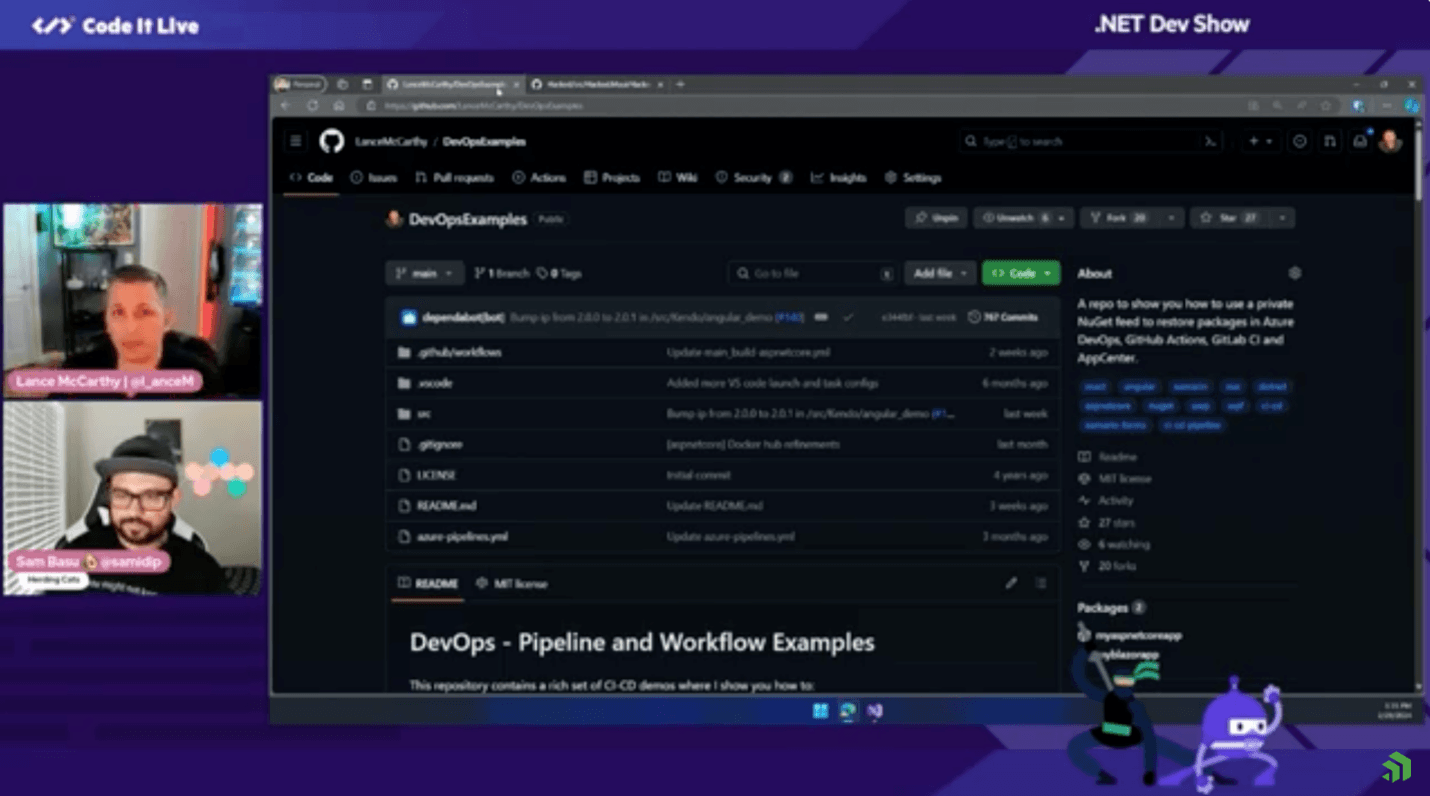
    <content type="text"><![CDATA[<p><span class="featured">Microsoft&rsquo;s decision to halt support for Xamarin on May 1, 2024, is rooted in the evolution of technology. What&rsquo;s next?</span></p><p>If you are a Xamarin developer, you will probably be interested in knowing the details around its future. Exactly two years after the announcement for the general availability of its successor, .NET MAUI, Microsoft will end support for Xamarin this May. But what does this mean for you?</p><p>The first thing you need to be sure of is that you will not be left behind. Your existing applications will continue to work in their current state. After the date of the last release of Xamarin (or a little while after), you most likely won&rsquo;t be able to publish the updated version of your application in Google Store or Apple App Store. This is due to the fact that these stores will have a minimum version requirement of the respective SDK, which will not be released by Microsoft for Xamarin.</p><p>Besides, it&rsquo;s not best practice to fall behind with updates at times when security is of great importance. At some point the stores themselves will require that only apps that meet the latest security standards will be published. This means that you will need to take a step toward an upgrade.</p><p>Before proceeding further, it is important to highlight our commitment to our Progress <a target="_blank" href="https://www.telerik.com/xamarin-ui">Telerik UI for Xamarin</a> product. We currently have no intention of discontinuing it and we will persist in offering technical support and bug fixes to our clients.</p><p>The easiest and most logical choice for a framework that comes as a natural evolution of Xamarin is .NET MAUI. And just as it is an evolution, .NET MAUI has many advantages compared to Xamarin such as better performance, a simplified project structure for easier management, and many more. You can read more details on this topic in our blog post&mdash;&ldquo;<a href="https://www.telerik.com/blogs/part-1-should-we-migrate-xamarin-forms-dotnet-maui-when">Should We Migrate from Xamarin.Forms to .NET MAUI? When?</a>&rdquo;</p><h2 id="ui-for-.net-maui-at-a-glance">UI for .NET MAUI at a Glance</h2><p>As your partner in .NET developer productivity, we moved in pace with the .NET MAUI technology, and we developed our Telerik UI for <a target="_blank" href="https://www.telerik.com/maui-ui">.NET MAUI controls</a> in harmony with the Microsoft product releases. We are proud that the suite is packed with more than 60 components&mdash;which, by the way, is already more than those we have in UI for Xamarin. But since the number is not the most important, we focused on improvements and adding even more functionalities in the components than their equivalents in our Xamarin suite:</p><ul><li>You can check out some of our .NET MAUI components in the blog post &ldquo;<a href="https://www.telerik.com/blogs/5-net-maui-components-ensure-never-ask-how-do-i-build-that">5 .NET MAUI Components That Will Ensure You Never Ask &lsquo;How Do I Build That&rsquo;</a>.&rdquo;</li><li>The essence of almost every line-of-business (LOB) application is a DataGrid, thus we are constantly improving it. You can explore Sam Basu&rsquo;s blog post that showcases some of the most <a target="_blank" href="https://www.telerik.com/blogs/elevate-net-maui-apps-powerful-grid">important functionalities of the .NET MAUI DataGrid</a>.</li><li>Additionally, .NET MAUI has added a lot of features to the framework to support desktop functionality. Telerik UI for .NET MAUI supports a lot of desktop-friendly features as well&mdash;like mouse-keyboard support, full-featured Grid, advanced data visualization, etc.</li></ul><p>If you&rsquo;re not yet familiar with our product, you can explore our <a target="_blank" href="https://www.telerik.com/maui-ui/demo-apps">demo applications</a>.</p><p><img src="https://d585tldpucybw.cloudfront.net/sfimages/default-source/blogs/2024/2024-03/maui_demos.png?sfvrsn=249a4260_2" alt="Demo apps include .NET MAUI Controls Showcase App and Crypto Tracker App" /></p><h2 id="migration-to-.net-maui">Migration to .NET MAUI?</h2><p>.NET MAUI could present a great opportunity to <a target="_blank" href="https://www.telerik.com/maui-ui/migration">migrate your current Xamarin app</a> or to build your next cross-platform app. Migration can be easy, especially if you&rsquo;re already using Xamarin.Forms to develop your cross-platform applications. Microsoft just shared a <a target="_blank" href="https://twitter.com/davidortinau/status/1770791375635636507">great tool</a> that could simplify your migration efforts. We can also help you with a good <a target="_blank" href="https://www.telerik.com/blogs/part-2-things-consider-planning-migration-xamarin.forms-dotnet-maui">migration blogpost</a>.</p><p>Much of your existing code can be reused or easily adapted for .NET MAUI. With the right tools and resources, you can quickly upgrade to the new framework and take advantage of its features and benefits. This guide shows you how to <a target="_blank" href="https://docs.telerik.com/devtools/maui/migrate-to-net-maui">convert your Xamarin application, built with Telerik UI for Xamarin to a .NET MAUI app</a> with Telerik UI for .NET MAUI controls.</p><p>Moreover, we managed to migrate one of our Xamarin sample applications&mdash;<a href="https://www.telerik.com/xamarin-ui/sample-apps#telerik-crm">Telerik CRM</a>&mdash;to .NET MAUI. Lance McCarthy shows the migration process for this store app with a large codebase in a <a target="_blank" href="https://www.youtube.com/watch?v=TXEbrYuMSa4">livestream series</a>, so you can explore a real-world migration and hear his great recommendations.</p><p><img src="https://d585tldpucybw.cloudfront.net/sfimages/default-source/blogs/2024/2024-03/lance_and_sam.png?sfvrsn=f7b65cb_2" alt="Lance McCarthy and Sam Basu - Migration of Xamarin to MAUI app" /></p><p>With the CRM example, we have shown you the migration in action. As a next step, we plan to modernize the CRM app, and eventually to also add more functionality to the app. So, stay tuned for the next steps in the migration journey.</p><h2 id="conclusion">Conclusion</h2><p>Every change is a new opportunity. Start now and have enough time to safely migrate your app and even consider expanding it with desktop and web support. As a conclusion, I believe the natural path of every Xamarin.Forms app is .NET MAUI, but the final decision is yours.</p><p>If you are our Xamarin customer and plan a migration to .NET MAUI, the <a target="_blank" href="https://www.telerik.com/devcraft">DevCraft bundle</a> is the right option for you, because you will keep the legacy library and will get the new one, plus all updates, resources and support.</p><p>If you are still not sure, need more information or don&rsquo;t have migration plans, I&rsquo;d be glad to hear your reasons and see how we can help you. Don&rsquo;t hesitate to <a target="_blank" href="https://www.linkedin.com/in/yoankrumov/">get in touch</a>.</p><img src="https://feeds.telerik.com/link/23058/16638186.gif" height="1" width="1"/>]]></content>
  </entry>
  <entry>
    <id>urn:uuid:a412f2aa-8af7-43cf-8e16-832fa160edab</id>
    <title type="text">Beyond the Basics: Best Practices for UI Handling in .NET MAUI</title>
    <summary type="text">Making the move from Xamarin Forms to .NET MAUI? These tips are for you!</summary>
    <published>2024-03-28T07:14:17Z</published>
    <updated>2026-04-17T03:14:39Z</updated>
    <author>
      <name>Leomaris Reyes </name>
    </author>
    <link rel="alternate" href="https://feeds.telerik.com/link/23058/16633857/beyond-basics-best-practices-ui-handling-net-maui"/>
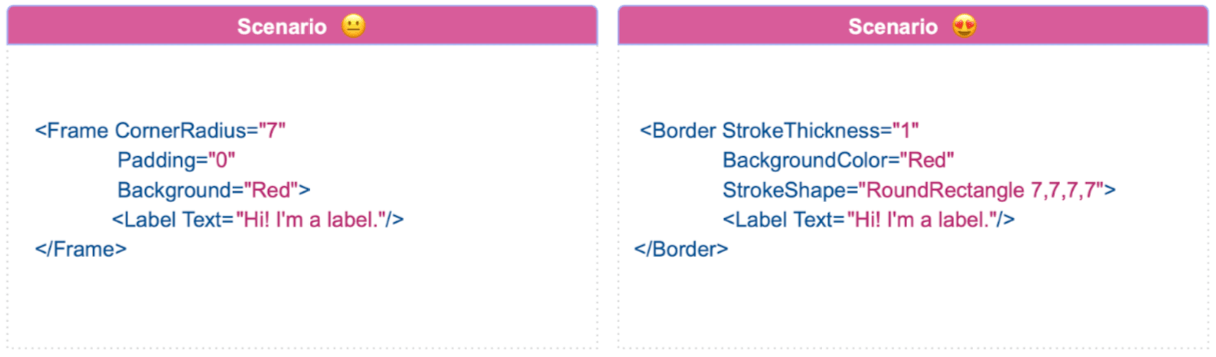
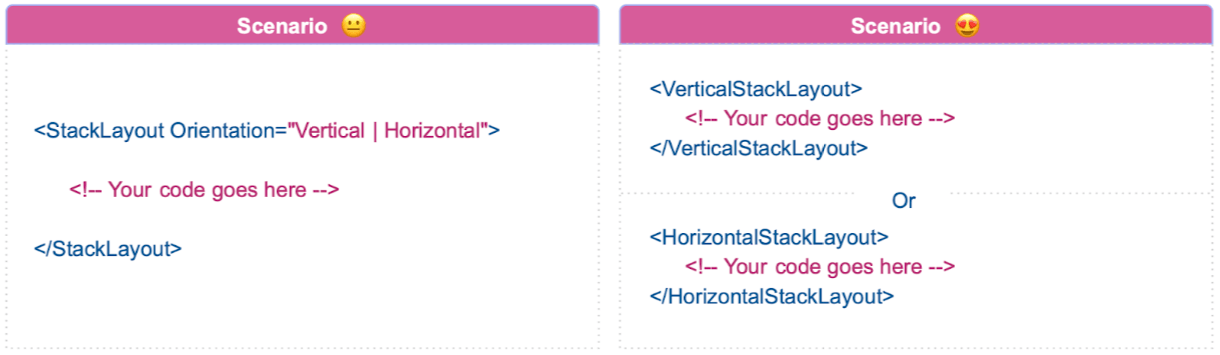
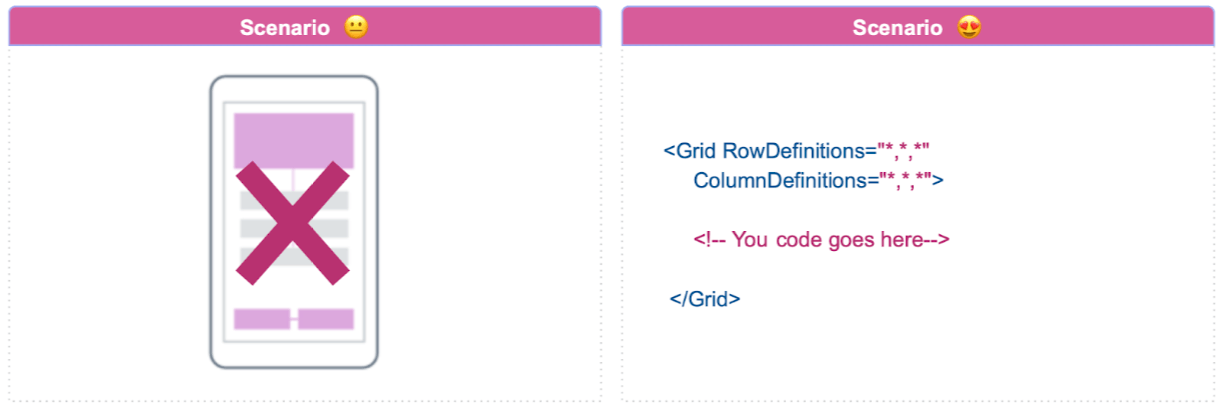
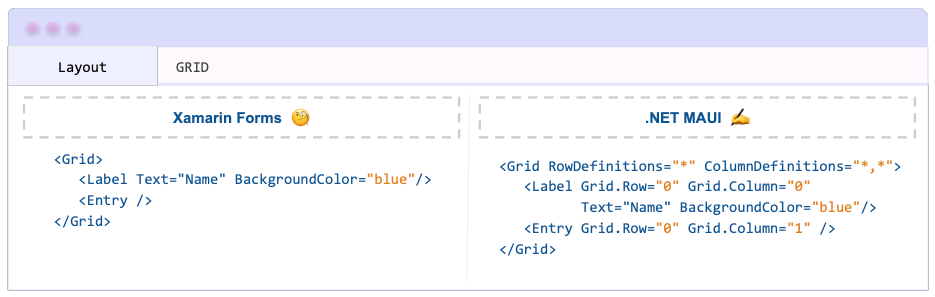
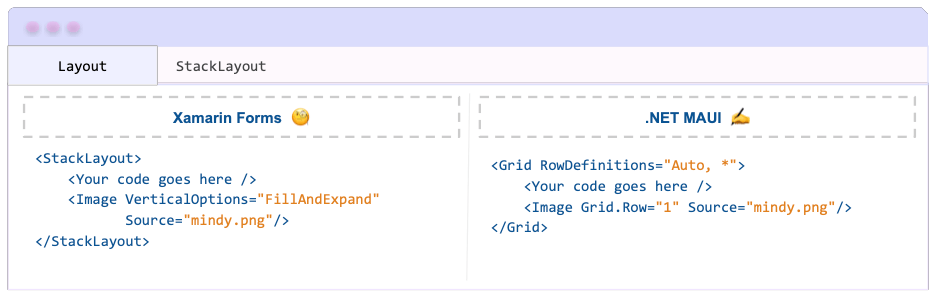
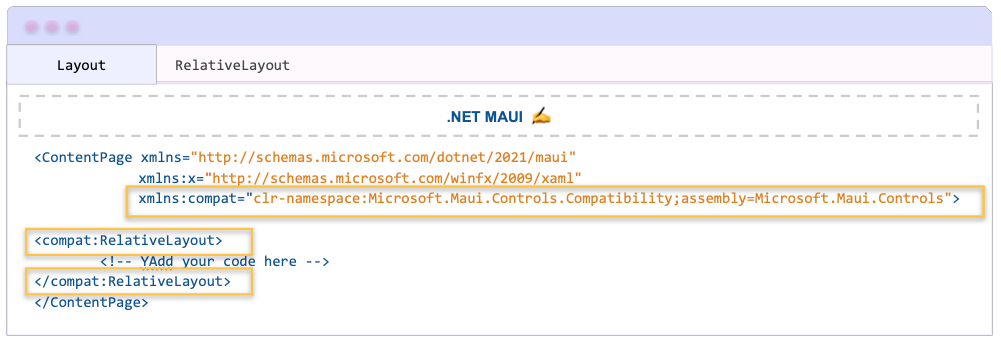
    <content type="text"><![CDATA[<p><span class="featured">Making the move from Xamarin Forms to .NET MAUI? These tips are for you!&nbsp;</span></p><p> Hello there! Are you ready to learn some exciting tips for best practices in .NET MAUI? Whether you&rsquo;re experienced with developing applications using Xamarin Forms or just starting out in .NET MAUI, the following content will be useful to you.</p><p>In this article, I&rsquo;ll provide you with tips to improve your .NET MAUI app development practices. These insights are based on updates from the official documentation, which includes interesting improvements.  The goal is for our apps to maintain their quality while enhancing performance and simplifying our work as developers. ️ I&rsquo;m here to share tips that will keep you ahead in the .NET MAUI field. Ready to explore? </p><h2 id="want-to-add-a-border-dont-use-frame—use-border">1. Want to Add a Border? Don&rsquo;t Use Frame&mdash;Use Border</h2><p><img strokethickness="1" src="https://d585tldpucybw.cloudfront.net/sfimages/default-source/blogs/2024/2024-03/tip_one_border_vs_frame.png?sfvrsn=9418b262_2" text="Hi! I&#39;m a label." backgroundcolor="Red" padding="0" alt="Unhappy scenarie using frame: Frame CornerRadius=" background="Red" strokeshape="RoundRectangle 7,7,7,7" /></p><p>In Xamarin Forms, the Frame is mainly used to add borders. However, in .NET MAUI, a new control named Border has been introduced specifically for this purpose.</p><p><strong>So, when is it appropriate to use Border, and when should you use Frame?</strong>  The official documentation indicates that Frame is maintained for users transitioning their applications from Xamarin.Forms to .NET MAUI. For new developments, it&rsquo;s recommended to use the Border control.</p><p>Here are a few reasons why I prefer using <strong>Border</strong> over Frame:</p><ul><li><strong>Flexibility in rounding:</strong> If you want to set a value to round each edge separately, you have the ability to do so.</li><li><strong>Freedom in the border shape:</strong> You have control over the edge&rsquo;s shape. For example, you can use shapes like RoundRectangle (as shown in the explanatory image), or experiment with others such as Polyline, among other <a target="_blank" href="https://learn.microsoft.com/en-us/dotnet/maui/user-interface/controls/border?view=net-maui-8.0#define-the-border-shape-with-a-string">shapes you can see here</a>.</li></ul><p>As shown in the main image of this tip, the Border is quite straightforward to use. To gain a more in-depth understanding of the Border, I recommend reading the article <a target="_blank" href="https://learn.microsoft.com/en-us/dotnet/maui/user-interface/controls/border?view=net-maui-8.0">Border in .NET MAUI</a>.</p><h2 id="use-horizontalverticalstacklayout-instead-of-stacklayout">2. Use Horizontal/VerticalStackLayout Instead of StackLayout</h2><p><img src="https://d585tldpucybw.cloudfront.net/sfimages/default-source/blogs/2024/2024-03/tip_two_horizontal_verticalstacklayout.png?sfvrsn=23ed6467_2" alt="Unhappy scenario uses StackLayout Orientation=" /></p><p>If you&rsquo;re familiar with Xamarin Forms, then you already know how the StackLayout works. By default, the orientation is vertical, but you can set it to horizontal using the Orientation property. In .NET MAUI, the same concept applies to StackLayout.</p><p>In addition to the existing layout, there are new ones where you don&rsquo;t need to use the Orientation property. You can directly use VerticalStackLayout or HorizontalStackLayout instead. Depending on your preferred orientation, I recommend considering one of these new layouts!</p><p>I encourage you to learn more about these layouts by reading the article <a target="_blank" href="https://www.telerik.com/blogs/exploring-layout-options-dotnet-maui">Exploring Layout Options in .NET MAUI</a>.</p><h2 id="avoid-using-andexpand-in-the-horizontalverticalstacklayout">3. Avoid Using AndExpand in the Horizontal/VerticalStackLayout</h2><p>In Xamarin Forms, we use expansion properties such as Horizontal/VerticalOptions. These properties define alignment preferences and contain a set of values, some of which end with the &ldquo;AndExpand&rdquo; suffix. For instance, we have <code class="inline-code">CenterAndExpand</code>, <code class="inline-code">Start</code> and <code class="inline-code">StartEndExpand</code>, among others.</p><p>However, in .NET MAUI, the &ldquo;AndExpand&rdquo; suffix no longer exists. It will only respond to values without the suffix, like <code class="inline-code">Center</code> or <code class="inline-code">Start</code>.</p><p><strong>What happens if you use a value with an &ldquo;AndExpand&rdquo; suffix? </strong> .NET MAUI simply ignores the suffix and considers the root word. For instance, if you write:</p><pre class=" language-xml"><code class="prism  language-xml"><span class="token tag"><span class="token tag"><span class="token punctuation">&lt;</span>VerticalStackLayout</span> <span class="token attr-name">HorizontalOptions</span><span class="token attr-value"><span class="token punctuation">=</span><span class="token punctuation">"</span>CenterAndExpand<span class="token punctuation">"</span></span><span class="token punctuation">&gt;</span></span>
      ...
<span class="token tag"><span class="token tag"><span class="token punctuation">&lt;/</span>VerticalStackLayout</span><span class="token punctuation">&gt;</span></span>
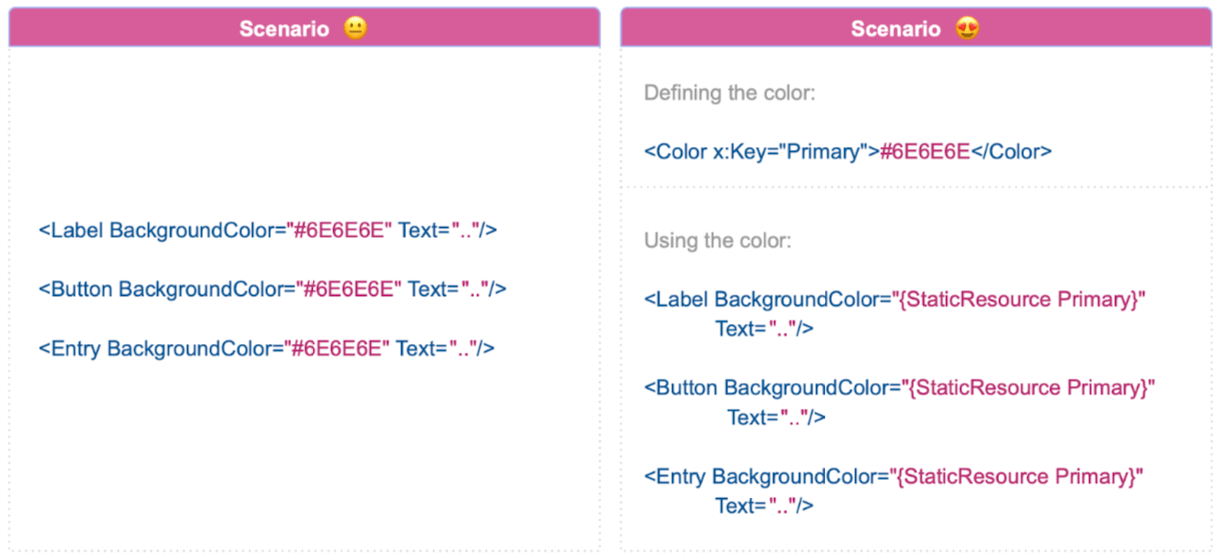
</code></pre><p>.NET MAUI will interpret it as <strong>Center</strong>.</p><h2 id="don’t-use-relativelayout">4. Don&rsquo;t Use RelativeLayout</h2><p><img columndefinitions="*,*,*" src="https://d585tldpucybw.cloudfront.net/sfimages/default-source/blogs/2024/2024-03/tip_four_relativelayout.png?sfvrsn=764cc676_2" alt="Happy scenario uses Grid RowDefinitions=" /></p><p><strong>If you&rsquo;ve been using RelativeLayout in Xamarin Forms, prepare for a change.</strong> RelativeLayout does not exist in .NET MAUI. Say goodbye. </p><p>You might wonder what to do if you&rsquo;re migrating your app from Xamarin Forms to .NET MAUI and you use RelativeLayout.  Microsoft has provided a solution with a compatibility namespace that can be found in the Microsoft.Maui.Controls.Compatibility namespace. For more information, you can refer to the article <a target="_blank" href="https://www.telerik.com/blogs/xamarin-forms-dotnet-maui-how-layout-behavior-evolved">Xamarin.Forms to .NET MAUI: How Layout Behavior Has Evolved</a>.</p><p>However, I personally recommend refactoring your code as soon as you complete the migration. The Grid layout is an ideal replacement, achieving the same behavior as the RelativeLayout.</p><h2 id="desktop-apps-need-more-info-enhance-with-tooltips">5. Desktop Apps: Need More Info? Enhance with Tooltips</h2><p><img src="https://d585tldpucybw.cloudfront.net/sfimages/default-source/blogs/2024/2024-03/tip_five_tooltips.png?sfvrsn=86a18f4c_2" alt="Happy scenario: Entry ToolTipProperties.Text =" /></p><p>Consider a registration form that requires additional information. Typically, placeholders are used for this purpose. But what if more detailed information is needed?  This is where tooltips come in handy. Tooltips allow you to add detailed information without affecting your UI design, as they only appear when the user directly interacts with the visual element (the Entry, for this example).</p><p>This is just one example. You can add tooltips to many other controls, not just entry! This is one of the new features of .NET MAUI that doesn&rsquo;t exist in Xamarin Forms.</p><p>For more information about Tooltips, I invite you to read the article <a target="_blank" href="https://www.telerik.com/blogs/improving-desktop-applications-tooltips-dotnet-maui">Improving Your Desktop Applications With ToolTips in .NET MAUI</a>.</p><h2 id="using-the-same-hex-colors-in-various-places-add-them-to-color.xaml">6. Using the Same Hex Colors in Various Places? Add Them to Color.xaml</h2><p><img src="https://d585tldpucybw.cloudfront.net/sfimages/default-source/blogs/2024/2024-03/tip_six_colorxaml.png?sfvrsn=386b674_2" text=".." backgroundcolor="{StaticResource Primary}" x:key="Primary" alt=" Unhappy Scenario: Label BackgroundColor=" /></p><p>Branding colors are an integral part of app development. Suppose your branding has three colors, and you need to use them across 10 pages. A common approach might be to simply repeat the same hexadecimal codes as needed on each screen. This works, but it can complicate the maintenance of our app and increase the risk of errors when changing a color. It also makes our app less scalable.</p><p>Creating a color palette in a single file is a more efficient method. This allows us to reference these colors with an alias in other files. If the branding colors change, we only need to update one file rather than the whole codebase. (In fact, the app&rsquo;s default predefined colors are already set up this way).</p><p><strong>Here are the steps to accomplish this:</strong></p><p><strong>1. Identify the colors to use and navigate to Your Project ➡️ Resources ➡️ Styles ➡️ Colors.xaml.</strong></p><p>Add as many color lines as needed in the following format:</p><pre class=" language-xml"><code class="prism  language-xml"><span class="token tag"><span class="token tag"><span class="token punctuation">&lt;</span>Color</span> <span class="token attr-name"><span class="token namespace">x:</span>Key</span><span class="token attr-value"><span class="token punctuation">=</span><span class="token punctuation">"</span>GrayPrimaryColor<span class="token punctuation">"</span></span><span class="token punctuation">&gt;</span></span>#6E6E6E<span class="token tag"><span class="token tag"><span class="token punctuation">&lt;/</span>Color</span><span class="token punctuation">&gt;</span></span>
</code></pre><p>In this context, <code class="inline-code">GrayPrimaryColor</code> is the alias of the color, and <code class="inline-code">#6E6E6E</code> is its hexadecimal representation.</p><p><strong>2. Use the StaticResource to refer to the color.</strong></p><pre class=" language-xml"><code class="prism  language-xml"><span class="token tag"><span class="token tag"><span class="token punctuation">&lt;</span>Label</span> <span class="token attr-name">BackgroundColor</span><span class="token attr-value"><span class="token punctuation">=</span><span class="token punctuation">"</span>{StaticResource GrayPrimaryColor}<span class="token punctuation">"</span></span> <span class="token attr-name">Text</span><span class="token attr-value"><span class="token punctuation">=</span><span class="token punctuation">"</span>..<span class="token punctuation">"</span></span><span class="token punctuation">/&gt;</span></span>
</code></pre><p>Future color updates will be much easier to implement!</p><h2 id="conclusion">Conclusion</h2><p>&zwj; And that&rsquo;s all for today! I hope the tips in this article will help you uphold best practices in .NET MAUI. Remember, great code originates from small and intelligent modifications! ️ Thank you for taking the time to read!  See you in the next article!</p><p>Happy coding! </p><img src="https://feeds.telerik.com/link/23058/16633857.gif" height="1" width="1"/>]]></content>
  </entry>
  <entry>
    <id>urn:uuid:73f068df-1072-438b-a60d-f7617efda319</id>
    <title type="text">Microsoft Build Recap: Upgrading from Xamarin to .NET MAUI</title>
    <summary type="text">Discover what you missed at Microsoft Build 2023 regarding the migration to .NET MAUI.</summary>
    <published>2023-06-22T07:11:00Z</published>
    <updated>2026-04-17T03:14:39Z</updated>
    <author>
      <name>Leomaris Reyes </name>
    </author>
    <link rel="alternate" href="https://feeds.telerik.com/link/23058/16201437/microsoft-build-recap-upgrading-xamarin-dotnet-maui"/>
    <content type="text"><![CDATA[<p><span class="featured">Discover what you missed at Microsoft Build 2023 regarding the migration to .NET MAUI.</span></p><p>Since Microsoft Build 2023 has already occurred, it is important to stay informed of the latest news. This will help you learn about and implement new features in your applications.</p><p>This article provides an overview of Microsoft Build, with a focus on summarizing <a href="https://twitter.com/maddymontaquila?lang=es" target="_blank">Maddy Montaquilla</a>&rsquo;s session titled &ldquo;<strong>Upgrading Xamarin to .NET MAUI</strong>.&rdquo;
 Together, we will develop step by step with Maddy&rsquo;s plan for migration, so that you can start your own migration with ease!</p><p>First, let&rsquo;s get a quick understanding of Microsoft Build and .NET MAUI.</p><h2 id="what-is-microsoft-build">What is Microsoft Build?</h2><p>Microsoft Build is a great annual event created by Microsoft, where new tools and updates are presented, and we learn about services that developers can use now and in the future and other super valuable information for developers.</p><p>It took place on May 23, 24 and 25, 2023. You can explore the <a href="https://build.microsoft.com/en-US/home" target="_blank">Microsoft Build portal here</a>.&nbsp;Also, if you did not have the opportunity to attend, either virtually
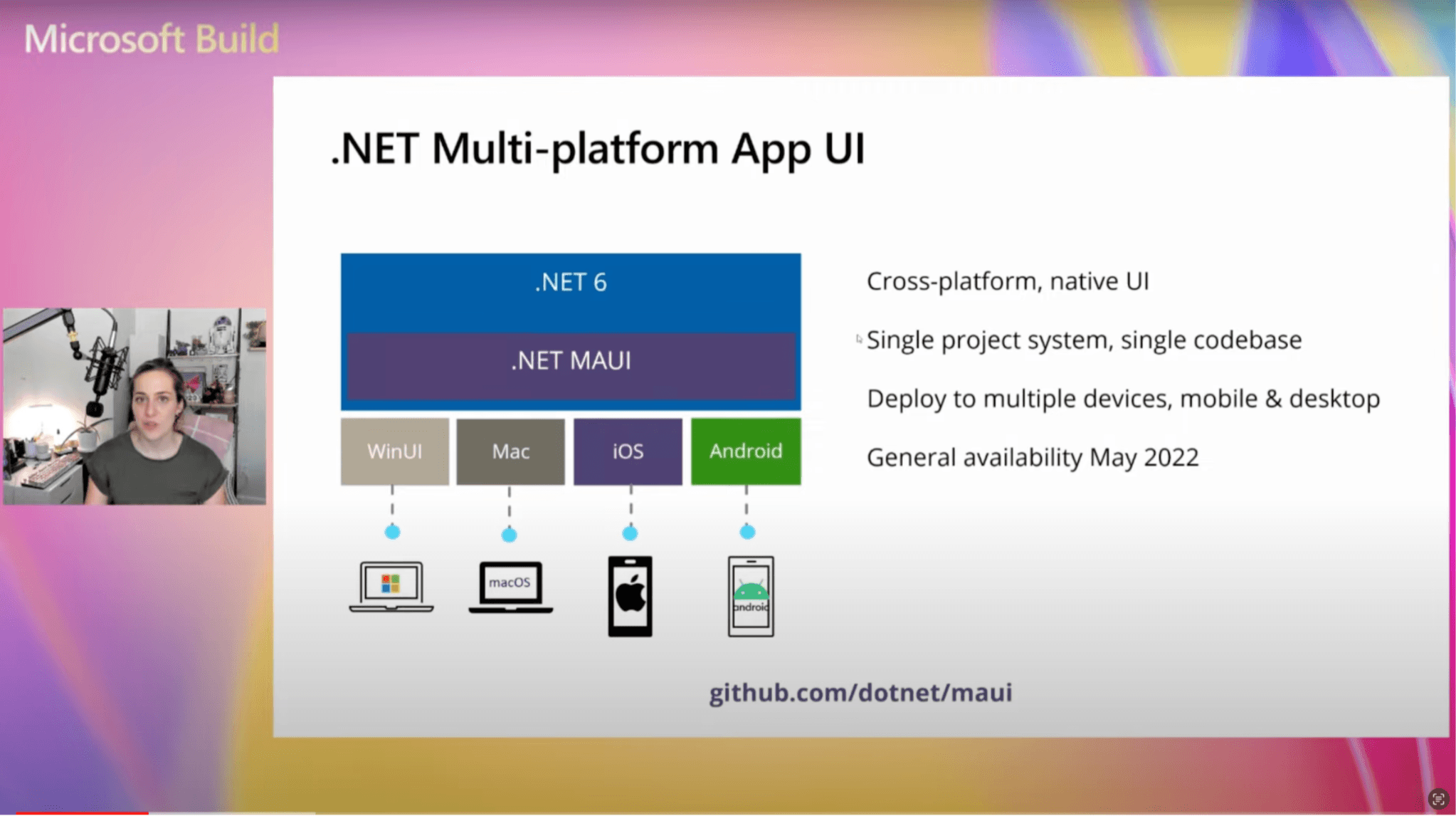
    or in person, you can see all the recorded sessions about .NET accessing the <a href="https://www.youtube.com/playlist?list=PLdo4fOcmZ0oV0mbay2wxFS_ZVRg6cxjdM" target="_blank">.NET at Microsoft Build 2023 video playlist</a>.</p><h2 id="what-is-.net-maui">What is .NET MAUI?</h2><p>Before starting the migration, Maddy, who is a Senior Product Manager at Microsoft, gave a brief overview of what .NET MAUI is. This is for people who are hearing of Xamarin or .NET MAUI for the first time.</p><p><img src="https://d585tldpucybw.cloudfront.net/sfimages/default-source/blogs/2023/2023-06/01-whatismaui.png?sfvrsn=a200c170_3" title="What is .NET MAUI?" alt="cross-platform, native UI; single project system; deploy to multiple devices, mobile & desktop; general availability May 2022" /></p><p>.NET Multi-platform App UI (.NET MAUI) is an evolution of Xamarin designed to be a cross-platform native UI. It features a single-project architecture that allows for a single codebase instead of separate ones for each platform. With this architecture,
    you can deploy to all the different platforms, including Windows and macOS, in addition to Android and iOS.</p><p>A great definition that Maddy gave us for .NET MAUI is:</p><blockquote>&ldquo;.NET MAUI is the most productive way to develop native apps that perform great on any device that runs Android, iOS, macOS or Windows from a single codebase.&rdquo;</blockquote><h2 id="upgrading-xamarin-to-.net-maui">Upgrading Xamarin to .NET MAUI</h2><p>In <a href="https://www.youtube.com/watch?v=yCtkjz51bJ8&amp;list=PLdo4fOcmZ0oV0mbay2wxFS_ZVRg6cxjdM&amp;index=4" target="_blank">this session</a>, Maddy gives us some tips and tricks to keep in mind before migrating our applications
    made in Xamarin. She also teaches us to use the Upgrade Assistant tool available in Visual Studio to finally migrate from Xamarin to .NET MAUI.</p><h3 id="why-should-you-upgrade">Why Should You Upgrade?</h3><p>To get into real situations, you may find yourself in one of these two scenarios: you have a stable Xamarin app that does not require updates, or you have an app that needs to receive updates. Let&rsquo;s explore how to handle both of these scenarios:</p><p>➖ <strong>You have a stable Xamarin app that does not require updates:</strong> If you are not planning to add updates to your app, you do not have to take any additional steps immediately. However, at some point, the app may stop being compatible
    with iOS or Android, and you will need to compile it on the latest operating systems, requiring a migration. It may be a long time before this becomes a problem, but it is still important to be aware of it.</p><p>➖ <strong>You have an app that needs to receive updates:</strong> Migrating to .NET MAUI will help your project benefit from the features of the new framework. For example, the one that stands out the most is the improvement in performance, and a
    lot of that comes from decoupling the platform controls with cross-platform controls. This means that instead of every function being tightly coupled to platform-specific controls (like Android buttons, iOS buttons or Windows buttons), we can
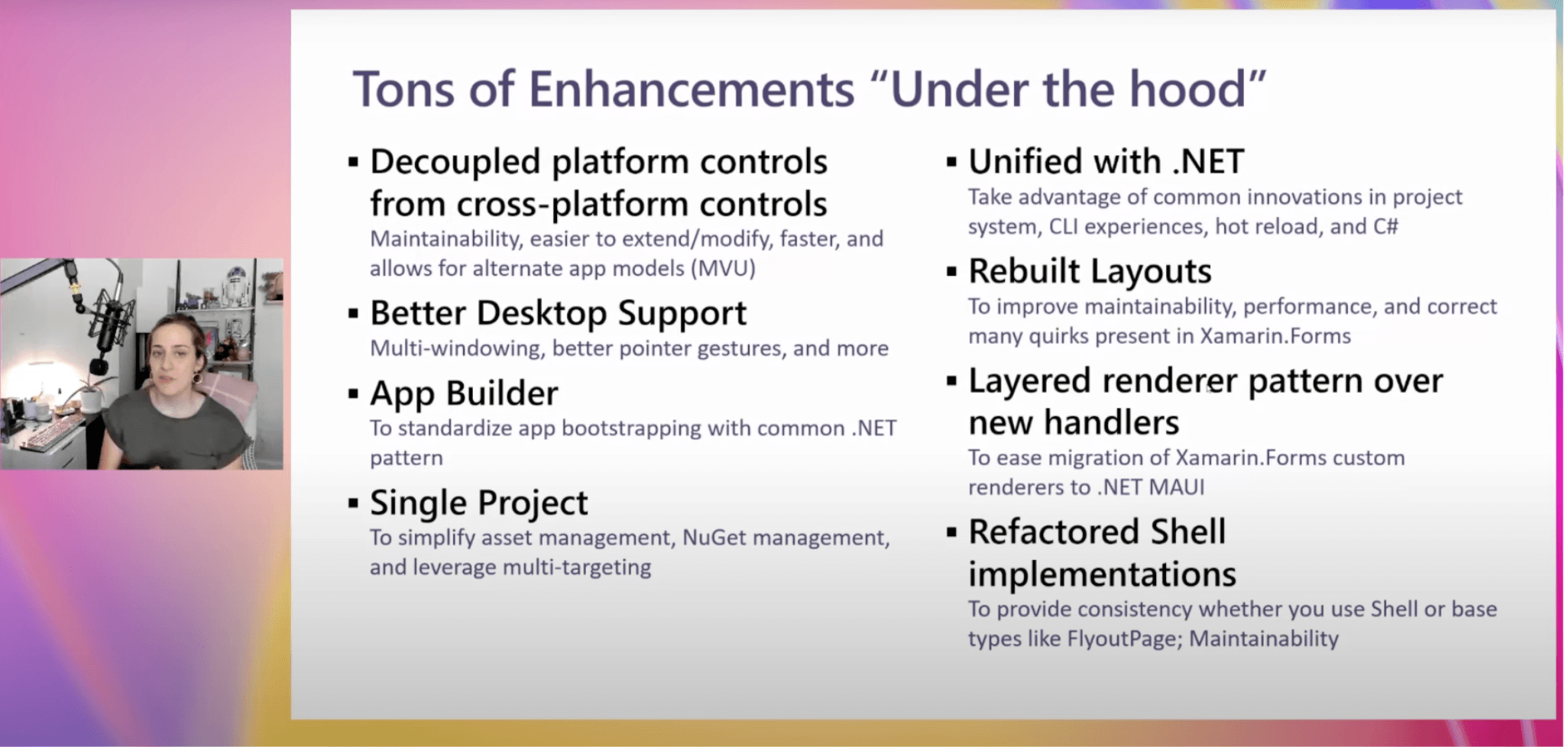
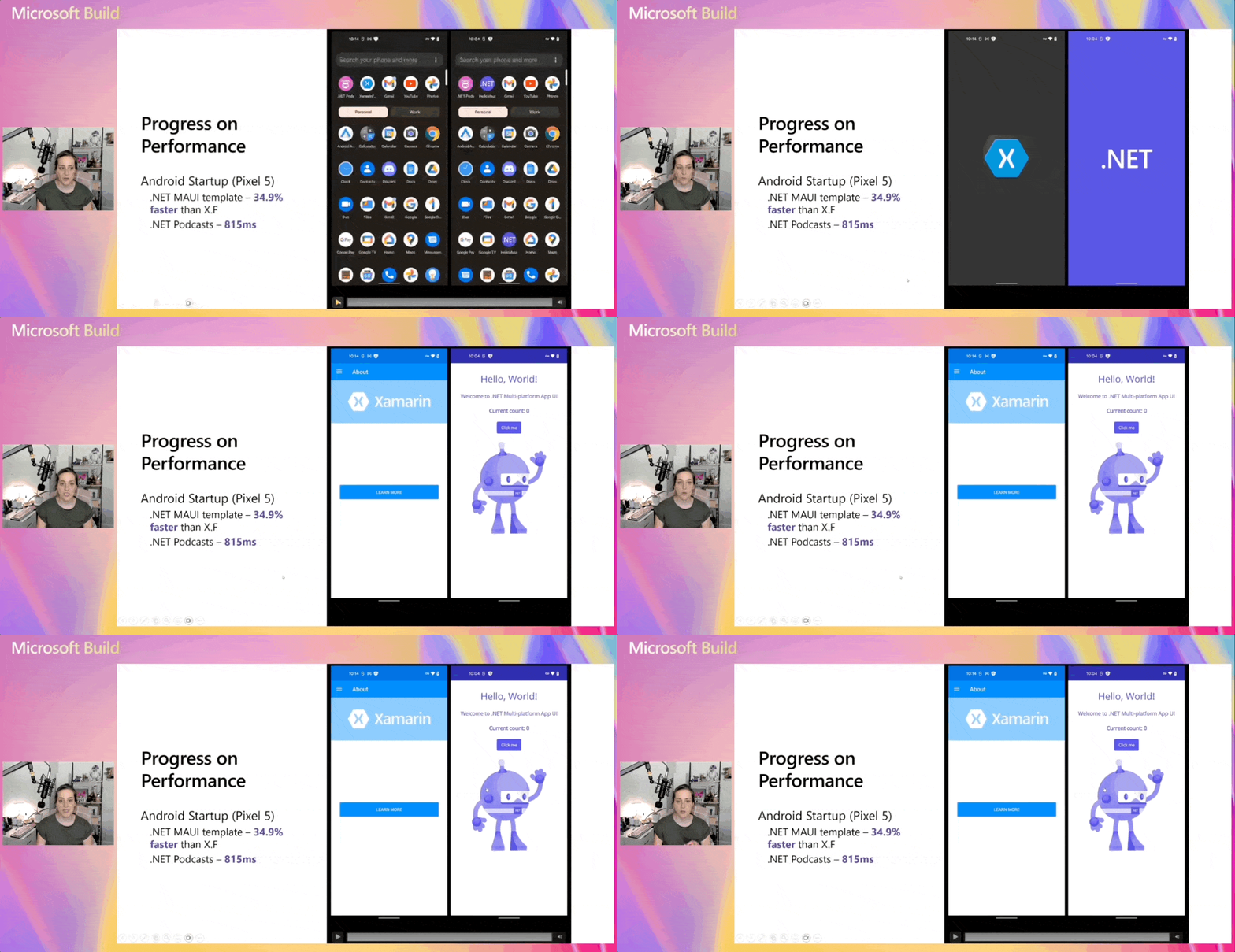
    use the more flexible .NET MAUI controls (assigning one button control).</p><p>There is also better support for desktop applications, with many super cool features such as multi-window, pointer, click and gestures.</p><p>In addition to the improvements mentioned above, there are many others, as shown in the image below:</p><p><img src="https://d585tldpucybw.cloudfront.net/sfimages/default-source/blogs/2023/2023-06/02-mauienhancements.png?sfvrsn=4d96246_3" title="MAUI Enhancements" alt="Tons of enhancements: Decoupled platform controls from cross platform controls; better desktop support; app builder; single project; unified with .net; rebuilt layouts; layered renderer pattern over new handlers; refactored shell implementations." /></p><h3 id="progress-on-performance">Progress on Performance</h3><p><img src="https://d585tldpucybw.cloudfront.net/sfimages/default-source/blogs/2023/2023-06/03-performance_xamarin_maui.gif?sfvrsn=28839c01_3" title="Progress on Performance" alt="Progress on performance: Android startup is faster with MAUI than Xamarin" /></p><p>We can see big changes in startup time between MAUI and Xamarin. Maddy shows us an example in which these great changes can be perceived. It&rsquo;s almost 35% faster on startup, which is pretty significant. In a heavy real-world application, the
    startup time is still estimated to be less than a second, which is an amazing startup time.</p><h3 id="frequently-asked-questions">Frequently Asked Questions</h3><p>Maddy made a summary of the most common questions in this transition, which are the following:</p><ul><li><strong>Do I need to rewrite my apps?</strong> No! You can make the migration with your existing code, using the tools that you will see below.</li><li><strong>What happens to Xamarin.Android and Xamarin.iOS?</strong> If you wrote something that doesn&rsquo;t use Xamarin Forms, then you might not want a cross-platform UI with MAUI. That&rsquo;s okay. We have .NET for Android and .NET for iOS.
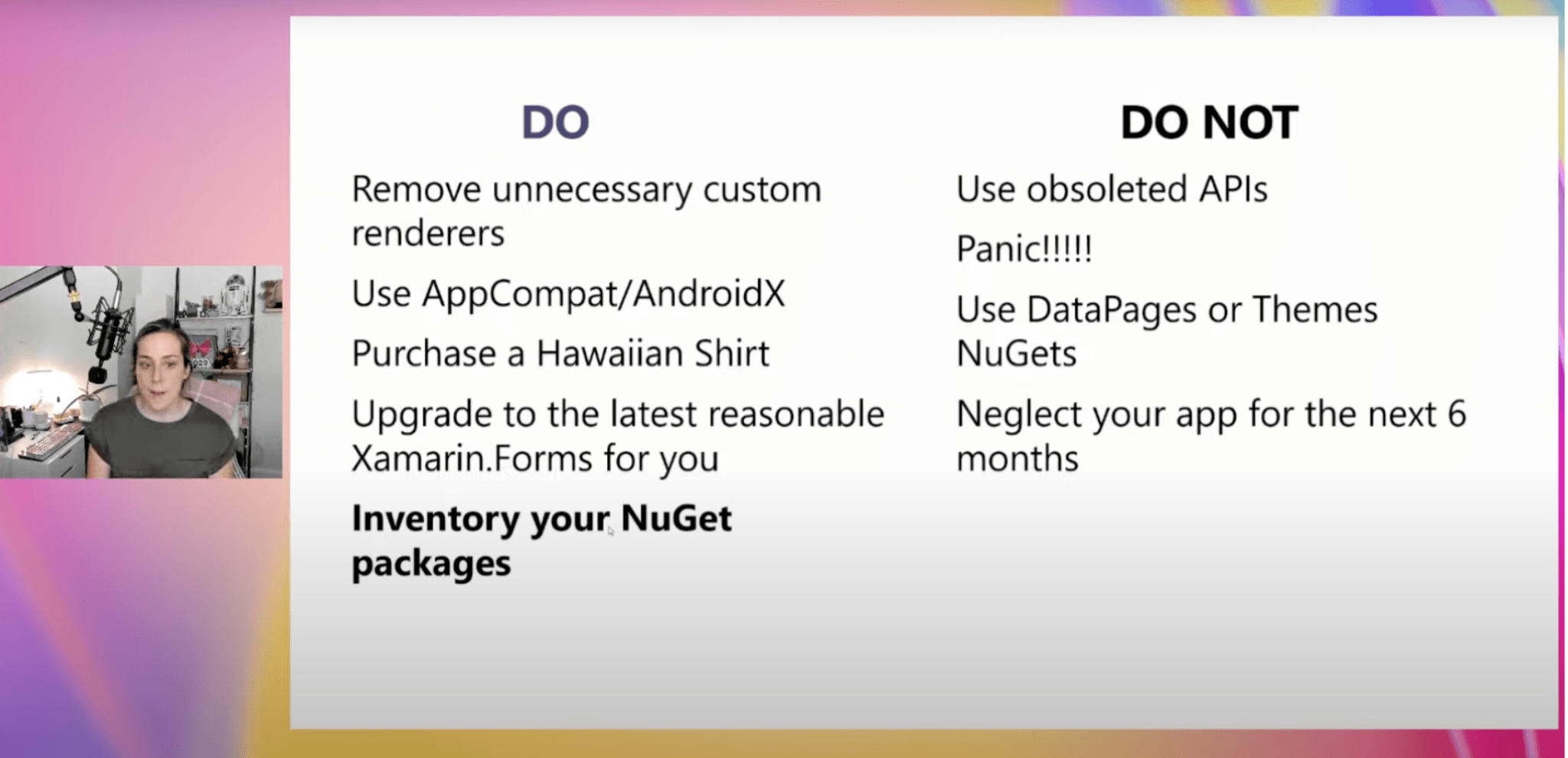
        .NET can target those platforms. So, those things will upgrade and work perfectly fine.</li><li><strong>When do I start trying to upgrade?</strong> Get up to date and start evaluating now. The Xamarin end of life is May 2024, which is a year out from Microsoft Build 2023.</li></ul><h3 id="tips-and-tricks">Tips and Tricks</h3><p>The most important things for you to do are to get rid of anything unnecessary. There are a lot of new controls and properties in both Xamarin and MAUI, so some of the custom <a href="https://www.telerik.com/blogs/part-4-how-to-migrate-xamarin-forms-renderers-dotnet-maui-handlers" target="_blank">renderers</a> you wrote back in the day might not even be needed anymore.</p><p>Also, take inventory of your NuGet packages. If there are packages that you really depend on, that are core to your app, you should check if they have a MAUI-compatible version. You should also check if they will need to be recompiled for MAUI. If
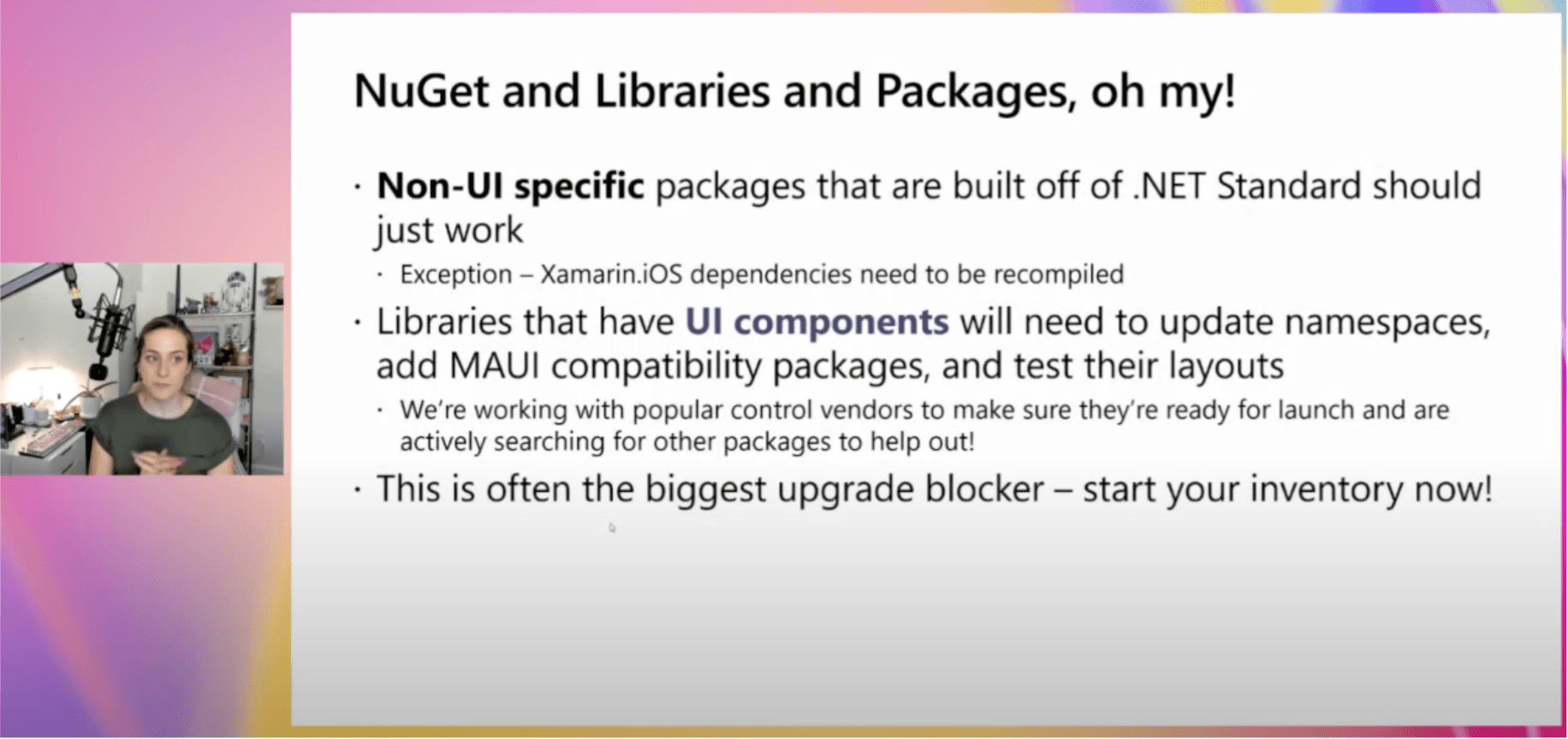
    there are alternatives, you can switch them out.</p><p>In the image below, you can see in more detail other tips and tricks that Maddy shared with us:</p><p><img src="https://d585tldpucybw.cloudfront.net/sfimages/default-source/blogs/2023/2023-06/04-tips_tricks.png?sfvrsn=a42341da_3" title="Tips and Tricks" alt="Do: remove unnecessary custom renders, use app compat/ AndroidX, purchase a Hawaiian shirt, upgrade to the latest reasonable xamarin forms for you, inventory your nuget packages. Do not: use obsolete APIs, panic, use data packages or themes Nugets, neglect your app for the next 6 months." /></p><p>And here&rsquo;s a little bit more about NuGet, libraries and packages:</p><p><img src="https://d585tldpucybw.cloudfront.net/sfimages/default-source/blogs/2023/2023-06/05-nuget_packages.png?sfvrsn=72c8512f_3" title="Tips and Tricks" alt="Nuget and libraries and packages oh my! Non-UI specific packages that are built off of .net standard should just work. Exception xamarin iOS dependencies need to be recompiled. Libraries that have UI components will need to update their namespaces, add Maui compatibility packages, and test their layouts. We&#39;re working with popular control vendors to make sure they&#39;re ready for launch and are actively searching for other packages to help out. This is often the biggest upgrade blocker. Start your inventory now." /></p><h2 id="lets-see-the-demo">Let&rsquo;s See the Demo</h2><h3 id="visual-studio-upgrade-assistant">Visual Studio Upgrade Assistant</h3><p>This <strong>Visual Studio Upgrade Assistant</strong> allows you to migrate your Xamarin applications to .NET MAUI. This supports Windows and iOS migrations.</p><p>To help you learn how to use this demo, we will use an example Xamarin Forms application. Your app may have different features, and that&rsquo;s OK. This is just a general guide to assist you with the migration process.</p><h3 id="availability">Availability</h3><ul><li><strong>Windows:</strong> We have the Upgrade Assistant as a Visual Studio extension. (We will focus on this explanation.)</li><li><strong>Mac:</strong> Although it is not currently available in Visual Studio for Mac, you can still use an existing version for the command line. The source code is available on GitHub, so feel free to download it and follow the instructions
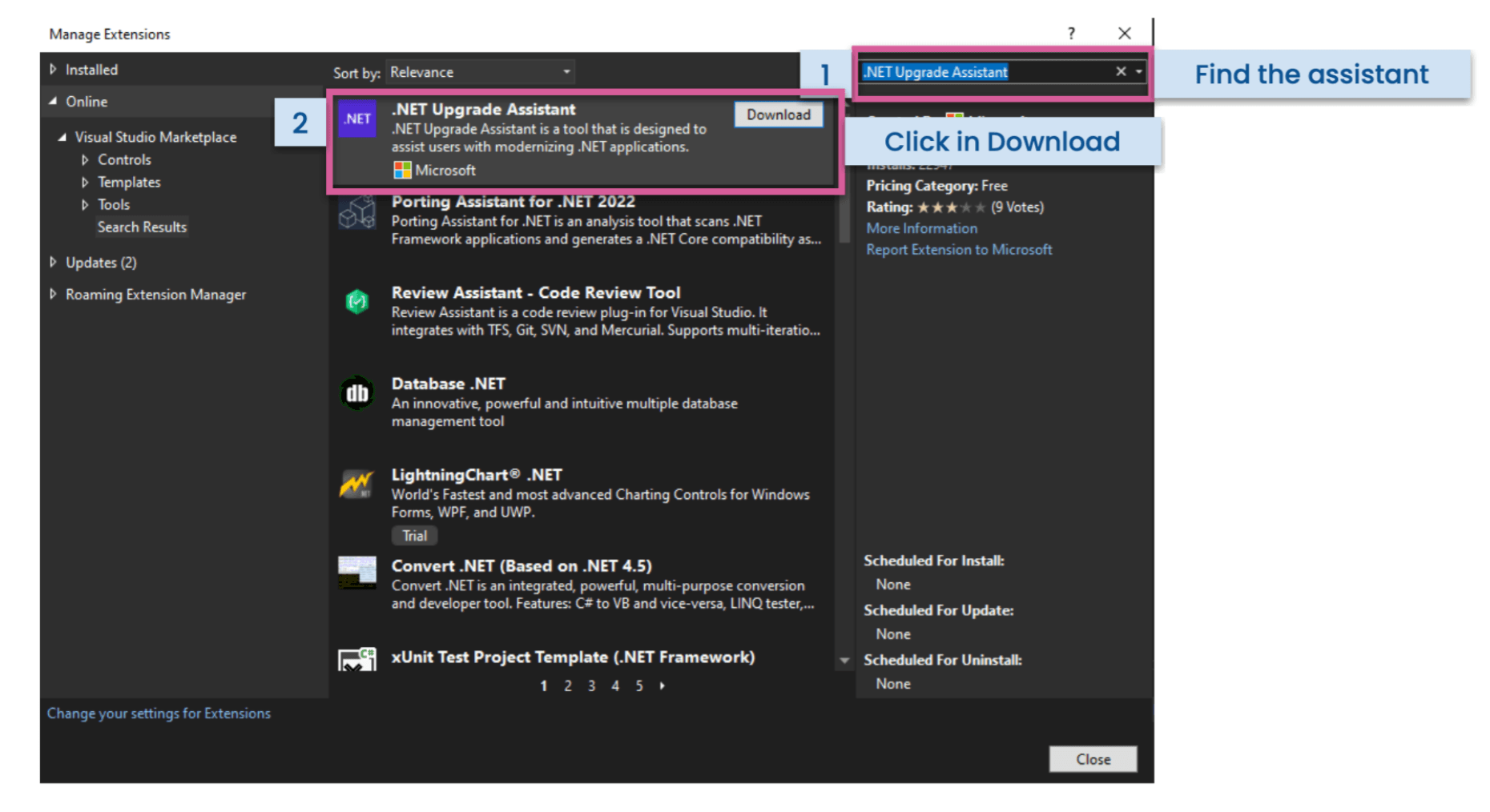
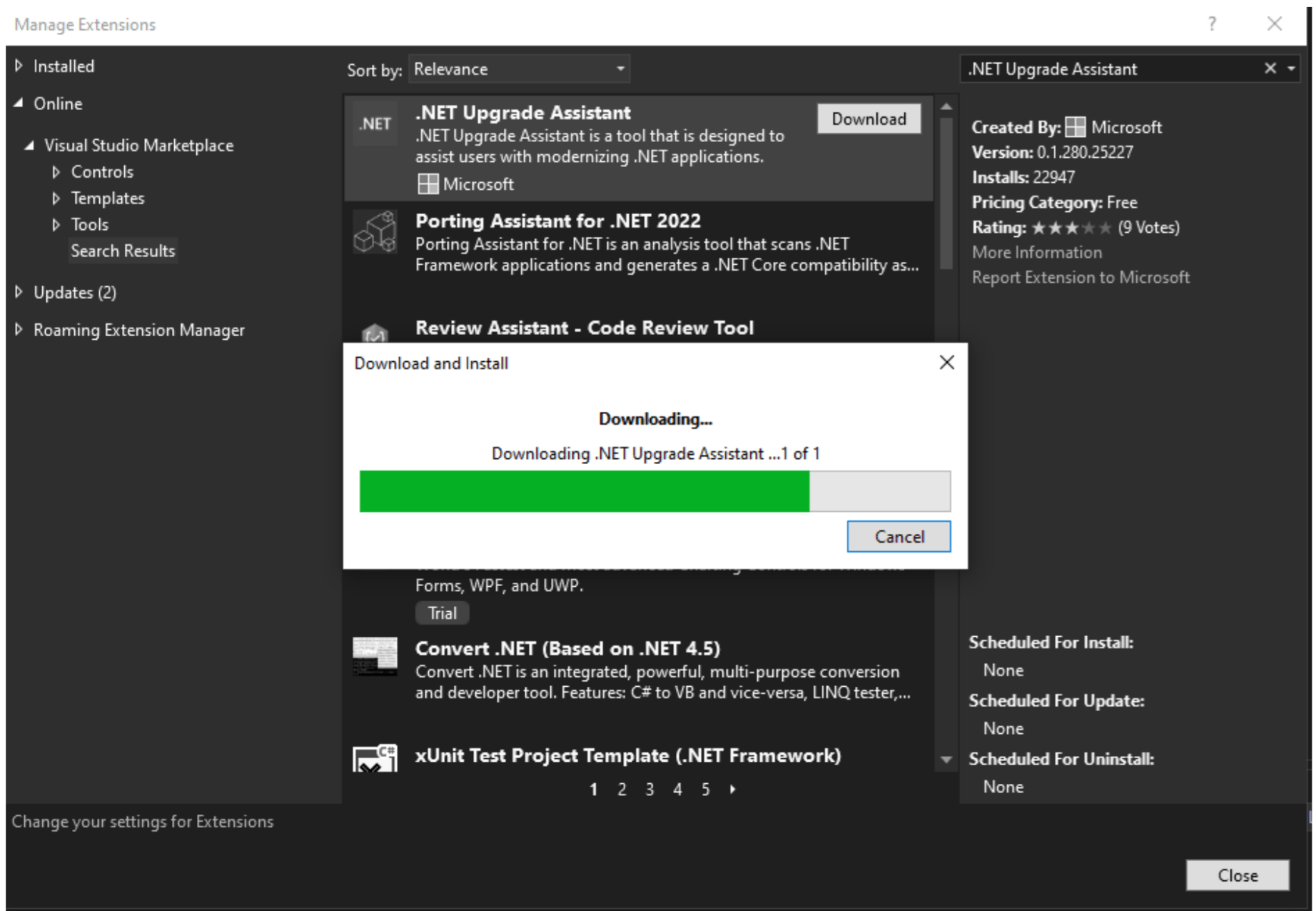
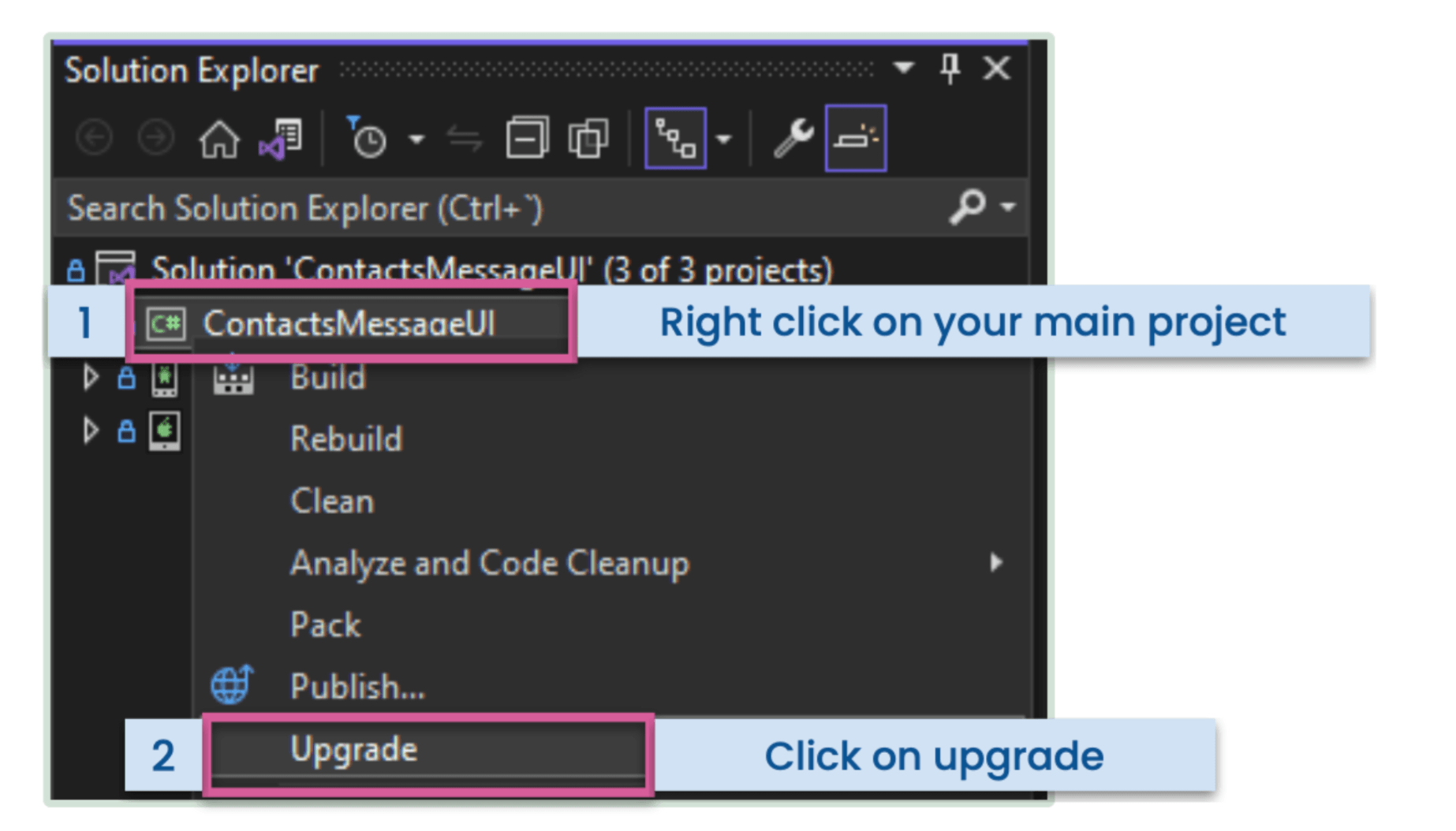
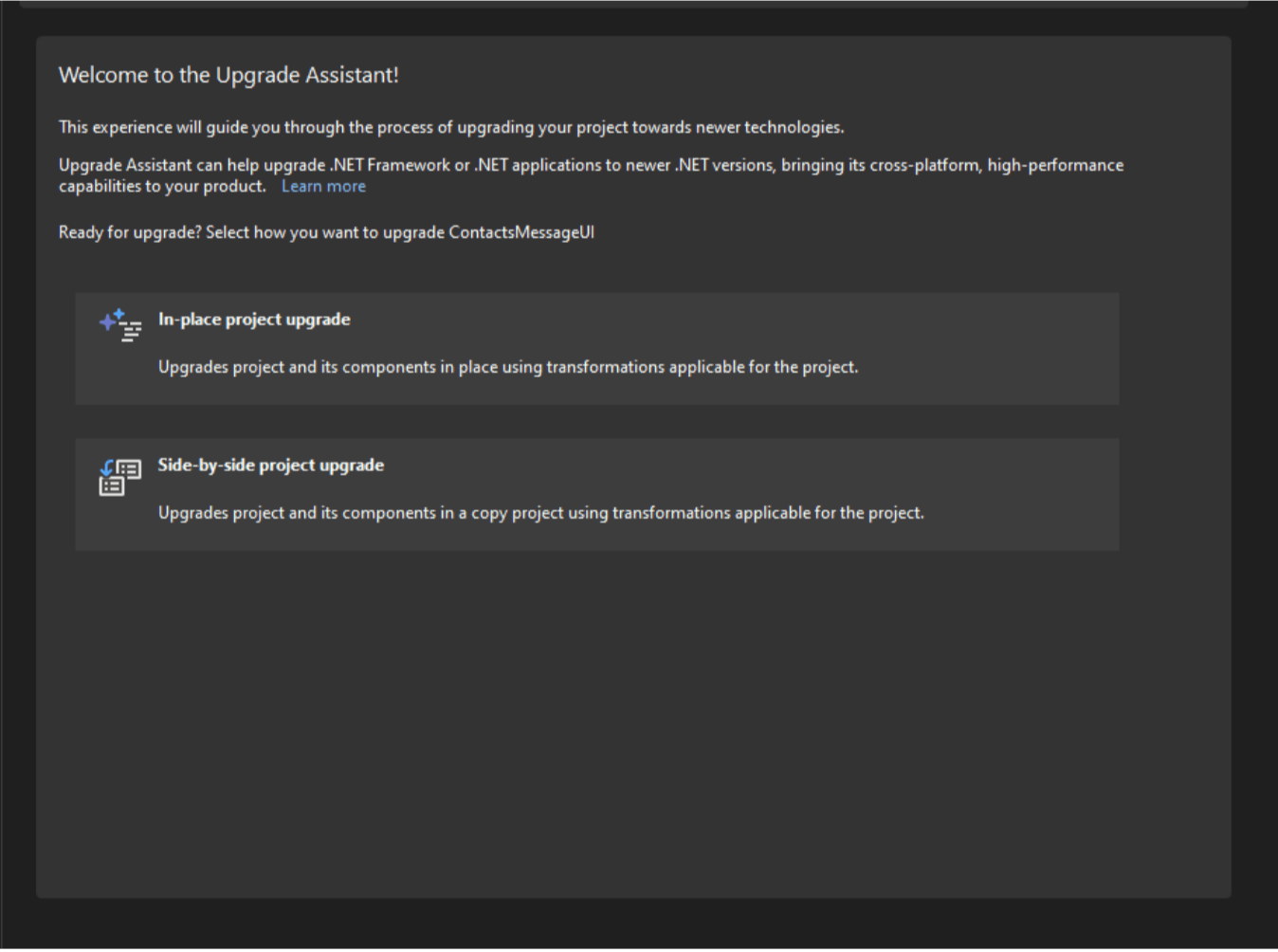
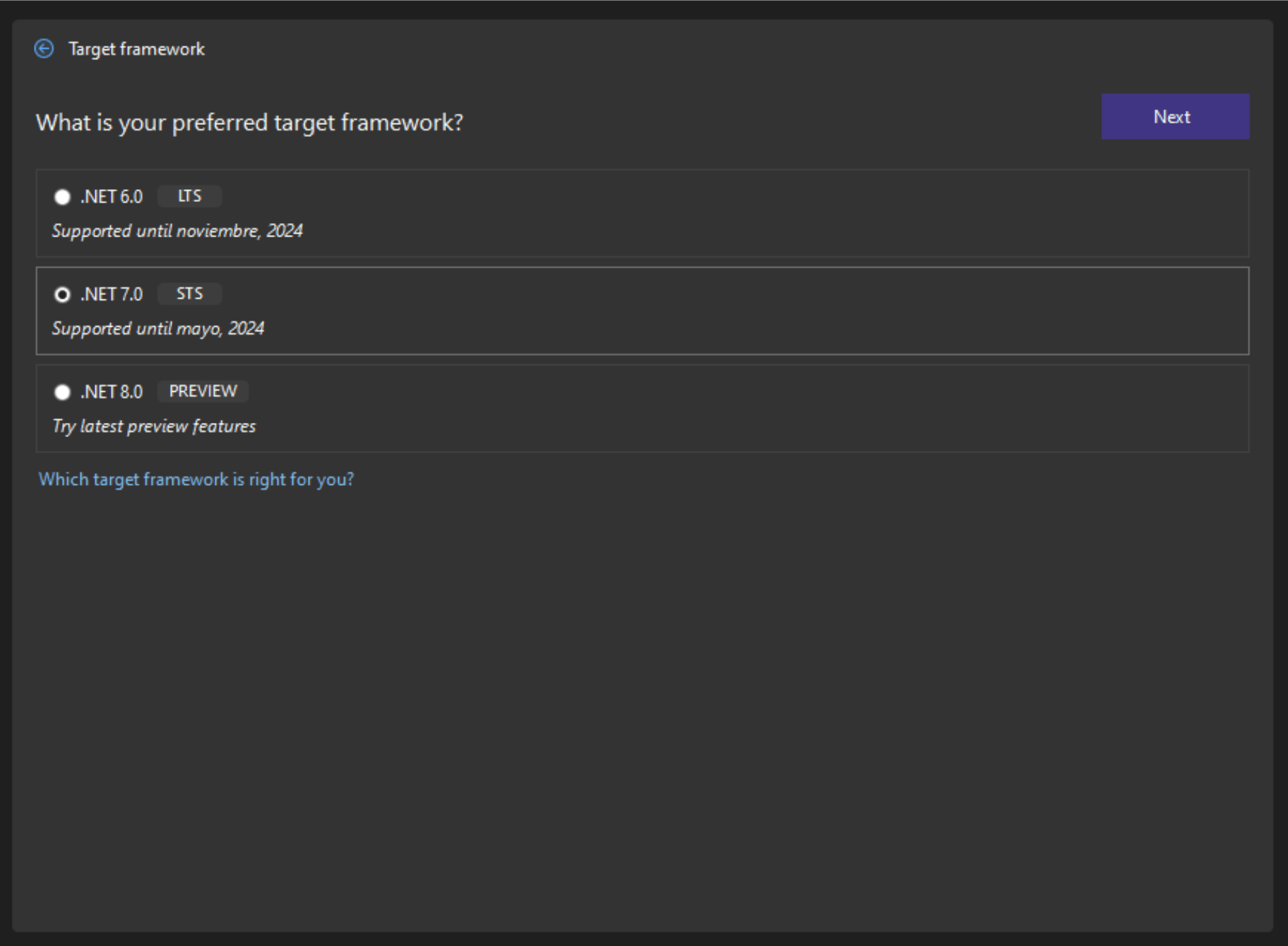
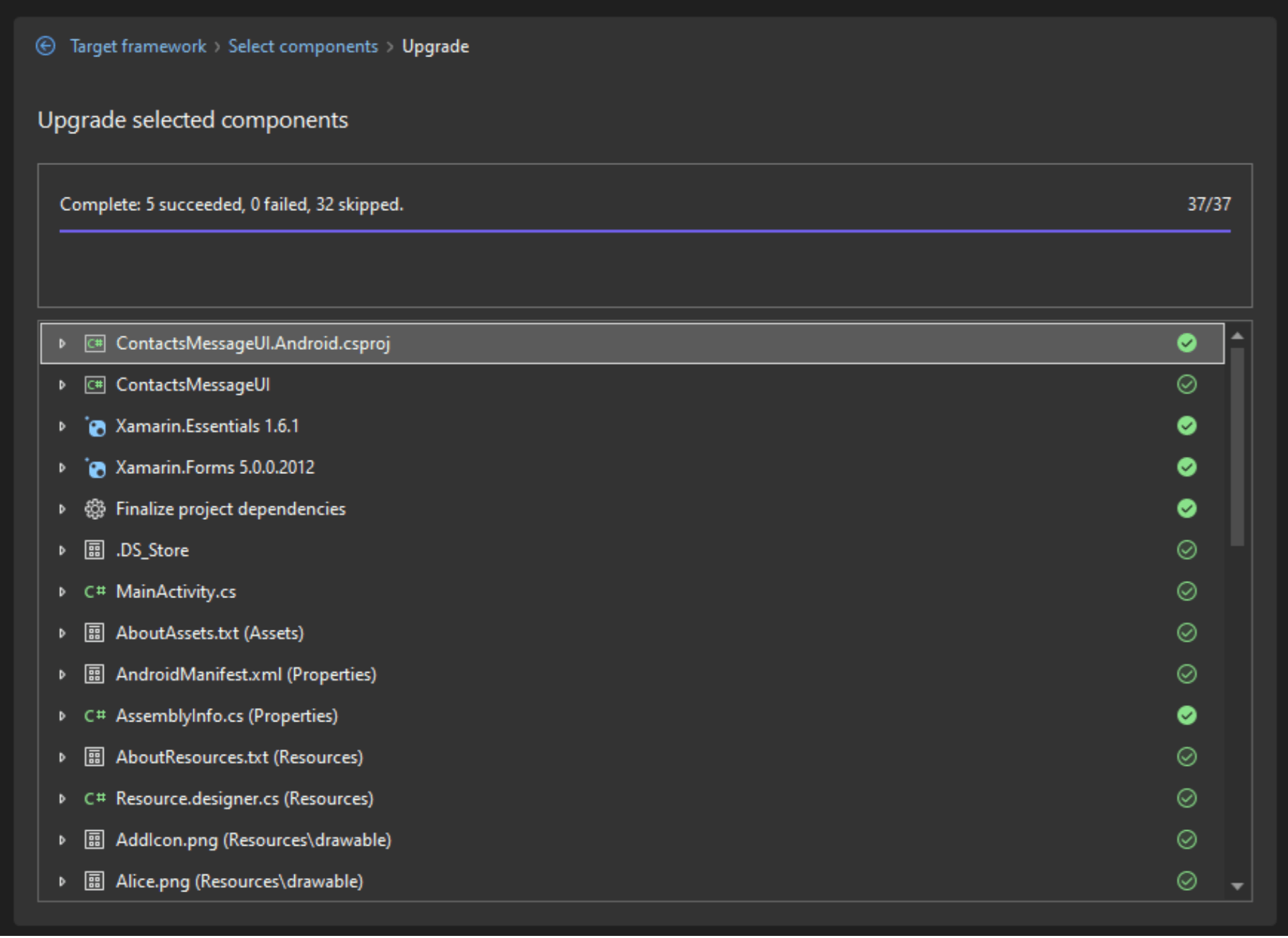
        provided.  You can take a look at the <a href="https://github.com//dotnet/upgrade-assistant" target="_blank">repository here</a>.</li></ul><h3 id="lets-start-using-the-upgrade-assistant">Let&rsquo;s Start Using the Upgrade Assistant</h3><p><strong>Step 1: Add the Upgrade Assistant extension.</strong></p><p>It&rsquo;s a separate extension, so you can add it in Visual Studio like this:</p><ul><li>Go to the top menu bar, click on <strong>Extensions</strong> ➡ <strong>Manage extension.</strong></li></ul><p><a href="https://d585tldpucybw.cloudfront.net/sfimages/default-source/blogs/2023/2023-06/06-manageextension.png?sfvrsn=43df130e_3" target="_blank"><img src="https://d585tldpucybw.cloudfront.net/sfimages/default-source/blogs/2023/2023-06/06-manageextension.png?sfvrsn=43df130e_3" title="Adding the extension" alt="Extensions and manage extensions" /></a></p><ul><li><strong>Download the extension:</strong> Find the .NET Upgrade Assistant and download it.</li></ul><p><a href="https://d585tldpucybw.cloudfront.net/sfimages/default-source/blogs/2023/2023-06/07-downloadingextension.png?sfvrsn=d58b0b4e_3" target="_blank"><img src="https://d585tldpucybw.cloudfront.net/sfimages/default-source/blogs/2023/2023-06/07-downloadingextension.png?sfvrsn=d58b0b4e_3" title="Downloading the extension" alt=".NET Upgrade Assistant - find the assistant, click download." /></a></p><p>When you start the download you will see a scenario like the one in the following image:</p><p><img src="https://d585tldpucybw.cloudfront.net/sfimages/default-source/blogs/2023/2023-06/08-downloadingextension.png?sfvrsn=e6f496b4_3" title="Downloading the extension" alt="Downloading progress" /></p><p>Once installed, you will see a message that says: &ldquo;Your changes will be scheduled. The modifications will begin when all Microsoft Visual Studio windows are closed.&rdquo; ⚠ This is why you should close and start your Visual Studio again.</p><p><strong>Step 2: How to use the assistant?</strong></p><p>To use the Upgrade Assistant, you just have to right-click on your project, and an option that says &ldquo;Upgrade&rdquo; will appear. Please click it.</p><p><img src="https://d585tldpucybw.cloudfront.net/sfimages/default-source/blogs/2023/2023-06/09-upgradeassistant.png?sfvrsn=bf5cca60_3" title="Upgrading the project" alt="1. Right-click on your main project. 2. Click on upgrade." /></p><p>You will see a user interface like this:</p><p><a href="https://d585tldpucybw.cloudfront.net/sfimages/default-source/blogs/2023/2023-06/10-upgradeassistant.png?sfvrsn=b0a29488_3" target="_blank"><img src="https://d585tldpucybw.cloudfront.net/sfimages/default-source/blogs/2023/2023-06/10-upgradeassistant.png?sfvrsn=b0a29488_3" title="Upgrading the project" alt="Welcome to the upgrade Assistant - options for in-place project upgrade or side by side project upgrade." /></a></p><p>As you can see, we have two migration options available:</p><ul><li><strong>In-place project upgrade:</strong> In order to upgrade the project and its components, apply transformations that are suitable for the project while keeping everything in place. If you want to keep the main project, this option is recommended.</li><li><strong>Side-by-side project up:</strong> Utilize transformations that are relevant to the project to upgrade the project and its components in a copy.</li></ul><p>There are different ways to do the migration. In this case, we will start by migrating the Android and iOS projects and then the main project. Let&rsquo;s start by right-clicking on Android to start the migration.</p><p>The demonstration will be using the &ldquo;In-place&rdquo; option, so you must click on that option. An interface, like the one pictured below, will appear, asking you for your preferred target framework for the migration. I will click on .NET 7 and
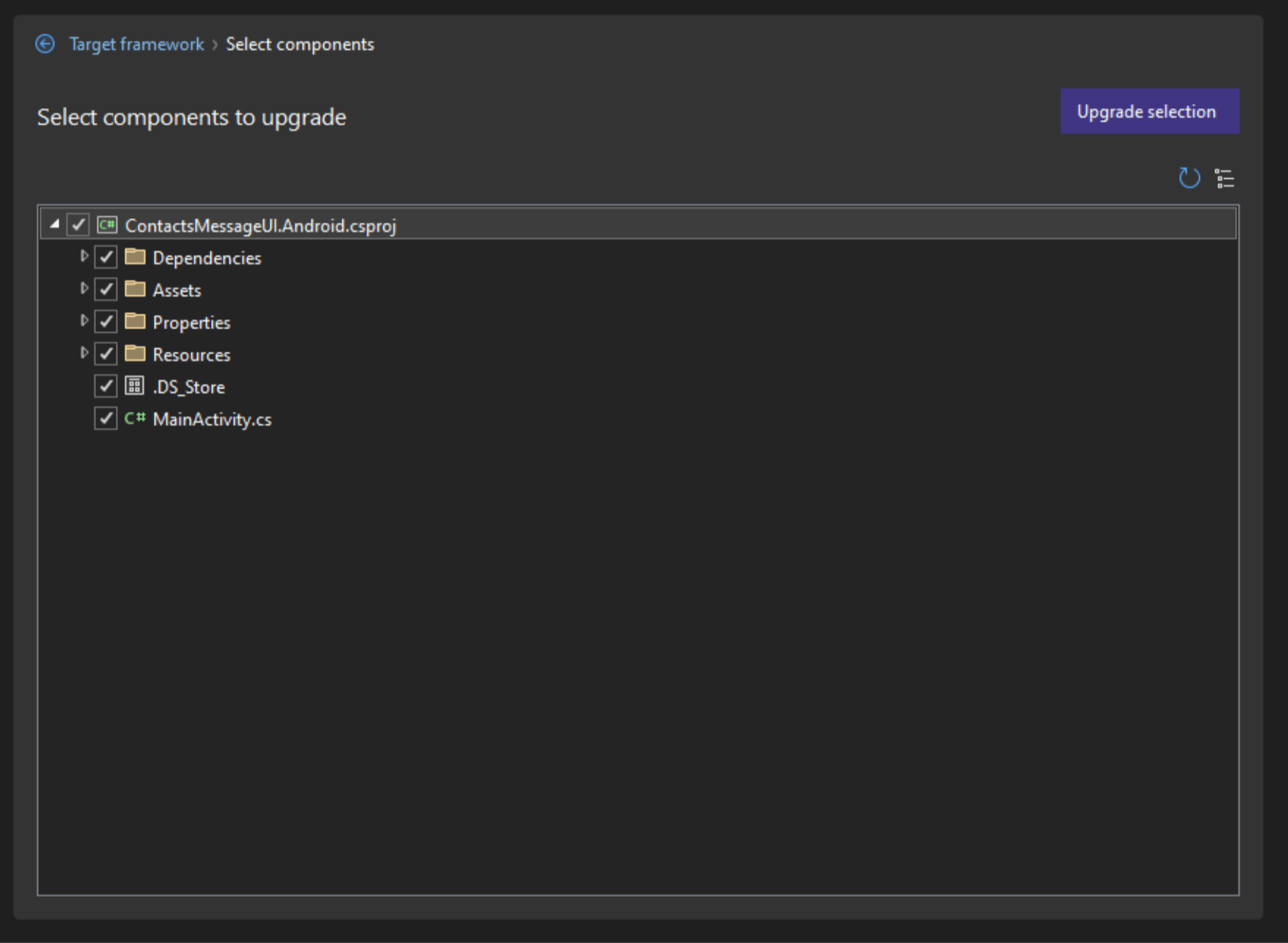
    then click on &ldquo;Next.&rdquo;</p><p><img src="https://d585tldpucybw.cloudfront.net/sfimages/default-source/blogs/2023/2023-06/11-upgradeassistant.png?sfvrsn=fa8d5c28_3" title="Upgrading the project" alt="What is your preferred target framework? .Net 6, .net 7, .NET 8." /></p><p>Once you have clicked &ldquo;Next,&rdquo; you will be able to select the individual components that you wish to update (if necessary). Then, click on &ldquo;Upgrade selection.&rdquo;</p><p><img src="https://d585tldpucybw.cloudfront.net/sfimages/default-source/blogs/2023/2023-06/12-upgradeassistant.png?sfvrsn=87a711fd_3" title="Upgrading the project" alt="Select components to upgrade." /></p><p>While it is updating, you will see the updates presented to you in the bottom bar. Every time changes are made to the project, it will download and reload things in the solution explorer, which is why you will see it blink.</p><p>At the end of the whole process, everything that was updated is shown, along with the things that it verified did not need to be updated&mdash;as you can see in the image attached below.</p><p><a href="https://d585tldpucybw.cloudfront.net/sfimages/default-source/blogs/2023/2023-06/13-upgradeassistant.png?sfvrsn=2698f4ef_3" target="_blank"><img src="https://d585tldpucybw.cloudfront.net/sfimages/default-source/blogs/2023/2023-06/13-upgradeassistant.png?sfvrsn=2698f4ef_3" title="Upgrading the project" alt="Upgrade selected components. Complete: 5. Succeeded, zero failed, 32 Skipped." /></a></p><p>After this, you can continue with the iOS application with the same process.</p><p>To finish, let&rsquo;s continue with the Xamarin Forms application (the main one). Repeat the same process: <strong>Right-click</strong> and then <strong>Upgrade</strong>.</p><p>You will see the same options we saw previously: &ldquo;In-place&rdquo; and &ldquo;Side-by-side.&rdquo; Now you need to decide where you want your updated project to be placed. It can either be in the same location or side-by-side, which allows you
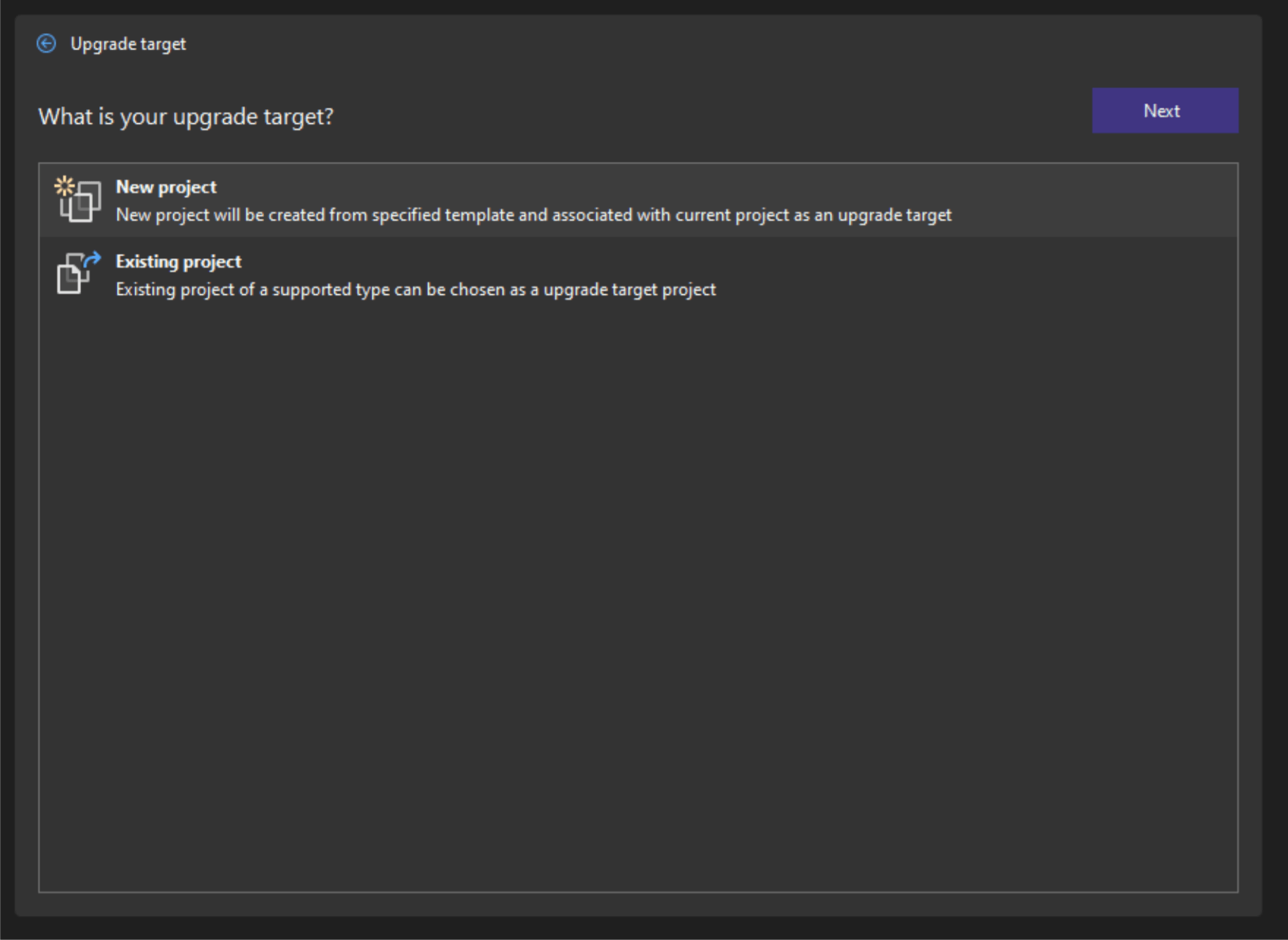
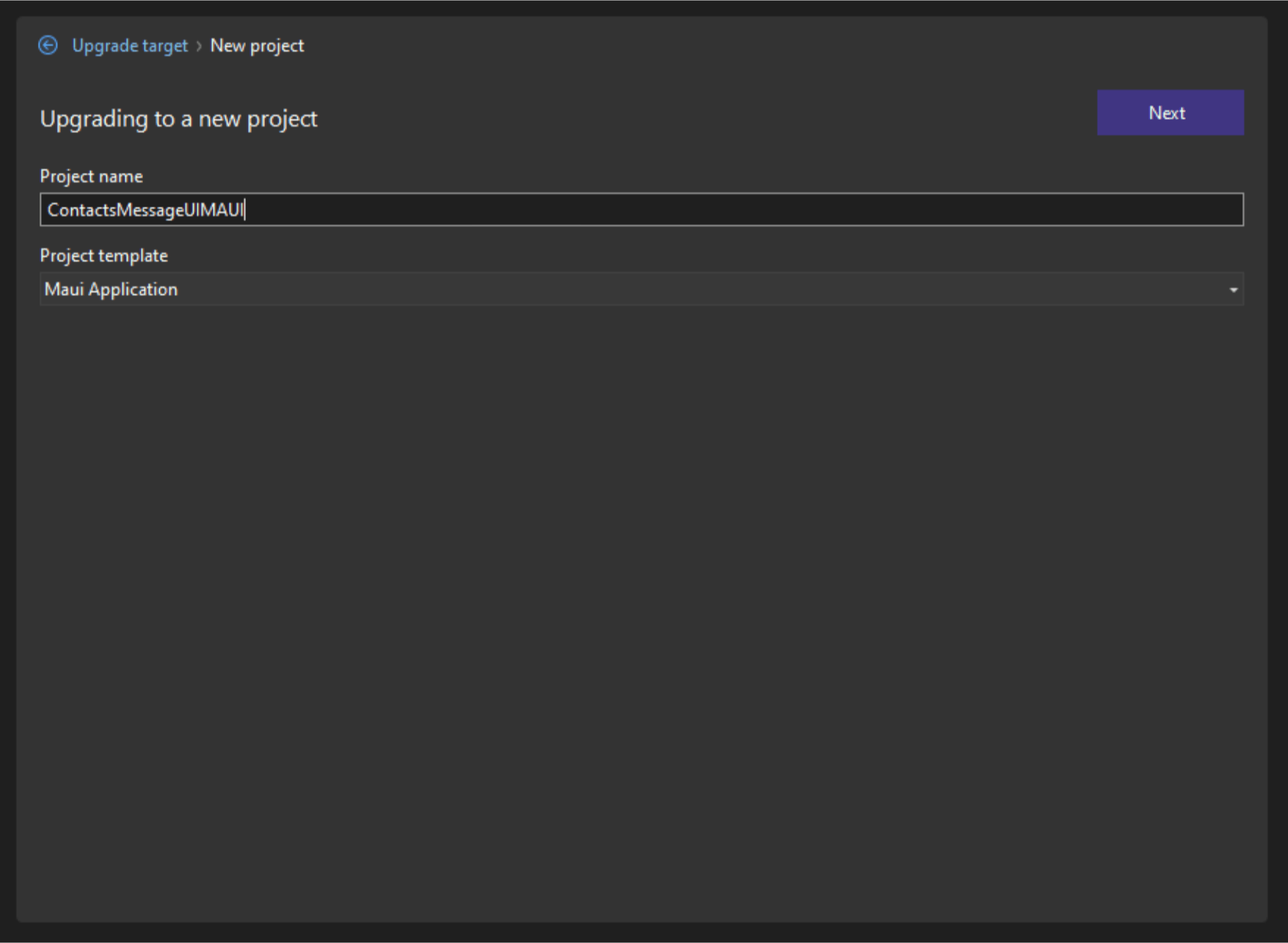
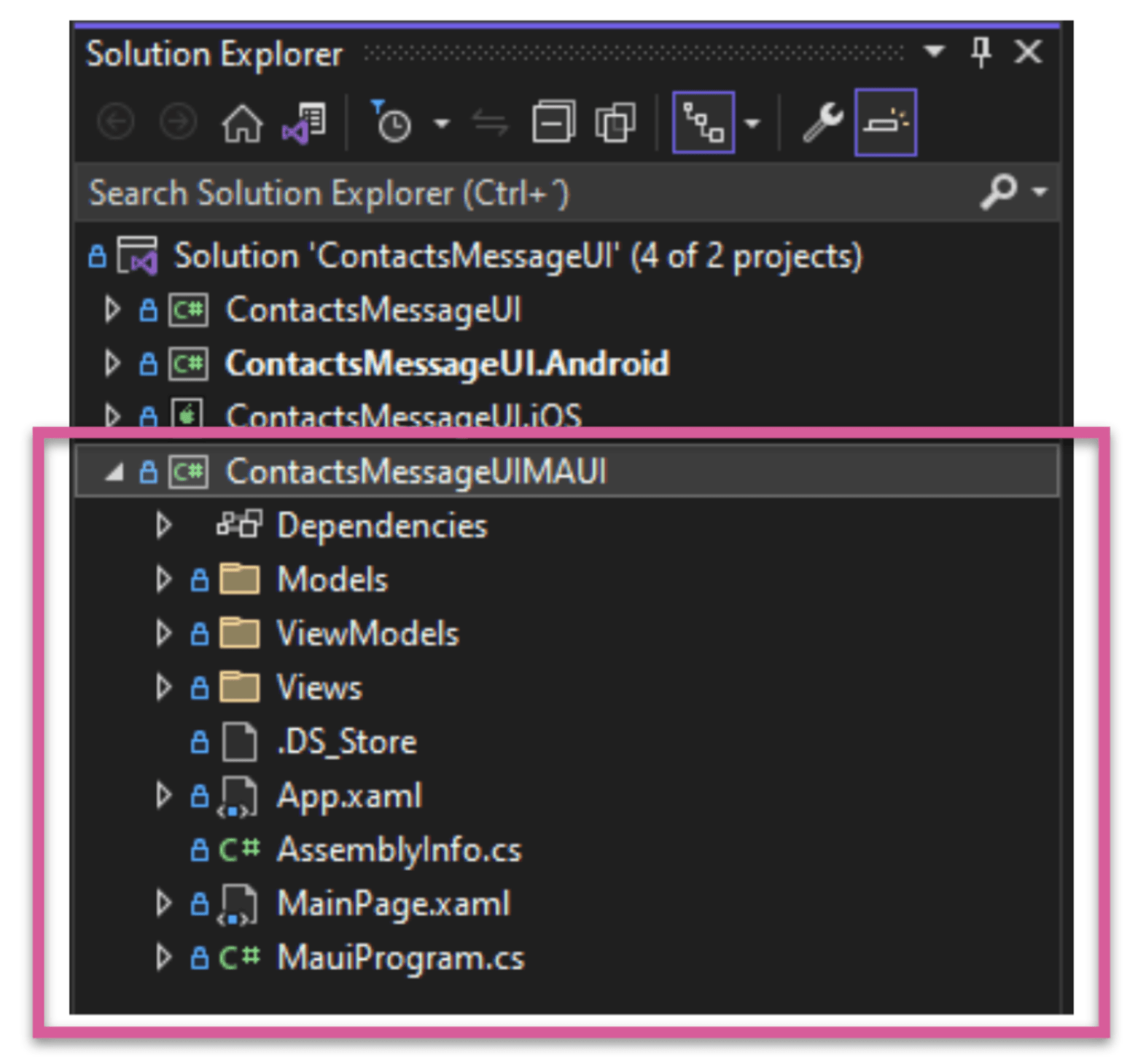
    to move everything to a new .NET MAUI project. This is probably one of the best ways to accomplish it. So, for this example, you should choose the side-by-side option.</p><p><img src="https://d585tldpucybw.cloudfront.net/sfimages/default-source/blogs/2023/2023-06/14-upgradeassistant.png?sfvrsn=ab95e11b_3" title="Upgrading the project" alt="What is your upgrade Target? New project or existing project" /></p><p>Next, two options will appear:</p><ul><li><strong>New project:</strong> A new project will be created from specified template and associated with current project as an upgrade target.</li><li><strong>Existing project:</strong> An existing project of a supported type can be chosen as an upgrade target project.</li></ul><p>We will use the new project option in this example. Click on it and the following screen will appear:</p><p><a href="https://d585tldpucybw.cloudfront.net/sfimages/default-source/blogs/2023/2023-06/15-upgradeassistant.png?sfvrsn=62ba222c_3" target="_blank"><img src="https://d585tldpucybw.cloudfront.net/sfimages/default-source/blogs/2023/2023-06/15-upgradeassistant.png?sfvrsn=62ba222c_3" title="Upgrading to a new project" alt="Upgrading to a new project, with fields for Project name and project template." /></a></p><p>You can change the name (I put &ldquo;ContactMessageUIMAUI&rdquo;) and then click &ldquo;Next.&rdquo;</p><p>Then the same options that we saw before will appear:</p><ul><li>Choose the preferred target (we will choose .NET 7 for this case).</li><li>Then choose the components to update. Then click the Upgrade selection.</li></ul><p>The process is extremely fast! Once completed, you will have a new project in your solution with a .NET MAUI app that has transformed your application code, which was previously in Xamarin.Forms.</p><p>In the following image you can see the &ldquo;ContactMessageUIMAUI&rdquo; project already migrated to .NET MAUI!</p><p><img src="https://d585tldpucybw.cloudfront.net/sfimages/default-source/blogs/2023/2023-06/16-upgradeassistant.png?sfvrsn=8c79b891_3" title="Upgrading the project" alt="ContactMessageUIMAUI project files" /></p><p>⚠ Sometimes you have to reload your Solution Explorer to be able to visualize the new project.</p><h2 id="whats-next">What&rsquo;s Next?</h2><p>If you were to build your app right now, there would likely be some bugs. This is because the Upgrade Assistance tool provides a large percentage of help, but as a developer, you must complete a few tasks to fully migrate your app. I recommend that
    after you use the assistant, you build your app and check for errors. Correct any errors, and then build it again.</p><h2 id="wrapping-up">Wrapping up</h2><p>And that&rsquo;s all! I invite you to continue exploring about the Upgrade Assistant to migrate your Xamarin and .NET MAUI applicationsI! I hope you liked this summary!</p><p>Let me know in the comments when you are starting your migrations! </p><p>See you next time! &zwj;♀️</p><h3 id="want-to-continue-exploring">Want to Continue Exploring?</h3><ul><li>Take a look at the &ldquo;<a href="https://www.youtube.com/watch?v=arxsDF__uFA&amp;list=PLdo4fOcmZ0oV0mbay2wxFS_ZVRg6cxjdM&amp;index=23" target="_blank">All things client and mobile app development with .NET MAUI</a>&rdquo;
 Session.
    </li><li>Read more blog posts about <a href="https://www.telerik.com/blogs/part-1-should-we-migrate-xamarin-forms-dotnet-maui-when" target="_blank">whether you should migrate from Xamarin to .NET MAUI</a>, including more <a href="https://www.telerik.com/blogs/part-2-things-consider-planning-migration-xamarin.forms-dotnet-maui" target="_blank">things to consider</a> and <a href="https://www.telerik.com/blogs/part-5-tip-tricks-migrating-xamarin-dotnet-maui" target="_blank">tips and tricks</a>.</li><li>Check out the <a href="https://www.telerik.com/maui-ui" target="_blank">.NET MAUI controls</a> from Progress Telerik&mdash;the best-in-class suite of 60+ .NET MAUI UI controls to meet all cross-platform
        app requirements for data handling, performance, UX, design, accessibility and so much more.</li><li>If you're already a Progress Telerik user, you may find this guide helpful: <a href="https://docs.telerik.com/devtools/maui/migrate-to-net-maui" target="_blank">Xamarin to .NET MAUI migration</a>.</li></ul><h3 id="references">References</h3><ul><li><a href="https://www.youtube.com/watch?v=yCtkjz51bJ8&amp;list=PLdo4fOcmZ0oV0mbay2wxFS_ZVRg6cxjdM&amp;index=4" target="_blank">https://www.youtube.com/watch?v=yCtkjz51bJ8&amp;list=PLdo4fOcmZ0oV0mbay2wxFS_ZVRg6cxjdM&amp;index=4</a></li></ul><img src="https://feeds.telerik.com/link/23058/16201437.gif" height="1" width="1"/>]]></content>
  </entry>
  <entry>
    <id>urn:uuid:35a66f19-70a7-46f3-9d29-c5e988c7cfcf</id>
    <title type="text">What’s New in R2 2023 with Telerik Desktop and Mobile Components</title>
    <summary type="text">Get ready for the latest update on our Progress Telerik products for mobile and desktop as we unveil the highly anticipated R2 2023 release.</summary>
    <published>2023-06-07T13:49:37Z</published>
    <updated>2026-04-17T03:14:39Z</updated>
    <author>
      <name>Yoan Krumov </name>
    </author>
    <link rel="alternate" href="https://feeds.telerik.com/link/23058/16170994/r2-2023-telerik-desktop-mobile-release"/>
    <content type="text"><![CDATA[<p><span class="featured">Get ready for the latest update on our Progress Telerik products for mobile and desktop as we unveil the highly anticipated R2 2023 release.</span></p><p>We are thrilled to share the exciting features and improvements that await you in R2 2023 from our Progress Telerik mobile and desktop UI component libraries. So, sit back, relax and keep reading to stay in the loop!</p><ul><li><a href="https://www.telerik.com#telerik-ui-for-.net-maui" data-sf-ec-immutable="">Telerik UI for .NET MAUI</a></li><li><a href="https://www.telerik.com#telerik-ui-for-wpf" data-sf-ec-immutable="">Telerik UI for WPF</a></li><li><a href="https://www.telerik.com#telerik-ui-for-winforms" data-sf-ec-immutable="">Telerik UI for WinForms</a></li><li><a href="https://www.telerik.com#telerik-ui-for-winui" data-sf-ec-immutable="">Telerik UI for WinUI</a></li><li><a href="https://www.telerik.com#telerik-ui-for-xamarin" data-sf-ec-immutable="">Telerik UI for Xamarin</a></li><li><a href="https://www.telerik.com#telerik-document-processing-libraries" data-sf-ec-immutable="">Telerik Document Processing Libraries</a></li><li><a href="https://www.telerik.com#join-us-for-release-webinar-and-more" data-sf-ec-immutable="">Details for webinar June 8</a></li></ul><h2 id="telerik-ui-for-.net-maui">Telerik UI for .NET MAUI</h2><p>Prepare for an exhilarating update in R2 2023 as Telerik UI for .NET MAUI unveils a series of exciting enhancements. I am thrilled to introduce six brand-new controls: Calendar, PDF Viewer, Chat, SlideView, RichTextEditor and TreeView, each designed to
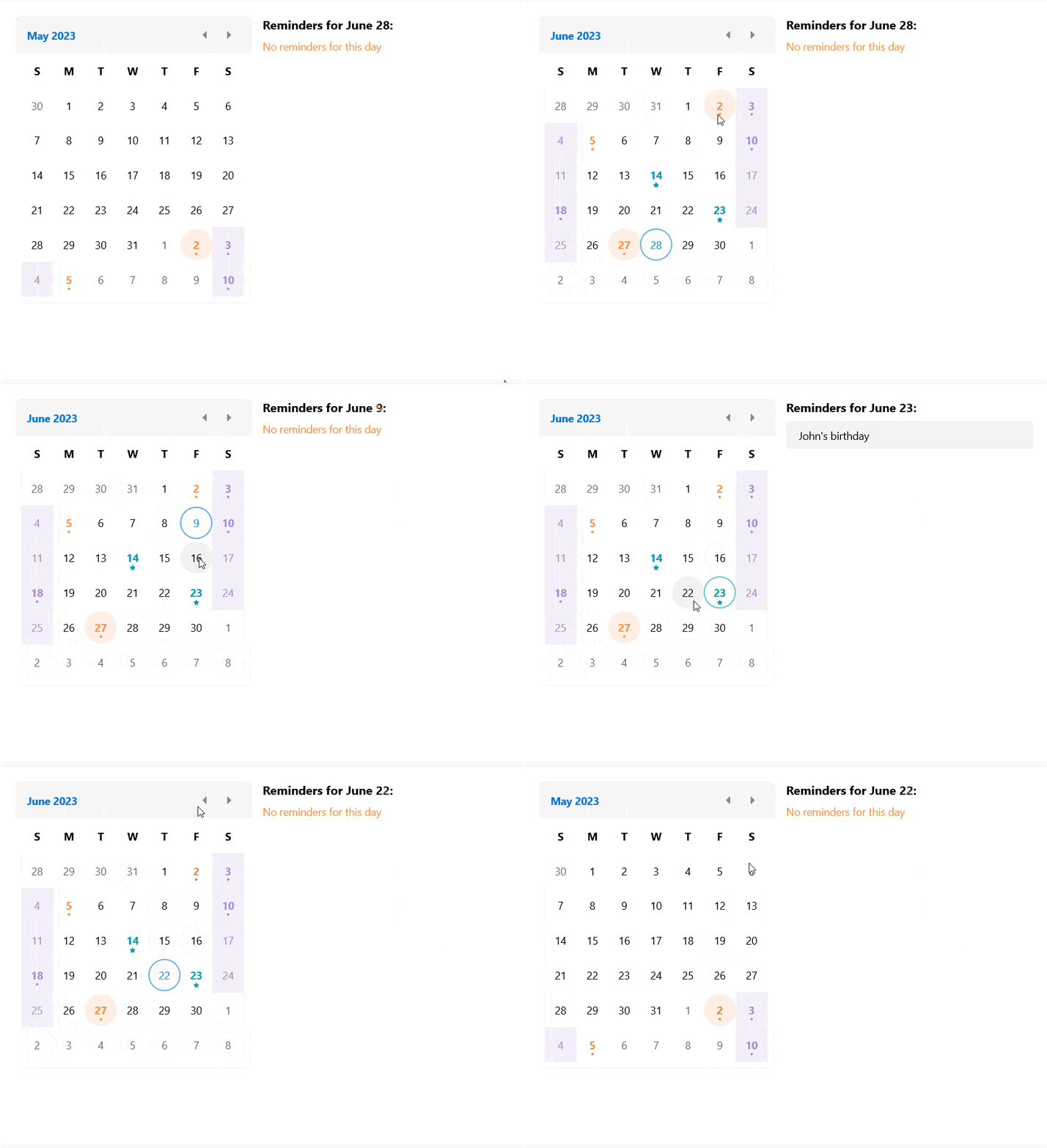
    empower your app development journey. In addition, we have taken steps to refine and enrich our powerful DataGrid control, unlocking even more possibilities. Let&rsquo;s have a sneak peek at the most interesting stuff we have for you in this release.</p><h3 id="calendar">Calendar</h3><p>The new addition to the UI for .NET MAUI family is the Calendar component. It allows you to select single or multiple dates by navigating easily between decades, years and months. The control is culture-aware by providing globalization support. It
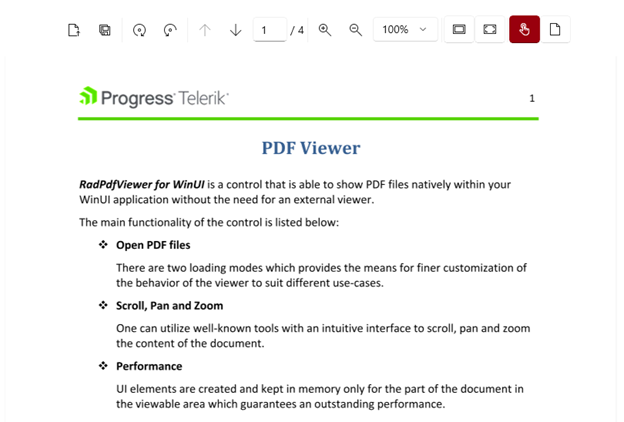
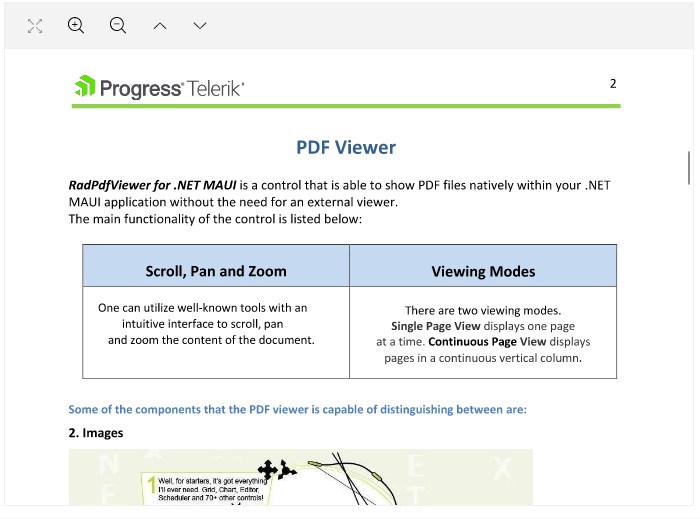
    also provides support for scrolling and navigation, blackout dates and much more.</p><p><img src="https://d585tldpucybw.cloudfront.net/sfimages/default-source/blogs/2023/2023-06/maui-calendar.gif?sfvrsn=7c6b8120_3" alt="A monthly overview shows dots for reminders, stars for birthdays. Clicking on the date opens the details. Arrows allow easy flipping between months" /></p><p>Here is a list of the main features of the control:</p><ul><li><strong>Different display modes</strong>: Calendar features year, month, decade and century display modes.</li><li><strong>Date Ranges</strong>: Restrict the visible/selectable dates in the Calendar by utilizing MinDate and MaxDate properties.</li><li><strong>Different selection modes</strong>: The component provides different types of selection&mdash;Single, Multiple, Range or disabling the selection.</li><li><strong>Buttons for navigation in the current view</strong>: You can easily navigate in the current view by using the buttons in the calendar header.</li><li><strong>Hide the names</strong> of the display days in month view.</li><li><strong>Format the header text</strong> for the corresponding view.</li><li><strong>Templates support</strong>: For customizing the days, months, years and decades in the corresponding views.</li><li><strong>Commands support</strong>: For navigating in the current view or between the views.</li><li><strong>Styling API</strong>: You can style the Calendar border, header border and text, navigation buttons and the content of the corresponding view.</li></ul><p>For more information on getting started with the Telerik UI for <a href="https://docs.telerik.com/devtools/maui/controls/calendar/overview" target="_blank">.NET MAUI Calendar control, visit the documentation</a>.</p><h3 id="pdf-viewer-component">PDF Viewer Component</h3><p>One of the highly requested components for our UI for .NET MAUI suite was the PDF viewer. I am happy to share that it is now available with our latest release. This component empowers the users of your application to directly open and view PDF
    documents within their mobile or desktop app, eliminating the need for any external software installation or switching between different applications. You can visualize PDF documents that include images, shapes, different colors, ordered and
    bulleted lists and more.
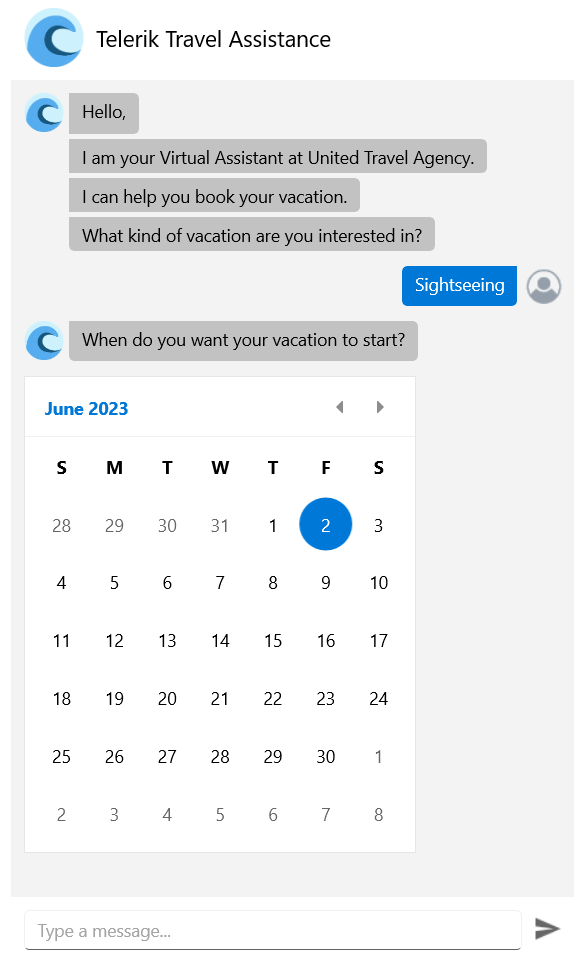
</p><p><img src="https://d585tldpucybw.cloudfront.net/sfimages/default-source/blogs/2023/2023-06/maui-pdf-viewer.png?sfvrsn=d623d07b_3" alt="PDF Viewer shows options for full screen, zoom in and out, page" /></p><p>Here are some of the key features to look for:</p><ul><li><strong>Various document source options</strong>: You can load the PDF document from a stream, from a file added as an embedded resource or a file located on the device, etc.</li><li><strong>Zooming functionality</strong>: The component provides an option for zooming in and zooming out the content of the document.</li><li><strong>Commands support</strong>: The PDF Viewer component offers support for a variety of commands, such as ZoomIn, ZoomOut, NavigateTo (NextPage, PreviousPage, Page) and FitToWidth.</li><li><strong>Single page</strong> and <strong>Continuous Scrolling</strong> <strong>support:</strong> You can choose between two layout modes that allow the document to be scrolled in the viewer.</li><li><strong>Flexible styling API</strong>: You can easily style the toolbar per your requirements.</li></ul><p>For more information on getting started with the <a href="https://docs.telerik.com/devtools/maui/controls/pdfviewer/overview" target="_blank">PDF Viewer control, visit the documentation</a>.</p><h3 id="chat-component-conversational-ui">Chat Component (Conversational UI)</h3><p>The Chat control in Telerik UI for .NET MAUI empowers you to build contemporary chat experiences in your .NET MAUI apps. It smoothly integrates with popular chatbot frameworks and effortlessly facilitates peer-to-peer conversations.</p><p><img sf-custom-thumbnail="true" src="https://d585tldpucybw.cloudfront.net/sfimages/default-source/blogs/2023/2023-06/chatroom.jpg?sfvrsn=6860052e_3" width="300" alt="A chatroom with avatars and text backgrounds in different colors" sf-constrain-proportions="true" /></p><p>The component offers a diverse range of customizable message formats like cards, pickers and suggestions. It also enables you to effortlessly replace forms with an instinctive conversational UI. You can modify messages and cards to include
    text, images and other elements or incorporate details such as message timestamps, sender/recipient names, avatars and much more.</p><p><img sf-custom-thumbnail="true" src="https://d585tldpucybw.cloudfront.net/sfimages/default-source/blogs/2023/2023-06/chatbot.png?sfvrsn=d8b2eade_3" width="300" alt="A travel assistant chatbot asks what kind of vacation the user is interested in and when they want it to start, bringing up a calendar for date selection" sf-constrain-proportions="true" /></p><p>For more information on getting started with the Telerik UI for .NET MAUI <a href="http://docs.telerik.com/devtools/maui/controls/chat/overview" target="_blank">Chat control, visit the  documentation</a>.</p><h3 id="slideview-component">SlideView Component</h3><p>The new SlideView component provides a visually appealing and interactive way to present information or showcase visual content. Whether your goal is to create an image gallery or improve navigation within your .NET MAUI application, the
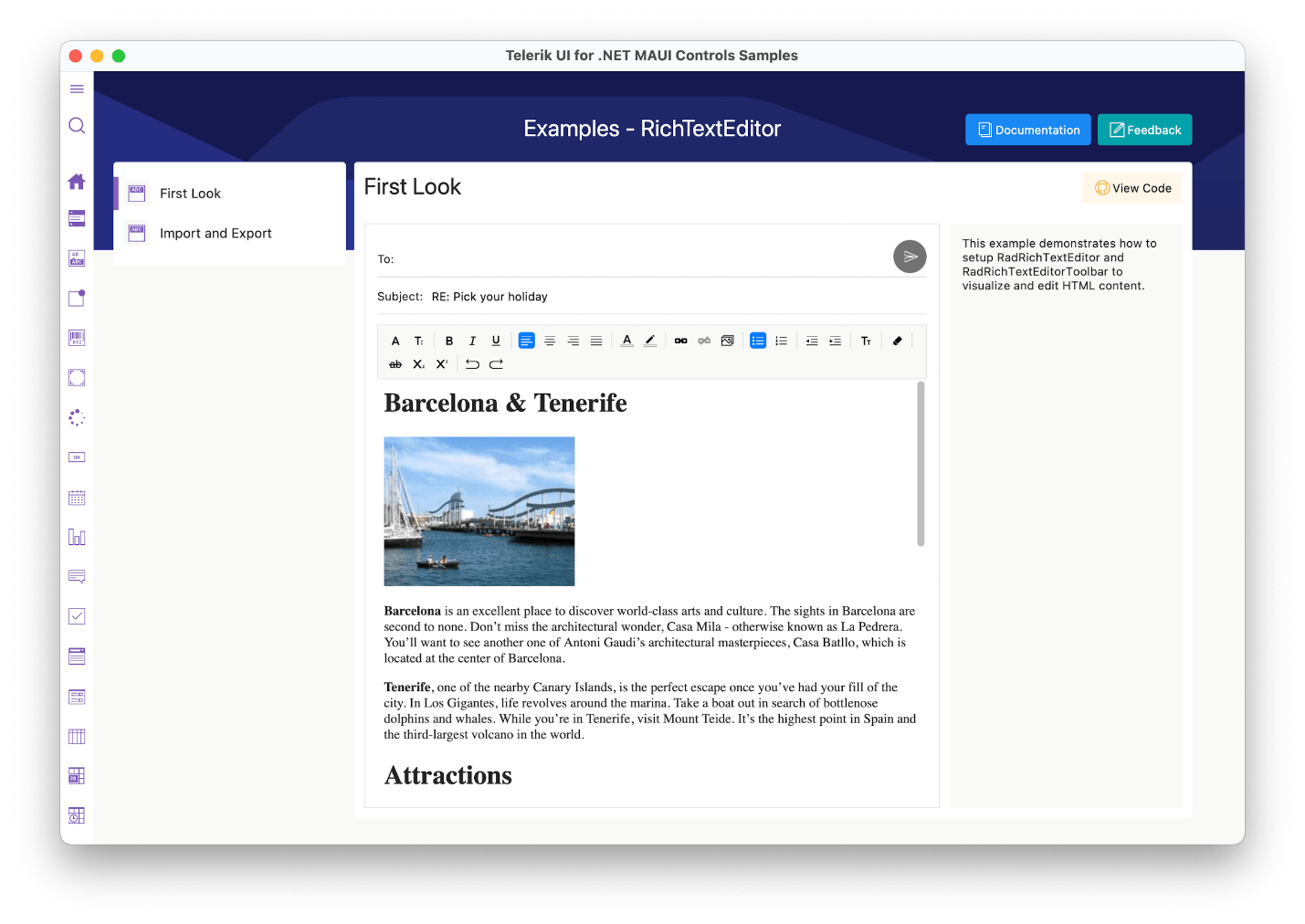
    SlideView component offers a comprehensive set of features and customizable options to fulfill your requirements.</p><p><img src="https://d585tldpucybw.cloudfront.net/sfimages/default-source/blogs/2023/2023-06/maui-slideview.png?sfvrsn=2dabacd_3" alt="slideview shows a large image of a salad in a carousel. The text below says Salad Recipes, with more text below that." /></p><p>Here are some of the key features to look for:</p><ul><li><strong>Item Template</strong>: Allows you to present the data in the views in the most suitable way for your scenario.</li><li><strong>Control Template support</strong>: You can change the appearance of the SlideView component through a Control Template.</li><li><strong>Customizable indicators and slide buttons</strong>: The SlideView allows you to customize the appearance of the indicators and slide buttons.</li><li><strong>Commands support</strong></li><li><strong>UI virtualization</strong></li></ul><p>For more information on getting started with the <a href="https://docs.telerik.com/devtools/maui/controls/slideview/overview" target="_blank">Telerik UI for .NET MAUI SlideView control, visit the documentation</a>.</p><h3 id="rich-text-editor-component">Rich Text Editor Component</h3><p>The Telerik UI for .NET MAUI RichTextEditor control empowers users to generate rich textual content using a comprehensive array of tools. These tools simplify the creation, editing and formatting of text, paragraphs, lists, hyperlinks
    and various other elements.
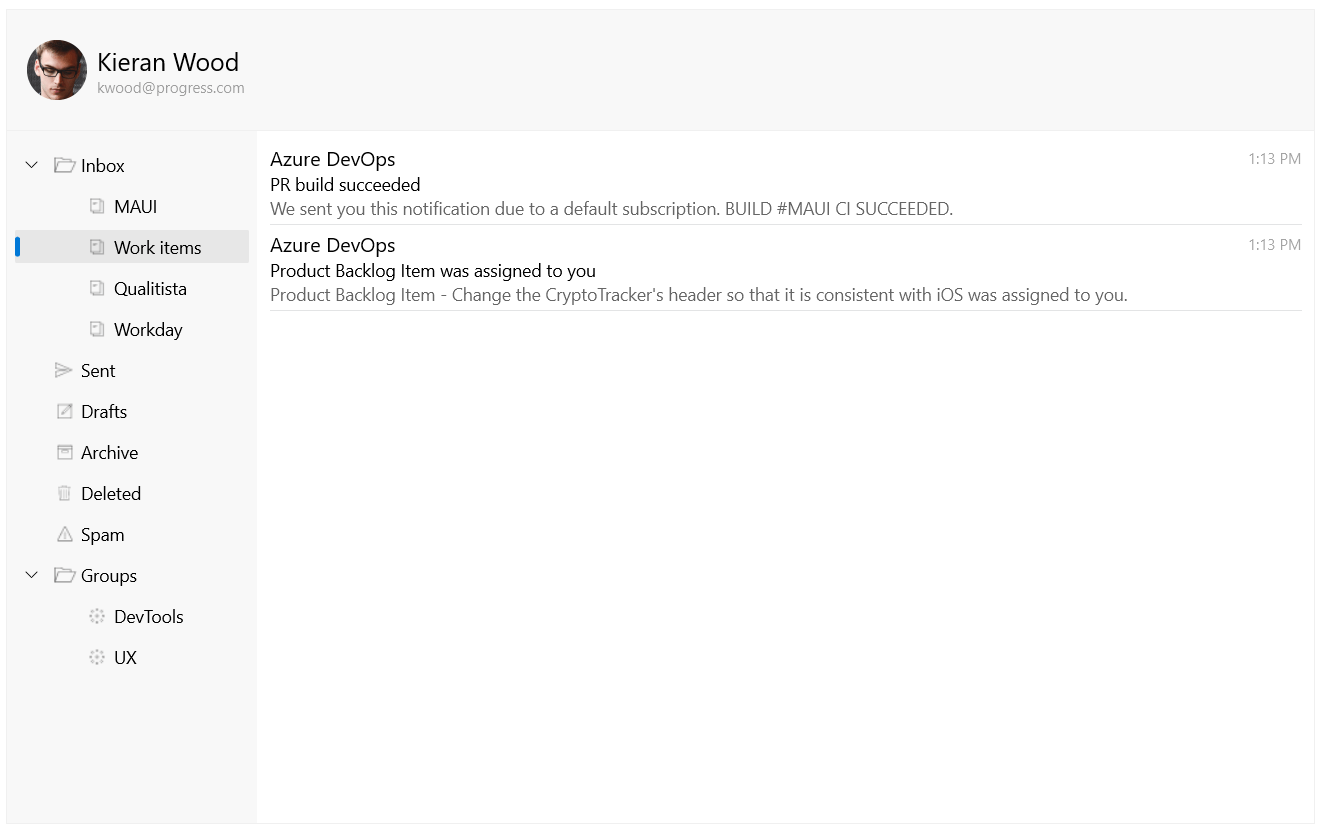
</p><p><img src="https://d585tldpucybw.cloudfront.net/sfimages/default-source/blogs/2023/2023-06/maui-rich-text-editor.png?sfvrsn=d48c1471_3" alt="Rich text editor shows an email with text styling and an image" /></p><p>The Telerik UI for .NET MAUI RichTextEditor control comes with a multitude of editing capabilities, including:</p><ul><li>Text formatting, such as bold, italic, underline and strikethrough</li><li>Font manipulations, such as size, family and color</li><li>Text selection</li><li>Hyperlink manipulations such as creating, editing and removing hyperlinks</li><li>Read-only state that does not allow text editing</li><li>Copy/Paste/Undo/Redo editing actions</li></ul><p>It also has an integrated ToolBar, which effortlessly connects to the commonly used commands provided by the control.</p><p>For more information on getting started, visit the <a href="https://docs.telerik.com/devtools/maui/controls/richtexteditor/overview" target="_blank">Telerik UI for .NET MAUI RichTextEditor control documentation</a>.</p><h3 id="treeview">TreeView</h3><p>The new TreeView component in UI for .NET MAUI allows you to visually represent hierarchical data in a collapsible and expandable tree structure. It provides users with an intuitive way to navigate and explore complex information,
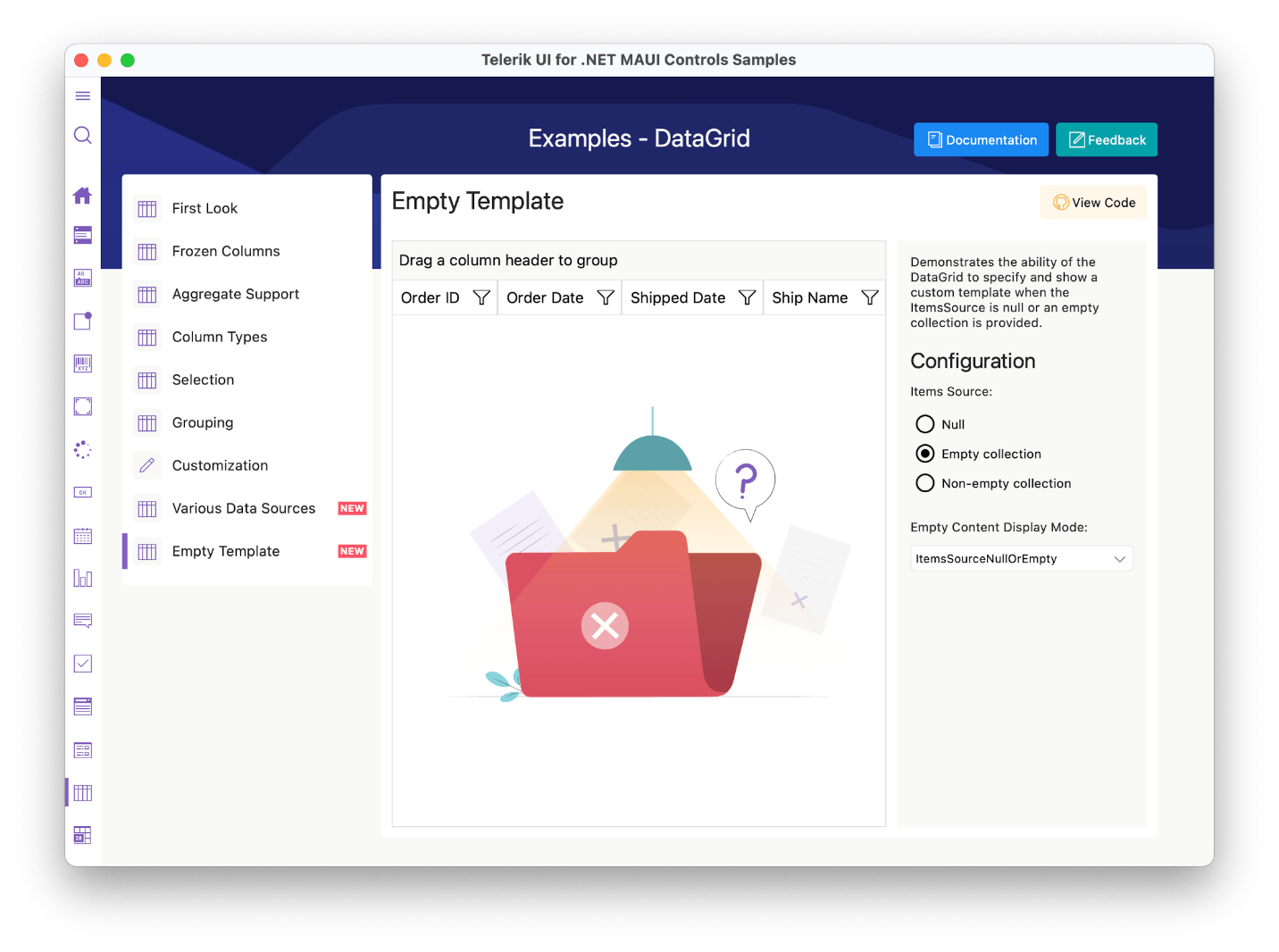
    such as folder structures, organizational charts or category hierarchies.</p><p><img src="https://d585tldpucybw.cloudfront.net/sfimages/default-source/blogs/2023/2023-06/maui-treeview.png?sfvrsn=8434b940_3" alt="An email inbox has four nested folders under Inbox. Work items is one of these folders, and there are two emails inside it." /></p><p>Here are some of the key features to look for:</p><ul><li>Hierarchical navigation</li><li>Expand/Collapse items</li><li>Commands support</li><li>CheckBox support</li><li>UI virtualization</li><li>Single and multiple selection modes</li><li>Empty template support</li><li>Flexible styling API</li></ul><p>For more information on getting started, visit the&nbsp;<a href="https://docs.telerik.com/devtools/maui/controls/treeview/overview" target="_blank">Telerik UI for .NET MAUI TreeView control documentation</a>.</p><h3 id="datagrid-empty-template-support">DataGrid Empty Template Support</h3><p>The Telerik UI for .NET <a href="https://docs.telerik.com/devtools/maui/controls/datagrid/overview" target="_blank">MAUI DataGrid</a> control introduces the Empty Template functionality. This feature enables you to inform your end users when the control has no data to display.</p><p><img src="https://d585tldpucybw.cloudfront.net/sfimages/default-source/blogs/2023/2023-06/maui-datagrid-empty-template.png?sfvrsn=99aca9ad_3" alt="DataGrid empty template shows an illustration of a file folder with nothing inside and a question mark" /></p><h3 id="datagrid-datatable-support">DataGrid DataTable support</h3><p>You can bind your .NET MAUI DataGrid to a DataTable and have access to all the cool features. You can add, remove, select, edit item(s) and update DataGrid&rsquo;s ItemsSource. You can also perform commands and operations like
    filtering, sorting, grouping and selection.
</p><h3 id="net-6--.net-8-support">.NET 6 &amp; .NET 8 Support</h3><p>As you may be aware, Microsoft officially discontinued .NET 6 support for .NET MAUI back in May. We are announcing that our plans align with this change, and we will be ending our support for .NET MAUI in .NET 6 in November&mdash;this
    should give you extra time to get off .NET 6 and onto .NET 7/8.</p><p>This transition marks an exciting milestone as we prepare to welcome the arrival of .NET 8, which will bring a host of new features and enhancements. Rest assured that during this period, we are actively working to ensure a
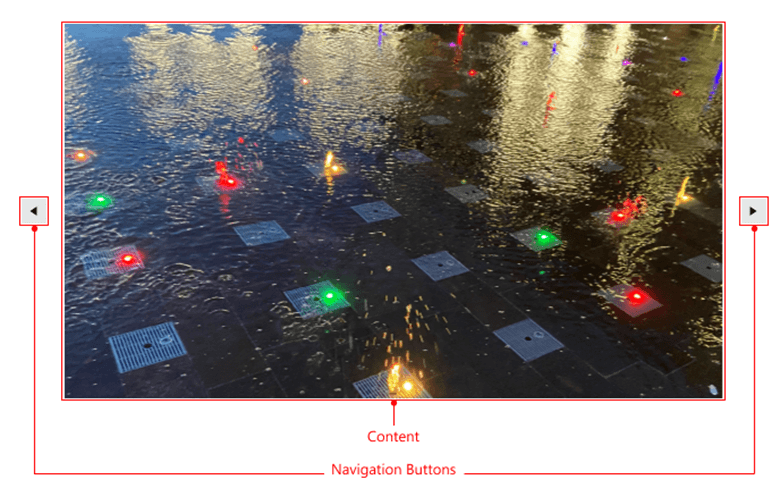
    seamless transition and guarantee an official and robust support system for .NET 8, which we will be ready to launch alongside its official release.</p><h3 id="check-out-the-detailed-release-notes">Check out the Detailed Release Notes</h3><p>To get an overview of all the latest components, features and improvements we&rsquo;ve made, check out the release notes for the product: <a href="https://www.telerik.com/support/whats-new/maui-ui/release-history/telerik-ui-for-net-maui-(version-5-2-0)" target="_blank">Telerik UI for .NET MAUI (Release Notes)</a>.</p><h2 id="telerik-ui-for-wpf">Telerik UI for WPF</h2><h3 id="radslideview-and-radpipspager-components">RadSlideView and RadPipsPager components</h3><p><strong>RadSlideView</strong> is a flexible navigation control that allows you to slide between different views, thus providing an interactive navigation. With it, you can build a gallery display to show your images and content
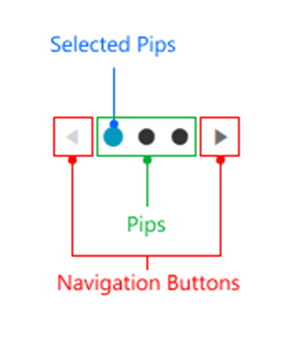
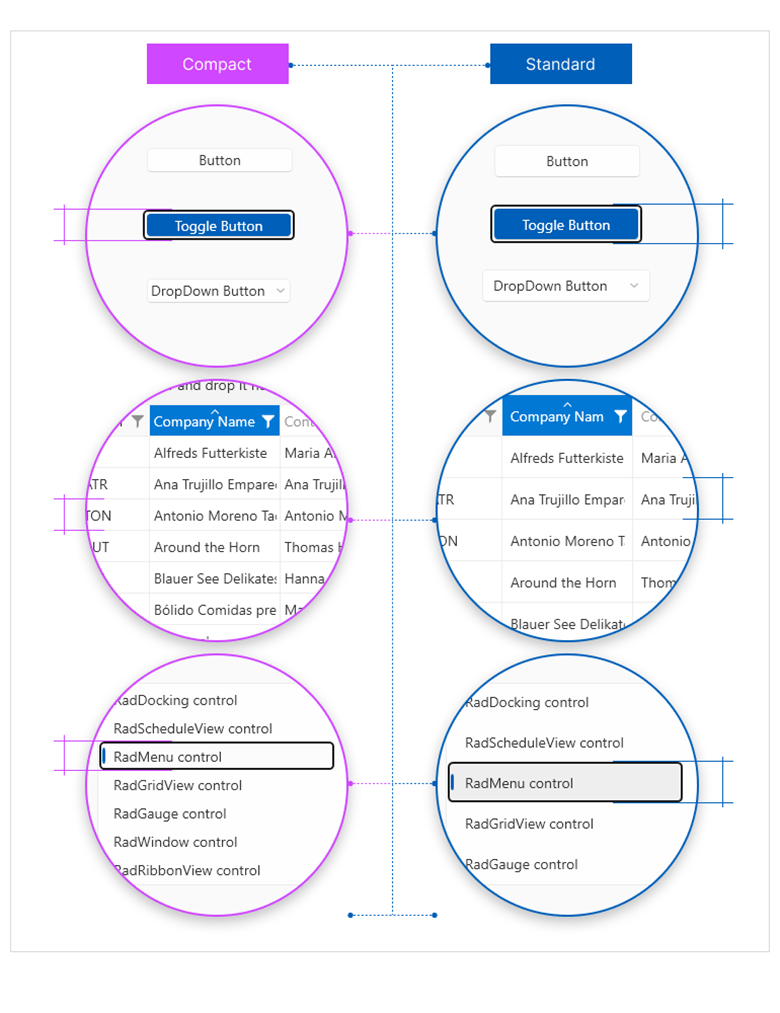
    efficiently.</p><p><img src="https://d585tldpucybw.cloudfront.net/sfimages/default-source/blogs/2023/2023-06/radslideview.png?sfvrsn=ded0a6ee_3" alt="A large image with arrows on either side. The image is labeled &#39;content&#39; and the arrows are labeled &#39;navigation buttons&#39;" /></p><p><strong>RadPipsPager</strong> lets the user navigate a linearly paginated collection using glyphs also known as pips.</p><p><img src="https://d585tldpucybw.cloudfront.net/sfimages/default-source/blogs/2023/2023-06/radpipspager.png?sfvrsn=ffa7404f_3" alt="Pips are large dots. The selected pip is blue rather than black. the navigation buttons are left and right arrows." /></p><p>The two controls work seamlessly with one another to enhance the navigation experience in your applications.</p><img src="https://d585tldpucybw.cloudfront.net/sfimages/default-source/10x/pipspager_integration-with-slideview-(scrolling-pips).gif?sfvrsn=307bf102_1" alt="The image, left and right arrows, and pips showing this image is the first of five" sf-size="100" /><p>They also share some of their main features:</p><ul><li><strong>Navigation</strong>: The controls allow you to navigate through the data either in a loop or from end to end.</li><li><strong>Orientation</strong>: They can be oriented vertically or horizontally.</li><li><strong>Customizing navigation buttons</strong>: The navigation buttons can be easily customized.</li></ul><p>You can find more information about the new components in their respective documentation sections:</p><ul><li><a href="https://docs.telerik.com/devtools/wpf/controls/radslideview/overview" target="_blank">RadSlideView</a></li><li><a href="https://docs.telerik.com/devtools/wpf/controls/radpipspager/overview" target="_blank">RadPipsPager</a></li></ul><h3 id="windows-11-compact-theme">Windows 11 Compact Theme</h3><p><img src="https://d585tldpucybw.cloudfront.net/sfimages/default-source/blogs/2023/2023-06/compact-vs-standard.png?sfvrsn=723f3104_3" alt="Compact vs. Standard theme comparison shows button styles, table or grid styles, and menu styles" /></p><p>Get ready to elevate your app&rsquo;s aesthetics and create a masterpiece with the most innovative addition to the R2 2023 Release&mdash;a new, high-density (or compact) layout option for the Windows 11 theme. Designed for
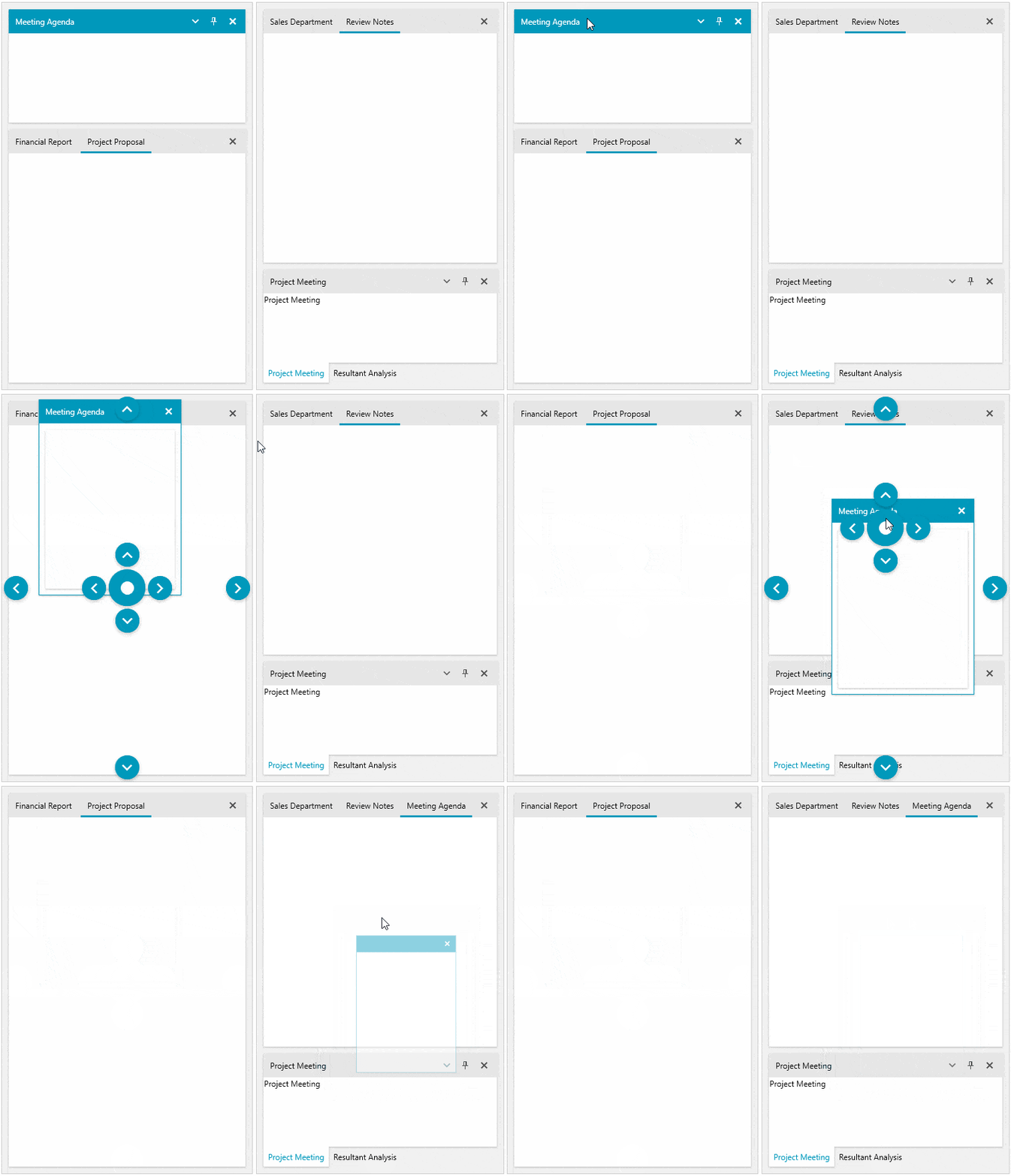
    information rich UI and similar specialized scenarios, this new theme mode brings a stunning and sleek look to your WPF apps.</p><p>While functionality and behavior have not changed and remain consistent across the two size and density options, the default heights and offsets have been updated for all controls to support both density options.</p><p>For more information on getting started with our latest theme, visit the <a href="https://docs.telerik.com/devtools/wpf/styling-and-appearance/themes-suite/windows11#windows-11-compact-mode" target="_blank">Telerik UI for WPF theme documentation</a>.</p><h3 id="raddocking-move-panes-between-multiple-docking-instances">RadDocking: Move Panes Between Multiple Docking Instances</h3><p>No more moving pane restrictions between docking instances. Users can now create a group of dockings in which moving and docking panes are not limited, no matter if dockings are nested or side by side. This enables powerful
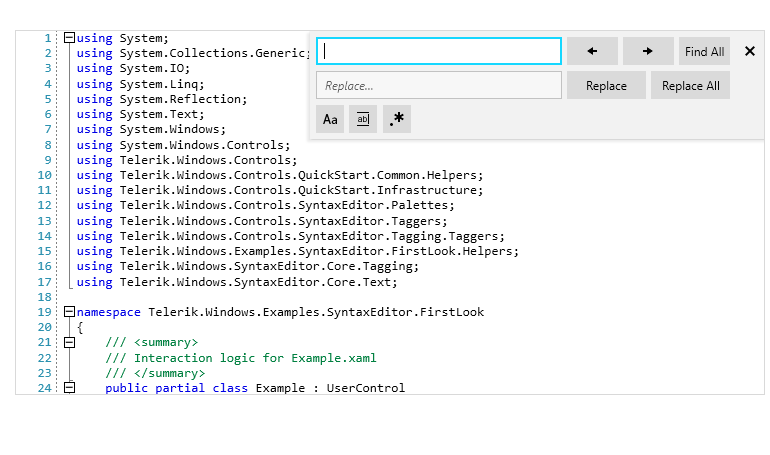
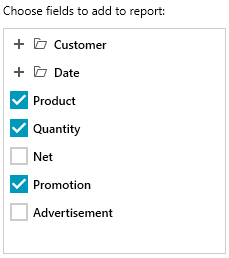
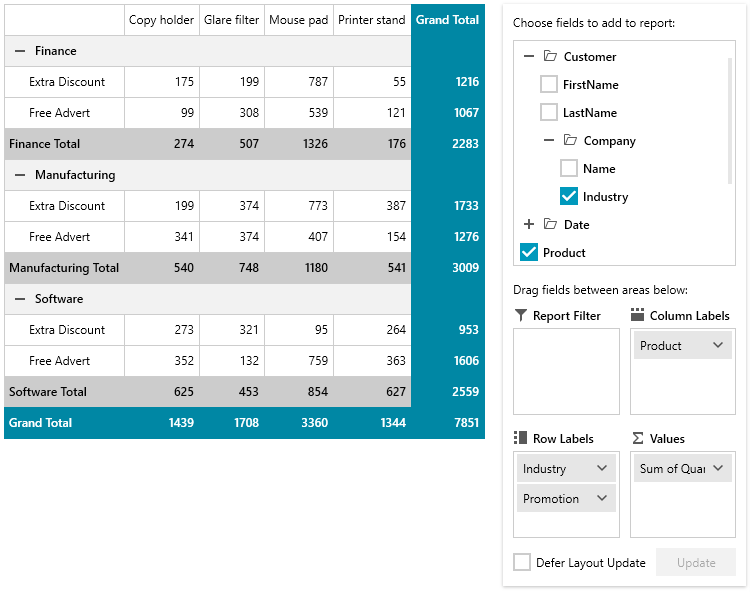
    UI rearrangement abilities in applications with multiple dockings in a single view.</p><p><img src="https://d585tldpucybw.cloudfront.net/sfimages/default-source/10x/movepanesbetweendоckings5.gif?sfvrsn=df624480_1" alt="Four panes are visible: meeting agenda, tabbed financial report/project proposal, tabbed sales department/review notes, and tabbed project meeting/resultant assistant" sf-size="100" /></p><p>For more information on getting started with this powerful feature, visit the <a href="https://docs.telerik.com/devtools/wpf/controls/raddocking/features/drag-and-drop#moving-panes-between-raddocking-instances" target="_blank">Telerik UI for WPF RadDocking documentation</a>.</p><h3 id="syntaxeditor-search-ui-enhancements">SyntaxEditor: Search UI Enhancements</h3><p>To better cover well-known scenarios in text or code editing from VisualStudio or NotePad++, we added more search options in the search panel. <strong>MatchCase</strong>, <strong>MatchWholeWord</strong> and <strong>Regex</strong> settings will give your users the powerful search experience they expect.</p><p><img src="https://d585tldpucybw.cloudfront.net/sfimages/default-source/blogs/2023/2023-06/search-ui.png?sfvrsn=67594153_3" alt="On a coding screen, the search window is up. It has a search, a replace field, and buttons for next/previous, find all, replace, replace all, match case, match whole word, and regular expression" /></p><h3 id="radpivotgrid-localdatasourceprovider-hierarchies">RadPivotGrid LocalDataSourceProvider Hierarchies</h3><p>The LocalDataSourceProvider now allows you to display nested properties of the objects in its ItemsSource in a hierarchy similar to how DateTime properties are visualized in the RadPivotFieldList.</p><p><img src="https://d585tldpucybw.cloudfront.net/sfimages/default-source/blogs/2023/2023-06/nested-datasource.png?sfvrsn=fdd4c364_3" alt="Selection window for choose fields to add to report has nested files" /></p><p>Nested properties can be utilized to create a report in the same manner as non-nested ones.</p><p><img src="https://d585tldpucybw.cloudfront.net/sfimages/default-source/blogs/2023/2023-06/nested-hierarchy-datasource.png?sfvrsn=617a70b1_3" alt="More of the folders from above are opened, revealing more hierarchies" /></p><p>You can enable this functionality by setting the new <strong>EnableHierarchy</strong> property of the LocalDataSourceProvider to <strong>True</strong>. Then you will be able to provide a nested property path as the PropertyName
    of a group description.</p><pre><code class="language-xml">&lt;pivot:LocalDataSourceProvider x:Key="dataProvider" EnableHierarchy="True"&gt;         
       &lt;pivot:LocalDataSourceProvider.RowGroupDescriptions&gt;
              &lt;pivot:PropertyGroupDescription PropertyName="Customer.Company.Industry" /&gt;
              &lt;pivot:PropertyGroupDescription PropertyName="Promotion" /&gt;
      &lt;/pivot:LocalDataSourceProvider.RowGroupDescriptions&gt;
&lt;/pivot:LocalDataSourceProvider&gt;</code></pre><p>To see this in action, check out the <strong>PivotFieldList</strong> demo in the <a href="https://demos.telerik.com/wpf/?_ga=2.220795672.1831998515.1685431128-1241877747.1661502490&amp;_gl=1*1jl079y*_ga*MTI0MTg3Nzc0Ny4xNjYxNTAyNDkw*_ga_9JSNBCSF54*MTY4NTUyOTU0Ni41MzUuMS4xNjg1NTMyNzc3LjQ4LjAuMA.." target="_blank">WPF Examples application</a>.</p><p>Here is also a list of other popular features we updated for you in this release:</p><ul><li><strong>TreeView</strong>: <a href="https://docs.telerik.com/devtools/wpf/controls/radtreeview/features/feautres-treeviewitem-selection#performing-selection-on-the-mouseleftbuttonup-event" target="_blank">Ability to perform selection on mouse up</a></li><li><strong>GridView</strong>: <a href="https://docs.telerik.com/devtools/wpf/controls/radgridview/features/search-as-you-type#searchmode" target="_blank">ExactMatch functionality in search-as-you-type feature</a></li><li><strong>PropertyGrid</strong>: <a href="https://docs.telerik.com/devtools/wpf/controls/radpropertygrid/features/nested-properties#specifying-the-propertydefinition-auto-generating-mode" target="_blank">Allow searching for property fields that are not expanded initially</a></li></ul><h3 id="support-for-.net-8-preview">Support for .NET 8 Preview</h3><p>We are excited to announce that we are extending our support to include the preview versions of .NET 8. While .NET 8 is still in the preview phase, we understand the eagerness to explore its capabilities. We have thoroughly
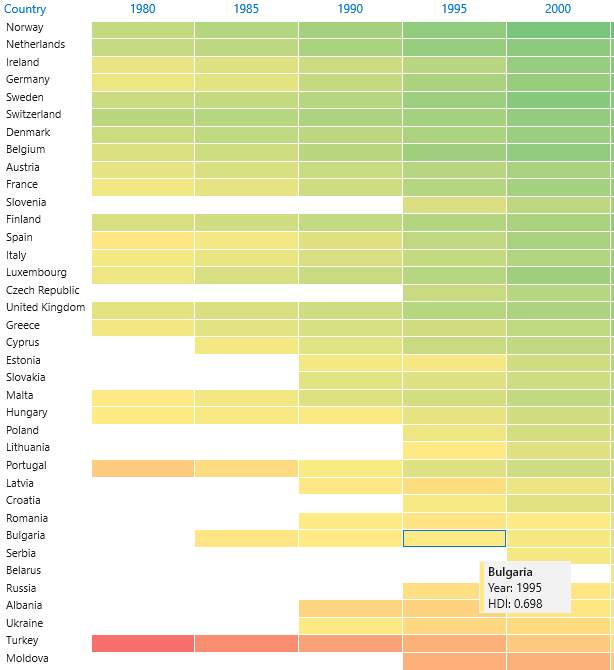
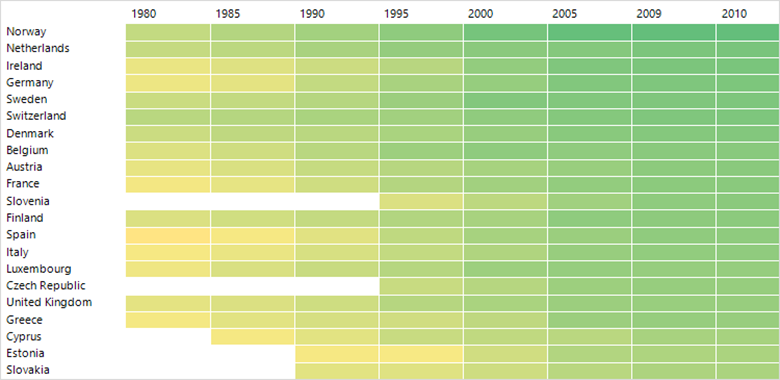
    tested our components and have made sure they are compatible with the latest preview releases.</p><h2 id="telerik-ui-for-winforms">Telerik UI for WinForms</h2><p>The R2 2023 release comes with a brand-new Heat Map control, a dark Visual Studio 2022 theme, modernized Scheduler appointments, LineNumbering in the RichTextEditor and a ton of other improvements.</p><h3 id="heat-map">Heat Map</h3><p>RadHeatMap is here to help you visualize numeric data in a meaningful and straightforward way. It uses a two-dimensional layout with indicative colors to represent data. Each entity is represented by a colored rectangle
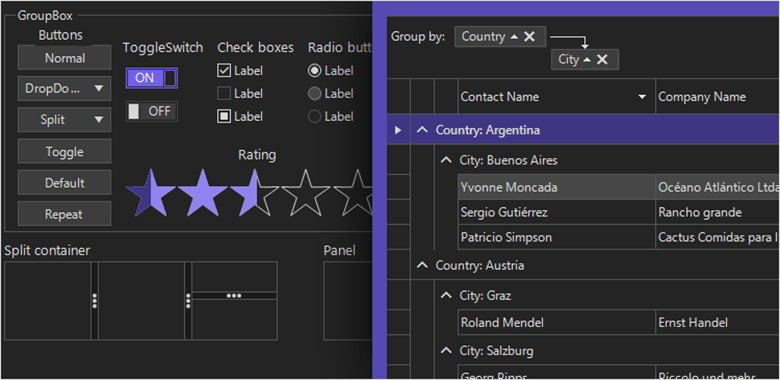
    and the applied color maps to the magnitude of its numeric value. At a glimpse, you can spot trends and easily compare different data items.</p><p><img src="https://d585tldpucybw.cloudfront.net/sfimages/default-source/blogs/2023/2023-06/heatmap.png?sfvrsn=3d77f1ac_6" alt="A table with countries and years has shades of yellow and green to serve as a heatmap" /></p><p>The component comes with many features like intuitive API, databinding, unbound mode, different colorizers, labels, selection, tooltips and screentips, and custom painting.</p><p>For more information on getting started with the HeatMap control, visit the <a href="https://docs.telerik.com/devtools/winforms/controls/heatmap/overview" target="_blank">WinForms HeatMap documentation</a>.</p><h3 id="visual-studio-2022-dark-theme">Visual Studio 2022 Dark Theme</h3><p>Yet another member of our family of dark themes is coming. We are expanding this collection because we know that many of you are fans of the <em>dark side</em>. As its name suggests, the theme is inspired by Visual
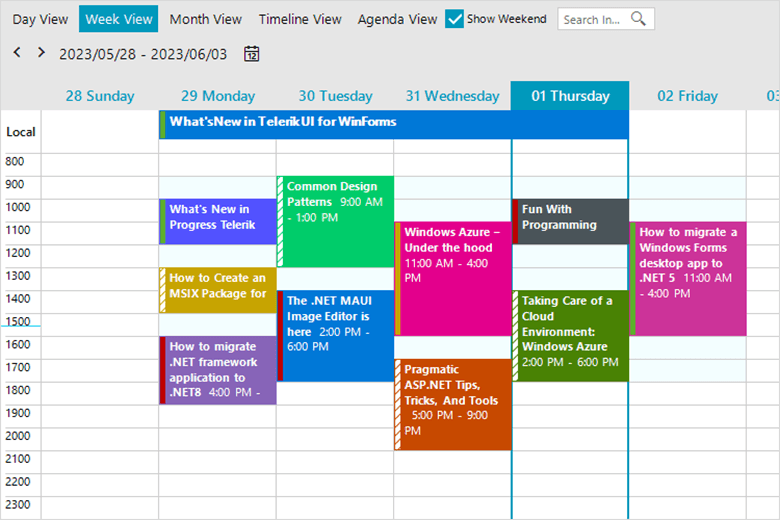
    Studio 2022 and its dark mode.</p><p><img src="https://d585tldpucybw.cloudfront.net/sfimages/default-source/blogs/2023/2023-06/vs-22-dark-mode.png?sfvrsn=e6db00e9_3" alt="VS 2022 dark mode" /></p><p>For more information on getting started with our latest theme, visit the <a href="https://docs.telerik.com/devtools/winforms/styling-and-appearance/themes-style" target="_blank">Telerik UI for WinForms themes documentation</a>.</p><h3 id="scheduler-appointment-styles">Scheduler Appointment Styles</h3><p>We&rsquo;ve always strived to create modern components and designs. It was about time for the RadScheduler look to completely change. New appointment styles are coming to RadScheduler&mdash;they are fresh, bold
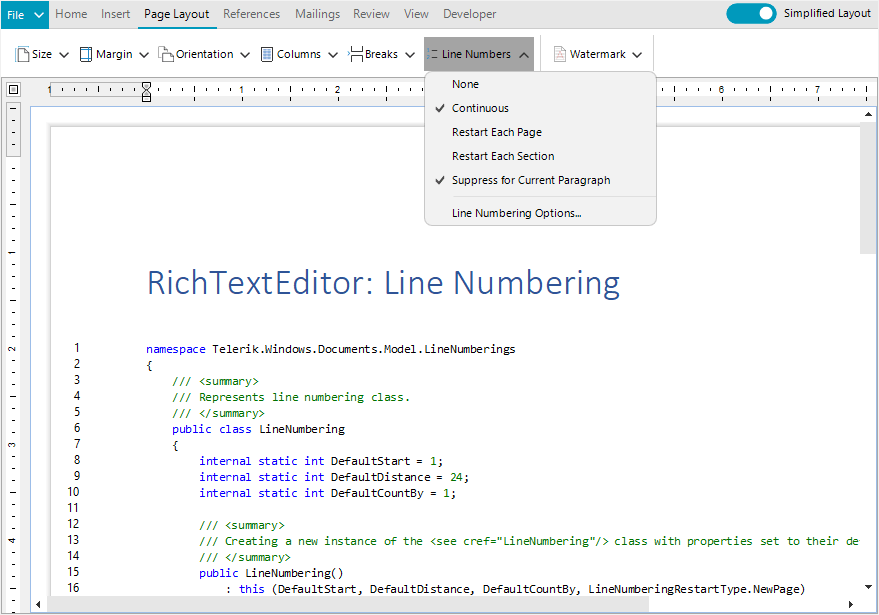
    and modern. The styles vary from one theme to another, matching its general look and feel.</p><p><img src="https://d585tldpucybw.cloudfront.net/sfimages/default-source/blogs/2023/2023-06/scheduler-appointments.png?sfvrsn=1208f24b_3" alt="A colorful scheduler shows appointments for the week" /></p><h3 id="line-numbering-in-richtexteditor">Line Numbering in RichTextEditor</h3><p>RadRichTextEditor has a new handy feature&mdash;line numbers. The numbers are displayed at the beginning of each line and, if needed, can work independently in different paragraphs, sections or pages. They are quite
    popular in legal documents, scripts or medical records.
</p><p><img src="https://d585tldpucybw.cloudfront.net/sfimages/default-source/blogs/2023/2023-06/line-numbering.png?sfvrsn=2bc3e86c_3" alt="An editor with code example shows line numbering" /></p><p>For more information on getting started with this powerful feature, visit the <a href="https://docs.telerik.com/devtools/winforms/controls/richtexteditor/features/line-numbering" target="_blank">WinForms Line Numbering in RichTextEditor documentation</a>.</p><h3 id="support-for-.net-8-preview-1">Support for .NET 8 Preview</h3><p>.NET 8 is still in preview but it&rsquo;s getting increasingly stable. We&rsquo;ve also played with this new runtime and so far, could not isolate issues with the components. If you are adventurous enough or
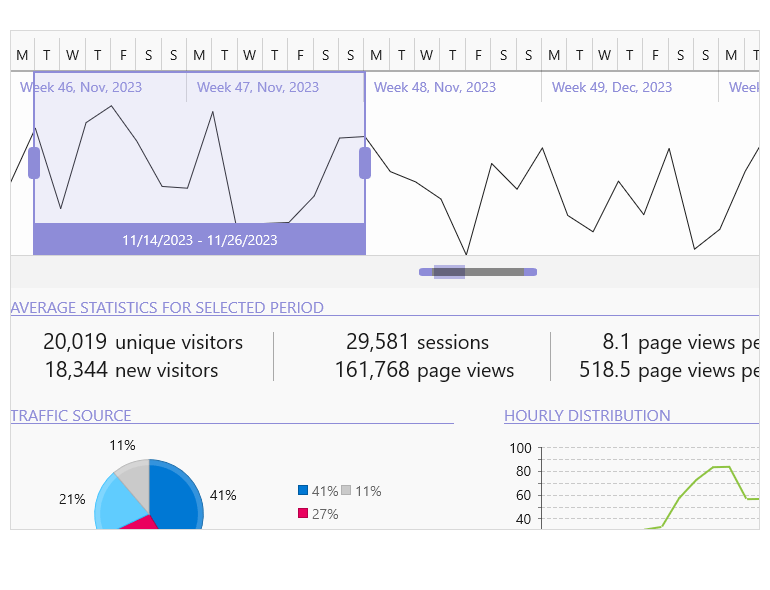
    want to experiment, Telerik UI for WinForms has you covered.</p><h3 id="other-improvements">Other Improvements</h3><p>Besides the highlights above, the 2023 R2 release comes with plenty of other enhancements. I will name just a few that will improve your Telerik UI for WinForms experience:</p><ul><li>Major performance gains in our Visual Studio extensions. Now we are using new APIs allowing us to offload the UI thread. This is an ongoing effort, so expect more in this regard with our next releases.</li><li>We&rsquo;ve decided to update our distribution with assemblies that are digitally signed. So, if you need those, now you can download them straight from your <a href="https://www.telerik.com/account/" target="_blank">Telerik account</a>.</li><li>Many fixes and improvements related to importing, printing and copying documents inside the RadRichTextEditor control.</li></ul><h2 id="telerik-ui-for-winui">Telerik UI for WinUI</h2><h3 id="new-timebar-component">New TimeBar Component</h3><p>RadTimeBar is a time-bound DataVisualization control. Its chief purpose is to allow lightweight scrolling and navigation through large periods of time. Additionally, the control exposes intuitive API which allows
    for both declarative and programmatic manipulation of the control.</p><img src="https://d585tldpucybw.cloudfront.net/sfimages/default-source/10x/timebar_overview-770-px.png?sfvrsn=37af7000_1" alt="Timebar with scrollbar and detailed view" sf-size="100" /><p>The component provides the following features:</p><ul><li><strong>Intervals</strong>: The control allows you to define the available intervals that will be visualized when you zoom in/out on the control.</li><li><strong>Selection</strong>: A time interval can be easily selected via the mouse or by setting a couple of properties of the control.</li><li><strong>Special slots</strong>: This feature can be used to highlight different time intervals in the control.</li><li><strong>Custom intervals and formats</strong>: The intervals can be customized by implementing a couple of interfaces. This way you can modify the intervals and the date-time formats used to define the appearance
        of the periods.</li><li><strong>Localization</strong>: As all controls in the suite, the RadTimeBar supports several languages. The strings that are localized are the date labels (month, week, etc.).</li></ul><p>For more information on getting started, <a href="https://docs.telerik.com/devtools/winui/controls/radtimebar/overview" target="_blank">visit the Telerik UI for WinUI TimeBar control documentation</a>.</p><h2 id="telerik-ui-for-xamarin">Telerik UI for Xamarin</h2><p>In the R2 2023 release, our main focus revolved around Telerik UI for .NET MAUI. However, we are delighted to share that we fulfilled one of the most highly requested features for our Xamarin&rsquo;s DataGrid
    component.</p><h3 id="xamarin-datagrid-enchantment-empty-template-support">Xamarin DataGrid Enchantment: Empty Template Support</h3><p><img sf-custom-thumbnail="true" src="https://d585tldpucybw.cloudfront.net/sfimages/default-source/blogs/2023/2023-06/datagrid-empty-template.png?sfvrsn=bf255248_3" width="450" alt="DataGrid empty template shows an illustration of a file folder with nothing inside and a question mark" sf-constrain-proportions="true" /></p><p>This powerful addition allows you to effectively communicate with end-users when the DataGrid control contains no data to display. By utilizing the Empty Template feature, you can provide informative and
    visually appealing messages (or even images!), enhancing the user experience and ensuring clarity.</p><h2 id="telerik-document-processing-libraries">Telerik Document Processing Libraries</h2><p>With the highly anticipated R2 2023 release, we are thrilled to present a plethora of enhancements that span the entire suite. Let&rsquo;s dive into the highlights of the <a href="https://www.telerik.com/document-processing-libraries" target="_blank">Telerik Document Processing Libraries</a>, where exciting improvements await:</p><h3 id="new-pdfprocessing-improvements-multiple-image-related-enhancements">New PDFProcessing Improvements: Multiple Image-Related Enhancements</h3><p>In the latest update, the PDF Processing library introduces a valuable addition: an image compression setting. This setting empowers you to define the desired compression level when exporting images.
    You now have the flexibility to choose between Default, None and FlateDecode compression options, ensuring optimal output quality.</p><p>Moreover, we are pleased to announce a new default implementation for the ImageUtils&rsquo; JpegImageConverter and ImagePropertiesResolver, leveraging the powerful capabilities of the SkiaSharp library.</p><h3 id="new-spreadstreamprocessing-improvements-support-for-importing-rich-text-as-plain-text">New SpreadStreamProcessing Improvements: Support for Importing Rich Text as Plain Text</h3><p>Now, you have the ability to import rich text and seamlessly extract it as plain text, eliminating any formatting elements. This enhancement simplifies your data processing workflows, allowing you
    to focus solely on the textual content. Say goodbye to complex formatting concerns and embrace the ease of extracting and working with plain text using the SpreadStreamProcessing library.</p><h3 id="document-processing-libraries-fixes-and-quality-improvements">Document Processing Libraries: Fixes and Quality Improvements</h3><p>In the R2 2023 release, the Document Processing team prioritized an extensive range of bug fixes, aiming to deliver a higher level of quality for the library and enhance overall performance.
    There were 20+ bug fixes in the PDF Processing library alone.</p><h2 id="join-us-for-release-webinar-and-more">Join Us for Release Webinar (and More)</h2><h3 id="progress-telerik-.net-web-desktop--mobile-products-r2-2023-release-webinar--june-8">Progress Telerik .NET Web, Desktop &amp; Mobile Products R2 2023 Release Webinar | June 8</h3><p><a href="https://www.telerik.com/campaigns/telerik-r2-2023-release-webinar-web-desktop-mobile-and-cross-platform-products" target="_blank"><img src="https://d585tldpucybw.cloudfront.net/sfimages/default-source/blogs/2023/2023-04/telerik-dev-webinar-r2.png?sfvrsn=6ea4b1c3_3" alt="" /></a></p><p>Discover all updates across Telerik <a href="https://www.telerik.com/blazor-ui" target="_blank">UI for Blazor</a>,
 <a href="https://www.telerik.com/aspnet-core-ui" target="_blank">UI for ASP.NET Core</a>, <a href="https://www.telerik.com/aspnet-mvc" target="_blank">UI for ASP.NET MVC</a>,
 <a href="https://www.telerik.com/products/aspnet-ajax.aspx" target="_blank">UI for ASP.NET AJAX</a>,
 <a href="https://www.telerik.com/products/wpf/overview.aspx" target="_blank">UI for WPF</a>, <a href="https://www.telerik.com/products/winforms.aspx" target="_blank">UI for WinForms</a>,
 <a href="https://www.telerik.com/winui" target="_blank">UI for WinUI</a>, <a href="https://www.telerik.com/maui-ui" target="_blank">UI for .NET MAUI</a> and <a href="https://www.telerik.com/xamarin-ui" target="_blank">UI for Xamarin</a> and
 <a href="https://www.telerik.com/themebuilder" target="_blank">ThemeBuilder</a>.
</p><p><a href="https://www.telerik.com/campaigns/telerik-r2-2023-release-webinar-web-desktop-mobile-and-cross-platform-products" class="Btn" target="_blank">Save Your Seat</a></p><h3 id="join-us-on-twitch">Join Us on Twitch</h3><p>Join the  <a href="https://www.telerik.com/codeitlive" target="_blank">Livestream Release Party</a> on release
    day, June 7, 11 a.m. &ndash; 12:30 p.m. ET to hear the release news and hang out with dev friends.</p><p>The live webinars and Twitch sessions are a great opportunity for you to ask questions before and during the webinars. We&rsquo;ll be waiting to hear from you on Twitter&mdash;just use the <strong>#heyTelerik</strong> and <strong>#heyKendoUI</strong> hashtags. Another great option is the live chat during our release session on&nbsp;<strong><a href="https://www.twitch.tv/codeitlive%22%20/t%20%22_blank" target="_blank">CodeItLive</a>, our Twitch channel</strong>.<br /></p><img src="https://feeds.telerik.com/link/23058/16170994.gif" height="1" width="1"/>]]></content>
  </entry>
  <entry>
    <id>urn:uuid:c5909b81-2051-4abb-b261-476db1769d83</id>
    <title type="text">Replicating a Dating Profile UI in .NET MAUI</title>
    <summary type="text">Learning XAML may be a lot easier than you think. To prove it, we’ll build a dating profile UI in three simple steps.</summary>
    <published>2023-05-11T07:04:00Z</published>
    <updated>2026-04-17T03:14:39Z</updated>
    <author>
      <name>Leomaris Reyes </name>
    </author>
    <link rel="alternate" href="https://feeds.telerik.com/link/23058/16117125/replicating-dating-profile-ui-dotnet-maui"/>
    <content type="text"><![CDATA[<p><span class="featured">Learning XAML may be a lot easier than you think. To prove it, we&rsquo;ll build a dating profile UI in three simple steps.</span></p><p>One of the comments that I usually hear or read when working with XAML in Xamarin Forms or .NET MAUI is: XAML is difficult or complicated to learn. In this article, I&rsquo;ll show you that it&rsquo;s really the opposite&mdash;we will see how easy XAML
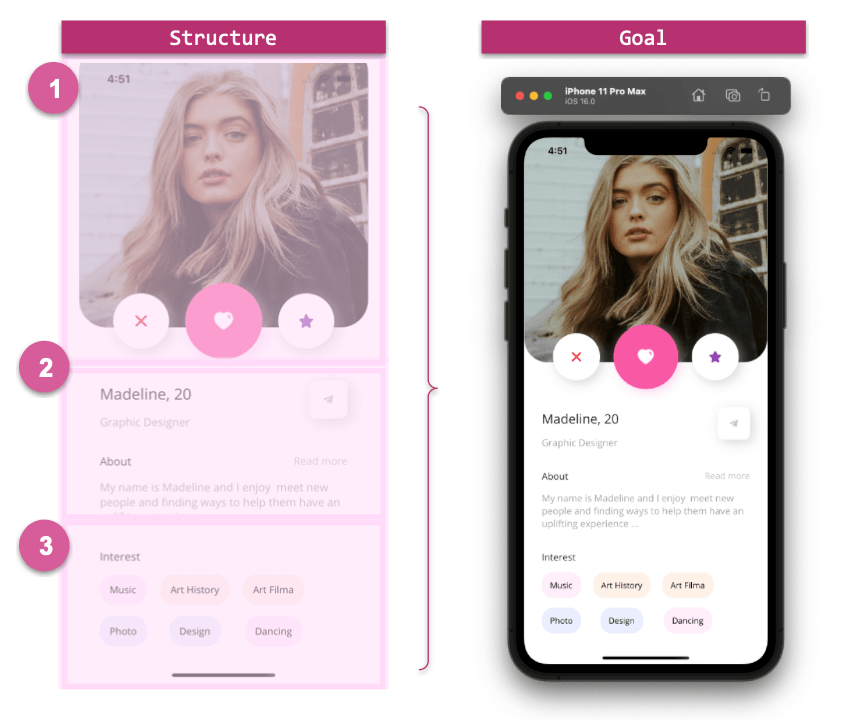
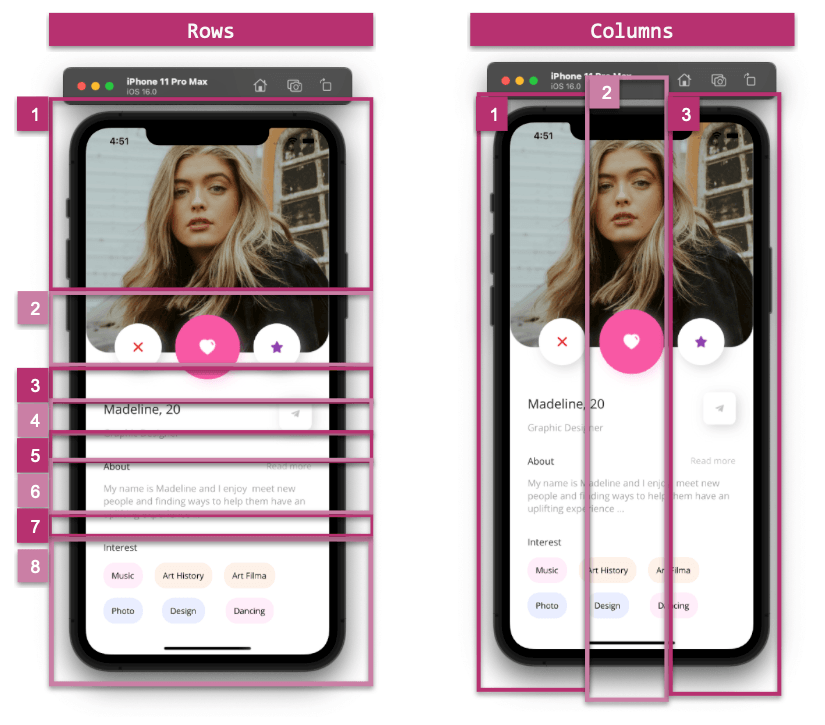
    is to handle when making your favorite UIs!</p><p>We will be replicating a dating profile UI step by step, inspired by a <a href="https://dribbble.com/shots/15531252-Dating-App" target="_blank">Dribbble design</a>.</p><h2 id="lets-start-">Let&rsquo;s Start! </h2><p>First of all, it&rsquo;s important that you are clear about how to start. I recommend that you do it in a set of steps to maintain organization. That is why we will divide our UI into steps, which compose the structure that we are going to develop during
    the explanation.</p><p>In the image shown below, you will see a set of numbers. Each number is a &ldquo;step&rdquo; and we will explain it in detail.</p><p><strong>Let&rsquo;s see the structure:</strong></p><p><img src="https://d585tldpucybw.cloudfront.net/sfimages/default-source/blogs/2023/2023-02/structuregoal.png?sfvrsn=da427a27_3" alt="Two images of a phone app, one labeled structure, the other goal. The structure is separated into three parts. 1 is the large photo of a woman and three buttons – x heart and star. In 2, her name, age, job, and a short About paragraph with the option to read more. 3 has interests. The Goal image is final app displayed on a phone." /></p><h2 id="starting-with-the-code-selecting-the-main-layout">Starting with the Code: Selecting the Main Layout</h2><p>To build our screen, we need to add the main layout that will help us place the visual elements of the page. This time, let&rsquo;s select the Grid, on which we will define three columns and eight rows.</p><p><strong>How can I know the correct number of columns and rows to define in my Grid?</strong></p><p>Let&rsquo;s see it in a graphic explanation:</p><p><img src="https://d585tldpucybw.cloudfront.net/sfimages/default-source/blogs/2023/2023-02/griddefinition.png?sfvrsn=4054dedc_3" alt="Again, the app displayed twice. On the left, 8 rows shown over the app: 1 photo, 2 buttons, 3 spacing, 4 Name and age, 5 job, 6 about, 7 spacing, 8 interests. In the right image, 3 columns are shown, just evenly spaced." /></p><p>Now let&rsquo;s see how to translate it to XAML:</p><pre class=" language-xml"><code class="prism  language-xml"><span class="token tag"><span class="token tag"><span class="token punctuation">&lt;</span>ScrollView</span> <span class="token attr-name">Margin</span><span class="token attr-value"><span class="token punctuation">=</span><span class="token punctuation">"</span>0,-90,0,-40<span class="token punctuation">"</span></span> <span class="token attr-name">VerticalScrollBarVisibility</span><span class="token attr-value"><span class="token punctuation">=</span><span class="token punctuation">"</span>Never<span class="token punctuation">"</span></span><span class="token punctuation">&gt;</span></span>
  <span class="token tag"><span class="token tag"><span class="token punctuation">&lt;</span>Grid</span> <span class="token attr-name">RowDefinitions</span><span class="token attr-value"><span class="token punctuation">=</span><span class="token punctuation">"</span>Auto,Auto,Auto,Auto,Auto,Auto,Auto,Auto<span class="token punctuation">"</span></span> <span class="token attr-name">RowSpacing</span><span class="token attr-value"><span class="token punctuation">=</span><span class="token punctuation">"</span>15<span class="token punctuation">"</span></span> <span class="token attr-name">Margin</span><span class="token attr-value"><span class="token punctuation">=</span><span class="token punctuation">"</span>30,0,30,30<span class="token punctuation">"</span></span>
  <span class="token attr-name">ColumnDefinitions</span><span class="token attr-value"><span class="token punctuation">=</span><span class="token punctuation">"</span>*,*,*<span class="token punctuation">"</span></span><span class="token punctuation">&gt;</span></span>
      <span class="token tag"><span class="token tag"><span class="token punctuation">&lt;</span>!--</span> <span class="token attr-name">Add</span> <span class="token attr-name">the</span> <span class="token attr-name">code</span> <span class="token attr-name">from</span> <span class="token attr-name">steps</span> <span class="token attr-name">one</span> <span class="token attr-name">here</span> <span class="token attr-name">--</span> <span class="token punctuation">&gt;</span></span>
      <span class="token tag"><span class="token tag"><span class="token punctuation">&lt;</span>!--</span> <span class="token attr-name">Add</span> <span class="token attr-name">the</span> <span class="token attr-name">code</span> <span class="token attr-name">from</span> <span class="token attr-name">steps</span> <span class="token attr-name">two</span> <span class="token attr-name">here</span> <span class="token attr-name">--</span> <span class="token punctuation">&gt;</span></span>
      <span class="token tag"><span class="token tag"><span class="token punctuation">&lt;</span>!--</span> <span class="token attr-name">Add</span> <span class="token attr-name">the</span> <span class="token attr-name">code</span> <span class="token attr-name">from</span> <span class="token attr-name">steps</span> <span class="token attr-name">three</span> <span class="token attr-name">here</span> <span class="token attr-name">--</span> <span class="token punctuation">&gt;</span></span>
    <span class="token tag"><span class="token tag"><span class="token punctuation">&lt;/</span>Grid</span><span class="token punctuation">&gt;</span></span>
<span class="token tag"><span class="token tag"><span class="token punctuation">&lt;/</span>ScrollView</span><span class="token punctuation">&gt;</span></span>
</code></pre><p> We also added a ScrollView so that the design can be scrolled to any size device. If you want to know more information about the <a href="https://www.telerik.com/blogs/exploring-new-grid-structure-xamarin-forms" target="_blank">Grid, you can access it here</a>.
 If you want to practice, I also recommend the <a href="https://www.telerik.com/blogs/dotnet-maui-challenge-1-simple-grid" target="_blank">.NET MAUI Challenge 1: Simple Grid in .NET MAUI</a>.</p><p>Now let&rsquo;s continue with the development of each step of the UI structure presented above.</p><h2 id="main-image-and-floating-buttons"><img src="https://d585tldpucybw.cloudfront.net/sfimages/default-source/blogs/2023/2023-02/uno.png?sfvrsn=5ef305c8_3" title="Step 1" alt="" />Main Image
    and Floating Buttons</h2><p>We will divide the explanation into substeps:</p><h3 id="main-image">Main Image</h3><p>As you can see, the main image has rounded bottom edges. How do we do that? We have two options which are the following:</p><ul><li><strong>Borders:</strong> You can use Borders in .NET MAUI. If you want to know more information about Borders, you can enter <a href="https://askxammy.com/applying-borders-in-net-maui/" target="_blank">here</a>.</li><li><strong>Frame:</strong> You can also use the Frame to adapt the image to its shape. The key points to round off here are setting the IsClippedToBounds property to True, Padding to 0, and adding a value for the CornerRadius property.</li></ul><p>In this case, we will use the Frame. The code looks as follows:</p><pre class=" language-xml"><code class="prism  language-xml"><span class="token comment">&lt;!-- Rounded main picture--&gt;</span>
<span class="token tag"><span class="token tag"><span class="token punctuation">&lt;</span>Frame</span> <span class="token attr-name">Grid.Column</span><span class="token attr-value"><span class="token punctuation">=</span><span class="token punctuation">"</span>0<span class="token punctuation">"</span></span> <span class="token attr-name">Grid.Row</span><span class="token attr-value"><span class="token punctuation">=</span><span class="token punctuation">"</span>0<span class="token punctuation">"</span></span> <span class="token attr-name">Grid.ColumnSpan</span><span class="token attr-value"><span class="token punctuation">=</span><span class="token punctuation">"</span>3<span class="token punctuation">"</span></span> <span class="token attr-name">Margin</span><span class="token attr-value"><span class="token punctuation">=</span><span class="token punctuation">"</span>-30,-25,-30,-30<span class="token punctuation">"</span></span> <span class="token attr-name">CornerRadius</span><span class="token attr-value"><span class="token punctuation">=</span><span class="token punctuation">"</span>40<span class="token punctuation">"</span></span> <span class="token attr-name">IsClippedToBounds</span><span class="token attr-value"><span class="token punctuation">=</span><span class="token punctuation">"</span>True<span class="token punctuation">"</span></span> <span class="token attr-name">Padding</span><span class="token attr-value"><span class="token punctuation">=</span><span class="token punctuation">"</span>0<span class="token punctuation">"</span></span><span class="token punctuation">&gt;</span></span>
  <span class="token tag"><span class="token tag"><span class="token punctuation">&lt;</span>Image</span> <span class="token attr-name">Aspect</span><span class="token attr-value"><span class="token punctuation">=</span><span class="token punctuation">"</span>AspectFill<span class="token punctuation">"</span></span> <span class="token attr-name">Source</span><span class="token attr-value"><span class="token punctuation">=</span><span class="token punctuation">"</span>model.jpeg<span class="token punctuation">"</span></span> <span class="token attr-name">HorizontalOptions</span><span class="token attr-value"><span class="token punctuation">=</span><span class="token punctuation">"</span>FillAndExpand<span class="token punctuation">"</span></span> <span class="token attr-name">HeightRequest</span><span class="token attr-value"><span class="token punctuation">=</span><span class="token punctuation">"</span>410<span class="token punctuation">"</span></span> <span class="token punctuation">/&gt;</span></span>
<span class="token tag"><span class="token tag"><span class="token punctuation">&lt;/</span>Frame</span><span class="token punctuation">&gt;</span></span>
<span class="token comment">&lt;!-- Add the code explained in the next step here --&gt;</span>
</code></pre><h3 id="floating-buttons">Floating Buttons</h3><p>Here we have three floating buttons. Let&rsquo;s see which factors are important to highlight:</p><ul><li><strong>Make the Button float:</strong> To get this effect, I used the Margin property. Setting the top value to Negative causes the effect of overlapping with the main image.</li><li><strong>Shadows:</strong> The buttons also have shadows. This helps so that even though the start and end buttons have the same background color than the screen, they can be differentiated. You can see more information about Shadows <a href="https://askxammy.com/adding-shadows-with-net-maui/" target="_blank">here</a>.</li></ul><p>Now let&rsquo;s convert this to code:</p><pre class=" language-xml"><code class="prism  language-xml"><span class="token comment">&lt;!-- Floating Buttons--&gt;</span>

<span class="token comment">&lt;!-- Delete Button--&gt;</span>
<span class="token tag"><span class="token tag"><span class="token punctuation">&lt;</span>Button</span> <span class="token attr-name">Grid.Column</span><span class="token attr-value"><span class="token punctuation">=</span><span class="token punctuation">"</span>0<span class="token punctuation">"</span></span> <span class="token attr-name">Grid.Row</span><span class="token attr-value"><span class="token punctuation">=</span><span class="token punctuation">"</span>1<span class="token punctuation">"</span></span> <span class="token attr-name">Margin</span><span class="token attr-value"><span class="token punctuation">=</span><span class="token punctuation">"</span>0,-50,0,0<span class="token punctuation">"</span></span> <span class="token attr-name">HeightRequest</span><span class="token attr-value"><span class="token punctuation">=</span><span class="token punctuation">"</span>80<span class="token punctuation">"</span></span> <span class="token attr-name">WidthRequest</span><span class="token attr-value"><span class="token punctuation">=</span><span class="token punctuation">"</span>80<span class="token punctuation">"</span></span> <span class="token attr-name">CornerRadius</span><span class="token attr-value"><span class="token punctuation">=</span><span class="token punctuation">"</span>40<span class="token punctuation">"</span></span> <span class="token attr-name">ImageSource</span><span class="token attr-value"><span class="token punctuation">=</span><span class="token punctuation">"</span>delete<span class="token punctuation">"</span></span> <span class="token attr-name">BackgroundColor</span><span class="token attr-value"><span class="token punctuation">=</span><span class="token punctuation">"</span>White<span class="token punctuation">"</span></span><span class="token punctuation">&gt;</span></span>
  <span class="token tag"><span class="token tag"><span class="token punctuation">&lt;</span>Button.Shadow</span><span class="token punctuation">&gt;</span></span>
     <span class="token tag"><span class="token tag"><span class="token punctuation">&lt;</span>Shadow</span> <span class="token attr-name">Brush</span><span class="token attr-value"><span class="token punctuation">=</span><span class="token punctuation">"</span>#bcbcbc<span class="token punctuation">"</span></span>
   <span class="token attr-name">Offset</span><span class="token attr-value"><span class="token punctuation">=</span><span class="token punctuation">"</span>5,5<span class="token punctuation">"</span></span>
   <span class="token attr-name">Opacity</span><span class="token attr-value"><span class="token punctuation">=</span><span class="token punctuation">"</span>0.6<span class="token punctuation">"</span></span><span class="token punctuation">/&gt;</span></span>
  <span class="token tag"><span class="token tag"><span class="token punctuation">&lt;/</span>Button.Shadow</span><span class="token punctuation">&gt;</span></span>
<span class="token tag"><span class="token tag"><span class="token punctuation">&lt;/</span>Button</span><span class="token punctuation">&gt;</span></span>

<span class="token comment">&lt;!-- Like Button--&gt;</span>
<span class="token tag"><span class="token tag"><span class="token punctuation">&lt;</span>Button</span> <span class="token attr-name">Grid.Column</span><span class="token attr-value"><span class="token punctuation">=</span><span class="token punctuation">"</span>1<span class="token punctuation">"</span></span> <span class="token attr-name">Grid.Row</span><span class="token attr-value"><span class="token punctuation">=</span><span class="token punctuation">"</span>1<span class="token punctuation">"</span></span> <span class="token attr-name">Margin</span><span class="token attr-value"><span class="token punctuation">=</span><span class="token punctuation">"</span>0,-50,0,0<span class="token punctuation">"</span></span> <span class="token attr-name">HeightRequest</span><span class="token attr-value"><span class="token punctuation">=</span><span class="token punctuation">"</span>110<span class="token punctuation">"</span></span> <span class="token attr-name">WidthRequest</span><span class="token attr-value"><span class="token punctuation">=</span><span class="token punctuation">"</span>110<span class="token punctuation">"</span></span> <span class="token attr-name">CornerRadius</span><span class="token attr-value"><span class="token punctuation">=</span><span class="token punctuation">"</span>55<span class="token punctuation">"</span></span> <span class="token attr-name">ImageSource</span><span class="token attr-value"><span class="token punctuation">=</span><span class="token punctuation">"</span>heartt<span class="token punctuation">"</span></span> <span class="token attr-name">BackgroundColor</span><span class="token attr-value"><span class="token punctuation">=</span><span class="token punctuation">"</span>#f858a4<span class="token punctuation">"</span></span><span class="token punctuation">&gt;</span></span>
  <span class="token tag"><span class="token tag"><span class="token punctuation">&lt;</span>Button.Shadow</span><span class="token punctuation">&gt;</span></span>
    <span class="token tag"><span class="token tag"><span class="token punctuation">&lt;</span>Shadow</span> <span class="token attr-name">Brush</span><span class="token attr-value"><span class="token punctuation">=</span><span class="token punctuation">"</span>#f8bcd9<span class="token punctuation">"</span></span>
    <span class="token attr-name">Offset</span><span class="token attr-value"><span class="token punctuation">=</span><span class="token punctuation">"</span>5,5<span class="token punctuation">"</span></span>
    <span class="token attr-name">Opacity</span><span class="token attr-value"><span class="token punctuation">=</span><span class="token punctuation">"</span>0.6<span class="token punctuation">"</span></span><span class="token punctuation">/&gt;</span></span>
  <span class="token tag"><span class="token tag"><span class="token punctuation">&lt;/</span>Button.Shadow</span><span class="token punctuation">&gt;</span></span>
<span class="token tag"><span class="token tag"><span class="token punctuation">&lt;/</span>Button</span><span class="token punctuation">&gt;</span></span>

<span class="token comment">&lt;!-- Rate Button--&gt;</span>
<span class="token tag"><span class="token tag"><span class="token punctuation">&lt;</span>Button</span> <span class="token attr-name">Grid.Column</span><span class="token attr-value"><span class="token punctuation">=</span><span class="token punctuation">"</span>2<span class="token punctuation">"</span></span> <span class="token attr-name">Grid.Row</span><span class="token attr-value"><span class="token punctuation">=</span><span class="token punctuation">"</span>1<span class="token punctuation">"</span></span> <span class="token attr-name">Margin</span><span class="token attr-value"><span class="token punctuation">=</span><span class="token punctuation">"</span>0,-50,0,0<span class="token punctuation">"</span></span> <span class="token attr-name">HeightRequest</span><span class="token attr-value"><span class="token punctuation">=</span><span class="token punctuation">"</span>80<span class="token punctuation">"</span></span> <span class="token attr-name">WidthRequest</span><span class="token attr-value"><span class="token punctuation">=</span><span class="token punctuation">"</span>80<span class="token punctuation">"</span></span> <span class="token attr-name">CornerRadius</span><span class="token attr-value"><span class="token punctuation">=</span><span class="token punctuation">"</span>40<span class="token punctuation">"</span></span> <span class="token attr-name">ImageSource</span><span class="token attr-value"><span class="token punctuation">=</span><span class="token punctuation">"</span>star<span class="token punctuation">"</span></span> <span class="token attr-name">BackgroundColor</span><span class="token attr-value"><span class="token punctuation">=</span><span class="token punctuation">"</span>White<span class="token punctuation">"</span></span><span class="token punctuation">&gt;</span></span>
  <span class="token tag"><span class="token tag"><span class="token punctuation">&lt;</span>Button.Shadow</span><span class="token punctuation">&gt;</span></span>
    <span class="token tag"><span class="token tag"><span class="token punctuation">&lt;</span>Shadow</span> <span class="token attr-name">Brush</span><span class="token attr-value"><span class="token punctuation">=</span><span class="token punctuation">"</span>#bcbcbc<span class="token punctuation">"</span></span>
    <span class="token attr-name">Offset</span><span class="token attr-value"><span class="token punctuation">=</span><span class="token punctuation">"</span>5,5<span class="token punctuation">"</span></span>
    <span class="token attr-name">Opacity</span><span class="token attr-value"><span class="token punctuation">=</span><span class="token punctuation">"</span>0.6<span class="token punctuation">"</span></span><span class="token punctuation">/&gt;</span></span>
  <span class="token tag"><span class="token tag"><span class="token punctuation">&lt;/</span>Button.Shadow</span><span class="token punctuation">&gt;</span></span>
<span class="token tag"><span class="token tag"><span class="token punctuation">&lt;/</span>Button</span><span class="token punctuation">&gt;</span></span>

<span class="token comment">&lt;!-- Add the code explained in the next step here --&gt;</span>
</code></pre><p>Now let&rsquo;s see the result of this first step:</p><p><img src="https://d585tldpucybw.cloudfront.net/sfimages/default-source/blogs/2023/2023-02/step1.png?sfvrsn=b8f0a5a7_3" alt="The main image and the three buttons are in place" /></p><h2 id="details"><img src="https://d585tldpucybw.cloudfront.net/sfimages/default-source/blogs/2023/2023-02/dos.png?sfvrsn=8fd95379_3" title="Step 2" alt="" />Details</h2><p>This step is composed of the following elements:</p><h3 id="name--role-description-and-telegram-button">Name &amp; Role Description and Telegram Button</h3><p>For the name and role description, we will use a simple Label. And for the Telegram button, we will also use shadows to highlight the button.</p><pre class=" language-xml"><code class="prism  language-xml"><span class="token comment">&lt;!-- Details--&gt;</span>

<span class="token tag"><span class="token tag"><span class="token punctuation">&lt;</span>Label</span> <span class="token attr-name">Grid.Column</span><span class="token attr-value"><span class="token punctuation">=</span><span class="token punctuation">"</span>0<span class="token punctuation">"</span></span> <span class="token attr-name">Grid.ColumnSpan</span><span class="token attr-value"><span class="token punctuation">=</span><span class="token punctuation">"</span>2<span class="token punctuation">"</span></span> <span class="token attr-name">Grid.Row</span><span class="token attr-value"><span class="token punctuation">=</span><span class="token punctuation">"</span>2<span class="token punctuation">"</span></span> <span class="token attr-name">Text</span><span class="token attr-value"><span class="token punctuation">=</span><span class="token punctuation">"</span>Madeline, 20<span class="token punctuation">"</span></span> <span class="token attr-name">FontAttributes</span><span class="token attr-value"><span class="token punctuation">=</span><span class="token punctuation">"</span>Bold<span class="token punctuation">"</span></span> <span class="token attr-name">Margin</span><span class="token attr-value"><span class="token punctuation">=</span><span class="token punctuation">"</span>0,20,0,0<span class="token punctuation">"</span></span> <span class="token attr-name">FontSize</span><span class="token attr-value"><span class="token punctuation">=</span><span class="token punctuation">"</span>22<span class="token punctuation">"</span></span><span class="token punctuation">/&gt;</span></span>

<span class="token tag"><span class="token tag"><span class="token punctuation">&lt;</span>Label</span> <span class="token attr-name">Grid.Column</span><span class="token attr-value"><span class="token punctuation">=</span><span class="token punctuation">"</span>0<span class="token punctuation">"</span></span> <span class="token attr-name">Grid.ColumnSpan</span><span class="token attr-value"><span class="token punctuation">=</span><span class="token punctuation">"</span>2<span class="token punctuation">"</span></span> <span class="token attr-name">Grid.Row</span><span class="token attr-value"><span class="token punctuation">=</span><span class="token punctuation">"</span>3<span class="token punctuation">"</span></span> <span class="token attr-name">Text</span><span class="token attr-value"><span class="token punctuation">=</span><span class="token punctuation">"</span>Graphic Designer<span class="token punctuation">"</span></span> <span class="token attr-name">FontAttributes</span><span class="token attr-value"><span class="token punctuation">=</span><span class="token punctuation">"</span>Bold<span class="token punctuation">"</span></span> <span class="token attr-name">FontSize</span><span class="token attr-value"><span class="token punctuation">=</span><span class="token punctuation">"</span>16<span class="token punctuation">"</span></span> <span class="token attr-name">TextColor</span><span class="token attr-value"><span class="token punctuation">=</span><span class="token punctuation">"</span>#a3a3a3<span class="token punctuation">"</span></span><span class="token punctuation">/&gt;</span></span>

<span class="token tag"><span class="token tag"><span class="token punctuation">&lt;</span>Button</span> <span class="token attr-name">Grid.Column</span><span class="token attr-value"><span class="token punctuation">=</span><span class="token punctuation">"</span>2<span class="token punctuation">"</span></span> <span class="token attr-name">Grid.Row</span><span class="token attr-value"><span class="token punctuation">=</span><span class="token punctuation">"</span>2<span class="token punctuation">"</span></span> <span class="token attr-name">Grid.RowSpan</span><span class="token attr-value"><span class="token punctuation">=</span><span class="token punctuation">"</span>2<span class="token punctuation">"</span></span> <span class="token attr-name">HorizontalOptions</span><span class="token attr-value"><span class="token punctuation">=</span><span class="token punctuation">"</span>End<span class="token punctuation">"</span></span> <span class="token attr-name">VerticalOptions</span><span class="token attr-value"><span class="token punctuation">=</span><span class="token punctuation">"</span>Center<span class="token punctuation">"</span></span> <span class="token attr-name">HeightRequest</span><span class="token attr-value"><span class="token punctuation">=</span><span class="token punctuation">"</span>55<span class="token punctuation">"</span></span> <span class="token attr-name">WidthRequest</span><span class="token attr-value"><span class="token punctuation">=</span><span class="token punctuation">"</span>55<span class="token punctuation">"</span></span> <span class="token attr-name">CornerRadius</span><span class="token attr-value"><span class="token punctuation">=</span><span class="token punctuation">"</span>10<span class="token punctuation">"</span></span> <span class="token attr-name">ImageSource</span><span class="token attr-value"><span class="token punctuation">=</span><span class="token punctuation">"</span>telegram<span class="token punctuation">"</span></span> <span class="token attr-name">BackgroundColor</span><span class="token attr-value"><span class="token punctuation">=</span><span class="token punctuation">"</span>White<span class="token punctuation">"</span></span><span class="token punctuation">&gt;</span></span>
  <span class="token tag"><span class="token tag"><span class="token punctuation">&lt;</span>Button.Shadow</span><span class="token punctuation">&gt;</span></span>
    <span class="token tag"><span class="token tag"><span class="token punctuation">&lt;</span>Shadow</span> <span class="token attr-name">Brush</span><span class="token attr-value"><span class="token punctuation">=</span><span class="token punctuation">"</span>#bcbcbc<span class="token punctuation">"</span></span>
    <span class="token attr-name">Offset</span><span class="token attr-value"><span class="token punctuation">=</span><span class="token punctuation">"</span>5,5<span class="token punctuation">"</span></span>
    <span class="token attr-name">Opacity</span><span class="token attr-value"><span class="token punctuation">=</span><span class="token punctuation">"</span>0.6<span class="token punctuation">"</span></span><span class="token punctuation">/&gt;</span></span>
  <span class="token tag"><span class="token tag"><span class="token punctuation">&lt;/</span>Button.Shadow</span><span class="token punctuation">&gt;</span></span>
<span class="token tag"><span class="token tag"><span class="token punctuation">&lt;/</span>Button</span><span class="token punctuation">&gt;</span></span>

<span class="token comment">&lt;!-- Add the code explained in the next step here --&gt;</span>
</code></pre><h3 id="about-title--description-and-read-more-text">About: Title &amp; Description and Read More Text</h3><pre class=" language-xml"><code class="prism  language-xml"><span class="token tag"><span class="token tag"><span class="token punctuation">&lt;</span>Label</span> <span class="token attr-name">Grid.Column</span><span class="token attr-value"><span class="token punctuation">=</span><span class="token punctuation">"</span>0<span class="token punctuation">"</span></span> <span class="token attr-name">Grid.ColumnSpan</span><span class="token attr-value"><span class="token punctuation">=</span><span class="token punctuation">"</span>2<span class="token punctuation">"</span></span> <span class="token attr-name">Grid.Row</span><span class="token attr-value"><span class="token punctuation">=</span><span class="token punctuation">"</span>4<span class="token punctuation">"</span></span> <span class="token attr-name">Text</span><span class="token attr-value"><span class="token punctuation">=</span><span class="token punctuation">"</span>About<span class="token punctuation">"</span></span> <span class="token attr-name">FontAttributes</span><span class="token attr-value"><span class="token punctuation">=</span><span class="token punctuation">"</span>Bold<span class="token punctuation">"</span></span> <span class="token attr-name">FontSize</span><span class="token attr-value"><span class="token punctuation">=</span><span class="token punctuation">"</span>16<span class="token punctuation">"</span></span> <span class="token attr-name">Margin</span><span class="token attr-value"><span class="token punctuation">=</span><span class="token punctuation">"</span>0,20,0,0<span class="token punctuation">"</span></span><span class="token punctuation">/&gt;</span></span>

<span class="token tag"><span class="token tag"><span class="token punctuation">&lt;</span>Label</span> <span class="token attr-name">Grid.Column</span><span class="token attr-value"><span class="token punctuation">=</span><span class="token punctuation">"</span>2<span class="token punctuation">"</span></span> <span class="token attr-name">Grid.Row</span><span class="token attr-value"><span class="token punctuation">=</span><span class="token punctuation">"</span>4<span class="token punctuation">"</span></span> <span class="token attr-name">Text</span><span class="token attr-value"><span class="token punctuation">=</span><span class="token punctuation">"</span>Read more<span class="token punctuation">"</span></span> <span class="token attr-name">FontAttributes</span><span class="token attr-value"><span class="token punctuation">=</span><span class="token punctuation">"</span>Bold<span class="token punctuation">"</span></span> <span class="token attr-name">FontSize</span><span class="token attr-value"><span class="token punctuation">=</span><span class="token punctuation">"</span>15<span class="token punctuation">"</span></span> <span class="token attr-name">TextColor</span><span class="token attr-value"><span class="token punctuation">=</span><span class="token punctuation">"</span>#c0bebe<span class="token punctuation">"</span></span> <span class="token attr-name">HorizontalTextAlignment</span><span class="token attr-value"><span class="token punctuation">=</span><span class="token punctuation">"</span>End<span class="token punctuation">"</span></span> <span class="token attr-name">Margin</span><span class="token attr-value"><span class="token punctuation">=</span><span class="token punctuation">"</span>0,20,0,0<span class="token punctuation">"</span></span><span class="token punctuation">/&gt;</span></span>

<span class="token tag"><span class="token tag"><span class="token punctuation">&lt;</span>Label</span> <span class="token attr-name">Grid.Column</span><span class="token attr-value"><span class="token punctuation">=</span><span class="token punctuation">"</span>0<span class="token punctuation">"</span></span> <span class="token attr-name">Grid.ColumnSpan</span><span class="token attr-value"><span class="token punctuation">=</span><span class="token punctuation">"</span>4<span class="token punctuation">"</span></span> <span class="token attr-name">Grid.Row</span><span class="token attr-value"><span class="token punctuation">=</span><span class="token punctuation">"</span>5<span class="token punctuation">"</span></span> <span class="token attr-name">Text</span><span class="token attr-value"><span class="token punctuation">=</span><span class="token punctuation">"</span>My name is Madeline and I enjoy meet new people and finding ways to help them have an uplifting experience ...<span class="token punctuation">"</span></span> <span class="token attr-name">FontAttributes</span><span class="token attr-value"><span class="token punctuation">=</span><span class="token punctuation">"</span>Bold<span class="token punctuation">"</span></span> <span class="token attr-name">FontSize</span><span class="token attr-value"><span class="token punctuation">=</span><span class="token punctuation">"</span>16<span class="token punctuation">"</span></span> <span class="token attr-name">TextColor</span><span class="token attr-value"><span class="token punctuation">=</span><span class="token punctuation">"</span>#a3a3a3<span class="token punctuation">"</span></span><span class="token punctuation">/&gt;</span></span>

<span class="token comment">&lt;!-- Add the code explained in the next step here --&gt;</span>
</code></pre><p>Now let&rsquo;s see the result of this second step:</p><p><img src="https://d585tldpucybw.cloudfront.net/sfimages/default-source/blogs/2023/2023-02/step2.png?sfvrsn=8c936625_3" alt="Main image, buttons, name, age, job, about are all here" /></p><h2 id="interest-list"><img src="https://d585tldpucybw.cloudfront.net/sfimages/default-source/blogs/2023/2023-02/tres.png?sfvrsn=b01fbb53_3" title="Step 3" alt="" />Interest
 List
</h2><p>Finally, let&rsquo;s add a label for the title and a CollectionView to present the different interests of the profile.</p><pre class=" language-xml"><code class="prism  language-xml"><span class="token comment">&lt;!-- Interests list--&gt;</span>

<span class="token comment">&lt;!-- Title--&gt;</span>
<span class="token tag"><span class="token tag"><span class="token punctuation">&lt;</span>Label</span> <span class="token attr-name">Grid.Column</span><span class="token attr-value"><span class="token punctuation">=</span><span class="token punctuation">"</span>0<span class="token punctuation">"</span></span> <span class="token attr-name">Grid.ColumnSpan</span><span class="token attr-value"><span class="token punctuation">=</span><span class="token punctuation">"</span>2<span class="token punctuation">"</span></span> <span class="token attr-name">Grid.Row</span><span class="token attr-value"><span class="token punctuation">=</span><span class="token punctuation">"</span>6<span class="token punctuation">"</span></span> <span class="token attr-name">Text</span><span class="token attr-value"><span class="token punctuation">=</span><span class="token punctuation">"</span>Interest<span class="token punctuation">"</span></span> <span class="token attr-name">FontAttributes</span><span class="token attr-value"><span class="token punctuation">=</span><span class="token punctuation">"</span>Bold<span class="token punctuation">"</span></span> <span class="token attr-name">FontSize</span><span class="token attr-value"><span class="token punctuation">=</span><span class="token punctuation">"</span>16<span class="token punctuation">"</span></span> <span class="token attr-name">Margin</span><span class="token attr-value"><span class="token punctuation">=</span><span class="token punctuation">"</span>0,20,0,0<span class="token punctuation">"</span></span><span class="token punctuation">/&gt;</span></span>

<span class="token comment">&lt;!-- List --&gt;</span>
<span class="token tag"><span class="token tag"><span class="token punctuation">&lt;</span>CollectionView</span> <span class="token attr-name">Grid.Column</span><span class="token attr-value"><span class="token punctuation">=</span><span class="token punctuation">"</span>0<span class="token punctuation">"</span></span> <span class="token attr-name">Grid.ColumnSpan</span><span class="token attr-value"><span class="token punctuation">=</span><span class="token punctuation">"</span>3<span class="token punctuation">"</span></span> <span class="token attr-name">Grid.Row</span><span class="token attr-value"><span class="token punctuation">=</span><span class="token punctuation">"</span>7<span class="token punctuation">"</span></span> <span class="token attr-name">HorizontalScrollBarVisibility</span><span class="token attr-value"><span class="token punctuation">=</span><span class="token punctuation">"</span>Never<span class="token punctuation">"</span></span>
  <span class="token attr-name">ItemsSource</span><span class="token attr-value"><span class="token punctuation">=</span><span class="token punctuation">"</span>{Binding profile}<span class="token punctuation">"</span></span>
  <span class="token attr-name">HeightRequest</span><span class="token attr-value"><span class="token punctuation">=</span><span class="token punctuation">"</span>120<span class="token punctuation">"</span></span>
  <span class="token attr-name">VerticalOptions</span><span class="token attr-value"><span class="token punctuation">=</span><span class="token punctuation">"</span>FillAndExpand<span class="token punctuation">"</span></span><span class="token punctuation">&gt;</span></span>
    <span class="token tag"><span class="token tag"><span class="token punctuation">&lt;</span>CollectionView.ItemsLayout</span><span class="token punctuation">&gt;</span></span>
      <span class="token tag"><span class="token tag"><span class="token punctuation">&lt;</span>GridItemsLayout</span> <span class="token attr-name">Orientation</span><span class="token attr-value"><span class="token punctuation">=</span><span class="token punctuation">"</span>Horizontal<span class="token punctuation">"</span></span>
      <span class="token attr-name">Span</span><span class="token attr-value"><span class="token punctuation">=</span><span class="token punctuation">"</span>2<span class="token punctuation">"</span></span> <span class="token punctuation">/&gt;</span></span>
    <span class="token tag"><span class="token tag"><span class="token punctuation">&lt;/</span>CollectionView.ItemsLayout</span><span class="token punctuation">&gt;</span></span>
  <span class="token tag"><span class="token tag"><span class="token punctuation">&lt;</span>CollectionView.ItemTemplate</span><span class="token punctuation">&gt;</span></span>
    <span class="token tag"><span class="token tag"><span class="token punctuation">&lt;</span>DataTemplate</span><span class="token punctuation">&gt;</span></span>
      <span class="token tag"><span class="token tag"><span class="token punctuation">&lt;</span>StackLayout</span> <span class="token attr-name">Padding</span><span class="token attr-value"><span class="token punctuation">=</span><span class="token punctuation">"</span>0,0,20,0<span class="token punctuation">"</span></span><span class="token punctuation">&gt;</span></span>
        <span class="token tag"><span class="token tag"><span class="token punctuation">&lt;</span>Button</span> <span class="token attr-name">Text</span><span class="token attr-value"><span class="token punctuation">=</span><span class="token punctuation">"</span>{Binding Description}<span class="token punctuation">"</span></span> <span class="token attr-name">TextColor</span><span class="token attr-value"><span class="token punctuation">=</span><span class="token punctuation">"</span>Black<span class="token punctuation">"</span></span> <span class="token attr-name">BackgroundColor</span><span class="token attr-value"><span class="token punctuation">=</span><span class="token punctuation">"</span>{Binding BgColor}<span class="token punctuation">"</span></span> <span class="token attr-name">HorizontalOptions</span><span class="token attr-value"><span class="token punctuation">=</span><span class="token punctuation">"</span>StartAndExpand<span class="token punctuation">"</span></span> <span class="token attr-name">CornerRadius</span><span class="token attr-value"><span class="token punctuation">=</span><span class="token punctuation">"</span>20<span class="token punctuation">"</span></span> <span class="token punctuation">/&gt;</span></span>
      <span class="token tag"><span class="token tag"><span class="token punctuation">&lt;/</span>StackLayout</span><span class="token punctuation">&gt;</span></span>
    <span class="token tag"><span class="token tag"><span class="token punctuation">&lt;/</span>DataTemplate</span><span class="token punctuation">&gt;</span></span>
  <span class="token tag"><span class="token tag"><span class="token punctuation">&lt;/</span>CollectionView.ItemTemplate</span><span class="token punctuation">&gt;</span></span>
<span class="token tag"><span class="token tag"><span class="token punctuation">&lt;/</span>CollectionView</span><span class="token punctuation">&gt;</span></span>
</code></pre><p>Let&rsquo;s see the result:</p><p><img src="https://d585tldpucybw.cloudfront.net/sfimages/default-source/blogs/2023/2023-02/step3.png?sfvrsn=fca2ae05_3" alt="Interests are added, and the app looks complete" /></p><h2 id="conclusion">Conclusion</h2><p>And done! Our dating profile UI is ready! </p><p>If you want to see the complete code, you can go to <a href="https://github.com/LeomarisReyes/DatingProfileUI" target="_blank">the GitHub repository</a>.</p><p>Thanks for reading! </p><blockquote>Use a component library in sync with .NET MAUI&rsquo;s release cadence. <a href="https://www.telerik.com https://www.telerik.com/try/ui-for-maui" target="_blank">Try Telerik UI for .NET MAUI for free.</a></blockquote><img src="https://feeds.telerik.com/link/23058/16117125.gif" height="1" width="1"/>]]></content>
  </entry>
  <entry>
    <id>urn:uuid:13f6af9c-847b-41d3-bba5-67507161ac39</id>
    <title type="text">Part 5: Tips &amp; Tricks for Migrating from Xamarin to .NET MAUI</title>
    <summary type="text">This post will be focused on some hints that can help you to make the migration from Xamarin.Forms to .NET MAUI a smoother process.</summary>
    <published>2023-04-26T07:13:00Z</published>
    <updated>2026-04-17T03:14:39Z</updated>
    <author>
      <name>Rossitza Fakalieva </name>
    </author>
    <link rel="alternate" href="https://feeds.telerik.com/link/23058/16092270/part-5-tip-tricks-migrating-xamarin-dotnet-maui"/>
    <content type="text"><![CDATA[<p><span class="featured">This post will be focused on some hints that can help you to make the migration from Xamarin.Forms to .NET MAUI a smoother process.</span></p><p>If you&rsquo;re reading this post after the <a href="https://www.telerik.com/blogs/part-3-migration-telerik-xamarin-erp-app-dotnet-maui" target="_blank">post describing our experience with Telerik ERP app</a>, some of these tips
    will make even more sense.</p><h2 id="tip-for-starting-use-upgrade-assistant-and-a-blank-new-project">Tip for Starting: Use Upgrade Assistant and a Blank New Project</h2><p>You can make the first step to your migration by using the Upgrade Assistant VS extension as part of VS 2022 or install it separately with cmd. My suggestion is to use it from the cmd, as there you have more visibility over what happens. The extension
    also does not create backup folder, so have this in mind and back up your project manually.</p><p>Also, a nice trick is to use the <strong><code class="inline-code">--non-interactive</code></strong> parameter of the Upgrade Assistant as this saves you time from manually choosing the next step.</p><p><img src="https://d585tldpucybw.cloudfront.net/sfimages/default-source/blogs/2023/2023-04/upgrade-assistant.png?sfvrsn=e2c32260_3" alt="upgrade-assistant using --non-interactive" /></p><p><img src="https://d585tldpucybw.cloudfront.net/sfimages/default-source/blogs/2023/2023-04/upgrade-assistant-auto-progress.png?sfvrsn=dc0f057c_3" alt="" /></p><p>The assistant will help by doing these steps for you:</p><ul><li>Update your project file to be SDK-style</li><li>Update Microsoft namespaces</li><li>Address some API changes</li></ul><p>After that, you will still have a good number of manual changes to do, such as updating any third-party libraries and API changes.</p><p>Some advice I suggest is to use the converted files but to add them manually piece by piece to a newly created blank .NET MAUI app. This will give you a nice shell navigation and a clean, ready-to-build project to start from.</p><h2 id="tip-for-namespaces-use-xaml-schemes-when-possible">Tip for Namespaces: Use XAML Schemes When Possible</h2><p>All Xamarin.Forms namespaces are now renamed to match the appropriate MAUI naming. So you can do a mass replace from <em>Xamarin.Forms*</em> to <em>Microsoft.MAUI*</em> or just use the XAML scheme.</p><p>Change <strong>http://xamarin.com/schemas/2014/forms</strong> to <strong>http://schemas.microsoft.com/dotnet/2021/maui</strong></p><p>This is also true when replacing <strong>Telerik UI for Xamarin</strong> with <strong><a href="https://www.telerik.com/maui-ui">Telerik UI for .NET MAUI</a></strong>. Do a mass replace from <em>Telerik.XamarinForms.*</em> to <em>Telerik.MAUI.Controls</em> or just use the XAML scheme: <strong>xmlns:telerik="http://schemas.telerik.com/2022/xaml/maui"</strong>.</p><p>For more changes in the Telerik API, you can follow the articles below for Xamarin-to-MAUI migration guides for Telerik UI controls:</p><ul><li><a href="https://docs.telerik.com/devtools/maui/migrate-to-net-maui" target="_blank">Common migration</a></li><li><a href="https://docs.telerik.com/devtools/maui/controls/accordion/migrate-from-xamarin" target="_blank">Accordion</a></li><li><a href="https://docs.telerik.com/devtools/maui/controls/autocomplete/migrate-from-xamarin" target="_blank">AutoComplete</a></li><li><a href="https://docs.telerik.com/devtools/maui/controls/checkbox/migrate-from-xamarin" target="_blank">CheckBox</a></li><li><a href="https://docs.telerik.com/devtools/maui/controls/combobox/migrate-from-xamarin" target="_blank">ComboBox</a></li><li><a href="https://docs.telerik.com/devtools/maui/controls/dataform/migrate-from-xamarin" target="_blank">DataForm</a></li><li><a href="https://docs.telerik.com/devtools/maui/controls/datepicker/xamarin-migration" target="_blank">DatePicker</a></li><li><a href="https://docs.telerik.com/devtools/maui/controls/datetimepicker/xamarin-migration" target="_blank">DateTimePicker</a></li><li><a href="https://docs.telerik.com/devtools/maui/controls/entry/migrate-from-xamarin" target="_blank">Entry</a></li><li><a href="https://docs.telerik.com/devtools/maui/controls/imageeditor/migrate-from-xamarin" target="_blank">ImageEditor</a></li><li><a href="https://docs.telerik.com/devtools/maui/controls/listpicker/xamarin-migration" target="_blank">ListPicker</a></li><li><a href="https://docs.telerik.com/devtools/maui/controls/listview/xamarin-migration" target="_blank">ListView</a></li><li><a href="https://docs.telerik.com/devtools/maui/controls/maskedentry/migrate-from-xamarin" target="_blank">MaskedEntry</a></li><li><a href="https://docs.telerik.com/devtools/maui/controls/progressbar/migrate-from-xamarin" target="_blank">ProgressBar</a></li><li><a href="https://docs.telerik.com/devtools/maui/controls/signaturepad/migrate-from-xamarin" target="_blank">SignaturePad</a></li><li><a href="https://docs.telerik.com/devtools/maui/controls/templatedpicker/xamarin-migration" target="_blank">TemplatedPicker</a></li><li><a href="https://docs.telerik.com/devtools/maui/controls/timepicker/xamarin-migration" target="_blank">TimePicker</a></li><li><a href="https://docs.telerik.com/devtools/maui/controls/timespanpicker/xamarin-migration" target="_blank">TimeSpanPicker</a></li></ul><h2 id="tip-for-azure-mobile-services">Tip for Azure Mobile Services</h2><p>If your mobile app already uses Azure, an important note is that <strong>Microsoft.WindowsAzure.MobileServices</strong> are now rebranded as <strong>Microsoft Datasync.Client</strong>.</p><table style="text-align:left;border-width:1px;border-style:dotted;border-color:#bdbaba;"><thead><tr><th style="width:50%;text-align:left;vertical-align:middle;border-width:1px;border-style:dotted;border-color:#bdbaba;padding:5px;margin:1px;"><strong>Microsoft.Azure.Mobile.Client</strong></th><th style="width:50%;text-align:left;vertical-align:middle;border-width:1px;border-style:dotted;border-color:#bdbaba;padding:5px;margin:1px;"><strong>Microsoft.Datasync.Client</strong></th></tr></thead><tbody><tr><td style="width:50%;text-align:left;vertical-align:middle;border-width:1px;border-style:dotted;border-color:#bdbaba;padding:5px;margin:1px;"><strong>Microsoft.Azure.Mobile.Client.SqlLiteStore</strong></td><td style="width:50%;text-align:left;vertical-align:middle;border-width:1px;border-style:dotted;border-color:#bdbaba;padding:5px;margin:1px;"><strong>Microsoft.Datasync.Client.SQLLiteStore</strong></td></tr></tbody></table><br /><p>There are also a lot of API changes, so be sure to read the MS docs before using them.</p><h2 id="tip-for-checking-the-device-use-the-new-deviceinfo-and-deviceplatform-classes">Tip for Checking the Device: Use the New DeviceInfo and DevicePlatform Classes</h2><p>Xamarin.Forms has a <a href="https://learn.microsoft.com/en-us/dotnet/api/xamarin.forms.device" target="_blank">Xamarin.Forms.Device</a> class that helps you to interact with the device and platform the app is running on. .NET
    MAUI has several classes to be used instead and not just one to replace it. The most important are <a href="https://learn.microsoft.com/en-us/dotnet/api/microsoft.maui.devices.deviceinfo.idiom#microsoft-maui-devices-deviceinfo-idiom" target="_blank">Microsoft.Maui.Devices.DeviceInfo.Idiom</a> and <a href="https://learn.microsoft.com/en-us/dotnet/api/microsoft.maui.devices.deviceplatform" target="_blank">DevicePlatform</a>.</p><p>Refer to MS doc for the detailed use cases: <a href="https://learn.microsoft.com/en-us/dotnet/maui/platform-integration/device/information?view=net-maui-7.0&amp;tabs=android" target="_blank">Device information - .NET MAUI | Microsoft Learn</a>.</p><h3>A Simple Example of Replacing the Code</h3><p><strong>Xamarin.Forms code:</strong></p><pre class=" language-csharp"><code class="prism  language-csharp"><span class="token keyword">if</span> <span class="token punctuation">(</span>Device<span class="token punctuation">.</span>Idiom <span class="token operator">==</span> TargetIdiom<span class="token punctuation">.</span>Phone<span class="token punctuation">)</span>
<span class="token punctuation">{</span>

<span class="token punctuation">}</span>
</code></pre><p><strong>.NET MAUI code:</strong></p><pre class=" language-csharp"><code class="prism  language-csharp"><span class="token keyword">if</span> <span class="token punctuation">(</span>DeviceInfo<span class="token punctuation">.</span>Idiom <span class="token operator">==</span> DeviceIdiom<span class="token punctuation">.</span>Phone<span class="token punctuation">)</span>
  <span class="token punctuation">{</span>
  
  <span class="token punctuation">}</span>
</code></pre><h2 id="tip-if-using-microsoft-listview-replace-listview-with-collectionview">Tip If Using Microsoft ListView: Replace ListView with CollectionView</h2><p>.NET MAUI is coming with a better architecture successfully implemented in more of the existing Xamarin components. However, it is completely understandable that not all of the old code can inherit the new changes.</p><p>That is why although MAUI ListView has a lot of features and it is completely possible to use it in the same way as in Xamarin, it is recommended to consider its replacement with <a href="https://learn.microsoft.com/en-us/dotnet/api/microsoft.maui.controls.collectionview" target="_blank">CollectionView</a>.</p><h2 id="tip-for-colors-with-2-new-classes-microsoft.community.toolkit-is-here-to-help">Tip for Colors: With 2 New Classes, CommunityToolkit.Maui Is Here to Help</h2><p>In Xamarin.Forms, the <a href="https://learn.microsoft.com/en-us/dotnet/api/xamarin.forms.color" target="_blank">Xamarin.Forms.Color</a> is a struct and lets you construct Color objects using double values, and provides named colors,
    such as <strong>Xamarin.Forms.Color.AliceBlue</strong>.</p><p>In .NET MAUI, this functionality has been separated into the <a href="https://learn.microsoft.com/en-us/dotnet/api/microsoft.maui.graphics.color" target="_blank">Microsoft.Maui.Graphics.Color</a> class and the <a href="https://learn.microsoft.com/en-us/dotnet/api/microsoft.maui.graphics.colors" target="_blank">Microsoft.Maui.Graphics.Colors</a> class. So to find the <strong>AliceBlue</strong> in MAUI, you can use the <a href="https://learn.microsoft.com/en-us/dotnet/api/microsoft.maui.graphics.colors" target="_blank">Colors</a> class which defines 148 public static read-only fields for common colors.</p><p>Note also that <a href="https://learn.microsoft.com/en-us/dotnet/api/xamarin.forms.color.default#xamarin-forms-color-default" target="_blank">Xamarin.Forms.Color.Default</a> has no .NET MAUI equivalent. <a href="https://learn.microsoft.com/en-us/dotnet/api/microsoft.maui.graphics.color" target="_blank">Microsoft.Maui.Graphics.Color</a> objects default to null.</p><p>When you convert colors, a nice tool is to look at <strong>CommunityToolkit.Maui</strong>&nbsp;and the converters that convert colors to and from hex, RBG, etc.</p><p>Read more: <a href="https://learn.microsoft.com/en-us/dotnet/communitytoolkit/maui/converters/" target="_blank">Converters - .NET MAUI Community Toolkit - .NET Community Toolkit | Microsoft Learn</a>.</p><h2 id="layout-behavior-changes-from-xamarin.forms">Layout Behavior Changes from Xamarin.Forms</h2><p>The new architecture of .NET MAUI brings changes in the layout too. Look below at some of the layout behavior changes in Xamarin vs MAUI:</p><table><thead><tr><th style="width:25%;text-align:left;vertical-align:top;border-width:1px;border-style:dotted;border-color:#bdbaba;padding:5px;margin:1px;"><strong>Layout</strong></th><th style="width:25%;text-align:left;vertical-align:top;border-width:1px;border-style:dotted;border-color:#bdbaba;padding:5px;margin:1px;"><strong>Xamarin.Forms</strong></th><th style="width:25%;text-align:left;vertical-align:top;border-width:1px;border-style:dotted;border-color:#bdbaba;padding:5px;margin:1px;"><strong>.NET MAUI</strong></th><th style="width:25%;text-align:left;vertical-align:top;border-width:1px;border-style:dotted;border-color:#bdbaba;padding:5px;margin:1px;"><strong>Recommendation</strong></th></tr></thead><tbody><tr><td style="width:25%;text-align:left;vertical-align:top;border-width:1px;border-style:dotted;border-color:#bdbaba;padding:5px;margin:1px;">Grid</td><td style="width:25%;text-align:left;vertical-align:top;border-width:1px;border-style:dotted;border-color:#bdbaba;padding:5px;margin:1px;">Columns and rows can be inferred from XAML.</td><td style="width:25%;text-align:left;vertical-align:top;border-width:1px;border-style:dotted;border-color:#bdbaba;padding:5px;margin:1px;">Columns and rows must be explicitly declared.</td><td style="width:25%;text-align:left;vertical-align:top;border-width:1px;border-style:dotted;border-color:#bdbaba;padding:5px;margin:1px;">Add ColumnDefinitions and RowDefinitions.</td></tr><tr><td style="width:25%;text-align:left;vertical-align:top;border-width:1px;border-style:dotted;border-color:#bdbaba;padding:5px;margin:1px;">RelativeLayout</td><td style="width:25%;text-align:left;vertical-align:top;border-width:1px;border-style:dotted;border-color:#bdbaba;padding:5px;margin:1px;">&nbsp;</td><td style="width:25%;text-align:left;vertical-align:top;border-width:1px;border-style:dotted;border-color:#bdbaba;padding:5px;margin:1px;">Requires the compatibility namespace.</td><td style="width:25%;text-align:left;vertical-align:top;border-width:1px;border-style:dotted;border-color:#bdbaba;padding:5px;margin:1px;">Use <a href="https://learn.microsoft.com/en-us/dotnet/api/microsoft.maui.controls.grid" target="_blank">Grid</a> instead, or add the xmlns for the compatibility namespace.</td></tr><tr><td style="width:25%;text-align:left;vertical-align:top;border-width:1px;border-style:dotted;border-color:#bdbaba;padding:5px;margin:1px;">StackLayout</td><td style="width:25%;text-align:left;vertical-align:top;border-width:1px;border-style:dotted;border-color:#bdbaba;padding:5px;margin:1px;">Children can fill space in the stacking direction.</td><td style="width:25%;text-align:left;vertical-align:top;border-width:1px;border-style:dotted;border-color:#bdbaba;padding:5px;margin:1px;">Children are stacked and will go beyond available space.</td><td style="width:25%;text-align:left;vertical-align:top;border-width:1px;border-style:dotted;border-color:#bdbaba;padding:5px;margin:1px;">If you need child views to fill space, change to a Grid. You can also use VerticalStackLayout and HorizontalStackLayot
                instead.
            </td></tr></tbody></table><br /><p>These are just the major changes that you will meet when migrating your Xamarin.Forms app to .NET MAUI&mdash;but remember, rewriting and improving code cannot come without such changes, and they are a result of a new and better functionality which .NET
    MAUI brings to the table.</p><p>If you meet any other interesting changes, please share them in the comments below and how and whether you managed to resolve it. You can also browse the Telerik <a href="https://docs.telerik.com/devtools/maui/knowledge-base" target="_blank">KB portal</a>,
 where we try to describe our experience too.</p><p><a href="https://www.telerik.com/maui-ui">Telerik UI for .NET MAUI</a> is also here with all the components needed and documentation to ease the journey of apps including Telerik controls, including a guide for how to <a href="https://docs.telerik.com/devtools/maui/migrate-to-net-maui" target="_blank">migrate from Xamarin to MAUI</a>. <a href="https://www.telerik.com/try/ui-for-maui">Try it for FREE.&nbsp;</a></p><img src="https://feeds.telerik.com/link/23058/16092270.gif" height="1" width="1"/>]]></content>
  </entry>
  <entry>
    <id>urn:uuid:5e10f7bd-1e30-4b75-b77c-8265c60163d7</id>
    <title type="text">Part 4: How to Migrate Xamarin.Forms Renderers to .NET MAUI Handlers? Should We?</title>
    <summary type="text">When it comes to custom renderers in your Xamarin.Forms app, how do those migrate to .NET MAUI? One option is handlers.</summary>
    <published>2023-04-19T18:14:02Z</published>
    <updated>2026-04-17T03:14:39Z</updated>
    <author>
      <name>Rossitza Fakalieva </name>
    </author>
    <link rel="alternate" href="https://feeds.telerik.com/link/23058/16081119/part-4-how-to-migrate-xamarin-forms-renderers-dotnet-maui-handlers"/>
    <content type="text"><![CDATA[<p><span class="featured">When it comes to custom renderers in your Xamarin.Forms app, how do those migrate to .NET MAUI? One option is handlers.</span></p><p>If you are reading this, you are already on track to porting your Xamarin project to .NET MAUI and now the topic of platforms customization is what bothers you.</p><p>In Xamarin.Forms, one of the main tools you have used is custom renderers. So how do you achieve the same functionality in .NET MAUI? Let&rsquo;s see:</p><ul><li>What are the options?</li><li>Which one to choose?</li><li>Details for both options</li></ul><h2 id="what-are-the-options">What are the Options?</h2><p>Currently, we can either:</p><ol><li><strong>Option 1: Move the code</strong> &ndash; transfer our old code with some modifications but using the same renderers</li><li><strong>Option 2: Rewrite renderers to handlers</strong> &ndash; use the new API and architecture that .NET MAUI offers us, handlers and mappers</li></ol><h2 id="so-how-to-choose">So, How to Choose?</h2><p>The first approach is faster when we are talking about dev time, so choose this as an entry point if you want quick results or if you still have not used handlers. </p><p>But have in mind that keeping renderers is not a good solution in the long term as the new approach is there for a purpose and to stay. Handlers and mappers are the result of the new and better architecture of .NET MAUI which brings us performance improvements and easy support for new platforms.</p><p>However, one important thing to consider also&mdash;not all Microsoft custom renderers are ported to the new technology as a&nbsp;<a href="https://learn.microsoft.com/en-us/dotnet/api/microsoft.maui.controls.cell" target="_blank">Cell</a> or
    <a href="https://learn.microsoft.com/en-us/dotnet/api/microsoft.maui.controls.listview" target="_blank">ListView</a>. In this case, if you use them, you simply do not have a choice&mdash;your custom renderer must stay for
    now. However, such components are rarer and rarer&mdash;check them in the Microsoft article <a href="https://learn.microsoft.com/en-us/dotnet/maui/user-interface/handlers/?view=net-maui-7.0" target="_blank">here</a>.
</p><p>Now, let&rsquo;s review both options in detail.</p><h2>Option 1: Continue to Use the Same Renderers</h2><p>With some modification, the custom renderers from your Xamarin app can be reused and are still supported in .NET MAUI. However, note that this will not be the case in the long term, so this is a short-term solution and the recommended way is to
    <a href="https://www.telerik.com#option-2-using-handlers-and-mappers" data-sf-ec-immutable="">scroll to the second option</a>.
</p><p>Still, here are the main steps to add the custom renderers from your Xamarin project to .NET MAUI.&nbsp;It is important to know that you can still use your renderers almost without change. To do that you need to:</p><h3 id="move-the-files-to-the-right-place">1. Move the Files to the Right Place</h3><p>Every new .NET MAUI project has a <strong>Platforms</strong> folder with a subfolder for the respective platforms. Move your renderers there. </p><p>For example, if we want to customize the entry control, we will have the same custom <em>MyEntry</em>.cs class to inherit the <em>Entry</em> and custom renderer for every affected platform:</p><p><strong>Xamarin vs .NET MAUI files</strong></p><p><img src="https://d585tldpucybw.cloudfront.net/sfimages/default-source/blogs/2023/2023-04/myentry.png?sfvrsn=637c27b6_3" alt="" sf-size="69998" /></p><h3 id="modify-the-code-a-little-bit">2. Modify the Code a Little Bit</h3><p>If you still haven&rsquo;t changed the namespaces, now it is the time. </p><p>Any reference to <strong>Xamarin.Forms.</strong>* namespaces need to be removed, and then you can resolve the related types to <strong>Microsoft.Maui.*</strong>.</p><p>You should also remove any <strong>ExportRenderer</strong> attributes as they won&rsquo;t be needed in .NET MAUI. For example, the following should be removed for a UWP-specific renderer:</p><pre class=" language-csharp"><code class="prism  language-csharp"><span class="token punctuation">[</span>assembly<span class="token punctuation">:</span> <span class="token function">ExportRenderer</span><span class="token punctuation">(</span><span class="token keyword">typeof</span><span class="token punctuation">(</span>MyEntry<span class="token punctuation">)</span><span class="token punctuation">,</span> <span class="token keyword">typeof</span><span class="token punctuation">(</span>XamarinRendererProject<span class="token punctuation">.</span>UWP<span class="token punctuation">.</span>MyEntryRenderer<span class="token punctuation">)</span><span class="token punctuation">)</span><span class="token punctuation">]</span>

<span class="token keyword">namespace</span> XamarinRendererProject<span class="token punctuation">.</span>UWP

<span class="token punctuation">{</span>

<span class="token punctuation">}</span>
</code></pre><h3 id="register-the-renderers">3. Register the Renderers</h3><p>Open <strong>MauiProgram.cs</strong>.</p><p>Add a using statement for the <strong>Microsoft.Maui.Controls.Compatibility.Hosting</strong> namespace.</p><p>Call <a href="https://learn.microsoft.com/en-us/dotnet/api/microsoft.maui.controls.compatibility.hosting.mauiappbuilderextensions.usemauicompatibility" target="_blank">UseMauiCompatibility</a> on the <a href="https://learn.microsoft.com/en-us/dotnet/api/microsoft.maui.hosting.mauiappbuilder" target="_blank">MauiAppBuilder</a> object in the <strong>CreateMauiApp</strong> method, and configure each renderer using conditional compilation per platform:</p><pre class=" language-csharp"><code class="prism  language-csharp"><span class="token keyword">using</span> Microsoft<span class="token punctuation">.</span>Maui<span class="token punctuation">.</span>Controls<span class="token punctuation">.</span>Compatibility<span class="token punctuation">.</span>Hosting<span class="token punctuation">;</span>  
<span class="token keyword">public</span> <span class="token keyword">static</span> <span class="token keyword">class</span> <span class="token class-name">MauiProgram</span>  
<span class="token punctuation">{</span>  
  <span class="token keyword">public</span> <span class="token keyword">static</span> MauiApp <span class="token function">CreateMauiApp</span><span class="token punctuation">(</span><span class="token punctuation">)</span>  
  <span class="token punctuation">{</span>  
    <span class="token keyword">var</span> builder <span class="token operator">=</span> MauiApp<span class="token punctuation">.</span><span class="token function">CreateBuilder</span><span class="token punctuation">(</span><span class="token punctuation">)</span><span class="token punctuation">;</span>  
    builder <span class="token punctuation">.</span><span class="token generic-method function">UseMauiApp<span class="token punctuation">&lt;</span>App<span class="token punctuation">&gt;</span></span><span class="token punctuation">(</span><span class="token punctuation">)</span>  
    <span class="token punctuation">.</span><span class="token function">UseMauiCompatibility</span><span class="token punctuation">(</span><span class="token punctuation">)</span>  
    <span class="token punctuation">.</span><span class="token function">ConfigureFonts</span><span class="token punctuation">(</span>fonts <span class="token operator">=</span><span class="token operator">&gt;</span> <span class="token punctuation">{</span> fonts<span class="token punctuation">.</span><span class="token function">AddFont</span><span class="token punctuation">(</span><span class="token string">"OpenSans-Regular.ttf"</span><span class="token punctuation">,</span> <span class="token string">"OpenSansRegular"</span><span class="token punctuation">)</span><span class="token punctuation">;</span> fonts<span class="token punctuation">.</span><span class="token function">AddFont</span><span class="token punctuation">(</span><span class="token string">"OpenSans-Semibold.ttf"</span><span class="token punctuation">,</span> <span class="token string">"OpenSansSemibold"</span><span class="token punctuation">)</span><span class="token punctuation">;</span> <span class="token punctuation">}</span><span class="token punctuation">)</span> 
    <span class="token punctuation">.</span><span class="token function">ConfigureMauiHandlers</span><span class="token punctuation">(</span><span class="token punctuation">(</span>handlers<span class="token punctuation">)</span> <span class="token operator">=</span><span class="token operator">&gt;</span> <span class="token punctuation">{</span>  
      <span class="token preprocessor property">#<span class="token directive keyword">if</span> Windows handlers.AddHandler(typeof(MyEntry), typeof(MyMauiProject.Windows.Renderers. MyEntryRenderer));  </span>

      <span class="token preprocessor property">#<span class="token directive keyword">elif</span> IOS...... </span>
      <span class="token preprocessor property">#<span class="token directive keyword">endif</span>  </span>
    <span class="token punctuation">}</span><span class="token punctuation">)</span><span class="token punctuation">;</span>  
    <span class="token keyword">return</span> builder<span class="token punctuation">.</span><span class="token function">Build</span><span class="token punctuation">(</span><span class="token punctuation">)</span><span class="token punctuation">;</span> 
  <span class="token punctuation">}</span>  
<span class="token punctuation">}</span> 
</code></pre><p>So it is working.  Then why are we talking about migration? Renderers are one of the architectural changes that bring us performance improvement in .NET MAUI compared to Xamarin.Form. Also, although renderers are currently supported, Microsoft
    does not claim that this will be true in the upcoming version of .NET.</p><h2 id="option-2-using-handlers-and-mappers">Option 2: Using Handlers and Mappers</h2><p>This new handler concept is one of the key aspects of evolving Xamarin to .NET MAUI and in the improved performers and ability to support more platforms.</p><h3>So, What are These Handlers?</h3><p>The handlers are already implemented classes in .NET MAUI that match to every type of control/view that exists in
    .NET MAUI via an interface.</p><p>Note that their scope is global. This means that if we use and modify one handler for a control&mdash;let&rsquo;s say Button&mdash;this customization will affect all buttons.</p><p>.NET MAUI handlers are accessed through their control-specific interface, such as IButton for a <a href="https://learn.microsoft.com/en-us/dotnet/api/microsoft.maui.controls.button" target="_blank">Button</a>.&nbsp;This
 avoids the cross-platform control having to reference its handler, and the handler having to reference the cross-platform control. Clean architecture, right?&nbsp;</p><p>Some important properties that we need to know to understand the concept:</p><ul><li><strong>PlatformView</strong>&nbsp;&ndash; Each handler class exposes the native view for the cross-platform control via its PlatformView property. This property can be accessed to set native view properties, invoke native view methods, and
        subscribe to native view events.
    </li><li><strong>VirtualView</strong>&nbsp;&ndash; The cross-platform control implemented by the handler is exposed via its <strong>VirtualView</strong> property.</li></ul><h3>What are Mappers?</h3><p>Handlers can be used and accessed, but when we want to modify how a specific property or behavior to be changed, we actually use <strong>mappers</strong>.</p><p>There are two types of mappers:</p><ul><li><strong>A property mapper</strong> defines what Actions to take when a property change occurs in the cross-platform control. It&rsquo;s a Dictionary that maps the cross-platform control&rsquo;s properties to their associated Actions. Each
        platform handler then provides implementations of the Actions, which manipulate the native view API. This ensures that when a property is set on a cross-platform control, the underlying native view is updated as required.</li><li><strong>A command mapper</strong> defines what Actions to take when the cross-platform control sends commands to native views.</li></ul><p>So, <em>handlers</em> and <em>mappers</em>&nbsp;are great, but how do we use them? For example, how can we port our code and modify the color of Entry component? Here are three ways.</p><h3>Scenario 1: Access the Handler When You Need to Modify It</h3><p>This approach is not very difficult, and it is just one of the major scenarios to use handlers. To use this approach, simply add the &ldquo;Handler&rdquo; keyword to the component you need to modify (for example, in the constructor of our content
    page) and you will be good to use it.</p><p>When you want to customize the entry, you will need <code class="inline-code">EntryHandler</code>&mdash;for a button, <code class="inline-code">ButtonHandler</code>, etc.</p><p style="margin-left:30px;"><strong>Ex:</strong> <code class="inline-code">Microsoft.Maui.Handlers.EntryHandler</code></p><p>Then set the right mapping and use the PlatformView to access the native control. (<strong><code class="inline-code">MyCustomization</code></strong> is a sample key name that we put in our mapping.)</p><pre><code class="prism  language-csharp"><span class="token keyword">void</span>  <span class="token function">ModifyEntry</span><span class="token punctuation">(</span><span class="token punctuation">)</span>
<span class="token punctuation">{</span>
Microsoft<span class="token punctuation">.</span>Maui<span class="token punctuation">.</span>Handlers<span class="token punctuation">.</span>EntryHandler<span class="token punctuation">.</span>Mapper<span class="token punctuation">.</span><span class="token function">AppendToMapping</span><span class="token punctuation">(</span><span class="token string">"**MyCustomization**"</span><span class="token punctuation">,</span> <span class="token punctuation">(</span>handler<span class="token punctuation">,</span> view<span class="token punctuation">)</span> <span class="token operator">=</span><span class="token operator">&gt;</span>
<span class="token punctuation">{</span>
<span class="token preprocessor property">#<span class="token directive keyword">if</span> WINDOWS</span>
<span class="token keyword">if</span> <span class="token punctuation">(</span>view <span class="token keyword">is</span> MyEntry<span class="token punctuation">)</span> <span class="token comment">//here we check and customize only MyEntry instances and not all entries, without this we can easily customize all entries if we needed it</span>
<span class="token punctuation">{</span>
handler<span class="token punctuation">.</span>PlatformView<span class="token punctuation">.</span>Background <span class="token operator">=</span> Brush<span class="token punctuation">.</span>Cyan<span class="token punctuation">;</span>
<span class="token punctuation">}</span>
<span class="token preprocessor property">#<span class="token directive keyword">endif</span></span>
<span class="token punctuation">}</span><span class="token punctuation">)</span><span class="token punctuation">;</span>
<span class="token punctuation">}</span>
</code></pre><h3>Scenario 2: Use Handler Lifecycle Events to Access It and Modify Properties of the Components</h3><p>Handlers have their lifecycles and set of events that we can listen to. For example, we can subscribe to the Entry instance and listen for HandlerChanged and HandlerChanging and change the properties that we need there.</p><blockquote>A complete example can be found in MS docs <a href="https://learn.microsoft.com/en-us/dotnet/maui/user-interface/handlers/customize?view=net-maui-7.0#customize-a-control-using-the-handler-lifecycle" target="_blank">.NET MAUI control customization with handlers - .NET MAUI | Microsoft Learn</a> and in <a href="https://docs.telerik.com/devtools/maui/controls/listview/xamarin-migration" target="_blank">Telerik docs showing this approach with RadListView</a>.</blockquote><h3>Scenario 3: Create a Custom Component and Create a Whole New Handler</h3><p>The process for this approach is based on six steps:</p><ol><li>Create an interface, implementing <strong>IView</strong>.</li><li>Create a subclass of the <strong>ViewHandler</strong></li><li>In the ViewHandler subclass, override the <strong>CreatePlatformView</strong> method that renders the platform control.</li><li>Create the <strong>PropertyMapper</strong> dictionary, which handles what actions to take when property changes occur.</li><li>Create a custom control by subclassing the <strong>View</strong> class and implementing the control interface.</li><li>Register the handler using the <strong>AddHandler</strong> method in the MauiProgram class.</li></ol><p>For the full detailed example&mdash;please go to the <a href="https://github.com/dotnet/maui/wiki/Porting-Custom-Renderers-to-Handlers" target="_blank">MS docs here</a>.</p><h2>Conclusion</h2><p>Handlers are so flexible, they bring performance improvement and their API is more extensible. However, it needs time to get used to the concept, but it is worth it and is one of the major reasons to make .NET MAUI better than Xamarin.Forms. So,
    go ahead and play with this. You can also consider reading <a href="https://docs.telerik.com/devtools/maui/migrate-to-net-maui" target="_blank">Xamarin to MAUI</a> migration tips on Telerik and <a href="https://github.com/dotnet/maui/wiki/Porting-Custom-Renderers-to-Handlers" target="_blank">Microsoft</a> for more scenarios.</p><a href="https://www.telerik.com/maui-ui">Telerik UI for .NET MAU</a>I
is also here with all the components needed and documentation to ease the journey of apps including Telerik controls. <a href="https://www.telerik.com/try/ui-for-maui">Try
 it for free.</a>&nbsp;<img src="https://feeds.telerik.com/link/23058/16081119.gif" height="1" width="1"/>]]></content>
  </entry>
  <entry>
    <id>urn:uuid:647fe441-f9c0-40f9-b9a1-d92f86bc3e10</id>
    <title type="text">Part 2: Things to Consider When Planning Your Migration from Xamarin.Forms to .NET MAUI</title>
    <summary type="text">What steps should you take when preparing to migrate your app from Xamarin.Forms to .NET MAUI? This list will help you think it through.</summary>
    <published>2023-04-05T07:33:03Z</published>
    <updated>2026-04-17T03:14:39Z</updated>
    <author>
      <name>Rossitza Fakalieva </name>
    </author>
    <link rel="alternate" href="https://feeds.telerik.com/link/23058/16057592/part-2-things-consider-planning-migration-xamarin.forms-dotnet-maui"/>
    <content type="text"><![CDATA[<p><span class="featured">What steps should you take when preparing to migrate your app from Xamarin.Forms to .NET MAUI? This list will help you think it through.</span></p><p>In the <a href="https://www.telerik.com/blogs/part-1-should-we-migrate-xamarin-forms-dotnet-maui-when" target="_blank">previous post</a>, we reviewed the pros and cons of migrating our code from <strong>Xamarin.Forms</strong> to
    <strong>.NET MAUI</strong>. In this post we will highlight the major points of planning the migration.
</p><p><strong>In short, these are the things that are good to consider before starting:</strong></p><ul><li>Prepare your environment</li><li>Review DataModels</li><li>Choose a navigation pattern</li><li>Analyze third-party libraries</li><li>Benefit from Azure support</li><li>Take a minute to think about Windows UI and the desktop experience</li><li>Leave customization until the end</li><li>Stay tuned for the next posts where we will review more API changes and some manual work you need to do in renaming APIs</li></ul><h2 id="install-vs-2022-and-set-up-your-.net-maui-environment">1. Install VS 2022 and Set up Your .NET MAUI Environment</h2><p>This is a basic but very important step for our process. Installing the latest version of VS 2022 or VS for Mac should set up most all that you need to start your development. Still, for Mac there are some additional requirements, such as:</p><ul><li>A Mac that is compatible with the latest version of Xcode. For more information, see Apple&rsquo;s <a href="https://developer.apple.com/support/xcode/" target="_blank">minimum requirements documentation</a>.</li><li>The latest version of <a href="https://developer.apple.com/xcode" target="_blank">Xcode</a>.</li><li>An <a href="https://appleid.apple.com/account" target="_blank">Apple ID</a> and paid <a href="https://developer.apple.com/programs" target="_blank">Apple Developer Program</a> enrollment. An Apple ID
        is required to deploy apps to devices, and to submit apps to the Apple Store.</li></ul><blockquote><p><strong>Note:</strong> Full steps can be found on Microsoft&rsquo;s documentation site&mdash;<a href="https://learn.microsoft.com/en-us/dotnet/maui/get-started/installation?view=net-maui-7.0&amp;tabs=vswin" target="_blank">check it for latest updates</a>.</p></blockquote><p>Once you are ready, you will be able to start with a basic .NET MAUI app&mdash;which is a great starting point. Create one and have a look at it as we will use it as reference during the migration.</p><p>Another important tool that we will use during the migration is <a href="https://dotnet.microsoft.com/en-us/platform/upgrade-assistant" target="_blank"><strong>.NET Update Assistant</strong></a>. You can now download it too from
    <a href="https://marketplace.visualstudio.com/items?itemName=ms-dotnettools.upgradeassistant" target="_blank">VS MarketPlace</a>, but I still recommend it to use it via <strong>cmd</strong> as the extension has some limitations.
    You can install it simply with the following command:
</p><p><code>dotnet tool install -g --add-source "https://api.nuget.org/v3/index.json" --ignore-failed-sources upgrade-assistant
    </code></p><h2 id="review-data-models-and-patterns-of-your-existing-app">2. Review Data Models and Patterns of Your Existing App</h2><p>Now is a good time to review how the code separation is handled in your app and to decide whether to migrate it directly or consider changing it as .NET MAUI support improved MVVM support and a new MVU pattern is also added.</p><p>If you already using MVVM in your app, it is more natural to stay on it. It&rsquo;s a great and widely used pattern. But if this is the case, there are some other important notes to consider if you use one of the popular MVVM helper libraries:</p><p>MVVM cross is popular for Xamarin, but currently not supported with .NET MAUI. As an alternative, you can rely purely on the built-in MVVM MAUI support or consider using <strong>MVVM Community toolkit</strong>.</p><h2 id="choose-a-navigation-pattern">3. Choose a Navigation Pattern</h2><p>.NET MAUI supports great shell navigation and every sample .NET MAUI app contains a template ready to start with. If you do not use shell navigation, consider this change as a step in the migration plan: <a href="https://learn.microsoft.com/en-us/dotnet/maui/fundamentals/shell/navigation?view=net-maui-7.0" target="_blank">.NET MAUI Shell navigation - .NET MAUI | Microsoft Learn.</a> Using basic page navigation is also an option: FlyoutPage, TabbedPage and NavigationPage.</p><h2 id="check-whether-your-third-party-libraries-support-.net-maui">4. Check Whether Your Third-Party Libraries Support .NET MAUI</h2><p>This is an important step in preparation. Check this in advance and find alternatives of your APIs if not.</p><p>One such library is Progress Telerik UI for Xamarin&mdash;don&rsquo;t worry, we&rsquo;ve got you covered.
    You can replace it safely with <a href="https://www.telerik.com/maui-ui">Telerik UI for .NET MAUI</a>, and comes with helpful documentation for migrating from <a href="https://docs.telerik.com/devtools/maui/migrate-to-net-maui" target="_blank">Xamarin to .NET MAUI</a>.</p><h2 id="azure-support">5. Azure Support</h2><p>Where is your data service published? What kind of login authentication do you have? Take a step to consider the usage of Azure for all of these if you still haven&rsquo;t.</p><p>If your mobile already uses Azure, an important note is that <strong>Microsoft.WindowsAzure.MobileServices</strong> are now rebranded as <strong>Microsoft Datasync.Client</strong>. Read a full explanation and sample in Microsoft docs: <a href="https://learn.microsoft.com/en-us/azure/developer/mobile-apps/azure-mobile-apps/quickstarts/maui/?pivots=vs2022-windows" target="_blank">Build a .NET MAUI app with Azure Mobile Apps | Microsoft Learn</a>&mdash;or in one of our next posts where we will integrate Telerik .NET MAUI app and Azure mobile .</p><p>So plan migration of Azure references as a separate step and read resources before that.</p><h2 id="take-a-minute-to-consider-the-future-of-windows-support">6. Take a Minute to Consider the Future of Windows Support</h2><p>With .NET MAUI Windows, support is focused more on the desktop side, so now is time to consider whether you need to polish the UI of the Windows version to be a little better for your desktop users. If Windows is not a priority for you, you can still
    leave this part for debugging and easy development purposes.</p><h2 id="have-you-used-custom-renderers-to-customize-the-native-controls">7. Have You Used Custom Renderers to Customize the Native Controls?</h2><p>Consider their <a href="https://www.telerik.com/blogs/xamarin-renderers-net-maui-handlers" target="_blank">migration to .NET MAUI handlers</a> by preparing yourself with handlers architecture and following our series where we will
    describe the options here&mdash;should we use the handlers architecture or migrate the renderers directly?</p><h2 id="follow-us-for-more-guidance">8. Follow Us for More Guidance</h2><p>There are some API changes in .NET MAUI vs Xamarin that you should consider when migrating. We will review them in the next two posts explaining how we managed to migrate <a target="_blank" href="https://www.telerik.com/xamarin-ui/sample-apps#telerik-erp">our ERP app</a>.</p><img src="https://feeds.telerik.com/link/23058/16057592.gif" height="1" width="1"/>]]></content>
  </entry>
  <entry>
    <id>urn:uuid:0c42857a-1746-4360-9178-c464510136b7</id>
    <title type="text">Part 1: Should We Migrate from Xamarin.Forms to .NET MAUI? When?</title>
    <summary type="text">Examine the benefits of migrating to .NET MAUI from Xamarin.Forms for the dev experience, the app and our end users, plus any downsides, so you can decide if and when migration is right for your app.</summary>
    <published>2023-03-28T14:21:00Z</published>
    <updated>2026-04-17T03:14:39Z</updated>
    <author>
      <name>Rossitza Fakalieva </name>
    </author>
    <link rel="alternate" href="https://feeds.telerik.com/link/23058/16045241/part-1-should-we-migrate-xamarin-forms-dotnet-maui-when"/>
    <content type="text"><![CDATA[<p><span class="featured">Examine the benefits of migrating to .NET MAUI from Xamarin.Forms for the dev experience, the app and our end users, plus any downsides, so you can decide if and when migration is right for your app.</span></p><p>Let&rsquo;s first start with why we decided to focus on the topic of migrating from Xamarin.Forms to .NET MAUI in a whole series of five posts. .NET MAUI is the new hot dotnet technology, but should we consider migrating our existing app right away or is better to hold on with this decision? This is a question that every good PM, team lead and software engineer
    asks themselves when such a trend appears.
</p><p>With this post I want to explore the right way to decide whether migration from Xamarin.Forms to .NET MAUI is the right path for your code, team and application and whether you should consider it.</p><p>So how to decide? To make an informed decision, let&rsquo;s answer to the following questions:</p><ul><li><a href="https://www.telerik.com#what-are-the-benefits-of-migrating-to-.net-maui" data-sf-ec-immutable="">What are the benefits of migrating to .NET MAUI</a>&mdash;for the <a href="https://www.telerik.com#easier-development-and-benefits-for-the-team" data-sf-ec-immutable="">development process</a> and for <a href="https://www.telerik.com#benefits-for-the-app" data-sf-ec-immutable="">the app and the end users</a>?</li><li><a href="https://www.telerik.com#are-there-any-cons-if-i-migrate" data-sf-ec-immutable="">What are the cons?</a></li><li><a href="https://www.telerik.com#is-.net-maui-mature-enough-for-a-production-app" data-sf-ec-immutable="">Is the technology mature enough?</a></li><li><a href="https://www.telerik.com#is-there-any-risk-if-i-do-not-migrate-or-delay-migration" data-sf-ec-immutable="">Are there any risks for my code if I do not migrate to .NET MAUI?</a></li></ul><h2 id="what-are-the-benefits-of-migrating-to-.net-maui">What are the Benefits of Migrating to .NET MAUI? </h2><p>.NET MAUI is a successor of an already existing technology&mdash;Xamarin.Forms&mdash;so it is designed to improve weaknesses and add more benefits when we are talking about the development of cross-platform apps. There are benefits for both the development
    experience and the end result. Let&rsquo;s review all of them:</p><h3 id="easier-development-and-benefits-for-the-team">Easier Development and Benefits for the Team</h3><p>I will start with the most important part for every dev&mdash;the performance and the experience of the development process. With .NET MAUI, this is a way easier than development with Xamarin.Forms. Let&rsquo;s see why:</p><h4 id="net-maui-is-part-of-.net">1. .NET MAUI is Part of .NET</h4><p>This is the major change&mdash;the architecture of the new framework is designed by Microsoft with the main goal of being integrated into .NET and simply being better than Xamarin.Forms.</p><p>.NET Multi-platform App UI (.NET MAUI) is integrated into .NET, while Xamarin is not, although it is still part of .NET Core 3.1. So, due to the integration of .NET 6, 7 and 8, you can use the new C# and .NET features in .NET MAUI for your enterprise
    development.
</p><p>Starting with .NET 7, .NET MAUI will align with the .NET release cadence&mdash;that is, .NET MAUI 7.0 will ship with .NET 7.0, .NET MAUI 8.0 ships with .NET 8.0, and so on.</p><h4 id="better-tooling">2. Better Tooling</h4><p>VS 2022 and VS 2022 for Mac install the MAUI workloads directly and take care of the smooth dev experience. Coming as part of VS installer, installing and updating .NET MAUI is way easier for engineers.</p><p>With VS 2022 there are also AI-assisted code suggestions as IntelliCode, which gives developers a powerful set of automatic code completions that understand .NET MAUI app UI and code. When a dev starts typing, it will understand the code context,
    variable names, functions, and even provide better IntelliSense and suggest whole line completions.</p><p>Other tools that speed the development process are:</p><ul><li><a href="https://docs.microsoft.com/visualstudio/xaml-tools/xaml-live-preview?view=vs-2022" target="_blank">XAML Live Preview</a> &ndash; allows when code is changed to see the results immediately.</li><li><a href="https://docs.microsoft.com/dotnet/maui/xaml/hot-reload" target="_blank">XAML Hot Reload</a> &ndash; change UI and see them in the running app with your real data right away.</li><li><a href="https://docs.microsoft.com/visualstudio/debugger/hot-reload?view=vs-2022" target="_blank">.NET Hot Reload</a> &ndash; the ultimate tool that you can use to make changes to your code, save and see those changes
        without losing your application state.</li></ul><h4 id="frequent-upgrades-and-addressing-our-feedback">3. Frequent Upgrades and Addressing Our Feedback</h4><p>Currently .NET MAUI is one of the key technologies that Microsoft is focused on and there are a lot of channels that MS is using to gather feedback and address it. This is great because if there is something you do not like, you have power as a developer
    to let them know&mdash;write feedback or contribute to <a href="https://github.com/dotnet/maui" target="_blank">the repo</a>, which is very active.</p><h4 id="command-line-support">4. Command Line Support</h4><p>Another advantage of using .NET MAUI is that it runs on .NET CLI. The .NET command-line interface (CLI) is a cross-platform toolchain for developing, building, running and publishing .NET apps.</p><h4 id="simple-project-structure">5. Simple Project Structure</h4><p>Honestly, this is my favorite. If you have ever used Xamarin.Forms, you probably know that it uses separate projects for each target platform. With .NET MAUI, you will no longer have this problem, as here, all the platforms can easily be managed in
    a
    <a href="https://www.telerik.com/blogs/what-is-single-project-dotnet-maui" target="_blank">single project</a>. To create a .NET MAUI project, you can find all necessary features like fonts, app icons, images, styling, raw
    assets and splash screen in the Resources folder. MAUI will do the rest by optimizing them for each platform&rsquo;s specific requirements.
</p><p>This also makes it easier to share not only resources but tests too.</p><h4 id="better-customization">6. Better Customization</h4><p>.NET MAUI is coming with completely new architecture. It has two main purposes&mdash;performance optimizations and decoupling of custom code from the native UI. With this change, adding support of new platforms even when they need custom experience
    is easier to add.</p><p>Let&rsquo;s try to explain it a little bit more:</p><p>MAUI introduces new abstract layer of controls interfaces. And a new concept, called <strong>Handlers</strong> which depend only on interfaces, but not on the implementation of UI controls:</p><p><strong>Xamarin.Forms implementation of renderers architecture</strong></p><p><img src="https://d585tldpucybw.cloudfront.net/sfimages/default-source/blogs/2023/2023-03/xamarin-forms-renderers.png?sfvrsn=987cd813_3" alt="Entry Renderer iOS and Entry Renderer Android point to Xamarin.Froms.Entry" sf-size="28069" /></p><p><strong>.NET MAUI implementation of handlers architecture</strong></p><p><img src="https://d585tldpucybw.cloudfront.net/sfimages/default-source/blogs/2023/2023-03/net-maui-handlers.png?sfvrsn=7eaafdfe_3" alt="Maui.Controls.Entry points to IEntry. Platofrm spcific partial classes Entry Handler, EntryHandler.ios.cs and EntryHandler.android.cs point back to IEntry" sf-size="34924" /></p><p>So, to customize the behavior we can now write our own handlers classes and mappers instead of renderers.</p><p>This makes the developer&rsquo;s life easier&mdash;we can easily modify the handler to exclude/include more platforms. This is a great feature having in mind that adding a new OS is always an option.</p><h4 id="better-handling-of-resources-in-net-maui">7. Better Handling of Resources in NET MAUI</h4><p>With .NET MAUI we can manage the resources more easily too. As a result of the SDK style project, there is a folder named Resources, under which SVG images are included and used as the image source and splash screen.</p><p>In .NET MAUI, resource files can be tagged into different categories using <strong>BuildAction</strong> based on the role they play in the project. You can use the table below for reference:</p><table style="text-align:center;border-width:1px;border-style:dotted;border-color:#bdbaba;"><thead><tr style="height:16.666666666666668%;border-width:1px;border-style:dotted;border-color:#bdbaba;"><th style="width:50%;text-align:left;vertical-align:middle;border-width:1px;border-style:dotted;border-color:#bdbaba;padding:5px;"><strong>Resource Type</strong></th><th style="width:50%;text-align:left;vertical-align:middle;border-width:1px;border-style:dotted;border-color:#bdbaba;padding:5px;"><strong>BuildAction Tag</strong></th></tr></thead><tbody><tr style="height:16.666666666666668%;border-width:1px;border-style:dotted;border-color:#bdbaba;"><td style="width:50%;text-align:left;vertical-align:middle;border-width:1px;border-style:dotted;border-color:#bdbaba;padding:5px;">App icon</td><td style="width:50%;text-align:left;vertical-align:middle;border-width:1px;border-style:dotted;border-color:#bdbaba;padding:5px;">MauiIcon</td></tr><tr style="height:16.666666666666668%;border-width:1px;border-style:dotted;border-color:#bdbaba;"><td style="width:50%;text-align:left;vertical-align:middle;border-width:1px;border-style:dotted;border-color:#bdbaba;padding:5px;">Images</td><td style="width:50%;text-align:left;vertical-align:middle;border-width:1px;border-style:dotted;border-color:#bdbaba;padding:5px;">MauiImage</td></tr><tr style="height:16.666666666666668%;border-width:1px;border-style:dotted;border-color:#bdbaba;"><td style="width:50%;text-align:left;vertical-align:middle;border-width:1px;border-style:dotted;border-color:#bdbaba;padding:5px;">Spash Screen Image</td><td style="width:50%;text-align:left;vertical-align:middle;border-width:1px;border-style:dotted;border-color:#bdbaba;padding:5px;">MauiSplashScreen</td></tr><tr style="height:16.666666666666668%;border-width:1px;border-style:dotted;border-color:#bdbaba;"><td style="width:50%;text-align:left;vertical-align:middle;border-width:1px;border-style:dotted;border-color:#bdbaba;padding:5px;">Fonts</td><td style="width:50%;text-align:left;vertical-align:middle;border-width:1px;border-style:dotted;border-color:#bdbaba;padding:5px;">MauiFont</td></tr><tr style="height:16.666666666666668%;border-width:1px;border-style:dotted;border-color:#bdbaba;"><td style="width:50%;text-align:left;vertical-align:middle;border-width:1px;border-style:dotted;border-color:#bdbaba;padding:5px;">Style definition using external CSS</td><td style="width:50%;text-align:left;vertical-align:middle;border-width:1px;border-style:dotted;border-color:#bdbaba;padding:5px;">MauiCss</td></tr><tr style="height:16.666666666666668%;border-width:1px;border-style:dotted;border-color:#bdbaba;"><td style="width:50%;text-align:left;vertical-align:middle;border-width:1px;border-style:dotted;border-color:#bdbaba;padding:5px;">Raw Assets</td><td style="width:50%;text-align:left;vertical-align:middle;border-width:1px;border-style:dotted;border-color:#bdbaba;padding:5px;">MauiAsset</td></tr><tr style="height:16.666666666666668%;border-width:1px;border-style:dotted;border-color:#bdbaba;"><td style="width:50%;text-align:left;vertical-align:middle;border-width:1px;border-style:dotted;border-color:#bdbaba;padding:5px;">XAML UI definition</td><td style="width:50%;text-align:left;vertical-align:middle;border-width:1px;border-style:dotted;border-color:#bdbaba;padding:5px;">MauiXaml</td></tr></tbody></table><br /><h4 id="inclusion-of-graphics">8. Inclusion of Graphics</h4><p>In Xamarin.Forms, you can&rsquo;t find any direct APIs for drawing graphics. However, with .NET MAUI, the situation is different: its cross-platform graphics functionality offers a drawing canvas for painting and drawing shapes. Graphics modes such
    as
    <a href="https://docs.microsoft.com/en-us/dotnet/maui/user-interface/graphics/paint" target="_blank">paint</a>, <a href="https://docs.microsoft.com/en-us/dotnet/maui/user-interface/graphics/windingmodes" target="_blank">winding</a> and <a href="https://docs.microsoft.com/en-us/dotnet/maui/user-interface/graphics/blendmodes" target="_blank">blend</a> are available. A nice scenario is also the better approach for <a href="https://www.telerik.com/blogs/handling-images-dotnet-maui-graphics" target="_blank">handling images with Graphics</a>.
</p><h4 id="unification-of-libraries">9. Unification of Libraries</h4><p>.NET Multi-platform App UI now includes a lot of open-source APIs as Xamarin.Essentials directly into MAUI. This enables access to features like .NET MAUI secure storage, contacts, photos, device sensors, authentication and other services.</p><h4 id="modern-patterns">10. Modern Patterns</h4><p>.NET MAUI is also a one step closer to other modern frameworks introducing MVU and RxUI support together with the favorite of a lot of devs&mdash;the MVVM pattern.</p><h3 id="benefits-for-the-app">Benefits for the App</h3><p>Now it is the to review possibilities that the new platform brings to the application to make it more attractive to end users&mdash;maybe actually bringing you more new users!</p><h4 id="continuous-performance-improvements">11. Continuous Performance Improvements</h4><p>The Microsoft teams that develop the .NET stack are focused on improving performance. They are committed to this, and .NET MAUI is no exception to this rule. MS improved the performance mostly with the new architecture and introducing the Handlers conception, but the MAUI team is also committed to continuing improvements in this area. <a href="https://www.telerik.com/blogs/recap-dotnet-maui-performance-net-conf-2022" target="_blank">Read more about .NET MAUI performance here</a>.</p><h4 id="better-accessibility-support">12. Better Accessibility Support</h4><p>With Semantic properties, developers can define information about which controls should receive accessibility focus and which text should be read aloud to the user. Semantic properties are attached properties that can be added to any element to set
    the underlying platform accessibility APIs. This will make .NET MAUI app more accessible compared to its Xamarin.Forms version.</p><h4 id="multiple-windows-and-more-to-expect">13. Multiple Windows and More to Expect</h4><p>This is just one of the recent features that Microsoft added to .NET MAUI which was really missed and needed for a desktop behavior. This one again shows the commitment in the development of this framework and that it is here to stay.</p><h4 id="desktop--blazor-support-is-also-important">14. Desktop &amp; Blazor Support is Also Important</h4><p>Targeting <strong>MacOS</strong> and <strong>Windows desktop</strong> users for real. So now it is not just a mobile framework that runs on Windows, but a cross-platform framework focused on desktop experience. <a href="https://www.telerik.com/blogs/exploring-multi-windows-dotnet-maui" target="_blank">Multi-windows</a>, <a href="https://www.telerik.com/blogs/adding-context-menus-desktop-apps-dotnet-maui" target="_blank">context menus</a> and many more features are
    <a href="https://devblogs.microsoft.com/dotnet/5-dotnet-maui-desktop-features/" target="_blank">added to .NET MAUI</a> to allow this.
</p><p>With <a href="https://www.telerik.com/blogs/blazor-implementations-across-web-native" target="_blank">Blazor and .NET MAUI Blazor Hybrid</a> apps, you can really extend your existing code to fit your needs&mdash;you can reuse
    Blazor code and offer a real desktop experience with unified UI to all devices as Blazor components are able to access native APIs from code behind!</p><h2 id="are-there-any-cons-if-i-migrate">Are There Any Cons if I Migrate?</h2><p>The short answer is <strong>no</strong>&mdash;.NET MAUI is the successor of Xamarin.Forms so it is simply better. However, there are some things to consider before making the final decision.</p><p><strong>1. There are some unsupported platforms</strong> such as WPF, UWP or Android versions less than 21. They are unsupported for a reason&mdash;Windows support now relies on WinUI and the Android version is quicky increasing, but still have this
    info in mind.</p><p>See the table for details about .NET MAUI vs Xamarin platforms support:</p><table><thead><tr><th data-role="resizable" style="width:50%;text-align:left;vertical-align:middle;border-width:1px;border-style:dotted;border-color:#bdbaba;padding:5px;"><strong>Platform Xamarin.Forms</strong></th><th style="width:50%;text-align:left;vertical-align:middle;border-width:1px;border-style:dotted;border-color:#bdbaba;padding:5px;"><strong>Platforms .NET MAUI</strong></th></tr></thead><tbody><tr><td style="width:50%;text-align:left;vertical-align:middle;border-width:1px;border-style:dotted;border-color:#bdbaba;padding:5px;">Android API 19+</td><td style="width:50%;text-align:left;vertical-align:middle;border-width:1px;border-style:dotted;border-color:#bdbaba;padding:5px;">Android API 21+</td></tr><tr><td style="width:50%;text-align:left;vertical-align:middle;border-width:1px;border-style:dotted;border-color:#bdbaba;padding:5px;">iOS 9-15</td><td style="width:50%;text-align:left;vertical-align:middle;border-width:1px;border-style:dotted;border-color:#bdbaba;padding:5px;">iOS 10+</td></tr><tr><td style="width:50%;text-align:left;vertical-align:middle;border-width:1px;border-style:dotted;border-color:#bdbaba;padding:5px;">Windows (UWP)</td><td style="width:50%;text-align:left;vertical-align:middle;border-width:1px;border-style:dotted;border-color:#bdbaba;padding:5px;">Windows (via WinUI)</td></tr><tr><td style="width:50%;text-align:left;vertical-align:middle;border-width:1px;border-style:dotted;border-color:#bdbaba;padding:5px;">MacOS &ndash; community support</td><td style="width:50%;text-align:left;vertical-align:middle;border-width:1px;border-style:dotted;border-color:#bdbaba;padding:5px;">MacOS (via MacCatalyst) &ndash; Microsoft support</td></tr><tr><td style="width:50%;text-align:left;vertical-align:middle;border-width:1px;border-style:dotted;border-color:#bdbaba;padding:5px;">&ndash;</td><td style="width:50%;text-align:left;vertical-align:middle;border-width:1px;border-style:dotted;border-color:#bdbaba;padding:5px;">Blazor</td></tr><tr><td style="width:50%;text-align:left;vertical-align:middle;border-width:1px;border-style:dotted;border-color:#bdbaba;padding:5px;">Tizen</td><td style="width:50%;text-align:left;vertical-align:middle;border-width:1px;border-style:dotted;border-color:#bdbaba;padding:5px;">Tizen</td></tr><tr><td style="width:50%;text-align:left;vertical-align:middle;border-width:1px;border-style:dotted;border-color:#bdbaba;padding:5px;">WPF</td><td style="width:50%;text-align:left;vertical-align:middle;border-width:1px;border-style:dotted;border-color:#bdbaba;padding:5px;">&ndash;</td></tr></tbody></table><br /><p><strong>2. There is also a learning curve during the migration</strong>, but we are here to help&mdash;stay tuned for the rest of the posts in this series to understand in detail how you can handle the learning curve.</p><p><strong>3. And, of course, consider the cost of time.</strong> Should you use the time of your team for migration or for developing new features of the existing Xamarin.Forms app? There is no one answer here as this really depends on your app, but
    I hope that this series will help you to estimate the migration time and also speed it up with some guidance.</p><h2 id="is-.net-maui-mature-enough-for-a-production-app">Is .NET MAUI Mature Enough for a Production App?</h2><p>.NET MAUI is an official technology stack now. It came with .NET 6 to start, and the issues typical for a new tech are addressed in .NET 7, and many more capabilities continue to be added in .NET 8. Some of them you can already see in the preview
    version.</p><p>.NET 7 and VS 2022 provide us with a stable version of the framework to be used. Also Microsoft documentation and the resource hub provide us with a lot of resources that we can use. The .NET MAUI repo is active and devs&rsquo; feedback is taken into
    account in a good amount of time.</p><p>Another important area to secure this answer is that a lot of third-party APIs, such as Progress Telerik, now provide their version supporting <a href="https://www.telerik.com/maui-ui" target="_blank">.NET MAUI</a>. And Progress Telerik makes it easy to migrate, with detailed <a href="https://docs.telerik.com/devtools/maui/migrate-to-net-maui" target="_blank">Xamarin to MAUI</a> documentation to guide you through the process step by step.</p><p>All of these make .NET MAUI not just a good choice for a production app, but a &ldquo;must-do&rdquo; next step.</p><h2 id="is-there-any-risk-if-i-do-not-migrate-or-delay-migration">Is There Any Risk if I Do Not Migrate or Delay Migration?</h2><p>Xamarin.Forms support will end on May 1, 2024, and although there is a year, it is not a good idea to wait until the last moment. Start now and have enough time to safely migrate your app and even consider expanding it with desktop and web support.</p><p>As a conclusion, I believe the natural path of every Xamarin.Forms app is .NET MAUI, but the final decision is yours.</p><p>If you <strong>decide to migrate</strong>, stay tuned for the next posts where I will describe with more detail how to migrate your current Xamarin.Forms app based on one of our Telerik <a href="https://www.telerik.com/maui-ui/demo-apps" target="_blank">demo applications</a> or start now following Telerik documentation for migrating from <a href="https://docs.telerik.com/devtools/maui/migrate-to-net-maui" target="_blank">Xamarin to .NET MAUI</a>.</p><p>If your decision is <strong>not to migrate</strong>, please leave a comment and share more why. </p><hr /><p><strong>Next up:</strong> <a href="https://www.telerik.com/blogs/part-2-things-consider-planning-migration-xamarin.forms-dotnet-maui" target="_blank">Part 2: Things to Consider When Planning Your Migration from Xamarin.Forms to .NET MAUI</a></p><img src="https://feeds.telerik.com/link/23058/16045241.gif" height="1" width="1"/>]]></content>
  </entry>
  <entry>
    <id>urn:uuid:f809ec01-d2af-4938-b4c0-6c1d28538f3c</id>
    <title type="text">Xamarin.Forms to .NET MAUI: How Layout Behavior Has Evolved</title>
    <summary type="text">Xamarin Forms developers need to take note of these small yet significant changes from the layout rules you knew in Xamarin to how layouts will work in .NET MAUI.</summary>
    <published>2023-03-21T14:07:00Z</published>
    <updated>2026-04-17T03:14:39Z</updated>
    <author>
      <name>Leomaris Reyes </name>
    </author>
    <link rel="alternate" href="https://feeds.telerik.com/link/23058/16033618/xamarin-forms-dotnet-maui-how-layout-behavior-evolved"/>
    <content type="text"><![CDATA[<p><span class="featured">Xamarin Forms developers need to take note of these small yet significant changes from the layout rules you knew in Xamarin to how layouts will work in .NET MAUI.</span></p><p>Layouts in .NET MAUI have evolved from what we knew in Xamarin Forms. Developers now need to adapt to these changes that ensure good practices for better user experience and performance.</p><p>Although the changes to the layouts are small, they are important to keep in mind. For example, some default values will no longer be present, and some properties must now be explicitly stated. In this article, we&rsquo;ll cover these changes so that
    we can continue to build high-quality applications on .NET MAUI.</p><p><strong>The explanation will be divided into the following points:</strong></p><ul><li>Layout behavior differences in Xamarin Forms and .NET MAUI</li><li>Changing default layout values from Xamarin Forms to .NET MAUI</li></ul><h2 id="layout-behavior-differences-in-xamarin-forms-and-.net-maui">Layout Behavior Differences in Xamarin Forms and .NET MAUI</h2><p>If you are familiar with Xamarin Forms or have a project to migrate, it is important to keep in mind the changes that the Microsoft team has made in .NET MAUI.</p><p>To better understand these changes, I will divide this explanation by layout, as you will see below:</p><h3 id="grid-layout">Grid Layout</h3><p>In Xamarin Forms, it was not necessary to declare both rows and columns, as they could be generated automatically based on the controls that the Grid contained. (However, it was still good practice to declare them explicitly.) But in .NET MAUI, it&rsquo;s
    mandatory to declare both columns and rows explicitly.</p><p><img columndefinitions="*,*" src="https://d585tldpucybw.cloudfront.net/sfimages/default-source/blogs/2023/2023-03/grid.png?sfvrsn=168212bd_3" rowdefinitions="*" text="Name" backgroundcolor="blue" grid.row="0" grid.column="1" alt="Xamarin Forms has a Grid with Label Text=" /></p><p>⚠️ If your Grid contains only one row and one column, .NET MAUI creates it by default, and you don&rsquo;t have to specify it. However, if you need more rows and columns, you must set the <strong>ColumnDefinitions and RowDefinitions properties.</strong></p><h3 id="horizontalstacklayout-and-verticalstacklayout">HorizontalStackLayout and VerticalStackLayout</h3><p>If you&rsquo;ve worked with Xamarin.Forms, you may have come across values that end with <code class="inline-code">AndExpand</code>, such as <code class="inline-code">EndAndExpand</code>. These are known as expansion values, which define alignment
        preferences. However, in .NET MAUI, they no longer have any effect.</p><p>For example, if you include a value with <code class="inline-code">AndExpand</code> (e.g., <code class="inline-code">CenterAndExpand</code>), it will be ignored and only the main prefix will be used (in this case, <code class="inline-code">Center</code>).</p><h3 id="stacklayout">StackLayout</h3><p>In Xamarin Forms, children can fill space in the stacking direction. However, in .NET MAUI, children are stacked and may go beyond the available space. If you need child views to fill space, switch to a Grid.</p><p>It&rsquo;s important that you know that if you use the <code class="inline-code">VerticalStackLayout</code> or the <code class="inline-code">HorizontalStackLayout</code> instead of the <code class="inline-code">StackLayout</code>, you will get
            the same result and it will give you better performance.</p><p>To simplify migration from Xamarin.Forms to .NET MAUI, StackLayout still allows for the <code class="inline-code">AndExpand</code> layout options. However, these options have been marked as obsolete. That&rsquo;s why I recommend you update your
            code by removing <code class="inline-code">AndExpand</code>, even if it still works, in order to avoid obsolete code in your project.</p><p>Here are some behavior points to consider when using a StackLayout:</p><ul><li>Any properties that conflict with the stacking direction should be removed. For example, if StackLayout has a vertical orientation and a child element has <code class="inline-code">HorizontalAlignment="CenterAndExpand"</code>, the latter
                    property will have no effect and should be removed.</li><li>If you have any remaining <code class="inline-code">AndExpand</code> values in the StackLayout, you should convert them to a Grid. A Grid allows for space to be subdivided and will produce the same result as <code class="inline-code">AndExpand</code> in Xamarin.Forms. Let&rsquo;s see an example of .NET MAUI vs Xamarin Forms:</li></ul><p><img grid.row="1" src="https://d585tldpucybw.cloudfront.net/sfimages/default-source/blogs/2023/2023-03/stacklayout.png?sfvrsn=614b4035_3" rowdefinitions="Auto, *" source="mindy.png" alt="Xamarin Forms has StackLayout with Image VerticalOptions=" /></p><p>✍️ Anything marked <code class="inline-code">AndExpand</code> in a StackLayout should be placed on its own row or column in the Grid and given a proportional size (*).</p><h3 id="relativelayout">RelativeLayout</h3><p>This layout is not available and not recommended for use in .NET MAUI. Instead, you can use the Grid, which will allow you to achieve the same result with better performance.</p><p>⚠️ If you still need to add <code class="inline-code">RelativeLayout</code>, you must include the compatibility namespace that can be found in Microsoft.Maui.Controls.Compatibility namespace. You can see how to do it in the image attached below.</p><p><img src="https://d585tldpucybw.cloudfront.net/sfimages/default-source/blogs/2023/2023-03/relativelayout.png?sfvrsn=1d22a5de_3" xmlns:compat="clr-namespace:Microsoft.Maui.Controls.Compatibility;assembly=Microsoft.Maui.Controls" xmlns:x="http://schemas.microsoft.com/winfx/2009/xaml" alt="For .NET MAUI: ContentPage xmlns=" /></p><p><strong>Namespace</strong></p><pre class=" language-xml"><code class="prism  language-xml">xmlns:compat="clr-namespace:Microsoft.Maui.Controls.Compatibility;assembly=Microsoft.Maui.Controls"
</code></pre><h3 id="scrollview">ScrollView</h3><p>In Xamarin Forms, the ScrollView has certain minimum size limits that are partially dependent on its content, and it&rsquo;s sometimes compressed to accommodate other elements on the page within a StackLayout. As a result, its behavior can be
            inconsistent.</p><p>In .NET MAUI, the ScrollView can be expanded to any desired size, unless otherwise specified. This means that when placed inside a VerticalStackLayout, which can expand indefinitely, the ScrollView will expand to the full height of the content.
            If you want to limit your content to a specific space in one direction, you should use a different layout, such as a Grid.</p><p><strong>To keep in mind for all the layouts:</strong></p><ul><li>You must be careful when using sizes in .NET MAUI, because the value you send is respected 100% regardless of the device size. For example, if you send a control with a width of 200 yet the device has a width of only 100, it will still be
                established with a width of 200.</li></ul><h2 id="changing-default-layout-values-from-xamarin-forms-to-.net-maui">Changing Default Layout Values from Xamarin Forms to .NET MAUI</h2><p>Xamarin Forms has default values set for some properties. In .NET MAUI, these values are set to zero.</p><p><strong>But &hellip; Is it possible to keep these values?</strong></p><ul><li>Yes, it&rsquo;s possible. You can do this by adding implicit styles to your project. For more information about implicit styles, please visit the <a href="https://askxammy.com/how-to-work-with-styles-xaml-in-xamarin-forms/" target="_blank">How to work with Styles XAML</a> article.</li><li>To achieve this, keep in mind that the .NET MAUI template already includes default resource dictionaries that provide styles for almost all controls. Therefore, the ideal approach is to modify these same styles that were previously created
                    by .NET MAUI.</li></ul><p><strong>The following are the Layout property values that have changed:</strong></p><p><img src="https://d585tldpucybw.cloudfront.net/sfimages/default-source/blogs/2023/2023-03/xfmauivalues.png?sfvrsn=990f47a1_3" alt="Xamarin Forms value Grid.ColumnSpacing = Grid.ColumnSpacing = Grid.ColumnSpacing = 6 , NET MAUI values = 0" /></p><p>If you want to know more information about Layouts in .NET MAUI, you can read the article <a href="https://www.telerik.com/blogs/exploring-layout-options-dotnet-maui" target="_blank">Exploring Layout Options in .NET MAUI</a>.</p><h2 id="conclusion">Conclusion</h2><p>I hope you can easily adapt to these small layout changes and continue building wonderful applications in .NET MAUI! I hope you enjoyed this! </p><p>See you next time! &zwj;♀️</p><h3>References</h3><p>This article was based on the official documentation:</p><ul><li><a href="https://learn.microsoft.com/en-us/dotnet/maui/migration/layouts?view=net-maui-7.0" target="_blank">https://learn.microsoft.com/en-us/dotnet/maui/migration/layouts?view=net-maui-7.0</a></li></ul><blockquote>Use a component library in sync with .NET MAUI&rsquo;s release cadence. <a href="https://www.telerik.com https://www.telerik.com/try/ui-for-maui" target="_blank">Try Telerik UI for .NET MAUI for free.</a></blockquote><img src="https://feeds.telerik.com/link/23058/16033618.gif" height="1" width="1"/>]]></content>
  </entry>
  <entry>
    <id>urn:uuid:ffe59532-dc5a-41f1-83ba-a90cea4391ec</id>
    <title type="text">What’s New in Telerik Desktop &amp; Mobile with R1 2023</title>
    <summary type="text">We're excited to share about our R1 2023 release update for our Progress Telerik products for mobile and desktop. Keep reading!</summary>
    <published>2023-01-18T15:41:44Z</published>
    <updated>2026-04-17T03:14:39Z</updated>
    <author>
      <name>Yoan Krumov </name>
    </author>
    <link rel="alternate" href="https://feeds.telerik.com/link/23058/15911260/r1-2023-telerik-desktop-mobile-release"/>
    <content type="text"><![CDATA[<p><span class="featured">We&rsquo;re excited to share about our R1 2023 release update for our Progress Telerik products for mobile and desktop. Keep reading!</span></p><h2 id="telerik-ui-for-winforms">Telerik UI for WinForms</h2><p>Hey, hey, hey! WinForms is here! With the R1 2023 release, our <a target="_blank" href="https://www.telerik.com/products/winforms.aspx">Telerik UI for WinForms</a> suite
    grows stronger&mdash;from two new controls and a new theme to new functionalities. We are also happy to share that with this official release of Telerik UI for WinForms, .NET 7 is fully supported. Cool, right?</p><p>Now, let&rsquo;s bring more light to the new goodies which come with R1 2023 release. With the current release, the team targets one of the most important obstacles every developer must overcome: designing a functional interface.</p><p>We will start with the new controls, which I think will bring a smile to your face.</p><h3 id="windows-11-theme">Windows 11 Theme</h3><p>New year, new controls, new look. To be up to date with the latest fashion trends and to look shiny as hell, let&rsquo;s welcome <strong>Windows 11</strong> theme to the <strong>Telerik UI for WinForms</strong> suite. To see how cool it looks, you can
    check it out in our Theme Viewer tool, where you can also see all other themes included in Telerik UI for WinForms package.</p><p><img src="https://d585tldpucybw.cloudfront.net/sfimages/default-source/blogs/2023/2023-01/windows11-theme.png?sfvrsn=ead74639_3" title="Windows 11 Theme" alt="Windows 11 Theme with schedule view and grid view"></p><h3 id="toolbarform">ToolbarForm</h3><p>Saving space in large applications is crucial for being user-friendly and staying competitive in the market. The <a href="http://docs.telerik.com/devtools/wpf/controls/radtoolbar/getting-started" target="_blank">RadToolbarForm</a> extends its non-client area and allows adding various UI elements: buttons, dropdown menus, text boxes and more. The title bar is separated into three sections which can be populated with different controls per your requirements. You can use this
    form to create modern apps like Visual Studio, Microsoft Word or Excel, Outlook, etc.</p><p><img src="https://d585tldpucybw.cloudfront.net/sfimages/default-source/blogs/2023/2023-01/toolbarform_intro.png?sfvrsn=cbe6d74c_3" title="ToolbarForm" alt="ToolbarForm"></p><h3 id="taskbarbutton">TaskbarButton</h3><p>Let me share a secret with you. You can use the taskbar for more than seeing your apps and checking the time.</p><p>The RadTaskbarButton component allows you to interact with the <a href="https://learn.microsoft.com/en-us/windows/win32/uxguide/winenv-taskbar" target="_blank">Windows Taskbar</a> and gives developers the proper API to define the
    style for their application&rsquo;s taskbar button.</p><p>By utilizing the taskbar, you can give the end user a shortcut to your application&rsquo;s internal commands or show a loading indicator when the application is loading or a long running task is currently in progress.</p><p>There are other functionalities like showing a badge on the taskbar icon to show the current status of the application, modifying the jump list by adding shortcuts to other related applications, etc.</p><p>These functionalities are only part of the API which you can use. I think you know where you can read more about them, but still I will give you a hint: In our <a href="https://docs.telerik.com/devtools/winforms/controls/taskbar-button/getting-started" target="_blank">RadTaskbarButton Online Documentation</a>.</p><p><img src="https://d585tldpucybw.cloudfront.net/sfimages/default-source/blogs/2023/2023-01/taskbar-button.png?sfvrsn=6eb815e7_3" title="Taskbar Button" alt="Taskbar Button"></p><p>Don&rsquo;t leave your taskbar application icon hanging on the screen like you don&rsquo;t know what to do with it. Show them that they are wrong!</p><p>If you think that is all, let us check some of the other perks.</p><h3 id="syntaxeditor-word-wrapping">SyntaxEditor: Word Wrapping</h3><p>SyntaxEditor control is a great text editor tool which provides built-in syntax highlighting and code editing experience for popular languages. What was missing so far was word wrapping functionality. What is a text editor without word-wrap?</p><p>This release, we add this functionality to the control. When the feature is enabled, the horizontal scroll bar is removed, and all the text is horizontally fit in the available space.</p><p>We have also included an additional margin that holds the icons and can be removed if needed. I&rsquo;m sure you have seen this view mode in many editors and IDEs, so I hope it will make your WinForms applications which use our RadSyntaxEditor more useful
    and user friendly.</p><p><img src="https://d585tldpucybw.cloudfront.net/sfimages/default-source/blogs/2023/2023-01/syntaxeditor_wordwrap.png?sfvrsn=18aef4d3_3" title="Word Wrap" alt="The text editor show where lines have been wrapped rather than being horizontally scrolled"></p><p>To see how to use this functionality, please check the <a href="http://docs.telerik.com/devtools/winforms/controls/syntax-editor/features/word-wrap" target="_blank">Word Wrap</a> article from the SyntaxEditor help documentation.</p><h3 id="net-7-support">.NET 7 Support</h3><p>During the last year, we&rsquo;ve implemented and shipped support for the various preview versions of .NET 7. With this release, we are shipping support for the official version of .NET 7. This is the first major release which fully supports .NET
    7.
</p><p>Also, we have removed the .NET 5 support with the .NET 7 introduction, so please consider upgrading your .NET 5 applications to newer .NET. With the R1 2023 release, DLLs targeting .NET 5 will not be available for download from your account nor the
    NuGet package for .NET 5.</p><h3 id="revamped-icons">Revamped Icons</h3><p>The new release and the new theme brought a new glyph font&mdash;the <strong>TelerikFluentIcons</strong>. It contains a similar set of icons to the TelerikWebUI but with a different visual appearance to better match the Windows 11 iconography. The
    glyphs have been redesigned to embrace a softer geometry and more modern metaphors.</p><h2 id="winui">WinUI</h2><p>Find out what&rsquo;s new in <a href="https://www.telerik.com/winui" target="_blank">Telerik UI for WinUI</a> 2.4.0!</p><h3 id="calculator">Calculator</h3><p><img src="https://d585tldpucybw.cloudfront.net/sfimages/default-source/blogs/2023/2023-01/calculator.png?sfvrsn=62bba16f_3" alt="Clean looking calculator app"></p><p>Announcing the brand-new <strong>Calculator</strong> control for WinUI! I guess there is no need to explain in detail what Calculator is?! However, let&rsquo;s say couple words about it. <strong>RadCalculator</strong> is a useful component that enables
    your users to perform calculations directly in the WinUI application, without navigating to a different app. The control has an easy-to-use interface providing all basic calculations such as addition, subtraction, multiplication and division,
    as well as some more complicated ones&mdash;reciprocal, square root, negate. Furthermore, all the Memory and Clear features are exposed as well.</p><p>Check out the key features below:</p><ul><li><strong>Basic calculations</strong> &mdash; addition, subtraction, multiplication, division</li><li><strong>Additional calculations</strong> &mdash; negate, square root, reciprocal</li><li><strong>Memory functionality</strong></li><li><strong>Clear entry, clear all, delete functionality</strong></li><li><strong>Customized functions</strong></li><li><strong>UI automation support</strong></li></ul><p>For more information about the control, make sure to check out the <a href="https://docs.telerik.com/devtools/winui/controls/radcalculator/overview" target="_blank">Calculator section</a> in our online help documentation.</p><h3 id="calculatorpicker">CalculatorPicker</h3><p><img src="https://d585tldpucybw.cloudfront.net/sfimages/default-source/blogs/2023/2023-01/calculatorpicker.png?sfvrsn=2596c64_3" alt="CalculatorPicker shows a calculator popover on a grid, where one of the columns includes a button to make calculations"></p><p><strong>RadCalculatorPicker</strong> is an additional component that provides a quick way to show and use <strong>RadCalculator</strong> in scenarios where saving space is important. One very useful use case would be to use the Calculator as editor
    of the cell value of DataGrid (as seen in the screenshot above). I&rsquo;m sure you will make good use of it! For more details, check out the <a href="https://docs.telerik.com/devtools/winui/controls/radcalculator/calculatorpicker" target="_blank">CalculatorPicker</a> article in our help documentation.</p><h3 id="net-6-and-windows-app-sdk-1.2-support">.NET 6 and Windows App Sdk 1.2 Support</h3><p>With this release we are removing the .NET 5 support and adding .NET 6 with Windows App SDK 1.2 support. So, if you are still on .NET 5, make sure to migrate to .NET 6. And if you have any issues with migration, do not hesitate to contact us.
    
</p><h3 id="check-out-the-detailed-release-notes">Check out the Detailed Release Notes</h3><p>We have a lot more! To get an overview of all the latest features and improvements we&rsquo;ve made, check out the <a href="https://www.telerik.com/support/whats-new/winui/release-history" target="_blank">Telerik UI for WinUI (Release Notes)</a>.</p><h2 id="telerik-ui-for-wpf">Telerik UI for WPF</h2><p>Let&rsquo;s take a look at what&rsquo;s new in <a href="https://www.telerik.com/products/wpf/overview.aspx" target="_blank">Telerik UI for WPF</a> with R1 2023.
</p><h3 id="officenavigationbar">OfficeNavigationBar</h3><p><img src="https://d585tldpucybw.cloudfront.net/sfimages/default-source/blogs/2023/2023-01/officenavigationbar.png?sfvrsn=2128ee52_3" title="OfficeNavigationBar" alt="Navigation bar has envelope icon, calendar icon, people icon, documents icon, more. Calendar is open with calendar and my agenda views"></p><p>Our brand new <strong>OfficeNavigationBar</strong> component is inspired by the MS Outlook Navigation Bar. It allows you to easily navigate between different views and offers the ability to quicky access a minimalistic subset of a view within
    a popup window.
</p><p>Here are some of the features it provides:</p><ul><li><strong>DisplayModes</strong> &ndash; compact or full mode</li><li><strong>Navigation Options Window</strong> &ndash; allows controlling the order and maximum number of visible items, switching between display modes</li><li><strong>Peek Window</strong> &ndash; displays a callout over the selected item (or item under mouse) which can host additional info or UserControls (views) associated with the item</li></ul><p>For more information about the control, make sure to check out <a href="https://docs.telerik.com/devtools/wpf/controls/radofficenavigationbar/overview" target="_blank">its online help docs</a>.</p><h3 id="map-vector-tiles-support">Map: Vector Tiles Support</h3><p><img src="https://d585tldpucybw.cloudfront.net/sfimages/default-source/blogs/2023/2023-01/map_vector.png?sfvrsn=cb0a3b6c_3" alt="Map of NYC"></p><p>We are glad to announce that the most voted Map feature in the latest years&mdash;<a href="https://docs.telerik.com/devtools/wpf/controls/radmap/features/providers/vectortileproviders" target="_blank">support for vector tiles</a>&mdash;is
 now here!</p><p>Vector data consists of mainly geometry and text definitions which is rendered on the client. All data is separated in layers and every layer can be styled with style definition located in JSON file referenced in your application. This brings
    a new level of flexibility and customization options, allowing users to create various map appearances.</p><p>The new map feature consists of several new providers allowing connection to online vector tile services or rendering local vector data:</p><ul><li><a href="https://docs.telerik.com/devtools/wpf/controls/radmap/features/providers/mapboxprovider" target="_blank"><strong>MapBoxMapProvider</strong></a> &ndash; connects to online MapBox vector tile service via access
        token
    </li><li><a href="https://docs.telerik.com/devtools/wpf/controls/radmap/features/providers/vectortileproviders#loading-mbtiles" target="_blank"><strong>MbTilesMapProvider</strong></a> &ndash; renders local <strong>mbtiles data</strong> (sql archives which may contain both vector and raster tile layers)</li><li><a href="https://docs.telerik.com/devtools/wpf/controls/radmap/features/providers/vectortileproviders#loading-pbf-or-mvt-data" target="_blank"><strong>UriVectorTileMapProvider</strong></a> &ndash; renders data from
        local <strong>pbf</strong>/<strong>mvt</strong> vector tile files</li><li><strong>VectorTileMapProvider</strong>, <strong>VectorTileMapSource</strong>, <strong>IMapStreamProvider</strong> &ndash; base public classes / interfaces for developing custom vector providers</li></ul><p>Vector tiles are generally a great opportunity to enrich, customize and provide a modern look to your mapping applications, so we would love to hear any feedback you may have on the matter. Please drop us a line about how it goes when you integrate
    them.
</p><h3 id="scheduleview-improve-performance-with-a-lot-of-resources">ScheduleView: Improve Performance with a Lot of Resources</h3><p>This release, we added a highly requested improvement in the rendering of the resource group headers. They are now virtualized, and this enables a smooth user experience, especially when resources come in hundreds or thousands.</p><p><img src="https://d585tldpucybw.cloudfront.net/sfimages/default-source/blogs/2023/2023-01/schedulew_resources.gif?sfvrsn=73c15537_3" alt="User scrolls through several resources in the displayed days and times"></p><p>You can enable the feature by setting the <strong>IsGroupHeadersVirtualizationEnabled</strong> property to true.</p><p>Previously such heavy UI resulted in thousands of UI elements rendered on load, but now only the resources, special slots and appointments visible in the viewport are generated, allowing smoother scrolling experience.</p><p>To get into more details regarding this feature, you can visit its <a href="https://docs.telerik.com/devtools/wpf/controls/radscheduleview/ui-virtualization" target="_blank">documentation article</a>.</p><h3 id="richtextbox-new-selection-mode">RichTextBox: New Selection Mode</h3><p>The new selection mode allows you to select whole words similarly to Microsoft Word. It can be enabled by setting the <a href="https://docs.telerik.com/devtools/wpf/controls/radrichtextbox/features/selection#advanced-selection-mode" target="_blank"><strong>IsAdvancedSelectionEnabled</strong></a> property. The following GIF shows how this works.</p><p><img src="https://d585tldpucybw.cloudfront.net/sfimages/default-source/blogs/2023/2023-01/richtextbox_selection.gif?sfvrsn=b3c376e1_3" alt="In Telerik Editor, a user holds mouse button at start of sentence and drags it across the sentence. The words are added to the highlighted selection as the mouse crosses them"></p><h3 id="pivotgrid-load-data-from-olap-cube-on-demand-lazy-loading">PivotGrid: Load Data from OLAP Cube on Demand (Lazy Loading)</h3><p><img src="https://d585tldpucybw.cloudfront.net/sfimages/default-source/blogs/2023/2023-01/pivot_load_ondemand.gif?sfvrsn=1e293172_3" alt="When a user clicks to expand sections on a PivotGrid, a loading icon shows it&#39;s being populated"></p><p>The new load on demand feature will increase the performance of your OLAP-based PivotGrid scenarios. It allows you to fetch the needed data only when the associated group gets expanded.</p><p>By default, the <strong>OLAP</strong> data providers (<strong><code>XmlaDataProvider</code></strong> and <strong><code>AdomdDataProvider</code></strong>) will pre-load all the data from the associated cube and display it in the <strong>PivotGrid</strong>.
 To change this behavior, set the <strong><a href="https://docs.telerik.com/devtools/wpf/controls/radpivotgrid/features/olap-providers/load-on-demand" target="_blank"><code>EnableLoadOnDemand</code></a></strong> property
    of the data provider to <code>true</code>.</p><h3 id="chartview-create-histogram-charts-with-scatterrangebarseries-and-charthistogramsource">ChartView: Create Histogram Charts with ScatterRangeBarSeries and ChartHistogramSource</h3><p><img src="https://d585tldpucybw.cloudfront.net/sfimages/default-source/blogs/2023/2023-01/histogram.png?sfvrsn=e5be5a42_3" alt="Histogram of the number of arrivals in the last 24 hours"></p><p>With the new <a href="https://docs.telerik.com/devtools/wpf/controls/radchartview/series/cartesianchart-series/bar-series/scatterrangebarseries" target="_blank">ScatterRangeBarSeries</a> and the <a href="https://docs.telerik.com/devtools/wpf/controls/radchartview/series/cartesianchart-series/bar-series/histogram" target="_blank">ChartHistogramSource</a>, you can now create histogram charts. These types of charts are generally used to visualize continuous data, measured in two directions (values). It is, however, just a use case
    of the ScatterRangeBarSeries which can handle non-continuous data sets too. Here is a quick set up of a sample scatter range bar chart:</p><p>First, we give some data via <strong>ScatterBarInfo</strong> instances:</p><pre class=" language-csharp"><code class="prism  language-csharp"><span class="token keyword">public</span> <span class="token function">MyUserControl</span><span class="token punctuation">(</span><span class="token punctuation">)</span>  
<span class="token punctuation">{</span>  
    <span class="token function">InitializeComponent</span><span class="token punctuation">(</span><span class="token punctuation">)</span><span class="token punctuation">;</span>   
 
    <span class="token keyword">var</span> source <span class="token operator">=</span> <span class="token keyword">new</span> <span class="token class-name">ObservableCollection</span><span class="token operator">&lt;</span>ScatterBarInfo<span class="token operator">&gt;</span><span class="token punctuation">(</span><span class="token punctuation">)</span><span class="token punctuation">;</span> 
    source<span class="token punctuation">.</span><span class="token function">Add</span><span class="token punctuation">(</span><span class="token keyword">new</span> <span class="token class-name">ScatterBarInfo</span><span class="token punctuation">(</span><span class="token number">0</span><span class="token punctuation">,</span> <span class="token number">4</span><span class="token punctuation">,</span> <span class="token number">8</span><span class="token punctuation">,</span> <span class="token number">10</span><span class="token punctuation">)</span><span class="token punctuation">)</span><span class="token punctuation">;</span> 
    source<span class="token punctuation">.</span><span class="token function">Add</span><span class="token punctuation">(</span><span class="token keyword">new</span> <span class="token class-name">ScatterBarInfo</span><span class="token punctuation">(</span><span class="token number">6</span><span class="token punctuation">,</span> <span class="token number">10</span><span class="token punctuation">,</span> <span class="token number">1</span><span class="token punctuation">,</span> <span class="token number">6</span><span class="token punctuation">)</span><span class="token punctuation">)</span><span class="token punctuation">;</span> 
    source<span class="token punctuation">.</span><span class="token function">Add</span><span class="token punctuation">(</span><span class="token keyword">new</span> <span class="token class-name">ScatterBarInfo</span><span class="token punctuation">(</span><span class="token number">1</span><span class="token punctuation">,</span> <span class="token number">1.5</span><span class="token punctuation">,</span> <span class="token number">1</span><span class="token punctuation">,</span> <span class="token number">6.5</span><span class="token punctuation">)</span><span class="token punctuation">)</span><span class="token punctuation">;</span> 
    source<span class="token punctuation">.</span><span class="token function">Add</span><span class="token punctuation">(</span><span class="token keyword">new</span> <span class="token class-name">ScatterBarInfo</span><span class="token punctuation">(</span><span class="token number">3</span><span class="token punctuation">,</span> <span class="token number">3.5</span><span class="token punctuation">,</span> <span class="token number">4</span><span class="token punctuation">,</span> <span class="token number">5</span><span class="token punctuation">)</span><span class="token punctuation">)</span><span class="token punctuation">;</span> 
    source<span class="token punctuation">.</span><span class="token function">Add</span><span class="token punctuation">(</span><span class="token keyword">new</span> <span class="token class-name">ScatterBarInfo</span><span class="token punctuation">(</span><span class="token number">8</span><span class="token punctuation">,</span> <span class="token number">11</span><span class="token punctuation">,</span> <span class="token number">7</span><span class="token punctuation">,</span> <span class="token number">11</span><span class="token punctuation">)</span><span class="token punctuation">)</span><span class="token punctuation">;</span> 
    <span class="token keyword">this</span><span class="token punctuation">.</span>scatterRangeBarSeries<span class="token punctuation">.</span>ItemsSource <span class="token operator">=</span> source<span class="token punctuation">;</span>  
<span class="token punctuation">}</span>
</code></pre><p>Then we bind the data via four major range-definition properties:</p><pre class=" language-csharp"><code class="prism  language-csharp"><span class="token operator">&lt;</span>telerik<span class="token punctuation">:</span>ScatterRangeBarSeries x<span class="token punctuation">:</span>Name<span class="token operator">=</span><span class="token string">"scatterRangeBarSeries"</span>  
                  HorizontalLowBinding<span class="token operator">=</span><span class="token string">"HorizontalLow"</span>  
                               HorizontalHighBinding<span class="token operator">=</span><span class="token string">"HorizontalHigh"</span> 
                               VerticalLowBinding<span class="token operator">=</span><span class="token string">"VerticalLow"</span> 
                               VerticalHighBinding<span class="token operator">=</span><span class="token string">"VerticalHigh"</span> 
               ItemsSource<span class="token operator">=</span><span class="token string">"{Binding}"</span> <span class="token operator">/</span><span class="token operator">&gt;</span> 
</code></pre><p><img src="https://d585tldpucybw.cloudfront.net/sfimages/default-source/blogs/2023/2023-01/chartscatterrangebarseries.png?sfvrsn=d96fb90c_3" alt="Scatter chart has different shaped and colored rectangles"></p><p>Please follow the <a href="https://docs.telerik.com/devtools/wpf/controls/radchartview/series/cartesianchart-series/bar-series/scatterrangebarseries#data-binding" target="_blank">databinding help section</a> to get into
    more details on how to populate the scatter range bars with data in a MVVM way.</p><h3 id="end-of-.net-5-support">End of .NET 5 Support</h3><p>As you may know, since May 2022&nbsp;<a href="https://dotnet.microsoft.com/en-us/platform/support/policy/dotnet-core" target="_blank">.NET 5 is out of Microsoft support</a>. Being up to date with the current technology
    trends, from this release on, we will no longer support .NET 5. This includes assemblies, NuGet packages VS extensions. We generally encourage you to switch your apps to .NET 6 and .NET 7 (you know <a href="https://www.telerik.com/blogs/day-0-support-dotnet-7-across-telerik-libraries-tools" target="_blank">we have Day-Zero, support for .Net7</a>, right ?) in the near future.</p><p>However, if this sounds pressing to you, you can consider using .NET Core 3.1 which we will still ship for several releases (until .NET 8 is released).</p><h3 id="other-features">Other Features</h3><ul><li><strong>Common</strong>: Added <a href="https://docs.telerik.com/devtools/wpf/common-information/validation-error-template?_ga=2.169661793.195846615.1673857624-1435640060.1450266816&amp;_gl=1*boeksb*_ga*MTQzNTY0MDA2MC4xNDUwMjY2ODE2*_ga_9JSNBCSF54*MTY3Mzg4MTM2OS4yOTIuMS4xNjczODgzODI5LjQ4LjAuMA..#display-modes" target="_blank">ValidationErrorTemplateHelper.DisplayMode</a> supporting different kind of visualizations of the error message.</li><li><strong>ChartView:</strong> <a href="https://docs.telerik.com/devtools/wpf/controls/radchartview/features/empty-content#hiding-the-empty-content-message" target="_blank">Added API</a> for showing empty content between
        the axis when there is no data.</li><li><strong>ComboBox:</strong> Added <a href="https://docs.telerik.com/devtools/wpf/controls/radcombobox/features/autocomplete#select-partial-matches" target="_blank">option</a> to select partial matches.</li><li><strong>Diagrams:</strong> Exposed <a href="https://docs.telerik.com/devtools/wpf/controls/raddiagram/features/global-settings" target="_blank">constant</a> to control minimum distance for which snapping next to shapes
        is enabled during connection manipulation.
    </li><li><strong>GridView</strong>: Added <a href="https://docs.telerik.com/devtools/wpf/controls/radgridview/styles-and-templates/styling-a-row?_ga=2.127372298.602048131.1673854081-1754131690.1626945106&amp;_gl=1*1dkscj5*_ga*MTc1NDEzMTY5MC4xNjI2OTQ1MTA2*_ga_9JSNBCSF54*MTY3Mzg2NjMxMS4yODAuMS4xNjczODg0MzU5LjU2LjAuMA..#setting-radgridviews-rowstyle-and-alternaterowstyle" target="_blank">GridViewAlternateRowStyle</a> which can be used for setting an alternating row background.</li><li><strong>GridView:</strong> Implemented an option to change the default number of distinct values shown by setting the <a href="https://docs.telerik.com/devtools/wpf/controls/radgridview/filtering/customizing-distinct-values" target="_blank">DefaultDistinctValuesCount</a> property.</li><li><strong>RichTextBox:</strong> Introduced support for East Asian Font attribute when exporting Run fonts.</li><li><strong>TabControl:</strong> Added <a href="https://docs.telerik.com/devtools/wpf/controls/radtabcontrol/features/controlling-behavior#overflow-mode" target="_blank">option</a> to allow inverting the scroll direction
        when using the mouse wheel over the tab strip panel.</li></ul><h3 id="check-out-the-detailed-release-notes-1">Check out the Detailed Release Notes</h3><p>We have a lot more! To get an overview of all the latest features and improvements we&rsquo;ve made, check out the release notes for the products below:</p><p><a href="https://www.telerik.com/support/whats-new/wpf/release-history" target="_blank">Telerik UI for WPF (Release Notes)</a><br><a href="https://www.telerik.com/support/whats-new/silverlight/release-history" target="_blank">Telerik UI for Silverlight (Release Notes)</a></p><h2 id="telerik-document-processing-libraries">Telerik Document Processing Libraries</h2><p>The R1 2023 release brings numerous improvements across the entire suite. Here are some of the highlights of the <a href="https://www.telerik.com/document-processing-libraries" target="_blank">Telerik Document Processing Libraries</a>:</p><h3 id="new-encryption-mode-supported-in-radpdfprocessing-library">New Encryption Mode Supported in RadPdfProcessing Library</h3><p>We have added support for the Encryption Algorithm 5 with AES-256, which was one of the most demanded features. Here are the currently supported algorithms:</p><ul><li>Supported encryption algorithms for <strong>import</strong> : RC4 (V2), AES-128 (AESV2), AES-256 (AESV3)</li><li>Supported encryption algorithms for <strong>export</strong>: RC4 (V2), AES-256 (AESV3)</li></ul><p>The encryption algorithm is controlled by the <strong>EncryptionType</strong> property of the export settings. Detailed information is available here: <a href="https://docs.telerik.com/devtools/document-processing/libraries/radpdfprocessing/formats-and-conversion/pdf/pdfformatprovider/settings#isencrypted" target="_blank">Export settings</a>.</p><h3 id="new-search-api-in-the-radpdfprocessing-library">New Search API in the RadPdfProcessing Library</h3><p>The new search API allows to search for a specific text in the PDF files. It has many methods that allow you to customize the search criteria and even search with regular expressions. The search result returns the page and the location of the
    searched text. Here is a small example that shows this:</p><pre class=" language-csharp"><code class="prism  language-csharp"><span class="token keyword">var</span> search <span class="token operator">=</span>  <span class="token keyword">new</span>  <span class="token class-name">TextSearch</span><span class="token punctuation">(</span>document<span class="token punctuation">)</span><span class="token punctuation">;</span>
<span class="token keyword">var</span> result <span class="token operator">=</span> search<span class="token punctuation">.</span><span class="token function">FindAll</span><span class="token punctuation">(</span><span class="token string">"Lorem"</span><span class="token punctuation">,</span>  TextSearchOptions<span class="token punctuation">.</span>Default<span class="token punctuation">)</span><span class="token punctuation">;</span>
</code></pre><p>Detailed information about this functionality is available in our documentation: <a href="https://docs.telerik.com/devtools/document-processing/libraries/radpdfprocessing/features/search" target="_blank">Search</a>.</p><h3 id="new-fields-in-radwordsprocessing">New Fields in RadWordsProcessing</h3><p>We have added table of contents fields TOC and TC, which allow you to dynamically add a table of contents to your documents using various switches.</p><p>The table of authorities fields&mdash;TOA and TA&mdash;are now supported as well. These fields allow you to add a table of authorities to your document.</p><p>In order to make the TOC and TOA fields work, we have added the <a href="https://docs.telerik.com/devtools/document-processing/libraries/radwordsprocessing/concepts/fields/sequence-field" target="_blank">Sequence field</a> as well.</p><p>Our demo application now has an example of these fields.</p><p><img src="https://d585tldpucybw.cloudfront.net/sfimages/default-source/blogs/2023/2023-01/r1_blog_demo.png?sfvrsn=cab5e7ee_3" alt="App example with TOC and TOA"></p><p>You can see all supported fields in our documentation as well: <a href="https://docs.telerik.com/devtools/document-processing/libraries/radwordsprocessing/concepts/fields/fields" target="_blank">Fields Overview</a>.</p><h2 id="telerik-ui-for-.net-maui">Telerik UI for .NET MAUI</h2><p>R1 2023 brings exciting updates to <a href="https://www.telerik.com/maui-ui" target="_blank">Telerik UI for .NET MAUI</a>, including five brand-new controls&mdash;ToolBar,
    ImageEditor, SignaturePad, ProgressBar and Accordion. We&rsquo;ve also added some enhancements to our powerful DataGrid control. Let&rsquo;s have a sneak peek at the most interesting stuff we have for you in this release.</p><h3 id="new-.net-maui-toolbar-control">New .NET MAUI ToolBar Control</h3><p>In today&rsquo;s world of mobile and desktop apps, it&rsquo;s important to have a clear and easy-to-use navigation system. That&rsquo;s why we&rsquo;re excited to introduce our new Toolbar component for .NET MAUI! This powerful and versatile
    component allows you to easily create a sleek and professional navigation experience for your app. It can mimic the functionality and behavior of the Visual Studio toolbar with its Strip and Overflow areas.</p><p><img src="https://d585tldpucybw.cloudfront.net/sfimages/default-source/blogs/2023/2023-01/toolbar_firstlook.gif?sfvrsn=cc87c7be_3" alt="In an email app, the topbar has user profile image, send, save as draft, archive message, priority, and it is horizontally scrollable"></p><p>Here are some of the key features you get in the new ToolBar control:</p><ul><li><strong>Rich collection of toolbar items:</strong> navigation button, split button, slider, listpicker, radio buttons and more.</li><li>Support for adding text and image to the toolbar item.</li><li><strong>Horizontal or vertical orientation</strong>: RadToolbar supports both horizontal and vertical orientation.</li><li><strong>Overflow menu</strong>: when the toolbar items cannot fit in the available space, an overflow button is displayed. The items are added in the overflow menu. You can display them using the different modes of the overflow menu.
    </li><li>Panning and scrolling through the Toolbar items.</li><li>Options to separate the toolbar items through UI element part of the toolbar items&mdash;SeparatorToolbarItem.</li><li>Options to group the toolbar items.</li></ul><p>Visit our product documentation for more information on getting started with the <a href="https://docs.telerik.com/devtools/maui/controls/accordion/overview" target="_blank">Telerik UI for .NET MAUI ToolBar control</a>.</p><h3 id="net-maui-imageeditor">.NET MAUI ImageEditor</h3><p>You can now easily visualize and edit images in different file formats in your mobile and desktop application with our new ImageEditor control for .NET MAUI. The component comes with convenient image interactions such as zoom and pan,
    flip and rotate, resize and crop.</p><p>It is also packed with a variety of filters which allows you to perform various color adjustments to the image such as adjusting the Hue, Saturation, Brightness and Contrast. If your users are unhappy with an image interaction or the
    set of interactions, they can go back and forth because the ImageEditor has History support.</p><p><img src="https://d585tldpucybw.cloudfront.net/sfimages/default-source/blogs/2023/2023-01/imageeditor.gif?sfvrsn=fd6f9cb9_3" alt="ImageEditor shows image of a person taking a picture with a camera"></p><p>Here are some of the key features you get in the new ImageEditor:</p><ul><li><strong>Importing and exporting images:</strong> The control allows you to import different image formats such as JPEG, PNG, GIF, BMP, and export images in JPEG, PNG, GIF, BMP formats.</li><li><strong>Various image source options:</strong> Load images from a Stream, File (as embedded resource, or image located on the device) and URI.</li><li><strong>Support for undo/redo and reset:</strong> RadImageEditor has a history stack with the changes applied to the image. This means that you can reverse and re-apply actions.</li><li><strong>Support for Interactive Pan and Zoom:</strong> The control has built-in pan and zoom functionality that will help you interact with the image and display it in a convenient way.</li><li><strong>Built-in Toolbar:</strong> the control comes with a ready-to-use toolbar pre-populated with all the items needed to manipulate images.</li><li><strong>Custom Toolbar:</strong> RadImageEditor&rsquo;s Toolbar can be fully customized. You could populate the toolbar with the ToolbarItems needed for editing the image.</li><li><strong>Commands support:</strong> The control provides built-in commands and interactive commands. In addition, there are Toolbar commands.</li><li><strong>Support for Image Transformations:</strong><br>&nbsp;&nbsp;&nbsp;&nbsp;&nbsp;◦ Crop<br>&nbsp;&nbsp;&nbsp;&nbsp;&nbsp;◦ Resize<br>&nbsp;&nbsp;&nbsp;&nbsp;&nbsp;◦ Rotate&mdash;Left and Right<br>&nbsp;&nbsp;&nbsp;&nbsp;&nbsp;◦
 Flip&mdash;Horizontal and Vertical</li><li><strong>Built-in Filters:</strong><br>&nbsp;&nbsp;&nbsp;&nbsp;&nbsp;◦ Hue<br>&nbsp;&nbsp;&nbsp;&nbsp;&nbsp;◦ Saturation<br>&nbsp;&nbsp;&nbsp;&nbsp;&nbsp;◦ Brightness<br>&nbsp;&nbsp;&nbsp;&nbsp;&nbsp;◦ Contrast
        <br>&nbsp;&nbsp;&nbsp;&nbsp;&nbsp;◦ Blur<br>&nbsp;&nbsp;&nbsp;&nbsp;&nbsp;◦ Sharpen
    </li></ul><p>Visit our product documentation for more information on getting started with the <a href="https://docs.telerik.com/devtools/maui/controls/accordion/overview" target="_blank">Telerik UI for .NET MAUI ImageEditor control</a>.</p><h3 id="new-signaturepad-control-for-.net-maui">New SignaturePad Control for .NET MAUI</h3><p>The Telerik SignaturePad control for .NET MAUI is a user-friendly component that allows you to capture and save signatures within your native mobile and desktop applications.</p><p>Upon interacting with it, the component displays the signature path, ensuring that your end user feels a natural pen effect. You can easily customize signature&rsquo;s stroke and color and save the signature as PNG or JPEG.</p><p><img src="https://d585tldpucybw.cloudfront.net/sfimages/default-source/blogs/2023/2023-01/signaturepad-overview.png?sfvrsn=40331ba_3" alt="Draw your signature below with a box for signing"></p><p>Here are some of the key features of the SignaturePad control:</p><ul><li>Configure the stroke thickness and stroke color of the signature to achieve the desired look.</li><li>Exhaustive number of events that are raised when a new stroke is started, completed and an event fired when the surface is cleared.</li><li>Commands Support: Easily clear the signature from the surface using the exposed command.</li></ul><p>Visit our product documentation for more information on getting started with the <a href="https://docs.telerik.com/devtools/maui/controls/accordion/overview" target="_blank">Telerik UI for .NET MAUI SignaturePad control</a>.</p><h3 id="radprogressbar-for-.net-maui">RadProgressBar for .NET MAUI</h3><p>If you need to indicate the progress of a long-running operation in your desktop or mobile application, then our RadProgressBar comes in handy. It can also show multiple forms of progress, such as data loading or a multi-step
    user action, in which you can visualize how much has been completed and what remains.</p><p><img src="https://d585tldpucybw.cloudfront.net/sfimages/default-source/blogs/2023/2023-01/net-maui-progressbar-control-overview.gif?sfvrsn=10b0fdd_3" style="border:.5px solid black;" width="400" alt="A restaurant app has a progress bar for &#39;placing your order&#39; that fills and then has a button for &#39;place another order&#39;" sf-size="32941"></p><p>Here are some of the key features you get in the new ProgressBar component:</p><ul><li><strong>Value and Progress:</strong> Used to set and report the progress of a task inside the ProgressBar control.</li><li><strong>Value range:</strong> Define value ranges by setting the minimum and maximum values.</li><li><strong>Different value display modes:</strong> The label that shows the current state of the progress can be set to absolute value, percent, text or fully hidden.</li><li><strong>Segments support:</strong> RadProgressBar can be divided in segments.</li><li><strong>Indeterminate mode support:</strong> A mode that displays an animation indicating an unspecified amount of waiting time.</li><li><strong>Different animations:</strong> You can apply different animation easing and animation duration while changing the value of the ProgressBar.</li><li><strong>Flexible styling API:</strong> For customizing the progress fill, track fill, indeterminate fill, label text color, font size and more.</li></ul><p>Please visit our product documentation for more information on getting started with the <a href="https://docs.telerik.com/devtools/maui/controls/accordion/overview" target="_blank">Telerik UI for .NET MAUI ProgressBar</a> control.</p><h3 id="ui-for-.net-maui-accordion">UI for .NET MAUI Accordion</h3><p>RadAccordion is a powerful and versatile component that allows you to easily organize and present large amounts of content in a small space. With its intuitive and user-friendly interface, you can quickly and easily expand
    and collapse sections to view the information you need.</p><p><img src="https://d585tldpucybw.cloudfront.net/sfimages/default-source/blogs/2023/2023-01/accordion_gif.gif?sfvrsn=3f220b5b_3" width="400" alt="In a mobile financial app, the user clicks through different institution names, each time expanding a description and collapsing the previous selection"></p><ul><li><strong>Collapsed/expanded states:</strong> RadAccordion consists of AccordionItems that can host any content. The end users could show or hide this content by interacting with the headers of the control.</li><li><strong>Collapse All Items:</strong> You can allow your app users to collapse all items of the RadAccordion.</li><li><strong>Highly customizable items:</strong> You have full control over the visual appearance of the Accordion items&mdash;you can customize the border style of each item, the border style of items&rsquo; headers, as well
        as the indicator text, font, size, location and color.</li><li><strong>Animation while expanding/collapsing:</strong> RadAccordion provides slick customizable animation played while the expandable content is expanded/collapsed.</li></ul><p>Visit our product documentation for more information on getting started with the <a href="https://docs.telerik.com/devtools/maui/controls/accordion/overview" target="_blank">Telerik UI for .NET MAUI Accordion control</a>.</p><h3 id="new-feature-in-datagrid—frozen-columns">New Feature in DataGrid&mdash;Frozen Columns</h3><p>This powerful feature allows you to &ldquo;freeze&rdquo; or &ldquo;pin&rdquo; certain columns of your DataGrid so that they remain visible and in place even as the user scrolls through the rest of the columns. This is particularly
    useful when working with large and complex datasets, as it allows users to easily reference important information while scrolling through the rest of the data.</p><p><img src="https://d585tldpucybw.cloudfront.net/sfimages/default-source/blogs/2023/2023-01/datagrid_frozencolumns.gif?sfvrsn=b691349f_3" alt="User can select multiple columns to freeze"></p><h2 id="telerik-ui-for-xamarin">Telerik UI for Xamarin</h2><p>With R1 2023 our main focus was on Telerik UI for .NET MAUI; however, we were able to deliver two of the most requested features for <a href="https://www.telerik.com/xamarin-ui" target="_blank">UI for Xamarin</a>.</p><h3 id="xamarin-datagrid-enchantment-support-for-scrolling-to-a-specific-item">Xamarin DataGrid Enchantment: Support for Scrolling to a Specific Item</h3><p>Our DataGrid for Xamarin just got a new API that enables you to programmatically scroll a DataGrid so that a specific item is visible on the screen, thus bringing a smoother user experience into your Telerik UI for Xamarin
    app.
</p><p>Here is an example of how to scroll to the last item in the DataGrid by using the new ScrollItemIntoView method (the code executes on a button click):</p><pre class=" language-csharp"><code class="prism  language-csharp"><span class="token keyword">private</span> <span class="token keyword">void</span> <span class="token function">Button_Clicked</span><span class="token punctuation">(</span><span class="token keyword">object</span> sender<span class="token punctuation">,</span> System<span class="token punctuation">.</span>EventArgs e<span class="token punctuation">)</span>
<span class="token punctuation">{</span>
    <span class="token keyword">var</span> item <span class="token operator">=</span> <span class="token keyword">this</span><span class="token punctuation">.</span>vm<span class="token punctuation">.</span>Clubs<span class="token punctuation">[</span><span class="token keyword">this</span><span class="token punctuation">.</span>vm<span class="token punctuation">.</span>Clubs<span class="token punctuation">.</span>Count <span class="token operator">-</span> <span class="token number">1</span><span class="token punctuation">]</span><span class="token punctuation">;</span>
    <span class="token keyword">this</span><span class="token punctuation">.</span>grid<span class="token punctuation">.</span><span class="token function">ScrollItemIntoView</span><span class="token punctuation">(</span>item<span class="token punctuation">)</span><span class="token punctuation">;</span>
<span class="token punctuation">}</span>
</code></pre><p><img src="https://d585tldpucybw.cloudfront.net/sfimages/default-source/blogs/2023/2023-01/datagrid-scroll-item-into-view.gif?sfvrsn=6f4a3433_3" alt="Scroll to last item button jumps the list to the bottom item"></p><p>Visit our product documentation for more information on the <a href="https://testdocs.telerik.com/devtools/xamarin/controls/datagrid/scrolling#programmatic-scrolling" target="_blank">Telerik UI for Xamarin DataGrid control ScrollItemIntoView method</a>.</p><h3 id="new-functionality-in-our-sidedrawer-component-for-xamarin">New Functionality in our SideDrawer Component for Xamarin</h3><p>By default, the SideDrawer Drawer Content area closes when user clicks/taps outside of it. With R1 2023, you can control that behavior by setting using the TapOutsideToClose boolean property. Its default value is True,
    but when setting it to False, the drawer content area of the component remains open if the end user taps/clicks outside of it and the main content area remains active. Here is it in action:</p><p><img src="https://d585tldpucybw.cloudfront.net/sfimages/default-source/blogs/2023/2023-01/sidedrawer-main-content-active.gif?sfvrsn=ca555f0b_3" alt="Button tallying clicks is slid to the right when the hamburger menu is opened, and it can still be clicked"></p><p>Visit our product documentation for more information on the <a href="https://docs.telerik.com/devtools/xamarin/controls/sidedrawer/sidedrawer-features-properties" target="_blank">Telerik UI for Xamarin SideDrawer control TapOutsideToClose property</a>.</p><h2 id="try-them-out--share-your-feedback">Try Them Out &amp; Share Your Feedback</h2><p>Head over to the <a href="https://www.telerik.com/download" target="_blank">Telerik page</a> and download a free trial. If you
    are an active license holder you can grab the latest and greatest from the &ldquo;<a href="https://www.telerik.com/account/downloads" target="_blank">Your Account</a>&rdquo; page or update
    your NuGet package reference to the latest version directly in your .NET solutions.</p><p>Share your thoughts with us on our <a href="https://www.telerik.com/support/feedback" target="_blank">feedback portal</a> and help
    us shape the future of Telerik UI!</p><h2 id="release-webinar">Join Us for Release Webinar (and More)</h2><h3 id="progress-telerik-.net-web-desktop--mobile-products-r1-2023-release-webinar--january-26">Progress Telerik .NET Web, Desktop &amp; Mobile Products R1 2023 Release Webinar | January 26</h3><p><a href="https://www.telerik.com/campaigns/telerik-r1-2023-release-webinar-web-desktop-mobile-products" target="_blank"><img src="https://d585tldpucybw.cloudfront.net/sfimages/default-source/blogs/2023/2023-01/telerik_blog-inline_image_1200x628.png?sfvrsn=21e2eec7_3" alt="" sf-size="39421"></a></p><p>Discover all updates across Telerik <a href="https://www.telerik.com/blazor-ui" target="_blank">UI for Blazor</a>,
 <a href="https://www.telerik.com/aspnet-core-ui" target="_blank">UI for ASP.NET Core</a>, <a href="https://www.telerik.com/aspnet-mvc" target="_blank">UI for ASP.NET MVC</a>, <a href="https://www.telerik.com/products/aspnet-ajax.aspx" target="_blank">UI for ASP.NET AJAX</a>,
 <a href="https://www.telerik.com/products/wpf/overview.aspx" target="_blank">UI for WPF</a>, <a href="https://www.telerik.com/products/winforms.aspx" target="_blank">UI for WinForms</a>, <a href="https://www.telerik.com/winui" target="_blank">UI for WinUI</a>,
 <a href="https://www.telerik.com/maui-ui" target="_blank">UI for .NET MAUI</a> and <a href="https://www.telerik.com/xamarin-ui" target="_blank">UI for Xamarin</a> and <a href="https://www.telerik.com/themebuilder" target="_blank">ThemeBuilder</a>.
</p><p><a href="https://www.telerik.com/campaigns/telerik-r1-2023-release-webinar-web-desktop-mobile-products" class="Btn" target="_blank">Save Your Seat</a></p><h3 id="join-us-on-twitch">Join Us on Twitch</h3><p><a href="https://www.telerik.com/codeitlive" target="_blank"><img src="https://d585tldpucybw.cloudfront.net/sfimages/default-source/blogs/2023/2023-01/fb_li_telerikfiddlerkendoui_1200x628a1cf29e1-b319-453f-9a32-164642ddc274.png?sfvrsn=675e050b_3" alt="" sf-size="40757"></a></p><p>If you can&rsquo;t wait until the webinar to unpack the new release, join the <a href="https://www.telerik.com/codeitlive" target="_blank">Livestream Release Party</a> on January 19, 10 a.m. &ndash; 11:30 a.m. ET to hear the release highlights across the entire Progress Developer Tools portfolio and hang out with friends.</p><p>And for those of you who will be at NDC London on January 25-27, you are welcome at the Progress booth where we can talk about all product developments and the latest release.</p><h3 id="progress-kendo-ui-r1-2023-release-webinar--january-31">Progress Kendo UI R1 2023 Release Webinar | January 31</h3><p><a href="https://www.telerik.com/campaigns/kendo-ui-r1-2023-release-webinar" target="_blank"><img src="https://d585tldpucybw.cloudfront.net/sfimages/default-source/blogs/2023/2023-01/kendo-ui-kendoka_blog-inline_image_1200x628.png?sfvrsn=ad1e18e0_3" alt="" sf-size="34452"></a></p><p>Discover all updates across <a href="https://www.telerik.com/kendo-react-ui" target="_blank">KendoReact</a> and Kendo UI for
    <a href="https://www.telerik.com/kendo-angular-ui" target="_blank">Angular</a>,
 <a href="https://www.telerik.com/kendo-vue-ui" target="_blank">Vue</a> and <a href="https://www.telerik.com/kendo-jquery-ui" target="_blank">jQuery</a>, as well as ThemeBuilder.
</p><p><a href="https://www.telerik.com/campaigns/kendo-ui-r1-2023-release-webinar" class="Btn" target="_blank">Save Your Seat</a></p><h3 id="progress-telerik-reporting-mocking-and-debugging-tools-r1-2023-release-webinar--february-2">Progress Telerik Reporting, Mocking and Debugging Tools R1 2023 Release Webinar | February 2</h3><p><a href="https://www.telerik.com/campaigns/telerik-r1-2023-release-webinar-reporting-fiddler-and-justmock" target="_blank"><img src="https://d585tldpucybw.cloudfront.net/sfimages/default-source/blogs/2023/2023-01/telerik_fiddler_blog-inline_image_1200x628.png?sfvrsn=ffd9ae47_3" alt="" sf-size="42920"></a></p><p>Discover all updates across Telerik <a href="https://www.telerik.com/products/reporting.aspx" target="_blank">Reporting</a>,
 <a href="https://www.telerik.com/products/mocking.aspx" target="_blank">JustMock</a>, <a href="https://www.telerik.com/fiddler/fiddler-everywhere" target="_blank">Fiddler Everywhere</a> and <a href="https://www.telerik.com/fiddler-jam" target="_blank">Fiddler Jam</a>.
</p><p><a href="https://www.telerik.com/campaigns/telerik-r1-2023-release-webinar-reporting-fiddler-and-justmock" class="Btn" target="_blank">Save Your Seat</a></p><img src="https://feeds.telerik.com/link/23058/15911260.gif" height="1" width="1"/>]]></content>
  </entry>
  <entry>
    <id>urn:uuid:7bd983dc-40c3-49b0-af1f-4fdefb38572b</id>
    <title type="text">Xamarin Renderers to .NET MAUI Handlers</title>
    <summary type="text">Learn how to migrate renderers from Xamarin Forms to .NET MAUI handlers.</summary>
    <published>2022-10-12T07:14:00Z</published>
    <updated>2026-04-17T03:14:39Z</updated>
    <author>
      <name>Leomaris Reyes </name>
    </author>
    <link rel="alternate" href="https://feeds.telerik.com/link/23058/15698172/xamarin-renderers-net-maui-handlers"/>
    <content type="text"><![CDATA[<p><span class="featured">Learn how to migrate renderers from Xamarin Forms to .NET MAUI handlers.</span></p><p>Among the most important points of the evolution of Xamarin.Forms to .NET MAUI are the improvements that have been applied based on the learning obtained.</p><p>I know that you have worked with custom renderers in Xamarin.Forms and you are probably wondering how you can use them in .NET MAUI. You are in the right place! In this article, we will learn how to migrate custom renderers from Xamarin Forms to .NET
    MAUI handlers.</p><h2 id="get-to-know-handlers">Get To Know Handlers</h2><p>.NET MAUI provides a graphical interface on which we can communicate with the user in a more effective way, displaying and sending data. Each of the controls that we use to build this interface has an interface representation that abstracts the control.
    The controls that implement this interface are known as native views, which are used on each platform.</p><p>Handlers are responsible for instantiating the underlying native view and mapping the cross-platform control API to the native view API. Next, you will see this explanation graphically:</p><p><img src="https://d585tldpucybw.cloudfront.net/sfimages/default-source/blogs/2022/2022-09/handlers.png?sfvrsn=10e34840_3" title="Handlers structure" alt="Handlers structure cross-platform controls virtual view to handlers to native views" /></p><h2 id="what-are-mappers">What Are Mappers?</h2><p>Mappers are a key concept in .NET MAUI handlers, usually providing a property mapper and sometimes a command mapper, which maps the cross-platform control&rsquo;s API to the native view&rsquo;s API.</p><p><strong>Let&rsquo;s understand a little more:</strong></p><ul><li>A <strong>property mapper</strong> is a new concept introduced by handlers. This is a <code>Dictionary</code> responsible for deciding the actions to take when a property change occurs in the multiplatform control. Each platform handler provides implementations
        of actions that subsequently handle the native view API. That means that when you set a property on a cross-platform control, the underlying native view is updated as required.</li><li>A <strong>command mapper</strong> defines what actions to take when the cross-platform control sends commands (instructions) to native views. Unlike property mappers, they allow passing additional data.</li></ul><p>The advantage of using mappers for updating native views is that they can be unbound from cross-platform controls. This eliminates the need for native views to subscribe and unsubscribe from cross-platform control events.</p><h2 id="evolving-from-xamarin-renderers-to-.net-maui-handlers">Evolving From Xamarin Renderers to .NET MAUI Handlers</h2><p>Let&rsquo;s highlight some of the most relevant improvements from the evolution of Xamarin renderers to .NET MAUI handlers:</p><h3 id="xamarin-renderers">Xamarin Renderers</h3><ul><li>Despite the improvements implemented, it is important to know that it&rsquo;s still possible to use the custom renderer pattern for customization at the platform level familiar to Xamarin.Forms developers. You can take a look at the article &ldquo;
        <a href="https://github.com/dotnet/maui/wiki/Using-Custom-Renderers-in-.NET-MAUI" target="_blank">Using Custom Renderers in .NET MAUI</a>.&rdquo;</li><li>In Xamarin Forms, each renderer has a reference to the cross-platform element. It generally depends on <code>INotifyPropertyChanged</code> for its operation. <strong>.NET MAUI uses a new pattern called a handler.</strong></li></ul><h3>.NET MAUI Renderers</h3><ul><li>Among the main benefits of using handlers are improved <strong>performance</strong> and <strong>extensibility</strong>.</li><li>The new handler architecture in .NET MAUI reduces the number of UI controls required to render a view and decouples platform controls from the framework itself by removing view settings.</li><li>In .NET MAUI, handlers invert the relationship between the framework and the platform, so the platform control only needs to handle the needs of the framework. This makes it much easier to extend or override when needed.</li></ul><h2 id="migration-to-a-handlers-class">Migration to a Handlers Class</h2><p>For this migration, we will make an example for an <code>EditText</code> control in Android. We will be using an example obtained from the <a href="https://github.com/dotnet/maui/wiki/Porting-Custom-Renderers-to-Handlers" target="_blank">MAUI wiki on GitHub</a>.</p><p>We will learn how to do it step by step:</p><p><strong>1. Create an interface which implements Iview.</strong></p><pre class=" language-csharp"><code class="prism  language-csharp">public interface ICustomEntry : IView
{
     public string Text { get; }
     public Color TextColor { get; }
}
</code></pre><p><strong>2. Create a subclass of the ViewHandler class.</strong></p><p>This class renders the platform control.</p><pre class=" language-csharp"><code class="prism  language-csharp">public partial class CustomEntryHandler : ViewHandler&lt;ICustomEntry, EditText&gt;
{

}
</code></pre><p> The <strong>ViewHandler</strong> class provides VirtualView properties that are used to access the cross-platform control from its controller and the PlatformView property that handles accessing the native view on each platform that implements the
    cross-platform control.</p><p><strong>3. Override the CreatePlatformView method.</strong></p><p>This method is contained in the ViewHandler subclass, which should create and return the native view that implements the cross-platform control. This method renders the platform control.</p><pre class=" language-csharp"><code class="prism  language-csharp">public partial class CustomEntryHandler : ViewHandler&lt;ICustomEntry, EditText&gt;
{ 
    protected override EditText CreatePlatformView()
    { 
    return new EditText(Context);
    }
}
</code></pre><p><strong>4. Create the PropertyMapper dictionary.</strong></p><p>This is responsible for defining the action that will be taken when cross-platform property changes.</p><pre class=" language-csharp"><code class="prism  language-csharp">public partial class CustomEntryHandler : ViewHandler&lt;ICustomEntry, EditText&gt;
{
    public static PropertyMapper&lt;ICustomEntry, CustomEntryHandler&gt; CustomEntryMapper = new PropertyMapper&lt;ICustomEntry, CustomEntryHandler&gt;(ViewHandler.ViewMapper)
    { 
    [nameof(ICustomEntry.Text)] = MapText,
    
    [nameof(ICustomEntry.TextColor)] = MapTextColor,
    
    };
    
    protected override EditText CreatePlatformView()
    {
    return new EditText(Context);
    }
    
    static void MapText(EntryHandler handler, ICustomEntry entry)
    {
    handler.PlatformView?.Text = entry.Text;
    }
    
    static void MapTextColor(EntryHandler handler, ICustomEntry entry)
    {
    handler.PlatformView?.TextColor = entry.TextColor;
    }
}
</code></pre><p><strong>5. Create a custom control by subclassing the View class and implementing the control interface:</strong></p><pre class=" language-csharp"><code class="prism  language-csharp">public class CustomEntry : View, ICustomEntry
{
    public string Text { get; set; }
    public Color TextColor { get; set; }
}
</code></pre><p><strong>6. Register the handlers.</strong></p><p>This is accomplished using the AddHandler method specifically on the MauiProgram class.</p><pre class=" language-csharp"><code class="prism  language-csharp">public static class MauiProgram
{
    public static MauiApp CreateMauiApp()
    {
    var builder = MauiApp.CreateBuilder();
    builder.UseMauiApp&lt;App&gt;();
    builder.ConfigureMauiHandlers(collection =&gt;
    {
    //#if __ANDROID__
    handlers.AddHandler(typeof(CustomEntry), typeof(CustomEntryHandler));
    //#endif
    });
    return builder.Build();
    }
}
</code></pre><p>And our example is done!! </p><h2 id="event-subscription">Event Subscription</h2><p>The ViewHandler class also has the methods:</p><ul><li><strong>ConnectHandler</strong> is the ideal place to initialize and subscribe to events.</li><li><strong>DisconnectHandler</strong> is great for disposing of objects and unsubscribe events, as you will see the example below:</li><li></li></ul><pre class=" language-csharp"><code class="prism  language-csharp"><span class="token keyword">public</span> <span class="token keyword">partial</span> <span class="token keyword">class</span> <span class="token class-name">CustomEntryHandler</span> <span class="token punctuation">:</span> ViewHandler<span class="token operator">&lt;</span>ICustomEntry<span class="token punctuation">,</span> EditText<span class="token operator">&gt;</span>
<span class="token punctuation">{</span> 
<span class="token comment">// ...</span>

 <span class="token keyword">protected</span> <span class="token keyword">override</span> <span class="token keyword">void</span> <span class="token function">ConnectHandler</span><span class="token punctuation">(</span>EditText platformView<span class="token punctuation">)</span>
 <span class="token punctuation">{</span>
  _defaultTextColors <span class="token operator">=</span> platformView<span class="token punctuation">.</span>TextColors<span class="token punctuation">;</span>
  _defaultPlaceholderColors <span class="token operator">=</span> platformView<span class="token punctuation">.</span>HintTextColors<span class="token punctuation">;</span>
  _watcher<span class="token punctuation">.</span>Handler <span class="token operator">=</span> <span class="token keyword">this</span><span class="token punctuation">;</span>
  platformView<span class="token punctuation">.</span><span class="token function">AddTextChangedListener</span><span class="token punctuation">(</span>_watcher<span class="token punctuation">)</span><span class="token punctuation">;</span>
  <span class="token keyword">base</span><span class="token punctuation">.</span><span class="token function">ConnectHandler</span><span class="token punctuation">(</span>platformView<span class="token punctuation">)</span><span class="token punctuation">;</span>
 <span class="token punctuation">}</span>

 <span class="token keyword">protected</span> <span class="token keyword">override</span> <span class="token keyword">void</span> <span class="token function">DisconnectHandler</span><span class="token punctuation">(</span>EditText platformView<span class="token punctuation">)</span>
 <span class="token punctuation">{</span>
  platformView<span class="token punctuation">.</span><span class="token function">RemoveTextChangedListener</span><span class="token punctuation">(</span>_watcher<span class="token punctuation">)</span><span class="token punctuation">;</span>
  _watcher<span class="token punctuation">.</span>Handler <span class="token operator">=</span> <span class="token keyword">null</span><span class="token punctuation">;</span>
  <span class="token keyword">base</span><span class="token punctuation">.</span><span class="token function">DisconnectHandler</span><span class="token punctuation">(</span>platformView<span class="token punctuation">)</span><span class="token punctuation">;</span>
 <span class="token punctuation">}</span>
<span class="token punctuation">}</span>
</code></pre><h2 id="wrapping-up">Wrapping Up</h2><p>I hope the information in the article has worked for you and is very useful in .NET MAUI!</p><p>See you next time! &zwj;♀️</p><h3 id="references">References</h3><ul><li><a href="https://docs.microsoft.com/en-us/dotnet/maui/user-interface/handlers/" target="_blank">https://docs.microsoft.com/en-us/dotnet/maui/user-interface/handlers/</a></li><li><a href="https://github.com/dotnet/maui/wiki/Porting-Custom-Renderers-to-Handlers" target="_blank">https://github.com/dotnet/maui/wiki/Porting-Custom-Renderers-to-Handlers</a></li></ul><h3>See Also</h3><ul><li><a href="https://docs.telerik.com/devtools/maui/get-started/migrate-to-net-maui">https://docs.telerik.com/devtools/maui/get-started/migrate-to-net-maui</a>&nbsp;</li></ul><img src="https://feeds.telerik.com/link/23058/15698172.gif" height="1" width="1"/>]]></content>
  </entry>
  <entry>
    <id>urn:uuid:53477106-2554-4712-b6aa-4811356e459b</id>
    <title type="text">What’s New in Telerik Desktop &amp; Mobile With R3 2022</title>
    <summary type="text">Telerik Mobile and Desktop products offer expanded .NET 7 support, improved Document Processing Library features, and new components!</summary>
    <published>2022-09-14T14:58:06Z</published>
    <updated>2026-04-17T03:14:39Z</updated>
    <author>
      <name>Yoan Krumov </name>
    </author>
    <link rel="alternate" href="https://feeds.telerik.com/link/23058/15640815/r3-2022-telerik-desktop-mobile-release"/>
    <content type="text"><![CDATA[<p><span class="featured">Telerik Mobile and Desktop products offer expanded .NET 7 support, improved Document Processing Library features and new components!</span></p><p>As with every release, we are eager to share what the new updates are, so let&rsquo;s jump right in! Hop to your favorite section:
</p><ul><li><a href="https://www.telerik.com#telerik-ui-for-winui" data-sf-ec-immutable="">Telerik UI for WinUI</a></li><li><a href="https://www.telerik.com#telerik-ui-for-wpf" data-sf-ec-immutable="">Telerik UI for WPF</a></li><li><a href="https://www.telerik.com#telerik-ui-for-winforms" data-sf-ec-immutable="">Telerik UI for WinForms</a></li><li><a href="https://www.telerik.com#telerik-document-processing-libraries" data-sf-ec-immutable="">Telerik Document Processing Libraries</a></li><li><a href="https://www.telerik.com#telerik-ui-for-net-maui" data-sf-ec-immutable="">Telerik UI for .NET MAUI</a></li><li><a href="https://www.telerik.com#telerik-ui-for-xamarin" data-sf-ec-immutable="">Telerik UI for Xamarin</a></li><li><a href="https://www.telerik.com#telerik-net-web-desktop-mobile-products-webinar" data-sf-ec-immutable="">Terlerik .NET Web, Desktop &amp; Mobile Webinar &amp; Twitch Sessions</a></li></ul><h2 id="telerik-ui-for-winui">What&rsquo;s New in Telerik UI for WinUI 2.2.0</h2><h3 id="propertygrid">PropertyGrid</h3><p><img src="https://d585tldpucybw.cloudfront.net/sfimages/default-source/blogs/2022/2022-09/propertygrid.png?sfvrsn=75e1a662_3" title="PropertyGrid" alt="PropertyGrid" /></p><p>Announcing the <strong>RadPropertyGrid</strong> component for WinUI! The control provides an easy and versatile approach to processing data objects&rsquo; properties. Utilizing its auto-generation features and the intuitive custom editor capabilities,
    users will be able either to display data in a way that best fits their needs or modify it with minimal effort.</p><p><strong>RadPropertyGrid</strong> can be bound to an item with just a single line of code, and you may start exploring or editing its properties. The proper editor controls are auto-generated&mdash;text fields for string properties, CheckBoxes for Boolean,
    DateTimePickers for dates, etc. In addition, PropertyGrid allows flexible manual setting and customization of editors and their layout via the standard WinUI styling and templating mechanisms. It is highly customizable, allowing the user to modify
    the default look in an easy and intuitive manner.</p><p>Check out the key features below:</p><ul><li><strong>Automatic property generation</strong>&nbsp;&ndash; the control generates fields to read/write all public properties of the target object</li><li><strong>Built-in property editors</strong> &ndash; predefined editors UI for the different data types</li><li><strong>Nested properties support</strong></li><li><strong>Customizable property fields</strong> &ndash; customize the property definitions and the corresponding data editors</li><li><strong>Keyboard support</strong></li><li><strong>Grouping</strong></li><li><strong>Filtering</strong></li><li><strong>Data validation</strong></li></ul><p>For more information about the control, make sure to check out the <a href="https://docs.telerik.com/devtools/winui/controls/radpropertygrid/overview" target="_blank">PropertyGrid section</a> in our online help documentation.</p><h3 id="collectioneditor--collectioneditorpicker">CollectionEditor &amp; CollectionEditorPicker</h3><p><img src="https://d585tldpucybw.cloudfront.net/sfimages/default-source/blogs/2022/2022-09/collectioneditor.png?sfvrsn=8ddfaf2b_3" title="CollectionEditor" alt="CollectionEditor" /></p><p><strong>RadCollectionEditor</strong> and <strong>RadCollectionEditorPicker</strong> are two small components used to visualize the items in a collection and generate editors for each property using the built-in PropertyGrid component. You can use
        the ItemTemplate of the control to specify how the items from the collection should appear. The difference between them is that the <strong>CollectionEditorPicker</strong> uses a dropdown to display the <strong>CollectionEditor</strong>.</p><p>For more details, check out the <a href="https://docs.telerik.com/devtools/winui/controls/radcollectioneditor/overview" target="_blank">CollectionEditor section</a> in our help documentation.</p><h3 id="collectionnavigator">CollectionNavigator</h3><p><img src="https://d585tldpucybw.cloudfront.net/sfimages/default-source/blogs/2022/2022-09/collectionnavigator.png?sfvrsn=a8119512_3" title="CollectionNavigator" alt="CollectionNavigator" /></p><p><strong>RadCollectionNavigator</strong> is the next new control this release. A light component that provides seamless navigation and editing of a collection, it provides built-in customizable commands, predefined customizable buttons and more. For
        more details, make sure to check out the <a href="https://docs.telerik.com/devtools/winui/controls/radcollectionnavigator/overview" target="_blank">CollectionNavigator</a> section from our online help documentation.</p><h3 id="datagrid-export">DataGrid: Export</h3><p><img src="https://d585tldpucybw.cloudfront.net/sfimages/default-source/blogs/2022/2022-09/datagrid-export.png?sfvrsn=6aca6e65_3" title="DataGrid-Export" alt="DataGrid-Export" /></p><p>Our DataGrid gets export support&mdash;thanks to the Telerik <a href="https://www.telerik.com/document-processing-libraries" target="_blank">Document Processing Libraries</a> that are included in the WinUI distribution. The new functionality provides methods to export the current dataset displayed in the control. You can export in a synchronous or an async manner, modify the exported data and the final document.
            Currently the built-in export supports the following formats:</p><ul><li><strong>XLS</strong></li><li><strong>XLSX</strong></li><li><strong>PDF</strong></li><li><strong>CSV</strong></li></ul><p>Hope this feature will be useful. For more details, check out the <a href="https://docs.telerik.com/devtools/winui/controls/raddatagrid/export/overview" target="_blank">Export section</a> from our DataGrid documentation.</p><h3 id="ribbonview--other-updated-windows-11-appearance">RibbonView &amp; Other: Updated Windows 11 Appearance</h3><p><img src="https://d585tldpucybw.cloudfront.net/sfimages/default-source/blogs/2022/2022-09/ribbonview-light.png?sfvrsn=c9c4660d_3" title="RibbonView-Light" alt="RibbonView-Light" /></p><p><img src="https://d585tldpucybw.cloudfront.net/sfimages/default-source/blogs/2022/2022-09/ribbonview-dark.png?sfvrsn=909eba37_3" title="RibbonView-Dark" alt="RibbonView-Dark" /></p><p>In this release, we did many improvements in the default styles of many controls to provide a better Windows 11 look and feel. Now I want to focus on the <a href="https://docs.telerik.com/devtools/winui/controls/radribbonview/overview" target="_blank">RibbonView</a> control&mdash;we completely redesigned it to resemble the <a href="https://support.microsoft.com/en-us/office/the-new-look-of-office-a6cdf19a-b2bd-4be1-9515-d74a37aa59bf" target="_blank">new Office 365 Experience</a>!
 It looks totally awesome and I&rsquo;m sure it will improve the overall appearance of your modern WinUI application. </p><p><img src="https://d585tldpucybw.cloudfront.net/sfimages/default-source/blogs/2022/2022-09/winui-examples.png?sfvrsn=f7cf2042_3" title="WinUI-Examples" alt="WinUI-Examples" /></p><p>Make sure to check out the controls in our refreshed <a href="https://demos.telerik.com/winui/" target="_blank">WinUI examples application</a> and play around with them.</p><h3 id="other-features">Other Features</h3><ul><li><strong>SideDrawer</strong>: Added <a href="https://docs.telerik.com/devtools/winui/controls/radsidedrawer/events" target="_blank">DrawerOpening and DrawerClosing</a></li><li><strong>SideDrawer</strong>: Introduced <a href="https://docs.telerik.com/devtools/winui/controls/radsidedrawer/key-properties" target="_blank">IsOpen property</a></li></ul><h3 id="check-out-the-detailed-release-notes">Check Out the Detailed Release Notes</h3><p>We have a lot more! To get an overview of all the latest features and improvements we&rsquo;ve made, check out the release notes for the products below:</p><p><a href="https://www.telerik.com/support/whats-new/winui/release-history" target="_blank">Telerik UI for WinUI (Release Notes)</a></p><h3 id="share-your-feedback">Share Your Feedback</h3><ul><li><strong>Get in touch by email</strong> &ndash; drop us a line, for anything related to product or just to say hi at <a href="https://www.telerik.commailto:TelerikWinUI@progress.com" target="_blank">TelerikWinUI@progress.com</a></li><li><a href="https://feedback.telerik.com/winui" target="_blank"><strong>Feedback Portal</strong></a> &ndash; share any feature request (or bug reports) that you might have</li><li><a href="https://www.telerik.com/forums/winui" target="_blank"><strong>Telerik Forums</strong></a> &ndash; if you need any technical assistance with the product, let us know and we will help</li></ul><h3 id="get-the-bits">Get the Bits</h3><p>Don&rsquo;t wait&mdash;try out the latest:</p><p><a href="https://www.telerik.com/winui" class="Btn" target="_blank">Telerik UI for WinUI</a></p><p><em>In case you missed it, here are some of the updates from our <a href="https://www.telerik.com/blogs/telerik-kendo-ui-june-2022-update#whats-new-in-r2-2022-sp-for-telerik-ui-for-winui-2.1.0" target="_blank">previous release</a>.</em></p><h2 id="telerik-ui-for-wpf">What&rsquo;s New in Telerik UI for WPF With R3 2022</h2><h3 id="circularprogressbar">CircularProgressBar</h3><p><img src="https://d585tldpucybw.cloudfront.net/sfimages/default-source/blogs/2022/2022-09/circularprogressbar.png?sfvrsn=32c5ec1d_3" title="CircularProgressBar" alt="CircularProgressBar" /></p><p>Announcing our brand-new WPF <strong>CircularProgressBar</strong> component. <strong>CircularProgressBar</strong> is a control that will allow your customers to track the progress of different tasks in a circular manner. It provides many
                    customization options that will allow you to achieve a lot of different scenarios. You have probably seen such components in many different places&mdash;from health tracking smartphone applications to automatic coffee machines. 
                    Now you can easily plug it in your Telerik WPF application as well!</p><p>Check out the list of the major features of the control below:</p><ul><li><strong>Segments</strong>&nbsp;&ndash; CircularProgressBar can be split into numerous segments to indicate different types of progress.</li><li><strong>Color Ranges</strong>&nbsp;&ndash; CircularProgressBar supports defining ranges with different colors.</li><li><strong>Determinate and indeterminate states</strong>&nbsp;&ndash; The determinate state shows a specific amount of the progress. The indeterminate one plays an animation of the circular progress.</li><li><strong>Customizable content</strong>&nbsp;&ndash; CircularProgressBar supports complex implementation for the content of its progress.</li><li><strong>Radius manipulation</strong>&nbsp;&ndash; The control allows you to customize the indicator and track inner and outer radiuses.</li><li><strong>Angles</strong>&nbsp;&ndash; You can control the beginning and ending angles of the component for a more customized appearance.</li><li><strong>Secondary progress indicator</strong>&nbsp;&ndash; CircularProgressBar allows you to visualize an additional progress indicator.</li><li><strong>Indeterminate animation customization</strong>&nbsp;&ndash; You can modify the played animation when CircularProgressBar is in an indeterminate state.</li></ul><p>I hope this control will be useful in various types of applications. For more information, check out our online <a href="https://docs.telerik.com/devtools/wpf/controls/radcircularprogressbar/overview" target="_blank">CircularProgressBar help documentation</a>.</p><h3 id="pivotgrid-configuring-pivotgrid-without-pivotfieldlist">PivotGrid: Configuring PivotGrid Without PivotFieldList</h3><p><img src="https://d585tldpucybw.cloudfront.net/sfimages/default-source/blogs/2022/2022-09/pivot-inlinefieldlist.png?sfvrsn=4f6640ba_3" title="Pivot-InlineFieldList" alt="Pivot-InlineFieldList" /></p><p>The most desired PivotGrid feature is finally here! It allows using the control without the additional <strong>PivotFieldList</strong> control. The new functionality provides support of all existing PivotFieldList features&mdash;directly
                        accessible trough the UI of <strong>RadPivotGrid</strong>. Your customers will be able to filter, sort, modify the descriptions and more through the built-in dropdown menus, dialogs and buttons. The feature can be enabled by simply
                        setting the attached
                        <strong>FieldListBehavior.ShowInline</strong> property as shown below:</p><pre><code>&lt;pivot:RadPivotGrid  x:Name="pivotGrid"  pivot:FieldListBehavior.ShowInline="True"  /&gt;  
</code></pre><p>For more details, make sure to check out the <a href="https://docs.telerik.com/devtools/wpf/controls/radpivotgrid/features/inline-pivotfieldlist" target="_blank">Inline PivotFieldList</a> section from our online
                        help documentation.</p><h3 id="syntaxeditor-word-wrapping">SyntaxEditor: Word Wrapping</h3><p><img src="https://d585tldpucybw.cloudfront.net/sfimages/default-source/blogs/2022/2022-09/syntaxeditor-wordwrap.png?sfvrsn=3f9fdaf1_3" title="Syntax Editor- Word Wrap" alt="SyntaxEditor-WordWrap" /></p><p>A new cool feature for the <strong>SyntaxEditor&nbsp;</strong>is&nbsp;<strong>Word Wrapping</strong>! When the feature is enabled, the horizontal scroll bar is removed and all the text is horizontally fit in the available space. We
                        have also included an additional
                        <a href="https://docs.telerik.com/devtools/wpf/controls/radsyntaxeditor/features/margins" target="_blank">margin</a> that holds the icons and can be removed if needed. I&rsquo;m sure you have seen this view
                        mode in many editors and IDEs, so I hope it will make your WPF applications more useful and user friendly.</p><p>For more info, check out the <a href="https://docs.telerik.com/devtools/wpf/controls/radsyntaxeditor/features/wordwrap" target="_blank">Word Wrap article</a> from the SyntaxEditor help documentation.</p><h3 id="chartview-errorbar-series">ChartView: ErrorBar Series</h3><p><img src="https://d585tldpucybw.cloudfront.net/sfimages/default-source/blogs/2022/2022-09/chart-errorbarseries.png?sfvrsn=6d282099_3" title="Chart-ErrorBarSeries" alt="Chart-ErrorBarSeries" /></p><p>We are adding a new <strong>ChartView</strong> series this release&mdash;<strong>ErrorBar</strong> <strong>Series</strong>! This type of series visualizes its data points using error bar shapes. The error bar shape allows you to
                            display an error or uncertainty in the plotted data. The shape consists of a single line with caps at the two ends. An additional marker that shows the expected measure can be displayed too. </p><p>For more information about all of the setup and customization options of the new series, please check out the <a href="https://docs.telerik.com/devtools/wpf/controls/radchartview/series/cartesianchart-series/bar-series/errorbarseries" target="_blank">ErrorBar Series</a> article from the ChartView help documentation.</p><h3 id="latest-.net-7-preview-support">Latest .NET 7 Preview Support</h3><p>As always, we are up to date with the latest technology trends, and we are happy to announce that Telerik UI for WPF provides support for the latest <a href="https://devblogs.microsoft.com/dotnet/announcing-dotnet-7-preview-7/" target="_blank"><strong>.NET 7 Preview 7</strong></a>. The .NET 7 Preview binaries can be found in a separate zip archive in your account&mdash;download it and give it a try! They will be included in
                            the NuGet packages and in full distribution once .NET 7 becomes official. Also we plan to remove the .NET 5 support with the .NET 7 introduction, so please consider upgrading your .NET 5 applications to newer .NET. (If such
                            a change somehow affects your plans, please contact us and share more details.)</p><h3 id="ribbonview-new-windows11-theme-appearance">RibbonView: New Windows11 Theme Appearance</h3><p><img src="https://d585tldpucybw.cloudfront.net/sfimages/default-source/blogs/2022/2022-09/ribbonview-win11.png?sfvrsn=63911e37_3" title="RibbonView - Win 11" alt="Ribbon View- Win 11" /></p><p>We improved the default <strong>RibbonView</strong> styling for the <strong>Windows 11 theme</strong> in order to resemble the <a href="https://support.microsoft.com/en-us/office/the-new-look-of-office-a6cdf19a-b2bd-4be1-9515-d74a37aa59bf" target="_blank">new Office 365 Experience</a>. Looks nice, doesn&rsquo;t it? </p><p>If you want to see the theme in action, make sure to play around with our <a href="https://demos.telerik.com/wpf/colorthemegenerator/" target="_blank">Color Theme Generator for WPF</a> app! For more details
                            about all the features of the Windows 11 theme, please check out <a href="https://docs.telerik.com/devtools/wpf/styling-and-appearance/themes-suite/windows11" target="_blank">this help article</a>.</p><h3 id="richtextbox-line-numbering">RichTextBox: Line Numbering</h3><p><img src="https://d585tldpucybw.cloudfront.net/sfimages/default-source/blogs/2022/2022-09/rtb-linenumbering.png?sfvrsn=f614404d_3" title="RichTextBox-LineNumbering" alt="RichTextBox-LineNumbering" /></p><p>The latest <strong>RichTextBox</strong> feature enables you to display the appropriate number beside each line of text&mdash;this is useful for specific types of content, such as scripts, legal or medical documents. Through
                                the intuitive API of this feature, you will be able to easily control how the numbering appears. You can change the initial number, the increment number, the distance between the numbering and the document content, and
                                when the numbering should restart. For more information, check out the <a href="https://docs.telerik.com/devtools/wpf/controls/radrichtextbox/features/line-numbering" target="_blank">Line Numbering</a> help article.</p><h3 id="spreadsheet-repeat-specific-rows-or-columns-on-every-printed-page">Spreadsheet: Repeat Specific Rows or Columns on Every Printed Page</h3><p><img src="https://d585tldpucybw.cloudfront.net/sfimages/default-source/blogs/2022/2022-09/spreadsheet-repeatrowscolumns.png?sfvrsn=672d5937_3" title="Spreadsheet-RepeatRowsColumns" alt="Spreadsheet-RepeatRowsColumns" /></p><p>This new <strong>Spreadsheet</strong> functionality allows you to specify a row or a column that will be repeated on every printed page. This functionality is useful when you need to print or export to PDF data spanning multiple
                                pages and still allows the users to see the important information on the top/left side for better orientation. For more details, check out the <a href="https://docs.telerik.com/devtools/wpf/controls/radspreadsheet/features/ui-printing#print-titles" target="_blank">Printing section</a> of our Spreadsheet documentation.</p><h3 id="other-features-1">Other Features</h3><ul><li><strong>SyntaxEditor:</strong> FontWeight and FontStyle of the <a href="https://docs.telerik.com/devtools/wpf/controls/radsyntaxeditor/features/taggers/word-taggers#textformatdefinition" target="_blank">highlighted words</a></li><li><strong>VirtualGrid:</strong> FontWeight and FontStyle of the <a href="https://docs.telerik.com/devtools/wpf/controls/radvirtualgrid/styling-and-appearance/conditional-styling" target="_blank">cells</a></li><li><strong>RibbonWindow:</strong> Windows 11 Theme acrylic effect now can be enabled on all Windows 11 version, not only on the preview ones</li></ul><h3 id="check-out-the-detailed-release-notes-1">Check Out the Detailed Release Notes</h3><p>We have a lot more! To get an overview of all the latest features and improvements we&rsquo;ve made, check out the release notes for the products below:</p><p><a href="https://www.telerik.com/support/whats-new/wpf/release-history" target="_blank">Telerik UI for WPF (Release Notes)</a><br /><a href="https://www.telerik.com/support/whats-new/silverlight/release-history" target="_blank">Telerik UI for Silverlight (Release Notes)</a></p><h3 id="share-your-feedback-1">Share Your Feedback</h3><p>Feel free to drop us a comment below sharing your thoughts. Or visit our Feedback Portals about UI for <a href="https://feedback.telerik.com/wpf" target="_blank">WPF</a>, <a href="https://feedback.telerik.com/silverlight" target="_blank">Silverlight</a> and <a href="https://feedback.telerik.com/document-processing" target="_blank">Document Processing Libraries</a> and let us know if you have
                                any suggestions or if you need any particular features/controls.</p><p>Try out the latest:</p><p><a href="https://www.telerik.com/products/wpf/overview.aspx" class="Btn" target="_blank">Telerik UI for WPF</a>
 <a href="https://www.telerik.com/products/silverlight/overview.aspx" class="Btn" target="_blank">Telerik UI for Silverlight</a></p><p><em>In case you missed it, here are some of the updates from our <a href="https://www.telerik.com/blogs/r2-2022-telerik-desktop-mobile-release#Telerik-UI-for-WPF" target="_blank">last major release</a> and <a href="https://www.telerik.com/blogs/telerik-kendo-ui-june-2022-update#whats-new-in-r2-2022-sp-for-telerik-ui-for-wpf" target="_blank">previous Service Pack</a>.</em></p><h2 id="telerik-ui-for-winforms">What&rsquo;s New in Telerik UI for WinForms With R3 2022</h2><h3 id="spreadsheet-charts">Spreadsheet Charts</h3><p>Hold up? Is that true? Yes, you read it right. Charts are coming to RadSpreadsheet control for Telerik WinForms. What could be a better improvement than visualizing your data beyond the RadSpreadsheet grid? Adding charts
                                    to a workbook can help you identify important statistics and trends in your data that may not be obvious when only looking at numbers. With RadSpreadsheet you can show charts as well as add, remove and manipulate chart
                                    objects in your spreadsheet documents.
                                </p><p><img src="https://d585tldpucybw.cloudfront.net/sfimages/default-source/blogs/2022/2022-09/spreadsheet-charts.gif?sfvrsn=5aec3baa_3" title="spreadsheet-charts" alt="spreadsheet-charts" /></p><h3 id="supported-chart-types">Supported Chart Types</h3><p>Different chart types give you the flexibility that your data requires. From Bar to Line, from Point to Bubble, from Pie to Area, show your users that you care. The Spreadsheet component for WinForms supports more than
                                    a dozen different types of charts allowing you to visualize categorical data, numerical data, time series data and more. You can get familiar with all supported types in the <a href="https://docs.telerik.com/devtools/winforms/controls/spreadsheet/features/ui-charts" target="_blank">RadSpreadsheet Charts</a> help article.</p><h3 id="splash-screen">Splash Screen</h3><p>What could be better to notify the end user that something big is loading than showing a splash screen form? Our newest reinforcement to the Telerik UI for the WinForms suite is here. Splash Screen allows you to display
                                    a Telerik themed control that notifies the user that the program is loading. You can customize the image of the splash screen, its animations and loading process visualization per your requirement.</p><p><img src="https://d585tldpucybw.cloudfront.net/sfimages/default-source/blogs/2022/2022-09/splash-intro.gif?sfvrsn=e6e4c11f_3" title="splash-intro" alt="splash-intro" /></p><h3 id="overlay-and-flyout-screens">Overlay and Flyout Screens</h3><p>If you want something more to sample, just to say &ldquo;give me a second to set up the data,&rdquo; we have just the things for you. Overlay and Flyout Screens will fit perfectly in a case where you want to dim the content
                                    and show the end users to be patient.&nbsp;<span style="background-color:transparent;color:inherit;font-family:inherit;font-size:inherit;text-align:inherit;text-transform:inherit;white-space:inherit;word-spacing:normal;caret-color:auto;"></span><span style="background-color:transparent;color:inherit;font-family:inherit;font-size:inherit;text-align:inherit;text-transform:inherit;white-space:inherit;word-spacing:normal;caret-color:auto;">You could use the Overlay Screen to show only the loading indicator. However, there could be a case where you want to notify the user that he needs to reenter his credentials to continue working on the application.
                                        In this case, Flyout Screen is what you need. The Flyout can be used to display some content over the application or be used as an interactive control. The screen can be customized in a way that you can place input
                                        controls in it, while the Overlay does not accept such customization.</span>
 </p><p><strong>Overlay</strong></p><p><img src="https://d585tldpucybw.cloudfront.net/sfimages/default-source/blogs/2022/2022-09/overlay-gif.gif?sfvrsn=82b241dd_3" title="overlay" alt="overlay" /></p><p><strong>Flyout</strong></p><p><img src="https://d585tldpucybw.cloudfront.net/sfimages/default-source/blogs/2022/2022-09/flyout-gif.gif?sfvrsn=478352a_3" title="flyout" alt="flyout" /></p><h3 id="changes-to-distribution">Changes to Distribution</h3><p>As of R3 2022 in Telerik UI for WinForms, the .NET 2.0 distribution is removed. From this release, the suite offers .NET 4.8 distribution. With this release, you not only get the .NET Framework projects of the Telerik source
                                    code, but .NET Core projects as well.</p><h3 id="bug-fixes--improvements">Bug Fixes &amp; Improvements</h3><p>Our development team managed to fix/improve more than ONE HUNDRED bugs reported by our customers. We always listen to feedback and try to produce the top-notch controls on the market.</p><p>Share your feedback with us in the <a href="https://feedback.telerik.com/winforms" target="_blank"><strong>Feedback Portal</strong></a>!</p><h3 id="get-the-bits">Get the Bits</h3><p>Don&rsquo;t wait&mdash;try out the latest:</p><p><a href="https://www.telerik.com/winforms" class="Btn" target="_blank">Telerik UI for WinForms</a></p><h2 id="telerik-document-processing-libraries">What&rsquo;s New in Telerik Document Processing Libraries With R3 2022</h2><h3 id="pdfprocessing">PdfProcessing</h3><p><a href="https://docs.telerik.com/devtools/document-processing/libraries/radpdfprocessing/formats-and-conversion/convert-to-image/using-image-format-provider" target="_blank"><strong>Export PDF pages to images</strong></a>:
 We have added the ability to convert the pages of a PDF document to images. This feature uses the <a href="https://docs.microsoft.com/en-us/xamarin/xamarin-forms/user-interface/graphics/skiasharp/" target="_blank">SkiaSharp</a> library. It will work with the .NET Standard version and does not depend on any Windows libraries.</p><h3 id="wordsprocessing">WordsProcessing</h3><p><strong>Page Numbering Fields</strong>: <a href="https://docs.telerik.com/devtools/document-processing/libraries/radwordsprocessing/concepts/fields/page-field" target="_blank">PAGE</a>, <a href="https://docs.telerik.com/devtools/document-processing/libraries/radwordsprocessing/concepts/fields/pageref-field" target="_blank">PAGEREF</a>, <a href="https://docs.telerik.com/devtools/document-processing/libraries/radwordsprocessing/concepts/fields/numpages-fields" target="_blank">NUMPAGES</a>,
 <a href="https://docs.telerik.com/devtools/document-processing/libraries/radwordsprocessing/concepts/fields/sectionpages-field" target="_blank">SECTIONPAGES</a>&nbsp;and <a href="https://docs.telerik.com/devtools/document-processing/libraries/radwordsprocessing/concepts/fields/section" target="_blank">SECTION</a> fields are now supported in our library. These are commonly used fields for inserting page numbering. We have added the ability to update the field values as well.</p><p><a href="https://docs.telerik.com/devtools/document-processing/libraries/radwordsprocessing/model/shapes/shapes" target="_blank"><strong>Shapes support</strong></a>: With this release, we have enabled
                                    users to preserve the shapes when importing and exporting a DOCX document. We will continue working on extending the functionality to allow you to insert and manipulate these objects in the next releases.</p><h3 id="spreadstreamprocessing">SpreadStreamProcessing</h3><p><a href="https://docs.telerik.com/devtools/document-processing/libraries/radspreadstreamprocessing/import" target="_blank"><strong>SpreadStreamProcessing Import</strong></a>: We have added support
                                    for reading XLSX and CSV files. This functionality allows you to easily get the data from large files without loading the entire document in the memory. It has great performance as well.</p><h3 id="spreadprocessing">SpreadProcessing</h3><p><a href="https://docs.telerik.com/devtools/document-processing/libraries/radspreadprocessing/features/worksheetpagesetup#repeating-rowscolumns" target="_blank"><strong>Repeat specific rows or columns on every printed page</strong></a>:
 This feature allows you to specify a row or a column that will be repeated on every printed page.</p><h2 id="telerik-ui-for-net-maui">What&rsquo;s New in Telerik UI for .NET MAUI With R3 2022</h2><p>Aloha, and welcome to another Telerik UI for .NET MAUI release! In addition to the mandatory support for the latest version of .NET MAUI, we are now shipping three brand-new controls as part of our growing Telerik UI for
                                    .NET MAUI suite&mdash;DataForm, AutoComplete and Expander components! We&rsquo;ve also added many enhancements to our powerful DataGrid control. Let&rsquo;s have a sneak peek at the most interesting stuff we have for
                                    you in this release.</p><h3 id="latest-.net-maui--visual-studio-2022-support">Latest .NET MAUI &amp; Visual Studio 2022 Support</h3><p>We follow the Microsoft release cadence closely and have consistently offered early support for all new .NET MAUI versions&mdash;including Day-Zero support when the framework was released in General Availability. Since
                                    then, cross-platform developers have been able to use Telerik UI for .NET MAUI, the most comprehensive cross-platform development UI library on the market, together with the latest .NET MAUI features and fixes: an unbeatable
                                    combination.
                                </p><p>Moreover, with .NET MAUI tooling getting formal support in Visual Studio 2022 17.3, Telerik UI for .NET MAUI is now also tightly integrated with the latest VS version. Developers can also take advantage of dedicated Visual
                                    Studio Extensions with <a href="https://docs.telerik.com/devtools/maui/installation/windows/visualstudio-extensions#using-the-telerik-net-maui-app-project-templates" target="_blank">.NET MAUI templates for project creation</a> and a <a href="https://docs.telerik.com/devtools/maui/installation/windows/toolbox-support" target="_blank">UI Toolbox</a>.</p><h3 id="net-maui-dataform">.NET MAUI DataForm</h3><p>I&rsquo;d like to introduce you to the new <strong>DataForm</strong> control in <strong>Telerik UI for .NET MAUI</strong>. This powerful control helps you to automatically create a form for collecting or editing data. For
                                    example, using the <strong>RadDataForm</strong>, you can easily create form-over-data UI for both mobile and desktop, like these:</p><p><strong>Desktop:</strong></p><p><img src="https://d585tldpucybw.cloudfront.net/sfimages/default-source/blogs/2022/2022-09/dataform-firstlook-desktop.png?sfvrsn=a9ff5ddd_3" title=".NET MAUI DataForm" alt=".NET MAUI DataForm" /></p><p><strong>Mobile:</strong></p><p><img sf-custom-thumbnail="true" src="https://d585tldpucybw.cloudfront.net/sfimages/default-source/blogs/2022/2022-09/dataform-mobile-customization.png?sfvrsn=d45a0616_3" title="dataform-mobile-customization" width="400" alt=".NET MAUI DataForm in mobile layout shows a form with fields for name, username, phone, etc. Each field has an icon, title and helper text" sf-constrain-proportions="true" /></p><p>The component supports different commit modes, allowing you to commit property values one by one or to commit the whole form at once. It&rsquo;s also very easy to add validation to your forms and group UI elements to make
                                    large forms more manageable.</p><p>With the DataForm control, you can not only build the needed UI by using the rich set of editors that are provided out of the box, but you can easily customize those forms through the flexible styling API.</p><p>Here are some of the key features you get in the new DataForm:</p><ul><li><strong>Built-in editors:</strong> The DataForm provides a set of built-in editors for the available primitive types such as numeric, string, boolean, enumerations, DateTime and TimeSpan. The control detects the types
                                        of the data object&rsquo;s properties and automatically displays the appropriate editor.</li><li><strong>Validation support:</strong> You can use the built-in validation support that gives you full control over the data collected through the control.</li><li><strong>Commit modes:</strong> DataForm provides editing support with three types of commit modes to determine when the edited value should be synchronized with the business object.</li><li><strong>Grouping support:</strong> This allows you to easily group the form&rsquo;s editors.</li><li><strong>Data Annotations support:</strong> You can decorate the data models using Data Annotations attributes which specify validation conditions to be applied to a specific field in the DataForm. You can use different
                                        annotations like Requires, DataType, Display, RegularExpression and more.</li><li><strong>Different layouts:</strong> You can arrange the editors and the groups by using different layouts such as stack, grid and more.</li><li><strong>Commands support:</strong> You can execute your validation logic or commit/cancel all pending changes in the form by using the built-in commands for these actions.</li></ul><p>Visit our product documentation for more information on getting started with the <a href="https://docs.telerik.com/devtools/maui/controls/dataform/getting-started" target="_blank">Telerik UI for .NET MAUI DataForm control</a>.</p><h3 id="autocomplete-joins-the-family">AutoComplete Joins the Family</h3><p>The AutoComplete component is a popular control for various mobile and desktop applications and use cases. Especially useful when you have to display a long, predefined list to choose from, such as a list of airports
                                        or a list of known recipients. Your app users expect this in modern apps, and now you can deliver it out of the box.</p><p><img src="https://d585tldpucybw.cloudfront.net/sfimages/default-source/blogs/2022/2022-09//autocomplete" alt="autocomplete in each Android, iOS, Windows, macOS" title="Autocomplete" /></p><p>Some of the main features of the .NET MAUI AutoComplete are:</p><ul><li><strong>Tokens support:</strong> You can enable the users of your application to search for and select several items from the source of the AutoComplete. These items appear as tokens that can easily be deselected
                                            using their close button.</li><li><strong>Filtering options:</strong> You can define the filtering behavior to display all the matches that either &ldquo;StartsWith&rdquo; or &ldquo;Contains&rdquo; the typed symbols.</li><li><strong>Different suggest modes support:</strong> RadAutoComplete exposes three different modes (Suggest, Append, SuggestAppend) for providing suggestions.</li><li><strong>Placeholder:</strong> This is used to give guidance to the end user on what should be entered in the text input.</li><li><strong>NoResults message:</strong> NoResults message appears in the popup used for the list of suggestions whenever the control cannot find any matching items. Read more about this <a href="https://docs.telerik.com/devtools/maui/controls/autocomplete/configuration#no-results-message" target="_blank">here</a>.</li><li><strong>Visualized text formatting:</strong> You can modify the displayed details of the selected item by using DisplayTextFormatter property of AutoComplete.</li><li><strong>Custom templates:</strong> If any of the default templates do not fit a particular scenario, you can easily define a custom template.</li><li><strong>Highlight customization:</strong> This gives you the ability to highlight the text inside the custom template.</li><li><strong>Nested properties support:</strong> This allows binding of a complex object to the RadAutoComplete&rsquo;s TextSearchPath property.</li></ul><p>Visit our product documentation for more information on getting started with the <a href="https://docs.telerik.com/devtools/maui/controls/autocomplete/overview" target="_blank">Telerik UI for .NET MAUI AutoComplete control</a>.</p><h3 id="net-maui-expander">.NET MAUI Expander</h3><p>RadExpander is a flexible control that helps you save space and achieve easier navigation through your app. You can place the Expander anywhere on your page and embed any content inside the dropdown area. The Expander
                                            control also gives you control over its ExpandDirection to let you adjust the control as per your custom layout.</p><p><img src="https://d585tldpucybw.cloudfront.net/sfimages/default-source/blogs/2022/2022-09//MAUI_Expander-control-770" alt=".NET MAUI Expander - six cards show small profile pic, name, role (all are sales person) and an amount" title=".NET MAUI Expander" /></p><p>Here are some of the features the Expander control ships with:</p><ul><li><strong>Collapsed and Expanded States:</strong> The control hosts the content in an expandable container that can be easily expanded/collapsed by tapping on its header.</li><li><strong>Animation:</strong> The RadExpander control provides a property that allows you to enable or disable the animation when the content is collapsed/expanded. If you want to enable/disable the animation,
                                                you need to use the IsAnimationEnabled property.</li><li><strong>Customization Options:</strong> The rich API for customization of the Expander component allows you to customize the visual appearance of the control in a variety of ways. You can manipulate the Animation&rsquo;s
                                                duration and easing, the header of the control and its border styles.</li></ul><p>Visit our product documentation for more information on getting started with the <a href="https://docs.telerik.com/devtools/maui/controls/expander/overview" target="_blank">Telerik UI for .NET MAUI Expander control</a>.</p><h3 id="datagrid-just-got-a-new-grouping-ui">DataGrid Just Got a New Grouping UI</h3><p>With our latest release, our powerful DataGrid component has evolved. The new enchantment is the so-called Grouping UI.</p><p><img src="https://d585tldpucybw.cloudfront.net/sfimages/default-source/blogs/2022/2022-09//MAUI_DataGrid-Grouping-UI-770" alt=".NET MAUI DataGrid Grouping UI - GroupBy Ship Country" title=".NET MAUI DataGrid Grouping UI" /></p><p>This area is called the DataGridServicePanel and allows the user to drag and drop column headers into the panel in order to group the data in the RadDataGrid at runtime.</p><p>The user is not limited to group just a single column&mdash;they are allowed to drag several columns into the panel, or rearrange the grouping. Grouping in this manner gives the user power to control how they
                                                want to view the data and reduces the coding part for the developer.</p><p>If you want to restrict the user from grouping the data or limit the grouping to certain columns, you can do it by using DataGrid&rsquo;s intuitive API for that.</p><p>More information about this feature can be found in <a href="https://docs.telerik.com/devtools/maui/controls/datagrid/overview" target="_blank">DataGrid&rsquo;s product documentation</a>.</p><h3 id="datagrid-footers">DataGrid Footers</h3><p><strong>Column Footers</strong><br />The new addition to the DataGrid control&mdash;the Column Footers functionality&mdash;allows you to display additional information which applies to the columns in a specific
                                                    row placed at the bottom of the control. This row consists of individual footer cells for each column. It is of type object, so you are not limited to just using plain text in it.</p><p><img src="https://d585tldpucybw.cloudfront.net/sfimages/default-source/blogs/2022/2022-09//MAUI_DataGridColumnFooters-770" alt="DataGrid Column Footers - at the bottom of a grid, there is a footer under the Name column with 'business representative'; 'phone' column has 'business contact', country has 'country'" title="DataGrid Column Footers " data-sf-ec-immutable="
                                                " /></p><p>By default, column footers are hidden, so if you want to make them visible you have to set the DataGrid&rsquo;s <strong>ShowColumnFooters</strong> property to <strong>True</strong>.</p><p>More information about this feature can be found in DataGrid&rsquo;s product documentation.</p><p><strong>Group Footers</strong><br />DataGrid exposes the Group Footers feature, which provides the option to render a footer under each group in the data grid component. Group footers contain footer cells
                                                    that correspond to data columns and can display group summaries.</p><p>This footer row is also hidden by default. If you want to take advantage of this feature, you will have to enable it by setting the <strong>ShowGroupFooters</strong> property of the DataGrid to True.</p><p>More information about this feature can be found in&nbsp;<a href="https://docs.telerik.com/devtools/maui/controls/datagrid/overview" target="_blank" style="background-color:#ffffff;">DataGrid&rsquo;s product documentation</a>.</p><h3 id="datagrid-aggregate-functions ">DataGrid Aggregate Functions</h3><p>There are situations when displaying numbers in the DataGrid in which users would like to be able to see the results from aggregate calculations at the bottom of the DataGrid&rsquo;s groups or columns.
                                                        Now, this can be easily achieved with the new addition to the DataGrid control&mdash;aggregate functions support. It allows you to display aggregated information for the data in the column&rsquo;s
                                                        footer, in the group&rsquo;s header or in the group&rsquo;s footer.<br /></p><p><strong>DataGrid</strong> offers built-in support for the most popular aggregate functions: <strong>Average</strong>, <strong>Count</strong>, <strong>Sum</strong>, <strong>Min</strong>, <strong>Max</strong> and
                                                        <strong>Count.</strong> All you need to do is to add a <strong>PropertyAggregateDescriptors</strong> into DataGrid&rsquo;s <strong>AggregateDescriptors</strong> with the needed function:</p><pre class=" language-xml
                                                "><code class="prism language-xml "><span class="token tag "><span class="token tag "><span class="token punctuation ">&lt;</span><span class="token namespace ">telerikGrid:</span>RadDataGrid</span><span class="token punctuation ">&gt;</span></span>
  <span class="token tag "><span class="token tag "><span class="token punctuation ">&lt;</span><span class="token namespace ">telerikGrid:</span>RadDataGrid.AggregateDescriptors</span><span class="token punctuation ">&gt;</span></span>
    <span class="token tag "><span class="token tag "><span class="token punctuation ">&lt;</span><span class="token namespace ">telerikCore:</span>PropertyAggregateDescriptor</span>  <span class="token attr-name ">PropertyName</span><span class="token
                                                attr-value "><span class="token punctuation ">=</span><span class="token punctuation ">"</span>Points<span class="token punctuation">"</span></span> <span class="token attr-name">Function</span><span class="token attr-value"><span class="token punctuation">=</span>
                                            <span class="token punctuation">"</span>Average<span class="token punctuation">"</span></span><span class="token punctuation">/&gt;</span></span>
                                                <span class="token tag"><span class="token tag"><span class="token punctuation">&lt;/</span><span class="token namespace">telerikGrid:</span>RadDataGrid.AggregateDescriptors</span><span class="token punctuation">&gt;</span></span>
                                                <span class="token tag"><span class="token tag"><span class="token punctuation">&lt;/</span><span class="token namespace">telerikGrid:</span>RadDataGrid</span><span class="token punctuation">&gt;</span></span>
                                                </code>
                                                        </pre><p>If you have a more complex scenario, you are also covered&mdash;there is an option for creating a custom aggregate function by using a <strong>DelegateAggregateDescriptor</strong>.</p><p>More information about this feature can be found in DataGrid&rsquo;s product documentation.</p><h3 id="sign-up-for-a-trial">Sign Up for a Trial</h3><p>If you&rsquo;re interested in starting to play with .NET MAUI, or if you&rsquo;re already actively working with .NET MAUI to develop applications, I encourage you to check out Telerik UI for .NET
                                                            MAUI.
                                                        </p><p>To get the bits, you just need to sign up for our free 30-day trial, which gives you access to the components as well as our legendary technical support. Head to the <a href="https://www.telerik.com/maui-ui" target="_blank">Telerik UI for .NET MAUI</a> overview page or click the button below and sign up for
                                                            a trial today!</p><p><a href="https://www.telerik.com/try/ui-for-maui" target="_blank" class="Btn">Try Telerik UI For .NET MAUI</a></p><h3 id="share-your-feedback-2">Share Your Feedback</h3><p>Please share your feedback, ideas and suggestions, either by commenting below or by visiting our <a href="https://feedback.telerik.com/maui" target="_blank">Feedback Portal</a> about <a href="https://www.telerik.com/maui-ui" target="_blank">Telerik UI for .NET MAUI</a>. Let us know if
                                                            you have any suggestions and submit your features/controls requests.</p><h2 id="telerik-ui-for-xamarin">What&rsquo;s New in Telerik UI for Xamarin With R3 2022</h2><h3 id="xamarin-datagrid-aggregates">Xamarin DataGrid Aggregates</h3><p>With the new aggregate functions in the Xamarin DataGrid, you can display aggregated information for the data in the group&rsquo;s header, or in the group/column&rsquo;s footer.</p><p><img src="https://d585tldpucybw.cloudfront.net/sfimages/default-source/blogs/2022/2022-09//Xamarin_DataGrid_AggregateSupport" alt="Xamarin DataGrid Aggregate Support" title="Xamarin DataGrid Aggregate Support" /></p><p>The new feature comes with built-in support for the most popular aggregate functions: <strong>Average</strong>, <strong>Count</strong>, <strong>Sum</strong>, <strong>Min</strong>, <strong>Max</strong> and
                                                            <strong>Count.</strong> You can easily set up the aggregates by adding <strong>PropertyAggregateDescriptors</strong> into DataGrid&rsquo;s <strong>AggregateDescriptors</strong> with the desired
                                                            function:
                                                        </p><pre class=" language-xml"><code class="prism  language-xml"><span class="token tag"><span class="token tag"><span class="token punctuation">&lt;</span><span class="token namespace">telerikGrid:</span>RadDataGrid</span><span class="token punctuation">&gt;</span></span>
  <span class="token tag"><span class="token tag"><span class="token punctuation">&lt;</span><span class="token namespace">telerikGrid:</span>RadDataGrid.AggregateDescriptors</span><span class="token punctuation">&gt;</span></span>
    <span class="token tag"><span class="token tag"><span class="token punctuation">&lt;</span><span class="token namespace">telerikCore:</span>PropertyAggregateDescriptor</span>  <span class="token attr-name">PropertyName</span><span class="token attr-value"><span class="token punctuation">=</span><span class="token punctuation">"</span>Points<span class="token punctuation">"</span></span>  <span class="token attr-name">Function</span><span class="token attr-value"><span class="token punctuation">=</span><span class="token punctuation">"</span>Average<span class="token punctuation">"</span></span><span class="token punctuation">/&gt;</span></span>
  <span class="token tag"><span class="token tag"><span class="token punctuation">&lt;/</span><span class="token namespace">telerikGrid:</span>RadDataGrid.AggregateDescriptors</span><span class="token punctuation">&gt;</span></span>
<span class="token tag"><span class="token tag"><span class="token punctuation">&lt;/</span><span class="token namespace">telerikGrid:</span>RadDataGrid</span><span class="token punctuation">&gt;</span></span>
</code></pre><p>The aggregates also support multiple types of complex scenarios through the extensibility point for defining a custom descriptor&mdash;<strong>DelegateAggregateDescriptor</strong>.</p><p>Visit our product documentation for more information on the <a href="https://docs.telerik.com/devtools/xamarin/controls/datagrid/aggregates/overview" target="_blank">Telerik UI for Xamarin Data Grid control and Aggregates</a>.</p><h3 id="xamarin-datagrid-column-footers">Xamarin DataGrid Column Footers</h3><p>The new addition to the DataGrid control&mdash;the Column Footers functionality&mdash;allows you to display additional information which applies to the columns in a specific row placed at the
                                                                bottom of the control. This row consists of individual footer cells for each column. It is of type object, so you are not limited to just using plain text in it.</p><p><img src="https://d585tldpucybw.cloudfront.net/sfimages/default-source/blogs/2022/2022-09//Xamarin_DataGrid_Footer-770" alt="Xamarin DataGrid Column Footers - at the bottom of the column for 'sales' the footer reads 'representative name'" title="Xamarin DataGrid Column Footers" /></p><p>By default, column footers are hidden, so if you want to make them visible, you have to set the DataGrid&rsquo;s <strong>ShowColumnFooters</strong> property to <strong>True</strong>.</p><p>Visit our product documentation for more information on the <a href="https://docs.telerik.com/devtools/xamarin/controls/datagrid/columns/columns-footer" target="_blank">Telerik UI for Xamarin Data Grid control and Column Footers</a>.</p><h3 id="xamarin-datagrid-group-footers">Xamarin DataGrid Group Footers</h3><p>With the current release, you have the ability to render a footer under each group inside the DataGrid component. The footer cells correspond to data columns and you can use them to display
                                                                    group summaries.
                                                                </p><p>All you need to do to use this functionality is set the DataGrid.ShowGroupFooters property to true.</p><p>Visit our product documentation for more information on getting started with the <a href="https://docs.telerik.com/devtools/xamarin/controls/datagrid/getting-started" target="_blank">Telerik UI for Xamarin Data Grid control</a>.</p><h3 id="new-islooping-property-now-available-for-all-xamarin-date-and-time-pickers">New IsLooping Property Now Available for All Xamarin Date and Time Pickers</h3><p>With the latest release of Telerik UI for Xamarin, you can easily stop the looping functionality in the Date, Time, DateTime, Time and TimeSpan Pickers using just a single property&mdash;IsLooping.
                                                                    When IsLooping is True, which is by default, the items of each spinner can loop infinitely unless that spinner is restricted to show only a subset of the available values.</p><p><strong>Picker with disabled looping &nbsp;</strong>&nbsp;&nbsp;&nbsp;&nbsp;&nbsp;&nbsp;&nbsp;&nbsp;&nbsp;&nbsp;&nbsp;&nbsp;&nbsp;&nbsp;&nbsp;&nbsp;&nbsp;&nbsp;&nbsp;&nbsp;&nbsp;&nbsp;
 <strong>Picker with enabled looping</strong><br /><img sf-custom-thumbnail="true" src="https://d585tldpucybw.cloudfront.net/sfimages/default-source/blogs/2022/2022-09/no-infinite-looping-datepicker.gif?sfvrsn=c82953d4_3" sf-constrain-proportions="true" width="315" alt="" sf-size="175722" />&nbsp;&nbsp;&nbsp;&nbsp;<img sf-custom-thumbnail="true" src="https://d585tldpucybw.cloudfront.net/sfimages/default-source/blogs/2022/2022-09/picker-islooping.gif?sfvrsn=e816b18f_3" sf-constrain-proportions="true" width="317" alt="" sf-size="216534" /><strong><img src="https://d585tldpucybw.cloudfront.net/sfimages/default-source/blogs/2022/2022-09/" alt="" /></strong><img src="https://d585tldpucybw.cloudfront.net/sfimages/default-source/blogs/2022/2022-09/" alt="" /></p><p>Visit our product documentation for more information on the <a href="https://docs.telerik.com/devtools/xamarin/controls/datepicker/date-picker-key-features#islooping-property" target="_blank">Telerik UI for Xamarin DatePicker control IsLooping property</a>.</p><h3 id="sign-up-for-a-trial">Get the Latest &amp; Let Us Know Your Feedback</h3><p>Please share your feedback, ideas and suggestions, either by commenting below or by visiting our <a href="https://feedback.telerik.com/xamarin" target="_blank">Feedback Portal</a> about
                                                                    <a href="https://www.telerik.com/xamarin-ui?_ga=2.178034465.587391747.1662994466-1226047811.1616427309" target="_blank">Telerik UI for Xamarin</a>.</p><p>Don&rsquo;t hesitate to check out the latest:</p><p><a href="https://www.telerik.com/xamarin-ui?_ga=2.178034465.587391747.1662994466-1226047811.1616427309" class="Btn" target="_blank">Try Telerik UI For Xamarin</a></p><h2 id="telerik-net-web-desktop-mobile-products-webinar">Telerik .NET Web, Desktop &amp; Mobile Products Webinar &amp; Twitch Session</h2><p><a href="https://www.telerik.com/campaigns/telerik-r3-2022-release-webinar-web-desktop-mobile-products" target="_blank"><img src="https://d585tldpucybw.cloudfront.net/sfimages/default-source/blogs/2022/2022-09/telerik_blog-inline_image_1200x628.png?sfvrsn=9214f6db_3" alt="Telerik .NET Web, Desktop & Mobile Products R3 2022 Webinar" /></a></p><p><strong>Wednesday, September 21, 2022 | 11:00 a.m. &ndash; 1:00 p.m. ET</strong><br />Discover all updates across Telerik UI for Blazor, UI for ASP.NET Core, UI for ASP.NET MVC, UI for ASP.NET
                                                                    AJAX, UI for WPF, UI for WinForms, UI for WinUI, UI for Xamarin and UI for .NET MAUI.</p><p><a href="https://www.telerik.com/campaigns/telerik-r3-2022-release-webinar-web-desktop-mobile-products" class="Btn" target="_blank">Save Your Seat</a></p><h3 id="join-us-on-twitch-today">Join Us on Twitch Today</h3><p><strong>Live from Devreach&rsquo;22 @ Progress360</strong>: Join the <a href="https://twitch.tv/codeitlive" target="_blank"><strong>live community session</strong></a> from the Progress360 Streaming Studio on <strong>September 14 from 10 a.m. &ndash; 11:30 a.m. ET</strong> to hear the release highlights and celebrate the DevReach spirit with us at our
                                                                    Livestream Release Party.</p><h3 id="and-the-best-part-about-the-release-webinars">And the Best Part About the Release Webinars?</h3><p>The live webinars and Twitch sessions are a great opportunity for you to ask questions before and during the webinars. We&rsquo;ll be waiting to hear from you on Twitter&mdash;just use the
                                                                    <strong>#heyTelerik</strong> and <strong>#heyKendoUI</strong> hashtags.
 </p><p>Another great option is the live chat during our release session on <a href="https://www.twitch.tv/codeitlive%22%20/t%20%22_blank" target="_blank"><strong>CodeItLive</strong></a><strong>, our Twitch channel</strong>.</p><img src="https://feeds.telerik.com/link/23058/15640815.gif" height="1" width="1"/>]]></content>
  </entry>
  <entry>
    <id>urn:uuid:99d1e232-0601-4fd2-8223-9b3e7e069fb5</id>
    <title type="text">Keep Your Users in the Know With the New Xamarin ProgressBar</title>
    <summary type="text">The Telerik UI for Xamarin ProgressBar is designed to display progress information to the users during a long-running operation. The control has an indeterminate mode and segments support. In addition, you can customize it using the Flexible Styling API.</summary>
    <published>2022-06-16T12:35:02Z</published>
    <updated>2026-04-17T03:14:39Z</updated>
    <author>
      <name>Dobrinka Yordanova </name>
    </author>
    <link rel="alternate" href="https://feeds.telerik.com/link/23058/15372152/keep-users-know-new-xamarin-progressbar"/>
    <content type="text"><![CDATA[<p><span class="featured">The Telerik UI for Xamarin ProgressBar is designed to display progress information to the users during a long-running operation. The control has an indeterminate mode and segments support. In addition, you can customize it using the Flexible Styling API.</span></p><p><a target="_blank" href="https://www.telerik.com/xamarin-ui">Telerik UI for Xamarin</a> R2 2022 is here with a brand new control&mdash;the <a href="https://www.telerik.com/xamarin-ui/progressbar" target="_blank">Xamarin ProgressBar</a>. This control gives you the option to add a progress indicator to your mobile and UWP applications. A progress bar can be used in various scenarios&mdash;to notify the users that some
    process is in action or to inform the users about the status of ongoing progress such as loading an app and images, downloading files, saving updates, submitting a form request, etc. </p><h2>Features of the Telerik ProgressBar for Xamarin</h2><p><img src="https://d585tldpucybw.cloudfront.net/sfimages/default-source/2017-06/progressbar-overviewf73845bf-5551-4c3e-b6dd-cfe50aa3728f.gif?sfvrsn=db535eba_1" class="-align-center" alt="Telerik ProgressBar for Xamarin" sf-size="100" /></p><p>Let&rsquo;s review the features the <a href="https://docs.telerik.com/devtools/xamarin/controls/progressbar/overview" target="_blank">Telerik UI for Xamarin ProgressBar</a> provides. </p><h3>✔ Two States Representing Progress&mdash;Determinate and Indeterminate</h3><p>The determinate state represents how long the progress will take, while the indeterminate expresses an unspecified amount of wait time (in cases where the progress cannot be detected or it&rsquo;s not necessary to indicate how long the activity will take).
    Of course, you can switch between the two modes using the <strong>IsIndeterminate </strong>(bool) property. By default, the Xamarin ProgressBar state is determinate.</p><pre><code class="language-xml">&lt;telerikPrimitives:RadLinearProgressBar Value="25"
                                        IsIndeterminate="True"/&gt;</code></pre><p><img src="https://d585tldpucybw.cloudfront.net/sfimages/default-source/2017-06/progressbar-indeterminate-modefaf3fd8b-6c85-4ad6-a1bf-e576dd8ff933.gif?sfvrsn=b6952381_1" class="-align-center" alt="indeterminate progressbar" sf-size="100" /></p><h3>✔ Options To Define Progress Value and Range</h3>Use the <strong>Value </strong>and <strong>Progress </strong>properties to set and report, respectively, to show the progress of a task inside the Xamarin ProgressBar control.
<pre><code class="language-xml">&lt;telerikPrimitives:RadLinearProgressBar x:Name="progressBar"/&gt; 
&lt;StackLayout Orientation="Horizontal" Spacing="10"&gt;
    &lt;Button Text="Update" Clicked="ProgressBarUpdateClicked"/&gt;
    &lt;Label Text="Progress: " VerticalOptions="Center"/&gt;
    &lt;Label Text="{Binding Progress, Source={x:Reference progressBar}}" VerticalOptions="Center"/&gt;
&lt;/StackLayout&gt;</code></pre><p>And implement updating the progress value on button click with:</p><pre><code class="language-csharp">private void ProgressBarUpdateClicked(object sender, EventArgs e)
{
    this.progressBar.Value = 75;
}</code></pre><p><img src="https://d585tldpucybw.cloudfront.net/sfimages/default-source/2017-06/progressbar-progress.gif?sfvrsn=b83c38f3_1" class="-align-center" alt="progressbar progress" sf-size="100" /></p><p>Use the <strong>Minimum </strong>and <strong>Maximum </strong>properties to add a range to the ProgressBar. </p><h3>✔ Choose Whether To Display the Progress Value </h3><p>You can decide whether to display the progress value in the Xamarin ProgressBar. The <strong>ValueDisplayMode </strong>property gives you the option to display the progress as <strong>Percent</strong> (range from minimum to maximum), <strong>Value</strong> (progress value) or custom text through the <strong>Text</strong> option, and, of course, if you do not want to display the text at all&mdash; the&nbsp;<strong>None</strong> option.</p><h3>✔ Horizontally Align the Label That Shows Progress</h3><p>Horizontally align the label using the <strong>LabelHorizontalOptions(Xamarin.Forms.LayoutOptions) </strong>property.<br /><br /></p><pre><code class="language-xml">&lt;telerikPrimitives:RadLinearProgressBar Value="55"
                                        LabelHorizontalOptions="Center"/&gt;</code></pre><p><img src="https://d585tldpucybw.cloudfront.net/sfimages/default-source/2017-06/center-align.png?sfvrsn=f785ac42_1" alt="" sf-size="100" /></p><h3>✔ Segments Support</h3><p>Divide the ProgressBar into segments using the <strong>SegmentCount(int)</strong> property. In addition you can style the segments using the <strong>SegmentSeparatorFill(Brush) </strong>and <strong>SegmentSeparatorThickness(double)</strong>.</p><pre><code class="language-xml">&lt;telerikPrimitives:RadLinearProgressBar Value="25"
                                        SegmentCount="10"
                                        SegmentSeparatorFill="Black"
                                        SegmentSeparatorThickness="2"/&gt;</code></pre><p><img src="https://d585tldpucybw.cloudfront.net/sfimages/default-source/2017-06/progressbar-segments.png?sfvrsn=e1493b5d_1" alt="segments support" sf-size="100" /></p><h3>✔ Customization Options Using the Flexible Styling API</h3><p>Benefit from the flexible styling API, which the ProgressBar control provides. Customize the progress fill, indeterminate fill, label text color, font size and more.</p><p><strong>Styling the ProgressBar for Determinate Mode</strong></p><ul><li>Apply <strong>TrackFill(Brush) </strong>and <strong>ProgressFill(Brush) </strong>properties.</li></ul><pre><code class="language-xml">&lt;telerikPrimitives:RadLinearProgressBar Value="20"
                                        TrackFill="LightBlue"
                                        ProgressFill="Blue"/&gt;</code></pre><p><img src="https://d585tldpucybw.cloudfront.net/sfimages/default-source/2017-06/progressbar-track-progress-fill.png?sfvrsn=d2ff5b_1" alt="track and progress fill" sf-size="100" /></p><ul><li>Customize the text displayed in the ProgressBar.</li></ul><pre><code class="language-xml">&lt;telerikPrimitives:RadLinearProgressBar Value="90"
                                        AlternateTextColor="Black"
                                        TextColor="#019688"
                                        FontSize="20"
                                        HeightRequest="30"/&gt;</code></pre><p><img src="https://d585tldpucybw.cloudfront.net/sfimages/default-source/2017-06/progressbar-styling-text.png?sfvrsn=dbe39577_1" alt="progress text styling" sf-size="100" /></p><p><strong>Styling for Indeterminate Mode</strong></p><p>Use the <strong>IndeterminateFill(Brush)</strong> property to style the indeterminate indicator.</p><pre><code class="language-xml">&lt;telerikPrimitives:RadLinearProgressBar Value="25"
                                        IsIndeterminate="True"
                                        IndeterminateFill="Yellow"/&gt;</code></pre><p><img src="https://d585tldpucybw.cloudfront.net/sfimages/default-source/2017-06/styling-indeterminate-fill.png?sfvrsn=db9f8856_1" alt="indeterminate progress indicator style" sf-size="100" /></p><h3>✔ Set Animation Easing and Animation Duration During Progress Change</h3><p>Customize the animation duration and easing through <strong>ProgressAnimationDuration </strong>and <strong>ProgressAnimationEasing </strong>properties.<br /></p><pre><code class="language-xml">&lt;StackLayout&gt;
    &lt;Label Text="Progress AnimationDuration and AnimationEasing can be viewed when the Value of the ProgressBar changes"/&gt;
    &lt;StackLayout Orientation="Horizontal"&gt;
        &lt;Label Text="{Binding Value, Source={x:Reference progressBar}}"/&gt;
        &lt;Stepper Minimum="0"
                 Maximum="180"
                 Increment="20"
                 Value="{Binding Value, Source={x:Reference progressBar}}"/&gt;
    &lt;/StackLayout&gt;
    &lt;StackLayout&gt;
        &lt;Label Text="ProgressAnimationDuration = 1000 and ProgressAnimationEasing = CubicIn"/&gt;
        &lt;telerikPrimitives:RadLinearProgressBar x:Name="progressBar"
                                                Minimum="0"
                                                Maximum="180"
                                                Value="20"
                                                ProgressAnimationDuration="1000"
                                                ProgressAnimationEasing="CubicIn"/&gt;
    &lt;/StackLayout&gt;
&lt;/StackLayout&gt;</code></pre><p><img src="https://d585tldpucybw.cloudfront.net/sfimages/default-source/2017-06/progress-animation-duration-easing.gif?sfvrsn=e79b244e_1" alt="Amination easing and duration when determinate progressbar" sf-size="100" /></p><p>What about an Indeterminate state? We have thought about this and provide properties for customizing the animation easing and duration when the control is in an indeterminate state (<strong>IndeterminateAnimationDuration</strong> and <strong>IndeterminateAnimationEasing </strong>properties).</p><pre><code class="language-xml">&lt;telerikPrimitives:RadLinearProgressBar Value="25"
                                        IndeterminateAnimationDuration="1000"
                                        IndeterminateAnimationEasing="CubicIn"
                                        IsIndeterminate="True"/&gt;</code></pre><p><img src="https://d585tldpucybw.cloudfront.net/sfimages/default-source/2017-06/indeterminate-animation-duration-easing.gif?sfvrsn=9e241700_1" alt="indeterminate progress animation duration and easing" sf-size="100" /></p><h2>Examples With Telerik ProgressBar for Xamarin</h2><p>There are various examples with the ProgresBar control inside the Telerik UI for Xamarin Sample Application and SDK Browser Application.</p><p>The Telerik Sample App for Xamarin is in the App Store, Google Play Store and Windows Store:</p><p><a href="https://itunes.apple.com/dm/app/telerik-ui-for-xamarin-)examples/id1083924868?mt=8" target="_blank"><img src="https://d585tldpucybw.cloudfront.net/sfimages/default-source/productsimages/NativeScript/appstore.png?sfvrsn=2e75b59_2" data-displaymode="Original" alt="appstore" /></a>&nbsp;
 <a href="https://play.google.com/store/apps/details?id=com.telerik.xamarin&amp;hl=en" target="_blank"><img src="https://d585tldpucybw.cloudfront.net/sfimages/default-source/productsimages/NativeScript/google-play.png?sfvrsn=eb98369a_2" data-displaymode="Original" alt="google-play" /></a>&nbsp;
 <a href="https://www.microsoft.com/en-us/store/p/telerik-ui-for-xamarin-examples/9pld1kn2tcxs" target="_blank"><img src="https://www.telerik.com/sfimages/default-source/productsimages/ui-for-xamarin/microsoft-store-badge.png?Status=Temp&amp;sfvrsn=2006dd07_3" height="43" width="150" alt="Microsoft-Store-Badge" /></a>
</p><h2>Your Feedback Is Important&mdash;Let Us Know What You Think</h2><p>We hope the new Xamarin ProgressBar control will have its place in your mobile and UWP applications.</p><p>As always, we encourage you to share your ideas or opinions on the controls and play a role in shaping our roadmap. You can write in the <a href="https://feedback.telerik.com/xamarin" title="Telerik UI for Xamarin feedback portal" target="_blank">Telerik UI for Xamarin Feedback Portal</a> or <a href="https://www.telerik.com/account/support-tickets?pid=1534" target="_blank">raise a ticket</a>.</p><p>If you have not yet tried the Telerik UI for Xamarin suite, take it for a spin with a <a href="https://www.telerik.com/download-trial-file/v2-b/ui-for-xamarin" title="30-day free trial" target="_blank">30-day free trial</a>, offering
    all the functionalities and controls at your disposal at zero cost.</p><p>Happy coding with our controls! ❤</p><img src="https://feeds.telerik.com/link/23058/15372152.gif" height="1" width="1"/>]]></content>
  </entry>
  <entry>
    <id>urn:uuid:a34dc6ed-6d89-4953-8acf-b59abb479f60</id>
    <title type="text">What’s New in R2 2022 With Telerik Desktop and Mobile Components</title>
    <summary type="text">In this blog post, we cover the highlights of the R2 2022 release for the Telerik desktop and mobile products, that bring plethora of new components and features, support for the latest Previews of .NET 7, ARM64 support and an extremely beautiful new Windows 11 theme for the desktop products. The Telerik UI for .NET MAUI suite also continues to grow with new components and desktop support—making it the largest UI component suite for .NET MAUI out there.</summary>
    <published>2022-05-11T13:55:40Z</published>
    <updated>2026-04-17T03:14:39Z</updated>
    <author>
      <name>Stefan Stefanov </name>
    </author>
    <link rel="alternate" href="https://feeds.telerik.com/link/23058/15288246/r2-2022-telerik-desktop-mobile-release"/>
    <content type="text"><![CDATA[<p><span class="featured">Today, we are excited to announce the availability of R2 2022 release. In this blog post we will cover the highlights of the release for the Telerik desktop and mobile products.</span></p><p>R2 2022 brings a plethora of new components and features for Telerik mobile and desktop products, support for the latest Preview of .NET 7, ARM64 support and an extremely beautiful new Windows 11 theme for the desktop products. The Telerik UI for .NET
    MAUI suite also continues to grow with new components and desktop support, making it the largest UI component suite for .NET MAUI out there. </p><p>Here are a few links to the different sections in this blog to help you navigate directly to the section of interest. </p><h2>Table of Contents</h2><ul><li><a href="https://www.telerik.com#Telerik-UI-for-NET-MAUI" data-sf-ec-immutable="">Telerik UI for .NET MAUI</a></li><li><a href="https://www.telerik.com#Telerik-UI-for-WinUI" data-sf-ec-immutable="">Telerik UI for WinUI</a></li><li><a href="https://www.telerik.com#Telerik-UI-for-WPF" data-sf-ec-immutable="">Telerik UI for WPF</a></li><li><a href="https://www.telerik.com#Telerik-UI-for-Xamarin" data-sf-ec-immutable="">Telerik UI for Xamarin</a></li><li><a href="https://www.telerik.com#Telerik-UI-for-WinForms" data-sf-ec-immutable="">Telerik UI for WinForms</a></li><li><a href="https://www.telerik.com#Telerik-Document-Processing-Libraries" data-sf-ec-immutable="">Telerik Document Processing Libraries</a> </li><li><a href="https://www.telerik.com#Download-the-latest-bits" data-sf-ec-immutable="">Downloads</a></li><li><a href="https://www.telerik.com#Live-Webinar-and-Twitch-Session" data-sf-ec-immutable="">Live Webinar and Twitch Session</a>
 </li></ul><h2 id="Telerik-UI-for-NET-MAUI">Telerik UI for .NET MAUI</h2><h3>New DateTimePicker Component</h3><p>One of the new additions to the <a target="_blank" href="https://www.telerik.com/maui-ui">Telerik UI for .NET MAUI</a> family is the <a href="https://www.telerik.com/maui-ui/datetimepicker" target="_blank">.NET MAUI DateTimePicker control</a>. It provides users with an easy and intuitive way to pick a date and/or time. The component has several features that allow you to set a date range, date and time format, and fully customize
    the dialog appearance.</p><p><img src="https://d585tldpucybw.cloudfront.net/sfimages/default-source/blogs/2022/2022-05/.net-maui-datetimepicker.png?sfvrsn=3797952a_1" title=".NET MAUI DateTimePicker" alt=".NET MAUI DateTimePicker" sf-size="100" /></p><p>Here are some of the key features to look for:</p><ul><li><strong>Spinner format</strong>: The component allows you to use a standard or custom date format string through its SpinnerFormat property. Depending on what format is set, the picker visualizes spinner controls with the prepopulated values ready
        to be picked.</li><li><strong>Picker mode</strong>: You can choose between Popup and DropDown UI for showing the spinner controls with the available date and time values. For desktop, the default picker mode is DropDown, while for mobile it&rsquo;s Popup.</li><li><strong>Templates</strong>: The DateTimePicker provides templates for its header and footer as well as exposes templates for its placeholder and display text.</li><li><strong>DisplayString format</strong>: You can choose what text will be displayed when a date is selected by using the DisplayStringFormat property of the DateTimePicker.</li><li><strong>Date ranges</strong>: You can also define date ranges by setting minimum and maximum date values and choose a date within that range.</li><li><strong>Flexible styling API</strong>: The DateTimePicker provides a number of styling capabilities.</li></ul><p>For more information on getting started with the Telerik UI for .NET MAUI <a href="https://docs.telerik.com/devtools/maui/controls/datetimepicker/overview" target="_blank">DateTimePicker control, visit the documentation</a>.</p><h3>Desktop Support for All Picker Components</h3><p>With R2 2022, we are introducing desktop support for the powerful picker components&mdash;you can now use them to develop apps for Windows and macOS. The full list of updated controls includes <a href="https://www.telerik.com/maui-ui/datepicker" target="_blank">.NET MAUI DatePicker</a>, TimePicker, TimeSpanPicker, ListPicker
    and TemplatedPicker.
</p><p>Moreover, with this release, all listed components (plus the DateTimePicker) now have a PickerMode property, which lets you choose what interface to use for picking a value. The default picker mode for mobile is <em>Popup</em> and for desktop&mdash;<em>DropDown</em>.</p><ul><li>Popup &ndash; Shows the UI for picking a date inside a popup. It&rsquo;s the default value for mobile (Android and iOS).</li></ul><p><img src="https://d585tldpucybw.cloudfront.net/sfimages/default-source/blogs/2022/2022-05/.net-maui-pickers-as-popup.png?sfvrsn=e554939a_1" title=".NET MAUI Pickers as Popup" alt=".NET MAUI Pickers as Popup" sf-size="100" /></p><ul><li>DropDown &ndash; Opens the UI for picking a date inside a dropdown. It&rsquo;s the default value for desktop (Windows, macOS).</li></ul><p><img src="https://d585tldpucybw.cloudfront.net/sfimages/default-source/blogs/2022/2022-05/.net-maui-pickers-as-dropdown.png?sfvrsn=187d05be_1" title=".NET MAUI Pickers as Dropdown" alt=".NET MAUI Pickers as Dropdown" sf-size="100" /></p><h3>Updated NumericInput Component</h3><p>In line with our commitment to provide the best, most comprehensive .NET MAUI UI library, we work hard to ensure developers can build native applications for Windows, macOS, Android and iOS, taking advantage of the technology&rsquo;s full power. That&rsquo;s
    why one of the main goals of this complete redesign of the NumericInput component was to migrate it from a Xamarin.Forms Renderer to a native .NET MAUI Handler. Beyond that, you can expect mobile-first views on iOS/Android and a desktop-friendly look
    when running on Windows/MacOS.</p><p><img src="https://d585tldpucybw.cloudfront.net/sfimages/default-source/blogs/2022/2022-05/.net-maui-numeric-input.png?sfvrsn=148552a2_1" title=".NET MAUI Numeric Input" alt=".NET MAUI Numeric Input" sf-size="100" /></p><h3>New BadgeView Component</h3><p>The new BadgeView component brings a modern way to notify users or grab their attention to perform a certain activity on your application in a mobile or desktop scenario.</p><p>Subtly alerting the users of your .NET MAUI applications for status changes has never been easier! The Telerik UI for .NET MAUI BadgeView control allows you to display notifications or short messages via a set of predefined badges right into your cross-platform
    application.
</p><p>Here are some of the key features:</p><ul><li><strong>Badge Position</strong>: BadgeView allows you to specify the badge position based on its content.</li><li><strong>Badge Alignment</strong>: You can easily align the badge according to its content.</li><li><strong>Badge Animation</strong>: You can choose whether to have an animation while displaying the badge. In addition, you can specify the animation duration and animation easing.</li><li><strong>Badge Types</strong>: You can choose between various predefined badge types. Also, you have the option to customize and style the badge types.</li><li><strong>Flexible Styling API and Customization Options</strong>: The styling capacities of the BadgeView control allow you to apply BackgroundColor, Border Thickness and Color. Also, we have an exposed API, which you can use to fully customize and
        style the badge indicator.</li></ul><p>For more information on getting started with the Telerik UI for <a href="https://docs.telerik.com/devtools/maui/controls/badgeview/overview" target="_blank">.NET MAUI BadgeView control, visit our documentation</a>.</p><p><img src="https://d585tldpucybw.cloudfront.net/sfimages/default-source/blogs/2022/2022-05/.net-maui-badge-component.png?sfvrsn=973706f7_1" title=".NET MAUI Badge Component" alt=".NET MAUI Badge Component" sf-size="100" /></p><h3>Updated Entry Component</h3><p>The Telerik UI for .NET MAUI Entry component has evolved. The text entry control that accepts string inputs is now built against the latest UI guidelines and comes with many enhancements in its API. Here are the most important features of the control:</p><ul><li><strong>Password functionality</strong>: You can hide the characters that users type for privacy and security reasons.</li><li><strong>Keyboard support</strong>: You can add a virtual keyboard and specify its type&mdash;for example, Numeric.</li><li><strong>Non-editable (read-only) state</strong>: You can define whether users will be able to edit the Entry or not by setting a single property.</li><li><strong>Maximum number of symbols</strong>: The Entry component enables you to set a maximum length for its input.</li><li><strong>Text selection</strong>: You can specify the starting position of the selected text as well as the number of characters of the selected Entry input.</li><li><strong>Text prediction</strong>: Define whether to have a predictive text while typing in the Entry.</li><li><strong>Validation</strong>: If the user is entering a value not matching the requirements, the Entry will display an error message, which you can easily customize.</li><li><strong>Clear button</strong>: Gives you the option to clear all the text entered in the Entry using a single button.</li><li><strong>Commands support</strong>: Use the <strong>Return</strong> command to implement additional logic when pressing the keyboard return key.</li><li><strong>Various styling options:</strong> For applying corner radius, clear button color, placeholder color and more.</li></ul><p>For more information on dabbling with the Telerik UI for <a href="https://docs.telerik.com/devtools/maui/controls/entry/entry-overview" target="_blank">.NET MAUI Entry control, visit the documentation</a>.</p><p><img src="https://d585tldpucybw.cloudfront.net/sfimages/default-source/blogs/2022/2022-05/.net-maui-entry-component.png?sfvrsn=6944de19_1" title=".NET MAUI Entry Component" alt=".NET MAUI Entry Component" sf-size="100" /></p><h2 id="Telerik-UI-for-WinUI">Telerik UI for WinUI</h2><h3>PdfViewer</h3><p>Announcing the first <strong>PdfViewer</strong> control in the <strong>WinUI</strong> world&mdash;<strong>RadPdfViewer</strong>! View PDF documents right within your <strong>WinUI</strong> application without the need for an external viewer. Allow your
    users to easily operate with the currently loaded document through the additional PdfViewerToolbar control providing all the common interaction options. Check out the full list with features below:</p><ul><li>Pan and Text Selection view modes </li><li>Zooming</li><li>Smooth scrolling</li><li>Rotation of document</li><li>Save As &ndash; option to save the previewed document to new file</li><li>PdfViewerToolbar &ndash; predefined Toolbar control providing all the common PdfViewer functionalities</li><li>Fonts &ndash; support for TrueType, Type 1, Type 3 and CID fonts</li><li>Virtualization for ensuring great performance with large documents</li><li>Extensible support for different stream compression filters</li><li>Support for documents encrypted with Encryption Algorithm 4 (RC4/AES-128) </li><li>The API provides different options for extending and customizing the control <br /></li><li>Uses Windows Composition rendering for native performance</li></ul><p>For more information about the control, make sure to check out the <a href="https://docs.telerik.com/devtools/winui/controls/radpdfviewer/overview" target="_blank">WinUI Pdf Viewer section</a> in our online help documentation.</p><p><img src="https://d585tldpucybw.cloudfront.net/sfimages/default-source/blogs/2022/2022-05/winui-pdf-viewer-control.png?sfvrsn=42c4164e_1" title="WinUI Pdf Viewer Control" alt="WinUI Pdf Viewer Control" sf-size="100" /></p><h3>TabControl</h3><p><strong>RadTabControl</strong> is a flexible navigation component, used to build tabbed interfaces in <strong>WinUI</strong> applications. Thanks to the related <strong>RadTabItem</strong> control, you can organize your controls into different content
    pages, thus improving the overall user experience (UX) of your applications. Here are the top feature the control provides:</p><ul><li>Built-in pin and close functionality buttons in the tab headers</li><li>Drag reorder for tabs is available out of the box </li><li>Multi-line tabs support</li><li>Flexible tab headers &ndash; tab headers are easy to customize by incorporating content or Data Templates </li><li>Selection &ndash; manipulate the selected tab and define the control behavior on tab close </li><li>Data Binding &ndash; the control can be data bound to a wide variety of data sources </li><li>Overflow &ndash; when the available space is not enough, the tabs will overflow in an overflow area </li><li>Theming &ndash; style and customize the control utilizing the rich styling API </li><li>Customization &ndash; built in options for defining tabs position, alignment, orientation, size, style and more </li></ul><p>For more details, check out the
    <a href="https://docs.telerik.com/devtools/winui/controls/radtabcontrol/overview" target="_blank">WinUI TabControl section</a> in our help documentation.
</p><p><img src="https://d585tldpucybw.cloudfront.net/sfimages/default-source/blogs/2022/2022-05/winui-tab-control.png?sfvrsn=be198dc0_1" title="WinUI Tab Control" alt="WinUI Tab Control" sf-size="100" /></p><h3>HeatMap</h3><p><strong>RadHeatMap</strong> is a control that displays numeric data in a matrix-like manner using two axes. Each value is represented by a colored rectangle, which makes it quite easy for the end user to quickly perceive and compare all values.</p><p>Here is a list with the main features of the control:</p><ul><li><strong>Visualization Mechanisms</strong> &ndash; Categorical and Horizontal/Vertical</li><li><strong>Colorizers</strong> &ndash; different options colorize the values</li><li><strong>UI Selection</strong> &ndash; built-in Single and Multiple selection</li><li><strong>Tooltips</strong> &ndash; specify a Tooltip template and display the details of the item</li><li><strong>Labels</strong> &ndash; show custom labels in the cells</li><li><strong>Header Customization Options</strong> &ndash; easily change their appearance</li><li><strong>Customization Options </strong>&ndash; change the appearance of the control as well as its elements</li></ul><p>Make sure to play around with the control in our <a href="https://demos.telerik.com/winui/" target="_blank">WinUI examples app</a> and to check the <a href="https://docs.telerik.com/devtools/winui/controls/radheatmap/overview" target="_blank">RadHeatMap section</a> in our help documentation.</p><p><img src="https://d585tldpucybw.cloudfront.net/sfimages/default-source/blogs/2022/2022-05/winui-heat-map-control.png?sfvrsn=ffb1f8bc_1" title="WinUI Heat Map Control" alt="WinUI Heat Map Control" sf-size="100" /></p><h3>ChartView: Minor Ticks and Stripes (Breaking Change)</h3><p>The new minor ticks support will allow you to utilize a more punctual view of the ticks in the axis. With it, you can define the number of minor ticks to be displayed between major ticks. They are heavily customizable with the available APIs to define
    the number of minor ticks between major ones, the tick length, offset from the major tick, the tick template and style.</p><p>With the support for minor ticks, another useful feature is the support for stripes. Stripes are the visual representation of the minor ticks in the chart area and can be used to display where the minor ticks are, for the user to easily spot the value
    of a certain tick and compare it to a data point on the chart. Stripes support defining the stripe visibility, style, dash array and more.</p><p><em>Important: With the minor ticks feature we renamed some of the already existing properties listed below:</em></p><ul><li><em>PolarChartGrid</em>
 <ul><li><em>GridLineVisibility -&gt; MajorGridLinesVisibility</em></li><li><em>StripesVisibility -&gt; MajorStripesVisibility</em></li><li><em>PolarLineStyle -&gt; MajorPolarLinesStyle</em></li><li><em>RadialLineStyle -&gt; MajorRadialLinesStyle</em></li></ul></li><li><em>CartesianChartGrid</em>
 <ul><li><em>StripLinesVisibility -&gt; MajorStripLinesVisibility</em></li></ul></li></ul><p>For more details, check out the <a href="https://docs.telerik.com/devtools/winui/controls/radchart/minor-ticks-and-stripes" target="_blank">Minor Ticks and Stripes article</a> from our Chart documentation.</p><p><img src="https://d585tldpucybw.cloudfront.net/sfimages/default-source/blogs/2022/2022-05/winui-chart-control---minor-tickets-and-stripes.png?sfvrsn=777800f1_1" title="WinUI Chart Control - minor tickets and stripes" alt="WinUI Chart Control - minor tickets and stripes" sf-size="100" /></p><h3>Latest Windows App SDK Support (1.0.3)</h3><p>As usual we are up to date providing support for latest Windows App SDK version 1.0.3.</p><h3>Document Processing </h3><p>For a list of the new features shipped in the Telerik Document Processing Libraries shipped with Telerik UI for WinUI, <a href="https://www.telerik.com#Telerik-Document-Processing-Libraries" data-sf-ec-immutable="">see below</a>.</p><h3>Check Out the Detailed Release Notes</h3><p>We have a lot more! To get an overview of all the latest features and improvements we&rsquo;ve made, check out the release notes for the products: <a href="https://www.telerik.com/support/whats-new/winui/release-history" target="_blank">Telerik UI for WinUI (Release Notes)</a>.</p><h2 id="Telerik-UI-for-WPF">Telerik UI for WPF</h2><h3>VirtualKeyboard</h3><p>Announcing the brand-new WPF <strong>VirtualKeyboard</strong> component. <strong>RadVirtualKeyboard </strong>is basically a screen keyboard that mimics the familiar physical device. Users can interact with the Virtual Keyboard via the mouse or a touch
    device and, for richer experience, the default click or any custom sound can be enabled. The component can be also placed directly in XAML, in a convenient place in your application or it can be shown above the app through the dedicated <strong>RadVirtualKeyboardWindow </strong>that
 will allow you to use it for all other applications.</p><p>Here is list with major features the control provides:</p><ul><li>Layouts &ndash; There are three predefined key layouts and an option load completely custom layout from XML file.</li><li>Display options<strong> </strong>&ndash; The keyboard can be shown inline or in a dedicated window that can be moved.</li><li>Customization<strong> </strong>&ndash; The visualization of each key can easily be changed.</li><li>System synchronization&nbsp;&ndash; Tracks system language changes and updates the keys automatically.</li><li>Culture support &ndash; The component supports assigning a specific culture that will be applied to the letter keys.</li><li>Native key input &ndash; Each button click sends a native key down action that is passed to the currently focused element.</li></ul><p>I hope this control will be useful in various types of applications. For more information, check out our online <a href="https://docs.telerik.com/devtools/wpf/controls/radvirtualkeyboard/overview" target="_blank">VirtualKeyboard help documentation</a>.</p><p><img src="https://d585tldpucybw.cloudfront.net/sfimages/default-source/blogs/2022/2022-05/wpf-virtual-keyboard-control.gif?sfvrsn=509663d7_1" alt="WPF Virtual Keyboard Control" sf-size="100" /></p><h3>Windows 11 Theme</h3><p><img src="https://d585tldpucybw.cloudfront.net/sfimages/default-source/blogs/2022/2022-05/wpf-windows-11-theme.png?sfvrsn=782d0c9d_1" title="WPF Windows 11 Theme" alt="WPF Windows 11 Theme" sf-size="100" /></p><p>The newest and most modern <strong>Telerik UI for WPF</strong> theme is here&mdash;welcome the <strong>Windows 11 theme</strong>! It is inspired by the Windows 11 OS and brings nice smooth round shapes in two color variations&mdash;Light and Dark. Enjoy
    the out-of-the-box native look and feel of RadWindow when the app is running on Windows 11 with the famous <a href="https://docs.microsoft.com/en-us/windows/apps/design/style/mica" target="_blank">Mica backdrop material effect</a>!
 A couple other cool things about the theme are the <strong>System color variation</strong> that automatically transforms the theme depending on the systems settings and the option to use the system accent color as accent color of theme. </p><p>You can see below how some of most popular controls look wearing the new theme: </p><p><img src="https://d585tldpucybw.cloudfront.net/sfimages/default-source/blogs/2022/2022-05/wpf-windows-11-theme-(3).png?sfvrsn=dbc4df24_1" title="WPF Windows 11 Theme (3)" alt="WPF Windows 11 Theme (3)" sf-size="100" /></p><p><img src="https://d585tldpucybw.cloudfront.net/sfimages/default-source/blogs/2022/2022-05/wpf-windows-11-theme-(2).gif?sfvrsn=ec513f3d_1" title="WPF Windows 11 Theme (2)" alt="WPF Windows 11 Theme (2)" sf-size="100" /></p><p>&gt;<img src="https://d585tldpucybw.cloudfront.net/sfimages/default-source/blogs/2022/2022-05/wpf-windows-11-theme-(4).png?sfvrsn=2d972561_1" title="WPF Windows 11 Theme (4)" alt="WPF Windows 11 Theme (4)" sf-size="100" /></p><p><img src="https://d585tldpucybw.cloudfront.net/sfimages/default-source/2017-06/wpf-windows-11-theme-(5).png?sfvrsn=d5cffb26_1" title="WPF Windows 11 Theme (5)" alt="WPF Windows 11 Theme (5)" sf-size="100" /></p><p><img src="https://d585tldpucybw.cloudfront.net/sfimages/default-source/blogs/2022/2022-05/wpf-windows-11-theme-(6).png?sfvrsn=f2175d1c_1" title="WPF Windows 11 Theme (6)" alt="WPF Windows 11 Theme (6)" sf-size="100" /></p><p>They look good, don&rsquo;t they? </p><p>As with our other recent WPF themes, you can easily customize the theme colors to suit your taste with the <a href="https://demos.telerik.com/wpf/colorthemegenerator/" target="_blank">Color Theme Generator for WPF</a>! For more
    details about all the features of the theme, please check out <a href="https://docs.telerik.com/devtools/wpf/styling-and-appearance/themes-suite/windows11" target="_blank">this help article</a>.</p><p>The theme comes with brand-new Telerik font with glyphs&mdash;for more details, check out the <a href="https://docs.telerik.com/devtools/wpf/styling-and-appearance/glyphs/common-styles-appearance-glyphs-overview" target="_blank">Font Glyph section</a> from our online help docs.</p><h3>Latest .NET 7 Preview and ARM64 Support</h3><p>As always, we are up to date with the latest technology trends, and we are happy to announce that Telerik UI for WPF provides <a href="https://devblogs.microsoft.com/dotnet/announcing-dotnet-7-preview-3/" target="_blank"><strong>.NET 7 Preview 3</strong></a> and <strong>ARM64</strong> support. The .NET 7 Preview binaries can be found in a separate zip archive in <a href="https://www.telerik.com/account/downloads" target="_blank">your Telerik account</a>&mdash;download it and give
    it a try!</p><p>As for the ARM64 support, this means that your .NET 6 app built with Telerik UI for WPF will run flawlessly on a device like Surface Pro X (with ARM64 processor)&mdash;test it if you have such a device and let us know if you have any feedback.</p><h3>VirtualGrid: Support for UI Elements in the Cells (Cell Templates)</h3><p><strong>RadVirtualGrid</strong> becomes even more powerful with this feature. Now it is possible to apply custom cell template on each cell and show whatever content you want&mdash;UI elements, images, other controls&mdash;it is up to you. What you need
    to do is to hook to the <strong>CellTemplateNeeded </strong>and<strong> </strong>provide the desired DataTemplate depending on the cell value.</p><p>Make sure to check out the <a href="https://docs.telerik.com/devtools/wpf/controls/radvirtualgrid/features/custom-cell-content" target="_blank">Custom Cell Content</a> article for more details.</p><p><img src="https://d585tldpucybw.cloudfront.net/sfimages/default-source/blogs/2022/2022-05/wpf-virtual-grid---cell-templates.png?sfvrsn=a2ab05c1_1" title="WPF Virtual Grid - cell templates" alt="WPF Virtual Grid - cell templates" sf-size="100" /></p><h3>ChartView: Minor Ticks and Stripes</h3><p>The new minor ticks support will allow you to utilize a more punctual view of the ticks in the axis. With it, you can define the number of minor ticks to be displayed between major ticks. They are heavily customizable with the available APIs to define
    the number of minor ticks between major ones, the tick length, offset from the major tick, the tick template and style.</p><p>With the support for minor ticks, another useful feature is the support for stripes. Stripes are the visual representation of the minor ticks in the chart area and can be used to display where the minor ticks are, for the user to easily spot the value
    of a certain tick and compare it to a data point on the chart. Stripes support defining the stripe visibility, style, dash array and more.</p><p>For more about those features, see the <a href="https://docs.telerik.com/devtools/wpf/controls/radchartview/features/minor-ticks-and-stripes" target="_blank">Minor Tick and Stripes</a> article from the WPF ChartView help documentation.
</p><p><img src="https://d585tldpucybw.cloudfront.net/sfimages/default-source/blogs/2022/2022-05/wpf-chart---minior-ticks-and-stripes-support.png?sfvrsn=5bd1507_1" title="WPF Chart - minior ticks and stripes support" alt="WPF Chart - minior ticks and stripes support" sf-size="100" /></p><h3>GridView: Zooming Support &amp; Filtering TextBox for Distinct Values</h3><p>This release we are adding two highly desired features GridView features:</p><ul><li><strong>Zooming</strong> &ndash; now the control can be zoomed programmatically or with the Ctrl + MouseWheel combination. To enable zooming with the mouse, you would need to set the <strong>EnableMouseWheelScaling</strong> property of the control
        to <strong>true</strong>. For more details, check out the <a href="https://docs.telerik.com/devtools/wpf/controls/radgridview/features/zooming" target="_blank">Zooming article</a> from the WPF GridView documentation.</li><li><strong>Filtering the Distinct Value</strong> &ndash; you can now easily display filtering TextBox inside of the Filtering Control. Users will no longer have to scroll down the distinct filtering values and can quickly type in a desired value to find
        it.
    </li></ul><p><img src="https://d585tldpucybw.cloudfront.net/sfimages/default-source/blogs/2022/2022-05/wpf-grid---filtering-text-box-for-distinct-filter.png?sfvrsn=d3cb4a44_1" title="WPF Grid - filtering text box for distinct filter" alt="WPF Grid - filtering text box for distinct filter" sf-size="100" /></p><h3>DesktopAlert: Show on the Current Display</h3><p>Until this release, it was only possible to display the DesktopAlert on the main monitor even if your app was on the secondary monitor. With this new feature, you will be able to show the alert depending on the location of your application window (or
    any window). You need to simply attach the <strong>DesktopAlertManager</strong> to the desired Window:</p><pre><code class="language-csharp">var manager = new RadDesktopAlertManager();
manager.Attach(App.Current.MainWindow);</code></pre><p>And that&rsquo;s it&mdash;the alerts will be automatically shown on the monitor where the Window is currently located. For more details, check out the <a href="https://docs.telerik.com/devtools/wpf/controls/raddesktopalert/show-on-current-screen" target="_blank">Show on Current Screen</a> help article.</p><h3>Spreadsheet: Conditional Formatting </h3><p>Based on your feedback, we are happy to introduce a conditional formatting functionality in the Spreadsheet control for WPF. With it, your end users can easily format the entire sheet or section based on either some of the readily available predefined
    conditions or by utilizing formulas. To learn more visit the <a href="https://testdocs.telerik.com/devtools/wpf/controls/radspreadsheet/features/conditional-formatting" target="_blank">Conditional Formatting documentation article</a>.</p><p><img src="https://d585tldpucybw.cloudfront.net/sfimages/default-source/blogs/2022/2022-05/spreadsheet---conditional-formatting.png?sfvrsn=fa1b6f83_1" title="Spreadsheet - conditional formatting" alt="Spreadsheet - conditional formatting" sf-size="100" /></p><h3>Spreadsheet: Support for Threaded Comments</h3><p>After introducing the <a href="https://www.telerik.com/blogs/insert-edit-delete-notes-spreadsheet-documents-using-spreadprocessing" target="_blank">Notes</a> functionality in the previous release, we have now upgraded the components
    to enable you to also work with comments and replies. You can check our help topics for more information <a href="https://docs.telerik.com/devtools/wpf/controls/radspreadsheet/features/comments" target="_blank">WPF Spreadsheet Comments</a>.</p><p><img src="https://d585tldpucybw.cloudfront.net/sfimages/default-source/blogs/2022/2022-05/spreadsheet---comments.gif?sfvrsn=7651ed34_1" alt="Spreadsheet - comments" sf-size="100" /></p><h3>Spreadsheet: Support for References to Whole Columns and Rows</h3><p>Now you can use references to whole rows and columns instead of specific cell ranges only. You can use this functionality to include all the values from a row/column to a formula, for example. </p><p><img src="https://d585tldpucybw.cloudfront.net/sfimages/default-source/blogs/2022/2022-05/spreadsheet---cell-references.png?sfvrsn=92d333ae_1" title="Spreadsheet - cell references" alt="Spreadsheet - cell references" sf-size="100" /></p><h3>Spreadsheet: CONCAT Function </h3><p>Although the components support 200+ built-in functions, we keep adding more to ensure everything you might need is ready to use. The full list of supported functions is available in the&nbsp; <a href="https://docs.telerik.com/devtools/document-processing/libraries/radspreadprocessing/features/formulas/functions" target="_blank">Functions article</a>.</p><h3>Document Processing </h3><p>For a list of the new features shipped in the Telerik Document Processing Libraries shipped with Telerik UI for WPF, <a href="https://www.telerik.com#Telerik-Document-Processing-Libraries" data-sf-ec-immutable="" data-sf-marked="">see below</a>.</p><h3>Other Features</h3><ul><li><strong>ChartView</strong>: Added ability to control the tension of the spline ( <a href="https://docs.telerik.com/devtools/wpf/controls/radchartview/series/cartesianchart-series/area-series/splineareaseries#spline-tension" target="_blank">link</a>)
 </li><li><strong>ChartView3D</strong>: Added SeriesProvider for dynamic creation of series ( <a href="https://docs.telerik.com/devtools/wpf/controls/radchartview3d/populating-data/seriesprovider" target="_blank">link</a>)
 </li><li><strong>ContextMenu</strong>: Modifier keys can be show without holding Alt when opening the menu via mouse's right button ( <a href="https://docs.telerik.com/devtools/wpf/controls/radcontextmenu/key-properties#showkeyboardcuesonopen" target="_blank">link</a>)
 </li><li><strong>Diagram</strong>: Fit-to-page support plus additional setting of the print preview dialog ( <a href="https://docs.telerik.com/devtools/wpf/controls/raddiagram/features/printing" target="_blank">link</a>)
 </li><li><strong>Pivot</strong>: Named sets are placed in a correctly named folder, read from a cube&rsquo;s metadata</li></ul><h3>Check Out the Detailed Release Notes</h3><p>We have a lot more! To get an overview of all the latest features and improvements we&rsquo;ve made, check out the release notes for the products below:</p><ul><li><a href="https://www.telerik.com/support/whats-new/wpf/release-history" target="_blank">Telerik UI for WPF (Release Notes)</a></li><li><a href="https://www.telerik.com/support/whats-new/silverlight/release-history" target="_blank">Telerik UI for Silverlight (Release Notes)</a></li></ul><h2 id="Telerik-UI-for-Xamarin">Telerik UI for Xamarin</h2><p>The second official release for the year of Telerik UI for Xamarin, namely R2 2022, has just arrived giving you much requested ProgressBar control, as well as DataGrid improvements and a demo for sharing/saving pdf files.</p><h3>ProgressBar</h3><p>The ProgressBar control allows you to display to your users the progress of a long-running operation, such as downloading a file, requesting information, etc. The ProgressBar sets a clear expectation of the load time, so it&rsquo;s quite useful in a
    number of scenarios when the action takes more than a few seconds. The ProgressBar for Xamarin comes packed with a variety of useful features like indeterminate state, segments support, as well as being fully customizable.</p><p><img src="https://d585tldpucybw.cloudfront.net/sfimages/default-source/blogs/2022/2022-05/xamarin-progress-bar-control.gif?sfvrsn=a8ff119f_1" title="Xamarin Progress Bar Control" alt="Xamarin Progress Bar Control" sf-size="100" /></p><p>Let&rsquo;s take a closer look at the features the new ProgressBar for Xamarin provides!</p><h4>Value, Value Range &amp; Progress</h4><p>The<strong> Value</strong> property defines the current progress status of the ProgressBar. There are options for specifying the value range with the <strong>Minimum</strong> and <strong>Maximum</strong> properties.</p><p>The<strong> Progress</strong> property, on the other hand, is used to report the current progress status. Progress is updated internally after <strong>Value</strong> is updated and progress animation is complete.</p><h4>Indeterminate Mode</h4><p>ProgressBar is used to visually indicate the progress of a task. Still, there are cases when the progress is unknown&mdash;in those scenarios use the indeterminate mode of the control:</p><pre><code class="language-xml">&lt;telerikPrimitives:RadLinearProgressBar Value="25" IsIndeterminate="True"/&gt;</code></pre><p><img src="https://d585tldpucybw.cloudfront.net/sfimages/default-source/blogs/2022/2022-05/xamarin-progress-bar-control---indeterminete-mode.gif?sfvrsn=60470041_1" title="Xamarin Progress Bar Control - indeterminete mode" alt="Xamarin Progress Bar Control - indeterminete mode" sf-size="100" /></p><h4>Segments Support</h4><p>Divide ProgressBar into segments in cases the task has predefined number of steps&mdash;this is as easy as just applying <strong>SegmentCount</strong> property:</p><pre><code class="language-xml">&lt;telerikPrimitives:RadLinearProgressBar Value="45"
                                        ValueDisplayMode="Value"
                                        SegmentCount="8"/&gt;
</code></pre><p><img src="https://d585tldpucybw.cloudfront.net/sfimages/default-source/blogs/2022/2022-05/xamarin-progress-bar-control---segments-support.png?sfvrsn=9aeb22d9_1" title="Xamarin Progress Bar Control - segments support" alt="Xamarin Progress Bar Control - segments support" sf-size="100" /></p><h4>Label Customizations Options</h4><p>In addition to the progress indicator, the ProgressBar control also shows a label to provide more information on the current progress. As the design requirements may vary from case to case, there are various customization options available&mdash;you can
    set the <a href="https://docs.telerik.com/devtools/xamarin/controls/progressbar/configuration#label-alignment" target="_blank">label horizontal alignment</a>, apply <a href="https://docs.telerik.com/devtools/xamarin/controls/progressbar/configuration#string-format" target="_blank">string format</a>, as well as use <a href="https://docs.telerik.com/devtools/xamarin/controls/progressbar/configuration#value-displaymode" target="_blank">different display modes</a>&mdash;display the progress as Value, as percent from the range from minimum to maximum, or use custom text.</p><p>Here are some examples of label customization options:</p><pre><code class="language-csharp">&lt;telerikPrimitives:RadLinearProgressBar  Value="35"
                                        ValueDisplayMode= "Value" /&gt;
&lt;telerikPrimitives:RadLinearProgressBar  Value="45"
                                        ValueDisplayMode= "Text"
                                        CustomText= "loading..." /&gt;
&lt;telerikPrimitives:RadLinearProgressBar  Value="55"
                                        LabelHorizontalOptions= "Center" /&gt;</code></pre><p><img src="https://d585tldpucybw.cloudfront.net/sfimages/default-source/blogs/2022/2022-05/xamarin-progress-bar-control---label-customization.png?sfvrsn=7b8c366_1" title="Xamarin Progress Bar Control - label customization" alt="Xamarin Progress Bar Control - label customization" sf-size="100" /></p><h4>Styling Options</h4><p>If you want to customize the ProgressBar color scheme so it matches the design of your app, we&rsquo;ve handled that as well. ProgressBar provides flexible styling API for customizing the progress fill, track fill, indeterminate fill, label text color,
    font size and more.</p><pre><code class="language-xml">&lt;telerikPrimitives:RadLinearProgressBar Value="90"
TrackFill="LightBlue"
ProgressFill="Blue"
TextColor="Black"
AlternateTextColor="LightBlue"
FontSize="20"
HeightRequest="30"/&gt;</code></pre><p><img src="https://d585tldpucybw.cloudfront.net/sfimages/default-source/blogs/2022/2022-05/xamarin-progress-bar-control---styling.png?sfvrsn=9d16abe2_1" title="Xamarin Progress Bar Control - styling" alt="Xamarin Progress Bar Control - styling" sf-size="100" /></p><p>For a full list of the styling properties, visit the <a href="https://docs.telerik.com/devtools/xamarin/controls/progressbar/styling" target="_blank">ProgressBar: Styling</a> documentation topic.</p><h3>DataGrid Row Height</h3><p>DataGrid provides full control over the way its cells are rendered through various Column types&mdash;TextColumn, NumericalColumn, BooleanColumn and TemplateColumn, to name a few. Still, there was one missing bit&mdash;until now there wasn&rsquo;t a direct
    way to explicitly define the height of the grid rows. Now with R2 2022 release, Telerik DataGrid for Xamarin exposes the RowHeight property, which gives you a quick and easy way to control the height of each row. For detailed information on how to
    use the new property, refer to <a href="https://docs.telerik.com/devtools/xamarin/controls/datagrid/row-height" target="_blank">DataGrid: Row Height</a> documentation topic.</p><h3>Document Processing </h3><p>For a list of the new features shipped in the Telerik Document Processing Libraries shipped with Telerik UI for Xamarin, <a href="https://www.telerik.com#Telerik-Document-Processing-Libraries" target="_blank" data-sf-ec-immutable="">see below</a>.</p><h3>Demo for Sharing/Saving PDF Documents</h3><p>We have received many requests to provide options for sharing and saving PDF documents from the PdfViewer&rsquo;s Toolbar. Then we decided to create a demo that includes these two options. You can find the running demo in our <a href="https://github.com/telerik/telerik-xamarin-forms-samples#telerik-ui-for-xamarin-samples-application" target="_blank">Telerik Xamarin Sample</a> application.</p><p><img src="https://d585tldpucybw.cloudfront.net/sfimages/default-source/blogs/2022/2022-05/xamarin-demo-for-saving-pdf-documents.gif?sfvrsn=3ecd9189_1" title="Xamarin Demo for Saving Pdf Documents" alt="Xamarin Demo for Saving Pdf Documents" sf-size="100" /></p><p><strong>For Pdf Sharing</strong> we used the <a href="https://docs.microsoft.com/en-us/xamarin/essentials/share?tabs=android" target="_blank">Xamarin.Essentials Share</a> class. </p><pre><code class="language-csharp">private async Task ShareAsync()
{
    Assembly assembly = typeof(SaveSharePdfView).Assembly;
    string fileName = assembly.GetManifestResourceNames().FirstOrDefault(n =&gt; n.Contains("pdfviewer-firstlook.pdf"));
    Stream stream = assembly.GetManifestResourceStream(fileName);
    var cacheFile = Path.Combine(FileSystem.CacheDirectory, "pdfviewer-firstlook.pdf");
    using (var file = new FileStream(cacheFile, FileMode.Create, FileAccess.Write))
    {
        stream.CopyTo(file);
    }

    var fileShareService = DependencyService.Get&lt;IFileShareService&gt;();
    await fileShareService.ShareFileAsync(cacheFile);
}</code></pre><p><strong>For Pdf Saving </strong>the document visualized in the viewer is saved on the local application data.</p><pre><code class="language-csharp">private async Task SaveAsync()
{
    var fileName = "pdf-telerik.pdf";
    var localFolder = Environment.GetFolderPath(Environment.SpecialFolder.LocalApplicationData);
    var filePath = Path.Combine(localFolder, fileName);

    if (this.Document == null)
    {
        return;
    }

    using (Stream output = File.OpenWrite(filePath))
    {
        var provider = new PdfFormatProvider();
        provider.Export(this.Document, output);
    }
    await Application.Current.MainPage.DisplayAlert("Saved on this device as pdf-telerik.pdf.", "Location: " + filePath, "OK");
}</code></pre><h4>New Features in Telerik Document Processing Library<br /></h4><p><strong>PdfProcessing</strong>: Choose whether the font files to be embedded when exporting PDF documents.</p><p>RadPdfPdocessing library provides easy to use API which allows you to choose whether to include the font files while exporting the pdf document. </p><p>❗ Removing the fonts from the PDF document makes it dependent on the operating system to provide the needed fonts. If they are not installed on the system, the document will not be successfully opened. </p><p><img src="https://d585tldpucybw.cloudfront.net/sfimages/default-source/blogs/2022/2022-05/xamarin-pdfprocessing---font-embedding.gif?sfvrsn=e913a3cb_1" title="Xamarin PdfProcessing - font embedding" alt="Xamarin PdfProcessing - font embedding" sf-size="100" /></p><h4><strong>SpreadProcessing</strong>: Comments support</h4><p>Easily insert a comment related to a specific document position. In addition, you can add replies to each comment. A sample runnable demo can be found in <a href="https://github.com/telerik/telerik-xamarin-forms-samples#telerik-ui-for-xamarin-samples-application" target="_blank">Telerik Xamarin Sample application </a>under the SpreadProcessing control section. </p><p><img src="https://d585tldpucybw.cloudfront.net/sfimages/default-source/blogs/2022/2022-05/xamarin-spreadprocessing---comments-support.gif?sfvrsn=919e1296_1" title="Xamarin SpreadProcessing - Comments support" alt="Xamarin SpreadProcessing - Comments support" sf-size="100" /></p><h2 id="Telerik-UI-for-WinForms">Telerik UI for WinForms</h2><p>Below we will look into what the R2 2022 release of <a href="https://www.telerik.com/products/winforms.aspx" target="_blank">Telerik UI for WinForms</a> brings. </p><h3>New Component: Office Navigator Bar</h3><p>With the new Office Navigation Bar control, developers can create intuitive navigation in WinForms applications, similar to the one Microsoft Outlook provides. The control features a list of items represented by text and/or images that the user can select.
    In addition, there is an overflow functionality for the items that cannot fit in the available space.</p><p>My favorite feature of this component is the peek functionality&mdash;a popup that is shown above the items on mouse hover. This popup can contain any Windows Forms Control in it and is convenient either for allowing the user to perform a quick action
    or to display some additional information.</p><p><strong>Feature highlights:</strong></p><ul><li>View Modes &ndash; Two view modes are available: Compact to display just image or text in the item, and Full where both image and text are displayed.</li><li>Overflow &ndash; Items that cannot fit in the control will overflow into a menu for the user to access them.</li><li>Peek Window &ndash; A window displayed when the user hovers the item and where any control can be added.</li><li>Options dialog &ndash; A built-in dialog with options for configuring Visible items, Display Style and Item order, which the user can access via the overflow menu.</li><li>Design-time support &ndash; A convenient designer is available, allowing to configure the main options of the component from its Smart Tag.</li><li>Localization provider &ndash; A convenient localization provider allowing translating the control strings into a language of your choice.</li></ul><p><img src="https://d585tldpucybw.cloudfront.net/sfimages/default-source/blogs/2022/2022-05/winforms-office-navigation-bar-control.png?sfvrsn=9d9039a4_1" title="WinForms Office Navigation Bar Control" alt="WinForms Office Navigation Bar Control" sf-size="100" /></p><h3>New Component: Calculator<br /></h3><p>We have heard from our users that some LOB applications can take advantage of a calculator component, embedded in the WinForms app. Meet RadCalculator&mdash;an easy-to-use component that can be added to Windows Forms applications and enable users to make
    calculations right in the app, without the need to switch context. </p><p><strong>Feature highlights:</strong></p><ul><li>All basic calculations like add, subtract, multiply and divide come out of the box </li><li>More complex calculations are also available &ndash; reciprocal, sq root, negate, percentage</li><li>Memory functions &ndash; all the memory calculations that you may expect are readily available: M+, M-, MS, MR, MC</li><li>Custom calculations &ndash; utilize the flexible API to create your own calculation that the control will execute</li><li>Easy-to-customize UI &ndash; the entire UI is highly customizable; you can access every element of the control and amend its look and feel, or add your own elements</li><li>Touch and keyboard support is provided out of the box
    </li></ul><p><img src="https://d585tldpucybw.cloudfront.net/sfimages/default-source/blogs/2022/2022-05/winforms-calculator-control.png?sfvrsn=24f9b89b_1" title="WinForms Calculator Control" alt="WinForms Calculator Control" sf-size="100" /></p><h3>Compatibility With Preview 3 of .NET 7<br /></h3><p>For the enthusiasts who always want to play with the latest .NET version, together with the official bits of R2 2022, we are also shipping bits that target Preview 3 of .NET 7 so you can continue to use your favorite Telerik UI for WinForms controls in
    your development. Once you install R2 2022, look into the installation folder for assemblies build for .NET 7. </p><h3>ARM64 Support </h3><p>With .NET 6, Microsoft has shipped native support for ARM64 on machines that run Windows on ARM devices like Surface Pro X, Samsung Galaxy Book and more. We are happy to confirm that all Telerik UI for WinForms controls are compatible with ARM64 and can
    be utilized for applications targeting it. </p><p><img src="https://d585tldpucybw.cloudfront.net/sfimages/default-source/blogs/2022/2022-05/winforms-arm64-support.png?sfvrsn=729d95c1_1" title="WinForms ARM64 Support" alt="WinForms ARM64 Support" sf-size="100" /></p><h3>VisualStudio 2022 Theme: Color Blending<br /></h3><p>In the previous release, we shipped the awesome Visual Studio 2022 theme, and this release we are happy to share that we have also enabled the <a href="https://docs.telerik.com/devtools/winforms/tools/visual-style-builder/working-with-visual-style-builder/color-blending" target="_blank">color blending</a> functionality for it. With color blending, you can easily blend every color used in the theme with another color of your choice, which allows you to quickly change the color scheme used in
    a particular theme.
</p><p><img src="https://d585tldpucybw.cloudfront.net/sfimages/default-source/blogs/2022/2022-05/winforms-visual-studio-2022-theme---color-blending-support.png?sfvrsn=5da2c97_1" title="WinForms Visual Studio 2022 Theme - color blending support" alt="WinForms Visual Studio 2022 Theme - color blending support" sf-size="100" /></p><h3>More Interactive .NET Core Designer Now With Support for Item Glyphs and Inline Editing<br /></h3><p>This release marks a major milestone for Telerik UI for WinForms in the adoption of the new Windows Forms designer in Visual Studio. We are excited to share that we are the first and only vendor on the market who now has full feature parity between the
    old and the new WinForms designer in Visual Studio, and users of Telerik UI for WinForms can now enjoy the full designer experience when crafting their applications. </p><p><img src="https://d585tldpucybw.cloudfront.net/sfimages/default-source/blogs/2022/2022-05/winforms-designer.gif?sfvrsn=8d5fb0ee_1" title="WinForms Designer" alt="WinForms Designer" sf-size="100" /></p><h3>Improved High DPI Support </h3><p>This release brings yet another set of improvements in the Telerik UI for WinForms support for high DPI WinForms applications, including dynamically scaling controls added at runtime, scaling improvements to support all combinations of .NET versions and
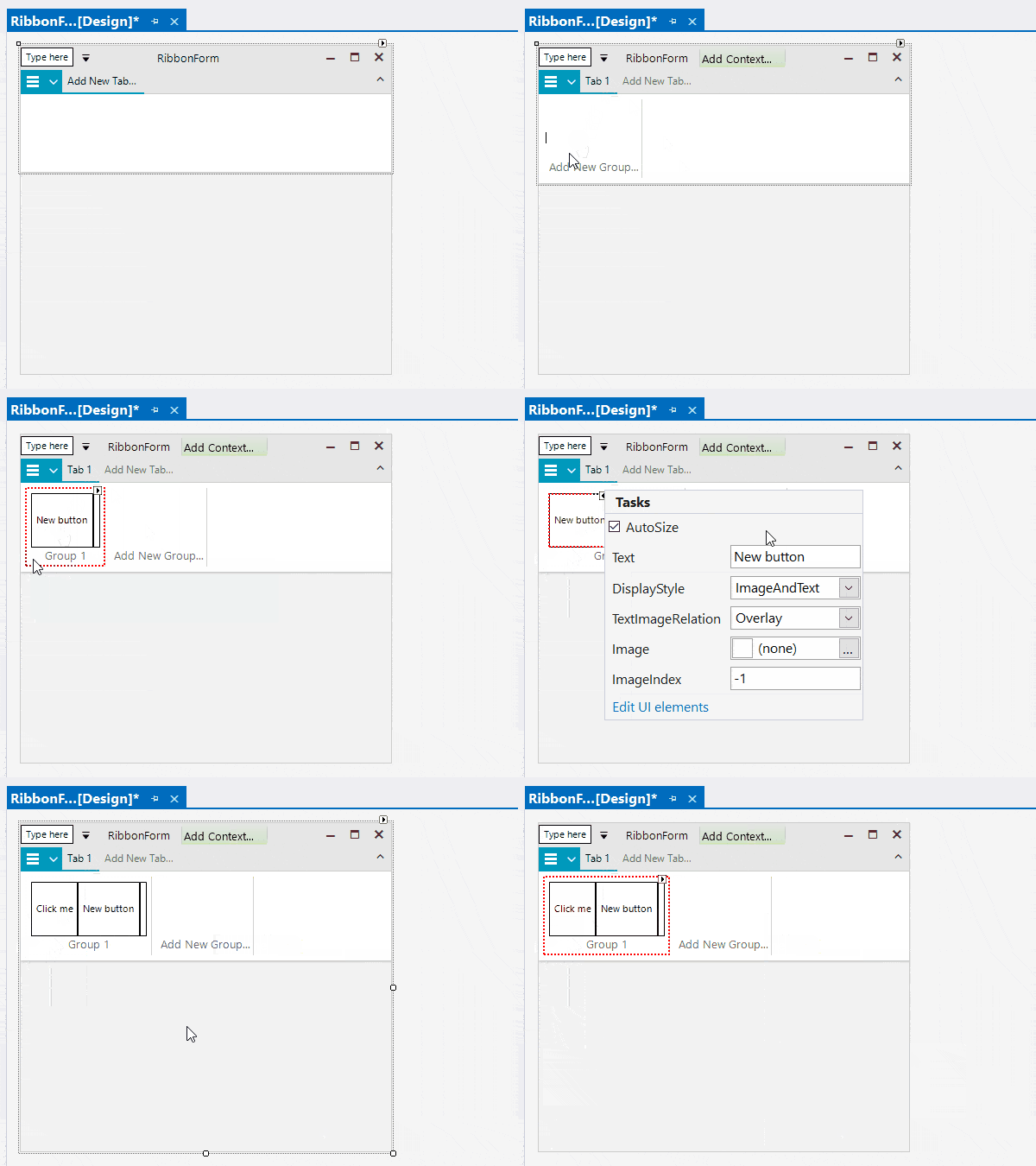
    DPI awareness modes, precise scaling in all types of Forms and UserControls, and many other improvements. </p><h3>Revamped BarCode Component With Support for Reading Barcodes </h3><p>With this release, we are shipping a fully revamped BarCode component&mdash;RadBarCodeView&mdash;that brings many improvements to our barcodes story, including a BarCode reader capability, which can be used to decode barcodes from Bitmap images.
</p><p><strong>Feature highlights:</strong></p><ul><li>Support for one-dimensional barcodes like EAN13, EAN8, UPC-A, UPC-E and Code39 symbologies</li><li>Support for two-dimensional barcodes like QR code, PDF417, and Data Matrix</li><li>BarCodeReader for decoding one dimensional barcodes like Code 11, Code 128, Code 25 Interleaved, Code 25 Standard, Code 39, Code 39 Extended, Code 93, Code 93 Extended, Codabar, Code MSI, EAN 13, GSI 128, EAN 8, Postnet, Planet, Intelligent Mail,
        UPC A, UPC E, UPC Supplement 2, UPC Supplement 5</li></ul><p><img src="https://d585tldpucybw.cloudfront.net/sfimages/default-source/blogs/2022/2022-05/bar-code-reader-control.png?sfvrsn=d02fceec_1" title="Bar Code Reader Control" alt="Bar Code Reader Control" sf-size="100" /></p><h3>Document Processing </h3><p>For a list of the new features shipped in the Telerik Document Processing Libraries shipped with Telerik UI for WinForms, <a href="https://www.telerik.com#Telerik-Document-Processing-Libraries" target="_blank" data-sf-ec-immutable="">see below</a>.</p><h2 id="Telerik-Document-Processing-Libraries">Telerik Document Processing Libraries</h2><h3>SpreadProcessing: Support for Threaded Comments </h3><p>After introducing the <a href="https://www.telerik.com/blogs/insert-edit-delete-notes-spreadsheet-documents-using-spreadprocessing" target="_blank">Notes</a> functionality in the previous release, we have now upgraded the components
    to enable you also work with comments and replies. You can check our help topic for the available <a href="https://docs.telerik.com/devtools/document-processing/libraries/radspreadprocessing/features/comments" target="_blank">API</a>.
</p><h3>SpreadProcessing: Support for References to Whole Columns and Rows </h3><p>Now you can use references to whole rows and columns instead to specific cell ranges only. You can use this functionality to include all the values from a row/column to a formula, for example. All types of references and examples of how you can use them
    are available in the <a href="https://docs.telerik.com/devtools/document-processing/libraries/radspreadprocessing/features/formulas/cell-references" target="_blank">Reference Ranges</a> topic. </p><h3>SpreadProcessing: CONCAT Function </h3><p>Although the components support 200+ built-in functions, we keep adding more to ensure everything you might need is ready to use. The full list of supported functions is available in the&nbsp; <a href="https://docs.telerik.com/devtools/document-processing/libraries/radspreadprocessing/features/formulas/functions" target="_blank">Functions article</a>. </p><h3>WordsProcessing: Support for Continuous Section Break When Exporting to PDF </h3><p>This type of section break was exported as a page break in previous versions of WordsProcessing. It is now properly respected, and the layout of the document is preserved. </p><h3>WordsProcessing: Support for Alternate Text of Images </h3><p>The alt attribute of the img HTML element is preserved even when its value is an empty string. The functionality is also supported for the image shapes defined in a DOCX document. </p><h3>PdfProcessing: Support for Type 3 Fonts </h3><p>The Type 3 fonts are a feature specific to the PDF standard. The Type 3 fonts consist of glyphs defined with PDF graphic operators. Usually, the entire font is embedded in the PDF document, which allows you to view it on devices without accessing fonts
    from the operating system. With R2 2022, PdfProcessing provides you with full support for this type of fonts. </p><p><img src="https://d585tldpucybw.cloudfront.net/sfimages/default-source/blogs/2022/2022-05/telerik-document-processing---type-3-fonts.png?sfvrsn=43dcda0e_1" title="Telerik Document Processing - Type 3 Fonts" alt="Telerik Document Processing - Type 3 Fonts" sf-size="100" /></p><h3>PdfProcessing: Support for Setting Different Permissions When Creating Encrypted Documents<br /></h3><p>These settings enable you to specify whether the user can print the document, copy or modify its content. For more details, check the <a href="https://docs.telerik.com/devtools/document-processing/libraries/radpdfprocessing/formats-and-conversion/pdf/pdfformatprovider/settings" target="_blank">PdfFormatProvider|Settings</a> topic. </p><h3>PdfProcessing: Exposed Settings Allow You To Control Font Embedding </h3><p>The PDF standard requires all fonts except the standard ones to be embedded inside the document to ensure it will always look the same way no matter the device or application used to open it. However, this inevitably leads to increasing the file size.
    With PdfProcessing, you are now allowed to skip the embedding if the file size is crucial for the scenario. For more information on how to use this functionality, check the <a href="https://docs.telerik.com/devtools/document-processing/libraries/radpdfprocessing/formats-and-conversion/pdf/pdfformatprovider/settings" target="_blank">PdfFormatProvider|Settings</a> topic. </p><h2 id="Got-Feedback">Got Feedback?</h2><p>As always, we highly appreciate user feedback, and we would like to invite you to continue sending it to our feedback portals. Only with your feedback we can be sure that we are building the things that you benefit your application development the most!</p><ul><li><a href="https://feedback.telerik.com/maui" target="_blank">Telerik UI for .NET MAUI Feedback Portal</a></li><li><a href="https://feedback.telerik.com/xamarin" target="_blank">Telerik UI for Xamarin Feedback Portal</a></li><li><a href="https://feedback.telerik.com/wpf" target="_blank">Telerik UI for WPF Feedback Portal</a></li><li><a href="https://feedback.telerik.com/winui" target="_blank">Telerik UI for WinUI Feedback Portal</a></li><li><a href="https://feedback.telerik.com/winforms" target="_blank">Telerik UI for WinForms Feedback Portal</a>
 </li></ul><h2 id="Download-the-latest-bits">Download the Latest Bits</h2><p>For existing users to download the latest bits, visit the <a href="https://www.telerik.com/account/downloads" target="_blank">Download section of Your Telerik Account</a> or get the <a href="https://www.telerik.com/try/control-panel" target="_blank">Telerik Control Panel</a> and it will take care of that for you. </p><p>For all new users who want to try the products, visit the following pages:</p><ul><li><a href="https://www.telerik.com/maui-ui" target="_blank">Telerik UI for .NET MAUI</a></li><li><a href="https://www.telerik.com/xamarin-ui" target="_blank">Telerik UI for Xamarin</a></li><li><a href="https://www.telerik.com/products/wpf/overview.aspx" target="_blank">Telerik UI for WPF</a></li><li><a href="https://www.telerik.com/winui" target="_blank">Telerik UI for WinUI</a></li><li><a href="https://www.telerik.com/products/winforms.aspx" target="_blank">Telerik UI for WinForms</a>
 </li></ul><h2 id="Live-Webinar-and-Twitch-Session">Live Webinar and Twitch Session&mdash;May 16 &amp; 17</h2><p>Join us for the <strong>live R2 2022 release webinar on Tuesday, May 17 at 11 a.m. ET</strong> as our Developer Advocates Ed Charbeneau and Sam Basu present in detail the major updates across our .NET UI libraries.</p><p><a href="https://www.telerik.com/campaigns/telerik-r2-2022-release-webinar-web-desktop-mobile-products" class="Btn" target="_blank">Save your Seat </a></p><p>In addition, we will be hosting a <strong>live </strong> <a href="https://www.twitch.tv/codeitlive" target="_blank"><strong>Twitch</strong></a><strong> demo session on Monday, May 16, 10:00 a.m. ET</strong>, where our Developer Advocates
    dive into their favorite new features in an interactive <a href="https://www.telerik.com/campaigns/telerik-and-kendo-ui-r2-2022-twitch-sessions" target="_blank">live streaming session</a>.</p><img src="https://feeds.telerik.com/link/23058/15288246.gif" height="1" width="1"/>]]></content>
  </entry>
</feed>