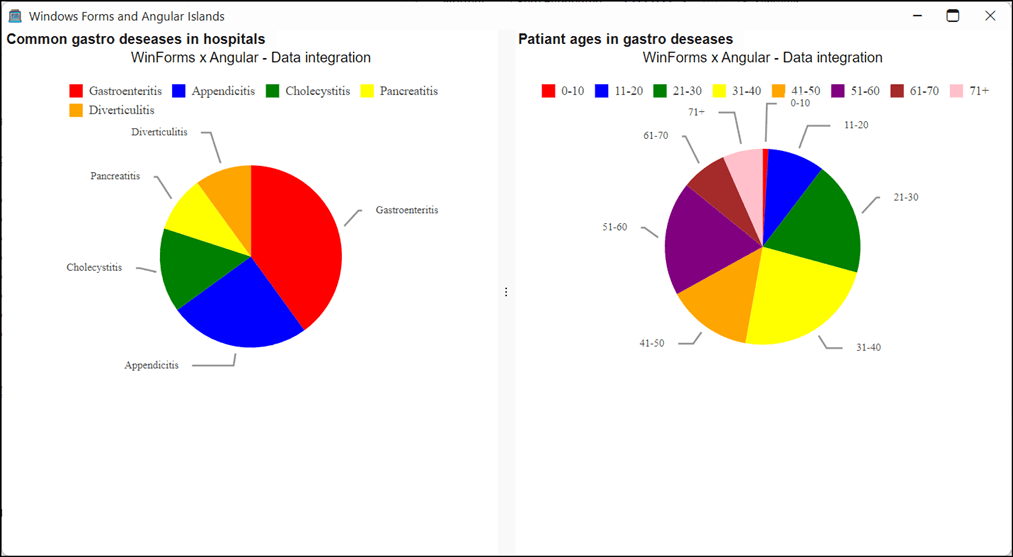
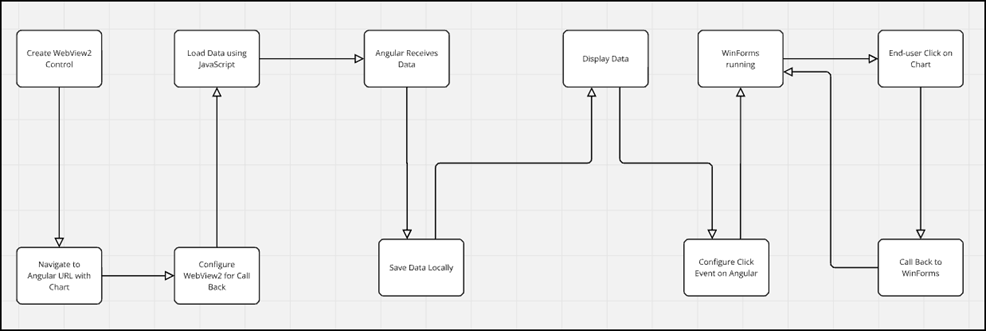
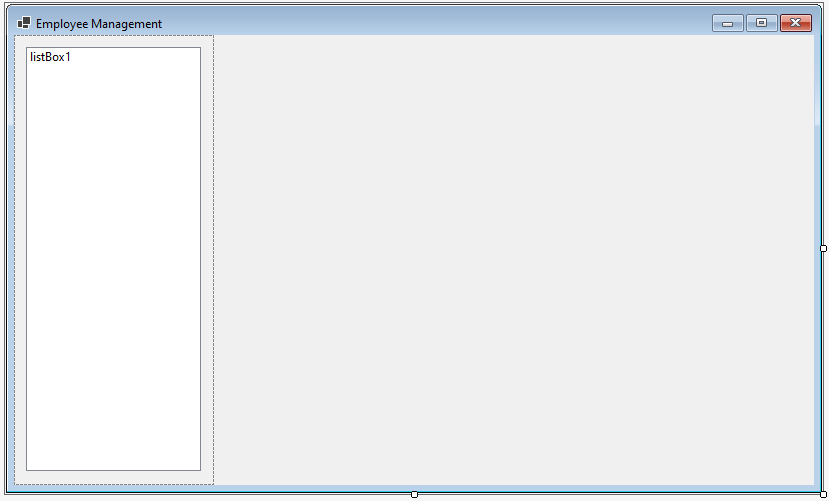
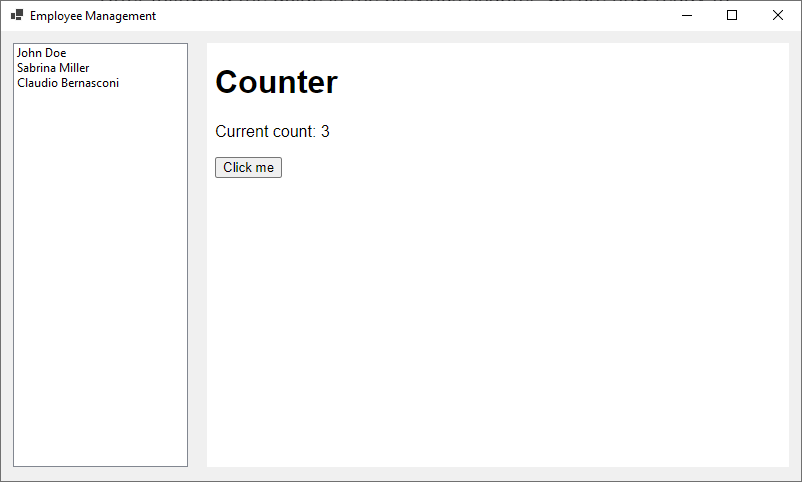
<?xml version="1.0" encoding="UTF-8"?>
<?xml-stylesheet type="text/xsl" media="screen" href="/~files/atom-premium.xsl"?>
                                                                                                                                                                                                                                                                                                                                                                                                                                                                                                                                             
<feed xmlns="http://www.w3.org/2005/Atom" xmlns:feedpress="https://feed.press/xmlns" xmlns:media="http://search.yahoo.com/mrss/" xmlns:podcast="https://podcastindex.org/namespace/1.0">
  <feedpress:locale>en</feedpress:locale>
  <link rel="hub" href="https://feedpress.superfeedr.com/"/>
  <title type="text">Blogs</title>
  <subtitle type="text"/>
  <id>uuid:8773e822-51d4-4202-9c00-e67ef2cf3518;id=5184</id>
  <updated>2026-04-12T06:33:54Z</updated>
  <category term="UI for WinForms Team"/>
  <category term="WinForms"/>
  <contributor>
    <name>Maria Hadzhieva </name>
  </contributor>
  <link rel="alternate" href="https://www.telerik.com/"/>
  <link rel="self" type="application/atom+xml" href="https://feeds.telerik.com/blogs/desktop-winforms"/>
  <entry>
    <id>urn:uuid:ffc05fc5-97d3-4e14-963e-b0b862aaea8c</id>
    <title type="text">Building a Real-Time Security Monitoring Dashboard with Telerik UI for WinForms</title>
    <summary type="text">See how Telerik UI for WinForms components, like charts, maps, gauges and context menus, can easily compose a security monitoring dashboard.</summary>
    <published>2026-02-17T21:21:35Z</published>
    <updated>2026-04-12T06:33:54Z</updated>
    <author>
      <name>Jefferson S. Motta </name>
    </author>
    <link rel="alternate" href="https://feeds.telerik.com/link/23062/17278154/building-real-time-security-monitoring-dashboard-telerik-ui-winforms"/>
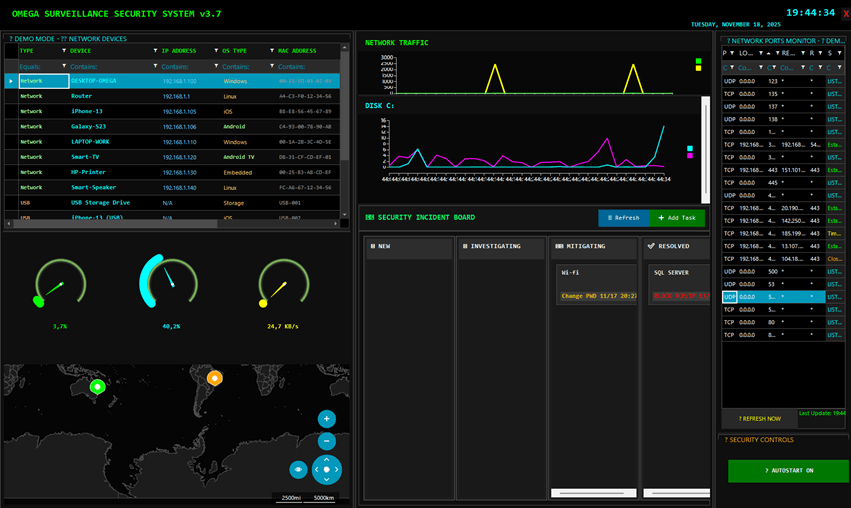
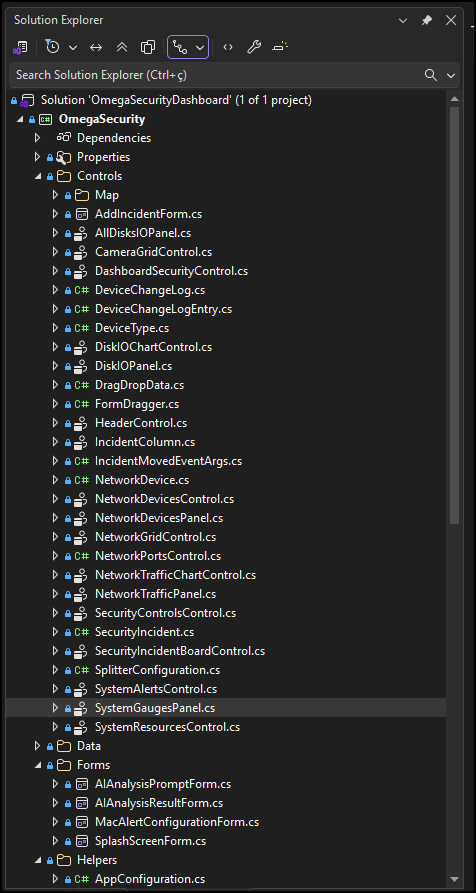
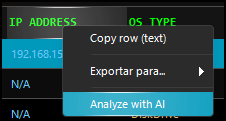
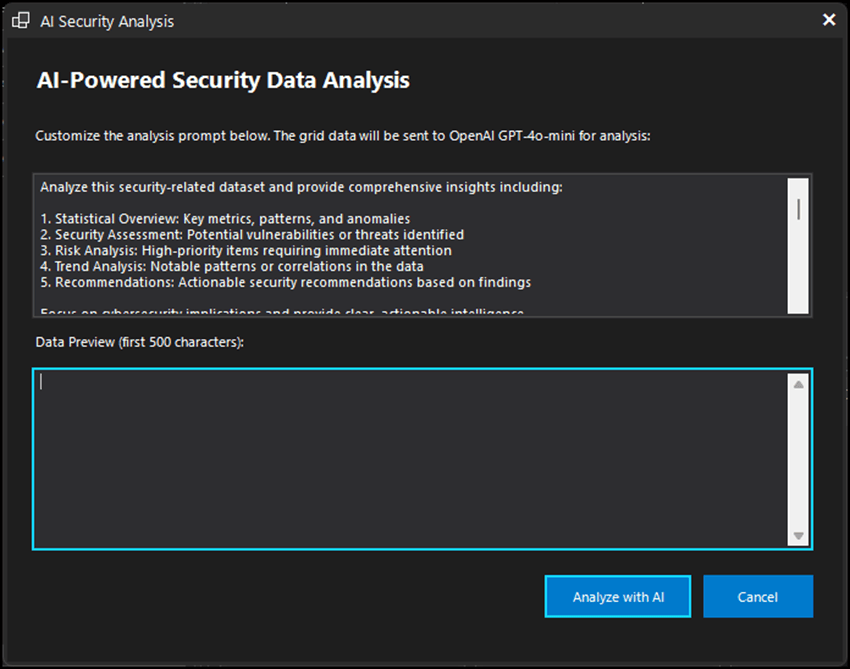
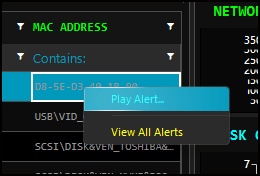
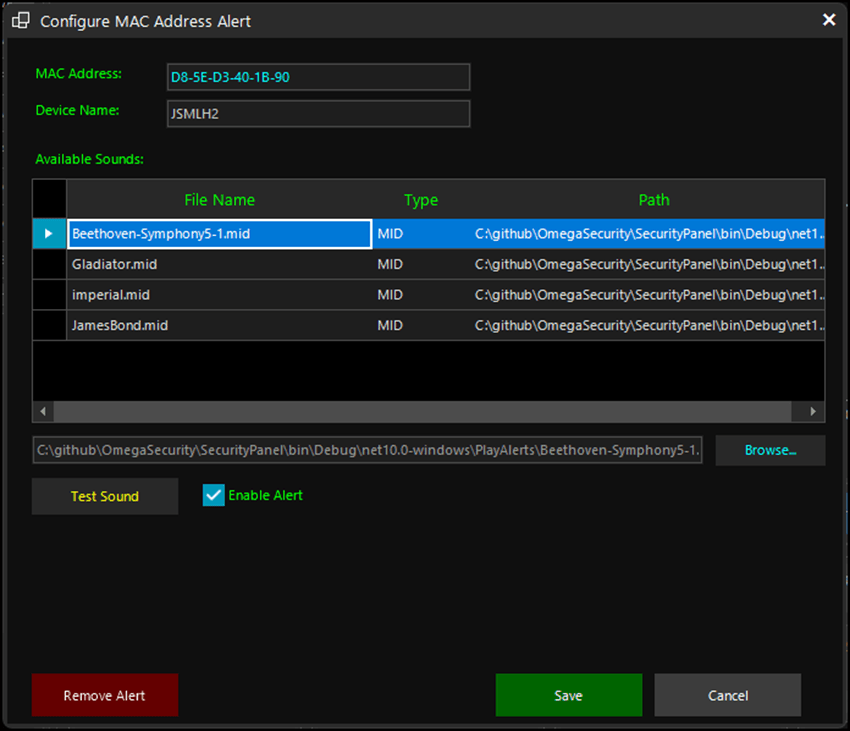
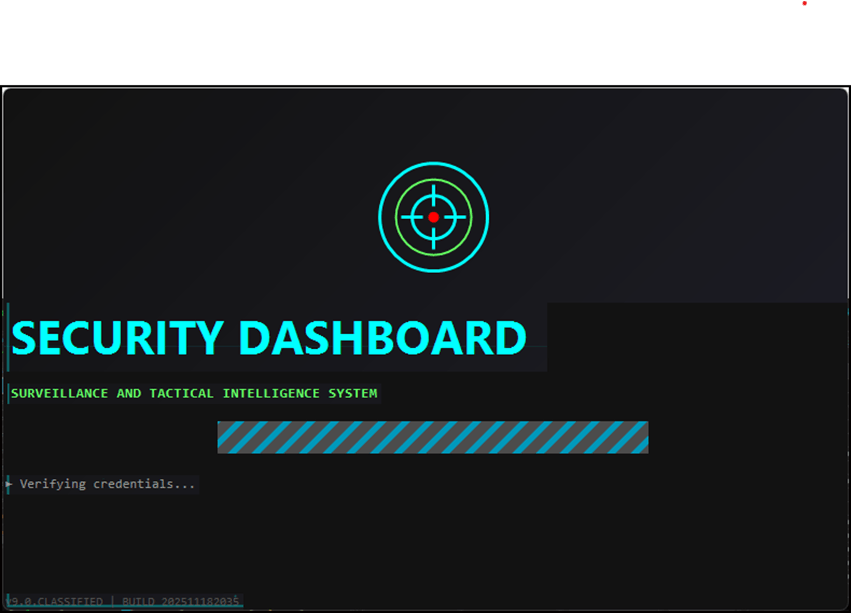
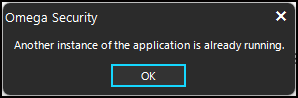
    <content type="text"><![CDATA[<p><span class="featured">See how Telerik UI for WinForms components, like charts, maps, gauges and context menus, can easily compose a security monitoring dashboard.</span></p><p><img src="https://d585tldpucybw.cloudfront.net/sfimages/default-source/blogs/2026/2026-02/omega-security-dashboard.png?sfvrsn=af349cd3_2" alt="Omega Security Dashboard" /><br /><span style="font-size:14px;">Omega Security Dashboard</span></p><p>In this post, I will show you the app I built with a modern, responsive security surveillance using Progress <a target="_blank" href="https://www.telerik.com/products/winforms.aspx">Telerik UI for WinForms</a>, demonstrating that desktop applications can have a contemporary appearance and functionality. This platform remains a robust choice for corporate desktop applications, especially for real-time monitoring systems.</p><p>The app demonstrates the integration of 10+ Telerik components working together to create a cohesive, professional-grade security monitoring experience. The application features real-time threat visualization on an interactive RadMap with live <a target="_blank" href="https://www.greynoise.io/">GreyNoise</a>* API integration, a custom Kanban board for incident management with drag-and-drop functionality, and intelligent AI-powered analysis of network devices using ChatGPT. The system monitors Bluetooth, USB and network devices simultaneously, triggering customizable sound alerts when specific MAC addresses are detected. All of this runs on .NET 10 with C# 14, wrapped in a striking FluentDark theme with neon accents that gives it a true cybersecurity operations center aesthetic.</p><p><img src="https://d585tldpucybw.cloudfront.net/sfimages/default-source/blogs/2026/2026-02/solution-explorer.png?sfvrsn=24a717a7_2" alt="Solution Explorer for Omega Security" /><br /><span style="font-size:14px;">Solution Explorer</span></p><h2 id="why-winforms-for-monitoring-dashboards">Why WinForms for Monitoring Dashboards?</h2><p>Before diving into the functionalities, it&rsquo;s worth questioning: why choose WinForms in 2026? The answer lies in the unique characteristics of this platform:</p><ul><li><strong>Native performance</strong>: WinForms applications run directly on the operating system, without the overhead of a browser, resulting in faster screen updates and lower memory consumption.</li><li><strong>Direct access to system resources</strong>: For a monitoring system that needs to check USB devices, analyze network traffic and monitor system resources, native Windows access is fundamental.</li><li><strong>24/7 reliability</strong>: Security monitoring systems need to run continuously. WinForms offers proven stability in critical environments where uptime is essential.</li><li><strong>Independence from web infrastructure</strong>: WinForms does not require web servers, SSL certificates or complex network configurations. The application simply runs.</li></ul><h2 id="overview-of-the-omega-surveillance-security-system">Overview of the Omega Surveillance Security System</h2><p>This app is a base for a professional security dashboard, and I&rsquo;m using it on my networks to understand what is behind my network, and&mdash;this is awesome&mdash;I discovered that the iPhone of my partner was linking her name on the network without her knowing it.</p><p>It also can be used to detect PCs and Mobiles connected in the network as well Bluetooth devices.</p><p>Here is what the monitoring app offers:</p><ol><li><strong>Network device monitoring</strong>: Automatically detects devices connected via Bluetooth, LAN and USB.</li><li><strong>Security alerts</strong>: Triggers sound alarms (MP3, MID or WAV) when a specific MAC address enters the network.</li><li><strong>AI analysis</strong>: Integrates OpenAI ChatGPT for intelligent analysis of captured data.</li><li><strong>Threat intelligence</strong>: Displays the top 10 cities under attack using the GreyNoise* API (when configured).</li><li><strong>Data export</strong>: Saves information in multiple formats (TXT, HTML, PDF, CSV, Excel).</li><li><strong>Resource monitoring</strong>: CPU, RAM, network traffic and disk space in real time.</li><li><strong>Startup control</strong>: AutoStart ON/OFF for automatic execution with Windows.</li><li><strong>Security Incidents Dashboard</strong>: Allows you to register cards with security activities and manage them with a CRUD with status lanes for each incident.</li></ol><h2 id="telerik-components-used">Telerik Components Used</h2><p>The dashboard uses several components from the Telerik UI for WinForms framework, each chosen for its specific capabilities.</p><h3 id="radgridview-device-listing">RadGridView Device Listing</h3><p>The RadGridView is the heart of device monitoring. It displays both network devices, Bluetooth and connected USB devices.</p><p><strong>AI Analysis Feature</strong>: A distinctive functionality is the ability to analyze grid data using ChatGPT:</p><p>The AI can be accessed on right mouse click on the Grid in the option <strong>Analyze with AI</strong>.</p><p><img src="https://d585tldpucybw.cloudfront.net/sfimages/default-source/blogs/2026/2026-02/context-menu.png?sfvrsn=2548d56f_2" alt="IP address – context menu with options to copy row, export, analyze with AI" /><br /><span style="font-size:14px;">Context Menu</span></p><p>A form with the information about the PC will be sent to be analyzed:</p><p><img src="https://d585tldpucybw.cloudfront.net/sfimages/default-source/blogs/2026/2026-02/ai-powered-security-data-analysis-form.png?sfvrsn=d752c39a_2" alt="AI-Powered Security Data Analysis form" /><br /><span style="font-size:14px;">AI Form</span></p><p>The AI analysis on my PC showed that it was at risk, with some services exposed on the network.</p><h3 id="radchartview-traffic-visualization">RadChartView Traffic Visualization</h3><p>The RadChartView renders real timeline charts for network traffic and disk usage.</p><h3 id="radmap-threat-geolocation">RadMap Threat Geolocation</h3><p>The RadMap visually displays the geographic location of detected threats. When integrated with the GreyNoise API, it shows the 10 most attacked cities. I did this for fun, but you can use the control inside a form and watch more cities if this makes sense for you.</p><h3 id="radradialgauge-performance-indicators">RadRadialGauge Performance Indicators</h3><p>The radial gauges provide an intuitive visualization of system resource usage. They declare the vars and initialize the Gauges.</p><h3 id="security-alert-system">Security Alert System</h3><p>One of the most important functionalities is the alarm system when a specific MAC address is detected.</p><p>To create an alert, click the third button on the mouse in the MAC ADDRESS column.</p><p><img src="https://d585tldpucybw.cloudfront.net/sfimages/default-source/blogs/2026/2026-02/context-alert-menu.png?sfvrsn=bfe26104_2" alt="Context Alert menu – with options to play alert or view all alerts" /><br /><span style="font-size:14px;">Context Alert Menu</span></p><p><img src="https://d585tldpucybw.cloudfront.net/sfimages/default-source/blogs/2026/2026-02/configure-alert-form.png?sfvrsn=7d349ff_2" alt="Configure alert form" /><br /><span style="font-size:14px;">Configure Alert Form</span></p><p>The code below plays a sound with the MAC address is detected on the network.</p><h3 id="data-export">Data Export</h3><p>The system allows exporting, or copying lines to memory, or all grid data in multiple professional formats.</p><h3 id="autostart-and-system-settings">AutoStart and System Settings</h3><p>The AutoStart feature allows the application to start automatically with Windows.</p><h3 id="splash-screen">Splash Screen</h3><p>The application has a splash screen to help the user avoid multiples starts. It uses C# Mutex to avoid multiples instances.</p><p><img src="https://d585tldpucybw.cloudfront.net/sfimages/default-source/blogs/2026/2026-02/security-splash-screen.png?sfvrsn=40e45e44_2" alt="Security dashboard splash screen" /><br /><span style="font-size:14px;">Splash Screen</span></p><p>When starting a second instance, this message below will be fired:</p><p><img src="https://d585tldpucybw.cloudfront.net/sfimages/default-source/blogs/2026/2026-02/message-avoiding-multiples-instances.png?sfvrsn=8d3b47eb_2" alt="Message avoiding multiples instances of Omega Security: Another instance of the application is already running" /><br /><span style="font-size:14px;">Message Avoiding Multiples Instances</span></p><h2 id="accelerated-development-with-ai">Accelerated Development with AI</h2><p><strong>Vibe Coding</strong>: using AI assistants to accelerate initial development, followed by manual adjustments to refine the implementation.</p><p>The process was:</p><ol><li><strong>Initial layout generation</strong>: I described the dashboard structure to the AI, and it generated the base code for the controls.</li><li><strong>Integration of Telerik UI components</strong>: I requested the AI to use Telerik components, but some had to be replaced manually.</li><li><strong>Business logic</strong>: From prompts, it was possible to create the alert logic according to the MAC address.</li><li><strong>Visual refinement</strong>: Fine adjustments to the theme and colors were made iteratively.</li><li><strong>C# 14</strong>: I changed manually some features like the new null-conditional assignment. And there are other to adjust yet.</li></ol><p>This hybrid approach allowed me to significantly accelerate development without compromising code quality or customization.</p><blockquote><p><strong>Please note:</strong> This project was completed before the <a href="https://www.telerik.com/products/winforms/documentation/ai-coding-assistant/overview" target="_blank">Telerik UI for WinForms AI Coding Assistant</a> was available. This resource is now the preferred way to use AI to code with Telerik UI for WinForms as it is built with direct connection to the docs. (And if you need help, the Progress Telerik support team is second to none!)</p></blockquote><h2 id="open-source-and-demonstration">Open Source and Demonstration</h2><p>The complete <a target="_blank" href="https://github.com/jssmotta/OmegaSecurityOpenSource">source code</a> for this project is available on GitHub (requires a Telerik license to use it with the WinForms components). The code helps you to:</p><ul><li>Study the implementation of Telerik components</li><li>Adapt for your specific needs</li><li>Contribute with improvements</li></ul><p>I also made an executable available for testing, allowing you to experience the system before diving into the code.</p><h2 id="conclusion">Conclusion</h2><p>This project demonstrates that WinForms remains a viable and powerful platform for modern desktop applications, especially when combined with the robust component suite in Telerik UI for WinForms.</p><p>The main lessons learned:</p><ol><li><strong>Performance matters</strong>: For real-time dashboards, the native execution of WinForms offers significant advantages over web solutions.</li><li><strong>Professional componentization</strong>: Telerik components eliminate the need to develop complex controls from scratch.</li><li><strong>Modern integrations</strong>: WinForms can easily integrate with modern APIs (OpenAI, GreyNoise) and remain relevant.</li><li><strong>User experience</strong>: With the right themes and good information architecture, WinForms can compete visually with any technology.</li></ol><p>If you are maintaining legacy WinForms applications or considering this platform for new critical desktop applications, Telerik UI for WinForms provides the tools you need to create professional, modern experiences.</p><p>The Omega Surveillance system is proof that WinForms not only survives in 2026, but it also thrives when combined with the right tools.</p><p>Try Telerik UI for WinForms free for 30 days!</p><p><a target="_blank" href="https://www.telerik.com/try/ui-for-winforms" class="Btn">Try Now</a></p><hr /><p>*<strong>GreyNoise</strong> is a cybersecurity intelligence platform that helps organizations distinguish between benign internet background noise and genuine malicious activity. By operating one of the largest and most sophisticated global sensor networks, it collects and analyzes mass scanning and exploitation attempts across the internet in real time. This enables security teams to filter out low-priority alerts, focus on urgent threats and reduce mean time to respond (MTTR). Trusted by over 80,000 users, 400+ government agencies and 60% of the Fortune 1000, it provides definitive, verifiable data, including complete packet captures, and integrates seamlessly into existing security workflows to empower defenders with actionable insights.</p><h3 id="references">References</h3><p><strong>GitHub</strong>: <a target="_blank" href="https://github.com/jssmotta/OmegaSecurityOpenSource">https://github.com/jssmotta/OmegaSecurityOpenSource</a></p><p><strong>GreyNoise:</strong> <a target="_blank" href="https://www.greynoise.io/">https://www.greynoise.io/</a></p><img src="https://feeds.telerik.com/link/23062/17278154.gif" height="1" width="1"/>]]></content>
  </entry>
  <entry>
    <id>urn:uuid:306b27d6-605f-412e-994b-370ffd28c542</id>
    <title type="text">Using Angular in a Windows Forms Application</title>
    <summary type="text">See how to use Kendo UI for Angular components in Telerik UI for WinForms applications to exchange communication and events.</summary>
    <published>2025-02-10T14:10:00Z</published>
    <updated>2026-04-12T06:33:54Z</updated>
    <author>
      <name>Jefferson S. Motta </name>
    </author>
    <link rel="alternate" href="https://feeds.telerik.com/link/23062/16959649/using-angular-windows-forms-application"/>
    <content type="text"><![CDATA[<p><span class="featured"><strong></strong>See how to use Kendo UI for Angular components in Telerik UI for WinForms applications to exchange communication and events.</span></p><p>In this post, I&rsquo;ll demonstrate how to use Progress <a target="_blank" href="https://www.telerik.com/kendo-angular-ui">Kendo UI for Angular</a> components in <a target="_blank" href="https://www.telerik.com/products/winforms.aspx">Telerik UI for WinForms</a> applications. You&rsquo;ll learn the pitfalls and how to implement communication to Angular from WinForms and get back events from Angular.</p><p>I&rsquo;m sharing the complete <a href="https://github.com/jssmotta/TelerikAngularAndWinForms  " target="_blank">source code</a>, which is fully functional using Telerik UI, .NET 8 and Angular, on my GitHub.</p><blockquote><p><strong>Note:</strong> This post was written before the launch of .NET 9 or Angular 19, but don&rsquo;t forget you can get started with both of those new versions. </p></blockquote><h2 id="if-you-are-asking-yourself-why-would-i-do-this">If You Are Asking Yourself: Why Would I Do This?</h2><p>There are several scenarios where this could be applied:</p><ul><li>Start the migration from legacy WinForms applications to Angular</li><li>Integration from local resources (on-premises databases and other WinForms resources)</li><li>Build lightweight UI applications in complex WinForms apps</li><li>Build WinForms applications with the look and feel of a web application</li><li>Execute distributed UIs running in Docker, IIS or Cloud</li><li>Update the UI without updating the WinForms app client application</li></ul><p>These transition scenarios from your legacy applications can help you use the active production resources while developing the new service/application. A hybrid solution can keep the current WinForms while empowering developers to build the client-side application.</p><p>The sky is the limit.</p><h2 id="let’s-do-it">Let&rsquo;s Do It</h2><p>To replicate this sample, you must create a WinForms app and an Angular project to host the desired controls. If you are integrating with a legacy WinForms app, you just need to create the Angular project.</p><p>Install the last version of Angular on the terminal prompt:</p><pre><code>1.npm install -g @angular/cli.
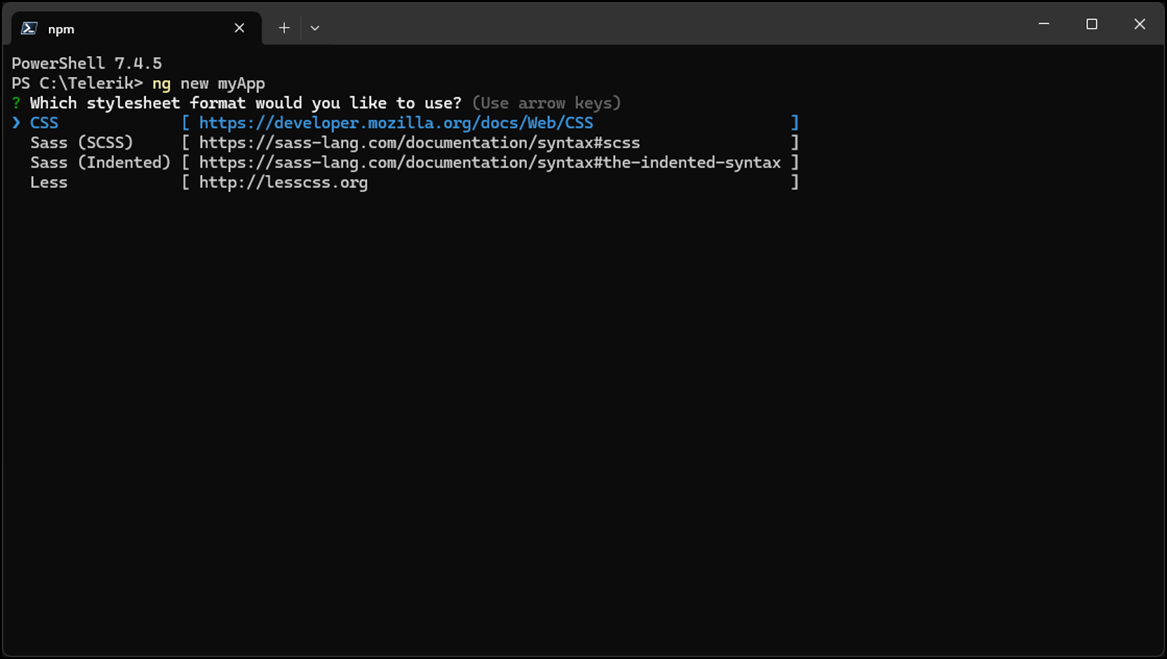
</code></pre><p>Enter in a target directory for example C:\Telerik, and create the new project:</p><pre><code>1.ng new my-app
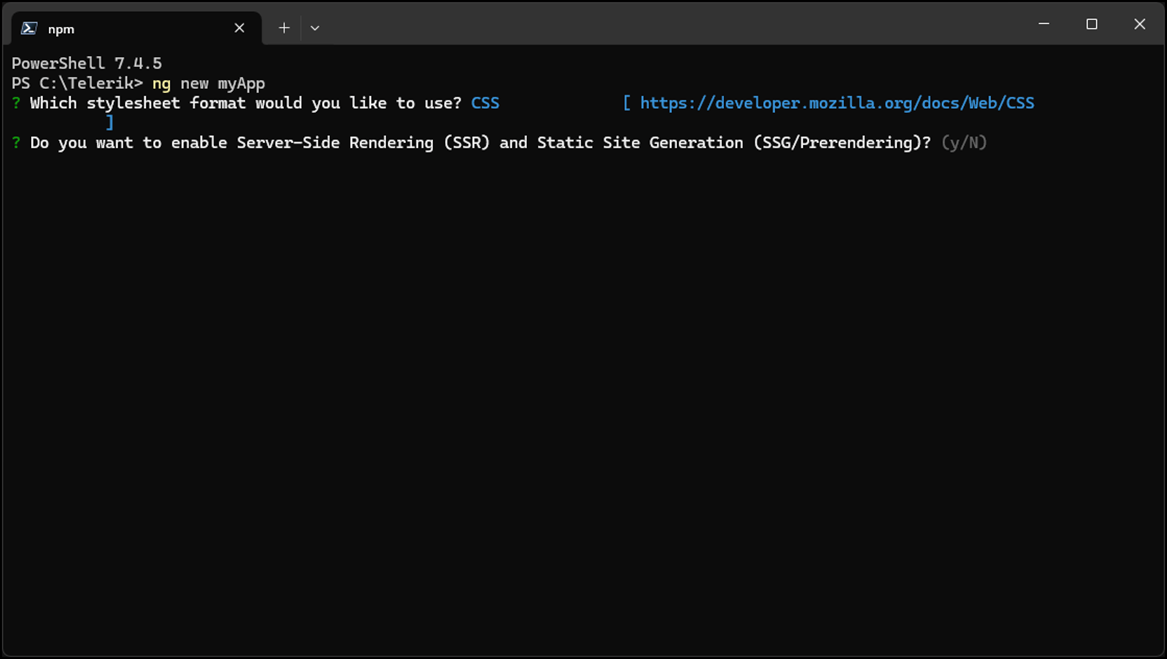
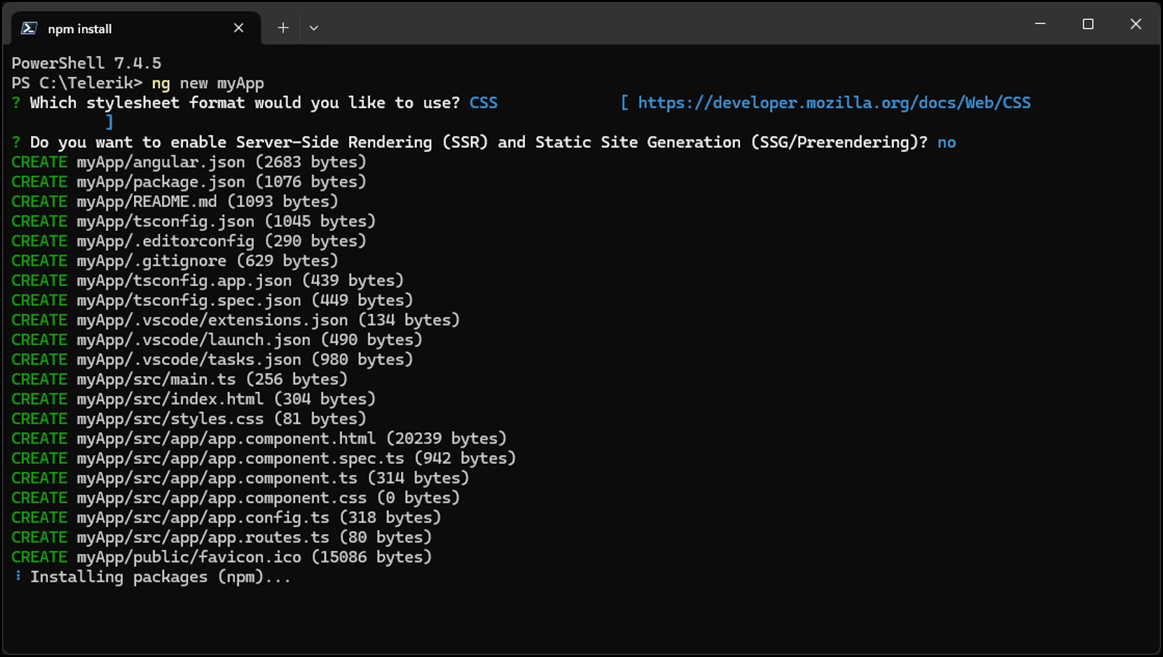
</code></pre><p>Choose the options for CSS:</p><p><img src="https://d585tldpucybw.cloudfront.net/sfimages/default-source/blogs/2025/2025-01/css-option.png?sfvrsn=273214c8_2" alt="" /></p><p>Enable or not SSR (Server-Side Rendering) or SSG (Static Site Generation). I prefer SSG for small applications to avoid constant network traffic:</p><p><img src="https://d585tldpucybw.cloudfront.net/sfimages/default-source/blogs/2025/2025-01/ssg-options.png?sfvrsn=f4d36af8_2" alt="" /></p><p>Wait for the installation to finish:</p><p><img src="https://d585tldpucybw.cloudfront.net/sfimages/default-source/blogs/2025/2025-01/installation.png?sfvrsn=1aaf5975_2" alt="" /></p><h2 id="about-the-objective-of-this-application-sample">About the Objective of This Application Sample</h2><p>For this case, I&rsquo;m demonstrating using Telerik UI for an Angular Chart control and treating the event click on WinForms.</p><p><strong>Note:</strong> Progress Telerik builds an environment on the web, which is fantastic; thousands of samples are available online to get started on Telerik technologies. In this case, I&rsquo;m using part of the <a target="_blank" href="https://www.telerik.com/blogs/details/angular-visualizations-create-data-visualization-kendo-ui-charts">code from this post</a>.</p><h2 id="kendo-ui-for-angular-app">Kendo UI for Angular App</h2><p>Follow the steps to configure and use the controls from WinForms.</p><ol start="0"><li>We are going to be using Kendo UI components, specifically the Kendo UI for Angular Pie Chart. Before creating the chart and its functionality, let&rsquo;s install it so our app has access to it. At the root of our <code class="inline-code">my-app</code> project, type this installation command:</li></ol><pre><code>ng add @progress/kendo-angular-charts</code></pre><p>There are multiple things this command does for us (like install the charts and its dependencies. Read more about not only that command but other <a target="_blank" href="https://www.telerik.com/kendo-angular-ui/components/charts/installation/getting-started">special install cases in the Kendo UI docs</a>.</p><p>Now, add <code class="inline-code">kendo-angular-charts</code> to your main.</p><p>It is necessary to create the pages and component hosts and add an interface (<code class="inline-code">verb</code>) and a <code class="inline-code">CustomEvent</code> to return data.</p><ol><li><p>Start creating the pages with the controls you like to use. Let&rsquo;s generate an angular component called <code class="inline-code">graph-control</code> to house these, the graph-control will host the Angular chart component:</p><pre><code>ng g c graph-control</code></pre></li><li>Add your new component to the app.routes.ts the route for the pages that hosts the components:</li></ol><pre class=" language-ts"><code class="prism  language-ts"><span class="token keyword">import</span> <span class="token punctuation">{</span> Routes <span class="token punctuation">}</span> <span class="token keyword">from</span> <span class="token string">'@angular/router'</span><span class="token punctuation">;</span>
<span class="token keyword">import</span> <span class="token punctuation">{</span> GraphControlComponent <span class="token punctuation">}</span> <span class="token keyword">from</span> <span class="token string">'./graph-control/graph-control.component'</span><span class="token punctuation">;</span>
 
<span class="token keyword">export</span> <span class="token keyword">const</span> routes<span class="token punctuation">:</span> Routes <span class="token operator">=</span> <span class="token punctuation">[</span>
    <span class="token punctuation">{</span>
     path<span class="token punctuation">:</span> <span class="token string">'graph-control'</span><span class="token punctuation">,</span> 
     component<span class="token punctuation">:</span> GraphControlComponent 
    <span class="token punctuation">}</span>
<span class="token punctuation">]</span><span class="token punctuation">;</span>
</code></pre><ol start="3"><li>Create the component to host the control with the command line. In this sample, we are currently demonstrating just the chart-component:</li></ol><pre><code>1.ng g c win-chart
</code></pre><ol start="4"><li>Customize the control.</li></ol><p>Add the interface that will be used to exchange the data (<code class="inline-code">receiveData</code>) integrated with WinForms. I call these verbs because you can add more than one interface to transfer data:</p><pre class=" language-csharp"><code class="prism  language-csharp"><span class="token number">1</span><span class="token punctuation">.</span>declare <span class="token keyword">global</span> <span class="token punctuation">{</span>
<span class="token number">2</span><span class="token punctuation">.</span>  <span class="token keyword">interface</span> <span class="token class-name">Window</span> <span class="token punctuation">{</span>
<span class="token number">3</span><span class="token punctuation">.</span>    receiveData<span class="token punctuation">:</span> <span class="token punctuation">(</span>data<span class="token punctuation">:</span> any<span class="token punctuation">)</span> <span class="token operator">=</span><span class="token operator">&gt;</span> <span class="token keyword">void</span><span class="token punctuation">;</span>
<span class="token number">4</span><span class="token punctuation">.</span>  <span class="token punctuation">}</span>
<span class="token number">5</span><span class="token punctuation">.</span><span class="token punctuation">}</span>
</code></pre><p>Now, right inside our WinChart Component, we need to create a <code class="inline-code">public winFormsData: any = null;</code> variable to hold our data in.</p><ol start="5"><li>Next, let&rsquo;s incorporate local storage to preserve our data. We can use it to store our data between page refreshes; there is nothing more infuriating to a user than losing progress. In our init function, we can get the data from local storage and update our <code class="inline-code">winFormsData</code> value if <code class="inline-code">savedData</code> exists here.</li></ol><pre class=" language-csharp"><code class="prism  language-csharp"><span class="token number">1</span><span class="token punctuation">.</span><span class="token keyword">public</span> winFormsData<span class="token punctuation">:</span> any <span class="token operator">=</span> <span class="token keyword">null</span><span class="token punctuation">;</span>
<span class="token number">2</span><span class="token punctuation">.</span> <span class="token function">constructor</span><span class="token punctuation">(</span><span class="token punctuation">)</span> <span class="token punctuation">{</span>
<span class="token number">3</span><span class="token punctuation">.</span>    window<span class="token punctuation">.</span>receiveData <span class="token operator">=</span> <span class="token punctuation">(</span>data<span class="token punctuation">:</span> any<span class="token punctuation">)</span> <span class="token operator">=</span><span class="token operator">&gt;</span> <span class="token punctuation">{</span>
<span class="token number">4</span><span class="token punctuation">.</span>      <span class="token keyword">this</span><span class="token punctuation">.</span>winFormsData <span class="token operator">=</span> data<span class="token punctuation">;</span>  
<span class="token number">5</span><span class="token punctuation">.</span>      localStorage<span class="token punctuation">.</span><span class="token function">setItem</span><span class="token punctuation">(</span><span class="token string">'winFormsData'</span><span class="token punctuation">,</span> JSON<span class="token punctuation">.</span><span class="token function">stringify</span><span class="token punctuation">(</span>data<span class="token punctuation">)</span><span class="token punctuation">)</span><span class="token punctuation">;</span> 
<span class="token number">6</span><span class="token punctuation">.</span>    <span class="token punctuation">}</span><span class="token punctuation">;</span> 
<span class="token number">7</span><span class="token punctuation">.</span>  <span class="token punctuation">}</span>
<span class="token number">8</span><span class="token punctuation">.</span>  
<span class="token number">9</span><span class="token punctuation">.</span>  <span class="token function">ngOnInit</span><span class="token punctuation">(</span><span class="token punctuation">)</span> <span class="token punctuation">{</span>
<span class="token number">10</span><span class="token punctuation">.</span>    <span class="token keyword">const</span> savedData <span class="token operator">=</span> localStorage<span class="token punctuation">.</span><span class="token function">getItem</span><span class="token punctuation">(</span><span class="token string">'winFormsData'</span><span class="token punctuation">)</span><span class="token punctuation">;</span>
<span class="token number">11</span><span class="token punctuation">.</span>    <span class="token keyword">if</span> <span class="token punctuation">(</span>savedData<span class="token punctuation">)</span> <span class="token punctuation">{</span>
<span class="token number">12</span><span class="token punctuation">.</span>      <span class="token keyword">this</span><span class="token punctuation">.</span>winFormsData <span class="token operator">=</span> JSON<span class="token punctuation">.</span><span class="token function">parse</span><span class="token punctuation">(</span>savedData<span class="token punctuation">)</span><span class="token punctuation">;</span>
<span class="token number">13</span><span class="token punctuation">.</span>    <span class="token punctuation">}</span>
<span class="token number">14</span><span class="token punctuation">.</span>  <span class="token punctuation">}</span>
</code></pre><p>Add a click event for the chart to use in the component.html:</p><pre class=" language-csharp"><code class="prism  language-csharp"><span class="token number">1</span><span class="token punctuation">.</span>  <span class="token function">onSeriesClick</span><span class="token punctuation">(</span><span class="token keyword">event</span><span class="token punctuation">:</span> SeriesClickEvent<span class="token punctuation">)</span><span class="token punctuation">:</span> <span class="token keyword">void</span> <span class="token punctuation">{</span>
<span class="token number">2</span><span class="token punctuation">.</span>    <span class="token keyword">const</span> category <span class="token operator">=</span> <span class="token keyword">event</span><span class="token punctuation">.</span>category<span class="token punctuation">;</span>
<span class="token number">3</span><span class="token punctuation">.</span>    <span class="token keyword">const</span> <span class="token keyword">value</span> <span class="token operator">=</span> <span class="token keyword">event</span><span class="token punctuation">.</span><span class="token keyword">value</span><span class="token punctuation">;</span>
<span class="token number">4</span><span class="token punctuation">.</span>    
<span class="token number">5</span><span class="token punctuation">.</span>    console<span class="token punctuation">.</span><span class="token function">log</span><span class="token punctuation">(</span><span class="token string">'Category:'</span><span class="token punctuation">,</span> category<span class="token punctuation">)</span><span class="token punctuation">;</span>
<span class="token number">6</span><span class="token punctuation">.</span>    console<span class="token punctuation">.</span><span class="token function">log</span><span class="token punctuation">(</span><span class="token string">'Value:'</span><span class="token punctuation">,</span> <span class="token keyword">value</span><span class="token punctuation">)</span><span class="token punctuation">;</span> 
<span class="token number">7</span><span class="token punctuation">.</span>
<span class="token number">8</span><span class="token punctuation">.</span>    <span class="token keyword">const</span> message <span class="token operator">=</span> JSON<span class="token punctuation">.</span><span class="token function">stringify</span><span class="token punctuation">(</span><span class="token punctuation">{</span> category<span class="token punctuation">,</span> <span class="token keyword">value</span> <span class="token punctuation">}</span><span class="token punctuation">)</span><span class="token punctuation">;</span>
<span class="token number">9</span><span class="token punctuation">.</span>
<span class="token number">10</span><span class="token punctuation">.</span>    <span class="token comment">// Create a new custom event</span>
<span class="token number">11</span><span class="token punctuation">.</span>    <span class="token keyword">const</span> eventClick <span class="token operator">=</span> <span class="token keyword">new</span> <span class="token class-name">CustomEvent</span><span class="token punctuation">(</span><span class="token string">'MyClick'</span><span class="token punctuation">,</span> <span class="token punctuation">{</span>
<span class="token number">12</span><span class="token punctuation">.</span>      detail<span class="token punctuation">:</span> <span class="token punctuation">{</span> message<span class="token punctuation">:</span> message <span class="token punctuation">}</span><span class="token punctuation">,</span> <span class="token comment">// Pass any necessary data</span>
<span class="token number">13</span><span class="token punctuation">.</span>    <span class="token punctuation">}</span><span class="token punctuation">)</span><span class="token punctuation">;</span>  
<span class="token number">14</span><span class="token punctuation">.</span>
<span class="token number">15</span><span class="token punctuation">.</span>    window<span class="token punctuation">.</span><span class="token function">dispatchEvent</span><span class="token punctuation">(</span>eventClick<span class="token punctuation">)</span><span class="token punctuation">;</span>  
<span class="token number">16</span><span class="token punctuation">.</span>  <span class="token punctuation">}</span>
</code></pre><p><strong>Tip:</strong> This is a pitfall; pay attention to the JSON you will return. The incorrect format for the JSON will crash the delivery:</p><pre class=" language-json"><code class="prism  language-json"><span class="token number">1</span><span class="token punctuation">.</span><span class="token keyword">const</span> message <span class="token operator">=</span> JSON<span class="token punctuation">.</span><span class="token function">stringify</span><span class="token punctuation">(</span><span class="token punctuation">{</span> category<span class="token punctuation">,</span> value <span class="token punctuation">}</span><span class="token punctuation">)</span><span class="token punctuation">;</span>
</code></pre><p>Remove the default HTML from win-chart.component.html and let&rsquo;s go ahead and add a Kendo UI Chart that will use that series click we just made.</p><pre class=" language-html"><code class="prism  language-html">1.<span class="token tag"><span class="token tag"><span class="token punctuation">&lt;</span>div</span> <span class="token attr-name">*ngIf</span><span class="token attr-value"><span class="token punctuation">=</span><span class="token punctuation">"</span>winFormsData === null<span class="token punctuation">"</span></span><span class="token punctuation">&gt;</span></span>Loading....<span class="token tag"><span class="token tag"><span class="token punctuation">&lt;/</span>div</span><span class="token punctuation">&gt;</span></span>
2.// check the var winFormsData 
3.
4.<span class="token tag"><span class="token tag"><span class="token punctuation">&lt;</span>div</span> <span class="token attr-name">*ngIf</span><span class="token attr-value"><span class="token punctuation">=</span><span class="token punctuation">"</span>winFormsData !== null<span class="token punctuation">"</span></span><span class="token punctuation">&gt;</span></span> 
5.  <span class="token tag"><span class="token tag"><span class="token punctuation">&lt;</span>kendo-chart</span>    
<span class="token attr-name">6.</span>    <span class="token attr-name">(seriesClick)</span><span class="token attr-value"><span class="token punctuation">=</span><span class="token punctuation">"</span>onSeriesClick($event)<span class="token punctuation">"</span></span><span class="token punctuation">&gt;</span></span>
7.    <span class="token tag"><span class="token tag"><span class="token punctuation">&lt;</span>kendo-chart-title</span>
<span class="token attr-name">8.</span>      <span class="token attr-name">color</span><span class="token attr-value"><span class="token punctuation">=</span><span class="token punctuation">"</span>black<span class="token punctuation">"</span></span>
<span class="token attr-name">9.</span>      <span class="token attr-name">font</span><span class="token attr-value"><span class="token punctuation">=</span><span class="token punctuation">"</span>12pt sans-serif<span class="token punctuation">"</span></span>
<span class="token attr-name">10.</span>      <span class="token attr-name">text</span><span class="token attr-value"><span class="token punctuation">=</span><span class="token punctuation">"</span>WinForms x Angular - Data integration<span class="token punctuation">"</span></span>
<span class="token attr-name">11.</span>    <span class="token punctuation">&gt;</span></span>
12.    <span class="token tag"><span class="token tag"><span class="token punctuation">&lt;/</span>kendo-chart-title</span><span class="token punctuation">&gt;</span></span>
13.    <span class="token tag"><span class="token tag"><span class="token punctuation">&lt;</span>kendo-chart-legend</span> <span class="token attr-name">position</span><span class="token attr-value"><span class="token punctuation">=</span><span class="token punctuation">"</span>top<span class="token punctuation">"</span></span><span class="token punctuation">&gt;</span></span><span class="token tag"><span class="token tag"><span class="token punctuation">&lt;/</span>kendo-chart-legend</span><span class="token punctuation">&gt;</span></span>
14.    <span class="token tag"><span class="token tag"><span class="token punctuation">&lt;</span>kendo-chart-series</span><span class="token punctuation">&gt;</span></span>
15.      <span class="token tag"><span class="token tag"><span class="token punctuation">&lt;</span>kendo-chart-series-item</span>
<span class="token attr-name">16.</span>        <span class="token attr-name">[data]</span><span class="token attr-value"><span class="token punctuation">=</span><span class="token punctuation">"</span>winFormsData<span class="token punctuation">"</span></span>
<span class="token attr-name">17.</span>        <span class="token attr-name">[labels]</span><span class="token attr-value"><span class="token punctuation">=</span><span class="token punctuation">"</span>{ visible: true, content: label}<span class="token punctuation">"</span></span>       
<span class="token attr-name">18.</span>        <span class="token attr-name">[type]</span><span class="token attr-value"><span class="token punctuation">=</span><span class="token punctuation">"</span>typeChart<span class="token punctuation">"</span></span>
<span class="token attr-name">19.</span>        <span class="token attr-name">categoryField</span><span class="token attr-value"><span class="token punctuation">=</span><span class="token punctuation">"</span>name<span class="token punctuation">"</span></span>
<span class="token attr-name">20.</span>        <span class="token attr-name">colorField</span><span class="token attr-value"><span class="token punctuation">=</span><span class="token punctuation">"</span>color<span class="token punctuation">"</span></span>
<span class="token attr-name">21.</span>        <span class="token attr-name">field</span><span class="token attr-value"><span class="token punctuation">=</span><span class="token punctuation">"</span>value<span class="token punctuation">"</span></span><span class="token punctuation">&gt;</span></span>
22.      <span class="token tag"><span class="token tag"><span class="token punctuation">&lt;/</span>kendo-chart-series-item</span><span class="token punctuation">&gt;</span></span>
23.    <span class="token tag"><span class="token tag"><span class="token punctuation">&lt;/</span>kendo-chart-series</span><span class="token punctuation">&gt;</span></span>
24.  <span class="token tag"><span class="token tag"><span class="token punctuation">&lt;/</span>kendo-chart</span><span class="token punctuation">&gt;</span></span>
25.<span class="token tag"><span class="token tag"><span class="token punctuation">&lt;/</span>div</span><span class="token punctuation">&gt;</span></span>
</code></pre><p>On the graph-control page, add the HTML to bind:</p><pre class=" language-html"><code class="prism  language-html">1.<span class="token tag"><span class="token tag"><span class="token punctuation">&lt;</span>app-win-chart</span><span class="token punctuation">&gt;</span></span><span class="token tag"><span class="token tag"><span class="token punctuation">&lt;/</span>app-win-chart</span><span class="token punctuation">&gt;</span></span>
</code></pre><p>To speed us along, I&rsquo;ll supply the complete file for win-chart.component.ts (it is also available on my GitHub repository):</p><pre class=" language-ts"><code class="prism  language-ts"><span class="token number">1</span><span class="token punctuation">.</span><span class="token keyword">import</span> <span class="token punctuation">{</span> Component <span class="token punctuation">}</span> <span class="token keyword">from</span> <span class="token string">'@angular/core'</span><span class="token punctuation">;</span>
<span class="token number">2</span><span class="token punctuation">.</span><span class="token keyword">import</span> <span class="token punctuation">{</span> ChartsModule<span class="token punctuation">,</span> LegendLabelsContentArgs<span class="token punctuation">,</span> SeriesClickEvent<span class="token punctuation">,</span> SeriesType <span class="token punctuation">}</span> <span class="token keyword">from</span> <span class="token string">"@progress/kendo-angular-charts"</span><span class="token punctuation">;</span>
<span class="token number">3</span><span class="token punctuation">.</span><span class="token keyword">import</span> <span class="token punctuation">{</span> CommonModule <span class="token punctuation">}</span> <span class="token keyword">from</span> <span class="token string">'@angular/common'</span><span class="token punctuation">;</span>
<span class="token number">4</span><span class="token punctuation">.</span>
<span class="token number">5</span><span class="token punctuation">.</span><span class="token keyword">declare</span> global <span class="token punctuation">{</span>
<span class="token number">6</span><span class="token punctuation">.</span>  <span class="token keyword">interface</span> <span class="token class-name">Window</span> <span class="token punctuation">{</span>
<span class="token number">7</span><span class="token punctuation">.</span>    receiveData<span class="token punctuation">:</span> <span class="token punctuation">(</span>data<span class="token punctuation">:</span> <span class="token keyword">any</span><span class="token punctuation">)</span> <span class="token operator">=&gt;</span> <span class="token keyword">void</span><span class="token punctuation">;</span>
<span class="token number">8</span><span class="token punctuation">.</span>  <span class="token punctuation">}</span>
<span class="token number">9</span><span class="token punctuation">.</span><span class="token punctuation">}</span>
<span class="token number">10</span><span class="token punctuation">.</span>
<span class="token number">11</span><span class="token punctuation">.</span>@<span class="token function">Component</span><span class="token punctuation">(</span><span class="token punctuation">{</span>
<span class="token number">12</span><span class="token punctuation">.</span>  selector<span class="token punctuation">:</span> <span class="token string">'app-win-chart'</span><span class="token punctuation">,</span>
<span class="token number">13</span><span class="token punctuation">.</span>  standalone<span class="token punctuation">:</span> <span class="token keyword">true</span><span class="token punctuation">,</span>
<span class="token number">14</span><span class="token punctuation">.</span>  imports<span class="token punctuation">:</span> <span class="token punctuation">[</span>ChartsModule<span class="token punctuation">,</span> CommonModule<span class="token punctuation">]</span><span class="token punctuation">,</span>
<span class="token number">15</span><span class="token punctuation">.</span>  templateUrl<span class="token punctuation">:</span> <span class="token string">'./win-chart.component.html'</span><span class="token punctuation">,</span>
<span class="token number">16</span><span class="token punctuation">.</span>  styleUrls<span class="token punctuation">:</span> <span class="token punctuation">[</span><span class="token string">'./win-chart.component.css'</span><span class="token punctuation">]</span>
<span class="token number">17</span><span class="token punctuation">.</span><span class="token punctuation">}</span><span class="token punctuation">)</span>
<span class="token number">18</span><span class="token punctuation">.</span><span class="token keyword">export</span> <span class="token keyword">class</span> <span class="token class-name">WinChartComponent</span> <span class="token punctuation">{</span>
<span class="token number">19</span><span class="token punctuation">.</span>  <span class="token keyword">public</span> winFormsData<span class="token punctuation">:</span> <span class="token keyword">any</span> <span class="token operator">=</span> <span class="token keyword">null</span><span class="token punctuation">;</span>
<span class="token number">20</span><span class="token punctuation">.</span>  <span class="token keyword">public</span> typeChart<span class="token punctuation">:</span> SeriesType <span class="token operator">=</span> <span class="token string">"pie"</span><span class="token punctuation">;</span>
<span class="token number">21</span><span class="token punctuation">.</span>  
<span class="token number">22</span><span class="token punctuation">.</span>  <span class="token keyword">constructor</span><span class="token punctuation">(</span><span class="token punctuation">)</span> <span class="token punctuation">{</span>
<span class="token number">23</span><span class="token punctuation">.</span>    window<span class="token punctuation">.</span><span class="token function-variable function">receiveData</span> <span class="token operator">=</span> <span class="token punctuation">(</span>data<span class="token punctuation">:</span> <span class="token keyword">any</span><span class="token punctuation">)</span> <span class="token operator">=&gt;</span> <span class="token punctuation">{</span>
<span class="token number">24</span><span class="token punctuation">.</span>      <span class="token keyword">this</span><span class="token punctuation">.</span>winFormsData <span class="token operator">=</span> data<span class="token punctuation">;</span>  
<span class="token number">25</span><span class="token punctuation">.</span>      localStorage<span class="token punctuation">.</span><span class="token function">setItem</span><span class="token punctuation">(</span><span class="token string">'winFormsData'</span><span class="token punctuation">,</span> JSON<span class="token punctuation">.</span><span class="token function">stringify</span><span class="token punctuation">(</span>data<span class="token punctuation">)</span><span class="token punctuation">)</span><span class="token punctuation">;</span> 
<span class="token number">26</span><span class="token punctuation">.</span>    <span class="token punctuation">}</span><span class="token punctuation">;</span> 
<span class="token number">27</span><span class="token punctuation">.</span>  <span class="token punctuation">}</span>
<span class="token number">28</span><span class="token punctuation">.</span>  
<span class="token number">29</span><span class="token punctuation">.</span>  <span class="token function">ngOnInit</span><span class="token punctuation">(</span><span class="token punctuation">)</span> <span class="token punctuation">{</span>
<span class="token number">30</span><span class="token punctuation">.</span>    <span class="token keyword">const</span> savedData <span class="token operator">=</span> localStorage<span class="token punctuation">.</span><span class="token function">getItem</span><span class="token punctuation">(</span><span class="token string">'winFormsData'</span><span class="token punctuation">)</span><span class="token punctuation">;</span>
<span class="token number">31</span><span class="token punctuation">.</span>    <span class="token keyword">if</span> <span class="token punctuation">(</span>savedData<span class="token punctuation">)</span> <span class="token punctuation">{</span>
<span class="token number">32</span><span class="token punctuation">.</span>      <span class="token keyword">this</span><span class="token punctuation">.</span>winFormsData <span class="token operator">=</span> JSON<span class="token punctuation">.</span><span class="token function">parse</span><span class="token punctuation">(</span>savedData<span class="token punctuation">)</span><span class="token punctuation">;</span>
<span class="token number">33</span><span class="token punctuation">.</span>    <span class="token punctuation">}</span>
<span class="token number">34</span><span class="token punctuation">.</span>  <span class="token punctuation">}</span>
<span class="token number">35</span><span class="token punctuation">.</span>
<span class="token number">36</span><span class="token punctuation">.</span>  <span class="token keyword">public</span> <span class="token function">label</span><span class="token punctuation">(</span>args<span class="token punctuation">:</span> LegendLabelsContentArgs<span class="token punctuation">)</span><span class="token punctuation">:</span> <span class="token keyword">string</span> <span class="token punctuation">{</span>
<span class="token number">37</span><span class="token punctuation">.</span>    <span class="token keyword">return</span> <span class="token template-string"><span class="token string">`</span><span class="token interpolation"><span class="token interpolation-punctuation punctuation">${</span>args<span class="token punctuation">.</span>dataItem<span class="token punctuation">.</span>name<span class="token interpolation-punctuation punctuation">}</span></span><span class="token string">`</span></span><span class="token punctuation">;</span>
<span class="token number">38</span><span class="token punctuation">.</span>  <span class="token punctuation">}</span> 
<span class="token number">39</span><span class="token punctuation">.</span>
<span class="token number">40</span><span class="token punctuation">.</span>  <span class="token function">onSeriesClick</span><span class="token punctuation">(</span>event<span class="token punctuation">:</span> SeriesClickEvent<span class="token punctuation">)</span><span class="token punctuation">:</span> <span class="token keyword">void</span> <span class="token punctuation">{</span>
<span class="token number">41</span><span class="token punctuation">.</span>    <span class="token keyword">const</span> category <span class="token operator">=</span> event<span class="token punctuation">.</span>category<span class="token punctuation">;</span>
<span class="token number">42</span><span class="token punctuation">.</span>    <span class="token keyword">const</span> value <span class="token operator">=</span> event<span class="token punctuation">.</span>value<span class="token punctuation">;</span>
<span class="token number">43</span><span class="token punctuation">.</span>    
<span class="token number">44</span><span class="token punctuation">.</span>    console<span class="token punctuation">.</span><span class="token function">log</span><span class="token punctuation">(</span><span class="token string">'Category:'</span><span class="token punctuation">,</span> category<span class="token punctuation">)</span><span class="token punctuation">;</span>
<span class="token number">45</span><span class="token punctuation">.</span>    console<span class="token punctuation">.</span><span class="token function">log</span><span class="token punctuation">(</span><span class="token string">'Value:'</span><span class="token punctuation">,</span> value<span class="token punctuation">)</span><span class="token punctuation">;</span> 
<span class="token number">46</span><span class="token punctuation">.</span>
<span class="token number">47</span><span class="token punctuation">.</span>    <span class="token keyword">const</span> message <span class="token operator">=</span> JSON<span class="token punctuation">.</span><span class="token function">stringify</span><span class="token punctuation">(</span><span class="token punctuation">{</span> category<span class="token punctuation">,</span> value <span class="token punctuation">}</span><span class="token punctuation">)</span><span class="token punctuation">;</span>
<span class="token number">48</span><span class="token punctuation">.</span>
<span class="token number">49</span><span class="token punctuation">.</span>    <span class="token comment">// Create a new custom event</span>
<span class="token number">50</span><span class="token punctuation">.</span>    <span class="token keyword">const</span> eventClick <span class="token operator">=</span> <span class="token keyword">new</span> <span class="token class-name">CustomEvent</span><span class="token punctuation">(</span><span class="token string">'MyClick'</span><span class="token punctuation">,</span> <span class="token punctuation">{</span>
<span class="token number">51</span><span class="token punctuation">.</span>      detail<span class="token punctuation">:</span> <span class="token punctuation">{</span> message<span class="token punctuation">:</span> message <span class="token punctuation">}</span><span class="token punctuation">,</span> <span class="token comment">// Pass any necessary data</span>
<span class="token number">52</span><span class="token punctuation">.</span>    <span class="token punctuation">}</span><span class="token punctuation">)</span><span class="token punctuation">;</span>  
<span class="token number">53</span><span class="token punctuation">.</span>
<span class="token number">54</span><span class="token punctuation">.</span>    window<span class="token punctuation">.</span><span class="token function">dispatchEvent</span><span class="token punctuation">(</span>eventClick<span class="token punctuation">)</span><span class="token punctuation">;</span>  
<span class="token number">55</span><span class="token punctuation">.</span>  <span class="token punctuation">}</span>
<span class="token number">56</span><span class="token punctuation">.</span>
<span class="token number">57</span><span class="token punctuation">.</span><span class="token punctuation">}</span>
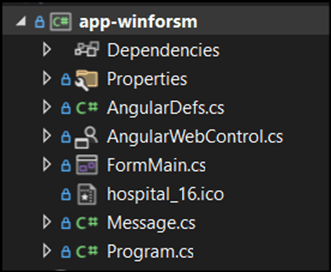
</code></pre><p>Now that your Angular app is ready, let&rsquo;s start using the WinForms app.</p><h2 id="configuring-the-winforms-app">Configuring the WinForms App</h2><p>In the WinForms app, I isolated the host component WebView2 on a UserControl, AngularWebControl.cs, so all components have the same UserControl base and share the same behavior.</p><p>The WebView2 is necessary to hold the Angular application from the URL and interact with the WinForms.</p><p>This is the solution&rsquo;s files from the C# project will looks like this:</p><p><img src="https://d585tldpucybw.cloudfront.net/sfimages/default-source/blogs/2025/2025-01/csharp-project-file-structure.png?sfvrsn=ddcae1e2_2" alt="" /></p><p>The AngularDefs.cs hosts the definitions that hold the Angular project in a single place. This also could be environment variables to avoid hard-coded data:</p><pre class=" language-csharp"><code class="prism  language-csharp"><span class="token number">1</span><span class="token punctuation">.</span><span class="token keyword">namespace</span> app_winforsm<span class="token punctuation">;</span>
<span class="token number">2</span><span class="token punctuation">.</span><span class="token keyword">internal</span> <span class="token keyword">static</span> <span class="token keyword">class</span> <span class="token class-name">AngularDefs</span>
<span class="token number">3</span><span class="token punctuation">.</span><span class="token punctuation">{</span>
<span class="token number">4</span><span class="token punctuation">.</span>    <span class="token comment">// URL of the Angular application</span>
<span class="token number">5</span><span class="token punctuation">.</span>    <span class="token keyword">public</span> <span class="token keyword">const</span> <span class="token keyword">string</span> Url <span class="token operator">=</span> <span class="token string">"https://aw.jsmotta.com/"</span><span class="token punctuation">;</span>
<span class="token number">6</span><span class="token punctuation">.</span>
<span class="token number">7</span><span class="token punctuation">.</span>    <span class="token comment">// Route to the graph component</span>
<span class="token number">8</span><span class="token punctuation">.</span>    <span class="token keyword">public</span> <span class="token keyword">const</span> <span class="token keyword">string</span> RouteGraph <span class="token operator">=</span> <span class="token string">"graph-control"</span><span class="token punctuation">;</span>
<span class="token number">9</span><span class="token punctuation">.</span>
<span class="token number">10</span><span class="token punctuation">.</span>    <span class="token comment">// Verb to receive data in the Angular component</span>
<span class="token number">11</span><span class="token punctuation">.</span>    <span class="token keyword">public</span> <span class="token keyword">const</span> <span class="token keyword">string</span> ChartVerb <span class="token operator">=</span> <span class="token string">"receiveData"</span><span class="token punctuation">;</span>
<span class="token number">12</span><span class="token punctuation">.</span><span class="token punctuation">}</span>
</code></pre><p>The AngularWebControl.cs holds the interface&rsquo;s tasks. I added some explanations to the code below. It defines the interface with the component, reads the click event, and passes it to the event handler.</p><pre class=" language-csharp"><code class="prism  language-csharp"><span class="token number">1</span><span class="token punctuation">.</span><span class="token keyword">using</span> Microsoft<span class="token punctuation">.</span>Web<span class="token punctuation">.</span>WebView2<span class="token punctuation">.</span>Core<span class="token punctuation">;</span>
<span class="token number">2</span><span class="token punctuation">.</span><span class="token keyword">using</span> Microsoft<span class="token punctuation">.</span>Web<span class="token punctuation">.</span>WebView2<span class="token punctuation">.</span>WinForms<span class="token punctuation">;</span>
<span class="token number">3</span><span class="token punctuation">.</span><span class="token keyword">using</span> System<span class="token punctuation">.</span>Text<span class="token punctuation">.</span>Json<span class="token punctuation">;</span>
<span class="token number">4</span><span class="token punctuation">.</span><span class="token keyword">using</span> Telerik<span class="token punctuation">.</span>WinControls<span class="token punctuation">.</span>UI<span class="token punctuation">;</span>
<span class="token number">5</span><span class="token punctuation">.</span>
<span class="token number">6</span><span class="token punctuation">.</span><span class="token keyword">namespace</span> app_winforsm<span class="token punctuation">;</span>
<span class="token number">7</span><span class="token punctuation">.</span><span class="token keyword">internal</span> <span class="token keyword">partial</span> <span class="token keyword">class</span> <span class="token class-name">AngularWebControl</span> <span class="token punctuation">:</span> UserControl
<span class="token number">8</span><span class="token punctuation">.</span><span class="token punctuation">{</span>
<span class="token number">9</span><span class="token punctuation">.</span>    <span class="token comment">// WebView Control</span>
<span class="token number">10</span><span class="token punctuation">.</span>    <span class="token keyword">private</span> WebView2<span class="token operator">?</span> _webView<span class="token punctuation">;</span>
<span class="token number">11</span><span class="token punctuation">.</span>
<span class="token number">12</span><span class="token punctuation">.</span>    <span class="token comment">// Event to handle chart item click - it could be only OnItemClick</span>
<span class="token number">13</span><span class="token punctuation">.</span>    <span class="token keyword">public</span> <span class="token keyword">event</span> EventHandler<span class="token operator">?</span> OnChartItemClick<span class="token punctuation">;</span>
<span class="token number">14</span><span class="token punctuation">.</span>
<span class="token number">15</span><span class="token punctuation">.</span>    <span class="token comment">// The data to be passed to the Angular component</span>
<span class="token number">16</span><span class="token punctuation">.</span>    <span class="token keyword">private</span> <span class="token keyword">dynamic</span><span class="token operator">?</span> Data <span class="token punctuation">{</span> <span class="token keyword">get</span><span class="token punctuation">;</span> <span class="token keyword">set</span><span class="token punctuation">;</span> <span class="token punctuation">}</span>
<span class="token number">17</span><span class="token punctuation">.</span>
<span class="token number">18</span><span class="token punctuation">.</span>    <span class="token comment">// a label to show the title of the control</span>
<span class="token number">19</span><span class="token punctuation">.</span>    <span class="token comment">// in a real-world scenario, we can extend this component and add other controls</span>
<span class="token number">20</span><span class="token punctuation">.</span>    <span class="token keyword">private</span> RadLabel<span class="token operator">?</span> Title <span class="token punctuation">{</span> <span class="token keyword">get</span><span class="token punctuation">;</span> <span class="token keyword">set</span><span class="token punctuation">;</span> <span class="token punctuation">}</span>
<span class="token number">21</span><span class="token punctuation">.</span>
<span class="token number">22</span><span class="token punctuation">.</span>    <span class="token keyword">public</span> <span class="token function">AngularWebControl</span><span class="token punctuation">(</span><span class="token punctuation">)</span>
<span class="token number">23</span><span class="token punctuation">.</span>    <span class="token punctuation">{</span>
<span class="token number">24</span><span class="token punctuation">.</span>        <span class="token function">InitializeComponent</span><span class="token punctuation">(</span><span class="token punctuation">)</span><span class="token punctuation">;</span>
<span class="token number">25</span><span class="token punctuation">.</span>    <span class="token punctuation">}</span>
<span class="token number">26</span><span class="token punctuation">.</span>    <span class="token keyword">public</span> <span class="token keyword">async</span> <span class="token keyword">void</span> <span class="token function">LoadData</span><span class="token punctuation">(</span><span class="token keyword">string</span> title<span class="token punctuation">,</span> <span class="token keyword">dynamic</span> data<span class="token punctuation">)</span>
<span class="token number">27</span><span class="token punctuation">.</span>    <span class="token punctuation">{</span>
<span class="token number">28</span><span class="token punctuation">.</span>        <span class="token keyword">if</span> <span class="token punctuation">(</span>Title <span class="token operator">==</span> <span class="token keyword">null</span><span class="token punctuation">)</span>
<span class="token number">29</span><span class="token punctuation">.</span>        <span class="token punctuation">{</span>
<span class="token number">30</span><span class="token punctuation">.</span>            Title <span class="token operator">=</span> <span class="token keyword">new</span> <span class="token class-name">RadLabel</span>
<span class="token number">31</span><span class="token punctuation">.</span>            <span class="token punctuation">{</span>
<span class="token number">32</span><span class="token punctuation">.</span>                Text <span class="token operator">=</span> title<span class="token punctuation">,</span>
<span class="token number">33</span><span class="token punctuation">.</span>                Dock <span class="token operator">=</span> DockStyle<span class="token punctuation">.</span>Top<span class="token punctuation">,</span>
<span class="token number">34</span><span class="token punctuation">.</span>                Width <span class="token operator">=</span> <span class="token keyword">this</span><span class="token punctuation">.</span>Width<span class="token punctuation">,</span>
<span class="token number">35</span><span class="token punctuation">.</span>                AutoSize <span class="token operator">=</span> <span class="token keyword">true</span><span class="token punctuation">,</span>
<span class="token number">36</span><span class="token punctuation">.</span>                Font <span class="token operator">=</span> <span class="token keyword">new</span> <span class="token class-name">Font</span><span class="token punctuation">(</span><span class="token string">"Arial"</span><span class="token punctuation">,</span> <span class="token number">12</span><span class="token punctuation">,</span> FontStyle<span class="token punctuation">.</span>Bold<span class="token punctuation">)</span><span class="token punctuation">,</span>
<span class="token number">37</span><span class="token punctuation">.</span>                ThemeName <span class="token operator">=</span> <span class="token string">"Windows11"</span>
<span class="token number">38</span><span class="token punctuation">.</span>            <span class="token punctuation">}</span><span class="token punctuation">;</span>
<span class="token number">39</span><span class="token punctuation">.</span>
<span class="token number">40</span><span class="token punctuation">.</span>
<span class="token number">41</span><span class="token punctuation">.</span>            <span class="token keyword">this</span><span class="token punctuation">.</span>Controls<span class="token punctuation">.</span><span class="token function">Add</span><span class="token punctuation">(</span>Title<span class="token punctuation">)</span><span class="token punctuation">;</span>
<span class="token number">42</span><span class="token punctuation">.</span>
<span class="token number">43</span><span class="token punctuation">.</span>            Title<span class="token punctuation">.</span>MouseUp <span class="token operator">+</span><span class="token operator">=</span> Title_MouseUp<span class="token punctuation">;</span>
<span class="token number">44</span><span class="token punctuation">.</span>        <span class="token punctuation">}</span>
<span class="token number">45</span><span class="token punctuation">.</span>
<span class="token number">46</span><span class="token punctuation">.</span>        <span class="token keyword">this</span><span class="token punctuation">.</span>Title<span class="token punctuation">.</span>Text <span class="token operator">=</span> title<span class="token punctuation">;</span>
<span class="token number">47</span><span class="token punctuation">.</span>
<span class="token number">48</span><span class="token punctuation">.</span>        <span class="token keyword">if</span> <span class="token punctuation">(</span>_webView <span class="token operator">==</span> <span class="token keyword">null</span><span class="token punctuation">)</span>
<span class="token number">49</span><span class="token punctuation">.</span>        <span class="token punctuation">{</span>
<span class="token number">50</span><span class="token punctuation">.</span>            _webView <span class="token operator">=</span> <span class="token keyword">new</span> <span class="token class-name">WebView2</span>
<span class="token number">51</span><span class="token punctuation">.</span>            <span class="token punctuation">{</span>
<span class="token number">52</span><span class="token punctuation">.</span>                Visible <span class="token operator">=</span> <span class="token keyword">true</span><span class="token punctuation">,</span>
<span class="token number">53</span><span class="token punctuation">.</span>                Dock <span class="token operator">=</span> DockStyle<span class="token punctuation">.</span>Fill
<span class="token number">54</span><span class="token punctuation">.</span>            <span class="token punctuation">}</span><span class="token punctuation">;</span>
<span class="token number">55</span><span class="token punctuation">.</span>
<span class="token number">56</span><span class="token punctuation">.</span>            <span class="token keyword">this</span><span class="token punctuation">.</span>Controls<span class="token punctuation">.</span><span class="token function">Add</span><span class="token punctuation">(</span>_webView<span class="token punctuation">)</span><span class="token punctuation">;</span>
<span class="token number">57</span><span class="token punctuation">.</span>
<span class="token number">58</span><span class="token punctuation">.</span>            <span class="token keyword">var</span> userDataFolder1 <span class="token operator">=</span> Path<span class="token punctuation">.</span><span class="token function">Combine</span><span class="token punctuation">(</span>Environment<span class="token punctuation">.</span><span class="token function">GetFolderPath</span><span class="token punctuation">(</span>Environment<span class="token punctuation">.</span>SpecialFolder<span class="token punctuation">.</span>LocalApplicationData<span class="token punctuation">)</span><span class="token punctuation">,</span> $<span class="token string">"AngularWinFormsApp_{this.Name}"</span><span class="token punctuation">)</span><span class="token punctuation">;</span>
<span class="token number">59</span><span class="token punctuation">.</span>                    
<span class="token number">60</span><span class="token punctuation">.</span>            <span class="token keyword">var</span> environment1 <span class="token operator">=</span> <span class="token keyword">await</span> CoreWebView2Environment<span class="token punctuation">.</span><span class="token function">CreateAsync</span><span class="token punctuation">(</span>userDataFolder<span class="token punctuation">:</span> userDataFolder1<span class="token punctuation">)</span><span class="token punctuation">;</span>
<span class="token number">61</span><span class="token punctuation">.</span>
<span class="token number">62</span><span class="token punctuation">.</span>            <span class="token comment">// The environment is created to avoid loss of data in the session</span>
<span class="token number">63</span><span class="token punctuation">.</span>            <span class="token keyword">await</span> _webView<span class="token punctuation">.</span><span class="token function">EnsureCoreWebView2Async</span><span class="token punctuation">(</span>environment1<span class="token punctuation">)</span><span class="token punctuation">;</span>
<span class="token number">64</span><span class="token punctuation">.</span>
<span class="token number">65</span><span class="token punctuation">.</span>
<span class="token number">66</span><span class="token punctuation">.</span>            _webView<span class="token punctuation">.</span>CoreWebView2<span class="token punctuation">.</span>NavigationCompleted <span class="token operator">+</span><span class="token operator">=</span> WebView_NavigationCompleted<span class="token punctuation">;</span>
<span class="token number">67</span><span class="token punctuation">.</span>           
<span class="token number">68</span><span class="token punctuation">.</span>            <span class="token comment">// Event to receive data from Angular</span>
<span class="token number">69</span><span class="token punctuation">.</span>            _webView<span class="token punctuation">.</span>CoreWebView2<span class="token punctuation">.</span>WebMessageReceived <span class="token operator">+</span><span class="token operator">=</span> CoreWebView2_WebMessageReceived<span class="token punctuation">;</span>
<span class="token number">70</span><span class="token punctuation">.</span>
<span class="token number">71</span><span class="token punctuation">.</span>            _webView<span class="token punctuation">.</span>CoreWebView2<span class="token punctuation">.</span><span class="token function">Navigate</span><span class="token punctuation">(</span>$<span class="token string">"{AngularDefs.Url}{AngularDefs.RouteGraph}"</span><span class="token punctuation">)</span><span class="token punctuation">;</span>
<span class="token number">72</span><span class="token punctuation">.</span>
<span class="token number">73</span><span class="token punctuation">.</span>            <span class="token keyword">if</span> <span class="token punctuation">(</span>OnChartItemClick <span class="token operator">!=</span> <span class="token keyword">null</span><span class="token punctuation">)</span>
<span class="token number">74</span><span class="token punctuation">.</span>            <span class="token punctuation">{</span>
<span class="token number">75</span><span class="token punctuation">.</span>                <span class="token comment">// This is the trick to receive data from the Angular component</span>
<span class="token number">76</span><span class="token punctuation">.</span>                <span class="token keyword">await</span> _webView<span class="token punctuation">.</span>CoreWebView2<span class="token punctuation">.</span><span class="token function">ExecuteScriptAsync</span><span class="token punctuation">(</span><span class="token string">@"
77.                    window.addEventListener('MyClick', function(event) {
78.                        window.chrome.webview.postMessage(event.detail.message);
79.                    });
80.                "</span><span class="token punctuation">)</span><span class="token punctuation">;</span>
<span class="token number">81</span><span class="token punctuation">.</span>            <span class="token punctuation">}</span>
<span class="token number">82</span><span class="token punctuation">.</span>        <span class="token punctuation">}</span>
<span class="token number">83</span><span class="token punctuation">.</span>
<span class="token number">84</span><span class="token punctuation">.</span>        <span class="token comment">// Send the data to the Angular component</span>
<span class="token number">85</span><span class="token punctuation">.</span>        <span class="token keyword">this</span><span class="token punctuation">.</span>Data <span class="token operator">=</span> data<span class="token punctuation">;</span>
<span class="token number">86</span><span class="token punctuation">.</span>    <span class="token punctuation">}</span>
<span class="token number">87</span><span class="token punctuation">.</span>
<span class="token number">88</span><span class="token punctuation">.</span>    <span class="token keyword">private</span> <span class="token keyword">void</span> <span class="token function">Title_MouseUp</span><span class="token punctuation">(</span><span class="token keyword">object</span><span class="token operator">?</span> sender<span class="token punctuation">,</span> MouseEventArgs e<span class="token punctuation">)</span>
<span class="token number">89</span><span class="token punctuation">.</span>    <span class="token punctuation">{</span>
<span class="token number">90</span><span class="token punctuation">.</span>        <span class="token keyword">if</span> <span class="token punctuation">(</span>e<span class="token punctuation">.</span>Button <span class="token operator">==</span> MouseButtons<span class="token punctuation">.</span>Right<span class="token punctuation">)</span>
<span class="token number">91</span><span class="token punctuation">.</span>        <span class="token punctuation">{</span>
<span class="token number">92</span><span class="token punctuation">.</span>            <span class="token comment">// An easter egg to show the WebView console</span>
<span class="token number">93</span><span class="token punctuation">.</span>            <span class="token comment">// when pressing right click on the RadLabel</span>
<span class="token number">94</span><span class="token punctuation">.</span>            <span class="token function">ShowWebViewConsole</span><span class="token punctuation">(</span><span class="token punctuation">)</span><span class="token punctuation">;</span>
<span class="token number">95</span><span class="token punctuation">.</span>        <span class="token punctuation">}</span>
<span class="token number">96</span><span class="token punctuation">.</span>    <span class="token punctuation">}</span>
<span class="token number">97</span><span class="token punctuation">.</span>
<span class="token number">98</span><span class="token punctuation">.</span>    <span class="token comment">// Event handler to handle messages received from the WebView2</span>
<span class="token number">99</span><span class="token punctuation">.</span>    <span class="token keyword">private</span> <span class="token keyword">void</span> <span class="token function">CoreWebView2_WebMessageReceived</span><span class="token punctuation">(</span><span class="token keyword">object</span><span class="token operator">?</span> sender<span class="token punctuation">,</span> CoreWebView2WebMessageReceivedEventArgs e<span class="token punctuation">)</span>
<span class="token number">100</span><span class="token punctuation">.</span>    <span class="token punctuation">{</span>
<span class="token number">101</span><span class="token punctuation">.</span>        <span class="token comment">// Retrieve the message from the event</span>
<span class="token number">102</span><span class="token punctuation">.</span>        <span class="token keyword">var</span> message <span class="token operator">=</span> e<span class="token punctuation">.</span><span class="token function">TryGetWebMessageAsString</span><span class="token punctuation">(</span><span class="token punctuation">)</span><span class="token punctuation">;</span>
<span class="token number">103</span><span class="token punctuation">.</span>
<span class="token number">104</span><span class="token punctuation">.</span>        <span class="token comment">// Display the message or perform any action</span>
<span class="token number">105</span><span class="token punctuation">.</span>        OnChartItemClick<span class="token operator">?</span><span class="token punctuation">.</span><span class="token function">Invoke</span><span class="token punctuation">(</span>message<span class="token punctuation">,</span> EventArgs<span class="token punctuation">.</span>Empty<span class="token punctuation">)</span><span class="token punctuation">;</span>
<span class="token number">106</span><span class="token punctuation">.</span>    <span class="token punctuation">}</span>
<span class="token number">107</span><span class="token punctuation">.</span>    <span class="token keyword">private</span> <span class="token keyword">async</span> <span class="token keyword">void</span> <span class="token function">WebView_NavigationCompleted</span><span class="token punctuation">(</span><span class="token keyword">object</span><span class="token operator">?</span> sender<span class="token punctuation">,</span> CoreWebView2NavigationCompletedEventArgs e<span class="token punctuation">)</span>
<span class="token number">108</span><span class="token punctuation">.</span>    <span class="token punctuation">{</span>
<span class="token number">109</span><span class="token punctuation">.</span>        <span class="token keyword">if</span> <span class="token punctuation">(</span>_webView <span class="token operator">==</span> <span class="token keyword">null</span><span class="token punctuation">)</span> <span class="token keyword">return</span><span class="token punctuation">;</span>
<span class="token number">110</span><span class="token punctuation">.</span>
<span class="token number">111</span><span class="token punctuation">.</span>        _webView<span class="token punctuation">.</span>Visible <span class="token operator">=</span> <span class="token keyword">true</span><span class="token punctuation">;</span>
<span class="token number">112</span><span class="token punctuation">.</span>
<span class="token number">113</span><span class="token punctuation">.</span>        <span class="token keyword">if</span> <span class="token punctuation">(</span><span class="token operator">!</span>e<span class="token punctuation">.</span>IsSuccess<span class="token punctuation">)</span>
<span class="token number">114</span><span class="token punctuation">.</span>        <span class="token punctuation">{</span>
<span class="token number">115</span><span class="token punctuation">.</span>            <span class="token comment">// Return a custom messsage based on the error to avoid default Webview error page</span>
<span class="token number">116</span><span class="token punctuation">.</span>            <span class="token keyword">switch</span> <span class="token punctuation">(</span>e<span class="token punctuation">.</span>WebErrorStatus<span class="token punctuation">)</span>
<span class="token number">117</span><span class="token punctuation">.</span>            <span class="token punctuation">{</span>
<span class="token number">118</span><span class="token punctuation">.</span>
<span class="token number">119</span><span class="token punctuation">.</span>                <span class="token keyword">case</span> CoreWebView2WebErrorStatus<span class="token punctuation">.</span>ConnectionAborted<span class="token punctuation">:</span>
<span class="token number">120</span><span class="token punctuation">.</span>                    <span class="token function">ShowErrorMessage</span><span class="token punctuation">(</span><span class="token string">"Connection refused. Please make sure the server is running and try again."</span><span class="token punctuation">)</span><span class="token punctuation">;</span>
<span class="token number">121</span><span class="token punctuation">.</span>                    <span class="token keyword">break</span><span class="token punctuation">;</span>
<span class="token number">122</span><span class="token punctuation">.</span>                <span class="token keyword">case</span> CoreWebView2WebErrorStatus<span class="token punctuation">.</span>Unknown<span class="token punctuation">:</span>
<span class="token number">123</span><span class="token punctuation">.</span>                <span class="token keyword">case</span> CoreWebView2WebErrorStatus<span class="token punctuation">.</span>CertificateCommonNameIsIncorrect<span class="token punctuation">:</span>
<span class="token number">124</span><span class="token punctuation">.</span>                <span class="token keyword">case</span> CoreWebView2WebErrorStatus<span class="token punctuation">.</span>CertificateExpired<span class="token punctuation">:</span>
<span class="token number">125</span><span class="token punctuation">.</span>                <span class="token keyword">case</span> CoreWebView2WebErrorStatus<span class="token punctuation">.</span>ClientCertificateContainsErrors<span class="token punctuation">:</span>
<span class="token number">126</span><span class="token punctuation">.</span>                <span class="token keyword">case</span> CoreWebView2WebErrorStatus<span class="token punctuation">.</span>CertificateRevoked<span class="token punctuation">:</span>
<span class="token number">127</span><span class="token punctuation">.</span>                <span class="token keyword">case</span> CoreWebView2WebErrorStatus<span class="token punctuation">.</span>CertificateIsInvalid<span class="token punctuation">:</span>
<span class="token number">128</span><span class="token punctuation">.</span>                <span class="token keyword">case</span> CoreWebView2WebErrorStatus<span class="token punctuation">.</span>ServerUnreachable<span class="token punctuation">:</span>
<span class="token number">129</span><span class="token punctuation">.</span>                <span class="token keyword">case</span> CoreWebView2WebErrorStatus<span class="token punctuation">.</span>Timeout<span class="token punctuation">:</span>
<span class="token number">130</span><span class="token punctuation">.</span>                <span class="token keyword">case</span> CoreWebView2WebErrorStatus<span class="token punctuation">.</span>ErrorHttpInvalidServerResponse<span class="token punctuation">:</span>
<span class="token number">131</span><span class="token punctuation">.</span>                <span class="token keyword">case</span> CoreWebView2WebErrorStatus<span class="token punctuation">.</span>ConnectionReset<span class="token punctuation">:</span>
<span class="token number">132</span><span class="token punctuation">.</span>                <span class="token keyword">case</span> CoreWebView2WebErrorStatus<span class="token punctuation">.</span>Disconnected<span class="token punctuation">:</span>
<span class="token number">133</span><span class="token punctuation">.</span>                <span class="token keyword">case</span> CoreWebView2WebErrorStatus<span class="token punctuation">.</span>CannotConnect<span class="token punctuation">:</span>
<span class="token number">134</span><span class="token punctuation">.</span>                <span class="token keyword">case</span> CoreWebView2WebErrorStatus<span class="token punctuation">.</span>HostNameNotResolved<span class="token punctuation">:</span>
<span class="token number">135</span><span class="token punctuation">.</span>                <span class="token keyword">case</span> CoreWebView2WebErrorStatus<span class="token punctuation">.</span>OperationCanceled<span class="token punctuation">:</span>
<span class="token number">136</span><span class="token punctuation">.</span>                <span class="token keyword">case</span> CoreWebView2WebErrorStatus<span class="token punctuation">.</span>RedirectFailed<span class="token punctuation">:</span>
<span class="token number">137</span><span class="token punctuation">.</span>                <span class="token keyword">case</span> CoreWebView2WebErrorStatus<span class="token punctuation">.</span>UnexpectedError<span class="token punctuation">:</span>
<span class="token number">138</span><span class="token punctuation">.</span>                <span class="token keyword">case</span> CoreWebView2WebErrorStatus<span class="token punctuation">.</span>ValidAuthenticationCredentialsRequired<span class="token punctuation">:</span>
<span class="token number">139</span><span class="token punctuation">.</span>                <span class="token keyword">case</span> CoreWebView2WebErrorStatus<span class="token punctuation">.</span>ValidProxyAuthenticationRequired<span class="token punctuation">:</span>
<span class="token number">140</span><span class="token punctuation">.</span>                <span class="token keyword">default</span><span class="token punctuation">:</span>
<span class="token number">141</span><span class="token punctuation">.</span>                    <span class="token function">ShowErrorMessage</span><span class="token punctuation">(</span><span class="token string">"An error occurred while loading the page."</span><span class="token punctuation">)</span><span class="token punctuation">;</span>
<span class="token number">142</span><span class="token punctuation">.</span>                    <span class="token keyword">break</span><span class="token punctuation">;</span>
<span class="token number">143</span><span class="token punctuation">.</span>            <span class="token punctuation">}</span>
<span class="token number">144</span><span class="token punctuation">.</span>            <span class="token keyword">return</span><span class="token punctuation">;</span>
<span class="token number">145</span><span class="token punctuation">.</span>        <span class="token punctuation">}</span>
<span class="token number">146</span><span class="token punctuation">.</span>
<span class="token number">147</span><span class="token punctuation">.</span>        <span class="token keyword">var</span> jsonData <span class="token operator">=</span> JsonSerializer<span class="token punctuation">.</span><span class="token function">Serialize</span><span class="token punctuation">(</span>Data<span class="token punctuation">)</span><span class="token punctuation">;</span>
<span class="token number">148</span><span class="token punctuation">.</span>
<span class="token number">149</span><span class="token punctuation">.</span>        <span class="token comment">// Here is the connection with the interface (verb) defined in the Angular component</span>
<span class="token number">150</span><span class="token punctuation">.</span>        <span class="token keyword">var</span> script <span class="token operator">=</span> $<span class="token string">"window.{AngularDefs.ChartVerb}({jsonData});"</span><span class="token punctuation">;</span>
<span class="token number">151</span><span class="token punctuation">.</span>
<span class="token number">152</span><span class="token punctuation">.</span>        <span class="token keyword">await</span> _webView<span class="token punctuation">.</span>CoreWebView2<span class="token punctuation">.</span><span class="token function">ExecuteScriptAsync</span><span class="token punctuation">(</span>script<span class="token punctuation">)</span><span class="token punctuation">;</span>
<span class="token number">153</span><span class="token punctuation">.</span>    <span class="token punctuation">}</span>
<span class="token number">154</span><span class="token punctuation">.</span> 
<span class="token number">155</span><span class="token punctuation">.</span><span class="token punctuation">}</span>
</code></pre><p>The Message.cs is the model for the click event interact from the Angular app.</p><p>Here is the use case for the controls in FormMain.cs. I added one control dynamically and another using drag-and-drop from the Toolbox. It is important to note that a distinct property name is needed to avoid collisions on the WebView2 sessions; this is a pitfall.</p><p>I use mocked data in this sample, but you will probably read from a data source in real-world applications.</p><pre class=" language-csharp"><code class="prism  language-csharp"><span class="token number">1</span><span class="token punctuation">.</span><span class="token keyword">using</span> System<span class="token punctuation">.</span>Text<span class="token punctuation">.</span>Json<span class="token punctuation">;</span>
<span class="token number">2</span><span class="token punctuation">.</span><span class="token keyword">using</span> Telerik<span class="token punctuation">.</span>WinControls<span class="token punctuation">;</span>
<span class="token number">3</span><span class="token punctuation">.</span><span class="token keyword">using</span> Telerik<span class="token punctuation">.</span>WinControls<span class="token punctuation">.</span>UI<span class="token punctuation">;</span>
<span class="token number">4</span><span class="token punctuation">.</span>
<span class="token number">5</span><span class="token punctuation">.</span><span class="token keyword">namespace</span> app_winforsm<span class="token punctuation">;</span>
<span class="token number">6</span><span class="token punctuation">.</span>
<span class="token number">7</span><span class="token punctuation">.</span><span class="token keyword">public</span> <span class="token keyword">partial</span> <span class="token keyword">class</span> <span class="token class-name">FormMain</span> <span class="token punctuation">:</span> RadForm
<span class="token number">8</span><span class="token punctuation">.</span><span class="token punctuation">{</span>
<span class="token number">9</span><span class="token punctuation">.</span>    <span class="token keyword">private</span> <span class="token keyword">readonly</span> AngularWebControl<span class="token operator">?</span> _angularWebControl<span class="token punctuation">;</span>
<span class="token number">10</span><span class="token punctuation">.</span>
<span class="token number">11</span><span class="token punctuation">.</span>    <span class="token keyword">public</span> <span class="token function">FormMain</span><span class="token punctuation">(</span><span class="token punctuation">)</span>
<span class="token number">12</span><span class="token punctuation">.</span>    <span class="token punctuation">{</span>
<span class="token number">13</span><span class="token punctuation">.</span>        <span class="token function">InitializeComponent</span><span class="token punctuation">(</span><span class="token punctuation">)</span><span class="token punctuation">;</span>
<span class="token number">14</span><span class="token punctuation">.</span>
<span class="token number">15</span><span class="token punctuation">.</span>        <span class="token comment">// Load the AngularWebControl programatically</span>
<span class="token number">16</span><span class="token punctuation">.</span>
<span class="token number">17</span><span class="token punctuation">.</span>        _angularWebControl <span class="token operator">=</span> <span class="token keyword">new</span> <span class="token class-name">AngularWebControl</span> <span class="token punctuation">{</span> Name <span class="token operator">=</span> <span class="token string">"_angularWebControl"</span> <span class="token punctuation">}</span><span class="token punctuation">;</span>
<span class="token number">18</span><span class="token punctuation">.</span>        _angularWebControl<span class="token punctuation">.</span>Dock <span class="token operator">=</span> DockStyle<span class="token punctuation">.</span>Fill<span class="token punctuation">;</span>
<span class="token number">19</span><span class="token punctuation">.</span>
<span class="token number">20</span><span class="token punctuation">.</span>        splitPanel1<span class="token punctuation">.</span>Controls<span class="token punctuation">.</span><span class="token function">Add</span><span class="token punctuation">(</span>_angularWebControl<span class="token punctuation">)</span><span class="token punctuation">;</span>
<span class="token number">21</span><span class="token punctuation">.</span>
<span class="token number">22</span><span class="token punctuation">.</span>        <span class="token comment">// Subscribe to the OnChartItemClick event</span>
<span class="token number">23</span><span class="token punctuation">.</span>        _angularWebControl<span class="token punctuation">.</span>OnChartItemClick <span class="token operator">+</span><span class="token operator">=</span> AngularWebControl_OnChartItemClick<span class="token punctuation">;</span>
<span class="token number">24</span><span class="token punctuation">.</span>
<span class="token number">25</span><span class="token punctuation">.</span>        <span class="token function">LoadData</span><span class="token punctuation">(</span><span class="token punctuation">)</span><span class="token punctuation">;</span>
<span class="token number">26</span><span class="token punctuation">.</span>    <span class="token punctuation">}</span>
<span class="token number">27</span><span class="token punctuation">.</span>
<span class="token number">28</span><span class="token punctuation">.</span>    <span class="token keyword">private</span> <span class="token keyword">void</span> <span class="token function">AngularWebControl_OnChartItemClick</span><span class="token punctuation">(</span><span class="token keyword">object</span><span class="token operator">?</span> sender<span class="token punctuation">,</span> EventArgs e<span class="token punctuation">)</span>
<span class="token number">29</span><span class="token punctuation">.</span>    <span class="token punctuation">{</span>
<span class="token number">30</span><span class="token punctuation">.</span>        <span class="token keyword">if</span> <span class="token punctuation">(</span>sender <span class="token keyword">is</span> <span class="token keyword">null</span><span class="token punctuation">)</span>
<span class="token number">31</span><span class="token punctuation">.</span>            <span class="token keyword">return</span><span class="token punctuation">;</span>
<span class="token number">32</span><span class="token punctuation">.</span>
<span class="token number">33</span><span class="token punctuation">.</span>        <span class="token keyword">var</span> message <span class="token operator">=</span>
<span class="token number">34</span><span class="token punctuation">.</span>            JsonSerializer<span class="token punctuation">.</span><span class="token generic-method function">Deserialize<span class="token punctuation">&lt;</span>Message<span class="token punctuation">&gt;</span></span><span class="token punctuation">(</span>sender<span class="token punctuation">.</span><span class="token function">ToString</span><span class="token punctuation">(</span><span class="token punctuation">)</span> <span class="token operator">?</span><span class="token operator">?</span> <span class="token keyword">throw</span> <span class="token keyword">new</span> <span class="token class-name">Exception</span><span class="token punctuation">(</span><span class="token string">"Data is not a json."</span><span class="token punctuation">)</span><span class="token punctuation">)</span><span class="token punctuation">;</span>
<span class="token number">35</span><span class="token punctuation">.</span>
<span class="token number">36</span><span class="token punctuation">.</span>        RadMessageBox<span class="token punctuation">.</span>ThemeName <span class="token operator">=</span> <span class="token string">"Windows11"</span><span class="token punctuation">;</span>
<span class="token number">37</span><span class="token punctuation">.</span>        RadMessageBox<span class="token punctuation">.</span><span class="token function">Show</span><span class="token punctuation">(</span>$<span class="token string">"You clicked on {message.Category} with value {message.Value}"</span><span class="token punctuation">,</span> <span class="token string">"Chart Item Clicked"</span><span class="token punctuation">,</span>
<span class="token number">38</span><span class="token punctuation">.</span>            MessageBoxButtons<span class="token punctuation">.</span>OK<span class="token punctuation">,</span> RadMessageIcon<span class="token punctuation">.</span>Info<span class="token punctuation">)</span><span class="token punctuation">;</span>
<span class="token number">39</span><span class="token punctuation">.</span>    <span class="token punctuation">}</span>
<span class="token number">40</span><span class="token punctuation">.</span>
<span class="token number">41</span><span class="token punctuation">.</span>    <span class="token keyword">private</span> <span class="token keyword">void</span> <span class="token function">LoadData</span><span class="token punctuation">(</span><span class="token punctuation">)</span>
<span class="token number">42</span><span class="token punctuation">.</span>    <span class="token punctuation">{</span>
</code></pre><p><strong>Note:</strong> In a production project, you will load the data from your repository!</p><pre class=" language-csharp"><code class="prism  language-csharp"><span class="token number">43</span><span class="token punctuation">.</span>
<span class="token number">44</span><span class="token punctuation">.</span>        <span class="token keyword">var</span> data <span class="token operator">=</span> <span class="token keyword">new</span><span class="token punctuation">[</span><span class="token punctuation">]</span>
<span class="token number">45</span><span class="token punctuation">.</span>        <span class="token punctuation">{</span>
<span class="token number">46</span><span class="token punctuation">.</span>            <span class="token keyword">new</span> <span class="token punctuation">{</span> name <span class="token operator">=</span> <span class="token string">"Gastroenteritis"</span><span class="token punctuation">,</span> <span class="token keyword">value</span> <span class="token operator">=</span> <span class="token number">40</span><span class="token punctuation">,</span> color <span class="token operator">=</span> <span class="token string">"red"</span> <span class="token punctuation">}</span><span class="token punctuation">,</span>
<span class="token number">47</span><span class="token punctuation">.</span>            <span class="token keyword">new</span> <span class="token punctuation">{</span> name <span class="token operator">=</span> <span class="token string">"Appendicitis"</span><span class="token punctuation">,</span> <span class="token keyword">value</span> <span class="token operator">=</span> <span class="token number">25</span><span class="token punctuation">,</span> color <span class="token operator">=</span> <span class="token string">"blue"</span> <span class="token punctuation">}</span><span class="token punctuation">,</span>
<span class="token number">48</span><span class="token punctuation">.</span>            <span class="token keyword">new</span> <span class="token punctuation">{</span> name <span class="token operator">=</span> <span class="token string">"Cholecystitis"</span><span class="token punctuation">,</span> <span class="token keyword">value</span> <span class="token operator">=</span> <span class="token number">15</span><span class="token punctuation">,</span> color <span class="token operator">=</span> <span class="token string">"green"</span> <span class="token punctuation">}</span><span class="token punctuation">,</span>
<span class="token number">49</span><span class="token punctuation">.</span>            <span class="token keyword">new</span> <span class="token punctuation">{</span> name <span class="token operator">=</span> <span class="token string">"Pancreatitis"</span><span class="token punctuation">,</span> <span class="token keyword">value</span> <span class="token operator">=</span> <span class="token number">10</span><span class="token punctuation">,</span> color <span class="token operator">=</span> <span class="token string">"yellow"</span> <span class="token punctuation">}</span><span class="token punctuation">,</span>
<span class="token number">50</span><span class="token punctuation">.</span>            <span class="token keyword">new</span> <span class="token punctuation">{</span> name <span class="token operator">=</span> <span class="token string">"Diverticulitis"</span><span class="token punctuation">,</span> <span class="token keyword">value</span> <span class="token operator">=</span> <span class="token number">10</span><span class="token punctuation">,</span> color <span class="token operator">=</span> <span class="token string">"orange"</span> <span class="token punctuation">}</span>
<span class="token number">51</span><span class="token punctuation">.</span>        <span class="token punctuation">}</span><span class="token punctuation">;</span>
<span class="token number">52</span><span class="token punctuation">.</span>
<span class="token number">53</span><span class="token punctuation">.</span>        _angularWebControl<span class="token operator">?</span><span class="token punctuation">.</span><span class="token function">LoadData</span><span class="token punctuation">(</span><span class="token string">"Common gastro deseases in hospitals"</span><span class="token punctuation">,</span> data<span class="token punctuation">)</span><span class="token punctuation">;</span>
<span class="token number">54</span><span class="token punctuation">.</span>
<span class="token number">55</span><span class="token punctuation">.</span>        <span class="token keyword">var</span> dataAges <span class="token operator">=</span> <span class="token keyword">new</span><span class="token punctuation">[</span><span class="token punctuation">]</span>
<span class="token number">56</span><span class="token punctuation">.</span>        <span class="token punctuation">{</span>
<span class="token number">57</span><span class="token punctuation">.</span>            <span class="token keyword">new</span> <span class="token punctuation">{</span> name <span class="token operator">=</span> <span class="token string">"0-10"</span><span class="token punctuation">,</span> <span class="token keyword">value</span> <span class="token operator">=</span> <span class="token number">1</span><span class="token punctuation">,</span> color <span class="token operator">=</span> <span class="token string">"red"</span> <span class="token punctuation">}</span><span class="token punctuation">,</span>
<span class="token number">58</span><span class="token punctuation">.</span>            <span class="token keyword">new</span> <span class="token punctuation">{</span> name <span class="token operator">=</span> <span class="token string">"11-20"</span><span class="token punctuation">,</span> <span class="token keyword">value</span> <span class="token operator">=</span> <span class="token number">10</span><span class="token punctuation">,</span> color <span class="token operator">=</span> <span class="token string">"blue"</span> <span class="token punctuation">}</span><span class="token punctuation">,</span>
<span class="token number">59</span><span class="token punctuation">.</span>            <span class="token keyword">new</span> <span class="token punctuation">{</span> name <span class="token operator">=</span> <span class="token string">"21-30"</span><span class="token punctuation">,</span> <span class="token keyword">value</span> <span class="token operator">=</span> <span class="token number">20</span><span class="token punctuation">,</span> color <span class="token operator">=</span> <span class="token string">"green"</span> <span class="token punctuation">}</span><span class="token punctuation">,</span>
<span class="token number">60</span><span class="token punctuation">.</span>            <span class="token keyword">new</span> <span class="token punctuation">{</span> name <span class="token operator">=</span> <span class="token string">"31-40"</span><span class="token punctuation">,</span> <span class="token keyword">value</span> <span class="token operator">=</span> <span class="token number">25</span><span class="token punctuation">,</span> color <span class="token operator">=</span> <span class="token string">"yellow"</span> <span class="token punctuation">}</span><span class="token punctuation">,</span>
<span class="token number">61</span><span class="token punctuation">.</span>            <span class="token keyword">new</span> <span class="token punctuation">{</span> name <span class="token operator">=</span> <span class="token string">"41-50"</span><span class="token punctuation">,</span> <span class="token keyword">value</span> <span class="token operator">=</span> <span class="token number">15</span><span class="token punctuation">,</span> color <span class="token operator">=</span> <span class="token string">"orange"</span> <span class="token punctuation">}</span><span class="token punctuation">,</span>
<span class="token number">62</span><span class="token punctuation">.</span>            <span class="token keyword">new</span> <span class="token punctuation">{</span> name <span class="token operator">=</span> <span class="token string">"51-60"</span><span class="token punctuation">,</span> <span class="token keyword">value</span> <span class="token operator">=</span> <span class="token number">20</span><span class="token punctuation">,</span> color <span class="token operator">=</span> <span class="token string">"purple"</span> <span class="token punctuation">}</span><span class="token punctuation">,</span>
<span class="token number">63</span><span class="token punctuation">.</span>            <span class="token keyword">new</span> <span class="token punctuation">{</span> name <span class="token operator">=</span> <span class="token string">"61-70"</span><span class="token punctuation">,</span> <span class="token keyword">value</span> <span class="token operator">=</span> <span class="token number">8</span><span class="token punctuation">,</span> color <span class="token operator">=</span> <span class="token string">"brown"</span> <span class="token punctuation">}</span><span class="token punctuation">,</span>
<span class="token number">64</span><span class="token punctuation">.</span>            <span class="token keyword">new</span> <span class="token punctuation">{</span> name <span class="token operator">=</span> <span class="token string">"71+"</span><span class="token punctuation">,</span> <span class="token keyword">value</span> <span class="token operator">=</span> <span class="token number">7</span><span class="token punctuation">,</span> color <span class="token operator">=</span> <span class="token string">"pink"</span> <span class="token punctuation">}</span>
<span class="token number">65</span><span class="token punctuation">.</span>        <span class="token punctuation">}</span><span class="token punctuation">;</span>
<span class="token number">66</span><span class="token punctuation">.</span>
<span class="token number">67</span><span class="token punctuation">.</span>        <span class="token keyword">this</span><span class="token punctuation">.</span>angularWebControl1<span class="token punctuation">.</span><span class="token function">LoadData</span><span class="token punctuation">(</span><span class="token string">"Patiant ages in gastro deseases"</span><span class="token punctuation">,</span> dataAges<span class="token punctuation">)</span><span class="token punctuation">;</span>
<span class="token number">68</span><span class="token punctuation">.</span>    <span class="token punctuation">}</span>
<span class="token number">69</span><span class="token punctuation">.</span><span class="token punctuation">}</span>
</code></pre><h2 id="and-this-is-the-result">And This Is the Result!</h2><p>As you can see, the two charts share the same interface and UserControl. You can&rsquo;t see them but are in a distinct web session. The session is isolated to preserve data and for security, the same UserControl could be using distinct credentials according to the URL passed as parameter.</p><p><img src="https://d585tldpucybw.cloudfront.net/sfimages/default-source/blogs/2025/2025-01/charts-winforms-angular.png?sfvrsn=19740cc5_2" alt="" /></p><h2 id="workflow-of-this-sample">Workflow of This Sample</h2><p>In the picture below, we can &ldquo;see&rdquo; the flow of coding and on execution until the callback when the end-user clicks on the chart, download the <a href="https://github.com/jssmotta/TelerikAngularAndWinForms  " target="_blank">source code</a> from GitHub and give it a try.</p><p><img src="https://d585tldpucybw.cloudfront.net/sfimages/default-source/blogs/2025/2025-01/coding-workflow.png?sfvrsn=79ad821a_2" alt="" /></p><h2 id="conclusion">Conclusion</h2><p>The interoperability isn&rsquo;t complex, and this may leverage a mixed team and design better interfaces with low memory consumption than the classical WinForms apps.</p><p>In edge computing, I imagine the interface running on a server near the end user, even a local docker/Azure/AWS near the client machine, avoiding long web traffic.</p><p>Download the code and see how it works and all the possibilities this feature can bring to your business and services.</p><p>Feel free to use the code or contact me on LinkedIn. Also, remember that Progress Telerik offers free support during the evaluation period.</p><p><a target="_blank" href="https://www.telerik.com/try/devcraft-ultimate" class="Btn">Try Telerik DevCraft Today</a></p><h3 id="references">References</h3><ul><li><a target="_blank" href="https://www.telerik.com/kendo-angular-ui">Kendo UI for Angular</a></li><li><a target="_blank" href="https://www.telerik.com/products/winforms.aspx">Telerik UI for WinForms</a></li><li><a target="_blank" href="https://www.telerik.com/blogs/details/angular-visualizations-create-data-visualization-kendo-ui-charts">Sample using Charts</a></li><li><a target="_blank" href="https://github.com/jssmotta/TelerikAngularAndWinForms">Source code</a></li></ul><img src="https://feeds.telerik.com/link/23062/16959649.gif" height="1" width="1"/>]]></content>
  </entry>
  <entry>
    <id>urn:uuid:c42afdb7-2f80-4eaf-b617-cc185f8684dd</id>
    <title type="text">Blazor Basics: Using Blazor Components in WinForms with Blazor Hybrid</title>
    <summary type="text">Learn how to integrate Blazor components into an existing WinForms .NET 6+ application using WebView2.</summary>
    <published>2024-10-02T16:16:02Z</published>
    <updated>2026-04-12T06:33:54Z</updated>
    <author>
      <name>Claudio Bernasconi </name>
    </author>
    <link rel="alternate" href="https://feeds.telerik.com/link/23062/16831695/blazor-basics-using-blazor-components-winforms-blazor-hybrid"/>
    <content type="text"><![CDATA[<p><span class="featured">Learn how to integrate Blazor components into an existing WinForms .NET 6+ application using WebView2.</span></p><p>Blazor is an <strong>excellent .NET web development technology</strong>. However, it does not stop there.</p><p>One of the reasons why Blazor is becoming more and more widely used in .NET development is its convenient migration path. Blazor is not only attractive for greenfield development but also for modernizing existing (desktop) .NET applications.</p><p>In this article, I will explain <strong>how to integrate Blazor components into an existing WinForms application</strong> using Blazor Hybrid.</p><h2 id="prerequisites">Prerequisites</h2><p>The integration of Blazor components into a WinForms application works using <a target="_blank" href="https://developer.microsoft.com/en-us/microsoft-edge/webview2">WebView2</a>. The <a target="_blank" href="https://www.nuget.org/packages/Microsoft.AspNetCore.Components.WebView.WindowsForms/">NuGet package providing WebView2 support for WinForms</a> applications <strong>requires your WinForms application to run on .NET 6 or later</strong>.&nbsp;If you cannot migrate your WinForms application to .NET 6 or later, you might reconsider your desire to use Blazor components inside your legacy WinForms application.</p><p>If you plan to continue developing your WinForms application, the first step is migrating from .NET Framework to a future-proof, modern .NET version before considering integrating Blazor components.</p><p>Also, make sure the <strong>ASP.NET Core and web development workload</strong> is installed in your Visual Studio instance.</p><h2 id="the-demo-application">The Demo Application</h2><p>In this article, we want to use a simple but realistic example application. I use a <strong>.NET 8&ndash;based WinForms</strong> application with a WinForms <code class="inline-code">ListBox</code> on the left and a Blazor component on the right.</p><p><img src="https://d585tldpucybw.cloudfront.net/sfimages/default-source/blogs/2024/2024-09/winforms-app-with-listbox.png?sfvrsn=4bc70454_2" alt="A WinForms application with a ListBox on the left and a lot of empty space on the right." /></p><p>The application imitates a window of employee management software. The <code class="inline-code">ListBox</code> on the left contains the names of all employees. When the user selects one of the employees, we see their detailed information on the right rendered in a Blazor component.</p><p>We start with the WinForms-only application, including the <code class="inline-code">ListBox</code> implementation and an empty screen on the right.</p><p>You can find the <strong>before and after</strong> applications in the <a target="_blank" href="https://github.com/claudiobernasconi/BlazorInWinForms">GitHub repository</a>.</p><h2 id="adding-blazor-support-to-an-existing-winforms-application">Adding Blazor Support to an Existing WinForms Application</h2><p>A few steps are involved in adding Blazor support to an existing WinForms application.</p><p>Again, make sure your application is based on <strong>.NET 6 or later</strong>&mdash;refer to the <em>Prerequisites</em> chapter.</p><p>The required steps are:</p><ol><li>Changing the project&rsquo;s SDK type</li><li>Installing the NuGet package containing WebView2 support for WinForms</li><li>Creating an _Imports.razor file</li><li>Creating an index.html file</li><li>Creating an app.css file</li><li>Creating a Blazor component (.razor) file</li><li>Adding a BlazorWebView component in the WinForms designer</li><li>Initializing the BlazorWebView component in the code-behind file</li></ol><blockquote><p><strong>Hint:</strong> To make this chapter as simple as possible, we will use the default Counter component from the standard Blazor web application project template. Later, we will replace it with a more realistic Blazor component, implement parameter passing and use dependency injection.</p></blockquote><h3 id="changing-the-projects-sdk-type">1. Changing the Project&rsquo;s SDK Type</h3><p>A regular WinForms project file starts with a <code class="inline-code">Project</code> tag and its <code class="inline-code">Sdk</code> property set to <code class="inline-code">Microsoft.NET.Sdk</code>.</p><p>To make a project compile <code class="inline-code">.razor</code> files, we need to change the <code class="inline-code">Sdk</code> type from <code class="inline-code">Microsoft.NET.Sdk</code> to <code class="inline-code">Microsoft.NET.Sdk.Razor</code>.</p><pre class=" language-xml"><code class="prism  language-xml"><span class="token tag"><span class="token tag"><span class="token punctuation">&lt;</span>Project</span> <span class="token attr-name">Sdk</span><span class="token attr-value"><span class="token punctuation">=</span><span class="token punctuation">"</span>Microsoft.NET.Sdk.Razor<span class="token punctuation">"</span></span><span class="token punctuation">&gt;</span></span>
</code></pre><p>For the demo application, we change the definition in the <code class="inline-code">BlazorInWinForms.csproj</code> file.</p><h3 id="installing-the-nuget-package-containing-webview2-support-for-winforms">2. Installing the NuGet Package Containing WebView2 Support for WinForms</h3><p>There is a <a target="_blank" href="https://www.telerik.com/feeds/Microsoft.AspNetCore.Components.WebView.WindowsForms">NuGet package</a>, which contains the <strong>WebView2 component</strong> for WinForms, which allows us to render a Blazor component inside a WinForms application.</p><p>We install the following package using the NuGet package manager or the Package Manager Console:</p><p><code class="inline-code">Microsoft.AspNetCore.Components.WebView.WindowsForms</code></p><p>Make sure to install the correct version matching your intended .NET version. For example, use 6.x for a .NET 6 application and 8.x for a .NET 8 WinForms application.</p><h3 id="creating-an-_imports.razor-file">3. Creating an _Imports.razor File</h3><p>We create a new <code class="inline-code">_Imports.razor</code> file inside the project&rsquo;s root folder.</p><p>As the file content, we add the following line:</p><pre class=" language-csharp"><code class="prism  language-csharp">@<span class="token keyword">using</span> Microsoft<span class="token punctuation">.</span>AspNetCore<span class="token punctuation">.</span>Components<span class="token punctuation">.</span>Web
</code></pre><p>It makes the <code class="inline-code">Microsoft.AspNetCore.Components.Web</code> namespace available in all <code class="inline-code">.razor</code> files in the project.</p><p>You might want to add additional namespaces in the future, similar to a regular Blazor web application.</p><blockquote><p><strong>Hint:</strong> If you cannot find the <code class="inline-code">.razor</code> file template in the <strong>New File Dialog</strong> in Visual Studio, you might want to close and reopen Visual Studio. I have had a few instances where changing the SDK type was not recognized without restarting Visual Studio.</p></blockquote><h3 id="creating-an-index.html-file">4. Creating an index.html File</h3><p>Next, we want to create a new <code class="inline-code">wwwroot</code> folder and add a new <code class="inline-code">index.html</code> file inside this folder.</p><blockquote><p><strong>Hint:</strong> In Visual Studio, the icon of the folder should automatically turn into a globe.</p></blockquote><p>We use the following code in the <code class="inline-code">index.html</code> file:</p><pre class=" language-html"><code class="prism  language-html"><span class="token doctype">&lt;!DOCTYPE html&gt;</span>
<span class="token tag"><span class="token tag"><span class="token punctuation">&lt;</span>html</span> <span class="token attr-name">lang</span><span class="token attr-value"><span class="token punctuation">=</span><span class="token punctuation">"</span>en<span class="token punctuation">"</span></span><span class="token punctuation">&gt;</span></span>
<span class="token tag"><span class="token tag"><span class="token punctuation">&lt;</span>head</span><span class="token punctuation">&gt;</span></span>
    <span class="token tag"><span class="token tag"><span class="token punctuation">&lt;</span>meta</span> <span class="token attr-name">charset</span><span class="token attr-value"><span class="token punctuation">=</span><span class="token punctuation">"</span>utf-8<span class="token punctuation">"</span></span> <span class="token punctuation">/&gt;</span></span>
    <span class="token tag"><span class="token tag"><span class="token punctuation">&lt;</span>meta</span> <span class="token attr-name">name</span><span class="token attr-value"><span class="token punctuation">=</span><span class="token punctuation">"</span>viewport<span class="token punctuation">"</span></span> <span class="token attr-name">content</span><span class="token attr-value"><span class="token punctuation">=</span><span class="token punctuation">"</span>width=device-width, initial-scale=1.0<span class="token punctuation">"</span></span> <span class="token punctuation">/&gt;</span></span>
    <span class="token tag"><span class="token tag"><span class="token punctuation">&lt;</span>title</span><span class="token punctuation">&gt;</span></span>BlazorInWinForms<span class="token tag"><span class="token tag"><span class="token punctuation">&lt;/</span>title</span><span class="token punctuation">&gt;</span></span>
    <span class="token tag"><span class="token tag"><span class="token punctuation">&lt;</span>base</span> <span class="token attr-name">href</span><span class="token attr-value"><span class="token punctuation">=</span><span class="token punctuation">"</span>/<span class="token punctuation">"</span></span> <span class="token punctuation">/&gt;</span></span>
    <span class="token tag"><span class="token tag"><span class="token punctuation">&lt;</span>link</span> <span class="token attr-name">href</span><span class="token attr-value"><span class="token punctuation">=</span><span class="token punctuation">"</span>css/app.css<span class="token punctuation">"</span></span> <span class="token attr-name">rel</span><span class="token attr-value"><span class="token punctuation">=</span><span class="token punctuation">"</span>stylesheet<span class="token punctuation">"</span></span> <span class="token punctuation">/&gt;</span></span>
    <span class="token tag"><span class="token tag"><span class="token punctuation">&lt;</span>link</span> <span class="token attr-name">href</span><span class="token attr-value"><span class="token punctuation">=</span><span class="token punctuation">"</span>BlazorInWinForms.styles.css<span class="token punctuation">"</span></span> <span class="token attr-name">rel</span><span class="token attr-value"><span class="token punctuation">=</span><span class="token punctuation">"</span>stylesheet<span class="token punctuation">"</span></span> <span class="token punctuation">/&gt;</span></span>
<span class="token tag"><span class="token tag"><span class="token punctuation">&lt;/</span>head</span><span class="token punctuation">&gt;</span></span>
<span class="token tag"><span class="token tag"><span class="token punctuation">&lt;</span>body</span><span class="token punctuation">&gt;</span></span>
    <span class="token tag"><span class="token tag"><span class="token punctuation">&lt;</span>div</span> <span class="token attr-name">id</span><span class="token attr-value"><span class="token punctuation">=</span><span class="token punctuation">"</span>app<span class="token punctuation">"</span></span><span class="token punctuation">&gt;</span></span>Loading...<span class="token tag"><span class="token tag"><span class="token punctuation">&lt;/</span>div</span><span class="token punctuation">&gt;</span></span>

    <span class="token tag"><span class="token tag"><span class="token punctuation">&lt;</span>div</span> <span class="token attr-name">id</span><span class="token attr-value"><span class="token punctuation">=</span><span class="token punctuation">"</span>blazor-error-ui<span class="token punctuation">"</span></span> <span class="token attr-name">data-nosnippet</span><span class="token punctuation">&gt;</span></span>
        An unhandled error has occurred.
        <span class="token tag"><span class="token tag"><span class="token punctuation">&lt;</span>a</span> <span class="token attr-name">href</span><span class="token attr-value"><span class="token punctuation">=</span><span class="token punctuation">"</span><span class="token punctuation">"</span></span> <span class="token attr-name">class</span><span class="token attr-value"><span class="token punctuation">=</span><span class="token punctuation">"</span>reload<span class="token punctuation">"</span></span><span class="token punctuation">&gt;</span></span>Reload<span class="token tag"><span class="token tag"><span class="token punctuation">&lt;/</span>a</span><span class="token punctuation">&gt;</span></span>
        <span class="token tag"><span class="token tag"><span class="token punctuation">&lt;</span>a</span> <span class="token attr-name">class</span><span class="token attr-value"><span class="token punctuation">=</span><span class="token punctuation">"</span>dismiss<span class="token punctuation">"</span></span><span class="token punctuation">&gt;</span></span><span class="token tag"><span class="token tag"><span class="token punctuation">&lt;/</span>a</span><span class="token punctuation">&gt;</span></span>
    <span class="token tag"><span class="token tag"><span class="token punctuation">&lt;/</span>div</span><span class="token punctuation">&gt;</span></span>

    <span class="token tag"><span class="token tag"><span class="token punctuation">&lt;</span>script</span> <span class="token attr-name">src</span><span class="token attr-value"><span class="token punctuation">=</span><span class="token punctuation">"</span>_framework/blazor.webview.js<span class="token punctuation">"</span></span><span class="token punctuation">&gt;</span></span><span class="token script language-javascript"></span><span class="token tag"><span class="token tag"><span class="token punctuation">&lt;/</span>script</span><span class="token punctuation">&gt;</span></span>
<span class="token tag"><span class="token tag"><span class="token punctuation">&lt;/</span>body</span><span class="token punctuation">&gt;</span></span>
<span class="token tag"><span class="token tag"><span class="token punctuation">&lt;/</span>html</span><span class="token punctuation">&gt;</span></span>
</code></pre><p>The important bits are the viewport definition, the CSS stylesheet imports, and the script import for the <code class="inline-code">blazor.webview.js</code> file.</p><h3 id="creating-an-app.css-file">5. Creating an app.css File</h3><p>Next, we want to create a new <code class="inline-code">css</code> folder in the <code class="inline-code">wwwroot</code> folder and create the <code class="inline-code">app.css</code> file, which is referenced in the <code class="inline-code">index.html</code> file we created in the previous step.</p><p>We mostly use the default code generated by the Blazor web application project template for this demo application:</p><pre class=" language-css"><code class="prism  language-css"><span class="token selector">html, body </span><span class="token punctuation">{</span>
    <span class="token property">font-family</span><span class="token punctuation">:</span> <span class="token string">'Helvetica Neue'</span>, Helvetica, Arial, sans-serif<span class="token punctuation">;</span>
<span class="token punctuation">}</span>

<span class="token selector">h1<span class="token pseudo-class">:focus</span> </span><span class="token punctuation">{</span>
    <span class="token property">outline</span><span class="token punctuation">:</span> none<span class="token punctuation">;</span>
<span class="token punctuation">}</span>

<span class="token selector">a, <span class="token class">.btn-link</span> </span><span class="token punctuation">{</span>
    <span class="token property">color</span><span class="token punctuation">:</span> <span class="token hexcode">#0071c1</span><span class="token punctuation">;</span>
<span class="token punctuation">}</span>

<span class="token selector"><span class="token class">.btn-primary</span> </span><span class="token punctuation">{</span>
    <span class="token property">color</span><span class="token punctuation">:</span> <span class="token hexcode">#fff</span><span class="token punctuation">;</span>
    <span class="token property">background-color</span><span class="token punctuation">:</span> <span class="token hexcode">#1b6ec2</span><span class="token punctuation">;</span>
    <span class="token property">border-color</span><span class="token punctuation">:</span> <span class="token hexcode">#1861ac</span><span class="token punctuation">;</span>
<span class="token punctuation">}</span>

<span class="token selector"><span class="token class">.valid.modified</span><span class="token pseudo-class">:not([type=checkbox])</span> </span><span class="token punctuation">{</span>
    <span class="token property">outline</span><span class="token punctuation">:</span> <span class="token number">1</span>px solid <span class="token hexcode">#26b050</span><span class="token punctuation">;</span>
<span class="token punctuation">}</span>

<span class="token selector"><span class="token class">.invalid</span> </span><span class="token punctuation">{</span>
    <span class="token property">outline</span><span class="token punctuation">:</span> <span class="token number">1</span>px solid red<span class="token punctuation">;</span>
<span class="token punctuation">}</span>

<span class="token selector"><span class="token class">.validation-message</span> </span><span class="token punctuation">{</span>
    <span class="token property">color</span><span class="token punctuation">:</span> red<span class="token punctuation">;</span>
<span class="token punctuation">}</span>

<span class="token selector"><span class="token id">#blazor-error-ui</span> </span><span class="token punctuation">{</span>
    <span class="token property">background</span><span class="token punctuation">:</span> lightyellow<span class="token punctuation">;</span>
    <span class="token property">bottom</span><span class="token punctuation">:</span> <span class="token number">0</span><span class="token punctuation">;</span>
    <span class="token property">box-shadow</span><span class="token punctuation">:</span> <span class="token number">0</span> -<span class="token number">1</span>px <span class="token number">2</span>px <span class="token function">rgba</span><span class="token punctuation">(</span><span class="token number">0</span>, <span class="token number">0</span>, <span class="token number">0</span>, <span class="token number">0.2</span><span class="token punctuation">)</span><span class="token punctuation">;</span>
    <span class="token property">display</span><span class="token punctuation">:</span> none<span class="token punctuation">;</span>
    <span class="token property">left</span><span class="token punctuation">:</span> <span class="token number">0</span><span class="token punctuation">;</span>
    <span class="token property">padding</span><span class="token punctuation">:</span> <span class="token number">0.6</span>rem <span class="token number">1.25</span>rem <span class="token number">0.7</span>rem <span class="token number">1.25</span>rem<span class="token punctuation">;</span>
    <span class="token property">position</span><span class="token punctuation">:</span> fixed<span class="token punctuation">;</span>
    <span class="token property">width</span><span class="token punctuation">:</span> <span class="token number">100%</span><span class="token punctuation">;</span>
    <span class="token property">z-index</span><span class="token punctuation">:</span> <span class="token number">1000</span><span class="token punctuation">;</span>
<span class="token punctuation">}</span>

    <span class="token selector"><span class="token id">#blazor-error-ui</span> <span class="token class">.dismiss</span> </span><span class="token punctuation">{</span>
        <span class="token property">cursor</span><span class="token punctuation">:</span> pointer<span class="token punctuation">;</span>
        <span class="token property">position</span><span class="token punctuation">:</span> absolute<span class="token punctuation">;</span>
        <span class="token property">right</span><span class="token punctuation">:</span> <span class="token number">0.75</span>rem<span class="token punctuation">;</span>
        <span class="token property">top</span><span class="token punctuation">:</span> <span class="token number">0.5</span>rem<span class="token punctuation">;</span>
    <span class="token punctuation">}</span>
</code></pre><h3 id="creating-a-blazor-component-.razor-file">6. Creating a Blazor Component (.razor) File</h3><p>Next, we create the root Blazor component, which we want to render inside the WinForms application.</p><p>As a first step, we will use the default <code class="inline-code">Counter</code> component generated by the Blazor web application template.</p><pre class=" language-csharp"><code class="prism  language-csharp">@page <span class="token string">"/counter"</span>

<span class="token operator">&lt;</span>PageTitle<span class="token operator">&gt;</span>Counter<span class="token operator">&lt;</span><span class="token operator">/</span>PageTitle<span class="token operator">&gt;</span>

<span class="token operator">&lt;</span>h1<span class="token operator">&gt;</span>Counter<span class="token operator">&lt;</span><span class="token operator">/</span>h1<span class="token operator">&gt;</span>
<span class="token operator">&lt;</span>p<span class="token operator">&gt;</span>Current count<span class="token punctuation">:</span> @currentCount<span class="token operator">&lt;</span><span class="token operator">/</span>p<span class="token operator">&gt;</span>
<span class="token operator">&lt;</span>button @onclick<span class="token operator">=</span><span class="token string">"IncrementCount"</span><span class="token operator">&gt;</span>Click me<span class="token operator">&lt;</span><span class="token operator">/</span>button<span class="token operator">&gt;</span>

@code <span class="token punctuation">{</span>
    <span class="token keyword">private</span> <span class="token keyword">int</span> currentCount <span class="token operator">=</span> <span class="token number">0</span><span class="token punctuation">;</span>

    <span class="token keyword">private</span> <span class="token keyword">void</span> <span class="token function">IncrementCount</span><span class="token punctuation">(</span><span class="token punctuation">)</span>
    <span class="token punctuation">{</span>
        currentCount<span class="token operator">++</span><span class="token punctuation">;</span>
    <span class="token punctuation">}</span>
<span class="token punctuation">}</span>
</code></pre><p>We will expand on this example and introduce a more realistic and more complex Blazor component in future chapters.</p><h3 id="adding-a-blazorwebview-component-in-the-winforms-designer">7. Adding a BlazorWebView Component in the WinForms Designer</h3><p>Next, we open the <code class="inline-code">Form1.cs</code> file in the WinForms designer.</p><p>It currently contains a <code class="inline-code">ListBox</code> on the left and a lot of remaining space on its right.</p><p><img src="https://d585tldpucybw.cloudfront.net/sfimages/default-source/blogs/2024/2024-09/winforms-app-with-listbox.png?sfvrsn=4bc70454_2" alt="A WinForms application with a ListBox on the left and a lot of empty space on the right." /></p><p>We open the Toolbox and add an instance of the <code class="inline-code">BlazorWebView</code> component to the WinForms form where we want to render the <code class="inline-code">Counter</code> component.</p><p><strong>Important:</strong> Make sure to use the <code class="inline-code">BlazorWebView</code> component from the previously installed NuGet package and not the <code class="inline-code">WebView2</code> component.</p><p>Make sure to position and resize the component in the forms designer to use the remaining space on the right of the existing <code class="inline-code">ListBox</code>.</p><h3 id="initializing-the-blazorwebview-component-in-the-code-behind-file">8. Initializing the BlazorWebView Component in the Code-behind File</h3><p>Now that we have an instance of the <code class="inline-code">BlazorWebView</code> component, we need to initialize it inside the constructor of the <code class="inline-code">Form1</code> form.</p><p>At the end of the constructor in the code-behind file, after the initialization of the <code class="inline-code">ListBox</code>, we add the following code:</p><pre class=" language-csharp"><code class="prism  language-csharp"><span class="token keyword">var</span> services <span class="token operator">=</span> <span class="token keyword">new</span> <span class="token class-name">ServiceCollection</span><span class="token punctuation">(</span><span class="token punctuation">)</span><span class="token punctuation">;</span>
services<span class="token punctuation">.</span><span class="token function">AddWindowsFormsBlazorWebView</span><span class="token punctuation">(</span><span class="token punctuation">)</span><span class="token punctuation">;</span>
blazorWebView1<span class="token punctuation">.</span>HostPage <span class="token operator">=</span> <span class="token string">"wwwroot\\index.html"</span><span class="token punctuation">;</span>
blazorWebView1<span class="token punctuation">.</span>Services <span class="token operator">=</span> services<span class="token punctuation">.</span><span class="token function">BuildServiceProvider</span><span class="token punctuation">(</span><span class="token punctuation">)</span><span class="token punctuation">;</span>
blazorWebView1<span class="token punctuation">.</span>RootComponents<span class="token punctuation">.</span><span class="token generic-method function">Add<span class="token punctuation">&lt;</span>Counter<span class="token punctuation">&gt;</span></span><span class="token punctuation">(</span><span class="token string">"#app"</span><span class="token punctuation">)</span><span class="token punctuation">;</span>
</code></pre><p>We create an instance of the <code class="inline-code">ServiceCollection</code> type, which allows us to register services with the dependency injection system. We use the <code class="inline-code">AddWindowsFormsBlazorWebView</code> extension method to register the required services.</p><p>Next, we set the <code class="inline-code">HostPage</code> property of the <code class="inline-code">BlazorWebView</code> to the <code class="inline-code">index.html</code> file defined in the <code class="inline-code">wwwroot</code> folder.</p><p>We then build the service provider on the service collection by calling the <code class="inline-code">BuildServiceProvider</code> method and assign its result to the <code class="inline-code">Services</code> property.</p><p>The last line uses the <code class="inline-code">Add</code> method on the <code class="inline-code">RootComponents</code> property to add the <code class="inline-code">Counter</code> component. We use the <code class="inline-code">Counter</code> type as the generic type argument and provide the HTML selector as the method argument.</p><p>The method argument defines where in the HTML code (<code class="inline-code">index.html</code>) the Blazor component should be rendered. The value <code class="inline-code">#app</code> defines that the <code class="inline-code">Counter</code> component should be rendered on an HTML tag with the id <code class="inline-code">"app"</code>.</p><aside><hr data-sf-ec-immutable="" /><div class="row"><div class="col-4 u-normal-full u-small-mb0"><h4 class="u-fs20 u-fw5 u-lh125 u-mb0">eBook: Blazor Hybrid and Web in One Solution</h4></div><div class="col-8"><p class="u-fs16 u-mb0"><a target="_blank" href="https://www.telerik.com/campaigns/blazor/ebook-blazor-hybrid">Download Ed&rsquo;s free eBook exploring Blazor Hybrid.</a> Dive into Blazor cross-platform apps, potential roadblocks, testing with Razor components and more.</p></div></div><hr class="u-mb3" /></aside><h3 id="running-the-winforms-application-using-a-blazor-component">Running the WinForms Application Using a Blazor Component</h3><p>We are now ready to build and run the WinForms application. The application should now render the <code class="inline-code">Counter</code> component beside the <code class="inline-code">ListBox</code> component.</p><p><img src="https://d585tldpucybw.cloudfront.net/sfimages/default-source/blogs/2024/2024-09/winforms-app-with-blazor-component.png?sfvrsn=c2bb13c2_2" alt="A WinForms application with a ListBox on the left and a Blazor component showing a counter and a button to increase the counter value." /></p><p>Every click on the <strong>Click me</strong> button should increase the count by 1.</p><p><strong>Congratulations!</strong> You successfully rendered your first Blazor component inside an existing WinForms application.</p><h2 id="providing-parameters-to-a-blazor-component">Providing Parameters to a Blazor Component</h2><p>The previous chapter demonstrated adding a Blazor component to an existing WinForms application.</p><p>The <code class="inline-code">Counter</code> component is straightforward. It doesn&rsquo;t consume services, and it doesn&rsquo;t receive any data from the WinForms application. It is a dynamic Blazor component, but it is completely isolated from the WinForms application.</p><p>In this chapter, we will implement a more realistic component, which will receive data from the WinForms application and demonstrate how WinForms and Blazor can work hand-in-hand.</p><p>Let&rsquo;s start by creating a new Blazor component. We call the file <code class="inline-code">PersonDetail</code>.razor.</p><pre class=" language-csharp"><code class="prism  language-csharp"><span class="token operator">&lt;</span>div<span class="token operator">&gt;</span>
    <span class="token operator">&lt;</span>b<span class="token operator">&gt;</span>@PersonId<span class="token operator">&lt;</span><span class="token operator">/</span>b<span class="token operator">&gt;</span>
<span class="token operator">&lt;</span><span class="token operator">/</span>div<span class="token operator">&gt;</span>

@code <span class="token punctuation">{</span>
    <span class="token punctuation">[</span>Parameter<span class="token punctuation">]</span>
    <span class="token keyword">public</span> <span class="token keyword">int</span> PersonId <span class="token punctuation">{</span> <span class="token keyword">get</span><span class="token punctuation">;</span> <span class="token keyword">set</span><span class="token punctuation">;</span> <span class="token punctuation">}</span>
<span class="token punctuation">}</span>
</code></pre><p>The component code is simple. We have an HTML template that references a <code class="inline-code">PersonId</code> property.</p><p>In the code section, we have a definition of a <code class="inline-code">PersonId</code> property of type <code class="inline-code">int</code>. Notice the <code class="inline-code">Parameter</code> attribute. It tells Blazor that this component accepts a parameter from its parent component.</p><p>Now, let&rsquo;s change the code in the <code class="inline-code">Form1.cs</code> code-behind file to render the <code class="inline-code">PersonDetail</code> component instead of the <code class="inline-code">Counter</code> component.</p><p>We change the line from:</p><pre class=" language-csharp"><code class="prism  language-csharp">blazorWebView1<span class="token punctuation">.</span>RootComponents<span class="token punctuation">.</span><span class="token generic-method function">Add<span class="token punctuation">&lt;</span>Counter<span class="token punctuation">&gt;</span></span><span class="token punctuation">(</span><span class="token string">"#app"</span><span class="token punctuation">)</span><span class="token punctuation">;</span>
</code></pre><p>to:</p><pre class=" language-csharp"><code class="prism  language-csharp">blazorWebView1<span class="token punctuation">.</span>RootComponents<span class="token punctuation">.</span><span class="token generic-method function">Add<span class="token punctuation">&lt;</span>PersonDetail<span class="token punctuation">&gt;</span></span><span class="token punctuation">(</span><span class="token string">"#app"</span><span class="token punctuation">)</span><span class="token punctuation">;</span>
</code></pre><p>Next, we remove the <code class="inline-code">Counter.razor</code> file form the project.</p><p>Remember the <code class="inline-code">PersonId</code> parameter we just defined in the <code class="inline-code">PersonDetail</code> component? We now want to pass data from the WinForms application to the <code class="inline-code">PersonId</code> parameter of the <code class="inline-code">PersonDetail</code> component.</p><p>We use the <strong>second parameter</strong> of the <code class="inline-code">Add</code> method on the <code class="inline-code">RootComponents</code> property:</p><pre class=" language-csharp"><code class="prism  language-csharp"><span class="token keyword">var</span> parameters <span class="token operator">=</span> <span class="token keyword">new</span> <span class="token class-name">Dictionary</span><span class="token operator">&lt;</span><span class="token keyword">string</span><span class="token punctuation">,</span> <span class="token keyword">object</span><span class="token operator">&gt;</span> <span class="token punctuation">{</span> <span class="token punctuation">{</span> <span class="token string">"PersonId"</span><span class="token punctuation">,</span> <span class="token number">16</span> <span class="token punctuation">}</span> <span class="token punctuation">}</span><span class="token punctuation">;</span>
blazorWebView1<span class="token punctuation">.</span>RootComponents<span class="token punctuation">.</span><span class="token generic-method function">Add<span class="token punctuation">&lt;</span>PersonDetail<span class="token punctuation">&gt;</span></span><span class="token punctuation">(</span><span class="token string">"#app"</span><span class="token punctuation">,</span> parameters<span class="token punctuation">)</span><span class="token punctuation">;</span>
</code></pre><p>First, we create a <code class="inline-code">Dictionary</code> of type <code class="inline-code">string</code> and <code class="inline-code">object</code>. We then add an entry with <code class="inline-code">PersonId</code> as the <strong>key</strong> and <code class="inline-code">16</code> as its <strong>value</strong>.</p><p>Now, let&rsquo;s build and run the application again.</p><p><img src="https://d585tldpucybw.cloudfront.net/sfimages/default-source/blogs/2024/2024-09/winforms-app-with-blazor-component-parameter-value.png?sfvrsn=10307bf8_2" alt="A WinForms application with a ListBox on the left and a Blazor component rendering a static value &#39;16&#39;." /></p><p>We now see the number <strong>16</strong> rendered on the screen. It is rendered by the <code class="inline-code">PersonDetail</code> component and passed from the WinForms application to the Blazor component.</p><h2 id="consuming-services-from-a-blazor-component">Consuming Services from a Blazor Component</h2><p>We now want to use a service inside the <code class="inline-code">PersonDetail</code> component to load information about the person.</p><p>It&rsquo;s a common pattern to implement business logic in framework-independent C# code and inject those services into Blazor components.</p><p>We create a new <code class="inline-code">Services</code> folder and add an <code class="inline-code">IPersonService</code> file, which contains the following code:</p><pre class=" language-csharp"><code class="prism  language-csharp"><span class="token keyword">namespace</span> BlazorInWinForms<span class="token punctuation">.</span>Services<span class="token punctuation">;</span>

<span class="token keyword">internal</span> <span class="token keyword">interface</span> <span class="token class-name">IPersonService</span>
<span class="token punctuation">{</span>
    Person <span class="token function">GetPerson</span><span class="token punctuation">(</span><span class="token keyword">int</span> personId<span class="token punctuation">)</span><span class="token punctuation">;</span>
<span class="token punctuation">}</span>

<span class="token keyword">public</span> record <span class="token function">Person</span><span class="token punctuation">(</span>
    <span class="token keyword">int</span> PersonId<span class="token punctuation">,</span> 
    <span class="token keyword">string</span> FirstName<span class="token punctuation">,</span> 
    <span class="token keyword">string</span> LastName<span class="token punctuation">,</span> 
    <span class="token keyword">string</span> Role
<span class="token punctuation">)</span><span class="token punctuation">;</span>
</code></pre><p>We define an interface <code class="inline-code">IPersonService</code> with a single <code class="inline-code">GetPerson</code> method. As the return type, we use the <code class="inline-code">Person</code> type, which we define as a record type a few lines after the interface definition.</p><p>A <code class="inline-code">Person</code> contains a <code class="inline-code">PersonId</code>, a <code class="inline-code">FirstName</code>, a <code class="inline-code">LastName</code> and a <code class="inline-code">Role</code>.</p><p>Next, we add another file to the <code class="inline-code">Service</code> folder and name it <code class="inline-code">PersonService</code>.</p><p>It contains the following code implementing the <code class="inline-code">IPersonService</code> interface:</p><pre class=" language-csharp"><code class="prism  language-csharp"><span class="token keyword">namespace</span> BlazorInWinForms<span class="token punctuation">.</span>Services<span class="token punctuation">;</span>

<span class="token keyword">internal</span> <span class="token keyword">class</span> <span class="token class-name">PersonService</span> <span class="token punctuation">:</span> IPersonService
<span class="token punctuation">{</span>
    <span class="token keyword">private</span> <span class="token keyword">readonly</span> IList<span class="token operator">&lt;</span>Person<span class="token operator">&gt;</span> _persons <span class="token operator">=</span> <span class="token keyword">new</span> <span class="token class-name">List</span><span class="token operator">&lt;</span>Person<span class="token operator">&gt;</span>
    <span class="token punctuation">{</span>
        <span class="token keyword">new</span> <span class="token class-name">Person</span><span class="token punctuation">(</span><span class="token number">1</span><span class="token punctuation">,</span> <span class="token string">"John"</span><span class="token punctuation">,</span> <span class="token string">"Doe"</span><span class="token punctuation">,</span> <span class="token string">"Business Analyst"</span><span class="token punctuation">)</span><span class="token punctuation">,</span>
        <span class="token keyword">new</span> <span class="token class-name">Person</span><span class="token punctuation">(</span><span class="token number">3</span><span class="token punctuation">,</span> <span class="token string">"Sabrina"</span><span class="token punctuation">,</span> <span class="token string">"Miller"</span><span class="token punctuation">,</span> <span class="token string">"Product Manager"</span><span class="token punctuation">)</span><span class="token punctuation">,</span>
        <span class="token keyword">new</span> <span class="token class-name">Person</span><span class="token punctuation">(</span><span class="token number">16</span><span class="token punctuation">,</span> <span class="token string">"Claudio"</span><span class="token punctuation">,</span> <span class="token string">"Bernasconi"</span><span class="token punctuation">,</span> <span class="token string">"Software Engineer"</span><span class="token punctuation">)</span>
    <span class="token punctuation">}</span><span class="token punctuation">;</span>

    <span class="token keyword">public</span> Person <span class="token function">GetPerson</span><span class="token punctuation">(</span><span class="token keyword">int</span> personId<span class="token punctuation">)</span>
    <span class="token punctuation">{</span>
        <span class="token keyword">return</span> _persons<span class="token punctuation">.</span><span class="token function">Single</span><span class="token punctuation">(</span>p <span class="token operator">=</span><span class="token operator">&gt;</span> p<span class="token punctuation">.</span>PersonId <span class="token operator">==</span> personId<span class="token punctuation">)</span><span class="token punctuation">;</span>
    <span class="token punctuation">}</span>
<span class="token punctuation">}</span>
</code></pre><p>We define a <code class="inline-code">PersonService</code> class, which implements the <code class="inline-code">IPersonService</code> interface. We create a private <code class="inline-code">_persons</code> variable, which holds the information about the persons.</p><p>In the <code class="inline-code">GetPerson</code> method implementation, we access the <code class="inline-code">_persons</code> variable and return the correct <code class="inline-code">Person</code> object that matches the provided <code class="inline-code">PersonId</code>.</p><p>Before we can inject the <code class="inline-code">PersonService</code> into a Blazor component, we need to register it with the dependency injection system.</p><p>We open the <code class="inline-code">Form1.cs</code> code-behind file and add the following service registration before calling the <code class="inline-code">BuildServiceProvider</code> method on the <code class="inline-code">ServiceCollection</code>.</p><pre class=" language-csharp"><code class="prism  language-csharp">services<span class="token punctuation">.</span><span class="token generic-method function">AddScoped<span class="token punctuation">&lt;</span>IPersonService<span class="token punctuation">,</span> PersonService<span class="token punctuation">&gt;</span></span><span class="token punctuation">(</span><span class="token punctuation">)</span><span class="token punctuation">;</span>
</code></pre><p>In the <code class="inline-code">PersonDetail</code> component, we can now inject the <code class="inline-code">PersonService</code> using the following lines at the beginning of the component definition:</p><pre class=" language-csharp"><code class="prism  language-csharp">@<span class="token keyword">using</span> BlazorInWinForms<span class="token punctuation">.</span>Services
@inject IPersonService PersonService
</code></pre><p>We also want to use the <code class="inline-code">GetPerson</code> method on the injected <code class="inline-code">PersonService</code> instance when the component is rendered and display the retrieved information on the screen.</p><p>The completed <code class="inline-code">PersonDetail</code> component code looks like this:</p><pre class=" language-csharp"><code class="prism  language-csharp">@<span class="token keyword">using</span> BlazorInWinForms<span class="token punctuation">.</span>Services
@inject IPersonService PersonService

<span class="token operator">&lt;</span>div style<span class="token operator">=</span><span class="token string">"display: flex; align-items: center;"</span><span class="token operator">&gt;</span>
    <span class="token operator">&lt;</span>div style<span class="token operator">=</span><span class="token string">"margin-right: 10px;"</span><span class="token operator">&gt;</span>
        <span class="token operator">&lt;</span>img style<span class="token operator">=</span><span class="token string">"width: 80px"</span> src<span class="token operator">=</span><span class="token string">"@PersonAvatar"</span> <span class="token operator">/</span><span class="token operator">&gt;</span>
    <span class="token operator">&lt;</span><span class="token operator">/</span>div<span class="token operator">&gt;</span>
    <span class="token operator">&lt;</span>div<span class="token operator">&gt;</span>
        <span class="token operator">&lt;</span>b<span class="token operator">&gt;</span>@Person<span class="token operator">?</span><span class="token punctuation">.</span>FirstName @Person<span class="token operator">?</span><span class="token punctuation">.</span>LastName<span class="token operator">&lt;</span><span class="token operator">/</span>b<span class="token operator">&gt;</span><span class="token operator">&lt;</span>br <span class="token operator">/</span><span class="token operator">&gt;</span>
        @Person<span class="token operator">?</span><span class="token punctuation">.</span>Role
    <span class="token operator">&lt;</span><span class="token operator">/</span>div<span class="token operator">&gt;</span>
<span class="token operator">&lt;</span><span class="token operator">/</span>div<span class="token operator">&gt;</span>

@code <span class="token punctuation">{</span>
    <span class="token punctuation">[</span>Parameter<span class="token punctuation">]</span>
    <span class="token keyword">public</span> <span class="token keyword">int</span> PersonId <span class="token punctuation">{</span> <span class="token keyword">get</span><span class="token punctuation">;</span> <span class="token keyword">set</span><span class="token punctuation">;</span> <span class="token punctuation">}</span>

    <span class="token keyword">public</span> Person<span class="token operator">?</span> Person <span class="token punctuation">{</span> <span class="token keyword">get</span><span class="token punctuation">;</span> <span class="token keyword">set</span><span class="token punctuation">;</span> <span class="token punctuation">}</span>
    <span class="token keyword">public</span> <span class="token keyword">string</span> PersonAvatar
    <span class="token punctuation">{</span>
        <span class="token keyword">get</span>
        <span class="token punctuation">{</span>
            <span class="token keyword">return</span> $<span class="token string">"images/avatar_{Person?.PersonId}.png"</span><span class="token punctuation">;</span>
        <span class="token punctuation">}</span>
    <span class="token punctuation">}</span>

    <span class="token keyword">protected</span> <span class="token keyword">override</span> <span class="token keyword">void</span> <span class="token function">OnAfterRender</span><span class="token punctuation">(</span><span class="token keyword">bool</span> firstRender<span class="token punctuation">)</span>
    <span class="token punctuation">{</span>
        Person <span class="token operator">=</span> PersonService<span class="token punctuation">.</span><span class="token function">GetPerson</span><span class="token punctuation">(</span>PersonId<span class="token punctuation">)</span><span class="token punctuation">;</span>
        <span class="token function">StateHasChanged</span><span class="token punctuation">(</span><span class="token punctuation">)</span><span class="token punctuation">;</span>
    <span class="token punctuation">}</span>
<span class="token punctuation">}</span>
</code></pre><p>Let&rsquo;s focus on the overriden <code class="inline-code">OnAfterRender</code> method. Whenever the component is rendered, we use the <code class="inline-code">PersonId</code> provided as the component&rsquo;s parameter to load the correct <code class="inline-code">Person</code> object from the <code class="inline-code">PersonService</code> by calling the <code class="inline-code">GetPerson</code> method. We also call the <code class="inline-code">StateHasChanged</code> method, which tells Blazor to rerender the component.</p><p>Besides the information on the <code class="inline-code">Person</code> object, we also render an <strong>avatar</strong> image. I added a few images to a new <code class="inline-code">images</code> folder inside the <code class="inline-code">wwwroot</code> folder. Reference the <a target="_blank" href="https://github.com/claudiobernasconi/BlazorInWinForms">GitHub repository</a> to download the images, or create them yourself.</p><p>Let&rsquo;s build and run the application again.</p><p><img src="https://d585tldpucybw.cloudfront.net/sfimages/default-source/blogs/2024/2024-09/winforms-app-with-person-component.png?sfvrsn=3cb21494_2" alt="A WinForms application with a ListBox on the left and a Blazor component showing the first name, last name, and the role of an employee besides an avatar image." /></p><p>We now see the first and last name, the role, and an avatar of the person with the id <code class="inline-code">16</code>, which we provide when initializing the <code class="inline-code">BlazorWebView</code> in the <code class="inline-code">Form1.cs</code> file.</p><p>Now, let&rsquo;s connect the <code class="inline-code">ListBox</code> on the left with the Blazor component on the right.</p><p>We open the <code class="inline-code">Form1.cs</code> file in the WinForms designer and add a new event handler for the <code class="inline-code">SelectedIndexChanged</code> event of the <code class="inline-code">ListBox</code> object.</p><p>When double-clicking the event in the event inspector, Visual Studio creates an event handler in the code-behind file.</p><p>We add the following implementation:</p><pre class=" language-csharp"><code class="prism  language-csharp"><span class="token keyword">private</span> <span class="token keyword">void</span> <span class="token function">listBox1_SelectedIndexChanged</span><span class="token punctuation">(</span><span class="token keyword">object</span> sender<span class="token punctuation">,</span> EventArgs e<span class="token punctuation">)</span>
<span class="token punctuation">{</span>
    <span class="token keyword">var</span> selectedPerson <span class="token operator">=</span> listBox1<span class="token punctuation">.</span>SelectedItem <span class="token keyword">as</span> PersonListItem<span class="token punctuation">;</span>

    blazorWebView1<span class="token punctuation">.</span>RootComponents<span class="token punctuation">.</span><span class="token function">Remove</span><span class="token punctuation">(</span><span class="token string">"#app"</span><span class="token punctuation">)</span><span class="token punctuation">;</span>

    <span class="token keyword">var</span> parameters <span class="token operator">=</span> <span class="token keyword">new</span> <span class="token class-name">Dictionary</span><span class="token operator">&lt;</span><span class="token keyword">string</span><span class="token punctuation">,</span> <span class="token keyword">object</span><span class="token operator">&gt;</span> <span class="token punctuation">{</span> 
        <span class="token punctuation">{</span> <span class="token string">"PersonId"</span><span class="token punctuation">,</span> selectedPerson<span class="token punctuation">.</span>PersonId <span class="token punctuation">}</span> 
    <span class="token punctuation">}</span><span class="token punctuation">;</span>
    blazorWebView1<span class="token punctuation">.</span>RootComponents<span class="token punctuation">.</span><span class="token generic-method function">Add<span class="token punctuation">&lt;</span>PersonDetail<span class="token punctuation">&gt;</span></span><span class="token punctuation">(</span><span class="token string">"#app"</span><span class="token punctuation">,</span> parameters<span class="token punctuation">)</span><span class="token punctuation">;</span>
<span class="token punctuation">}</span>
</code></pre><p>First, we use the <code class="inline-code">SelectedItem</code> property on the <code class="inline-code">ListBox</code> instance and cast its object to the <code class="inline-code">PersonListItem</code> type, which is part of the legacy WinForms application.</p><blockquote><p><strong>Hint:</strong> The type is already used in the initialization code to add three persons to the <code class="inline-code">ListBox</code>.</p></blockquote><p>Next, we remove the existing Blazor component from the <code class="inline-code">BlazorWebView</code> using its <code class="inline-code">Remove</code> method.</p><p>We then create a new dictionary containing the parameters and call the <code class="inline-code">Add</code> method on the <code class="inline-code">RootComponents</code> property to add the <code class="inline-code">PersonDetail</code> component with the <code class="inline-code">personId</code> from the selected item.</p><p>Let&rsquo;s build and run the application again.</p><p>Whenever we click on any of the persons in the ListView on the left, we see the person&rsquo;s information on the right.</p><h2 id="blending-blazor-components-into-a-winforms-application">Blending Blazor Components into a WinForms Application</h2><p>Of course, modern Blazor components will most likely look different from the typical battleship gray WinForms application.</p><p>However, there are simple things we can do to tune the look of a Blazor component to the style of a legacy WinForms application.</p><p>For example, we can adjust the background color to match the WinForms application. On the web, a white background is the default color. In a WinForms application, a light gray color is the default.</p><p>If we adjust the background of the Blazor component to the color of the WinForms application, it will already make a noticeable difference.</p><p>We can add the following CSS definition to the HTML selector in the app.css file:</p><pre class=" language-css"><code class="prism  language-css"><span class="token selector">html, body </span><span class="token punctuation">{</span>
    <span class="token property">font-family</span><span class="token punctuation">:</span> <span class="token string">'Helvetica Neue'</span>, Helvetica, Arial, sans-serif<span class="token punctuation">;</span>
    <span class="token property">background-color</span><span class="token punctuation">:</span> <span class="token hexcode">#F0F0F0</span><span class="token punctuation">;</span>
<span class="token punctuation">}</span>
</code></pre><p>Take a look at the following image, which shows the same PersonDetail component with the same background for the Blazor and the WinForms components.</p><p><img src="https://d585tldpucybw.cloudfront.net/sfimages/default-source/blogs/2024/2024-09/winforms-app-with-aligned-background-color.png?sfvrsn=ba98df11_2" alt="A WinForms application with a ListBox on the left and a Blazor component showing the first name, last name, and the role of an employee besides an avatar image. The background of the Blazor component matches the background of the WinForms application." /></p><p>Compare it with the previous screenshot, where the Blazor component has its default white background.</p><p>Another option would be using a font similar to <em>MS Sans Serif</em>, the default font used in WinForms.</p><p>Sometimes, you want to clearly communicate which parts of the application are new and use Blazor and which are legacy WinForms views. In that case, I suggest you do not blend the Blazor components too much into your WinForms application.</p><h2 id="conclusion">Conclusion</h2><p>Modernizing legacy applications can be challenging. There have been two decades between Blazor and WinForms, and they use a completely different technology stack.</p><p><strong>Rendering Blazor components</strong>, <strong>passing parameters</strong> and <strong>consuming services</strong> are all possible when integrating the <code class="inline-code">BlazorWebView</code> component within a WinForms application.</p><p>We can add the <code class="inline-code">BlazorWebView</code> to all <strong>.NET 6+</strong> based WinForms applications using the <code class="inline-code">Microsoft.AspNetCore.Components.WebView.WindowsForms</code> NuGet package.</p><p>Using the approach shown in this article, you can implement new components using Blazor, a modern browser-based technology, and <strong>integrate those new components into an existing legacy WinForms application</strong>.</p><p>This approach allows for a <strong>gradual improvement</strong> and a step-by-step migration from WinForms to Blazor <strong>without requiring a big-bang migration</strong> shifting from one app to another.</p><p>With this approach to integrating Blazor components into a WinForms application, you can even use <strong>.NET Hot Reload</strong>, which allows you to see changes in your source code that are very quickly applied to your application.</p><p>For example, you can change the background color of your Blazor component, and you will immediately see the change reflected on the screen.</p><p>You can <a target="_blank" href="https://github.com/claudiobernasconi/BlazorInWinForms">access the code used in this example on GitHub</a>.</p><p>If you want to learn more about Blazor development, you can watch my <a target="_blank" href="https://www.youtube.com/playlist?list=PLwISgxnkpZGL_LhTQCWwp-WCzupv7lcp0">free Blazor Crash Course on YouTube</a>. And stay tuned to the Telerik blog for more <a target="_blank" href="https://www.telerik.com/blogs/tag/blazor-basics">Blazor Basics</a>.</p><hr /><p><strong>Don&rsquo;t forget: </strong>Progress Telerik can assist in both WinForms and Blazor. Your free <a target="_blank" href="https://www.telerik.com/devcraft">Telerik DevCraft</a> trial is waiting!</p><p><a href="https://www.telerik.com/try/devcraft-ultimate" target="_blank" class="Btn">Try Telerik DevCraft</a></p><p>And learn more about <a target="_blank" href="https://www.telerik.com/blazor-ui/blazor-hybrid">Blazor Hybrid</a>.</p><img src="https://feeds.telerik.com/link/23062/16831695.gif" height="1" width="1"/>]]></content>
  </entry>
  <entry>
    <id>urn:uuid:4441a03d-7af0-4bae-a06e-f998e094cc0f</id>
    <title type="text">Choosing Between WinForms and .NET MAUI with .NET 8 for Converting Legacy Apps</title>
    <summary type="text">One developer shares from his experiences with WinForms and .NET MAUI—what do you need to consider before migrating your legacy app?</summary>
    <published>2024-07-10T15:50:14Z</published>
    <updated>2026-04-12T06:33:54Z</updated>
    <author>
      <name>Jefferson S. Motta </name>
    </author>
    <link rel="alternate" href="https://feeds.telerik.com/link/23062/16739701/choosing-between-winforms-net-maui-net-8-converting-legacy-apps"/>
    <content type="text"><![CDATA[<p><span class="featured">One developer shares from his experiences with WinForms and .NET MAUI&mdash;what do you need to consider before migrating your legacy app?</span></p><p>Technical decision-makers facing the challenge of migrating legacy systems from old .NET Framework 4.x WinForm apps face a common thread: whether to continue with traditional WinForms or something modern and promising, like .NET MAUI.</p><p>I have done some migrations, and I&rsquo;m sharing the main points I consider to help you navigate this challenge for your own apps.</p><h2 id="winforms">WinForms</h2><p>WinForms is a long-standing and efficient platform for the Windows environment supported by Microsoft. Its ecosystem is mature and has had a long path with decades of evolution&mdash;including running on the latest .NET runtimes, like 6, 7 and 8.</p><p>Staying on WinForms is definitely an option if Windows support is all that is needed. And more options are available all the time for bringing in islands of modernness with Blazor, for example. (More on this in an upcoming post.)</p><p>If you have a legacy WinForms application that needs to be moved to a new technology, it&rsquo;s necessary to consider how much it is integrated into the Windows platform and whether it makes sense to continue with it or if new technologies will aggregate the latest performances and gains for the end users according to the solution requirements. Consider that migrating the runtime from .NET 4.x to .NET 8 is also refreshing to a modern UI with Telerik Themes.</p><p>You can use Progress <a target="_blank" href="https://www.telerik.com/products/winforms.aspx">Telerik UI for WinForms</a>, which provides 160+ control for your enterprise.</p><h2 id="net-maui">.NET MAUI</h2><p>.NET MAUI is relatively new, but it is the future of application design because it generates cross-platform applications with the same code base.</p><p>Today, it supports macOS, Windows, Android and iOS. However, it will soon be possible to use it on Linux distros (it&rsquo;s not natively supported yet), bringing a new era for UI application development.</p><p>You can use Telerik UI for <a target="_blank" href="https://www.telerik.com/maui-ui">.NET MAUI controls</a>, with 60+ UI components for your enterprise, and more coming with every new release.&nbsp;With these controls supplied by Telerik, you can build your solutions with great visual appeal and deliver high quality.</p><p>If you don&rsquo;t know, Progress worked closely with Microsoft as they brought .NET MAUI to the market so Telerik UI could be in sync.</p><h2 id="patterns">.NET MAUI Patterns</h2><p>.NET MAUI has a new pattern design that may sound strange for classic WinForms developers and will need to be learned. Here are the main patterns:</p><p><strong>MVVM (Model-View-ViewModel):</strong>&nbsp;This separates UI and business logic. This style encourages a clear separation of concerns, which makes it easier to maintain and test.</p><p><strong>XAML (eXtensible Application Markup Language):</strong>&nbsp;XAML is a declarative markup language for defining user interfaces. It enables us to construct UI layouts more intuitively and expressively, like HTML for web development.</p><p><strong>Data binding:</strong>&nbsp;This support connects UI elements to data sources. It enables dynamic alterations to the user interface based on changes in the underlying data.</p><p><strong>Styles and templates:</strong>&nbsp;They support defining, making it simple to keep a consistent look and feel throughout our application. Styles define characteristics that may be applied to various UI elements, whereas templates define the structure of more complicated UI elements like lists and grids.</p><p><strong>Features animations and transitions:</strong>&nbsp;This allows us to create fluid and interactive user experiences. We can utilize animations to provide visual feedback during user interactions or to generate more engaging UI effects.</p><p><strong>Material Design:</strong> It can benefit from the principles and components supplied by the Material Design Library. It combines clean, minimalist design to produce intuitive and visually appealing user experiences.</p><p><strong>Responsive design:</strong>&nbsp;It enables us to develop user interfaces that adapt to any screen size and orientation. This is critical for developing cross-platform programs that must function on various devices, including smartphones, tablets and desktop PCs.</p><p><strong>Accessibility:</strong>&nbsp;It contains accessibility capabilities to ensure that individuals with disabilities can use your apps. This includes support for screen readers, high-contrast options and other accessibility features.</p><p>Most of these patterns are not available in WinForms.</p><h2 id="pitfalls-you-should-care-about">Pitfalls You Should Care About</h2><p>If your legacy app strongly depends on custom components, you may need to rewrite 100% of the code independently of your chosen technology.</p><p>Your current team will have time to learn how to work with .NET MAUI, so you will need to provide training or hire new, already skilled developers.</p><p>Is the migration intended to run in the future on a platform other than Windows? Are you considering running it on macOS or Linux?</p><p>And, just as importantly, does the migrated system need new and improved UI attributes unavailable on the Windows platform?</p><h2 id="winforms-vs.-.net-maui">WinForms vs. .NET MAUI</h2><p>This comparison table demonstrates some of the pros and cons of each technology.</p><table><thead><tr><th data-role="resizable" style="width:33.3333%;border-width:1px;border-style:dotted;border-color:#bdbdba;padding:5px;margin:5px;"><strong>Aspect</strong></th><th style="width:33.3333%;border-width:1px;border-style:dotted;border-color:#bdbdba;padding:5px;margin:5px;" data-role="resizable"><strong>WinForms</strong></th><th style="width:33.3333%;border-width:1px;border-style:dotted;border-color:#bdbdba;padding:5px;margin:5px;"><strong>.NET MAUI</strong></th></tr></thead><tbody><tr><td style="width:33.3333%;border-width:1px;border-style:dotted;border-color:#bdbdba;padding:5px;margin:5px;">Platform support</td><td style="width:33.3333%;border-width:1px;border-style:dotted;border-color:#bdbdba;padding:5px;margin:5px;">Windows</td><td style="width:33.3333%;border-width:1px;border-style:dotted;border-color:#bdbdba;padding:5px;margin:5px;">Cross-platform: Windows, macOS, iOS, Android</td></tr><tr><td style="width:33.3333%;border-width:1px;border-style:dotted;border-color:#bdbdba;padding:5px;margin:5px;">Modernity</td><td style="width:33.3333%;border-width:1px;border-style:dotted;border-color:#bdbdba;padding:5px;margin:5px;">Limited modern UI features</td><td style="width:33.3333%;border-width:1px;border-style:dotted;border-color:#bdbdba;padding:5px;margin:5px;">Supports modern UI patterns and design</td></tr><tr><td style="width:33.3333%;border-width:1px;border-style:dotted;border-color:#bdbdba;padding:5px;margin:5px;">Development</td><td style="width:33.3333%;border-width:1px;border-style:dotted;border-color:#bdbdba;padding:5px;margin:5px;">Rapid development with drag-and-drop</td><td style="width:33.3333%;border-width:1px;border-style:dotted;border-color:#bdbdba;padding:5px;margin:5px;">Single codebase for multiple platforms</td></tr><tr><td style="width:33.3333%;border-width:1px;border-style:dotted;border-color:#bdbdba;padding:5px;margin:5px;">Learning curve</td><td style="width:33.3333%;border-width:1px;border-style:dotted;border-color:#bdbdba;padding:5px;margin:5px;">Familiar for teams with WinForms experience</td><td style="width:33.3333%;border-width:1px;border-style:dotted;border-color:#bdbdba;padding:5px;margin:5px;">New concepts and patterns may require new skills</td></tr><tr><td style="width:33.3333%;border-width:1px;border-style:dotted;border-color:#bdbdba;padding:5px;margin:5px;">Ecosystem</td><td style="width:33.3333%;border-width:1px;border-style:dotted;border-color:#bdbdba;padding:5px;margin:5px;">A matured ecosystem with extensive resources</td><td style="width:33.3333%;border-width:1px;border-style:dotted;border-color:#bdbdba;padding:5px;margin:5px;">The ecosystem may still be evolving</td></tr><tr><td style="width:33.3333%;border-width:1px;border-style:dotted;border-color:#bdbdba;padding:5px;margin:5px;">Performance</td><td style="width:33.3333%;border-width:1px;border-style:dotted;border-color:#bdbdba;padding:5px;margin:5px;">Generally stable but may face scaling issues</td><td style="width:33.3333%;border-width:1px;border-style:dotted;border-color:#bdbdba;padding:5px;margin:5px;">May introduce some performance overhead</td></tr><tr><td style="width:33.3333%;border-width:1px;border-style:dotted;border-color:#bdbdba;padding:5px;margin:5px;">Future-proofing</td><td style="width:33.3333%;border-width:1px;border-style:dotted;border-color:#bdbdba;padding:5px;margin:5px;">May face limited future support</td><td style="width:33.3333%;border-width:1px;border-style:dotted;border-color:#bdbdba;padding:5px;margin:5px;">Stands as the future of cross-platform UI dev</td></tr><tr><td style="width:33.3333%;border-width:1px;border-style:dotted;border-color:#bdbdba;padding:5px;margin:5px;">Tooling support</td><td style="width:33.3333%;border-width:1px;border-style:dotted;border-color:#bdbdba;padding:5px;margin:5px;">Comprehensive tooling support is available</td><td style="width:33.3333%;border-width:1px;border-style:dotted;border-color:#bdbdba;padding:5px;margin:5px;">Tooling support is still evolving</td></tr></tbody></table><br /><h2 id="quiz">Quiz</h2><p>Here is a quiz to help you decide whether to use WinForms or .NET MAUI for your solution. Each question is worth 10 points.</p><ol><li>Is your legacy application firmly integrated into the Windows platform? <strong>(10 points for Yes, 0 points for No)</strong></li><li>Is it essential for your migrated system to have new and improved UI attributes? <strong>(0 points for Yes, 10 points for No)</strong></li><li>Is the migration intended to run in the future on a platform other than Windows? <strong>(0 points for Yes, 10 points for No)</strong></li><li>Is your team already familiar with .NET MAUI? <strong>(10 points for Yes, 0 points for No)</strong></li><li>Is future-proofing a concern for your application? <strong>(0 points for Yes, 10 points for No)</strong></li><li>Does your legacy application depend on custom components? <strong>(0 points for Yes, 10 points for No)</strong></li><li>Is cross-platform support necessary for your application? <strong>(0 points for Yes, 10 points for No)</strong></li><li>Is modern UI design important for your application? <strong>(10 points for Yes, 0 points for No)</strong></li></ol><h3 id="check-your-result">Check Your Result</h3><p><strong>0 to 30 points:</strong> Preference for WinForms<br /><strong>31 to 50 points:</strong> Indifferent<br /><strong>Above 50 points:</strong> .NET MAUI
</p><h2 id="conclusion">Conclusion</h2><p>If you already use Telerik UI for WinForms, the answer would be more straightforward: You would have to consider other points that are not only technical. Migrating from WinForms .NET Framework 4.x to .NET 8 will be smooth without significant surprises. You can find a guide to do it here: <a target="_blank" href="https://www.telerik.com/blogs/how-to-convert-existing-winforms-wpf-project-to-dotnet-core">https://www.telerik.com/blogs/how-to-convert-existing-winforms-wpf-project-to-dotnet-core</a>.</p><p>The quiz might not be as effective as desired if you don&rsquo;t have a team to explore the .NET MAUI framework or your sponsors don&rsquo;t want to continue with WinForms.</p><p>Sponsors and end users must be listened to in order to confirm whether the cost is justified and verify whether the new implementation will be well received.</p><p>Several factors must be considered, including platform support, UI modernity, development speed, learning curve, ecosystem maturity, performance, future-proofing and tooling support.</p><p>The choice of a modern framework depends on the solution&rsquo;s specific needs and technical and functional requirements.</p><p>Feel free to discuss this and other subjects related to migrations and which technology to use on my <a target="_blank" href="https://www.linkedin.com/in/jefferson-s-motta-lnk">LinkedIn</a>, and we can exchange ideas about it.</p><aside><hr data-sf-ec-immutable="" /><div class="row"><div class="col-4 u-normal-full u-small-mb0"><h4 class="u-fs20 u-fw5 u-lh125 u-mb0">Transform a WPF App to Cross-Platform with .NET MAUI</h4></div><div class="col-8"><p class="u-fs16 u-mb0">Evaluating <a target="_blank" href="https://www.telerik.com/blogs/transform-wpf-app-cross-platform-net-maui">.NET MAUI vs. WPF</a>? This post offers insights into the best ways to make your WPF cross-platform. Take a quick test to see if .NET MAUI or Blazor Hybrid would serve you better.</p></div></div></aside><img src="https://feeds.telerik.com/link/23062/16739701.gif" height="1" width="1"/>]]></content>
  </entry>
  <entry>
    <id>urn:uuid:ef7839eb-52f3-4767-87a4-28991ab0863d</id>
    <title type="text">Creating a Day/Night (Light/Dark Mode) Application in WinForms</title>
    <summary type="text">Learn how to implement dark mode in your desktop application with the Fluent Dark theme and Telerik UI for WinForms.</summary>
    <published>2023-10-24T14:57:05Z</published>
    <updated>2026-04-12T06:33:54Z</updated>
    <author>
      <name>Jefferson S. Motta </name>
    </author>
    <link rel="alternate" href="https://feeds.telerik.com/link/23062/16408466/creating-day-night-light-dark-mode-application-winforms"/>
    <content type="text"><![CDATA[<p><span class="featured">Learn how to implement dark mode in your desktop application with the Fluent Dark theme and Telerik UI for WinForms.</span></p><p>Dark mode has become commonplace in applications nowadays. But have you implemented it in your desktop applications? It&rsquo;s easy, and I&rsquo;ll show you how to implement it with one class and a single command line call. I&rsquo;ll be using Progress
    <a target="_blank" href="https://www.telerik.com/products/winforms.aspx">Telerik UI for WinForms</a>.</p><p>To implement the <a target="_blank" href="https://docs.telerik.com/devtools/winforms/styling-and-appearance/themes-style">dark theme</a>, I will use Fluent Dark, and for the day theme, Fluent. You can of course specify another
    theme if you like.</p><p>The implementation I will use changes all components in all application forms.</p><p>Here is a sample of the Fluent Theme controls:</p><p><img src="https://d585tldpucybw.cloudfront.net/sfimages/default-source/blogs/2023/2023-09/fluentthemecontrols.png?sfvrsn=e91d900f_3" title="The Fluent theme" alt="Fluent theme controls" /></p><p>And here&rsquo;s a sample of the Fluent Dark Theme:</p><p><img src="https://d585tldpucybw.cloudfront.net/sfimages/default-source/blogs/2023/2023-09/fluentdarktheme.png?sfvrsn=98ceb183_3" title="The Fluent Dark theme" alt="Fluent Dark theme" /></p><p>In the demo application, the day and night themes will look like this:</p><p><img src="https://d585tldpucybw.cloudfront.net/sfimages/default-source/blogs/2023/2023-09/daytheme.png?sfvrsn=28172b1a_3" title="Day theme in the demo app" alt="The day theme, as shown in the demo app" /></p><p><img src="https://d585tldpucybw.cloudfront.net/sfimages/default-source/blogs/2023/2023-09/nighttheme.png?sfvrsn=df4d4346_3" title="Night theme in the demo app" alt="The night theme, as shown in the demo app" /></p><h2 id="implementing-the-daynight-menu">Implementing the Day/Night Menu</h2><p>To your main form, add this line of code:</p><pre class=" language-csharp"><code class="prism  language-csharp"><span class="token keyword">public</span> <span class="token function">RadForm1</span><span class="token punctuation">(</span><span class="token punctuation">)</span>
<span class="token punctuation">{</span>
  <span class="token function">InitializeComponent</span><span class="token punctuation">(</span><span class="token punctuation">)</span><span class="token punctuation">;</span>
  _ <span class="token operator">=</span> <span class="token keyword">new</span> <span class="token class-name">DayNight</span><span class="token punctuation">(</span><span class="token keyword">this</span><span class="token punctuation">)</span><span class="token punctuation">;</span>
<span class="token punctuation">}</span>
</code></pre><p>Create and add to your project the class <code class="inline-code">DayNight</code>:</p><pre class=" language-csharp"><code class="prism  language-csharp"><span class="token keyword">using</span>  System<span class="token punctuation">;</span>
<span class="token keyword">using</span>  Telerik<span class="token punctuation">.</span>WinControls<span class="token punctuation">;</span>
<span class="token keyword">using</span>  Telerik<span class="token punctuation">.</span>WinControls<span class="token punctuation">.</span>UI<span class="token punctuation">;</span>

<span class="token keyword">namespace</span> TelerikWinFormsApp1<span class="token punctuation">;</span>
<span class="token keyword">internal</span> <span class="token keyword">class</span> <span class="token class-name">DayNight</span>
<span class="token punctuation">{</span>
  <span class="token keyword">private</span> <span class="token keyword">bool</span> themeDay<span class="token punctuation">;</span>
  <span class="token keyword">private</span> RadImageButtonElement signInButton<span class="token punctuation">;</span>
  
  <span class="token keyword">public</span> <span class="token function">DayNight</span><span class="token punctuation">(</span>RadForm form<span class="token punctuation">)</span>
  <span class="token punctuation">{</span>
    <span class="token keyword">new</span> <span class="token class-name">Telerik<span class="token punctuation">.</span>WinControls<span class="token punctuation">.</span>Themes<span class="token punctuation">.</span>FluentTheme</span><span class="token punctuation">(</span><span class="token punctuation">)</span><span class="token punctuation">.</span><span class="token function">DeserializeTheme</span><span class="token punctuation">(</span><span class="token punctuation">)</span><span class="token punctuation">;</span>
    <span class="token keyword">new</span> <span class="token class-name">Telerik<span class="token punctuation">.</span>WinControls<span class="token punctuation">.</span>Themes<span class="token punctuation">.</span>FluentDarkTheme</span><span class="token punctuation">(</span><span class="token punctuation">)</span><span class="token punctuation">.</span><span class="token function">DeserializeTheme</span><span class="token punctuation">(</span><span class="token punctuation">)</span><span class="token punctuation">;</span>
    
    <span class="token function">CreateDayNightButton</span><span class="token punctuation">(</span>form<span class="token punctuation">)</span><span class="token punctuation">;</span>
    
  themeDay <span class="token operator">=</span> Telerik<span class="token punctuation">.</span>WinControls<span class="token punctuation">.</span>WindowsSettings<span class="token punctuation">.</span>AppsUseLightTheme<span class="token punctuation">;</span>

    <span class="token function">SetDayNight</span><span class="token punctuation">(</span><span class="token punctuation">)</span><span class="token punctuation">;</span>
  <span class="token punctuation">}</span>

  <span class="token keyword">private</span>  <span class="token keyword">void</span>  <span class="token function">CreateDayNightButton</span><span class="token punctuation">(</span>RadForm  form<span class="token punctuation">)</span>
  <span class="token punctuation">{</span>
    daynightButton <span class="token operator">=</span> <span class="token keyword">new</span>  <span class="token class-name">RadImageButtonElement</span>
    <span class="token punctuation">{</span>
      ThemeRole <span class="token operator">=</span> <span class="token string">"TitleBarMinimizeButton"</span><span class="token punctuation">,</span>
      Text <span class="token operator">=</span> <span class="token string">"☾"</span><span class="token punctuation">,</span>
      DisplayStyle <span class="token operator">=</span> DisplayStyle<span class="token punctuation">.</span>Text<span class="token punctuation">,</span>
      ShowBorder <span class="token operator">=</span> <span class="token keyword">false</span><span class="token punctuation">,</span>
      AutoSize <span class="token operator">=</span> <span class="token keyword">false</span><span class="token punctuation">,</span>
      Size <span class="token operator">=</span> form<span class="token punctuation">.</span>FormElement<span class="token punctuation">.</span>TitleBar<span class="token punctuation">.</span>MinimizeButton<span class="token punctuation">.</span>Size
    <span class="token punctuation">}</span><span class="token punctuation">;</span>
    daynightButton<span class="token punctuation">.</span>Click <span class="token operator">+</span><span class="token operator">=</span> DayNight_Click<span class="token punctuation">;</span>
    form<span class="token punctuation">.</span>FormElement<span class="token punctuation">.</span>TitleBar<span class="token punctuation">.</span>SystemButtons<span class="token punctuation">.</span>Children<span class="token punctuation">.</span><span class="token function">Insert</span><span class="token punctuation">(</span><span class="token number">0</span><span class="token punctuation">,</span> daynightButton<span class="token punctuation">)</span><span class="token punctuation">;</span>
  <span class="token punctuation">}</span>

  <span class="token keyword">private</span> <span class="token keyword">void</span> <span class="token function">DayNight_Click</span><span class="token punctuation">(</span><span class="token keyword">object</span> sender<span class="token punctuation">,</span> EventArgs e<span class="token punctuation">)</span>
  <span class="token punctuation">{</span>
    themeDay <span class="token operator">=</span> <span class="token operator">!</span>themeDay<span class="token punctuation">;</span>
    <span class="token function">SetDayNight</span><span class="token punctuation">(</span><span class="token punctuation">)</span><span class="token punctuation">;</span>
  <span class="token punctuation">}</span>
  <span class="token keyword">private</span> <span class="token keyword">void</span> <span class="token function">SetDayNight</span><span class="token punctuation">(</span><span class="token punctuation">)</span>
  <span class="token punctuation">{</span>
    <span class="token keyword">if</span> <span class="token punctuation">(</span>themeDay<span class="token punctuation">)</span>
    <span class="token punctuation">{</span>
      ThemeResolutionService<span class="token punctuation">.</span>ApplicationThemeName <span class="token operator">=</span> <span class="token string">"Fluent"</span><span class="token punctuation">;</span>
      signInButton<span class="token punctuation">.</span>Text <span class="token operator">=</span> <span class="token string">"☾"</span><span class="token punctuation">;</span>
    <span class="token punctuation">}</span>
    <span class="token keyword">else</span>
    <span class="token punctuation">{</span>
      ThemeResolutionService<span class="token punctuation">.</span>ApplicationThemeName <span class="token operator">=</span> <span class="token string">"FluentDark"</span><span class="token punctuation">;</span>
      signInButton<span class="token punctuation">.</span>Text <span class="token operator">=</span> <span class="token string">"☼"</span><span class="token punctuation">;</span>
    <span class="token punctuation">}</span>
  <span class="token punctuation">}</span>
<span class="token punctuation">}</span>
</code></pre><p>If you prefer not to start the application with the Windows default theme, you can remove this code that reads the setting from Windows Registry:</p><pre class=" language-csharp"><code class="prism  language-csharp">themeDay <span class="token operator">=</span> Telerik<span class="token punctuation">.</span>WinControls<span class="token punctuation">.</span>WindowsSettings<span class="token punctuation">.</span>AppsUseLightTheme<span class="token punctuation">;</span>
</code></pre><p>And set the <code class="inline-code">themeDay</code> variable to <code class="inline-code">true</code> for the day or <code class="inline-code">false</code> for the night:</p><pre class=" language-csharp"><code class="prism  language-csharp">themeDay <span class="token operator">=</span> <span class="token keyword">true</span><span class="token punctuation">;</span>
</code></pre><p>The button in the title bar of the <code class="inline-code">RadForm</code> is created by the function <code class="inline-code">CreateDayNightButton</code>:</p><pre class=" language-csharp"><code class="prism  language-csharp"><span class="token keyword">private</span>  <span class="token keyword">void</span>  <span class="token function">CreateDayNightButton</span><span class="token punctuation">(</span>RadForm  form<span class="token punctuation">)</span>
<span class="token punctuation">{</span>
  daynightButton <span class="token operator">=</span> <span class="token keyword">new</span>  <span class="token class-name">RadImageButtonElement</span>
  <span class="token punctuation">{</span>
    ThemeRole <span class="token operator">=</span> <span class="token string">"TitleBarMinimizeButton"</span><span class="token punctuation">,</span>
    Text <span class="token operator">=</span> <span class="token string">"☾"</span><span class="token punctuation">,</span>
    DisplayStyle <span class="token operator">=</span> DisplayStyle<span class="token punctuation">.</span>Text<span class="token punctuation">,</span>
    ShowBorder <span class="token operator">=</span> <span class="token keyword">false</span><span class="token punctuation">,</span>
    AutoSize <span class="token operator">=</span> <span class="token keyword">false</span><span class="token punctuation">,</span>
    Size <span class="token operator">=</span> form<span class="token punctuation">.</span>FormElement<span class="token punctuation">.</span>TitleBar<span class="token punctuation">.</span>MinimizeButton<span class="token punctuation">.</span>Size
  <span class="token punctuation">}</span><span class="token punctuation">;</span>
  daynightButton<span class="token punctuation">.</span>Click <span class="token operator">+</span><span class="token operator">=</span> DayNight_Click<span class="token punctuation">;</span>
  form<span class="token punctuation">.</span>FormElement<span class="token punctuation">.</span>TitleBar<span class="token punctuation">.</span>SystemButtons<span class="token punctuation">.</span>Children<span class="token punctuation">.</span><span class="token function">Insert</span><span class="token punctuation">(</span><span class="token number">0</span><span class="token punctuation">,</span> daynightButton<span class="token punctuation">)</span><span class="token punctuation">;</span>
<span class="token punctuation">}</span>
</code></pre><p>The <code class="inline-code">DayNight_Click</code> switches between themes:</p><pre class=" language-csharp"><code class="prism  language-csharp"><span class="token keyword">private</span> <span class="token keyword">void</span> <span class="token function">DayNight_Click</span><span class="token punctuation">(</span><span class="token keyword">object</span> sender<span class="token punctuation">,</span> EventArgs e<span class="token punctuation">)</span>
<span class="token punctuation">{</span>
  themeDay <span class="token operator">=</span> <span class="token operator">!</span>themeDay<span class="token punctuation">;</span>
  <span class="token function">SetDayNight</span><span class="token punctuation">(</span><span class="token punctuation">)</span><span class="token punctuation">;</span>
<span class="token punctuation">}</span>
</code></pre><p>And the <code class="inline-code">SetDayNight()</code> performs these changes:</p><pre class=" language-csharp"><code class="prism  language-csharp"><span class="token keyword">private</span> <span class="token keyword">void</span> <span class="token function">SetDayNight</span><span class="token punctuation">(</span><span class="token punctuation">)</span>
<span class="token punctuation">{</span>
  <span class="token keyword">if</span> <span class="token punctuation">(</span>themeDay<span class="token punctuation">)</span>
  <span class="token punctuation">{</span>
    ThemeResolutionService<span class="token punctuation">.</span>ApplicationThemeName <span class="token operator">=</span> <span class="token string">"Fluent"</span><span class="token punctuation">;</span>
    signInButton<span class="token punctuation">.</span>Text <span class="token operator">=</span> <span class="token string">"☾"</span><span class="token punctuation">;</span>
  <span class="token punctuation">}</span>
  <span class="token keyword">else</span>
  <span class="token punctuation">{</span>
    ThemeResolutionService<span class="token punctuation">.</span>ApplicationThemeName <span class="token operator">=</span> <span class="token string">"FluentDark"</span><span class="token punctuation">;</span>
    signInButton<span class="token punctuation">.</span>Text <span class="token operator">=</span> <span class="token string">"☼"</span><span class="token punctuation">;</span>
  <span class="token punctuation">}</span>
<span class="token punctuation">}</span>
</code></pre><p>This command changes the theme for the entire application:</p><pre class=" language-csharp"><code class="prism  language-csharp">ThemeResolutionService<span class="token punctuation">.</span>ApplicationThemeName <span class="token operator">=</span> <span class="token string">"Fluent"</span><span class="token punctuation">;</span>
</code></pre><h2 id="conclusion">Conclusion</h2><p>Telerik UI for WinForms and its themes make it easy to implement a dark mode for WinForms applications. Feel free to use this <code class="inline-code">DayNight</code> class in your own applications, and if you have any suggestions for improvements, please
    share them with us. Don&rsquo;t forget, you can contact Telerik&rsquo;s legendary support team to assist you at any time.</p><p>Take a look at this project on GitHub: <a target="_blank" href="https://github.com/jssmotta/DayNightTelerikUIForWinForms/">https://github.com/jssmotta/DayNightTelerikUIForWinForms/</a></p><p>Clients can check out: <a target="_blank" href="https://github.com/telerik/winforms-sdk">https://github.com/telerik/winforms-sdk</a></p><p>Telerik UI for WinForms comes with a 30-day free trial, so if you haven&rsquo;t already, give it a spin today!</p><p><a target="_blank" href="https://www.telerik.com/try/ui-for-winforms" class="Btn">Try Telerik UI for WinForms</a></p><aside><hr data-sf-ec-immutable="" /><div class="row"><div class="col-4 u-normal-full u-small-mb0"><h4 class="u-fs20 u-fw5 u-lh125 u-mb0">Customizing Telerik UI for WinForms RadOpenFileDialog</h4></div><div class="col-8"><p class="u-fs16 u-mb0">Need to customize your app&rsquo;s file windows and dialog boxes? <a href="https://www.telerik.com/blogs/customizing-telerik-ui-winforms-radopenfiledialog" target="_blank">Learn how with the Telerik UI for WinForms RadOpenFileDialog.</a></p></div></div></aside><img src="https://feeds.telerik.com/link/23062/16408466.gif" height="1" width="1"/>]]></content>
  </entry>
  <entry>
    <id>urn:uuid:7c69b43f-9349-4a17-a511-481bc9aa1bed</id>
    <title type="text">Customizing Telerik UI for WinForms RadOpenFileDialog</title>
    <summary type="text">Need to customize your app’s file windows and dialog boxes? Learn how with the Telerik UI for WinForms RadOpenFileDialog.</summary>
    <published>2023-10-10T14:52:03Z</published>
    <updated>2026-04-12T06:33:54Z</updated>
    <author>
      <name>Jefferson S. Motta </name>
    </author>
    <link rel="alternate" href="https://feeds.telerik.com/link/23062/16388198/customizing-telerik-ui-winforms-radopenfiledialog"/>
    <content type="text"><![CDATA[<p><span class="featured">Need to customize your app&rsquo;s file windows and dialog boxes? Learn how with the Telerik UI for WinForms RadOpenFileDialog.</span></p><p>Progress <a target="_blank" href="https://www.telerik.com/products/winforms.aspx">Telerik UI for WinForms</a> includes a highly customizable component that replaces the
    default <code class="inline-code">OpenFileDialog</code> from .NET. I participated in the development, making a request feature to add custom places to the dialog browser. The feature was implemented in the next release.</p><p>This article demonstrates this and another customization that helps a user quickly select the last file modified in the folders while browsing them; the customization alters the file list&rsquo;s order by the latest date/time change.</p><p>I got the idea when shadowing users in a law office because they often added to the follow-up of the application I was developing, the last file they were working on.</p><p>Other customizations demonstrated in this article include:</p><ul><li>Set custom places like:<br />&nbsp;&nbsp;&nbsp;&nbsp;&nbsp;&nbsp; &raquo; The folder application path<br />&nbsp;&nbsp;&nbsp;&nbsp;&nbsp;&nbsp; &raquo; The OneDrive path<br />&nbsp;&nbsp;&nbsp;&nbsp;&nbsp;&nbsp; &raquo; The Downloads path<br />&nbsp;&nbsp;&nbsp;&nbsp;&nbsp;&nbsp;
 &raquo; The drive units on the PC</li><li>Change text in a dialog box</li><li>Set up a specific theme for the Open File dialog box</li><li>Show grid lines</li><li>Restore the last directory by default</li></ul><p><img src="https://d585tldpucybw.cloudfront.net/sfimages/default-source/blogs/2023/2023-09/header.png?sfvrsn=20f98402_3" alt="telerik ninja and .net core" /></p><h2 id="implementing-the-customizations">Implementing the Customizations</h2><p>Start by creating a .CS file with a class inherited from <code class="inline-code">RadOpenFileDialog</code>. Add the container component method, which is required for implementation. Your file will look like this:</p><pre class=" language-csharp"><code class="prism  language-csharp"><span class="token keyword">using</span> System<span class="token punctuation">.</span>ComponentModel<span class="token punctuation">;</span>
<span class="token keyword">using</span> Telerik<span class="token punctuation">.</span>WinControls<span class="token punctuation">.</span>UI<span class="token punctuation">;</span>

<span class="token keyword">namespace</span> Telerik<span class="token punctuation">.</span>Customized<span class="token punctuation">;</span>

<span class="token keyword">public</span> <span class="token keyword">class</span> <span class="token class-name">MyRadOpenFileDialog</span> <span class="token punctuation">:</span> RadOpenFileDialog
<span class="token punctuation">{</span>
    <span class="token keyword">public</span> <span class="token function">MyRadOpenFileDialog</span><span class="token punctuation">(</span><span class="token punctuation">)</span>
    <span class="token punctuation">{</span>
       
    <span class="token punctuation">}</span>

    <span class="token keyword">public</span> <span class="token function">MyRadOpenFileDialog</span><span class="token punctuation">(</span>IContainer components<span class="token punctuation">)</span>
    <span class="token punctuation">{</span>

    <span class="token punctuation">}</span>
<span class="token punctuation">}</span>
</code></pre><p>Choose a namespace and a class name that makes sense for your project.</p><h3 id="set-custom-places">Set Custom Places</h3><p>The custom places allow you to programmatically add paths at the top of the navigation treeview. You can configure the path from environment variables or the app configuration settings.</p><p>Create a list of the places initialized with these elements:</p><ul><li>Folder Application path (hardcoded in this sample)</li><li>The OneDrive environment variable path</li><li>The Downloads path from the OS environment</li></ul><pre class=" language-csharp"><code class="prism  language-csharp"><span class="token keyword">var</span> places <span class="token operator">=</span> <span class="token keyword">new</span> <span class="token class-name">List</span><span class="token operator">&lt;</span><span class="token keyword">string</span><span class="token operator">&gt;</span>
<span class="token punctuation">{</span>
    <span class="token string">"C:\\MyAppPlace"</span><span class="token punctuation">,</span>
    Environment<span class="token punctuation">.</span><span class="token function">GetEnvironmentVariable</span><span class="token punctuation">(</span><span class="token string">"OneDrive"</span><span class="token punctuation">)</span> <span class="token operator">?</span><span class="token operator">?</span> <span class="token string">"C:\\"</span><span class="token punctuation">,</span>
    Environment<span class="token punctuation">.</span><span class="token function">GetFolderPath</span><span class="token punctuation">(</span>Environment<span class="token punctuation">.</span>SpecialFolder<span class="token punctuation">.</span>UserProfile<span class="token punctuation">)</span> <span class="token operator">+</span> <span class="token string">"\\Downloads"</span>
<span class="token punctuation">}</span><span class="token punctuation">;</span>
</code></pre><p>Add the ready unit drivers:</p><pre class=" language-csharp"><code class="prism  language-csharp">places<span class="token punctuation">.</span><span class="token function">AddRange</span><span class="token punctuation">(</span>DriveInfo<span class="token punctuation">.</span><span class="token function">GetDrives</span><span class="token punctuation">(</span><span class="token punctuation">)</span>
    <span class="token punctuation">.</span><span class="token function">ToList</span><span class="token punctuation">(</span><span class="token punctuation">)</span>
    <span class="token punctuation">.</span><span class="token function">Where</span><span class="token punctuation">(</span>t <span class="token operator">=</span><span class="token operator">&gt;</span> t<span class="token punctuation">.</span>IsReady<span class="token punctuation">)</span>
    <span class="token punctuation">.</span><span class="token function">Select</span><span class="token punctuation">(</span>drv <span class="token operator">=</span><span class="token operator">&gt;</span> drv<span class="token punctuation">.</span>Name<span class="token punctuation">)</span><span class="token punctuation">)</span><span class="token punctuation">;</span>
</code></pre><p>Add the custom places on the <code class="inline-code">ExplorerControl</code> method from the <code class="inline-code">OpenFileDialogForm</code> property:</p><pre class=" language-csharp"><code class="prism  language-csharp"><span class="token keyword">this</span><span class="token punctuation">.</span>OpenFileDialogForm<span class="token punctuation">.</span>ExplorerControl<span class="token punctuation">.</span><span class="token function">AddCustomPlacesNode</span><span class="token punctuation">(</span><span class="token string">"My custom places"</span><span class="token punctuation">,</span>
            TelerikWinFormsApp1<span class="token punctuation">.</span>Properties<span class="token punctuation">.</span>Resources<span class="token punctuation">.</span>Clipe16<span class="token punctuation">,</span> places<span class="token punctuation">)</span><span class="token punctuation">;</span>
</code></pre><p>You can add whatever you need to the label <code class="inline-code">(nodeName)</code>. Also, add an image that will represent the node.</p><p>At this point, your customization will look like this:</p><p><img src="https://d585tldpucybw.cloudfront.net/sfimages/default-source/blogs/2023/2023-09/settingcustomplaces.png?sfvrsn=dbf06c6b_3" title="Setting custom places" alt="Setting custom places" /></p><h3 id="change-dialog-box-text">Change Dialog Box Text</h3><p>You can replace the text in dialog box windows with custom text from Open File. Fix it for the entire application by adding the following text in the class initialization:</p><pre class=" language-csharp"><code class="prism  language-csharp"><span class="token keyword">this</span><span class="token punctuation">.</span>OpenFileDialogForm<span class="token punctuation">.</span>Text <span class="token operator">=</span> <span class="token string">"Open File - Default Text - Brand and My Company Name"</span><span class="token punctuation">;</span>
</code></pre><p>And you can add a new property to customize each dialog you create:</p><pre class=" language-csharp"><code class="prism  language-csharp"><span class="token keyword">public</span> <span class="token keyword">string</span> DialogText
<span class="token punctuation">{</span>
    <span class="token keyword">get</span> <span class="token operator">=</span><span class="token operator">&gt;</span> OpenFileDialogForm<span class="token punctuation">.</span>Text<span class="token punctuation">;</span>
    <span class="token keyword">set</span> <span class="token operator">=</span><span class="token operator">&gt;</span> OpenFileDialogForm<span class="token punctuation">.</span>Text <span class="token operator">=</span> <span class="token keyword">value</span><span class="token punctuation">;</span>
<span class="token punctuation">}</span>
</code></pre><h3 id="set-up-a-specific-theme-for-the-file-dialog-box">Set Up a Specific Theme for the File Dialog Box</h3><p>The file dialog box can use a different theme from the application. For example, if you use a Fluent theme in the application and your target OS is Windows 11, you can apply the Windows 11 theme from Telerik.</p><pre class=" language-csharp"><code class="prism  language-csharp"><span class="token keyword">this</span><span class="token punctuation">.</span>OpenFileDialogForm<span class="token punctuation">.</span>ExplorerControl<span class="token punctuation">.</span>MainNavigationTreeView<span class="token punctuation">.</span>ElementTree<span class="token punctuation">.</span>EnableApplicationThemeName <span class="token operator">=</span> <span class="token keyword">false</span><span class="token punctuation">;</span> 
<span class="token keyword">this</span><span class="token punctuation">.</span>OpenFileDialogForm<span class="token punctuation">.</span>ExplorerControl<span class="token punctuation">.</span>FileBrowserListView<span class="token punctuation">.</span>ElementTree<span class="token punctuation">.</span>EnableApplicationThemeName <span class="token operator">=</span> <span class="token keyword">false</span><span class="token punctuation">;</span>
<span class="token keyword">this</span><span class="token punctuation">.</span>OpenFileDialogForm<span class="token punctuation">.</span>ElementTree<span class="token punctuation">.</span>ThemeName <span class="token operator">=</span> <span class="token string">"Windows11"</span><span class="token punctuation">;</span>
<span class="token keyword">this</span><span class="token punctuation">.</span>OpenFileDialogForm<span class="token punctuation">.</span>ExplorerControl<span class="token punctuation">.</span>MainNavigationTreeView<span class="token punctuation">.</span>ElementTree<span class="token punctuation">.</span>ThemeName <span class="token operator">=</span> <span class="token string">"Windows11"</span><span class="token punctuation">;</span>
<span class="token keyword">this</span><span class="token punctuation">.</span>OpenFileDialogForm<span class="token punctuation">.</span>ExplorerControl<span class="token punctuation">.</span>FileBrowserListView<span class="token punctuation">.</span>ElementTree<span class="token punctuation">.</span>ThemeName <span class="token operator">=</span> <span class="token string">"Windows11"</span><span class="token punctuation">;</span>
</code></pre><p>Before you can use the <a target="_blank" href="https://docs.telerik.com/devtools/winforms/styling-and-appearance/using-default-themes">theme</a>, you have to load it, so before these lines, add this command:</p><pre class=" language-csharp"><code class="prism  language-csharp"><span class="token keyword">new</span> <span class="token class-name">Telerik<span class="token punctuation">.</span>WinControls<span class="token punctuation">.</span>Themes<span class="token punctuation">.</span>Windows11Theme</span><span class="token punctuation">(</span><span class="token punctuation">)</span><span class="token punctuation">.</span><span class="token function">DeserializeTheme</span><span class="token punctuation">(</span><span class="token punctuation">)</span><span class="token punctuation">;</span>
</code></pre><h3 id="sort-files-by-last-modified">Sort Files by Last Modified</h3><p>To sort the files, you need to set up the sort descriptor in the load event. Add this line to the class initialization:</p><pre class=" language-csharp"><code class="prism  language-csharp"><span class="token keyword">this</span><span class="token punctuation">.</span>OpenFileDialogForm<span class="token punctuation">.</span>Load <span class="token operator">+</span><span class="token operator">=</span> OpenFileDialogForm_Load<span class="token punctuation">;</span>

<span class="token keyword">this</span><span class="token punctuation">.</span>OpenFileDialogForm<span class="token punctuation">.</span>ExplorerControl<span class="token punctuation">.</span>FileBrowserListView<span class="token punctuation">.</span>ViewType <span class="token operator">=</span> ListViewType<span class="token punctuation">.</span>DetailsView<span class="token punctuation">;</span>

<span class="token keyword">this</span><span class="token punctuation">.</span>OpenFileDialogForm<span class="token punctuation">.</span>ExplorerControl<span class="token punctuation">.</span>FileBrowserListView<span class="token punctuation">.</span>EnableSorting <span class="token operator">=</span> <span class="token keyword">true</span><span class="token punctuation">;</span>

<span class="token keyword">this</span><span class="token punctuation">.</span>OpenFileDialogForm<span class="token punctuation">.</span>ExplorerControl<span class="token punctuation">.</span>FileBrowserListView<span class="token punctuation">.</span>EnableColumnSort <span class="token operator">=</span> <span class="token keyword">true</span><span class="token punctuation">;</span>
</code></pre><p>Then create the <code class="inline-code">OpenFileDialogForm_Load</code> method setting the Sort Descriptors. The <code class="inline-code">FileBrowserListView</code> is a <code class="inline-code">RadGridView</code> that you can customize, as usual.</p><pre class=" language-csharp"><code class="prism  language-csharp"><span class="token keyword">private</span> <span class="token keyword">void</span> <span class="token function">OpenFileDialogForm_Load</span><span class="token punctuation">(</span><span class="token keyword">object</span><span class="token operator">?</span> sender<span class="token punctuation">,</span> EventArgs e<span class="token punctuation">)</span>
<span class="token punctuation">{</span>
    <span class="token keyword">if</span> <span class="token punctuation">(</span><span class="token keyword">this</span><span class="token punctuation">.</span>OpenFileDialogForm<span class="token punctuation">.</span>ExplorerControl<span class="token punctuation">.</span>FileBrowserListView<span class="token punctuation">.</span>SortDescriptors<span class="token punctuation">.</span>Count <span class="token operator">==</span> <span class="token number">0</span><span class="token punctuation">)</span>
    <span class="token punctuation">{</span>
        <span class="token keyword">this</span><span class="token punctuation">.</span>OpenFileDialogForm<span class="token punctuation">.</span>ExplorerControl<span class="token punctuation">.</span>FileBrowserListView<span class="token punctuation">.</span>EnableSorting <span class="token operator">=</span> <span class="token keyword">true</span><span class="token punctuation">;</span>
        <span class="token keyword">var</span> sort <span class="token operator">=</span> <span class="token keyword">new</span> <span class="token class-name">SortDescriptor</span><span class="token punctuation">(</span>OpenFileDialogForm<span class="token punctuation">.</span>ExplorerControl<span class="token punctuation">.</span>FileBrowserListView<span class="token punctuation">.</span>Columns<span class="token punctuation">[</span><span class="token number">2</span><span class="token punctuation">]</span><span class="token punctuation">.</span>Name<span class="token punctuation">,</span>
            ListSortDirection<span class="token punctuation">.</span>Descending<span class="token punctuation">)</span><span class="token punctuation">;</span>
        <span class="token keyword">this</span><span class="token punctuation">.</span>OpenFileDialogForm<span class="token punctuation">.</span>ExplorerControl<span class="token punctuation">.</span>FileBrowserListView<span class="token punctuation">.</span>SortDescriptors<span class="token punctuation">.</span><span class="token function">Add</span><span class="token punctuation">(</span>sort<span class="token punctuation">)</span><span class="token punctuation">;</span>
    <span class="token punctuation">}</span>
    <span class="token keyword">this</span><span class="token punctuation">.</span>OpenFileDialogForm<span class="token punctuation">.</span>ExplorerControl<span class="token punctuation">.</span>FileBrowserListView<span class="token punctuation">.</span>ViewType <span class="token operator">=</span> ListViewType<span class="token punctuation">.</span>DetailsView<span class="token punctuation">;</span>

<span class="token punctuation">}</span>
</code></pre><h3 id="show-grid-lines">Show Grid Lines</h3><p>To assist people with visual impairments, turn on <code class="inline-code">ShowGridLines</code>. The grid lines can be an option consistent with your <code class="inline-code">RadGridView</code> application design.</p><pre class=" language-csharp"><code class="prism  language-csharp"><span class="token keyword">this</span><span class="token punctuation">.</span>OpenFileDialogForm<span class="token punctuation">.</span>ExplorerControl<span class="token punctuation">.</span>FileBrowserListView<span class="token punctuation">.</span>ShowGridLines <span class="token operator">=</span> <span class="token keyword">true</span><span class="token punctuation">;</span>
</code></pre><h3 id="restore-the-last-directory-by-default">Restore the Last Directory by Default</h3><p>You can turn on a default option to remember the last directory while the OpenFileDialogForm class instance is in use (if you create a new instance or restart the application, the last directory will not be stored). Do so by setting this line on initialization:</p><pre class=" language-csharp"><code class="prism  language-csharp">  <span class="token keyword">this</span><span class="token punctuation">.</span>RestoreDirectory <span class="token operator">=</span> <span class="token keyword">true</span><span class="token punctuation">;</span>
</code></pre><h2 id="using-the-custom-file-dialog">Using the Custom File Dialog</h2><p>To replace the existing <code class="inline-code">RadOpenFileDialog</code>, replace it with the custom class name in the initialization:</p><pre class=" language-csharp"><code class="prism  language-csharp"><span class="token keyword">var</span> fileDialog <span class="token operator">=</span> <span class="token keyword">new</span> <span class="token class-name">MyRadOpenFileDialog</span><span class="token punctuation">(</span><span class="token punctuation">)</span><span class="token punctuation">;</span>
fileDialog<span class="token punctuation">.</span>DialogText <span class="token operator">=</span> <span class="token string">"My Brand and My Company Name"</span><span class="token punctuation">;</span>
fileDialog<span class="token punctuation">.</span>Filter <span class="token operator">=</span> <span class="token string">"Microsoft Excel (*.xls;*.xlsx)|*.xls;*.xlsx"</span><span class="token punctuation">;</span>
DialogResult dr <span class="token operator">=</span> fileDialog<span class="token punctuation">.</span><span class="token function">ShowDialog</span><span class="token punctuation">(</span><span class="token punctuation">)</span><span class="token punctuation">;</span>
<span class="token keyword">if</span> <span class="token punctuation">(</span>dr <span class="token operator">==</span> System<span class="token punctuation">.</span>Windows<span class="token punctuation">.</span>Forms<span class="token punctuation">.</span>DialogResult<span class="token punctuation">.</span>OK<span class="token punctuation">)</span>
<span class="token punctuation">{</span>
    <span class="token keyword">var</span> file <span class="token operator">=</span> fileDialog<span class="token punctuation">.</span>FileName<span class="token punctuation">;</span>
    <span class="token comment">// Do Something</span>
<span class="token punctuation">}</span>
</code></pre><h2 id="conclusion">Conclusion</h2><p>Customizations are a significant way to make applications more efficient. Making it easy to sort lots of files in a directory helps users win time with just one click on the <strong>Name</strong> column. Customizing a caption could be the difference
            in your product branding. Being able to use a contrasting theme for a file dialog box can encourage a user to pay attention it.</p><p>The result of these customizations might look like this:</p><p><img src="https://d585tldpucybw.cloudfront.net/sfimages/default-source/blogs/2023/2023-09/customizedfiledialogbox.png?sfvrsn=e7a395d0_3" title="A customized file window" alt="Customization for a file dialog box" /></p><p>If you&rsquo;d like to review the complete source code used in this article, please check it out below:</p><pre class=" language-csharp"><code class="prism  language-csharp"><span class="token keyword">using</span> System<span class="token punctuation">.</span>Collections<span class="token punctuation">.</span>Generic<span class="token punctuation">;</span>
<span class="token keyword">using</span> System<span class="token punctuation">;</span>
<span class="token keyword">using</span> System<span class="token punctuation">.</span>Linq<span class="token punctuation">;</span>
<span class="token keyword">using</span> System<span class="token punctuation">.</span>ComponentModel<span class="token punctuation">;</span>
<span class="token keyword">using</span> System<span class="token punctuation">.</span>IO<span class="token punctuation">;</span>
<span class="token keyword">using</span> Telerik<span class="token punctuation">.</span>WinControls<span class="token punctuation">.</span>Data<span class="token punctuation">;</span>
<span class="token keyword">using</span> Telerik<span class="token punctuation">.</span>WinControls<span class="token punctuation">.</span>UI<span class="token punctuation">;</span>

<span class="token keyword">namespace</span> Telerik<span class="token punctuation">.</span>Customized<span class="token punctuation">;</span>

<span class="token keyword">public</span> <span class="token keyword">class</span> <span class="token class-name">MyRadOpenFileDialog</span> <span class="token punctuation">:</span> RadOpenFileDialog
<span class="token punctuation">{</span>
    <span class="token keyword">public</span> <span class="token function">MyRadOpenFileDialog</span><span class="token punctuation">(</span><span class="token punctuation">)</span>
    <span class="token punctuation">{</span>
        <span class="token keyword">this</span><span class="token punctuation">.</span>OpenFileDialogForm<span class="token punctuation">.</span>Load <span class="token operator">+</span><span class="token operator">=</span> OpenFileDialogForm_Load<span class="token punctuation">;</span>

        <span class="token keyword">var</span> places <span class="token operator">=</span> <span class="token keyword">new</span> <span class="token class-name">List</span><span class="token operator">&lt;</span><span class="token keyword">string</span><span class="token operator">&gt;</span>
        <span class="token punctuation">{</span>
            <span class="token string">"C:\\MyAppPlace"</span><span class="token punctuation">,</span>
            Environment<span class="token punctuation">.</span><span class="token function">GetEnvironmentVariable</span><span class="token punctuation">(</span><span class="token string">"OneDrive"</span><span class="token punctuation">)</span> <span class="token operator">?</span><span class="token operator">?</span> <span class="token string">"C:\\"</span><span class="token punctuation">,</span>
            Environment<span class="token punctuation">.</span><span class="token function">GetFolderPath</span><span class="token punctuation">(</span>Environment<span class="token punctuation">.</span>SpecialFolder<span class="token punctuation">.</span>UserProfile<span class="token punctuation">)</span> <span class="token operator">+</span> <span class="token string">"\\Downloads"</span>
        <span class="token punctuation">}</span><span class="token punctuation">;</span>

        places<span class="token punctuation">.</span><span class="token function">AddRange</span><span class="token punctuation">(</span>DriveInfo<span class="token punctuation">.</span><span class="token function">GetDrives</span><span class="token punctuation">(</span><span class="token punctuation">)</span>
            <span class="token punctuation">.</span><span class="token function">ToList</span><span class="token punctuation">(</span><span class="token punctuation">)</span>
            <span class="token punctuation">.</span><span class="token function">Where</span><span class="token punctuation">(</span>t <span class="token operator">=</span><span class="token operator">&gt;</span> t<span class="token punctuation">.</span>IsReady<span class="token punctuation">)</span>
            <span class="token punctuation">.</span><span class="token function">Select</span><span class="token punctuation">(</span>drv <span class="token operator">=</span><span class="token operator">&gt;</span> drv<span class="token punctuation">.</span>Name<span class="token punctuation">)</span><span class="token punctuation">)</span><span class="token punctuation">;</span>

        <span class="token keyword">this</span><span class="token punctuation">.</span>OpenFileDialogForm<span class="token punctuation">.</span>ExplorerControl<span class="token punctuation">.</span><span class="token function">AddCustomPlacesNode</span><span class="token punctuation">(</span><span class="token string">"My custom places"</span><span class="token punctuation">,</span>
                TelerikWinFormsApp1<span class="token punctuation">.</span>Properties<span class="token punctuation">.</span>Resources<span class="token punctuation">.</span>Clipe16<span class="token punctuation">,</span> places<span class="token punctuation">)</span><span class="token punctuation">;</span>

        <span class="token keyword">this</span><span class="token punctuation">.</span>OpenFileDialogForm<span class="token punctuation">.</span>Text <span class="token operator">=</span> <span class="token string">"Open File - Defatult Text - Brand and My Company Name"</span><span class="token punctuation">;</span>

        <span class="token keyword">new</span> Telerik<span class="token punctuation">.</span><span class="token class-name">WinControls<span class="token punctuation">.</span>Themes<span class="token punctuation">.</span>Windows11Theme</span><span class="token punctuation">(</span><span class="token punctuation">)</span><span class="token punctuation">.</span><span class="token function">DeserializeTheme</span><span class="token punctuation">(</span><span class="token punctuation">)</span><span class="token punctuation">;</span>

        <span class="token keyword">this</span><span class="token punctuation">.</span>OpenFileDialogForm<span class="token punctuation">.</span>ExplorerControl<span class="token punctuation">.</span>MainNavigationTreeView<span class="token punctuation">.</span>ElementTree<span class="token punctuation">.</span>EnableApplicationThemeName <span class="token operator">=</span> <span class="token keyword">false</span><span class="token punctuation">;</span>
        <span class="token keyword">this</span><span class="token punctuation">.</span>OpenFileDialogForm<span class="token punctuation">.</span>ExplorerControl<span class="token punctuation">.</span>FileBrowserListView<span class="token punctuation">.</span>ElementTree<span class="token punctuation">.</span>EnableApplicationThemeName <span class="token operator">=</span> <span class="token keyword">false</span><span class="token punctuation">;</span>
        <span class="token keyword">this</span><span class="token punctuation">.</span>OpenFileDialogForm<span class="token punctuation">.</span>ElementTree<span class="token punctuation">.</span>ThemeName <span class="token operator">=</span> <span class="token string">"Windows11"</span><span class="token punctuation">;</span>
        <span class="token keyword">this</span><span class="token punctuation">.</span>OpenFileDialogForm<span class="token punctuation">.</span>ExplorerControl<span class="token punctuation">.</span>MainNavigationTreeView<span class="token punctuation">.</span>ElementTree<span class="token punctuation">.</span>ThemeName <span class="token operator">=</span> <span class="token string">"Windows11"</span><span class="token punctuation">;</span>
        <span class="token keyword">this</span><span class="token punctuation">.</span>OpenFileDialogForm<span class="token punctuation">.</span>ExplorerControl<span class="token punctuation">.</span>FileBrowserListView<span class="token punctuation">.</span>ElementTree<span class="token punctuation">.</span>ThemeName <span class="token operator">=</span> <span class="token string">"Windows11"</span><span class="token punctuation">;</span>

        <span class="token keyword">this</span><span class="token punctuation">.</span>OpenFileDialogForm<span class="token punctuation">.</span>ExplorerControl<span class="token punctuation">.</span>FileBrowserListView<span class="token punctuation">.</span>ShowGridLines <span class="token operator">=</span> <span class="token keyword">true</span><span class="token punctuation">;</span>

        <span class="token keyword">this</span><span class="token punctuation">.</span>OpenFileDialogForm<span class="token punctuation">.</span>ExplorerControl<span class="token punctuation">.</span>FileBrowserListView<span class="token punctuation">.</span>ViewType <span class="token operator">=</span> ListViewType<span class="token punctuation">.</span>DetailsView<span class="token punctuation">;</span>
        <span class="token keyword">this</span><span class="token punctuation">.</span>OpenFileDialogForm<span class="token punctuation">.</span>ExplorerControl<span class="token punctuation">.</span>FileBrowserListView<span class="token punctuation">.</span>EnableSorting <span class="token operator">=</span> <span class="token keyword">true</span><span class="token punctuation">;</span>
        <span class="token keyword">this</span><span class="token punctuation">.</span>OpenFileDialogForm<span class="token punctuation">.</span>ExplorerControl<span class="token punctuation">.</span>FileBrowserListView<span class="token punctuation">.</span>EnableColumnSort <span class="token operator">=</span> <span class="token keyword">true</span><span class="token punctuation">;</span>

        <span class="token keyword">this</span><span class="token punctuation">.</span>RestoreDirectory <span class="token operator">=</span> <span class="token keyword">true</span><span class="token punctuation">;</span>

    <span class="token punctuation">}</span>

    <span class="token keyword">private</span> <span class="token keyword">void</span> <span class="token function">OpenFileDialogForm_Load</span><span class="token punctuation">(</span><span class="token keyword">object</span><span class="token operator">?</span> sender<span class="token punctuation">,</span> EventArgs e<span class="token punctuation">)</span>
    <span class="token punctuation">{</span>
        <span class="token keyword">if</span> <span class="token punctuation">(</span><span class="token keyword">this</span><span class="token punctuation">.</span>OpenFileDialogForm<span class="token punctuation">.</span>ExplorerControl<span class="token punctuation">.</span>FileBrowserListView<span class="token punctuation">.</span>SortDescriptors<span class="token punctuation">.</span>Count <span class="token operator">==</span> <span class="token number">0</span><span class="token punctuation">)</span>
        <span class="token punctuation">{</span> 
            <span class="token keyword">this</span><span class="token punctuation">.</span>OpenFileDialogForm<span class="token punctuation">.</span>ExplorerControl<span class="token punctuation">.</span>FileBrowserListView<span class="token punctuation">.</span>EnableSorting <span class="token operator">=</span> <span class="token keyword">true</span><span class="token punctuation">;</span>
            <span class="token keyword">var</span> sort <span class="token operator">=</span> <span class="token keyword">new</span> <span class="token class-name">SortDescriptor</span><span class="token punctuation">(</span>OpenFileDialogForm<span class="token punctuation">.</span>ExplorerControl<span class="token punctuation">.</span>FileBrowserListView<span class="token punctuation">.</span>Columns<span class="token punctuation">[</span><span class="token number">2</span><span class="token punctuation">]</span><span class="token punctuation">.</span>Name<span class="token punctuation">,</span>
                ListSortDirection<span class="token punctuation">.</span>Descending<span class="token punctuation">)</span><span class="token punctuation">;</span>
            <span class="token keyword">this</span><span class="token punctuation">.</span>OpenFileDialogForm<span class="token punctuation">.</span>ExplorerControl<span class="token punctuation">.</span>FileBrowserListView<span class="token punctuation">.</span>SortDescriptors<span class="token punctuation">.</span><span class="token function">Add</span><span class="token punctuation">(</span>sort<span class="token punctuation">)</span><span class="token punctuation">;</span>
        <span class="token punctuation">}</span>
        <span class="token keyword">this</span><span class="token punctuation">.</span>OpenFileDialogForm<span class="token punctuation">.</span>ExplorerControl<span class="token punctuation">.</span>FileBrowserListView<span class="token punctuation">.</span>ViewType <span class="token operator">=</span> ListViewType<span class="token punctuation">.</span>DetailsView<span class="token punctuation">;</span>

    <span class="token punctuation">}</span>

    <span class="token keyword">public</span> <span class="token keyword">string</span> DialogText
    <span class="token punctuation">{</span>
        <span class="token keyword">get</span> <span class="token operator">=</span><span class="token operator">&gt;</span> OpenFileDialogForm<span class="token punctuation">.</span>Text<span class="token punctuation">;</span>
        <span class="token keyword">set</span> <span class="token operator">=</span><span class="token operator">&gt;</span> OpenFileDialogForm<span class="token punctuation">.</span>Text <span class="token operator">=</span> <span class="token keyword">value</span><span class="token punctuation">;</span>
    <span class="token punctuation">}</span>

    <span class="token keyword">public</span> <span class="token function">MyRadOpenFileDialog</span><span class="token punctuation">(</span>IContainer components<span class="token punctuation">)</span>
    <span class="token punctuation">{</span>

    <span class="token punctuation">}</span>
<span class="token punctuation">}</span>
</code></pre><blockquote><p>Note that to customize <code class="inline-code">RadSaveFileDialog</code>, you only need to replace the class name and <code class="inline-code">OpenFileDialogForm</code> with <code class="inline-code">SaveFileDialogForm</code>.</p></blockquote><h3 id="references">References</h3><ul><li><a target="_blank" href="http://docs.telerik.com/devtools/winforms/listview/features/sorting">http://docs.telerik.com/devtools/winforms/listview/features/sorting</a></li><li><a target="_blank" href="https://docs.telerik.com/devtools/winforms/controls/file-dialogs/dialog-controls/radopenfiledialog">https://docs.telerik.com/devtools/winforms/controls/file-dialogs/dialog-controls/radopenfiledialog</a></li><aside><hr data-sf-ec-immutable="" /><div class="row"><div class="col-4 u-normal-full u-small-mb0"><h4 class="u-fs20 u-fw5 u-lh125 u-mb0">Telerik RadGridView for WinForms: A Deep Dive and User Experience Guide</h4></div><div class="col-8"><p class="u-fs16 u-mb0"><a href="https://www.telerik.com/blogs/telerik-radgridview-winforms-deep-dive-user-experience-guide" target="_blank">Get a closer look at the functionalities available from Telerik UI for WinForms GridView</a> and see why it stands
                            out from the crowd.</p></div></div></aside></ul><img src="https://feeds.telerik.com/link/23062/16388198.gif" height="1" width="1"/>]]></content>
  </entry>
  <entry>
    <id>urn:uuid:82103306-c88e-48fa-9f7b-0f1bbb4a8a36</id>
    <title type="text">Exporting a WinForms GridView’s Content to Different Formats</title>
    <summary type="text">The smooth integration between the Telerik UI for WinForms suite and the Document Processing Libraries brings a full set of file formats that are supported by RadGridView and its export functionality.</summary>
    <published>2023-09-19T18:45:00Z</published>
    <updated>2026-04-12T06:33:54Z</updated>
    <author>
      <name>Desislava Yordanova </name>
    </author>
    <link rel="alternate" href="https://feeds.telerik.com/link/23062/16355983/exporting-winforms-gridview-content-different-formats"/>
    <content type="text"><![CDATA[<p><span class="featured">Integrate Telerik UI for WinForms and Document Processing Libraries with a full set of file formats supported by RadGridView and its export functionality.</span></p><p>The smooth integration between the Progress <a target="_blank" href="https://www.telerik.com/products/winforms.aspx">Telerik UI for WinForms suite</a> and the <a target="_blank" href="https://www.telerik.com/document-processing-libraries">Document Processing Libraries</a> brings a full set of file formats that are supported by RadGridView
    and its <a target="_blank" href="https://docs.telerik.com/devtools/winforms/controls/gridview/exporting-data/overview">export functionality</a>.</p><p><a target="_blank" href="https://www.telerik.com/products/winforms/gridview.aspx">RadGridView</a> can be exported to XLSX (XLS*), CSV, PDF, TXT and HTML. Considering the number of records and how important the style settings are
    to the generated file, we can optimize the export time by running the export asynchronously. Let&rsquo;s get familiar with all the options you have when you generate a file with the data stored in the grid control.</p><p><img src="https://d585tldpucybw.cloudfront.net/sfimages/default-source/blogs/2023/2023-09/file-formats.png?sfvrsn=2da68d8c_3" alt="csv, xls, txt, pdf" /></p><h2 id="export-with-radspreadprocessing">Export with RadSpreadProcessing</h2><p><a target="_blank" href="https://docs.telerik.com/devtools/winforms/controls/gridview/exporting-data/spread-export#spread-export"><strong>GridViewSpreadExport</strong></a> utilizes our <a target="_blank" href="https://docs.telerik.com/devtools/document-processing/libraries/radspreadprocessing/overview">RadSpreadProcessing</a> library to export the content of RadGridView to XLSX (XLS*), CSV, PDF and TXT formats.</p><p><em>The spread export functionality requires the TelerikExport.dll assembly. To access the types in TelerikExport, you must include the assembly in your project and reference the Telerik.WinControls.Export namespace.</em></p><pre class=" language-csharp"><code class="prism  language-csharp">GridViewSpreadExport spreadExporter <span class="token operator">=</span> <span class="token keyword">new</span> <span class="token class-name">GridViewSpreadExport</span><span class="token punctuation">(</span><span class="token keyword">this</span><span class="token punctuation">.</span>radGridView1<span class="token punctuation">)</span><span class="token punctuation">;</span>
SpreadExportRenderer exportRenderer <span class="token operator">=</span> <span class="token keyword">new</span> <span class="token class-name">SpreadExportRenderer</span><span class="token punctuation">(</span><span class="token punctuation">)</span><span class="token punctuation">;</span>
<span class="token keyword">string</span> fileName <span class="token operator">=</span> <span class="token string">@"..\..\exportedFile.xlsx"</span><span class="token punctuation">;</span>
spreadExporter<span class="token punctuation">.</span><span class="token function">RunExport</span><span class="token punctuation">(</span>fileName<span class="token punctuation">,</span> exportRenderer<span class="token punctuation">)</span><span class="token punctuation">;</span>
Process<span class="token punctuation">.</span><span class="token function">Start</span><span class="token punctuation">(</span>fileName<span class="token punctuation">)</span><span class="token punctuation">;</span>
</code></pre><p><img src="https://d585tldpucybw.cloudfront.net/sfimages/default-source/blogs/2023/2023-09/gridview-exports.png?sfvrsn=36743af2_3" alt="GridViewSpreadExport" /></p><p>*Image export is not available in the XLS format provider.</p><p>You will notice that the default settings for the export wouldn&rsquo;t bring the same look and feel to the exported file. If you need to achieve as close as possible the style available in the grid inside the exported file, like columns&rsquo; width
    or font, you can enable the <strong>ExportVisualSettings</strong> property or handle the <a target="_blank" href="https://docs.telerik.com/devtools/winforms/controls/gridview/exporting-data/spread-export#cellformatting">CellFormatting</a> event and apply all the style changes you need.</p><p><img src="https://d585tldpucybw.cloudfront.net/sfimages/default-source/blogs/2023/2023-09/gridview-exports-cell-formatting.png?sfvrsn=75c7b3d7_3" alt="cell check to preserve cell formatting in gridview export" /></p><p>More information about the public API that the GridViewSpreadExport offers is available in the <a target="_blank" href="https://docs.telerik.com/devtools/winforms/controls/gridview/exporting-data/spread-export#properties">Properties</a> and <a target="_blank" href="https://docs.telerik.com/devtools/winforms/controls/gridview/exporting-data/spread-export#events">Events</a> sections in the online documentation.</p><p><img src="https://d585tldpucybw.cloudfront.net/sfimages/default-source/blogs/2023/2023-09/info-icon.png?sfvrsn=dd10459f_3" style="margin-bottom:5px;float:left;margin-right:15px;" class="-align-left" alt="" />Each column in RadGridView has an <strong>ExcelExportType</strong> property that you can use to explicitly set the data type of the cells in the exported document.</p><p>To change the format of the exported data: Set the <strong>ExcelExportType</strong> property of the specific column to <em>Custom</em> and specify the <strong>ExcelExportFormatString</strong> property with the desired format. (<a target="_blank" href="https://docs.telerik.com/devtools/document-processing/libraries/radspreadprocessing/features/format-codes">Read more.</a>)</p><pre class=" language-csharp"><code class="prism  language-csharp"><span class="token keyword">this</span><span class="token punctuation">.</span>radGridView1<span class="token punctuation">.</span>Columns<span class="token punctuation">[</span><span class="token string">"ProductID"</span><span class="token punctuation">]</span><span class="token punctuation">.</span>ExcelExportType <span class="token operator">=</span> Telerik<span class="token punctuation">.</span>WinControls<span class="token punctuation">.</span>UI<span class="token punctuation">.</span>Export<span class="token punctuation">.</span>DisplayFormatType<span class="token punctuation">.</span>Custom<span class="token punctuation">;</span>
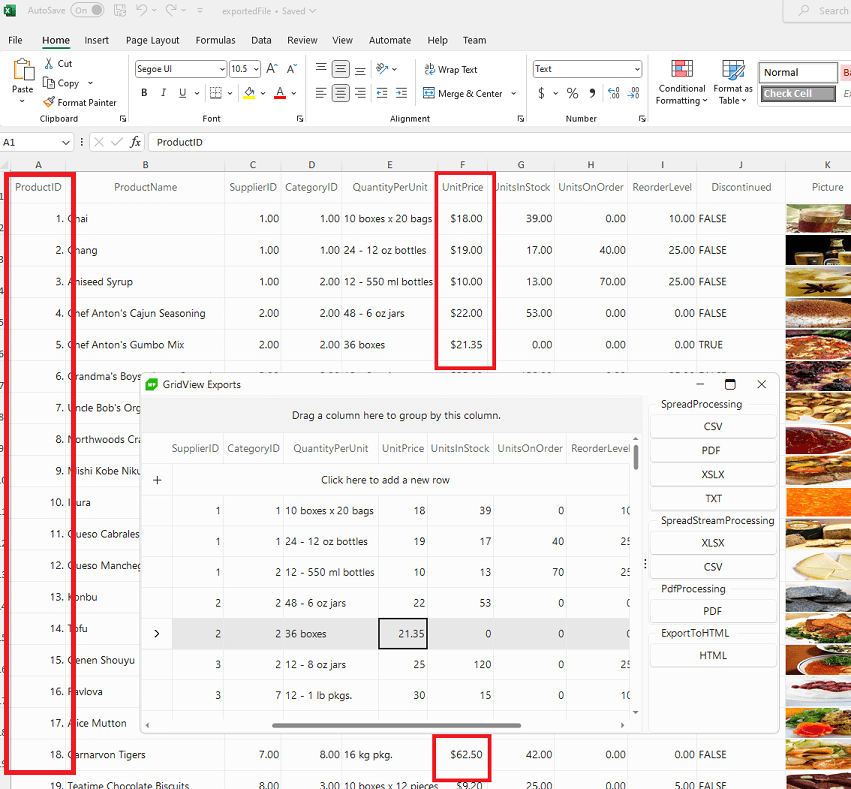
<span class="token keyword">this</span><span class="token punctuation">.</span>radGridView1<span class="token punctuation">.</span>Columns<span class="token punctuation">[</span><span class="token string">"ProductID"</span><span class="token punctuation">]</span><span class="token punctuation">.</span>ExcelExportFormatString <span class="token operator">=</span> <span class="token string">"#.#"</span><span class="token punctuation">;</span>
<span class="token keyword">this</span><span class="token punctuation">.</span>radGridView1<span class="token punctuation">.</span>Columns<span class="token punctuation">[</span><span class="token string">"Unitprice"</span><span class="token punctuation">]</span><span class="token punctuation">.</span>ExcelExportType <span class="token operator">=</span> Telerik<span class="token punctuation">.</span>WinControls<span class="token punctuation">.</span>UI<span class="token punctuation">.</span>Export<span class="token punctuation">.</span>DisplayFormatType<span class="token punctuation">.</span>Currency<span class="token punctuation">;</span>
</code></pre><p><img src="https://d585tldpucybw.cloudfront.net/sfimages/default-source/blogs/2023/2023-09/change-format-exported-string.png?sfvrsn=34fcd1d_3" alt="Product ID and UnitPrice columns have been emphasized with a red box. In the export, the period is removed from the prouct ID and the currency formatting is removed from unit price" /></p><p>The <strong>ExportFormat</strong> property defines the format the grid will be exported to. The available values are:</p><ul><li>XLSX</li><li>PDF</li><li>CSV</li><li>TXT</li></ul><p>The default value of the property is XLSX, hence, if not otherwise specified, the exporter will export to XLSX.</p><aside><hr /><div class="row"><div class="col-4 u-normal-full u-small-mb0"><h4 class="u-fs20 u-fw5 u-lh125 u-mb0">Telerik RadGridView for WinForms: A Deep Dive and User Experience Guide</h4></div><div class="col-8"><p class="u-fs16 u-mb0"><a href="https://www.telerik.com/blogs/telerik-radgridview-winforms-deep-dive-user-experience-guide" target="_blank">Get a closer look at the functionalities available from Telerik UI for WinForms GridView</a> and see why it stands out from the crowd.</p></div></div><hr class="u-mb3" /></aside><h2 id="export-with-radspreadstreamprocessing">Export with RadSpreadStreamProcessing</h2><p>When it comes to a scenario of exporting a grid with a lot of records, e.g., 100,000 rows, it may require some time to generate the export file with the GridViewSpreadExport.</p><p>After performing a quick test, it took around <strong>50 seconds</strong> to export <strong>100K</strong> records with the GridViewSpreadExport:</p><p><img src="https://d585tldpucybw.cloudfront.net/sfimages/default-source/blogs/2023/2023-09/gridviewspreadexport-speed.png?sfvrsn=1a530e2a_3" alt="51540 milliseconds" /></p><p>Here comes the <a target="_blank" href="https://docs.telerik.com/devtools/winforms/controls/gridview/exporting-data/spreadstream-export">GridViewSpreadStreamExport</a> that uses the <a target="_blank" href="https://docs.telerik.com/devtools/document-processing/libraries/radspreadstreamprocessing/overview">RadSpreadStreamProcessing</a> library which allows you to create big documents (without loading the entire document in the memory) and export them to the most common formats. Thus, you can optimize the export time and memory
    consumption.
</p><pre class=" language-csharp"><code class="prism  language-csharp">GridViewSpreadStreamExport spreadStreamExport <span class="token operator">=</span> <span class="token keyword">new</span> <span class="token class-name">GridViewSpreadStreamExport</span><span class="token punctuation">(</span><span class="token keyword">this</span><span class="token punctuation">.</span>radGridView1<span class="token punctuation">)</span><span class="token punctuation">;</span>
spreadStreamExport<span class="token punctuation">.</span>ExportVisualSettings <span class="token operator">=</span> <span class="token keyword">true</span><span class="token punctuation">;</span>
<span class="token keyword">string</span> fileName <span class="token operator">=</span> <span class="token string">@"..\..\exportedFile.xlsx"</span><span class="token punctuation">;</span>
spreadStreamExport<span class="token punctuation">.</span><span class="token function">RunExport</span><span class="token punctuation">(</span>fileName<span class="token punctuation">,</span> <span class="token keyword">new</span> <span class="token class-name">SpreadStreamExportRenderer</span><span class="token punctuation">(</span><span class="token punctuation">)</span><span class="token punctuation">)</span><span class="token punctuation">;</span>
</code></pre><p>As a result, the same number of grid rows are exported much faster with the stream export in around <strong>20</strong> seconds:</p><p><img src="https://d585tldpucybw.cloudfront.net/sfimages/default-source/blogs/2023/2023-09/gridviewspreadstreamexport-speed.png?sfvrsn=27539877_3" alt="21761 milliseconds" /></p><p><a target="_blank" href="https://docs.telerik.com/devtools/winforms/controls/gridview/exporting-data/spreadstream-export#properties">A full list of the public API and fine-tuning for the exported file can be found here.</a></p><h2 id="export-with-radpdfprocessing">Export with RadPdfProcessing</h2><p>RadGridView&rsquo;s data can be exported natively to the PDF format by <a target="_blank" href="https://docs.telerik.com/devtools/winforms/controls/gridview/exporting-data/export-to-pdf#exporting-data-using-gridviewpdfexport-object">GridViewPdfExport</a>,
 which utilizes the powerful <a target="_blank" href="https://docs.telerik.com/devtools/document-processing/libraries/radpdfprocessing/overview">RadPdfProcessing</a> library.</p><p>The GridViewPdfExport functionality is also located in the TelerikExport.dll assembly. You need to include the following namespace in order to access the types contained in TelerikExport: Telerik.WinControls.Export.</p><pre class=" language-csharp"><code class="prism  language-csharp">Telerik<span class="token punctuation">.</span>WinControls<span class="token punctuation">.</span>Export<span class="token punctuation">.</span>GridViewPdfExport pdfExporter <span class="token operator">=</span> <span class="token keyword">new</span> <span class="token class-name">Telerik<span class="token punctuation">.</span>WinControls<span class="token punctuation">.</span>Export<span class="token punctuation">.</span>GridViewPdfExport</span><span class="token punctuation">(</span><span class="token keyword">this</span><span class="token punctuation">.</span>radGridView1<span class="token punctuation">)</span><span class="token punctuation">;</span>
pdfExporter<span class="token punctuation">.</span>FileExtension <span class="token operator">=</span> <span class="token string">"pdf"</span><span class="token punctuation">;</span>
pdfExporter<span class="token punctuation">.</span>HiddenColumnOption <span class="token operator">=</span> Telerik<span class="token punctuation">.</span>WinControls<span class="token punctuation">.</span>UI<span class="token punctuation">.</span>Export<span class="token punctuation">.</span>HiddenOption<span class="token punctuation">.</span>DoNotExport<span class="token punctuation">;</span> <span class="token punctuation">;</span>
pdfExporter<span class="token punctuation">.</span>ShowHeaderAndFooter <span class="token operator">=</span> <span class="token keyword">true</span><span class="token punctuation">;</span>

pdfExporter<span class="token punctuation">.</span>HeaderHeight <span class="token operator">=</span> <span class="token number">30</span><span class="token punctuation">;</span>
pdfExporter<span class="token punctuation">.</span>HeaderFont <span class="token operator">=</span> <span class="token keyword">new</span> <span class="token class-name">Font</span><span class="token punctuation">(</span><span class="token string">"Arial"</span><span class="token punctuation">,</span> <span class="token number">22</span><span class="token punctuation">)</span><span class="token punctuation">;</span>
pdfExporter<span class="token punctuation">.</span>Logo <span class="token operator">=</span> System<span class="token punctuation">.</span>Drawing<span class="token punctuation">.</span>Image<span class="token punctuation">.</span><span class="token function">FromFile</span><span class="token punctuation">(</span><span class="token string">@"C:\MyLogo.png"</span><span class="token punctuation">)</span><span class="token punctuation">;</span>
pdfExporter<span class="token punctuation">.</span>LeftHeader <span class="token operator">=</span> <span class="token string">"[Logo]"</span><span class="token punctuation">;</span>
pdfExporter<span class="token punctuation">.</span>LogoAlignment <span class="token operator">=</span> ContentAlignment<span class="token punctuation">.</span>MiddleLeft<span class="token punctuation">;</span>
pdfExporter<span class="token punctuation">.</span>LogoLayout <span class="token operator">=</span> Telerik<span class="token punctuation">.</span>WinControls<span class="token punctuation">.</span>Export<span class="token punctuation">.</span>LogoLayout<span class="token punctuation">.</span>Fit<span class="token punctuation">;</span>

pdfExporter<span class="token punctuation">.</span>MiddleHeader <span class="token operator">=</span> <span class="token string">"Middle header"</span><span class="token punctuation">;</span>
pdfExporter<span class="token punctuation">.</span>RightHeader <span class="token operator">=</span> <span class="token string">"Right header"</span><span class="token punctuation">;</span>
pdfExporter<span class="token punctuation">.</span>ReverseHeaderOnEvenPages <span class="token operator">=</span> <span class="token keyword">true</span><span class="token punctuation">;</span>

pdfExporter<span class="token punctuation">.</span>FooterHeight <span class="token operator">=</span> <span class="token number">30</span><span class="token punctuation">;</span>
pdfExporter<span class="token punctuation">.</span>FooterFont <span class="token operator">=</span> <span class="token keyword">new</span> <span class="token class-name">Font</span><span class="token punctuation">(</span><span class="token string">"Arial"</span><span class="token punctuation">,</span> <span class="token number">22</span><span class="token punctuation">)</span><span class="token punctuation">;</span>
pdfExporter<span class="token punctuation">.</span>LeftFooter <span class="token operator">=</span> <span class="token string">"Left footer"</span><span class="token punctuation">;</span>
pdfExporter<span class="token punctuation">.</span>MiddleFooter <span class="token operator">=</span> <span class="token string">"Middle footer"</span><span class="token punctuation">;</span>
pdfExporter<span class="token punctuation">.</span>RightFooter <span class="token operator">=</span> <span class="token string">"Right footer"</span><span class="token punctuation">;</span>
pdfExporter<span class="token punctuation">.</span>ReverseFooterOnEvenPages <span class="token operator">=</span> <span class="token keyword">true</span><span class="token punctuation">;</span>

pdfExporter<span class="token punctuation">.</span>FitToPageWidth <span class="token operator">=</span> <span class="token keyword">true</span><span class="token punctuation">;</span>
<span class="token keyword">string</span> fileName <span class="token operator">=</span> <span class="token string">@"..\..\exportedFile.pdf"</span><span class="token punctuation">;</span>
pdfExporter<span class="token punctuation">.</span><span class="token function">RunExport</span><span class="token punctuation">(</span>fileName<span class="token punctuation">,</span> <span class="token keyword">new</span> <span class="token class-name">Telerik<span class="token punctuation">.</span>WinControls<span class="token punctuation">.</span>Export<span class="token punctuation">.</span>PdfExportRenderer</span><span class="token punctuation">(</span><span class="token punctuation">)</span><span class="token punctuation">)</span><span class="token punctuation">;</span>
</code></pre><p><img src="https://d585tldpucybw.cloudfront.net/sfimages/default-source/blogs/2023/2023-09/exported-file-pdf.png?sfvrsn=f20742d_3" alt="PDF file has logo, middle header and right header" /></p><p>Once you have the grid&rsquo;s content exported to one of the above-mentioned file formats, with the help of the <a target="_blank" href="https://docs.telerik.com/devtools/document-processing/introduction">Document Processing Libraries</a> it is possible to manage further the file and convert it to any other format supported by the DPL.</p><h2 id="export-to-html">Export to HTML</h2><p>If you need to export the grid&rsquo;s content in HTML format, it is suitable to use the <a target="_blank" href="https://docs.telerik.com/devtools/winforms/controls/gridview/exporting-data/html-export">ExportToHTML</a> class.
        It offers excellent export performance and creates an HTML formatted file, which can be opened in a browser or MS Word. However, the HTML export is pretty old and its API is very limited.</p><p>That is why we strive to utilize as much as possible the rich API of our <a target="_blank" href="https://docs.telerik.com/devtools/document-processing/libraries/radpdfprocessing/overview">Document Processing Libraries</a> for exporting the RadGridView. It includes a set of cross-platform libraries that let you import and export content between different formats and work with archive files.</p><h2 id="try-telerik-ui-for-winforms-today">Try It for Free</h2><p>Try out the GridView and 160 other controls from <a href="https://www.telerik.com/products/winforms.aspx" target="_blank">Telerik UI for WinForms</a> today with our
        free trial:</p><p><a target="_blank" href="https://www.telerik.com/try/ui-for-winforms" class="Btn">Try Telerik UI for WinForms</a></p><p>Better yet, try Telerik UI for WinForms <strong>and</strong> <a href="https://www.telerik.com/document-processing-libraries">Document Processing Libraries</a>&nbsp;(and
 a bunch of other good stuff) with <a href="https://www.telerik.com/devcraft" target="_blank">Telerik DevCraft</a>&mdash;the most comprehensive UI component suite
        you can get your hands on:</p><p><a href="https://www.telerik.com/try/devcraft-ultimate" target="_blank" class="Btn">Try Telerik DevCraft</a></p><img src="https://feeds.telerik.com/link/23062/16355983.gif" height="1" width="1"/>]]></content>
  </entry>
  <entry>
    <id>urn:uuid:087b14b1-597a-4047-b057-ec0e4408fe57</id>
    <title type="text">Telerik RadGridView for WinForms: A Deep Dive and User Experience Guide</title>
    <summary type="text">Whether you’re developing an enterprise-level business application or a simple data visualization tool in WinForms, the Telerik RadGridView control stands out from the crowd.</summary>
    <published>2023-09-14T07:12:01Z</published>
    <updated>2026-04-12T06:33:54Z</updated>
    <author>
      <name>​Dinko Krastev </name>
    </author>
    <link rel="alternate" href="https://feeds.telerik.com/link/23062/16348572/telerik-radgridview-winforms-deep-dive-user-experience-guide"/>
    <category term="UI for WinForms Team"/>
    <category term="WinForms"/>
    <content type="text"><![CDATA[<p><span class="featured">Whether you&rsquo;re developing an enterprise-level business application or a simple data visualization tool in WinForms, the Telerik RadGridView control stands out from the crowd.</span></p><p>In the world of data-driven applications, grid components play a major role in efficiently managing and presenting tabular data. These components are more than just tables&mdash;they are dynamic interfaces that allow users to interact with data in
        a structured and intuitive manner.</p><p>Whether you&rsquo;re developing an enterprise-level business application or a simple data visualization tool in WinForms, you just can&rsquo;t do that without a good grid component. Here&rsquo;s why our <a href="https://docs.telerik.com/devtools/winforms/controls/gridview/overview" target="_blank">RadGridView control</a> stands out from the crowd. In this blog post, we&rsquo;ll highlight the most important functionalities of the Telerik RadGridView control for WinForms that not only showcase data
        but also offer a bunch of options.
    </p><h2>Telerik RadGridView for WinForms </h2><ul><li><a href="https://www.telerik.com#insert-update-delete" data-sf-ec-immutable="">Insert/Update/Delete</a></li><li><a href="https://www.telerik.com#grouping" data-sf-ec-immutable="">Grouping</a></li><li><a href="https://www.telerik.com#sorting" data-sf-ec-immutable="">Sorting</a></li><li><a href="https://www.telerik.com#filtering" data-sf-ec-immutable="">Filtering</a></li><li><a href="https://www.telerik.com#paging" data-sf-ec-immutable="">Paging</a></li><li><a href="https://www.telerik.com#columns-rows-manipulation" data-sf-ec-immutable="">Columns and Rows Manipulation</a></li><li><a href="https://www.telerik.com#save-load-layout" data-sf-ec-immutable="">Save/Load Layout</a></li><li><a href="https://www.telerik.com#keyboard-support" data-sf-ec-immutable="">Keyboard Support</a></li><li><a href="https://www.telerik.com#clipboard-operations" data-sf-ec-immutable="">Clipboard Operations</a></li><li><a href="https://www.telerik.com#touch-support" data-sf-ec-immutable="">Touch Support</a></li><li><a href="https://www.telerik.com#scrolling" data-sf-ec-immutable="">Scrolling</a></li><li><a href="https://www.telerik.com#printing" data-sf-ec-immutable="">Printing</a></li><li><a href="https://www.telerik.com#localization" data-sf-ec-immutable="">Localization</a></li><li><a href="https://www.telerik.com#exporting" data-sf-ec-immutable="">Exporting</a></li></ul><h2 id="insert-update-delete">Insert/Update/Delete</h2><p>Similar to other grid components, Progress <a target="_blank" href="https://www.telerik.com/products/winforms.aspx">Telerik UI for WinForms</a> RadGridView control
        provides support for Insert, Update and Delete operations. With intuitive user interfaces, performing these operations becomes as effortless as a few clicks. Whether you&rsquo;re adding new data, modifying existing records or removing unnecessary
        entries, RadGridView simplifies the entire data manipulation process.</p><p><img src="https://d585tldpucybw.cloudfront.net/sfimages/default-source/10x/insert_update_delete29337e38-2633-4ce3-9f68-026957eed7c6.gif?sfvrsn=95d8fc9d_1" alt="Insert_Update_Delete" sf-size="100" /></p><h2 id="grouping">Grouping</h2><p>Grouping is a powerful feature within Telerik RadGridView for WinForms that brings a new level of organization and clarity to your tabular data. By categorizing data based on shared characteristics, grouping allows users to quickly access and analyze
        related information. Whether you&rsquo;re working with complex datasets or striving to enhance user experience, the grouping feature proves invaluable in making data more readable to the end user.</p><p>The users can easily drag a column header to the top part of the control to group by it. If one column is not enough, the user can drag several columns and group the data by them.</p><p><img src="https://d585tldpucybw.cloudfront.net/sfimages/default-source/10x/grouping82c67c16-d422-4edb-8dcf-c445cd480e73.gif?sfvrsn=841d2d8d_1" alt="Grouping" sf-size="100" /></p><h2 id="sorting">Sorting</h2><p>Sorting data within Telerik RadGridView for WinForms is a simple yet essential operation that empowers users to quickly arrange data according to their preferences. With just a few clicks, users can seamlessly sort columns in ascending or descending
        order, enhancing their ability to navigate and analyze tabular information. Similar to the grouping feature, sorting provides an extra layer of control over data presentation and accessibility.</p><p>In a grouped scenario, the user can also sort the grouped data. Combining grouping and sorting capabilities allows the users to navigate complex datasets with both precision and efficiency. </p><p>Imagine a sales analysis scenario where data is grouped by year and, within each year, further grouped by quarters. With grouped sorting, users can drill down into a specific year and instantly arrange data by sales amount, marking the quarters of
        highest and lowest performance.</p><p><img src="https://d585tldpucybw.cloudfront.net/sfimages/default-source/10x/sorting_group840176b7-28ad-4a9b-ab68-10bf448226ac.gif?sfvrsn=e877eea5_1" alt="Sorting_Group" sf-size="100" /></p><h2 id="filtering">Filtering</h2><p>In addition to its grouping and sorting functionalities, Telerik RadGridView smoothly integrates filtering, allowing users to interact with their data even further. </p><p>When filtering is enabled, each column displays a filter box beneath the corresponding header. The user can click the filter icon to display a dropdown list of comparison criteria (e.g., &ldquo;Starts with,&rdquo; &ldquo;Equals&rdquo;). By clicking
        the textbox near the filter button, the user can enter a search value and the RadGridView will do its magic.
    </p><p><img src="https://d585tldpucybw.cloudfront.net/sfimages/default-source/10x/filtere129bef9-b52d-4ab8-98b2-a774463f87cd.gif?sfvrsn=aa2d62a8_1" alt="Filter" sf-size="100" /></p><p>That&rsquo;s not all! RadGridView extends the ordinary filter behavior and adds Excel-like filtering. It is built in a way that mimics the standard Excel filtering functionality and offers a dialog, which contains a list with distinct column values
        from which the end user can choose.</p><p><img src="https://d585tldpucybw.cloudfront.net/sfimages/default-source/10x/filter_excel_like0206351d-1c81-496a-8bbf-28a0787c9ed5.gif?sfvrsn=ce3b7cba_1" alt="Filter_Excel_Like" sf-size="100" /></p><h2 id="paging">Paging</h2><p>RadGridView control provides intuitive pagination functionality. With the Paging functionality, users can navigate through different pages of data. Paging ensures that only a limited number of visual elements are loaded into RadGridView at a time.
        By loading data in small blocks, Paging enhances the responsiveness of the control.</p><p><img src="https://d585tldpucybw.cloudfront.net/sfimages/default-source/10x/paging482cc1b1-62b8-4ee3-9cda-eda8e6f874df.gif?sfvrsn=fa082e4f_1" alt="Paging" sf-size="100" /></p><h2 id="columns-rows-manipulation">Columns and Rows Manipulation</h2><p>Telerik RadGridView for WinForms goes beyond the ordinary tabular data presentation control. Allowing users to rearrange the columns and rows (row reordering is available in unbound mode) per their needs is a dynamic feature that transforms data interaction
        into a personalized experience. This ability allows users to customize the grid&rsquo;s layout based on their work preferences.</p><p><img src="https://d585tldpucybw.cloudfront.net/sfimages/default-source/10x/column_row_manipulation1b519be1-5c9f-4ca3-bb7a-6f3ec410fe9d.gif?sfvrsn=54b015f6_1" alt="Column_Row_Manipulation" sf-size="100" /></p><h2 id="save-load-layout">Save/Load Layout</h2><p>Let&rsquo;s say the user has spent some time to rearrange the columns per their needs. It would be great if the current settings of the control can be saved for later use. The control allows the user to save the current layout into an XML file and
        restore it at a later stage.</p><h2 id="keyboard-support">Keyboard Support</h2><p>If navigating through tabular data using a mouse isn&rsquo;t your preferred approach in your daily routine and you&rsquo;re more of a keyboard person, you&rsquo;ll find Telerik RadGridView&rsquo;s keyboard support to be a valuable asset. With keyboard
        shortcuts and navigation features, RadGridView enables users to efficiently traverse, select and manipulate data without the need to rely on mouse interactions.</p><h2 id="clipboard-operations">Clipboard Operations</h2><p>RadGridView enables users to copy or cut selected cells, rows or columns to the clipboard. This allows data to be easily transferred from the grid to other text editors or pasted within the same grid.</p><p><img src="https://d585tldpucybw.cloudfront.net/sfimages/default-source/10x/copy_paste86ed4b2a-de00-4e26-a488-1a2976f4d53b.gif?sfvrsn=e9a48d6e_1" alt="Copy_Paste" sf-size="100" /></p><h2 id="touch-support">Touch Support </h2><p>In our modern society, touch devices have become an important part of everyday life. From smartphones and tablets to interactive laptops, the convenience of touch interactions has transformed the way we engage with technology.</p><p>RadGridView&rsquo;s touch-enabled features empower users to navigate, manipulate and analyze data through natural touch gestures.</p><p><img src="https://d585tldpucybw.cloudfront.net/sfimages/default-source/10x/touch-support.png?sfvrsn=72b776b3_1" alt="Touch Support" sf-size="100" /></p><h2 id="scrolling">Scrolling </h2><p>As simple as it sounds, scrolling is an inevitable part of the control, especially when working with a large number of items. Our RadGridView control for WinForms extends the ordinary scrolling behavior and adds support for kinetic scrolling. This
        way the end user is not required to scroll the grid by clicking on the scrollbar. By just clicking on the cell and holding the button, the user can move the view up or down.</p><p><img src="https://d585tldpucybw.cloudfront.net/sfimages/default-source/10x/kinetic-scrollinga82042ac-b6f7-4489-8e36-3ce37f2ad710.gif?sfvrsn=ab999d18_1" alt="Kinetic Scrolling" sf-size="100" /></p><h2 id="printing">Printing </h2><p>After finishing the task of changing the layout and modifying the data, the ability to print the current state of the data can add an important layer of functionality to your application. RadGridView&rsquo;s printing functionality ensures that the
        data you&rsquo;ve organized and modified within the grid keeps its visual look when printed on paper. This feature guarantees that your hard work is presented to colleagues, clients or stakeholders in a polished and impressive format.</p><p>In addition, the PrintPreview window gives the end user the option to customize the print document. This way the current layout of the control will stay intact while the printed document can be customized to your needs.</p><h2 id="localization">Localization</h2><p>In a world built by diverse cultures and languages, software applications need to go above these boundaries. While the control currently supports only English localization out of the box, the integrated localization mechanism of the control allows
        you to translate each string inside it to the desired language.</p><h2 id="exporting">Exporting</h2><p>Last but not least, exporting! Exporting any data visualization control into different formats is an inevitable functionality in our modern world. The smooth integration between our RadGridView control and our <a href="https://www.telerik.com/document-processing-libraries" target="_blank">Document Processing</a>
 product gives us the ability to export the control into different formats. From XLSX format to PDF, from CSV to HTML. Different applications and different file types are required. To get familiar with the perks that this integration provides, you
    can check the next blog post in which we will dive into the world of exporting algorithms and file formats.</p><h2>Sign up for a Trial</h2><p>Feel free to sign up for our free 30-day trial, which gives you access to the components as well as our outstanding technical support at zero cost. Just head to the <a href="https://www.telerik.com/products/winforms.aspx" target="_blank">Telerik UI for WinForms</a> overview page or click the button below to sign up for a trial today!</p><p><a href="https://www.telerik.com/download-trial-file/v2/ui-for-winforms" class="Btn" target="_blank">Try UI for WinForms</a></p><h2>Time For Feedback</h2><p>Oh, and one more thing. We would be more than happy to hear your thoughts and suggestions once you try the theme and the other release goodies, so please drop us a line in the comments section below or by visiting the Telerik UI for WinForms <a href="https://feedback.telerik.com/winforms" target="_blank">Feedback Portal</a>.</p><img src="https://feeds.telerik.com/link/23062/16348572.gif" height="1" width="1"/>]]></content>
  </entry>
  <entry>
    <id>urn:uuid:f6c8b0d1-4e2c-4606-8e32-6144001af494</id>
    <title type="text">Unveiling the VisualStudio2022 Dark Theme: A Stylish and User-Friendly Addition to Telerik UI for WinForms</title>
    <summary type="text">The latest R2 2023 Telerik release of the Telerik UI for WinForms features the highly anticipated VisualStudio2022 dark theme! Let’s take a look!</summary>
    <published>2023-07-10T14:21:59Z</published>
    <updated>2026-04-12T06:33:54Z</updated>
    <author>
      <name>Maria Hadzhieva </name>
    </author>
    <link rel="alternate" href="https://feeds.telerik.com/link/23062/16229893/unveiling-visualstudio2022-dark-theme-stylish-user-friendly-addition-telerik-ui-winforms"/>
    <content type="text"><![CDATA[<p><span class="featured">The latest R2 2023 Telerik release of the Telerik UI for WinForms features the highly anticipated VisualStudio2022 dark theme! Let&rsquo;s take a look!</span></p><p>The latest <a href="https://www.telerik.com/blogs/r2-2023-telerik-desktop-mobile-release#telerik-ui-for-winforms" target="_blank">R2 2023</a> release of the Telerik UI for WinForms suite launched in June, and I could not be more
    excited to announce the arrival of the highly anticipated VisualStudio2022 dark theme! Inspired by the most popular Integrated Development Environment (IDE), Visual Studio 2022, this new dark theme brings a sleek and elegant user interface that enhances
    the overall user experience. </p><p><img src="https://d585tldpucybw.cloudfront.net/sfimages/default-source/10x/visualstudio2022light-vs-visualstudio2022dark.png?sfvrsn=85d3f59c_1" alt="VisualStudio2022Dark and VisualStudio2022 light mode contrasted in diagonal halves of a theme viewer window" sf-size="100" /></p><h3>Expanding Theme Options </h3><p>Providing a diverse range of themes is undoubtedly important to suit the various user preferences. </p><p>The Progress&nbsp;<a href="https://www.telerik.com/products/winforms.aspx" target="_blank">Telerik UI for WinForms</a> suite already offers a variety of Visual Studio
    themes, including VisualStudio2012 (light and dark). And, with the addition of the VisualStudio2022 light theme, the collection seemed almost complete. There was just one thing missing. Yes, the VisualStudio2022 dark theme, which I believe will be
    our most loved one. Compared to our other dark themes, it stands out with its softer colors and a more refined background.
</p><h3>New Accent Color </h3><p>In the VisualStudio2022 dark theme, the accent color is less intense, and is more sparingly used to reduce distraction and eyestrain.
</p><p><img src="https://d585tldpucybw.cloudfront.net/sfimages/default-source/10x/overview56098e00-aac0-4e9b-b2de-d7eea9fa33b3.png?sfvrsn=296b666_1" alt="Black background, shades of gray for text and borders, and an accent color of a lavendar color" sf-size="100" /></p><h3>Adjustments for Color Contrast </h3><p>Accessibility is among our highest priorities and that is why we are modifying the overall color contrast for the VisualStudio2022Dark theme. No worries&mdash;users will easily detect the state has changed when an element is being focused since the component
    receives a border with improved color contrast. Let&rsquo;s enjoy the clearer UI hierarchy and the neat separation of the layers and sections from one another.</p><p><img src="https://d585tldpucybw.cloudfront.net/sfimages/default-source/10x/visualstudio2022-dark---color-contrast.gif?sfvrsn=35fe39a3_1" alt="List control and dropdowns - user first selects an item froma dropdown, then moves to a list control to choose an item, then selects a calculator dropdown" sf-size="100" /></p><h3>A Glimpse of the VisualStudio2022 Dark Theme in Action </h3><p>Isn&rsquo;t it high time we peek at the theme in action? Check it out applied to some of the most popular controls in the Telerik UI for WinForms suite:</p><p><img src="https://d585tldpucybw.cloudfront.net/sfimages/default-source/10x/visualstudio2022-dark-gridview.png?sfvrsn=38f989a9_1" alt="Grid in VisualStudio2022Dark - row being edited shows in the purple accent" sf-size="100" /></p><p><img src="https://d585tldpucybw.cloudfront.net/sfimages/default-source/10x/visualstudio2022-dark-pivotgrid.png?sfvrsn=2fbf057a_1" alt="Pivot Grid in VisualStudio2022Dark - selected columns in shades of the purple accent" sf-size="100" /></p><p><img src="https://d585tldpucybw.cloudfront.net/sfimages/default-source/10x/visualstudio2022-dark-list-controls.png?sfvrsn=9626358e_1" alt="ListView in VisualStudio2022Dark - Detail view has a highilghted row, icon view has a selected folder, card view has one card in focus with a thin purple border, and simple view has a selected item in the accent color" sf-size="100" /></p><h3>Customization with VisualStyleBuilder </h3><p>Now, let&rsquo;s get down to the fun part&mdash;customization! With the awesome <a href="https://docs.telerik.com/devtools/winforms/tools/visual-style-builder/overview" target="_blank">VisualStyleBuilder</a>, you have the power to
    put your personal touch on the VisualStudio2022 dark theme or even create a totally custom theme. And guess what&mdash;it is a piece of cake! Unleash your inner artist, shaping the appearance of your WinForms apps to make them truly incredible.</p><p>The possibilities are endless! Just follow these simple steps: </p><ol><li>Head over to the Tools section in the menu. </li><li>Look for the Blend Color option and give it a click. </li><li>Now, it&rsquo;s time to play with colors! Fine-tune them to your heart&rsquo;s content until they&rsquo;re absolutely perfect. </li><li>When you&rsquo;re satisfied with your masterpiece, hit that save button and watch as a brand-new theme is born. </li></ol><p><img src="https://d585tldpucybw.cloudfront.net/sfimages/default-source/10x/blended-visualstudio2022-dark.png?sfvrsn=cb59071c_1" alt="The dark background color has a midnight blue hue, and the accent color is a lively green" sf-size="100" /></p><h3>Conclusion </h3><p>I hope you have seen with your own eyes that the VisualStudio2022Dark design in Telerik UI for WinForms enables a modern and visually pleasing dark theme option for your apps. It not only offers a fresh and engaging user experience but also prioritizes
    user comfort and reduces eye strain during long hours of usage. By leveraging this design, you can enhance the aesthetics and usability of your WinForms application while keeping up with the latest design trends.</p><h3>Sign up for a Trial</h3><p>Feel free to sign up for our free 30-day trial, which gives you access to the components as well as our outstanding technical support at zero cost. Just head to the <a href="https://www.telerik.com/products/winforms.aspx" target="_blank">Telerik UI for WinForms</a> overview page or click the button below to sign up for a trial today!</p><p><a href="https://www.telerik.com/download-trial-file/v2/ui-for-winforms" class="Btn" target="_blank">Try UI for WinForms</a></p><h3>Time For Feedback</h3><p>Oh, and one more thing. We would be more than happy to hear your thoughts and suggestions once you try the theme and the other release goodies, so please drop us a line in the comments section below or by visiting the Telerik UI for WinForms <a href="https://feedback.telerik.com/winforms">Feedback Portal</a>.</p><img src="https://feeds.telerik.com/link/23062/16229893.gif" height="1" width="1"/>]]></content>
  </entry>
  <entry>
    <id>urn:uuid:35a66f19-70a7-46f3-9d29-c5e988c7cfcf</id>
    <title type="text">What’s New in R2 2023 with Telerik Desktop and Mobile Components</title>
    <summary type="text">Get ready for the latest update on our Progress Telerik products for mobile and desktop as we unveil the highly anticipated R2 2023 release.</summary>
    <published>2023-06-07T13:49:37Z</published>
    <updated>2026-04-12T06:33:54Z</updated>
    <author>
      <name>Yoan Krumov </name>
    </author>
    <link rel="alternate" href="https://feeds.telerik.com/link/23062/16170987/r2-2023-telerik-desktop-mobile-release"/>
    <content type="text"><![CDATA[<p><span class="featured">Get ready for the latest update on our Progress Telerik products for mobile and desktop as we unveil the highly anticipated R2 2023 release.</span></p><p>We are thrilled to share the exciting features and improvements that await you in R2 2023 from our Progress Telerik mobile and desktop UI component libraries. So, sit back, relax and keep reading to stay in the loop!</p><ul><li><a href="https://www.telerik.com#telerik-ui-for-.net-maui" data-sf-ec-immutable="">Telerik UI for .NET MAUI</a></li><li><a href="https://www.telerik.com#telerik-ui-for-wpf" data-sf-ec-immutable="">Telerik UI for WPF</a></li><li><a href="https://www.telerik.com#telerik-ui-for-winforms" data-sf-ec-immutable="">Telerik UI for WinForms</a></li><li><a href="https://www.telerik.com#telerik-ui-for-winui" data-sf-ec-immutable="">Telerik UI for WinUI</a></li><li><a href="https://www.telerik.com#telerik-ui-for-xamarin" data-sf-ec-immutable="">Telerik UI for Xamarin</a></li><li><a href="https://www.telerik.com#telerik-document-processing-libraries" data-sf-ec-immutable="">Telerik Document Processing Libraries</a></li><li><a href="https://www.telerik.com#join-us-for-release-webinar-and-more" data-sf-ec-immutable="">Details for webinar June 8</a></li></ul><h2 id="telerik-ui-for-.net-maui">Telerik UI for .NET MAUI</h2><p>Prepare for an exhilarating update in R2 2023 as Telerik UI for .NET MAUI unveils a series of exciting enhancements. I am thrilled to introduce six brand-new controls: Calendar, PDF Viewer, Chat, SlideView, RichTextEditor and TreeView, each designed to
    empower your app development journey. In addition, we have taken steps to refine and enrich our powerful DataGrid control, unlocking even more possibilities. Let&rsquo;s have a sneak peek at the most interesting stuff we have for you in this release.</p><h3 id="calendar">Calendar</h3><p>The new addition to the UI for .NET MAUI family is the Calendar component. It allows you to select single or multiple dates by navigating easily between decades, years and months. The control is culture-aware by providing globalization support. It
    also provides support for scrolling and navigation, blackout dates and much more.</p><p><img src="https://d585tldpucybw.cloudfront.net/sfimages/default-source/blogs/2023/2023-06/maui-calendar.gif?sfvrsn=7c6b8120_3" alt="A monthly overview shows dots for reminders, stars for birthdays. Clicking on the date opens the details. Arrows allow easy flipping between months" /></p><p>Here is a list of the main features of the control:</p><ul><li><strong>Different display modes</strong>: Calendar features year, month, decade and century display modes.</li><li><strong>Date Ranges</strong>: Restrict the visible/selectable dates in the Calendar by utilizing MinDate and MaxDate properties.</li><li><strong>Different selection modes</strong>: The component provides different types of selection&mdash;Single, Multiple, Range or disabling the selection.</li><li><strong>Buttons for navigation in the current view</strong>: You can easily navigate in the current view by using the buttons in the calendar header.</li><li><strong>Hide the names</strong> of the display days in month view.</li><li><strong>Format the header text</strong> for the corresponding view.</li><li><strong>Templates support</strong>: For customizing the days, months, years and decades in the corresponding views.</li><li><strong>Commands support</strong>: For navigating in the current view or between the views.</li><li><strong>Styling API</strong>: You can style the Calendar border, header border and text, navigation buttons and the content of the corresponding view.</li></ul><p>For more information on getting started with the Telerik UI for <a href="https://docs.telerik.com/devtools/maui/controls/calendar/overview" target="_blank">.NET MAUI Calendar control, visit the documentation</a>.</p><h3 id="pdf-viewer-component">PDF Viewer Component</h3><p>One of the highly requested components for our UI for .NET MAUI suite was the PDF viewer. I am happy to share that it is now available with our latest release. This component empowers the users of your application to directly open and view PDF
    documents within their mobile or desktop app, eliminating the need for any external software installation or switching between different applications. You can visualize PDF documents that include images, shapes, different colors, ordered and
    bulleted lists and more.
</p><p><img src="https://d585tldpucybw.cloudfront.net/sfimages/default-source/blogs/2023/2023-06/maui-pdf-viewer.png?sfvrsn=d623d07b_3" alt="PDF Viewer shows options for full screen, zoom in and out, page" /></p><p>Here are some of the key features to look for:</p><ul><li><strong>Various document source options</strong>: You can load the PDF document from a stream, from a file added as an embedded resource or a file located on the device, etc.</li><li><strong>Zooming functionality</strong>: The component provides an option for zooming in and zooming out the content of the document.</li><li><strong>Commands support</strong>: The PDF Viewer component offers support for a variety of commands, such as ZoomIn, ZoomOut, NavigateTo (NextPage, PreviousPage, Page) and FitToWidth.</li><li><strong>Single page</strong> and <strong>Continuous Scrolling</strong> <strong>support:</strong> You can choose between two layout modes that allow the document to be scrolled in the viewer.</li><li><strong>Flexible styling API</strong>: You can easily style the toolbar per your requirements.</li></ul><p>For more information on getting started with the <a href="https://docs.telerik.com/devtools/maui/controls/pdfviewer/overview" target="_blank">PDF Viewer control, visit the documentation</a>.</p><h3 id="chat-component-conversational-ui">Chat Component (Conversational UI)</h3><p>The Chat control in Telerik UI for .NET MAUI empowers you to build contemporary chat experiences in your .NET MAUI apps. It smoothly integrates with popular chatbot frameworks and effortlessly facilitates peer-to-peer conversations.</p><p><img sf-custom-thumbnail="true" src="https://d585tldpucybw.cloudfront.net/sfimages/default-source/blogs/2023/2023-06/chatroom.jpg?sfvrsn=6860052e_3" width="300" alt="A chatroom with avatars and text backgrounds in different colors" sf-constrain-proportions="true" /></p><p>The component offers a diverse range of customizable message formats like cards, pickers and suggestions. It also enables you to effortlessly replace forms with an instinctive conversational UI. You can modify messages and cards to include
    text, images and other elements or incorporate details such as message timestamps, sender/recipient names, avatars and much more.</p><p><img sf-custom-thumbnail="true" src="https://d585tldpucybw.cloudfront.net/sfimages/default-source/blogs/2023/2023-06/chatbot.png?sfvrsn=d8b2eade_3" width="300" alt="A travel assistant chatbot asks what kind of vacation the user is interested in and when they want it to start, bringing up a calendar for date selection" sf-constrain-proportions="true" /></p><p>For more information on getting started with the Telerik UI for .NET MAUI <a href="http://docs.telerik.com/devtools/maui/controls/chat/overview" target="_blank">Chat control, visit the  documentation</a>.</p><h3 id="slideview-component">SlideView Component</h3><p>The new SlideView component provides a visually appealing and interactive way to present information or showcase visual content. Whether your goal is to create an image gallery or improve navigation within your .NET MAUI application, the
    SlideView component offers a comprehensive set of features and customizable options to fulfill your requirements.</p><p><img src="https://d585tldpucybw.cloudfront.net/sfimages/default-source/blogs/2023/2023-06/maui-slideview.png?sfvrsn=2dabacd_3" alt="slideview shows a large image of a salad in a carousel. The text below says Salad Recipes, with more text below that." /></p><p>Here are some of the key features to look for:</p><ul><li><strong>Item Template</strong>: Allows you to present the data in the views in the most suitable way for your scenario.</li><li><strong>Control Template support</strong>: You can change the appearance of the SlideView component through a Control Template.</li><li><strong>Customizable indicators and slide buttons</strong>: The SlideView allows you to customize the appearance of the indicators and slide buttons.</li><li><strong>Commands support</strong></li><li><strong>UI virtualization</strong></li></ul><p>For more information on getting started with the <a href="https://docs.telerik.com/devtools/maui/controls/slideview/overview" target="_blank">Telerik UI for .NET MAUI SlideView control, visit the documentation</a>.</p><h3 id="rich-text-editor-component">Rich Text Editor Component</h3><p>The Telerik UI for .NET MAUI RichTextEditor control empowers users to generate rich textual content using a comprehensive array of tools. These tools simplify the creation, editing and formatting of text, paragraphs, lists, hyperlinks
    and various other elements.
</p><p><img src="https://d585tldpucybw.cloudfront.net/sfimages/default-source/blogs/2023/2023-06/maui-rich-text-editor.png?sfvrsn=d48c1471_3" alt="Rich text editor shows an email with text styling and an image" /></p><p>The Telerik UI for .NET MAUI RichTextEditor control comes with a multitude of editing capabilities, including:</p><ul><li>Text formatting, such as bold, italic, underline and strikethrough</li><li>Font manipulations, such as size, family and color</li><li>Text selection</li><li>Hyperlink manipulations such as creating, editing and removing hyperlinks</li><li>Read-only state that does not allow text editing</li><li>Copy/Paste/Undo/Redo editing actions</li></ul><p>It also has an integrated ToolBar, which effortlessly connects to the commonly used commands provided by the control.</p><p>For more information on getting started, visit the <a href="https://docs.telerik.com/devtools/maui/controls/richtexteditor/overview" target="_blank">Telerik UI for .NET MAUI RichTextEditor control documentation</a>.</p><h3 id="treeview">TreeView</h3><p>The new TreeView component in UI for .NET MAUI allows you to visually represent hierarchical data in a collapsible and expandable tree structure. It provides users with an intuitive way to navigate and explore complex information,
    such as folder structures, organizational charts or category hierarchies.</p><p><img src="https://d585tldpucybw.cloudfront.net/sfimages/default-source/blogs/2023/2023-06/maui-treeview.png?sfvrsn=8434b940_3" alt="An email inbox has four nested folders under Inbox. Work items is one of these folders, and there are two emails inside it." /></p><p>Here are some of the key features to look for:</p><ul><li>Hierarchical navigation</li><li>Expand/Collapse items</li><li>Commands support</li><li>CheckBox support</li><li>UI virtualization</li><li>Single and multiple selection modes</li><li>Empty template support</li><li>Flexible styling API</li></ul><p>For more information on getting started, visit the&nbsp;<a href="https://docs.telerik.com/devtools/maui/controls/treeview/overview" target="_blank">Telerik UI for .NET MAUI TreeView control documentation</a>.</p><h3 id="datagrid-empty-template-support">DataGrid Empty Template Support</h3><p>The Telerik UI for .NET <a href="https://docs.telerik.com/devtools/maui/controls/datagrid/overview" target="_blank">MAUI DataGrid</a> control introduces the Empty Template functionality. This feature enables you to inform your end users when the control has no data to display.</p><p><img src="https://d585tldpucybw.cloudfront.net/sfimages/default-source/blogs/2023/2023-06/maui-datagrid-empty-template.png?sfvrsn=99aca9ad_3" alt="DataGrid empty template shows an illustration of a file folder with nothing inside and a question mark" /></p><h3 id="datagrid-datatable-support">DataGrid DataTable support</h3><p>You can bind your .NET MAUI DataGrid to a DataTable and have access to all the cool features. You can add, remove, select, edit item(s) and update DataGrid&rsquo;s ItemsSource. You can also perform commands and operations like
    filtering, sorting, grouping and selection.
</p><h3 id="net-6--.net-8-support">.NET 6 &amp; .NET 8 Support</h3><p>As you may be aware, Microsoft officially discontinued .NET 6 support for .NET MAUI back in May. We are announcing that our plans align with this change, and we will be ending our support for .NET MAUI in .NET 6 in November&mdash;this
    should give you extra time to get off .NET 6 and onto .NET 7/8.</p><p>This transition marks an exciting milestone as we prepare to welcome the arrival of .NET 8, which will bring a host of new features and enhancements. Rest assured that during this period, we are actively working to ensure a
    seamless transition and guarantee an official and robust support system for .NET 8, which we will be ready to launch alongside its official release.</p><h3 id="check-out-the-detailed-release-notes">Check out the Detailed Release Notes</h3><p>To get an overview of all the latest components, features and improvements we&rsquo;ve made, check out the release notes for the product: <a href="https://www.telerik.com/support/whats-new/maui-ui/release-history/telerik-ui-for-net-maui-(version-5-2-0)" target="_blank">Telerik UI for .NET MAUI (Release Notes)</a>.</p><h2 id="telerik-ui-for-wpf">Telerik UI for WPF</h2><h3 id="radslideview-and-radpipspager-components">RadSlideView and RadPipsPager components</h3><p><strong>RadSlideView</strong> is a flexible navigation control that allows you to slide between different views, thus providing an interactive navigation. With it, you can build a gallery display to show your images and content
    efficiently.</p><p><img src="https://d585tldpucybw.cloudfront.net/sfimages/default-source/blogs/2023/2023-06/radslideview.png?sfvrsn=ded0a6ee_3" alt="A large image with arrows on either side. The image is labeled &#39;content&#39; and the arrows are labeled &#39;navigation buttons&#39;" /></p><p><strong>RadPipsPager</strong> lets the user navigate a linearly paginated collection using glyphs also known as pips.</p><p><img src="https://d585tldpucybw.cloudfront.net/sfimages/default-source/blogs/2023/2023-06/radpipspager.png?sfvrsn=ffa7404f_3" alt="Pips are large dots. The selected pip is blue rather than black. the navigation buttons are left and right arrows." /></p><p>The two controls work seamlessly with one another to enhance the navigation experience in your applications.</p><img src="https://d585tldpucybw.cloudfront.net/sfimages/default-source/10x/pipspager_integration-with-slideview-(scrolling-pips).gif?sfvrsn=307bf102_1" alt="The image, left and right arrows, and pips showing this image is the first of five" sf-size="100" /><p>They also share some of their main features:</p><ul><li><strong>Navigation</strong>: The controls allow you to navigate through the data either in a loop or from end to end.</li><li><strong>Orientation</strong>: They can be oriented vertically or horizontally.</li><li><strong>Customizing navigation buttons</strong>: The navigation buttons can be easily customized.</li></ul><p>You can find more information about the new components in their respective documentation sections:</p><ul><li><a href="https://docs.telerik.com/devtools/wpf/controls/radslideview/overview" target="_blank">RadSlideView</a></li><li><a href="https://docs.telerik.com/devtools/wpf/controls/radpipspager/overview" target="_blank">RadPipsPager</a></li></ul><h3 id="windows-11-compact-theme">Windows 11 Compact Theme</h3><p><img src="https://d585tldpucybw.cloudfront.net/sfimages/default-source/blogs/2023/2023-06/compact-vs-standard.png?sfvrsn=723f3104_3" alt="Compact vs. Standard theme comparison shows button styles, table or grid styles, and menu styles" /></p><p>Get ready to elevate your app&rsquo;s aesthetics and create a masterpiece with the most innovative addition to the R2 2023 Release&mdash;a new, high-density (or compact) layout option for the Windows 11 theme. Designed for
    information rich UI and similar specialized scenarios, this new theme mode brings a stunning and sleek look to your WPF apps.</p><p>While functionality and behavior have not changed and remain consistent across the two size and density options, the default heights and offsets have been updated for all controls to support both density options.</p><p>For more information on getting started with our latest theme, visit the <a href="https://docs.telerik.com/devtools/wpf/styling-and-appearance/themes-suite/windows11#windows-11-compact-mode" target="_blank">Telerik UI for WPF theme documentation</a>.</p><h3 id="raddocking-move-panes-between-multiple-docking-instances">RadDocking: Move Panes Between Multiple Docking Instances</h3><p>No more moving pane restrictions between docking instances. Users can now create a group of dockings in which moving and docking panes are not limited, no matter if dockings are nested or side by side. This enables powerful
    UI rearrangement abilities in applications with multiple dockings in a single view.</p><p><img src="https://d585tldpucybw.cloudfront.net/sfimages/default-source/10x/movepanesbetweendоckings5.gif?sfvrsn=df624480_1" alt="Four panes are visible: meeting agenda, tabbed financial report/project proposal, tabbed sales department/review notes, and tabbed project meeting/resultant assistant" sf-size="100" /></p><p>For more information on getting started with this powerful feature, visit the <a href="https://docs.telerik.com/devtools/wpf/controls/raddocking/features/drag-and-drop#moving-panes-between-raddocking-instances" target="_blank">Telerik UI for WPF RadDocking documentation</a>.</p><h3 id="syntaxeditor-search-ui-enhancements">SyntaxEditor: Search UI Enhancements</h3><p>To better cover well-known scenarios in text or code editing from VisualStudio or NotePad++, we added more search options in the search panel. <strong>MatchCase</strong>, <strong>MatchWholeWord</strong> and <strong>Regex</strong> settings will give your users the powerful search experience they expect.</p><p><img src="https://d585tldpucybw.cloudfront.net/sfimages/default-source/blogs/2023/2023-06/search-ui.png?sfvrsn=67594153_3" alt="On a coding screen, the search window is up. It has a search, a replace field, and buttons for next/previous, find all, replace, replace all, match case, match whole word, and regular expression" /></p><h3 id="radpivotgrid-localdatasourceprovider-hierarchies">RadPivotGrid LocalDataSourceProvider Hierarchies</h3><p>The LocalDataSourceProvider now allows you to display nested properties of the objects in its ItemsSource in a hierarchy similar to how DateTime properties are visualized in the RadPivotFieldList.</p><p><img src="https://d585tldpucybw.cloudfront.net/sfimages/default-source/blogs/2023/2023-06/nested-datasource.png?sfvrsn=fdd4c364_3" alt="Selection window for choose fields to add to report has nested files" /></p><p>Nested properties can be utilized to create a report in the same manner as non-nested ones.</p><p><img src="https://d585tldpucybw.cloudfront.net/sfimages/default-source/blogs/2023/2023-06/nested-hierarchy-datasource.png?sfvrsn=617a70b1_3" alt="More of the folders from above are opened, revealing more hierarchies" /></p><p>You can enable this functionality by setting the new <strong>EnableHierarchy</strong> property of the LocalDataSourceProvider to <strong>True</strong>. Then you will be able to provide a nested property path as the PropertyName
    of a group description.</p><pre><code class="language-xml">&lt;pivot:LocalDataSourceProvider x:Key="dataProvider" EnableHierarchy="True"&gt;         
       &lt;pivot:LocalDataSourceProvider.RowGroupDescriptions&gt;
              &lt;pivot:PropertyGroupDescription PropertyName="Customer.Company.Industry" /&gt;
              &lt;pivot:PropertyGroupDescription PropertyName="Promotion" /&gt;
      &lt;/pivot:LocalDataSourceProvider.RowGroupDescriptions&gt;
&lt;/pivot:LocalDataSourceProvider&gt;</code></pre><p>To see this in action, check out the <strong>PivotFieldList</strong> demo in the <a href="https://demos.telerik.com/wpf/?_ga=2.220795672.1831998515.1685431128-1241877747.1661502490&amp;_gl=1*1jl079y*_ga*MTI0MTg3Nzc0Ny4xNjYxNTAyNDkw*_ga_9JSNBCSF54*MTY4NTUyOTU0Ni41MzUuMS4xNjg1NTMyNzc3LjQ4LjAuMA.." target="_blank">WPF Examples application</a>.</p><p>Here is also a list of other popular features we updated for you in this release:</p><ul><li><strong>TreeView</strong>: <a href="https://docs.telerik.com/devtools/wpf/controls/radtreeview/features/feautres-treeviewitem-selection#performing-selection-on-the-mouseleftbuttonup-event" target="_blank">Ability to perform selection on mouse up</a></li><li><strong>GridView</strong>: <a href="https://docs.telerik.com/devtools/wpf/controls/radgridview/features/search-as-you-type#searchmode" target="_blank">ExactMatch functionality in search-as-you-type feature</a></li><li><strong>PropertyGrid</strong>: <a href="https://docs.telerik.com/devtools/wpf/controls/radpropertygrid/features/nested-properties#specifying-the-propertydefinition-auto-generating-mode" target="_blank">Allow searching for property fields that are not expanded initially</a></li></ul><h3 id="support-for-.net-8-preview">Support for .NET 8 Preview</h3><p>We are excited to announce that we are extending our support to include the preview versions of .NET 8. While .NET 8 is still in the preview phase, we understand the eagerness to explore its capabilities. We have thoroughly
    tested our components and have made sure they are compatible with the latest preview releases.</p><h2 id="telerik-ui-for-winforms">Telerik UI for WinForms</h2><p>The R2 2023 release comes with a brand-new Heat Map control, a dark Visual Studio 2022 theme, modernized Scheduler appointments, LineNumbering in the RichTextEditor and a ton of other improvements.</p><h3 id="heat-map">Heat Map</h3><p>RadHeatMap is here to help you visualize numeric data in a meaningful and straightforward way. It uses a two-dimensional layout with indicative colors to represent data. Each entity is represented by a colored rectangle
    and the applied color maps to the magnitude of its numeric value. At a glimpse, you can spot trends and easily compare different data items.</p><p><img src="https://d585tldpucybw.cloudfront.net/sfimages/default-source/blogs/2023/2023-06/heatmap.png?sfvrsn=3d77f1ac_6" alt="A table with countries and years has shades of yellow and green to serve as a heatmap" /></p><p>The component comes with many features like intuitive API, databinding, unbound mode, different colorizers, labels, selection, tooltips and screentips, and custom painting.</p><p>For more information on getting started with the HeatMap control, visit the <a href="https://docs.telerik.com/devtools/winforms/controls/heatmap/overview" target="_blank">WinForms HeatMap documentation</a>.</p><h3 id="visual-studio-2022-dark-theme">Visual Studio 2022 Dark Theme</h3><p>Yet another member of our family of dark themes is coming. We are expanding this collection because we know that many of you are fans of the <em>dark side</em>. As its name suggests, the theme is inspired by Visual
    Studio 2022 and its dark mode.</p><p><img src="https://d585tldpucybw.cloudfront.net/sfimages/default-source/blogs/2023/2023-06/vs-22-dark-mode.png?sfvrsn=e6db00e9_3" alt="VS 2022 dark mode" /></p><p>For more information on getting started with our latest theme, visit the <a href="https://docs.telerik.com/devtools/winforms/styling-and-appearance/themes-style" target="_blank">Telerik UI for WinForms themes documentation</a>.</p><h3 id="scheduler-appointment-styles">Scheduler Appointment Styles</h3><p>We&rsquo;ve always strived to create modern components and designs. It was about time for the RadScheduler look to completely change. New appointment styles are coming to RadScheduler&mdash;they are fresh, bold
    and modern. The styles vary from one theme to another, matching its general look and feel.</p><p><img src="https://d585tldpucybw.cloudfront.net/sfimages/default-source/blogs/2023/2023-06/scheduler-appointments.png?sfvrsn=1208f24b_3" alt="A colorful scheduler shows appointments for the week" /></p><h3 id="line-numbering-in-richtexteditor">Line Numbering in RichTextEditor</h3><p>RadRichTextEditor has a new handy feature&mdash;line numbers. The numbers are displayed at the beginning of each line and, if needed, can work independently in different paragraphs, sections or pages. They are quite
    popular in legal documents, scripts or medical records.
</p><p><img src="https://d585tldpucybw.cloudfront.net/sfimages/default-source/blogs/2023/2023-06/line-numbering.png?sfvrsn=2bc3e86c_3" alt="An editor with code example shows line numbering" /></p><p>For more information on getting started with this powerful feature, visit the <a href="https://docs.telerik.com/devtools/winforms/controls/richtexteditor/features/line-numbering" target="_blank">WinForms Line Numbering in RichTextEditor documentation</a>.</p><h3 id="support-for-.net-8-preview-1">Support for .NET 8 Preview</h3><p>.NET 8 is still in preview but it&rsquo;s getting increasingly stable. We&rsquo;ve also played with this new runtime and so far, could not isolate issues with the components. If you are adventurous enough or
    want to experiment, Telerik UI for WinForms has you covered.</p><h3 id="other-improvements">Other Improvements</h3><p>Besides the highlights above, the 2023 R2 release comes with plenty of other enhancements. I will name just a few that will improve your Telerik UI for WinForms experience:</p><ul><li>Major performance gains in our Visual Studio extensions. Now we are using new APIs allowing us to offload the UI thread. This is an ongoing effort, so expect more in this regard with our next releases.</li><li>We&rsquo;ve decided to update our distribution with assemblies that are digitally signed. So, if you need those, now you can download them straight from your <a href="https://www.telerik.com/account/" target="_blank">Telerik account</a>.</li><li>Many fixes and improvements related to importing, printing and copying documents inside the RadRichTextEditor control.</li></ul><h2 id="telerik-ui-for-winui">Telerik UI for WinUI</h2><h3 id="new-timebar-component">New TimeBar Component</h3><p>RadTimeBar is a time-bound DataVisualization control. Its chief purpose is to allow lightweight scrolling and navigation through large periods of time. Additionally, the control exposes intuitive API which allows
    for both declarative and programmatic manipulation of the control.</p><img src="https://d585tldpucybw.cloudfront.net/sfimages/default-source/10x/timebar_overview-770-px.png?sfvrsn=37af7000_1" alt="Timebar with scrollbar and detailed view" sf-size="100" /><p>The component provides the following features:</p><ul><li><strong>Intervals</strong>: The control allows you to define the available intervals that will be visualized when you zoom in/out on the control.</li><li><strong>Selection</strong>: A time interval can be easily selected via the mouse or by setting a couple of properties of the control.</li><li><strong>Special slots</strong>: This feature can be used to highlight different time intervals in the control.</li><li><strong>Custom intervals and formats</strong>: The intervals can be customized by implementing a couple of interfaces. This way you can modify the intervals and the date-time formats used to define the appearance
        of the periods.</li><li><strong>Localization</strong>: As all controls in the suite, the RadTimeBar supports several languages. The strings that are localized are the date labels (month, week, etc.).</li></ul><p>For more information on getting started, <a href="https://docs.telerik.com/devtools/winui/controls/radtimebar/overview" target="_blank">visit the Telerik UI for WinUI TimeBar control documentation</a>.</p><h2 id="telerik-ui-for-xamarin">Telerik UI for Xamarin</h2><p>In the R2 2023 release, our main focus revolved around Telerik UI for .NET MAUI. However, we are delighted to share that we fulfilled one of the most highly requested features for our Xamarin&rsquo;s DataGrid
    component.</p><h3 id="xamarin-datagrid-enchantment-empty-template-support">Xamarin DataGrid Enchantment: Empty Template Support</h3><p><img sf-custom-thumbnail="true" src="https://d585tldpucybw.cloudfront.net/sfimages/default-source/blogs/2023/2023-06/datagrid-empty-template.png?sfvrsn=bf255248_3" width="450" alt="DataGrid empty template shows an illustration of a file folder with nothing inside and a question mark" sf-constrain-proportions="true" /></p><p>This powerful addition allows you to effectively communicate with end-users when the DataGrid control contains no data to display. By utilizing the Empty Template feature, you can provide informative and
    visually appealing messages (or even images!), enhancing the user experience and ensuring clarity.</p><h2 id="telerik-document-processing-libraries">Telerik Document Processing Libraries</h2><p>With the highly anticipated R2 2023 release, we are thrilled to present a plethora of enhancements that span the entire suite. Let&rsquo;s dive into the highlights of the <a href="https://www.telerik.com/document-processing-libraries" target="_blank">Telerik Document Processing Libraries</a>, where exciting improvements await:</p><h3 id="new-pdfprocessing-improvements-multiple-image-related-enhancements">New PDFProcessing Improvements: Multiple Image-Related Enhancements</h3><p>In the latest update, the PDF Processing library introduces a valuable addition: an image compression setting. This setting empowers you to define the desired compression level when exporting images.
    You now have the flexibility to choose between Default, None and FlateDecode compression options, ensuring optimal output quality.</p><p>Moreover, we are pleased to announce a new default implementation for the ImageUtils&rsquo; JpegImageConverter and ImagePropertiesResolver, leveraging the powerful capabilities of the SkiaSharp library.</p><h3 id="new-spreadstreamprocessing-improvements-support-for-importing-rich-text-as-plain-text">New SpreadStreamProcessing Improvements: Support for Importing Rich Text as Plain Text</h3><p>Now, you have the ability to import rich text and seamlessly extract it as plain text, eliminating any formatting elements. This enhancement simplifies your data processing workflows, allowing you
    to focus solely on the textual content. Say goodbye to complex formatting concerns and embrace the ease of extracting and working with plain text using the SpreadStreamProcessing library.</p><h3 id="document-processing-libraries-fixes-and-quality-improvements">Document Processing Libraries: Fixes and Quality Improvements</h3><p>In the R2 2023 release, the Document Processing team prioritized an extensive range of bug fixes, aiming to deliver a higher level of quality for the library and enhance overall performance.
    There were 20+ bug fixes in the PDF Processing library alone.</p><h2 id="join-us-for-release-webinar-and-more">Join Us for Release Webinar (and More)</h2><h3 id="progress-telerik-.net-web-desktop--mobile-products-r2-2023-release-webinar--june-8">Progress Telerik .NET Web, Desktop &amp; Mobile Products R2 2023 Release Webinar | June 8</h3><p><a href="https://www.telerik.com/campaigns/telerik-r2-2023-release-webinar-web-desktop-mobile-and-cross-platform-products" target="_blank"><img src="https://d585tldpucybw.cloudfront.net/sfimages/default-source/blogs/2023/2023-04/telerik-dev-webinar-r2.png?sfvrsn=6ea4b1c3_3" alt="" /></a></p><p>Discover all updates across Telerik <a href="https://www.telerik.com/blazor-ui" target="_blank">UI for Blazor</a>,
 <a href="https://www.telerik.com/aspnet-core-ui" target="_blank">UI for ASP.NET Core</a>, <a href="https://www.telerik.com/aspnet-mvc" target="_blank">UI for ASP.NET MVC</a>,
 <a href="https://www.telerik.com/products/aspnet-ajax.aspx" target="_blank">UI for ASP.NET AJAX</a>,
 <a href="https://www.telerik.com/products/wpf/overview.aspx" target="_blank">UI for WPF</a>, <a href="https://www.telerik.com/products/winforms.aspx" target="_blank">UI for WinForms</a>,
 <a href="https://www.telerik.com/winui" target="_blank">UI for WinUI</a>, <a href="https://www.telerik.com/maui-ui" target="_blank">UI for .NET MAUI</a> and <a href="https://www.telerik.com/xamarin-ui" target="_blank">UI for Xamarin</a> and
 <a href="https://www.telerik.com/themebuilder" target="_blank">ThemeBuilder</a>.
</p><p><a href="https://www.telerik.com/campaigns/telerik-r2-2023-release-webinar-web-desktop-mobile-and-cross-platform-products" class="Btn" target="_blank">Save Your Seat</a></p><h3 id="join-us-on-twitch">Join Us on Twitch</h3><p>Join the  <a href="https://www.telerik.com/codeitlive" target="_blank">Livestream Release Party</a> on release
    day, June 7, 11 a.m. &ndash; 12:30 p.m. ET to hear the release news and hang out with dev friends.</p><p>The live webinars and Twitch sessions are a great opportunity for you to ask questions before and during the webinars. We&rsquo;ll be waiting to hear from you on Twitter&mdash;just use the <strong>#heyTelerik</strong> and <strong>#heyKendoUI</strong> hashtags. Another great option is the live chat during our release session on&nbsp;<strong><a href="https://www.twitch.tv/codeitlive%22%20/t%20%22_blank" target="_blank">CodeItLive</a>, our Twitch channel</strong>.<br /></p><img src="https://feeds.telerik.com/link/23062/16170987.gif" height="1" width="1"/>]]></content>
  </entry>
  <entry>
    <id>urn:uuid:044c9076-b207-42fd-ad93-4a8714cbee5c</id>
    <title type="text">Modern UI with the WinForms RadToolbarForm</title>
    <summary type="text">The toolbar form is here, bringing fresh new looks and cool features. It may well be the modern window your app has been waiting for.</summary>
    <published>2023-06-01T14:12:03Z</published>
    <updated>2026-04-12T06:33:54Z</updated>
    <author>
      <name>Hristo Merdjanov </name>
    </author>
    <link rel="alternate" href="https://feeds.telerik.com/link/23062/16157704/modern-ui-winforms-radtoolbarform"/>
    <content type="text"><![CDATA[<p><span class="featured">The toolbar form is here, bringing fresh new looks and cool features. It may well be the modern window your app has been waiting for. </span></p><h2>What is a Toolbar Form?</h2><p>The <a href="https://docs.telerik.com/devtools/winforms/controls/forms-and-dialogs/toolbarform/overview" target="_blank">WinForms toolbar form</a> is a window that has usable content in its non-client area. In other words, it gives
    you the freedom to add UI elements straight to the form&rsquo;s title bar. </p><p>This type of layout is modern, and it may be already familiar to your end users. They&rsquo;ve likely seen it in other software products&mdash;for example, Visual Studio, Outlook, Word and so on. With RadToolbarForm, you can save valuable screen space
    and extend the area of usable content where you can present the information that really matters.</p><p>Below is a sample layout that arranges a caption, a dropdown menu, some buttons, a toggle switch and an avatar. All inside the non-client area of the form.</p><p><img src="https://d585tldpucybw.cloudfront.net/sfimages/default-source/winformsblogs/toolbar-form-001.png?sfvrsn=3f5e795_1" alt="" sf-size="100" /></p><h2>Creating RadToolbarForm</h2><p>To start using the <strong>RadToolbarForm</strong>, you will either need to have the <a href="https://docs.telerik.com/devtools/winforms/visual-studio-integration/visual-studio-extensions/overview" target="_blank">Telerik UI for WinForms extension</a> installed or use our mighty <strong>RadFormConverter</strong> component. </p><p>With the extension, you will get all the new item and project templates so you will have the <em>Telerik RadToolbarForm</em> entry available in the Visual Studio <em>Add New Item</em> dialog.</p><p><img src="https://d585tldpucybw.cloudfront.net/sfimages/default-source/winformsblogs/toolbar-form-0025e1e081b-d667-43bf-8b65-e3e5aa9bc11e.png?sfvrsn=2dc4cb31_1" alt="" sf-size="11542" /></p><p>If you go with the RadFormConverter, just drag it from the toolbox inside Visual Studio and convert a standard Microsoft form or any Telerik form to <strong>RadToolbarForm</strong>.</p><p><img src="https://d585tldpucybw.cloudfront.net/sfimages/default-source/winformsblogs/formconverter-toolbarform.gif?sfvrsn=50c61197_1" alt="" sf-size="100" /></p><h2>UI Elements</h2><p>Now that I&rsquo;ve shown how to create a toolbar form, let&rsquo;s discuss the variety of elements that can be added to it. Thanks to the special architecture all our controls have, you can add a whole bunch of UI elements to the title bar area. Anything
    from buttons, menus, dropdowns, textboxes, toggle switches, track bars and progress bars, or even sparkline charts. Basically, any UI element that inherits the RadItem class can be added as a child inside the title bar. Here you can read more about
    the TPF architecture and the RadItem element:</p><ul><li><a href="https://docs.telerik.com/devtools/winforms/telerik-presentation-framework/overview/introducing-the-telerik-presentation-framework" target="_blank">Introducing the Telerik Presentation Framework</a></li><li><a href="https://docs.telerik.com/devtools/winforms/telerik-presentation-framework/class-hierarchy/raditem" target="_blank">RadItem - Telerik Presentation Framework</a></li></ul><p>Below is a screenshot of a sample layout with menu items, search box, buttons and a dropdown.</p><p><img src="https://d585tldpucybw.cloudfront.net/sfimages/default-source/winformsblogs/toolbar-form-003.png?sfvrsn=3f3b4473_1" alt="" sf-size="100" /></p><h2>Structure and Items</h2><p>We always aim at creating straightforward APIs so that it&rsquo;s easy for you to work with our components. In terms of the architecture, the form is wrapping a special <em>RadToolBarFormControl</em> that is dealing with the title bar area and is responsible
    for arranging the added UI elements.</p><p>Let&rsquo;s call the area of the title bar where we will position the added UI elements &ldquo;non-client usable area.&rdquo; We&rsquo;ve decided to divide that area into three parts:
    <em>Near</em> (just after the icon element), <em>Center</em> and <em>Far</em> (just before the system buttons).</p><p><img src="https://d585tldpucybw.cloudfront.net/sfimages/default-source/winformsblogs/toolbar-form-007.png?sfvrsn=eaa69cb3_1" alt="" sf-size="100" /></p><p>This way it is very easy to add various UI elements and glue them to the near, far or center areas of the title bar. Having divided the non-client usable are into three areas, it becomes natural to also expose <em>NearItems</em>, <em>CenterItems</em> and <em>FarItems</em> collections where you can add the UI elements. It is as simple as this:</p><pre><code class="language-csharp">this.ToolbarFormControl.ShowIcon = true ;
this.ToolbarFormControl.ShowText = true ;

this.ToolbarFormControl.NearItems.Add(new RadToolbarFormMenuItem() { Text = "File"});
this.ToolbarFormControl.NearItems.Add(new RadToolbarFormMenuItem() { Text = "Edit"});
this.ToolbarFormControl.NearItems.Add(new RadToolbarFormMenuItem() { Text = "View" });

this.ToolbarFormControl.CenterItems.Add(new RadToolbarFormTextBoxElement() { Text= "Type here..." });

this.ToolbarFormControl.FarItems.Add(new RadDropDownButtonElement() { Text = "Light" });</code></pre><p>Here is the result:</p><p><img src="https://d585tldpucybw.cloudfront.net/sfimages/default-source/winformsblogs/toolbar-form-004.png?sfvrsn=793e46e6_1" alt="" sf-size="100" /></p><p>It is that easy to deal with the <em>Items </em>collections, just remember that the elements are arranged in the order they are added. </p><h2>Features</h2><p>The toolbar form comes with a ton of features, and we&rsquo;ve tried to cover as many scenarios as possible. While developing the component, one of our main goals was to expose various settings so that you could achieve different layouts according to
    your needs without having to write custom measure and arrange logic. The window also comes with full right-to-left support.</p><p>So, first we decided to make the title bar&rsquo;s height variable. In different scenarios and apps, you might need title bars with different heights. You might not always be pursuing minimalistic and tiny look. In some apps where the screen space is
    not limited a bigger title bar will serve a different purpose. I may contain various navigation controls or buttons with larger icons. The screenshot at the  top inside the first paragraph is such an example.</p><p>Additionally, we&rsquo;ve exposed properties controlling the vertical alignment of the elements inside the <em>Near</em>, <em>Center</em> and <em>Far</em> containers. This becomes more visible when you are having an extended title bar height. </p><p>We also wanted to make positioning the caption text of the form easy. Sometimes you may want it at the back, while in other forms just before or after the <em>Center</em> area, just think of Word or Visual Studio. The RadToolbarFormControl.TextPosition
    property comes to the rescue.</p><p>Using the code snippet above and the added items, you can play with the discussed in this section properties:</p><pre><code class="language-csharp">this.ToolbarFormControl.CaptionHeight = 72;
this.ToolbarFormControl.TextPosition = ToolbarTextPosition.CenterAfter;
this.ToolbarFormControl.CenterItemsVerticalAlignment = RadVerticalAlignment.Center;
this.ToolbarFormControl.FarItemsVerticalAlignment = RadVerticalAlignment.Bottom;
</code></pre><p><img src="https://d585tldpucybw.cloudfront.net/sfimages/default-source/winformsblogs/toolbar-form-005.png?sfvrsn=5599d490_1" alt="" sf-size="100" /></p><p>I know that the screenshot is not what your designer is imagining  but it&rsquo;s good enough to understand the power of all those settings.</p><h2>Visual Studio Designer </h2><p>We&rsquo;ve already seen some of the designer magic with the RadFormConverter component. Now that we have successfully created a RadToolbarForm we can open it in the Visual Studio designer. All the <em>Items </em>collections and settings are exposed there,
    either in the RadToolbarFormControl&rsquo;s smart tag or inside the <em>Properties</em> window. It is possible to create a very complex layout only inside the designer of Visual Studio. The UI of the samples in our demo app are all created entirely
    inside the designer.</p><p><img src="https://d585tldpucybw.cloudfront.net/sfimages/default-source/winformsblogs/toolbar-form-006.png?sfvrsn=3bde44bf_1" alt="" sf-size="100" /></p><h2>Sign up for a Trial</h2><p>Feel free to sign up for our free 30-day trial, which gives you access to the components as well as our outstanding technical support at zero cost. Just head to the <a href="https://www.telerik.com/products/winforms.aspx" target="_blank">Telerik UI for WinForms</a> overview page or click the button below to sign up for a trial today!</p><p><a href="https://www.telerik.com/download-trial-file/v2/ui-for-winforms" class="Btn" target="_blank">Try UI for WinForms</a></p><h2>Time For Feedback</h2><p>Oh, and one more thing. We would be more than happy to hear your thoughts and suggestions once you try the theme and the other release goodies, so please drop us a line in the comments section below or by visiting the Telerik UI for WinForms <a href="https://feedback.telerik.com/winforms" target="_blank">Feedback Portal</a>.</p><img src="https://feeds.telerik.com/link/23062/16157704.gif" height="1" width="1"/>]]></content>
  </entry>
  <entry>
    <id>urn:uuid:ac3a6e53-77c1-48b5-b3c9-6ffd4f419039</id>
    <title type="text">Populating the WinForms RadGridView with Data in Unbound Mode</title>
    <summary type="text">Need to add data to your grid without a mapped source? Telerik UI for WinForms lets you use unbound mode for such cases, so you can add rows programmatically. Learn how!</summary>
    <published>2023-05-18T14:22:00Z</published>
    <updated>2026-04-12T06:33:54Z</updated>
    <author>
      <name>Desislava Yordanova </name>
    </author>
    <link rel="alternate" href="https://feeds.telerik.com/link/23062/16132159/populating-winforms-radgridview-data-unbound-mode"/>
    <content type="text"><![CDATA[<p><span class="featured">Need to add data to your grid without a mapped source? Telerik UI for WinForms lets you use unbound mode for such cases, so you can add rows programmatically. Learn how!</span></p><p>There are different scenarios in which developers don&rsquo;t want to directly map a source collection to the grid control. In such cases, it is suitable to use
    <a href="https://docs.telerik.com/devtools/winforms/controls/gridview/populating-with-data/unbound-mode" target="_blank">unbound mode
            </a> for populating RadGridView with data.</p><p>When using unbound mode, <a href="https://docs.telerik.com/devtools/winforms/controls/gridview/overview" target="_blank">RadGridView</a>&nbsp;in Progress <a target="_blank" href="https://www.telerik.com/products/winforms.aspx?_ga=2.32744830.178586253.1682348691-1226047811.1616427309&amp;_gl=1*yq2u47*_ga*MTIyNjA0NzgxMS4xNjE2NDI3MzA5*_ga_9JSNBCSF54*MTY4MjYyMzgyNy40OTIuMS4xNjgyNjI3NDU3LjEzLjAuMA..">Telerik UI for WinForms</a> supports adding rows programmatically according to the defined columns. Thus, it is possible to specify a value
    for each cell and store the suitable data type.</p><p paraid="317889061" paraeid="{4d96f151-54d7-41bd-8550-0c25152fdfcc}{197}">Depending on the data type that will be stored, RadGridView offers different <a href="https://docs.telerik.com/devtools/winforms/controls/gridview/columns/gridviewdatacolumn" target="_blank">data columns</a>.</p><h2>Adding Columns at Design Time</h2><p>After selecting the RadGridView control in the designer, click the small arrow at the top right corner to open the Smart Tag:</p><p><img src="https://d585tldpucybw.cloudfront.net/sfimages/default-source/10x/01smarttag.png?sfvrsn=d9e8a29b_1" alt="" sf-size="100" /></p><p>The Columns browse button opens the GridViewDataColumn Collection Editor</p><p><img src="https://d585tldpucybw.cloudfront.net/sfimages/default-source/10x/02.png?sfvrsn=86c8330c_1" alt="" sf-size="100" /></p><p>It allows you to add the types of columns required by the specific scenario. Once you are done with adding the columns, click the OK button and the grid will be filled with the columns from the collection editor:</p><p><img src="https://d585tldpucybw.cloudfront.net/sfimages/default-source/10x/03.png?sfvrsn=bbaa89a_1" alt="" sf-size="100" /></p><h2>Adding Columns at Run Time</h2><p>We will get started with defining columns for managing DateTime, decimal, string and image values. For this purpose, we will use a
    <a href="https://docs.telerik.com/devtools/winforms/controls/gridview/columns/column-types/gridviewdatetimecolumn" target="_blank">GridViewDateTimeColumn</a>, <a href="https://docs.telerik.com/devtools/winforms/controls/gridview/columns/column-types/gridviewdecimalcolumn" target="_blank">GridViewDecimalColumn</a>, <a href="https://docs.telerik.com/devtools/winforms/controls/gridview/columns/column-types/gridviewtextboxcolumn" target="_blank">GridViewTextBoxColumn</a>,
 <a href="https://docs.telerik.com/devtools/winforms/controls/gridview/columns/column-types/gridviewimagecolumn" target="_blank">GridViewImageColumn</a> and&nbsp;&nbsp;
    <a href="https://docs.telerik.com/devtools/winforms/controls/gridview/columns/column-types/gridviewbrowsecolumn" target="_blank">GridViewBrowseColumn</a>. Then, several rows will be added and populated with the appropriate
    data. </p><p>The browse column will be used for uploading an image to the respective column. The whole logic is performed in the
    <a href="https://docs.telerik.com/devtools/winforms/controls/gridview/insert-update-delete-records/tracking-changes-in-radgridview" target="_blank">CellValueChanged</a> event when a valid file path is selected in the browse
    cell:
</p><pre class=" language-csharp"><code class="prism  language-csharp">public UnboundForm()
        {
            InitializeComponent();

            this.radGridView1.TableElement.RowHeight = 40;
            this.radGridView1.AutoSizeRows = true;

            GridViewDateTimeColumn dateColumn = new GridViewDateTimeColumn("OrderDate");
            dateColumn.FormatString = "{0:dd/MM/yyyy}"; //format the cell's text
            dateColumn.Format = DateTimePickerFormat.Custom;
            dateColumn.CustomFormat = "dd/MM/yyyy"; //format the cell's editor
            dateColumn.Width = 200;
            this.radGridView1.Columns.Add(dateColumn);

            GridViewDecimalColumn priceColumn = new GridViewDecimalColumn("Price"); 
            priceColumn.HeaderText = "Unit Price"; 
            priceColumn.DecimalPlaces = 2;
            priceColumn.FormatString = "{0:C}";
            priceColumn.FormatInfo = new System.Globalization.CultureInfo("en-GB");
            priceColumn.Width = 100;
            radGridView1.MasterTemplate.Columns.Add(priceColumn);

            GridViewTextBoxColumn textBoxColumn = new GridViewTextBoxColumn("ProductName"); 
            textBoxColumn.MaxLength = 50;
            textBoxColumn.Width = 150;
            textBoxColumn.TextAlignment = ContentAlignment.MiddleCenter;
            radGridView1.MasterTemplate.Columns.Add(textBoxColumn);

            GridViewImageColumn imageColumn = new GridViewImageColumn("Photo");
            imageColumn.Width = 100;
            imageColumn.ImageLayout = ImageLayout.Zoom;
            radGridView1.MasterTemplate.Columns.Add(imageColumn);

            GridViewBrowseColumn browseColumn = new GridViewBrowseColumn("Upload photo");
            browseColumn.Width = 300;
            this.radGridView1.Columns.Add(browseColumn);

            this.radGridView1.CellValueChanged += RadGridView1_CellValueChanged;
            this.radGridView1.ValueChanged += RadGridView1_ValueChanged;

            this.radGridView1.Rows.Add(new DateTime(2023, 3,20),20.49, "Banana");

            this.radGridView1.TableElement.RowHeight = 50;

             
        }

        private void RadGridView1_ValueChanged(object sender, EventArgs e)
        {
            GridBrowseEditor browseEditor = sender as GridBrowseEditor;
            if (browseEditor!=null &amp;&amp; browseEditor.Value!=null)
            {
                this.radGridView1.EndEdit(); 
                //commit the value directly after selecting a new image file
            }
        }

        private void RadGridView1_CellValueChanged(object sender, GridViewCellEventArgs e)
        {
            if (e.Column.Name == "Upload photo" &amp;&amp; e.Value != null)
            {
                e.Row.Cells["Photo"].Value = Image.FromFile(e.Value.ToString());
            }
        }</code></pre><p>&nbsp;</p><p><img src="https://d585tldpucybw.cloudfront.net/sfimages/default-source/10x/gridcolumns.gif?sfvrsn=542817b_1" alt="" sf-size="100" /></p><h2>Adding Rows at Run Time</h2><p>The above example adds only one row to the grid. If we increase the number of added rows, e.g., 100, we expect to notice some delay when the add operation is being executed. Adding each row triggers a refresh operation of the visual elements. Hence, the
    more rows are added, the more refresh operations are being performed.</p><p><strong>Important:</strong> The BeginUpdate and EndUpdate&nbsp;structure suspends all visual updates and allows you to boost the performance when you add numerous rows to the RadGridView.Rows collection:</p><pre class=" language-csharp"><code class="prism  language-csharp">private void radButton1_Click(object sender, EventArgs e)
        {
            AddRows(this.radCheckBox1.Checked); 
        }

        private void AddRows(bool isSuspended)
        {
            Stopwatch sw = new Stopwatch();
            sw.Start();
            int n = 100;
            if (isSuspended)
            {
                this.radGridView1.BeginUpdate();
            }
            int startIndex = this.radGridView1.Rows.Count;
            for (int i = startIndex; i &lt; startIndex+ n; i++)
            {
                this.radGridView1.Rows.Add(DateTime.Now.AddHours(i), i * 0.25, i + ". " </code><p>&nbsp;</p><p><code>+ Guid.NewGuid()); ; 
            }
            if (isSuspended)
            {
                this.radGridView1.EndUpdate();
            }

            sw.Stop();
            RadMessageBox.Show(this.radGridView1,"Adding " + n + " rows took " </code></p><p><code>+ sw.ElapsedMilliseconds.ToString() + " milliseconds");
        }</code></p></pre><p>The following animation illustrates in a better way the difference:</p><p><img src="https://d585tldpucybw.cloudfront.net/sfimages/default-source/10x/performanceboost.gif?sfvrsn=2d26d5c5_1" alt="" sf-size="100" /></p><h2>Sign up for a Trial</h2><p>Feel free to sign up for our free 30-day trial, which gives you access to the components as well as our outstanding technical support at zero cost. Just head to the <a href="https://www.telerik.com/products/winforms.aspx" target="_blank">Telerik UI for WinForms</a> overview page or click the button below to sign up for a trial today!</p><p><a href="https://www.telerik.com/download-trial-file/v2/ui-for-winforms" class="Btn" target="_blank">Try UI for WinForms</a></p><h2>Time For Feedback</h2><p>Oh, and one more thing. We would be more than happy to hear your thoughts and suggestions once you try the theme and the other release goodies, so please drop us a line in the comments section below or by visiting the Telerik UI for WinForms <a href="https://feedback.telerik.com/winforms" target="_blank">Feedback Portal</a>.
</p><hr /><p>Want to see how to populate via bound mode? Read <a href="https://www.telerik.com/blogs/how-to-populate-winforms-radgridview-data-bound-mode" target="_blank">How to Populate the WinForms RadGridView with Data in Bound Mode</a> next.</p><img src="https://feeds.telerik.com/link/23062/16132159.gif" height="1" width="1"/>]]></content>
  </entry>
  <entry>
    <id>urn:uuid:ad6c6264-79a9-43e8-90d2-5e2adf00be06</id>
    <title type="text">How to Populate the WinForms RadGridView with Data in Bound Mode</title>
    <summary type="text">The Grid is the most commonly used data component in Telerik UI for WinForms. See how to parse different files or text formats that can be used for data transfer.</summary>
    <published>2023-04-11T14:41:01Z</published>
    <updated>2026-04-12T06:33:54Z</updated>
    <author>
      <name>Desislava Yordanova </name>
    </author>
    <link rel="alternate" href="https://feeds.telerik.com/link/23062/16066108/how-to-populate-winforms-radgridview-data-bound-mode"/>
    <content type="text"><![CDATA[<p><span class="featured">The Grid is the most commonly used data component in Telerik UI for WinForms. See how to parse different files or text formats that can be used for data transfer.</span></p><p>The Progress <a target="_blank" href="https://www.telerik.com/products/winforms.aspx">Telerik UI for WinForms</a> suite provides a great diversity of UI controls for visualizing any kind of data. Without a doubt, <a href="https://www.telerik.com/products/winforms/gridview.aspx" target="_blank">RadGridView</a> is the most commonly used data component, and we can&rsquo;t imagine an end-user application without at least one grid in it. That is why we decided to start a series of blog posts introducing the powerful arsenal that RadGridView offers.</p><p>Let&rsquo;s dive into the deep ocean of data binding as a major approach for populating the grid with records.</p><p>Data records are usually stored either on the server or inside a file. A step-by-step tutorial how to bind to a local server can be found at the following link: <a href="https://docs.telerik.com/devtools/winforms/knowledge-base/gridview-databinding-tutorial-sql-server" target="_blank">How to Bind GridView to a Local SQL Server</a>. Different collections of custom objects are also supported. (<a href="https://docs.telerik.com/devtools/winforms/controls/gridview/populating-with-data/bindable-types" target="_blank">Read more here.</a>)</p><p>We will focus on parsing different files or text formats that can be used for data transfer. However, let&rsquo;s start with the generic case with binding to a <a href="https://learn.microsoft.com/en-us/dotnet/api/system.data.datatable?view=net-7.0" target="_blank">DataTable</a>.</p><h2 id="bind-to-datatable">Bind to DataTable</h2><p>The simplest way to bind some data to RadGridView is to create a DataTable, define some columns with the respective type and add some rows with the cells content:</p><pre class=" language-csharp"><code class="prism  language-csharp"><span class="token keyword">private</span> <span class="token keyword">void</span> <span class="token function">BindToDataTable</span><span class="token punctuation">(</span><span class="token punctuation">)</span>
<span class="token punctuation">{</span>
  DataTable dt <span class="token operator">=</span> <span class="token keyword">new</span> <span class="token class-name">DataTable</span><span class="token punctuation">(</span><span class="token punctuation">)</span><span class="token punctuation">;</span>
  dt<span class="token punctuation">.</span>Columns<span class="token punctuation">.</span><span class="token function">Add</span><span class="token punctuation">(</span><span class="token string">"Id"</span><span class="token punctuation">,</span> <span class="token keyword">typeof</span><span class="token punctuation">(</span><span class="token keyword">int</span><span class="token punctuation">)</span><span class="token punctuation">)</span><span class="token punctuation">;</span>
  dt<span class="token punctuation">.</span>Columns<span class="token punctuation">.</span><span class="token function">Add</span><span class="token punctuation">(</span><span class="token string">"Name"</span><span class="token punctuation">,</span> <span class="token keyword">typeof</span><span class="token punctuation">(</span><span class="token keyword">string</span><span class="token punctuation">)</span><span class="token punctuation">)</span><span class="token punctuation">;</span>
  dt<span class="token punctuation">.</span>Columns<span class="token punctuation">.</span><span class="token function">Add</span><span class="token punctuation">(</span><span class="token string">"CreatedOn"</span><span class="token punctuation">,</span> <span class="token keyword">typeof</span><span class="token punctuation">(</span>DateTime<span class="token punctuation">)</span><span class="token punctuation">)</span><span class="token punctuation">;</span>
  <span class="token keyword">for</span> <span class="token punctuation">(</span><span class="token keyword">int</span> i <span class="token operator">=</span> <span class="token number">0</span><span class="token punctuation">;</span> i <span class="token operator">&lt;</span> <span class="token number">10</span><span class="token punctuation">;</span> i<span class="token operator">++</span><span class="token punctuation">)</span>
  <span class="token punctuation">{</span>
    dt<span class="token punctuation">.</span>Rows<span class="token punctuation">.</span><span class="token function">Add</span><span class="token punctuation">(</span>i<span class="token punctuation">,</span> <span class="token string">"Item"</span><span class="token operator">+</span>i<span class="token punctuation">,</span> DateTime<span class="token punctuation">.</span>Now<span class="token punctuation">.</span><span class="token function">AddDays</span><span class="token punctuation">(</span>i<span class="token punctuation">)</span><span class="token punctuation">)</span><span class="token punctuation">;</span>
  <span class="token punctuation">}</span>

  <span class="token keyword">this</span><span class="token punctuation">.</span>radGridView1<span class="token punctuation">.</span>DataSource <span class="token operator">=</span> dt<span class="token punctuation">;</span>
<span class="token punctuation">}</span>
</code></pre><p><img src="https://d585tldpucybw.cloudfront.net/sfimages/default-source/blogs/2023/2023-04/datatable.png?sfvrsn=f844b1a1_3" alt="WinForms datatable" /></p><h2 id="bind-to-json">Bind to JSON</h2><p>Direct binding to <a href="https://www.w3schools.com/whatis/whatis_json.asp" target="_blank">JSON</a> is not supported by RadGridView. However, it is possible to convert the JSON content to a DataTable and then set the parsed DataTable as <strong>DataSource</strong> for the RadGridView control.</p><p>Note: It is necessary to add a reference to <a href="https://www.newtonsoft.com/json" target="_blank">Json.NET</a>:</p><p><img src="https://d585tldpucybw.cloudfront.net/sfimages/default-source/blogs/2023/2023-04/json-net-reference.png?sfvrsn=f4f4ee2e_3" alt="Reference Manager shows Json.NET, System.Drawing, and System.Windows.Forms are all selected" /></p><pre class=" language-csharp"><code class="prism  language-csharp"><span class="token keyword">public</span> <span class="token keyword">partial</span> <span class="token keyword">class</span> <span class="token class-name">RadForm1</span> <span class="token punctuation">:</span> Telerik<span class="token punctuation">.</span>WinControls<span class="token punctuation">.</span>UI<span class="token punctuation">.</span>RadForm
<span class="token punctuation">{</span>
  <span class="token keyword">public</span> <span class="token function">RadForm1</span><span class="token punctuation">(</span><span class="token punctuation">)</span>
  <span class="token punctuation">{</span>
    <span class="token function">InitializeComponent</span><span class="token punctuation">(</span><span class="token punctuation">)</span><span class="token punctuation">;</span>
    <span class="token function">BindToJson</span><span class="token punctuation">(</span><span class="token punctuation">)</span><span class="token punctuation">;</span>
    <span class="token keyword">this</span><span class="token punctuation">.</span>radGridView1<span class="token punctuation">.</span><span class="token function">BestFitColumns</span><span class="token punctuation">(</span><span class="token punctuation">)</span><span class="token punctuation">;</span>
  <span class="token punctuation">}</span>
  <span class="token keyword">private</span> <span class="token keyword">void</span> <span class="token function">BindToJson</span><span class="token punctuation">(</span><span class="token punctuation">)</span>
  <span class="token punctuation">{</span>
    <span class="token keyword">string</span> json <span class="token operator">=</span> <span class="token string">@"[
      {""id"":""10"",""name"":""User"",""add"":false,""edit"":true,""authorize"":true,""view"":true},
      { ""id"":""11"",""name"":""Group"",""add"":true,""edit"":false,""authorize"":false,""view"":true},
      { ""id"":""12"",""name"":""Permission"",""add"":true,""edit"":true,""authorize"":true,""view"":true}
    ]"</span><span class="token punctuation">;</span>
    DataTable table <span class="token operator">=</span> Newtonsoft<span class="token punctuation">.</span>Json<span class="token punctuation">.</span>JsonConvert<span class="token punctuation">.</span><span class="token generic-method function">DeserializeObject<span class="token punctuation">&lt;</span>DataTable<span class="token punctuation">&gt;</span></span><span class="token punctuation">(</span>json<span class="token punctuation">)</span><span class="token punctuation">;</span>
    <span class="token keyword">this</span><span class="token punctuation">.</span>radGridView1<span class="token punctuation">.</span>DataSource <span class="token operator">=</span> table<span class="token punctuation">;</span>
  <span class="token punctuation">}</span>
<span class="token punctuation">}</span>
</code></pre><p><img src="https://d585tldpucybw.cloudfront.net/sfimages/default-source/blogs/2023/2023-04/bind-to-json.png?sfvrsn=4ef74dc6_3" alt="Binding data table to json data" /></p><h2 id="bind-to-csv">Bind to CSV</h2><p>Comma Separated Values (CSV) files are a simple way of storing a huge amount of data content saved in a table structured format. It can be easily parsed to a DataTable as well and thus used again as DataSource collection for the grid.</p><p><img src="https://d585tldpucybw.cloudfront.net/sfimages/default-source/blogs/2023/2023-04/bind-to-csv.png?sfvrsn=3060951b_3" alt="CSV data" /></p><pre class=" language-csharp"><code class="prism  language-csharp"><span class="token keyword">public</span> <span class="token function">RadForm1</span><span class="token punctuation">(</span><span class="token punctuation">)</span>
<span class="token punctuation">{</span>
  <span class="token function">InitializeComponent</span><span class="token punctuation">(</span><span class="token punctuation">)</span><span class="token punctuation">;</span>
  <span class="token function">BindToCsv</span><span class="token punctuation">(</span><span class="token punctuation">)</span><span class="token punctuation">;</span>
<span class="token punctuation">}</span>

<span class="token keyword">private</span> <span class="token keyword">void</span> <span class="token function">BindToCsv</span><span class="token punctuation">(</span><span class="token punctuation">)</span>
<span class="token punctuation">{</span>
  <span class="token keyword">bool</span> isFirstRowHeader <span class="token operator">=</span> <span class="token keyword">true</span><span class="token punctuation">;</span>
  <span class="token keyword">string</span> path <span class="token operator">=</span> <span class="token string">@"..\..\sampleData.csv"</span><span class="token punctuation">;</span>
  <span class="token keyword">string</span> header <span class="token operator">=</span> isFirstRowHeader <span class="token operator">?</span> <span class="token string">"Yes"</span> <span class="token punctuation">:</span> <span class="token string">"No"</span><span class="token punctuation">;</span>
  <span class="token keyword">string</span> pathOnly <span class="token operator">=</span> System<span class="token punctuation">.</span>IO<span class="token punctuation">.</span>Path<span class="token punctuation">.</span><span class="token function">GetDirectoryName</span><span class="token punctuation">(</span>path<span class="token punctuation">)</span><span class="token punctuation">;</span>
  <span class="token keyword">string</span> fileName <span class="token operator">=</span> System<span class="token punctuation">.</span>IO<span class="token punctuation">.</span>Path<span class="token punctuation">.</span><span class="token function">GetFileName</span><span class="token punctuation">(</span>path<span class="token punctuation">)</span><span class="token punctuation">;</span>
  <span class="token keyword">string</span> sql <span class="token operator">=</span> <span class="token string">@"SELECT * FROM ["</span> <span class="token operator">+</span> fileName <span class="token operator">+</span> <span class="token string">"]"</span><span class="token punctuation">;</span>
  
  <span class="token keyword">using</span> <span class="token punctuation">(</span>System<span class="token punctuation">.</span>Data<span class="token punctuation">.</span>OleDb<span class="token punctuation">.</span>OleDbConnection connection <span class="token operator">=</span> <span class="token keyword">new</span> <span class="token class-name">System<span class="token punctuation">.</span>Data<span class="token punctuation">.</span>OleDb<span class="token punctuation">.</span>OleDbConnection</span><span class="token punctuation">(</span>
    <span class="token string">@"Provider=Microsoft.Jet.OLEDB.4.0;Data Source="</span> <span class="token operator">+</span> pathOnly <span class="token operator">+</span> 
    <span class="token string">";Extended Properties=\"Text;HDR="</span> <span class="token operator">+</span> header <span class="token operator">+</span> <span class="token string">"\""</span><span class="token punctuation">)</span><span class="token punctuation">)</span>
      <span class="token keyword">using</span> <span class="token punctuation">(</span>System<span class="token punctuation">.</span>Data<span class="token punctuation">.</span>OleDb<span class="token punctuation">.</span>OleDbCommand command <span class="token operator">=</span> <span class="token keyword">new</span> <span class="token class-name">System<span class="token punctuation">.</span>Data<span class="token punctuation">.</span>OleDb<span class="token punctuation">.</span>OleDbCommand</span><span class="token punctuation">(</span>sql<span class="token punctuation">,</span> connection<span class="token punctuation">)</span><span class="token punctuation">)</span>
        <span class="token keyword">using</span> <span class="token punctuation">(</span>System<span class="token punctuation">.</span>Data<span class="token punctuation">.</span>OleDb<span class="token punctuation">.</span>OleDbDataAdapter adapter <span class="token operator">=</span> <span class="token keyword">new</span> <span class="token class-name">System<span class="token punctuation">.</span>Data<span class="token punctuation">.</span>OleDb<span class="token punctuation">.</span>OleDbDataAdapter</span><span class="token punctuation">(</span>command<span class="token punctuation">)</span><span class="token punctuation">)</span>
        <span class="token punctuation">{</span>
          DataTable dataTable <span class="token operator">=</span> <span class="token keyword">new</span> <span class="token class-name">DataTable</span><span class="token punctuation">(</span><span class="token punctuation">)</span><span class="token punctuation">;</span>
          dataTable<span class="token punctuation">.</span>Locale <span class="token operator">=</span> CultureInfo<span class="token punctuation">.</span>CurrentCulture<span class="token punctuation">;</span>
          adapter<span class="token punctuation">.</span><span class="token function">Fill</span><span class="token punctuation">(</span>dataTable<span class="token punctuation">)</span><span class="token punctuation">;</span>
          <span class="token keyword">this</span><span class="token punctuation">.</span>radGridView1<span class="token punctuation">.</span>DataSource <span class="token operator">=</span> dataTable<span class="token punctuation">;</span>
        <span class="token punctuation">}</span>
<span class="token punctuation">}</span>
</code></pre><p>RadGridView is capable of displaying hierarchical data where the main scenarios can be listed as below:</p><ul><li><strong>Self-referencing hierarchy</strong></li><li><strong>Object-relational hierarchy</strong> (master detail)</li><li><strong>Load on demand</strong></li></ul><h2 id="bind-to-self-reference-hierarchy">Bind to Self-Reference Hierarchy</h2><p>The data content is represented by a flat collection where the hierarchical relation is defined by ID and parent&rsquo;s ID fields. Thus, each record knows the ID of its parent and the nested structure can be built.</p><pre class=" language-csharp"><code class="prism  language-csharp"><span class="token keyword">private</span> <span class="token keyword">void</span> <span class="token function">BindSelfReferenceHierarchy</span><span class="token punctuation">(</span><span class="token punctuation">)</span>
<span class="token punctuation">{</span>
  DataTable selfRefTable <span class="token operator">=</span> <span class="token keyword">new</span> <span class="token class-name">DataTable</span><span class="token punctuation">(</span><span class="token punctuation">)</span><span class="token punctuation">;</span>
  selfRefTable<span class="token punctuation">.</span>Columns<span class="token punctuation">.</span><span class="token function">Add</span><span class="token punctuation">(</span><span class="token string">"Id"</span><span class="token punctuation">,</span> <span class="token keyword">typeof</span><span class="token punctuation">(</span><span class="token keyword">int</span><span class="token punctuation">)</span><span class="token punctuation">)</span><span class="token punctuation">;</span>
  selfRefTable<span class="token punctuation">.</span>Columns<span class="token punctuation">.</span><span class="token function">Add</span><span class="token punctuation">(</span><span class="token string">"ParentId"</span><span class="token punctuation">,</span> <span class="token keyword">typeof</span><span class="token punctuation">(</span><span class="token keyword">int</span><span class="token punctuation">)</span><span class="token punctuation">)</span><span class="token punctuation">;</span>
  selfRefTable<span class="token punctuation">.</span>Columns<span class="token punctuation">.</span><span class="token function">Add</span><span class="token punctuation">(</span><span class="token string">"Name"</span><span class="token punctuation">,</span> <span class="token keyword">typeof</span><span class="token punctuation">(</span><span class="token keyword">string</span><span class="token punctuation">)</span><span class="token punctuation">)</span><span class="token punctuation">;</span>
  selfRefTable<span class="token punctuation">.</span>Rows<span class="token punctuation">.</span><span class="token function">Add</span><span class="token punctuation">(</span><span class="token number">1</span><span class="token punctuation">,</span> <span class="token number">0</span><span class="token punctuation">,</span> <span class="token string">"My Computer"</span><span class="token punctuation">)</span><span class="token punctuation">;</span>
  selfRefTable<span class="token punctuation">.</span>Rows<span class="token punctuation">.</span><span class="token function">Add</span><span class="token punctuation">(</span><span class="token number">2</span><span class="token punctuation">,</span> <span class="token number">1</span><span class="token punctuation">,</span> <span class="token string">@"C:\");
  selfRefTable.Rows.Add(3, 2, "</span>Program Files"<span class="token punctuation">)</span><span class="token punctuation">;</span>
  selfRefTable<span class="token punctuation">.</span>Rows<span class="token punctuation">.</span><span class="token function">Add</span><span class="token punctuation">(</span><span class="token number">4</span><span class="token punctuation">,</span> <span class="token number">3</span><span class="token punctuation">,</span> <span class="token string">"Microsoft"</span><span class="token punctuation">)</span><span class="token punctuation">;</span>
  selfRefTable<span class="token punctuation">.</span>Rows<span class="token punctuation">.</span><span class="token function">Add</span><span class="token punctuation">(</span><span class="token number">5</span><span class="token punctuation">,</span> <span class="token number">3</span><span class="token punctuation">,</span> <span class="token string">"Telerik"</span><span class="token punctuation">)</span><span class="token punctuation">;</span>
  selfRefTable<span class="token punctuation">.</span>Rows<span class="token punctuation">.</span><span class="token function">Add</span><span class="token punctuation">(</span><span class="token number">6</span><span class="token punctuation">,</span> <span class="token number">2</span><span class="token punctuation">,</span> <span class="token string">"WINDOWS"</span><span class="token punctuation">)</span><span class="token punctuation">;</span>
  selfRefTable<span class="token punctuation">.</span>Rows<span class="token punctuation">.</span><span class="token function">Add</span><span class="token punctuation">(</span><span class="token number">7</span><span class="token punctuation">,</span> <span class="token number">1</span><span class="token punctuation">,</span> <span class="token string">@"D:\");

  this.radGridView1.Relations.AddSelfReference(this.radGridView1.MasterTemplate, "</span>Id<span class="token string">", "</span>ParentId"<span class="token punctuation">)</span><span class="token punctuation">;</span>
  <span class="token keyword">this</span><span class="token punctuation">.</span>radGridView1<span class="token punctuation">.</span>DataSource <span class="token operator">=</span> selfRefTable<span class="token punctuation">;</span>
<span class="token punctuation">}</span>
</code></pre><p><img src="https://d585tldpucybw.cloudfront.net/sfimages/default-source/blogs/2023/2023-04/bind-to-self-reference-hierarchy.png?sfvrsn=6759596_3" alt="Hierarchical tiers shown with indents" /></p><h2 id="bind-to-object-relational-data">Bind to Object-Relational Data</h2><p>The data content is represented by two (or up to N according to the hierarchy depth) flat collections where each hierarchical level needs a separate data collection and a grid template to store the data.</p><p>The different grid levels are connected with a specific relation, called <strong>GridViewRelation</strong> pointing to the parent and child levels respectively. It links one field from the parent level and one field from the child level. This is pretty close to the foreign key in the SQL tables.</p><p>The following code snippet demonstrates how to construct Categories-Products object-relational hierarchy:</p><pre class=" language-csharp"><code class="prism  language-csharp"><span class="token keyword">private</span> <span class="token keyword">void</span> <span class="token function">BindToObjectRelational</span><span class="token punctuation">(</span><span class="token punctuation">)</span>
<span class="token punctuation">{</span>
  Random rand <span class="token operator">=</span> <span class="token keyword">new</span> <span class="token class-name">Random</span><span class="token punctuation">(</span><span class="token punctuation">)</span><span class="token punctuation">;</span>
  DataTable categories <span class="token operator">=</span> <span class="token keyword">new</span> <span class="token class-name">DataTable</span><span class="token punctuation">(</span><span class="token punctuation">)</span><span class="token punctuation">;</span>
  categories<span class="token punctuation">.</span>Columns<span class="token punctuation">.</span><span class="token function">Add</span><span class="token punctuation">(</span><span class="token string">"CategoryID"</span><span class="token punctuation">,</span> <span class="token keyword">typeof</span><span class="token punctuation">(</span><span class="token keyword">int</span><span class="token punctuation">)</span><span class="token punctuation">)</span><span class="token punctuation">;</span>
  categories<span class="token punctuation">.</span>Columns<span class="token punctuation">.</span><span class="token function">Add</span><span class="token punctuation">(</span><span class="token string">"Title"</span><span class="token punctuation">,</span> <span class="token keyword">typeof</span><span class="token punctuation">(</span><span class="token keyword">string</span><span class="token punctuation">)</span><span class="token punctuation">)</span><span class="token punctuation">;</span>
  categories<span class="token punctuation">.</span>Columns<span class="token punctuation">.</span><span class="token function">Add</span><span class="token punctuation">(</span><span class="token string">"CreatedOn"</span><span class="token punctuation">,</span> <span class="token keyword">typeof</span><span class="token punctuation">(</span>DateTime<span class="token punctuation">)</span><span class="token punctuation">)</span><span class="token punctuation">;</span>
  <span class="token keyword">for</span> <span class="token punctuation">(</span><span class="token keyword">int</span> i <span class="token operator">=</span> <span class="token number">0</span><span class="token punctuation">;</span> i <span class="token operator">&lt;</span> <span class="token number">5</span><span class="token punctuation">;</span> i<span class="token operator">++</span><span class="token punctuation">)</span>
  <span class="token punctuation">{</span>
    categories<span class="token punctuation">.</span>Rows<span class="token punctuation">.</span><span class="token function">Add</span><span class="token punctuation">(</span>i<span class="token punctuation">,</span> <span class="token string">"Master"</span> <span class="token operator">+</span> i<span class="token punctuation">,</span> DateTime<span class="token punctuation">.</span>Now<span class="token punctuation">.</span><span class="token function">AddDays</span><span class="token punctuation">(</span>i<span class="token punctuation">)</span><span class="token punctuation">)</span><span class="token punctuation">;</span>
  <span class="token punctuation">}</span>

  DataTable productsTable <span class="token operator">=</span> <span class="token keyword">new</span> <span class="token class-name">DataTable</span><span class="token punctuation">(</span><span class="token punctuation">)</span><span class="token punctuation">;</span>
  productsTable<span class="token punctuation">.</span>Columns<span class="token punctuation">.</span><span class="token function">Add</span><span class="token punctuation">(</span><span class="token string">"ProductID"</span><span class="token punctuation">,</span> <span class="token keyword">typeof</span><span class="token punctuation">(</span><span class="token keyword">int</span><span class="token punctuation">)</span><span class="token punctuation">)</span><span class="token punctuation">;</span>
  productsTable<span class="token punctuation">.</span>Columns<span class="token punctuation">.</span><span class="token function">Add</span><span class="token punctuation">(</span><span class="token string">"CategoryID"</span><span class="token punctuation">,</span> <span class="token keyword">typeof</span><span class="token punctuation">(</span><span class="token keyword">int</span><span class="token punctuation">)</span><span class="token punctuation">)</span><span class="token punctuation">;</span>
  productsTable<span class="token punctuation">.</span>Columns<span class="token punctuation">.</span><span class="token function">Add</span><span class="token punctuation">(</span><span class="token string">"Name"</span><span class="token punctuation">,</span> <span class="token keyword">typeof</span><span class="token punctuation">(</span><span class="token keyword">string</span><span class="token punctuation">)</span><span class="token punctuation">)</span><span class="token punctuation">;</span>
  productsTable<span class="token punctuation">.</span>Columns<span class="token punctuation">.</span><span class="token function">Add</span><span class="token punctuation">(</span><span class="token string">"UnitPrice"</span><span class="token punctuation">,</span> <span class="token keyword">typeof</span><span class="token punctuation">(</span><span class="token keyword">decimal</span><span class="token punctuation">)</span><span class="token punctuation">)</span><span class="token punctuation">;</span>
  <span class="token keyword">for</span> <span class="token punctuation">(</span><span class="token keyword">int</span> i <span class="token operator">=</span> <span class="token number">0</span><span class="token punctuation">;</span> i <span class="token operator">&lt;</span> <span class="token number">30</span><span class="token punctuation">;</span> i<span class="token operator">++</span><span class="token punctuation">)</span>
  <span class="token punctuation">{</span>
    productsTable<span class="token punctuation">.</span>Rows<span class="token punctuation">.</span><span class="token function">Add</span><span class="token punctuation">(</span>i<span class="token punctuation">,</span> rand<span class="token punctuation">.</span><span class="token function">Next</span><span class="token punctuation">(</span><span class="token number">0</span><span class="token punctuation">,</span> <span class="token number">5</span><span class="token punctuation">)</span><span class="token punctuation">,</span> <span class="token string">"Product"</span> <span class="token operator">+</span> i<span class="token punctuation">,</span> <span class="token number">1.25</span> <span class="token operator">*</span> i<span class="token punctuation">)</span><span class="token punctuation">;</span>
  <span class="token punctuation">}</span>

  <span class="token keyword">this</span><span class="token punctuation">.</span>radGridView1<span class="token punctuation">.</span>MasterTemplate<span class="token punctuation">.</span>DataSource <span class="token operator">=</span> categories<span class="token punctuation">;</span>
  <span class="token keyword">this</span><span class="token punctuation">.</span>radGridView1<span class="token punctuation">.</span>MasterTemplate<span class="token punctuation">.</span>AutoSizeColumnsMode <span class="token operator">=</span> GridViewAutoSizeColumnsMode<span class="token punctuation">.</span>Fill<span class="token punctuation">;</span>

  GridViewTemplate productsLevel <span class="token operator">=</span> <span class="token keyword">new</span> <span class="token class-name">GridViewTemplate</span><span class="token punctuation">(</span><span class="token punctuation">)</span><span class="token punctuation">;</span>
  productsLevel<span class="token punctuation">.</span>DataSource <span class="token operator">=</span> productsTable<span class="token punctuation">;</span>
  productsLevel<span class="token punctuation">.</span>AutoSizeColumnsMode <span class="token operator">=</span> GridViewAutoSizeColumnsMode<span class="token punctuation">.</span>Fill<span class="token punctuation">;</span>
  <span class="token keyword">this</span><span class="token punctuation">.</span>radGridView1<span class="token punctuation">.</span>MasterTemplate<span class="token punctuation">.</span>Templates<span class="token punctuation">.</span><span class="token function">Add</span><span class="token punctuation">(</span>productsLevel<span class="token punctuation">)</span><span class="token punctuation">;</span>

  GridViewRelation relation <span class="token operator">=</span> <span class="token keyword">new</span> <span class="token class-name">GridViewRelation</span><span class="token punctuation">(</span>radGridView1<span class="token punctuation">.</span>MasterTemplate<span class="token punctuation">)</span><span class="token punctuation">;</span>
  relation<span class="token punctuation">.</span>ChildTemplate <span class="token operator">=</span> productsLevel<span class="token punctuation">;</span>
  relation<span class="token punctuation">.</span>RelationName <span class="token operator">=</span> <span class="token string">"CategoriesProducts"</span><span class="token punctuation">;</span>
  relation<span class="token punctuation">.</span>ParentColumnNames<span class="token punctuation">.</span><span class="token function">Add</span><span class="token punctuation">(</span><span class="token string">"CategoryID"</span><span class="token punctuation">)</span><span class="token punctuation">;</span>
  relation<span class="token punctuation">.</span>ChildColumnNames<span class="token punctuation">.</span><span class="token function">Add</span><span class="token punctuation">(</span><span class="token string">"CategoryID"</span><span class="token punctuation">)</span><span class="token punctuation">;</span>
  <span class="token keyword">this</span><span class="token punctuation">.</span>radGridView1<span class="token punctuation">.</span>Relations<span class="token punctuation">.</span><span class="token function">Add</span><span class="token punctuation">(</span>relation<span class="token punctuation">)</span><span class="token punctuation">;</span>

<span class="token punctuation">}</span>
</code></pre><p><img src="https://d585tldpucybw.cloudfront.net/sfimages/default-source/blogs/2023/2023-04/bind-to-object-relational-data.png?sfvrsn=dc953e3b_3" alt="grid row is expanded, thus revealing the child hierarchy" /></p><h3 id="multiple-child-tabs-in-hierarchy">Multiple Child Tabs in Hierarchy</h3><p>Each <strong>GridViewTemplate</strong> has a <strong>Templates</strong> property which stores its respective child hierarchical levels. Thus, it is possible to add as many child templates as possible on the same hierarchical level.</p><p>Now, we will add a second tab, next to the Products tab with orders:</p><pre class=" language-csharp"><code class="prism  language-csharp">DataTable ordersTable <span class="token operator">=</span> <span class="token keyword">new</span> <span class="token class-name">DataTable</span><span class="token punctuation">(</span><span class="token punctuation">)</span><span class="token punctuation">;</span>
ordersTable<span class="token punctuation">.</span>Columns<span class="token punctuation">.</span><span class="token function">Add</span><span class="token punctuation">(</span><span class="token string">"OrderID"</span><span class="token punctuation">,</span> <span class="token keyword">typeof</span><span class="token punctuation">(</span><span class="token keyword">int</span><span class="token punctuation">)</span><span class="token punctuation">)</span><span class="token punctuation">;</span>
ordersTable<span class="token punctuation">.</span>Columns<span class="token punctuation">.</span><span class="token function">Add</span><span class="token punctuation">(</span><span class="token string">"CategoryID"</span><span class="token punctuation">,</span> <span class="token keyword">typeof</span><span class="token punctuation">(</span><span class="token keyword">int</span><span class="token punctuation">)</span><span class="token punctuation">)</span><span class="token punctuation">;</span> 
ordersTable<span class="token punctuation">.</span>Columns<span class="token punctuation">.</span><span class="token function">Add</span><span class="token punctuation">(</span><span class="token string">"OrderDate"</span><span class="token punctuation">,</span> <span class="token keyword">typeof</span><span class="token punctuation">(</span>DateTime<span class="token punctuation">)</span><span class="token punctuation">)</span><span class="token punctuation">;</span>
<span class="token keyword">for</span> <span class="token punctuation">(</span><span class="token keyword">int</span> i <span class="token operator">=</span> <span class="token number">0</span><span class="token punctuation">;</span> i <span class="token operator">&lt;</span> <span class="token number">30</span><span class="token punctuation">;</span> i<span class="token operator">++</span><span class="token punctuation">)</span>
<span class="token punctuation">{</span>
  ordersTable<span class="token punctuation">.</span>Rows<span class="token punctuation">.</span><span class="token function">Add</span><span class="token punctuation">(</span>i<span class="token punctuation">,</span> rand<span class="token punctuation">.</span><span class="token function">Next</span><span class="token punctuation">(</span><span class="token number">0</span><span class="token punctuation">,</span> <span class="token number">5</span><span class="token punctuation">)</span><span class="token punctuation">,</span> DateTime<span class="token punctuation">.</span>Now<span class="token punctuation">.</span><span class="token function">AddDays</span><span class="token punctuation">(</span><span class="token operator">-</span><span class="token number">1</span> <span class="token operator">*</span> i<span class="token punctuation">)</span><span class="token punctuation">)</span><span class="token punctuation">;</span>
<span class="token punctuation">}</span>

GridViewTemplate ordersLevel <span class="token operator">=</span> <span class="token keyword">new</span> <span class="token class-name">GridViewTemplate</span><span class="token punctuation">(</span><span class="token punctuation">)</span><span class="token punctuation">;</span>
ordersLevel<span class="token punctuation">.</span>DataSource <span class="token operator">=</span> ordersTable<span class="token punctuation">;</span>
ordersLevel<span class="token punctuation">.</span>Caption <span class="token operator">=</span> <span class="token string">"Orders"</span><span class="token punctuation">;</span>
ordersLevel<span class="token punctuation">.</span>AutoSizeColumnsMode <span class="token operator">=</span> GridViewAutoSizeColumnsMode<span class="token punctuation">.</span>Fill<span class="token punctuation">;</span>
<span class="token keyword">this</span><span class="token punctuation">.</span>radGridView1<span class="token punctuation">.</span>MasterTemplate<span class="token punctuation">.</span>Templates<span class="token punctuation">.</span><span class="token function">Add</span><span class="token punctuation">(</span>ordersLevel<span class="token punctuation">)</span><span class="token punctuation">;</span>

GridViewRelation relationOrders <span class="token operator">=</span> <span class="token keyword">new</span> <span class="token class-name">GridViewRelation</span><span class="token punctuation">(</span>radGridView1<span class="token punctuation">.</span>MasterTemplate<span class="token punctuation">)</span><span class="token punctuation">;</span>
relationOrders<span class="token punctuation">.</span>ChildTemplate <span class="token operator">=</span> ordersLevel<span class="token punctuation">;</span>
relationOrders<span class="token punctuation">.</span>RelationName <span class="token operator">=</span> <span class="token string">"CategoriesOrders"</span><span class="token punctuation">;</span>
relationOrders<span class="token punctuation">.</span>ParentColumnNames<span class="token punctuation">.</span><span class="token function">Add</span><span class="token punctuation">(</span><span class="token string">"CategoryID"</span><span class="token punctuation">)</span><span class="token punctuation">;</span>
relationOrders<span class="token punctuation">.</span>ChildColumnNames<span class="token punctuation">.</span><span class="token function">Add</span><span class="token punctuation">(</span><span class="token string">"CategoryID"</span><span class="token punctuation">)</span><span class="token punctuation">;</span>
<span class="token keyword">this</span><span class="token punctuation">.</span>radGridView1<span class="token punctuation">.</span>Relations<span class="token punctuation">.</span><span class="token function">Add</span><span class="token punctuation">(</span>relationOrders<span class="token punctuation">)</span><span class="token punctuation">;</span>
</code></pre><p><img src="https://d585tldpucybw.cloudfront.net/sfimages/default-source/blogs/2023/2023-04/multiple-child-tabs-hierarchy.png?sfvrsn=9b2b82f3_3" alt="grid row is expanded, revealing the child hierarchy, which includes tabs for Products and Orders" /></p><h3 id="nested-multi-level-hierarchy">Nested Multi-Level Hierarchy</h3><p>In a similar way, we will define nested <code>GridViewTemplates</code> with the necessary <code>GridViewRelations</code> to construct three levels of hierarchy: Categories-Products-Orders.</p><pre class=" language-csharp"><code class="prism  language-csharp">Random rand <span class="token operator">=</span> <span class="token keyword">new</span> <span class="token class-name">Random</span><span class="token punctuation">(</span><span class="token punctuation">)</span><span class="token punctuation">;</span>
DataTable categories <span class="token operator">=</span> <span class="token keyword">new</span> <span class="token class-name">DataTable</span><span class="token punctuation">(</span><span class="token punctuation">)</span><span class="token punctuation">;</span>
categories<span class="token punctuation">.</span>Columns<span class="token punctuation">.</span><span class="token function">Add</span><span class="token punctuation">(</span><span class="token string">"CategoryID"</span><span class="token punctuation">,</span> <span class="token keyword">typeof</span><span class="token punctuation">(</span><span class="token keyword">int</span><span class="token punctuation">)</span><span class="token punctuation">)</span><span class="token punctuation">;</span>
categories<span class="token punctuation">.</span>Columns<span class="token punctuation">.</span><span class="token function">Add</span><span class="token punctuation">(</span><span class="token string">"Title"</span><span class="token punctuation">,</span> <span class="token keyword">typeof</span><span class="token punctuation">(</span><span class="token keyword">string</span><span class="token punctuation">)</span><span class="token punctuation">)</span><span class="token punctuation">;</span>
categories<span class="token punctuation">.</span>Columns<span class="token punctuation">.</span><span class="token function">Add</span><span class="token punctuation">(</span><span class="token string">"CreatedOn"</span><span class="token punctuation">,</span> <span class="token keyword">typeof</span><span class="token punctuation">(</span>DateTime<span class="token punctuation">)</span><span class="token punctuation">)</span><span class="token punctuation">;</span>
<span class="token keyword">for</span> <span class="token punctuation">(</span><span class="token keyword">int</span> i <span class="token operator">=</span> <span class="token number">0</span><span class="token punctuation">;</span> i <span class="token operator">&lt;</span> <span class="token number">5</span><span class="token punctuation">;</span> i<span class="token operator">++</span><span class="token punctuation">)</span>
<span class="token punctuation">{</span>
  categories<span class="token punctuation">.</span>Rows<span class="token punctuation">.</span><span class="token function">Add</span><span class="token punctuation">(</span>i<span class="token punctuation">,</span> <span class="token string">"Master"</span> <span class="token operator">+</span> i<span class="token punctuation">,</span> DateTime<span class="token punctuation">.</span>Now<span class="token punctuation">.</span><span class="token function">AddDays</span><span class="token punctuation">(</span>i<span class="token punctuation">)</span><span class="token punctuation">)</span><span class="token punctuation">;</span>
<span class="token punctuation">}</span>

DataTable productsTable <span class="token operator">=</span> <span class="token keyword">new</span> <span class="token class-name">DataTable</span><span class="token punctuation">(</span><span class="token punctuation">)</span><span class="token punctuation">;</span>
productsTable<span class="token punctuation">.</span>Columns<span class="token punctuation">.</span><span class="token function">Add</span><span class="token punctuation">(</span><span class="token string">"ProductID"</span><span class="token punctuation">,</span> <span class="token keyword">typeof</span><span class="token punctuation">(</span><span class="token keyword">int</span><span class="token punctuation">)</span><span class="token punctuation">)</span><span class="token punctuation">;</span>
productsTable<span class="token punctuation">.</span>Columns<span class="token punctuation">.</span><span class="token function">Add</span><span class="token punctuation">(</span><span class="token string">"CategoryID"</span><span class="token punctuation">,</span> <span class="token keyword">typeof</span><span class="token punctuation">(</span><span class="token keyword">int</span><span class="token punctuation">)</span><span class="token punctuation">)</span><span class="token punctuation">;</span>
productsTable<span class="token punctuation">.</span>Columns<span class="token punctuation">.</span><span class="token function">Add</span><span class="token punctuation">(</span><span class="token string">"Name"</span><span class="token punctuation">,</span> <span class="token keyword">typeof</span><span class="token punctuation">(</span><span class="token keyword">string</span><span class="token punctuation">)</span><span class="token punctuation">)</span><span class="token punctuation">;</span>
productsTable<span class="token punctuation">.</span>Columns<span class="token punctuation">.</span><span class="token function">Add</span><span class="token punctuation">(</span><span class="token string">"UnitPrice"</span><span class="token punctuation">,</span> <span class="token keyword">typeof</span><span class="token punctuation">(</span><span class="token keyword">decimal</span><span class="token punctuation">)</span><span class="token punctuation">)</span><span class="token punctuation">;</span>
<span class="token keyword">for</span> <span class="token punctuation">(</span><span class="token keyword">int</span> i <span class="token operator">=</span> <span class="token number">0</span><span class="token punctuation">;</span> i <span class="token operator">&lt;</span> <span class="token number">30</span><span class="token punctuation">;</span> i<span class="token operator">++</span><span class="token punctuation">)</span>
<span class="token punctuation">{</span>
  productsTable<span class="token punctuation">.</span>Rows<span class="token punctuation">.</span><span class="token function">Add</span><span class="token punctuation">(</span>i<span class="token punctuation">,</span> rand<span class="token punctuation">.</span><span class="token function">Next</span><span class="token punctuation">(</span><span class="token number">0</span><span class="token punctuation">,</span> <span class="token number">5</span><span class="token punctuation">)</span><span class="token punctuation">,</span> <span class="token string">"Product"</span> <span class="token operator">+</span> i<span class="token punctuation">,</span> <span class="token number">1.25</span> <span class="token operator">*</span> i<span class="token punctuation">)</span><span class="token punctuation">;</span>
<span class="token punctuation">}</span>

<span class="token keyword">this</span><span class="token punctuation">.</span>radGridView1<span class="token punctuation">.</span>MasterTemplate<span class="token punctuation">.</span>DataSource <span class="token operator">=</span> categories<span class="token punctuation">;</span>
<span class="token keyword">this</span><span class="token punctuation">.</span>radGridView1<span class="token punctuation">.</span>MasterTemplate<span class="token punctuation">.</span>AutoSizeColumnsMode <span class="token operator">=</span> GridViewAutoSizeColumnsMode<span class="token punctuation">.</span>Fill<span class="token punctuation">;</span>

GridViewTemplate productsLevel <span class="token operator">=</span> <span class="token keyword">new</span> <span class="token class-name">GridViewTemplate</span><span class="token punctuation">(</span><span class="token punctuation">)</span><span class="token punctuation">;</span>
productsLevel<span class="token punctuation">.</span>DataSource <span class="token operator">=</span> productsTable<span class="token punctuation">;</span>
productsLevel<span class="token punctuation">.</span>Caption <span class="token operator">=</span> <span class="token string">"Products"</span><span class="token punctuation">;</span>
productsLevel<span class="token punctuation">.</span>AutoSizeColumnsMode <span class="token operator">=</span> GridViewAutoSizeColumnsMode<span class="token punctuation">.</span>Fill<span class="token punctuation">;</span>
<span class="token keyword">this</span><span class="token punctuation">.</span>radGridView1<span class="token punctuation">.</span>MasterTemplate<span class="token punctuation">.</span>Templates<span class="token punctuation">.</span><span class="token function">Add</span><span class="token punctuation">(</span>productsLevel<span class="token punctuation">)</span><span class="token punctuation">;</span>

GridViewRelation relation <span class="token operator">=</span> <span class="token keyword">new</span> <span class="token class-name">GridViewRelation</span><span class="token punctuation">(</span>radGridView1<span class="token punctuation">.</span>MasterTemplate<span class="token punctuation">)</span><span class="token punctuation">;</span>
relation<span class="token punctuation">.</span>ChildTemplate <span class="token operator">=</span> productsLevel<span class="token punctuation">;</span>
relation<span class="token punctuation">.</span>RelationName <span class="token operator">=</span> <span class="token string">"CategoriesProducts"</span><span class="token punctuation">;</span>
relation<span class="token punctuation">.</span>ParentColumnNames<span class="token punctuation">.</span><span class="token function">Add</span><span class="token punctuation">(</span><span class="token string">"CategoryID"</span><span class="token punctuation">)</span><span class="token punctuation">;</span>
relation<span class="token punctuation">.</span>ChildColumnNames<span class="token punctuation">.</span><span class="token function">Add</span><span class="token punctuation">(</span><span class="token string">"CategoryID"</span><span class="token punctuation">)</span><span class="token punctuation">;</span>
<span class="token keyword">this</span><span class="token punctuation">.</span>radGridView1<span class="token punctuation">.</span>Relations<span class="token punctuation">.</span><span class="token function">Add</span><span class="token punctuation">(</span>relation<span class="token punctuation">)</span><span class="token punctuation">;</span>

DataTable ordersTable <span class="token operator">=</span> <span class="token keyword">new</span> <span class="token class-name">DataTable</span><span class="token punctuation">(</span><span class="token punctuation">)</span><span class="token punctuation">;</span>
ordersTable<span class="token punctuation">.</span>Columns<span class="token punctuation">.</span><span class="token function">Add</span><span class="token punctuation">(</span><span class="token string">"OrderID"</span><span class="token punctuation">,</span> <span class="token keyword">typeof</span><span class="token punctuation">(</span><span class="token keyword">int</span><span class="token punctuation">)</span><span class="token punctuation">)</span><span class="token punctuation">;</span>
ordersTable<span class="token punctuation">.</span>Columns<span class="token punctuation">.</span><span class="token function">Add</span><span class="token punctuation">(</span><span class="token string">"ProductID"</span><span class="token punctuation">,</span> <span class="token keyword">typeof</span><span class="token punctuation">(</span><span class="token keyword">int</span><span class="token punctuation">)</span><span class="token punctuation">)</span><span class="token punctuation">;</span> 
ordersTable<span class="token punctuation">.</span>Columns<span class="token punctuation">.</span><span class="token function">Add</span><span class="token punctuation">(</span><span class="token string">"OrderDate"</span><span class="token punctuation">,</span> <span class="token keyword">typeof</span><span class="token punctuation">(</span>DateTime<span class="token punctuation">)</span><span class="token punctuation">)</span><span class="token punctuation">;</span>
<span class="token keyword">for</span> <span class="token punctuation">(</span><span class="token keyword">int</span> i <span class="token operator">=</span> <span class="token number">0</span><span class="token punctuation">;</span> i <span class="token operator">&lt;</span> <span class="token number">100</span><span class="token punctuation">;</span> i<span class="token operator">++</span><span class="token punctuation">)</span>
<span class="token punctuation">{</span>
  ordersTable<span class="token punctuation">.</span>Rows<span class="token punctuation">.</span><span class="token function">Add</span><span class="token punctuation">(</span>i<span class="token punctuation">,</span> rand<span class="token punctuation">.</span><span class="token function">Next</span><span class="token punctuation">(</span><span class="token number">0</span><span class="token punctuation">,</span> <span class="token number">30</span><span class="token punctuation">)</span><span class="token punctuation">,</span> DateTime<span class="token punctuation">.</span>Now<span class="token punctuation">.</span><span class="token function">AddDays</span><span class="token punctuation">(</span><span class="token operator">-</span><span class="token number">1</span> <span class="token operator">*</span> i<span class="token punctuation">)</span><span class="token punctuation">)</span><span class="token punctuation">;</span>
<span class="token punctuation">}</span>

GridViewTemplate ordersLevel <span class="token operator">=</span> <span class="token keyword">new</span> <span class="token class-name">GridViewTemplate</span><span class="token punctuation">(</span><span class="token punctuation">)</span><span class="token punctuation">;</span>
ordersLevel<span class="token punctuation">.</span>DataSource <span class="token operator">=</span> ordersTable<span class="token punctuation">;</span>
ordersLevel<span class="token punctuation">.</span>Caption <span class="token operator">=</span> <span class="token string">"Orders"</span><span class="token punctuation">;</span>
ordersLevel<span class="token punctuation">.</span>AutoSizeColumnsMode <span class="token operator">=</span> GridViewAutoSizeColumnsMode<span class="token punctuation">.</span>Fill<span class="token punctuation">;</span>
productsLevel<span class="token punctuation">.</span>Templates<span class="token punctuation">.</span><span class="token function">Add</span><span class="token punctuation">(</span>ordersLevel<span class="token punctuation">)</span><span class="token punctuation">;</span>

GridViewRelation relationOrders <span class="token operator">=</span> <span class="token keyword">new</span> <span class="token class-name">GridViewRelation</span><span class="token punctuation">(</span>productsLevel<span class="token punctuation">)</span><span class="token punctuation">;</span>
relationOrders<span class="token punctuation">.</span>ChildTemplate <span class="token operator">=</span> ordersLevel<span class="token punctuation">;</span>
relationOrders<span class="token punctuation">.</span>RelationName <span class="token operator">=</span> <span class="token string">"ProductsOrders"</span><span class="token punctuation">;</span>
relationOrders<span class="token punctuation">.</span>ParentColumnNames<span class="token punctuation">.</span><span class="token function">Add</span><span class="token punctuation">(</span><span class="token string">"ProductID"</span><span class="token punctuation">)</span><span class="token punctuation">;</span>
relationOrders<span class="token punctuation">.</span>ChildColumnNames<span class="token punctuation">.</span><span class="token function">Add</span><span class="token punctuation">(</span><span class="token string">"ProductID"</span><span class="token punctuation">)</span><span class="token punctuation">;</span>
<span class="token keyword">this</span><span class="token punctuation">.</span>radGridView1<span class="token punctuation">.</span>Relations<span class="token punctuation">.</span><span class="token function">Add</span><span class="token punctuation">(</span>relationOrders<span class="token punctuation">)</span><span class="token punctuation">;</span>
</code></pre><p><img src="https://d585tldpucybw.cloudfront.net/sfimages/default-source/blogs/2023/2023-04/nested-multi-level-hierarchy.png?sfvrsn=16a12aa4_3" alt="Parent row is expanded to show child hierarchy, which has an expanded row showing the next nested level of hierarchy" /></p><h2 id="load-hierarchy-on-demand">Load Hierarchy on Demand</h2><p>In some cases, it wouldn&rsquo;t be necessary to load the entire data for all hierarchical levels. This is the so-called load-on-demand functionality. The hierarchical levels are loaded only when they are requested, e.g., when the user expands a parent row.</p><pre class=" language-csharp"><code class="prism  language-csharp"><span class="token keyword">private</span> <span class="token keyword">void</span> <span class="token function">LoadOnDemand</span><span class="token punctuation">(</span><span class="token punctuation">)</span>
<span class="token punctuation">{</span>
  Random rand <span class="token operator">=</span> <span class="token keyword">new</span> <span class="token class-name">Random</span><span class="token punctuation">(</span><span class="token punctuation">)</span><span class="token punctuation">;</span>
  GridViewDecimalColumn idColumn <span class="token operator">=</span> <span class="token keyword">new</span> <span class="token class-name">GridViewDecimalColumn</span><span class="token punctuation">(</span><span class="token string">"CategoryID"</span><span class="token punctuation">)</span><span class="token punctuation">;</span>
  GridViewTextBoxColumn titleColumn <span class="token operator">=</span> <span class="token keyword">new</span> <span class="token class-name">GridViewTextBoxColumn</span><span class="token punctuation">(</span><span class="token string">"Title"</span><span class="token punctuation">)</span><span class="token punctuation">;</span>
  GridViewDateTimeColumn dateColumn <span class="token operator">=</span> <span class="token keyword">new</span> <span class="token class-name">GridViewDateTimeColumn</span><span class="token punctuation">(</span><span class="token string">"CreatedOn"</span><span class="token punctuation">)</span><span class="token punctuation">;</span>
  <span class="token keyword">this</span><span class="token punctuation">.</span>radGridView1<span class="token punctuation">.</span>MasterTemplate<span class="token punctuation">.</span>Columns<span class="token punctuation">.</span><span class="token function">AddRange</span><span class="token punctuation">(</span>idColumn<span class="token punctuation">,</span> titleColumn<span class="token punctuation">,</span> dateColumn<span class="token punctuation">)</span><span class="token punctuation">;</span>
  <span class="token keyword">this</span><span class="token punctuation">.</span>radGridView1<span class="token punctuation">.</span>MasterTemplate<span class="token punctuation">.</span>AutoSizeColumnsMode <span class="token operator">=</span> GridViewAutoSizeColumnsMode<span class="token punctuation">.</span>Fill<span class="token punctuation">;</span>
  <span class="token keyword">for</span> <span class="token punctuation">(</span><span class="token keyword">int</span> i <span class="token operator">=</span> <span class="token number">0</span><span class="token punctuation">;</span> i <span class="token operator">&lt;</span> <span class="token number">5</span><span class="token punctuation">;</span> i<span class="token operator">++</span><span class="token punctuation">)</span>
  <span class="token punctuation">{</span>
    <span class="token keyword">this</span><span class="token punctuation">.</span>radGridView1<span class="token punctuation">.</span>MasterTemplate<span class="token punctuation">.</span>Rows<span class="token punctuation">.</span><span class="token function">Add</span><span class="token punctuation">(</span>i<span class="token punctuation">,</span> <span class="token string">"Master"</span> <span class="token operator">+</span> i<span class="token punctuation">,</span> DateTime<span class="token punctuation">.</span>Now<span class="token punctuation">.</span><span class="token function">AddDays</span><span class="token punctuation">(</span>i<span class="token punctuation">)</span><span class="token punctuation">)</span><span class="token punctuation">;</span>
  <span class="token punctuation">}</span>

  GridViewTemplate productsLevel <span class="token operator">=</span> <span class="token keyword">new</span> <span class="token class-name">GridViewTemplate</span><span class="token punctuation">(</span><span class="token punctuation">)</span><span class="token punctuation">;</span>
  productsLevel<span class="token punctuation">.</span>AutoSizeColumnsMode <span class="token operator">=</span> GridViewAutoSizeColumnsMode<span class="token punctuation">.</span>Fill<span class="token punctuation">;</span>
  GridViewDecimalColumn productIdColumn <span class="token operator">=</span> <span class="token keyword">new</span> <span class="token class-name">GridViewDecimalColumn</span><span class="token punctuation">(</span><span class="token string">"ProductID"</span><span class="token punctuation">)</span><span class="token punctuation">;</span>
  GridViewDecimalColumn categoryIdColumn <span class="token operator">=</span> <span class="token keyword">new</span> <span class="token class-name">GridViewDecimalColumn</span><span class="token punctuation">(</span><span class="token string">"CategoryID"</span><span class="token punctuation">)</span><span class="token punctuation">;</span>
  GridViewTextBoxColumn productNameColumn <span class="token operator">=</span> <span class="token keyword">new</span> <span class="token class-name">GridViewTextBoxColumn</span><span class="token punctuation">(</span><span class="token string">"Name"</span><span class="token punctuation">)</span><span class="token punctuation">;</span>
  GridViewDecimalColumn unitPriceColumn <span class="token operator">=</span> <span class="token keyword">new</span> <span class="token class-name">GridViewDecimalColumn</span><span class="token punctuation">(</span><span class="token string">"UnitPrice"</span><span class="token punctuation">)</span><span class="token punctuation">;</span>
  productsLevel<span class="token punctuation">.</span>Columns<span class="token punctuation">.</span><span class="token function">AddRange</span><span class="token punctuation">(</span>productIdColumn<span class="token punctuation">,</span> categoryIdColumn<span class="token punctuation">,</span> productNameColumn<span class="token punctuation">,</span> unitPriceColumn<span class="token punctuation">)</span><span class="token punctuation">;</span>
  <span class="token keyword">this</span><span class="token punctuation">.</span>radGridView1<span class="token punctuation">.</span>MasterTemplate<span class="token punctuation">.</span>Templates<span class="token punctuation">.</span><span class="token function">Add</span><span class="token punctuation">(</span>productsLevel<span class="token punctuation">)</span><span class="token punctuation">;</span>
  productsLevel<span class="token punctuation">.</span>HierarchyDataProvider <span class="token operator">=</span> <span class="token keyword">new</span> <span class="token class-name">GridViewEventDataProvider</span><span class="token punctuation">(</span>productsLevel<span class="token punctuation">)</span><span class="token punctuation">;</span>
  <span class="token keyword">this</span><span class="token punctuation">.</span>radGridView1<span class="token punctuation">.</span>RowSourceNeeded <span class="token operator">+</span><span class="token operator">=</span> RadGridView1_RowSourceNeeded<span class="token punctuation">;</span>
<span class="token punctuation">}</span>

<span class="token keyword">private</span> <span class="token keyword">void</span> <span class="token function">RadGridView1_RowSourceNeeded</span><span class="token punctuation">(</span><span class="token keyword">object</span> sender<span class="token punctuation">,</span> GridViewRowSourceNeededEventArgs e<span class="token punctuation">)</span>
<span class="token punctuation">{</span>
  <span class="token keyword">if</span> <span class="token punctuation">(</span>e<span class="token punctuation">.</span>Template<span class="token punctuation">.</span>HierarchyLevel<span class="token operator">==</span><span class="token number">1</span><span class="token punctuation">)</span>
  <span class="token punctuation">{</span>
    <span class="token keyword">for</span> <span class="token punctuation">(</span><span class="token keyword">int</span> i <span class="token operator">=</span> <span class="token number">0</span><span class="token punctuation">;</span> i <span class="token operator">&lt;</span> <span class="token number">30</span><span class="token punctuation">;</span> i<span class="token operator">++</span><span class="token punctuation">)</span>
    <span class="token punctuation">{</span>
      GridViewRowInfo row <span class="token operator">=</span> e<span class="token punctuation">.</span>Template<span class="token punctuation">.</span>Rows<span class="token punctuation">.</span><span class="token function">NewRow</span><span class="token punctuation">(</span><span class="token punctuation">)</span><span class="token punctuation">;</span>
      row<span class="token punctuation">.</span>Cells<span class="token punctuation">[</span><span class="token string">"ProductID"</span><span class="token punctuation">]</span><span class="token punctuation">.</span>Value <span class="token operator">=</span> i<span class="token punctuation">;</span>
      row<span class="token punctuation">.</span>Cells<span class="token punctuation">[</span><span class="token string">"CategoryID"</span><span class="token punctuation">]</span><span class="token punctuation">.</span>Value <span class="token operator">=</span> e<span class="token punctuation">.</span>ParentRow<span class="token punctuation">.</span>Cells<span class="token punctuation">[</span><span class="token string">"CategoryID"</span><span class="token punctuation">]</span><span class="token punctuation">.</span>Value<span class="token punctuation">;</span>
      row<span class="token punctuation">.</span>Cells<span class="token punctuation">[</span><span class="token string">"Name"</span><span class="token punctuation">]</span><span class="token punctuation">.</span>Value <span class="token operator">=</span> <span class="token string">"Product"</span> <span class="token operator">+</span> row<span class="token punctuation">.</span>Cells<span class="token punctuation">[</span><span class="token string">"CategoryID"</span><span class="token punctuation">]</span><span class="token punctuation">.</span>Value<span class="token operator">+</span><span class="token string">"."</span><span class="token operator">+</span>i<span class="token punctuation">;</span>
      row<span class="token punctuation">.</span>Cells<span class="token punctuation">[</span><span class="token string">"UnitPrice"</span><span class="token punctuation">]</span><span class="token punctuation">.</span>Value <span class="token operator">=</span> <span class="token number">1.25</span> <span class="token operator">*</span> i<span class="token punctuation">;</span>
      e<span class="token punctuation">.</span>SourceCollection<span class="token punctuation">.</span><span class="token function">Add</span><span class="token punctuation">(</span>row <span class="token punctuation">)</span><span class="token punctuation">;</span>
    <span class="token punctuation">}</span>
  <span class="token punctuation">}</span>
<span class="token punctuation">}</span>
</code></pre><p><img src="https://d585tldpucybw.cloudfront.net/sfimages/default-source/blogs/2023/2023-04/load-on-demand-hierarchy.png?sfvrsn=2cd06d94_6" alt="Hierarchy loaded on demand" /></p><p>The <strong>GridViewRowSourceNeededEventArgs</strong> gives you access to the respective Template. Hence, if you have several hierarchical levels, you can easily distinguish them via the Template.<strong>HierarchyLevel</strong> or <strong>Caption</strong>.</p><h2 id="converting-data-types">Converting Data Types</h2><p>In the last section of this blog post, we will pay attention to a very delicate and important matter when it comes to data binding and mapping the data records&rsquo; fields with the grid columns. We will give you tips how to handle the cases when the data record stores the value in a specific type that is not compatible to the respective column in RadGridView that we want to use.</p><p>The most general case is storing &ldquo;YES&rdquo; and &ldquo;NO&rdquo; in the DataSource collection while <a href="https://docs.telerik.com/devtools/winforms/controls/gridview/columns/column-types/gridviewcheckboxcolumn" target="_blank">GridViewCheckBoxColumn</a> expects Boolean values to parse true/false values. Let&rsquo;s consider the following setup:</p><pre class=" language-csharp"><code class="prism  language-csharp">DataTable dt <span class="token operator">=</span> <span class="token keyword">new</span> <span class="token class-name">DataTable</span><span class="token punctuation">(</span><span class="token punctuation">)</span><span class="token punctuation">;</span>
dt<span class="token punctuation">.</span>Columns<span class="token punctuation">.</span><span class="token function">Add</span><span class="token punctuation">(</span><span class="token string">"Id"</span><span class="token punctuation">,</span> <span class="token keyword">typeof</span><span class="token punctuation">(</span><span class="token keyword">int</span><span class="token punctuation">)</span><span class="token punctuation">)</span><span class="token punctuation">;</span>
dt<span class="token punctuation">.</span>Columns<span class="token punctuation">.</span><span class="token function">Add</span><span class="token punctuation">(</span><span class="token string">"Name"</span><span class="token punctuation">,</span> <span class="token keyword">typeof</span><span class="token punctuation">(</span><span class="token keyword">string</span><span class="token punctuation">)</span><span class="token punctuation">)</span><span class="token punctuation">;</span>
dt<span class="token punctuation">.</span>Columns<span class="token punctuation">.</span><span class="token function">Add</span><span class="token punctuation">(</span><span class="token string">"IsActive"</span><span class="token punctuation">,</span> <span class="token keyword">typeof</span><span class="token punctuation">(</span><span class="token keyword">string</span><span class="token punctuation">)</span><span class="token punctuation">)</span><span class="token punctuation">;</span>
<span class="token keyword">for</span> <span class="token punctuation">(</span><span class="token keyword">int</span> i <span class="token operator">=</span> <span class="token number">0</span><span class="token punctuation">;</span> i <span class="token operator">&lt;</span> <span class="token number">20</span><span class="token punctuation">;</span> i<span class="token operator">++</span><span class="token punctuation">)</span>
<span class="token punctuation">{</span>
  dt<span class="token punctuation">.</span>Rows<span class="token punctuation">.</span><span class="token function">Add</span><span class="token punctuation">(</span>i<span class="token punctuation">,</span> <span class="token string">"Item"</span> <span class="token operator">+</span> i<span class="token punctuation">,</span> i <span class="token operator">%</span> <span class="token number">2</span> <span class="token operator">==</span> <span class="token number">0</span> <span class="token operator">?</span> <span class="token string">"YES"</span> <span class="token punctuation">:</span> <span class="token string">"NO"</span><span class="token punctuation">)</span><span class="token punctuation">;</span>
<span class="token punctuation">}</span>
<span class="token keyword">this</span><span class="token punctuation">.</span>radGridView1<span class="token punctuation">.</span>DataSource <span class="token operator">=</span> dt<span class="token punctuation">;</span>
</code></pre><p><img src="https://d585tldpucybw.cloudfront.net/sfimages/default-source/blogs/2023/2023-04/data-grid-boolean.png?sfvrsn=d66af28a_7" alt="Item3 is being edited in the IsActive column so it says NO" /></p><p>By default, RadGridView generates <a href="https://docs.telerik.com/devtools/winforms/controls/gridview/columns/column-types/gridviewtextboxcolumn" target="_blank">GridViewTextBoxColumn</a> for string fields. However, if you want to replace the default column with a GridViewCheckBoxColumn, you are expected to lose the fields value mapping since the string value can&rsquo;t be parsed to Boolean.</p><p>To handle this case, we will implement a custom <code>TypeConverter</code> class which to determine how RadGridView recognizes this type. For more information, see <a href="https://learn.microsoft.com/en-us/previous-versions/ayybcxe5(v=vs.140)?redirectedfrom=MSDN" target="_blank">How to: Implement a Type Converter</a> in MSDN.</p><pre class=" language-csharp"><code class="prism  language-csharp"><span class="token keyword">public</span> <span class="token keyword">class</span> <span class="token class-name">ToggleStateConverter</span> <span class="token punctuation">:</span> TypeConverter
<span class="token punctuation">{</span>
  <span class="token keyword">public</span> <span class="token keyword">override</span> <span class="token keyword">bool</span> <span class="token function">CanConvertTo</span><span class="token punctuation">(</span>ITypeDescriptorContext context<span class="token punctuation">,</span> Type destinationType<span class="token punctuation">)</span>
  <span class="token punctuation">{</span>
    <span class="token keyword">return</span> destinationType <span class="token operator">==</span> <span class="token keyword">typeof</span><span class="token punctuation">(</span>ToggleState<span class="token punctuation">)</span> <span class="token operator">||</span> destinationType <span class="token operator">==</span> <span class="token keyword">typeof</span><span class="token punctuation">(</span><span class="token keyword">bool</span><span class="token punctuation">)</span><span class="token punctuation">;</span>
  <span class="token punctuation">}</span>
  <span class="token keyword">public</span> <span class="token keyword">override</span> <span class="token keyword">object</span> <span class="token function">ConvertTo</span><span class="token punctuation">(</span>ITypeDescriptorContext context<span class="token punctuation">,</span> CultureInfo culture<span class="token punctuation">,</span> <span class="token keyword">object</span> <span class="token keyword">value</span><span class="token punctuation">,</span> Type destinationType<span class="token punctuation">)</span>
  <span class="token punctuation">{</span>
    <span class="token keyword">if</span> <span class="token punctuation">(</span><span class="token keyword">value</span> <span class="token keyword">is</span> <span class="token keyword">string</span> <span class="token operator">&amp;&amp;</span> destinationType <span class="token operator">==</span> <span class="token keyword">typeof</span><span class="token punctuation">(</span>ToggleState<span class="token punctuation">)</span><span class="token punctuation">)</span>
    <span class="token punctuation">{</span>
      <span class="token keyword">string</span> stringValue <span class="token operator">=</span> <span class="token punctuation">(</span><span class="token keyword">string</span><span class="token punctuation">)</span><span class="token keyword">value</span><span class="token punctuation">;</span>
      <span class="token keyword">switch</span> <span class="token punctuation">(</span>stringValue<span class="token punctuation">)</span>
      <span class="token punctuation">{</span>
        <span class="token keyword">case</span> <span class="token string">"YES"</span><span class="token punctuation">:</span>
          <span class="token keyword">return</span> ToggleState<span class="token punctuation">.</span>On<span class="token punctuation">;</span>
        <span class="token keyword">case</span> <span class="token string">"NO"</span><span class="token punctuation">:</span>
          <span class="token keyword">return</span> ToggleState<span class="token punctuation">.</span>Off<span class="token punctuation">;</span>
        <span class="token keyword">default</span><span class="token punctuation">:</span>
          <span class="token keyword">return</span> ToggleState<span class="token punctuation">.</span>Indeterminate<span class="token punctuation">;</span>
      <span class="token punctuation">}</span>
    <span class="token punctuation">}</span>
    <span class="token keyword">else</span> <span class="token keyword">if</span> <span class="token punctuation">(</span><span class="token keyword">value</span> <span class="token keyword">is</span> <span class="token keyword">bool</span> <span class="token operator">&amp;&amp;</span> destinationType <span class="token operator">==</span> <span class="token keyword">typeof</span><span class="token punctuation">(</span><span class="token keyword">char</span><span class="token punctuation">)</span><span class="token punctuation">)</span>
    <span class="token punctuation">{</span>
      <span class="token keyword">bool</span> boolValue <span class="token operator">=</span> <span class="token punctuation">(</span><span class="token keyword">bool</span><span class="token punctuation">)</span><span class="token keyword">value</span><span class="token punctuation">;</span>
      <span class="token keyword">switch</span> <span class="token punctuation">(</span>boolValue<span class="token punctuation">)</span>
      <span class="token punctuation">{</span>
        <span class="token keyword">case</span> <span class="token keyword">true</span><span class="token punctuation">:</span>
          <span class="token keyword">return</span> <span class="token string">"YES"</span><span class="token punctuation">;</span>
        <span class="token keyword">case</span> <span class="token keyword">false</span><span class="token punctuation">:</span>
          <span class="token keyword">return</span> <span class="token string">"NO"</span><span class="token punctuation">;</span>
        <span class="token keyword">default</span><span class="token punctuation">:</span>
          <span class="token keyword">return</span> <span class="token string">"NO"</span><span class="token punctuation">;</span>
      <span class="token punctuation">}</span>
    <span class="token punctuation">}</span>
    <span class="token keyword">return</span> <span class="token keyword">base</span><span class="token punctuation">.</span><span class="token function">ConvertTo</span><span class="token punctuation">(</span>context<span class="token punctuation">,</span> culture<span class="token punctuation">,</span> <span class="token keyword">value</span><span class="token punctuation">,</span> destinationType<span class="token punctuation">)</span><span class="token punctuation">;</span>
  <span class="token punctuation">}</span>
  <span class="token keyword">public</span> <span class="token keyword">override</span> <span class="token keyword">bool</span> <span class="token function">CanConvertFrom</span><span class="token punctuation">(</span>ITypeDescriptorContext context<span class="token punctuation">,</span> Type sourceType<span class="token punctuation">)</span>
  <span class="token punctuation">{</span>
    <span class="token keyword">return</span> sourceType <span class="token operator">==</span> <span class="token keyword">typeof</span><span class="token punctuation">(</span>ToggleState<span class="token punctuation">)</span> <span class="token operator">||</span> sourceType <span class="token operator">==</span> <span class="token keyword">typeof</span><span class="token punctuation">(</span><span class="token keyword">bool</span><span class="token punctuation">)</span><span class="token punctuation">;</span>
  <span class="token punctuation">}</span>
  <span class="token keyword">public</span> <span class="token keyword">override</span> <span class="token keyword">object</span> <span class="token function">ConvertFrom</span><span class="token punctuation">(</span>ITypeDescriptorContext context<span class="token punctuation">,</span> CultureInfo culture<span class="token punctuation">,</span> <span class="token keyword">object</span> <span class="token keyword">value</span><span class="token punctuation">)</span>
  <span class="token punctuation">{</span>
    ToggleState state<span class="token punctuation">;</span>
    <span class="token keyword">bool</span> boolValue<span class="token punctuation">;</span>
    <span class="token keyword">if</span> <span class="token punctuation">(</span><span class="token keyword">value</span> <span class="token keyword">is</span> ToggleState<span class="token punctuation">)</span>
    <span class="token punctuation">{</span>
      state <span class="token operator">=</span> <span class="token punctuation">(</span>ToggleState<span class="token punctuation">)</span><span class="token keyword">value</span><span class="token punctuation">;</span>
      <span class="token keyword">switch</span> <span class="token punctuation">(</span>state<span class="token punctuation">)</span>
      <span class="token punctuation">{</span>
        <span class="token keyword">case</span> ToggleState<span class="token punctuation">.</span>On<span class="token punctuation">:</span>
          <span class="token keyword">return</span> <span class="token string">"YES"</span><span class="token punctuation">;</span>
        <span class="token keyword">case</span> ToggleState<span class="token punctuation">.</span>Off<span class="token punctuation">:</span>
          <span class="token keyword">return</span> <span class="token string">"NO"</span><span class="token punctuation">;</span>
        <span class="token keyword">default</span><span class="token punctuation">:</span>
          <span class="token keyword">return</span> <span class="token string">"NO"</span><span class="token punctuation">;</span>
      <span class="token punctuation">}</span>
    <span class="token punctuation">}</span>
    <span class="token keyword">else</span> <span class="token keyword">if</span> <span class="token punctuation">(</span><span class="token keyword">value</span> <span class="token keyword">is</span> <span class="token keyword">bool</span><span class="token punctuation">)</span>
    <span class="token punctuation">{</span>
      boolValue <span class="token operator">=</span> <span class="token punctuation">(</span><span class="token keyword">bool</span><span class="token punctuation">)</span><span class="token keyword">value</span><span class="token punctuation">;</span>
      <span class="token keyword">switch</span> <span class="token punctuation">(</span>boolValue<span class="token punctuation">)</span>
      <span class="token punctuation">{</span>
        <span class="token keyword">case</span> <span class="token keyword">true</span><span class="token punctuation">:</span>
          <span class="token keyword">return</span> <span class="token string">"YES"</span><span class="token punctuation">;</span>
        <span class="token keyword">case</span> <span class="token keyword">false</span><span class="token punctuation">:</span>
          <span class="token keyword">return</span> <span class="token string">"NO"</span><span class="token punctuation">;</span>
        <span class="token keyword">default</span><span class="token punctuation">:</span>
          <span class="token keyword">return</span> <span class="token string">"NO"</span><span class="token punctuation">;</span>
      <span class="token punctuation">}</span>
    <span class="token punctuation">}</span>
    <span class="token keyword">return</span> <span class="token keyword">base</span><span class="token punctuation">.</span><span class="token function">ConvertFrom</span><span class="token punctuation">(</span>context<span class="token punctuation">,</span> culture<span class="token punctuation">,</span> <span class="token keyword">value</span><span class="token punctuation">)</span><span class="token punctuation">;</span>
  <span class="token punctuation">}</span>
<span class="token punctuation">}</span>
</code></pre><p>Now, we should apply the converter to column:</p><pre class=" language-csharp"><code class="prism  language-csharp">DataTable dt <span class="token operator">=</span> <span class="token keyword">new</span> <span class="token class-name">DataTable</span><span class="token punctuation">(</span><span class="token punctuation">)</span><span class="token punctuation">;</span>
dt<span class="token punctuation">.</span>Columns<span class="token punctuation">.</span><span class="token function">Add</span><span class="token punctuation">(</span><span class="token string">"Id"</span><span class="token punctuation">,</span> <span class="token keyword">typeof</span><span class="token punctuation">(</span><span class="token keyword">int</span><span class="token punctuation">)</span><span class="token punctuation">)</span><span class="token punctuation">;</span>
dt<span class="token punctuation">.</span>Columns<span class="token punctuation">.</span><span class="token function">Add</span><span class="token punctuation">(</span><span class="token string">"Name"</span><span class="token punctuation">,</span> <span class="token keyword">typeof</span><span class="token punctuation">(</span><span class="token keyword">string</span><span class="token punctuation">)</span><span class="token punctuation">)</span><span class="token punctuation">;</span>
dt<span class="token punctuation">.</span>Columns<span class="token punctuation">.</span><span class="token function">Add</span><span class="token punctuation">(</span><span class="token string">"IsActive"</span><span class="token punctuation">,</span> <span class="token keyword">typeof</span><span class="token punctuation">(</span><span class="token keyword">string</span><span class="token punctuation">)</span><span class="token punctuation">)</span><span class="token punctuation">;</span>
<span class="token keyword">for</span> <span class="token punctuation">(</span><span class="token keyword">int</span> i <span class="token operator">=</span> <span class="token number">0</span><span class="token punctuation">;</span> i <span class="token operator">&lt;</span> <span class="token number">20</span><span class="token punctuation">;</span> i<span class="token operator">++</span><span class="token punctuation">)</span>
<span class="token punctuation">{</span>
  dt<span class="token punctuation">.</span>Rows<span class="token punctuation">.</span><span class="token function">Add</span><span class="token punctuation">(</span>i<span class="token punctuation">,</span> <span class="token string">"Item"</span> <span class="token operator">+</span> i<span class="token punctuation">,</span> i <span class="token operator">%</span> <span class="token number">2</span> <span class="token operator">==</span> <span class="token number">0</span> <span class="token operator">?</span> <span class="token string">"YES"</span> <span class="token punctuation">:</span> <span class="token string">"NO"</span><span class="token punctuation">)</span><span class="token punctuation">;</span>
<span class="token punctuation">}</span>
<span class="token keyword">this</span><span class="token punctuation">.</span>radGridView1<span class="token punctuation">.</span>DataSource <span class="token operator">=</span> dt<span class="token punctuation">;</span>
<span class="token keyword">this</span><span class="token punctuation">.</span>radGridView1<span class="token punctuation">.</span>Columns<span class="token punctuation">.</span><span class="token function">Remove</span><span class="token punctuation">(</span><span class="token string">"IsActive"</span><span class="token punctuation">)</span><span class="token punctuation">;</span>
GridViewCheckBoxColumn checkBoxColumn <span class="token operator">=</span> <span class="token keyword">new</span> <span class="token class-name">GridViewCheckBoxColumn</span><span class="token punctuation">(</span><span class="token string">"IsActive"</span><span class="token punctuation">)</span><span class="token punctuation">;</span>
checkBoxColumn<span class="token punctuation">.</span>FieldName <span class="token operator">=</span> <span class="token string">"IsActive"</span><span class="token punctuation">;</span>
checkBoxColumn<span class="token punctuation">.</span>DataTypeConverter <span class="token operator">=</span> <span class="token keyword">new</span> <span class="token class-name">ToggleStateConverter</span><span class="token punctuation">(</span><span class="token punctuation">)</span><span class="token punctuation">;</span>
checkBoxColumn<span class="token punctuation">.</span>EditMode <span class="token operator">=</span> EditMode<span class="token punctuation">.</span>OnValueChange<span class="token punctuation">;</span>
<span class="token keyword">this</span><span class="token punctuation">.</span>radGridView1<span class="token punctuation">.</span>Columns<span class="token punctuation">.</span><span class="token function">Add</span><span class="token punctuation">(</span>checkBoxColumn<span class="token punctuation">)</span><span class="token punctuation">;</span>
</code></pre><p><img src="https://d585tldpucybw.cloudfront.net/sfimages/default-source/blogs/2023/2023-04/data-grid-boolean-converted.png?sfvrsn=3c099099_3" alt="Now the IsActive column has checkboxes" /></p><p>A similar approach with a <a href="https://learn.microsoft.com/en-us/dotnet/api/system.componentmodel.typeconverter?redirectedfrom=MSDN&amp;view=net-7.0" target="_blank">TypeConverter</a> can be applied for any grid column, and you can convert different types. Another example is converting DateTime values to UNIX format and vice versa: <a href="https://docs.telerik.com/devtools/winforms/knowledge-base/gridview-datetimecolumn-unix-format" target="_blank">How to Show DateTime Values Stored in a UNIX Format with Filtering Still Working in RadGridView</a>.</p><p>Stay tuned for more! We&rsquo;ll see you next time for more on the Telerik UI for WinForms Grid.</p><h2 id="sign-up-for-a-trial">Sign up for a Trial</h2><p>Feel free to sign up for our free 30-day trial, which gives you access to the components as well as our outstanding technical support at zero cost. Just head to the <a target="_blank" href="https://www.telerik.com/products/winforms.aspx">Telerik UI for WinForms</a> overview page or click the button below to sign up for a trial today!</p><p><a href="https://www.telerik.com/download-trial-file/v2/ui-for-winforms" target="_blank" class="Btn">Try UI for WinForms</a></p><h2 id="time-for-feedback">Time for Feedback</h2><p>Oh, and one more thing. We would be more than happy to hear your thoughts and suggestions on our library, so please drop us a line in the comments section below or by visiting the Telerik UI for WinForms <a href="https://feedback.telerik.com/winforms" target="_blank">Feedback Portal</a>.</p><img src="https://feeds.telerik.com/link/23062/16066108.gif" height="1" width="1"/>]]></content>
  </entry>
  <entry>
    <id>urn:uuid:d11ffd05-42c2-493c-b952-b50fcdd4cb1c</id>
    <title type="text">Keep Your Users Notified with the Brand-New WinForms TaskbarButton</title>
    <summary type="text">With R1 2023, Telerik UI for WinForms provides a way for the users to interact with the application button in the taskbar. When the application button on the taskbar is right-clicked, a jump list is displayed and you can execute custom actions, open hyperlinks, group the items in custom categories and show recent/frequent files.</summary>
    <published>2023-03-07T08:41:03Z</published>
    <updated>2026-04-12T06:33:54Z</updated>
    <author>
      <name>Todor Vyagov </name>
    </author>
    <link rel="alternate" href="https://feeds.telerik.com/link/23062/16008072/keep-users-notified-brand-new-winforms-taskbarbutton"/>
    <content type="text"><![CDATA[<p><span class="featured">The WinForms TaskbarButton enables users to interact with the application button in the taskbar. Take a closer look!</span></p><p>With <a href="https://www.telerik.com/blogs/r1-2023-telerik-desktop-mobile-release" target="_blank">R1 2023</a>, Progress <a target="_blank" href="https://www.telerik.com/products/winforms.aspx">Telerik UI for WinForms</a> provides a way for the users to interact with the application button in the taskbar. When the application button on the taskbar is right-clicked, a jump list is displayed and you can execute custom
    actions, open hyperlinks, group the items in custom categories and show recent/frequent files.</p><p>In this blog, we will check out all the new features.</p><p>The <a href="https://docs.telerik.com/devtools/winforms/controls/taskbar-button/overview" target="_blank">RadTaskbarButton</a> wraps most of the newly introduced features. Therefore, we will start by adding a RadTaskbarButton component
    from the toolbox. </p><p><img src="https://d585tldpucybw.cloudfront.net/sfimages/default-source/winforms/blogs/2023-radtaskbarbutton/toolbox.png?sfvrsn=c472da48_1" alt="adding radtaskbarbutton from toolbox" sf-size="100" /></p><h2>Overlay Icon</h2><p>The first feature we will preview is the overlay icon. It is a small image/badge that is positioned on top of the application icon and can be used to display to the end user a change in the application status or to notify the user that something has happened
    and needs to be checked.</p><p>Here is a code sample that shows how to set the overlay icon.</p><pre><code class="language-csharp">this.radTaskbarButton1.OverlayIcon = Resources.success;</code></pre><p>The screenshot below is a semitransparent icon that indicates a success overlay icon over the green progress logo.</p><p><img src="https://d585tldpucybw.cloudfront.net/sfimages/default-source/winforms/blogs/2023-radtaskbarbutton/overlay-success-transparent.png?sfvrsn=dab35c88_1" alt="success icon as simple green checkmark. On top of the green Progress logo it is hard to see." sf-size="100" /></p><p>This specific overlay icon is almost invisible on top of the green background icon. So, when we want to add an overlay icon to the application, we need to have in mind that the overlay icon will be displayed on top of the main application icon on the
    taskbar, it is displayed in the corner of the main application icon and the users can use light or dark background of the windows taskbar.</p><p>To ensure that the overlay icon will be always clearly visible, it might be a good idea to use images with a solid background and maybe a border. The image below illustrates a modified overlay image positioned over the same progress logo used.</p><p><img src="https://d585tldpucybw.cloudfront.net/sfimages/default-source/winforms/blogs/2023-radtaskbarbutton/overlay-success-solid.png?sfvrsn=e829e7b7_1" alt="success icon with a white circle behind the green checkmark is easy to see" sf-size="100" /></p><p>Now the success icon is clearly visible.</p><p>If we want a little bit more delicate status indication, we might need a little bit smaller badge. Here we should be aware that, by default, Windows stretches the overlay logo image to 16 x 16 pixels. If you need a smaller image, you can use an image
    with some transparent pixels like this:</p><p><img src="https://d585tldpucybw.cloudfront.net/sfimages/default-source/winforms/blogs/2023-radtaskbarbutton/overlay-icon-white-pixels.png?sfvrsn=37af0d5b_1" alt="Enlarged image shows pixel layout and the circle with the checkmark takes up only about 3/4 of the 16x16 square now" sf-size="100" /></p><p>And the applied image on the application:</p><p><img src="https://d585tldpucybw.cloudfront.net/sfimages/default-source/winforms/blogs/2023-radtaskbarbutton/overlay-success-solid-small.png?sfvrsn=3960a52d_1" alt="Smaller success icon with a white circle behind the green checkmark" sf-size="100" /></p><p>When you no longer need to notify the user, simply set the overlay icon to null.</p><pre><code class="language-csharp">this.radTaskbarButton1.OverlayIcon = null;</code></pre><p><img src="https://d585tldpucybw.cloudfront.net/sfimages/default-source/winforms/blogs/2023-radtaskbarbutton/no-overlay.png?sfvrsn=21d6a018_1" alt="no overly icon" sf-size="100" /></p><h2>Flash</h2><p>Another helpful feature that will grab immediately the attention of the user is when the application button starts flashing.</p><p><img src="https://d585tldpucybw.cloudfront.net/sfimages/default-source/winforms/blogs/2023-radtaskbarbutton/flash.gif?sfvrsn=3cba5881_1" alt="The area is underlined in orange and the whole rectangled is pulsing an orange flash" sf-size="100" /></p><p>There are different flash settings: flash until the application is focused, flash several times, and endless flashing until the developer stops it with code.</p><pre><code class="language-csharp">this.radTaskbarButton1.FlashUntilActive();</code></pre><h2>Progress Indication</h2><p>The application can notify the user about the progress of a time-consuming operation. A great example is the Visual Studio compilation progress, which is always indicated in the application button in the taskbar.</p><p>Let&rsquo;s have a look at the different progress options:</p><ul><li><p><strong>Normal </strong>&ndash; Progress indicated in green color, used when the program is running normally.</p><p><img src="https://d585tldpucybw.cloudfront.net/sfimages/default-source/winforms/blogs/2023-radtaskbarbutton/progress-normal.png?sfvrsn=8072f5c1_1" alt="rectangle is filling with green overlay from left to right to show progress, and program rectangle is underlined in green" sf-size="100" /></p></li></ul><pre><code class="language-csharp">this.radTaskbarButton1.ProgressState = TaskbarProgressState.Normal; 
this.radTaskbarButton1.ProgressPercentage = 70;</code></pre><ul><li><p><strong>Paused </strong>&ndash; Progress indicated in yellow color, usually used to determine a paused state.</p><p><img src="https://d585tldpucybw.cloudfront.net/sfimages/default-source/winforms/blogs/2023-radtaskbarbutton/progress-paused.png?sfvrsn=a1f78cae_1" alt="Overlay is half filled with yellow, and program rectangle is underlined in yellow" sf-size="100" /></p></li><li><p><strong>Error </strong>&ndash; Progress indicated in red color, usually used to determine an error state.</p><p><img src="https://d585tldpucybw.cloudfront.net/sfimages/default-source/winforms/blogs/2023-radtaskbarbutton/progress-error.png?sfvrsn=683de9a0_1" alt="partial overlay is red, and program rectangle is underlined in red" sf-size="100" /></p></li><li><p><strong>Indeterminate </strong>&ndash; In cases when you do not have information on how long will the waiting operation continue, you can display the indeterminate progress with a pulsing green indicator.</p><p><img src="https://d585tldpucybw.cloudfront.net/sfimages/default-source/winforms/blogs/2023-radtaskbarbutton/indeterminate-progress.gif?sfvrsn=281620bb_1" alt="Gradated green color fills left to right and then fades off, and this pulse is repeated, effectively showing progress is being made but not implying percentage complete. Underline is green." sf-size="100" /></p></li></ul><p>When the time-consuming operation is finished, just reset the progress state to its default value:</p><pre><code class="language-csharp">this.radTaskbarButton1.ProgressState = TaskbarProgressState.NoProgress;</code></pre><p><img src="https://d585tldpucybw.cloudfront.net/sfimages/default-source/winforms/blogs/2023-radtaskbarbutton/progress-noprogress.png?sfvrsn=6c95e7b0_1" alt="No overlay, but bottom of rectangle has a light blue line" sf-size="100" /></p><h2>Thumbnail</h2><p>The thumbnail preview window is shown when the mouse hovers over the application in the taskbar.</p><p><img src="https://d585tldpucybw.cloudfront.net/sfimages/default-source/winforms/blogs/2023-radtaskbarbutton/thumbnail.png?sfvrsn=8bfed38a_1" alt="thumbnail preview of the program window when its taskbar rectangle is hovered" sf-size="100" /></p><h3>Preview Image</h3><p>The main part of the thumbnail is the thumbnail preview image. It is a small screenshot of the form. If you need to focus on a specific control, you can set it as a ClipControl and it will be used in the thumbnail preview. Here is how to select the RadGridView
    control in the clip rectangle:</p><pre><code class="language-csharp">this.radTaskbarButton1.ClipControl = this.radGridView1; </code></pre><p><img src="https://d585tldpucybw.cloudfront.net/sfimages/default-source/winforms/blogs/2023-radtaskbarbutton/thumbnail-grid.png?sfvrsn=7979972_1" alt="thumbnail preview of the program window more zoomed in when its taskbar rectangle is hovered" sf-size="100" /></p><h3>Thumbnail Buttons</h3><p>The thumbnail hosts a thumbnail toolbar which consists of thumbnail buttons that are used to interact with the application.</p><p><img src="https://d585tldpucybw.cloudfront.net/sfimages/default-source/winforms/blogs/2023-radtaskbarbutton/thumbnail-buttons.png?sfvrsn=a6483503_1" alt="Hover preview has small toolbar with green checkmark, caution sign, no entry symbol, and exclamation point on red" sf-size="100" /></p><p>The design time experience is straightforward. You can create and customize thumbnail buttons with ease in the designer surface and attach image resources from ImageList.</p><p><img src="https://d585tldpucybw.cloudfront.net/sfimages/default-source/winforms/blogs/2023-radtaskbarbutton/thumbnail-buttons-design-time.png?sfvrsn=680ffb_1" alt="RadTaskbarButton Action bar tasks can set icons and actions" sf-size="100" /></p><p>Keep in mind that if you use ImageList to hold the images for the thumbnail buttons, is it a good idea to set the Image Bit Depth to 32. Otherwise, the image corners might look blurry or pixelated:</p><p><img src="https://d585tldpucybw.cloudfront.net/sfimages/default-source/winforms/blogs/2023-radtaskbarbutton/thumbnail-buttons-image-list.png?sfvrsn=db570f3e_1" alt="setting Image Bit Depth to 32" sf-size="100" /></p><blockquote>Note that due to the native windows API restrictions, the thumbnail buttons can be added to an application only once. Thumbnail buttons cannot be removed once they are applied to the application. Instead, the buttons can be hidden, which makes
    them non-visible in the thumbnail toolbar. When you need them you can make them visible.</blockquote><p>To get notified when a thumbnail button has been clicked, simply subscribe to the ThumbnailButtonClick event of the RadTaskbarButton. In the event arguments, the ThumbnailButton instance will be passed as a parameter.</p><pre><code class="language-csharp">private void RadTaskbarButton1_ThumbnailButtonClick(object sender, ThumbnailButtonEventArgs e)
{
    Bitmap img = new Bitmap(this.imageList1.Images[e.Button.ImageIndex]);
    this.Icon = Icon.FromHandle(img.GetHicon());
}</code></pre><h3>Thumbnail Tooltip</h3><p>The thumbnail tooltip is a usual Windows tooltip that is displayed above the thumbnail preview when you keep the mouse over the application button.</p><pre><code class="language-csharp">this.radTaskbarButton1.ThumbnailTooltip = "This is thumbnail tooltip text";</code></pre><p><img src="https://d585tldpucybw.cloudfront.net/sfimages/default-source/winforms/blogs/2023-radtaskbarbutton/thumbnail-tooltip.png?sfvrsn=e500301b_1" alt="Tooltip in a white box with black text reads this is thumbnail tooltip text" sf-size="100" /></p><h2>RadTaskbarManager</h2><p>The RadTaskbarManager class provides APIs to interact with the taskbar button of the application. The RadTaskbarButton class utilizes them and provides a developer-friendly way to consume the most meaningful of them. </p><p>For example, if you want to use only the overlay icon and do not want to create and add the RadTaskbarButton component in the designer, you can use the static SetOverlayIcon method:</p><pre><code class="language-csharp">RadTaskbarManager.SetOverlayIcon(this.Handle, Resources.success-updated);</code></pre><p>To remove the icon pass null as a parameter:</p><pre><code class="language-csharp">RadTaskbarManager.SetOverlayIcon(this.Handle, null);</code></pre><p>A full list of the RadTaskbarManager methods is available in this <a href="https://docs.telerik.com/devtools/winforms/controls/taskbar-button/properties-methods-events#radtaskbarmanager" target="_blank">TaskBarManager documentation article</a>.</p><h2>Jump List</h2><p>A JumpList is a list of associated files, actions or links associated with your application.</p><pre><code class="language-csharp">RadJumpList radJumpList = new RadJumpList("My Application", this.Handle);</code></pre><p>When all the contents are added or updated in the jump list, we need to call the Refresh method in order to update the jump list and taskbar.</p><pre><code class="language-csharp">radJumpList.Refresh();</code></pre><h3>Jump Tasks</h3><p>The items in the default Tasks category are represented by the JumpLink class. Jump Links (tasks) are action items that can open a hyperlink, open the program with given arguments, start an application or open a file.</p><h4>Hyperlinks</h4><p>Opens a hyperlink in the default browser when clicked.</p><h4>Open executable files</h4><p>Start the given program.</p><h4>Open a File Using Its Default Open Program</h4><p>Open a file using the default program in windows.</p><h4>Start the Same Program with the Given Parameters</h4><p><img src="https://d585tldpucybw.cloudfront.net/sfimages/default-source/winforms/blogs/2023-radtaskbarbutton/jumplist-tasks.png?sfvrsn=edb34bb2_1" alt="from taskbar, clicking Paint opens the Paint program" sf-size="100" /></p><h3>Jump Items</h3><p>The jump item represents a file with a specified file path.</p><p>Note that the file extension must be associated with the application, otherwise an invalid operation exception will occur: &ldquo;The file type is not registered with this application.&rdquo;</p><h3>Custom Categories</h3><p>The JumpItems and JumpLinks can be organized into groups called custom categories.</p><p><img src="https://d585tldpucybw.cloudfront.net/sfimages/default-source/winforms/blogs/2023-radtaskbarbutton/jumplist-categories.png?sfvrsn=d6d462da_1" alt="Menu has submenu categories Important Actions and Text Documents, with more options under each" sf-size="100" /></p><pre><code class="language-csharp">JumpListCategory actionsCategory = new JumpListCategory("Important Actions");
JumpLink taskLink = new JumpLink("https://www.telerik.com/products/winforms", "Telerik UI for WinForms");
actionsCategory.JumpItems.Add(taskLink);

JumpLink taskApp = new JumpLink(Path.Combine(Environment.SystemDirectory, "mspaint.exe"), "Paint");
actionsCategory.JumpItems.Add(taskApp);

JumpLink taskFile = new JumpLink(@"C:\Temp\Sample.txt", "Sample.txt");
actionsCategory.JumpItems.Add(taskFile);

radJumpList.Categories.Add(actionsCategory);

JumpListCategory documentsCategory = new JumpListCategory("Text Documents");
for (int i = 1; i &lt;= 4; i++)
{
    JumpItem jumpItem = new JumpItem($"Document{i}.txt");
    documentsCategory.JumpItems.Add(jumpItem);
}

radJumpList.Categories.Add(documentsCategory);</code></pre><h3>Recent and Frequent Categories</h3><p>The recent and frequent categories are well known from popular programs such as Visual Studio. Similar to the jump items, these categories require a specific file type to be associated with the application to make it possible to see the items in these categories.</p><p>The KnownCategory property of RadJumpList determines whether to display recent, frequent items or none of them.</p><pre><code class="language-csharp">radJumpList.KnownCategory = JumpListKnownCategory.Recent;</code></pre><p><img src="https://d585tldpucybw.cloudfront.net/sfimages/default-source/winforms/blogs/2023-radtaskbarbutton/jumplist-recent.png?sfvrsn=30be7c55_1" alt="Recent items are shown" sf-size="100" /></p><h2>Sign up for a Trial</h2><p>Feel free to sign up for our free 30-day trial, which gives you access to the components as well as our outstanding technical support at zero cost. Just head to the <a href="https://www.telerik.com/products/winforms.aspx" target="_blank">Telerik UI for WinForms</a> overview page or click the button below to sign up for a trial today!</p><p><a href="https://www.telerik.com/download-trial-file/v2/ui-for-winforms" class="Btn" target="_blank">Try UI for WinForms</a></p><h2>Time For Feedback</h2><p>Oh, and one more thing. We would be more than happy to hear your thoughts and suggestions once you try the theme and the other release goodies, so please drop us a line in the comments section below or by visiting the Telerik UI for WinForms <a href="https://feedback.telerik.com/winforms" target="_blank">Feedback Portal</a>.</p><img src="https://feeds.telerik.com/link/23062/16008072.gif" height="1" width="1"/>]]></content>
  </entry>
  <entry>
    <id>urn:uuid:9d786b3b-d6fa-4124-9642-8ef82c35457b</id>
    <title type="text">How to Get Windows 11 Design Theme in Your WinForms App</title>
    <summary type="text">Windows 11 theme has arrived, with great features to give your WinForms apps a modern stunning look. Designed for touch devices, the theme’s controls are larger than our regular themes’. Built-in animations, corner radius, custom fonts and shadows that match Windows 11’s Fluent design aesthetic are also here.</summary>
    <published>2023-02-09T14:51:04Z</published>
    <updated>2026-04-12T06:33:54Z</updated>
    <author>
      <name>Maria Hadzhieva </name>
    </author>
    <link rel="alternate" href="https://feeds.telerik.com/link/23062/15966974/how-to-windows-11-design-theme-winforms-app"/>
    <content type="text"><![CDATA[<p><span class="featured">Windows 11 theme has arrived, with great features to give your WinForms apps a modern stunning look. Designed for touch devices, the theme&rsquo;s controls are larger than our regular themes&rsquo;. Built-in animations, corner radius, custom fonts and shadows that match Windows 11&rsquo;s Fluent design aesthetic are also here.</span>
</p><p>New year, new release, new awesome features. Yes, I&rsquo;m talking about the <a href="https://www.telerik.com/blogs/r1-2023-telerik-desktop-mobile-release" target="_blank">R1 2023 release</a> and its masterpiece&mdash;the Windows
    11 theme&mdash;packed up with lots of great features that are a must if you&rsquo;re craving to give your <a target="_blank" href="https://www.telerik.com/products/winforms.aspx">WinForms</a> apps a new, stunning look.</p><p>What to expect of our new theme in Progress Telerik UI for WinForms:</p><ul><li>Touch-friendly design (larger control size compared with the regular themes)</li><li>Built-in animations</li><li>Support for corner radius</li><li>Custom fonts</li><li>Shadows</li></ul><p>Well, aren&rsquo;t these the ingredients of a fluent aesthetic design to die for? You bet. </p><p>I believe you are already as eager as me to dive into the Windows 11 awesomeness. So, let&rsquo;s do it!</p><p><img src="https://d585tldpucybw.cloudfront.net/sfimages/default-source/2017-06/windows11-theme---winforms.png?sfvrsn=e38233c9_1" alt="Windows 11 theme preview" sf-size="100" /></p><h2>Colors</h2><p>Let&rsquo;s start with the essentials of a theme&mdash;its colors. These feature mostly white or light grays for the borders and backgrounds. I can totally say that the Windows 11 color palette is context-appropriate and provides a calm experience, subtly
    enhancing user interactions, and emphasizing significant items only when necessary.</p><h2>Modernized Icons</h2><p>Familiar with the icons to a point of boredom? No worries. We thought about this while creating the new Windows 11 theme and introduced a new glyph font&mdash;<strong>TelerikFluentIcons</strong>. It features the same set of icons as TelerikWebUI but with
    a different appearance to follow the trend of the Windows 11 theme and embrace its modern look. </p><h2>Selection Indicators</h2><p>If you have already upgraded to the Windows 11 OS, one of the first things you might have noticed about it are the tiny indicators to the currently selected item in the settings menu. Well, this is a sure thing to see once you get to try out our Windows
    11 theme, too. </p><p>Also, for the very first time, for this theme we are providing items with a rounded backplate in the selected state and an accent-colored selection indicator. Shall we see how this looks?</p><p><img src="https://d585tldpucybw.cloudfront.net/sfimages/default-source/2017-06/windows11-selection.png?sfvrsn=48f473b5_1" alt="In a list of items, the currently highlighted one has a light gray background instead of just white, and the border is darker with rounded corners. To the left of the name ListItem 3 is a vertical blue line" sf-size="100" /></p><h2>Creating a Custom Theme</h2><p>Are you familiar with the VisualStyleBuilder? You are empowered to use it to bring a personal touch to the Windows 11 theme. Or you can create a whole new <a href="https://docs.telerik.com/devtools/winforms/styling-and-appearance/using-custom-themes" target="_blank">custom theme</a> out of it to create a unique visual experience. How? By following these simple steps:
</p><ul><li>Go to the Tools section in the menu</li><li>Click Blend Color</li><li>Tune in to perfection</li><li>Save it to generate a new theme</li></ul><p><img src="https://d585tldpucybw.cloudfront.net/sfimages/default-source/2017-06/visualstylebuilder.png?sfvrsn=c91ed0fa_1" alt="Tools - blend color - color selections" sf-size="100" /></p><p><img src="https://d585tldpucybw.cloudfront.net/sfimages/default-source/2017-06/windows11-color-variations.png?sfvrsn=2510fda0_1" alt="Three versions of an app with highlights in teal, green and yellow" sf-size="100" /></p><h2>Sign up for a Trial</h2><p>Feel free to sign up for our free 30-day trial, which gives you access to the components as well as our outstanding technical support at zero cost. Just head to the <a href="https://www.telerik.com/products/winforms.aspx" target="_blank">Telerik UI for WinForms</a> overview page or click the button below to sign up for a trial today!</p><p><a href="https://www.telerik.com/download-trial-file/v2/ui-for-winforms" class="Btn">Try UI for WinForms</a></p><h2>Time For Feedback</h2><p>Oh, and one more thing. We would be more than happy to hear your thoughts and suggestions once you try the theme and the other release goodies, so please drop us a line in the comments section below or by visiting the Telerik UI for WinForms&rsquo;s
    <a href="https://feedback.telerik.com/winforms" target="_blank">Feedback Portal</a>. </p><p>And stay tuned as Windows 11 Dark and Windows 11 Compact are coming soon, too. <span lang="BG" style="font-family:'Segoe UI Emoji',sans-serif;"></span></p><img src="https://feeds.telerik.com/link/23062/15966974.gif" height="1" width="1"/>]]></content>
  </entry>
</feed>