<?xml version="1.0" encoding="UTF-8"?>
<?xml-stylesheet type="text/xsl" media="screen" href="/~files/atom-premium.xsl"?>
                                                                                                                                                                                                                                                                                                                                                                                                                                                                                                                                             
<feed xmlns="http://www.w3.org/2005/Atom" xmlns:feedpress="https://feed.press/xmlns" xmlns:media="http://search.yahoo.com/mrss/" xmlns:podcast="https://podcastindex.org/namespace/1.0">
  <feedpress:locale>en</feedpress:locale>
  <link rel="hub" href="https://feedpress.superfeedr.com/"/>
  <logo>https://static.feedpress.com/logo/telerik-blogs-design-ux-6185227f181de.jpg</logo>
  <title type="text">Telerik Blogs | Design | UX</title>
  <subtitle type="text">The official blog of Progress Telerik - expert articles and tutorials for developers.</subtitle>
  <id>uuid:ef233391-5030-4295-b2b7-e7980cca24b2;id=4758</id>
  <updated>2026-04-11T21:16:54Z</updated>
  <link rel="alternate" href="https://www.telerik.com/"/>
  <link rel="self" type="application/atom+xml" href="https://feeds.telerik.com/blogs/design-ux"/>
  <entry>
    <id>urn:uuid:fba303c8-89d8-4f32-b79c-658f4ee3e6ab</id>
    <title type="text">Design Principles Unpacked, No. 1: Alignment</title>
    <summary type="text">Alignment is more than a design principle. It’s a way of positioning yourself on purpose.</summary>
    <published>2026-02-26T22:12:41Z</published>
    <updated>2026-04-11T21:16:54Z</updated>
    <author>
      <name>Teon Beijl </name>
    </author>
    <link rel="alternate" href="https://feeds.telerik.com/link/23066/17284610/design-principles-unpacked-no-1-alignment"/>
    <content type="text"><![CDATA[<p><span class="featured">Alignment is more than a design principle. It&rsquo;s a way of positioning yourself <em>on purpose</em>.</span></p><p>This is the first post in a short series called <em>Design Principles Unpacked</em>.</p><p>In each article, I take a design principle we use every day and look at it a little closer. Not to explain the rule. But to unpack the wisdom behind it.&nbsp;Because I believe our professional knowledge and experience can be leveraged beyond work. The way we design and build software shapes how we navigate everyday life.</p><p>Many of the principles we use to design software exist for a reason. They help us make things work. They help us make things simple. And that doesn&rsquo;t stop at software.</p><p>Let&rsquo;s unpack the first one: <strong>alignment</strong>.</p><h2 id="aligned-to-what">Aligned to What?</h2><p>Alignment only exists in relation to something else. It can be other elements. Other people. Other ideas.&nbsp;But most of the time, the actual reference is invisible.</p><p>The word <em>align</em> comes from <em>a line</em>. A guideline.</p><p>Without a guideline, left and right are just positions. Consistent, but static.</p><p>A guideline gives direction. It helps us make decisions. It shows us where we&rsquo;re heading and why.</p><p>Take text alignment as a simple example.&nbsp;Text aligns to an invisible line on the left. That line is the reference.&nbsp;We set that guideline to create balance. To make reading easy. To avoid wasting cognitive energy. Because we read in a specific direction. Our eyes follow a learned path.</p><p>Those considerations are the real reference. The intent is to transfer written information efficiently. Alignment supports that intent. It improves perception. And help the message get through.</p><h2 id="intentional-misalignment">Intentional Misalignment</h2><p>In visual design, there&rsquo;s also optical alignment. Two elements can be perfectly aligned and still feel wrong.</p><p>That&rsquo;s because there&rsquo;s the perfect pixel. And then there&rsquo;s perceived alignment.&nbsp;To truly align, you sometimes have to misalign. Deliberately.</p><p>The guideline defines the intent. But the execution requires adaptation.</p><p>Alignment isn&rsquo;t about snapping things into place. It&rsquo;s about staying oriented toward what matters.</p><h2 id="the-composition-of-reality">The Composition of Reality</h2><p>Reality isn&rsquo;t static either. It&rsquo;s a moving composition.</p><p>If alignment depends on fixed positions, you run into trouble. &ldquo;Left only&rdquo; works as long as the context stays the same.</p><p>But when you align to a guideline instead of a position, you can realign. You know what you&rsquo;re orienting toward. You can adjust without losing direction.&nbsp;That&rsquo;s why alignment works best when it&rsquo;s relative, not absolute. Reality never stands still.</p><p>When you&rsquo;re in an argument, you&rsquo;re misalignment. Not because one of you is wrong, but because you&rsquo;re focused on positions.&nbsp;Look past left and right. Find the invisible guideline underneath.</p><p>Aligning doesn&rsquo;t mean watering down your convictions. It means recognizing the line you use.</p><h2 id="conclusion">Conclusion</h2><p>The real skill isn&rsquo;t knowing where to place things.&nbsp;It&rsquo;s learning to recognize the guideline you&rsquo;re aligning to. And choosing your position with intent.</p><p>When you zoom out, alignment becomes more than a principle. It becomes a way of positioning yourself <em>on purpose</em>.</p><p>Your position will change. Because reality happens.</p><p>But the line you align to? That&rsquo;s what makes it <em>by design</em>.</p><aside><hr data-sf-ec-immutable="" /><div class="row"><div class="col-4 u-normal-full u-small-mb0"><h4 class="u-fs20 u-fw5 u-lh125 u-mb0">The Power of the Incomplete: Designing Progress</h4></div><div class="col-8"><p class="u-fs16 u-mb0">Progress isn&rsquo;t found in the finish&mdash;it&rsquo;s made in the steps between. Make the in-between visible, and you <a target="_blank" href="https://www.telerik.com/blogs/power-incomplete-designing-progress">don&rsquo;t just show progress&mdash;you design it</a>.</p></div></div></aside><img src="https://feeds.telerik.com/link/23066/17284610.gif" height="1" width="1"/>]]></content>
  </entry>
  <entry>
    <id>urn:uuid:0112f54a-dcfd-4df4-9961-a6efb943b998</id>
    <title type="text">7 Web Design Conferences and Events to Attend in 2026</title>
    <summary type="text">Read about seven upcoming web design conferences for 2026 where you can learn about new trends, technologies and techniques. Plus, some offer networking, workshops, expo fairs and more.</summary>
    <published>2026-02-04T17:34:47Z</published>
    <updated>2026-04-11T21:16:54Z</updated>
    <author>
      <name>Suzanne Scacca </name>
    </author>
    <link rel="alternate" href="https://feeds.telerik.com/link/23066/17270034/7-web-design-conferences-events-attend-2026"/>
    <content type="text"><![CDATA[<p><span class="featured">In addition to learning about new trends, technologies and techniques, some web design conferences offer the chance for designers to network, attend workshops, visit expo fairs and more. Learn more about seven upcoming web design conferences for 2026.</span></p><p>The landscape of web design can change dramatically from year to year. Not just because of trendy UI styles or features either. The world is changing fast and, with it, our users. As a result, their needs, desires and preferences when interacting with brands evolves over the years.</p><p>To keep pace with everything going on, web designers need to seek out opportunities for education. Reading blogs and books, listening to podcasts and following thought leaders on social media can be helpful. In many cases, though, this kind of content only covers the tip of the iceberg.</p><p>For a more comprehensive education and update on what&rsquo;s happening, industry conferences can be valuable resources.</p><p>Every conference is different in terms of theme, availability (in person and online), cost and content. If you&rsquo;re interested in attending a conference or two this year, keep reading to learn more about what&rsquo;s available.</p><h2 id="upcoming-conferences-for-web-designers">7 Upcoming Conferences for Web Designers</h2><p>One of the nice things about web design conferences is that they&rsquo;re held throughout the year. Some of them even offer virtual attendance options (if they&rsquo;re not fully virtual to begin with). So if you miss one, there&rsquo;s always another one down the road you can attend.</p><p>Here&rsquo;s what you can expect at the following conferences for designers:</p><h2 id="adobe-max">Adobe MAX</h2><p><strong>Location:</strong></p><ul><li>In-person: Miami Beach Convention Center in Miami, FL</li><li>Online</li></ul><p><strong>Dates:</strong></p><ul><li>November 8-9, 2026 (Preconference)</li><li>November 10-12, 2026 (Conference)</li><li>November 10-11, 2026 (Online event)</li></ul><p><strong>What to expect:</strong><br /><a href="https://www.adobe.com/max.html">Adobe MAX</a> offers both an in-person and online annual event for designers, developers and creatives of all levels.</p><p>More than 150 sessions take place during this event. Sessions are broken up into different tracks, and include:</p><ul><li>3D</li><li>Branding</li><li>Creativity and marketing for business</li><li>Generative AI</li><li>Graphic design</li><li>Illustration</li><li>Social media marketing</li><li>Audio, motion and video</li></ul><p>What&rsquo;s nice about this conference is that each session will be assigned a technical level. This way, you can choose sessions that align with your interests <em>and</em> level of experience.</p><p>Now, if you plan to attend the in-person conference, you&rsquo;ll have access to keynote speeches, Adobe Labs sneak peeks, 60-minute luminary sessions and creativity super sessions. After the conference, you&rsquo;ll also be able to watch screen capture and audio recordings of any events you missed.</p><p>If you&rsquo;d prefer to attend online, the programming is slightly different. Online Adobe Live Sessions will be 30 to 60 minutes and give you access to First Takes and Meet the Speaker sessions where you&rsquo;ll learn more about Adobe products. Online presentations will only be available as replays and will last between 15 to 30 minutes.</p><h2 id="figma-config">Figma Config</h2><p><strong>Location:</strong></p><ul><li>In-person: Moscone Center in San Francisco, CA</li><li>Online</li></ul><p><strong>Dates:</strong></p><ul><li>June 23-25, 2026</li></ul><p><strong>What to expect:</strong><br /><a href="https://config.figma.com/">Figma Config</a> is an annual conference for anyone involved in the development of products&mdash;designers, developers, marketers, product managers, etc. While some of the sessions revolve around Figma products and features, there are others that focus on the present and future of product design.</p><p>The sessions fall under the following themes:</p><ul><li>Strategy</li><li>Process</li><li>Craft</li><li>Design systems</li></ul><p>Although the schedule isn&rsquo;t available yet, you&rsquo;ll find highlights from 2025 Figma Conf from last year. These keynotes and sessions dig into topics like redesigning the computer mouse, collaborative brand design and creating interactive animations.</p><p>If you&rsquo;re interested in watching the virtual conference, it&rsquo;s free. You just won&rsquo;t be able to watch the sessions in real time. The keynote sessions will go up on YouTube the day of and the breakout sessions will appear on YouTube once the conference is over.</p><h2 id="fitc">FITC</h2><p><strong>Location:</strong></p><ul><li>In-person: The Great Hall in Toronto, Canada</li><li>Online</li></ul><p><strong>Dates:</strong></p><ul><li>April 27-28, 2026</li></ul><p><strong>What to expect:</strong><br /><a href="https://fitc.ca/event/to26/">FITC</a> stands for &ldquo;Future. Innovation. Technology. Creativity.&rdquo; This two-day conference is celebrating its 25th anniversary this year. Similar to the other conferences on this list, there will be round table discussions and various session tracks to attend.</p><p>One of the biggest differences between this event and the others is its theme:</p><blockquote><p>&ldquo;This year, FITC Toronto explores the theme of rebirth. In a world moving too fast and overwhelmed by AI and shiny new tools, we want to pause, reflect, and bring back the concepts that inspired us as artists. We want to pay homage to our creative journey, appreciate the small foundational things we learned along the way, and celebrate the essence of our industry.&rdquo;</p></blockquote><p>If this is something that resonates with you, you have two ways of attending.</p><p>In-person attendees get full access to all of the presentations, can take part in the Q&amp;A and are able to attend evening events. They&rsquo;ll also get six months of online access to the main room sessions.</p><p>If you want to attend online and for a discounted rate, you&rsquo;ll be able to do so in real time. You&rsquo;ll also get six months&rsquo; access to the replays after the event.</p><h2 id="sxsw-innovation-conference">SXSW Innovation Conference</h2><p><strong>Location:</strong></p><ul><li>Austin</li></ul><p><strong>Dates:</strong></p><ul><li>March 12-18, 2026</li></ul><p><strong>What to expect:</strong><br /><a href="https://sxsw.com/">South by Southwest (SXSW)</a> is known for many things. Not only is it the host of popular Music, Comedy and Film &amp; TV Conferences, it concurrently runs an Innovation Conference in March of every year. This is the one you&rsquo;ll want to pay the most attention to as a web designer.</p><p>The Innovation conference has a variety of tracks that may be right up your alley, like Brand &amp; Marketing, Design and Tech &amp; AI. You may also find some interesting content in these tracks:</p><ul><li>Creator Economy</li><li>Startups</li><li>Sports &amp; Gaming</li><li>Workplace</li><li>Health</li></ul><p>While AI is going to be talked about a bit, you&rsquo;ll find other interesting subject matter covered at the conference, like &ldquo;Meet Gen Alpha,&rdquo; &ldquo;10 Truths About Technology That Are Shaping Your Life&rdquo; and &ldquo;You Can&rsquo;t Create Cultural Relevance Without Community.&rdquo;</p><p>This conference is only available to attend in-person, but you do have options. You can buy a Platinum badge for access to all the conferences, one strictly for Innovation, or you can mix and match based on your interests.</p><h2 id="uxdx">UXDX</h2><p><strong>Location:</strong></p><ul><li>In-person: New York or Berlin</li><li>Online</li></ul><p><strong>Dates:</strong></p><ul><li>May 11-13, 2026 (USA)</li><li>May 27-29, 2026 (EMEA)</li></ul><p><strong>What to expect:</strong><br />If you&rsquo;re a UX designer or researcher, then <a href="https://uxdx.com/">UXDX</a> may be a worthwhile conference to attend. Two conferences are held in May&mdash;one in the U.S. and one in Germany. While the content is similar, it&rsquo;s not identical. So, be sure to check out the agendas for each conference to find the one that interests you most.</p><p>Another option is to attend the conferences online. You&rsquo;ll pay a discounted rate, but only get access to 20 talks instead of the 30 scheduled.</p><p>Unlike some of the larger design conferences, there aren&rsquo;t separate tracks. This conference is solely dedicated to helping product teams deliver better results. So, you&rsquo;ll find sessions like the following:</p><ul><li>&ldquo;Shipping Faster With React Server Components&rdquo;</li><li>&ldquo;Are We Designing for Humans or for Agents?&rdquo;</li><li>&ldquo;Engineering Seamless Journeys Across Physical and Digital Touchpoints&rdquo;</li><li>&ldquo;Closing the Design&ndash;Engineering Gap (for Real)&rdquo;</li><li>&ldquo;Building Inclusion Into Our Design System And Delivery Process&rdquo;</li></ul><p>The sessions might not be as flashy as other conferences, but they&rsquo;re meant to be actionable and empowering for UX pros.</p><h2 id="web-summit">Web Summit</h2><p><strong>Location:</strong></p><ul><li>Lisbon, Portugal</li></ul><p><strong>Dates:</strong></p><ul><li>November 9-12, 2026</li></ul><p><strong>What to expect:</strong><br />Information isn&rsquo;t yet available for <a href="https://websummit.com/">Web Summit</a>&rsquo;s 2026 conference. However, this is what we do know about this annual event:</p><p>There are 20 tracks to choose from, which include:</p><ul><li>AI Summit</li><li>Commerce Summit</li><li>Creative Summit</li><li>Developer Summit</li><li>Fintech Summit</li><li>Marketing Summit</li><li>SaaS Summit</li></ul><p>There are a <em>lot</em> of sessions going on at the same time, so you&rsquo;ll want to do some planning ahead of time to make sure you catch the sessions that are most important to you.</p><p>Also, don&rsquo;t forget to look into the meetups available throughout the four-day summit. You&rsquo;ll find them for all kinds of groups, like Robotics Geeks, Spanish CEOs, CleanTech, Women in Tech and Neurodiverse Folks. These are a great way to fill the gaps in your schedule (if you have any) while enjoying some networking.</p><h2 id="world-usability-conference">World Usability Conference</h2><p><strong>Location:</strong></p><ul><li>In-person: Graz, Austria</li></ul><p><strong>Dates:</strong></p><ul><li>October 13-15, 2026</li></ul><p><strong>What to expect:</strong><br /><a href="https://worldusabilitycongress.com/">The World Usability Conference</a> is an in-person-only event that takes place over three days in October. Attendees can choose to buy tickets for one day, for the conference or for the conference plus workshops. While there&rsquo;s no online counterpart, attendees get access to the recordings after the event.</p><p>This conference is all about UX strategy and management. During the sessions and workshops, you&rsquo;ll get a chance to learn about common challenges in UX research and design, and how experts are navigating their way around them.</p><p>Tracks include:</p><ul><li>Enterprise UX</li><li>Future UX</li><li>Human UX</li><li>UX Strategy</li><li>Accessibility &amp; Inclusion</li><li>UX Research</li><li>UX Management</li><li>Leadership</li><li>AI &amp; UX</li></ul><p>If you plan on buying a one-day pass, make sure to look up which tracks are available on each day. The conference organizers do a good job placing related topics together so that you can realistically get the information most relevant to you and your role in a single day.</p><h2 id="wrapping-up">Wrapping Up</h2><p>One of the nice things about having so many conferences to choose from is that you can pick and choose the ones that are best for you.</p><p>Do you want to attend online, watch the replay or join in person?</p><p>Do you want to go for one day or the whole thing?</p><p>Are you interested in the talks or would you find it beneficial to attend the workshops, networking events and other programming?</p><p>Also, with most of these conferences planned well in advance, most of them offer special discounted rates for early birds. So, once you decide which ones you want to attend, there are budget-friendly ticket options available.</p><p>At the end of the day, there&rsquo;s something for everyone. It&rsquo;s just a matter of finding one with the program that interests you most, that fits your budget and that works with your schedule.</p><aside><hr data-sf-ec-immutable="" /><div class="row"><div class="col-4 u-normal-full u-small-mb0"><h4 class="u-fs20 u-fw5 u-lh125 u-mb0">The Power of the Incomplete: Designing Progress</h4></div><div class="col-8"><p class="u-fs16 u-mb0">Progress isn&rsquo;t found in the finish&mdash;it&rsquo;s made in the steps between. Make the in-between visible, and you <a target="_blank" href="https://www.telerik.com/blogs/power-incomplete-designing-progress">don&rsquo;t just show progress&mdash;you design it</a>.</p></div></div></aside><img src="https://feeds.telerik.com/link/23066/17270034.gif" height="1" width="1"/>]]></content>
  </entry>
  <entry>
    <id>urn:uuid:c0c3d1be-1a3e-4f5a-a1fd-bdf9baf9e5f8</id>
    <title type="text">The Power of the Incomplete: Designing Progress</title>
    <summary type="text">Progress isn’t found in the finish—it’s made in the steps between. Make the in-between visible, and you don’t just show progress—you design it.</summary>
    <published>2026-01-15T17:56:33Z</published>
    <updated>2026-04-11T21:16:54Z</updated>
    <author>
      <name>Teon Beijl </name>
    </author>
    <link rel="alternate" href="https://feeds.telerik.com/link/23066/17254152/power-incomplete-designing-progress"/>
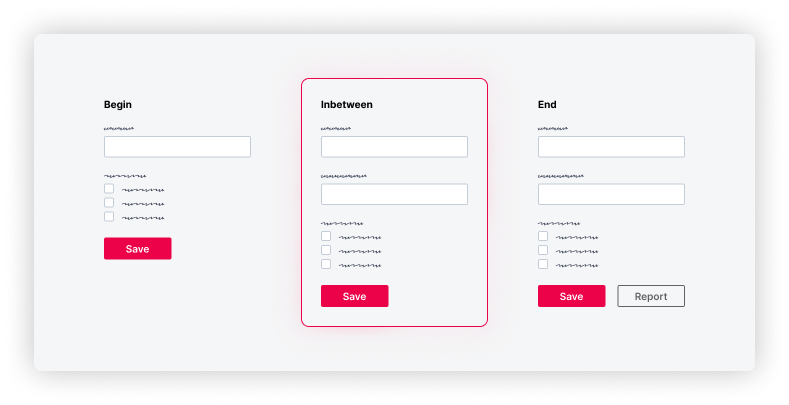
    <content type="text"><![CDATA[<p><span class="featured">Progress isn&rsquo;t found in the finish&mdash;it&rsquo;s made in the steps between. Make the in-between visible, and you don&rsquo;t just show progress&mdash;you design it.</span></p><p>Teams are often obsessed with the final result.</p><p>But progress isn&rsquo;t only found in the finish&mdash;it happens in the steps between. When we visualize those steps, the incomplete design becomes a powerful tool.</p><h2 id="the-illusion-of-completeness">The Illusion of Completeness</h2><p>When something is complete, it looks done. It suggests certainty. It feels like quality.</p><p>But in product development, &ldquo;final&rdquo; is an illusion. Just because the tasks are done doesn&rsquo;t automatically mean the product is good. Dragging tickets to the next column can feel like progress but might hide a serious flaw.</p><p>I was building a small LEGO digger with my daughter the other day. It was interesting to see how she was more focused on following the steps correctly than fast-forwarding to a functioning digger.</p><p>The instructions were detailed. We used the mobile app with 3D models and animations. You trust the makers that every step is there for a reason. Together with IKEA furniture, it&rsquo;s one of the few manuals I actually read&mdash;and for good reason.</p><p>There&rsquo;s no room for guessing. It&rsquo;s designed to be assembled in a certain way. Every step is illustrated clearly, and once in a while you get a little overview of your progress.</p><p>It&rsquo;s simplified with micro-success. It&rsquo;s continuous completeness. The final result is the reward.</p><h2 id="the-missing-middle">The Missing Middle</h2><p>Most teams describe what should happen at the start and verify what happened at the end. But the middle? It&rsquo;s often hidden.</p><p>The result is rework, misalignment and late feedback.</p><p>The solution isn&rsquo;t more documentation&mdash;it&rsquo;s more visibility.</p><p>Wireframes, low-fidelity mocks or prototypes can be reverse-designed. From the current state to the desired state, you can show the progression.</p><p>Take a common case: An admin console where you manage access entitlements. The current version has a simple form: email, roles, save.</p><p>Now the team wants to expand its features:</p><ul><li>Users can get access by adding them to a group (dropdown)</li><li>And generate an access control report for documentation (button)</li></ul><p>All those additions lead to a new &ldquo;final&rdquo; state.</p><p>But each feature introduces its own interface and backend changes. To design this well, you can accompany each user story with a lightweight wireframe or diagram showing how the interface or system evolves&mdash;from the simple form to the new version.</p><p><img src="https://d585tldpucybw.cloudfront.net/sfimages/default-source/blogs/2026/2026-01/the-power-of-the-incomplete-form-progression.png?sfvrsn=b4b47bbb_2" title="From start to end, the middle state becomes visible" alt="Form progression showing the in-between state" /></p><p>This illustration is very basic. So, yes, it might feel like overkill. But all I did was copy the end state and hide the report button.</p><p>That might look trivial, but I&rsquo;ve seen in real projects that this kind of visibility works. It removes unnecessary guessing. It&rsquo;s childproof&mdash;like LEGO.</p><p>And it doesn&rsquo;t take a lot of time to produce&mdash;just hiding a few elements and sharing them.</p><p>The result is clarity about progress.</p><h2 id="closure">Closure</h2><p>Progress isn&rsquo;t all about the finish. It&rsquo;s made in the steps between.</p><p>When you visualize those steps intentionally, you don&rsquo;t just show progress&mdash;you design for it.</p><p>Don&rsquo;t just design the result. <strong>Design the progress.</strong></p><aside><hr data-sf-ec-immutable="" /><div class="row"><div class="col-4 u-normal-full u-small-mb0"><h4 class="u-fs20 u-fw5 u-lh125 u-mb0">Stop Building Generic Software</h4></div><div class="col-8"><p class="u-fs16 u-mb0"><a target="_blank" href="https://www.telerik.com/blogs/stop-building-generic-software">Stop trying to build</a> what already exists. Start building what sets you apart.</p></div></div></aside><img src="https://feeds.telerik.com/link/23066/17254152.gif" height="1" width="1"/>]]></content>
  </entry>
  <entry>
    <id>urn:uuid:7f3b0e93-6bcf-4284-a6c1-46c4269f04d9</id>
    <title type="text">Tabs: Taboo or Turbo in Enterprise Apps?</title>
    <summary type="text">Tabs are everywhere in enterprise apps. Used well, they simplify complexity. Used poorly, they frustrate the user. Learn when to use or switch tabs.</summary>
    <published>2025-10-14T16:19:37Z</published>
    <updated>2026-04-11T21:16:54Z</updated>
    <author>
      <name>Teon Beijl </name>
    </author>
    <link rel="alternate" href="https://feeds.telerik.com/link/23066/17185631/tabs-taboo-turbo-enterprise-apps"/>
    <content type="text"><![CDATA[<p><span class="featured">Tabs are everywhere in enterprise apps. Used well, they simplify complexity. Used poorly, they frustrate the user. Learn when to use or switch tabs.</span></p><p>Tabs have been around for decades and I haven&rsquo;t seen complex enterprise software that doesn&rsquo;t use them.</p><p>In all my years designing enterprise apps, two components have proven to be either the strongest asset or the weakest link: <strong>tables and tabs</strong>.</p><p>I already wrote about tables in <a target="_blank" href="https://url.us.m.mimecastprotect.com/s/yHslC1wMRMcVom3EHLfRsVAhLp?domain=telerik.com">my post on why you can&rsquo;t beat the spreadsheet</a>. Now it&rsquo;s time to take a look at tabs.</p><h2 id="the-friendly-developer’s-shortcut">The Friendly Developer&rsquo;s Shortcut</h2><p>If you&rsquo;ve ever built enterprise software, you know that tabs are the default. They&rsquo;re easy to implement. Nest items in code, separate them in the UI. Simple.</p><p>Back in the day, developers were also the designers. Tabs were the easiest way to bring order to complex screens. They stuck because they worked.</p><p>Also, much of software design simply mimicked the operating system. It&rsquo;s no surprise enterprise apps followed Microsoft&rsquo;s example.</p><p>Think of the old Windows settings dialog: a tiny screen packed with tabs.</p><p><img src="https://d585tldpucybw.cloudfront.net/sfimages/default-source/blogs/2025/2025-09/windows_settings.png?sfvrsn=e4da22d1_2" title="Windows 95 settings dialog example" alt="Windows 95 System Properties dialog showing multiple tabs" /></p><p>That pattern became the blueprint for squeezing dozens of options into limited space.</p><p>Making use of every pixel was considered an achievement. Mobile-first design? Not even a thing.</p><h2 id="the-untabbed-truth">The Untabbed Truth</h2><p>The truth is, you&rsquo;ll use tabs at some point. They&rsquo;re too common to ignore. They turbocharge the experience, used well. But there are pros and cons to using them.</p><h3 id="navigation">Navigation</h3><ul><li><strong>Pro:</strong> Easy to scan and move between categories</li><li><strong>Con:</strong> Too many tabs make scanning hard and moving slow</li></ul><h3 id="disclosure">Disclosure</h3><ul><li><strong>Pro:</strong> Good for hiding lots of options</li><li><strong>Con:</strong> Important info or actions can get lost</li></ul><h3 id="structure">Structure</h3><ul><li><strong>Pro:</strong> Clear structure and focus when used well</li><li><strong>Con:</strong> Nested tabs multiply confusion</li></ul><h2 id="switching-tabs-alternatives">Switching Tabs: Alternatives</h2><p>Tabs aren&rsquo;t the only way to organize complexity. Sometimes other components do the job better.</p><h3 id="accordions">Accordions</h3><ul><li><strong>Pro:</strong> Great for progressive disclosure&mdash;show one thing at a time</li><li><strong>Con:</strong> Expand too many and you&rsquo;re back to scrolling forever</li></ul><h3 id="panels">Panels</h3><ul><li><strong>Pro:</strong> Easy to read, even with many items</li><li><strong>Con:</strong> Take more screen space and clutter the screen fast</li></ul><h3 id="steppers">Steppers</h3><ul><li><strong>Pro:</strong> Perfect when groups are steps in a process</li><li><strong>Con:</strong> Breaks down if users need to jump around or skip steps</li></ul><h2 id="developer-friendly-user-centered">Developer-Friendly, User-Centered</h2><p>Tabs still have a place. They&rsquo;re familiar and fast to build and can structure complexity. But they can also turn into a bottleneck&mdash;for both users and developers.</p><h3 id="user-experience">User Experience</h3><ul><li><strong>Pro:</strong> Clear structure and focus when used well</li><li><strong>Con:</strong> Hidden content or clumsy navigation slows everyone down</li></ul><h3 id="development">Development</h3><ul><li><strong>Pro:</strong> Quick to implement, easy to drop in</li><li><strong>Con:</strong> Custom solutions require more work to handle states and navigation</li></ul><h3 id="code">Code</h3><ul><li><strong>Pro:</strong> UI toolkits like <a href="https://www.telerik.com/kendo-ui" target="_blank">Progress Kendo UI libraries</a> give you accessible, tested tab components out of the box</li><li><strong>Con:</strong> Writing custom code adds complexity and risks breaking essentials like accessibility</li></ul><p>Instead of reinventing tabs, lean on a toolkit that handles the heavy lifting. If you need an alternative, the toolkit makes it easy to switch. That way you can focus on the one thing that matters most: delivering a great user experience.</p><p>So tabs are definitely not a taboo&mdash;just handle them with care. Use them well, and with a toolkit like Kendo UI, you&rsquo;re turbocharged.</p><hr /><p>The Kendo UI component libraries come with a free trial. Give them a shot today!</p><p><a href="https://www.telerik.com/kendo-ui" class="Btn" target="_blank">Try Now</a></p><img src="https://feeds.telerik.com/link/23066/17185631.gif" height="1" width="1"/>]]></content>
  </entry>
  <entry>
    <id>urn:uuid:b2dfcfab-5b85-4295-982e-4c719d6aa12a</id>
    <title type="text">Designer/Developer Collaboration in the Age of AI</title>
    <summary type="text">We want to hear from you! Tell us about workflows, trends and AI in your design and/or development work!</summary>
    <published>2025-10-06T19:39:51Z</published>
    <updated>2026-04-11T21:16:54Z</updated>
    <author>
      <name>Kathryn Grayson Nanz </name>
    </author>
    <link rel="alternate" href="https://feeds.telerik.com/link/23066/17180202/designer-developer-collaboration-age-ai"/>
    <content type="text"><![CDATA[<p><span class="featured">We want to hear from you! Tell us about workflows, trends and AI in your design and/or development work!</span></p><p>Last year, we started really exploring the designer-developer relationship: from design systems, brainstorming, prototyping and user testing through the handoff, creation and launch process. Where are things working well? Why do we hit blockers? And why can&rsquo;t developers understand the difference between cobalt and cerulean? (Just kidding about that last one &hellip; mostly).</p><p>We hit the <s>streets</s> conferences with a whiteboard and a ton of sticky notes and talked to hundreds of designers and developers in-person about their experiences. </p><aside><hr data-sf-ec-immutable="" /><div class="row"><div class="col-4 u-normal-full u-small-mb0"><h4 class="u-fs20 u-fw5 u-lh125 u-mb0">See what conclusions we drew from those whiteboard/sticky-note sessions</h4></div><div class="col-8"><p class="u-fs16 u-mb0"><a target="_blank" href="https://www.telerik.com/blogs/closing-designer-developer-gap">Closing the Designer-Developer Gap</a>: One of the best ways we can close the designer-developer distance is by learning more and gaining a more thorough understanding of what all parties are looking for. By identifying those communication gaps, knowledge gaps and expectation gaps, we can begin to bridge them together.</p></div></div><hr class="u-mb3" /></aside><p>Then, we broadened the scope and launched The State of Designer Developer Collaboration Survey, so we could hear from designers and developers all around the world! What we found was super interesting&mdash;but no spoilers: Go <a href="https://www.telerik.com/design-system/designer-developer-collaboration-survey-2024/" target="_blank">check out the results</a> and see for yourself!</p><p>Now, a year has passed&mdash;and what an eventful year it&rsquo;s been! The growth of generative AI has disrupted our workflows and processes in ways we couldn&rsquo;t have imagined. Last year, we had a token few questions about AI, and many of our respondents were feeling hesitant about incorporating it into their work. This year, we&rsquo;ve expanded to a whole section on AI&mdash;and I suspect that the responses will be quite different!</p><p><strong>There&rsquo;s only one way to find out for sure, though. <a target="_blank" href="https://progress.co1.qualtrics.com/jfe/form/SV_40mWhGrQAktLQbQ?Source=Kathrynannouncement">Take The State of Designer-Developer Collaboration 2025 Survey</a>: Workflows, Trends and AI. </strong></p><p><strong></strong><strong></strong>We want to hear from you! Have things changed in your day-to-day work? Are you a designer who&rsquo;s vibe-coding more interactive prototypes? A developer who&rsquo;s asking ChatGPT for color scheme ideas? Have you been over- or underwhelmed by all the new AI features popping up in your tools? Or maybe nothing has changed for you, and you&rsquo;re still keeping a cautious eye on this whole &ldquo;AI&rdquo; thing before diving in? </p><p>No matter what you&rsquo;re experience is, we&rsquo;re curious to hear about it. We&rsquo;ll bundle up all the results into a meticulously detailed and (of course) beautifully designed report, and you&rsquo;ll be the first to know.</p><p><a target="_blank" href="https://progress.co1.qualtrics.com/jfe/form/SV_40mWhGrQAktLQbQ?Source=Kathrynannouncement" class="Btn">Take The Survey</a></p><img src="https://feeds.telerik.com/link/23066/17180202.gif" height="1" width="1"/>]]></content>
  </entry>
  <entry>
    <id>urn:uuid:f3cec785-fd2d-44e2-a12d-4ed49ad74a3f</id>
    <title type="text">Design, Code, Comply: Accessibility in Workforce Learning</title>
    <summary type="text">See how Resolute helped one client build a more functional, accessible and scalable web experience by instituting accessibility best practices and leveraging Progress tools.</summary>
    <published>2025-09-17T15:34:40Z</published>
    <updated>2026-04-11T21:16:54Z</updated>
    <author>
      <name>Leman Pehlivanova </name>
    </author>
    <link rel="alternate" href="https://feeds.telerik.com/link/23066/17162061/design-code-comply-accessibility-workforce-learning"/>
    <content type="text"><![CDATA[<p><span class="featured">See how Resolute helped one client build a more functional, accessible and scalable web experience by instituting accessibility best practices and leveraging Progress tools.</span></p><p>In a world where most of our lives play out online, web accessibility shouldn&rsquo;t be treated as an afterthought. Designing with inclusivity in mind is no longer optional; it&rsquo;s essential. Just like a chair needs four sturdy legs to be safe for everyone, digital experiences need to be built with all users in mind.</p><p>But when the platform in question is educational, the stakes are even higher. These platforms serve a diverse range of learners&mdash;some with visual, auditory, motor or cognitive impairments, and face stricter accessibility requirements than general websites.</p><p>That&rsquo;s why <a target="_blank" href="https://www.resolutesoftware.com/">Resolute</a> was proud to partner with a U.S.-based company providing online training tools for frontline employees. The platform had recently been acquired by a leading provider of online compliance and workforce training, further raising the bar for performance, accessibility and scalability. The goal: build a more functional, accessible and scalable web experience.</p><h2 id="when-design-slows-you-down">When Design Slows You Down</h2><p>The project started with a familiar pain point: fragmentation. The client&rsquo;s design ecosystem was spread across multiple sources:</p><ul><li>An internal Figma library shaped by years of brand tweaks</li><li>A partially customized theme inside <a target="_blank" href="https://www.telerik.com/themebuilder">Progress ThemeBuilder</a></li><li>A live site with Progress Kendo UI components that didn&rsquo;t always align with the designs</li></ul><p>This led to confusion, delays and inconsistencies, especially around accessibility. Developers struggled to map designs to actual components. Theming was brittle. And certain UI patterns weren&rsquo;t usable for people relying on keyboard navigation or assistive technologies.</p><p>Resolute was brought in to clean it up, streamline the workflow and help the client move toward a more compliant and scalable solution.</p><h2 id="fixing-the-foundation-themebuilder-in-action">Fixing the Foundation: ThemeBuilder in Action</h2><p>Our UX/UI team began by auditing the client&rsquo;s existing design system. They worked closely with their internal team to unify the visual language and migrate it into Progress ThemeBuilder, which served as the central source of truth for styling and theming moving forward.</p><p>ThemeBuilder wasn&rsquo;t just a convenience; it helped enforce consistency in <a href="https://www.telerik.com/blogs/design-tokens-fundamental-building-blocks-design-systems" target="_blank">design tokens</a> like colors, borders and spacing, while also helping to align with accessibility best practices.</p><p><strong>The UX/UI team&rsquo;s work included:</strong></p><ul><li>Consolidating redundant button and form variations</li><li>Fixing visual issues with contrast, spacing and typography</li><li>Helping the design team understand how to use ThemeBuilder effectively to support long-term accessibility</li></ul><h2 id="from-visuals-to-code-accessibility-in-the-build">From Visuals to Code: Accessibility in the Build</h2><p>Once the design foundation was solid, our frontend team began implementing the new UI in code. Over several months, the platform&rsquo;s frontend was rebuilt with accessibility as a core requirement, focusing not just on how it looked, but how it worked for every user.</p><p>This wasn&rsquo;t just about good UX; it was also about meeting real compliance needs. Since the platform serves a broad user base in the U.S., including educational and government-affiliated organizations, several legal standards apply, including:</p><ul><li><strong>ADA (Americans with Disabilities Act)</strong>: Particularly Title III, which applies to educational institutions and commercial websites</li><li><strong>Section 508 of the Rehabilitation Act</strong>: For platforms receiving federal funding or working with government entities</li></ul><p>To meet these requirements, we aligned the build with <strong>WCAG 2.1 Level AA</strong> guidelines developed by the <a target="_blank" href="https://www.w3.org/TR/WCAG21/">W3C</a> (World Wide Web Consortium), currently the most widely used benchmark for web accessibility in the U.S.</p><p><strong>What that looked like in code:</strong></p><ul><li>Every interactive element was accessible via <strong>keyboard navigation</strong> (tab, arrows, etc.).</li><li>Clear, visible <strong>focus states</strong> were implemented for all buttons, links and forms.</li><li>We structured the app using <strong>semantic HTML</strong> and applied <strong>ARIA roles</strong> for assistive tech (e.g., <code class="inline-code">&lt;button&gt;</code>, <code class="inline-code">&lt;nav&gt;</code>, <code class="inline-code">&lt;form&gt;</code>). Yet, we applied ARIA roles only when necessary for custom components or non-semantic elements, avoiding over-reliance on ARIA. It&rsquo;s crucial to use ARIA only when native HTML elements can&rsquo;t provide the required functionality.</li><li>For use cases beyond the default configurations of Kendo UI or ThemeBuilder, we wrote <strong>custom HTML overrides</strong>.</li><li>Duplicate labels or screen reader confusion were avoided using attributes like <code class="inline-code">aria-hidden="true"</code> where needed.</li></ul><p>Testing was both automated and manual. Tools like <a target="_blank" href="https://chromewebstore.google.com/detail/axe-devtools-web-accessib/lhdoppojpmngadmnindnejefpokejbdd">axe DevTools</a>, <a target="_blank" href="https://wave.webaim.org/">WAVE</a> and ChromeVox helped flag contrast issues, label duplication and navigation traps. But human testing mattered just as much. Therefore, a touchscreen laptop was used to simulate real user scenarios, check responsiveness and validate how elements behaved across screen sizes and input types.</p><h2 id="when-customization-adds-complexity">When Customization Adds Complexity</h2><p>Telerik ThemeBuilder and Kendo UI offer strong accessibility features, but when components are heavily customized, unexpected issues can appear. Resolute helped the client troubleshoot several edge cases:</p><ul><li>Buttons built without the base component didn&rsquo;t render properly</li><li>Some forms displayed labels twice to screen readers (e.g., &ldquo;Username Username&rdquo;)</li><li>Blazor components lacked alt-text bindings, requiring a workaround</li></ul><p>None of these problems were dealbreakers, but they showed how expertise matters. Without frontend developers who understand both the framework and accessibility requirements, these issues could have gone unnoticed.</p><h2 id="accessibility--structure--semantics--seo">Accessibility = Structure + Semantics + SEO</h2><p>There&rsquo;s another benefit to building with accessibility in mind: better search engine optimization (SEO). Many of the same practices that support users with disabilities, like using <a target="_blank" href="https://www.telerik.com/blogs/why-semantic-html-matters-introductory-guide-new-developers">semantic HTML</a>, a well-structured HTML DOM (Document Object Model) and meaningful headings, also help search engines understand and rank your content.</p><p>The frontend implementation in this case included:</p><ul><li>One <code class="inline-code">&lt;h1&gt;</code> per page, with clean heading hierarchies for structure like <code class="inline-code">&lt;h2&gt;</code> for sections and <code class="inline-code">&lt;h3&gt;</code> inside components</li><li>Alt-text for all meaningful images</li><li>Descriptive link text and accessible navigation</li></ul><p>The result? A platform that&rsquo;s easier to use, more discoverable and legally compliant.</p><h2 id="knowledge-transfer-matters">Knowledge Transfer Matters</h2><p>Resolute&rsquo;s role expanded beyond design and development work. We trained the client&rsquo;s internal team to maintain and build on the system with accessibility in mind. That included:</p><ul><li>Documenting all accessibility decisions and techniques used</li><li>Providing reusable design patterns in ThemeBuilder</li><li>Running training sessions on WCAG basics and development workflow tips</li></ul><p>Accessibility isn&rsquo;t something you do once. It&rsquo;s a practice. So, we made sure the team could carry that forward.</p><h2 id="final-thoughts">Final Thoughts</h2><p>Accessibility is a shared responsibility&mdash;across design, development and leadership. Our client understood that, and, with the right tools and support, made serious progress toward a platform that works for everyone.</p><p>Progress ThemeBuilder helped streamline and standardize the design-to-code process. Resolute helped connect the dots by aligning compliance, usability and long-term scalability.</p><p>Learn more about how Resolute can help address usability issues, starting with the <a target="_blank" href="https://www.resolutesoftware.com/services/ux-assessment/">UX Assessment</a>.</p><img src="https://feeds.telerik.com/link/23066/17162061.gif" height="1" width="1"/>]]></content>
  </entry>
  <entry>
    <id>urn:uuid:977b9b80-ba9c-49d7-bba8-f289a721b2ef</id>
    <title type="text">Tips for Designing Clickable Components on Your Website</title>
    <summary type="text">To improve the click-through rates, consider these tips when designing buttons and links that move visitors through your site.</summary>
    <published>2025-08-19T15:10:09Z</published>
    <updated>2026-04-11T21:16:54Z</updated>
    <author>
      <name>Suzanne Scacca </name>
    </author>
    <link rel="alternate" href="https://feeds.telerik.com/link/23066/17122261/tips-designing-clickable-components-website"/>
    <content type="text"><![CDATA[<p><span class="featured">To improve the click-through rates, consider these tips when designing buttons and links that move visitors through your site.</span></p><p>Interaction design is a huge discipline that prioritizes how users engage with digital interfaces.</p><p>One goal of interaction design is to capture and direct visitor attention. We can achieve this with animations, transition effects, as well as motion-based designs and media.</p><p>Another goal of interaction design is to engage users to get them to click and convert. There are a multitude of components we might want users to click on throughout their experience. For example:</p><ul><li>Buttons</li><li>Links</li><li>Menus</li><li>Videos</li><li>Forms</li><li>Popups</li><li>Chatbots</li><li>Search forms</li></ul><p>What we want to specifically focus on today are the buttons and links that drive our users deeper into their journey and closer to conversion. We&rsquo;ll look at five best practices when designing these key interaction points.</p><h2 id="best-practices-when-adding-buttons-and-links-to-your-site">5 Best Practices When Adding Buttons and Links to Your Site</h2><p>Links and buttons do a lot of work for us, strategically guiding users from one page in the user journey to the next. So that we don&rsquo;t waste their time or ours, we need to be intentional with how we design these click interactions.</p><p>Here are some tips that will help with this:</p><h2 id="put-thought-into-the-design">1. Put Thought into the Design</h2><p>Here are some questions to consider when designing your clickable components:</p><p><strong>Do your buttons look like buttons?</strong> This could be in terms of shape, shading/fill or depth.</p><p>For example, here&rsquo;s a screenshot from the <a target="_blank" href="https://www.forwardfinancing.com/">Forward Financing</a> homepage:</p><p><img src="https://d585tldpucybw.cloudfront.net/sfimages/default-source/blogs/2025/2025-07/forward-financing-buttons.png?sfvrsn=8cd7fd15_2" title="Forward Financing button design" alt="A screenshot from the home page for Forward Financing. One button appears in the top-right corner of the website and header and reads “Apply for Financing”. Another button appears below the description in the hero section and reads “Learn More”. There’s a ghost (hollow) button in the bottom-right corner that’s part of the chat widget which reads “How can we help you today?”" /></p><p>There are three buttons visible:</p><ul><li>&ldquo;Apply for Financing&rdquo; in the header</li><li>&ldquo;Learn More&rdquo; in the hero section</li><li>&ldquo;How can we help you today?&rdquo; in the bottom-right corner</li></ul><p>The two solid buttons in green stick out the most and are clearly buttons. The ghost button in the bottom-right corner isn&rsquo;t as prominent, but it does have a button-like shape, which may convince visitors to click it.</p><p><strong>Are your links easy to spot among non-linked text?</strong> Don&rsquo;t just think about this from a color-contrast perspective. For instance, will readers with vision impairments struggle to make them out?</p><p>Here&rsquo;s a close-up on a blog post from <a target="_blank" href="https://www.ramseysolutions.com/retirement/what-is-a-microretirement">Ramsey Solutions</a>:</p><p><img src="https://d585tldpucybw.cloudfront.net/sfimages/default-source/blogs/2025/2025-07/ramsey-solutions-links.png?sfvrsn=64d4bce5_2" title="Ramsey Solutions blog links" alt="In this microretirement blog post from Ramsey Solutions, we see three blue, underlined hyperlinks amongst the black text." /></p><p>There are three hyperlinks that stick out from the surrounding text. It&rsquo;s not just because they&rsquo;re in blue font as opposed to black like the rest of the blog. It&rsquo;s because they&rsquo;re underlined.</p><p>The underline is key as it allows users with visual impairments to be able to detect the links visually without having to notice the color change.</p><p><strong>Do these clickable elements fit with your color palette?</strong> This goes for both the active and hover state.</p><p><strong>Does the click feedback fit with the overall vibe of your site?</strong> For instance, do some animations or transition effects feel disruptive or do they flow with the rest of your brand vibe?</p><p>For these last two questions, I&rsquo;m going to use <a target="_blank" href="https://www.makingsenseofcents.com/">Making Sense of Cents</a> as my example.</p><p>To start, they&rsquo;ve done a good job of committing to a uniform style for the link color transformation. Upon hover, the black text turns to orange.</p><p><img src="https://d585tldpucybw.cloudfront.net/sfimages/default-source/blogs/2025/2025-07/making-sense-of-cents-links.gif?sfvrsn=c7706f9c_2" title="Making Sense of Cents interactions" alt="A video from the home page of the Making Sense of Cents website. We look at how hovering over different buttons looks. Most buttons turn the text from black to orange. However, 8 white boxes at the top of the page with light green and red icons animate upon hover." /></p><p>The main problem I see is with the blocks at the top of the homepage and how they react to hover/touch. The wiggle animation feels out of place when compared to the other interactions on the page. For the most part, their other button and link interactions feel very calm. However, these blocks create tension.</p><p>So, this is the kind of thing to think about if you decide to imbue your buttons with animated effects.</p><h2 id="provide-hover-feedback">2. Provide Hover Feedback</h2><p>Designing buttons and links to look like clickable elements is crucial. But so is the follow through (more so for buttons than text links).</p><p>There are a couple of things we&rsquo;d want to see happen when someone hovers over a button.</p><p>First, the cursor should change from an arrow to pointer icon.</p><p>Second, the button&rsquo;s appearance should change. If it&rsquo;s a color change, the contrast needs to be significant enough where someone who can&rsquo;t interpret the colors can still tell that something changed.</p><p>On the <a target="_blank" href="https://www.chase.com/personal/home">Chase</a> homepage, for example, we only see one button change in its hover state&mdash;the &ldquo;See details&rdquo; button in the hero section. The only thing that changes is the background color from light blue to dark blue.</p><p><img src="https://d585tldpucybw.cloudfront.net/sfimages/default-source/blogs/2025/2025-07/chase-button-hover.gif?sfvrsn=3f154a11_2" title="Chase website buttons" alt="In this video, we see a user hover over numerous buttons on the Chase website home page. The only button that responds to hover is the “See details” button in the hover section. There’s a slight color change from light blue to dark blue." /></p><p>This isn&rsquo;t going to provide users with an accessible interactive experience. Ideally, we want every button to provide clear feedback when someone hovers over it.</p><p>Let&rsquo;s contrast this with what we see on the <a target="_blank" href="https://trypennie.com/">Pennie</a> website:</p><p><img src="https://d585tldpucybw.cloudfront.net/sfimages/default-source/blogs/2025/2025-07/pennie-button-hover.gif?sfvrsn=737837e8_2" title="Pennie website button hover" alt="In this video, we see a user interact with several of the Pennie website’s buttons and content accordions. One of the buttons changes color from a light blue to a dark blue. At the same time, a right-facing arrow appears within the elongated button shape." /></p><p>This website&rsquo;s first button does a similar color change effect, from a lighter blue to a dark blue. However, the buttons also elongate and an arrow appears when someone hovers over them. We see a similar effect happen over the accordion tabs in the section just below the fold.</p><p>Not every button needs to offer feedback in the form of an icon. However, subtle animation effects like expanding and shrinking can help give users extra confidence that the buttons are indeed buttons and will respond to their touch.</p><h2 id="be-specific-and-clear-with-labeling">3. Be Specific and Clear with Labeling</h2><p>The appearance of our buttons and links will certainly help visitors recognize where clickable components are in our interfaces. In order to give them an extra boost of confidence that a click will be worth their time, take care with how you label the buttons.</p><p>In general, we want to avoid vague wording like &ldquo;click this,&rdquo; &ldquo;go here&rdquo; and &ldquo;this page.&rdquo; &ldquo;Read more&rdquo; and &ldquo;learn more&rdquo; are in a bit of a gray area.</p><p>Here&rsquo;s an example from the <a target="_blank" href="https://peak6.com/">PEAK6</a> website where we see some &ldquo;learn more&rdquo; links:</p><p><img src="https://d585tldpucybw.cloudfront.net/sfimages/default-source/blogs/2025/2025-07/peak6-button-label.png?sfvrsn=ee41c4e3_2" title="PEAK6 buttons" alt="A screenshot from the PEAK6 home shows two “learn more” buttons. They appear within company blocks, like for PEAK6 Strategic Capital." /></p><p>Of the 12 primary links on this homepage, nine of them say &ldquo;learn more.&rdquo; Most of them follow a description of one of PEAK6&rsquo;s companies.</p><p>Now, given the context of these particular buttons in the screenshot, &ldquo;learn more&rdquo; makes sense. However, there are ways to get around labeling your buttons with vague and repetitive phrases like these&mdash;especially when you have so many of them on a single page.</p><p>Here&rsquo;s a look at how <a target="_blank" href="https://octus.com/">Octus</a> handles a similar type of content on its homepage:</p><p><img src="https://d585tldpucybw.cloudfront.net/sfimages/default-source/blogs/2025/2025-07/octus-button-label.png?sfvrsn=a999fd91_2" title="Octus website links" alt="On the Octus homepage, there’s a section with 4 blocks of “Who we serve”. They’re white text on an all black background. There’s a headline, a description, and a small right-facing arrow in each." /></p><p>In this section, we see four side-by-side blocks describing who the company serves. The &ldquo;learn more&rdquo; button would probably be a natural fit for these, even though it&rsquo;s not an ideal label.</p><p>Instead, what the designer has done is this:</p><ul><li>Replace the button shape or text link with a small right-facing arrow.</li><li>Make the entire block clickable instead of a small component below the text.</li><li>Animate the block so it turns from black to blue.</li><li>Elongate the arrow.</li></ul><p>This is a great way to signal to visitors that a component is clickable without having to resort to repeating the same vague label over and over again. So long as you mark the heading as an H2 or H3, it should also be clear to people using screen readers where the link will take them to next.</p><p>By the way, that&rsquo;s one of the reasons why we try to avoid vague labels: <strong>accessibility</strong>. The <strong>user experience</strong> is another. Also, these labels are useful for <strong>SEO</strong> purposes. By using a descriptive label for buttons and links, search engines can better determine what the purpose and value of a linked page is.</p><h2 id="be-purposeful-about-adding-links-to-a-page">4. Be Purposeful About Adding Links to a Page</h2><p>Information overload is a real problem on the web these days. It&rsquo;s not just because of how much content we throw at someone on a page. It also happens when we give them too many rabbit holes (i.e., buttons and links) to go down at the same time.</p><p>Let me show you what I mean.</p><p>This is the <a target="_blank" href="https://www.getrichslowly.org/start-here/">Start Here page</a> on the Get Rich Slowly website:</p><p><img src="https://d585tldpucybw.cloudfront.net/sfimages/default-source/blogs/2025/2025-07/get-rich-slowly-links.gif?sfvrsn=a6f712bb_2" title="Get Rich Slowly web page links" alt="In this video, we scroll down the Start Here page on the Get Rich Slowly website. We see that each section contains at least 3 hyperlinks within it." /></p><p>There are 29 links on this page (not including the 10 in the header and five in the footer). This is way too much for a page of this size. It&rsquo;s also too much for a page that&rsquo;s supposed to be an introduction to the website.</p><p>While it&rsquo;s great that there are so many resources on this site and that it all seems to connect together, shoving this many links at visitors all at once can be hugely problematic. In addition to making the content look cluttered, it could distract first-time visitors from reading through the page in its entirety before getting lost down a rabbit hole.</p><p>It&rsquo;s our job as designers and writers to use discernment when creating pages. We need to decide which content is absolutely necessary <em>and</em> when it makes sense to divert visitor attention to another page. The homepage is one thing. But a critical part of the user journey like this one is another.</p><p>Let&rsquo;s look at another example of a web page with plentiful links. This is the <a target="_blank" href="https://cadencebank.com/personal/checking">Personal Checking page</a> for Cadence Bank:</p><p><img src="https://d585tldpucybw.cloudfront.net/sfimages/default-source/blogs/2025/2025-07/cadence-bank-buttons.gif?sfvrsn=9d56c7ee_2" title="Cadence Bank buttons" alt="In this video, we scroll down the Personal Banking page for Cadence Bank. Although there appear to be lots of buttons on the page, the vast majority of them direct visitors to “Open account”." /></p><p>There are a total of 32 links on this page. 12 of them point visitors to &ldquo;Open account.&rdquo; Here&rsquo;s why I think this example works:</p><p>There&rsquo;s a cohesive message that these buttons are telling us. Yes, there are buttons that provide supporting information about personal banking services. And there are some extraneous links at the very bottom of the page which should probably be done away with.</p><p>However, the top portion of this page is devoted to one goal: Getting visitors to open an account. So while there are lots of buttons to choose from, there&rsquo;s a good chance visitors will end up in the same place as they choose their next step.</p><p><strong>Bottom line:</strong> There&rsquo;s nothing wrong with including a link in each section or block&mdash;so long as it keeps the focus on the primary goal and doesn&rsquo;t overwhelm the visitor&rsquo;s decision-making faculties.</p><h2 id="minimize-links-along-the-user-journey">5. Minimize Links Along the User Journey</h2><p>Websites contain loads of information for visitors at every stage of their journey. But behind the scenes, we know there&rsquo;s an ideal pathway that we want them to journey down. If we design it right, they&rsquo;ll naturally take those steps to conversion.</p><p>That said, the amount of options and distractions we put in their way along that path may slow things down. And that&rsquo;s not what we want.</p><p>So, the first thing to do is determine what the key pages are for your conversion pathway. For some brands, it might be as simple as TransUnion&rsquo;s</p><p>This is the hero section on the <a target="_blank" href="https://www.transunion.com/">TransUnion</a> website:</p><p><img src="https://d585tldpucybw.cloudfront.net/sfimages/default-source/blogs/2025/2025-07/transunion-home-page.png?sfvrsn=19e13709_2" title="TransUnion home page" alt="A screenshot of the hero section on the TransUnion home page. We see a header that reads “Credit confidence starts here”. Beneath the description is a big yellow button that reads “Your Free Scores & Reports”." /></p><p>There are only two buttons on the entirety of this page and they both say: &ldquo;Your Free Scores &amp; Reports.&rdquo; So does the big yellow button in the header.</p><p>There&rsquo;s lots of info available on the website about the service as well as educational resources related to managing one&rsquo;s credit. However, the homepage doesn&rsquo;t bother with any of that. Visitors are actively encouraged to take the next step in the process and to see their free credit score.</p><p>This is a great example of how you minimize distractions and click options to help most of your visitors take the right journey early on.</p><p>Not every brand can do this though. TransUnion has a very narrow solution, which is why it works. For something like <a target="_blank" href="https://www.trumid.com/">Trumid</a>, however, it would be pretty difficult to build pages with singular calls-to-action.</p><p>That said, what you can do is make the first button and call-to-action on each page take users along the path to conversion. Here&rsquo;s how that looks on the Trumid website:</p><p><img src="https://d585tldpucybw.cloudfront.net/sfimages/default-source/blogs/2025/2025-07/trumid-click-path.gif?sfvrsn=ba396a44_2" title="Trumid user click path" alt="In this video, we see how two pages and two clicks take a visitor from the Trumid home page to the final step of conversion and contact form”." /></p><p>We know that users lose interest the more they scroll down a page. So, if you feel like it would be beneficial to include other buttons and links on the page, just make sure to do so <em>after</em> the primary call to action has been presented.</p><p>This is what Trumid has done.</p><ol><li>On the homepage, the first button invites users to &ldquo;Explore Platform.&rdquo;</li><li>This takes them to the Trading Platform Overview page.</li><li>The first button on this page appears just below the fold and says &ldquo;Get Started Today.&rdquo;</li><li>This takes them to the Get Started page and contact form.</li></ol><p>Users who are ready to convert earlier can always use the &ldquo;Get Started&rdquo; button in the header. Those who aren&rsquo;t ready have other avenues they can go down on these pages. But at least the designer has presented them with the ideal pathway without having to work much for it&mdash;when they&rsquo;re ready to do so.</p><h2 id="wrapping-up">Wrapping Up</h2><p>To help our visitors go where we want them to go, we need to leave a trail of breadcrumbs for them to follow.</p><p>For some visitors, that trail is in the header. For others that want more information and context, they&rsquo;ll hopefully follow the trail we&rsquo;ve created for them on the pages of the site.</p><p>This is why we need to pay close attention to these key interactive components. From how they&rsquo;re designed to their placement and usage on pages, all of these factors matter if you want to improve click-through and conversion rates.</p><aside><hr data-sf-ec-immutable="" /><div class="row"><div class="col-4 u-normal-full u-small-mb0"><h4 class="u-fs20 u-fw5 u-lh125 u-mb0">How to Think Like a Designer</h4></div><div class="col-8"><p class="u-fs16 u-mb0">Use placement and contrast to shape flow and gain clarity. A login form redesign reveals <a target="_blank" href="https://www.telerik.com/blogs/how-think-like-designer">how designers think</a>.</p></div></div></aside><img src="https://feeds.telerik.com/link/23066/17122261.gif" height="1" width="1"/>]]></content>
  </entry>
  <entry>
    <id>urn:uuid:85c2777d-7c1e-4dad-894b-4f4300305f46</id>
    <title type="text">How to Think Like a Designer</title>
    <summary type="text">Use placement and contrast to shape flow and gain clarity. A login form redesign reveals how designers think.</summary>
    <published>2025-08-11T11:39:05Z</published>
    <updated>2026-04-11T21:16:54Z</updated>
    <author>
      <name>Teon Beijl </name>
    </author>
    <link rel="alternate" href="https://feeds.telerik.com/link/23066/17115606/how-think-like-designer"/>
    <content type="text"><![CDATA[<p><span class="featured">Use placement and contrast to shape flow and gain clarity. A login form redesign reveals how designers think.</span></p><p>Design isn&rsquo;t about decoration. It&rsquo;s about creating order.</p><p>There&rsquo;s enough chaos out there. Adding more features or new tech doesn&rsquo;t lead to clarity on its own.</p><p>Order takes discipline. Tough decisions. Design is decision-making. It&rsquo;s about setting constraints.</p><p>There are two kinds of order we care about:</p><ul><li><strong>Order of importance</strong> &ndash; What matters most?</li><li><strong>Order of execution</strong> &ndash; What comes first? What comes next?</li></ul><p>To shape both, you only need two tools: <strong>placement</strong> and <strong>contrast</strong>.</p><p>Understand these principles and you become a better designer&mdash;or design better. No need to memorize all the UX laws or follow every guideline. Learn these foundations, and you&rsquo;ll start to recognize good design.</p><p>Let&rsquo;s walk through a simple example: a login form.</p><h2 id="make-it-flow">Make It Flow</h2><p>Design helps people move&mdash;from before to after.</p><p>Logging in is a basic flow:</p><ul><li>You&rsquo;re not logged in.</li><li>You enter your credentials.</li><li>You gain access.</li></ul><p>That flow has a few key steps: provide a username, provide a password, submit with a button.</p><p>In code, that might look like this:</p><pre class=" language-html"><code class="prism  language-html"><span class="token tag"><span class="token tag"><span class="token punctuation">&lt;</span>form</span><span class="token punctuation">&gt;</span></span>
  <span class="token tag"><span class="token tag"><span class="token punctuation">&lt;</span>label</span> <span class="token attr-name">for</span><span class="token attr-value"><span class="token punctuation">=</span><span class="token punctuation">"</span>username<span class="token punctuation">"</span></span><span class="token punctuation">&gt;</span></span>Username<span class="token tag"><span class="token tag"><span class="token punctuation">&lt;/</span>label</span><span class="token punctuation">&gt;</span></span>
  <span class="token tag"><span class="token tag"><span class="token punctuation">&lt;</span>input</span> <span class="token attr-name">id</span><span class="token attr-value"><span class="token punctuation">=</span><span class="token punctuation">"</span>username<span class="token punctuation">"</span></span> <span class="token attr-name">name</span><span class="token attr-value"><span class="token punctuation">=</span><span class="token punctuation">"</span>username<span class="token punctuation">"</span></span> <span class="token attr-name">type</span><span class="token attr-value"><span class="token punctuation">=</span><span class="token punctuation">"</span>text<span class="token punctuation">"</span></span> <span class="token punctuation">/&gt;</span></span>

  <span class="token tag"><span class="token tag"><span class="token punctuation">&lt;</span>label</span> <span class="token attr-name">for</span><span class="token attr-value"><span class="token punctuation">=</span><span class="token punctuation">"</span>password<span class="token punctuation">"</span></span><span class="token punctuation">&gt;</span></span>Password<span class="token tag"><span class="token tag"><span class="token punctuation">&lt;/</span>label</span><span class="token punctuation">&gt;</span></span>
  <span class="token tag"><span class="token tag"><span class="token punctuation">&lt;</span>input</span> <span class="token attr-name">id</span><span class="token attr-value"><span class="token punctuation">=</span><span class="token punctuation">"</span>password<span class="token punctuation">"</span></span> <span class="token attr-name">name</span><span class="token attr-value"><span class="token punctuation">=</span><span class="token punctuation">"</span>password<span class="token punctuation">"</span></span> <span class="token attr-name">type</span><span class="token attr-value"><span class="token punctuation">=</span><span class="token punctuation">"</span>password<span class="token punctuation">"</span></span> <span class="token punctuation">/&gt;</span></span>

  <span class="token tag"><span class="token tag"><span class="token punctuation">&lt;</span>button</span> <span class="token attr-name">type</span><span class="token attr-value"><span class="token punctuation">=</span><span class="token punctuation">"</span>submit<span class="token punctuation">"</span></span><span class="token punctuation">&gt;</span></span>Login<span class="token tag"><span class="token tag"><span class="token punctuation">&lt;/</span>button</span><span class="token punctuation">&gt;</span></span>
  <span class="token tag"><span class="token tag"><span class="token punctuation">&lt;</span>button</span> <span class="token attr-name">type</span><span class="token attr-value"><span class="token punctuation">=</span><span class="token punctuation">"</span>signup<span class="token punctuation">"</span></span><span class="token punctuation">&gt;</span></span>Sign up<span class="token tag"><span class="token tag"><span class="token punctuation">&lt;/</span>button</span><span class="token punctuation">&gt;</span></span>
<span class="token tag"><span class="token tag"><span class="token punctuation">&lt;/</span>form</span><span class="token punctuation">&gt;</span></span>
</code></pre><p>As you can see, it works!</p><p><img src="https://d585tldpucybw.cloudfront.net/sfimages/default-source/blogs/2025/2025-06/before.png?sfvrsn=55a66c6a_2" title="Unstructured Login Form" alt="Unstructured horizontal login form with no alignment" /></p><p>But it lacks structure.</p><p>Let&rsquo;s reshape the flow.</p><h2 id="placement">Placement</h2><p>There are six elements in the form:</p><ul><li>Label: Username</li><li>Input: Username</li><li>Label: Password</li><li>Input: Password</li><li>Button: Login</li><li>Button: Sign up</li></ul><p>Only three of these are essential:</p><ul><li>The two inputs</li><li>The login button</li></ul><p>These perform the core action: logging in. The others are supportive&mdash;labels for context, a sign-up link for an alternate path.</p><p>We can improve the UI flow by adjusting the placement of elements:</p><ol><li><strong>Stack elements vertically</strong> &ndash; Easier to scan on the left</li><li><strong>Center-align in the canvas</strong> &ndash; Creates focus and adds whitespace</li><li><strong>Place labels above inputs</strong> &ndash; Anchors attention to essentials</li><li><strong>Add spacing between elements</strong> &ndash; Improves readability</li></ol><p><img src="https://d585tldpucybw.cloudfront.net/sfimages/default-source/blogs/2025/2025-06/placement.png?sfvrsn=459b4d13_2" title="Layout Refinement Steps: 1–4" alt="Four stages of login form layout showing placement improvements" /></p><p>The result: a clear, top-to-bottom path.</p><p>But something&rsquo;s still missing. We need hierarchy. We need contrast.</p><h2 id="contrast">Contrast</h2><p>Now that everything is in the right place, ask:</p><p><strong>What should stand out?</strong></p><p>We want users to focus on the input fields and the primary action: logging in. That&rsquo;s where contrast comes in.</p><p>To guide attention, we:</p><ol start="5"><li><strong>Make labels lighter</strong> &ndash; So inputs draw the eye</li><li><strong>Use consistent typography</strong> &ndash; Avoid unnecessary internal contrast</li><li><strong>Style the login button</strong> &ndash; Give it weight, color and boldness<br /><strong>De-emphasize the sign-up button</strong> &ndash; Make it quieter, secondary</li><li><strong>Add color contrast to key elements</strong> &ndash; Highlight what matters most</li></ol><p><img src="https://d585tldpucybw.cloudfront.net/sfimages/default-source/blogs/2025/2025-06/contrast.png?sfvrsn=b91c6a8d_2" title="Visual Contrast Steps: 5–8" alt="Four versions of login form showing increased contrast from step 5 to 8" /></p><p>Contrast helps establish hierarchy. It&rsquo;s how we guide the eye.</p><p>Because if everything looks the same, nothing gets noticed.</p><h2 id="before-→-after">Before &rarr; After</h2><p>So what actually changed?</p><ul><li><strong>Structure</strong> &ndash; We grouped and positioned elements with intention</li><li><strong>Focus</strong> &ndash; We used contrast to draw the eye to what matters most</li><li><strong>Flow</strong> &ndash; We created a clear path from top to bottom</li></ul><p><img src="https://d585tldpucybw.cloudfront.net/sfimages/default-source/blogs/2025/2025-06/before-after.png?sfvrsn=47f10881_2" title="Login Form — Before vs. After Layout" alt="Top-down redesign of login form: horizontal before, vertical after" /></p><p>We didn&rsquo;t change functionality. We changed clarity.</p><p>Good design doesn&rsquo;t just work. It works better.</p><h2 id="the-takeaway">The Takeaway</h2><p>Design is about flow. It&rsquo;s about guiding someone from start to finish.</p><p>When you shape both the order of execution and the order of importance, you create clarity.</p><p>To do that, use:</p><ul><li><strong>Placement</strong> for structure</li><li><strong>Contrast</strong> for focus</li></ul><p>You don&rsquo;t have to do this manually. You could just prompt: &ldquo;Fix the user experience.&rdquo;</p><p>But when you understand these principles, you know why the result is better. It helps you write better prompts. Give better feedback. Design better.</p><p><strong>You don&rsquo;t have to be a designer to think like one.</strong></p><p><img src="https://d585tldpucybw.cloudfront.net/sfimages/default-source/blogs/2025/2025-06/login-with-branding.png?sfvrsn=fe3cb7d0_2" title="Final Styled Login Form with Brand Elements" alt="Styled login form with Telerik ninja characters above input fields" /></p><aside><hr data-sf-ec-immutable="" /><div class="row"><div class="col-4 u-normal-full u-small-mb0"><h4 class="u-fs20 u-fw5 u-lh125 u-mb0">You Can&rsquo;t Design the Experience</h4></div><div class="col-8"><p class="u-fs16 u-mb0"><a target="_blank" href="https://www.telerik.com/blogs/you-cant-design-experience">UX isn&rsquo;t something you design</a>&mdash;it&rsquo;s what happens. Learn why great UX means shaping the environment, not dictating the experience.</p></div></div></aside><img src="https://feeds.telerik.com/link/23066/17115606.gif" height="1" width="1"/>]]></content>
  </entry>
  <entry>
    <id>urn:uuid:e05136cd-7db7-494b-9e4e-e79f7adacdde</id>
    <title type="text">Your Expert Is Not Your User</title>
    <summary type="text">Experts offer insights, but they’re not your users. Build better software by balancing in-house input with market feedback.</summary>
    <published>2025-07-30T14:53:05Z</published>
    <updated>2026-04-11T21:16:54Z</updated>
    <author>
      <name>Teon Beijl </name>
    </author>
    <link rel="alternate" href="https://feeds.telerik.com/link/23066/17106534/your-expert-not-your-user"/>
    <content type="text"><![CDATA[<p><span class="featured">Experts offer insights, but they&rsquo;re not your users. Build better software by balancing in-house input with market feedback.</span></p><p>If you develop or design enterprise software&mdash;especially for industry-specific applications&mdash;you probably recognize user stories that start like this:</p><p style="margin-left:30px;"><em>As a user, I would like to &hellip; so that I can &hellip;</em></p><p>It captures a critical, essential part of software development:</p><p><strong>Understand your user. Build for your user.</strong></p><p>The reality is that users don&rsquo;t always have a say in the development process.</p><p>As a UX designer, my role was to represent the user perspective. That meant doing research&mdash;going out there, talking to users, asking questions and understanding their behavior through empathy and proven methods.</p><p>At the end of the day, I wanted to design with the user in mind.</p><p>And the same goes for developers. They ask questions about logic, flow and outcomes because what we&rsquo;re ultimately trying to do is simple:</p><p><strong>Build software that helps someone accomplish a task.</strong></p><p>But my users were out in the field. They worked under time pressure. They were on 12-hour shifts. They were all over the world. It wasn&rsquo;t as simple as hopping on a call, sending out a survey or visiting them on site.</p><p>The truth is: it&rsquo;s common for developers and designers to build software from a distance. And, unfortunately, user research isn&rsquo;t always prioritized enough to include user input as a constant in the process.</p><p>So what most companies do&mdash;and rightfully so&mdash;is bring in expertise. They bring in the expert. As an intermediate.</p><p>But that&rsquo;s risky too.</p><p><strong>Because the expert is not your user.</strong></p><h2 id="how-experts-show-up-in-software-development">How Experts Show Up in Software Development</h2><p>Most organizations that build enterprise software have in-house expertise. The form that expertise takes can vary&mdash;depending on the project phase, level of organizational support, strategic context, leadership involvement and how design is integrated into development.</p><p>In my experience, expert involvement typically shows up in three ways:</p><h3 id="internal-or-external-business-consultants-and-analysts">Internal or External Business Consultants and Analysts</h3><p>These people translate customer needs&mdash;including those of the end user&mdash;into something the business can act on. They&rsquo;re usually externally focused and available only in a reactive role. Some are full-time, others part-time.</p><h3 id="product-owners-or-product-managers">Product Owners or Product Managers</h3><p>These are usually people who came from the field or domain and later moved into IT or development. They may no longer fully represent the end-user perspective&mdash;though a good product owner stays close to it.</p><h3 id="the-sme—subject-matter-expert">The SME&mdash;Subject Matter Expert</h3><p>Let&rsquo;s just call them &ldquo;the expert&rdquo;: someone who has performed the user role themselves&mdash;or still does so part-time. SMEs often serve as internal representatives of that role.</p><p>In the teams I worked on, we paired each feature with an SME, and typically worked in a triangle: SME, UX designer and product owner. Each brought a slightly different angle, but we shared one goal: discovering, creating and defining the right product requirements.</p><h2 id="pitfalls-to-avoid-when-relying-on-experts">4 Pitfalls to Avoid When Relying on Experts</h2><p>Working with experts is a blessing&mdash;because honestly, you can&rsquo;t know what they know. You haven&rsquo;t experienced what they&rsquo;ve experienced. And you probably never will.</p><p>I&rsquo;ve worked with many different experts. And there are four things you absolutely need to avoid when you do.</p><h3 id="expert-bias">Expert Bias</h3><p>This is often referred to as the curse of knowledge: assuming others know what you know.</p><p>A very common thing I&rsquo;ve heard from experts when simplifying workflows or adjusting terminology:</p><p style="margin-left:30px;"><em>&ldquo;The user is not stupid.&rdquo;</em></p><p>That simple statement reveals a bigger tension: simplicity vs. complexity.</p><p>Experts are used to working on high-cognitive-load projects. They&rsquo;re comfortable spending energy to understand.&nbsp;But good design is meant to reduce that load&mdash;to make decisions easier and help people move faster.</p><p>Assuming everyone knows what the expert knows leads to overcomplication. And it often creates barriers for junior users&mdash;the very people your product should support too.</p><h3 id="anecdote-over-evidence">Anecdote Over Evidence</h3><p>Stories matter. Experts help visualize and humanize what users go through.</p><p>But the risk is that anecdotes start to sound like facts&mdash;and real evidence gets ignored.</p><p>An expert might recall hating a flow or avoiding a feature&mdash;but that doesn&rsquo;t mean it&rsquo;s useless. It just means we need to check the data.</p><p>I&rsquo;ve seen experts become sources of truth, replacing research entirely. And when that happens, data stops driving decisions.</p><h3 id="over-reliance-on-a-single-voice">Over-Reliance on a Single Voice</h3><p>Data gives you scale. It brings in input from across the whole user base&mdash;not just one voice. But when teams rely too much on an expert, the product can be too much based on personal preference.</p><p>I&rsquo;ve seen it happen: no room for other perspectives, no space for insights from non-experts. In the end, we weren&rsquo;t designing for users. We were designing for the expert.</p><h3 id="skipping-market-validation">Skipping Market Validation</h3><p>This might be the biggest risk of all.</p><p>At the end of the day, having an expert on the team can lead you to skip validation. I&rsquo;ve seen it myself: we had the potential, but didn&rsquo;t listen to the market enough. We iterated internally&mdash;but lost the market opportunity.</p><p>Without user feedback, we assumed we were right. And we were close. But not close enough.</p><h2 id="ways-to-make-experts-your-allies">3 Ways to Make Experts Your Allies</h2><h3 id="cross-check">Cross-Check</h3><p>Validate your assumptions&mdash;with testing, with research. Cross-check everything. With data.</p><p>Make sure your expert is a real advocate&mdash;an echo of the market, not a substitute for it. When that&rsquo;s true, their input, experience and ideas will strengthen your entire development cycle.</p><p>You&rsquo;ll move faster and smarter because your team already holds a lot of the needed insight. That reduces the need for expensive, time-consuming research phases.</p><h3 id="collaborate">Collaborate</h3><p>The expert shouldn&rsquo;t write requirements and expect us to just follow. It needs to be a collaborative effort.</p><p>I&rsquo;ve seen developers shift how experts think about the domain. That back-and-forth made space for real innovation. I&rsquo;ve also done user research side-by-side with experts. I would interview users&mdash;and ask the &ldquo;stupid&rdquo; questions:</p><p style="margin-left:30px;"><em>Why do you do that? What is this? What does that mean?</em></p><p>But I brought the expert along as a translator.</p><h3 id="cocreate">Cocreate</h3><p>I&rsquo;ve worked with amazing experts who had a clear vision for the future. They knew how software could change the game. They&rsquo;d felt the pain. They&rsquo;d used bad tools. They knew what was missing.</p><p>So when we cocreated (sketches, wireframes, prototypes), we built some of the best features I&rsquo;ve seen. We actually built market-leading, groundbreaking features.</p><p>In those moments, I wasn&rsquo;t the designer. I was the facilitator. The expert led the thinking.</p><p>And unlocking that kind of creativity? That drives real success.</p><h2 id="conclusion-respect-the-expert-champion-the-user">Conclusion: Respect the Expert, Champion the User</h2><p>The truth is, having an expert on your team is a goldmine. It can give you a real edge&mdash;but it&rsquo;s also a risk. A potential trap. Make sure they&rsquo;re a user&rsquo;s advocate, not a stand-in for the user.</p><p>Collaborate. Work together. But never lose the user representation.</p><p>In the end, it&rsquo;s the market that will tell you what works&mdash;not the people who build the software.</p><p>And honestly, I couldn&rsquo;t have done it without an expert by my side.</p><p>But without users? There wouldn&rsquo;t have been a point in doing it at all.</p><aside><hr data-sf-ec-immutable="" /><div class="row"><div class="col-4 u-normal-full u-small-mb0"><h4 class="u-fs20 u-fw5 u-lh125 u-mb0">You Can&rsquo;t Design the Experience</h4></div><div class="col-8"><p class="u-fs16 u-mb0"><a target="_blank" href="https://www.telerik.com/blogs/you-cant-design-experience">UX isn&rsquo;t something you design</a>&mdash;it&rsquo;s what happens. Learn why great UX means shaping the environment, not dictating the experience.</p></div></div></aside><img src="https://feeds.telerik.com/link/23066/17106534.gif" height="1" width="1"/>]]></content>
  </entry>
  <entry>
    <id>urn:uuid:d54da5b6-a7c5-455a-8091-62ecf445e626</id>
    <title type="text">You Can’t Design the Experience</title>
    <summary type="text">UX isn’t something you design—it’s what happens. Learn why great UX means shaping the environment, not dictating the experience.</summary>
    <published>2025-07-16T10:41:12Z</published>
    <updated>2026-04-11T21:16:54Z</updated>
    <author>
      <name>Teon Beijl </name>
    </author>
    <link rel="alternate" href="https://feeds.telerik.com/link/23066/17096978/you-cant-design-experience"/>
    <content type="text"><![CDATA[<p><span class="featured">UX isn&rsquo;t something you design&mdash;it&rsquo;s what happens. Learn why great UX means shaping the environment, not dictating the experience.</span></p><p>As designers, we often say, <em>&ldquo;I design user experiences&rdquo;</em> or <em>&ldquo;I&rsquo;m a UX designer.&rdquo;</em> But the moment we say it, something feels off&mdash;because is it actually true?</p><p>What <em>is</em> experience, really? And what does it mean to claim we can design it?</p><h2 id="you-design-the-environment—not-the-experience">You Design the Environment&mdash;Not the Experience</h2><p>Let&rsquo;s be real: You don&rsquo;t design an experience. You design an interface. A product. A flow.</p><p>But the experience? That happens <em>within</em> the person using your product.</p><p>Experience design isn&rsquo;t about defining what someone feels. It&rsquo;s about shaping the environment where experience <em>can</em> happen&mdash;and likely <em>will</em>.</p><h2 id="ux-exists—with-or-without-you">UX Exists&mdash;With or Without You</h2><p>I&rsquo;ve said it to my teams before: experience <em>will</em> happen. Whether it&rsquo;s good or bad&mdash;that depends on your work.</p><p>But let&rsquo;s clear something up: There&rsquo;s often this feeling that if no UX designer is involved, there&rsquo;s no UX. That&rsquo;s false.</p><p>UX isn&rsquo;t something you add like a feature. It&rsquo;s always there. The question is whether you care about it.</p><h2 id="we-influence—but-don’t-control">We Influence&mdash;But Don&rsquo;t Control</h2><p>The more we talk about UX as if it&rsquo;s an asset, a deliverable,<br />the more it sounds like something we can control.</p><p>But we can&rsquo;t.</p><p>Sure, we can persuade. Guide. Assist. We can restrict users. Define the path. Standardize components. We create guidelines and style guides to bring clarity.</p><p>But those are just boundary conditions. Constraints. What we call <em>design principles.</em></p><p>We define the room. The user steps in. That&rsquo;s where the experience happens.</p><p>We influence it. But we don&rsquo;t create it.</p><p><img src="https://d585tldpucybw.cloudfront.net/sfimages/default-source/blogs/2025/2025-06/constraints-plus-human-equals-experience.png?sfvrsn=ac977b41_2" title="Constraints + Human = Experience" alt="Constraints plus human equals experience diagram" /></p><p>Experience isn&rsquo;t delivered&mdash;it happens. The designer controls constraints, the human brings context. Together they create the outcome.</p><h2 id="the-human-factor">The Human Factor</h2><p>Why does this matter?</p><p>Because it reminds us what the equation really looks like:</p><ol><li>We create the environment.</li><li>The user brings themselves into it.</li><li>The experience is the result&mdash;good or bad.</li></ol><p>But users bring variables we can&rsquo;t control:</p><ul><li>How they woke up that day</li><li>Whether they had a fight with their spouse</li><li>If they rushed to drop off kids</li><li>Or had a great workout and are ready to go</li></ul><p>They bring their pressures, emotions and fatigue. That is real experience. Always part of the outcome.</p><h2 id="empathy-≠-control">Empathy &ne; Control</h2><p>As a discipline, we&rsquo;ve tried to understand users through empathy. We use personas. User research. Journey maps.</p><p>And yes&mdash;those give us insight. But there&rsquo;s always a limit to what we can measure. Always a part of the human experience we can&rsquo;t predict.</p><h2 id="what-ai-changes-about-ux">What AI Changes About UX</h2><p>AI is reshaping how we use software. So experience becomes more important.</p><p>Designers shouldn&rsquo;t try to control that experience. We should craft the conditions.</p><h2 id="design-conditions-not-emotions">Design Conditions, Not Emotions</h2><p>Don&rsquo;t try to capture people. Don&rsquo;t try to control their behavior.</p><p>Instead, ask yourself:</p><ul><li>What influences behavior?</li><li>What external pressures shape outcomes?</li><li>What could make someone fail&mdash;or feel empowered?</li></ul><p>Sometimes, the biggest UX gain isn&rsquo;t in the UI. It&rsquo;s in relieving pressure. In aligning expectations. In reducing cognitive load.</p><h2 id="zoom-out-beyond-service-design">Zoom Out: Beyond Service Design</h2><p>Service design helps. It considers more than just screens. But even there&mdash;we have to keep zooming out.</p><p>Advocate for the experience. Think bigger. Ask deeper.</p><p>Not just: Is the button clear? But: Is this the right time for this feature?</p><h2 id="be-the-experience-advocate">Be the Experience Advocate</h2><p>To me, that&rsquo;s the role. Not the experience designer. The experience advocate.</p><p>You fight for clarity. You fight for boundaries that empower. You create more room. Better constraints.</p><p>You don&rsquo;t control the experience. But you do help make it better.</p><p>So ask yourself: What are you really designing?</p><aside><hr data-sf-ec-immutable="" /><div class="row"><div class="col-4 u-normal-full u-small-mb0"><h4 class="u-fs20 u-fw5 u-lh125 u-mb0">The Future of AI in Design Engineering: Tools or Replacements?</h4></div><div class="col-8"><p class="u-fs16 u-mb0">Engineers have always used tools to improve their work. Rather than a job replacement, <a target="_blank" href="https://www.telerik.com/blogs/future-ai-design-engineering-tools-replacements">AI is powerful tool for design engineers to explore and leverage</a>.</p></div></div></aside><img src="https://feeds.telerik.com/link/23066/17096978.gif" height="1" width="1"/>]]></content>
  </entry>
  <entry>
    <id>urn:uuid:1e4d4daf-f026-40ae-b843-2e4e4dad806a</id>
    <title type="text">I Can’t Get No Satisfunction</title>
    <summary type="text">User experience isn’t just the shiny stuff. It needs to provide an experience that works really well—and that keeps getting better.</summary>
    <published>2025-06-17T11:15:44Z</published>
    <updated>2026-04-11T21:16:54Z</updated>
    <author>
      <name>Teon Beijl </name>
    </author>
    <link rel="alternate" href="https://feeds.telerik.com/link/23066/17057141/i-cant-get-no-satisfunction"/>
    <content type="text"><![CDATA[<p><span class="featured">User experience isn&rsquo;t just the shiny stuff. It needs to provide an experience that works really well&mdash;and that keeps getting better.</span></p><p>Mick Jagger already screamed it in one of the most legendary rock songs of all time:</p><p style="margin-left:30px;">When I&rsquo;m driving in my car<br />When a man comes on the radio<br />He&rsquo;s telling me more and more<br />About some useless information<br />Supposed to fire my imagination</p><p>A protest against consumerism. Against the constant pressure to want more. More flair, more sparkle, more everything&mdash;but rarely better.</p><p>And honestly? He might as well have been talking about user experience.</p><p>Because UX too often focuses on the shiny stuff: visuals, delight, emotional connection, joy. As if satisfaction is just a feeling you can trigger with animations, sound effects and dopamine tactics.</p><p>But if you work with enterprise software every day, you know: that&rsquo;s not how it works.</p><h2 id="dissonance">Dissonance</h2><p>Most UX theories you&rsquo;ll find online are built around B2C use cases. Worlds where users are mainly customers, and satisfaction hinges on how an app makes you feel.</p><p>Animations. Little hearts that pop when you like something. Confetti when something succeeds&mdash;you know the drill.</p><p>That kind of delight works in consumer apps. And let&rsquo;s be fair&mdash;it feels great.</p><p>But enterprise software is a different story.</p><p>These users don&rsquo;t want confetti. They want their tool to start faster than it did yesterday. To get their job done with fewer clicks. To not crash when five windows are open.</p><p>These are people who spend hours a day in your product. They&rsquo;re trained. They&rsquo;re in a hurry. They have a goal.</p><p>A job to be done.</p><p>And yet, enterprise UX is still too often designed through a consumer lens. That&rsquo;s where the friction starts. Because, while the literature keeps talking about &ldquo;joyful experiences&rdquo; and &ldquo;emotional connection,&rdquo; the moments that actually add value are often pragmatic&mdash;sometimes even boring:</p><ul><li>An error message that clearly tells you what to do.</li><li>A workflow that finally makes sense.</li><li>A search function that &hellip; just finds stuff.</li></ul><p>What we need is a new definition of satisfaction. One that doesn&rsquo;t get stuck in delight as a feeling, but instead looks at a sense of control and progress. At the moment when everything just works.</p><p>When it functions.</p><p><strong>Satisfunction.</strong></p><p>So don&rsquo;t sprinkle glitter. Delight is fine&mdash;but only when it supports flow, not interrupts it.</p><p>Only when it makes something faster, more reliable or simpler. Then you&rsquo;ve got a truly satisfied user.</p><h2 id="resonance">Resonance</h2><p>That doesn&rsquo;t mean the visual aspect is worthless. Far from it.</p><p>Good design resonates&mdash;it makes an interface understandable, pleasant, predictable. It gives structure. It brings clarity.</p><p>Visuals, animation, typography: they guide behavior. They make software more human. A UI can bring calm into a chaotic workday. Can make a complex task less overwhelming. Can even &hellip; be enjoyable.</p><p>And yes&mdash;that is genuinely valuable.</p><p>So, no, visuals aren&rsquo;t a luxury. They&rsquo;re an essential tool for orientation, clarity and trust. As long as they&rsquo;re not there to cover up what&rsquo;s broken&mdash;but to emphasize what&rsquo;s right.</p><h2 id="harmony">Harmony</h2><p>When you balance it all, when you prioritize satisfunction, you create space.&nbsp;Space for emotion. For feeling. For real satisfaction.</p><p>Because a person spends hours behind a screen. Using the tools you design as part of their day-to-day life means your design directly impacts how someone feels&mdash;at work, and at home.</p><p>So don&rsquo;t make it all strictly business. Don&rsquo;t make it just dry and functional. Don&rsquo;t lose the human touch.</p><p>In my career, I&rsquo;ve often seen friction between researchers, UX designers, visual designers and marketers. Each with their own perspective on what the &ldquo;right experience&rdquo; should be.</p><p>The solution?</p><p><strong>Harmony.</strong></p><p>Compose. Design software that has space for every voice.&nbsp;Feel when it&rsquo;s time to design for emotion&mdash;and when it&rsquo;s time for function. And learn how to make them sing together.</p><h2 id="outro">Outro</h2><p>So, the next time you design something, don&rsquo;t just ask if it&rsquo;s &ldquo;beautiful.&rdquo;</p><p>Ask if it works. Ask if it makes sense. And maybe, just maybe &hellip;</p><p>It&rsquo;ll feel pretty good too.</p><aside><hr data-sf-ec-immutable="" /><div class="row"><div class="col-4 u-normal-full u-small-mb0"><h4 class="u-fs20 u-fw5 u-lh125 u-mb0">Taming the Dragon: A Toolbar&rsquo;s Tale</h4></div><div class="col-8"><p class="u-fs16 u-mb0">You never forget your first design battle. <a target="_blank" href="https://www.telerik.com/blogs/taming-dragon-toolbar-tale">Mine? A dragon.</a></p></div></div></aside><img src="https://feeds.telerik.com/link/23066/17057141.gif" height="1" width="1"/>]]></content>
  </entry>
  <entry>
    <id>urn:uuid:8b11cb3b-9552-4ea6-a86f-8274b6837ec8</id>
    <title type="text">Taming the Dragon: A Toolbar’s Tale</title>
    <summary type="text">A tiny dragon symbolized an outdated UX, but was removing toolbars the right move? This is the story of the fall, revival and future of toolbars.</summary>
    <published>2025-05-22T14:15:09Z</published>
    <updated>2026-04-11T21:16:54Z</updated>
    <author>
      <name>Teon Beijl </name>
    </author>
    <link rel="alternate" href="https://feeds.telerik.com/link/23066/17036064/taming-dragon-toolbar-tale"/>
    <content type="text"><![CDATA[<p>&nbsp;</p><p><span class="featured">You never forget your first design battle. Mine? A dragon.</span></p><p>Not a medieval beast, but a tiny, pixelated icon squeezed inside a bloated toolbar of a 3D modeling application. It wasn&rsquo;t even supposed to be a dragon&mdash;it was just a 16x16 blob of green and red pixels, hand-crafted by a passionate or maybe careless developer in Paint. Instead of resembling the structural builder it was meant to represent, it looked more like a beast that is usually tamed by knights in shining armor.</p><p>The name stuck. No one called it by its function. Instead, people said: <em>&ldquo;Click the dragon.&rdquo;</em></p><p>And the wild part? Everyone knew exactly what that meant.</p><p>Now, I had to redesign 750+ of these little legends&mdash;each with its own strange, nostalgic history.</p><h2 id="the-toolbar-tyranny">The Toolbar Tyranny</h2><p>The dragon was one icon in a labyrinth of toolbars. Over time, new features meant new buttons. More buttons. More clutter. The toolbar wasn&rsquo;t a neat row of helpful shortcuts anymore. It had turned into a UX landfill, stacked high like the old versions of Microsoft Word, where functions disappeared into an icon abyss.</p><p>So, we decided to get rid of toolbars and moved to ribbons.</p><p>I redesigned the UI with smarter workflows, contextual actions and cleaner navigation. No more pixelated dragons, no more guessing games.</p><p>Or so I thought.</p><h2 id="the-redemption">The Redemption</h2><p>For years, toolbars in older software were a chaotic mix of actions and navigation.</p><p>A single row of tiny icons could hold anything from a direct command to a menu that reshaped the entire interface.</p><p>This inconsistency made toolbars confusing. As design systems matured, the industry began shifting away from them&mdash;favoring new navigation models. I was part of that shift.</p><p>When I started designing and implementing modern UI systems, my team embraced menus, ribbons and larger labeled icons&mdash;patterns that brought clarity and improved navigation.</p><p>As software evolved into web-based SaaS applications, navigation became even more structured, layered and nuanced. We moved toward on-demand actions, contextual UI and interfaces that guided users instead of overwhelming them.</p><p>It worked.</p><p>The experience improved. But then, something unexpected happened.</p><p>I missed the toolbar.</p><p>Not the old, bloated version, but a well-structured, well-grouped and well-positioned set of actions&mdash;a true toolbar component designed with clarity and context. In many cases, I found myself recreating toolbars without calling them that&mdash;grouping icons in a menu bar, placing action buttons together, designing around what was missing.</p><p>Eventually, I brought it back&mdash;deliberately and thoughtfully.</p><h2 id="taming-the-dragon">Taming the Dragon</h2><p>Toolbars were never the problem. How we used them was.</p><p>So instead of eliminating them, we need to design them better:</p><p>Actions should be contextual. Instead of scanning icons and guessing, users should see what they need, when they need it.</p><p>Icons should be recognizable. Monotone icons and branding challenges aside, a well-placed, well-designed icon can serve as a familiar anchor in complex workflows.</p><p>Efficiency should drive the experience. Enterprise and industrial software often requires fast, precise actions. Toolbars, when designed right, accelerate productivity rather than slow it down.</p><aside><hr data-sf-ec-immutable="" /><div class="row"><div class="col-4 u-normal-full u-small-mb0"><h4 class="u-fs20 u-fw5 u-lh125 u-mb0">Design for the Operator </h4></div><div class="col-8"><p class="u-fs16 u-mb0"><a target="_blank" href="https://www.telerik.com/blogs/design-operator-ux-design-can-improve-decisions-high-stakes-environments">How UX Design Can Improve Decisions in High-Stakes Environments</a></p></div></div><hr class="u-mb3" /></aside><p>With AI-driven interactions&mdash;such as predictive commands, voice-driven actions and prompt-based workflows&mdash;some might argue that traditional UI elements are becoming obsolete. However, icons and contextual action bars still play a critical role in bridging the gap between automation and user control. Clicking an action you instantly recognize, at the right moment, in the right spot? That&rsquo;s powerful.</p><p>This dragon may be gone, but the lesson stays:&nbsp;Good UX doesn&rsquo;t always mean kill it&mdash;but tame it.</p><blockquote><p><strong>What is your dragon that needs to be tamed?</strong></p></blockquote><img src="https://feeds.telerik.com/link/23066/17036064.gif" height="1" width="1"/>]]></content>
  </entry>
  <entry>
    <id>urn:uuid:0e996115-f676-4378-9b52-0f84ba5c36e4</id>
    <title type="text">The Future of AI in Design Engineering: Tools or Replacements?</title>
    <summary type="text">Engineers have always used tools to improve their work. Rather than a job replacement, AI is powerful tool for design engineers to explore and leverage.</summary>
    <published>2025-04-22T10:43:47Z</published>
    <updated>2026-04-11T21:16:54Z</updated>
    <author>
      <name>Hassan Djirdeh </name>
    </author>
    <link rel="alternate" href="https://feeds.telerik.com/link/23066/17012172/future-ai-design-engineering-tools-replacements"/>
    <content type="text"><![CDATA[<p><span class="featured">Engineers have always used tools to improve their work. Rather than a job replacement, AI is powerful tool for design engineers to explore and leverage.</span></p><p>The role of design engineering, often considered a hybrid of design and technical expertise, has continually evolved with technological advancements. From the introduction of <a target="_blank" href="https://www.autodesk.com/ca-en/solutions/cad-software">computer-aided design (CAD)</a> tools in the late 20th century to the emergence of generative design algorithms in the 2010s, the relationship between design engineers and their tools has always been a partnership.</p><p>Today, another major transition is happening&mdash;one powered by integrating artificial intelligence (AI) <em>into</em> the design and coding experience to provide help and improved efficiency in software production. In today&rsquo;s article, we&rsquo;ll explore how AI is being used in the world of design engineering, its potential as a tool or replacement, and what it could mean for the future of the field.</p><blockquote><p>Check out our previous article on how <a target="_blank" href="https://www.telerik.com/blogs/software-development-ai-powered-code-editors">Software Development has changed with AI-Powered Code Editors</a>.</p></blockquote><h2 id="what-is-a-design-engineer">What Is a Design Engineer?</h2><p>A <a href="https://www.telerik.com/blogs/design-engineers-filling-frontend-gap" target="_blank">design engineer</a> (DE) is a unique hybrid role that bridges the gap between design and engineering. As a translator and mediator, a DE combines technical expertise with a designer&rsquo;s eye for detail, evolving creative visions into functional, practical solutions.</p><p>Design engineers play a pivotal role in aligning design and development teams in web and mobile software. By understanding both the creative and technical sides of a project, they enable more seamless collaboration, reduce friction in the design-to-code handoff and enhance the quality of the final product.</p><p>For this article, we discuss design engineers (DEs) in the context of software development, particularly in web and mobile contexts. DEs help navigate the complexities of frontend frameworks, component libraries and APIs while keeping user experience and design fidelity at the forefront.</p><blockquote><p>For more details on the role of a design engineer and what it entails, be sure to check out this article in the designengineer.xyz blog&mdash;<a target="_blank" href="https://www.designengineer.xyz/posts/the-design-engineer-repost">The Design Engineer</a>.</p></blockquote><h2 id="chat-interface-tools">Chat-Interface Tools</h2><p>The rise of chat-interface tools like <a target="_blank" href="https://openai.com/index/chatgpt/">ChatGPT</a>, <a target="_blank" href="https://claude.ai/">Claude</a> and <a target="_blank" href="https://www.deepseek.com/">DeepSeek</a> has influenced the integration of AI into design engineering. These tools act as conversational assistants, providing immediate answers, generating ideas and drafting code or design documentation. For many design engineers, they&rsquo;ve become collaborative partners in tackling challenges.</p><p><img src="https://d585tldpucybw.cloudfront.net/sfimages/default-source/blogs/2025/2025-03/chatgpt.png?sfvrsn=f22ea882_2" alt="Using ChatGPT to scaffold a React component for a fitness app." /></p><p>Some of these chat interface tools (like ChatGPT and Claude) excel in generating rapid solutions, whether crafting boilerplate code, explaining algorithms or suggesting ways to optimize workflows. Other tools, like DeepSeek, specialize in retrieving nuanced information from large datasets, making it helpful when analyzing historical project data or brainstorming solutions to design bottlenecks. These tools enable design engineers to offload repetitive or time-intensive tasks, freeing up bandwidth for more creative and strategic efforts.</p><aside><hr data-sf-ec-immutable="" /><div class="row"><div class="col-4 u-normal-full u-small-mb0"><h4 class="u-fs20 u-fw5 u-lh125 u-mb0">What Is DeepSeek? Dive in Using DeepSeek, .NET Aspire and Blazor</h4></div><div class="col-8"><p class="u-fs16 u-mb0">A new AI model has taken the tech world, and the actual world, by storm. <a target="_blank" href="https://www.telerik.com/blogs/what-deepseek-dive-using-deepseek-net-aspire-blazor">Learn about DeepSeek and see it in action.</a></p></div></div><hr class="u-mb3" /></aside><h2 id="ai-enhanced-design-tools">AI-Enhanced Design Tools</h2><p>While chat-interface tools make it easy for design engineers to quickly interact with AI, pivotal platforms like <a target="_blank" href="https://www.figma.com/">Figma</a> and <a target="_blank" href="https://www.builder.io/">Builder.io</a> have embedded AI into their workflows, improving the actual design process. <a target="_blank" href="https://www.figma.com/ai/">Figma AI</a>, for instance, introduces advanced features such as automated layout suggestions, instant mockup generation and intelligent alignment recommendations. These features empower designers and engineers to create better designs faster, all while maintaining the creative vision.</p><p><img src="https://d585tldpucybw.cloudfront.net/sfimages/default-source/blogs/2025/2025-03/figma-ai.png?sfvrsn=3007b117_2" alt="Illustration of Figma AI’s background removal capability" /></p><p><a target="_blank" href="http://Builder.io">Builder.io</a> extends this innovation by enabling developers and designers to work collaboratively on dynamic user interfaces. Its AI-powered components simplify complex workflows, allowing teams to iterate faster. With <a target="_blank" href="http://Builder.io">Builder.io</a>, the line between design and engineering blurs even further, as engineers can integrate their work with the visual assets created by designers.</p><p>For design engineers, these AI-powered capabilities bring more efficiency. They facilitate experimentation, help avoid common design pitfalls and reduce the cognitive load associated with manual design iteration. Integrating these tools into their workflow allows DEs to focus more on innovation and less on repetitive tasks, fostering a culture of rapid prototyping and agile development.</p><h2 id="prototyping-and-design-with-code">Prototyping and Design with Code</h2><p>As the boundaries between design and engineering continue to dissolve, tools like <a target="_blank" href="https://bolt.new/">bolt.new</a> and <a target="_blank" href="https://lovable.dev/">lovable.dev</a> are taking center stage. bolt.new and lovable.dev (among other similar tools) are AI-powered web development platforms that allow developers to prompt, create, edit and deploy full-stack applications directly from their browser, all through an intuitive chat interface.</p><p><img src="https://d585tldpucybw.cloudfront.net/sfimages/default-source/blogs/2025/2025-03/bolt.png?sfvrsn=352ff52_2" alt="Prompting bolt.new to create a todo app with React" /></p><p>These tools empower design engineers to bridge the gap between static designs and functional applications. By leveraging AI, they can iterate on designs in real time, test ideas instantly and adapt quickly to feedback. Features like real-time previews, integrated deployment capabilities and support for importing assets from design tools like Figma eliminate much of the friction often associated with the traditional design-to-code workflow.</p><aside><hr data-sf-ec-immutable="" /><div class="row"><div class="col-4 u-normal-full u-small-mb0"><h4 class="u-fs20 u-fw5 u-lh125 u-mb0">Combining Figma, ThemeBuilder and Storybook for a Super-Fast Design System POC</h4></div><div class="col-8"><p class="u-fs16 u-mb0">See how to <a target="_blank" href="https://www.telerik.com/blogs/combining-figma-themebuilder-storybook-super-fast-design-system-poc">create a design system proof of concept with Figma, ThemeBuilder and Storybook</a>. And watch Bitovi demo it with React in under an hour.</p></div></div><hr class="u-mb3" /></aside><h2 id="can-ai-do-it-all-">Can AI Do It All ?</h2><p>While AI tools enhance productivity and efficiency, they raise questions about whether they could replace design engineering altogether. The truth is that while AI excels in performing defined tasks, <strong>it falls short in areas requiring human intuition, creativity and contextual understanding</strong>.</p><ul><li><strong>Contextual judgment</strong> &ndash; AI can produce somewhat accurate designs or code snippets but often misses the broader project goals, such as balancing functionality with aesthetics or considering user experience nuances.</li><li><strong>Collaborative strategy</strong> &ndash; Design engineers are essential in bridging teams, aligning technical execution with business objectives and facilitating communication between designers and developers. This collaborative and strategic role remains far beyond AI&rsquo;s capabilities today&mdash;and likely will be for a long time.</li><li><strong>Ethical and cultural awareness</strong> &ndash; Designing for diverse users involves ethical considerations and cultural sensitivity, areas where human judgment remains indispensable. AI lacks the understanding and adaptability to navigate these complexities.</li></ul><p>Rather than replacing design engineers, AI is a powerful augmentation tool, enabling them to work faster and more efficiently. It frees them from repetitive tasks, allowing more time for innovation, problem-solving and collaboration&mdash;something we all want in our daily lives!</p><aside><hr data-sf-ec-immutable="" /><div class="row"><div class="col-4 u-normal-full u-small-mb0"><h4 class="u-fs20 u-fw5 u-lh125 u-mb0">Prototyping Web Apps with AI: Pair Programming with a Robot Friend</h4></div><div class="col-8"><p class="u-fs16 u-mb0">See a real experience using <a target="_blank" href="https://www.telerik.com/blogs/prototyping-web-apps-ai-pair-programming-robot-friend">ChatGPT to help prototype a web application</a> and get some developer advice on how to use it well.</p></div></div></aside><img src="https://feeds.telerik.com/link/23066/17012172.gif" height="1" width="1"/>]]></content>
  </entry>
  <entry>
    <id>urn:uuid:5f963e45-6866-4b42-9026-6bf64e1077ed</id>
    <title type="text">What Is Accessible UX Design, and What Is an Accessible Application?</title>
    <summary type="text">Accessible UX design means anyone can use your digital product. Learn some of the ways to make your digital experience more accessible.</summary>
    <published>2025-03-26T14:48:13Z</published>
    <updated>2026-04-11T21:16:54Z</updated>
    <author>
      <name>Hassan Djirdeh </name>
    </author>
    <link rel="alternate" href="https://feeds.telerik.com/link/23066/16992120/what-accessible-ux-design-what-accessible-application"/>
    <content type="text"><![CDATA[<p><span class="featured">Accessible UX design means anyone can use your digital product. Learn some of the ways to make your digital experience more accessible.</span></p><p>Accessibility in user experience (UX) design enables <strong>digital products and services to be used by everyone</strong>, including individuals with disabilities. A user with low vision should be able to magnify text without losing readability. In contrast, a user with motor disabilities should be able to navigate a site using only a keyboard or voice commands. </p><p>A well-designed, accessible UX strategy accounts for these and many other considerations, leading to an <em>accessible</em> experience for all users, not just those with disabilities.</p><p>In this article, we explore some key factors that make an application accessible and how leveraging accessible UI libraries, such as <a href="https://www.telerik.com/kendo-ui">Progress Kendo UI libraries</a>, can simplify the development process while assisting users to meet accessibility standards compliance.</p><h2 id="what-makes-an-application-accessible">What Makes an Application Accessible?</h2><p>An accessible application (e.g., a web application) is one that can be perceived, understood, navigated and interacted with by people of all abilities. While technical standards like <a href="https://www.w3.org/TR/WCAG21/">WCAG 2.1</a> and <a href="https://en.wikipedia.org/wiki/EN_301_549">EN 301 549</a> provide a framework for accessibility, a genuinely accessible application builds on checklist compliance to deliver an equivalent user experience.</p><p>Key aspects of accessible applications include structured content, <a href="https://www.telerik.com/blogs/why-semantic-html-matters-introductory-guide-new-developers" target="_blank">semantic HTML</a>, keyboard navigability and adaptable interfaces. Every interactive element&mdash;whether a button, form field or chart&mdash;should be clearly identifiable, operable without a mouse and presented with sufficient contrast. Moreover, proper use of <a href="https://www.w3.org/WAI/standards-guidelines/aria/">WAI-ARIA</a> attributes enhances assistive technology support by conveying meaningful roles and states for elements that may not have inherent accessibility.</p><p>A well-designed accessible application enables functional usability and maintains visual clarity for all users. Text should meet minimum contrast ratios&mdash;4.5:1 for regular text and 3:1 for large text, as outlined by <a href="https://www.w3.org/TR/WCAG21/">WCAG 2.1 AA</a>&mdash;to remain readable for individuals with low vision. Additionally, relying solely on color to communicate meaning can create barriers for users with color vision deficiencies. Important information should always be reinforced with alternative indicators, such as text labels, icons or patterns, to aid in clarity for all users.</p><p>Beyond the technical aspects, accessibility also extends to content itself. Providing meaningful error messages, alternative text for images and captions for multimedia allows users receive the same level of information, regardless of their method of interaction. By integrating accessibility from the outset, developers can create applications that are not only compliant but also user-friendly and inclusive.</p><h2 id="the-european-accessibility-act-eaa-and-its-impact">The European Accessibility Act (EAA) and Its Impact</h2><p>Accessibility has long been a consideration in software development, but the <a href="https://eur-lex.europa.eu/legal-content/EN/TXT/?uri=CELEX%3A32019L0882">European Accessibility Act (EAA)</a>, coming into effect on June 28, 2025, reinforces its significance as a legal mandate. The EAA broadens accessibility requirements beyond public sector websites to encompass private businesses offering digital products and services within the EU.</p><p>This directive applies to industries ranging from software and ecommerce to finance and transportation. Companies that operate digital platforms, whether websites, mobile applications or self-service kiosks, must verify that their offerings meet specific accessibility standards. Even businesses based outside the EU must comply if they serve EU users.</p><blockquote><p>For more details on the EAA and its implications for developers, see our previous article, &ldquo;<a href="https://www.telerik.com/blogs/what-does-european-accessibility-act-mean-developers">What Does the European Accessibility Act Mean for Developers?</a>&rdquo;</p></blockquote><h2 id="component-libraries--accessibility">Component Libraries &amp; Accessibility</h2><p>For developers seeking efficient ways to meet accessibility requirements, leveraging prebuilt accessible UI components can significantly streamline the process. For example, <a href="https://www.telerik.com/kendo-ui">Kendo UI</a>, a bundle of UI libraries designed for jQuery, Angular, React and Vue applications, is built with <a href="https://www.telerik.com/accessibility">accessibility</a> in mind.</p><p>Kendo UI libraries, like KendoReact, <a href="https://www.telerik.com/kendo-react-ui/components/accessibility">adhere to WCAG 2.2 AA</a>, for streamlined compliance across various interactive elements and components. Because <a href="https://www.telerik.com/kendo-react-ui/components/accessibility#wai-aria">KendoReact follows WAI-ARIA</a> best practices, the components provided by these libraries provide clear role definitions, intuitive keyboard navigation and proper semantic markup. This eliminates the need for developers to implement accessibility from scratch, saving time while providing robust support for users with disabilities.</p><p>Beyond compliance, Kendo UI components prioritize usability and performance. The components are customizable, responsive and optimized for high-performance rendering. As an example, let&rsquo;s examine how the <a href="https://www.telerik.com/kendo-react-ui/components/charts" target="_blank">React Chart component</a> facilitates accessible data visualization, so that interactive charts and graphs are usable by all users, including those relying on assistive technologies.</p><p>Progress Kendo UI also provides the <a href="https://www.telerik.com/design-system/docs/themes/kendo-themes/default/swatches/#ocean-blue-accessibility-swatch"><strong>A11y Ocean Blue Theme</strong></a>, which adheres to WCAG 2.1 AA standards:</p><ul><li>Improves color contrast for better readability.</li><li>Adjusts text sizes and spacing for better legibility.</li><li>Works out of the box and can be further customized for specific a11y needs.</li></ul><h3 id="accessible-data-visualization-with-kendo-ui-charts">Accessible Data Visualization with Kendo UI Charts</h3><p>One of the most challenging aspects of application accessibility is data visualization. While powerful tools for conveying insights, charts and graphs often present barriers for users relying on assistive technologies. Making that data visualization inclusive requires a combination of thoughtful design, structured markup and well-implemented keyboard interactions.</p><p>Kendo UI Charts set an excellent standard for accessible data visualization. Designed to be visually engaging and fully navigable, they offer extensive accessibility support that enables users with disabilities to interact with data effortlessly. The <a href="https://www.telerik.com/kendo-react-ui/components/charts/chart/accessibility/wai-aria-support">charts comply with WCAG 2.2 AA</a>, support keyboard navigation and work well with screen readers.</p><p><img src="https://d585tldpucybw.cloudfront.net/sfimages/default-source/blogs/2025/2025-03/kendo-charts.png?sfvrsn=3ce99112_2" alt="Accessible chart visualizations of column chart, line chart, pie chart and area chart" /></p><p>Each chart component within a Kendo UI library is enriched with <a href="https://www.telerik.com/kendo-react-ui/components/charts/chart/accessibility/wai-aria-support#wai-aria">ARIA attributes</a> to provide meaningful descriptions and roles. Users <a href="https://www.telerik.com/kendo-react-ui/components/charts/chart/keyboard-navigation">navigating via keyboard</a> can focus on specific data points, legends and tooltips using arrow keys, for a structured reading order. Additionally, the charts offer customization options that allow developers to fine-tune interactions, contrast levels and label readability.</p><p>Comprehensive <a href="https://www.telerik.com/kendo-react-ui/components/charts/chart/accessibility/wai-aria-support#testing">testing</a> has been conducted to validate the accessibility of Kendo UI Charts with automated tools like <a href="https://www.deque.com/axe/">axe-core</a> and manual testing with screen readers such as <a href="https://www.nvaccess.org/download/">NVDA</a> and <a href="https://www.freedomscientific.com/products/software/jaws/">JAWS</a>. This level of testing shows that the charts deliver an inclusive experience across various environments.</p><p>While we&rsquo;ve shared links above that direct you to the Chart component in the KendoReact library, the Chart component is available in all the different Kendo UI libraries:</p><ul><li><a href="https://www.telerik.com/kendo-angular-ui/components/charts">Angular Charts &mdash; Kendo UI for Angular</a></li><li><a href="https://www.telerik.com/kendo-react-ui/components/charts">React Charts &mdash; KendoReact</a></li><li><a href="https://www.telerik.com/kendo-vue-ui/components/charts">Vue Native Charts &mdash; Kendo UI for Vue</a></li><li><a href="https://demos.telerik.com/kendo-ui/charts/index">jQuery Charts &mdash; Kendo UI for jQuery</a></li></ul><h2 id="wrap-up">Wrap-up</h2><p>Accessible UX design and applications are not just regulatory requirements&mdash;they are essential for creating inclusive digital experiences that serve everyone. As the European Accessibility Act comes into effect, compliance with standards like <a href="https://www.w3.org/TR/WCAG21/">WCAG 2.1 Level AA</a> and <a href="https://en.wikipedia.org/wiki/EN_301_549">EN 301 549</a> becomes mandatory, urging developers and businesses to embed accessibility into every facet of their design and development processes.</p><p>Building accessible applications requires a holistic approach&mdash;addressing content structure, keyboard navigation, visual clarity and assistive technology support. By leveraging prebuilt accessible UI components, such as those available in Kendo UI for <a href="https://www.telerik.com/kendo-angular-ui">Angular</a>, <a href="https://www.telerik.com/kendo-react-ui">React</a>, <a href="https://www.telerik.com/kendo-vue-ui">Vue</a> and <a href="https://www.telerik.com/kendo-jquery-ui">jQuery</a>, development teams can significantly streamline accessibility implementation without sacrificing functionality or performance.</p><p>For more details on accessibility best practices and security compliance, be sure to explore the following resources:</p><ul><li><a href="https://www.telerik.com/security-and-accessibility">Accessibility and Security Compliance &ndash; Progress Telerik</a></li><li><a href="https://eur-lex.europa.eu/legal-content/EN/TXT/?uri=CELEX%3A32019L0882">European Accessibility Act (EAA) &ndash; Full Legal Text</a></li><li><a href="https://www.progress.com/resources/papers/human-centered-software-design--a-state-of-the-marketplace-report">Human-Centered Software Design: A State of the Marketplace Report | Whitepaper</a></li><li><a href="https://www.youtube.com/watch?v=r5xPhYO0FFQ">Accessibility and Digital Experience | Fireside Chat with Neil Milliken</a>, or watch below:</li></ul><iframe width="560" height="315" src="https://www.youtube.com/embed/r5xPhYO0FFQ?si=DkmsJOsC54azK-dl" title="YouTube video player"></iframe><img src="https://feeds.telerik.com/link/23066/16992120.gif" height="1" width="1"/>]]></content>
  </entry>
  <entry>
    <id>urn:uuid:2fef4084-ebc2-4b99-9b63-16c298a9f95d</id>
    <title type="text">Design for the Operator: How UX Design Can Improve Decisions in High-Stakes Environments</title>
    <summary type="text">Poor UX in high-stakes environments increases risk. Don’t reinvent the wheel—simplify, make incremental improvements and manage change for safer, smarter decisions.</summary>
    <published>2025-02-19T12:12:04Z</published>
    <updated>2026-04-11T21:16:54Z</updated>
    <author>
      <name>Teon Beijl </name>
    </author>
    <link rel="alternate" href="https://feeds.telerik.com/link/23066/16966221/design-operator-ux-design-can-improve-decisions-high-stakes-environments"/>
    <content type="text"><![CDATA[<p><span class="featured">Poor UX in high-stakes environments increases risk. Don&rsquo;t reinvent the wheel&mdash;simplify, make incremental improvements and manage change for safer, smarter decisions.</span></p><p>Imagine this scenario.</p><p style="margin-left:30px;">You operate in a high-stakes environment.</p><p style="margin-left:30px;">You work on an offshore oil rig, at a chemical plant or in an air traffic control tower.</p><p style="margin-left:30px;">The pressure suddenly drops.</p><p style="margin-left:30px;">A sensor reading changes.</p><p style="margin-left:30px;">An alarm sounds.</p><p style="margin-left:30px;">You must react within seconds.</p><p style="margin-left:30px;">Somewhere on your interface, there&rsquo;s a button to fix this.</p><p style="margin-left:30px;">But where?</p><p style="margin-left:30px;">Your dashboard is cluttered with overwhelming data&mdash;gigantic graphs focus more on the past than the present, blinking indicators distract you and cryptic alert messages are scattered everywhere.</p><p style="margin-left:30px;">What should you do?</p><p style="margin-left:30px;">You call your boss, just like before.</p><p>Many operators face this reality today.</p><p>Bad interface design leads to slower decisions, higher risks and more human errors in critical situations.</p><p>How operators experience industrial systems determines whether they solve problems quickly or let small issues escalate into dangerous incidents or costly mistakes.</p><p>Improving your system takes more than simply prioritizing design overnight. Complex environments need complex solutions, and interface redesigns require time, effort and expertise.</p><p>Start small, though&mdash;make thoughtful changes and begin your journey toward a system that enables safer, smarter and faster decisions.</p><h2 id="don’t-reinvent-the-wheel">Don&rsquo;t Reinvent the Wheel</h2><p>User research is essential, but it shouldn&rsquo;t block progress.</p><p>A shift toward better UX is necessary, but you need to start somewhere, right?</p><p>Rather than overhauling your entire system, use familiar design patterns to create a more intuitive and predictable interface&mdash;no need to reinvent the wheel.</p><h2 id="recognition-over-recall">Recognition Over Recall</h2><p>A key principle of UX design is that <a target="_blank" href="https://www.nngroup.com/articles/recognition-and-recall/">recognition is easier on memory than recall</a>.</p><p>Similar to in a CPU, remembering information takes much more brainpower than recognizing it. You recognize patterns faster when visual cues match familiar layouts.</p><p>Think of it like a traffic sign&mdash;you don&rsquo;t memorize every single one. Instead, you recognize its visual language, allowing you to make quick decisions while driving.</p><p>The same principle applies to interface design. Users should recognize patterns rather than remember complex sequences or protocols.</p><p>Unfortunately, many industrial software systems, particularly in high-stakes environments, rely heavily on recall. These systems require extensive training because they expose users to the full complexity of the underlying technology.</p><p>This isn&rsquo;t the engineers&rsquo; fault&mdash;these systems must meet strict mathematical, physical or technical requirements. But that doesn&rsquo;t mean we can&rsquo;t design them better.</p><h2 id="levels-of-abstraction">Levels of Abstraction</h2><p>Bridging system complexity with operational simplicity is crucial.</p><p>Some believe that advancing digital technologies&mdash;especially AI&mdash;allow users to interact directly with complex systems without simplification. However, every efficient system, from software APIs to automotive dashboards, requires some level of abstraction.</p><p>Consider a car dashboard. You don&rsquo;t need to know the exact amount of fuel remaining. Instead, you need to know when you&rsquo;re running low and how far you can drive. The meter shows your relative fuel level, warns you when it&rsquo;s low and alerts you when you&rsquo;re out of gas. Your decision isn&rsquo;t about the tank, fuel pump or indicator&mdash;it&rsquo;s about whether you can reach a gas station in time.</p><p>Similarly, interface design should abstract the right information so operators can make decisions based on meaningful insights rather than raw data.</p><p>This doesn&rsquo;t mean oversimplifying to the point of losing critical details&mdash;it means structuring complexity in a digestible and accessible way.</p><h2 id="the-fear-of-simplification">The Fear of Simplification</h2><p>One reason industrial interfaces remain complex is the fear of oversimplification&mdash;the concern that removing details might lead to unsafe or uninformed decisions.</p><p>However, abstraction isn&rsquo;t about removing information but about structuring it in a way that enhances decision-making.</p><p>Progressive disclosure&mdash;a principle I like to call &ldquo;on-demand access&rdquo;&mdash;is key here.</p><p>You should layer information&mdash;keeping critical details visible at a glance, while letting users access deeper insights when needed.</p><p>A practical example is an inspect panel&mdash;a panel on the right side of an application where users can find more details when necessary. This creates a predictable pattern where users intuitively know where to look for additional information, rather than being overwhelmed by excessive details up front.</p><h2 id="manage-the-change">Manage the Change</h2><p>Improving UX in industrial environments is more about managing change than just design.</p><p>When you introduce a new interface, you disrupt workflows, reset muscle memory and introduce risk&mdash;especially in high-stakes environments. The key is gradual implementation&mdash;user testing, beta programs and iterative rollouts&mdash;to enable adoption without disruption.</p><p>But keeping outdated interfaces is also risky. Poor UX leads to slower decisions, increased training costs and avoidable errors. Small, targeted enhancements can significantly improve your interface without requiring a full redesign.</p><h2 id="conclusion">Conclusion</h2><p>Industrial systems in high-stakes environments must be designed for the operator.</p><p>Complex systems need operational simplicity.</p><p>By leveraging proven design patterns and principles, you can enhance usability without compromising functionality&mdash;giving users what they need, when they need it, with access and control on demand.</p><p>What challenges have you faced with industrial UX? Share your experience in the comments!</p><aside><hr data-sf-ec-immutable="" /><div class="row"><div class="col-4 u-normal-full u-small-mb0"><h4 class="u-fs20 u-fw5 u-lh125 u-mb0">UX Crash Course: The Double Diamond Process</h4></div><div class="col-8"><p class="u-fs16 u-mb0">Explore the <a target="_blank" href="https://www.telerik.com https://www.telerik.com/blogs/ux-crash-course-double-diamond-process">Double Diamond Process</a> and how it helps designers iterate through defining the problem and delivering the solution.</p></div></div></aside><img src="https://feeds.telerik.com/link/23066/16966221.gif" height="1" width="1"/>]]></content>
  </entry>
</feed>