<?xml version="1.0" encoding="UTF-8"?>
<?xml-stylesheet type="text/xsl" media="screen" href="/~files/atom-premium.xsl"?>
                                                                                                                                                                                                                                                                                                                                                                                                                                                                                                                                             
<feed xmlns="http://www.w3.org/2005/Atom" xmlns:feedpress="https://feed.press/xmlns" xmlns:media="http://search.yahoo.com/mrss/" xmlns:podcast="https://podcastindex.org/namespace/1.0">
  <feedpress:locale>en</feedpress:locale>
  <link rel="hub" href="https://feedpress.superfeedr.com/"/>
  <logo>https://static.feedpress.com/logo/telerik-blogs-design-systems-6185239f92dd8.jpg</logo>
  <title type="text">Telerik Blogs | Design | Design Systems</title>
  <subtitle type="text">The official blog of Progress Telerik - expert articles and tutorials for developers.</subtitle>
  <id>uuid:33e6abd0-8e8f-4a11-bb6a-1f5a845368d8;id=1944</id>
  <updated>2026-04-09T07:08:59Z</updated>
  <link rel="alternate" href="https://www.telerik.com/"/>
  <link rel="self" type="application/atom+xml" href="https://feeds.telerik.com/blogs/design-systems"/>
  <entry>
    <id>urn:uuid:ff764bd6-dbc7-4b17-a684-c769eeac84ea</id>
    <title type="text">Out of Control: A Design Guide for Alarm Management</title>
    <summary type="text">Alarms are about actions, not just signals. Design for safety means designing the full alarm lifecycle. The goal isn’t awareness—it’s response.</summary>
    <published>2025-10-21T11:52:16Z</published>
    <updated>2026-04-09T07:08:59Z</updated>
    <author>
      <name>Teon Beijl </name>
    </author>
    <link rel="alternate" href="https://feeds.telerik.com/link/23067/17190446/out-control-design-guide-alarm-management"/>
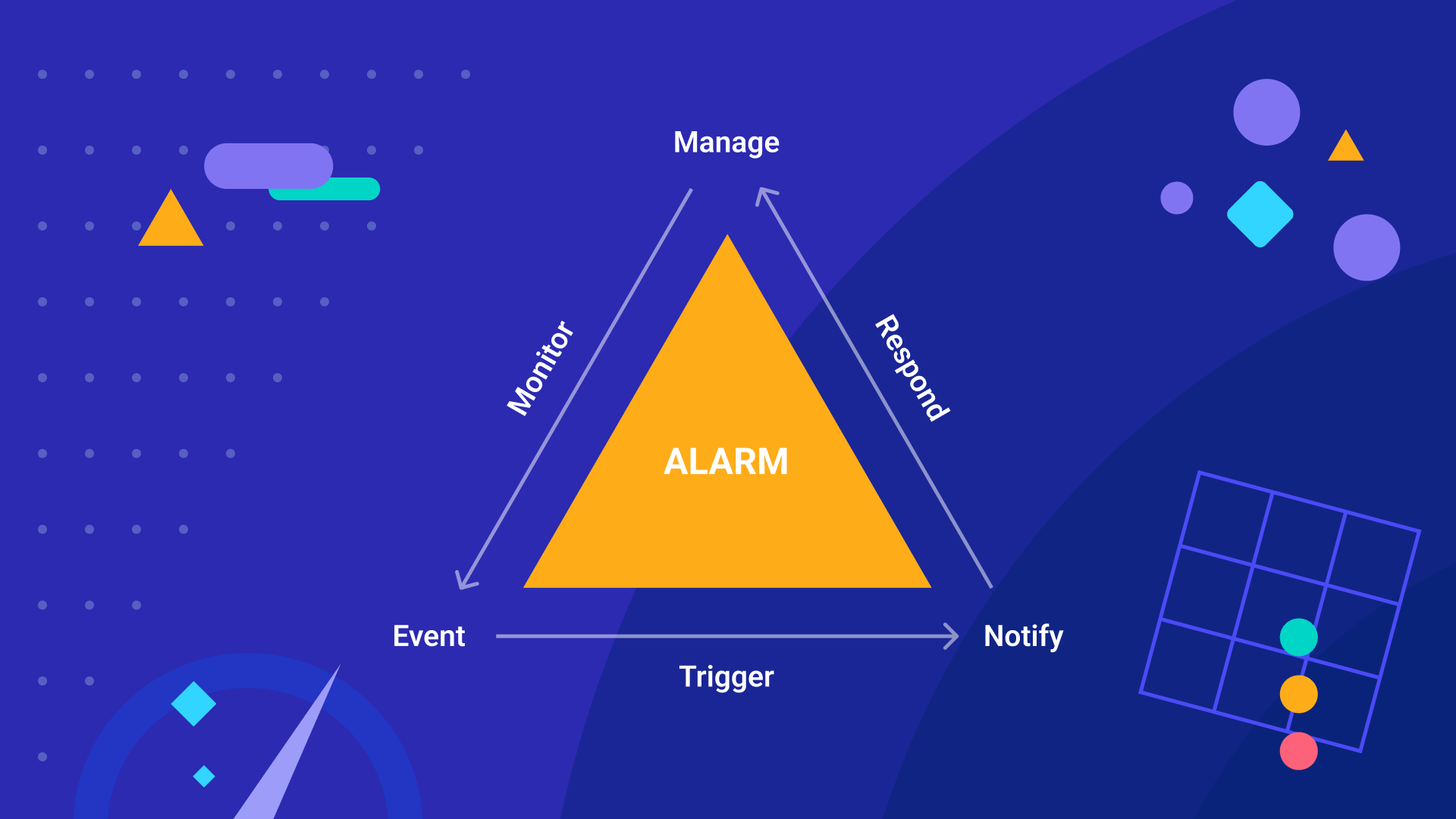
    <content type="text"><![CDATA[<p><span class="featured">Alarms are about actions, not just signals. Design for safety means designing the full alarm lifecycle. The goal isn&rsquo;t awareness&mdash;it&rsquo;s response.</span></p><h2 id="the-alarming-truth">The Alarming Truth</h2><p>When systems become complex, safety becomes a challenge. Alarms are the guardrails that help prevent disaster from striking. Yet poorly designed software creates an alarming reality.</p><p>Disasters rarely happen because of a lack of alarms. They happen because there are too many.</p><p>In control rooms, alarms are everywhere. And maybe that&rsquo;s the problem. Alarms fire so often that users stop noticing them. They mute the sound just to make it through the shift. And when they do notice an alarm, it&rsquo;s often nonessential or even a false positive.</p><p>When everything seems urgent, nothing is. When alarms fire constantly, people stop responding.</p><p>We like to think having alarms equal safety. We overestimate. Mistrust. And bad alarm design leads to fatigue, overload and inactivity.</p><p>Designing alarms means designing for the human in the loop. Because when the alarm goes off, it&rsquo;s not the sensor that solves the problem. It&rsquo;s the responsible person inside the system.</p><h2 id="classification-clarity">Classification Clarity</h2><p>If you want alarms people can trust, you need alarms people can understand. That starts with clear, consistent alarm classification.</p><p>An alarm is not just awareness. It&rsquo;s a signal that something needs attention.</p><p>But systems are becoming more complex. Staff is reduced. Workload increased. This cognitive context demands crystal-clear communication. Alarms with the right priority, and the expected reliability.</p><p>You need a common classification system across your platform&mdash;one that spans code, UI, processes and people.</p><p>That means aligning on two key dimensions: <strong>priority</strong> and <strong>reliability.</strong></p><h3 id="priority">Priority</h3><p>Priority tells you what to focus on&mdash;what truly requires your attention.<br />It reflects a combination of urgency &times; severity.</p><ul><li><strong>Urgency</strong> is how much time you have. Do you act now, or do you have a buffer?</li><li><strong>Severity</strong> is the consequence. What happens if you miss this?</li></ul><h3 id="reliability">Reliability</h3><p>Reliability tells you whether the alarm can be trusted. It depends on two factors: probability &times; accuracy.</p><ul><li><strong>Probability</strong> is about trusting the event. Is this likely to happen?</li><li><strong>Accuracy</strong> is about trusting the source. Is the data reliable?</li></ul><p>Consistent classification creates clarity.</p><p>I have seen systems used by the same operator. One used low, medium, high priority with green, yellow and red color-coding. Another used lo-lo, lo, mid, hi, hi-hi. A third used normal, critical and urgent. This kind of inconsistency makes it difficult for operators to judge.</p><p>But labeling an alarm is just the start. The real challenge is what happens next. What is the next step in the alarm lifecycle?</p><h2 id="the-alarm-lifecycle">The Alarm Lifecycle</h2><p>Alarms are not just event messages. They&rsquo;re part of a loop. You want users to respond. To resolve an issue or prevent a disaster.</p><p>That&rsquo;s the job of the <strong>alarm lifecycle</strong>: a continuous system that helps teams manage risk.</p><p>I use a simple model to describe this: the <strong>alarm lifecycle triangle</strong></p><p><img src="https://d585tldpucybw.cloudfront.net/sfimages/default-source/blogs/2025/2025-09/alarm_lifecycle_triangle.png?sfvrsn=21a1cfd1_2" alt="Alarm lifecycle triangle showing the flow: Manage → Monitor → Event → Trigger → Notify → Respond → Manage. Visualizes how alarms move through the system and back to management." /></p><p><strong>Manage &rarr; Monitor &rarr; Event &rarr; Trigger &rarr; Notify &rarr; Respond &rarr; Manage</strong></p><p>When you design a system, you&rsquo;re facilitating this lifecycle with user interfaces. You can leverage existing UI components to design each step with a greater experience.</p><h3 id="manage">Manage</h3><p>This is your start and end. Before an alarm ever fires, someone has to define it. What triggers it? Who owns it? How should it escalate?</p><p>You need alarms in an overview, a list or a dashboard. A place where teams configure, control and store alarms.</p><p><strong>Common components:</strong><br />Datagrid, listview, card, form.</p><h3 id="monitor">Monitor</h3><p>This is the activity between Manage and Event. Monitoring means watching the data, the patterns, the signals. Until something happens, you&rsquo;re anticipating what might happen.</p><p><strong>Common components:</strong><br />Chart, timeline, gauge, listview.</p><h3 id="event">Event</h3><p>This is the moment of truth. A condition is met. A rule is broken. Or a system forecasts that something will occur.</p><p>You can see these events unfold through visuals. Noticing anomalies, spikes or drop-offs in the data.</p><p><strong>Common components:</strong><br />Chart, gauge, diagram.</p><h3 id="trigger">Trigger</h3><p>This is where logic turns into action. The system makes a decision: raise the alarm.</p><p>Triggers need to be clearly defined. Not just what happened, but what matters enough to notify. Good trigger design avoids false positives and misplaced thresholds.</p><p><strong>Common components:</strong><br />Popup, badge, conditionally styled rows.</p><h3 id="notify">Notify</h3><p>This is the handoff. The alarm moves from system to user.</p><p>But how? To whom? Through what channel? That&rsquo;s where UX matters most. Alarms must reach the right person, with the right context, at the right time.</p><p><strong>Common components:</strong><br />Alert, badge, toast, modal, notification panel, chatbot.</p><h3 id="respond">Respond</h3><p>This is the moment of action. The user sees the alarm. Now what? Acknowledge. Escalate. Or Fix? Maybe even dismiss or snooze it.</p><p>You&rsquo;re not just designing for reaction. You&rsquo;re designing for decision.</p><p><strong>Common components:</strong><br />Button, dropdown, chip.</p><h2 id="alarm-alert-or-action">Alarm, Alert or Action?</h2><p>A common misconception is that alarms and alerts are the same. But alerts are just one type of notification&mdash;used by alarms.</p><p>An alert tells you something happened. An alarm tells you to do something about it. That <strong>action</strong> is what actually matters.</p><p>Too many systems stop at notifying. They fire off popups and badges and call it a day. But if you want real safety, you need to go further.</p><p>You need to design for different types of response:</p><ul><li><strong>Passive</strong> &ndash; &ldquo;I saw it.&rdquo;</li><li><strong>Reactive</strong> &ndash; &ldquo;I&rsquo;ll act now.&rdquo;</li><li><strong>Proactive</strong> &ndash; &ldquo;I&rsquo;ll prevent it.&rdquo;</li></ul><p>If you want people to act, you have to design for it&mdash;with proper classification and a well-managed lifecycle.</p><p>From out of control, to in control.</p><aside><hr data-sf-ec-immutable="" /><div class="row"><div class="col-4 u-normal-full u-small-mb0"><h4 class="u-fs20 u-fw5 u-lh125 u-mb0">Design for the Operator </h4></div><div class="col-8"><p class="u-fs16 u-mb0"><a target="_blank" href="https://www.telerik.com/blogs/design-operator-ux-design-can-improve-decisions-high-stakes-environments">How UX Design Can Improve Decisions in High-Stakes Environments</a></p></div></div></aside><img src="https://feeds.telerik.com/link/23067/17190446.gif" height="1" width="1"/>]]></content>
  </entry>
  <entry>
    <id>urn:uuid:366fba92-0cf6-45ba-929f-570385d66b42</id>
    <title type="text">Is Apple’s Liquid Glass the Next Material Design?</title>
    <summary type="text">Liquid Glass feels a lot like when Google introduced Material Design back in 2014. Does this mean we’re about to enter an era of glassmorphism all around the web?</summary>
    <published>2025-10-03T14:26:00Z</published>
    <updated>2026-04-09T07:08:59Z</updated>
    <author>
      <name>Suzanne Scacca </name>
    </author>
    <link rel="alternate" href="https://feeds.telerik.com/link/23067/17177644/is-apple-liquid-glass-next-material-design"/>
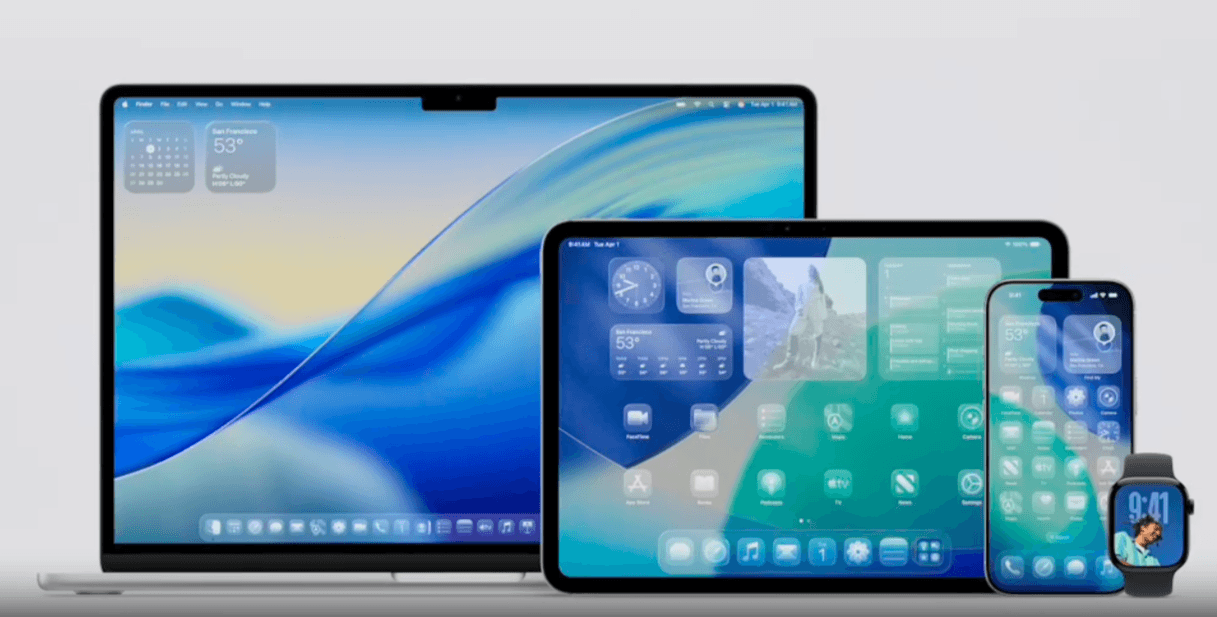
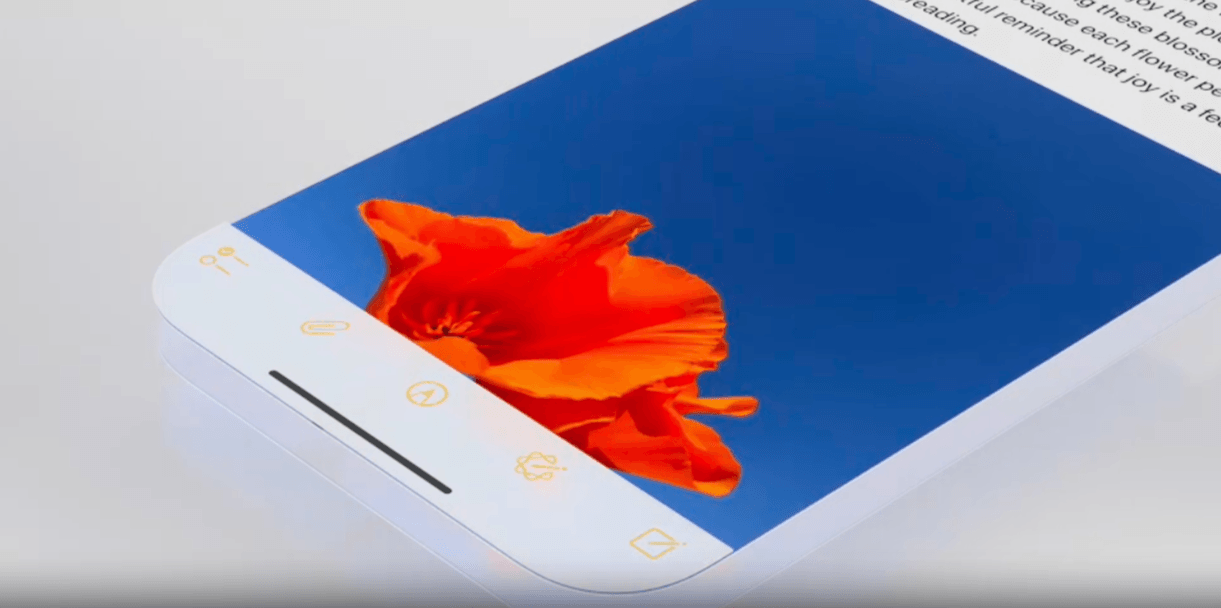
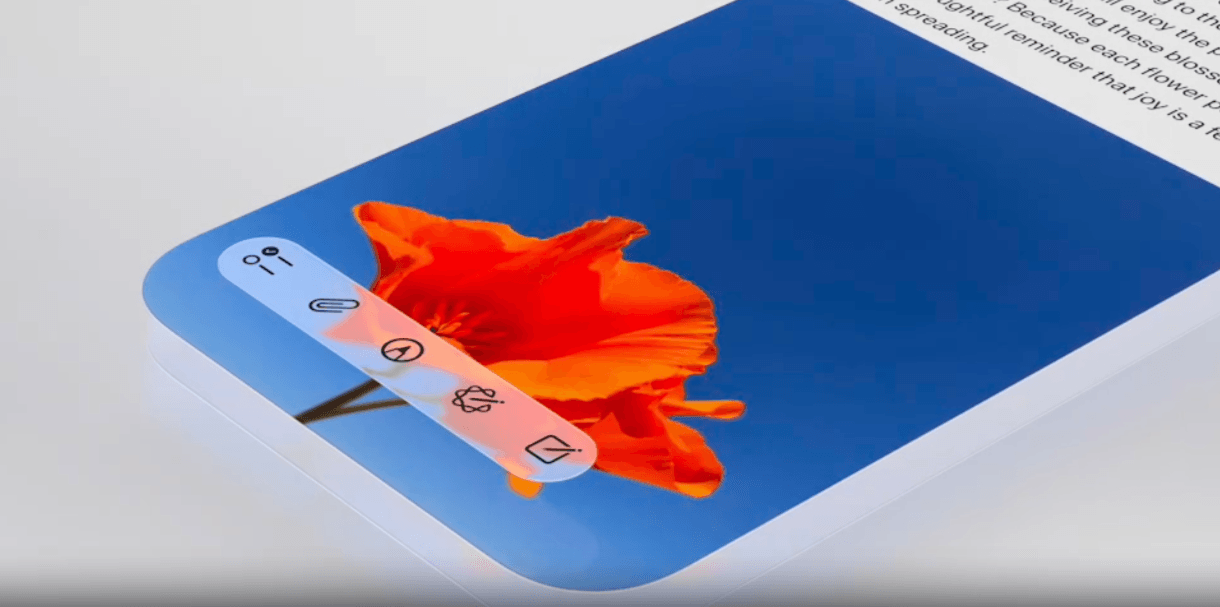
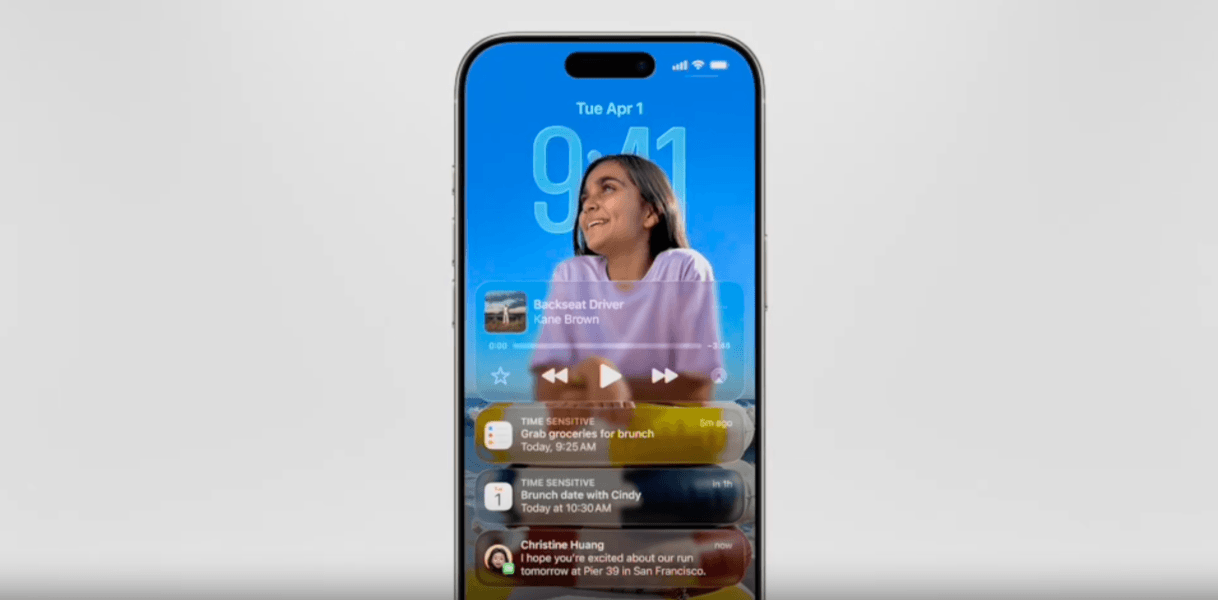
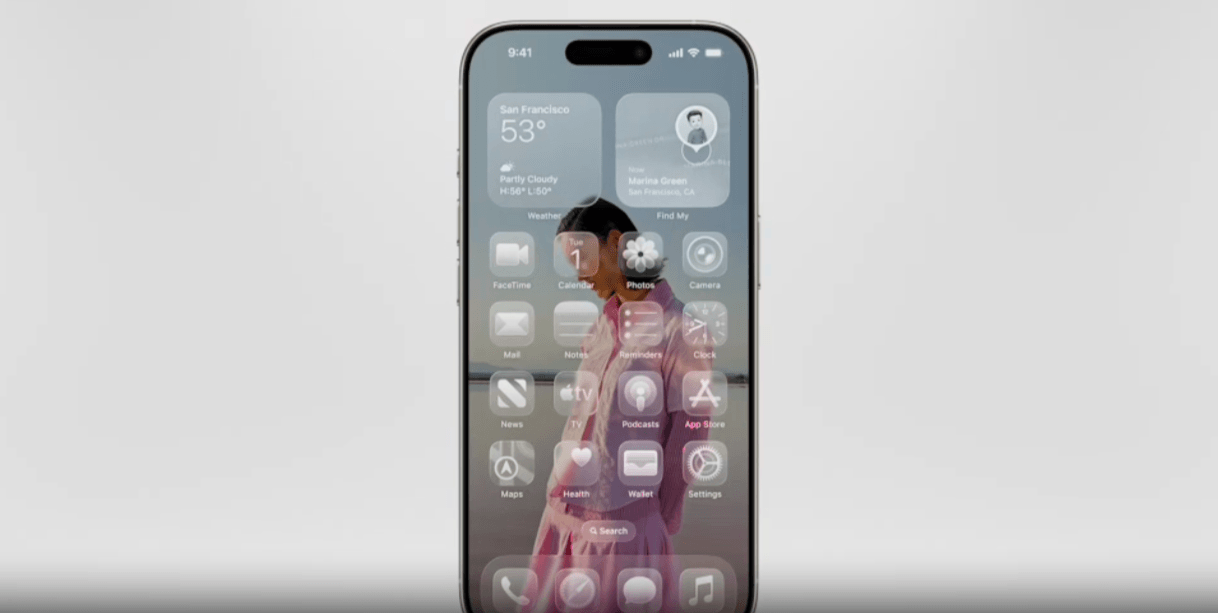
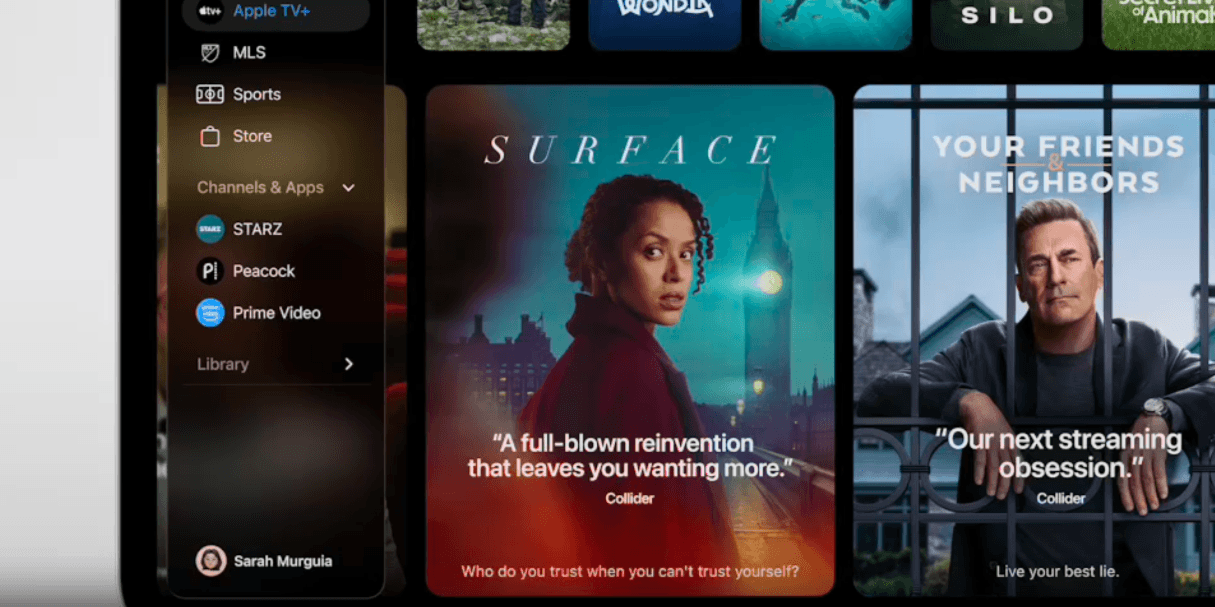
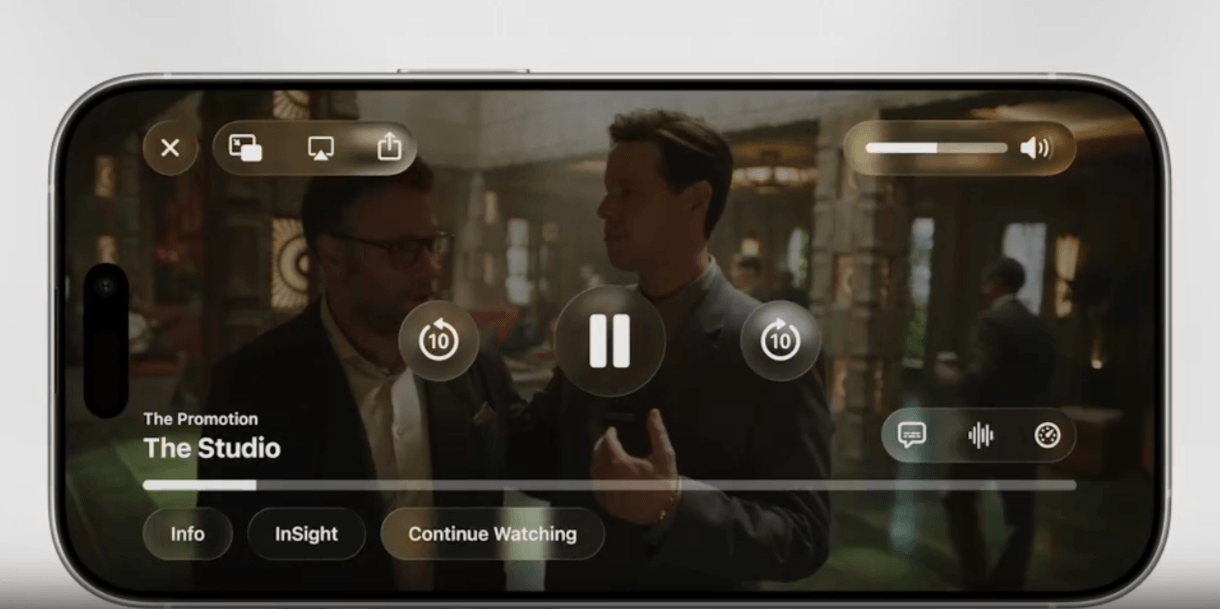
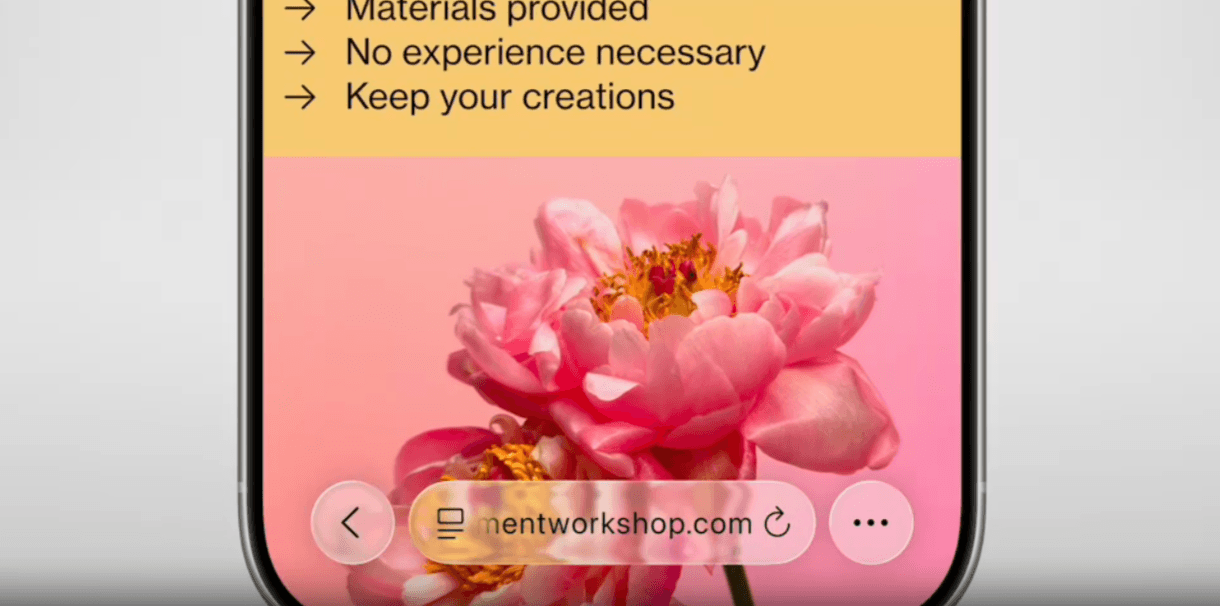
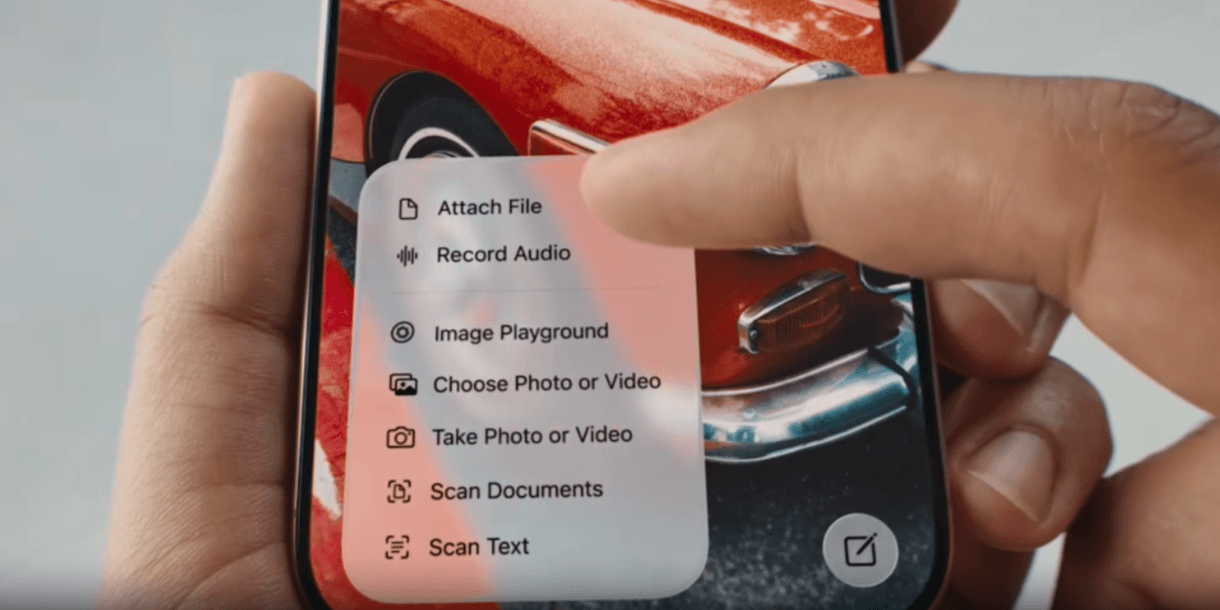
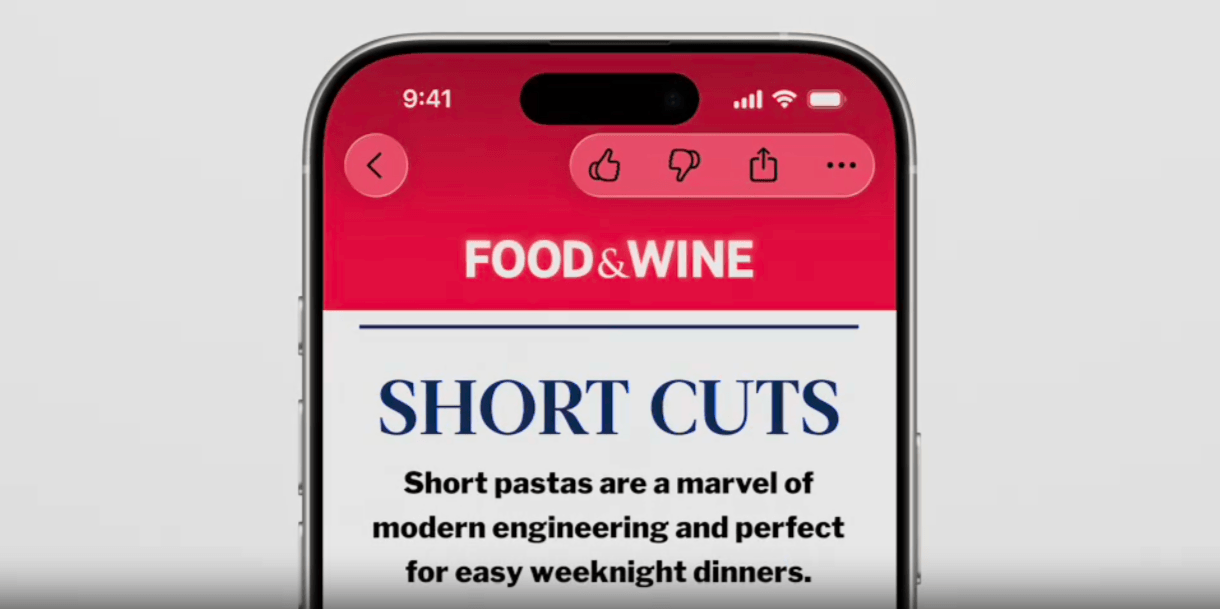
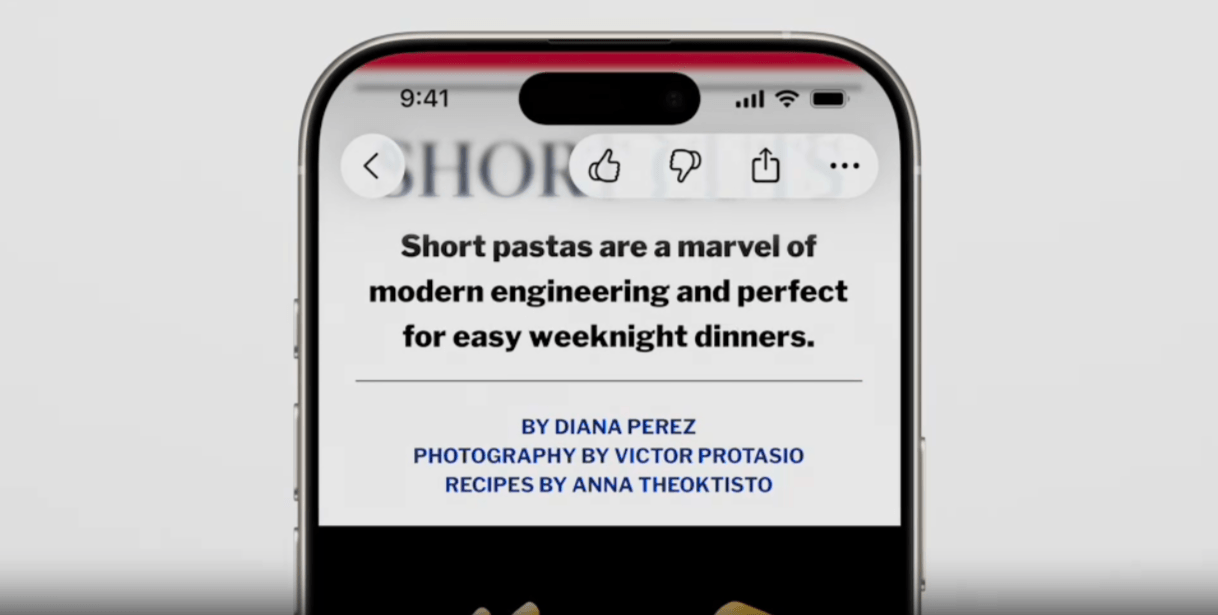
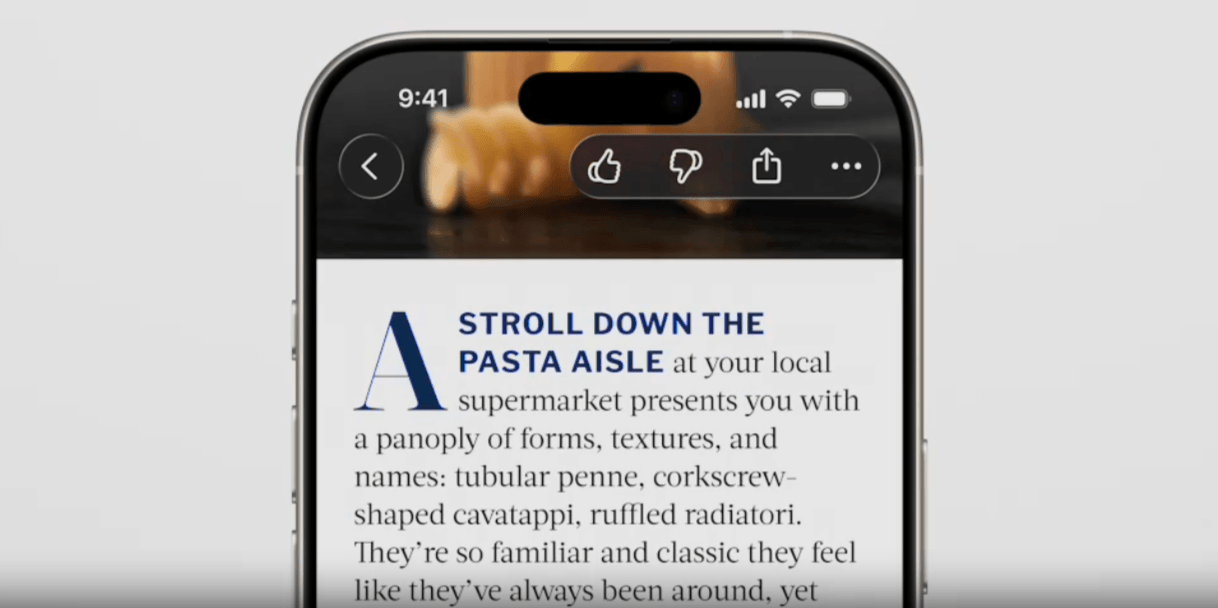
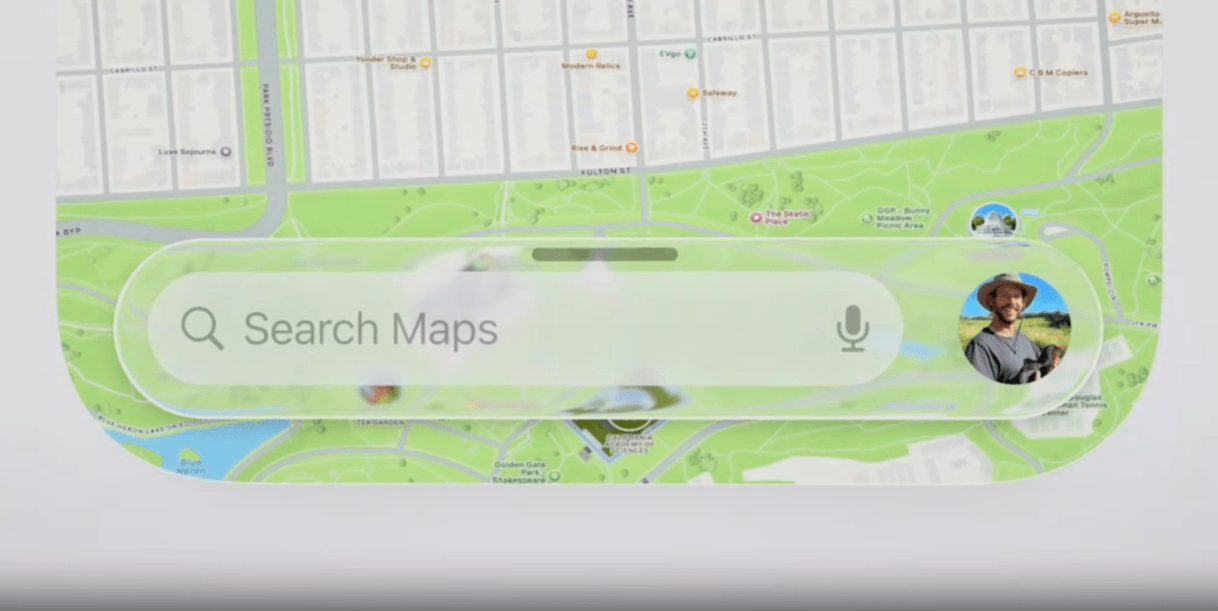
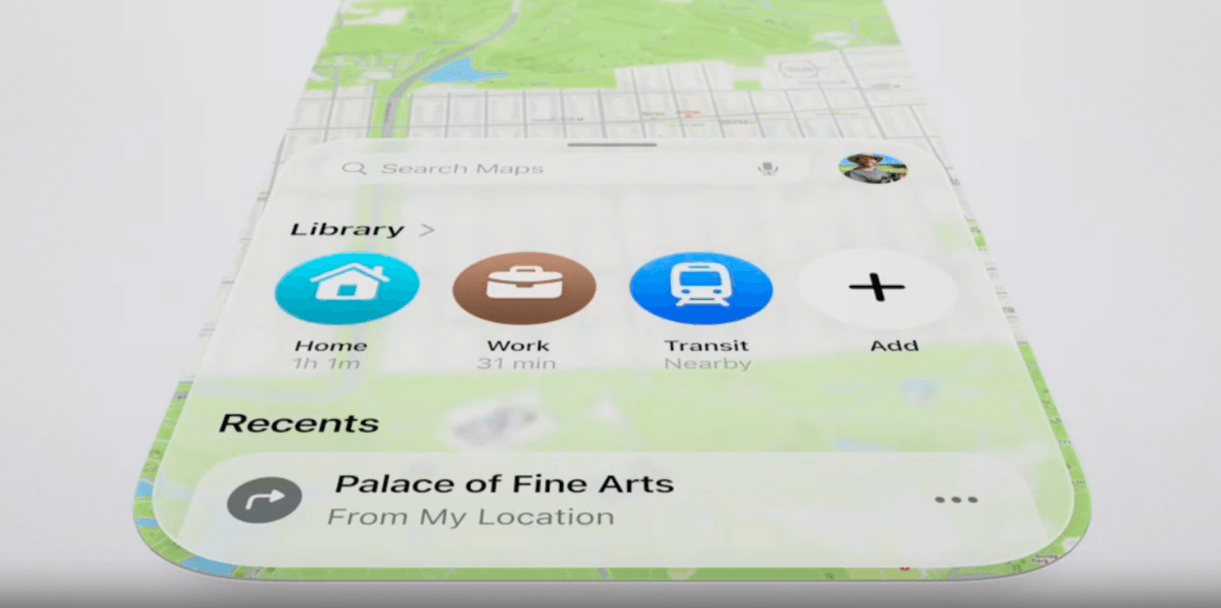
    <content type="text"><![CDATA[<p><span class="featured">Liquid Glass feels a lot like when Google introduced Material Design back in 2014. Does this mean we&rsquo;re about to enter an era of glassmorphism all around the web? We&rsquo;ll look at what the Liquid Glass UI entails and how this new digital material may shape the way we design apps and websites going forward.</span></p><p>In June 2025, Apple announced Liquid Glass. This new glassmorphic digital material has changed the way components look and feel on all its operating systems and devices.</p><p>Because of how drastically the Apple UI has changed, is it reasonable to expect that designers and developers will have to start mirroring their app and website designs to fit? And if they do, will these adaptations be minor or will it transform the way the entire web looks in the coming years?</p><p>In this post, we&rsquo;re going to look at the new Liquid Glass UI and the changes it&rsquo;s bringing to Apple&rsquo;s operating systems. We&rsquo;re also going to look at the similarities between Liquid Glass and Google&rsquo;s original Material Design concept, and what this means for anyone designing digital interfaces in the near future.</p><h2 id="what-is-apple’s-liquid-glass-ui">What Is Apple&rsquo;s Liquid Glass UI?</h2><p>On June 6, 2025, <a href="https://www.apple.com/newsroom/2025/06/apple-introduces-a-delightful-and-elegant-new-software-design/">Apple announced the new Liquid Glass software design</a>.</p><p>Alan Dye, the VP of Human Design for Apple, says that goal of Liquid Design is to:</p><blockquote><p>&ldquo;Make something purely digital feel natural and alive&mdash;from how it looks to how it feels as it dynamically responds to touch.&rdquo;</p></blockquote><p>In the promotional video released with the announcement, we get to see what Liquid Glass looks like and what makes it different from previous Apple interfaces:</p><div data-sf-ec-immutable="" class="-sf-relative" contenteditable="false" style="width:560px;height:315px;"><div data-sf-disable-link-event=""><iframe width="560" height="315" src="https://www.youtube.com/embed/jGztGfRujSE?si=uvLMhXBM_ZP0wVon" title="YouTube video player" frameborder="0" allow="accelerometer; autoplay; clipboard-write; encrypted-media; gyroscope; picture-in-picture; web-share"></iframe></div></div><br /><p>Let&rsquo;s have a look at these changes in more detail:</p><h3 id="universal-design-for-all-platforms">Universal Design for All Platforms</h3><p>It&rsquo;s not just macOS or iOS that&rsquo;s getting this Liquid Glass UI. All platforms have been redesigned with this new material. This includes:</p><ul><li>macOS</li><li>iPadOS</li><li>iOS</li><li>watchOS</li><li>tvOS</li></ul><p>In addition, Apple apps have been reskinned with Liquid Glass elements, like Safari, Camera, Apple Music and more.</p><p><img src="https://d585tldpucybw.cloudfront.net/sfimages/default-source/blogs/2025/2025-09/liquid-glass-cross-platform.png?sfvrsn=8afea25e_2" title="Apple OS in Liquid Glass" alt="A mockup of Liquid Glass for Mac, iPad, iPhone, and iWatch. We see how all of the functional components and app icons now have a frosted, translucent look to them." /></p><p>Essentially, everything went from looking like this:</p><p><img src="https://d585tldpucybw.cloudfront.net/sfimages/default-source/blogs/2025/2025-09/liquid-glass-before.png?sfvrsn=432e3f1_2" title="Before Liquid Glass" alt="An example of what an Apple toolbar looked like before Liquid Glass. It’s  a solid white bar affixed to the bottom of the screen with yellow icons on top of it." /></p><p>Here we see how flat and ultra-minimalist something like a toolbar looked prior to Liquid Glass. The toolbar gives off the appearance that it&rsquo;s part of the phone&rsquo;s hardware instead of part of the screen or software.</p><p>The icons looked touchable simply because of their illustrated appearance and because they were confined to a toolbar container, not because they looked like buttons or stuck out in any other way from the interface.</p><p>Fast forward to June 2025, and here is how this toolbar now looks:</p><p><img src="https://d585tldpucybw.cloudfront.net/sfimages/default-source/blogs/2025/2025-09/liquid-glass-after.png?sfvrsn=248ca904_2" title="After Liquid Glass" alt="An example of what an Apple toolbar looks like with Liquid Glass. It’s a translucent toolbar that hovers over the content on the screen. In this case, it’s a blue sky background with a red flower in the foreground." /></p><p>The icon designs are the same. However, the toolbar no longer appears to be part of the hardware. Nor is it separated from the content area and contained within a thick opaque space. Now, it sits within a semi-transparent component that hovers over the content.</p><p>This component (and all Liquid Glass components) also has rounded edges. This is something that Apple was intentional about when coming up with Liquid Glass as they wanted these hovering components to naturally nest within the rounded edges of Apple&rsquo;s devices.</p><h3 id="reskinning-of-the-fundamental-elements">Reskinning of the Fundamental Elements</h3><p>Unlike some design trends or brand redesigns that reenvision how every part of the UI looks, Liquid Glass only affects the fundamental elements. As Apple explains to developers and designers wanting to adopt it for their own purposes:</p><blockquote><p>&ldquo;Liquid Glass seeks to bring attention to the underlying content, and overusing this material in multiple custom controls can provide a subpar user experience by distracting from that content. Limit these effects to the most important functional elements in your app.&rdquo;</p></blockquote><p>So, which parts of the UI have changed exactly?</p><p>If we&rsquo;re talking about Apple&rsquo;s operating systems specifically, then Liquid Glass has transformed quite a bit of it.</p><p>On the lock screen, for instance, these elements are Liquid Glass:</p><ul><li>Date and time</li><li>Notification bars</li><li>Audio/video controllers</li></ul><p><img src="https://d585tldpucybw.cloudfront.net/sfimages/default-source/blogs/2025/2025-09/liquid-glass-lock-screen-example.png?sfvrsn=4b65835b_2" title="Liquid Glass lock screen" alt="In this Liquid Glass iPhone lock screen example, we see a smiling girl in front of the time (which is Liquid Glass). In front of the girl is an audio player that says “Backseat Driver” by Kane Brown along with 3 notifications for a tasks, calendar appointment, and text. These 3 cards and audio player are semi-transparent." /></p><p>The home screen is majorly transformed as well. For example, these elements are now skinned using Liquid Glass:</p><ul><li>App icons</li><li>Calendars</li><li>Weather tracker</li><li>Docks</li><li>Sidebars</li><li>Search bars</li><li>Cards</li><li>Navigation/screen slide controls</li></ul><p>Here&rsquo;s what the home screen of an iPhone looks like with Liquid Glass components:</p><p><img src="https://d585tldpucybw.cloudfront.net/sfimages/default-source/blogs/2025/2025-09/liquid-glass-home-screen-icons.png?sfvrsn=c6893223_2" title="iPhone screen Liquid Glass" alt="In this iPhone example for Liquid Glass, we see a woman in the home screen background. She’s wearing a pink outfit. In front of her, the screen is filled with a weather tracker, a personal info card, app icons, a search bar, and a dock at the bottom. All of these components are colorless and semi-transparent." /></p><p>Unlike previously where the background graphic or design would&rsquo;ve been masked by all the icons, Liquid Glass allows us to see through them. So the content is no longer hidden by the components that sit atop it.</p><p>Now, here&rsquo;s what a larger screen might look like if someone were to search for something to watch on a streaming service:</p><p><img src="https://d585tldpucybw.cloudfront.net/sfimages/default-source/blogs/2025/2025-09/liquid-glass-sidebar-cards.png?sfvrsn=c6b0f037_2" title="Liquid Glass sidebar example" alt="A look at a sidebar made with Liquid Glass. It’s darker in color and not as transparent as smaller components are. We can tell there’s something beneath it content-wise, but can’t tell by looking at it." /></p><p>This has a much different appearance than the iPhone example above. In part, because the background is darker. But also because the Liquid Glass components don&rsquo;t appear as see-through. (I&rsquo;ll talk about that in the next section.)</p><p>These are just examples of how the Apple operating systems have changed. But their apps look different too.</p><p>For example, here&rsquo;s what the controls look like when watching a movie or video in one of Apple&rsquo;s apps:</p><p><img src="https://d585tldpucybw.cloudfront.net/sfimages/default-source/blogs/2025/2025-09/liquid-glass-video-controls.png?sfvrsn=879c36f5_2" title="Liquid Glass video player" alt="As “The Studio” plays on this video player on an iPhone, we see how different elements have been redesigned for Liquid Glass: “X” exit button, screen sharing options, volume control, video control buttons, info buttons, captions and more." /></p><p>You can see that the content is untouched. However, all the controls and settings in the layered foreground now have the distinctive Liquid Glass frosted look. These include:</p><ul><li>&ldquo;X&rdquo; exit button</li><li>Screen sharing options</li><li>Volume control</li><li>Video player controls</li><li>Closed captioning controls</li><li>Video timeline bar</li><li>Info buttons</li></ul><p>Essentially, buttons, toolbars, sidebars, navigation and controls will now take on the look of Liquid Glass.</p><h3 id="translucent-and-fluid-layers">Translucent and Fluid Layers</h3><p>Liquid Glass was designed to be a digital material that looks and acts like glass does in our physical world. So, these components are translucent and also refract light. If you watch the video above, you&rsquo;ll see how moving an iPhone back and forth makes it look as though light is shining on the &ldquo;glass&rdquo; of the time displayed there.</p><p>Now, Liquid Glass can&rsquo;t be completely transparent as it would create a readability and accessibility nightmare for Apple users. So, these elements have more of a soft glazed or foggy glass appearance than anything.</p><p>Refraction, however, does work a lot like it does in the real world. For example, here&rsquo;s what the address bar and other navigational components might look like on an iPhone:</p><p><img src="https://d585tldpucybw.cloudfront.net/sfimages/default-source/blogs/2025/2025-09/liquid-glass-translucent-layer-small.png?sfvrsn=e6237901_2" title="Liquid Glass smaller elements" alt="When smaller Liquid Glass elements appear over content, they refract light, allowing us to see what’s behind them. In this example, we see an address bar that reads “mentworkshop.com”. Behind it, we see the pink flowers from the content background." /></p><p>There are pink flowers in the center of the background. On top of this section is where you&rsquo;ll find the address bar. You can see how pieces of the flower (the yellow and pink) still poke through.</p><p>That said, refraction doesn&rsquo;t work equally the same way for all components.</p><p>For smaller, less intrusive elements like the address bar, it does. For larger elements that cover more of the content, it does not.</p><p>Here we see how clicking open a menu of controls gives us a more frosted Liquid Glass layer. Yes, we can still see some of the content and colors beneath it, but not as much as we do with smaller layers.</p><p><img src="https://d585tldpucybw.cloudfront.net/sfimages/default-source/blogs/2025/2025-09/liquid-glass-translucent-layer-large.png?sfvrsn=51da6e71_2" title="Liquid Glass larger elements" alt="A user opens a controls menu on an iPhone. The frosted section makes it easier to see the options for: Attach File, Record Audio, Image Playground, and more." /></p><p>Without this extra-frosted effect, it would be very difficult to read the image editing settings in this menu.</p><p>We can&rsquo;t forget that Liquid Glass is called &ldquo;liquid&rdquo; for a reason. This is something that we didn&rsquo;t see much of in the above video (which is where these image stills come from), but it&rsquo;s an important part of the new Apple user experience.</p><p>In terms of how this plays out, there are a couple of new effects to be aware of. One is the illumination effect. When touched or clicked, Liquid Glass components glow. Depending on the flexibility of the component, it may also flow beneath your finger or cursor if you move it.</p><p>The <a href="https://developer.apple.com/videos/play/wwdc2025/219/">video quality here</a> isn&rsquo;t the best, but you&rsquo;ll get a good sense for how this fluidity &ldquo;feels&rdquo; around the 4-minute mark.</p><h3 id="intuitive-adaptions">Intuitive Adaptions</h3><p>Something else that makes Liquid Glass different from what we&rsquo;ve seen before is how it adapts to the environment as well as to user interaction.</p><p>To start, Liquid Glass components change color based on what&rsquo;s behind them. We saw the example earlier of the pink flower behind the address bar. In the following example, we see how the blog interaction toolbar and back button change color as a user scrolls down this blog post.</p><p>The frosted glass starts out red at the top of the page:</p><p><img src="https://d585tldpucybw.cloudfront.net/sfimages/default-source/blogs/2025/2025-09/liquid-glass-color-change-red.png?sfvrsn=6e9f137c_2" title="Liquid Glass - red example" alt="In this example of Liquid Glass, we see a back button in the top left corner of the phone screen and a toolbar in the top right with icons for Like, Dislike, Share, and More. They sit on top of the red banner at the top of the blog post, so the glass is a reddish hue and the icons are black." /></p><p>As the user scrolls over the main content where the white background is, the Liquid Glass color changes to match it:</p><p><img src="https://d585tldpucybw.cloudfront.net/sfimages/default-source/blogs/2025/2025-09/liquid-glass-color-change-light.png?sfvrsn=73540950_2" title="Liquid Glass - white example" alt="In this example of Liquid Glass, we see a back button in the top left corner of the phone screen and a toolbar in the top right with icons for Like, Dislike, Share, and More. They sit on top of the white content section in the blog post, so the glass is a whitish hue and the icons are black." /></p><p>It&rsquo;s not merely changing the background of the &ldquo;glass&rdquo; layer though. Liquid Glass will alter the color of the icons or text, too. For example, when these components pass over a darker section, the glass goes black while the icons turn white:</p><p><img src="https://d585tldpucybw.cloudfront.net/sfimages/default-source/blogs/2025/2025-09/liquid-glass-color-change-dark.png?sfvrsn=4504399e_2" title="Liquid Glass - black example" alt="In this example of Liquid Glass, we see a back button in the top left corner of the phone screen and a toolbar in the top right with icons for Like, Dislike, Share, and More. They sit on top of a dark image within the blog post, so the glass is a blackish hue and the icons are white." /></p><p>Ultimately, the color of your glass adapts to whatever content is behind it.</p><p>The shadow behind the glass will change, too. What we&rsquo;ve seen so far is what happens when images and sold color blocks appear beneath Liquid Glass layers. However, if large swaths of text happen to show up behind them, then a shadow will appear to keep the text or icons on the Liquid Glass layers readable.</p><p>Another way in which Liquid Glass has been designed to adapt has to do with its size.</p><p>Liquid Glass is meant to have a minimal footprint. For starters, Apple has taken these components out of the content areas of the screen and layered them on top. By making them translucent, they feel lighter and less cumbersome, too.</p><p>But not every component is going to be small or stay small. For example, this is a search bar for Apple Maps:</p><p><img src="https://d585tldpucybw.cloudfront.net/sfimages/default-source/blogs/2025/2025-09/liquid-glass-search-maps.png?sfvrsn=b39e746d_2" title="Apple Maps Liquid Glass" alt="In this example from Apple Maps, we see a nearly full-width search bar designed with Liquid Glass. It contains the search field, audio search button, and user icon." /></p><p>It sits at the bottom of the phone screen, allowing the user to focus on the map. When clicked, though, it doesn&rsquo;t just enable you to type a query into the field.</p><p>Instead, it opens up a panel with helpful search options.</p><p><img src="https://d585tldpucybw.cloudfront.net/sfimages/default-source/blogs/2025/2025-09/liquid-glass-map-selection.png?sfvrsn=ef241b29_2" title="Apple Maps search options" alt="When a user engages with the Apple Maps search feature, a panel opens up that shows them the search bar plus a Library of presets like Home, Work, and Transit, as well as a list of Recent destinations." /></p><p>This panel will disappear and shrink down to the minimal search bar if the user engages with the map outside of it. The same thing will happen with other small components that expand. The second a user disengages, scrolls, clicks away, etc., the Liquid Glass component shrinks down to its minimum size.</p><p>At the same time, the opacity of components changes based on their size. So, when you&rsquo;re seeing the smaller version of them, they&rsquo;ll be more translucent. When the larger menus or additional options appear, the component will take on a more opaque appearance. This is to improve readability as well.</p><h2 id="comparing-liquid-glass-to-material-design">Comparing Liquid Glass to Material Design</h2><p>For those who don&rsquo;t remember, <a href="https://www.telerik.com/blogs/google-new-material-design-concept-intuitive-metaphors-allowing-the-mind-to-work-less">Material Design</a> was Google&rsquo;s design system and UI framework that went mainstream in 2014.</p><div data-sf-ec-immutable="" class="-sf-relative" contenteditable="false" style="width:560px;height:315px;"><div data-sf-disable-link-event=""><iframe width="560" height="315" src="https://www.youtube.com/embed/Q8TXgCzxEnw?si=8WIIGUWtbWxSq86V" title="YouTube video player" frameborder="0" allow="accelerometer; autoplay; clipboard-write; encrypted-media; gyroscope; picture-in-picture; web-share"></iframe></div></div><br /><p>&nbsp;</p><p>As Ina Tontcheva explained:</p><blockquote><p>&ldquo;The team chose to use a metaphor of paper surface as the unifying principle because people have a long history of interacting with paper and surface and because they are physical and exist in the world. The team relied on the tangible metaphor that users understand intuitively to accelerate the understanding of their UI.&rdquo;</p></blockquote><p>At the time, Material Design was a breath of fresh air. It offered a much-needed shift away from skeuomorphism and the flat design trend that followed it.</p><p>The thing is, it didn&rsquo;t just change the appearance of all of Google&rsquo;s products, it went on to become the hottest design trend. It altered the face of the web for a couple of years&mdash;but not entirely for good. Many websites and apps looked and felt the same because they&rsquo;d all followed Google&rsquo;s specific guidelines (and even color palettes).</p><p>This era of design made it difficult to stand out visually. It also had its flaws when it came to usability and accessibility.</p><p>Why do I bring this up? Well, I suspect we&rsquo;re about to see something similar happen with Liquid Glass.</p><p>There are some key differences, though, that may keep Liquid Glass and the glassmorphism trend as a whole from taking over the web. Or even from sticking around too long within the Apple ecosystem.</p><h3 id="google’s-reach">Google&rsquo;s Reach</h3><p>Right now, Liquid Glass is strictly for Apple devices and apps. Google&rsquo;s Material Design, on the other hand, was for all Google products, which could be accessed on any device. (Not to mention the sheer popularity of Google Chrome and Search.)</p><p>So, unless Android, Google and other operating systems decide to follow suit, we may only see this trend within the Apple ecosystem.</p><p>That brings up an important question: Will these other tech giants make the move to a frosted glassy effect as well? What&rsquo;s in it for them if they do? And how long will it take before they&rsquo;re all in sync with this glassmorphism trend?</p><h3 id="ui-vs.-functionality">UI vs. Functionality</h3><p>Material Design completely changed everything within the UI&mdash;the colors, fonts, components, backgrounds, layering and shading, animation, etc. Liquid Glass, on the other hand, is only concerned with functional components.</p><p>Because of this, Liquid Glass might not be something that designers and developers decide to adopt for their websites and apps.</p><p>Glassmorphism isn&rsquo;t the kind of look that melds well with a lot of brands visually speaking. It&rsquo;s a tricky medium as its glossiness and futuristic feel doesn&rsquo;t work for many brands. Material Design had its limitations, too, but it didn&rsquo;t have as exclusive of a feel to it. Plenty of brands were willing to play with the vibrant color palettes and paper-like layers.</p><p>If Liquid Glass were transforming the entire interface, some brands might be able to make that transition. But if we&rsquo;re just talking layered components, most won&rsquo;t be able to make that switch seamlessly.</p><h3 id="practicality">Practicality</h3><p>While Material Design may have been groundbreaking compared to the design trends we had before it, it still felt grounded. Basing the redesign on paper helped with this. It&rsquo;s a simple and practical medium.</p><p>On the other hand, Liquid Glass reminds me of the kinds of things you see in sci-fi movies like <a href="https://www.youtube.com/watch?v=33Raqx9sFbo">Minority Report</a>.</p><div data-sf-ec-immutable="" class="-sf-relative" contenteditable="false" style="width:560px;height:315px;"><div data-sf-disable-link-event=""><iframe width="560" height="315" src="https://www.youtube.com/embed/33Raqx9sFbo?si=n2DNIxcJlygtYu5d" title="YouTube video player" frameborder="0" allow="accelerometer; autoplay; clipboard-write; encrypted-media; gyroscope; picture-in-picture; web-share"></iframe></div></div><br /><p>I think Apple was thinking many years ahead when it decided on glass as its medium. Right now, our hardware is still too solid and clunky to blend with glassmorphic UIs. Perhaps in three, four or maybe 10 years from now our devices will resemble those of Minority Report. But, for now, Liquid Glass doesn&rsquo;t feel natural.</p><p>So, unless our tech catches up, I&rsquo;m not sure it&rsquo;ll have staying power.</p><h2 id="will-liquid-glass-be-the-next-big-trend">Will Liquid Glass Be the Next Big Trend?</h2><p>Apple has gone all in on Liquid Glass, changing the look and feel of all its products and proprietary apps.</p><p>Do I think we&rsquo;ll see widespread adoption of it across the web? Not likely.</p><p>The one thing that may change this trajectory is what developers and designers do with it.</p><p>Let&rsquo;s say that developers and designers feel pressured to add glassmorphic components to their apps for their Apple users. Without a Liquid Glass app icon or in-app components, the experience might not feel as seamless anymore.</p><p>But unless those developers and designers are working for a major enterprise with massive resources and budgets, can they afford to create a Liquid Glass-inspired experience for Apple users and a completely different one for everyone else? What&rsquo;s more, do they want to have such a huge disparity between the user experience for these user segments?</p><p>We&rsquo;ll have to see how things go with Liquid Glass in the next year or two. If popularity wanes, if it causes massive problems for accessibility (which there are rumblings of) or if Apple decides to revert back to the old design, then things will stay as they are. However, if Liquid Glass succeeds and wins the support from the huge user base that is Apple users, then non-Apple operating systems and devices <em>will</em> have to go all in on glassmorphism.</p><aside><hr data-sf-ec-immutable="" /><div class="row"><div class="col-4 u-normal-full u-small-mb0"><h4 class="u-fs20 u-fw5 u-lh125 u-mb0">Preparing for an AI-powered Holiday Shopping Season</h4></div><div class="col-8"><p class="u-fs16 u-mb0">Salesforce predicts that artificial intelligence is going to alter consumers&rsquo; <a target="_blank" href="https://www.telerik.com/blogs/preparing-ai-powered-holiday-shopping-season">holiday shopping habits in 2025</a>. To help ecommerce brands keep up, digital pros may need to adjust their SEO strategy, incorporate AI assistive technology into their websites or apps, and so on.</p></div></div></aside><img src="https://feeds.telerik.com/link/23067/17177644.gif" height="1" width="1"/>]]></content>
  </entry>
  <entry>
    <id>urn:uuid:acdff374-5d73-4f4f-99ab-5842c185878d</id>
    <title type="text">Making the Most of ThemeBuilder’s Figma-to-HTML Import</title>
    <summary type="text">The ThemeBuilder Figma-to-HTML import plugin empowers you to create your own custom components and add them to ThemeBuilder—where they can be tweaked and styled alongside the Telerik and Kendo UI components.</summary>
    <published>2025-06-25T14:04:16Z</published>
    <updated>2026-04-09T07:08:59Z</updated>
    <author>
      <name>Kathryn Grayson Nanz </name>
    </author>
    <link rel="alternate" href="https://feeds.telerik.com/link/23067/17063325/making-most-themebuilder-figma-html-import"/>
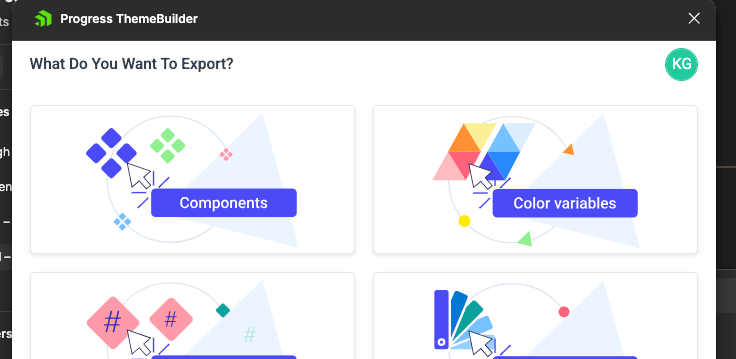
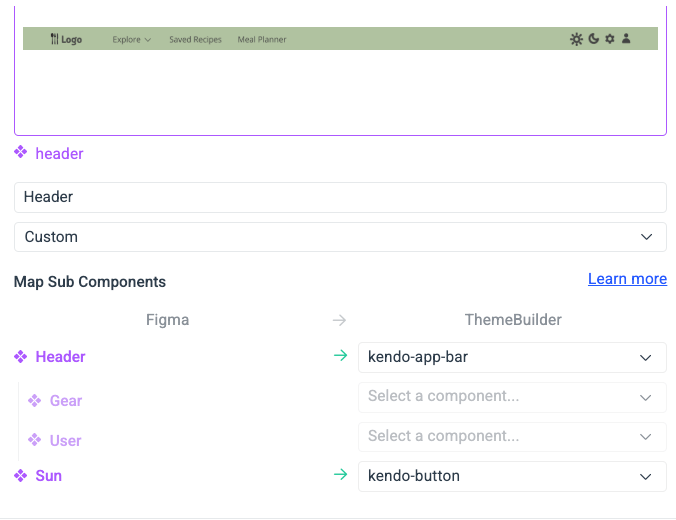
    <content type="text"><![CDATA[<p><span class="featured">The ThemeBuilder Figma-to-HTML import plugin empowers you to create your own custom components and add them to ThemeBuilder&mdash;where they can be tweaked and styled alongside the Telerik and Kendo UI components.</span></p><p>With more than 100 components in each version, Progress Telerik and Kendo UI component libraries have done a pretty good job of anticipating &hellip; well, just about every component you&rsquo;ll ever need. </p><p>Still, every now and again you may find yourself in need of something <em>truly</em> custom&mdash;the kind of component that just isn&rsquo;t possible for a third-party library to offer. We get it, and (more importantly) we don&rsquo;t think that using a third-party library like Telerik or Kendo UI should ever make it harder for you to do your own thing. </p><p>In fact, we&rsquo;ve created tools that make it <em>easier:</em> like the <a href="https://docs.telerik.com/themebuilder/plugin/exporting-components" target="_blank">ThemeBuilder Figma-to-HTML import plugin</a>, which empowers you to create your own custom components and add them to ThemeBuilder where they can be tweaked and styled (either by editing the code or using our no-code tools) alongside all the Telerik and KendoUI components. By doing this, you can create a single source of truth for all your design decisions&mdash;a place where designers, developers, product managers and more can all come together to see the design system implemented across your full suite of components. </p><p>Sounds like something that might be helpful for your team? Let&rsquo;s dig in! </p><h2 id="using-the-themebuilder-figma-plugin">Using the ThemeBuilder Figma Plugin</h2><p>The ThemeBuilder Figma plugin can do a few different things; you might have already read one of our earlier <a href="https://www.telerik.com/blogs/combining-figma-themebuilder-storybook-super-fast-design-system-poc" target="_blank">blogs about importing design tokens</a> with it. But did you know that you can also import full components? </p><p>Just install the plugin for your Figma account, launch it, sign into ThemeBuilder, and you can choose the &ldquo;Components&rdquo; option from the &ldquo;What Do You Want to Export?&rdquo; screen. </p><img src="https://d585tldpucybw.cloudfront.net/sfimages/default-source/.net-maui-aiprompt/screenshot-2025-06-18-at-11-37-12-am.png?sfvrsn=ff319a8e_2" alt="Screenshot of the " sf-size="100" /><p><br /></p><p>Then, you&rsquo;ll be prompted to choose a ThemeBuilder project to add your custom component to. Once you&rsquo;ve picked your project, select a component in Figma. It&rsquo;s important to note here that you need to have actually created a component instance within Figma&mdash;we&rsquo;re not just using &ldquo;component&rdquo; as a general term here! </p><p>Once you&rsquo;ve selected a component, you can start doing the really cool part (at least, in my opinion): mapping subcomponents. After all, most custom or complex components are still made up of smaller, more basic components, right? That&rsquo;s the whole idea behind atomic design! We want to help keep that structure intact, so you can always leverage Telerik or Kendo UI components to build your unique custom components. </p><p>To map subcomponents, just click the &ldquo;Map&rdquo; button, then start matching up the listed components with any Telerik or Kendo components you might have used. For example, this custom header could use our AppBar component, and my clickable icons could be Buttons that use SVG Icons! </p><img src="https://d585tldpucybw.cloudfront.net/sfimages/default-source/.net-maui-aiprompt/screenshot-2025-06-18-at-11-44-09-am.png?sfvrsn=72d962e4_2" alt="Screenshot of the subcomponent mapping screen in the Figma ThemeBuilder Plugin" sf-size="100" /><p><br /></p><p>After getting everything mapped and ready, just click &ldquo;Export.&rdquo; You&rsquo;ll see a confirmation notice; when you open up your ThemeBuilder project, the new component will be there under the &ldquo;My Components&rdquo; tab. </p><h2 id="best-practices-for-your-best-exports">Best Practices for Your Best Exports</h2><p>To get the most out of the ThemeBuilder component export, here&rsquo;s what we recommend:</p><ul><li><strong>Use clear and unique names</strong> for components and nodes to generate meaningful CSS classes.</li><li><strong>Create lean components</strong>; avoid unnecessary layers wherever you can.</li><li><strong>Embrace composition</strong>: build your custom components with Telerik or Kendo UI components whenever possible (super easy if you&rsquo;re also using the <a href="https://www.telerik.com/figma-kits" target="_blank">Figma UI Kits</a>), and use the mapping function to keep everything connected.</li><li><strong>Leverage styles and variables</strong>; these export as reusable tokens, making updates easy and centralized.</li></ul><h2 id="ready-to-try-">Ready to Try?</h2><p>This workflow flips the traditional handoff cycle: no more do developers have all the say in how custom components get interpreted and built. Designers now have the capability, using the ThemeBuilder Figma plugin, to define which components are used to build more complex custom UI elements&mdash;and then to make any small adjustments and confirm that they look and behave exactly how they expect, thanks to the ThemeBuilder live preview. </p><p>Avoid re‑coding visuals, eliminate manual syncing and shorten time-to-production&mdash;all while preserving design fidelity and maintainability. What&rsquo;s not to love?</p><img src="https://feeds.telerik.com/link/23067/17063325.gif" height="1" width="1"/>]]></content>
  </entry>
  <entry>
    <id>urn:uuid:63c636b0-c46b-4cd9-820b-c71666f4bd30</id>
    <title type="text">Why a Free React UI Kit Might Be Your Smartest Design System Move</title>
    <summary type="text">Selecting a toolkit isn’t a design decision—it’s a strategic one. Here are four things to consider before choosing a design system toolkit—even if it’s free.</summary>
    <published>2025-06-10T15:04:01Z</published>
    <updated>2026-04-09T07:08:59Z</updated>
    <author>
      <name>Teon Beijl </name>
    </author>
    <link rel="alternate" href="https://feeds.telerik.com/link/23067/17048797/why-free-react-ui-kit-might-smartest-design-system-move"/>
    <content type="text"><![CDATA[<p><span class="featured">Selecting a toolkit isn&rsquo;t a design decision&mdash;it&rsquo;s a strategic one. Here are four things to consider before choosing a design system toolkit&mdash;even if it&rsquo;s free.</span></p><p>We spent two years building it. With one of the best agencies. A design system that looked like it could outlive us all.</p><p>Then the budget vanished. The agency walked. A polished Figma file&mdash;and a codebase starting to fall apart.</p><p>The code was unmaintainable. Designers got stuck. Adoption stalled. The backlog exploded.</p><p>So I kept the Figma file and swapped the code. I turned to Kendo UI. Paid for the license because I needed something stable, well-documented and fast to implement.</p><p>And it worked. We shipped again.</p><p>Now? That same  <a target="_blank" href="https://www.telerik.com/kendo-react-ui/free-react-components">React kit has a solid free version</a>!</p><p>That&rsquo;s when it clicked: <em>&ldquo;Free&rdquo; isn&rsquo;t always better&mdash;but sometimes, it&rsquo;s exactly what gets you back on track.</em> And if adoption is the real goal? Free just might be your smartest move. How better to see if a library will work for you than to sample it first?</p><h2 id="what-designers-often-miss">What Designers Often Miss</h2><p>Designers love the crafting of design systems. We dream of the beautiful product we&rsquo;ll build once our ideal design system is in play.</p><p>But decision-makers don&rsquo;t buy aesthetics. They buy speed, clarity, predictability. To make a real case, speak their language. And that means knowing the tradeoffs.</p><h2 id="procurement--approvals">Procurement &amp; Approvals</h2><p>Before you push a single pixel, you&rsquo;ll probably hit:</p><ul><li>Budget cycles</li><li>Procurement reviews</li><li>Legal red tape</li><li>Maybe a security audit</li></ul><p>Even a relatively inexpensive tool might take months to get approved.</p><p>If your company already uses a toolkit from a known vendor like Progress Kendo UI, lean into that. Stick with a system that&rsquo;s already passed legal, compliance and procurement.</p><p>That shortcut might be the reason your proposal gets approved.</p><h2 id="tech-stack--documentation">Tech Stack &amp; Documentation</h2><p>A design system doesn&rsquo;t live in Figma&mdash;it lives in code.</p><p>If your engineers can&rsquo;t use it, or if it clashes with your stack, you&rsquo;re not choosing a system. You&rsquo;re creating a future headache.</p><p>You might use <code>Angular</code> today, but you&rsquo;re one reorg away from <code>React</code>. Big orgs don&rsquo;t run on a single strategy.</p><p>I&rsquo;ve seen managers actively push Angular because their C and C++ devs could get up to speed faster. Meanwhile, another project was locked into React&mdash;by top-down mandate, no discussion.</p><p>You won&rsquo;t control every decision. Pick one that supports multiple frameworks.</p><p>And don&rsquo;t forget documentation. No dev adopts what they can&rsquo;t debug. Docs win.</p><h2 id="change--risk-aversion">Change &amp; Risk Aversion</h2><p>Enterprise teams avoid change. Not out of laziness, but out of self-preservation.</p><p>The safest move? Stick to the status quo. And that means ignoring your proposal.</p><p>So when you introduce a new system, you&rsquo;re not just bringing in components&mdash;you&rsquo;re introducing risk. A existing toolkit lowers that barrier. Skeptics trust what they&rsquo;ve seen before. A known name helps.</p><p>And if it comes from a vendor with a track record? Even better. If it&rsquo;s already used inside the company? That&rsquo;s your foot in the door.</p><h2 id="maintenance--cost">Maintenance &amp; Cost</h2><p>Design systems need love. Someone has to update, support and maintain them. That takes time, money and often, it won&rsquo;t be you.</p><p>Before pushing for something custom or new, ask:</p><ul><li>Who owns it six months from now?</li><li>Will developers support it?</li><li>What if funding disappears?</li></ul><p>Getting stuck with a beautiful, broken system happens more often than you think. I&rsquo;ve been there. That&rsquo;s why I choose tools that cut overhead, not add to it.</p><h2 id="closing-framework">Closing Framework</h2><p>When leaders review a design system proposal, they don&rsquo;t ask how it looks. They ask:</p><ul><li><strong>Do we want this?</strong><br />Does it solve a real problem&mdash;or just add complexity?</li><li><strong>Will it work?</strong><br />Can we actually adopt it? Will our stack support it?</li><li><strong>What&rsquo;s the risk?</strong><br />What could go wrong&mdash;and who deals with it?</li><li><strong>What will it cost?</strong><br />Not just money&mdash;time, resources, attention.</li><li><strong>What&rsquo;s the return?</strong><br />How does this move the business forward?</li></ul><p>Getting buy-in isn&rsquo;t about visual polish&mdash;it&rsquo;s about business alignment. Free is the hook. Adoption is the catch.</p><p>Long-term success doesn&rsquo;t come from picking the prettiest system. It comes from picking the one your team can live with, ship with and grow with.</p><hr /><p>Try <a href="https://www.telerik.com/kendo-react-ui/components/free" target="_blank">KendoReact Free</a> now, and explore the <a target="_blank" href="https://www.telerik.com/design-system">Progress Design System Kit</a>.</p><img src="https://feeds.telerik.com/link/23067/17048797.gif" height="1" width="1"/>]]></content>
  </entry>
  <entry>
    <id>urn:uuid:8b11cb3b-9552-4ea6-a86f-8274b6837ec8</id>
    <title type="text">Taming the Dragon: A Toolbar’s Tale</title>
    <summary type="text">A tiny dragon symbolized an outdated UX, but was removing toolbars the right move? This is the story of the fall, revival and future of toolbars.</summary>
    <published>2025-05-22T14:15:09Z</published>
    <updated>2026-04-09T07:08:59Z</updated>
    <author>
      <name>Teon Beijl </name>
    </author>
    <link rel="alternate" href="https://feeds.telerik.com/link/23067/17036058/taming-dragon-toolbar-tale"/>
    <content type="text"><![CDATA[<p>&nbsp;</p><p><span class="featured">You never forget your first design battle. Mine? A dragon.</span></p><p>Not a medieval beast, but a tiny, pixelated icon squeezed inside a bloated toolbar of a 3D modeling application. It wasn&rsquo;t even supposed to be a dragon&mdash;it was just a 16x16 blob of green and red pixels, hand-crafted by a passionate or maybe careless developer in Paint. Instead of resembling the structural builder it was meant to represent, it looked more like a beast that is usually tamed by knights in shining armor.</p><p>The name stuck. No one called it by its function. Instead, people said: <em>&ldquo;Click the dragon.&rdquo;</em></p><p>And the wild part? Everyone knew exactly what that meant.</p><p>Now, I had to redesign 750+ of these little legends&mdash;each with its own strange, nostalgic history.</p><h2 id="the-toolbar-tyranny">The Toolbar Tyranny</h2><p>The dragon was one icon in a labyrinth of toolbars. Over time, new features meant new buttons. More buttons. More clutter. The toolbar wasn&rsquo;t a neat row of helpful shortcuts anymore. It had turned into a UX landfill, stacked high like the old versions of Microsoft Word, where functions disappeared into an icon abyss.</p><p>So, we decided to get rid of toolbars and moved to ribbons.</p><p>I redesigned the UI with smarter workflows, contextual actions and cleaner navigation. No more pixelated dragons, no more guessing games.</p><p>Or so I thought.</p><h2 id="the-redemption">The Redemption</h2><p>For years, toolbars in older software were a chaotic mix of actions and navigation.</p><p>A single row of tiny icons could hold anything from a direct command to a menu that reshaped the entire interface.</p><p>This inconsistency made toolbars confusing. As design systems matured, the industry began shifting away from them&mdash;favoring new navigation models. I was part of that shift.</p><p>When I started designing and implementing modern UI systems, my team embraced menus, ribbons and larger labeled icons&mdash;patterns that brought clarity and improved navigation.</p><p>As software evolved into web-based SaaS applications, navigation became even more structured, layered and nuanced. We moved toward on-demand actions, contextual UI and interfaces that guided users instead of overwhelming them.</p><p>It worked.</p><p>The experience improved. But then, something unexpected happened.</p><p>I missed the toolbar.</p><p>Not the old, bloated version, but a well-structured, well-grouped and well-positioned set of actions&mdash;a true toolbar component designed with clarity and context. In many cases, I found myself recreating toolbars without calling them that&mdash;grouping icons in a menu bar, placing action buttons together, designing around what was missing.</p><p>Eventually, I brought it back&mdash;deliberately and thoughtfully.</p><h2 id="taming-the-dragon">Taming the Dragon</h2><p>Toolbars were never the problem. How we used them was.</p><p>So instead of eliminating them, we need to design them better:</p><p>Actions should be contextual. Instead of scanning icons and guessing, users should see what they need, when they need it.</p><p>Icons should be recognizable. Monotone icons and branding challenges aside, a well-placed, well-designed icon can serve as a familiar anchor in complex workflows.</p><p>Efficiency should drive the experience. Enterprise and industrial software often requires fast, precise actions. Toolbars, when designed right, accelerate productivity rather than slow it down.</p><aside><hr data-sf-ec-immutable="" /><div class="row"><div class="col-4 u-normal-full u-small-mb0"><h4 class="u-fs20 u-fw5 u-lh125 u-mb0">Design for the Operator </h4></div><div class="col-8"><p class="u-fs16 u-mb0"><a target="_blank" href="https://www.telerik.com/blogs/design-operator-ux-design-can-improve-decisions-high-stakes-environments">How UX Design Can Improve Decisions in High-Stakes Environments</a></p></div></div><hr class="u-mb3" /></aside><p>With AI-driven interactions&mdash;such as predictive commands, voice-driven actions and prompt-based workflows&mdash;some might argue that traditional UI elements are becoming obsolete. However, icons and contextual action bars still play a critical role in bridging the gap between automation and user control. Clicking an action you instantly recognize, at the right moment, in the right spot? That&rsquo;s powerful.</p><p>This dragon may be gone, but the lesson stays:&nbsp;Good UX doesn&rsquo;t always mean kill it&mdash;but tame it.</p><blockquote><p><strong>What is your dragon that needs to be tamed?</strong></p></blockquote><img src="https://feeds.telerik.com/link/23067/17036058.gif" height="1" width="1"/>]]></content>
  </entry>
  <entry>
    <id>urn:uuid:e662b44f-cc47-4901-83b1-8975a5549b91</id>
    <title type="text">Your Component Library Isn’t a Design System (But it Could Be)</title>
    <summary type="text">Let’s explore the differences between a component library and a design system and how you can leverage them.</summary>
    <published>2025-05-06T10:20:45Z</published>
    <updated>2026-04-09T07:08:59Z</updated>
    <author>
      <name>Kathryn Grayson Nanz </name>
    </author>
    <link rel="alternate" href="https://feeds.telerik.com/link/23067/17022910/your-component-library-isnt-design-system-but-could-be"/>
    <content type="text"><![CDATA[<p><span class="featured">Let&rsquo;s explore the differences between a component library and a design system and how you can leverage them.</span></p><p>If you haven&rsquo;t worked with a design system&mdash;or a component library&mdash;before, the terms can be a little hazy. What&rsquo;s the difference between them? The short answer is that <strong>a component library is just one part of a larger design system.</strong> </p><p>It is possible for component libraries to stand alone without integration into a design system, or for design systems to exist without a component library. However, most of the time a full-featured design system will include a component library. </p><p>Let&rsquo;s take a closer look at what each of these terms means and what they typically include.</p><h2 id="component-library">Component Library</h2><p><strong>A component library is a collection of reusable, modular components that developers can use to speed up the creation of user interfaces.</strong> They include everything from simple components (like buttons, dropdowns and checkboxes) to really complex ones (like data grids, spreadsheets and data visualizations). </p><p>Component libraries can be built in-house, but most of the time it&rsquo;s more efficient to leverage a preexisting one (like Progress <a target="_blank" href="https://www.telerik.com/kendo-ui">Kendo UI</a>). When developers use a component library, they can spend less time building components from scratch and more time combining them into unique and useful applications. </p><p>Using a component library is especially helpful for creating consistent interfaces&mdash;and consistent code! When a team of developers is dividing up the work, sometimes two developers might build the same element (like a button) in slightly different ways when working on different features in the app. Over time, this creates an interface full of components that all work a little bit differently, both for the user <em>and</em> the developer. This makes the UI hard for users to learn, and the code challenging for developers to scale and maintain. </p><p>In general, it&rsquo;s better for everyone if the same component is reused across the entire application; by collecting the commonly reused components all in one place and documenting how they should be used, component libraries make that goal much easier to achieve. </p><p>A component library is primarily used by developers, but designers will often reference it as well during the early stages of feature ideation and design. When designers know what components the developers will be using to build out their designs, they can get aligned early in the process. This lowers the amount of iteration (and frustration) during the handoff phase. Think of it like knowing which Legos you have available in your kit. Once you understand what you have, you can start to think about how to use the pieces in different ways to build what you want! </p><h2 id="design-system">Design System</h2><p><strong>A design system is intended to be much broader&mdash;</strong><strong>a collection of interconnected visual elements, organized and documented for easy reference.</strong> You can think of it as a library of all the design resources and assets you could ever need, customized specifically for your application. As you might guess, that can (but doesn&rsquo;t <em>have to</em>) include components. Some of the most common elements that you&rsquo;ll find in a design system include (but aren&rsquo;t limited to) <a href="https://www.telerik.com/blogs/design-tokens-fundamental-building-blocks-design-systems" target="_blank">design tokens</a>, grid systems, icons, components, style guides and brand language or tone-of-voice guides. </p><p>Much like component libraries, you can build a design system in-house or leverage one that already exists (like Material or Fluent). Which option is the right fit often depends on company size and design vision. For small companies without many resources who aren&rsquo;t particularly focused on creating a unique look and feel, a preexisting design system can save a LOT of time and effort.</p><p>However, for a larger company&mdash;especially one with a dedicated design team that either needs to coordinate among many different departments or is highly invested in a custom brand&mdash;the upfront investment of creating an in-house design system will pay off in spades. </p><p><strong>Design systems are also hugely useful because they make sure that everyone is speaking the same language.</strong> Have you ever been in a situation where two people <em>thought</em> they were disagreeing on something, only to discover they were actually describing the same thing the whole time&mdash;just with different words?! Maybe one was calling it a &ldquo;toast notification&rdquo; and the other was calling it a &ldquo;snackbar&rdquo;? Or maybe your idea of &ldquo;sky blue&rdquo; was different than what your designer envisioned? When you&rsquo;re using multiple different libraries, frameworks or languages, it can be incredibly easy to get wires crossed; design systems can help uncross them. </p><p>Unlike component libraries, design systems are referenced widely by <em>lots</em> of different people across different teams and departments: designers (of course), but also developers, product managers, copywriters, social media managers and more. Honestly&mdash;pretty much everyone benefits from having access to the design system. </p><h2 id="which-does-your-team-need-">Which Does Your Team Need?</h2><p>If you don&rsquo;t have anything right now and are trying to figure out where to start, <strong>my recommendation is to begin with a premade component library.</strong> By beginning with a collection of prebuilt resources, you can start seeing those consistency and design benefits without having to invest a lot of time in setup to get things up and running. </p><p><strong>If that&rsquo;s working well, then you can start thinking about expansion.</strong> Maybe you want to start customizing the look and feel of those components, or documenting specific ways you want to use those components within the scope of your app. Maybe you can look at your CSS color variables (or Figma design tokens) and turn those into more formal brand guidelines. Maybe you mostly use a preexisting icon library, but you had to create a couple of custom ones&mdash;so you create a repo where they can all live in one place. </p><p>Before you know it, your component library is growing into a design system. In fact, we even offer a <a target="_blank" href="https://www.telerik.com/design-system/docs/">Design System Kit</a> to help you intentionally expand Kendo UI components into a full custom design system! </p><p>Of course, it&rsquo;s also possible to sit down with intention and create a design system completely from scratch. If you&rsquo;ve got a team of talented designers at your company, that&rsquo;s probably even the best way to do it&mdash;the ideal. </p><p>However, realistically, a lot of folks aren&rsquo;t working with the ideal, and I think it&rsquo;s good to remember that it&rsquo;s also OK for design systems to grow organically. Start with what you&rsquo;re using now, get it all collected in one place and document how you use it. As you add new components, colors, UI patterns, fonts&mdash;or anything else&mdash;add it to your collection. That&rsquo;s a design system, too! </p><p>You wouldn&rsquo;t write the same function over and over again in your code; you&rsquo;d export it once, so you could import and call it wherever you needed it. Component libraries and design systems are exactly the same&mdash;component libraries help you standardize and reuse UI components, and design systems help you standardize and reuse visual assets. They&rsquo;re two great tools that are even better when they&rsquo;re combined and used together!</p><aside><hr data-sf-ec-immutable="" /><div class="row"><div class="col-4 u-normal-full u-small-mb0"><h4 class="u-fs20 u-fw5 u-lh125 u-mb0">Combining Figma, ThemeBuilder and Storybook for a Super-Fast Design System POC</h4></div><div class="col-8"><p class="u-fs16 u-mb0">See how to <a target="_blank" href="https://www.telerik.com/blogs/combining-figma-themebuilder-storybook-super-fast-design-system-poc">create a design system proof of concept with Figma, ThemeBuilder and Storybook</a>. And watch Bitovi demo it with React in under an hour.</p></div></div></aside><img src="https://feeds.telerik.com/link/23067/17022910.gif" height="1" width="1"/>]]></content>
  </entry>
  <entry>
    <id>urn:uuid:d9496f0a-191f-451e-83d3-9fdf4d4cffb0</id>
    <title type="text">Combining Figma, ThemeBuilder and Storybook for a Super-Fast Design System POC</title>
    <summary type="text">See how to create a design system proof of concept with Figma, ThemeBuilder and Storybook. And watch Bitovi demo it with React in under an hour.</summary>
    <published>2025-04-16T10:03:01Z</published>
    <updated>2026-04-09T07:08:59Z</updated>
    <author>
      <name>Kathryn Grayson Nanz </name>
    </author>
    <link rel="alternate" href="https://feeds.telerik.com/link/23067/17008180/combining-figma-themebuilder-storybook-super-fast-design-system-poc"/>
    <content type="text"><![CDATA[<p><span class="featured">See how to create a design system proof of concept with Figma, ThemeBuilder and Storybook. And watch Bitovi demo it with React in under an hour.</span></p><p>Ever thought about kickstarting your design system with Progress <a target="_blank" href="https://www.telerik.com/kendo-ui">Kendo UI components</a>? We&rsquo;ve talked about it a little bit on the blog before, <strong>but now it&rsquo;s easier than ever thanks to </strong> <a target="_blank" href="https://www.telerik.com/kendo-react-ui/free-react-components">KendoReact Free</a>&mdash;no trials, signups or logins required! Combine that with the powerful features of Progress <a target="_blank" href="https://www.telerik.com/themebuilder"><strong>ThemeBuilder</strong></a> (which, by the way, <em>also</em> offers a free tier) and you could have a design system proof of concept (POC) up and going with no spend and very little time &hellip; which is just what Ryan Spencer and I demonstrated in <a target="_blank" href="https://www.youtube.com/watch?v=_jEQV6aKUIg">our recent webinar.</a> That&rsquo;s right, we teamed up with <a target="_blank" href="https://www.bitovi.com/">Bitovi</a> to talk about how to leverage these powerful tools to create a super-fast design system POC. </p><p>Now, let&rsquo;s be honest here: will the design system you create in mere hours be the perfect end solution for your team? Of course not&mdash;design systems are meant to grow and change with your product. They need maintenance and documentation, and they should (ideally) integrate more than just your component library and design tokens. In our example, things like tone of voice guidelines, different logo versions, common patterns and page templates, usage guidelines, etc. weren&rsquo;t included&mdash;but for a complete, robust design system you&rsquo;d almost certainly want to add them. </p><p>However, getting buy-in can be one of the most challenging hurdles to jump when it comes to starting a design system. That upfront investment of time and effort can be daunting when you&rsquo;ve got other projects to balance. <strong>By putting together a quick example that offers immediate value, like Ryan and I did here, you can demonstrate the long-term benefits without the big investment.</strong> After all, if this is what you can get from a quick POC, imagine all the ways you could benefit from a full design system! </p><h2 id="tools-for-our-design-system-poc">Tools for Our Design System POC</h2><p>To speed up the creation of our design system POC, Ryan and I reached for a handful of tools that helped us skip repetitive tasks, handle automatic imports/exports and more. </p><ol><li><p><a target="_blank" href="https://www.telerik.com/kendo-react-ui/components/styling/figma-ui-kits/"><strong>Kendo UI Figma Kits</strong>:</a> By starting with the Figma UI Kits, we could see all the components available as part of the KendoReact library&mdash;including all the various interaction states and small design details. Perhaps more importantly, in our situation, the Figma Kits also included a full list of design tokens that could be adjusted to suit our brand requirements.</p><p>With the Figma Kits updated and customized, we were able to add them as a powerful piece of our design system. In the future, designers will be able to use those Figma Kits to create mockups and interactive prototypes with pre-styled, design-system-compliant components&mdash;not to mention, of course, importing the design tokens into ThemeBuilder.</p></li><li><p><a target="_blank" href="https://www.telerik.com/themebuilder"><strong>ThemeBuilder</strong></a>: Speaking of which, ThemeBuilder was one of the most helpful tools we reached for, because it was what bridged the gap between the design and development sides of our design system. Despite the name, a design system isn&rsquo;t just for designers&mdash;developers need to be able to leverage it, too!</p><p>Because we could import all the work we did in Figma and then export ready-to-use CSS/Sass files, ThemeBuilder became a natural point of overlap and collaboration. We imported the styles, made small adjustments and tweaks, shared it with others on the team for approval, created and managed version history, and exported finished code&mdash;it was a perfect single source of truth between the two &ldquo;sides.&rdquo;</p></li><li><p><a target="_blank" href="https://storybook.js.org/"><strong>Storybook</strong></a>: What did we do with that CSS we exported? Well, we put it into a Storybook instance and applied it to our KendoReact components!</p><p>If you&rsquo;re only creating a single application, you can drop the ThemeBuilder generated CSS/Sass files right into that app. But if you&rsquo;re managing a suite of applications, it&rsquo;s better to have just one place where you style the components and pull everything from that&mdash;your own custom component library. It reduces the possibility of small changes creeping in, makes it easier to manage different versions/updates of the components (and design system), <em>and</em> allows you to write specific usage documentation just for the components your app is using. Think of it like creating your own custom version of KendoReact&mdash;just the components you need, in the version you&rsquo;re using, styled how you need them, with instructions on how and where they should be used in your app. Plus, it&rsquo;s super handy for visual regression and accessibility testing!</p></li></ol><h2 id="curious-how-all-those-tools-fit-together-">Curious How All Those Tools Fit Together?</h2><p>Want the full, beginning-to-end walkthrough on how to seamlessly integrate all these tools (and more) into a design system POC? <a target="_blank" href="https://www.youtube.com/watch?v=_jEQV6aKUIg">Check out the full webinar recording</a> (also included below)!</p><p>After you&rsquo;ve got a solid start, check out the <a target="_blank" href="https://www.telerik.com/design-system/docs/">Progress Design System Kit</a> for more resources on growing and building out your design system.</p><iframe width="560" height="315" src="https://www.youtube.com/embed/_jEQV6aKUIg?si=4qMAkgQnYOFR9Kyh" title="YouTube video player" frameborder="0" allow="accelerometer; autoplay; clipboard-write; encrypted-media; gyroscope; picture-in-picture; web-share" referrerpolicy="strict-origin-when-cross-origin"></iframe><img src="https://feeds.telerik.com/link/23067/17008180.gif" height="1" width="1"/>]]></content>
  </entry>
  <entry>
    <id>urn:uuid:a78346b6-3e8c-40ec-98d4-5cd27552e9d9</id>
    <title type="text">Which Problems Design Systems Solve (and Which They Can’t)</title>
    <summary type="text">Design systems can solve a myriad of problems for both designers and developers, but they’re not magic wands. Let’s take a look at what design systems can do for us … and be realistic about what they can’t.</summary>
    <published>2025-04-02T14:13:51Z</published>
    <updated>2026-04-09T07:08:59Z</updated>
    <author>
      <name>Kathryn Grayson Nanz </name>
    </author>
    <link rel="alternate" href="https://feeds.telerik.com/link/23067/16997236/which-problems-design-systems-solve-which-cant"/>
    <content type="text"><![CDATA[<p><span class="featured">Design systems can solve problems for both designers and developers, but let&rsquo;s take a realistic look at what design systems can do for us and what they can&rsquo;t.</span></p><p>Over the last several years, design systems have enjoyed their time in the sun&mdash;there&rsquo;s been a lot of attention and hype around them, and for good reasons! They can solve a myriad of problems for both designers and developers. They&rsquo;re not magic wands, though; they can&rsquo;t fix everything and it won&rsquo;t happen automatically. Let&rsquo;s take a look at what design systems <em>can</em> do for us &hellip; and be realistic about what they can&rsquo;t. </p><h2 id="design-systems-are-great-shared-documentation">Design Systems Are Great Shared Documentation</h2><p>One of the main selling points of a design system is being able to collect and document all the disparate parts of a user interface. It&rsquo;s not just about listing the brand colors&mdash;it&rsquo;s also for describing when to use each one, what they represent, how they should (and shouldn&rsquo;t) be combined, and so much more. Multiply that across every UI element in your application, and all of a sudden, you&rsquo;re looking at a seriously hefty piece of documentation. </p><p>This is <em>especially</em> helpful for sharing resources across teams. For example, many developers use a component library, though designers don&rsquo;t always have access to it. If components are added to the design system, developers can document where and how they get used, what features they include, what can (and can&rsquo;t) be customized, and so much more! This reduces the back-and-forth that can happen during the handoff process, because everyone was aligned on the capabilities and limitations early in the process. </p><h3 id="-but-they-re-not-a-single-source-of-truth">&hellip; But They&rsquo;re Not a Single Source of Truth</h3><p>However, despite being shared across teams, it&rsquo;s unlikely that the entire design system will be located in a single shared place. By nature, different parts of the design system will need to live in different places&mdash;for example, design tokens and logos might live in Figma, while components and templates might live in a codebase, and tone-of-voice and language guidelines might live in a text file or PDF. </p><p>While there are places where we can expose that information to collaborate (like <a target="_blank" href="https://www.telerik.com/themebuilder">Progress ThemeBuilder</a>), in reality a design system is&mdash;in and of itself&mdash;a collaborative effort that requires specialist work from different teams. Anytime we need specialists, we also need specialist tools. We can share the output from those tools (like loading components into a Storybook instance or exporting logos as PNG files), but we&rsquo;ll always need to manage and maintain the core elements in their respective original &ldquo;homes.&rdquo; </p><h2 id="design-systems-speed-up-design-and-development">Design Systems Speed Up Design and Development</h2><p>I&rsquo;ve seen design systems described like building blocks before&mdash;small pieces that can be easily combined in a multitude of ways to create cohesive and visually interesting interfaces. Because all those pieces have been designed to go together, it removes a lot of the friction from both the design and development processes, allowing us to move from idea to product a <em>lot</em> faster! </p><h3 id="-but-they-don-t-mean-we-can-skip-testing">&hellip; But They Don&rsquo;t Mean We Can Skip Testing</h3><p>However, sometimes I see people make the mistake of assuming that because they&rsquo;re pulling from a curated, vetted library, they no longer need to worry about testing. After all, each component has been unit tested in isolation, so we don&rsquo;t need to worry about QA, right? Each page was designed from our collection of approved resources, so no need for usability testing, right? Unfortunately &hellip; wrong. </p><p>Just because each element works individually doesn&rsquo;t mean they&rsquo;ll all work as intended when brought together into a final product. Design systems don&rsquo;t remove the need for usability testing, accessibility testing or quality control. The good news: with all the time you saved during the build phase, you have plenty of time to test thoroughly and still hit deadlines. </p><h2 id="design-systems-empower-developers-to-make-small-design-decisions">Design Systems Empower Developers to Make Small Design Decisions</h2><p>One of the (perhaps most useful) perks of a design system is that it enables non-designers to make informed design decisions. Especially as products and teams grow larger, it&rsquo;s not realistic for developers to ask designers for guidance on every minute decision&mdash;designers have bigger fish to fry than choosing button colors! Often, developers are asked to &ldquo;just&rdquo; add something to the page real quick&mdash;a form, an announcement bar, a confirmation dialog, etc. Rather than having to begin the design process from scratch, they can grab UI elements from the design system and know that they&rsquo;ll look professional, polished and visually cohesive. </p><h3 id="-but-they-can-t-replace-the-work-of-a-skilled-designer">&hellip; But They Can&rsquo;t Replace the Work of a Skilled Designer</h3><p>However, as the scope of the work grows, those quick-fix, pre-made elements may not be enough. That&rsquo;s where designers come in. Design systems are meant to grow and expand with their products. They&rsquo;re guidelines, not hard-and-fast rules that can never be broken. A skilled designer will know when new elements need to be added, old elements need to be revised or new solutions created entirely. </p><p>A design system can&rsquo;t think about the user flow of an application. It can&rsquo;t listen to user feedback and adjust layouts. It can&rsquo;t balance UI elements on a page, understand user priorities or rework existing systems to incorporate new features. For all that&mdash;and so, so much more&mdash;there&rsquo;s just no replacement for a designer. </p><h2 id="design-systems-save-time-overall">Design Systems Save Time, Overall</h2><p>One of the main reasons that teams create design systems is for the time they can save&mdash;we even mentioned it earlier in this very article, when talking about how design systems speed up design and development! That gives us time back to <a target="_blank" href="https://www.telerik.com/blogs/life-after-design-systems">work on all sorts of other things</a>, from innovation to bug testing and beyond. They enable us to create faster, iterate faster, ship faster&mdash;but to get there, we have to be willing to put in a little time, as well. </p><h3 id="-but-they-still-require-time-for-creation-and-upkeep">&hellip; But They Still Require Time for Creation and Upkeep</h3><p>Design systems don&rsquo;t come out of nowhere. The creation process requires an upfront investment of time and effort that is (speaking frankly) fairly significant. After all, you&rsquo;re basically building a foundation that you want to set your application on top of&mdash;why would you skimp on that? For a design system to be adopted by the various teams and actually used, it needs to be thoughtfully created&mdash;not just thrown together quickly. </p><p>It also needs to be maintained. The maintenance process isn&rsquo;t as time-consuming as the initial creation process, but it isn&rsquo;t nothing either. A design system that isn&rsquo;t kept up will eventually be set aside. It becomes a burden, rather than a help. Think of it like owning a car. It will help you get from point A to point B a <em>lot</em> faster than walking, but if you want to get the most out of it, you need to keep up with regular oil changes, inspections, tire replacements, etc. Without those regular check-ins, it will become a pain point instead of a help. Design systems are the same way. </p><h2 id="do-you-have-a-design-system-">Do You Have a Design System?</h2><p>Thinking of starting one? Already working on it? Check out the<a target="_blank" href="https://www.telerik.com/design-system/docs/"> Progress Design System Kit</a> to see our collection of resources that can reduce some of that time investment for creation and maintenance. Start from the basis of our beautiful, accessible <a target="_blank" href="https://www.telerik.com/kendo-ui">Kendo UI </a>components and build your full design system on top!</p><img src="https://feeds.telerik.com/link/23067/16997236.gif" height="1" width="1"/>]]></content>
  </entry>
  <entry>
    <id>urn:uuid:41db15e0-4fdb-4c49-a120-6e3005d53a6c</id>
    <title type="text">Using Your Organization’s Theme with Your Telerik and Kendo UI Components</title>
    <summary type="text">Implement your organization’s brand styles onto your existing (or new) Telerik or Kendo UI components with ease using Progress ThemeBuilder.</summary>
    <published>2025-01-23T15:22:09Z</published>
    <updated>2026-04-09T07:08:59Z</updated>
    <author>
      <name>Peter Vogel </name>
    </author>
    <link rel="alternate" href="https://feeds.telerik.com/link/23067/16945825/using-your-organizations-theme-telerik-kendo-ui-components"/>
    <content type="text"><![CDATA[<p><span class="featured">Implement your organization&rsquo;s brand styles onto your existing (or new) Telerik or Kendo UI components with ease using Progress ThemeBuilder.</span></p><p>For any web-based application (and &ldquo;any&rdquo; platform means Angular, React, Vue, ASP.NET, Blazor or plain old JavaScript) it&rsquo;s easy to style the Progress Kendo UI components using the pre-defined Progress Telerik styles (and, thanks to Progress&rsquo; use of SCSS, it&rsquo;s also easy to <a target="_blank" href="https://www.telerik.com/kendo-angular-ui/components/styling/custom-themes">customize those styles</a>).</p><p>If your organization is using the Bootstrap, Material or Fluent design systems (from Bootstrap, Google and Microsoft, respectively) to style your webpages, then you&rsquo;ll probably find that the Progress Telerik and Kendo UI components blend pretty seamlessly into your pages, just by picking the matching Progress themes. But, if your organization has its own style rules that don&rsquo;t follow those design systems, you may have to do a bit of customizing.</p><p>The easiest solution to that is to use Progress&rsquo; visual editing and preview tool, <a target="_blank" href="https://www.telerik.com/themebuilder">ThemeBuilder</a> to create a custom theme for your Kendo UI components that does match your organization&rsquo;s styles (ThemeBuilder is also, by the way, a good choice for creating/managing your own stylesheets).</p><p>If you&rsquo;ve already created stylesheets to style your Kendo UI components, there&rsquo;s more good news: You can import those styles into ThemeBuilder and avoid having to start from scratch.</p><h2 id="creating-your-own-theme">Creating Your Own Theme</h2><p>To start integrating your styles with your Kendo UI controls, first surf to the <a target="_blank" href="https://themebuilderapp.telerik.com/dashboard">ThemeBuilder site</a> and click on the Create New Project button.</p><p><img src="https://d585tldpucybw.cloudfront.net/sfimages/default-source/blogs/2024/2024-12/themebuilder-01-dashboard.png?sfvrsn=1c4c2ee3_2" alt="The ThemeBuilder home page/dashboard showing the Create New Project button" /></p><p>First, from the menu that appears on the left, pick one of &ldquo;Start from Kendo Theme&rdquo; and &ldquo;Start from Scratch.&rdquo; The &ldquo;from Scratch&rdquo; option is a good choice if you&rsquo;re using ThemeBuilder to create your own stylesheet (the &ldquo;starter&rdquo; project even comes with some basic features, like padding and font settings, already set up for you).</p><p><img src="https://d585tldpucybw.cloudfront.net/sfimages/default-source/blogs/2024/2024-12/themebuilder-02-starting-a-new-project.png?sfvrsn=194d26b6_2" alt="The ThemeBuilder Create New Project dialog showing a menu down the left with two choices: “Start from Kendo Theme” and “Start from Scratch.” The “from Kendo Theme” option is selected. The main part of the dialog has a textbox for entering a project name, a radio button choice for project icons, and five graphics showing the default Kendo themes" /></p><p>If, however, your goal is to integrate with your organization&rsquo;s style with your Kendo UI components, then you&rsquo;re better off with picking the &ldquo;from Kendo theme&rdquo; choice. Once you pick that and give your project a name, you&rsquo;ve got a couple of choices to make.</p><h3 id="svg-or-font-icons">SVG or Font Icons</h3><p>One of the benefits of using the Kendo UI components is that they come with access to the Progress <a target="_blank" href="https://www.telerik.com/design-system/docs/foundation/iconography/icon-list/">icon library</a>. If you&rsquo;re already using icons, you can mix your icons with the Telerik icons but you&rsquo;ll need to configure your theme based on whether you&rsquo;re using SVG or font icons.</p><p>If you&rsquo;re not already committed to a set of icons, you&rsquo;ll need to pick between SVG and font icons as part of creating your project (this is an either/or choice for most platforms&mdash;the one exception being Blazor, where you can intermix SVG and font icons). Don&rsquo;t panic! Your choice isn&rsquo;t irrevocable&mdash;you can change this choice in your project&rsquo;s settings later if you need to.</p><p>When making your choice, the primary distinctions between the two types of icons are:</p><ul><li><strong>Accessibility:</strong> SVG icons provide better compatibility with W3G accessibility guidelines than font icons.</li><li><strong>Color:</strong> Font icons are single color only; SVG icons can have multiple colors.</li><li><strong>Download time:</strong> Font icons are lighter weight which, if you use enough icons, can reduce download time.</li></ul><h3 id="progress-telerik-and-kendo-ui-themes">Progress Telerik and Kendo UI Themes</h3><p>After that choice, you can pick one of the Kendo UI themes as a start point for your project&rsquo;s styles (or import any existing stylesheets you&rsquo;ve already created&mdash;see the section on Migrating to ThemeBuilder, below). Obviously, picking a theme that&rsquo;s closer to your organization&rsquo;s existing styles will reduce the number of changes you&rsquo;ll have to make later.</p><p>Probably the easiest way to determine which theme to use as your start point that is try out some of the likely looking candidate themes with one of your existing Kendo UI&ndash;enabled applications. In fact, it&rsquo;s probably a good idea to pick an app to use to test your custom theme as you make changes.</p><p>In both Visual Studio and Visual Studio Code, swapping between styles can be done easily using the Telerik extensions to both of those editors. For many platforms, just tweaking the URL for the CDN version of the styles will let you try out various styles on a single app. This is all that&rsquo;s required to use the current version of the default Kendo UI theme in a JavaScript app, for example:</p><pre class=" language-html"><code class="prism  language-html"><span class="token tag"><span class="token tag"><span class="token punctuation">&lt;</span>link</span> <span class="token attr-name">rel</span><span class="token attr-value"><span class="token punctuation">=</span><span class="token punctuation">"</span>stylesheet<span class="token punctuation">"</span></span>
  <span class="token attr-name">href</span><span class="token attr-value"><span class="token punctuation">=</span><span class="token punctuation">"</span>https://kendo.cdn.telerik.com/themes/10.0.1/default/default-main.css<span class="token punctuation">"</span></span> <span class="token punctuation">/&gt;</span></span>
</code></pre><p><img src="https://d585tldpucybw.cloudfront.net/sfimages/default-source/blogs/2024/2024-12/themebuilder-03-candidate-styles.png?sfvrsn=c9bfadde_2" alt="Telerik Scheduler displayed in two styles. Among other differences, one style is flatter with no shadowing while the other style creates a layered appearance using drop shadows and buttons use different colors in the two styles." /></p><h2 id="tweaking-your-theme">Tweaking Your Theme</h2><p>Once you have your project created and picked a starting theme, your project will display, giving you what may, initially, seem like an intimidating set of items that you can use to create your custom theme. Down the left-hand side of the page, for example, are all the CSS rules and settings, while the middle of the page is occupied by mockups of all the Kendo UI components (and Kendo UI has a <em>lot</em> of components).</p><p><img src="https://d585tldpucybw.cloudfront.net/sfimages/default-source/blogs/2024/2024-12/themebuilder-04-project-main.png?sfvrsn=638792a1_2" alt="The ThemeBuilder project’s main page. Down the left side is the Styles panel broken up into multiple sections (Metrics, Typographies, Colors). The Colors node is expanded, showing a section called Kendo Colors Misc which is also expanded to show multiple CSS style rules, each with a color swatch beside it. The rest of the page shows multiple Kendo components: Button, ButtonGroup, Toolbar, and a dozen more. The last row of components is cut off, indicating that you can scroll down to see more components." /></p><h3 id="managing-components">Managing Components</h3><p>To get your options under control, you can reduce the number of components displayed to just the components that you&rsquo;re currently using in the app where you&rsquo;ll try out your custom theme (this assumes that you&rsquo;re not using <em>every</em> Kendo UI component in that app). To reduce the number of components in your project, in the upper right corner of ThemeBuilder, click on the &ldquo;checked list icon&rdquo; to get a list of all of the components available to ThemeBuilder.</p><p><img src="https://d585tldpucybw.cloudfront.net/sfimages/default-source/blogs/2024/2024-12/themebuilder-05-component-list.png?sfvrsn=811f377b_2" alt="The Select Components dialog showing four columns of components, all selected. The scrollbar on the right indicates that this is only showing about half of the available components. The list of components is broken up into groups: HTML Elements, Date Inputs, ListBox, and more. There is a Select All checkbox in the upper left corner of the dialog that is selected and a Select button in the lower right corner" /></p><p>Once you have that list, <em>un</em>check the Select All checkbox in the upper left corner of the dialog, and then check just the components that you&rsquo;re going to use for your sample app (finding the component you want can be daunting&mdash;use the search box on this form to find your app&rsquo;s components quickly). Once you&rsquo;ve picked the components you want to work with, click the Select button in the bottom right to return to ThemeBuilder with just those selected components displayed.</p><h3 id="fonts">Fonts</h3><p>If you&rsquo;re using a font file in your sample app then, before you start tweaking your components&rsquo; settings, add that file to your project from the Project Settings panel (available from the cog while in the upper right corner of the ThemeBuilder page).</p><p>Once you&rsquo;ve opened Project Settings panel, just select Fonts from the settings menu on the left of the panel and upload your font file (ThemeBuilder supports TTF, OTF, EOT and WOFF/WOFF2) files. The fonts in the file(s) you add will be automatically added to the list of fonts available in ThemeBuilder.</p><h3 id="modifying-component-styles">Modifying Component Styles</h3><p>Your next step is to start modifying the default style you picked when creating your project. You&rsquo;ll begin by modifying one of your selected components.</p><p>First, set the toggle at the top of the ThemeBuilder page to Advanced Edit and then select the component you want to change. If you want, you can just modify that component&rsquo;s default style to create your custom theme. That approach does make it more difficult to return to that style, if you ever need to. If you have the Ultimate plan, after selecting a component, you can click on the three dots in the component&rsquo;s upper right corner and pick Duplicate. That will create a copy of the style that you can modify, leaving the original style untouched.</p><p>Beginning in early 2024, some components support an Add Configuration option from that same menu (adding a configuration is being extended to more components as ThemeBuilder evolves). Add Configuration lets you create and style a new component configuration (Add Configuration is only available under <a target="_blank" href="https://docs.telerik.com/themebuilder/introduction#themebuilder-tiers">some licenses</a>:</p><p><img src="https://d585tldpucybw.cloudfront.net/sfimages/default-source/blogs/2024/2024-12/themebuilder-06-add-configuration.png?sfvrsn=c11a05f2_2" alt="The Add Configuration dialog showing textboxes and dropdown lists for setting the configuration’s name, size, theme color, fill mode, and border radius" /></p><p>Clicking on a component (duplicated or original) or a configuration will open an editing page for modifying a component&rsquo;s style settings. The main part of the page shows the component in all of its states. Down the right-hand side, a Component Parts panel holds all the style settings that apply to this component. You can change the settings in Component Settings (usually by picking from a list) and see the result immediately in the main window.</p><p><img src="https://d585tldpucybw.cloudfront.net/sfimages/default-source/blogs/2024/2024-12/themebuilder-07-live-edit.png?sfvrsn=4c4ad889_2" alt="The Live Edit window. In the middle at the top half of the page is all of the various visual states for a button. Below that is a display of the state selected in the window above. Down the right hand side is the Component Parts pane. At the top is another display of the button component followed by a list of options to change. Displayed options include Text, Background, and Size" /></p><p>Many settings let you select from several predefined Kendo UI settings. Having said that, if the default setting isn&rsquo;t right for you, it&rsquo;s unlikely any of the other&rsquo;s will be, either. In addition, picking a different predefined style in the Component Parts panel on the right will affect only the currently selected component&rsquo;s appearance.</p><p>However, since the Progress team has used the style rules and metrics in Styles list on the left of screen consistently across their suite of components, it probably makes more sense to change the settings for the default rule already selected in the Component Styles list. Changes made in the Styles list on the left will propagate the change to every other component in your project that uses that style.</p><p><img src="https://d585tldpucybw.cloudfront.net/sfimages/default-source/blogs/2024/2024-12/themebuilder-08-tweaking-theme.png?sfvrsn=73132bbe_2" alt="The Live Edit window with a pre-defined style selected in the Component Styles window selected on the right and the corresponding style being edited in the Styles pane on the left" /></p><p>Regardless of where you make a change, you&rsquo;ll notice the impact of change immediately in the main window of the live edit page. If you changed the style in the Styles list on the left, when you return to the list of all the components in your project, you&rsquo;ll see the impact of changing that style on all of the components.</p><p>And of course, as you add more Kendo UI components to the inventory of components you&rsquo;re managing in this project, at least some (and perhaps all) of the settings on those components will pick up the changes you&rsquo;ve made to the predefined styles. Furthermore, when you use your customized stylesheet in another app, your changes will affect all the Kendo UI components in that app, not just the components referenced in your project.</p><p>Presumably (and eventually), you&rsquo;ll find that your custom theme covers enough styles that adding a new component to an app doesn&rsquo;t require any additional changes to your custom theme.</p><h2 id="migrating-existing-kendo-ui-styles">Migrating Existing Kendo UI Styles</h2><p>To include any existing styles you&rsquo;ve created outside of ThemeBuilder to style your Kendo UI components, first click on the settings cog in the upper-right corner of the ThemeBuilder window. That will open the Project Settings panel; in that panel&rsquo;s left-hand menu, select External Styles. You can then click the Upload External Styles on the right to browse to your organization&rsquo;s CSS files and upload them.</p><p><img src="https://d585tldpucybw.cloudfront.net/sfimages/default-source/blogs/2024/2024-12/themebuilder-09-upload-css-file.png?sfvrsn=cec65ae_2" alt="The Project Settings dialog with Extenal Styles chosen in the menu on the left. On the right side of the panel a stylesheet has been uploaded with the name appnew.css" /></p><p>There are a few limitations with uploading an external stylesheet. You can&rsquo;t, for example, upload a CSS file that uses URLs (as you might to load an image).</p><p>Once you&rsquo;ve uploaded a style, you can assign it a new name (might be necessary if you have multiple stylesheets with the same name) and then click the checkmark to the right of the file name to add the stylesheet to your theme.</p><h2 id="deploying-your-style">Deploying Your Style</h2><p>Once you&rsquo;ve finished with your changes, deploying your changes is easy: Click the Export All button in the upper-right corner of ThemeBuilder to generate a ZIP file with the CSS and SCSS files for your theme. You can now add those to your <a target="_blank" href="https://docs.telerik.com/themebuilder/using-exported-styles/exported-package">web app</a>.</p><p>Set your expectations appropriately! Recognize that it&rsquo;s good that deploying your custom theme is relatively easy because, odds are, you won&rsquo;t get a match you&rsquo;re completely happy with on your first pass. But, with ThemeBuilder, you do have all the tools you need to get your Kendo UI components to blend seamlessly with the rest of your page (or as seamlessly as you want, at any rate).</p><h2>Try Progress ThemeBuilder</h2><p>Poke around in <a target="_blank" href="https://www.telerik.com/themebuilder/pricing">ThemeBuilder with the free trial</a>. Or explore the <a target="_blank" href="https://www.telerik.com/devcraft">Telerik DevCraft bundle</a> for a more inclusive package.</p><img src="https://feeds.telerik.com/link/23067/16945825.gif" height="1" width="1"/>]]></content>
  </entry>
  <entry>
    <id>urn:uuid:473eb15b-93b4-4d8e-b44c-0042c90a8ef5</id>
    <title type="text">Life After Design Systems</title>
    <summary type="text">Design systems are valuable not in and of themselves but as a means to an end: freeing up time for work that’s more interesting and (hopefully) more valuable—both to us and to the end user.</summary>
    <published>2024-12-09T10:33:19Z</published>
    <updated>2026-04-09T07:08:59Z</updated>
    <author>
      <name>Kathryn Grayson Nanz </name>
    </author>
    <link rel="alternate" href="https://feeds.telerik.com/link/23067/16914448/life-after-design-systems"/>
    <content type="text"><![CDATA[<p><span class="featured">Design systems are valuable not in and of themselves but as a means to an end: freeing up time for work that&rsquo;s more interesting and (hopefully) more valuable&mdash;both to us and to the end user.</span></p><p><a target="_blank" href="https://www.telerik.com/design-system/docs/">Design systems</a> are so hot right now&mdash;but hey, I don&rsquo;t have to tell <em>you</em> that: you already have one! It took some serious time, effort, and cross-team collaboration, but now you can put your feet up, sit back and reap the benefits &hellip; right? </p><p>Much of the content around design systems is (rightfully) focused on getting a design system started: getting buy-in, building components, organizing Figma files, etc. What there&rsquo;s less of is information on &ldquo;what&rsquo;s next&rdquo;&mdash;life after the design system kickoff. </p><p>In fact, some devs and designers even worry that the creation of a design system will actually make their jobs <em>worse</em> by taking away the kind of work they currently do. While there&rsquo;s a very small grain of truth in that, I firmly believe that design systems only remove the repetitive and tedious work from your workload, freeing you up to do the more interesting, engaging work. Let&rsquo;s take a look at what that work could look like.</p><h2 id="design-system-upgrades-and-maintenance">Design System Upgrades and Maintenance</h2><p>OK, we are admittedly starting out with the most boring one here <em>by far</em>, but we have to get it out of the way. Design systems are not one-and-done; they should evolve with your team and the work you&rsquo;re doing. While there is quite a bit that can stay static (hopefully your brand colors aren&rsquo;t changing every year), things like components, patterns and documentation (to name a few) should be updated regularly. As your application or website grows and expands, you&rsquo;ll have new things to add to the design system. </p><p>Thankfully, this is significantly less work than creating the design system; it won&rsquo;t take nearly the same time or effort to maintain as it did to get off the ground. I&rsquo;ve found that the best approach here is to build in some time for a tune-up each cycle, whatever a &ldquo;cycle&rdquo; looks like for you. Maybe that means once a quarter, once every other sprint, once after each release&mdash;pick whatever makes the most sense for your team and will fit most naturally into your regular flow. Ideally, this shouldn&rsquo;t take more than a day or so; if things are changing more rapidly than that, you might need to take a step back and look at how the design system is (or isn&rsquo;t) being used. </p><p>Obviously, the specific work will depend on what&rsquo;s included in your design system, but here&rsquo;s a general checklist to give an idea of what &ldquo;maintenance&rdquo; might look like: </p><ul><li>Were any new patterns established? Add them to the library.</li><li>Were any new components created or new features added to existing components? Add them to the library and document.</li><li>Did you use an existing component in a new way? Update the documentation.</li><li>Did brand content (colors, fonts, logos, etc.) change? Update the library.</li><li>Did you get any feedback about the design system (either internal feedback about design system usage or external user feedback about the design)? Now&rsquo;s the time to address it.</li><li>Is the design system being used? If not, speak to folks about what could be improved.</li><li>Are the technical elements of the design system (Figma files, third-party libraries, etc.) using the latest version? If not, time for updates.</li></ul><h2 id="user-research-testing">User Research &amp; Testing</h2><p>Having that extra time back means that now we get the opportunity to re-prioritize some of the important work that often gets cut because it&rsquo;s not a shippable feature&mdash;and one of the most common things on the chopping block is (unfortunately) user research and testing. </p><p>Talking to users is time-consuming, but highly rewarding. With a little extra wiggle room in your schedule, you can start thinking about things like user surveys, one-on-one interviews, focus groups and observation sessions. There are a wide variety of ways in which you can learn more about your users&rsquo; goals, processes, workflows and opinions&mdash;which one you pick will depend on what you&rsquo;re trying to learn and what you plan to do with the data. For example, surveys are great for high-level data comparison and analytics, while interviews can help you dive deep into a specific use case or pattern. Hey, maybe you can even put together some <a target="_blank" href="https://www.telerik.com/blogs/ux-crash-course-personas">personas</a>. </p><p>While user research is focused on getting to know the user, themselves, usability testing is great for getting to know your own product a little better. Sounds backward, right? After all, who would know a product more than the people who built it? In fact, you might be surprised what you can learn about your application by observing and talking with the people who use it. Whether you&rsquo;re testing new or experienced users, there&rsquo;s a <em>ton</em> to uncover by doing some good old fashioned usability testing. Consider testing areas where you know there are pain points so that you can invest some time in cleaning them up&mdash;or new features, even while they&rsquo;re still in the earlier design stages. </p><h2 id="architecture-user-flow">Architecture &amp; User Flow</h2><p>Legacy software often develops a life of its own, in many ways. As goals and user requirements change, new features are added on wherever they fit in the existing structure while old features get de-prioritized and left to rust. The flows, patterns, menus and <a target="_blank" href="https://www.telerik.com/blogs/ux-crash-course-information-architecture">architectural choices </a>that made sense when the app was new may not be the right fit for the product in its current state. </p><p>Every now and again, it&rsquo;s important to take a step back and look at the application as a whole&mdash;but that&rsquo;s often work that&rsquo;s set aside in favor of shipping the next hot new thing. With the time you have now, it might be a good idea to look at the overall architecture of your app and think about whether the structure right now makes the most sense for what your users are trying to achieve with it. Not sure what the users are trying to achieve? Good news&mdash;that&rsquo;s where all that user research and testing will help fill in any knowledge gaps. </p><h2 id="accessibility">Accessibility</h2><p>Of course, in an ideal world, <a target="_blank" href="https://www.telerik.com/blogs/getting-started-accessibility-react">accessibility</a> would be a natural and fully integrated part of the design and development process. I&rsquo;m a <em>huge</em> advocate for accessibility first&mdash;making sure that accessibility is considered as part of the minimum viable product. </p><p>However, for a variety of reasons, that&rsquo;s not always what happens. Maybe, despite your best efforts, you were overruled and something had to be launched without the level of accessibility testing you would have liked. Maybe your team is doing a great job with accessibility in new features, but haven&rsquo;t looked at some of the older stuff. Maybe you&rsquo;ve just never had the time to do a full accessibility audit. Maybe a feature was in compliance when it was built, but standards or laws have changed since then. Maybe you&rsquo;ve achieved WCAG A-level compliance but would really like to kick it up to AAA. </p><p>Whatever the reasons may be, if you have parts of your product that you know are lagging a little in the accessibility category, those are great places to focus your attention. We already know that design systems can offer significant help in implementing accessibility: when the building blocks are all accessible, it&rsquo;s a lot easier to create a finished product that&rsquo;s also accessible. However, &ldquo;easier&rdquo; doesn&rsquo;t mean &ldquo;automatic&rdquo;; even if every individual piece is accessible on its own, it&rsquo;s still very possible to use those pieces to create something that&rsquo;s not accessible as a whole. </p><p>Accessibility isn&rsquo;t a trend and it&rsquo;s certainly not going away&mdash;this is a great place to invest that extra time and effort to level up the user experience of your app for <em>all</em> your users. </p><h2 id="innovation">Innovation</h2><p>This is the big one: the main goal of most teams creating a design system. They want to free up all that time and refocus it on new ideas&mdash;brainstorming, building new things. After all, this is what got most of us into the game in the first place, right? At least speaking for myself, this was the addicting part; the feeling of connecting the dots, solving problems and creating something from nothing. It&rsquo;s the part that scratches the itch, makes the long days and weird client feedback all feel worth it. Unfortunately, it&rsquo;s also often the first thing to go when you&rsquo;re slogged down with the day-to-day work of maintaining a website or application. </p><p>Design systems give us the freedom back to think big. Not only is there time saved on that regular maintenance work, but also time saved on implementing future features, pages and ideas. Design systems make work faster, which lowers the stakes on trying something a little different. If it&rsquo;s not right the first time (and let&rsquo;s be honest, when is it), iteration is faster. And if it&rsquo;s just not working at all, the investment of time and effort was lower and having it be &ldquo;wasted&rdquo; stings less. Of course, I&rsquo;d argue that if you learned something, the effort wasn&rsquo;t wasted &hellip; but that&rsquo;s another article, entirely. </p><h2 id="time-to-get-to-work-">Time to Get to Work!</h2><p>Design systems are valuable not in and of themselves but as a means to an end: freeing up time for work that&rsquo;s more interesting and (hopefully) more valuable&mdash;both to us and to the end user. While some may argue that design systems reduce creativity, I actually say it&rsquo;s just the opposite: they enable creativity by reducing the risk level and time investment of trying something new. </p><p>Whether &ldquo;new&rdquo; for you looks like adding fresh components to your component library, scheduling some user feedback sessions, re-working the application nav structure, increasing your WCAG compliance level or brainstorming a big new feature&mdash;it&rsquo;s all important work that can now come to the forefront because you don&rsquo;t have spend time building that 6th login widget. I don&rsquo;t know about you, but that sounds like seriously good news to me.</p><aside><hr /><div class="row"><div class="col-4 u-normal-full u-small-mb0"><h4 class="u-fs20 u-fw5 u-lh125 u-mb0">Creating a Unique Theme with Custom Fonts and Icons in ThemeBuilder</h4></div><div class="col-8"><p class="u-fs16 u-mb0"><a href="https://www.telerik.com/blogs/creating-unique-theme-custom-fonts-icons-themebuilder" target="_blank">See how to import a font&mdash;including custom icon font libraries</a>&mdash;into your ThemeBuilder styles, ready to implement in your app!</p></div></div></aside><img src="https://feeds.telerik.com/link/23067/16914448.gif" height="1" width="1"/>]]></content>
  </entry>
  <entry>
    <id>urn:uuid:ea77de4e-2086-4a0f-bb0c-0663daa83216</id>
    <title type="text">You Can Go Your Own Way: KendoReact Unstyled Mode</title>
    <summary type="text">The new KendoReact Unstyled mode allows you to leverage all the power and functionality of the KendoReact components you know and love—without the default CSS classes.</summary>
    <published>2024-11-05T15:27:07Z</published>
    <updated>2026-04-09T07:08:59Z</updated>
    <author>
      <name>Kathryn Grayson Nanz </name>
    </author>
    <link rel="alternate" href="https://feeds.telerik.com/link/23067/16875889/you-can-go-your-own-way-kendoreact-unstyled-mode"/>
    <content type="text"><![CDATA[<p><span class="featured">Unstyled mode will let you control which KendoReact components use the default CSS classes and which you want to style on your own.</span></p><p>If there&rsquo;s one thing we can feel pretty safe assuming about React developers, it&rsquo;s that they prefer to do things their own way. After all, one of the main perks of the React approach is the fact that it&rsquo;s a library, not a framework&mdash;the less prescriptive, batteries-NOT-included approach allows devs to pick and choose their tech stack as they wish. </p><p>The nice thing about Progress <a target="_blank" href="https://www.telerik.com/kendo-react-ui">KendoReact</a> is that it can meet you were you are, regardless of your personal preference. If you like to keep things light and run with Vite, KendoReact can do that. But if you prefer to use a full React framework, we do that too! And now, that extends to styling as well. </p><p>Some prefer the grab-and-go approach of a CSS library like Tailwind or Uno, while others like to write their CSS by hand &hellip; OK, maybe that&rsquo;s just me. Whichever one <em>you</em> prefer, the new <a target="_blank" href="https://www.telerik.com/kendo-react-ui/components/unstyled/"><strong>KendoReact Unstyled mode</strong></a> allows you to leverage all the power and functionality of the KendoReact components you know and love&mdash;without having to work with (or around) our default CSS classes. </p><h2 id="what-is-unstyled-mode-">What Is Unstyled Mode?</h2><p>KendoReact Unstyled mode removes the default KendoReact CSS classes from the components. That allows you to: </p><ul><li>Apply your own custom styles using whatever naming convention you prefer for your CSS classes</li><li>Avoid conflicting styles or having to overwrite KendoReact defaults (no more <code class="inline-code">!important</code>s)</li><li>Reduce your bundle size by only including the exact styles you need</li></ul><p>You can even use a mix of our pre-made Themes and Unstyled components, if there are only a few that you want to style differently. It&rsquo;s super adaptable, incredibly flexible and&mdash;of course&mdash;easy to implement. Let&rsquo;s take a look. </p><h2 id="how-to-use-unstyled-mode">How to Use Unstyled Mode</h2><p>To use components in Unstyled mode, all you have to do is wrap the component in the UnstyledContext provider and pass the predefined CSS classes object in as a value. </p><pre><code class="lang-jsx"><span class="hljs-tag">&lt;<span class="hljs-name">UnstyledContext.Provider</span> <span class="hljs-attr">value</span>=<span class="hljs-string">{customStyles}</span>&gt;</span>
    <span class="hljs-tag">&lt;<span class="hljs-name">Button</span>&gt;</span>Learn More<span class="hljs-tag">&lt;/<span class="hljs-name">Button</span>&gt;</span>
<span class="hljs-tag">&lt;/<span class="hljs-name">UnstyledContext.Provider</span>&gt;</span>
</code></pre><p>That makes it a piece of cake to combine KendoReact with your favorite third-party CSS library. In fact, there&rsquo;s <a target="_blank" href="https://github.com/telerik/kendo-react/tree/master/examples/kendo-unstyled-tailwind">a great sample app</a> our dev team created to show off just how simple it is to integrate Tailwind. Check it out or fork it as the basis for your own project!</p><h2 id="how-to-use-unstyled-mode">Why Use Unstyled Mode?</h2><p>We&rsquo;ve already talked about the perks of being able to leverage a third-party CSS library, but why else might you reach for Unstyled mode?</p><ul><li><strong>You&rsquo;ve already invested time and energy into creating a design system. </strong>Now, you don&rsquo;t have to &ldquo;translate&rdquo; values and names between your own system and the KendoReact system&mdash;no more naming conflicts, or remembering that you call it &ldquo;main&rdquo; while we call it &ldquo;primary.&rdquo; Get everyone speaking the same language and unified between code and design.</li><li><strong>There&rsquo;s that one pesky component that you&rsquo;re having trouble overwriting the default styles on. </strong>Sometimes, there&rsquo;s some little tiny thing that you just want to adjust, but it&rsquo;s baked into the default theme. And sure, you can write some <em>nasty</em> CSS to get at it ... or, you could just toggle off the default classes for that component and save yourself the trouble.</li><li><strong>Bundle size and performance is a top priority. </strong>Look, the hard truth is that it takes a <em>lot</em> of CSS to style 100+ professional, beautiful, accessible, responsive components&mdash;that means that our themes can be kinda chunky. If you&rsquo;re in a situation where bundle size is a big deal, it can be helpful to not import the default theme.</li></ul><h2 id="what-kendoreact-components-support-unstyled-mode-">What KendoReact Components Support Unstyled Mode?</h2><p>Right now, the following components can be used with Unstyled mode: </p><ul><li>Animations</li><li>Button</li><li>ButtonGroup</li><li>DropDownButton</li><li>SVG Icons</li><li>DateInput</li><li>DateTimePicker</li><li>TimePicker</li><li>Form</li><li>Input</li><li>TextBox</li><li>MaskedTextBox</li><li>RadioButton</li><li>RadioGroup</li><li>Label</li><li>FloatingLabel</li><li>Hint</li><li>Error</li><li>Popup</li></ul><p>We&rsquo;ll keep adding to this list, so keep an eye on <a target="_blank" href="https://www.telerik.com/kendo-react-ui/components/unstyled/">our docs</a> for all the latest info. And if you have a component that you&rsquo;d like us to prioritize, let us know via the <a target="_blank" href="https://feedback.telerik.com/kendo-react-ui">KendoReact Feedback Portal!</a></p><aside><hr data-sf-ec-immutable="" /><div class="row"><div class="col-4 u-normal-full u-small-mb0"><h4 class="u-fs20 u-fw5 u-lh125 u-mb0">Customizing KendoReact Components: What You Need to Know</h4></div><div class="col-8"><p class="u-fs16 u-mb0">See how to make your app truly your own with theming and functionality <a target="_blank" href="https://www.telerik.com/blogs/customizing-kendoreact-components-what-you-need-know">customizations in KendoReact</a>.</p></div></div></aside><img src="https://feeds.telerik.com/link/23067/16875889.gif" height="1" width="1"/>]]></content>
  </entry>
  <entry>
    <id>urn:uuid:5417b483-814f-4297-a216-03313161cd7a</id>
    <title type="text">Developers Are from Saturn, Designers from Neptune: Survey Results</title>
    <summary type="text">The State of Designer-Developer Collaboration Survey Report 2024 results are in!</summary>
    <published>2024-10-30T13:23:55Z</published>
    <updated>2026-04-09T07:08:59Z</updated>
    <author>
      <name>Nora Petrova </name>
    </author>
    <link rel="alternate" href="https://feeds.telerik.com/link/23067/16869711/developers-saturn-designers-neptune-survey-results"/>
    <content type="text"><![CDATA[<p><span class="featured">The State of Designer-Developer Collaboration Survey Report 2024 results are in!</span></p><p>The &ldquo;State of Designer-Developer Collaboration Survey 2024&rdquo; results are in! This global survey ran between July and September this year and aims to shed light on the way designers and developers work together in the context of web development, and the role design systems have in this collaboration.</p><p>You can find the data at the Designer-Developer Collaboration Survey Report 2024 page. For a deep-dive into all the insights and fascinating cross-sections, you can <a target="_blank" href="https://www.telerik.com/design-system/designer-developer-collaboration-survey-2024">download the free report analysis</a>. It surfaces everything we learned about the relationship between designers and developers, including ideas for making it more efficient and satisfying&mdash;all beautifully presented and laid out for your reading pleasure.</p><p>The survey represents  professionals working in both design and development roles, plus other stakeholders in the designer-developer handoff. The respondents come from 50 countries, work in 20 major industry categories and are employed in businesses ranging from one-person shops to small- and medium-sized companies and enterprises with 5,000+ employees.</p><p>You will find a lot of information that paints a current picture of how designer-developer collaboration is set up. For example, we learned that the most prevalent team model involves two to five developers and one designer; however, one in four developers we surveyed doesn&rsquo;t have a designer assigned to their current project.</p><p>When it comes to hiring outside help, most companies seem reluctant&mdash;72% count exclusively on their internal specialists to get the job done. Still, 22% assign a mixed bag of internal and external specialists to their web projects.</p><p>We learned 46% of all teams collaborate daily or at least a few times a week. On average, each professional uses 2.3 different communication channels. However, 4% of collaborating designers and developers never communicate directly; rather, they use a mediator. A further 7% collaborate very rarely&mdash;just once a month or less!</p><p>Unfortunately, there&rsquo;s a high price to pay for overcorrecting and not having meetings at all.  Turns out at least 65% of respondents experience challenges with their design-to-development process. <a target="_blank" href="https://www.telerik.com/design-system/designer-developer-collaboration-survey-2024">Visit the designer-developer collaboration report</a> to see what the most common challenges  are and how the frequency of communication correlates with the quality of designer-developer collaboration.</p><p>In the downloadable report, you&rsquo;ll discover the most interesting cross-sections we explored. We were surprised to find out that, while working for internal vs. external stakeholders did not correlate with the relationship quality between design and development, the number of projects per year did. Teams working on 10+ projects are mostly fine, teams working on a single project are also fine and those working on 2-10 projects are least likely to have a positive relationship.</p><p>Perhaps people working on 10+ projects are forced to establish a structure and processes that enable them to be at their most efficient so as not to drown in deadlines? If you have real-life experience that helps shed light on this dynamic, please share it in the comments below!</p><p>Some good news from the design systems section: the top three benefits listed by web development teams who have a design system match the top three goals people who  don&rsquo;t yet have a finished design system set: better user experience, improved consistency and faster design to dev time. A rare situation in which expectations match reality, isn&rsquo;t it?</p><p>Enough with the spoilers, friends! It&rsquo;s clear that the crossroads of design and development is a bustling, beautiful and, yes, sometimes a bit of a bumpy place. It&rsquo;s definitely worth exploring for anyone seeking to become a better, happier professional. <a target="_blank" href="https://www.telerik.com/design-system/designer-developer-collaboration-survey-2024">Check out the report</a> and clear away the fog.</p><img src="https://feeds.telerik.com/link/23067/16869711.gif" height="1" width="1"/>]]></content>
  </entry>
  <entry>
    <id>urn:uuid:47d29f83-52de-4065-b7a6-7e9b468e391d</id>
    <title type="text">Coding Style Guides—A Standardized Approach to Writing Code</title>
    <summary type="text">Coding style guides offer a standardized approach to writing code so that a team or organization maintains consistency and scalability in its codebase.</summary>
    <published>2024-10-09T08:42:56Z</published>
    <updated>2026-04-09T07:08:59Z</updated>
    <author>
      <name>Hassan Djirdeh </name>
    </author>
    <link rel="alternate" href="https://feeds.telerik.com/link/23067/16837906/coding-style-guides-standardized-approach-writing-code"/>
    <content type="text"><![CDATA[<p><span class="featured">Coding style guides offer a standardized approach to writing code so that a team or organization maintains consistency and scalability in its codebase.</span></p><p>In the digital landscape, consistency is not just a principle for user interface design but can also be a fundamental requirement in coding practices. Coding style guides represent an essential framework within software development, particularly for frontend developers engaged with design systems. These guides offer a standardized approach to writing code, so a team or organization can maintain uniformity, readability and scalability in its codebase.</p><p>In this article, we explore the significance of coding style guides, some popular methodologies and how they contribute to a cohesive development environment.</p><h2 id="what-are-coding-style-guides">What Are Coding Style Guides?</h2><p>Coding style guides are comprehensive sets of rules and conventions that dictate how code should be written and organized. They serve as a blueprint for developers, enabling them to write code that not only functions efficiently but is also easy to read and maintain. This consistency is especially crucial in large teams where multiple developers collaborate on the same project, as it prevents discrepancies that can lead to errors or complicated merges in version control systems.</p><p>Coding style guides can cover various aspects of coding, including but not limited to:</p><ul><li><strong>Naming conventions:</strong> Establishing rules for naming variables, functions, classes and other code elements, promoting clarity and consistency.</li><li><strong>Code formatting:</strong> Defining standards for indentation, whitespace usage, line breaks and other formatting rules to enhance readability.</li><li><strong>Code organization:</strong> Providing guidelines for structuring code files, directories and modules, improving maintainability and scalability.</li><li><strong>Commenting practices:</strong> Establishing conventions for writing clear and concise code comments, facilitating collaboration and knowledge sharing.</li><li><strong>Language-specific conventions:</strong> Addressing language-specific coding practices, such as bracket styles, variable declarations and control flow structures.</li></ul><h2 id="why-are-coding-style-guides-important">Why Are Coding Style Guides Important?</h2><p>For design engineers, coding style guides are more than just rules; they can be a pivotal tool for translating design systems into functional code. A well-defined style guide helps keep the implementation of <a target="_blank" href="https://www.designengineer.xyz/posts/design-tokensfundamental-building-blocks-of-design-systems">design tokens</a> and systems consistent across various parts of an application, which is crucial for maintaining the integrity of the design throughout the development process.</p><p>In addition to streamlining collaboration among team members, a coding style guide lets all developers follow the same design principles, which is crucial when implementing UI components.</p><p>Consistency in code leads to consistency in user interfaces, making the application more intuitive and user-friendly. When every part of an application adheres to the same design guidelines, it creates a more seamless experience for users, reducing the learning curve and increasing user satisfaction.</p><h2 id="popular-coding-style-guides">Popular Coding Style Guides</h2><p>While coding style guides can be tailored to the specific needs of an organization, there are several popular methodologies that have gained widespread adoption in the software development community. To illustrate how coding style guides can be applied and used, we&rsquo;ll discuss a few below:</p><h3 id="bem">BEM</h3><p>As an example, one popular coding style guide that many use when structuring CSS classes is the <a target="_blank" href="https://getbem.com/introduction/">BEM methodology</a>. BEM stands for Block, Element, Modifier and it&rsquo;s a naming convention that helps developers create modular and reusable CSS classes.</p><p>Consider a scenario where CSS classes are named spontaneously without a clear system:</p><pre class=" language-css"><code class="prism  language-css"><span class="token comment">/* CSS without clear structure */</span>
<span class="token selector"><span class="token class">.card</span> </span><span class="token punctuation">{</span><span class="token punctuation">}</span>
<span class="token selector"><span class="token class">.featured</span> </span><span class="token punctuation">{</span><span class="token punctuation">}</span>
<span class="token selector"><span class="token class">.title</span> </span><span class="token punctuation">{</span><span class="token punctuation">}</span>
<span class="token selector"><span class="token class">.description</span> </span><span class="token punctuation">{</span><span class="token punctuation">}</span>
<span class="token selector"><span class="token class">.link</span> </span><span class="token punctuation">{</span><span class="token punctuation">}</span>
</code></pre><p>In the above simple example, the class names are generic and could easily overlap in style properties across different sections of a website. This can lead to styles being accidentally overridden and makes the CSS difficult to maintain, especially in larger projects.</p><p>Now, let&rsquo;s contrast this with BEM methodology. Using BEM, class names are structured like the following:</p><pre class=" language-css"><code class="prism  language-css"><span class="token selector"><span class="token class">.block</span> </span><span class="token punctuation">{</span><span class="token punctuation">}</span>
<span class="token selector"><span class="token class">.block__element</span> </span><span class="token punctuation">{</span><span class="token punctuation">}</span>
<span class="token selector"><span class="token class">.block--modifier</span> </span><span class="token punctuation">{</span><span class="token punctuation">}</span>
</code></pre><p>The <strong>block</strong> is the main component or container, the <strong>element</strong> is a part of the block and the <strong>modifier</strong> is a variation of the block or element. Each of these serves a clear purpose and reduces the risk of style conflicts.</p><p>Contrasting with the poorly structured example, BEM offers a clear and systematic way to name CSS classes, which helps in avoiding conflicts and enhances modularity:</p><pre class=" language-css"><code class="prism  language-css"><span class="token comment">/* BEM structure for the card component */</span>
<span class="token selector"><span class="token class">.card</span> </span><span class="token punctuation">{</span><span class="token punctuation">}</span>
<span class="token selector"><span class="token class">.card__title</span> </span><span class="token punctuation">{</span><span class="token punctuation">}</span>
<span class="token selector"><span class="token class">.card__description</span> </span><span class="token punctuation">{</span><span class="token punctuation">}</span>
<span class="token selector"><span class="token class">.card__link</span> </span><span class="token punctuation">{</span><span class="token punctuation">}</span>
<span class="token selector"><span class="token class">.card--featured</span> </span><span class="token punctuation">{</span><span class="token punctuation">}</span>
</code></pre><p>Here, each class has a specific purpose:</p><ul><li><strong>Block:</strong> <code>.card</code> acts as the foundational class for the card component.</li><li><strong>Element:</strong> <code>.card__title</code>, <code>.card__description</code> and <code>.card__link</code> are elements that belong to the <code>.card</code> block, indicating their specific roles within the card component.</li><li><strong>Modifier:</strong> <code>.card--featured</code> is a modifier that represents a different version of the <code>.card</code>, specifically styling it as a featured card.</li></ul><p>To show how these BEM classes are applied in HTML, consider the following example:</p><pre class=" language-html"><code class="prism  language-html"><span class="token tag"><span class="token tag"><span class="token punctuation">&lt;</span>div</span> <span class="token attr-name">class</span><span class="token attr-value"><span class="token punctuation">=</span><span class="token punctuation">"</span>card card--featured<span class="token punctuation">"</span></span><span class="token punctuation">&gt;</span></span>
  <span class="token tag"><span class="token tag"><span class="token punctuation">&lt;</span>h2</span> <span class="token attr-name">class</span><span class="token attr-value"><span class="token punctuation">=</span><span class="token punctuation">"</span>card__title<span class="token punctuation">"</span></span><span class="token punctuation">&gt;</span></span>Featured Product<span class="token tag"><span class="token tag"><span class="token punctuation">&lt;/</span>h2</span><span class="token punctuation">&gt;</span></span>
  <span class="token tag"><span class="token tag"><span class="token punctuation">&lt;</span>p</span> <span class="token attr-name">class</span><span class="token attr-value"><span class="token punctuation">=</span><span class="token punctuation">"</span>card__description<span class="token punctuation">"</span></span><span class="token punctuation">&gt;</span></span>
    Lorem ipsum dolor sit amet, consectetur adipiscing elit.
  <span class="token tag"><span class="token tag"><span class="token punctuation">&lt;/</span>p</span><span class="token punctuation">&gt;</span></span>
  <span class="token tag"><span class="token tag"><span class="token punctuation">&lt;</span>a</span> <span class="token attr-name">href</span><span class="token attr-value"><span class="token punctuation">=</span><span class="token punctuation">"</span>#<span class="token punctuation">"</span></span> <span class="token attr-name">class</span><span class="token attr-value"><span class="token punctuation">=</span><span class="token punctuation">"</span>card__link<span class="token punctuation">"</span></span><span class="token punctuation">&gt;</span></span>Learn More<span class="token tag"><span class="token tag"><span class="token punctuation">&lt;/</span>a</span><span class="token punctuation">&gt;</span></span>
<span class="token tag"><span class="token tag"><span class="token punctuation">&lt;/</span>div</span><span class="token punctuation">&gt;</span></span>
</code></pre><p>This structure clearly separates the styling concerns, making the CSS easier to manage and extend.</p><p>For more details on BEM, be sure to check out the <a target="_blank" href="https://getbem.com/">official BEM documentation</a>.</p><h3 id="google-htmlcss-style-guide">Google HTML/CSS Style Guide</h3><p>Coding style guides encompass more than just CSS organization; as mentioned earlier, they can also cover aspects like naming conventions, indentation, formatting, and commenting. For example, <a target="_blank" href="https://google.github.io/styleguide/htmlcssguide.html">Google&rsquo;s HTML/CSS Style Guide</a> provides comprehensive guidelines on formatting and style rules for HTML and CSS. It covers best practices for accessibility, like having <a target="_blank" href="https://google.github.io/styleguide/htmlcssguide.html#Multimedia_Fallback">alternative content always be provided for multimedia</a>:</p><pre class=" language-html"><code class="prism  language-html"><span class="token comment">&lt;!-- Not recommended --&gt;</span>
<span class="token tag"><span class="token tag"><span class="token punctuation">&lt;</span>img</span> <span class="token attr-name">src</span><span class="token attr-value"><span class="token punctuation">=</span><span class="token punctuation">"</span>spreadsheet.png<span class="token punctuation">"</span></span> <span class="token punctuation">/&gt;</span></span>

<span class="token comment">&lt;!-- Recommended --&gt;</span>
<span class="token tag"><span class="token tag"><span class="token punctuation">&lt;</span>img</span> <span class="token attr-name">src</span><span class="token attr-value"><span class="token punctuation">=</span><span class="token punctuation">"</span>spreadsheet.png<span class="token punctuation">"</span></span> <span class="token attr-name">alt</span><span class="token attr-value"><span class="token punctuation">=</span><span class="token punctuation">"</span>Spreadsheet screenshot.<span class="token punctuation">"</span></span> <span class="token punctuation">/&gt;</span></span>
</code></pre><p><a target="_blank" href="https://google.github.io/styleguide/htmlcssguide.html#HTML_Validity">Using valid HTML</a>:</p><pre class=" language-html"><code class="prism  language-html"><span class="token comment">&lt;!-- Not recommended --&gt;</span>
<span class="token tag"><span class="token tag"><span class="token punctuation">&lt;</span>title</span><span class="token punctuation">&gt;</span></span>Test<span class="token tag"><span class="token tag"><span class="token punctuation">&lt;/</span>title</span><span class="token punctuation">&gt;</span></span>
<span class="token tag"><span class="token tag"><span class="token punctuation">&lt;</span>article</span><span class="token punctuation">&gt;</span></span>
  This is only a test.

  <span class="token comment">&lt;!-- Recommended --&gt;</span>
  <span class="token doctype">&lt;!DOCTYPE html&gt;</span>
  <span class="token tag"><span class="token tag"><span class="token punctuation">&lt;</span>meta</span> <span class="token attr-name">charset</span><span class="token attr-value"><span class="token punctuation">=</span><span class="token punctuation">"</span>utf-8<span class="token punctuation">"</span></span> <span class="token punctuation">/&gt;</span></span>
  <span class="token tag"><span class="token tag"><span class="token punctuation">&lt;</span>title</span><span class="token punctuation">&gt;</span></span>Test<span class="token tag"><span class="token tag"><span class="token punctuation">&lt;/</span>title</span><span class="token punctuation">&gt;</span></span>
  <span class="token tag"><span class="token tag"><span class="token punctuation">&lt;</span>article</span><span class="token punctuation">&gt;</span></span>This is only a test.<span class="token tag"><span class="token tag"><span class="token punctuation">&lt;/</span>article</span><span class="token punctuation">&gt;</span></span>
<span class="token tag"><span class="token tag"><span class="token punctuation">&lt;/</span>article</span><span class="token punctuation">&gt;</span></span>
</code></pre><p>And <a target="_blank" href="https://google.github.io/styleguide/htmlcssguide.html#Semantics">writing semantic HTML</a> where possible:</p><pre class=" language-html"><code class="prism  language-html"><span class="token comment">&lt;!-- Not recommended --&gt;</span>
<span class="token tag"><span class="token tag"><span class="token punctuation">&lt;</span>div</span> <span class="token attr-name">onclick</span><span class="token attr-value"><span class="token punctuation">=</span><span class="token punctuation">"</span>goToRecommendations();<span class="token punctuation">"</span></span><span class="token punctuation">&gt;</span></span>All recommendations<span class="token tag"><span class="token tag"><span class="token punctuation">&lt;/</span>div</span><span class="token punctuation">&gt;</span></span>

<span class="token comment">&lt;!-- Recommended --&gt;</span>
<span class="token tag"><span class="token tag"><span class="token punctuation">&lt;</span>a</span> <span class="token attr-name">href</span><span class="token attr-value"><span class="token punctuation">=</span><span class="token punctuation">"</span>recommendations/<span class="token punctuation">"</span></span><span class="token punctuation">&gt;</span></span>All recommendations<span class="token tag"><span class="token tag"><span class="token punctuation">&lt;/</span>a</span><span class="token punctuation">&gt;</span></span>
</code></pre><p>For a more detailed list of guidelines, be sure to check out the <a target="_blank" href="https://google.github.io/styleguide/htmlcssguide.html">Google HTML/CSS Style Guide documentation</a>.</p><h3 id="airbnb-javascript-style-guide">Airbnb JavaScript Style Guide</h3><p>The <a target="_blank" href="https://github.com/airbnb/javascript">Airbnb JavaScript Style Guide</a> is another widely recognized coding standard that emphasizes clarity, predictability and organization in JavaScript coding practices. It advocates for modern JavaScript syntax and idiomatic expressions, promoting best practices that lead to clean and understandable code.</p><p>This style guide is particularly meticulous about variable and function naming, the use of arrow functions and structuring components in React applications. For example, it prefers constants over <code>let</code> and <code>var</code> for variables that do not change and provides certain guidelines when using components and props in React.</p><p>Here&rsquo;s how the Airbnb JavaScript Style Guide would suggest structuring this piece of JavaScript code:</p><pre class=" language-js"><code class="prism  language-js"><span class="token comment">// Bad</span>
<span class="token keyword">function</span> <span class="token function">handleThing</span><span class="token punctuation">(</span><span class="token punctuation">)</span> <span class="token punctuation">{</span>
  <span class="token keyword">return</span> <span class="token boolean">true</span><span class="token punctuation">;</span>
<span class="token punctuation">}</span>

<span class="token comment">// Good</span>
<span class="token keyword">const</span> <span class="token function-variable function">handleThing</span> <span class="token operator">=</span> <span class="token punctuation">(</span><span class="token punctuation">)</span> <span class="token operator">=&gt;</span> <span class="token boolean">true</span><span class="token punctuation">;</span>
</code></pre><p>In React, as an example, the guide encourages the use of <a target="_blank" href="https://github.com/airbnb/javascript/tree/master/react#naming">PascalCase for React component names and camelCase for instances of these components</a>:</p><pre class=" language-jsx"><code class="prism  language-jsx"><span class="token comment">// bad</span>
<span class="token keyword">import</span> reservationCard <span class="token keyword">from</span> <span class="token string">"./ReservationCard"</span><span class="token punctuation">;</span>

<span class="token comment">// good</span>
<span class="token keyword">import</span> ReservationCard <span class="token keyword">from</span> <span class="token string">"./ReservationCard"</span><span class="token punctuation">;</span>

<span class="token comment">// bad</span>
<span class="token keyword">const</span> ReservationItem <span class="token operator">=</span> <span class="token tag"><span class="token tag"><span class="token punctuation">&lt;</span>ReservationCard</span> <span class="token punctuation">/&gt;</span></span><span class="token punctuation">;</span>

<span class="token comment">// good</span>
<span class="token keyword">const</span> reservationItem <span class="token operator">=</span> <span class="token tag"><span class="token tag"><span class="token punctuation">&lt;</span>ReservationCard</span> <span class="token punctuation">/&gt;</span></span><span class="token punctuation">;</span>
</code></pre><p>For a list of coding style guides for different programming languages, check out the GitHub repository <a target="_blank" href="https://github.com/Kristories/awesome-guidelines">awesome-guidelines</a> by GitHub user <a target="_blank" href="https://github.com/Kristories">Kristories</a>.</p><h3 id="tailwind">Tailwind</h3><p>When developing your own design system, your team can either create these guidelines from the ground up or adopt widely recognized frameworks and conventions from the broader development community.</p><p>One such popular framework is <a target="_blank" href="https://tailwindcss.com/">Tailwind</a>, a utility-first CSS framework that has become a favorite in the development scene. Unlike traditional approaches like BEM, which focus on structured naming conventions, Tailwind provides a set of utility classes that can be applied directly to HTML elements to style them efficiently.</p><pre class=" language-html"><code class="prism  language-html"><span class="token tag"><span class="token tag"><span class="token punctuation">&lt;</span>div</span> <span class="token attr-name">class</span><span class="token attr-value"><span class="token punctuation">=</span><span class="token punctuation">"</span>p-3 bg-white shadow rounded-lg<span class="token punctuation">"</span></span><span class="token punctuation">&gt;</span></span>
  <span class="token tag"><span class="token tag"><span class="token punctuation">&lt;</span>h3</span> <span class="token attr-name">class</span><span class="token attr-value"><span class="token punctuation">=</span><span class="token punctuation">"</span>text-xs border-b<span class="token punctuation">"</span></span><span class="token punctuation">&gt;</span></span>font-mono<span class="token tag"><span class="token tag"><span class="token punctuation">&lt;/</span>h3</span><span class="token punctuation">&gt;</span></span>
  <span class="token tag"><span class="token tag"><span class="token punctuation">&lt;</span>p</span> <span class="token attr-name">class</span><span class="token attr-value"><span class="token punctuation">=</span><span class="token punctuation">"</span>font-mono<span class="token punctuation">"</span></span><span class="token punctuation">&gt;</span></span>The quick brown fox jumps over the lazy dog.<span class="token tag"><span class="token tag"><span class="token punctuation">&lt;/</span>p</span><span class="token punctuation">&gt;</span></span>
<span class="token tag"><span class="token tag"><span class="token punctuation">&lt;/</span>div</span><span class="token punctuation">&gt;</span></span>
</code></pre><p>Tailwind&rsquo;s design philosophy aims to offer a flexible and customizable method for designing interfaces. Its utility-first approach reduces the amount of CSS developers need to write, fostering a more consistent and scalable design. Each class in Tailwind specifies a particular style or a set of CSS properties, for example:</p><ul><li><a target="_blank" href="https://tailwindcss.com/docs/padding">p-3</a> denotes <code>padding: 0.75rem</code></li><li><a target="_blank" href="https://tailwindcss.com/docs/background-color">bg-white</a> denotes <code>background-color: white</code></li><li><a target="_blank" href="https://tailwindcss.com/docs/border-radius">rounded-lg</a> denotes <code>border-radius: 0.25rem</code></li><li>And so forth</li></ul><h2 id="wrap-up">Wrap-up</h2><p>In conclusion, coding style guides are essential tools in the realm of software development, especially for design engineers who bridge visual design and technical implementation. These guides provide a structured approach to coding that enhances collaboration, promotes consistency and elevates the quality of the final product.</p><p>Whether adopting established standards like Google&rsquo;s HTML/CSS guidelines, BEM for CSS structuring or the Airbnb JavaScript Style Guide, or creating customized guidelines tailored to the specific needs of a project, the benefits are significant. For design engineers looking to enhance their team&rsquo;s efficiency and output quality, integrating a comprehensive coding style guide can be important in achieving these goals.</p><aside><hr data-sf-ec-immutable="" /><div class="row"><div class="col-4 u-normal-full u-small-mb0"><h4 class="u-fs20 u-fw5 u-lh125 u-mb0">Design Engineers&mdash;Filling the Frontend Gap</h4></div><div class="col-8"><p class="u-fs16 u-mb0">Heard the latest tech buzz word on the streets? Me too. Let&rsquo;s <a target="_blank" href="https://wwwuat.telerik.com/blogs/design-engineers-filling-frontend-gap">define &ldquo;design engineer&rdquo;</a> and what that means for you in the web dev world.</p></div></div></aside><img src="https://feeds.telerik.com/link/23067/16837906.gif" height="1" width="1"/>]]></content>
  </entry>
  <entry>
    <id>urn:uuid:bac505be-85d5-48c6-9cd4-969753dd659b</id>
    <title type="text">Closing the Designer-Developer Gap</title>
    <summary type="text">One of the best ways we can close the designer-developer distance is by learning more and gaining a more thorough understanding of what all parties are looking for. By identifying those communication gaps, knowledge gaps and expectation gaps, we can begin to bridge them together.</summary>
    <published>2024-07-25T14:45:05Z</published>
    <updated>2026-04-09T07:08:59Z</updated>
    <author>
      <name>Kathryn Grayson Nanz </name>
    </author>
    <link rel="alternate" href="https://feeds.telerik.com/link/23067/16753250/closing-designer-developer-gap"/>
    <content type="text"><![CDATA[<p><span class="featured">One of the best ways we can close the designer-developer distance is by gaining a more thorough understanding of what all parties are looking for. By identifying those communication gaps, knowledge gaps and expectation gaps, we can begin to bridge them together.</span></p><p>We&rsquo;ve always been interested in developer feedback, but this year, we&rsquo;ve been trying a little something new at conferences with the Progress booth&mdash;we&rsquo;ve been talking to developers about their experience with the design-to-dev handoff. </p><p>With a jumbo pack of sticky notes, a whiteboard and a dream, our goal was to capture three different aspects of the design to development workflow: what tools people were using, what they liked about their process and what they wished was different.</p><p><img src="https://d585tldpucybw.cloudfront.net/sfimages/default-source/.net-maui-aiprompt/img_9285-(1).jpg?sfvrsn=8944ff3b_2" alt="A white board covered in sticky notes" sf-size="100" /></p><p>The response was incredible! Hundreds of developers shared their opinions and experiences with us. We commiserated over common pain points, celebrated wins and brainstormed what an ideal dev/design workflow could look like. </p><p>As you might imagine, developers and designers directly working together was an often-recurring topic across these thousands of sticky notes&mdash;it&rsquo;s almost impossible to talk about the handoff without talking about cross-team collaboration. So let&rsquo;s take a look at the main things developers wish designers knew when it comes to building websites and applications. </p><h2>1. Developers Want to Be Involved in the Design Process </h2><p>The developers we spoke with expressed <strong>a strong desire to be included in all phases of the project creation process.</strong> There were a great many responses related to cross-team collaboration and developer involvement&mdash;even (and especially) in work that isn&rsquo;t traditionally considered development work. </p><p>Developers are eager to participate earlier in the process and work together during the planning and design phases. They want to be able to help catch potential issues early and provide deep technical knowledge that can help shape the product or feature set long before any code is written. </p><p>That might look like being included in scope definition calls, UX brainstorming, or other product planning meetings. In a wide variety of ways and across all different points in the process, devs want to be (as they said in the sticky notes) <strong>&ldquo;involved,&rdquo; &ldquo;included&rdquo; and &ldquo;collaborating.&rdquo;</strong></p><blockquote>If you&rsquo;re a developer looking to get more involved in the design process, check out our free ebook <a href="https://www.telerik.com/campaigns/design-story/ebook--foundations-of-design-for-developers" target="_blank">Foundations of Design for Developers</a>. </blockquote><h2>2. Developers Want to Share &lsquo;the Same Language&rsquo; with Designers </h2><p>That first wish for developers to be more involved did come with a request: <strong>that the people they collaborate with also invest the time to understand technical requirements and &ldquo;speak the same language.&rdquo;</strong></p><p>Many responses mentioned the value of non-developers who understood the basics of the development process, as well as the challenges of designs and feature requests that were created without understanding the underlying technical requirements. For those developers already lucky enough to be working with designers, there were several mentions of wishing that those designers understood the development and implementation process more deeply&mdash;especially relating to the availability and limitations of components in a component library (when one is being used). </p><h2>3. Developers Want to Reduce Mid-project Changes as Much as Possible </h2><p>Lots of teams struggle to define project requirements accurately. There were tons of responses related to <strong>the need for clearly defined requirements at the beginning of the project</strong> (this included both sticky notes that mentioned liking clearly defined requirements and disliking poorly defined requirements). </p><p>But it&rsquo;s not just the kickoff phase of the project that&rsquo;s challenging. It won&rsquo;t surprise anyone to hear that scope creep came up quite a bit in the &ldquo;dislike&rdquo; category. In fact, several responses specifically mention the difficulties of scope/requirements changing mid-project. Whether those changes come from the product team, the design team, the client or the developers themselves, they inevitably cause significant slowdown and frustration for everyone involved. </p><h2>4. Developers Value Designers and Want to Have More Designers on Their Teams </h2><p><strong>Many developers are working on under-resourced teams</strong> and (rather than focusing on software or other tooling) are wishing primarily for more designers&mdash;or any designers at all! Several sticky notes specifically mentioned hoping for some kind of design specialist to be hired (those wished-for roles included UI designers, as well as UX designers and researchers). </p><hr /><h2>What Does This All Mean?</h2><p>In our opinion, that involvement and cooperation between the teams is what&rsquo;s really going to move the needle, more than any hot new library or fancy new process. The end product can truly shine when there&rsquo;s a shared space for designers and developers to create together. That also means that both parties have put in the work to learn and respect the other&rsquo;s expertise, process and workflow. </p><p>Building a culture of respect and shared responsibility won&rsquo;t happen overnight&mdash;especially if the design and development departments at a company have historically been isolated. It takes a lot to change the status quo from throwing a design file over a metaphorical wall and hoping for the best, to true synchronicity and collaboration at all stages of the process. </p><h3>How Can I Be Involved? </h3><p>One of the best ways we can start to shift that is by learning more and gaining a more thorough understanding of what all parties are looking for. By identifying those communication gaps, knowledge gaps and expectation gaps, we can begin to bridge them together.</p><p>Progress ran a <a href="https://www.telerik.com/design-system/designer-developer-collaboration-survey-2024" target="_blank">State of Designer-Developer Collaboration 2024 Survey</a><strong> </strong> aimed at shedding light on the design handoff process, and the role design systems play in addressing the inherent challenges. Thanks to our readers for all your input! Download the survey results at the previous link, or check out some highlights in this blog post: <a href="https://wwwuat.telerik.com/blogs/developers-saturn-designers-neptune-survey-results" target="_blank">Developers Are from Saturn, Designers from Neptune: Survey Results</a>.</p><img src="https://feeds.telerik.com/link/23067/16753250.gif" height="1" width="1"/>]]></content>
  </entry>
  <entry>
    <id>urn:uuid:63f649bf-da8c-42bd-9721-f1983006cf5f</id>
    <title type="text">Design Tokens—Fundamental Building Blocks of Design Systems</title>
    <summary type="text">Design tokens are the smallest pieces of a design system and they help to provide consistent visuals and experiences. Here’s how to use them strategically in your design system.</summary>
    <published>2024-06-11T07:57:06Z</published>
    <updated>2026-04-09T07:08:59Z</updated>
    <author>
      <name>Hassan Djirdeh </name>
    </author>
    <link rel="alternate" href="https://feeds.telerik.com/link/23067/16710544/design-tokens-fundamental-building-blocks-design-systems"/>
    <content type="text"><![CDATA[<p><span class="featured">Design tokens are the smallest pieces of a design system and they help to provide consistent visuals and experiences. Here&rsquo;s how to use them strategically in your design system.</span></p><p>In the world of user interface (UI) development, consistency is king. Users often expect a product to feel cohesive and familiar, no matter which part they interact with. This is where design systems come in&mdash;collections of reusable components, guidelines and assets that help you provide a unified user experience across an entire product or product suite.</p><p>Design tokens are fundamental building blocks to design systems that offer a unified and consistent user experience across different parts of a product. In this article, we&rsquo;ll delve into what design tokens are, why they are crucial and how they can be effectively implemented to uphold consistency throughout a product.</p><h2 id="what-are-design-tokens">What Are Design Tokens?</h2><p>Design tokens are essentially the <em>smallest parts of a design system</em>. They are named entities that store specific visual design attributes (like colors, typography, spacing and more) within a design system. These tokens act as a bridge between design and development, providing a single source of truth for these attributes. This means that instead of hard-coding values directly into our code, we reference design tokens, which can be updated centrally.</p><p>For example, a design system might define a set of color tokens:</p><pre class=" language-css"><code class="prism  language-css">// Colors
$<span class="token property">kendo-color-primary</span><span class="token punctuation">:</span> <span class="token hexcode">#ff6358</span><span class="token punctuation">;</span>
$<span class="token property">kendo-color-secondary</span><span class="token punctuation">:</span> <span class="token hexcode">#666666</span><span class="token punctuation">;</span>
$<span class="token property">kendo-color-tertiary</span><span class="token punctuation">:</span> <span class="token hexcode">#03a9f4</span><span class="token punctuation">;</span>
$<span class="token property">kendo-color-info</span><span class="token punctuation">:</span> <span class="token hexcode">#0058e9</span><span class="token punctuation">;</span>
$<span class="token property">kendo-color-success</span><span class="token punctuation">:</span> <span class="token hexcode">#37b400</span><span class="token punctuation">;</span>
$<span class="token property">kendo-color-warning</span><span class="token punctuation">:</span> <span class="token hexcode">#ffc000</span><span class="token punctuation">;</span>
</code></pre><p>In addition to colors, design tokens can also define other aspects of design, such as font sizes, font families, line heights, spacing and more.</p><pre class=" language-css"><code class="prism  language-css">// Font sizes
$<span class="token property">kendo-font-size</span><span class="token punctuation">:</span> <span class="token number">0.875</span>rem<span class="token punctuation">;</span>
$<span class="token property">kendo-font-size-xxs</span><span class="token punctuation">:</span> <span class="token number">0.5</span>rem<span class="token punctuation">;</span>
$<span class="token property">kendo-font-size-xs</span><span class="token punctuation">:</span> <span class="token number">0.625</span>rem<span class="token punctuation">;</span>
$<span class="token property">kendo-font-size-sm</span><span class="token punctuation">:</span> <span class="token number">0.75</span>rem<span class="token punctuation">;</span>
$<span class="token property">kendo-font-size-md</span><span class="token punctuation">:</span> $kendo-font-size<span class="token punctuation">;</span>
$<span class="token property">kendo-font-size-lg</span><span class="token punctuation">:</span> <span class="token number">1</span>rem<span class="token punctuation">;</span>
$<span class="token property">kendo-font-size-xl</span><span class="token punctuation">:</span> <span class="token number">1.25</span>rem<span class="token punctuation">;</span>
</code></pre><p>In the above examples, we&rsquo;re defining our design tokens as <a target="_blank" href="https://sass-lang.com/documentation/variables/">Sass variables</a> assuming the Sass preprocessor is being used in the project. We could also use <a target="_blank" href="https://developer.mozilla.org/en-US/docs/Web/CSS/Using_CSS_custom_properties">CSS custom properties</a>, which offer similar benefits for maintainability and scalability within modern web projects.</p><pre class=" language-css"><code class="prism  language-css"><span class="token comment">/* CSS Variables */</span>
<span class="token selector"><span class="token pseudo-class">:root</span> </span><span class="token punctuation">{</span>
  <span class="token property">--kendo-color-primary</span><span class="token punctuation">:</span> <span class="token hexcode">#ff6358</span><span class="token punctuation">;</span>
  <span class="token property">--kendo-color-secondary</span><span class="token punctuation">:</span> <span class="token hexcode">#666666</span><span class="token punctuation">;</span>
  <span class="token property">--kendo-color-tertiary</span><span class="token punctuation">:</span> <span class="token hexcode">#03a9f4</span><span class="token punctuation">;</span>
  <span class="token property">--kendo-color-info</span><span class="token punctuation">:</span> <span class="token hexcode">#0058e9</span><span class="token punctuation">;</span>
  <span class="token property">--kendo-color-success</span><span class="token punctuation">:</span> <span class="token hexcode">#37b400</span><span class="token punctuation">;</span>
  <span class="token property">--kendo-color-warning</span><span class="token punctuation">:</span> <span class="token hexcode">#ffc000</span><span class="token punctuation">;</span>

  <span class="token property">--kendo-font-size</span><span class="token punctuation">:</span> <span class="token number">0.875</span>rem<span class="token punctuation">;</span>
  <span class="token property">--kendo-font-size-xxs</span><span class="token punctuation">:</span> <span class="token number">0.5</span>rem<span class="token punctuation">;</span>
  <span class="token property">--kendo-font-size-xs</span><span class="token punctuation">:</span> <span class="token number">0.625</span>rem<span class="token punctuation">;</span>
  <span class="token property">--kendo-font-size-sm</span><span class="token punctuation">:</span> <span class="token number">0.75</span>rem<span class="token punctuation">;</span>
  <span class="token property">--kendo-font-size-md</span><span class="token punctuation">:</span> <span class="token number">0.875</span>rem<span class="token punctuation">;</span>
  <span class="token property">--kendo-font-size-lg</span><span class="token punctuation">:</span> <span class="token number">1</span>rem<span class="token punctuation">;</span>
  <span class="token property">--kendo-font-size-xl</span><span class="token punctuation">:</span> <span class="token number">1.25</span>rem<span class="token punctuation">;</span>
<span class="token punctuation">}</span>
</code></pre><p>When it comes to using these tokens in a project, developers have different methods for referencing them in their code. One of the most common ways to access these design tokens in CSS is by using the <a target="_blank" href="https://developer.mozilla.org/en-US/docs/Web/CSS/var">var()</a> function to retrieve custom properties. This method is especially beneficial for maintaining a consistent design across a large-scale application and makes it easier to make global changes.</p><p>For instance, in a CSS file, we can apply design tokens to elements like this:</p><pre class=" language-css"><code class="prism  language-css"><span class="token selector"><span class="token class">.button</span> </span><span class="token punctuation">{</span>
  <span class="token property">background-color</span><span class="token punctuation">:</span> <span class="token function">var</span><span class="token punctuation">(</span>--kendo-color-primary<span class="token punctuation">)</span><span class="token punctuation">;</span>
  <span class="token property">padding</span><span class="token punctuation">:</span> <span class="token function">var</span><span class="token punctuation">(</span>--kendo-font-size-sm<span class="token punctuation">)</span> <span class="token function">var</span><span class="token punctuation">(</span>--kendo-font-size-md<span class="token punctuation">)</span><span class="token punctuation">;</span>
  <span class="token property">font-size</span><span class="token punctuation">:</span> <span class="token function">var</span><span class="token punctuation">(</span>--kendo-font-size<span class="token punctuation">)</span><span class="token punctuation">;</span>
<span class="token punctuation">}</span>

<span class="token selector"><span class="token class">.header</span> </span><span class="token punctuation">{</span>
  <span class="token property">color</span><span class="token punctuation">:</span> <span class="token function">var</span><span class="token punctuation">(</span>--kendo-color-info<span class="token punctuation">)</span><span class="token punctuation">;</span>
  <span class="token property">font-size</span><span class="token punctuation">:</span> <span class="token function">var</span><span class="token punctuation">(</span>--kendo-font-size-lg<span class="token punctuation">)</span><span class="token punctuation">;</span>
<span class="token punctuation">}</span>
</code></pre><p>Here, the <code class="inline-code">var()</code> function is used to insert the value of a custom properties where they&rsquo;re referenced. This allows us to easily switch themes or adjust styles by simply changing the values of these tokens at the root level.</p><h2 id="different-types-of-design-tokens">Different Types of Design Tokens</h2><p>Design tokens can be expansive, encompassing a variety of types that cater to different aspects of a design system. The <a target="_blank" href="https://www.telerik.com/design-system/docs/foundation/guides/design-tokens/design-token-types/">Progress Design System</a> showcases a helpful structure of design tokens ranging from global values to very specific ones tailored for particular components.</p><h3 id="global-design-tokens">Global Design Tokens</h3><p>Global design tokens are foundational values that form the cornerstone of a design system. They represent tokens that are:</p><ul><li>Context-agnostic, meaning they don&rsquo;t pertain to a specific component or context.</li><li>Generic, allowing them to be reused across various parts of the design.</li></ul><p>For instance, a color palette might include tokens like <code class="inline-code">$purple-100</code>, <code class="inline-code">$purple-200</code>, <code class="inline-code">$purple-300</code>, etc., establishing a scalable and reusable color system. Though these tokens can be used directly, they&rsquo;re often used as building blocks and are referenced by other design tokens.</p><p><img src="https://d585tldpucybw.cloudfront.net/sfimages/default-source/blogs/2024/2024-06/global-design-tokens.png?sfvrsn=5aeedac4_2" alt="A purple color referenced in multiple places: #9219B1, $purple500, $kendo-color-primary, $kendo-primary-button-bg" /></p><h3 id="alias-design-tokens">Alias Design Tokens</h3><p>Alias design tokens are a step more specific than global tokens. They are named in a way that suggests their intended use, helping to apply consistent styling across different UI elements while maintaining clear and meaningful connections to their function within the design system.</p><p>For example, <code class="inline-code">$kendo-color-info</code> might be specifically used for informational messages or alerts, signaling its purpose through its name.</p><p><img src="https://d585tldpucybw.cloudfront.net/sfimages/default-source/blogs/2024/2024-06/alias-design-tokens.png?sfvrsn=cf155841_2" alt="A blue color #3958AC referenced in $kendo-color-info and an Info Notification box" /></p><h3 id="component-specific-design-tokens">Component-Specific Design Tokens</h3><p>Component-specific design tokens take specificity even further. These tokens are directly tied to particular components within the design system, defining properties such as colors, borders and typography specific to that component.</p><p>For instance, the <code class="inline-code">$kendo-button-border</code> might define the border style for all buttons within a system. This level of detail helps each component to behave and appear as expected, no matter where it is used within the application.</p><p><img src="https://d585tldpucybw.cloudfront.net/sfimages/default-source/blogs/2024/2024-06/component-specific-design-tokens.png?sfvrsn=fde50310_2" alt="A button with attributes pointed out: $kendo-secondary-button-bg, $kendo-button-border, $kendo-button-text" /></p><h3 id="application-specific-design-tokens">Application-Specific Design Tokens</h3><p>Application-specific design tokens are crafted to address the particular needs of individual projects or a series of related projects. They provide the flexibility needed to adapt the overarching design system to specific functional requirements, aesthetic preferences or brand guidelines. They often encompass several types of properties:</p><ul><li><strong>Color design tokens:</strong> These are used to establish a color identity specific to an application, adjusting for various UI elements like backgrounds, text and borders for visual coherence and brand alignment.</li><li><strong>Typography design tokens:</strong> These tokens manage typographic details tailored to specific applications, balancing readability with style, including defining sizes, weights and spacing for text across different UI components.</li><li><strong>Space design tokens:</strong> While many design tools don&rsquo;t yet support space tokens directly in their UI editors, they are crucial for defining the spacing rhythm within an application. These tokens help maintain consistent margins and paddings that align with the spatial and structural design principles.</li><li><strong>Effect design tokens:</strong> Used for adding depth and dynamics through visual effects like shadows, blurs and overlays, these tokens help enhance the aesthetic appeal and user focus on specific elements within the application.</li></ul><h2 id="good-practices-for-implementing-design-tokens">Good Practices for Implementing Design Tokens</h2><p>Implementing design tokens in certain ways can be helpful for maximizing their benefits and ensuring the consistency and scalability of a design system. Drawing from the guidelines provided by the <a target="_blank" href="https://www.telerik.com/design-system/docs/foundation/guides/design-tokens/usage/">Progress Design System</a>, here are some practical do&rsquo;s and don&rsquo;ts to follow when working with design tokens.</p><h3 id="use-global-design-tokens-cautiously">Use Global Design Tokens Cautiously</h3><p>Global design tokens serve as the foundation of a design language. They are versatile and can be applied across different parts of your project without being tied to specific UI components.</p><p><strong>Do:</strong></p><ul><li>Utilize global design tokens as foundational elements within your design system. They are ideal for establishing basic colors, typography and spacing that are common across multiple components.</li><li>Consider the broad applicability of these tokens when integrating them into your designs. They should enhance consistency without restricting flexibility.</li></ul><p><strong>Don&rsquo;t:</strong></p><ul><li>Overuse global tokens for specific applications where component-specific tokens are more appropriate. Relying too heavily on global tokens can lead to a lack of specialization in your designs, which might not meet the nuanced needs of individual components.</li></ul><h3 id="choose-the-right-component-specific-tokens">Choose the Right Component-Specific Tokens</h3><p>Component-specific design tokens are tailored for specific elements within the UI, such as buttons, input fields or navigation bars. They help give components a consistent appearance and behavior across different parts of your application.</p><p><strong>Do:</strong></p><ul><li>Use component-specific tokens to define properties that are unique to particular components. This could include button border thickness, hover state colors or specific typography for headings within a component.</li><li>Select tokens based on their intended use, as their names often provide clear indications of their application.</li></ul><p><strong>Don&rsquo;t:</strong></p><ul><li>Substitute component-specific tokens with global tokens if the specific tokens provide a better fit. Misapplying tokens can lead to inconsistencies and unexpected behaviors in the UI.</li><li>Use tokens intended for one component in another unless they are explicitly designed to be cross-component. This helps maintain the integrity and purpose of each design decision.</li></ul><h3 id="strategically-implement-application-specific-design-tokens">Strategically Implement Application-Specific Design Tokens</h3><p>Application-specific design tokens are designed to meet the unique stylistic requirements of a particular project or suite of projects. These tokens allow for the customization of designs to align with specific branding guidelines and functional requirements.</p><p><strong>Do:</strong></p><ul><li>Create and utilize application-specific tokens to address unique design challenges and requirements of your project. These might include specific color schemes for branding purposes, custom typography settings or unique spacing that aligns with the overall layout of the application.</li><li>Make sure that these tokens are clearly documented and understood by both the design and development teams. This clarity will facilitate easier updates and modifications as project requirements evolve.</li></ul><p><strong>Don&rsquo;t:</strong></p><ul><li>Ignore the broader design system guidelines when creating application-specific tokens. While it&rsquo;s important to customize, it should not come at the expense of overarching design consistency and usability standards.</li></ul><h2 id="wrap-up">Wrap-up</h2><p>In conclusion, design tokens are not just tools for maintaining visual consistency&mdash;they are strategic assets in a design system that enhance collaboration across teams, align detailed design elements with broader brand narratives and adapt gracefully to the ever-changing requirements of modern digital projects. As such, proper implementation and management of design tokens are essential for any organization that values design quality and coherence across its product suite.</p><p>For more details, explore the helpful guidelines provided by the Progress Design System and their documentation on <a target="_blank" href="https://www.telerik.com/design-system/docs/foundation/guides/design-tokens/introduction/">Design Tokens</a>.</p><aside><hr data-sf-ec-immutable="" /><div class="row"><div class="col-4 u-normal-full u-small-mb0"><h4 class="u-fs20 u-fw5 u-lh125 u-mb0">A Developer&rsquo;s Guide to Implementing a Design System</h4></div><div class="col-8"><p class="u-fs16 u-mb0">You know how a design system can benefit your team from a design perspective. But what does it look like for a developer to implement a design system? <a href="https://www.telerik.com/blogs/developers-guide-implementing-design-system-part-1" target="_blank">Let&rsquo;s take a look!</a></p></div></div></aside><img src="https://feeds.telerik.com/link/23067/16710544.gif" height="1" width="1"/>]]></content>
  </entry>
</feed>